#networking
1 messages · Page 158 of 1
 little schooner
 thick minnow
Was just thinking about that - I'm not a certified technician, more of a hobbyist and have the joy of running a tech centric office. That said, life as an operator has gotten SO easy compared to 5+ years ago.
network life* that is
little schooner
I wonder if I have to start going into more of the cloud stuff to stay safe or something because of that. It really has gotten easier and more prettier
Programmers should be safe since they are building for the web
thick minnow
Cybersecurity via network administration is a different ballgame and in demand skillset.
but the amount of money, time and engagement towards setting up IT infrastructure, configuring cisco routers, troubleshooting downtime and getting back online is no longer a major consideration for me budget wise.
 waxen scroll
if you're at a small business they're already gone
if you're medium... so-so
large? hell no it wont go away
thick minnow
^ good pt
waxen scroll
small med business seems to be going to MSPs for networking
thick minnow
We went full Meraki
Had two points of contact to consider with any network interruption, Meraki and our ISP (who is awesome)
 hardy kestrel
LOL I just bricked a cheapass router by adding more than 32 letters on the WiFi name. Is there a way I can fix it?
thick minnow
has a usb input?
hardy kestrel
No
thick minnow
hard reset button? ;[
waxen scroll
even if you shut down your datacenters, you still need network smart people on your cloud team and on your campus network team
hardy kestrel
Yeah, hold on
waxen scroll
@little schooner i wouldnt call cloud easy either
thick minnow
That's true. The nature of our business / office did not require deployments, isolation etc.
hardy kestrel
LOL legit bricked, It won't even reset.
waxen scroll
@thick minnow i watched a team of people on a new AWS debate about the 5 ways to load balance apps for a week
lol
so its not like joe blow noobie admin can come in there and herp derp GUI and it works
it might work but not well
little schooner
whatever can make it less painful to go through training as I age
if it doesn't feel like im learning a new language, I can work through it with relating the concepts to other stuff already know
waxen scroll
i havent had much issue finding route/switch jobs
good luck with whatever area you live
:3
waxen scroll
gotta love insurance sales scammers
little schooner
They have these scholarships where they will pay your entire bacholers program if you work full time during each breaks and part time during the school year
and stay full time in school, and everything is paid for you
But only for accountant and insurance positions qualify for this scholarship because it is those companies who are running this kind of scholarship
If only we could get an IT company to do the same, even if its in computer science or something
My engineering friend went for his masters on the promise from his company who said they would pay the degree if he stayed at the company 2 years after graduating
Not a bad deal considering that the tuition cost was going to be more than 30k
hardy kestrel
Yeah router is now legit broken
Like after booting, it immediately reboots
This is what I only see when I check 192.168.22.1
thick minnow
Xeon you in hartford?
 unkempt crest
@hardy kestrel I bricked an Edge Router on my first day of owning one by unplugging it.
hardy kestrel
oof
Yeah thanks for the 32 character limit WiFi names have, I gtg buy a cheapass router (Probably from TP Lonk or Asus)
(It's just a WiFi extender... I don't need to buy a Ubiquiti AP Pro just to get another range, current Access point is AC Pro)
 hollow marlin
@unkempt crest our customers brick our Juniper's all the time. Their Achilles heel is power loss. Two cycles and it's done
@hardy kestrelare you sure you cant reset it? Check the manual, a lot have specific time you hold reset for or it tells you to f off
hardy kestrel
I already pressed reset and it didn't work
I already held it for 2 minutes and nothing
hollow marlin
That's the problem. Like I said, many have time limits.
Some are 3 seconds and if you hold longer the reset stops
hardy kestrel
I tried it every how long (1 second to 10000 days (joke, up to 2 minutes) and nothing legit
LAN ports aren't also working
Anyways it's also trash. keeps disconnecting my phone or just flat out not give a shit signal.
I'd better off get a better access point or just ask my ISP for Google WiFi (or TP Link's alternative)
hollow marlin
You can't ask you isp for Google WiFi
hardy kestrel
They can. You can have an option for Access Point or have a bundle with Google WiFi
hollow marlin
Why would they do that. I would never offer that option
hollow marlin
How much extra a month?
hardy kestrel
Php. 299 for another Google WiFi ($6 a month)
hollow marlin
For $6 a month....steal for you but the ISP must be smoking crack
hardy kestrel
Yeah but on top of the Php. 2299 ($43) 3 pack Google WiFi with 30mpbs speeds
 pseudo blade
@slow pivot Mikrotik hardware (including switches) is fantastic for the price, software can be a bit of work (has a GUI, SSH or web UI). I hear they have straightened out VLANs recently, though I tend to work more with pure routing than switching on them.
I'd personally use them over Ubiquiti, but that may be because I've sunk a year into learning the ins and outs for work and therefore the learning curve is less relevant :P
 slow pivot
I'm getting their 5 port 10GbE switch, so I can have a look at the SwOS at that point.
slow pivot
I think it supports both. And using RouterOS even if I want to use it as a plain managed switch?
Hang on
pseudo blade
I strongly suggest you do, but if you have the kit you can play with both.
slow pivot

eBay
Find many great new & used options and get the best deals for Mikrotik CRS305-1G-4S+IN Cloud Router Switch 4xSFP+ 1x GLAN PoE-In RouterOS L5 at the best online prices at eBay! Free shipping for many products!
pseudo blade
It'll actually do about a gigabit/s routing easily if you wanted something of the sort, but definitely put all the highspeed stuff onto the switch ASIC for your own sanity :P (2gbps switching isn't what you really want with this)
Going to do VLANs?
slow pivot
Not sure with that particular device; I am doing vlans atm with my ProCurve switch
Does it do 10GbE switching internally thought?
pseudo blade
Yes, but not to the CPU.
slow pivot
Ah ok
pseudo blade
Fortunately, for switching you don't need to involve the CPU.
slow pivot
That's perfect then
pseudo blade
@slow pivot
slow pivot
ok yeah, so any routing has to go through the CPU
pseudo blade
Yes.
pseudo blade
Precisely.
slow pivot
I should be getting it in a day or so, so I will play with it using some 4Gb SFP + fibre cables I have
pseudo blade
little schooner
Maybe I am missing something but how do you manage updates for multiple esxi servers on vcenter version 6.0?
Is it via the windows application plug in?
thick minnow
No, it’s by figuring out how to do it using your brain.
 daring plover
I need a DNS capable of linking 2 ips to the same domain name that is able to detect when one of the ips in the domain goes down to then avoid that one until it is back up for load balancers
@rocky badge Do you know anything about this?
 rocky badge
daring plover
rocky badge
daring plover
I am not
But i gotta make sure it refers to the second or 3 load balancer when one goes down
Won't multiple A records keep on referring to the first one even when it is down though?
@rocky badge
daring plover
How do i prevent it from referring to a load balancer that is down?
@rocky badge
Ah nvm, after searching a bit it turns out it should automatically do that
Thx though
little schooner
@thick minnow okay, so im guessing I need to install the update manager plugin like it says here https://www.altaro.com/vmware/how-to-patch-esxi-with-update-manager/

If you have a large number of hosts and need to patch ESXi you can follow this guide to use vSphere Update Manager and save more time!
So now the problem is, the only way to get images is by having a vmware contract?
 covert ibex
@little schooner
I'll ask.
Mate is an EUC specialist systems engineer for VMware.
pseudo blade
@daring plover Route53 can do that.
 zenith cave
Hey I have a Telstra Gateway max Modem and the wireless range is pretty bad, It's at the opposite corner of the house from my setup.
Was thinking of getting a TP-Link TL-WA901ND Disabling the modem's wifi and replacing it with the Range Extender via a Ethernet cable to centralize the Wifi in the building.
would this be ideal for gaming? I've had issues using a wireless repeater where I would receive crap tons of packet loss.
 analog dawn
Can you move the router to the middle of your house?
zenith cave
no the only Wall socket in the house is on the otherside of the house sadly.
analog dawn
Oh :(
zenith cave
I was thinking of running a long ethernet across the roof and mounting the extender on the roof in the middle of the house.
analog dawn
Might be worthwhile adding more sockets?
pseudo blade
If your contract's up, see if you can snag a Smart Modem 2.
zenith cave
The connection speed from the modem seems to drop off significantly after about 6 meters.
Nah just went into a new 50mbps unlimited contract with Telstra sadly.
pseudo blade
Wait, and you didn't get a new modem?
 modern garden
lots of different networks in the air from the neighbors?
zenith cave
no, we remained with a gateway max. I've tried changing the wifi channels a bunch. modem just seems to be pretty weak.
pseudo blade
Call up and say your current one's old and dying. The new one does gigabit in the same room and 200mbps at the road in front of our acre block.
zenith cave
Damn that sounds good.
pseudo blade
Walls will affect, naturally.
zenith cave
Basically looking at ordering this though. https://www.pccasegear.com/products/34075?PPC=Y&gclid=CjwKCAjw8e7mBRBsEiwAPVxxiKz3b9acT5eQtzLygVHXm0C1GLtWeqP5MwoPdSLTNju6FNX92atECxoCdj4QAvD_BwE&gclsrc=aw.ds

PC Case Gear
TP-Link TL-WA901ND Wireless N Access Point available to buy online from PC Case Gear – Australia’s Premier Online PC Store.
Yeah I had a repeater set up with line of site with the modem across the house and got excellent speeds. But it caused heaps of packet loss.
modern garden
walls really depend on the material, my outer walls are 1 feet concrete with isolation layers.... get 1 bar outside 
pseudo blade
Oh absolutely.
modern garden
my glass is worse tho
its a special isolation layer on it to fend off airplane noise pollution... nothing gets out
sit on the balcony... need to keep the door open to keep my internet
zenith cave
I've got fairly thin walls I think, The wifi signal is strong in my room but the connection speed is only reaching about 14mbps where as my modem is pulling 37mbps if I walk up next to it
modern garden
37?
pseudo blade
But we went from the T-gateway's single piece of shitty wire to... I think it's tri-band with a fairly solid internal antenna array?
modern garden
???
zenith cave
from where the modem is it has to penetrate a large standing wooden cupboard/glass cabnet type thing, then 4 walls
covert ibex
@modern garden
Aus NBN sucks.
pseudo blade
^
modern garden
I guess
zenith cave
Yeah I'm on Fibre to the Node.
I wont get full speed but like I was living on 800kb/s and dropouts every 5 minutes for the past 5 months
covert ibex
I get 44mbps on a 50 plan..
covert ibex
LTE is typically faster
zenith cave
Got a tech to come around and a wire between the Node and my house was almost completely snapped in half.
pseudo blade
BTW they're axing that plan and forcing my uploads down to 10mbps.
In december.
Downloads increase to a theoretical max of 75, but the issue is congestion so real speeds will be even worse than now.
zenith cave
Damn I get Up 9.64 Mbps Down 37.10 Mbps
modern garden
This is on my phone right next to my router
pseudo blade
I just want what I pay for or a crude approximate.
zenith cave
Holy shit mate
modern garden
up is a bit crappy, my phone antenna ain't that good :/
covert ibex
We can get 1gbps now is Australia btw.
It's just crazy expensive.
zenith cave
I'll be lucky to pull 100mbps in my life time here in AUS
pseudo blade
@modern garden 250mbps with a 3TB allowance is $350.
zenith cave
Unless I get FTTP of course
zenith cave
Like data cap?
modern garden
I guess
covert ibex
1gbps down in Australia costs $850 a. Month.
pseudo blade
Also almost nobody can get gigabit, that's a business connection you have to live in certain places for.
zenith cave
Fuck that.
modern garden
no data caps where I live... well, we have it on cellphone data
pseudo blade
I'm tethering at the place I stay at through the week for work, 30GB/month.
Alternative is an ADSL contract.
modern garden
shivers
zenith cave
Yeah but would a Wireless Range Extender be reliable enough to replace my modems integrated wifi with? It would be receiving data via ethernet from the modem.
pseudo blade
I mean we just call those "access points"
modern garden
That's usually no problem
yeah, access points
just disable wifi on your modem
and then hook up a AP (access point) anywhere in your house
zenith cave
yeah that's the plan, I don't want them to overlap eachother.
zenith cave
The one I'm looking at has actual dedicated external Antenna and apparently a 30meter range
modern garden
so you don't need a wallplug
pseudo blade
I'd leave the internal wifi on and put the AP where the signal's weak unless I had a budget for multiple APs.
zenith cave
Sweet that would be nice.
I'll have to fiddle with it, because nobody that lives here uses the wifi on the side of the house that the modem is stuck in
modern garden
Ubiquiti stuff is very populair these days
zenith cave
and It's like $54 dollar access point, or $200+ new telstra modem :/
pseudo blade
Nah, you'd complain and try to get it free.
I reckon you could pull it off.
Normally when a rep does a new bundle on Telstra they'd ship a new modem anyways.
zenith cave
I'll try complaining again.
I've spoken to 3 live chat agents already about the modem and other line issues and they don't seem to want to send another modem.
probably because it has no faults when the run diagnostics on it.
pseudo blade
13 22 00, say "complaints", say your wifi sucks and you're unhappy and you think it's because your modem is old.
Don't bother with the live chat.
zenith cave
haha fair enough. I've been going through live chat because I hate speaking over the phone.
pseudo blade
A worthwhile sacrifice, I think!
zenith cave
I'll speak with the voice of a salty old man
modern garden
call them up and explain that did a "upgrade" and that your "electric engineer" could not find the new modem that "fits" your subscription.
pseudo blade
Nah.
Complaints team have the ability to waive certain restrictions.
Bit of an overlap with the saves and disconnects.
modern garden
oh yeah
pseudo blade
Don't yell at them, but be persistant.
modern garden
Oh I never yell at them
I love them
my first week after I ordered, I got ALL the parts delivered to my house... was a bit puzzling, no clue what to do with it. but I work in a datacenter so I just hooked everything up. No internet, gave them a call and they where like "Eeeh sir, you just replaced a NT terminal that is supposed to be handled by a professional." So I was like "well, did I do it correctly?" and they where like... "it works, okay... seems fine, should be functional in half an hour".
2 weeks later I get a letter "welcome to blablabla please make an appointment with our engineer to complete the installation"
pseudo blade
I think doing that's illegal in Australia unless you have a specific qualification.
modern garden
It was a bit hilarious, everything arrived in the wrong order.
here it's only "illegal" (as in, you can get fined for it if you break it) with landlines/coperlines
heard horror stories of people cutting off excess cable from dsl/landline entry points and then realizing they need to pay thousands of dollars to rewire it.
But the best story I heard was about someone renovating an old stone house, and they dumped a load of concrete in the basement. When the modem arrived they could not find the connection point, turned out old houses in these areas have their connection entry in the basement. In this case under 3 feet of concrete.
thick minnow
Oof
covert ibex
@pseudo blade
That qualification is bullcrap.
Tech comes to house, plugs device into cable, and says it'll be fine.
Doesn't look at the other end of the cable, which is literally hanging off the wall 2m away.
hollow marlin
Wait people think there are qualifications for the techs?
covert ibex
NBN techs should have one I think..
hollow marlin
Nope
covert ibex
And virtually all homes are cabled by Telstra technicians, and Telstra holds ownership of their cables.
little schooner
Why does eBay charge sales tax now
hollow marlin
And Telstra only owns to the DEMARK
covert ibex
@hollow marlin
That's a legal question and a half.
Can you claim it under property law via "possession acquired without consent" after X amount of years...
hollow marlin
Any internal wiring after the NID is the property owners, even if the ISP ran it.
You cannot claim the drop to the NID however. But most copper drop are cut by the property owners and most ISPs dont care because they dont know. If copper is needed the owner will pay for it
covert ibex
@hollow marlin
My biggest drama with my own line is the NBN tech didn't even install a wall socket.
Just tested a cable that was hanging out of a wall, and said "connect the modem to that one and it'll all work."
The cable wasn't even connected to anything.
hollow marlin
Its not always their responsibility. We do this all the time with enterprises, drop the fiber, ONT and test data and voice off the ONT and thats it.
With residential they at least make sure basic connectivity is there. But its extra cost to run or repair internal wiring including jacks
covert ibex
@hollow marlin
Installation and setup was part of plan.
daring plover
@rocky badge How do i add servers to a ganglia server?
Not even localhost shows up xD
thick minnow
Google it.
little schooner
In one of my interviews, they said if I can Google answers quickly, I will survive in the potential position longer
daring plover
I gotta add a windows client to it somehow but i cannot find how anywhere as it is made for linux
But our teacher has seen it done before
little schooner
I wish I could help you but I am not aware of a ganglia server
hollow marlin
CCNP switch less that 48 hours away. This is the only exam of the bunch that has me nervous
little schooner
@hollow marlin man I hope you ace that test. Just by your notes, you took in a substantial amount of info and time
It will pay off, I wish the best for you
hollow marlin
@little schooner thanks man I appreciate that!
daring plover
For some odd reason i suddenly must use ctrl + c to end any scripts
Instead of them ending automatically
Which may actually cause a shitton of trouble
And once more i cannot find anything about this online anywhere
 keen citrus
PolskiGamer98Today at 16:38
Google it.
helpful 100
little schooner
@covert ibex I just learned from someone on reddit that you can pull esxi images from server drivers page for Dell servers.
But they don't contain patches
I'm still wondering how to get access to every patch
 clear igloo
@little schooner Is vSphere licensed for you?
little schooner
It's licensed by the school
clear igloo
I think if you have vSphere installed and licensed then you can just download the patches for the servers added to it
little schooner
I get my license from them
clear igloo
I have vSphere (with a license) but no account and I can download all the patches via the update manager just fine
little schooner
Is update manager that windows downloader thing?
Or you are talking about the vcenter update thing
clear igloo
whoops, yah vCenter
little schooner
So wait, why does the guide I linked explain that I need a copy of a new esxi image and have to import it to update?
clear igloo
Not sure, I just go to the data center > Update Manager and then attach baseline and stage
little schooner
Yes, at that point. Attaching the baseline. Don't I have to import the patches first?
Maybe 6.0 is really old
clear igloo
Not exactly you just set it up to download them in the background under the admin tab every night and it will pull any new ones and then you just attach and stage as needed
little schooner
I see. So maybe that's what I was missing then
clear igloo
There should be, in the Update Manager tab a "Go to Admin view" button, that will take you directly to the settings
Now if you want to upgrade ESXI versions from 6.0 to 6.5 then you need the image
little schooner
Thanks for clearing that up for me
thick minnow
@keen citrus Problem?
Knowing how to utilize the Google Search Engine is actually a good skill to have.
Do you think your employer expects you to memorize all that stuff you learned from your textbooks in College? No, so as long as you do your job and deliver the results they want, that's all that matters.
Unless the company that you work for has like strict AUP's or something IDK.
little schooner
@thick minnow but its nice to lend a helping hand every once in a while
daring plover
@keen citrus As i said, i cannot find anything about it online aka on google
covert ibex
@little schooner
His reply was "what exact question do you want an answer to?
little schooner
@covert ibex The exact questions is "How does one get access to the latest ESXi images that VMware publishes on their website? If vCenter 6.5 U2 is released, but my school only offers 6.0, how can I get the 6.5 image?"
little schooner
@covert ibex thanks so it looks like I have to keep creating burner accounts since trials are only for like 30 days to get latest esxi version
The free esxi isn't as updated as the mainstream one too
covert ibex
Or just ask your school I.T techs for the school VMware details
clear igloo
@little schooner If you have a vsphere license it should license ESXi at the same time
little schooner
Appreciate the responses. Thank you
 strange silo
@little schooner Time to step up to your own VMUG EVALExperience membership/license?
thick minnow
I don't believe members are allowed to "self promote" here.
covert ibex
@south prism
Please delete that message.
little schooner
@strange silo i will have to check that out. I didn't know about this program
daring plover
I cannot make any sense out of the zone configuration for bind
clear igloo
What are you having issues with? Can you post the text?
daring plover
I simply have to figure out what is what in the config for a bind9 zone
I simply gotta route a single domain to a single ip
But all the examples work with multiple local servers which i don't give a shit about
@clear igloo
I cannot find any examples that do not do this
And they make it incredibly confusing
All go ahead and use an ns1 and ns2 to then link it to there etc but i do not bloody want that
Whenever someone connects to the dns it simply has to tell them the ip of a single domain, that's all i need but i cannot figure it out with the ns1 and ns2 mixed in there everytime
So if anyone could me an example of a zone for that that would be great
clear igloo
Sure, I can help, give me a couple minutes, gotta reboot some stuff
daring plover
Alright, thx
clear igloo
@daring plover
;
; BIND data file
;
$TTL 604800
@ IN SOA localhost.domain.com. root.domain.com. (
1 ; Serial
604800 ; Refresh
86400 ; Retry
2419200 ; Expire
604800 ) ; Negative Cache TTL
;
@ IN NS localhost.domain.com.
server IN A 192.168.1.10
box IN A 192.168.1.21
;
; BIND reverse data file
;
$TTL 604800
@ IN SOA localhost.domain.com. root.domain.com. (
2 ; Serial
604800 ; Refresh
86400 ; Retry
2419200 ; Expire
604800 ) ; Negative Cache TTL
;
@ IN NS server.
10 IN PTR server.example.com.
21 IN PTR box.example.com.
I hate markdown, won't let me format it with code blocks
The IN NS line is just the hostname of the local server. Replace localhost.domain.com with it in the BIND file and then replace localhost.domain.com and server. on the IN NS line with it too
daring plover
I do not get these though
server  IN      A       192.168.1.10
box     IN      A       192.168.1.21

@       IN      NS      server.
10      IN      PTR     server.example.com.
21 IN PTR box.example.com.```This is confusing me like crazy
clear igloo
Let's start fresh, what domain and host do you want to reference
daring plover
Why do i even have to reference a host
clear igloo
what domain do you want to reference?
Do you just want to point to www.something.com?
clear igloo
ok, that's easier
@ IN NS localhost.
www IN A 192.168.1.10
@ IN NS localhost.
10 IN PTR example.com.
for your bind and reverse zones
daring plover
What is that @ and is that ip where the domain points to?
clear igloo
@ is for the local nameserver, in this case it's just the local linux box
daring plover
Alright, lemme try it out
clear igloo
Updated since localhost doesn't need domain.com on the end
clear igloo
I just leave it at default but I think it's how long the reverse record stays cached or something
daring plover
And where in the bloody hell is the reversed zone supposed to be again
clear igloo
/etc/bind/db.192
daring plover
And does its name matter
waxen scroll
dat @clear igloo
clear igloo
yah, 192 should be the first octect of the IP
clear igloo
Yah, the reverse should be db.10 then
daring plover
And it does the forward also have to be there or does that one have to be in /etc/bind
clear igloo
forward goes in /etc/bind/db.example.com (with example.com replaced ofc)
daring plover
Does the db have to be there
clear igloo
I believe so, yes
daring plover
Dangit
How do i list all file permissions and ownership again, somehing is wrong with the db.10 i made
clear igloo
ls -ltra
daring plover
Doesn't work
Nvm
I hate that in some cases both i and l can look the same with and without caps
Its permissions start with a d for some reason, no idea what that is
It also has an s in there for some odd reason
Oh bloody hell i'm stupid,sec xD
It's not a directory, it's a file
sec, windows client is being dumb
Ok, this is actually a problem
It believes it has no internet so for some reason it will only attempt to connect to ips, if i try a domain it will just say it has no internet
clear igloo
Did you setup forwarders?
In named.conf.options
within the options block put
    forwarders {
            8.8.8.8;
            8.8.4.4;
    };
Hello networking people.
Glad to see Lurick is teaching Tommeh how to properly configure DNS and how to resolve hostnames.
daring plover
No need for forwarders
And my iptables just started going mad once more
It won't route anymore
 daring plover
iptables, dns and vpns piss me off
Especially after spending a week on the first 2
And the dns is not resolving the name
thick minnow
Sounds to me like you need to study/learn more about it.
daring plover
Not like i have time
thick minnow
How so?
daring plover
Got a whole load of shit to do for school
And at this rate i will not get this done
thick minnow
So did I, I found the time.
Stop making excuses for yourself. It's the lazy way out.
daring plover
Imma need more help with this dns and routing with iptables
I'm spending all my bloody time on this ffs
thick minnow
Watch some YouTube videos, google some stuff.
daring plover
Tried, google is worthless for the DNS as they always throw 2 or 3 other servers in
Which make it confusing beyond all hell
thick minnow
Well, if "google" can't help you, then go back to your textbook(s).
thick minnow
Just goes to show, that online doesn't mean it's better. KEK
daring plover
turns out the dns is working afterall though, brave was just derping and not automatically adding www
Now i just gotta get iptables to route properly without dropping everything due to the load balancers
thick minnow
They say the people learn the most about something when they either fail at something or, they keep on trying different solutions to a problem until they get the desired result.
In your case, you just experimented around and got lucky.
👏
Glad, you fixed that one issue, good luck with the rest.

daring plover
The problem is that i got a ton more stuff to do so i don't have all too much time to search for the solution myself
strange silo
@daring plover What are you doing? This an assignment/project?
daring plover
You could call it a project
daring plover
@clear igloo Do you know if iptables can route to a domain
That way i could easely send it to another DNS(this one is inside the network)
clear igloo
That's where DNS forwarding comes into play. You set your forwarders on the bind server and if it doesn't know then it just sends the request to the list of servers
daring plover
So i can send the packet to such a DNS and forward to all 3 servers i want that to go to?
Without zones
clear igloo
Yah, you specify a forwarder in the DNS server and point clients to that one server you want them to hit. If it doesn't know then it sends it to those in the forwarder list
daring plover
And it will skip one of those servers to forward to if it is down?
strange silo
It'll try each server in the forwarder list until it gets a response
clear igloo
Yah ^^^
daring plover
Great
strange silo
There's also conditional forwarding for specific domains if you need to forward to a different DNS server(s) than your global forwards
daring plover
Nah
The router will forward to it due to its iptables and then the dns just has to make sure it forwards to 3 load balancers
This network will need to run into quite the disaster to fail once i'm done xD
strange silo
There's almost always a spanner you don't see until it get stuck in the gears 😄
daring plover
2 or sometimes even 3 of something would have to go down for it to break
strange silo
We've had things where something has gone down and then come back within 5 minutes which really messes with HA pairing and BGP tables, caused a huge outage. Sometimes something dying is much better than something almost or partly dying, although that specific case was operator/tech error removing cables using the incorrect processes
hollow marlin
CCNP switch passed! Only tshoot left
clear igloo
@hollow marlin Congrats!
 pine panther
i wonder why fibre got such a good peng
daring plover
@clear igloo Could i build the dns that forwards to 3 ips into the router itself and let the router route to itself to use it?
Or won't that work
thick minnow
@pine panther it uses fibre optics like the name which theoritically allows data to travel at the speed of light i think
 tranquil jewel
Diffrence beetween AP and Hotspot (Wi-Fi) ?
waxen scroll
if this is for school, tell them what they want to hear
what they want to hear isnt always real world
tranquil jewel
😄
daring plover
So i ended up putting a bind9 DNS on my router and let my iptables route to localhost but now the websites it should forward to return an empty response
 deft pasture
can anyone here hop in voice chat? I have a question about some engenius AP's I'm setting up
I have one in bridge mode and one in AP mode. Is the theoretical limit of 2.4ghz still 300 ft?
for outdoor use?
waxen scroll
2.4 can go over 3 miles. you'll have to contact your vendor to get the limit of their gears antenna
tranquil jewel
Let's say that you are in hotel that has rj-45 internet acces in the room... you have a own "wireless" router.... would that work to get own wi-fi acces point?
 lean pollen
tranquil jewel
lean pollen
tranquil jewel
faster than? .. and i am just thinking would it even work.... 😄
little schooner
@hollow marlin congrats man, knew you would ace it
hollow marlin
@little schooner thanks man!!
 cunning lion
I personally own one of these https://www.amazon.com/RAVPower-Wireless-Portable-Streamer-Smartphone/dp/B07N6BYH7Z/ and yes it works as your own personal hotspot while in a hotel room
@tranquil jewel
They also have this one https://www.amazon.com/dp/B07P5QDQ1B/ which is both 2.4ghz and 5ghz and AC over the 2.4ghz N only on the other/older one
tranquil jewel
Thanks!
cunning lion
No problem
 heavy granite
Boys, could you explain to my why are IP addresses needed as we only need MAC address to send some form of data in a network ?
 ornate jungle
Because IP addresses and MAC addresses are different layers on the OSI Reference Model.
ornate jungle
lol no worries, it's a valid question - IP is layer 3, while MAC is layer 2. It can be quite confusing if you've never studied the OSI model though, so no harm in asking. https://en.wikipedia.org/wiki/OSI_model

The Open Systems Interconnection model (OSI model) is a conceptual model that characterizes and standardizes the communication functions of a telecommunication or computing system without regard to its underlying internal structure and technology. Its goal is the interoperabi...
heavy granite
Thanks :)
little schooner
@heavy granite well by MAC address, that implies that the two communicating computers are in the same network. IP is useful for communication outside your local network
Also, even then, arp is still needed by most computers since they insist working at layer 3 most of the time to exchange data
heavy granite
I know what arp and rarp is
little schooner
So then you see why they still use it
heavy granite
Also know that MAC address is used in local network while IP address is useful outside the network. But I simply didnt know why isnt the MAC address sufficient
little schooner
Something like Cisco cdp command just works straight at layer 2
It isn't enough because the OS insists on always using IP addresses
If they developed layer 2 communications in apps they would default to that
But working with IP is easy than MAC address
heavy granite
So they stuck to IP just because its easier to manage ,right ?
little schooner
Yes
Ip addresses are easier than AA:CB:4D etc
To remember and input in a command or url
Etc
heavy granite
Thank you :>
little schooner
No problem
ornate jungle
lol I work for an ISP and we still don't have any troubleshooting tools that work with IPv6 addresses despite offering them to customers alongside IPv4 for 2+ years.
Makes it impossible to troubleshoot IPv6 routing issues for customers that have a compatible modem & address.
hollow marlin
What tools do you need? IPv6 is easier to work with and troubleshoot that v4 @ornate jungle
ornate jungle
I'm meaning internal stuff to interact with HFC nodes when checking for area outages, and checking routing between a customer's home IP and IPv6 supporting server. While people on say LTT discord / forums would know how to work with IPv6... many people don't as they're only just understanding IPv4 from a troubleshooting perspective.
Network Operations Teams know how it all works - it's getting frontline support staff trained up on it that's the real challenge 😛
hollow marlin
The problem is v4 is so ingrained in people's head its hard to break habits of thinking
little schooner
Ultimately, it boils down to the resistance that people have against change. Change is good for innovation but it is not without its costs.
hollow marlin
It's such a good change though 😭
little schooner
@hollow marlin yeah. I know that the department chair of the computer science program wants our lab to transition to Ipv6 badly, but she doesn't give a reason why
Should be easy enough since Linux and windows and our router all support it
pseudo blade
@clear igloo I hate markdown, won't let me format it with code blocks Like this?
;
; BIND data file
;
$TTL    604800
@       IN      SOA     localhost.domain.com. root.domain.com. (
                              1         ; Serial
                         604800         ; Refresh
                          86400         ; Retry
                        2419200         ; Expire
                         604800 )       ; Negative Cache TTL
;
@       IN      NS      localhost.domain.com.
server  IN      A       192.168.1.10
box     IN      A       192.168.1.21


;
; BIND reverse data file
;
$TTL    604800
@       IN      SOA     localhost.domain.com. root.domain.com. (
                              2         ; Serial
                         604800         ; Refresh
                          86400         ; Retry
                        2419200         ; Expire
                         604800 )       ; Negative Cache TTL
;
@       IN      NS      server.
10      IN      PTR     server.example.com.
21      IN      PTR     box.example.com.
transition to ipv6 I think dual-stack's the logical approach for the foreseeable future, just NAT everything IPv4 you possibly can.
highlight.js supports DNS zone file highlighting with the discord alias "```bind`"
clear igloo
@pseudo blade Yes >.>
pseudo blade
Yeah. ```bind, close with ```
little schooner
G suite or office 365 essentials for a custom email domain?
waxen scroll
O365 bby
pseudo blade
I prefer G suite, but it depends on what exactly you need.
waxen scroll
you wanna get serious about enterprise? Azure and its apps over AWS or gsuite
pseudo blade
"get serious about enterprise" AWS is the bigger of the two for a good reason.
Really what you pick should depend on your actual requirements.
If you need features exclusive to Microsoft's ecosystem and don't wish to manage them yourself, you have less options and Microsoft's platform makes a lot of sense.
If not... I'd advise not blinkering yourself in such a fashion by saying enterprise=Azure, as Azure's competitors can offer better value and superior functionality for many workloads.
For managed services like email, there's often no real reason to bolt yourself to the same cloud your compute lives on anyways.
waxen scroll
@little schooner dont tell me your prof is now trying to fork email service from the uni
little schooner
@waxen scroll haha oh, no. I was trying to figure out what to use to have my custom email address for a domain I own
I just need it for the custom name
Not for any of the other extra features like office apps etc
So g suite would be the best option?
@pseudo blade
Is it really $6 per user or are there hidden fees?
pseudo blade
Only thing I can really think of is that you'd need to provide the domain.
For tax stuff: https://support.google.com/a/answer/7073640?hl=en
Applies to G Suite, Google Drive Enterprise, Cloud Identity Premium, and other paid services managed in the Google Admin console.
A Google Account in the U.S. may be subject to state and l
365's $5/month bare-minimum is also not tax-inclusive, both will be taxed depending on the laws of your state.
pseudo blade
Not quite.
clear igloo
With o365 you get office as well iirc
pseudo blade
Not on the cheapest plan.
clear igloo
Ah, ok
pseudo blade
I like Gmail's interface more personally and don't use desktop mail clients.
If you're less picky use whatever you like. Can't hurt to save a dollar.
waxen scroll
as long as you arent @aol or @hotmail , nobodys gonna judge you
thick minnow
Aol is still around?
waxen scroll
yes
pseudo blade
The hosting company who's hacked servers were trying to log into my PBX's webclient used a gmail.com address for their contact.
Maybe because it was a hosting company that was also hacked, but I did judge them for that :P
Domains aren't hard and add professionalism if you're trying to do anything corporate.
little schooner
Well okay maybe I'm not thinking this right. I want to be able to send internal emails and for my internal email to be able to send messages towards the internet using the same custom email I guess
I thought g suite would work
pseudo blade
It absolutely will.
Both can do this.
Also: Hosting your own mailserver sucks and you shouldn't do it.
Xeon, it probably doesn't matter which one you pick.
Both will work for your stated requirements.
little schooner
@pseudo blade also, is it safe to put the password of an email account into an app that does email alerting? I wish email alerting could somehow support two factor or something
I noticed that every time it needs an app password instead
pseudo blade
Dedicate an email account for the purpose if possible.
little schooner
Oh and the last reason I wanted a custom email was so that I could use the names I wanted
On public ones they are taken
Like alerts@mydomain.net
pseudo blade
Again, suitability of a product depends on your requirements.
If you fire up G Suite and want it to behave exactly like Exchange you're in for a rude surprise. Same's true for vice-versa.
little schooner
I am having some issues with my OpenVPN connection on pfsense. For some reason it doesn't want to work on the Galaxy S10 but works fine when the profile is used iPhone and Windows 10. I left the description here:
https://forum.netgate.com/topic/143495/unable-to-pass-openvpn-traffic-to-internal-network-while-connected
...but the general gist is that it connects but traffic is unable to pass to the internal network.
It has log entries with TCP:FA denied, and I am unsure if it's related

Netgate Forum
Title. I am using a Samsung Galaxy S10 and the android app OpenVPN for Android to connect to my PFSense's OpenVPN server on a custom port. My phone is able to make a connection to the server but once its connected, no traffic is able to pass through to in...
little schooner
I have a diagram of how the PFSense is connected
waxen scroll
whats wireshark say
little schooner
Oh I totally forgot about doing a Wireshark capture
Ugh I will have to do that when I get home
covert ibex
Do I/O algorithms effect network traffic a noticeable amount?
hollow marlin
Depends on what you are doing
daring plover
I cannot get https working for my websites using self signed certificates
Browsers will just tell me that they cannot provide a secure connection
little schooner
So glad I got the problem solved. Mtu was set to 1549 that was causing my VPN to go nuts
I don't even remember changing mtu on pfsense which is weird
Thanks LZdanger
 fleet widget
@daring plover They changed this functionality just this year. Browsers will no longer allow broken encryption, no exceptions. You need at least TLS 1.2 with a valid CA like Let's Encrypt. As far as I know, local CAs don't work anymore.
thick minnow
Anyone use Openwrt here
 unique crypt
could I use beacon intervals to increase my wi fi strength to have better speeds?
clear igloo
@fleet widget Not true, you can still add exceptions on a per-page basis. What won't happen is Let's Encrypt and whatnot won't issue internal certs for people to use and browsers won't trust self-signed by default anymore
 fresh copper
@unique crypt Never change the beacon intervals. That has nothing to do with speed and is just how often the wifi router advertises itself for new clients. These days, all clients expect the same interval from everyone so changing it could make it harder to connect.
Theoretically, decreasing the interval would free up more airtime and increase speed but in reality it is such a small factor that the effect is not measurable
 junior ingot
Does anybody know what router Linus used in the 10Gb internet connection?
waxen scroll
@little schooner one of my mentors for packet analysis always said "the packets never lie"
little schooner
@waxen scroll I believe that wholeheartedly
unique crypt
How would I get better signal strength in other part s of my house I only have the modem and its wi fi
 fickle void
@junior ingot it’s a ubiquiti router and switch
hollow marlin
@fickle void no it's a custom pfsense box
fickle void
If you watch the upgrade video you can clearly see the ubiquity logo lol
hollow marlin
No it's not. Go to 7:40 of the last video for 10gig. Literally says his pfsense router @fickle void
little schooner
@unique crypt you would buy more access points and place them accordingly around your home where the dead spots are
Have the access points wire connected to your network and your wifi will be
unique crypt
if only I could do that
would I be able to get good speeds from using wi fi modem to other ap's
little schooner
No, AP to AP wireless speed is essentially halved each hop
waxen scroll
@little schooner so make more money and buy a proper setup. got it.
pseudo blade
@little schooner It is with virtual APs, but if you're clever, have strong enough signal, use two same-band radios per AP and switch bands for each hop you could probably do a lot better than 50%
That said if you're doing that in a house just cable it, honestly.
waxen scroll
@unique crypt stop being broke and hire a contractor to wire the entire house #justXeonThings
unique crypt
my wife does not like the idea of putting holes in the walls
 native jolt
Little drywall putty and a patch, it’ll buff out 👍🏻
little schooner
@unique crypt hey I did mine without making holes. Wire concealer that sticks to the drywall near the floor and routing it all the way downstairs
And then having a switch on top of a display case that then gives power to multiple other ap in the house
If I had the money, I'll tell them to hide it all and run it through the attic down to the basement
@pseudo blade yeah. I need a copper wire to my outside ap because boy does it take ever so long to open the camera feeds.
little schooner
So.... I have this problem with DNS.
My Xeon server runs Server 2019 and is a Hyper-V instance. Two VMs on the Hyper-V are writable domain controllers, using Server 2019 core. All my windows computers and some mobile devices at home use the DNS server addresses of both domain controllers in their IP configuration.
Whenever I have to take down the server to do Windows updates, Internet access is gone until the server reboots and both VM domain controllers are started again.
What I am trying to figure out if it is possible to have a conditional DNS server that could keep Internet access working while the server is rebooting for updates. I was thinking of the idea to have a raspberry pi or something running 24/7 that can serve as the DNS for all the devices. Then, depending on what the devices are looking for (Domain controller or lookup for an Internet website), it can forward the request on to the domain controller or lookup the page directly on the internet.
Basically if its traffic destined for windows domain stuff, the pi will forward the DNS request over to Domain controller. Anything else, I would want the raspberry pi to resolve, thus preventing the loss of Internet access.
Is such a thing possible?
waxen scroll
i cant tell you how to do it, but yes. you tell the pi to look up .domainname at the windows server
but the pi is a single point of failure
clear igloo
Yah, you setup forwarders on the pi to point to external DNS servers and the Windows servers
little schooner
@waxen scroll I'll have a couple on hand, since they are cheap. But that was the good news I was looking for. @clear igloo so that's as easy as what LZdanger said? A conditional forwarder for one domain and another for everything else?
I was thinking of using bind
unless there is something easier? Something stable would be nice
waxen scroll
dnsmasq might be what you want
again, not sure how to config but pretty sure it can
ubnt uses it for making your router forward DNS queries to the internet
but i think you can config it to intercept queries for a domain
little schooner
@waxen scroll oh okay so something like this then https://stackoverflow.com/questions/29004054/dnsmasq-forwarding-on-domain-specific

Stack Overflow
I've a problem of routing dns traffic on domain specific.
Example:
*.swaroop.com should forward to ns.swaroop.com
swaroop.org should forward to ns.swaroop.org
Can we achieve the above scenario w...
So perhaps then yeah I can add an additional purpose to my router
daring plover
I gave a bind9 DNS 2 A records incase one of the 2 ips is unreachable but it keeps on trying to use the first ip even if it is unreachable
I need some DNS that can do this
Very freaking badly
waxen scroll
boyz boyz. take hyper-v, vmware, windows, linux, bind/DNS, http to #servers
this is #networking
@little schooner you started it
this room operates up to layer 4
i'd even argue only layer 3
but we gotta talk firewall
 drowsy fossil
What about software defined networking?
drowsy fossil
Microsoft doesn't provide any support to students who got their Windows server keys for free
Also who is the vendor for thunderbolt networking
waxen scroll
they dont provide support for people who paid $3000 for their keys either
little schooner
@waxen scroll maybe they should have a #servers channel
waxen scroll
ive been asking and its fallen on deaf ears
for some reason server discussion leaks here and not to #public-chat #off-topic or #tech-support
😄
thick minnow
anyway to force verizon to provide new wan IP (residential)
 void oracle
HOWDY
i need help bad kek
So can somone explain what a gpon sfp is to me
and if i need a special router to accept it
drowsy fossil
i mean its an sfp connector
that connects to a gpon network
so your router needs an sfp connector
void oracle
ah alright
drowsy fossil
or you need a modem
drowsy fossil
yea i wouldnt do that tbh
drowsy fossil
just?
void oracle
And i should be able to reroute the internet back to the home hub for tv
i mean the connector on the end is a gpon sfp they said so
whole thing comes out of the router
void oracle
some shitty one given by bell
before the router im getting 1.2 gbs at the fiber connection
homehub 3000
but after the router im getting 800-900 and 500-700 upload
Should i duplex a connection or what?
drowsy fossil
is that over ethernet?
void oracle
cat6 ethernet yes
drowsy fossil
cause that sounds like the actual speeds of ethernet
do any of your devices have 10 gig?
void oracle
nah
drowsy fossil
then you are stuck with 900 mbps
void oracle
is it the 1 gig* limit of the board?
drowsy fossil
thats the limit of all the data going through it
data has to be encapsulated
encapsulation takes overhead
try running simultaneous speedtests on multiple devices
void oracle
so if i get a 10 gig ethernet card i should get better speeds
void oracle
thought so
void oracle
but im going to another surplus sale soon for computer parts
If i can find an sfp router should i grab it?
void oracle
emmmm its isps and places like that that donate to this charity
void oracle
plus teksavy
drowsy fossil
you want one with 10 gig
void oracle
true
drowsy fossil
and thats gonna be nigh impossible
void oracle
i mean they have full server racks there
drowsy fossil
tho you could just grab a sfp router
and get an sfp to 10 gig ethernet adapter
lol
void oracle
im not understanding now
heavy granite
Does anyone know how to solve("calculate") subnetwork ??
void oracle
you just said i wouldnt be able to use a sfp router
i was saying that i was gonna look for one
drowsy fossil
a sfp router with gigabit ethernet will place you in the exact same scenario as you are now
a sfp router with gigabit sfp will also put you in the same position
drowsy fossil
you need a sfp router that either supports 10 gig ethernet, or you need one that supports 10 gig adapters
well kinda
they do exist
but it has to be sfp+
drowsy fossil
no
thats an sfp connector
gpon is the name of the technology the fiber is running
drowsy fossil
sfp is like rj45
gpon is like ethernet
and no
this would be from the router to your pc
void oracle
the fuck?
drowsy fossil
you already have the spf connector from your isp to your router
void oracle
again your the one thats said all this, only reason why im getting confused is cause your saying so many differrent things kek
use an adapter oh wait i was joking
drowsy fossil
well you have a bunch of options ||all painful||
nvm the edge router is gigabit only ethernet
void oracle
cause i mean last time i looked they had some cisco stuff at this place
drowsy fossil
https://images-na.ssl-images-amazon.com/images/I/51OBmOIMjIL._SL1300_.jpg
heres what i was talking about
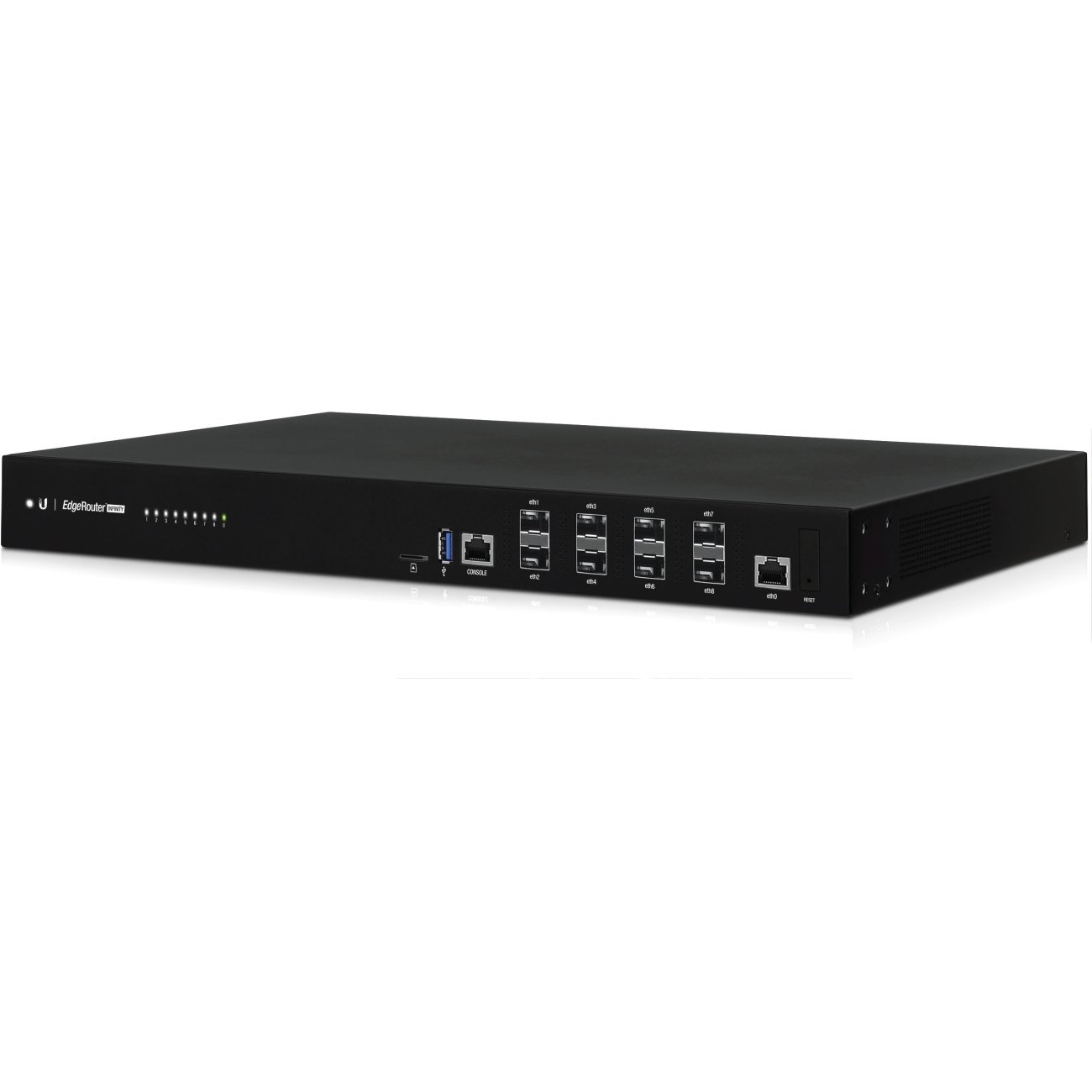

you plug your internet into one port,
you plug an adapter to 10 gigabit into another
or you get a sfp+ nic for your pc
many options
void oracle
so id bride this to my current router or set it up as stand alone and have it going out to my computer through this
bridge
or replace my router with this?
drowsy fossil
replace everything with this
what you should do is try running two speedtests on two pcs simultaneously
if you get over gigabit you know the limiting factor is ethernet itself
void oracle
by ethernet you mean the port on the router limited right?
drowsy fossil
no i mean ethernet in general
your nic, the router's nic, everything
drowsy fossil
network interface (card)
void oracle
ahhh
so duplexing a connection wont help?
cause my router natively allows duplexing
drowsy fossil
im not sure its possible on windows any more
void oracle
what ever you wanan call it
drowsy fossil
pretty sure it requires windows server
and even then i never got it to work
tho i might be an idiot
drowsy fossil
yea thats refering to the actual definition of duplex
void oracle
if its possible would it help?
drowsy fossil
where you send and receive data at the same time on the same cable
void oracle
ahhhh
drowsy fossil
ethernet is full duplex natively
drowsy fossil
yea thats a correct term
but sadly again
only windows server (to my knowledge)
if you can get it working please tell me how you did it
 unreal wedge
cough linux cough
void oracle
hmmm
apperantly intel proset manages it in windows 10
Microsoft requires that you use Windows Server instead, or you'll have to use vendor-supplied drivers that have link aggregation features (such as Intel PROSet tools
unreal wedge
If you have an Intel NIC.
little schooner
ugh dont get me started about intel driver support on windows 10
void oracle
wouldnt this work?
drowsy fossil
sadly i only have one built in nic, the other one is realtek garbage
and?
if the drivers work, why change them?
unreal wedge
Better off using older drivers from ~2014-2017 meant for Win8, where certain features still existed for free in consumer drivers.
drowsy fossil
try it
void oracle

Super User
Windows Server 2012 brought with it NIC teaming of adapters by different manufacturers.
I mean teaming using 1 NIC from say Intel and the other from Realtek. It has been possible to do teaming or
drowsy fossil
see if they fixed it
void oracle
check the bottom
drowsy fossil
void oracle
go down to the bottom
void oracle
it just all has to be done through powershell commands after installing their driver
drowsy fossil
i mean give it a shot
void oracle
also on super user i see one for realtek
drowsy fossil
does your pc have two nics already?
drowsy fossil
a pair of intel nics isnt too expensive
void oracle
if your looking for that driver
ITs in this pdf by them
people on superuser say it works for them on windows 10
on may 8th
Super User
I have a 2 port Gigabit PCIe card from Realtek. How can I team these NICs together to form a 2Gbps link? I tried installing their Diagnostic Program but it only shows information.
void oracle
i mean i might just grab a cheap realtek one
unreal wedge

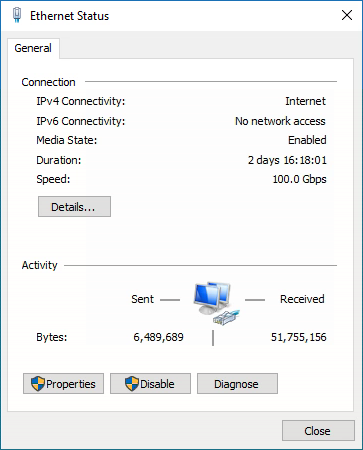 void oracle
JEEEEZ
drowsy fossil
cause my 20 gigabit cost me 50$ total
void oracle
I neeed to get a gigabit card
Ill look at this surplus place for a gigabit adapter
And pair it with my realtek if its a real tek
unless it has 2 ports
i should be able to find a couple
will probably be like 2 dollars to 5 dollars each
quite litterally just a place of bins of equipment
blue totes of psus
drowsy fossil
so heres my question that ive been meaning to ask
i have a network drive on my server, its a ramdisk (as you can see from the benchmark locally on the machine
when i attach to it with this "20 gigabit" thunderbolt networking
i never can get past around 6 gigabit write, and 3 gigabit read
also, why is writing so much faster than reading.
unreal wedge
Limitations of the hardware in between, maybe the network switch.
pseudo blade
That looks like RAM caching.
drowsy fossil
its a ramdisk
or do you mean its caching between the tb network and the ramdisk?
left benchmark is locally on the server, right is over the network well "network"
also 🤤
too bad its completely useless for me
pseudo blade
oh boy $1.99 of savings!
This is not a full wireless card, by the way. You have to pair it with specific Intel CPUs.
unreal wedge
Your fire wallet's funeral. 
waxen scroll
we gonna FIRE at age 28
drowsy fossil
what?
waxen scroll
only old farts like dooley will get that
its young adults aged 28-32ish who think 1 mil in the bank is enough to retire right now
so they attempt to live on 28k a year or whatever so they dont run out
 fallen moat
How is 28-32 considered young adults?
waxen scroll
i mean not close to retirement age
fallen moat
Fair enough
waxen scroll
1 mil in the bank is enough to retire when you're 60-65 and dont wanna live lavish
drowsy fossil
and with social security it shouldnt be too bad
waxen scroll
im waiting for the news stories when im 60 of FIRE people are screwed and working at walmart!
fallen moat
I wouldn’t count on ss
waxen scroll
im not counting on SS however i still have dreams i will get it
fallen moat
Keep dreaming lol
waxen scroll
with SS my target monthly is $13,000
so in theroy without it... i think its $2.5k/m? im still in a good spot
fallen moat
Yeah
waxen scroll
im going to double dip as well
any excess from that 13k is going right back into stocks
xD
excess after housing, bills, etc i mean
fallen moat
Good plan
unreal wedge
You're joking right. Like no one takes what you say seriously anymore...
little schooner
@unreal wedge yeah im joking
And what do you mean by take me seriously?
I give serious answers to people.
On reddit, I helped a sysadmin with a bitlocker issue and he was an sccm admin who appreciated the helpful answer
 urban carbon
Hi why my task manager shows me 10 mbps speed but In chrome and other software shows 1 mbps speed
 sterile rain
@urban carbon Chances are you're on a 10mbps link with only 1mbps actual download speed from your ISP
pseudo blade
Chrome and the like are only showing the download for that application. Could be multiple applications using bandwidth.
sterile rain
Could be that as well
pseudo blade
Another option again: You could be looking at megabytes vs megabits.
sterile rain
But task manager shows your link speed, so either your NIC is only 10mbps or what it is connected to (router/switch) is only 10mbps.
sterile rain
Good point, forgot about that
pseudo blade
You'd hope nobody's using 10base-T nowadays :P
clear igloo
mGig switch requirement hype! 😄
 hallow nimbus
Upgrade from gigabit to 10gbit HYPE
clear igloo
Upgrading to 1903 hype?
little schooner
@clear igloo Perhaps wait it out a little bit until they iron out some bugs
every major release i've ran into strange problems
gui flickering, notifications menu appearing from the right to the left, explorer.exe random restarts
basically things that the developers should of caught during testing
little schooner
@pseudo blade oops that was one of our switch ports operating at 10mbps for one semester
It was a broken twisted pair copper cable
pseudo blade
Ouch.
little schooner
The teacher said "let's not touch anything in case it breaks, I don't want any problems during semester"
But during the break it's fixed
Very easy, just cut off the broken one and make new
daring plover
How can i get a web server to accept forwarded SSL certificates from multiple haproxy load balancers
There is no documentation available for this
 worldly lantern
I'm running 1903 for 2-3 months already, it's stable AF
little schooner
Not for everyone
But for most you might be right
@daring plover maybe you might have to seek professional help from a vendor
daring plover
Yea, caught one of the devs by accident lol
daring plover
Turns out VMWare was causing it
hollow marlin
TSHOOT scheduled for next week. Last one 😬
heavy granite
Xeon is a helpful boi, leave him be ! 
thick minnow
^
void oracle
howdy
so im trying to flash a router to dts mark
anyone have any experience doing this?
tryna turn it into a gigabit network switch with wifi
its a 200$ netgear dual band router
has just been sitting collecting dust
void oracle
alright still have no idea what im doing
thick minnow
which firmware are you trying to flash on?
void oracle
I did notice that it set it to a fucking /24th adderess
thick minnow
Hmm
void oracle
it said 192.168.1.2/24th
void oracle
again when i can actually read what you people are saying i can understand it
but with shit zooming by i cant
thick minnow
x being anything but the router ip, 0, or 255
void oracle
shouldnt i be already connected to it thought
Im connected by wire
And off my normal network
void oracle
welp i tried the config panel and its just erroring
no connection
and telnet wont connect
thick minnow
Do you remember what ip you last set it as
thick minnow
Once you change your computer ip to 192.168.1.X 255.255.255.0
you can try to ping it
it should ping one of those
void oracle
how would i go about doing that?
little schooner
Changing ip on what?
void oracle
yus
thick minnow
if you type in ipconfig in cmd
whats your current ip
for your test computer
Just set it to this and click ok
thick minnow
ohh does your router see it?
thick minnow
hmm
void oracle
would it be 192.168.1.255
thick minnow
No
thick minnow
what did you change before it died
thick minnow
if you connect your test pc to the netgera
and the netgear to your actual router
what happens
void oracle
idk never tried
thick minnow
router --> wan port of netgear --> pc?
void oracle
netgear r6620
i mean 6220
gonna see if i can still reset the settings with the button
thick minnow
Thats a good plan
void oracle
yeah not happeniong
every time i plug it in though it comes up with 5 adderess's when im offline
thick minnow
You know what I do
when I brick things
I buy the same item and return the bricked ones
unethicallifeprotips
void oracle
hey its back
had to switch onto the old subnet after resetting it
so have any tips for making it a network switch @thick minnow
without bricking it this time maybe?
thick minnow
No, I never used wrt
should be pretty easy to google though
ddwrt router into switch
or something
since the UI is the same isn't it
void oracle
so should i put it on the same subnet as my other router?
thick minnow
yes for sure
void oracle
alright
thick minnow
it has to match for sure
thick minnow
don't copy the IP
void oracle
i know