#networking
1 messages · Page 128 of 1
 rocky badge
Yeah
 clear igloo
@rocky badge DAD went to the supermarket for milk 15 years ago ;-;
clear igloo
Reboot it

 white lagoon
yo i need some help
rocky badge
?
white lagoon
my servers underwent a restart as per schedule , (i host gaming servers) and a mates got a page hosted from there and was wondering if i need to run any specific programs to get it going again , built using atom js node and parsec and ssh ? ive checked all the services and they seem to be running \
its not major as sites still under development but itll be handy to know weather its my connection or an oversight on my part not running a particular service or commandline
game servers operational and players are currently active so im guessing its not entirely connection
rocky badge
HMm
white lagoon
my thoughts exactly webs not my area at al;l but im starting to pick it up , friend in the us and im in nz so not keen on bothering him at some obscene hour
 waxen scroll
you lost me at "atom js node and parsec"
i used to run web servers but not all this fancy new shit
all i can say is check netstat to see if its listening at all, if not go into syslog
 slow pivot
@white lagoon I'd check the firewall rules on that machine; that is generally something that is set in memory but then is forgotten to be written out to a permanent config file that gets reloaded on reboot
 high anchor
If everything is started with the rest of your services, it will work without any issues. If not, you(/he ?) could use PM2, which is a process manager built for node (and others too) which starts (and restart if needed) Node apps on boot.
 dry silo
would any of you mind criticizing my website? or is this a bad place to ask?
rocky badge
Sure
dry silo
dry silo
eh
rocky badge
Smaller background, takes ages to load XD
dry silo
it works
 hallow nimbus
Not for me blob lmao
dry silo
ok 😃
dry silo
i try not to
hallow nimbus
Oof ausie thug life
dry silo
XD
 rocky badge
All of them
hallow nimbus
Ooh just got a mail with discounts i love discounts 😄
rocky badge
XD
clear igloo
I hate spam callers
 gritty owl
@clear igloo Hmm, so bought a used Cisco 2921 to study with alongside virl (still working on the build for it), which side is considered the front?
I noticed the PSU is facing with the plastic cover but the ethernet ports are on the other side of it.
Just checking before I mount it the wrong way?
gritty owl
Yeah, that's what i figured. Oh well, pretty plastic will be on the back
Thanks
I'm still stumbling around CLI like an idiot. I'm getting there learning commands...
clear igloo
That's the spirit though, just keep plugging away at it
 subtle glen
isn't that the router linus had before switching to pf sense?
gritty owl
I know he had an old cisco router but I forgot what
subtle glen
from the picture, it seems to be that one
lol btw i would not know which side is the front too xD
gritty owl
haha, yeah, I figured it would be better to ask Lurick there
Though wow, this is actually quieter than I thought. Not as loud as my UPS unit...
subtle glen
linus put the power plug at the front
gritty owl
I was expecting a jet engine takeoff
subtle glen
my ups doesnt have a fan 😄
gritty owl
haha
subtle glen
so the cisco switch is louder
i also removed the front cover of my ups to run 2 wires that connects to 2 additional batteries
subtle glen
yeah, if you have a cheap-ish ups and some batteries....
lol
do you keep this stuff in your bedroom?
gritty owl
Yeah. haha
gritty owl
It's still funny, my family is so used to the noise of the UPS by now
subtle glen
my mom hates the beep of it when the power goes out
gritty owl
when I turn it off one day, we all had trouble sleeping because it's too quiet. lol
Yeah, my mom hates the beep of mine too
subtle glen
like when your house is near a train station
you get used to the sound
mine is not, but still
gritty owl
haha, one day...I will have a small server room I hope
gritty owl
Yeah, that sounds nice
subtle glen
i'd like to have some servers
gritty owl
Indeed. Just have a stack of them
subtle glen
i have 7 pc's without an os and an hdd that could be used for something
i also want a 2U one, i now what i want to put on them, but i dont know how
gritty owl
Haha, I have two 4U super micro servers, one has my PC in it, and one has my server in it.
I plan to get another one down the road for a workstation server
I quite like the server rack life, no more breaking my back to open my old desktop case when my friends want to test that one part of their PC
Now I can slide my servers in and out without effort
gritty owl
Ah, I used to have my PC case on top of my desk...and at one point I got tired of reopening it so I just left the side panels off...
subtle glen
what about a testbench
subtle glen
like when that one fell in that linus' video
gritty owl
haha, yeah
Though wow, with the addition of this cisco router and my new printer, my rack probably will weigh 600-700 pounds...
subtle glen
that i have to convert into kg
gritty owl
haha, sorry, we're plebs in America
gritty owl
Yeah, I have a 45U four post open rack
subtle glen
😱 expensive
gritty owl
currently 2U Eaton UPS, two Supermicro 4U servers, my Canon laser, new Canon inkjet printer, this cisco router, a juniper router, the edgerouter 4 and hopefully a 48 port UniFi switch in the future
Ah, you can usually find the full heigh racks for cheap used
subtle glen
a lot of brands all together
gritty owl
They aren't so loved like the half height ones. I got this rack plus two fixed shelved used for a good price
There's even people on craigslist selling full cabinets for $150...just trying to get rid of them
subtle glen
🤔
i don't have that much space behind my door but i mean, it doesn't open completely already soooo
i might look at them
or instead of that, a good old ikea table
gritty owl
As long as it works
I should take a new picture of my rack when I get everything installed
Older picture...pretend there's a 1U juniper router up top
subtle glen
but all those routers are there just for testing or they are in use?
gritty owl
and yeah, that's my friend's PC on that cardboard motherboard box..haha..
Oh, labbing
The edgerouter 4 is my actual home router though
I bought a USG Pro-4...but got a defective unit
and then the edgerouter 4 launched, was cheaper and faster
so I grabbed that instead
subtle glen
https://www.amazon.it/dp/B00HXT8EUE/ref=psdc_460173031_t1_B00LV8YZLK
i think ill get something like this soon, i dont want to use the isp one
Ubiquiti Networks EdgeRouter ERPOE-5 Ethernet LAN Black wired router - Wired Routers (10,100,1000 Mbit/s, 10/100/1000Base-T(X), Ethernet (RJ-45), IEEE 802.1Q,IEEE 802.1x,IEEE 802.3,IEEE 802.3ab,IEEE 802.3u, 802.1x RADIUS,SSH, IPSec PPTP L2TP): Amazon.it: Informatica
so im not the only one that gets defective things
gritty owl
Yeah, that edgerouter is quite good
haha,yeah, there's giant thread about people getting memory panic USG Pro-4s
The fix was to swap the RAM, but I was like eh...edgerouter 4 and done
subtle glen
i asked my dad for that as a bday gift but instead, he wants to give me money for the raspberry pi kit i bought cause he think its better than the router. "you don't need a firewall, you are not an enterprise, you don't have data to protect, in all those years i never got any virus"
so i guess im getting it by myself
so you got a refund for the broken one right?
gritty owl
Yeah, refund. They wanted to RMA, but I was like...eh, edgerouter 4 is too tempting there.
gritty owl
I just need to buy the rackmount bracket for it (I keep forgetting to buy it)
the edgerouter 4 has a bracket to rackmount it
subtle glen
oh
gritty owl
same with the edgerouter 6
subtle glen
i guess its fine them
gritty owl
Yeah, I probably could live with the USG to be honest, but haha, I wanted rackmount
It tears the old Fios Quantum router apart, that's for sure
subtle glen
now you need one of those 👀
gritty owl
The rest of the WiFi is two AC-Pros, I have a ethernet drop fro a third, but we might expand the house so holding off on installing that
haha, my desk is right next to the rack
those are coo lthough
subtle glen
900 euros
gritty owl
ouch
subtle glen
around 900 dollars i would say
instead of all those good routers, use the isp one 
ItS GoOD
gritty owl
lol
some of my non tech savvy friends are like that
..I'm sad when they leave a bad review on the ISP because the WiFi was bad
subtle glen
i have a pf sense machine and a juniper router, but i still use the isp one
gritty owl
like they firmly believe WiFi quality was tied to the internet speed quality...
subtle glen
lol
gritty owl
I want to make a pfsense one day to play with...but for now focusing on cisco
subtle glen
and then connect all those routers together
gritty owl
yeah, one day...
gritty owl
haha, hopefully tomorrow
I'm waiting on some third party rails for the cisco router here
I don't think I can trust these two ear pieces to hold up this 2U router
I mean the juniper router is already leaning down
subtle glen
yeah i would not trust them too, how can they hold a 15 pound switch or so
when i got this switch there was only one of these things, where did the other one go
subtle glen
i mean, the juniper router also have those things, but that's light weight
rocky badge
@gritty owl woo got my new router setup
subtle glen
pfsense ?
rocky badge
EdgeMAX
gritty owl
Congrats
rocky badge
gritty owl
woot
rocky badge
Final reboot
gritty owl
hope it goes well
rocky badge
@gritty owl I think it works https://img.linusdrop.tips/25b72e3a.png
 gritty owl
Oh, that's awesome
 cinder creek
Canadian Internet at it's best
rocky badge
XD
gritty owl
haha, would have to sell some organs to get that kind of speed in the US (depends where though)
 lean pollen
I think I heard New York 300/20 costs 400 $+ a month?
thats insane
1000/1000 costs 1/4 or 1/3 depending on what company and stuff
(I dont have that ofc)
waxen scroll
i dropped tv. too many taxes/fees/cable box charges
when comcast told me $40/m for internet during check out i was like... OK... we'll see about that
finally they didnt lie...
so i got a big ass tv and no cable
i use chromecast, PC, and blurays on it
clear igloo
Nice
waxen scroll
other people i know that are my age are doing the same thing
the costs for TV are just excessive for what you use
i was watching it like twice a week
 hollow helm
Im getting 300/300 in a week, pretty excited 😄
gritty owl
@subtle glen I got the printer on the shelf
gritty owl
The printer sits on a shelf
gritty owl
Ah, the leaning router there is the one juniper
haha, the printer just barely fits in there
gritty owl
yeah, sliding rails for it would just hit my door. lol
subtle glen
are you done rackmounting stuff?
gritty owl
you can't see it, but it's up at the top
subtle glen
oh
subtle glen
Ohhh, I see it, I see it
Thats a weird rack config
Some tings on one side, some on the other
Ohhhh now I got it
The rack is sideways
gritty owl
Yeah, rack is sideways.
haha, I'm trying to pack as much stuff into the rack as possible
subtle glen
Well, you have plenty of space in there
Can you reach the phone on top of the rack 😂
 proper fjord
 rocky badge
Must. Have. Lower. Ping.
proper fjord
RIP
rocky badge
😄
subtle glen
Faster FASTER
rocky badge
Better than my 4G LTE connection @proper fjord
proper fjord
5G internet
rocky badge
@gritty owl please tell me there's a patch panel on that rack
gritty owl
It's at the top. haha.
rocky badge
Ok good
Hosted by Sprint (New York City, NY) [8.78 km]: 5.348 ms
Testing download speed................................................................................
Download: 3453.26 Mbit/s
Testing upload speed....................................................................................................
Upload: 400.84 Mbit/s
Better?
subtle glen

Speedtest.net
Test your Internet connection bandwidth to locations around the world with this interactive broadband speed test from Ookla
Pfffff
subtle glen
I can do 300 kbps between my pc and my router's nas
rocky badge
Oof
subtle glen
Those are speeds
rocky badge
This good? https://img.linusdrop.tips/14b479c8.png 😛
 rocky badge
Or do you prefer gigabit?
subtle glen
10 gb
rocky badge
Ah, better
rocky badge
Lol
subtle glen
*the phone was between the router's antenna
rocky badge
Oooof
subtle glen
Oooooooof
waxen scroll
Huawei is Chinese spy tech
subtle glen
👀
waxen scroll
Their products are practically banned in the US
subtle glen
Lol
waxen scroll
waxen scroll
I worry when I ship @clear igloo routers overseas
I've shipped to China and russia
Imported encryption tech
subtle glen
Send one here 👀
rocky badge
Lol
waxen scroll
Russia held my router for 12 months
rocky badge
Oof
subtle glen
They put a spyware in it
waxen scroll
God knows if they opened it
subtle glen
WaRRaNty StIcKer
waxen scroll
There isn't one
subtle glen
Great 
waxen scroll
I'm allowed to open Cisco routers and change parts
waxen scroll
Anyone can
subtle glen
Exactly
waxen scroll
There's modules inside that you can buy
subtle glen
🤔
Do you know what does the orange wire carries in an ethernet cable?
I know its something like tx- but I am not sure
 ashen lily

 unreal wedge


 opal hare
Where should I go?
 harsh rose
I'm looking to virtualize a test server environment on my main desktop
I need to be able to have multiple of these running in the background and assign external IPs to each VM
hollow helm
@harsh rose does your ISP give you multiple IP's?
Or do you just mean ports?
clear igloo
@waxen scroll Stop h4xing the stuff!!
waxen scroll
Look up the Ikea table mod
 merry gale
thanks.
rocky badge
I want more Ubiquiti stuff ;-;
unreal wedge
Same.
rocky badge
 waxen scroll
I want more extreme networks stuff
 dense axle
get on mah level
rocky badge
@waxen scroll ExtremeNetworks stuff is nice lol


That IP address
@dense axle my IP address https://img.linusdrop.tips/07772868.png
 rocky badge
XD
 loud lance
You can rent phones digitally? wtf? @dense axle
dense axle
yeah
i dont remeber the name though
it's for developers to test the apps/games on different phones
dense axle
#GoodTimes
rocky badge
XD
rocky badge
XD
 vagrant heath
I would switch to Project Fi.
But Verizon works in the middle of nowhere.
And I sometimes go to the middle of nowhere
rocky badge
Ye
waxen scroll
Fi has us cellular which also works in the middle of nowhere
subtle glen
satellite
 slow sluice
alright bros, need some help with openvpn and accessing the lan via client
I'm able to connect to my vpn server (ubuntu 18.04) outside the network (hotspot on phone) and whatsmyip shows me at my home ip, but for the life of me I cannot get this thing into the lan. goal is to RDP into my desktop
also, I can SSH into my ubuntu server while connected to vpn. literally everything seems to be working right, just can't see other machines on the lan'
 regal chasm
I'm trying to set up openvpn too, and I can't even ping anything
slow sluice
I'm assuming I have something wrong with routing in the client.conf, server.conf, and/or UFW
now that you mention that, I can't ping my ubuntu machine, but I can SSH into using the same IP that I'm pinging
regal chasm
I have pretty much the same thing, sometimes I kinda can access something, sometimes I can't
also when I check my public ip, it's the ip from my hotspot, not home network
When I have problems like this, I'm always sure the problem is in something really smal and stupid
regal chasm
you mean ip range?
rocky badge
Yes
regal chasm
I use 192.168.1.150-192.168.1.254
slow sluice
I'm not following. you're talking about the server right? it's on a linux machine. when I do ifconfig I can see tun0 and it's at 10.8.0.1
rocky badge
Ok, so yeah it's using 10.8.0.0/24, i was gonna tell from the client 😄
slow sluice
yea, client is at 10.8.0.6
rocky badge
ip route run that on the VPN host
slow sluice
10.8.0.0/24 via 10.8.0.2 dev tun0
10.8.0.2 dev tun0 proto kernel scope link src 10.8.0.1
rocky badge
What range is the LAN you want to access?
slow sluice
well that's not the entire output...
10.8.0.0/24 via 10.8.0.2 dev tun0
10.8.0.2 dev tun0 proto kernel scope link src 10.8.0.1
192.168.86.0/24 dev eno1 proto kernel scope link src 192.168.86.201
192.168.86.1 dev eno1 proto dhcp scope link src 192.168.86.201 metric 100 ```eno1 the interface?
slow sluice
yea
rocky badge
sudo ip route add 192.168.86.0/24 dev eno1
regal chasm
I have just these two lines
slow sluice
RTNETLINK answers: File exists
rocky badge
You should have ones for OVPN @regal chasm
@slow sluice ok, so the route exists... hmm
rocky badge
Yes
slow sluice
yea, I'm pretty sure I got my ip tables and whatnot in order, at this point I'm thinking mostly about the config files
rocky badge
Could you put your openvpn config in gists or pastebins?
 rocky badge
Line 120, remove the ;
And follow this guide: https://openvpn.net/index.php/open-source/documentation/miscellaneous/76-ethernet-bridging.html
OpenVPN - The Open Source VPN
regal chasm
so you can actually run bridged setup or tun?
rocky badge
Bridge will use the same subnet as the LAN
regal chasm
So should I better create a new config based on the example?
rocky badge
Yes
regal chasm
should I change anything on server-bridge line, or just leave it as is?
rocky badge
leave as
slow sluice
alright, so I think I got all that setup; I've got the br0 interface, bridge script ran, but now openvpn@server fails to start
systemctl status openvpn@server ● openvpn@server.service - OpenVPN connection to server Loaded: loaded (/lib/systemd/system/openvpn@.service; indirect; vendor preset: enabled) Drop-In: /lib/systemd/system/openvpn@.service.d └─local-after-ifup.conf Active: activating (auto-restart) (Result: exit-code) since Wed 2018-07-25 14:57:22 CDT; 2s ago Docs: man:openvpn(8) https://community.openvpn.net/openvpn/wiki/Openvpn24ManPage https://community.openvpn.net/openvpn/wiki/HOWTO Process: 3020 ExecStart=/usr/sbin/openvpn --daemon ovpn-server --status /run/openvpn/server.status 10 --cd /etc/openvpn --script-security 2 --config /etc/openvpn/server.conf --writepid /run/openvpn/server.pid (code=exited, status=1/FAILURE) Main PID: 3020 (code=exited, status=1/FAILURE)
regal chasm
Now I have no eth0 connection
@slow sluice start it using sudo openvpn /path/to/your/config.conf
slow sluice
Use --help for more information.```👌 got it
so now that all that is done, do I need to change anything in the client.ovpn config? I'm no longer able to connect
regal chasm
dev tap
slow sluice
just tried that, nothing...
regal chasm
I actually can't connect either
rocky badge
What did you set the bridge as?
regal chasm
what do you mean by that?
rocky badge
@regal chasm server-bridge
regal chasm
I left it as is
rocky badge
comment out dev tap0
run iptables -A INPUT -i tap0 -j ACCEPT iptables -A INPUT -i br0 -j ACCEPT iptables -A FORWARD -i br0 -j ACCEPT
run bridge-start
start openvpn
slow sluice
same here server-bridge 10.8.0.4 255.255.255.0 10.8.0.50 10.8.0.100
rocky badge
Well, keep the server bridge
slow sluice
I already ran the iptable commands, but now when I look at ip route I get this 192.168.86.0/24 dev br0 proto kernel scope link src 192.168.86.201 only. is that correct?
regal chasm
same for me
just a different ip
tfw you are trying to setup vpn for 3 days straight
slow sluice
dude, same here. Was up until 4am last night screwing around with this thing
regal chasm
Yea, about same
slow sluice
it's definitely not even worth it at this point. I could just use teamviewer or something, but now I HAVE to figure it out
regal chasm
I actually got a dead ethernet cable as well
rocky badge
hmm
regal chasm
I have to figure it out because I need access to smb, but I don't wanna open access to my smb for public
my client now spits tls handshake errors
rocky badge
Do you mind not using OpenVPN? like it's nice but I don't really like it, you have to have a separate app etc
slow sluice
yea, RDP was my main priority, getting into my samba share was next. glad to see I'm not the only one 😓
rocky badge
wget https://git.io/vpnsetup -O vpnsetup.sh && sudo sh vpnsetup.sh This is what I use 😄

Like this is the client
slow sluice
man...
yea, that looks nice
my openvpn client finally gave me a TLS handshake error. Do I need to make new client keys after changing it to bridged?
rocky badge
Hmm
regal chasm
no
rocky badge
If you didn't change anything in the config with the keys no
Like with that script I set it up in 18 minutes, excluding Debian install times
regal chasm
let's see how long it would take to set up on rpi
lol
can I use my openvpn keys with it?
slow sluice
I actually had this working on a pi a while back. SD card died on me and I've misplaced the thing now. I really don't remember it being this difficult lol
regal chasm
It doesn't work on my windows pc either, but servers on windows are pain either way
slow sluice
so @rocky badge that script really is the only setup you needed to get it up and running?
rocky badge
Depends lol @regal chasm
@slow sluice yes
What I'd do tho, from a fresh Debian install:
su apt update wget https://git.io/vpnsetup -O vpnsetup.sh && sudo sh vpnsetup.sh
su to get root
slow sluice
def going to look into that. you can get to other machines on the LAN with it? none of this bridging nonsense?
regal chasm
i broke my vnc
rocky badge
RIP
slow sluice
how can I remove the ip routing I did when trying to setup openvpn? I'm going to give that script a shot, but I don't want any of this crap to get in the way
nvm I think I got it
rocky badge
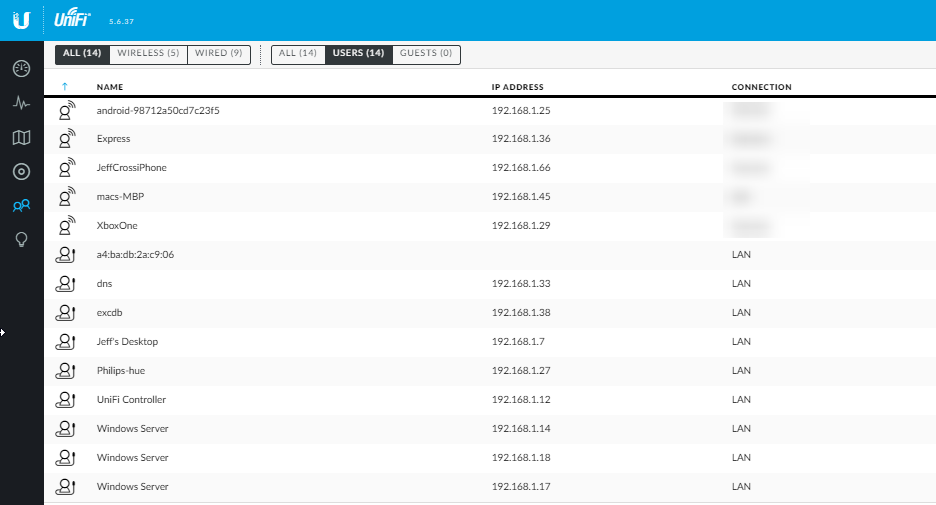
My small network ;-; https://img.linusdrop.tips/ca9de372.png
 loud lance
My small network ;-; https://i.imgur.com/S8Azwad.png @rocky badge
 rocky badge
xD @loud lance
rocky badge
 loud lance
What is that ;3?
rocky badge
EdgeOS
rocky badge
And your UniFi controller is out-of-date
rocky badge
You're on 5.6.x I'm on 5.8.x
rocky badge
And EdgeMAX > UniFi 😄
rocky badge
 rocky badge
 loud lance
worst part about philip hue lights
they cost too much, and everytime you set them up it's endless software updates
ffs
rocky badge
XD
loud lance
like legit
they rob you
then they rob you of ur time
and I own about 13 or so light bulbs and accessories
they love bandwidth too
rocky badge
Nope
loud lance
ah
rocky badge
XD
loud lance
lul
waxen scroll
i just want to say
as an enterprise network guy
all of you not using 192.168 make me cringe
rocky badge
LMAO
high anchor
I may use some 172.x.x.x or 10.x.x.x addresses on my local network only because of VLAN to sort trusted peripherals and IoT stuff.
waxen scroll
why not use the 254 remaining /24s in the 192 space instead?
high anchor
I just prefer to have a full 254 /24 per VLAN, just to be sure that I won't be out of address on any of my subnetwork. It's overkill but at least I can see in 1 sec on which VLAN my device is connected.
unreal wedge
@loud lance Use Debian for server OS.
Ubuntu is bloated, slow on security and feature updates, and is 100% based on Debian.
 tepid oak
this channel include networking of the neural kind?
 raw verge
huh
high anchor
#development would be more appropriate I'd think
regal chasm
@rocky badge yo, thank you a lot for your vpn solution, It actually works, at least on my phone. Now I'll try to set it up on my laptop
rocky badge
Yee, no problem 😄
waxen scroll
Good blob
 indigo lodge
@raw verge i think what @tepid oak was referring to is neural networks
subtle glen
Apparently the bookshelf on top of my "network rack" fell again
At 2 am
My Rpi is under it
That means my 100 mbps switch and my wireless g super expensive modem fell too
😭
 lean jacinth
Alright, so we're upgrading to Gigabit in our house (finally avail in out area) but its going to be going over a standard coax line, we're currently using a 500megabit docsis3 modem (supplied by our cable provider for free) but it costs 29.99 for the gigabit modem rental. Any ideas on a simple coax in, gigabit out, modem?
Doesnt need to have routing in it, i use my own old cisco router to separate my server network and my home network.
unreal wedge
@lean jacinth buy a DOCSIS 3.1 modem and never pay a fee for rental.
Expensive, but you save in the long run
lean jacinth
Any recommendations on brand? was thinking of just getting a netgear but the majority of them seem to have fully fledged routers built in.
lean jacinth
alrighty 😃 thanks
unreal wedge
If you can find it cheaper, this will last for another decade probably. https://www.amazon.com/dp/B01N6SKK1G
lean jacinth
i think i saw some just like this in best buy, with a big intel sticker on the front
unreal wedge
Expensive, but capable of 10GB up and down if the service ever can meet that. That's what DOCSIS 3.1 full duplex is capable of.
lean jacinth
wow, we're just getting gig and now i already want 10 gig
...
whats the point of the modem supporting 10 gig if the only two outputs on it are 1 gigabit ports.
waxen scroll
10Gb modem
no mGIG ports
@clear igloo why does it exist?
how do you advertise 10gb downloads when its impossible with the modem
waxen scroll
no u
rocky badge
xD
waxen scroll
Now you're going to have tape residue on the ceiling
rocky badge
Please let that fall on a person
waxen scroll
no safety
unreal wedge

rocky badge
That doesn't look safe
rocky badge
😄
 bright forge
so i have a question related unbricking my router
i have a wrt1200ac
and i have my ttl serial cable and all that which im using
and i was just looking ofr advice tbh
subtle glen
The network is expanding. 1 second after taking the picture, one of the routers detached
rocky badge
Why...
subtle glen
Next up
 old vale
subtle glen
old vale
subtle glen
This one
Lol someone noticed 😂
Maybe ill use velcro for that switch
Wait a minute, the network is missing a nas
waxen scroll
yes, on your watch
waxen scroll
why would you buy an i3 when i9 exists?
 keen light
My Windows 7 PC isn'T showing other PC's in the same Workgroup. but my Windows 10 pc is showing all of them directly?
keen light
if you dont need it anymore and if the performance is godd for the things you want to usw it, then why not
 autumn estuary
Who tf can afford an i9? O.o
keen light
me?
subtle glen
lz danger
autumn estuary
Where do you work? I wanna job that pays enough to pay off my debts and cover my hobby lol
 thick minnow
Lmao
subtle glen
if it makes me download the 79 GB again, i swear to god
 vestal citrus
Do you guys think I could stream video over Ethernet from one system to another?
Or would I have to do HDMI?
high anchor
@vestal citrus there is some HDMI to Ethernet adapters to carry a stream from a system to a monitor (but I think that you have to connect them directly with one cable), or you could use XSplit NDI feature (that allows you to use a XSplit stream as a XSplit source)
gritty owl
@subtle glen That must be some really good tape. lol
 white coral
white coral
white coral
@digital oyster tell that to the extenders i had previously from them
buggy basic trash
 digital oyster
which ones had you?
white coral
I dont know the models, but i expected better for 40 usd
the only feature this gives me that a cheapo extender with decent radios wont is fastlane
still a cumbersome ui and setup
still no option to bridge connections
no way to integrate with the main router
I spent over 70 bucks for two of them to try and cover my whole house, but it was more efficient to run a long cable from a Power over ethernet adapter and setting the faster of the two i bought up as an access point using a long cable to cover my dining room, kitchen, bathroom and bedroom
subtle glen
@gritty owl one of those almost fell on my head tho
white coral
@digital oyster also got boned by buying a asus rt-ac66u instead of its revision the ac66u b1
so I cant mesh natively with my main router
digital oyster
that's doesn't make it easier indeed
white coral
@digital oyster if i got the b1 revision i could get anothert b1 for cheap and set it up as a mesh network using ai-mesh
gritty owl
@subtle glen Give it some more tape. haha
digital oyster
@white coral should be possible
white coral
@digital oyster the b1 revision of the rt-ac66u has a better cpu which i assume they need for a.i mesh, i have the base model
so this is what I do https://youtu.be/2WkpKs5HGLs
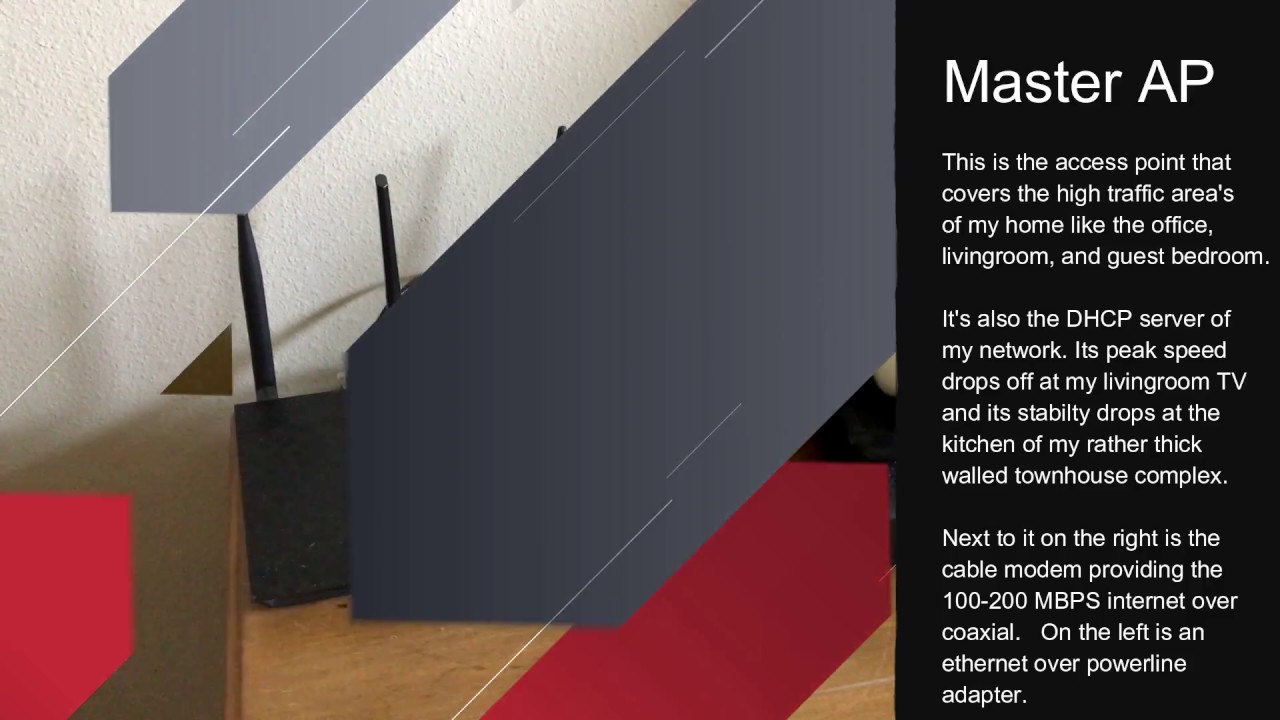
Yes I made a reference to that old series of yours, and no I wont ever be able to forget Linus in a pimpsuit... Yes this was shot on said iphone... we can't ...
digital oyster
if your 1st repeater has the same ssid as the router, you should be able to connect a 2nd reapeater and/or acces point to it just like you would connect it to the router (assuming they use the same protocols and frequency)
that's how i covered my garden
white coral
It doesnt change the fact my iPhone wont autoswap between them
white coral
it thinks its still connected to the master router
gritty owl
yeah, even with ubquiti gear, it's hard to get iPhones to switch
digital oyster
it's a safety feature
white coral
any device i have is the same
it will prefer the wrong network without fail
depending on the side of the house im on
chromebook, android tablet
digital oyster
does your acces point hav the same name as your router's network
white coral
yes
digital oyster
that's weird
white coral
I just want seemless hand off and as good of speeds as I can get
digital oyster
one thing i can advice (it sounds stupid but...) is forgetting the network on your device and then try reconecting
white coral
tried
I wish I had inline ethernet so i could put my router in the center of the house
digital oyster
try going to the ip of your main router (prefer an ethernet device) and see the connected devices
white coral
digital oyster
what brand do you have?
white coral
@digital oyster of what?
digital oyster
router
white coral
I just said the Asus rt-ac66u
digital oyster
yeah srry
subtle glen
i like the asus gui
white coral
 stone lion
I love my asus
digital oyster
well I am not familiar with asus' network gear
subtle glen
i have the RT-N12
stone lion
able to do QoS on it, able to update steam/whatever and watch twitch or youtube without constant buffering
digital oyster
as long as i can download gtav updates in less than 24h iam happy
digital oyster
xd, iam still busy started 11h ago
iam just hoping that the ligntning doesn't hit the electricity converter in the street
subtle glen
wut
digital oyster
it's ligntning here, sometimes electricity dies
subtle glen
ah, you mean the substation
digital oyster
yes, thanks
subtle glen
oh btw, if there are marks with spray paint on a manhole dedicated for phone line, does it mean they will put fiber? 👀
subtle glen
:/ here the 100 mbps fiber is considered like the top
digital oyster
i hav gigabit
digital oyster
on busy moment it drops to 200mbs or so
subtle glen
but still
digital oyster
enough to watch ltt
gritty owl
yeah,300 Mb/s by verizon fios is the top here...and it costs a crazy amount a month
 digital oyster
wtf
gritty owl
I'm happy on 150 Mb/s
subtle glen
@gritty owl what if i attach the cisco switch to the roof with flex tape
digital oyster
should be illigal
gritty owl
it's normal for cable around here...
subtle glen
ikr
digital oyster
where do you live?
gritty owl
@subtle glen flex tape should work. haha
subtle glen
i mean, the max i can have for sure is 30 mbps, but my parents are lazy and don't want to change contract
@gritty owl then if i remove it, i would take the paint with me
@digital oyster Italy, known for its bad internet
gritty owl
eh, it's the ceiling. No one can see the missing paint. jk.
Ouch, that sucks
digital oyster
cant send mpbs to italy, the alps are in the way
digital oyster
the highest point i know is 500m above sea level
subtle glen
im 100 meters above the sea
digital oyster
just enough to cross alps
subtle glen
so we are good
digital oyster
maybe a nuke
subtle glen
you put it high and ill get the signal
digital oyster
to flatten out alps
subtle glen
or we could run our eth cable
digital oyster
nah, to much work
subtle glen
just put a 5 port network switch every 100 meters as a repeater
gritty owl
throw some fiber on the ground. haha
digital oyster
that's the spirit
iam going to take a nap, it's 23h 24min here
*53min, iam tired
gn
gritty owl
good night
subtle glen
no wait
look at my plan
it took a lot to figure this out
that would work for sure
hollow helm
So I got a GT-AC5300 router recently and so far everything about it has been fantastic.
The ONE issue however is that it seems to only have SMB1 support, not SMB2 or higher.
Meaning on windows 10 I have to access my network attached drive via FTP instead which kinda sucks
or use webdrive
 mellow vale
dumm
 harsh coral
I’ve got an discontinued line of Apples AirPort Extreme, roughly how much is it worth (second handed)? AirPort Extreme
Spec sheets available here:
https://store.apple.com/au/xc/product/ME918X/A

Apple (AU)
Airport Extreme lets you connect to a wireless access point. Perfect for home, school or office.
subtle glen
Oh btw @gritty owl , did you got the rails? Is the rack finished?
@harsh coral I actually don't know, I've never used apple networking devices, sorry about that
gritty owl
@subtle glen Ah, I did, but I have to move all of my ethernet cable on the outside of the rack. lol.
My printer can't go back fully because of the ethernet in the rails
harsh coral
Ok, but thanks @subtle glen and @gritty owl
 supple flame
I wish I had more of a gaming router lol I got the standard ISP modem
I get Fiber speeds
rocky badge
lol
 fresh copper
Hey everyone, there are a lot of people on this discord so I figure here is the best place to introduce myself seeing as I am a network guy. I have a small homelab; mostly just and ERX and a managed switch, a few wifi routers running OpenWRT. I do some virtual networking as my main hobby. I have a few VPSs around running VyOS or PfSense. I have my own ASN (AS202313) as seen in my name and a /48. I don't run anything on it right now but I have plans for some v6 transitioning tech for a few people I know with v6 only VPSs. I will have to get a v4 block for that. I might use an AMPR one but I am also thinking of going in for a /24 from ARIN with a friend that we will then tunnel between us so we can share. I also manage a virtual internet exchange that I won't mention in case it be taken as advertising. There is not much point to it other than to see those peer numbers go up on bgp.he.net. In reality it makes routing worse, but those of us on it are not announcing anything we have important services on so it won't matter much. I have a few other projects that are waiting for things. I am going to send some stuff down to Fremont two to use as a mail server and some other stuff. A number of people from one of my networking groups are trying to make a RIPE LIR, we are still working out the details so it may be a while yet.
I am also a part of the hobocolo which is a networking group where we make vpn tunnels (usually gre) to each other and BGP peer over them then host services. We all use private ASNs and RFC1918 space and keep everything separate from the public space routers that some of us have.
If you have read this far you are probably my kind of person. Let em know if you want to chat or peer up.
fresh copper
There is an entire homelab discord out there
First thing I did was search for any instances of BGP on here
maybe I will manage to get some more peers
fresh copper
Real question, anyone on here want to do some BGP/GRE?
vagrant heath
o_o
rocky badge
o.0
 neon bay
Hey everyone. I was hoping that you guys could help me figure out my router problem. So for around about a week or a week and a half my router has been spotty with working. Some days it will work totally fine and then other days, which are the majority of them, the connection doesn't stay connected. This happens on both wifi and ethernet. I tore apart my setup and plugged the modem into the computer and tested it in Windows Powershell and pinged google for a while and none dropped. I plugged the modem into the router and then that into the computer and did the same test and got about 20% on average for dropped. I have rebooted and factory reset and touched every setting that I could think of that might have something to do with it and the problem persists. I have a Netgear Nighthawk AC1900 smart dual band router and I got it in August of last year. It is on the newest firmware. I have tried Netgear's support site and found nothing and I have tried their phone support and they couldn't help bc I didn't want to pay about $40 for phone tech support. Any help would be awesome
unreal wedge
If no updates available, you could try ddwrt, but new router recommended, otherwise update firmware.
neon bay
what's ddwrt?
unreal wedge
Welcome to #networking. Here's your introductory warranty voiding tool. https://dd-wrt.com/
neon bay
lol I'll look into it if I can't find a way to keep it on the warranty
unreal wedge
If it's still in warranty, return it, lol.
neon bay
I got it on amazon a little bit less than a year ago. So I think the return is not an option and i would have to call netgear up and pay $40, for phone support, to have them probably say its not hardware issues
lean pollen
phone support for a product that is in warranty costs money?
I dont thin thats even close to legal here
fresh copper
I recommend OpenWRT as a router firmware for consumer grade wifi routers.
For most of my home customers, if they are upgrading their wifi modem I recommend stuff from Ubiquity. For homes without pre-run Ethernet cabling I recommend the Amplify line. Houses with pre-run ethernet or apartments I usually recommend the Unifi line. Usually AC lites or AC pros; never get the AC-LR and you won’t need the HD or the SHD. Remember, it’s better to have a couple smaller wifi nodes than one large one as devices like phones will have a hard time sending a signal back to the AP even if it can see the AP’s signal.
For an actual customer I will do a proper site survey and discuss needs and much more before making the decision. I really like the Ubiquity stuff but sometimes they are not the right thing for the job
rocky badge
I use AdvancedTomato on my R7000 but my router is an Edgerouter X
AdvancedTomato is in AP mode, aka no WAN, no DHCP, etc.
fresh copper
Yea. Basically same thing for me. I got a could Linksys routers with OpenWRT as basic access points with an Edgerouter X as my main router
It’s sad that EdgeOS does not support DMVPN like a normal Vyatta router would
 dreamy ibex
@fresh copper what do you use for your wifi site survey?
fresh copper
Right now I just use a program called Wifi Explorer. It’s not the best but I am looking into upgrading to something that can look for non-wifi interference. Right now I just have to know what causes interference.
For testing speeds I wire in a NUC and run iperf3
To that from my laptop
I also test from my phone with HE’s network tools as phones often have worse antennas
fresh copper
Yea, that’s really annoying
rocky badge
stupid Safari
 chrome hound
wow Safari sucks what do yuou expect 😛
chrome hound
most moble apps do they are jsut not fully designed
rocky badge
Does this look usable for stats?
chrome hound
hahha Sure!!
rocky badge
XD
fresh copper
The UBNT app is “ok”. You can see some things and configure VLANs and DHCP. Not much else though. If I need to access on my phone I usually just ssh into it and edit it on the backend. Luckily, unlike pfsense, if you edit it on the back end the GUI will update properly
rocky badge
Yeah
For me it just says the config is being updated and in the process of being committed
Then when I commit, save, and exit it reloads the web app
Or tells me to
fresh copper
Yea
It’s pretty good. It is missing some of the full Vyatta features I usually use in VyOS though
waxen scroll
@clear igloo we use cisco cause we're cool
rocky badge
No XD
waxen scroll
pls?
rocky badge
I don't know what BGP is lol
waxen scroll
but you know what ospf is?
rocky badge
?
waxen scroll
oh you
clear igloo
He probably just does RIPv1 all day
waxen scroll
on one subnet?
clear igloo
No, I've got 5 subnets
in the 192.168.0.0/16 space ofc
Upgraded the server and now a disk is dying 😦
rocky badge
I don't use 172 lol
clear igloo
Fail @rocky badge
rocky badge
Lol
fresh copper
You need to get some Border Gateway Protocol!
And OSPF for internal routing
I actually don’t know what OSPF stands for
I don’t use it very much
waxen scroll
yeah, its going to take forever to get that approved
the edges speak BGP to the core BUT then it hands off to eigrp
the cores are not peered up
clear igloo
sheesh, that's pretty cringe
rocky badge
Lmao
waxen scroll
idk why blob is laughing when he dont get what i mean 😦
waxen scroll
im studying for CCNP switch now
 quartz sequoia
clear igloo
quartz sequoia
clear igloo
I need to study for my CCIE DC written again but I'm actually going back to school in Sept
clear igloo
Lol 😛
I already have my CCNA and CCNP R&S
I get a bonus for getting the IE so why not, lol
waxen scroll
for me im going to stop at CCNP (getting it for HR reasons) and pursue other things
clear igloo
Yah, if I wasn't getting a bonus then I wouldn't bother
and work agreed to pay for me to finish my bachelors so I figure now is a good time to do that
rocky badge
@waxen scroll lol
clear igloo
lol
When you know you get to file a near catastrophic bug on Monday and that the BU is going to be really upset 😄 but that also means I have to file a bug on Monday morning =/
Just another reason why log servers are good, even for just some quick duty cycle testing 😃
rocky badge
@clear igloo want my hotspot password?
clear igloo
It's just blob15gr8
clear igloo
lol
fresh copper
I should get a CCNA at some point. I don’t really know what is even covered in it though so I should do some research
rocky badge
I'm just 14 
clear igloo
Don't let that stop you blobby
fresh copper
There is a 14 year old on one of my networking discords who is learning bgp
rocky badge
I know
fresh copper
And other networking stuff
subtle glen
Good to know @gritty owl and no problem @harsh coral
vagrant heath
@fresh copper since you seem to know way more then me. I got a Netgear X10 on the cheep. What firmware do you suggest I run?
fresh copper
I personally like OpenWRT (which merged with LEDE a while back) for those kinds of routers but I know a lot of people who like Tomato.
Should be able to google for most things but if need any help let me know. A quick google shows me that the Netgear X10 should be one of the easy ones to install it on. Here is the OpenWRT quick-start guide if you decide to go with that: https://openwrt.org/docs/guide-quick-start/begin_here
unreal wedge
OpenWRT's supposed to be more difficult than ddwrt.
fresh copper
Basic stuff is easy with the GUI
I guess more advanced stuff does require cli on OpenWRT whereas others you can do the stuff in gui
I jumped into OpenWRT with a lot of cli experience already so it was not too bad
Not that you really need the cli much
I used it for setting up OpenVPN, Policy routing, and VLANs
They have changed the interface a couple of times recently
Especially if you use the experimental versions (I don’t recommend it most of the time but I have it on one of my routers due to special situations)
I am happy to help with any of the firmwares. Just @ me or DM me
vagrant heath
Tomaro does not support the X10. Different cpu
fresh copper
I didn’t check the Tomato compatibility list but I guess that makes sense. I find that OpenWRT has the larget number of supported routers and even some that are not supported have community builds
unreal wedge
Again, I can't prefer openwrt.
subtle glen
Its not on ac
waxen scroll
uh huh
subtle glen
Its just pushing room temp air
hallow nimbus
Tf all that shit?
subtle glen
eth cables
hallow nimbus
And a switch but all that other shiit
unreal wedge
So it's a clicky Rpi
hallow nimbus
And a zillion cables
hallow nimbus
Yes i know but why do alot of then look like they are too long
subtle glen
Thats right lol
Im using a 20 mt eth cable to connect an ap that is like 6mt away
They look too long cause they are too long
vestal citrus
Can anyone help me with obs?
I can’t get it to look not grainy, I have an 8700k and my cpu preset is medium and bitrate is at 8000
And it still looks bad
unreal wedge

Thanks to Elgato for sponsoring this video! Learn more about the Elgato Cam Link on Amazon: http://geni.us/d3QA It's important to choose the correct bitrate ...
subtle glen
huh?
 torn stump
ubiquiti aircube vs unify ap lite? For a home network from a nerd? I guess ap lite, or would work the aircube just as fine?
bright forge
could someone help me with understanding how to set up ddwrt? I have a linksys wrt1200ac and ive been struggling to understand how to get it onto my router. (i have this server on mute so you made need to @ me to get my attention.)
unreal wedge
@bright forge basically flash it like you're doing a software update. There's specific details on the ddwrt site about how to do it for your particular router.
Getting back to a stock firmware isn't easy though.
*and your hardware has to have the right specs to even support DDWRT.
unreal wedge
Use the factory image to flash the router, then the second one to flash over the factory to ddwrt
IF you don't know how, you shouldn't be doing it, or need to do a lot of research first.
bright forge
i have been believe me and im still confused
so what exactly does the factory image do
unreal wedge
I know how to unbrick a bad flash with a jumper. You don't exactly have that hardware on hand. Not many do.
You know that panel you go to to setup the router.
bright forge
actually ive unbricked it twice after failing
unreal wedge
Like 192.168.1.1
bright forge
yes
unreal wedge
*and you got lucky
You upload the factory.bin file to the update page in there.
Every router I've had to unbrick has had to be taken apart and jumped over serial.
bright forge
^ thats what i had to do
 bright forge
i bricked my router via trying to install ddwrt but failed (cause i didnt look further into it)
unreal wedge
Once the new factory bin has flashed, wait at least 5-15 mins before powercycling the router.
bright forge
powercycling as in just turning it off and on again?
unreal wedge
Yes. Once that's complete, upload the second bin to the ddwrt firmware's update page and let that sit 5-15 minutes. Then powercycle.
bright forge
alright
one question: when doing the factory bin, does it matter what version of the router's firmware is on it
unreal wedge
Once that's complete, you should be able to fully access the router under the new ddwrt firmware.
USE THE RECOMMENDED BUILDS FOR YOUR ROUTER!!
If you dabble in the beta builds, you may end up with a brick.
Usually the routers stock firmware version won't matter
*unless the later versions lock it down so ddwrt cannot be flashed normally.
bright forge
cause my wrt1200ac is currently using the latest version
unreal wedge
In which case, you'd flash over serial if it locks ddwrt out, but Linksys usually doesn't.
Brands like Buffalo usually do. Even Netgear doesn't lock their routers, nor ASUS or Ubiquiti.
bright forge
so bin, wait 15 minutes, power cycle, webupgrade, wait 15 mins, powercycle?
unreal wedge
Yes.
unreal wedge
Only way you don't wait the full 15 mins is if you're 100% certain the upgrade finished. If you're not completely certain, wait out the 15 mins.
Keep the jumper and serial console at-ready with a fresh stock firmware image on hand incase you mess up.
bright forge
i dont have the stock firmware image only the latest
unreal wedge
I've had to unbrick too many routers, lol.
Get a "stock" copy. Stock can be latest, that's fine.
Firmware for your router can be found here https://www.linksys.com/us/support-article?articleNum=156197


MAKE SURE THE VERSION OF DDWRT YOU'RE USING MATCHES THE HARDWARE VERSION OF YOUR LINKSYS ROUTER!!