#networking
1 messages · Page 95 of 1
 pulsar dawn
pulsar dawn
pulsar dawn
^^ which is probably why my upload is 100mbps
 shut geyser
I feel like a dope asking this, but my setup is not working. I have Trendnet Unamanaged switch (TEG-S5091). I have a patch cable (CAT6 ) from my eero Max 7 router to the 10G SFP+ port that has as SFP+ to RJ45 adapter in it.
The switch does not show a signal coming in from the router to the 10G port--and obviously no device attached to the switch can reach the internet.
Do SFP+ adapters not work unless there are 2 in the system?
 clear igloo
shut geyser
I feel like a dope asking this, but my setup is not working. I have Trendnet Un...
clear igloo
shut geyser
I feel like a dope asking this, but my setup is not working. I have Trendnet Un...
Are you plugging the cable on the eero side into the 10G port or the 2.5g port on the eero?
If yes then there isn't any logical reason the 10g switch side wouldn't see signal with the SFP+ to RJ45 adapter in it
If you move the same cable to a 2.5g ports on the switch does it come up? What about 2.5g switch to 10g eero?
shut geyser
clear igloo
Are you plugging the cable on the eero side into the 10G port or the 2.5g port o...
connected from the 10G port (eero) to the 10G SFP+ port (switch)
I am messing around with port combos as I am trying to rule out that the 2nd 10G port on the eero isn't having an issue.
 opal pagoda
shut geyser
connected from the 10G port (eero) to the 10G SFP+ port (switch)
I am messing a...
opal pagoda
shut geyser
connected from the 10G port (eero) to the 10G SFP+ port (switch)
I am messing a...
have you verified that sfp+ to rj45 transciever works?
shut geyser
Well, damnit. It seems like it's one of the 10G ports on the eero router is simply not working.
I am really really hating this router.
Gonna have to call the ISP, I think, since they provide the router.
shut geyser
opal pagoda
have you verified that sfp+ to rj45 transciever works?
Yes. That does work. I didn't realize that they get so damn hot, though.
opal pagoda
shut geyser
Yes. That does work. I didn't realize that they get so damn hot, though.
yes cool it
shut geyser
opal pagoda
yes cool it
just point a fan at it?
opal pagoda
i have seen a mod before, it basically uses termal pad on the inside of the switch to couple the sfp cage to the metal case
shut geyser
opal pagoda
i have seen a mod before, it basically uses termal pad on the inside of the swit...
great. More stuff to buy. LOL
opal pagoda
lol, someone made a cooler on a small DAC extension cable
https://www.printables.com/model/896841-passive-sfp-module-cooler
 shut geyser
my goodness
opal pagoda
alternativly maybe you can do this

rj45 transcievers have decent sufrace area outside of the switch
shut geyser
they do. They stick out pretty far.
 fervent brook
I just bought a WiFi7 AP and I dont even have any WiFi7 devices
 nova glacier
does it at least have 6GHz?
fervent brook
nova glacier
does it at least have 6GHz?
I dont think so
nova glacier
oof, 6GHz is more impactful than WiFi 7 over WiFi 6
fervent brook
nova glacier
oof, 6GHz is more impactful than WiFi 7 over WiFi 6
it was 20 dollars...
 stuck grove
nova glacier
oof, 6GHz is more impactful than WiFi 7 over WiFi 6
stuck grove
nova glacier
oof, 6GHz is more impactful than WiFi 7 over WiFi 6
wifi7 isnt wifi7 without the 6ghz band
nova glacier
stuck grove
wifi7 *isnt* wifi7 without the 6ghz band
Unfortunately, they made it optional
stuck grove
fucking what now
nova glacier
seriously, it's a fucking mess
sort wifi 7 routers by price and you'll discover practically nothing cheap includes a 6GHz radio
stuck grove
if i see a single brand sell wifi7 anything without 6ghz i’m gonna TP whoever’s house that was who had the idea
nova glacier
pretty sure every single brand's lowest tier wifi 7 ap lacks it
so better buy that tp in bulk lmao
 ornate jungle
stuck grove
fucking what now
ornate jungle
stuck grove
fucking what now
It's like how USB-C only has to support a subset of everything the spec is capable of.
"Oh, you want use another display over USB-C? Ha-ha, too bad; your laptop does not support that!"
stuck grove
ornate jungle
It's like how USB-C only has to support a subset of everything the spec is capab...
that i mildly tolerate, but that's like if USB 4 could be 10GB/s and still be USB4
for Wifi7 without the 6ghz band
like at that point what differentiates it from wifi6?
nova glacier
320MHz is also optional and frequently missing from cheap APs. Even 4096-QAM is optional, but ig we can be thankful that's still usually in cheap devices
stuck grove
320mhz being optional is also tolerable, since you still get the uncongested 6ghz band, but no 6ghz band is a massive deal breaker
idc if you have 640mhz bands at 5ghz, it's still gonna be congested
nova glacier
stuck grove
like at that point what differentiates it from wifi6?
20% higher bandwidth due to 4096 QAM, MLO, FCU (hole punching), and MRU (OFDMA with gaps between subcarrier groups)
Like I mentioned 4096 QAM is technically optional too, but the latter features are mandatory
stuck grove
ok that is decently improved, glad to see MLO is still required
nova glacier
It's still sad that you can get wifi 6e ap that ends up being higher performance yet potentially cheaper
ornate jungle
stuck grove
like at that point what differentiates it from wifi6?
Algorithms. (MLO, OFDM/A, anti-interference tactics, MDMA, MGMT) no, wait, scratch those last 2 items...
stuck grove
i hate when "standards" are like 50% optional features that are extremely critical to the performance it advertises
and that seems to be becoming more and more of a trend
nova glacier
ornate jungle
Algorithms. (MLO, OFDM/A, anti-interference tactics, MDMA, MGMT) _no, wait, scra...
I'm ecstatic about the second to last feature
stuck grove
ornate jungle
Algorithms. (MLO, OFDM/A, anti-interference tactics, MDMA, MGMT) _no, wait, scra...
it is so hard to google "MDMA" and get anything about wifi
ornate jungle
stuck grove
and that seems to be becoming more and more of a trend
I just wish WiFi manufacturer's were LEGALLY barred from doing crap like this. https://www.wiisfi.com/#routerhype
The bottom line: The AX#### naming convention AX6000, AX11000 and AC#### naming convention AC1900, AC2600, AC5300, AC7200 used in the router industry where the #### is a maximum combined Mbps for all bands is nothing more than marketing hype / madness.
https://dongknows.com/how-wi-fi-works-and-false-marketing/
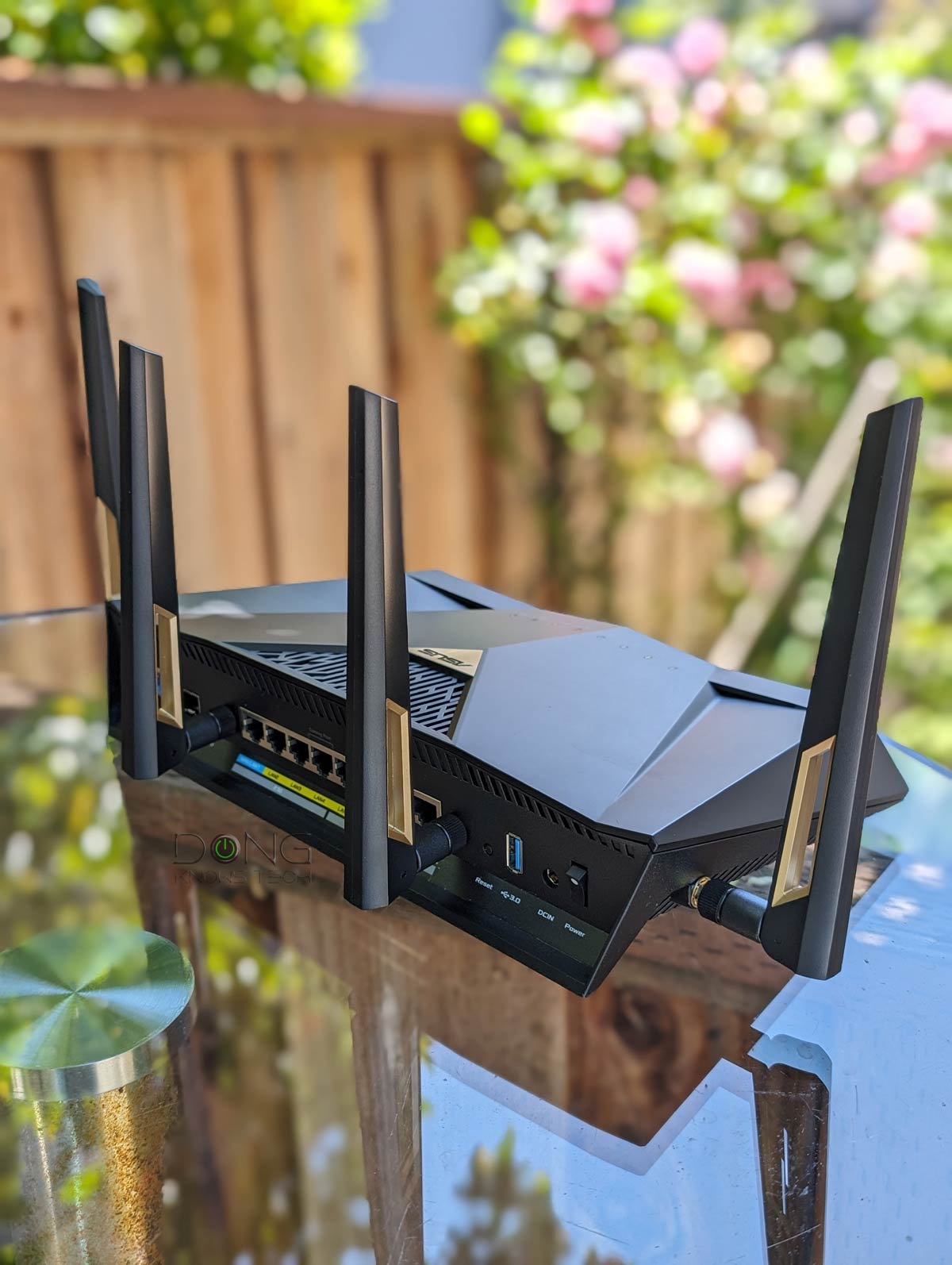
Disappointed by your latest and most expensive Wi-Fi router? Here's how Wi-Fi works and tips on weeding out hardware vendors' false marketing language.
stuck grove
It should be deemed as false advertising and punished as such
nova glacier
sum up all the numbers because bigger number better ofc. reality be damned
stuck grove
it's so hard to get excited about new wifi tech when it's impossible to know how it will actually perform until it comes out, regardless of how many numbers they give you
nova glacier
The specs are also paid access until a few months to a year after it becomes an non-draft standard. I can't even check the standard to get past all the bs. All there is is manufacturer claims, presentation powerpoints from conferences, and similar to try glean what the standard really is
802.11be is now out as 802.11be-2024 but it hasn't reached GET yet. They did push 802.11-2024 to GET though, but the amendments added were already available spearately in GET anyways (ax, ay, ba, az, bd, bb, and bc)
if you didn't know about GET, very cool program ^^

 twin pier
you're probably hitting the limit of your cable and networking hardware (1 gigabit)
twin pier
probably your ISP gives you lower upload limit than download
pulsar dawn
must be
 frail inlet
I'm looking to set up 2 different services on my Arch Linux VPS. I think what I need is a "site-to-site" vpn basically I want a reverse proxy from my VPS to my home network I can connect to so I can connect to my home network from anywhere.
Secondly I want to create a VPN service that I can host for my friends and myself to the open internet. I would like for this to have some sort of users or logging so I don't have clients being shared everywhere and perhaps it could be cool to implement some sort of DNS blocking for adblocking, allthough this is not a requirement at all.
I'm not experienced here at all and was hoping that you guys here knew a good solution to this. I'm using dockge already for hosting all my other things and would hoping to find a solution I could also manage with dockge.
I've heard that wireguard is a fairly common and good solution and already has many different solutions such as Pritunl, WG-Dashboard, etc.
Is there anything you guys would recommend?
 pastel monolith
Wireguard is the right direction for managing the VPN yourself. Some simpler options could be use "tailscale" to share access to a VPN and handles some DNS (usually for better sometimes for worse). Other thing I use and think worth checking out is "pangolin" it's really the auth pieces using badger a plugin for traefik and uses lets encrypt to get certs but acts as reverse proxy from a cloud instance to local with websocket connection over the VPN tunnel for the traffic
Pangolin and tailscale both using wireguard for the VPN portion specifically but with extra parts for handling auth/user accounts and other things
Guess one downside with reverse proxy from the cloud worth mentioning is the traffic is all going through that server to get to/from your local so do need to be somewhat mindful of bandwidth/total use, depending on the services you're proxying.
frail inlet
pastel monolith
Wireguard is the right direction for managing the VPN yourself. Some simpler op...
Then I might look at headscale as it's basically same for free 😅 (From my understanding). But I'm already hosting traefik with e..g, vaultwarden, so that should be fine
pastel monolith
ah tailscale has free for 3 users 100 devices pretty sure but ya know either way, if want to have a self-hosted thing pangolin probably worth looking at too, it mostly just takes the pieces you're already looking at and combines them and adds interface for managing users or temporary logins etc. pretty sure enterprise features to it or something but tbh for my use cases has been fine and not annoying about upselling (they say some OIDC providers part of the enterprise stuff but at least Google OAuth already works with free version, but can just setup accounts or share by IP or PINs so it's pretty flexible)
oh limit on sites I guess but again I just use a bunch of subdomains for my self hosted stuff and sort of non-issue
frail inlet
@pastel monolith I think I'll try to check out pangolin. It seems like this might have everything that I would want or need. Has reverse proxeis and says it is identity aware
 meager ginkgo
frail inlet
<@470799294954471425> I think I'll try to check out pangolin. It seems like this...
meager ginkgo
frail inlet
<@470799294954471425> I think I'll try to check out pangolin. It seems like this...
I use Pangolin and love it
fervent brook
stuck grove
wifi7 *isnt* wifi7 without the 6ghz band
For sure/ I'll be more carful next time(like how N150 was?
fervent brook
stuck grove
it is so hard to google "MDMA" and get anything about wifi
MDMA sounds like Collision Detection Collission Avoidance, but I know Collision doesn't start with an M
stuck grove
when you google mdma all you get is the psychedelic mdma
frail inlet
frail inlet
<@470799294954471425> I think I'll try to check out pangolin. It seems like this...
AI said the following...
Yes, you can integrate Pangolin with your existing Traefik instance managed by Dockge, but it requires custom configuration rather than running Pangolin's bundled Traefik.
Challenges
Pangolin's standard Docker Compose setup deploys its own Traefik container with network_mode: service:gerbil, binding ports 80/443 to Gerbil for tunneled access, which conflicts with your existing Traefik. Users report issues routing Gerbil VPN IPs through an external Traefik without fragility, as binding networks tightly couples services and risks downtime for your other sites if Gerbil fails.
...
```
I'm not sure if this is correct, but I'm using Traefik already for all my self hosted services and reading into pangolin, it doesn't integrate well into an already exising Traefik instance. I'm therefore now checking into headscale silent flax
twin pier
you're probably hitting the limit of your cable and networking hardware (1 gigab...
silent flax
twin pier
you're probably hitting the limit of your cable and networking hardware (1 gigab...
to be honest, it could be on the router side. I have 1000mbps down ISP plan, i was getting 900-930mbps. For december, they gave everyone a temporary upgrade, with 1200mbps down ISP plan the same hardware now suddenly does 960-1000Mbps. So it could be easily a limitation on the router side
 cunning lion
Hmm had a thought for a NAS/DAS cache setup can you take 4 NVME ssds and do something like this with them?

So you get both speed increase and prarity
twin pier
silent flax
to be honest, it could be on the router side. I have 1000mbps down ISP plan, i w...
Means that your hardware was already capable of 2.5 gig or something
clear igloo
cunning lion
Hmm had a thought for a NAS/DAS cache setup can you take 4 NVME ssds and do some...
That's called RAID10
silent flax
clear igloo
That's called RAID10
not to be confused with RAID 0+1, which not to be confused with RAID1 😄
clear igloo
silent flax
not to be confused with RAID 0+1, which not to be confused with RAID1 😄
True, I forgot all about 0+1 which actually, in hindsight, might be more akin to what the picture describes
I almost never hear about 0+1 so I could be wrong on it's implementation
silent flax
 clear igloo
ok, so 0+1 is what they were describing then 🙂
 clear igloo
Yup, I was just about to say
stuck grove
silent flax
RAID 10 is preferable due better reliability against disk failures
It’s a bit more performant than raidz2 isn’t it?
assuming the same number of disks, and two vdevs of raid1
pastel monolith
frail inlet
AI said the following...
```
Yes, you can integrate Pangolin with your existing ...
Oh yeah it's like a "Everything and kitchen sink" kind of solution where it has it's own traefik instance for managing the set of sites/redirecting and for handing the auth checks ("badger" plugin for traefik does that part from what I gather) so you just start clean slate with it on a new instance and if go through the "Regular setup" (I followed a Youtube guide mostly but their docs are not bad when needed).
On the server end up with three containers running though:
- server for pangolin web interface/server components
- "gerbil" which high level understanding is it manages the wireguard tunnel creation, when a "newt" (service run wherever the "edge"/actual service is running you want to proxy to is) contacts the pangolin server (with credentials) it creates a secure tunnel (between the newt and the gerbil... cute) and then uses a websocket connection over that VPN tunnel for proxying the traffic.
- traefik - handles TLS termination with certs created with letsencrypt/certbot and redirecting traffic based on domains to the appropriate service
So things you need to do to make it work are basically 1. make a wildcard TLS cert for your domain (certbot can do with manual domain verification) 2. point domain/subdomains at the pangolin server 3. setup sites (domain point to service) on the pangolin web interface and "newt instances" to run wherever you want to proxy stuff to... you don't have to do 1 but having TLS cert for domain to use for all the services locally makes life a lot easier (don't need to disable TLS everywhere or have everything web accessible to use the certs if make manually).
If just after the VPN+user management then headscale probably simpler setup to some degree but ya know pretty close to same underlying tools and whatnot (pangolin just offering the "simple reverse proxy" beyond just VPN tunnel management)
nova glacier
stuck grove
It’s a bit more performant than raidz2 isn’t it?
You can generally assume any non-parity raid will beat a parity raid at least at IOPs. It would also have higher max throughput but whether that matters would depend on the combination of hardware.
nova glacier
RAID 10 in particular should be the highest theoretical throughput assuming unimaginably fast CPU, memory, and zero shared buses; 2x write and 4x read. I don't have enough of the same drive (or m.2 PCIe carrier) to benchmark how close to that theoretical is achievable. I think in practice it falls quite short
It's a bit off-topic to networking (but hey it's technically a switch), but this reminds of a crazy broadcom card I saw recently.
PCIe 4.0 x16 host interface and 32 PCIe 4.0 lanes intended for nvme (8 x4, 16 x2, or 32 x1) over SlimSAS connectors.
https://www.broadcom.com/products/storage/nvme-switch-adapter/pcie-gen-4-switch-adapter/p411w-32p

Enable Enterprise Class x4 NVMe Acceleration and Caching Solutions
cunning lion
@silent flax @clear igloo @nova glacier I was thinking Raid 01/10 one or the other doesn't matter which honestly for the CACHE drives and Raid 5 for the main NAS/DAS setup
nova glacier
Apparently even the megaraid 96xx series can do PCIe nvme over their SlimSAS connectors. I had assumed they only meant nvme protocol support, not actually PCIe on the storage interface side. They're not a switch though so x16 host to 16 lanes of storage PCIe interface to divy up
cunning lion
So hopefully the data won't stay in cache for to long before being pushed to the hdds
nova glacier
I'd personally recommend raid6, but it's up to you
Maybe even raid 7
RAID 6/7 I suppose
frail inlet
pastel monolith
Oh yeah it's like a "Everything and kitchen sink" kind of solution where it has ...
I actually managed to get headscale set up, but I literally hated how the /admin was intended to be exposed and how everything is behind a magically generated api key that is valid for 3 months. Perhaps I missunderstood it, but doesn't feel right
Looking into netbird rn
frail inlet
So I got wg-easy set up. Works perfectly fine. I can make clients very easily, but is there a way I can get more logging per client?
cunning lion
nova glacier
Maybe even raid 7
RAID 6/7 I suppose
For 5 8tb hdds?
 vast saddle
Yuck. Asian telephone lines

They don’t even bother to take down abandoned lines and use messenger wire and lashing to bundle existing fiber/coax cables
This is what we use in the USA when lashing cables
 stuck grove
vast saddle
Yuck. Asian telephone lines
stuck grove
vast saddle
Yuck. Asian telephone lines
the fact it's strewn above with high voltage wiring is fucking insane
vast saddle
This is just so much cleaner
 vast saddle
stuck grove
the fact it's strewn above with high voltage wiring is fucking insane
vast saddle
stuck grove
the fact it's strewn above with high voltage wiring is fucking insane
Ikr
Here in the USA we have distance requirements between electrical lines and telecommunication lines
opal pagoda
vast saddle
This is just so much cleaner
still ugly compared to underground install
opal pagoda
vast saddle
Here in the USA we have distance requirements between electrical lines and telec...
thats because in US and canada medium voltage is distributed on the street poles and almost every house has its own medium voltage to 240/120 transformer
in europe 400v 3 phase is distributed using insulated cables from a much larger transformer, much less danger than having bare 13.2KV line dangling above your head
ADSS cables used for ftth doesn't have interference from mains, while you have posted everything from coax to fiber with integrated power distribution which is definitely not ADSS and mains definitely can cause interference with it
silent flax
vast saddle
They don’t even bother to take down abandoned lines and use messenger wire and l...
you don't bother removing poles tho
 silent flax
my ISP just got bought by the biggest cell network operator, we will see in few months how much worse or better it gets
nova glacier
cunning lion
For 5 8tb hdds?
RAID 6, yes. I only mentioned RAID 7... cause uh 6 7
 random siren
silent flax
my ISP just got bought by the biggest cell network operator, we will see in few ...
random siren
silent flax
my ISP just got bought by the biggest cell network operator, we will see in few ...
increases of atleast 10% exactly one year from the date of the merger
 harsh comet
Got some free network gear recently lol


 rocky badge
@clear igloo @waxen scroll is this overkill for my lab lol

 waxen scroll
you should get a generator
nova glacier
jesus, that's over $2/Whr. Even for a full system with inverter that's wild. Brand new systems from ecoflow/jackery/etc are around $0.50-0.70/Whr
nova glacier
ig that's what they call the rack tax
 cosmic pilot
Where should I even start with trying to get an acceptable network connection to this whole property


The goal is to run a bunch of cameras within that area and the connection is terrible once you get like 50ft from the ap and this seems completely beyond the scope of a bunch of mesh nodes
It's just so much larger than anything I've ever done
Cameras in any area that go past like -75dbm essentially will not function
stuck grove
a good 2.4ghz directional AP
cosmic pilot
stuck grove
a good 2.4ghz directional AP
My biggest problem is that I need internet inside and outside of the buildings and they're sheet metal of course
Which is why the connection is so bad on the south side
Agricultural construction techniques and wireless networking are such a terrible combination 
stuck grove
You’d need an omnidirectional AP inside each shed
you can do direct burial ethernet runs if you need to
just make sure you get cable that is rated for that
cosmic pilot
stuck grove
you can do direct burial ethernet runs if you need to
I wish the property owner would've done that because he literally JUST had these buildings put up
I'm looking at ubiquiti stuff right now and I'm just hoping he doesn't complain about pricing
rocky badge
Trying to do a stupid port forward
WAN -> UDMP -> VM with WireGuard tunnel -> OPNSense with WireGuard Peer -> VM
Stuff behind the UDMP can access the end VM but I can't port forward out to the Internet
I don't see anything obvious that is blocking
UDMP has static route to stuff behind OPNsense through the WG tunnel and opposite end the same
hgmmm
 opal pagoda
rocky badge
<@291198741862416384> <@186123993412141057> is this overkill for my lab lol
opal pagoda
rocky badge
<@291198741862416384> <@186123993412141057> is this overkill for my lab lol
at the price of that PDU you could get a automatic transfer switch pdu
opal pagoda
cosmic pilot
My biggest problem is that I need internet inside and outside of the buildings a...
drill hole through sheet metal, have a mesh node outside and a AP inside
 steel cove
I understand why people like unifi now, swapped from mikrotik

 shut stag
i love ubiquiti
 faint sequoia
Any suggestions or point me to research on fall back cell connection router?
opal pagoda
i use tp link er605 to do it
works well
if you get infinite GB on the sim card you could even load balance
faint sequoia
opal pagoda
if you get infinite GB on the sim card you could even load balance
Will check it out
 wet wigeon
faint sequoia
Any suggestions or point me to research on fall back cell connection router?
wet wigeon
faint sequoia
Any suggestions or point me to research on fall back cell connection router?
check out ubiquiti's new 5g lineup if you're in their ecosystem
5g too if you care about that
 pseudo blade
I want to like it, but not entirely sure yet
Retaillers here so far want $400 AUD??
5 2.5gbps ethernet ports
2.4GHz, 5GHz, 6GHz WiFi7 and Thread? But no EMLMR, and possibly limited bandwidth on the 5 and 6ghz
1.1GHz 4-core CPU (allegedly NAT and whatnot's going to happen in hardware though firewall particulars and bridging for WiFi's obviously not)
2GB RAM and a concealed flash drive bay for media sharing over the internet using a baked-in app and containers
Looks like it's supposed to be closer to $270 AUD/$179 USD based on international pricing and it's a much easier buy at that price than $400
Still a device built to a price with annoying caveats but possibly a lot closer than previous offerings, need to see the real-world outcomes
nova glacier
pseudo blade
5 2.5gbps ethernet ports
2.4GHz, 5GHz, 6GHz WiFi7 and Thread? But no EMLMR, and ...
MLO is mandatory for WiFi 7 certification. Do you just mean it doesn't do EMLMR? Effectively all client devices are still just two radio so there's extremely little value for that version of MLO besides backhaul between mesh APs.
pseudo blade
nova glacier
MLO is mandatory for WiFi 7 certification. Do you just mean it doesn't do EMLMR?...
Rings a bell and I may have conflated the two
nova glacier
There's a great deal of misinfo surrounding MLO. Many folks online seem to be under the impression that EMLMR is necessary for "true" MLO, and while that's technically true w.r.t. marketing claims, it's not really gonna do anything unless client devices start packing more radios. Which seems improbable given how long they've had just 2 radios, barring that short period where there was a 3 radio chipset used in one generation of macbooks and dells (BCM43602)
pseudo blade
I know my phone and laptop won't do it anyways
nova glacier
though I will admit backhaul is a great use for it and that should be highly viable since routers/APs typically contain quite a number of radios
pseudo blade
I want something to replace my hackjob setup of a WiFi 5 4x4 ISP router with LAN>WiFi bridge misused to make an AP with an ethernet-only Mikrotik hEX
I'm hoping this will pop up somewhere at a decent price after it's properly released and also doesn't totally bomb reviews
Otherwise when I finally tire of WPA2 and WiFi 5 I may just give up and go for a UDR 7 or x86 and a UAP if I must pay out the nose for a decent router anyways
vast saddle

Got this as a Christmas present. Awesome.
894 pages of networking information. 100 pages of useful stuff
stuck grove
buying a physical book to learn about networking is a bit ironic
opal pagoda
stuck grove
buying a physical book to learn about networking is a bit ironic
How else are you going to access the internet
stuck grove
they should give you a set of blank punchcards so you can have somewhere to start
opal pagoda
1km spool of wire so you can start from telegraph
pulsar dawn
Does type c to Ethernet work on android tablets and does it take too much power?
opal pagoda
pulsar dawn
Does type c to Ethernet work on android tablets and does it take too much power?
Works fine
I use it occasionally on my phone for testing
ornate jungle
pulsar dawn
Does type c to Ethernet work on android tablets and does it take too much power?
As long as the Type C to Ethernet adapter uses a networking chipset that the device has built in drivers for, yup. Most adapters work in most devices, but to be certain I would check with the adapter manufacturer.
silent flax
pulsar dawn
Does type c to Ethernet work on android tablets and does it take too much power?
depends on the chip and if the kernel supports it. You need to figure out which kernel your tablet has (you can see that in the software section of settings), and then figure out if your intended USB ethernet adapter is supported by that kernel
 rose fable
pulsar dawn
Does type c to Ethernet work on android tablets and does it take too much power?
rose fable
pulsar dawn
Does type c to Ethernet work on android tablets and does it take too much power?
Less power than Wi-Fi from my testing. I use this sort of thing all the time at home with my Samsung tablet. Plug into USB-C dock. Dock has external monitor, keyboard, mouse, charger, and Ethernet plugged into. Tablet turns into nice desktop laptop essentially.
rocky badge
@clear igloo @waxen scroll Should I do my networking in the front or back of my server rack? 😩 Front looks sexy but rear is so much more pratical considering all of the server stuff is in the back
clear igloo
Middle of row
rocky badge
?
opal pagoda
rocky badge
<@291198741862416384> <@186123993412141057> Should I do my networking in the fro...
compute: back of rack, port side exaust switches
distribution: front of rack, port side intake switches
rocky badge

Servers are front to back
Networking is the Ubiquiti style of cooling 🤣
so either side to side or front to back
opal pagoda
rocky badge
Networking is the Ubiquiti style of cooling 🤣
so prayers and hopes
opal pagoda
dac and optics are low power, when you start using 10gbaset it gets hot
rocky badge
I'm not using any 10gbaset
It's gonna be my rack and my friend's server rack in the same room
but we're gonna put in a mini split
opal pagoda
if you are not containing air of cold or hot isle it doesent matter at all
rocky badge
yeah not really
We're just trying to avoid having servers blow the opposite way though. But at the end of the day the ubiquiti shit doesn't matter
opal pagoda
just pls check that your ups is not intaking air hotter than 25c, idealy 20c
as anything over 25 will degrade batteries
rocky badge
PoE++ RGB???

I would need 47W, I can get that with PoE++ and a splitter
but that would mean it's UPS powered
 rocky badge
Yeah lolll
opal pagoda
i have one din rail screwed at the back of rack, takes no space and i mount monitoring stuff to it
you could mount din rail psu on it
rocky badge
Oh yeah I forgot about din rail
opal pagoda
btw dont forget humidification, atleast have a floor unit you could fill and run before you go in touching the servers
if humidity is below 20 static builds up on your clothes so fast
and mini split will be constantly removing moisture from the room
waxen scroll
rocky badge
<@291198741862416384> <@186123993412141057> Should I do my networking in the fro...
you need to keep a cold side and hot side.
many switches cant reverse fans, so you need to mount how the fans are... or reverse the fans in a reversable switch
@clear igloo /thread
rocky badge
@waxen scroll @clear igloo

My city's baseball field is balling 💀
50G capable switch to a fucking baseball field lol
waxen scroll
but a 2901? yuck
rocky badge
Aruba 6300M
oh the cisco yeah
I'm not sure what the switch is connected to, it has two fibers and the 2901 only has that one port
I wonder what's stopping them just doing all layer 3 on the switch
waxen scroll
@rocky badge one thing that annoys me is that arista likes to call their switches "routers"
the guy I am working with keeps saying router and im like GUH
ornate jungle
rocky badge
<@291198741862416384> <@186123993412141057> Should I do my networking in the fro...
When re-wiring the 4x back 2 back server racks in the server room at work, we have part of our network stack facing the front, above the servers, and part of it around back for easy access to the server ports and where the patch panels were originally installed. I'd love everything to be in one place, but I wasn't around 10+ years ago when the building was renovated so we get what we get.
opal pagoda
yikes.
replace those cameras first
meager ginkgo
Reolink is a good all around option
You can get solar powered cameras + their home hub or get PoE powered
If they’re willing to and have attic access, I’d push them towards PoE
Battery/wifi cameras are meant as a last resort
More and more thieves are using wireless jammers now against them
Ubiquiti is nice for networking but their cameras leave a lot to be desired IMO
 sour root
If I wanted to find an internal port how would I go about that?
ornate jungle
sour root
If I wanted to find an internal port how would I go about that?
You would get a flashlight or other light Source then walk over to the device that has the port and look with your eyes. If you meant an internal virtual port number for an application or service running on a computer, you would check the documentation to see what ports the application or service uses.
opal pagoda
sour root
If I wanted to find an internal port how would I go about that?
- "nice way" : RTFM
- wireshark pcap
meager ginkgo
Nmap would also work ^
sour root
It's just for port fowarding
 nova hatch

i’m 15 and this is my closet lol
i ran a 75ft rj45 upstairs
the 1u server is a power edge r-300
 lone crane
there are reasons im more in love with my NUCs
rose fable
Yep, went 100% mini PC as well myself. So tidy and easy to travel with.
lone crane
OMG he has a ddr2 core 2 dou/ celeron server
rose fable
But he don't gotta pay for power either
lone crane
i do not have to pay for power and like uhhh yeeeaaa
my rule is the stuff i use at least use usb 3.0
rose fable
Well it'll do the job. It could still run plenty of stuff fine.
lone crane
o well at least its winter
nova hatch
lone crane
OMG he has a ddr2 core 2 dou/ celeron server
yep except it’s a 4core xeon
nova hatch
rose fable
Well it'll do the job. It could still run plenty of stuff fine.
yeah it runs stuff like my satisfactory and factorio servers
lone crane
O wow
nova hatch
i was just about to upgrade the ram from8gb to 24 gb ecc but then ram prices went up a bit even for ddr2
sour root
How do you figure out if it's your network card that's the problem or your ISP?
opal pagoda
check link speed in windows
if you cap out at aprox 100 mbps it is probably your network cable
sour root
How do I check the link speeds
lone crane
ethernet settings
sour root
It says its 1000Mbps
I'm just trynna figure out if these lag spikes are because my network card or my ISP
When I can connect to ppl p2p I get terrible lag spikes
lone crane
are you directly connected to your ISPs router that is using fiber or a cable from the outside?
lone crane
is it fiber or copper to the outside
sour root
It's Spectrum, so it's def not fiber
lone crane
can you take a pic of your modem
sour root
 silent flax
(99% chance it is coax DOCSIS)
lone crane
silent flax
(99% chance it is coax DOCSIS)
his box does not have a port for it
only rj45
its why im so confused
silent flax
lone crane
only rj45

the rectangular thing is the coax modem, the circular thing is the wifi router
lone crane
aaaaaa
ok cewl i did not know they actually finally split em up
o well he has ISP issue
would have been fun to check if he was using wifi somehow
silent flax
sour root
When I can connect to ppl p2p I get terrible lag spikes
there is a chance you actually have way too good (too powerfull) signal
sour root
too much of a powerful signal you say
silent flax
i had the modem restarting itself once in a while, then when i upgraded from 500 to 1000Mbps, they had to send technician to verify if my connection can do that speed. And the guy had to insert a 3 or 8dB attenuator to weaken the signal (can't remember how much), so it was not overwhelming the modem
sour root
I've never had an issue with p2p connections prior to Dec 19 when there was a storm with high winds in NY
I've had 2 techs over
silent flax
🤷♂️
sour root
they changed the router and the modem. Changed a splitter outside and capped one that was causing interference inside.
lone crane
is it only your pc having issues?
sour root
And still when I get on packetlosstest, I'm getting lag spikes to a server in NJ. I recently did the same test on my iphone with the wifi(terrible latency)on and did it with cell carrier's 5g connection and the 5g was excellent.
sour root
lone crane
is it only your pc having issues?
My PC seems fine as far as I can tell.
pastel monolith
If phone and PC showing it definitely points at router or modem or otherwise outside of the NIC in the PC
Know over the holidays lots of game servers had gone down at one point but didn't see news about what happened there that said the packetlosstest page seems to show good connectivity here (0 packet loss around and under 60ms latency here with at&t fiber)
lone crane
considering both router and modem have been swapped its something on the ISPs end
sour root
see
 pseudo blade
nova hatch
i was just about to upgrade the ram from8gb to 24 gb ecc but then ram prices wen...
pseudo blade
nova hatch
i was just about to upgrade the ram from8gb to 24 gb ecc but then ram prices wen...
I'm still seeing DDR2 for basically the cost of sticking it in a box and sending it to me on eBay
Nobody sane is standing up DDR2 servers, it has no commercial value
Price is probably going up more because it's all finding its final resting place, either recycled or landfill
If it were actually appreciating I'd go sell all my old DDR2 DIMMs I'd largely forgotten about
I can see listings well under US$1/GB for RDIMMs in moderate quantity and high (for DDR2) capacity
lone crane
i think i have some too i think but its like 512MB dims
nova glacier
sour root
see
This looks fairly typical of a crowded DOCSIS 3.0 node. What model number is the modem? With most modems it's possible to access the signal status/diagnostics page to rule signal issues out
pseudo blade
lone crane
i think i have some too i think but its like 512MB dims
Yeah I think you can toss those out 🤣
opal pagoda
pseudo blade
If it were actually appreciating I'd go sell all my old DDR2 DIMMs I'd largely f...
its standard ram curve (excluding ai and mining shenanigans)
expensive at launch, slow ramp down in price as its usage increases, cheap af once major manufactuers end production. then cheap for a 1-2y and slow rise again
opal pagoda
yes
pseudo blade
Sadly IT hardware has a couple of those right now
opal pagoda
 pseudo blade
I'm curious what the spot price graph looks like for top capacity chips
I know what it looks like at retail and from what's being reported, but I'm sure it's even worse on the spot market
opal pagoda
assholes
 lone crane
get rekt
opal pagoda
why is 16gb ddr5 chip 20$ while udimm is 110$
pastel monolith
https://investors.micron.com/news-releases/news-release-details/micron-announces-exit-crucial-consumer-business leaving hynix and Samsung right?
opal pagoda
pastel monolith
https://investors.micron.com/news-releases/news-release-details/micron-announces...
bro is internet explorer
pastel monolith
Wat? I don't know what that means
opal pagoda
old af news
pastel monolith
Right but I mean reason for current conversation around ram prices to some degree...
silent flax
pastel monolith
https://investors.micron.com/news-releases/news-release-details/micron-announces...
they are leaving the 'we make PCBs with heatspreaders and RGB' market. They are still in the 'we make chips for those PCB's market
pastel monolith
Raw chips/component prices always going to be way cheaper than packaged and put in retail packaging and shipped to customer
pastel monolith
silent flax
they are leaving the 'we make PCBs with heatspreaders and RGB' market. They are ...
Ah gotcha
silent flax
same with people reacting to the 'ASUS entering DRAM market' news. ASUS is entering the 'we make PCBs with heatspreaders and RGB' market, not the 'we make chips for those PCBs' market, thus they only push back the memory module manufacturer count back to the same as it was before Crucial left
so it does a big fat net zero help with market and prices
lone crane
tbh it makes it worse
nova hatch
pseudo blade
Price is probably going up more because it's all finding its final resting place...
yeah
that’s the reason the price went up. and bc i would like to buy new (just because) but yeah
sour root
nova glacier
This looks fairly typical of a crowded DOCSIS 3.0 node. What model number is the...
It's a 3.1 modem
nova glacier
sour root
It's a 3.1 modem
Which is still compatible with 3.0. Odds are the downstream is 3.1, but upstream is still 3.0
rocky badge
@clear igloo Setup a full WG mesh network for S2S 
nova glacier
sour root
Model number is ET2251
Whelp, spectrum locks it out so that only a technician can check. Cable companies suck
sour root
Yea they do
Getting fed up
Like my internet is fine for everything else but p2p gaming atm
nova glacier
Sad to say, but that's largely just expected behavior on docshit. Upstream latency characteristics are already trashy on 3.0 and they tend to oversubscribe the absolute shit out of their internet bandwidth. P2P connections can't avoid the congested internet pipe like a steam download or similar can
opal pagoda
rocky badge
<@291198741862416384> Setup a full WG mesh network for S2S <:harold:373284825211...
ah yes humour based on my pain (full ipsec mesh, 13 sites, each have 2 isp's )
nova glacier
It still would be nice to rule out signal integrity issues, but you'll just have to get a technician and pray they'll be honest and smart
sour root
The thing is that I've never had such issues with p2p connections all these years. It's been a recent issue. Since like Dec 19
I'm not expecting ultra low latency, just a stable connection where I can play in peace.
nova glacier
sour root
The thing is that I've never had such issues with p2p connections all these year...
It's possible you had been on a 3.1 upstream, but due to signal issues have downgraded to 3.0. The massive ping spikes are just very normal for 3.0 under practically any amount of congestion
opal pagoda
i hate docsis so much
nova glacier
same. It's why I prefer to call it docshit
opal pagoda
sour root
I miss FiOS
literaly any FTTH
sour root
Does upgrading from a Cat5e cable to a Cat6 make a difference?
opal pagoda
no unless you are using 10g hardware
sour root
Damn, I just ordered two of them
opal pagoda
just make sure they arent copper clad aluminium (CCA) cable
sour root
https://www.monoprice.com/product?p_id=9819 I bought 2 of these
nova glacier
if there's anything to upgrade it would be any of the in-home coaxial cabling, splitters, and/or moca filter. If you aren't using cable tv boxes, you could even remove the moca blocker
nova glacier
only STBs connected to coaxial matter. Most cable companies have them use MoCA to communicate with the modem to get guide data and firmware updates
opal pagoda
nova glacier
only STBs connected to coaxial matter. Most cable companies have them use MoCA t...
interesting
nova glacier
opal pagoda
interesting
I can only say with certainty that that's what comcast does but I imagine it's pretty widespread at this point. Much easier on the network to have all the STBs share one data connection via the modem than for all of them to be connected to the internet separately.
A neat trick is that many modems will let you use that very same moca network with your own moca adapters too
 frail junco
Recently found this interesting thing, Tailscale plus Istio all in one, and better in every angle
https://veilnet.net/docs/guides/rke2#using-veilnet-conflux-as-sidecar-for-direct-service-mesh

 gritty lichen
what's a good cheap ish router I can flash openwrt on? Ive bought two TP links now and they are both not the right version that openwrt supports. I just wanna get something working 😭
opal pagoda
gritty lichen
what's a good cheap ish router I can flash openwrt on? Ive bought two TP links n...
Why not get glinet router with openwrt preinstalled
gritty lichen
opal pagoda
Why not get glinet router with openwrt preinstalled
that's a bit expensive for my budget. can I not get something at a cheaper price point?
opal pagoda
gritty lichen
that's a bit expensive for my budget. can I not get something at a cheaper price...
What is your budget and region
gritty lichen
opal pagoda
What is your budget and region
around like 50 quid, UK
lone crane
50 is pretty low
gritty lichen
lone crane
50 is pretty low
I thought as much 😅 maybe I'll wait til next paycheck or something. what's like the minimum serviceable router?
opal pagoda
gritty lichen
around like 50 quid, UK
Do you need gigabit only or multi gigabit?
lone crane
he only got fidy
opal pagoda
Fidy still can buy an old pc and a extra network card
lone crane
gritty lichen
I thought as much 😅 maybe I'll wait til next paycheck or something. what's like...
do you have a old laptop per chance
if i were to upgrade my own AP it will 100% be the latest generation wifi and do full allowed spec in my country aka for whatever reason wifi 7 APs do not need to have 6GHz
gritty lichen
opal pagoda
Do you need gigabit only or multi gigabit?
gigabit, cus my routers only like 500up and down
like the main house one
basically my main motivation for this was I wanted to run adguard home but my current router doesn't support setting up a DNS server with a local IP
I do have an old optiplex, would that work?
lone crane
slap a wifi card in it and call it a day
gritty lichen
WiFi as in emitting WiFi?
not receiving it or whatever, sorry am a bit new to this lol. I guess the optiplex would become the router? it's already running Linux and doing other stuff, does it have to be dedicated to the router?
lone crane
just setup a wrt VM and give it the wifi card pcie device and boom
pseudo blade
gritty lichen
not receiving it or whatever, sorry am a bit new to this lol. I guess the optipl...
You certainly can configure Linux as a router and even an access point for WiFi. It'd still be a computer if you did, with all of the benefits of being so.
The downside of "slapping a WiFi card in it and calling it a day" is that you can only do one band at a time and 2.4ghz alone rather sucks
gritty lichen
this would just be for my room alone
the WiFi quality isn't a big deal for me, the main thing is that the ethernet is good
gritty lichen
lone crane
just setup a wrt VM and give it the wifi card pcie device and boom
that sounds interesting, I'll have to do some research. can you setup VMs to work with peripherals like that? I never knew
pseudo blade
pseudo blade
The downside of "slapping a WiFi card in it and calling it a day" is that you ca...
Intel cards won't let you use them for 5GHz AP mode any more either
gritty lichen
what vm software would you use?
pseudo blade
A VM is also optional for the desired task
gritty lichen
oh can you just set it up as like a Daemon or something? also a bit new ish to Linux lol but I'm getting there
pseudo blade
If you did want to do that, you can use KVM and a frontend like Canonical's MicroCloud/Whatever succeeded oVirt/Virt-manager
pseudo blade
gritty lichen
oh can you just set it up as like a Daemon or something? also a bit new ish to L...
It's all kernel stuff, so if you're not expecting a fancy web UI you can set up the basics like any other network setup
Like you have to enable IP forwarding in the kernel and then the rest is setting up NAT/routes/whatnot
gritty lichen
I mean I would like a router UI I could enter in like the videos I saw 😅
pseudo blade
I mean it's possible you could get one working, though most I know of aimed for simplicity are tied to a router distribution like OpenWRT.
gritty lichen
hmm
pseudo blade
So... VM and PCIe passthrough if you don't want that running directly on hardware
It's just a bit awkward to set up
gritty lichen
honestly I might just install ublock origin and call it a day 😅
other than tinkering there's not really any reason for me to do this
I'll do more research and see what I can come up with
sour root
Look at this nonsense. Spectrum is the worst.
 rocky badge
@waxen scroll @clear igloo I got a price on business DIA from my ISP today... I am shocked
 waxen scroll
Seems alright
I haven't priced circuits in a few years. I don't do a lot of WAN right now
 topaz patrol
Does not seem alright to me, but, different markets I guess
waxen scroll
There's a ton that goes into the price of that stuff. I've seen 10mb be that high depending on the country and area
rocky badge
topaz patrol
Does not seem alright to me, but, different markets I guess
I mean for a business that needs that service it wouldn't be bad
Because that is their DIA line
you are guaranteed that service
non shared
topaz patrol
rocky badge
you are guaranteed that service
I am aware... DIA is just quite a bit cheaper here, unless it's being delivered to the middle of nowhere
rocky badge
I've seen other DIA pricing in this area and this isn't horrible
but I don't want to pay that amount of money to solve the problem I am trying to solve
 errant moon
I assume this is where to ask the question but I currently have WiFi 5 ISP router which also doesn’t reach my entire house and was wondering what routers you guys would recommend. I was told either 6E or 7 was good and saw some TP link routers for cheap but I didn’t know if they were garbage.
rose fable
OpenWRT One
BananaPi Docs
Banana Pi OpenWrt One router official support by OpenWrt community
You don't need anything special. What's most important is that you use a clean channel. Even on a properly configured 5GHz AX system you can get over 1Gbps real world usage. Just make sure you're using a clean channel.
If you're in a very crowded WI-FI space this is really the only time you may notice 6E and 7 being of benefit, IF you actually have the devices that support it. All those devices that don't support it, it'll do absolutely nothing for. Choosing a clean channel is the single best thing you can do for your Wi-Fi.
Putting in tons of APs and mesh can actually hurt your performance if you don't know how to configure it.
errant moon
rose fable
You don't need anything special. What's most important is that you use a clean c...
We around 25 devices total and we’re thinking of upgrading ISP router and moving it to the back of the house. The quest 3 would benefit right?
rose fable
errant moon
We around 25 devices total and we’re thinking of upgrading ISP router and moving...
Again, it's not all about the strength of the signal. Even a weak signal can throughput more than a busy channel sitting 2 meters away. Even on a single bar of WiFi my phone will throughput 800Mbps on 5Ghz since it's a clean channel.
What I'm saying is, you should be checking your channels are clean before you start going out and spending money on a new router.
25 devices is not much for a typical router BTW
errant moon
So the thing in the link adds more channels? The thing is even with only 1 device on we have these issues.
rose fable
Probably because your Wi-Fi is currently using a crowded channel. Your ISP router may even have a way to choose what channel to use. What you need to figure out is just how crowded your current place is, if at all. You can use an app on your phone to check your Wi-Fi channel situation.
https://play.google.com/store/apps/details?id=com.vrem.wifianalyzer

Optimize your WiFi network using WiFi Analyzer (open-source)
WiFi has a set amount of channels. You can't add channels to 2.4 or 5GHz or 6. Routers are capable of using all of that spectrum.
The problem these days, if you live in a condo or typical neighborhood, ISPs don't configure anything properly and most routers are configured to use a full 80MHz wide channel despite having no reason to do so. And therefore they are all heavily overlapping each other and interfering with each other. This causes bad Wi-Fi performance.
rose fable
Correct
 lament ibex
Hi tech support how can I fix my Blufferbloat?
My PC specs are Ryzen 7 7800x3d, Nvidia 5080 gpu, 32gb GKSKILL RAM 6000MHZ, ASUS ROG STRIX X870 A GAMING WIFI Motherboard
My modem is an ARRIS S33 SURBOARD 3.1 DOCSIS AND MY router is the EERO 6+ and I have 1 gig Spectrum internet plan so why is my jitter and ping spiking so badly when im on a good modem and router
My latency is awful and brutal to play with in games I want to fix it
 rose fable
Judging by the upload and ping, probably still on copper. Not fiber
nova glacier
rose fable
Correct
that wasn't towards you, the other person remove their message
rose fable
nova glacier
that wasn't towards you, the other person remove their message
Ah okay makes sense now
lament ibex
rose fable
Judging by the upload and ping, probably still on copper. Not fiber
I am on spectrums capped upload of 40 mbps
But can it really make the jitter and latency that bad
rose fable
Copper often has these issues. Only so much you can really do.
rose fable
And you're plugged in via Ethernet to the router?
rose fable
lament ibex
but im on spectrum 1 gig plan is that copper wifi?
If it was fiber, you are unlikely to see that low of upload. And your ping will be a fraction of what you have. So yeah, copper makes sense.
Canada carriers do the same. Rogers, formerly Shaw always had crazy download, and garbage upload. It was because they were still copper. Also during peak times you'd often not get the full speed. Its still that way to this day. Telus, you'll always get more than what you pay for, and it's symmetrical.
lament ibex
rose fable
If it was fiber, you are unlikely to see that low of upload. And your ping will ...
Spectrum caps all of there plans to 40 mbps for the upload
I just don't understand how my ping and jitter is so high when I do the internet speed tests it comes up fine
 rose fable
lament ibex
Spectrum caps all of there plans to 40 mbps for the upload
rose fable
lament ibex
Spectrum caps all of there plans to 40 mbps for the upload
Because their infrastructure can't handle it. That's the real reason why lol
lament ibex
rose fable
Because their infrastructure can't handle it. That's the real reason why lol
So even if I have an expensive PC it wont function properly unless I have fiber?
rose fable
Speed is only a small equation of internet
rose fable
lament ibex
So even if I have an expensive PC it wont function properly unless I have fiber?
Your expensive PC is what is bringing out their shit infrastructure is really what it is.
Your expensive PC is no longer the bottleneck
lament ibex
rose fable
Your expensive PC is no longer the bottleneck
So my network is bottlenecking my PC causing the choppy gameplay even when im on a 360 hz monitor too?
rose fable
If your games are online games, then yeah that can definitely cause an issue
lament ibex
For example in VALORANT I get 22 ms ping but then its 40 ping with network + rtt processing delays
rose fable
If you play fully local Games and no issues, then you've isolated the issue
lament ibex
in fortnite 45-50 ping
but i run ping tests and its fine its just the jitter and latency
rose fable
Also remember server distances. There is only so much you can do even with fiber. It will likely reduce your speed test down to 1 or 2ms latency with fiber if you are in Los Angelos. I don't know where the game servers are, but probably similar. But you're likely to reduce it by at least the amount the speedtest gets reduced to. So by at least 10ms.
Jitter is the result of copper
lament ibex
Gotcha yeah is AT&T or Google Fiber better and im pissed cause im paying 70$ a month for spectrum to cap my upload speed to 40 mbps thats it but all the other providers can go to 500 or 1000
rose fable
Copper is way more susceptible to jitter and latency. Its just outdated for today's tech is all. It wasn't so much of an issue when our computers were slower. But now when you get a high end system, you'll notice stuff like this.
lament ibex
So the more expensive your PC specs get the more even if ur internet is off you will feel delay and jitter and latency problems?
rose fable
Copper gets overloaded during peak times as well. So that can also play into it. In the evening and night for example, way more traffic going on, so you'll get way worse jitter and latency.
rose fable
lament ibex
So the more expensive your PC specs get the more even if ur internet is off you ...
Yeah since your PC is not really the bottleneck anymore.
lament ibex
rose fable
Copper gets overloaded during peak times as well. So that can also play into it....
That explains why sometimes its fine but other times its awful
How can a network bottleneck a PC though so much
ornate jungle
lament ibex
How can a network bottleneck a PC though so much
Poorly optimized netcode in modern multiplayer games. Though again, as swat_87 said, even the best netcode can suffer from bad networking. For example, if the route your connection takes from your home connection to the exact datacenter -> server running the exact game -> round / match is poor, there's nothing you can do about this.
rose fable
This is why you should try get into LAN gaming my friend.
lament ibex
ornate jungle
Poorly optimized netcode in modern multiplayer games. Though again, as swat_87 s...
So it isn't anything wrong on my end its my ISP? What im not understanding is some people have no latency issues on Spectrum but I do? Is it some faulty cable or node congestion in my neighborhood? Im pissed im paying 70$ a month for capped upload speeds and jitter its so fucked how r they even in buisness
ornate jungle
lament ibex
So it isn't anything wrong on my end its my ISP? What im not understanding is so...
It could be your ISP, it could be your neighborhood, it could be the games you're playing, it could be the exact server / matches you happen to be joining, it could be the alignment of the sun moon and stars, it could be goblins...
lament ibex
ornate jungle
It could be your ISP, it could be your neighborhood, it could be the games you'r...
Do I call out a spectrum tech or just switch providers I have google fiber available near me
rose fable
You can call them. But they are unlikely to do much
ornate jungle
Having consulted for an ISP... you could contact them, but the honus is on you to provide traceroute logs that prove their routing is the problem. If the routing is poor outside of Spectrum's network, they can't do anything.
rose fable
ornate jungle
Having consulted for an ISP... you could contact them, but the honus is on **you...
Exactly this
lament ibex
ornate jungle
Having consulted for an ISP... you could contact them, but the honus is on **you...
is the blufferbloat site not enough proof?
ornate jungle
lament ibex
is the blufferbloat site not enough proof?
Not even close.
lament ibex
how do I benchmark more evidence
rose fable
No
lament ibex
I am on a 1 gigabyte plan with them how can the jitter and latency be so bad
I just dont understand it
rose fable
Like I said, speed really has nothing to do with latency. Completely different things.
 lament ibex
Got it so the speed doesnt effect the latency and jitter
ornate jungle
The above links are just 2 of thousands of examples of the complexities involved in troubleshooting routing issues.
rose fable
You can have a 50Mbps connection, with a 1ms latency and 0 jitter and you'd likely think and feel that your connection is far better
lament ibex
ornate jungle
The above links are just 2 of thousands of examples of the complexities involved...
Thank you
look at all of this bs

I am calling google fiber in the morning fuck spectrum
ornate jungle
The reality is by the time you collect any evidence, it's highly likely the peering routes between your ISP and the internet backbone and then the game servers themselves will have changed... again. BGP is largely what runs the internet. It's neat, but also has limitations.
https://www.cloudflare.com/learning/security/glossary/what-is-bgp/
rose fable
Speed is one of the last things I care about these days. Latency and jitter is honestly what I look at and care more about as those teems to give a better idea of the network quality.
Most networks provide plenty of bandwidth and speed
ornate jungle
lament ibex
look at all of this bs
You will get the same sort of results for all ISPs because this issue isn't limited to a single ISP. It might be more common with certain ISPs, but this same problem happens with Google Fiber from time to time too.
lament ibex
ornate jungle
You will get the same sort of results for all ISPs because this issue isn't _lim...
but fiber has less outages
than the other isps
rose fable
lament ibex
but fiber has less outages
Not necessarily
I've been on a bad fiber connection as well. Its no fun
ornate jungle
In theory, yes, due to how optical light works. In practice... with how many ISPs run their backbone networks, it really depends on how the fiber is run in your area. Underground is best, unless you live somewhere where the ground freezes - then underground is the absolute worst. So... many... flooded + frozen cable vaults.
rose fable
ornate jungle
In theory, yes, due to how optical light works. In practice... with how many ISP...
No no. Canada is 100% underground
lament ibex
ornate jungle
In theory, yes, due to how optical light works. In practice... with how many ISP...
I am in LA a lot of game servers are here
rose fable
You just gotta go deep enough
ornate jungle
rose fable
No no. Canada is 100% underground
Nope. There's LOTS of aerial in my area. Both coax and fiber. Depends on how the neighborhood was built.
rose fable
lament ibex
I am in LA a lot of game servers are here
If you can and have friends. Go to their houses, if they have different providers and test the pings and speedtests. See the latency and jitter. See which one has the lowest of all of them. It might be the easiest way for you to get a better idea of who has the best routes to the servers.
rose fable
ornate jungle
Nope. There's LOTS of aerial in my area. Both coax and fiber. Depends on how the...
Out West most everything was underground.
The east don't matter
😏
lament ibex
So even if I have fiber its not guaranteed my jitter and latency goes away?
ornate jungle
I'm out west. 😉 Again, it depends on how neighborhoods were built. Newer neighborhoods are more likely to have underground services, but this isn't always true. Older neighborhoods usually keep their overhead lines because it's far too expensive to bury things afterwards.
lament ibex
But I want it to go away...
rose fable
lament ibex
So even if I have fiber its not guaranteed my jitter and latency goes away?
Correct
ornate jungle
lament ibex
So even if I have fiber its not guaranteed my jitter and latency goes away?
There are NEVER any guarantees with the internet. Rather, if you don't control the network, you are limited to the quality of every chain / link in the connection.
lament ibex
ornate jungle
There are **NEVER** any guarantees with the internet. Rather, if you don't contr...
can u run a blufferbloat test
I wanna see how your latency and jitter looks
so theres a chance even if I get fiber this cannot be fixed?
 rose fable
We can only give you ideas about best case scenario to help you decide who to go with. Its why I say, if you have friends on different ISPs get them to run tests for you
lament ibex
rose fable
We can only give you ideas about best case scenario to help you decide who to go...
i got no friends
so that is a no blow
rose fable
But that isn't foolproof either since neighborhood could screw you
rose fable
lament ibex
i got no friends
Get on your scooter and go to nearby bars and coffee shops. Ask for their Wi-Fi password and run tests
lament ibex
i live in an area that just got fiber about a month ago so the lines r brand new so i think it would fix all my problems @rose fable
rose fable
I just don't want you spending money unnecessarily and going into some contract only for it to do nothing
ornate jungle
rose fable
Get on your scooter and go to nearby bars and coffee shops. Ask for their Wi-Fi ...
You can't effectively run these tests over WiFi... well, you can, but then you're adding WiFi into the mix.
rose fable
Yes i understand that
ornate jungle
lament ibex
can u run a blufferbloat test
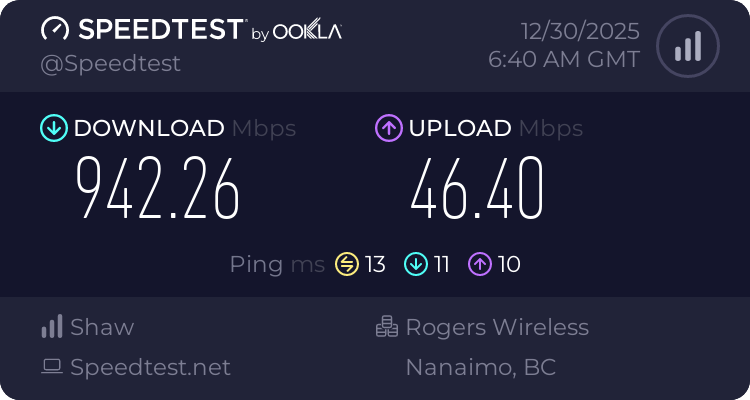
Normally, our upload should be 200mbps, but I'm running "stuff" on my NAS 24/7/365 so...
https://www.speedtest.net/result/18655897958

Speedtest.net
Use Speedtest on all your devices with our free desktop and mobile apps.
rose fable
It could give you an idea though.
But you gotta understand the Wi-Fi equation as well
lament ibex
ornate jungle
Normally, our upload should be 200mbps, but I'm running "stuff" on my NAS 24/7/3...
whys your upload capped as well
but ur download active is 10x better than mine
ornate jungle
lament ibex
whys your upload capped as well
Edited my message. Upload should normally be closer to 200mbps, but I'm using ~150mbps for my NAS.
 ornate jungle
No idea. This site doesn't properly explain how it calculated things. (Clicking Read More just takes you to an FAQ, it does not actually explain any of the measurements and I don't care to figure it out because my connection works fine for my needs.)
 rose fable
Here is an example of trash tier fiber vs good quality fiber on a Wi-Fi connection.

 lament ibex
ornate jungle
No idea. This site doesn't properly explain _how_ it calculated things. (Clickin...
lament ibex
ornate jungle
No idea. This site doesn't properly explain _how_ it calculated things. (Clickin...
it shows all of ur jitters and spikes
at the bottom of the data
what the heck is that responsiveness
rose fable
lament ibex
what the heck is that responsiveness
Typically need expand for more data
ornate jungle
lament ibex
it shows all of ur jitters and spikes
Yes, but that does not directly correlate to the rating. Rather, I don't see any of the data points on the bar graphs tied to the Exclamation / Alert icon so... 🤷
lament ibex
ornate jungle
Yes, but that does not directly correlate to the rating. Rather, I don't see any...
got it
nova glacier
lament ibex
so theres a chance even if I get fiber this cannot be fixed?
odds are it will at least be better since the latency and jitter characteristics of PON is better than DOCSIS, but last-mile infra is just one piece of the puzzle. Without access to your local infra to see the diagnostics (not really possible unless you work for the ISP), it's impossible to make any promises
lament ibex
rose fable
Typically need expand for more data
r u on that internet?
rose fable
lament ibex
r u on that internet?
The good one yes. I was on the bad one for a few months.
lament ibex
nova glacier
odds are it will at least be better since the latency and jitter characteristics...
my ping in valorant is 22 its just an unstable jitter, latency issue 22 ping
so idk if that counts
rose fable
It was pretty obvious when I shifted to the good one how much everything worked better.
lament ibex
my dream speeds
 rose fable
Again, don't focus so much on speed alone. That is one of the last things that matter
Once you're past a certain point in a home connection, it won't make a big difference
lament ibex
but some places dont offer fiber so wouldnt the places who offer fiber have stable internet and ping and latency
nova glacier
lament ibex
my ping in valorant is 22 its just an unstable jitter, latency issue 22 ping
high jitter is very typical of docsis 3.0. TDMA sucks pretty bad. DOCSIS 3.1/4.0 switches to OFDMA which helps a ton, so if you're already on 3.1 then fiber would be less of an improvement to your last-mile w.r.t to jitter/latency
lament ibex
nova glacier
high jitter is very typical of docsis 3.0. TDMA sucks pretty bad. DOCSIS 3.1/4.0...
im on an ARRIS S33 SURFBOARD 3.1 MODEM
and the eero 6+ wifi mesh
ornate jungle
lament ibex
im on an ARRIS S33 SURFBOARD 3.1 MODEM
Has Spectrum upgraded your neighborhood to be using DOCSIS 3.1? If not, the modem being 3.1 doesn't matter.
lament ibex
ornate jungle
Has Spectrum upgraded your neighborhood to be using DOCSIS 3.1? If not, the mode...
no
nova glacier
lament ibex
im on an ARRIS S33 SURFBOARD 3.1 MODEM
doesn't matter what your modem is. 3.1 on the downstream and 3.0 on the upstream is very typical
rose fable
ornate jungle
Has Spectrum upgraded your neighborhood to be using DOCSIS 3.1? If not, the mode...
Yeah so the modem could do nothing
lament ibex
I bought the best router and modem i could find and its still shit jitter and latency
maybe its just my area i live for network is just shit
nova glacier
if you can access your modem's diagnostics page, you can check your channels to see what they are
errant moon
rose fable
The problem these days, if you live in a condo or typical neighborhood, ISPs don...
Would I test right next to the router? and I live 1 mile from the next house
rose fable
errant moon
Would I test right next to the router? and I live 1 mile from the next house
All areas of the house
lament ibex
nova glacier
if you can access your modem's diagnostics page, you can check your channels to ...
its not the modem
rose fable
You can walk around and you'll see it update every few seconds
rose fable
errant moon
Would I test right next to the router? and I live 1 mile from the next house
Chances are. You don't have interference though at 1 mile away.
But, other electronics could be running on those channels as well
rose fable
lament ibex
spectrum is just shit balls
I would run a traceroute. Shows your hops and IPs. Then you can see where the biggest latency spikes happen.
Its the most basic of troubleshooting
nova glacier
lament ibex
its not the modem
well no, channel diagnostics is not about whether your own modem is the problem. The diagnostics would be the signal integrity and mode of the channels being sent by your ISP to your modem (and vice versa)
lament ibex
nova glacier
well no, channel diagnostics is not about whether your own modem is the problem....
how do i access that
cant my isp only see that
rose fable
Are you at your computer?
errant moon
rose fable
Are you at your computer?
Yes I just ran a test idk if this what you wanted

The green is right by the router
Red is in my room which is a wooden wall away from the router 10 feet
nova glacier
lament ibex
cant my isp only see that
Only when they've locked down a leased modem. If you own that modem, you can access the page. The only part that's only visible to the ISP is the upstream SNR. The default IP and usename and password are on the label on the bottom of the modem. iirc, Arris defaults to the last 6 or 8 digits of the S/N for the default password
rose fable
errant moon
Yes I just ran a test idk if this what you wanted
What app is this
lament ibex
nova glacier
Only when they've locked down a leased modem. If you own that modem, you can acc...
i own the modem but i dont know how to even access the page
rose fable
errant moon
Red is in my room which is a wooden wall away from the router 10 feet
Its definitely weak signal
errant moon
Wifiman. I’m on iPhone
rose fable
errant moon
Wifiman. I’m on iPhone
I would like to see channels though.
errant moon
What do I need to use?
rose fable
Something that provides this. I'm sorry I don't know on iOS these days. But that'll show you all the APs and the channels
 nova glacier
lament ibex
i own the modem but i dont know how to even access the page
nova glacier
lament ibex
i own the modem but i dont know how to even access the page
try browsing to http://192.168.100.1
that's the default IP that arris uses. Get the last 8 digits of your serial number on the label for the password. username is admin. You may need to reset the modem for the default password to work
ornate jungle
rose fable
Something that provides this. I'm sorry I don't know on iOS these days. But that...
This is likely not possible on iOS 🙁 because Apple doesn't expose enough of the WiFi chipset for app developers to use. (Or at least, it wasn't possible when I checked using iOS 16 on my work phone.)
lament ibex
nova glacier
try browsing to http://192.168.100.1
that's the default IP that arris uses. Get ...
didnt work
lament ibex
nova glacier
try browsing to http://192.168.100.1
that's the default IP that arris uses. Get ...
it doesnt load anything
nova glacier
lament ibex
didnt work
also try https://192.168.100.1
It's also possible your eero setup isn't allowing the connection to be routed. You may need to connect directly to the modem, set your ethernet interface static to 192.168.100.10, and then reboot the modem
your browser will complain about the invalid cert if https works
lament ibex
nova glacier
also try https://192.168.100.1
It's also possible your eero setup isn't allowing...
its probably the eero isnt allowing the routing
rose fable
Can you open up Terminal and run
Tracert 1.1.1.1
nova glacier
rose fable
Can you open up Terminal and run
Tracert 1.1.1.1
this will not work. Modems aren't a part of the route
rose fable
It doesn't show your public IP
rose fable
nova glacier
this will not work. Modems aren't a part of the route
But it will show where the latency is happening
 topaz patrol
rose fable
Limited to an Android or laptop then likely
topaz patrol
rose fable
Limited to an Android or laptop then likely
Airport Utility does most of what you could want, minus a fancy chart
 rose fable
So less than 1ms to your router. Next hop is 10
rose fable
topaz patrol
Airport Utility does most of what you could want, minus a fancy chart
Much harder to visualize though
lament ibex
Its the isp thats the issue
topaz patrol
rose fable
Much harder to visualize though
minus the fancy chart
errant moon
rose fable
Ah damn
So knowing what you do you said the signal is weak
nova glacier
lament ibex
Its the isp thats the issue
the modem's diagnostics will tell you if it's an ISP last-mile issue
rose fable
lament ibex
Its the isp thats the issue
What I would do with this information, is run a continuous ping in a terminal to the IP address with that 10ms time. Watch for spikes
lament ibex
rose fable
What I would do with this information, is run a continuous ping in a terminal to...
how do I do that
 rose fable
errant moon
So knowing what you do you said the signal is weak
rose fable
errant moon
So knowing what you do you said the signal is weak
Yeah you'd either want to reposition the Wi-Fi router more centrally in the house, or install an additional AP in the weaker parts. Ideally the additional AP would be using an Ethernet.
rose fable
lament ibex
nothing out of the ordinary
This is something you let run for hours or days
Then when noticing issues, you look for spikes. But, you'll also wanna run this same test to the game server while gaming
errant moon
rose fable
Yeah you'd either want to reposition the Wi-Fi router more centrally in the hous...
It was barely out of the red right next to it. We have gigabit and I got 200-250 right next to it. Is that to be expected
nova glacier
you are also largely just measuring unloaded latency by doing this on its own. It's loaded latency that is far more likely to experience spikes, so you gotta do also be doing somethting while you're pinging
rose fable
errant moon
It was barely out of the red right next to it. We have gigabit and I got 200-250...
Are you on 2.4GHz Wi-Fi or 5GHz?
rose fable
Then I really wanna see channels
rose fable
nova glacier
you are also largely just measuring unloaded latency by doing this on its own. I...
That's why I said while gaming would be more informative. And while he notices issues.
ornate jungle
errant moon
It was barely out of the red right next to it. We have gigabit and I got 200-250...
Depends on the capabilities of your WiFi antennas / chipset. Different devices with different chipsets may have different speeds. See this for more information: https://www.wiisfi.com/#PHY
rose fable
What I can tell you now is that your router WiFi capabilities will not reach 1Gbps ever in it's current configuration of AC
lament ibex
@nova glacier When I am in the webmanager for my ARRIS S33 what do i look for?
nova glacier
lament ibex
Its the isp thats the issue
If you want to know if fiber will make a good improvement, please get access to your modem's diagnostics so that you can determine if you're on DOCSIS 3.0. It will also help rule out signal integrity issues which would also contribute to jitter, though I doubt that's the issue in this case. This is what Arris's interface looks like and this is an example of DOCSIS 3.0 (modulation: QAM256) + 3.1 (modulation: Other) channels on the downstream while DOCSIS 3.0 (modulation: SC-QAM) only on the upstream
 lament ibex
nova glacier
If you want to know if fiber will make a good improvement, please get access to ...
lament ibex
nova glacier
If you want to know if fiber will make a good improvement, please get access to ...
do i unplug my router and just plug my modem into my PC ethernet cable?
errant moon
rose fable
What I can tell you now is that your router WiFi capabilities will not reach 1Gb...
So I would benefit from a better router?
rose fable
errant moon
So I would benefit from a better router?
Yes most certainly. Even a $70USD that is modern will be an improvement.
nova glacier
lament ibex
do i unplug my router and just plug my modem into my PC ethernet cable?
If the S33 is like the SB8200 (an older Arris product), then it will refuse to communicate with more than one device and lock to the first device it sees after booting. So you'll have to disconnect the router and reboot the modem so that it recognizes a new device
errant moon
rose fable
Yes most certainly. Even a $70USD that is modern will be an improvement.
I was told a tri-band to router with 6Ghz would be beneficial for vr. Would you agree? I stutters rn and my pc is hardwired
lament ibex
nova glacier
If the S33 is like the SB8200 (an older Arris product), then it will refuse to c...
with my ISP it is 3.0 it says
rose fable
errant moon
I was told a tri-band to router with 6Ghz would be beneficial for vr. Would you ...
This really comes down to how much you wanna spend.
errant moon
200 or less
nova glacier
lament ibex
with my ISP it is 3.0 it says
what says that? 3.1 downstream is practically universal at this point. Meanwhile 3.1 upstream is still not widespread since many ISPs are looking to skip right over to DOCSIS 4.0 instead
rose fable
$70USD will get you a lot. From there, price goes up quick for not a ton of extra real world speed
rose fable
errant moon
200 or less
At 150-200 you can get a pretty nice router
errant moon
rose fable
$70USD will get you a lot. From there, price goes up quick for not a ton of extr...
Is this reasonable? I have no idea but someone recommended this https://www.walmart.com/ip/TP-Link-Archer-BE9300-Router-Tri-Band-WiFi-7-Wireless-Router-up-to-9-2-Gbps-Speeds-Easy-Setup-Parental-Controls/3339006219
lament ibex
nova glacier
what says that? 3.1 downstream is practically universal at this point. Meanwhile...
my node doesn’t support DOCSIS 3.1
nova glacier
lament ibex
my node doesn’t support DOCSIS 3.1
What is saying that? Realistically the only way to determine this is by accessing your modem's diagnostics page
lament ibex
nova glacier
What is saying that? Realistically the only way to determine this is by accessin...
i am on the page
im typing to u on my phone
they have me on 3.0 docsis
rose fable
errant moon
Is this reasonable? I have no idea but someone recommended this https://www.walm...
It'll do. Let's see the other options available.
Would you ever be interested in running custom firmware like OpenWRT? Its okay if not, but it's something I like to ask.
nova glacier
lament ibex
they have me on 3.0 docsis
then fiber will be a fairly significant improvement. Like has been said before, nobody can promise you this is the only source of your jitter but it definitely is going to be part of it.
lament ibex
nova glacier
then fiber will be a fairly significant improvement. Like has been said before, ...
r u on fiber
errant moon
rose fable
It'll do. Let's see the other options available.
Would you ever be interested ...
Idk what it is. All ik rn is I can’t access anything to with my router. Where you enter an ip and then user and password to change stuff. My router doesn’t have an IP on it. What is OPENWRT
nova glacier
lament ibex
r u on fiber
no, that Arris page was my own. I'm on a DOCSIS 3.1 downstream and 3.0 upstream. It's got quite shite latency and jitter just like yours does lol. In fact, mine is a fair bit worse
rose fable
errant moon
Idk what it is. All ik rn is I can’t access anything to with my router. Where yo...
Essentially stripped down Linux optimized for a Wi-Fi router. Giving you nearly infinite capability and options for tuning your network.
nova glacier
They are the single ISP available here so I've got no choice in the matter. Over double what yours costs too
errant moon
rose fable
Essentially stripped down Linux optimized for a Wi-Fi router. Giving you nearly ...
I would like the flexibility but atm I would have no idea how to use it.
lament ibex
nova glacier
They are the single ISP available here so I've got no choice in the matter. Over...
#lets just move and get better internet
rose fable
errant moon
I would like the flexibility but atm I would have no idea how to use it.
Some TP Links do have support. Linksys is also pretty well supported.
nova glacier
lament ibex
#lets just move and get better internet
my favorite part is knowing that just about a mile or two to the east in a different town is gigabit and multi-gigabit symmetrical with 2-5% the latency and nearly zero jitter (to MASS IX anyways)
rose fable
errant moon
I would like the flexibility but atm I would have no idea how to use it.
This is the list of devices supported. You can filter by brand and however you feel.
Comprehensive list of devices compatible with OpenWrt firmware. Find the perfect hardware for your open-source networking project.
nova glacier
lament ibex
#lets just move and get better internet
weren't you saying google fiber and at&t fiber were available to you? Or did they end up not being available at your specific address?
lament ibex
nova glacier
weren't you saying google fiber and at&t fiber were available to you? Or did the...
theyre available
nova glacier
lucky
lament ibex
but its not guaranteed it fixes my problems
rose fable
nova glacier
weren't you saying google fiber and at&t fiber were available to you? Or did the...
Pretty sure he's right on Los Angeles. So good availability of lots I'm sure
lament ibex
nova glacier
no, that Arris page was my own. I'm on a DOCSIS 3.1 downstream and 3.0 upstream....
so how do u game?
errant moon
rose fable
This is the list of devices supported. You can filter by brand and however you f...
The one I was looking at is not supported. Its not that big of a deal
rose fable
errant moon
The one I was looking at is not supported. Its not that big of a deal
Or it may not be compatible at this moment. They do add more over time.
nova glacier
lament ibex
but its not guaranteed it fixes my problems
I can tell you without a doubt that DOCSIS 3.0 is going to be a major contributor. It's not necessarily the entirety of the problem, but it's a very well-known limitation. 3.1 switched to OFDMA practically explicitly to help alleviate this problem
rose fable
@nova glacier any suggestions for a router under 200USD?
nova glacier
lament ibex
so how do u game?
I stopped playing competitive games. Playing at a disadvantage really killed the experience
rose fable
I'm out of the continent, so honestly I don't know general availability of stuff
nova glacier
I had previously been on fiber as a kid
lament ibex
nova glacier
I had previously been on fiber as a kid
why did u leave
nova glacier
life happened
rose fable
Its wild how USA that prides itself as tech leader still offers this garbage. Living in SEA it's so easy to get fiber internet that is high quality for cheap
Copper, in the second biggest city of USA. Laughable
nova glacier
rose fable
<@157685200917233664> any suggestions for a router under 200USD?
I haven't looked recently so idk, but generally I'd recommend something at least WiFi 6E 3x3. There was a great deal a few weeks ago on the asus zenwifi et8 for $90. Just one 2.5GbE for the WAN though, so if that's desired on the LAN then maybe something else would be better
rose fable
nova glacier
I haven't looked recently so idk, but generally I'd recommend something at least...
Yeah that sounds like a really nice router @errant moon
nova glacier
oh it's at $100 now, but that's still pretty good
rose fable
Yeah better than the one he sent for sure
errant moon
Would it be worse than the WiFi 7 router? Reason I’m asking is it’s a gift and the budget is 200 bucks so I don’t mind maxing it out more
I’ve heard good stuff about ASUS routers though
nova glacier
errant moon
Would it be worse than the WiFi 7 router? Reason I’m asking is it’s a gift and t...
yeah, there's probably something better with a higher budget. Having 2.5GbE on the LAN side should be viable in that budget
rose fable
Do you have Wi-Fi 7 devices? That's kinda the thing. Its not even mainstream. If your not doing heavy LAN stuff, WiFi 7 is more marketing than anything if your internet connection is only 1Gbps
If you're just doing everyday stuff, and not running a local server, you're unlikely to run into bottlenecks
errant moon
My pc is WiFi 7. And I heard it’s better for VR latency and more “future proofing” ig
rose fable
I'd say the 6E is better for VR latency at this point in time
But I could be wrong. In your situation, I don't think you have interference from other devices
If Wi-Fi 7 is in the budget, it's not a drawback at all
errant moon
rose fable
Yeah better than the one he sent for sure
The TP link 30 bucks within budget however you said that 100 dollar one was better
rose fable
6E is gonna get you the 1Gbps though.
rose fable
errant moon
The TP link 30 bucks within budget however you said that 100 dollar one was bett...
I meant better priced
nova glacier
errant moon
My pc is WiFi 7. And I heard it’s better for VR latency and more “future proofin...
Unless the 6GHz band is crowded in your area already, it's unlikely to be meaningfully different. Even valve stuck with 6E for the steam frame's dedicated wireless chipset
rose fable
nova glacier
Unless the 6GHz band is crowded in your area already, it's unlikely to be meanin...
He said the next house is 1 mile away. So that's why I see it as rather negligible
nova glacier
ah yeah, then much of the benefits of wifi 7 become quite moot
The're mostly focused on improving performance under congestion scenarios
Though 4096-QAM (20% improvement over 1024-QAM of 6E) and 320MHz (just double 160MHz bandwidth ofc) does help in any case
errant moon
I also had someone recommended this idk if it’s overkill https://a.co/d/1SmA58I

ASUS ROG GT-AXE11000 is the world's first WiFi 6E Router supporting newly opened 6GHz band. The ultra-fast WiFi 6E 802.11ax tri-band wireless gaming router boosts up to 11000 Mbps, delivering wider channels, higher capacity, with virtually no interference from the pristine 6GHz band. The router a...
rose fable
Its wild watching files transfer to the server at over 100MBps
errant moon
Though better WiFi speed would be great like transferring steam games over WiFi
rose fable
errant moon
I also had someone recommended this idk if it’s overkill https://a.co/d/1SmA58I
That thing is pretty serious
rose fable
errant moon
Though better WiFi speed would be great like transferring steam games over WiFi
Still limited by your ISP connection
errant moon
rose fable
That thing is pretty serious
I figured
nova glacier
rose fable
Still limited by your ISP connection
I assume they mean the LAN transfer that steam has now.
errant moon
I just want the best for around 200
nova glacier
errant moon
I also had someone recommended this idk if it’s overkill https://a.co/d/1SmA58I
That's a 4x4 so quite crazy. That TP-Link was still just 3x3. Keep in mind client devices are nearly universally still 2x2, but it would mean two clients can concurrently max out their links using MU-MIMO so that's pretty neat
errant moon
So possibly stupid question what is 4x4 vs 3x3 or 2x2. And yes multiple rigs for different people
nova glacier
It's the number of spatial streams. For example a 160MHz spatial stream max theoretical is 1200Mbps (using 1024-QAM), but with 2x2 client you can have 2 x 1200Mbps for 2400Mbps total. This how they come up with those misrepresentative numbers for marketing routers (the 11000 Mbps claimed by that Asus router for example).
rose fable
And those spatial streams require a clean channel to achieve those results. Which in your situation could actually hold true
ornate jungle
errant moon
So possibly stupid question what is 4x4 vs 3x3 or 2x2. And yes multiple rigs for...
Don't delay; learn everything you need to know about MIMO today! https://www.wiisfi.com/#MIMO
rose fable
I swear they do the results inside a Faraday chamber with one device
ornate jungle
rose fable
I swear they do the results inside a Faraday chamber with one device
They... quite... literally... do? Have you not seen how the FCC and/or device manufacturer's test products that emit wireless frequencies?
rose fable
ornate jungle
They... quite... literally... do? Have you not seen how the FCC and/or device ma...
I was being, a bit facetious
ornate jungle
Ohhhh loool 😄 Gotcha gotcha. For those not in the know, tada! https://www.youtube.com/watch?v=bY4MTjVEtjE&t=622s

Thanks to Raymond EMC for sponsoring this video! Check them out today at https://lmg.gg/remc
Raymond EMC specializes in the engineering, design, fabrication, installation, and testing of custom radio frequency (RF) shielded enclosures, reverb, and anechoic chambers for military, government, automotive, high-tech, medical, medical, and industria...
rose fable
Yeah exactly. Is it a true Faraday or just padding? I remember this video, but not fully
I love these videos and stuff though
I loved how he had to redo his whole home network because too much interference as well. People really don't understand Wi-Fi whatsoever. M
Guy with unlimited funds for tech can't even get his WiFi devices connecting. Yeah, because he had it all configured wrong and way too many APs
errant moon
rose fable
And those spatial streams require a clean channel to achieve those results. Whic...
So which would be recommend between the tp link WiFi 7 or ASUS 6E?
rose fable
errant moon
So which would be recommend between the tp link WiFi 7 or ASUS 6E?
The last Asus you sent. I would say is gonna be great. If you're wanting to spend that much.
Put it this way, both are gonna slap anything you got now
Both will be able to throughout your ISP 1Gbps
The only time the Asus may pull ahead is transferring from computer to computer within your house, if both have a capable WiFi card
errant moon
So when I do buy it how do I even set it up? Right now ig the ISP router is working as the modem as well would I have to buy a separate modem or how does that work
rose fable
This depends on the ISP. Ideally you want Bridged mode on the ISP device.
That effectively just passes through everything retrieved without any modification.
Then your router becomes the manager of traffic
errant moon
And how would I set it to bridged mode? And as far as cables go do I plug a new Ethernet cable from a lan slot on the ISP to the wan port on the new router? I have no idea
rose fable
Sometimes you will need to call them to put it into that mode. And it might be worthwhile to call them to make sure they support that before going out and buying.
rose fable
errant moon
And how would I set it to bridged mode? And as far as cables go do I plug a new ...
Yeah they usually tell you plug into LAN1 from their device to your router WAN port
errant moon
I was going to call them tomorrow. I heard something about an app is needed? It’s gonetspeed if that means anything
rose fable
Your best bet, call them and say you wanna use your own router. You heard about bridged mode or something. They SHOULD know what you mean.
Some ISP have the setting available in the GUI. And you don't need to call
More often than not, you need to call
If you know your router IP, you could easily check now
If you have the password and username. Typically written on the router itself
errant moon
So there’s no router IP on the router but there’s a password
Nvm I’m wrong there’s neither
errant moon
Yes and when I go to my phone settings and I click on it I see router and there’s an IP by it that does not work
nova glacier
They seem to use some nokia router that uses an app instead of a web interface. I hate the future
rose fable
Then I'm sorry, I dunno
nova glacier
not everything needs to be a damned app but alas
rose fable
I'm a bit on the drunk side now. I'm gonna step aside
errant moon
It’s a smartRG router
rose fable
I've done what i can do for the time being
nova glacier
errant moon
It’s a smartRG router
oh, the gonetspeed website might be out of date or perhaps the nokia is their new one
errant moon
Yea this router is a few years old and I read today they provide WIFI 6 routers now
nova glacier
What technology is your connection? coaxial cable (DOCSIS), fiber (PON), or vDSL?
errant moon
Okay so they put in fiber a few years ago but this box is outside idk what it is. The Ethernet side goes to the ISP

I don’t think it’s DSL isn’t that slow?
nova glacier
That's a MoCA adapter to provide ethernet over your home's internal coaxial cable, not your internet connection
rose fable
It would be useful to connect a device on the LAN port to verify speed
rose fable
Good then
nova glacier
errant moon
I don’t think it’s DSL isn’t that slow?
extremely yes lol. smart/rg only makes DOCSIS and vDSL modems (and routers), not ONTs. If you have fiber, then you'd separate dedicated fiber ONT connected to the smart/rg's WAN port. There would be no need for any bridge mode in such a case
nova glacier
errant moon
Okay so they put in fiber a few years ago but this box is outside idk what it is...
Oh I see, then you've got no need for bridge mode. You just swap the cable going into the smart/rg's WAN port to your new router's WAN port
errant moon
Okay so I’m trying but you’re a bit above my pay grade. Idk what DOSIS and ONT is. I dont need to use the ISP once I get the new router?
errant moon
nova glacier
Oh I see, then you've got no need for bridge mode. You just swap the cable going...
Plug and play?
nova glacier
The ONT (optical network terminal) is where the fiber terminates and is converted to ethernet. Does the following sound correct for your setup? Fiber ONT -> ethernet cable -> MoCA adapter -> coaxial -> MoCA adapter -> ethernet cable -> router WAN? If the smart/rg is directly receiving that coaxial cable, then you'll need to buy that second MoCA adapter too
errant moon
Okay all I know is the coax comes from the wall and goes to that box in the photo. It then goes to Ethernet which as far as I can tell goes straight into the wan port of the ISP.
Is further information needed? I could try and figure it out
nova glacier
errant moon
Okay all I know is the coax comes from the wall and goes to that box in the phot...
Yea, that ISP device is your ONT. It's a device with the fiber optics coming from outside and a WAN port (some have phone lines too but those are kinda dying off lol).
The thing you need to check is on the smartrg's side. It's still gonna be plug and play, but you'd need to buy a MoCA adapter if that's currently built-in to the smartrg modem/router.
If your desired router location is close enough to the ONT location, you could also just get rid of the MoCA and use an ethernet cable directly. I assume it's not that close though
errant moon
If the ONT is built into the router? The router is ~15 feet away from the outside box
nova glacier
errant moon
If the ONT is built into the router? The router is ~15 feet away from the outsid...
It would be MoCA that would be built-in to your smartrg router, not the ONT. Routers with an ONT built-in do actually exist too, but smartrg doesn't make them and your router would have to be receiving the fiber optic cable if it was the ONT. That greatly limits router placement so they aren't very popular with ISPs. Most use a dedicated ONT, usually inside but I've heard some ISPs will put them outside too
rose fable
errant moon
If the ONT is built into the router? The router is ~15 feet away from the outsid...
Would be easy to buy an Ethernet that long to just remove that middle man box
Removing "hops" is beneficial
nova glacier
rose fable
Would be easy to buy an Ethernet that long to just remove that middle man box
yea, 15ft seems pretty feasible to do a cable run. An ethernet cable would be cheaper than a moca adapter too.
errant moon
The model number of the router is sr555ac if that helps and the only problem is the cable being in the walls
errant moon
nova glacier
It would be MoCA that would be built-in to your smartrg router, not the ONT. Rou...
Okay so the MoCa is a converter right? Coax to Ethernet?
Or vice versa idk
rose fable
errant moon
The model number of the router is sr555ac if that helps and the only problem is ...
Behind or under baseboard?
nova glacier
errant moon
The model number of the router is sr555ac if that helps and the only problem is ...
That's a vDSL modem and it doesn't have a built-in MoCA adapter, so there must be one tucked away nearby to it.
potentially just another actiontec ECB6200, but MoCA is a standardized protocol so they don't need to be the same make/model on both sides
errant moon
rose fable
Behind or under baseboard?
Common theme but I’m confused is that image I sent not a MoCa adapter? And if so why would I need another if thought the first box its converted to Ethernet. And idk my dad ran it through there in 2011 or so I would have to ask him about cable placement
nova glacier
errant moon
Common theme but I’m confused is that image I sent not a MoCa adapter? And if so...
The setup you have is ONT WAN port -> ethernet -> MoCA adapter -> coaxial cable -> MoCA adapter -> ethernet -> sr555ac WAN port
MoCA adapters are necessary on both sides
since the sr555ac doesn't have an adapter built-in (many modems actually do), then you already have one on both sides. All you have to do in your setup is to swap the ethernet cable plugged into the sr555ac's WAN port into your new router's WAN port.
It would be optimal to get rid of the MoCA, but it's fine to keep if replacing that connection with an ethernet cable is too much of a hassle
errant moon
errant moon
Okay so they put in fiber a few years ago but this box is outside idk what it is...
Wait so that means the one in the photo is the second MoCa adapter in that line? I’m trying to learn this. I just went and checked and unless there is an adapter in the wall the Ethernet cable in this photo goes straight to the wan port on ISP
nova glacier
By "wan port on ISP", do you mean the ISP's ONT WAN port?
errant moon
Okay so here’s a photo of the outside if its useful. The black coax goes in the photo as seen in top right of photo then goes into the moca adapter which then leads to this port


This is the whole system
errant moon
nova glacier
By "wan port on ISP", do you mean the ISP's ONT WAN port?
Does this help?
nova glacier
dear god that's a sad looking ethernet cable
rose fable
errant moon
Okay so here’s a photo of the outside if its useful. The black coax goes in the ...
Wtf
I mean, it works obviously, but holy cow
rose fable
Let's be real, it is not the cause of your Wi-Fi slowdown. But holy cow
nova glacier
errant moon
Okay so here’s a photo of the outside if its useful. The black coax goes in the ...
so the black coaxial cable is the 15ft run, correct? There's gonna be a MoCA adapter in that white box, though some ONTs also have a MoCA adapter built-in too so it's not necessarily a standalone device
rose fable
5E can handle 1Gbps in reasonable distances pretty easily
errant moon
errant moon
Okay so here’s a photo of the outside if its useful. The black coax goes in the ...
Okay so the black coax from the outside photo goes straight through the wall to that adapter box which then goes to the router wan port
nova glacier
yes, if the ONT has a MoCA adapter built-in then your setup would be
ONT WAN MoCA port -> coaxial cable -> MoCA adapter -> ethernet -> sr555ac WAN port
nova glacier
The old GPON ONT from FiOS I had like 15 years ago had both a MoCA WAN and ethernet WAN ports, so ONTs with built-in MoCA are definitely a thing.
In any case, your setup is just plug-n-play. Swap that ethernet cable from your sr555ac WAN to your new router's WAN port and you're good to go. You may need to spoof the MAC address of the sr555ac (should be on the label), but most ONTs don't care.
rose fable
errant moon
Pretty amazing video.
nova glacier
And tbqh, get a new ethernet cable lmfao. That is such a sad cable
oh my god all your cables are like that 😭
rose fable
nova glacier
And tbqh, get a new ethernet cable lmfao. That is such a sad cable
Yes. I know it's not actually a bottleneck, but please lol
Its such a cheap upgrade to rule everything out
errant moon
rose fable
Pretty amazing video.
I set the quality to lowest so I could actually send it
Idk what the upload limit on discord is these days
nova glacier
but also that's kinda a comical use of MoCA. What is that like 20 inches?? Surely the ONT has an ethernet WAN port too
errant moon
I have a 100ft cable going 10 feet btw with the rest just rolled up in the corner
So wdym spoof MAC address and yes I see something labeled mac with an address on the smartrg
nova glacier
Your new router will ask you if you need to do this during the first-time setup flow. If your ONT doesn't care it will just connect and it won't ask you
errant moon
What is the ONT in that video is it underground?
nova glacier
The ONT is inside the white box outside
Putting the ONT outside is a bit screwy, but then again so is using MoCA for like a 10 inch run so that seems par for the course lol
errant moon
errant moon
Okay so here’s a photo of the outside if its useful. The black coax goes in the ...
So in this mess of cables under it looks like 2 cables coming from the ground combine to coax which goes straight inside is that accurate? It’s a lot of wires so I could be wrong
This set up is old it used to be DSL
nova glacier
All those coaxial wires are/were for cable TV to different rooms of the house/property. DSL would use an RJ11 twisted pair cabling very similar to ethernet cabling.
errant moon
Yea we used to have cable
So most of those wires could be done away with?
It’s a mess of old stuff
nova glacier
errant moon
So most of those wires could be done away with?
I mean, I wouldn't get rid of them. You can still repurpose them for MoCA to provide ethernet to any room with a coax outlet.
errant moon
Ah okay
nova glacier
If you find that a single router, even a really nice one, still isn't sufficient for your whole property then MoCA is a fantastic way to get the mesh nodes connected across the house. You wouldn't have to pull ethernet cabling all around the place
errant moon
Right now we have an Ethernet cable going from that router to the back of the house which has no internet. Half the house has no internet. Could we move this ISP router to where the cable comes out and use it as another router for the back? I assume plug it in the wan port if so
nova glacier
errant moon
Right now we have an Ethernet cable going from that router to the back of the ho...
yes, but it won't be seamless and potentially creates issues. You would need mesh capable devices for it to work well. Most modern devices are mesh capable (though typically it's vendor-locked), but unsurprisingly the sr555ac is not mesh capable
errant moon
Sad but expected
nova glacier
both TP-Link and Asus have their own vendor-locked meshing btw
errant moon
That sucks
I guess I’m going to get the ASUS over the TP link. WIFI 7 doesn’t make up for the other benefits the Asus has it seems like
And I’ll call my Internet provider later today and ask them about the whole thing just to verify
nova glacier
nova glacier
I mean, I wouldn't get rid of them. You can still repurpose them for MoCA to pro...
One of the biggest ways to improve WiFi is to minimize the use of WiFi btw, so I'd definitely consider this for any of your fixed devices near a coax outlet
you'd just have to bring an ethernet cable from the router back over to that congregation of coax and get a bunch of MoCA adapters. One for the router to a coax splitter that goes to the cables out to each room and an adapter for each room.
kinda expensive though
errant moon
is there a way to use one Ethernet cable to go to multiple devices like a splitter and does it make Internet speed worse
Say one cable that splits for my consoles and tv
nova glacier
errant moon
is there a way to use one Ethernet cable to go to multiple devices like a splitt...
that would be a trunking cable with an ethernet switch, but yes it's sharing the bandwidth of the trunk cable between all the devices
trunking cable isn't a special type of cable tbc, it's just any regular ethernet cable
errant moon
So if I knocked my 3 consoles, Apple TV and my main tv that would 5 devices less using WiFi so I assume that would help. They are all grouped
nova glacier
If those are all on the same TV it's not like you'd be concurrently using them anyways
errant moon
Yes they are all on the same tv
If you use them concurrently would that slow things down?
nova glacier
You're just limited to the total bandwidth of the uplink port. So if your console is updating a game at 500Mbps then you still would have 500Mbps left over on a GbE uplink. Plenty to watch a netflix stream (Just 40Mbps for 4K, for example). Gigabit unmanaged switches are hella cheap these days, but even 2.5GbE is also coming down in price
errant moon
What’s the uplink port in this? The port on router or switch?
nova glacier
uplink is the term for the port on the switch's side. On the router side it would be its WAN port could be considered its uplink port
errant moon
So would it benefit from having a 2.5gig switch if my internet is one gig? I can’t download on 2 devices at once at 1 gig each can I?
nova glacier
errant moon
So would it benefit from having a 2.5gig switch if my internet is one gig? I can...
I can’t download on 2 devices at once at 1 gig each can I?
That is correct. Much like the switch's uplink being shared, so is your router's WAN port (and the internet connection itself really).
It would only help for LAN transfers, which probably wouldn't matter for that specific case of your TV's devices but maybe for another room that has a few desktops
nova glacier
oh well yeah that too
I imagine the consoles would be meaingful thing to get off the wifi since game updates can be enormous
plus competitive games are so much nicer on ethernet. Consoles still mostly have wifi 5 or 6, no 6GHz, so they're missing out on many of the new improvements that would make wifi more viable.
 neon shadow
So when I block all ports policy I can’t then allow a port through policy any segregations I blocked as much as I can in the last picture and allowed what I need


 errant moon
What’s the difference between a Ethernet switch and splitter
nova glacier
a splitter might be a cursed device that turns the 4 pairs of a normal ethernet cable into effectively 2 cables of 2 pairs. It's limited to 100Mbps as a result
but also some alibaba drop shippers might errantly call a switch a "splitter". Avoid either way lol
errant moon
Yea I’m good
Shop NETGEAR 5 Port 10/100/1000 Gigabit Ethernet Unmanaged Switch Blue products at Best Buy. Find low everyday prices and buy online for delivery or in-store pick-up. Price Match Guarantee.
Long link my bad
nova glacier
10/100/1000 is just the ability to support running at reduced bandwidth modes of 10Mbit and 100Mbit. It's pretty standard functionality
neon shadow
neon shadow
So when I block all ports policy I can’t then allow a port through policy any se...
@nova glacier any suggestions
nova glacier
errant moon
So in cases like this one I assume port 5 is where the Ethernet cable goes from ...
So in cases like this one I assume port 5 is where the Ethernet cable goes from router
Yea, an unmanaged switch is a simple plug-n-play device. Any port can be the uplink and any ports can go to the downstream devices
errant moon
nova glacier
> So in cases like this one I assume port 5 is where the Ethernet cable goes fro...
So it just works? Good to know
After calling the Internet provider and getting all this stuff fixed if I have any further questions do you mind if I ask you here? I can’t thank you enough for the help, all this WiFi mess confuses me but I’m trying to learn.
nova glacier
neon shadow
<@157685200917233664> any suggestions
I don't really understand what you're asking
nova glacier
errant moon
After calling the Internet provider and getting all this stuff fixed if I have a...
feel free
neon shadow
errant moon
So it just works? Good to know
Pretty much yeah just make sure depending on what you have if it’s an all-in-one modem and router this doesn’t matter, but if it’s separate, make sure your router and modem are connected through the yellow ports than a cord goes from router any other port or your modem and router any ethernet port into the yellow port on the switch and you’re all good. You can wire everything from the switch then.
neon shadow
nova glacier
I don't really understand what you're asking
I’m asking if you know another way I can have a policy to block all ports and not have it interfere with any of my other pass-through policies like open ports
errant moon
neon shadow
Pretty much yeah just make sure depending on what you have if it’s an all-in-one...
So what are you saying? Your wording is confusing. Sorry
Only use the yellow ports on router for the switch?
neon shadow
errant moon
So what are you saying? Your wording is confusing. Sorry
So I can make it simple if you have a modem and router and their separate devices than the yellow port on your modem would go into the yellow port on your router any other port, like the black ports would go into the switch from the router now if you have an all in one, it’s different all in one refers to your modem and router being the same device. If you have an all in one, you just wire a cord going from one of the black ports on it into the yellow port on your switch.
errant moon
https://www.bestbuy.com/product/netgear-8-port-10-100-1000-gigabit-ethernet-unmanaged-switch-blue/J2VY7YQ988/sku/8974018?sb_share_source=PDP&ref=app_pdp&loc=pdp_page so what would be the “yellow port” on this switch
nova glacier
neon shadow
I’m asking if you know another way I can have a policy to block all ports and no...
Windows Firewall always prioritizes block rules over allow and by default it blocks inbound anyways. Just disable all rules and everything will be blocked. Add allow rules as needed.
neon shadow
nova glacier
Windows Firewall always prioritizes block rules over allow and by default it blo...
Ok thanks
errant moon
neon shadow
So I can make it simple if you have a modem and router and their separate device...
My router only has 4 yellow ports and that’s it besides the blueish wan port
neon shadow
errant moon
My router only has 4 yellow ports and that’s it besides the blueish wan port
So with your switch, it doesn’t matter what port it goes into just make sure it goes from the router to the switch
nova glacier
There is no standardized color coding of ports. You just plug in any switch port to a router LAN port, that's it.
errant moon
nova glacier
There is no standardized color coding of ports. You just plug in any switch port...
Thanks
neon shadow
errant moon
My router only has 4 yellow ports and that’s it besides the blueish wan port
Ya so you’re blue port goes into your modem I was just making sure you knew what port you put into your modem which from what you said you already know that sorry for the confusion
lament ibex
@nova glacier
look at my jitter latency

its capped around 37.5 ms-40 its not stable
@rose fable
opal pagoda
lament ibex
its capped around 37.5 ms-40 its not stable
thats 2.5-5ms jitter
good enough
lament ibex
opal pagoda
thats 2.5-5ms jitter
good enough
for low latency gaming it isnt
lone crane
lament ibex
for low latency gaming it isnt
ask the datacenter and your ISP if you can get a direct connection
lament ibex
lone crane
ask the datacenter and your ISP if you can get a direct connection
how do i do that
lone crane
well you ask the datacenter and your ISP if you can get a direct connection
opal pagoda
lament ibex
how do i do that
this is a /s btw
dia costs like thousands per month
or dark fiber rental with IX connection
lone crane
opal pagoda
this is a /s btw
dia costs like thousands per month
but he is a true pro gamer he needs it at any cost
opal pagoda
just move closer to DC
stuck grove
camp outside an equinix site and get the fastest internet possible
lone crane
he could checkout what other ISPs might be around
my landlord changed ISPs and i think i got a 50% reduction in ping for some games
more direct to the EU or Sweden or something
opal pagoda
i avoid docsis like a plauge
lone crane
here in Norway about maybe even 90% now have the ability to get fiber
opal pagoda
lone crane
here in Norway about maybe even 90% now have the ability to get fiber
i would have fiber by now if contractor didnt fuck it up and failed the contract
lone crane
xd
opal pagoda
went bankrupt lol
lone crane
i have never really been without access to fiber
opal pagoda
i talked to ISP guy that overlooks ftth deployments
"yea we will not deploy anywhere if we dont get eu funding, it just isnt cost effective"
so basically they are waiting around for another eu subsidy to rollout
lone crane
aint docsis very spensive to run and maintain
and only real reason to keep em going is since they are already in the ground and they already have the equipment
opal pagoda
lol they are still using vdsl here
 floral vortex
I manage my parents and friends network using Unify,
Me Asound - Coax Cable
friend Comcast - Coax Cable
parents- ATT fiber
 twin pier
The houses are all connected together into a single dashboard?
floral vortex
no, its under site management
nova glacier
lament ibex
look at my jitter latency
That's actually pretty excellent for DOCSIS 3.0 lol. Under load during peak hours I usually average 40ms latency, 40ms jitter, and spikes to 150-200ms to most east coast game servers.
lament ibex
nova glacier
That's actually pretty excellent for DOCSIS 3.0 lol. Under load during peak hour...
Is it actually? Cause my games feel choppy as heck
I am on a 360 hz monitor though too along with my high end pc so
nova glacier
lament ibex
Is it actually? Cause my games feel choppy as heck
I mean, it still isn't that good. A fiber connection could potentially achieve less total latency than just your jitter lol.
But as far as jitter goes, your 10ms or so should be manageable by most games' netcode
lone crane
lament ibex
I am on a 360 hz monitor though too along with my high end pc so
If they programmed it right this should not feel choppy, if you have issues with ping and such rubber banding is more likely what you would feel.
clear igloo
 rocky badge
I have 5 DNS servers spread across 3 sites and I want a single IP to point clients to
chatgpt just recommended doing bgp on my wireguard s2s to announce the IP at each site so each site's router can select the best path
And then my dns servers doing bgp to my wg routers so they withdraw when they die
is this overkill???
clear igloo
yes, 100% overkill
 clear igloo
anycast is the same IP in multiple places and the first to respond is chosen
rocky badge
the site's local DNS server & one of the offiste colo's DNS server
rocky badge
clear igloo
anycast is the same IP in multiple places and the first to respond is chosen
yeah
clear igloo
So do you have overlapping IPs at each site?
clear igloo
In my head I'd have a fallback local to each site as secondary DNS server but a common primary server at the hub
rocky badge
Oh so you'd reverse the order?
clear igloo
yeah, if you want to simplify, and then have the local fallback in case the site link to the hub goes down
rocky badge
That's fair

Performance to the primary is good at both sites

I guess that host doesn't have dns set lol
clear igloo
lol, yeah
rocky badge
but this isn't the fun way /s
clear igloo
Fun is hard, easy is boring 😄
vast saddle
nova glacier
I mean, it still isn't that good. A fiber connection could potentially achieve l...
This
DOCSIS has higher latency because of scheduling and networking queuing and perhaps different routing.
And of course load. DOCSIS doesn’t do well when under load
 sudden juniper
I was thinking to buy a NAS, can anyone help?
ornate jungle
sudden juniper
I was thinking to buy a NAS, can anyone help?
Yes, you should buy (or build) a NAS. They're a great way to backup your data and playback media.
 dawn lantern
So I just had an intervention by some friends and they are telling me that I have committed crimes against humanity....
lone crane
cool
dawn lantern
This is in production
 dawn lantern
lone crane
the hell is a aruba s2600
dawn lantern
lone crane
the hell is a aruba s2600
should be s2500
lone crane
anyhow tis just switches right
dawn lantern
 lone crane
i would still want vlans if this is a business tho
ah home network
its just switches i see nothing really wrong
topaz patrol
Why are there 8 million NAS all in different places
Why is there a NAS in the chicken coop
 frosty stone
dawn lantern
This is in production
frosty stone
dawn lantern
This is in production
What in the fuck
frosty stone
dawn lantern
Even more what in the fuck
silent flax
topaz patrol
Why is there a NAS in the chicken coop
he likes to donate money to Synology, obviously
rose fable
topaz patrol
Why is there a NAS in the chicken coop
Could be for the video feed watching all the chickens and dogs. Or they have a TV for the people working in there and is running Jellyfin for the people working to kill some time. I could see many reasons to have one in there
lone crane
but also uh why not have a clean server room with some nice cooling somewhere and just throw all of it there
there is a reason why we have networking
rose fable
lone crane
but also uh why not have a clean server room with some nice cooling somewhere an...
Different locations probably.
lone crane
xd yup only thing i could think of too, but i would imagine modern switches could easily handle it
rose fable
Or just had lots of spare equipment laying around, so why not use it
lone crane
xd
 elder rock
Hi guys, I'm struggling with getting a 10 gig nic to work in my pc, its a 10 gtek 82599en, and my motherboard is asus tuf b650+
I've used this card on an asus taichi x570 board with no issue, both os are windows 11
side note, I could not get this card to work on windows 10 in the tuf mb either