#networking
1 messages · Page 93 of 1
 mild whale
honestly im lucky i have coax
most everyone else by me has satellite
when i first moved here my upload was 300mb 😄
 stuck grove
that upload speed is why i hate coax
 shut geyser
yeah, that would be tough for me. I WFM and I have to do A LOT of uploading of large data sets
stuck grove
I don't even work from home, but i would like to self host a VPN and Plex but my upload speed majorly limits me
often times it sits around 10-15mbps
 royal smelt
i have 10gb fiber but its PPPOE so speeds are all over the place
 woeful spire
Hey guys, I have a budget of $300 and need a new Router? Any recommendations for either a backhaul mesh system (cables are in place) or a standalone router?
shut geyser
woeful spire
Hey guys, I have a budget of $300 and need a new Router? Any recommendations for...
I have become a bit partial to TP-Link. They seem to offer some solid performance to price ratio. They have a nice number of tri-band routers that would fit into your budget.
woeful spire
shut geyser
I have become a bit partial to TP-Link. They seem to offer some solid performanc...
Thx! I ended up going with one of their 6E Tri-Band Mesh systems! Picking it up tomorrow. Got a good sale on it too
Definitely going to take advantage of the backhaul capabilities it has

 clear igloo
 honest merlin
What ISP is still doing data caps?
honest merlin
What ISP is still doing data caps?
#Murica 😄
Mostly Comcrap and others
honest merlin
I have 1GB/100 from Cox and no data cap for $70
Just have to call loyalty department to lock in a deal
 cunning lion
 clear igloo
 honest merlin
Ethernet cables alone won’t solve latency issues
90ms at times while directly connected to my router
Lowest was 24ms

 frosty stone
honest merlin
Ethernet cables alone won’t solve latency issues
frosty stone
honest merlin
Ethernet cables alone won’t solve latency issues
Nothing will fix shit hardware
Other than replacing it
 shut stag
honest merlin
What ISP is still doing data caps?
shut stag
honest merlin
What ISP is still doing data caps?
cox does data caps for certain plans in certain parts of the country, but i don't have a data cap with my isp.
 twin pier
honest merlin
Ethernet cables alone won’t solve latency issues
twin pier
honest merlin
Ethernet cables alone won’t solve latency issues
On a well functioning router it will
WiFi latency typically upwards of 10-20ms in my experience
mild whale
honest merlin
What ISP is still doing data caps?
satellite
you get 5GB
and then your internet is crippled into oblivion
you get "priority data," which is actually usable. then standard data, which is maybe 620kpbs
shut stag
ethernet only really solves poor access point placement in my experience
i get similar latency wifi or ethernet (6ms)
my access point is also on top of my pc to be fair
 honest merlin
Too many active channels near me to use WiFi. Ethernet works better for Plex when movies are 90 mbps
Local network yes but still a lot
 nova glacier
shut stag
i get similar latency wifi or ethernet (6ms)
nova glacier
shut stag
i get similar latency wifi or ethernet (6ms)
If you want to get a realistic ping test, you'll need to test it under load and to a local device. If you do it during peak hours when neighbors are also online it'll be the worst case.
If you're on 2.4GHz or 5GHz, the ping will vary quite wildly. 6GHz is still quite clear and empty though. I get 100-200ms on 2.4GHz, 50-100ms on 5GHz, 6-7ms on 6GHz, and <0.1ms on ethernet.
Considering my internet latency under load is around 40ms and can get up to 100ms during peak hours, 6GHz is close enough to ethernet to not make enough of a difference to me. 2.4/5GHz though would add noticeable latency
shut stag
ah that would explain it
honest merlin
Would it worth messing around with https://iperf.fr
iPerf3 binaries - measuring TCP, UDP and SCTP bandwidth performance
shut stag
most places im in at my house are able to transfer wifi 6
nova glacier
wifi 6 is 802.11ax, which operates on all 3 bands. It's referred to as 6E for 6GHz specifically
shut stag
i meant the 6ghz band
mild whale
nova glacier
If you want to get a realistic ping test, you'll need to test it under load and ...
funny enough, years ago when i worked for a company that did a lot of radio stuff (I did DSP there,) it was a big deal for RTT and ACK timouts for wifi
shut stag
i have not had enough coffee yet
mild whale
that all added considerable latency, which was kind of a function of distance from the transmitter and other stuff.
nova glacier
I believe now latency is roughly a function of how many OFDMA resource units are requested against the average channel utilization. 802.11ax's introduction of OFDMA has really helped reduce the effects of congestion. Previously a device would always have to waste the whole band when they broadcast
clear igloo
nova glacier
wifi 6 is 802.11ax, which operates on all 3 bands. It's referred to as 6E for 6G...
WiFi 6 only operates on 2.4 and 5, 6GHz came late to the party along with a couple other features so 6E was introduced a bit later. It's part of the spec but if you only have a WiFi 6 device you don't have 6GHz support but if you have a 6E device then you do
Thankfully WiFi 7 clears that up...
checks notes
nvm, 7 doesn't require 6GHz support either
yay flexible standards 🙂
nova glacier
clear igloo
WiFi 6 only operates on 2.4 and 5, 6GHz came late to the party along with a coup...
I said 802.11ax operates all three bands. Which is what WiFi 6 is. WiFi 6E is still WiFi 6 in other words.
clear igloo
nova glacier
I said 802.11ax operates all three bands. Which is what WiFi 6 is. WiFi 6E is st...
But that's the confusion, 6 and 6E are "different" implementations and chipsets
I know what you're saying, and 6E is an 802.11ax extension
nova glacier
I have the 802.11ax-2021 standard open right now. It is all the same in the eyes of the standard. It's not an 802.11ax extension. Only the WiFi alliance has differentiated it. Different chipsets will have an upgraded RF frontend, but the guts of the 802.11ax implementation remains the same
clear igloo
WiFi 6E is an 802.11ax extension, to add 6GHz support
nova glacier
clear igloo
WiFi 6E is an 802.11ax extension, to add 6GHz support
No it isn't. 802.11ax includes 6GHz capabilties. WiFi 6E is a device certification, not an extension to the 802.11ax standard
twin pier
shut stag
i get similar latency wifi or ethernet (6ms)
try testing to a local device as that's what I'm talking about
That removes the internet from the equation
nova glacier
This is the general description of 802.11ax if you don't believe me
 clear igloo
nova glacier
I have the 802.11ax-2021 standard open right now. It is all the same in the eyes...
clear igloo
nova glacier
I have the 802.11ax-2021 standard open right now. It is all the same in the eyes...
802.11ax-2021 is not the 2018 version which is 802.11ax and when it was released originally
 lean palm
clear igloo
802.11ax-2021 is not the 2018 version which is 802.11ax and when it was released...
lean palm
clear igloo
802.11ax-2021 is not the 2018 version which is 802.11ax and when it was released...

nova glacier
clear igloo
802.11ax-2021 is not the 2018 version which is 802.11ax and when it was released...
Did you think IEEE doesn't publish records? The original 2017 request included 6GHz:
https://development.standards.ieee.org/myproject-web/public/view.html#pardetail/6202
5.2b change Frequency from 6 GHZ to 7.125 GHz due to new band.
It's just an optional feature that the WiFi alliance chose to differentiate with their certifications
Also seen in the first published draft
 topaz patrol

SFP Wizard is your go-to compact device for testing, programming, & unlocking any SFP/QSFP - all for just $49 https://ui.social/SFP-Wizard
Explore the complete UniFi SFP lineup w/ limited special pricing at store.ui.com
👀
 sage robin
I bought the slate 3 because of ltt… the transition was not smooth with xfinity…
 ornate jungle
sage robin
I bought the slate 3 because of ltt… the transition was not smooth with xfinity…
ornate jungle
sage robin
I bought the slate 3 because of ltt… the transition was not smooth with xfinity…
"Slate 3"? And if this is a networking device... yeah, Comcast could make it easier to use your own gear.
mild whale
ornate jungle
"Slate 3"? And if this is a networking device... yeah, Comcast could make it eas...
GL.inet
ornate jungle
mild whale
GL.inet
Ahhh I couldn't find anything by the name of "Slate 3" from them. I do see the Flint 3 though.
Anywho, let me guess: you had to deal with bridging the xFinity modem / router combo potato?
sage robin
Sorry flint 3. Yeah. I turned the gateway into bridge mode and for the first ten minutes, there wasn’t any internet. And then I restart the modem from the app, and five minutes later that solved the problem.
And then I learnt SSID is case sensitive so I renamed the SSID. And now it’s working and so far so good. Will try the wireguard feature when I’m away from home.
shut geyser
OK, got set up with WOW Internet 3G today. The only reason for 3G is because it was slightly cheaper than my current 1G with AT&T and I get a locked in forever price.
So far, I am NOT liking the eero Max 7 router that comes with the service. It's tri-band but you cannot seperate the bands out into different SSIDs. All of my devices keep "choosing" the 2.4 frequency even though they can do 5Mghz.
Anyone have any advice on how to leverage the 5Mghz band?
ornate jungle
shut geyser
OK, got set up with WOW Internet 3G today. The only reason for 3G is because it ...
Just to ensure we're talking about the same thing... by 1G and 3G I presume you mean 1gigabit and 3gigabit internet. (1G and 3G are cellular network generations, hence why I ask.) Also, I presume you mean 2.4 GHz and 5 GHz when referring to SSIDs from the Eero system. (5Mghz isn't a frequency measurement.)
Assuming my presumptions are correct, 1) nice speed upgrade!, and 2) if the Eero doesn't outright support separating the 2.4 GHz and 5 GHz bands, you might be stuck with their process to temporarily hide the 5 GHz band. (Or you could replace the Eero hardware with stuff that let's you do what you need to.)
https://support.eero.com/hc/en-us/articles/360049983772-How-Do-I-Temporarily-Hide-the-5GHz-Band-on-My-eero-Network
https://support.eero.com/hc/en-us/articles/115005497223-Can-I-set-my-eeros-to-use-the-2-4-or-5-GHz-frequency
eero Help Center
If you’re having trouble setting up a 2.4 GHz-only device, you can hide 5 GHz temporarily through the eero app. Hiding the 5 GHz band will ensure that all of your devices connect to the 2.4 GHz ban...
eero Help Center
eero uses a single SSID that allows devices to live on both the 2.4 and 5 GHz radio frequency. This ensures your devices are able to move along eero's mesh efficiently, delivering the highest resul...
shut geyser
ornate jungle
Just to ensure we're talking about the same thing... by 1G and 3G I presume you ...
yes, sorry. 1gigabit and 3gigabit
ornate jungle
kk just making sure so I can provide useful information. 🙂
shut geyser
And I do NOT want to hide the 5GHz frequency. I want to use it. Especially on my computers and phone.
ornate jungle
Yeah I get that. Unfortunately, you may have to replace the Eero hardware. For the record, it really is up to each and every single device manufacturer to decide which frequency band is "best" depending on a wide variety of factors.
This is the nature of WiFi. You can read all about it here: https://wiisfi.com/
shut geyser
looks like I need to get on running that Cat 6 cable to my office.
ornate jungle
- 2.4 GHz is longer range and goes through objects better than 5 GHz, but is slower.
- 5 GHz is shorter range and does not go through objects that well, but can be faster.
shut geyser
ornate jungle
- 2.4 GHz is longer range and goes through objects better than 5 GHz, but is slo...
yep. My home isn't very big and I capture 5 GHz signals just fine from my office.
just not with the eero
so, going to see if I can throw a switch on the 2nd 10G jack on the router and run cable to the office.
I would rather be hardwired in the office anyway
ornate jungle
Some client devices (phones, tablets, laptops, etc.) might offer a way to "prefer" 5 GHz or even disallow 2.4 GHz connections, but that depends on the device and its software. For example, my Intel AX201 WiFi chipset lets me adjust the Roaming Aggressiveness so it's less prone to hop between bands. (However, whether or not this helps keep the adapter on one band depends entirely on how the AP is broadcasting the signal.)
https://www.intel.com/content/www/us/en/support/articles/000005546/wireless/legacy-intel-wireless-products.html


Intel
Learn about Wi-Fi roaming aggressiveness and balance roaming with performance.
shut geyser
interesting! Will dig around on my devices for that.
ornate jungle
Sounds good! Just know that if you do find a way to "lock" things to the 5 GHz band and then end up with crappy WiFi results... that will explain why your devices were preferring the 2.4 GHz band. 😉
shut geyser
ornate jungle
Sounds good! Just know that if you _do_ find a way to "lock" things to the 5 GHz...
very true
It seems logical that all devices would simply allow you to set order of priority and then switch bands based on that defined priority when they are available
cest'la vie
sage robin
Is it better to just have one ssid and let the device decide what’s best for them ?
 thin sinew
Don't know if this counts as a "tech-support question",
Does anyone know any reliable gigabit capable routers that won't kill themselves or start randomly misbehaving and dropping out after 3 weeks (lol), in the ~$90-~$110 range, preferably not too niche, kinda need them to be available in a physical store xd
stuck grove
Also the vast majority of gigabit routers don't do that
shut geyser
Is there a reason why switches come in 1 gigabit, 2.5 gigabit, and 10 gigabit, but not a 5 gigabit?
shut geyser
stuck grove
5gigabit dumb
dumb, yet it's an option offered by ISPs. Or in my case: 3gig. Which is also stupid. I figured that 5 would make the most sense rather than 2.5.
So, we're just on a merry-go-round of stupid now.
stuck grove
shut geyser
dumb, yet it's an option offered by ISPs. Or in my case: 3gig. Which is also stu...
welcome to the world of advertising
a 5g switch would likely be more expensive than a 10g switch
clear igloo
100meg/1/2.5/5/10 or nBase-T is what you want
Most new switches that have 10G-BaseT support usually have 2.5 and 5 built in
shut geyser
clear igloo
Most new switches that have 10G-BaseT support usually have 2.5 and 5 built in
Seems tough to get that info. Just walking through Netgear's products and I don't see anything written up that way. Advertised as only 10gig or 2.5
clear igloo
shut geyser
Seems tough to get that info. Just walking through Netgear's products and I don'...
Link me a 10g switch
Been a while but the 10g should be nBase-T
https://www.netgear.com/business/wired/switches/unmanaged/xs508m/
https://www.netgear.com/business/wired/switches/unmanaged/xs505m/
Netgear's site sucks 😄
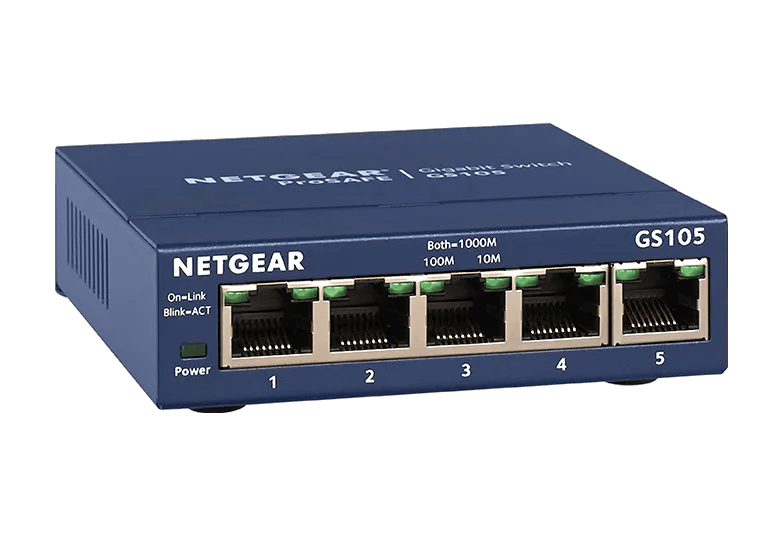
Netgear
Need a Unmanaged wired switch for your business network? Check out XS508M 8-port, 5-speed Unmanaged Switch with 10-Gigabit/Multi-Gigabit. Buy now!
Netgear
Need a Unmanaged wired switch for your business network? Check out XS505M 5-port, 5-speed Unmanaged Switch with 10-Gigabit/Multi-Gigabit. Buy now!
shut geyser
yeah, those scale all the way up to 10gig, which puts it outside the bounds of the average budget.
I guess what I was referring to was a 10g SFP with multiple 1/2.5/5 g ports.
Point being, ISPs offer up to 5g speeds at the residential level, yet there seems to be a gap in gear available unless you overshoot all the way up to 10G.
Not that it makes a ton of material difference in the end, but it's nice to feel like one can leverage the internet speed that they are paying for without having to purchase gear that far overshoots their needs.
First world problems, here.
I will probably just end up going with something like this https://www.netgear.com/business/wired/switches/unmanaged/ms305/
And just leave a little speed that I pay for on the table.

Netgear
Discover NETGEAR MS305, 5-port Multi-Gigabit Unmanaged Essentials Switch. Perfect switch for businesses, with energy efficient, built to last, provide the reliability. Buy Now!
stuck grove
a 5g switch would likely be more expensive than a 10g switch
and 2.5g to 10g isn’t that big of a jump
2.5g is already more than a single consumer could even use
shut geyser
stuck grove
a 5g switch would likely be more expensive than a 10g switch
quite possibly.
It's simply a value for your money game.
stuck grove
when you can get a 10g switch for less money, the value proposition for a 5g switch is nonexistent
shut geyser
stuck grove
when you can get a 10g switch for less money, the value proposition for a 5g swi...
I guess.
10g switches aren't exactly affordable, though.
I found that I could get a Trendnet TEG-S5061 ($77 usd) + an SFP + RJ45 adapter ($35 usd). That is a 1/3 the cost of a 10g switch. If I have 3gigabit fiber service, then I can at least leverage most of the speed I am paying for for $115.
I think I am figuring this right.
Networking is an odd game.
mild whale
There's also no guarantee that if you do pay for 3 gig, you won't always get 3 gig.
At least thats been my experience so far
shut geyser
mild whale
There's also no guarantee that if you do pay for 3 gig, you won't *always* get 3...
I mean, I get that. But I have to trust, to seem degree, that what my router is reading is the speed going to it from the ONT is fairly accurate.
mild whale
My speed varies (sometimes significantly) hour by hour
shut geyser
mild whale
My speed varies (sometimes significantly) hour by hour
with fiber??
mild whale
Usually ~700MB to 1gig
mild whale
shut geyser
with fiber??
Coax, but I doubt fiber is any different
shut geyser
mild whale
Coax, but I doubt fiber is any different
it should be. That is kind of the whole point of it.
 opal pagoda
shut geyser
I guess.
10g switches aren't exactly affordable, though.
I found that I could ge...
opal pagoda
shut geyser
I guess.
10g switches aren't exactly affordable, though.
I found that I could ge...
Current meta is buying them from AliExpress, they are 25$ for 5 port 2.5+2x 10g or 30-40 for 8port 2.5+ 2x 10g
mild whale
shut geyser
it should be. That is kind of the whole point of it.
There's very much more to this than "fiber good."
Fiber is better
But it still fluctuates. Just not as much as coax.
shut geyser
mild whale
There's very much more to this than "fiber good."
maybe not "fiber = good" but "fiber = better"
there is little doubt that fiber is more scalable than coax
opal pagoda
shut geyser
with fiber??
Its shared medium, gpon has like 2.5g down and a gig up total bandwidth with 128 potential users sharing it
mild whale
Its the same on coax, neighbors share part of the RF spectrum. This can influence your speeds.
And even more goes right out the window with wifi where speed is basically irrelevant
opal pagoda
Yea but coax doesn't have nearly as much bandwidth potential
mild whale
opal pagoda
Yea but coax doesn't have nearly as much bandwidth potential
Yep, so its got a greater fluctuation.
You shouldn't see that much with fiber, but its still there.
opal pagoda
And they alocate single precent bandwidth to upload
mild whale
Idk that upload is too big of a deal for my normal user self.
opal pagoda
So you get shit like 1g down and 10mbps up 
mild whale
opal pagoda
So you get shit like 1g down and 10mbps up <:KEKW:670048864052445204>
Very true lmao
shut geyser
opal pagoda
Current meta is buying them from AliExpress, they are 25$ for 5 port 2.5+2x 10g ...
I can't buy from them. I have this mental block that everything on there comes with a high scam percentage.
I have zero to back that up with these days. But like I said: mental block.
stuck grove
You don’t trust or distrust Aliexpress, you trust or distrust the sellers on Aliexpress
Up to you to verify the sellers are genuine
shut geyser
stuck grove
You don’t trust or distrust Aliexpress, you trust or distrust the sellers on Ali...
true
opal pagoda
What is your budget and how many ports you need?
shut geyser
opal pagoda
What is your budget and how many ports you need?
budget is $175 usd (MAX) and 5-8 ports.
opal pagoda
2.5g only or with 10g uplinks?
shut geyser
was hoping for 10g uplink since it makes sense to go from the free 10g port on the router to the switch. 2.5 on the other ports is fine.
opal pagoda

Ubiquiti Store
Flexible, 8-port 2.5 GbE switch with a 10 GbE RJ45/SFP+ combination uplink port that can be powered with a USB-C or PoE+ adapter.

Ubiquiti Store
Compact, 5-port 2.5G switch that can be powered with PoE or a USB-C adapter.
shut geyser
why has all of my searching not brought these up?
Google is slacking on the job
opal pagoda
shut geyser
why has all of my searching not brought these up?
Google is slacking on the job
I believe they can be managed but they don't have a web interface, rather it needs a ui cloud key or vm and you need to put stuff in dhcp options
shut geyser
opal pagoda
I believe they can be managed but they don't have a web interface, rather it nee...
I am guessing that you can use it as a "dumb" device on your network and just use it as an unmanaged switch.
opal pagoda
Yes
 little spruce
Is the sg2210p a good first switch , i'm a networking student and looking for a fairly decent yet budget switch
opal pagoda
little spruce
Is the sg2210p a good first switch , i'm a networking student and looking for a ...
get a used cisco switch like c1000 or c2960
things like this are low power and excelent for learning
 shut geyser
opal pagoda
Yes
shut geyser
opal pagoda
Yes
just purchased from B&H to get free shipping. Thanks for the suggestion!
 fossil garden
One message removed from a suspended account.
One message removed from a suspended account.
 silent flax
fossil garden
One message removed from a suspended account.
silent flax
fossil garden
One message removed from a suspended account.
modem => internet comes through differnet means than ethernet - coax, optical etc. More often than not combined with router/AP in home router category.
router => device which takes internet and distributes it to the devices behind it. In IPv4 world it hid all the devices behind it, in IPv6 world it is less important. Often combined with AP in home router category.
AP => device through which you connect via WiFi to your home network. In home router category it is usually part of the router.
WiFi repeater => takes the AP's signal and repeats it to make WiFi singal coverage bigger
silent flax
fossil garden
One message removed from a suspended account.
not sure how many devices are on the LAN port of that router, if it was me and it can't be replaced, then get a switch for the LAN port (so you have more than one device wired via ethernet), then get a mesh system or secondary AP, depending on how much coverage you need
fossil garden
One message removed from a suspended account.
opal pagoda
fossil garden
One message removed from a suspended account.
what is your budet to fix this?
fossil garden
opal pagoda
what is your budet to fix this?
One message removed from a suspended account.
One message removed from a suspended account.
One message removed from a suspended account.
One message removed from a suspended account.
opal pagoda
1st issue that i see is that old tp link
it probably only has 100mbps ports on it
fossil garden
opal pagoda
1st issue that i see is that old tp link
it probably only has 100mbps ports on i...
One message removed from a suspended account.
opal pagoda
if you want a drop in solution with easy setup just get deco X50 (2 pack) and a gigabit switch
one deco will be right next to your modem/ont, other on 2nd floor
kpn experia box can be removed and a rj45 coupler installed
fossil garden
opal pagoda
if you want a drop in solution with easy setup just get deco X50 (2 pack) and a ...
One message removed from a suspended account.
 marble dragon
Anyone good on routers and not beeing able to acces homepages?
twin pier
sage robin
Is it better to just have one ssid and let the device decide what’s best for the...
Yes. there's no reason to split 2.4 ghz and 5 ghz into different SSIDs unless you have really bad coverage and are trying to override it
 rose fable
twin pier
Yes. there's no reason to split 2.4 ghz and 5 ghz into different SSIDs unless yo...
rose fable
twin pier
Yes. there's no reason to split 2.4 ghz and 5 ghz into different SSIDs unless yo...
Actually helps if you're trying to segregate the network into shitty iOt devices and regular devices. Makes it super easy to VLAN it off
Also when you're in an area that's overloaded with Wi-Fi, you can ensure your devices are on a clean channel with 5GHz in an apartment building vs 2GHz
And that can have insane implications on speed.
You can go from unable to stteam 480p Jellyfin on a local network to streaming 4k on a local network.
ISPs should be ripped a new asshole for unnecessarily overcrowding the WiFi spectrum. People only buying 150Mbps should NOT be on a 80MHz channel unless they are doing local servers. I highly doubt every single customer is so a 20MHz channel is plenty!
twin pier
in my experience most IoT devices don't support 5 ghz, so it doesn't end up mattering, especially in a home setting where you aren't gonna have hundreds of devices
rose fable
Exactly why segregating those off to a dedicated 2.4GHz network is helpful
twin pier
wat? if your iot devices dont support 5 ghz then making the 2.4 ghz a separate ssid does exactly nothing
rose fable
Devices unfortunately will choose 2GHz over 5GHz sometimes. And that leads to shit performance
It does have benefits
twin pier
i havent ever seen that unless you have bad coverage
rose fable
Even low signal 5GHz, if a clean channel, is far better than during signal crowded 2GHz.
So sometimes, the device will choose 2GHz simply because it's a stronger signal. Even despite the clean 5GHz weaker signal delivering substantially better throughout
twin pier
sometimes, but with how cheap mesh systems are today it sometimes is easier to just actually make your house have good wifi coverage
rose fable
Please stop preaching mesh. You sound like an ISP
rose fable
rose fable
ISPs should be ripped a new asshole for unnecessarily overcrowding the WiFi spec...
This is exactly what I was talking about
Leveling Linus house with Wi-Fi gave him absolute trash WiFi performance. And this is exactly what ISPs have been doing instead of actually configuring WiFi correctly!
If no one calls them out, they won't change and get smarter.
Even changing to 40MHz channels on 5GHz would help with the overcrowded situation. Also, lowering the power within substantially help! You don't need to blast Every person at 100% WiFi power! That actually causes your devices to use more battery as well.
My current WiFi is at 30% power. I still copy files at over 1Gbps on 5ghz in my entire house. Absolutely zero reason for putting it at 100% power and interfering the neighbors.
sage robin
What is the benefit of having separate VLAN for iot and is it worth it for average joe ?
topaz patrol
sage robin
What is the benefit of having separate VLAN for iot and is it worth it for avera...
If you are asking that question, you are not the average joe
frosty stone
rose fable
This is exactly what I was talking about
petition to ban wireless mesh systems in homes
I hate their existence because people that don't know shit at all always buy them
You don't need 3 APs in your 120sqm house
I have one U6-lite in the house and the property is quite large, the connection just drops out at the gate, so the whole driveway/front yard is covered and the backyard aswell
Doesn't quite reach the garden and I'd like it to extend out the front a little more so at some point I'll probably chuck a U7 outdoor on either side of the house or something
 sweet geode
Failed chip from Mediatek on my Asus motherboard ( Asus Tuf Gaming B550M Plus Wifi II) 😭🤧

It's the model MT7921, as I searched information through reddit & forums, this model in concrete is considered one of the worst products from Mediatek due to his huge failure in a lapse of 1 year or less, as own experience, problems started in less than a year and had to inmediately remove it from my motherboard
opal pagoda
Its just m.2 module inside, just swap it to intel ax one
silent flax
sweet geode
It's the model MT7921, as I searched information through reddit & forums, this m...
as @opal pagoda said, you can either replace the module inside, or just plug in the M.2 key A/E card in the slot directly
 silent spruce
finally got my locally hosted tailscale working.
i can finally close up the bazillion port i have open (gaping security risk)

that and i can only access my server's SMB share and not both it and my pc since windows can't change SMB port which this solves
also no longer need to jankly route RDP to PC via server's nginx since i can't have both it and the server be on 3389
sweet geode
silent flax
as <@203950587471986688> said, you can either replace the module inside, or just...
I'm planning that, soon is my birthday, if everything goes fine and I get a little bit of money I'll buy a module
Intel AX200 or AX210, depending on how much they're going to give me 😂
shut stag
silent spruce
finally got my locally hosted tailscale working.
i can finally close up the bazi...
nice i just closed my ports for immich and emby this week
i love routing on https!
silent spruce
only got 443 open now too
silent spruce
you just do a 301 redirect of all http traffic to 443
though in this case i use cloudflare's redirection
so i don't need 80 open at all
no reason to
it's a pain setting it up but it's all worth it in the end lol
 shut stag
i may have to consider that
im still quite new to all this but it has been fun optimizing my truenas server
silent spruce
finally i can use VBAN over the internet 
opal pagoda
i add a ztna auth to everything that can handle it
silent spruce
for auth
cloudflare take the wheel
opal pagoda
silent spruce
for auth
cloudflare take the wheel
well i dont trust it fully so i have 2 auths
one cf, one mine
 lone sun
sweet geode
Failed chip from Mediatek on my Asus motherboard ( Asus Tuf Gaming B550M Plus Wi...
lone sun
sweet geode
Failed chip from Mediatek on my Asus motherboard ( Asus Tuf Gaming B550M Plus Wi...
Mines started giving me BSOD errors even though I legit just got the laptop a few months before. Brand new HP Elitebook G11 work laptop. Had to throw that piece of shit away for an Intel AX212 chip. Not a fan of Mediatek. Even less of a fan of Realtek when it comes to wifi. Intel is absolute King when it comes to wifi adapters.
opal pagoda
intel the wifi goat
lone sun
opal pagoda
intel the wifi goat
🙂 Absolutely. They not only make it easy to get drivers, but when they claim a chip is actually an 802.11AX adapter, they mean it, unlike Realtek especially. There are Realtek adapters out there claiming to be AX, yet when you go into the advanced properties tab for it in device manager, its utterly devoid of anything you'll expect to see.
Realtek is by far the worst of the bunch. They are ok when it comes to ethernet though at least.
 thin hedge
silent spruce
it's a pain setting it up but it's all worth it in the end lol
thin hedge
silent spruce
it's a pain setting it up but it's all worth it in the end lol
is this open to the internet
frosty stone
thin hedge
is this open to the internet
Read what was said, or try visiting it yourself. ||Yes it is||
frosty stone
silent spruce
though in this case i use cloudflare's redirection
Your redirect rule is setup wrong
frosty stone
frosty stone
Your redirect rule is setup wrong
If you go to http://purinnyova.com it'll redirect incorrectly to http://purinnyova.com/www.purinnyova.com
thin hedge
and analyzing the fileserver request the username and password can easily be bruteforced
frosty stone
frosty stone
If you go to http://purinnyova.com it'll redirect incorrectly to http://purinnyo...
It will do the same on https aswell
thin hedge
tbh just have the site on apex
frosty stone
also I'd advise against having direct links to things on the status page
thin hedge
frosty stone
also I'd advise against having direct links to things on the status page
that are open to the internet. Please close your stuff
close your internal services?
thin hedge
frosty stone
they're web services proxied through CloudFlare
I'm not that dumb, but you can access the services with barely any authentication
which isn't good obviously
frosty stone
 the things that need auth have auth
thin hedge
frosty stone
<:DennisWut:717979470518288415> the things that need auth have auth
very poor auth that is
frosty stone
What drugs are you on
opal pagoda
thin hedge
close your internal services?
I always have ztna challenge before granting access to another login portal
thin hedge
frosty stone
What drugs are you on
the post request for the fileserver is just this:
{"username":"test","password":"test","recaptcha":""}
anyone could brute force that with burp or even curl
frosty stone
because that's how a post request for a login works? Idk what you expect.... All the work is done on the backend
thin hedge
no capchas or 2fa...
opal pagoda
Fail2ban will ban you from brute forcing
thin hedge
oh, alright
frosty stone
how would you know there's no 2fa? You ain't logged in
this is some basic user's hobby stuff not a company or government
opal pagoda
frosty stone
this is some basic user's hobby stuff not a company or government
I have seen worse
thin hedge
I wouldn't feel safe with this but yeah
frosty stone
Paranoia
thin hedge
fair
frosty stone
Been doing this shit for nearing 10 years
Never had a problem with just having something open
I ain't a target
thin hedge
I don't like that
frosty stone
I would be happy if CloudFlare allowed proxying of non-web stuff, but I'm not very worried
opal pagoda
frosty stone
I would be happy if CloudFlare allowed proxying of non-web stuff, but I'm not ve...
You can but end device need to have cf client
Warp
frosty stone
Not the kind of proxying I mean
Unless I'm misunderstanding it, you need to be connected to warp to connect to the things behind cloudflared
Oh yeah that's literally what you said, sorry I'm tired
My main concern there is if I set it all up and then disable normal access in the firewall.... What if cloudflared stops working? I don't have physical access to the servers
I'd have to use ovh's painful KVM to log in and enable it again
opal pagoda
frosty stone
My main concern there is if I set it all up and then disable normal access in th...
I have dual access
1st is over cf and 2nd is over tailscale
With tailscale you need to configure key to last forever, otherwise it will stop working after 3 months from what i remember
frosty stone
Oh and how do I allow other servers to connect? Does running cloudflared on them just allow that?
opal pagoda
frosty stone
Oh and how do I allow other servers to connect? Does running cloudflared on them...
Yea
If cloudflares is configured on one device in a subnet you can configure it to access anything in that subnet or even others if route exists
silent spruce
frosty stone
If you go to http://purinnyova.com it'll redirect incorrectly to http://purinnyo...
That's intentional
I want to redirect apex to www
frosty stone
silent spruce
That's intentional
I want to redirect apex to www
Yes but read what I said. It's done incorrectly and doesn't work
silent spruce
Huh
It works just fine
My friends tested it too earlier (first time accessing so no cache either)
Odd
frosty stone
go directly to https://purinnyova.com, it'll redirect to https://purinnyova.com/www.purinnyova.com instead of https://www.purinnyova.com
Because the rule is setup wrong
silent spruce
bruh the fuck did i fuck this time
oh
i accidentally ticked preserve query string
frosty stone
Now I'm getting error 525, ssl handshake failed
silent spruce
still redirecting to the wrong thingy
frosty stone
Let the cache reset
silent spruce
ah fuck the cloudflare rule
i'll just redirect with nginx
silent spruce
frosty stone
Let the cache reset
can you see if it is fixed
frosty stone
It's even more broken now
silent spruce
what does it say now
frosty stone
It now redirects to https://www.purinnyova.com/www.purinnyova.com and shows an nginx 404 page
You're doing something very wrong and idek how
Go back to the CloudFlare rule and just stop having a skill issue 
silent spruce
how about now
what tool can i use to test this shit without local DNS cache gaslighting me
silent spruce
thin hedge
and the headscale admin UI is up
you need the API key to actually access stuff
or else you'd just see settings
 frosty stone
silent spruce
what tool can i use to test this shit without local DNS cache gaslighting me
frosty stone
silent spruce
what tool can i use to test this shit without local DNS cache gaslighting me
Screenshot the CloudFlare rule please
silent spruce
there is none
i just set apex dns record to direct to my IP (proxied)
then in nginx rule for that
return 301 https://www.purinnyova.com;
frosty stone
Well something is screwing it up and adding the bit to the end
silent spruce
there shouldn't be anything left to possibly do that
frosty stone
The actual redirect seems to work so it might be in the site itself somehow
silent spruce
The site itself is just serving an html file
As basic as it gets
opal pagoda
silent spruce
there is none
i just set apex dns record to direct to my IP (proxied)
then in ng...
i like to redirect people to https://http.cat/ status code

 silent spruce
Try short.purinnyova.com @opal pagoda
opal pagoda
DNS issue
frosty stone
silent spruce
The site itself is just serving an html file
As basic as it gets
Well when I curl https://purinnyova.com it's redirect says https://www.purinnyova.com and nothing else, so something after is making it https://www.purinnyova.com/www.purinnyova.com
silent spruce
DNS cache?
frosty stone
this isn't DNS
silent spruce
Let me ask my friend to test it
opal pagoda
silent spruce
DNS cache?
it works now, redirects to yt
silent spruce
didn't change anything
opal pagoda
prob takes a bit to propagate
silent spruce
it's been set months ago
frosty stone
Ok weird I opened up chrome on my phone (I don't use it normally) and went to purinnyova.com and it redirected and worked
fucking weird
Yep now it's just working
I'm gonna guess the CloudFlare rule you originally had just hadn't updated fully yet
silent spruce
silent spruce
there is none
i just set apex dns record to direct to my IP (proxied)
then in ng...
i havent changed anything since this message
so i guess
frosty stone
yep I blame the CloudFlare rule taking a while to update lol
opal pagoda
its 5 minute revalidation
 frosty stone
DNS is not rules
silent spruce
rules should be separate
frosty stone
Rules are basically the equivalent of the nginx redirect you just did but on a CloudFlare server
frosty stone
I don't have my ssh key USB on me so I just typed two long ass commands manually through the proxmox VM terminal (can't paste in it for whatever reason) to add the cloudflared repo
opal pagoda
frosty stone
I don't have my ssh key USB on me so I just typed two long ass commands manually...
i just used command that is displayed in cf one
 frosty stone
yeah no shit... you can't just do that on a server

oh god I have to type the key manually
maybe I'll just temporarily edit the ssh config to allow passwords
frosty stone
the documentation references pages that have entirely changed
frosty stone
maybe I'm an idiot but I can't get this to work at all
frosty stone
it was having a fit over TLS stuff to localhost
that still doesn't solve why ssh won't work
silent spruce
Am I mad for using windows server and psexec
frosty stone
Yes
topaz patrol
frosty stone
I don't have my ssh key USB on me so I just typed two long ass commands manually...

 junior rune
How to rember a private ip vs a public ip
 pseudo blade
junior rune
How to rember a private ip vs a public ip
pseudo blade
junior rune
How to rember a private ip vs a public ip
RFC1918 deals with most of it
junior rune
pseudo blade
RFC1918 deals with most of it
Its for a cert test
pseudo blade
Are you comfortable with subnetwork masks?
twin pier
junior rune
How to rember a private ip vs a public ip
like as in the ranges that are defined to be private?
ornate jungle
junior rune
How to rember a private ip vs a public ip
In Internet networking, a private network is a computer network that uses a private address space of IP addresses. These addresses are commonly used for local area networks (LANs) in residential, office, and enterprise environments. Both the IPv4 and the IPv6 specifications define private IP address ranges.
Most Internet service providers (ISPs)...
rose fable
junior rune
Its for a cert test
If you're asking, you're not ready for the test. And if you pass, while not knowing that simple stuff, I feel bad for whoever certified you and hires you based on the cert
shut stag
anyone with a pihole setup care to share how they have it placed in their network stack? ive tried running pihole before on an opnsense router but i had really bad performance issues accessing web pages
frosty stone
shut stag
anyone with a pihole setup care to share how they have it placed in their networ...
On a pi connected to the router, as intended
rose fable
shut stag
anyone with a pihole setup care to share how they have it placed in their networ...
- Connected via wire to router while on a Pi.
- Running in a VM on a server connected via wire.
- Connected via Wireguard to a VPS running in a container.
shut stag
rose fable
1. Connected via wire to router while on a Pi.
2. Running in a VM on a server co...
sorry if this is a dumb question, but do you have your router running to your docker app, then back to the router after the pihole?
rose fable
shut stag
sorry if this is a dumb question, but do you have your router running to your do...
Sorry I don't use Docker
But the pihole is essentially the DNS address. So your devices just go to pihole for DNS.
So no, they don't go to the router for DNS. They go to the container for DNS.
shut stag
oh interesting
thats fine lol i just expected docker would be the easiesy way to run it
rose fable
Docker is most common. But definitely not the only containerization tool out there, and definitely not the most secure.
opal pagoda
shut stag
anyone with a pihole setup care to share how they have it placed in their networ...
Tf
It is dns, all you need is l3 connectivity to it on dns ports and l3 connectivity to quad9, cf or google dns from pihole to wan
 fickle lily
Hi , has anyone tried making docker use router dhcp?
 short igloo
How do I correctly bind my dnsmasq instance in OpenWRT such that the devices get the correct local domains attached? Or should I just switch to using one dsnmasq instance since I'll be planning to link together multiple locations?
# MVP config
config dnsmasq 'lan_dns'
    option domainneeded '1'
    option localise_queries '1'
    option rebind_protection '1'
    option rebind_localhost '1'
    option local '/lan.alpha.local/'
    option domain 'lan.alpha.local'
    option expandhosts '1'
    option authoritative '1'
    option readethers '1'
    option leasefile '/tmp/dhcp.leases.lan'
    option resolvfile '/tmp/resolv.conf.d/resolv.conf.auto'
    list interface 'lan'
#   list notinterface 'loopback'
    option localservice '0'
    option listenaddress '10.1.4.1'

config dhcp 'lan'
    option instance 'lan_dns'
    option interface 'lan'
    option start '100'
    option limit '150'
    option leasetime '12h'
    option domain 'lan.alpha.local'
    option force '1'

config dnsmasq 'guest_dns'
    option domainneeded '1'
    option localise_queries '1'
    option rebind_protection '1'
    option rebind_localhost '1'
    option local '/guest.alpha.local/'
    option domain 'guest.alpha.local'
    option expandhosts '1'
    option authoritative '1'
    option readethers '1'
    option leasefile '/tmp/dhcp.leases.guest'
    option resolvfile '/tmp/resolv.conf.d/resolv.conf.auto'
    list interface 'guest'
    list notinterface 'loopback'
    option localservice '0'
    option listenaddress '10.1.6.1'

config dhcp 'guest'
    option instance 'guest_dns'
    option interface 'guest'
    option start '100'
    option limit '150'
    option leasetime '12h'
    option domain 'guest.alpha.local'
    option force '1'

 vast saddle

The partnership will reduce energy consumption by eliminating the need for optical-electrical conversion.
 peak linden
Is there a good company that makes pure copper cat6 Ethernet cable? Trying to make my own custom length cables and trying to make sure i avoid copper coated aluminum. Might try to find braided cable
 random siren
any actually cat6 spec wire has to be pure copper. otherwise it isnt cat6
 rocky badge
@clear igloo i have never seen the utility meter be connected via Ethernet

 opal pagoda
peak linden
Is there a good company that makes pure copper cat6 Ethernet cable? Trying to ma...
opal pagoda
peak linden
Is there a good company that makes pure copper cat6 Ethernet cable? Trying to ma...
yes
my preffered supplier is datwyler but i buy in 3km+ of cable at a time
vast saddle
rocky badge
<@291198741862416384> i have never seen the utility meter be connected via Ether...
lol interesting
peak linden
opal pagoda
yes
my preffered supplier is datwyler but i buy in 3km+ of cable at a time
God damn. Thats a lot. All i need is like 500ft at the most.
peak linden
random siren
any actually cat6 spec wire has to be pure copper. otherwise it isnt cat6
The “cat6” wire i got kept breaking some where in the wire when trying to terminate so i think it might’ve been cca. It also never specified pure copper
vast saddle

Cool
Edge computing is cool tbh. I always thought processing data separate from a centralized area is a good thing
opal pagoda
peak linden
God damn. Thats a lot. All i need is like 500ft at the most.
what country are you in? i could find you somewhere to buy real cat6 cable
you can always buy it from ubiquiti
dahua (security camera company) also makes/rebrands actual copper cables
lean palm
Anyone here running Sophos home firewall? How are you liking it? Hows the management with sophos cloud compared to somthing like unifi? I'm looking at swapping all my UDM-Pros with Sophos XG115 V3 flashed with Sophos Home OS
peak linden
opal pagoda
what country are you in? i could find you somewhere to buy real cat6 cable
Usa
opal pagoda
peak linden
Usa
insight, fs.com or monoprice
here is link to what monoprice is selling, i dont see any aluminium cables
https://www.monoprice.com/category/networking/networking-bulk-cables
peak linden
Whats the difference between cat 6 and 6A?
opal pagoda
peak linden
Whats the difference between cat 6 and 6A?
55m max distance doing 10g vs 100m
6 is perfectly fine for home use
opal pagoda
yea 6 will work fine
 naive goblet
im here to meet all the ceos
rocky badge
vast saddle
lol interesting
I'm interested to see how its getting power from the meter base
if its in the meter base its probably not breakered
hopefully there's an inline fuse or something?
clear igloo
rocky badge
hopefully there's an inline fuse or something?
I would hope so but you never know these days, lol
peak linden
I noticed that there are RJ45 connectors that have you put the wires through a guide of sorts before being put into the full connector. Should i get one of those if im using stranded and do they require a special crimper or no?
clear igloo
peak linden
I noticed that there are RJ45 connectors that have you put the wires through a g...
I'm not 100% sure on stranded but they do usually require a special crimper since the crimper needs to cut the excess wires off at the end
peak linden
I have a pass through crimper
peak linden
Im talking about something like this in the top left where it has a guide

Not the bottom left.
clear igloo
oh, I've never seen that before, those look like a huge pain
I just go with these and pull the wires through

Unless they just blew out the top left for illustration purposes
peak linden
My concern is the wires ending up in the wrong spot when i try to push them through the connector
clear igloo
That's fine, until you crimp you can redo it
peak linden
clear igloo
Unless they just blew out the top left for illustration purposes
From my understanding, its a separate piece to put the wires through before going in the connector
clear igloo
peak linden
From my understanding, its a separate piece to put the wires through before goin...
Nah, don't bother with it, just get a regular passthrough plug and feed them through that way, heck give yourself enough slack and you can do one wire at a time
 peak cloak
clear igloo
oh, I've never seen that before, those look like a huge pain
peak cloak
clear igloo
oh, I've never seen that before, those look like a huge pain
It's been a while but when I used them they were pretty nice
clear igloo
peak cloak
It's been a while but when I used them they were pretty nice
Interesting, with the removable comb?
peak cloak
Not sure what you mean? That little plastic part?
clear igloo
yah, apparently it comes out of the plug
Or at least that's what I assume Prinz Eugen was saying
peak cloak
The one I used it stayed in
clear igloo
Let me reword, the comb comes out to feed the wires through and then stays in the plug afterwards, yes?
peak cloak
Yeah
clear igloo
Ok, cool, yah that's what I meant 🙂
I just think the removable comb to start with would be extra parts to fiddle with and add pain to the process
peak cloak
They were already in a separate bag and it was fairly easy to get them on. I was doing like 50 terminations so it helped a bit
When I ran out of them had to go to normal passthrough and it took me a bit longer
clear igloo
Oh, well that's definitely easier then if they're seperated from the start
frosty stone
clear igloo
oh, I've never seen that before, those look like a huge pain
Yeah it is, especially when the wires are slightly thicker than it was designed for
But they're great when it's the correct size
 turbid umbra
Hey guys I was just testing my LAN ethernet connections which both devices are using 1Gb NICs however it never goes above 950Mbps in iperf3 tests, what can cause this kind of overhead?
The only thing I can think of is I'm using an "older" ASUS Router/Modem with no WAN connection as a switch between devices
turbid umbra
clear igloo
Ethernet overhead
Can it really be that much, its fine realistically I was just curious
clear igloo
Yup
turbid umbra
Interesting
clear igloo
If you set the MTU to jumbo frames like 9000 it will be lower overhead and be around 990Mbps or so
I can't remember the exact numbers off hand but 1500 should get you a bit higher, I forget if iperf uses 1500 by default or not
turbid umbra
clear igloo
If you set the MTU to jumbo frames like 9000 it will be lower overhead and be ar...
But this isn't really recommended on just any device iirc.
clear igloo
With the typical default of 1500, you're losing 14 bytes to the Ethernet header , 20 for the IP header, and another 20 for the TCP header. 1500-54 = 1446 which is 96.4% so about 964Mbps of data in a perfect scenario after overhead
turbid umbra
clear igloo
With the typical default of 1500, you're losing 14 bytes to the Ethernet header ...
Yeah okay cool
opal pagoda
clear igloo
I just go with these and pull the wires through
I just crimp regular non passthrough ones, it isnt that hard
vast saddle
Ngl I should practice crimping Ethernet
twin pier
clear igloo
oh, I've never seen that before, those look like a huge pain
AFAIK they are to prevent the supposed issue of pass through connectors having "exposed" wires at the end that could contact the switch port housing in the back
I haven't had an issue with normal pass through connectors though. And all my ports have plastic in the back, not metal
clear igloo
twin pier
AFAIK they are to prevent the supposed issue of pass through connectors having "...
Interesting, I didn't even think about that but it makes sense
 teal relic
Hello, I have a problem with my network speed and I was curious if there is someone here that can give a little advice
 low egret
https://www.asus.com/us/networking-iot-servers/wifi-7/all-series/asus-rt-be92u/
https://www.asus.com/us/networking-iot-servers/wifi-routers/asus-wifi-routers/rt-be86u/
With these parameters (ASUS only, $350 max, wifi 7), which one would be the better option
Using it for enterprise purposes

ASUS USA
RT-BE92U achieves blazing-fast WiFi speeds of up to 9,700 Mbps, ensuring seamless streaming and data-intensive tasks, which is also flexible, safe, and easy to manage.

ASUS USA
Dual-band WiFi 7 router with speeds of up to 6800 Mbps, support 4096-QAM, Multi-link operation (MLO), 10G port, subscription-free network security and comprehensive VPN features
opal pagoda
Using it for enterprise purposes
very consumer router
nova glacier
Who is enforcing ASUS only for an enterprise WiFi installation? They make quite good consumer wifi, but they just do not make enterprise wifi. They stop at SMB. Like single office startup or coffee-shop level installs that have zero care for enterprise features
opal pagoda
nova glacier
Who is enforcing ASUS only for an enterprise WiFi installation? They make quite ...
i would consider it very consumer out of the box and smb if openwrt would be installed on it
but neither is enterprise
nova glacier
opal pagoda
i would consider it very consumer out of the box and smb if openwrt would be ins...
They do have a separate product line called "ExpertWiFi" that adds just a few basic SMB type features
opal pagoda
prosumer at best
nova glacier
Nah, it really is 100% for businesses not consumers at all. It's still certainly not enterprise-grade
opal pagoda
"large home"
 nova glacier
What they don't have is a WiFi 7 in the ExpertWiFi line, so @low egret's requirements can't be met
nova glacier
opal pagoda
"large home"
Nope. It's for businesses. This isn't just my opinion or something lol, it's literally the ASUS Business WiFi Solutions product line
opal pagoda
nova glacier
Nope. It's for businesses. This isn't just my opinion or something lol, it's lit...
i wouldnt be suprised that asus doesent know how to market these things to businesses
nova glacier
I certainly wouldn't buy it lmao
opal pagoda
yeap
just get ubiquiti
it isnt "enterprise" bc lack of support services but certantly better than whatever asus is selling
today i found out ubiquiti has released ups in eu
excitement to see it has network port|
research it further
dissapointment that it doesent have SNMP, email sending or anything other than shutting down compatabile ubiquiti devices over l2 (and no it doesent turn them back on if power comes back)
stupid product
nova glacier
odd. Are they doing the classic ecosystem play where they have another product you have to buy that can do that?
opal pagoda
nope
if it could send email on power loss and once more when it comes back up i would have bought it
or fkn snmp
it is more uselless than the shitty cashgrab APC smartconect ecostruxture bullshit
low egret
opal pagoda
>Using it for enterprise purposes
>very consumer router
We used to use 2 AX86U Pros so
nova glacier
not that I'm in a position to do it, but I'd probably run a 48/60V DC bus with a central battery bank rather than going with UPS if I were to setup a rack
low egret
low egret
We used to use 2 AX86U Pros so
We still use one but the second one is the one that had issues
opal pagoda
nova glacier
not that I'm in a position to do it, but I'd probably run a 48/60V DC bus with a...
this is how telcos do it
nova glacier
ik. I'm very big into telco lmao
low egret
nova glacier
Who is enforcing ASUS only for an enterprise WiFi installation? They make quite ...
We've used their routers for the past 10-15 years, and they've been great
We use custom firmware on them also
opal pagoda
low egret
We still use one but the second one is the one that had issues
you need centrally managed wifi if you have more than one ap
please get ubiquiti, omada or some more serious vendor
opal pagoda
nova glacier
not that I'm in a position to do it, but I'd probably run a 48/60V DC bus with a...
do atx psu's exist that take 48v?
atm you can get a 5kwh 48v lifepo4 rack battery for 500-700 euros
would be perfect for this
nova glacier
low egret
We've used their routers for the past 10-15 years, and they've been great
We use...
I think you could be misunderstanding enterprise. Enterprise means all your wifi is a single cohesively managed platform with high observability, IDS, captive portal, etc.
low egret
opal pagoda
you need centrally managed wifi if you have more than one ap
please get ubiquiti...
We only have two, that's all of them
And another one for home use, but that's not the point
stuck grove
opal pagoda
"large home"
does it come with the large home?
low egret
nova glacier
I think you could be misunderstanding enterprise. Enterprise means all your wifi...
Ok then , let me reword it then
We used them for a moderately sized company, and we mainly use STS VPNs and etc
opal pagoda
low egret
We only have two, that's all of them
And another one for home use, but that's no...
one big flat network, no firewall, no 802.1x, no wpa3enterprise
i think you are missing the point
nova glacier
opal pagoda
do atx psu's exist that take 48v?
Not sure, but I also know how to design power supplies so it's a solvable problem. (haha scope creep  )
)
opal pagoda
i would very much like 150w psu with 48v input for under 50$
low egret
opal pagoda
one big flat network, no firewall, no 802.1x, no wpa3enterprise
i think you are ...
We have WPA3E, we have a firewall
And It's 2 networks
opal pagoda
buy whatever, it is clear that your IT department is hobby level at best and i have seen homelabs with better infra
nova glacier
opal pagoda
i would very much like 150w psu with 48v input for under 50$
I do have the start of a 240W USB-PD EPR (5-48V, up to 140W @ 28V and 240W @ 48V) PSU with a BQ25756 charge/SMPS (can actually go to 70V) and RAA489400 USB-PD controller. Not sure about $50 though. That might be tough, that's not far from the BOM cost of just the BQ25756 board
low egret
opal pagoda
buy whatever, it is clear that your IT department is hobby level at best and i h...
Oh no, our IT department is waay more than just hobby level
It's not in my control to pick a different company, otherwise i would
nova glacier
And they're fine with consumer grade wifi? There's all sorts I suppose
opal pagoda
low egret
Oh no, our IT department is waay more than just hobby level
It's not in my contr...
if you have IT department why arent they ordering this?
or are you using MSP?
vast saddle

The Verge
But don’t expect to buy a Wi-Fi 8 device for a few years.
WiFi 8. I still have a WiFi 6 router
opal pagoda
nova glacier
I do have the start of a 240W USB-PD EPR (5-48V, up to 140W @ 28V and 240W @ 48V...
found some but they are absourdly expensive
 low egret
Oh no, our IT department is waay more than just hobby level
It's not in my contr...
low egret
low egret
Oh no, our IT department is waay more than just hobby level
It's not in my contr...
This is on the same router that we used to use
And i think we have like 3-4 different firewalls
For us, ASUS has been very dependable, and it's been plenty secure
But i will definitely ask what the deal is
 opal pagoda
low egret
This is on the same router that we used to use
And i think we have like 3-4 diff...
opal pagoda
low egret
This is on the same router that we used to use
And i think we have like 3-4 diff...
do you have companion radius server to auth users?
low egret
opal pagoda
or are you using MSP?
Oh no it's all first party
We're not a fan of MSPs at all lol
peak cloak
What type of company would only use Asus consumer routers lol
low egret
opal pagoda
if you have IT department why arent they ordering this?
Unofficially I'm part of the IT side
Since i plan to go into that field
It's voluntary
peak cloak
Ubiquiti, tplink omada are much better options
low egret
peak cloak
Ubiquiti, tplink omada are much better options
I think we tried to use them in the past but ended up going back
peak cloak
To Asus, that's really funny
I feel like there's some lack of understanding in your IT
Or skill
low egret
peak cloak
I feel like there's some lack of understanding in your IT
I think the reason for it, is that it's just easy to setup
Can't really stop for an extended period of time
I don't really know the reasoning either
I think they just want a drop in replacement without having too much hassle
I know previously we had a non standard internet company
But up until like a year ish, we've been using at&t fiber
peak cloak
low egret
I think the reason for it, is that it's just easy to setup
Can't really stop for...
Yeah so skill, probably not run by anyone competent
opal pagoda
peak cloak
Yeah so skill, probably not run by anyone competent
disaster recovery plan of glhf
nova glacier
low egret
I think the reason for it, is that it's just easy to setup
Can't really stop for...
That's very strange. Consumer routers are fundamentally unable to be drop-in replacement meanwhile that's a huge draw of enterprise systems. You can adopt a new unifi AP in seconds and it's just immediately fully configured by the cloud key or controller VM.
low egret
opal pagoda
do you have companion radius server to auth users?
Actually I think we do
opal pagoda
low egret
I think the reason for it, is that it's just easy to setup
Can't really stop for...
meanwhile i do complete site to site vendor switch with only "downtime" being that sessions were terminated and need to re establish, same for whatever updates i do
low egret
peak cloak
Yeah so skill, probably not run by anyone competent
It's maintained and ran by the company itself
But we do have our own team, full certs and etc
low egret
nova glacier
That's very strange. Consumer routers are fundamentally unable to be drop-in rep...
From what i've seen, we would have to not only get 2 or 3 routers, we'd also have to reconfigure a whole bunch of stuff since we have them configured specifically, and they wouldn't work elseware
And we can't be down for very long either
nova glacier
low egret
From what i've seen, we would have to not only get 2 or 3 routers, we'd also hav...
That just makes no sense, to be frank
low egret
nova glacier
That just makes no sense, to be frank
I don't know the FULL scope of it, just from what iv'e seen so far
low egret
opal pagoda
burn it all and start from zero
And how long would you think that would take lol
nova glacier
2 sites and 2 APs, right? 30-60 minutes maybe.
opal pagoda
nova glacier
2 sites and 2 APs, right? 30-60 minutes maybe.
less if paralel operation is permitted
nova glacier
True
opal pagoda
one afternoon and case of beer in both cases
low egret
nova glacier
2 sites and 2 APs, right? 30-60 minutes maybe.
I think there's more than 2, since there's a "site" for each employee
opal pagoda
thats just vpn
today forticlient edr ztna killed me
found a incompatability if you use letsencrypt certs on fortigates, fortimanager cannot pull config from them so it gets stuck in a revision diff 
dumb
low egret
opal pagoda
one afternoon and case of beer in both cases
Yeah, can't be down for that long lol
nova glacier
You can't be down for 30 minutes but at the same time you're willing to run on consumer hardware with no redundancy or enterprise management/observability? It's really hard to believe an IT team in such a demanding environment would not only desire consumer gear but actually mandate it.
Tbc I'm not saying you're lying about that, it's just that it's unbelievable. Unless you've got a masochist on the IT team lmao
topaz patrol
opal pagoda
you need centrally managed wifi if you have more than one ap
please get ubiquiti...
Mikrotik? :P
opal pagoda
topaz patrol
Mikrotik? :P
Tiks for routing, switching and P2P links but not for access wireless with multiple ap
topaz patrol
opal pagoda
Tiks for routing, switching and P2P links but not for access wireless with multi...
Tiks for everything!
pseudo blade
However many thousand hotels can't be wrong!
pseudo blade
nova glacier
You can't be down for 30 minutes but at the same time you're willing to run on c...
Sounds like the nepo special to me :)
Someone's in a space where they utterly lack the skillset and common sense required and should never have been hired
(Or dude's full of shit and this is a 40 person "enterprise" where they can't justify an actual IT person)
Even at 40 people just buy a set of Ubiquitis or whatever
mild whale
pseudo blade
Even at 40 people just buy a set of Ubiquitis or whatever
I am a team of 2 and I need to set up my ubiquiti gear this weekend ):
gonna take me all day I think
pseudo blade
Shouldn't take all day
mild whale
pseudo blade
Shouldn't take all day
there are many boxes
becase I have a few access points in the home, and then I'm adding another in my partner's workshop
shut stag
anyone have any router recommendations in the 100-200$ range? i am willing to look at second hand routers, but i dont know a lick about ubiquiti equipment and not sure what i should be looking for
im somewhat new to routers in general; ive built my own before on an old optiplex but performance was not great. i would like to get the functionality of a dream machine but its a bit expensive for me
pseudo blade
shut stag
anyone have any router recommendations in the 100-200$ range? i am willing to lo...
What speeds? Port requirements? Anything in particular you care about?
A dollar amount with no requirements is great for a salesperson but less so for a technical forum.
Anything less than or equal to gigabit's easy
shut stag
my current internet input is just shy of 1gb.
if i can transfer faster than 1gb speeds locally i am happy, but that would be a switch issue, not router right?
pseudo blade
Depends on how much stuff you're happy to have sitting plugged in where it goes
shut stag
i figure ill need at least 2 ports for a switch and then AP
pseudo blade
Ok so you don't care about the router's WiFi much?
pseudo blade
Now you see these are requirements to list upfront lol
shut stag
yeah here ill send a pic of the kind of things i was looking at. i just dont know if they are any good
 pseudo blade
It was decent but it is kinda old
shut stag
how much does age affect routers?
pseudo blade
Software support mostly
And of course they'll lack newer features or offer less throughput doing so for a given market segment
That will definitely do gigabit but I have no idea when the software support stops
Meanwhile UBNT does have newer non-rackmount stuff that looks quite interesting, like the UDR 7
But that may cost a little too much
shut stag
my current setup is not in a rack but it would be nice to have more uniform tools

well, "rack" shelving 😄
pseudo blade
An Eero and a Deco?
shut stag
eero is what my isp uses, deco is my current home router and ap combo
pseudo blade
Double mesh routers lol
shut stag
i am growing quite tired of decos bullshit though i can hardly customize it
pseudo blade
Fair enough!
shut stag
eero is only there so my isp can diagnose issues. nothing connects to it and there are no other satellites
pseudo blade
shut stag
i am growing quite tired of decos bullshit though i can hardly customize it
I don't much like them either ngl
Subscriptions are bullshit
shut stag
deco will become my ap once i have a dedicated router
im not paying any subscriptions but i cant put limits on devices, see monthly data, etc.
pseudo blade
Interesting ask
shut stag
at least i can port forward, my previous isp completely removed that function from their routers.
pseudo blade
shut stag
im not paying any subscriptions but i cant put limits on devices, see monthly da...
Maybe I should be showing you Mikrotiks :P
shut stag
pseudo blade
Run something like fq_codel
pseudo blade
shut stag
Well here's the Mikrotik option anyways https://mikrotik.com/product/rb5009ug_s_in

The ultimate heavy-duty home lab router with USB 3.0, 1G and 2.5G Ethernet and a 10G SFP+ cage. You can mount four of these new routers in a single 1U rackmount space! Unprecedented processing power in such a small form factor.
The software configuration is somewhat more involved than most home routers unless you use quickset
But it does have a dedicated feature in the mobile app for setting bandwidth limits on devices and whatnot
It has PoE, some faster-than-gigabit connectivity, can be rackmounted with an extra part...
Wildly overkill
But you're kinda below the cost of new Ubiquiti kit but want non-consumer features
shut stag
i dont think it does poe
pseudo blade
That does PoE in
shut stag
it says it can be powered via poe
pseudo blade
You want it to do PoE out too?
That'll cost you
https://mikrotik.com/product/rb5009upr_s_in

A new version of our popular heavy-duty RB5009 router with
PoE-in and PoE-out on all ports. Perfect for small and medium ISPs.
2.5 Gigabit Ethernet & 10 Gigabit SFP+, numerous powering options.
...If you're putting it into a rack you could just use an injector...
They do also have another product with a single PoE out but no rackmounting
shut stag
well if other solutions are this expensive i may as well just spend a little extra for this
 shut stag
well, i just broke all my rules for impulse buying, but should i need to i can sell it at a profit
opal pagoda
pseudo blade
Subscriptions are bullshit
Deco has subscriptions?
topaz patrol
opal pagoda
Deco has subscriptions?
Yes, it’s their equivalent to Eero Secure
Tplink also has a wide variety of subscription services for isps
topaz patrol
They’re far from my least favourite
shut stag
honestly tplink isnt that bad, at least the mobile interface is good. sucks the deco routers dont have a web intetface though
mesh routers work best for me anyway since my parents dont want a bunch of wires running across the house
peak cloak

Exploring signal propagation through twisted pair wire, transmission line theory and line termination.
The Rigol MHO900 series of oscilloscopes
www.rigolna.com/products/digital-oscilloscopes/mho900/
The MHO98 is 4-Channels, 1GHz, 4GSa/s with 12-bit resolution. Currently $1399 USD, limited edition.
The MHO900 series starts around $900 with ...
 celest pivot
guys whats the "best" wifi u can get in the uk
opal pagoda
celest pivot
guys whats the "best" wifi u can get in the uk
How much are you willing to spend?
pseudo blade
celest pivot
guys whats the "best" wifi u can get in the uk
I'm sure a Cisco partner can help you figure that out when you hand them that blank check to design your network for you :P
Might cost you a kidney and your firstborn when they put an AP in every room at minimum transmit power... but what can you do?
opal pagoda
pseudo blade
*I'm sure a Cisco partner can help you figure that out when you hand them that b...
Bonus: you convert your entire house to microwave and you don't need separate heating
Wanna get warmer?
Download some iso's over wireless
 blazing mantle
is there a linus video on like entry level networking im using my isp’s router and i wanna upgrade my setup im sure even a basic router will be better than the isp? or am i wrong
basically just want a router actually not a whole setup any recommendations for 300-400 range usd ?
shut stag
blazing mantle
basically just want a router actually not a whole setup any recommendations for ...
depends on what you have from your isp. is your current "router" a modem / router / AP combo? what problems are you having with your wifi?
blazing mantle
yes it is a combo, i’m not having much issues i just wanna bump up the speeds and range i feel like the isp isn’t giving the full capacity that i have with them we have 1 gig speeds and ive tried speed tests on various devices and they rarely get past 300
shut stag
what about when hard wired into your router
blazing mantle
the latest tech that i’ve tried a speed test on is my iphone 17 pro max and even that is like 350 at best
blazing mantle
shut stag
what about when hard wired into your router
it’s very far
like the opposite side of the house on the first floor
shut stag
that probably has quite an effect on your speeds then
shut stag
try a speedtest near your router and see if your speeds are closer to the advertised ones
if your speeds are under 300 you are probably only reaching the 2.4ghz band on the opposite side of your house. 5ghz and 6ghz have much shorter range and are much more sensitive to walls. if you can place your router in a spot with more open air it would help too.
blazing mantle
shut stag
if your speeds are under 300 you are probably only reaching the 2.4ghz band on t...
Thank you for the information i’ll give it a try once im home
celest pivot
@shut stag maybe u can help, i have to plug my router into another box on the wall to make it work, and that box has more cables going into it, this means i have to have my router in a cupboard as that is where the box is
 atomic sequoia
Well, after obsessing for ages about having a public static IP for self hosting.
I am now getting a VPS to setup a proxy, cause giving my IP out now feels oddly revealing.
opal pagoda
atomic sequoia
Well, after obsessing for ages about having a public static IP for self hosting.
If you are hosting only websites then cloudflared is excellent
 brittle maple
can someone help with my lapto0
it wont connect to network, not wifi not ethernet
i can manage my router via ethernet without issue
router says its connected fine
i have tried to reset networkint settings
changed dns on the laptop
used different types of dns
disabled firewall completely
resetted the router itself
used a different ethernet cable
used a different router
reseted the different router
😃
ornate jungle
brittle maple
it wont connect to network, not wifi not ethernet
i can manage my router via eth...
Good troubleshooting so far. Assuming other devices can connect to your router(s) and reach the internet, it sounds like you've ruled out local network gear, so it's likely something on the laptop.
Could be security software blocking things, could be a hardware issue, might be drivers, or it could be a broken Windows install. To rule out laptop Wi-Fi / network hardware, you could try putting a live Linux OS on a USB then boot the laptop from it and see if it will connect.
brittle maple
ornate jungle
Good troubleshooting so far. Assuming other devices can connect to your router(s...
its a fresh install
disabled firewall and anti virus
i managed to fix it by doing sone netsh stuff
:3
fickle lily
HI . i have a dynamic address going on so i use mikrotik cloud ddns for my wireguard but as i noticed when i sudo wg that it translated directly into ip address . would this still change when ever mikrotik cloud update my ip ?
vast saddle

Interesting Engineering
A new wireless method uses controlled randomness to give 6G networks faster, smarter, and more reliable connections at terahertz frequencies.
More 6G news
The only problem with 6G is going to be higher frequencies
Higher frequencies mean more attenuation and that means your gonna have to densify the cellular network
Densification isn’t a bad thing but it costs a lot of $$$ to the carriers
 glass dove
If i want to get into networking should i get an 8port gigbait managable switch or a 20 port with 18 ethernet to 1000Mbps and 2 gigabit sfp port?
opal pagoda
sfp ports (gigabit) are useless unless you are using optics with it
what is your budget?
opal pagoda
glass dove
around 100-150 dollars
CSS318-16G-2S+IN from mikrotik is in that range and it has two 10g ports if you want to mess around with those
glass dove
It is 74.000 Hungarian Forint so its likr 200 dollars
can you tell me a cheaper please
opal pagoda
do you have any noise or power consumption limitations?
glass dove
No
opal pagoda
glass dove
It is 74.000 Hungarian Forint so its likr 200 dollars
https://www.senetic.hu/product/CSS318-16G-2S+IN
you just havent found the right distirbutor

Portok száma: 16x Gigabit Ethernet> SFP slotok: 2x SFP+ 10 Gb/s> Rendszer: SwOS (min. 2.17 verzió)> Hőmérséklet tartomány: -40 és 70 °C között> Maximális teljesítményfogyasztás: 10...
https://www.senetic.hu/product/CSS610-8G-2S+IN
cheaper but less ports version is also avalibile

Alapvető RJ-45 váltás Ethernet portok száma: 8> 10G támogatás> DC/PoE PoE in támogatás (PoE out nem támogatott)
if you want to mess around cisco IOS: https://www.ebay.com/itm/116787125724
ports are only 100mbps but cli is same as any other cisco switch

eBay
Model: WS-C2960C-8TC-S. - Switch Cisco WS-C2960C-8TC-S. RJ-45 Ports: 8x 100Mb 2x 1Gb. SFP Ports: 2x Combo 1Gb. - Power Cord. As part of this process, all data storage devices are securely wiped in compliance with the Federal Data Protection Act (BDSG) — including individual sector checks on each hard drive — to ensure 100% data erasure and p...
atomic sequoia
eeeh fuck it im selfhosting everything. If something bad happens imma learn my lesson
opal pagoda
atomic sequoia
eeeh fuck it im selfhosting everything. If something bad happens imma learn my l...
put your server in a dmz with firewals
 nimble sable
Can someone explain this please? Why is mlo worse than without mlo?

 ornate jungle
nimble sable
Can someone explain this please? Why is mlo worse than without mlo?
ornate jungle
nimble sable
Can someone explain this please? Why is mlo worse than without mlo?
TL;DR: WiFi 7 features are woefully under supported. Even if an Access Point and Client Device both support the required WiFi 7 "extended features" (like MLO), how they function on each device is entirely up to the vendor.
https://www.wiisfi.com/#wifi7
Multi-Link Operation, or MLO, uses multiple bands/channels at the SAME time -- for example using 2.4 GHz, 5 GHz, and 6 GHz all concurrently. However, according to this article (dongknows.com), real-world MLO client tests are very disappointing tests show that speed in MLO is limited to the maximum speed of the single fastest individual band.
https://dongknows.com/wi-fi-7-mlo-multi-link-operation-explained/

Looking to upgrade to Wi-Fi 7 because of Multi-Link Operation? Here's how to set the correct expectation on the MLO link.
ornate jungle
nimble sable
Can someone explain this please? Why is mlo worse than without mlo?
Also, the RSSI: -74 value highlighted in your screenshot is only for the 6GHz frequency, while the other RSSI values for the 5GHz and 2.4GHz channels look much better. Higher frequencies have shorter range and don't pass through objects as well, so 6GHz may not be ideal for the location of your Client Device in your residence.
nimble sable
ornate jungle
**TL;DR:** WiFi 7 features are woefully under supported. Even if an Access Point...
Omg yes this, idk how I missed that article on dongknows
is limited to the maximum speed of the single fastest individual band
nimble sable
ornate jungle
Also, the `RSSI: -74` value highlighted in your screenshot is only for the 6GHz ...
Yea the second screenshot has same 6ghz at much better rssi, which honestly just seems bizarre
ornate jungle
nimble sable
Yea the second screenshot has same 6ghz at much better rssi, which honestly just...
Much lower RSSI, but yes. Like many WiFi 7 features, MLO is a great idea in practice... in theory, not as much.
nova glacier
ornate jungle
**TL;DR:** WiFi 7 features are woefully under supported. Even if an Access Point...
I hate that manufacturers can't resist just summing all the numbers up as if that's how it works. A wireless chipset with 2x2 320MHz channels is still always going to be limited to 320MHz (2882Mbps) of bandwidth per stream. MLO just allows that 320MHz to be from multiple bands
honest merlin
What causes latency to fluctuate? Mine hovers around 32=35ms but goes down to 24 occasionally w/o changing settings. Seems odd it wouldn't be that way normally
1GB download speed, direct connected to modem/router etc
nova glacier
honest merlin
What causes latency to fluctuate? Mine hovers around 32=35ms but goes down to 24...
the infra between you and the server you're testing against is likely to be shared to some extent, especially the last-mile distribution network. The exact technical reason would depend on multiple-access scheme in use.
honest merlin
nova glacier
the infra between you and the server you're testing against is likely to be shar...
I wanna get a new router/modem. even though WiFi 6 has nothing to do with using Ethernet
nova glacier
The effect will be exacerbated by your current load on the network as well. fast.com can be set to test your upload latency under load and you'll see how much worse it gets. Testing it during peak hours of the day will also be even worse.
 nova glacier
honest merlin
I wanna get a new router/modem. even though WiFi 6 has nothing to do with using ...
nova glacier
honest merlin
I wanna get a new router/modem. even though WiFi 6 has nothing to do with using ...
if you're on DOCSIS, a new modem with DOCSIS 3.1 switches from TDMA to OFDMA, a better multiple-access scheme with improved latency characteristics. However, it requires your ISP to have upgraded their network to 3.1 as well.
you may already have a docsis 3.1 modem, as it's not exactly a new standard at this point. If you can access the web interface of it, you'll be able to check if it's connected to a 3.0 or 3.1 upstream. Some modems also use different color LEDs to indicate 3.0. vs 3.1, so you may not need access to the web interface
honest merlin
nova glacier
you may already have a docsis 3.1 modem, as it's not exactly a new standard at t...
I just checked: it’s 3.1 now
nova glacier
upstream specifically? 3.1 downstream is very common, but 3.1 upstream not so much
vast saddle
Yeah. You would need to wait for DOCSIS 4.0 for upstream
DOCSIS 3.1 can take upstream spectrum to 204 MHz with a high split. DOCSIS 4.0 can take upstream spectrum to 694 MHz if they want
nova glacier
vast saddle
Yeah. You would need to wait for DOCSIS 4.0 for upstream
At this point maybe, but some regions have fully upgraded to 3.1 already
vast saddle
Yeah. DOCSIS 3.1 is 100% here. Cox did mid splits in 2023. But it’s hard to imagine they will do more DOCSIS upgrades since they are doing fiber to the home in this area
honest merlin
nova glacier
upstream specifically? 3.1 downstream is very common, but 3.1 upstream not so mu...
This is what I’m running https://www.amazon.com/MOTOROLA-MG8702-MU-MIMO-Approved-Xfinity/dp/B08DL4QB25

The MG8702 DOCSIS 3.1 Cable Modem features a built-in AC3200 4X4 wireless gigabit router to provide the range, wireless speeds, and reliability needed for high-performance networking while eliminating excess wires and simplifying the installation process. Power Boost technology amplifies both the...
vast saddle
These are PON nodes for FTTH. Fiber distribution boxes scattered everywhere for homes to connect to


 nova glacier
honest merlin
This is what I’m running https://www.amazon.com/MOTOROLA-MG8702-MU-MIMO-Approved...
nova glacier
honest merlin
This is what I’m running https://www.amazon.com/MOTOROLA-MG8702-MU-MIMO-Approved...
The up and down arrow LEDs indicate upstream and downstream connection state. Green indicates DOCSIS 1.1, 2.0, or 3.0 while blue indicates 3.1.
honest merlin
nova glacier
The up and down arrow LEDs indicate upstream and downstream connection state. Gr...
Both are currently blue
I’m also in an apartment building if that changes anything
nova glacier
honest merlin
Both are currently blue
Oh sorry, your modem has slightly different meaning to the LEDs than I assumed. Blue just means channel bonding. You'll have to go into the web interface to find out the state of the connection.
I mean, in any case there's nothing you can do to improve latency (for Ethernet connected devices). If you're not on DOCSIS 3.1 upstream, that's not something you can change. That would involve upgrading the appt building infrastructure, the outside ISP infra, or probably both.
honest merlin
nova glacier
Oh sorry, your modem has slightly different meaning to the LEDs than I assumed. ...
Just logged on. It’s saying DOCSIS 3.1
nova glacier
honest merlin
Just logged on. It’s saying DOCSIS 3.1
for both upstream and downstream though? It's very normal to have 3.1 on downstream, but not so much on upstream
honest merlin
I also tried QOS/SQM with some good results
honest merlin
nova glacier
for both upstream and downstream though? It's very normal to have 3.1 on downstr...
Yes. Just googled it. I’ll look more into it
nova glacier
honest merlin
Yes. Just googled it. I’ll look more into it
There should just be a page in the mg8702's web interface describing all the channel statistics. Under the upstream section, there will either just SC-QAM channels, or both SC-QAM and OFDMA. The presence of OFDMA channels in the upstream channels indicates 3.1
vast saddle
Yeah
honest merlin
nova glacier
There should just be a page in the mg8702's web interface describing all the cha...
Yep. Looking at them now
I have 1.1.1.1 DNS for my IPv4 and 6
nova glacier
Holy shit, planned maintenance with the explicit reason of next generation network upgrades?! I never thought the day would come
 proud coyote
Do you guys have any recommendations for a fairly low power consumption device that can run OPNSense or PfSense, or do you think a Ubiquiti Cloud Gateway Ultra is a good option? (For me personally, I would obviously (and will once I move out) build my own and run OPNSense, but for my parents?)
nimble sable
nova glacier
I hate that manufacturers can't resist just summing all the numbers up as if tha...
WHAT? wait i thought the point of MLO was 160mhz in 5ghz band+320mhz in 6ghz band = 480mhz speed!
GOD, wifi7 is such an unmitigated disaster of all the worst things about wifi marketing in general. TIL that some devices can take a VERY long time to FIND a 6ghz SSID because i guess they don't know where to look? even if it's the same damn frequency every time. you CAN enable a 5ghz in the same SSID, which is what apple suggests but if you do that many devices will always prefer 5ghz even if 6ghz would be significantly better
nova glacier
nimble sable
WHAT? wait i thought the point of MLO was 160mhz in 5ghz band+320mhz in 6ghz ban...
A lot of articles and manufacturers describe it as if that's how it would work, so it's very understandable misunderstanding.
nimble sable
nova glacier
A lot of articles and manufacturers describe it as if that's how it would work, ...
basically the only good thing about 6ghz is the open frequency...which wifi6e gives you
and even that's a bit iffy because many devices won't reliably connect to it even in congested areas
nova glacier
nimble sable
GOD, wifi7 is such an unmitigated disaster of all the worst things about wifi ma...
There's PSC (preferred scanning channels) to attempt to mitigate this, but I've sitll had devices behave weirdly with it enabled
nimble sable
proud coyote
Do you guys have any recommendations for a fairly low power consumption device t...
what kinda internet speed you got? if it's lower than gigabit i tihnk pfsense sells one of those embeddded things. Actually any of those embedded thing like firewalla etc will be good enough
proud coyote
nimble sable
what kinda internet speed you got? if it's lower than gigabit i tihnk pfsense se...
Yeah we only have 200mbps
nimble sable
nova glacier
There's PSC (preferred scanning channels) to attempt to mitigate this, but I've ...
i put my 6ghz on the very first psc channnel. my chromebook takes 5 whole minutes to find the SSID every damned time. and acer swears "thats' normal"
nimble sable
proud coyote
Yeah we only have 200mbps
any of those little embedded devices will do just make sure it has a CPU capable of HW crypto
proud coyote
nimble sable
any of those little embedded devices will do just make sure it has a CPU capable...
Alright, thanks! What are your thoughts on the Cloud Gateway Ultra? It would probably be easier for them to manage when I move out? Or is OPNSense easy to use? (For me difficulty is no issue at all, but for them it is to an extent)
nimble sable
proud coyote
Alright, thanks! What are your thoughts on the Cloud Gateway Ultra? It would pro...
oh parents, my parents is "Set it and forget" mostly, so not too much need to mess around after? I got them an eero, it's great, comes with an App i can log into to check things remotely
proud coyote
nimble sable
oh parents, my parents is "Set it and forget" mostly, so not too much need to me...
Alright. So OPNSense probably not the best idea? And it shouldn't be too expensive as well
nimble sable
proud coyote
Alright. So OPNSense probably not the best idea? And it shouldn't be too expensi...
opnsense imo no, too much fuss. i was tempted to do opnsense at my parents house but like...there's no point
it works really well but then you'd need a Wifi AP
proud coyote
I still live there and will continue to for the next at least 4.5 years while I finish my studies in CS, so idk
nimble sable
if you can get a wifiAP and a cheap appliance you can run opnsense on that'd be great
proud coyote
nimble sable
it works really well but then you'd need a Wifi AP
We already have separate WiFi APs for surveillance cameras
proud coyote
nimble sable
if you can get a wifiAP and a cheap appliance you can run opnsense on that'd be ...
So basically any x86 mini-pc with two NICs?
nimble sable
opnsense and pfsense are both pretty easy to setup imo. if you're not doing really fancy sstuff
nimble sable
proud coyote
So basically any x86 mini-pc with two NICs?
yea u know one of those embedded things? just make sure CPU can do cryptography
proud coyote
nimble sable
yea u know one of those embedded things? just make sure CPU can do cryptography
Alright, thanks!
nimble sable
heck i ran pfsennse for a while on a really old ddell laptop with a USB dongle
proud coyote
nimble sable
opnsense and pfsense are both pretty easy to setup imo. if you're not doing real...
Install difficulty does not matter to me at all, I am studying CS at ETHZ and I am a Linux user, so I can get stuff going quickly... and we have a server running TrueNAS around as well.
Just wanted to hear what you guys think about pre-built solutions like the Cloud Gateway and stuff
nimble sable
proud coyote
Just wanted to hear what you guys think about pre-built solutions like the Cloud...
i have no idea about that one specifically but i can say i've had good experience wwith eero so far
proud coyote
Alright!
nova glacier
nimble sable
WHAT? wait i thought the point of MLO was 160mhz in 5ghz band+320mhz in 6ghz ban...
I mean technically you could say it does from the perspective of multiple devices. It's the same technicality that router manufacturers have always used to advertise the total capacity of all streams on all frequencies anyways.
proud coyote
My primary concern is just software support duration
nova glacier
There's also a theoretical scenario where your client has 4 tx/rx chains and the AP has 3 in 6GHz and 2 in 5GHz .That would be scenario where MLO would allow 320MHz(*3)+160MHz.
I'm not aware of any client radio with more than 2 tx/rx chains though
vast saddle
lol

3 fiber distribution boxes near each other
I also see CC18556 on one of those boxes
shut stag
i guess thats one very nice thing about above ground poles
we do not have those frequently in the west
 gusty dove
Apparently the ethernet ports on this 12 year old CenturyLink Modem/Router combo (made by Actiontec, just has CL branding and firmware) can actually handle gigabit. This is surprising because the modem is VDSL1, so the only way to get gigabit is by using FTP or if you already have gigabit and you're using it as a switch/access point. I discovered this because I use mine as an access point (I have those Google WiFi pucks, so I need it if I want more than 1 ethernet port in the room I'm in) and I was using FTP on it last week.
This thing
 pseudo blade
gusty dove
Apparently the ethernet ports on this 12 year old CenturyLink Modem/Router combo...
pseudo blade
gusty dove
Apparently the ethernet ports on this 12 year old CenturyLink Modem/Router combo...
It's not really surprising, gigabit for home networking is very old news and faster speeds were still necessary for local file transfers and media sharing.
pseudo blade
100mbps home networking is nasty if you're doing anything local
silent flax
pseudo blade
100mbps home networking is *nasty* if you're doing anything local
only 100mbps device i ever owned was a 802.11n 150mbps wifi AP (where 100mbps LAN doesn't limit really, as 150mbps wifi link speed on 802.11n is at best around 80-100mbps real speed)
stuck grove
a bunch of smart TVs are 100mbps
pseudo blade
Rumor has it 100mbps ones are getting less common because some of the parts cost more than gigabit ones
honest merlin
100mbps is the limit for most smart tvs which sucks when I have plex movies that are 100mbps+
USB to ethernet did the trick for me
lone sun
Question, I have an internal network set up behind a Pfsense router in Oracle Virtual Box. Has anyone on earth ever actually gotten IPV6 to work at all in such a set up? IPV6 only seems to want to work on "host only adapter" it seems. But trying to get it working in an "internal network" topology has been a nightmare, seems impossible. I'm sure I set up network prefix translation correctly in pfsense. Tried everything in fact.
peak cloak
lone sun
Question, I have an internal network set up behind a Pfsense router in Oracle Vi...
Are you using DHCPv6
lone sun
peak cloak
Are you using DHCPv6
🤷♂️ Its saying its currently enabled, so I have no idea why it refuses to work. You pretty much have to use a unique local address because of the NAT nature of creating an internal network behind a VM router. It never worked to begin with because of that. And to get a ULA working it seems network prefix translation is required.
😂 This is probably one reason why Amazon refuses to use IPV6 for their AWS communication with amazon warehouses. They only use IPV4. No reason why it should be this hard to get IPV6 working.
atomic sequoia
ok i have ran out of things to blame. My networks connectivity is fine.
Its my mobile network that's complete garbage. It does 10mbps on download.
No wonder everything I've tried to do is unusable.
 bitter thistle
My PC will not find my OpenWRT Routers WiFi.. but its visiable from my phone and my laptop
To be fair.. my PC does not have the antenna on the wireless, my dog chewed it
It was my wifi setting on my adapter.. had to set it to dual band because my routers a old POS I guess
opal pagoda
lone sun
😂 This is probably one reason why Amazon refuses to use IPV6 for their AWS comm...
dual stack is fucked, single stack v4 or v6 is simple and managable
twin pier
huh? how is dual stack fucked
opal pagoda
twin pier
huh? how is dual stack fucked
becouse applications can chose if they will go via ipv4 or ipv6
lone sun
opal pagoda
becouse applications can chose if they will go via ipv4 or ipv6
🤔 I don't know, they do use link local addresses of course. But Amazon has been complaining about running out of IPV4 for a while now. You'll see all kinds of IP addresses from every range above, below and inbetween the standard ones. Starting from 3.x.x.x, 11.x.x.x, 200.x.x.x, etc. They stretched it to the nth degree. And whats insane, is that the I.P addresses are all directly routable to AWS, with no true NAT. There is a public address so there is NAT, just not to AWS. Thats why they all have separate Vlan/subnet assignments so AWS can tell them apart. And they pulled this off on nothing but IPV4, which is the insane part.
Its because of this, that I'm not even sure what is considered a "valid" ipconfig anymore. 😂
opal pagoda
lone sun
Its because of this, that I'm not even sure what is considered a "valid" ipconfi...
they have been complaining about ipv4 public ip, for private you can freely use 10.0.0.0/8, 172.16.0.0/12, 192.168.0.0/16 which are tipical but you can also use 100.64.0.0/10 for sure, other cidr blocks that are reserved are 198.18.0.0/15, 169.254.0.0/16 and you can possibly use them but im not sure
lone sun
opal pagoda
they have been complaining about ipv4 **public** ip, for private you can freely ...
I have seen 169's yes. There is a pull of I.P addresses just sitting around waiting for a device to use them.
opal pagoda
biggest waste of ipv4 ever is 127.0.0.0/8 and 240.0.0.0/4
lone sun
🙂 Seen 240's as well. Amazon is using all it can at this point.
opal pagoda
240 is fucked as some network equipment will drop the packet if it has that address
with ipv6 they had smarten up and there is only one loopback address
 vast saddle

Yes. I think Coherent PON will fix PON’s bandwidth bottleneck


Makes sense. IM-DD isn’t good for 100G or above
 white prairie
I think my PC is cooked
My internet won’t work and I can’t start the DCHP process
It says I don’t have permission
No sites load, can’t connect to anything, Ethernet connects but it says there’s no traffic
And my firewall can’t turn on there’s an error
Tried using system restore and it said it couldn’t complete
opal pagoda
white prairie
<#1439724424335982763>
read channel topic
white prairie
i thought this was network related
twin pier
it's for the insane people of networking
vast saddle
Reddit
Explore this post and more from the FiberOptics community

This is so bad lmao. Water is gonna get into it if it rains and ruin the connection
opal pagoda
vast saddle
This is so bad lmao. Water is gonna get into it if it rains and ruin the connect...
yep
premium bodge
pseudo blade
opal pagoda
with ipv6 they had smarten up and there is only one loopback address <:KEKW:6700...
Multiple loopback addresses can actually be very helpful with some approaches to server design (IPC)
Admittedly these things will probably just stay on IPv4 forever, but still
opal pagoda
pseudo blade
Multiple loopback addresses can actually be very helpful with some approaches to...
all of them lead to same hole or am i wrong?
vast saddle
Reddit
Explore this post and more from the Comcast_Xfinity community
lol. 2 gigabit symmetrical over coax
Pretty hard to do unless you have the fully upgraded DOCSIS 4.0
nova glacier
vast saddle
Pretty hard to do unless you have the fully upgraded DOCSIS 4.0
idk which chipset it is, but comcast has an early deal with one of the chipset makers and has been deploying an FDX DOCSIS 4.0 modem already, the XB10
afaik, they didn't even consider FDD
hopefully they just decide to end DOCSIS 3.0 support and choose the last plan, but I have no idea how many legacy modems are out there
 pseudo blade
opal pagoda
all of them lead to same hole or am i wrong?
pseudo blade
opal pagoda
all of them lead to same hole or am i wrong?
You can bind to them individually
vast saddle
nova glacier
hopefully they just decide to end DOCSIS 3.0 support and choose the last plan, b...
Yeah
vast saddle
nova glacier
idk which chipset it is, but comcast has an early deal with one of the chipset m...
Yep
Already seen real-world deployments of FDX DOCSIS 4.0 nodes and amplifiers from Comcast
pseudo blade
pseudo blade
You can bind to them individually
That's the point of them - say if you wanted to have a bunch of worker servers on the same host communicating via loopback with the same server port
lean palm
I powered up my sophos firewall and doom started… is this normal?
 pseudo blade
lean palm
I powered up my sophos firewall and doom started… is this normal?
pseudo blade
lean palm
I powered up my sophos firewall and doom started… is this normal?
Yes, that's the user interface
Reviewing network health has never been easier
"Hey guys my network cacodemon count is very high, should I be concerned?"
pseudo blade
Do you guys like using Cloudflare-backed websites?
No? Good.
 opal pagoda
pseudo blade
Do you guys like using Cloudflare-backed websites?
*No? Good.*
opal pagoda
pseudo blade
Do you guys like using Cloudflare-backed websites?
*No? Good.*
Welcome to Cloudflare's home for real-time and historical data on system performance.
Interesting that my home assistant site behind cloudflared works fine
pseudo blade
Service access is intermittent
 urban sluice

 valid lance
Today, I'm in a room with the team behind OpenSSL, which underpins most web cryptography. Anyone have any questions for them?
silent flax
urban sluice

I won’t mince words: earlier today we failed our customers and the broader Internet when a problem in @Cloudflare network impacted large amounts of traffic that rely on us. The sites, businesses, and organizations that rely on Cloudflare depend on us being available and I
 X
·
X
·
In short, a latent bug in a service underpinning our bot mitigation capability started to crash after a routine configuration change we made. That cascaded into a broad degradation to our network and other services.
 primal mantle
Added a $30 NIC to one of my PCIe expansion slots since my MOBO wasn't making full use of the 2 Gigabit internet I get from my ISP. Holy hell I have never see a download speed this fast in person

 ebon sierra
Should I get a used Cisco 2960 or 3850
I looked at Cisco Nexus but then I need SFPs and they are buggy and that’s why we are getting rid of them at work
clear igloo
ebon sierra
Should I get a used Cisco 2960 or 3850
I looked at Cisco Nexus but then I need ...
like why any of them? What's your use case?
Anything has bugs, it depends on what you're doing with them, what code you're on, etc.
ebon sierra
Homelab, we primarily use Cisco and some arista for DC stuff, and I like the Cisco OS which is why I want to get a Catalyst
clear igloo
If you're learning, what kind of learning?
Why physical hardware at all instead of something like modeling labs on a server?
IOS, NXOS, etc all vary in syntax too, there isn't a single Cisco OS
same concept but syntax varies as do some features
ebon sierra
I get that, I use Cisco OSs every day at work
It’s mostly just want I want to throw int my home network to mess around with and run servers off of
I should be able to answer my own question cause I am a network engineer 💀
clear igloo
I'd go for the 3850 then over the 2960 since you get broader L3 features there
ebon sierra
Yea I was thinking the same
It’s hard for me to think of home application cause I mostly deal with industrial applications
ebon sierra
clear igloo
I'd go for the 3850 then over the 2960 since you get broader L3 features there

I got a great model of 3850 guaranteed working
clear igloo
ebon sierra
nice!
vast saddle
Reddit
Explore this post and more from the FiberOptics community
Awesome work. Nothing better than organized cabling
This is an OLT it seems. It’s for a PON network
nova glacier
looks like a ZTE ZXA10. must not be america. Those might get banned in the EU soon too, they're currently just "not recommended".
vast saddle
Ahh
ebon sierra
I was specing out a Protectli Vault 4 port, and realized it is very expensive. Are there any other options that have 10G SFP ports, or should I go with the option of running OPNSense off of my desktop and do "router on a stick" like config
The Router would be on one port of my switch and I would config a trunk port to my PC for the VM running OPNSense
shut stag
starting to terminate my own rj45 and realized the kit i have doesnt have the pass through heads 
tragic

my first termination is scuffed af

 sly compass
Time for a little update 🥸
 sly compass
shut stag
starting to terminate my own rj45 and realized the kit i have doesnt have the pa...
sly compass
shut stag
starting to terminate my own rj45 and realized the kit i have doesnt have the pa...
I honestly crimped thousands of them it’s fine
Yea it is alright, i picked them because really any other company is behind closed doors and i don’t deal with that
shut stag
im actually probably setting up my router tonight, just need to run some wires first and prepare
 sly compass
I personally like to use opnsense for my routers. But that ubiquiti routers are fine.
shut stag
dream machine pro
sly compass
Nice
shut stag
i made one before using an old optiplex but my performance was awful
but i got this used for a pretty good deal, it was in impulse buying range
shut stag
sly compass
I honestly crimped thousands of them it’s fine
how do i know when to use type a vs type b? everything on the internet i find says use b, a friend of mine told me to use a.
sly compass
shut stag
i made one before using an old optiplex but my performance was awful
You need to use proxmox because realtek nics and such have bad support on freebsd
sly compass
shut stag
how do i know when to use type a vs type b? everything on the internet i find sa...
I always use type b. It doesn’t really matter unless you do some really interesting stuff. But everything is type b today
shut stag
i see
sly compass
Yea i have a couple of optiplex with usb to rj45 and it works great, That being said i don’t push any big speeds
But i have tripple wan and such. So it seems to chug along great. Lots of firewall rules
shut stag
idk with the dream machine i dont think i have much more reason to use opnsense other than experiments. i can even vpn into my network from away from home
opnsense was cool though i think i had an integrated pihole as well when i tried it
sly compass
I see, no reason why you can’t use a pihole with unifi. But there are some things i like to see in unifi 2025-2026
They definitely update a ton
sly compass
shut stag
this is my first piece of ubiquiti equipment
And that i think ubiquiti does fantastic. Really user friendly for beginners but still powerful enough for pro users
Opnsense was very hard to use in the beginning. It’s not intuitive at all at first. So much to take in.
But at the same time, now after a couple of years i can’t see anything would be better than opnsense
Networking shouldn’t be complicated but it is
shut stag
i built my opnsense router 2 years ago, i have learned a lot since then. im sure i would be less confused trying to use it today
shut stag
now i have to wait for my ISP to respond to my request to change static ip to a new MAC address
topaz patrol
Just change the MAC of the new CPE?
opal pagoda
topaz patrol
Just change the MAC of the new CPE?
 ebon sierra
Gonna have a RB5009 with a 10G fiber uplink to a C3850 next week raaah
shut stag
my 10g rj45 doesnt work on my new router, luckily the seller was willing to drop the price 😁
ill just get an adapter for the other 10g ports
nova glacier
shut stag
my 10g rj45 doesnt work on my new router, luckily the seller was willing to drop...
not to ask an obvious question, but with what cable rating and at what length? 10GBASE-T SFP modules are usually even pickier about the cable than built-in 10GBASE-T transceivers
shut stag
known working cat6e 6in cable
shut stag
i think it was just cat6 then
nova glacier
The trouble is that there are cat6e cables being sold, even though it's not a real rating. The ones I've seen have usually been rated to cat5e when you dig into the details
opal pagoda
prob cat6a
nova glacier
6in probably doesn't matter in any case though
shut stag
that's what im thinking
the port is just completely dead
i tested it with multiple connections
opal pagoda
shut stag
known working cat6e 6in cable
what did you plug it in?
shut stag
from modem
opal pagoda
reffering to a device with sfp+ port
shut stag
im confused what you mean by sfp+
opal pagoda
please take the photo of the "defective" part
shut stag
you want to see inside it too?
opal pagoda
sure
shut stag


port 8 currently has my connection from isp, i dont have the adapter for ports 10 or 11 atm
opal pagoda
you tried port 9?
shut stag
obviously
it doesnt read any connection to it when i assign it as a LAN port or as a WAN port
it is legit just a dead port
opal pagoda
one note, it isnt even 10g
 shut stag
oh fr?
opal pagoda
on se and pro max its 2.5g
 opal pagoda
 shut stag
i see
my plan is only 700mbps anyway, and its never gone above 850
so its not the end of the world
nova glacier
damn, but the modem has 10G port(s)? That's optimistic for even DOCSIS 4.0 lol
shut stag
it doesnt. it would have to be upgraded
my internet is Point to Point, the only interface i have of my modem is a cable that goes out to my roof
opal pagoda
wisp
opal pagoda
wisp is wireless ISP, can be Fixed wireless access (like yours) or mobile network (4g, 5g)
nova glacier
I mean, sorta. Those are normally distinguished as "cellular", which is still technically wireless but WISP usually refers to bespoke wireless
nova glacier
shut stag
my internet is Point to Point, the only interface i have of my modem is a cable ...
PPPoE is just a tunnel method that allows authentication through anything that can create ethernet link, which is practically anything. Most modern ISP access network technologies have integrated that functionality so it's mostly used on legacy networks afaik
Unless you mean point to point wireless, like martinocko9 said
shut stag
im confused at the difference between PPoE and WISP but my house is considered a "leaf" that points towards a "branch" house, that then points towards a datacenter
opal pagoda
crazy wisps
shut stag
as far as i know it wireless fiber and thats good enough for me
reliable, fast, and low latency
 shut stag
exactly
i cant articulate it better than wireless fiber i dont know enough about the different protocols
nova glacier
shut stag
im confused at the difference between PPoE and WISP but my house is considered a...
PPPoE would just be the virtual tunnel that could used to connect you to the datacenter, if that's even being used in your case idrk
opal pagoda
could be unify airfiber
nova glacier
but you're on a mesh fixed wireless. Google has one too
opal pagoda
nova glacier
PPPoE would just be the virtual tunnel that could used to connect you to the dat...
wisp's have some of the craziest setups
shut stag
maybe it was a PPPoE then because before my static IP was assigned, i couldnt open ports on my network and resolve their location
nova glacier
opal pagoda
wisp's have some of the craziest setups
yea, as much as I like wireless tech I like my fiber in the ground/on the pole tyvm lol
shut stag
my IP was the same as the data center
if i had fiber in the ground i would prefer that. but for me its either copper or this
symmetrical speeds are so much more useful than 2g / 120 mbps
and thats an optimistic 2g too
opal pagoda
shut stag
my IP was the same as the data center
that is not how IP's work
could be that it was part of the AS number assignment
shut stag
ok
nova glacier
shut stag
maybe it was a PPPoE then because before my static IP was assigned, i couldnt op...
there's a bunch of other auth/tunnels in use in modern networks. Some made that built-in like with DOCSIS. I only mentioned PPPoE because that stands for Point to Point Protocol over Ethernet and you had mentioned point to point. Your further explanation made it clear point to point was meant in the wireless way
shut stag
yes
the FCC National broadband map classifies my service as Unlicensed Fixed Wirelesss
opal pagoda
yes its prob ubiquiti airfiber, that operates on 60ghz unlicensed
shut stag
interesting
found this on their website, doesnt quite look like the ubiquiti systems but im sure its the exact same concept
 vast saddle
Got a clearer look of the fiber distribution box that this home is connected to since they took down the tree

Seems like the install of the fiber drop cable was ok
ornate jungle
shut stag
it is legit just a dead port
Ah yes... See, I love Ubiquiti hardware, but their software is somewhere between consumer junk and entry level enterprise. If you haven't already updated your UDM Pro, update it then try Port 9 again. And as people in the below forum posts have noted, sometimes you have to play the game of disable port, enable port, or change between LAN / WAN assignment.
- https://community.ui.com/questions/UDM-SE-WAN-Port-9-Problems/643cf68b-2364-4396-863a-c3b65dedbed9
- https://community.ui.com/questions/UDM-PRO-Port-9-uplink-stops-working/fdd00a46-5ec7-4eaa-8385-e3a41d2af64d
- https://www.reddit.com/r/Ubiquiti/comments/15law6d/udmp_not_getting_new_wan_ip_on_port_9/
- https://www.reddit.com/r/Ubiquiti/comments/vubac4/cannot_enable_port_9_wan_on_udmpro/
shut stag
can you dm that to me? i dont want to lose that and im about to leave my house
ornate jungle
shut stag
can you dm that to me? i dont want to lose that and im about to leave my house
Nope. It's right here in chat. You can copy the link to the message, then paste the link somewhere safe.
shut stag
ok
ornate jungle
Alternatively, you can also literally just Google "UDM Pro port 9 not working" and find the same results.
peak linden
Is it possible to have 1 device use 2 hardwire network connections? For example, if i have 2 devices connected to one switch and each device has 2 connections to the switch, will each device use both or will the second just be configured as a backup connection incase 1 fails? Trying to get into networking and learn more about it
opal pagoda
peak linden
Is it possible to have 1 device use 2 hardwire network connections? For example,...
What operating system is on this device and is the switch managed?
pseudo blade
peak linden
Is it possible to have 1 device use 2 hardwire network connections? For example,...
Not by any means as simple as just plugging everything in
Specifically you need your switch to support it and be configured for it and also understand how to set up NIC teaming and of course the Fun Police at Microsoft do not want you to do that without Windows Server so if you want to make it work anyways you have to go figure out how to make it work anyways...
peak linden
opal pagoda
What operating system is on this device and is the switch managed?
One device running linux, other is truenas and the switch is managed
shut geyser
I'm gonna lose my mind here.
I keep seeing tutorials on how to terminate shielded cable and that you need to leave part of the foil shielding on when using pass-through connectors.
How critical is this, really?
Because mine keeps getting torn off when pushing this damn thick cable I have into the connector.

oh, and btw, I've decided that terminating cables sucks.
nova glacier
peak linden
One device running linux, other is truenas and the switch is managed
You'll want the switch to have LACP enabled, a bond interface created on linux using the bonding kernel module configured for 802.3ad (LACP), and a LACP enabled LAGG interface on the truenas side. Technically both linux and truenas don't need LACP and can use alternate algorithms rather than the protocol, but the alternates are considerably more finnicky.
https://docs.redhat.com/en/documentation/red_hat_enterprise_linux/7/html/networking_guide/sec-using_channel_bonding
https://www.truenas.com/docs/core/13.0/coretutorials/network/interfaces/laggcreate/
7.7. Using Channel Bonding | Networking Guide | Red Hat Enterprise Linux | 7 | Red Hat Documentation

Provides instructions on setting up a network link aggregation (LAGG) interface on TrueNAS CORE.
opal pagoda
shut geyser
oh, and btw, I've decided that terminating cables sucks.
Proper shielded cable has shield in contact with outside metal case of the connector, if that is true then its fine
shut geyser
opal pagoda
Proper shielded cable has shield in contact with outside metal case of the conne...
that is helpful. Thank you.
vast saddle
Lmaooo. The ONT is supposed to stay inside the home unless you want a fiber optic laser pointer
sly compass
shut geyser
I'm gonna lose my mind here.
I keep seeing tutorials on how to terminate shielde...
You probably don’t need shielded cables. You sure?
nova glacier
shut geyser
I'm gonna lose my mind here.
I keep seeing tutorials on how to terminate shielde...
for the shielding to be effective, it should make good contact with the connector. You'd also need one end to be attached to a device that grounds the ethernet port. Both sides may be grounded if you can guarantee the ground on both sides is the same, otherwise you may create a ground loop which ends up being worse than if you hadn't shielded the cable at all.
shut geyser
sly compass
You probably don’t need shielded cables. You sure?
I probably don't. But it's the cable I have atm.
That said, I took a different approach and put keystones on each end and then connect to the respective equipment with patch cables.
Why such a huge discrepancy between upload and download on a 2.5 gigabit line?
Any thoughts?
 vast saddle
lol. Remote OLT from Harmonic

The only concern I have is power. If you lose power the OLT also loses power unless it has battery backup
stuck grove
anything essential should have battery backup
vast saddle
Yeah
Honestly though if you can, having an OLT in the headed/central office is definitely better
Central offices have massive battery backups/generators. They need to be online 24/7.
stuck grove
one day i will have a generator backup system… one day…
vast saddle
It’s tougher doing FTTH over 20 km away from the central office because of distance limitations on PON (which is usually 20 km)
So in that case a Remote OLT would be good
There is Coherent 100G PON which can definitely help extend reach much further, potentially 80 km.
nova glacier
40km is possible on reduced split ratios on XG(S)-PON, but for some reason I think ISPs would rather do the higher ratios that can't go that far. There's also a 60km reach extension but that involves active components and I'm not sure if those are as readily available as remote OLTs
vast saddle
Yeah. Ideally as you go father out from the CO you would do lower PON split ratios
 fallen laurel
I’m trying to set up a few shared network drives on my home network so that both my Windows PC and my Macs can access the same files. I’ve successfully shared all the drives from my Windows machine, and they work perfectly on the PC. However, when I connect to them via SMB on my Mac, everything works for a short time and then Finder freezes up.
Here’s my setup:
D — NTFS
E — NTFS
F — NTFS
G — exFAT
M — NTFS
I can connect to all five drives from the Mac, but whenever I switch between them, every NTFS drive freezes while G (the exFAT drive) continues working normally. I’ve read that macOS shouldn’t care about the underlying file system as long as the host computer is Windows, but I’m running out of ideas for what could cause this.
Has anyone run into this before?
Is this likely a file system issue, or something else with SMB?
Would reformatting the NTFS drives to exFAT (and losing journaling) actually help?
Any advice would be appreciated!
ornate jungle
fallen laurel
I’m trying to set up a few shared network drives on my home network so that both...
Seems to be a problem with recent versions of MacOS. No idea how you change the SMB configuration on Windows, but there are certain settings on Linux / Synology NAS systems that might fix this.
- https://discussions.apple.com/thread/251968302?sortBy=rank
- https://discussions.apple.com/thread/255832728?answerId=261132322022&sortBy=rank#261132322022
- https://www.reddit.com/r/MacOS/comments/1fnug2a/macos_sequoia_smb_shares_crashing/lor4kv1/
I can't be of more help as I haven't used MacOS in over 10 years.

Reddit
Explore this conversation and more from the MacOS community
fallen laurel
Ok, something weird I just tested. If I open all four NTFS drives, finder works fine and I can access everything with no problem. It's only after I mount the exFAT drive do the NTFS drives become frozen in finder. Everything still operates properly within windows.
fallen laurel
ornate jungle
Seems to be a problem with recent versions of MacOS. No idea how you change the ...
I saw a couple of these they didn't help much.
I'm going to reformat the exFAT drive to NTFS and see if everything works properly then go from there.
Thank you for your help though!
turbid umbra
Are there really no open source, nice modern looking network mapping projects these days
I want to be able to view my home network in a diagram type of view, but all the software I find is either some stupid paid subscription / closed source, or it looks like it hasnt been touched since 2008
nova glacier
just think of it as a retro vibe with zenmap. It's still well-maintained in reality
turbid umbra
I'm trying out LibreNMS in a minute
nova glacier
That seems like 50x more than a network diagram. Zenmap's topology view seems far better than their janky diagrams in the end anyways too
https://nmap.org/book/zenmap-topology.html
and how many hacker movies was librenms featured in, the real indicator of good software /j
https://nmap.org/movies/
The Nmap Security Scanner appears in many major motion pictures and smaller films. This gallery provides screen shots and details for each movie.
 worn viper
I've got to admit that gigabit is so overkill, but that luxury of downloading games so quickly is nice
shut stag
meanwhile im here having to settle for gigabit
 coral marlin
Hello! For a DSL Internet connection in Germany : Do I have to buy the expensive FritzBox routers or are there cheaper alternatives?
frosty stone
Why are you still on DSL 💀