#networking
1 messages · Page 91 of 1
 lone crane
 frail crystal
lone crane
is the antenna screwed in?
frail crystal
lone crane
is the antenna screwed in?
Yea
lone crane
frail crystal
Yea
so it can see the 5GHz network but it just does not want to connect to it
 heavy marlin
did someone here play around with meshtastic ?
frail crystal
lone crane
so it can see the 5GHz network but it just does not want to connect to it
yep
frail crystal
lemme try
 mild whale
frail crystal
lemme try
mild whale
frail crystal
lemme try
How can you verify its not using 5GHz?
I know my router is configured such that it automatically negotiates, and its related to signal strength it seems.
lone crane
mild whale
I know my router is configured such that it automatically negotiates, and its re...
bet his network is dedicated split to 2.4 and 5
mild whale
lone crane
bet his network is dedicated split to 2.4 and 5
Yeah.
It could just not want to use 5GHz because it doesnt have as good as 2.4, too.
Which is why I ask if he has verified its not using 5GHz.
lone crane
if its something like 1 bar of 5ghz i can understand why it has issues connecting
mild whale
lone crane
if its something like 1 bar of 5ghz i can understand why it has issues connectin...
The bars are a bit of a misnomer since 3 bars with a high noise floor still sucks
But 1 bar with no noise floor is fine
lone crane
cant really get much info quickly than the bars
mild whale
Plus, my macbook is way more aggressive with the "bars," my phone shows like 5 bars and my MacBook is like 3, but that has to do with how they map RSSI to signal strength.
But enough of me being a nerd lol
I think most devices can show which network you are connected to, im not too familiar with that though
I normally look at the router management page.
 stuck grove
I never understood having separate 2.4ghz and 5ghz networks, i'd rather them be combined and let my device figure out which one to use
Though if you have a bunch of IoT devices, i'd have a combined network, then a 2.4ghz only network for those devices
lone crane
stuck grove
Though if you have a bunch of IoT devices, i'd have a combined network, then a 2...
my shit only wants to use 2.4GHz but my place is so small i can just use 5ghz for everything
well other than 2.4 only stuff
 pseudo blade
Tbh I own nothing that can't just use 2.4ghz in that scenario and bandsteering has never given me trouble
My AP is an ISP modem-router with my actual router plugged into its LAN ports, so not even anything with good firmware
Meagus's tip for people with ethernet-only routers and low budgets: You can turn an ISP router into an AP even if there is no dedicated software support for it - just turn DHCP off on the ISP router and connect your real router's LAN to your ISP router's LAN (DHCP off first)
 opal pagoda
pseudo blade
Tbh I own nothing that can't just use 2.4ghz in that scenario and bandsteering h...
opal pagoda
pseudo blade
Tbh I own nothing that can't just use 2.4ghz in that scenario and bandsteering h...
in my org i simply dont provide 2.4g (cisco ap limitation with dual 4x4 mimo directional anntenas connected)
pseudo blade
Interesting
I've never seen a purpose-built AP that didn't either have dedicated antennas or the ability to multiplex signals on the antenna
In an enterprise environment (dense office space) I can see how 5ghz-only would work though
opal pagoda
pseudo blade
I've never seen a purpose-built AP that didn't either have dedicated antennas or...
it has flexible radio that can either do 2.4ghz or 5ghz and a dedicated 5ghz radio
 pseudo blade
Just have to ban most IoT shit and frankly in enterprise that's probably for the best despite all the executive grumbling
pseudo blade
opal pagoda
it has flexible radio that can either do 2.4ghz or 5ghz and a dedicated 5ghz rad...
So they cheaped out
Bet it wasn't that inexpensive though
Cisco tax will be applied
opal pagoda
 pseudo blade
I get how it works conceptually, they have two radios and one's 2.4/5
2x2 each then
opal pagoda
pseudo blade
In an enterprise environment (dense office space) I can see how 5ghz-only would ...
this is not office space tho
this is mostly warehouses
not the ideal solution i would do but arhitecture was made before i joined
pseudo blade
Now that would never work here with companies' 10+ year old WinCE PDAs with terminal clients
Android-based Zebras when hell freezes over or Telnet finally dies I guess
opal pagoda
pseudo blade
Android-based Zebras when hell freezes over or Telnet finally dies I guess
there are some android and windows zebras
but forklift drivers use samsung galaxy tab actives
pseudo blade
Can I just never see a Windows-based Zebra ever again please
opal pagoda
not my fav but they are not used on my site so i dont give a fuk
pseudo blade
Look if it has full Windows and PC-type specs it's probably less horrible except that now you have to manage them and also good luck getting them upgraded
Guess the other side of it is good luck getting new Android versions for your tablets
opal pagoda
pseudo blade
Look if it has full Windows and PC-type specs it's probably less horrible except...
"managed"
all i get is their mac address so we can whitelist it
contractor manages it
pseudo blade
Less headaches for you
Does make you wonder how vulnerable all these fleets of old shit are
opal pagoda
pseudo blade
Does make you wonder how vulnerable all these fleets of old shit are
i dont have to wonder, i know a few devices that run shit like smb v1 that i detected and reported
pseudo blade
Oh I'm confident it gets worse than that when you're running ancient kernels and tools
Admittedly SMBv1's trivial to exploit
 vast saddle
Reddit
Explore this post and more from the FiberOptics community
I don’t think APC is strictly required in PON networks iirc
opal pagoda
vast saddle
I don’t think APC is strictly required in PON networks iirc
it is due to back reflections
vast saddle
I mean a provider could do more of UPC but APC is still highly recommended
opal pagoda
vast saddle
I mean a provider could do more of UPC but APC is still highly recommended
further it is from the olt the less it matters as power is lower
vast saddle
I can see that yeah
 wispy spindle
i’m interested in trying this jawn out because i use verizon 5g home internet
https://github.com/lynxthecat/cake-autorate

GitHub
Eliminate the excess latency and jitter terrorizing your 4G, 5G, LTE, Starlink or other variable rate connection! - lynxthecat/cake-autorate
as far as i can tell my “asus gt-ax11000 pro” supports merlin so it shouldn’t be too hard to setup
 gentle ocean
Hello folks, can anyone here identify what this is my friend stood infront of today? Those boxes were arranged in groups of 16 (4x4) times two or three in a rack made by Sun (Oracle?)
 vast saddle
Looks like things that you see in a data center
I see fiber cables connected to them
Looks like storage things to me
gentle ocean
vast saddle
Looks like storage things to me
I recognized the fiber cables, there were a bunch of PSUs next to that and at the other side of the room one of those huge tape storage robots that move the tapes around. Interested in what exactly those could be
There was supposedly a bunch of compute in that facility
opal pagoda
gentle ocean
Hello folks, can anyone here identify what this is my friend stood infront of to...
fiber channel storage
specifically tape library
image is most likely LTO tape drives
 nova glacier

This is the Xsight Labs X2 12.8T network switch. They just introduced a 112G SerDes solution for flexible 32x 400GbE ports to 128x 100GbE
Imagine a 32 DGX Spark cluster on this
pseudo blade
opal pagoda
fiber channel storage
^
They're labelled "drive" so my initial guess of SAN controllers comes second to "tape library"
 coral marlin
That's it ! I 10000000000000% HATE DOCKER ! Stupid moron that created it! I HOPE YOU STEP ON LEGO'S !

Imagine asking for money to run commands inside your containers ....WHAT a rip off !
lone crane
tried using a different app?
vast saddle
Almost 2,300 Mbps on 5G!

Apparently max theoretical speed on Mid-Band 5G is 3,000 Mbps
With 200 MHz of bandwidth atleast
nova glacier
coral marlin
That's it ! I 10000000000000% HATE DOCKER ! Stupid moron that created it! I HOPE...
You just have to start the container... Upgrading is for docker debug
coral marlin
nova glacier
You just have to start the container... Upgrading is for docker debug
I would if the damn container would start rip .
nova glacier
coral marlin
I would if the damn container would start rip .
Re-run the container with /bin/bash and investigate it the normal way
coral marlin
nova glacier
Re-run the container with `/bin/bash` and investigate it the normal way
I've come to the conclusion that I'd rather use Hyper-V to spin up an ubuntu machine and install it manually ....
nova glacier
Did you even check the logs? You do you though...
coral marlin
You mean the tab with the name logs ? Yes . Empty AF. Container just exits instantly.
 twin pier
Maybe the entry point was set wrong or image was made wrong
nova glacier
try running it interactively in the terminal docker run -it <image_name[:tag_name]>. No logs whatsoever is very unusual. Maybe this image was not meant to be directly run?
vast saddle

Hold the phone! Parents who aren’t quite ready to hand a smartphone to their child are dialing things back and turning to landlines in their homes. TODAY’s Savannah Guthrie reports on the new trend, which experts are applauding.
» Subscribe to TODAY: https://www.youtube.com/@TODAY
TODAY brings you the latest headlines and expert tips on m...
Landlines in 2025 lol
Traditional landline networks are being phased out currently in the USA
pseudo blade
I mean that's not really networking
But if you wanted to do this you'd probably just get a SIP phone because it's way cheaper than landlines
Being a nerd I'd probably do it by setting up a PBX and something like one of the nicer used Yealinks but that's rather overkill
stuck grove
VOIP would be cheaper than an actual landline
vast saddle
Yeah

 ionic grove
Is this just VLANs but more biggerer?
vast saddle
Maybe but probably more sophisticated?
 real monolith
hey i wanna do networking for my hom lab i want to use 3 workstations in my home lab 1 mac 1 pc and other one is a mc server i am gonna read data from my servers nas so should i do 2.5 gig networking or 10 gig
nova glacier
real monolith
hey i wanna do networking for my hom lab i want to use 3 workstations in my home...
imo go as fast as you can comfortably afford to, but if you're running HDDs the benefit will be diminished. A SATA3 interface maxes out at 4.8Gb anyways and under most conditions an HDD won't be reaching that either.
real monolith
Even if i use raidz2 and 6 drives
nova glacier
real monolith
Even if i use raidz2 and 6 drives
Only way to know is to benchmark the setup. Too many factors to reliably predict what exactly your setup can achieve in practice. fio is what I like to use, but there's a handful of tools out there
pseudo blade
real monolith
hey i wanna do networking for my hom lab i want to use 3 workstations in my home...
Is the remainder of your network you'd access NAS data from faster than gigabit?
No point gold-plating the first of multiple hops if the downstream's not capable of benefitting from it
real monolith
Ya 10 gig nic
 ornate jungle
For what purpose though? Are you looking for someone to help you analyze these?
 karmic thunder
ornate jungle
For what purpose though? Are you looking for someone to help you analyze these?
karmic thunder
ornate jungle
For what purpose though? Are you looking for someone to help you analyze these?
i can't drag n drop for shit from my vm. those are cisco textbook stuff anyways
ornate jungle
karmic thunder
i can't drag n drop for shit from my vm. those are cisco textbook stuff anyways
What does dragging and dropping in your VM have to do with sharing pcap files? Are you using Discord as file storage?
karmic thunder
(i'm gonna delete that thing incase there's private info real quick)
thank you in advance, and yes
ornate jungle
Taken care of. Discord is not a file host (and using it as such can result in your account being limited or worse.) Just an FYI for the future. I recommend using Dropbox, or OneDrive / Google Drive instead. 👍
karmic thunder
aye sir
 ember storm
I'm looking at home networking stuff as my old router I think is starting to bite the dust. I'm looking at some of the ubiquiti stuff, not sure if I'll ever have a need for the full networking suite they have. But curious what thoughts are on the UX7 vs UDR7 vs UCG-Max. I already have some U6 AP's, and currently just using a RPi as my cloud key device. Just wanting some feedback on which way to go for a gateway. What's the benefit of one over the other, more specifically when it comes to home use? I probably won't ever add NVR or anything (I guess that might depend on the route I go), and most of my devices currently only have a 1 gig NIC, again I'm not moving tons of files around so that speed locally is probably fine... My internet is only about 600 Mbps
opal pagoda
got a little peek 
 vast saddle
Love it
 naive nest
I'm impressed with how badly I screwed up this termination

 silent flax
opal pagoda
got a little peek <:DANger:1347696423868567552>
silent flax
opal pagoda
got a little peek <:DANger:1347696423868567552>
is that the (i think) Slovenian router thingy ?
silent flax
opal pagoda
got a little peek <:DANger:1347696423868567552>
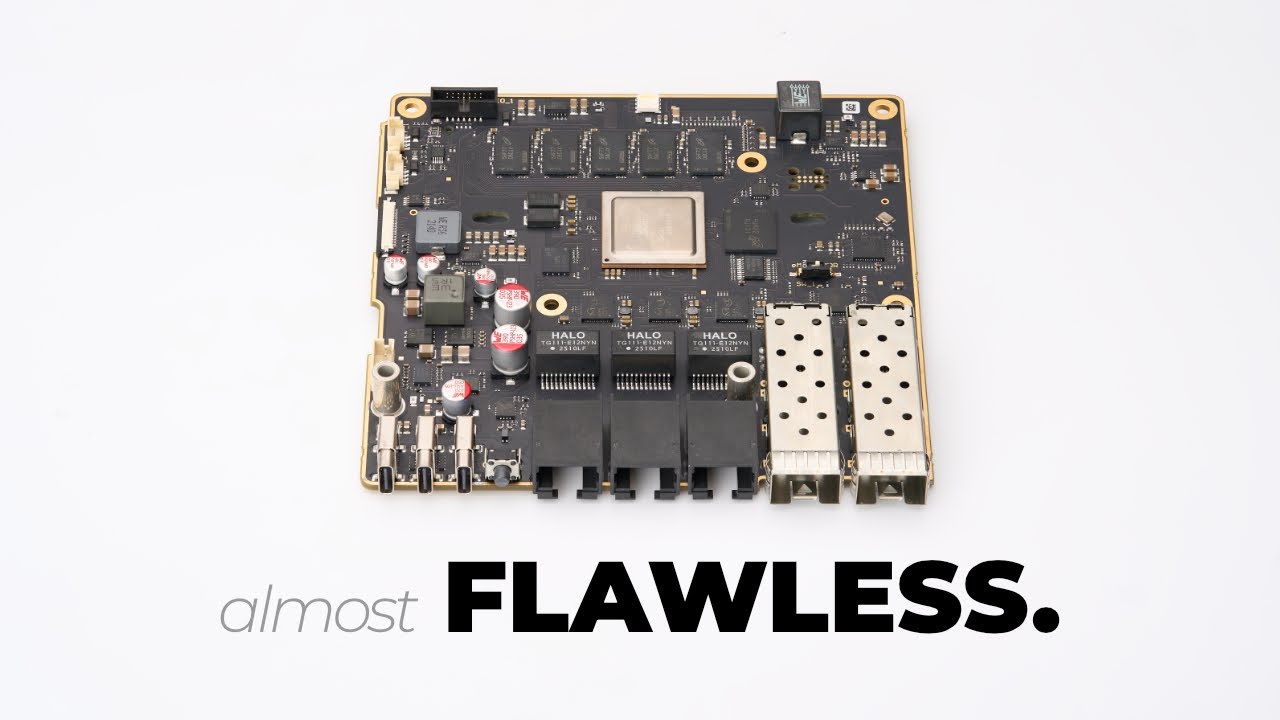
Thanks to PCBway for sponsoring this video! https://www.pcbway.com/
Submit your preorder here: https://mono.si
🚀 Intro to the series, if you haven't seen it yet: https://youtu.be/UFKhprphIAA
➡️ Follow me on 🦋 https://bsky.app/profile/zaman.io
➡️ Follow Aljaz on Instagram https://www.instagram.com/aljaztitoric/?hl=en
opal pagoda
silent flax
<https://www.youtube.com/@tomazzaman> this guy ? https://www.youtube.com/watch?v...
Yes, i met the guy and i got a sneak peak
silent flax
it's nice thing, but at $600 i will stay with my N100 mini PC for router. Or if i wanted 10 gigabit router, get an MS-A1 or MS-A2 (yes, i know, power usage is completely different)
opal pagoda
If it were 200-300 it would be great
silent flax
also while i get it, the RJ45 ports being gigabit is a bit letdown, should have been 2x10 + 3x 2.5
silent flax
the saddest part about networking for me is all my old dumb gigabit switches and old routers sitting in a box 😄
i mean i can give a 5 or 8 port gigabit switch to someone here and there. The 16 port one is kinda impossible to use for anything after upgrade to 2.5 gigabit networking
stuck grove
gigabit becomes obsolete so fast it’s not even worth investing in if you care at all about networking
jesus i butchered that message
silent flax
stuck grove
gigabit becomes obsolete so fast it’s not even worth investing in if you care at...
i mean it is few years old, so not horrible loss of value, but annoying that i can't find anyone who would have an use for one
cause which home user needs a 16 port gigabit switch 😄 . 5 or 8, maybe. 15, nah
stuck grove
16port gigabit is a weird niche, most people that need 16 ports want 2.5g, and most people that are fine with 1g don’t want 16 ports
silent flax
i mean i bought it 4.5 years ago, so i used it for like 3-3.5 year (switched to 10/2.5 gigabit combo at start of this year)
opal pagoda
silent flax
also while i get it, the RJ45 ports being gigabit is a bit letdown, should have ...
I have talked to him about it, cpu does not have IO to handle it, they just exposed what cpu has
Besides that 2.5g 4-8 port switches with 10g uplinks are widely available for cheap
stuck grove
that’s why you use a switch chip instead of a CPU for routing
opal pagoda
stuck grove
that’s why you use a switch chip instead of a CPU for routing
That nec chip has hw acceleration
silent flax
opal pagoda
I have talked to him about it, cpu does not have IO to handle it, they just expo...
i was sure it is a HW limitation, it's just that those 3 gigabit ports will be on "meh, maybe i will need to connect a TV with 100 megabit networking port to it" 😄
stuck grove
if those 3 ports were at least POE, it would be a perfect router
silent flax
cause for some reason TVs still come with 100 megabit network interfaces
stuck grove
that way you could directly run APs and/or cameras off it
opal pagoda
I also talked to him about dual psu options with integrated ups
opal pagoda
stuck grove
UDM pro max is better
"better"
Cant do line speed
stuck grove
opal pagoda
"better"
Cant do line speed
who has >5gbps internet
silent flax
stuck grove
*who has >5gbps internet*
in my country one ISP offers 10 gigabit at limited list of locations, and my ISP is starting deploying 2.5 gigabit internet now (coax only, so 2.5 gigabit down, 150 megabit up, but hey, better than slap in the face)
 hasty obsidian
So i built my first DIY router. Running OPNsense. Made from crap laying around the house. I'm pretty happy with it so far.


 silent flax
hasty obsidian
So i built my first DIY router. Running OPNsense. Made from crap laying around t...
silent flax
hasty obsidian
So i built my first DIY router. Running OPNsense. Made from crap laying around t...
that cpu cooler brings aliexpress weirdness memories
 hasty obsidian
It got the blue glow, so its coolering more.
opal pagoda
stuck grove
*who has >5gbps internet*
You can do vlan to vlan routing too
nova glacier
opal pagoda
I have talked to him about it, cpu does not have IO to handle it, they just expo...
Indeed. There isn't a pin compatible upgrade (w.r.t. Ethernet) either. Maybe a hardware respin with one of the bigger Layerscape chips could be possible down the line though. They could at least share a lot of the work they've done with the software/firmware stack. The chip they used does have a single 2.5GbE port though
https://www.nxp.com/products/LS1046A
https://www.nxp.com/products/LS2084A

The LS1046A and LS1026A communications processors integrate quad and dual 64-bit Arm Cortex-A72 cores respectively with packet processing acceleration and high-speed peripherals. Pin-compatible with LS1023A, LS1043A and LS1088A SoC to provide performance scaling for 64-bit Arm.

The eight core Layerscape LS2084A and the four core LS2044A multicore processors offer Arm Cortex -A72 cores with the advanced, high-performance datapath and network peripheral interfaces required for virtualization, networking, telecom/datacom, wireless infrastructure, military and aerospace applications.
vast saddle
silent flax
in my country one ISP offers 10 gigabit at limited list of locations, and my ISP...
Hopefully you get DOCSIS 4.0
DOCSIS 4.0 boasts much better upload speeds. Can be extended spectrum or full-duplex DOCSIS
Extended-spectrum DOCSIS 4.0 is 1.8 GHz downstream and 684 MHz upstream
silent flax
vast saddle
Hopefully you get DOCSIS 4.0
as i said, it is 2500/150. They don't specify which version of standard it is
right now i got 1200/100 via DOCSIS 3.1 i think
silent flax
i have another option for 1000/500 via fiber for ~35 euros or so, but their TV offering is much worse.
vast saddle
Damn
nova glacier
I'd take that in a heartbeat
 silent flax
vast saddle
Hopefully you get DOCSIS 4.0
silent flax
vast saddle
Hopefully you get DOCSIS 4.0
to be honest, i am more annoyed at situation of my mom's internet, best she can get at reasonable price is 15/3 VDSL. Can't get faster VDSL, another ISP said "fiber coming soon" nearly a decade ago, Starlink is too expensive for them
vast saddle
Damn. VDSL is so bad
stuck grove
silent flax
to be honest, i am more annoyed at situation of my mom's internet, best she can ...
15/3 is crazy
silent flax
stuck grove
*15/3 is crazy*

i suspect she is either on outer edge of the range, or the DSLAM is full and they literally can't add another node for higher speed
the saddest part is that if she was in fiber coverage, for same price she could have 80/30 or for a bit more than double the price (but still less than the base Starlink) 1000/300
 dull mirage
Hey guys. I have a bit of problem. I have inhertied an older office room. I am converting it to be usable.. And there is a UTP cable going down in the middle of the room through the floor cut extremly short with a custom 12V power suply soldered and connected for a 100Mbps link. I have traced it to the building entry panel / doorbel. I cant run a new cable and i somehow make it low profile enough to run carpet over it. I can make scab into the concrete floor. But no big enough for standard coupler. Any recommendations? I could just solder it.. But thats horrible choice.
opal pagoda
nova glacier
Indeed. There isn't a pin compatible upgrade (w.r.t. Ethernet) either. Maybe a h...
i could possibly answer some of questions that you might have
since he also discussed sw stack
nova glacier
opal pagoda
i could possibly answer some of questions that you might have
I don't have any question regarding the software but I'm curious what they've done with the second 4-lane serdes. Are those maybe on that FPC connector for a pcie/sata expansion board?

or maybe there's another connector for those on the bottom side
https://mono.si
oh looks like 2 of them are going to dual m.2 key e that must be on the bottom. Still leaves 2 lanes for something else though
vast saddle

Verizon has added an additional 40 MHz of bandwidth onto their 5G. Band 48 LTE went over to N48 5G
Should add an additional 400+ Mbps download speed on 5G

Here’s the speedtest
opal pagoda
nova glacier
I don't have any question regarding the software but I'm curious what they've do...
Probably wired up to m.2
 silent flax
 opal pagoda
M.2 slots can have two lanes wired up to it
 red gulch
hello guys
is anybody here familiar with mikrotik's winbox? i have a pair of lgh60g dishes that i wanna pair
but one of them is on a newer version and i can't downgrade/upgrade one of it

needless to say i'm not familiar that much the ui that much
 pastel monolith
Looks like different arm chip but only thing really standing out there also that they both say the factory software version matches... If they are useless as is would try factory reset it if can't contact support to see if they have an upgrade path to get them using compatible firmware/software.
red gulch
pastel monolith
Looks like different arm chip but only thing really standing out there also that...
i netinstalled it
because it had a corrupt firmware
so that option is out the window
pseudo blade
nova glacier
I don't have any question regarding the software but I'm curious what they've do...
Based on a look at that datasheet but without comprehensive understanding of what parts were used on the board... I think the diagram is misleading and this one's better suited

 topaz patrol
red gulch
but one of them is on a newer version and i can't downgrade/upgrade one of it
topaz patrol
red gulch
but one of them is on a newer version and i can't downgrade/upgrade one of it
Why can't you upgrade it? Just chuck the firmware file onto the radio and reboot
pseudo blade
So rather than 2x4... 1x8
3 gigabit, 2 10 gigabit, PCIe 3x1 to the two ports, but one (based on the wording of the product listing denoting the E-Key M.2 slots as different?... may have the last lane on one of the E-key M.2 enabled for an additional controller device like @opal pagoda hinted at?)
All the Thread-compatible WiFi+BT controllers in m.2 e-key form factor I can find don't even offer PCIe support so idk for sure
Based on the block diagram I can't see a single reason why it couldn't have had one of the gigabit ports be a 2.5 gigabit one. They have a 2.5 gigabit interface separate from the two 10 gigabit ones
pseudo blade
Idk honestly the pricetag for the devkit and then having to BYO wireless is... not palatable for me for what you get
Maybe a third m.2 slot or onboard WiFi so it could do 2.4ghz and the other stuff would have helped? Like the Banana Pi boards?
silent flax
pseudo blade
Idk honestly the pricetag for the devkit and then having to BYO wireless is... n...
yeah, as i said, i can't justify this over a $150-$200 N100 mini PC with 2x2.5 gigabit NIC for basic router duties other than having somewhat lower power consumption figures. But then being priced 3 times higher makes any power consumption differences irrelevant, it would take decades to bring back $400 when it will save single digit watts, at worst 10-15W
red gulch
topaz patrol
Why can't you upgrade it? Just chuck the firmware file onto the radio and reboot
Can i just downgrade it instead?
topaz patrol
red gulch
Can i just downgrade it instead?
I mean… sure, but why not upgrade?
red gulch
topaz patrol
I mean… sure, but why not upgrade?
My dad said he'd configure it for me but he doesn't know how to use the 7.0 so
And i figured out that i didn't install the wireless.npk
I tried to read the document but it's complicated for a ubiquity guy like me
pseudo blade
7 is pretty much exactly the same to configure as 6
red gulch
pseudo blade
7 is pretty much exactly the same to configure as 6
So it's the wireless.npk that doesn't have these options? And I'm pretty sure one of the bridges modes are missing
In the newest update atleast
red gulch
I think i netinstalled wrong then
pseudo blade
You can install wave2 without netinstalling again
red gulch
pseudo blade
You can install wave2 without netinstalling again
Let's gooo
pseudo blade
Just upload the npk via winbox to the root directory (outside flash) and reboot
red gulch
pseudo blade
Just upload the npk via winbox to the root directory (outside flash) and reboot
Oh
Thanks man
How do i make sure it's right tho?
pseudo blade
After? Check system packages
 pseudo blade
No you don't
You probably didn't have tftp allowed on your firewall
That said... you don't need netinstall at all if it boots
red gulch
pseudo blade
You probably didn't have tftp allowed on your firewall
Exactly, i don't know what that
red gulch
pseudo blade
That said... you don't need netinstall at all if it boots
I'm showing you the package
pseudo blade
pseudo blade
That said... you don't need netinstall at all if it boots
More of a WISP thing or repair tool of last resort than a necessary home user tool
...unless you're on SMIPS hardware but that's not true here
red gulch
pseudo blade
More of a WISP thing or repair tool of last resort than a necessary home user to...
Yeah i figured
Anyway
Thanks man, really appreciate it
Before i go
What do i need for it just to connect

What are the things i should change and what not just a check list
pseudo blade
Make their OS versions match for sure, and get them both on ROS v7
Then honestly unless you have big ideas use quickset
red gulch
pseudo blade
Make their OS versions match for sure, and get them both on ROS v7
Then honestly...
I meant in terms of configuration
Give them ip and what not?
pseudo blade
You can. Depends on how you're trying to use them
red gulch
In my ubiquity i just look through a list and connect them together
pseudo blade
I'd either set a static IP or reserved lease, and set them up to simply bridge assuming your goal is just getting your home internet somewhere far away
red gulch
pseudo blade
I'd either set a static IP or reserved lease, and set them up to simply bridge a...
Yeah that's my goal
pseudo blade
You want bridging
red gulch
It's just in the bridge section?
pseudo blade
Quick Set's at the top unless you want to set it up manually
red gulch
pseudo blade
Quick Set's at the top unless you *want* to set it up manually
Nah i just wanna get it working with the bare minimum I'm fed up, so thanks
pseudo blade
Otherwise you create a bridge on each one and add the 60g and ethernet ports to it, alongside a dhcp client or static IP
red gulch

Learn everything about MikroTik Bridge. Understand how to create, configure, and use bridges to connect and segment your network effectively.
Is this the document for me?
nova glacier
pseudo blade
So rather than 2x4... 1x8
3 gigabit, 2 10 gigabit, PCIe 3x1 to the two ports, b...
That diagram is far more misleading, but neither really indicate the multiplexing modes that are actually available. The platform has 2 seperate 4-lane SERDES with different protocol capabilites. As it turns out, they can't use the 2.5G SGMII in any configuration with XFI (SFP+ ports) in use.
Since the board appears to use the same PHY on all its gigabit ports, I believe they're all SGMII so the SERDES2 should be in one of the last two modes.
The device does have 2 RGMII ports, so they could've done a config with more PCIe lanes but there's still no way to get a 2.5G SGMII without sacrificing both SFP+ ports.
 nova glacier
The LS20x8 is so much more expensive but would've been able to do 8x10Gb + 8x2.5Gb (though that's not figuring in the pcie lanes for m.2 ports). $300+ for the chip alone
nova glacier
opal pagoda
70-100$?
Yea, at least for similar quantity orders as the $300 pricing of the LS20x8.
nova glacier
The TRM for the LS20[4|8][4|8] is lovely. They used italics to differentiate 2.5G SGMII from 1G in the massive tables describing multiplexing of the two 8-lane SerDes blocks. It only has one configuration (technically two, but just swapped around) that lets you have PCIe 3.0, 10G, and 2.5G together, but it's a single PCIe 3.0 x4, 4 x 10Gb, and 8 x 2.5Gb. There is a config with dual PCIe 2.0 x1, 6 x 10G, and 8 x 2.5G though. A PCIe 3.0 packet switch to get the x4 lane into quad x1 would add another $40-50
nova glacier
oh sweet, the nRF54L series is getting a chip with USB 480Mbps and more internal flash. I'm still much moreso looking forward to the nRF54H20, but last time the expected arrival date of certified modules for that arrived it got pushed back (currently 10/17 and 10/31 for digikey and mouser, but we'll see when that arrives).
https://www.nordicsemi.com/Products/nRF54LM20A
 nova glacier
It doesn't get any additional high speed GPIO (still 11 @ 64MHz) unlike the nRF54H20 (14 @ 200MHz and 8 @ 100MHz), but the larger internal flash could help free the pins on the high speed port that would've been used for external flash
pseudo blade
nova glacier
That diagram is far more misleading, but neither really indicate the multiplexin...
Boo!
So a separate switch for multigig or go for another platform then
Why would you ever use 2.5gig instead of 10 when the hardware's all there for it...
nova glacier
yea that'd be an odd choice. There actually is a pin-compatible upgrade (LS1088A) that can have dual 10Gb and dual 5Gb (technically 4Gb, but what's a gig between friends ;)). There'd still be a fair bit of work to switch even to a pin-compatible alternate, but it would be far less extensive than upgrading to the LS2088
 nova glacier
oh nvm. QSGMII can only be used to multiplex 4 1GbE, it's not usable for 5G NBASE-T
nova glacier
I guess the only option would be use to use PCIe 5G NBASE-T NICs like the AQC114 or RTL8126. I can't find the ICs at distributors, but they probably cost around $10-15 based on add-in cards using them being around $30. Not sure how well they'd integrate with the DPAA system though
pseudo blade
Probably not. That said, the CPU's not that bad.
Option 2 would be to add a 2.5/10g switch chip in instead, daisy-chain one of the 10 gigabit interfaces?
vast saddle

In a world first, researchers at Nagoya University in Japan have successfully developed a resonant tunnel diode (RTD) that operates at room temperature made entirely from Group IV semiconductor materials.
6G is gonna need even more dense cellular networks, more fiber circuits, etc.
Also carriers need to get to 5G Standalone before going to 6G
opal pagoda
pseudo blade
Probably *not*. That said, the CPU's not that bad.
Option 2 would be to add a 2....
you can do option 2 yourself
just pair it with el cheapo aliexpress 4x2.5g, 2x 10g switch
nova glacier
DPAA can apparently connect with the host's networking stack through a DPIO in one of the processor cores that connects into a DPNI in the DPAA. (Man I love acronyms). This would be going through the DDR4 I think, unlike the DPMACs that get to connect the PHYs directly into the DPAA. So a little added latency and it would also consume a bit of memory bandwidth.
nova glacier
nova glacier
DPAA can apparently connect with the host's networking stack through a DPIO in o...
The same mechanism is how VPN tunnels would connect into the DPAA too
 nova glacier
pseudo blade
Probably *not*. That said, the CPU's not that bad.
Option 2 would be to add a 2....
nova glacier
pseudo blade
Probably *not*. That said, the CPU's not that bad.
Option 2 would be to add a 2....
It apparently can ↑
nova glacier
oh huh, DFRobot makes this thing. Unfortunately incompatible keying with the mono.si gateway though
https://www.digikey.com/en/products/detail/dfrobot/FIT1007/26460580

DigiKey Electronics
Order DFRobot FIT1007 (1738-FIT1007-ND) at DigiKey. Check stock and pricing, view product specifications, and order online.
 finite thunder
Hello, I was wondering if anyone could identify whatever these racks are? All I know about them is that they’re old crypto chassis that hold atx size boards


 night mesa
any able to help with some proxmox networking?
opal pagoda
nova glacier
oh huh, DFRobot makes this thing. Unfortunately incompatible keying with the mon...
nova glacier
opal pagoda
https://www.aliexpress.com/item/1005008719531127.html
oh nice, so adding 5GbE to the mono.si gateway even in its current revision is viable. I bet that would be preferable to putting in a second wifi/thread card for most users
 peak cloak
night mesa
any able to help with some proxmox networking?
peak cloak
night mesa
any able to help with some proxmox networking?
what do you need
night mesa
peak cloak
what do you need
if my proxmox server has a 1G nic on the mobo, and a separate PCI NIC, is it possible to create a set of "Network Isolated" VMs if one of the NICS are on a VLAN from my switch?
pseudo blade
night mesa
if my proxmox server has a 1G nic on the mobo, and a separate PCI NIC, is it pos...
You set up a trunk port facing the hypervisor then you can direct Proxmox to tag traffic from each VM with your desired VLAN
If all you want is separate IPs or even just basic access control between VMs and the local network: probably unnecessary, you can configure that via Proxmox's firewall settings and forbid local connectivity. Only bother with the individual VLANs and trunking like that if you need more complex control and don't mind added complexity to achieve it
I use a special VLAN for my riskier internet-facing appliances to keep them completely away from my internal stuff, and another for work VMs... but probably wouldn't enjoy making 20 VLANs for every VM in my homelab... :)
silent flax
night mesa
if my proxmox server has a 1G nic on the mobo, and a separate PCI NIC, is it pos...
you can even pass through one NIC to a VM and then only that VM sees that NIC ever
night mesa
pseudo blade
If all you want is separate IPs or even just basic access control between VMs an...
What i am trying to do is create a service where people can rent VMs from me, running multiple accounts on a selling platform, the platform links IPs and bans accounts for multiples and etc. So each VM would have all traffic through its own proxy, but the infra of it is what is throwing me for a loop, like creating a second stealth network or something inside proxmox, maybe having an OPNsense VM just for isolated VMs.
pseudo blade
night mesa
What i am trying to do is create a service where people can rent VMs from me, ru...
Hm, willing to put an upper cap on how many customers you'll have at a time? 50? 100? Planning on doing all the network setup by hand each and every time you add one?
There are cleverer ways of doing things at the cost of increased initial complexity that probably aren't worth it if you intend on having like four customers or whatever
I guess VLANs are an OK way of handling it at any likely scale outside of a dedicated datacenter
night mesa
pseudo blade
Hm, willing to put an upper cap on how many customers you'll have at a time? 50?...
55 clients in the next 4 months, then grow from there.
I don’t mind at all manually adding/configuring network interfaces for each time I want to add a batch of clients. As long as I can write a step by step guide. So yeah I’d do the setup
My main concern is having clients log into their VMs without needing a VPN, I think guacamole Apache could handle this. Just don’t want open ports on my home network
pseudo blade
55 customers on a home network is decidedly well above my tolerance for the same
night mesa
pseudo blade
55 customers on a home network is decidedly well above my tolerance for the same
Even if I had a second ISP connection JUST for this?
pseudo blade
Absolutely. Should have redundant networking, power etc. that would kinda suck to handle in your house. Second location for hardware for DR too.
R.e: "how"
To me that many customers is well and truly into automation territory but I'm not sure what your skillset is or even what products exist to help you
There's probably hosting provider solutions for it but idk if they allow networking integration ot not
night mesa
I plan to have 2 ISPs and a cellular WAN backup. Already have a 3phase UPS for power. Just the infra planning is my stickler right now
pseudo blade
What's your cellular backup going to do for 55 customer VPSes?
Even the UPS isn't really an answer for reliability by itself
night mesa
Cellular in my area is almost 1.5GB up and down. 10-15 ping in tests
pseudo blade
How's network reachability for that going to work?
night mesa
Also, each VM is ONLY for web browsing
pseudo blade
?
night mesa
pseudo blade
How's network reachability for that going to work?
Secondary WAN?
Or load balancing into failover
pseudo blade
What so it's just Guacamole into a VM cluster with browsers?
Or something equivalent
No server hosting or anything
night mesa
No server hosting or heavy computing at all, strictly web browsing behind a proxy for each VM
pseudo blade
Oh in that case I DEFINITELY wouldn't bother with the bulk of this, I'd just isolate them using host firewalls and spin VMs up on connection a la VDI
night mesa
Any guides I can read on that? Biggest thing is having the VMs not touch or know each other so there’s no chance of IP linking
And isolate from my home network
pseudo blade
Wouldn't know what to read on the spot, and it's not something I want to weigh in on more than I have here.
But yeah you want VDI, look into Amazon Workspaces or the like and draw parallels between their setup and what you can implement
There's a lot you don't need, like permanent VMs, VM state and complex networking bar HA, but you do need a VDI solution that can manage the VMs of connected users and their networking rules
night mesa
Gotcha. I’ll look into this and go down the rabbit hole. Thanks for your help!!!!
 blissful token
I have a network share using SMB1 on a win10 devices and sometimes it timeouts the connection and even freezes the explorer, what can it be? The windows config?
pseudo blade
blissful token
I have a network share using SMB1 on a win10 devices and sometimes it timeouts t...

BleepingComputer
Microsoft has confirmed that the September 2025 Windows security updates are causing connection issues to Server Message Block (SMB) v1 shares.
opal pagoda
blissful token
I have a network share using SMB1 on a win10 devices and sometimes it timeouts t...
Step 1. Stop using smb v1
nova glacier
the protocol was superseded 18 years ago and deprecated 11 years ago. Please just let that flawed protocol die already
topaz patrol
night mesa
55 clients in the next 4 months, then grow from there.
I don’t mind at all man...
Lol your poor clients
blissful token
opal pagoda
Step 1. Stop using smb v1
I would if the device supported newer smb protocols
silent flax
blissful token
I would if the device supported newer smb protocols
get a newer device
pastel monolith
night mesa
Gotcha. I’ll look into this and go down the rabbit hole. Thanks for your help!!!...
Just fyi most home gamer systems and hardware aren't going to be able to run that many VMs (especially windows), cloud services almost definitely the way to go, can do infrastructure as code to reduce the time to deploy or "provision" a machine for a given user but think trying to do this at home will always be cutting corners and difficult to keep up with data center upgrades over time. Would look at "big three" cloud provider offerings (AWS, azure, and gcp) to see what different VM services they offer... Not to say you can't do this at home but presuming things continue to grow over time it might be better to build it out in as portable a way as you can.
Also if all the users need is isolated network/browser you can get away with just running docker containers with Linux instead of needing full blown isolated OSes for windows
If are able to do it with docker containers then whatever k8s service a give cloud provider offers+ maybe terraform could help to automate provisioning new virtual instances and managing setting up ingress, security rules, etc.
opal pagoda
night mesa
No server hosting or heavy computing at all, strictly web browsing behind a prox...
I hope you had a lawyer go over your business plan
Someone could easily do naughty things or access illegal content and then you are liable
Also home ISP tipically have a policy against resselling bw which you will essentially do
pseudo blade
Yeah, I'm more than a little curious about the client list for that particular offering...
If you're a professional entity a hosting provider running out of a dude's house on that kind of setup would pose an unacceptable risk for any competent buyer
-Not that many buyers are competent
That leaves me looking at more... suspicious... answers.
But hey, who knows? I can only see half the story.
night mesa
pseudo blade
That leaves me looking at more... suspicious... answers.
*But hey, who knows? I ...
Here is the main niche, I sell on a particular selling platform, for example, ebay. You can have 1 account on ebay, but if you make another, they will ban it due to IP tracking and such. But if you create accounts on different facing IPs and different browser cookies, you can run unlimited accounts, I am in contact with a few sellers that want a few VMs and to scale their accounts.
That is why they will just be lightweight lubuntu OS VMs just for web browsing, and not server hosting or computing.
pastel monolith
That doesn't work... The host machine wan IP is the one services will be seeing not the VM network addresses. People use VPN connections to appear to be coming from different locations or IPs for similar purposes sometimes I'm sure but separate VMs even if internally the networks are isolated from each other are sharing a physical interface and external connections to the world. In any case though posing as multiple "people" or entities on a service that doesn't allow it and has safeguards to block it is sketchy at best or some form of fraud potentially at worst, like others mentioned not a lawyer but would talk to one about the business plan before moving forward at all. Anytime building a bridge or whatever need to understand the liability and contracts involved.
 ionic fractal
Is there any reason to get an omada sg3210x over a sg2008 when my network is 1gb? My internet is 1.5gb. I am also needing a 16 port switch and the price difference is bigger than I want to spend right now for that 16port. Currently no vlan. I am running a 4nic subnet.
night mesa
pastel monolith
That doesn't work... The host machine wan IP is the one services will be seeing ...
even if each VM is routed through a clean ISP proxy? and yeah this is all still an idea.
pastel monolith
Well I mean the ISP is only gonna have some set of reserved wan IPs they can use same goes for any cloud providers might be a huge pool but is some segment still where the entire block of IPs can be blocked once suspicious activity is observed
Like someone else mentioned too usually reselling bandwidth is not allowed from ISP so wouldn't expect them to work with you on it
You aren't doing that directly but is in the realm of close enough 😛
Also kind of thing where potential to be sued beyond just being banned just lots of CYA sounds like outside of technical challenges.. also just lots of alternatives like vpns, tailscale or otherwise for simply rerouting traffic (TOR etc)
pseudo blade
night mesa
Here is the main niche, I sell on a particular selling platform, for example, eb...
In your stated scenario you'll have maybe three IPs
The VPSes offer nothing over other, smarter alternatives
That said, i won't be elaborating as to what those alternatives are as I have no interest in showing you how to further optimise your business offering for online marketplace scammers
pastel monolith
Heh yeah I mean there are more advanced fraud detection things in place for most services too, this type of thing isn't really a good long term strategy I think, does make me think of this among other things though too 😄 https://youtu.be/9alJwQG-Wbk

Giving a PC program control of my muscles to become the fastest in the world. Sponsored by Micro Center!
Build, Upgrade, and Save All Month Long at Micro Center: https://micro.center/9d4315
Sign-Up for VIP Days at Micro Center Phoenix: https://micro.center/a11e1b
Shop 50 Series Laptops at Micro Center: https://micro.center/717642
Shop Raspb...
 keen lark
keen lark
keen lark
I'm not sure if the fact that both servers are behind NAT plays a role here if the VPN subnet is 10.13.13.0/24 and server B (10.13.13.2) is able to ping server A (10.13.13.1) but not vice-versa
I'd be able to setup a public relay though
silent flax
oh, this is why there are now some 8x2.5 + 2x10 china switches https://www.maxlinear.com/product/interface/ethernet/ethernet-switches/mxl86282c
The MxL86282C is a highly integrated 2.5G Ethernet switch with eight integrated 2.5GBASE-T PHYs. The MxL86282C also supports two 10G/ 2.5G / 1G uplink por
pastel monolith
keen lark
I'm not sure if the fact that both servers are behind NAT plays a role here if t...
Once they're on the same VPN and subnet you should be able to ping back and forth (assuming icmp on both ends and no firewall on the machines blocking the icmp requests). Only reason I can think that wouldn't work is if the traffic from the failed one isn't being routed through the VPN connection... You shouldn't need to establish another VPN connection to go the other way, seems likely just VPN config issue for routing traffic through right connection on the box that fails to ping back
keen lark
yeah i think i just fixed it. I set up a wireguard container on a VPS, generated two peer configs for server A and server B, let both connect to the VPS and pinging works now... after i removed the ListenPort from the configs and changed their AllowedIPs to their specific VPN addresses 
pseudo blade
silent flax
oh, this is why there are now some 8x2.5 + 2x10 china switches https://www.maxli...
~$27-$29 public pricing
Doubt they're paying full price ofc
silent flax
pseudo blade
~$27-$29 *public pricing*
i just meant things like this started showing up on ali https://www.aliexpress.com/item/1005007928814007.html
vast saddle
Reddit
Explore this post and more from the cellmapper community
Improved upload speeds on T-Mobile 5G
I think this is only for X80 Qualcomm modems and above though
pseudo blade
silent flax
i just meant things like this started showing up on ali https://www.aliexpress.c...
Neat, but it'd be neater if they were managed
The chip allows for it - there's even a SKU with an integrated MCU to allow for web management
silent flax
pseudo blade
Neat, but it'd be neater if they were managed
The chip allows for it - there's ...
at 47 euros it is hard to complain about management tho
pseudo blade
Seems the variant of the part with integrated web management via an MCU costs an extra $3
And - say, if you had a product that already had a CPU and wanted it to have more and better ports... Well you wouldn't need that would you?
If I were offered a deal so simple as management for a bit less than 3 euros more I'd never pick unmanaged
 past mason
has anyone here used 'Security Onion' ?
pseudo blade
past mason
has anyone here used 'Security Onion' ?
Don't ask to ask (Just ask)
https://dontasktoask.com/

Incidentally, I have. Unfortunately for you, it's a Linux distribution and your question's a bit like asking "Have you used Ubuntu/Windows/whatever"
 vestal lodge
That's not even an appropriate usage of da2a 😔
past mason
pseudo blade
Ask your actual question
What is the airspeed velocity of an unladen swallow?
how long did it take for you to install it? mines been sitting here for ~ 18 hours doing nothing.. but no errors in the logs
vestal lodge
Oh c'mon have a little jive in your step
past mason
must not be a Monty Python fan.. thier loss
vestal lodge
Right? I was even gonna compliment their pfp but I guess not 😔
past mason
vestal lodge
Right? I was even gonna compliment their pfp but I guess not 😔
Ahh you play DCS! Nice 
vestal lodge
A-10 for life
 opal pagoda
pseudo blade
Neat, but it'd be neater if they were managed
The chip allows for it - there's ...
opal pagoda
pseudo blade
Neat, but it'd be neater if they were managed
The chip allows for it - there's ...
maybe tipical consumer is scared of managed switches?
 frail beacon
I wanna die.

Don't ever think about upgrading your wifi cards, the worst mistake of my entire life.
nova glacier
Was the new card mhf4 and old was u.fl (or vice versa)?
you can obtain an sma-rp to u.fl/mhf4 adapter if that's the case
frail beacon
I don't know much, you're telling me there's 2 generations of connectors?
That could explain why for the love of god they won't fit in somehow
Old : AX211NGW
New : BE1750x
nova glacier
frail beacon
I don't know much, you're telling me there's 2 generations of connectors?
yep, mhf4 is the newer smaller one that has slightly improved characteristics
frail beacon

Old / New
They look the same to me idk
Can you tell they're different from this picture or not lol
nova glacier
Those are the same, mhf4. It's what has become normal for 6GHz capable cards, which both of those are
frail beacon
I don't know why these cables won't fit in  been over an hour here lol
nova glacier
It can be a challenging connector to connect. I usually use a plastic tool instead of fingers.
frail beacon
I don't want to unplug everything just for 2 stupid cables grr
 frail beacon
New
nova glacier
you just have to align it perfectly. MHF4 is just 1.5mm, so that's not exactly easy. Even u.fl was a pain and that was 33% larger
mild whale
normally I take a pair of tweezers to align it over top of the connector
and then use something dull to push down
nova glacier
yea, I never do it with fingers either. way too hard
mild whale
works every time, half of the time
im very sus of that connector though, that looks like it's been pecked at
frail beacon
mild whale
im very sus of that connector though, that looks like it's been pecked at
Probably my fault 
mild whale
i guess it could be the picture playing tricks
frail beacon
Nah it is
mild whale
fun fact, those connectors only have a rated lifecycle of 30 cycles.
30 times being disconnected and reconnected and they're considered toast.
at least it was that way years ago when I was working with them
 nova glacier
it looks bent unfortunately. It'll have to be repaired/replaced
frail beacon
Well I still have my older card that still works
But I struggle with this one as well 
nova glacier
It doesn't require that much force it just needs to be perfectly aligned, so be careful
 nova glacier
2 appears to be, but 1 is not due to the bent ground ring
 ripe pendant
At what length does the cable strength start getting weaker, I got a 10m cat 6 cable rated for 10gbps should I be worried about the signal strength becoming weaker or is it a very small amount
nova glacier
ripe pendant
At what length does the cable strength start getting weaker, I got a 10m cat 6 c...
the category rating system specifies signal characteristics for operation at different speeds with certain maximum lengths. 10G NBASE-T on Cat 6 is rated to 55m. Often legit cables can actually do more, while counterfeit cables will fall far short.
silent flax
some people have just way too much time 😄 https://tls13.xargs.org/

Every byte of a TLS connection explained and reproduced
 plain cargo
Hi guys i am happy to be here it's my first time !!!
 plain cargo
opal pagoda
https://tenor.com/view/travolta-network-messy-network-where-cable-data-center-gi...
plain cargo
opal pagoda
https://tenor.com/view/travolta-network-messy-network-where-cable-data-center-gi...

how a u ?
pseudo blade
Manage your cables, before your cables "manage" you
 timid crater
opal pagoda
https://tenor.com/view/travolta-network-messy-network-where-cable-data-center-gi...
timid crater
opal pagoda
https://tenor.com/view/travolta-network-messy-network-where-cable-data-center-gi...
i was at a job corps doing networking and i was running wire for cellphones boosters and im not kidding when i tell you this but this gif was an acccurate representation of what was hiding under half the ceiling tile in that building
between the wire and the hardly working HVAC system its a wonder that the ceiling wasnt caving in
 lean palm
Kinda random but after years testing every single business/enterprise wifi solution, ruckus is just better
I tested Cisco meraki, cisco catalyst, ubiquiti, aruba hpe (instant and a full blown mobility controller,) and ruckus
twin pier
lean palm
I tested Cisco meraki, cisco catalyst, ubiquiti, aruba hpe (instant and a full b...
What did you find better/worse about all of them
 fallow cloak
lean palm
Kinda random but after years testing every single business/enterprise wifi solut...
fallow cloak
lean palm
Kinda random but after years testing every single business/enterprise wifi solut...
Agreed, in enterprise Ruckus is the GOAT
lean palm
twin pier
What did you find better/worse about all of them
I might make a youtube video about it at some point BUT
Cisco meraki: works great but licensing sucks and being tied to cloud only doesn't work with the way I run my MSP.
Cisco catalyst: insanely powerful and feature rich but the gui feels very cumbersome and hard to navigate around effectively.
Ubiquiti: License free cloud is a win but the hardware is just too unreliable and I've had many unifi updates brick entire network stacks.
Aruba: InstantOS is very nice and easy to work with but is nearing EOL with AOS10.X and Wi-Fi 7 APs not being supported. Mobility Controllers are really powerful and easy to use until they arent. For example, ive had some Mobility Controllers where captive portals just work, and some where captive portals will not work and just let clients on the network without assigning any roles or ACLs.
Ruckus: WAPs are powerful asf, management gui is amazing and really fast to work around. Ruckus Unleashed Cloud is also very nice option, even if I primarily run smartzone/zonedirector.
vast saddle
Saw this yesterday. The new internet service provider.

Asked the builder and he says they are preparing to lay fiber optic cables on the poles
They installed this too.
 silent flax
vast saddle
Saw this yesterday. The new internet service provider.
silent flax
vast saddle
Saw this yesterday. The new internet service provider.
RBG Inc... why not RGB 😄
vast saddle
Also unfortunately my address is not eligible in their fiber rollout
I’m not too annoyed though because I already have true fiber from the incumbent ISP and am pretty satisfied with the service
topaz patrol
lol what a waste of resources having closed fibre networks overbuilt with other more different closed fibre networks
vast saddle
Well there needs to be more competition
there’s also coax here so there’s people that would switch to this fiber provider

About $13M in total for the project
 visual valve
My first time. How did I do?
 silent flax
visual valve
My first time. How did I do?
silent flax
visual valve
My first time. How did I do?
make the hole at ceiling nicer /s
 meager ginkgo
visual valve
My first time. How did I do?
meager ginkgo
visual valve
My first time. How did I do?
Only things I’d improve on from first glance is adding a patch panel and a low voltage bracket + plate for the cables from the “ceiling?”
topaz patrol
vast saddle
Well there needs to be more competition
Sounds like an open access fibre network is needed then
ionic fractal
I have an i5 2000 series pc running opnsense and I’m not sure if I should go with a faster computer or upgrading my switches to the Omada 1gb managed switches. What would yall do. I’m currently running a 4port subnet setup. I don’t have money for the 2.5gb variants
meager ginkgo
ionic fractal
I have an i5 2000 series pc running opnsense and I’m not sure if I should go wit...
Not sure if you’ve considered UniFi but they have a 5 port 2.5gig switch for $50
ionic fractal
meager ginkgo
Not sure if you’ve considered UniFi but they have a 5 port 2.5gig switch for $50
I need a new AP and a 16 port and 8 port instead of the 5port
 green meadow
Good evening. I'm new to big switches and I have trouble loging into serial console of a Cisco Nexus N3K-C3164Q-40GE switch. The seller said that the switch was reset to factory settings but the seller and manual don't say anything abut defaoult passwords. Could someone please lend me a hand?
nova glacier
green meadow
Good evening. I'm new to big switches and I have trouble loging into serial cons...
It doesn't have a default password, one must be configured during the initial boot after a factory reset. You'll need to get it into recovery mode to set the password. Spam the break sequence Ctrl-C or Ctrl-] during boot until you've got the bootloader prompt Loader >, type dir to figure what your firmware bin file name is (something like nxos.9.1.3.I7.5.bin), then type cmdline recoverymode=1, and finally boot <firmware_bin_file_name>. Once booted enter admin-password <new_password>. You may need to also run write erase in the recovery prompt.
green meadow
nova glacier
It doesn't have a default password, one must be configured during the initial bo...
Than you. Sadley I ran into an error with trying to update the admin password, with an invalid command.
 nova glacier
oh sorry, you gotta switch to config-boot mode first. configure terminal
green meadow
nova glacier
oh sorry, you gotta switch to config-boot mode first. `configure terminal`
before booting or after?
nova glacier
after
 nova glacier
try config terminal
 green meadow
nova glacier
try `config terminal`
green meadow
nova glacier
try `config terminal`
So after changing the password do I just reboot? Or is there sth elso to be done?
nova glacier
afaik this password will not be a proper password btw. You'll need to boot from this terminal with load-nxos and then reconfigure the password the normal way with config terminal, username admin password <password>, exit, and finally copy running-config startup-config
it might also be worthwhile doing a factory reset yourself after all of this just to be absolutely sure it's back to factory defaults
green meadow
So just: write erase
After I changed the password and wrote down the startup config?
nova glacier
backup the firmware while you're at it too. The reset definitely shouldn't affect it, but I don't think cisco provides downloads without a support contract so it's good to have just in case
green meadow
nova glacier
backup the firmware while you're at it too. The reset definitely shouldn't affec...
Okey, I def won't be ablo to do that from a serial port. So I'd have to setup a SSH port.
nova glacier
no rush on factory reset and it's potentially not necessary. There may also be extra software images that were left by the previous owner, which won't be easily re-obtainable because cisco be cisco
green meadow
nova glacier
no rush on factory reset and it's potentially not necessary. There may also be e...
The seller of the switch said that he factory resets all of them before sending them out. So it might be already too late
nova glacier
it would depend on which type of factory reset was performed. There's config reset and then there's secure erase
green meadow
Alr, I got an SSH client setup
green meadow
nova glacier
it would depend on which type of factory reset was performed. There's config res...
Also, wanna switch to a voice call? Or do you prefere msg here?
nova glacier
I mean there's not really much else to do. At this point you've got full access and can do whatever it is you wish to do with it
green meadow
Ohh yeah I needed access to that switch, cuz after bootup all ports are litup amber and there is no link lights on any of my NICs
Thank robo jesus I got atleast the IPMI network working
opal pagoda
visual valve
My first time. How did I do?
Missing a patch panel and cable conduit (fixed or flexible)
green meadow
nova glacier
I mean there's not really much else to do. At this point you've got full access ...
Alr, I got this thing up but, if I switch a port to a un switched one and give it an IP adress I can ping my router. But there is no trafinc going thru.
nova glacier
green meadow
Alr, I got this thing up but, if I switch a port to a un switched one and give i...
you have to configure the default route (0.0.0.0/0) to your router , if I understand what you're asking
Cisco
Configuring Layer 3 Interfaces
It is possible to use the DHCP mode to have the switch solicit an IP address from your router's DHCP server and that'll include the DHCP Options including default route
green meadow
nova glacier
you have to configure the default route (`0.0.0.0/0`) to your router , if I unde...
The server and router weren't on the same vlan 💀
Now it works
green meadow
@nova glacier Than you for your help, you're amazing. 🫡
 livid yew
What are the best ways to learn networking?
peak cloak
livid yew
What are the best ways to learn networking?
do it
livid yew
peak cloak
do it
thanks thats real helpful 🙏
livid yew
ok thanks
vast saddle
You love to see it

New fiber splice enclosure + fiber snowshoe and fiber slack
The guy did the splicing inside of the van/truck
 onyx remnant
grabbed a Bluefield-2 from Ebay for 90 bucks. It is the project that keeps on giving. 10/10 recommend if you have 20+ hours to kill.
opal pagoda
onyx remnant
grabbed a Bluefield-2 from Ebay for 90 bucks. It is the project that keeps on g...
Did you get dual 25g one or something else?
onyx remnant
opal pagoda
Did you get dual 25g one or something else?
the dual 25g
 wooden copper
having a ton of issues trying to get port fording working
router: adtran SDX 631Q
access points: amazon eero
trying to configure port forwarding but have no idea how the fuck to get into the router to change them
im able to in the eero app configure the port i want for my game server, but this is useless because it isnt forwarded by the router
ipconfig shows the default gateway is 192.168.4.1
trying connecting from 2 different pc's on 2 different AP's, nothing happens when typed into a browser
mild whale
wooden copper
having a ton of issues trying to get port fording working
router: adtran SDX 631...
I'm not too familiar with fiber stuff, but likely IP addresses for the router are 192.168.1.1, 192.168.0.1. Idk if the 192.168.4.1 is the right IP.
nova glacier
wooden copper
having a ton of issues trying to get port fording working
router: adtran SDX 631...
An Adtran SDX 631Q is an ONT. It's not a router
wooden copper
nova glacier
An Adtran SDX 631Q is an ONT. It's not a router
well that helps a little
wooden copper
mild whale
I'm not too familiar with fiber stuff, but likely IP addresses for the router ar...
still unable to connect to either of these
running ipconfig on my windows pc shows me that default gateway is 192.168.4.1 🤷
mild whale
wooden copper
still unable to connect to either of these
this is gonna sound real industrial, but have you tried ping in terminal?
mild whale
wooden copper
and its all good pinging
on both xxx.xxx.0.1 and xxx.xxx.1.1?
wooden copper
wooden copper
and its all good pinging
by this i mean 192.168.4.1 pings fine, the other two dont
wooden copper
mild whale
on both `xxx.xxx.0.1` and `xxx.xxx.1.1`?
no nothing from these, only from the original wierd one
mild whale
wooden copper
by this i mean `192.168.4.1` pings fine, the other two dont
well of course it does, that's your gateway lol
wooden copper
forgot to mention ive never touched networking
i thought the gateway is what i type into browser to access the routers config menu?
nova glacier
Eero's are configured only in the app afaik
wooden copper
configered the port in the app, but im pretty sure the eeros arent my router they are just AP
nova glacier
What is your router?
wooden copper
trying to find out... if its not that adtran box ive honestly no idea im gonna go have a look
mild whale
wooden copper
trying to find out... if its not that adtran box ive honestly no idea im gonna g...
what did the ISP provide?
for fiber iir it is the ONT -> Router -> AP
someone can correct me if im wrong i only know industrial
nova glacier
mild whale
for fiber iir it is the ONT -> Router -> AP
A dedicated router is highly unusual in a residential setting, but yes that would be how it's setup
wooden copper
mild whale
what did the ISP provide?
i guess the router is eero then?...
dont have any other networking stuff in the house, 3 eeros and that adtran thing
nova glacier
You would've had to setup the eeros in AP mode during the initial setup. They'd be in a NAT behind an existing router by default (if there was an existing router)
mild whale
wouldn't you want to make sure that the eero's have a public IP to rule out the adtran from doing NAT too?
 strong crown
 wooden copper
mild whale
wouldn't you want to make sure that the eero's have a public IP to rule out the ...
wooden copper
mild whale
wouldn't you want to make sure that the eero's have a public IP to rule out the ...
say again?
wooden copper
nova glacier
You would've had to setup the eeros in AP mode during the initial setup. They'd ...
(i cant see anything router shaped anywhere)
nova glacier
wooden copper
(i cant see anything router shaped anywhere)
Do you have an eero node plugged directly into the ONT?
wooden copper
yes
nova glacier
Then Eero is your router
wooden copper
ok neat
nova glacier
Technically the other mesh nodes are APs, though it's clearer to just call them mesh nodes
wooden copper
so in the eero app i have created a port forwarding rule, plugged in the local ip of my server and the port i want to open, TCP/UDP has been selected, and nothing good has happened
vast saddle
mild whale
for fiber iir it is the ONT -> Router -> AP
Yes it is correct
mild whale
vast saddle
Yes it is correct
my industrial self succeeds. wheeee.
nova glacier
wooden copper
so in the eero app i have created a port forwarding rule, plugged in the local i...
Port forwarding is for allowing packets coming from the internet to be forwarded to an internal device
vast saddle
In my home it’s ONT with 10 gig fiber in and 2.5 gig Ethernet out to the “gateway”
wooden copper
nova glacier
Port forwarding is for allowing packets coming from the internet to be forwarded...
?
the purpose of this is for a game server btw shouldve mentioned
got the server running fine for devices on my local network
mild whale
wooden copper
the purpose of this is for a game server btw shouldve mentioned
he's asking if you plan on exposing this game server to the public
mild whale
wooden copper
well not public public, but friends outside of my house
pretty much still public public lol, im pretty sure it's either out there or not
wooden copper
yeah that
vast saddle
vast saddle
In my home it’s ONT with 10 gig fiber in and 2.5 gig Ethernet out to the “gatewa...
The gateway has a coaxial port in it. Which probably makes it have a modem inside I believe lol
They are usually meh though since they are ISP provided
wooden copper
nova glacier
Port forwarding is for allowing packets coming from the internet to be forwarded...
so, yes i want this. any ideas?
nova glacier
wooden copper
having a ton of issues trying to get port fording working
router: adtran SDX 631...
connecting from 2 different pc's on 2 different AP'
Sorry it sounded like you were talking about local access by the way this was phrased
vast saddle
Also some strange network things happened a couple days ago

 wooden copper
nova glacier
> connecting from 2 different pc's on 2 different AP'
Sorry it sounded like you ...
wooden copper
nova glacier
> connecting from 2 different pc's on 2 different AP'
Sorry it sounded like you ...
ah sorry, this was just me troubleshooting
vast saddle
ONT decided to shit itself for a period of time for some reason
wooden copper
nova glacier
> connecting from 2 different pc's on 2 different AP'
Sorry it sounded like you ...
i meant trying to connect to the routers config ip from 2 PC's, the main problem i have to trying to setup port forwarding
nova glacier
Have you tried accessing the server from outside your network? Some routers may not allow the loopback.
It's also possible your ISP uses (CG)-NAT. This is where many customers share a public IP and port forwarding just cannot work. IPv6 wouldn't be (CG)-NAT'd, but this limits access to only others with IPv6.
mild whale
nova glacier
Have you tried accessing the server from outside your network? Some routers may ...
this is kinda what I was asking earlier, by seeing if the eero has a public or private IP but idk if that's how that works for that.
wooden copper
nova glacier
Have you tried accessing the server from outside your network? Some routers may ...
Have you tried accessing the server from outside your network?
my friends have been unable to join the game server, no other testing than that


eero app pov
nova glacier
wooden copper
> Have you tried accessing the server from outside your network?
my friends have...
Is your public IP in the range of 100.64.0.0 to 100.127.255.255?
wooden copper
yes
nova glacier
you have CGNAT, you can't port forward your IPv4.
wooden copper
so this project is dead?
mild whale

nova glacier
Do you have IPv6?
silent flax
or private networking, like once we had Hamachi or watever is similar now
nova glacier
wooden copper
i know whatismyip website tells me i do...
then you do. though keep in mind everyone would need it
mild whale
nova glacier
then you do. though keep in mind everyone would need it
do they not give you IPv6 automatically?
wooden copper
nova glacier
then you do. though keep in mind everyone would need it
is this a bad thing?
mild whale
wooden copper
is this a bad thing?
just saying that if someone doesn't have ipv6, they can't join.
wooden copper
ah okok
mild whale
so if your friend doesn't have ipv6, they can't join.
wooden copper
yeah got that
so what am i meant to do? setup something like port forwarding but for ipv6?
mild whale
nova glacier
you have CGNAT, you can't port forward your IPv4.
could you use Tailscale for something like this?
maybe not the most secure way, i suppose.
well it can't be any less secure than just blasting your game server to the internet
nova glacier
wooden copper
IPv6 is inherently public, so instead you setup firewall rules. It's on the same page as IPv4 port forwarding
wooden copper
nova glacier
IPv6 is inherently public, so instead you setup firewall rules. It's on the same...
gives me an option for a port, same port as before?
nova glacier
mild whale
could you use Tailscale for something like this?
I assume so, but I actually have never used or learned about tailscale. Any VPN method should be viable
nova glacier
wooden copper
gives me an option for a port, same port as before?
yes
wooden copper
lovely
mild whale
nova glacier
I assume so, but I actually have never used or learned about tailscale. Any VPN ...
Tailscale is like my favorite thing for a "VPN" lol
so easy to set up.
wooden copper
i think its working...
nova glacier
nice
hopefully everyone that wants to join has ipv6
It's not that hard to setup a vpn but it's definitely more than an ipv6 firewall rule
wooden copper
nova glacier
hopefully everyone that wants to join has ipv6
they do yeah, testing it with one of them now 👍
the $150 server investment may not have been for nothing
mild whale
wooden copper
the $150 server investment may not have been for nothing
it's never for nothing
my and my army of retired business mini pc's
my entire home lab runs off of those.
wooden copper
lovely stuff it all worked good
thanks to all who helped me sort this out, now i know i dont want a career in networking 👍
mild whale
wooden copper
thanks to all who helped me sort this out, now i know i dont want a career in ne...
most of my networking experience is within the industrial/PLC industry
the amount of times i've driven myself crazy because the PLC didn't have the IP address i was told it had was kind of hilarious
 dawn trail
is any familiar with brocade network switches? i just bought an icx 6610 and it being a giant headache
opal pagoda
dawn trail
is any familiar with brocade network switches? i just bought an icx 6610 and it ...
https://fohdeesha.com/docs/brocade-overview.html
have you done this first?
dawn trail
@opal pagoda no I haven't.
opal pagoda
this is usefull for them
https://forums.servethehome.com/index.php?threads/brocade-icx-series-cheap-powerful-10gbe-40gbe-switching.21107/
ServeTheHome Forums
NOTE #1: do not PM me with switch questions, they will be ignored - post them in this public thread, where hundreds of other members can also answer, and the answer will be public for future users
NOTE #2 09-08-2025: Yes, this post is still up to date and nothing has changed, the guide was...
 fossil garden
One message removed from a suspended account.
peak cloak
fossil garden
One message removed from a suspended account.
Your PC being wired but only getting 100 is suspicious since that can mean that one of the cables or boxes is only 100/100 or a wire has been crimped badly and is only able to negotiate 100/100
vast saddle
Yeahhh
peak cloak
Gigabit requires all 8 wires in a cable vs 100/100 which requires 4
vast saddle
Thinking the same thing
peak cloak
Try bypassing the super old to link thing and connecting directly to PC
fossil garden
peak cloak
Your PC being wired but only getting 100 is suspicious since that can mean that ...
One message removed from a suspended account.
peak cloak
I would get a switch and AP to replace it. I use all tp link omada access points at home
Could be equipment
fossil garden
peak cloak
.
One message removed from a suspended account.
peak cloak
fossil garden
One message removed from a suspended account.
Could be something where one wire has a loose connection as well
 regal cloud
what could be issues of an ethernet connection not negotiating to gigabit speeds? cable should be fine as i tested it with a tester and both devices are set to gigabit
ornate jungle
regal cloud
what could be issues of an ethernet connection not negotiating to gigabit speeds...
Faulty network card, bad network driver, one or more device in the chain doesn't support gigabit, etc. I have also seen devices that don't link up at gigabit speeds when SET to gigabit, but will do so just fine when left on auto negotiate.
regal cloud
i tried multiple devices and it just never wants to go to gigabit, so that rules out hardware and software problems
it must be the connection or cable but those are fine according to the tester
ornate jungle
regal cloud
it must be the connection or cable but those are fine according to the tester
What kind of tester? Some only test continuity, but not crosstalk or other reliability impacting matters.
regal cloud
okay nvm im stupid
i tested with a different cable
the cable from the wall outlet to one of the devices (the gateway in this case) was faulty
twin pier
regal cloud
it must be the connection or cable but those are fine according to the tester
you need a very expensive form of tester to actually test if its capable of reaching gigabit specs, I'm guessing you just have a cheap continuity tester
regal cloud
twin pier
you need a very expensive form of tester to actually test if its capable of reac...
i know
its s/ftp cable though and i redid all the connections (except for that one faulty patch cable) so that ruled pretty much everything out
 rocky badge
@clear igloo @waxen scroll how do I get faster speeds to AWS????

iperf3 -u -t 120 -b 10G -f g -P 2 -c 3.138.100.199 Lollll
 white prairie
Holy hell help me i dont understand networking #1422423874662043678
 clear igloo
rocky badge
<@291198741862416384> <@186123993412141057> how do I get faster speeds to AWS???...
clear igloo
rocky badge
<@291198741862416384> <@186123993412141057> how do I get faster speeds to AWS???...
$$$
 cunning violet
Hi all. Anyone have any opinions on the Pulseway RMM? I have been using it for 4 months on 140 machines. I need some different views. I am not sure I dig it. It seems buggy
topaz patrol
Kaseya 🤩
pastel monolith
clear igloo
$$$
Correct answer but funny nonetheless. Different aws instance types have different amounts of various hardware provisioned including networking, you can also typically prepay for dedicated or guaranteed resource access for things like disk IO though tbh not entirely sure how it's handled with network bandwidth
There are different limits or rates for data transfer within AWS vs from outside typically too or things like S3 or dynamo that are globally distributed and managed by AWS so lots of exceptions depending on where the data is moving to or from and how
Looks like they sunset this but was pretty funny if you need to transfer too much they'll just send you a box to prefill on a truck and move it that way 😛 https://aws.amazon.com/snowball/
Amazon Web Services, Inc.
AWS Snowball is a petabyte-scale data transport service that uses secure devices to transfer large amounts of data into and out of the AWS Cloud. Snowball addresses challenges like high network costs, long transfer times, and security concerns to migrate data as efficiently as possible.
 drowsy fossil
pastel monolith
Looks like they sunset this but was pretty funny if you need to transfer too muc...
drowsy fossil
pastel monolith
Looks like they sunset this but was pretty funny if you need to transfer too muc...
No its still around just with a different gen of hardware
ornate jungle
cunning violet
Hi all. Anyone have any opinions on the Pulseway RMM? I have been using it for 4...
Pulseway was purchased by Kaseya, so I can no longer recommend it. (If you know, you know.)
https://www.pulseway.com/blog/kaseya-pulseway-integration

Official integration of Pulseway into the KaseyaOne platform, delivering unified remote monitoring, endpoint security, backup, and automation via the Kaseya 365 Endpoint subscription, with enhanced AI-driven features, faster innovation cycles, and premier support.
vast saddle

Fierce Network
CableLabs highlighted a demo that delivered mind-blowing speeds over fiberComcast is leaning into AI deep in the networkCharter talk | Trade shows can feel repetitive. Here are the things we heard at this year’s Tech Expo that made us sit up and take notice.
50,000 Gbps over a single strand of fiber

50,000 Gbps is gonna be strictly used for network backbone most likely
nova glacier
I wonder how they managed that. CableLab's previous CPON spec was 100Gb from just 2 years ago. They leapfrogged 9 doublings, but they had called the previous spec "practical" so maybe this one isn't lol. I assume it would be used for 1:2048 (~20Gb per leaf) or 1:4096 (~10Gb per leaf) split.
vast saddle
I doubt ISP’s will deploy 100G CPON anytime soon (it’s not even commercially available yet).
100G CPON will require significant changes at the OLT. Also gotta change out the ONT’s for that if you want higher speeds
Next step for ISP’s is 25G/50G PON
vast saddle
nova glacier
I wonder how they managed that. CableLab's previous CPON spec was 100Gb from jus...
Probably
 nova glacier
lmao, they don't even want to upgrade amps to enable docsis 3.1 upstream around here. I think it'll be at least 2050 before DOCSIS 4.0 optional annex capable amps are installed
vast saddle
50 gigabit over coax will require operators to bring fiber super close to the home and at that point you might as well just do all fiber
So much easier to do 50 gigabit over fiber. And it can be fully symmetrical too
opal pagoda
vast saddle
i dont get why american ISPs are so obsessed with coax
vast saddle
Fr lmao
opal pagoda
when PON requires so little
vast saddle
Coax has an end life
PON is so easy to maintain, less operational costs over the long run
Better reliability because again everything in the outside plant is passive.
I just saw my cable ISP install FTTH to another customer here so PON is gaining traction
opal pagoda
i hate coax so much
vast saddle


Beautiful sight to see
I think 20-30% of buildings in this city has fiber and growing
opal pagoda
vast saddle
did you get a closer shot of markings, i wonder how many fibers it has
fiber costs like nothing per km
 opal pagoda
drops are even cheaper
 vast saddle
In 1990’s it was like $7,500-$10,000 to install FTTH. Now in 2025 its like $1,000-$2,000
opal pagoda
vast saddle
In 1990’s it was like $7,500-$10,000 to install FTTH. Now in 2025 its like $1,00...
most of the cost is digging
if they dont go for aerial install
vast saddle
Fiber here is aerial. Pretty much all of it
There is some underground though at the highway

 frosty stone
vast saddle
PON is so easy to maintain, less operational costs over the long run
frosty stone
vast saddle
PON is so easy to maintain, less operational costs over the long run
And as long as the cables are marked properly, crackheads won't try to steal them for the copper
frosty stone
vast saddle
Fiber here is aerial. Pretty much all of it
🤢
ornate jungle
frosty stone
And as long as the cables are marked properly, crackheads won't try to steal the...
Depends. In my experience, they still cut into the fiber thinking it's copper no matter how well you label it.
frosty stone
 clear igloo
opal pagoda
i dont get why american ISPs are so obsessed with coax
clear igloo
opal pagoda
i dont get why american ISPs are so obsessed with coax
Existing investment better than new investment
clear igloo
rocky badge
<@291198741862416384>
Just a bit 😛
nova glacier
opal pagoda
i dont get why american ISPs are so obsessed with coax
the higher opex and lower reliability don't effect profit margins so no reason to ever consider replacing it. They don't have to worry about pesky customers switching when they've got a captive market.
clear igloo
nova glacier
the higher opex and lower reliability don't effect profit margins so no reason t...
Exactly, why invest when you can squeeze the rock to death 😄
vast saddle
It’s hilarious to me how some people are liking the idea of 6 GHz coax. That’s gonna bring technological challenges like exponentially higher attenuation.
You don’t have that slope problem on fiber
Coaxial cable was literally meant for analog TV. It becomes a poor conductor at high frequencies
pseudo blade
vast saddle
It’s hilarious to me how some people are liking the idea of 6 GHz coax. That’s g...
Sorry I can't hear you over the 5THz 3 meter long coax segment
vast saddle
Lmaooo
stuck grove
you can run any conductor at any frequency if you make it short enough
 steel rock
Have URLs been case sensitive this whole time?
ionic grove
stuck grove
you can run any conductor at any frequency if you make it short enough
What frequency could you run a one atom long conductor at, I wonder
stuck grove
probably till the wavelength hits the planck constant
peak cloak
stuck grove
URLs aren’t case sensitive
They shouldn't be
But I've seen cases where they are
opal pagoda
stuck grove
you can run any conductor at any frequency if you make it short enough
Infact you do not need an conductor at all if you go high enough
pastel monolith
drowsy fossil
No its still around just with a different gen of hardware
Ah I see, I read the linked blog post is just upgraded version for snowball and discontinuing snowcone whatever that was, need faster trucks to increase the 2 PB per month rate 😉
Or maybe they'll come up with a high speed rail solution, if someone will pay for it Amazon will do it
drowsy fossil
Oh no its 2pb and takes a month per truck
You can order as many as you can wire up
opal pagoda
lmao
fortianalzyer 300g has i3 8100 inside and fortimanager 400g has i5 8500 inside

 mild whale
ionic grove
What frequency could you run a one atom long conductor at, I wonder
mild whale
ionic grove
What frequency could you run a one atom long conductor at, I wonder
well, this would be something like a quantum point contact. Meaning that we have its conductance quantized.
my fun little matlab script gave me about 12THz with R=1.3e+4Ω, assuming stray.
mild whale
opal pagoda
Infact you do not need an conductor at all if you go high enough
you pretty much never need a wire. EM waves propagate in free space at any frequency.
at very high frequencies, wires are awful.
in radar we used to say that "wires are just convenient low-frequency guides." lol
 half kelp
wrote: This issue was said to be because of EEE (Energy Efficient Ethernet), when intel first admitted the issue, their workaround was to disable that. The workaround never worked for my issue, which was no connection 50% of the time I resumed from sleep. Intel then said they have fixed this by ...
I've got this exact issue with Intel I226-V NIC in an ASUS board
Reached out to asus support and they just told me to rma the board but fuck that's going to be painful
I'm not sure if I have a question really, just wondering if anyone else had to deal with this
ornate jungle
pseudo blade
*Sorry I can't hear you over the 5THz 3 meter long coax segment*
Hey, wait, is that 3 meter coax cable supposed to be both glowing and resonating in place? 👀
ornate jungle
stuck grove
URLs aren’t case sensitive
Depends on the server, actually. @steel rock while URLs don't have to be case sensitive, many backend servers (usually Unix based ones) are case sensitive by default. This can be modified on the server, of course.
https://stackoverflow.com/questions/7996919/should-url-be-case-sensitive

Stack Overflow
I noticed that
HTTPS://STACKOVERFLOW.COM/QUESTIONS/ASK
and
https://stackoverflow.com/questions/ask
both works fine - actually the previous one is converted to lowercase.
I think that this makes s...
silent flax
opal pagoda
lmao
fortianalzyer 300g has i3 8100 inside and fortimanager 400g has i5 8500 ins...
those chips are really everywhere. Mac Mini 2018 has BGA versions of those two (plus 8700)

 waxen scroll
 opal pagoda
vast saddle
Asymmetrical fiber lmao. This makes zero sense to me.
opal pagoda
vast saddle
Asymmetrical fiber lmao. This makes zero sense to me.
pon networks are often asymetric
xgpon is 10g down 2.5g down aggregate
 amber urchin
vast saddle
Asymmetrical fiber lmao. This makes zero sense to me.
amber urchin
vast saddle
Asymmetrical fiber lmao. This makes zero sense to me.
At least it's 10% of the down. IMO that's the minimum upload speed for broadband. Then there is both no need to worry about changing it in the future and consumers cannot be screwed over by 400/10 comcrap like stuff in the future.
opal pagoda
xgs is symetric tho
vast saddle
I could see asymmetrical fiber for cell towers
vast saddle
Asymmetrical fiber to a home though is like why. People should get the best possible upload speeds at home
My ISP knows how to do things right
 opal pagoda
vast saddle
Asymmetrical fiber to a home though is like why. People should get the best poss...
opal pagoda
vast saddle
Asymmetrical fiber to a home though is like why. People should get the best poss...
all it matters is the peek performance anyway, people arent uploading at 10g 24/7 anyway
but it matters alot for teams meetings, remote work and other "business" related things that remote workers do
vast saddle
Yeah that’s true. Residential customers don’t consume a lot of upload
Unless they are doing YouTube uploads, cloud backups, etc
opal pagoda
vast saddle
Yeah that’s true. Residential customers don’t consume a lot of upload
i have heard actual ratio is 1:20 for normal days and 1:1 or even 2:1 for mass events (concerts, footbal games etc)
vast saddle
Yeah
opal pagoda
vast saddle
Yeah
in my enterprise network enviroment highest usage port is NVR, regular pc bandwidth is negliable
pseudo blade
vast saddle
Asymmetrical fiber lmao. This makes zero sense to me.
Oh you can pay for like 1000/400 or 2000/500 on NBN co (just find a better provider), the downside of course being the price - upload speeds here are considered a business feature
Those plans you're looking at are what NBN co deems upload speeds suitable for residential users
frosty stone
vast saddle
Asymmetrical fiber lmao. This makes zero sense to me.
as already stated, pon is asemmetric until you get to xgspon which can do up to 10/10g
Here the standard plans are 500/100 and ~900/~500 on Gpon and 2,4&8g symmetric are available on XGSpon
 gloomy lion
Curious on the collective hivemind's thoughts on this: implementing NextDNS network wide, and trying to connect different VLANs to different DNS profiles. Using pfSense for my firewall/router/DNS/DHCP/gateway/etc. currently, but am considering switching to something like OPNSense if it will make the process easier.
Anyone already gone down this path and have any thoughts?
nova glacier
frosty stone
as already stated, pon is asemmetric until you get to xgspon which can do up to ...
The majority of GPON networks are symmetric 1G in the USA. It's just false to say GPON is asymmetric. Like pretty much all PONs it has several standardized rates. Two of which would be symmetric, 1244/1244 and 2488/2488
 frosty stone
If 2488/2488 was as common as you seem to think it is, there'd be more symmetric plans offered
Also these are not real world end user speeds
frosty stone
frosty stone
Here the standard plans are 500/100 and ~900/~500 on Gpon and 2,4&8g symmetric a...
There's a reason the high Gpon plan here is only ~900/~500, it's just what the equipment will handle reliably
nova glacier
frosty stone
If 2488/2488 was as common as you seem to think it is, there'd be more symmetric...
2488/2488 as common as I seem to think it is? Does "symmetric 1G" mean something different to you?
nova glacier
frosty stone
There's a reason the high Gpon plan here is only ~900/~500, it's just what the e...
No it isn't. GPON equipment for a very long time has been capable of 1244/1244. That's what it was capable of all the way back in the early 2010s when FiOS started deploying it with 940/880 plans.
It's not a technology limitation, your ISP is just being cheap lol
Modern GPON equipment being manufactured today is capable of 2488/1244, though I don't know of any places that run at that rate. They just continue running 1244/1244 and move customers over to xg(s)-pon for higher rates
And on a side note, no shit these aren't "real world end user speeds". There's encryption and protocol overhead but this isn't WiFi where there's different MCS rates depending on signal quality. 940/880 is typical on the 1244/1244 rate, but every ISP oversubscribes and the nature of PON is to split among many customers as it's a P2MP technology
vast saddle
Yeah
rocky badge
nova glacier
Modern GPON equipment being manufactured today is capable of 2488/1244, though I...
My ISP puts every new subscriber on XGS-PON
and gives all of them a 10GbE XGS ONT
So when I upgraded from 1G to 10G service it was just a checkbox change for them lol
They've been doing that for I think a year and a half now? if not longer
All Calix GP1101X CPE
nova glacier
XG(S)-PON is different wavelengths, so it's even an option to run both together. Maybe for a new plant it's not enough of a difference when buying bulk to provide GPON ONTs. I know on the OLT side, the XG(S)-PON equipment is also usually capable of running GPON transceivers too
rocky badge
Plus the actual L3 router is just a few miles away from me. They use Calix's E9-2 at the very end so layer 3 is all the way into the substation where it'll become xgs-pon going to the customer

@clear igloo @waxen scroll Time to replace the Supermicro server for a dell 

and maybe cable manage the rack
silent flax
vast saddle
Asymmetrical fiber lmao. This makes zero sense to me.
internet is usually asymmetric is not because of technological limitations, but because of the fees ISPs have to pay for outbound data
opal pagoda
silent flax
internet is usually asymmetric is not because of technological limitations, but ...
You wont discourage people from uploading and downloading anyway, after 200-500mbps bw data volume stays pretty consistent
nova glacier
Phrasing it like that makes it sound like it's paid by bit lol. Upstream data is just more likely to involve IP transit bandwidth, which is more expensive than the peering bandwidth. An upload to youtube for example is still very likely to be peering bandwidth and no more expensive than download (assuming the ISP isn't big enough to have a GGC, which sidesteps peering and transit entirely for download)
nova glacier
In case others maybe didn't know, ISPs buy peering ports at an internet exchange to connect with various peers like netflix or google (for example or $330/mo for 100GbE or $1000/mo for 400GbE port at the IX near me) and simultaneously buy IP transit to connect with the Internet at large (highly variable location related pricing, I've seen as low as $2900/mo for 100Gbps but it goes much higher).
They don't buy 1000GB "bandwidth" like an individual server operator might buy when purchasing a dedi, which I think many people might be more familiar with
Then they also try to avoid using peering or transit bandwidth entirely with things like netflix's open connect appliance or google global cache located inside of their own network
ripe pendant
Nice scam
Does anybody know if this is a good 2.5gb switch
https://amzn.eu/d/eq9aMMl

Til uw thuisnetwerk naar een hoger niveau met deze Ethernet-switch, die snelheden biedt die 2,5 keer sneller zijn dan traditionele Gigabit-switches. Aangedreven door 2,5GBASE-T-technologie, geniet u van razendsnelle 2,5 Gbps-prestaties over vijf poorten voor al uw apparaten. MaxLinear-chip: Aange...
opal pagoda
ripe pendant
Does anybody know if this is a good 2.5gb switch
https://amzn.eu/d/eq9aMMl
Aliexpress one (4-5 2.5g + 2x 10g) for 25 euros
silent flax
opal pagoda
Aliexpress one (4-5 2.5g + 2x 10g) for 25 euros
and now there are 8x2.5 + 2x 10g too
but 4+2 are unbeatable
 bitter lily
Love it when Microsoft's own website is wrong.
 pseudo blade
bitter lily
Love it when Microsoft's own website is wrong.
pseudo blade
bitter lily
Love it when Microsoft's own website is wrong.
DoH!
bitter lily
But I wanna use TLS!
bitter lily
but like .0001% faster or something
bitter lily
because of QUIC
twin pier
I imagine it makes no difference when the message sizes are so small
vast saddle

Here’s all the work that would need to be done for 6 GHz DOCSIS 5.0
Respacing amps is a nonstarter
ripe pendant
silent flax
but 4+2 are unbeatable
Something like this? https://amzn.eu/d/byd0dbE

MokerLink 4 poorten 2.5G Ethernet Switch met 2x10G SFP, 4 x 2.5G Base-T poorten compatibel met 10/100/1000 Mbps, Metal Unmanaged Fanless Network Switch
silent flax
ripe pendant
Something like this? https://amzn.eu/d/byd0dbE
yes
ripe pendant
Is it a good brand?
silent flax
they are all the same - it is one or two Realtek chips in there
if you can wait, you can also order it from Aliexpress for 10 euros cheaper
nova glacier
bitter lily
Love it when Microsoft's own website is wrong.
It's not. It says only Windows Insider. Specifically build 25158 or later (24H2 Insider Beta channel iiuc)
bitter lily
Man, they never merged it with stable after 3 years?
nova glacier
they don't backport features. It should be available in 24H2 stable
nova glacier
bitter lily
Man, they never merged it with stable after 3 years?
23H2 is end of servicing (for non-enterprise) next month, so you might as well get the 24H2 upgrade over with if you want DoT anyways
although I wonder if it'll jump you to 25H2 now if you do a feature upgrade, since that went general availability just a few days ago
silent flax
nova glacier
although I wonder if it'll jump you to 25H2 now if you do a feature upgrade, sin...
25H2 is not a feature upgrade LOL. It is a 'extend support window' upgrade
nova glacier
It is literally by microsoft's definition of their actual update system, a feature update
silent flax
(yes, i am just joking that it pretty much just changes version number and barely anything else)
 thorny osprey
how to I enable my ONT/ONU"s GUI? echolife HG8010H
nova glacier
thorny osprey
how to I enable my ONT/ONU"s GUI? echolife HG8010H
It's not trivial, but with the right equipment this guide can get you to the config files to make the changes. The guide is for the variant with CATV coaxial, but it's still applicable

GitHub
Steps to hack a HG8012H, access it and mod the firmware - logon84/Hacking_Huawei_HG8012H_ONT
bitter lily
So apparently the reason my Windows install was so out of date was because my DNS was blocking it from checking for updates, oops.
vast saddle
LOL COX


They are actually starting to upgrade the area more since a competitor is coming in
opal pagoda
vast saddle
LOL COX
does 1st house have 4 diffrent ISP's ?
amber urchin
opal pagoda
does 1st house have 4 diffrent ISP's ?
It's not a single house. Note the two power meters.
opal pagoda
very interesting deal 

 fathom plover
opal pagoda
very interesting deal <:thonk:717979132549660693>
fathom plover
opal pagoda
very interesting deal <:thonk:717979132549660693>
these are super power heavy fwiw
like idle nothing plugged in 110w
opal pagoda
like nexus
fathom plover
yeah, datacenter switches tend to suck a lot of power and not be the best on noise
but in this line, even the sfp+ version uses slightly less power
my 7050sx uses 75w idle
rocky badge
@clear igloo I am doing NFS over a VPN at 1Gbps
frosty stone
Your ISP has shit routing, only thing you can do is change again
ornate jungle
To avoid information segmentation, keep everything in one place, and avoid a rule 4, it's not recommended to duplicate messages. https://discord.com/channels/375436620578684930/1424508655671181372
bitter lily
I got DNS over TLS to work on Windows, woohoo!

 late shale
I have 10mbps download and 2mbps upload for my home wifi for the past 2 years
A few days ago i tripped and yanked the wire (not outlet plug) from the wall and now my wifi doesnt work
Luckily, me and my mom will get a free upgrade for being a member and we wont even need to pay more
We will get 600mbps download
Is 600mbps download good for $40
ornate jungle
late shale
Is 600mbps download good for $40
How much upload? And what currency?
clear igloo
rocky badge
<@291198741862416384> I am doing NFS over a VPN at 1Gbps
Sweet 😄
mild whale
late shale
Is 600mbps download good for $40
My 1 gig is like $190 a month with 30 mbps upload lol
I wish I had 600 mbps for $40
 unborn sluice

vast saddle
Network vandalism is definitely a problem.
It can definitely be a felony if it’s intentional. Although it depends on what part of the network is cut
Cutting a fiber drop cable to a home isn’t as bad
Cutting something like this though? Yeah that’s pretty bad

 ivory egret
Can anyone recommend a good KVM solution? I have tried many in the past and they always fail I have about 5 machines to manage on a server rack. Looking for a solution that could be future proof should there need to be more machines. IP or HDMI would be good thank you
late shale
mild whale
My 1 gig is like $190 a month with 30 mbps upload lol
So is my deal good
mild whale
late shale
So is my deal good
I mean, nobody can really make that call without:
- upload/download symmetry
- other carriers' pricing
- your experience
- setup costs (if any,)
etc.
late shale
It wont cost any money for the first month and will be installed for free
mild whale
Yeah, but even so, nobody really knows and honestly I care very little about the "deal," because I think many carriers are pretty close
I mean, by me we either get coax cable or satellite.
late shale
My mom has payed $40 a month for 2 years for our wifi and we are getting a free upgrade (+1 month free) then paying the same $40 a month
mild whale
late shale
My mom has payed $40 a month for 2 years for our wifi and we are getting a free ...
so ask yourself, do you think you can get a better deal?
ima go out on a limb and say probs not '
late shale
mild whale
so ask yourself, do you think you can get a better deal?
Im 13 idk anything about wifi DEALS only the actual speeds
mild whale
late shale
Im 13 idk anything about wifi DEALS only the actual speeds
it was more of a rhetorical question.
opal pagoda
ivory egret
Can anyone recommend a good KVM solution? I have tried many in the past and they...
send links of ones you tried before so we dont buy them
late shale
mild whale
it was more of a rhetorical question.
K
mild whale
my point is that, you have better internet, new equipment, and the same money plan; that's a pretty good deal without going through the headache of switching providers and such.
if 600mb is fine for your family, for $40 it's probably some of the best you'll get
late shale
I mean i've been using 10mbps download wifi for 2 years so im extremely happy for the upgrade
mild whale
for reference, I can choose between cable with 1gbps down (ish, it's more like 700.) and 30mbps up for $190.
or I can pick Hughsnet, where I get 100mb (at best lol) satellite internet, with unlimited "standard data," and 200 gb of "premium! data." for $130.
late shale
Dang so i got an AMAZING deal
mild whale
late shale
Dang so i got an AMAZING deal
it's likely region based, as well.
late shale
Usa north east
mild whale
where I am at the infra sucks
they're just now starting to upgrade.
when I first moved, the best they offered here was 300mb down lol
opal pagoda
mild whale
*or* I can pick Hughsnet, where I get 100mb (at best lol) satellite internet, wi...
you can always get starlink
mild whale
opal pagoda
you can always get starlink
lots of people are doing that now
I see less and less hughsnet dishes and more starlink ones.
but even then, you're looking at $120 for 200mb at best
might as well pay the extra $70 and get 1gbps.
opal pagoda
mild whale
I see less and less hughsnet dishes and more starlink ones.
ofc, geostationary satelite internet sucks ass compared to leo
700 ping to everything
mild whale
opal pagoda
ofc, geostationary satelite internet sucks ass compared to leo
yeah, it's also just how annoying Hughsnet is lol, most of the people where I be don't care too much about speeds, just that it reliably works
it also helps that starlink is way easier to deploy than a geostationary dish, and makes your multimillion dollar townhouse look nicer.
vast saddle
mild whale
for reference, I can choose between cable with 1gbps down (ish, it's more like 7...
Gotta hope for DOCSIS 4.0
DOCSIS 4.0 actually brings good upload speeds to coaxial cable
Puts more spectrum on the upstream
opal pagoda
mild whale
it also helps that starlink is *way* easier to deploy than a geostationary dish,...
tech is much more complex but user facing install is simple af
vast saddle
DOCSIS 4.0 was really for upstream and not for downstream
DOCSIS 3.1 is 10 Gbps down. Same for DOCSIS 4.0. Main difference is upstream
ivory egret
opal pagoda
send links of ones you tried before so we dont buy them
Cant remember models etc but they are from Altusen, Startech, Belkin and Trendnet
mild whale
I also don't really care too much about upload.
im in the group that doesn't particularly care about the speeds themselves and more than it works, and in my experience with hughnet, a nice thunderstorm makes you go from 100mb to 0.25 lmao
vast saddle
I truly think DOCSIS 4.0 is gonna be coaxial cables last upgrade for some cable operators
mild whale
Ku and Ka bands can be interfered with pretty easily. even a cloudy day will trash your internet.
vast saddle
You might as well do FTTP instead of DOCSIS 5.0 doing 25 Gbps
opal pagoda
mild whale
Ku and Ka bands can be interfered with pretty easily. even a cloudy day will tra...
same bands are also used by starlink 
mild whale
opal pagoda
same bands are also used by starlink <:pepoJuice:670049444539924487>
you said it earlier, LEO
opal pagoda
i believe Ku is used for users and Ka is for satelite to POP connection
mild whale
multiple reasons Starlink is more reliable (but still interfered with!). Some of those include:
- Phased-array can really help
- The much higher satellite desnity helps, as you aren't relying on a single bird 36,000km away.
- Much shorter path length, for the same reason.
- Redundancy.
vast saddle
Yeah Starlink is the best satellite option for performance
mild whale
if you have a really good, dense, thunderstorm
starlink dies just the same as Hughsnet.
I been around the birds for awhile, worked on some cool GPS stuff many moons back.
mild whale
opal pagoda
i believe Ku is used for users and Ka is for satelite to POP connection
take a look where Starlink places their ground stations
you'll see why they use Ka band.
the main reason Ku is used is because it's widely allocated for user terminals, been used for decades.
drives manufacturability cost lower, as there's more LNB's and such available, and makes regulatory certification much easier. it's also more robust than Ka.
opal pagoda
starlink nowadays can do lots with satelite to satelite laser link
so if one ground station goes down traffic gets distributed to other ones over this link
late shale
Yesterday my mom told me she is rescheduling when the wifi will be installed, so i spent that day relaxing and not really cleaning, today she told me she was joking now i only have 1 day to clean my room 
nova glacier
late shale
Yesterday my mom told me she is rescheduling when the wifi will be installed, so...
so just tbc, they're replacing your WiFI router and you're also getting an internet service plan upgrade?
600Mbps is suspiciously the stream speed for WiFi 4 (802.11n) and you did mention breaking your wifi router. I'm wondering if what's happening is they're just replacing the leased wifi router (/modem combo unit).
 fickle lily
cheap gigabit managable switch ? probly 8 ports or something
vast saddle
Based on fiber that guides light through core of air; achieves “lowest ever” signal loss.
Speak of the devil
rocky badge
If a Mikrotik switch can run RouterOS can it do VPN client
pseudo blade
rocky badge
If a Mikrotik switch can run RouterOS can it do VPN client
Yes
Don't expect the CPU to give you wirespeed or anything, but they definitely can do IPSec, SSTP, OpenVPN and Wireguard
At some point or another I've ran all four on their access points and switches
 lunar jay
Yello, I'm needin help fixing an odd issue with my computer's networking. I have it listed in a Tech-Support thread. TLDR: Windows 11 system suddenly reads "No Internet" on every WiFi, but I run 200mbps. I've tried many fixes from forums. It is slowly ruining applications reliant on "internet" status.
nova glacier
lunar jay
Yello, I'm needin help fixing an odd issue with my computer's networking. I have...
Most browsers are now automatically upgrading DNS to DoH so they'll work even when system DNS is flaky (which by default doesn't use DoH and is what the Internet connectivity test relies on). Try switching to an manual DNS and also set DoH
https://developers.cloudflare.com/1.1.1.1/setup/windows/#windows-11

Cloudflare Docs
Take note of any DNS addresses you might have set up, and save them in a safe place in case you need to use them later.
lunar jay
nova glacier
Most browsers are now automatically upgrading DNS to DoH so they'll work even wh...
just tried it and got nothing
lunar jay
nova glacier
Most browsers are now automatically upgrading DNS to DoH so they'll work even wh...
I'm not sure if it helps, but I am realizing that when connecting to any WiFi, it takes a longer time loading as if its looking for the internet status, but I'm already connect while it is still going.
nova glacier
lunar jay
just tried it and got nothing
in powershell run Get-WinEvent -LogName Microsoft-Windows-NCSI* -MaxEvents 16. It should report "Capability change on ... ChangeReason ..."
lunar jay
I got that returned back with multiple dating to when I was trying to fix the issue originally
nova glacier
you might need to widen your terminal for the whole message to show up. Alternatively run Get-WinEvent -LogName Microsoft-Windows-NCSI* -MaxEvents 16 | select-object Message | fl to force it display the full messages
the very last bit of each message reports the reason for failure
lunar jay
Okay that got all of it, it was ending on "(0x. . ." originally
nova glacier
you can also increase -MaxEvents <n> to show more
lunar jay
Gotcha, but what can I do with the information returned with these commands?
Also, the originator of this issue was: I tried using DDU to remove gpu drivers and install fresh, before DUU ran I went into safe mode, safemode effectively locked me out of my computer because my pin wasn't available, after 3 hours getting into my computer and getting the drivers installed, the internet issue began. I believe it began because I had to do a handful of network related fixes in order to get into my computer.
Sorry for my lack of proper pretense on the order of issues
nova glacier
lunar jay
Gotcha, but what can I do with the information returned with these commands?
Al...
share the ChangeReason(s). This FAQ describes them as well:
https://learn.microsoft.com/en-us/windows-server/networking/ncsi/ncsi-frequently-asked-questions#reasons-for-network-probe-failure

Frequently asked questions surrounding the Network Connectivity Status Indicator (NCSI) in Windows.
lunar jay
Message : Capability change on {1cbe5600-f613-4d8d-81fe-f4bc32f21430} (0x47008000000000 Family: V6 Capability: None ChangeReason: CapabilityReset)
Message : Capability change on {1cbe5600-f613-4d8d-81fe-f4bc32f21430} (0x47008000000000 Family: V4 Capability: None ChangeReason: CapabilityReset)
Message : Capability change on {1cbe5600-f613-4d8d-81fe-f4bc32f21430} (0x47008000000000 Family: V6 Capability: Internet ChangeReason: PassivePacketHops)
Message : Capability change on {1cbe5600-f613-4d8d-81fe-f4bc32f21430} (0x47008000000000 Family: V4 Capability: Internet ChangeReason: PassivePacketHops)
The ChangeReasons for all the returned messages are these two^
I can see the PassivePacketHops reasoning which tracks with the "fixes" I had used
nova glacier
PassivePacketHops is just status, it's normal
lunar jay
So my assumption that my computer can't detect what's wrong with it may be correct
This is main reason why the last 4 days of trying to fix this issue has been hell, everything appears normal and functioning, but only the status that it is connected to internet is failing
nova glacier
Try Get-WinEvent -LogName Microsoft-Windows-NCSI* | where-object { $_.Message -like "*Internet*" -and $_.Message -notlike "*PassivePacketHops*" } | select-object Message | fl
lunar jay
All return: Message : Capability change on {1cbe5600-f613-4d8d-81fe-f4bc32f21430} (0x47008000000000 Family: V4 Capability: Internet ChangeReason: ActiveHttpProbeSucceeded)
nova glacier
lunar jay
So my assumption that my computer can't detect what's wrong with it may be corre...
NCSI is the Internet check. if Windows is reporting "No Internet" that's NCSI making that determination and it will have a reason. Try Get-WinEvent -LogName Microsoft-Windows-NCSI* | where-object { $_.Message -like "*Internet*" -and $_.Message -notlike "*PassivePacketHops*" -and $_.Message -notlike "*ActiveHttpProbeSucceeded*" } | select-object Message | fl
ActiveHttpProbeSucceeded means your computer is determining you do have Internet, though usually issues with this are intermittent so it's expected to see that show up too
 nova glacier
Exactly where are you seeing the "No Internet" message?
lunar jay
Little WiFi indicator in taskbar, when I hover any of the WiFi's I am connected to, and my Network & Internet settings
I first noticed it with just my Network and Internet settings, but the taskbar indicator and wifi settings were fine, but now theyre the globe with the 🚫
nova glacier
odd, I'd love to know what you've changed to get that without it being NCSI. Have you already done a network reset? Windows Settings-> Network & internet -> Advanced network settings -> Network reset
lunar jay
Did it more than twice
I can try and look back through the GPT5 log and find what solutions "Fixed" it originally to get you what actually had taken affect
GPT said it was NCSI too and going through a bunch of different fixes a couple had worked. Most of them were trying to fix windows processes that weren't running automatically or werent started
nova glacier
I don't recommending trusting the hallucinating slop machine with tech support
lunar jay
listen man im not proud of it, i was and am desperate
Spotify doesn't work, Steam just recently doesn't work, I just dont want it to execute other stuff
nova glacier
what does get-service netprofm return?
lunar jay
Status Name DisplayName
Running netprofm Network List Service
I'm kinda just accepting that I might have to do a system reset the longer it persists, day 4 officially and morale is low
nova glacier
what about ls HKLM:\SYSTEM\CurrentControlSet\Services\NlaSvc\Parameters
lunar jay
Cannot Find Path, Does not Exist
nova glacier
I'm just trying to find out what gpt did, since it very likely made you alter settings incorrectly
oops forgot a letter
lunar jay
Yea it did mainly changes to RegEdit, unfortunately I have to go to work for a couple hours, would it be alright if I dm'd you to keep this conversation going later?
nova glacier
lunar jay
Yea it did mainly changes to RegEdit, unfortunately I have to go to work for a c...
Yea it did mainly changes to RegEdit
yikes
Yes, that's fine. If you can collect all the registry changes you made when you get the chance that would be great
lunar jay
nova glacier
> Yea it did mainly changes to RegEdit
yikes
Yes, that's fine. If you can colle...
Will do, They'll be the first message when Im back
 novel rune
Could anyone give me a hand with networking issues? I bought an ASUS ROG Flow Z13, the 2025 model and theres this weird issue where when I connect it to the Wifi it causes the entire network to come to stop working for all other devices while giving very slow download speeds to the laptop....
I've done everything I can think of, I had another router setup up as an access point which I've since unplugged, same issue...
I had this issue with my XBOX Series X a few months ago and never found a solution...
Could it just be my aging router? The router it's connected too is the same one the ISP supplied 5 years ago, its a 1.5GB Router/Modem combination. I'm only using it because they locked it, switching routers leaves me with no internet because of some MAC Address mismatch...
novel rune
So it seems to only happen when downloading a game, I really can't understand whats happening here...
Any help is appreciated
mild whale
novel rune
So it seems to only happen when downloading a game, I really can't understand wh...
router, probs.
I had a similar thing with the isp provided router
novel rune
mild whale
router, probs.
Yep, I called the ISP
They walked me through setting up a Guest Wifi
After connecting the laptop to the Guest wifi, everything is working as intended
Not exactly the work-around i hoped for but hey, it's working lol
I'm debaiting upgrading the router, but my only option is a new model from the ISP because they lock all their routers. Plus It's hard to find a Router/Modem Combo with Fiber input
mild whale
ah, so you can't just slap it into bridge mode
novel rune
Nope
mild whale
rip
novel rune
I did have a jank setup with an old Asus Router
mild whale
novel rune
I'm debaiting upgrading the router, but my only option is a new model from the I...
router/modem combos suck anyway
novel rune
From a LAN Port on the ISP's router to the Asus WAN Port
novel rune
mild whale
router/modem combos suck anyway
Yes they do
mild whale
i lowkey wanna buy one of those ROG routers
novel rune
Bell is the best option here unfortunately too, theres no better ISP in my area
novel rune
Well I've purchased from ASUS A few times now, their laptops are fantastic
I can't say much about their network gear though
mild whale
novel rune
Well I've purchased from ASUS A few times now, their laptops are fantastic
laptops are great, but i have no idea about the routers
novel rune
Yeah
mild whale
well, i like the laptop hardware. software could use improvement
I will say though, that the G14 i just bought is miles better than my 2021
novel rune
Armoury Crate is actually better then I anticipated, but it could definetly be better yes
rocky badge
pseudo blade
Don't expect the CPU to give you wirespeed or anything, but they definitely can ...
Yeah just need it to run one security camera remotely
So 5-10Mbps 24/7
novel rune
mild whale
*I will say* though, that the G14 i just bought is miles better than my 2021
2025 Model?
mild whale
novel rune
2025 Model?
yes
mild whale
it makes me want to buy the G16, too, because I hate money.