#networking
1 messages · Page 85 of 1
 topaz patrol
They don’t get paid to do it
 pseudo blade
So currently my home setup is this until I can get an electrician in to run networking back to my office
 pseudo blade
Definitely going to get a power point actually next to it alongside the ethernet
Using one from the adjacent wall is especially gross

 lone crane
i like thread 
topaz patrol
lone crane
i like thread <:billy_sad:1257740097437040701>
Use zigbee instead, no IPv6 bullshit :p
lone crane
buuu'
topaz patrol
lol
 native seal
UK
we have different tarrifs based on chosen supplier
mine is 14p/kWh at night
and smth like 30p in day
 silent flax
i wouldn't mind IPv6 if it was not such a mess and it wasn't that hard to add local DNS resolving to it
topaz patrol
silent flax
i wouldn't mind IPv6 if it was not such a mess and it wasn't that hard to add lo...
Why do you need local dns resolving?
silent flax
topaz patrol
Why do you need local dns resolving?
for my local servers ?
or am i supposed to put all my local hostnames in the public DNS ?
topaz patrol
silent flax
or am i supposed to put all my local hostnames in the public DNS ?
Why not?
 twin pier
silent flax
i wouldn't mind IPv6 if it was not such a mess and it wasn't that hard to add lo...
twin pier
silent flax
i wouldn't mind IPv6 if it was not such a mess and it wasn't that hard to add lo...
whats harder about ipv6 than ipv4 for local dns
silent flax
twin pier
whats harder about ipv6 than ipv4 for local dns
IPv6 autoconfiguration pushes ISP DNS servers, and IPv6 DNS is prioritized over IPv4 DNS. Thus you either need to put your "internal" DNS records in public DNS server for your domain (if you got one in the first place) or possibly set up DHCPv6 which bunch of devices do not even support (Android for exampel)
plus bunch of ISPs only give out /64 to the end network, which adds another layer of "how to even do IPv6 with my own router behind the iSP router"
twin pier
silent flax
IPv6 autoconfiguration pushes ISP DNS servers, and IPv6 DNS is prioritized over ...
that would be based on how your router is configured. but Is it common for consumer routers to only let you change ipv4 and not opv6 DNS?
silent flax
twin pier
that would be based on how your router is configured. but Is it common for consu...
my router doesn't allow to change anything (outside of DHCP range and making IPs static).
And again. With IPv4 you could simply drop a dnsmasq to your local network, add DNS records saying this local hostname is this IP and it would work. With IPv6, you usually need to put that to your public DNS recoreds (if you got a domain) or nowhere at all (if you got no domain)
twin pier
silent flax
my router doesn't allow to change anything (outside of DHCP range and making IPs...
If you can disable the ipv6 advertisement on the router similar to disabling dhcpv4 then you could also just drop a radvd server
silent flax
twin pier
If you can disable the ipv6 advertisement on the router similar to disabling dhc...
welcome to the DHCP section of the router /s
 twin pier
That is odd. But you could try making your radvd server way higher priority, I think that would also prevent clients from using your router's built in one
silent flax
twin pier
That is odd. But you could try making your radvd server way higher priority, I t...
maybe i will try it once when i feel ready to screw up my home network once again. For now i put my whole network behind a mini PC acting as a router and anything public is published via my VPS
topaz patrol
The solution: IPv4
 clear igloo
topaz patrol
The solution: IPv4
clear igloo
topaz patrol
The solution: IPv4
IPv8
 frosty stone
Where is ipv5
clear igloo
ipv7 8 9
 random siren
frosty stone
Where is ipv5
random siren
frosty stone
Where is ipv5
dead. look up internet stream protocol
 viral mango
Can someone vc and help me install WiFi drivers
 opal pagoda
silent flax
opal pagoda
silent flax
Disable it and host your own
silent flax
opal pagoda
Disable it and host your own
not an option
topaz patrol
Disable IPv6 😌
 waxen scroll
 topaz patrol
waxen scroll
topaz patrol
waxen scroll
It was some downstream asshole who made a loop and for some fucking reason filtering was off on that port so it killed everything for 4 hours
 white prairie
if i have 2 routers/modems how does that affect my bandwidth
pseudo blade
white prairie
if i have 2 routers/modems how does that affect my bandwidth
Usually it doesn't. But you get the cumulative effect of any problems along a network path and of course the slowest router on a path imposes an upper limit on bandwidth.
 ancient arch
white prairie
if i have 2 routers/modems how does that affect my bandwidth
ancient arch
white prairie
if i have 2 routers/modems how does that affect my bandwidth
You need a load balancer to combine the bandwidth or else manually split your internal network so that some devices use one modem and some the other
topaz patrol
ancient arch
You need a load balancer to combine the bandwidth or else manually split your in...
Uh what
ancient arch
topaz patrol
Uh what
Which part? Lol
pseudo blade
I think I answered it assuming they were in series on a network (e.g: a double NAT or other nesting), and @ancient arch answered assuming they're in parallel (two internet connections with two routers).
We don't know for certain how the routers are configured and connected.
topaz patrol
I guess you’re right, there is no knowing what the fuck is happening
 pastel monolith
Yeah answer is depends on how you're hooking stuff up
silent flax
topaz patrol
Disable IPv6 😌
technically not an option in the ISP router; added my own router behind it which doesn't do IPv6 relay, thus i did disable IPv6 that way
opal pagoda
waxen scroll
 clear igloo
topaz patrol
Disable IPv6 😌
clear igloo
topaz patrol
Disable IPv6 😌
Or get good and embrace IPv6 😄
pastel monolith
meh IPv4 still way more widely supported I'm on the if you don't need it disabling it (IPv6) might be the best option still train
 pastel monolith
right but pertaining to the DNS resolution and not needing to reconfigure every single client on a network and deal with port binding issues (as a dev) is just pain
if have IPv6 enabled localhost could resolve either to the IPv4 address or the IPv6 address and depending on what port a process is bound to it will or will not be getting those packets, the DNS stuff is annoying too IMO, I ran bind-9 for my own DNS here for a while but now mostly rely on avahi for name resolution things on the local network or just go on fixed IPs set from the router.
clear igloo
bind9 for IPv6 dns management is hell
white prairie
ancient arch
You need a load balancer to combine the bandwidth or else manually split your in...
i have one for my house i want one for my room so I can use consoles/my pc on it but thats really it, maybe my phone
clear igloo
Microsoft DNS is a easier from a GUI perspective but DNS and lack of DHCP6 support on half of devices is a major pita
white prairie
pseudo blade
Usually it doesn't. But you get the cumulative effect of any problems along a ne...
^
waxen scroll
clear igloo
Or get good and embrace IPv6 😄
or dont because you have auditors and dont want to expand your vulnerability footprint
lone crane
clear igloo
but letters are spoopy 😛
thread
opal pagoda
clear igloo
but letters are spoopy 😛
you can always write them in binary
 compact flint
what is the difference between tp-link deco m4 and e4 apart from the price?
clear igloo
opal pagoda
you can always write them in binary
 opal pagoda
compact flint
what is the difference between tp-link deco m4 and e4 apart from the price?
opal pagoda
compact flint
what is the difference between tp-link deco m4 and e4 apart from the price?
E4 has 100mbps ports, m4 has gigabit ports
both suck
opal pagoda
clear igloo
https://tenor.com/view/neil-patrick-harris-shudder-shrug-disgusted-gif-13575156
i need it

oh wow it is cheap
 clear igloo
10-pack, for the whole office 😄
opal pagoda
it should also include : for mac addresses
compact flint
opal pagoda
E4 has 100mbps ports, m4 has gigabit ports
both suck
so what is better option than deco for the same price?
opal pagoda
compact flint
so what is better option than deco for the same price?
what is your budget
would it be possible to connect them with a ethernet cable?
compact flint
it's possible
opal pagoda
then its fine
issue with low end decos is that they dont have dedicated radio for backhaul
compact flint
I'm from Poland so bugget will be a little bit different
after conversion it's 80$

 ornate jungle
 fervent brook
This 2-port USB LAN adapter is a versatile solution for connecting to two separate physical networks simultaneously, leveraging the 5 Gbps speed of USB 3.0 to provide dedicated gigabit bandwidth to each port. The dual USB NIC is also ideal for providing dedicated physical network interfaces to virtual machine configurations. Great for IT administrators that require dual-homed or multi-homed host systems.
https://www.startech.com/en-ca/networking-io/usb32000spt
ancient arch
white prairie
i have one for my house i want one for my room so I can use consoles/my pc on it...
You can use it as an access point. Connect both routers LAN port to LAN port. Disable DHCP server from the one in your room. Basically it will act as a switch with wifi.
Oh and you can use another IP from same range as from the main router in the secondary. Some routers actually have a built-in access-point or access bridge mode for this purpose.
white prairie
ancient arch
You can use it as an access point. Connect both routers LAN port to LAN port. D...
theres scarce lan ports in my house
or do u mean to each other
twin pier
opal pagoda
i need it
how is there a different one for euro and us
i cant even tell the difference
ancient arch
white prairie
or do u mean to each other
Yes. LAN port of one router connected to the other.
white prairie
ancient arch
Yes. LAN port of one router connected to the other.
they are too far
if i just set 2 up will there be any issues
ancient arch
Is the ISP connected to both directly?
You need some sort of connection to both to get internet. Unless you want one only locally without internet.
white prairie
yea just 2 different coax ports in the wall
topaz patrol
clear igloo
Dual stack
Never!
ancient arch
white prairie
yea just 2 different coax ports in the wall
Then they have to be their own separate connections. Use different SSIDs for ease of differentiation
ancient arch
Use different bands. Just two routers don't have an issue of interference. The issue is all the other in the vicinity
white prairie
wdym
ancient arch
There's apps for checking wifi signal and interference in all bands.
Bands means frequency range
white prairie
so i need differnt channels?
ancient arch
One can use channel 1 and the other channel 11
white prairie
i see
to ensure theres no interference
issue is that one router is from my isp and xfinity doesnt rly let u configure anything anymore
ancient arch
Yes. The main issue can be the presence of other wireless routers in the vicinity. Just two routers is not the problem.
ancient arch
If the router can't let you change the channel, it is probably programmed to scan the wireless spectrum and select the one with less interference
Which in fairness all routers that let you choose, also do.
white prairie
trying to see if it lets me change
idk where to find the setting what would it be under
yeah it doesnt let me change
white prairie
ancient arch
Which in fairness all routers that let you choose, also do.
so basically if i get 2 they'll auto select the best ones
ancient arch
white prairie
so basically if i get 2 they'll auto select the best ones
Yes they should.
twin pier
if your phone has wifi 7 it most likely does, and if it has 6e then it definitely does
white prairie
how do i even find that
twin pier
look up the spec sheet for your phone and then see the section on wifi standards
white prairie
okay
cuz my router settings say 0 devices r connected to the 6ghz
evenythings on 5ghz and 1 is on 2.4
opal pagoda
twin pier
how is there a different one for euro and us
most likely firmware compatability with certain layouts
: on US keyboard is ; +shift
on layout in europe it is . + shift
clear igloo
topaz patrol
Never!
fe80::192.168.1.100/64
pastel monolith
Cursed
opal pagoda
clear igloo
fe80::192.168.1.100/64
Here is valid one
fe80::c0a8:0164/64
clear igloo
opal pagoda
Here is valid one
fe80::c0a8:0164/64
technically it's ::ffff:192.168.1.100/96 which is a valid IPv4-Mapped IPv6 address representation
it's the ::ffff:0:0/96 range

IETF Datatracker
This specification defines the addressing architecture of the IP Version 6 (IPv6) protocol. The document includes the IPv6 addressing model, text representations of IPv6 addresses, definition of IPv6 unicast addresses, anycast addresses, and multicast addresses, and an IPv6 node's required addresses. This document obsoletes RFC 3513, "IP Version...
It's not really usable/routable but it is a valid way to represent it at least, been a long time since I've looked at it though
 native seal
had to rebuild my rack cuz it wouldn't shut properly with the cables in front
newbie issues I'm sure
getting ready to start setting up my switch and router
but an issue I've found, on every port of my patch panel, pin1 doesn't get signal unless I jam the connector right in there, hense the ziptie on the one port I am using as a temp connection
is this just a cheap patch panel issue? am I missing something?

 peak cloak
native seal
had to rebuild my rack cuz it wouldn't shut properly with the cables in front
n...
peak cloak
native seal
had to rebuild my rack cuz it wouldn't shut properly with the cables in front
n...
have you tried a different cable?
native seal
I've tied 5, all ones I made myself mind you
and all cables I've tested as good
it's always pin1 that drops
on every port of my patch panel
my background is as an electrician, not an IT tech, hense I can make RJ45 ends off but dunno what I'm doing
peak cloak
and you verified the cable with a tester right?
native seal
indeed I did
peak cloak
if you did yeah I would say bad patch panel
native seal
that's legit the only thing I purchased in this rack lmao, that kinda blows
peak cloak
never really seen that before
native seal
already wired up 10 ports in the house to it 😔
peak cloak
oh yeah that sucks, if the connector itself doesn't work unless you jam it and the cable is good, don't see what else could be wrong except the panel
native seal
might just ziptie every port till I get a new one then ngl lmao
oh well
cheers anyhow
but ye got 2 40u racks and some cisco gear in a bin lmao
huge W, got it ages ago, only just swapped ISP's to one which isn't draconian and allows 3rd party equipment
plan to fill the rest of it with batteries
maybe a NAS too idk
anyone know of good in-rack fire suppression?
I plan to use out of warrenty dead batteries from work to make myself a powerwall
I also assume that everything in the rack should have equipotential bonding?
but I don't seem to know anyone else doing it so idk the meta on thst
was just gon loop a 4mm between all equipment and have a 10mm to my MET
at least nobody can unplug my crap now lol

 native seal
nah i use flushcut nips u ain't getting cut by my ones
also i have 2000 of them in my work van, why not steal them?
opal pagoda
native seal
that's legit the only thing I purchased in this rack lmao, that kinda blows
i would reccomend not using traditional punchdown patch pannels, rather use ones that allow mounting of keystones
native seal
opal pagoda
i would reccomend not using traditional punchdown patch pannels, rather use ones...
send link/
again idk wtf am doing
opal pagoda

Datwyler IT Infra
Shielded 19"/1U patch panel for up to 24 modules with Keystone fitting.
Snap-in modules can be easily fitted into the patch panel.
Unused ports can be…
native seal
👌 super, ye already a fan of that
tyty
cuz ye drop[ping the whole panel to add more cables is aids
opal pagoda
but realistically anything that has holes for keystones is suitable, i just use datwlyer ones as that is my supplier
native seal
£14 on ebay for some genric ass one
the keystones themselves will matter more i am sure, i use CEF and YESSS as suppliers, might ask them their oppinions and if i get no good answer i shall ask in here
so the keystones are just female to female connectors?
that makes life v easy actually cuz i have hundreds of rj45 ends in a bag lol would be good to use em
oh the modularity, i am v pleased with this knowledge, thank you
opal pagoda
native seal
so the keystones are just female to female connectors?
that makes life v easy a...
keystones can be found in various types, even non ethernet like usb, hdmi, type c
native seal
huh
might bring my console ports to the front with those too then
opal pagoda
i mainly use shielded tooless varieties
 native seal
rip my new punchdown tool then
opal pagoda
native seal
rip my new punchdown tool then
just return it as it has manufacturing defect
native seal
i bought it over a year ago, most likely outside the window now
was sat in the corner of my kitchen for ages untill fibre was brought to my street
opal pagoda
native seal
at least nobody can unplug my crap now lol
did you crimp those by hand?
maybe your crimping tool messes up pin 1 , try to use prefab cables
native seal
not my crimper, i have 3 pairs of those anyhow, i also test all my cables and they gucci
this is the type I use


these ones are poop
 opal pagoda
if i have to crimp i use knipex rj45 crimper
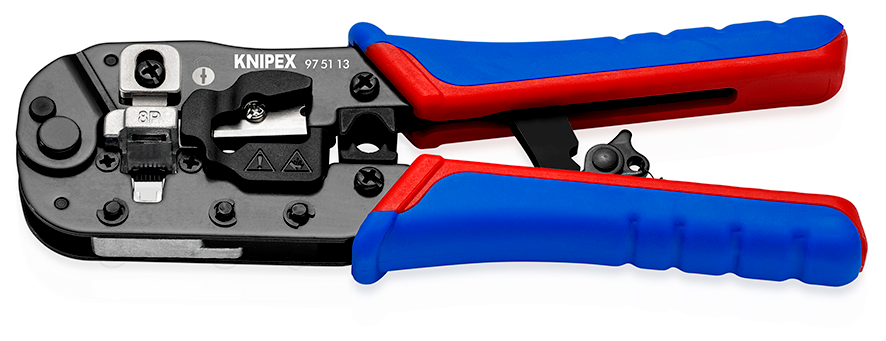
Separate crimping die for strain relief (cable clip), Quick cutting and stripping of CAT-cables with high-quality blades, Precise crimping process thanks to parall...
native seal
i love knipex, most my other tools are those
i don't do rj45 for work tho, only very rarely
i do solar and most ppl use wifi for inverter comms
opal pagoda
native seal
i love knipex, most my other tools are those
i don't do rj45 for work tho, only...
i dont do it often but when i do it is urgent and it matters so i have them and high quality connectors
native seal
makes sense yeah
even for some 230kw systems i've done the client chose wifi for whatever reason so it's rlly a rarity for me
i can afford to faff around when they do ask
i use cat5e constantly, but for CT comms or BMS systems, where it's always a direct connection into a device and no rj45 connector
opal pagoda
native seal
i use cat5e constantly, but for CT comms or BMS systems, where it's always a dir...
you will then enjoy this even tho from network side it was pain in my ass to troubleshoot (NTP issues+ dns issues)


had to pcap the stupid thing to get slightest clue what it was as datamanager was reporting that connection to cloud was good but sma cloud couldnt see it and it couldnt be commisioned
opal pagoda
25x50kw inverters, 1.9mw of panels
native seal
why so many small inverters?
ground based system?
opal pagoda
native seal
why so many small inverters?
ground based system?
roofs of buildings in our factory area
opal pagoda
native seal
why so many small inverters?
ground based system?
https://www.sma.de/en/products/solarinverters/sunny-tripower-core1
these inverters are used, i wasnt involved with planning and design
peak cloak
opal pagoda
i mainly use shielded tooless varieties
more expensive
makes less sense when you have alot
opal pagoda
peak cloak
more expensive
yea they are pricy...
at home i use plastic non shielded ones but still tooless
native seal
just had a nightmare clearing the p/w on this router i had found lol, got it all fully reset, leaving it for now tho
there's a ton i need to learn in reguards to setting this up now
the switch i still ain't touched lol
other than trying to use it and nothing working as it was, prolly VLANs set up by last owner messing w/ it
yes i did just plug in stuff i found lol
opal pagoda
native seal
just had a nightmare clearing the p/w on this router i had found lol, got it all...
if its cisco factory resets are simple
 amber urchin
opal pagoda
i mainly use shielded tooless varieties
amber urchin
opal pagoda
i mainly use shielded tooless varieties
nice
native seal
for the switch yes it was v easy, for the router i had to do some weird remove the CF disk, go into ramon mode or w/e it's called, load a default, reinsert the flash card, save to that to overwrite to delete the old p/w and then reboot into defaults to start setting it up
 shadow bluff
topaz patrol
Zip ties should be illegal
shadow bluff
topaz patrol
Zip ties should be illegal
one of the sub rack we had to work on lol
 topaz patrol
Rofl
shadow bluff
no patch panels, no proper uplink passthrough, no cable management, no patch cords, mesh wifi inside the rack
sheesh they even used unmanaged switch for distribution
not even L2
 carmine matrix
I need help picking out a rack. I want to have 2 r730 2u servers that are 660mm deep and a switch and patch pannel. I’d like an enclosed rack and I want it to be 6-12u. Does anyone have any enclosed or non enclosed recommendations?
opal pagoda
carmine matrix
I need help picking out a rack. I want to have 2 r730 2u servers that are 660mm ...
aproximate location?
budget?
solid front panel, mesh or glass?
carmine matrix
opal pagoda
aproximate location?
budget?
solid front panel, mesh or glass?
United States, ideally under $300, not picky but ideally glass
 low marsh
hi there, I'm not super familiar with networking. and this is more of a home internet question than anything.
over here in Australia we're only just getting fibre to the premises lmao. mine is being installed today.
Ive got a granny flat in the backyard where my computer, ps5 is etc and while I'm sure the ps5 will still be able to make a connection, my computer won't as it is ethernet only.
what would be a suitable way to connect my PC via wifi, I understand buying a wifi card etc but any sort of recommendations as it would need to be reasonably long range while keeping speeds good
pastel monolith
Would just make sure the WiFi receiver card uses whatever is the most modern WiFi protocol the router supports (or better). Also make sure it has detachable antenna (is the norm but would double check) then if the signal not great can potentially replace the antenna and/or have an antenna wire to extend it so can mount somewhere higher/less interference.
You could also potentially use directional antenna since they help to focus on signals only from one direction, sort of related to that making sure the WiFi channel being used is as far from neighbor WiFi signals channel can help some too
low marsh
seems like my router is wifi 5 at the most.
do wifi 6/7 cards have backwards compatability like that?
pastel monolith
Yeah is almost always supports up to x protocol and basically backwards compatible with anything less when comes to WiFi
low marsh
okay wonderful, much appreciated
 lethal spade
low marsh
hi there, I'm not super familiar with networking. and this is more of a home int...
lethal spade
low marsh
hi there, I'm not super familiar with networking. and this is more of a home int...
my computer won't as it is ethernet only.
Yes, it will. Ethernet can do 1Gbps, 10Gbps, and even more, even though it is copper. The reason your ISP needs to bring fibre to your house is because copper can only do those speeds for short distances. 1Gbps Ethernet goes for 100 meters, for example. And that can be extended with cheap hubs or switches if you need to run it longer. However, fiber can run even for several kilometers between hubs, making a country-wide Gigabit network possible.
low marsh
I think you've misunderstood what I've said, and either way have fixed the problem.
twin pier
huh I'm confused why does the computer being Ethernet only mean you must use WiFi, wouldn't it be the opposite
lone crane
can wifi be ethernet?
 carmine moss
Yeah it makes no sense. If you currently use a cable you can just use that even if the isp uses fiber..
topaz patrol
lone crane
can wifi be ethernet?
No
lone crane
ok
twin pier
wifi is wireless and Ethernet is wired
lone crane
aaaa
topaz patrol
Not necessarily
lone crane
f
-# aaaaaaaaaa
lone crane
low marsh
I think you've misunderstood what I've said, and either way have fixed the probl...
why not just run ethernet to the shed
either copper or even fiber
twin pier
topaz patrol
Not necessarily
I'm curious what gotcha you want to say here
lone crane
copper if its short or fiber if its a distance
topaz patrol
twin pier
I'm curious what gotcha you want to say here
Ethernet can be run over microwave
twin pier
Sending Ethernet frames over the air would be terrifying
Well it could solve one pain point
I guess its what some wifi mesh protocols do
low marsh
lone crane
why not just run ethernet to the shed
this is originally what i did, but the location of the router changed etc. it was cheaper to just get a wifi card (i didnt have one before, preferred the stability of ethernet) than to get a long ass cable and run it through the house (also annoying and ugly)
lone crane
low marsh
this is originally what i did, but the location of the router changed etc. it wa...
wat
did you not read what we said literally just said above
lone crane
twin pier
wifi is wireless and Ethernet is wired
.
ethernet is wired
wifi cannot really be
and its wifi that is unstable and at the distance i think you want its going to be UNSTABLE
and that is without rain or bad weather
carmine moss
Like you can just run a cable to where your other cable is also and just use a cable coupler
low marsh
sure, i could do that. but i'd have to run said cable through the house (not my house) and its also ugly as hell
i have others in the house to consider
the easier solution (which has also already been done and is working) is to get a wifi card which i did not have before
lone crane
why not just run it on the outside of the house??
and then make a hole next to the router
low marsh
it is not my house and I cannot make those modifications
lone crane
ask the person if it can be possible
low marsh
landlords? zero chance
lone crane
or just use the closest window
i know a person who just runs a ethernet cable out their windows down to the router
low marsh
thats still significantly more cost than buying a network card
which again i already have done'
lone crane
the network card will have way higher ping, and packet loss if it even reaches
low marsh
i've got less ping and no noticeable loss
lone crane
you cant have less ping
low marsh
wifi 7 for you
clear igloo
twin pier
wifi is wireless and Ethernet is wired
Ethernet also a frame type
Ethernet can be transmitted over just about any medium you want
low marsh
going from cat5 to wifi 7 is almost certainly going to be an improvement
twin pier
clear igloo
Ethernet also a frame type
Ethernet can be transmitted over just about any mediu...
I don't think its useful to bring that up
low marsh
i dont understand why this is being dragged on, the solution has been found and done already
twin pier
running Ethernet through a house outside of the walls is ugly, I wouldn't blame you especially if you don't play competitive games
low marsh
i do. my loss and ping are the same, if not better than before.
and the rest of the houses occupants are happy
peak cloak
twin pier
Sending Ethernet frames over the air would be terrifying
ethernet is a protocol technically
I think ethernet frames technically go over wifi
nevermind scratch that, they do not it's different
twin pier
peak cloak
~~I think ethernet frames technically go over wifi~~
Not in 802.11. But you can do it and I believe that's how some of the WiFi mesh protocols work
I don't know howo to verify that thoigh
There's depressingly little info on how various mesh WiFi systems actually work and what they do
peak cloak
low marsh
hi there, I'm not super familiar with networking. and this is more of a home int...
how long is the distance? You could use one of those line of sight transmitters to get pretty good connection
clear igloo
twin pier
There's depressingly little info on how various mesh WiFi systems actually work ...
We shoved electricity into sand and made it send pulses of energy at high frequencies to other electrified sand so we can send cat memes 😄
We don't need no dang documentation!
twin pier
peak cloak
how long is the distance? You could use one of those line of sight transmitters ...
this poor guy's recommendations keep getting more and more elaborate
clear igloo
twin pier
this poor guy's recommendations keep getting more and more elaborate
What OP really needs is an ISP grade network and an invest into either an MPLS or SRv6 backbone to connect two EVPN Spine/Leaf networks on either side
twin pier
I can stand behind that one
peak cloak
twin pier
this poor guy's recommendations keep getting more and more elaborate
the way I understood it is that they want signal to a guest house basically away from the main house
something p2p like that would be the best
twin pier
So I reread the original question and it makes sense to me now. Idk what I was thinking before. They don't have WiFi support and are asking for recommendations on WiFi cards to connect the PC to wifi
clear igloo
Yah, extra details provided that complicates/confuses the ask but agreed, just need a wifi card to connect the PC to the network is essentially the ask
twin pier
I can recommend ax210 based cards but I bought that specifically because of needing AMD support and it going in my laptop socket instead of a pcie daughterboard
pastel monolith
Everyone needs their morning coffee I think, trying to answer a thing that was matter of buy WiFi card and is done ✅
opal pagoda
topaz patrol
Ethernet can be run over microwave
fiber is also "wireless" 🤣
twin pier
that's a good point
topaz patrol
peak cloak
how long is the distance? You could use one of those line of sight transmitters ...
The ‘tik wireless wires do a good job
ornate jungle
opal pagoda
fiber is also "wireless" 🤣
Heck, even CAT5e and CAT6 can be wireless - you just have to buy really thin, cheaply made cables. You know, the one's that have less wires than the quality cables. 
 vagrant nimbus
opal pagoda
fiber is also "wireless" 🤣
vagrant nimbus
opal pagoda
fiber is also "wireless" 🤣
Air fibre entered the chat
twin pier
fibre is already not a wire though if you think about it
opal pagoda
twin pier
fibre is already not a wire though if you think about it
Its a light tube
 zinc fog
I need recommendation for a firewall os? I only need portforwarding, maybe wireguard in the future (web gui for wireguard would be great). Nothing fancy. I basically need to replace an old wifi router.
lone crane
NSFN
 topaz patrol
zinc fog
I need recommendation for a firewall os? I only need portforwarding, maybe wireg...
topaz patrol
zinc fog
I need recommendation for a firewall os? I only need portforwarding, maybe wireg...
Nothing fancy? Spend $45 on an ER605, it'll just work and you won't have to fuck around
Otherwise there's pfsense/opnsense or RouterOS (will cost you a little for the license)
Openwrt can also be run on x86
zinc fog
Okay, I already bought a mini pc with 4 ethernet ports
what should i use, pfsense or opnsense?
topaz patrol
opnsense is generally preferred for homelabs compared to pfsense community
zinc fog
Okay, I'll download that then. Thank you so much
topaz patrol
Try both 🙂
routeros also has a trial before you need to buy a license (the license is like $30 or something for gigabit)
zinc fog
Okay, I want something without a license. I usually donate if I use and like the project
topaz patrol
Then don't use routeros 🙂
zinc fog
🙂
 fallow cloak
zinc fog
Okay, I already bought a mini pc with 4 ethernet ports
fallow cloak
zinc fog
Okay, I already bought a mini pc with 4 ethernet ports
Please tell me those are Intel nics?
fallow cloak
zinc fog
I need recommendation for a firewall os? I only need portforwarding, maybe wireg...
OPNSense all the way tbh
zinc fog
fallow cloak
Please tell me those are Intel nics?
oh, no idea
fallow cloak
So, for BSD based firewalls you almost certainly want Intel NICs
Others will probably work but can be quite hit/miss.
fallow cloak
Which kind?
topaz patrol
fallow cloak
Which kind?
The good ones :p
fallow cloak
inb4 I225-V
zinc fog
4x2.5GHz intel i226
fallow cloak
Intel fucked the I225-V so badly
fallow cloak
zinc fog
4x2.5GHz intel i226
Nice! Well enjoy, will be a good router.
zinc fog
😄
fallow cloak
If you geta. chance I'd love to get detailed specs on that for my database
Awesome Mini PC
Comprehensive catalog of mini PCs, single board computers, and homelab machines with detailed specifications and comparison tools.
zinc fog
Okay, will do

Hign-concerned Chemical: None Processor Main Frequency: Depends on CPU Use: Commercial Memory Capacity: ≥ 4GB Hard Drive Capacity: 1TB Model Number: X2B/X2E Processor Brand: Intel Processor Model: N100/N6000/N5105/J4125
I think it's this one
topaz patrol
We use them for failover and bonding, they're pretty solid
topaz patrol
I think they're older i3s though, not n100
fallow cloak
zinc fog
https://www.toptonpc.com/product/12th-gen-intel-n100-firewall-computer-n6000-n51...
Actually a reasonable amount of information here, cheers. Usually very difficult to get detailed specs.
 sharp oak
is this a good router (I would be using like 6 of them fyi I have a VERY large place to cover)
 topaz patrol
If you don't want a web interface, it's likely fine
fallow cloak
sharp oak
is this a good router (I would be using like 6 of them fyi I have a VERY large p...
Honestly just go with unifi if you need wifi like that on a budget
topaz patrol
Or Omada 😌
fallow cloak
@topaz patrol ❤️ ty for the device submission, my first time testing this workflow with someone else
topaz patrol
All good, we got it about a week ago and it's pretty obscure so I thought I'd put it up :)
 sour glacier
fallow cloak
They're very popular at the moment.
sour glacier
fallow cloak
They're very popular at the moment.
tbh for the price they are really good, and if you are a network geek opnsense is a good bit of fun
sour glacier
sharp oak
is this a good router (I would be using like 6 of them fyi I have a VERY large p...
not too sure, but as a heads up a lot of devices dont support wifi 7 at the moment so just something to be aware of
sharp oak
topaz patrol
Or Omada 😌
Are there Omada access points and routers?
I thought everything was VPN routers
topaz patrol
sharp oak
Are there Omada access points and routers?
Yes....
APs

Gateways

And there's switching
fallow cloak
sour glacier
tbh for the price they are really good, and if you are a network geek opnsense i...
Yeah for sure. I run 5 instances of OPNSense across sites, none on these machines though.
Use old lenovos because they're cheaper and more powerful, one site does 10Gb/s routing with 5Gb/s internet so these lil boxes are not enough
fallow cloak
topaz patrol
All good, we got it about a week ago and it's pretty obscure so I thought I'd pu...
Identified some issues with the validation but all fixed and that device is added 😄

 flat valley
Me clicking here thinking it's a networking chat to meet people and game together

Then again... it is "networking" related as it's over the internet
silent flax
zinc fog
https://www.toptonpc.com/product/12th-gen-intel-n100-firewall-computer-n6000-n51...
wish i had a reason to grab one of these, but i ain't paying 450 euros for Pentium 8505 + 4x2.5G + 4x10G thing 😄 https://www.aliexpress.com/item/1005008652718035.html
 silent flax
i use this guy as a router https://www.notebookcheck.net/Minisforum-Venus-Series-UN100D-review-Mini-PC-for-office-tasks-with-Intel-N100-and-DDR5-RAM-starts-at-219-euros.848439.0.html
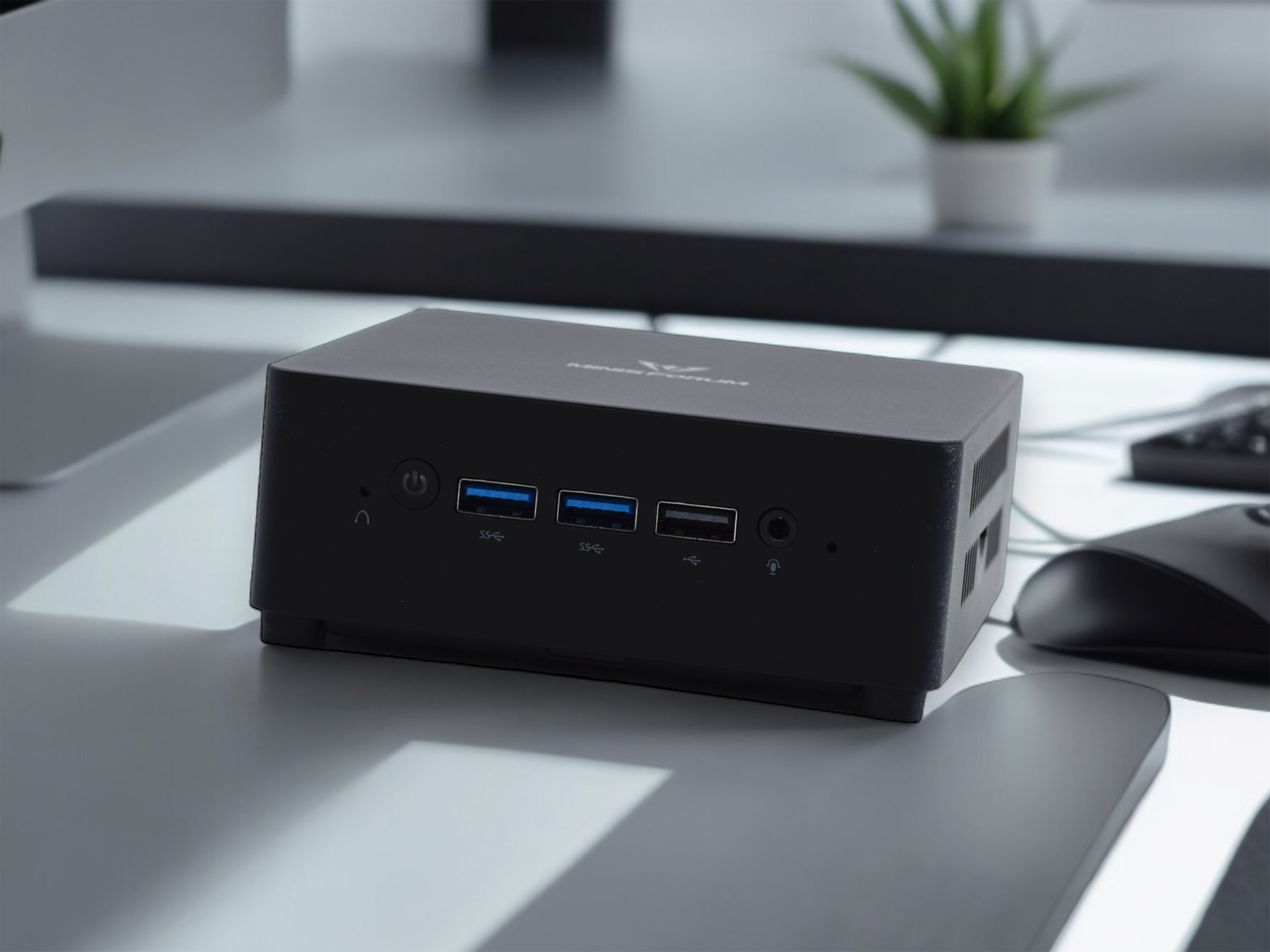
Notebookcheck
We test the Minisforum UN100D Mini-PC with Intel N100 processor, 8 GB DDR5 RAM and a 256 GB SSD.
it had one of the weirdest SSD brands installed (replaced it with 1TB SSD from my stash)
 zinc fog
looks nice 🙂
silent flax
2x2.5G was all i needed, so yeah
zinc fog
Yea, gonna buy a cheapo ssd for mine
silent flax
it is just a router and a bit of docker; server tasks and 10G networking is on my actual server (2950x, 128GB RAM)
zinc fog
I don't need 2.5gbit. I finally getting fiber, so I want to future proof if i get faster internet
silent flax
technically neither do i, but my internet is gigabit, and i upgraded all my internal networking to 2.5G minimum, so why not
zinc fog
true
silent flax
i mean i get 150-170MB/s copying from the routers SSD to the server
and it's not like 2.5G switches are expensive
zinc fog
they were cheaper than I thought when i bought one
but i dont have use for it yet, not transferring a lot of data on my network
silent flax
a 10G SFP to RJ45 module from ALiexpress will now you set back more than a 4x2.5G + 2x10G SFP switch 😄
zinc fog
the government cracked down on import from aliexpress, so now it's harder for us to buy cheap stuff
lone crane
silent flax
a 10G SFP to RJ45 module from ALiexpress will now you set back more than a 4x2.5...
O YEA god i love the little bastard
like 40$ and ya get a unmanaged switch with dat
a sfp+ card costs almost as much as it
silent flax
lone crane
O YEA god i love the little bastard
i just put the X540-T2 card and the RJ45 SFP+ 10G adapter away into the storage after i got my ConnectX3. Too bad neither of these cards, nor the LSI HBA supports PCIe power management, but oh well
lone crane
silent flax
i just put the X540-T2 card and the RJ45 SFP+ 10G adapter away into the storage ...
NO ASPM WHAT
the x540 Launch Date
Q1'12
silent flax
lone crane
NO ASPM WHAT

You either get to C8 or you die
trying.
lone crane
i already read it
silent flax
i need to upgrade to 9300 series of LSI cards and X710... but the cost is not worth it 😄
electricity in my location is a bit bellow 0.16 euro per kWh, so like whatever, few watts
lone crane
ngl i could get away with getting a bitcoin miner or some shit when it comes to power use but the place im at is just so heat efficient to where i would cook myself
silent flax
in theory i could completely remove the HBA with the amount of hard drives i have in the server now, but i will probably only do it when i will replace the whole server platform
lone crane
i wanna see what C state my server is at
just need to SSH into it but gonna see how i do dat on truenas
AAAAAAAAAAA


OMG i just needed to do sudo 😐
i have no clue how to read this
 silent flax
lone crane
i have no clue how to read this
silent flax
lone crane
i have no clue how to read this
C1ACPI% to C3ACPI%
lone crane
i think i understand now, i think maybe im locked to max c3
but here it is c7

yea CPU%c7
ok nice my cores are able to mostly go into c7
buut uhm now i kinda wanna try c8
silent flax
lone crane
but here it is c7
only C1 & C2 for me on my Threadripper
lone crane
xd
silent flax
also i run transcoding on them right now, so...
lone crane
now i wanna try to go down to c8
silent flax
 lone crane
tbf my cpu only idles at 20w
not sure how much of a shit i really give
my HDDs use A LOT more power
 mellow hemlock
Heya. I set up a super basic NAS on my Mint desktop via Samba and uploaded a couple-GB video file from my phone, it took ~30m to upload.
I have a few ideas why it is so slow, but want some input.
- The NAS is using Wifi
- Phones are slow (Samsung S23 Ultra)
- NAS Hardware is a bit old (Alienware Aorura R7 Parts (i7-8700, 2x16gb 2666MT/s, 120GB SATA SSD boot (also the nas drive)))
Any idea if it is either these or something else?
 stuck grove
almsot certainly the fact your nas is on WIFI
mellow hemlock
stuck grove
almsot certainly the fact your nas is on WIFI
Gotcha. Not too big of an issue at least since it was for a quick setup. I can probably switch it to ethernet tomorrow*
pastel monolith
Hmm sounds pretty slow tbh, can use rsync like rsync -ah --progress some-big-file.mp4 test.mp4 to see roughly speed moving either locally or across the network to try and narrow it down to either disk or network. Also check wifi details on phone should show roughly peak speed it can get with the current connection strength.
 tight pecan
mellow hemlock
Heya. I set up a super basic NAS on my Mint desktop via Samba and uploaded a cou...
tight pecan
mellow hemlock
Heya. I set up a super basic NAS on my Mint desktop via Samba and uploaded a cou...
Perhaps your NAS has a wifi card that is a bit on the older side? Is it connected to 2.4GHz or 5GHz?
topaz patrol
<@&750150305383186585>
mellow hemlock
tight pecan
Perhaps your NAS has a wifi card that is a bit on the older side? Is it connecte...
How do I check? It does use a wifi card but I dont imagine it is that bad as the pc was prebuilt for gaming use
mellow hemlock
pastel monolith
Hmm sounds pretty slow tbh, can use rsync like `rsync -ah --progress some-big-fi...
I'll try this out when I am able to
silent flax
mellow hemlock
Heya. I set up a super basic NAS on my Mint desktop via Samba and uploaded a cou...
most NAS boxes are literally running on dualcore 1.5GHz ARM CPUs and even gigabit copying barely taxes them. You can bet theissue is not your NAS HW. It is the networking, either the NAS, router or phone side.
silent flax
mellow hemlock
Heya. I set up a super basic NAS on my Mint desktop via Samba and uploaded a cou...
for example if you wifi is only 802.11n because of the router othe PC wifi card, you are down to 150Mbps or 300Mbps link speed. Which if the limiting factor is the router, then we talk about sharing that bandwidth between both devices, so you might be down to 40-50Mbps actual copying speed
topaz patrol
<@&750150305383186585>
mellow hemlock
silent flax
for example if you wifi is only 802.11n because of the router othe PC wifi card,...
Ouch, that's possibly it then. So yeah I'll plug it into the ethernet later on today and then see how much better it does
mellow hemlock
Works 100% better, ty guys
it's still not ultra fast, but it did 6gb in like, under 10m now
 gloomy wraith
I got a problem where after probably 1 hour after using my pc, it me shows that im connected to the router but the router app shows me that my pc is offline. The real problem is that apps just tell me that the site cant be reached but some apps like insta or yt music are still working and i can listen to any song or text with people with no problem. If this happens during a discord call i still talk to people without any issues. rn i cant reach any sites and im writing this on my pc -_-
pastel monolith
mellow hemlock
Works 100% better, ty guys
nice seems more reasonable for sure, tried yesterday here from phone to NAS (NAS is wired) and was about 30MB/s so took around 30-40s to transfer a 1GB file
stuck grove
gloomy wraith
I got a problem where after probably 1 hour after using my pc, it me shows that ...
restart pc, remove the pc from your network in the app, then relogin to the network on your pc
pastel monolith
gloomy wraith
I got a problem where after probably 1 hour after using my pc, it me shows that ...
Router app showing it offline is pretty suspect... usually things like you're describing behavior wise it's DNS (for some reason DNS server isn't responding correctly to query for domain -> IP look-ups and so new connections fail but things already cached still work)
gloomy wraith
stuck grove
restart pc, remove the pc from your network in the app, then relogin to the netw...
gonna try it rn
gloomy wraith
stuck grove
restart pc, remove the pc from your network in the app, then relogin to the netw...
its working for now, normally when restarting my pc fixes it but just for a while, atleast my pc is online in the router app
gloomy wraith
stuck grove
restart pc, remove the pc from your network in the app, then relogin to the netw...
it shows offline but no problems yet
pastel monolith
oh F actually there's a ton of problems atm just like widely on the internet
cloudflare/GCP outages
 hidden obsidian
And AWS is impacted as well yep
Not sure which one triggered it, but it could've been a domino effect depending on what one of them may have done
pastel monolith
I didn't do it! 😄
hidden obsidian
lol I'm just sitting here watching it all burn lmao
I work for an ISP that mainly uses GCP and so many things are dead in the water till it gets fixed lol
pastel monolith
funny enough I was working as contractor on some part of AT&T when they had BGP outage thing a while back and then facebook got locked out and had to break in to get keys... ah the internet
hidden obsidian
Oh god wonder what they did, black hole traffic or something
pastel monolith
yeah it ended up being like a mis-configuration that got through somehow, the details escape me now but was like an intern change that got merged in or something and just destroyed some part of the internet for a while
hidden obsidian
It was probly somebody messing with RPKI or something lol
I wouldn't be surprised if this big cloud issue is the result of some intern making a change without approvals lol
opal pagoda
hidden obsidian
I work for an ISP that mainly uses GCP and so many things are dead in the water ...
good luck
i work at a enterprise and last week our public dns provider got attacked so dns resolution for our public domain was down
harsh times and i couldnt do shit about it except look at status page
hidden obsidian
Oof thats no bueno at all
opal pagoda
not many people noticed it as outage was from 16 to early in the morning
but those that did raised hell
hidden obsidian
I wonder what attack vector they used cause you can mitigate some basic DDOS attacks by not responding to rapid ICMP messages, but some people forget those basic things you can do
opal pagoda
we are definitly looking for a more serious dns provider after this
hidden obsidian
Perhaps a hybrid approach where you have a primary and secondary? I haven't looked much into DNS in forever so idk how feesable that would even be
opal pagoda
hidden obsidian
Perhaps a hybrid approach where you have a primary and secondary? I haven't look...
well NS wasnt advertised so dont know if that would help much
hidden obsidian
No idea, from a redundancy perspective it would make sense to prevent a reoccurrence of that issue unless your company was specifically targeted
opal pagoda
no we werent targeted directly
if it were up to me i would go to cloudflare as if they are down half the internet is down
hidden obsidian
Technically they were impacted in this cloud issue, but they are less likely to go down independently of others.
opal pagoda
they just reroute to another site so no big deal except slightly higher latency
hidden obsidian
They certainly have their ish together for sure
opal pagoda
 twin pier
was this another clpudflare moment
hidden obsidian
I think its more of a GCP issue, however the ISP I work for uses GCP so I am a bit biased
opal pagoda
hidden obsidian
I think its more of a GCP issue, however the ISP I work for uses GCP so I am a b...
what does ISP do on GCP?
does core infra pass through it for some reason?
hidden obsidian
Its more backend systems, our buyflow and payment processing and tools hosted in GCP
Our actual Network is more or less fine. Except maybe our OLT provisioning software which I think is also hosted in GCP lol
But thats just access end, core/backbone is all fine
opal pagoda
Interesting
hidden obsidian
I know our fault management/NMS was fine thankfully so we don't have missed alerts
opal pagoda
Is NMS hosted onsite or on cloud?
hidden obsidian
Pretty sure its cloud, we're moving to a new one that'll be on GCP next quarter I think
At my old ISP we had a Azure/AWS mix depending on the tool. Pretty sure it was just Azure for AD and Sharepoint with the rest on AWS
Granted I was just a user and didn't manage any of that infra since I deal with the actual Network
opal pagoda
I am running NMS on dedicated server and dedicated SAN in our HQ
hidden obsidian
My company hosts pretty much every service/server in GCP except our local market speedtest servers since we have a deal with Google to give us a discount iirc
topaz patrol
opal pagoda
if it were up to me i would go to cloudflare as if they are down half the intern...
Cloudflare ❤️
It's so cheap too!
mellow hemlock
Heya. I upgraded my quick-nas (samba on Mint) to have a 1Tb drive rather than the remaining 25gb from my boot drive (a 120gb drive)
I also created a second user to use it with.
I already replaced the user in smb.conf with the new user and restarted smbd, but if I later on give the new user chownage of the samba directory, do I need to restart smbd service again?
Asking cause I can connect to and log into it on my phone, but the files dont load anymore
Scratch tha user error, I was on the wrong address
stuck grove
my 2u vented panel from ubiquiti arrived rusty and covered in caked on dust, i’ll have to wait and see what they say


 meager ginkgo
topaz patrol
Cloudflare ❤️
It's so cheap too!
meager ginkgo
topaz patrol
Cloudflare ❤️
It's so cheap too!
If we're talking DNS- I like Quad9 and NextDNS
topaz patrol
meager ginkgo
If we're talking DNS- I like Quad9 and NextDNS
Authoritative dns, both of those only offer recursive dns :)
quad9 doesn't have nearly enough pops for my liking, it's quite slow
meager ginkgo
topaz patrol
Authoritative dns, both of those only offer recursive dns :)
Ah didn't go up too far
meager ginkgo
topaz patrol
quad9 doesn't have nearly enough pops for my liking, it's quite slow
Just out of curiosity, are you in the US?
topaz patrol
No, Australia
meager ginkgo
lol yeah makes sense then
 topaz patrol
Only on ix australia and megaport too I'm pretty sure
frosty stone
stuck grove
my 2u vented panel from ubiquiti arrived rusty and covered in caked on dust, i’l...
Did you buy it direct from ubiquiti?
Looks like it's sat in a damp warehouse since it was made
 long scarab
happy pride month, nerdsss :3

 fallow cloak
long scarab
happy pride month, nerdsss :3
fallow cloak
long scarab
happy pride month, nerdsss :3
Spanning tree go brr
long scarab
fallow cloak
Spanning tree go *brr*
that whole block on my switch is completely sectioned off, it's fine
i don't have a cable tester so those 12 ports are my cable testing ports
fallow cloak
Cable in port 37 giving me real anxiety
long scarab
it'll be fiiinee
(it goes to my pc)
I'm remaking those cables anyways
Way better than before
fallow cloak
yeah I've done much worse, still not sure what people mean when they say you're not allowed to bend fibre 
I've done some absolutely cursed OM3/4 runs before
long scarab
fallow cloak
yeah I've done much worse, still not sure what people mean when they say you're ...
id say ive gotten much better at making my own cables
 fallow cloak
Those do look very nice. I always sucked at it
long scarab
i increased my budget by about $15 and got all of this shit
 fallow cloak
Could never get the pairs in th channels properly, the pull through jacks are easier
long scarab
i think passthrough is actually harder to work with
long scarab
@fallow cloak here's the patch panel before i redo it this weekend

 brazen lark
I am replacing my realtek card with an Intel AX210, already uninstalled the wifi and bluetooth drivers, was about to shutdown but saw that ethernet driver too, now I'm confused
Do I need to uninstall the
Realtek PCIe GbE family controller
too? Cuz that seems to be the driver for ethernet and what's the intel counterpart for that? I only saw wifi and bluetooth drivers on the intel ax210 page
fallow cloak
brazen lark
I am replacing my realtek card with an Intel AX210, already uninstalled the wifi...
You can uninstall it but it's fine if you don't
What OS btw? Most OSes have drivers already for most intel cards, it'll 'just work'
brazen lark
fallow cloak
What OS btw? Most OSes have drivers already for most intel cards, it'll 'just wo...
I'm hoping it does
But it's an asus tuf entry level laptop with ryzen, so I'm playing it safe and installing the intel drivers beforehand
But I don't find an Ethernet driver from intel like this realtek one
brazen lark
fallow cloak
You can uninstall it but it's fine if you don't
And you say it's a choice, so what does that mean?
How would the realtek one work without the card
fallow cloak
You're removing the realtek card, right?
brazen lark
Yep
I meant how would the realtek ethernet driver work without the realtek card, as I'm replacing with intel
brazen lark
fallow cloak
You're removing the realtek card, right?
Or did you mean that intel would download the required driver itself if I have its wifi driver
fallow cloak
brazen lark
I meant how would the realtek ethernet driver work without the realtek card, as ...
It won't, a driver isn't something that's 'running in the background', it allows a bit of hardware to function. Haivng the driver there without the card will be fine, is what I was saying.
fallow cloak
brazen lark
Or did you mean that intel would download the required driver itself if I have i...
The intel card should 'just work', Widnows may download a driver through windows update but it will probably work regardless.
You can just swap and see, if you're missing functionality swap back
twin pier
long scarab
<@183697170455592960> here's the patch panel before i redo it this weekend
cable color coding?! That is a good idea
long scarab
twin pier
cable color coding?! That is a good idea
mhm!
opal pagoda
brazen lark
I meant how would the realtek ethernet driver work without the realtek card, as ...
do you also have a gigabit ethernet port with realtek controller?
 paper valve
brazen lark
I am replacing my realtek card with an Intel AX210, already uninstalled the wifi...
paper valve
brazen lark
I am replacing my realtek card with an Intel AX210, already uninstalled the wifi...
You don’t
brazen lark
opal pagoda
do you also have a gigabit ethernet port with realtek controller?
Yeah I didn't know the ethernet stuff is separate from the card
Didn't need to uninstall it
stuck grove
frosty stone
Did you buy it direct from ubiquiti?
Mhm, i bought it from store.ui.com
The box didn't seem damp at all, so i'm not sure
 left oriole
 left oriole
stuck grove
The box didn't seem damp at all, so i'm not sure
left oriole
stuck grove
The box didn't seem damp at all, so i'm not sure
^^^^^^^^^^^^^ I know how to make a box of networking equipment damp
stuck grove
stuck grove
my 2u vented panel from ubiquiti arrived rusty and covered in caked on dust, i’l...
they accepted the RMA, but they aren't covering shipping, that would nearly be the cost of the item
ornate jungle
fallow cloak
Cable in port 37 giving me real anxiety
It's fine - tis just a load bearing network cable, being used exactly as designed.
meager ginkgo
brazen lark
I am replacing my realtek card with an Intel AX210, already uninstalled the wifi...
Out of curiosity, why not a BE200?
meager ginkgo
long scarab
<@183697170455592960> here's the patch panel before i redo it this weekend
If those are solid core cabling, highly would recommend replacing with stranded patch cables. The "in wall" ethernet cabling is not meant to be terminated into RJ45 plugs
You'd want to use stranded cabling for patch cables, solid has a higher chance of breaking
long scarab
meager ginkgo
If those are solid core cabling, highly would recommend replacing with stranded ...
its a stranded cable
meager ginkgo
Have seen a lot of people either putting RJ45 plugs on in wall cabling or using excess cable to make patch cables 🤣
brazen lark
meager ginkgo
Out of curiosity, why not a BE200?
-
Not sure if it would work with my device (asus tuf entry level with ryzen cpu so not all intel cards would work apparently, had to rely on an old thread to make sure this was compatible)
-
Lack of availability here, had to get even the AX210 from a reseller
meager ginkgo
brazen lark
1. Not sure if it would work with my device (asus tuf entry level with ryzen cpu...
Ah point 1 is fair enough, I also have an AMD CPU and had to get a different card for WiFI 7 :/
dumb compatibility with the BE200
 vagrant hare
are cat 6a cables bigger than cat 6???
topaz patrol
vagrant hare
are cat 6a cables bigger than cat 6???
Thicker? Yes
topaz patrol
Notice how much tighter the twists are
 topaz patrol
What are you trying to do
vagrant hare
networking!!!!
vagrant hare
i do not have that much info the cable is from garland cabls
topaz patrol
What are you actually trying to do, are you direct burying cable?
topaz patrol
Jaycar
topaz patrol
Then there you go
topaz patrol
If you're buying online look elsewhere, Jaycar has "fuck you, lazy cnt" pricing
vagrant hare
no sheliding on jaycar plugs:(
topaz patrol
We use 1pd at work not sure how good their pricing is for retail
vagrant hare
??? looks sus
topaz patrol
It's fine, they're owned by Grove
vagrant hare
are what contry do you live in?? 1pd it in my contry
topaz patrol
Australia
vagrant hare
me too!!!!!!
topaz patrol
vagrant hare
i do not have that much info the cable is from garland cabls
Garland is an aussie brand
vagrant hare
i live there
topaz patrol
 vagrant hare
73$ im not buying that hell na
topaz patrol
That's for 100, if you're buying them individually expect to pay $1+ a piece
vagrant hare
can i friend you you sem ues full
topaz patrol
No thanks
stuck grove
vagrant hare
can i friend you you sem ues full
“you seem useful” is the weirdest “compliment” i’ve heard in a while
topaz patrol
lol
vagrant hare
im here you know]
pastel monolith

 south blade
Hey, I just got the EAP650 v1 (apparently there's a v1.2, is that why they had these at a discount on Amazon!?) and I thought I would want it in repeater mode but I can't seem to figure out WHERE to pick to set it as repeater...also, can it be wired but repeat on the same SSID I want it to show up as? Or is it repeat on the same SSID it connects to the way it works? I just have the Omada app, I don't have a controller. I have it wired into my ISP router at the corner of the house and installed it in the dining room ceiling closer to the middle of the house. I've got some shenanigans going on really, right now I left them both on the same SSID so don't know if they are fighting each other or if my devices aren't taking advantage of the strongest signal because of this. I also have a router setup as a repeater 200 feet away connecting to the ISPs router which I moved closer to the window as I haven't ran a cable over there yet.
clear igloo
south blade
Hey, I just got the EAP650 v1 (apparently there's a v1.2, is that why they had t...
Why not remove the other repeater, turn off WiFi on the ISP device, have the Omada AP as the same SSID/PW from the ISP device and just have that handle WiFi?
repeaters are bad, they cut throughput and can only broadcast a signal as good as they get, better (if possible) to have APs with solid roaming instead
south blade
clear igloo
Why not remove the other repeater, turn off WiFi on the ISP device, have the Oma...
200 feet away to another building?
clear igloo
So your ISP router is over 200 feet from the repeater and then from that repeater it's even further to the dining room?
south blade
No, the repeater I have connecting to the ISP router is 200 feet away getting Internet to the guest house
clear igloo
Repeater: Takes a signal and just repeats it (broadcasts it again). If it's 200 feet away from the source it's likely getting pretty bad signal to begin with and anything connected to that likely has a horribly degraded experience/throughput/etc.
AP: Broadcasts a signal directly, if you're hardwired to the ISP device there is no point using it as a repeater in this case. Make that AP the source of your WiFi, turn off the SSID/WiFi on the ISP device, and have any repeater go off that AP's signal which will be stronger and more reliable at minimum.
Right now with the ISP device+repeater and then the AP broadcasting the same wireless names (SSID) it is causing a lot of problems because there isn't any seamless transition or way to tell devices which to connect to
south blade
The ISP router is in the middle, the AP is wired to it, but yes using the same SSID
clear igloo
I was just about to ask 🙂
Ok, so the sooner you can wire up that guest router to the ISP device and then just flip WiFi off on the ISP device but leave everything else alone the sooner things should settle down. The best solution would be another Omada AP in the guest house but eh
So long as you don't need good roaming between the guest house and your house it's a minimal issue at that point
The "fun" part about wireless devices is they tend to hold onto the first signal they see, most clients don't like to roam even to a stronger signal
south blade
Yeah, the guy that setup the fiber traded me a drill bit for like a 300 foot Ethernet cable I was planning on running over there, it's not outdoor rated but it was basically free 🫠
clear igloo
Some pipe and you're good to go imo 🙂
 kind pivot
I'm setting up a wireguard server on my home server
Do I just nat the wireguard port from my isp router to the server? (I have a static ip for my Wan)
Is it secure enough to do that?
clear igloo
Yup
You need certificates and everything to connect, far more secure than user/pass methods other VPNs offer by default
kind pivot
Yeah I'll be using private/public keys and wireguard ui to ease the setup
clear igloo
Then you're good 🙂
 bitter thistle
There is concept I want to try, but I am stupid when it comes to networking and not sure if this will work, or how it is done.
Using a PXE, it deploys a already installed Windows OS to boot from.
And because of the PXE, it somehow doesn't detect certain pcie cards or something?
kind pivot
I've set up wireguard server on my home server
I've successfully connected from my arch pc with the config file thingy and set of private/public keys pairs
But on my android phone .... I just can't connect at all, I really don't think it's the config I've put since it's basically the same from the arch pc modulo the IP being .2 instead of .3 and keys from the client being different
I have a samsung s23, I used the wireguard app, I tried through wifi and 4g
Any ideas on potential problems with android ?
I have proton VPN installed on the android btw.... but it was obviously not activated
My subnet is 10.100.0.0/24
Here is the output of wg.
As you can see the android peer did receive some Bytes but did not handshake.
interface: wg0
  public key: serv pub key
  private key: (hidden)
  listening port: 51820

peer: archlinux pub key
  endpoint: 192.168.1.254:50102
  allowed ips: 10.100.0.3/32
  latest handshake: 9 hours, 36 minutes, 15 seconds ago
  transfer: 14.99 KiB received, 10.39 KiB sent

peer: android pub key
  endpoint: 37.167.151.171:17799
  allowed ips: 10.100.0.2/32
  transfer: 29.20 KiB received, 42.86 KiB sent
Handshaking doesn't happen repeatedly unless you tell it to.
I suspect your issue here is one to do with your "allowed IPs" and your (not shown) interface addresses.
kind pivot
10.100.0.x was blocked by android, I switched everything to 10.0.0.x and it works now.... @pseudo blade
 ebon sierra
Building a home lab,
I have Xfinity Internet with a super old (probably 10 year old) XFi box or whatever it’s called. Do I get a stand alone modem for the home lab, or do I shove that thing in bridge mode and just get a router
amber urchin
ebon sierra
Building a home lab,
I have Xfinity Internet with a super old (probably 10 year...
put that thing in bridge mode and forbidden router on a vm?
ebon sierra
I’m thinking of either Cisco or Ubiquity gear to put in it. Still need to put together some kind of server for that and/or hosting game servers
For context my networking knowledge consists of mostly just the stuff I’ve learned to get halfway through CompTIA Network+, I’m doing CCNA right after
Ubiquity gear cost a lot of money though which is a major rip
clear igloo
What do you want to do and where do you want to go?
You could do Cisco CML (free or paid versions exist) for studying and then virtualize most things with proxmox as well on a dedicated server and just get a decent switch for your network
pseudo blade
ebon sierra
For context my networking knowledge consists of mostly just the stuff I’ve learn...
+1 on the virtual labbing via CML/EVE-NG/GNS3 if you'd otherwise be buying extra gear just to know how to do stuff for testing.
For game servers, unless you were going to run them on dedicated computers with isolation having fancy network gear probably isn't worth much anyways and even if you are... well it depends on your risk really.
Otherwise... You really want a reasonable router with static routing support handling all traffic into your home and then splitting it off by purpose (including servers). It's much nicer being able to just access your server stuff rather than needing to use a jump host every time, and it's reasonably safe to do so as long as you set up stateful firewall rules to prevent traffic into your "home" subnet. Unless your home network is faster than gigabit it's not very difficult to find products from Ubiquiti/Mikrotik/(or allegedly TP-link, some here are very fond of them) that will serve that purpose well.
hidden obsidian
With CML you get the Cisco images for free which is nice so you don't have to risk hunting for them. Other vendors like Juniper provide their images for free which is nice as well. My ISP doesn't use Cisco so I just use EVE-NG
pseudo blade
I'm kinda against buying museum piece Cisco gear in general for labs, and somewhat again buying new-enough Cisco gear if your goals can be achieved by virtualisation
hidden obsidian
Yeah I agree as well, its neat for a bit to figure out consoling into live gear and all, but its not super worth it especially if you can just do that at your job
Def save money and look into one of the big emulators that Meagus mentioned like CML, EVE-NG, and GNS3
Considering that this is for CCNA, perhaps Packet Tracer would be a better fit though. Since its completely free and perfectly fine for that level
CCNP and above certainly would require an emulator
pseudo blade
I was considering mentioning Packet Tracer... but it's not 100% adequate even for CCNA. You can get somewhere around 90% of the way there, but some stuff just doesn't work on the simulator
It's plenty to get started with though!
That said, apparently we're up to Packet Tracer 9 now, maybe it's better
hidden obsidian
They've made some improvements. I used PT for my CCNA studies back in 2019 before the big revamp in 2020, its sufficent if you want to save money
And almost ever training provider for CCNA is going to use it since its free
ebon sierra
Looking at Cisco (since I’m gonna get CCNA) and Unifi gear, gonna build a server for games that runs Ubuntu Server + GUI with Docker running LinuxGSM
I’m halfway through learning the Network+ topics currently
Kinda wanna make my own router using PFsense or something similar
opal pagoda
ebon sierra
Looking at Cisco (since I’m gonna get CCNA) and Unifi gear, gonna build a server...
run proxmox and virtualise the rest
ebon sierra
I need to learn more about virtualization. I understand VMs from using them in my Cybersecurity class at least
I have a lot to learn still to get a job in IT anyway
 nimble sable
I would like to test my Wi-Fi 7 AP. Can someone suggest a device that is capable of 320mhz band, or property MLO please? (I want to test what it does over wifi 6e, therefore I consider a successful test iff link speed crosses 2.4Gbps)
opal pagoda
ebon sierra
I need to learn more about virtualization. I understand VMs from using them in m...
it is quite easy to play with virtualisation with hyperv if you dont have dedicated host, it is what i started with
with any hypervisiors there are couple of basics
basics are networking- you can either pass through a whole network interface or use a virtual switch
resource allocation- chose amount of cores and ram you want to allocate, with dynamic ram allocation you can provide base amount and it will grow as needed, CPU cores can be over-alocated for instance i can allocate 6 cores on 2 vm's while cpu is 8 core and this does not cause issues unless there is high utilisation
OS install - tipically just load up iso into a virtual "optical drive" and setup os as with real hardware
meager ginkgo
nimble sable
I would like to test my Wi-Fi 7 AP. Can someone suggest a device that is capable...
A lot of WiFi 7 clients still have issues with MLO so that might be tough
I have it disabled on my U7 Pro XG APs because it’s somewhat problematic
nimble sable
meager ginkgo
A lot of WiFi 7 clients still have issues with MLO so that might be tough
AND with 320mhz too!
meager ginkgo
I have 320mHz enabled on WiFi 7 however and it’s fine
nimble sable
meager ginkgo
A lot of WiFi 7 clients still have issues with MLO so that might be tough
oh yea i tried on my P8Pro, and MLO actually makes things worse somehow
meager ginkgo
meager ginkgo
I have 320mHz enabled on WiFi 7 however and it’s fine
no issues there
nimble sable
meager ginkgo
I have 320mHz enabled on WiFi 7 however and it’s fine
ok but does your device use all 320mhz?
nimble sable
meager ginkgo
My windows laptop claims it connects to 320?
2880Mbps link speed?

Google Docs
meager ginkgo
nimble sable
https://docs.google.com/spreadsheets/d/1Ckfrx8lHCQuYKEiu6F-XUFAygobckSdFLTwGj1Ep...
I usually get 5400mbps link speed
nimble sable
meager ginkgo
I usually get 5400mbps link speed
oh dang, yea see thats def something 6e cannot do, what device?
meager ginkgo
It’s a Qualcomm QCNCM865 WiFi card
I replaced my Mediatek WiFi card in my ASUS ROG Flow X13 (2023) GV302XI
nimble sable
meager ginkgo
It’s a Qualcomm QCNCM865 WiFi card
oh nice! thank you thats exactly what i was looking for! now to figure out how i can get it on smthgi own
meager ginkgo
that’s my only WiFi 7 device though. I have 2-4 WiFi 6E clients that work fine also
meager ginkgo
nimble sable
oh nice! thank you thats exactly what i was looking for! now to figure out how i...
If your stuff uses newer intel processors I’d recommend the BE200 card instead
I have a Ryzen system so it wasn’t compatible at all
nimble sable
meager ginkgo
I have a Ryzen system so it wasn’t compatible at all
oh hmm i have a ryzen desktop and intel chromebook , maybe be200 on the desktop?
meager ginkgo
nimble sable
oh hmm i have a ryzen desktop and intel chromebook , maybe be200 on the desktop?
BE200 won’t work at all on Ryzen
you’ll need the Mediatek MT7927 or Qualcomm QCNCM865
nimble sable
oh right yea
meager ginkgo
The BE200 only works with intel 12th gen or newer also keep in mind.
nimble sable
wait so any other processor it just wont work? dang
meager ginkgo
It won’t boot I’m pretty sure yeah
There’s very few options on the market for WiFi 7 cards right now
hidden obsidian
Give it a few years and it'll come around eventually. Its like when WiFi 6 came out it took a few years before people actually started making compatible devices outside of high end stuff
nimble sable
hidden obsidian
Give it a few years and it'll come around eventually. Its like when WiFi 6 came ...
im still waiting to be convinced out of the opinion that 6e shd've been 7 and 7 shd've been 7e
meager ginkgo
yeah 6E honestly shouldn’t have existed
they should’ve just went to 7. 6E feels ghetto lmao
hidden obsidian
Did 6E do anything other than slightly up the speeds? 6 was legit a significant jump from 5
meager ginkgo
hidden obsidian
Did 6E do anything other than slightly up the speeds? 6 was legit a significant ...
All it did iirc was add 6Ghz
7 added MLO and stuff that benefits other bands
nimble sable
meager ginkgo
All it did iirc was add 6Ghz
which is far more immediate of a jump than anything 7 has done so far
it's arguable if 320mhz wide bands will be useful, or even advisable especially on mobile devices and crowded areas
meager ginkgo
I just think they shouldn’t have released 6E and included 6Ghz with WiFi 7 instead. Much more appealing
nimble sable
MLO is very much in its infancy still and doesn't work as well
meager ginkgo
Reminds me of WiFi 5
all WiFi 5 did really was add 5Ghz support
devices that didn’t support 5Ghz would still use WiFi 4 (802.11n) (or that fell back to 2.4ghz)
nimble sable
meager ginkgo
I just think they shouldn’t have released 6E and included 6Ghz with WiFi 7 inste...
yea 100%. in my case i went from Wifi6 to wifi6e thent o wifi7. and i gotta tell you the jump from Wifi6 to 6e did SO MUCH for me, immediately: i live in a crowded area and the added 6ghz band immediately killed a lot of random issue i'd been having due to congestion. and allowed me to do 160mhz wide bands which was supported even by wifi6 but being 5ghz only has one 160mhz wide band in a lot of regions and that immediately doubled my speed
meager ginkgo
nimble sable
yea 100%. in my case i went from Wifi6 to wifi6e thent o wifi7. and i gotta tell...
Yeah, I was considering upgrading from 6 to 6E but it didn’t seem like a good expense honestly to me
I upgraded to 7 back in March
6Ghz definitely is great and has its benefits but 6E just didn’t feel like a great overall package of stuff. (and it was expensive for what it offered)
Once MLO gets more optimized, 7 is going to be amazing.
nimble sable
meager ginkgo
6Ghz definitely is great and has its benefits but 6E just didn’t feel like a gre...
the jump to 7 doesn't seem worth it to me, lol. or to be more specific: the added benifits of wifi7 won't be realized until a few years down the road, at least a year (and that's assuming i buy new gear). whereas the jump from 6 to 6e was much more immediate because by the time 6e APs came out a lot of phones were supporting 6ghz wifi
meager ginkgo
Manufacturers are also being slow to implement WiFi 7 so that makes sense
meager ginkgo
I mean I don’t blame them, WiFi 6 came out after WiFi 5 was out for 6+ years- then WiFi 6E after like 2-3 and now 7 after 1-2 lol
probably just having trouble keeping up with the times
nimble sable
1-2 really? i thought it was like a few mths
meager ginkgo
It could’ve been honestly
It felt like 1-2 years when equipment became more widespread though
nimble sable
ok see that makes sense, ppl had a LOT of time to prep for 6ghz and 6e
nimble sable
meager ginkgo
I mean I don’t blame them, WiFi 6 came out after WiFi 5 was out for 6+ years- th...
what did wifi6 do over wifi5 i forget?
meager ginkgo
nimble sable
what did wifi6 do over wifi5 i forget?
It added support for 2.4Ghz, WPA 3, higher modulation and bumped the max data rate
hidden obsidian
They added a small channel for IOT devices so it could technically multitask and update the small devices without taking up resources to the devices that needed a bigger bandwidth
nimble sable
meager ginkgo
It added support for 2.4Ghz, WPA 3, higher modulation and bumped the max data ra...
ooh wpa3 and the modulation was a big one
meager ginkgo
WiFi 6 was mostly QoL improvements
nimble sable
ooh it also introduced some wifi sleep stuff
nimble sable
meager ginkgo
I upgraded to 7 back in March
lol i upgraded to 7 a couple of mths back and i'm like "Well, now what? nothing i have can do 7 properly"
meager ginkgo
it’s funny because Apple only shipped WiFi 6E on one iPhone generation then jumped straight to 7
nimble sable
im JUST now seeing 6e proliferate the market, here at least
meager ginkgo
meager ginkgo
it’s funny because Apple only shipped WiFi 6E on one iPhone generation then jump...
shows how fast the tech is moving
hidden obsidian
OFDMA is the feature in question I was talking about
nimble sable
hidden obsidian
OFDMA is the feature in question I was talking about
oh is that what that does? does it...actually work as advertised IRL?
hidden obsidian
That I'm not sure of in the practical applications since its designed with IOT devices in mind and I'm more of a Routing & Switching guy and don't use IOT stuff at home. Lemme find a vid that explains it. I remember a really good one a while back
nimble sable
meager ginkgo
it’s funny because Apple only shipped WiFi 6E on one iPhone generation then jump...
i mean...they SAY "wifi 7" but like:
limited to 160mhz, 1024QAM (MCS 11 is the max on iphones as per their support page) and...i'm still not sure MLO works as advertised IRL - would you REALLY be able to tell the difference if they just put a 6e chip in there? like functionally
hidden obsidian
2 min in is a refresh on what Wifi was on 5 and earlier then gets into the OFDM and OFDMA feature at 7 min in
https://www.youtube.com/watch?v=8cmmVEoftEM&t=100s&ab_channel=NetworkChuck
We have a new wireless standard... 802.11ax or WIFI 6...and it's AMAZING!! It's not just faster, it changes the game! With features like OFDMA, TwT, and BSS Coloring, wifi will never be the same.
Join Cisco for a virtual event on April 29, Wired for Wireless: Reinventing Access. Register here: http://cs.co/6007EbFPc
This video was sponsored ...
topaz patrol
meager ginkgo
all WiFi 5 did really was add 5Ghz support
80211n had 5ghz
IEEE 802.11n-2009, or 802.11n, is a wireless-networking standard that uses multiple antennas to increase data rates. The Wi-Fi Alliance has also retroactively labelled the technology for the standard as Wi-Fi 4.[4][5] It standardized support for multiple-input multiple-output (MIMO), frame aggregation, and security improvements, among other features, and can be used in the 2.4 GHz or 5 GHz frequency bands.
ornate jungle
nimble sable
i mean...they SAY "wifi 7" but like:
limited to 160mhz, 1024QAM (MCS 11 is the m...
Also, if you fancy some "light" reading (🤣), peruse this over several cups of coffee one weekend.
https://www.wiisfi.com/
nimble sable
ornate jungle
Also, if you fancy some "light" reading (🤣), peruse this over several cups of c...
but it is uncertain if 4096-QAM can ever be reliably obtained in the real world
How old is this? Just going off of personal experience 4096qam is a heck of a lot more plausible then mlo and 320mhz
ornate jungle
nimble sable
> but it is uncertain if 4096-QAM can ever be reliably obtained in the real worl...
The last updated date is right at the top of the page.
nimble sable
Wow yea 4096qam is definitely the most practical aspect of WiFi 7 over 6e for mobile devices
ornate jungle
nimble sable
Wow yea 4096qam is definitely the most practical aspect of WiFi 7 over 6e for mo...
Sure, if you can regularly (or ever) achieve 4096 QAM in the real world...
https://www.ruckusnetworks.com/blog/2023/wi-fi-7-extremely-high-throughput-unleash-the-power/

RUCKUS Networks
Discover the power of ultra high Wi-Fi speeds with Wi-Fi 7 Extremely High Throughput. Learn more in our latest blog post.
nimble sable
ornate jungle
Sure, if you can regularly (or ever) achieve 4096 QAM in the real world...
https...
I'm just going by the phy speed tbh. As the page says
I often lookup the PHY speed on a client device, and then find that speed in the PHY tables, which reveals a ton of information about Wi-Fi on that client
Based on the alone , 2594 is 2x2, 4096qam

That was taken just now
Again, idk shit shit WiFi, I'm just going by what I'm experiencing in real life
 nova glacier
meager ginkgo
The BE200 only works with intel 12th gen or newer also keep in mind.
nova glacier
meager ginkgo
The BE200 only works with intel 12th gen or newer also keep in mind.
This isn't exactly true, but it's definitely broken for the newest AMD platforms. The BE200 and BE202 are supposed to work an all platforms and many have reported it working on AM3, but most people report it failing on AM4 and AM5 (weirdly some report success though). The BE201 definitely does require a Intel platform though, a particularly modern one with Cnvio37
I suspect some cases are shitty rando amazon vendors selling BE201 as a "BE200", but I'm pretty sure it is buggy too
https://www.youtube.com/watch?v=1oXrJ4wQ2dQ
It even works on ARM fwiw, so something pretty funky is happening on AMD

It is rare that WiFi is better than Wired. But in the case of the Pi 5, it is.
Waveshare sent over the HAT I was using for testing in this video (but nothing else), and they send any other form of payment—it was a project I had underway before they even sent the HAT. The video is NOT sponsored, and I in fact have purchased additional Waveshar...
fervent brook
I know USB DAS is a thing, but what about PCI-e? Could one make a DAS device that attaches to a PC using PCI-e?
carmine moss
fervent brook
I know USB DAS is a thing, but what about PCI-e? Could one make a DAS device tha...
Why not use external sas at that point? Just a hba with external ports same way disk shelfs work like netapp
fervent brook
carmine moss
Why not use external sas at that point? Just a hba with external ports same way ...
If my PC crashes or loses power, will the array still continue running?
carmine moss
They need external power aka their own psu
fervent brook
carmine moss
Why not use external sas at that point? Just a hba with external ports same way ...

I wonder if there is an adapter that connects to an m.2 slot and hs 2-4 m.2 nvme slots
We can boot from PCI-e slot drives now, right?
amber urchin
a pcie switch or special motherboard firmware would be required so not likely
carmine moss
Well more like a lsi card that has hba mode with external ports as that is internal ports. Tho you can use drives over sas always it's more about getting a enclosure for the drives and a PSU for it that is the hassle as the commercial ones are often 16 drives and more
fervent brook
amber urchin
a pcie switch or special motherboard firmware would be required so not likely
What if the m.2 card was powered externally and ran it's own software. And it appeared to the PC as a NVME drive?
or PCI-e card, if those are bootable
Google AI told me, "just spend a thousand dollars on networking"
carmine moss
Booting over pci-e and even raid cards been a thing for years
fervent brook
carmine moss
Booting over pci-e and even raid cards been a thing for years
That's a relief. I was worried it had been a whole decade
amber urchin
fervent brook
What if the m.2 card was powered externally and ran it's own software. And it ap...
now you're talking raid card and those are like 2 grand
fervent brook
Most the time when i try to look for a raid card I think I just get a SATA controller, right?
carmine moss
Not older ones those are like 50 a 200 if just hdd's
fervent brook
the only problem is, im pretty sure im either running out of or already ran out of pcie lanes to use
carmine moss
Well most of those are sas controllers tho sata works on sas tho you should get ones that support hba mode aka direct drives if you want zfs
fervent brook
I'll probably have to wait until I get a new cpu/mobo
amber urchin
If you want a good NAS, just get a sas 12gbps 8 port external hba and a jbod disk shelf. I went about things the hard way and crammed 16 hard drives in a single case and now I have a stack of 10 sata ssds to make a read cache for those hdds. Things would have been so much easier if I just had gone with a 24 bay jbod in the first place.
On the plus side, once it's all set up, i'll finally be able to fully saturate my 25GbE interface. 🙂
At least when there's a cache hit anyway - but with 2.4TB, it should be fairly often. I mean, ideally I'd have 500gb class instead of 250gb class SSDs, but I'm not anywhere near utilizing my full 30TB HDD pool.
fervent brook
amber urchin
If you want a good NAS, just get a sas 12gbps 8 port external hba and a jbod dis...
My BD-RW is sitting on top of my tower and I have some HDDs laying on the side of the tower
The "internal" one might not be a writer. But the "external" one I took apart and attached via SATA is
amber urchin
lol I'm actually having to debate a similar thing as well as I have two ODDs and a few HDDs in a another machine that I would rather have hooked up to my main machine.
 carmine moss
I used to want a lot of hdd's on my machine and use my 4 5.25inch bays tho now I am keep them empty
fervent brook
I'd have to set aside some time to do some serious cable management to something as planned out as that
I recently lost a 6TB drive... So im kinda afraid of consolidating too much
I like my BD-RW because the disc spins
https://cdn.discordapp.com/attachments/375449815275929622/1337458584610541628/20250207_085045_03.gif
 pseudo blade
fervent brook
I recently lost a 6TB drive... So im kinda afraid of consolidating too much
pseudo blade
fervent brook
I recently lost a 6TB drive... So im kinda afraid of consolidating too much
"Keeping one copy of things" strikes again.
Keep two and stick one in Amazon Glacier or the like (or on archival-grade BD-R's if that's your style I guess)
Just make sure to refresh them periodically if the data matters long term - storage left idle can and will eventually degrade
lone crane
fun fact the UCG-fiber has a fan
i never knew i never saw or heard ANYONE talk about it but i just felt one of the vents on it just now and was like that is strange feels like a fan put my ear to it and yup it has a fan
OOF, so it was fanless but i got one of em with a fan

the worst part is how hard it is to open as with anything that moves IT WILL BREAK
silent flax
fervent brook
https://www.michaelstinkerings.org/content/images/size/w2000/2023/03/S7c8d5b4529...
i got one of those, but the card itself is very vulnerable due the strain of the connector & cables
silent flax
fervent brook
I know USB DAS is a thing, but what about PCI-e? Could one make a DAS device tha...
that is called Thunderbolt
fervent brook
pseudo blade
*"Keeping one copy of things" strikes again.*
It was my largest drive...
fervent brook
silent flax
that is called Thunderbolt
I don't think Thunderbolt is an option for the CPU brand I use
silent flax
fervent brook
I don't think Thunderbolt is an option for the CPU brand I use
USB4 (which is Thunderbolt) is an option for both brands current platforms. But you might need a highend board for the connectors
X870 or X870E on AM5 for example
fervent brook
silent flax
X870 or X870E on AM5 for example
Ah...so...nothing i can afford for at least 10 years
I trust a dedicated box more than I trust USB
 molten cradle
Just had to fist a wall of blue spaghetti to recable a patch panel.
I really am an IT guy now.
 harsh fractal
4xnvcontainer.exe (SSL_C_Bulk) is stealing my entire bandwidth
still not fixed even after months of ppl reporting it
 opal pagoda
harsh fractal
still not fixed even after months of ppl reporting it
opal pagoda
harsh fractal
still not fixed even after months of ppl reporting it
deny network access to that process in windows firewall
opal pagoda
fervent brook
I wonder if there is an adapter that connects to an m.2 slot and hs 2-4 m.2 nvme...
if you are ok with pcie x1 2.0 speeds then mining adapters can be used

 harsh fractal
opal pagoda
deny network access to that process in windows firewall
harsh fractal
opal pagoda
deny network access to that process in windows firewall
i fixed it by task manager filter by internet useage and terminate the nvidia process and so far it didn't come back
fervent brook
opal pagoda
if you are ok with pcie x1 2.0 speeds then mining adapters can be used
Is that just a bifucator?
opal pagoda
fervent brook
Is that just a bifucator?
no, it is a pcie switch
shitty one, but still one
fervent brook
opal pagoda
no, it is a pcie switch
Like a selector switch, or like some kind of buffering traffic switch?
opal pagoda
fervent brook
Like a selector switch, or like some kind of buffering traffic switch?
https://www.asmedia.com.tw/product/556yQ9dSX7gP9Tuf/b7FyQBCxz2URbzg0
most of them use this or something equivilant
 untold idol
can anyone tell me why Amazon sent me a 3.0 Modem instead of a 3.1 https://www.amazon.com/ARRIS-SURFboard-SB8200-RB-Approved-Spectrum/dp/B07M8BNVSD?sr=8-4 everything here says its a Docsis 3.1 but clearly its not it says on the box 3.0

The SURFboard SB8200 is compatible with major U.S. cable internet providers including Cox, Spectrum, Xfinity and others. It's approved for cable internet speed plans up to 1 Gbps. Check your cable ISP website to confirm compatibility.
opal pagoda
untold idol
can anyone tell me why Amazon sent me a 3.0 Modem instead of a 3.1 https://www.a...
you have to buy your own modem?
untold idol
my current modem router that i was renting from my ISP sucks ass
so im doing this myself and was suggested in this discord to get that modem
opal pagoda
does the model number of the device match the advertised model?
untold idol
is says the model number on the device was SB8200 V3
opal pagoda
yes but what did you recieve?
untold idol
thats what i recieved thats what it said on the device itself was the SB8200 V3
on the cardboard box its says DOCIS 3.0 i need DOCIS 3.1 or my internet wont connect to it
opal pagoda
https://www.reddit.com/r/CoxCommunications/comments/1838l9m/arris_sb8200_not_connected_to_docsis_31/
just try to use it, it does support it

Reddit
Explore this post and more from the CoxCommunications community
untold idol
this is weird the box says 3.0 but the unit itself says 3.1
 high bronze
it's possible the vendor probably didn't bother to update the box because money
untold idol
ill be back
nova glacier
@untold idol that's a low-split modem FYI. If your ISP offers above 40Mbps upload, they'll likely only serve it to mid-split or high-split modems. Arris S33/S34 for example
fervent brook
untold idol
on the cardboard box its says DOCIS 3.0 i need DOCIS 3.1 or my internet wont con...
You'll just get lower speeds.
I'm tempted to switch to my 2Gbps modem, but I don't have service over 1Gb and none of my networking equipment is over 1Gb
nova glacier
fervent brook
You'll just get lower speeds.
Most plans below 1Gbps will not have a difference in peak performance. However, DOCSIS 3.1 makes better use of the same available bandwidth. Even if your plan is slow enough for 3.0, you'll have higher RF congestion with 3.0 and experience more packet loss and higher latency.
untold idol
nova glacier
<@151484561686003712> that's a low-split modem FYI. If your ISP offers above 40M...
My plan is on the 600Mbps and i just did a speedtest and i have 696Mbps
and i got everything connecting right
so the modem is working
nova glacier
untold idol
My plan is on the 600Mbps and i just did a speedtest and i have 696Mbps
mid/high split is referring to upload speed only
SB8200/S33/S34 all have the same download speed capability on DOCSIS 3.1
untold idol
my 600 plan only has 30 upload
fervent brook
nova glacier
Most plans below 1Gbps will not have a difference in peak performance. However, ...
Makes sense. Is there a large difference in price? I think my initial modem when I moved in I got for about 40-90 dollars. The one I'm using now was 8 dollars, and the multigig ethernet one was about 12 or 16 dollars

NETGEAR
Looking for a Ultra-High Speed Cable Modem Router? Check out the NETGEAR C7800, The DOCSIS 3.1 Nighthawk X4S AC3200 cable modem router. Buy now!
nova glacier
untold idol
my 600 plan only has 30 upload
then you're good to go with that modem. It's not future proof but who knows when cable ISPs will ever bother upgrading to mid/high-split. If your region is monopolized by the ISP, the answer to that is pretty much never
fervent brook
This says my current one is 3.1
untold idol
nova glacier
then you're good to go with that modem. It's not future proof but who knows when...
i mean my choices are limited its eaither having this internet or using Verizon and i hate using mobile internet providers or starlink but thats to exspensive for me
if i get the 1gig plan i have 50 upload then but its to exspensive for me and found 600 works good
nova glacier
fervent brook
Makes sense. Is there a large difference in price? I think my initial modem when...
Yes, unfortunately. A 3.0 modem can be had for like $40, most decent 3.1 is $80-150. Mid split 3.1 is $170-200. High split 3.1 is $220-300.
untold idol
my internet provider does not support 3.0
nova glacier
untold idol
if i get the 1gig plan i have 50 upload then but its to exspensive for me and fo...
50Mbps upload is probably still low-split anyways, though that's really pushing low-split to extremes
fervent brook
nova glacier
Yes, unfortunately. A 3.0 modem can be had for like $40, most decent 3.1 is $80-...
how do I know if it's high split?
nova glacier
untold idol
i mean my choices are limited its eaither having this internet or using Verizon ...
To the cable ISP, that's effectively a monopoly so you probably won't be getting mid/high split anytime soon
untold idol
ya but realistically im thinking i dont need 1 gig speeds
nova glacier
fervent brook
how do I know if it's high split?
They will state it. If it's unspecified, it's low-split. Before mid/high-split started coming out, low-split was just the normal
fervent brook
nova glacier
They will state it. If it's unspecified, it's low-split. Before mid/high-split s...
I have the CM2000, and when I search for "split", all I get are CM3000. I guess that's why it was 7 dollars
nova glacier
If you want to know if your ISP is mid/high split, it's not always clear. Comcast calls it the "next-generation network" and they send an email once your region has been upgraded. You can tell by the upload speed being above 40Mbps (ish, low-split is technically capable of more but few do more than 40). Mid split is usually 100-150Mbps and up to 300Mbps would be high split. Technically peak upload speeds are way higher but it's pretty aspirational like most theoretical peak DOCSIS throughputs are lol
fervent brook
nova glacier
If you want to know if your ISP is mid/high split, it's not always clear. Comcas...
Does that mean if you have a low split modem...that you may have spent 80 dollars on...you might just have to buy a new modem one day?
nova glacier
If you want the improved upload capability, yep
fervent brook
nova glacier
If you want the improved upload capability, yep
Oh. It's ok to use a low split modem as long as you're ok with the lower speed?
nova glacier
yes. It's all still DOCSIS 3.1, they just split more RF bandwidth to the upstream side
fervent brook
I don't share movies or games online, so i'm fine with my current upload
twin pier
untold idol
this is weird the box says 3.0 but the unit itself says 3.1
Whrres the modem say on the box 3.0, curious
I have that modem
nova glacier
I use cloud storage enough that I wish I had higher upload, but I live in a monopolized region so that probably ain't happening soon
twin pier
I guess my ISP isn't rude like Comcast because I get 100 Mbit upload on the sb8200
nova glacier
They do it because congestion at higher speeds would create too much packet loss. Your ISP might not make you share that cable with quite as many people as comcast
 steep tartan
is cat 8 a scam?
in need to run ethernet cable from router in middle floor to basement, cat 8 is a good choice or nah? my isp give me 300 mb
fervent brook
steep tartan
in need to run ethernet cable from router in middle floor to basement, cat 8 is ...
300mb? Cat 5 can do that...
twin pier
fervent brook
300mb? Cat 5 can do that...
5e unless you want to rely on a cable performing above its spec
which I don't recommend
random siren
steep tartan
in need to run ethernet cable from router in middle floor to basement, cat 8 is ...
just run cat 6 like everyone else and switch to fiber if you need 10+Gb
steep tartan
still ok for more than 60 +ft
fervent brook
steep tartan
still ok for more than 60 +ft
How tall are ceilings in his country?
We don't really have basements here. Is there a cement layer on the ground floor?
twin pier
Cat6 is good even for 10 gig until like 50m or something
steep tartan
fervent brook
How tall are ceilings in his country?
i think 9 to 12
steep tartan
fervent brook
We don't really have basements here. Is there a cement layer on the ground floor...
3 floor home
townhome
untold idol
twin pier
Whrres the modem say on the box 3.0, curious
it was a refurbished model and i think they never updated the box
fervent brook
steep tartan
townhome
I'm gonna have to admit to not knowing what exactly that is...
sounds too fancy for me
also, is the basement included in those "3" floors?
I hear in some places, the ground floor isnt the first floor. So that would be about 4 or 5 floors
Anybody else pay their bill when their internet is acting up because you're mildy paranoid and think they might be messing with you because you haven't paid yet even if it isnt actually "due" yet?

I remember when 256Kbps was fast...
topaz patrol
Data limits in 2025 
 topaz patrol
fervent brook
topaz patrol
fervent brook
Exactly, the average residential usage is about 550gb, there's no need for data limits
fervent brook
Like I said before, I dont up/download movies or games constantly, so im fine
fervent brook
topaz patrol
Exactly, the average residential usage is about 550gb, there's no need for data ...
Unfortunately, some people ruin it for everyone else. And by "ruin it", i mean "dont affect them at all"
topaz patrol
They really don't. High usage from a small subset of customers is not at all a problem
Deliberate abuse is a problem, but that's what fair use policies are for
fervent brook
topaz patrol
They really don't. High usage from a small subset of customers is not at all a p...
As it is now, the usage is fine
meager ginkgo
fervent brook
I'm gonna have to admit to not knowing what exactly that is...
These are townhomes, basically a bunch of houses put together.
 fervent brook
meager ginkgo
These are townhomes, basically a bunch of houses put together.
fervent brook
meager ginkgo
These are townhomes, basically a bunch of houses put together.
Is the whole first floor things that legally have to be on the ground floor(oven, fridge, etc)?
meager ginkgo
fervent brook
Is the whole first floor things that legally have to be on the ground floor(oven...
I don't think there's a legal requirement for appliances afaik
fervent brook
Is that why there are 3 floors?
meager ginkgo
It's just most common to have it on the "main floor"
fervent brook
meager ginkgo
I don't think there's a legal requirement for appliances afaik
Yeah. It's probably not an actual law
pseudo blade
fervent brook
Wow, $70 USD/month for 25 up -and you get data caps
That's remarkable
fervent brook
But if anyone ever tells you they installed a 1/3 size oven or larger on a second floor...run away
meager ginkgo
pseudo blade
Wow, $70 USD/month for 25 up -and you get data caps
That's not even that bad.. uncle had 1000 mbps down and 20 up with unlimited data addon for total $130/month
pseudo blade
Legit you're being beaten on price by NBN co.
fervent brook
Non Bean Nutbutter?
pseudo blade
Australia govt internet service provider monopoly
topaz patrol
Well...
fervent brook
108 dollars per month?
topaz patrol
The incumbent last mile access network
pseudo blade
I do love how their backbone network was broken into over 100 pieces because some private companies cried about not being able to middle-man it
topaz patrol
The 121 pois are so stupid
pseudo blade
Can Labor hurry up and unfuck that? We owe the leaches no business
topaz patrol
But hey, at least infraco gets their $1billion/year for the network buildings
topaz patrol
Plus the buckets of money they'd make on vnni dark fibre and wavelength
pseudo blade
They can sell to private enterprise
They don't need a billion dollars a year for substituting actual government infrastructure
It's functionally equivalent to complaining about the government building roads because some toll company owns alternatives and wants all profit
fervent brook
What's the statistic on outages caused by dingos?
meager ginkgo
fervent brook
😛
 pseudo blade
fervent brook
What's the statistic on outages caused by dingos?
pseudo blade
fervent brook
What's the statistic on outages caused by dingos?
They don't really have a high-fiber diet and get their copper from meat
topaz patrol
pseudo blade
I do love how their backbone network was broken into over 100 pieces because som...
Lumea had a bit of a fuck up last night
Both of the paths to a poi crosses the same road aerially
So all it took was one overheight vehicle in peak hour to take down services off a poi for 5 hours
At least if nbn did it there wouldn't be stupid things like that happening
pseudo blade
Oh cool, low-hung overhead critical infrastructure
I'm reminded of the horrors you see pictures of in some countries in east asia with fiber
Anything to save a buck
topaz patrol
pseudo blade
Oh cool, low-hung overhead critical infrastructure
And these are the people that run half the fucking power grid!
fervent brook
topaz patrol
Lumea had a bit of a fuck up last night
Both of the paths to a poi crosses the ...
Are vehicles or the media more able to affect eachother at night?
topaz patrol
fervent brook
Are vehicles or the media more able to affect eachother at night?
Huh?
Both of the “diverse” paths were broken
fervent brook
topaz patrol
Both of the “diverse” paths were broken
By an overnight truck?
topaz patrol
overheight
fervent brook
oh!
topaz patrol
lol
fervent brook
overheight
lol
"wtf does the time of day have to do with it?"
i thought maybe it was colder at night, so the transmission medium was more corporeal or something...
topaz patrol
It was peak hour, so that slowed the repair significantly
I think it's just a temporary fix too
 fervent brook
topaz patrol
Both of the “diverse” paths were broken
fervent brook
topaz patrol
Both of the “diverse” paths were broken
is "diverse path" like a route?
topaz patrol
Yes, it's supposed to be a completely different route that would avoid something like this happening
fervent brook
How high would we need to make the towers to create a backup microwave link between Perth and Sydney?
topaz patrol
There is one
fervent brook
topaz patrol
There is one
I'm so proud
fervent brook
awww, i wanted huge towers and lasers or something
 fervent brook
Northam is in the south because everything is upside down in australia
"cocklebiddy"
topaz patrol
fervent brook
topaz patrol
https://nickvsnetworking.com/australias-east-west-microwave-link-of-the-1970s/
I'll definately read this sometime
Thanks
topaz patrol
Nick built the 4g network on norfolk island
 austere bison
Hi, I built a new PC yesterday and bought a nano-sized AC600 USB Wi-Fi adapter because my motherboard doesn’t have any PCIe slots left. However, when I plug it in, I only get around 12 Mbps download speed. Before using this adapter, the Wi-Fi card in my old PC used to average between 200–300 Mbps.
Do I need to buy a better adapter, or is there something else I can do? The current speeds are so slow that it takes forever to download anything.


 kind pivot
fervent brook
kind pivot
fervent brook
Just come to France
For 50€ you have unlimited 8Gb/s symmetrical with a router from the isp that is really good, can act as a nas, docker server, wireguard server etc (everything in their os)
For this price you also have access to some streaming services
topaz patrol
austere bison
Hi, I built a new PC yesterday and bought a nano-sized AC600 USB Wi-Fi adapter b...
That is about what I would expect from a low end wifi adapter like that
pseudo blade
austere bison
Hi, I built a new PC yesterday and bought a nano-sized AC600 USB Wi-Fi adapter b...
It's tiny, shoved behind a metal case and also the "600" loosely indicates one spatial stream/antenna and some pretty typical bad marketing to add numbers together in a way they don't actually work. So basically it's awful.
If you gave it absolutely perfect conditions it might do 200. But you're not and if you did it'd defeat the point, use a cable. Presuming this is a desktop, either fill an m.2 e-key slot with an AX210 or buy one in a PCIe carrier board equipped with two more appropriate antennas and you should find better results.
You might be able to lift the old WiFi card depending on how it's installed on the old PC, but it's not like AX210s are expensive.
austere bison
pseudo blade
You might be able to lift the old WiFi card depending on how it's installed on t...
So for the pcle 3.0 slot which adapter or WiFi card I’m I supposed to get for it that will give me insane speeds
 lone crane
Wifi 7 card in the bottom with a wifi 7 AP and you are close will give you insane speeds
pseudo blade
austere bison
So for the pcle 3.0 slot which adapter or WiFi card I’m I supposed to get for it...
Wow, they really did spare all expense on that design, didn't they?
A PCIe x1 Intel AX210. Or a BE200 because wow they're cheap
BE200 is basically a straight upgrade
Something like this maybe - though I will warn you that I have not validated this specific item for being what it's supposed to be and offer no guarantees. https://amzn.asia/d/dHcFQM1

WAVLINK WIFI CARD
The "BE200" or "AX210" numbers are critical. Do not order AX211 or BE201 cards.
fervent brook
kind pivot
Just come to France
For 50€ you have unlimited 8Gb/s symmetrical with a router...
And they send you a new cheese and wine in the mail each month.
pseudo blade
pseudo blade
The "BE200" or "AX210" numbers are *critical*. Do not order AX211 or BE201 cards...
I think they're slightly cheaper but they have an explicit dependency on CNVio and I don't have much confidence in that working on that board. In fact I'd go as far as saying that I'm confident it doesn't expose that.
kind pivot
fervent brook
And they send you a new cheese and wine in the mail each month.
only thing that is lacking yeah :/
pseudo blade
lone crane
Wifi 7 card in the bottom with a wifi 7 AP and you are close will give you insan...
The APs are pricy and not especially worth it right now
6e goes a long way for less money
topaz patrol
An ethernet cable goes even further for even less money :P
topaz patrol
I've got mine hidden under the skirting board into my office atm
pseudo blade
Zero guesswork. It'll be the speed of the interfaces assuming everything's installed competently with the correct cable type.
fervent brook
topaz patrol
I've got mine hidden under the skirting board into my office atm
Kinky
pseudo blade
That said I had to tell the cablers last week "No, you may not use Cat 5e and if you do I'll be telling you to tear it out and replace it".
Cat 6A
fervent brook
Ask for STP CMR solid core at least 95% copper
topaz patrol
I think I've let my cabling registration lapse 🤫
Don't worry acma I definitely wont touch any comms cabling
pseudo blade
fervent brook
Ask for STP CMR solid core at least 95% copper
UTP CCA it is!
fervent brook
pseudo blade
UTP CCA it is!
I'm gonna assume CCA is copper Clad Aluminum
pseudo blade
Yes
fervent brook
and that you're being sarcastic
pseudo blade
Yes
fervent brook
ok, just making sure. since some people might not realise copper clad meands it had almost no copper
pseudo blade
Copper sounds expensive and we have aluminium at home
fervent brook
pseudo blade
Copper sounds expensive and we have aluminium at home
Where I live...we have copper at home

In the United States, copper mining has been a major industry since the rise of the northern Michigan copper district in the 1840s. In 2017, the US produced 1.27 million metric tonnes of copper, worth $8 billion, making it the world's fourth largest copper producer, after Chile, China, and Peru. Copper was produced from 23 mines in the US. Top c...
clear igloo
fervent brook
Where I live...we have copper at home
why have poopy colored copper when you can have shiny colored aluminum???
opal pagoda
clear igloo
why have poopy colored copper when you can have shiny colored aluminum???
Just use shiny Silver
austere bison
pseudo blade
*Wow, they really did spare all expense on that design, didn't they?*
A PCIe x1...
Alr will order it today
austere bison
pseudo blade
*Wow, they really did spare all expense on that design, didn't they?*
A PCIe x1...
How’s this
 pseudo blade
austere bison
How’s this
pseudo blade
austere bison
How’s this
Assuming it is what is says on the tin - it's probably fine
No guarantees of course, being a no-name Amazon product. The USB header has to be connected for Bluetooth to work, but the WiFi is PCIe
austere bison
pseudo blade
Assuming it is what is says on the tin - it's probably fine
if not gauranteed which specific one should i get then
topaz patrol
I know Asus sells them, at least then you know you’re getting a proper Intel chip
Same with tplink
Likely for minimal extra cost
austere bison
topaz patrol
I know Asus sells them, at least then you know you’re getting a proper Intel chi...
can you send the link really need one 😭😭
topaz patrol
austere bison
can you send the link really need one 😭😭
What country are you in
austere bison
topaz patrol
What country are you in
uk
pseudo blade
austere bison
if not gauranteed which specific one should i get then
Probably this one https://a.co/d/5V28e3a

Experience hyper fast wireless speeds like never before with next-gen WiFi 6 technology. With up to 2.7x faster speed than the previous WiFi generation, the ASUS PCE-AX3000 transforms your PC with record breaking wireless speeds up to 2.4 Gbps. With OFDMA and MU-MIMO technology, network efficienc...
Wait
Hang on
That one's an AX200
topaz patrol

Intel WI-FI 6E AX210 module built-in Dedicated spectrum in 6GHz band for maximum speed and ultra-low latencies Support dual-stream Wireless in the 2.4GHz, 5GHz and 6GHz bands IEEE 802.11.acR2+ax compliant High speed wireless connection up to 2400Mbps Fully qualified BLUETOOTH 5.2 MU-MIMO TX/RX Pa...
pseudo blade
topaz patrol
https://amzn.eu/d/62F7mr5
^ highly likely to be fine
pseudo blade
Also saw this one which is the WiFi 7 variant of the MSI one but will likely be more expensive https://a.co/d/2A3Zff5

ASUS PCE-BE6500 is a WiFi 7 PCIe® card that allows your PC to connect to a WiFi 7 router via the dedicated 6 GHz band. This means it will not compete for bandwidth with non-WiFi 7 devices. The 6 GHz band provides more flexibility and less congestion.
topaz patrol
The Amazon websites are so annoying how all the different regions are seperate websites but still kind of the same…
pseudo blade
austere bison
IS IT GOOD
Oh yes it's completely serviceable but it doesn't do 6ghz WiFi and I was specifically looking for the one that does even though it's probably not strictly essential
Tbh if you ask a bunch of network people what's "good" don't be too surprised if our bar is probably higher than yours :P
topaz patrol
pseudo blade
Also saw this one which is the WiFi 7 variant of the MSI one but will likely be ...
Isn’t this a mediatek chipset?

 pseudo blade
The cheaper vendors are more likely to just tell you what chip they used
topaz patrol
They change critical components but don’t rename it or even change the revision number
And even when there is a revision number good luck finding out what revision is in stock at the supplier
Fuck you tp link
austere bison
pseudo blade
^ highly likely to be fine
alr imma probably get it cause this is what im going through rn
 pseudo blade
Just USB tether from your phone on WiFi to tide yourself over lol
pseudo blade
I was under the impression iPhones could also do it
topaz patrol
Nope, only from mobile data
pseudo blade
Have I been decieved a second time?