#networking
1 messages · Page 77 of 1
 topaz patrol
 fallow wing
topaz patrol
Then what ISP there has a custom ONT
fallow wing
topaz patrol
Then what ISP there has a custom ONT
there's Bouygues, there's Free and I'm almost sure Orange has a custom one too
Free's routers have the ONT baked in
 silent zenith
yO
topaz patrol
This is a Huawei ONT
 fallow wing
Orange does the same thing on a couple of their new routers
fallow wing
topaz patrol
This is a Huawei ONT
they have different routers yknow
Free alone has 4 routers
topaz patrol
This one? Sagemcom
 fallow wing
the oldest model has a normal off the shelf ONT
 topaz patrol
It's a Sagemcom F@stxxxx
fallow wing
the fuck is that name lmfao
topaz patrol
replace the x's with numbers
topaz patrol
Their F@st series of combo units are often rebadged and slightly customised
topaz patrol
This?
 fallow wing
topaz patrol
This?
fallow wing
topaz patrol
This?
yeah, that's the ultra
there's also the pop, the delta and the revolution (from most recent to oldest design)
fallow wing
topaz patrol
It may actually be custom made
I know it is, I watched a whole report about their R&D dept
topaz patrol
Triple play must be popular in France for them to go to all that effort
fallow wing
topaz patrol
Triple play must be popular in France for them to go to all that effort
without any exaggeration, they are actually the most innovative ISP in the country
they were the first one to standardize IPv6 years ago
topaz patrol
fallow wing
without any exaggeration, they are actually the most innovative ISP in the count...

 topaz patrol
 fallow wing
@topaz patrol in any case, I gotta hand it to Free, the reason why there's actual competition among ISPs here is because of them, they have an actual R&D dept that does actual work and prices so low, it actually makes me wonder how the hell are they getting their model to work (or how tf are the other ones managing their pricing)
I kinda miss having a plan with them but they're not available in my area for now
as soon as they are, you can bet your ass I'm gonna sign up for the ultra so fckn quick
8Gbps symetrical with LAN SFP+ ? sign me the fuck up
topaz patrol
fallow wing
<@468560894352162846> in any case, I gotta hand it to Free, the reason why there...
Because France is a tiny country
fallow wing
topaz patrol
Because France is a tiny country
by all means, explain why is there a situation completely different in the UK and Germany that are in the same size range
two of my german and english friends told me the kind of prices that are available to them, this is predatory bullshit of the highest order
and please the quality of the ISP routers they're getting
GbE only, wifi 5 at best without going completely broke
topaz patrol
fallow wing
by all means, explain why is there a situation completely different in the UK an...
BT and Deutsche Telekom are why
fallow wing
topaz patrol
BT and Deutsche Telekom are why
expand
topaz patrol
Just the advantage of being a state-owned incumbent
Same deal with Telstra/Telecom in Australia
fallow wing
topaz patrol
Just the advantage of being a state-owned incumbent
I'm pretty sure the french state has half ownership on Orange
need to double check me on that but it was at least true at some point if it's not anymore
lemme look it up
topaz patrol
fallow wing
I'm pretty sure the french state has half ownership on Orange
need to double che...
I would say so
topaz patrol
fallow wing
huh, almost 8% by the employees
Pretty standard
fallow wing
 thin hollow
how do i make my wifi in my room faster?
thin hollow
how do i make my wifi in my room faster?
you can't just make wifi faster
wifi bandwidth depends on what wifi standard your router is on
if it's on wifi4 or even wifi5, it will be slow
wifi6(E) is already a lot better
 stable mesa
topaz patrol
stable mesa
topaz patrol
ipv4 is the best
 fleet field
I’m upstairs from my router and I get like 20 mbps and in the room with router I get like 360. I’m not allowed to run an Ethernet cord up the stairs. So how do I get faster internet. I’m basically right above the room with the router is it hard to run Ethernet through the wall?
 peak cloak
fleet field
I’m upstairs from my router and I get like 20 mbps and in the room with router I...
peak cloak
fleet field
I’m upstairs from my router and I get like 20 mbps and in the room with router I...
depends, is it a NA style home?
fleet field
peak cloak
depends, is it a NA style home?
Yes
peak cloak
depends on your tools and skillset, if it's an interior or exterior wall, need to be careful of electrical wires, plus you will need to drill to get between floors
fleet field
Is there another way like WiFi extenders?
peak cloak
if you have coax in the walls, MOCA is as good as ethernet
there's powerline but that's iffy
fleet field
I don’t
fleet field
Hmm
fleet field
peak cloak
can't make a bad signal good
Anything else I can do?
 meager ginkgo
fleet field
Anything else I can do?
meager ginkgo
fleet field
Anything else I can do?
you could get a mesh system with the 6ghz band and place them directly stacked on top of each other (on different floors) - wireless is a last resort though
fleet field
meager ginkgo
you could get a mesh system with the 6ghz band and place them directly stacked o...
Would it be hard to drill through the floor and wall?
meager ginkgo
fleet field
Would it be hard to drill through the floor and wall?
it really depends on the house like said before
you don’t know until you try
fleet field
Ok
peak cloak
fleet field
Would it be hard to drill through the floor and wall?
you'll need drywall access holes to get through the floor
fleet field
peak cloak
you'll need drywall access holes to get through the floor
What’s that
 violet needle
peak cloak
fleet field
What’s that
violet needle
peak cloak
fleet field
What’s that
look how houses are framed. You'll need to drill through the sole plate and double plate

and you'll need a hole big in the drywall to fit a drill

also there may be other utilities you'll need to work around
fleet field
peak cloak
and you'll need a hole big in the drywall to fit a drill
Hole that big?
peak cloak
and if there's insulation that's also a pain
peak cloak
fleet field
Hole that big?
doesn't need to be that big, depends on the equipment you have
fallow wing
me, casually laying down network cables on the floor along the wall without any passthrough or covering

fallow wing
why are LGA3647 4U square coolers with fans oriented perpendicular to CPU so hard to find

fallow wing
question : I want an NVMe RAID for my proxmox, what's the best option ?
- two used U.2 1.6TB drives from ebay (300~400€)
- Hyper M.2 carrier + x3-4 1TB gen3 NVMes (55€ for carrier, ~60€/NVMe)
-# (and for mass storage, I already have a NAS I need to rebuild, it's just for the boot drives of my VMs)
 random siren
m.2 will be faster cause bigger raid (if pcie gen is the same) but will have more failure points theoretically if the u.2 can connect directly to the mb
fallow wing
random siren
m.2 will be faster cause bigger raid (if pcie gen is the same) but will have mor...
yeah, my mobo has 4 (6?) U.2 ports
 opal pagoda
fallow wing
question : I want an NVMe RAID for my proxmox, what's the best option ?
- two us...
opal pagoda
fallow wing
question : I want an NVMe RAID for my proxmox, what's the best option ?
- two us...
enterprise ssds are so much better than consumer ones
when you are running lots of vm-s then IOPS matter
are they really 3-400 for used drive?
as thats about how much new ones cost
 fallow wing
opal pagoda
are they really 3-400 for used drive?
as thats about how much new ones cost
fallow wing
opal pagoda
are they really 3-400 for used drive?
as thats about how much new ones cost
~180$ on ebay US
-150$ on ebay "from china" (which I don't trust at all for that kind of stuff)
280 and up for ebay FR (and Europe)
thin hollow
Does a wifi signal extender actually work?
If my wifi is rlly slow in my room but fast everywhere else in my house
opal pagoda
thin hollow
Does a wifi signal extender actually work?
It can and will make things worse
opal pagoda
thin hollow
What should i get instead then
Do you have coax near the router and your wifi deadspot?
fallow wing
opal pagoda
Do you have coax near the router and your wifi deadspot?
Why would you want them to install coaxial through the house ? Cat 6(E) is more than capable
fallow wing
thin hollow
If my wifi is rlly slow in my room but fast everywhere else in my house
Must be your walls, if you can't relocate your router, then the only reliable solution would be a cable, if you can pass one along the floor on the corridor or even under carpet, it should be unnoticeable enough for you to use it just fine
meager ginkgo
fallow wing
Why would you want them to install coaxial through the house ? Cat 6(E) is more ...
He doesn’t. I’m assuming he’s talking about MoCA Adapters
lots of homes have coax in the walls already and can use MoCA adapters for 2.5GbE
meager ginkgo
thin hollow
Idk what you mean srry
 thin hollow
Ok
 silent flax
fallow wing
Must be your walls, if you can't relocate your router, then the only reliable so...
silent flax
fallow wing
Must be your walls, if you can't relocate your router, then the only reliable so...
the best solution when you can't do cables in walls
 fallow wing
thin hollow
Idk how expensive a long enough cable would be
fallow wing
thin hollow
Idk how expensive a long enough cable would be
I bought 15m of cat 6E, was 27€
opal pagoda
fallow wing
Why would you want them to install coaxial through the house ? Cat 6(E) is more ...
Nope, i would like to know if no additional wiring setup is possible with moca, ofc you wouldn't run coax for Ethernet
opal pagoda
silent flax
the best solution when you can't do cables in walls
Did this, works wonders
silent flax
opal pagoda
Did this, works wonders
i can't be bothered to replace the ones which came with my house, so for now i run cables taped above them
stable mesa
silent flax
the best solution when you can't do cables in walls
this is genius
silent flax
stable mesa
this is genius
you are seeing this for first time ? 😮
stable mesa
too bad my house is already a dumpster
 stable mesa
silent flax
stable mesa
silent flax
why do you-
do you live in an ISP or what
or is this just blender
deceptive
silent flax
well you can have more than one cable. For example one could have power cable routed there, also an ethernet cable, pair of rear speaker cables, possibly a long HDMI or toslink cable...
if you mean why is it cut, it is a promotional picture showing the internals of it
stable mesa
silent flax
well you can have more than one cable. For example one could have power cable ro...
that's what power plugs are for
silent flax
yes, and what if the power plug in the wall is 3 meters away and you don't want to hide the extension cable ?
stable mesa
move whatever you want to power 3 meters to the plug
silent flax
ah yes, i will move my desk with the computer in front of my TV 😄
stable mesa
if it's behind a desk no one will see the cable
silent flax
yes, but ther is like meter and half of gap between the desk and furniture hiding the power sockets. It was just an example anyway, you could still have the rest. longer ethernet, HDMI, Toslink, speaker cables which you want to hide
stable mesa
I like how the illustration has serial cables but no ethernet
is that 1998
or whatever cables
violet needle
 tacit birch
how do i do a mesh network and what do i need to buy for one? my budget is around 300€
 hasty niche
Can anyone find any information on this:
LG LS5124M
More specifically, I'd love to get the manual for it.
opal pagoda
hasty niche
More specifically, I'd love to get the manual for it.
http://www3.lge.co.kr/product/network/LG_CiberAPTsolution.pdf
it is in korean tho
hasty niche
I already have that pdf
hasty niche
opal pagoda
http://www3.lge.co.kr/product/network/LG_CiberAPTsolution.pdf
it is in korean th...
It's not service/general manual
I guess it's like an info on the technology/use case for some certain thing
opal pagoda
i understand 100mbps from it
that switch is obsolete
hasty niche
Yeah, figures...
stable mesa
tacit birch
how do i do a mesh network and what do i need to buy for one? my budget is aroun...
router and cables
 clear igloo
tacit birch
how do i do a mesh network and what do i need to buy for one? my budget is aroun...
clear igloo
tacit birch
how do i do a mesh network and what do i need to buy for one? my budget is aroun...
A mesh router such as TP-Link mesh system
No cables unless you want to do wired links between them but in that case I'd do dedicated APs instead
 strong knot
Anyone here has a startup idea in mind?
opal pagoda
clear igloo
A mesh router such as TP-Link mesh system
No cables unless you want to do wired ...
neet thing about using mesh system hardwired compared to dedicated ap is support for fast roam
clear igloo
opal pagoda
neet thing about using mesh system hardwired compared to dedicated ap is support...
I mean a decent AP or set of APs should support fast roam 😛
but point taken
opal pagoda
clear igloo
I mean a decent AP or set of APs should support fast roam 😛
yup something with a controller
clear igloo
I was thinking like Omada APs with cloud controller even but yah, controller somewhere
silent flax
heh youtube giving me interesting video for once https://www.youtube.com/watch?v=S63Jt45F5YA - for those who think they need to change their ethernet cables 😄 . Short summary - for 10Gbe, Cat5e or Cat8 makes zero differnce for 30 meters/100 feet
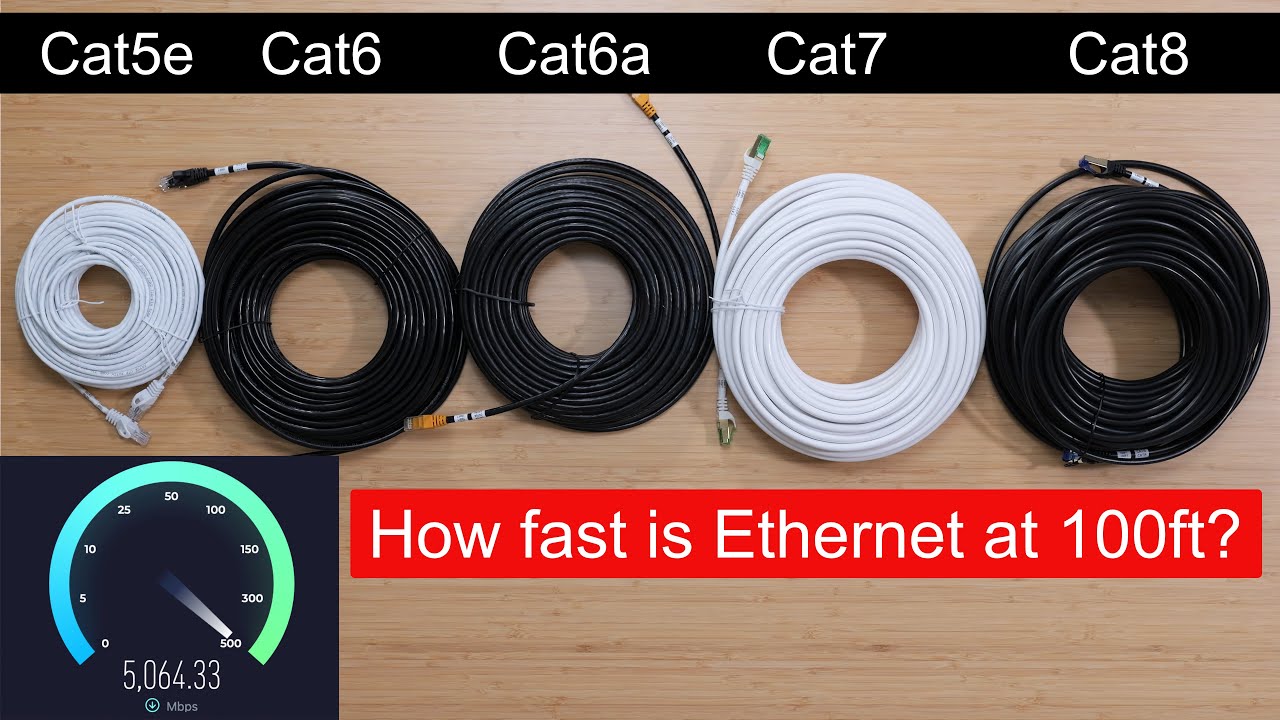
In this video, we put ethernet cables to the ULTIMATE test! We're comparing Cat5e, Cat6, Cat6a, Cat7, and Cat8 cables, all at 100ft (30.5m) long. We'll push them to their limits with 10Gbps local speed tests and 5Gbps internet speed tests. Will Cat8 dominate? Are you wasting money on expensive cables? Find out now!
Product Links
---------------...
opal pagoda
cat 7 and 8 are mostly scam anyway (if bought from somewhere like amazon)
clear igloo
Yup, find me 25GbE or 40GbE RJ45 gear first 😛
silent flax
opal pagoda
cat 7 and 8 are mostly scam anyway (if bought from somewhere like amazon)
yeah, it was mostly about Cat5E being just fine for 10Gbe as standalone cable, and Cat6 for any use where interference could be stronger
 plain siren
Someone hacked our HP printer at work but ratted themselves out in the process
it was a 10/10 moment
opal pagoda
plain siren
Someone hacked our HP printer at work but ratted themselves out in the process
upnp?
plain siren
opal pagoda
upnp?
no actually, this stupid printer had WiFi Direct broadcasting enabled after a firmware update (I disabled it previously)
topaz patrol
opal pagoda
why does the printer even need wifi
Yes
opal pagoda
do people not use a printserver?
topaz patrol
opal pagoda
do people not use a printserver?
Crazy people
Papercut makes everything so much easier
opal pagoda
topaz patrol
Papercut makes everything so much easier
we use safeq
topaz patrol
opal pagoda
we use safeq
Looks expensive lmao
opal pagoda
idk how much it costs
opal pagoda
topaz patrol
Looks expensive lmao
papercut also doesent have pricing publicly listed
topaz patrol
opal pagoda
papercut also doesent have pricing publicly listed
They only sell through channel partners iirc
 lyric ridge
Can anybody recommend a simple wired only router? Current network is fiber modem -> Tp-Link Archer AX73 (wifi disabled) -> Tp-Link Deco XE75 in AP mode (x3 devices) for wifi. Can't use the deco as a router because it only has 3 ethernet ports, and I need 4 for modem+3 wired zones. Mini PC + Pfsense seems like overkill, Edgerouter X + Openwrt would be perfect but it doesn't get updates anymore because kernel is too big for internal storage (how I understood anyways).
topaz patrol
lyric ridge
Can anybody recommend a simple wired only router? Current network is fiber modem...
ER605, done
opal pagoda
topaz patrol
ER605, done
seconded
topaz patrol
They're also super cheap
opal pagoda
need more ports/zones?
get a managed switch
topaz patrol
If you want PoE and a built in cloud controller, ER7212-PC
lyric ridge
topaz patrol
ER605, done
I'll look into it, any chance it can boot openwrt? despite the fact I have nothing but tp-link devices I was actually hoping to avoid them because I'm not a huge fan of the webui
topaz patrol
topaz patrol
If you want PoE and a built in cloud controller, ER7212-PC
I think this is my new favourite Omada product
topaz patrol
lyric ridge
I'll look into it, any chance it can boot openwrt? despite the fact I have nothi...
It uses a different UI
It's part of the Omada line, which is similar to Unifi.
opal pagoda
ui in question:
 topaz patrol
opal pagoda
ui in question:
topaz patrol
opal pagoda
ui in question:
Or you can use the cloud management
lyric ridge
Okay, that looks much better.
opal pagoda
topaz patrol
Or you can use the cloud management
yea but i dont wanna
topaz patrol
 opal pagoda
topaz patrol
opal pagoda
topaz patrol
license?
topaz patrol
opal pagoda
license?
We have a couple sites using the TP-Link hosted cloud
And we pay for extra features
lyric ridge
sweet, the price is right too! I was half tempted to just buy the wifi 7 deco, but $200+ was not worth it
topaz patrol
Those usage numbers are very very wrong, RADIUS is reporting 400GB+ of usage ¯_(ツ)_/¯
opal pagoda
hmm i could take a spare forti unit for a test drive 🤔
topaz patrol
topaz patrol
We have a couple sites using the TP-Link hosted cloud
They have a free cloud solution, or you can host the controller yourself for free, or you can use neither
If you're in APAC I can hook you up with free Omada training too 😉
plain siren
opal pagoda
why does the printer even need wifi
I couldn't reach it with an Ethernet cable but tbh it's not wifi that's the problem, it's wifi direct
plain siren
topaz patrol
I think this is my new favourite Omada product
This is one of their most solid products too.
Omada is basically the fuck you to Ubiquiti and that's why I love it the most.
Bonus points for the fact it actually works
Originally Omada had a literal copy of the Ubiquiti UI because they had lost the copyright rights to their own user interface thanks to some very very shady stuff they did in court and regretted
TP-Link immediately took advantage of this and said okay this is going to be pretty cool and funny let's just copy it
So all of a sudden comes this new product that supports new hardware and a bunch of their old hardware that has been around for upwards of 5 to 7 years already
The copyright was actually still in the user interface for about a year and some of the pages in the Omada UI
Ubiquiti's
But it was hilarious because it did not matter since it no longer applied
topaz patrol
TP-Link also has some new DIN mountable Omada switches coming soon
opal pagoda
neet
plain siren
If you want to read more into this court case and to see just how shady Ubiquiti has been, it's Ubiquiti vs Cambium Networks
topaz patrol
I thought I had a picture, but fucking Teams blanked it out
plain siren
https://www.courtlistener.com/docket/7616021/ubiquiti-networks-inc-v-cambium-networks-inc/
This is actually a really funny read because ubiquiti had fired a bunch of lawyers over and over and they also pissed off the courts to the point they started referring to themselves as "I" instead of "This court"

CourtListener
Docket for Ubiquiti Networks, Inc. v. Cambium Networks, Inc., 1:18-cv-05369 — Brought to you by Free Law Project, a non-profit dedicated to creating high quality open legal information.
And whenever a judge starts doing that you know you have really really messed up
plain siren
What they had essentially did here was copyright or attempt to copyright some open source software written by Motorola and friends. This was to protect their hardware from Cambium providing firmware of their own that way you can migrate ubiquiti hardware to their cloud controller which was about a thousand times better
lyric ridge
Just pulled the trigger on the ER605 v2 thanks everybody!
plain siren
Ubiquiti for the cheap hardware cambium for the good software
Ubiquiti did not like that
topaz patrol
plain siren
Ubiquiti for the cheap hardware cambium for the good software
Cambium for the expensive GPS adapters
plain siren
Lol
I hold some reservations against them too Don't worry
But what they did right here was very very very awesome
opal pagoda
topaz patrol
Cambium for the expensive GPS adapters
some kind of precision time protocol switch?
lyric ridge
mikrotik hex opinions?
plain siren
And the way they actually decided to come down against ubiquiti and follow through earned them my respect
I don't know how much money they wasted but you could tell that it got personal for them
They were dragging it on hoping to bleed ubiquiti dry and I wish they would have succeeded
Also big shout out to their lawyer because he was really funny at times and he also was very patient
He made the other lawyers look like high schoolers
opal pagoda
lyric ridge
mikrotik hex opinions?
if you want to go mikrotik go with L009UiGS-RM
hex lineup is really old from what i remember
which one are you reffering to?
 plain siren
Mikrotiks software and firmware make me want to scream at the top of my lungs
opal pagoda
plain siren
Mikrotiks software and firmware make me want to scream at the top of my lungs
havent had the plesure yet
lyric ridge
opal pagoda
which one are you reffering to?
I assumed hex refresh would be fine.... I don't know anything about these to be more specific, just working through google results and it seemed that one was mentioned alongside the ER605 a lot.
plain siren
Ill take an SBC with some shit Mips Processor with nothing compiled for it yet than mikrotik tbh. Idk why but id be less frustrated dealing with a skeleton kit than their stuff
lyric ridge
alright, so no on mikrotik haha
opal pagoda
lyric ridge
alright, so no on mikrotik haha
https://openwrt.org/toh/tp-link/er605_v2
you can run openwrt on er605 if you want
plain siren
That's actually a very personal opinion and it's very subjec-.... Hold that thought I need to read whatever top lime just sent first
Ok so the sentiments are the same
topaz patrol
Mikrotik for cheap failover 
 plain siren
Honestly their hardware is very fucking odd to me
opal pagoda
plain siren
Honestly their hardware is very fucking odd to me
yup
plain siren
Like it will lack certain features or capabilities that you just would never expect something like that to lack
lyric ridge
opal pagoda
https://openwrt.org/toh/tp-link/er605_v2
you can run openwrt on er605 if you wan...
I noticed that, I'm gonna give the stock OS a run first, see how I like it, but nice to have the openwrt backup
plain siren
I can ALMOST understand their choices. It's almost justified just by looking at the hardware block layout that they provide for all of their hardware that tells you exactly how everything is linked together
opal pagoda
quick make a ubishit page (can be ubiquiti and ubisoft combined)
plain siren
Except for the fact that it seems like they never try to work around the limitations of the hardware with actual design decisions and only take stuff and slap it onto a PCB and provide it exactly as it is

 ornate jungle
topaz patrol
ornate jungle
topaz patrol
Wait, I thought that domain belonged to Ubisoft? 🤔 
plain siren
I don't remember the model but I do remember there was a limitation with packet switching bandwidth on one of their devices. I also remember looking at the block diagram and realizing that if they would have just stuffed in another buffer between the switching chips and used the dma pins for that, it would've been a non issue
It would have added like $4 to the total cost
opal pagoda
plain siren
I don't remember the model but I do remember there was a limitation with packet ...
atleast they dont crash the backplane like ubiquiti does 😆
plain siren
opal pagoda
atleast they dont crash the backplane like ubiquiti does 😆
Well that's because it's never actually advanced enough nor does it do enough logic on its own to actually manage that. There's no help when it comes to Mikrotiks config and Management, you have to do everything yourself. When you consider what I said about how they piece together their hardware and then you consider what I just said it makes sense... The product isn't refined enough to actually make that a risk
Which is truly a massive L in reality
That's unrealized value that will remain unrealized
At least ubiquiti tried
But they failed miserably so
I don't know what's better honestly
I would avoid both as much as I would avoid the other
opal pagoda
i dont need no UI, console is great
 plain siren
opal pagoda
i dont need no UI, console is great
plain siren
opal pagoda
i dont need no UI, console is great
Even their CLI sucks
It's honestly the logic behind their configuration that sucks the most
Things that you would think it would do for you it doesn't do
lyric ridge
wtf is this about? Chinese xenophobia?
 topaz patrol
Probably
plain siren
You also have the option of just not updating the firmware
It has been a long time since I've updated mine and as it stands there's no actual open CVEs
Or problems that I've noticed
topaz patrol
plain siren
You also have the option of just not updating the firmware
On Omada?
topaz patrol
Yeah we have a whole heap of crap that need upgrading,
opal pagoda
lyric ridge
wtf is this about? Chinese xenophobia?
it is probably refrencing this https://arstechnica.com/tech-policy/2024/12/report-us-considers-banning-tp-link-routers-over-security-flaws-ties-to-china/
but you have to separate tplink shittastic consumer lineups from their SOHO/SMB offerings

Ars Technica
Founded in China, TP-Link makes routers popular in US homes and businesses.
plain siren
opal pagoda
it is probably refrencing this https://arstechnica.com/tech-policy/2024/12/repor...
It's been a while since I have checked but I actually think that the company that makes Omada and TP-Link are actually different under the hood on the paperwork I need to check again
topaz patrol
I think all our OLTs and ONTs need upgrading
topaz patrol
plain siren
It's been a while since I have checked but I actually think that the company tha...
Yeah I'm pretty sure they separated everything a couple years ago for this very reason
During the Huawei debacle
plain siren
AT&T wants to come out and change my ONT at my apartment and my parents house
Mfw it's no longer existent
uhhhhhhhhhhhh
I don't even remember where I put it
opal pagoda
you use sfp+ ont?
plain siren
Yes
topaz patrol
lol
opal pagoda
lol
topaz patrol
I don't think they'll ever get updated
plain siren
I even tore up all the fiber and redid the pedestal at my parents house
Last time I opened up the pedestal when I went to go remove it it was actually so full of ants that it went straight to the top you could have made an ant farm out of that thing
They ate my foot to hell
I poured gasoline on it lol
I was like FUCK THIS
Tore it out the ground and made a huge mess
Luckily I was the only one using fiber from AT&T on the street
So it really didn't matter
I wonder if they're going to buy the shitty spray painted AT&T logo on the box that I put in its place lol
"yeah it's official"
Fuck fire ants though
topaz patrol
plain siren
Tore it out the ground and made a huge mess

5 years buddy
plain siren
That's how much the contractor should get for the shitty job they did before I came in and fixed it
Who the hell just lays fiber cable on top of rocks
topaz patrol
sub-sub-sub-sub contractors
plain siren
Right
I put some armored cable in conduit and I switched it out to couplings so it's easy to add and remove service lines
topaz patrol
topaz patrol
5 years buddy
Nevermind, 12 months
(a) a carrier; or

(b) a carriage service provider; or

(c) a nominated carrier.

Penalty: Imprisonment for 1 year.```See the trick is I should just bill them for it
opal pagoda
topaz patrol
```A person is guilty of an offence if the person tampers with, or interferes wi...
i would call it "upgraded"
so offence is made
topaz patrol
opal pagoda
i would call it "upgraded"
so offence is made
I pull this one out whenever someone like Bob wants to use their own SFP ONT
plain siren
The cabinet is like a house down too so it was really easy to bury that without anyone noticing.
Mfw it was laying on top of the dirt
Idk how no one cut it up until that point
opal pagoda
topaz patrol
I pull this one out whenever someone like Bob wants to use their own SFP ONT
unplug ont
plug in a shitiest, highest power VFL
watch the olt get it 
plain siren
The only thing that really annoyed me was finding out that whoever did the original terminations inside the cabinet did such a bad job that there was a ton of noise
So I had to go back a few days later and re-terminate a lot of it inside the cabinet
The numbers were 10x better across the board
opal pagoda
got this thing, works great
does anyone know a better miracast stick?

i am testing a couple of them, next culprit is ezcast ultra
topaz patrol
opal pagoda
got this thing, works great
does anyone know a better miracast stick?
Microsoft Wireless Display Adapter?
opal pagoda
it is discontinued
topaz patrol
They have a v2 iirc
plain siren
I'm so happy I have a bunch of them
opal pagoda
topaz patrol
They have a v2 iirc
Microsoft stoped making accessories
plain siren
They are honestly so good
topaz patrol
Why Miracast?
plain siren
It's one of the few things I actually am happy to have a bunch of for no reason
topaz patrol
Give Barco a couple grand for a Clickshare box. They're great
opal pagoda
topaz patrol
Why Miracast?
bc it is so much better than the shitty Barco clickshares
topaz patrol
Lol
plain siren
topaz patrol
Give Barco a couple grand for a Clickshare box. They're great

Barco can fuck off
opal pagoda
on windows 11 90% of the time their dongle doesent register and laptop needs to be restarted lmao
topaz patrol
opal pagoda
on windows 11 90% of the time their dongle doesent register and laptop needs to ...
You probably just need to buy new dongles :p
opal pagoda
it is happening with new dongle too
opal pagoda
using miracast also allows me to unify sharing in videoconvernce rooms (cisco roombar/roomkits) and meeting rooms (currently barco)
topaz patrol
Have you considered just moving everyone to macOS and installing Apple TVs?
opal pagoda
airplay is so shitty workaround of miracast lmao
their wifi chipsets couldnt connect to 2 ap's at the same time so they made their own protocol
 topaz patrol
opal pagoda
airplay is so shitty workaround of miracast lmao
their wifi chipsets couldnt con...
topaz patrol
opal pagoda
airplay is so shitty workaround of miracast lmao
their wifi chipsets couldnt con...
Still works better than Miracast 90% of the time ¯_(ツ)_/¯
 long oyster
whats a better solution for a wifi extender or wifi repeater?
ornate jungle
long oyster
whats a better solution for a wifi extender or wifi repeater?
Wired Ethernet, or in situations where you can't run Ethernet, sometimes PowerLine AV, though the speed and reliability of PowerLine AV largely depends on your building's electrical wiring.
peak cloak
^ or moca if you have coax wiring
silent flax
opal pagoda
got this thing, works great
does anyone know a better miracast stick?
they are mostly extinct because pretty much all TVs have it builtin for like last decade
silent flax
opal pagoda
using miracast also allows me to unify sharing in videoconvernce rooms (cisco ro...
i started using wireless HDMI lately for things where miracast is not available, like this https://www.aliexpress.com/item/1005006966173744.html (there are tons of different ones, some 4k, some 1080p, bigger, smaller...)
opal pagoda
silent flax
they are mostly extinct because pretty much all TVs have it builtin for like las...
yup but projectors mostly dont have it.
its wierd cheap and mid range ones have it and enterprise units dont have it
currently we are using optoma ZU500T-W which still do preaty good job
silent flax
opal pagoda
yup but projectors mostly dont have it.
its wierd cheap and mid range ones have...
i would say get android/google tv stuff, like the google tv stick/mi box s/shield tv
they are miracast receivers
opal pagoda
silent flax
i would say get android/google tv stuff, like the google tv stick/mi box s/shiel...
havent tought about shield tv 🤔
silent flax
i mean no need to go for the most expensive solution. If 1080p is all you need, the basic Google TV stick might be all you need
opal pagoda
silent flax
i mean no need to go for the most expensive solution. If 1080p is all you need, ...
Most expensive solution is still cheaper than fuckin barco so it is ok
silent flax
opal pagoda
Most expensive solution is still cheaper than fuckin barco so it is ok
i just mean Google TV is like $40 or so, Mi Box S is like $60, Google TV 4K is like $60-$80, Shield TV is $130 ? And unless you need 4k output, shield tv and google tv 4k might be pointless, unless you want to use other android tv features too
but of course if you already own the shield tv, it is a $0 solution 😄
opal pagoda
Idealy i would like to be able to customise home screen so i can do my own branding
silent flax
i think customizing https://play.google.com/store/apps/details?id=com.spocky.projengmenu might be solution for that, but not 100% sure, don't have non-builtin Android TV devices right now

Alternative launcher for Android Tv, with input shortcuts, parental control...
 rocky badge
@clear igloo @waxen scroll Debating buying a R740(xd) and putting the Supermicro X10 2U at home as a replacement to either the R620 or DL360pG8 at home. I want at least 2 servers at home for redundancy but I hate how loud the Supermicro is at the apartment.
Dual E5-2650 v4, 128GB of RAM is a big upgrade over dual E5-2650 and 64GB of RAM the servers at home have
 waxen scroll
time to move to cloud
rocky badge
topaz patrol
Give Barco a couple grand for a Clickshare box. They're great
I hate clickshares
 waxen scroll
rocky badge
I hate clickshares
waxen scroll
rocky badge
I hate clickshares
muh pandoras box
rocky badge
I have thought about moving DNS to aws but idk
I use so much DNS internally and I don't wanna loose DNS internally when the internet goes out
rocky badge
waxen scroll
muh pandoras box
Like the media server?
waxen scroll
from christie
 livid pewter
Where the nerds at?
waxen scroll
livid pewter
Where the nerds at?
Have you ever used a grandMA 3 with 4 universes?
livid pewter
wrong kind of nerd 
livid pewter
But I was hoping for a virtualization nerd :(
opal pagoda
rocky badge
I hate clickshares
all my homies hate clickshares
waxen scroll
opal pagoda
all my homies hate clickshares
I like clickbait
rocky badge
waxen scroll
Networking and theater people go hand in hand
oh lord
waxen scroll
rocky badge
oh lord
I got a new guy on my team who does theater/broadcasting on the side
rocky badge
Thankfully I don't touch lighting network anymore. Only audio & video
opal pagoda
livid pewter
But I was hoping for a virtualization nerd :(
esxi nerds after broadcom
 rocky badge
Lighting fucked off to their own networking hardware
waxen scroll
did they though? its just vlans. you can use anything
livid pewter
opal pagoda
esxi nerds after broadcom
True... but I do like their stuff tbh
rocky badge
Yeah no longer on my hardware
Completely separate

The next project is migrating audio addressing lol
Just gotta find a quiet time
bc there's too much shit I would rather do it when I can have it all at once
waxen scroll
 opal pagoda
rocky badge
opal pagoda
rocky badge
Thats it?
O boi i have lots of vlans
Generaly one vendor gets its own vlan and there is loads of vendors in our production
waxen scroll
i laugh because a backup console is required in the first place
just incase windows crashes
rocky badge
opal pagoda
Thats it?
O boi i have lots of vlans
Generaly one vendor gets its own vlan and ...
This is just our own network. Nobody else connects lol
rocky badge
waxen scroll
just incase windows crashes
MA3 is not Windows
MA2 wasn't Windows either
MA is Linux based
waxen scroll
oh? Last one I used was 1
rocky badge
But yeah a backup is typical lol. The MA3 Processor can be a backup as well
Our lighting network is simple. Lighting FOH support rack switch <-> lighting dimmer beach rack switch -> lighting nodes
livid pewter
Hey so um...anyone familar with vmware stuff?
 waxen scroll
is that a different opengear than the people who make console servers?
rocky badge
Yeah

openGear The industry standard platform of choice openGear is an open-architecture, modular frame system designed by Ross Video and supported by a diverse range of terminal equipment manufacturers. The platform offers the freedom to choose technology from a wide range of products to meet the needs of a broadcast, production, or distribution fac...
modular card style for video
 rocky badge
Yeah its a netgear switch with an "AV GUI"
waxen scroll
oh, gross
rocky badge
Which is just profiles certified to do different AV vendors of shit
"one click just works AVoIP"
Sets multicast, PTP, IGMP, QoS, etc.
waxen scroll
all of that is a pain in the ass
rocky badge
Ngl I use the profiles bc it does just work
but I turn off every other "smart" feature
Like Auto-Trunk and Auto-LAG
I don't want the switches deciding trunking and lacp
but I do like the design
waxen scroll
almost every large company turns off auto trunking, LAG, pruning and VTP
rocky badge
rear ports, different mounting brackets, M10/M12 mounting, etc.
waxen scroll
(waiting for UM AXUALLYs)
 waxen scroll
I'd like to show you mine but I will get in trouble
waxen scroll
We dont even really have a lab anymore. No budget. Modern networking is so expensive now
waxen scroll
@clear igloo license me, bby
rocky badge
We don't really have the budget for 100/400g switching
So next best thing, sdi over fiber
waxen scroll
I'm planning to move to 4x100Gs over 400
nicer to just have 4 spines instead of two with 100G
@rocky badge why? because the business actually argues "Well you're taking one offline for upgrade, now we're not redundant so you cant have your window"
waxen scroll
with 4 now each leaf only needs one uplink to each spine instead of multiple
you can do smaller spines that way
rocky badge
Dante is a bandwidth hog though lol
waxen scroll
whats the bit rate
waxen scroll
eh
rocky badge
waxen scroll
eh
dante stage boxes, console ties, PA, video audio, etc. when we only have 10g links at some places its quite a bit lol
clear igloo
waxen scroll
<@291198741862416384> license me, bby
where money?
rocky badge
no monies
rocky badge
@waxen scroll @clear igloo Minisforum MS-01 for apartment Proxmox cluster????
clear igloo
rocky badge
<@186123993412141057> <@291198741862416384> Minisforum MS-01 for apartment Proxm...
do it
rocky badge
R6415 & Supermicro X10 can go to my parents house and be as loud as they want
Buy a R740xd and 3 MS-01s for apartment
R740xd truenas with SSD & HDDs, MS-01 with local NVMe Ceph together. iSCSI SSD for bulk VM storage. HDDs for Plex & backup
 turbid ridge
Can anyone recommend a good managed switch w/ 6 ports, vlan support, & link aggregation?
I'm setting up a home lab with a blade sever (4 nodes) and am looking for good equipment.
If it helps:
Server: 2U 24 Bay 4 Node SATA SAS3 12gbps Server X10DRT-P S 8x Xeon 112 Core 256GB DDR4
rocky badge
Debating getting rid of that Cisco Nexus btw @clear igloo, its so loud as well
clear igloo
rocky badge
Debating getting rid of that Cisco Nexus btw <@291198741862416384>, its so loud ...
lol, I told you it's loud 😛

 clear igloo
well yah, not cheap but can you REALLY put a price on silence? 😛
rocky badge
I guess

64gb ram max
damn
The CPUs do 96GB I wonder if that's a mobo
holy fuck
 clear igloo
or are they DDR4 varaints?
rocky badge
ddr5
I mean
yeah the servers are kinda loud
but through 2 doors in my office I can't hear them. They just get hot
clear igloo
Looks like it does support 2x48GB kits
clear igloo
But the 96GB is only on the 13900 version
Then save, invest in noise dampening instead


 rocky badge
lol
rocky badge
clear igloo
lol, I told you it's loud 😛
Idk any alternative that isn't super loud
silent flax
opal pagoda
https://tenor.com/view/cool-gif-27093421
you reminded me of the stupid joke

 pine tinsel
Dumb question, messing around with an AP at home, does this speed on the UniFi network dashboard show the speeds that is being used on it at the moment, or the speeds it's putting out?

As in, that's the speed of the connection being provided to it, or that's the throughput from a device that's connected to it?
 untold elbow
pine tinsel
As in, that's the speed of the connection being provided to it, or that's the th...
untold elbow
pine tinsel
As in, that's the speed of the connection being provided to it, or that's the th...
That’s the current total data rate of all devices, not the throughput capacity of the whole AP
rocky badge
@waxen scroll @clear igloo I am so scared to put a small little NUC act as a server for some network tools in a rack at work because I'm scared the OS will just corrupt 🤣
I'd love a network monitoring, unifi controller, syslog server, and such at work for our show network but I'm scared its just gonna die
waxen scroll
I dont see why it would
clear igloo
Just RAID, ez
rocky badge
waxen scroll
I dont see why it would
ppl don't shutdown stuff in racks like that
if its in the rack the ups power button just gets held down and turned off there
i guess I could put the OS on a read only file system and mount another for data
waxen scroll
I was just typing that lol
rocky badge
lol
silent flax
rocky badge
<@186123993412141057> <@291198741862416384> I am so scared to put a small little...
how often did you seen Linux corrupt itself just like that ? Worst that usually happens is that when you run out of space, you need to log in, delete files and possibly restat
rocky badge
Just don't want a chance
silent flax
how would using a "retail server" change anything ? Only difference could be ECC and remote management ?
waxen scroll
My dashcam has a capacitor in it that helps detect power loss to stop recording before the file corrupts
silent flax
i have yet to understand this corruption issue. install proxmox and run other stuff in VMs ?
rocky badge
silent flax
how would using a "retail server" change anything ? Only difference could be ECC...
no space
plus noise lol
silent flax
no, i mean how retail server vs nuc make difference in "corruption" and "it will just die"
rocky badge
I'm not saying there's any difference lol
silent flax
if anything, NUC will run better in server environment because of the lower ambient temperature. So server vs NUC differences comes down to NUC usually not having ECC and remote managment. NUC Pro probably has remote management via vPro/AMT; not sure if ECC is a thing. the Dell/HP/Lenovo mini PCs could have those features.
I would personally see no issue running stuff on non-ECC system unless you really want that extra level of protection against super-rare flip bitting once in a lifetime event; and lack of remote management can be solved by external solutions these days
rocky badge
I mean a real server isn't gonna fit in the rack, plus I never really mentioned ecc. Remote management idc about that much. Lol ¯_(ツ)_/¯
silent flax
then just buy whatever fits your CPU/RAM/storage requirements and call it a day. Run Proxmox as base OS and virtualize everything else.
 vernal depot
I might or might not have put my personal UDM Pro in harms way to get the UDM Pro at my office updated
I should’ve made sure it wouldn’t cause any later issues…but, will it cause issues later?
I did a config backup for the Office UDM Pro
Updated Office UDM Pro
Office UDM Pro would not read config backup
Was able to install Office UDM Pro backup on my personal UDM Pro (which I did back-up, and brought with me to the office)
Created Office UDM Pro backup using personal UDM Pro
Installed backup on Office UDM Pro and so far is working
Factory Reset my UDM Pro
Will this cause any later issues?
topaz patrol
silent flax
if anything, NUC will run better in server environment because of the lower ambi...
vPro 🤮
waxen scroll
 violet needle
hh
 thick minnow
hi all, my ap have internet but wirelessly it doesnt work any idea what could be wrong?
 tribal cape

Beelink EQ14 N150 mini pc
Is this enough for opensense and kodi?
I'd slap in another 2tb m.2 drive.
opal pagoda
wierd that it doesent have 2.5g networking
tribal cape
I don't see my area getting fiber anytime in the next five years, and 1gig is the fastest cable internet available here.
silent flax
tribal cape
https://a.co/d/79fph1m
how do you want to run OpenSense and Kodi on it at same time ?
silent flax
opal pagoda
wierd that it doesent have 2.5g networking
even sadder is that the N100 mini PC i used doesn't exist anymore
 silent flax
so how do you want to run a FreeBSD router and a desktop application at same time on same HW ?
tribal cape
Ah, dammit. You're right.
It won't run as a service in a windows environment
Welp, I guess I will just use that for opsense and go back to the drawing board for my media server replacment.
silent flax
but by itself, until you push demanding features like QoS or VPN, pretty much any system will do just fine, remember that most routers are like dualcore 1-1.5GHz ARM CPUs. So a quadcore N100 will run circles around most tasks.
VPN and QoS can be demanding as you would have to inspect or encrypt packets, but most likely it will be still just fine.
silent flax
opal pagoda
wierd that it doesent have 2.5g networking
things we can see on Amazon... https://www.amazon.com/Healuck-Support-Desktop-Computer-Diskless/dp/B0D5VMTTBW

Healuck 4 Bay N100 Mini PC, Support Hot Swapping, 4 Core NAS Desktop Computer, DDR5 8GB RAM 128GB NVMe SSD, 2 x 2.5GB i226V LAN, 4K UHD, 2USB3.2, SPK/MIC (Diskless)
the PCB is very interesting 😄
 opal pagoda
silent flax
the PCB is very interesting 😄
opal pagoda
silent flax
the PCB is very interesting 😄
if they took 150-200$ from the price it would be ok
silent flax
opal pagoda
if they took 150-200$ from the price it would be ok
unfortunately i think they are looking at what ugreen asks and decided that that price is fair in the market 😄
clear igloo
tribal cape
Welp, I guess I will just use that for opsense and go back to the drawing board ...
proxmox?
silent flax
clear igloo
proxmox?
and what would give him the display output ? unless he wants to run GUI and Kodi directly on host and OPN inside a VM. Which would be weird idea
tribal cape
Nah. I am rethinking the whole thing now. I definietly want to keep my hardwares seperate.
I might just use one of these n150s as a media server alone and get a UXG-Max for my new router.
clear igloo
silent flax
and what would give him the display output ? unless he wants to run GUI and Kodi...
OH! I'm thinking plex/jellyfin
silent flax
clear igloo
OH! I'm thinking plex/jellyfin
well what Magic wanted is to have a GUI app and router on same HW. Not a media server and router on same HW.
Like sure, stuff like running Plex/Jellyfin in Docker and NAS/storage on something like OpenWRT is doable. But GUI apps is rather impossible
 smoky estuary
I'm currently torn between two Access Point Options and need some advice on finally choosing an option.
At the moment, I have a tp-link omada EAP610 (Wi-Fi 6) access point at the back of my house but was wanting to bring wifi 7 into the house with multi-gigabit wifi.
As of writing, I've narrowed my choices down to two options:
- tp-link BE9300 EAP772
https://www.scan.co.uk/products/tp-link-eap772-be9300-wi-fi-7-access-point-1x-25gbe-poe-24ghz-5ghz-6ghz-5760plus2880plus574mbps-8021 - Ubiquiti U7-Pro
https://www.scan.co.uk/products/ubiquiti-u7-pro-ceiling-mounted-wifi-7-ap-with-6-spatial-streams-and-6ghz
I've heard Ubiquiti is great but after doing some research, from what I can tell, I'd be limited to 1gbps on the ethernet port unless I went out and bought an entirely new POE switch or a PoE Injector which would be quite costly.
As for the tp-link BE9300 EAP772, assuming it either uses the same power supply as my existing unit (which I don't use) or that it comes with one, I wouldn't need to use this option.
Just to add as well, I don't have any controller hardware for my existing Omada access point and have been happy with it so being able to use the APs standalone is a must.
What option would I be best going for?
rocky badge
I mean both APs you will need a 2.5g switch lol
PoE on it would be ideal
Ubiquiti sells a PoE+ 2.5G injector for $19
smoky estuary
rocky badge
Ubiquiti sells a PoE+ 2.5G injector for $19
The only ones I can find on the UK site seem to be gigabit, I already have a 2.5gb switch but it's not PoE
My existing AP only has gigabit at the moment and I'm using just some cheap tplink Poe+ injector with it at the moment
Found it, the website just seems to randomly hide the options when changing the Poe spec, this puts the ubiquiti option as within reach
 fickle lily
has any one experienced this ::Port FastEthernet4 is off: Hardware pin disables all ports
Before this start a fan failed then all went down the rabid hole
 steep jungle
Anyone here with experience with bind and rev dns?

 clear igloo
silent flax
Like sure, stuff like running Plex/Jellyfin in Docker and NAS/storage on somethi...
clear igloo
silent flax
Like sure, stuff like running Plex/Jellyfin in Docker and NAS/storage on somethi...
Yah, I just was thinking wrong app 🙂
silent flax
topaz patrol
Huh?
he might be cooking the SFP modules due lack of airflow
topaz patrol
I was more meaning that he’s almost certainly still using Ethernet, even if fibre is the medium
topaz patrol
silent flax
he might be cooking the SFP modules due lack of airflow
Also those pluggables look ancient
topaz patrol
 long scarab
fuck fibre man, this shit's ass
long scarab
fuck fibre man, this shit's ass
That’s a 20+ year old Cisco logo lol
silent flax
topaz patrol
That’s a 20+ year old Cisco logo lol
to be fair, aren't we all using 10+ years old 10Gbe NICs becasue they are finally cheap? 😄
clear igloo
topaz patrol
That’s a 20+ year old Cisco logo lol
Well to be fair they're all gigabit SFP modules
silent flax
i have a sad X540-T2 and a 10Gbe SFP+ RJ45 module sitting in storage cause i swapped it for ConnectX3 😄
clear igloo
Nice
silent flax
ali had crazy coupons through their stupid games back then
 clear igloo
Damn! That's cheap!!
silent flax
(they also added a 3 meter cable for some reason instead of 1m, but i am not complaining)
topaz patrol
clear igloo
Well to be fair they're all gigabit SFP modules
You can still get “new” 10/100 pluggables!
clear igloo
topaz patrol
You can still get “new” 10/100 pluggables!
oh for sure
Just that I wasn't surprised with the old logo given they're gigabit is what I was trying to say
topaz patrol
Oh lol
 thick star
whats the best wifi extender with 2 ethernets ports around?
 sullen coral
so is the aliexpress netorking stuff reliable? I'm about to compleatly overhaul my gaming setup and hopefully add a small homelab thing and I seen I can get a Jbod for way less than I can get even a used one on ebay for, or even just a server chassis to convert it into a jbod. thinking just get that and a used raid card with an external sas port for $60 and those are only like $40 so I could get a das for $100ish not counting drives
long scarab
topaz patrol
That’s a 20+ year old Cisco logo lol
but it's cheap
long scarab
topaz patrol
I was more meaning that he’s almost certainly still using Ethernet, even if fibr...
yes, im going back to copper ethernet
opal pagoda
sullen coral
so is the aliexpress netorking stuff reliable? I'm about to compleatly overhaul ...

Thingiverse
If you have an old ATX computer case and power supply lying around, why not use it to expand the storage of your main PC? Turn it into a DAS! (Direct-Attached Storage)This design mounts 4 disk racks in the space that would normally be occupied by the motherboard, with each rack supporting 4x 3.5" disks, for a total of 16 disks. SFF-8088 cables (...
you could do that
sullen coral
seen that as well I don't have a 3d printer atm and this is mostly to help my drive hoarding problem. I go to thrift shops and buy dvr's and they normally have 500gb-2tb hdds and I save any above 1tb. $10-$30 each dvr for game drives isn't a half bad price and as long as I use some form of raid with redunancy I shouldn't loose data ubless something catastrophic happens
long scarab
haven't gotten any DVRs at my thrift store
opal pagoda
sullen coral
seen that as well I don't have a 3d printer atm and this is mostly to help my dr...
you can rig something up with this
 long scarab
i did find a solis wifi hotspot last year and got a $130 device for $3
opal pagoda
also dont forget that sas expanders exist so you dont really need to connect every drive to sas hba
sullen coral
this is what I am looking at just has 2 sas8087 on the back and either sata or molex power

I found some for $30 on aliexpress
 sullen coral
big and heavy so more expensive
ooh I found some raid cards I could use 2 of those jbods with
well 4 at 6Gb/s speeds but I want the full 12Gb/s speed
sullen coral
lol I have 5 drives so far and 3 are compleatly full. I backup all my blurays to disk and like to have a good 10-20 games downloaded at a time because my internet doesn't work when its cloudy
 compact oak
Ok gang i have an issue
I would like to connect IoT devices to my dorm internet but they only use a 5ghz band where all of the devices i have only use 2.4ghz. How can i get a 2.4ghz network?
ornate jungle
compact oak
I would like to connect IoT devices to my dorm internet but they only use a 5ghz...
You likely can't - not without asking the IT / Network admins, or installing your own router, which almost always is a violation of dorm / school policy. Even if you could connect the IoT devices to the 5GHz network, a properly setup public / semi-private managed network (like say... at a public library or in a dorm room) should have AP Isolation enabled. This prevents client devices (phones, laptops, tablets, etc.) from being able to see / talk to each other. It's a security thing.
https://www.tp-link.com/ca/support/faq/2089/
Brief Introduction of AP Isolation
compact oak
I setup a hotspot on my pc and i can get my rgb strip to work
But i dont really want to use that to run all of my devices
ornate jungle
I'd be careful with that - some dorms / schools actively look for rogue networks. If they trace the broadcast source to you, they may take punitive action, including expulsion from the school, or worse.
compact oak
Im considering getting a router and making it hidden
ornate jungle
Hiding the SSID doesn't hide the BSSID / beacon packets. Any enterprise WiFi hardware worth it's salt will immediately detect a rogue hidden network. We use Meraki gear at work 🤢 🤮 it alerts us to rogue networks all the time.
compact oak
Im not even sure what theyre using
The only thing they seem to do is make us register our devices
I could probably talk to some IT people and see what i can do
Maybe i could convince one to turn on my APs 2.4ghz antenna
As doubtful as that is
ornate jungle
Turning on the 2.4GHz antenna won't matter if they have AP Isolation enabled. Think about it. Would you want everyone else who's also connecting to the same AP to instantly have access to your IoT devices? AP Isolation prevents this. If they don't have it enabled... I'd be concerned about connecting any device to their WiFi.
compact oak
In theory only the people closest to me should be connecting to this AP. But still they have their own AP in their dorm
The main thing i want to run which has an issue is a 3D printer
But the one i am looking at should connect to the cloud and it should be able to print through that without needing to talk to any local devices.
topaz patrol
compact oak
I would like to connect IoT devices to my dorm internet but they only use a 5ghz...
IoT devices that use WiFi suck - Have you considered using Matter/Zigbee/Zwave?
compact oak
I cant with the 3d printer
topaz patrol
What about the other devices?
compact oak
The other device i have is matter
Theres no other way to control the rgb strip. It has to be connected to wifi.
topaz patrol
Well that's very shit
compact oak
Thats how every rgb strip i have found works
topaz patrol
The light strips I have in my kitchen don't
compact oak
Do they use a remote
topaz patrol
One's philips hue (which is ridiculously expensive) and the other uses matter
compact oak
Philips hue is wifi with extra steps
topaz patrol
The matter one was pretty cheap
topaz patrol
compact oak
Philips hue is wifi with extra steps
No?
compact oak
If you want it to do fancy stuff it is
topaz patrol
It's just zigbee
topaz patrol
compact oak
If you want it to do fancy stuff it is
Nope
compact oak
Philips hue kinda sucks for what im going for anyway
topaz patrol
The bridge does need a connection to your network, if that's what you mean
topaz patrol
compact oak
Philips hue kinda sucks for what im going for anyway
I wasn't suggesting it - Because it's way too expensive for what it is
compact oak
It would only do one color per device
Whereas this strip i have setup right now is individually addressable
ornate jungle
compact oak
It would only do one color per device
No? They have LED strips that do multiple colors at one time.
https://www.philips-hue.com/en-ca/products/smart-light-strips/indoor-led-strip-lights

Philips Hue EN-CA
Get to know the differences between the Philips Hue lightstrips, to find the right indoor LED strip lights for your home.
compact oak
I omitted the part where i said using the software i have
The devs havent figured out how to do that yet because they arent willing to spend all that money for likely no reason.
Anyway this is a much lesser issue. I dont actually care about the rgb strip. It works fine how it is. I want a way to connect the 3d printer I am planning to purchase.
topaz patrol
I would suggest not - It's almost certainly going to get you in trouble
compact oak
I will reach out to the IT department then
ornate jungle
They will likely chuckle, they say no. But go for it.
topaz patrol
Their answer will likely just be a no - Having unattended 3D printers in a school building is a no-no
ornate jungle
Right, but they're likely running in a controlled environment, locked down to communication over a specific VLAN on their network. (If not... I wonder what their fire insurance costs? 🤣 )
compact oak
What does networking have to do with fire insurance
I go to an engineering college we have much more dangerous machinery than 3d printers
ornate jungle
Well see, let's say you're coming into the 3D printing lab late one night cause ya want to print a little boaty mcboatface. Ya connect to all the printers, configure them using settings that cause their extruder nozzles to plug up, after which they overheat and BOOM! You're cooking with fire!
 topaz patrol
compact oak
What does networking have to do with fire insurance
topaz patrol
compact oak
What does networking have to do with fire insurance
It shows that they were aware that you have a 3D printer in your dorm
topaz patrol
compact oak
A clogged extruder or nozzle would not cause a fire
You’re assuming that the safety features work 🙂
compact oak
They do
topaz patrol
Not always
compact oak
Yes always
topaz patrol
There’s always a risk
compact oak
Not really
topaz patrol
compact oak
Yes always
Not always
topaz patrol
compact oak
Not really
Yes, there very much is
ornate jungle
Until someone disables them. Point is, ZERO TRUST network security is the only real way to do it in public environments.
compact oak
The safety features of a modern 3d printer will stop anything bad from happening even if its not happening
If it works when it doesnt need to then its going to work when it does need to
compact oak
ornate jungle
Until someone disables them. Point is, ZERO TRUST network security is the only r...
You cant. Not on these printers.
ornate jungle
sigh anyway. no point arguing here. Talk to your campus IT staff if you must. Tis the only way.
topaz patrol
compact oak
The safety features of a modern 3d printer will stop anything bad from happening...
Even then - I’m sure melting plastic in a dorm for hours at a time isn’t exactly something the safety committee would be too fond of
compact oak
Ultimaker and bambulab do not want you messing with their settings. Disabling safety features is not possible on them
topaz patrol
I don’t care what you do, just be prepared to get laughed at
compact oak
topaz patrol
Even then - I’m sure melting plastic in a dorm for hours at a time isn’t exactly...
I think the safety committee should be more focused on the immense amount of black mold we have in every room
Or the asbestos filled walls of this >100 year old building
Or the incredible amount of dust caused by the construction down the hall
topaz patrol
Ah! Fire is definitely not a concern then! 🤣
compact oak
In fact i think my 3d printer will be the safest thing in the building
compact oak
topaz patrol
Ah! Fire is definitely not a concern then! 🤣
Asbestos is fireproof and self extinguishing
So no not even a little bit
topaz patrol
compact oak
Asbestos is fireproof and self extinguishing
Yep, that’s why we humans loved it so much.
But when it is in a fire, it becomes nice and dangerous
compact oak
If there is a fire in this building its really not much of a me problem
The university will have to find a way to house all ~850 of the residents but thats not an issue for me
ornate jungle
topaz patrol
But when it is in a fire, it becomes nice and dangerous
IDK... Asbestos helps keep out the rats and the numbers make a happy face in Cave's calculator so I see no problems here. https://www.youtube.com/watch?v=xohyWYxNKU4

 stoic hedge
ornate jungle
Turning on the 2.4GHz antenna won't matter if they have AP Isolation enabled. Th...
stoic hedge
ornate jungle
Turning on the 2.4GHz antenna won't matter if they have AP Isolation enabled. Th...
I can’t remember if rogue 2.4 are detected if those radios aren’t being used. Also should be client isolation, not AP isolation.
Just use zigbee/zwave, wifi sucks.
ornate jungle
stoic hedge
I can’t remember if rogue 2.4 are detected if those radios aren’t being used. Al...
While I agree it should be Client Isolation, most networking products call it AP Isolation because reasons. Silly industry.

 thick minnow

 thin hedge
how much more latency/how much slower would a Raspberry Pi Zero 2 W be compared to the Raspberry Pi 4 2Gb in the use case of a PiKVM? How much worse would a TrueNAS/other nas operating system running a virtual machine with ported GPU be?
thick star
what setting should i have WOL& shutdown link speed at? not speed down, 10mbps first or 100mbps first
opal pagoda
rocky badge
clear igloo
opal pagoda
https://cdn.discordapp.com/attachments/954937547514081342/1334256207095009365/VI...
REEEEEEE 😛
Just wait until you get some of the 2RU boxes, they're even worse
opal pagoda
clear igloo
REEEEEEE 😛
Just wait until you get some of the 2RU boxes, they're even worse
really
i tought they would be quieter since fans are larger
clear igloo
opal pagoda
i tought they would be quieter since fans are larger
I've got to go into the office tomorrow, will try to remember to grab some audio from one
thick minnow
thin hedge
how much more latency/how much slower would a Raspberry Pi Zero 2 W be compared ...

The official documentation for Raspberry Pi computers and microcontrollers
opal pagoda
thin hedge
how much more latency/how much slower would a Raspberry Pi Zero 2 W be compared ...
just get a nanoKVM
it is ready to use and costs 25-30$
thick minnow
I use these

 pseudo blade
thick minnow
I use these
pseudo blade
thick minnow
I use these
Ah, but how do you use them?
Arduinos are just fancy microcontroller holders, without code it's just a very complicated low-current 5/3.3v power supply
 mild prism
i've been getting horrible lag spikes, packet bursts, latency variation, but my wifi speeds are perfectly fine and I had an my ISP send a technician over which made no difference either
thin hedge
opal pagoda
just get a nanoKVM
it is ready to use and costs 25-30$
Is NanoKVM better?
 gilded escarp
i need a new replacement router due to my ee one ports are limited to 1gb. i am wanting something similiar to my ee smart hub pro that has 1 or two 2.5gb including 2.5gb wan port
topaz patrol
gilded escarp
i need a new replacement router due to my ee one ports are limited to 1gb. i am ...
er707 m2
gilded escarp
who makes that
topaz patrol
TP-Link
gilded escarp
so connected the wan port to the switch
then the switch to the pc
and keep my router just for wifi ?
topaz patrol
What switch?
gilded escarp
oh
topaz patrol
?
topaz patrol
That’s not a switch
gilded escarp
whats the wifi like on it
topaz patrol
Do you have 2gig internet?
topaz patrol
gilded escarp
whats the wifi like on it
It doesn’t have WiFi 🙂
topaz patrol
gilded escarp
however my hub has only 1gb ports on it
By “hub” I’m assuming the modem/NTD/ONT box where the fibre goes into?
gilded escarp
no, I mean my router only has 1gb ports on it
topaz patrol
Okay?
gilded escarp
yeah, i want to replace it
topaz patrol
That’s why you’re buying a new one 🙂
gilded escarp
it is
topaz patrol
gilded escarp
https://www.amazon.co.uk/TP-Link-Router-SafeStream-ER707-M2-M-WAN/dp/B0C3XLCD3X
Look at that
gilded escarp
yeah, my current router has wifi 7 tri band and such
gilded escarp
ye
topaz patrol
Problem solved
gilded escarp
i can get it for like 156
plus i will still have good wifi
i saw allot of cheap wifi 7 routers but it was only like dual band
topaz patrol
How many 2.5gig devices do you have
topaz patrol
gilded escarp
network switch ?
Yes
gilded escarp
pc only
topaz patrol
Oh okay that’s all good then
gilded escarp
i am replacing the wan cable the isp sent which is like 5E with a CAT6 one, A CAT6 Ethernet LAN Cable RJ45
so long as it has the rj45 red connector it should be fine

The high quality CAT.6 network cable (1.0m cable length) is perfectly
suited for in office buildings and
private households, whether you want to connect your PC, notebook,
games console or even other devices to the internet or in the network.
This is easily possible with this h...
just got a 1m one of these because my ont and router are pretty much close to each other
the router sits on my desk
opal pagoda
thin hedge
Is NanoKVM better?
It is plug and play solution

Monitor your systems from anywhere using Pulseway at: https://lmg.gg/LTT24
The Sispeed NanoKVM and NanoKVM don't seem like anything new on paper with them doing what many other KVMs can, but at $30, it's a steal! We ordered one off AliExpress to see if this thing is any good or if you need to be careful buying tech off the far reaches of the in...
silent flax
i suspect my IBM M1015 (aka LSI SAS2008 based card) finally kicked the bucket... In last month, it kept failing few days after powering on the server. Today i finally replaced it with another LSI card, let's see if it keeps failing (thus it could be the cable or the system itself then), if not, then RIP. Was a nice run, around a decade or so
silent flax
opal pagoda
https://youtu.be/XnkQKn67qzM
i like that there is finally competition for non-integrated remote KVM solutions
opal pagoda
silent flax
i like that there is finally competition for non-integrated remote KVM solutions
yup it is excelent that we get a choice
it all started with pikvm but that is over 100$ total
silent flax
technically for me it started with these things 😄 https://www.aliexpress.com/item/1005005287125116.html
the "Tuya PRO" thing means i can remotely power on/off and reset the system via the Tuya app (Smart Life)
which for me is the most important part of the KVM functionality. Yes, display/remote control is nice, but power on/off when i am 150km away is more important
 opal pagoda
tbh just smart outlet is good
just configure bios to start on ac
silent flax
that is a solution too, but i prefer this. of course it means it eats up one x1 slot just for power, but oh well
 true steeple
i plan on buying "Mercusys Halo H30G" but its not on compatible list with my router "TP Link Archer Vr2100" so i dont know what to do
should i but a tp-link mesh system ?
opal pagoda
true steeple
i plan on buying "Mercusys Halo H30G" but its not on compatible list with my rou...
wdym compatable list
if you put that archer in bridge mode you can use anything behind it
true steeple
opal pagoda
wdym compatable list
there is a page that it shows which routers you can use it with
true steeple
opal pagoda
if you put that archer in bridge mode you can use anything behind it
i dont know what that means i dont have any knowledge about these
opal pagoda
true steeple
there is a page that it shows which routers you can use it with
could you please screenshot or link that page?
also what are you trying to do?
replace the current router?
add that additional router for wifi coverage?
some other use case?
true steeple
opal pagoda
also what are you trying to do?
replace the current router?
add that additional ...
more coverage
opal pagoda
true steeple
more coverage
do you have a ethernet cable ran to the place with bad wifi?
or could you run one?
true steeple
opal pagoda
do you have a ethernet cable ran to the place with bad wifi?
not possible
opal pagoda
true steeple
not possible
you will need a mesh system then
one you linked is dual band and those are not reccomended as there is no dedicated band for communication between the units, it is reccomended to go with tri band mesh system, possibly with 3rd band being on 6ghz
main unit will need to be configured as a router which means you will need to put current router in a bridge mode.
true steeple
opal pagoda
you will need a mesh system then
one you linked is dual band and those are not r...
alright thanks
compact oak
Good news gamers. The IT department got back to me and they confirmed that they do 2.4ghz and they are more than happy to let my 3d printer on the network
Dorm 3d printer is possible
thin hedge
compact oak
Good news gamers. The IT department got back to me and they confirmed that they ...
Yay
thin hedge
compact oak
Good news gamers. The IT department got back to me and they confirmed that they ...
Can recommend octopi
thin hedge
compact oak
I dont need any of that
Nice
topaz patrol
true steeple
i plan on buying "Mercusys Halo H30G" but its not on compatible list with my rou...
Mercusys is TP-Link anyway
 tawdry blaze
Hello
 wintry pike
i want to run an ethernet cable, how to i remove a trunk cover that has been painted over?
 lament scarab
I've got a Ubiquiti USG and a pc that could be used for opnsense but idk what method to use. I dont have any ubiquiti stuff so the ecosystem stuff isnt a huge draw. I wanna boot my fios router cuz it's over a decade old and i dont know if it's getting and updates. I just prioritize security and vpn support. I really dont know what option is best for me
peak cloak
wintry pike
i want to run an ethernet cable, how to i remove a trunk cover that has been pai...
wdym by trunk cover
wintry pike
peak cloak
wdym by trunk cover
 peak cloak
ah, you just kinda have to use force I guess
try to maybe get a screwdriver or knife to get through the paint
wintry pike
rarrrrrrrrrrfgpkjaddsdjlkjgkj
gilded escarp
apart from tp link ER707-M2 Omada Multi-Gigabit and I was looking at the gli.net gl mt6000 flint 2 as possible upgrade to my current router which is limited to 1gbps
 covert venture
probably a weird question but im curious to know how much internet data is used per hour on an xbox 360 online game like modern warefare 2?? looking to know what i cab get away with on a hotspot box (cant get regular ingernet where i live)
smoky estuary
gilded escarp
apart from tp link ER707-M2 Omada Multi-Gigabit and I was looking at the gli.ne...
I've got the flint 2 and love it, I quite like the fact AdGuard is preinstalled, it's just a single on/off switch in the web UI to enable it and that's it.
The wireguard server and included DDNS work great as well.
My main issue is that trying to use with a usb drive for smb is awful for both performance and reliability, just weird ass behaviours such as files losing write/read perms and disconnects on smb, so don't try to use it as a NAS.
Other than that, I'd totally recommend it given the price.
sullen coral
wintry pike
i want to run an ethernet cable, how to i remove a trunk cover that has been pai...
Box cutter along the seam to cut the paint works well
gilded escarp
smoky estuary
I've got the flint 2 and love it, I quite like the fact AdGuard is preinstalled,...
hows the wifi on it
smoky estuary
gilded escarp
hows the wifi on it
Haven't had any problems with it, range is also quite good, I can saturate my internet connection when I'm in the same room as it. I'll be able to do some better performance tests when I get home.
As for device compatibility, I haven't noticed any weirdness with devices not connecting to it.
gilded escarp
i was thinking that or toplime suggestion which is the tp link ER707-M2 Omada Multi-Gigabit and keeping my current isp router for wifi
smoky estuary
gilded escarp
i was thinking that or toplime suggestion which is the tp link ER707-M2 Omada M...
You sure that plan would work? Usually putting an ISP Router in modem/bridge mode where I live disables the wifi on it
I'm not sure if your ISP makes it possible to reuse as just an AP without the router functionality enabled but that to me seems unlikely as I've never heard of anyone doing it
gilded escarp
just replace the router entirely then ?
cause the flint 2 has the 2.5gbe wan port and 2.5gb lan port i need
smoky estuary
But does it let you use it's access point in that mode though?
 mystic latch
I'm feeling dumb here. I created a new vlan just for the kids for the purposes of setting a school night schedule only for them. I'm relatively sure my rules for the interface are good, yet I'm testing my phone on the SSID and it's getting a default deny on any internet traffic. Which would make me think it's some higher precedent rule, but hell if I know which one. Any ideas for how to narrow this down?


 waxen saddle
Disable rules until traffic starts flowing.
mystic latch
I did try that with no luck. It just suddenly started working. I'm flummoxed lol. I initially fat fingered the IP on the interface as 192.158.15.1/28, so perhaps thats why and it took a few to resolve once I fixed that.
gilded escarp
smoky estuary
But does it let you use it's access point in that mode though?
find out some new info, smart hub plus does not have a bridging mode
smoky estuary
I'll check rn for you, 1 min
smoky estuary
It's a VPN server and client option, you can use it to remotely connect a device like a laptop to your home network.
Alternatively, you can use it's client option to connect your entire home network to another network
Here's the WiFi performance for you.
My provider gives me 1.2gb down 100mbps up for reference

I am in the same room as the router though
gilded escarp
Same here, my ont is the same room too
my router stays on my desk
i live in a bungalow so apart from the two far walls every other wall is thin
smoky estuary
I'm with Virgin at the moment so I don't even get fibre unfortunately, only reason we're with them is because they used to have essentially a monopoly on high bandwidth broadband in our area until a few months back
gilded escarp
I live in a rural area that has FTTP and I was with BT then moved to ee
smoky estuary
gilded escarp
I live in a rural area that has FTTP and I was with BT then moved to ee
I think I remember hearing something about BT phasing out their broadband as they are replacing it with EE broadband
smoky estuary
Funnily enough, I got a PAYG sim from EE a few weeks back to test out their coverage and found it out it's better in buildings and in some other areas, but it struggles with switching between masts, causing dropouts.
gilded escarp
Weird, fibrus here keep cutting out and all plus i dont think they have all their services up and running yet cause of the storm
i can get the flint 2 for like 135
smoky estuary
gilded escarp
i can get the flint 2 for like 135
Thats roughly the price I paid for mine
gilded escarp
i know its cheaper on ali express but eh, im just getting it off amazon
plus far better dealing with them if anything goes wrong or just rma it
smoky estuary
gilded escarp
Weird, fibrus here keep cutting out and all plus i dont think they have all thei...
I'm in the North East England and we weren't hit too bad, felt like a usually storm, despite the warning being amber instead of the usual yellow
smoky estuary
gilded escarp
i know its cheaper on ali express but eh, im just getting it off amazon
I bought mine on amazon mainly for the returns period but if you buy from their site they might take a while to ship due to Chinese New Year
gilded escarp
smoky estuary
I'm in the North East England and we weren't hit too bad, felt like a usually st...
we got a red weather warning covering the entire island
smoky estuary
gilded escarp
we got a red weather warning covering the entire island
I remember seeing it, just north of us it was also red
One thing I like about the flint is you can randomise the MAC Address of it's wan ports or set your own, I mainly use this to force my ISP (virgin) to give me a New IP address in the event I leak it (which has only happened twice, both times, virgin refused to do anything about the DoS attacks that followed those)
smoky estuary
From my experience, there is no good ISP in the UK, just various tiers of shit
gilded escarp
yeah
its varies from user to user
i haven't had problems but the next person could have fuckton of ones
smoky estuary
I personally have a couple I stay away from, one of which is Three, who love to hit people with as many hidden fees and shittier performance, all at a "lower" price than the competition.
gilded escarp
what are the others
smoky estuary
The others used to be EE, TalkTalk & Sky, mainly because of the terrible performance, but they've changed their network in our area to FTTP thanks to OpenReach running new cabling last year so we cannot confirm if it's any better, but I've heard EE is way better than the used to be
gilded escarp
yeah
smoky estuary
Funny thing is I've considered looking at EE for when our contract ends, just because they offer cheap unlimited sims for broadband customers (limited bandwidth ones start at £10)
gilded escarp
flint 2 is like 125
plus it has ports i need and i already ordered a cat 6 wan cable
smoky estuary
It's usually £135 according to amazon but they offer infinitely regenerating coupons to bring it down by £10, my best guess is this is to hide the actual pricing from price trackers, so when they do a "sale" it looks legit.
gilded escarp
because ee gives you a 5e cable
smoky estuary
gilded escarp
because ee gives you a 5e cable
5e should be plenty for 2.5gbit
smoky estuary
I've been running Cat 5e from my router's 2.5gbit ethernet port to the Virgin box and had no issues, and it's a long ass cable as well (way more than what it needs to be but it's what I had on hand when I put in the router)
gilded escarp
mine is very short
i can see my ont lights from my desk
ill think get the flint 2
at 125 plus i think jake liked it
smoky estuary
It's a bit dusty but this is what my setup looks like rn

My sky q box is on the other side of the house and Sky are assholes and locked down it's Wi-Fi support to only work with their broadband, so I had to use my old powerline adapter to get ethernet, which makes it look like a mess
smoky estuary
Wait, what?
gilded escarp
yea
The EE Smart Hub Plus is limited to a maximum of 1Gbps on its ethernet ports,
its why im after a new router
smoky estuary
You'd still be bottlenecked to 1gbps by that port if you hooked up your new router to a 1gbps port so it wouldn't improve it that much.
gilded escarp
the lan ports on the hub are limited
smoky estuary
If you only need 2.5gb to a local device on the network, you'd be better off getting a switch instead, alternatively, If the Wi-Fi performance in particular is terrible, I'd recommend getting an Access Point, I got a TP-Link EAP610 a couple years ago (before I got this router) because Virgin's wifi 6 performance was unreliable and it worked wayyy better
smoky estuary
The access point wasn't too difficult to setup, you plug in the PSU and ethernet cable (running the ethernet cable to where you need it). Once it boots up, you can use the Web UI to set it up and create a network, if you can't find it's IP, you can use the "connected devices" section on your router
Here's a link to the specific Access Point I got:
https://www.amazon.co.uk/dp/B09ZF7HPFB
gilded escarp
would i need that and network switch
so like 119 plus 80

TP-Link SafeStream ER707-M2 Gbit M-WAN VPN Router
top lime recommended i get this
sighs
i don't really want to set up an access point and switch and would rather get a new router cause its easier to set up
idk
i feel like im more confused now
smoky estuary
gilded escarp
i don't really want to set up an access point and switch and would rather get a ...
You'd just need to find a way to disable DHCP on it to avoid Double NAT problems and it would work, I think GL.Inet has options for that
gilded escarp
so just run the GL.inet
smoky estuary
gilded escarp
i don't really want to set up an access point and switch and would rather get a ...
You only need a switch to connect 2 devices in your local network to each other at 2.5gbps speeds, but the speed to the broadband box itself would still be limited to 1gbps.
If you only want a wifi boost, you can use both an access point or the GL Inet in access point mode, a dedicated access point will just net you more performance as those are often designed with high reliability components as they are more suited towards businesses.
Found it
Can confirm, the GL-Inet Router can just work as an access point
 gilded escarp
would i need to run it in tandem with my isp router ?
smoky estuary
Yes, your ISP doesn't allow direct use of other routers unfortunately, but having some sort of access point and disabling your ISP router's built-in wifi can net you a performance boost if it's horrifically bad, in your case it might be better to use both together and place the GL-Inet router in another room with poor coverage, this would then mean it would work like a booster, but better because it could be wired via ethernet.
gilded escarp
my isp does allow use of third party routers
smoky estuary
They technically do allow it, their boxes just don't make it easy because you'd have 2 sets of firewall and shit to deal with
smoky estuary
Not sure then, never used ONT, isn't that the one where you get two boxes, one of them is on the wall and connects to your ISPs routera and it's own power adapter or some shit like that?
gilded escarp
mine is one box
smoky estuary
gonna look into this real quick
smoky estuary
Just looking into it, a quick look indicates you'd need a router with support for it, I'll see if the flint support it
Looks like it might support fully replacing your ISPs router all-together, bypassing the EE router's 1gbps limit on the ethernet port, you'd just need to do a little bit of manual config.
gilded escarp
yeah like what
smoky estuary
EE provides guidance on what settings to use here:
https://ee.co.uk/help/broadband/getting-started/using-and-configuring-a-third-party-router
Based on the options in my Flint 2, it supports PPPoE so it should work
"Our Full Fibre products can be used with any PPPoE-capable router that has an ethernet WAN port, and don’t require a modem"
smoky estuary
Pretty much, then you could just use it in router mode and get it's full benefits, I'd go with ordering it on Amazon and trying it
smoky estuary
Next day delivery?
gilded escarp
tuesday 4 feb but i have prime anyway
plus for some reason i get sunday deliverys now
smoky estuary
I think Amazon always did sunday deliveries
gilded escarp
ye
smoky estuary
When it arrives on Tuesday, feel free to shoot me a ping if you need a hand (atleast after 5-6pm) and I'll be able to guide you through setting it up if you need any help.
Worst case scenario if it doesn't work is that all you'd have to do is return it to amazon, which you can do at most corner shops so there is basically no risk here.
gilded escarp
smoky estuary
When it arrives on Tuesday, feel free to shoot me a ping if you need a hand (atl...
aye, sure ill let you know.
topaz patrol
smoky estuary
``"Our Full Fibre products can be used with any PPPoE-capable router that has an...
PPPoE 🤮
rocky badge
@waxen scroll @clear igloo

i need more fiber

I kinda like these network switches 🥴
violet needle
waxen scroll
rocky badge
I kinda like these network switches 🥴
I dont. I wish you would use arista
rocky badge
No
clear igloo
waxen scroll
I dont. I wish you would use arista
He needs to use whitebox 😛
waxen scroll
clear igloo
He needs to use whitebox 😛
the mad man would too, and then quit and make his company try to support it
opal pagoda
topaz patrol
PPPoE 🤮
evpn better
violet needle
 sleek patio
rocky badge
sleek patio
rocky badge
I love the NetGear AV Line Switched but do you prefer having the status lights at the front or the ports at the front of the rack???
rocky badge
sleek patio
I love the NetGear AV Line Switched but do you prefer having the status lights a...
It has both
There’s status on the front and at the ports
sleek patio
Oh
rocky badge
Yeah
sleek patio
I must be using an older version or something
Or maybe it has always been like that 🤔
rocky badge
Ports have PoE and link/act on the front and back
 low pond
What do we do when HP's documentation stuff isn't loading?
https://support.hpe.com/hpesc/public/docDisplay?docId=c04821623&docLocale=en_US
https://i.imgur.com/EQACeGK.png - none of those links seem to be working for me
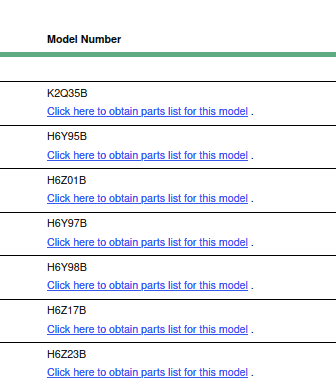
 topaz patrol
low pond
What do we do when HP's documentation stuff isn't loading?
<https://support.hp...
topaz patrol
low pond
What do we do when HP's documentation stuff isn't loading?
<https://support.hp...
Working for me
low pond
oh great, my side issue then, will see
topaz patrol
https://partsurfer.hpe.com/Search.aspx Put the model number in here
low pond
loads now, there, thanks
 slim sigil
well well well
low pond
Well indeed
thick minnow
Is this normal?
When transferring files TO my server i get ~72MB/s
But when im transferring files FROM my server i get ~112MB/s
GbE btw
 unborn geyser
From top down:
- UDM Pro
- USW Pro Max 16
- PoE injector
- Patch panel
- reserved
- Cobblestone (main server, Ryzen 9 7950x3D, 128gb RAM)
- Double Chest (storage array, RAIDZ2, 10x4tb)
- Battery backup (not installed, 100ah LiFePo battery & 1.2kw inverter charger)
Doing pretty good as a 19yo I think ;p


Took a while, but my network cabinet is near finished
thick minnow
i just bought a static ip for myself im planing to run few things
- FTP
- HTTP
- Minecraft server
- Some way that i can access my printer without being on LAN
i need some tips / help how do i make everything secure. i was messing around and launched a simple python HTTP server and im getting users from like russia, poland etc etc. i looked the ip up in https://www.iplocation.net/
how do i basically secure my network
Lookup your public IPv4 or IPv6 address and where are you located? Find a geolocation of your IP address including latitude, longitude, city, region and country.
unborn geyser
Stuff like that is basically unavoidable. Webscrapers & bad actors will always try to check out whatever service you have running. Best you can do is block the region if possible and ignore it if not.
I get them too

i would be using HTTPS for whatever your running in http tho
Close your ssh ports, don’t use FTP, use either SFTP OR FTPS
Password protect the printer
If you’ve gotta have it exposed, have an ACL
 half solstice
does anyone know how to turn on my pc while away from my home?
waxen scroll
Call your neighbor and give them your door code.
half solstice
funny
waxen scroll
sometimes the least technical solution is the simplest and highly accurate
clear igloo
waxen scroll
sometimes the least technical solution is the simplest and highly accurate
No, what they actually need is a IoT robot 😛
waxen scroll
Or just leave the computer on when leaving and set the BIOS to power on when power is applied.
clear igloo
no, custom built IoT robot with WiFi and 4g/5g backup connection
thick minnow
unborn geyser
I get them too
Ohh
thick minnow
unborn geyser
i would be using HTTPS for whatever your running in http tho
Okay it was basically just to test if my static ip is running or not
thick minnow
unborn geyser
Close your ssh ports, don’t use FTP, use either SFTP OR FTPS
I didn't enable any ports for now I have blocked everything from my router, about FTP my router has it inbuilt, I don't run a separate server for it has like a usb port connected a SSD to it and password protected it.
thick minnow
unborn geyser
Password protect the printer
About the printer how do I actually password protect it, I think I'll have to visit it's ip address ?
Like the lan ip it has
- i had my printer like exposed without any security for around 2-3 hrs, it did print some gibrish out of the blue
I think the simplest fix will be password protecting it
clear igloo
Or setup a VPN like Wireguard or Tailscale and NOT expose your printer to the web?
thick minnow
- should I use different ports i.e. wan port 9483 and it pointing to my printer with port 9100
thick minnow
clear igloo
Or setup a VPN like Wireguard or Tailscale and NOT expose your printer to the we...
Ye I'll 💀
I was just messing around I closed the port and all
thick minnow
unborn geyser
I get them too
Okie one last question do they scan for all of the ports ?, or common ones like 20,21,8080,3306,25565,9100
peak cloak
thick minnow
Okie one last question do they scan for all of the ports ?, or common ones like ...
Basically don't expose anything you don't want public
Stuff like printers are a big no no
thick minnow
peak cloak
Stuff like printers are a big no no
So vpns are the way to go ?
peak cloak
thick minnow
So vpns are the way to go ?
Yeah for stuff like that tailscale
thick minnow
peak cloak
Yeah for stuff like that tailscale
Nicee so it can run on my router right
peak cloak
thick minnow
Nicee so it can run on my router right
Depends on router
thick minnow
Oh
I'll check the manual
Or propbally get a new one if it doesn't work

My router got these options ig it will work
thick minnow
my stupid little server
 opal pagoda
thick minnow
i just bought a static ip for myself im planing to run few things
1. FTP
2. HTT...
opal pagoda
thick minnow
i just bought a static ip for myself im planing to run few things
1. FTP
2. HTT...
firewall is basically mandatory, what is your available bandwidth and what is you budget?
thick minnow
is the fireway on my could gateway ultra enough for HTTPS and stuff like that?