#networking
1 messages · Page 71 of 1
 topaz patrol
 opal pagoda
but consistency of cli/gui isnt there at all
topaz patrol
Lol what they sell IP phones
opal pagoda
haha they sell label printers
 topaz patrol
They look suspiciously like fanvil phones
opal pagoda
they sell ip cameras too
might buy a couple
 topaz patrol
May as well just go straight to china
opal pagoda
what supplier tho?
topaz patrol
I quite like Dahua atm
opal pagoda
their web ui makes my head hurt
topaz patrol
Verkada
topaz patrol
opal pagoda
their web ui makes my head hurt
You don't have to use their NVR
I doubt the FS web ui would be any better
opal pagoda
topaz patrol
You don't have to use their NVR
thats ubiquiti "feature"
i might go with tplink vigi
VIGI C400HP-2.8
one costs 35e
topaz patrol
On-prem dedicated pbx in 2024, interesting choice

 lean palm
I've spent 2k on an AP before
this is okay price wise
and like $8k on the wireless controller for said aps
enterprise is expensive asf
 near helm
Hey, I have a weird question -- I just ran a LAN event and now I've got like 150 cables that are largely tangled together. I don't want to spend 20 hours manually coiling them back up -- do y'all know of any machines or tools I could buy to coil them automatically (or at least more easily)?
 ornate jungle
near helm
Hey, I have a weird question -- I just ran a LAN event and now I've got like 150...
ornate jungle
near helm
Hey, I have a weird question -- I just ran a LAN event and now I've got like 150...
Strong single pan coiling system with max coil weight of 40 kg (88lbs)...
Likely costs thousands of dollars though so... coiling by hand might be your ticket here.
 plain siren
ornate jungle
https://www.schleuniger.com/en/products/peripherals/cable-coiler/cablecoiler-145...
plain siren
ornate jungle
https://www.schleuniger.com/en/products/peripherals/cable-coiler/cablecoiler-145...
If they were realllly long cables this might be helpful
but this is really intended for use with other machines that cut and strip wire or
spit out pipe
https://www.schleuniger.com/en/products/crimp/crimping/ct-15/ This would save my hands
Fully electric crimping machine for a variety of crimping applications with up to 1.7 tons of crimping force....
 cobalt thistle
man i really cant seem to understand why my performance from a eero pro 6e to be so AWFUL.
Wifi and Wired its just so bad
plain siren
cobalt thistle
man i really cant seem to understand why my performance from a eero pro 6e to be...
at the main router or is this through mesh
cobalt thistle
plain siren
at the main router or is this through mesh
its just a single pro 6e as my main router
no mesh
goes from nokia fiber ont to eero pro6e
 shrewd zenith
do USB-A to PoE exist? trying to find but all i can see is USB-C
i need it for a really dumb work project
opal pagoda
shrewd zenith
do USB-A to PoE exist? trying to find but all i can see is USB-C
you mean poe to usb a?
you want to recieve power and not send power?
 weak sequoia
hey is there anything i can do with an ip and mac address to find out information about a device connected to my network ?
 peak cloak
weak sequoia
hey is there anything i can do with an ip and mac address to find out informatio...
peak cloak
weak sequoia
hey is there anything i can do with an ip and mac address to find out informatio...
Look up mac to see device info
 drowsy fossil
unplug it or change your wifi password
lean palm
weak sequoia
can i kick an ip out of my network /
usually, yes
though youd actually be kicking the mac adress of the device, not the ip adress
peak cloak
^ the IP is "the network's"
 shrewd robin
I have been seeing this for a long time and planning to buy 1 to try out 10g. Do all rj45 to sfp+ adapters (huawei, cisco, and whatever the brand is) work the same?
my switch has 2 10g sfp+ ports, would be nice if my main and backup server have a 10g nic for faster transfer speed
 opal pagoda
shrewd robin
I have been seeing this for a long time and planning to buy 1 to try out 10g. Do...
opal pagoda
shrewd robin
I have been seeing this for a long time and planning to buy 1 to try out 10g. Do...
Mostly but they get really hot and you would want to cool them
There are older ones that only work up to 30m and newer ones that do full 100 meters
shrewd robin
opal pagoda
Mostly but they get really hot and you would want to cool them
There are older o...
30m is more than enough for me
opal pagoda
If your pc is close to the switch i would recommend using sfp+ card in your pc and dac in between
Or transcievers and fiber
shrewd robin
opal pagoda
If your pc is close to the switch i would recommend using sfp+ card in your pc a...
my plan is to use the rj45 10g card, and then connect it to the switch with an sfp+ module
topaz patrol
 karmic marten
line-rate?
karmic marten
line-rate?
Yes.
topaz patrol
@karmic marten This is a 1100AHx4 has 2x full IPv4/6 feeds - The ccr2004 is much more capable than the 1100AHx4

 keen urchin
shrewd robin
my plan is to use the rj45 10g card, and then connect it to the switch with an s...
keen urchin
shrewd robin
my plan is to use the rj45 10g card, and then connect it to the switch with an s...
Better to get an SFP+ card.
shrewd robin
keen urchin
Better to get an SFP+ card.
tbh I have no idea what's best for me if you let me choose between sfp+ and rj45 10g cards
keen urchin
shrewd robin
tbh I have no idea what's best for me if you let me choose between sfp+ and rj45...
SFP+ DAC is way better than 8p8c 10gig
shrewd robin
keen urchin
SFP+ DAC is way better than 8p8c 10gig
ouh? enligthen me
topaz patrol
topaz patrol
<@963100119669047407> This is a 1100AHx4 has 2x full IPv4/6 feeds - The ccr2004 ...
And a CCR2004 peered with dual route reflectors
 keen urchin
I mean, if you have 8p8c working, who cares, but 8p8c SFP+ modules cost as much as an SFP+ card.
So why spend money on shit that's worse.
keen urchin
shrewd robin
ouh? enligthen me
Hotter and unnecessary.
shrewd robin
keen urchin
Hotter and unnecessary.
8p8c tends to be hotter?
shrewd robin
shrewd robin
well i just noticed that there is an active cooler on top of the card
lol
keen urchin
It isn't the end of the world though
shrewd robin
keen urchin
I mean, if you have 8p8c working, who cares, but 8p8c SFP+ modules cost as much ...
let me just confirm my "myth" about 10g stuff. Some sfp+ modules are not compatible with some other brand of sfp+ cards. Does that apply to all the DAC cables?
topaz patrol
Only really happens with enterprise switches
keen urchin
shrewd robin
let me just confirm my "myth" about 10g stuff. Some sfp+ modules are not compati...
Yes, but also no 😄
Most likely you'll be fine.
also for example my mikrotik router doesn't "support" DAC SFP+, but on a short run it works fine.
But if you had a longer run or a different device on the other end maybe it would have problems
shrewd zenith
opal pagoda
you mean poe to usb a?
essentially i want to have a webcam but like 30m away from the PC lmao, the usb spec wouldnt allow for this so i thought can i do it over ethernet, however the issue is the webcam end cannot be powered
keen urchin
shrewd zenith
essentially i want to have a webcam but like 30m away from the PC lmao, the usb ...
You can absolutely buy off the shelf USB extenders that use networking cable.
You could also use HDMI out of a canera
You could also get a USB optical extension cable
You could also use a phone and wifi to do it.
shrewd robin
keen urchin
But if you had a longer run or a different device on the other end maybe it woul...
i think this could be a good one
 keen urchin
You could also do it with a Poe camera
shrewd robin
since intel is one of the most compatible brand for linux
keen urchin
shrewd robin
i think this could be a good one
Yep, perfect.
shrewd robin
darn it, I just remembered that my server motherboard has only 1 x16 pcie lane
shrewd zenith
keen urchin
You can absolutely buy off the shelf USB extenders that use networking cable.
sufficient enough to also power the webcam?
keen urchin
shrewd zenith
sufficient enough to also power the webcam?
They require power at both ends I believe?
shrewd zenith
yeah i cant have power delivered to the webcam end is the issue
keen urchin
Why not?
topaz patrol
The XY problem is a communication problem encountered in help desk, technical support, software engineering, or customer service situations where the question is about an end user's attempted solution (X) rather than the root problem itself (Y or Why?).
The XY problem obscures the real issues and may even introduce secondary problems that lead t...
shrewd zenith
keen urchin
Why not?
because it will be 10m off the ground on a forklift
topaz patrol
Well that changes things 😆
keen urchin
shrewd zenith
because it will be 10m off the ground on a forklift
Soooo, why not just use a Poe camera?
They are literally built to do exactly what you want
Then you can stream it via obs and expose it as a virtual webcam.
shrewd zenith
couldnt find one that is able to be read by opencv, in an efficient enough way to have ~20 of them running at once
keen urchin
....
shrewd zenith
i know this sounds like im a madman
keen urchin
Now you're changing the fucking requirements
Jesus Christ
Stop all the fucking about. What are you trying to do?
Make a shitty version of frigate?
keen urchin
Soooo... Why a webcam? Why not have the edge compute with the camera(s)
Also why 20 cameras? You shouldn't need 20 cams to scan 20 QR codes
shrewd zenith
the idea is that you drive a forklift with a mast on it, the mast has cameras on it that scan QR codes on the shelves. the logic behind the 20 cameras is so you only need to do 1 pass
keen urchin
You could very easily process 20 Poe cams into opencv
I mean, that's more or less what frigate does.
shrewd zenith
looking into cheap RTSP PoE cameras now 🥲
 topaz patrol
shrewd zenith
looking into cheap RTSP PoE cameras now 🥲
topaz patrol
shrewd zenith
looking into cheap RTSP PoE cameras now 🥲
It'd be cheaper than using USB webcams lol
keen urchin
Cheap rtsp cameras can be sub $50 aud
shrewd zenith
webcams be like £10 tho
keen urchin
For bottom tier garbage, sure
topaz patrol
shrewd zenith
webcams be like £10 tho
But you can't power it, and it looks like crap
keen urchin
topaz patrol
But you can't power it, and it looks like crap
And they would fail constantly
keen urchin
Also 10 GBP for the camera..... The extender is going to cost more than the fucking Poe cam!
I mean, I like your style of trying to hack cheap shit into something cool though.
As a rule, cost effective>>>>> cheap.
shrewd zenith
rough pricing of the PoE route so far is £1619 excl VAT
if you were curious
if the USB route were to work that would be £1331
the price to pay for a working solution 😔
topaz patrol
lol
karmic marten
topaz patrol
<@963100119669047407> This is a 1100AHx4 has 2x full IPv4/6 feeds - The ccr2004 ...
jesus, my friend's ccr2004 was pulling only 2-5G with not even full bgp
opal pagoda
shrewd zenith
the idea is that you drive a forklift with a mast on it, the mast has cameras on...
At our warehouses this is done by long range rfid scanners and rfid stickers on pallets

Turck Vilant Systems
RFID system usage results in faster stock turnover, lower inventory levels and a more efficient supply chain.
 umbral meadow
https://store.ui.com/us/en/category/switching-aggregation/products/ecs-aggregation ay speak of devil ubiqiti 100 gb switch

Ubiquiti Store
1.8 Tbps high-density 100G/25G Layer 3 Etherlighting™ aggregation switch with MC-LAG support for high availability system design.

Ubiquiti Store
Enterprise-grade, Layer 3 Etherlighting™ PoE switch with (16) 2.5 GbE PoE+++, (32) 10 GbE PoE+++, and (4) 25G SFP28 ports for high availability system design.
https://www.fs.com/products/154827.html?attribute=37260&id=3425578 wonder if this would work for connecting to ubiquitis 100gb qsfp28 ports for the 100gb mellanox nic

FS.com
3m (10ft) NVIDIA InfiniBand MFA1A00-E03 Compatible 100G EDR QSFP28 Active Optical Cable for SB7800/7890 Switches and ConnectX-5 HCA, Product Specification:NVIDIA InfiniBand Compatible - MFA1A00-E003, Vendor Name - FS, Connector Type - QSFP28 to QSFP28, Max Data Rate - 100Gbps, Minimum Bend Radius - 30mm, Cable Length - 3m (10ft)
Or if i need their cable they sell
 left oriole
Anyone else just using OpenWRT on a simple consumer router?
 mystic latch
If you have a specific OpenWRT question just ask it
left oriole
Just wondering, I'm seeing a load of posts about super enterprise hardware. What about us simple folk with little home routers and OpenWRT
mystic latch
It's a perfectly viable option, particularly if you already have a router that's supported
left oriole
I went OpenWRT because my Asus Router stopped getting updates
 brisk skiff
Hey guys I have a question, I currently have a Wi-Fi 5 GHz card in my PCIe slot of my computer and I was wondering if I upgraded to Wi-Fi 6E if it will get bottlenecked by my motherboard that’s only PCIe GEN 3.0
mystic latch
brisk skiff
Hey guys I have a question, I currently have a Wi-Fi 5 GHz card in my PCIe slot ...
Nah, gen 3 has a 3.938 GB/s throughput on a x4 slot.
 silent flax
left oriole
Just wondering, I'm seeing a load of posts about super enterprise hardware. What...
silent flax
left oriole
Just wondering, I'm seeing a load of posts about super enterprise hardware. What...
usually with routers the big issue is HW acceleration for higher speed WAN. Usually the CPUs in these can handle certain speeds by brute force, but once you want to go above that limit you will need HW offload, which alternative router OS might not have. For example i remember how Asuswrt-Merlin and official ASUS FW had HW offload, while Advanced Tomato had no suport for it. Thus the RT-N66U could do ~180-200Mbps WAN to LAN routing on it's own via CPU power, but above that one needed HW offload
 main hazel
wtf?

 knotty plover
Hi, I'm using a VPN that can do multi-bonding - redundancy for multiple networks
The problem is some websites don't allow VPN traffic or they ask puzzles all the time
dedicated servers of this VPN cost $140 per month, which isn't worth it
I was planning to do double VPN, first bonding to this service, then connecting to a dedicated VPS as VPN so it won't be blocked by any websites.
I Installed Open VPN on a Linux server, with a github app and it was working for 10 days, but then, after a while it seems services find my IP behind that VPN and the server IP I've got also gets banned.
What would you suggest?
in short:
Want to make a Dedicated VPN server with Kill switch behind it and IP / DNS Leak Protection and run it on Linux server / use it on Ubuntu system.

 ashen topaz
host what per exemple
mystic latch
nextcloud, jellyfin, immich
Anything from here
https://github.com/awesome-selfhosted/awesome-selfhosted

GitHub
A list of Free Software network services and web applications which can be hosted on your own servers - awesome-selfhosted/awesome-selfhosted
 vocal sapphire
Anyone knows what is going with the response time from PC to a WiFi device?
Reply from 192.168.1.41: bytes=32 time=30ms TTL=255
Reply from 192.168.1.41: bytes=32 time=38ms TTL=255
Reply from 192.168.1.41: bytes=32 time=48ms TTL=255
Reply from 192.168.1.41: bytes=32 time=59ms TTL=255
Reply from 192.168.1.41: bytes=32 time=66ms TTL=255
Reply from 192.168.1.41: bytes=32 time=82ms TTL=255
Reply from 192.168.1.41: bytes=32 time=88ms TTL=255
Reply from 192.168.1.41: bytes=32 time=88ms TTL=255
Reply from 192.168.1.41: bytes=32 time=101ms TTL=255
Reply from 192.168.1.41: bytes=32 time=95ms TTL=255
Reply from 192.168.1.41: bytes=32 time=105ms TTL=255
Reply from 192.168.1.41: bytes=32 time=109ms TTL=255
Reply from 192.168.1.41: bytes=32 time=108ms TTL=255
Reply from 192.168.1.41: bytes=32 time=119ms TTL=255
Reply from 192.168.1.41: bytes=32 time=24ms TTL=255
Reply from 192.168.1.41: bytes=32 time=31ms TTL=255
Reply from 192.168.1.41: bytes=32 time=33ms TTL=255
Reply from 192.168.1.41: bytes=32 time=44ms TTL=255
Reply from 192.168.1.41: bytes=32 time=44ms TTL=255
Reply from 192.168.1.41: bytes=32 time=45ms TTL=255
Reply from 192.168.1.41: bytes=32 time=52ms TTL=255
Reply from 192.168.1.41: bytes=32 time=66ms TTL=255
Reply from 192.168.1.41: bytes=32 time=73ms TTL=255
Reply from 192.168.1.41: bytes=32 time=74ms TTL=255
I noticed a weird behaviour. Starting from low to high.
PC to PC < 1-2ms / Router to PC < 1ms
WiFi to WiFi 112ms / Router to WiFi < 10ms
PC to WiFi this weird thing.
 thick minnow
Here's some harden tips for anyone using android as their network
pkg install -y openssl openssh fail2ban
pkg autoremove
set -o noclobber
pkg install apparmor && aa-enforce /etc/apparmor.d/*
su -c "pm disable $telnet" && su -c "pm disable $bluetooth"
 clear igloo
vocal sapphire
Anyone knows what is going with the response time from PC to a WiFi device?
```
...
clear igloo
vocal sapphire
Anyone knows what is going with the response time from PC to a WiFi device?
```
...
because WiFi
 pseudo blade
vocal sapphire
Anyone knows what is going with the response time from PC to a WiFi device?
```
...
pseudo blade
vocal sapphire
Anyone knows what is going with the response time from PC to a WiFi device?
```
...
That's kinda poor, but WiFi has to deal with the situation it has and WiFi>WiFi kinda doubles that problem.
Could be that one/both devices are far from the router and have a less reliable connection, have poor quality/old standard WiFi cards, could be using a band with contention (incl. your own) or interference...
vocal sapphire
Forgot the WiFi to PC is like below 15ms
Very small compared from PC to WiFi.
Don't understand why the PC to WiFi is not the same as WiFi to PC
ornate jungle
vocal sapphire
Anyone knows what is going with the response time from PC to a WiFi device?
```
...
Something something due to the laws of physics and individual characteristics of every WiFi chipset in every device on this planet, WiFi latency will always fluctuate. https://www.wiisfi.com/
plain siren
ornate jungle
_Something something_ due to the laws of physics and individual characteristics ...
Wow what a website. nice
 lunar spade
My house has Cat 5e everywhere. My gigabit network switch says my room should be getting 1 gb/s, and a cable tester shows that all 8 lines are working, so why am I only getting 100mbps?
I haven’t tested the connection between my room and the network switch. I have to figure which of the twenty cables is mine
ornate jungle
lunar spade
I haven’t tested the connection between my room and the network switch. I have t...
If this is the only connection you haven't tested, welp, there's your problem.
So many in-wall Ethernet runs either use poor quality / uncertified cables, or piss-poor quality RJ45 keystone / wall jacks that cause the connection to be slower than expected.
lunar spade
They were installed around 18 years ago. It was working fine a month ago. I don’t know when it happened since 100mbps isn’t noticeable unless I am downloading a game
thick minnow
Is wifi 6 supposed to be 9mbps near the modem but I'm in My room which is away from the modem and I'm getting 287mbps
opal pagoda
thick minnow
Is wifi 6 supposed to be 9mbps near the modem but I'm in My room which is away f...
wifi highly depends on the enviroment
high radio noise, thick walls and you can easily reduce wifi performance significantly
thick minnow
Yeah I'm still Trying to peice how I'm getting 28x more speed then I was 4 steps away
opal pagoda
thick minnow
Yeah I'm still Trying to peice how I'm getting 28x more speed then I was 4 steps...
Also what is the model of your wifi 6 router/ ap
thick minnow
lunar spade
My house has Cat 5e everywhere. My gigabit network switch says my room should be...
is your network adapter set to Auto-Negotiate or 1000 Mbps Full Duplex or 100 Mbps?
thick minnow
thick minnow
Yeah I'm still Trying to peice how I'm getting 28x more speed then I was 4 steps...
iwconfig wlan0 | grep -E 'Link Quality|Bit Rate'
 ionic grove
lunar spade
They were installed around 18 years ago. It was working fine a month ago. I don’...
ionic grove
lunar spade
They were installed around 18 years ago. It was working fine a month ago. I don’...
Well, depending on the house, there's always the possibility something chewed into it
 winged zealot
does anyone have any tips on how to make my internet faster through my computer settings
left oriole
Internet speed is determined by your contract with your ISP, the specs of your Router, and the means by which you're connected to your network (Wi-Fi or Ethernet)
PC settings have little to do with it
lunar spade
My router and network switch should be okay. A pc in another room is able to get 260mbps (my plan is 250mbps)
lunar spade
thick minnow
is your network adapter set to Auto-Negotiate or 1000 Mbps Full Duplex or 100 Mb...
It was set to auto, I tried switching it to 1gbps full duplex, but it still only ran at 100mbps
opal pagoda
lunar spade
It was set to auto, I tried switching it to 1gbps full duplex, but it still only...
Just test the full line
It is most likely broken somewhere
thick minnow
opal pagoda
Also what is the model of your wifi 6 router/ ap
Ax 1800 orbi
 long scarab
 thick minnow
lunar spade
It was set to auto, I tried switching it to 1gbps full duplex, but it still only...
thick minnow
lunar spade
It was set to auto, I tried switching it to 1gbps full duplex, but it still only...
sudo ethtool -s eth0 speed 1000 duplex full autoneg off
try that
 peak cloak
ornate jungle
_Something something_ due to the laws of physics and individual characteristics ...
peak cloak
ornate jungle
_Something something_ due to the laws of physics and individual characteristics ...
yeah that website is great, should be pinned tbh
karmic marten
thick minnow
https://tenor.com/1IXn.gif
1G-baseT with autoneg off?
you know that that config violates the standard? 😄
thick minnow
karmic marten
1G-baseT with autoneg off?
Your right
sudo ethtool -s eth0 speed 1000 duplex full autoneg on maybe this might be right
karmic marten
Some routers would even go into fault mode if you turn off gbase t autoneg
like mikrotik CCR2004
 topaz patrol
karmic marten
you know that that config violates the standard? 😄
topaz patrol
karmic marten
you know that that config violates the standard? 😄
Technically no
thick minnow
karmic marten
Some routers would even go into fault mode if you turn off gbase t autoneg
interesting tho
topaz patrol
The devices “shall support” autoneg, not “shall always use”
karmic marten
you're wrong
topaz patrol
No, I’m not
karmic marten
 thick minnow
Could it be powersaving causing it?
karmic marten
Yes you're
topaz patrol
 thick minnow
sudo ethtool -s eth0 wol d to disable powersaving if im correct not 100% sure tho
thick minnow
I read that for Ss7
topaz patrol
karmic marten
You're reading wikipedia
That is literally the 802.3 pdf
thick minnow
I do web application exploit development
karmic marten
karmic marten
https://grouper.ieee.org/groups/802/3/ab/public/nov97/mark1.pdf
page 4
 topaz patrol
topaz patrol
topaz patrol
“Shall support” means you have to be able to do it, not that you must do it
 thick minnow
What does this one mean? cut -f1 -d: /etc/passwd
karmic marten
thick minnow
What does this one mean? cut -f1 -d: /etc/passwd
chatgpt tells you 😛
plain siren
topaz patrol
“Shall support” means you have to be able to do it, not that you must do it
Correct
topaz patrol
karmic marten
why do you think they wrote it in a different way at 10 and 100baset ?
That isn’t the actual spec
That’s just a presentation
karmic marten
topaz patrol
That isn’t the actual spec
send me the actual spec then. from the official ieee.org domain
topaz patrol
karmic marten
send me the actual spec then. from the official ieee.org domain
Give me a second :)
thick minnow
 karmic marten
Sure. Take your time
plain siren
karmic marten
send me the actual spec then. from the official ieee.org domain
IEEE 802.3
I have this one in print too
 karmic marten
plain siren
https://ieeexplore.ieee.org/stamp/stamp.jsp?tp=&arnumber=9844436
karmic marten
plain siren
https://ieeexplore.ieee.org/stamp/stamp.jsp?tp=&arnumber=9844436
hold on, its loading. looks like it's not on a cdn
plain siren
its 7000 pages
topaz patrol
lol
thick minnow
😦 too many pages
thick minnow
I got this on my laptop
 plain siren
lol it wont load on this shitty surface im on. Hopefully it lines up with the book print version
topaz patrol
It crashed safari on my iPhone
thick minnow
What's a good network logging script / tool for windows jw I'm forcing myself to use windows 10
i mean like other than windivert
karmic marten
hell no, I'm not reading this, even with search function it would take a million years. I just give up and agree with you. you're right 😂
official spec docs should have TLDR docs
thick minnow
CTRL + F?
karmic marten
yea. with ctrl + F, autoneg is more than 1000 finds
topaz patrol
karmic marten
official spec docs should have TLDR docs
That would leave even more room for misinterpretation
thick minnow
loll
The internet used to be a nice place 😦
jk
lol
shouldn't he do this tho sudo ethtool eth0 | grep -i speed
to check his speeds
Then he could force gigabit with auto negotiation enabled by doing something like sudo ethtool -s eth0 speed 1000 duplex full autoneg on
for an example
1000baseT/Full
or am I wrong about that?
bc shouldn't that put the speeds at 1000Mb/s?
sudo ethtool usage
-s, --set             Set device options
  -a, --show-phy-info   Show PHY information
  -i, --show-device     Show device information
  -d, --show-drv-info   Show driver information
  -p, --identify         Blink LED on device
  -e, --get-eeprom      Get EEPROM
  -r, --reset           Reset device
  -h, --help            Show this help message
  -V, --version         Show version information
just an example
not 100% tho
I could most certainly be wrong but just trying to help is all

 thick minnow
sudo ethtool --show-device
karmic marten
you really like ethtool don't ya?
thick minnow
It will show them the firmware version
so they don't brick their router
Device eth0
Driver e1000e
Version 3.8.4-k
Firmware-version 1.6-3
Bus-info 0000:00:1f.6
example
thick minnow
karmic marten
you really like ethtool don't ya?
na I just used to usb debug and network debug to write game cheats when I was younger lol
topaz patrol
karmic marten
hell no, I'm not reading this, even with search function it would take a million...
:p
 plain siren
topaz patrol
:p
plain siren
topaz patrol
:p
Well thats because 1000BASE-T1 uses a single pair of wires
And its not common
1000BASE-T requires it
Thats the normal
topaz patrol
Ah
plain siren
T1

T

1000BASE-T1 is used in automotive ethernet


If you mess around with car wiring you prob have seen this connector before
topaz patrol
Surely the transceivers would be much more expensive than regular 4 pair
plain siren
topaz patrol
Surely the transceivers would be much more expensive than regular 4 pair
Slightly more costly
slightly
but the cable is cheaper
and less complexity
topaz patrol
Interesting
plain siren
Actually depending on your needs it may even be cheaper
so lets just say they average the same
the main loss in SPE (Single Pair Ethernet) is distance
Additionally, you lose POE capabilities (Obviously)
Ok i take that back about the PoE
Also there is "multidrop" kinda mode
where you can dasiy chain devices without a switch
thick minnow
peak cloak
meanwhile aircraft ethernet

 buoyant dust
peak cloak
meanwhile aircraft ethernet
buoyant dust
peak cloak
meanwhile aircraft ethernet
what are the speeds
 small glade
No internet, no switch, no router, no DHCP server, not even a crossover cable, just rawdogging CAT5e
clear igloo
auto mdix from early 2000s says hi 😛
peak cloak
buoyant dust
what are the speeds
100 mbps
buoyant dust
peak cloak
100 mbps
ok
peak cloak
ARINC 664
it's actually pretty cool how it eliminates alot of wire runs in aircraft
especially the long ones like nose to tail
small glade
clear igloo
auto mdix from early 2000s says hi 😛
Actually is there any mechanism that prevents the 169.254.x.x addresses from clashing between 2 devices? Or is it just a 1/65536 chance that it happens?
peak cloak
small glade
Actually is there any mechanism that prevents the 169.254.x.x addresses from cla...
yes
In the automatic address configuration process, network hosts select a random candidate address within the reserved range and use Address Resolution Protocol (ARP) probes to ascertain that the address is not in use on the network. If a reply is received to the ARP probe, it indicates the candidate IP address is already in use; a new random candidate IP address is then created and the process repeated. The process ends when there is no reply to the ARP, indicating the candidate IP address is available.
clear igloo
small glade
Actually is there any mechanism that prevents the 169.254.x.x addresses from cla...
It will arp
@peak cloak lol, beat me to it
peak cloak
peak cloak
especially the long ones like nose to tail
too bad there's like no public diagrams on it, these days we use a lot of fiber

The Data Concentration Network collects and distributes data from various systems and makes that information available to other systems. The network provides a higher level of data for aircraft trend monitoring, reduces power consumption and simplifies wiring.
The Data Concentration Network’s advanced infrastructure lines the airframe with tech...
opal pagoda
peak cloak
https://www.youtube.com/watch?v=VqlQLF1fIWg
well the same logic was implemented in autoindustry
canbus has simplified lots of things but there are still lots of wires in the harnesses
 tropic briar
can anyone help me? i just got a power line ethernet adapter, but my ethernet is significantly slower than my wifi. so i have two wifi connections. 5 ghz, and 2.4ghz, and im not sure what the issue is, because i dont know if its my motherboard because it only says 2.5 ghz, or if the adapter cant do 5g
peak cloak
opal pagoda
well the same logic was implemented in autoindustry
canbus has simplified lots o...
oh yeah, aircraft wiring harnesses are still pretty complex
plain siren
tropic briar
can anyone help me? i just got a power line ethernet adapter, but my ethernet is...
Does the powerline adapter have to go over long distances to reach each other? Like opposing sides of the house
Or perhaps in different rooms that are wired to breakers that are not near each other in the breaker panel
tropic briar
plain siren
Does the powerline adapter have to go over long distances to reach each other? L...
i mean im upstairs, but theres nothing really there that could affect anything
tropic briar
plain siren
Does the powerline adapter have to go over long distances to reach each other? L...
but do you think that its the fact that my motherboard only says 2.5 ghz on the ethernet port?
plain siren
tropic briar
i mean im upstairs, but theres nothing really there that could affect anything
When it comes to the powerline stuff, it has to traverse the power lines in your house. If there is a long distance it has to travel across all your powerlines then it can be slow
plain siren
tropic briar
but do you think that its the fact that my motherboard only says 2.5 ghz on the ...
2.4GHz/5GHz is for WiFi because thats radio frequencies. Ethernet is just... Ethernet
So it doesnt use wifi
tropic briar
plain siren
2.4GHz/5GHz is for WiFi because thats radio frequencies. Ethernet is just... Eth...
oh
so what do you think the issue is because its dropping from 500 mbs, to 30mbs
tropic briar
im using ethernet, and im only getting like 30 mbs, but with wifi i get like 500 mb
plain siren
tropic briar
im using ethernet, and im only getting like 30 mbs, but with wifi i get like 500...
Your Powerline adapter, is it plugged into a power strip or into the wall?
How far away is the 2 adapters from each other?
tropic briar
plain siren
Your Powerline adapter, is it plugged into a power strip or into the wall?
How f...
its plugged into the wall, and its just 1 floor above
like exactly 1 floor above
plain siren
Remember, its about the distance of the wiring in the walls, not how physically close it is. If its on different floors, that means its prob a pretty good distance from each other electrically
Do you know if you have a single breaker panel or 2 breaker panels?
tropic briar
plain siren
Remember, its about the distance of the wiring in the walls, not how physically ...
im not really sure about the breaker panels
plain siren
alright. Well it kinda does make sense its slow considering going up and down floors usually is long electrical pathing.
WiFi is faster because you are physically closer to it and it doesnt have to travel over a bunch power lines with tons of potential interference.
tropic briar
so what do you think i should do?
plain siren
Use WiFi
tropic briar
plain siren
Use WiFi
so you dont think i could use ethernet and get high speeds?
plain siren
Not with powerline it seems. You could throw ethernet in the walls
tropic briar
alr thanks
pseudo blade
tropic briar
im using ethernet, and im only getting like 30 mbs, but with wifi i get like 500...
500mbps is pretty much best-case for powerline and if you're on a different floor of the house you'll never replicate it. Stick with the WiFi you have unless you have stability problems, in which case fix those rather than moving to a different technology.
Unless you have coaxial cables in your walls and can do MoCa, as that works a lot better than powerline
plain siren
pseudo blade
500mbps is pretty much best-case for powerline and if you're on a different floo...
MoCA is costly as hell
pseudo blade
Can be. So is running ethernet through walls properly
I'd do that but I'm aware most do not have that option
pseudo blade
plain siren
MoCA is costly as hell
A cheaper solution with no benefits vs not having it is also overpriced
0 value is worth $0
plain siren
He has WiFi
topaz patrol
This is a sign to disable IPv6, right?
 left oriole
 long scarab
left oriole
long scarab
left oriole
That's the most disgusting way to describe it
left oriole
But also accurate lol
opal pagoda
topaz patrol
This is a sign to disable IPv6, right?
clearly
plain siren
topaz patrol
This is a sign to disable IPv6, right?
What kind of registrations though
topaz patrol
plain siren
What kind of registrations though
SIP
plain siren
topaz patrol
SIP
Lovely
IPv6 in theory opens up tons of awesome possibilities with VoIP
topaz patrol
I don't want to know about them :p
plain siren
topaz patrol
I don't want to know about them :p
TOOBAD
I want my ENUM DNS before IPv6 honestly
rDNS for Phone numbers, begone PSTN
 solar dagger
hey
i'm getting a 403 error when running nextcloud desktop client or connecting froom a mobile app
it works fine on website
can anyone help?
 robust cloak
Not sure if this is the right place to ask this or if it belongs in #1027757333117415424, but
I'm looking into buying a NAS (4bay) systhem but i'm not sure yet which one.
-
Regarding the requirements: A feature like Synology’s Quick Connect is essential—specifically for remote access to files from other PCs or from my phone, which is very important to me. Besides that i'm prob just gonna use the standard NAS features.
-
Building my own NAS sounds interesting, but I have concerns regarding power consumption, heat, time investment, and, most importantly, the software question—how well can TrueNAS or Unraid match up with DNS and other similar features offered by other Brands?
-
Security is another important aspect. After some research, I’m not entirely sure if QNAP is the best option, given their multiple incidents over the past few years.
-
Overall, I’m torn between these four NAS options, with the main question being whether Synology’s software is worth sacrificing the better hardware:
- QNAP Turbo Station TS-433-4G - https://geizhals.de/qnap-turbo-station-ts-433-4g-a2749367.html?hloc=at
- QNAP Turbo Station TS-462-4G - https://geizhals.at/qnap-turbo-station-ts-462-4g-a2924145.html
- QNAP Turbo Station TS-464-8G - https://geizhals.at/qnap-turbo-station-ts-464-8g-a2872932.html?hloc=at
- Synology DiskStation DS423 - https://geizhals.de/synology-diskstation-ds423-a2915258.html?hloc=at
(shipable to Austria)
plain siren
robust cloak
Not sure if this is the right place to ask this or if it belongs in <#1027757333...
Out of all that you listed, Id pick 2 and put them in this order:
DS423
TS-433-4G
The 462 and 464 are not great
The DS423 is more robust out of all those QNAP Appliances listed
QNAP's larger offerings (rackmount) is where they shine
pseudo blade
robust cloak
Not sure if this is the right place to ask this or if it belongs in <#1027757333...
Building your own x86 NAS won't be as pretty or efficient as the premade ones but can still be respectable with mild tuning, you'd do that for control. I'd personally do that but idk what your bs tolerance is. Otherwise if Synology sounds like your cup of tea and is in budget why not?
plain siren
TrueNAS is great.
pseudo blade
I run a home server for work on a dell optiplex 7090 and running workloads on 4 of 8 cores it's using 50w or so
At idle it'd use closer to 30w
plain siren
pseudo blade
Building your own x86 NAS won't be as pretty or efficient as the premade ones bu...
The only real probem I ever had with these is that I cant seem to build me one that has that nice smol size. Even with SBCs because they always lack something 😦
pseudo blade
An embedded NAS might use 10w or less at idle
pseudo blade
plain siren
The only real probem I ever had with these is that I cant seem to build me one t...
Yeah I think SBCs are a dead end
Too little IO
Pi NAS sounds neat, in practice it's all the joy of 1x pcie lane aka none
plain siren
The Helios64 was a great project until it died
pseudo blade
It did look neat, it proper died?
pseudo blade
Sad but also it wasn't that flexible anyways
plain siren
In theory, I could use one of those Rockchip or other boards with the NVMe slot on it (one with proper x4 lanes) and put one of those m.2 SATA Expander boards lol
pseudo blade
If you wanted one and only wanted gigabit or so that'd be fine
plain siren
look how cute it is awhhhhh
 pseudo blade
I mean I'd rather have a mini-itx/matx x86 board that comes with 4 sata ports standard and room for m.2 SSDs
A/E-key is annoying
Generally the only A/E key slot you'll get on a board was intended for a WiFi card
plain siren
pseudo blade
Generally the only A/E key slot you'll get on a board was intended for a WiFi ca...
Ive swapped those out on motherboards (Usually the WiFi card is under the IO Shield) for 4G and 5G Modems and once a small FPGA I was using for compute
You can also do some fun jank shit like this
 silent flax
plain siren
You can also do some fun jank shit like this
silent flax
plain siren
You can also do some fun jank shit like this
i did a much worse version of that

mPCIe
poor thing runs from PCI-E 2.0 x1
i mean sure, it still has enough bandwidth for two 2.5 gigabit NICs, but still, feels weird
robust cloak
pseudo blade
Building your own x86 NAS won't be as pretty or efficient as the premade ones bu...
From what i've been seeing and heard so far from asking around is that besides synology non of the others offer a secure option to acess the NAS from outside of your home network or is there an "easy" option with TrueNAS?
silent flax
robust cloak
From what i've been seeing and heard so far from asking around is that besides s...
the remote access feature is where the insecurity for both QNAP and Synology solutions come from
plain siren
silent flax
the remote access feature is where the insecurity for both QNAP and Synology sol...
This
pseudo blade
Yeah the Synology one flat out puts the interface on the internet
plain siren
Use a VPN you setup.
robust cloak
QNAP had major implications whereas Synology has a good track reckord with it so far no? If you set up a good PW with 2fa you should be fine
plain siren
Irregardless of the track record, its not advisable
silent flax
robust cloak
QNAP had major implications whereas Synology has a good track reckord with it so...
until someone finds a hole, which there was one just last week
pseudo blade
A vuln was found days ago
silent flax

NASty Flaws In Networked Storage, Patch Synology And QNAP ASAP Last week at Pwn2Own there were serious flaws discovered in QNAP and Synology NAS software, and
pseudo blade
Security is achieved by limiting the attack surface
Strong passwords are only one link in the chain
silent flax
and while yes, they manufacturers often try to patch these as fast as they can, you still need to pull the fixes and sometimes those can still come late
pseudo blade
2FA is not foolproof
It is generally very hard to hack a NAS you can't interact with
silent flax
and NAS is a very valuable target too, due the natuere of the device
robust cloak
Yea thats where the 3. backup should/would come in
pseudo blade
I'm using permanent wireguard tunnels for remote access to stuff
The attack surface is very small
robust cloak
The main reason why i want to have acess to it is for using some files (Obsidian notes app) I've got on my PC to sync that also to my Phone so I've got that always accessable and with me
robust cloak
pseudo blade
I'm using permanent wireguard tunnels for remote access to stuff
how does that work do you pay a subscription for that?
plain siren
robust cloak
how does that work do you pay a subscription for that?
You host a Wireguard Server
Then expose that to the internet (Port Forwarding and Firewall Rules on your Router)
I use Wireguard myself.
pseudo blade
robust cloak
how does that work do you pay a subscription for that?
Free and built into Linux and probably both Synology and QNAP by now
plain siren
your NAS may come with software to host a VPN off of. Those are usually fine to use.
plain siren
pseudo blade
Free and built into Linux and probably both Synology and QNAP by now
Yeah IIRC they are built into both now
robust cloak
plain siren
You host a Wireguard Server
on my NAS?
silent flax
robust cloak
how does that work do you pay a subscription for that?
you need a publicly accessible IPv4 or IPv6 address (public IPv4 can be an issue these days)
plain siren
robust cloak
on my NAS?
Yes. Or on another Server/Device/Whatever. Your NAS prob has a VPN Server Option, many do
robust cloak
silent flax
you need a publicly accessible IPv4 or IPv6 address (public IPv4 can be an issue...
yea I've heard that before would i need one for quick connect as well or no?
plain siren
a VPN lets you connect to your network over the internet as if you were right there connected at home
pseudo blade
You just run the client software on your computer/phone and add configs to reach out to your home IP/dns and port forward the right UDP port
Once configured it's near zero fuss
I forget it's running on my phone
silent flax
robust cloak
yea I've heard that before would i need one for quick connect as well or no?
no, they act as a middle man to connect you with the NAS. Technically, your NAS has a connection to quickconnect, and QC and your NAS then communicate whatever you say to the Synology server
plain siren
robust cloak
yea I've heard that before would i need one for quick connect as well or no?
Login to your router, find the reported public IP. If it starts with 100.X.X.X your ISP prob uses CG-NAT, this will be an issue. If not, then you prob have a static Public IP (Dynamic public IPs are rare now [changes every now and then])
pseudo blade
Synology also exposes a UI to the internet via upnp
plain siren
pseudo blade
Synology also exposes a UI to the internet via upnp
Fuck UPNP
silent flax
robust cloak
yea I've heard that before would i need one for quick connect as well or no?
 robust cloak
silent flax
robust cloak
silent flax
yea seen that
plain siren
The QuickConnect server is actually a STUN/TURN server IIRC
silent flax
robust cloak
yea seen that
and if direct connection is not possible, then
 robust cloak
If i put a firewall inbetween setting up the vpn prob just gonna take a bit longer but then it still should be fine right?
Also thoughts on Recertified HDD's? (https://www.jb-computer.de/search?sSearch=ST12000VN0008) ?
topaz patrol
plain siren
Login to your router, find the reported public IP. If it starts with 100.X.X.X y...
Not all routers correctly report the public IP when under CGNAT. cough Amazon and Google cough
Well I guess they do correctly report the public IP, just in an unhelpful way
plain siren
topaz patrol
Not all routers correctly report the public IP when under CGNAT. *cough* Amazon ...
Yeah there are some that show the "True Public IP"
you have to use tracert to find out if you are on CG-NAT
topaz patrol
plain siren
Login to your router, find the reported public IP. If it starts with 100.X.X.X y...
Also 100.128.0.0/9 and 100.0.0.0/10 are real world routable
plain siren
yes I know, I was being very broad
robust cloak
plain siren
you have to use tracert to find out if you are on CG-NAT
ok just did that my 1. one is a 10.0 2. one is a 178 which seems to be from my ISP
pretty sure i set up the 1. one a bit back when i tried out a firewall xD
silent flax
plain siren
you have to use tracert to find out if you are on CG-NAT
you can also have a public IPv4 without port forwarding and not be behing CG-NAT... I hate IPv6 DS-Lite 😄
plain siren
silent flax
you can also have a public IPv4 without port forwarding and not be behing CG-NAT...
Oh god fuck that noise
topaz patrol
Also sometimes you can get away with forwarding via UPnP under CG-NAT
plain siren
topaz patrol
Also sometimes you can get away with forwarding via UPnP under CG-NAT
This is actually really funny shit. It usually means the ISP isnt blocking some things they should be upstream
topaz patrol
We’re doing 1:1 CG-NAT atm so you could get away with that if we had UPnP enabled
plain siren
topaz patrol
We’re doing 1:1 CG-NAT atm so you could get away with that if we had UPnP enable...
Honestly idk why some carriers even do this. If you are doing 1:1 then you might as well just do the work to pass it through.
topaz patrol
plain siren
Honestly idk why some carriers even do this. If you are doing 1:1 then you might...
Not worth it when it’s going to be one:many CG-NAT in the near future
pseudo blade
robust cloak
Also thoughts on Recertified HDD's? (https://www.jb-computer.de/search?sSearch=S...
I don't love them
robust cloak
pseudo blade
I don't love them
The recertified part or the seagate HDD'S?
pseudo blade
robust cloak
The recertified part or the seagate HDD'S?
I meant recertified but tbh Seagate's 12tb offering were rather unreliable, no data for that exact model but its predecessors were poor
Maybe all has been fixed
Maybe not
Either way recertified drives are a gamble too far for me
mystic latch
Anyone a current google fiber subscriber? Looking to buy a home that's serviced by them and I'm wondering how using your own router works. With at&t the only way to bypass their gateway to directly use only your own stuff is to get a 3rd party SFP ONT.
topaz patrol
topaz patrol
We’re doing 1:1 CG-NAT atm so you could get away with that if we had UPnP enable...
It's really not a great feeling when being this close to running out of public address space

Hurry the fuck up APNIC :(
 meager ginkgo
robust cloak
Also thoughts on Recertified HDD's? (https://www.jb-computer.de/search?sSearch=S...
meager ginkgo
robust cloak
Also thoughts on Recertified HDD's? (https://www.jb-computer.de/search?sSearch=S...
i've used a couple from ebay and had no issues, no bad sectors or anything on the ones i've received
 random hill
my laptop has this problem where my ping (on valorant at least) is only stable if i have somethig updating in the background, like when nothing's updating the ping will vary from 30-200ms but when something is updating, the ping will be almost a constant 30ms. anyone have any idea why this is happening?
topaz patrol
random hill
my laptop has this problem where my ping (on valorant at least) is only stable i...
Sounds like bufferbloat

Check out what you can fix with iFixit at https://www.iFixit.com/Techquickie
Even if you have a fast internet connection, a little-known phenomenon called bufferbloat often results in games lagging and video calls dropping. So what exactly is bufferbloat, and how do you fix it?
Waveform bufferbloat test: https://www.waveform.com/tools/bufferbl...
random hill
topaz patrol
Sounds like bufferbloat
oooh i see, thanks 😊
 astral raptor
I have an idea for a product that doesn't seem to exist anywhere. I need a 1u rack mountable, 4 port vga usb kvm switch, that can connect to a local monitor keyboard and mouse, but also have ip web client for remote connect, that allows me to lockout or blackout said monitor keyboard and mouse.
 slender arch
well my battle against vpns is making my hair fall out
silent flax
slender arch
well my battle against vpns is making my hair fall out
on positive note today i found out how can i avoid taking out my phone every time i need an OTP (Keepass has an OTP feature)
thick minnow
Here is a gui I made for iptables
thick minnow
silent flax
on positive note today i found out how can i avoid taking out my phone every tim...
Airdroid control
otherwise an Ss7 attack
or you could rat your own phone
I keylog all of my devices
on a side note I found some malware today attacking my system at *com.google.chrome.sharing.fcm,379932496580
it was hiding in \AppData\Local\Google\Chrome\User Data\Default\GCM Store\Encryption
\AppData\Local\Google\Chrome\User Data\Default\Sync Extension Settings\ofegadkhaapboilkjacpdojpnfphbgpp also in here
witch i found to be odd
and it was coming from metamask
It was trying to web hook me and log to these 2 folders

majorgeek's unlock tool is the only reason i found it
com.google.chrome.sharing.fcm was where it hooked
https://firebase.google.com/docs/cloud-messaging witch brought me to this
Firebase
Firebase Cloud Messaging (FCM) is a cross-platform messaging solution that lets you reliably send messages at no cost.
Im thinking it was a websocket push to the chrome browsers alerts
just thought someone should know
here is what it was doing btw
 thick minnow
 plain siren
@ornate jungle I just got a notice from one of my carriers that a LATA in Chicago is getting torn down to get rid of the TDM Networks and they are switching it entirely to VoIP
TDM Is finally dying
topaz patrol
plain siren
<@145658885859049474> I just got a notice from one of my carriers that a LATA in...
Took you that long?
plain siren
topaz patrol
Took you that long?
What?
I dont control what and when the carriers switch over to newer standards
topaz patrol
I as saying "you" as in North Americans
topaz patrol
We have now transitioned to a full IP Voice network following the decommissioning of our TDM SS7 Stack to Telstra and connecting directly to their IMS Network as of late February
From one carrier, and the other one did it early last year
plain siren
There is this fun little standard called ENUM DNS. Its reverse dns for a phone number. Its in use around the world quite a bit now. If you rDNS lookup an IP you get a hostname. If you rDNS a phone number, you get a SIP URI. So instead of having to check the TDM networks and go through them to get to the owner of the phone number, a tel # can be owned the same way a domain name can.
AT&T has been super heavy on the lobbying against this
Between them and another company, thats 70% of their income. They charge states 7 figures each for secure access to the TDM Networks
The second someone brings up the ENUM DNS Registry, AT&T basically dies.
they spend TONS of money trying to stop us from catching up to the rest of the world
the day our Phone Numbers are the same as our emails, I will rejoice
plain siren
topaz patrol
ENUM was a whole bunch of failed promises here
ENUM is a whole bunch of failed promises everywhere until +1 is on it
topaz patrol
A bit like STIR/SHAKEN was in the US
plain siren
topaz patrol
A bit like STIR/SHAKEN was in the US
Were getting there.
Only in the past 4 months has all the VoIP carriers been appearing in the registry
And thats because the FCC is taking FOREVER going through the applications
topaz patrol
Yikes
plain siren
They didnt realize there was that many VoIP carrier companies out there
topaz patrol
plain siren
They didnt realize there was that many VoIP carrier companies out there
There'd be thousands
plain siren
their approval process got DDoS'd physically
topaz patrol
Thank you ACMA and Comms Alliance for regulating quite well in Australia
plain siren
the big carriers are also finally stopping with signing on behalf of resellers
and requiring them to get their own cert
that was meant to be transitional anyways
The second STIR/SHAKEN dropped, I was on top of it so I got into the mix with ATIS minutes meetings even
It would actually help if carriers knew what the hell the attestation levels actually meant
Some carriers refuse to use the C Level
topaz patrol
We just need to figure out SMS - Voice spam and fraudulent CLI overstampped calls are mostly gone
ornate jungle
topaz patrol
I as saying "you" as in North Americans
It's funny because telecom things still largely vary depending on where you're located in NA too. For example, Canada doesn't really use LATA like the US does, even though the field technically exists on our telephony systems.
ornate jungle
plain siren
The second STIR/SHAKEN dropped, I was on top of it so I got into the mix with AT...
If only STIR/SHAKEN actually worked reliably across all POTS providers. 😄 It sort of does, but also... I've found it to be dodgy at best.
plain siren
ornate jungle
If only STIR/SHAKEN actually worked reliably across all POTS providers. 😄 It so...
TDM assumes to be "Legit" which sucks because it aint across international gateway providers
they are implementing new standards for this
but its so far behind
ATIS-1000096 was Released on Jul. 21st 2021
which is OOB PASSporT for TDM
ribbon only got around to consulting for it in Jan of 2023
This is the 2 kind of approaches we got

in order to support "both" on both sides you gotta do a boundry approach

This doesnt actually work even though it seems like it would make sense. You would have to have contract with the other service provider on the other side... which cant be garunteed right now
 plain siren
ornate jungle
It's funny because telecom things still largely vary depending on where you're l...
plain siren
ornate jungle
It's funny because telecom things still largely vary depending on where you're l...
Canada defines as "LATA 888" but IIRC Canada has "LIR"
buoyant dust

The TP-Link 8-Port Gigabit desktop switch TL-SG1008D provides you an easy way to make the transition to Gigabit Ethernet. Increase the speed of your network server and backbone connections, or make Gigabit to the desktop a reality. With the innovative energy-efficient technology, the TL-SG1008D c...
do you guys think I could use this for a traffic of like 3 servers????
 thorn delta
buoyant dust
https://www.amazon.com/TP-Link-TL-SG1008D-Unmanaged-Gigabit-Network/dp/B001EVGIY...
thorn delta
buoyant dust
https://www.amazon.com/TP-Link-TL-SG1008D-Unmanaged-Gigabit-Network/dp/B001EVGIY...
I have a couple of them kicking around the house, they work just fine
buoyant dust
thorn delta
I have a couple of them kicking around the house, they work just fine
alr
it was one I just had on hand
ornate jungle
plain siren
TDM assumes to be "Legit" which sucks because it aint across international gatew...
110% this. Unless we treat all phone calls as guilty before being proven innocent, all a scammer has to do is route their spoofed call display calls through an overseas VOIP provider. (Oversimplification but the idea stands.)
ornate jungle
buoyant dust
https://www.amazon.com/TP-Link-TL-SG1008D-Unmanaged-Gigabit-Network/dp/B001EVGIY...
An unmanaged 8 Port gigabit switch is an unmanaged 8 Port gigabit switch. So long as it doesn't overheat (due to defects or where you place it), should handle the load of 8 devices. Maybe not full gigabit for 8 devices all at once - usually need a business grade switch for that, but for home / small business use? Yeah, sure, this should work fine.
ornate jungle
buoyant dust
do you guys think I could use this for a traffic of like 3 servers????
That said, I am partial to switched that at least use Metal housing for both the greater durability and improved cooling.

TP-Link 8 Port Gigabit Ethernet Network Switch.

The NETGEAR 8-port Gigabit unmanaged switch provides an easy, reliable, and affordable way to expand your network connections in homes and small offices. It is plug-and-play and features a rugged metal case. Features also include Auto-MDI/MDI, LED indicator on each port, energy-efficient technolo...
buoyant dust
ok alr
peak cloak
plain siren
the big carriers are also finally stopping with signing on behalf of resellers
Today I got 10 spam calls in a row, one after another
on a reseller phone number (US Mobile)
using it as second sim because we have no personal device wifi at work and there is basically no cell service, except for the verizon cells they installed
buoyant dust
would it be possible to make a program to block certain content on like youtube over my network
????
cause I wanted to get rid of fox news on my network
long scarab
buoyant dust
cause I wanted to get rid of fox news on my network
pi hole
or just a firewall
do y'all fw my proxmox environment?
 pseudo blade
buoyant dust
would it be possible to make a program to block certain content on like youtube ...
pseudo blade
buoyant dust
would it be possible to make a program to block certain content on like youtube ...
It's all encrypted until it reaches your computer so you'd either need to set up Deep Packet Inspection with TLS intercept or you'd need a browser extension.
silent flax
pseudo blade
It's all encrypted until it reaches your computer so you'd either need to set up...
or mitm proxy
pseudo blade
silent flax
or mitm proxy
One and the same really
 bronze swift
Guys so the 763mbps is right next to the router, 363mbps is 100ft away from the router & in my room, 536mbps is about 5ft away from my new AP.
Is the speed that I’m getting from the AP good or should it be in the 600/700mbps download range?
Btw, the number of devices did not change

But I’m purely using the AP in my room because the WiFi is unstable in my room & sometimes it doesn’t work even after replacing the router
 marsh oracle
I'ma try me luck here again, I have the following issue:
HyperV machine A can ping HyperV machine B fine.
However HyperV machine A can NOT ping any nested HyperV machines inside HyperV machine B.
HyperV machine B can in fact ping the nested HyperV machines fine and vice versa.
But the nested HyperV machines can not ping HyperV machine A
They all reside in the same network and subnet, no Windows firewall involved.
I reconfigured the vSwitch in any combination, external, internal, private to no avail.
Who's got any ideas what else to check?
 gilded ingot
Every 5 minutes I have some packet loss
And seems to line up with WAN lease time
which is set to 5 min, is that normal ?
And can it be increased on my side ?

Fore reference, the ping plotted
That or some way to configure the router to send trafic while the it's renewing the lease ?

I was using my ONT directly and it was 10min lease time as seen here, but now had to put back (need to get a FTTH CATV splitter since now I have TV and not just network) their router in bridge mode which is even worse at 5 min (I don't think with ONT was that bad, but I never noticed it before)
 latent cliff
Any mobile hotspot won’t show up on my pc, does anyone know a fix
 obsidian cedar
i have a powerline adaptor in my room so i can use ethernet and for years ive only ever used one of the ports but i used the other today since i have two pcs in this room now and my down speed is 20mbps better?
why is this
thick minnow
Guys
So I am planning to run my own private network using my dorm's LAN
Since we have a router made for like 6-7 devices but we have 18 devices at peak
So I was thinking of purchasing a simple wifi router, dual band gigabit as usual
Hijack the room's LAN (is separate from the wifi)
And make my own private AP
It should be viable, right? Right?
A fren does so and he has like gigabit coming through instead of the rest
long scarab
I'm in proxmox, and I made a linux ethernet bond. Link aggr is enabled on my switch for eno3 and eno4, the gigabit ethernet ports. The node is online in the cluster, but I can no longer get to the web UI. How can I fix this?

They ARE showing up in DHCP, but I can't get to them

okay ignore allat, I just need to find the new IP addresses
 ripe hatch
This is cool

 tribal sequoia
2000 access points is a hell of a real wifi setup
 compact void
Hello dos somone know tailscale
 half dust
hi i am eyeing up to buy a new router and I'm tempted to get the Archer BE550, I'm just not buyig it yet cause I've seen some reviews about it being unstable, anyone here used it and if so how is it?
thick minnow
Decided to hijack the LAN for real this time

 high widget
hallo I have got a good question but I'm not too sure ask
the question is some motherboards got WiFi but are they actually that good the inbuilt ones or could I just buy a Wi-Fi card and just slam into a PCI slot?? better performance out of a dedicated wifi card or inbuilt wifi card? I have looked around and no one's done research on it mmmm
clear igloo
high widget
hallo I have got a good question but I'm not too sure ask
the question is some ...
It doesn't matter, just make sure you have an antenna that can be put on top of your computer and not some screw on ones that can't be moved above the metal box and block wifi and reduce performance
silent flax
high widget
hallo I have got a good question but I'm not too sure ask
the question is some ...
usually it is the same thing, just in a different package - typically motherboard wifi modules are just a M.2 key A/E wifi card in a metal shell with holes for antennas, connected to a vertical M.2 key A/E slot
opal pagoda
compact void
Hello dos somone know tailscale
 lean palm
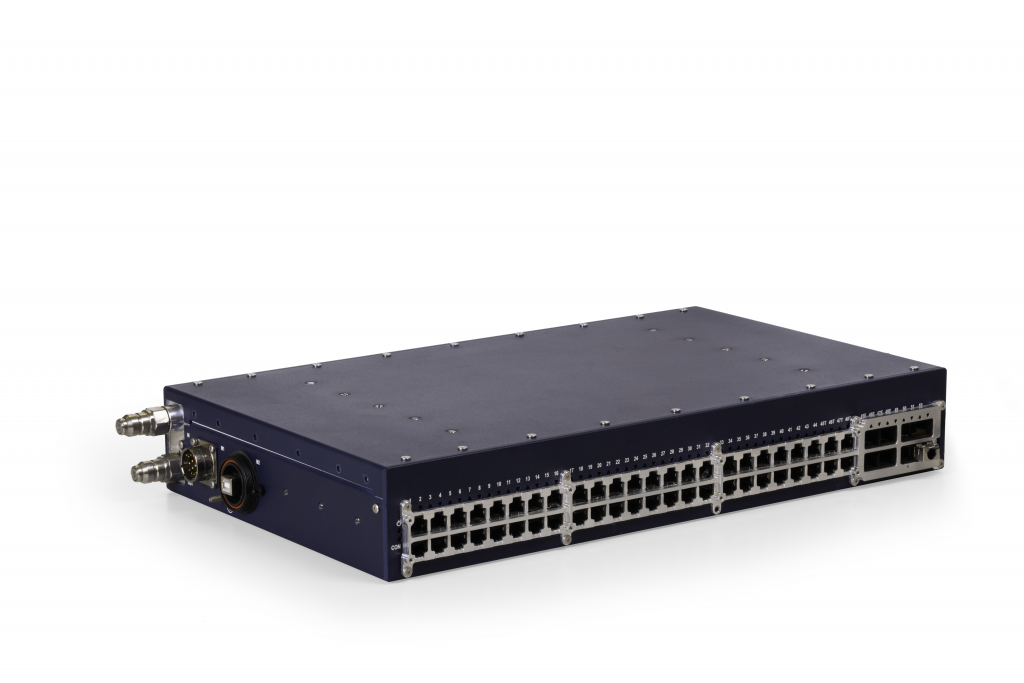
Eurotech
The DynaNET 10G-01 is a high port density switch for Automotive and rugged applications, where exteme levels of performance, reliability and compactness are required
linus type switch
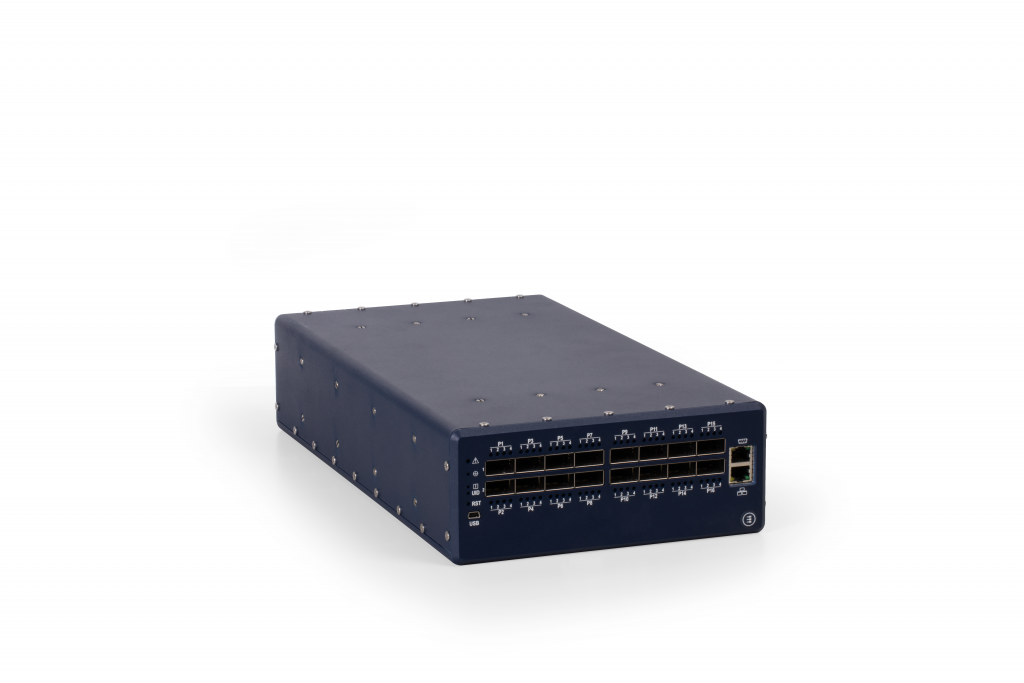
Eurotech
The DynaNET 100G-01 is a high performance switch for Automotive and rugged applications, where exteme levels of performance, reliability and compactness are required
plain siren
lean palm
https://www.eurotech.com/products/dynanet-100g-01/
Ive seen something liket his in use before
The switches were inside a massive vacuum chamber being used for testing something for science-y reasons
There is no way to disperse heat normally
plain siren
I just bought a LRN Dip service only to find out Telnyx has it for free
 ionic grove
huh, I haven't seen that way of typing out an IP address, yet
is that notation universal?
plain siren
ionic grove
huh, I haven't seen that way of typing out an IP address, yet
Thats actually not an IP Address
That would be a phone number in dot notation
-x actually takes it and reverses it too
ionic grove
ohhh
silent flax
https://x.com/DhravyaShah/status/1854642313840279569
I guess this is first time he is met with the issue of speed of light in fiber cable vs distance
people don't talk about the latency issues with Hetzner enough.
For just a PING, IT TAKES LIKE 100-200ms
i think that's just crazy, but maybe also because i'm in US and their servers are in Germany
 Twitter
·
Twitter
·
 frosty stone
Human discovers how the internet works
topaz patrol
silent flax
https://x.com/DhravyaShah/status/1854642313840279569
I guess this is first time...

The best part is apparently he used to work at Cloudflare
silent flax
topaz patrol
The best part is apparently he used to work at Cloudflare
maybe as a frontend developer /s
topaz patrol
silent flax
maybe as a frontend developer /s
:p
 silent flax
like yeah, if you want fast response in multiple regions, you need to set up distributed backends, database synchronization, have multiple servers (one per region) etc... But that is not as simple as "deploy single DB server, single backend server, single frontend server on one VPS anda call it a day"
frosty stone
topaz patrol
The best part is apparently he used to work at Cloudflare
Probably tier one support, also ex for a reason 
keen urchin
topaz patrol
The best part is apparently he used to work at Cloudflare
Lol
Idiots gonna id
Fucking developers
 celest salmon
Guys can you explain.In the Diffie-Helman protocol.Are all actions (combing keys and creating them)made by communication facility itself? And what can person do if he knows certain data, during that process? Is data encrypted and can be decrypted only with keys owned by persons,when data reach user?
thick minnow
Installed the router and now my internet is 50% faster than default, sometimes 3x faster.
 silk trench
the TPlink utility says my powerline adapters are transmitting at 208 megabits/sec, but when i run a speedtest on my PC it only shows 40. what could be eating bandwidth?
even steam downloads are capped at 40 megabits. i made sure my ethernet chip is locked at 2.5 gbps duplex, i kinda ran out of ideas.
ah nevermind, i forgot about powerline rate conversion.
celest salmon
celest salmon
Guys can you explain.In the **Diffie-Helman** protocol.Are all actions (combing ...
Guuuys
silent flax
celest salmon
Guys can you explain.In the **Diffie-Helman** protocol.Are all actions (combing ...
isn't the whole point that both sides have their own private keys and the parameters are used to create a public key based on private key + parameters ? Only person with private key can do anything with the data
the picture on wiki is self-explanatory
 thick minnow
does anyone have a good ref on how to emplement secure websockets for a video calling application?
 solid path
Hey, I have been thinking about getting into tech flipping. Buying broken tech online and fixing it for profit. Does anyone know some good tech to flip and where would you buy and sell? I love tech and want to make some money from it. I only have $200 to invest in to some sort of tech then buy the parts for it. I believe I have all of the tools for it. If you have any advice dm me when possible.
ornate jungle
solid path
Hey, I have been thinking about getting into tech flipping. Buying broken tech o...
Sure. Buy stuff with broken capacitors. Replace the capacitors. Sell the stuff. Profit? Honestly, if it were that easy, everyone would buy broken tech to resell. Your other option is buying pallets of returned items from Amazon or another retailer, then sorting through the pallets for things of value that work. This costs more then $200 though, and you end up with gobs of garbage afterward so...
thick minnow
sudo apt update && sudo apt install -y auditd && sudo systemctl enable auditd && sudo systemctl start auditd && sudo auditctl -w /sbin/insmod -p x -k kernel-modules && sudo auditctl -w /sbin/rmmod -p x -k kernel-modules && sudo auditctl -w /sbin/modprobe -p x -k kernel-modules && sudo auditctl -a always,exit -F arch=b64 -S execve -k syscall-exec && sudo auditctl -a always,exit -F arch=b32 -S execve -k syscall-exec && sudo auditctl -w /etc -p wa -k config-changes && sudo auditctl -w /bin -p wa -k bin-exec && sudo auditctl -w /sbin -p wa -k sbin-exec && sudo auditctl -w /usr -p wa -k usr-changes && sudo auditctl -w /usr/sbin/useradd -p x -k user-modifications && sudo auditctl -w /usr/sbin/userdel -p x -k user-modifications && sudo auditctl -w /usr/sbin/usermod -p x -k user-modifications && sudo auditctl -w /usr/bin/sudo -p x -k sudo-exec && sudo auditctl -w /bin/su -p x -k su-exec && sudo auditctl -w /var/log/boot.log -p wa -k boot-logs && sudo auditctl -w /var/log/shutdown.log -p wa -k shutdown-logs && sudo auditctl -a always,exit -F arch=b64 -S all -k syscalls-all && sudo auditctl -a always,exit -F arch=b32 -S all -k syscalls-all && sudo ausearch -m avc -i && sudo ausearch -k kernel-modules && sudo ausearch -k syscall-exec && sudo ausearch -k config-changes && sudo ausearch -k bin-exec && sudo ausearch -k sbin-exec && sudo ausearch -k usr-changes && sudo ausearch -k user-modifications && sudo ausearch -k sudo-exec && sudo ausearch -k su-exec && sudo ausearch -k boot-logs && sudo ausearch -k shutdown-logs && sudo ausearch -k syscalls-all && sudo systemctl status auditd
There's a oneliner I use to audit debian 12 bookworm
 plain siren
silent flax
the picture on wiki is self-explanatory
plain siren
silent flax
the picture on wiki is self-explanatory
I prefer this picture
 pseudo blade
plain siren
I prefer this picture
pseudo blade
plain siren
I prefer this picture
Hey that's kinda neat as an explanation, might use it
pseudo blade
lean palm
Think I have enough spare APs?
All Meraki? I assume so based on the switch
lean palm
pseudo blade
All Meraki? I assume so based on the switch
Mix of meraki and cisco aironet
lean palm
plain siren
Do you have the licenses to those?
Yup, I got lifetime free licenses through a friend ;)
lean palm
Havent payed for my meraki hardware for 3 years
plain siren
I got a bunch of aironet APs
lean palm
I have some 50 aps from them, 10 switches, and 10 routers (meraki)
lean palm
plain siren
I got a bunch of aironet APs
Which models?
ornate jungle
pseudo blade
For most they'd be near useless
They make great paperweights.
pseudo blade
Sorry, I went paperless years ago
plain siren
lean palm
Which models?
not sure. I took them from a now defunct college
pseudo blade
Some used aironet kit can be pretty sick if you don't care for the latest and greatest
lean palm
plain siren
or ... 12 boxes
By chance…could you get the model numbers
plain siren
Climbing around ripping them off the walls was fun
lean palm
pseudo blade
Some used aironet kit can be pretty sick if you don't care for the latest and gr...
You can get the 4800 ap for $25 on eBay and get mGig, dual 4x4 5ghz radios, and a lot of features when running Mobility Express
Those aps went for like 2 grand new 5 years ago
plain siren
lean palm
By chance…could you get the model numbers
2602I-A-K9
2702I-A-K9
that was the first box on the top
lean palm
plain siren
2602I-A-K9
2702I-A-K9
Gotcha
plain siren
IIRC there is like 4 or 5 models total
lean palm
These days I mostly run the 9100 series aps (wifi 6) with 4800/3802 mixed in when needed
On a 9800 wireless controller
pseudo blade
lean palm
You can get the 4800 ap for $25 on eBay and get mGig, dual 4x4 5ghz radios, and ...
Yeah that's pretty nice
Especially if you've got newish firmware for it
For WPA3 and whatnot
lean palm
pseudo blade
Yeah that's pretty nice
Can build yourself a whole whole hom enterprise cisco wireless network for under 100
Its knda crazy
lean palm
plain siren
IIRC there is like 4 or 5 models total
If you’re interested in selling some of it let me know what models you have in dms
opal pagoda
lean palm
i broke the plastic cover on top of one of my ap-s to have a look at the antenna setup

lap1142n-e-k9
lean palm
I have a wall of disassembled aps
topaz patrol
lean palm
Think I have enough spare APs?
That's a whole lotta junk 😆
lean palm
still usable hardware that I'm saving for an upcoming project
thick minnow

 fickle lily
Hi . Got my fibr connection today . Should it be no disconnection ? like random LOS on modem ?
Was expecting to have random LOS or something since new installed .
 errant sparrow
Can I get some help regarding an IP camera
I'm trying to set one up and I want to activate it
celest salmon
silent flax
isn't the whole point that both sides have their own private keys and the parame...
yeah exactly
I mean that they create No-name key , combing their own private with public key of other person
these 2 No-named keys can decrypt info right?
My question is what 3rd party can do if he own any key,it is obvious. But less obvious the fact how data is encrypted. Because the assymetric cryptography is used in multiple concept I want to know what exactly happens here, I guess whole data (their secret) is ecnrypted?
And I would like the concept where GnuPG is used for
( like the Alice and Bob's concept is definently about messenger or any type of transmission )
silent flax
celest salmon
My question is what 3rd party can do if he own any key,it is obvious. But less o...
that is the whole point, the end result is the secret, not the intermediate keys. And then that secret is used for something, in TlS they use it to generate a symmetric key based on that secret, and because they share a secret, they generate the same key.
like https://thecybersecurityman.com/2018/04/25/https-the-tls-handshake-using-diffie-hellman-ephemeral/

A client securely connects to a web server via the TLS 1.2 transport encryption protocol. This is a process that starts with asymmetric cryptography and ends with symmetric cryptography. As a refre…
 whole needle
How do I improve my signal in my apartment room?
Outside that window is a crummy storage area and a wall with an opening up top (it's fenced with thin bars) separating the apartment and the small road behind the wall. The signal is always very weak no matter what kind of SIM card or modem I try. I resorted to switching the antennas to increase signal, but the difference is very little (the other modem is off and not being used). I'm looking to invest in those big antennas that can be mounted onto the fence bars of the wall's gap above just to improve the signal

Something like this


Idrk if this is the best channel for this. But this is apparently for networking and stuff so yea
mystic latch
whole needle
How do I improve my signal in my apartment room?
Outside that window is a crumm...
There are cell tower base stations that some providers offer, but the simplest would likely be Wi-Fi calling. I'd be surprised if your carrier didn't offer that.
topaz patrol
whole needle
How do I improve my signal in my apartment room?
Outside that window is a crumm...
What region are you in?
Also, take a screenshot of the rsrp, rsrq and snr values which can be found in the advanced tab in the web ui
topaz patrol
mystic latch
There are cell tower base stations that some providers offer, but the simplest w...
That's not what they want.
mystic latch
No? They seem to essentially want to have a better cell signal.
topaz patrol
They are using a 4G modem, and that 4G modem isn't preforming as they expect. A repeater won't do much/any good
mystic latch
Ah very well then.
whole needle
The antennas are mostly to catch the signal emitted from cell towers. They don't project the actual internet, as I realized from a bit of research
 fervent brook
Is it a bad idea to watch YouTube while I'm using crystaldiskmark to try to benchmark a network drive?
Speaking of, would I technically get better access speeds to my NAS if my PC and the NAS were on the same Switch instead of having the PC on the router and the NAS on the Switch that is attached to the router?
 pseudo blade
whole needle
How do I improve my signal in my apartment room?
Outside that window is a crumm...
pseudo blade
whole needle
How do I improve my signal in my apartment room?
Outside that window is a crumm...
Putting the antennas together like that means they won't work together properly - they're supposed to be spaced apart for diversity, all the more crucial if your signal is poor.
whole needle
That's noted. Thanks
Still planning to invest on bigger antennas tho. My signal is always weak regardless of the position on the window
pseudo blade
You can also buy specialised 4G modem routers designed to sit outdoors in the weather so you can just aim it and not lose signal in cables
So you just run ethernet inside
I had customers who tried adding aftermarket antennas on cables like you're talking about and the result simply isn't as good
Depends on your budget a bit
I'm talking something like this on the high end of cost: https://mikrotik.com/product/atl18

An advanced technology level (ATL) LTE solution with wide range MIMO 4x4 antennas for fast and stable connectivity in rural and urban areas. Make the most of your mobile coverage!
Cheaper end: https://mikrotik.com/product/sxt_lte6_2023

Affordable mobile internet connectivity in remote areas.
Lowest price ever – due to the brand new, cost-effective LTE modem.
Not sure what country you're in, but if it's unsuitable to the above there are other similar options
whole needle
I'm in the Philippines
whole needle
pseudo blade
Cheaper end: https://mikrotik.com/product/sxt_lte6_2023
Yeah... this thing costs almost as much as my phone 🙃
 pseudo blade
whole needle
Yeah... this thing costs almost as much as my phone 🙃
pseudo blade
whole needle
Yeah... this thing costs almost as much as my phone 🙃
That's income disparity for you, from a global perspective that's dirt cheap for what it is and there's few options cheaper bar finding them used or fixing/repurposing junk
Guess you'd better separate those antennas and find a spot with better signal
fervent brook
whole needle
Still planning to invest on bigger antennas tho. My signal is always weak regard...
What if i told you antennae lengths are somewhat specific to the signal they're intended to receive... And just buying longer antenna might make the signal worse.
Also consider, I'm stupid and have no idea what I'm talking about
fervent brook
fervent brook
What if i told you antennae lengths are somewhat specific to the signal they're ...
Lol, i like the fact that everyone is thumbs upping the part where i say i have no idea what I'm talking about. Touche.
I thought it was two separate posts
plain siren
But you are not wrong
fervent brook
Touche for me!
plain siren
You take the speed of light 299,792,458 and divide it by the frequency (lets say 433MHz)
299792458/433000000 = 0.6924 = 69.24cm
You want the wavelength/2 for the full size of a dipole antenna which I will use in this example
thats 34.62cm (13.6in) for half (L in the diagram)
and 17.31cm (6.8in) for quarter (E in the diagram)
and that give you a dipole antenna tuned for 433MHz
 topaz patrol
Ah yes, rip out the fibre because your NTD got damaged in a storm and replace it with Starlink, how incredibly smart

Elon meat riders piss me off so much
ornate jungle
topaz patrol
Ah yes, rip out the fibre because your NTD got damaged in a storm and replace it...
Um what? Like, sure, having Starlink (or another viable satellite provider) as a backup makes sense in certain situations, but "ripping out what's broken" to install satellite internet is a silly solution. Perhaps, maybe... fix the broken wired connection first? 🤔
topaz patrol
And people suggesting Starlink when they have no idea where someone is or what better options are available 

Rant over - For now :)
fervent brook
plain siren
You take the speed of light 299,792,458 and divide it by the frequency (lets sa...
Yeah, something like that. I just remember some blurb that came with my SDR USB kit and about the antennae doesn't work so well if you don't properly extend and place it
tribal sequoia
Starlink I now trust about 0.0%
peak cloak
?
fervent brook
tribal sequoia
Starlink I now trust about 0.0%
Because people are stupid?
pseudo blade
Unfortunately in some places there is genuinely no better option
A lot of Australia's like that thanks to the very intentional mess that is the NBN
topaz patrol
pseudo blade
A lot of Australia's like that thanks to the very intentional mess that is the N...
I would argue that less than 4% of premises are better off with Starlink
There are only 84,800 premises connected to the nbn® Sky Muster satellite service, not a whole lot, and performance is probably better than you’d expect
ionic grove
plain siren
You take the speed of light 299,792,458 and divide it by the frequency (lets sa...
I know it's not what you posted this for, but now I'm wondering how fun/painful it would be to just, build your own wifi antenna, mostly for learning purposes of course
Running the calculations through wolframalpha gives me almost 3cm at 5GHz and 6.25cm at 2.4GHz, which as someone who has basically no idea what they're talking about, you could get wire that length from a paperclip or a staple, surely? Honestly, the more I think about it this question is more about amateur radio than it is about networking lol
plain siren
ionic grove
I know it's not what you posted this for, but now I'm wondering how fun/painful ...
yes 6.25cm for the full antenna for the 2.4GHz
topaz patrol
topaz patrol
There are only 84,800 premises connected to the nbn® Sky Muster satellite servic...
Of the ~742,800 premises able to connect to the nbn® Fixed Wireless access network, ~668,500 will be able to achieve peak downstream wholesale speeds of 100Mbps by the end of this year, and ~580,000 will achieve peak downstream wholesale speeds between 250 and 400Mbps
plain siren
there is an adjustment factor which is the diameter of your conductor
but we are going to ignore that
topaz patrol
topaz patrol
Of the ~742,800 premises able to connect to the nbn® Fixed Wireless access netwo...
And that 400Mbps number is quite conservative, I've seen 600Mbps+ with the new V4 WNTD
plain siren
ionic grove
I know it's not what you posted this for, but now I'm wondering how fun/painful ...
break apart a wifi antenna if you have one
measure it
ionic grove
plain siren
break apart a wifi antenna if you have one
well, I have one but, I am kinda using it lol
peak cloak
Starlink early mover advantage is crazy
ionic grove
more seriously there probably is an extra one lying around here somewhere
peak cloak
Got DoD contracts worth billions
topaz patrol
topaz patrol
There are only 84,800 premises connected to the nbn® Sky Muster satellite servic...
Only about ~800 premises have disconnected their nbn Sky Muster service in the last 3 months, too. (Quite a few of these were likely just switched to the Fixed Wireless network after a TQSR)
I think lots of the Starlink uptake is from premises previously on ADSL and NGWL, where it actually makes sense imo.
peak cloak
Transformed aviation and marine internet
pseudo blade
topaz patrol
There are only 84,800 premises connected to the nbn® Sky Muster satellite servic...
It's not just Sky Muster, FTTN performance and reliability is dreadful
Plus with FTTN there's no recourse or upgrade path if you need faster speeds, and this region has lots of "25mbps is all you're getting" households
topaz patrol
pseudo blade
It's not just Sky Muster, FTTN performance and reliability is dreadful
There will be less than one million FTTN premises by the end of 2025
pseudo blade
Or Fixed Wireless
topaz patrol
pseudo blade
Or Fixed Wireless
Let me do a speed test for you :)
pseudo blade
topaz patrol
There will be less than one million FTTN premises by the end of 2025
I'd dare say it's still a lot of houses
A lot of landmass
topaz patrol
It is, but it is a remarkable improvement
And N2P upgrades are super streamlined now
pseudo blade
Not enough to invalidate Starlink's value proposition
topaz patrol
topaz patrol
Let me do a speed test for you :)
 pseudo blade
lol you're not getting that in this service area (and the upload is still just punitive)
topaz patrol
topaz patrol
And N2P upgrades are super streamlined now
Most techs are knocking out 2 or 3 a day, whereas just a couple months ago most N2P upgrades required multiple truckrolls
topaz patrol
pseudo blade
lol you're not getting that in this service area (and the upload is still just ...
It's FW Superfast, pretty darn impressive if you ask me :)
~6km LOS
This is a premises on a different tower, with the V3 WNTD
 topaz patrol
Checked for what?
pseudo blade
Available service speeds
pseudo blade
FW
topaz patrol
What version WNTD?
pseudo blade
FTTN hell no I get 50/20 and only barely
topaz patrol
Or LOCID?
pseudo blade
I'm not that friendly with you yet, good sir
pseudo blade
Probably never seen an upgrade
topaz patrol
If it's a V2 measured speeds wouldn't be available
pseudo blade
But offering a max of 100mbps plans with speed estimates of 50mbps
topaz patrol
What RSP are you looking at?
pseudo blade
I picked ABB to check that
topaz patrol
Ah. They do offer HSFW now
pseudo blade
It is a WNTD v2
topaz patrol
Yeah that's the problem :)
topaz patrol
All AVCs with a V2 are eligible for an upgrade to a V4 WNTD, it's just a ticket away
pseudo blade
It covers a lot of ground that really should have been FTTN/P in the first place
topaz patrol
pseudo blade
The tower's also heavily subscribed
Very few towers have congested backhaul nowadays, the problem is more likely the WNTD
topaz patrol
Same premises, directly on WNTD

I don't know what the fuck they're doing here with their equipment - Crazy bufferbloat or something
 chrome oak
Hello! I am looking for some mini-PC to be used as router, some i5 with dual SFP+ slots and one RJ45 ethernet. Somebody saw that for decent price? I need 4 of these..
ideally with dimensions of some SFF Dell/HP (those with mobile/laptop CPUs)
topaz patrol
chrome oak
Hello! I am looking for some mini-PC to be used as router, some i5 with dual SFP...
Do you really need to power of a current gen i5? For a home router?
chrome oak
yeah
topaz patrol
Go on…
chrome oak
it's not going to be used as home router. kinda test environment with virtualization + opnsense
should be able to keep up with 10gbps links, IPSec tunnels...
I'v asked this way, because I know there's a lot of small PC's with different configurations, etc..
Minisforum MS-01 is close to what I want, but it's not available here 😦
topaz patrol
God that sounds like a nightmare 😆
chrome oak
small hell, yes 😄
topaz patrol
chrome oak
small hell, yes 😄
chrome oak
that looks almost.. except price for no-name brand which I somewhat don't trust after all those weird devices they sell.. but it's close. Love that 8x2.5gbps 🙂
pseudo blade
Topton's are well known in the StH community
topaz patrol
Topton is not much less of a brand than Minisforum
pseudo blade
If you're uncertain, go look at their benchmarks for the variants on the StH website or Youtube
Not all are great but they're mostly sensible
chrome oak
hmm okay, I will check
plain siren
chrome oak
Minisforum MS-01 is close to what I want, but it's not available here 😦
awh thats cute

its got oculink
holy shit
 chrome oak
that's "overcuted" 😄

 topaz patrol
That'd be neat for digital signage
plain siren
thats what it looks like its for
topaz patrol
Pity it's not a male HDMI port
whole needle
whole needle
Something like this
I'm going for this due to positive reviews


 pseudo blade
topaz patrol
Pity it's not a male HDMI port
pseudo blade
topaz patrol
Pity it's not a male HDMI port
Bit big and it'd risk breaking off. Better to use a cable and mount this off the back of the display

 plain siren
the USB C supports Alt DP
id rather use that if possible
but honestly im sure its quite heavy and would bend the hdmi plug if you tried that
whole needle
plain siren
Yes
 rocky badge
@waxen scroll Apartment core switch be pushing some data around (month timeframe)
 tribal sequoia
Solid. This is a core switch at an apartment complex?
Avg 1 gigabit for constant for 1 month and a peak of 18.6 for ingress +egress hehe
ionic grove
nearly 2x as much out as in is crazy, if that's equivalent to up and down, respectively
opal pagoda
ionic grove
nearly 2x as much out as in is crazy, if that's equivalent to up and down, respe...
If that is aggregate from customer facing ports then stats are reversed
clear igloo
tribal sequoia
Solid. This is a core switch at an apartment complex?
It's his core switch in his apartment, not the complex, lol
He's crazy 🤣
tribal sequoia
lol that's a silly amount of traffic
plain siren
AWS is on crack if they think this pricing is actually competitive
 topaz patrol
plain siren
AWS is on crack if they think this pricing is actually competitive
topaz patrol
plain siren
AWS is on crack if they think this pricing is actually competitive
Great context :p
plain siren
topaz patrol
Great context :p
Oops I forgot to hit enter
topaz patrol
lmao
plain siren
Its the cost per minute outbound for AWS's Chime SDK service
Heres a proper carrier for comparison

$0.00095/min```thats 505% more
One of the higher rated zones is this

$0.0228/min Which is costly
but thats rare to see
And odd considering one of their upstream carriers has a switch in there....

oh shit this was installed last month thats why

and thats why high cost zones usually dont stick around long with good carriers
topaz patrol
Well duh
Of course AWS is going to be horribly priced for something like that
Also what bullshit to have different rates for so many different zones
plain siren
everyone has their hands in the pie
topaz patrol
plain siren
```$0.0228/min``` Which is costly
Wait until you see what some people are paying here
lol
 vast saddle
Reddit
Explore this post and more from the FiberOptics community
You could literally have exposed glass and it would still work lmao
latent cliff
TP-Link Archer AX12 AX1500 Wi-Fi 6 router is this router good just for gaming?
lean palm
lean palm
lightning proof
/j
 cerulean pulsar
Anyone familiar with Global Protect VPNs? One of my users has an interesting use case where he's unable to connect to the VPN IF he attempts to connect through a device that he's RDP'd into. So assume he has a desktop and a laptop. He RDPs from the desktop to the laptop which was the VPN connect software installed. The auth works but then he can't fully connect. However, if he just tries it from the desktop it works fine. Could there be some sort of app-related block on VPN connections?
plain siren
vast saddle
You could literally have exposed glass and it would still work lmao
Once the glass actually gets fully exposed though, itll stop working. If you take the black shield off a pedestal you will notice that internet will drop sometimes. Thats because the light from the sun interferes
The same will happen here
vast saddle
Ohhh
plain siren
the corrosion is taking hold here by the looks of it, my guess is actual damage will occur that will break it before its exposure to light
umbral meadow
If something needs poe++ can you put in poe+++ and it'll lower itself to wutd needed?
Cus ubiquitis coming out with a new high end switch which I'm hoping i can just use instead of pro max


That and if a thing needs 2.5gbe poe++ if i connect one of the 10gb poe+++ will it lower itself to 2.5gbe (like other rj45 ports) aa well as lower itself to only send poe++ instead of poe+++
pseudo blade
umbral meadow
If something needs poe++ can you put in poe+++ and it'll lower itself to wutd ne...
PoE+++ seems to be some ubnt marketing thing for 90w 802.bt PoE AKA PoE++
So yeah it's fine
tribal sequoia
umbral meadow
If something needs poe++ can you put in poe+++ and it'll lower itself to wutd ne...
The entire premise of the Poe standards and device class detection is based on this
So yes.
plain siren
pseudo blade
PoE+++ seems to be some ubnt marketing thing for 90w 802.bt PoE AKA PoE++
So ye...
"Hi-PoE"
802.3bt type 4
 plain siren
umbral meadow
That and if a thing needs 2.5gbe poe++ if i connect one of the 10gb poe+++ will ...
plain siren
umbral meadow
That and if a thing needs 2.5gbe poe++ if i connect one of the 10gb poe+++ will ...
Actually its gonna depend if the switch supports 2.5G negotiation
Some devices will only support 1/2.5/10, some will only support 1/5/10
2.5G is actually 10G operating at Cat5e Bandwidth (100MHz)
10G needs 400Mhz
so 2.5G is running at 1/4 the frequency of 10G resulting in 1/4 of 10G
5G uses 200Mhz. Sometimes the chips cant use frequency splitters in that granular of a matter. They will use internal counters
 pearl locust
I purchased a netgear gs308e managed switch not that long ago and want to set up 2 vlans, however, I'm not able to get the webui to come up, and it is currently acting as an unmanaged switch. Note I am at college, and we do not have any private ips, only public, so trying to navigate to a local ip won't work
Any ideas would be appreciated
lunar spade
lunar spade
My house has Cat 5e everywhere. My gigabit network switch says my room should be...
It turns out my cable was plugged directly into the router instead of the network switch. I did some tests and all 8 wires are good between my room and the basement. I was able to get a gigabit network connection when I plugged my ethernet cable into the network switch
would the speed drop be caused by a cable partially falling out then? Also, would you recommend directly plugging my ethernet cable into the router, or connecting it to the network switch
peak cloak
pearl locust
I purchased a netgear gs308e managed switch not that long ago and want to set up...
this is confusing, how are you planning on setup VLANs if it's just connected to another uni switch
pearl locust
peak cloak
this is confusing, how are you planning on setup VLANs if it's just connected to...
I have an nfs share on another machine I want to access from my pc
peak cloak
pearl locust
I have an nfs share on another machine I want to access from my pc
draw a diagram, I'm still not understanding what you are trying to do or how
just connecting a switch with VLANs to a uni network won't work
pearl locust
peak cloak
draw a diagram, I'm still not understanding what you are trying to do or how
Basically just want to access the nfs share from both my pc and laptop
 peak cloak
pearl locust
Basically just want to access the nfs share from both my pc and laptop
peak cloak
pearl locust
Basically just want to access the nfs share from both my pc and laptop
assuming your uni doens't have restrictions like 1 device per port, this would work with a dumb unmanaged switch
pearl locust
There's no restrictions
Currently the switch just hands all devices my same public ip, but does not allow me to access my share
peak cloak
all VLANs are tags onto packets telling what vlan a packet is part of. And a switch can untag or tag packets. Usually a basic setup would look like router -> switch, with a trunk port in. When people refer to VLANs they usually mean subnets + VLAN combined to create multiple networks
peak cloak
pearl locust
Currently the switch just hands all devices my same public ip, but does not allo...
are you sure it's the same IP, that wouldn't make sense
pearl locust
Yeah, I'm sure
peak cloak
pearl locust
There's no restrictions
if it's true somehow, then yes there are restrictions
you would need a router in front of the switch to NAT it so it appears to the uni network that there's only one device connected
pearl locust
peak cloak
if it's true somehow, then yes there are restrictions
Still curious how all of my devices can have an internet connection simultaneously then
peak cloak
pearl locust
Still curious how all of my devices can have an internet connection simultaneous...
same, can you show ipconfig /all for the PC and Laptop
you can dm if you want
pearl locust
Yeah. I have class for an hour (starts in 20m), and I'm not there at the moment. I'll send a screenshot afterwards
peak cloak
pearl locust
Yeah. I have class for an hour (starts in 20m), and I'm not there at the moment....
how were you checking that the IPs were the same?
pearl locust
ip a and curl ifconfig.me both always returned the same ip for both
peak cloak
interesting
pearl locust
peak cloak
interesting
I just checked, and today it started returning different public ipv4 addresses
Before it wasn't though
thick minnow
peak cloak
same, can you show `ipconfig /all` for the PC and Laptop
shows same results if ifconfig is broken
peak cloak
thick minnow
shows same results if ifconfig is broken
no it doesn't
silk trench
i love the GLInet beryl so fucking much
i received it yesterday and my original plan was to have it route ethernet to my pc through powerline and then have it create a localized 5 gzh wifi for my vr headset to do good wireless VR
what i DIDN'T know is that this sucker can do load balancing multi-WAN
so because i knew i was paying for more than the measely 60 mbps the powerline connection could deliver i connected the router to the main wifi and it TRIPLED my download speed
 inner cliff
yea, I use the beryl as a travel router and it's really nice. If I have to pay for wifi I book with my phone, set the beryl to copy the phones mac and can use every device with my own wifi, also the build in adguard and vpn is really nice for traveling. set adguard to doh server and if sites aren't reachable (more comman than I tought) just activate the vpn.
But why do you use powerline? while it's "ok" it's speed wise one of the worst options. Would be better to get a decent wifi7 router for your internet connection and an other at your pc (like with the beryl)
 fleet field
What does this button at the bottom do?
 topaz patrol
fleet field
What does this button at the bottom do?
topaz patrol
fleet field
What does this button at the bottom do?

Wi-Fi Protected Setup (WPS), originally Wi-Fi Simple Config, is a network security standard to create a secure wireless home network.
Created by Cisco and introduced in 2006, the purpose of the protocol is to allow home users who know little of wireless security and may be intimidated by the available security options to set up Wi-Fi Protected A...
 teal forum
Possibly dumb question: moved into a new apartment today, our PC’s and pretty much everything else tech are going in the basement. There’s a coax down there and another in the living room, and our PC’s need to be on Ethernet
So, modem upstairs: I have to run and cable manage two absurdly long Ethernet lines.
Or
Modem downstairs: the WiFi is terrible in the rest of the apartment. What do?
peak cloak
teal forum
So, modem upstairs: I have to run and cable manage two absurdly long Ethernet li...
modem and router downstairs, run ethernet upstairs and put an access point
that's what I do
except most PCs are 2nd floor so I have ethernet runs to there
teal forum
peak cloak
modem and router downstairs, run ethernet upstairs and put an access point
We’ve got one of those two in one router/modems. Is that going to make much of a difference?
Oh never mind, I flipped what you said in my head.
peak cloak
teal forum
We’ve got one of those two in one router/modems. Is that going to make much of a...
for this, no, not really
I like the omada access points if you need some reccomendations on what to get
teal forum
Yes please! Everywhere I’ve lived so far has been much smaller and much easier to network. This is all new to me.
topaz patrol
peak cloak
modem and router downstairs, run ethernet upstairs and put an access point
Some APs even have a little switch in them
peak cloak
yeah the omada wall mounted ones do, but their wifi range is smaller because of the antennae arrangement
meant for things hotel rooms
topaz patrol
peak cloak
yeah the omada wall mounted ones do, but their wifi range is smaller because of ...
I was thinking of APs like the EAP650 Desktop
teal forum
The AP in the living room would really only need to feed our TV and maybe a laptop every once in a while, so I’m not too worried about range there.
peak cloak
topaz patrol
I was thinking of APs like the EAP650 Desktop
interesting I haven't seen that before
shows it's new
topaz patrol
topaz patrol
I was thinking of APs like the EAP650 Desktop
Reyee RG-EG105GW in AP mode is great for lower budget installs
peak cloak
teal forum
The AP in the living room would really only need to feed our TV and maybe a lapt...

EAP650-Desktop is an AX3000 Desktop Wi-Fi 6 AP. One fiber to carry wired, wireless, voice, VoIP, data, and HD video services. Supporting PPSK, it's ideal for for retailers, offices, and hotels.
don't know if it's even sold yet
topaz patrol
peak cloak
https://www.tp-link.com/my/business-networking/omada-wifi-desktop/eap650-desktop...
And the built in ATA would be handy for some too
There's also this little guy, not for home, but similar products exist
https://www.arubainstanton.com/products/access-points/access-point-11d/
teal forum
So, just making sure I have this right: Modem/router in the basement connected to coax, one long Ethernet run, directly off the modem, to the AP in the living room, and all’s well?
plain siren
peak cloak
https://www.tp-link.com/my/business-networking/omada-wifi-desktop/eap650-desktop...
I love me Omada stuff

Ultra-Fast Connectivity with WiFi 7—BE5000 Wall Plate WiFi 7 Access Point. 1× 2.5G PoE input port and 1× 2.5G pass-through port, along with two Gigabit RJ45 downlink ports. Ideal for the use in hotel rooms, hospital, offices, dormitories, etc.
peak cloak
teal forum
So, just making sure I have this right: Modem/router in the basement connected t...
yeah
gets you good wifi on 1st floor
teal forum
peak cloak
yeah
Hell yeah. Thanks for the help!
silk trench
inner cliff
But why do you use powerline? while it's "ok" it's speed wise one of the worst o...
i cannot change my router and i wanted as stable a connection as humanly possible
inner cliff
silk trench
i cannot change my router and i wanted as stable a connection as humanly possibl...
while you can't change your router, you can still connect a different router to your router
silk trench
i also bought the powerline way before the beryl as a last ditch attempt at not having to buy the beryl, since i hoped my motherboard's wifi chip could hotspot for my VR headset but that turned out to not be possible since the AX2000 has some odd bug that intel never resolved where it will not switch to 80 mhz bandwidth even though it supports 802 ax
silk trench
topaz patrol
Powerline won't give you "as stable a connection as humanly possible"
i mean as much as possible without having to drill ethernet through my walls, which i cannot do
inner cliff
a good wifi mesh network would be better than powerline
silk trench
yeah a good router could have done better but my pc is behind three walls from the coax wall and i didn't know how it would have fared
since i've had many headaches setting up meshes in my mom's house which has extremely thick armored concrete walls
inner cliff
you could try something like the TP-Link Deco XE75 with 3 devices
or do the same as me and get a drill, dill a hole close to the bottom of the wall just big enough for a network cable and crimp the other end yourself and if you move out just put some plaster in that hole and a bit paint on the plaster 😄
topaz patrol
inner cliff
or do the same as me and get a drill, dill a hole close to the bottom of the wal...
Probably not an option for them 😉
 silk trench
topaz patrol
Probably not an option for them 😉
silk trench
topaz patrol
Probably not an option for them 😉
i mean it's not an option for me right now because my landlord would use my skin to repair the furniture if i started drilling the walls.
topaz patrol
Yeah
inner cliff
topaz patrol
Probably not an option for them 😉
i also have steel reinforced walls, it's possible, it just takes a bit of luck, it's not solid steel
topaz patrol
It's not an option for the majority of people
silk trench
ironically my mom's house has decent ethernet routing but it's in the middle of nowhere so she only gets 50 megabits
topaz patrol
inner cliff
i also have steel reinforced walls, it's possible, it just takes a bit of luck, ...
They don't own the house :)
inner cliff
i also don't own the house
silk trench
eh i'm happy with this solution tbh, it does what i want. maybe i'll try running wireless repeater only and see what speed i get.
clear igloo
silk trench
eh i'm happy with this solution tbh, it does what i want. maybe i'll try running...
If you have coax (I think you mentioned that) you could do MoCA
but honestly if the setup works now I wouldn't touch a repeater, it can only repeat the signal it gets so crap repeats crap 🙂
silk trench
clear igloo
If you have coax (I think you mentioned that) you could do MoCA
i could if i had coax coing anywhere else in the house
clear igloo
Ah gotcha, yah that makes it difficult
silk trench
i mean it might do that, i don't know because it wasn't renovated very well and even the cable that goes to the cabinet was buried inside the walls
ISP had to come drill it out and properly install it when i moved in
clear igloo
ooof, yah that definitely doesn't give hope for it being reachable inside the walls, lol
 worldly nacelle
Anyone have any experience with TP link routers? Lookin at getting one for wireless VR with my computer and there are two on sale right now, but I don't know which one is better to be honest. It's like they have tiiiiny differences but different product names.
AX23 vs AX10
https://www.tp-link.com/cz/compare/?typeId=9&productIds=50001%2C41794%2C35180



Like the differences seem so small that i'm considering the AX23 simply just cause the shipping and delivery is more convenient, but idk if i'm missing something here
 cloud ether
Hi guys I recently got some moca adapters and I am struggling getting the full gigabit speeds through them, sometimes they work perfectly in both directions but seemingly randomly the speeds drop. This is what iperf looks like when the speeds drop. The "server: for iperf is a raspberry pi 5

 somber island
hey guys! does anyone know of a decent 2.5 gb input and 4 1 gb output ethernet switch? My bugdet is around 30 USD. I have found (not bought) a good 5 1gb port switch, so does having a faster input actually make a difference in terms of speed/latency when 3-4 devices are connected?
clear igloo
If the devices aren't going out to the internet then no
A 5 port gigabit switch can do gigabit between the devices (10gbit backplane) but if you need all 3 or 4 to hig the internet at gigabit each then you'll want a faster uplink
peak cloak
somber island
hey guys! does anyone know of a decent 2.5 gb input and 4 1 gb output ethernet s...
why 2.5 gig input, do you have a 2.5 gig internet connection
somber island
peak cloak
why 2.5 gig input, do you have a 2.5 gig internet connection
yeah, just dont wanna spend too much on a 2.5gb switch
somber island
clear igloo
If the devices aren't going out to the internet then no
A 5 port gigabit switch ...
so by uplink, you mean connection to modem? I have Fiber to the Home
clear igloo
somber island
so by uplink, you mean connection to modem? I have Fiber to the Home
So basically each port has 1gigabit upload and 1gigabit download
So long as you don't want more than a total of 1gig up/down split across X hosts then you're fine
But host talking to host wouldn't hit the uplink since they're on the same network so it doesn't use the uplink for that communication
somber island
clear igloo
So basically each port has 1gigabit upload and 1gigabit download
So long as you ...
Got it, thanks
clear igloo
somber island
Got it, thanks
If you want to play with a bit more speed then there is this for $43
https://www.amazon.com/gp/product/B0CKR5CMWV

keepLiNK 6-Port 2.5G Switch Unmanaged, 4 x 2.5GBASE-T Ports & 2 x 10GBASE-T SFP Slots, 60Gbps Switching Capacity, Plug & Play/Wall Mountable/Fanless Metal, Compatible with 1000Mbps Devices
or $50 for this one:
https://www.amazon.com/gp/product/B0C53CB5CM

NICGIGA 5 Port 2.5G Ethernet Switch with 10G SFP Uplink, Unmanaged 2.5Gb Network Switch, Plug & Play, Desktop/Wall-Mount, Fanless Metal Design.
somber island
Thank yall!
plain siren
clear igloo
or $50 for this one:
https://www.amazon.com/gp/product/B0C53CB5CM
Every time I see this companies name I double take
pseudo blade
It is a truly unfortunate name
plain siren
If you.. "misspell" it in google its like "Found nothing" but in duck duck go, it knows exactly what you are looking for lol