#networking
1 messages · Page 69 of 1
 opal pagoda
 lost lily
how do i even clean this
lost lily
how do i even clean this
dunk it into bucket of 60-70% alcohol
opal pagoda
you can dunk anything except mechanical stuff (you still can but you have to relube it later)
proper way would be ultrasonic cleaner filled with proper electronic cleaning solution and then dunk into alcohol for quick drying
lost lily
cleaned it up a tiny bit, let's turn it on
opal pagoda
lost lily
cleaned it up a tiny bit, let's turn it on
what even is that?
lost lily
.
brocade icx 6450-48P
hopefully house doesn't go on fire
i do have a fire extinguisher
CO2
opal pagoda
put it in dishwasher lmao
just like keyboards

Follow der8auer:
https://www.instagram.com/der8auer/
Support me on patreon:
https://www.patreon.com/der8auer
lost lily
can i skip flow control pins
 sharp sigil
Question on new router I'm looking at:
I need it to support:
- 2.5 Gbps WAN as my Internet connection exceeds 1 Gbps.
- 2.5+ Gbps LAN so I can make use of this connection.
- I also have a hard drive dock connected to my current router via USB that i'd like to still be accessible on my network.
Can this router do all 3?

The ASUS ROG Rapture GT-AX11000 Pro is designed for gamers who want to keep multiple devices connected and still get incredible gaming performance. Enjoy up to eight simultaneous WiFi streams for more video streaming, gaming and browsing for everyone in your home. Disclaimer: Actual data throughp...
 worn gate
lost lily
looks like i'll need a console cable
worn gate
lost lily
looks like i'll need a console cable
why dont you just buy your own cable, its like $10
 karmic marten
sharp sigil
Question on new router I'm looking at:
https://a.co/d/au1HY8R
I need it to su...
karmic marten
sharp sigil
Question on new router I'm looking at:
https://a.co/d/au1HY8R
I need it to su...
Do you already have an accesspoint / is your current router AX / WIFI 6 capable?
btw the answer to you question is yes
sharp sigil
Current router is an old Linksys WRT3200ACM. Modem is a Comcast XB7
current router cant do wifi 6 or AX
karmic marten
If you want the simple, non tinkery route, go with the router you sent.
If you would like to learn and thinker and able to eat a bit more cost, go with a mikrotik RB5009 + Unifi 7 Pro
sharp sigil
Does it support custom firmware like DD-WRT or something
karmic marten
And if you want the extremely tinkery route, build your own router and buy a switch + a Unifi 7 pro
karmic marten
sharp sigil
Does it support custom firmware like DD-WRT or something
The asus router? I am sure it does
Openwrt probably
sharp sigil
nod thanks 😄
opal pagoda
karmic marten
If you want the simple, non tinkery route, go with the router you sent.
If you w...
+switch (2x 10g + 4 2.5g alexpress one is 30$) + poe injector + 10g dac cable
karmic marten
opal pagoda
+switch (2x 10g + 4 2.5g alexpress one is 30$) + poe injector + 10g dac cable
Poe injector not needed, switch no needed has he did not mention it, 10g dac isnt needed either.
just a 10g RJ45
well, if poe injector isnt included with the ubi, it is needed, but I think it is.
opal pagoda
karmic marten
just a 10g RJ45
then a sfp+ to 10g base t which goes for 40-50$
karmic marten
opal pagoda
then a sfp+ to 10g base t which goes for 40-50$
If you buy it new.. ebay its like 10 bucks
lost lily
worn gate
why dont you just buy your own cable, its like $10
well because i want it now and not in 2 days
karmic marten
oh, lena, hey 😄
karmic marten
I got in the ISP's server room haha
opal pagoda
karmic marten
If you buy it new.. ebay its like 10 bucks
please show me so i can buy it
karmic marten
opal pagoda
please show me so i can buy it
just a sec
worn gate
lost lily
well because i want it now and not in 2 days
i mean, fair, but you have usb ends just laying around?
opal pagoda
worn gate
i mean, fair, but you have usb ends just laying around?
serial...
karmic marten
opal pagoda
please show me so i can buy it
where do you live? so I can account for shipping
lost lily
just plug it into the RS232 port on your computer or laptop
opal pagoda
lost lily
why would you need USB it's RS232
is it not cisco pinout?
opal pagoda
karmic marten
where do you live? so I can account for shipping
eu
worn gate
or a serial to usb adapter? i cant name a modern computer ive used that still has rs232
lost lily
opal pagoda
is it not cisco pinout?
i honestly don't know
opal pagoda
karmic marten
ouch, I feel you
but you wont find it for 10$ anywhere in the world
karmic marten
opal pagoda
but you wont find it for 10$ anywhere in the world
oh won't I?
opal pagoda
karmic marten
oh won't I?
1g yes
10g no
karmic marten
meh, well. prices went up. 20$ is more like it
opal pagoda
they never were 10$
opal pagoda
karmic marten
shit, not even 20?? I bought my mikrotik for 15 locally
10g?
karmic marten
yea
opal pagoda
25$ is current going rate on aliexpress
karmic marten

eBay
Features: Experience fast data transmission with our Gigabit Fiber to Ethernet Converters RJ45 SFP Module, essential tool for networking integration.
CHINA FOR THE WIN
opal pagoda
mislabeled
 karmic marten
if you got a mikrotik, its 99% it will work with it
ah, well. better ask seller first haha


china for the lose
lol
opal pagoda
when you see how much genuine cisco ones cost...
karmic marten
yea, but cisco is like the DTAG of transceivers and network equipment
No sane human being uses cisco nowadays
Arista, juniper and mellanox for the win
lost lily
except for the nsa
opal pagoda
karmic marten
No sane human being uses cisco nowadays
i do
and no one pays msrp, we get like 80% off everything
karmic marten
opal pagoda
i do
and no one pays msrp, we get like 80% off everything
who said you are a sane human being? :kek:
lost lily
i'd like a nice router, right now my choice is to use opnsense but yeah idk what to get
opal pagoda
karmic marten
who said you are a sane human being? :kek:
good point
karmic marten
lost lily
i'd like a nice router, right now my choice is to use opnsense but yeah idk what...
lenovo with mellanox connex 3
😉
lost lily
nah i'm getting x520
karmic marten
Well, mikrotik is not sane either for not putting a fricking switch chip into CCR2004...XS
lost lily
connectx-3 is EOL
karmic marten
lost lily
nah i'm getting x520
then a connex 4 10G, trust me, its better, more so if you wanna play with XDP
opal pagoda
i just bought a hpe dl380 g10 and a MSA 2060 that are dedicated for network monitoring
insanity isnt out of the question
lost lily
karmic marten
then a connex 4 10G, trust me, its better, more so if you wanna play with XDP
you mean like the eBPF XDP?
karmic marten
lost lily
you mean like the eBPF XDP?
yes
I dont think you can offload on X520 lol
lost lily
yeah i've tried writing some eBPF components
lost lily
karmic marten
I dont think you can offload on X520 lol
oh you mean running eBPF on the NIC? oh
karmic marten
yes
opal pagoda
karmic marten
then a connex 4 10G, trust me, its better, more so if you wanna play with XDP
arent all connex 4 sfp28/qsfp28
lost lily

GitHub
Hi, do you have any experience on using xdp_fwd at line rate with 64B packets using Intel X520 NICs? I've been struggling for some days (using multiple RX queues) and I'm starting to think ...
karmic marten
opal pagoda
arent all connex 4 sfp28/qsfp28
nah, there is 10g
karmic marten
lost lily
https://github.com/xdp-project/xdp-project/issues/53
thats for xdp_fwd only no?
drops and other stuff will strangle cpu
karmic marten
opal pagoda
arent all connex 4 sfp28/qsfp28

eBay
ETA 3 to 8 busines. 1 X MCX4121A-XCAT 10G.
lost lily
does the x520 support 1588v2
karmic marten
lost lily
does the x520 support 1588v2
no idea
lost lily
the x520 is from 2009 damn
opal pagoda
lost lily
the x520 is from 2009 damn
is it even pcie 3.0?
lost lily
PCIe v2.0 (5.0 GT/s)
karmic marten
lost lily
PCIe v2.0 (5.0 GT/s)
yea, I messed up when ordering the x520-da2 😦
lost lily
X710 is SFP+
karmic marten
We aint rich...
lost lily
E810-XXVDA2 definitely supports 1588v2
i hate that so few nics support 1588v2 nowadays
karmic marten
btw @lost lily
I am surprised that the ISP not only did not tear up the contract, but invited me to their server room / dc and gave me permission to use their lab.
It turns out that my SFP ONT basically executed a layer 1 DoS
My whole flat's building went down because of it
not only the flat, but the full OLT went deaf
lost lily
karmic marten
It turns out that my SFP ONT basically executed a layer 1 DoS
HUH
okay took 1h30m but i crimped my RJ45 plug, time to do RS232 crimes
karmic marten
lost lily
HUH
YEA
They showed me in their lab
we set up 3 onts, all worked showed signals etc
Plugged in my ONT SFP w/o fiber, showed itself and tx rates
then plugged in the fiber, and every device went poof
Jesus, I'm surprised I didn't get sued, not that I GOT INTO THEIR DC...
WTF
lost lily
hopefully it works
 lost lily
turned it into something a bit more permanent

 cobalt thistle
Figured maybe I should ask here if this is normal, but switching from xfinity to a new isp 1gig fiber plan that includes an eero pro 6e, the xfinity modem/router box combo is insanely better wifi speeds everywhere in the home, compared to wifi speeds 10 inches away from the eero pro 6E. Calling the about their isp provided eero pro 6e, they claim getting 180-200mbs over wifi is normal, but with the xfinity joint i get 500-800 everywhere in the home. Is this just a normal thing for eeros? Should i bite the bullet and buy a personal router? Or should I complain and somehow convince them to give me a max 7 instead (apparently only included in their 2 gig and 5 gig plans). I only have the one pro 6e so its not a node/mesh connecting to the wrong router issue.
 tribal sequoia
Gonna deploy this somewhere at some point, their current infrastructure is... an actual joke compared to this

they currently have a mix of 10 year old hp switches, back when they were like... procurves
 tight pecan
cobalt thistle
Figured maybe I should ask here if this is normal, but switching from xfinity to...
tight pecan
cobalt thistle
Figured maybe I should ask here if this is normal, but switching from xfinity to...
You should be able to match the xfinity box with the eero pro 6e
You can try messing with the settings. Maybe it's set to 80MHz channel width and defaults to a static channel that may be congested
 empty flower
https://www.phoronix.com/news/NetworkManager-1.50
Apparently redhat doesn’t like the terminology “master” or “slave” to be used in network manager on Linux. Some might remember Hard drives even used to come with jumpers that were “master” or “slave” to determine the primary boot drive. Seems silly, but you can’t offend people I suppose. 😒

NetworkManager 1.50 released on Wednesday as the newest version of this software commonly used on the Linux desktop for managing wired and wireless network connections.
lost lily
lost lily
turned it into something a bit more permanent
super happy, got them both up and running flawlessly
 opal pagoda
lost lily
super happy, got them both up and running flawlessly
opal pagoda
lost lily
super happy, got them both up and running flawlessly
did you put them in a dishwasher?
lost lily
no, i'll use the alcohol
checked they work and configured them properly
they're really nice
i'll wash them with alcohol and then probably noctua mod them to be dead silent
800W of PoE+ per switch
all for free99
lost lily
yup
a friend's office was changing gear and he called me to go look if i wanted to grab anything, so i did
there was a bunch of very old stuff, like a 2U 12 port 10Mbps switch with 2 10/100Mbps uplinks
they had been decommissioned and were effectively "in the trash", but by asking the IT guy he said just take them
there was also a 2U UPS thingy with external batteries (not included), but it was very heavy and couldn't find anything on it online so i left it there
there were 4 gigabit 48p switches i didn't get because they didn't have any uplinks so useless to me
apparently these brocade icx 6450 have never been updated since 2012
which was... concerning
anyway, great deal, they are very very dirty (a level of dirty never before thought possible by me, when i first saw the inside i thought the PSU had caught on fire or something, it all looked black/melty
super nice 800W of PoE+
i dusted them a bit but they're not clean by any means, I'll have to deep clean them one of these days
yup, on all 48 ports, individually switchable
problem is i don't have a bucket of alcohol yet
anyway having good contacts is really cool
 lethal charm
empty flower
https://www.phoronix.com/news/NetworkManager-1.50
Apparently redhat doesn’t lik...
lethal charm
empty flower
https://www.phoronix.com/news/NetworkManager-1.50
Apparently redhat doesn’t lik...
yeah thats why devs and later github officially changed the master branch to main, even though there wasn't really a "slave" branch, they still didnt like the master branch
opal pagoda
lost lily
anyway, great deal, they are very very dirty (a level of dirty never before thou...
you say they were dirty but consider this 1 year old switch stack
 lost lily
nah this one's dirtier
opal pagoda
lost lily
nah this one's dirtier
yes but imagine if i left it uncleaned for 10+ years like those
 fallow warren
Hi everyone, in work I’m being driven towards networking at the minute, anyone have any resources or ideas on how I can get the basics down I want to try prep as much as possible
 pseudo blade
fallow warren
Hi everyone, in work I’m being driven towards networking at the minute, anyone h...
pseudo blade
fallow warren
Hi everyone, in work I’m being driven towards networking at the minute, anyone h...
Consider GNS3 (free) and perhaps paying for a license for Cisco VIRL so you can get Cisco router images.
Routing: Mikrotik Cloud Hosted Router is free at 1mbps speeds and has a quite competent feature set. Also look at: VyOS
Cisco Packet Tracer is free and quite possibly good enough for you and Cisco Network Academy has some free materials for use with it including a 25 hour basic networking course.
 winged cedar
if i open a specific port by enabling port forwarding on my home network does that potentially comprimise anything? also how does it work exactly
i just read channel desc and realized this is kind of basic should i take it to #tech-chat-1
pseudo blade
winged cedar
if i open a specific port by enabling port forwarding on my home network does th...
Yes
You're exposing whatever service you're forwarding. If it has a security vulnerability it can be attacked by people on the internet.
pseudo blade
That's usually OK as long as it's not a super old version (e.g Log4J vulnerability)
winged cedar
ok so it can only expose minecraft not my pc or the network
i mean no the network itself but everything on it
pseudo blade
Versions 1.7 > 1.17.1 are apparently vulnerable to the Log4J exploit unless specifically mitigated if it helps.
that specific vulnerability risks your entire computer with the same permission Minecraft runs as
So yes it can get at your network and files and whatever
winged cedar
well im on the latest version
pseudo blade
There could be other vulnerabilities but the risk isn't so severe
You're probably fine
But the general rule is never be complacent about anything you're putting on the internet
winged cedar
ok because we have some pretty high profile stuff that cant get exposed
im not risking all that to play mc with friends
pseudo blade
Well in that case you need to look up network isolation and do it properly
i.e setting it up on a server in a DMZ, separate network and access controls, possibly run MC in a restricted VM/container etc.
The amount of effort to put in is proportionate to how much you have to lose
winged cedar
ill put it all in but i have a ~600$ laptop and im not really sure if it can run all that except maybe i can do something with aws?
like s3 or something
pseudo blade
AWS is a safe bet but it'll be a smidge pricy
S3 in particular... well good luck with that lol, Simple Storage Service is named appropriately! It doesn't offer computing by itself, you'd want EC2 if you must use AWS, or just pay for a hosted service as those can be quite affordable
tight pecan
Running it in a docker container might be the easiest way of making it just a bit more secure
You can try signing up for Oracle's free tier on their OCI
pseudo blade
^ not a bad idea at all
tight pecan
It's generally enough for vanilla minecraft
pseudo blade
Why pay when you can make Oracle pay for once
tight pecan
Right? Corps love it when you pay them for shit you dont use
pseudo blade
Do make backups outside of OCI though as they have been known to arbitrarily delete accounts
pseudo blade
pseudo blade
Do make backups outside of OCI though as they have been known to arbitrarily del...
That'd be a good use for S3
tight pecan
OCI free tier and keep your backups on S3 or remote drive
Make a script to automatically pull from backup and set the server up
pseudo blade
Who said onedrive?
tight pecan
Onedrive isnt too bad. You can use rclone to mount it but it isnt that fast
pseudo blade
Onedrive is OK I guess
tight pecan
Gdrive you can generally get 1Gbps afaik
winged cedar
all this sounds extremely complicated and im just not sure if i can do it with what ik
tight pecan
It's a fun project imo
pseudo blade
I got a year of 200GB of OneDrive storage free from Telstra a number of years back and apparently nobody got around to taking it away from me
tight pecan
The start is simple as learning the terminal and copying and pasting commands to get your server going
pseudo blade
Oh wow that was 2016
Longest year ever
tight pecan
Well, it's not simple having to learn what each command does, but people have step by step guides for setting stuff up on OCI
pseudo blade
I'd try the ARM OCI instances due to their huge RAM limits
tight pecan
Yeah ARM is the way
pseudo blade
Not great for a lot of players but tons of RAM (24GB for free?!?)
vs. 1GB free on AMD CPUs
tight pecan
I know a couple folks run mc servers on the arm free instance
 long scarab
i love network equipment lights in the dark <3

 winged cedar
ok, so to sum it all up, OCI free tier, backup on s3/onedrive, where to research? anything else?
tight pecan
winged cedar
ok, so to sum it all up, OCI free tier, backup on s3/onedrive, where to research...
Youtube has tons of guides for setting up mc on oci free tier
pseudo blade
It'll be on Linux
tight pecan
Look into rclone for mounting s3
pseudo blade
So probably the basics of securing a Linux game server
Try to only expose port 25565 and maybe SSH with certificate-based auth only so you can SCP files in
long scarab
128GB RAM per server, and a Cisco Meraki MS220-48-HW for less than $200

 winged cedar
i probably shouldve started with the fact that the og idea was to host my world over the internet
does that change things by a lot
tight pecan
winged cedar
i probably shouldve started with the fact that the og idea was to host my world ...
That's why I gave the idea of using OCI
long scarab
winged cedar
if i open a specific port by enabling port forwarding on my home network does th...
If you aren't comfortable with port forwarding, I usually recommend alternatives like proxies, check out ngrok or playit.gg
tight pecan
So you wouldnt have to do it on your home net
You can also use tailscale or zerotier
winged cedar
it does seem like a lot
winged cedar
is that still fairly complex
tight pecan
No
long scarab
That's VERY easy to set up
pseudo blade
long scarab
If you aren't comfortable with port forwarding, I usually recommend alternatives...
The deal with these services is they don't exempt you from having to secure the server
tight pecan
It has a gui to help you set evwrything up
pseudo blade
tight pecan
You can also use tailscale or zerotier
This is actually a great idea if you don't need all and sundry to play with you, just trusted friends
long scarab
pseudo blade
The deal with these services is they don't exempt you from having to secure the ...
No, you're still going to be vulnerable in some ways but I'm saying it's at least safer than poking holes in the home network
pseudo blade
Not really?
tight pecan
Zerotier is 10/10 if you only need trusted folks to access your stuff
tight pecan
long scarab
No, you're still going to be vulnerable in some ways but I'm saying it's at leas...
All playit does is proxy traffic no?
long scarab
Yeah
pseudo blade
Looks like it just exposes your game server on their ports
winged cedar
you mean the host's?
pseudo blade
As it is agentless for players
tight pecan
Yeah, basically nat traversal with extra steps lol
pseudo blade
It's port forwarding with extra steps but works on a CGNAT
tight pecan
It's useful on cgnat though
winged cedar
ahhh
pseudo blade
So like if your Minecraft server version has a security vulnerability you're still in trouble
tight pecan
Issue rn is that you want to run it on a machine connected to a network with important stuff
pseudo blade
So you still want additional security if as said you run other stuff you value not losing in the event of a breach
tight pecan
So you need to act accordingly and secure whatever is being exposed to the web
pseudo blade
That's why using OCI is helpful
If you don't think the risk is that high, just port-forward it and update the version periodically
long scarab
tight pecan
Issue rn is that you want to run it on a machine connected to a network with imp...
If you can, pleasee set up a firewall and VLAN as access ports, not trunk
pseudo blade
Else... Tailscale or OCI
long scarab
OCI is definitely the safest option though
tight pecan
long scarab
OCI is definitely the safest option though
Which is why I always steer people to that for minecraft lol
It's just less headaches in the future
pseudo blade
If you had the netsec chops for it I'd also suggest running it in a VM/container with appropriate network access controls for guest and host as an alternative...
But probably harder to get perfect and !perfect = risk
winged cedar
no idea what that is unfortunately
pseudo blade
Yep that's expected
winged cedar
i wish i did
long scarab
Play around with VirtualBox, it's essentially a computer running inside of your current one
Virtual machine
winged cedar
but anyway; OCI + S3? its literally just me and very trusted friends
pseudo blade
winged cedar
but anyway; OCI + S3? its literally just me and very trusted friends
Or just use tailscale if it's trusted friends
tight pecan
Tailscale free tier is limited to 3 users
winged cedar
long scarab
Play around with VirtualBox, it's essentially a computer running inside of your ...
ok i was thinking about that for other reasons anyway
pseudo blade
Oh is it that low?
tight pecan
Yep
pseudo blade
Gross
tight pecan
Zerotier would be my goto
pseudo blade
I use Wireguard so I wouldn't know
long scarab
Are you hosting like, a local save file?
winged cedar
oh me?
long scarab
yeah
winged cedar
yes
long scarab
If so, load the Essentials mod, there's a friends system and you can host it without any of this headache
pseudo blade
What do you mean a local save file lol, all save files are local to something
long scarab
pseudo blade
What do you mean a local save file lol, *all* save files are local to something
I didn't know if it was any old world or a server
tight pecan
You need to allow inbound on port 25565 for windows firewall
pseudo blade
winged cedar
side question: for hosting over lan do i create an inbound rule
It will prompt you on the computer itself the first time you try if you're running Windows
You can allow it there
Otherwise you have to go into Windows Firewall and explicitly add it
pseudo blade
winged cedar
should i disable when not in use
Not really a risk on that port but it's good practice I guess. You could also just set the rule to only forward to the specific java executable used by the server
pseudo blade
winged cedar
wdym prompt
Ask you with a box that pops up
pseudo blade
winged cedar
and what computer, host?
Sure
winged cedar
yeah but prompt what
pseudo blade
 long scarab
that yea
pseudo blade
Like this but java/openjdk
winged cedar
wait so when will it prompt that
pseudo blade
First attempt at running the server
And only the first
After that you fend for yourself if you didn't say yes
winged cedar
but this is for hosting my world over lan
winged cedar
hm
pseudo blade
This process is not port forwarding
winged cedar
right
pseudo blade
Just allowing access on Windows Firewall to the application from the network
winged cedar
so when i click what, open to lan?
pseudo blade
Yes but that's not ideal for anything but local, else you'd want to run Minecraft Server
For the firewall step... It's in the screenshot. Allow Access.
Even when running local games I prefer the stability of running the dedicated server even if that uses more RAM
winged cedar
ok
i got that now
back to original question, setting up a server: Tailscale? Zerotier?
or other possiblities
pseudo blade
Zerotier I guess
Up to 25 members free apparently
Bit more of a PITA than port forwarding because everyone needs to run the client to play but nobody you don't grant access can gain access
winged cedar
ok, im not trying to take up all your time or any more than i have, but you guys mentioned a whole lot of services, and im kind of lost
ill go with zerotier if you say it doesnt matter too much but still
pseudo blade
Good plan
winged cedar
alright zerotier it is, thank you so much for the help
pseudo blade
No problem!
 quick schooner
I need some networking help I am not sure what to do or if it is possible I am trying to set up a wireless router in my office. I would like too if possible have my second router to connect to my first router wirelessly and then use the ports in the back of my second router to connect my office computer with ethernet
tight pecan
winged cedar
alright zerotier it is, thank you so much for the help
Zerotier is goated
You just gotta help your friends install the client then you can basically just manage everything else yourself
 crimson raptor
Anyone know what the hell this thing is? I've looked it up but I still don't understand exactly what it is...

 ornate jungle
crimson raptor
Anyone know what the hell this thing is? I've looked it up but I still don't und...
ornate jungle
crimson raptor
Anyone know what the hell this thing is? I've looked it up but I still don't und...
ornate jungle
crimson raptor
Anyone know what the hell this thing is? I've looked it up but I still don't und...
ornate jungle
crimson raptor
Anyone know what the hell this thing is? I've looked it up but I still don't und...

Cisco
A network gateway is a device or node that connects disparate networks by translating communications from one protocol to another.
crimson raptor
Thanks, I'm just now starting to learn about networking stuff. The thing I really didn't get is the whole "firewall" part. I thought firewalls were more or less built into devices for networks. I'm assuming this means you can have a computer plugged into a network that's a dedicated firewall for the network?
(Or I should say, the firewall part is what really confused me. The gateway article was helpful)
pseudo blade
crimson raptor
Thanks, I'm just now starting to learn about networking stuff. The thing I reall...
It's helpful to have firewalls at the network boundaries to control access to the networks so you can guarantee security at different levels - Defence in depth!
When you reach certain levels of scale and bandwidth sometimes it is preferable to have separate appliances. This one's configurable with an Intrusion Prevention System (IPS) which is much more sophisticated than what your other network devices might have
Like instead of just blocking ports or whatever you can detect specific patterns indicative of a hacking attempt
pseudo blade
It's probably also worth saying that this one's modular so you can put different stuff in it based on your needs and all the parts attach to a (comparatively) fast backplane so you can customise it to your requirements
 thick minnow
crimson raptor
Thanks, I'm just now starting to learn about networking stuff. The thing I reall...
thick minnow
crimson raptor
Thanks, I'm just now starting to learn about networking stuff. The thing I reall...
Imagine your a mother and you want to monitor and managed and control EVERYTHING your children do on the internet and keep them safe etc
You can manually allow or block whatever you like
You can prevent people from playing certain online games you can block youtube or netflix
pseudo blade
lol wut
pseudo blade
Yeah no using this for parental controls is like flying your own 747 to work
thick minnow
Your not wrong
pseudo blade
Ok maybe not quite but a Dash 8 at least
thick minnow
Imagine replacing SSL Cert's with your own Certifcate lol
just for parental control
pseudo blade
I think endpoint software (or perhaps... parenting) would be a neater approach
thick minnow
pseudo blade
I think endpoint software (or perhaps... parenting) would be a neater approach
hold on did you suggest actually parenting? How dare you
pseudo blade
Parental controls are for parents who don't have control
thick minnow
Again your not wrong
Would still 10/10 run my own DNS server locally
it's basically a copy of everyone's web history
someone is being dumb and clicking on malware links?
Time for a 3 lecture on cyber security
pseudo blade
thick minnow
Would still 10/10 run my own DNS server locally
It really isn't, especially now with DoH
thick minnow
pseudo blade
It really isn't, especially now with DoH
Will block DoH with my pfsense firewall
DoT is easy to block but while DoH is much harder to completely block
The harder I make it the more unlikely people won't be able to get around it
pseudo blade
Endpoint software and browser extensions
But really the only way to win is blocking internet access entirely
thick minnow
pseudo blade
Endpoint software and browser extensions
Can't stop someone with browser extensions
can install chrome and firefox without admin after all
pseudo blade
endpoint software
thick minnow
endpoint software is useful yes
pseudo blade
If you don't have admin over the device, don't let it on the network
thick minnow
Look Meagus....
My software only works on Windows XP
I don't have admin over them
but they work with my regular user account
lost lily
why does industrial ethernet look so good
 tight pecan
Because it's built to last in extreme environments for a long time
tight pecan
lost lily
why does industrial ethernet look so good
At least for this type of product
Industrial/commercial will also use any ol' consumer grade shit when they can, it's just cheaper
 regal plover
i have to spent couple hundred on a new router and switch bc i got a range extender and when i use the extender i cant use the spetrum app to port forward so i brought a switch and a tp link router
i was using spetrums wifi pods they suck
does any one know what the rental cost is
for the pods and router
i cant look it up i only got one bar yall might get this 10 min later than i send it
im traveling thats why 1 bar
opal pagoda
thick minnow
My software only works on Windows XP
enterprise arhitect review
application denied
regards,
Enterprise arhitect
 safe shuttle
Is it bad to use an Orbi SXR50 router without putting my ISP's modem in bridge mode?
quick schooner
Do all mesh routers have a bridge mode because I can not find it on my new one i got
I got a d-link ax4860 wifi 6 router
thick minnow
opal pagoda
enterprise arhitect review
application denied
regards,
Enterprise arhitect
Due to a VERY limited budget employees may chose to use their own laptops
Please keep this in mind when setting up endpoint protection
I'll going to guilt trip whoever tries handing me their resignation letter
opal pagoda
quick schooner
Do all mesh routers have a bridge mode because I can not find it on my new one i...
Old one needs to be put in bridge mode not new one
opal pagoda
thick minnow
Due to a VERY limited budget employees may chose to use their own laptops
Byod is well defined, device would need at least a intune enrollment
quick schooner
opal pagoda
Old one needs to be put in bridge mode not new one
My old one is the one from my isp and I am looking to have them in two different rooms is that possible
thick minnow
opal pagoda
Byod is well defined, device would need at least a intune enrollment
No no no
Sales team
brings their own devices and does whatever work they need to on our network
Same with marketing
opal pagoda
thick minnow
brings their own devices and does whatever work they need to on our network
Good luck connecting to it when proper 802.1x is in place
thick minnow
opal pagoda
Good luck connecting to it when proper 802.1x is in place
Due to budget constraint please use unmanaged switches
opal pagoda
Due to budget reasons no network will be deployed 😏
thick minnow
opal pagoda
Due to budget reasons no network will be deployed 😏
The executive request the ability to RDP to their desktop
Please that happen EOD
opal pagoda
If business isnt profitable enough for proper security to be implemented i wouldnt work for them
thick minnow
opal pagoda
If business isnt profitable enough for proper security to be implemented i would...
Please stop by my office at 3
HR will be there
opal pagoda
quick schooner
My old one is the one from my isp and I am looking to have them in two different...
So you want to use both isp router (presumably for wifi) and new router?
thick minnow
We aRe like a FAMILY here Martin
quick schooner
opal pagoda
So you want to use both isp router (presumably for wifi) and new router?
Yes if possible I would like too use my new router as like an extender for another room in my house
 topaz patrol
opal pagoda
If business isnt profitable enough for proper security to be implemented i would...
topaz patrol
opal pagoda
If business isnt profitable enough for proper security to be implemented i would...
lol
opal pagoda
quick schooner
Yes if possible I would like too use my new router as like an extender for anoth...
Well only option would be to put new router into ap mode
thick minnow
opal pagoda
If business isnt profitable enough for proper security to be implemented i would...
I need to attack this stance as much as possible
quick schooner
opal pagoda
Well only option would be to put new router into ap mode
How would I do that i didn't see anything for ap mode on this router
topaz patrol
quick schooner
How would I do that i didn't see anything for ap mode on this router
Turn off the DHCP server in Setup > Local Network
quick schooner
topaz patrol
Turn off the DHCP server in Setup > Local Network
Would that still let me use wireless or would it have to be plugged into the other router
opal pagoda
thick minnow
I need to attack this stance as much as possible
*comtacts fellas in dark places for a suprise security assessment
Comes with free off site backup
 buoyant crow
lost lily
why does industrial ethernet look so good
buoyant crow
lost lily
why does industrial ethernet look so good
i want this in my home
 fickle lily
if i have a pi hole and a domain that is online like it works online . would it load the domain online or domain i used in pihole?
 peak cloak
lost lily
why does industrial ethernet look so good
peak cloak
lost lily
why does industrial ethernet look so good
aircraft ethernet is interesting
fickle lily
is there a way to remove this for domain that arent valid ? like using pihole plus nginx proxy manager?

 silent flax
fickle lily
is there a way to remove this for domain that arent valid ? like using pihole pl...
silent flax
fickle lily
is there a way to remove this for domain that arent valid ? like using pihole pl...
make a trusted ssl cert in nginx proxy manager
fickle lily
already did
lost lily
you need to trust the CA on all your devices
pseudo blade
lost lily
why does industrial ethernet look so good
Because crazy expensive
pseudo blade
opal pagoda
If business isnt profitable enough for proper security to be implemented i would...
Yeah you know anyone that cowboy's going to sue you when it inevitably fucks up
Life's too short for contrived bullshit
If you don't have money for basic employee support equipment you do not have money to hire staff and run a business
crimson raptor
pseudo blade
It's helpful to have firewalls at the network boundaries to control access to th...
@thick minnow Thanks for the explanations from you guys. That helps a lot. I barely understand firewalls outside of the very basics. I didn't realize you can have a machine that's dedicated as a firewall on a network. I'm just use to OS's like Windows that have them built in, lmao.
ornate jungle
crimson raptor
<@456226577798135808> Thanks for the explanations from you guys. That helps a lo...
If you're looking for more resources, Cloudflare's learning center is one of my favorite places for all sorts of network +internet stuff. https://www.cloudflare.com/learning/
thick minnow
crimson raptor
<@456226577798135808> Thanks for the explanations from you guys. That helps a lo...
You can't trust the built in firewall to do jack
Take windows 7 for example it is EOL but many enterprise companies still use it
How can they use a EOL OS?
Many layers of security
FIrewall
Endpoint Protection
Vlan's ( someone should shoot for me for mentioning vlan)
Some sort of Anti malware/virus software
etc
thick minnow
fickle lily
is there a way to remove this for domain that arent valid ? like using pihole pl...
I mean you could alternatively just buy a domain
register a real certifcate for it
blah blah
Have better internal websites then most companies
ornate jungle
thick minnow
Have better internal websites then most companies
The number of places I've worked where hundreds of internal tools / websites all have self-signed certificates is far too damn high. Especially now that Let's Encrypt has been free for years.
thick minnow
ornate jungle
The number of places I've worked where hundreds of internal tools / websites all...
Bet your CURRENT workplace
Also has some internal sites with either no cert or a self signed cert
fickle lily
thick minnow
Have better internal websites then most companies
i have one in cloudflare but if i use it with letsencrypt it errors lmao . using pihole for dns btw so no idea probly just misconfiguration or something
thick minnow
fickle lily
i have one in cloudflare but if i use it with letsencrypt it errors lmao . using...
nah apache2 is just a pain syntax wise
fickle lily
welp no idea . pihole, nginx proxy manager . but probly it is something in there .
thick minnow
I used to use pihole which is awesome cuz you can spy on your entire network
But I moved to pfsense
How do I handle DNS? I do not lol DoT let's go
fickle lily
thick minnow
But I moved to pfsense
i will create one if i can get a hands on another pc or server .
thick minnow
dns over tls
fickle lily
been thinking of using proxmox and pfsense
but need to back up all my files to my current server lmao
fickle lily
i dont have enough storage for my pc to back it up
fickle lily
thick minnow
I tried to get pfsense working within proxmox
why ? i thought you could wokr with it with just virtualy
thick minnow
high avaiablity on low end hardware was also a pain
to be fair said low end hardware uses ddr2 and ddr3 memory
fickle lily
like mine
thick minnow
fickle lily
why ? i thought you could wokr with it with just virtualy
can't access promox after restarting the server because it won't grab an IP from pfsense
 thick minnow
I tried going into network manager and made the management port dynamic
and that like broke stuff
god damn bro a celeron???
fickle lily
thick minnow
can't access promox after restarting the server because it won't grab an IP from...
ohhh that is why they said you would need 3 ?
i mean 3 ethernet port fior it
thick minnow
I had a PC with 4 ethernet ports
fickle lily
1 wan , 1 for pfsense , one for proxmox
thick minnow
Here's what I do for everything to work decently
thick minnow
4 port mini desktop handles pfsense and handles DNS via DNS over TLS
fickle lily
that it can do stuff lol. plan to buy the 8gb stick for it
thick minnow
now my ISP can see what websites I am going to yes
but they don't quite get my search history
because they aren't my DNS server
fickle lily
thick minnow
4 port mini desktop handles pfsense and handles DNS via DNS over TLS
you mean by 4 port means the pcie 4 port one right ?
thick minnow
I mean I bought a mini desktop from amazon for like 100 bucks that has 4 ethernet ports via PCI
Each is seperate
thick minnow
After pfsense which is my router and firewall we go to a unmanaged switch which goes to everything else
multiple old desktops
running proxmox
fickle lily
was gonna say old desktop one that you use for work lmao
thick minnow
multiple instances of whatever I want lol
I have a windows 10 VM that is ALWAYS offline
fickle lily
imagine having gucci network server and using old desktop with that big as monitor
thick minnow
on it's own vlan
and only exist when I need to load work stuff
like citrix
MFA token software
fickle lily
ohhh yea like they say they put their work laptop on vlan so work cant spy to them lmao
see their browsing history also they using work laptop to some shady sites , noice
where can i find more

yow why deleting some evidence lmao
thick minnow
yup
I doubt my manager cares
it's more so I just need to look avaiable to clients
so mouse jiggler for the win
fickle lily
lmao
fickle lily
thick minnow
it's more so I just need to look avaiable to clients
yea and make sure to reply promtly
thick minnow
fickle lily
yea and make sure to reply promtly
I'll get a notifcation on my phone via teams
also anyone reaching out to ME
is rare
long scarab
:3
 fickle lily
long scarab
:3
fickle lily
long scarab
:3
rgb
long scarab
fickle lily
rgb
The colour coding goes like this
Server 1/1 | Server 1/2 | Server 1/iDRAC
You get the idea, there's 2 more servers
fickle lily
i would imagine enterprise server having that color coding along with the UTP cable lmao
fickle lily
depends on how it is cabled manage
 long scarab
normie
fickle lily
haha
thick minnow
long scarab
:3
oh I do the color coding via boots
long scarab
thick minnow
oh I do the color coding via boots
I personally don't like boots
lost lily
pseudo blade
Because crazy expensive
I'll buy a few of them because they're so hot
 tired leaf
Hey can anyine help me i just bought a tplink archer A8 wifi router to connect yo the ethernet cable in my dorm but its not working, it says connected but no internet
opal pagoda
pseudo blade
Yeah you know anyone that cowboy's going to sue you when it inevitably fucks up
can you belive that some companies dont even have a ticketing system?
 forest sandal
need some help with my ISP wifi I have moved it from it orginal place now i get better range but the speeds are really low when i do a test on my phonr i get like 50mbps im surpose to get like 500 what is the most budget way to increase my speeds
thick minnow
forest sandal
need some help with my ISP wifi I have moved it from it orginal place now i get ...
There are a dozen LTT Videos you could watch

Buy Rosewill Cullinan MX on Amazon: http://geni.us/8ytR1Nx
Buy Rosewill GX50 Gaming Headset on Amazon: http://geni.us/Utfvq
Buy Rosewill Fusion C40 Gaming Keyboard & Mouse on Amazon: http://geni.us/BNq5exR
Enter our giveaway with Rosewill here http://geni.us/RosewillGamingGiveaway
Sign up for Private Internet Access VPN at https://www.privatei...

Do you want some of the creature comforts of a business internet line, but don't want to pay the ridiculous price most cable companies offer? There may be another way...
iTel affiliate link: http://itel.com/ltt-bonded/
Freshbooks link: For your unrestricted 30 day free trial, just go to https://www.freshbooks.com/techtips and enter “Linus Tech...

Save 90% on your first 4 months of Freshbooks at https://www.freshbooks.com/techtips
Try SimpleMDM FREE for 30 days on unlimited devices at https://lmg.gg/SimpleMDMSept
Colton's WiFi is just like his work ethic: it SUCKS! How can we solve this problem? Ethernet? Maybe, but why worry about running new cables when he's got plenty in his walls. M...
@forest sandal @tired leaf just watch these
 echo oak
Hello. I'm looking to expand wifi/internet in my house. I currently have powerline adapters but can no longer use it as it requires the first one be plugged directly into a wall outlet and I no longer have a wall outlet to plug into (new AC taking up that outlet).
I have Xfinity internet and a Xfi modem so was looking to get the Xfi pods but wondering if there is a better option available?
Preferably with at least 1 ethernet port as well.
forest sandal
thick minnow
<@665574762675830815> <@688040626973179957> just watch these
None of these will work for me because i want to use wierless to my phone i have ethernet to my pc and its really fast its just to my phone its sloe
thick minnow
forest sandal
None of these will work for me because i want to use wierless to my phone i have...
mesh
peak cloak
forest sandal
None of these will work for me because i want to use wierless to my phone i have...
Get another ap
tired leaf
thick minnow
<@665574762675830815> <@688040626973179957> just watch these
It didnt work, but the thing is i dont even have internet in the first place it says connected but no internet
thick minnow
did you pay your bills?
forest sandal
peak cloak
Get another ap
I dont have a AP
forest sandal
thick minnow
mesh
what mesh do i get that is affordable and wheere do i put them
tired leaf
thick minnow
did you pay your bills?
i live in a dorm, i have a single ethernet port on the wall which does have internet if i plug it directly bto my laptop
peak cloak
forest sandal
I dont have a AP
Get one
Run Ethernet no another place in the house and put an AP to get better wireless coverage
forest sandal
what ap do i get and where do i put it
i have 2 floor my router is downstarirs
is it best to get a xtender or mesh or AP
peak cloak
Mesh systems are types of Access Points with wireless backhaul
Usually suck, if you can get Ethernet to the place you need to put an AP it'll be better
karmic marten
tired leaf
i live in a dorm, i have a single ethernet port on the wall which does have inte...
Get a mikrotik router, decide which interface you want to be the WAN, assign a DHCP client to it, make it a NAT Maskquerade interface, make a bridge for the other interfaces, voila, there you have your own router and switch for just one port.
It works with your tplink router aswell
there has to be a setting for DHCP client
opal pagoda
tired leaf
It didnt work, but the thing is i dont even have internet in the first place it ...
Is it eduroam?
karmic marten
opal pagoda
Is it eduroam?
Eduroam is only for WIFI no?
topaz patrol
karmic marten
Eduroam is only for WIFI no?
Nope
opal pagoda
karmic marten
Eduroam is only for WIFI no?
it is both wireless and wired access
karmic marten
Ah
opal pagoda
and you need to install a profile/configure it for both
karmic marten
opal pagoda
and you need to install a profile/configure it for both
Yea i have a profile
 waxen mauve
hey all, i've recently bought a TP-link 4g router and i'm not able to get into the gateway? manual says it's 1.1 or a different link and i've tried both and still nothing. it works ONLY on wifi but ethernet i'm not able to access gateway?
 spring rampart
btw @tight pecan and @ornate jungle nothing worked so i just bought a new cable and its working at full now

2500mbps
so the fix was the cable the whole time
ornate jungle
spring rampart
btw <@144291471682568203> and <@145658885859049474> nothing worked so i just bou...
Excellent. Sometimes it's the simplest things.
opal pagoda
ornate jungle
Excellent. Sometimes it's the simplest things.
when it isnt dns its the cable
thick minnow

^ take a dozen network cables and hit all your networking equipment until it starts working
karmic marten
thick minnow
What if my router is masochist?
thick minnow
karmic marten
What if my router is masochist?
Comrade please explain the problem
All routers and switches and access points are masochist
karmic marten
thick minnow
All routers and switches and access points are masochist
Mah, but they have sadist selfs like their DNS server
thick minnow
karmic marten
Mah, but they have sadist selfs like their DNS server
Here is the problem with DNS
They need constant attention
thick minnow
karmic marten
IPv6, to be exact
Here's how to handle IPv6
You setup IPv6 internally
Specifically ONLY lan
Then disable it via wan
 karmic marten
Check the address…
karmic marten
Check the ipv6 address ffs
thick minnow
I see the word face
thick minnow
karmic marten
b00c
oh I see what you mean
karmic marten
Nah u just messing with me lmao
thick minnow
huh?
tired leaf
karmic marten
Get a mikrotik router, decide which interface you want to be the WAN, assign a D...
I have no idea what u just said this is like alien languange to me
karmic marten
tired leaf
I have no idea what u just said this is like alien languange to me
Okay.
Does your router have DHCP Client option for its WAN port?
 gilded ingot
I need some help with openwrt
Is anybody here good with it
I just can't get IPv6 in LAN
But I have my IPV6-PD from wan6 interface and have marked the box (Delegate IPv6 prefixes)

 thick minnow
gilded ingot
I need some help with openwrt
thick minnow
gilded ingot
I need some help with openwrt
What do you mean you need help? Your clearly looking to suffer
gilded ingot
thick minnow
What do you mean you need help? Your clearly looking to suffer
To suffer ?

I mean it should just work
it should delegate it to the lan interface
at least I have all the box ticked how it should
Just weird it says undefined
thick minnow
openwrt belongs to gentoo daily drivers
thick minnow
^ valid
gilded ingot
It's not that I need it, my IPv4 is not under a CGNAT or anything, it's just that I wanted it to work
just because ...
gentoo is based tho
On another note
I have ssh working, but sftp doesn't
nginx redirects correctly based on the subdomain for ssh
Just not filezilla, always throws me to the wrong server
 marble bobcat
does anyone know a good discord ticket bot ?
pseudo blade
ornate jungle
The number of places I've worked where hundreds of internal tools / websites all...
Problem for most is letsencrypt isn't usable for internal services and they're too incompetent to configure AD's CA functionality even though it's really not that hard
I am genuinely at the point where I'll bluntly state that most sys+net admins are not worth their salt
I work with too many dumbasses leading global IT infra to think differently
topaz patrol
I'm quite tempted to make some of our internal tools more publicly available
topaz patrol
pseudo blade
Just set up a CA
May as well just keep it fully internal if I were to do that
pseudo blade
Not always a bad thing
If you build stuff designed for public use sure, but internal tools being only internal makes sense
I still remember a former MSP I worked for putting a customer's Endian firewall with a default password directly on the internet so they could put a letsencrypt cert on it
topaz patrol
Well yeah that's stupid
pseudo blade
...And the internal documentation server
topaz patrol
Things like billing systems that are currently internal only, yet occasionally external access is super handy
topaz patrol
Perhaps if they were behind CF Zero Trust w/ SSO
pseudo blade
We use a combination of publicly reachable but SSO and VPN-only but also SSO tools
Anything built by us with visibility into customer data is VPN only
It all has granular access control but why tempt fate
We're playing with tailscale for some stuff but not all
But yeah if it doesn't need public visibility don't give it public visibility, and that means figuring out your own certs or otherwise not using letsencrypt
 polar timber
marble bobcat
does anyone know a good discord ticket bot ?
polar timber
marble bobcat
does anyone know a good discord ticket bot ?
I've been hosting this for couple years now, has been pretty solid: https://discordtickets.app/

The most popular open-source ticket management bot for Discord.
thick minnow
pseudo blade
I still remember a former MSP I worked for putting a customer's Endian firewall ...
um if anyone and I mean anyone knew about that on the client management side like idk security
Security should swoop in with a roundhouse kick for everyone
pseudo blade
thick minnow
um if anyone and I mean anyone knew about that on the client management side lik...
I found it, reported it and remediated it
Within the span of an hour or so
thick minnow
pseudo blade
Nah I told the Sydney Morning Herald
I was like huh? Were you depressed?
Want management to hang you?
pseudo blade
It was immediately remediated and the customer got a report later (not long after), along with every other serious vulnerability I found in the year or so I worked there
thick minnow
raise or anything?
pseudo blade
Ha.
gilded ingot
Hey guys, I need some help
I have my ONT, that is connected to my router (wan vlan 11 for network & wan vlan 12 for voip)
I want to access the vlan interface (telnet or http)
But I need to disconect from the router, and plug to a laptop and set
IP: 192.168.100.20
Gateway: 192.168.100.1
Network Mask: 255.255.255.0
Is there a way on openwrt to do that ?
So I can access it without unplugging from the router
how to route it ?
openwrt
karmic marten
@gilded ingot Is your ONT an SFP stick?
gilded ingot
karmic marten
<@457946112897187851> Is your ONT an SFP stick?
No, its a LXT-010H-D
Like this
 gilded ingot
karmic marten
<@457946112897187851> Is your ONT an SFP stick?
gilded ingot
karmic marten
<@457946112897187851> Is your ONT an SFP stick?
I connect the ethernet port to WAN of router and wan & wan6 are tagged with vlan 11 and voip with vlan 12
To configure it or read values I need to disconect wan and connect directly to my laptop
lost lily
opal pagoda
it is both wireless and wired access
😭 here we only have wireless
 warped carbon
gilded ingot
But I need to disconect from the router, and plug to a laptop and set
IP: 192.16...
warped carbon
gilded ingot
But I need to disconect from the router, and plug to a laptop and set
IP: 192.16...
Not used OpenWRT before, but something along the lines of a static route for that subnet to that interface may work? And maybe an additional rule to allow traffic in that direction from the WAN? Assuming your usual WAN configuration just gets an IP in that 192.168.100.0/24 address space and you're double NATing? Or do you just bind directly to your external IP?
gilded ingot
warped carbon
Not used OpenWRT before, but something along the lines of a static route for tha...
I just bind to the IP, I have DHCP set and it gets both my IPv4 & IPv6-PD from the ISP.
I have the ONT "emulate" the HW ID, MAC etc of my old router so I can connect without having to Bridge with the shit ISP router.
I've tried this
Didn't set a gateway since it really isn't needed, I just want access to the http interface

Didn't set a vlan neither, since when I plug it to the laptop and set the IP, usually it just works, so it's not on any vlan, unlike the wan that is on vlan 11

These are my firewall rules, not sure If I need to set something here ?

Ok, I've set gateway on the interface as well but doesn't seem to do anything still, now I can traceroute and it goes to 100.1 if I do 100.xxx (I've set up a route for 100.0/24 as well to route to 100.1
But it doesn't load anything
I've noticed it redirects to https
I think I just have to mess with the firewall
Yup that was just it
I was just dummmbbb
warped carbon
Noice 😄
So I assume you just set a new interface up with VLAN 0 or whatever the untagged VLAN ID is?
 gilded ingot
warped carbon
So I assume you just set a new interface up with VLAN 0 or whatever the untagged...
gilded ingot
warped carbon
So I assume you just set a new interface up with VLAN 0 or whatever the untagged...
Yeah untagged vlan on wan interface with a static ip of 100.2 and no gateway and put it on the wan firewall rules, worked
warped carbon
I feel like -20 is a fairly low value but it could be the norm for residential. I know when I'm working with long range fibre with Cisco it tends to warn at around -20dBm but if it's working I wouldn't be too concerned
It may just be you're either far away from the exchange or the fibre has a lot of joins on it
gilded ingot
It's a mess in the living room where the ONT is the fiber as a couple of bends
Let me get the cabling better
I should be having 500/100 but only getting like 80 / 90, either fiber or it's the provider
If so I have to plug back in their router so when I call support then it isn't "off" and they can run their diagnostics
warped carbon
Ah fair enough, is the hardware you're running on your router capable enough too? Assume you get the same speeds on the ISP router?
opal pagoda
gilded ingot
I should be having 500/100 but only getting like 80 / 90, either fiber or it's t...
Or a broken cable from ont to the router
gilded ingot
warped carbon
Ah fair enough, is the hardware you're running on your router capable enough too...
Yeah, well on the package I'm currently yeah same, I just wanted to get rid of bridge mode.
But if I swap to 1000 which I will, I would "only" get 900 and a bit
and with this ONT being a 2.5Gb one I get more (from what a friend I have recommended for that reason and is more stable overall than the router)
Cause I know they run 2.5Gb links and only use 1000 on my ISP
gilded ingot
opal pagoda
Or a broken cable from ont to the router
Not link speed related
warped carbon
Yeah I've got a similar setup to you, my ONT is plugged straight into my switch and sits on a non-routed VLAN and my pfSense VM has it's WAN interface on that same VLAN
I much prefer not using the ISP router where I can
 thorn delta
gilded ingot
Are these good values for TX / RX ?
thorn delta
gilded ingot
Are these good values for TX / RX ?
the datasheet says it's good down to -27, so it should be fine. On the lower side but if they're using bigger splitters then that's to be expected, I wouldn't be concerned
I've seen a few of our ONTs still work fine past that point before
warped carbon
Can you see any CRC or dropped packets on the ONT or on your router?
gilded ingot
I even have IPv6 with Prefix Delegation (a /60 one at that), but since I restarted the ONT it takes a couple hours to get the ip
 gilded ingot
warped carbon
Can you see any CRC or dropped packets on the ONT or on your router?
gilded ingot
warped carbon
Can you see any CRC or dropped packets on the ONT or on your router?
Yeah I can
warped carbon
On which side?
gilded ingot
ONT
one sec

Might be other menu that gives me more statistics
I dunno
Some errors ?
 warped carbon
Yeah they look all good tbf
warped carbon
You running those tests over wifi out of interest?
warped carbon
What are you using as a switch?
gilded ingot
I've done a local speedtest with wifi and caps at 1Gbps which is the router ports speed
warped carbon
You sure it's not negotiating a link somewhere at 100Mbps?
gilded ingot
No switch at all
warped carbon
Ah okay
gilded ingot
Nah I've had 500 working for quite a while, it's either the cable or their side
warped carbon
Copy 🙂
opal pagoda
thick minnow
Bruh why openwrt
cuz it runs on potato
 opal pagoda
thick minnow
opal pagoda
thick minnow
literaly have 2 of them in my dc just for voice


 clear igloo
y u no sflow/netflow 😛
 rocky badge
I want all /s
clear igloo
lol
 dull owl
Hey guys, I'm having weird networking issues and I am clueless about networking.
I can stream / download just fine, however playing any online games is almost impossible. My ping is usually 30ms to servers near me, but it tends to wildly jump from 30 to 300 or even 1500ms.
I've looked for solutions to this earlier today but couldn't find anything conclusive. I've ran a bufferbloat speedtest and here any the results:
https://www.waveform.com/tools/bufferbloat?test-id=640829ec-14ed-40aa-9041-d1bf7515ca16
https://www.waveform.com/tools/bufferbloat?test-id=ea72244b-6019-41e8-99da-928b7fbe8862
The results were done back to back, and yet they differ so much?
I've been using the same router for over a year, and while I had issues before, it was nowhere near this bad. Currently, any online play is basically impossible due to these spikes.
Additionally, I've decided to run Pingplotter to google and WoW servers.
Google ping: https://share.pingplotter.com/sDSGbWaUez
185.60.112.157 (Blizzard holland server): https://share.pingplotter.com/CNZjF8c9pbw
185.60.112.158 (blizzard holland server): https://share.pingplotter.com/aTnsXcg7KSn
185.60.114.159 (blizzard france servers): https://share.pingplotter.com/5ksaSzz9Yo7
These pingplotter results to blizzard servers look absolutely horrendous. Can anyone point me in the right direction on how I can try to fix it?
Waveform
View the full results, and test your own bufferbloat


Waveform
View the full results, and test your own bufferbloat

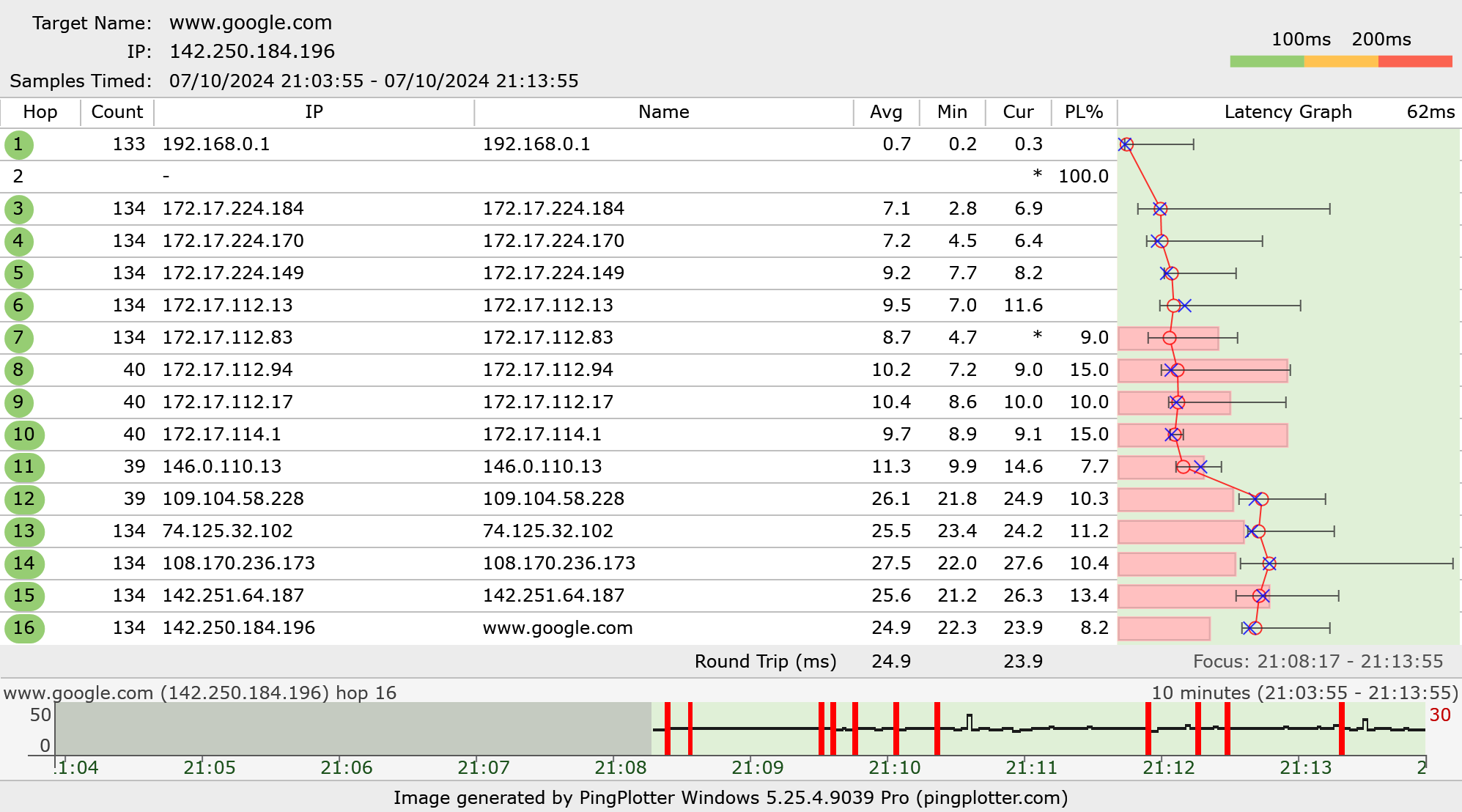
Check out my PingPlotter trace!
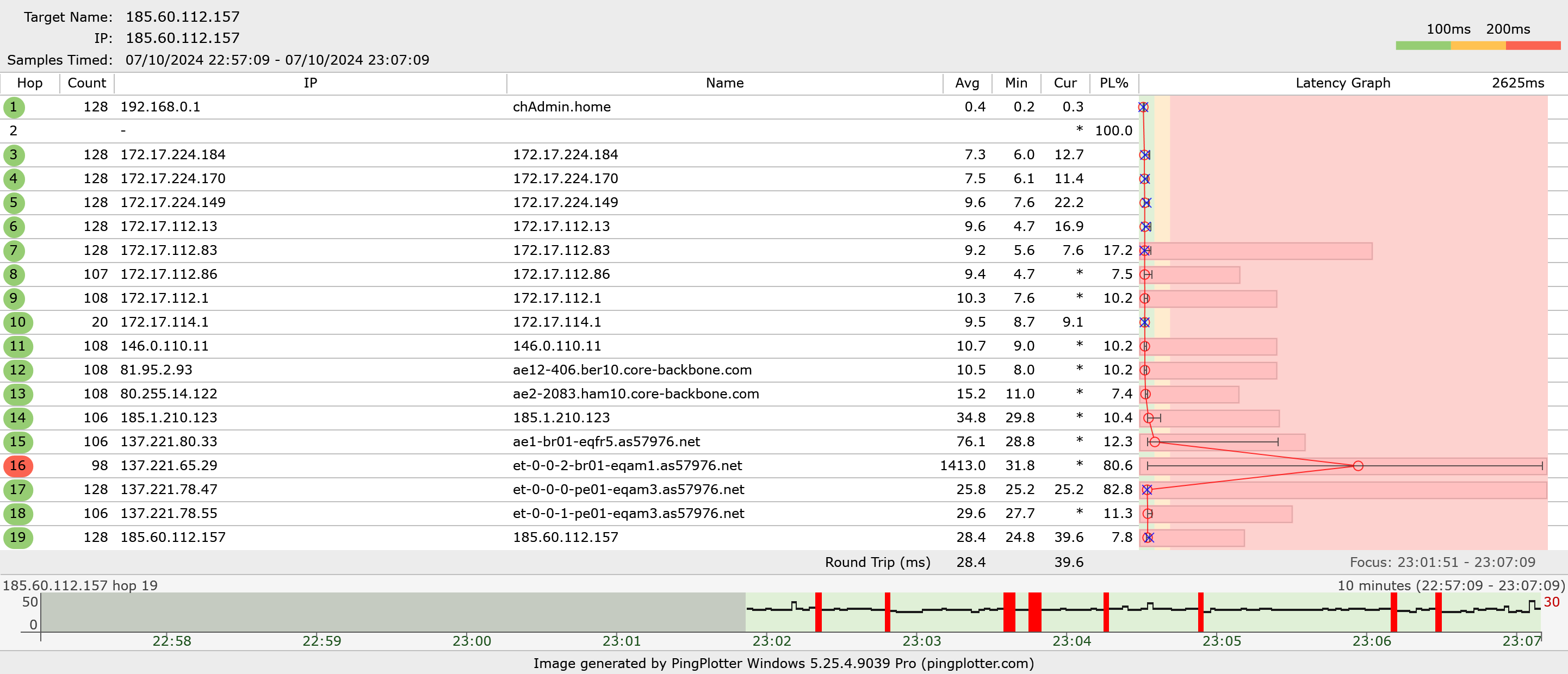
Check out my PingPlotter trace!
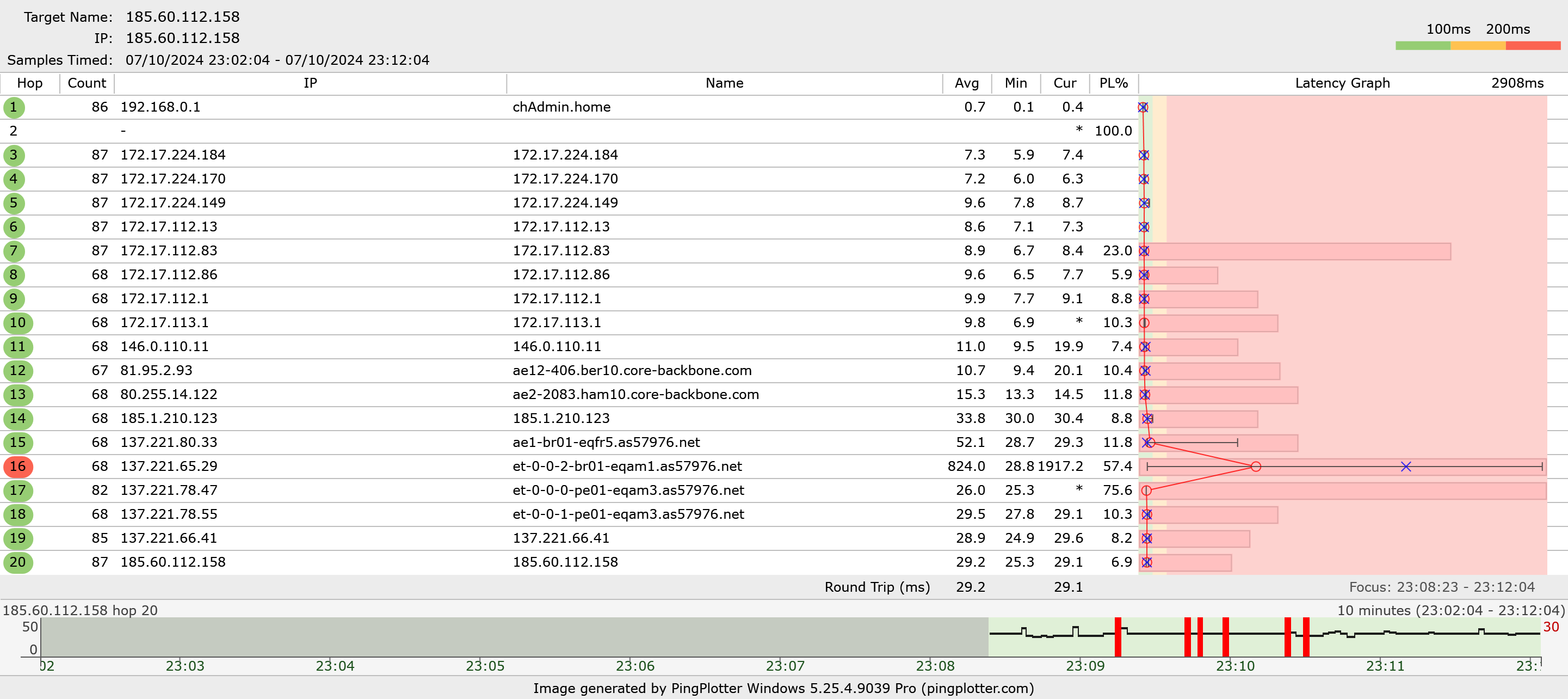
Check out my PingPlotter trace!
cobalt thistle
tight pecan
You can try messing with the settings. Maybe it's set to 80MHz channel width and...
dont think we have the option to edit it
cobalt thistle
this thing is so annoying, i dont understand how with fiber im getting 480 down/950 up wired lmao
 torn perch
dull owl
Hey guys, I'm having weird networking issues and I am clueless about networking....
torn perch
dull owl
Hey guys, I'm having weird networking issues and I am clueless about networking....
damn bro that 9Mbps upload ain't gonna help, for comparison mine is 90Mbps and it's playable on NA servers with minimal issues and I live in Southwest Asia.
You might need something that can increase that upload as it does in fact help alot.
tight pecan
cobalt thistle
dont think we have the option to edit it
Get your own AP and see if that works
Could even just get your own router if you want
I'd double check with them to see if they can help you change settings though
dull owl
torn perch
damn bro that 9Mbps upload ain't gonna help, for comparison mine is 90Mbps and i...
I think I was having additional issues yesterday on top of it . What about the pingtests, any clues why they fluctuate so much?

 low pond
Is that on fiber or?
Small or large ISP?
dull owl
low pond
Is that on fiber or?
Small or large ISP?
Large isp, fiber. Funny thing is now everything is working without issues. This had to be an ISP issue and they never communicated anything...
long scarab
hi chattt :3
 tight pecan
Nice switch :D
karmic marten
long scarab
hi chattt :3
How much was it?
tired leaf
opal pagoda
and you need to install a profile/configure it for both
Wait sorry fornthe late reply but how do i do that and will that give me internet access?
tired leaf
karmic marten
Does your router have DHCP Client option for its WAN port?
R u talking about this?
 karmic marten
tired leaf
karmic marten
tired leaf
No. Go to internet
tired leaf
I didnt see anything about the wan port here

Wait im a dumbass
U emant the other intwrnet i assume
tired leaf
karmic marten
No. Go to internet
Only this though

 karmic marten
tired leaf
Only this though
karmic marten
tired leaf
Only this though
What options are there for dynamic ip?
advanced settings
tired leaf
karmic marten
What options are there for dynamic ip?
I chose dynamic cuz i wasnt eeally sure and it recommended me that when i wa setting it up

 karmic marten
And you are on eduroam? If so, I'm not sure about the procedure here. maybe @opal pagoda is familiar
tired leaf
Well my on camous wifi is eduroam, but im not sure in the dorm what it is
karmic marten
ask
tired leaf
I tried looking at like the website for the dorm internet but i didnt see it, ill maybe call them later during the speaking time or send an email would be easier
Also i have class now
opal pagoda
tired leaf
Well my on camous wifi is eduroam, but im not sure in the dorm what it is
Download eduroam installer from your institution and go through install process again, there is a check box if you also want to install wired profile alongside wireless profile
First get your pc working with it then you can tinker with the router when you verify that it actually works
long scarab
karmic marten
How much was it?
like $200 for all of it
clear igloo
long scarab
like $200 for all of it
plus meraki license :>
long scarab
clear igloo
plus meraki license :>
plus a 3yr license
clear igloo
Included in the $200? Nice!
empty flower
Old resold Ewaste I assume?
karmic marten
anything that has gig ethernets and 10g uplinks is not ewaste
empty flower
Idk if it does SFP ports might not have 10g, but if it does that’s great.
karmic marten
they 100% do
empty flower
That’s fair. Idk the model if it used SFP (1G) instead of SFP+(10G) then it could be slower, but it’d have to be old or depend on the 4 SFP ports as LACP uplinks to reach (4G)
long scarab
karmic marten
FOR THAT CISCO???
everything in my rack
long scarab
yea
long scarab
karmic marten
gimmmeeeee
nuh uh
clear igloo
long scarab
everything in my rack
Got a 9300LM-48UX-4Y for my core
Yummy 25Gb uplinks
 sage prism
Hey everyone. I upgraded my fritzbox a few days ago and since then i have crazy "ping spikes" in my lan network. wifi is running just fine.
on LAN like my computer there are moments where for example discord messages are not sent, http requests just stop working, livestreams hang up. like a short disruption in network connectivity. when i then ping google.de everything is fine, so it's not literally the ping that is bad.
any ideas how i could debug this?
Please ping me on answers :)
tired leaf
Ive fixed my router, it was actually just a simple fix
 carmine roost
Just curious if anyone is aware of any relatively affordable 10Gb/s ethernet (RJ-45) switches. It seems like you can get 5xPorts 2.5Gb/s for like $80 CAD but the 10Gb/a are hard to find for under $300 CAD.
Unmanaged is fine, no need for PoE, SFP etc.
opal pagoda
carmine roost
Just curious if anyone is aware of any relatively affordable 10Gb/s ethernet (RJ...
how many 10g ports?
carmine roost
opal pagoda
how many 10g ports?
I only need a couple, so a standard ~5port switch is plenty
clear igloo
https://www.servethehome.com/mikrotik-crs304-4xg-in-4-port-10gbase-t-switch-launched/
If just 4 ports this should work nicely if you can find it

The MikroTik CRS304-4XG-IN is the company's 4-port 10Gbase-T switch for fanless low power 10GbE networking with a hint of funkiness
$199
carmine roost
Perfect. Thank you!
I don't know why this wasn't showing up when I was searching across different websites. The cheapest I was finding was a TP-Link which was like $329 CAD
clear igloo
It launched just a few days ago I believe
opal pagoda
yup
carmine roost
Ahh, that would explain it
opal pagoda
carmine roost
Ahh, that would explain it
if you want it even cheaper than this with 2x 25$ sfp+ to 10gbaset modules is a option

or use it in addition to mikrotik switch to get more 2.5g ports
opal pagoda
clear igloo
https://www.servethehome.com/mikrotik-crs304-4xg-in-4-port-10gbase-t-switch-laun...
tbh i would have liked one sfp+ port even if only combo port
clear igloo
opal pagoda
tbh i would have liked one sfp+ port even if only combo port
Yah I can definitely see that being a nice option
Maybe swap the PoE power port for an SFP+ port as a second model or something
opal pagoda
eh 1g port on it is basically useless except for managment
since it has to go through mgmt processor and not directly to switch chip
carmine roost
opal pagoda
if you want it even cheaper than this with 2x 25$ sfp+ to 10gbaset modules is a ...
Thanks. I only need 2-3 ports, but want the full 10Gb/s since we now have 8Gb/s synchronous fibre available for $90/month CAD
opal pagoda
carmine roost
Thanks. I only need 2-3 ports, but want the full 10Gb/s since we now have 8Gb/s ...
i can tell you that you dont need 8g at home
carmine roost
opal pagoda
i can tell you that you dont need 8g at home
Agreed. Just because I don't need it doesn't mean I don't want it though haha
opal pagoda
if they have plan for 2g that would be plenty and save that money for nicer switch
carmine roost
opal pagoda
if they have plan for 2g that would be plenty and save that money for nicer swit...
Yeah I'll consider that, especially with the Amazon deals on at the moment
opal pagoda
carmine roost
Yeah I'll consider that, especially with the Amazon deals on at the moment
i can tell you that a business with 600 employes has 2x 200mbps and utilisation isnt maxed out at all
basically never gets maxed out
forest sandal
Need some help trying to setup Ubiquiti AP but the app can’t find it I have a switch connect to my isp router and then the AP connected to a POE port on the switch

 radiant shell
carmine roost
Yeah I'll consider that, especially with the Amazon deals on at the moment
radiant shell
carmine roost
Yeah I'll consider that, especially with the Amazon deals on at the moment
I work at a school with 1200+ people (they like youtube if the teachers dont catch them) & we barely hit 500mbps of our 10gb connections, saving your money for a better internal network would be a good option
 tame cave
I feel like I've asked this before but will it be fine if I turn of the DHCP server on my isp router (modem built in) off and use my own router that is on the same subnet for DHCP?
thick minnow
tame cave
I feel like I've asked this before but will it be fine if I turn of the DHCP ser...
huh?
you can't bridge the ISP modem?
Hear me out @tame cave
modem to fancy router to switch
from switch to everything else and your mesh access points
10.0.0.1
255.255.255.0 /24
10.0.0.10 - 10.0.0.100
Here ya go
IP for the router
subnet / mask
dhcp range
if the router supports it
clone the mac address of your modem
sage prism
sage prism
Hey everyone. I upgraded my fritzbox a few days ago and since then i have crazy ...
additional info: when connecting to my local ubuntu machine (also in LAN) and run ping google.de i can see the ping stays below 4ms but sometimes the timing of the ping is too long...
what i saw is that some lines show a (DUP!) behind then ping, like:
64 bytes from 216.58.212.163: icmp_seq=155 ttl=250 time=6.607 ms (DUP!)
64 bytes from 216.58.212.163: icmp_seq=156 ttl=250 time=6.593 ms
64 bytes from 216.58.212.163: icmp_seq=156 ttl=250 time=7.711 ms (DUP!)
64 bytes from 216.58.212.163: icmp_seq=157 ttl=250 time=6.531 ms
64 bytes from 216.58.212.163: icmp_seq=157 ttl=250 time=6.545 ms (DUP!)
i've never seen that before
Final result also seems like a lot of package loss:
--- google.de ping statistics ---
204 packets transmitted, 160 packets received, +3 duplicates, 21% packet loss
round-trip min/avg/max/stddev = 2.028/3.037/7.711/0.994 ms
 olive bronze
I bought a 2.5G switch to take advantage of the 2.5G NICs on my NAS (F4-423 running TRUENAS Scale) and PC. When I connect my Router, NAS and PC to the switch, PC connects to the internet properly but the NAS doesn't show up at all. Any thoughts? Does connecting the NAS to the switch instead of the router cause the IP address to change?
empty flower
If it’s a unmanaged switch no.
Make sure your nas and pc are the same mtu and your not using jumbo frames on one and not the other if that’s something your using.
UnManaged switch’s also don’t usually respect vlan tagging
olive bronze
my router's MTU is set to automatic. Not sure about NAS. How do I check that?
empty flower
Sorry it’s been a while since I used truenas if you can ssh into it you can try ip addr and see the mtu
olive bronze
its set as 1500 on the NAS. So I'm thinking my router would match that since its set to automatic?
empty flower
1500 is default anything above would be jumbo.
Yes should match
Check your cables make sure they aren’t loose or bad
olive bronze
in any case I'm getting a new router this weekend from the ISP. I will try again once that's available. no point in making good now if I have to do it all over again after getting the new one. Thank very much for the guidance.
empty flower
No problem
 pseudo blade
 waxen scroll
"Use Python until you hate it for its optional typing"
Until then... use Python
 shrewd glacier
Is this speed okay?
 clear igloo
That's not a valid question for others, is it enough for you? That's something only you can answer
shrewd glacier
I mean is it like decent in your opinion aha
clear igloo
For what though? Just asking "is this enough" without context is meaningless still
Is it good/amazing in a general sense, not really but again can you game/work/whatever without issue then it really doesn't matter much what others think
shrewd glacier
oooh, gaming gang, cuz games these days use streaming texture thingy
clear igloo
not really, no
I've never heard of a single game that streams textures in real time
Imagine having to live stream 10s of gigabytes of textures in real time to hundreds of thousands or millions of people
shrewd glacier
really? warzone does, same going with black ops 6, will require internet to play cuz streaming textures
clear igloo
Best I can tell it's completely optional still
but from what I can see that is streamed is maps and low poly things
shrewd glacier
Yeah, on Warzone rn it gives you a few options, minimal and optimised, and black ops 6 will force u to pick either of em which is annoying
opal pagoda
clear igloo
not really, no
I've never heard of a single game that streams textures in real t...
Google earth vr 😏
opal pagoda
ms flight sim too now that i thought about it
both cases irl map is streamed
they even put it in spec requirements

 calm ravine
pseudo blade
"Use Python until you hate it for its optional typing"
calm ravine
pseudo blade
"Use Python until you hate it for its optional typing"
i hate python for pip existing
clear igloo
opal pagoda
they even put it in spec requirements
100Mbps isn't bad for streaming maps and whatnot
empty flower
Seems excessive. It’s likely due to all the 3d buildings otherwise the LoD’s wouldn’t even need to be excessively high. Most of the detail is due to them knowing people will be flying low and dumbly.
opal pagoda
clear igloo
100Mbps isn't bad for streaming maps and whatnot
yep but from forums it seems that ms flight sim map streaming servers are kinda being overloaded and people get insuficient bandwidth error even if their bandwidth is plenty
thick minnow
waxen scroll
but Python ain't that hard tho.
opal pagoda
very intelligent software
why not display 2 different codes on tv and tablet (cisco room bar pro)
 waxen scroll
thick minnow
but Python ain't that hard tho.
waxen scroll
thick minnow
but Python ain't that hard tho.
It's very hard for a network engineer who hasnt programmed
thick minnow
true dat
waxen scroll
That's like 99% of the industry at this point lol
thick minnow
nah networking be harder than programming
opal pagoda
thick minnow
nah networking be harder than programming
as in all things it depends
thick minnow
nah networking is more technical (generally)
opal pagoda
thick minnow
nah networking is more technical (generally)
it isnt a competition on complexity
overengineering things is generally bad
thick minnow
I agree, over-engineering is indeed an addiction, though I, personally found networking more intimdating (at the start) rather than programmer. Therefore, I respect fellow network engineers more than software engineers LoL.
opal pagoda
thick minnow
I agree, over-engineering is indeed an addiction, though I, personally found net...
yes it is intimidating but mostly due to working on live systems if there is a lab/test enviroment to test a new config a scariness goes way down
thick minnow
True dat. Cisco Packet Tracer was less intimidating that real servers and connections when I was startin out. It helped me alot.
opal pagoda
packet tracer is weird that it doesent have all commands that are available on real hardware
opal pagoda
thick minnow
True dat. Cisco Packet Tracer was less intimidating that real servers and connec...
for me Fortinet fast tracks were so usefull as you get few hours to play with the enviroment without the scare of breaking something on your own HW
thick minnow
cool, lol, the fear of breaking something is so BAD.
clear igloo
opal pagoda
yep but from forums it seems that ms flight sim map streaming servers are kinda ...
Sounds about right
 halcyon patrol
hello, I wanted to ask a question about networking
I'm planning on making a custom router using opnsense. however, I'm unsure if the old desktop CPU I have in it is fast enough
the CPU is an intel 6th gen i3-6100
it has 8GB ram
my WAN network bandwidth is around 350mbps
I want to be able to also use wireguard VPN to remotely connect to my home network
does anyone have any advice?
thanks
tribal sequoia
opal pagoda
for me Fortinet fast tracks were so usefull as you get few hours to play with th...
And as usual with fortinet. Their publicly available documentation sucks
But if you download from the partner portal the certification study guides...
Suddenly everything has perfect clarity
silent flax
halcyon patrol
hello, I wanted to ask a question about networking
I'm planning on making a cust...
i route gigabit with N100, i suspect you will be fine, as long as you don't do QoS/deep inspection
silent flax
halcyon patrol
hello, I wanted to ask a question about networking
I'm planning on making a cust...
this is N100, OpenWRT, "gigabit" download, no QoS stuff
 tight pecan
halcyon patrol
hello, I wanted to ask a question about networking
I'm planning on making a cust...
tight pecan
halcyon patrol
hello, I wanted to ask a question about networking
I'm planning on making a cust...
Give your cpu the best chance it can get imo. If that 8GB RAM is a single stick, see if you can get another 8GB stick for dual channel
You dont need a strong cpu if you dont do any heavy processing stuff like QoS, but having more headroom to be able to do so is nice
pseudo blade
halcyon patrol
hello, I wanted to ask a question about networking
I'm planning on making a cust...
For reference, the 2*800mhz MIPS CPU in my router is capable of ~200mbps without any attempt at performance tuning and a light firewall ruleset and close to a gigabit if I do try to tune it.
The system you specified is capable of what you're asking for even though it's in the last year or so of intel's miserly habit of giving i3's two cores.
halcyon patrol
tight pecan
Give your cpu the best chance it can get imo. If that 8GB RAM is a single stick,...
I have 2x4GB so dual channel RAM
thanks everyone, I'll keep it like this for now, and see if I can upgrade it in the future 🙂
 torn fulcrum
i've been going crazy over trying to get my wireguard to work on ubuntu server 24.04.1, i'm a complete noob at networking and was wondering if anyone could guide me on how to set it up so i can access my local network from another place using a windows 10 machine to access my truenas shares, any help would be appreciated
 plain sequoia
torn fulcrum
i've been going crazy over trying to get my wireguard to work on ubuntu server 2...
plain sequoia
torn fulcrum
i've been going crazy over trying to get my wireguard to work on ubuntu server 2...
Have you done the port forwarding? I would also like to give a shoutout to Tailscale, which could help achieve what you are describing without having to port forward, which should be a security improvement 🙂
silent flax
halcyon patrol
thanks everyone, I'll keep it like this for now, and see if I can upgrade it in ...
and you can always just grab a cheap 6th or 7th gen i5 if you want a bit more from it.
tight pecan
torn fulcrum
i've been going crazy over trying to get my wireguard to work on ubuntu server 2...
Imo use tailscale 🙂
pseudo blade
torn fulcrum
i've been going crazy over trying to get my wireguard to work on ubuntu server 2...
wg-quick is your friend
torn fulcrum
yh idk if its my config of it or just im missing something, dunno what to do really
watched some guides and they havent helped
pseudo blade
Is truenas connected to Wireguard directly?
Or is it on another network you need to route to from the VPN?
They [wg and your home network] can't work on the same subnet, you must have two
pseudo blade
torn fulcrum
yh idk if its my config of it or just im missing something, dunno what to do rea...
The other tricks you may have missed is remembering to enable IP forwarding on Ubuntu and ensuring the home network has a route back
torn fulcrum
yh at first i used the wireguard easy application that was on the truenas scale applications, this way worked but it could only see the smb shares via ip and not hostname, then i tried to install wireguard on ubuntu server and i just didnt know how to do it properly
pseudo blade
If you connect TrueNAS to your WG vpn you can skip IP forwarding and routes
pseudo blade
torn fulcrum
yh at first i used the wireguard easy application that was on the truenas scale ...
Yeah hostname will not work sorry, no DNS forwarding in WG, you can add inserting and removing entries to your hosts file or something on up or down if you want
If you want anything fancy, WG is not your answer
torn fulcrum
ohh thats the answer i was looking for, i was going mad not knowing why
is there a way for me to do it then
pseudo blade
Hosts file on your client and up/down scripts in your client's config
If it's Windows prepare for Defender to throw a fit
torn fulcrum
so the only way is manually? is there any other software that could do this
not had any experience with windows defender so thats gonna be fun xD
pseudo blade
If you want fancy autoconfig use openvpn or something
torn fulcrum
oh so it would work with openvpn?
pseudo blade
Or tailscale/zerotier
torn fulcrum
thanks for the advice and help so far man
been at this on and off for about half a year now
torn fulcrum
pseudo blade
Or tailscale/zerotier
are these two free?
pseudo blade
They're cloudy by default
torn fulcrum
ohh right
pseudo blade
OpenVPN is just plain old software
torn fulcrum
so am i better of with openvpn or tailscale
i have tried tailscale with my truenas but i didnt manage to get it to work
but ill try again
pseudo blade
Depends on what you're good at really, openvpn configs can be messy if you leave the beaten path but you can run it in L2 so you don't need routing or nat, and you can push some config to clients
torn fulcrum
yh im a complete noob with networking and trying to learn, atm im looking at it all and thinking where the heck do i start xD
i did manage to get openvpn on my asus router to work but that only resolved in ip and not hostname
pseudo blade
torn fulcrum
i did manage to get openvpn on my asus router to work but that only resolved in ...
Yeah you need to push a "search domain" using openvpn
torn fulcrum
do you know where that would be, i dont remember seeing that option on the router gui
pseudo blade
AKA ADAPTER_DOMAIN_SUFFIX in openvpn v3 or DOMAIN in v2 configs
OpenVPN config file
Idk how your router abstracts it sorry

 pseudo blade
"Advertise DNS to clients" sure looks like it's supposed do try to do what you want
Unless your router can't resolve the server
torn fulcrum
is there a way to check that
like right now i can ping "truenas" or the ip of the machine and will work fine, so somehow i have to make the vpn do the same
pseudo blade
Oh. So that's probably mDNS and you never configured your own DNS
The better fix is to run a DNS server that has an entry for it, the ugly ways are to edit the hosts file or use a Layer 2 VPN like Wireguard in TAP mode
Main downside of TAP mode is that it'll waste a bit of bandwidth forwarding useless broadcast messages over the VPN
It's still servicable to be clear
torn fulcrum
right so does this mean my router doesnt have dns or are you just talking about vpn here?
pseudo blade
VPN options to deal with a lack of better network configuration
torn fulcrum
right, i thought you said that wireguard doesnt support dns forwarding, is this different from that?
pseudo blade
Left that behind entirely if it's using mdns because it won't work
You either need a DNS server you control, hosts file edits, or a layer 2 VPN - which Wireguard also does not implement
torn fulcrum
so i would need something like pi-hole and a vpn for example
 quaint siren
Are TP-Link routers all good or they are pretty hit or miss with them?
torn fulcrum
i have an archer 7 and it worked alright for me, but im a noob and was happy it just worked xD
pseudo blade
quaint siren
Are TP-Link routers all good or they are pretty hit or miss with them?
I don't love their consumer-grade ones but some people here like their Omada product line of managed equipment
Tbh I don't like any consumer grade routers lol
quaint siren
Yea, I'm looking at like cheap temporary solutions, found Archer BE230 which has everything I need but the price being low got me kind of iffy about it
peak cloak
yeah idk about consumer, but I have omada in the house and it works as advertised
pseudo blade
quaint siren
Yea, I'm looking at like cheap temporary solutions, found Archer BE230 which has...
Idk about the software on it but the hardware looks good enough for the price

WikiDevi.Wi-Cat.RU
For a list of all currently documented Broadcom chipsets with specifications, see Broadcom.
=== BE3600 Tri-Band Wi-Fi 7 Router ===
Product page
quaint siren
I mean if the software sucks, I believe I could just put pfsense or Opensense on it
quaint siren
Oh interesting
quaint siren
I'm looking at all the other Wifi 7 routers, all of them are like above 500 bucks and as high as 1.5k and then there's that TP-Link one I said at 100 bucks
pseudo blade
WiFi 7 is still generally expensive
quaint siren
Makes me feel like there's some catch to it
pseudo blade
Catch is likely no-frills firmware and no way to fix that
But at $100 I guess you could just try it and see if it meets your expectations, send it back otherwise
It's 2x2 on 5ghz and 6ghz
long scarab
y'all my PC keeps getting an APIPA but everything else gets an address from DHCP, any ideas on how to fix this?
 pseudo blade
long scarab
y'all my PC keeps getting an APIPA but everything else gets an address from DHCP...
pseudo blade
long scarab
y'all my PC keeps getting an APIPA but everything else gets an address from DHCP...
Look for a mac filter on the DHCP server, else possibly a dodgy NIC