#networking
1 messages · Page 67 of 1
 clever tartan
 pseudo blade
¯_(ツ)_/¯
clever tartan
i dont have ethernet anywhere though
pseudo blade
That's pretty much all the advice there is to give I'm afraid
clever tartan
its allg, ty for helping though
pseudo blade
You can make a fan baffle like in a recent LTT video but it won't magically make 40mm fans at top speed bearable in your bedroom
clever tartan
oh these arent at top speed at all
pseudo blade
Hyperbole
clever tartan
oh mb
 wet dock
Hey fellas, for those of you who I haven't asked yet, I want to mount this rack that's on the floor to the wall behind it up high. Unfortunately I don't have any studs in that wall, but I do have what's probably a good 3/8-1/2" worth of solid wood. What would you guys recommend to mount it? The rack is about....30-40 lbs as it sits right now.

 twin sphinx
wet dock
Hey fellas, for those of you who I haven't asked yet, I want to mount this rack ...
twin sphinx
wet dock
Hey fellas, for those of you who I haven't asked yet, I want to mount this rack ...
personally

my rack is really similar. get a couple of 2x4’s and put them into the wood with 1-2” lag screws and washers, then mount the rack with 1-1/2” lag bolts and washers into the 2x4s. mine is really sturdy
wet dock
That's what I needed, thank you sir!

 thorny osprey
wat

 ornate jungle
thorny osprey
wat
ornate jungle
thorny osprey
wat
👀

OpenWrt Forum
I was clearing space on my router and managed to remove some important Luci files (massive oversight, I still don't know how) and need some help replacing them/reparing Luci Heres what it displays when I attempt to load into Luci module 'luci.ucodebridge' not found: no field package.preload['luci.ucodebridge'] no file './luci/ucodebridge.lua' ...
thorny osprey
ornate jungle
https://forum.openwrt.org/t/i-was-clearing-space-on-my-router-and-managed-to-rem...
can i jst reset it
ornate jungle
You'll likely have to, if you don't know what caused the error screen. Things like this usually don't "just happen" out of the blue - do you recall doing anything prior to this error occuring?
thorny osprey
i hav no idea wat theyre talking abt
thorny osprey
y does dis exist for a router
 ornate jungle
thorny osprey
y does dis exist for a router
ornate jungle
thorny osprey
y does dis exist for a router
huh? where are you seeing this? (if this is on a public-facing site, a link would be helpful.)
thorny osprey
ornate jungle
huh? where are you seeing this? (if this is on a public-facing site, a link woul...
in 192.168.1.1
ornate jungle
thorny osprey
in 192.168.1.1
Seems it's part of OpenWRT. https://openwrt.org/packages/pkgdata/amdgpu-firmware
 topaz patrol
Has anyone used this rack “extenders”? I’m not sure how strong they look lol

I really don’t want to replace a whole rack because one set of rails is too deep lmao
 opal pagoda
topaz patrol
I really don’t want to replace a whole rack because one set of rails is too deep...
opal pagoda
topaz patrol
I really don’t want to replace a whole rack because one set of rails is too deep...
it is probably allright, i would like to see it being made longer at the rack side, like a trapezoid to better distrubute the loads
topaz patrol
Yeah
 opal pagoda
how thick is metal in your rack?
topaz patrol
maybe 2-3mm, not sure it's at a client
opal pagoda
ok, as long as it is reputable brand and not made of chinesium it should be fine
topaz patrol
Yeah it's been there for a solid 20 years and it's not moving
 formal star
Is anyone familiar with running HA proxy on pfsense?
I have it set up with my domain were the www prefix directs properly to my web server, however I have been trying to get the root domain to also point to my www server. I tried setting Host matches: mydomain.com -> use Backend: www however no luck. Any ideas what i might be missing?
 thick minnow
Whats a good free rmm software?
 scarlet turret
I have 1gig fiber is there anything, any network setting I can utilize to get the best usage or connection possible? I am am a very competitive online gamer.
topaz patrol
thick minnow
Whats a good free rmm software?
I think action1 gives you 50 or so endpoints free
Otherwise you can get VSA X or Datto for ~3USD/endpoint/month including bit defender gz
thick minnow
TELUS
TELUS PureFibre customers can now game, stream, work, and learn from home on ultrafast 5 Gigabit Internet
TELUS also showcases industry-leading 25 Gigabit PON technology, allowing TELUS to meet future high-bandwidth demands
ornate jungle
thick minnow
https://www.telus.com/en/about/news-and-events/media-releases/telus-brings-the-f...
Nice. Now, if only the CRTC would regulate Canadian Internet prices.
 buoyant dust
should I route an ethernet cable thru my attic??????
 polar timber
buoyant dust
should I route an ethernet cable thru my attic??????
polar timber
buoyant dust
should I route an ethernet cable thru my attic??????
yes, you can do that 👍
buoyant dust
polar timber
yes, you can do that 👍
should i
polar timber
I have them going inside walls but thats not possible after walls have been built 😄
buoyant dust
we were gonna do in wall Ethernet
polar timber
Yeah, every room has ethernet ports on wall
buoyant dust
but my father decided not to for some reason
polar timber
But routing the cable thru attic is good option too
buoyant dust
yeah I was gonna use ethernet cause my room is far far far away from my router and I wanted to mess around with networking stuff cause I wanted to be a network engineer
polar timber
You could probably then get the cables inside the wall from the attic and install ports on the wall for clean install
depending how the house is built
buoyant dust
polar timber
You could probably then get the cables inside the wall from the attic and instal...
that would probably take to long tho
but a cable coming down from my ceiling would prob look ugly
polar timber
Also you could just drill hole to roof and run the cables inside some wire channels
but I would try to get them going inside the wall from the attic if possible
buoyant dust
I should put a switch up in the attic lmao
buoyant dust
true
polar timber
I have two cables to each room
buoyant dust
I could do that or do the funny route and use a switch in the attic
polar timber
i think so too 😄
so just run one or two cables and then put the switch to that room if needed
thick minnow
ornate jungle
Nice. Now, if only the CRTC would regulate Canadian Internet prices.
yall complaining when AT&T charges insane prices for the same speed
mobility here is a joke tho for sure
buoyant dust
polar timber
i think so too 😄
the only reason I would need it is if I was putting up cameras around my house
ornate jungle
thick minnow
yall complaining when AT&T charges insane prices for the same speed
I'll complain until the Communications Industry (worldwide) is considered a regulated basic service like Power or Water. But also, yeah... cellular services are also terrible in North America.
thick minnow
yep canada espicially
you best bet im getting that upgrade tho
its like 20 bucks more than the 3gig plan which i got rn
im getting a call bacl tomorrow
ima order some static ips while im at it
polar timber
buoyant dust
the only reason I would need it is if I was putting up cameras around my house
true. if you have some outlets on attic to power the switch you can do that. if not, you can just put switch near the router and run more cables from there
topaz patrol
ornate jungle
I'll complain until the Communications Industry (worldwide) is considered a regu...
Regulation can be done well, but it can also be done poorly
thick minnow
i went with telus business because home services didnt offer 3gig at the time and its better tbh can get static ips
topaz patrol
For example here in Australia, even with less than 500 subscribers, we pay over $20k a year in ombudsman fees, carrier licensing etc
thick minnow
dude ausie telecoms are a scam
topaz patrol
It makes it very difficult for smaller players to compete
thick minnow
i know i feel your pain i got friends down there
topaz patrol
thick minnow
dude ausie telecoms are a scam
I am speaking from the point of view of a telco :)
thick minnow
oh no way
who you work for
idk why telus actually try hards tho
shaw is their only competator where i live its still coax
and thet charge fair prices when you compare the 2
telus is western company VS rogers & shaw which are now the same i forgot
im super tired tweaked tf out hyped up now
my bad for twisting your convo
me getting ready to get HE 10gig and then i find out telus has 5 gig as of this month
topaz patrol
The membership fees to be apart of the telecommunications industry ombudsman alone are crazy for a small CSP/RSP/ISP
 buoyant dust
so dead
opal pagoda
topaz patrol
The membership fees to be apart of the telecommunications industry ombudsman alo...
what do you get in return?
aka cant you be a compleatly independent telco?
topaz patrol
opal pagoda
what do you get in return?
You don't get sued by the ACMA :)
It's a legal requirement
Basically an "independent" mediator for any disputes with subscribers
You also get fined for every complaint (which I think is good)
opal pagoda
sounds very bs-y
topaz patrol
lmao
opal pagoda
ah it is .gov.au
topaz patrol
Lots of
bureaucracy
topaz patrol
opal pagoda
ah it is .gov.au
The Telecommunications Industry Ombudsman helps consumers and small businesses resolve complaints about their telephone and internet services.
Not being a member of the TIO is illegal though
And then for each complaint one of these fees is charged
 opal pagoda
and who can complain?
topaz patrol
Your subscribers
Then the required Telecommunications Consumer Protections Code annual lodgement fees

It's just ridiculous for the small guys imo
opal pagoda
it is
topaz patrol
The bigger players have even more compliance stuff, but they can deal with that 😛
opal pagoda
they have dedicated legal team
opal pagoda
classic "burry them in paperwork"
topaz patrol
Good ol' rant lmao
I'm sure there's a whole heap of other stuff we're meant to do too that I've never even heard of
opal pagoda
topaz patrol
Good ol' rant lmao
it is soo good that i dont have to deal with that goverment regulation stuff in enterprise lmao
opal pagoda
when analog comms break/got cut we go aw yep and just run a ethernet to connect them with voip
topaz patrol
Still better than no regulation I guess 🫠
opal pagoda
topaz patrol
Still better than no regulation I guess 🫠
i dont really deal with UC anyway since another team member is dealing with it, i just know basics
cucm is something straight from hell
topaz patrol
lmao
Legally you can’t even offer postpaid services without credit checks and suitability assessments
https://www.accc.gov.au/media-release/telstra-to-pay-50m-penalty-for-unconscionable-sales-to-indigenous-consumers
But it doesn't stop the mega corps :)

Australian Competition and Consumer Commission
The Federal Court today ordered that Telstra pay $50 million in penalties for engaging in unconscionable conduct when it sold mobile contracts to more than 100 Indigenous consumers across three states and territories, in proceedings brought by the ACCC.
opal pagoda
ah "just eat the fine as cost of business" move
 pseudo blade
Ah yes I remember that one
pseudo blade
topaz patrol
Fuck you <:telstra:910679923751014462>
Don't worry, they make service staff do a course every year about it now (I'm sure that makes a difference)
 dusk quail
Random thing but I have a question, I'm currently interested in getting a headstart of my networking academy in TCP/IP subnetting, is there any places you suggest looking into so I can have a general background of the subject?
I'm just wondering if anyone has experience with it or knows good places to study as I really want push myself torwards a career in cybersecurity
 velvet prairie
dusk quail
Random thing but I have a question, I'm currently interested in getting a headst...
velvet prairie
dusk quail
Random thing but I have a question, I'm currently interested in getting a headst...
Check for some courses on YouTube 😊 and follow them, or skillsforall
There are cisco beginners courses you can do them for free 😃
dusk quail
Thanks will check them out

 opal pagoda
dusk quail
I'm just wondering if anyone has experience with it or knows good places to stud...
opal pagoda
dusk quail
I'm just wondering if anyone has experience with it or knows good places to stud...
https://www.youtube.com/watch?v=5WfiTHiU4x8&list=PLIhvC56v63IKrRHh3gvZZBAGvsvOhwrRF
network chuck can probably help you in learning network topics, like one you listed

Get 20% OFF + Free Shipping with code NETWORKCHUCK at https://mnscpd.com/NetworkChuck
Ready to get your CCNA? CCNP? Use the BEST tools: https://bit.ly/bosonexsimccna (Boson ExSim) (affiliate)
Tired of sucking at Subnetting or don’t even know what Subnetting is? Well NetworkChuck has the course for you! Sign up for the course here: https:...
opal pagoda
dusk quail
I'm just wondering if anyone has experience with it or knows good places to stud...
where are you struggling in particular?
dusk quail
Just starting monday so I was looking for generalized knowledge of the subject etc
Decided to write down basic networking terms and descriptions
For personal notes to study
Lingo etc
opal pagoda
dusk quail
Lingo etc
network chuch has free ccna course, watch as much as you can handle and you should be good
https://www.youtube.com/watch?v=S7MNX_UD7vY&list=PLIhvC56v63IJVXv0GJcl9vO5Z6znCVb1P

FREE CCNA Course 200-301 - sponsored by the Boson Summer Sale 25% off: https://bit.ly/bosonccna2020 (affiliate)
Watch the whole course: https://bit.ly/nc-ccna
Go deeper: https://ntck.co/ncccna
🔥🔥Join the NetworkChuck Academy!: https://ntck.co/NCAcademy
🔥🔥BOSON SUMMER SALE 25% OFF EVERYTHING🔥🔥
-CCNA Lab: https://bit.ly/bosonccna2020 (Boson Ne...
dusk quail
I'll look into it, I just wanted to get ahead early, since these networking classes affect my college gpa
opal pagoda
dusk quail
I'll look into it, I just wanted to get ahead early, since these networking clas...
if you have any specific questions just ask here and someone will answer
opal pagoda
np 👍
 velvet sundial
Hi just curious whats a good starting switch that i could use to make it so i have ethetnet cords going to both my comps?
Or is that something a hub would actually be good for
ornate jungle
velvet sundial
Hi just curious whats a good starting switch that i could use to make it so i ha...
I hope nobody's making Hubs anymore in 2024. 😛 If you just need a "dumb" unmanaged switch to allow multiple wired connections in a location that only has one wired connection, tada:
https://www.amazon.ca/TP-Link-TL-SG105-1000Mbps-Desktop-Gigabit/dp/B00A128S24/
https://www.amazon.ca/NETGEAR-5-Port-Gigabit-Ethernet-Unmanaged/dp/B07S98YLHM/

The TP-Link 5-Port 10/100/1000Mbps Desktop Switch provides you an easy way to make the transition to Gigabit Ethernet. Increase the speed of your network server and backbone connections, or make Gigabit to the desktop a reality. Moreover, TL-SG105 adopts lower power consumption design. With the i...

The NETGEAR 5-Port Gigabit unmanaged Switch provides an easy, reliable, and affordable way to expand your network connections in homes and small offices. It is plug-and-play and features a rugged metal case. Features also include Auto-MDI/MDI, LED indicator on Each port, energy-efficient technolo...
velvet sundial
ornate jungle
I hope nobody's making Hubs anymore in 2024. 😛 If you just need a "dumb" unmana...
appreciate it
velvet sundial
ornate jungle
I hope nobody's making Hubs anymore in 2024. 😛 If you just need a "dumb" unmana...
also just sense you responded are hubs really good for like anything? cause i know they just randomize packets unlike switches so thats kinda i assumed just to plug shit in would work.
ornate jungle
velvet sundial
also just sense you responded are hubs really good for like anything? cause i kn...
Perhaps in the 1990's they were good, but these days... there's literally zero reason I can think of to use a Hub when "dumb" unmanaged switches are around $20 ish.
https://www.reddit.com/r/ITCareerQuestions/comments/13xoxer/whats_the_difference_between_a_hub_and_a_switch/

Reddit
Explore this post and more from the ITCareerQuestions community
velvet sundial
not surprised. well appreciate it
velvet sundial
ornate jungle
Perhaps in the 1990's they were good, but these days... there's literally zero r...
also ik cat 6 is pretty much standard but is it good that there so skinny? cause like when i made my own it was not so skinny port

Cat 6 Ethernet Cable Black

40Gbps 2000Mhz High Speed: UGREEN Cat 8 ethernet cable supports bandwidth up to 2000MHz and 40Gbps data transmission speed, ensuring stable network speed for you to online gaming, surf the Internet, online HD video streaming, upload, download, and more.Wide Compatibility: With the RJ45 Connector,...
it was between those 2 i found
ornate jungle
velvet sundial
also ik cat 6 is pretty much standard but is it good that there so skinny? cause...
So long as they're both quality cables, flat vs. round doesn't matter too much... Only really plays into things if the cable is shoddily made or you're looking to run outrageous lengths.
velvet sundial
well its going from my wall right to my computer on my dresser which is pretty much right next to my desk
and i have some ancient cable that i dont know how old it is so when buying the switch thought id just look into it
 full bough
Do you know what cable is in your wall?
Cause that'll pull down your speed if it's like cat4 or cat5/5e
 turbid umbra
Hey guys I was wondering if I can use Ethernet Backhual on my ASUS Router Mesh Node if it’s a DSL Router
If so how would I go about doing this if the WAN Port is DSL and I’m not sure if I could even enable Dual WAN because you can’t access the Node Routers entire WebGUI when it’s in a Mesh Network
opal pagoda
turbid umbra
If so how would I go about doing this if the WAN Port is DSL and I’m not sure if...
What model do you have?
turbid umbra
opal pagoda
What model do you have?
DSL-AC68U and I’ve now unfortunately seen a FAQ on ASUS website saying it doesn’t support Ethernet Backhaul because the model lacks a dedicated Ethernet WAN Port
Also I feel my mesh system isn’t working the best devices that are right next to the mesh node are still connecting to the main router
Even when using the optimise function it usually connects to the main one or it connects to the node for a few minutes then back to the main router
thick minnow
opal pagoda
network chuch has free ccna course, watch as much as you can handle and you shou...
this is my fav series from him this playlist helped me learning the basic at best
 fallow flax
Hi sorry if this is the wrong place to ask this but currently I use one of these (it came with my z790 motherboard) I get good speeds issue is sometimes it can be inconsistant for gaming over wifi I was wondering if there is a better replacement for this? I tried wifi mesh/extenders and they make it worse

I also tried plugging direct into the wifi mesh via ethernet and that is even more inconsistant and gives me internet instability
could this be a better replacement for this? Or should I be thinking of some other fix?

 tight pecan
fallow flax
I also tried plugging direct into the wifi mesh via ethernet and that is even mo...
tight pecan
fallow flax
I also tried plugging direct into the wifi mesh via ethernet and that is even mo...
If you're using a wireless mesh solution, then you're SOL
 peak cloak
fallow flax
Hi sorry if this is the wrong place to ask this but currently I use one of these...
peak cloak
fallow flax
Hi sorry if this is the wrong place to ask this but currently I use one of these...
Your problem sounds like your router/local network issue, not client
tight pecan
I would try using ethernet to connect directly to the router that is wired up to your modem. See if there's any issues there. If there is none, then you'll need to rethink your mesh setup, perhaps cat6 running to all of your APs
Wifi is already inconsistent in regards to latency. Having to hop through multiple APs wirelessly makes it much worse
fallow flax
tight pecan
I would try using ethernet to connect directly to the router that is wired up to...
Okay thanks ill try connect directly with a long cable and see if issue persists
formal star
is anyone familiar with running haproxy on pfsense?
I have a domain running and if someone uses my domain without a subdomain such as www, i get a 503 error no server is avalible to handel this request I tryed setting a default backend and setting Host matches: mydomain.com -> backend www, however still the same result. Any help would be appreciated.
fallow flax
tight pecan
Wifi is already inconsistent in regards to latency. Having to hop through multip...
Yeah wired in is fine
velvet sundial
full bough
Do you know what cable is in your wall?
nah i dont sadly and im half way across the house so its not like i would be able to just replace it
tight pecan
fallow flax
Yeah wired in is fine
Have fun running cat6 to all your APs 👍
fallow flax
tight pecan
Have fun running cat6 to all your APs 👍
i got 5e
tight pecan
Should be fine
twin sphinx
unpopular opinion: mesh systems are not always the best and I wish cable companies would stop promising them as the end all, be all, fix all
 silent flax
it generates heat, but nothing insane. It will do fine imo
 thorn delta
twin sphinx
unpopular opinion: mesh systems are not always the best and I wish cable compani...
thorn delta
twin sphinx
unpopular opinion: mesh systems are not always the best and I wish cable compani...
Better than what they did before, where they'd put the one modem/router combo in the Bermuda Triangle of your water heater, furnace, and convenient stack of lead bricks then tell you to pound sand or go to best buy and "figure it out" when you complained about wifi coverage
hardwiring a half decent mesh system gets pretty close to the performance of a proper APs, but the cable company techs will basically never do that.
topaz patrol
twin sphinx
unpopular opinion: mesh systems are not always the best and I wish cable compani...
But they’re very profitable 
opal pagoda
3.6w max power
it will do just fine
opal pagoda
thorn delta
hardwiring a half decent mesh system gets pretty close to the performance of a p...
hardwiring mesh devices makes them not mesh and i would guess that most people just dont know about 802.11r which mesh devices use
thorn delta
Of course, but it's still packaged and sold as a mesh system and that's what I'm talking about.
Wish they were sold with a more accurate name but that's marketing folks for you
dusk quail
topaz patrol
But they’re very profitable <:linusSmirk:741333860067049572>
Isn't the command in your profile the equivalent of sudo rm -rf / --no-preserve-root
Just a random question
topaz patrol
Yes
dusk quail
Ah thought as much, part me was like hmm that sounds too good to be true, that a single command would make ur pc 2x faster, if only such a command existed
It will make it run faster just without an operating system so your technically not wrong
topaz patrol
Exactly
opal pagoda
topaz patrol
Exactly
Mhm very nice command, might include in pxe install script later
buoyant dust
I just got gifted a switch and I don't even know what to do with it cause I don't have my router near me and I don't have ethernet
opal pagoda
buoyant dust
I just got gifted a switch and I don't even know what to do with it cause I don'...
what switch do you have?
buoyant dust
opal pagoda
what switch do you have?
Idk it's a tp link switch tho
opal pagoda
can you read the model number?
buoyant dust
opal pagoda
can you read the model number?
Well no cause I'm not at home
 civic elk
buoyant dust
I just got gifted a switch and I don't even know what to do with it cause I don'...
civic elk
buoyant dust
I just got gifted a switch and I don't even know what to do with it cause I don'...
Who gifts a switch
 worthy coral
Epic switch
buoyant dust
civic elk
Who gifts a switch
My sister
civic elk
You'll find a use for it someday
 hazy flare
How do i set up a nas so i can watch videos an listen to music on the go with my phone
topaz patrol

Tailscale lets you put all your devices on their own private tailnet so they can reach each other, ACLs permitting. Usually that’s nice and comforting, knowing that all your devices can then be isolated from the internet, without any ports needing to be open to the world.
 shadow sundial
hello all is anyone aroudn to help explain how plex using transcoding? ihave a friend form Hawaii using my plex server ( im in Pennsylvania) and she buffers with anything she watches. im not what setting to change to help withthat. Plex should be encoding off my 6700xt GPU, and i get over alomost a gig dowload. what could be bottlenecking or huritng the connection. she is also on a managed acount on my server not her own sperate account if that mattters.
hello
 clear igloo
shadow sundial
hello all is anyone aroudn to help explain how plex using transcoding? ihave a ...
clear igloo
shadow sundial
hello all is anyone aroudn to help explain how plex using transcoding? ihave a ...
you're uploading to her, download doesn't help anything here
AMD GPUs aren't officially support so working with plex is very hit or miss
shadow sundial
ok so what can i do to fix this?
 solemn otter
does anyone know how to make a pteryodactly server shits too hard lol.
tight pecan
shadow sundial
ok so what can i do to fix this?
Check your upload speed. I'd say around 100Mbps+ is recommended but it depends on the media
 shrewd glacier
Main modem nat type keeps flickering between open and strict, I port forwarded Xbox port with my Xbox ip too, went on OPEN for 10 mins then went back to strict plz help
tight pecan
shadow sundial
yeah my isp onlt gives me 45 up
Assuming you meant upload and not down, you'd have to try transcoding down to maybe 1080p 20Mbps or lower
shadow sundial
hum... ok.thanks for all thehelp!!! lots ot figure out haha
opal pagoda
shadow sundial
yeah my isp onlt gives me 45 up
How much up tho?
 zinc fog
Hi. I'm going to install cameras in my home. I want to keep the camera stream for about 3 months. What is the best solution for this? I have a pc with a lot of storage. Linux or windows is not a problem, just never touched it before
shadow sundial
opal pagoda
How much up tho?
i fixed it
 mystic latch
zinc fog
Hi. I'm going to install cameras in my home. I want to keep the camera stream fo...
mystic latch
zinc fog
Hi. I'm going to install cameras in my home. I want to keep the camera stream fo...
You want to get IP cameras with RSTP, that gives you the widest compatibility for various security cam software.
Frigate is a popular free solution for this:
https://frigate.video/

NVR with realtime local object detection for IP cameras
mystic latch
Yea they're pretty good
mystic latch
Do you have a PoE switch? I'm guessing no, but one of those will help a lot. It'll power the camera(s) through the ethernet cable
topaz patrol
zinc fog
I was looking at reolink cameras
Whatever you do, don't get wireless cameras :)
zinc fog
Damn... Ethernet is going to be expensive 🤣
mystic latch
It's worth it in the long run.
zinc fog
There's thick wood, cement etc.
topaz patrol
Susceptible to interference and jamming, limited bandwidth and you have to worry about batteries/solar panels
zinc fog
Going to have an electrician for a power outlet, because I'm going to get floodlights.
topaz patrol
zinc fog
Going to have an electrician for a power outlet, because I'm going to get floodl...
Then you may as well have them run some cat6 while they're at it 😉
mystic latch
Do you have an attic? That can make getting around the denser stuff easier
zinc fog
Nope, it's on ground floor.
It's an old wooden house, so it's almost impossible to run new wires without making it ugly
topaz patrol
Wireless cameras are pretty much useless as far as I'm concerned
mystic latch
Are you in an urban area? My brother learned the hard way of why not to use wireless cameras. His stuff got taken over.
topaz patrol
Yep
zinc fog
Nope, I live outside the city, 2 km or so. The city has 17 000 people
topaz patrol
Comparable PoE cameras themselves will also be cheaper
zinc fog
7th largest city in the country 🤣
topaz patrol
Also you can use your own NVR so no cloud funny business
mystic latch
The server itself isn't too hard. Any linux box can do the job with docker
topaz patrol
Then you'll want wired cameras 😌
zinc fog
mystic latch
The server itself isn't too hard. Any linux box can do the job with docker
Home assistant and frigate?
topaz patrol
They are integrated quite nicely
mystic latch
zinc fog
Home assistant and frigate?
Yep!
zinc fog
Okay, nice.
mystic latch
Frigate's hardware page gives a helpful direction
https://docs.frigate.video/frigate/hardware
Cameras
zinc fog
I have a pc similar to this: https://www.aliexpress.com/item/1005007170112422.html
topaz patrol
mystic latch
Frigate's hardware page gives a helpful direction
https://docs.frigate.video/fri...
Just make sure you turn off any cloud stuff if you buy Dahua stuff :)

 mystic latch
Yea for sure. It's generally best to put IP cameras on a VLAN that has internet access blocked.
zinc fog
wow, not buying dahua
 regal shell
my internet gets disconnected when i run speed test on my pc. im connected via a switch. could it be a switch issue?
probably because of network load
and i also get random disconnects
https://www.amazon.ca/dp/B0C8H8XRYT
this is the switch. im using sfp+ 10g modules

NICGIGA 4 Port 2.5G Ethernet Switch with 2x 10G SFP Uplink, Unmanaged 2.5Gb Network Switch, Plug & Play, Desktop/Wall-Mount, Fanless Metal Design.
topaz patrol
Remove the switch from the equation and see if the issue persists 😌
solemn otter
Anyone Know how to install Partkeepr. abit stumped on it tbh
regal shell
are trendnet switches any good and reliable?
 lunar mist
Hey guys, I'm looking to install two 10Gb switches in my Linux server and Windows workstation. My current Wi-Fi setup is slow, so which card should I get to speed things up? My Linux server is an old i5 with 32GB DDR3 and an RX5600, and my main computer is a Ryzen 5 with 64GB DDR4. I'm doing game design and work on my main pc off the drive on the Linux PC, but it's slow to load everything. Would 10Gb switches help? Do I need to change anything, or would Samba work automatically?
formal star
Is anyone familiar with a reverse proxy that can handle UDP traffic reliability? I have tried ngnix stream, but I keep getting disconnected randomly with it.
pseudo blade
lunar mist
Hey guys, I'm looking to install two 10Gb switches in my Linux server and Window...
Local storage will always be superior in speed, latency and reliability. The better answer is to ensure enough local storage for your projects and have it back up/sync.
Otherwise the answer lies in ensuring fast enough storage and networking and 10 gigabit will likely help... but kinda expensive and annoying to implement. The config isn't too hard, it's the extra hardware
I've found for large files nearly anything will do > gigabit, even single hard drives and very old CPUs
lunar mist
Yeah I would love to just sell the old pc and buy like a super case with lots of drive bays.
But I want to see what I can make do with what I have now.
Here's the specs of the linux pc
https://ca.pcpartpicker.com/list/dyPT89
And that's the windows pc
Part List - Intel Core i7-4790K, Radeon RX 5600 XT, NZXT H500i ATX Mid Tower
Part List - AMD Ryzen 7 5800X3D, GeForce RTX 3080 Ti, NZXT H6 Flow ATX Mid Tower
Basically I'm just looking for a link between the two. To treat the linux pc as if it's literally a drive (or even a set of drives that I can access from the windows)
Cause right now, it's neither. I need to tediously edit a script file to share one folder in a drive. Which I have done. But the speeds... I can only get about 10mb/s
Obv, something I set up is wrong.
I think that's my upload speed because it's being sent through the wifi, as our routers in canada never get updated. Everything around me is 10mb upload, but hey for another 50 bucks I can get 15.
Either way the router is small, only enough space for one computer. So that's why on the linux subchannel they recommended a network switch.
 lunar mist
Will this do?
Then down the road upgrade to 10gb sfp+ and buy a couple of those sfp+ cables?
 topaz patrol
lunar mist
Will this do?
Then down the road upgrade to 10gb sfp+ and buy a couple of those...
topaz patrol
lunar mist
Will this do?
Then down the road upgrade to 10gb sfp+ and buy a couple of those...
You are paying way too much for those patch cables FYI, Amazon has got to be one of the worst places to buy them lol
lunar mist
small town lmao
topaz patrol
USA?
lunar mist
canada
topaz patrol
Aha
https://www.infinitecables.com/products/cat6a-utp-10gb-ultra-thin-patch-cable-premium-fluke-patch-cable-certified-cmr-riser-rated-purple?variant=43631347073265
And these are fancy patch cables

Infinite Cables
Overview This Cat6a Ethernet cable consists of a RJ45 male on one end and a RJ45 male on the other. It is typically used for 10Gb Ethernet network connections such as patch panels, switches, computers and routers. Its ultra-thin cable design works perfectly in high density server room applications. These cables are Flu
If you want not as pretty ones that will still do 10gig fine, they can be had for like $2 for a 3ft/1m cable
lunar mist
This is perfect honestly thank you haha
topaz patrol
No worries :p
lunar mist
Ah shipping is 20 dollars thaat's how they get ya
topaz patrol
Ah, I did look at that but it must depend on the post code, L3R4Z6 was only $10
Y'all Canadians have some funky post codes lol
 lunar mist
yeah and not too bad quality too
How about this switch? Is managed a hassle to learn? Or does it just mean like more options?

YuLinca 4 Port 2.5G Managed Switch with 2x10G SFP+ Slot, 4 x 2.5Gigabit Base-T Ports, Support LACP/QOS/VLAN/IGMP, Mini Size Metal Easy Web Managed Fanless Network Switch
topaz patrol
You can use a managed switch the same as a "dumb" one, except there's configurability, port status, (untagged) VLANs etc
lunar mist
perfect lol
thank you so much for your help btw, I'll order this stuff and see how it goes
topaz patrol
No worries
 frank inlet
Do you guys have any softwares to create a planification (diagram) of creating a network they'd like to build?
For example, something like what I've attached
Not necessarily the software part, but mostly knowing which hardware is which IP, what they're linked to, etc.
Mostly wondering if there's a specific software for it, so draw.io/Excalidraw are a no-go 🙂
Feel free to create a thread to answer, would be much better I think
 topaz patrol
Looks like they used https://draw.io
frank inlet
They did, but as I said, I am wondering if there specifics software for that matter, and non-specialized are a no-go
topaz patrol
Why do you want specific software?
tight pecan
frank inlet
Do you guys have any softwares to create a planification (diagram) of creating a...
Cisco Packet Tracer
frank inlet
I'm a bit shared with that one but I understand your point 🙂 maybe something more professional?
tight pecan
How is CPT not professional?
topaz patrol
lol
topaz patrol
frank inlet
Do you guys have any softwares to create a planification (diagram) of creating a...
So you wanted it automated(ish)?
tight pecan
It's used to design and emulate pretty big networks
frank inlet
tight pecan
It's used to design and emulate pretty big networks
There are more professional alternatives to Packet Tracer, like GNS3 or Eve-NG. Which come to think of it might actually be what I'm looking for...
CPT just fake emulate Cisco's IOS. GNS3/Eve-NG runs actual IOS images
frank inlet
topaz patrol
So you wanted it automated(ish)?
eeeeh. Didn't thought about it. What do you have in mind? You got my interest
topaz patrol
Nvm I just re read your requirements
pseudo blade
frank inlet
Do you guys have any softwares to create a planification (diagram) of creating a...
Model vs diagram for what you've said so far.
To model a network, use a similator.
Diagram: add your extra attributes in a table, I don't know of anything that has all desired attributes by default because it really depends on what ones you care about and that'll be different.
That tool is definitely drawio/diagrams.net though
frank inlet
nah, excalidraw by the look of the lines
pseudo blade
Drawio is more exact on lines, I see it
pseudo blade
Oh really? Well there you go. Some feature I haven't noticed then
pseudo blade
Doesn't matter much for utility
topaz patrol
Yeah, I think you can change the stroke appearance pretty easily
But they all do pretty much the same thing
pseudo blade
I'm not mad enough to diagram in my DHCP devices but I have done similar for networks before in drawio
...I'm currently mad about having learned that the house three doors down already has FTTP but I'm not planned until next September
topaz patrol
lol
pseudo blade
I have asked, and I will not be upgraded for any money in the interim
Work pays for my NBN but (barely) 50/20 is sad when I could have stupidly overpriced 1000/400 I don't have to pay for
topaz patrol
Yeah the technology choice program is not available in any areas that are planned for free upgrades
It's annoying NBN Co. stopped doing co-op technology choice program upgrades
pseudo blade
I'm a little tempted to go and knock on their doors and find someone who'll agree to me paying for gigabit for their house and setting up a point-to-point
pseudo blade
Yes
topaz patrol
Ah
pseudo blade
I'm as far away from the node as I can get too
topaz patrol
Not that it helps with reliability, but at least you can load balance with multiple pairs
pseudo blade
Work won't pay for multiple connections
topaz patrol
You're lucky you're getting one paid for :p
topaz patrol
You could get EE for that
pseudo blade
Which buys a lot of 1's and 0's even in this internet backwater
pseudo blade
topaz patrol
You could get EE for that
Asked, no
topaz patrol
$0 install cost depending on how far from the FAN
pseudo blade
Provider won't sell it to me
pseudo blade
AussieBB
topaz patrol
Well there's your problem
pseudo blade
Oh really?
topaz patrol
 has certainly gone a bit down hill
pseudo blade
Well I did also try Telstra but their business team wouldn't give me the time of day when I was waving money in their faces for a fleet of SIMs
topaz patrol
Most providers would happily sign you up
Telstra are assholes
It's a tricky spot dealing with Telstra when you've got a higher than SMB spend, but not an enterprise spend
pseudo blade
I do wonder how most SMEs even get connected with them after that experience
Yeah there's nobody who'll talk to you at that scale
Be with them already or suffer
topaz patrol
Over $40k/year is where it gets tricky
pseudo blade
I find it gets plenty tricky well below that figure
topaz patrol
Too much of a hassle but not worth enough to them
Australia's best business internet plans. Local customer service, unlimited data & speeds from 25 Mbps up to 1000 Mps. Switch to Swoop today!
Swoop will sell you EE online by the looks of it
lol their website is wordpress
 frank inlet
what the hell
oh business I thought that was for individual
pseudo blade
12 hour SLA for outage remediation
Speeds compatible with my $80 router from 2017
$5000 connection fee if you don't go for a 36 month contract and prefer 12 months
topaz patrol
Sneaky
pseudo blade
Don't mind me but I think I'll give this one a pass
Bit over the limit they'll pay for, you see
topaz patrol
You must be in zone 3 so it's more expensive for you lol
pseudo blade
Yes
I think I'll stick with either what I have or the "convince the neighbors to let me pay for their internet and ptp it" plan
pseudo blade
frank inlet
what the hell
oh business I thought that was for individual
It is but also NBN are allergic to good offerings in the consumer space
topaz patrol
EE is much cheaper in CBDs or Zone 1
pseudo blade
It's still not cheap
topaz patrol
However if you're in a CBD area EE rarely makes sense when you could get Telstra or Vocus fibre for much cheaper and with better CoS
pseudo blade
We're not the worst in the world on value for upload speed offerings but we certainly rank amongst them
topaz patrol
Thanks Malcom
pseudo blade
It's not even technology at this point, it's continuing to view upload speeds as a business offering
topaz patrol
To be fair anything more than 400Mbps up TC4 isn't a great idea on GPON
pseudo blade
Looked at how much they charge for 400mbps on GPON lately?
It's not EE pricing but it's not reasonable
pseudo blade
It would for average upload usage
Not if you have customers on the last hop using bittorrent or whatever, but definitely the average
Like a token bucket allowing you to exceed it would be neat
topaz patrol
Burst speeds, like SkyMuster
pseudo blade
Without most of the caveats of Sky Muster
topaz patrol
lol
pseudo blade
Sharing with 32 households rather than the entire country's remote population
topaz patrol
People won't like that. People get mad when they do a speedtest and see 97Mbps on a 100Mbps plan
pseudo blade
Well I don't like 20mbps up on all standard residential plans either
topaz patrol
Skymuster gets too much shit, it's quite a good service
topaz patrol
pseudo blade
Well I don't like 20mbps up on all standard residential plans either
Take it up with your local MP
topaz patrol
pseudo blade
Well I don't like 20mbps up on all standard residential plans either
NBN Co.'s ARPU "needs" to go up so that's not going to happen anytime soon
pseudo blade
The "needs" bit I have a problem with
topaz patrol
faster, cheaper 
pseudo blade
Incorporating $20+ billion dollars of fuckups into your monopoly's business strategy is rather crippling for low income people
Or average people actually, you also have to pay for building and running infrastructure on top of that
pseudo blade
It's more that there's basically zero technical or financial benefit to not giving FTTP (and even FTTN) customers more for their money
Yes better switches and routers cost money but it's not that much in the scheme of things
topaz patrol
pseudo blade
It's more that there's basically zero technical or financial benefit to not givi...
There is a financial benefit, they want ARPU to increase, and the only way they know how to do that is to squeeze people onto the higher priced wholesale plans
The main focus at the moment is FTTN/C2P and FW upgrades
pseudo blade
Yeah I guess if your only subscriber is Gina Rinehart you can increase your ARPU dramatically
Everyone else can subsist on 5G
topaz patrol
Remember, the end user is not NBN Co.'s customer
pseudo blade
I'm sorry, such big-picture thinking is beyond my ability to comprehend at this time
pseudo blade
Well it's definitely better than it was c.2018
The design for that was just stupid and its inability to address real-world requirements was immediately obvious to anyone with a diagram and a calculator
topaz patrol
Much much better
pseudo blade
I was actually getting 3mbps off a 50/20 NBN FW connection at that time
Architecture was 4 hops of customers wrapping around a town sharing a single wireless connection into the town to the actual fiber
Yeah no shit a single wireless link sucks for multiple thousand people
topaz patrol
Microwave backhaul is slowly getting replaced in locations were it's feasible
pseudo blade
If each tower had its own microwave backhaul it would have worked better than what they did
topaz patrol
eg. WNTD V4 w/ VLOS ~5km away from the tower
 pseudo blade
Yeah last hop was never FW's problem
But do keep in mind those speeds are on shared airtime for a sector
Those aren't your speeds, just your efficiency for airtime use
topaz patrol
pseudo blade
Yeah last hop was never FW's problem
It has been, for towers that didn't suffer from congestion
topaz patrol
pseudo blade
But do keep in mind those speeds are on shared airtime for a sector
Of course, every product is oversubscribed
topaz patrol
topaz patrol
eg. WNTD V4 w/ VLOS ~5km away from the tower
This is on a tower which used to be congested, however after backhaul to the PoI was upgraded, smooth sailing
pseudo blade
It was great fun having Netflix at SD prevent you from playing multiplayer games
I ended up putting the Chromecast on a 1.5mbps throttle so I could do so
topaz patrol
Well it's much better now :)
pseudo blade
Yeah and now my job's ferrying multi-gigabyte files around for analysis
tbh it stings because I got better speeds before I moved here
opal pagoda
frank inlet
Do you guys have any softwares to create a planification (diagram) of creating a...
we use visio for that
topaz patrol
pseudo blade
It's more that there's basically zero technical or financial benefit to not givi...
Keep in mind there's also the politics in relation to HFC
opal pagoda
frank inlet
sounds like a different draw.io 😄
microsoft flavoured draw.io but atleast you can get network devices stencils
example for cisco: https://www.cisco.com/c/en/us/products/visio-stencil-listing.html

so you can take those and click them into racks
pseudo blade
topaz patrol
Keep in mind there's also the politics in relation to HFC
Not that different from FTTN's politics but definitely an Even More Fun shared architecture
Could still be way better than it is
Cable's not that much of a joke in the US
topaz patrol
pseudo blade
Not that different from FTTN's politics but definitely an Even More Fun shared a...
HFC has been slated as just as good as FTTP, when it isn't
pseudo blade
Yeah no
opal pagoda
you can say it is so much better bc it is resistant to backhoes hahaha
topaz patrol
But hey, almost all greenfield developments are FTTP now, so hooray for that
pseudo blade
FTTP is more resistant to copper thieves
topaz patrol
pseudo blade
FTTP is more resistant to copper thieves
lol
 pseudo blade
Not much black market demand for strands of glass and prisms
opal pagoda
pseudo blade
Not much black market demand for strands of glass and prisms
but there is large demand for bare fiber (according to our supplier)
not black market but legit one
pseudo blade
I don't think your average copper thief has the skills to sell their haul to most customers of fiber optic products
For sale: 25 5-meter lengths of Some Fiber Cable™️
Ends are unterminated and were cut with hacksaw
Cash only
clear igloo
pseudo blade
*For sale: 25 5-meter lengths of Some Fiber Cable™️
Ends are unterminated and we...
1000m of Not Copper
$500 obo
pseudo blade
That's more like it
opal pagoda
pseudo blade
*For sale: 25 5-meter lengths of Some Fiber Cable™️
Ends are unterminated and we...
i saw someone selling a spool on marketplace
they were selling it per meter
 gleaming siren
Is the asus rog rt-ac5300 good router
silent flax
pseudo blade
FTTP is more resistant to copper thieves
because thieves know that it is fiber instead of copper before they cut the cable /s
 tribal sequoia
opal pagoda
so you can take those and click them into racks
tribal sequoia
opal pagoda
so you can take those and click them into racks
They made us stop using fancy stencils because it makes the toplogy maps slow af for some of the ones we do with large numbers of devices on there lol
opal pagoda
tribal sequoia
They made us stop using fancy stencils because it makes the toplogy maps slow af...
sounds like everyone needs better computer
quick make a service request
tribal sequoia
nah people were using these ridiculously detailed stencils lol
opal pagoda
manufactuers didnt hear of svg so they make 10k x 2k png stencils
 alpine iron
Does anyone know what the best VPN router is right now?
peak cloak
alpine iron
Does anyone know what the best VPN router is right now?
Cisco
The Cisco Catalyst 8500 Series Edge Platforms are high-performance cloud edge platforms designed for accelerated services, multi-layer security, cloud-native agility, and edge intelligence to accelerate your journey to cloud.
 mighty wind
We use these for our high security environments
https://www.paloaltonetworks.com/resources/datasheets/pa-3400-series

Palo Alto Networks
Palo Alto Networks PA-3400 Series ML-Powered NGFWs—comprising the PA-3440, PA-3430, PA-3420 and PA-3410—target high-speed internet gateway deployments. PA-3400 Series appliances secure all traffic, including encrypted traffic, using dedicated processing and memory for networking, security, threat prevention, and management.
twin sphinx
here’s a rack

 red gulch
don't know if this is the right place to ask but I'll ask anyway. My ethernet connection is supposed to be 1gbps, and for the past year it has been working fine. ONT -> Router -> Apartment sata point -> My room's data point. However once in awhile the ethernet connection completely disconnects, or drops to a pathetic 11mb/s, a tenth of the expected speed. My usual speed with other people connected is 800-900mb/s. I can't tell if its an issue with the ISP, ONT, Router, or the internal network cabling of my apartment, or maybe the ethernet port on my PCs motherboard. Can anyone inform me of something I could use to pinpoint the problem? I have a laptop hooked up straight to the router using ping and there have been no failures so far.
 stoic obsidian
Does anyone have a recommendation for a case that has decent hard drive support and a top mounted power supply? I'm building a NAS but I want it to be in a standard case as I am using my old motherboard which is an ATX board so things like the node are out of the question, also dislike the form factor of them. Anyway
I have 2 m.2 and I have 4 SSD's it will live on the floor and run basically 24/7 so no looking for aesthetics the more black box the better, also cooling is a mild concern as it's a 5900x as the CPU
https://pcpartpicker.com/list/BrGQt7
This is my current list of everything I have already, I need a power supply, case and cooling solution.
Part List - AMD Ryzen 9 5900X, Quadro P1000, Titan V
 untold marsh
Feel free to point me in the right direction if I'm wrong here, but looking at mesh wifi system at The Source . New large home but not well wired. not looking for crazy speed but just consistency. https://www.thesource.ca/en-ca/clearance/clearance/netgear-nighthawk-mk63-100cns-wi-fi-6-whole-home-mesh-system---3-pack/p/108095341

With Nighthawk® Mesh WiFi 6 System you’ll enjoy advanced whole home WiFi designed to deliver smooth video streaming and fast online gaming to more devices at the same time.
They have 1 in stock at my local store for the price listed I should add
lunar mist
still getting slow speeds transfering lol

purchased these two, connected them both, transferring files from linux samba share pc to windows pc

not getting 2.5g speeds lol
peak cloak
lunar mist
not getting 2.5g speeds lol
what's your interface speed
opal pagoda
lunar mist
Where do I check that?
Control Panel\Network and Internet\Network Connections
then click on connection and you will see speed


Server Fault
I just installed a new gigabit network interface card (NIC) in Linux. How do I tell if it is really set to gigabit speeds? I see ethtool has an option to set the speed, but I can't seem to figure...
lunar mist
hmmm
 clear igloo
lunar mist
purchased these two, connected them both, transferring files from linux samba sh...
clear igloo
lunar mist
purchased these two, connected them both, transferring files from linux samba sh...
and what kind of disk to disk are you transferring those files to?
single HDD to HDD? SSD to SSD?
what does iperf test show between the machines?
lunar mist
HDD (linux) to SSD (windows11)
clear igloo
Also did you install the drivers on Windows for the NIC?
opal pagoda
lunar mist
hmmm
you need atleast 100 Gbps
 lunar mist
and i am not sure what iperf is.
I have not
clear igloo
Find and install the NIC drivers first then on the windows side
lunar mist
how the heck do I change that
clear igloo
I've seen that cause plenty of funky issues
opal pagoda
lunar mist
I didn't buy nic cards yet
did you plug it in a gigabit port?
clear igloo
Did you install the NIC drivers for your board
lunar mist
they should be usually first things I install
clear igloo
You need a 2.5G NIC to get 2.5G negotiated speed, a switch doesn't just upgrade the port on your machines
lunar mist
let me check
clear igloo
Although gigabit is still ~120MB/s and you're well below that
lunar mist
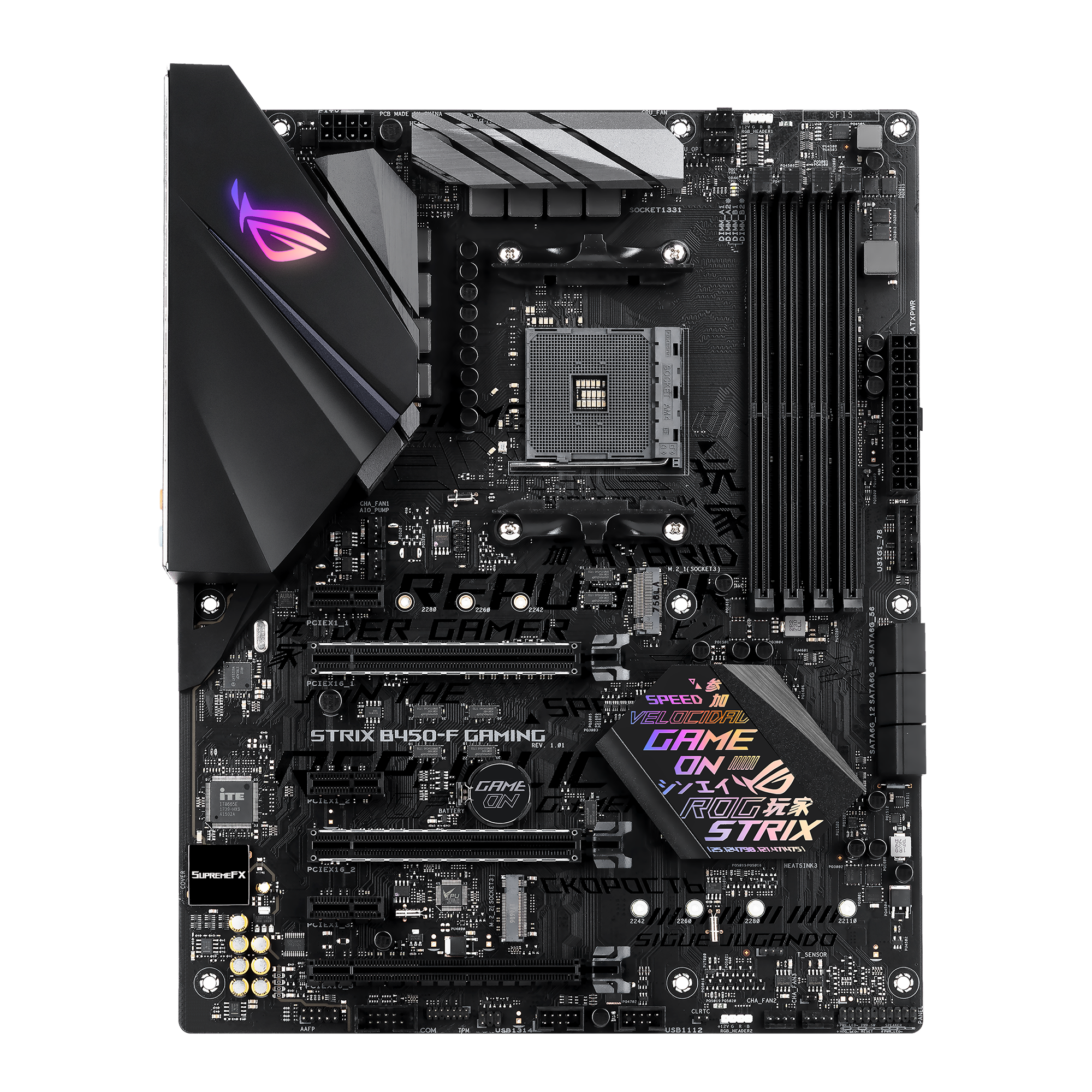
@ROG
ASUS ROG Strix B450-F Gaming Motherboard - Next-level performance: 2nd gen. AMD processors, 5-Way Optimization, Fan Xpert 4, Aura Sync. POWER.
thats the board I have
clear igloo
Well it's only got a gigabit port
lunar mist
is this that situation where it's specifically meaning gigaBIT where it actually means 100mb
clear igloo
bits = 1 or 0
bytes = 8 bits
networking is ALWAYS in bits
except for Windows which shows bytes
and most applications because why keep things standardized
opal pagoda
lunar mist
is this that situation where it's specifically meaning gigaBIT where it actually...
1 gigabit = 125 MegaBytes
lunar mist
well either way the math ain't mathing xD if its 125mbytes/second, why am I getting 10-20
clear igloo
Yup, still not even halfway there
I would try the intel drivers from here:
https://www.intel.com/content/www/us/en/products/sku/64404/intel-ethernet-controller-i211at/downloads.html
Intel
Intel® Ethernet Controller I211-AT - Download supporting resources inclusive drivers, software, bios, and firmware updates.
lunar mist
Nice I pulled up the exact same link earlier haha
opal pagoda
clear igloo
except for Windows which shows bytes
except in some cases for Windows which shows gibibyte/kibibyte (storage mostly)
clear igloo
😄
lunar mist
complete driver pack?
clear igloo
opal pagoda
except in some cases for Windows which shows gibibyte/kibibyte (storage mostly)
true
https://www.intel.com/content/www/us/en/download/18293/intel-network-adapter-driver-for-windows-10.html
Wired Driver for 64-bit
Intel
Installs the Intel® Network Adapter drivers release 29.3 for Windows® 10
lunar mist
got it, proset?
clear igloo
Nah
lunar mist
ok got it
opal pagoda
to test speeds between you linux server and windows use iperf
that way you can eliminate storage
clear igloo
Haha, was just about to say that 🙂
lunar mist
it just opens and immediately disappears lol
clear igloo
Hmmm, you can try the proset drivers or worst case point to the folder via device manager and install the drivers that way
lunar mist
the iperf thing
clear igloo
oh!
opal pagoda
lunar mist
the iperf thing
it is a cli tool
clear igloo
you need to run it from command prompt
lunar mist
oooohh
clear igloo
on one side:
iperf3 -s
on the other machine:
iperf3 -c 192.168.x.x
or whatever the IP of the server side is
opal pagoda
on client add -P 10 for more threads
clear igloo
yah, you can always do -P but at gigabit you shouldn't need it
opal pagoda
eh i always do 10 to get true max
i mainly use it in fortigate cli but syntax is mostly same
 clear igloo
you need to do one side on the linux machine to your windows machine as the other
opal pagoda
yea... that is on same machine as server
 clear igloo
Whichever is the client side
lunar mist
 lunar mist
so on the linux pc I do iperf3 -s, and on the windows pc I do iperf3 -P 10 -c 192.168.7.219?
clear igloo
yup
lunar mist

it works on windows for some reason
like whats the end goal of this thing here
all I ever do on linux is google how to fix things
anyway still slow af nothing changed
 opal pagoda
lunar mist
like whats the end goal of this thing here
opal pagoda
lunar mist
like whats the end goal of this thing here
Find root cause of your issues by elimination
lunar mist
I enabled something on both ends called jumbo frames

 unborn sluice
Ok
twin sphinx
I am obsessed
 compact void
How is that working
peak cloak
compact void
How is that working
The white paper talks about it
Basically uses an external server to get through nat and establish a connection, then it's usually direct p2p
compact void
Ahh yes
compact void
Its working thanks
thick minnow
how many of you
know dell R720 servers cause im having a problem with mine thats really pissing me the fuck off
before i drop kick the pile of shit
i just bought a 10 gig network card for it
and its on the debian installer
and wont connect to my switch
i just reset the switch
the network card is brand fucking new
the same issue is with the old network card
it will not get an ip address
at all
it refuses it recognizes the new card cause in the debian installer it can see the 10gig ports
im at a loss here of what the fuck im supposed to do i need this server backup for my minecraft server
which is barely running all on the other server machine
and im just done man im working IRL and i havent got enough time to dig deep into this shit some help would really be appreciated otherwise im gonna kick the living shit outta this heaping pile of shit

as you can clearly see the bottom 2 ports are the 10gig SFP+ ports the bottom most one is my main server and there should be a 3rd one there it is literally plugged in with the lights on
what could this issue be
its not my router or my switch its not the card
ima go smoke a ciggy and sleep on it
thick minnow
It also does it with Ubuntu server
Fails to configure the network
If it's not the network card what else could cause this
 past mason
thick minnow
If it's not the network card what else could cause this
past mason
thick minnow
If it's not the network card what else could cause this
would help if you listed what network card you bought, what SFP+ (if any) or DACs you're using
past mason
thick minnow
as you can clearly see the bottom 2 ports are the 10gig SFP+ ports the bottom mo...
from the looks of it, your switch only supports 2 10g interfaces, I could be wrong, but going off of there only being 2 xe interfaces shown

 waxen scroll
bye bye warranty
thick minnow
past mason
from the looks of it, your switch only supports 2 10g interfaces, I could be wro...
It has 4 they only show when active
thick minnow
past mason
would help if you listed what network card you bought, what SFP+ (if any) or DAC...
Dell X520
 past mason
thick minnow
It has 4 they only show when active
past mason
thick minnow
It has 4 they only show when active
they should show as down, like the ge ones
is the card seen in Idrac?
and what SFP+ or DACs are you using?
past mason
thick minnow
It has 4 they only show when active
check to make sure its not admistrativaly down
 olive pollen
Anyone know of a good tutorial on adguard with ubound?
tribal sequoia
thick minnow
It has 4 they only show when active
?? It only shows 2 SFP+ there? Other 2 look like 1gbe?
Maybe I missed something. Whatever.
past mason
tribal sequoia
Maybe I missed something. Whatever.
I looked up the model # shown in the pictures, it indeed does show and list having 4, that's why I asked him if they were enabled, and what SFP+/DACs hes using
tribal sequoia
past mason
I looked up the model # shown in the pictures, it indeed does show and list havi...
Yeah that's what I said
2 SFP+ and 2 gbe as in .. 4?
past mason
tribal sequoia
2 SFP+ and 2 gbe as in .. 4?
28 (24 host ports + four 10 GbE/GbE uplink ports)

 lost lily
lmfao i got for free 2 Brocade ICX-6450-48P switches
very happy, the office of a friend was throwing away old junk, and next to a 2U 10Base-T switch (with one 10/100 uplink!!!) there were these 2 just sitting there
 tribal hedge
Anyone know if the Cisco Nexus N9K switches has to have paid liscensing to work? I have a Cisco N9K-C9348GC-FXP at work that is being switched out I might be able to get, but if I have to pay for liscensing I'm not even gonna bother
opal pagoda
tribal hedge
Anyone know if the Cisco Nexus N9K switches has to have paid liscensing to work?...
It will not shut off packets like meraki would
Licenses are not enforced but are "we trust you" model and for private/ training use noone would care
N9k are louuuuudddd af tho, literally loudest piece of equipment in our DC
tribal hedge
opal pagoda
N9k are louuuuudddd af tho, literally loudest piece of equipment in our DC
Thanks for the reply, and yes I am aware, we use them as well. I have my servers and switches in a seperate room, so it's not a problem.
thick minnow
past mason
and what SFP+ or DACs are you using?
fs.com ones custom ends for dell and juniper
i would like to mention that it this all began i failed at setting up an LACP link with the previous 4 x gigabit card which stopped working after i tried doing that with it so i then ordered the 2X gigabit ethernet 2X 10gig SFP + card
its still doing the same thing will not get an ip at all the link shows as active on my switch but it cant get an ip all my other devices are fine its not my router its something with the server
so ive now ordered a PCIE network card for it and hopefully that works
clear igloo
opal pagoda
It will not shut off packets like meraki would
Licenses are not enforced but are...
Yup, they'll nag you at boot in the logs but otherwise it's honor based 🙂
thick minnow
thick minnow
its still doing the same thing will not get an ip at all the link shows as activ...
this is with the debian installer aswell not just my install broken or something i even tried ubuntu server installer aswell
so ive ordered this and i hope it will just work
 opal pagoda
thick minnow
so ive ordered this and i hope it will just work
opal pagoda
thick minnow
so ive ordered this and i hope it will just work
that card is wierd af
it probably uses old refurb chip
on a new black pcb
thick minnow
opal pagoda
on a new black pcb
i dont care at this point i just want my server online man
for cheap
thick minnow

eBay
Find many great new & used options and get the best deals for Mellanox MCX312B-XCCT CX312B ConnectX-3 EN Pro 10GbE SFP+ Dual-Port PCIe NIC at the best online prices at eBay! Free shipping for many products!

eBay
Find many great new & used options and get the best deals for Mellanox MCX312B-XCCT CX312B ConnectX-3 EN Pro 10GbE SFP+ Dual-Port PCIe NIC at the best online prices at eBay! Free shipping for many products!
sheesh ok
opal pagoda
but first wait for that amazon card to arrive
opal pagoda
thick minnow
i would like to mention that it this all began i failed at setting up an LACP li...
lacp wont work on asymetric connections
only same speed connections can be "bonded"
thick minnow
yeah i was doing that with the previous 4 X gigabit ethernet card
and it fried something on the motherboard clearly
because with the new card specific for the server it doesnt work either
opal pagoda
what is config on the switch side?
thick minnow
i dont remember but i was using my juniper switch created a aggregated link on all 4 ethernet ports
and then was tryna configure it from the debian side
opal pagoda
clear config and set basic config on them with no aggregation
opal pagoda
ah
thick minnow
something got fried
opal pagoda
something wierd
thick minnow
pcie should work fine tho fingers crossed
opal pagoda
hopefully
clear igloo
Back to back from server port to server port does the link come up and work?
bypass the switch should at least let you know if something in between is causing problems
 mystic hollow
Anyone use this item for wake on lan?
https://www.aliexpress.us/item/3256802590128054.html
mystic hollow
@keen urchin would this item from above work?
 keen urchin
mystic hollow
<@707767345019486239> would this item from above work?
keen urchin
mystic hollow
<@707767345019486239> would this item from above work?
yes, that's what I'm talking about
mystic hollow
keen urchin
yes, that's what I'm talking about
Pcie is better, I assume
I hate when my usb devices wake my pc lol
keen urchin
mystic hollow
Pcie is better, I assume
no, it doesn't matter, it connects to your on switch
mystic hollow
So then would my case switch be useless then?
keen urchin
no, it goes in line so it works as well
mystic hollow
Nice. Now I just need a aliexpress coupon code lol
 topaz wing
Can I get a quick sanity check please? I only know enough to be dangerous here...Looking to add some additional functionality to my network, we're stuck with a mesh network consisting of four Eero 6e pros supplied by our ISP, they are fine in terms of performance but awful for customization and advanced features and the firewall is a managed subscription if we wanted it. If I wanted to add my own firewall, and set up SPAN and a few VLANs, maybe IDS/IPS if I feel ambitious, and I already had a managed switch on hand (TP-Link TL-SG105E), could I add that and something as simple as a 4 port Protectli Vault running opnsense or similar in front of my primary eero router to achieve what I want, or is there an issue with having that between the ISP's router and modem?
Trying to get this done relatively cheap so replacing 4 existing, free eeros (don't even pay monthly for it, it's included in our internet package) with another set of high performance routers isn't ideal, and furthermore we don't have room for a proper network rack so this all has to fit behind the TV cabinet in our living room. Was looking at the V1410 specifically to pair with the managed switch I already have, I think it'll cover most of what I need and provide some room to learn and expand a bit.
opal pagoda
topaz wing
Can I get a quick sanity check please? I only know enough to be dangerous here.....
are they running custom isp specific firmware on them or same as retail units?
topaz wing
opal pagoda
are they running custom isp specific firmware on them or same as retail units?
I would expect custom, the eero app has their ISP logo on it when I launch it and it has ISP-specific troubleshooting pages.
That said, I've been told it is not required to use their routers, if I wanted to I could replace them and return the ones they sent me.
So I don't think there's anything proprietary at the modem level
opal pagoda
for what you want to do you would have to put a appliance between modem and that mesh solution
check that they have a option to turn them into ap without routing on them
if that is not possible another option is turning off dhcp on them and pluging in this order:
modem>firewall>lan port of master eero
topaz wing
I'll have to check.
topaz wing
opal pagoda
for what you want to do you would have to put a appliance between modem and that...
Yeah there's still a bridge mode under DHCP & NAT in network settings
opal pagoda
that could potentionally be used
topaz wing
I take it that's all that is needed? Then the protectli can handle it instead, Modem>Firewall>Managed Switch>Eeros?
opal pagoda
just use access vlan for interfacing with eero, i dont know if it would play nice with tagged vlan
topaz wing
Hmm, I'll have to try it out. Worst case I spin off a vlan with a second wifi router for what I need. Aside from some basic filtering rules, I just want the ability to separate my IoT crap and especially my security cameras from my main network. The built in eero guest network is too limited for that purpose though, it doesn't allow the devices to talk to each other, and it won't let my NAS and HA server to connect to the cameras for surveilance/automation. That, and the forced dual band SSID has me pulling my hair out at times over some of these devices that refuse to connect to the more stable 2.4ghz channel when they're just a bit too far away for 5...
At least then I'd only need to buy one wifi router instead of four, the devices in question are all pretty centralized.
From what I can gather online so far, supposedly the eero 6's allow tagged packets through but it won't manage them. The switch needs to do all the tagging. I'm not really sure how that would work with outbound traffic going to the eeros from connected devices though? Not 100% sure I understand it all if I'm honest.
topaz wing
I think this is the proposed design I'm looking at here?
Modem -> Firewall -> Managed Switch -> Eero 1
Assuming the Eero plays nice and passes the vlans tags transparently, I can set up 3 VLANs to properly isolate what I need while also allowing cross-communication:
VLAN10 - IoT Devices
VLAN20 - Servers/NAS
VLAN30 - PC/personal devices
I can then use the firewall to block internet access on VLAN10, and allow traffic between VLANs 10 and 20, and 20 and 30. One thing I'm not so sure about is whether to handle the VLANs with the managed switch or the firewall. I'm assuming it'd be better performance wise for the managed switch to handle the VLAN routing as it should have hardware offloading and lower latency (might be a factor if a lot of traffic is hitting the servers/nas), but if I do that I believe I lose any ability to manage firewall rules within the VLANs themselves, not to mention added redundancies in general, so maybe it's better to let the firewall do all of it and just keep the managed switch purely for port mirroring.
tight pecan
topaz wing
I think this is the proposed design I'm looking at here?
```Modem -> Firewall -...
The design looks good. I'd let the switch handle VLAN routing if possible since it's built for that. I'd also save the firewall's processing power just to make sure your incoming WAN traffic stays clean
Realistically it prob won't take that much processing power, but if you have a switch with VLAN tagging capabilities, I'd just use that
topaz wing
tight pecan
Realistically it prob won't take that much processing power, but if you have a s...
That is what I think I'll try first. I'm just not sure how well a $25 managed switch will handle the vlans. It supposedly is capable of up to 32 VLANs, so we'll see
tight pecan
It'll probably handle 3 as long as you're not pushing too much bandwidth lol
topaz wing
Hmm, I might wind up pushing that lol. There are times I can hit the local network pretty hard, between the camera streams and backup tasks all going to the NAS, and of course let's not forget the actual internet usage which is at gigabit speeds. Might be better to upgrade that managed switch to 2.5g at some point. But I think it'll get me started at least. The good thing is I do 1 2.5g port on each of the eeros so I could potentially pass more traffic through at least locally.
I already have the managed switch so it's not like I have much to lose trying it out.
lost lily
I've been looking for a while now, but i can't really find anything that checks all the boxes (and i haven't looked at used stuff so far): i need to find a 1U box or something that can do SFP+ line speed routing, ideally running opnsense that doesn't break the bank (i.e. <300€) (and doesn't trip my breaker)
the N100 boxes are cool but they can't do line speed routing not because of CPU, but because they use 2012 intel NICs and don't use the PCIe lanes effectively
 drowsy fossil
get one of the n100 boxes with a connectx 3 or something?
tight pecan
You can just replace the NIC with a connectx3 if you have a slot that supports it
lost lily
drowsy fossil
get one of the n100 boxes with a connectx 3 or something?
yes that is a good idea, however none of those boxes expose a PCIe x8 slot
given they have 9 lanes total
i guess there's this one
looks kinda weird
https://www.asrock.com/mb/Intel/N100DC-ITX/ this would be great but it only exposes 2 lanes in the x4 slot, which is definitely not enough for a connectx-3
Intel Quad-Core Processor N100 (up to 3.4 GHz); Supports 1 DDR4 DIMM; 1 DC Jack (Compatible with the 19V power adapter, 5.5 x 2.5mm DC-in jack); 1 PCIe 3.0 x4 (x2 mode), 1 M.2 Key E for WiFi; Graphics Output Options: D-Sub, HDMI; 7.1 CH HD Audio (Realtek ALC897 Audio Codec); 2 SATA3, 1 M.2 (PCIe Gen3x2); 4 USB 3.2 Gen1 (2 Rear, 2 Front); Realtek...
lost lily
can a connectx-3 work with just 2 gen3 lanes? i don't think so
that's 16Gbps, so obviously not, i need x4
https://www.dfrobot.com/product-2822.html i think this would work
This Lite carrier board is a development platform designed for the LattePanda Mu compute module, integrating common interfaces with a 3.5-inch standard size, making it ideal for embedded system design.
with the compute module being €139
yes i think that's it
 spiral monolith
G’day people!
I've just started a CCNA course and was wondering if I could buy a lab for sale using 3 switches
2600(x1)
2500(x2)
Could I use this as a lab kit?
tight pecan
lost lily
can a connectx-3 work with just 2 gen3 lanes? i don't think so
It will work just fine. PCIe 3.0 spec supports 2GB/s just from 2 lanes alone
The issue is whether it can supply enough power for the NIC, which it should but I'm not certain
Unless you're looking to do full duplex 10Gbps more often than not
I'd say 8 Gbps full duplex isn't too bad for such a power limited machine, though maybe you could get some second hand mini PCs that support a PCIe gen 3.0x4 slot.
pseudo blade
compact void
Can sombody tel me how to make a SQL server working on a nas?
SQLite. Tada!
Seriously you probably don't want anything fancier if you're unwilling to dedicate an actual machine to it and it's perfectly adequate for any self-serve use-case.
Hell it's good for more than just that
opal pagoda
spiral monolith
G’day people!
I've just started a CCNA course and was wondering if I could buy ...
Yea you can use whatever but that is a little old
You don't have to buy physical appliances, packet tracer is good enough
pseudo blade
spiral monolith
G’day people!
I've just started a CCNA course and was wondering if I could buy ...
2500, 2600? Sure they're not routers?
If they are I personally think they're old enough to be useless practically (some of the 2500 series is 90's metal) and emulation options (CML, GNS) or Packet Tracer saves you money and space and the latter's free to you with netacad access and will get you through most of what the CCNA wants.
Unfortunately Cisco gear worth using is a bit more spendy, which is why I haven't touched Cisco kit since I did my CCNA bar the garbage RV-series stuff I don't think is even good for SMB.
compact void
pseudo blade
SQLite. Tada!
Its a sql 12 database
clear igloo
spiral monolith
G’day people!
I've just started a CCNA course and was wondering if I could buy ...
You'd be better off using your hand to simulate and draw packets than those ancient boxes from the early 2000s
They're routers and packet tracer, CML, GNS3, etc. are all far better
unborn sluice
spiral monolith
G’day people!
I've just started a CCNA course and was wondering if I could buy ...
^
Fr, packer tracer is so helpful.
Came a long way.
I know you want to have physical hardware. But maybe do that for your homelab.
For certification go for the simulations
pseudo blade
compact void
Its a sql 12 database
"SQL 12" is what RDBMS exactly? Microsoft? Oracle? Postgres?
Maybe do some basic research and you'll be able to ask better questions (even find your own answers)
lost lily
tight pecan
Unless you're looking to do full duplex 10Gbps more often than not
yeah i meant to actually do that, but like it's okay
lost lily
tight pecan
I'd say 8 Gbps full duplex isn't too bad for such a power limited machine, thoug...
the LattePanda Mu Compute Module has a full gen3 x4 slot, so it can run an x520 intel dual SFP+ NIC just fine, even with regards to power consumption
one side has a DAC to my core switch, the other side has a transceiver from the ISP with their fiber
no ISP boxes in my homelab
pseudo blade
Tbh how often will you be saturating 10gbps up and down simultaneously to notice?
lost lily
not that much but like if I'm designing a system why not
also the LattePanda is cheaper too
~210€ for compute module, carrier board and the NIC on ebay
i shove a random disk in there and there's the router
with a 6W TDP (but that can increase up to like 30 or something if i want to)
pseudo blade
One thing to note... are you expecting more than just NAT out of it? PPPoE for instance?
lost lily
IPSec
IPSec, NAT, some light IP blocks, etc. DNS is handled by another box that handles DNS and NS
because I'll be self hosting my domain there (and maybe BGP too if my ISP is nice to me)
BGP handled by the router obviously
lost lily
lost lily
IPSec, NAT, some light IP blocks, etc. DNS is handled by another box that handle...
apart from IPSec it's all light stuff, like for example i block the entire facebook ASN and a few more, but it's not anything heavy
lost lily
imagine if you could actually use 120km SFP+ transceivers to make a line of sight 10Gbps link across like 40km of air. it would be such a cool universe but unfortunately it's not possible in this reality. sad.
spiral monolith
unborn sluice
^
Fr, packer tracer is so helpful.
Came a long way.
I know you want to have ph...
Yeah, very true.
I get it. I do appreciate the help, mate :).
thorn delta
WiFi 6e PTP links work better than I expected. This guy we installed at work this week is pushing just about 900 Mbps at 8.5km away, and I think there's a still room for improvement on the alignment

 topaz patrol
lost lily
imagine if you could actually use 120km SFP+ transceivers to make a line of sigh...
topaz patrol
lost lily
imagine if you could actually use 120km SFP+ transceivers to make a line of sigh...
FSO exists. Literally what you’re describing
thorn delta
lost lily
imagine if you could actually use 120km SFP+ transceivers to make a line of sigh...
FSO stuff is interesting, but snow/fog/smoke takes them down, so to get closer to 100% uptime you need some kind of backup microwave link in parallel
topaz patrol
There’s a reason they’ve gone out of fashion
lost lily
thorn delta
FSO stuff is interesting, but snow/fog/smoke takes them down, so to get closer t...
yes thats why i said it's impractical
it'd only work with good weather
 humble sorrel
I've been downloading files at 20MB/s for years, my ethernet port on my motherboard died last week. I just installed a cheap TP-Link ethernet card and now I am downloading at 100MB/s. Is it normal for a dedicated port to outperform a B450 mobo?
160 megabit vs 800 megabit
 ebon wasp
Yes that's possible. It depends on which components they used for the dedicated port
However 20MB/s is an odd speed
 long thistle
yeah sounds like some cheap realtek or i225
 burnt dagger
would using a vps to protect my home internet for hosting a Minecraft public server be good ?
looking at ovhcloud server
ebon wasp
VPS can be more expensive than a dedicated MC server, but yes you don't need to open up your own hoem internet
 low pond
burnt dagger
would using a vps to protect my home internet for hosting a Minecraft public ser...
low pond
burnt dagger
would using a vps to protect my home internet for hosting a Minecraft public ser...
There are many services that offer it, it might be cheaper but do check
like tcpshield and whatnot
 karmic marten
Hey guys. Does this module have a web iface or ssh? If so, can it be accessed without rooting it? I do not have a soldering iron https://www.ebay.com/itm/225725619187

eBay
ABBIAMO DISPONIBILI CAVI IN FIBRA OTTICA IDEALI PER CONNETTERE IL MODULO ALLA RETE FTTH, GUARDA LE NOSTRE INSERZIONI. La vendita include solo il modulo. Usati ma testati in laboratorio e funzionanti al 100% !!
karmic marten
burnt dagger
would using a vps to protect my home internet for hosting a Minecraft public ser...
Look at my bio and look at the ddos services provider. You can then use a a GRE tunnel to protect it
 south blade
Hey, how do I get an old wifi adapter working that can't seem to get installed? I don't know if it's the computer or my current WiFi adapter but it's been disconnecting very frequently since last night and these old as heck WiFi adapters I had in a drawer won't install. It says WF748-CUI on them, I tried the 'find windows update' since Windows couldn't install them but it's not finding anything.
I downloaded this WF748-CUI_ZD1211B.zip which says it's for serial number beginning with Z6, which mine is, it's old, says for Vista...so I set it to Vista compatibility mode and I start the program and it pops up the icon in the task bar and disappears.
south blade
Somethings gotta be wrong with this wifi adapter, 802.11g...that's not from the router is it? That's what the adapter is connecting as I would think

 tardy phoenix
Good morning all, I am looking to get a new wireless USB wifi adapter for my PC. Can I please have some recommendations on ones I can buy from Best Buy as I know nothing about them and don't really know what to look for.
I found this one, would this be a good choice?
https://www.bestbuy.com/site/netgear-nighthawk-axe3000-tri-band-wi-fi-6e-usb-3-0-adapter-black/6520471.p?acampID=0&cmp=RMX&loc=emedia&ref=198&refdomain=bestproductsreviews.com&skuId=6520471
 harsh elbow
Anyone have any experience finding hikvision/amcrest/dahua in British Columbia/Canada?
shadow sundial
is TP-Link still the best Powerline ethernetadaptor aorund ?
 old scroll
tardy phoenix
Good morning all, I am looking to get a new wireless USB wifi adapter for my PC....
old scroll
tardy phoenix
Good morning all, I am looking to get a new wireless USB wifi adapter for my PC....
Honestly unless you need high download speeds, just get whatever is cheap and pretty highly reviewed
And if you do, just get it hard lined
 hasty root
shadow sundial
is TP-Link still the best Powerline ethernetadaptor aorund ?
hasty root
shadow sundial
is TP-Link still the best Powerline ethernetadaptor aorund ?
in my opinion powerline is a last ditch effort if you have no other choice (running a wire isnt as daunting as it seems) the TP-Link AV2000 are ones that ive personally used
shadow sundial
cool thanks
 vernal rain
Hi guys, what's the max real world speed I can get on a Wifi6 mesh wifi network with a 10gbps connection?
I'm currently on Google nest wifi with a 1gbps connection, and considering the hardware Id need to get upgraded speeds on a 10gbps connection.
2 cases:
-
Pure mesh network, where one router gets the ethernet connection from the provider, and rest of the household is meshed with this.
-
I run an ethernet backhaul to most other units from the main router.
Apart from thick walls and other factors, if a mesh wifi is in the room - will I get GBPS speed over the air?
P.s: I've tried googling, and been unable to get the answer I was looking for!
topaz patrol
You won’t get more than 1gig real world on most wifi 6 gear (ignoring backhaul)
old scroll
well, on 1
if you had a chain of them connected to seperate stuff (like a business run of ap's) you theoretically could get to 10gbps, but thats not on 1 device thats on 10s of devices at least
but in all honesty, 10gbps is really only useful on a pc with a hardline connection
and you generally need a network card todo that
that actually supports 10 gig speed
im getting old
deleted pointless ramble messages
clear igloo
Does it play fine on another media player locally?
 blissful thorn
Does anyone know of any guides or have recommendations on the best way to do this?
I'm looking to service desktop systems at my "home", and I'd like to isolate any tested systems from my "home network"
tight pecan
VLANs. Lots of videos on YT, though I don't really have any recommended vids
peak cloak
Don't even need vlans
blissful thorn
Yeah I wasn't sure if I'd need to order other routers what.
I currently have a router from my ISP (Fibe) then I have a unmonitored network switch run to my work area.
Just looking to avoid leaving the home network exposed to remote access or unexpected viruses etc.
 meager ginkgo
shadow sundial
is TP-Link still the best Powerline ethernetadaptor aorund ?
meager ginkgo
shadow sundial
is TP-Link still the best Powerline ethernetadaptor aorund ?
Do you have coax? MoCA would be the better option.
Can grab a two pack of new 2.5Gig adapters for $60 off eBay

eBay
Model: FCA252. Frontier MoCa 2.5 Ethernet Network Adapter. Includes: Ethernet Cable, Power Adapter, and Manual.
peak cloak
blissful thorn
Just looking to avoid leaving the home network exposed to remote access or unexp...
does your home router support static routes?
what I would do is setup a virtual router on your server box, and have all your VMs behind that virtual router. Then setup firewall rules to restrict it from any NEW connections to your home subnet
I did this with vyos, but that's cli only so it can be a little indimidating
webui is in development
shadow sundial
idk if i fixed it or not..( this is on my plex server btw).. basically i will start the first episode of Game of thrones. it will play for exactly 1min57sec then the screen freezes but the timer keeps running. after waiting over 5 mins it will then blink and the show starts again. every other episode take 5-7 mins to load in. this is the only show i have an issue with on my plex server. i have over 4 tb of data. and it is being stored on and drawn from my Synology NAS. every thing is up to date and there is no internet issues. i removed the files form the file destination and then re cscanned the library to make sure it couldnt see them. then moved it back.... still same issues. truly confused
opal pagoda
blissful thorn
Yeah I wasn't sure if I'd need to order other routers what.
I currently have a ...
firewalls are way to go and they are designed for this, opnsense and pfsense are popular options for home users
twin sphinx
🫡
 topaz patrol
You my friend, have given Ubiquiti way too much money
compact void
I can't connect 2 PCs to one sql server
topaz patrol
Yes you can?
 topaz patrol
MySQL, for example, has a max of 4,294,967,295 concurrent connections lol
topaz patrol
compact void
The concurrent connection limit is 10?
compact void
I dont know
topaz patrol
It’s says right there in the picture you sent
 glad bridge
topaz patrol
You my friend, have given Ubiquiti way too much money
glad bridge
topaz patrol
You my friend, have given Ubiquiti way too much money
nahh i can just understand him
topaz patrol
There is no need for a UBNT PDU
shadow sundial
 pseudo blade
topaz patrol
There is no need for a UBNT PDU
pseudo blade
topaz patrol
There is no need for a UBNT PDU
Why not? Smart networking stuff is neat and more affordable options with onprem management are better than less for everyone (drives down cost and increases feature competition)
I don't use UBNT and can still see the appeal
Worst that can happen is nobody buys them
waxen scroll
cisco is like $25k a switch on the non-small office stuff 💁
then you have to add support costs
@clear igloo UBNT quietly pulled their datacenter products
pseudo blade
waxen scroll
cisco is like $25k a switch on the non-small office stuff 💁
Certainly glad to have other options (also their small office stuff is just the shit other vendors sell but 4x the price, or lobotimised so much I wouldn't dream of touching it at a price point I could do better at)
pseudo blade
waxen scroll
<@291198741862416384> UBNT quietly pulled their datacenter products
Looks like they dipped their toes in and went no further, pulled them years ago by looks
My guess is they were expecting big Cisco shops to toss their gear for UBNT, which uh... didn't materialise for possibly obvious reasons
Pretty certain "frequently updated" "(other people's) cloud" and "budget" are concepts that repel large DC owners :P
waxen scroll
pseudo blade
My guess is they were expecting big Cisco shops to toss their gear for UBNT, whi...
I actually was going to use them at an F500 company
pseudo blade
Oh?
waxen scroll
but because they didnt release the leaf I waited to test them
they just abandoned it all instead of releasing the leaf
pseudo blade
So the other project stakeholders were interested?
waxen scroll
UBNT would be great for out of band, which for me is a huge network and hard to swallow using cisco
pseudo blade
So you'd have stuck with Cisco for your actual core
waxen scroll
yeah
waxen scroll
my OOB networks are enough to make something like a $5 mil quote from cisco
pseudo blade
Shame as it'd be nice to have one management platform for the lot
waxen scroll
very tough for upper management types to swallow since its basically a management network that doesnt see a ton of use
pseudo blade
Surely the leaf is overkill for a management network anyways
pseudo blade
What did you end up with, out of curiosity?
waxen scroll
well we chose arista but we are going through contracting and havent deployed anything
pseudo blade
Fair
waxen scroll
arista wants like $2-3m for the same quote
pseudo blade
How many switches? (Roughly)
pseudo blade
$6/7k a switch
That's still a fair whack of money but I guess if the scenario warrants it
waxen scroll
I want to say the cloud management and support is ~3yr, so we will need to pay more when that renews
pseudo blade
Oof
waxen scroll
cisco is in the same boat, theres stuff to renew after 3
pseudo blade
Idk I get why they pay for trusted brands but paying that much when needing comparatively little is wild to me
waxen scroll
we're financial so any network problem is a big problem
pseudo blade
Beats Cisco wanting borderline small car pricing per switch I guess
waxen scroll
I do wonder if cisco wants to be a network company anymore
All of a sudden its AI this and that, then 10,000 jobs lost
feels like broadcom, just keep firing people, jacking up license and support costs
I know @rocky badge loves aruba but I had a pitch on their datacenter offerings a few months ago and 
one of the most dull pitches I have had
 rocky badge
waxen scroll
I know <@236237361703288842> loves aruba but I had a pitch on their datacenter o...
rocky badge
waxen scroll
I know <@236237361703288842> loves aruba but I had a pitch on their datacenter o...
I do?
clear igloo
waxen scroll
All of a sudden its AI this and that, then 10,000 jobs lost
cut engineers, software quality goes down, sales dip, go back to step 1
😄
pseudo blade
waxen scroll
feels like broadcom, just keep firing people, jacking up license and support cos...
Broadcom's devourer isn't too fussed with new IP, they just run niche stuff into the ground for maximum profit
Look at what happened to PLX chips (once rather affordable PCIe switch chips) and vmware (once affordable hypervisor)
pseudo blade
waxen scroll
I do wonder if cisco wants to be a network company anymore
Oh I'm sure the executives want an AI company like every other publicly traded business presently in existence
opal pagoda
pseudo blade
Beats Cisco wanting borderline small car pricing per switch I guess
That is just "retail" price, real price is 80 or more % off
I hate that pricing model from bottom of my heart
Just say what the switch costs and dont bs me abt the price
clear igloo
opal pagoda
Just say what the switch costs and dont bs me abt the price
Yup, 100%
variable discounts for everyone!!
opal pagoda
clear igloo
variable discounts for everyone!!
and then there is licensing
cisco and forti are worst offenders
clear igloo
opal pagoda
and then there is licensing
cisco and forti are worst offenders
I hear you need licenses to phone home 😄
We have the deal for you!!
At least with most of Cisco products/features (excluding Meraki) there isn't any negative impact to being out of compliance. There are definitely exceptions though, usually in the security space afaik
I can't comment on Forti licenses though
opal pagoda
i am lucky i only use fortigates with fortianalyzer and fortimanager
one of the most frustrating things is that fortigates can run iperf3 client and server but server is only compatabile with other fortigates
client can be used with any iperf3 server tho
clear igloo
well obviously, lol
old scroll
waxen scroll
I do wonder if cisco wants to be a network company anymore
Cisco just follows where the money is, they got investors and most businesses now do cloud computing (or atleast more than what used to be) I would say pivoting away would make sense from an investor standpoint and datacenter/ai solutions make more sense than anything else for them.
They will still sell networking gear but it makes sense to get into a new market to make investor capital go up.
old scroll
pseudo blade
That's still a fair whack of money but I guess if the scenario warrants it
6/7k a switch is usually a bargin
2014 when I studied Ccna it was like 10k a switch
Brand new obviously
topaz patrol
pseudo blade
Why not? Smart networking stuff is neat and more affordable options with onprem ...
It’s mostly a joke
Much better than a datto pdu
 shadow sundial
figured out the problem with my Game of thrones not playing on my Plex. aprprently yhrt efiles were corrupted in soome way. retireved files form a differente source and it runs perfectly fine now
 plucky marlin
I've got an EE 4G Mini Hub temporarily whilst Openreach pull their finger out and actually install my new FTTP connection.
I want to bridge the connection from its Wifi to the rest of my network via a Windows bridged network device. Strangely, though, if I just connect directly to the hub, I get about 20mb down and 15 up. If I set up the bridge from the Wifi to the ethernet port on my laptop, my speed suddenly drops to <1mbps down, but I still get 15 up. Any ideas? And should this actually work?
Secondary option is that I do have OPNSense and could try and set something up there, but I'm not familiar with how to configure that...
opal pagoda
plucky marlin
I've got an EE 4G Mini Hub temporarily whilst Openreach pull their finger out an...
What do you want to achieve?
Do you have another wan connection to OPNsense?
topaz patrol
99% of SOHO routers I’ve seen will support using a 4g modem in the USB port
plucky marlin
opal pagoda
What do you want to achieve?
Do you have another wan connection to OPNsense?
The mini hub is limited to 20 devices, and I have more. But I also use a different IP range and want everything to connect and work as if I had my normal internet still - if possible.
I currently have a WAN connection, and will hopefully have a new WAN connection by tonight, but it's no guarantee and I may end up being without internet.
My ISP have provided the mini hub so I can at least connect some devices, but if I could just use it as a modem with my OPNSense router, that would be great.
opal pagoda
Just buy a better lte router as this one doesn't even have a wired Ethernet port
Currently you can get this quite cheap but check that bands are compatible with your providers

GL.iNet US
Note: All refurbished products are officially certified and function perfectly. Tips: Refurbished Mango Spitz (GL-X750) with EC25-AF. One-year limited warranty. Refurbished products will be shipped from US. Comes with packaging and accessories. Meet Spitz, a dual-band wireless router that can be widely used for smart
 strong ivy
Which is the best for the price?
https://www.amazon.com/UGREEN-Adapter-Antennas-WAP3-SAE-Supports/dp/B0CJ9G9Y4K
https://www.amazon.com/UGREEN-Adapter-Antennas-Wireless-10-11-10-15/dp/B0B1PZXNVZ
https://www.amazon.com/dp/B0B5YPK9L1

UGREEN AX1800 Wifi Adapter New

Still troubled by an unstable Wifi network? Losing the Wifi signal due to being too far from the router? Download or upload speed is too slow? All you need is a UGREEN AC1300 Wifi Adapter. Why choose UGREEN AC1300 USB 3.0 Wifi Adapter: 2 adjustable 6dBi high gain antennas for a stable Wifi signal...

TP-Link WiFi 6 USB Adapter for Desktop PC - (Archer TX20U Plus) AX1800 Wireless Network Adapter with 2.4GHz, 5GHz, High Gain Dual Band 5dBi Antenna, WPA3, Supports Windows 11/10
opal pagoda
strong ivy
Which is the best for the price?
https://www.amazon.com/UGREEN-Adapter-Antennas...
tp link
 celest viper
 blissful thorn
peak cloak
does your home router support static routes?
blissful thorn
peak cloak
does your home router support static routes?
Sorry to revive this 3 days later I was away.
I don't mind buying another router if needed. I'll have to read more about it since it's outside my specialties.
To clarify it it helps, it would a regular home network with phone/laptops/desktops/etc. Then my switch connects systems I've built/or in the case where I'm forced or needing to connect an outside customer system to the internet.
Not sure if what you're suggesting would work for that.
blissful thorn
opal pagoda
firewalls are way to go and they are designed for this, opnsense and pfsense are...
I'll have to read about it - I was ideally trying to avoid having to pay for another internet plan or a hotspot plan etc.
But if it's also like +1-2K in networking setup to make it work, I'll just avoid connecting customer systems to the network. Main things aside from convenience (for not virus infected rigs) is I can test ethernet ports/drivers and WIFI performance.
Wasn't sure if there is a monitored switch with firewall or a better router where I can create a seperate guest network and apply protections to isolate it from a direct connection to my main home network. Subnets-vlan etc idk
opal pagoda
blissful thorn
I'll have to read about it - I was ideally trying to avoid having to pay for ano...
cheap and easy option would be to buy something like this
https://store.gl-inet.com/collections/all-products/products/opal-gigabit-wireless-pocket-sized-openwrt-ipv6-sft1200
then you can vpn out of your own network to minimally interact with it
config: https://protonvpn.com/support/flint-gl-ax1800-router
end result would be isolated network that will vpn straight to your vpn provider and only interact with your gateway (home router) for ip transit
strong ivy
opal pagoda
tp link
Ok, thank you
blissful thorn
opal pagoda
cheap and easy option would be to buy something like this
https://store.gl-inet....
Alright that sounds interesting - would I be able to connect it to the fibe router via ethernet then run the VPN off the Opal router and connect a switch/systems to that Opal router?
Am I understanding that right?
strong ivy
Are Wi-Fi cards backwards compatible?
topaz patrol
blissful thorn
Alright that sounds interesting - would I be able to connect it to the fibe rout...
Correct


 minor flower
Are these things compatible or did the Best Buy guy mess up?
Cause isp whitelist the modem and it shows up as network SSI ID but shows no Internet connection
If some could help me
 fierce jacinth
topaz patrol
“Do not remove from premises”
<:Sadge:929041335074312192>
fierce jacinth
topaz patrol
“Do not remove from premises”
<:Sadge:929041335074312192>
ayo its the classic NBNCO FTTC Network Connection Device
those fuckers let off a lot of heat
topaz patrol
fierce jacinth
ayo its the classic NBNCO FTTC Network Connection Device
smh breaking the NBN Co. brand guidelines :p
fierce jacinth
topaz patrol
smh breaking the NBN Co. brand guidelines :p
lmk if you figure out how to extract the credentials from one of the FTTP ones
topaz patrol
Yeah no :)
fierce jacinth
i'm on a mission to obtain fibre to my desk
topaz patrol
You won't be able to.
fierce jacinth
and the last piece of copper is between the ntd and my desk
if i get the creds off it i can copy them to a GPON SFP+ stick
topaz patrol
fierce jacinth
if i get the creds off it i can copy them to a GPON SFP+ stick
No, you can't :)
fierce jacinth
you can, i've seen it done by others, NBNCO support gpon sticks but don't offer them for residential connections
topaz patrol
That's for smart places. Completely different
The security is quite robust with GPON
If you really want SFP+ pay for EE
topaz patrol
fierce jacinth
you can, i've seen it done by others, NBNCO support gpon sticks but don't offer ...
i've seen it done by others
Show me a working connection at a premises.
Even if you could get it to work, what you'd be doing is illegal :)
opal pagoda
topaz patrol
> i've seen it done by others
Show me a working connection at a premises.
Even i...

🚀 Part two is up! 👉 https://youtu.be/7RZ6JtjHBfo
🔗 Links mentioned in the video:
➡️ SFP GPON module: https://www.fs.com/de-en/products/133619.html
➡️ IP phone forum: https://www.ip-phone-forum.de/threads/ssh-telnet-to-fritzbox-5491.306736/
➡️ Frtizbox image builder: https://github.com/PeterPawn/YourFritz/blob/main/toolbox/build_shellinabox_impl...
topaz patrol
The nbn access network operates quite differently, compared to that ISP I'd assume
fierce jacinth
topaz patrol
The **nbn** access network operates quite differently, compared to that ISP I'd ...
tbf the GPON gear is exclusively layer 2 so there isn't a whole lot of room for it to be different
fierce jacinth
topaz patrol
> i've seen it done by others
Show me a working connection at a premises.
Even i...
oh yeah its absolutely illegal, i want a gpon stick so i'm going to keep pestering nbnco
topaz patrol
fierce jacinth
oh yeah its absolutely illegal, i want a gpon stick so i'm going to keep pesteri...
That'll do nothing :)
If it's not in the WBA, they won't do it.
fierce jacinth
yeah :(
i don't care that much and even if i did manage to copy the credentials its a managed part of their network so they'll know something is up
topaz patrol
fierce jacinth
tbf the GPON gear is exclusively layer 2 so there isn't a whole lot of room for ...
You'd be unable to provision a service without the NTD
fierce jacinth
topaz patrol
You'd be unable to provision a service without the NTD
yeah i'm just pointing out that its layer 2 ergo the fttp box/sticks don't have ip addresses at all
this sort of fanagling has been done a lot in other countries, i think that video is an example of it, its possible but very hard to do and they'll almost definitely notice
so not worth it whatsoever
topaz patrol
fierce jacinth
this sort of fanagling has been done a lot in other countries, i think that vide...
It just wouldn't work :)
fierce jacinth
topaz patrol
It just wouldn't work :)
why not? the box has the gpon credentials stored on it (albeit probably in encrypted flash) so if you were to somehow provision a stick with those same creds and clone the mac address it would work
from what i can tell nbnco doesn't do anything proprietary for management beyond what gpon offers natively
cause under the branded box its just a nokia gpon ntd
topaz patrol
Which is custom-ish
fierce jacinth
yeah, its also the same gear used in other countries where this has been done
topaz patrol
fierce jacinth
from what i can tell nbnco doesn't do anything proprietary for management beyond...
RSPs have quite a lot of control over the NTD
fierce jacinth
yeah i get that, so while it may be able to connect briefly if you managed to clone it if they're using rotating keys it will break whenever the next time that happens is
¯_(ツ)_/¯
i've got bigger fish to fry atm anyway and i don't want to piss off the fibre monopoly
although there is another fibre company who's expansion is about to reach my house so who knows
topaz patrol
fierce jacinth
yeah i get that, so while it may be able to connect briefly if you managed to cl...
No.
You don't know shit about fuck :p
I've had this conversation so many times with people.
It's not possible (without NBN Co. onboard)
fierce jacinth
topaz patrol
You don't know shit about fuck :p
I've had this conversation so many times with ...
how so, what's the broken link
topaz patrol
What's the broken link?
You wouldn't be able to provision a service, and you'd have trouble even getting an existing service to work
fierce jacinth
i didn't say it would be easy, i just said that all the information needed to mimic the residential ONT is contained on the ONT and could be transferred to another ONT if you could find a way to do it (if they have half a braincell they will be taking measures like encrypting flash and using HMAC tokens or similar but you can't take anything for granted in Australian telecommunications)
by definition the nokia ONT they provide to residential and the GPON sticks they provide to their smart places program or whatever they call it have to be compatible with each other since gpon is a passive system anyway
if i'm wrong i'm wrong but i don't see what implementation detail other than the ones i mentioned would prevent you from doing this
there would be no need to provision a new service because its the same credentials
topaz patrol
fierce jacinth
by definition the nokia ONT they provide to residential and the GPON sticks they...
Yes but you would not have a UNI-SFP provisioned for a premise connection.
fierce jacinth
UNI?
topaz patrol
fierce jacinth
there would be no need to provision a new service because its the same credentia...
Until your RSP conducts a loopback test and trys troubleshooting your connection, eventually figuring out what's up
topaz patrol
fierce jacinth
UNI?
User network interface, UNI-SFP is the name for the alcatel lucent SFP module you're talking about that's used to deliver tc4 for smart places
fierce jacinth
ahh yep
they'd obviously figure it out unless you somehow fucked with the stick to make it report its mac address and other relevant characteristics as those of the original ONT (and now we're in the realm of fucking with the firmware of the sfp module, which may not be writeable etc)
it was never going to be practical or remotely worth the risk if possible
topaz patrol
Why would you want to eliminate the NTD anyway?
fierce jacinth
either way the perfomance of the sfp module is identical to that of the ONT so the only point of the exercise would be cosmetic ¯_(ツ)_/¯
fierce jacinth
topaz patrol
Why would you want to eliminate the NTD anyway?
getting rid of the last stretch of copper between my desk and the internet 😆
Massive wast of money and time but fibre to the desk is funny
topaz patrol
That last stretch of copper is not worth eliminating for a best effort service with peak speeds of 1000Mbps
fierce jacinth
like i said before the sfp module and ont have near identical performance so it would purely be a cosmetic thing
with absolutely no real value other than being amusing
topaz patrol
And illegal :)
topaz patrol
Spend the couple hundred bucks on an EE connection instead :p
Or Telstra TID or AAPT fast fibre I guess
fierce jacinth
Yeah I thought about going EE, at least from where I live even if you have gigabit nothing will give you more than like 10M tops
A speedtest at home and at uni gives the same download speed (to launtel) but something like a steam download from the nearest server won't go past 100M at home but will happy ramp to 900+ at uni, which I imagine is just bandwidth priority and maybe some of how aarnet's interlink between campuses doesn't share fibre with the other ISPs (could also be colocation, Idk where the steam Melbourne servers are)
topaz patrol
fierce jacinth
Yeah I thought about going EE, at least from where I live even if you have gigab...
You don't need EE :)
Low CoS EE has very little advantage over TC4 anyway
opal pagoda
fierce jacinth
A speedtest at home and at uni gives the same download speed (to launtel) but so...
You could change steam download region, maybe it will solve your issue
 kind cypress
hello dear ltt comunity im having a bit of a trouble with my networking and would apreciate if an intellectually expierienced one would offer their advice for a bit
My situation:192.168.0.0/22 subnet
this is where windows client ( black terminal ) as well as 192.168.2.30 and 192.168.2.31 are
GW 192.168.1.1
Routed to the 10.1.1.0/24 network via 192.168.1.2 ( opnsense )
had no problem over the last year since i set it up
No it appears that fore some majestical reason 192.168.2.30 specifically is not reachable from the 10.1.1.0/24 network
And for some reason only that one specifically
 opal pagoda
kind cypress
hello dear ltt comunity im having a bit of a trouble with my networking and woul...
opal pagoda
kind cypress
hello dear ltt comunity im having a bit of a trouble with my networking and woul...
Do you have any firewall rules on that opnsense box?
kind cypress
Nope no firewall rules I'll just reboot everything go to sleep and hope it magically fixes itself because im tired and probably just forgot something really stupid
blissful thorn
topaz patrol
Correct
Thanks I'll look into this more
lunar mist
can someone help me? My linux computer won't connect to the internet anymore lol
I don't know if its the switch i bought because it doesn't have a yellow light on it
ah the yellow light shows up on the other computer, it's a linux thing probably I'll go to the other channel
pseudo blade
lunar mist
I don't know if its the switch i bought because it doesn't have a yellow light o...
Drivers, cables or hardware problems
I guess dead switchports are technically possible too