#networking
1 messages · Page 63 of 1
 thick minnow
Iv got some of it set up just so I can have internet while waiting for everything else
Is power line even that good?
 cunning lion
It's fine as a backhaul honestly
MOCA would be better but I don't have any coaixal cords in this rental and there is no ethernet ran either so I am sort of limited to either wifi or powerline
thick minnow
I prefer to keep everything wired when possible via Ethernet
20m runs work well in apartmentents
cunning lion
Can't run my own wires in this rental with a giant metal furnace in the middle of the hallway cutting the place in half
cunning lion
kids and animals here so yeah NOT possile to do that either and the kids are 2 and 3 aka toddlers still
they grab everything that isn't nailed down and even the nailed down stuff
thick minnow
Ah makes sense I don’t have any pets or anyone else I live with
cunning lion
8 people in this 3bedroom 2 bath place
thick minnow
💀
cunning lion
and 2 of them are kids below the age of bloody 4
cunning lion
also 1 cat and 1 dog so yeah and yeah they would
thick minnow
My layout would be ripped off from the wall almost instantly
cunning lion
These adapters I can throw behind heavy pieces of funiture
and yes it would with these 2 kids
thick minnow
cunning lion
These adapters I can throw behind heavy pieces of funiture
Do they only work on same currcit?
cunning lion
same panel will work
thick minnow
cunning lion
same panel will work
I’m not aware of electrical I don’t know what you mean?
 regal wasp
If i did a speedtest and it came back slow what would i do? My xbox is much closer than it originally was
I want to utilize this as much as possible
I dont wana be the high ping guy of the group
cunning lion
thick minnow
I’m not aware of electrical I don’t know what you mean?
Never had to reset a breaker?
cunning lion
regal wasp
If i did a speedtest and it came back slow what would i do? My xbox is much clos...
Did you plug the xbox straight into the moden and test the speed?
thick minnow
cunning lion
Never had to reset a breaker?
Iv blown one and I got shouted at by family for it
cunning lion
LOL the breaks live in the breakerbox which is also called a panel
thick minnow
I don’t touch electrical or water as I don’t own where I live
cunning lion
Basically if your place is served by a single panel you are good with powerline
regal wasp
cunning lion
Did you plug the xbox straight into the moden and test the speed?
Not yet, im not home currently but when i have before it was still getting slow speeds before
cunning lion
what causes issues is jumping between 2 or more breaker boxes
thick minnow
cunning lion
Basically if your place is served by a single panel you are good with powerline
Yea most afordable houses in uk are one panel
That’s for massive ass houses
Better off getting a full ubiquity network at that amount of income
cunning lion
thick minnow
That’s for massive ass houses
Yeah and that is where you run into issues with powerline lol otherwise its fine in a single box place
thick minnow
cunning lion
Yeah and that is where you run into issues with powerline lol otherwise its fine...
Ah oki
cunning lion
powerline is helpful for those renting and can't run their own ethernet cables
thick minnow
True
cunning lion
powerline is fine if you are using it as a backhaul like I will be doing for 2 ubiquity wifi devices
2 of them thanks to the bloody giant metal box cutting my place into 2 zones
thick minnow
Running Ethernet cables on the baseboard isn’t that noticeable
cunning lion
We don't have baseboard here lol
thick minnow
That’s where all mine are run power extensions and network
cunning lion
also can't really do that here with kids and cat anyways
thick minnow
 cunning lion
cats like cables afterall LOL
 cunning lion
regal wasp
Not yet, im not home currently but when i have before it was still getting slow ...
cunning lion
regal wasp
Not yet, im not home currently but when i have before it was still getting slow ...
If you still get the 300mbps or so then yeah Spectrum is cutting it down to that speed fromt he 1gb you are seeing outside the modem. So there is nothing you can do and they are giving you what you are paying for and nothing faster
thick minnow
ISPs do do sneaky things
regal wasp
cunning lion
If you still get the 300mbps or so then yeah Spectrum is cutting it down to that...
Any way to bypass :>
thick minnow
Id buy my own router switch and access point and put the isp router in bridge mode personally
More points of failures and have to know some networking stuff to do that
Worth it in the end
cunning lion
@thick minnow won't help if all he is getting is the 300mbps from the modem itself
in which case there is nothing that can be done to get teh 1GB he is seeing on the otherside of the modem
@thick minnow basically asking how to get the full 1GB they are seeing here instead of the paid for 300mbps
regal wasp
cunning lion
<@456226577798135808> basically asking how to get the full 1GB they are seeing h...
I mean there the ones sending the full GB
I want it >:3
cunning lion
If plugging a device directly into the modem isn't giving them the 1Gbps and only 300mbps then there is nothing that can be done
regal wasp
cunning lion
If plugging a device directly into the modem isn't giving them the 1Gbps and onl...
Damn you spectrum
thick minnow
Do you pay for 1gb? Stupid question
cunning lion
Yeah if you don't get that directly plugged in then yeah nothing you can do unless you talk to spectrum and they will likely force you to upgrade to a 1GB conntection for more money
they pay for 300mbps
thick minnow
Yea they are get the max speed they can get on what they pay for
cunning lion
the plan speed is 300mbps and they are getting almost 350mbps which is about right
thick minnow
Spectrum would have already stopped any work around a before they get know by anyone
thick minnow
cunning lion
the plan speed is 300mbps and they are getting almost 350mbps which is about rig...
Never heard of getting a bit more than what pay for
Iv always gotten slightly under
I’m curious how much can you get for what I pay 35 dollars
cunning lion
I know we always got slightly more with comcast exmple pay for 25mbps and get upwards of 28-30mbps
regal wasp
thick minnow
Yea they are get the max speed they can get on what they pay for
But there sending 1gb to house
 thick minnow
regal wasp
But there sending 1gb to house
thick minnow
regal wasp
But there sending 1gb to house
The cable to your house will be 1gb but your paying for less than 1gb
You will have to updgrade to 1gb to get the full speed sent to your house
When you can see you can get better it makes ppl more likely to buy the better thing they are also playing the free advertising game on you
Don’t have to pay for 1gb speed ads if can see your missing out on it when look at current plan
regal wasp
thick minnow
When you can see you can get better it makes ppl more likely to buy the better t...
Wdym?
thick minnow
If you see something you may not want it now but after seeing it time and time again you will want to purchase it
You may not have wanted a coke until you have seen a coke ad 50 times now you want a coke
regal wasp
thick minnow
You may not have wanted a coke until you have seen a coke ad 50 times now you wa...
Not a coke guy lol
thick minnow
regal wasp
Not a coke guy lol
Now replace the coke with 1gb speed plan
regal wasp
thick minnow
Now replace the coke with 1gb speed plan
Oh
I wonder if theres a way could upgrade for same price
Or if theres better providers
Cus its like 100 a month with wifi + cable bundled
thick minnow
Look forward better providers that give more for price if want better sppeds for same amount
I looked around before signed up to what I have
thick minnow
regal wasp
Or if theres better providers
Probably
regal wasp
thick minnow
Probably
I know that xfinity and comcast are pretty good
Also with that fiber optic breakthrough that happened recently
thick minnow
Look at the price of there 1gb plans
regal wasp
thick minnow
Look at the price of there 1gb plans
But we have cable bundled with it
thick minnow
regal wasp
But we have cable bundled with it
Keep with what currently got but your stuck with 30 percent of speed to your home
Unless you pay more
regal wasp
thick minnow
Keep with what currently got but your stuck with 30 percent of speed to your hom...
How would we unbundle though
We sorta use cable with the spectrum app
thick minnow
I’m not sure as none of things I use are contract
My internet is a repeating 30 day contract
regal wasp
thick minnow
My internet is a repeating 30 day contract
Thats… interesting
thick minnow
I’m not fully aware on how things work due to being 17
 woven wave
Anyone able to offer me some advice?
I have just gone full hog on a Unifi Setup, and purchased a new unifi switch with some SFP+ 10Gb ports.
The devices i want to plug in are actually regular RJ45 connections, so im looking to use an SFP+ to RG45 connection, but the unifi ones are not only expensive, they are sold out. Does anyone know if i can just buy 'any' old converter, or do the unifi switches only work with certain ones/i need to us a specific brand?
 thorn delta
thick minnow
Never heard of getting a bit more than what pay for
thorn delta
thick minnow
Never heard of getting a bit more than what pay for
It's pretty common to overprovision by like 10%. Generally doesn't add noticeable strain to the network so it doesn't really cost anything to the ISP but it makes it so speedtest results are more likely to show the full plan speed even if there's a bit of background usage, since the speedtest won't stop the rest of your home network's usage.
if the speedtest is showing good, well, that might result in less calls to the ISP and save them tangible amounts of money
I've just always done that when adding new plans at the ISP I work for, and it seems to help with perception sometimes. I've had customers mention that they're happy that they've "got more than they're paying for" rather than if you set a rate limit to exactly the plan speed, you might see a 100M plan show up as like 98M on a test because of some other network traffic. While most will think "yeah close enough", others will be like "they're screwing me outta muh 2 megabits all the time"
and the average customer isn't maxing out their connection anyway, so increasing a 100 Mbps plan to 110 Mbps doesn't really change the average usage
thick minnow
thorn delta
It's pretty common to overprovision by like 10%. Generally doesn't add noticeabl...
Intresting to know
 grand portal
thorn delta
It's pretty common to overprovision by like 10%. Generally doesn't add noticeabl...
grand portal
thorn delta
It's pretty common to overprovision by like 10%. Generally doesn't add noticeabl...
I think it's common over here in UK, on 1Gb Fibre I'd say 30-50% of the time, I get 1.1GB from speed tests
 sage crow
Anyway for me to test theoretical OpenVPN speed of my cpu?
I don’t have super fast internet I’m just curious
 lost lily
NSA switch acquired

actually its a 10/100 piece of crap from 2004 (this unit from 2007) but it has 48 ports of PoE so like its fine
the dude wanted 40 bucks, paid 15, although i could have gotten it for less i think
Cisco Catalyst 3560 PoE-48
its not even loud
 opal pagoda
lost lily
the dude wanted 40 bucks, paid 15, although i could have gotten it for less i th...
opal pagoda
lost lily
the dude wanted 40 bucks, paid 15, although i could have gotten it for less i th...
imo you overpaid 15$
cunning lion
Should be fine for a sercurity camera setup I would think
 craggy tiger
lost lily
NSA switch acquired
craggy tiger
lost lily
NSA switch acquired
dawg i literally have one of these
i found a bunch at the thrift store
lost lily
opal pagoda
imo you overpaid 15$
i think so too, but in the moment i didnt know what to say and told him 15€
still not a horrible deal
it even gasp supports IPv6
👻 spooky IPv6-only networking 👻
actually yeah i got it for random PoE junk
 fierce kiln
heyo, any reccomendations for how to run ethernet to my PC from a switch that's a couple walls over? It's kinda hard to work through the attic because all the insulation is exposed and working in there is a pain (took 6 hours to run from switch to AP). My mobo wifi is kinda crap (wifi 5 though its a statement to get over 40mbps) and wifi 7 isnt a mature standard yet so I can't just get a new one (i'm already on wifi 7).
 ornate jungle
What you're asking to do is less of "creating an API" and more of "scraping data from a publicly accessible web service." Lots of people use Python for this. https://realpython.com/python-web-scraping-practical-introduction/

In this tutorial, you'll learn all about web scraping in Python. You'll see how to parse data from websites and interact with HTML forms using tools such as Beautiful Soup and MechanicalSoup.
NOTE: Many online services PROHIBIT scraping data like this, so we can't assist you with anything that would specifically violate a given service / site Terms of Service.
lost lily
which is kinda stupid because if you allow scraping may as well add an API to lessen server load
but whatever
also is the website server side rendered
because if it isnt then it has an internal api
which is like the same as scraping but easier, faster, better and lessens load on their servers
ornate jungle
Who is "their own"? Rather, what website / service is this?
That's not what I asked. -_-
lost lily
check the network tab, you can see them under fetch/XHR

if there isnt anything then its server side rendered
there you go thats the api. more than that i cant help
ornate jungle
lost lily
there you go thats the api. more than that i cant help
Bingo. The site is literally exposing portions of the API right there. No need to write your own - just need to find their documentation.
lost lily
the network tool is very useful, you can replay certain requests and see the json output and stuff. tinker for a bit and you'll get it

this is more of backend development but yeah it's really neat
especially when networking and backend server development merge
and you get a nice homelab
lost lily
hmm i wanna make a small SFP+ router with opnsense
i need a dual SFP+ NIC, is an used connectx-3 a good choice or is there better stuff?
because they're really cheap
i mean connectx-4 NICs are also really cheap
but not as cheap
they're like double
but they're also SFP28
 hybrid ether
Would it be better to get another router to get better signal in a dead area in my house, or replace my router with a whole mesh router and buy a switch?
I want better signal in my dead space and an AP won’t be enough since I want to hard wire a lot of devices in my dead space
When I say “dead space” I really mean low signal (like one bar). I game in the dead space which causes spikes in ping due to
- Not being hard connected in which I am going to fix
- Having low signal adding more to the unstableness of WiFi
 acoustic roost
hybrid ether
When I say “dead space” I really mean low signal (like one bar). I game in the d...
acoustic roost
hybrid ether
When I say “dead space” I really mean low signal (like one bar). I game in the d...
Not really clear what your situation is. You say that you're running ethernet to this space (e.g. running cat6 from your router/switch/AP combo right now to the space), so assuming that's correct, you could just have a simple unmanaged switch in that space and then plug an AP into that
Essentially there are two situations: one where you have a wired connection from your dead space to your main router, and one where you do not
If you do/are going to, I'd just add a switch in the dead space and plug an AP in as described above
If you don't/aren't able to, it gets a bit more complicated. You could go with a mesh networking solution from the likes of Linksys or Eero, however depending on the layout of your house you may need 3 APs to get good coverage since the APs all need to have good signals to see each other and have good link speeds
hybrid ether
I have no Ethernet running to the space rn, all of it is on WiFi and I want to run Ethernet to the dead space
acoustic roost
Gotcha
hybrid ether
As well as extending the signal of the WiFi to the space
acoustic roost
Yeah so if you can run that cable, that's definitely your best solution for both wired and wireless coverage there
hybrid ether
Thank you so much. I never thought of running an AP from a switch. I think that should solve my problem in the easiest and cheapest way possible
hybrid ether
acoustic roost
Yeah so if you can run that cable, that's definitely your best solution for both...
Love ❤️
lost lily
lets gooooooo
i just found out that here in italy you can choose to not use the ISP's garbage and just tell them to give you an SFP transceiver to plug into your network
 drifting raven
Just casually wiring in an all 10G rack with a 240G switch->switch connection 

Still needs a tonne of work, more servers and a couple of cable lacing bars to support the DAC cables, but it's turning out quite nicely
 low pond
Neat wiring
thorn delta
drifting raven
Just casually wiring in an all 10G rack with a 240G switch->switch connection <:...
nice, are those the FS.com S5800 switches?
I got a couple of the 1G and 10G versions in to rebuild a rack
drifting raven
The center one (management) is a S5800-48T4S-PE, and the other two are S5850-48S6Q-R-PE's
drifting raven
 fallow coral
Finally, managed cables
fallow coral
Finally, managed cables
Had a look around the datacenter floor. We're officially the neatest rack around. Though with 14 additional servers and power cables, this might change a bit
 flat wagon
sir that's a switch. not a router.
 winter zodiac
Hello, I don't know if this place is the right one. I am started to learn CCNA and joined new company and their equipment is not Cisco it's Aruba. Should I still continue my CCNA certificate?
drifting raven
winter zodiac
Hello, I don't know if this place is the right one. I am started to learn CCNA a...
CCNA is always useful. The specific implementations of the same technique will vary from manufacturer to manufacturer, but the same concepts usually apply. And it's always useful to have in the future!
 sly compass
flat wagon
sir that's a switch. not a router.
sly compass
flat wagon
sir that's a switch. not a router.
That’s correct, i made a typo
drifting raven
sly compass
That’s correct, i made a typo
You do realise that Ubiquity makes a switch with 4x10GbE and 1x1GbE for about €300? The usw-flex-xg
flat wagon
sly compass
That’s correct, i made a typo
i personally would not have picked that tbh.
flat wagon
drifting raven
You do realise that Ubiquity makes a switch with 4x10GbE and 1x1GbE for about €3...
yup. mikrotik has pretty good stuff too around that pricepoint.
 hollow fern
If i have a spare router, would it be wise to use it as an AP and plug a home server to it? Or would i be better off going PoE?
sly compass
drifting raven
You do realise that Ubiquity makes a switch with 4x10GbE and 1x1GbE for about €3...
Yes i looked at it, no sfp i have to have that
flat wagon
sly compass
Yes i looked at it, no sfp i have to have that
what is the purpose of this switch
sly compass
flat wagon
what is the purpose of this switch
For multiple nas storage, backups of cameras, computers and servers. It serves many purposes
Basically gonna cap 5-10gbit 24/7 especially sunday nights 😅
flat wagon
sly compass
For multiple nas storage, backups of cameras, computers and servers. It serves m...
wat
why didn't you just get a sfp+ switch 10 port switch and just use rj45 to sfp+ modules as needed
prebuilt nas storages, don't even have 10gig
you get 2.5gig if you're lucky
unless you've built your own and installed a 10gig card
i would be avoiding to run 10gig over copper as much as possible if i was you
sly compass
flat wagon
i would be avoiding to run 10gig over copper as much as possible if i was you
That’s not as easy if cabels is in the walls 😅
flat wagon
sly compass
That’s not as easy if cabels is in the walls 😅
yeah we had to run fiber cables everywhere lol
but you would've been fine at 2.5gbps tbh
your house probably got cat5 or cat5e cables which aren't really meant for 10gig speeds at longer distances
sly compass
flat wagon
your house probably got cat5 or cat5e cables which aren't really meant for 10gig...
Nope cat6 and cat6a
sly compass
flat wagon
your house probably got cat5 or cat5e cables which aren't really meant for 10gig...
I already ran the longest stretch at 10gbit
Also in the future i will run a 10gbit lane down to all the other clients. 10gbit into a 48 port 1gbit poe switch. Using 40+ ports. I only have a couple of ports left 😅
 barren loom
flat wagon
your house probably got cat5 or cat5e cables which aren't really meant for 10gig...
barren loom
flat wagon
your house probably got cat5 or cat5e cables which aren't really meant for 10gig...
i've never had trouble getting 10gbps on cat5e cables
but granted i've never lived in a big house
 tribal sequoia
you won't until you need a run longer than like 30m
 kind pivot
Hello,
I have a nixos home server with some stuff for the home on it (vaultwarder, smb share, adguard home...), everything is local.
Today I opened a game server with docker compose for my friends (satisfactory), forwarded the 3 ports needed and it works fine
But it's the first time I'm opening something to the WWW. Can I have some recommendations on what should I do to secure this a bit ?
I guess I could just put everything in a VPN and tell them to use the VPN, but that's bothersome and down the road I plan on opening other public stuff.
 silent flax
kind pivot
Hello,
I have a nixos home server with some stuff for the home on it (vaultward...
silent flax
kind pivot
Hello,
I have a nixos home server with some stuff for the home on it (vaultward...
well, you could run the game server inside a VM; you could also use podman instead of docker so the application inside the container runs under a normal user, not root. But otherwise, that's about it, unless you create a DMZ on your router and put that single server inside the DMZ.
kind pivot
Yeha but the ip is already used for other stuff so I'd need to put it in a vm for the dmz I guess
As for the user, that's probably the best thing I should do. However I do believe I can change it with docker compose. I'll try later thanks
 tough sparrow
Are we aloud to put eBay links in here
tough sparrow
kind pivot
Yeha but the ip is already used for other stuff so I'd need to put it in a vm fo...
U can use a vpn
Like a 10/100
tough sparrow
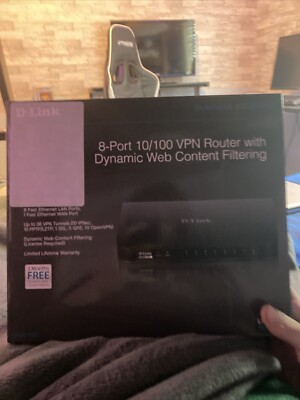
eBay
Upgrade your home or office network with the D-LINK DSR-150 8-Port 10/100 VPN Router. This black router boasts eight LAN ports, making it a reliable choice to connect your devices. It offers dynamic web content filtering to secure your internet experience. With its advanced VPN capabilities, it is an excellent choice for remote access and site-t...
But it could help with getting around the ip issue
kind pivot
A VM would be enough and would encapsulate the whole app
But rootlesss container is the way imo
 peak cloak
tough sparrow
Like this https://www.ebay.com/itm/176401904926?mkcid=16&mkevt=1&mkrid=711-12763...
peak cloak
tough sparrow
Like this https://www.ebay.com/itm/176401904926?mkcid=16&mkevt=1&mkrid=711-12763...
That's useless for this situation
Plus 10/100 is the speed
peak cloak
kind pivot
Yeha but the ip is already used for other stuff so I'd need to put it in a vm fo...
I would just put in VM and put some firewall rules to stop traffic to local network
As long as you keep everything patched and don't expose you didn't want to you should be good
kind pivot
VM is a lot of overheard na ?
tough sparrow
tough sparrow
How much would that go for normally
How much would one cost
peak cloak
Kinda not really, I ran a lot of VMs on my cheap proxmox machine
kind pivot
tough sparrow
How much would one cost
It's useless imo in a lot of situations
And if you want a router just buy one of those aliexpress mini PC routers
peak cloak
kind pivot
And if you want a router just buy one of those aliexpress mini PC routers
Dedicated router imo is good instead of playing with a PC
tough sparrow
Yea
Yea I am trying to find someone to buy them
Yea I am trying to find someone to buy them
peak cloak
tough sparrow
But it is a vpn tho
You can get something that supports VPN for 60 bucks
tough sparrow
So 70 ish
peak cloak
I use an omada er605
peak cloak
tough sparrow
So 70 ish
It's a 10/100 router, it's basically junk
tough sparrow
What’s the best place to sell them
peak cloak
Nowhere
It's basically ewaste unless someone pays like 5 bucks for experimenting with
kind pivot
Isn't there an app lvl firewall thingy ? I could allow incoming connection to those ports ONLY to the game server process
Apparmor or whatever it was i dunno
peak cloak
kind pivot
Isn't there an app lvl firewall thingy ? I could allow incoming connection to th...
What I would do is setup firewall on a VM level
kind pivot
I'm really not sure I want to start popping VMs everywhere :/
peak cloak
It's only one VM no?
I'm talking about you using the hypervisor firewall features to secure that one game VM
kind pivot
For now, but down the line i'll have other stuff and if I start securing stuff by popping a VM then I'll pop a lot of them
peak cloak
What I did was just have a hosting vlan
Nothing in that could access my home LAN
If you keep everything patched anyway you should be fine
kind pivot
okay yeah
I'll check that, I'll keep docker barebone like that, rootless container + app level firewall + keep updated
And should be fine
sly compass
flat wagon
but you would've been fine at 2.5gbps tbh
Didn’t buy a 10gbe switch because its just fun. Time is money
thick minnow
Ethernet keeps dropping all the time
Everything refuses to work with the 192.168.8.x ip range had to change it to 192.168.1.x now this issue exists
Any suggestions that don’t involve buying anything or commands
opal pagoda
peak cloak
I use an omada er605
do you have v1 or v2
peak cloak
opal pagoda
do you have v1 or v2
v2
needed something to replace my er-x since they basically stopped supporting that and it would freeze every so often
opal pagoda
i bought one few weeks ago
 thick minnow
Something else pulled the ip and wouldn’t give it up
silent flax
peak cloak
didn't need any fancy features like the er-x had
er-x is still flashable to openwrt at least, giving it some more lease of life. Sadly with no storage options, it is really limited in what it can do
 meager ginkgo
opal pagoda
i bought one few weeks ago
meager ginkgo
opal pagoda
i bought one few weeks ago
I had the v1 and it would constantly crash on me lol
 nimble shadow
for a newbie what OS should i use for a new homelab server
sly compass
nimble shadow
for a newbie what OS should i use for a new homelab server
Depends on what you need and want. But proxmox as hypervisor is just awesome
From there you can pretty much install anything. What hardware do you have to play with?
nimble shadow
sly compass
Depends on what you need and want. But proxmox as hypervisor is just awesome
mainly just wanna be able to run a few diff things like plex server a nas maybe a couple game servers and some home assi
sly compass
nimble shadow
mainly just wanna be able to run a few diff things like plex server a nas maybe ...
You can do that easily in proxmox with a couple of containers. But depending on how many users it will require some pretty good hardware. This is all depending on much you gonna use it. But download proxmox and go try it. It’s awesome
nimble shadow
sly compass
You can do that easily in proxmox with a couple of containers. But depending on ...
ok i havnt bought a server yet, I was looking at ebay for one but honestly idk wtf im looking for im tryna find one that will fit in a 1u spot
sly compass
nimble shadow
ok i havnt bought a server yet, I was looking at ebay for one but honestly idk w...
I see, well don’t exclude local gaming pc. You can get some pretty beefy pc for a good price. I need a gpu for some processing so i picked a gaming pc. 1080ti with an 8700k for 350eu. I bought 64gb ram and an x540 dual 10gbe network card. It’s an router, vpn, photouploader, camera dvr nvr etc etc etc
nimble shadow
sly compass
I see, well don’t exclude local gaming pc. You can get some pretty beefy pc for ...
the thing is i have a full server rack beside 1u of space lmao i could maybe do 2u if i did some stuff but i mean i would be able to do no more then 2u
so besides going that route if i went a normal ebay old server and used a os that i could have run a nas, game server application (Pterodactyl) and home assi
sly compass
nimble shadow
the thing is i have a full server rack beside 1u of space lmao i could maybe do ...
I got it, i got both. I also don’t need to worry about heat or noise.
But what do you host today?
nimble shadow
sly compass
I got it, i got both. I also don’t need to worry about heat or noise.
But what ...
Nothing I’m starting to get into this home lab stuff and just taking baby steps
sly compass
What is the full server rack for then? 😅
 acoustic atlas
What’s the proper term for a single punch down box that terminates a rj45 cable?
opal pagoda
acoustic atlas
What’s the proper term for a single punch down box that terminates a rj45 cable?
keystone?
acoustic atlas
opal pagoda
keystone?
Absolutely, Danke
 normal berry
Hey, I'm having an issue with my Ethernet, I can't tell if it's on the side of the modem or my pc,
I've turned the modem on and off and unplug and repluged in both the cable into my pc and into my wall, but it hasn't mas a difference.
Is it possible to connect my laptop to the Ethernet cable on the side where my modem is and ping my laptop to see if it's the modem or one of the cables?
 ornate jungle
normal berry
Hey, I'm having an issue with my Ethernet, I can't tell if it's on the side of t...
ornate jungle
normal berry
Hey, I'm having an issue with my Ethernet, I can't tell if it's on the side of t...
Based on your message, I presume your ethernet is running through in-wall wiring. Bypass the in-wall wiring by connecting your computer directly to the modem, then re-test. (Even if you have to temporarily move your PC, this is the best way to rule out faulty in-wall wiring / keystone jacks.)
thick minnow
I want to route all traffic on my network through one device for a vpn gateway, I have it set as dns on the router, is there anything else I should do?
meager ginkgo
nimble shadow
ok i havnt bought a server yet, I was looking at ebay for one but honestly idk w...
I use a Lenovo ThinkCentre Tiny Mini PC and HP Elitedesk 800 G5 Mini PC, works great and they're super small and affordable
nimble shadow
Bet
 heavy steppe

 thick minnow
Im gonna invest in a Protectli firwall box in the end of the month. OPNsense seems simple enough to set up and maintain
 distant birch
if i have firewalld rules and run iptables --flush, will that affect the firewalld side? trying to debug a k8s networking issue that is driving me insane by now
 crisp thorn
heavy steppe
<a:excusemewhat:556898710852861971>
crisp thorn
heavy steppe
<a:excusemewhat:556898710852861971>
this >>>> 30 cables tied together
opal pagoda
crisp thorn
this >>>> 30 cables tied together
Also it is fiber, fiber in 90% of cases looks like a rats nest
lost lily
i wanna set up an opnsense box with a connectx-4 sfp28
but here electricity is gold and so idk what platform to use that would handle 25gbps routing
 mystic latch
thick minnow
Im gonna invest in a Protectli firwall box in the end of the month. OPNsense see...
mystic latch
thick minnow
Im gonna invest in a Protectli firwall box in the end of the month. OPNsense see...
You can get better performance for less by getting a 1 liter PC previously used in a corporate environment. Like this:
https://smallformfactor.net/forum/threads/lenovo-m720q-tiny-router-firewall-build-with-aftermarket-4-port-nic.14793/
SFF.Network
Greetings all, I promised an update on my work to do an aftermarket conversion of a Lenovo M720Q Tiny to have an extra 4 port NIC - and here it is. I've not been able to find another report on such a build elsewhere, so it's a bit of hyperbole but let's call this a world exclusive. ? You can...
thick minnow
mystic latch
You can get better performance for less by getting a 1 liter PC previously used ...
To big, i want a box that fits under my router at my desk. And the price gap isn't that big between the M720Q and one of the cheapest 4 port Protectli boxes. Thank you for the tip though 🙂
mystic latch
FWIW it's not big at all. Like I can pick it up with 1 hand across the top. A better comparison would be looking by CPU. But whatever works best for you I won't argue against 😄
 quasi orbit
thick minnow
To big, i want a box that fits under my router at my desk. And the price gap isn...
quasi orbit
thick minnow
To big, i want a box that fits under my router at my desk. And the price gap isn...
uhh that will fit under your desk?
3d print or buy 3d printed mounting brackets or duct tape it
quasi orbit
lost lily
i wanna set up an opnsense box with a connectx-4 sfp28
BTW while you might be able to pull linespeed from a direct NIC connection, being able to route 25gbps at linespeed is another ballgame ~ potentially dubious
thick minnow
quasi orbit
uhh that will fit under your desk?
No, i'm gonna stack em on my desk. I sit witihin hands reach from my router ( wifi disabled )
 lavish sail
At what speed is it overkill for a Home lab 10, 25, 40 or 100gbe
 clear igloo
400gbe
barren loom
imo anything above 10gbe is overkill
lavish sail
clear igloo
400gbe
Fr never to much bandwidth
silent flax
lavish sail
At what speed is it overkill for a Home lab 10, 25, 40 or 100gbe
when your networking is faster than your storage
lavish sail
When your network is faster than your storage, you just gotta upgrade your storage man
silent flax
lavish sail
When your network is faster than your storage, you just gotta upgrade your stora...
10Gbe is 1GB/s. That is faster than any SATA SSD storage. 2.5Gbe is faster than any SATA mechanical storage. 40Gbe is faster than PCIe 3.0 storage.
And not all of us need PCI-E 4.0 or PCI-E 5.0 NVMe storage for our family photos 😄
and while yes, one might need more speed for the interconnects between switches, the servers most likely don't need that speed
10-40 maybe, 100 is probably overkill
lavish sail
Yeah, I run 40 gig just because I do all my stuff on network boot and I also edit off my servers and stuff like that so it just helps but I run my nas on 2 40s cuz I run ram cache
Also, it helps a lot with clusters
low pond
lost lily
but here electricity is gold and so idk what platform to use that would handle 2...
Curious, is it CH and init7? Got a friend also deploying fiber soon with them so
 cosmic steeple
I’m switching from a Doxy 3.1, 1 GB modem to a fiber connection.
Looking for a modem that can handle 10 gigabit with the bells and whistles.
Routing this 10 GB connection will be
Gt be98-pro.
High and flexible budget
Would not mind looking into rack configuration.
 lethal charm
When I want a device to use a specific ip address on my local network, that config is typically done on the client device right? Not the router (which is also the dhcp server, bla bla bla whatever)
opal pagoda
lethal charm
When I want a device to use a specific ip address on my local network, that conf...
just make a ip reservation on the dhcp server
lethal charm
Does that take a Mac address or smth. Will look.
opal pagoda
yes
lethal charm
Oh yeah yeah I found those settings, weirdly named on my router. tyty. Its a little embedded project so that simplifies some things a lot
 twin sphinx
has anybody in here dealt with putting AT&T fiber modems in pass through mode
and how much of a pain in the ass is it?
 quick schooner
So I got a question about my wifi and router. I am currently using the router/modem that was provided by my ISP I am wondering should I but my own separate modem and router or will it not make a difference in my speeds I currently pay for 1gbps but I am only getting around 400-500 mbps wired
tribal sequoia
twin sphinx
has anybody in here dealt with putting AT&T fiber modems in pass through mode
you don't
you only get a dmz plus mode, which kinda/sorta is like passthrough but i can't remember why it isn't, it works but it isn't truely passing traffic through unimpeded
the only way to get it raw and unfiltered is to dump the certificate auth from a modem, use a GPON ONT (lots of people use a chinese ONT, which works with the vlan authentication they use) then you can plug a device in and get handed an IP
there's also a trick with a managed switch you can do but it has to be re done every time the power goes out
 keen urchin
quick schooner
So I got a question about my wifi and router. I am currently using the router/mo...
keen urchin
quick schooner
So I got a question about my wifi and router. I am currently using the router/mo...
Generally yes it will be better, but you should still be getting more than that wired
quick schooner
keen urchin
Generally yes it will be better, but you should still be getting more than that ...
Could be a bad cable I will buy a new one and see
quick schooner
keen urchin
Generally yes it will be better, but you should still be getting more than that ...
Should I buy like a cat8 ethernet cable
 normal musk
Is there any way for me to use Cloudflare as an SSH proxy without having to install anything like WARP or cloudflared on client machines? I want to be able to go onto any computer that natively supports SSH and SSH into one my my servers through my domain, rather than my public IP (and not have plain SSH ports exposed on there as well)
keen urchin
quick schooner
Should I buy like a cat8 ethernet cable
There is no downside other than cost (which isn't much)
keen urchin
normal musk
Is there any way for me to use Cloudflare as an SSH proxy without having to inst...
No, afaik there is no SaaS ssh proxy/bastion host
quick schooner
keen urchin
There is no downside other than cost (which isn't much)
Alright thanks
clear igloo
tribal sequoia
you only get a dmz plus mode, which kinda/sorta is like passthrough but i can't ...
It replicates the public IP to your router but still has a NAT table, it's like Layer 2.5, it's weird but for all intents and purposes it works fine
tribal sequoia
Okay so you get double NAT
Lots of stuff runs through double nat these days anyways so I guess it's not so bad
twin sphinx
clear igloo
It replicates the public IP to your router but still has a NAT table, it's like ...
That’s what I was thinking
twin sphinx
tribal sequoia
Okay so you get double NAT
Thanks for the help.
I am running it into a UDM Pro. Everything on the ATT side will be disabled
tribal sequoia
It'll work fine if you run into any quirks I'm sure restarting the modem will resolve
clear igloo
tribal sequoia
Okay so you get double NAT
Nope, no double nat in bridge mode/DMZ+ mode
It's basically a bump in the wire but doesn't actually do NAT but holds a state table, it's weird
clear igloo
twin sphinx
I am running it into a UDM Pro. Everything on the ATT side will be disabled
The only thing I have enabled on my ATT BGW320 is under Firewall > Firewall Advanced > Reflexive ACL On
All others should be set to Off for that page
twin sphinx
I’m so excited to get this project started. The entire house is getting wired networking
 hollow marlin
clear igloo
It's basically a bump in the wire but doesn't actually do NAT but holds a state ...
hollow marlin
clear igloo
It's basically a bump in the wire but doesn't actually do NAT but holds a state ...
Sounds similar Juniper's SRX transparent FW mode. Essentially zone-based FW for L2 and session state exist for traffic with a L3 header
clear igloo
hollow marlin
Sounds similar Juniper's SRX transparent FW mode. Essentially zone-based FW for ...
yup, pretty much that
 rain cedar
There was a water leak with some AC pipe, directly above this AP, when we took it down, it was completly full of water... So safe to say, it is time to replace it. 🤣
 twin sphinx
rain cedar
There was a water leak with some AC pipe, directly above this AP, when we took i...
twin sphinx
rain cedar
There was a water leak with some AC pipe, directly above this AP, when we took i...
throw it in some rice, it’ll be fine
/>s
lost lily
low pond
Curious, is it CH and init7? Got a friend also deploying fiber soon with them so
it is not, no
low pond
oh ok
 eternal glacier
I have a question regarding network switches. I have 8 devices that require POe to function and also have 36 normal cat 6 ethernet ports. Should I get 2 separate switches; one for POe and one for Cat6, or should I get one switch with all POe? I have barely any prior knowledge so please correct me if any of these ideas are stupid/wrong ; ) . Thank you!
clear igloo
eternal glacier
I have a question regarding network switches. I have 8 devices that require POe ...
Just get a single 48 port switch with PoE that meets your specs/needs power wise
Just make sure it's not passive PoE switch, otherwise things will go boom
eternal glacier
clear igloo
Just get a single 48 port switch with PoE that meets your specs/needs power wise

48 Port Gigabit PoE Switch Unmanaged with 48 Port IEEE802.3af/at PoE+@400W, 2 x 1G SFP, NICGIGA 50 Port Network Power Over Ethernet Switch, Desktop/Rackmount
would somthing like this work?
(lmfao the name 😭)
clear igloo
lol, yah that would be fine
lost lily
damn thats expensive and unmanaged
imo you're better off buying an old rackmount switch if you need 48 PoE ports
i paid 15€ for mine and its fully managed
clear igloo
Power consumption, noise, setup, and management etc are all factors
Just because you can get something cheap doesn't make it power efficient or quiet or anything which are almost always huge plays for home users
 gusty storm
some people like having a vacuum on at all times 🥲
 mossy bloom
Hello all, slightly losing the will to live after 3 hours. Got a virgin hub5 in modem mode going into a Archer AX73 router. Was working fine until someone decided to factory reset them.
Can't get the modem to provide Internet to the router and have tried:
- Continuous rebooting
- Configured router to 192.168.0.1 and the modem goes to 192.168.100.1 automatically
- Router is on Dynamic IP and obtains an IP
- Hub5 provides an Internet connection when working standalone
Any ideas are really appreciated, treat me as an idiot as my brain is currently fried
mystic latch
mossy bloom
Hello all, slightly losing the will to live after 3 hours. Got a virgin hub5 in ...
I'd try creating a support thread tbh
mossy bloom
mystic latch
I'd try creating a support thread tbh
Wdym
mystic latch
As in #1027757333117415424
 nova glacier
eternal glacier
https://a.co/d/5JtUba2
nova glacier
eternal glacier
https://a.co/d/5JtUba2
That's more expensive than a 48-port non-PoE and an 8-port PoE switch from real brands like Netgear, Cisco, or TP-link.
 opal marlin
This is my third time working with optic fiber what do you think ?
 lost lily
clear igloo
Power consumption, noise, setup, and management etc are all factors
Just because...
lost lily
clear igloo
Power consumption, noise, setup, and management etc are all factors
Just because...
sure, but this is 48 ports. like i dont think anyone has a 48 port switch on their desk all plugged in
hollow marlin
opal marlin
This is my third time working with optic fiber what do you think ?
About as good of a splice as you can get. Just test the true loss with an OTDR because 0.01db is well outside the average of 0.1db +/- 0.05
 keen lark
say is there something fundamentally different between IPv4 and IPv6 or why does my hosting provider not let me create firewall rules with specific IPv6 adresses as source or target? is it technically impossible to filter IPv6 traffic by source/target IP in stateless firewalls or is this particular firewall just not able to?
According to the OpenWrt wiki their firewall at least seems to be able to so i guess Hetzner's is just not up to snuff...
low pond
keen lark
say is there something fundamentally different between IPv4 and IPv6 or why does...
Maybe consider having the rule on your server itself if possible
But yeah, their firewall from their panel isn't the most feature rich I suppose
 balmy sentinel
starlink is actually kinda pog ngl
peak cloak
keen lark
say is there something fundamentally different between IPv4 and IPv6 or why does...
probobly just they never implemented it
thorn delta
The trees can have a bit of RF, as a treat
 low pond
Dang, beautiful
 nimble sable
upgrading my internet to multigig, my router only has SFP+ ports and 1GbE (twisted pair/ethernet) ports. the ONT box has 10Gb "ethernet" port as the handoff. Idk if i should:
- Media converter
- cheap unmanaged switch (from QNAP) that has 10Gb ethernet ports and SFP+ ports
- 10Gbase-t module for SFP+
i tried 10gtek module and it's somehow having issues around giving me symmetrical, upload speeds are super slow. Could i just go with an unmanaged switch? would that work ok?
fierce kiln
nimble sable
upgrading my internet to multigig, my router only has SFP+ ports and 1GbE (twist...
Yeah, but you're not being super specific as to what your upgrading, are you going for local network 10gig or internet 10gig
nimble sable
fierce kiln
Yeah, but you're not being super specific as to what your upgrading, are you goi...
Internet updating to 10g. XGPON. Isp is using zhone hub that only has with 10Gbase-t port. Nothing I own has 10base-t because it's all sfp+
fierce kiln
You can get an adapter from sfp+ to rj45 no problem
nimble sable
fierce kiln
You can get an adapter from sfp+ to rj45 no problem
Currently on 1gb plan and... https://media.discordapp.net/attachments/1242529236267307210/1250572607091249202/image.png?ex=666b6e00&is=666a1c80&hm=c2c7a683dc91f2a2424841df9964de8361de12029595d55354938e1ae4f5f7f7&

The first is regular 1gb twisted pair port the second one is sfp+ adapter. Whatever I do, it always does super low speeds one way ONLY with rj45 converter. The moment I swap to the regular 1gb twisted pair port is all good
fierce kiln
What adapter did you buy?
nimble sable
10gtek. It might just be a port issue or a driver issue... Who knows
fierce kiln
nimble sable
10gtek. It might just be a port issue or a driver issue... Who knows
Windows?
If it's not a software problem try this
 nimble sable
fierce kiln
Windows?
nimble sable
fierce kiln
Windows?
No. FreeBSD. I ended up buying QNAP QSW-308-1C 10GbE Switch (3sfp+ and 1 sfp+10g-t combo). The opnsense folks have said they've tested fs.com one as well so I could try that too?
The switch is unmanaged but that'd work too right?
fierce kiln
Yeah, but a switch likely isn't necessary
nimble sable
fierce kiln
Yeah, but a switch likely isn't necessary
it ends up costing me almost the same
fierce kiln
May I ask why you're going full 10gig when you only are paying for 1gig
nimble sable
fierce kiln
May I ask why you're going full 10gig when you only are paying for 1gig
i'm not, as i said, i'm going to be upgrading my internet...upgrade is tommorow. since the technician is going to be here i was hoping to have everything ready and tested to get connected
nimble sable
Is DAC and SFP transceiver brand compatibility a yes/no thing? like i'm using generic 10gtek (coded for cisco) DACs on everything, it works...are we good? or will i get better performance out of recoding stuff for specific the brands?
 ember basin
I forgot to label the router ports and now my subnets are all shuffled around.. gotta love flatmates
tribal sequoia
well
tribal sequoia
nimble sable
Is DAC and SFP transceiver brand compatibility a yes/no thing? like i'm using ge...
can definitely be a thing
i've had DAC's where i've had to set very specific speed and turn off the hardware monitoring and all sorts of weird shit
just so they'll work
specifically, fiberstore fortinet compatible 3m SFP+ DAC
i had to set them to 10000copper for speed and disable the hardware monitoring because it kept bringing the link up and down
nimble sable
tribal sequoia
i've had DAC's where i've had to set very specific speed and turn off the hardwa...
Oh interesting. I actually meant like "coded for Cisco" or whatever but yea I've definitely seen that too where I have to pick the speed
tribal sequoia
yes you're talking about the bits being coded for cisco
and i know you can program them
i mean that's what the "xxxx company compatible" dac cables are
nimble sable
tribal sequoia
i mean that's what the "xxxx company compatible" dac cables are
How much of a problem is that in general? Like I know there's a MSA standard or whatever
tribal sequoia
no clue, but it definitely can be a problem, as i experienced it lol
 pseudo falcon
can someone help me? i just factory reset some prebuilt computer, went straight to the motherboard's website and installed the wifi drivers, but after running an internet speed test I get ~120-130 mbps download speed while my brothers computer gets 499+
im kind of a noob with computers (you can tell by the fact that I have a prebuilt)
mystic latch
pseudo falcon
im kind of a noob with computers (you can tell by the fact that I have a prebuil...
You're best bet for help is creating a thread in #1027757333117415424
pseudo falcon
alright
 rain patrol
is 120€ for a passive minipc with:
Jasper Lake Celeron N5105
8gb ddr4
5x 2,5gb Ethernet
120gb nvme
a good deal?
Or can you recommend something better?
planning to use it as a OPNsense/TrueNAS Scale pc
clear igloo
nimble sable
How much of a problem is that in general? Like I know there's a MSA standard or ...
Compatibility is the only real issue. IE: If they work then no issues but usually Cisco coded usually won't work on other vendors and vice versa but no issues in terms of speed degradation or anything else. There are commands on Cisco that allow unsupported-transceivers but even then some that are coded for other vendors might not work
nimble sable
Huh turns out cat5e can do at least 5gbps over 11m
nimble sable
rain patrol
is 120€ for a passive minipc with:
Jasper Lake Celeron N5105
8gb ddr4
5x 2,5gb ...
Idk about the processor itself if it's good. Depends on what you're planning to do with it but otherwise that's great, great price too dang
 worthy coral
Found this at Goodwill, looks hilarious
 nimble sable
i seem to be getting random drops with my upload tests like i'll get 4200/200 ...is that just speedtest being speedtest or something wrong with my cabling?
 olive spear
👍
 tame cave
quick question ... if I have 2 routers connected via lan ports and one had DHCP off. If I connect modem to the WAN port of the one with DHCP off ..will the entire network get internet ?
nimble sable
tame cave
quick question ... if I have 2 routers connected via lan ports and one had DHCP ...
from what I know, Routers in "bridge mode" basically act as regular switches for all intents and purposes, i.e. you turn off firewall, AP, DHCP etc. If you've that then yes, that's pretty much what I'm doing Internet --> switch -->router with DHCP/Firewall etc --> LAN
rain patrol
nimble sable
Idk about the processor itself if it's good. Depends on what you're planning to ...
Thanks, I'll buy it, I plan to use it as my firewall/router. Processor should hopefully be fine for that. If it isn't I'll just resell it. Thanks for your insight (:
nimble sable
rain patrol
Thanks, I'll buy it, I plan to use it as my firewall/router. Processor should ho...
if you don't midn me asking...why put something BETWEEN the modem and router? like i'm doing it cuz of media type conversion stuff but that kinda sucks for me
opal pagoda
worthy coral
Found this at Goodwill, looks hilarious
Is that fibre channel switch?
tame cave
nimble sable
from what I know, Routers in "bridge mode" basically act as regular switches for...
I'm trying my best to avoid this but good to know it might work
Thanx
rain patrol
nimble sable
if you don't midn me asking...why put something BETWEEN the modem and router? li...
vlan for a public facing server and I want to try rerouting steam content ips to my lancache instead of using dns
 solemn kettle
nimble sable
from what I know, Routers in "bridge mode" basically act as regular switches for...
solemn kettle
nimble sable
from what I know, Routers in "bridge mode" basically act as regular switches for...
This is true for ISP and smaller home routers not so much for a proper router, do you know what models you are buying? What is it you're trying to do @tame cave as there's probably a better solution. Even an unmanaged 4 port switch will do the switching part for you
tame cave
solemn kettle
This is true for ISP and smaller home routers not so much for a proper router, d...
I'm not buying ... already have a network all setup ... im introducing another isp... connected to a different rooter as my current isp ... but I've already avoided the issue ...
both connections will get separate routers with DHCP enabled ... but only one will be connected to the rest of the network at a time
solemn kettle
End game you're going to want to look at having some router with failover capacity to make the most out of that setup? Otherwise you're now just paying for a secondary ISP to do nothing that requires manually failover.
Make sure that if you're running two separate DHCP servers that they aren't both connected to the same LAN/VLAN or you're going to have a nightmare but it sounds like you're already air gapping these two
clear igloo
worthy coral
Found this at Goodwill, looks hilarious
ooof, that's an old SAN switch
Probably all 1 or 2Gb FC SFPs in there
Up to 64Gb Fibre Channel ports now and 112Gb soon I believe
Edit: nvm, 112Gb FC modules exist it seems so 224 is next up, lol
worthy coral
clear igloo
ooof, that's an old SAN switch
Probably all 1 or 2Gb FC SFPs in there
Yeah it says 2.14Gbps per port on this, each module is a 1Gb. Total aggregated bandwidth is 64Gbps
worthy coral
opal pagoda
Is that fibre channel switch?
Yup
clear igloo
worthy coral
Yeah it says 2.14Gbps per port on this, each module is a 1Gb. Total aggregated b...
Ah, well you could plop in some 2Gb optics then according to the data sheet, shame they're only 1Gb FC optics
I mean in the grand scheme of things even 2Gb FC isn't much of anything but eh
nimble sable
am i correct in thinking cat5e has no business being part of 10Gbps network link? it's only like 13m
nimble sable
but my ISP insists "it's fine"
 pseudo blade
It's not recommended and if it causes issues or is important, it should be replaced.
nimble sable
pseudo blade
It's not recommended and if it causes issues or is important, it should be repla...
so i've been getting very inconsistent speeds. IDK if it's because of THAT or some other nonsense I did. at the very least i figure i could replace that cable. like i'll get 3800/3600 then i'll get 4100/11 (that's right, ELEVEN...a 2 digit number)
pseudo blade
10gbps is much harder on routers+network equipment than 1gbps, should also make sure your router (and chosen router config) can take it
nimble sable
pseudo blade
10gbps is much harder on routers+network equipment than 1gbps, should also make ...
yea, the router i have is custom OPnsense that's rated for upto 8.5Gbps for firewall and 10Gbps routing
there might just be something wrong with the SFP+ port, idk becaue it's intermittent and ONLY ever a problem with uploads. that sort of consistency + intermittent makes me think it's a physical layer issue
clear igloo
nimble sable
but my ISP insists "it's fine"
What ISP by chance?
nimble sable
clear igloo
What ISP by chance?
beanfield
clear igloo
Hmmm, and the port on their gear is 10Gbps port right? Not a port that maxes at 5Gbps?
I ask because AT&T's gateway has a 1/2.5/5G port, link will come up with a 10G port that can't do 2.5 or 5g but it causes all sorts of wonkyness
thorn delta
nimble sable
so i've been getting very inconsistent speeds. IDK if it's because of THAT or so...
if the cabling conditions didn't support the speed, it should negotiate down to a different speed
opal pagoda
joink

 solemn kettle
opal pagoda
joink
solemn kettle
opal pagoda
joink
Pretty sure the only ports on a 2960x that supported 10gbs were the 2 x SFP+ modules at the end of the chasis?
clear igloo
solemn kettle
Pretty sure the only ports on a 2960x that supported 10gbs were the 2 x SFP+ mod...
Yup, 1g copper and 2x 10g SFP+ ports
opal pagoda
solemn kettle
Pretty sure the only ports on a 2960x that supported 10gbs were the 2 x SFP+ mod...
exactly
but large poe budget is also nice to have
i wonder if it can be stacked with 1g uplink versions
solemn kettle
It looks like the 2960-s are supported with the xs in a stack here
I think you have to use the stacking modules, but the 2960 switches are different from 2960x
Always avoided stacking switches at work, find it a pain in the arse. Bit of fun in a lab though
opal pagoda
solemn kettle
Always avoided stacking switches at work, find it a pain in the arse. Bit of fun...
we stack them all
*for access switches
tribal sequoia
yeah no one wants stacked core switches anymore
they want some sort of multi chassis lag, whatever the vendor calls their version of it 😄
i just had someone replace 25gbit nexus with 25gbit catalyst that stacked with 1000gbit stack cables and honestly i have no fucking clue why they did it
the ONLY cool thing about them was they supported powerstack cables for redundant power across the switches, and that's really where the benefits stopped tbh
 agile pendant
im trying to route ethernet through multiple story's of out house
solemn kettle
tribal sequoia
the ONLY cool thing about them was they supported powerstack cables for redundan...
Catalyst support VSS, can interesting to deploy if you want stacking without the stacking cables 🤷🏻♂️
But if it’s that critical I’d prefer the Nexus
tribal sequoia
solemn kettle
Catalyst support VSS, can interesting to deploy if you want stacking without the...
stackwise virtual doesn't work the same as vpc or multi chassis lag
it still turns it into a single logical entity
realistically for the core you'd absolutely want the nexus with hsrp on for your routing core, i think they just had to burn some IT budget money
 long scarab
Yes, tell me what I'm doing is a security risk but how do I use playit.gg to proxy out a windows active directory server? I have a dedicated IP and I can add whatever ports to tunnel out
 topaz patrol
long scarab
Yes, tell me what I'm doing is a security risk but how do I use playit.gg to pro...
topaz patrol
long scarab
Yes, tell me what I'm doing is a security risk but how do I use playit.gg to pro...
Do you object to Zerotier/Tailscale?
long scarab
topaz patrol
Do you object to Zerotier/Tailscale?
No clue what that is
topaz patrol
Similar to a VPN but not but kinda. Here's a diagram

It works on windows, despite that image not showing a PC
When installed on the AD server and the endpoints, they will act asthough they are on the same local network
solemn kettle
You want to put an Active Directory server on the WAN? You know endpoints work offline for some time without an active controller
long scarab
topaz patrol
When installed on the AD server and the endpoints, they will act asthough they a...
I don't want to install anything on the endpoints if possible
topaz patrol
solemn kettle
You want to put an Active Directory server on the WAN? You know endpoints work o...
Then just do this
long scarab
How would I join externally?
topaz patrol
solemn kettle
You want to put an Active Directory server on the WAN? You know endpoints work o...
iirc the default is 30? days but can be extended
topaz patrol
long scarab
How would I join externally?
A VPN
long scarab
I would need to be able to push group policy every once in a while and connecting every PC to my local network for that seems like a pain
long scarab
topaz patrol
A VPN
Is that really the only way?
topaz patrol
long scarab
I would need to be able to push group policy every once in a while and connectin...
Intune
solemn kettle
long scarab
Is that really the only way?
Depends if you're trying to do it for free
long scarab
topaz patrol
Intune
Expensive
topaz patrol
Any other MDM
long scarab
solemn kettle
Depends if you're trying to do it for free
Sorta, a dedicated IP from playit is like $6/mo which isnt bad
solemn kettle
If the sites are static you can setup s2s vpns and only tunnel traffic to the DCs
Otherwise you're looking a remote client access like anyconnect or something similar
long scarab
I don't think setting up a VPN on playit is within their acceptable use
topaz patrol
Have you contacted your ISP? Often it's just a deposit for an IP
long scarab
I don't have rights to do that, my dad pays for it and he's lazy
pluss it's Xfinity and they already hate me specially
topaz patrol
Now you say that, why exactly do you want AD?
long scarab
I don't have a reason, thought itd be fun to mess with
I have it set up enough to join locally but I want to join externally
topaz patrol
Don't practice on somebody else's endpoints
https://www.microsoft.com/en-us/microsoft-365/business/microsoft-365-business-premium
Also, problem solved if you really don't want a client or site to site vpn
solemn kettle
You can join edpoints offline with blob files baked into a wim, can't remember the details but you *can * do it. Otherwise get yourself some free credits or Azure or AWS and spin up a VM with a static public IP and go nuts
long scarab
topaz patrol
https://www.microsoft.com/en-us/microsoft-365/business/microsoft-365-business-pr...
That gets expensive, fast
topaz patrol
long scarab
That gets expensive, *fast*
It's one of cheaper options
But for playing around, it is expensive
long scarab
Welp, if I can't do anything with the IP from playit I guess I only wasted $6
long scarab
topaz patrol
It's one of cheaper options
But for playing around, it is expensive
Am I missing any ports?
 topaz patrol
You're using GP right?
long scarab
Not using group policy, havent figured that out yet
solemn kettle

A roadmap of ports, protocols, and services that are required by Microsoft client and server operating systems, server-based applications, and their subcomponents to function in a segmented network.
topaz patrol
Microsoft docs are great
(I'm looking at you Google}
solemn kettle
There's a list here of requirements, you might able to get some features to work without all of them but i'm not 100%
long scarab
soo I'm missing a lottt of them
 solemn kettle
For example you don't have 445 so SMB won't work meaning your client won't be able to read your sysvol and pull down the policy set
If you've never used group policy before I would recommend two vms in an isolation (private network) and test out some policies. If you do get this working and you change something be aware that it isn't always a simple procedure of turning off the setting as it will 'tattoo' registry and you'll actively have to set it back
long scarab
Do I need RPC randomly allocated?
I can't add a range n I aint individually adding a few thousand ports
solemn kettle
RPC will use emphemeral ports yeah


 solemn kettle
When you join a computer to a domain it will look for service records, you don't have any dns pointing to your external host, you're going to fudge your host file
long scarab
how do i fix that?
ill back up the hosts file
i do have a domain if i can set up service records up in cloudflare
 coarse stump
I recently had issues like that where the PC tried to use IPv6 but failed, maybe you could check that
 worthy gyro
long scarab
how do i fix that?
worthy gyro
long scarab
how do i fix that?
boytoy, i know u
long scarab
worthy gyro
boytoy, i know u
no u dont
long scarab
coarse stump
I recently had issues like that where the PC tried to use IPv6 but failed, maybe...
It's only routing IPv4
silent flax
man, some of those 8x2.5 + 1x10 SFP switches from china are getting insanely cheap

few months ago i was happy to get them for 52 euros; now they will drop tomorrow to 44 euros 😄
4+2 are 29 euros and sub-27 euros on sale
 opal pagoda
I remember everything
 clear igloo
opal pagoda
I remember everything
clear igloo
opal pagoda
I remember everything
Lots of memory 😄
opal pagoda
clear igloo
Lots of memory 😄
8x 32gb +24x 16gb
 hearty lily
Any1 have recommendations for house security cameras.
worthy gyro
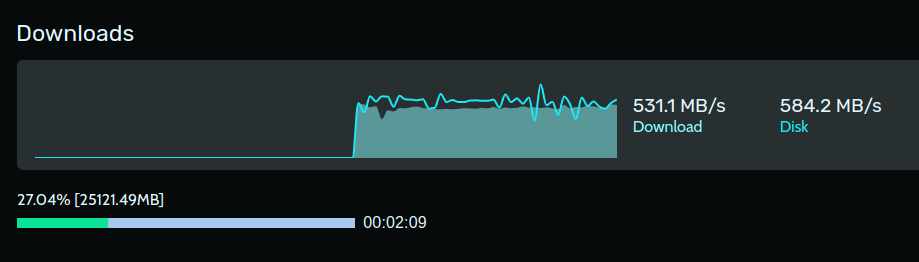
https://tims.fireproof.ovh/s/L0T2wmGSbtkEzoa my friend is flexing his 10gig internet on me epic only does 5gb
Uploaded by timanttikuutio on 16/06/2024 at 18:37 UTC
meager ginkgo
hearty lily
Any1 have recommendations for house security cameras.
PoE cameras to start with
Avoid Solar/WiFi if you can
They can be jammed by intruders and miss events. Also a lot of them are cloud based (subscription needed)
UniFi Protect isn’t cheap but its UI is pretty nice. That’s the main thing you pay for with them. Otherwise go Reolink or Amcrest IMO
hearty lily
meager ginkgo
They can be jammed by intruders and miss events. Also a lot of them are cloud ba...
Any subscription based ones I'm trying to avoid. I have a nas at home but not sure if it'd be smart to tie it into it
meager ginkgo
hearty lily
Any subscription based ones I'm trying to avoid. I have a nas at home but not su...
Ideally you’d buy a dedicated NVR or something like a Mini PC with a surveillance drive in it running some kind of “NVR” software.
What NAS do you have?
hearty lily
Synology and ok I have an nvr at my shop but was just trying to avoid running to many holes may move out in a year or so don't want to go crazy with repairs
nimble sable
silent flax
4+2 are 29 euros and sub-27 euros on sale
Oh dang, that's amazing, exactly what I needed to media convert... How reliable are they?
silent flax
nimble sable
Oh dang, that's amazing, exactly what I needed to media convert... How reliable ...
Had no problems with my switches, they are all same combo of realtek chips
silent flax
nimble sable
Oh dang, that's amazing, exactly what I needed to media convert... How reliable ...
This is 8+1, the 4+2 just drops the chip for 10g to 4x2.5 and has it wired up as 2nd SFP+. Servethehome has some bandwidth charts/reviews/videos for similar switches
 pseudo blade
It's so interesting we're seeing so many switches of this architecture
It's more complex but clearly the cost-optimised designs and scale are in the "4 2.5 gigabit, one/two 10-gigabit" ICs
topaz patrol
silent flax
man, some of those 8x2.5 + 1x10 SFP switches from china are getting insanely che...
It might be 2.5gig homelab time
topaz patrol
Does anybody have experience with Ruijie APs?
What’s their management UI like?
Have you had any major issues with them?
pseudo blade
Never even heard of them
pseudo blade
Seems like they're a Chinese networking company.
Usually I go to reddit when looking as kit and the comments in favour strike me as a bit... fake. I'd be cautious about that.
By which I mean half the comments are from people selling them
topaz patrol
pseudo blade
Seems like they're a Chinese networking company.
Usually I go to reddit when loo...
Yeah there's so much astroturfing on reddit now hence why I asked here
Also this is on the first slide of the information my rep gave me so I'm thinking it's just cheap chinese crap
 pseudo blade
I'd go for a different brand
Not a good sign when the reviews look astroturfy (and so few)
 shadow scaffold
Is there a way to manage my network of 10 routers from a single system to monitor speed, usage, user management, firewall, and DNS?
opal pagoda
shadow scaffold
Is there a way to manage my network of 10 routers from a single system to monito...
what routers?
funny fortinet box
factory empty haha
 hybrid ether
I would like to ask for some buying advice on a router. I only need to cover a 4 room space (25ft9in by 26ft9in) and I am buying a 1gb network line. This WiFi will only be used by two people with the router only using approx. 2 devices connected wirelessly (two phones). Can someone give a suggestion on a router with the best speeds per band according to my parameters please 🙏
And also if WiFi 7 would be worth it for my situation / what WiFi 7, 6e, 6 even is
hybrid ether
hybrid ether
I would like to ask for some buying advice on a router. I only need to cover a 4...
The room size is approximately 7.6m by 8m for the rest of the world
fierce kiln
Ubiquiti UniFi U7 pro has worked great for me, you can definitely saturate the full 1-gig link of your Internet if your within 30ft of the AP
(also the most affordable wifi 7 ap)
You don't have to have a cloud gateway to use it, you can use it standalone. Most of the managed features are for multi-ap setups
 alpine crypt
hey guys, not sure if right channel but i have a ps4 with NAT type 3, so closed, but i wanna open it to 1 and i just cant find anything that works
opal pagoda
alpine crypt
hey guys, not sure if right channel but i have a ps4 with NAT type 3, so closed,...
what router do you have
alpine crypt
CB0401(HW0.1)
wait
Xiaomi 5G CPE Pro (AX5400)
i think this is the right one
the right name
opal pagoda
as you are on 5g/lte i would guess that you are double nating due to cgnat
opal pagoda
carrier grade nat
ask your isp to turn it off
most likely they are required to comply
alpine crypt
oh? didnt know that
so just an email?
and if carrier is not the problem, what can i do on my end @opal pagoda
opal pagoda
email/chat/call
opal pagoda
alpine crypt
and if carrier is not the problem, what can i do on my end <@203950587471986688>
maybe you have upnp turned off
alpine crypt
says no devices
 alpine crypt
opal pagoda
maybe you have upnp turned off
alpine crypt
opal pagoda
maybe you have upnp turned off
how do i add devices?
or is that automatic?
 tight pecan
alpine crypt
or is that automatic?
tight pecan
alpine crypt
or is that automatic?
It's automatic
alpine crypt
would it help to restart the console and or reconnect the wifi?
tight pecan
Not really, no
Maybe restarting whatever app you're using that wants to use UPnP would do something
alpine crypt
what would be using UPnP
or are you refering to the app where i access settings?
that auto updates every 2 seconds
tight pecan
alpine crypt
hey guys, not sure if right channel but i have a ps4 with NAT type 3, so closed,...
The PS4 in this case
 worthy otter
Hey guys wasn't sure to ask this in here or on tech support but i have t mobile wifi and its terriable during the day and even early night and it doesn't get better until around maybe 9pm. Have gone to t mobile and apparently i live in a congested are. Is there anything i can do to get a better result? Even when its usable my download speed doesn't go passed 120 and my uploads speeds are bad as well. Ive been looking at spectrum and also maybe ubiquiti but not sure which go to with. Also with ubiquiti im not sure what i would need. 1 thing i am wondering is if what was used in Bells AMD upgrade if that would help with the ubiquiti gear he got. Hopefully you guys can help me out and sorry for the long message too. and let me know if i should just post this in tech support too.
alpine crypt
tight pecan
The PS4 in this case
doesnt the device as a whole connect?
not just the game
opal pagoda
worthy otter
Hey guys wasn't sure to ask this in here or on tech support but i have t mobile ...
lte?
alpine crypt
also is there anything on the ps4 side of thinks i can try?
opal pagoda
alpine crypt
also is there anything on the ps4 side of thinks i can try?
not really
tight pecan
alpine crypt
doesnt the device as a whole connect?
It'll connect when it has a reason to
alpine crypt
ah
tight pecan
Like when doing a network test or when a game tells it to
alpine crypt
ill restart it later
worthy otter
opal pagoda
lte?
Im pretty sure yes, we got the 5g plan but 5G isnt availabile in our area but i could be wrong about us having the 5g part.
But not 100% but i can check later for im at work right now and not at home
alpine crypt
if i may interrupt....you are paying for a 5g plan thats not giving you that?
worthy otter
So i don think we are paying for it since its not in our area so im going to go off that
opal pagoda
worthy otter
Im pretty sure yes, we got the 5g plan but 5G isnt availabile in our area but i ...
first look at what bands are avalibile in your area (cellmapper)
it will give you clearer look at what options you have
example from my location
provider 1 : 4 bands 800mhz, 1800mhz, 1800mhz, 2100mhz
provider 2: 4 bands, simmilar setup as 1st provider
provider 3 3 bands 800mhz, 1800mhz, 2100mhz
worthy otter
Ok and so i just look up my area and add cellmapper i assume. Also ive messed with all of the setting and frequency with what i have now and no changes made improvements.
i looked online before and that was something i saw to do was go through the different bands and frequency's
nimble sable
I need help converting Rj45 to sfp+. What is the best way?
tight pecan
A transceiver probably
nimble sable
tight pecan
A transceiver probably
aren't they nutoriously hot and unreliable?
tight pecan
Hot, yes. Unreliable, not really
nimble sable
when doing a speedtest - i very reliably get a delta of 5-6% between the results displayed in iperf3 or speedtest.net vs task manager on windows. What's the extra 5%? is that about what you'd expect the difference to be?
 sly lark
Why does my internet no longer work at night?
 ancient arch
sly lark
Why does my internet no longer work at night?
ancient arch
sly lark
Why does my internet no longer work at night?
Might be parental control policy
silent flax
https://www.techpowerup.com/323711/realtek-is-aiming-to-make-5-gbps-ethernet-switches-more-affordable-with-new-platform damn, now i will have to replace all my 2.5G gear with 5G 😄
At the core of the new switch platform sits Realtek's RTL9303 which is an eight port 10 Gbps switch controller. This was released a few years ago as a low cost 10 Gbps switch IC, but as it still required third party PHYs, it never really took off.
When combined with Realtek's RTL8251B 5 Gbps PHY, the end result is a comparably low-cost 5 Gbps switch. According to Ananadtech, Realtek is expecting a US$25 price per port, which is only about $10 more per port than your typical 2.5 Gbps switch today, even though some are as little as US$10 per port.
hollow marlin
nimble sable
when doing a speedtest - i very reliably get a delta of 5-6% between the results...
That's the expected overhead for TCP. iPerf3/Speedtest are based on the payload, task manager is the NIC utilization which includes the L2/L3 headers
nimble sable
hollow marlin
That's the expected overhead for TCP. iPerf3/Speedtest are based on the payload,...
Aah that's what I thought it was, ty for confirming
nimble sable
anyone have any experience with sfp-10g-t modules and cat6 (not cat6e) cables? do they work reliably?
 ripe hatch
Any people here ever dealt with Lumen?
Small business is paying a lot of money for their services and I can’t seem to wrap my head around why they are charging us $1000 a month
(Lumen used to be Centurink)
tight pecan
ripe hatch
Any people here ever dealt with Lumen?
Yes, Lumen is expensive
They're a T1 ISP
ripe hatch
tight pecan
They're a T1 ISP
Are there any benefits to that for your average small business
We just use it for phones it seems like
tight pecan
In simpler terms, that means they can route to any network without peering/ixp, which is good for stability and performance
ripe hatch
We use Comcast business for all our actual internet use
tight pecan
ripe hatch
We just use it for phones it seems like
For VOIP, it's a bit tough to justify
But it's good since uptime matters a lot to businesses
ripe hatch
Seems we’re paying $500 for Core connect enterprise data only
tight pecan
You could just get a secondary tier 2 network I guess?
Could also go for a cheaper T1 like ATT or Zayo
Not sure if Zayo does business internet though
ripe hatch
Ngl I was thinking of just switching to Gvoice
I’m pretty sure we legitimately just use that connection for VoIP
We pay separate for a Comcast business Internet connection that actually goes to all the computers
tight pecan
If you're sure it's VOIP, then yeah there's not too much meaning in having it aside from a backup
nimble sable
tight pecan
You could just get a secondary tier 2 network I guess?
practically, how much difference does that make btw? it's not like tier2 are BAD right?
tight pecan
nimble sable
practically, how much difference does that make btw? it's not like tier2 are BAD...
Really just depends on risk tolerance/management
It's like the 9s thing. 99.9% uptime is plenty for small businesses, but that's 8hrs of downtime in a year
Also makes serving multiple locations a bit more complicated, since some networks can't be reached without transit or ix. It's not a bad thing but some company policies don't allow for that amount of instability/uncertainty.
tight pecan
ripe hatch
We pay separate for a Comcast business Internet connection that actually goes to...
In your case, I can see Lumen being used as a backup, where a majority of your traffic goes through Comcast, but falls back to Lumen when Comcast goes down (however rare that may be). Up to you to decide if it's worth $1k/mo
Would double check on how your network is set up and see if it really is only being used for voip. If so, then that's one expensive voip service 😂
ripe hatch
tight pecan
In your case, I can see Lumen being used as a backup, where a majority of your t...
Considering the lumen service is about 10 Mb I would not think it could work as a back up. I’m also looking at switching our Comcast business over to Google fiber and I think that would honestly fix most of the reliability problems that can arise with cable Internet
tight pecan
Damn they screwed you hard on that contract
Prob the best 10Mbps internet you've ever had though 😂
Lumen is great, but even terabit-scale networks don't get that much of transit from them
ripe hatch
tight pecan
Damn they screwed you hard on that contract
Here’s the bill if you can help me make sense of it lmao
 tight pecan
I don't think Lumen even offers Core Connect anymore
tight pecan
But yeah, VOIP itself is $365/mo damn
ripe hatch
And before him the previous guy was even lazier
ripe hatch
tight pecan
But yeah, VOIP itself is $365/mo damn
I mean it has a decent amount of users
Granted they don’t get their own numbers it’s just a basic transfer system
tight pecan
Yeah, managed services are just expensive man
You could get away with gvoice, but it's not as reliable
ripe hatch
Still could probably replace it with G Voice and some VoIP handsets tho
ripe hatch
tight pecan
You could get away with gvoice, but it's not as reliable
If it’s hooked into Google Fiber?
tight pecan
Yeah, I'd say you're probably fine with gvoice
tight pecan
ripe hatch
If it’s hooked into Google Fiber?
GFiber doesn't use Google's main transit
Not sure about the business line though
Most of what I've seen on my side are Comcast or ATT business lines
It's probably okay. The previous IT guys probably just recommended what they were used to working with
ripe hatch
I think our current Comcast may be fiber but it’s not sequential
tight pecan
Maybe they worked at larger companies before, because I don't think anyone should recommend Lumen for small businesses
ripe hatch
tight pecan
It's *probably* okay. The previous IT guys probably just recommended what they w...
No we used to use Avaya and it was $400 then they were bought by Lumen and the price shot up
Apparently from talking with people
tight pecan
They didn't fight to keep the old plan up?
ripe hatch
Idk probably contract ran out
tight pecan
I mean, I guess Lumen doesn't wanna lose money from grandfathering old plans in
Honestly, google fiber doesn't look bad
ripe hatch
Imma call them and get THEM to explain why it’s that much lol
tight pecan
ripe hatch
Imma call them and get THEM to explain why it’s that much lol
Don't bother
That's normal pricing for them
ripe hatch
Def gonna ditch Comcast tho they’re charging $250 for 100mb non sequential with a single static IP
And it drops out a decent amount
tight pecan
If you operated your own network and only bought transit from lumen, then it'd be a lot cheaper
tight pecan
ripe hatch
Def gonna ditch Comcast tho they’re charging $250 for 100mb non sequential with ...
Comcast moment
Funnily enough, GFiber has Lumen in their blend

You'll never escape them 🤣
ripe hatch
tight pecan
Comcast moment
lol I switched my parents from them and went from 300+ for internet and tv to ~$130ish
Granted that local isp I switched to is having random drops right now
tight pecan
Comcast has a monopoly in my city, so I'm stuck with $300/mo for internet + TV
ripe hatch
tight pecan
Comcast has a monopoly in my city, so I'm stuck with $300/mo for internet + TV
Used to. Then a local company owned by our electric utility showed up and was like “you want sequential gigabit for 50 a month?”
tight pecan
Wish I could get that haha
ripe hatch
They also do 2 gig for $70
ripe hatch
tight pecan
I just want more than 30Mbps upload
What’s funny is there’s like 2-3 people who are constantly remoted in on that 100/30 connection lmao
tight pecan
Really maxing that upload out 🤣
nimble sable
tight pecan
Funnily enough, GFiber has Lumen in their blend
what site is this?
ripe hatch
tight pecan
Funnily enough, GFiber has Lumen in their blend
So does that mean that Google fiber most likely won’t go out unless lumen goes out too?
tight pecan
nimble sable
what site is this?
https://bgp.tools there's also https://bgp.he.net/ and https://www.peeringdb.com/
tight pecan
ripe hatch
So does that mean that Google fiber most likely won’t go out unless lumen goes o...
Depends on their routing policies. Majority of the traffic probably flows through Hurricane Electric and TATA. Lumen is there to maybe avoid going through IX and as a backup
So yeah, it's probably okay
ripe hatch
tight pecan
So yeah, it's *probably* okay
No, I was wondering if it straight up uses the same fiber line
ripe hatch
Like do Google and lumen both own bandwidth on the same fiber line
tight pecan
Just regular old Lumen when Google decides to route you through them
tight pecan
ripe hatch
Like do Google and lumen both own bandwidth on the same fiber line
No, what happens is that when your packets reach Google's router, it either goes through whatever private peering or interconnects they have, or through the upstreams listed
Once it's handed off to the upstream, then you're on their fiber lines
Crazy simplification here, but that's sort of the gist of it
ripe hatch
tight pecan
No, what happens is that when your packets reach Google's router, it either goes...
I mean in the literal fiber line that goes by our business to lumen and Google both use the exact same physical cable
I mean since we have the ability to get both
tight pecan
That depends on where the other end of that fiber line is, but yeah they probably share the line
There's a chance that they have to lay fiber though
So just keep that in mind when giving ETAs
sly lark
ancient arch
Might be parental control policy
It’s not, my parents don’t care enough to do that
And it happens sometimes in the day too
ripe hatch
sly lark
Why does my internet no longer work at night?
Is it like off off or does it just cut out for a few minutes or get super slow?
sly lark
ripe hatch
Is it like off off or does it just cut out for a few minutes or get super slow?
On and off
Last night it was off for a while
tight pecan
Possibly congested lines?
ripe hatch
tight pecan
Possibly congested lines?
It’s congested lines
ripe hatch
sly lark
On and off
Call ur ISP and tell them they should fix it in a month
I had the same issue my ISP got too many new customers and it’s overwhelming their equipment and they gotta upgrade it
sly lark
I see
worthy gyro
lol
my neigobros will hate me
my appartmenht has like 6 ssids, 3 of which are mine, Im about to add ANoTHER
i alr have my xfinity modem/router thingy, then i have a router connected in AP mode, now im about to add Another even better router in ap mode
opal pagoda
worthy gyro
i alr have my xfinity modem/router thingy, then i have a router connected in AP ...
you should start looking at 802.11r
worthy gyro
opal pagoda
you should start looking at 802.11r
sounds expensive
opal pagoda
on open wrt it is cheap and easy
worthy gyro
opal pagoda
on open wrt it is cheap and easy
is it a wireless thing? cause all my aps are wired lel
i might remove the old one cause wifi 6 will prob give enough range
opal pagoda
worthy gyro
is it a wireless thing? cause all my aps are wired lel
IEEE 802.11r-2008 or fast BSS transition (FT), is an amendment to the IEEE 802.11 standard to permit continuous connectivity aboard wireless devices in motion, with fast and secure client transitions from one Basic Service Set (abbreviated BSS, and also known as a base station or more colloquially, an access point) to another performed in a near...
enables quick switch from ap to ap
opal pagoda
as devices are sticky af without it
worthy gyro
yeah i have them on diffrent ssids
opal pagoda
worthy gyro
so mesh 💀
mesh is wireless backhoul and has nothing to do with 802.11r other than most mesh devices also support it
worthy gyro
one is fast asf and good range, the other is cause im lazy and dont feel like reconnecig everything from secrurity cameras to other stuff
worthy gyro
opal pagoda
mesh is wireless backhoul and has nothing to do with 802.11r other than most mes...
but u can wire mesh as well, so mesh is just the wireless part?
opal pagoda
mesh is just wireless communication between mesh devices
if wired option is avalibile most mesh systems preffer it
opal pagoda
meshless mesh
worthy gyro
i got a godo deal on this wifi 6 router for only $60 lol
worthy gyro
opal pagoda
meshless mesh
yup, good speecs
opal pagoda
does it support openwrt
worthy gyro
opal pagoda
does it support openwrt
yeah, but im not instaling it
looks tricky to uninstall and i like the app
opal pagoda
you do you but i just want you to know that there is a beter way
worthy gyro
opal pagoda
you do you but i just want you to know that there is a beter way
better way for what
i like the app lel
opal pagoda
your experience walking around the property switching to closest ap without interuptions
worthy gyro
its not that i switch, it just theirs some devices that are hard to reconnect
we got ring cameras and stuff
i have to leave the other AP on or no more camera
ripe hatch
opal pagoda
mesh is just wireless communication between mesh devices
if wired option is aval...
Can confirm. I deployed a high end mesh system.
 hardy ibex
 real oar
what is the "network" thing on file explorer
real oar
what is the "network" thing on file explorer
Its for shared folders, computers and shared printers that are available over a network
 feral agate
my friend is going to get a new router would he also need a new modem
thick minnow
feral agate
my friend is going to get a new router would he also need a new modem
not at all.
feral agate
thick minnow
not at all.
hm
so his router only works sometimes during the day so he thinks it is broken so he is going to get a new one
any recs
thick minnow
do yk wht router and modem he has rn?
feral agate
thick minnow
do yk wht router and modem he has rn?
let me see
thick minnow
the modem always belongs to the ISP.
feral agate
give me a sec

 feral agate
thick minnow
the modem always belongs to the ISP.
feral agate
thick minnow
the modem always belongs to the ISP.
i belive spectrum from the outher box
because i have one and i have spectrum
thick minnow
it depends if the ISP and/or the modem is broken or something. besides tht, he can js replace the router and keep the same modem.
feral agate
thick minnow
it depends if the ISP and/or the modem is broken or something. besides tht, he c...
would you say to get a new better router and just keep the modem and to see if that fixes it
and if not talk to the isp
thick minnow
feral agate
would you say to get a new better router and just keep the modem and to see if t...
if tht would be the case, then yeah. im also switching out to a new verizon router as i got an atnt one, so i would js get a new one or talk to the ISP.
feral agate
thick minnow
if tht would be the case, then yeah. im also switching out to a new verizon rout...
should i just rec to talk to the isp and see if they can get it replaced and if that fixes it
thick minnow
feral agate
should i just rec to talk to the isp and see if they can get it replaced and if ...
most recomended to do tht.
feral agate
thick minnow
most recomended to do tht.
i am going to try to upgrade soon
should i just get a new router or is it better to get a new router and modem
thick minnow
considering its js the router in this case, its best to js get the router.
feral agate
thick minnow
considering its js the router in this case, its best to js get the router.
would their be any reason to get a new modem
for like a upgrade
thick minnow
nah, not neccesarily. all modems are the same.
feral agate
ah
 wraith tapir
i just got gigabit internet and with my unifi i had 900mbps download and upload, now today i have 90 download and 20 upload. i have wired and a u7 pro so im not sure why this is happening
does anyone know why this is happening?
fierce kiln
wraith tapir
i just got gigabit internet and with my unifi i had 900mbps download and upload,...
Depends on whether it's gibibits or gigabits (about an 80mbit difference)
wraith tapir
fierce kiln
Depends on whether it's gibibits or gigabits (about an 80mbit difference)
no idea haha what that means but it is 1GB. i found the issue
on my port manager on the unifi app the network port is on FE not GbE, im not sure why thouygh
opal pagoda
wraith tapir
on my port manager on the unifi app the network port is on FE not GbE, im not su...
when in doubt test or replace cable
wraith tapir
opal pagoda
when in doubt test or replace cable
Yeah I moved the cable and it seems to have sorted
nimble sable
so, i'm still having the issue of my speeds (XGSPON at 4Gbps max speed connected to 10GBASE-T opnsense router). it randomly drops from 4000/4000 to 2000/230. The interesting thing is the upload speeds is such a big drop and it's almost always exactly 230, or near about (maybe 226 or 231, but never more than a few Mbps away from 230 - which is, interestingly the kinds of speeds i'd expect to see from a 250Mbps internet plan). I've checked all my wiring, which isn't an issue, expectedly since this happens intermittently. my ISP thought they solved a problem they spotted but that didn't help either. anyone have ANY ideas?
hollow marlin
nimble sable
so, i'm still having the issue of my speeds (XGSPON at 4Gbps max speed connected...
What is done to resolve the issue if any at all?
nimble sable
hollow marlin
What is done to resolve the issue if any at all?
idk what the ISP did, they thought they found an issue on their side and apparently did smthg to fix it. On my side i've tested speeds from my computer to my router/firewall itself and i'm getting consistent and expected max speeds, even when the upload speeds to the internet are at 250Mbps (there's more than enough leftover bandwidth based on the 10GbE links to have more upload speeds to the internet itself)
pseudo blade
nimble sable
so, i'm still having the issue of my speeds (XGSPON at 4Gbps max speed connected...
Any logs worth noting from your router? CPU graphs look good for the affected times?
Certainly could be ISP shaping with those kinds of numbers but it's worth checking it's not your kit first
nimble sable
pseudo blade
Any logs worth noting from your router? CPU graphs look good for the affected ti...
it never hits above 50%. regardless of speed. the thing is, i can get to the router at 9.5Gbps no problems via iperf. i.e. downloading from the router. and uploading to the router maxes at like 6 or 7gbps - i expect the limit is due to it being an embedded device.
pseudo blade
Are you seeing 50% when it tops out at 250mbps?
Also: not every task is fully parallelisable, you might actually be observing saturation at 50%
nimble sable
pseudo blade
Are you seeing 50% when it tops out at 250mbps?
oh no way, 50% is at like 6Gbps
when i get 250Mbps it barely gets past 5% per CPU core
pseudo blade
Oh good.
Probably ISP shaping or something then
nimble sable
pseudo blade
Oh good.
Probably ISP shaping or something then
yea that was my thought as well, its really odd cuz they swear they didnt
its always exactly ~250Mbps which is...an interesting number
thick minnow
Is anyone aware of any legal/contractual issues with getting 2 seperate broadband services at home? I understand every carrier is different but just in general if that's ever been a thing before.
mystic latch
thick minnow
Is anyone aware of any legal/contractual issues with getting 2 seperate broadban...
Not that I've ever heard. Seen plenty of people in the homelab world say they had 2 internet providers for redundancy.
thick minnow
I was exploring the option of running a new fiber connection to my colocation hosting provider (read: parents house) but they were unwilling to drop their current bill with Comcast
The redundancy would be a nice touch
Although I'm sure the comcast equipment would be pissed if it wound up on the other connection
mystic latch
I'm curious what is keeping them on comcast. Probably some stupid bundle they don't actually use/need.
thick minnow
mystic latch
I'm curious what is keeping them on comcast. Probably some stupid bundle they do...
Mostly streaming bundles and just general familiarity with their TV equipment
The justification was basically comcast have a better tv service (they probably do) and is more universally available
So my new proposal is resign with comcast for their like lowest internet tier and I'll just out all the comcast shit on the loser vlan and everyone else on the cool kids vlan
ripe hatch
mystic latch
Not that I've ever heard. Seen plenty of people in the homelab world say they ha...
Ngl kinda overpriced. For a failover just open another line on ur cellular plan and get a hotspot
@tight pecan top tier Meraki install lmao.
 thick minnow
To be fair like I'd be getting symmetrical gigabit for like 40 bucks a month
If someone could cut a deal for like half the price at any speed as a backup that would be worth it
ripe hatch
thick minnow
To be fair like I'd be getting symmetrical gigabit for like 40 bucks a month
Fair. Though if it’s a business connection it would be like triple that lol
opal pagoda
ripe hatch
<@144291471682568203> top tier Meraki install lmao.
When loicense is more expensive than device itself
ripe hatch
opal pagoda
When loicense is more expensive than device itself
Idek if it’s firewalling since there’s only one plug lmao
But damnit the business I’m now IT over had been paying $100 a month for it lmao
opal pagoda
Router on a stick
ripe hatch
opal pagoda
Router on a stick
Technically it’s sold as a firewall appliance not a router
(It is a router tho)
opal pagoda
I would get forti instead
ripe hatch
opal pagoda
I would get forti instead
Well it’s an ISP lease
ripe hatch
opal pagoda
I would get forti instead
If I do it it’ll probably be Palo Alto or just use a built in one because I know fuck all about firewalls besides how they function
Ngl idk if our business even needs a dedicated firewall
opal pagoda
 opal pagoda
ripe hatch
Ngl idk if our business even needs a dedicated firewall
opal pagoda
ripe hatch
Ngl idk if our business even needs a dedicated firewall
You always need a firewall
 cerulean pulsar
Any recommendations on any self-hosted (open source or not) network monitoring tools/SIEMs? Big plus if it's security focused and can do things beyond signature based matching such as anomaly detection using ML/Heuristics.
mystic latch
cerulean pulsar
Any recommendations on any self-hosted (open source or not) network monitoring t...
SecurityOnion is a VM that has all sorts of built-in tools for that.
ripe hatch
opal pagoda
You always need a firewall
Well duh. I mean one integrated into a business router vs a standalone appliance. Business has been using an old ass Sonic wall for like the last decade
tame cave
~~So i have 2 wifi routers Connected via lan
Internet(200Mbps) ---> Router A ( ISP propriety )-----> Router B (Tenda AC1200)[AP mode]
both router A and B claim to have Gigabit ethernet. but I have only been able to get the full 200 mpbs on devices connected to the wifi of router A directly.
The interface of neither routers has any settings / info related to link speeds. went to the internet for that.
What else could cause this problem?~~
Router B does not have gigabit and the router naming and versoning is confusing
 solar dagger
if my isp does not allow port forwarding , can i still do it using a secondary router?
opal pagoda
solar dagger
if my isp does not allow port forwarding , can i still do it using a secondary r...
does it support bridge mode or dmz?
also check if you are on cgnat, if you are port forwarding will not work
if you are then you need to ask your isp to take you off cgnat
solar dagger
i dont think i am on cgnat
and as for dmz or bridge modem support i'll have to confirm with isp
my isp does not allow to use router settings
 slender thorn
i've got an interesting issue here:
i'm currently working on getting my TrueNAS server back up and running and don't have access to wired ethernet, so i've just got my laptop sharing its wifi connection to the truenas machine.
how can i figure out which IP the TrueNAS machine has on the wifi network? tried googling it, but don't know how to phrase it, but the laptop i'm sharing the wifi connection from is able to access the web interface just fine using the IP the TrueNAS computer is displaying
the laptop i'm using to share the wifi connection is running Pop_OS!
peak cloak
slender thorn
i've got an interesting issue here:
i'm currently working on getting my TrueNAS...
since you have access to the server you can just log in and check
slender thorn
peak cloak
since you have access to the server you can just log in and check
I don't know where to look and the IP that shows on the monitor I have the server connected to only appears to work on the laptop I have it connected to
Could I be mistaken in how sharing or bridging a connection on computers work? Does the laptop handle the traffic so the server would not have an IP on the WiFi network?
peak cloak
slender thorn
I don't know where to look and the IP that shows on the monitor I have the serve...
internet sharing heavily depends on how it configured. From what you say it's probably nating the connection which creates all sorts of funkinest, basically your server is using the laptop IP on your LAN
my advice, hook it with ethernet to your router
slender thorn
peak cloak
my advice, hook it with ethernet to your router
Yeah I agree 😅 I just wanted to be lazy since if the old server didn't immediately work I'd end up running up and down stairs a bunch
opal pagoda
slender thorn
Yeah I agree 😅 I just wanted to be lazy since if the old server didn't immediat...
run a cable from router to your room
put a switch in, connect both laptop and nas to it
you can get a 2.5g/10g switch for 30$ nowadays
slender thorn
opal pagoda
run a cable from router to your room
put a switch in, connect both laptop and na...
small issue is that i can't really do that, AP is on a different floor and the people i live with would not be happy with me running a cable between them...
i'm just gonna put the computer in the room with the AP though, but i've got plans on running one later down the line since the AP is in one of the bedrooms
the new server i'm upgrading my nas to can absolutely not go in the bedroom though... way too loud (the old server is just my old gaming computer and the new one is an HP ml310e gen8 V2)
opal pagoda
slender thorn
small issue is that i can't really do that, AP is on a different floor and the p...
you could get a ap or a router that supports "client mode"
then do the same as before but plug the switch into that
and server can be upgraded with some new fans
from the looks it should be easy to do
slender thorn
opal pagoda
and server can be upgraded with some new fans
i don't think that would work since the fans the server uses are already small and from this image you can see there's not exactly much room for any larger fans.
i suspect it may be quieter once i get TrueNAS installed, but when i got it, it already had windows on it when i was testing if it turned on, and that didnt seem to know how to control them properly
 silent flax
slender thorn
i don't think that would work since the fans the server uses are already small a...
silent flax
slender thorn
i don't think that would work since the fans the server uses are already small a...
if you give up 5.25" bays usage for optical drives or hotswap storage, you could put in a fan there for improved airflow
not sure if it is two or three 5.25" bays, sp depending on that you could do 8 or 12cm fans
or just leave it open and put a fan behind, like this random image from internet
 slender thorn
silent flax
if you give up 5.25" bays usage for optical drives or hotswap storage, you could...
slender thorn
silent flax
if you give up 5.25" bays usage for optical drives or hotswap storage, you could...
i really don't think it's gonna be an issue once i get a proper OS loaded on it since the fans only seem to ramp really high around boot/bios...
it is an actual server computer with xeon processor, ECC memory, the whole package... when the fans ramp to full the processor seems to stay near ambient temp so it should calm down, i'm just struggling to get my truenas boot drive to get detected so i havent managed to get an OS on it yet lol
 broken hearth
I have TP Link Archer A6 v3 router. I guess it has one USB 2.0 port. How slow the file access will be if I use a SATA SSD directly connected to it and access files in it from my phone 1) on the same WiFi network, 2) from a different home with a different network?
 timid folio
broken hearth
I have TP Link Archer A6 v3 router. I guess it has one USB 2.0 port. How slow th...
timid folio
broken hearth
I have TP Link Archer A6 v3 router. I guess it has one USB 2.0 port. How slow th...
Limit would be however fast the usb is I assume
It cost like 10$ a month to rent a static IP from my isp, but instead I was thinking I would get a VPS and run a vpn to use it as a static IP for a game server, would that work?
fierce kiln
timid folio
It cost like 10$ a month to rent a static IP from my isp, but instead I was thin...
Use no-ip to get a dynamic DNS address for free. I use it to keep a static address that isn't just a string of numbers and I use it to access my media server remotely
Most routers support dynamic DNS shifting in their settings
opal pagoda
fierce kiln
Use no-ip to get a dynamic DNS address for free. I use it to keep a static addre...
or alternativly
tailscale
fierce kiln
opal pagoda
or alternativly
tailscale
Not fast enough, though I've tried it and maintain it as a VPN if needed
Will say it's very easy to use
opal pagoda
fierce kiln
Not fast enough, though I've tried it and maintain it as a VPN if needed
what bandwidth were you pushing through it?
fierce kiln
Video streaming at about 60mbit
opal pagoda
huh i have been able to achieve much higher bandwidth than that

yea first few pings went via derp and then direct connection was established

 wheat solstice
So uhh:
Home server (192.168.1.10) can't ping Shelly relay (192.168.1.214), Destination Host Unreachable
PC (192.168.1.11) can ping Shelly relay (192.168.1.214)
Shelly relay (192.168.1.214) appears to be able to connect to Home server (192.168.1.10) as if I go into Shelly relays web UI and turn it on, Home Server sees the status change
Do I just burn it all? 😕 I've seen similar issues occasionally, they go away if I reboot the router.
silent flax
wheat solstice
So uhh:
Home server (192.168.1.10) can't ping Shelly relay (192.168.1.214), Des...
what kind of router ? i had consumer routers semi-lock up when ran too long, like i could open some websites, but others wouldn't work, neither would new connections via SSH or some other protocols. If you have such router, sadly i suspect it would be good to either replace the router (if possible) or perform a scheduled reboot every day/every few days
wheat solstice
silent flax
what kind of router ? i had consumer routers semi-lock up when ran too long, lik...
The network looks like this:
Unifi USG-PRO-4 (192.168.1.1)
  (Ethernet) Microtik CRS328-24P-4S+RM (No IP)
    (SFP+ DAC) Home server (192.168.1.11)
    (Ethernet) Unifi U6 Lite (192.168.1.225)
      (Wifi) Shelly relay (192.168.1.214)
    (Ethernet) Netgear 8 port switch (No IP)
      (Ethernet) PC (192.168.1.10)
Update on that weirdness:
On home server: mtr 192.168.1.214 destination host unreachable, leave it running.
On PC: mtr 192.168.1.214, magically repairs network, mtr on home server starts getting responses.
 olive arrow
Anyone know any modems that have high speed ports(1.5Gbps or better) that supports wol? I got a modem with 10Gbps but WoL doesn't work with it. Only the 1gbps ports
 urban bison
I have 3 recommendation (for modem that have 1.5GBps+ and supports WoL (Wake-On-LAN):
- Netgear Nighthawk C7800
- ARRIS SURFboard SBG8300
- TP-Link Archer CR1900
These are the options that can have 4GBps ethernet port and all of them has good WoL support that I can find.
 north lark

 thick fulcrum
urban bison
I have 3 recommendation (for modem that have 1.5GBps+ and supports WoL (Wake-On-...
thick fulcrum
urban bison
I have 3 recommendation (for modem that have 1.5GBps+ and supports WoL (Wake-On-...
I would put my money on the Tp-Link or a Vigor319x serries - draytek just work

Storage: 256GB SSD (Vigor3912S only)
2 x 10G/2.5G/1G SFP+ Fibre configurable WAN/LAN Slots
2 x 2.5G/1G/100M/10M Ethernet configurable WAN/LAN ports
4 x 1G/100M/10M Ethernet Configurable WAN/LAN ports
4 x 1G/100M/10M Ethernet LAN ports with 1 million NAT sessions
Multi-WAN Load Balancing & Failover
Quad-Core CPU with 15.6 Gbps NAT thr...
thick fulcrum
north lark
Took me ages to find that! I am a "little" slow today 
 burnt dagger
hi i have a amplfi router model is afi-r i need to spread the wifi better across the house.
what mesh repeater should i get i have a Ethernet cable running to the middle of my house and its not a big house.
the room im trying to get stable wifi in is about 6-10m away behind 2 walls.
oh i think i just need an extender would it still be using the same name and password ?
as far as i see the extender should just use the same password right ?
nimble sable
does anyone have any idea what could be causing these DRASTICALLY irregular speedtest results? (look at the upload column).
 north lark
nimble sable
does anyone have **any** idea what could be causing these DRASTICALLY irregular ...
north lark
nimble sable
does anyone have **any** idea what could be causing these DRASTICALLY irregular ...
wlan or lan
nimble sable
north lark
wlan or lan
eh? thats speedtest.net results...so over the internet?
north lark
uhh, yeah…….
i mean
wifi or cabled
wlan = wireless lan
lan = local area network
AKA hard wired
north lark
nimble sable
eh? thats speedtest.net results...so over the internet?
are you using WiFi or Ethernet
nimble sable
north lark
are you using WiFi or Ethernet
testing done from Router, NAS and PC with similar results. (green = DAC, blue = cat6)
 nimble sable
added bonus. speedtest log from router

 analog ice
I’ve got a router with only two, one gigabit LAN ports and need more. I can just grab a gigabit multi port dumb/unmanaged hub right? Would each device still have gigabit speeds or would it be limited? Any @‘s appreciated.
nimble sable
analog ice
I’ve got a router with only two, one gigabit LAN ports and need more. I can just...
yes and the whole network together would be limited to 1Gb speeds as well. Easiest thing to do is connect the switch to one LAN port and use the switch to connect everything else, but if it's an off the shelf router most of the time all the ports are a switch internally anyways iirc
analog ice
Whole network is gigabit anyway, so no worries
I figured it would be fine but just wanted to sanity check
nimble sable
analog ice
I’ve got a router with only two, one gigabit LAN ports and need more. I can just...
oh just to be clear on the terminology, you want a "Switch". I assume that's what u meant but there actually is something called a "hub" and it's different
analog ice
Yeah yeah yeah hub is like extra dumb right
sends the same thing to every port
been a minute since I went through the class that covers the Network+ info lol
NETGEAR 5-Port Gigabit Ethernet Unmanaged Switch (GS305) - Home Network Hub, Office Ethernet Splitter, Plug-and-Play, Silent Operation, Desktop or Wall Mount https://a.co/d/0f6pR0qQ something like this would be fine for my application, yeah?

The NETGEAR 5 Port Gigabit unmanaged Switch provides an easy, reliable, and affordable way to expand your network connections in homes and small offices. It is plug and play and features a rugged metal case. Features also include Auto MDI/MDI, LED indicator on Each port, energy efficient technolo...
nimble sable
analog ice
NETGEAR 5-Port Gigabit Ethernet Unmanaged Switch (GS305) - Home Network Hub, Off...
yeap tahts the one, i had one of those for YEARS before i upgraded to 10Gb
analog ice
Awesome, thanks.
wraith tapir
a new promotion came out from Auvik that if you could detect 8 billing devices (Firewalls) with your auvik controller software you can receive a Unifi USW-24 Switch. Can anyone walk me through on how to do this as I keep getting stuck on the network part of pfSense.
 pseudo pasture
The new LTT video with the vertical rack made me want to show off my own vertical rack I just finished up
 mystic latch
wraith tapir
a new promotion came out from Auvik that if you could detect 8 billing devices (...
mystic latch
wraith tapir
a new promotion came out from Auvik that if you could detect 8 billing devices (...
First thought is 8 VMs, but I wouldn't be surprised if they rejected that way.
Where are you getting stuck with pfsense?
wraith tapir
mystic latch
First thought is 8 VMs, but I wouldn't be surprised if they rejected that way.
...
It says it failed to connect to the netgate servers
mystic latch
Like during initial setup? I'd guess it has to do with their licensing? Still, annoying that it needs to phone home for basic shit. You could try opnsense instead
wraith tapir
Yeah
opal pagoda
mystic latch
First thought is 8 VMs, but I wouldn't be surprised if they rejected that way.
...
maybe imunes could be used
https://imunes.net/
Kernel based network emulator / simulator. General purpose IP network emulation/simulation architecture for real-time large scale experiments.
silent flax

We test the 1U version of the fanless Everything homelab node to find a $300 8-core system with 4x 10G ports, 5x 2.5GbE ports, and SATA JBOD expansion. This makes a great pfSense, OPNsense, Proxmox VE, Debian, Linux, TrueNAS, Ubuntu, or other box. One can even customize it with ECC memory and multiple drives. With an 8-core Intel Atom C3758R it ...
nimble sable
oh dear lord, so my bad upload speeds is a heisenbug
how tf do i even begin to solve this
 small brook
my wifi keeps disconnecting and reconecting only on my computer its fine for like 3mintues then disc
thick minnow
Do waps affect sleep?
Was considering placing one in my bedroom as it's far away from the modem
nimble sable
thick minnow
Do waps affect sleep?
sleep? if you're asking if access points will have any effect on your sleep just by being in your bedroom, absolutely not. think about all the hospitals and hotels and airports where ppl sleep alll the time and have tonnes of WAPs all over the place
thick minnow
Ok
 drowsy fossil
most you can turn the leds off in settings
tame cave
finally .. I have gigabit 🕊️
opal pagoda
drowsy fossil
most you can turn the leds off in settings
Black electrical tape is vendor agnostic
nimble sable
drowsy fossil
most you can turn the leds off in settings
hold up...most meaning there are some AP vendors who don't have that option?

 tame cave
nimble sable
hold up...*most* meaning there are some AP vendors who don't have that option?
tame cave
nimble sable
hold up...*most* meaning there are some AP vendors who don't have that option?
Lights .. ive seen/owned APs and routers in which all you can do is 'SEE' whats happening. cant change anything other than wifi name and stuff
 dark canyon
My edge router can't disable the leds
I ended up taking it apart and putting bluetak over them lol
that way i can see them if I look at the right angle but it doesn't light up my shelf haha
 thick mirage
Anyone have a suggestion for a dd-wrt supported router these days?
meager ginkgo
thick mirage
Anyone have a suggestion for a dd-wrt supported router these days?
OpenWRT is very similar, I’d go for the GLInet flint 2
Ships with their UI on top of openwrt by default but it can flashed to pure openwrt easily
silent flax
yeah, why would you need DD-WRT specifically ? OpenWRT has better overall support outside few commercially blocked devices where you might have paid module in DD-WRT, but no support in OpenWRT
slender thorn
anyone know why when i try and replicate my iocage dataset from my old truenas server to my new one, the space used is much smaller?
on my old server it takes 6.98GiB, but when i use the replicate task, it only moves over ~4.52GiB
could it be the snapshots? idk where they're stored and google isnt being a great help in clarifying this issue...
agile pendant
YIPEE i just upgraded my ethernet and now i can get 27 gb updates in 2 min lol
thorn delta
I like that LTT reminded me that work has a Phantom Cables (the B2B version of infinite cables, a frequent sponsor) account, they've been kicking ass lately and they're cheaper than some other suppliers we use... I was in a panic for last week when I found that some cable management trays, patch cables, rack screws and patch panels just didn't show up for a full week job on the friday before. I had an order placed on Friday morning shipped to the site and it was there on the Monday morning.
 south walrus
I don’t know why ltt did not use this

It is WiFi 7 and it would been better then the gaming setup lan right now
south walrus
south walrus
I don’t know why ltt did not use this
They have 10gig ports
opal pagoda
south walrus
I don’t know why ltt did not use this
Ubiquiti is a ltt sponsor
 mild fossil
whoever knows some cloudflare stuff, i would appreciate it a lot
basically i have two websites running on nginx
accessing the pages directly poses no issue (one is on port 80 and the other is on port 5766)
however when i try to connect cloudflare tunnel to both of them
the port 80 one works fine, however the port 5766 is not found by cloudflare
(this is from accessing them outside the local network, i should add)

the service exists according to netstat
and here are my configurations

if you have any ideas why this happens, that would be appreciated
thorn delta
south walrus
It is WiFi 7 and it would been better then the gaming setup lan right now
only 2x2, but yeah, there's definitely a lot of better wifi equipment out there. I imagine ubiquiti just gives them the gear for free
I feel like with the high ceilings and the potentially densely packed room, having something with a bit more narrow beamwidth would help
south walrus
No real point in 4 by 4 to be honest other then if you have thousands of people at the same time on the same ap
tribal sequoia
if they were expecting that kind of density i'd also hope they ran dual lines to them
pretty sure they're only running 1x 2.5g to them
mild fossil
mild fossil
if you have any ideas why this happens, that would be appreciated
it just fixed itself....
anyways, have a wonderful day!
 ivory umbra
just curious are there any network engineers in and around the lower mainland who might be able to assist a newbie in learning and building their first homelab? Could offer a horse trade of sorts perhaps or food 😄
pseudo blade
Sorry, I can only offer network engineering advice based in the central Atlantean region and only accept unicorn trades.
That said, I'm sure there's plenty of generic advice available for newbies wanting to build a homelab - just say what you want to learn, what you already have and how much you can spend.
keen urchin
ivory umbra
just curious are there any network engineers in and around the lower mainland wh...
Just start doing stuff.
pseudo blade
Pretty much. My first environment was just an old Netbook with Ubuntu on, followed by 3 old office PCs in a cluster on a Mikrotik switch
My current hypervisor is a Dell Optiplex with 80GB of RAM running Hyper-V.
 coarse rapids
new ISP activated
https://i.kym-cdn.com/photos/images/newsfeed/000/591/928/94f.png



 small glade
The view vs the mobile network speed (Latvian infrastructure goes hard sometimes)


Sure upload is a bit weak but the tower is nearly 2km away from here + through trees. It's impressive the phone can get anything through to the tower wonder what's the TX power of the phone
cerulean pulsar
Anyone have any idea why the following squid rule wouldn't allow a subdomain of my example.com domain?
http_access allow ALLOWED_DOMAIN
http_access deny all```
I configured this on a win 11 box but when trying to go to test.example.com the proxy blocks it. I can see the request being denied in the squid logs but idk why:
`TCP_DENIED/403 3959 CONNECT test.example.com:443`~~How do I know if the problem is with the rule itself or with squid trying to make the connection and it fails? ~~figured it out, there was a deny all above this section of the config that i missed
agile pendant
cerulean pulsar
Anyone have any idea why the following squid rule wouldn't allow a subdomain of ...
domain expansion, NETWORK
ripe hatch
Anyone know how Verizon business plans work?
Also what’s the difference between Cisco CBS 350s and Catalyst 1000s?
ripe hatch
Does anyone with business IT experience mind looking at my plan for equipment for a complete network overhaul of my small business? Make sure I’m not forgetting anything lol
thorn delta
ripe hatch
Also what’s the difference between Cisco CBS 350s and Catalyst 1000s?
iirc the CBS series is just their web managed stuff, whereas the catalyst 1000 has basically full cisco IOS with the cli on it
thick fulcrum
Comments on the VIGI and Amada PoE? would they work with each other? Long range setup off grid?
example: Tp-Link SG20059-PD with a SP18090 - plug in a IP mobile data device on the near end, and cat 6e to the SG2005 - boost up at the 190m mark with a SP6020 injecting PoE ++
pseudo blade
small glade
Sure upload is a bit weak but the tower is nearly 2km away from here + through t...
Yeah that's not abnormal, we get that here in Australia pretty easily. With specialised (but inexpensive) equipment I've done it over 20km.
 long thistle
south walrus
I don’t know why ltt did not use this
long thistle
south walrus
I don’t know why ltt did not use this
isn't ruckus overpriced?
I think they already used them in Linus' previous house
or in the current one but they replaced them with ubiquiti
fierce kiln
long thistle
I think they already used them in Linus' previous house
Yeah they used ruckus because ubiquiti was causing issues, but he's switched back.
thick minnow
pseudo blade
Oh my does Packet Tracer still use the 2950 as the stock switch?
I mean VLANs and packets are still VLANs and packets but it stop saled in 2008 and EOL'ed in 2013 and is kinda like learning to drive trains on a steam locomotive
gusty storm
pseudo blade
Oh my does Packet Tracer still use the 2950 as the stock switch?
I mean VLANs a...
Yep, iirc they also have a 3560, 3650 and some custom packet tracer switch
opal pagoda
Packet tracer is so limited tho
Lots of commands that work on real hw dont work on packet tracer
gusty storm
They don't even use PT for the cert exams lol
opal pagoda
gusty storm
They don't even use PT for the cert exams lol
Do they use vm-s like fortinet fast tracks?
gusty storm
opal pagoda
Do they use vm-s like fortinet fast tracks?
Yeah from what I've seen it's CML and their IOSv images
 coral skiff
I could use some advise. Looking for a reliable media converter 10Gb SPF+ to RJ45. That will handle 1/2.5/5/10. Any recommendations?
opal pagoda
coral skiff
I could use some advise. Looking for a reliable media converter 10Gb SPF+ to RJ4...
10gtek makes ok units
if you arent using vlans then using this switch and a sfp+ 10gbase t transciever would be better as you get more 2.5g ports
 analog ice
I’m a real boy now
 coral skiff
Nice Thanks for the feedback. @opal pagoda
topaz patrol
long thistle
isn't ruckus overpriced?
Expensive? Yes
Overpriced? No