#networking
1 messages · Page 59 of 1
 hearty lily
I have deco ac1200 they say they can do gigabit internet although even when wired together I'm only getting about 200mbs download. When I'm connected direct to router I'm getting my 800-900mbs download. Is there some setting I need to change or is there another one of there products I may need to switch to maybe something with wifi 6 to get better speeds through them?
 opal pagoda
1200mbps is only theorethical and even then highly misleading as its a sum of 2.4g and 5ghz bandwidth
hearty lily
Okay but I would have thought I would maintain my speed if it's just passing through
As soon as it comes out of the unit it slows everything down the line from it to it's 200
 peak cloak
hearty lily
I have deco ac1200 they say they can do gigabit internet although even when wire...
peak cloak
hearty lily
I have deco ac1200 they say they can do gigabit internet although even when wire...
wired as in?
wired all the way to PC?
or is there a wifi link somewhere?
hearty lily
peak cloak
wired all the way to PC?
I have 1 unit by my pc so I've tried both ways and 1 going from router to deco to computer and 1 from router to computer and no wifi in any of the link all cat 6 wire and yeah speeds change on my computer from 200 to 800
peak cloak
huh, weird
peak cloak
hearty lily
I have 1 unit by my pc so I've tried both ways and 1 going from router to deco t...
which model is it?
nevermind I see you said it
don't see how that should happen
unless it's a bug
using the same cables?
hearty lily
Yup when testing I unplugged from deco and plugged into comp
 cedar iron
What is the best powerline for gaming?
 ornate jungle
cedar iron
What is the best powerline for gaming?
ornate jungle
cedar iron
What is the best powerline for gaming?
Any Powerline AV adapters that work reliably in your specific residence are just fine for "gaming" purposes, same as any other purposes that require a reliable network. It's best to purchase from a store with a good return policy in case the electrical wiring in your home doesn't work well with Powerline AV adapters.
 pseudo blade
Hence why I was very specific.
Even for AX real world baseline speeds (2.4ghz, max channel width) can be too slow for 250mbps real world. You have to read into what you have+are buying deeper than that.
AX with the same bandwidth, antennas and chains is better than AC.
But unfortunately there's a lot of shit adapters and routers around
Like the dual-chain 802.11N or single-chain AC adapters linked, which are utterly unfit for purpose
 vast shard
@pseudo blade My router from Netgear can handle WiFi 6 and they have Wifi 6e and now making routers for Wifi 7
vast shard
pseudo blade
And?
Wifi 7 router on Netgears has so much better speed
vast shard
Beside doing modem and router change, I change my actual coaxial cable, f-connector and capped the splitter to have over 1 Gigabit internet speed
@pseudo blade The real experiment comes from coaxial cable though
I read that Modem SNR numbers 40db and above is the best, I have SNR 40.something to 42
vast shard
cedar iron
What is the best powerline for gaming?
There isn't any powerline adapter adequate for gaming at all. It all depends on your modem and router and length of cables you have everything connected too. Sometime you do need longer cables than necessary, but that can be too excessive as well.
vast shard
cedar iron
What is the best powerline for gaming?
The only best powerline for gaming, if your in wall powerline is not old and outdated throughout the entire building.
 blazing karma
Damn this is weird
 bright atlas
vast shard
**The only best powerline for gaming, if your in wall powerline is not old and o...
bright atlas
vast shard
**The only best powerline for gaming, if your in wall powerline is not old and o...
what
vast shard
bright atlas
what
It is very true, if the powerline which is your electrical wiring is very old and not up to code, powerline plugs doesn't work very well
That is why I am changing my coaxial cable the Internet People gave me.
bright atlas
vast shard
That is why I am changing my coaxial cable the Internet People gave me.
What are you talking about, the coaxial cable is not tied into your electrical wiring
vast shard
bright atlas
What are you talking about, the coaxial cable is not tied into your electrical w...
I know it is not but they both have copper in them
bright atlas
if you are in an apartment its likely that there is a single coaxial cable running through your entire complex in the attic and you are all just branched off it. changing the cable that connects from your wall to your modem will likely not do anything
vast shard
bright atlas
if you are in an apartment its likely that there is a single coaxial cable runni...
It did a lot for me when I changed it
bright atlas
If you have a modem you purchased seperately you will likely need to call them to have it configured because it accesses a particular band on the coaxial cable so your internet isnt shared with other people
bright atlas
Lol
blazing karma
After Finishing Setting up all the VLANs and gateways
My DHCP server isn’t working lol 
 feral agate
So i jsut did a case swap and now my internet is like super slow like i would get 60 and 30 down and up but now i am only geting 7 and 18
any ideas
 warm fern
https://iknowwhatyoudownload.com/en/peer/
is this a trustworthy site?
it should tell u what is being torrented from your network
Detailed statistic for torrent downloads and distributions for IP address 35.196.132.85
i havent used torrent for like a year

 tall pagoda
Can agree that internet is worst in Germany prior to 2020. BnetzA have slapped the telecom providers on their fingers
hearty lily
peak cloak
don't see how that should happen
This is also why I'm confused I didn't think I was reading info or setting up incorrectly
tall pagoda
Luckily I have a 2nd method of communication.
Programmed to DB0EE (439,025MHz) and PI2NON (430,275)
 warm fern
is this data for my pc only or for the entire network?
tall pagoda
430MHz (70cm) Amateur FM radio
If you have HAM radio certification.
Not really. (For the Netherlands down below)
There are a few websites that have clear instructions (DLZA and IWAB are a few examples).
Theory exams are done by CBR (The same authority for driving exams)
If passed, you get a callsign from RDI (Formerly AT).
You need to have basic knowledge of electricty btw
And yes, i am Dutchie living close to Germany
There are 2 types of HAM radio certification.
N and F.
N = Novice, easy mode (Callsign begins with PD)
F = Full, hard mode (Callsign begins with PA, PB, or PH)
The novice one?
24/7, although with less power and transmit abilties (25W max on 70cm, and 2m band. 100W max on 40m band)
Sure, if enough transmit power
tall pagoda
Nope, only Dutch

Getting 600/100 at work
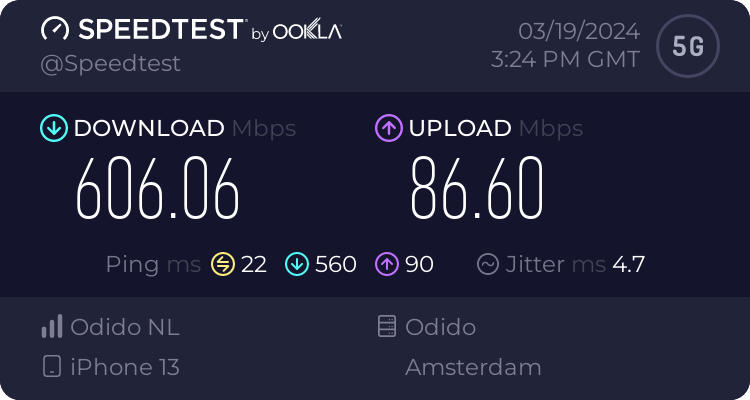
Speedtest.net
Use Speedtest on all your devices with our free desktop and mobile apps.
My plan is rate limited at 600Mbit/s. And only 783MHz is used here. RDI will do auction on 3500MHz band this year.
Well developed. The dutch have best mobile network according to Umlaut
Without the Dutch, no computers (Wink to NXP, ASML and Philips)
Thanks to Tusk unfortunately
tall pagoda
Does anyone here know how to unblock Baofeng GT-5R without using CHIRP? (I don't have a programming cable 😦 )
 lost lily
gofundme 😭
 opal pagoda
congestion due to tourists...
lost lily
yes
opal pagoda
in off season it is awesome
lost lily
especially in the city center
i remember getting in 2019 120Mbps at home from 4G
from my 8€/h plan
opal pagoda
lost lily
i remember getting in 2019 120Mbps at home from 4G
i got that speed in 2015
lost lily
well i didnt have a phone in 2015, i was in elementary school
but if i did, i probably would've as well
lost lily
lost lily
gofundme 😭
im a victorian starving child and my last wish is a 48port QSFP28 switch
one day i'll have one
opal pagoda
lost lily
im a victorian starving child and my last wish is a 48port QSFP28 switch
haha we have 2 and we dont have a single 25g transiever in there
just gigabit and some 10g
but atleast uplink to nexus is 100g
lost lily
my gf actually was able to snatch up on ebay an SFP+ switch with 4 SFP28
so im happy
but we cant use it yet unfortunately
she lives in the middle of nowhere and has horrible peering
they don't even allow her to advertise her own v6
and i dont have any space
blazing karma
Okay finally some progress, currently all my VLANs are up, but weirdly enough it only works one one laptop currently
After I assign the VLAN and let OPNSense hand out the IP via DHCP
Works as in internet connection
 agile torrent
are you serious? I was happy to get reception in the US let alone decent speed 😄
Not in TN, nope... or PA for that matter 😄
what are you willing to bet?
 gusty storm
Didn't you get banned in 2022 for doing the exact same thing you're doing now?
agile torrent
well he is going to be soon enough, can't even dare to place a bet 😛
gusty storm
agile torrent
well he is going to be soon enough, can't even dare to place a bet 😛
he was doing the same sorta thing in December 2022 🙃
agile torrent
I was about to make a joke but it would be in bad taste, so I won't...
anyway guys. I was voluntold to make a nice dashbaord for Nagios, you know big green/red tiles and the like. Anyone ever did something like this before? I don't really feel like working on a Sunday
 tribal ether

 high jasper
peripheral area network
route peripheral device interface over the networks
looking more into SD-MPLS side of networking with edge router (Ingress LSR , Egress LSR) , Intermediate LSR
right now, look for:
client-side USB-C capture port card for edge router Ingress LSR
host-side USB-C adapter port card for edge router Egress LSR
thanks
 ocean hare
Hey guys I feel like the default antenas that came with my ax210 are horrible anyone got good rec for better antennas?
tall pagoda
lost lily
from my 8€/h plan
8€ per hour??!? Damn, i thought my 37,50€/month plan was expensive
tall pagoda
And now i am stuck with Odido (T-Mobile Netherlands) for the upcoming 1,75 years
ocean hare
Can someone people recommend me a good wifi anthena? for my ax210?
https://www.amazon.co.uk/dp/B0CGZG1DFV?ref=ppx_pop_mob_ap_share&th=1 Is this any good?

WiFi 6E Tri-Band 2.4GHz + 5 GHz + 6GHz Magnetic Base Omnidirectional WiFi 6 Antenna Aerial for PC Desktop Computer PCI-E Wireless WiFi 6 6E Router Hotspot Network Range Extender Booster, Supaerial
Or are there better ones?
 meager ginkgo
ocean hare
https://www.amazon.co.uk/dp/B0CGZG1DFV?ref=ppx_pop_mob_ap_share&th=1 Is this any...
meager ginkgo
ocean hare
https://www.amazon.co.uk/dp/B0CGZG1DFV?ref=ppx_pop_mob_ap_share&th=1 Is this any...
Could look for a wifi 7 one but that looks good
Check if it’s based on Intel AX210
 astral spire
wifi 7 is already available? damn they're going crazy with the wifi standards
ocean hare
meager ginkgo
Could look for a wifi 7 one but that looks good
Can I still get wifi7 If my router doesn't support it?
meager ginkgo
ocean hare
Can I still get wifi7 If my router doesn't support it?
Yes. WiFi is backwards compatible
WiFi 7 will futureproof your PC when you do get a newer router
ocean hare
Alright ^^
Im just sad this ax210 just seems very bad
So I wanna get tp-link since I heard great things about them
meager ginkgo
AX210 is pretty good, not sure what you’re seeing
All of the AX210 gear should be about the same.
Doesn’t matter the brand really
ocean hare
My old ax200 got about 800mbps download and my ax210 only gets about 200
ocean hare
Yeah
But I already went through device manager and properties
unistalled and reinstalled
redone the drivers
ocean hare
Lemme see

Please note that to use 6GHz Wi-Fi, the user might use Windows 11 or upgrade to Windows 10 Dev version.
this
@meager ginkgo idk if its bad or good
meager ginkgo
ocean hare
<@390856614942474241> idk if its bad or good
Are the antennas all the way screwed on?
ocean hare
meager ginkgo
Are the antennas all the way screwed on?
Yeah
maybe the the ax210 I bought is faulty or scam?
ocean hare
meager ginkgo
Try contacting the seller/Amazon
Yeah Im just about to return it I have a 30 day return policy on it
@meager ginkgo Thanks for the help so far ^^
 silent flax
meager ginkgo
AX210 is pretty good, not sure what you’re seeing
silent flax
meager ginkgo
AX210 is pretty good, not sure what you’re seeing
biggest drawback of AX210 is no AP mode in Linux for 5/6GHz
 lone sun
ocean hare
maybe the the ax210 I bought is faulty or scam?
lone sun
ocean hare
maybe the the ax210 I bought is faulty or scam?
I've seen scams on Amazon. That much I can say. Gotta be careful buying stuff off that website.
 waxen scroll
 ocean hare
lone sun
I've seen scams on Amazon. That much I can say. Gotta be careful buying stuff of...
ocean hare
lone sun
I've seen scams on Amazon. That much I can say. Gotta be careful buying stuff of...
Ok I'll do my very best
 plush peak
any udm-se enjoyers in chat?
I currently have a UDM-SE and USW-EnterpriseXG-24
setup is sadly RJ45 from google fiber ONT -> RJ45 SFP+ 10G Module -> UDM-SE -> SFP+ DAC -> USW-EnterpriseXG-24
which is in my homelab
I am adding a second USW-EnterpriseXG-24 which is gonna be where all the current house ethernet wires are going to and need to run fiber to connect it back up with the main stack. I am NOT looking to spend 100 on UI manufactured multimode optical modules. so I was looking to see if anyone had experience with using other modules or maybe had a nifty compatibility list or any insight or wisdom they can grant.
as the switches might make it obvious the goal is whole home 10G
Also have access to cheap modules from these:

 plush peak
agile torrent
anyway guys. I was voluntold to make a nice dashbaord for Nagios, you know big g...
plush peak
agile torrent
anyway guys. I was voluntold to make a nice dashbaord for Nagios, you know big g...
this message makes me think we may work at the same place  Edit: sorry if that was a bit parasocial it was just a funny coincidence
 hollow marlin
plush peak
Also have access to cheap modules from these:
hollow marlin
plush peak
Also have access to cheap modules from these:
FS.com is about as cheap as it gets for a well known manufacturer. $20 for SFP+ SR optics programmed for UI
plush peak
hollow marlin
FS.com is about as cheap as it gets for a well known manufacturer. $20 for SFP+ ...
taking a look thanks!
 empty aspen
Just curious, how bad is my cable management of this cat7 cable I have connected to my xbox one?


 agile torrent
plush peak
taking a look thanks!
agile torrent
plush peak
taking a look thanks!
we might be working at the same place lol, also fs.com is legit, used them in the past.
opal pagoda
plush peak
Also have access to cheap modules from these:
I dont belive ubiquiti specifically shuts down port due to 3rd party transceivers.
 ionic gorge
Morning. Poe switch just failed. I have a passive poe injector and the transformer from the switch. Can I use that for an omada tp-link eap 225? My understanding is it won't be poe+ so what limitation will I see? Will it just drop to 100Mbps?
ionic gorge
blazing karma
plush peak
Also have access to cheap modules from these:
I have a few cheap SFP+ 10G modules from China, 40$ per pop
And runs at max like 40-50 in a rack with not much airflow
The older cheaper ones are like 20$-30$ but they run at like 80-90 deg
100% not recommended
opal pagoda
blazing karma
I have a few cheap SFP+ 10G modules from China, 40$ per pop
Sfp+ to rj45?
Optics run much cooler as there is little processing done on transciever
I have just checked 10g base lr transciever temp and it is 34c
While 1000baselx sfp runs at 29c
 waxen relic
How can I increase the bandwidth for my PC’s Ethernet without spending 70$ or so
 carmine nymph
I have tplinks of 90 download 50 upload but over wifi i get like 300-400 download still same ish upload, if I was to stream would I be better off doing it over wifi or stick with tplinks?
 mystic latch
waxen relic
How can I increase the bandwidth for my PC’s Ethernet without spending 70$ or so
mystic latch
waxen relic
How can I increase the bandwidth for my PC’s Ethernet without spending 70$ or so
If your PC has a gigabit port and your internet isn't faster than gigabit, pretty much nothing without upgrading your internet plan.
But need more info to give a proper answer
blazing karma
opal pagoda
Sfp+ to rj45?
Yep
blazing karma
opal pagoda
Optics run much cooler as there is little processing done on transciever
I plan to swap to optics but as im currently running a broadcom card to work with 2500base-x for my gpon, the extra power required by optics might make my gpon stop working
i will need time to test before swapping it over to fiber optic to my pro max 24 poe as uplink
opal pagoda
blazing karma
I plan to swap to optics but as im currently running a broadcom card to work wit...
what, optics take less power than 10g sfp+ to rj45
optics take under a watt while base t ones take 3w

 blazing karma
Oh that’s interesting
Does that apply for all fiber transceivers?
I have an old pair of HP transceivers but no idea if they’re the same
Power consumption wise that is
waxen relic
mystic latch
If your PC has a gigabit port and your internet isn't faster than gigabit, prett...
Errors showing the bandwidth is limiting it using over Ethernet service
silent flax
opal pagoda
Sfp+ to rj45?
i have no idea how much power the RJ45 10G module Onti (aliexpress store) sold me uses, but it sits in the switch for nearly 2 months now without an issue, outside that weird cable issue where my RJ45 cable caused the speeds to be around 200Mbps (very weird number)
https://www.aliexpress.com/item/4000340325163.html the 30m one to be precise
silent flax
blazing karma
Power consumption wise that is
in general, yes. Optical transmission is less power demanding than converting it to RJ45. When you look at normal network card, then your actual network card with SFP connector is pretty much what is under the heatsink here, while the RJ45 SFP DAC module is the actual connector plus that converter chip next to it. So you need to put all that in that module, and that is not for "free" 🙂

 rocky pecan
guys do you think i coudl use a dell power edge 360 as router
silent flax
you can use anything with two network interfaces as router, question is if it makes sense 🙂
rocky pecan
hmm
silent flax
I mean E-2414 might be a way too overkill for a typical "router"
i use a Ivy Bridge i5-3470 for my "router", and it has enough performance capacity to run also bunch of docker containers (Home Assistant etc) while also running OpenWRT for router tasks
rocky pecan
but then i could sell my old router
wait coudl the power edge also be a nas at the same time
silent flax
yes, but question is if you want to do it that way. You can obviously run a virtualization platform and run a virtual router and virtual NAS, but it is not recommended due public attack surface of the virtualization platform in that case
rocky pecan
how over kill would it be and what could i have it do as the main thing it does
other than being a router
silent flax
i mean your typical router barely needs any performance, that Xeon is probably enough for some QoS over 10 gigabit networking as well. And "other than being router" - well, in my case i can get away by running docker on my router OS, but unsure if anyone else but OpenWRT allows to run Docker or VM on top of the router software itself.
plush peak
hollow marlin
FS.com is about as cheap as it gets for a well known manufacturer. $20 for SFP+ ...
appreciate the recommendation ended up looking at it then getting side tracked down the module programming route cause ADHD LOL and now have some hardware getting sent to me from flexoptix 
two birds one stone cause depending on how this goes gonna use it for larger work projects as well
I really hope the flexbox isnt a massive PITA

 clear igloo
ocean hare
Hey guys is there a reason I only have access too 20mhz? On my ax210?
clear igloo
ocean hare
Hey guys is there a reason I only have access too 20mhz? On my ax210?
That's the default options, 20MHz or Auto which is up to 160MHz
It's a legacy setting, just leave it to Auto
ocean hare
clear igloo
That's the default options, 20MHz or Auto which is up to 160MHz
Alright ^^ thank you
How do you know if its connected on 160?
clear igloo
For me I look at my access point client list and I can see it
ocean hare
Also does it matter which pcie slot you install your adapter in
clear igloo
nope
ocean hare
Also I got a AXE5400 but it still comes as intel ax210 in my device manager
Is it supposed to be like that?
clear igloo
Well the AXE5400 is the router, not the NIC
ocean hare
My bad the package says AXE5400
clear igloo
for the NIC? Interesting
Ah, I see it now, MSI
lol, there is another TP-Link router that's the exact same model name
clear igloo
Yes, it basically uses the intel AX210 chip inside
 clear igloo
I love it when companies use the same model for multiple things 🙂

The AXE5400 WiFi 6E Mesh WiFi System boosts your WiFi range and delivers ultra-fast WiFi speeds of up to 5400 Mbps.
ocean hare
Yeah me to :)
clear igloo
But yah, that NIC is just using a AX210 chipset under the heatsink
clear igloo
Could probably pop off the heatsink one day and toss in a BE200 for WiFi 7 one day if you wanted even, I'm certain it's just a PCIe to M.2 E-Key card
eh, so long as the antenna can sit on top of the PC it's fine 🙂
ocean hare
Yeah ^^
Also you got any good settings for the ax210?
That I can apply in properties?
ocean hare
Okey
Also would there be any reason my old ax200 had full bars and my new ax210 only has 4?
clear igloo
AX200 used WiFi 6, so 5GHz only
The AX210 uses WiFi 6E so is probably connected on the 6GHz band and thus has slightly weaker signal at the same distance
clear igloo
I wouldn't worry too much provided your speed and latency is as good or better than before
ocean hare
I mean I get less download speed of like 500mbps slower
clear igloo
And you didn't select the 20MHz only option for the 6GHz band by accident did you?
ocean hare
I only average like 300 now witht the ax210
ocean hare
clear igloo
And you didn't select the 20MHz only option for the 6GHz band by accident did yo...
It was on auto
Then switched it to 20 and then back to auto
But still same speed overall even when I was default auto
clear igloo
hmmm, sounds like it's stuck on the 20MHz channel which doesn't make sense
ocean hare
Hmm idk what to do lol
clear igloo
Updated the driver from Intel's site since installing the AX210?
clear igloo
And the antenna isn't sitting behind a metal box right?
ocean hare
Nope
Sitting in the open hanging off the side off the wall cause it magnetic and facing the modem
Had the same problem with the other ax210 I bought
clear igloo
Go to Network and Internet, does Properties show Private Network show 6GHz under it at least?
ocean hare
Lemme look
clear igloo

 clear igloo
If that's your personal network I would at least try setting to private network
It shouldn't impact anything but I can see why it's on 5GHz only
What router do you have?
ocean hare
clear igloo
It shouldn't impact anything but I can see why it's on 5GHz only
I got a hub 5
From virign media

Is either the 5 or 5x
clear igloo
Ah, well then it doesn't even have a 6GHz band =/
ocean hare
Ah
clear igloo
So 6E buys you nothing on the NIC over the AX200
ocean hare
but that shouldn't be much of a problem tho right?
clear igloo
Correct, it should be just as fast on 5GHz compared to the AX200 one
ocean hare
Hmm so Im wondering why is slower tho
clear igloo
Yah, same here, that doesn't make much sense
And antenna position shouldn't make this much of an impact in a residential setting either, not that large of one at least
clear igloo
Yah, definitely
ocean hare
xd
 clear igloo
it shouldn't
 clear igloo
nah, you can leave that just in case the hub 5 gets upgraded later to something with 6GHz 🙂
ocean hare
clear igloo
nah, you can leave that just in case the hub 5 gets upgraded later to something ...
:)
Hopefully sometime this year
welp idk what to do xd
@clear igloo got any rec?
clear igloo
I'm racking my brain but nothing comes up sadly 😦
ocean hare
clear igloo
I'm racking my brain but nothing comes up sadly 😦
thats alright xd
clear igloo
You could try a full uninstall of the drivers for the card from Device Manager and see if that plus a reboot and then reinstall helps at all but other than that not much
ocean hare
clear igloo
You could try a full uninstall of the drivers for the card from Device Manager a...
Tried it already xd
clear igloo
Dang, yah then I'm out of ideas 😦
ocean hare
Thats alright
I was wondering you think I can replace the hub5 with a wifi router that has wifi 6e?
clear igloo
It might be possible, not sure if your ISP will let you swap it out but you could get an access point to do wifi and then just turn off wireless on the hub5
ocean hare
clear igloo
It might be possible, not sure if your ISP will let you swap it out but you coul...
Oh got a link to were I could learn that?
clear igloo
ocean hare
Oh got a link to were I could learn that?
Which part? The access point part or the hub 5 part?
ocean hare
clear igloo
Which part? The access point part or the hub 5 part?
Both? xD
clear igloo
The AP (access point) part is going to depend highly on what you go with, lots of different 6E and WiFi 7 models out there and each vendor is different
The Hub 5 should be pretty simple
ocean hare
if you wouldn't mind
clear igloo
https://www.reddit.com/r/VirginMedia/comments/155288p/hub_5_as_switch_with_no_wifi/
For the Hub 5 disabling Wifi part

Reddit
Explore this post and more from the VirginMedia community
ocean hare
clear igloo
The AP (access point) part is going to depend highly on what you go with, lots o...
Hmm so I just unplug the fiber cable and plug it into the new Acess Point?
clear igloo
nah, you keep the Hub 5 but turn off WiFi and then plug the access point into the hub 5
ocean hare
clear igloo
nah, you keep the Hub 5 but turn off WiFi and then plug the access point into th...
Ahh okey and the access point is the new router I guess right?
clear igloo
pretty much but it only does wifi so will only have a single port + power
ocean hare
ahh okey
you've been great help @clear igloo ^^
Ill dm you if I got more questions if you don't mind
clear igloo
LTT had a good video going over the high level differences of AP vs Switch vs Router if you want to poke around, I think it was a TechQuickie 🙂
Go for it, no issues here 🙂
ocean hare
clear igloo
LTT had a good video going over the high level differences of AP vs Switch vs Ro...
Perfect!! Ill take a look at that
opal pagoda
clear igloo
I love it when companies use the same model for multiple things 🙂
it is clearly compatabile
clear igloo
I would hope so although it's funny there are three products, two from TP-Link and one from MSI using the exact model name for wifi products
opal pagoda
clear igloo
I would hope so although it's funny there are three products, two from TP-Link a...
well when product name makes sense
ax - wifi6
e -6ghz capability
- speed
opal pagoda
they could add a R or M (router or mesh) at the end and (C) at the end for client
clear igloo
Very true
opal pagoda
silent flax
you can use anything with two network interfaces as router, question is if it ma...
one even
*if you have a managed switch connected to it
silent flax
ocean hare
Is either the 5 or 5x
well, just look at LAN ports, if it has 2.5G it is one, 10G it is the other. mine is 2.5G
silent flax
clear igloo
nah, you keep the Hub 5 but turn off WiFi and then plug the access point into th...
i actually plugged another router behind the cable modem/router, but same thing
carmine nymph
Is there a way to test my connection for a few minutes for example to see if I have spikes etc?
blazing karma
silent flax
in general, yes. Optical transmission is less power demanding than converting it...
Internet
Interesting
I’ll give it a try after I’m back from my holiday probably
ocean hare
silent flax
well, just look at LAN ports, if it has 2.5G it is one, 10G it is the other. min...
I looked its the 10G one
ocean hare
silent flax
well, just look at LAN ports, if it has 2.5G it is one, 10G it is the other. min...
Im think on a way on how to add a ethernet cable all the way up to my room does anyone know a good way?
 wanton spruce
heyo, can anybody with a far router that uses a wifi card tell me if the internet works well despite the long range?
I do not mean a USB adapter, I strictly mean PCIe wifi cards
 shrewd robin
A question for a case scenario. I have a 2 story office where each floor has its own vlan (vlan1 and vlan2, managed by a managed switch). Let's say I wanna build a simple storage server that can be accessed by both vlan1 and vlan2. Can I just connect both vlan1 and vlan2 to the server like this (vlan1 connect to eth1 and vlan2 connect to eth2)
Assuming my server has a dual ports NIC.
Or do you guys have a better solution than this?
Much appreciated for the help
pseudo blade
shrewd robin
Or do you guys have a better solution than this?
Create a subnetwork for the server and expose it to the other two subnetworks.
If the server's not located near the router (or you don't have spare interfaces), you'd probably end up setting up an extra VLAN for it
tribal ether
am i missing anything? https://www.amazon.com/hz/wishlist/ls/2QRSN8CJT4S9Z?ref_=wl_share
 shrewd robin
pseudo blade
Create a subnetwork for the server and expose it to the other two subnetworks.
shrewd robin
pseudo blade
Create a subnetwork for the server and expose it to the other two subnetworks.
Sorry for the late reply
shrewd robin
pseudo blade
Create a subnetwork for the server and expose it to the other two subnetworks.
Arh I understand now
Thanks a lot
shrewd robin
pseudo blade
Create a subnetwork for the server and expose it to the other two subnetworks.
But by exposing it, I can just do a normal static routing right?
 solemn kettle
shrewd robin
But by exposing it, I can just do a normal static routing right?
solemn kettle
shrewd robin
But by exposing it, I can just do a normal static routing right?
It depends how you have your network setup. Ideally you would say have either a router or layer3 switch/firewall.
You’d have gateways as you already do I.e
Vlan1 - 192.168.1.254/24
Vlan2 - 192.168.2.254/24
Vlan3 - 192.168.3.254/24
The your gateway device would know how to route there as they’re all connected routes you would just need to permit the traffic if isn’t already allowed.
shrewd robin
solemn kettle
It depends how you have your network setup. Ideally you would say have either a ...
Arh wait, I just remembered that a single router can connect 2 dif network by default, so all I have to do is just permit or deny the traffic
 zinc badger
Whats better for cervalince footage Seagate IronWolf 8TB NAS Internal HDD or Seagate SkyHawk AI 8TB Internal HDD
shrewd robin
solemn kettle
It depends how you have your network setup. Ideally you would say have either a ...
So even if I use my earlier solution, all I need to do is just implement some rules like deny traffic from A to B vise versa, and allow traffic from A and B to server (assume this server is in a different subject called C)
shrewd robin
zinc badger
Whats better for cervalince footage Seagate IronWolf 8TB NAS Internal HDD or Se...
If you just want for surveillance purpose HDD, just get skyhawk
solemn kettle
shrewd robin
So even if I use my earlier solution, all I need to do is just implement some ru...
That’s right yeah, any L3 device already knows how to route to the networks it has interfaces on. Just set up a new network as you did the other two and permit traffic as needed.
If it’s stateful you’ll like only need to allow SMB or whatever file system traffic to it sourcing at the client networks. But if you have stateless ACL rules be sure to add them both directions.
shrewd robin
solemn kettle
That’s right yeah, any L3 device already knows how to route to the networks it h...
Aight thanks
Now all I gotta do is just managing the wan port
And I should have internet access
pseudo blade
shrewd robin
But by exposing it, I can just do a normal static routing right?
Yes, as long as your router/routing device has an IP on each subnet (looks like you got answered pretty well already)
shrewd robin
pseudo blade
Yes, as long as your router/routing device has an IP on each subnet (looks like ...
Well, I am not working as a network technician or anything related to IT. I'm just someone working in another field lel
So I came here to seek for advise lol. But all sounds great.
 tribal sequoia
man that sucked
i was working with someone on their mc-lagged core switches and one of the switches factory reset itself and they didn't have too intelligent of a design so they had devices that were only plugged into one or the other
fortiswitches in fortilink mode, never seen that one happen before honestly
silent flax
tribal sequoia
i was working with someone on their mc-lagged core switches and one of the switc...
"factory reset itself" - that reminded me of the most absurd Cisco screwup ever
 clear igloo
silent flax
"factory reset itself" - that reminded me of the most absurd Cisco screwup ever
clear igloo
silent flax
"factory reset itself" - that reminded me of the most absurd Cisco screwup ever
If you're using those cables with boots, you deserve it 😛
but yah, that was a mega stupid, haha
tribal sequoia
silent flax
"factory reset itself" - that reminded me of the most absurd Cisco screwup ever
it technically didn't factory reset
it was more like... massaged itself into being unconfigured on the ports
it was still in mc-lag pair but it lost
port configs/trunks/mirrors
silent flax
tribal sequoia
it technically didn't factory reset
it did factory reset - after next poweroff
tribal sequoia
no i mean my situation, i remember that cisco fuckup 😄
silent flax
Cisco
Certain types of snagless Ethernet cables have protective boots that extend too far forward and above the plastic latching tab.When this type of cable is installed in Port 1 of any 48-port model of the Cisco Catalyst C3650 or C3850 Series switches, the boot might press and hold the Mode button, which invokes Express Setup and reboots the system....
ah ok
tribal sequoia
i still don't know why
lost lily
my local IX ignores ICMP traffic and it drives me insane
hollow marlin
Not uncommon that IX' just drop ICMP
tribal ether
so i plan to get a nas, i would like 10gig connection to it. but my router only does 1. if i get a 10gig switch, could i get that fast of a connection between my nas and pc?
mystic latch
tribal ether
so i plan to get a nas, i would like 10gig connection to it. but my router only ...
Pretty sure yes if they're on the same subnet. If you're doing VLANs, you'd need a L3 switch or a router with a 10Gig port if you want traffic at that speed going to different VLANs.
tribal ether
mystic latch
Pretty sure yes if they're on the same subnet. If you're doing VLANs, you'd need...
 mystic latch
Well it's probably safe to assume you aren't doing VLANs then lol
tribal ether
probably not
 north gale
does anyone here use a tplink router by any chance?
pseudo blade
north gale
does anyone here use a tplink router by any chance?
Just ask your question.
north gale
i was just wonderering if its something that you would recomend
im looking for a firefall but i cant use opnsense because of pppoe
pseudo blade
I wouldn't, but I think basically all consumer routers are trash
You should be able to configure pppoe on opnsense
north gale
they also make buisness solutions
https://www.tp-link.com/nl/business-networking/omada-router-wired-router/er707-m2/v1/

ER707-M2 supports two 2.5G ports, as well as multiple VPN protocols and high-security, high-performance VPN capabilities, making sure that employees' remote connections to their main offices are just as safe as if they were there in person.
north gale
pseudo blade
You should be able to configure pppoe on opnsense
yea but the performence is poor because its limited to single core performance
pseudo blade
You can configure it to use multiple cores on freebsd and therefore *sense
pseudo blade
Yep same/similar OS tunables I was looking at
But CPU performance makes a huge difference, single thread on say a modern Ryzen embedded CPU is worlds apart from an 800mhz 2-core MIPS or Cortex-A53
 grizzled cove
Is ~80mbps "normal" for an ipsec tunnel? Both sites have symmetrical gig connections
Surprised that's all I can get through the tunnel
pseudo blade
grizzled cove
Is ~80mbps "normal" for an ipsec tunnel? Both sites have symmetrical gig connect...
"Normal" is a funny word - depends on your hardware and configs
Could be normal, for a low-end router with no hardware acceleration
grizzled cove
It's a Fortigate 40C on one end and an SRX340 on the other end
@pseudo blade both (used) to be very good firewalls
 signal jay
Considering doing a Raspberry Pi 4 Router setup at home using Ugreens USB 3.0 Ethernet adapters running Openwrt , any comments? Concerns? Pitfalls? Good idea? Bad Idea? Give it to me straight ^.^ thanks!
I have the Pi already, just need the Adapters (2Gb and 4Gb versions for the pi)
opal pagoda
signal jay
Considering doing a Raspberry Pi 4 Router setup at home using Ugreens USB 3.0 Et...
I would avoid usb to ethernet adapters as much as possible
peak cloak
north gale
they also make buisness solutions
https://www.tp-link.com/nl/business-networking...
I use that one, it works pretty well
actually not that exact model but their 1Gig one
signal jay
opal pagoda
I would avoid usb to ethernet adapters as much as possible
I have a duel xeon 2U server that I debated on using. 2x 2.5gig ethernet ports- it feels like way overkill for it lol
Is there a way to run that 2U as a NAS/Router combo?
opal pagoda
signal jay
Is there a way to run that 2U as a NAS/Router combo?
Sure, use proxmox as hypervisor and vm for various services you want to run
signal jay
opal pagoda
Sure, use proxmox as hypervisor and vm for various services you want to run
I’ll look into that as an option, sounds dope as hell. mind if I shoot you a DM sometime if I get stumped?
opal pagoda
you can also just ask here, lots of people are familiar with it
you can also check out hardware haven yt chanel, he has done some router builds with virtualisation
signal jay
Roger that, will do!
silent flax

Proxmox Support Forum
We are proud to announce the first release of our new integrated import wizard!
Proxmox VE now provides an integrated VM import wizard re-using the storage plugin system for native integration into the API and web-based user interface. You can use this to import VMware ESXi VMs as a whole, with...
 cobalt heath
I’m looking to upgrade my WiFi router at home. What’s a good consumer grade router for under 200 usd and a 1gbit connection
shrewd robin
cobalt heath
I’m looking to upgrade my WiFi router at home. What’s a good consumer grade rout...
i think tp link is a good choice for that
shrewd robin
cobalt heath
I’m looking to upgrade my WiFi router at home. What’s a good consumer grade rout...
something like this is already more than sufficient for home users
 solemn kettle
cobalt heath
I’m looking to upgrade my WiFi router at home. What’s a good consumer grade rout...
solemn kettle
cobalt heath
I’m looking to upgrade my WiFi router at home. What’s a good consumer grade rout...
Depends if you just want WiFi or want a full router as well. You can pick up a ubiquity AC Pro for around that price and then turn off the WiFi on your ISP router
 obsidian cedar
my download speed cooked?
 opal pagoda
cobalt heath
I’m looking to upgrade my WiFi router at home. What’s a good consumer grade rout...
opal pagoda
cobalt heath
I’m looking to upgrade my WiFi router at home. What’s a good consumer grade rout...
what size of home do you have?
for consumer grade stuff i would get deco x50 (one or more depending on house size, can be upgraded later with any of deco models)
for soho i would get er605 and one or more omada ap
cobalt heath
opal pagoda
what size of home do you have?
for consumer grade stuff i would get deco x50 (on...
It’s a 940sq ft apartment. Pretty small
Currently I have a NETGEAR ax1800 that about 3 years old but I’m having a lot packet loss in games.
opal pagoda
cobalt heath
Currently I have a NETGEAR ax1800 that about 3 years old but I’m having a lot pa...
try to connect your gaming pc directly to modem, no router in between, this could be isp issue
cobalt heath
The modem is about a month old. That’s why I think it’s the router. After I restart the router it’s good for a few hours but then the issues start again
 barren hound
What can you do with a scammer's IP?
ornate jungle
barren hound
What can you do with a scammer's IP?
Stare at it... menacingly... until it goes back into hiding.
barren hound
I see
 low pond
Yeah, nothing useful honestly. As for location, perhaps accurate to the city, as for attacks, probably can ddos it to make their connection useless for a while. And even this is subjective and can change from case to case
But much of those scambaiters do use city location and others to actually find them so
 sly compass
You guys know why i can’t access my chromecast and airplay while vpn home?
How do i create a firewall rule or change the VPN to drop me into the same network as your home subnet? In Opnsense?
 thick birch
hey guys
What!!! The HELL is Going on With Gametracker.com
they up the one moment the next they down again
😢
tribal ether
can a diy nas run unifi protect?
 autumn ether
Anyone any idea how to crimp awg28-32 thin af stranded wire? I can't find any RJ45/keystone jacks made for thin stranded cables. (My fault, I know, should've used a solid core 24awg wire, but it's too late now, it's in the wall and plastered in.
At this point I'm considering soldering them onto a solid core section of wire, and crimping that part.
hearty lily
Looking for a nas any suggestions
silent flax
hearty lily
Looking for a nas any suggestions
well, it comes down to what you want:
- prebuilt (Synology, QNAP etc) or self-built computer with one of the NAS OS (OpenMediaVault, TrueNAS Scale etc)
- what budget
- how many hard drives, in what RAID usage
- what else do you want to have on it outside of basic file sharing
and so on.
hearty lily
Probably a prebuild, only really going to use it for storage at home stop using Google and that stuff for backups I don't really care about accessing anything while not at home
This is the unit I was looking at Synology 4-Bay DiskStation DS923+
 meager meteor
Will this work properly if I set up the Ubiquiti Networks UniFi Cloud Key Gen2 (UCK-G2) to be a Unify Protect

 shadow tinsel
im looking for a uptime monitor that is physically installed on the machine I need it on to monitor game servers. I have 1 game that likes to randomly go offline and would like to get notified when that happens so i can restart the server
lone sun
opal pagoda
I would avoid usb to ethernet adapters as much as possible
🤷♂️ I don't know why, they work so well that they practically made actual RJ45 ports obsolete for laptops. HP EliteBook's don't even come with one anymore because the performance is practically identical anyway.
USB wifi adapters should be avoided however. They often don't measure up compared to PCIE adapters.
 But who cares about wifi. Its often shitty anyway. 90% of the people I see crying about performance are using wifi. I sure as hell ain't going back to it after my horrid experience with it.
 fading fiber
Is there any such thing as a wireless wifi extender?
 tribal ether
meager meteor
update on prior plan
tribal ether
meager meteor
update on prior plan
may i know why you changed to that, i want to get the unifi door bell
meager meteor
i was told that the cloud key in my old plan was for controll and you could not put storage on it and run it as a unify protect
 frosty stone
meager meteor
Will this work properly if I set up the Ubiquiti Networks UniFi Cloud Key Gen2 (...
frosty stone
meager meteor
Will this work properly if I set up the Ubiquiti Networks UniFi Cloud Key Gen2 (...
no, you need a dream machine or nvr
a cloud key is just a controller
wait I'm very wrong, the CK+ can run protect
opal pagoda
lone sun
<:KEKW:670048864052445204> But who cares about wifi. Its often shitty anyway. 90...
Yeah true but when we are talking about routers it is a different story.
I have elitebook g10 and i have to carry a usb to Ethernet adapter around
But 99.9% of the time i am on wifi anyway since it doesn't suck as it is enterprise installation with wifi6e ap-s
pseudo blade
meager meteor
Not compatible with third-party cameras.
You'll need a software nvr or similar, cloud key's a nonstarter unless you use ubiquiti cameras
meager meteor
Damn, guess I have to find a other way, is there any security system you guys suggest where I host the server and can view it by an app
pseudo blade
Do you already own the IP cameras?
meager meteor
We have wireless 4 camera that can plug in were wanting 2 more cameras and a better system with a way better app
Plug in via ethernet
 hardy kestrel
Is there a difference between using 5GHz WiFi and connecting my PC to a WiFi Mesh Node with an ethernet cable?
(Couldn't connect my PC to the router directly with an ethernet cable, it's impossible to route)
opal pagoda
hardy kestrel
Is there a difference between using 5GHz WiFi and connecting my PC to a WiFi Mes...
connecting to mesh node with ethernet cable would mean 1 less wireless hop
most likely it will be better
silent flax
hearty lily
This is the unit I was looking at Synology 4-Bay DiskStation DS923+
for basic NAS tasks, a $550 NAS with 4GB RAM and Ryzen 5 1600 is an insane overkill, tho with something like DS423 at $350-$380 you aren't saving much in cost.
lone sun
opal pagoda
But 99.9% of the time i am on wifi anyway since it doesn't suck as it is enterpr...
🤔 Ap-s?
peak cloak
meager meteor
Damn, guess I have to find a other way, is there any security system you guys su...
synology

Whether for work or play, Synology offers a wide range of network-attached storage (NAS) choices for every occasion. Compare specifications below and find the right model for you.
 near ice
Any mc entra ID experts here? I'd like to talk about config and stuff
 thick minnow
What are commons spots for coax cable outlets or whatever?
 worthy stag
meager meteor
Damn, guess I have to find a other way, is there any security system you guys su...
worthy stag
meager meteor
Damn, guess I have to find a other way, is there any security system you guys su...
shinobi is also a good option
runs on basically any hardware
 clever seal
meager meteor
Damn, guess I have to find a other way, is there any security system you guys su...
clever seal
meager meteor
Damn, guess I have to find a other way, is there any security system you guys su...
Digital Watchdog. Just have to buy a one-time license per camera. May have to go through an integration company or something. You could also do the free version of Milestone (Milestone Essential I believe).
worthy stag
shinobi is free and open source
peak cloak
I run shinobi, but it can be a pain
if you want something that just works, synology or another NVR is a better choice
also has the CV hardware already
tribal ether
i’m looking to make a nas in the jonsbo case. that will also run jellyfin, and a minecraft server. any hardware i should change from this video? https://youtu.be/boKmZKTKXHc?si=676yptmZfIL06sMI

Try FreshBooks free, for 30 days, no credit card required at https://www.freshbooks.com/linus
Get 50% off on your annual Zoho CRM subscription at: https://lmg.gg/ZohoCRM
We’ve built some crazy servers in the range of petabytes of storage, but we haven’t talked much about smaller, more practical home NAS units… or how you can build one yourself...

 torn pewter
So I want to run internet to my camper can I run an ethernet from the router in the house to the camper and to another router In the camper?
silent flax
torn pewter
So I want to run internet to my camper can I run an ethernet from the router in ...
outdoor => i would go with optical connection simply because of lightning strikes
worthy stag
fiber is a no-brainer for networking stuff outdoor
you can get all the required stuff pretty cheap
thick minnow
Hey I have a fibre connection from the wall, but I don't have a modem with sfp ports, what should I do?
opal pagoda
thick minnow
Hey I have a fibre connection from the wall, but I don't have a modem with sfp p...
most likely you need a ont
it should be provided to you by your isp
worthy stag
thick minnow
Hey I have a fibre connection from the wall, but I don't have a modem with sfp p...
you dont need a traditonal modem with fiber
you can use the ISP provided router, or use your own
thick minnow
But I thought you needed a modem to communicate to the ISP?
worthy stag
thick minnow
But I thought you needed a modem to communicate to the ISP?
not really, modem is just the word used for DSL or cable
"modulator" for analog signals
for fiber you use SFP(+) modules
thick minnow
opal pagoda
most likely you need a ont
I arranged to exclude that as I have a 24 port switch with 2 sfp ports
So there is a pair of fibre nodes sticking out of my wall
worthy stag
assuming you have GPON, you can get a matching SFP and plug it directly into your router
but compatibility depends on your ISP
thick minnow
I'm pretty sure nbn is GPON
worthy stag
do you want to use your ISP's router or your own?
thick minnow
So I can just get a converter and plug it into the sfp port on my router
I don't like isps
I'm getting a nice ubiquiti router
worthy stag
thick minnow
So I can just get a converter and plug it into the sfp port on my router
no, you cant just put it into any SFP module
you need a special one
thick minnow
Oh
worthy stag
thick minnow
I'm getting a nice ubiquiti router
okay, theres a discord server that you'll probably be interested in about this topic
thick minnow
worthy stag
okay, theres a discord server that you'll probably be interested in about this t...
It's fine
 thick minnow
What special sfp converter do I need
worthy stag
you need a matching SFP
yeah, thats the hard part
a lot of ISPs put special protections
Discord
A community assisted by pros and enthusiasts with a common goal of bypassing the ISP CPE using commodity hardware.
and be careful with the difference between APC and UPC
APC - angled, used mostly by GPON
UPC - most other internal fiber
they are not compatible and will probably break if you try to connect it
thick minnow
I think I might just call an nbn technician and get him to sort it out
Thanks for your help though
worthy stag
most likely they will not help you with your own router, BTW
thick minnow
It's best if I get my isp technician to answer these questions he probably has done alot of enterprise stuff similar to me
worthy stag
they will want you to buy their stuff
thick minnow
Although it's a bit weird having direct fibre in a home
Well NBN is not an isp
They are an infrastructure company
They maintain the fibre connections they don't do internet
They hooked up my fibre
In fact it's not normal for fibre to be put through the hole it should be an ethernet cable but I arranged it to be dual node fibre
But I will still have a chat with both see what they think
Nbn is one hell of a shitstorm I must say
worthy stag
alright, gl
thick minnow
Nbn only managed to get fibre to like 5% of the country
Only like 0.5% is actually to the box
Rest is a weird fucking hybrid coaxial shit which gets fucked when it rains
Thanks BTW
 raven forge
If you have a internet provider in the US, try rebooting your modem. The FCC changed the definition of broadband a couple weeks ago, in particular they bumped up the minimum upload speed to be qualified as broadband. Multiple carriers are bumping up their uploads (and even downloads) to stay within compliance. Xfinity bumped both my download and upload speeds.
frosty stone
@thick minnow putting a gpon sfp module into your router isn't going to just work, and the ISP is very unlikely to configure it to work for you.
You will always be stuck with the provided ONT
 cerulean pulsar
I'm troubleshooting some inter vlan issues between VMs. I've seen instances when I don't get a response at all on a ping, and in others I get "destination port unreachable" from the default gateway. Assuming everything is configured ok locally (on src/dst), does the latter typically indicate a missing firewall rule?
opal pagoda
thick minnow
Nbn is one hell of a shitstorm I must say
https://youtu.be/Hi7JMTojT-4
it is hard avoiding isp ont

🚀 Next video you should check: https://youtu.be/UFKhprphIAA
🔗 Links mentioned in the video:
➡️ SFP GPON module: https://www.fs.com/de-en/products/133619.html
➡️ IP phone forum: https://www.ip-phone-forum.de/threads/ssh-telnet-to-fritzbox-5491.306736/
➡️ Frtizbox image builder: https://github.com/PeterPawn/YourFritz/blob/main/toolbox/build_shell...
opal pagoda
cerulean pulsar
I'm troubleshooting some inter vlan issues between VMs. I've seen instances when...
most likely firewall issue or no route
check your zone firewall for blocked connection
 thorn yew
Does anyone here know of a good 802.3bt/POE++ (~60 watts/port) switch or injector? I need at a minimum 24 ports.
With at least 50W on each port
opal pagoda
what is your budget?
thorn yew
~$500
if possible
Trying to hook up Unifi Access doors. I have 24 doors currently, and 20 of them just about overloads the Ubiquiti 48 port POE switch I have.
And with the 20 I have, if to many are triggered anywhere near simultainously, it can reset the switch's power supply
torn pewter
silent flax
outdoor => i would go with optical connection simply because of lightning strike...
What's optical connection?
opal pagoda
thorn yew
And with the 20 I have, if to many are triggered anywhere near simultainously, i...
https://www.fs.com/products/169149.html
possibly this but poe budget is still 3-4x smaller than your requirements
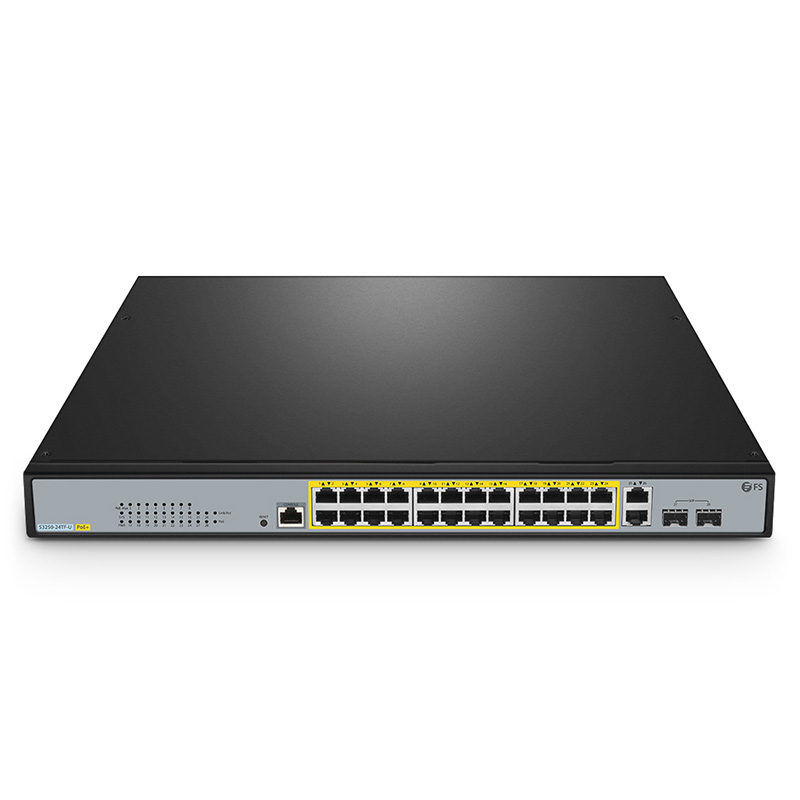
FS.com
S3250-24TF-U, 24-Port Gigabit Ethernet L2+ PoE++ Switch, 24 x PoE+ Ports @370W, with 2 x 1Gb RJ45, 2 x 1Gb SFP Uplinks, Product Specification:Ports - 26x 10/100/1000BASE-T RJ45 | 2x 1G SFP, Total Number of IPv4 Routes - 16, Switching Capacity - 56 Gbps, MAC Address - 16K, Forwarding Rate - 41.7 Mpps, Number of VLANs - 4094
thorn yew
That might do it.
thorn yew
opal pagoda
https://www.fs.com/products/169149.html
possibly this but poe budget is still 3-...
Well, the average power draw is around 10-15 watts for the dorr access hubs, so that ain't to bad in terms of power budget.
Better than the ~185 Watts the switch we are currently using has.
opal pagoda
it adds up fast
opal pagoda
i would still have a couple of them connected to your old switch
thorn yew
And we've been surviving off of 100w less than that switch with 20 plugged in
probably
opal pagoda
worst case get 2 of those switches
opal pagoda
thorn yew
Well, the average power draw is around 10-15 watts for the dorr access hubs, so ...
i was wrong, that switch only has 2x of poe++ ports
thorn yew
Nooo
opal pagoda
rest are poe+
thorn yew
Yup. Same issue I keep ruinning into.
opal pagoda
ubiquiti access controll should really have a internal supercapacitor and they should have made it ran on just poe+
big box of adapters time
 thorn yew
Ohh boy
 pine sage
i am thinking of making a nas, i have an old hp elite desk with an i5 3740 that only has 2 harddisk bays.
i also have an fx 4300 which can support to 10 3.5 inch bays
im not sure which machine is better for the task of using a NAS as an alternitive to a NAS
thorn yew
The i5 is faster, by at least half.
I'd almost say to swap the mainboards if possible
use the other chassis
pine sage
thorn yew
I'd almost say to swap the mainboards if possible
i cant ones a prebuilt
really the i5 is DOUBLE the speed wow
thorn yew
Well, 50% faster than the FX
pine sage
i mean i can upgrade the fx4300 for rather cheap to a 6300
thorn yew
Well, that does get you to only 15% slower than the i5
Which is the pre-built? i5 or FX?
thorn yew
Depending on how the mainboard in the pre-built is designed, you might still be able to use it in a regular case
pine sage
its a desktop ssf case
thorn yew
What model?
pine sage
probably not - id love to get something small
pine sage
thorn yew
What model?
idr elite desk 830?
pine sage
thorn yew
What model?
 pine sage
yes
i have 8tb in that machine rn
im not sure if the CPU is good enough to act as a google cloud storage alterntivie
thorn yew
Well, for less than $50 on ebay you can get a motherboard that supports the i5, and use that in the ibuypower case
pine sage
i like the smallness of this case
pine sage
heres the thing
opal pagoda
pine sage
im not sure if the CPU is good enough to act as a google cloud storage alterntiv...
yes
pine sage
i have a 486 physical media server thats also on my network, it can read cds and dvds and usb 2, i want to stack these machines on top of one another
opal pagoda
i am running my home server on Intel N2930 mini pc
pine sage
what i really need is a tiny rack
thorn yew
Btw, I would HIGHLY recommend Immich as a Google Photos alternative.
Been using it for a while, it works pretty well
pine sage
thorn yew
Btw, I would HIGHLY recommend Immich as a Google Photos alternative.
t is that
what is that
pine sage
fantastic
opal pagoda
pine sage
fantastic
what are your internet speeds?
pine sage
opal pagoda
what are your internet speeds?
i dont remember let me chec
thorn yew
opal pagoda
what are your internet speeds?
He'd be technically downloading from his phone when on the go, so he wouldn't need symmetrical.
opal pagoda
thorn yew
He'd be technically downloading from his phone when on the go, so he wouldn't ne...
i know
pine sage
the goal is that this server would be used among all of my devices, all documents and programming projects, photos from my phone etc
thorn yew
Immich would handle the photos/vids no problem
thorn yew
I would reccomend something like UnRAID as the OS, as it does the SMB and user management for you, and has Docker built right in.
pine sage
i was thinking of doing truenas
thorn yew
It does cost a little right up front, as they do want to be paid for their work.
opal pagoda
thorn yew
I would reccomend something like UnRAID as the OS, as it does the SMB and user m...
i personaly run casaos on top of debian
pine sage
im familiar with the unix enviroment
thorn yew
opal pagoda
i personaly run casaos on top of debian
Oh! I forgot about CasaOS!
pine sage
what would be the issue with truenas core
thorn yew
Yes, CasaOS is nice. And free.
opal pagoda
thorn yew
Yes, CasaOS is nice. And free.
and resource efficient
you can even run casaos on top of openmediavault
thorn yew
opal pagoda
you can even run casaos on top of openmediavault
Nice
opal pagoda
just some slight config changes in openmediavault web interface
silent flax
torn pewter
What's optical connection?
something like this (or a network device with SFP device on both sides) to convert RJ45 into SFP
 silent flax
torn pewter
What's optical connection?
silent flax
torn pewter
What's optical connection?
and then an optical cable between them. For outdoors use you want one meant for that, that is with better protection from elements

like this
 silent flax
torn pewter
What's optical connection?
silent flax
torn pewter
What's optical connection?
inside that cable you have n optical fiber, which is non=conductive (as it is pretty much just a glass to transfer the laser signal from one end to the other), thus it won't conduct lightning cable like normal metallic cable would do. Thus it is safer for outdoor network connections
tribal ether
does AMD CPU work with jellyfin?
ornate jungle
tribal ether
does AMD CPU work with jellyfin?
Yes, you can install Jellyfin onto a computer that has an AMD CPU. If you're asking about Transcoding support, Jellyfin has documentation on this feature.
https://jellyfin.org/docs/general/administration/hardware-acceleration/amd/

This tutorial guides you on setting up full video hardware acceleration on AMD integrated GPU and discrete GPU via AMF and VA-API.
 smoky totem
For those who watched that cloud storage video linus made the other day, does anyone have a suggestion(something similar, not a entire computer) of a better cpu than the one in I can use? I need something slightly better that can support 4k
pine sage
ornate jungle
Yes, you can install Jellyfin onto a computer that has an AMD CPU. If you're ask...
What kinda gpu do you need for something like this - I have an old r7 360 that I don't need
ornate jungle
pine sage
What kinda gpu do you need for something like this - I have an old r7 360 that I...
No idea. I run Jellyfin on my Synology DS918+ NAS using Intel Quick Sync video. It "just works" when enabled in the settings.
thick minnow
Hey All.
sly compass
pine sage
What kinda gpu do you need for something like this - I have an old r7 360 that I...
I use an old 1080ti and it works alright
pine sage
sly compass
I use an old 1080ti and it works alright
"Alright" a 1080ti would be the highest end card I own
silent flax
first you need to figure out if you need live transcoding at all
if not, then you could just skip it for now and later grab something cheap with good encoder?
signal jay
Can I use a VPN router as just a regular router?
cerulean pulsar
Does anyone work with tailscale? I'm having an issue where I want two VMs on different VLANs to communicate over their private IPs rather than tailscale. The appropriate FW rules are in place on my FW, however after doing a tcpdump I can see packets are going out the tailscale interface/IP as the source rather than my eth0 interface which has a local IP assigned. Any idea how to fix? Looks like an asymmetric routing issue.
cerulean pulsar
Alright, was able to figure out my issue. Turns out it has to do with routing prioritization introduced by tailscale. I can see the priority using ip rule show. To fix I had to add the specific route I wanted like so and then persist the configuration changes:
ip rule add to 192.168.2.0/24 priority 2500 lookup main. That cause this route to have a higher priority (2500) than the tailscale rules (5200-5500). That did the trick.
pine sage
silent flax
if not, then you could just skip it for now and later grab something cheap with ...
I wanted to do a Plex server
silent flax
pine sage
I wanted to do a Plex server
Same thing, most devices can direct stream, transcoding is needed only for unsupported formats (device which can't handle hevc when source file is in hevc for example)
 jolly crater
I use a p1000, it's limited in the number of streams but I got a good deal on it
jolly crater
silent flax
Same thing, most devices can direct stream, transcoding is needed only for unsup...
Plex also transcodes for most subtitles and HDR and dolby audio non-support
meager ginkgo
signal jay
Can I use a VPN router as just a regular router?
Should be able to. What model/brand?
VPN router usually just means it has VPN capability
 mossy gate
Unifi Gateway Max is out
silent flax
bundled stuff with China products is never ceasing to amaze me

bought a dual i226v NIC... they added a small screwdriver and a screw for some reason 🤷♂️
meanwhile the "manual says" insert the bundled mini CD, which isn't bundled 😄
 tough leaf
what am i looking for when looking to buy a new ethernet cable
cat 8, anything else
 lunar spade
I noticed that doing a Hotspot over Wifi doesn’t work unless I have Bluetooth enabled, why is that? I know that the connection is using Wifi, because using a Bluetooth PAN hotspot only gives 300kbps compared to >5mbs over a Wifi hotspot
sly compass
silent flax
bought a dual i226v NIC... they added a small screwdriver and a screw for some r...
Why not just go 10gbit? Same price, a bit more electric but still
sly compass
tough leaf
what am i looking for when looking to buy a new ethernet cable
cat 8, anything e...
I haven’t seen any long cat 8.1 cabels yet
silent flax
sly compass
Why not just go 10gbit? Same price, a bit more electric but still
- cause my network is 2.5 gigabit already and 10GB RJ45 networking is expensive as hell
- i needed dual RJ45 due wiring in my house
sly compass
An cat5e could do 40gbit, just needs to be max 2-5meter long
silent flax
tough leaf
what am i looking for when looking to buy a new ethernet cable
cat 8, anything e...
cat 8 is mostly pointless, Cat5e will do 10 gigabit on short distances, Cat6 and 6a on long distances. Cat8 is for 25-40 gigabit ethernet which doesn't exist really
sly compass
silent flax
1) cause my network is 2.5 gigabit already and 10GB RJ45 networking is expensive...
I just bought two x540 with dual ports for 70eu shipped and delivered. They work great
silent flax
sly compass
I just bought two x540 with dual ports for 70eu shipped and delivered. They work...
sure, but that is just one side of the equation. You need a 10 gigabit switch on other side too, as X540 won't do 2.5 gigabit
(yes, i have one X540 in my server, this is for a "router")
sly compass
silent flax
cat 8 is mostly pointless, Cat5e will do 10 gigabit on short distances, Cat6 and...
I don’t agree if you where to wire a house. That would be great for future proofing. But you should install fiber instead now. Ofc power to each place to
silent flax
sly compass
I don’t agree if you where to wire a house. That would be great for future proof...
Cat6 metallic cables were installed in this apartment a decade ago
i ain't rewiring with fiber anytime soon
sly compass
silent flax
sure, but that is just one side of the equation. You need a 10 gigabit switch on...
That is true, that’s why i bought two. One for my opnsense server then another for my work/gaming pc. 10gbit house. Then ofc switch will set you back. But that’s if you want more clients
silent flax
i have 10 gigabit from server to the switch, which then divides it to 2.5 gigabit everywhere else. Router has 1 gigabit cable internet via 2.5 gigabit port, this card will make both sides of the router to be 2.5 gigabit. No need for 10 gigabit there
sly compass
silent flax
i ain't rewiring with fiber anytime soon
Same here, it’s just cat 6. But i was worried since it somewhere around 20-30 meter to my router. That could cause problems with 10gbit
silent flax
and switch will set you back a LOT. 8xRJ45 all 10 Gigabit switches are starting around $350-$400.
sly compass
But i guess it alright, haven’t fixed 10gbit wan yet
sly compass
silent flax
and switch will set you back a LOT. 8xRJ45 all 10 Gigabit switches are starting ...
It’s only money 🥸 Nah but you could go rj45 to sfp. Then i would have 10gbit wan and sfp+ or whatever to other things
Just for the wan
I mean it isn’t ideal
But 10gbit go brrrr
Still feel like you missing out

 winter mortar
Hey guys, I'm being searching around and I'm been thinking of doing some media center. I was seeing a NAS with that capability, but they're super expensive, then I was considering a Raspberry Pi 5 with 8gb for it. Whats your opinion?
silent flax
internet is 1 gigabit. switch is 2.5 gigabit. Where am i missing out ?
Server is 10 gigabit to a 8x2.5G+1x10G switch. Most stuff server does is either serving media (where 2.5 gigabit on client is still overkill) or downloading from internet (which is capped to gigabit anyway). Yes, copying to the server is limited to sad 250MB/s on network level from single client... not like my spinning hard drives can handle even that 😄
silent flax
winter mortar
Hey guys, I'm being searching around and I'm been thinking of doing some media c...
get a cheap older PC with enough storage space (as in 3.5" hard drive bays), if you need transcoding, then add a 1650 Super or something better, done. NAS is pointless for most, Pi is too limiting on storage interface side
winter mortar
silent flax
get a cheap older PC with enough storage space (as in 3.5" hard drive bays), if ...
Hm, I do have a older rog laptop which I maybe could use for that yes
silent flax
something like a 6th or 7th gen i3/i5 could be low power enough. Or a laptop, if you don't mind being limited to single 2.5" drive and/or USB drives
winter mortar
It has a GTX 1650, i7 9xxx (cant recall model), I can get some 1Tb nvme ssd gen3 for it (currently has 500gb gen4) and I could install some Linux distro with plex media server no?
mystic latch
Random thought, are there any APs that accept fiber as a connection?
winter mortar
Piracy aside, my aim is to have the files in that PC to stream to my other devices, tv, laptop, etc
silent flax
winter mortar
It has a GTX 1650, i7 9xxx (cant recall model), I can get some 1Tb nvme ssd gen3...
yes. Or OpenMediaVault + docker + Plex in docker
silent flax
winter mortar
It has a GTX 1650, i7 9xxx (cant recall model), I can get some 1Tb nvme ssd gen3...
and then some USB storage box for 3.5" 16-18TB hard drive 🙂
winter mortar
Oh thanks thats a good suggestion!
mystic latch
silent flax
get a cheap older PC with enough storage space (as in 3.5" hard drive bays), if ...
Intel quicksync helps a lot with trancoding if one has one of their relatively newer CPUs.
silent flax
i mean if you have an older unused hardware, it is always a good idea to reuse it if you can. I use a Ivy Bridge system for router, another for backup NAS
winter mortar
I have 2 1TB ones laying around, may use them to do a test flight with it
silent flax
mystic latch
Intel quicksync helps a lot with trancoding if one has one of their relatively n...
well yes, but the GPU side was more for situation when he would have something like 2nd to 4th gen stuff
winter mortar
Im guesing the raspberry pi would struggle with the 4k stuff no?
silent flax
for transcoding certainly
winter mortar
Thank you, with your tips I can do it without spending more money
mystic latch
If you have good clients that can leverage a lot of formats like a shield or newer fire tv then a Pi would honestly be fine since it wouldn't have to transcode
winter mortar
mystic latch
If you have good clients that can leverage a lot of formats like a shield or new...
my clients would be an Android TV box, maybe a Samsung S24 and an iPhone 15 (or iPad), or of course the laptops
most times would be using the android tv box which I imagine is very good on that side of things
mystic latch
Depends on the specific box
silent flax
mystic latch
If you have good clients that can leverage a lot of formats like a shield or new...
Pi 5 at least has two USB 3 ports and one 2.0 x1 slot for NVMe, but meh, if he can reuse already purchased HW
mystic latch
Yea
winter mortar
Yeah this laptop is mostly stopped, for gaming isn't already a good one, the gtx1650 gets demolished by my Macbook m1 max even in crossover so i just stopped using it alltogether.
now its just picking dust so Its good I could find a good use for it before it turns into ewaste
mystic latch
I would suggest giving jellyfin a try if you don't already have a plex subscription. Plex paywalls transcoding, jellyfin does not.
winter mortar
I'm just having a question. Which media player i could use to watch the stuff. Eg if I use Plex I must use plex player as well right?
mystic latch
Plex is more polished, but I haven't been a fan of their business direction for a while.
mystic latch
winter mortar
I'm just having a question. Which media player i could use to watch the stuff. E...
Correct.
winter mortar
Hm ok I was checking around. I will maybe try installing Ubuntu in it, jellybin server and give it a try

Thank you for your time, helped a lot!
silent flax
winter mortar
I'm just having a question. Which media player i could use to watch the stuff. E...
their own client or usually they also provide a DLNA server, so any DLNA client
but obviously you lose part of functionality
mystic latch
I've never tried watching via DLNA
winter mortar
silent flax
their own client or usually they also provide a DLNA server, so any DLNA client
I was jecking this one and apparently supports all of the devices i own
mystic latch
Yea jellyfin has pretty good client support
silent flax
usually the limiting factor is WebOS support. But there is even (somewhat limited) Kodi now for WebOS, so...
everyone has clients for normal computer OS, Android TV, Tizen, Android, iOS.
if you are missing clients then it is WebOS and game consoles
but even Xbox has Jellyfin and plex clients https://www.microsoft.com/sk-sk/p/jellyfin/9p2drtg62qf8 & https://www.microsoft.com/store/apps/9NBLGGH3ZZVF
winter mortar
In my case they have a client available on Google Play for my TV Box so its pretty good
silent flax
i just wish i didn't hate the UI of Jellyfin that much 😄
winter mortar
silent flax
i just wish i didn't hate the UI of Jellyfin that much 😄
After using Disney Plus and Hbo Max can't say there's any media UI worse
mystic latch
silent flax
i just wish i didn't hate the UI of Jellyfin that much 😄
One could use it with kodi
silent flax
i mean it was something like it combined multiple different libraries under movies or something like that last time i tried it
mystic latch
Combining is currently optional and opt-in with JF
silent flax
that and slow indexing with NFO files in both emby and jellyfin was my main issues i think. But it was few months ago i tried jellyfin last time
winter mortar
Maybe they improved that?
silent flax
maybe, but i am not going to test jellyfin every month just to try if they fixed it; i have plex lifetime anyway
mystic latch
I can't say I've had much of an issue with indexing personally. But hardware can dictate that a lot
silent flax
mystic latch
I can't say I've had much of an issue with indexing personally. But hardware can...
Threadripper 2950x, 128GB RAM, X399 Taichi, NVMe for docker images, spinning rust for media
mystic latch
Welp. Dunno what to tell you then lol. Maybe it was some setting or something
silent flax
https://forum.jellyfin.org/t-solved-first-time-setup-slow-scanning-screen-load-times probably doing those chapter images as this guy had, which is probably enabled by default
Hello! I'm a new Jellyfin user, switching over from Plex, which I've been using for the past 3 years. My media library is close to 6 terabytes. I spun up Jellyfin about 2 hours ago and pointed it at m
opal pagoda
tough leaf
what am i looking for when looking to buy a new ethernet cable
cat 8, anything e...
cat6a max for consumers
that fake "cat 8" cable is probably a cat5e
tough leaf
how do i know if its cat8 then

Cat8 Ethernet Cable 1M, High Speed Gigabit Nylon Braided Lan Network Cat8 Patch Cord, 40Gbps 2000Mhz RJ45 Flat Cable Shielded, Indoor&Outdoor for Modem/Router/switch, Faster than Cat5e/Cat6/Cat7
 prime flume
If you mean, really actually knowing if it's a cat8 or not
You probably need to rent a fluke cable tester
tough leaf
what are some trusted cat 7/8 cables i can get then
 vernal oak
would this be the right channel to ask questions about getting a NAS for personal use?
 rocky badge
@clear igloo @waxen scroll
 mystic latch
vernal oak
would this be the right channel to ask questions about getting a NAS for persona...
mystic latch
vernal oak
would this be the right channel to ask questions about getting a NAS for persona...
here or linux. There's not really a perfect self-hosting channel
Could also probably go in one of the tech chats
vernal oak
Alright cool, I'll ask here. Thanks!
The UGreen NAS is looking particularly enticing to me. My question is this. If I opt for a 4 drive model, and go with a Raid 1 config.
Assuming all drives are the same, raid 1 would mean my max capacity is the capacity of a singular drive, and that I can have 3 of 4 drives fail without loss of data. Am I understanding that correctly?
silent flax
vernal oak
Alright cool, I'll ask here. Thanks!
The UGreen NAS is looking particularly ent...
RAID 1 above 2 drives doesn't make much sense, you might want RAID 10 with 4 drives.
but yes, technically 4 drive RAID would be just 4 copies of same data
vernal oak
My understanding of raid 10 is that if I lose 2 drives, and they're in different subsets, I'd lose data
silent flax

you could lose the whole drive on both left and right half, and you would still have a RAID0 of two degraded RAID1 arrays
vernal oak
So if I lose 2 on the same side, then I'd lose data
silent flax
yes, then you lose data. But that would be true for a 2 drive RAID1 as well
vernal oak
Right, so my biggest concern is data loss
Total capacity is not a huge concern for me my largest concern is absolutely protecting the data
I don't mind a four drive raid 1 if it means that I'm definitely not going to lose data.
silent flax
but if your concern is data loss, then you are barking at the wrong tree and you shouldn't really deal with RAID1 with 3 or more drives, and instead figure out backup & offsite backup strategy
if you have a fire/earthquake/other catastrophe, single drive or 4 way RAID 1 makes no difference, your drives and data are toast. What saves you are offsite backups
vernal oak
I suppose
silent flax
or not even something like that, it's enough to have EVGA send you a replacement power supply with different pinout /s
vernal oak
I didn't really think about the physical NAS being damaged. However I have had drives fail on me without any physical damage.
I had a Seagate drive just, die
Less than 2 years old
Never physically damaged, boom one day completely dead.
All data completely lost
Although, that has now made me consider where a NAS would be placed. Something I hadn't previously considered.
silent flax
but you might consider instead gettings two cheaper 2 bay NAS (if you don't need the extra features of the ugreen one), split the 4 drives between them, move one offsite, automatically backup from one to other over internet
vernal oak
That seems like a good idea. I just don't know where I would put a different NAS.
I could consider trying to leave one with my parents. But God forbid anything happen with it, I'd be unable to get to it
silent flax
well, that is your typical problem. How much data are we talking about ? I guess services with monthly fees are out of the question ?
like yes, family/friend is a good option if you are in good terms with them and they agree
it really comes down to how important that data is. For example if you have Office 365, you already have 1TB of cloud storage already paid, so you could sync/backup your files there (or to any other supported backend), for example using https://rclone.org/
vernal oak
Presently not a lot of data. Maybe maybe a terabyte or two.
I have maybe a couple hundred gigabytes worth of videos. And then another couple tens of gigabytes of photos
And then no other particularly large files
silent flax
or you can have 2TB from Google Drive for 10 euros a month. It all comes down to how much are you willing to spend/how much is it worth to you
in the end, it's up to you, but i recommend considering offsite or cloud backup if the data is that important, and then follow hardware and service purchases from there
vernal oak
I suppose. I just prefer the idea of spending a larger sum now, overpaying small sums infinitely
I'm attracted to the idea of a NAS, because I would still be in possession of physical drives with the data on it
silent flax
then you need to figure out how to do offsite backup. If losing some shorter timeframe (like a week of data) is OK yo you in case of catastrophic situation, you could just do the dual NAS solution and plug in the second NAS and perform synchronization once a week, then take it to some offsite location.
or if losing the NAS chasis itself is also OK (usually these boxes just do mdadm RAID + possibly LVM), you could get a NAS with hotswap bays, and just once a week plug in the other set of drives, perform synchronization, after it is done safely pull the drives and take only the drives to a safe location
i mean putting away two hard drives to a storage locker/locked desk at work is probably simpler than hauling a whole NAS every week 🙂
vernal oak
That's actually a really good idea. I wouldn't mind buying 2 spare drives, manually syncing them every week or so, and storing them in like a fireproof safe
silent flax
i mean you would have same HW as your original idea, but the other two drives would be spare cold copies in that safe. Of course one needs to see what is the best software solution for this, but i haven't researched this topic to be fair
but in theory, a simple rsync command should be all it takes
vernal oak
HW?
silent flax
so you would have your 4 bay NAS, your 4 hard drives, but only 2 would be permanently connected; the other two would be in safe, take them out, mount them, run rsync, when finished, unmount the drive, put back in safe
vernal oak
silent flax
so you would have your 4 bay NAS, your 4 hard drives, but only 2 would be perman...
Also not a bad idea
silent flax
well yes, but it comes down to comfort, if you prefer to do it via USB or hotswap
vernal oak
Hot swap would be easier
silent flax
you could even rotate the two backups so you would have at worst a week and 2 week old copies, in case of something like crypto malware which encrypts your files
vernal oak
I'm under the impression, and I don't know this for certain, but it seems like if I get the ugreen and configure it for raid 1, a new drive should sync automatically.
silent flax
well, USB is easy too 🙂
i mean something like this connected to your NAS via USB 3.0
 vernal oak
A 2 bay, and one of those it's probably cheaper than the 4 bay
silent flax
vernal oak
I'm under the impression, and I don't know this for certain, but it seems like i...
but RAID1 works in a way that it automatically copies files to both drives connected; so it is not really working for a hard drive which you remove for a week, it would need to do a full resync every week with that drive.
That is why i said you could just have a normal ext4 (or whatever filesystem) hard drive via USB, run rsync from 2-drive RAID1 array to that USB hard drive, when it finishes, unmount the hard drive, move to safe
i mean Synology has/had even something like https://kb.synology.com/en-us/DSM/help/USBCopy/usbcopy_general?version=7
Synology Knowledge Center offers comprehensive support, providing answers to frequently asked questions, troubleshooting steps, software tutorials, and all the technical documentation you may need.
vernal oak
I'm not familiar with rsync but I think I understand
silent flax
so Synology could even do it for you in their NAS system, if you don't mind using their product and closed-ish ecosystem
vernal oak
I'd have to look into it. Tbh the only real research I've gone is on the ugreen system because it seems intuitive
I'm not the most tech savvy person
I appreciate your help so far.
silent flax
Synology is rather nice, simple
silent flax
vernal oak
I'd have to look into it. Tbh the only real research I've gone is on the ugreen ...
or even hyper backuip, see https://www.youtube.com/watch?v=Z3yoSCJV1pA

NAS Solutions from SPAN.COM - https://www.span.com/spanstor/
Did you enjoy the video? Find it helpful? Want to hear more? Of course you want to...you're only human! Why not subscribe to save you searching next time https://www.youtube.com/user/SPANdotCOM
Are you interested in all things data storage. Perhaps you are a Mac users and want to kno...
vernal oak
I will say, if synching drives on the ugreen is as simple as plugging in a drive and letting it work, I think running a 4 bay, with 2 in storage elsewhere and then backing up on a schedule would be the best solution for me
silent flax
that is a Synology specific software tho
depending on how much else you want from the NAS (what other functionality outside of file sharing and these backups) you could go with cheapest 2 bay Synology + one external USB hotswap drive adapter. See the video above
silent flax
vernal oak
I will say, if synching drives on the ugreen is as simple as plugging in a drive...
with ugreen nobody knows yet, as they are a kickstarter product launching sometime later. You can buy the Synology products with the backup solution above any time now. Sure, you might need to manually trigger the task, but oh well
vernal oak
Does the Synology stuff have an app where I'd easily be able to access the data from my phone?
A goal for me is to be able to move stuff I don't usually need off my phone, and onto a NAS, but still being able to "go get it" should I need it
silent flax
Let the Synology Drive app handle all your files. Browse documents and images, stream music and videos, sync and back up data with a minimalist interface.

 glad fiber
Do I need to set a channel width?
vernal oak
That looks great. Thanks for pointing me this direction, I'll do my own research on it and see if it works for me
silent flax
vernal oak
That looks great. Thanks for pointing me this direction, I'll do my own research...
i mean something like https://www.synology.com/en-global/products/DS223j is sub-200 euros/dollars. Yes, it uses an ARM CPU and has only 1GB RAM, but if you don't plan to run Docker containers on it, and really want just to do file sharing/backup stuff from it, it will do just fine, i used DS216j for some time.

Compact, quiet, and energy-efficient storage
(the drawback is that the drives are not hotswap, you have to screw them in)
silent flax
vernal oak
That looks great. Thanks for pointing me this direction, I'll do my own research...

Data management platform for home and small office

Synology DS223 NAS Review Full Written Review + Images - https://nascompares.com/2023/02/08/synology-ds223-nas-review/
Synology DS223 NAS – Should You Buy It' short article - https://nascompares.com/review/synology-ds223-nas-should-you-buy-it/
Check Amazon for the Synology DS223 NAS Drive - https://amzn.to/3DPmI7S
Synology DS223 NAS - Should ...
(because of that button)
that one is $250 tho
but i would just go with the DS223j and set it to run the backup on USB mount (or manually start it through web UI ) and call it a day
the DS223 is hotswap tho, so it is down to what you prefer
(just watch the video)
vernal oak
I appreciate yyou taking the time to help!
silent flax
gigabit network might be the biggest drawback imo
silent flax
yeah, for the needs GT described i would go with DS223j (have to screw in hard drives) or DS223 (hotswap drives, one more USB port and USB copy button, but also $60 or over 30% more expensive), one single drive USB hotswap bay or adapter and three or four hard drives.
Put two in the DS223j/DS223, set up USB Copy or Hyperbackup in Synology UI and bring one or other hard drive from the storage once a while, initiate the task in Synology NAS (via web UI or physical button), let it finish, remove the hard drive, put it in storage.
that way he gets both the safety of single hard drive failure without loss of uptime (in case of DS223; with DS223j he has to unscrew the hard drive, so some downtime is needed) and safety of data in case of catastrophic failure/other problems.
silent flax
for RAID10, you need a 4 bay NAS, which makes it a much more expensive thing right away
and well, you can have just one big backup drive
so if you have 4x2TB for example in RAID10, that gives you 4TB space; so offsite single backup drive could be a single 4TB drive
 south walrus
 vernal oak
silent flax
so if you have 4x2TB for example in RAID10, that gives you 4TB space; so offsite...
vernal oak
silent flax
so if you have 4x2TB for example in RAID10, that gives you 4TB space; so offsite...
I did forget to consider that it could be a singular bigger drive
This is why I like asking questions and bouncing ideas off of other people
Glad I came here to ask
silent flax
vernal oak
So if I were to do raid 10, would I need 2 backup drives?
the 2 drives was meant for the backup strategy where you have one week old and one 2 week old backup right before you run the new backup
like when people had daily backups on tapes

so you would always overwrite/update the tape for that day, and if you needed to return more than one day, you had 6-7 backups available. Similarly you could have a single backup, or multiple with different distance to current date. But for a home user, single offsite backup is probably fine.
silent flax
vernal oak
I did forget to consider that it could be a singular bigger drive
hell, you could get a single 16TB drive and store multiple versions of files (i think both hyper backup and usb copy offers that option), so you would have multiple versions of files on a single offsite backup, obviously it wouldn't be a 1:1 copy of the drives in the NAS because of being multiple copies on signle drive, but close enough
 junior hamlet
Question current gaming routers is there any next to perfect as in no loss in signal strength compared to wired ie if I get a 1gb internet will I get 1 gb in my wireless
peak cloak
junior hamlet
Question current gaming routers is there any next to perfect as in no loss in si...
no
 quaint brook
im moving soon and ive never moved while owning servers/homelab before
as long as my router stays the same once everything is plugged back in it should just fire up and run like normal?
ive got a plex server and a seedbox
and a nas
peak cloak
quaint brook
im moving soon and ive never moved while owning servers/homelab before
as long a...
depends
your public IP will change
silent flax
and non-static DHCP leases will also change
 crisp thorn
if you moved you 99% of the time wont get the same ip
unless you had actually bought a static ip from your isp and they can still provide service in new location
quaint brook
crisp thorn
unless you had actually bought a static ip from your isp and they can still prov...
@crisp thorn @silent flax @peak cloak most of my stuff is local network anyway. the only thing that gets used remote is plex which will be straight forward to fix if it doesnt work
my local ips wont change right
peak cloak
quaint brook
<@303211762923077635> <@216257714416910337> <@222482269829332992> most of my stu...
plan on them changing, unless you setup static IPs which I don't recommend, or DHCP reservation
tribal ether
someone bought this for me, would this work with pass through plugs?
 peak cloak
plan on them changing, unless you setup static IPs which I don't recommend, or D...
peak cloak
peak cloak
plan on them changing, unless you setup static IPs which I don't recommend, or D...
some may change, some may not
peak cloak
tribal ether
someone bought this for me, would this work with pass through plugs?
most crimpers work with pass through, they just don't cut the wires off
I used to cut them manually later an exacto..
tribal ether
so what does a crimper do? thought they just cut the ends off
silent flax
tribal ether
so what does a crimper do? thought they just cut the ends off
didn't they put the pin blades into the wiress and set in the plastic ?
"primary utility is to do the actual 'crimping' part of compressing/crimping the tiny gold pins in the RJ45 connector onto the ethernet cables"
peak cloak
tribal ether
so what does a crimper do? thought they just cut the ends off
no, it pushes the pins into the wire and the plastic onto the sleeve to hold it on
 steady pagoda
Could someone help me set up my pi hole
I got no idea where to begin with seting a static ip
tribal ether
my interior walls have insolation🥲
tribal ether
mystic latch
Pretty sure yes if they're on the same subnet. If you're doing VLANs, you'd need...
so looked what a vlan is. and I want to have a guest network, but I don't want them connecting to the Nas, so it'll be fine?
 compact void
Hello how are you
I have a question
I want to have access to my drive from a different pc from a different location
And i cant access the router
silent flax
well RIP, it seems either OpenWRT, the Linux intel driver or the old Ivy Bridge hardware hates the i226v cards. Both a single and dual port card "failed" in the system i use as a router. By failed i mean the card hangs within a minute, and then lspci or ethtool on it will just hang forever on CLI.
silent flax
compact void
I want to have access to my drive from a different pc from a different location
teamviewer or other similar solution with someone acting as intermedite point between you two. But that requires you to be present at the other machine first, plus it will be probably slow.
mystic latch
tribal ether
so looked what a vlan is. and I want to have a guest network, but I don't want t...
Most likely yes. Depends on what router you're using. There's some wild variety in consumer wifi router quality. But if you're using something like OPNsense or OpenWRT then yes for sure if you set the firewall rules correctly.
junior hamlet
peak cloak
no
Exactly what I said to friend there is no way, thank you
What is best router available for gaming mostly high end titles in 4K max 1gb download ?
 west vortex
Shinyyyyyy
 amber lark
west vortex
Shinyyyyyy
amber lark
west vortex
Shinyyyyyy
Theres a new switch that has built in RGB if you want to get one lmao
If you saw the video that ltt covered
west vortex
amber lark
Theres a new switch that has built in RGB if you want to get one lmao
Look closely 
amber lark
west vortex
Look closely <:pepeBigSmile:955448023431929896>
Oh wait, is that it?!?!?!?
😮
west vortex

west vortex
It really is useful. I have it set to show connected device negotiated speeds and at a glance I can tell if it's proper
amber lark
west vortex
It really is useful. I have it set to show connected device negotiated speeds an...
Hell yeah, I love that it shows active ports so it makes trouble shooting so much easier
How much did you get it for
west vortex
Yuuuup. Though, I would like the option to turn on the lights to whatever I want regardless. I got it new from UI for $800 plus tax + shipping. So just under $900 total I think.
west vortex
amber lark
west vortex
It's quite clean lol
I don't have a rack or rack servers, I have 2 desktop servers
I have a WIP nas and a compute server

This is the nas, the Hdds are temporary and the cables are like that due to the case not allowing for cable management
west vortex
amber lark
It's quite clean lol
Thanks. WIP obviously. More to come to do what I want and make it cleaner
amber lark
This is the compute server

 amber lark
west vortex
Thanks. WIP obviously. More to come to do what I want and make it cleaner
amber lark
west vortex
Thanks. WIP obviously. More to come to do what I want and make it cleaner
Yup, hope it goes smoothly for you lmao
west vortex
Ya aside from one of my Rpi's temporarily becoming useless (micro USB port literally broke off, so I have to get a PoE hat for them), it's been smooth sailing so far.
amber lark
I'm working on 10gig networking rn
west vortex
Oooh
amber lark
west vortex
Ya aside from one of my Rpi's temporarily becoming useless (micro USB port liter...
Pog
west vortex
Big e-peen
amber lark
west vortex
Oooh
The nas and my main pc has 10gig rn
The nas has gigabit, 2.5 and 10gig while my main pc has 2.5 and 10gig
west vortex
I'm confident my network can do 10gig since it's all cat6a, but the switch supports 2.5gbit max on only a few ports
I have 10gig SFP+
amber lark
west vortex
I'm confident my network can do 10gig since it's all cat6a, but the switch suppo...
You can get some cheap 10gig switch's that allows 2.5gig too.
QNAP QSW-2104-2T-A-US 6-Port 10GbE & 2.5GbE Plug & Play unmanaged Network Switch For Desktop https://a.co/d/2Z948my

Unmanaged Switch, 4 port 2.5Gbps auto negotiation -2.5G/1G/100M, 2 10BASE-T 5-speed auto negotiation - 10G/5G/2.5G/1G/100M port
west vortex
Ya, not needed right now. I only have 1gig internet and I don't see my ISP going faster any time soon
amber lark
I'm planning to cluster my 2 servers together soon
silent flax
amber lark
Personally i would use use Define series case for NAS, but those can be expensive these days, sadly.
but on other side 8 (R2-R5) or 6-11 drive bays (R6/7, going above 6 bays one needs to buy extra trays which are sold in pairs for 10 euros)
tribal ether
mystic latch
Most likely yes. Depends on what router you're using. There's some wild variety ...
I'm using the ucg ultra
silent flax
hm... according to the power meter when i started an i5-4670S, 16GB RAM, Z87 ATX motherboard system with a dual i226v card, it increased the power consumption on that plug from 11 to 41W, so that puts it at exactly same 30W idle power consumption as my ITX system which refuses to work with the i226v cards. I guess it's time to experiment tomorrow and maybe set up OpenWRT on that system instead
sly compass
amber lark
QNAP QSW-2104-2T-A-US 6-Port 10GbE & 2.5GbE Plug & Play unmanaged Network Switch...
Or for a little more a full 8 port 10gbit ri45 switch https://www.nicgiga.com/products/8-port-10g-poe

NICGIGA
⭐【8 Port 10Gbe Ethernet Switch】8*10G/5G/2.5G/1000M/100M RJ45 Ethernet ports, 160Gbps switching capacity to meet the broadband needs of more devices, build more stable and larger network. ⭐【Auto-Negotiation】Autonegotiation intelligently senses link speed and adjusts between 5 speeds (10G/5G/2.5G/1000M/100M) to provide c
Thinking about ordering one actually
I only need 5 port one. But i might as well go for 8
I got some cheap x540t2 cards and they only do 10 or 1gbit so this will be perfect for my opnsense server
pseudo blade
I'd go look for their OEM because there's no way on earth that's not a very slightly customised OEM product you could find cheaper on aliexpress or similar
If you're going rando-brand anyways might as well save money
silent flax
pseudo blade
I'd go look for their OEM because there's no way on earth that's not a very slig...
8x rj45 10gbe ? unlikely
cheapest i seen on ali were ~400 euros
ok nevermind, new ones are now available, for just 218 euros + 30 euro shipping 😄 https://www.aliexpress.com/item/1005006466873404.html
https://www.aliexpress.com/item/1005002369492936.html is probably the best choice, but this ain't a thing outside aliexpress
sly compass
silent flax
https://www.aliexpress.com/item/1005002369492936.html is probably the best choic...
At that point i might as well pick up one of these https://www.amazon.com/gp/aw/d/B0765ZPY18/ref=ox_sc_act_image_1?smid=ATVPDKIKX0DER&psc=1

The NETGEAR GS110EMX Smart Managed Plus Switch is designed for desktop or rackmount and features 8-Ports of Gigabit Ethernet, 2 x 10G/Multi-gig ports, ProSAFE Lifetime Protection and more.
silent flax
sly compass
At that point i might as well pick up one of these https://www.amazon.com/gp/aw/...
uhm, that TPLink is 8x10, the Netgear you linked is 2x10G/8x1G ?
(at least that is where it links for me)
sly compass
Yes i can see that now
Already looked at it

This is a game, honestly NICGIGA is the only switch i can find i actually can buy
 silent flax
the previous version of that TP-Link FYI https://www.servethehome.com/cheapest-10gbe-8-port-switch-tp-link-tl-st1008f-review/

In our TP-Link TL-ST1008F review, we see how this $166 8-port 10GbE (SFP+) switch performs as one of the cheapest models on the market
but this was the SFP+ model
sly compass
Yes i really need rj45
silent flax
which is why i say that tplink is an option, as it is (somewhat) managed and barely more expensive ?
sly compass
silent flax
which is why i say that tplink is an option, as it is (somewhat) managed and bar...
Is there any other where to get it from? I don’t like aliexpress
Also seem to be chines market only which feels a bit sketchy
Seems to be end of life
silent flax
sly compass
Is there any other where to get it from? I don’t like aliexpress
haven't seem them anywhere
TL-ST2005 and TL-ST2008 are from 2023
outside china they sell TP-LINK TL-SX105 and TP-LINK TL-SX1008, but the price

8-Port 10G Multi-Gigabit Desktop/Rackmount Switch
i heard people complaining about fan noise for some tho
sly compass
silent flax
outside china they sell TP-LINK TL-SX105 and TP-LINK TL-SX1008, but the price

As the flagship 10G product, TL-SX1008 is an 8-port 10G desktop/rackmount switch, providing up to 160 Gbps of switching capacity. Reliable, lightning-fast connections and the lowest possible latency make it ideal for gaming and small office and home office use.
Cant buy it eu tough
silent flax
sly compass
Cant buy it eu tough
https://www.amazon.de/-/en/TP-Link-TL-SX1008-8-Port-Multi-Gigabit-Switch/dp/B08WPD7LDZ/ but weird seller

8-Port 10G Multi-Gigabit Switch PORT: 8× 10G RJ45 Ports SPEC: 1U 13-inch Rack-mountable Steel Case FEATURE: Plug and Play
silent flax

Bereits ab 315,12 € ✓ Große Shopvielfalt ✓ Testberichte & Meinungen ✓ | Jetzt TP-Link TL-SX1008 günstig kaufen bei idealo.de
there are cheaper options too
sly compass
silent flax
there are cheaper options too
Not as cheap as nicgiga 🤓 But thanks
silent flax
sly compass
Not as cheap as nicgiga 🤓 But thanks
https://www.reddit.com/r/TpLink/comments/nfzpg9/10g_switch_tlsx1008/ and you can always just get an NF-A4x10 or 20 and rewire the fan pinout to match the one which is in it


The TP-Link TL-SX1008 is a well priced 10 gigabit network switch, but the fan is too loud - here's how to fix it.
sly compass
silent flax
https://www.reddit.com/r/TpLink/comments/nfzpg9/10g_switch_tlsx1008/ and you can...
I could see myself do it. But it will be somewhere i can’t here it. I could be 100db i still wouldn’t notice
silent flax
oh yeah,. then no issue
sly compass
Also it 5-15 degrees celsius so heat is also not a problem
silent flax
some people are reporting dying, but that is the typical issue of reviews on internet - only people who have issues report about them https://www.newegg.com/p/0XP-001U-00776
so you can sell 1000 units, 2 of them die, 2 negative reviews 😄
sly compass
silent flax
some people are reporting dying, but that is the typical issue of reviews on int...
Yes, maybe they run hot? I haven’t heard that though
 carmine crescent
silent flax
which is why i say that tplink is an option, as it is (somewhat) managed and bar...
carmine crescent
silent flax
which is why i say that tplink is an option, as it is (somewhat) managed and bar...
smart
 somber bear
I have a networking issue so I thought I would ask here. I recently bought two MCX314A-BCCT ConnectX-3 40gbe cards and a DAC cable in a bundle on ebay. I have one in an unraid server, and the other is in my PC running Fedora. They are both rackmount so the DAC is short if that matters. I was able to connect them using static IP's on both ends. That part of the setup went rather smooth, and I had a working Iperf3 test showing 9.4gbps and file transfers around the 5-600MB/s mark. I attempted to force them to 40gbe, and once put into 40gbe versus autoneg, they did not communicate at all. I was able to correct the issue eventually with multiple restarts. The questions are, is forcing the cards to 40gbe the right way to do it? Am I missing something else entirely? I attempted to use MFT to update the firmware on the PC card, but that was after I tried to switch to 40. I was getting MFE_CR_ERROR when I tried.
worthy stag
sly compass
Yes, maybe they run hot? I haven’t heard that though
you really want to be using SFPs instead of CAT for 10G+ speeds...
RJ45 10 gig gets super hot and has a very high power consumption per port
SFP+ stuff is very cheap nowadays
worthy stag
somber bear
I have a networking issue so I thought I would ask here. I recently bought two M...
if the port speed is 40gbe, you might be hitting single-core bottlenecks in iperf3 limiting you to 9.4gbps
have you tried setting jumbo frames?
also, try with iperf2 which (in contrast to iperf3) supports real multi-threading
with -P 4 for example
somber bear
worthy stag
if the port speed is 40gbe, you might be hitting single-core bottlenecks in iper...
I have not tried jumbo frames, but i did try a 4 threaded iperf and it still gave the exact same total, I was under the assumption it is actually limited due to it showing up in both ethtool and the GUI as 10000 link speed
worthy stag
somber bear
I have not tried jumbo frames, but i did try a 4 threaded iperf and it still gav...
iperf3 does not do multithreading the way you expect
since it is a direct link, I recommend setting the MTU to the highest possible value
I think it should be 9216
somber bear
Okay, i will test that
so being qsfp, is it functionally 4 10gb lanes? so like a single file never goes over 10gb?
worthy stag
yeah its 4 10 gb lanes
but that doesn't mean that a single transfer can hit over 10gbps
the links are on a lower networking layer than TCP so a single TCP connection should be able to use multiple lanes
I mean i've definitely hit much higher than single-lane speeds with tests on my stuff