#networking
1 messages · Page 58 of 1
 meager ginkgo
 sonic notch
So I wouldn't need to put this in a backpack, but would need it in a suitcase
meager ginkgo
I guess those are fine then.
 opal pagoda
sonic notch
So I wouldn't need to put this in a backpack, but would need it in a suitcase
opal pagoda
sonic notch
So I wouldn't need to put this in a backpack, but would need it in a suitcase
i mean if it checks all of the boxes and is smaller... 🤔
meager ginkgo
U7 Pro is nice just not something I’d consider for a typical “portable” setup
sonic notch
meager ginkgo
I can get my full gigabit speed over WiFi 6…
I'm gonna be in dense Wi-Fi environments and would like 2+ clients to do gigabit between each other
meager ginkgo
Fair enough. Renting?
opal pagoda
Cisco Catalyst 9120AX for a portable setup 
meager ginkgo
If the clients have Ethernet ports you can use MoCA adapters to use each homes existing coax
sonic notch
Nah, that makes it less portable. I ideally want to limit it to 1 ethernet device other than the SBC I have taped onto my existing router lol
meager ginkgo
How frequent are we talking lol?
sonic notch
Basically what I mean by "portable" is a giant block that I can set up and tear down by just plugging 2 or 3 cables and putting it on a desk or wall
sonic notch
meager ginkgo
How frequent are we talking lol?
Every few months
opal pagoda
sonic notch
Basically what I mean by "portable" is a giant block that I can set up and tear ...
get a 10 inch rack
meager ginkgo
That’s not a bad idea
opal pagoda
mount wheels and handle to make it a pseudo suitcase
sonic notch
Honestly I would if I was driving places
But I need to fly ;(
Also to be clear, my current setup is portable but not performant
It's a TP-Link AC1750 but I think the CPU throttles at times
meager ginkgo
Why not just grab a good mesh system and call it a day..? A lot of them let you flash custom firmware onto them
sonic notch
meager ginkgo
Why not just grab a good mesh system and call it a day..? A lot of them let you ...
Maybe, I'm assuming you mean a single pod of those mesh systems?
meager ginkgo
Depends on how big the homes / places you’ll be staying in
I’d probably get two minimum
meager ginkgo
Just grab a single node mesh system and call it a day then tbh. Lugging UniFi stuff around isn’t really worth it IMO
I use UniFi in my own home but if I was constantly traveling I wouldn’t want to lug all it
sonic notch
Is the Express/7 Pro that big?
opal pagoda
or Beryl AX as it can easily connect to vpns without reflashing
opal pagoda
sonic notch
Is the Express/7 Pro that big?
um yes
meager ginkgo
sonic notch
Is the Express/7 Pro that big?
They aren’t really THAT big. For me it just seems like a pain having to carry just one more “device.”
sonic notch
Rip, only really used the UDM and NanoHDs
sonic notch
meager ginkgo
They aren’t really THAT big. For me it just seems like a pain having to carry ju...
O I was just gonna tape them all together and call it 1 device
sonic notch
I mean I'd space it out on a board
But either way I have to tape stuff together since I'm using an SBC and SSD in my setup lol
opal pagoda
sonic notch
Is the Express/7 Pro that big?
express isnt that big but ap is quite big and heavy
Dimensions Ø206 x 46 mm (Ø8.1 x 1.8")
Weight 680 g (1.5 lb)
sonic notch
opal pagoda
express isnt that big but ap is quite big and heavy
Dimensions Ø206 x 46 mm (...
1.5 lbs for the AP?
opal pagoda
yes
sonic notch
Honestly that might be fine
sonic notch
opal pagoda
or Beryl AX as it can easily connect to vpns without reflashing
Do they have a 6E/7 version?
opal pagoda
sonic notch
But either way I have to tape stuff together since I'm using an SBC and SSD in m...
have you considered getting a single 1l tiny mini micro system and consolidating a router and that server together
and then using a ap or even a wireless card to provide wifi
sonic notch
opal pagoda
have you considered getting a single 1l tiny mini micro system and consolidating...
ngl looks expensive
The server is a $50 LibreComputer board
And I don't wanna touch the setup that I got working on it
opal pagoda
sonic notch
And I don't wanna touch the setup that I got working on it
is it just a file server?
sonic notch
Specifically for running Resilio Sync
sonic notch
meager ginkgo
Just grab a single node mesh system and call it a day then tbh. Lugging UniFi st...
ngl this is the cheapest I could find
https://www.bestbuy.com/site/google-geek-squad-certified-refurbished-nest-wifi-pro-6e-axe5400-mesh-router-snow/6522668.p?skuId=6522668
not sure if it would meet my needs since i might need to switch to wifi backhaul instead of ethernet
meager ginkgo

TP-Link Deco AXE5400 Tri-Band WiFi 6E Mesh Router(Deco XE75 Pro) - 2.5G WAN/LAN port, 2 x Gigabit LAN ports, Covers up to 2900 Sq.Ft, Replaces WiFi Router and Extender, AI-Driven Mesh, New 6GHz Band
sonic notch
sonic notch
not sure if it would meet my needs since i might need to switch to wifi backhaul...
i mean connecting to apartment wifi instead of ethernet when i mean wifi backhaul
meager ginkgo
Hmm. I’m not sure of any routers that do that besides the travel routers
sonic notch
including unifi??
meager ginkgo
I don’t think UniFi can do that
sonic notch
meager ginkgo
https://a.co/d/b0qbA2E
do you have any idea of how much i can put through this before the cpu becomes an issue?
meager ginkgo
sonic notch
do you have any idea of how much i can put through this before the cpu becomes a...
Not sure. It has 2.5Gig ports so it should be reasonably capable
sonic notch
meager ginkgo
Not sure. It has 2.5Gig ports so it should be reasonably capable
Any issues with the Google one I sent?
meager ginkgo
sonic notch
Any issues with the Google one I sent?
I wouldn’t get a Google router just for the sake of that it’s Google and they will have all your data and internet traffic.
That’s more of a personal thing tho 😛
The TP-Link probably has more advanced features aswell
sonic notch
meager ginkgo
I wouldn’t get a Google router just for the sake of that it’s Google and they wi...
what about router flashing like you suggested?
meager ginkgo
sonic notch
what about router flashing like you suggested?
Google probably locks down their product insanely.
sonic notch
big concern is that amazon takes ages for them to deliver where i am
sonic notch
meager ginkgo
Have you checked Walmart?
you said that right when i brought it up lol
meager ginkgo
Looks like they only carry the WiFi 6 variants
sonic notch
they only have 2 packs rip
meager ginkgo
BestBuy?
sonic notch
only refurb at best buy are nests
meager ginkgo
hmm. Thats unfortunate
I don’t Ubiquiti would have been quicker than Amazon also 😛
sonic notch
fair but i also get really good customizability and longevity out of it
meager ginkgo
Oh for sure. I’m not criticizing their products just was mentioning the shipping time
sonic notch
meager ginkgo
Oh for sure. I’m not criticizing their products just was mentioning the shipping...
i get it, but i'm saying that fact makes it worth the wait
- it's one generation ahead (wi-fi 7)
meager ginkgo
Go with Ubiquiti then. You won’t regret it most likely.
I run a UDM Pro and two U6-Pros
love it.
sonic notch
meager ginkgo
Go with Ubiquiti then. You won’t regret it most likely.
other thing i need to consider is that even if i won't regret ubiquiti, i might regret losing $300 lol
i think tp-link is solid even if it's not ubnt
meager ginkgo
Yeah they’re both good options. Typically I recommend UniFi for larger setups where you can wire backhaul around the house. It should be fine in your case though.
The TP-Link is good for simpler setups. Both have easy to use apps
UniFi gives you more configuration aswell
sonic notch
not sure what configuration i'd need short term tho
long term unifi is 100% the way to go
meager ginkgo
Unless you dive into VLANs and all that I’d probably recommend the TP-Link. Yeah long term definitely UniFi.
sonic notch
meager ginkgo
Unless you dive into VLANs and all that I’d probably recommend the TP-Link. Yeah...
Are there any reasons to use a VLAN other than separating traffic between 2 groups of clients?
meager ginkgo
sonic notch
Are there any reasons to use a VLAN other than separating traffic between 2 grou...
Mainly if you have a lot of smart home devices (for security)
I doubt you’ll have a ton though since you mentioned moving a lot
sonic notch
Meh, I do have some smart home stuff but keeping all of those devices on a separate AP is a huge hassle
meager ginkgo
You don’t need a separate AP. One AP can broadcast multiple WiFi networks
there’s also something called PPSK which can set multiple passwords to one WiFi network and depending on the password entered assign that device to a certain VLAN
sonic notch
I mean separate SSID, srry\
sonic notch
meager ginkgo
there’s also something called PPSK which can set multiple passwords to one WiFi ...
that is really cool wth
meager ginkgo
All good. Guest network is another reason but that isn’t really a issue since most routers have guest isolation as a feature
sonic notch
So basically no need for VLANs except for funsies or incredibly niche scenarios lol
Ughhh the tools Unifi offers are so good though
meager ginkgo
Essentially. Or unless you’re worried about a device from China talking to your other devices 😛
sonic notch
But they will 100% come out with cheaper Wi-Fi 7 APs
meager ginkgo
Ehh. Competitors are still having high prices on their WiFi 7 APs
sonic notch
meager ginkgo
Essentially. Or unless you’re worried about a device from China talking to your ...
Honestly will never go to China so don't mind 😎
meager ginkgo
meager ginkgo
Ehh. Competitors are still having high prices on their WiFi 7 APs
The reason the U7 Pro is so cheap is because it only has 2x2 MIMO
sonic notch
meager ginkgo
Ehh. Competitors are still having high prices on their WiFi 7 APs
Don't they have a history of releasing "Lite" APs tho
meager ginkgo
The U6 Pro has 4x4 MIMO on 5Ghz
meager ginkgo
sonic notch
Don't they have a history of releasing "Lite" APs tho
They do. Most people think the Pro is their baseline AP for WiFi 7
sonic notch
o no
meager ginkgo
WiFi 7 is still pretty expensive to develop so as time comes I’m sure new products will come out
sonic notch
And the only 6E is the U6 Enterprise right
meager ginkgo
Yep.
sonic notch
ughh
meager ginkgo
And U6-Enterprise In Wall
sonic notch
meager ginkgo
The reason the U7 Pro is so cheap is because it only has 2x2 MIMO
I'm assuming it's 2x2 MU-MIMO on the 6 GHz channel?
meager ginkgo
On 6Ghz it doesn’t matter as much since 6Ghz can get insanely fast
sonic notch
Would that matter much in a home environment?
meager ginkgo
sonic notch
Would that matter much in a home environment?
I honestly don’t think so from the tests I’ve seen
People compared U6-Pro vs U7-Pro on 5Ghz and the U7 Pro still beat the U6-Pro
despite less streams (2x2 MIMO)
MIMO is kind of like a highway
2 lanes of traffic and 2 directions
for 2x2 is my analogy
sonic notch
Wi-Fi 7 allows for shorter "vehicles" too right?
meager ginkgo
lol yes
most of my clients on my U6-Pros are only 2x2
I don’t think more than 3 of my clients at most use 4x4 or 3x3
sonic notch
Ngl I'm surprised the U6-Pro is only 2x2 when the NanoHD is 4x4
meager ginkgo
U6-Pro is 4x4
sonic notch
o
meager ginkgo
U7-Pro is 2x2
meager ginkgo
but the 6ghz band still makes it an insanely better option for future proofing despite the MIMO
and if you have newer clients with WiFi 6E or newer
I assume their reason for lowering the MIMO was to make it so affordable
sonic notch
So if I were to go through with trading a kidney for Unifi, do you think I should wait for the Gateway Ultra to be in stock or just get the Express
meager ginkgo
sonic notch
So if I were to go through with trading a kidney for Unifi, do you think I shoul...
Express only has WiFi 6
sonic notch
I mean along with the U7
meager ginkgo
and limits the amount of UniFi devices you can have to 3-4 I believe
sonic notch
meager ginkgo
and limits the amount of UniFi devices you can have to 3-4 I believe
oh rip
meager ginkgo
UXG-Lite is the other option IMO
sonic notch
Is it worth?
meager ginkgo
Issue with that is you have to host your controller
sonic notch
It's the same price
meager ginkgo
meager ginkgo
Issue with that is you have to host your controller
To be able to manage it
sonic notch
meager ginkgo
Issue with that is you have to host your controller
I have a UDM at my real home
meager ginkgo
sonic notch
I have a UDM at my real home
UDM has UniFi OS
UXG-Lite just runs UniFi Network. No onboard controller / UI
sonic notch
So I can't manage the UXG via my UDM?
meager ginkgo
I don’t think so
sonic notch
;(
meager ginkgo
Some people have tried adopting the Express with their UDM Pros and it doesn’t work
I think it may work for WiFi but nothing else
Not 100% sure
sonic notch
so wait for the ultra or is there another option as well?
meager ginkgo
The Ultra + U7 Pro or TP-Link IMO
UXG-Lite would be a pain to self host your controller since you’re moving frequently
Express limits the amount of UniFi devices you can have and is CPU limited
sonic notch
I could put it on my SBC
sonic notch
ugh
meager ginkgo
The Ultra will probably be a while before it comes back in stock too :/
Dream router only supports speeds up to 700mbps
so that’s out aswell
and the UDM is pretty old and not really mainstream in UniFi’s ecosystem anymore
sonic notch
meager ginkgo
and the UDM is pretty old and not really mainstream in UniFi’s ecosystem anymore
this is so sad
meager ginkgo
Yeah.. it’s reasonably capable
sonic notch
Isn't it better than the UDR too
meager ginkgo
In some aspects
sonic notch
Except for Wi-Fi 6
 sonic notch
Right now my real home has 3 nanoHDs and a UDM, so I could replace those with TP-Link no?
Then go Unifi later?
meager ginkgo
sonic notch
Right now my real home has 3 nanoHDs and a UDM, so I could replace those with TP...
How many sq ft?
sonic notch
3500-4000
meager ginkgo
if you get multiple nodes yeah
sonic notch
3?
meager ginkgo
Probably
sonic notch
Without ethernet?
sonic notch
I mean without wired backhaul
meager ginkgo
I hate autocorrect sometimes
meager ginkgo
sonic notch
I mean without wired backhaul
They should be reasonably speedy due to the WiFi 6E
Of course if wired is available use it
sonic notch
so best buy sells packs of 1 and 3 decos
but not 2
but walmart and amazon list the 2 pack for $189.99
sonic notch
meager ginkgo
They should be reasonably speedy due to the WiFi 6E
other mesh wifi systems i might want to consider?
meager ginkgo
sonic notch
other mesh wifi systems i might want to consider?
ASUS has some good ones but they’re expensive
sonic notch
also is there a difference between the xe75 and the pro version? only difference i can find is the 2.5g ethernet port
sonic notch
meager ginkgo
the pro might have more software features aswell
are they cross-compatible to your knowledge?
meager ginkgo
sonic notch
are they cross-compatible to your knowledge?
I believe so
sonic notch
I.e. can I buy different Decos and have them work together
@meager ginkgo Do you also know if I can use each node as its own network?
meager ginkgo
sonic notch
<@390856614942474241> Do you also know if I can use each node as its own network...
Like as multiple routers?
You should be able to.
meager ginkgo
99% sure.
If they all have Ethernet ports they should be router capable
But double check that
sonic notch
@meager ginkgo You said the firmware can be flashed too right?
meager ginkgo
I’m not 100% sure on that. You will need to do some googling with that model
sonic notch
cyberpsych is such a good name
 broken hearth
4 android devices running youtube videos at 1080p
2 work laptops using remote desktop systems (working from home)
One PC streaming youtube at 1440p
Is 50 Mbps (2-3ms ping) fiber internet connection enough for this scenario?
broken hearth
sonic notch
cyberpsych is such a good name
Thanks 😅
sonic notch
broken hearth
4 android devices running youtube videos at 1080p
2 work laptops using remote de...
How much is up and how much is down?
broken hearth
sonic notch
How much is up and how much is down?
Both 50 Mbps
sonic notch
IMO it's usable 70% of the time but you might get hiccups for the other 30%
I'm assuming you're accessing a system on the internet using a work laptop at home?
broken hearth
sonic notch
I'm assuming you're accessing a system on the internet using a work laptop at ho...
Yes correct
sonic notch
Is there ever a situation where you'd access a device in your home from the internet?
sonic notch
broken hearth
4 android devices running youtube videos at 1080p
2 work laptops using remote de...
And would you be doing all of these things at the same time? If not, which tasks would run simultaneously?
broken hearth
There are few occasions in a day where all the listed will happen at same time
sonic notch
broken hearth
There are few occasions in a day where all the listed will happen at same time
You will see slowdowns in that case
broken hearth
If this is too tight, I will go for 100Mbps, cool. Just curios to know
broken hearth
sonic notch
You *will* see slowdowns in that case
Okay then
sonic notch
If upgrading is hella expensive than you could probably make do with some tinkering. You'd want to prioritize the traffic on your work laptops and deprioritize the mobile phones
100 Mbps should be much more comfortable but 50 is workable for most of the day
broken hearth
Thanks, I will go with 100 Mbps and forget it 😉
 sly compass
Yay i got my two 10gbit switches with dual ports 🤓

 pseudo blade
Switches?
sly compass
pseudo blade
Switches?
Network card for my homelab, one is for my server and one is for my gaming/work computer
 random solar
Yoooo
Looking to get a router since Monday I'll be getting a proper internet installed. Anything good to recommend for up to 70euro (75usd)? I live alone so I'll be using wired connection. Gigabit capability preferred but no less than 500mbps
 nimble shadow
Why are the AP pro so cheap on eBay are they completely ass?
 wind current
https://www.amazon.com/gp/aw/d/B0B8B8MCF1/
are there any better mesh systems for around this price?

TP-Link Deco AXE5400 Tri-Band WiFi 6E Mesh System(Deco XE75 Pro) - 2.5G WAN/LAN Port, Covers up to 7200 Sq.Ft, Replaces WiFi Router and Extender, AI-Driven Mesh, New 6GHz Band, 3-Pack
 mystic latch
If you can swing it with cabling, the unifi or omada lines are better than mesh and a similar price point.
sonic notch
wind current
https://www.amazon.com/gp/aw/d/B0B8B8MCF1/
are there any better mesh systems for...
If you get the non-pro variants, they will be much cheaper especially as refurb

eBay
Many many bundle options! Certified Refurbished Products by the Manufacturer. Be confident when you buy! Blue Box Sales is here to bring you the best deals for sought after electronics and accessories.
The AXE5300 is functionally the same as the AXE5400 non-pro; there's a different model number because the 5300 is sold in wholesale clubs
The difference between the pro and non-pro is that the pro replaces 1 of the ethernet ports with a 2.5 Gbps port
wind current

This pre-owned or refurbished product has been professionally inspected and tested to work and look like new. How a product becomes part of Amazon Renewed, your destination for pre-owned, refurbished products: A customer buys a new product and returns it or trades it in for a newer or different m...
sonic notch
That is the same, but I'm not sure if the warranty is as good
wind current
sonic notch
That is the same, but I'm not sure if the warranty is as good
ehh it's amazon
good enough
sonic notch
I mean the length of time. I think Amazon Renewed is 90 days but eBay Refurbished is 2+ years
sonic notch
- if you have those credit card warranty perks, I think they'd extend the eBay but not the Amazon one since the eBay one is OEM certified
sonic notch
sonic notch
+ if you have those credit card warranty perks, I think they'd extend the eBay b...
(but don't quote me; I'm mostly speculating)
wind current
I've had pretty bad experiences with tp link so far, even on new hardware
The Ethernet ports tend to fail
sonic notch
Rip, I've had ok experiences with them
None have failed but I've had performance issues on their lower-end models
wind current
I'll order that mesh as soon as adorama pays me
wind current
sonic notch
None have failed but I've had performance issues on their lower-end models
anyone else make this stuff for a similar price?
sonic notch
wind current
anyone else make this stuff for a similar price?
Wdym?
I'm not talking about deco btw, either their "no sub-brand" or cheap Archer routers
wind current
want some alternatives if possible
wind current
sonic notch
I'm not talking about deco btw, either their "no sub-brand" or cheap Archer rout...
oh we have their cheap archer routers rn
sonic notch
wind current
want some alternatives if possible
I don't know which other ones are worth
sonic notch
That eBay seller does free returns in case y'all run into any issues
wind current
I don't even think we need mesh lmao
sonic notch
What issues are you running into?
wind current
with our current stuff?
sonic notch
Yee
wind current
it's old ish, and none of the Ethernet ports work
sonic notch
Tbh I haven't heard many negatives about the Deco so it might be worth getting anyway even if you don't need mesh
Also does anyone know if the Pro variant is gonna be worth it for VR? I already have a good USB-C cable
wind current
sonic notch
Also does anyone know if the Pro variant is gonna be worth it for VR? I already ...
I'm actually upgrading the router for VR as well
tbh I could get away with a singular stationary router but it's $30 more for 3 mesh routers
sonic notch
wind current
tbh I could get away with a singular stationary router but it's $30 more for 3 m...
You should def try to wire them if you can
wind current
wdym
sonic notch
Run ethernet between them
wind current
no chance
sonic notch
Probs not a big deal
wind current
well idk how and I don't wanna pay anyone
sonic notch
One way is just getting a super long cable but it's probably fine
mystic latch
wind current
well idk how and I don't wanna pay anyone
Wiring isn't complicated, though the environment dictates what you can do. If you have coax cables/ports you can use those as your backbone for connecting things in different rooms.
sonic notch
@wind current Heads up, most Deco settings can only be changed via the app
The web interface is super limited
Don't know if you can do anything to change that; might be a dealbreaker for me
wind current
sonic notch
Don't know if you can do anything to change that; might be a dealbreaker for me
that's a dealbreaker for me asw
i dont like hardware tied to apps
sonic notch
I honestly don't think you can find a mesh system without an app requirement
All that being said, the app is very good
wind current
might have to skip out on mesh then
wind current
sonic notch
You could go for their $200 routers instead I guess
ill probably do that
 fading trail
Bro wtf going on with my 2g wifi 💀
It worked fine like a week ago now it's taking forever to even load up the router settings site
5g works fine can load everything as needed
Like look at this, polar opposites

 pseudo blade
Well it's trying to tell you what the issue is
And it's interference from other WiFi networks.
@fading trail
Not much you can do but change your channel if there's a better option
fading trail
pseudo blade
Not much you can do but change your channel if there's a better option
I have changed the channel and it didn't make a difference
 fervent brook
fading trail
I have changed the channel and it didn't make a difference
fervent brook
fading trail
I have changed the channel and it didn't make a difference
Narrow the width to 40? Maybe that will make it easier to find a channel that is less disturbed
 agile torrent
I am kinda inclined now to make this.
https://www.youtube.com/watch?v=JcJSW7Rprio
Anyone willing to lend a device 😄

In this video we make and evaluate several hard drives that we didn't want. Drawing some inspiration from vexing current events, we find that creative, structured thought on adjacent (but frivolous) problems is a sort of digestive act, and one that is ultimately laxative.
Paper, source code, ringtones (and for a limited time, the data and viewe...
using icmp packets as a block device is something definitely we did not need, but I WANT it now 😄
 long pecan
Got a new amp; so while Im screwing around with my setup I decided I should wall-mount my network stuff
 sonic notch
Will Wifi 5 clients see any benefit from having a Wifi 6E AP?
Ik Wi-Fi isn't necessarily forwards compatible, but I wasn't sure if future Wifi standards did some magic to handle older clients differently
 tight pecan
sonic notch
Will Wifi 5 clients see any benefit from having a Wifi 6E AP?
tight pecan
sonic notch
Will Wifi 5 clients see any benefit from having a Wifi 6E AP?
Maybe from higher quality antennas and possibly higher power configurations
So there's a reasonable chance to get a more stable connection over longer distances
sonic notch
But, as an example, a Wave 1 Wi-Fi 5 client won't be able to benefit from the "splitting" that Wi-Fi 7 does?
tight pecan
I'm pretty sure the splitting requires both the access point and the client to support that feature and have the capability of using multiple bands
fervent brook
Has there ever been a whole version on WiFi that gives advantages to an old version?
tight pecan
The main benefit I could see would be better MIMO capabilities, but I'm not too well-versed in the different wifi standards
tight pecan
fervent brook
Has there ever been a whole version on WiFi that gives advantages to an old vers...
Generally you can see benefits in things like multi-client capabilities
fervent brook
tight pecan
Generally you can see benefits in things like multi-client capabilities
Like MU MIMO, or just multiple radios?
tight pecan
Higher MIMO streams and MU-MIMO yeah
fervent brook
I'm still deciding on which routers I wanna keep in use
tight pecan
Honestly, whatever is built better in terms of durability is the one you should keep, unless you require higher bandwidth and/or lower latency
Then go for bleeding edge/newer stuff
fervent brook
tight pecan
Honestly, whatever is built better in terms of durability is the one you should ...
The problem is it isnt clear which is best, but I think im just gonna keep my modem and my wifi 6
tight pecan
There has to be a difference somewhere that you care about, no? Range, bandwidth, max device support, higher uplink, etc.
Just figure out which one suits you better
fervent brook
I have a Netgear C7800, TP Link Archer C4000v2, Netgear RAX45, Netgear NH X6 R8000
I'll probably keep the C7800 and the RAX45
sonic notch
fervent brook
Has there ever been a whole version on WiFi that gives advantages to an old vers...
5 and 6E with new bands
fervent brook
Wifi 5 Didnt have the bands, then later when Wifi 6E got more bands, Wifi 5 devices were able to use those bands?
I also wasted about 40 dollars on a Linksys AX1800 just before I got the Netgear RAX45...
 fallow wing

I'm trying to generate the public key of this example but I'm obviously doing it wrong
the command won't return me what I need
unless I'm actually that dumb
tight pecan
fallow wing
I'm trying to generate the public key of this example but I'm obviously doing it...
As step 2 says, you just feed the private key to wg pubkey
So if your private key is abc123, the command should look like:
echo abc123 | wg pubkey
And that'll give you your public key
fallow wing
tight pecan
So if your private key is `abc123`, the command should look like:
```
echo abc12...
I did that though ?
but the terminal tells me to fuck off with a big red error message
aaaaaand nevermind
I tried again on another PC, terminal gave me something
go figure
 lunar spade
My WiFi router supports 802.11n and later, my laptop from 2007 supports up to 802.11g. I noticed that I am still able to see my WiFi router, enter the password for it, and join the Local Network, but not the Internet. I am still able to connect to the internet via ethernet.
Why am I still able to view and connect to the WiFi router even though my laptop doesn’t support 802.11n?
opal pagoda
lunar spade
My WiFi router supports `802.11n` and later, my laptop from 2007 supports up to ...
wifi is mostly backwards compatabile
if you can ping local ip but you cant access internet you should check gateway settings on that device
it could also be the case that laptop doesent support authentication method used
sonic notch
fervent brook
Wifi 5 Didnt have the bands, then later when Wifi 6E got more bands, Wifi 5 devi...
Wi-Fi 5 added 5 GHz, so fewer devices would be using 2.4 GHz and would lead to less interference. Similar thing with 6E and 6 GHz.
fervent brook
How many 5GHz capable routers would I need to completely populate the 5GHz spectrum and annoy my neighbors?
 tribal sequoia
you'd never annoy them because it wouldn't reach very well through the walls 😄
sonic notch
fervent brook
How many 5GHz capable routers would I need to completely populate the 5GHz spect...
Depends on the region and your local government
It's impossible to completely saturate it by myself
Too much government interference kicking me off my channels
pseudo blade
fervent brook
How many 5GHz capable routers would I need to completely populate the 5GHz spect...

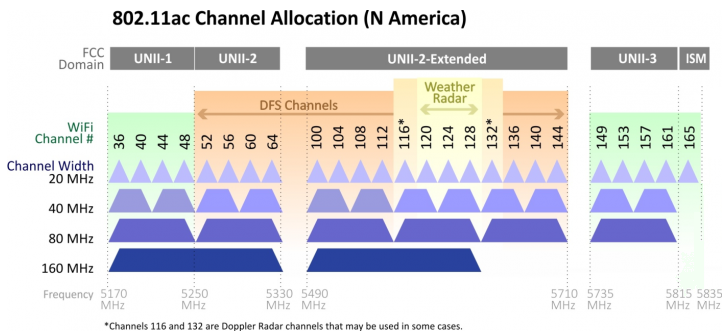
So... 2 160mhz, two 80mhz, one 20mhz for full coverage in the US.
Then to properly ruin it, put another AP in with 50% offset channels over the top of each of those so the channels all experience additional interference from eachother
Something like what these monsters are doing on 2.4ghz

The adjacent networks will observe the other networks as interference
sonic notch
Does 5 GHz let you offset like that?
pseudo blade
Huh
It does not
So I guess you should install custom firmware/superchannel just to rain on our improved standard
sonic notch
Is that legal
pseudo blade
Should be as long as you don't broadcast outside of allowed spectrum
For the love of god don't, it's dumb
sonic notch
My thinking is that it would be allowed if it was legal
pseudo blade
pseudo blade
So I guess you should install custom firmware/superchannel just to rain on our i...
Oh wait in the US it might be an FCC issue
sonic notch
Yeahh
pseudo blade
sonic notch
My thinking is that it would be allowed if it was legal
It's against spec
pseudo blade
sonic notch
Yeahh
-mostly because the FCC has opinions on custom firmware more than the resulting frequencies being illegal to transmit on
sonic notch
I imagine that the FCC follows spec unless it's 2.4 GHz
sonic notch
They set rules on who can use the spectrum and when
Parts of 5 GHz is reserved for Wi-Fi, and another block allows Wi-Fi if it's not being used by the government
But if any non-Wi-Fi interference exists within that "kinda allocated" channel, the radio has to switch to a different channel
pseudo blade
Some cordless phones use 5ghz spectrum
It's not just WiFi
And they're not going to automatically obey 802.11's channel plan
sonic notch
pseudo blade
It's not just WiFi
Nvm you're right, the 5 GHz filing is for a set of unlicensed uses including Wi-Fi
But that doesn't mean there aren't rules for using it
pseudo blade
There are. EIRP is one
But I highly doubt they've mandated any specific center frequency or band width as long as the entirety of the band fits inside the allocated spectrum
That would be very limiting and would rather defeat the purpose of allocating unlicensed spectrum for ISM use
fervent brook
pseudo blade
Something like what these monsters are doing on 2.4ghz
For 2.4 I just did 3, since it was mostly more for my utility and i didnt want overlapping channels
nimble shadow
Any recommendations for a 12-15u open or closed rack
tribal sequoia
fervent brook
For 2.4 I just did 3, since it was mostly more for my utility and i didnt want o...
1 6 11 is pretty standard here
fervent brook
tribal sequoia
1 6 11 is pretty standard here
Yeah, those are the three you can use that dont overlap
fervent brook
nimble shadow
Any recommendations for a 12-15u open or closed rack
15u!?
oh you mean the rack itself...i though you were asking for a device that was 15u
tribal sequoia
core router for an isp maybe lol
nimble shadow
fervent brook
oh you mean the rack itself...i though you were asking for a device that was 15u
💀 no just the rack
What in the world would take up that much space holy shit imagine
 clear igloo
nimble shadow
What in the world would take up that much space holy shit imagine
clear igloo
nimble shadow
What in the world would take up that much space holy shit imagine
There are some routers that take up 33U
Some are an entire 46U high, they just replace the rack
 analog prism
Time to cry about my problems...
I setup the exact same wireguard config on my android phone and windows pc, and it only works on the android phone.
On the PC it doesn't let me access any of the devices on the local network when connected to the VPN
nimble shadow
clear igloo
There are some routers that take up 33U
This is for my home not a data center 😂😂
clear igloo
nimble shadow
This is for my home not a data center 😂😂
Need moar power!! 😄
 green hemlock
I'm moving to a new router.... If I set the wifi ssid and password on the new router to the same as the old router....things (like echo dots) WON'T just automatically switch, will they? that's just wishful thinking, right?
 peak cloak
green hemlock
I'm moving to a new router.... If I set the wifi ssid and password on the new ro...
peak cloak
green hemlock
I'm moving to a new router.... If I set the wifi ssid and password on the new ro...
Yes, they should
Kinda flawed imo, but that's the behavior I recall seeing when switching AP
green hemlock
peak cloak
Kinda flawed imo, but that's the behavior I recall seeing when switching AP
yep…changed the new router to the old name and the alexa near me just went on as normal
good.. changing things like computers is fine, but didn't want to have to go all wild on the smart stuff
 oak abyss
pseudo blade
Something like what these monsters are doing on 2.4ghz
oak abyss
pseudo blade
Something like what these monsters are doing on 2.4ghz
40mhz on 2.4 is just wrong
what on earth are they thinking
green hemlock
is 1.1.1.1 still a bonzo dns server?
 frosty stone
what?
pseudo blade
oak abyss
40mhz on 2.4 is just wrong
Those are 20mhz, just horrifically aligned.
 silent flax
green hemlock
is 1.1.1.1 still a bonzo dns server?
silent flax
green hemlock
is 1.1.1.1 still a bonzo dns server?
cloudflare
silent flax
green hemlock
is 1.1.1.1 still a bonzo dns server?

Cloudflare
1.1.1.1 is a public DNS resolver that provides a fast and private way to browse the Internet.
green hemlock
silent flax
cloudflare
right.. I meant.. still the a+ thing to use? still great and all?
silent flax
well you avoid your IPS DNS if you use those (well, with IPv6 it is more complicated, but yeah)
fervent brook

How am I doing?
"According to this data, you suffer from paranioa. I'm sorry..."
 vagrant zinc
FYI - anyone in AUS

 ashen needle
never gonna drop wifi ever again

 waxen relic
When are they going to change the name networking bc people use it for LinkedIn type of “networking”
 drowsy fossil
its the same concept computer networking is just alot higher bandwidth
 tribal locust
Any recommendations on 0.25m SFP+ DAC's?
 low pond
tribal locust
Any recommendations on 0.25m SFP+ DAC's?
low pond
tribal locust
Any recommendations on 0.25m SFP+ DAC's?
FS seems to have minimum 0.5m
https://www.fs.com/products/40109.html
 elfin socket
waxen relic
When are they going to change the name networking bc people use it for LinkedIn ...
elfin socket
waxen relic
When are they going to change the name networking bc people use it for LinkedIn ...
Networking and gaming is when old people go to the casino to talk to each other over AYCE crab legs 
 jade vale
anybody know something like https://broadband.mpi-sws.org/transparency/glasnost.php that works?
pseudo blade
jade vale
anybody know something like https://broadband.mpi-sws.org/transparency/glasnost....
Looks like they hosted a paper about it but can't download it... so I'm going to take a crazy wild guess that it's designed to mimic bittorrent traffic by using protocol elements (possibly the actual protocol) or otherwise exhibits behavior that mimics it.
To slow a specific kind of traffic you usually have to set up a firewall to look for a marker in that traffic that matches what you intend to slow.
Could be something as simple as sending TCP traffic to BitTorrent's common ports.
Looks to be a pretty identifiable protocol too, so you could easily just look for that in traffic and slow down connections/ports which contain the relevant markers.
jade vale
I resolved the issue
There was some setting in my torrenting application that limited my up/down speed
I think I was playing around with the settings late at night and forgot I f'ed something up
kinda crazy that all of wikipedia is only around a hundred gig
waxen relic
elfin socket
Networking and gaming is when old people go to the casino to talk to each other ...
Most people didn’t get my joke, they must have missed the update 💻
 cosmic steeple
Hi, it is about time that I do something with my Wi-Fi situation. my family keeps complaining that they’re not getting the best coverage throughout the house.
The budget is secured so it’s time that I build my own networking rack and pimp out my networking.
Current networking solution is an AXE 1100 and a arris S33 paying for one gig in Internet.
The household contains two pieces, 20 Wi-Fi connected devices at all times and 30+ Wi-Fi connections on top of that when people come over which happens all the time.
Is there like a PC part picker but for networking equipment with rack. Have 1400 to spend. Or is there a wait for wifi 7.
willing to take suggestions on how to take on this project .
below is some of the sizings and the spot I want to put the rack on. networking, holes and wall inserts are already underway.
Sourcing for parts, primarily on my local Micro Center for convenience, but willing to go elsewhere as well.
Now that I think of it I might want to future proof it to be able to equip its own power back up supply for my room, PC and a future high storage Nas.

 opal pagoda
cosmic steeple
opal pagoda
cosmic steeple
is your house already wired up for networking?
cosmic steeple
Working on it currently have holes that move cad 8 cables to 2 rooms
 thorn delta
cosmic steeple
Hi, it is about time that I do something with my Wi-Fi situation. my family keep...
thorn delta
cosmic steeple
Hi, it is about time that I do something with my Wi-Fi situation. my family keep...
How big is the house? sqft wise
The AXE11000 is probably a half decent router. The AiMesh feature does let you do wired backhaul, so you could setup another couple Asus routers with that feature turned on to use them as WiFi APs in spots that aren't covered well. Wire up the runs to a dumb switch connected to your router. I don't imagine you'd need a full rack setup and $1400 to fix your problem.
opal pagoda
cosmic steeple
Working on it currently have holes that move cad 8 cables to 2 rooms
cat8?
dont do it, use cat6a
cat6 even
just dont get cca (copper clad aluminium) cables as they suck
thorn delta
cosmic steeple
Do you have any recommendation list on the hardware, Mr. <@328680513307017217>
Whichever WiFi 6 dual band Asus router/APs you can find that have that aimesh feature and gigabit network ports. I'd probably skip wifi 7 until prices come down.
If you have more network cables run than you have ports on your AXE11000, pick whatever unmanaged gigabit switch has enough ports, there's no real performance advantage between unmanaged switches unless you go too cheap and end up with a 100M switch instead of a gigabit one.
Start with adding one, see if that helps enough, grab another one if you still have dead / slow spots.
 rough basin
Not sure if this question fell under here or #linux since its a mix of both.
Essentially I am running a team where we are developing a service. This service is hosted on a vps I own but it is a little silly to keep authenticating with passwords as they aren't the most secure. Is there a way to manage ssh keys for a team of users and also manage sudo privileges for those users when they login to manage this project.
My current setup is everyone on the team has their own user on the vps but they don't have sudo perms, the only accounts that do are mine and the project account (which I made to store the project files and have a place to put them) Though idk if this is ideal.
I was working on securing my vps so it is less prone to attackers and thought of this issue while setting up fail2ban
tribal sequoia
I know hosted git can pull ssh keys from AD but I dunno enough about it past there
I'm sure there's something in there for you
pseudo blade
rough basin
Not sure if this question fell under here or <#899753979108552774> since its a m...
How about a different approach? Use something like https://github.com/warp-tech/warpgate with SAML+2FA (and/or tie in LDAP with a PAM https://wiki.debian.org/LDAP/PAM)
GitHub
Smart SSH, HTTPS and MySQL bastion that requires no additional client-side software - warp-tech/warpgate
Central management of access is pretty awesome
 warm fern
How do i prioritise my pc on the router?
 drifting marlin
what hardware do I need to to have something like this setup?
Current have my main pc connected directly to modem router and the rest of my devices to wifi
the switch and the tp-link WAP is unused

i basically want to have 2 wifis for "trusted" and "untrusted" devices that can access my shared drives
frosty stone
sounds like you want vlans
 wanton stratus
does anyone know what driver would stop my pc from uaing full internet speed?
my has been running fine, after couple of windows 11 updates now instade of 150Mbps I get 6Mbps, and I just installed a new windows 10 on my extra hard drive, and that one is fine and getting full speed, so its not hardware for sure, so it has to be some driver or software that is tinkering with my network, how would I go about finding that?
I dont want to go through the whole reinstalling process again, I have done it like 10 times since last year, that is why I'm asking
 thick minnow
drifting marlin
i basically want to have 2 wifis for "trusted" and "untrusted" devices that can ...
thick minnow
drifting marlin
i basically want to have 2 wifis for "trusted" and "untrusted" devices that can ...
What model is your router? My router, which is nothing special, literally allows you to turn on “guest network”
 fast moth
Hey guys! I recently installed a powerline adapter upstairs in our house to increase the internet strength in our upstairs floor, works great! But when i move from upstairs to downstairs or reverse my devices stick to the acces point it was originally connected to, even though there is a closer and faster acces point nearby (modem). I tried researching for a solution, but most results tell me that i'll have to change settings on the devices themselfs (laptop, smartphones, ...) or invest in a mesh network. Is there any way to setup anything in the existing network config to make the devices automatically connect to the faster acces point? Like a setting in the modem or anything? The modem and powerline share the same SSID. Thanks in advance!
drifting marlin
thick minnow
What model is your router? My router, which is nothing special, literally allows...
ill look into this tomorrow
sonic notch
Hey, so I have cat6 ethernet wiring in the walls of my house, and I was wondering what the max speed I can get through it is as well as what equipment I need to get those speeds
I'm asking b/c I switched ISPs and now our modem is in another room, and I need to rework my Unifi setup as a result
I have 1 Cat 6 line between where my new modem is and where everything in my old setup terminates, so I was thinking I could just get a 1 gig Unifi switch to fix it
But also I don't know what switch I could get that'll route traffic more efficiently
I.e. get gigabit speeds between 2 APs
opal pagoda
sonic notch
I have 1 Cat 6 line between where my new modem is and where everything in my old...
What?
Do you have a endpoint near your modem that you want to connect to lan but have a single cat6 between?
sonic notch
opal pagoda
What?
Do you have a endpoint near your modem that you want to connect to lan but...
Not necessarily, my new modem is going to be placed where a current AP is. The AP leads to a different room where my current modem and UDM are, and this room is where all of my APs route to. The cable used between this current room and each AP is Cat 6
So since my new ISP needs to have the modem placed in a different room from my existing modem, I kinda have to move my UDM to where the new modem is. While I can connect the UDM to the wall in the new room and receive the ethernet in the old room, and while I can install an existing unmanaged switch and connect all of my APs to the wall in my old room, I want to make sure there isn't a bottleneck between my UDM and my unmanaged switch.
opal pagoda
You really need to look what vlan-s are
sonic notch
I.e. if one wired client is talking to a Wi-Fi client on AP 1, and another is talking to a client on AP 2, and both APs as well as both wired clients are connected to this LAN switch, I want to make sure that I can get full gigabit on all 4 clients
sonic notch
opal pagoda
You really need to look what vlan-s are
Iirc VLANs are just a way to group different clients together with their own DHCP and routing rules no?
opal pagoda
That is subnet, vlans are often confused with them
What you can essentially do with vlans is tag traffic, send them trough trunk ports and a vlan aware device can tell by what tag it has where it belongs
sonic notch
Does that require a managed switch or will unmanaged work fine?
opal pagoda
Managed
Managed switch> trunk> udmpro
Managed switch config:
port 1 trunk allow vlan 10,20
Port 2 vlan 10
Port 3 vlan 20
sonic notch
What is a trunk port exactly?
Also I have a standard UDM, non-pro
Not sure if that matters
opal pagoda
It doesn't matter what exact device as long it supports 802.1q
 keen urchin
sonic notch
What is a trunk port exactly?
keen urchin
sonic notch
What is a trunk port exactly?
trunk port has all VLANs
sonic notch
Part of me just wants to get rid of the Unifi stuff and switch to Deco stuff but that also means not having access to Wifiman or the UI interface
peak cloak
why
sonic notch
peak cloak
why
Less of a headache ngl
I don't need to care about optimal placement and other people's wants like aesthetics
peak cloak
I mean, you don't have to do VLANs if you don't want
sonic notch
peak cloak
I mean, you don't have to do VLANs if you don't want
Nah it's not that
My new modem isn't near an ethernet port like I thought it would be
And idek if that's something easily fixable without running more cables
Also Unifi doesn't have affordable 6 GHz yet but Deco Mesh could be had for like $230 for a set of 3
And since nobody in this neighborhood seems to have 6 GHz idt I have to worry about interference
frosty stone
sonic notch
Hey, so I have cat6 ethernet wiring in the walls of my house, and I was wonderin...
idk how you couldn't have figured that out in 1 single google search, but cat6 will do 10g up to 55m if done properly
and the modem having to be in a specific weird spot sounds like a skill issue on your part. there's no logical reason it has to be anywhere, so tell them where you want them to put it.
sonic notch
frosty stone
and the modem having to be in a specific weird spot sounds like a skill issue on...
Well I can't just put coax wherever I want for free
frosty stone
sounds like a trash ISP then lol
sonic notch
Welcome to America
peak cloak
sonic notch
Well I can't just put coax wherever I want for free
if you have ethernet next to it your golden
sonic notch
peak cloak
if you have ethernet next to it your golden
Yeah but unless they come back (which they might, idk) the live coax won't be next to the ethernet
peak cloak
sonic notch
Yeah but unless they come back (which they might, idk) the live coax won't be ne...
it's pretty simple to move coax around
I moved my modem around multiple times
sonic notch
Like going into the attic and running my own coaxial cable?
Or are you talking about something else
peak cloak
you said there's coax next to ethernet
it's trival to make that "live", it may already be
sonic notch
peak cloak
it's trival to make that "live", it may already be
Nope it's not live
The guy who came couldn't figure out where it terminated
So it goes somewhere, dunno where
peak cloak
ah
sonic notch
I wouldn't be surprised if it passed through multiple splitters too since we used to use it for satellite tv
 hazy ether
My asus router won't connect to the internet

 opal pagoda
that is one messy ahh setup
could be broken cable or fiber issues (wrong orientation, dirty etc)
 hollow marlin
@clear igloo @waxen scroll As there is surprisingly little docs/references at the low level for IPFIX/Netflow (as in say a walkthrough of the process from sampling to export), I thought I'd confirm with others if my understanding is correct in terms of sampling. I ran across a few docs last week that made me second guess my understanding.
Flow records are created based on each 1:n sampled packet and not 1:n per flow records correct?
I ask this as some of the Juniper Techpost and Kentik Blogs gave the impression that it's per flow record the way it was worded. Example was Kentik describing accuracy with large ratio sampling rates and **reliably **captuing small flows (like 10 packet flows at 1:4096). But that would require creating a flow record for every new flow based on if a new hash is seen and sampling based on the record.
That breaks my understanding of flow monitoring and the reason for sampling in the first place. I understand is as each 1:n sampled packet only will have a stateful flow record maintained in the table. In large ratio sampling rates, any low packet count flow where a single packet not sampled for the entire duration of the flow is simple never recorded and lost in the ether.
Am I correct or was I was overthinking what was wrote in the docs after 3rd 60+ hour week in a row?
 calm crest
I don't know if I am on the correct channel but does any of you here have starlink?
clear igloo
hollow marlin
<@291198741862416384> <@186123993412141057> As there is surprisingly little docs...
netflow is full sampling with collection of all data in/out an interface and exporting periodically to a collector
ipfix is similar in that it samples based on flow and exports periodically as well so there is a small delay in flow collection but again it's per flow sampling so less random compared to sflow.
sflow samples packets at a rate of 1:n as configured (I think 1:4096 is lowest?)
What I forget for ipfix and netflow is the sample rate of the flow but I know netflow is 1:n per flow and I've seen as low as 1:10
for ipfix I think it's similar but maybe 1:1000 per flow
as for hashing flows I believe you can put it on port-channel interfaces and collect port info for the flow but that's more vendor specific based on support per ASIC/platform/etc.
I know in Cisco world you can do VLANs, SVIs and L3 port channels but not L2 port channels for the most part, not sure if that changes in Juniper world or not
hollow marlin
clear igloo
What I forget for ipfix and netflow is the sample rate of the flow but I know ne...
On the Juniper MX series, you can configure IPFIX, Netflow v9 and sFlow down to 1:1 if you wanted to, but that's asking for trouble.
hollow marlin
clear igloo
as for hashing flows I believe you can put it on port-channel interfaces and col...
With Juniper, you can configure it for any interface include L2 LAGs. You just have to set specific configuration so that there is proper hashing for the flows on the LAG (for both L2/L3) and ECMP, else it just sets the same single next-hop for all the flows. If not, traffic over a LAG/ECMP will show all transiting a single interface.
 shut stag
hey guys i just took down my diy network setup, because it ended up being really slow. if anyone could take a look at what they suspect would be a problem that would be greatly appreciated
my setup was as follows:
panoramic wifi modem (not in bridge mode)
i3 4gb ram optiplex with OPNsense
netgear 10gb switch
netgear mesh system in ap mode (probably the best part of the setup)
opal pagoda
Draw your network
shut stag
like a graph of the setup?
opal pagoda
Yea, so we get a idea how it is all hooked up
shut stag
pretty much hooked up linearly from that list
forgot to mention that the card in the pc was an intel network card thats pretty decent

im assuming my problem either lies with opnsense router, or my modem not being bridged
but im still double routing with the netgear router and its performing perfectly fine
this is what i currently have hooked up, without the opnsense router and switch
 opal pagoda
what performance issues did you have?
mystic latch
shut stag
im assuming my problem either lies with opnsense router, or my modem not being b...
I would hazard a guess that the modem not being bridged can be blamed for at least some of the issues. When I had cable in the past I always just bought my own modem and called the ISP to have it whitelisted.
shut stag
mystic latch
I would hazard a guess that the modem not being bridged can be blamed for at lea...
only thing with that though is the current setup is perfectly fine. i would agree but it seems like the pc/homemade router is limited to 200mbps
mystic latch
Try putting it in bridged mode and put opn back in.
If opn is the one getting the direct DHCP assignment from the ISP and still being slow then you've got some setting messed up in OPN more than likely. Or maybe a bad cable.
shut stag
mystic latch
If opn is the one getting the direct DHCP assignment from the ISP and still bein...
i probably have some settings messed up then
is there a reason to choose pfsense over opnsense?
mystic latch
shut stag
is there a reason to choose pfsense over opnsense?
I'd say there's reason to choose opn over pf personally. Netgate just has some scummy past behavior and very questionable management over their whole process. See: wg kernel fiasco.
 cloud otter
hi so im having an issue with my internet not allowing me onto last epoch servers. doing some research im pretty sure that my isp is using cgnat (i cant upgrade or change internet though)
mystic latch
Do last epoch servers require that you have a port open?
cloud otter
im not sure. but ever since i switched isp the game doesn't work
considering the fact that i just as a test purchased a vpn, and it worked im assuming yes
mystic latch
So yea, looks like your ISP just sucks lol.
cloud otter
that blows lol...but thankfully the job i have leaves me with some extra cash i can use to purchase a vpn
 worthy gyro
anybody got an idea why ethernet on router is slower than ethernet on modem
shut stag
double routing probably, sounds like your modem is a router as well
sonic notch
What's the absolute cheapest Unifi all-in-one device to use with a U7 pro? Doesn't need an AP, but I do want to saturate a 1 gig connection.
I could also trade something for a UDM in case there's nothing available to saturate 1 gig
meager ginkgo
sonic notch
What's the absolute cheapest Unifi all-in-one device to use with a U7 pro? Doesn...
Cheapest would be probably the UCG ultra or UXG Lite
sonic notch
meager ginkgo
Cheapest would be probably the UCG ultra or UXG Lite
I'm assuming no controller?
For the lite
meager ginkgo
sonic notch
I'm assuming no controller?
UXG Lite needs a separate controller
sonic notch
aww
sonic notch
Yeah sucks 'cuz it's out of stock everywhere unless I pay scalpers
meager ginkgo
Yeah Ubiquiti’s rollouts aren’t super organized lol
sonic notch
What if I just pair a UDM with a Deco AXE5400?
Kinda jank but it should be best of both worlds no?
sonic notch
sonic notch
Kinda jank but it should be best of both worlds no?
I mean this by getting a single Wi-Fi 6E AP as well as Unifi software
I.e. get this for a home with 350/25 on WAN https://www.bhphotovideo.com/c/product/1800358-REG/ubiquiti_networks_ux_us_unifi_express.html
(home currently has 1 UDM and 3 nanoHDs)
Take the UDM from that home, get a 2-pack of Decos and use 1 in bridge/AP-only mode, connect it to the UDM, save the other Deco for later
frosty stone
sonic notch
What if I just pair a UDM with a Deco AXE5400?
...
sonic notch
frosty stone
...
Yeah I played around with my decos more and finally realized why they sucked
Awful speeds over freaking ethernet
frosty stone
because they're consumer trash meant for people that don't have a clue/will never notice any speed difference above 100mbps?
they're cheap for a reason
sonic notch
Ngl I was getting really good Wi-Fi performance out of them
Roaming was far better and clients were actually going to nearby access points
Tbf Idk how much that's because of Wi-Fi 6 vs. the actual hardware
But yeah I was lucky enough to find a distributor in my town that also happens to have U7 pros for MSRP so no more decos
 fallen grove
Just got 2 U7 Pro ap from Ubiquiti but theyre barely breaking 200 Mb/s is there special settings I have to enable? Also, is it true that WPA3 could be causing issues with devices that don't support it
frosty stone
fallen grove
Just got 2 U7 Pro ap from Ubiquiti but theyre barely breaking 200 Mb/s is there ...
make sure the cables going to them are functioning correctly?
fallen grove
They are
frosty stone
is this consistent across all devices?
fallen grove
Yea its consistent on all the phones and laptops tested
fallen grove
frosty stone
what's the speed over wired?
Speed over wired is 1 Gb solid
fallen grove
frosty stone
how are you testing it?
I've tried speedtest, the wifiman app, etc.
frosty stone
fallen grove
Speed over wired is 1 Gb solid
and to make 100% sure... you get this speed if you go take down an AP and plug a laptop into the cable supplying it?
fallen grove
frosty stone
and to make 100% sure... you get this speed if you go take down an AP and plug a...
Yessir
frosty stone
do you have a different AP to test with?
are the U7s on default settings, or have you changed things?
fallen grove
All default settings
frosty stone
hmmm
fallen grove
I have the current U7 wired from the udm pro, to a pro 8 poe, then to the U7 ap
frosty stone
apparently you need to set up 6ghz yourself
(just reading reddit at this point lol)
fallen grove
Lmfao can't blame ya reddit is probably the only place besides here that would know what to do
frosty stone
someone complained about low speeds, someone said to enable 6ghz, and then that person did so and got much faster speeds
so probably the problem here I'd say
iirc ubiquiti also has a forum
fallen grove
frosty stone
iirc ubiquiti also has a forum
Oh wow I didn't know they had one I better check it out
sonic notch
@frosty stone To your knowledge does Unifi have any "set and forget" options
I.e. set up that is similar to one of those poopoo mesh systems
Like I could manage this other person's stuff remotely but it would be better if they could do it themselves
Also, they live in a super dense area and not sure if they can do without 6 GHz (doubt they'll have any DFS open) and also not sure if they want to pay that much for Unifi stuff
frosty stone
It's been a while since I've configured any unifi stuff, and my memory is trash
opal pagoda
sonic notch
I.e. set up that is similar to one of those poopoo mesh systems
Not Just a Wi-Fi Router, It’s a Mesh Wi-Fi System.
sonic notch
opal pagoda
https://amplifi.com/alien
No 6 GHz unf
frosty stone
Oh that's what you were asking lol, no, unifi isn't about that shit. That's what amplifi is for, and it's generally not their priority because the market is already filled with that trash
sonic notch
frosty stone
Oh that's what you were asking lol, no, unifi isn't about that shit. That's what...
Not exactly, I was talking about Unifi hardware that was stupid easy to set up
No channels or anything, just adopt and make an SSID, and doesn't let you change stuff like channels or transmit power on accident unless you tick an option saying you know what you're doing
 green meadow
Hey guys would someone be up for a urgent DNS help?
opal pagoda
"it is always DNS"
meager ginkgo
@sonic notch https://store.ui.com/us/en/products/ucg-ultra

Ubiquiti Store
Powerful and compact multi-WAN UniFi Cloud Gateway with a full suite of advanced routing and security features.
in stock
sonic notch
THANK YOU
 polar cedar
opal pagoda
"it is always DNS"
polar cedar
opal pagoda
"it is always DNS"
"It can't be DNS."
agile torrent
polar cedar
"It can't be DNS."
I am keep telling myself that and somehow, in some way it always is...
fervent brook

 manic cape
Is there a way to test local WiFi speed? As in from one device on your network to another?
One device is wired, the other is on WiFi
mystic latch
manic cape
Is there a way to test local WiFi speed? As in from one device on your network t...
Iperf3
 urban jewel
manic cape
Is there a way to test local WiFi speed? As in from one device on your network t...
urban jewel
manic cape
Is there a way to test local WiFi speed? As in from one device on your network t...
OpenSpeedTest
I think it is best if you only want to do some basic wifi testing to better understand wifi range and diagnose issues (if you are having any). It has a simple web based interface and works flawlessly.
mystic latch
Spinning up an openspeedtest server isn't exactly a super quick activity lol
tribal sequoia
i'm not a fan of unifi defaulting to mesh heh
sometimes i don't want to goddamned mesh in a business space, which is why i hate using them for a business
agile torrent
mystic latch
Spinning up an openspeedtest server isn't exactly a super quick activity lol
it's not that bad, though i would also cast my vote on iperf
cosmic steeple
Should I trade my axe11000 for a
ASUS Rapture GT-BE98 Pro - BE30000 WiFi 7 Quad-Band Gigabit Wireless Gaming Router with AiMesh Support
Or keep both
3 room 1 bath fl1
Pick up a switch
Field trip to Mircocenter
 coarse rapids
Going to upgrade to 2.5Gbit fiber, included modem has 1 10Gbit out port, the rest is 1Gbit. Just want a basic 2.5Gbit switch for my desktop PC, 2.5Gbit in to 1Gbit out router, and future NAS. I live alone, don't share my network with anyone, no professional use. Is there any reason for me to not just opt for the cheapest model? Currently that's the trendnet teg-s350
fervent brook
In the WiFi troubleshooting map for Philips projectors, one of the steps tells you to make a hotspot on your phone and try to connect to it. I like that
tribal sequoia
peak cloak
?
They absolutely seem to default to mesh failover on when plugged into ethernet, maybe it's not actually and it's just the ones i've seen
but all of the ones i've touched it's been on and i don't want it on
 waxen scroll
@clear igloo HAPPY PI DAY
urban jewel
mystic latch
Spinning up an openspeedtest server isn't exactly a super quick activity lol
using docker or even a Mac / Windows apps works flawlessly.
considering the device is hardwired, you can even run a server on your iOS or Android but it will not give you the best results or the kind of results you are looking for.
clear igloo
waxen scroll
<@291198741862416384> HAPPY PI DAY
Drop and give me the last 15 digits of pi!
waxen scroll
clear igloo
Drop and give me the last 15 digits of pi!
no. but everyone here can enjoy 20% off at the cisco store today
 gentle bridge
I am so confused why my nginx won't work 😭 Any of y'all big brains able to help me with it?
server {
    listen 443 ssl;
    server_name cipherservices.org;

    # SSL certificate and key paths
    ssl_certificate /etc/nginx/ssl/certificate.crt;
    ssl_certificate_key /etc/nginx/ssl/private.key;

    # SSL settings (adjust as needed)
    ssl_protocols TLSv1.2 TLSv1.3;
    ssl_prefer_server_ciphers off;
    ssl_ciphers ECDHE-ECDSA-AES128-GCM-SHA256:ECDHE-RSA-AES128-GCM-SHA256:ECDHE-ECDSA-AES256-GCM-SHA384:ECDHE-RSA-AES256-GCM-SHA384:ECDHE-ECDSA-CHACHA20-POLY1305:ECDHE-RSA-CHACHA20-POLY1305:DHE-RSA-AES128-GCM-SHA256:DHE-RSA-AES256-GCM-SHA384;
    ssl_session_timeout 1d;
    ssl_session_cache shared:MozSSL:10m;
    ssl_session_tickets off;
    ssl_stapling on;
    ssl_stapling_verify on;
    resolver 1.1.1.1 1.0.0.1 valid=300s;
    resolver_timeout 5s;

    location / {
        proxy_pass http://127.0.0.1:8000; # Proxy to your Quart app
        proxy_set_header Host $host;
        proxy_set_header X-Real-IP $remote_addr;
        proxy_set_header X-Forwarded-For $proxy_add_x_forwarded_for;
        proxy_set_header X-Forwarded-Proto $scheme;
    }
}
using hypercorn in a venv to localhost:8000^
It works on the IPv4 at (example 123.123.123.123:8000)
just not 443 😭
also it will only show on 123.123.123.123 when I run hypercorn -b 0.0.0.0:8000 app:app and not hypercorn -b 127.0.0.1:8000 app:app or localhost
I also deleted the default in /sites-enabled/ and /sites-available/
peak cloak
gentle bridge
I am so confused why my nginx won't work 😭 Any of y'all big brains able to hel...
what's the error?
did you allow the port in firewall?
gentle bridge
peak cloak
did you allow the port in firewall?
ufw is disabled

Only firewall setup is the one on Linode
Right now I have it accepting all outbound and inbound ports
low pond
waxen scroll
no. but everyone here can enjoy 20% off at the cisco store today
I need it
Friends work got quoted 16k$ in Aruba gear for a small office with 3 or something APs 😭
sonic notch
@peak cloak I asked a question about VLANs a few days ago, but I wanted to see if this is why it's inportant:
These images aren't super obvious but I'm noticing consistently better performance over Wi-Fi than LAN. Sometimes the results get close but most of the time, the download speeds from LAN to client are under 50 Mbps. Clients in question are the Quest 3 and S24 Ultra. Setup is a nanoHD with 160 MHz, and there are like 2 unmanaged switches between my PC and UDM, but my PC and the nanoHD in question are connected to the same switch.

 silent flax
sonic notch
<@222482269829332992> I asked a question about VLANs a few days ago, but I wante...
silent flax
sonic notch
<@222482269829332992> I asked a question about VLANs a few days ago, but I wante...
your both pictures show 500Mbps or higher ? If you really have <100Mbps via ethernet LAN cable which are neither of the two pictures, check/replace your ethernet cables and or switches. A broken ethernet cable can you drop to 100mbps or any weird speeds. I had a weird cable between a 2.5 gigabit PC to 2.5/10 gigabit switch to 10 gigabit NIC in server, causing the speeds to go around 200mbps (which is a really weird value, but whatever). Replaced the cable, instant constant 2.5gbps (minus the TCPIP protocol overhead)
fervent brook
Looks like my TP Link router decided to kill itself...Guess that solves that dilema
sonic notch
fervent brook
Looks like my TP Link router decided to kill itself...Guess that solves that dil...
Sucks that it listened to Low Tier Router
sonic notch
IMO they're decent for cheap routers
I've had no weird issues with TP-Link, just performance issues
fervent brook
It did what it had to do.

The AC4000 Wireless Tri-Band Gigabit Router, equipped with MU-MIMO and three bandwidths, simultaneously connects more devices, delivering WiFi speeds up to 4000 Mbps.
sonic notch
Most other routers I've dealt with had issues that were impossible to debug. TP-Link just slows down if the hardware ain't good enough
But man Unifi makes stuff way too easy
fervent brook
I curenly have a Netgear C7800, Netgear GS724T, Netgear X6 R8000, and a Netgear RAX45
And...appearently the TP Link decided to boot for some reason...oh well
I just realised. I have all Netgear at this time.

 fast ore
I’m honestly astonished I don’t even know what to say but feel like it must be shared 
 opal pagoda
waxen scroll
opal pagoda
waxen scroll
What tf is that?
waxen scroll
top one uses breakout cables for serial to other devices. bottom expands on that with some ethernets
opal pagoda
Rs232? How many serial "ports" does it have
clear igloo
Depends on the model but you can get some with NIMs and have 128 per box 😄
For when you need all the RS232 ports!
opal pagoda
When you need to manage a rack full of switches and haven't figured out how to ssh or how to stack them
clear igloo
Generally out of band as a backup
I've seen some with 4G backup connections, although it doesn't make much sense shrug
Ususally though it's the same with an out of band management network, if something bad enough happens it doesn't matter
waxen scroll
clear igloo
I've seen some with 4G backup connections, although it doesn't make much sense *...
it does. why do you say no?
opengear for example uses LTE and can tunnel to a main controller
clear igloo
Well generally if enough went wrong for the LTE connection to come into play in the DC at least you probably have no power 😛
waxen scroll
have you seen the amount of cisco bugs in large switches that knock out networking?
😘
clear igloo
if cisco == true;
bug == yes
waxen scroll
we dont have that
we got close.... then wired our management l3 into the main switches
clear igloo
rip
sonic notch
clear igloo
if cisco == true;
bug == yes
if(cisco) {
return bug;
}
 floral parrot
so I'm good with OSes and ok with coding but bad with networks however I bought a domain with the intent of renting a BSD server and being able to ssh into it and run my own email server
so I have the domain and I can get the cheap vultr server, how do I tie this together so I can ssh in to say openbsd and fire up a console, run mail, and use it like it outlook in 1975
from my domain
like big picture I can rtfm the details
 weak breach
Question, if I want to use Ethernet and it can take up to 1 gig and my internet plan is 100mbps, will it use it all?
thick minnow
weak breach
Question, if I want to use Ethernet and it can take up to 1 gig and my internet ...
No your internet plan will bottleneck your speeds. So you’re capped at 100mbps
opal pagoda
floral parrot
so I'm good with OSes and ok with coding but bad with networks however I bought ...
Problem is that most vps providers block ports associated with mail due to spam, some will unblock on request, other thing is that you have to make your email domain trusted as if not trusted any email you send will be put into spam folder or rejected
floral parrot
opal pagoda
Problem is that most vps providers block ports associated with mail due to spam,...
what do you mean by trusted, does that mean I need an SSL certificate?
vultr blocks port 25 by default but you can request they unblock it, I don't know if they do that for the type of server I got (literally the cheapest one with an ipv4 address)
I assume I need a reserved IP, those are cheap with them
opal pagoda
floral parrot
what do you mean by trusted, does that mean I need an SSL certificate?
domain needs to be trusted by a spam filter
that is what i ment
and it is not easy to achieve
opal pagoda
i dont think you can pay to get bypassed
floral parrot
good? how do you do so then?
this is hard to google, I'm finding guides for people who want to get whitelisted so they can send spam lol
I'm sorry "targeted margeting opportunities for your domain" or whatever
weak breach
thick minnow
No your internet plan will bottleneck your speeds. So you’re capped at 100mbps
Ty
 green marlin
Good way to make sure your mail is trusted is through DMARC
 weak heron
why when my ps4 is on my whole network lags?
weak breach
thick minnow
No your internet plan will bottleneck your speeds. So you’re capped at 100mbps
Hey so if I’m using the whole 100mbps with Ethernet will my Internet still work for other people in my house or no because I have a brother that uses the internet too.
thick minnow
weak breach
Hey so if I’m using the whole 100mbps with Ethernet will my Internet still work ...
The whole 100mbps will be split among everything using the internet in your house accordingly. You don’t have to worry about that. So you’ll have speeds at something less than 100mbps
weak breach
Oh ok thank you, I think my plan is like 300 mbps but I always thought it was 100 mbps. How much mbps do you think people need for gaming on pc?
thick minnow
weak breach
Oh ok thank you, I think my plan is like 300 mbps but I always thought it was 10...
You don’t need much, which I was surprised to hear. I think I remember reading that it’s around 40Mbps
For gaming, latency is probably more the issue than throughput though
weak breach
Oh ok, I’m probably gonna go to the internet settings on windows and cap it at like 150 Mbps if my plan is 300mbps. On spectrums website it says the lowest they can give 300 Mbps.
Thank you so much for your help
thorn delta
weak breach
Oh ok thank you, I think my plan is like 300 mbps but I always thought it was 10...
In game it's less than a megabit, even with voice chat. I haven't measured anything recently but in the recent LTT video they measured some more recent games and it seemed to still be the case. Downloading updates for games is where the big use is, or anything that might do asset streaming from the internet like the newer flight sim game.
agile torrent
weak breach
Oh ok thank you, I think my plan is like 300 mbps but I always thought it was 10...
20-25? Tops. Low latency is much more important than raw bandwith. Above 25 IMO it's just faster downloading/patching
peak cloak
floral parrot
so I have the domain and I can get the cheap vultr server, how do I tie this tog...
if you actually want to use it day to day and not as a project, don't
it's too big a pain and your mail will often go to spam
if you want to use your own domain, you can just use a hosted provider like fastmail or outlook
floral parrot
cool thanks
 mighty mountain
thorn delta
In game it's less than a megabit, even with voice chat. I haven't measured anyth...
mighty mountain
thorn delta
In game it's less than a megabit, even with voice chat. I haven't measured anyth...
300 Mb Spectrum, only got <40MB downloading (wired). I just had to queue up new monthly games and wait, PS4 lags like hell while downloading. Other wired devices, speeds were sometimes over 300Mb. Sony is not the best CDN.
waxen scroll
peak cloak
if you actually want to use it day to day and not as a project, don't
I figured that out quick in the 00s
email has gotton way more complex since then too
silent flax
when you think about board like this for a router as an upgrade for the old Sandy Bridge system due power consumption and then read the reviews

The power consumption is not as good as espected. The new setup takes in Idle 30W in comparing to my old setup (J4105) with 25W. (setup means: 2x nvme ssd, 2x 10tb hdd, 8port eth switch, cable-modem, WLAN-Router)
like sure, the 2x10TB HDD probably adds a lot, but in my calculation it still only drops you to like 15W-ish for the system itself ? which is not enough savings compared to my 30W-ish Ivy Bridge system with 2x2.5gbe + 2x SATA SSD
A common N100 system with 4 226 LAN ports is about 6 watts (10 watts incl. 2 built-in SSDs!). This system only pulls in the BIOS waiting without a connected SSD or plate times just 20 watts.
Yeah, it's even worse
like yeah, i would gain 2x 2.5gbe + 2x SATA and 2x PCI-E x1 NVMe, but at cost of ~150 euros the power savings just don't make it economical
meager ginkgo
https://www.balticnetworks.com/products/ubiquiti-unifi-cloud-gateway-ultra-ucg-ultra in case anyone is looking for a gateway

Baltic Networks
The Ubiquiti UniFi Cloud Gateway Ultra [UCG-Ultra] is a powerful and compact multi-WAN UniFi Cloud Gateway with a full suite of advanced routing and security features. Runs UniFi Network for full-stack network management Manages 30+ UniFi Network devices and 300+ clients 1 Gbps routing with IDS/IPS Multi-WAN load balan
They’re a official distributor
free shipping too
 ocean hare
Hey guys I got a Ax210 6E Wifi adapter and its somehow 500mbps slower than my old ax200.. does anyone know what the issue might be?
 gilded ingot
I need some help bridging 2 networks, but i'm unsure how I would do it
How would I make wan and voip both onto 1 network so I can use voip ?

I got my old router settings dumped into a xml, so that might be of some help (that is how I figured out vlans)
 south blade
Wifi over powerline...does it work from a main house to a guest house 200 feet away with it's own sub panel? :/
peak cloak
gilded ingot
How would I make wan and voip both onto 1 network so I can use voip ?
you can't bridge like that
esp WAN and a VOIP subnet
gilded ingot
peak cloak
esp WAN and a VOIP subnet
How would I do it then ?
Would it be like with forwarding and stuff ?
I got my old settings I can send them to you if you want to help
peak cloak
sure
gilded ingot
i'll pm you then
 vestal atlas
gilded ingot
How would I make wan and voip both onto 1 network so I can use voip ?
vestal atlas
gilded ingot
How would I make wan and voip both onto 1 network so I can use voip ?
is this any package you have install on the linux box ?
ocean hare
Hey guys I got a Ax210 6E Wifi adapter and its somehow 500mbps slower than my old ax200.. does anyone know what the issue might be?
pseudo blade
ocean hare
Hey guys I got a Ax210 6E Wifi adapter and its somehow 500mbps slower than my ol...
It really shouldn't be, but could be an antenna issue. What are the actual speeds in question?
thorn delta
ocean hare
Hey guys I got a Ax210 6E Wifi adapter and its somehow 500mbps slower than my ol...
If you haven't already, try downloading drivers directly from Intel's website rather than using the ones that Windows installed automatically
gilded ingot
vestal atlas
is this any package you have install on the linux box ?
wdym ?
It's openwrt
ocean hare
pseudo blade
It really shouldn't be, but could be an antenna issue. What are the actual speed...
So I get only around 300mbps with the new ax210 6E and my old ax200 got like 750mbps
ocean hare
thorn delta
If you haven't already, try downloading drivers directly from Intel's website ra...
Im pretty sure I downloaded the Bluetooth and WiFi driver
 hearty lily
Hey guys so I supposed to have a 1gig internet Fibre connection I just ran cat 5e cable from modem into switch then into my computer it's only getting 200 down and 20 up
What do you think would be the cause the tp link switch says its a 8 port gigabit
Should I call my isp and say i don't think they are giving enough speed
pseudo blade
ocean hare
So I get only around 300mbps with the new ax210 6E and my old ax200 got like 750...
I'm going with "the new card has badly made/placed antennas"
 fervent yarrow
I guess this could count under networking, I am building my first server and I'm using enterprise hardware, a Dell r710 power edge server. I just want to use it as a NAS and use any extra computing performance for hosting servers and such for gaming. Would proxmox or truenas be better for this? I tried truenas but can't seem to install it right b
mystic latch
Proxmox.
Truenas, the scale version at least, is a weird jumble of tech that doesn't always work nicely together.
polar cedar
I second poxmox, running everything ont a bare metal hypervisor and then having specific services separated such as game servers and storage is just so nice. Don't know much about truenas on the other hand, but if you still wants to use it I'm sure it could function as a guest on proxmox
 grizzled cove
Anyone in here an "expert" with JunosOS?
hollow marlin
grizzled cove
Anyone in here an "expert" with JunosOS?
Ask away
grizzled cove
hollow marlin
Ask away
So, I have set up an ipsec site to site vpn to a Fortigate firewall. Absolutely no idea why it won't come up, Fortigates log is saying "peer SA proposal not match local policy" - usually on a Fortigate this means there aren't any v4 policies set up for traffic fow over the VPN however they are definitely there
I can send you the CLI commands I used to create the tunnel on the SRX if it helps?
Debugging ike on the fortigate doesn't show much at all, it looks as though it happily accepts the ike proposals and matches the gateway but then ends with "negotiation timout, deleting" then goes through the process of trying to bring the tunnel up again
No idea how I would even begin to debug ike on the SRX 😅
hollow marlin
grizzled cove
I can send you the CLI commands I used to create the tunnel on the SRX if it hel...
The IKE/IPSEC config would help
hollow marlin
grizzled cove
No idea how I would even begin to debug ike on the SRX 😅
In Junos, there is an ad-hoc debug for IKE that helps, request security ike debug-enable local {{ local-src-ip }} remote {{ remote-dst-ip }} level 15. The last statement is hidden but gives you much more detailed output
grizzled cove
hollow marlin
In Junos, there is an ad-hoc debug for IKE that helps, `request security ike deb...
Thanks for this, does this then write the debug to a log or should it start showing in the console like a Fortigate device?
hollow marlin
It stores it in logs, show log kmd I believe
Just make sure it's disabled after as it's a lot of writes with request security ike debug-disable
grizzled cove
hollow marlin
It stores it in logs, `show log kmd` I believe
Just make sure it's disabled aft...
Do you mind if I DM you the some of the log?
hollow marlin
Sure thing
ocean hare
pseudo blade
I'm going with "the new card has badly made/placed antennas"
https://www.amazon.co.uk/dp/B0CMT8VJVK/ref=twister_B07VY2M1QL?_encoding=UTF8&psc=1 I got this one and My antena's are placed the same way they were always placed

WiFi Card 3000Mbps Bluetooth 5.2 PCIe Network Card, Intel WiFi 6 AX200 Chip, 5GHz/2.4GHz PCI Express Bluetooth WiFi 6 Card for PC Windows 11/10(64Bit)
silent flax
Me: Why isn't this server on localhost not working?
Also me: Typing localost instead of localhost
😄
 shy gulch
anyone know of a good guide for setting up a router with debian 12/nftables? It appears that 12 finally ditched iptables (you could still easily install it on 10/11) and nearly all the guides that come up are for iptables
The best I've found (and i'm trying now) is https://wiki.nftables.org/wiki-nftables/index.php/Simple_ruleset_for_a_home_router
grizzled cove
Shout out to @hollow marlin for helping me for over 2 hours with a firewall issue. He's the real GOAT 🐐🎉
 modern cairn
just got a new laptop but realised its wifi card is kinda sh*t(Realtek 8852CE WiFi 6E PCI-E NIC) how can i find a wifi card that is compatible with my laptop. I really want to upgrade it
silent flax
looking at grabbing one of this for my "router", with possibly 5 euro coupon from the ali games 😄 , so it would be 29 euros for a dual i226v card (then i could possibly "retire" the two single realtek ones), maybe
 waxen scroll
@hollow marlin what's your contract rates?
hollow marlin
waxen scroll
<@462711605063450628> what's your contract rates?
Typical contract rates are 3x hourly correct?
waxen scroll
no. they're what you think you're worth
 finite coral
Just a quick one, my dad’s looking for CCTV and I’ve recommended the ubiquity G5 bullets using the UDM. this doesn’t require a subscription or anything right?
frosty stone
of course not
pseudo blade
finite coral
Just a quick one, my dad’s looking for CCTV and I’ve recommended the ubiquity G5...
The UDM doesn't have storage support for CCTV use.
The Pro does but if you're looking for camera support mostly, look instead at the Cloud Key Gen 2 Plus or a higher end Unifi product with storage support.
frosty stone
they were likely talking about the pro
the UDM isn't available anymore
was changed to the UDR
which does have an SD card slot fyi
and comes with 128gb of internal storage
basically an upgraded UDM with and name change
finite coral
pseudo blade
The UDM doesn't have storage support for CCTV use.
Thanks for the reply, it’s the pro I spect out with an 8TB drive is the udm pro better than the cloud key gen 2 if we decide to get more gear such as APs in the future?
clear igloo
waxen scroll
<@462711605063450628> what's your contract rates?
$1500/hr 😄
pseudo blade
finite coral
Thanks for the reply, it’s the pro I spect out with an 8TB drive is the udm pro ...
The biggest difference is that you can't route on a cloud key
finite coral
pseudo blade
The biggest difference is that you can't route on a cloud key
So i can’t access the cameras outside of my network?
pseudo blade
finite coral
So i can’t access the cameras outside of my network?
No no as in it's not a router, you'll have to use your own with a cloud key
finite coral
pseudo blade
No no as in it's not a router, you'll have to use your own with a cloud key
I’m not the best when it comes to networking terminology, but what your saying is the biggest difference between them is that the cloud key requires a router and the udm pro doesn’t need a router as it’s built in?
tribal sequoia
anyone else hate when you don't spot a firmware bug in the list when looking at an issue and then see a firmware update pop up later that fixes exactly what you were experiencing
rendering your earlier troubleshooting moot? goddamn i hate it
pseudo blade
finite coral
I’m not the best when it comes to networking terminology, but what your saying i...
Yes
 crude dirge
So not really networking but In a similar field I was wondering what the difference between a das and a hard drive enclosure is because I want to make a Plex server with a nvidia shield pro
hollow marlin
@clear igloo @waxen scroll Never thought I'd run into the issue regarding MPLS VPWS/VPLS and MACs that start with 4/6, but once I enabled IPFIX with the MPLS v4/v6 template, Kentik has been flooded with invalid flows consuming our flow-rate license. Glad CW was disabled by other engineers prior!
 waxen scroll
fun fact, I personally know the founder of Kentik
also fun fact, I dont use his products
xD
silent flax
crude dirge
So not really networking but In a similar field I was wondering what the differe...
DAS (Direct attach storage) is a global term for any external storage protocol. So DAS is USB hard drive or eSATA hard drive too. Or even Fibre Channel etc. Point is, you have a physical hard drive(s) connected to the system.
But in case of Nvidia Shield you simply want USB, as Shield doesn't have any other port anyway. Personally i don't think NVIDIA Shield is a good Plex server, but that's me.
https://support.plex.tv/articles/220391808-media-storage-options-for-nvidia-shield/
 tribal ether
I'm remodeling a home and I don't know much about networking. I plan to get a fiber connection. I'm also wiring up keystones around the home. I don't think I need a modem since it's fiber?
 hollow marlin
waxen scroll
also fun fact, I dont use his products
hollow marlin
waxen scroll
also fun fact, I dont use his products
I am surprised we license it. While I have not seen the cost, I know it's far from cheap.
 finite coral
pseudo blade
Yes
finite coral
pseudo blade
Yes
Ok I understand thanks for your help, I really appreciate it bro
 crisp thorn
anyone here know docsis from practical pov
when I touch my coaxial cable metal part (sometimes it takes few tries) TV gets interference and internet can go out sometimes
but why would that do anything, shouldnt the stuff that screws into splitter be protected?
pseudo blade
 sand tide
Thinking something like this
sand tide
Thinking something like this
You'll need to statically set IP addresses on the machines but it's certainly possible.
 hollow axle
this week's brain f networking... PRP
peak cloak
tribal ether
I'm remodeling a home and I don't know much about networking. I plan to get a fi...
you do
most of the time
sometimes the ISP can provide you with a SFP module that will work with thier network, otherwise it's better to just use their Modem/ONT, which will also terminate phone if you want it
I wouldn't get the edgerouter X, as much as I like it, it's basically not getting anymore feature updates and is basically deperacated
if you want unifi, this is probobly work well https://store.ui.com/us/en/pro/category/all-cloud-keys-gateways/products/uxg-lite

Ubiquiti Store
A compact and powerful UniFi gateway with a full suite of advanced routing and security features.
peak cloak
crisp thorn
but why would that do anything, shouldnt the stuff that screws into splitter be ...
with you touching it (I assume the copper part in the center), you are interfering with the signal
sand tide
pseudo blade
You'll need to statically set IP addresses on the machines but it's certainly po...
Can you explain? I set them as 100.100.100.2, and 100.100.100.3, with a mask of 255.255.255.0, not sure what to put for a gateway
drowsy fossil
if theres no internet, theres no gateway, you can leave it blank
sand tide
drowsy fossil
if theres no internet, theres no gateway, you can leave it blank
Since I can’t ping between the devices, what do I need to do?
drowsy fossil
you did this, manually set the ip addresses, and cant ping still?
sand tide
Let me check again
drowsy fossil
probably want to use the standard numbers, 10.x.x.x, 172.16-32.x.x 192.168.x.x etc
might be some stuff hardcoded to only consider this stuff lan
sand tide
drowsy fossil
might be some stuff hardcoded to only consider this stuff lan
thanks, I got it. any tips on getting full gig bandwidth out of this? or am I getting limited by scp?

Don't get me wrong, tranfering a 3.5gb file over ethernet rips compared to my wifi situation, I want to know if there's any performance left on the table
sand tide
drowsy fossil
might be some stuff hardcoded to only consider this stuff lan
hmm, having done an iperf3 test, seems like I'm actually getting the full gig. Thnx for the help, I've been bashing my head on this for a while
hollow axle
sand tide
Can you explain? I set them as 100.100.100.2, and 100.100.100.3, with a mask of ...
Never use 100.x. That is specially reserved for carrier grade nat
meager ginkgo
tribal ether
I'm remodeling a home and I don't know much about networking. I plan to get a fi...
If you’re remodeling I highly suggest you run conduit and lots more than 8 Ethernet drops

Google Docs
DIY Smart Home Pre Wire Guide My personal take on a smart home’s prewire. Last updated: March 19th, 2024
check this out. It covers everything you could want most likely
hollow axle
Smurftube!!
meager ginkgo
hollow axle
Smurftube!!
💯
hollow axle
Remember, never pull a pair of fiber strands
Pull a bundle. The increase is cost is negligible
meager ginkgo
You’re better off running a conduit to the outside because the ISP might need a certain type of fiber that you didn’t run
Worked good when AT&T installed our fiber
and you can run other stuff to the outside if needed in the future aswell 🙂
meager ginkgo
You’d mount a box over the conduit outside not leave it exposed haha
I had AT&T install their outdoor box right over the conduit then sealed around it with caulk
meager ginkgo
It’d be cheaper to just get the proper cables and pull them together. CAT6 is usually 23awg that’s 24awg aswell
Can get 1000ft of CAT6A 23AWG 750mhz for $250ish
coax is cheap
500ft for around $80 if you find a deal
Coax is becoming more and more useless today though. Only good really if you want cable TV, cable internet, satellite tv/antenna or subwoofers.
A lot of cable boxes can connect via Network aswell anyways nowadays
crisp thorn
peak cloak
with you touching it (I assume the copper part in the center), you are interferi...
No, the screw mount
I dont touch the copper, actually even if i just moce the cable and splitter touches amything or is shaken it can break signal
warm fern
is PIA a good VPN?
tribal ether
meager ginkgo
If you’re remodeling I highly suggest you run conduit and lots more than 8 Ether...
the drywall is already mostly put up
meager ginkgo
tribal ether
the drywall is already mostly put up
Ah bummer
tribal ether
how come you suggest more than 8 ports for the switch
peak cloak
tribal ether
how come you suggest more than 8 ports for the switch
More as just having more ports around the house
Not all need to be connected to switch if unused, to save costs. That's what I do
silent flax
peak cloak
Not all need to be connected to switch if unused, to save costs. That's what I d...
also get a label printer and label every plug & cable 🙂
opal pagoda
how do you all document fiber distribution?
currently there is little to no documentation about fiber connections and I want to change that
most connections consist of home run from idf to dc and a rendundant link that goes trough FD cabinet
hollow marlin
opal pagoda
how do you all document fiber distribution?
currently there is little to no docu...
Excel sheets are still sadly very common. One of the better open source options is Netbox which has an incredible inventory system outside of all it's other features.
opal pagoda
hollow marlin
Excel sheets are still sadly very common. One of the better open source options ...
i have used ipfabric which looks similar to netbox from what I see
i was even thinking of creating a DB where every fiber connection has a unique key and then that key is refrenced trougout a fiber distribution
hollow marlin
opal pagoda
i have used ipfabric which looks similar to netbox from what I see
i was even th...
You can but it's not needed. The mapping feature shows you the topology of the links and all FDPs along the path
opal pagoda
ipfabric would just show l1, l2 and l3 layout/map with no ability to add in FD information
problem is that our ciso really doesent like open source software...
hollow marlin
opal pagoda
problem is that our ciso really doesent like open source software...
Closed source equals security obviously, cough* Solarwinds cough*
opal pagoda
hollow marlin
Closed source equals security obviously, cough* Solarwinds cough*
yea...
closed source software totaly isnt using open source projects in it
 knotty plover
Getting this on PS5 and can't really find a method to not see it

 sterile galleon
Anyone know of any better alternatives to a Raspberry Pi4 (or 5) for running docker containers, mainly networking programs? Ideally I'd like it to be quite cheap, a small form factor and low power consumption.
silent flax
sterile galleon
Anyone know of any better alternatives to a Raspberry Pi4 (or 5) for running doc...
considering you will need storage and power supply for Pi 5, you might as well grab one of those N100 mini PCs with dual ethernet and 8 or 16GB RAM, add some storage to it. Still going to be around 6W idle, but being x86 it is going to be way more compatible than Pi, more so for docker stuff
 lost lily
i don't actually think compatibility is an issue anymore for aarch64 tbh
silent flax
still there are probably images not made for arm, but in any case, i would still go with N100, as performance is similar, power consumption is similar, and one is x86, which is always a plus as worst case scenario you can reuse that system as a normal windows hand-me-down PC for someone in family. Not trying to be bad to Linux desktop, but i would hard time getting family members to Linux 🙂
sterile galleon
silent flax
considering you will need storage and power supply for Pi 5, you might as well g...
Cheers will check them out, any N100 pcs you'd recommend? Not too familiar with them 🙂 I'd just want the cheapest really
silent flax
it comes down to size/feature set you are after. I mean there is stuff like T9 Plus with 16GB RAM without storage for 135 USD (i think it is around 150 euros with VAT), and you can put in any M.2 2242 SATA or NVMe SSD (if you don't want to buy china SSD) https://www.aliexpress.us/item/3256804706805743.html
there are also various different NAS boards etc, which can be a bit more expensive and some of them sadly consume more power in idle, but then they are motherboards
silent flax
sterile galleon
Cheers will check them out, any N100 pcs you'd recommend? Not too familiar with ...
n100 is pretty much all e-core 12th gen CPU with limited TDP & clocks, with very limited PCI-E connectivity (i think it has 8 lanes total for everything) - 4c/4t, 0.8GHz base, 3.4GHz clock, with 6W base TDP
sterile galleon
silent flax
n100 is pretty much all e-core 12th gen CPU with limited TDP & clocks, with very...
Thanks for info, looks like a much better option
silent flax
keep in mind that you can either pick an option with SATA SSD they give you, on buy some 2230/2242 SSD in your country, like the ones for valve steam deck. That is probably the biggest drawback, the limited options for 2230/2242 SSDs
sterile galleon
Yeah, I'll just pick up a cheap ssd somewhere, won't be a problem
silent flax
just be aware of the size limits, cause it is really small
silent flax
sterile galleon
Yeah, I'll just pick up a cheap ssd somewhere, won't be a problem
https://youtu.be/uZSbpA4ldmE?t=227 it's in czech, but it's about the video content at this time 😄

Otestoval jsem miniaturní počítač T9 Plus s procesorem Intel N100. Co všechno takový počítač zvládne a doporučím ho?
MINI POČÍTAČ T9 PLUS
🔵 Koupit na AliExpress ➤ https://www.geekboy.cz/YVOKJ/
(8 GB varianta je již vyprodána, proto stojí PC více)
MŮJ OBLÍBENÝ CASHBACK (+ 220 Kč nazpět)
🔴 Hamty (cz) ➤ https://www.geekboy.cz/hamty/
🔴 Chamty ...
this is also nice with dual 2.5G and dual 3.5" hard drive "NAS chasis" with single 2280 SSD slot as alternative, but price nearly doubles, so yeah... https://www.amazon.com/AOOSTAR-R1-Support-Storage-Computers/dp/B0CKXMH977/

AOOSTAR R1 Mini PC

RAM being DDR4 in this case makes it a bit cheaper tho
https://www.youtube.com/watch?v=Cktl1n5JHhg review of that "NAS" system

Aoostar R1 and R7 2-Bay NAS Review - New Kind of NAS (Written Review) - https://nascompares.com/2023/12/20/aoostar-r1-and-r7-2-bay-nas-review-new-kind-of-nas/
Aoostar R1 NAS on Amazon - https://amzn.to/3GPjx0O
Aoostar R7 NAS on Amazon - https://amzn.to/3v6uTez
Aoostar R1 NAS on AliExpress - https://s.click.aliexpress.com/e/_DDAulDB
Aoostar R7 N...
 lone sun
🧐 So in Device manager for Bluetooth, I see two options:
-
"Bluetooth devices (personal area network)"
-
Another tab simply called "Bluetooth" containing different things, like "Intel wireless bluetooth".
My motherboard came with an AX200 Intel wifi card, which of course comes with integrated Bluetooth. But in Device manager, it seems like the thing that matters the most is "Intel wireless bluetooth", option #2, under the bluetooth menu since Bluetooth will not work if I disable it. But with option #1, I was still able to use bluetooth even with it disabled. So why is it even there if its not needed? What is the purpose of option #1? 🫤

 ornate jungle
lone sun
🧐 So in Device manager for Bluetooth, I see two options:
1. "Bluetooth device...
ornate jungle
lone sun
🧐 So in Device manager for Bluetooth, I see two options:
1. "Bluetooth device...
TL;DR: the Bluetooth tree at the top is for your typical Bluetooth connections (headphones, mice, keyboards, etc.) while the Bluetooth Personal Area Network is for IP / Ethernet over Bluetooth.
https://www.bluetooth.com/specifications/specs/personal-area-networking-profile-1-0/
https://en.wikipedia.org/wiki/Personal_area_network
 blazing karma
Phew
 lone sun
ornate jungle
TL;DR: the Bluetooth tree at the top is for your typical Bluetooth connections (...
lone sun
ornate jungle
TL;DR: the Bluetooth tree at the top is for your typical Bluetooth connections (...
 Ah, so THATS what the hell its for. Its been bugging me for a long time. It makes sense that the option under "network adapters" has to do with internet. Like, that option just completely disappears when disabling "Intel wireless bluetooth", or option #2 under "bluetooth". In fact everything having to do with bluetooth disappears when I do that. So I guess that is the actual driver one installs from the motherboards website for the wifi adapters integrated bluetooth capability. Has to be.
This'll make it easier for me to help troubleshoot peoples bluetooth issues.
I actually didn't know there was such a thing as bluetooth over I.P. That must be a recent thing?
😒 Network+ takes yet another L. One of the things it couldn't be bothered to mention.
ornate jungle
lone sun
I actually didn't know there was such a thing as bluetooth over I.P. That must b...
Nah, PAN's in general have been around for over 30+ years. Bluetooth PAN's have been around since at least the early days of Blackberry devices, though don't quote me on the exact timing. Would be a good topic to research / dive down a Wikipedia rabbit hole though.
lone sun
👀 right
 cedar iron
I want to get better wifi for gaming but i can’t get ethernet says my router is in a different room. Should i go for powerline or wifi extender?
 haughty spruce
Guys? I have 80m3 appartement. Should I invest into CAT 7 for 10Gbit capable network or CAT 6a is enough?
pseudo blade
haughty spruce
Guys? I have 80m3 appartement. Should I invest into CAT 7 for 10Gbit capable net...
6a is fine for that
Frankly Cat 6 would work
silent flax
lone sun
🧐 So in Device manager for Bluetooth, I see two options:
1. "Bluetooth device...
in short, "Intel wireless bluetooth" is the hardware device, rest are "virtual devices" for various functions. This is how it looks when you "Device by connection"
 silent flax
haughty spruce
Guys? I have 80m3 appartement. Should I invest into CAT 7 for 10Gbit capable net...
silent flax
haughty spruce
Guys? I have 80m3 appartement. Should I invest into CAT 7 for 10Gbit capable net...
in general, anything above Cat6a is waste of money. Cat6a can do 10gbe for any reasonable lengths (100 meters), and for anything above 10gbe you will go optical anyway
pseudo blade
Any vaguely square space of that area, you can run cat6e edge to edge multiple times
silent flax
haughty spruce
Guys? I have 80m3 appartement. Should I invest into CAT 7 for 10Gbit capable net...
also are you planning to run them in walls or just on the floor ? if you plan to run them in walls, you might consider also running fiber at same time, if you plan to move to fiber anytime soon
haughty spruce
I think 10gig will be max what I will ever use in the appartement
It will be in walls
 compact void
Hello can somebody tell me why i cant connect to my pc from my mac to Transfer files
silent flax
compact void
Hello can somebody tell me why i cant connect to my pc from my mac to Transfer f...
the client on Mac might require SMB 1`.0 protocol support ? If yes, apple is really bad at upgrading https://superuser.com/a/1356645

Super User
I am trying to access a drive that is shared (G:/ drive) from a Mac. The windows computer is using Windows 10. Here are some infos about both computers.
Windows
All sharing options are activated ...
compact void
Its tels me that i dont have permission to connect
It wil Comet but it wont let me in
long pecan
don’t you love it when your server only has a 100Mb NIC? 😅
 tribal sequoia
ewww
compact void
silent flax
the client on Mac might require SMB 1`.0 protocol support ? If yes, apple is rea...
I wil try thanks
Its stil not working sadly
tribal ether
peak cloak
More as just having more ports around the house
okay so I'll get the 16 port varient, and would the unifi cloud gateway ultra be a better router?
peak cloak
tribal ether
okay so I'll get the 16 port varient, and would the unifi cloud gateway ultra be...
I mean, do you need multi-wan?
tribal ether
i do not need multi-wan
ive heard "The edgerouter is a uisp device. It's not really supposed to be a home router"
tribal ether
maybe the uxg-lite is better for what i want
meager ginkgo
tribal ether
maybe the uxg-lite is better for what i want
UXG lite requires a separate controller
keep in mind
I’d get the UCG Ultra personally
silent flax
tribal ether
ive heard "The edgerouter is a uisp device. It's not really supposed to be a hom...
which edgerouter ? Edgerouter X for example has a semi-usable UI, but you can always flash it to OpenWRT and then it is a really easy UI
damn, i was nearly going to buy a mPCIe AX210 wifi card, then found out you can't switch it to AP mode for 5/6GHz frequency range. That is sad and also makes it useless for me.
blazing karma
Anyone here has a proper guide on how to setup VLANs with Unifi switches?
Been at it for like a good few hours now but still isn’t fully done
Cameras currently resides in my Security VLAN with a subnet of 10.20.20.1/28, but my I tagged CKG2+ can no longer communicate with it even tho it’s still transmitting data
And yes I allowed all untagged VLAN traffic to pass through

All this VLAN is on switch, but if doing it on OPNSense is better I’m open to that
mystic latch
blazing karma
All this VLAN is on switch, but if doing it on OPNSense is better I’m open to th...
Is the switch L2? If not, you have to do the vlans in both opn and unifi
blazing karma
L3 pro max
peak cloak
blazing karma
All this VLAN is on switch, but if doing it on OPNSense is better I’m open to th...
so you need to set it up on both the router and the switch
iirc
also why /28, keep it simple with /24
mystic latch
Yea, that's what I did when I had unifi. Have to do it for omada too
blazing karma
So here and here?

 blazing karma
peak cloak
also why /28, keep it simple with /24
blazing karma
peak cloak
also why /28, keep it simple with /24
Just like a random number I did, will tinker more tmr
mystic latch
blazing karma
So here and here?
Yea. You don't have matching tags
And your vlans should be based on your LAN interface, or whatever port your switch is connected to
If that's bxe0 for you then you're good
 rustic knoll
Which one of these should I go with? My internet speed is 250Mbps
https://www.proshop.no/Nettverksadapter/TP-Link-TL-WN881ND-300Mbps-Wireless-N-PCI-Express-Adapter/2318060
https://www.proshop.no/Nettverksadapter/TP-Link-Archer-T2U-Plus-AC600-High-Gain-Wireless-Dual-Band-USB-Adapter/2771210
Kjøp billig TP-Link Archer T2U Plus AC600 High Gain Wireless Dual Band USB Adapter Nettverksadapter, USB 2.0, 802.11ac fra til tilbudspris TP-Link. Rask levering
tribal ether
meager ginkgo
UXG lite requires a separate controller
didn’t know thanks
cedar iron
I want to get powerline with ethernet. What should I get?
 shrewd robin
long pecan
don’t you love it when your server only has a 100Mb NIC? 😅
shrewd robin
long pecan
don’t you love it when your server only has a 100Mb NIC? 😅
I used to think that 10MB/s connection between a server and a computer (back in the days), is very fast : (
pseudo blade
rustic knoll
Which one of these should I go with? My internet speed is 250Mbps
https://www.p...
Well the first is a ancient artefact and the second is merely shit and won't do what you want. I hope this helps.
meager ginkgo
rustic knoll
Which one of these should I go with? My internet speed is 250Mbps
https://www.p...
Neither. You should get something wifi 6 (AX) minimum
pseudo blade
AC is fine but they'd need dual chain (2 antennas, 80mhz) at least for it to be decent at a medium range
thick minnow
I bought pi five. Is it possible to program it to detect YouTube traffic and send it through a different vpn tunnel, if so, how could I do it?
I want YouTube traffic to be routed through an Albanian VPN server
blazing karma
mystic latch
Yea. You don't have matching tags
Matching tags as in like assigned?
blazing karma
and do i still need to enable dhcp server on opnsense side if the vlan gateway on unifi switch is the switch itself?
pseudo blade
thick minnow
I bought pi five. Is it possible to program it to detect YouTube traffic and se...
That's a routing ask. You'd need to make the pi do your routing for that to work, then identify Youtube's IPs and apply a more specific route for them to be via that tunnel
I'd rather do this on a more routing-specific device or the client computer usually
thick minnow
Would it work for url or does it have to be ip?
blazing karma
Okay looks like my cameras are getting an IP from the VLAN now but
My unifi protect can't see any of the cameras eventho its online
It's on the untagged native VLAN but it can't see any of the cameras
pseudo blade
thick minnow
Would it work for url or does it have to be ip?
Only IPs. So you need some way to either identify traffic as youtube traffic from first connection (L7 inspection, expensive) on first outbound request, keep a list of and resolve every possible IP for every YouTube CDN and domain (good luck!), or act as a DNS resolver for the host and add every resolved IP from all target domains (of which Youtube uses a ton) and from those IPs add routes for them as soon as they're requested.
You'd have a better time VNC'ing into the Pi and routing all outbound traffic via the VPN.
Blocking is easier and even that's nontrivial
mystic latch
blazing karma
Matching tags as in like assigned?
As in your VLAN numbers. They need to be the same on the router and switch.
blazing karma
mystic latch
As in your VLAN numbers. They need to be the same on the router and switch.
Ah alright, looks like currently my assigned devices all has IP now, but no internet connection
And my CK can't communicate with my cameras as well
thick minnow
pseudo blade
Only IPs. So you need some way to either identify traffic as youtube traffic fro...
I intend on running my own local dns server, could split tunneling be set up through there?
pseudo blade
To affect routing, it must route.
opal pagoda
thick minnow
I intend on running my own local dns server, could split tunneling be set up thr...
What is the reason you want to route yt trough a vpn
opal pagoda
thick minnow
Since it doesn’t work with pi hole
Is this elaborate plan to have ad free YouTube?
meager ginkgo
pseudo blade
AC is fine but they'd need dual chain (2 antennas, 80mhz) at least for it to be ...
Yeah. The problem with AC is that the spec can vary widely— with some routers getting you barely 150mbps and others getting you 400+mbps
Same kinda thing with wifi cards
AX varies aswell but the baseline speed is much higher
opal pagoda
meager ginkgo
AX varies aswell but the baseline speed is much higher
True but for wifi6 compliance ap doesn't even need 5 or 6 ghz
It can be fully compliant with 2.4g
meager ginkgo
Yeah but it’s typical to see wifi 6 antennas / routers achieving much higher speeds/consistency than older specs
Most wifi 6 network cards aren’t 2.4ghz only
they do exist but it’s not “really common”
hearty lily
Is any1 knowledgeable with the tp link deco units?
thick minnow
opal pagoda
Is this elaborate plan to have ad free YouTube?
Yes