#networking
1 messages · Page 49 of 1
 loud mauve
 keen urchin
I mean you still need a username and password
loud mauve
thats okay
loud mauve
i think im going with a Synology RackStation RS422+. Is Synology reputable?
keen urchin
Yes
 hollow marlin
@clear igloo Just spun up a TREX docker and got the GUI running on Ubuntu. So far it very much resembles Ostinato. I will move to testing in a VM instead so I don't have to deal with docker's networking crap
 quaint siren
In my network course, we had to use pfsense and Windows server to setup L2TP/IPsec with RADIUS. Windows Server was used for using domain accounts for RADIUS.
I ran into a problem where pfsense could authorize the domain accounts but when I tried to connect to the VPN, I either got error about VPN being "full" or security layer error
I get the second part but not the first part
 clear igloo
hollow marlin
<@291198741862416384> Just spun up a TREX docker and got the GUI running on Ubun...
clear igloo
hollow marlin
<@291198741862416384> Just spun up a TREX docker and got the GUI running on Ubun...
Nice!
hollow marlin
clear igloo
Nice!
It didn't take me long to give up. Simple to get started, but documentation is pretty poor for script statements. I gave up once I found a server/client design requires heavy involvement and emulation aspects that go over my head for it to work.
clear igloo
hollow marlin
It didn't take me long to give up. Simple to get started, but documentation is p...
oh that's not fun 😦
 rotund sable
following up they said:
Me: do you potentially mean an internal website/portal that only employees can access secure files and information
Them: Yes, and create logs, post calendars, store files, etc.
They also asked my rate. Which I've never done this before so I don't even know what to charge and whether im capable of this. If it involves any coding im out. I wish they would provide more specifics. But based on that should I take it or should I ask more questions?
 ornate jungle
rotund sable
following up they said:
Me: do you potentially mean an internal website/portal t...
ornate jungle
rotund sable
following up they said:
Me: do you potentially mean an internal website/portal t...
Sounds like a job for something like Office 365 (Sharepoint, Teams, etc.) or Google Suite, though both come with enterprise-level complexity, so you may want to explore alternatives like Confluence-based https://linchpin-intranet.com/

Linchpin is the social intranet for your company – a central hub for your daily tasks with comprehensive personalization for more collaboration.
rotund sable
that's what i was thinking too
ornate jungle
It's not "hard" to spin up an "intranet" (just a fancy word for employee facing usually internal-only collaboration system) but administration, management, and training of such an environment is the tricky part. We use Office 365 at my job, but I'd wager only around 30% of the company actually knows how to effectively use it, resulting in too many email attachments. 😡 Project_Charter-DRAFT-V2-Final-FINAL.docx.pdf
rotund sable
which i can easily do but i'm concerned they might want something more custom and if that involves some code i dont want to do that
rotund sable
ornate jungle
It's not "hard" to spin up an "intranet" (just a fancy word for employee facing ...
that too adoption is always the hardest
ornate jungle
rotund sable
which i can easily do but i'm concerned they might want something more custom an...
That's something a Project Manager or Solutions Architect would ideally hammer out during the planning phase of such a project, cause you don't really want to get halfway through rolling out THING only to find that THING doesn't do what the company needs to succeed.
rotund sable
ya they're really small and I dont think they have such a person. it's sounding like i need to do a discovery call and iron out kinks if i were to pursue this further
keen urchin
rotund sable
which i can easily do but i'm concerned they might want something more custom an...
yes but also who is going to maintain it and back it up? They 100% need SaaS
I recently had to do this - I ended up going with notion.
 peak cloak
If already using office 365, SharePoint is a good option
rotund sable
keen urchin
yes but also who is going to maintain it and back it up? They 100% need SaaS
i did ask them if there would be a point of contact in their IT, and said they would get back to me at a later date
also ya im not going to build one that doesnt already have built in support, back up and maintanence
keen urchin
peak cloak
If already using office 365, SharePoint is a good option
you mean a free and ... sufficient... option 😉
 pseudo blade
I migrated a small shop (5 seat franchisee) to SharePoint pretty much invisibly using a drive map
Stuck their major collaboration documents in there and pretty much off they went
Pretty much all that's left is killing off DNS and switching them over to Azure AD/maybe just local logins because their software makes a manager manually sign in on each account+device to approve every new browser login to Salesforce for some incredibly stupid corporate reason
I'm sure the goal was to prevent logins on personal devices but when the authorizations expire, people float between desks and the managers aren't always there it gets incredibly tedious
They used to use hardware tokens and if you were willing to steal those for access you're probably willing to steal the manager-authorized computers
...Or clone the special manager authorization cookies they probably have...
rotund sable
See most of the words u used I dont understand, so a lot of it is way over my head. i also have 0 idea if they are already on something like microsoft/google, how many of their team is familiar with any sort of tech and it could get complex fast
I've decided to offer discovery and consultation only aka i give them an unbiased opinion of the options at there and will even help reach out to get the best deal. beyond that? hire someone else
what should I charge for that and the other project. im going to be doing hourly rate. is $50/hour too much?
pseudo blade
It's far too little.
pseudo blade
ornate jungle
That's something a Project Manager or Solutions Architect would ideally hammer o...
Because you really want to pay for someone who can plan everything like this
But if they already have Microsoft 365 already... Sharepoint Online will do a lot of what you're asking for by design.
 opal pagoda
🤔 10 gig garage mayyybeee

 plush peak
Question, we're getting 5 gig google fiber currently looks like nothing they provide does 5 gig past the ONT
SO been trying to build a network stack the best way possible, need 10x 10gig rj45 links so going to need a switch for that and then unfortunately it seems the ONT google provides doesnt do SFP+ out so I need a router that can take a 10 gig WAN (RJ45) and also do 10gig LAN (can be sfp or rj45 from this point)
this has become a pain to shop for 
 frosty stone
plush peak
Question, we're getting 5 gig google fiber currently looks like nothing they pro...
frosty stone
plush peak
Question, we're getting 5 gig google fiber currently looks like nothing they pro...
generally, with such high speed services you should be using your own hardware anyway
plush peak
We cant replace the ONT unfortunately but thats what im trying to do for the rest
frosty stone
I'm of course not talking about the ONT, that's never optional
as for SFP, RJ45 modules exist
keen urchin
pseudo blade
I migrated a small shop (5 seat franchisee) to SharePoint pretty much invisibly ...
SharePoint files is just OneDrive
keen urchin
plush peak
Question, we're getting 5 gig google fiber currently looks like nothing they pro...
SFP+ RJ45 are annoyingly expensive, but easy to buy.
keen urchin
pseudo blade
Well... Actually OneDrive is Sharepoint
No, it's all onedrive.
.... Except for onenote. It pretends to be a file but it isn't.
frosty stone
sharepoint is just enterprise/commercial onedrive
keen urchin
frosty stone
sharepoint is just enterprise/commercial onedrive
Plus other crap that is generally terrible
SharePoint calendar. Is it compatible with outlook? ... No. No it fucking isn't.
pseudo blade
keen urchin
No, it's all onedrive.
Onedrive is implemented as a Sharepoint directory.
keen urchin
Can you integrate an outlook calendar into SharePoint? No. No you fucking can't.
keen urchin
pseudo blade
Onedrive is implemented as a Sharepoint directory.
That must explain why I use the OneDrive API to get the files.
plush peak
keen urchin
SFP+ RJ45 are annoyingly expensive, but easy to buy.
does this look sane? https://store.ui.com/us/en/products/rj45-to-sfp-module

Ubiquiti Store United States
SFP / SFP+ to RJ45 transceiver module.
frosty stone
plush peak
Question, we're getting 5 gig google fiber currently looks like nothing they pro...
idk what your budget is since you've not specified,
but I'd just go for a UDM-PRO or SE and whatever suitable ubiquiti switch, SFP into the UDM with an rj45 module, and sfp out to the switch
frosty stone
plush peak
does this look sane? https://store.ui.com/us/en/products/rj45-to-sfp-module
yes
plush peak
i have about 4k to play with ish
frosty stone
oh easy then
plush peak
can go more would prefer less
frosty stone
4k is plenty
keen urchin
pseudo blade
I use the Sharepoint ones
.... Yeah ok dude.
keen urchin
plush peak
does this look sane? https://store.ui.com/us/en/products/rj45-to-sfp-module
Yeah that will do it
keen urchin
pseudo blade
I use the Sharepoint ones
When you say api, what do you mean, because I'm talking about msgraph.
frosty stone
frosty stone
oh easy then
$1765 for a UDM-SE, USW-Pro-24-POE, and two U6-Enterprise-US APs, cables and whatever ain't gonna bump that over 4k, you can probably even include some cameras for the lols
replied to the wrong message lol
@plush peak ^
keen urchin
I have a 10gig switch... only thing plugged into it is my router, kek
frosty stone
keen urchin
I have a 10gig switch... only thing plugged into it is my router, kek
this is the way to go 
don't need a use for it, just need the want to have it
plush peak
Based, okay yeah I was looking at the USW-EnterpriseXG-24 and the UDM-SE cause I can get both slightly below msrp from my workplaces stock
keen urchin
 plush peak
but didnt know there were SFP+ RJ45 modules
okay F we dont have any 10G modules in stock and neither does ubiquiti directly any brands you guys recommend or anything works type situation?
frosty stone
frosty stone
$1765 for a UDM-SE, USW-Pro-24-POE, and two U6-Enterprise-US APs, cables and wha...
oh and you will need a full 10G switch, forgot about that part in your list
plush peak
we have 300 1G modules in DC stock but none of them solve my issue lol
frosty stone
I get trade pricing at the local ubiquiti supplier, which means I get to pay a near normal price (this is NZ)
plush peak
painChamp im sorry for your loss
frosty stone
I'm not even in any trade, I just made an account and they offered it to me for the lols
plush peak
frosty stone
oh and you will need a full 10G switch, forgot about that part in your list
wait isnt the USW-EnterpriseXG-24 full 10G?
frosty stone
I was meaning in my message, I didn't include that, just a normal switch
plush peak
ah fair
nice we barely used half the max budget
cries in cables
probs wont be much though

plush peak
plush peak
okay F we dont have any 10G modules in stock and neither does ubiquiti directly ...
on the note of this are any modules I can find fine or are there specific brands that are preferred?
frosty stone
that's annoying
startech maybe?
nevermind they charged hundreds for some reason

FS.com
FS Cisco SFP-10G-T-X compatible SFP+ copper transceiver provides 10GBASE-T links up to 30m over Cat6a/7 Ethernet cable using an RJ45 connector.
seems legit
nice price too
keen urchin
frosty stone
https://www.fs.com/products/66613.html
Hence my bitching about SFP+ to 8p8c pricing
frosty stone
don't know what the difference is, but they have an option for a ubiquiti specific one
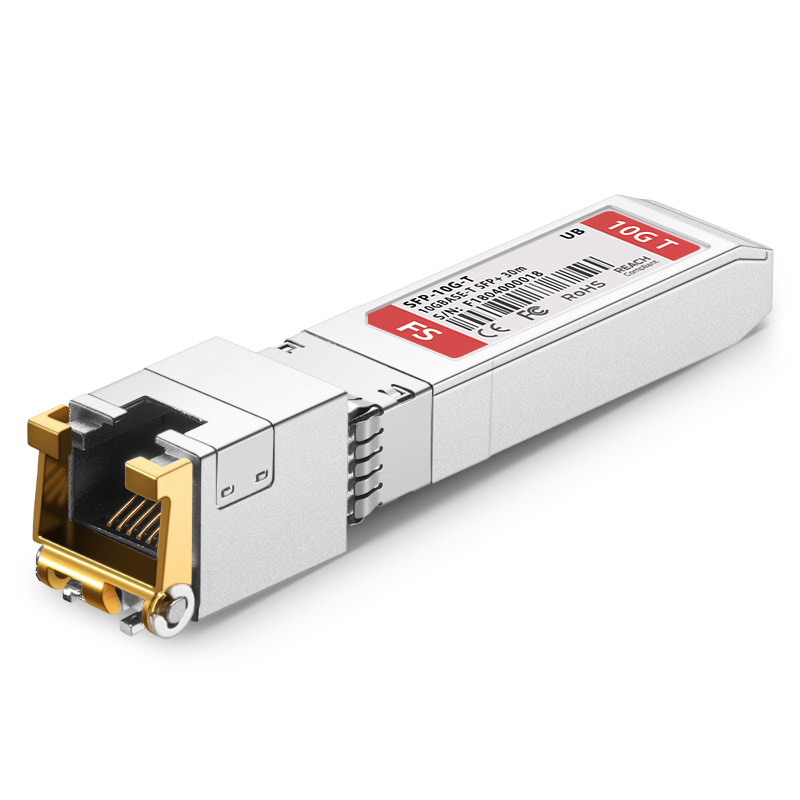
FS.com
Ubiquiti UF-RJ45-10G Compatible 10GBASE-T SFP+ Copper RJ-45 30m Transceiver Module, Product Specification:Ubiquiti Compatible - UF-RJ45-10G , Vendor Name - FS , Form Factor - SFP+ , Max Data Rate - 10Gbps, Power Consumption - ≤2.9W, Cable Distance - 30m@Cat6a/Cat7 or Better
keen urchin
It's literally cheaper to replace the card with an SFP+ card and use DAC
Or use fibre but yeah obviously all depends on a bunch of things.
frosty stone
only thing they need it for is the wan input
plush peak
yeah 
keen urchin
Oh yeah, I mean my switch has 4 10g 8p8c ports, and I was able to get some super cheap older Intel x540 copper cards, and my desktop already has cat7 to it, so it saves me a bit of screwing around. New stuff I add I'll use SFP+
frosty stone
ah
keen urchin
My interlols is only 1gig anyway.
I have a bunch of gig fibre SFPs but honestly I think they are ewaste at this point
frosty stone
when our LFC finally gets there shit together, I may get 2/2, 4/4, or 8/8
the main LFC for the country already has these plans almost everywhere, started the rollout in 2020
our one started trialing it in the city center in august 2021
it's still only in the city center
keen urchin
It costs me 2.5x as much to go from 1000/50 to 1000/400, because fucking nbn
frosty stone
oof
frosty stone
our 300/100 is like $75nzd or something
currently 4/4 from the one ISP providing plans (because the others don't want to until it's available everywhere) it's like $160 or something
could get 900/500 for like $90, but I don't really need it lol, I'd only get the faster multi gig plans for the lols
I want a reason to need a UDM
keen urchin
And honestly.... 1000 is mainly for the flex value and because why not. It is pretty amazing when a game update comes down and it's like, "meh".
frosty stone
frosty stone
when our LFC finally gets there shit together, I may get 2/2, 4/4, or 8/8
the ma...
which means my mum in the middle of fucking nowhere can get 8 gig symmetrical, but I can't because my area chose to roll their own network instead of waiting for chorus
keen urchin
I went with a mikrotik router.
frosty stone
and I certainly don't have the money to rent a tiny apartment in the city center just for memey fast internet
keen urchin
My router only has one 10g port, so if I had faster than 2.5 internet I'd have to VLAN it into the router.
 fallow quest
I seem to be getting throttled by my isp, im supposed to get 300mbps but when im on any device im only getting 10-20. and theyre the only devices on my network, my game consoles seem to be fine, but im not very far from my modem, im literally underneath it. would a vpn likely solve these issues?

 thick minnow
fallow quest
thick minnow
fallow quest
Using a VPN wouldn’t allow you to disguise as someone else to your ISP. Because before you connect to the VPN server to change your IP information, you have to go through your ISP. So I don’t think that would help. I’d say, if you have a laptop, then you should sit it right next to the modem and check the speeds then. Then check the speeds when you connect to the modem using a cable Ethernet. I have a feeling the problem is environmental. Like interference or bad coverage. I know you said you’re right under the modem, but I think a modem transmits in a donut shape. Here’s a picture of the radiation pattern:

The modem would be in the middle of this. So you can see that it has bad coverage below and above it.
Or maybe, if this is a coverage problem, you can fix it by laying the modem on its side. That’s worth a try. Then testing the speeds when below it again. Or just messing with the antenna.
But, in the room below the modem, what is the roof made out of? Certain material can really interfere with Wi-Fi.
 fallow quest
thats a note worthy thing let me read through everything
just lumber
but i moved my pc around, and did some configuring with the wifi card, and it seems fine
thick minnow
fallow quest
but i moved my pc around, and did some configuring with the wifi card, and it se...
That’s good then 👍 Ya if it’s fine then it’s fine.
fallow quest
like i was get 90 ping on cod
it was rough, that whole game i was at 40ms and it was way better i went 3rd place with highest kd

 late tide
network peeps, I have come in the time of need
Is there a way I can remote restart the router?
Asshole landlord is away until tuesday, There was an advisory this morning by the telcom providers to restart the routers
I have no physical access to the machine
however I can connect to it but can't get an internet, Is there anyway I can force restart the router?
 long thistle
best linux distro for router?
3600X and I already have nic with 2x sfp+ based on mellanox connectx-3 pro
will 1 core (2 threads) be enough?
peak cloak
late tide
Is there a way I can remote restart the router?
If you can login to it's administration web interface
There may be an option
late tide
peak cloak
If you can login to it's administration web interface
Don't have the creds sadly
peak cloak
Then no
 meager ginkgo
late tide
Is there a way I can remote restart the router?
meager ginkgo
late tide
Is there a way I can remote restart the router?
If you have access to the power panel you can try to flip the breaker off/on
late tide
meager ginkgo
If you have access to the power panel you can try to flip the breaker off/on
can't do the breaker as it would shit off power for the rest of us
I'll just have to deal with not having a wifi for abit
sadly
 mighty mountain
Spectrum does remote reboot where I am. It's definitely a feature that should have 2FA or other auth.
late tide
problem is I live in a shared house with flats
I can't ring the telcom on their behalf
it has to be them
mighty mountain
Sounds like you need a dedicated power Wi-Fi switch like Kasa... But I think needs network access, I don't think it's possible to set it up as one to one. So that would be Kasa, UPS, plug router into it.
I'm open to corrections if I'm wrong
Some enterprising soul with Pi experience could definitely make that work. Low voltage control of higher voltage switch.
peak cloak
it's not under their control
plush peak
@keen urchin @frosty stone it has begun

that isnt final price
just making a shopping cart and sending it off to the DC team at work so they send me an invoice before I run by the DC to take the hardware
frosty stone
nice
 mental crystal
I need your help.
My friend has good internet and he is using a cable but while he play he gets normal ping but a lot of packet loss for unknown reason...
He connect his cable to a port inside the wall that connects to the router because the router is far from his room
Upload and download is fine but for some reason a lot of packet loss
 drifting raven
I'm currently planning for a new rack in one of our DC locations. Previous sysadmins were pretty lazy and the current rack is a mess.
For future maintainability, would it be worth cutting every network cable to length, or would that be just too much of a hassle? The cables will be running from 2 10G switches to our servers
clear igloo
Leave at least a bit of slack, just get it close with an extra couple feet give or take
Definitely don't cut your own though, buy premade 100% so it's not your problem if someone has an issue with a cable
 fervent brook
On a scale from 00000000 to 11111111, how bad of an idea is it to stick something in the fan of a network switch because the fan started making too much noise?
clear igloo
fervent brook
On a scale from 00000000 to 11111111, how bad of an idea is it to stick somethin...
eh, provided you don't do it too long should be fine
fervent brook
i'll probably forget about it. i might switch over to my less "smart" unfanned unit
 spare oak
Hey guys would this be a good spot for getting a recommendation on a router?
long thistle
NAS' transfer speeds would depend on max speeds of drives or rather on speed of cache?
I mean does amount of RAM determine the time after which speed of transfer will be throttled by speed of hard drives while transferring a big amount of data?
considering that I have 10 GbE on the server and a client
clear igloo
No, not even 100GbE would be impacted by RAM speeds at DDR4 2133 which is about 136Gb/s (17GB/s)
but that's assuming it's being cached in RAM, in most cases it's storage that's the limiting factor
opal pagoda
fervent brook
On a scale from 00000000 to 11111111, how bad of an idea is it to stick somethin...
just take it apart and unplug the fan
and you can read model number of fan and order a replacement
 tranquil aurora
hey maybe you guys can help me
i have 2 COmputers (1 Win 11 1 Win10) which shared Folders to each, prev they were connected over a netgear switch and everything worked fine
i now connected them via a FritzBox Router/modem
and while the Win10 PC can access shared folders from the Win11 PC
the Win11 PC all of a sudden has to enter a userlogin to access files from the Win10 PC even thought password etc it disabled in the network settings, i even did the regedit solution and it still requires a login, - but even stranger it seems all i have to enter is a username "admin" and it works, is there a way to get rid of that? i dont know why it stopped working without just after switching from the netgear switch to the fritzbox router
 waxen plume
i keep on getting crazy ping spikes like this and im on ethernet, any reason you think?


 still flax
waxen plume
i keep on getting crazy ping spikes like this and im on ethernet, any reason you...
still flax
waxen plume
i keep on getting crazy ping spikes like this and im on ethernet, any reason you...
how old is your router?
waxen plume
still flax
how old is your router?
pretty new, it only started today
hollow marlin
waxen plume
i keep on getting crazy ping spikes like this and im on ethernet, any reason you...
Pings to a single website is not a clear indication of spikes. What are you noticing issues with that lead to the test?
waxen plume
hollow marlin
Pings to a single website is not a clear indication of spikes. What are you noti...
playing fn and gta and noticing packet loss and ping spikes
 flat wagon
just got my second server chassis :S

 hoary yoke
So if i now get another wifi router to my room and the older one is at the hallway would there be an conlfict with the old one?
Or is there something i need to think of before installing it
keen urchin
fervent brook
On a scale from 00000000 to 11111111, how bad of an idea is it to stick somethin...
Dude that's the first troubleshooting step.
keen urchin
spare oak
Hey guys would this be a good spot for getting a recommendation on a router?
Yes - what are you trying to do with it, what are your preferences and skills, and what's your future plans for it.
fervent brook
opal pagoda
and you can read model number of fan and order a replacement
It's a 24 port Gb Netgear that is what I'd call "semi-"smart"". I got it for 10 dollars at goodwill. I chick I can just remove the fam and let it run itself into the ground.
I'm only using about 8 ports anyway
fervent brook
hoary yoke
So if i now get another wifi router to my room and the older one is at the hallw...
isolate the new router and connect it to your pc. look for an "AP" or Access Point mode
if it doesn't have one, change the IP address of the router itself to 192.168.1.2, then let it save and reboot, then turn off DHCP
then you should be able to connect the two routers via their LAN ports. not the WAN port. ama access the main router via web setup at 192.168.1.1, and the secondary router via 192.168.1.2
 lavish plank
I have an ubuntu server with wireguard server.
Is it possible to install PiHole with their bash script, then change the DNS Server in WG and route it through Pihole?
In PiHole I would use my current 1.1.1.1
 mystic latch
lavish plank
I have an ubuntu server with wireguard server.
Is it possible to install PiHole ...
mystic latch
lavish plank
I have an ubuntu server with wireguard server.
Is it possible to install PiHole ...

GitHub
WireHole is a combination of WireGuard, Pi-hole, and Unbound in a docker-compose project with the intent of enabling users to quickly and easily create a personally managed full or split-tunnel Wir...
 south blade
Do I need a special cable for this to work?

I've got it connected to a 20ft Cat6 cable connected to the POE side of a Ubiquiti POE plug
 wind edge
as far as I know those are for passive poe , basically shoving 12v from barrel jack connector into the unused pins of the ethernet cable
when running at 100 mbps
does the manual / product page say it has some kind of processor/chip to detect the poe mode the switch uses and convert the poe voltage (up to around 50v on the cable) to something reasonable like 12v?
 wheat solstice
Hi LTT, about to start buying parts for my plan and figured I'd run it past you folks first.
When my house was built they ran ethernet from everywhere to the garage, great, then they put some weird-ass shelf on the wall and left it at that. Didn't even have a switch. The cables are all too short to reach anywhere I could put a cabinet. So my solution is to put get a 1U wall mount and put a patch panel in, plug the cables into that, and then run the cables over the door to the other side where I can put a cabinet.
Plan seem good? or does anyone have any better suggestions?
 pseudo blade
If you put a switch on the cable side with your patchpanel you can just run one cable over the door
Or two if redundant house networking's that important
Could even just route that one or two cables over in the roof and put a bit of conduit in for a cleaner look
 long pecan
Anyone able to help me with my NAS? I’ve got it set up using open media vault, I’ve set up the file system and network share, just can’t connect to it
It’s definitely something I’m doing wrong
 jolly crater
Anybody interested in a USG, 8port PoE switch and 5x UAP AC Pros?
long pecan
long pecan
It’s definitely something I’m doing wrong
I got it sorted, I set up a network share but didn’t enable SMB globally 🙄
You’d think it does that when you create a share
 boreal holly
Hey I’m looking to build my first Nas home server that will run truenas and some applications like plex and also have a vm that can run games does anyone know if this build will be any good for that my budget is around $1,200 https://pcpartpicker.com/list/XzTXRK
Part List - AMD Ryzen 5 3600, Radeon RX 5500 XT
jolly crater
I'd add like a p1000 or p2000 for plex if you do any transcoding
boreal holly
So have 2 GPUs?
jolly crater
Yeah, you can pass through one to plex and the other to the vm
boreal holly
Any other alternatives for a more budget approach
jolly crater
X99 used is cheap and feature rich
spare oak
keen urchin
Yes - what are you trying to do with it, what are your preferences and skills, a...
My sister has a 3500 sqft home (everyone is more centralized in the home sleeping is when they spread out) she needs a modem with cox she has the 1gbs plan her and my brother in law game with the 4 offspring and they are pushing the providers modem pretty hard so something that can take a beating and the lag can be more manageable I was looking at the AX2700 by netgear
jolly crater
I run x99 with a ES 12c/24t Xeon and 96gb ddr3 ecc
jolly crater
spare oak
My sister has a 3500 sqft home (everyone is more centralized in the home sleepin...
Ubiquiti or omada or ruckus tbh
boreal holly
jolly crater
I run x99 with a ES 12c/24t Xeon and 96gb ddr3 ecc
I meant for the p1000
jolly crater
That's a lot of space and use
jolly crater
boreal holly
I meant for the p1000
A p600 but that can only do like 2 simultaneous streams tops
boreal holly
Ok
spare oak
jolly crater
That's a lot of space and use
Brother is active military and was stationed in Japan and everyone almost killed each other so they went big being stationed in the states 😂
long pecan
Yall this is my NAS… I know it’s a mess… I was planning to 3d print a case for it, but that’s both effort and expensive when a cardboard box works just as well!

I do plan to get a few more ssds and run it in raid1, but this is good enough for now
jolly crater
spare oak
Brother is active military and was stationed in Japan and everyone almost killed...
I've done business installs of around that size and depending on layout and # of floors and whether you need outdoor coverage .... No fewer than 3 access points, more like 5.
boreal holly
jolly crater
X99 used is cheap and feature rich
I looked at x99 but didn’t have enough pcie x16 i would need two at least and I want a mobo that’s matx
jolly crater
boreal holly
I looked at x99 but didn’t have enough pcie x16 i would need two at least and I ...
Those chinesium ones are usually matx, my board is machinist
spare oak
jolly crater
I've done business installs of around that size and depending on layout and # of...
No those kids don't know what grass is it's a rental they have upped the gaming since number 4 became of age to be a try hard 😂 and I've been telling them for a while now we are gonna see these issues well boys the issues are here lag and connection issues
keen urchin
tbh with that sort of application I'd be looking at something simple and off the shelf like a decent wifi6 mesh pack. Ubiquiti is also going to be a good option, but it's more of a premium semi-pro setup
basically like smashedtater said, one AP simply won't get the job done to standard
 meager gorge
how can I find my best dns server if im from romania?
opal pagoda
jolly crater
A p600 but that can only do like 2 simultaneous streams tops
get a tesla p4 on ebay
on datasheet it says it can do 35 streams "Hardware-decode engine capable of transcoding and
inferencing 35 HD video streams in real time."
and they are really cheap on ebay rn
spare oak
keen urchin
tbh with that sort of application I'd be looking at something simple and off the...
Oh for sure I appreciate the help guys
long thistle
clear igloo
but that's assuming it's being cached in RAM, in most cases it's storage that's ...
but the speeds will always be throttled by hard drives or only after the cache will fill in 100%?
jolly crater
opal pagoda
get a tesla p4 on ebay
Tesla doesn't have built in cooling, and custom cooling might be a no-go since he was looking for MATX and multiple gpus
opal pagoda
jolly crater
Tesla doesn't have built in cooling, and custom cooling might be a no-go since h...
Do you have access to a 3d printer?
jolly crater
opal pagoda
Do you have access to a 3d printer?
I do, but the guy looking for gpus might not physically have enough space in an matx case with multiple gpus for a custom cooler
opal pagoda
jolly crater
I do, but the guy looking for gpus might not physically have enough space in an ...

I got a Tesla P4 for cheap like many others, and am not insane enough to run a loud rackmount case with proper airflow. So I created this.
You can just open the shroud and slap a 60mm fan on top or use one of the many 3D printed shroud designs already available, but all the other 3D printed shrouds kinda sucks and looks janky with 40mm server fa...
With this fan attachment you keep 1u low profile size
jolly crater
Sure.... But you add to the length @opal pagoda
wheat solstice
pseudo blade
If you put a switch on the cable side with your patchpanel you can just run *one...
thanks, not a bad shout actually, the flip side is I'm trying to get weight off that shelf since I don't trust it 😂
wheat solstice
also actually thinking about it it's not one cable, it'd be:
Power for switch
Ethernet from switch to USG
Ethernet from server to switch
Ethernet from UPS to switch
probably not worth it
clear igloo
long thistle
but the speeds will always be throttled by hard drives or only after the cache w...
HDDs have like no cache, the speed is always limited by the read/write speed of the drives
long thistle
clear igloo
HDDs have like no cache, the speed is always limited by the read/write speed of ...
yeah but the ram is cache, isn't it?
 unborn sluice

 wanton hamlet
I'm not very experienced with wifi or Ethernet but does anyone know a wifi router that supports 10g Ethernet?
I don't need fast wifi speeds but I want to take advantage of the 10g Ethernet my motherboard supports
I heard there's switches? I think that only needs 1 Ethernet connection to support the others but I thought that was for server stuff or it cuts the connection in half to get those speeds
Correct me if I'm wrong though
clear igloo
wanton hamlet
I heard there's switches? I think that only needs 1 Ethernet connection to suppo...
No, a switch is full speed all the time
WAY WAY WAY back in the day before full-duplex became common that might have been true but not in the past 20+ years
The only limit is your uplink to the router and traffic that needs to get to the internet, that would be limited by the uplink BUT anything on the 10G ports would be 10G between them unless they need to go to the router to get out
wanton hamlet
clear igloo
The only limit is your uplink to the router and traffic that needs to get to the...
Thank you, I guess I'll invest in one
fervent brook
wanton hamlet
I'm not very experienced with wifi or Ethernet but does anyone know a wifi route...
I know of some routers that can do link aggregation, but I dont know if they have modern versions or if they're affordable
fervent brook
opal pagoda
and you can read model number of fan and order a replacement
I found a spare Netgear GS324...I can just fall back onto that.
peak cloak
fervent brook
I know of some routers that can do link aggregation, but I dont know if they hav...
Link agg won't get you true 10gig
fervent brook
peak cloak
Link agg won't get you true 10gig
no idea what "true" 10gb is. Also, those routers are 1Gb, so no, you would never get 10Gb
If you have a switch with 8 10Gb ports with Link Aggregation and you aggregate two ports, is it still not "true 10Gb"?
peak cloak
fervent brook
If you have a switch with 8 10Gb ports with Link Aggregation and you aggregate t...
No, link agg is only for total throughput, not per connection
fervent brook
peak cloak
No, link agg is only for total throughput, not per connection
Do those words mean anything?
I thought Link aggregation was for aggregating links...
define "a connection"
peak cloak
fervent brook
I thought Link aggregation was for aggregating links...

Reddit
Explore this post and more from the synology community
Look at the first comment
fervent brook
"It can be done even without Link Aggregation support.
I do this between my Debian file server and my Windows 10 Desktop with 2 network cables connected to my switch from each PC and I get about 220MB/s on single connection file transfers.
It's achievable through SMB multichannel. I didn't really have to do anything special or have any special hardware to make it work. Unfortunately the Samba software in the Synology NAS is too old to do it."
peak cloak
fervent brook
"It can be done even without Link Aggregation support.
I do this between my Deb...
Yes there's hacky solutions on a network level and on a protocol level
fervent brook
peak cloak
Yes there's hacky solutions on a network level and on a protocol level
You told me to read the first comment
peak cloak
fervent brook
You told me to read the first comment
I guess yours is different
fervent brook
Also, what's stopping a user from using LA?
peak cloak
Network engineer here. I am on mobile so can't give you the long answer but in a 'sane' scenario (one MAC address and IP on the NAS, same on the client) you will never get throughput higher than the capacity of a single link in the LACP bundle. This is because receiver reordering is difficult and so devices use a hash of the MAC or IP to select a member link and use it consistently. Some very high end datacentre grade switches can do something similar to what you want (using TRILL or something like Brocade VCS) but it is expensive and not likely you have this support without already knowing it. It's intended for inter-switch links. The multi-VLAN thing that guy describes is very interesting in that it forces traffic to use all 4 links, performance will depend heavily on the ability of the hosts at both ends to do the reordering. Sounds like an interesting hack but I wouldn't try it in any business-critical environment.
fervent brook
Are you saying LA will let you link between network hardware, but for some reason using LA on a host machine is impossible?
peak cloak
fervent brook
Are you saying LA will let you link between network hardware, but for some reaso...
no
what I'm saying is that with 2 1gig links you won't nessicerly get 2 gig for example
fervent brook
peak cloak
what I'm saying is that with 2 1gig links you won't nessicerly get 2 gig for exa...
With 1 1G link you wont necessarily get 1G...
peak cloak
you get the idea..
fervent brook
yes, i understand pedantry
peak cloak
ofc there will be overhead and other factors
fervent brook
so, what do you get with 2 1g?
peak cloak
fervent brook
so, what do you get with 2 1g?
you can get aggregated 2 gig between different devices, etc. So for example between switches, switch to router, etc.
clear igloo
You get 2 streams of about 1gig each
fervent brook
wow...that's horrible
clear igloo
Link agg is for capacity for multiple hosts to multiple hosts not 1 to 1
For 1:1 you want SMB multichannel which is hit or miss still afaik
fervent brook
"for" doesn't mean it's not possible
clear igloo
LACP does NOT balance single stream loads, period, that's not how it works
fervent brook
clear igloo
LACP does NOT balance single stream loads, period, that's not how it works
Now that's a proper answer
took you long enough
hollow marlin
clear igloo
LACP does NOT balance single stream loads, period, that's not how it works
Darn IEEE and there efforts to eliminate OOO packets!!!!
clear igloo
hollow marlin
Darn IEEE and there efforts to eliminate OOO packets!!!!
You packet take order in any s
hollow marlin
clear igloo
You packet take order in any s
ACK = 1
send it all back again
clear igloo

hollow marlin
I believe I recall reading not long ago that most OSes will now handle OOO packets within a window else it's just a selective ACK
hollow marlin
I lost trust when I ran a capture between an Ubuntu and PopOS machine and ACKs were completely different even though PopOS is based on Ubuntu
Ubuntu was ACK'g around the window and PopOS was ACK'g every segment
 waxen scroll
NO U
south blade
I know it's harder to get signal through metal but, what's a decent but cheap AP that I can ceiling mount and has a big range? My current TP-Link C7 v2 is failing, was powering a USB fan to cool at 5G modem, after disconnecting the fan (maybe I should have turned the router off before having done that?) The 5G modem has WiFi but I don't think there would be any way to turn off DHCP and set the WiFi to be used as AP for the OPNsense box to be used as DHCP like I have it right now.
peak cloak
south blade
I know it's harder to get signal through metal but, what's a decent but cheap AP...
it's not metal itself that's the issue as much, but the fact it's grounded which it can act as a faraday cage
south blade
Well, either way this routers' WiFi is seemingly turning off an on after I pulled the plug on the USB fan
Depending on the phone, what trees are in the way, if I was facing the house, I was getting WiFi maybe 250ft away, not fast but enough to still browse.
peak cloak
south blade
Well, either way this routers' WiFi is seemingly turning off an on after I pulle...
if you want a descent AP look at TP-Link's Omada Line
mystic latch
Can vouch for omada APs. Better price than unifi and works great for me
 random tangle
guys i moved my setup a bit further away from the router (only by a room distance) and now its acting up. my download speed is extremely slows and varies from speeds such as 0.13 to 100 mbps...however my upload speed is consistently at 20 mbps. is it due to the distance between pc and router or other issues
 deep verge
i recommend ethernet
random tangle
i was considering so too, but was wondering if there were any other solutions avaliable, but i will keep ethernet in mind
pseudo blade
Your alternatives are testing different combinations of APs, settings, client devices and locations+antenna positions until you find one that works, or if none work including ethernet blame your router/ISP
keen urchin
random tangle
guys i moved my setup a bit further away from the router (only by a room distanc...
"a room distance" - yeah but how does the signal get to you now. It could be very different.
 clear nest
Help im way too dumb for this to understand 💀
 gentle ginkgo
My Wi-Fi is connected but showing “no internet access, secured” as it happened after I installed vpn
keen urchin
hollow marlin
I lost trust when I ran a capture between an Ubuntu and PopOS machine and ACKs w...
I bought a cheap switch and I was having weird problems with the Realtek card in my Linux server.
I did some extensive reading and troubleshooting.... Turns out some cheap switches and Realtek cards don't play nice in Linux. I replaced the shitty switch with a mikrotik and a ubiquiti and have had no further problems.
... Then I realised that the Realtek NIC in my thunderbolt dock had similar weird unreliable issues, and that was with windows. So I changed the network from the other USB NIC I was using (an ms surface NIC fwiw), and plugged it into the dock.... Yeah works perfectly now.
What the fuck in 2023 we are having fucking layer 1/2 issues with basic ethernet.
 visual tangle
Today I get to test QNAP support...
My NAS is completely devoid of power/life.
 shrewd zenith
noit quite understanding subnets, here i have 2 different segments of a network. i imagin it wont just make it a subnet by itself.
are subnets just something you configure yourself?

but then what happens if i dont configure a subnet but i exceed 255 devices on the one subnet?
clear igloo
Then those new devices don't get a DHCP lease or when an existing device leaves the network long enough for the lease to expire then a new device will get a lease but beyond that, no connection for those other devices
A subnet can be as big or as small as needed, it's not just a /24 you can have a /30 (or /31) or go huge and do a /16 or /8
peak cloak
shrewd zenith
noit quite understanding subnets, here i have 2 different segments of a network....
yes, on the router you set your interface IP and subnet
thick minnow
Hello! Could anyone help me with some weird internet issue? My provider said the problem weren't on their side. I tried many tutorial videos. https://discord.com/channels/375436620578684930/1170084462965571604
opal pagoda
clear igloo
A subnet can be as big or as small as needed, it's not just a /24 you can have a...
we use /8 for whole network, /16 for locations, /24 for usecases/departmets
 onyx bobcat
ok not sure if this goes here or somewhere else but its not really basic, it makes no sense whatsoever
My main PC only ever downloads off steam at 50-100 Mbps, has been like that forever. we have 500Mb internet, speed tests can get up to 400 i guess
but i am currently messing with another computer, very old whatever, and when i downloaded a steam game it was going at 300-400 Mbps. i used the exact same cable and port on the router, and my main PC can just never reach that speed
Main PC has 2.5Gb on the mobo, that shouldnt be the issue. i opened it on safe mode to run these tests, with just steam open and minimal traffic on the router. main PC ive tried with 2 different NVMe SSDs to ensure that it wasnt them being slow
 rocky badge
opal pagoda
we use /8 for whole network, /16 for locations, /24 for usecases/departmets
rocky badge
opal pagoda
we use /8 for whole network, /16 for locations, /24 for usecases/departmets
Lol that's what I do on my network
10.0.0.0/8 contains every site I have
10.x.0.0/16 is a site
10.x.y.0/24 is a VLAN at a site
pretty nice as its easy to determine what's where and interconnecting
opal pagoda
onyx bobcat
ok not sure if this goes here or somewhere else but its not really basic, it mak...
play around with steam download regions
keen urchin
rocky badge
Lol that's what I do on my network
10.0.0.0/8 contains every site I have
10.x.0...
Or, if you enjoy chaos, you can have /27 networks, and routing tables that make baby Jesus cry. It doesn't make any difference to the routers, but it's terrible for people
keen urchin
shrewd zenith
but then what happens if i dont configure a subnet but i exceed 255 devices on t...
There's nothing stopping you from having a subnet bigger than a /24, other than sanity. Most subnets in most networks aren't anywhere near full.
 charred pond
When steam added multiple Internet connection downloading (On screen two ISPs)?

 rocky badge
keen urchin
Or, if you enjoy chaos, you can have /27 networks, and routing tables that make ...
rocky badge
keen urchin
Or, if you enjoy chaos, you can have /27 networks, and routing tables that make ...
Why would you even have something smaller than /24, especially on a big corporate network?
my university owns a /16 and the smallest we do is a /24 so it can still be announced by bgp
and that way routing tables aren't crazy
hollow marlin
rocky badge
Why would you even have something smaller than /24, especially on a big corporat...
In the SP private space, it's common for mgmt to be </24s
No real reason to do so in the enterprise space
rocky badge
hollow marlin
In the SP private space, it's common for mgmt to be </24s
Yeah but clients
clear igloo
rocky badge
Yeah but clients
Depending on the ISP I've seen them give out /29s and whatnot for single static IPs and the like
clear igloo
Oh yah, they're definitely doing summaries before advertising to BGP and whatnot
rocky badge
@clear igloo the museum on campus has the best wifi I’ve seen in any museum hahahaha
clear igloo
lol, nice
 clear igloo
Oooo, fancy new stuff 😄
clear igloo
Yah, 6E is nice but at that pace might as well just do 7
rocky badge
Every new drop for an AP will be able to do 10 gig tho
Not switches tho
I think ports are only 2.5g or 5g rn
 mild turtle
I've finally swapped to someone with fibre and we've paid for 1GB broadband. They've not long gone, about 15 minutes ago. When I do speed checks I'm only getting 98MB before it caps out. I had a different switch but was gifted one after a storm destroyed ours. It's a Procurve 2610-24. The switch says that if the lights are solid then it should be 1000MB and if they're flashing it'll be 100MB. All the lights on each of the ethernet ports that are connected all display a solid green light on either side of the port. I'm not very good when it comes to networking and would really appreciate some help.
south blade
Am I not thinking of something? :/ What can I do to keep my OPNsense firewall (192.168.1.1, DHCP starting at 192.168.1.100-150) that I was accessing through a now dying AP (192.168.1.2), I've got the firewall getting internet though a 5G modem (192.168.100.1, that has WiFi, 2 LAN ports, DHCP 192.168.100.10-64), but my media center is connected to the firewall and getting IP 192.168.1.103. So connected to the only WiFi I have right now from the 5G modem, it can't see anything that's grabbing IPs from the firewall.
opal pagoda
Do you have 2x DHCP servers or one?
south blade
2 :/, one on the 5G modem knowing I won't be able to access anything on LAN of anything connected to my dying AP that's hooked up to my firewall on the second DHCP.
opal pagoda
You can only have one on a network
Try to draw your network layout
south blade
It's like this,
 south blade
opal pagoda
You can only have one on a network
Try to draw your network layout
south blade
opal pagoda
You can only have one on a network
Try to draw your network layout
Big problem is, this 5G modem doesn't have that many features in settings, can't assign IPs, says it can do VPN but I doubt it'd be as fast as what OPNsense box is doing.
 hallow junco
I just upgraded my router from an Airport Express to an Airport Extreme, and now my server is connected with ethernet.
rocky badge
@meager ginkgo I’m jealous

This is what brightridge does for ONTs
Fiber to the ONT inside
meager gorge
how can I find my best dns server if im from romania?
south blade
meager gorge
how can I find my best dns server if im from romania?
DNS Benchmark?
meager gorge
Thank you!
opal pagoda
meager gorge
how can I find my best dns server if im from romania?
Just use cloudflare (1.1.1.1) it will probably beat out everything else
keen urchin
rocky badge
Why would you even have something smaller than /24, especially on a big corporat...
You wouldn't, as a rule - that's the point. The problem is you need to understand that it's possible, and how netmasks actually work, rather than herping and internalising "this is the only possible way"
rocky badge
keen urchin
You wouldn't, as a rule - that's the point. The problem is you need to understan...
well yeah
opal pagoda
keen urchin
You wouldn't, as a rule - that's the point. The problem is you need to understan...
Basically you need to understand that ip addresses are in binary and dots don't mean anything
keen urchin
opal pagoda
Basically you need to understand that ip addresses are in binary and dots don't ...
yes
 glossy trout
any suggestions for offshore dedicated server provider?
pseudo blade
glossy trout
any suggestions for offshore dedicated server provider?
Question: Do you specifically need it to be real hardware or are you just looking for relatively consistent performance?
If it's just for yourself and you don't need any other cloud services I'd pick based on the best value for money (nothing listed with crazy old CPUs or who knows when it'll just die on you and what kind of support you'll get if it does)
I'd pick a major cloud provider's VM's with SAN-backed storage and image backups over a no-name host's value servers they may not have bought new (but the price can be a lot higher)
frosty stone
you quite literally get what you pay for
pseudo blade
Yep (Well, some fraction of what you pay for)
 gleaming kite
How much bandwidth is supposed on a normal ethernet cable. I am transferring files from my PC to Laptop through ethernet cable and only able to reach 10MBPS, is my cable bad (my internet speed is 100MbPS/12.5MBPS) which I usually get on pc
thick minnow
Hello can someone help me please i have n issue with VPN so when i try to connect it wont connect it stock try to connect and try two others vpn and did not wokr eather
pseudo blade
thick minnow
Hello can someone help me please i have n issue with VPN so when i try to connec...
I suggest #1027757333117415424
Also, you'll want to clarify your situation and be way more specific about your choice of VPN and relevant configuration if you ever want a real answer.
mild turtle
I need some advice. It would seem the switch I have doesn't support 1G speed. I know years ago TP and Netgear used to be popular because my dad who did networking would talk about them years ago. I've heard some things about them in recent years so from what I've heard they're not favoured any more. I need just a basic switch for internet and file transfer that needs at least 1G speeds. What would be some brands you'd recommend for £100 or less? Cheers.
opal pagoda
glossy trout
any suggestions for offshore dedicated server provider?
define "offshore"
if you just want a pc but not in your house look up hetzner server auctions
 trail cosmos
Hey guys, I am running an email server that I want all traffic routed through a VPS server, I was using OpenVPN Access Server but it does not open ports that my server makes, meaning I cannot access the services my server is hosting via the VPS's IP.
Anyone got an idea of what software allows this?
thick minnow
pseudo blade
I suggest <#1027757333117415424>
Alirght Thank you
clear igloo
mild turtle
I need some advice. It would seem the switch I have doesn't support 1G speed. I ...
Anything from those brands with the number of ports you need would be fine from Amazon and the like
You can get gigabit unmanaged switches for like $20 for 5 ports
 kind pivot
Why can I ping my server with
hostname.lan
?
I never set up any DNS anywhere, is that a common feature of isp routers ? (Starlink here)
Or maybe it's my mikrotik switch ..?
opal pagoda
trail cosmos
Hey guys, I am running an email server that I want all traffic routed through a ...
most vps providers block smtp ports
its mostly due to abuse from spammers
hallow junco
running your own email server is stupid hard because scammers. There are services that handle the hard part, sending mail for you that you can hook into.
 junior prawn
hallow junco
running your own email server is stupid hard because scammers. There are servic...
junior prawn
hallow junco
running your own email server is stupid hard because scammers. There are servic...
not really, just get a linode email them why you need the port, you get access
 naive nest
Is it possible for my to do port redirection after the traffic leaves the network?
junior prawn
naive nest
Is it possible for my to do port redirection after the traffic leaves the networ...
yea
naive nest
I'm trying to run a Minecraft server on a shared VPS, and port 25565 is already in use by someone else
naive nest
junior prawn
yea
Could you recommend a method to do so please?
junior prawn
naive nest
Could you recommend a method to do so please?
you just tunnel your internet to a different server with that port open, and, you redirect the port into it
Or you can just use TCPShield, it'll do that for you
peak cloak
junior prawn
not really, just get a linode email them why you need the port, you get access
even then your IP reputation is terrible
peak cloak
kind pivot
Why can I ping my server with
hostname.lan
?
I never set up any DNS anywhere, ...
mDNS
peak cloak
trail cosmos
Hey guys, I am running an email server that I want all traffic routed through a ...
I used wireguard to do a similar thing, it requires both config of wireguard but also NAT rules on the VPS and routing rules on home server
openvpn should also be able to do it
junior prawn
peak cloak
even then your IP reputation is terrible
is it tho?
in my experience. its been fine
junior prawn
peak cloak
I used wireguard to do a similar thing, it requires both config of wireguard but...
I do the same thing with wireguard
opal pagoda
naive nest
I'm trying to run a Minecraft server on a shared VPS, and port 25565 is already ...
or you can just host it on 25566 and specify it when connecting
your.ip:25566
naive nest
Yeah, that's roughly what I'm doing at the moment, but I'd like to get away from specifying the port.
peak cloak
naive nest
Yeah, that's roughly what I'm doing at the moment, but I'd like to get away from...
Java or bedrock?
naive nest
Java
peak cloak
Java respects dns srv records, so you can use that to specify the port on the DNS side
naive nest
It's a shame my domain provider can't do the port redirection
opal pagoda
naive nest
It's a shame my domain provider can't do the port redirection
what domain provider do you use?
peak cloak
naive nest
It's a shame my domain provider can't do the port redirection
You don't need that, just a srv record
naive nest
Google Domains, but looking to migrate to Cloidflare
Since they sold to Squarespace and I'm expecting a price hike
naive nest
peak cloak
You don't need that, just a srv record
I'll give that a try, thanks.
junior prawn
naive nest
Yeah, that's roughly what I'm doing at the moment, but I'd like to get away from...
Use a domain
trail cosmos
opal pagoda
most vps providers block smtp ports
Boy they got me fucked up if they think they get to block ports for a VPS that is expensive (thankfully my work will pay for it lol). I hope they don't but if they do, gonna search for a better VPS then.
junior prawn
trail cosmos
Boy they got me fucked up if they think they get to block ports for a VPS that i...
Not really, they do it so people like you using it for legitmate reasons, get good ips
if they didn't then there ip rating would be trash
trail cosmos
peak cloak
I used wireguard to do a similar thing, it requires both config of wireguard but...
I suppose I'll set up WireGuard to do this because I went through all of the configurations that my OpenVPN Access Server gave me and saw nothing that allows me for that.
What are the settings I'd need to look at?
peak cloak
trail cosmos
Boy they got me fucked up if they think they get to block ports for a VPS that i...
email spamming is a pita, most block it
peak cloak
trail cosmos
I suppose I'll set up WireGuard to do this because I went through all of the con...
well it's not just wireguard settings. You need to setup a tunnel between machine, setup NAT rules on VPS and routing on machine
trail cosmos
junior prawn
Not really, they do it so people like you using it for legitmate reasons, get go...
Wonder if they would allow it if I was to bring my own IP? I saw a setting for BYOIP. I seen a site that sells an IP too.
peak cloak
@trail cosmos take a look at this, it's kinda what I did https://github.com/mochman/Bypass_CGNAT

GitHub
Wireguard setup to bypass CGNAT with a VPS. Contribute to mochman/Bypass_CGNAT development by creating an account on GitHub.
but I used VYOS on the VPS
trail cosmos
peak cloak
<@285458494432477184> take a look at this, it's kinda what I did https://github....
Thanks for that, I'll look into this.
trail cosmos
peak cloak
well it's not just wireguard settings. You need to setup a tunnel between machin...
I think the tunnel should be possible but the NAT rules might be a little complicated since I need to figure out how I can get settings for that, probably need to dig in the settings.
peak cloak
trail cosmos
I think the tunnel should be possible but the NAT rules might be a little compli...
what is the VPS running? linux?
it would be a pretty simple masquarade rule, and then dnat rules for port forwarding
you can use iptables, but I hate it
that's why I used vyos which has a really nice config language imo
trail cosmos
peak cloak
what is the VPS running? linux?
Yea, Ubuntu 23.04 LTS
Hmm okay, I'll look into that too.
kind pivot
peak cloak
mDNS
Okay yeah and is it something that is on every router ?
My friend says it's not working for him
peak cloak
kind pivot
Okay yeah and is it something that is on every router ?
My friend says it's not...
it's per device kinda
frosty stone
trail cosmos
Yea, Ubuntu 23.04 LTS
23.04 is not LTS
trail cosmos
frosty stone
23.04 is not LTS
It was one of those versions, I don't remember it off the top of my head.
Personally I would have gone with Debian instead of Ubuntu since I am more used to Debian.
rocky badge
@clear igloo @hollow marlin 😩 I wish the AV integrator didn't administratively shutdown the extra 10G ports on the switches
clear igloo
no speed for you!!
rocky badge
clear igloo
no speed for you!!
actually jk
 clear igloo
rocky badge
actually jk
clear igloo
rocky badge
actually jk
nice
clear igloo
ah, makes sense
rocky badge
which sucks
@clear igloo I have idea /s
switch plugged into the extra ports in this rack, each port is a VLAN, 10G trunk to another switch with the same port & VLAN config /s
So I don't have to have 10 ethernet cables /s
 little schooner
Is it reasonable to expect that a DOCSIS 4.0 cable modem will reduce connection latency vs a DOCSIS 3.1 cable modem? With a VPN between two sites, download/upload speeds take a big hit because my latency is 28-30 ms consistently at site A. Site B has latency in the single digits.
pseudo blade
little schooner
Is it reasonable to expect that a DOCSIS 4.0 cable modem will reduce connection ...
Not really. It's more likely that your latency is coming from infrastructure past the cable, and from the physical distance from the premises to where the core routers+peering happens for your ISP and back.
kind pivot
Why are my local IPs with my starlink routeur + mikrotik switch ALWAYS changing ? It's super annoying
 muted cradle
anyone able to offer some help? Got a truenas 13 server that has its pool 100% full but is online but SMB wont turn on, saw somthing about storage space etc so would the pool being full stop SMB from starting? i do have the recycling bin turned on for my share so is there a way i can delete files from it from the shell?
 pearl zinc
How do y’all think Ubiquiti’s wireless networking gear will work 6 miles as the crow flies with a few obstructions?
little schooner
pseudo blade
Not really. It's more likely that your latency is coming from infrastructure pas...
aww mann. I wish this building had made a deal with the fiber ISP instead of the current cable company, Xfinity. the infrastructure looks so busy
 fiery elbow
Anyone here have any experience with OPNSense? I migrated over from OpenWrt and having issues setting up a static route with a separate LAN.
pearl zinc
opal pagoda
Define "with few obstructions"
There may be a church steeple in the way but for the most part it should be in line of sight.
The mild pain in the ass is the master will be at a bungalow and the slave at a 3-floor Manor House, so not only will there be one or two houses in the way possibly (because countryside, but also likely a massive angle to deal with.
keen urchin
If there is line of site, even with obstructions, you should be able to make it work. Obviously the less the better.
My 10gb cards are at the damn post fofice
pseudo blade
keen urchin
If there is line of site, even with obstructions, you should be able to make it ...
If there are obstructions you do not have line of sight.
 drowsy reef
what does it mean when my browser says "ssl connection occured"?
 icy shoal
Hi, i am curently in a formula student team. We need some telemetry data of the car. The rules are limiting us to the 2.4 ghz range. We have som directional antennas and other networking equpment. The only thing we need now is the AP for the groundstation. whats the longest range 2.4 ghz wifi ap thats under 200$?
opal pagoda
icy shoal
Hi, i am curently in a formula student team. We need some telemetry data of the ...
What is required bitrate?
icy shoal
speed is not important. 1MB/S is tecnecly enoth
opal pagoda
Look into lora
icy shoal
thats two slow in the 2.4GHZ and i need the latancy to be somwhat slow. and we whould like to have the driver comunication on the same network if posible
lora maxes out at: 253.91 kbit/s in the 2.4 ghz spectrum. thats too slow
opal pagoda
NRF24L01+PA+LNA then
 plush valley
Question for everyone. I'm using a Dream Machine Special Edition.
Can i use any 3.5" HDD? Or do i have to buy the ones from ubiquity?
 orchid plaza
Small network 2 classmates and I set up

 keen urchin
icy shoal
Hi, i am curently in a formula student team. We need some telemetry data of the ...
keen urchin
icy shoal
Hi, i am curently in a formula student team. We need some telemetry data of the ...
I don't know offhand, but I would think that you could get something older and enterprise grade second hand easily for that.
 sour trellis
I have a TG800VAC modem/ap/router and an Apple AirPort TC. I've set the TC's wifi name and pass to that of the TG800VAC. Do I want them to be on the same or different wifi channel?
thick minnow
Hello, I need help with wifi problems
I have some random router which the service provider set up and the wifi isn't even able to reach the master bedroom
What can I do to improve i already tested those wifi range extender
 ashen cloak

Electronic Frontier Foundation
The EU is poised to pass a sweeping new regulation, eIDAS 2.0. Buried deep in the text is Article 45, which returns us to the dark ages of 2011, when certificate authorities (CAs) could collaborate with governments to spy on encrypted traffic—and get away with it. Article 45 forbids browsers from...
 fringe marten
thick minnow
What can I do to improve i already tested those wifi range extender
fringe marten
thick minnow
What can I do to improve i already tested those wifi range extender
The answer you might not want: run cable.
 ebon wasp
ashen cloak
https://www.eff.org/deeplinks/2023/11/article-45-will-roll-back-web-security-12-...
ebon wasp
ashen cloak
https://www.eff.org/deeplinks/2023/11/article-45-will-roll-back-web-security-12-...
Aah EFF, they tend to scream hard, but then you read the actual text and discover it ain't that of a problem.
Seeing how they refuse to link to the actual proposal (and pretty much any other party) I seriously doubt that it that bad
And after some googling, yes it ain't that bad
https://eur-lex.europa.eu/legal-content/EN/TXT/?uri=CELEX:52021PC0281&qid=1699550772487 New proposal, Eff and Mozilla claim that article 45 is the problem
https://eur-lex.europa.eu/legal-content/EN/TXT/?uri=uriserv:OJ.L_.2014.257.01.0073.01.ENG the current regulation as comparison
https://blog.mozilla.org/netpolicy/files/2023/11/eIDAS-Industry-Letter-updated.pdf The letter of Mozilla with their explanation
They do not like one of the main the principle of the EU, where a product or service made in one country is allowed to exist in another country
Also they don't like that the current free for all, but controlled by a small group CA system is replaced by a legal institute and is thus scrutineered ny law
Also the claim that browsers are not allowed to include additional conditions is not true.
They just can't claim that without those additional conditions the certificate or CA is unsafe
And their attack on ETSI without any foundation is pretty weak
But it's sad that EFF again refuses to link the actual latest proposal and only links to examples that only serve them
ashen cloak
So long story short, its just a CA from the EU, and not verifying the certificate chain is just false?
@ebon wasp
ebon wasp
ashen cloak
So long story short, its just a CA from the EU, and not verifying the certificat...
More that browsers need really good reasons (reasons that can stand in court) to ban a CA located in an EU memberstate.
Yes the certificate chain still stands, but some newer extra's like Certificate Transparency is not penned down as a requirement in the Annex. However the commission is on purpose leaving room for an European Standard agency to pen down better standards.
kind pivot
Those are the same machine, z mikrotik switch
It's a starlink router
Why is there two entry for the switch
Why is it sometimes the same for other devices
Why are my IP changing without me doing anything
Why sometimes IPs change every 5s and both IP are pingable BUT only one from wifi and the other from Ethernet
Why can I ping stuff with hostname.lan without having a DNS
Why is my cat not sleeping in my bed ????

I'm so lost I understand nothing, I can't get anything working server-wise cuz the IP are always going wherever the heck they want

This one doesn't even have an ip right now
15 minutes before the mikrotik switch didn't have an ip according to the app lmao
 gusty lava
Anyone know how to fix this
Its been like this all day
 meager ginkgo
gusty lava
Anyone know how to fix this
Its been like this all day
meager ginkgo
gusty lava
Anyone know how to fix this
Its been like this all day
What's your internet setup?
Usually that means you are double NATed, meaning you have two routers back to back.
 worn viper
should I stick to mullvad or is proton vpn for 4 dollars a month a good deal?
gusty lava
So I have these two connected

 gusty lava
meager ginkgo
What's your internet setup?
gusty lava
meager ginkgo
What's your internet setup?
@meager ginkgo I never had a problem until yesterday morning
pseudo blade
worn viper
should I stick to mullvad or is proton vpn for 4 dollars a month a good deal?
I would just use Mullvad
meager ginkgo
gusty lava
<@390856614942474241> I never had a problem until yesterday morning
Sometimes it works without issue but it can cause issues with some games (after a update etc)
You need to enable bridge mode on the Verizon router
gusty lava
how do i do that sorry
gusty lava
@meager ginkgo i think i did it but the internet keeps going out evey now and then
meager ginkgo
gusty lava
<@390856614942474241> i think i did it but the internet keeps going out evey now...
Like complete outage?
How is that Verizon router connected? Is it coax, fiber, or an Ethernet connection?
gusty lava
i think so and then i was to reset the router to get it back to normal
meager ginkgo
So it’s working now?

 gusty lava
Alright let me go do that real quick
meager ginkgo
It may or may not work. Some ISPs require you to use their router
I’m pretty sure you can directly hook up Verizon though to your own router
 meager ginkgo
gusty lava
Alright that’s done, what do I do with this
meager ginkgo
gusty lava
Alright that’s done, what do I do with this
Did you get internet on your router?
Like is it connecting?
gusty lava
Yes, I have internet
meager ginkgo
You can just store it somewhere then. I don’t know if Verizon charges a monthly fee for their router, if so you can return it to them.
gusty lava
Oh ok ok, Thanks man
meager ginkgo
👍
gusty lava
@meager ginkgo sorry for bothering you again, but should it disconnecting my phone and laptop from the WiFi.
meager ginkgo
gusty lava
<@390856614942474241> sorry for bothering you again, but should it disconnecting...
were you using the old router for wifi?
gusty lava
Pretty much yea and the pc was just using the ethernet
 remote remnant
How do you port forward ipv6?
 storm oracle
Is this good budget cable 10 usd for me
Monoprice™Cat6 7ft Blue Patch CableUTP, 24AWG, 550MHz, Pure Bare Copper, Snagless RJ45, Flexboot Series Ethernet CableMonoprice™ FLEXBOOT™ Series of cables feature a thinner cable bo
Can you describe if it's good or not
meager ginkgo
storm oracle
Can you describe if it's good or not
Are you just trying to connect your pc or something?
storm oracle
Yes
meager ginkgo
Are you running it in the wall or like along baseboards (or similar?)
storm oracle
Got 2 gigabit internet now
storm oracle
meager ginkgo
Are you running it in the wall or like along baseboards (or similar?)
In basement
Going from router down to basement along the ceiling and back up to back room
meager ginkgo
So ideally you'd want to buy an unterminated cable and put keystone jacks on it
storm oracle
Idk what that means
meager ginkgo
Is the cable gonna come out of the wall?
meager ginkgo
So instead of having a cable stick out far past the floor, you want to get a surface mount cat6 jack then.

Surface mount CAT 6 box for when in-wall box and wire installation are not possible. A clean and simple solution for network expansion. 2 Cat 6 ports. Box is durable plastic white in color. Cat 6 is written in small blue letters on face of box. Comes with double sided adhesive tape to mount the b...
You would then get bare CAT6 (without ends) and attach it to the jack
storm oracle
Idk how to do that not too inclined in cable stuff looking for easy cheep fix
meager ginkgo
It's up to you. This is the more clean way to do it IMO
storm oracle
Imo?
meager ginkgo
in my opinion
storm oracle
Oh ok wym clean
storm oracle
Oh ok do you have a list of recommendations
storm oracle
75 to 80 80 would be better bc I needa move stuff for 75
meager ginkgo

Just a quick little video I did on the fly. Hopefully this is helpful if you are unsure of how it works. I believe Monoprice may do design changes occasionally as my jack doesn't match their stock photo.
Link to the product in the video (Not sponsored)
https://www.monoprice.com/product?p_id=1040
844660010401
This is what you'd be doing to each side.
A keystone is just a modular female port basically
storm oracle
Oh how would I connect it to my pc?
storm oracle
Oh cool
meager ginkgo
This way it's not easy to get severed or anything like that
storm oracle
How much would it cost total
meager ginkgo
Probably around $50 total, let me put together a parts list.
May be a little less.

Cat6A RJ-45 Toolless 180-Degree Short Body 28mm Keystone, White This Toolless keystone jack series allows you to terminate Cat5e, Cat6, and Cat6A jacks without the use of a punch down tool. The short body takes up less space and is easier deploy. This keystone jack is backwards compatible with co...
storm oracle
Woah that's like 5x the price if I just get a 75 foot cable I could get the 100 ft for 20
meager ginkgo
Yeah, in the end both ways work. This is just the more proper "professional way" lol
storm oracle
Lol I ain't no professional lol I just need ut to work
I need high speeds us all lol don't need ultra connected
meager ginkgo
Fair enough. That cable is probably fine then.
Just be careful it doesn't get damaged.
Avoid flat cables like the plague haha
meager ginkgo
storm oracle
It should be pretty durable right?
Yes, i'm just worried about the cable coming out of the floor
storm oracle
Oh why
meager ginkgo
Normally when an ethernet cable is installed it goes into either a wall jack or surface mount jack
from there you attach a short ethernet cable into it to go to your device.
Like I said a bit ago, either way works fine. It's just up to you whether you want it to look good and be durable or "just work"
storm oracle
Well the cord should be durable enough right?
Is there a wire coat type thing I can put arround it to make it more durable
storm oracle
Bc it's cheaper
meager ginkgo
They make jacks where you dont have to cut the wire also 😉
storm oracle
Wym
meager ginkgo
you just plug the ethernet end into it from the 75ft cable and then connect a short ethernet cable to your device
storm oracle
Doesn't more cables mean less speed?
meager ginkgo
Typically no

Cat6 keystone coupler connects two Cat6 cables together while minimizing cross talk signal issues. This coupler is for KEYSTONE JACK use (snaps into a keystone jack)
storm oracle
Ok is the no cut option more expensive
meager ginkgo
No, it's pretty cheap
But it will make the cable much more durable and prone to last
storm oracle
Ok
meager ginkgo
You don't want a lot of cable exposed coming out of the floor
Just a tiny bit going into the jack
storm oracle
Well it's just coming out the corner of each room and there's a table leg that would wedge the wire between the table and the wall
meager ginkgo
I don't see much of an issue with that scenario, up to you what you want to do. Adding a jack (without cutting the cable) would be probably about $15 more than just running the cable straight out of the floor.
storm oracle
Ok so if I get the 100 ft for 20 is it better than 75 for 10?
Like idk what the best deal is
meager ginkgo
Get the minimum amount of ft you need
storm oracle
Ok
storm oracle
Ok lol
My new question is would it be a better deal to get the 100 ft one for 20 the extra 25 feet for messes in my measurements or should I just get the 75 for 10?
meager ginkgo
An idea that may work for accurate measurements would be to run string from the router to your device and then pull it out and measure that string
Generally you want the minimum amount you need
 red fox
I have a friend with an AC 9560 in a laptop that seems to have gone bad. Would something like an AX411 be able to drop in just fine with the same antennas? Should reasonable performance still be expected on the older antennas, including for 6Ghz?
storm oracle
meager ginkgo
An idea that may work for accurate measurements would be to run string from the ...
hey blue just found out mono price dosnt do free shipping so lookin for one on amazon found this for 17 is this a ok brand https://www.amazon.com/Mediabridge-Ethernet-Cable-Feet-31-199-10B/dp/B001W2ENVM/ref=sr_1_6?crid=XVI3185KY77M&keywords=Mediabridge™+Ethernet+Cable&qid=1699745109&s=electronics&sprefix=mediabridge+ethernet+cable%2Celectronics%2C144&sr=1-6

Mediabridge Ethernet Patch Cable Cat6/Cat5eMediabridge Snagless Network Patch Cables can be used for any Cat5e or Cat6 Ethernet application and are intended for wired home and office networks. They offer universal connectivity to computers and network components, such as routers, switch boxes, ne...
meager ginkgo
storm oracle
hey blue just found out mono price dosnt do free shipping so lookin for one on a...
Yes that should work fine
storm oracle
ok tysmmm
 plucky marlin
I'm fed up of using old routers in AP mode and getting unreliable wifi.
I know Linus used to rave about the quality of the connections on his Ruckus APs, but having looked them up, they're a little too expensive.
What's the go-to, no hassle, doesn't have to be stupidly fast, but does have to have strong signal, reliable and just works AP?
frosty stone
ruckus is enterprise stuff, of course it's expensive
plucky marlin
frosty stone
ruckus is enterprise stuff, of course it's expensive
Fair.
frosty stone
Ubiquiti, which is what linus currently uses
they have APs ranging from basic to quite high end
 plucky marlin
I hear a lot about Ubiquiti. I'm looking on Amazon at a few different variants. Would a Long Range one be more suited to make sure it covers a larger area?
peak cloak
Tp link omada is also good, what's why I use at home
peak cloak
plucky marlin
I hear a lot about Ubiquiti. I'm looking on Amazon at a few different variants. ...
Using multiple APs is better than LR
plucky marlin
I have quite a long drive and a shed at the back garden that would be nice to have access in.
frosty stone
plucky marlin
I hear a lot about Ubiquiti. I'm looking on Amazon at a few different variants. ...
if you're in the US or any other region Ubiquiti ships to, buy direct from their store I linked
plucky marlin
peak cloak
Using multiple APs is better than LR
I have only ever had bad experiences with multiple APs and is what I currently have.
frosty stone
plucky marlin
I have only ever had bad experiences with multiple APs and is what I currently h...
becuase you haven't used a good system
peak cloak
plucky marlin
I have only ever had bad experiences with multiple APs and is what I currently h...
Are they connected via a controller?
The systems mentioned above have coordination between the different APs if setup that way
plucky marlin
frosty stone
becuase you haven't used a good system
Also fair...
plucky marlin
peak cloak
Are they connected via a controller?
No, but I know you either have to go with an integrated mesh system, or a stupidly expensive and enterprise solution.
I'd quite like to just have one AP in the ceiling that covers the whole house. It's a 4-bed, but it's actually quite small. And if the Wifi reaches out to the front and back garden, that's a bonus.
Looking at the Ubiquiti stuff, I'm guessing the U6 Pro would be a better option than the U6+ or Lite?
frosty stone
I'd start with a UDR.
router and Unifi controller in one unit, with 4 lan ports, 2 of which are POE that can power some U6-Pro APs if needed
plucky marlin
Ah... I should have explained my network setup.
I have a coaxial line into my ISP router in bridge mode, feeding into pfSense running on a VM as my router.
I intend to keep that setup as I have it. It's literally just the APs I hate.
frosty stone
imo, a UDR is probably going to be better than pfSense running in a vm
¯_(ツ)_/¯
how on earth does that even work in a vm 🤔
if you want multiple APs, you'll want a controller either way, and the UDR and cloud key both cost $199
¯_(ツ)_/¯
plucky marlin
And I already pointed out that £400 was too much. Would one U6 (variant here) do the trick?
frosty stone
except you didn't mention anything about price or even where you're located other than Ruckus being too expensive for you
plucky marlin
Okay, we'll I'm in the UK and I'd like something sub £200.
frosty stone
simple then, a single U6-Pro

Ubiquiti Store United Kingdom
High-performance, ceiling-mounted WiFi 6 access point designed for large offices.
plucky marlin
frosty stone
simple then, a single U6-Pro
Perfect. That's the recommendation I was after, thanks.
frosty stone
np
keen urchin
frosty stone
simple then, a single U6-Pro
I am sad that I need two of them to get proper coverage where I want it
plucky marlin
frosty stone
np
I haven't actually ordered it yet. Would the Long Range version be worth considering if I'm sticking with just a single AP?
 fast sky
why is my usb adapter getting faster speeds than my wifi card?
shouldnt it be the other way around
 ebon depot
Hey! Me and my brother are setting up a virtual machine via virtualbox software. But we are stuck at the networking part of it. We want to have a linux virtual machine that we can accsess from anywhere, from work, home or in our doomsday bunker. But we need help with portforwarding and ip setup. Is anyone here know virtualbox and can help us with what port/ip goes where? We have googled and youtubed for hours, but still no connection. We are new to this, but trying to learn
pearl zinc
keen urchin
If there is line of site, even with obstructions, you should be able to make it ...
I'm not looking for insane speed though, just enough to say watch youtube.
ebon depot
No that lags way to much
 zealous shadow
I was setting my router up in bridge mode and typed in the ip but accidentally hit enter before i could finish everything else, now I can’t connect to the router to fix it
Do I just have to reset it
opal pagoda
ebon depot
Hey! Me and my brother are setting up a virtual machine via virtualbox software....
simplest no config way is to use tailscale
install it on vm, and on device you want to access the server from
it will assign a static "local" ip that you can acess server with
ebon depot
So there is no way to make it so i can use windows`s remote desktop to connect to the VM without tailscale? I am not after the easyest way, we want to learn how this works and how we can set it up
clear igloo
You do NOT want to port forward Remote Desktop unless you want that machine to get pwned as soon as it's exposed
If you want simple and secure which requires port forwarding to learn then wireguard or another VPN would suffice too
ebon depot
Ok, so what do we need to start this? Wireguard and a vpn? What vpn would you reccomend? Is the best way to connect to the VM teamviwer type software?
clear igloo
Wireguard is a VPN
And yes, Team Viewer or similar is the best way
Or just RDP once you're on the VPN on the local network
ebon depot
Ok. We are using it as part of tryhackme courses. So just to trying to understand, there is not a good idea to have a shared machine ( like a server ) that me and my brother can accsess to do tasks on? We thought that having a server like pc with linux, tons of storage to use as backups and learning would be a cool thing, is it not?
In your opinion what is the best team viewer type software we could use that its not as slow as teamviewer
fringe marten
ebon depot
In your opinion what is the best team viewer type software we could use that its...
Setup a vpn server,.maybe even on your router and then VPN into your home when away, then use RDP
peak cloak
ebon depot
Ok. We are using it as part of tryhackme courses. So just to trying to understan...
it is a cool thing, RDP over the internet is not secure
use a VPN or remote desktop gateway
I like tailscale
super easy to use
frosty stone
plucky marlin
I haven't actually ordered it yet. Would the Long Range version be worth conside...
yeah
storm oracle
https://www.amazon.com/gp/product/B001W2ENVM/ref=ox_sc_act_title_2?smid=A1DCPNQKKEISZB&psc=1 is there anything good and reliable thats cheaper than this
Mediabridge Ethernet Patch Cable Cat6/Cat5eMediabridge Snagless Network Patch Cables can be used for any Cat5e or Cat6 Ethernet application and are intended for wired home and office networks. They offer universal connectivity to computers and network components, such as routers, switch boxes, ne...
rocky badge
@clear igloo @hollow marlin I want to replace all multi mode fiber at work with single mode
clear igloo
rocky badge
<@291198741862416384> <@462711605063450628> I want to replace all multi mode fib...
Good, this is the way
opal pagoda
some toys that i can play with without disrupting production systems
 hollow marlin
rocky badge
<@291198741862416384> <@462711605063450628> I want to replace all multi mode fib...
hollow marlin
rocky badge
<@291198741862416384> <@462711605063450628> I want to replace all multi mode fib...
Well it's becoming more common across the board to just switch to only SM
rocky badge
12G SDI is only SMF

FS.com
Check 12G SDI HD Video SFP+ Transmitter & Receiver transceiver modules data sheet (1310nm, 20km, SMF, LC connector) & price list on MSA-compliant manufacturer.
 mighty wind
yeah All out AV over fiber is all single mode. I only know of one company still using multi for video.
ships still use coax but that's mainly due to legacy installs, new are using more 2110 or a mix of coax and fiber depending on needs
Kinda still waiting for more 2110 support and reduced costs on 10-25G network hardware.
Some of our equipment uses interesting BiDi modules so you can still have two way coms on a single fiber since you dont need the full 12+G both ways.
opal pagoda
mighty wind
Some of our equipment uses interesting BiDi modules so you can still have two wa...
bidi has full bandwidth both ways
idk what you are implying but 2 diffrent wavelenght are used, one in each direction
mighty wind
The transceivers we use are not full symmetrical hence the interesting part. 12G out and 1G back. I didn't expect that but one time while I was working on a matrix I noticed they had two speeds lised on the label.
opal pagoda
yea that is really interesting, never saw that
gpon even dedicated third wavelenght for video
 mighty wind
Yeah its all just to support EDID management, IR and/or RS232 at the display/projector end.
 proven surge
ebon depot
Hey! Me and my brother are setting up a virtual machine via virtualbox software....
proven surge
ebon depot
Hey! Me and my brother are setting up a virtual machine via virtualbox software....
Do you have a VPN setup for remote access? Local IP doesn't matter so much as the VPN configuration.
rocky badge
mighty wind
yeah All out AV over fiber is all single mode. I only know of one company still ...
Ours is MMF stuff bc people before me
Which sucks because some optics are hard to get to or not possible
mighty wind
that's usually how it goes, One reason why I'm glad I have been doing new construction, and staying off the ship yards.
rocky badge
Yeah we are a production company for tours, festivals, and corporate stuff...
So its all reused 
 unreal valley
In Proxmox, Im trying to pass through a network card to a vm via pcie passthrough. Proxmox is preventing me because "no IOMMU is detected". I enabled VT-d in the bios. Shouldnt this work?
 lament scarab
Wifi on my Samsung galaxy s21 fe just doesn't turn on
 blazing karma

 hollow marlin
rocky badge
https://www.fs.com/products/69460.html
hollow marlin
rocky badge
https://www.fs.com/products/69460.html
I have never heard of those. I can't even find info on WTF the signaling is because it looks like it variable
rocky badge
😂😂
rocky badge
hollow marlin
I have never heard of those. I can't even find info on WTF the signaling is beca...
It’s just converting SDI to fiber


 opal pagoda
rocky badge
<@462711605063450628> <@291198741862416384>
opal pagoda
rocky badge
<@462711605063450628> <@291198741862416384>
DAC with removable cable 

 clear igloo
because if it's cursed why not go full cursed 😄
hollow marlin
rocky badge
It’s just converting SDI to fiber
I don't know what SDI is but it sounds like it's not Ethernet so it's basically dead to me lol

 opal pagoda
rocky badge
and that is not single mode fiber
opal pagoda
rocky badge
and that is not single mode fiber
its not?
rocky badge
yeah its mmf
rocky badge
@hollow marlin @meager ginkgo I wonder how much money it would be to get the local fiber ISP to give us our own service in an apartment they serve. The apartment complex is doing a weird "we already do NAT and shit, data drops are behind our NAT & FW and WiFi is the same"
flat wagon
hell yeah.....


 unkempt mural
rocky badge
<@291198741862416384> BRO WHY sc
unkempt mural
rocky badge
<@291198741862416384> BRO WHY sc
Wait a minute, do they make coax over fiber? So I could do Ethernet over Coax, then Coax over fiber.
 hard oak
If I currently have a network of three BT (British Telecoms) AC2600 mesh routers connected to a gigabit-compatible base router, is there any reason why I couldn't add a single AC3700 BT router so that I get my full gigabit speed in one specific room?
Modem -> Gigabit BT router -> Three BT 2600 Mesh for most of the house + One BT 3700 Mesh for a specific room
In other words ^
opal pagoda
hard oak
Modem -> Gigabit BT router -> Three BT 2600 Mesh for most of the house + One BT ...
dont think you will get gigabit troughput over wireless mesh
 rapid sorrel
I'm at my wits end. So, I have internet, but I have to set a static IP. Is there any way to make a subnet with dhcp or something?
Background: My apartment has wifi in the contract, but it is super weak for where I am located in the building, so I set up an AP to use gain for better signal and pipe it to ethernet. The way I found to make it work is to set a static IP on the AP. Sadly doing this seems to strip DHCP from any of my devices connected below the AP bridge. Is there any way to restore this?
 deft jungle
rapid sorrel
I'm at my wits end. So, I have internet, but I have to set a static IP. Is the...
deft jungle
rapid sorrel
I'm at my wits end. So, I have internet, but I have to set a static IP. Is the...
What AP are you using?
rapid sorrel
ECB1750
@deft jungle
Actually, I am not sure how I am getting internet at all, cause I can not ping 192.168.1.1 (The appartment router) Which would seem to be why I can't get DHCP, but I can ping my AP.
deft jungle
Are you sure that is the gateway IP?
rapid sorrel
Good point, nope, I have no idea what is going on, on their end.
deft jungle
so, if you connect to the wifi (not through the AP) on your phone or laptop, check what your IP is. The first two octets are 192.168, consider trying 192.168.0.1.
If you have an Android phone, I have an app called "PingTools Network Utilities" that I use often for network diags.
rapid sorrel
I'll snag that as well, I just used termux.
Hmm, yeah, on the network, still can't ping that IP, I guess my assumption was wrong.
deft jungle
ngl, good on them for changing the default IP. That's a rarity these days. haha
rapid sorrel
On a network scan, it does bring up routerboard.com though which is why I assumed.
deft jungle
default ip for a Mikrotik Routerboard is 192.168.88.1
deft jungle
Not unheard of. Some devices you can turn off the ability to respond to LAN/WAN pings.
rapid sorrel
Found with Network Analyzer app by Jiri Techet on android.
deft jungle
So, what is the original problem exactly? Is your AP not able to connect to the wifi?
rapid sorrel
The AP is bridging to their AP, but in order to do so I must assign a static IP, and anyting getting internet from my AP no loonger has DHCP.
I'd be happy if I could set up TFTPD64 for a DHCP on my end, but idk if that would work, or even how to do that, been looking at tutorials.
Though, oddly, internet is distributed, just have to be static IP's, which has been fine for everything untill lately I wanted to set up HomeAssistant which requires DHCP in the VM.
deft jungle
How do you know the IPs are static? Are you setting them yourself through your AP?
rapid sorrel
I couldn't find a place to set them through my AP sadly, I have been assigning them on device.
deft jungle
ok . FYI: I gotta go get lunch. Be back in an hour or so. If you want to DM me to continue, that's fine.
rapid sorrel
No worries, yeah, sounds great, thanks for the offer!
rapid sorrel
Update: We got to a point where a guest network had DHCP, which is enough to tide me over. Regular wifi and ethernet still both do not have DHCP, but I will be investigating openwrt to potentially rectify that. Thanks NotAKangaroo!
kind pivot
Is using CRS309-1G-8S+IN as a router with routerOS a bad idea ?
thick minnow
my asus router has run into a problem yet again: it can access websites, devices on the network cannot
unkempt mural
Anyone know if I can plug this into a normal consumer motherboard that doesn’t have those extra pins on the right?


 loud pendant
Hello, all. I'll soon be transitioning to working from home with my company. They tell me that the equipment that they'll be sending has to be used with Ethernet but I don't have room to fit it close to my router/modem combo in order to do that. Would something like this be able to be used to get around that? https://amzn.to/3QAaWDQ

BrosTrend AC1200 WiFi to Ethernet Adapter, 1200Mbps Dual Band Universal Wireless Bridge for Printer, Smart TV, Blu-Ray Player, PlayStation, Xbox, etc, WPS Easy Setup, Connect a Wired Device to Wi-Fi
thick minnow
thick minnow
my asus router has run into a problem yet again: it can access websites, devices...
ok, we've now hit a new problem: devices on the wired network can access the intewrnet but devices connected wirelessly can't (besides the laptop, which works for some reason)
 fervent cape
Not sure if this is quite networking but I recently got an entry level Synology, and am considering running a camera with it. If I wanted to store 4k video events for a week or two and still have space to play with, how much storage do you think would make sense? Is the synology camera good? what should I know?
thick minnow
thick minnow
ok, we've now hit a new problem: devices on the wired network can access the int...
problem resolved: the ASUS RT-AX58U just gave up i guess
peak cloak
Where's your wireguard server
lavish plank
PiHole is working!
opal pagoda
rip port
someone heavily violated that port's rules
 kind pivot
Ouchie
unkempt mural
opal pagoda
rip port
someone heavily violated that port's rules
I physically shuttered after I saw that…
keen urchin
opal pagoda
rip port
someone heavily violated that port's rules
I'm impressed
 wispy spindle
are these all that i would need hardware wise to get a 40gb connection between two PCs?
https://www.ebay.com/itm/355145793175
https://www.ebay.com/itm/325367988091

eBay
Interface: QSFP+. Compatible Port: PCIe 2.0. Bracket: Low Profile. Number of Port: 2. We can’t do it all. Unixsurplusnet is a division of UNIXSurplus, a large Server dealer in Silicon Valley, California.

eBay
Find many great new & used options and get the best deals for Mellanox MC2210130-002 2 Meter 40GbE 40Gb Ethernet QSFP+ 2m DAC Cable at the best online prices at eBay! Free shipping for many products!
i don’t need fast access to my nas from any device other than my main pc so i was wondering if this would work
 onyx remnant
Fun, was playing fortnite with my kid, and the ps5 (wired in) had 20% packet loss, and the PC (aalso wired) had 0. i wonder if a cable went bad- best way to test with out equipment is???? i figured id run some iperf but idk what else to test
opal pagoda
wispy spindle
are these all that i would need hardware wise to get a 40gb connection between t...
https://youtu.be/NAks6qM9jlM?si=knDfR1bGEmt4GC4p
You need that+ some configuration

Sponsor message: Use AIAIAI's TMA-2 Configurator and create your own headset today: http://geni.us/WjhFJ
Get a lightning fast local network speed for less than $100!
Check out Ibuypower & MSI’s laptops featuring Intel's 7th Generation Core i7 7700K processor on Amazon: http://geni.us/SQO3f
Check out Jake's guide: https://linustechtips.com/mai...
mystic latch
Finally got ipv6 going at a basic level in my home network. Feels good, man.
wispy spindle
opal pagoda
https://youtu.be/NAks6qM9jlM?si=knDfR1bGEmt4GC4p
You need that+ some configurati...

 waxen vapor
Right how would I go about getting into a WiFi network I am not in nor have the password to cause I forgot it… I am stupid
And have never connected this device to
mystic latch
The router web interface itself would likely have the wifi passwords
Unless it's a network that you don't control. Then ask someone
mild turtle
Mum swapped ISP and since hasn't been able to connect her laptop to the WiFi. The old hub when plugged in comes up on her laptop, however the new one doesn't. Her and my phone are able to see the hub and connect, but the laptop cannot see/find the network but I can see ten (peoples) other networks. I've plugged in the old hub and disconnected it, reset the laptop. Reset the hub. Uninstalled the driver and reinstalled it. Disabled the network powersaving when on low battery. Nothing.
meager ginkgo
Hey all, my proxmox server is able to ping my VMs/LXC containers but not the other way around. My VMs/LXC containers also cannot access other IPs. Proxmox firewall is off and I’ve checked a lot of the basic stuff. Anyone have an idea why my networking is “broken”?
Nevermind, just got it working by unplugging and replugging the Ethernet cable weirdly enough lmao
 sharp locust
Bought this recently
 pseudo blade
You bought a POWER8 server?
thick minnow
Which one should I take between Ubiquiti U6 and NETGEAR WAX214?
 devout pebble
hey guys i have been having this problem where i got a switch and i've been trying to connect it to the router/modem and it keep showing up as a unidentified network when ever i plug my wall directly to any device am i doing anything wrong i have image to show on what i did. do i need to get another router in my room for this to work or is there anyway to change the unidentified network


 clear igloo
devout pebble
hey guys i have been having this problem where i got a switch and i've been try...
clear igloo
devout pebble
hey guys i have been having this problem where i got a switch and i've been try...
Your ISP device doesn't have a connection to their network from what I can tell
the white box at least seems to be missing the DSL (phone) cable
devout pebble
its says it doesn't have an proper ip configuration does that mean i have to get a router for this one or what do i have to do about this
 clear igloo
No, the router (white box in picture 2) is likely missing configurations due to having no ISP/internet connection
devout pebble
how can i fix it?
clear igloo
Well you need to connect your router to the ISPs network
and make sure the white router is turned on
devout pebble
it definately on
ut if the isp network isn't connect doesn't that mean i also cannot use wifi?
clear igloo
Correct, I mean you can't get internet if you're not connected to the ISPs network
devout pebble
but i connect to its wifi right now
clear igloo
Does your ISP use the white box shown in the second picture?
devout pebble
yes
clear igloo
How is it connected then? because I don't see any cables aside power and one going to the switch
In theory the router should be handing out DHCP addresses but idk what the white box model is so I can't say 100% for sure
devout pebble
I think this is how they connect it
 clear igloo
AH! Ok that makes sense, yes, so that's a fiber connection then you're good there
does the switch have any lights on the port connecting to the router?
or vice versa on the router side for that port?
 clear igloo
Interesting, I see lights on LAN1 and LAN3 but in your other picture it was only connected to what I assume is LAN4?
devout pebble
No it lan 1 is connected to the switch and lan 3 to the tv
clear igloo
Ah, ok
Hmmmm, well if there is a light for LAN1 then in theory the switch is connected fine signal wise
And there are lights on the switch above each port or no?
 clear igloo
Interesting, then the router should be handing out DHCP addresses at a minimum
If you open command prompt on your PC and put in ipconfig and hit enter
does the IPv4 address returned start with 192.168.x.x or 169.x.x.x
It seems port 1 and 5 on the switch have link light so that's good at least
devout pebble
cna i share an image of the ip?
devout pebble
IPv4 starts with 192.168.18.13
clear igloo
ok, well that's good then
It's got a local IPv4 address
is the default gateway 192.168.18.1?
On your PC can you open a browser and go to http://192.168.18.1 and does that take you to the router's GUI?
devout pebble
clear igloo
ok, well that's good then
It's got a local IPv4 address
is the default gateway 1...
yes the default gate way is correct
the link you sent me ?
or should i punch in my ipv4
clear igloo
Yah, just punch in the default gateway
devout pebble
its shows me this page
 clear igloo
Interesting, well that's the router all right so that's good
in the command prompt can you do "ping 8.8.8.8" without quotes
devout pebble
its share me this
 clear igloo
Oh!
You need to do those over wired 🙂
devout pebble
should i redo everything using wired?
clear igloo
yah, just tag me or post here when you're back online
you can also do ping 192.168.18.1 as well
devout pebble
Its shows me this when i fmdo ip config on wired
 clear igloo
well crap, then something is wrong with your ISPs router possibly
If you plug your PC into a port on the ISP router directly does that work?
devout pebble
Lemme check real quick
clear igloo
Sure thing
devout pebble
Nope if i plug it in staight to my laptop it doesn't detech anything
clear igloo
ok, then that helps
That tells me the connection from the cables in the walls is messed up
What does the termination point for those look like?
Where your switch is
devout pebble
clear igloo
What does the termination point for those look like?
Where your switch is
I have no idea what a termination point is
clear igloo
So basically the wires in the walls end somewhere yes?
One point is at the wall plate but what about the other side?
devout pebble
This is the area whrre the thing come in from
 clear igloo
Ah, ok, so the cables in the walls just terminate to RJ45 jacks and plug directly from the wall into the switch
devout pebble
I a bit confused sorry
clear igloo
So basically it goes PC > wall plate > wire, and that wire goes directly into the switch
It's terminated (ended) with those plastic bits which are called RJ45 ends
devout pebble
The area where i have my wall is different from where i keep the rest the wall is in the second floor while the rest in on the first
clear igloo
Correct but those wires on the first and second floor all come to the same spot right?
The second floor doesn't end somewhere else right?
devout pebble
clear igloo
Correct but those wires on the first and second floor all come to the same spot ...
Yes
clear igloo
ok, cool,
Can you take a picture of the back of the wall plate where your PC plugs into?
I also want to double check what you said ealier, your laptop plugged into the wall socket also gave nothing right?
devout pebble
The laptop one i plug it directly to the router
clear igloo
OH! ok then it's the router that's the problem most likely
I assumed you went laptop > wall > switch > router

 clear igloo
Yah, but your laptop went laptop > router in this case and didn't get an IP right
devout pebble
It cannot get anykind of lan/ethernet connection
clear igloo
devout pebble
It cannot get anykind of lan/ethernet connection
ok, then the router is the problem which leads us to a different troubleshooting path
On wireless right now I assume?
If so go to the router page again, can you login?
I wonder if something disabled the LAN ports or something
 clear igloo
Cool, what do you see under LAN tab?
devout pebble
Only these
 clear igloo
cool, go do DHCP Server Configuration
devout pebble
Ok i am in it rn
 clear igloo
ok, lets check Security tab
devout pebble
Ok her it is
 clear igloo
AHA!
logout and then try to login with this:
user: telecomadmin
pass: admintelecom
User and pass
That should give more options
devout pebble
its say incorrect account/password when i put the ones in
clear igloo
Did you see the edit I made?
I put the wrong ones 🙂
First one should be user
bottom one is password
devout pebble
yes i made sure of it
clear igloo
ok, try this password:
Converge@huawei123
clear igloo
yes
devout pebble
still doesn't work
clear igloo
crap, ok let me dig a bit
devout pebble
ok
clear igloo
try username root and password admin
I'm seeing people say those should work and will give more admin options for LAN settings
devout pebble
nope still unavailable
clear igloo
crud, hmmm
You might (sadly) have to call your ISP and see if they can make sure the LAN ports are enabled
I see that ports 3 and 4 are for IPTV on that router and then 1 and 2 are for LAN
devout pebble
couldn't i just use the same one i login in from before >
clear igloo
Yah, you can log back in with that but the admin user should have more options from what I can tell
devout pebble
so i cannot fix it without a admin permission
clear igloo
correct
devout pebble
so i would have to call or text up the isp i got to sak it the lan ports are availabel
clear igloo
Correct
devout pebble
ok then i see... thanks for helping
clear igloo
Yah, sorry, I was hoping it would be simpler 😦
devout pebble
yeah i am also sorry for ending up wasting your time
clear igloo
Nah, it's the ISP who did 🙂
You can try as a last check, using ports 2 and 4 for the connection to the switch, just on the off chance
devout pebble
clear igloo
You can try as a last check, using ports 2 and 4 for the connection to the switc...
update i plugged it in to lan 2 and it instantly works💀 weirdly port 4 doesn't work tho and port 3 only works on the tv
so here a follow up question i wanted to use anothe lan wall in another room can i connect a router to make a wifi extender for it
 hollow axle
Time for a new switch
clear igloo
devout pebble
update i plugged it in to lan 2 and it instantly works💀 weirdly port 4 doesn't ...
I would just go with a second switch and an AP although a second router in AP mode would do
 magic warren
Hey, does anyone here have experience with ruckus ap’s I have a r510 that my friends dad who works in it gave me. I hooked it up to my Mac book via Ethernet and reset the Ap. After waiting 5 Munster for it to turn on I turned off Wi-Fi on my MacBook and what t to the op adress that is on the sticker that is in the back of the ap but it refused to load. I tryed plugging in to each port on the ap. Nothing. It does also have a Wi-Fi but I can’t figure out the default password. It’s not the same as the one on the back of the ap. HELP any ideas on how to get this ap up and going.
 meager vine
I'm not sure if this is the right channel, but it's related to networking, so here it goes: I currently have a satellite router with approximately 15-17 devices constantly connected to the network. I'm looking to find a new router and need recommendations. Additionally, there is only one device connected via Ethernet. My family requires stable internet that can handle everyone being online, playing games, and I also need a system that can prioritize a specific device if it's important.
magic warren
Most mid range to high end routers could handle that
peak cloak
magic warren
Hey, does anyone here have experience with ruckus ap’s I have a r510 that my fri...
is your computer that is connected to the AP on the same subnet ?
magic warren
Yea I think my MacBook is set to 255.255.255.0
peak cloak
you'll most likely need to set a static IP and subnet mask that's in the same subnet as the AP IP
magic warren
Ok
peak cloak
magic warren
Yea I think my MacBook is set to 255.255.255.0
that's the subnet mask
doesn't mean it's the same subnet
magic warren
I also just thought of plugging it in and using a ip scanner
magic warren
peak cloak
that's the subnet mask
How do I check then
peak cloak
magic warren
How do I check then
what's the default IP of the AP?
magic warren
Idk my router is a AirPort Extreme so idk how to figure out most of this stuff in it
magic warren
Ik it’s not I also have to dig it out of storage to find any info on it
I got mad at it and put it away
peak cloak
default IP is 192.168.0.1
even tells you what network settings to use on the computer
 magic warren
Is it ok if I set the dns to my pihole or will that mess it up
peak cloak
doesn't matter, it's not like your computer will be able to connect to it anyway
 winter vigil
Hi,
I'll be able to get optical fibre soon (up to 600 Mb/s) so I'm thinking about refreshing/fixing my network. House in Europe (built in late 90s), RJ11 was put into walls so no use. What can I do to make my network a little bit better?
 thick minnow
Has anyone tried to mount a network drive to an Nvidia shield pro?
It wants the info in a specific way
//domain;username;password@server\share
I'm assuming I can use the IP address for the domain, and then the server name in server, but what's the share but at the end?
 glossy cloak
Yo. My wife smashed doors and cat6 cable with it. My internet speed was around 950 Mbps and now it's 10-20. I cut open the cable carefully in the same place it got squeezed and there is not single cable cut inside except the plastic filler. You can see the copper a bit in brown one but thats all. Could it cause the speed to go down that drastically? Upload went from around 100 to 0.2 however ping is stable. Is it cable fault or just a coincidence with my ISP? Wifi works as usual tho.
opal pagoda
thick minnow
Has anyone tried to mount a network drive to an Nvidia shield pro?
It wants the...
that might be shared folder name
thick minnow
opal pagoda
that might be shared folder name
Thanks. That got me a different result, just not the one I wanted 🤣
I've activated the netbios in the SMB settings, which I've seen can also cause some issues.
Will see what happens with that once it reboots
thick minnow
Ok so the netbios option worked, so I didn't have to put the info in manually.
Retroarch keeps crashing though and then I have to reconnect every time. Is there any way for it to remember the login information at the very least?
fringe marten
glossy cloak
Yo. My wife smashed doors and cat6 cable with it. My internet speed was around 9...
Sounds like time to replace the cable
 drifting gulch
Since starlink only allows one ethernet port, Does anyone have anything solution to add more ethernet ports?
 cedar niche
look up bypass mode
frosty stone
drifting gulch
Since starlink only allows one ethernet port, Does anyone have anything solution...
a switch?
drifting gulch
cedar niche
look up bypass mode
I will try bypass mode and another router. If that doesnt work well I will buy a network switch thanks
 young arch
Is starlink not a modem
peak cloak
drifting gulch
Since starlink only allows one ethernet port, Does anyone have anything solution...
switch
peak cloak
young arch
Is starlink not a modem
it's an all in one
peak cloak
drifting gulch
I will try bypass mode and another router. If that doesnt work well I will buy a...
I don't think starlink allows bypass, if it doesn't then yeah switch
nevermind it does, but you need to buy another wifi router
drifting gulch
peak cloak
nevermind it does, but you need to buy another wifi router
I already have another router but I might just buy a switch so everything is on that same network
thick minnow
https://www.trendnet.com/support/support-detail.asp?prod=110_TEG-S327
anyone know how long that switch is? cause no way its only 6.29 inches
thick minnow
so you're saying it's shorter than this switch, which is over 7": https://www.trendnet.com/products/multigig-switch/6-port-10g-switch-TEG-S762-v1
thick minnow
I think they put the dimensions for this switch: https://www.trendnet.com/products/2-5g-switch/5-port-unmanaged-2-5g-switch-TEG-S350-v1.1 on that 7 port by mistake
But everyone else online just copies dimensions from the manufacturer, so dont think theres any way I can figure out the correct ones unless I buy it and measure it
thick minnow
I have limited confidence that would produce an effective response...but maybe
looks like they dont wait emails. they make you register an account and submit a support ticket if you want to talk to them.
frosty stone
then do that.
 prime summit
Is wifi 6e truly worth $600 more than wifi 6?
 grizzled ember
how can I improve my wifi speeds?
clear igloo
but it depends on if that bump is speed is worth it to you
It's worth it to me but might not be worth the extra $$ to you
thick minnow
6e is faster. New stuff added to speed it up and greatly increase range and number of devices that can be on that much larger wireless network.
but nothing is faster than your uplink, so, how fast is your internet. Wifi 5e is faster than that, most likely
plus, don't forget, both ends have to support the new protocol, router and client. Still backwards compatible, but upgrading the client won't make any difference until the router is upgraded too, and visa versa as well.
clear igloo
WiFi 6 brought some lower latency, and improved client density, added WPA3 and is backwards compatible with 5 and older.
6E added new spectrum to further improve speed and reduce latency further since it's new unused spectrum and thus less congested and should be for a long while. 6E requires WPA3 and since not all clients support WPA3 it's not backwards compatible.
7 will improve upon 6E by bringing even faster speeds and some additional latency reductions and uplink improvements on top of 6/6E
thick minnow
Speedtest reports about 230 Mbps on my Mac's wifi across the office and full 1 Gbps when it's plugged in.
I hadn't heard a peep about wifi 7, but then I wasn't looking, so okay.
clear igloo
7 is around the corner, already some early consumer routers out with it and a few devices. It's not fully ratified yet so I wouldn't expect most devices to start rolling out with it until mid next year after that is done
I believe though 7 is set in stone as far as tech and ratification is just the final stamp unlike with 6 where there were multiple early iterations and then the final roll out and approval after more stuff was added and finalized. Could be wrong though