#networking
1 messages · Page 47 of 1

 opal pagoda
can you provide the country you found that connector in?
 icy spade
opal pagoda
can you provide the country you found that connector in?
icy spade
opal pagoda
can you provide the country you found that connector in?
US
This thread seems to be the exact same thing likely at my college as well:
https://linustechtips.com/topic/1149905-help-identifying-weird-ethernet-port/
 thick minnow
icy spade
This thread seems to be the exact same thing likely at my college as well:
https...
thick minnow
icy spade
This thread seems to be the exact same thing likely at my college as well:
https...
If I were at that college I would make a buisness selling bootleg cables
All it takes is a 3d printer and knowing what each pin does
 pseudo blade
It does seem insanely boneheaded to rely on proprietary connectors for security
Like it'll keep someone with no tools away but you're doomed by the second time they visit
opal pagoda
pseudo blade
It does seem insanely boneheaded to rely on proprietary connectors for security
yup
when you can unscrew the plate and replace it with regular rj45 keystone
pseudo blade
Big flat contacts - I could just bodge something together with 0.1" pins I bet
I think I'd do it out of spite
opal pagoda
pseudo blade
I think I'd do it out of spite
i think this is even worse lmao

but with a chrimp tool you can defeat anything like that
pseudo blade
...And then if someone plugs the cable in the other way?
Everyone involved deserves to be terminated
icy spade
thick minnow
If I were at that college I would make a buisness selling bootleg cables
they sell them for $20. its more just curisoity tbh
I highly doubt its anything intentional from the school. school is 197 years old so they prob picked the wrong cable type like 20 years ago
opal pagoda
icy spade
I highly doubt its anything intentional from the school. school is 197 years old...
more like
hey we already installed token ring and we shal use the wires to the bitter end
icy spade
its not token ring but yeah
pseudo blade
The connector is token ring
icy spade
its not i dont think
pseudo blade
Truly contemptible bit of cost cutting
icy spade

its also gigabit, token ring maxes out at 100mbps
people are saying maybe its TERA but it doesnt quite look like that either
 pseudo blade
opal pagoda
more like
hey we already installed token ring and we shal use the wires to the b...
pseudo blade
opal pagoda
more like
hey we already installed token ring and we shal use the wires to the b...
Wait-the really wacky bit is that they'd have to have redone their wiring behind the wall else it wouldn't be point-to-point
No sense has been made
This has to have been deliberate
icy spade
I'll go to the IT department and ask.
 peak cloak
icy spade
tera is not a protocol is it?
peak cloak
icy spade
tera is not a protocol is it?
No
thick minnow
icy spade
I'll go to the IT department and ask.
“That’s proprietary knowledge”
pseudo blade
Proprietary knowledge, unravelled only with high-tech equipment like continuity testers
-And observation
icy spade
tragically as an engineering student I actually dont know how to use a screwdriver or a multimeter.
peak cloak
icy spade
tragically as an engineering student I actually dont know how to use a screwdriv...
WHAT!?
What type of engineering?
screwdriver is like the most basic tool
icy spade
peak cloak
WHAT!?
What type of engineering?
electrical and computer. so ig i wont be able to use a multimeter even if I were able to find the contacts
 rocky badge
@meager ginkgo @peak cloak Yoo

 green dawn
hmmm....the problem i see with speedify is its connecting through their own servers and it actually makes my combined connections slower then my single connection would be
 final oracle
Hi
I'm trying to get pfsense working, but I don't know the config
I have this:
PPOE to Laptop
And the laptop has one port
I need it to then go from laptop to switch to router
opal pagoda
green dawn
hmmm....the problem i see with speedify is its connecting through their own serv...
alternative would also be tplink load balancer but since it isnt bonding you will be limited to max speed of one connection except on aplications that support multiple connections


 opal pagoda
 blazing karma
This part looks like the converter? <:monkaE:1134513931176648835>
blazing karma
This part looks like the converter? <:monkaE:1134513931176648835>
high frequency transformers
 shadow raven
has anyone experienced an issue with opnsense enabling ipv6 and than the unbound service ramping up to 100% cpu usage?
 acoustic dagger
Doing a small halo ce lan party, 4 systems, I need a network switch? Never done a lan before
 clear igloo
acoustic dagger
Doing a small halo ce lan party, 4 systems, I need a network switch? Never done ...
clear igloo
acoustic dagger
Doing a small halo ce lan party, 4 systems, I need a network switch? Never done ...
Network switch would work, yup
 weak heron
Should I be worried leaking my "ipconfig" on cmd?
weak heron
 frosty stone
that's all local stuff
frosty stone
that's all local stuff
so they can't do nothing even if they try?
frosty stone
of course not
opal pagoda
weak heron
so they can't do nothing even if they try?
basically
frosty stone
it is still all local stuff on any normal home network
pseudo blade
If your endpoint's firewall is set up sensibly who cares
peak cloak
pseudo blade
If your endpoint's firewall is set up sensibly who cares
yeah, it doesn't really matter
peak cloak
frosty stone
it is still all local stuff on any normal home network
no it's not a local ip address
 sly lark
I have a coaxial modem, and Ethernet router, does anyone have a link to Amazon or eBay that would make it work, I can send photos if needed. Please @ me.
peak cloak
sly lark
I have a coaxial modem, and Ethernet router, does anyone have a link to Amazon o...
?
modem should have an ethernet output
pseudo blade
sly lark
I have a coaxial modem, and Ethernet router, does anyone have a link to Amazon o...
An ethernet cable and a nice day?
sly lark
peak cloak
modem should have an ethernet output
It might?
But if it doesn’t, what can I do?
sly lark
pseudo blade
An ethernet cable and a nice day?
If I have to use coaxial, then what I get?
peak cloak
sly lark
But if it doesn’t, what can I do?
you do know what the point of a modem is right?
demodulate the signals on the coax/phone line and turn it into digital signals output usually over ethernet
what else would be the output? how do you not know?
pseudo blade
sly lark
If I have to use coaxial, then what I get?
As said, a modem.
If you have one already that's suitable you may re-use it.
You connect from it to your ethernet router's WAN port and if necessary configure PPPoE and such. If your "modem" is actually a full router, enable bridge mode.
rocky badge
Looking for router recommendations for show network...
Requirements:
- VRRP & HA
- Can survive unexpected power losses and not corrupt
- Just needs to be gigabit Ethernet WAN & at least one gigabit LAN with VLANs
 long scarab
i just made a loopback plug but what is the actual purpose of it other than testing port connectivity

 exotic briar
Is there another purpose? brb googling.
Doesn't look like it from the very limited lookinig I did.
long scarab
well i guess i get 1 port of blinky lights
long scarab
and apparently it breaks the rest of my home network lmao
peak cloak
long scarab
and apparently it breaks the rest of my home network lmao
yep...
it's a loop
and I assume your hardware doesn't have loop protection
 peak cloak
from my understanding what happens is that all the broadcase packets get rebroadcast, and rebroadcasted, over and over again exponentially slowing down the network to the point of being unusable
long scarab
long scarab
i just made a loopback plug but what is the actual purpose of it other than test...
also i made a much shorter version

 hushed ingot
Can anyone help me rebuild some windows server 2022 dns entries
the _msdcs.domain.local is missing a lot of entries
which is causing active directory to not work and keeps saying "network path not found"

I am missing these entries

it is causing errors like this.
 quaint siren
this is TS9 connector, right?
 opal pagoda
quaint siren
this is TS9 connector, right?
opal pagoda
quaint siren
this is TS9 connector, right?
what is the routers model?
quaint siren
opal pagoda
what is the routers model?
Huawei B628
opal pagoda
quaint siren
Huawei B628
yes it should be ts9
quaint siren
ISP sent me the router to setup, but problem is that I have 2 different types of antennas outside on the post but neither one of the plugs fit that
so now I'm looking for a adapter of some sort
 crisp thorn
why didnt the ISP set it up for you
pseudo blade
quaint siren
this is TS9 connector, right?
Could be but it's worth checking the manual because there's a lot of lookalikes
But seems like Martinocko did it for you
quaint siren
crisp thorn
why didnt the ISP set it up for you
Yeah so, I'm currently switching my ISP because previous one is being an ass as they swapped the data plans for worse one and they did not even managed to get 5G to work in my area.
So I called the new ISP, told me to sign the contract that appeared in my email and they sent the router into parcel machine where I picked it up. I expected them to include some adapters if possible but they only sent the unit and nothing else
and yesterday they also sent a wifi station thing, Plume SuperPod Wi-Fi 5 - I have no use for it
quaint siren
I have, they told me that they'll send out a technician if it's necessary but apparently for my issue, it's not and told me to get an adapter.
I still have no idea how my previous ISP could not get 5G router to work. Technician set it up, it got connected to the one of the towers but when he tried to ping, nothing happened, even though there was a really strong signal. He swapped the router for new one and same thing.
crisp thorn
quaint siren
I have, they told me that they'll send out a technician if it's necessary but ap...
threaten them with breaking the contract on their fault and they will install it instantly
 rocky inlet
Would it be better to get a new wifi 6 router or get a wifi booster/amplifier
 hollow marlin
peak cloak
from my understanding what happens is that all the broadcase packets get rebroad...
hollow marlin
peak cloak
from my understanding what happens is that all the broadcase packets get rebroad...
Exponential to the point of almost instant. Throughput is one issues, but honestly the bigger issue is BC traffic is punted to the CPU. Impacts not only networking devices, but brings host within the BC domain to a crawl. PC's spiking to 100% CPU is not uncommon
hollow marlin
long scarab
i just made a loopback plug but what is the actual purpose of it other than test...
Hard loopbacks are not to test link connectivity, they're primarily used for circuit testing and some L1 tshooting
 shadow bluff
rocky inlet
Would it be better to get a new wifi 6 router or get a wifi booster/amplifier
shadow bluff
rocky inlet
Would it be better to get a new wifi 6 router or get a wifi booster/amplifier
depending on the size of area you are trying to cover, but general rule of thumb is if the new router can provide much better AP/Wifi signal without adding another hardware, then you should get a wifi 6 router. if you add a wifi booster/amp for example, typically what they only do is just add more traffic to an already crowded wifi frequency/channel per-se.
 peak canyon
So I have an odd question, does anyone know of a rack mount that can be mounted underneath a desktop? And is like 4-8 U?
If it matters, the desktop is apart of a sit/stand desk
 plush vale
peak canyon
So I have an odd question, does anyone know of a rack mount that can be mounted ...
plush vale
peak canyon
So I have an odd question, does anyone know of a rack mount that can be mounted ...
You can get them in this form factor: https://www.network-cabs.co.uk/product/ad-tek-products-4u-19-inch-vertical-wall-mount-under-desk-bracket-320

Ad-Tek Products (Network-Cabs)
4u 19 inch Vertical Wall Mount / Under Desk Bracket
 random violet
long scarab
also i made a much shorter version
random violet
long scarab
also i made a much shorter version
at a job i had nothing to do for three days and i made one of those cables where the cable is short enough that the connecters are touching
random violet
random violet
at a job i had nothing to do for three days and i made one of those cables where...

ive only ever made one of these
i wonder if there's an actual use for one i used it as a adapter but someone may need to plug in two switches next to each other or somthn
long scarab
random violet
looks like fun, will have to make one lmao
random violet
long scarab
looks like fun, will have to make one lmao
its fun but kind of hard to get just right i wish you well in your mission
long scarab
random violet
its fun but kind of hard to get just right i wish you well in your mission
hard copper cable (interior wall utp) has entered the chat
 desert heath
With windows remote desktop. (Andriod to pc)
How do i set it up so the screen is mirrored, and doesn't log out on the pc.
rocky inlet
shadow bluff
depending on the size of area you are trying to cover, but general rule of thumb...
Ok thanks tutel that helps quite a bit
So what im not that familiar with all this wifi stuff so would the following link be wifi 5, 6, 4 or something else

Dual-band Wi-Fi for Seamless Performance.
peak canyon
plush vale
You can get them in this form factor: https://www.network-cabs.co.uk/product/ad-...
That might work, was hoping for a 4 post but if that doesn't exist I'll make do with it. Trying to create a organized desk setup
pseudo blade
rocky inlet
So what im not that familiar with all this wifi stuff so would the following lin...
AC means WiFi 5
 coarse rapids
finally got that fiber
 plush vale
coarse rapids
finally got that fiber
plush vale
coarse rapids
finally got that fiber
Upload is a bit low isn't it? In the UK most fibre is symmetrical
long scarab
coarse rapids
finally got that fiber
i would be grateful for that upload speed omg
opal pagoda
random violet
this defo requires passtrough connector
coarse rapids
plush vale
Upload is a bit low isn't it? In the UK most fibre is symmetrical
I don't know what to say, 100mbit is the advertised speed here.
plush vale
coarse rapids
I don't know what to say, 100mbit is the advertised speed here.
Is it fibre to the home, or is the last bit still copper? Most ISPs over here that offer gigabit fibre to the home have similar upload speeds to the download rate.
quaint siren
hm, so I bought SMA to TS9 adapter and for whatever reason, when I plug it into the router, it just comes right out
like nothing is holding it
quaint siren
It is, I bend them back and plug it it but it's still loose
quaint siren
If I just connect the adapter its fine but as soon as I include the cables, the weight of the cables just pulls them out
or makes them weirdly connect
 slender flume
random violet
slender flume
random violet
that's clearly the I acidently cut the ethernet cable in half, fixed it by terminating both end with jacks, and then plugged the jacks into each other with the smallest patch cable possible. Only to wrap the whole thing in ducktape.
 median shadow

 south blade
How do I get devices on my 4g/5g modems wifi to also see my network devices connected to my OPNsense firewall and the AP that's connected to that
Modem/wifi 192.168.100.1 (DHCP 192.168.100.10)> OPNsense 192.168.1.1 (DHCP also here 192.168.1.100) with AP connected to the firewall for devices to connect to.
pseudo blade
south blade
How do I get devices on my 4g/5g modems wifi to also see my network devices conn...
1:1 NAT in OPNsense / change your IP addressing scheme to use one flat range and disable DHCP on the modem. Most consumer modem routers do not allow you control of the routing table.
exotic briar
Anyone know about any decent managed 2.5gbe switch or better that can be put in a PCIe slot? (Doesn't need to be managed but would be massively preferred.)
I do not need a NIC, and yes I know what i'm asking about is extremely niche.
I wanted something in my computer that could be powered by PCIe for less cable mess behind my desk.
I hope this is wallet friendly...
clear igloo
exotic briar
I wanted something in my computer that could be powered by PCIe for less cable m...
Doesn't exist unless you're willing to do it yourself
You can get small-ish unmanaged switches but nothing PCIe powered
exotic briar
clear igloo
Doesn't exist unless you're willing to do it yourself
Time to get a degree in electrical engineering. 😭
exotic briar
clear igloo
Doesn't exist unless you're willing to do it yourself
I know they exist because someone sent me a link to an unmanaged one.
I'm assuming they are all like this and all special order...
Which doesn't sound wallet friendly.
clear igloo
Interesting, yah that would be a huge special order item
But 2.5GbE is much newer and I can guarantee you would be much more expensive too
I see a few on ebay for half that
clear igloo
Yup
exotic briar
exotic briar
Anyone know about any decent managed 2.5gbe switch or better that can be put in ...
Hopefully someone finds something or has a custom pcb schematic they've made themselves but that second one sounds too convenient to come true.
Guess I'll go back to searching in the meantime.
coarse rapids
plush vale
Is it fibre to the home, or is the last bit still copper? Most ISPs over here th...
I'm not sure.
peak cloak
coarse rapids
I'm not sure.
You can tell by what type of cable goes to your modem/router
Sometimes the modem/ONT is on the exterior of the house
coarse rapids
Also not sure, it's all sleeved and covered up. I live in an appartment building and the ISP took care of all the installs
pseudo blade
exotic briar
At that price might as well shove a normal switch in there and DIY my case.
You'd save hundreds of dollars at least. Your best alternatives I can find involve using a server NIC and bridging (all network traffic impacts host CPU, the NICs aren't consumer cheap), making do with gigabit or using a router board as the PC (topton et al)
The toptons also bridge, pretty sure
Quad-port 2.5gb nics are getting pretty cheap actually, $100 or less and not too horrible on CPU to bridge even if not ideal
But yeah not sure what your goal is
 nimble sable
Can someone please settle a question I've had for a while. Is there any use in a 4x4 WiFi antenna on my AP if all my devices only have 2x2s?
thick minnow
nimble sable
Can someone please settle a question I've had for a while. Is there any use in a...
I just looked it up, seems like it’s only useful if the devices have MU-MIMO technology. The MU, in that, stands for multiple user. Which means that the 4x4 AP can use 2 for one 2x2 device, and the other 2 for another device. But if it’s the older technology, which is just called MIMO, then it can’t simultaneously connect to multiple users. So it’ll only ever use 2 streams. Which means that the other two aren’t doing anything.
It’s possible that only the AP needs to support MU-MIMO, and the rest of the devices can be on the older MIMO standard. The two articles I read said that this wouldn’t give you the benefits of the new standard (aka multiple simultaneous users connecting to AP). And that if you want this benefit, then ALL devices need to have MU-MIMO. But a guy on Reddit said that it only matters for the AP to be MU-MIMO. So idk
nimble sable
thick minnow
I just looked it up, seems like it’s only useful if the devices have MU-MIMO tec...
see there's something about mu-mimo no one is telling me. I tried this with 2 pixel phones and the latest unifi, the latest netgear and the latest tp-link AP (this was about 10 months ago). at no point was i able to breach the 2x2 speed combined.
someone told me that the way mu-mimo works is spatial, ie if both the devices are together they'll both go on the same 2x2 and thus share the same bandwidth
so maybe that's it?
thick minnow
nimble sable
see there's something about mu-mimo no one is telling me. I tried this with 2 pi...
Okay I looked a bit more and maybe found the issue. Check this out: https://youtu.be/cKTbNRTmzhY?si=YF18ggy1TZNUzty_
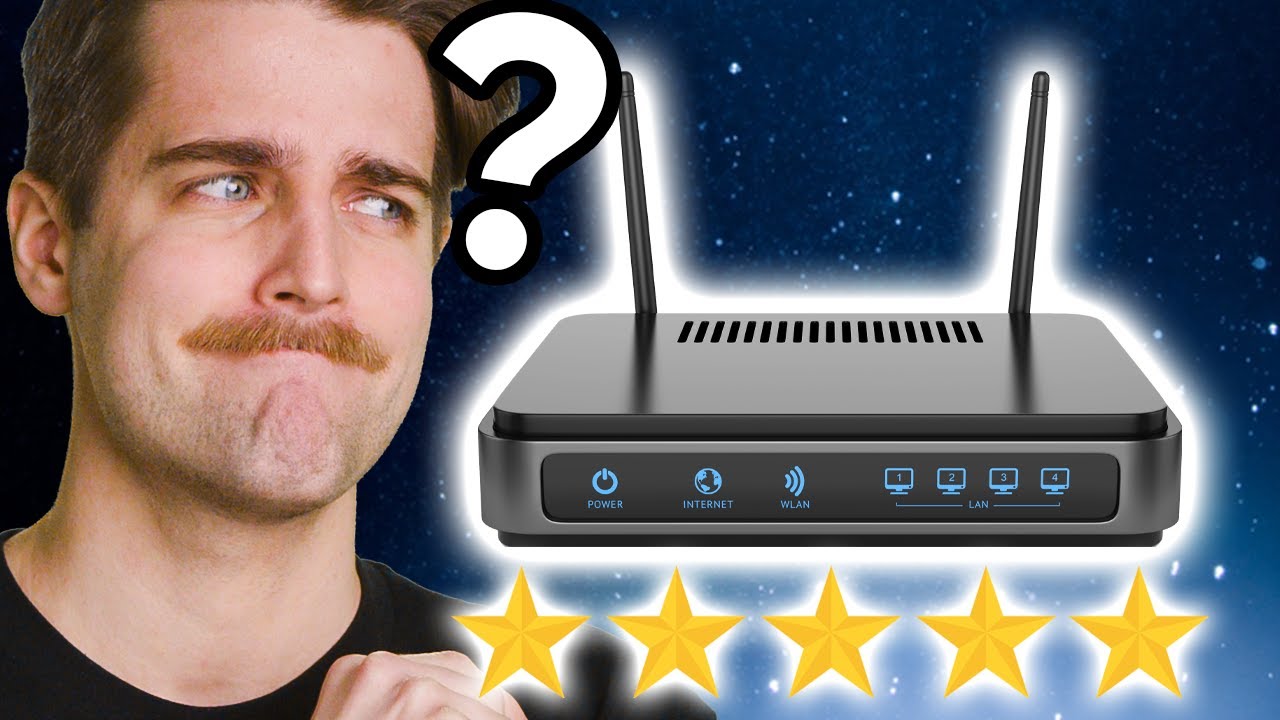
The first 200 people who head to https://brilliant.org/techquickie/ will get 20% off their annual premium subscription of Brilliant.
Is the MU-MIMO feature many router manufacturers mention really just snake oil?
Thanks to Joel Crane for your help with this video! Check out his blog at http://www.potatofi.com/
Buy Gaming Router
On Amazon (Pai...
I guess this whole MU-MIMO business is pretty much snake oil. Which is why you’re not seeing much difference in performance
nimble sable
thick minnow
I guess this whole MU-MIMO business is pretty much snake oil. Which is why you’r...
i just...why even bother with 4x4 APs?
nimble sable
thick minnow
Okay I looked a bit more and maybe found the issue. Check this out: https://yout...
omg i can't believe i missed this one, thank you
 hollow axle
thick minnow
Okay I looked a bit more and maybe found the issue. Check this out: https://yout...
hollow axle
thick minnow
Okay I looked a bit more and maybe found the issue. Check this out: https://yout...
I had a velociraptor with a functional heatsink!
 clever berry
hey guys, I'm a student in networking and there's something I can't seem to wrap my head around: how the fuck does one find the inside global and outside local addresses and how do you make the translation work properly?
and do you need to subnet outside global ips?
peak cloak
clever berry
and do you need to subnet outside global ips?
there is no technical difference between global and local IPs, it's a matter of just where they are used and how
peak cloak
clever berry
hey guys, I'm a student in networking and there's something I can't seem to wrap...
I don't understand what you mean?
clever berry
peak cloak
I don't understand what you mean?
say you're making a dynamic nat pool. should you put the outside global addresses or the inside global addresses?
I'm not sure if that helps tbh
peak cloak
For what?
clever berry
dynamic translations
say 192.168.1.20 needs to be translated to the public ip for the internet
peak cloak
Yes, so that would be source nat
You need to set the source IP to a public IP (not nessicerly it gets complex with double NAT)
clever berry
but that would make it static, right?
peak cloak
Because when the packet leaves the router, it needs to have its source packet changed from the local IP to the IP of the router in a SOHO environment
peak cloak
clever berry
but that would make it static, right?
Dynamics vs static IPs is a separate thing, but yes it would require a static IP
It wouldn't make it static tho
Home routers often use masquerade nat, a type of source nat which uses the a interface IP
clever berry
the interface ip of the router?
clever berry
makes sense
but what about translating ip addresses from a network like 192.168.1.0?
clever berry
wdym?
peak cloak
I don't think I understand. Like a conventional home router with internal network of 192.168.1.0/24 and random public ?
clever berry
with a reserved public ip pool
peak cloak
Then you would would just set that pool as the source IP pool
clever berry
as in outside source?
peak cloak
? Is that Cisco specific wording or something
clever berry
yeah im using Cisco stuff for my classes
they call it outside local, outside global, same for inside
local being interfaces and specific ips global being the network
peak cloak
Not sure how Cisco works, most familiar with vyatta style syntax
clever berry
never heard of vyatta
peak cloak
clever berry
never heard of vyatta
Juniper and vyos are derivatives of it
clever berry
we only really use Cisco products for classes, but I'll look those up
clear igloo
clever berry
we only really use Cisco products for classes, but I'll look those up
Inside local and inside global, in 99% of applications are the same address
But let me double check, been so long since I've mucked with NAT like that
clever berry
I thought local was the end device ip?
wait, are they just the router's inside-facing interface's ip address?
clear igloo
clever berry
wait, are they just the router's inside-facing interface's ip address?
yah, the definitions are kind of crappy but yes
clever berry
clear igloo
yah, the definitions are kind of crappy but yes
well there's my fucking problem
I've been using the network ip for inside global
clear igloo
Basically the docs say
inside local - not legitimate IP (APIPA or something)
inside global - legitimate IP on the NIC
In practice those are the same thing, they're going to be the private IP
clear igloo
ip nat inside source static [inside] [outside]
yup, just what you want to take (the private address) and what you want to make it (the outside)
clever berry
bruh.
I've been putting the ip of the end device in static nat
so the only difference is that the outside ip address might change with a dynamic pool?
clear igloo
yah
clever berry
and the outside global is the outside interface?
clear igloo
outside global is public IP/subnet
outside local is router's ip on the WAN
inside local is host subnet or host ip
inside global is router ip on the LAN
If I'm reading and remembering right from output of show ip nat translations
clever berry
misread
clear igloo

Most of the time you're doing NAT from one side to the public internet so that's why I say they're generally the same but IF you're doing it like shown here then yes they'll be different
So basically most of the stuff today is PAT since NAT is 1:1
clever berry
clear igloo
so in that case, inside global is the outside interface, but most of the time, it's the inside?
clear igloo
clever berry
so in that case, inside global is the outside interface, but most of the time, i...
Yah
clever berry
so only when there's a Wan, it's different?
clear igloo
clever berry
so only when there's a Wan, it's different?
Yah, when you're actually going to the internet it's just PAT (many:1) 99.9% of the time
NAT 1:1 can still be subnet to subnet based but each inside host gets a unique outside address, there is no sharing like with PAT
clever berry
and pat you just put "overload" on the interface, right?
clear igloo
correct
clever berry
that explains why my nat wouldn't work
thanks for your help, don't think I would've figured out why it wouldn't work otherwise lol
 gilded ice
anyone know how i can make port 80 redirect or alias port 5000 on the same machine?
im running oracle linux on a oracle vm, i did all the steps it says port 80 is open but ive had no luck accessing it
ive tried running the flask app from port 80 but no traffic ever gets there
peak cloak
gilded ice
anyone know how i can make port 80 redirect or alias port 5000 on the same machi...
Reverse proxy
peak cloak
gilded ice
ive tried running the flask app from port 80 but no traffic ever gets there
It would need to run as admin/root since port 80 is special. Best practice is to not do that and run reverse proxy instead
gilded ice
I ran my script as sudo, no errors server side just no traffic was getting to flask :/
I'll try reverse proxy
 gritty aspen
Can you guys critique my network notes when i used to work as one for usmc?
I was a glorified wiredog anyway. But might as well pick your brains for some knowledge.
I guess there was this 2ndary layer with ip schemes and numbers I didnt quite understand. I just saw everything physically.
 mystic latch
Spoof some MACs
peak cloak
Apple Support
To improve privacy, your device uses a different MAC address with each Wi-Fi network.
yeah no
yeah no, it wouldn't do anything
not really, why do you need openvpn during flight on that specific phone? Use the other one?
mystic latch
peak cloak
yeah no, it wouldn't do anything
Just gotta do some light deauth...
I'm just messing around
quaint siren
hm, so at school, we have to setup apache2 server in Debian which was easy. Then we had to set up NAT rule that everyone could access the web server but I ran into an issue. I could open the apache2 website with the IP that I had set for the server but not with public IP
Chain was set to dstnat, protocol to TCP, dist port to 80 and then action to dist-nat, to address [apache ip] and to ports 80
Friend of mine got his to work but I never could get mine to work
pseudo blade
quaint siren
Friend of mine got his to work but I never could get mine to work
Sounds familiar, did you perhaps try it from inside the network? You need hairpin NAT for that to work.
quaint siren
Yeah so when I used my public IP, it show the router web interface
long scarab
quaint siren
Yeah so when I used my public IP, it show the router web interface
thats because remote management is enabled, turn that off and improve security
or change the remote management port
peak cloak
long scarab
thats because remote management is enabled, turn that off and improve security
not really
if you're in LAN and access the public IP doesn't mean it's accessible from the outside
long scarab
just saying that's how i fixed that
when i access my public ip from lan it just refuses connection but outside it works
(older black tower from xfinity)
peak cloak
you don't want your router webui to be accessible at all from the outside
long scarab
that's why i said disable it or change it
peak cloak
but just because it works from LAN doesn't mean remote managment is enabled
long scarab
ah
long scarab
 swift creek
Y’all have a good Ethernet standards chart?
swift creek
Y’all have a good Ethernet standards chart?
what exactly do you mean
t568a and b stuff or the pinout
rocky badge
@meager ginkgo Do you know what Brightridge's 10 gig handoff is
swift creek
long scarab
what exactly do you mean
t568a and b stuff or the pinout
like ratings for cat 5 5e 6 6a 7 and 8
gigbit speed over what distance
 meager ginkgo
rocky badge
<@390856614942474241> Do you know what Brightridge's 10 gig handoff is
meager ginkgo
rocky badge
<@390856614942474241> Do you know what Brightridge's 10 gig handoff is
nope
hollow marlin
rocky badge
I swear it’s Metro E
Well, Metro-E is pretty much always involved at some point in the network. As XG-PON is 10/2.5G where as XGS-PON is 10/10G if that's what you were thinking
rocky badge
Oh I thought XGS couldn't do symmetrical
hollow marlin
Yep, it's symmetrical
rocky badge
ahh
hollow marlin
I know we have an order of Nokia XGS gear on the way to test out
rocky badge
SO it COULD be XGS-PON stuff from Calix
thick minnow
swift creek
like ratings for cat 5 5e 6 6a 7 and 8
Here's one. Unless otherwise stated, all of them are rated for 100 meters which is about 328 feet.
 hollow marlin
rocky badge
SO it COULD be XGS-PON stuff from Calix
hollow marlin
rocky badge
SO it COULD be XGS-PON stuff from Calix
Definitely. Or their NG-PON2.
 grand cloud
I'm wanting to do a pfsense/opnsense router config with an older PC BUT I was trying to figure out how to multi-purpose the older PC as it doesn't have a bad setup (i7-4770 + RX580)
I think it's a pretty simple ask but unsure if its possible.
Wanna setup an initial VM for the pfsense/opnsense setup then setup some containerized projects via Docker such as Plex and lastly possible NAS use?
opal pagoda
grand cloud
I'm wanting to do a pfsense/opnsense router config with an older PC BUT I was tr...
Take a look at hardware heaven videos as he has made similar thing to what you want to build
grand cloud
opal pagoda
Take a look at hardware heaven videos as he has made similar thing to what you w...
thank you!
pseudo blade
grand cloud
I'm wanting to do a pfsense/opnsense router config with an older PC BUT I was tr...
I'd remove the GPU for one, PacketShader never took off
Just a waste of power
grand cloud
pseudo blade
Just a waste of power
ye was thinking so its lived out its lifespan for sure as well 🤣
on her last legs haha
will have a nice 5tb of storage though !
pseudo blade
Mine has 16MB lol
Had a 2GB SD card in and burned it out in two weeks with an sqlite db
opal pagoda
pseudo blade
Had a 2GB SD card in and burned it out in two weeks with an sqlite db
Yikes running a db from a sd card
thick minnow
:)
 pseudo blade
opal pagoda
Yikes running a db from a sd card
pseudo blade
opal pagoda
Yikes running a db from a sd card
It wasn't an especially important one and was backed up
Dude DB tracking like 8 devices
That said, running an SQLite DB from an SD card is a perfectly reasonable thing to do if it's low-writes high-read
Especially on a more modern card with wear levelling
rocky badge
@clear igloo @meager ginkgo I love my university’s standard in WiFi deployments
clear igloo
rocky badge
<@291198741862416384> <@390856614942474241> I love my university’s standard in W...
how so? I thought it was random
rocky badge
Any new APs must have 6E, 5 gig capable wiring, and UPOE+
clear igloo
Oh, nice
rocky badge
Well, I meant AP drop & AP
clear igloo
WiFi 7 wen 😛
rocky badge
lol
clear igloo
rocky badge
Well, I meant AP drop & AP
Got it, that makes sense
pseudo blade
My former uni had great speeds all over campus and halfway into the big agriculture plots - did a press shoot on a hill hundreds of meters away from campus and could still kinda use WiFi, it was impressive
Well-designed WiFi with quality APs can do great things
 trail venture
So I am running into a major bottleneck and after some time traced it to the CPU speed of my current router basically its too slow for my current network and throttling speeds to around 500-700 mbps the modem is full throughput 1gbps. I am looking for something cost effective that has support for DD-WRT or Open WRT firmware and has 2.5gbps or higher ethernet ports to allow for future modem speed increases
wifi is optional as I can just use the old router on a subnet for that and this router is just going to be bridging the wan and lan
size is also a bit of a concern because I dont have room for a full 1u rack unit
so something on the smallish side
looking for recommendations idealy want to keep it in the 200-250 $ range
used / refurb is acceptable
nimble sable
pseudo blade
My former uni had great speeds all over campus and halfway into the big agricult...
That far out is no 5ghz right? Or is that possible?
 ebon wasp
nimble sable
That far out is no 5ghz right? Or is that possible?
ebon wasp
nimble sable
That far out is no 5ghz right? Or is that possible?
If you kinda have line of sight, then it's possible with 5ghz.
5ghz does not like anything solid
nimble sable
ebon wasp
5ghz does not like anything solid
Oh it can do distance though? Oh, walls, right yea, I live downtown so it's prbly the walls and buildings
rocky badge
@hollow marlin @meager ginkgo
 meager ginkgo
rocky badge
<@462711605063450628> <@390856614942474241>
meager ginkgo
rocky badge
<@462711605063450628> <@390856614942474241>
nice
rocky badge
No more Ubiquiti in the rack 
meager ginkgo
monoprice slimrun patch cables?
 clear igloo
monoprice slimrun cables are chefs kiss
meager ginkgo
^
rocky badge

FS.com
FS 30 ft thin Ethernet cable is equipped with pure bare copper conductors and gold-plated connectors. The long ethernet patch cable passes the American Fluke test, providing you with error-free data transmission performance and highly reliable connections, ideal for high density environments. Get it on fs.com. Multiple colors available. Free shi...
@clear igloo
 clear igloo
Yah, the GUI can be slick for that stuff 😄


 native folio
peak cloak
native folio
peak cloak
wifi
pseudo blade
nimble sable
That far out is no 5ghz right? Or is that possible?
I doubt it, though it's 100% possible to do
After all you can do 5ghz over kilometers with the right gear
nimble sable
pseudo blade
After all you can do 5ghz over kilometers with the right gear
really?,i had no idea, nice
pseudo blade
Yeah totally, 5ghz point to point/multipoint's a pretty good balance between speed and range
Did a design for an agricultural school, omni on a hill (with a river in between even), 5ghz 802.11AC and directional stations up to about 5km away at various outbuildings - Worked great.
peak cloak
nimble sable
really?,i had no idea, nice
frequency is only one part of the equation
if you are line of site and have high power transmitters it's easily possible
pseudo blade
Comfortably up to 200mbps, had a two-dipole setup so dual chain 5ghz
Line of sight's a huge deal at range
opal pagoda
pseudo blade
Line of sight's a huge deal at range
Most fascinating range that i know of is meshtastic lora connection over 254km
And considering there was only low power, off the shelf hardware involved with omni antennas
Really impressive stuff
 cyan cedar
https://discord.com/channels/375436620578684930/1155359052025573386 This might be considered spam, but I’m in desperate need for help
thick minnow
I’ve tried power line ethernet for a solid solution to my networking issues
Whenever someone turns on the dryer in the apartment next door it disrupts the signal
I’m using a netgear wifi extender at the moment
Instead of the powerline
We only have one cable company that runs internet in my town so I don’t think I can get a separate internet service for my part of the property
 uncut plume
What is the reason for a home router to have both an IPv4 and IPv6 address together?
ebon wasp
Because IPv6 can't communicate with IPv4 and vice versa
Dual stack is the easiest way to be sure you can view everything on the internet
opal pagoda
thick minnow
Instead of the powerline
If you have coax you could use moca adapters
thick minnow
opal pagoda
If you have coax you could use moca adapters
I could run powerline to a old direct tv line in the main house and do it that way
The internet box has coax
I don’t want to drill any holes in the walls
Its a apartment
opal pagoda
thick minnow
I don’t want to drill any holes in the walls
If its cable tv its most likely same coax going to the router and that tv, its the matter of using moca compatible splitters and you are done
uncut plume
ebon wasp
Dual stack is the easiest way to be sure you can view everything on the internet
So if I dont have an IPv6 address assigned to my router then I wont be able to access some sites on the internet?
thick minnow
opal pagoda
If its cable tv its most likely same coax going to the router and that tv, its t...
Question
Will it send the mocha data down the isp cable
Or interfere with it
There is only the isp cable in that room
Can I put a splitter on that end and then put a splitter on the outside end and feed it to my apartment
opal pagoda
thick minnow
Will it send the mocha data down the isp cable
You can get a moca filter, moca uses different frequency also that it doesn't interfere with isp or tv
thick minnow
opal pagoda
You can get a moca filter, moca uses different frequency also that it doesn't in...
I will have to research this more
ebon wasp
uncut plume
So if I dont have an IPv6 address assigned to my router then I wont be able to a...
Yep, although it's more likely that having only IPv6 will limit you more if you live in NA or Europe
uncut plume
I only ask because my router has this stupid issue that parental controls only work if IPv6 is disabled
You would think that Linksys would have their shit together 🙄
thick minnow
uncut plume
I only ask because my router has this stupid issue that parental controls only w...
Wtf
That sounds out of wack
uncut plume
Yeah I looked it up and others have the same issue
Reddit
Explore this post and more from the HomeNetworking community
And their offical answer is just turn off IPv6 instead of fixing it 🤔
 pseudo blade
uncut plume
https://www.reddit.com/r/HomeNetworking/comments/150ap73/parental_controls_on_ro...
pseudo blade
uncut plume
https://www.reddit.com/r/HomeNetworking/comments/150ap73/parental_controls_on_ro...
The real answer is to control the devices themselves via parental controls and other device policy settings+software and limiting their use to certain locations.
You can't actually trust that traffic doesn't have something else encapsulated in it if the end user can install or use anything - SSL VPN or Tor/the like
I'm not a parent, but for parental controls specifically maintaining healthy conversations with your child about the internet and other such topics would probably do better than some DNS/IP and MAC-based content filter at reducing risk of harm
uncut plume
pseudo blade
I'm not a parent, but for parental controls specifically maintaining healthy con...
Yeah im not a parent either. I was just playing around with my router settings and I noticed that issue. It was just driving me nuts even though I dont really need it.
 brisk ledge
not sure if its the right way to ask, but...
I want to be able to recieve quite a few files from a buddy across the web, whats the easiest/quickest solution?
Its not something they could easily put on google drive or something, cause its about 80GB, ideally just peer2peer directly to my nas, but ye, to pc or whatever would also be fine.
I would also be able to set up a smol server for whatever on my proxmox node, including access from the web, but i really dont have a fast idea.
 low pond
im not suggesting, but me and a friend would've used torrent for it and we did
for some huge videos
mystic latch
brisk ledge
not sure if its the right way to ask, but...
I want to be able to recieve quite...
Magic-wormhole has worked great for me in the past for large files.

GitHub
get things from one computer to another, safely. Contribute to magic-wormhole/magic-wormhole development by creating an account on GitHub.
brisk ledge
low pond
im not suggesting, but me and a friend would've used torrent for it and we did
Doing that rn, thing its actually quite a cool solution got the idea to just use my qbittorrent lxc for that way too late.
Coz like torrents are basically p2p by Design
brisk ledge
mystic latch
[Magic-wormhole](https://github.com/magic-wormhole/magic-wormhole) has worked gr...
That said, this also sounds dope asf.
 blazing gorge
Anyone know a more secure router that can accept blocklists and allow mullvad vpn to run on it?
I thought about making my own using a raspberry pi
 sturdy cloak
PFsense or OPNsense would manage that, wouldn't go the RPi route though, best to get something with 2+ NICs on the PCIe bus.
sturdy cloak
If you can find a Beelink EQ12 mini PC with the N100 cpu and dual Intel NICs, it's a very nice platform for a soft router.
peak cloak
Unifi or omada?
peak cloak
@rocky badge internet here recently has been terrible, can't stream 1080p video without buffering, but all speedtests show > 150mbps speeds. You know of any other speedtest / quality tests to show IT?
hollow axle
peak cloak
Unifi or omada?
I had to Google omada... I like tplink, i personally use their kasa stuff but if you are going SD-WAN, go with a bigboy solution
 true spade
I need a good pcie WiFi adaptor
Out of these 2 this one is cheaper:
But I've never heard of the company, and there's also this one for a little higher price but I know about tplink:
Which do I go for?
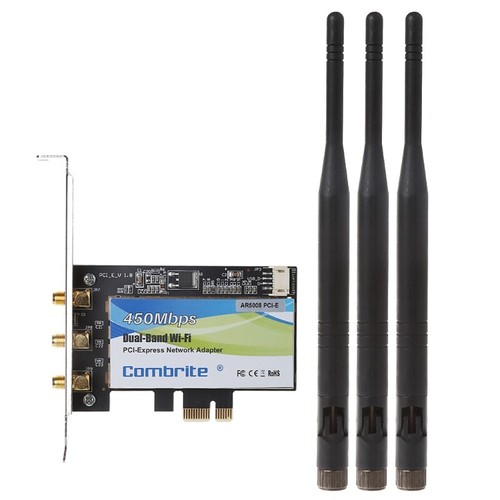
eBay
Find many great new & used options and get the best deals for PCI-E 2.4G+5G Wifi 300/450M PCI-Express Wlan Card For INTEL6300 AR5008 at the best online prices at eBay! Free delivery for many products.

eBay
Find many great new & used options and get the best deals for TP-LINK N900 WiFi Card Wireless Dual Band PCI Express Adapter TL-WDN4800 at the best online prices at eBay! Free delivery for many products.
rocky badge
peak cloak
<@236237361703288842> internet here recently has been terrible, can't stream 108...
Is it on one site or all sites?
Packet loss? Routing? Etc? I'm not sure tbh
peak cloak
rocky badge
Packet loss? Routing? Etc? I'm not sure tbh
No clue, made a ticket, said they are rolling out an update tonight
rocky badge
oh at your uni?
rocky badge
ohhh
 cosmic steeple
Dropping packet after installing an AP. How can I trouble shoot?
hollow marlin
peak cloak
<@236237361703288842> internet here recently has been terrible, can't stream 108...
As when I get an escalation from a customer for the same thing, 2-3 test each from speedtest.net/fast.com both single/multi-stream are a good start.
As always, speed test are just a data point and taken with a grain of salt. Curious on what they mean by "rolling out an update tonight"
peak cloak
hollow marlin
As when I get an escalation from a customer for the same thing, 2-3 test each fr...
Yep, I guess they had an idea with all the complaints. I forgot you could change server on speedtest.net and to other locations it was still >50mbps.
I guess it's configuration changes. They asked for a specific date when it started.
We are actively working on this. When would you say this first started occurring? If you happen to recall a specific day that would be very valuable information for us.
We will be rolling out an update tonight. Please test connectivity tomorrow and let us know how it performs for you.
hollow marlin
peak cloak
Yep, I guess they had an idea with all the complaints. I forgot you could change...
Are you still able test single stream? Both can be done on speedtest/fast
peak cloak
hollow marlin
Are you still able test single stream? Both can be done on speedtest/fast
yes, single stream is also fine, around 200mbps
 south gull
can i get a different wifi antenna for my mobo that reaches further?
 ember basin
how drastic is the difference between arm and x86_64 based routers?
for power consumption, that is
 hasty hedge
Anyone want to get started with e commerce website i can help with that
 lyric socket
Anyone knows how i could reset the password i have on the router settings page?
(like when i go to 192.168.0.1)
it's a modem/router btw
opal pagoda
lyric socket
it's a modem/router btw
If its owned by isp call them and they should be able to reset that password
 round arrow
Hello all! I’m in the process of planing and deploying a server into my basement ( not a need but a learning exercise) I have 2.5 gig fiber into my house. Should move the moden to the server rack & then attach the WiFi from the server switch? I’m going to be setting up my own routers at the same time
By my own, I mean I purchased not from my ISP, not one I built. I’m not that skilled
 untold elbow
@round arrow that's probably what i would do. so it'd look like [OUTSIDE WORLD] --> [ISP modem] --> [your router] --> [2.5g switch] --> [server, WAP, all the other stuff on your network]
assuming you don't have to do any new major cable runs
round arrow
untold elbow
assuming you don't have to do any new major cable runs
I’m gonna try to run a few cat 6 through the house this winter. I’m setting up a hard wired network for my apartment building ( I own) that my family lives in. Will be trying to set up individual groups for each apartment. Gonna be a fun
untold elbow
pulling cable through existing construction sucks, good luck 🙂
round arrow
untold elbow
pulling cable through existing construction sucks, good luck 🙂
O don’t worry, it’s 120 years old! Lol I would go into the attic but it was way too hot to hoast a server up there.
nimble sable
Asking this again cuz I didn't get a sure answer but... What is the point of a 4x4 6ghz antenna on an AP?
clear igloo
nimble sable
Asking this again cuz I didn't get a sure answer but... What is the point of a 4...
dual 2x2 clients?
nimble sable
clear igloo
dual 2x2 clients?
IRL mu-mimo doesn't actually work, unless i'm missing something https://www.youtube.com/watch?v=cKTbNRTmzhY
as far as I can tell, there is no difference between 2 2x2's running on a 2x2 or a 4x4 in terms of speed or anything, if there is let me cuz i'm not seeing it
The first 200 people who head to https://brilliant.org/techquickie/ will get 20% off their annual premium subscription of Brilliant.
Is the MU-MIMO feature many router manufacturers mention really just snake oil?
Thanks to Joel Crane for your help with this video! Check out his blog at http://www.potatofi.com/
Buy Gaming Router
On Amazon (Pai...
clear igloo
That's 100% dependant on software, the spec exists and is real and can function and does. Saying "shit consumer router doesn't do XYZ therefor it's broken across the board" is a horrible argument
clear igloo
nimble sable
IRL mu-mimo doesn't actually work, unless i'm missing something https://www.yout...
Are you testing with two clients running full bore to a sufficient server?
For standard users there isn't a net gain but in crowded networks and when you have clients that can saturate the spectrum it definitely provides advantages
nimble sable
clear igloo
That's 100% dependant on software, the spec exists and is real and can function ...
- i'm not sure netgear/TPlink/Unifi business APs count as "Consumer"?
- IDK shit about wifi, there's a techquickie that's explaining taht mu-mimo doesn't quite work as intended IRL, i'd love to know where that is wrong, or where my understanding of that is wrong. Additionally, I have contacted tplink and netgear after sales support who have repeatedly told me their gear is working as intended and that I will never be able to actually see a combined a speed of 4800Mbps on 2 phones...why is that?
- I tested on all 3APs with 2 Pixel phones. when on one phone i can download at 2.3Gbps (for 160Mhz band) or 1.1Gbps (for 80mhz bands). The moment i get on the second it splits the speed never going above that on both combined. My understanding was, the whole point of a 4x4 is: let's say 6ghz 160mhz bands - one phone should be able to use one 2x2=2400Mbps and another use the other 2x2=2400Mbps so if i have 2 speedtests running i should be seeing a total download of 4800Mbps from the server, which i never do... (note: the netgear AP has an uplink of only 2.5Gbe so i tested using 5ghz band of 80mhz, meaning i should be totalling 2.4Gbps from server but i was only totalling 1.2Gbps from server. The server is fully capable of 2.4Gb because if i upped it to 160Mhz and/or 6ghz with 160 wide bands - i am able to saturate the 2.5Gbe uplink)
[i understand in real life the speeds are going to be maybe 80% of the max speeds, as such i do regularly get 2.2Gbps or even upto 2.3Gbps on 160Mhz wide 6e bands on a single device, so my expectation is to get a combined speed of at least that much on 80mhz wide bands]
[additional note: 1 wifi+1 wired can get me above 2.5Gbps going from the server. I've gotten upto a total of ~4600Mbps outgoing from the server. meaning, my server is capable of dishing out at least that much at a time]
additionally, for my own knowledge: please tell me, if you know, a combination of 2x2 clients and a 4x4 AP that can actually let you download at a combined speed of at least 4000Mbps (on 2 or more devices). What do i need to do, to say - be able to saturate the 2.5Gbe uplink to the Netgear AP on 80mhz wide bands (4x4)
 gleaming estuary
https://www.aliexpress.com/item/1005005668388451.html
I wanted to buy one of these things to run pfsense or opnsense on it
I just really wanna put all vpn on all my devices I was thinking of getting a brume 2 I just need anything that can do wiregaurd well
nimble sable
gleaming estuary
https://www.aliexpress.com/item/1005005668388451.html
I wanted to buy one of the...
I'm not sure of the specifics but for VPN you want something with CPU that is powerful enough for the kind of speed you want. Pfsense says Cortex-A53 is enough to do 90mbps VPN mixed traffic
gleaming estuary
I have a 500 down and 300 up and connection with wiregaurd it’s 400 down 220up
On my old setup i got around 300 up and down
I don’t really have a frame of reference with these boxes except that the Brume 2 can do wiregaurd at 300
pseudo blade
Wireguard's pretty easy on anything unless you're expecting multigigabit throughput or something
round arrow
If you build and maintain servers & networks. Hardware installation. What is that job title
gleaming estuary
pseudo blade
Wireguard's pretty easy on anything unless you're expecting multigigabit through...
True the only thing I was worried about with the brume 2 is the 355Mbps for wiregaurd realistically I don't need more than that but would be nice having pfsense and a whole ecosystem of x86 software
peak cloak
round arrow
If you build and maintain servers & networks. Hardware installation. What is tha...
sysadmin ?
depends really on the scope
maintain servers and networks is usually sysadmin, but all of that can be under sysadmin if it's a smaller company
round arrow
peak cloak
sysadmin ?
Thank you! Just looking for diffent jobs, and straight up couldn’t find the title ! Thanks for the help
hollow axle
Design or build? It's a big difference
 fervent brook
Note to self: "WDS" might let me use ethernet with a cellular hotspot
opal pagoda
hollow axle
Design or build? It's a big difference
Or even maintain
hollow marlin
nimble sable
1. i'm not sure netgear/TPlink/Unifi business APs count as "Consumer"?
2. IDK sh...
when on one phone i can download at 2.3Gbps......i understand in real life the speeds are going to be maybe 80% of the max speeds, as such i do regularly get 2.2Gbps or even upto 2.3Gbps on 160Mhz wide 6e bands on a single device
The highest best case real world test I have seen have not exceeded 1.9gbps. That is in controlled environments..... 2.3gbps is literally best case scenario with Eth overhead. This is wireless which has additional overhead so I am suspicious of those claims
The moment i get on the second it splits the speed never going above that on both combined.....note: the netgear AP has an uplink of only 2.5Gbe
So are you actually getting these speeds or just looking at PHY rates? If you only have a single 2.5gbps interface, why would you expect two clients to be able to exceed 2.3gbps?
so my expectation is to get a combined speed of at least that much on 80mhz wide bands
While I am no expert in WIFI and actively avoid it, I suspect this has to do with the number of streams. Like from what I understand researching this in the past with some of our deployments, if 4x4 is actually 4x4:2, or 4x4 is 2.4/5/6 combined, then it's not 2 x 2x2 for two clients
nimble sable
hollow marlin
> when on one phone i can download at 2.3Gbps......i understand in real life the...
i have seen upto 2.3 but best case usually is around 2.1 or so. But that is besides the point, or at least besides my point. So in order to avoid gettting bogged down with semantics i'm going to use speed ranges. What i see is this
1, phone1 connected to 160mhz wide band. download speed is between 1.5Gbps and 2.3Gbps
2. phone1 is connected 80mhz band. download speed iss between 800Mbps to 1100Mbps
makes sense so far i'd say
now:
- phone1 and phone2 are each connected to an SSID that has 80mhz wide band on 4x4.
* what i expect to see: combined speed between 1.5Gbps and 2.3Gbps (ie same as 160mhz band speed)
* what i actually see: combined speed between 800Mbps and 1100Mbps
(note: TPlink AP actually has an uplink of 10Gbe so with Tplink i'm able to do the same with 160Mhz bands all through as it can do 4Gbps+, but let's stick with netgear as that is what I have right now)
note2: I confirmed w/ both TPlink and Netgear after sales (this is a business after sales suppport, not that it matters either way tbh) and they both said that this is working as intended and it is unrealistic of me to expect to see 2x(2x2 speeds) when connecting 2 devices to one SSID and this is why some devices have a 5G_hi and 5G_low as that allows the 4 antennas to be split into 2 properly
hollow marlin
nimble sable
i have seen upto 2.3 but best case usually is around 2.1 or so. But that is **be...
But that is besides the point
Sure but it's still important. Not only is claims of wired line rate over wireless questionable, but not pointing out that the range is quite large of 1.5-2.3Gbps is misleading
unrealistic of me to expect to see 2x(2x2 speeds) when connecting 2 devices to one SSID and this is why some devices have a 5G_hi and 5G_low as that allows the 4 antennas to be split into 2 properly
I wouldn't say unrealistic, but I wouldn't rely on it as there is still a ton of variables. Like I mentioned, if the AP is actually 4x4:2 or 4x4:3 instead of 4x4:4, then you'll get not benefits with 2 x 2x2 clients.
Did you actually create two SSIDs to confirm that both clients can reach expected throughput?
nimble sable
hollow marlin
> But that is besides the point
Sure but it's still important. Not only is clai...
nope same SSID. should i try with 2? it is besides the point because literally all i want to see is 2 devices get faster combined speed than 1. that's it. the speeds don't matter, i want to see phone1+phone2 > phone1 alone. I understand wifi has MASSIVE number of variables. that's why i'm not expecting to see a specific speed but rather comparitive terms like "Faster" and "slower". and because i don't remember what the speeds i saw where, or don't have the prroof anymore and i do not want to get bogged down in semantics of "but you said 2.3gbps, see you only saw 1.7"...
hollow marlin
If support mentioned that breaking up the SSID would resolve the issue, I would test it to confirm their claims. Also rerun test with 1x1 clients to see if you get similar results and if it's expected, it's probably related to what I mentioned above
nimble sable

i can't seem to get my librespeed to work properly anymore, i have no idea what i did to fix the slowness issue last time. But here's iperf3. Honestly my linkspeed is usually like 1700-1800Mbps, i have to be standing RIGHT under the thing to get 2000+ link speed, then i get this
nimble sable
hollow marlin
> But that is besides the point
Sure but it's still important. Not only is clai...
what is AxB:Y? I get A and B recv and transmit antenna....what's the Y? and how do i find out what my AP has (tplink EAP690HD and netgear WAX630e).
What support mentioned was if the AP itself was broken up, ie. instead of one 4x4 it had 2 2x2s where you could assign different frequencies to each (ie 5Ghz_lo and 5Ghz_hi)
hollow marlin
The ":y" is spatial streams. From my rough understanding, this is key to MU-MIMO and without enough to allocate to all devices, it won't even take effect.
nimble sable
geez, it literally doesn't say anywhere in the spec sheet for either one
hollow marlin
I've only seen it listed on enterprise gear
nimble sable
this is prosumer, sold as "business" right, you'd think it'd be more pro- than -sumer but I guess not? I'm guessing this means that there's only 1 spatial stream. Ok so that makes sense, i'm guessing the "splitting" ones ie when the mention 5Ghz-1 and 5Ghz-2) that's how they tell you it's 2 streams?
i mean look at this, why bother with the 4x6ghz?
 hollow marlin
nimble sable
this is prosumer, sold as "business" right, you'd think it'd be more pro- than -...
hollow marlin
nimble sable
this is prosumer, sold as "business" right, you'd think it'd be more pro- than -...
I don't think there is only 1 spatial stream as I have only seen odd ones 4x4:2 and 4x4:3 and from what I read in the past, there is no way to tell outside documentation. Like I mentioned, it's not my field and I actively avoid wireless, but I know I ran across two articles breaking down the streams and if they cannot be allocated evenly across the clients, MU-MIMO will not be in play
nimble sable
hollow marlin
I don't think there is only 1 spatial stream as I have only seen odd ones 4x4:2 ...
so if i just wnat to download on 2 devices do i need 2 spatial streams or just 1 each?
yea they both seem to be either 2x2:2 or 4x4:2,
hollow marlin
nimble sable
yea they both seem to be either 2x2:2 or 4x4:2,
Is that what you're seeing on the device side?
nimble sable
there's one website that says wax630e has 4x4:4 on 5ghz but...again, i can't get speeds more than 1200Mbps on 80mhz bands on that
 waxen scroll
hollow marlin
I don't think there is only 1 spatial stream as I have only seen odd ones 4x4:2 ...
waxen scroll
hollow marlin
I don't think there is only 1 spatial stream as I have only seen odd ones 4x4:2 ...
nerd
hollow marlin
waxen scroll
nerd
wireless 🤮
nimble sable
is it an allocation issue? like the device is unable to allocate spatial streams and somehow defaults ot putting both on one cuz they are near each other?
nimble sable
hollow marlin
wireless 🤮
yea, im starting to get that, on top of everytihng else the massive amount of disingenous marketing and lies are not helping
hollow marlin
Less about allocation as it's at the hardware level but that is the limit of my knowledge of it. And yes, this is why I avoid it.
nimble sable
hollow marlin
Less about allocation as it's at the hardware level but that is the limit of my ...
Well either way, thx for the knowledge dump, is been helpful
hollow marlin
Sure thing. If you eventually find an answer I'd be curious of the root cause
 round timber
I'm trying to decide what's better, I don't know whether I should choose a "ASUS ROG Rapture GT-AX11000 AX11000" or a "ASUS ROG Rapture GT-AX11000 Pro" please ping with an answer. Or if there is anything better, like a different brand.
 hearty storm
hey friends, i happen to be a networking noob!!
I bought a second router to use as a standalone wireless network for my oculus. I hooked the second router to the original using an ethernet cable.
So it goes like this, ISP modem to original router with ethernet and then original router to second router with ethernet. Upon setup i was getting some warnings about suboptimal configurations affecting speed on the new router. Do i need to change settings on orignal router to achieve what im going for here?
 crimson mica
hearty storm
I bought a second router to use as a standalone wireless network for my oculus. ...
crimson mica
hearty storm
I bought a second router to use as a standalone wireless network for my oculus. ...
Are you trying to make it so that the oculus can't connect to anything else on the rest of your network?
hearty storm
crimson mica
Are you trying to make it so that the oculus can't connect to anything else on t...
thats not an issue at all. But yes, the only device connected to the new router will be my pc and the oculus
crimson mica
So ur trying to extend your wifi's range? Most of the routers I've played with have a "access point only mode" which basically makes them act as a switch and ap
all routing functionality get sent to the upstream router
nimble sable
If I buy an x520 (pcie2.0 x8) and stick it in a pcie x16 (only wired for x4) lane, what will happen? Will I just get pcie2x4? Will that be enough for 10Gb consistent?
pseudo blade
nimble sable
If I buy an x520 (pcie2.0 x8) and stick it in a pcie x16 (only wired for x4) lan...
You will get 2.0x4 as you can't get faster speeds per lane the card supports, nor more lanes than physically exist.
You will get ~500MB/s*4, or ~16gbps. Enough for one 10Gb port and a bit more.
nimble sable
pseudo blade
You will get 2.0x4 as you can't get faster speeds per lane the card supports, no...
Wait so I only need like 2.5 lanes to get to 10Gbit then? Dang there is like no cards doing sfp+ pcie3 somehow. (That are still being sold)
opal pagoda
nimble sable
Wait so I only need like 2.5 lanes to get to 10Gbit then? Dang there is like no ...
There is but they are expensive since they arent ewaste grade equipment thrown out of data center
 thorn yew
Has anyone here used Ubiquity Networking routers/switches before?
peak cloak
Yes
pseudo blade
thorn yew
Has anyone here used Ubiquity Networking routers/switches before?
Popularity contest or question? If the latter, just ask it in future please.
thorn yew
I am looking at possibly getting SFP cables for linking the router and switches together, would that be beneficial?
More specifically, what is the speed difference between RJ45 and SFP on the UDM and 48 port switches?
peak cloak
thorn yew
More specifically, what is the speed difference between RJ45 and SFP on the UDM ...
SFP is limited to 1gig, if you are talking about sfp+ that's 10gig
thorn yew
Oh! It is SFP+
Would that then be better for the network to connect via SFP+ between the switches?
nimble sable
thorn yew
Would that then be better for the network to connect via SFP+ between the switch...
i am by no means an expert, but from what i can tell:
- Ethernet and Fiber ports is identical IFF all is within spec with the exception of distance (>55m or >100m depending on which version of cable you have)
- if you have an SFP+ port (ie not a 10GBASE-T port) then things change a bit:
* converting between Ethernet and SFP is expensive, or can be, in terms of power and heat.
* DAC cables, while still copper seem to be a good middle ground. Just like ethernet they're not great at distance but for short runs they may even have an edge or SMF/MMF fiber runs in terms of latency (just a little bit - according to https://www.arista.com/assets/data/pdf/Copper-Faster-Than-Fiber-Brief.pdf)
* in terms of cost, from the little research i've done, DAC sseems to be the cheapest if you have to connect to SFP+ ports together. Fiber can get quite expensive and Ethernet on SFP+ ports at least as much or even more so (though with ethernet at least the cable can be a bunch cheaper which is nice).
again, not even CLOSE to an expert, i'm pretty new to thiss, but this is what i've gleamed from hours of reading up
thorn yew
Hmm. Ok. Would the particular models of Ubiquiti Gear I have benifit from SFP+ as the backend cabling?
It's a UDM-Pro v3.1.16 and a few USW-Pro-48-PoE v6.5.59 switches.
nimble sable
no idea, i just like SFP+ cuz its "cool". though it seems consumer tech is moving towards 10GBASE-T rather than SFP+ ports
thorn yew
Well, I'm not sure the UDM or switches even support 10GB on RJ45. I think its limited to 1GB on RJ45.
peak cloak
thorn yew
Hmm. Ok. Would the particular models of Ubiquiti Gear I have benifit from SFP+ a...
possibly, are you saturating the existing 1 gig link?
if not, there is little to no reason to spend money on getting sfp+
thorn yew
I don't know. Let me check.
Hmm. Doesn't look like I'm saturating it constantly, but it does reach a cap at least once a day for about an hour.
nimble sable
peak cloak
if not, there is little to no reason to spend money on getting sfp+
so..."its cool!" is not a reason then? 😦
my GOD netgears UI and help SUCKS. I'm new to complex enetworking and netgear does nothing to help in that regard. Looked at the manual for mikrotik or tplink OTOH, super easy to understand, mikrotik manual is SO GOOD, they even have examples VLAN configs with diagrams and explanations
hollow marlin
nimble sable
my GOD netgears UI and help SUCKS. I'm new to complex enetworking and netgear do...
Mikrotik docs are ok but the VLAN section was poor example as it's not consolidated. VLAN config is my biggest grip with ROS as there are 4-5 different variations depending on hardware and each with their own limitations.
If you want to see real docs, look at Juniper's docs or even Cisco's
peak cloak
hollow marlin
Mikrotik docs are ok but the VLAN section was poor example as it's not consolida...
yeah I tried setting it up myself and it's pretty confusing
hollow marlin
It's similar to many other metro-e/telco focused vendors so it's not to bad once you have hands on. It's figuring out what style to use thats a major problem.
@peak cloak @rocky badge Also get these bad boys ready for testing
 nimble sable
hollow marlin
Mikrotik docs are ok but the VLAN section was poor example as it's not consolida...
nimble sable
hollow marlin
Mikrotik docs are ok but the VLAN section was poor example as it's not consolida...
wait, cisco has good vlan docs? nice. Honestly, netgears docs are the WORST, like holy wow. even the one for the AP is really bad i'm SO cnfused. i always figured cisco docs would be focused towards engineers who already know what they're doing rather than a vlan newbie like myself
hollow marlin
nimble sable
wait, cisco has good vlan docs? nice. Honestly, netgears docs are the WORST, lik...
Cisco not only has decent vendor docs, but the 3rd party docs/material for configuration is like 80% of all material. Any enterprise vendor is basically required to have decent docs if they want to survive in the market. Take Juniper's switching doc (1 of many) which is almost 2k pages: https://www.juniper.net/documentation/us/en/software/junos/multicast-l2/topics/topic-map/layer-2-understanding.html
rocky badge
hollow marlin
<@222482269829332992> <@236237361703288842> Also get these bad boys ready for te...
Nice
clear igloo
hollow marlin
Cisco not only has decent vendor docs, but the 3rd party docs/material for confi...
Have you seen the Spirent API doc?
12K pages 😄
hollow marlin
clear igloo
Have you seen the Spirent API doc?
12K pages 😄
It becomes a problem when your docs have minimum spec requirements to view 😆
clear igloo
hollow marlin
It becomes a problem when your docs have minimum spec requirements to view 😆
Core i7 and 16GB of RAM 😛
hollow marlin
@clear igloo Have you played with TREX at all? I am thinking of going down that rabbit hold but all I hear is the learning curve is steep
clear igloo
hollow marlin
<@291198741862416384> Have you played with TREX at all? I am thinking of going d...
I haven't actually, I've heard it's a steep learning curve though but can be pretty flexible and powerful when you get a handle on it
I need to learn it though since I'm sure I'll need to use it one day but so far mostly Spirent/Ixia
hollow marlin
Yeah I am looking for a more universal RFC2544/Y.1564 like test as nearly any generator is hardware only. All our Juniper/Ciena/Calix gear supports reflectors (with 3rd party support) but only select models being generators.
Should be said that we currently perform RFC2544/Y.1564 with Ciena as generators but they are limited to L2 only. Juniper's ACX series only support generator as well as at L3 but ACX is .🤮
It'd be nice to see if I could get it to play with TREX
clear igloo
Yah, if you got a decent enough server I think it can do up to 100Gbps+ but looking briefly at it seems it's got a decent GUI or YAML at least to build packets and whatnot, even supports docker
hollow marlin
At the moment at least, 10G would be plenty. I may give it a trial in docker first which I don't recall seeing last time I looked at it. Still hard to believe Cisco has any open source software
 nimble sable
LOL my ISP: we're offering 2Gbps speeds
also my ISP: we're still waiting on the multi-gig port GPONs
 azure birch
is this the right thread for questions on home servers?
 fallow wing
Does anyone knows why there is different brands selling the exact same thing ?
I knew chinese brands sell the same stuff under many names but why is that exactly, what's the point ?
I believe they'd gain more by assembling under one name that would become "reliable" as everyone buys from them, no ?
I've seen this under 5 different brand names in a 5mn search with basic keywords
 clear igloo
fallow wing
Does anyone knows why there is different brands selling the **exact** same thing...
clear igloo
fallow wing
Does anyone knows why there is different brands selling the **exact** same thing...
More "brands" more opportunities for sales
fallow wing
clear igloo
More "brands" more opportunities for sales
it's that dumb simple ?
clear igloo
If one gets nuked with bad reviews they have others
fallow wing
I thought it'd be tax related or something
clear igloo
That's a possibility too
fallow wing
clear igloo
If one gets nuked with bad reviews they have others
oh that makes sense
pseudo blade
hollow marlin
At the moment at least, 10G would be plenty. I may give it a trial in docker fir...
Technically there's Snort
opal pagoda
fallow wing
Does anyone knows why there is different brands selling the **exact** same thing...
Are you shopping on Amazon?
pseudo blade
But they bought the company that made that
opal pagoda
Bc there rebrands are very common due to amazon requirement of having trademark so chinese companies just make words up
pseudo blade
I don't think they find "give our competitors any tools or any free software to our customers" very compelling
They charge a subscription for CML for god's sake
You'd think considering it's pretty much only useful for learning and planning Cisco deployments of real hardware (which the customer will pay for) they'd at least offer that free
 scenic ridge
best acsess ponint?
scenic ridge
pseudo blade
For what?
wifi
scenic ridge
pseudo blade
And what budget?
50 quid
fallow wing
opal pagoda
Are you shopping on Amazon?
Most of the time yeah
I mean I knew about multiple Chinese brands selling the same stuff but I never really questioned it before
pseudo blade
scenic ridge
wifi
And here I was assuming you wanted it for a doorstop.
Care to say a bit more about your speed expectations? Area to cover?
I'd usually ask if you wanted any extra features too/also needed routing features.
Or uh... if you want it with mounts.
scenic ridge
pseudo blade
And here I was assuming you wanted it for a doorstop.
Care to say a bit more abo...
500mb wifi speed
and like a second floor
pseudo blade
Yeah that might be a challenge
scenic ridge
so 200mb wifi speed?
pseudo blade
You might get an alright WiFi 5 AP for that
TP-link has some dual-radio AC ones within budget
scenic ridge
roof mountable?
rocky badge
@peak cloak @clear igloo 😔eduroam isn’t working here
 high needle
Whats yalls experience with networking equipment in an uninsulated garage
Installed a unifi U6+ and a lite 8 poe switch, should I be concerned about humidity at all?
The U6+ gets the best signal to the garden when its out of the insulated part of the garage and the poe switch needs to power cameras too so its kind of prefferable to have it in the uninsulated part
opal pagoda
high needle
Installed a unifi U6+ and a lite 8 poe switch, should I be concerned about humid...
if its non condensing its fine

 swift creek
I have a network share on my windows 10 machine acting as a file server and game hosting server. I’m setting up specific shares for family members and user accounts for them to use to login to their share with. Is there a way to demo this? Like discords “view server as this role” kinda functionality without using another machine?
Am I dumb and I just sign in with those accounts on the machine to see what they can access on the drive I use for the network share?
fallow wing
 steady yacht
It's a sad day my netgear switch died
steady yacht
It's a sad day my netgear switch died
How ? That thing is supposed to be a freaking tank ??
fallow wing
swift creek
Am I dumb and I just sign in with those accounts on the machine to see what they...
Yes, it's that dumb lol
Did the same when I was testing out win shares too
steady yacht
fallow wing
How ? That thing is supposed to be a freaking tank ??
i had a power outage and yeah it got killed via that
fallow wing
steady yacht
i had a power outage and yeah it got killed via that
Ah damn
Le big sadge
Rip excellent appliance then
fallow wing
steady yacht
yeah oh well for now i guess i stick with tp link
Tp link good
Worked with a number of their switches
Very nice
steady yacht
fallow wing
Tp link good
yeah i have one of their routers the TP-Link AC4000 at the moment its an older one but it works well
nimble sable
steady yacht
Tp link to the rescue
I deeply regret going for Netgear switch and AP tbh, tplink is so much better.
thick minnow
I wonder if there is a way to use old phone lines as ethernet
Like how you can use cable with mocha
I have a house from the late 1960s that we are renting that has phone lines to almost every room
peak cloak
technically kinda is possible, but expensive
assuming 1 pair
if you have 2 pairs of wires you can just do 100Base-T ethernet
 glad ferry
swift creek
I have a network share on my windows 10 machine acting as a file server and game...
glad ferry
swift creek
I have a network share on my windows 10 machine acting as a file server and game...
Map network drive w/different credentials
 eternal glacier
upgrading your plan ig.
nimble sable
more information needed for possible advice but it depends on your situation. First off: wired > wireless both in terms of how the internet gets to you as well as how each device in your home is connected to modem/router/whatever.
what kind of internet do you have? is it possible to get a better plan as mentioned above?
green dawn
upgraded my interwebs. to the stars, elon 

 queen bay
I have ethernet issues with my pc im only gettin between 6.32 and 10.30 megasbyte and my service plan is 250 megabytes and any other pc or smarphone does not have this problem
opal pagoda
queen bay
I have ethernet issues with my pc im only gettin between 6.32 and 10.30 megasbyt...
Are you connected via WiFi?
 kind pivot
If I make a raid 1 (2 drives) can I easily upgrade to a raid 5? (3 drives)
Well I guess that would be a bad thing to do with 12-20TB drives
nimble sable
kind pivot
If I make a raid 1 (2 drives) can I easily upgrade to a raid 5? (3 drives)
Maybe if you went raid 15... Otherwise those are completely different I would think you'd need to redo all the data
queen bay
opal pagoda
Are you connected via WiFi?
im using a wifi extension one side is at the modem and the other side at my pc
is via ethernet
clear igloo
kind pivot
If I make a raid 1 (2 drives) can I easily upgrade to a raid 5? (3 drives)
No, not without wiping the drives and rebuilding
clear igloo
queen bay
im using a wifi extension one side is at the modem and the other side at my pc
What distance between each extension node?
 ocean pivot
kind pivot
If I make a raid 1 (2 drives) can I easily upgrade to a raid 5? (3 drives)
ocean pivot
kind pivot
If I make a raid 1 (2 drives) can I easily upgrade to a raid 5? (3 drives)
what are you trying to do?
queen bay
clear igloo
What distance between each extension node?
my computer is at the second floor
and the modem is at the first floor neer the main entrance
clear igloo
That's not really a distance
roughly how many meters or feet?
clear igloo
Hmmm, that's not really far at all then
What model extenders do you have?
I suspect they're only using 2.4Ghz frequency
queen bay
tp link tl pa4010kit av600 nano powerline
clear igloo
Ah it's a powerline kit
Then the speed you're seeing is perfectly right. Those are limited to 100Mbps (12MBps)
queen bay
so power line is limited then?
clear igloo
No, the ethernet ports are on the product
mystic latch
Powerline can get decent speeds if the conditions are right.
clear igloo
No, it won't matter, you cannot go faster than 100Mbps with those adapters
mystic latch
 clear igloo
Yup^^
queen bay
so can i unlock the 10mbps to reach the 100?
mystic latch
100 Mb (megabits) = 12.5 MB (megabytes)
clear igloo
Internet speed is in bits by the way
mystic latch
If you happen to have coax (cable tv) ports in your house, those are a lot better with MoCA adapters
mystic latch
Maybe something like these. Just be aware that powerline is very finicky and extremely dependent on the quality of your wiring and the outlets being on different breakers can negatively affect it a lot too.
queen bay
i also have a tl lip nano usb wifi adapter that uses 2.4ghz
is relatively the same story with the power line?

 mint flint
Is it possible to buy the blackwidow v4 75% with yellow switches?
Or do I need to buy them separately
mint flint
This is completely the wrong channel
clear igloo
rocky badge
<@291198741862416384> 🥴
10gig down
75 meg up 
rocky badge
clear igloo
10gig down
75 meg up <:kekw:881231355592212490>
ikr
pseudo blade
rocky badge
NAT on business service
It better be real cheap
Those upload speeds are unforgivable even by Australian standards
brisk ledge
nice.
Found out why i couldnt use local domains over my opnsense router.
server1.nya wont work, but something like server1.home.arpa does work.
Same with .local (which you shouldnt anyways) or anything else i tried, its pretty weird.
Considering i could use hostnames without a domain alltogether with my old router.
f.e. "ssh name@pihole" worked just fine, which was pretty cool, cannot do something like that currenty.
peak cloak
brisk ledge
f.e. "ssh name@pihole" worked just fine, which was pretty cool, cannot do someth...
that's done by mDNS
shouldn't be dependent on router
unless it blocks it
brisk ledge
ye found out another weird thing, this all only works for like 10 mins once opnsense is booted, so i have to fix that first...
peak cloak
brisk ledge
nice.
Found out why i couldnt use local domains over my opnsense router.
serve...
fyi the reason for not using local due to mDNS using it for itself, so hostname is the same as hostname.local iirc
brisk ledge
great, anyways doesnt work either xd
pseudo blade
Several months back was work to disable all Microsoft Remote Network Driver Interface Specification (RNDIS) drivers in the Linux kernel on the basis of being insecure and other factors
lol, if this actually goes through it'll either be patched back in to nearly every desktop and router distro or it'll utterly wreck USB tethering and USB cellular modem support
 fiery halo
so im confused here, if you use a dns that has a dashboard, his does it work because the DNS is the same
and, if you don't want to use the dashboard, in my case it can work, how does that work lmao
^dns.adguard.com
can I just type it in the DNS connector and just roll with it
android btw, I have something that works on windows
peak cloak
fiery halo
so im confused here, if you use a dns that has a dashboard, his does it work bec...
Wdym by dashboard
fiery halo
peak cloak
Wdym by dashboard
online menu that lets you change stuff about the DNS
 shrewd zenith
my friend lives in an apartment block were the only good connection comes from a ethernet port, can he connect his own AP to the ethernet port through the captive portal?
round arrow
Okay! I’m planning on running cat6 cable all through my very old house. I have a duplex and I intend to add ungraded WiFi to the whole place using the ubiquity system. Did the math & need 4 of the in wall guys. My question is. How many Ethernet ports would you recommend per room? This will eventually be an air b&b so no home office to worry about, but I’d like to hard wire the Apple TV in the living room. So thinking 1 2 port face plate per room. Idk if that’s overkill
shrewd zenith
everywhere i have been is always 1-2 ports per room.
in places like the living room its one for the TV/TV box and maybe a game console, bed rooms again TV and sometimes a PC
also its not expensive to just get a little switch if you find you need more
 plain dust
I'm looking for a usb network adapter
round arrow
Okay perfect. I just don’t want to run cables twice lol
plain dust
My initial choice was the Tp-Link T3U Nano as it seems really popular, but I read it has stability issues and might not even work on linux. I need one that is quite stable because I plan to use it to connect to a robot while using the ax210 I have in my laptop to connect to the internet
meager ginkgo
round arrow
Okay! I’m planning on running cat6 cable all through my very old house. I have a...
I’d try to run one everywhere you could possibly imagine a TV/streaming device or computer. You could also run a few for smart home sensors if that’s your thing
I’d run 2 cables per room minimum
4 is most ideal for media stations / TVs
meager ginkgo
Poe to Micro USB / USB C adapters are great 😉
my personal home if I were to run cables / build would have one in the ceiling of every room for presence sensors
kind pivot
So I just set up my NixOs server for home automation, media file server and overall sandboxing
I currently ssh to it from my arch pc, and I dumbly set the IP to nixos in the /etc/hosts conf file
But that's not the best way to do that, I need access from any device in the home
My router is a starlink router and I also have a mikrotik switch
Should I install a DNS server on the NixOs server ?
Oh and btw I have super duper strange behavior with my whole home network I'll explain it a bit later
mystic latch
Adguard home or pihole can be DNS and DHCP if your router doesn't expose much to you. Does it at least expose DHCP options? If it does, you can set a DNS there for all your devices to automatically grab when they join your network.
I can't say what DNS options nix has, but I'm sure it's got plenty.
Blocky is also something that's apparently available on nix, it's pretty popular in the kubernetes world.

GitHub
Fast and lightweight DNS proxy as ad-blocker for local network with many features - GitHub - 0xERR0R/blocky: Fast and lightweight DNS proxy as ad-blocker for local network with many features
kind pivot
I don't think starlink router allows a lot of things to be configured
And there is a LOT of things available on nixos so that's not a problem
But if i set up any DNS on it will it work for all my local net ?
grand cloud
Have pfsense deployed on some old PC hardware, will a PCI-E Network Card work just fine for hosting a router while simultaneously providing connection to ethernet connected devices?
mystic latch
kind pivot
And there is a LOT of things available on nixos so that's not a problem
But if ...
Yea, you just have to point your devices at it. If your router lets you do that in DHCP then great. Otherwise you'll have to set it individually
Ah, looks like the router might not even make that available. So either individual setting or using a box with a proper router OS on it
pseudo blade
grand cloud
Have pfsense deployed on some old PC hardware, will a PCI-E Network Card work ju...
Sure. The only thing to note is that you'll have a bit of CPU overhead from bridging between ports for LAN but probably not enough to matter
Unless it's a P4 or 10 gigabit or something
grand cloud
pseudo blade
Unless it's a P4 or 10 gigabit or something
thanks!!! it is an i7-4770 CPU, so I think i have much more than enough? although I do have Plex running in tandem
pseudo blade
grand cloud
thanks!!! it is an i7-4770 CPU, so I think i have much more than enough? althou...
Probably a nonissue.
 glacial linden
I have 2 ISPs and want to use them with a load balancer, thinking of going for TP Link ER605.
I already have a TP Link Archer C6 (v2) and TP Link Archer C64 which currently handle 1 ISP each. I have to switch networks, change metrics, edit netplan, etc if one ISP stops working for any reason.
Now, is there any way to use these 2 routers as mesh that have the same SSID and extend each others' ranges? Both support "OneMesh" but I can't find anything on an actual mesh setup besides an answer somewhere saying "you need a onemesh router and extender for mesh to work, not onemesh router to another onemesh router"
I could just extend them (one extends the other with a different subnet/ssid) but I don't want 2 networks/SSIDs. How can I use the 2nd router?
peak cloak
glacial linden
I have 2 ISPs and want to use them with a load balancer, thinking of going for T...
You can set them both up in AP Mode or if they don't support that you may be able to just plug into their lan port (disable DHCP) and then set them both up same ssid and password
rocky badge
@peak cloak @meager ginkgo My friends and I toured this apartment....
They don't do GPON or something to each apartment...
meager ginkgo
Ethernet?
rocky badge
It's a shared /16 network for everyone with client isolation
At least on the WiFi...
I didn't get a chance to plug in a laptop into the Ethernet jack in a room though
meager ginkgo
Interesting, some apartments are super weird when it comes to internet
 meager ginkgo
that wall plates been through some moments lmao
 meager ginkgo
Is that a brightridge tv box? or an ONT or something?
rocky badge
cable box
meager ginkgo
Ah
rocky badge
it converts IPTV to fucking coaxial lmfao
meager ginkgo
lol, surprised they don't just redirect customers to stuff like YouTube TV
rocky badge
I think that's coaxial anyways, might be HDMI???
my friends and I were hoping it was just GPON ont in each apartment
but I got scared when there was a sign in the show room with the WiFi password and only saw one SSID
rocky badge
@meager ginkgo @hollow marlin I wonder if there's way to tell if this switch is using a SVI for what I'm connected to
hollow marlin
rocky badge
<@390856614942474241> <@462711605063450628> I wonder if there's way to tell if t...
Essentially no. There is an ICMP extension that I believe can return the interface index but you would need to know the scheme of the device and it would have to be enabled (very uncommon)
rocky badge
hollow marlin
Essentially no. There is an ICMP extension that I believe can return the interfa...
ohh
hollow marlin
Yeah. The transparency is what makes logical interfaces so good
round arrow
Is there any point where I will have speed loss for adding too many hard wired lines ? I’m planning my apartments revenovations & I want to add out side ubiquity cameras as well as some extra stuff for smart locks & such down the line for the air b&b.
Will have a solid switch
peak cloak
Physical wires no?
pseudo blade
round arrow
Is there any point where I will have speed loss for adding too many hard wired l...
No. All ethernet connections are point-to-point and therefore are (for your purposes) independent. The only thing you could possibly have to look for is if you generate more network traffic to a target than its interface can handle (which for IP cameras usually means a lot of IP cameras and outbound traffic means the speed of your internet connection.)
And if you have enough IP cameras for your house and AirBNB to saturate gigabit you're probably some sort of psychopath
-Even still, that still wouldn't impact internet speeds from any other device unless you had enough traffic going towards the router to saturate the interface.
pseudo blade
pseudo blade
And if you have enough IP cameras for your house and AirBNB to saturate gigabit ...
I believe for most of their HD lineup at default bitrates (~3mbps) we'd be talking about 300 cameras
One camera per corner of every room was already plenty
rocky badge
hollow marlin
Yeah. The transparency is what makes logical interfaces so good
I guess yeah
I just wonder if they are using SVIs
 modern cairn
Hi, was hoping someone could help me out a bit. I've not really dabbled in networking, hence am a complete newbie to all of this. Recently I moved to a larger house and have noticed a major drop in wifi speeds at the edges of the house. Regardless of whether it's a 2.4ghz or 5ghz band, I get a max of about 20-30 megabit on my 200 megabit plan
I was hoping someone could help me find a way to boost signal strength to those edges of my house while maintaining the speed and latency
pseudo blade
modern cairn
I was hoping someone could help me find a way to boost signal strength to those ...
If you want the full 200mbps you'll want to install one or multiple "access points",which you'll need to run a network cable to from your router or switch.
You could also use a "Mesh router" with a dedicated backhaul radio (which will try to accomplish the same goal over WiFi) but they seem to be expensive, terrible or both. Performance will vary depending on how you position them and I think they're a product most reviewers struggle to review objectively which doesn't help.
"Repeater" products are consistently pretty terrible and are best avoided.
modern cairn
pseudo blade
If you want the full 200mbps you'll want to install one or multiple "access poi...
What should I search for when trying to find the optimal AP for myself, also, will the access point require some nuanced setting up or will it be plug and play. Also, will it have wireless and wired outputs?
 strange basalt
Gotta love contractors
 round arrow
pseudo blade
And if you have enough IP cameras for your house and AirBNB to saturate gigabit ...
round arrow
pseudo blade
And if you have enough IP cameras for your house and AirBNB to saturate gigabit ...
I’m looking at 4-5 cameras lol one for each door and one for each parking space so I think I’ll be okay. Thank you for the detailed response ! I’m really excited to start this project
 cobalt owl
could anyone help me for some reason my pc download speed is so slow im literally getting 1mb/s ive bought a new ethernet so its not that if anyone has any tips would be appreciated
pseudo blade
modern cairn
What should I search for when trying to find the optimal AP for myself, also, wi...
All depends on your choice of product. You can buy any combination of the above. Ubiquiti and TP-Link Omada are popular small business/prosumer options and relatively easy to manage several of with Fast Transition, I personally use a lot of Mikrotik gear and that comes in literally all shapes and sizes though the configuration experience varies a bit depending on the hardware you choose.
hollow marlin
rocky badge
I just wonder if they are using SVIs
What switch were they using? If it's for an apt complex, most likely an SVI
rocky badge
hollow marlin
What switch were they using? If it's for an apt complex, most likely an SVI
Catalyst 9k
hollow marlin
Really? About how many units?
hollow marlin
oh, gotcha
If a /30, then either just a routed sub-interface or SVI. Preference varies on design
Better option is just to use private-VLANs at that point
rocky badge
hollow marlin
Better option is just to use private-VLANs at that point
How would that work routing wise?
Does a router need the VLAN as well?
pseudo blade
Yes
Or some other trunking config that presents traffic to it
It's basically equivalent to client isolation
hollow marlin
rocky badge
How would that work routing wise?
Routing doesn't change. PVLANs are just a change to L2 forwarding within a bridge domain:
- community interfaces <> promiscuous/community interfaces
- isolated interfaces <> promiscuous interfaces
Router does not require a tagged subinterface as long as the interface is carrying 1 PVLAN. promiscuous interface on the switch facing the router can be an access
rocky badge
hollow marlin
Routing doesn't change. PVLANs are just a change to L2 forwarding within a bridg...
ahhhh
 tulip hedge
Y'all I need some assistance
As the resident "it" guy and very heavy emphasis on "it" guy, I got a call for a PC not wanting to connect to a server, it connects through WiFi but not Ethernet, imma IP reset as well as check network drivers on said PC , taking a chubby laptop with Ethernet to see if its a port issue or just a straight up PC issue, anything else i should keep in mind?
peak cloak
tulip hedge
As the resident "it" guy and very heavy emphasis on "it" guy, I got a call for a...
Any firewall between computer and that server?
rocky badge
@hollow marlin I just find it interesting since they have /30 per wired and then /26 for each wireless user (PPSK all devices using the same PSK are on the same subnet)
tulip hedge
peak cloak
Any firewall between computer and that server?
Ooo I'll have to check
hollow marlin
rocky badge
<@462711605063450628> I just find it interesting since they have /30 per wired a...
For essentially guest Internet, it's not a bad design. Some additional config upfront, but tshooting is all L3 at that point.
 pastel hound
hey do the i225/i226 ethernet chipsets put all the load on the CPUs/would a X550-AT2 be friendlier to the CPU?
thick minnow
Hoe do I get Fibre if it's not available in my area I really want it
I have 1.2Gbps download but upload is only like 35-42Mbps
peak cloak
thick minnow
Hoe do I get Fibre if it's not available in my area I really want it
Only way is money
Lots of it
thick minnow
peak cloak
Only way is money
Like build my own network?
peak cloak
thick minnow
Like build my own network?
No, pay to have fiber installed to location
thick minnow
peak cloak
No, pay to have fiber installed to location
Had it but only could get 25-50Mbps with AT&T
Now using Xfinity
peak cloak
thick minnow
How can I get it?
you have thousands of dollars to spare? If not, then you really can't
thick minnow
peak cloak
you have thousands of dollars to spare? If not, then you really can't
I have a Fibre Optic Line from AT&T just not using it because they don't have any higher than 50Mbps here
Using Xfinity
1.2Gbps with WiFi 6 but upload is only 35-42Mbps
Money isn't the issue
It's availability
peak cloak
thick minnow
I have a Fibre Optic Line from AT&T just not using it because they don't have an...
then it's a matter to get ATT to provision you higher speeds
thick minnow
peak cloak
then it's a matter to get ATT to provision you higher speeds
Tried and they won't
peak cloak
why?
thick minnow
Idk
Probably Xfinity having a monopoly over them in my area
That's what my dad thinks
Xfinity doesn't even use Fibre

For my address
Apparently my internet will be going up to 10G but how do you do it without Fibre?
They don't use Fibre
peak cloak
thick minnow
Apparently my internet will be going up to 10G but how do you do it without Fibr...
dociss 4.0
they are pushing as much out of cable/dociss as possible
 peak cloak
thick minnow
Yeah but not upload
peak cloak
thick minnow
Yeah but not upload
Dociss 3.1 supports gig upload, a lot is how the ISP configured it
thick minnow
peak cloak
Dociss 3.1 supports gig upload, a lot is how the ISP configured it
So 4.0 is worse?
Since i don't have the upload
My download is supposed to be 1.2Gbps
How do I get symmetrical upload and download?
peak cloak
thick minnow
So 4.0 is worse?
4.0 supports up to 8 gig upload
Dociss is just a technology, implementation and provisioning is seperate
thick minnow
peak cloak
Unless you have thousands to spend
For Fibre?
Which isn't available in my area
It's California too so no way I can afford to move
That's the only way I'll get Fibre though
 iron quartz
Hi I have a question regarding my motherboard and its internet support
tulip hedge
If Im adding a port so a computer can connect to the server can I select local ports instead of defining a specific one?
 meager hawk
thick minnow
For Fibre?
meager hawk
thick minnow
For Fibre?
what he is saying is that you pay the isp to install fiber for you, which will cost thousands of dollars, because the isp will have to upgrade existing infrastructure to accomodate the higher speeds.
thick minnow
meager hawk
what he is saying is that you pay the isp to install fiber for you, which will c...
I think it's that they can't get a permit to do it
meager hawk
that too
thick minnow
So even if I pay them they can't do it
meager hawk
if you bribe the local authorities anything can be done
hollow marlin
thick minnow
I think it's that they can't get a permit to do it
It's not always about permits or monopolies. Sometimes other providers in the area may just not have equipment required or within distance.
Even if you could pay them, avg cost to just run fiber is $12-18k per mile. In Cali, probably can double that since most the cost is labor


 raven igloo
hollow marlin
It's not always about permits or monopolies. Sometimes other providers in the ar...
raven igloo
hollow marlin
It's not always about permits or monopolies. Sometimes other providers in the ar...
In Europe Fibre is a standard now, no matter where you go theres always 2-3GBPS internet fibre which is mindblowing for me ngl
peak cloak
raven igloo
Mcan someone tell me what this is, I have about 20 of them 💀
Looks like a passive poe injector
hollow marlin
raven igloo
In Europe Fibre is a standard now, no matter where you go theres always 2-3GBPS ...
Higher density + geographically smaller + gov owned and regulated infrastructure = easier and cheaper to run fiber that in the US.
raven igloo
peak cloak
Looks like a passive poe injector
Thank you
fervent brook

I'm guessing what's happening here is either they're using "com" as a subdomain...or ".cn" is the same as "/cn"
although that first one would imply they own com.cn?
tulip hedge
Y'all
How do I tell em a port is dead af
Lol
And that the cabling was wrong and they used two standards on each end
peak cloak
fervent brook
I'm guessing what's happening here is either they're using "com" as a subdomain....
it's a subdomain, like co.uk
they can own just oilsky.com.cn
hollow marlin
tulip hedge
And that the cabling was wrong and they used two standards on each end
By two standards, do you mean the same type on both ends?
steady yacht
gonna be switching my tp link AC5400 to a MSI RadiX AX6600 tomorrow
rocky badge
peak cloak
it's a subdomain, like co.uk
Second level domain
 opal bough
why is my network max speed so low? i thought wifi 6 is supposed to be much faster than 144mbps

 unkempt drum
what wifi card is that using?
opal bough
unkempt drum
what wifi card is that using?
wifi 6 built into my mobo

Gigabyte B650 AORUS ELITE AX ATX AM5 Motherboard (B650 AORUS ELITE AX)
it says 6E idk if that changes anything
unkempt drum
And what router are you using?
opal bough
im not sure
its just the one that was in my apartment
is there any cheap decent ones i should replace it with?
unkempt drum
my thinking is either your router doesn't support Wifi 6, or it's just disabled on your router. If you have the ability to access the web interface for it, you may want to see what shows up in the wireless settings in there.
opal bough
unkempt drum
my thinking is either your router doesn't support Wifi 6, or it's just disabled ...
how do i access it? the router is just out in the living room
steady yacht
unkempt drum
my thinking is either your router doesn't support Wifi 6, or it's just disabled ...
he most likley has a isp supplied router
unkempt drum
yeah, in which case he probably doesn't have access to the web interface
steady yacht
or if he does it is more likley he wont have wifi 6
unkempt drum
and even if he does, it's probably something stupid simple
pseudo blade
opal bough
why is my network max speed so low? i thought wifi 6 is supposed to be much fast...
Lowest common denominator. You're using WiFi 4 2x2 with those speeds, likely the router's not that bleeding edge. You may be able to beat those speeds by using a 5ghz SSID if it has one.
steady yacht
if you want a wifi 6 router here is what i recommend https://www.amazon.com/MSI-AX6600-Tri-Band-Quad-Core-Processor/dp/B0BTQ7LCB8/ref=sr_1_2?crid

RadiX AX6600 features AI QoS that automatically optimizes network traffic and prioritizes data packet according gaming, streaming, WFH and AI auto modes.

TP-Link AXE5400 Tri-Band WiFi 6E Router (Archer AXE75)- Gigabit Wireless Internet, ax Router for Gaming, VPN Router, OneMesh, WPA3
opal bough
steady yacht
if you want a wifi 6 router here is what i recommend https://www.amazon.com/MSI-...
can i just replace the current one with this one?
like just plug it in in place of the current one
steady yacht
opal bough
can i just replace the current one with this one?
in some cases yes however in my case to add a new router i had to disable the wifi on my isp suppled router and then via Ethernet plug my new router into my isp supplied one and that is so my new router could have internet effectivly turning my isp router into a network switch
but as you'r motherboard is wifi 6e you would be best going with the tp link
hollow marlin
thick minnow
Just run my own Fibre
First if fiber doesn't require capitalization, second is you cannot just run your own fiber and it would just work.
tulip hedge
hollow marlin
By two standards, do you mean the same type on both ends?
I meant one on each end
 storm oracle

Enhance your network connectivity with the Monoprice Cat6A Blue Patch Cable, a top-tier solution for IT enthusiasts and data center experts. This Ethernet cable streamlines your setup, eliminating the need for time-consuming cable construction. Crafted with precision, this cable boasts Shielded T...

Cat 8 Ethernet Cable, 100ft Heavy Duty High Speed Internet Network Cable, Professional LAN Cable, 26AWG, 2000Mhz 40Gbps with Gold Plated RJ45 Connector, Shielded in Wall, Indoor&Outdoor
whats better
price to proformance
hollow marlin
tulip hedge
I meant one on each end
As long as they are wired for type A/B, not a problem. It's called a crossover and auto-MDIX or PMA will handle it just fine
clear igloo
storm oracle
https://www.amazon.com/dp/B00KWS7EAY/ref=twister_B06ZXRFJQG?_encoding=UTF8&th=1
...
One is a pile of crap (the cat8) and the other is by a reputable seller
opal pagoda
storm oracle
whats better
Get the monoprice one
round arrow
Anyone here use the ubiquity dream machine , looking to get it for my house ( the non pro version) as I’m getting there cameras & having one eco system seems stellar
 fluid bobcat
Anyone here use Quantum fiber and could maybe assist me with port forwarding? I have followed all of the instructions with adding a port forwarding rule and updating my firewall, but I cannot seem to connect to the local machine remotely
rocky badge
@clear igloo @hollow marlin When I ran cat6 in the house I wish I pulled more to my room lol, I only did 1 cat6 and 1 om3
clear igloo
rocky badge
<@291198741862416384> <@462711605063450628> When I ran cat6 in the house I wish ...
tsk tsk tsk, beginners mistake 😛
 peak cloak
smh

 zinc badger
finnished.. for now
 zinc badger
rocky badge
<@291198741862416384> <@462711605063450628> When I ran cat6 in the house I wish ...
zinc badger
rocky badge
<@291198741862416384> <@462711605063450628> When I ran cat6 in the house I wish ...
when i ran cat 6 everywhere in my house i ran 2 cat 6 cables to every room, apart from the bathrooms and then i ran 4 extra into the office
crimson mica
zinc badger
finnished.. for now
It's never turly finished
zinc badger
exactly
zinc badger
crimson mica
It's never turly finished
exactly.. me saying i’m finnished means i’ve run out of money… for now…
peak cloak
 long thistle
lol maybe they accept only top level domains
long thistle
lol maybe they accept only top level domains
Nah, just poorly designed software
I just used another email, it's a job application
rocky badge
zinc badger
finnished.. for now
 zinc badger
rocky badge
zinc badger
rocky badge
what are the specs on that switch
long thistle
peak cloak
Nah, just poorly designed software
That’s what i said
waxen scroll
@rocky badge @clear igloo @hollow marlin youtube has been feeding me "a day in the life" videos from many different creators about being a network engineer and im over here watching them like "I'm glad I dont have to do any of that shit"
waxen scroll
zinc badger
finnished.. for now
how many speakers?
hollow marlin
waxen scroll
<@236237361703288842> <@291198741862416384> <@462711605063450628> youtube has be...
You NEED to know the average net engineer's day to day work NOW - NetworkChuck
waxen scroll
I laugh any time those videos show someone doing cabling / servers
Thats not a proper neteng.
I dont really like network chuck but that video that he and jeff geerling did for mr beast was neat
@hollow marlin where is the You NEED to learn spine/leaf NOW
hollow marlin
waxen scroll
I laugh any time those videos show someone doing cabling / servers
I mean I still occasionally rack network gear and do the patches/DC power. But it's maybe 1-2 a month and only because I am one of the few hundred employees in my region
eternal glacier
I have an issue. I was monitoring my wifi network, and a device named "Hurricane wave computer" joined overnight. I have no clue what this device could be and am wondering if my internet has been compromised. Any help would be great!
rocky badge
waxen scroll
<@236237361703288842> <@291198741862416384> <@462711605063450628> youtube has be...
Lmfao
rocky badge
hollow marlin
You NEED to know the average net engineer's day to day work NOW - NetworkChuck
Network chuck is an asshole and annoying
brisk ledge
rocky badge
Network chuck is an asshole and annoying
Not sure about the first one, im sure in Person he is pretty nice, but the Videos are - meh... So i do agree with the later Part.
clear igloo
rocky badge
Network chuck is an asshole and annoying
You NEED to learn neteng NOW!!!
Or your family will die in a fire!!
 astral holly
Hello! I was wondering if it was possible to replace the coax to my set Verizon DVR’s with lan. There’s a lan port on the back. Would I need MoCA adapters for the dvr’s or can I plug in the lan directly?
Also I was wondering if it was possible to turn my media center into a wireless router aswell. I have a lan add in card in mind. It’s running arch Linux.
zinc badger
waxen scroll
how many speakers?
15 or so
zinc badger
rocky badge
48 port gigabit PoE+
oh very nice
waxen scroll
I do 7.2.4
hollow axle
astral holly
Hello! I was wondering if it was possible to replace the coax to my set Verizon ...
With Comcast, you can't...
astral holly
hollow axle
With Comcast, you can't...
I don’t have comcast 
frosty stone
hollow axle
With Comcast, you can't...
they said verizon in the message... why would you bother saying this lol
hollow axle
Most ISP follow the same playbooks
 bright sedge
if your wifi is bad and can’t change ur broadband plans, what are some ways to speed it up. my internet is rated for 20 up and 80 down (mbps) but no device is reaching even close to that
pseudo blade
bright sedge
if your wifi is bad and can’t change ur broadband plans, what are some ways to s...
What speeds are you getting if you plug in directly with a cable? And what model's the existing router?
bright sedge
pseudo blade
What speeds are you getting if you plug in directly with a cable? And what model...
it’s an isp router and i get like 10 up and 8 down
round arrow
10 MB up? And 8 MB down? I’m so so sorry that sounds awful
meager ginkgo
We were having difficulty with 18mbps down 6-8 years ago.. can’t imagine 8Mbps down 😭
 faint schooner
I hope this is the right chat to ask this question, but I want to set up a DAS to backup important documents and photos/videos. Does anyone have a goto brand thats reliable, works (upload and download) over the internet, and is a good price?
round arrow
meager ginkgo
We were having difficulty with 18mbps down 6-8 years ago.. can’t imagine 8Mbps d...
I’m literally installing 2.5 gig on Monday and was complaining that my wifi needs a better set up as I’m only* getting 350 down with my 1 gig . . . Feel kinda spoiled now
pseudo blade
faint schooner
I hope this is the right chat to ask this question, but I want to set up a DAS t...
DAS means Direct-Attach Storage, if you want accessibility over the internet and reachability via multiple targets (and a good price) you want a NAS
Last I heard Synology's good, QNAP's cheap(er)
For cheaper than that build your own from old PC parts
 shrewd robin
faint schooner
I hope this is the right chat to ask this question, but I want to set up a DAS t...
shrewd robin
faint schooner
I hope this is the right chat to ask this question, but I want to set up a DAS t...
DAS does not have internet connection feature, but a NAS does
 fringe saddle
Me and my dad finally installed an Ethernet port in my room! Though I noticed that the jack sticks out a bit much without it being lose. Shouldn’t it be flushed?
 rocky badge
@hollow marlin https://www.ebay.com/itm/266181326133

eBay
Find many great new & used options and get the best deals for Juniper EX3300-24P Juniper 24 Port Gigabit PoE+ Switch - Same Day Shipping at the best online prices at eBay! Free shipping for many products!
Friend is asking about this switch, any good?
peak cloak
fringe saddle
Me and my dad finally installed an Ethernet port in my room! Though I noticed th...
Yes, idk what you are using
waxen scroll
 fringe saddle
peak cloak
Yes, idk what you are using
fringe saddle
peak cloak
Yes, idk what you are using
I found it on Amazon
 peak cloak
Is it not backwards?
fringe saddle
Wait it is?
fringe saddle
I didn’t have to crimp
peak cloak
Ah ok
fringe saddle
I fixed it. I had the jack backwards
 waxen scroll
rocky badge
<@462711605063450628> https://www.ebay.com/itm/266181326133
waxen scroll
rocky badge
<@462711605063450628> https://www.ebay.com/itm/266181326133
I think when its $90.. "is it good" is the wrong question. The correct question is "does it have the throughput and features I need?"
I might ask "is it good" to @clear igloo when I am considering a 3 million dollar purchase
rocky badge
waxen scroll
I think when its $90.. "is it good" is the wrong question. The correct question ...
lmfao yeah
bright sedge
round arrow
10 MB up? And 8 MB down? I’m so so sorry that sounds awful
optic fibre isnt in my area
for the next year im tryna make the most out of my rated speeds and my turns off at random points
however im not reaching rthem

theres are my wireless speeds if every single device is not connected and im next to the router

is this as easy as buying a new decent router and/or getting mesh wifi setup?
hollow marlin
rocky badge
<@462711605063450628> https://www.ebay.com/itm/266181326133
While their RE is slow (control plane) and stuck on v12, they are hell of a switch for that price
faint schooner
shrewd robin
DAS does not have internet connection feature, but a NAS does
For some reason I thought it did even knowing the acronyms lol
faint schooner
pseudo blade
DAS means *Direct-Attach Storage*, if you want accessibility over the internet a...
Okay this is good to know!
Either of you @pseudo blade @shrewd robin have recommended ways to setup a NAS?
round arrow
bright sedge
is this as easy as buying a new decent router and/or getting mesh wifi setup?
I’m not an expert so this is just personal experience. But when I had speed that slow, getting a better router & modem helped a lot. Could be your case but also that’s a lot of money for a maybe
nimble sable
Is a /24 WAN address weird? Is not a local network, address matches what Google reports as my IP address
rocky badge
/24 is probably the subnet you're in which is normal
peak cloak
nimble sable
Is a /24 WAN address weird? Is not a local network, address matches what Google ...
What would be a not weird wan subnet?
nimble sable
peak cloak
What would be a not weird wan subnet?
No idea, I assumed public addresses were 28s mostly
waxen scroll
nimble sable
Is a /24 WAN address weird? Is not a local network, address matches what Google ...
no. you need a minimum of /24 to use a block on the internet
you can assign smaller subnets in that block to customers as long as you're telling other ISPs about the /24 only
 weak belfry
does anyone know why my ethernet isn’t connecting to my pc, just reinstalled windows and its not connected
 violet orbit


All my fun networking activities from the last little bit 🥴
Ran CAT6A to my room, threw it in a keystone, then printed that glorious wall plate out of translucent resin because why not?
After that I got myself a nice little gigabit switch, connected my desktop and my rpi4. rpi4 is running OMV and wireguard; it’s a NAS. Currently this is just a soft deploy while I figure out what additional hardware I want to drop money on. But the plan is to get software raid1 up and running and possibly add plex(?)
 peak latch
I work in an auditorium as a Light and Sound technician. We are looking to send out Wifi down to the stage where the Student Government can then connect to it via ethernet. Any suggestions on equipment or on how we should go about this? We also want to keep this as cheap as we can. We will also need 2 network switches (1 in the control booth and backstage.)
The reason we want to have them on an ethernet connection is that when we get everyone in there, the main network (not our tech network. doing this will put the Stu Gov on our network)
violet orbit
weak belfry
does anyone know why my ethernet isn’t connecting to my pc, just reinstalled win...
First verify if the actual port is working; laptop, game console, whatever works for you
If the port is working, then start troubleshooting your PC. Missing drivers? BIOS settings? Hardware issue? Etc etc
violet orbit
peak latch
I work in an auditorium as a Light and Sound technician. We are looking to send ...
Not sure how many clients you’ll have connected, but if you run a CAT6e down to (student location) and throw down a couple cheap switches it should work fine.
I’m missing a bunch of information, however I feel Ethernet to each client is somewhat impractical for this case scenario. Especially if each individual is bringing their own device. Not everyone will have an Ethernet port. Are you not better off just giving them access to whatever networks wifi you’re trying to get them on?
peak latch
runningThis is in a school theater setting meaning there's a bunch of seating and used for many different things so just runnign a cable down there would kinda be tricky and it would 1 student device, 4 sound devices, 2 light devices for a total of about 7 devices at once.
Of those devices: wirelessly connected would be about 4
nimble sable
waxen scroll
you can assign smaller subnets in that block to customers as long as you're tell...
Oh so it can be 22s and 20s?
waxen scroll
yes
 elder folio
My ISP is garbage and every day after 5PM I lose connection every 15 minutes or so for the rest of the night. The ISP blames my modem since im not using theirs (i have a netgear nighthawk i forget the exact model) is there any test i can run on the software side to prove my modem is functioning properly and the problem is on their side? If they have a tech come out and determine my modem is at fault they'll charge me $75
Every time I call support they just remote reset my router and say I'm a Silly Billy because the network is fine in my area lol
I can play with the hardware, just wanted to see if there's a super easy software way first
 royal anvil
Okay so I just want to see if anyone can more or less say yes this will work. Basically I have shitty ass copper cables connecting my British house to my ISP so my WiFi speeds are extremely slow. I get 36mbps at best and typically average around 6mbps download. My ISP said for some reason they cannot change the cables to fibre optic it’s whatever so I’m trying to figure out a work around
So I considered buying a 5g router which will need a 5g SIM card which in return I’m hoping will give me a strong 5g signal for my PC. However, in my area it says that I will only get 5g to my phone if I’m outdoors. I read that it’s because the wave lengths or whatever have a tough time passing through windows and concrete. But I’m wondering if whether or not putting the sim obviously into the router would almost negate that? Would I be able to get a 5g signal in my bedroom with a router despite being in an area that only supports 5g whilst being outdoors.
The outdoor 5g coverage map thingy only lets me test if I put in my iPhone device. So I’m assuming that depending on the device it may vary but I’m unable to put a router in specifically
Tough scenario I can imagine anyone being able to say absolutely but I’d appreciate any advice at all!
—- possible idea I just had, could I get an outdoor 5g router stick it right outside my window and get 5g that way lol