#networking
1 messages · Page 43 of 1
 plucky pollen
Yeah there are competing standards and all that but since they plugged it into their ISP router I assume it's using the 8P8C connector, so it's basically the same as Cat6A. I don't think the cable could be causing the issue.
I see what you mean that cat7 probably isn't better than 6a and its not as well regulated but afaik they already have a cat7 and that shouldn't be causing issue
 kind pivot
So I read a lot that you need at least 2 parity disks on a nas because when rebuilding it puts a bit toll on the HDDs and there is a higher chance of failure
But I think I'm going to make a raid 1, this whole concept of "high risk when rebuilding" isn't there with raid 1?
 thick minnow
The biggest key with RAID-anything is monitoring. You don't want to find out disk 2 failed when it was the only one working.
You wouldn't believe the number of people who fail at that part
kind pivot
Haha
My job is to be some sort of "hypervision engineer", which basically just means being part of the team that manages servers that monitor 20k servers and all the super duper complex shenanigans this huge number of servers, projects, monitoring solutions intertwined together etc creates
So yeah monitoring isn't something I'd forget lmao
And so I totally agree ! Monitoring is essential
thick minnow
kind pivot
My job is to be some sort of "hypervision engineer", which basically just means ...
Monitoring is a thankless job. I built my employers Naemon system. Nobody every says "thank you for catching my server's problems early", but they sure as hell will scream at you if you DON'T catch their bugs early.
kind pivot
Oh that is so true 
thick minnow
They wanted me to join the monitoring team, and take over the "new plug-and-play" system called LogicMonitor. I refused, because I didn't want to be pigeon-holed. I like being a Linux system admin, where I get to do a wide range of things.
kind pivot
Yes that's something I regret
Being pigeon holed
But that was such a good opportunity to me that I accepted
thick minnow
I'm getting close enough to retirement, that I don't have to worry about long term employment. They love me, and will keep me around for another 5 years, then the wife and I will qualify for Medicare, and I can bid them all adeau
kind pivot
I don't know how it's called in English, but in France IT stuff is usually split in 3-4 "levels"
I started lvl1 without XP nor diploms (just some graduate math stuff that nobody cares...) and in one year I got to lvl 3 .... but now I'm pigeon holed (the higher the lvl the more specific your job become where I am currently)
thick minnow
kind pivot
Being pigeon holed
But that was such a good opportunity to me that I accepted
maximize your knowledge and importance to the company. Take advantage of them, before they take advantage of you. Stick around for 3-5 years, and find a better job. It's not that hard
thick minnow
kind pivot
I don't know how it's called in English, but in France IT stuff is usually split...
I never graduated college either. Worked mainframe operations from 1979-1985, then got a job as UNIX admin at a small company. Built up from there. Mainframes are a dead technology, UNIX was blooming at that time.
kind pivot
thick minnow
maximize your knowledge and importance to the company. Take advantage of them, b...
Yes that's how I see things
For now I got a really good salary that I couldn't match anywhere else so I won't change anytime soon. However I know this won't last so I'll see later
I'd like to do more Linux specific stuff though
But nowadays they don't care that much about in depth Linux stuff and just want us to know docker and stuff like that
thick minnow
docker containers, kubernetes, that's the DevOps path. Grab onto that BIG TIME. You'll be golden
We run kubectl commands all the time now, as my employer is trying to move everything complex "to the cloud"
kind pivot
Oh yeah I'm already quite proficient with docker and kubernetes
I should do the CKA though ...
thick minnow
Another tip I'd love to pass on. Don't pass up small companies just because they don't pay top dollar. Job satisfaction is WAY more important to your mental health than a big salary. When I worked for (that huge payroll company that everyone uses), they paid top dollar, and every day for the last 7 years, I swore to myself "this is the day someone will piss me off and I'll just quit and walk out". Then one day they decided I was making too much, and offered me $100,000 bonus paid to my 401k if I retired early. I thought "You're paying me to walk out? No brainer."
I took a lower paying job ($40k lower) and have never been happier, except I did have to adjust how much I was spending, obviously.
thick minnow
American corporate culture loves to preach "we're a team, work harder than everyone else, you'll be rich, some day". It's all a lie. They only want to take advantage of you, and when you burn out, they'll toss you aside and replace you with someone making $50k who is desparate for the job.
 peak cloak
thick minnow
American corporate culture loves to preach "we're a team, work harder than every...
peak cloak
thick minnow
American corporate culture loves to preach "we're a team, work harder than every...
work hard, be rich only works if you are ceo or owner
thick minnow
I've become a leftist. Capitalism is all a lie. A mechanism to steal our value for the big boss' profit.
thick minnow
peak cloak
work hard, be rich only works if you are ceo or owner
Except they don't have to work hard, just yell and scream. A prime example is the new company "X".
 bronze swift
Guys do wireless network switches (don’t need to connect Ethernet cable to modem) exist that it’ll have at least like 700mbps speed instead of the modem’s 900mbps speed?
bronze swift
I think, but wifi doesn’t have that speed for me and I connected to my xfi pod and only get 200mbps download speed and 40mbps upload speed but only 8MB/s file transfer speeds on my windows smb
But when I use a 100ft Ethernet cable directly to the router, I get 112MB/s files transfer speed and 900mbps down and 40mbps up speeds
 hollow axle
Pods are repeaters and drastically reduce the speed
If you are only getting 112mbps via hardline, it's the router
100ft cable won't affect speed
bronze swift
No, I mean the hardline is faster than wifi by a lot
hollow axle
Xfinity routers are crap
bronze swift
I wish I could buy my own but I replace my routers like 4-5 times a year so paying monthly seems worth it to me
I’ve bought some of my own before but they became extremely slow or died/overheat for some reason and the same to Xfinity routers
Jeez I get 500mbps down speed when I don’t use the xfi pod
Pods really reduce the speeds A LOT
I wish there was a wаy to extend wifi and have the sameish speeds without being reduced
hollow axle
That's why I use Asus aimesh
 pseudo blade
What the hell are you doing that requires replacements at that rate?
5 routers a year is insane
 meager ginkgo
bronze swift
I wish there was a wаy to extend wifi and have the sameish speeds without being ...
meager ginkgo
bronze swift
I wish there was a wаy to extend wifi and have the sameish speeds without being ...
Have any coax ports?
You could look at MoCA adapters
 idle swan
What if I dont plug in my router
And just put it directly into my pc?
Am I dumb or dumb
bronze swift
pseudo blade
5 routers a year is insane
I have no idea, they just die on me randomly. I have APC/Amazon surge protectors too and they still die on me
bronze swift
meager ginkgo
Have any coax ports?
Yeah the router uses a Coax port
I want to get at least 100MB/s transfer speeds on my windows smb server but I get like 40-50MB/s on wifi
pseudo blade
Genuinely my router's 5 years+ old and going great
Shop in front is using a 15 year old router because the owner's deathly afraid of new things
bronze swift
I only think that my routers are fried because of the coax line tho, devices on the same surge protector don’t die whenever it surges but my routers sometimes do or they just overheat
But it’s cheaper to rent them and replace them instead of spending $100+ every time it happens 😅
Maybe one day, I’ll be confident enough to know where the water pipes and other stuff in my walls are and route an Ethernet cable there to my room
pseudo blade
pseudo blade
Shop in front is using a 15 year old router because the owner's deathly afraid o...
50mbps VDSL2 connection, but if you have someone using 40mbps it'll cap the CPU and prevent everyone else from using the internet
Solid product, definitely a good idea to keep using Cisco 887VA's in production
 stiff steeple
pseudo blade
Shop in front is using a 15 year old router because the owner's deathly afraid o...
stiff steeple
pseudo blade
Shop in front is using a 15 year old router because the owner's deathly afraid o...
parents were using an old watchguard firebox unit. I ran a speedtest on their network, 30 mbit max download. hooked directly to the modem: 130 mbit, around what they paid for.
sometimes routers need to be replaced.
pseudo blade
I've dealt with those a few times and I'm not fond of them
In general devices that expect you to pay yearly for licensing do not impress me
stiff steeple
switched them over to a tplink ER605. fixed throughput.
they have 2 cameras on network, and want more. they're also having issues with the wifi router not working. gonna switch em over to some access points throughout the house, and a PoE switch to run them + cameras.
pseudo blade
He's a Cisco guy who stopped updating his skillset in 2000, he's not going to switch off it lol
At least not until NBN co kill off FTTN though I bet he'd try to use the 887VA with ethernet routing if they did
I doubt that's happening any time soon though
stiff steeple
they hadn't paid the yearly licensing costs in ~20 years, so the firmware was at least that much out of date, lol.
pseudo blade
I'm sure that was doing its job great
The ER605 doesn't do DPI through right? not that it makes a difference compared with devices without updates
The whole point of Watchguard et. al is that it can to SSL MITM inspection, which is why the device is useless without updates
stiff steeple
no, no DPI on the ER605. but wrt watchguard, wouldn't DPI require decent processing power? i couldn't imagine the 20 year old box they had would manage that.
pseudo blade
I imagine that's why it could only do 30mbps
stiff steeple
true.
 past perch
I have 2 questions
-
I have an Optus modem can I connect a tp-link Wireless N router (as a range extender) to it?
-
if i connect a LAN wire from the modem to the WAN in my tp-link and let it run will it impact my actual network speed?
 pallid dome
past perch
I have 2 questions
1. I have an Optus modem can I connect a tp-link Wireless N ...
pallid dome
past perch
I have 2 questions
1. I have an Optus modem can I connect a tp-link Wireless N ...
- Yes you can but I question your choice of router, don’t know if there would be any actual noticeable improvement
- It shouldn’t impact your network speed as long as that router is fast enough
- What Optus modem do you have and what speeds are you getting directly from the Ethernet port on the modem
past perch
here are some pics


im getting 100mbps when using wifi but not sure about ethernet speed
 frank sapphire
Hello peeps!
Not sure if it's the right place to ask, but hopefully it is.
So, I have a question, and I have two scenarios related to it:
1)I have computer and RPi (that serves as an OMV server) connected to Ubiquiti switch. RPi has USB3 drive connected to it. In theory, file transfer between them should be gigabith but it's not. It's around 300Mbps (which is around 37 megabytes per second, usually even lower), which is strange.
- Second thing - I want to run 4K x265 movie on Apple TV via infuse. I know that all the encoding is done by Apple TV, so there shouldn't be a problem. And yet, movie still loads slowly. ATV is connected to WiFi, if that changes anything.
Also, weird thing is, that ISP says that I have gigabit in my apartment but I am capped to 300mbps when I run a speedtest.
Could it be related to a slightly outdated router? I have TP-Link TL-WR941N router, that's 300Mbps. I just want to make sure that router is the thing that holds me back before I swap it out for something else.
pseudo blade
past perch
I have 2 questions
1. I have an Optus modem can I connect a tp-link Wireless N ...
I don't see why you couldn't but old 802.11N range extenders are going to be incredibly slow
Running a cable will significantly improve performance over single-radio repeating and you'll get... eh, close to the 100mbps if you're right up against the router and much less at a distance.
You're somewhat better off grabbing an old Telstra/Optus 802.11AC router like the older Smart Modems and using one of those as an AP instead though it's still not ideal, just cheap/free
I can't recommend the Sagemcom ones from either ISP for any use case, the software's too bloody awful
 cosmic estuary
past perch
I have 2 questions
1. I have an Optus modem can I connect a tp-link Wireless N ...
cosmic estuary
past perch
I have 2 questions
1. I have an Optus modem can I connect a tp-link Wireless N ...
For your use case, I'd much rather go into the TP-link, disable DHCP, set it somewhere in the exclusion range of the Optus modem, and connect to the LAN port.
That way you get the TP-link device as an AP, but the Optus modem handles all network services and gives you one common LAN instead of devices behind the TP-link being double NAT'ed.
unless you're going to just bridge the Optus modem and have the TP-link handle all network services.
Though having had to deal with Aussie telcos over the past few months for one of our sites makes me suspect they'll be both reluctant and slow to let you bridge the modem :p
There is absolutely no justification for letting Telstra live on as a company. That one needs to be uprooted and destroyed with utter precision and care.
And that whole NBN thing is a disaster.
pseudo blade
cosmic estuary
Though having had to deal with Aussie telcos over the past few months for one of...
Believe it or not everything post-Sagemcom Telstra supports Bridge Mode just fine
Their modem-routers are actually excellent now, Wi-Fi and all
-For home use anyways, you're not getting VLANs and the like unless you mod them
Of course their pricing is... not great
Nothing is, NBN Co. makes it so
Nothing's as awful as US Telcos are with their modems here
cosmic estuary
US telcos are a whole other kettle of fish. Then again, down-right flexible compared to the hoops we had to jump throug to get a non-PPPoE connection in Vietnam...
What I don't get is why Australiana telcos are allowed to build brand new developments using HFC infrastructure... Fiber to the Node...
Fiber to the Premises has been the only accepted solution in Norway for the past ten years.
Unless you're leveraging an existing coax infrastructure in an apartment building.
 sharp skiff
Because, well.. Australia.. FTTP only way to go ..
pseudo blade
cosmic estuary
What I don't get is why Australiana telcos are allowed to build brand new develo...
They're actually not, NBN co is owned by the government and owns all the copper, which was bought from Telstra and Optus in a not-even-vaguely-suspicious way that makes ever so much business sense. No other corporations are allowed to build copper networks.
 full monolith
past perch
here are some pics
full monolith
past perch
here are some pics
If you use the tp link for wifi it would be no wonder. The tplink only has 100mbps lan so you wont get anything faster then that on the whole thing
 safe pendant
can someone help me with a internet problem ive been having
plucky pollen
You're a troll

 past perch
pseudo blade
Running a cable will significantly improve performance over single-radio repeati...
past perch
pseudo blade
Running a cable will significantly improve performance over single-radio repeati...
slight problem with that, i don't any lan ports in my house
pallid dome
past perch
slight problem with that, i don't any lan ports in my house
Run an Ethernet cable and use some cable clips along the wall and if you really don’t want to do that or can’t do that then get rid of that tp-link, get a faster, more powerful router and place it at a decent height unobstructed, like on the wall. And do DHCP through the modem and disable broadcasting on the modem, that way your modem will handle DHCP and the router will just broadcast the network. Seriously please get a better router, you’re going to upgrade sooner or later anyway.
 ember basin
whatd be an option for cheap fanless machine for running a router?
and what is "cheap" for a router?
pseudo blade
ember basin
whatd be an option for cheap fanless machine for running a router?
If you want cheap and fanless, considered getting something like an OpenWRT-based router, Mikrotik, Ubiquiti? Or do you have other requirements?
There's also stuff like the Raspberry Pi but it makes a pretty poor router, other SBC router boards exist, or stuff like this... https://www.notebookcheck.net/NanoPi-R6S-New-single-board-computer-launches-with-three-Ethernet-ports-HDMI-2-1-8-GB-RAM-and-a-powerful-processor.665462.0.html
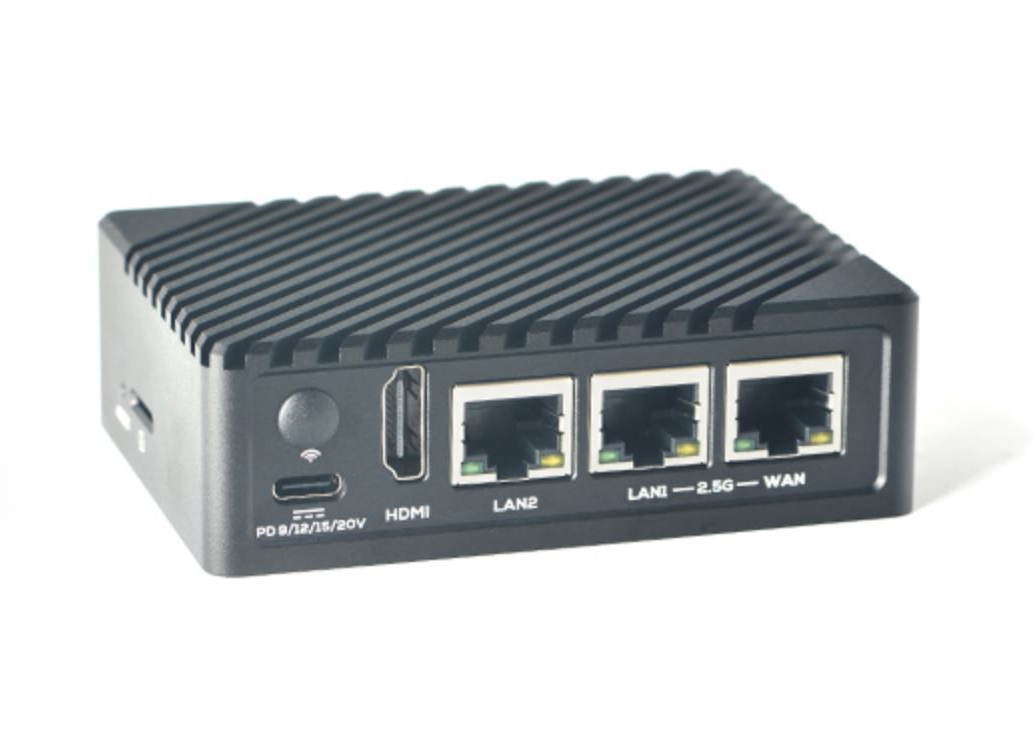
Notebookcheck
FriendlyELEC has introduced the NanoPi R6S, a new single-board computer that it based on the Rockchip RK3588S SoC. Also equipped with three Ethernet ports, the NanoPi R6S is available for US$119 with 8 GB of RAM, eMMC flash storage and multiple USB ports.
If your only goal is a cheap router buying something intended to do routing cheaply is easy
That one has no WiFi btw
ember basin
i want to be able to keep the router part contained inside something like proxmox, and have it also able to do other stuff in the meantime without touching router parts
pseudo blade
Hm. So you want x86/64
Well there goes power efficiency and cheapness, you kinda only get to pick one unless your version of cheap is more dollars than mine
ember basin
well what about at least docker
pseudo blade
Depends if your dependencies run on ARM and memory requirements
ember basin
is this more of a general computer question instead of networking then
pseudo blade
Depends on what interfaces you expect
Alternatively, this might be of interest? https://www.servethehome.com/inexpensive-4x-2-5gbe-fanless-router-firewall-box-review-intel-j4125-i225-pfsense/

We take a look at this inexpensive 4x 2.5GbE fanless box with Intel J4125 and i225 NICs that now works as a pfSense firewall and router
ember basin
how cheap is "cheap" usually
pseudo blade
You have to say your budget, cheap spans 3 orders of magnitude in here
ember basin
relative to something that can run more than just a router?
pseudo blade
No. You have listed no requirements I can answer that with
pseudo blade
Look at the topton units then but who knows because you've yet to say if WiFi is needed
Also 500 what?
US/Australian Dollars? INR? Pesos? Euros?
ember basin
usd, wifi preferred, its not going to do transcoding, id like to be able to run more than just a router, and if so, id want the router to specifically be in a vm, the rest of the stuff can be more vms or docker containers or whatever
is that too much for something fanless?
basic webhosting and like a password manager for the most part
pseudo blade
It depends on your resource requirements
Why haven't you looked at what I linked to make those decisions?
ember basin
got it thanks
pseudo blade
Figure out how it's unsuitable and use that to guide yourself
You may decide a quiet fan makes sense for more CPU power
You may want different interfaces
ember basin

checkout AnsibleFest: http://red.ht/networkchuck
AnsibleFest is a free virtual and immersive experience that brings the entire global automation community together to connect communities and spark collaboration. Typically an in-person event, AnsibleFest was changed to a virtual experience last year due to the pandemic. A virtual environment a...
that one he has looks neat
 pure bronze
"braided cable"
 pseudo blade
RIP signal integrity
kind pivot
So what would you guys do
One server with 2 HDD in raid 1
Or two servers with 1 HDD each, the second one being auto-booted once a week (or whatever other frequency) and synced to the first one
Because everyone tells me that raid is not a backup, which is true. So I guess what I said is also an option
What would you guys do ? I guess still raid 1
Ps: I don't care about losing the data between two syncs if there is a failure of the first disk ofc since the delta would be low
 ruby bramble
2 drives raid 1 and if you can keep a drive wih all you major improtant stuff at work/school/another familys house
kind pivot
Yeah the super important stuff will be on the cloud at least for now even if i don't like the idea
And ok ok
pseudo blade
kind pivot
So what would you guys do
One server with 2 HDD in raid 1
Or two servers with 1 ...
RAID is not a backup, and the setup you describe is not a great one if it'll faithfully mirror your data loss... but it will offer greater fault tolerance
kind pivot
I guess I can make it so it doesn't mirror anything if there is data loss/problems with the first disk
I was also thinking that I don't even need another server but something like small jbod/small san that would boot up whenever I want to do the sync. This would be cheaper
All of this just make me remember I should really look up Ceph which is apparently clustering of nas or smth
kind pivot
Oh well this looks overkill has heck lmao
 worn viper
Man gigabit spoiled me so much that I got annoyed by getting "only" 300 Mbps download on my PS5
 sharp vine
im trying to get a program on WSL to talk to a program on the host windows instant (jetbrains gateway/client and clion), but the client keeps giving errors about not being able to connect
from the wsl shell: nmap says port 5990 (one of the ones the client uses) is open, wireshark detects nothing when i try to connect
from windows: nmap says port 5990 is closed, wireshark just shows this repeating

python -m http.server -b 127.0.0.1 5991 works fine
if i start it before clion, 5990 works fine too
the log from the client looks like this:
INFO - #c.j.r.p.c.p.SecureWireOverStreamTransport - creating 'tcp://127.0.0.1:5990'
INFO - #c.j.r.p.c.p.SecureWireOverStreamTransport - 'tcp://127.0.0.1:5990': state = NOT_CONNECTED
INFO - #c.j.r.p.c.p.SecureWireOverStreamTransport - Going to start pinging remote host
INFO - #c.j.t.B.N - Created 1 wires to try connecting to
INFO - #c.j.r.p.c.p.SecureWireOverStreamTransport - tcp://127.0.0.1:5990: running connection flow; wait for transport
INFO - #c.j.r.p.c.p.SecureWireOverStreamTransport - tcp://127.0.0.1:5990: received FAULTED(Connection refused: no further information) from stream transport. Setting wire state to FAULTED(Connection refused: no further information)
INFO - #c.j.r.p.c.p.SecureWireOverStreamTransport - 'tcp://127.0.0.1:5990': state = FAULTED(Connection refused: no further information)
INFO - #c.j.r.p.c.p.SecureWireOverStreamTransport - Pinging remote host ended
WARN - #c.j.r.p.c.p.SocketStreamTransport - socket channel is closed -> setting connection state: FAULTED
INFO - #c.j.r.p.c.p.SecureWireOverStreamTransport - tcp://127.0.0.1:5990: exception in connection flow
java.net.ConnectException: Connection refused: no further information
    at java.base/sun.nio.ch.Net.pollConnect(Native Method)
    at java.base/sun.nio.ch.Net.pollConnectNow(Net.java:672)
    at java.base/sun.nio.ch.SocketChannelImpl.finishConnect(SocketChannelImpl.java:950)
    at com.jetbrains.rd.platform.codeWithMe.protocol.SocketStreamTransport$3.invoke(SocketStreamTransport.kt:36)
    at com.jetbrains.rd.platform.codeWithMe.protocol.SocketStreamTransport$3.invoke(SocketStreamTransport.kt:31)
    at kotlin.concurrent.ThreadsKt$thread$thread$1.run(Thread.kt:30)
(timestamps omitted)
any ideas?
 analog sonnet
anyone know how to use unifi? well duh alot of people but its not working. It wont adopt one of my switches. Yes ive reset it. Its a switch flex mini.
kind pivot
sharp vine
the log from the client looks like this:
```
INFO - #c.j.r.p.c.p.SecureWireOverS...
I mean connection refused doesn't sound like a networking problem but a config one no ?
sharp vine
not even being able to see it from wireshark doesnt sound like a config one
 azure spruce
I need some help I have bad Wi-Fi and I would use a Ethernet cable but it is to Far from my pc what should I do?
 ripe coral
So I'm wanting to setup a pfSense router on my home network, got a bunch of free networking shit from my work but have some questions about pfSense in general.
- Is there a NIC compatability list? I'm looking on ebay at intel NICs and want to make sure they work.
- How exactly do APs work with pfSense? I got 3 "EnGenius EAP1300". Do I configure the APs in pfSense or in the AP's web panel itself?
 minor frost
Hey can anyone help me with a networking internet question?
peak cloak
ripe coral
So I'm wanting to setup a pfSense router on my home network, got a bunch of free...
- not familiar with PFSense, but intel ones are generally good in my experience
- So APs are just special network devices, no AP is configured from the router, they are seperate. They will get an IP from DHCP from PFSense, but that's it. The rest will be configured on the AP itself. You could get a managment software to manage all the APs at one, it seems like engenius has this https://www.engeniustech.com/ezmaster-network-management-software.html
peak cloak
 strange cloak
I need a router modem thing, hecc do I buy. I'm not educated
strange cloak
I need a router modem thing, hecc do I buy. I'm not educated
what ISP, for fiber you usually can't get the modem/ONT yourself, thats supplied by ISP
ripe coral
peak cloak
1) not familiar with PFSense, but intel ones are generally good in my experience...
I ended up buying an intel i350-T4 for like $35 off ebay since they are so widely available from multiple companies. Mine was cisco specificly
ripe coral
Also for pfsense or opnsense. I'm gonna need a modem since I have cable internet and TV, but I might switch to Fios which would be fiber internet, do you need a modem for fiber? Is it a specialized fiber modem or do regular modems work?
peak cloak
ripe coral
Also for pfsense or opnsense. I'm gonna need a modem since I have cable internet...
FiOS provides an ONT, I have it currently
it's nice with Fios since there's no bridging bs needed, dedicated ONT, just plug Ethernet in
ripe coral
peak cloak
FiOS provides an ONT, I have it currently
so you use their ONT, then to pfsense and everything else?
peak cloak
And yes it's specialized per network
ripe coral
what does ONT stand for again?
peak cloak
Optical network terminal iirc
peak cloak
ripe coral
so you use their ONT, then to pfsense and everything else?
And it's DHCP so it's super easy
ripe coral
is the ONT the Cabel internet equivilent of that big ass box the fiber optic terminates to?
this thing
 peak cloak
Also depends where they install the ONT, sometimes they will do it outdoors so you will need to run Ethernet from there to router.
peak cloak
ripe coral
this thing
Yes kinda
ripe coral
the ONT is gonna be inside in my basement where the other cable internet ones are
we have an old fios cable internet termination there, and our current xfinity one there
peak cloak
You can probably request a desktop ONT, it's not much bigger than a dociss cable modem
 ripe coral
this one?
 peak cloak
Below the switch
peak cloak
ripe coral
this one?
Yes
ripe coral
oh ok
ill still probably do wall mounted because I know something stupid is gonna happen since the basement is my dads basically home space for all his stuff
hes prob gonna hit something or pull a wire while working on shit
better to damage a simple ethernet cable than a fiber cable
cosmic estuary
When my parents were getting fiber I convinced the old man to pre-run a conduit from the power intake of the house to where he'd want the network gear. The installers are likely to pull all the way there instead of just to the intake if it's extremely easy.
As it was said, so it was done, and now he's got a full setup in an enclosure down in one of the basement closets (Power intake is in the attic, extremely old neighbourhood so both power and fiber comes from poles instead of in the ground).
Nice and protected in conduit all the way to the media converter on the wall, then just a Cat-6 over to the networking gear (did a full Unifi setup with PoE switch, cloud key, USG and ceiling mounted AP's with hidden wires. This was before Unifi did the all-in-one box).
Best move I ever made. Went from helping them with "the internet" monthly to not having had to lift a finger since 2017 😄
The stuff just works, and even came out cheaper than what a decent mesh kit cost at the time.
thick minnow
Got my opnsense router setup


 slow pivot
That is beside your bed?
pseudo blade
I know a guy who slept with a rackmount server under his bed
slow pivot
Oie
thick minnow
slow pivot
That is beside your bed?
Cats bed
 opal pagoda
pseudo blade
I know a guy who slept with a rackmount server under his bed
opal pagoda
pseudo blade
I know a guy who slept with a rackmount server under his bed
White noise generator
ruby bramble
pseudo blade
I know a guy who slept with a rackmount server under his bed
Keep your loved ones close
pseudo blade
If you keep your loved ones under your bed I'm calling the police
Everyone knows your loved ones are best stored in a temperature-controlled closet or room with good noise isolation from the rest of the house.
They get real loud if the temperature's too high
 hollow marlin
@clear igloo @waxen scroll Spent the last few hours troubleshooting escalated reports of inbound VZW calls receiving "all circuit busy" or one-way audio only to learn about a national outage via news instead of the engineers we were working with. And emergency services started reporting this at 5am.
 clear igloo
hollow marlin
<@291198741862416384> <@186123993412141057> Spent the last few hours troubleshoo...
clear igloo
hollow marlin
<@291198741862416384> <@186123993412141057> Spent the last few hours troubleshoo...
OOOOF, someone in big trouble!
hollow marlin
Voice is still a small portion of my responsibility and I hate having to try to dig up PSTN memory that I try so hard to forget when tshooting this crap
clear igloo
Oh yah, I don't touch voice/video of any kind thankfully. It's a beast all to its own
So is the issue on VZW's side or your side?
hollow marlin
It's a national outage with VZW and only seems to impact inbound calls
There were some reports of Fios issues but I am not sure if that is related or not
clear igloo
Ah, but sounds like emergency services inbound are impacted too?
I know having issues with emergency services is a huge no-no and priority fix I believe
hollow marlin
clear igloo
I know having issues with emergency services is a huge no-no and priority fix I ...
I would assume they would be impacted as well. A lot of the time they are on their own trunks to ensure availability.
Also yes, e911 is always our priority as we rake in fines after x amount of hours (excluding emergencies)
opal pagoda
pseudo blade
They get real loud if the temperature's too high
its inverse distribution graph
they eventually go real quiet if its too hot or too cold
 waxen scroll
@hollow marlin in a meeting with arista
clear igloo
waxen scroll
<@462711605063450628> in a meeting with arista
Ask them about scale with vlan-based vxlan compared to vlan-aware 😛
Any why they can't scale well in vlan-based environments
hollow marlin
waxen scroll
If lab goes well I might ditch ACI
Going to have to let us know how the labbing goes
strange cloak
peak cloak
what ISP, for fiber you usually can't get the modem/ONT yourself, thats supplied...
Sure. is the isp. With sure it seems to be optional?

 hidden socket
Hey guys I have a question about latency on my pc. I bought a used pc that has no wifi like 1 or 2 months ago and I’ve been noticing that my latency or ping is pretty high 100 all the way to 5000 sometimes. My home internet is the bell hub 3000 and my wifi extender is the tp link ac750 re205. I’m connecting my pc to the wifi extender through ethernet cat 5e. The extender is 1 floor above the bell home hub 300. Is there a reason why I’m getting high latency and can I fix it?
opal pagoda
hidden socket
Hey guys I have a question about latency on my pc. I bought a used pc that has n...
is it possible to run a ethernet cable between router and extender
that would most likely fix it
hidden socket
The extender only has one ethernet port and my pc doesn’t have wifi so I need that one ethernet port for my pc
I am connecting an ethernet cable between my extender and pc tho
opal pagoda
hidden socket
The extender only has one ethernet port and my pc doesn’t have wifi so I need th...
is it possible to run wire or no?
bc lack of ports can be solved with a cheap switch
hidden socket
No even if I did bc my dad doesn’t want any cables outside of my room
opal pagoda
hidden socket
No even if I did bc my dad doesn’t want any cables outside of my room
do you have coax wired up in your home?
if no then powerline would be a solution
hidden socket
What is a coax
And I’ve been thinking of a powerline adapter but my pc also has no bluetooth so I’ve been thinking about getting a wifi and bluetooth card more since it would eliminate both problems. And my ping is fine on the switch which is also in my room connected through wifi so my pc should be fine. I just have to save up a bit
 vagrant echo
Is this setup reasonable considering my home server cannot be placed near the router?
router --> ethernet --> secondary router (in access point mode) --> ethernet --> server
Is there a better solution?
opal pagoda
vagrant echo
Is this setup reasonable considering my home server cannot be placed near the ro...
wireless bridge?
vagrant echo
opal pagoda
wireless bridge?
Isn't that what the second router is working as? Converting a WiFi signal to Ethernet?
opal pagoda
vagrant echo
Isn't that what the second router is working as? Converting a WiFi signal to Eth...
then its not in ap mode, its in bridge mode
ripe coral
So I just picked up a Cisco Meraki MS225 48 port switch. I got it for free from an e-waste pile so I won't be mad if it goes bad, but how do I check if my switch is claimed or not, I also can't even connect the management serial port through putty
The switch works, has a white light on it, and all the ports work fine
vagrant echo
opal pagoda
then its not in ap mode, its in bridge mode
These are the options available
Media bridge requires two of the same router and wouldn't work in this case.
 opal pagoda
vagrant echo
These are the options available
Media bridge requires two of the same router and...
opal pagoda
vagrant echo
These are the options available
Media bridge requires two of the same router and...
what is the path then
router 1 > wifi> router 2 > wifi > server?
vagrant echo
opal pagoda
what is the path then
router 1 > wifi> router 2 > wifi > server?
router 1 > wifi> router 2 > ETHERNET > server
 trail cedar
DDoS?

 tiny ivy
HELP, router no work :,) suddenly
tiny ivy
ripe coral
explain
Internet turned off, wifi and lan
Lan cable lights up but none of the "function lights" so it seems to be getting power
ripe coral
have you restarted it
tiny ivy
ripe coral
have you restarted it
About 5 minutes ago
ripe coral
and this is on the router right
ripe coral
is the router not functioning or is this a switch?
tiny ivy
ripe coral
is the router not functioning or is this a switch?
I believe router since both wifi and lan are down
Nvm lan back up?
tiny ivy
ripe coral
is the router not functioning or is this a switch?
Ig itll just turn on, my bad for comin here was just worried since i already restarted once, this the second time
tiny ivy
Thx anyway
ripe coral
you dont know how many times at work I've connected to client's PCs and they goto show me the problem and it doesnt happen
tiny ivy
ripe coral
you dont know how many times at work I've connected to client's PCs and they got...
Frr, they be shy
ripe coral
had a lady today send me an image her PC said corrupted windows boot BSD
she drove the PC to our work and I put it on the bench, turn it on, works fine
0 problems
tiny ivy
ripe coral
just how IT goes
tiny ivy
ripe coral
you dont know how many times at work I've connected to client's PCs and they got...
Welp, my wifi still aint up
Any idea :,)
ripe coral
tiny ivy
Welp, my wifi still aint up
Any idea :,)
can you ping the WAPs?
if you are able to connect via eithernet
tiny ivy
ripe coral
can you ping the WAPs?
After exactly one hour WHEN I TEXT U IT COMES BACKSBHWHSVHSHSH
U MESSIAH OR WHAT
 static bay
can anyone help me with the setup process with asus router i have no clue what i am doing
 lone sun
So, I ran get-nettcpconnection in powershell (basically netstat), anybody know what the all zeroes mean? Its under the column "local address". I take it this just means the particular port isn't being actively used or is available to be used by a service right?
 pseudo blade
lone sun
So, I ran get-nettcpconnection in powershell (basically netstat), anybody know w...
pseudo blade
lone sun
So, I ran get-nettcpconnection in powershell (basically netstat), anybody know w...
That's the IP the server's bound on, 0.0.0.0 generally means it'll respond on any network interface.
You can bind services to only respond to inbound traffic on one IP address, useful for devices on two networks with different privilege levels.
-A router, for example. You should still implement a firewall as well but it's helpful if the admin interface can't answer to WAN no matter what.
lone sun
pseudo blade
That's the IP the server's bound on, 0.0.0.0 generally means it'll respond on an...
🫤 But like, this isn't a server though. This is just my personal PC.
pseudo blade
It still will run a few little servers for itself, local communications between programs and the like.
lone sun
ah
pseudo blade
SMB, etc.
lone sun
Just wondering, because I noticed for a certain port at work, the loopback address was listed instead of zeroes.
pseudo blade
That prevents anything outside that computer from connecting.
lone sun
hmm
pseudo blade
Ideal for IPC, works basically everywhere.
...Well perhaps I shouldn't say ideal as opinions vary but certainly prevalent.
lone sun
pseudo blade
It still will run a few little servers for itself, local communications between ...
So, what about if I want it to connect with something that isn't local? Like a website we may use to send a test print to a printer? Because I noticed I couldn't use the one that had the loopback address for that specific website I was using. Trying to understand this shit. 😂
 cobalt heath
I have a problem with my internet. I have 2 pcs on my network and when both are trying to play a game like COD one says the mat type is moderate or strict while the other is open. Is there anyway to have both set to open?
clear igloo
ripe coral
The switch works, has a white light on it, and all the ports work fine
You need a meraki account and then put in the serial number
Usually white light solid means it's connected to the dashboard at least
ripe coral
clear igloo
You need a meraki account and then put in the serial number
Usually white light ...
I found out yesterday that it was unclaimed, so the entire switch is mine now for free
clear igloo
ripe coral
I found out yesterday that it was unclaimed, so the entire switch is mine now fo...
Nice!
Now you just need a license for it 😛
ripe coral
Sadly its the regular version and not the poe one
clear igloo
aww, still a good find
ripe coral
I’m not gonna keep it, way too overkill, im probably gonna sell it
The license is $150 per year
clear igloo
Yah, could probably get a few hundred for it
ripe coral
Yeah
I’m just stuck on these APs now
From the same ewaste pile, theres 3 EnGenius EAP1300s
Ip by default is 192.168.200.4 even though ive reset it to default 20+ times and should be 192.168.1.1
And the login admin/admin doesnt work
Idk why it wont change back
ripe coral
You know
Having organization in a company is great
Especially when you are picking up ewaste
Found the company the APs came from and since we have everything network-wise documented from them, we have the AP logins
 clear igloo
 rocky badge
Site Magic is an auto click S2S VPN
rocky badge
Site Magic is an auto click S2S VPN
lol
 thorny osprey
does anyone know why direct connection from my optical modem gets me this speed?

and this speed when connected to the router
 clear igloo
Because your router likely only has 100Mbps ports
peak cloak
or the cable
thorny osprey
peak cloak
or the cable
its the same cable
thorny osprey
clear igloo
Because your router likely only has 100Mbps ports
oh but its giving me 90 mbps instead of 100
peak cloak
thorny osprey
oh but its giving me 90 mbps instead of 100
overhead, plus just random variation. It's close enough to 100 that it looks to be the reason
rocky badge
tcp overhead!!!
@clear igloo 😩


They have a Multi Mode option with transmit and receive but no 12G it’s only 3G SDI
opal pagoda
rocky badge
They have a Multi Mode option with transmit and receive but no 12G it’s only 3G ...
what is issue with using singlemode fiber?
rocky badge
None of our fiber is single mode
opal pagoda
cant you get some
rocky badge
We already have thousands of dollars of multi mode fiber and optics lol
Bc someone before me decided on mm
 teal heath
I created a monstrosity
 hollow marlin
rocky badge
We already have thousands of dollars of multi mode fiber and optics lol
hollow marlin
rocky badge
We already have thousands of dollars of multi mode fiber and optics lol
Just spend some more for some mode-conditioning cables 
rocky badge
Lmao
meager ginkgo
teal heath
I created a monstrosity
Get some Monoprice Slimrun cables 😉
clear igloo
meager ginkgo
Get some Monoprice Slimrun cables 😉
Love those cables!!
meager ginkgo
clear igloo
Love those cables!!
They're awesome. Cleans up so much
and they work like magic haha
even with 10G and PoE
clear igloo
Yah, I redid my entire rack with them, sooop clean
meager ginkgo
I just got myself a rack yesterday, only to realize I didn't have any mounting hardware 😛
Need to get some lag bolts
clear igloo
 clear igloo
Yah, even rear patch to the wall is slimrun but I have to tidy that up a bit
 clear igloo
Nice, will look great when done
meager ginkgo
Right now all my stuff is just on a wire shelf 😂
clear igloo
Lol, I've been there
rocky badge
clear igloo
Love those cables!!
All of mine are fs.com
 clear igloo
Sweet!!
meager ginkgo
and repaint the whole closet.. lol
rocky badge
 clear igloo
Lol, I need to do the same one day
clear igloo
rocky badge
Slimmer!!!!!
rocky badge
When I get back home I am getting rid of the UniFi switch
meager ginkgo
My enclosure is the only semi neat part haha
 clear igloo
That's pretty nice actually
meager ginkgo
Thanks.
I had to rip out the old enclosure because I stupidly drilled holes in it for mounting old hardware
Bought some double sided tape to hang stuff in this one
Lowes actually has the enclosures like 1/2 price of Amazon

 delicate glen
It's going to be a noob question,
if I disable the DHCP server on the my router and start the one on the router's client pc, will it be enough for other devices to obtain IPs?
(assuming both the router and client have manual set IPs)
clear igloo
delicate glen
It's going to be a noob question,
if I disable the DHCP server on the my router ...
Once the leases from the router expire, yes
teal heath
meager ginkgo
Get some Monoprice Slimrun cables 😉
I would get different cables, if it were up to me
There is actually one nicer cable in there 😂
delicate glen
clear igloo
Once the leases from the router expire, yes
Thanks, I thought I was going crazy, it seems the router just blocks DHCPDISCOVER from my client 
 mighty wind
Better than my server room right now. My actual job has taken priority over being the office IT Manager. I only got halfway through the patch rewire.
On the plus side my tape backups are up and running again.
 burnt saddle
Guys how do I check for network congestion? (I think that’s what it’s called)
Because my network share used to have 110MB/s then 80MB/s and now 60MB/s
I’m trying to figure out why, and both PCs are connected to the same switch, I have also tried on the main router itself and it’s like that too
I’m starting to think that just using my external ssd with a write speed of 400-500MB/s would be faster to transfer files, but I’m transferring 3TB of files and that drive only has 200GB of free space 😅
 rain hatch
(I hope im in the right channel)
Any DOCSIS 3.1 Modem reccomendations, or models to stay away from?
thick minnow
maybe check with your cable provider to see which models are recommended, as a starting point
You don't want one they don't recommend, as they'll just blame you, if anything goes wrong
rain hatch
They only reccomend their shit-tastic "gateway" combo or "Lease an Arris from us!"
thick minnow
When I had com-fantastic Their website listed like 4-5 models they "supported" if you bought your own.
I was so glad when AT&T fiber moved in.
rain hatch
Yeah, I just bought a house and they only have Spectrum, no AT&T 😦
thick minnow
ugh, I've never heard anything good about spectrum
rain hatch
My tennant that I share a lot with keeps telling me "Dude we have spectrum its super fast! 200meg!", I have to stop myself from rolling my eyes and going "Yeah thats... not fast..."
thick minnow
https://www.spectrum.net/support/internet/compliant-modems-charter-network took like 5 seconds of googleing
Sign in to your Spectrum account for the easiest way to view and pay your bill, watch TV, manage your account and more.
rain hatch
Gig up/gig down is available, luckily.
They say I HAVE to use their modem on a biz account, which I need for static external IP.
And I just dont beleive them.
They dont list any 3.1 modems, either.
(Even though their own advertised speed requires 3.1 lmao)
peak cloak
rain hatch
(I hope im in the right channel)
Any DOCSIS 3.1 Modem reccomendations, or models...

The Do Not Buy Intel Puma 6 modem list with an explanantion of the chipset defect. Details on the lawsuit & how to spot the defective modems.
rain hatch
peak cloak
https://approvedmodemlist.com/intel-puma-6-modem-list-chipset-defects/
My man! Thank you!
 wild wren
When I do "ping -t www.google.com" I will drop 1 out of every 70-100 packets, maybe 2 drops.
Is that normal?
I can change the packet size, and all the packets will go through, but a normal sized "ping" packet will not
It's like my ISP is priortizing certain packet sizes and dropping the rest
meager ginkgo
got my network rack installed.. waiting on some shorter slimrun cat6a cables now 
meager ginkgo
wild wren
When I do "ping -t www.google.com" I will drop 1 out of every 70-100 packets, ma...
are you wired or on wireless?
wireless i'd assume that could be fairly normal
wild wren
Wired
meager ginkgo
what isp?
meager ginkgo
so that's cable / coax then
meager ginkgo
yeah that's cable internet..
meager ginkgo
Your modem seems slightly older
DOCSIS 3.0 vs the latest 3.1
I'd see if the ISP can detect any issues and go from there
wild wren
I do, they say "running a test, everything is normal on our end"
meager ginkgo
Have you tried a different computer?
 hollow anchor
does using a USB to ethernet adapter make network speed slower than there was a built in ethernet port?
kind pivot
Not forcefully no
It could, in some cases
But with a good working 1Gbps usb to ethernet vs a built in 1Gbps ethernet port you won't see any difference
Where it could be a problem is if you plug it into a usb 2 port or if your build in ethernet port is like 2.5gbps / 10 gbps vs 1gbps usb
 gilded ingot
How scummy can ISP be is incredible to me
Somone I know, had their contract end, and they gone to renew it, they were able to convince him to get the 500Mb package and didn't even schedule a router swap
The thing is so old and slow, it barely does 50Mbps on Wifi right next to it
kind pivot
Hey
So i have a container with a small compose file over it that just defines some volumes
I want this container to do one or two tasks, then stop/rm itself
What would be the most dockerish way to do it ? Put a sh script in it and have the entrypoint be this sh ?
Can we define with compose specific tasks ? I guess I could define multiple services with each services being one task ? Then i could "docker compose run --rm task1" for example ?
pseudo blade
kind pivot
Hey
So i have a container with a small compose file over it that just defines so...
Get the bare minimum of dependencies for your script - like Busybox, include the script, make the entrypoint be the script. Capture the result and return to stdout. But really pick a way that makes sense to you for your task/s, break them out if the tasks being independent is important to you else probably no need to make your task bigger.
kind pivot
Yeah okay
I need to mount things in the container, i hope this won't cause any problems
It works fine for now but I have to mount the drive before each run
pseudo blade
Tape?
LTO1/2/3/4/5/6/7/8? DAT? Masking?
Oh, double sided tape
This is the networking channel
We deal with computer interfaces, not adhesion
Ok if you insist on deleting the messages
 past mason
ANyone here have a UDM-SE (Dream Machine Special Edition) from Ubiquiti?
 violet hound
i wonder if i can shave off that last bit of bufferbloat
 past mason
what test is that?
violet hound
this is what i had before changing ISPs and setting up traffic shaping in opnsense
 violet hound
past mason
what test is that?
violet hound
past mason
what test is that?

Waveform
Is bufferbloat causing issues with your internet connection? Run this test to find out.
this one 
past mason
thanks
violet hound
and this is the guide i used for opnsense traffic shaping, dunno if its relevant for you https://maltechx.de/en/2021/03/opnsense-setup-traffic-shaping-and-reduce-bufferbloat/

My cool site
How to configure Traffic Shaping also under IPv6 and additionally improve BufferBloat
past mason
I use MicroTik for my shaping
peak cloak
you can't improve bufferbloat without slowing speed down kinda
the bit you see is on the ISPs end
 past mason
i wish I had a different ISP to go to, this P2P WiFi bites after they got bought out
violet hound
same isp as the other B rated test
and i dont care about the speed that much as long as it's above 300 down 100 up
past mason
faster speeds means less time utilizing the connection, less time utilizing the connection means less over all congestion
violet hound
my old crappy isp got bought out too
by vodafone, like 10 years ago
vodafone did absolutely nothing to improve the service
just minimal maintenance
past mason
but most of the time, if you're adding 30 or less MS, you're not going to see that
heck i'd love to have that first post you did

 violet hound
 sure
sure
past mason
traffic shaping is what's saving me now, I have things like the direct TV boxes, firesticks, anything that can buffer its content set to 5mb w/ bursting to 15mb for 45sec every 5min.
opal pagoda
violet hound
this is what i had before changing ISPs and setting up traffic shaping in opnsen...
meanwhile
 violet hound
at least you can have an audio call with your isp and tell them they suck
opal pagoda
violet hound
at least you can have an audio call with your isp and tell them they suck <:hmmN...
i got 2 options, vdsl or 4g lte
violet hound
damn, that's unfortunate 
 ionic gorge
I've seen a lot recently about seperating iot devices on a network, due to hacking potential. Surely whoever is doing the hacking has to get through the router firewall anyway. So why is it easier to hack an iot device than a computer, both behind the same router firewall?
@mystic latch ok thanks. UpnP is off and no ports open. So iot shouldn't in my case cause more of a risk?
I'll do that. Thanks for the tip
I assume I can use my mobile on 4g so I don't have to setup a vpn?
I'll have a look. Thanks
 violet helm
Anyone in here good with Palo ion devices
 manic cape
On a Wan show a while back, Linus mentioned blocking a certain domain so that his kids wouldn't get on TikTok. How would one go about doing that? I've only ever been aware of changing DNS. Didn't realize you could block specific domains
peak cloak
manic cape
On a Wan show a while back, Linus mentioned blocking a certain domain so that hi...
well if you run a dns server like pihole you can return a bogus record
manic cape
peak cloak
well if you run a dns server like pihole you can return a bogus record
Ah....last time I checked ,they were still brutally out of stock
peak cloak
manic cape
Ah....last time I checked ,they were still brutally out of stock
pihole is just a software
adguard home I heard is pretty good as well
you can run it on anything
manic cape
peak cloak
pihole is just a software
Alright, I'll work on getting it setup. My desktop is running pretty much 24/7 for Plex anyways, might as well utilize it
Thank you
 grand ermine
Rip the campus fiber 😄
 peak cloak
that's fine
peak cloak
That's poe over coax no?
But that's really only for p2p coax
Can't be a coax network
 radiant knoll
opal pagoda
meanwhile
radiant knoll
opal pagoda
meanwhile
 plucky pollen
why is mine so bad when uploading

it would have been A just based on the download latency
what causes this bufferbloat issue? And how representative is this test of a gaming scenario for example?
clear igloo
plucky pollen
what causes this bufferbloat issue? And how representative is this test of a gam...
Depends on if someone fires up a huge download when you're gaming
plucky pollen
I mean I wouldnt be uploading at my full bandwidth while gaming right
for me it said its only a problem when uploading
its an ISP router so might be the problem yeah
 surreal gust
What test is that? I've never seen it before.

 lavish hollow
 manic cape
How do I know which static IPs are available to me? I ran ip a to find my current IP address and noted the /16 after it. I know this means I have 60,000 some options based on a free code camp article. How do I know what those are though?
 unborn sluice
if you have a static, you'll know. if you dont know you have a dynamic
manic cape
unborn sluice
if you have a static, you'll know. if you dont know you have a dynamic
I'm trying to set a static IP address at the moment
It's currently dynamic, and I'm trying to switch it over to static
opal pagoda
unborn sluice
if you have a static, you'll know. if you dont know you have a dynamic
It can also be cgnat
peak cloak
manic cape
It's currently dynamic, and I'm trying to switch it over to static
on your local machine? there is no reason too and can cause issues with you don't do it properly outside dhcp range
manic cape
peak cloak
on your local machine? there is no reason too and can cause issues with you don'...
Still working on setting up PiHole
peak cloak
manic cape
Still working on setting up PiHole
so for a server, what I reccomend is going into your router and setting your pihole device to a static dhcp lease
so the IP doesn't change
but if you really want static, go into router, look at what the dhcp range is and set it outside that range, but still within the subnet. You may need to adjust the dhcp range
manic cape
I don't necessarily want static, I'm just trying to follow the instructions that PiHole provided
I might just end up getting a Pi at some point and not mess with it on my own devices. The amount of gatekeeping in the resources I found online is out of this world
peak cloak
gatekeeping ?
pseudo blade
manic cape
How do I know which static IPs are available to me? I ran ip a to find my curren...
That's how many options your ISP has in that block. You don't have much control over it, your assignment is 1 IP based on their decisions.
You can't make it static, you have to contact your ISP to make it so.
You do have control over the IPs on your side of your router, and can just reserve addresses there as you see fit but for IPv4 those won't be internet routable.
lone sun
lavish hollow
This is from the wave form website right? Where are these servers located? Because either this server is rather far from me, or the website is full of shit. 😂
97ms in latency. 🫤
 onyx star
Would this be a good area to ask for general Router advice?
 warped elk
As someone who joined this discord minutes ago, I'm happy to assist with that
onyx star
Hello, I recently upgraded my plan to 1200mbps through comcast. Referred to their list of recommended modems and purchased an Arris s33 to make sure im not restricting myself. I have the s33 connected to my old ASUS RT-AC68U. I'm still barely getting 950mbps at this point and was wondering if upgrading to the RT-AX86U is a decent idea?
warped elk
So the issue you are currently experiencing is the AC68U is limited to 1000mbps (1Gbps ports), and 950mbps is near enough the TCP overhead you are getting the max speed your current hardware can offer
You would want to prioritize a router with a 2.5Gbps WAN port, ideally one with a 2.5Gbps LAN port as well
Looking at the spec sheet for the RT-AX86U, it should be sufficient over wifi
onyx star
Less concerned about wifi performance more concerned about Ethernet.
I figure with my current hardware that's wireless if i get like 400mbps im happy
so looking on amazon it looks like it has one 2.5g wan and 1 2gbps lan
warped elk
Unfortunately the manual isn't downloading to my phone so I can't tell if it's a single WAN or LAN 2.5Gbps port or two discrete ones
That "1 2gbps" lan is a link aggregation, in effect bonding two 1Gbps ports together, so you'd need hardware to handle that (Intel i210-t2 in your PC for instance)
onyx star
its a 9900k. MOBO gigabyte z390 something
warped elk
It's trivial to upgrade, you just buy an RTL8125 network card for $40
onyx star
This is why i like talking to people about this cause if i dont talk it out i dont think of it
Right I figure these days a 3gig card is on the cheap
peak cloak
warped elk
If it's 11th Gen or older, chances aren't good
why? it's just a matter of adding a pcie card
warped elk
I feel it's a disservice not to correct you: there is no such thing as a 2 or 3Gbps port, only 1xN, 2.5, 5, and 10 (other numbers higher than 10 we're going to ignore)
warped elk
peak cloak
why? it's just a matter of adding a pcie card
2.5Gbps on the motherboard only really saw widespread adoption with 12th Gen Intel, older generations of motherboard are unlikely to have on board 2.5G
peak cloak
warped elk
2.5Gbps on the motherboard only really saw widespread adoption with 12th Gen Int...
ah yeah, though you were talking about the CPU not being able to handle it
onyx star
warped elk
I feel it's a disservice not to correct you: there is no such thing as a 2 or 3G...
no no good to know thank you
peak cloak
you can get a 2.5 gig pcie card for around $20-30
onyx star
Okay thats all good to know i didn't even think of my PC being a bottleneck
Casue even directly plugged into the new modem i only get 950
warped elk
The PC is not the bottleneck, it's the motherboard
onyx star
When I say PC I am referencing the machine as a whole
peak cloak
warped elk
The PC is not the bottleneck, it's the motherboard
well, the ethernet interface
onyx star
Like i know its the Mobo just easier to say pc is all 😄
peak cloak
onyx star
Casue even directly plugged into the new modem i only get 950
think of it as a pipe, the smallest pipe is going to be the bottleneck
onyx star
yeah exactly
This is why i needed to talk this out cause I didn't even concider my machine to be one of the problems. Its like a big funnel going into a smaller one
Is there any 2.5 cards to stray away from? I mean i see one on amazon for fuggin 19.99
warped elk
Like, using an AX86U to LAG to a switch would work, you won't get the raw 1.2Gbps to any one device, but it would sure help with concurrency on the network
onyx star
I did think about getting a switch at first. But I'm trying to keep the setup as simple as possible
warped elk
Cheap network switches are sort of a pain to figure out if they support LAG/LACP mind you
My general rule of thumb is search for the thing you want (RTL8125), and buy the second cheapest option
peak cloak
onyx star
Is there any 2.5 cards to stray away from? I mean i see one on amazon for fuggin...
not sure of brands to stay away from, but intel chipsets are usually pretty good
onyx star
Thanks guys.
This was actually all super helpful i was honestly coming in here expecting to be berated lol
You know how it is some forums can be intense
warped elk
I think it's more difficult to find an Intel 2.5Gbps card, so stick with realtek in this case
Unless you want to gamble with an Intel X540 on eBay and hope it's got the firmware that supports mGig
onyx star
RTL8125 NIC? Is that anything
peak cloak
https://www.amazon.com/2-5GBase-T-Network-Adapter-Ethernet-RLihm/dp/B0B48R4QKS
here's one with intel Intel I225-V

2.5GBase-T PCIe Network Adapter 2.5 gb Ethernet Card,RLihm 2.5gb Network Card RJ45 LAN Port,2500/1000/100Mbps,1 Port,for Gaming/Office, Support Windows/Linux with a Low Profile Bracket,I225-V Chipset
peak cloak
although now reading about it, some Intel I225-V have issues, but you can always return if it's defective
warped elk
It's not quite rule of thumb, but 1 NIC = 1 physical network port
warped elk
I'm in Canada so good luck with whatever that item is
onyx star
if it doesn't work out i'll just order another one 😄
I honestly appreciate all your guys help
Feel all oldschool again ordering network cards to get internet lol
Its ordered so I hope you guys have a great day thanks for the tips
 brisk ledge
Did anyone else get weird wireguard issues lately? I simply cannot use it when connected to any wifi via my phone. Tunnel ip is another Subnet, but the Subnet at my home is the same as the one i have in every wifi i tried - so that coooould be the thing - but i never had that issue, could stay connected 24/7. But now i get random packet losses, f. E. Pinging any device - DNS, any Website or any of my Servers - 4-5 pings work as expected, the next 6-10 time out.
Using wireguard from mobile network - no issue whatsoever.
Wireguard Servers are a, my opnsense Box, and b my openmediavault Server.
Both have the issue.
As i think theres no simple solution - any Alternatives i could use? Maybe zerotier?
The goals i want are, to reach Devices at my home, and to use the security of my own network - aka pihole, etc...
So, - basically just a vpn but as fast as possible.
Here a screen - never seen that behaviour...

Additional Info, the issue is there with nat reflection and also when just connecting to the local ip directly in wireguard, so thats not a thing... Firewall etc also out... Has to be wireguard itself.
peak cloak
brisk ledge
Did anyone else get weird wireguard issues lately? I simply cannot use it when c...
idk what the issue may be, maybe something with config/network
brisk ledge
Thing is, it always worked
peak cloak
but I personally use tailscale, which uses wireguard under the surface and works really well
brisk ledge
Nothing changed - besides wireguard Updates
I can Tell you, it must be that my device itself is in the same subnet as the wireguard Server (allthough for opnsense its another Story but idc) - the weird thing is just - it never was an issue... Thats what i dont get.
brisk ledge
peak cloak
but I personally use tailscale, which uses wireguard under the surface and works...
Also might try that - but for now Zerotier Sounds so damn nice that i just have to try ^^"
 lunar spade
Why does my iPhone SE3 tend to avoid 4G or LTE connections? It always seems to connect to 3G or 5G, even when the 5G network is slow, weak, and unreliable compared to 4G/LTE
thick minnow
can someone help me enable AP on my TP-Link WN722N V2/3 (kali linux)
i already enabled monitor mode
but AP wont work
pseudo blade
brisk ledge
Did anyone else get weird wireguard issues lately? I simply cannot use it when c...
It all runs on your devices so it kinda has to be on you or an intermediary - my stuff I run certainly works fine
brisk ledge
pseudo blade
It all runs on your devices so it kinda has to be on you or an intermediary - my...
Using the Android Client? Thats my suspect...
pseudo blade
I'm using Wireguard on Linux, Windows, Android and Mikrotik RouterOS from my AWS instance
No problems
brisk ledge
Cause like - you cannot Tell me its a config error when it worked like - forever.
To be fair i didnt actively use it for like 1-2 months, but before that - 24/7 just worked.
I found one Single forum Post with that exact issue - just that for them it was a second wireguard Client connected - which cannot be like that for me - because the second i change to mobile network, it works absolutely perfectly.
brisk ledge
Id get it if it wouldnt work at all when connected to wifi - but like that? Some pings work others just get lost in time and doesnt matter where i Look i cannot find anything where they might be lost...
Which again makes me think it has to be on my Smartphones side
pseudo blade
Could be an unreliable connection to the internet from either side, a really ugly NAT/load balanced IP config
brisk ledge
Which is great - because for that thing i cannot do anything to change it other than to blame the wireguard App xD
brisk ledge
pseudo blade
Could be an unreliable connection to the internet from either side, a really ugl...
That all cannot be it - because... If i Set the wireguard Client to just connect to the local ip directly i have the same issue.
Aka bypassing the Router entirely
brisk ledge
Traceroute tells at least its direct xD
pseudo blade
Do pings outside the tunnel have problems?
brisk ledge
Not sure how to Look more closely tbh
Nope
Otherwise id had like - anything else to blame xD
As for the pings, the host doesnt matter at all, and also what wireguard Server i connect to
(again have both my opnsense Router itself via the wg plugin, and my omv Server which is running pivpn - later was deployed for like 2-3 years and always worked...) Host meaning - Router, any of my Servers, any DNS, any other IP, hostnames basically fail always because of DNS lol
All leads to me thinking - it just can only be my Smartphone side - where wireguard App again is the easiest to blame xD
pseudo blade
Probably
 nimble sable
question: will the maximum speed of a gigabit connection be displayed as "125 MB/s" or "119.21 MB/s"? Does it depend on the application?
brisk ledge
nimble sable
question: will the maximum speed of a gigabit connection be displayed as "125 MB...
It depends on everything. Many isp also sell your Gigabit connection as "Gigabit Max" and Tell you f. E. In your subsribtion the minimum is 700mbit.
So that could be it - obv your home Hardware etc...
The theoredical speed of 1000Mbit/s is 125MB/s.
bronze swift
Guys let’s say that one day, my internet provider finally has speeds that can take the capacity of a 2.5g router. Assuming that 2.5g routers are not cheap at all yet, would Ethernet splitters work? Like one line go into two lines
brisk ledge
Explain further what you mean because it can both be a yes and a no.
If you have a 2.5g wan link, your Router needs a 2.5g Port obv. It then can just Split it up to multiple Gigabit ports.
And thus Devices. Bonding of ports is a thing - but not as easy as you think...
Hornestly, just getting 2.5g+ Hardware is a better solution then...
nimble sable
brisk ledge
The theoredical speed of 1000Mbit/s is 125MB/s.
it is? why? windows uses MiB even though it displays as MB (my 1TB HDD says 931GB, which makes sense cuz it's 931GiB)
brisk ledge
Hornestly, the units are trash.
nimble sable
so wouldn't a download speed display in windows use MiB too?
nimble sable
brisk ledge
Hornestly, the units are trash.
imo, decimalizing storage units was a terrible idea
MB should haev always been 1024 KB
brisk ledge
Its fine. If you do it correctly.
We have 3 different ways.
- Thats 2 too much.
Kilo which is 1000x
K which in terms of Computers is 8 aka 1024x
Kibi whatever that is.
nimble sable
kibi is what is the correct term for what used to be called kilobyte (1024bytes).
brisk ledge
So Kibi is that what i always seen as k?
nimble sable
but like windows still uses kilobytes to mean 1024 bytes. it always has
brisk ledge
That would make Gigabit still 125MB/s
nimble sable
brisk ledge
That would make Gigabit still 125MB/s
no no, 1Gigabit is 125Megabytes, however MB in windows actually means mebibytes not megabytes. Meaning MB/s is prbly mebibytes per second not megabytes per second (Assuming speed display also uses the same conversion rates as size display)..
1GB = 125 megabytes = 119.21Mebibytes.
thus my question
brisk ledge
Sounds legit - allthough i got closer to 125mb/s in Windows file Transfer with a Gigabit link to my nas
nimble sable
you got over 119? well that means it's actually megabytes ...hmm. that's really odd. OTOH i have gotten 125.2MB/s, which isn't possible on a gigabit.
plucky pollen
I have a 100 mbps and ive gotten more than 100 mbps in speed tests, it might be possible that it goes a bit above the limit
 ashen cloak
Maybe a dumb question, but can I put a firewall (pfsense/opnsense) in my network, disable dhcp and have LAN and WAN on the same network?
I want to use the firewall in DMZ and use that to port-forward everything. (My ISP doesn't allow to put the default router in bridge, unfortunately)
 torpid creek
I just connected an ethernet cable to my xbox and it didn't boost the download speed
Any ideas y?
ashen cloak
Your internet connection is probably slower than your wifi speed. This means that downloading won't be faster, but the connection will be more stable.
clear igloo
ashen cloak
I think a transparent firewall is what I am looking for
Transparent is a L2 firewall that's a "bump in the wire" and not seen directly in the path
clear igloo
ashen cloak
I want to use the firewall in DMZ and use that to port-forward everything. (My I...
But if you can't put their router into bridge mode how are you going to port forward if you have issues doing it already?
torpid creek
ashen cloak
Your internet connection is probably slower than your wifi speed. This means tha...
I don't think I have slow internet but even if I do 25mbps with ethernet is too little I feel
clear igloo
torpid creek
I don't think I have slow internet but even if I do 25mbps with ethernet is too ...
Whats the plan you pay for from the ISP?
torpid creek
Wat
clear igloo
How much bandwidth do you pay for?
What speeds are you giving money to your ISP for?
clear igloo
What's the path from the console to the ISP router?
Console > something > ISP router or?
torpid creek
Wdym
clear igloo
What device does your console connect to?
Directly to the ISP device or something else?
torpid creek
My console is connected with an ethernet cable to the router
ashen cloak
I can port forward in the router, but bridging isn't allowed for some reason. I tried router behind router, but that causes the TV box to stop working. I now have my home network on the ISP's router (192.168.1.x), and my homelab on a virtual PFSense router 10.0.0.1/8). I would like to add more devices to my homelab, but I want to be able to have full access to the pfsense's subnet.
My idea was to just get rid of the separate subnet, and put all homelabbing devices in my home network, and use pfsense to do the port forwarding (by putting it in dmz). I think this is probably the wrong approach and I just need to add some firewall rule which allows 192.168.1.x traffic to reach the other subnet. Any ideas?
torpid creek
clear igloo
What device does your console connect to?
Directly to the ISP device or somethin...
Router
clear igloo
torpid creek
Router
Hmmm, sounds like something is having issues on the console in question then because if you get faster speeds unless you have a badly damaged cable or something I suspect the console is to blame
clear igloo
ashen cloak
I can port forward in the router, but bridging isn't allowed for some reason. I ...
Your ISPs router would need a route to know how to get to the 10.0.0.0/8 network
ashen cloak
clear igloo
Your ISPs router would need a route to know how to get to the 10.0.0.0/8 network
Yeah now it just routes everything to pfsense's WAN port, which then translates it to the 10.0.0.0/8 network
Im gonna do some more research, maybe I can formulate my question better then (or just find a solution)
clear igloo
ashen cloak
Yeah now it just routes everything to pfsense's WAN port, which then translates ...
Depends on what you want to do. If you want the pfsense router to just route and not firewall then you can do that
torpid creek
clear igloo
Hmmm, sounds like something is having issues on the console in question then bec...
Any other way to faster download speed?
clear igloo
torpid creek
Any other way to faster download speed?
Try a different cable is about it
torpid creek
It's connecter well it says on the xbox that its connected
ashen cloak
clear igloo
Depends on what you want to do. If you want the pfsense router to just route and...
Can I only let it route without firewall only for internal traffic? (192.xxx)
Zabar, what does a speedtest say when you run it on your computer?
clear igloo
torpid creek
It's connecter well it says on the xbox that its connected
If the cable is damaged it could cause link issues to the router and not negotiate higher speeds
torpid creek
ashen cloak
Zabar, what does a speedtest say when you run it on your computer?
It's on a console
ashen cloak
Are other devices able to get more than 15mbps?
clear igloo
ashen cloak
Can I only let it route without firewall only for internal traffic? (192.xxx)
You could add a floating rule, yes
ashen cloak
clear igloo
You could add a floating rule, yes
Thanks, im gonna do some research on floating rules
clear igloo
Yah, floating takes precidence over other rules and comes first iirc
ashen cloak
When downloading, does it say 15MB or 15Mb? (small b or big b)
ashen cloak
Small b?
torpid creek
Yes
ashen cloak
Alright. Then something might be wrong with the cable (assuming other devices can get higher speeds). Have you tried turning off your xbox, and then restarting your router?
clear igloo
I would try a different cable if you can then
ashen cloak
Do you have any other devices connected to the network on which you can run a speedtest?
torpid creek
I can on the xbox
ashen cloak
Any other devices except on the xbox
torpid creek
No
ashen cloak
Your phone maybe?
ashen cloak
If the other device is also around 15mbps, you know it's because of your ISP, if it's way higher you know it's somewhere between the router and your xbox
torpid creek
ashen cloak
If the other device is also around 15mbps, you know it's because of your ISP, if...
It says my internet speed is 8.2
ashen cloak
I think you just have a very slow internet connection in general.
So the 15mbps on the cable is probably not a broken cable or xbox, but just your internet provider not giving you faster internet.
torpid creek
But still the ethernet should make at a small difference
ashen cloak
The only way to get faster internet would be to pay more
ashen cloak
torpid creek
But still the ethernet should make at a small difference
Not really. 15mbps is far below the capabilities of modern wifi hardware. So the only thing a cable will improve is stability and ping.
But don't be discouraged. 15mbps is plenty for gaming. Downloading a game just takes a very long time unfortunately.
Most games use like 1 to 3 mbps
torpid creek
It's not 15 its 25 I just missclicked when I first wrote it and I didn't have the power to change
ashen cloak
Same story
The bottleneck is most likely your ISP
The xbox, cable and router is fine.
You could always try to restart your router, maybe that improves things
torpid creek
Sad
ashen cloak
You could try to ask if your parent(s) or legal guardian is able to get you a faster internet subscription, but this will mean they have to pay more money every month. Maybe other internet providers can give you a faster connection for the same price.
I don't know how old you are, but maybe you can see online what providers are available on your address, and which speeds they can provide.
 halcyon plank
Hey, does anyone know a decent way to host multiple MERN apps? I can't afford to self-host (nor do I want to), and need to have a reliable service that will allow me to manage the websites for my clients. I've been looking into AWS, but I'm starting to think it's a never ending rabbit hole.
pseudo blade
halcyon plank
Hey, does anyone know a decent way to host multiple MERN apps? I can't afford to...
If it's not worth doing in AWS ECS/EKS or Google's App Engine or Kubernetes service it's probably not worth doing at all, charge more. How many are you hosting and what sort of resources are you expecting or promising?
halcyon plank
pseudo blade
If it's not worth doing in AWS ECS/EKS or Google's App Engine or Kubernetes serv...
Well I'm starting a business so over the next couple of months I'll be close to around 6. In terms of resources, I'm not too sure. I was just hoping to offer a reliable hosting service alongside my main product, which is web development. I'm going to use MERN and have already been asked to create a CRUD/CMS
pseudo blade
halcyon plank
Well I'm starting a business so over the next couple of months I'll be close to ...
Hm. Well you're getting yourself into something kinda big to learn. You'll have to make decisions on which resources you can and can't share between them, performance, what kinds of access you'll give tenants...
If you're not familiar with the specifics either prepare to spend a fair bit of time and sit down and figure all, test and secure it first or hire someone to do so for you.
I do not recommend just deploying a bunch of servers unless you're committed to maintaining them.
Getting hacked is bad for business.
halcyon plank
Ok, I was hoping to use just the one server? Something that's like pre-setup? Or am I being completly stupid
pseudo blade
Well if you do that all your clients will be on one server, sharing its resources, disk and bandwidth.
Security is definitely also something to watch - people do what you describe, though I can't really recommend it.
pseudo blade
I'd highly encourage you to use containers to run their app workloads if you can.
halcyon plank
Ok, thanks
Have you got any suggestions for where I should start with the likes of containers or Kubernetes?
pseudo blade
I tried AWS ECS recently and it was pretty easy, Kubernetes is vendor-neutral and more involved but is very powerful.
You will be charged a price premium over bare instances to use cloud-managed container platforms but if you do the OSes running on them mostly stop being your problem.
You'll need a server to run MongoDB for you most likely. They offer Atlas, MongoDB's paid product for that or else you're left to fend for yourself.
halcyon plank
Ok, would it be easier to use Atlas, or just their local download then?
pseudo blade
Not sure, I tend to use relational databases and those have firstparty hosted support on all major clouds.
halcyon plank
Ahh ok
pseudo blade
MongoDB does not
halcyon plank
Fair. I learned php in college and used mysql with it. Starting to wonder if I should bother with MERN lol
pseudo blade
Up to you. MySQL and Postgres are easy unless you have reasons not to use them.
halcyon plank
Yeah, MERN is the new kid and everyone wants to use it, but PHP is still widely used, so it's more what I want. Me being me can't decide 🤣
halcyon plank
I suppose
pseudo blade
Also you can use any database you want with either of them
halcyon plank
That true
pseudo blade
So no need to use Mongo just because it's hip
Hm actually while the "MongoDB is Web Scale" video is quite topical it does use a naughty word so I won't leave it here
halcyon plank
lol
Don't wanna get in trouble
If I go PHP I can use my current host anyway, they're pretty cheap and nice and simple. I do have one question, however. Should I go for their cloud hosting, or their reseller hosting? I will be managing it myself
pseudo blade
I've never found a reseller who's hosting option didn't suck, though it'd otherwise be ideal for your scenario.
peak cloak
We use site ground at work, it's pretty good
pseudo blade
Never liked the outdated, crappily patched servers and "trust me bro" quotas I see on most hosts
peak cloak
Haven't had issues myself
pseudo blade
Not sure about siteground, haven't looked
halcyon plank
I use WHUK at the momment they use CPanel so it's simple lol
halcyon plank
Cpanel?
pseudo blade
Yes
halcyon plank
ok
pseudo blade
Client of mine was using it primarily for webmail with a host and got owned like 3 times until I moved them to M365
Hostgator sucks
halcyon plank
ah ok
peak cloak
pseudo blade
Hostgator sucks
Yep, we've been migrating off of it
halcyon plank
So I should look elsewhere then, or?
pseudo blade
Let me look at whuk but I can't say for sure without knowing what they're running behind the scenes
"Unlimited databases", great until you find out the limits
Not a hard rule but I avoid anyone offering "unlimited" anything - it just means you don't know the limits and it sucks to learn from your customer when their critical tool gets replaced with an error page
halcyon plank
True
pseudo blade
No idea what their patching is like, but they are very cheap so I don't expect miracles
Or uh... how much of that unmetered bandwidth and CPU you get before you're turfed.
Hard to say.
halcyon plank
Yeah, I mean I haven't had an issue of yet, but I don't exactly host a big website.
 wise aurora
What dongle and extender with ethernet would be ideal for gaming, any suggestions?
brisk ledge
wise aurora
What dongle and extender with ethernet would be ideal for gaming, any suggestion...
What do you mean with extender? Dont you also have ethernet build in? So why a dongle?
Or are you talking wifi?
For Lan the dongle doesnt matter too much for normal use.
wise aurora
brisk ledge
What do you mean with extender? Dont you also have ethernet build in? So why a d...
I have a dongle to use WIFI for my PC, but my PC has ethernet too, so I was asking what extender to get for ethernet as my router is downstairs and too far from my PC
 main hazel
pseudo blade
Let me look at whuk but I can't say for sure without knowing what they're runnin...
main hazel
pseudo blade
Let me look at whuk but I can't say for sure without knowing what they're runnin...
unlimited databases could mean something similar to unlimited file count,... while there technically is a limit o the number of files , its not likely that its possible for anyone to run into that limit, and since unimited databases , does stil not mean , unimited lookups ,unlimited cpu , or unlimited database size ,... i dont think the unlimited is something you need to be particularly worried about
or on a more technical level they have prolly not set a limit to the number of databases you can create, hence un limited 😄
lone sun
Does resource monitor show the transfer rate, or network speed only between my PC and my router? Is resource monitor even reliable?

 gilded ice
How do I tell if I'm being ddosed
brisk ledge
gilded ice
How do I tell if I'm being ddosed
When viewing incomming requests to your Server, if its full of random nonsense - thats it.
gilded ice
Idk last week my internet was out all day then came back at 7:30 for 20 minutes then went out again for all night, since then my internet will randomly come in and out for hours at a time, no warning full power to 0 and 0 to full power in a flash, once I noticed I got a new ip once it came back. Could I be getting ddosed? I've tried contacting verizon anyway since i should always ask them what's up but it's so hard to get to them, today at 11am I made a ticket and they said they had high volume will be back soon and 8pm came and went without a response
brisk ledge
Ah home network...
gilded ice
Yeah
brisk ledge
Did you Look if they have a known issue rn? Downdetector or something?
gilded ice
They said there is no known outages here
brisk ledge
Or in your Router, you should find any Kind of logs, try to find anything that could help you
gilded ice
I do have a no-ip url that someone could technically find which would point to my current ip
But not sure why anyone would want to or do
Not even like I play video games to upset kids
brisk ledge
A temporary solution would be to stop your dyndns URL and to request a new public IP
Aka, restarting your Router f. E.
And like said stopping the URL for that time.
gilded ice
Well wouldnt restarting my router fix if for at least a few seconds? Because restarting doesn't do any good, so far I just have to wait it out
brisk ledge
Also, dont use no-ip
Use something actually free, like dynv6 or something
brisk ledge
gilded ice
Well wouldnt restarting my router fix if for at least a few seconds? Because res...
It should fix it for more than a few secs, but just try
With the dyndns turned off for that time.
gilded ice
Well I dont have a static ip so no ip which is free is just a background service that checks my ip periodically then updates a fixed subdomain like sushi.ddns.net
So I use it for jellyfin
brisk ledge
Dynv6 does the same, just actually free and like Set and forget
gilded ice
Same
brisk ledge
- i just dont like no-ip xD
Might have gotten better but it used to be garbage.
Like youd had to verify that URL very often etc... Extremely annoying.
gilded ice
I think something more likely is there is a router issues
brisk ledge
Thats why id try to find logs on it.
gilded ice
My 5g devices work fine, something coincidental is that I've had this internet for idk 6 months or more and the dashboard has been the same since I got it
Except the day I woke up to being offline and I checked the dashboard, there it was... a brand new dashboard with much much much more features
However new dashboard and connectivity issues both happened within the same 5 hours
Looking in the logs I noticed two things
Nvm
 fallow wing
hi there
I've got uhhhhh
a roadblock
I've setup'd OPNsense for my network, managed to let internet pass through (I've just made firewall rules to let the WAN gateway in, really) but I can't seem to understand how the hell can you make two subnets communicate
my laptop and my nas got a subnet EACH, I'm trying to access the web interface of my nas from my laptop, I don't get why I'm stuck honestly
say the laptop is in ....30.X and my nas in ....10.X, I don't know if I should be looking at the firewall options or somewhere else
can anyone advise me plz ?
I've tried making rules to open access between my laptop's subnet and my NAS', it doesn't appear to be working
 light turtle
I got a TPlink Archer C64 router to make wifi because my dormitory only comes with an Ethernet port. However, it may have a captive login page. Is it still possible to plug in my router to the Ethernet port and get the wifi working? Some people said it works, but I’m not quite sure if it really does or not
peak cloak
fallow wing
say the laptop is in ....30.X and my nas in ....10.X, I don't know if I should b...
What does your routing table look like
fallow wing
peak cloak
What does your routing table look like
Uh

I'm not sure I even went on the routing table
I thought that was a firewall rule problem
Where is it supposed to be in OPNsense ?
I don't find "routing table"
Wait no
I found a route menu
So if I redirect one subnet to another, it will work ?
peak cloak
fallow wing
So if I redirect one subnet to another, it will work ?
No
The way it should work is that traffic from one wanting to go to the other will go to the router, and then it will route to the other subnet
What happens when you try to ping across subnets
Make sure there are no firewall rules blocking
fallow wing
peak cloak
The way it should work is that traffic from one wanting to go to the other will ...
Wait so I should do... uhhhh ....30.0 with gateway 30 as its destination ?
fallow wing
peak cloak
What happens when you try to ping across subnets
From my laptop('s subnet), I can ping the gateway of my NAS' subnet but not the NAS itself
pseudo blade
light turtle
I got a TPlink Archer C64 router to make wifi because my dormitory only comes wi...
It depends on the router. and the dormitory's network. You'll need to set up NAT at a minimum if you'd like your router to be registered on the captive portal. You may/may not need to increment TTL as well.
pseudo blade
light turtle
I got a TPlink Archer C64 router to make wifi because my dormitory only comes wi...
...If you don't care about having to authenticate every device to the portal you can try using it in pure AP mode.
 mint lance
how to connect 2 routers toghether like a wifi repeter
pseudo blade
mint lance
how to connect 2 routers toghether like a wifi repeter
Disable DHCP on the router furthest from the internet and connect them together via their LAN ports.
fallow wing
I found out why I couldn't reach my NAS.
This moron set the correct IP.
But forgot to change the old gateway address to the new one.

clear igloo
fallow wing
I found out why I couldn't reach my NAS.
This moron set the correct IP.
But f...
lol, it happens 😄
 storm oracle
Can I call someone who knows networking
pseudo blade
Yes. I'm sure there are many people you can call who know networking. Pick one from the list and call them
https://www.google.com/search?q=network+consultants
storm oracle
Know if you run ethernet threw a pc to a xbox
pseudo blade
I think you're looking for #1027757333117415424, but you're probably going to want to ask in at least one complete sentence. Takes the guesswork out.
bronze swift
Guys can windows put other windows computers in the network to hibernation mode natively and if so, how?
 drowsy fossil
install
https://apps.microsoft.com/store/detail/sysinternals-suite/9P7KNL5RWT25
on your computer so that you have access to psexec
then run
psexec -s -i \PCNAME shutdown.exe /h

Sysinternals Suite is a bundle of the Sysinternals utilities including Process Explorer, Process Monitor, Sysmon, Autoruns, ProcDump, all of the PsTools, and many more.
The Sysinternals website was created in 1996 by Mark Russinovich to host his advanced system utilities and technical information. Whether you’re an IT pro or a developer, you’...
stiff steeple
i want a nextcloud server. I also want to isolate it from my network. If i get a mini pc with 2 NIC's, would it be sufficient to use proxmox, and put nextcloud on a VM with a dedicated NIC, and make that accessible only from a subnet? I have a TPlink ER605 router with a spare LAN/WAN port.
fallow wing
stiff steeple
i want a nextcloud server. I also want to isolate it from my network. If i get ...
Why would you want Nextcloud to be isolated ? Isn't the first advantage of running Nextcloud to be a remotely accessible NAS ? I made myself a TrueNAS, I was disappointed to see that no remote access interface was built in, had to install a Nextcloud module for that
Works very well as long as you've got the right network settings
stiff steeple
fallow wing
Why would you want Nextcloud to be isolated ? Isn't the first advantage of runni...
i want the nextcloud server isolated from the rest of the internal network, as it is inherently a host accessible from the outside network.
fallow wing
I don't get it
I think I need a schematic of what you want
But it's the middle of the night so I'm gonna go to sleep instead, sorry
Good night y'all
stiff steeple
i don't know much about hardening, so i want to limit whatever damage a compromised nextcloud instance can do.
 hearty storm
My wifi extender speed is insanely and unbearably slow. Any good ones? I get like 1.5 down on the extender and get 100 down through ethernet
opal pagoda
hearty storm
My wifi extender speed is insanely and unbearably slow. Any good ones? I get lik...
put extender in ap mode and then run physical ethernet cable in between your router and extender
hearty storm
Any other tips?
pseudo blade
stiff steeple
i want a nextcloud server. I also want to isolate it from my network. If i get ...
"Sufficient" kinda depends on your risk tolerance, doesn't it?
You certainly can do that, make a subnet for it, keep the VM on that subnet - don't even need two physical interfaces as you can use VLANs to get the same result.
You must make sure it can't reach other network resources by routing or management interfaces on the router(http/ssh/etc.)
 prisma flame
Anyone know of a decent Moca bundle?
Awesome figured it was worth asking around
I’ve already mapped out the coax lines so pretty sure I’ll be good to go. Just need to get a switch and my my little burgeoning network will grow!
brisk ledge
Time to make the rack actually able to be looked at without puking...
Im also planning a central dc psu rn...
Switch will get swapped for a mikrotik css 326 and ill add a 2,5g Switch, both liked together with 10g sfp.


Also... Can someone recommend an pref wifi6 meshed AP ecosystem?
If i need a Controller, in addition to the aps, it has to be Software cause i dont want like a Hardware thing when i already have a beefy proxmox node...
I already have a ubiquiti AP ac pro, but id like to swap that cause wifi 6 - and the controller already broke twice without any reason... Lost access too the Web ui - which is just weird...
Allthough i kinda like the unify ui.
Might try a Linux lxc running the Software you just download instead of the docker Container... I hate docker...
brisk ledge
All aps will be wired - and obv one has to be wired cause where wifi with no AP xD
?
Mesh is more like - fast and most importantly smarter Roaming between Devices.
Aka not the usual 2 AP same ssid thing which just Switches when one looses connection.
But ye, heared of tp link before... Im unsure now lol
Mikrotik and tp link is very high now
fallow wing
I cannot believe what just happened
I try to have one last go before remaking my (then entirely inoperant) OPNsense VM so I mess around for a bit
I removed the "pass any" in and out rules on the WAN interface, it somehow reestablished some network ???
I have no idea what part of these "pass any" rules blocked traffic but... it works now I guess
man, I'm hella tired, I can feel myself pass out of tiredness
brisk ledge
The Marketing term mesh for wifi is only the concept of - working. Not like said aps with same ssid.
I know that thats not a mesh topology...
I dont know how its for you, but its like that here in germany.
And tbh, i dont know how to ask otherwise if i want a wifi setup where the Client gets tossed around smartly - other than wifi mesh.
brisk ledge
brisk ledge
The Marketing term mesh for wifi is only the concept of - working. Not like said...
Well actually it still kinda is a mesh topology...
Client has multiple points to communicate, from there on to your destination - f. E. My Router.
Which i dont want - because like normal aps work like ass when they arent smart
Part of the reason i got a AP ac pro right here, cause the range was a lot better than the isp Router...
Though, for todays Standards at least in this home, pretty Bad still. Outside next to nothing, downstairs its mostly fine, but in the kitchen not perfect, and basically useless in the living room - where there is a chromecast lmao
Its fine - will have to Support wpa2 anyways, and if it doesnt work properly - id just Stick with it...
Fha... Messed around in my rack, and somehow Hit the Button of my proxmox node...
Yay everything dead.
Why i still have the Button working? I dont know...
Actually, i know.
In case i have to reboot that thing - for the very unlikely case that i somehow cannot access it.
Which is - i guess never.
But at least the rack doesnt Look total garbage now...

Featuring next level AP placement.
Best coverage i can get out of it lmao...

(ye, its hanging off cat.6 s/ftp...)
It used to be on the rack, which obv hurts range below it - a lot.
That whole rack gets moved anyways, in addition to laying a few ethernet lines, Part of the reason for that huge patchpanel, allthough id most likely only need like 24 ports Max...
opal pagoda
brisk ledge
Mesh is more like - fast and most importantly smarter Roaming between Devices.
...
what you want is 802.11r
you can do it with openwrt flashed ap
peak cloak
brisk ledge
Mesh is more like - fast and most importantly smarter Roaming between Devices.
...
Nah, mesh is just the fact that the APs have a wireless link between one another
What you are thinking of is seamless roaming
 spare tapir
Jumping off the NAS project Cliff today
got a windows 8 machine I would like to turn into a home media hub.
Any thoughts
brisk ledge
peak cloak
Nah, mesh is just the fact that the APs have a wireless link between one another
So again, im in germany, here its the Marketing term for exactly that.
So then - i want seamless roaming. Jesus Christ...
F. E. Avm, wifi mesh is just their Technology of "merging the wifi of 2 aps" (which obv isnt exactly true but whatever) meaning you get "seamless wifi coverage across your whole home" (which is more into the reality but ye...) wifi or lan linked aps doesnt matter at all.
Basically all companies copied the term for Marketing, and everyone talking about fast Roaming.
So sorry that i dont know the english widely used term for that, if i just know the one everyone here in germany knows...
Either way, like said im looking at the wifi 6 Option from mikrotik and the tplink ecosystem right now.
pseudo blade
brisk ledge
So again, im in germany, here its the Marketing term for exactly that.
So then ...
You enter a channel for networking, ask for advice on products and complain when people tell you that you're mistaken about what those products do.
For some reason I can't be bothered to advise you further. Not sure why.
brisk ledge
pseudo blade
You enter a channel for networking, ask for advice on products and complain when...
The thing is just, they do exactly that. At least any device i know of.
Avm, tp link, mikrotik etc.
And like said, i got the Info from one, which supports the stuff i read on the Internet, aka that tp link is great.
pseudo blade

MikroTik makes networking hardware and software, which is used in nearly all countries of the world. Our mission is to make existing Internet technologies faster, more powerful and affordable to wider range of users.
God this is close to what I want. So close.
Give it to me in this form factor, and ideally lose the soldered modem https://mikrotik.com/product/ltap_mini
MikroTik makes networking hardware and software, which is used in nearly all countries of the world. Our mission is to make existing Internet technologies faster, more powerful and affordable to wider range of users.
brisk ledge
- its up to you if you want to suvgest a thing or not
Btw im talking about the cap ax. And it would be a one AP only solution, cause the range seems to be great, it would be for testing.
pseudo blade
I don't really care lol
brisk ledge
You dont have to lol
pseudo blade
I care about 4G in vehicles
And having a tiny bit more computer power in my 4G in vehicles
brisk ledge
Pretty neishe need, but sounds cool because of that lol
pseudo blade
Because the ltap mini is just a tiny bit too mediocre
brisk ledge
Get something with and external lte antenna for Extra Overkill points
And in that turn a giant antenna
pseudo blade
That's the ltap mini (or ltap)
You knock out the holes on top and mount antenna connectors.
brisk ledge
pseudo blade
That's the ltap mini (or ltap)
Its smol though
brisk ledge
You know These things xD
Like said extra Overkill points

Of course the small ones are better for that application xD
But the big ones are just funny, cause Overkill for basically everything xD
pseudo blade
Well that one looks like it might be directional, so not conducive to use in a vehicle.
brisk ledge
The thing from the pic prob not even that great considering random Aliexpress result.
brisk ledge
pseudo blade
Well that one looks like it might be directional, so not conducive to use in a v...
It is
 radiant grail
How do I insane internet speed? I need it to download Roblox.
ionic gorge
Hi, I'm looking at buying some cheaper managed switches that don't have any access control, just vlan support. Am I right in thinking to go across subnets/vlan data has to go to the router first, in which case data would hit a already fitted l2 access controlled switch and block vlan to vlan communication?
 warm salmon
Shielded vs unshielded cat 6(a)/7?
Do I need S/FTP? Or would regular UTP be fine too? Or FTP/STP etc.
Planning on running Ethernet through my house, about 20-40 runs, with a max length of about 50m, some of them also POE.
Most of the runs will be along side electrical wiring.
 ebon wasp
Shielded is overkill unless you work with shitty cat wires or work with 380V+ stuff
warm salmon
Thank you both
 visual tangle
Are you in the US?
My spouse and I used CAT6a shielded for our house.
https://www.truecable.com/products/cat6a-riser-ethernet-cable-shielded#

trueCABLE
Bulk Cat6A shielded riser cable available on 1000-foot reels. This Cat6A ethernet cable allows you to prepare for the future technology needs of your company.
Anything that meets the CAT6a spec should handle 10 Gbps.

 peak cloak
thorny osprey
what is the difference between 20 Mbps internet vs 20 Mb/s IP bandwidth
peak cloak
thorny osprey
what is the difference between 20 Mbps internet vs 20 Mb/s IP bandwidth
Nothing
rocky badge
@clear igloo I want to build out a simple fiber solution for work lol
waxen scroll
rocky badge
<@291198741862416384> I want to build out a simple fiber solution for work lol
why? work hires 3rd parties to do fiber and you dont want to be in that business
rocky badge
bc we don't 
waxen scroll
leave it to a college that charges all this money and then uses student labor to do structured cabling
drowsy fossil
multimode deserves death for inter system comms
if pcie-O is multimode i would be disappointed but not mad however
rocky badge
drowsy fossil
multimode deserves death for inter system comms
A lot of the fiber stuff we're looking to buy in the future is SM
drowsy fossil
congrats!
rocky badge
but all of our current fiber stuff is MM :(
 dusky sage
Hi. I would like a new wireless router. I have a gigabit Internet connection. Do you have any recommendations? I have looked at Dream Router, but as I understand it, it has a limit of 750 Mbit on the WAN side...? I have also looked at Asus... but they have sooo many different models 🙂
opal pagoda
dusky sage
Hi. I would like a new wireless router. I have a gigabit Internet connection. Do...
What is your budget and I would highly suggest getting a separate router, access point and switch
dusky sage
I would like that too. The budget is around 500 USD all in all. But that's less important.
drowsy fossil
with that budget you may want to just get an asus integrated unit and a dumb switch with the expectation to add a router in the future?
dusky sage
If money wasn't an issue, what would your recommendation be? (Within reason...)
drowsy fossil
i have had good experiences with the udm se, can save a few buckaroos with the udm pro if you are willing to forgo poe, and technically a udm pro + poe injector+ a u6 of some kind would fit the budget
warm salmon
visual tangle
Are you in the US?
My spouse and I used CAT6a shielded for our house.
https://ww...
No I am not, probably buying this, can buy 500m/1000m for about 200/400 euros
The Excel Category 7A Screened S/FTP LS0H Cable is designed and manufactured to meet and exceed the ISO, CENELEC and TIA standards. This delivers Class FA link and channel perfo...
But thanks tho
peak cloak
warm salmon
No I am not, probably buying this, can buy 500m/1000m for about 200/400 euros
...
No point in cat7 if you can get cat 6 for cheaper
No one ever makes real cat7 cables
warm salmon
peak cloak
No one ever makes real cat7 cables
I know I know
warm salmon
peak cloak
No point in cat7 if you can get cat 6 for cheaper
I have not been able to find any cat 6(a) that’s less than €200 per 500m
Sooo might aswell
Besides that, the rest will all be cat 6(a) rated equipment
visual tangle
warm salmon
No I am not, probably buying this, can buy 500m/1000m for about 200/400 euros
...
What are your run lengths?
The CAT7 spec is 100 Gbps over 15m.
CAT6A is 10 Gbps over 100m.
CAT7 is really intended for short runs in a data center.
plucky pollen
cat7 is also 10g over 100m
i thought cat8 was the one that is for short runs in a data center
 raven hearth
#1137163889080017037 Got a question/weird thing if anyone could help
opal pagoda
visual tangle
What are your run lengths?
The CAT7 spec is 100 Gbps over 15m.
CAT6A is 10 Gbps ...
cat7 and up cable isnt compliant with that standard if equiped with rj45 connectors
you need TERA connector
 tired karma
has anyone used the roc-rk3328-cc?
drowsy fossil
opal pagoda
cat7 and up cable isnt compliant with that standard if equiped with rj45 connect...
fortunately only cat7, cat 8 went back to standardized shielded rj45
drowsy fossil
plucky pollen
i thought cat8 was the one that is for short runs in a data center
cat 7 was basically retconned since everyone hated the new connectors
 mortal robin
I need help with a Ethernet install
I can install the wire and route it but I don't know where the best prices are or the best type for me. The one I'm thinking that is way over kill was 6a incase in the future the Fiber lines finally come to us. but with 3.8Mbps download it'll be a long time from then.
visual tangle
opal pagoda
cat7 and up cable isnt compliant with that standard if equiped with rj45 connect...
Yeah, we went with CAT6A for RJ45 connected 10 Gbps.
Granted most of this is for future proofing as we really don't have much that can handle that.
Though we do have some 2.5 and 5 Gbps end points.
warm salmon
opal pagoda
you need TERA connector
Yea we know, but we’ll just use rj45, so it’s effectively cat6a 🤷🏼♂️
brisk ledge
I love people like my dad sain you need cat 7 cause its the best, Meanwhile everything using that wire is cat6A max
Same with my rack, telling me i need sftp cause unshielded is Bad, for 15cm lol
Sorry 25 cause i cant get shorter more cooler ones...
opal pagoda
In my house I ran cat6 because no run would be longer than 55m and I couldn't easily get cat6a
warm salmon
brisk ledge
I love people like my dad sain you need cat 7 cause its the best, Meanwhile ever...
😂
brisk ledge
opal pagoda
In my house I ran cat6 because no run would be longer than 55m and I couldn't ea...
Tbh, in houses i also run cat 7 cause it literally costs basically nothing more - if not even cheaper - so ye.
But its simply not needed lmao
For inhouse runs id just watch that its sstp or at least sftp.
plucky pollen
drowsy fossil
cat 7 was basically retconned since everyone hated the new connectors
I still see plenty of cat7 rj45s being sold tho
opal pagoda
brisk ledge
Tbh, in houses i also run cat 7 cause it literally costs basically nothing more ...
if you arent running them paralel to the power wires it doesent really matter
brisk ledge
You do mostly though
brisk ledge
And also, it doesnt have to be that close and far, had that issue on a 15m Part, where maybe 2-3m were next to any sort of Power - so ye...
Fell back to 100mbit from Gigabit xD
Got sftp and issue resolved lmao
opal pagoda
brisk ledge
Fell back to 100mbit from Gigabit xD
Got sftp and issue resolved lmao
that issue could be a physically broken wire
brisk ledge
Plus - sstp and or sftp cost basically nothing more, compared to the hassle of replacing it or something - so id just do it xD
Same with the rest of Power lines.
Mostly here in germany you need 3x1.5mm², we always use 5x1.5mm² to be able to do everything xD
brisk ledge
opal pagoda
that issue could be a physically broken wire
Came out of nowhere, no movement etc - so i doubt that
Also - 2 different wires? With a broken wire - dont think so xd
opal pagoda
brisk ledge
Came out of nowhere, no movement etc - so i doubt that
i had same problem, used a tester and one wire was broken, luckly i had run 2x cat6 so i just used the other one
brisk ledge
Tester said its fine xd