#networking
1 messages · Page 40 of 1
 deft jungle
 peak cloak
deft jungle
Is there any advantage of using a punchdown patch panel over an inline (coupler-...
peak cloak
deft jungle
Is there any advantage of using a punchdown patch panel over an inline (coupler-...
cost and ease of punchdown?
deft jungle
I would think inline would be much easier.
 clear igloo
inline you have to terminate to RJ45 ends first, punchdown is direct so depending on how easy you view terminating cables punchdown is usually better
If you're going gear in rack to patch panel though then coupler style is better imo but if you're terminating the connections then punchdown all day
peak cloak
deft jungle
I would think inline would be much easier.
inline punchdown?
 full monolith
But this are not real life speeds you can expect to get... If youre not far away from the base station it will be ok but never the full 450mbps
 kind pivot
full monolith
But this are not real life speeds you can expect to get... If youre not far away...
kind pivot
full monolith
But this are not real life speeds you can expect to get... If youre not far away...
Yeah but I hope to at least get what starlink gives me
full monolith
kind pivot
Yeah but I hope to at least get what starlink gives me
whats the max or avg. you get?
kind pivot
I'll get the starlink tomorrow or the day after so I don't know exactly but someones that lives less than 30km away gets between 100 and 250
full monolith
okay so it will prob be the same or nearly the same for you
but that should work with a 450mbps link speed
kind pivot
Okay nice
 hard arch
how mutch storage will i need for pfsence/opnsence
 rocky badge
not standard WiFi protocol
rocky badge
?
 kind pivot
Yeah I'll need an access point after this thing
But to cross the street I need this thing (x2) with it's proprietary directionnal wireless protocol
Because standard wifi can't do those kind of bridges/point to point thingies for long range comm
hard arch
well i have 2gb lol
fujitsu s920
ye
or an msata
only wanna make my own router coz the fiber ont i got has a 2.5gbps ethernet port on it and routers only have 1gbps
im not going to get 2.5gbps internet but can be nice if i ever do
kind pivot
Ubiquiti u6 lite Access point for 90€ seems like one of the best ap for the price and less budget would mean garbage stuff no ?
hard arch
do also need to find a wifi card to put into this thing got a few apple wifi card about could adapt to a mini pcie easly enught
rocky badge
@peak cloak @meager ginkgo

 radiant vale
Any recommendations on a 8port PoE switch for around £100
 meager ginkgo
radiant vale
Any recommendations on a 8port PoE switch for around £100
meager ginkgo
radiant vale
Any recommendations on a 8port PoE switch for around £100
Unmanaged or Managed? (Do you need advanced features on it, or just plug and play)
radiant vale
plug+play
meager ginkgo
radiant vale
plug+play
Anything that has 8 ports and PoE (and appropriate amount of wattage you require) should work then 🙂
Make you sure you check what version of PoE you need
some stuff needs PoE+
radiant vale
Awesome, I tend to me wary of the "Recommended" on Amazon
meager ginkgo
If it’s unmanaged there should be no issues
those are dead simple to use, you just plug in the cables and the ports light up
may I ask what you’re powering?
Stuff like cameras you’re going to want to set up VLANs to make sure they’re secure, (also requiring a managed switch)
radiant vale
Some minipcs, like RPi
radiant vale
Good to hear, thank you for the help
meager ginkgo
👍
 waxen scroll
rocky badge
<@222482269829332992> <@390856614942474241>
waxen scroll
rocky badge
<@222482269829332992> <@390856614942474241>
ask lurick about migrations and VPCs
clear igloo
waxen scroll
ask lurick about migrations and VPCs
works in the lab 😛
 keen mauve
Okay so, I'm having a slight issue with DNS. I made a server in OCI with their always free tier, installed Docker and Portainer, and am now running Nextcloud with Digital Ocean Spaces as the storage. It's working whenever I use the public IP of the instance, but mapping a domain to the instance through Cloudflare doesn't allow traffic at all.
keen mauve
Same issue for DNS only and proxied
Yeah

On mobile right now
It's OCI and I allowed 80 and 443 through
peak cloak
keen mauve
It's OCI and I allowed 80 and 443 through
did you do so in the VM also?
keen mauve
Nope
keen mauve
peak cloak
did you do so in the VM also?
I mean it works via ip
peak cloak
keen mauve
I mean it works via ip
ah ok
keen mauve
I could allow it through on a separate domain to check
peak cloak
keen mauve
do DNS only and show error
it may take a couple minutes to propagate, but it should show a different error
keen mauve
NSURLErrorDomain
 keen mauve
How do I get my DNS server to stay
On windows, it won't actually use the one I set
Like I have it set but still get my att device

 peak cloak
that shouldn't matter, it will eventually resolve. It could be a caching thing
peak cloak
keen mauve
Like I have it set but still get my att device
make sure you click on OK on settings
keen mauve
Wait it's working on my other domain

 keen mauve
Oh I think it's pihole caching it
I don't know how to flush pihole cache either
This is cloudflare
1.1.1.1 gives the same response as pihole, which is not the actual ip I have it set as
I guess I can wait for propogation
keen mauve
auto
Wait I'm dumb
That is the public IP, not a cloudflare IP
YES IT'S WORKING
Yeah I mean it's Oracle so I doubt I'd have many issues but I agree
Yeah
I need to set up certbot now though
 lavish sail
Does anyone have experience with PF sense routers and if so is 28 cores enough for multi gigabit with 128 gigs ram
clear igloo
lavish sail
Does anyone have experience with PF sense routers and if so is 28 cores enough f...
8 cores and 16 GB of RAM is beyond overkill
lavish sail
Ohh I mean, do you think you’ll be good for 10 to 25 gig
clear igloo
8 cores is overkill for 10gig already
clear igloo
16 would be more than enough for 25gig without question and you only need like 32GB of RAM max and that's assuming tons of connections
lavish sail
I’m also gonna be using it for multitasking as a san
clear igloo
to put it into perspective a 8 core/16 thread Xeon at 2.1GHz can do about 20Gbps with 10k firewall ACL entries
clear igloo

Michael Stapelberg
init7 recently announced that with their FTTH fiber offering Fiber7, they will now sell and connect you with 25 Gbit/s (Fiber7-X2) or 10 Gbit/s (Fiber7-X) fiber optics, if you want more than 1 Gbit/s.
While this offer will only become available at my location late this year (or possibly later due to the supply chain shortage), I already wanted t...
jbod doesn't need CPU resources
Like you could host your JBODs on a couple of i3s if you wanted without issue 🙂
lavish sail
Oh I heard you need a more powerful CPU for SSD configurations
clear igloo
OH, if you're doing tons of SSDs then you need CPUs not for performance but for PCIe lanes
lavish sail
Thanks
kind pivot
I think I have some sfp28 network card laying around, I should check if it's working someday ....
Oh well i don't find it anymore ...
 long scarab
my school district gave me a gift
 deft jungle
long scarab
my school district gave me a gift
deft jungle
long scarab
my school district gave me a gift
avidi cadivi
long scarab
deft jungle
avidi cadivi
noooo
keen mauve
Okay I'm figuring stuff out for this but I don't know how to define the private key and certificate
I have certbot set up for the keys
But it doesn't recognize them as files
 peak cloak
what web server


 edgy ingot
So I have a pfsense host, then routing all dns requests through pi-hole, but I wanted to sey up a local dns resolution for different servers with ports. I have seen I need to do reverse proxy, and am starting to get out of my comfort zone a bit, also would love to open jellyfin to an extenal connection, but not sure how to do both of the things I want to accomplish. I am looking into Swag on docker and using duck dns, my ISP uses a static IP so it makes it easier, as well as setting rules in pfsense but I am missing some bits and pieces google has yet to put together for me. Anyone have suggestions?
Looks like im at an impass at the moment anyways, github is currently down
 knotty plover
How do I convince my ADSL ISP that there shouldn't be any packet loss regardless of the server

When I call them, they say test from 8.8.8.8, or the game you play. that doesn't make sense, it should be fine in my VPN too.
or any other web server
 tepid steppe
Not really. Your ISP provides you a connection to the internet by connecting their network to a few others (so for example a smaller ISP would "peer with" a few other bigger ISPs like Lumen, ATT and others to connect their customers to the rest of the internet and vice versa.
So the reason your ISP asks you to test with Google is because Google DNS has a good network, so it is fair to assume that if you have packet loss to Google, it is often the fault of your ISP.
But if you have a packet loss to your VPN, it can be the fault of your IPS, the VPN provider or a number of providers along the way. Your IPS does not gurantee this.
That is why companies will often rent dedicated ADSL circuits, fiber optic lines or use other technology to get guaranteed performance between their locations, to avoid any problems along the way.
 light yew
any idea why the local ips (10.0.0.1, 172.16.0.1, 10.220.96.2) are so slow? is 30ms when it should be like <1ms from what i saw on my friends. And why that much timeouts? Is there a way to make it faster so it connects to the server with less latency?
 knotty plover
tepid steppe
Not really. Your ISP provides you a connection to the internet by connecting the...
knotty plover
tepid steppe
Not really. Your ISP provides you a connection to the internet by connecting the...
Thanks so much for letting me know!
tepid steppe
Anytime
tepid steppe
light yew
any idea why the local ips (10.0.0.1, 172.16.0.1, 10.220.96.2) are so slow? is 3...
Does 10.0.0.1 and others belong to you?
10.0.0.0 and 172.16. are not "local", more like "private" so they can not be routed on the internet. Most ISPs will start using public IPs from the first hop, but it is possible that your IPS is using private addressing in their network for a while.
Are you using the AWS region closest to you?
I wouldn't worry about timeouts, these can often be caused by network equipment set to not respond to traceroute (some see this as a security meassure). To meassure loss, just run ping to your destination.
 thick minnow
Teaceroute typically defaults to UDP packets, which many firewalls block. Even when it uses ICMP again, lots of firewalls block that too. When testing TCP services, like http or https, I always use TCP traceroutes, which initially appear exactly the same as a client. On Linux the command “traceroute -T -p 80 host.domain” will usually be accepted and respond with all intervening hops.
light yew
tepid steppe
Does 10.0.0.1 and others belong to you?
10.0.0.0 and 172.16. are not "local", mo...
no dosnt belong to me, so yeah they are private. Yes i think i am conected to the AWS region closest to me, but anyways i am more intersted on lowering the latency on the first half (until it gets to the ISP), because i cant do nothing with the second half, i think, i am not very experienced with networking and tracing
peak cloak
light yew
no dosnt belong to me, so yeah they are private. Yes i think i am conected to th...
those private IPs can be the ISP
if your router IP is 192.168.1.1, those are likely ISP, unless you have a double-NAT situation
tepid steppe
Exactly. You should see the IP of your router / the device that connects to your IPS, anything beyond that is your ISP.
The 30ms on the second hop, if that is your IPS is not great
light yew
peak cloak
if your router IP is 192.168.1.1, those are likely ISP, unless you have a double...
no i think i have only 1 nat
light yew
tepid steppe
Exactly. You should see the IP of your router / the device that connects to your...
so i cant do nothing about it?
peak cloak
light yew
no i think i have only 1 nat
what equipment are you using
one common thing I see are people using own router in front of a modem/router combo unit
light yew
peak cloak
what equipment are you using
my router? Zyxel EX3301-T0
peak cloak
ah ok, that's a combo unit already
so yeah, nothing you can really do
given it's DSL, not really surprised
light yew
peak cloak
so yeah, nothing you can really do
oh ok, thanks for the help anyways
 plucky pollen
Can you just run two 1g connections between a pair of switches to get a total 2 gigabit throughput between them?
 pseudo blade
plucky pollen
Can you just run two 1g connections between a pair of switches to get a total 2 ...
pseudo blade
plucky pollen
Can you just run two 1g connections between a pair of switches to get a total 2 ...
If the switches are managed and implement that functionality you can configure that to happen, though with a few gotchas and caveats.
On an unmanaged switch you will instead create a loop, which will result in one of the two ports being disabled via STP if your switch isn't trash or a broadcast storm and network degradation or outage if not.
plucky pollen
so it's not that easy, I see
hard arch

new router time
just need to get a few more parts now coz it dident come with its gpu riser like the listing said
and maybe put 16gb ram into this thing coz i can
 sage crow
Thats a lot of ram for a router 
hard arch
tho what even would be point besides braging lol
 obtuse dragon
plucky pollen
Can you just run two 1g connections between a pair of switches to get a total 2 ...
obtuse dragon
plucky pollen
Can you just run two 1g connections between a pair of switches to get a total 2 ...
It's called link aggregation and your switches would need to support it. https://en.m.wikipedia.org/wiki/Link_aggregation
peak cloak
obtuse dragon
It's called link aggregation and your switches would need to support it. <https:...
Although iirc, link agg doesn't work for a single connection, it's just total throughout
knotty plover
is packet loss under 1% considered ok for online gaming?
Would you choose a 4G connection with ping 100ms and loss 0
or an ADSL with ping 70ms but 1-3% loss

I tried both and yet none of them feels Ok
 low pond
4gee
kind pivot
Starlink
hard arch
now just gotta wait for the nic and riser to come
 hard arch
do need to figure out where to drill some holes to mount some wifi anteani but that can be figured out later
knotty plover
Does it actually help or may not help and make things worse?
 pseudo blade
For games I'd say probably not, it'd likely make things worse for no benefit
Everything listed bar video conferencing's quite low bandwidth but latency-sensitive
 deft quiver
clear igloo
16 would be more than enough for 25gig without question and you only need like 3...
deft quiver
clear igloo
16 would be more than enough for 25gig without question and you only need like 3...
🛌
 ashen vigil
Anyone know if there is any small Switches that has PoE in and PoE out?
peak cloak
ashen vigil
Anyone know if there is any small Switches that has PoE in and PoE out?
yes

5-Port Gigabit PoE+ Powered Edge Smart Switch with PoE Pass Through model TPE-P521ES is powered by a PoE+ switch or injector no AC adapter is required It features two gigabit non-PoE ports and two gigabit PoE ports to power devices such as IP cameras VoIP handsets and wireless access points Reduc...
ashen vigil
hmm, dunno if we've got PoE+ tho..
peak cloak
ashen vigil
hmm, dunno if we've got PoE+ tho..
I believe you need it because of higher power consumption
what's the use case you need it for
ashen vigil
I'm thinking of taking the connection to a Ubiquiti AP that has a PoE in, and use a switch so I can get a wired connection to my desktop.
And I need to carry that PoE signal to that AP again.
peak cloak
that are APs that have integrated switches

Ubiquiti Store
Dual band, 802.11ac Wave 1 access point with a 1.1+ Gbps aggregate throughput rate that can be plugged into a standard wall outlet.
ashen vigil
true, but the AP is owned by the building, I'm just looking into hooking myself up with the least amount of cost.
ashen vigil
It's just all Ubiquiti UniFi
ashen vigil
Nha, it's a dorm building, so this is only for AP's all over.
peak cloak
are there really no ethernet?
peak cloak
ashen vigil
Nha, it's a dorm building, so this is only for AP's all over.
My dorm has vlans to APs
ashen vigil
the AP is right outside of my door with a cable coiled up, it's so tempting to just hook up to it 😛
There's one network for the whole complex, dunno if that tells you anything.
peak cloak
they may not be, but still eh, wouldn't recommend
ashen vigil
I live in building 25, and the network is named 19.
and worst case, just put it back in the loop?
the next option would be to get a desktop wifi antenna extender and just drag that across my room.
kind pivot
How does wifi mesh works seen by a user ? I mean I somewhat understand the technical, but for example it means that you don't connect to a specific AP but you see the whole network as one SSID ? Which is cool because you don't have to choose the right AP right ?
And if it's that, then if I take unifi AP, will they be able to make a mesh network out of the starlink router SSID ? I guess not, it has to be a ubiquiti router ?
pseudo blade
kind pivot
How does wifi mesh works seen by a user ? I mean I somewhat understand the techn...
How are they seen by a user? A consumer mesh router? Generally they see a single network with one or more SSIDs, as one might if the APs were directly connected via a cable. From my understanding most act as a controller and will synchronise the wireless configs though that's not inherent to what a mesh is.
Your second assumption is therefore a bit funny because you're trying to connect two APs from different vendors in a repeater setup, which will not implement a mesh but rather turn your Unifi into a Bridge and an AP if it works.
I had a look online to see if Unifi supports this but unfortunately such questions seem to get answered poorly a lot. Some Ubiquiti routers support meshing with each other. There is a significant performance impact of doing so regardless of vendor if you do not have a dedicated radio for backhaul and only a few UniFi's have that and I can't find a pure client or guaranteed vendorless repeater mode referenced.
kind pivot
Yeah okay so that's probably not the best idea
pseudo blade
I mean I've said that before lol
kind pivot
Hum this time it's for my in house wifi not to get it accross the street
Accross the street I'll use those nanobeam ubiquiti bridge point to point wifi thingy
pseudo blade
Yeah most mesh ecosystems want you to buy 2-3 of their devices in a pack and they handle it
The starlink router actually has pretty mediocre WiFi built in by looks. They offer a mesh node offering I can't see without an account but frankly doing so with a 3x3 AC router with 1 5ghz radio sounds like it's going to suck
kind pivot
Yeah so I should disable / not use starlink wifi if I do this
... Or buy starlink mesh AP lmao
But as you said they seem expensive for not a whole lot of performance
 mortal solar
what is the simplest way possible to share a disk from ubuntu to mac? i want to run backups without being physically connected to a drive,
pseudo blade
kind pivot
Yeah so I should disable / not use starlink wifi if I do this
... Or buy starli...
The router I got free with my VDSL connection 3 years ago is better than the Starlink one
kind pivot
mortal solar
what is the simplest way possible to share a disk from ubuntu to mac? i want to ...
NFS share / samba
pseudo blade
Set up NFS
kind pivot
pseudo blade
The router I got free with my VDSL connection 3 years ago is better than the Sta...
Yeah not surprised
And the mesh node is 176€, pretty sure you can get super good node from other brand
Btw is ubiquiti that great ? I look at them a lot because it's easy to find stuff, but I don't know if it's that good
I look a lot at microtik too, seems like microtik is more for wired stuff and ubiquiti wireless stuff
pseudo blade
Mikrotik does tons of wireless stuff but is aimed more at ISP/WISP/Low-budget Enterprise, Ubiquiti's UniFi is focussed on its controller and prosumer/SME though time will tell.
Ubiquiti offers stuff in the WISP space too but it's distinct from their regular offering, whereas Mikrotik RouterOS hardware offers a big toolbox of bits you can use on basically any of their products regardless of the device's intent
Ubiquiti's more - "A UniFi AP is an AP, why would it have an OpenVPN tunnel terminating on it"
They have different markets basically
kind pivot
Okay yeah, so I'll probably like microtik more
clear igloo
I don't have twitter, I can't see it
rocky badge
 clear igloo
probably, who needs redundancy or anything
 meager vine
anyone know server or this is one where somone can tell me best internet for my house im looking person who can tell me alot
meager vine
 peak cloak
meager vine
peak cloak
meager vine
starlink if you have nothing else
meager vine
peak cloak
starlink if you have nothing else
good idea but my mom wont go with it
also to mention there about 20 devices in our house running most of the time
 blazing karma
Old hardware but

Does anyone know if there’s anything that can be done with a dead switch? Other than just disposing it 
Context: it’s a 48 port Poe gigabit I got for free that I plan to use but didn’t get the chance for, left it unplugged for a good few months, before this it takes a while to power up but it still works, but tried to power it up just a bit ago and think that the psu blew itself up, with sparks and lights coming out of the fan holes
And trying to power it up again seems like a fire hazard so it’s either salvaging whatever inside or just sending it for recycling or just disposing it straight
blazing karma
Good idea but I think it’s quite an old model now tho
I can try to put it up but I’m in Asia and the used home lab market is kinda scarce
its a nortel aka avaya rebranded switch
kind pivot
Can't you adapt another psu to it ?
blazing karma
i think its pretty integrated
from what i can remember when i opened it back up back then when i tried to see if i can change the fan to noctuas
meager vine
How can I can get admin on this hap lite router doesn’t have gateway on it or the admins password it has som password but when I try putting in the user and pass it doesn’t work as admin is the regular user and password was on the router but it did ent work

Also the internet is like on but doesn’t show up
 opal pagoda
blazing karma
Context: it’s a 48 port Poe gigabit I got for free that I plan to use but didn’t...
opal pagoda
blazing karma
Context: it’s a 48 port Poe gigabit I got for free that I plan to use but didn’t...
take it apart and find out
opal pagoda
meager vine
How can I can get admin on this hap lite router doesn’t have gateway on it or th...
is it yours or is it isp property?
meager vine
opal pagoda
is it yours or is it isp property?
probably isp
Idk rly it’s not on my name it’s on my aunts
opal pagoda
then call your isp to get it fixed
meager vine
that’s why I’m trying to do it bc its then off day I think and they won’t come. So
Also I’m hoping. To buy new internet hap lite is just old and this is my system right now and the internet connection is bad so I need to upgrade how can I this is how my roof looks and there is the system ( the satellite dish is not in front of there trees but still blocks quite bit of zone )

And I can’t ask my parents for starlink just they won’t
peak cloak
meager vine
Also I’m hoping. To buy new internet hap lite is just old and this is my system...
Nah, it's prob just your internet
Traditional satellite Internet sucks usually
meager vine
peak cloak
Nah, it's prob just your internet
i need new one bc this one is from rly rly rly rly old
meager vine
peak cloak
Traditional satellite Internet sucks usually
but then i need idea that can work cuz im on countryside
quite far from the tower or what ever gives it thing
hap lite is decent but its so bad for games and stuff i cant get stable connection also if i do like som randome internet it only works when 1 person uses it but there 20+ devices in my house
 slender forum
less go 5g
 blazing karma
opal pagoda
take it apart and find out
blazing karma
opal pagoda
take it apart and find out
gotta love the charged capacitors thats probably gonna go boom

 plucky delta
perhaps this isn't the most correct channel to ask, but I'm having massive headaches with truenas, which makes me even more confused, considering I've set up and used truenas previously without getting this stomped while just setting up the basics. Anyone with experience, i would appreciate if I could be given pointers in case I'm missing obvious things
opal pagoda
meager vine
but then i need idea that can work cuz im on countryside
cant you get 4g net?
or get a starlink and call it a day
plucky delta
Not everyone can get starlink on a whim
meager vine
opal pagoda
cant you get 4g net?
its 4g but shit i cant do shit on it ugh
meager vine
plucky delta
Not everyone can get starlink on a whim
my mom can but she wont spend half grand on starlink xd
"this is good enough "
plucky delta
screw that noise
meager vine
whats allat mean i cant even do nothin on this shitty ahh wifi
also people say its 100 euros month but on website it says 60 euros what tf is it then
plucky delta
Starlink or the service you currently use?

 plucky delta
Its a shit service imo. And I hate the musk addicts that think he's the second coming of Christ
meager vine
i mean its better than 200 ping every game u play on this shit internet
plucky delta
Well.. I can't speak for your current service. All i know is that I am myself avoiding starlink as much as possible
meager vine
i live in middle of nowear and on good day i can get 10mbps 20 is maxxed 1 per year opportunity
opal pagoda
meager vine
it was 100 but its price got dropped recently
also it depends if its already "congested", then they charge full amount
 clear kayak
Anyone familiar with like networking internals for stuff that isnt just traditional TCP/IP? Am kinda curious about good approaches/algorithms to match response packets (over BTLE) with the requests that triggered them without having control over the "server"/being able to just add a sequence number or an "in response to" header
pseudo blade
meager vine
How can I can get admin on this hap lite router doesn’t have gateway on it or th...
What version of RouterOS is it running?
If it's intended for you to have full access it's trivial to reset or regain access but if it's ISP property for ISP use you should leave it be.
Considering it's a hAP lite it's probably intended as CPE because it's basically the cheapest possible option and difficult to update and maintain remotely
32MB RAM and 16MB flash with RouterOS...
You can't even do in-OS software updates on it sometimes because of how limited it is
Like if it's ISP property they're the most stingy and miserable ISP imaginable
kind pivot
meager vine
also people say its 100 euros month but on website it says 60 euros what tf is i...
I pay 50 per month and paid 300 for the kit
 flint rune
meager vine
flint rune
meager vine
Roam and home are different, roam costs more but has no location limitation. So you can take with you anywhere any time, but also comes with deprioritized traffic.
Home location is cheaper and meant to stay put, except for move requests. You used to be able to add on a roam extra charge for home version while traveling last I knew. While roaming its deprioritized but while at home address it’s normal.
Also roam can be pause / resume month to month easily in the app, so it’s setup to be useful for people who travel and don’t always need it. Roam pricing recently increased and is now too high for deprioritized traffic imo unless you really need it (I do and pay for it).
plucky pollen
plucky delta
Its a shit service imo. And I hate the musk addicts that think he's the second c...
bro its better than not having decent internet at all, thats the point of it


 sly lark
Nvrmind I got it
 hazy peak
Can someone help me
I want that friends can access to my minecraft server
If a want to connect to the public ip adress it doesn't work
I portforwarded the minecraft server but it still doesn't work
peak cloak
hazy peak
If a want to connect to the public ip adress it doesn't work
if you are connecting from the same network you port forwarded to it won't work without a feature in some routers called NAT loopback/hairpinning
have friends test it
or use https://mcsrvstat.us/
hazy peak
peak cloak
if you are connecting from the same network you port forwarded to it won't work ...
Bro I mean when I am not at home
peak cloak
hazy peak
Bro I mean when I am not at home
just making sure
you have just one router?
hazy peak
no
peak cloak
well that could be an issue with double-NAT
router or just AP?
you have to tell me the IPs of your server, routers, for me to help
 fiery roost
hazy peak
2 router
fiery roost
hazy peak
2 router
did you setup the second router as an access point or bridge?
hazy peak
So my Unifi router is sending the signals to the devices
hard arch
ok so pf sence just keeps uninstalling itself every boot
insted of trying to figure out why
opnsence time
 vocal river
i have a question to the network professionals in the room. how many spare unneeded mikrotiks do you have just lying around collecting dust? i've never really used them for any network deployment, but somehow I still have like three routerboards in my drawer at home
peak cloak
hazy peak
unifi dream router
and?
hazy peak
peak cloak
and?
ZTE 5G Cube
peak cloak
hazy peak
ZTE 5G Cube
so I assume that's ISP provided
you either need to bridge that so unifi gets public IP
or port forward on both
hazy peak
It is in bridge mode
peak cloak
hazy peak
It is in bridge mode
so it's not acting as a router, what's the first 2 octets for your WAN IP on the dream machine
hazy peak
The ZTE is the router which receives the signals from the internet provider and the Unifi dream router manages the traffic and send the signals to the devices
opal pagoda
hazy peak
I want that friends can access to my minecraft server
if its just one friend you can link via tailscale
peak cloak
hazy peak
The ZTE is the router which receives the signals from the internet provider and ...
what's the first 2 octets for your WAN IP on the dream machine
hard arch
anyone know how to set an asus dsl-ac88u to ap mode
opal pagoda
hard arch
anyone know how to set an asus dsl-ac88u to ap mode
if you cant find "ap mode" you can disable dhcp and connect to lan port
hard arch
ye issues i dont have any lan ports left lol
opal pagoda
get a switch
hard arch
looking for a cheap 2.5gbps one
opal pagoda
also you can use rest of the lan ports on that router as more ports
hard arch
duel nat kinda becomeing a pain to deal with
the d7000 can do it
so can the r7000 i got
but the dsl-ac88u nope
opal pagoda
hard arch
the d7000 can do it
so can the r7000 i got
but the dsl-ac88u nope
did you try this?
 hard arch
ye thats for the rt-ac88u
not dsl-ac88u
operation mode option dont exsist
tbh im realy tempted to fix the bad flash on the r7000 and swap em round
let brother deal with dual nat for his ps4 and stuff lol
meager vine
pseudo blade
Considering it's a hAP lite it's probably intended as CPE because it's *basicall...
im tyring to switch the box for som else but NOT starlink i need som ideas
peak cloak
meager vine
im tyring to switch the box for som else but NOT starlink i need som ideas
the router itself won't help much
it's the connection between router and ISP, whatever you are using is not very great
I think you mentioned it's WISP
pseudo blade
meager vine
im tyring to switch the box for som else but NOT starlink i need som ideas
Yeah most of your effort should be focussed on your PoE-powered dish outside, the hAP lite's good for 50mbps at least, pretty much regardless of what you're doing bar VPN.
The one thing the hAP can tell you is how much of your problem is other people in the house vs the uplink's performance
 sleek talon
Does my internet speed affect the bandwidth between 2 devices connected with each other on the same wifi? For example my macbook and soundbar are connected to each other via airplay, by being on the same wifi network. Will getting a better internet plan increase the bandwidth between them and reduce the lag ?
peak cloak
sleek talon
Does my internet speed affect the bandwidth between 2 devices connected with eac...
no
sleek talon
peak cloak
no
Thank you so much
peak cloak
sleek talon
Thank you so much
what could help is possibly a better router/AP with better wifi, or possibly even just changing channels depending on the radio environment
sleek talon
peak cloak
what could help is possibly a better router/AP with better wifi, or possibly eve...
My isp does not allow using custom routers, so I'm planning to buy a range extender so that the 5ghz band is fully reachable around the house
peak cloak
I do not recommend wifi extenders, if possible run ethernet to a more central location and put an AP there. If that's not an option mesh systems are ok, as long as they have a dedicated backhaul radio
sleek talon
peak cloak
I do not recommend wifi extenders, if possible run ethernet to a more central lo...
Thanks for the tip! Will try to research more about the mesh systems and find out a good one! Thanks again
pseudo blade
Yeah I'd use an AP, ignore them not allowing custom routers or use a double-NAT and put my own router/s behind it
Double-NAT is not ideal but tbh only rarely a problem
Technically my home network is a Triple-NAT
slender forum
i have a usb wifi adapter for my windows computer on the ground floor and my wifi is on first floor, i only get 7-8 mbps and the range is never full... does anyone know any tips or setting to to get better range
pseudo blade
Yep, run an Ethernet cable, use MoCA, get mesh routers, or use powerline ethernet. In that order.
Oh you could also consider getting a better WiFi adapter if your phone and the like perform better in the same location
A WiFi repeater at the halfway point is a cheap compromise to improve speeds though not one for great performance
slender forum
i dont think setting up an ethernet cable is possible here, but if i do buy a new adapter... how do i know if it has a better range than the one i currently own... is there anything bheind the box that tells about range
slender forum
pseudo blade
Yep, run an Ethernet cable, use MoCA, get mesh routers, or use powerline ethern...
and is there any setting you know within windows that i can try?
pseudo blade
I don't think software config changes will save you there, I'm afraid
sleek talon
pseudo blade
Oh you could also consider getting a better WiFi adapter if your phone and the l...
Sorry for the noob question but I'm really new with all this stuff, could you please help me identify if this https://www.tp-link.com/in/home-networking/deco/deco-e4/ is a mesh router and if yes then is it good to reduce lag between devices connected on the local network (mac and soundbar)

The Deco E4 mesh WiFi system delivers a strong WiFi signal to every corner in your home. Enjoy whole-home WiFi coverage up to 4,000 sq.ft. and a seamless roaming experience.
pseudo blade
Hm. Well it certainly won't guarantee you reduced lag, that's going to depend on your house and the deficiencies of your current setup
How far's the soundbar and mac from your router?
Is the audio stuttering?
pseudo blade
sleek talon
Sorry for the noob question but I'm really new with all this stuff, could you pl...
A quick stare at the specs of that suggest that its hardware is poorly suited for a mesh - I hope it's very cheap at least
Only 1 5ghz radio
sleek talon
pseudo blade
How far's the soundbar and mac from your router?
Just around 2-3 meters. There is a significant lag between the audio and the video when playing via airplay, the reason is that the airplay only works on 2.4 ghz band due to poor range of 5ghz band.
pseudo blade
2 or 3 meters from the router to everything?
sleek talon
Between mac and the soundbar, the router is more than 7-8 meters and there are closed doors in between
pseudo blade
And by lag you purely mean delay, not packet loss?
pseudo blade
I reckon that's going to be software/firmware, not your WiFi signal
sleek talon
I did some Google search and the result was that 2.4 ghz wifi speed is not good enough to stream lossless audio in Dolby atmos format
pseudo blade
Nonsense
 alpine mango
i was wondering becuse im going on a crusie and they charge over 100$ for internet is there a way to make a portable satilite for internet
opal pagoda
alpine mango
i was wondering becuse im going on a crusie and they charge over 100$ for intern...
starlink
pseudo blade
pseudo blade
Nonsense
It doesn't need more than a few megabits per second
alpine mango
opal pagoda
starlink
how do i buy?
opal pagoda
alpine mango
how do i buy?
i just checked and its pricy af
dont know if regular dish will work on sea, it might be "landlocked"
 sleek talon
pseudo blade
It doesn't need more than a few megabits per second
sleek talon
pseudo blade
It doesn't need more than a few megabits per second
Ohh! Then I'm probably going for the wrong Target, I'll try to troubleshoot again with the assumption that the bandwidth is enough. Thank you for the guidance
pseudo blade
2.4ghz can trivially handle that and more, as long as it's not overly congested from neighbors
alpine mango
opal pagoda
i just checked and its pricy af
dont know if regular dish will work on sea, it ...
oof
sleek talon
pseudo blade
2.4ghz can trivially handle that and more, as long as it's not overly congested ...
No other devices are connected to 2.4 ghz band
pseudo blade
Does it support Bluetooth?
alpine mango
i might buy buy internet on one device such as my laptop and make it a hotspot like sharing internet
sleek talon
pseudo blade
Does it support Bluetooth?
Yes it supports bluetooth but the Bluetooth streaming doesn't support ALAC format
Bluetooth streaming works fine, no lag or chopiness
pseudo blade
alpine mango
i was wondering becuse im going on a crusie and they charge over 100$ for intern...
Pro technique is to take a travel router with you, do NAT and split it with a few neighboring passengers :P
Just don't make a show of it if you do
opal pagoda
pseudo blade
Pro technique is to take a travel router with you, do NAT and split it with a fe...
ultra pro would be to find a network jack and jack in
alpine mango
pseudo blade
Pro technique is to take a travel router with you, do NAT and split it with a fe...
thanks
pseudo blade
opal pagoda
ultra pro would be to find a network jack and jack in<:pepoJuice:670049444539924...
Now now we wouldn't want to suggest accessing a computer network without permission
pseudo blade
sleek talon
Yes it supports bluetooth but the Bluetooth streaming doesn't support ALAC forma...
I'd be looking for firmware updates, settings on the computer and speakers
opal pagoda
pseudo blade
Now now we wouldn't want to suggest accessing a computer network without permiss...
pro move would be to pack a tiny mini micro system with large hdd with media on it
and just make your own network
sleek talon
pseudo blade
I'd be looking for firmware updates, settings on the computer and speakers
Both are on latest firmware and it works fine for other people with the same hardware and firmware, the only difference is that they are on 5ghz WiFi
sleek talon
pseudo blade
I'd be looking for firmware updates, settings on the computer and speakers
Could you please give me a few keywords on what to search to get a third party router working with my isp?
peak cloak
sleek talon
Could you please give me a few keywords on what to search to get a third party r...
to just get internet access, just can just plug router into ISP router and you will get internet access
sleek talon
peak cloak
to just get internet access, just can just plug router into ISP router and you w...
From the lan port of the isp router to the ethernet port of the third party router?
pseudo blade
sleek talon
Could you please give me a few keywords on what to search to get a third party r...
Uh sure - bridge mode, WAN MAC cloning, Double NAT
alpine mango
pseudo blade
Pro technique is to take a travel router with you, do NAT and split it with a fe...
did i get good photos #off-topic message
peak cloak
sleek talon
From the lan port of the isp router to the ethernet port of the third party rout...
yeah LAN to WAN, everything will work
sleek talon
pseudo blade
Uh sure - bridge mode, WAN MAC cloning, Double NAT
Thank you soo much
sleek talon
peak cloak
yeah LAN to WAN, everything will work
Oh that's really easy! Thanks a lot for making it easy for me
peak cloak
you will have double-NAT but that shouldn't be too big of an issue since I don't think you'll be doing port forwarding or anything advanced
it's not optimal, but I don't think speed wise it really affects it much if anything
pseudo blade
Double NAT always works, Bridge mode is preferable, MAC Cloning is less likely to be necessary
I use a double-NAT myself
sleek talon
peak cloak
you will have double-NAT but that shouldn't be too big of an issue since I don't...
I don't do anything advanced like forwarding etc, but it won't affect my ping? I do alot of gaming online
sleek talon
Well, i found my solution then i guess, Thanks a lot to both of you
 rough surge
 lavish sail
If I install a PC i.e. to nvme adapter in my Dell dl360 ninth GEN server will it work with opnsense as my boot drive
hard arch
been having trubble with wireguars not working with all clients i wanted
so
since most clients are internal i just let wg see it all
10/10 fix lol
 pseudo blade
Not familiar with... ASUSwrt I think that is?
But I guess if you're fine with your config it's good
hard arch
find na
this asus router pile a shit
has no ap mode so have to deal with dual nat
so far not had issues with dual nat tho
just need to open port on router 1 to asus one then to wherever needs to go
flint rune
Anyone here try OPNSense, I been thinking about giving it a shot when I replace my pfsense firewalls aging hardware in the next year or so. No real big issues with pfsense, I mean UI is getting old and their DHCP server has a few annoying quirks, but just thinking about playing with something new for the next 5+ year build.
hard arch
been messing with it atm
seems to work better than pf
and it dont just nuke its own install when i reboot
clear igloo
My issue with OPNSense is Suricata, I had so many issues with getting it to work compared to pfsense with snort
waxen scroll
@clear igloo just use a real router
I like how @rocky badge does it with a routing firewall
 safe vessel
I thought that I would take a walk on the wild side and purchased a pack of the "passthrough" RJ45 from Amazon.
They don't like to snap into the ports at all.
maybe it is the brand
peak cloak
Did you crimp them properly
safe vessel
yeah, not sure what is going on. Going to get a dremel tool because it seems like they are just not going into the ports far enough.
I just ordered some of the old kind.
peak cloak
safe vessel
maybe it is the brand
prob is
you have the right crimp tool where it cuts off the ends right?
safe vessel
maybe it is broke, it isn't cutting very flush
might as well order another crimp tool also
peak cloak
What I did before I got a proper crimper for passthrough was run a razor along it. Kinda hard to explain, but it worked well to cut off the ends
I don't use passthrough as much though as it's not really reccomended for poe
safe vessel
finally figured it out
the RJ45 was going too far into the crimper, I have to back it out some to let the teeth push down properly
I am trying to set up a rural studio and it has been a pain.
All of the connections are subpar, so I have to do a lot of bonding.
The two I know of are Speedify and Peplink's Speedfusion.
I wanted redundancy so I paid for the BR2 dual modem, even though Peplink's data cost is high.
Speedify is a flat rate, but it is Windows based, so I am having to setup VLANs for each ISP that is feeding into the BR2 router.
Now I need two more ethernet cards for both this machine and another.

 sacred garden
Hello I have a question, the router 2.4ghz and 5ghz speeds has anything to do with the ethernet speed?
if router supports 1500 mhz, 500 on 2.4ghz and 1000 on 5.0 ghz how much will it support via a ethernet connection?
 swift tree
ethernet speed (like the one over a cable) does not depend upon the wireless hardware in the router
sacred garden
it depends on the type of port? so a LAN port will be capped to 100 mbps regardless of wireless speeds and the 1000 mbps type is capped for 1000 mbps ? do I understand correctly ?
Thank you very much!
and 1 more question, is wifi 6 and dual band the same thing? I mean wifi 6 is both 2.4ghz and 5ghz bands right?
Thank you very much!
Thanks! will go and read rn
long scarab
I probably sound reallyyyy dumb right now, but I've run out of IP addresses on my main home router. What is the biggest subnet mask I can use for the most amount of IP addresses? Current IP for the router is 10.0.0.1 but can be changed
Is the router IP 1.0.0.1 and subnet mask 255.0.0.0 practical?
any device that connects remains static and idk why it won't let me change it
 carmine moss
long scarab
Is the router IP 1.0.0.1 and subnet mask 255.0.0.0 practical?
any device that co...
carmine moss
long scarab
Is the router IP 1.0.0.1 and subnet mask 255.0.0.0 practical?
any device that co...
If you use 10.0.0.1 you can just use the 255.0.0.0 subnet it has to be 10.0.0.1 for 255.0.0.0
long scarab
carmine moss
If you use 10.0.0.1 you can just use the 255.0.0.0 subnet it has to be 10.0.0.1 ...
why does it have to be 10.0.0.1?
carmine moss
It's one of the options in a LAN you can also use 192.168.x.x for a home as a 255.255.0.0
long scarab
Would 1.0.0.1 also work?
carmine moss
They are reserved for internal use those ranges 1.0.0.1 is in the public range which you wanted to use it's a DNS server from 1.1.1.1
That's not in the private internal range so no
long scarab
Soo, which is the first IP address in the private internal range?
carmine moss
Just used 10.0.0.1 with a 255.0.0.0 it's the biggest range you can use internal
long scarab
So I don't have to reassign IP addresses. Nice! tyyy
sorry for being dumb im tryna learn
carmine moss
Check a free ccna course as that should help you but yeah 10.0.0.1 is the biggest range only internal 255.0.0.0
long scarab
carmine moss
Check a free ccna course as that should help you but yeah 10.0.0.1 is the bigges...
omw to networkchuck
kind pivot
Why are most router os on freebsd
 untold elbow
kind pivot
Why are most router os on freebsd
untold elbow
kind pivot
Why are most router os on freebsd
FreeBSD network stack for a long time was the best out there. Linux has been catching up, arguably has caught up, but lots of FreeBSD loyalists still out there
The FreeBSD kernel is also very stable so you can easily get to years of uptime on a network device with no issues. You want those systems to be set and forget
Same reason FreeNAS was and TrueNAS is FreeBSD based 🙂
(CORE/enterprise at least)
kind pivot
Okay okay
opal pagoda
safe vessel
Speedify is a flat rate, but it is Windows based, so I am having to setup VLANs ...
have you tried running this instead of speedify?
https://www.openmptcprouter.com/
it does require a vps doe
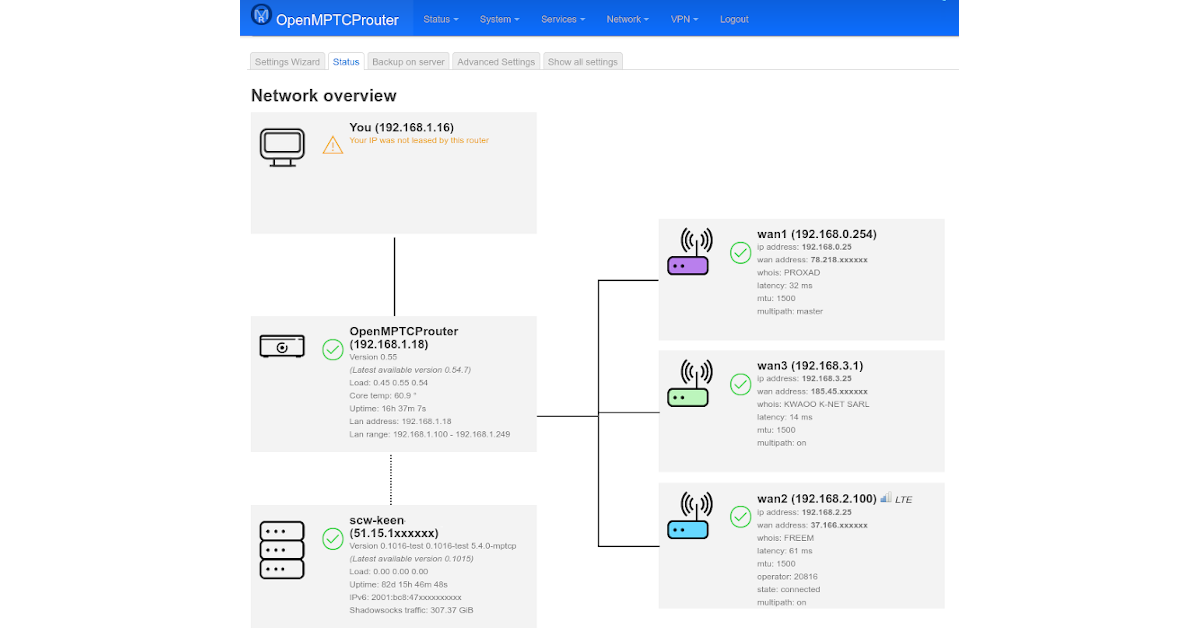
OpenMPTCProuter
pseudo blade
kind pivot
Why are most router os on freebsd
Not sure it's really most, but some use FreeBSD because it has a more permissive source license that permits distribution of modified copies without sharing source code (closed source)
 mossy canopy
It’s not closed source, it’s MIT license
mossy canopy
long scarab
So I don't have to reassign IP addresses. Nice! tyyy
*sorry for being dumb im tr...
Subnet masks and CIDR notation if you’re looking to learn. DHCP with static leases can be your friend. The larger the subnet, the more IPs but also the larger the broadcast domain leading to a large amount of arp traffic/etc
Keep your layer 2 networks as small as feasible, and route (layer 3) between them.
thick minnow
can someone help me with my internet
i have good download but my upload is like 20 and my download is 600
clear igloo
That's normal unless you're on fiber which gives symmetrical upload
 frosty oyster
thats not always true. you can look up your internet plan to see what you should get
clear igloo
frosty oyster
thats not always true. you can look up your internet plan to see what you should...
Find me a DSL or Cable (coax) plan for residential that offers symmetrical upload/download
frosty oyster
in germany we have that
well not exactly symetrical but not 600 to 20
like 400 to 300 or something
clear igloo
because DOCSIS today is not designed for that and I know germany doesn't have DOCSIS 4 rolled out since the spec isn't out yet
frosty oyster
no it isnt
sorry im probably wrong but i still shouldnt be that extreme of a difference or should it
clear igloo
It 100% should be on DOCSIS (cable)
frosty oyster
okay
clear igloo
Most crappy DSL is different because you don't get much download to begin with
There are different versions of DSL though and later ones definitely offer better download and upload
frosty oyster
because i have like 100 to 60 and i thought i he has 600 download then he should get more upload as well
clear igloo
If he's in the states (which I suspect) then it's almost certainly DOCSIS which is where that kind of discrepancy is common
Comcast and Spectrum in the states offer gigabit download and hide their upload (it's 35Mbps)
mossy canopy
1200/200 here. It’s funny as the uplink can basically be saturated with ack traffic if you do manage to saturate the downstream
frosty oyster
wow
mossy canopy
And yea, in the states
clear igloo
It's because, currently, DOCSIS is like 90% spectrum for download and limited upload spectrum, that's changing with DOCSIS 4 or whatever the new revision is going to be called which will allow for more (although not necessarily symmetrical) upload
frosty oyster
and does this limitation apply on fibre?
clear igloo
Not inherently, no
frosty oyster
ok
clear igloo
Fiber, thankfully, is full duplex by default
Now your ISP can definitely rate limit you for upload and download
but fiber is so nice because that limitation doesn't exist except when applied artificially 😄
waxen scroll
clear igloo
It's because, currently, DOCSIS is like 90% spectrum for download and limited up...
maybe if they shut off most of the useless cable channels
clear igloo
waxen scroll
maybe if they shut off most of the useless cable channels
Hey now we need 5000 options for watching shopping channels 😄
waxen scroll
ATT fiber has been installing conduits around a large area for a while now and still seen nothing in terms of going into neighborhoods 😐
clear igloo
frosty oyster
you can always apply for an industrial connection
or just wait for a good rollout, lol
I have ATT fiber options up to 5Gig symmetrical available to me as a home user, lol
clear igloo
waxen scroll
ATT fiber has been installing conduits around a large area for a while now and s...

frosty oyster
wait dsl isnt the same as over coaxial is it
clear igloo
no, coax is that thick wire with a single pin sticking out of the middle
dsl is usually RJ11 (phone line)
frosty oyster
XD yeah i know
waxen scroll
I mean its technically similar 😛 its multiplexing
frosty oyster
but you said tv channels
clear igloo
Yah, same but different, lol
long scarab
clear igloo
dsl is usually RJ11 (phone line)
annoying 4p4c connectors right
frosty oyster
in my area we only have dsl connections available even starlink is faster
clear igloo
long scarab
annoying 4p4c connectors right
yup
waxen scroll
we have 300mbit for $50 and ATT still wants to charge $50 for 25mbit DSL
long scarab
waxen scroll
we have 300mbit for $50 and ATT still wants to charge $50 for 25mbit DSL
i get 50 down 8 ish up for $15/mo
waxen scroll
makes me wonder if anyone in the area is using telephone wire service anymore
clear igloo
They want those services to die, they basically let them rot
waxen scroll
they've been uncompetitive for a decade in this area
clear igloo
Push the old dsl and whatnot customers to 5G
long scarab
welp y'all have fun, my friends and i are gonna have a roman candle battle
waxen scroll
once that fiber goes in comcast is screwed
clear igloo
You don't want to pay comcrap $2000 to get fiber? 😄
waxen scroll
comcast says they can do fiber but ive never asked them to prove its available
with all the docsis improvements they probably wont ever have to use fiber. but at least theres a second competitor in the market for high speed
clear igloo
Yah, they have that option where they give you a Juniper SRX and some MetroE link
 sudden kayak
yeah that is very much a business/pro service
it's not really intended to be for regular consumers unless you have very specific needs
clear igloo
sudden kayak
yeah that is very much a business/pro service
Yah, there is a reason they charge a $2K deposit and I think $500/month even though they offer it to home users, lol
sudden kayak
only $300/m but yeah
it's more "here's a business fiber plan, but you can have it at home without jumping through hoops to get a business line if you really want it"
 copper aurora
can someone recommed a quad port nic (2.5 Gbe prefered) that works with opnsense?
pseudo blade
copper aurora
can someone recommed a quad port nic (2.5 Gbe prefered) that works with opnsense...
Seems the way this is done cheaply at this time is by using 4 RTL8125B's direct to a x4 slot, which requires lane bifurcation support from your system.
Some of the 2 port ones include a tiny little 2-lane PCIe switch to avoid that problem.
 lyric stirrup
I found 2 Apple time capsules in the dump and decided to replace my current wireless solution with them as they work much better. But I am having an odd issue where the second time capsule's (which is wirelessly connected to the first one) wired connection is much slower at roughly half the speed of the wireless connection. Any idea why this could be happening and how I could fix it. I tried a different ethernet cable too and got the same result.
 sonic notch
Hey, I know that phones can act as hotspots using a Wi-Fi connection rather than mobile networks. I was wondering if there are any cheap routers/other type of equipment that do the same
i.e. connect to a WPA2 Enterprise network and use that instead of a WAN ethernet port
opal pagoda
sonic notch
i.e. connect to a WPA2 Enterprise network and use that instead of a WAN ethernet...
my mirouter 4a can do that but idk if wpa2 enterprise is supported as i dont have stuff to test that
prolly not
 unreal plume
Hello, I recently built a new battlestation for my little brother and I am having some problems with the asus wireless wifi adapter not showing up when its plugged in.
Was wondering if someone know's the fix for that. I have the recent drivers from rogs site and I keep getting the same pop up message "The following extensions are blocked "Extensions\PieExtension.INF" and I've looked through the properties on the extensions folder but could not find the security tab. heeeelp!
 plain steppe
how is all
flint rune
copper aurora
can someone recommed a quad port nic (2.5 Gbe prefered) that works with opnsense...
The Intel ones, like x710, should work fine. At least they do on pfsense and typically Intel NICs have solid support in most platforms.
But they come at premium several hundred. There are some much cheaper Broadcom NICs, especially if you go used server parts route. But their support and number of VMQs, important for VMs, is a lot lower.
TL;DR Intel adapter if you don’t care about price, 2nd hand server parts like Broadcom on eBay and similar sites if your budget constrained.
 bleak merlin
can someone explain this?

 analog sonnet
anyone every try to backfeed networks into an xfinity access point/router
don’t know if it will work or not
mossy canopy
bleak merlin
can someone explain this?
Firewall or similar blocking the websocket connection to the endpoint preventing it from publishing, thus 0 Mbps
bleak merlin
mossy canopy
Firewall or similar blocking the websocket connection to the endpoint preventing...
Can you dumb it down please
mossy canopy
Something stopped the test from uploading
So it couldn’t register the speed to report
sonic notch
opal pagoda
my mirouter 4a can do that but idk if wpa2 enterprise is supported as i dont hav...
Rip, one idea I had was buying some cheap device that could run Windows, add a decent Wi-Fi USB to it, then connect it to the WAN port on a router. Not sure how well that would work or how tedious setting up the software would be
bleak merlin
mossy canopy
So it couldn’t register the speed to report
I think the test is accurate cus whenever I upload anything it’s slow asf
opal pagoda
sonic notch
Rip, one idea I had was buying some cheap device that could run Windows, add a d...
this is menu in windows to share a network connection so software isnt too bad
also i would get a cheap router and configure it into ap mode over a wifi adapter in ap mode as those arent ment to be access points

 frigid pine
Cisco Switch 1 (trunk port) ====== Mikrotik LHG1 (bridge mode) ------------- Mikrotik LHG2 (station wds mode) ======= Cisco Switch 2 (trunk port)
I am trying to make a wireless bridge that should act as a trunk link to extend connectivity from one site to another.
I am following this guide but not reaching anywhere.
https://wiki.mikrotik.com/wiki/Manual:Wireless_VLAN_Trunk
I have similar config on both MTKs.
add ingress-filtering=no name=bridge1 protocol-mode=none vlan-filtering=yes
/interface wireless
set [ find default-name=wlan1 ] band=5ghz-onlyac channel-width=20/40/80mhz-XXXX country=india disabled=no frequency-mode=superchannel \
    mode=bridge radio-name=PMNFCC-BSJ ssid=PMNFCC-BSJ wds-default-bridge=bridge1 wds-mode=dynamic wireless-protocol=nv2
/interface wireless nstreme
set wlan1 enable-nstreme=yes framer-policy=best-fit
/interface wireless security-profiles
set [ find default=yes ] supplicant-identity=MikroTik
/ip hotspot profile
set [ find default=yes ] html-directory=hotspot
/interface bridge port
add bridge=bridge1 interface=ether1
add bridge=bridge1 interface=wlan1
/interface bridge vlan
add bridge=bridge1 tagged=ether1,wlan1 vlan-ids=5
add bridge=bridge1 tagged=ether1,wlan1 vlan-ids=8```

I do not want a management VLAN. Just want to take all VLAN traffic from one cisco Switch to the other.I have so much difficulty knowing what to build for my incoming home lab
I'll need a nas, some servers like home assistant, password managers etc
And a place where I can try out things
I also want 10gig networking out of it
I absolutely don't know at all what to do. Taking cheap consumer grade stuff and multiple servers, one big fatass still consumer grade, put them in a rack or not, buy used old pro servers etc...
Looks like the most logical thing would be to just build a normal computer with a cheap but recent CPU and only one of them
 hollow marlin
clear igloo
Yah, there is a reason they charge a $2K deposit and I think $500/month even tho...
hollow marlin
clear igloo
Yah, there is a reason they charge a $2K deposit and I think $500/month even tho...
I assume they would install an SRX300 and if so, the first month would cover the hardware cost and all profits from then on 
sudden kayak
i checked and it's actually only $1k install fee, but then another $20/m equipment rental fee for CPE (unclear what exactly you get currently)
flint rune
kind pivot
Looks like the most logical thing would be to just build a normal computer with ...
Well I think you first need to make a list of what you want to run/do. If it ends up being NAS + a few simple servers like the ones you listed imo I’d do 1 small build on a modern CPU. Everything you listed is super easy to run.
You can go with a hypervisor like ESXi or proxmox if you really plan to play a lot, if you just want to run those in the easiest way possible at home something like unRAID or TrueNAS Scale would work really well too which still gives you the ability to run VMs and containers.
kind pivot
Easiest isn't my goal, I have no problems using Linux. I just don't know what's the best way to go about it.
I'll probably install a bare Linux with the nas there and use qemu/docker/lxc for the rest
I'll probably make some federated social network nodes too, but I guess this also doesn't eat up a lot of ressources
And a music server, but same..
flint rune
Yeah it’s all super easy stuff, honestly so lightweight most of that could probably even run on some low power SoC boards. But assuming you want room to grow / play around more I’d prob go with something mid tier from Intel or AMD. If you plan to run Plex Intel with iGPU is often a good pick to get QuickSync for transcoding without a dedicated GPU. If you don’t care about that or will have a dedicated GPU than I’d just shop the best deal.
 torpid bluff
Hmm I think she is dead
copper aurora
flint rune
The Intel ones, like x710, should work fine. At least they do on pfsense and typ...
Thanks a lot!
kind pivot
Yeah okay
I3 gen 12 or 13 would be enough I guess
flint rune
The only pro I’d say to a i5 in those new gens is E cores if you are worried about power consumption, compared to running the P cores all the time. I think STH did a comparison and showed over 10% power usage decrease with E cores when mostly idle / background takes.
kind pivot
Oh yeah, I'd need to go gen 13 for that because the 12400f doesn't have e cores
flint rune
Yeah, which if power usage isn’t a concern then cost savings of 12th is probably better.
For me trying to mostly be solar powered I opted for the E cores since a lot of the time home box is idle / light workloads and using those E cores. Then it can hit the P cores when I’m actively doing stuff with it.
kind pivot
It's not just power though, having 4 more cores even if they are "E" is cool perf wise
pseudo blade
frigid pine
Cisco Switch 1 (trunk port) ====== Mikrotik LHG1 (bridge mode) ------------- Mik...
It's unlikely to be the cause of your issue but you should probably scrap nstreme - it's old, not very well supported and not implemented for their newer hardware. NV2 has so far been ignorable also, I found regular 802.11 works as well or better for most ptp scenarios anyways.
pseudo blade
sonic notch
Hey, I know that phones can act as hotspots using a Wi-Fi connection rather than...
Any Mikrotik with WiFi can act as a client and bridge WiFi networks and they start very cheap - but for WPA2 enterprise it may be more involved - follow along from here if that's of interest: https://forum.mikrotik.com/viewtopic.php?t=184233
Else you could use something like a Raspberry Pi, authenticate it and set it up to bridge/NAT from the ethernet port
frigid pine
pseudo blade
It's unlikely to be the cause of your issue but you should probably scrap nstrem...
I am just keeping it as a backup. I have seen nstreme work better in some scenarios and gives much better BW. But anyways my issue doesn't resolve by removing nstreme so it's least of my worries as of now.
knotty plover
PC to PC file sharing, 1Gb/s Ports, a router in between, could the router be the reason to not hit 1Gb/s?

I'ma do bonding by multiple PCI-E LANs between both PCs to see what will happen
opal pagoda
kind pivot
Easiest isn't my goal, I have no problems using Linux. I just don't know what's ...
my recommendation:
get a single pc with deaccent hardware capabilities
run proxmox on it and then use vm-s for your nas and other home server stuff
 mossy canopy
knotty plover
PC to PC file sharing, 1Gb/s Ports, a router in between, could the router be the...
mossy canopy
knotty plover
PC to PC file sharing, 1Gb/s Ports, a router in between, could the router be the...
It’s impossible to saturate a 1Gbps line with a single TCP session due to ack traffic
knotty plover
mossy canopy
It’s impossible to saturate a 1Gbps line with a single TCP session due to ack tr...
Oh, I didn't understand anything TBH, is there any tutorial about this?
so far it only goes 1Gb/s
 mossy canopy
And bonding can’t use more than one MAC unless you’re doing LACP
knotty plover
mossy canopy
And bonding can’t use more than one MAC unless you’re doing LACP
I also saw this, which says it's almost not possible?

Do you know any better ways over network for file sharing between 2 PCs?
I wanna have at least 2-3Gb/s
My main PC has a 2.5Gb/s LAN port, Maybe I just get another port like that for the second PC
that seems the only way
peak cloak
knotty plover
I'ma do bonding by multiple PCI-E LANs between both PCs to see what will happen
see yeah that doesn't work for a single connection such as file transfer
peak cloak
knotty plover
that seems the only way
yeah
knotty plover
peak cloak
see yeah that doesn't work for a single connection such as file transfer
Yeah, I need to get a 2.5Gb/s Port for the second PC
then it works
All these 1Gb/s ports are useless now
 drowsy fossil
knotty plover
I also saw this, which says it's almost not possible?
drowsy fossil
knotty plover
I also saw this, which says it's almost not possible?
there are file copy protocols that run faster over lacp including SMB direct
knotty plover
drowsy fossil
there are file copy protocols that run faster over lacp including SMB direct
Can you recommend me one so I search for it?
I was thinking about if that's possible to use USB 3.2 Port for that, 20Gb/s
but windows doesn't have such thing right?
drowsy fossil
uh
😬
definetly want pcie
if you are spending that sort of money, get a 40gbit nic
connectx-3
and smb direct is windows native, but is super expensive (needs windows workstation edition)
so it works best on linux because thanks microsoft
knotty plover
drowsy fossil
if you are spending that sort of money, get a 40gbit nic
connectx-3
40 is more than I need haha, I wanna go with this
 drowsy fossil
you can get 2 dual port 40g adapters + cables for under 100 from ebay
peak cloak
fiber/dac tho
drowsy fossil
makes for cheaper switches 🤷
 jovial cipher
Hi guys I have an issue with my pc. My pc was connected to a surge protector which was connected to an outlet. The outlet tripped but because I have an apu it stayed on and let me shut down. After I was able to turn on my pc wifi would say connected but it would not work. Got an error saying “remote device refused connection”
Nothing in my pc seems shorted or messed up and everything is working as usual but now I don’t see any wifi settings and even with Ethernet connected going to a website and running windows network troubleshooting shows error “remote device is refusing connection”
opal pagoda
jovial cipher
Nothing in my pc seems shorted or messed up and everything is working as usual b...
you had power surge
replace the wifi card cuz its broken
opal pagoda
also replace the surge protector
when it trips it looses effectivness
jovial cipher
Don’t know how but I got it working
Okay yeah will change the surge protector
Can settings like proxy just randomly be turned on?
Because my pc prior to that shut down was working, then I was messing with all the settings and saw proxy was setup. Turning that off allowed my Ethernet to finally work
 sage magnet
I am moving across the state for grad school. I drove back this morning to get another load of stuff and the CenturyLink installer came while I was gone.
When I looked before, only CenturyLink said they covered my area, although at first they said they offered 940 mbps, but then they said only 140 mbps.
First Cox wasn't available, but now it says it is, although the price increased the second time they asked for my address.
Tmobile is not available.
Mom was home and asked me all kinds of questions that I did not know how to answer.
I know very little about DSL.
Mom said the installer said they need to dig a big hole into the neighbor's hedge to access the phone box and I wondered what previous tenants had.
Maybe Cox.
She said that without tearing into the hedge we only have "Half-power DSL," and full-power DSL does not sound fast.
peak cloak
sage magnet
I am moving across the state for grad school. I drove back this morning to get ...
DSL in general is not good
you want cable (aka coax or DOCISS)
sage magnet
That's what I thought!
peak cloak
or better yet fiber
this map isn't 100% accurate, but you can check https://broadbandmap.fcc.gov/home
looks like they updated it recently
analog sonnet
I have xfinity network to my house (not fiber) and it runs into their ap/router...it has 4 rj45 ports on the back of it...would I be able to backfeed other networks through that ap? or are those ports used for 'outputs?'. If not ill be buying a new ap.
peak cloak
wdym by backfeed
analog sonnet
I guess not really backfeed, normally plug I network into it and it broadcasts it
peak cloak
those ports are just network access, so yes you can just plug an AP into there
PC, any other network device
analog sonnet
no, like use it as an ap
peak cloak
aren't you already using it as a wireless router?
analog sonnet
like if I plug a network into it....
im programming a home control system and my control processor needs to be on the network, if I plug that processor into the router will it work? or do I need a normal ap
needs to be on the network in order for my phone to connect to it
peak cloak
I'm confused what you are trying to do, a network is bidirectional. If you plug a device into a router and it broadcasts broadcast packets those will go to the rest of the network
analog sonnet
Right, what im wondering if I plug it into the xfinity router will it broadcast the packets?
peak cloak
as long as something is on the same L2 network, you have unlimited conectivity
peak cloak
analog sonnet
Right, what im wondering if I plug it into the xfinity router will it broadcast ...
yes, if you are running a web server for control that will be acessible on the whole network
analog sonnet
Im worried that because its not just an access point, its xfinitys special home router if it wont let me broadcast packets
thats what im getting at lol
peak cloak
I would reccomend you learn a bit about networking to understand this
peak cloak
analog sonnet
Im worried that because its not just an access point, its xfinitys special home ...
if it didn't stuff like google cast or apple tv steam wouldn't work
amoung many other device features
analog sonnet
I understand networking, but Im unknowing about if the xfinity device will allow it or if I need to buy an ap
peak cloak
an access point isn't anything special either and that wouldn't have extra ports usually
analog sonnet
yes, but this xfinity thing is special...thats why I was affraid it would not work. But it sounds like it will
peak cloak
analog sonnet
yes, but this xfinity thing is special...thats why I was affraid it would not wo...
any ISP router is just a basic L2 network
sage magnet
peak cloak
looks like they updated it recently
Thank you for that map. When I searched for providers I found sites I didn't know listing companies.
The FCC says "No location data" for fixed broadband and that Verizon and Tmobile have 35/3 mobile, but neither carrier says that 5g is available at my house.
peak cloak
Internet -> NAT -> Switch -> Wifi and Ethernet
analog sonnet
so the xfinity device is essentially a NAT, Switch, and Wifi?
peak cloak
analog sonnet
so the xfinity device is essentially a NAT, Switch, and Wifi?
Router, switch and AP
that's your generic router
some also have modem integrated
analog sonnet
this has a modem integrated into it
thank you, sorry I word things in a confusing way
peak cloak
yeah, I call those all in ones
peak cloak
sage magnet
Thank you for that map. When I searched for providers I found sites I didn't kn...
that sucks, if CenturyLink or Cox is only DSL and no cable, I would possibly look at starlink if that's within budget
sage magnet
Not for a student! 😄
sage magnet
I think that I was kicked out of another channel. I asked about my DSL issue, eventually received a partial answer, and then two people asked for help, but nobody else responded, so I informed them that I sadly didn't know anything about it.
Apparently a mod said "You aren't as funny as you think you are."
One of the people who asked a question responded "I don't think even he thinks he is funny."
Then all of a sudden I was looking at an error message.
The channel disappeared from my list and when I try to join it nothing happens.
kind pivot
which channel
kind pivot
So apparently we can't open up ports with starlink router and we even can't with 3rd party routers if we are on ipv4, but we can with v6
If i go to myip.com and see an ipv6 it means i'll be able to open ports with a 3rd party router ?
peak cloak
kind pivot
So apparently we can't open up ports with starlink router and we even can't with...
Starlink is cgnat iirc
Did they roll out v6?
kind pivot
peak cloak
Did they roll out v6?
They did apparently yes
If I see an ipv6 on myip.com I guess they did
 hearty crater
Hey, I'm new to networking and I want to learn networking in order to pen test
What course/material do you guys suggest that I can finish in a month to grasp basic networking?
pseudo blade
I'm not sure "basic networking" is really sufficient for achieving your goal competently but OK
@hearty crater maybe look at this? https://www.netacad.com/node/1278

Networking Academy
Learn Networking Essentials key in troubleshooting network & Internet connectivity, security threats & configuring basic IP services for a solid career.
hearty crater
pseudo blade
I'm not sure "basic networking" is really sufficient for achieving your goal com...
OK, then what course/material world you recommend? Please recommend something fast paced cause the major prob I have with courses is that they're too slow.
pseudo blade
Well I just linked you something to start with
hearty crater
Gg thanks
pseudo blade
It might help you to know where further to go on that subject, but you definitely want to understand OSI Layer 2, 3, 4 and as many layer 7 protocols as you can because obscurity often means insecurity, enough router and switch management to be able to use one to manage or redirect traffic, common vendors, firewalling and intrusion detection+prevention...
And more besides, server admin and (mis)configuration experience and its impacts is also highly relevant
The impacts of physical access, wireless technologies and their vulnerabilities... VLANs, subnetworks and routing tables...
A tad tricky for most to get down pat in a month even if your typical classroom environment is too slow :P
kind pivot
hearty crater
OK, then what course/material world you recommend? Please recommend something fa...
Before doing any real pentesting you need to almost (to not say absolutely honestly) be an expert on each subject that will be a wall to your path when pentesting ... so yeah..
Maybe not an expert ok, but at least quite good
pseudo blade
To be competent you need to be an expert
If you'd rather just run a tool and then present the results as your pentest you barely need to know what a subnet is :P
kind pivot
Yeah, but just running some tools, doing clean reports and good counseling, knowing about the "meta" around cybersecurity is enough to make money with it
But real pentesting ? Heck no
I'm pretty sure pentesting is amongst the hardest things to do in IT
 uncut hound
peak cloak
this map isn't 100% accurate, but you can check https://broadbandmap.fcc.gov/hom...
uncut hound
peak cloak
this map isn't 100% accurate, but you can check https://broadbandmap.fcc.gov/hom...
[...] can be punished by fine or imprisonment under 18 U.S.C. § 1001.
I know that they rather not people lie and skew results but tf what
plucky pollen
peak cloak
DSL in general is not good
wait why
as long as it can supply the speed that u need
and it seems to have generally higher upload speeds than cable from my experience
drowsy fossil
plucky pollen
and it seems to have generally higher upload speeds than cable from my experienc...
that is highly location dependent, with dsl, things slow down very significantly the further you are from the isp's office.
you also get a speed penalty the more users who are using dsl in your area
plucky pollen
well I said as long as it can supply the speed
drowsy fossil
the problem is that dsl usually cant
plucky pollen
like a 100 mbps dsl wouldnt be worse than a 100 mbps cable
peak cloak
plucky pollen
like a 100 mbps dsl wouldnt be worse than a 100 mbps cable
100mbps dsl is rare to come by
drowsy fossil
so if you have 100/100 service from both, if you have 3 devices, 2 just sitting idle and doing background tasks, the cable is gonna speedtest in the 97-99 range where the dsl will speedtest in the 70s to 80s
from the 3rd device that is
peak cloak
usually it's 20 or lower
plucky pollen
peak cloak
100mbps dsl is rare to come by
not here in germany (vdsl2 specifically in my case)
drowsy fossil
nah its rare everywhere
you just happen to live really really really close to an exchange
peak cloak
well germany is also pushing everything out of their existing networks
plucky pollen
yeah
peak cloak
here in the US, everyone is moving to cable and now fiber
plucky pollen
maybe its different in very rural areas but usually here u can get decent speeds with dsl
peak cloak
both of the two ISPs serving my area are now fiber
drowsy fossil
1000 feet
thats the maximum distance for vdsl2 to acheive 50mbps
drowsy fossil
thats vdsl2+
plucky pollen
yeah
drowsy fossil
vdsl2+ can acheive a maximum of 300mbps
and it often can reach less than 100 meters from the exchange
if you are that close, cable can reach single subscriber speeds of over 10gbps/1gbps
where vdsl2+ is 300/100 max
drowsy fossil
sure but if you isp installed it, it could be that fast
plucky pollen
yeah ik cable can reach higher speeds
im tryna make my parents switch to gigabit cable in their home, they currently have a 100 mbps
drowsy fossil
there are less than 10 vdsl2+ networks in the world btw
plucky pollen
Germany is unfortunately pretty slow with fibre
plucky pollen
drowsy fossil
there are less than 10 vdsl2+ networks in the world btw
what exactly is a network in this context
drowsy fossil
individual isps
plucky pollen
ive actually seen plenty of boxes with smth like "bringing fibre to you" around my neighbourhood so hopefully it is actually coming to this house too
drowsy fossil
in the us, only centurylink is using vdsl2+, and they dont even offer single service over 150mbps apparently
plucky pollen
It seems like the infrastructure around dsl is just very different
drowsy fossil
it relies on existing infrastructure
and in the us, our phone lines were run over a century ago on average
plucky pollen
there is actually a coax connection in my room it seems, but my isp isnt offering cable internet here
 icy quest
plucky pollen
there is actually a coax connection in my room it seems, but my isp isnt offerin...
icy quest
plucky pollen
there is actually a coax connection in my room it seems, but my isp isnt offerin...
A lot don’t anymore as it’s pretty old now
DSL is pretty old even with a decent amount of people using it
drowsy fossil
probably serving a bunch of folks in the area already and they would need to install a new box and they dont want to do that when fiber is an option
drowsy fossil
but at my current address
the fastest cable available is 1g/50m
the fastest dsl is advertised as 5m/2m, but when we had it it was 2.5m/0.8m
and there is 5g/5g fiber available
plucky pollen
according to my isp, 100 mbps dsl is even available at my grandparent's home btw, which is pretty rural
drowsy fossil
yes but what speed is it actually
plucky pollen
at least my 100 mbps dsl plan does reach the advertised speed and even above
drowsy fossil
plucky pollen
at least my 100 mbps dsl plan does reach the advertised speed and even above
sure but reaching that speed will highly depend on location
again see my example
the isp isnt lying, but the cable quality means that practically the speed for me is what it is and theres no way for them to improve it
plucky pollen
yeah i cant speak for u, the situation might just be very different from how it is in germany
drowsy fossil
gotta remember north american population density even if you exclude rural areas are still alot lower
plucky pollen
yeah
drowsy fossil
the US loves suburbs and canada is mostly empty space
plucky pollen
yeah its probably a lot more rural then what we'd call rural
drowsy fossil
big thing tho is imo the network operators shouldnt be able to see traffic to devices they dont own in my opinion
if you own the device, you can make security policy on the device itself...
all of my company devices have network profiles for our enterprise's networks
end users cant change settings for them
and non company devices are blocked from accessing the enterprise networks.
but not the entire network is their property
peak cloak
residential ISPs mostly just connect users to Internet Exchanges
and other neighboring ISPs
drowsy fossil
in the us for example, a significant proportion of the network is public infrastructure and a significant part is owned by the end user
if you actually own the hardware, then you have permission to require a root cert for dpi
but isps dont and shouldnt be able to do that
but currently with regular dns they in fact do have that level of control
again
you personally are fully in the right with what you want, however bad actors are ruining everything for all of us
if it werent for the bad actors, we wouldnt even need https
noone would impersonate anyone else, and people would only look at traffic for devices they own
but thats not how it is
and everyone needs to operate a dns server otherwise lan comms and upnp devices will have trouble recognizing each other
peak cloak
I still kinda don't understand the argument
drowsy fossil
again tho the problem doh is working on solving is not people blocking it
peak cloak
Is it about liability? DNS blocking?
drowsy fossil
the problem is that with regular dns, requests can be falsified without the client being aware
we tried to fix it with dns authentication, but that also can be falsified
doh allows the client to cryptographically verify that they are receiving the response they asked for
even if the website you are trying to reach hasnt set up dnssec
peak cloak
drowsy fossil
doh allows the client to cryptographically verify that they are receiving the re...
Only if the server is trusted tho? As I understand the server can still provide a false result
drowsy fossil
oh sure
but you are also verifying that the server you asked for the info is the one providing it to you
"what they asked for" does not mean the answer is true, just what they asked for
peak cloak
Yeah
drowsy fossil
yea about half of the websites on the internet dont use dnssec last i looked it up
peak cloak
What's the issue exactly with dnssec
I heard some things, but didn't read much about it
drowsy fossil
if anyone isnt using it, then noone can rely on it
it also requires setup from every individual website
peak cloak
Found this on HN https://news.ycombinator.com/item?id=9178783

Comments are interesting
drowsy fossil
also it is relatively computationally and time intensive to do a full dnssec verification
it can be shortcut and only needs to be done once per website, but its still not as good as being able to do it once for your dns provider, then use https to make sure that your trust hasnt been lost since the connection started
peak cloak
The thing on how it's low level is a pretty good point, since the user has no insight into the error
drowsy fossil
in the past 100 dns requests made on my network, 1 reply supported dnssec
thats the problem
http is perfectly secure as long as people ignore anything that isnt meant for them
but the bad apples ruin the bunch
it puts a ton of work on a small number of people
btw the root authority system in general is "information tyranny"
dnssec relies on that infrastructure the same way that doh does
im not talking about you who is choosing to take on the task because they want to
im just talking about the people who will actually have no choice but to act
and im not saying that theres anything wrong with the root authority system, im just saying that its the same level of centralization if you go forced dnssec or if you go doh
lets take my boss for example
he has a family
but he also has the workload of 3-5 people piled on his plate because the company wont/cant pay enough to hire anyone
im not sure but i definetly know that cryptocurrency does not have the answer to that lol
if people were using it like it was originally intended, that wouldnt be a problem
but as always the bad actors are ruining the bunch
yep
but completely understandable doesnt mean i want it happening to me, thus we build systems to make it not happen again
i agree with cloudflare that zero trust is the only way
my boss is also trying to eventually lumber the company in that direction but it takes time
anything outside of the hardware you own is assumed insecure or compromised somehow
edgy ingot
does anyone have any experience with swag/nginx? I got the access to the default page at xxx.duckdns.org but cannot access jellyfin.xxx.duckdns.org, and I am at a total loss
drowsy fossil
drowsy fossil
anything outside of the hardware you own is assumed insecure or compromised some...
practically tho its more "anything outside the hardware you own + the services you pay for"
disagree with both
you can already get to about that level with vpns and strict network policy
and everyday people understand trusted vs untrusted already
they dont need to understand the exact tech used, just that their account is what gives them access to it rather than "the vpn" or "the plug in the office"
drowsy fossil
drowsy fossil
practically tho its more "anything outside the hardware you own + the services y...
in theory you make your own account but again see above
the companies i have placed my trust in are google for authentication and cloudflare for authorization
both can be replaced with foss alternatives but i dont have the patience
which means that you can move to zero trust by spinning up tbh just a http proxy and thats probably it?
 torpid robin
Question for smart people, this doesn't exactly relate to networking but it does relate to POE. As of now I've used CISCO phones to setup my own sjp trunk for internal communications between me and my friends, I've switched to Avaya for a more modern feel, but for some reason my Avaya 9508 will not turn on with POE even though it has the POE ability. Does anyone have any answers to that?
drowsy fossil
passive vs active poe
check the version of poe the switch supports
if it only supports 24v poe, your active poe avayas who (probably) need 48v wont work
torpid robin
Alright, I'll try to see if I can find any info on my switches spec sheet
rocky badge
@hollow marlin My friend and I are stupid lol

We setup private BGP on our S2S VPN and we can announce routes to each other
torpid robin
drowsy fossil
passive vs active poe
check the version of poe the switch supports
if it only su...
From looking it up the switch has POE+
So would there be another issue?
drowsy fossil
thats strange
only thing i can think of is you are using the wrong port on the phone maybe???
wait thats not an ip phone
torpid robin
Sorry typo on my end
drowsy fossil
basically any phone system supports a sip trunk
but that phone doesnt act like one on its own
it needs a box to do the conversion
drowsy fossil
yea thats presumeably the same setup that we have
what bays do you have in your ip office box?
also how did you get these
whoever you bought these from should have gotten basic functionality set up for you?
torpid robin
Ebay so you get what you get I have all the slots with whatever the phone module is called
drowsy fossil
but there are like a bunch of different of the modules
we have one module for our analog phones and another module that connects up to our switch rack
torpid robin
That's my issue I don'y know the exact name of it
It has 12 rj-45 inputs on the front
drowsy fossil
they have a label at the bottom left of the module
they all have 12 rj45s lmao well thats not exactly true but most of them do
torpid robin
It's a VCM
I'm honestly better off just taking it out and ordering a refurbed one as well as everything else I need
drowsy fossil
that should be all you need i think
i would pull up pics but im very much not at work now lol
torpid robin
Hmm, I'll take a look at it in the morning and try to see if I can figure it out
Right now I gotta program some radios lol
plucky pollen

Is there a legitimate reason behind ISP-imposed data caps, or are they just a money-making scheme?
Thanks to Skullcandy for sponsoring this episode! Use offer code Crusher20-1 to save 20% at http://bit.ly/2fLydoF
Techquickie Merch Store: https://www.designbyhumans.com/shop/LinusTechTips/
Techquickie Movie Poster: https://shop.crowdmade.com/...
are data caps actually a thing in America?
drowsy fossil
unfortunately yes
plucky pollen
damn
torpid robin
For me no but yes I have to pay an overage every terabyte
plucky pollen
I have never heard of it here in Europe
torpid robin
And for me I pass that quick
plucky pollen
like if u use more than 1 tb per month or per terabyte in general?
torpid robin
I mean I have to pay $400 for a 1gbps and for tv a month
torpid robin
plucky pollen
like if u use more than 1 tb per month or per terabyte in general?
Per month
plucky pollen
torpid robin
I mean I have to pay $400 for a 1gbps and for tv a month
how
torpid robin
Exactky
plucky pollen
how is it that expensive
torpid robin
Exactly but for gigabit it's what you have to do
plucky pollen
literally 10 times as much as gigabit here lol
 drowsy fossil
yea and here at my home the normal price for symmetrical gigabit is $80 a month, but if you qualify for basically any afforable thing program its $50
torpid robin
It's not the internet
It's the cable
It's $80 but with all the tv boxes and remotes etc plus every channel
It's pricey
plucky pollen
why do you pay hundreds of dollars for tv channels
imagine if netflix cost like $300
drowsy fossil
thats what they charge so if you want the content, thats what you pay
rocky badge
We have gigabit/500 for $65/mo here which isn't bad
but then we also pay $65/mo for YT TV
torpid robin
rocky badge
We have gigabit/500 for $65/mo here which isn't bad
HAHHAH I get 1200 and 35 upload
Worst ISP ever
I hate comcast
It's honestly cursed
plucky pollen
drowsy fossil
thats what they charge so if you want the content, thats what you pay
but the price is so high. I wouldnt pay for netflix if it was 100 bucks lol. I would probably pirate it instead if I absolutely had to watch it
rocky badge
I want my isp's 2 gig/1 gig option for $99/mo but its not worth it
drowsy fossil
plucky pollen
but the price is so high. I wouldnt pay for netflix if it was 100 bucks lol. I w...
if you wanted access to the thing on it and you could afford it, you would pay for it
and its not like netflix, they have actually exclusive content that is frequently live and currently relevant
rocky badge
I want my parents to ditch our ISP's voice offerings and let me just setup VOIP lol
plucky pollen
if you wanted access to the thing on it and you could afford it, you would pay for it
no, there is a limit where something is just too expensive. I would assume people dont just buy ridiculously overpriced things even if they would still be able to afford rent.
rocky badge
but fuck 3CX with the bullshit lol
drowsy fossil
theres a difference between "have the money for" and "can afford"
and theres a difference between "would like to have" and "want"
torpid robin
rocky badge
but fuck 3CX with the bullshit lol
3cx is dumb just use freepbx and run a server
Completely free just need a provider which isn't that much
 torpid robin

Freedom to Communicate The "Free" in FreePBX stands for Freedom. That's because FreePBX, the world's most popular open source IP PBX, gives users the
Put that on a VM
There's lots of info on setup
rocky badge
I'm not gonna put it on a VM
rocky badge
If I setup a PBX at home I am going to do it on a dedicated server so I don't have to worry about prod/lab
torpid robin
Free PBX is great
It's it's own ISO image and you just connect via ip on a seperate pc
I run mine on a PI lol
rocky badge
tbh I just want to redo all of my servers and get larger UPSes
torpid robin
I need a rack but I don't want to spend a fortune at the same time
rocky badge
go a more modern platform, get at least 3 identical systems
torpid robin
I also want to setup a NAS

eBay
Find many great new & used options and get the best deals for Dell PowerEdge R720XD Server | 2x 2660 V2 =20 Cores | 64GB | H710 | 2x 4TB SAS at the best online prices at eBay! Free shipping for many products!
Was looking at one of these


 torpid robin
That's hot
rocky badge
I'd really love a R730 or R740
torpid robin
I have an 8 port POE switch that my monitor sits on lol
HP though
Some real ewaste
kind pivot
torpid robin
I mean I have to pay $400 for a 1gbps and for tv a month
Wait wat
And wtf you don't have unlimited data 😮
In France for 40-50€/month you get unlimited 10Gb/s connexion
And the router given by the ISP has fsp+ out, can install VMs, do docker containers, install 3 HDD and make a nas, has a lot of normal router features, has an oled display and a sleek look, everything powered through type C, you can also have a "wifi repeater" for free that has RJ45 out too
kind pivot
torpid robin
https://www.ebay.com/itm/255914636544?hash=item3b95b37500:g:FPoAAOSwdwBjmyP~
Aren't those super noisy ?
I want to make a nas too but I don't really see the point of those sadly
I mean, sure you have 20 cores spread accros two CPUs
But that's like the performance of an i5 from nowadays while doing way more noise and huge power consumption
The advantage is pcie lanes number and the fact that it comes with 64GB of RAM and that it's somewhat cheap
But I'm not sure about buying a 10 year old server :/
kind pivot
Oh wow
I just had a starlink mail telling me the subscription will go down to 40€/month starting today
pseudo blade
kind pivot
And wtf you don't have unlimited data 😮
In France for 40-50€/month you get un...

Mind you in practice the effective limit is ~55mbps to this property and 100mbps is the max for most
kind pivot
That's the USA ??
pseudo blade
This is the symbol of the devil. You need know nothing more

To the point that Luke brought it up indirectly last WAN show
When mentioning Australia and Cloudflare
Cloudflare have opinions about them also https://blog.cloudflare.com/the-relative-cost-of-bandwidth-around-the-world/
 hard arch
i would own one of the only wifi cards that opn sence dont work with lol
kind pivot
Wow that's insane @pseudo blade
 blazing willow
pseudo blade
Cloudflare have opinions about them also https://blog.cloudflare.com/the-relativ...
blazing willow
pseudo blade
Cloudflare have opinions about them also https://blog.cloudflare.com/the-relativ...
can confirm, everyone has telstra because everyone else has telstra so they must be good
their service sucks and their customer support will leave you on hold for at least 8 hours
virtual isps that use telstra are actually infinetly better, cheaper, and have better support than telstra
hard arch
openreach in uk is a joke
took them 4 diffrent call outs and 5 hours
to figure out a cable had snaped and then another 2 weeks to replace it
its not even a long run from my house to cab its about 5m
not fiber just a dsl phone line
blazing willow
for telstra you can spend a month on and off calls to get through to someone because you've been charged for data you didnt request nor use
hard arch
this new isp i have
called up said line have very high ping and slow speeds
they came out same day and replaced a full fiber run in an hour
blazing willow
wow that actually really good compared to australia
hard arch
got to keep old run aswell lol
blazing willow
they'll come and change the perfectly fine lines to something that is probably actually slower and just more cost effective, and internet can be down for a week
blazing willow
gotta waste the budget somehow
hard arch
not that im moaning got a free gpon fiber cable lol
pseudo blade
blazing willow
virtual isps that use telstra are actually infinetly better, cheaper, and have b...
For mobile definitely, though on the internet side they sell NBN co. obviously.
Same stupid problems and worse pricing honestly.
Maybe if NBN co wasn't redesigned to be as selfishly as possible for various reasons it wouldn't be so bad
hard arch
idk what ima do with the cable i doubt i can just get 2 cheap af ont off facebook and hook em together
kind pivot
Just go starlink at this point
pseudo blade
Funny story - the announcement that it would change from being a full fiber deployment to VDSL+reusing cable networks badly was done by a conservative PM from the offices of Fox Sports, Foxtel being the country's largest cable TV provider
Isn't that interesting?
hard arch
if that worked could just throw cable out a window and down side of house
screw my brother he dont needs full 1gbps for fortnite
blazing willow
pseudo blade
Isn't that interesting?
the fact it wasnt the government should be an instant red flag
pseudo blade
kind pivot
Just go starlink at this point
They want $140 a month for a service with a dumb router they make you use makes it incredibly uncompelling.
kind pivot
Wtf it's 40€ where I am lmao
blazing willow
hard arch
if that worked could just throw cable out a window and down side of house
screw...
or you could setup parental controls that give a 1 hour play time
instantly more bandwidth
pseudo blade
I'd rather do semi-fixed 4G, which costs me $10/mo for ~100mbps
Via Telstra actually
Bundled with my phone for 190GB, $82 total
kind pivot
Just come live in France man
pseudo blade
lol
kind pivot
You'll have 10gbps unlimited for 50€ euro
blazing willow
kind pivot
Just come live in France man
u seen the new crime surveillance law they passed? id rather bad wifi
hard arch
dumb router
i introduse the skyq router
no modem mode
ipv6 will crash it
no dns settings
max 20 open ports at all
NORMAL temps accoring to isp is 100c - 120c
internal unshealed psu to help drop wifi like its linus
only 2 ethernet ports only capable of at max 300mbps
pseudo blade
I don't speak French and need work
kind pivot
blazing willow
u seen the new crime surveillance law they passed? id rather bad wifi
I didn't
blazing willow
kind pivot
I didn't
all ik is what they said on wan show
kind pivot
Didn't see the wan show
hard arch
the only good thing it has about it is the router will also act as a powerline adapter
not realy seen that from any other routers
pseudo blade
hard arch
dumb router
i introduse the skyq router
no modem mode
ipv6 will crash it
no dns...
I'd ditch that
hard arch
i would if i could have
blazing willow
kind pivot
Didn't see the wan show
if ur a suspect of a crime that can be punished by at least 5 years in prison they can remotely activate camera, mic, gps location and possibly something else without you knowing for a maximum of 6 months provided that it is ruled ok by a judge and you're not a 'sensitive' profession like lawyers and some other things thats just the law makers getting around the law
from what i remember dont quote me
hard arch
it worked for a week with a d7000
then just never authentcated agein
no mac cloneing or anything got it to reconnect
pseudo blade
blazing willow
if ur a suspect of a crime that can be punished by at least 5 years in prison th...
I wonder how that works with GDPR
hard arch
its a gov so very well
kind pivot
blazing willow
if ur a suspect of a crime that can be punished by at least 5 years in prison th...
Never heard of that and I live in France
hard arch
privacy dont exsist no more stop trying
pseudo blade
Eh not always so, sounds like it needs challenging in court
Else order all your shit from outside the EU, run Linux
The CSI shit can screw right off, enhance and zoom the webcam all you like from somebody else's computer
kind pivot
blazing willow
i mean moreso than it already was
I looked it up, there is a law project yes, it's not up and won't forcefully be accepted
However you know what I think ? At least they are honest about it
hard arch
pseudo blade
The CSI shit can screw right off, enhance and zoom the webcam all you like from ...
if only that shit was real lol
blazing willow
kind pivot
I looked it up, there is a law project yes, it's not up and won't forcefully be ...
definetly better than the us government with the restrict act
hard arch
be so usefull for old pics lol
kind pivot
Pretty sure every gov do it anyways, so them making it official doesn't change anything