#networking
1 messages · Page 31 of 1
 snow anchor
I have an eero mesh network and im considering buying another one and putting it in my room and just using it for ethernet to my pc but do yall have any other ideas?
 agile iris
Are you open to using one of the Ethernet over power setups?
 opal pagoda
snow anchor
I have an eero mesh network and im considering buying another one and putting it...
opal pagoda
snow anchor
I have an eero mesh network and im considering buying another one and putting it...
do you have coax in your walls
if yes then moca
if no then powerline
agile iris
Relevant video https://www.youtube.com/watch?v=b0vy1VzFbf8
Linus did good coverage for Coltons house on the various options
 sage crow
Could always run it under the house if you have a crawl space
If not a mesh system is probably your best bet but still not as fast
 fleet gate
ok is it normal for the ping to keep spiking like this? i asked earlier and someone said it was normal. im 30 miles from the data center
the technician who came out yesterday gave me a new wifi box(which looking at it, isnt new and is instead from 2017), changed some cabling and looked at the cable box outside and rectified all issues yet im getting constant dropouts

its taking like 30 seconds to even load ookla speedtest
 agile iris
fleet gate
the technician who came out yesterday gave me a new wifi box(which looking at it...
agile iris
fleet gate
the technician who came out yesterday gave me a new wifi box(which looking at it...
No where near normal. Although the Ookla speed test being slow to load is not abnormal, I have google fiber and it can still be slow to load at times. If you are on a Cable provider with Coax, it could be many things. If you are on wifi, could be that, but ISP wise it could be the ISPs head-end hub, it could be a coupler or a splitter, it could be at the tap, etc. It can be really hard to diagnose the issue without more diagnostics. If you do a ping or a trace route, you can often times get a hint of where the drops happen, you can do a packet capture and sorta see there. But a ping itself is not gonna help diagnose much.
fleet gate
agile iris
No where near normal. Although the Ookla speed test being slow to load is not ab...
coax wise he checked all of the connections inside of the house and external as his system showed a few faults. so i know the coax connection is all good
one second the connection is good, next the whole lot just goes down, excluding wired devices
and on the hubs self test it says 90 percent of the wireless devices have poor signal strength, even when your in the next room along or even in the same room
just done another test and look
normal again
 agile iris
Are you able to connect to the device wired and run a few tests and see what happens?
fleet gate
the only tests i can do are on the hubs control pannel, which i can connect to wirelessly
even so because its an isp router, its pretty locked down. i had no issues with the netgear one i used to have from them. but since theyve changed to arris and ive had issues with them since. this is the 3rd hub 3 ive had now. but they dont wanna give me the new hub 5
agile iris
So, I would see if there is anything you can connect directly to the ISPs modem/router and see if you are still getting that issue. Unless that is what you mean by Hubs control panel. But a hard wire to their device will let you get the best test. But a trace route will also give you a slight possibility of seeing where the drop happens, but it wont identify if that route itself is the drop, or if your wifi just happened to drop you at that time. But its hard to say if its wifi or not without a hard wire test.
If you plug your wire directly into the ISP modem/router and then do a test, like trace route, it will give you a better sense of where the issue might exist. Could be the ISP, could be whereever the specific colo they share is, etc.
But a real diagnostic would require a service technician who cares enough to not just shove another modem at you and walk away
fleet gate
 fleet gate
agile iris
So, I would see if there is anything you can connect directly to the ISPs modem/...
fleet gate
agile iris
So, I would see if there is anything you can connect directly to the ISPs modem/...
ohh i get what your on about
seeing if theres any connection issues between the isp's datacenter and my router?
if thats what your reffering to, he checked that and rectified it. as there were 3 faults but the lots showing green now
If you still think something is wrong, please check the following
1 Gateway IPv4 address is valid.
2 Your broadband connection is working.
3 Your broadband connection is ready.
4 The temperature of your Hub 3.0 is normal.
5 The status of telephone line 1 is not ready.
6 The status of telephone line 2 is not ready.
7 The device ec:8a:c4:5d:14:89 has low signal strength, please move it closer to Hub 3.0.
8 The device 10:09:f9:46:6c:5c has low signal strength, please move it closer to Hub 3.0.
9 The device cc:d3:c1:7c:54:6b has low signal strength, please move it closer to Hub 3.0.
10 The device 1c:12:b0:59:4b:cc has low signal strength, please move it closer to Hub 3.0.
11 The device 08:a6:bc:1a:47:06 has low signal strength, please move it closer to Hub 3.0.
12 The device ce:05:ed:63:84:c7 has low signal strength, please move it closer to Hub 3.0.
13 The device b2:c6:c7:79:fc:49 has low signal strength, please move it closer to Hub 3.0.
14 The device fe:37:48:26:4b:88 has low signal strength, please move it closer to Hub 3.0.
15 The device b2:16:87:b2:28:84 has low signal strength, please move it closer to Hub 3.0.
16 The device f2:75:72:6a:39:f6 has low signal strength, please move it closer to Hub 3.0.
17 The device 12:e0:7f:f4:b6:3d has low signal strength, please move it closer to Hub 3.0.
18 Please place your WiFi device near the Hub 3.0.
thats all the test is throwing at me
 agile iris
So yeah seems like Wifi is more of the issue. Might be worth looking into some sort of wireless AP device you can connect to it or something like an eero device to extend it
fleet gate
agile iris
So yeah seems like Wifi is more of the issue. Might be worth looking into some s...
do you think fighting for a brand new router is a better shot? i never had issues with the old hub 1. no drop outs or anything like that
thing lasted 10 years until it cut
agile iris
Its worth a shot, just depends on if its a design flaw or a one off issue with that device
fleet gate
where as since ive had the hub 3 all it wants to do is cause an issue
fleet gate
agile iris
Its worth a shot, just depends on if its a design flaw or a one off issue with t...
i mean its the 3rd one ive had now because of issues
agile iris
Might be worth just investing in an AP or wifi extender or something sort, or look at the ethernet over AC adapters to add more wired capability to your device.
fleet gate
agile iris
Might be worth just investing in an AP or wifi extender or something sort, or lo...
thing is with all the issues its reporting, id practically need an extender here there and everywhere
im gonna try pushing for a hub 5 first of all, then seeing if im having issues with that, or even a hub 4 as ive not seen one person say theyve had an issue with it
 agile iris
Well it depends on the issue and space. If the issue is its a really crappy wifi chipset/module, then one good wireless AP/extender can solve it. You can also buy a different, 3rd party router with Wifi to plug in and serve you wifi instead (something like a TP Link, NetGear, LinkSys, etc)
But will depend on your apetite for expense
fleet gate
yeah, thing is they used to use netgear, but then cheaped out and went with arris
used to be netgear for the wifi boxes, and cisco for the tv boxes
and now its arris for the lot and were on the 2nd downstairs tv box(which we dont have much issues with at all) and the 3rd hub box which fails so much its not even a joke
guy who had the same issue with me posted this in virgins forums

 devout scaffold
fleet gate
ok is it normal for the ping to keep spiking like this? i asked earlier and some...
devout scaffold
fleet gate
ok is it normal for the ping to keep spiking like this? i asked earlier and some...
nope, it isn't
what package are you on?
even though virgin has an abysmal network, it's not that bad
fleet gate
devout scaffold
even though virgin has an abysmal network, it's not that bad
been on m125 since we joined virgin
never had an issue with the superhub 1, but superhub 3 has just been constant issues
devout scaffold
if you see consistent latency spikes it usually means interference at some point in the chain
could be a dodgy cable that someone has installed on the street or somewhere in the chain leading up to you for all we know
fleet gate
only ever had 1 superhub 1 which lasted 10 years
devout scaffold
fleet gate
never had an issue with the superhub 1, but superhub 3 has just been constant is...
SH3 is meh
fleet gate
devout scaffold
if you see consistent latency spikes it usually means interference at some point...
the tech yesterday checked it all and fixed the faults
devout scaffold
the next time you get an engineer called out, ask for a Hub 4
fleet gate
devout scaffold
the next time you get an engineer called out, ask for a Hub 4
tried my luck yesteday and he said its chargable
fleet gate
is the 5 better than the 4 do you know?
devout scaffold
yes but it's only being given out to a select few due to stock and chip shortages
I'm one of the lucky few and I had to go through hell to get it :^)
fleet gate
gonna ring nd play mary hell and say the tech has checked all other points of error, replaced the hub and its still happening and i want a 5 because its the 3rd hub 3 with an issue
yes the house is fully made of concrete
yes the house is larger than average. but when i had the hub one no issues at all, and you could get signal out on the street. hub 3 you cant
devout scaffold
the only reason I managed to get a Hub 5 is because I played on the fact that previous hubs only had 1G ports on the back, the 5 has a single 2.5G port
in your case, it's very unlikely that you'll get a Hub 5, but the Hub 4 is solid and there's a somewhat decent chance you'll be able to get it
fleet gate
what package are you on though?
devout scaffold
Gig1
fleet gate
yeah, apparently hub 4s and 5s are only for people on gig 1
devout scaffold
should be 1.25Gbit/s
devout scaffold
fleet gate
yeah, apparently hub 4s and 5s are only for people on gig 1
yeah because of DOCSIS 3.1
fleet gate
if they wanna book an engineer then its gonna be another long week
can only do the appointments on saturdays
devout scaffold
funnily enough, a painter tripped over our coax cable 4 days ago, and we managed to get a tech out the very next day in the morning to fix it
fleet gate
even though my dad or my sisters home, they just chat shit to them and nothing gets donw
fleet gate
devout scaffold
funnily enough, a painter tripped over our coax cable 4 days ago, and we managed...
haha, we just bought one of amazon when we were rearranging the upstairs bedroom for the tv box, has been a tank
devout scaffold
yeah you shouldn't really do that
I did the same and had constant issues with packet loss and latency at some point afterwards, it wasn't immediate but that cable played a massive part in the issues despite them not being immediately visible after installation
that's why I had the tech out to take a look, it ended up being a combination of that cable and an area-wide fault with interference on one of the more sensitive bands
managed to get a Hub 5 in the same visit, guy was super nice which is a change (and is the same one that came out to fix that coax cable a few days ago!)
fleet gate
fair enough, but to be fair that cables been in before we got a hub 3, so dont see that could be an issue
devout scaffold
fun fact, there was a fella a long time ago when CRT's were still a thing, that managed to knock off an entire neighbourhood's internet every time he turned his TV on
because the TV was interfering with the coax, and that interference travelled upstream and affected everyone else
fleet gate
devout scaffold
managed to get a Hub 5 in the same visit, guy was super nice which is a change (...
ive had more issues with the call centers abroad on the phone trying to sell me wifi extenders, all the techs have been nice. but even they say i shouldnt need any of them
devout scaffold
VM's high-level support is dogshit I'll give you that
absolutely fucking useless 
fleet gate
i know
devout scaffold
the only thing they're useful for is booking an engineer, other times you get bullshit responses
I'll see if I can find some old screenshots to show everyone here, I'm sure we'll all get a kick out of it
fleet gate
literally had one guy telling me to try moving the router into a different room, but how can you when the coax goes into one room from upstairs?
devout scaffold
 fleet gate
then sat there for 10 mins trying to get me to pay an extra tenner a month for a wifi extender, i shut him down on it, he agreed what i said made sense and that i didnt need one. 2 minuites later hes giving me the sales pitch again
devout scaffold
most of the talk in this one about the priority shit for the Hub 5 is completely false btw

there's no priority list like that at all, confirmed by someone at VM
"this will definitely fix the issue" - except that it didn't
 fleet gate
theres no priority list, they just wanna be cheap and buy the least possible
thing is right, our 5g router at work has a more reliable connection compared to my router at home
connections not as fast but the fucking things reliable
weve had it for 8 months and not once has the thing gone down or had to be restarted
devout scaffold
this is what I was dealing with btw
note the latency on the 14th in the last screenshot 


 fleet gate
devout scaffold
this is what I was dealing with btw
note the latency on the 14th in the last scr...
fleet gate
devout scaffold
this is what I was dealing with btw
note the latency on the 14th in the last scr...
so very simular to mine in a way then
just spikes constantly

 fleet gate
nvm thats worse lol
devout scaffold
and then you'd have the days where there's no packet loss but there's this frequently happening in waves

and this
 fleet gate
yeah ive had no packet loss just latency spikes constantly
doubt the one ive got now is gonna last long before it gets to that point
devout scaffold
I'm really wanting this local altnet to build to my street finally so I can only spend 30/mo for unmetered symmetrical gigabit
compared to 120/mo for shitty copper that only works 70% of the time
fleet gate
you live in lincolnshire im guessing?
devout scaffold
nah, wales
devout scaffold
devout scaffold
I'm really wanting this local altnet to build to my street finally so I can only...
they're live one street away and have been waiting for licensing from the power company here to run their fibre through my street
fleet gate
even offered me a job when i was on the phone with them seeing if its available there yet
devout scaffold
fleet gate
im moving to sunny skeg vegas soon and im getting 40/month for 1000 up and down
not bad, what provider?
fleet gate
devout scaffold
they're live *one street away* and have been waiting for licensing from the powe...
shouldnt be long, when i was on the phone with them it normally takes about 2 weeks to get the licensing, but then were on about lincolnshire
fleet gate
devout scaffold
not bad, what provider?
lightspeed
devout scaffold
oh it's been months here
I've had to resort to talking directly with the CEO on LinkedIn of all places to get updates on it
the sales team (no offense) are useless
far better than virgin, still
fleet gate
devout scaffold
the sales team (no offense) are useless
to be fair, i work in sales and direct marketing, and some people are shocking, depends on who you get through to, prior experience with it all etc
devout scaffold
they basically just tell me that there's no plans for my area, but I know that there are, because they are quite literally one street away
fleet gate
i trained a polish lad at work who english was his second language, after 2 days of training managed to net in 13 grands worth of business from 4 sales
devout scaffold
not bad
fleet gate
 fleet gate
devout scaffold
not bad
fleet gate
devout scaffold
not bad
baring in mind he was doing door to door lol
devout scaffold
that's a lot of work

 fleet gate
gotta love the 4 messages coming through at once 
forgot to mention receiving whatsapp messages tanks the network
devout scaffold
sounds like ass cheeks
you might be able to get more done by complaining on the VM forums
there's some knowledgeable people there that could debug your router stats and tell you if there's any interference still
fleet gate
devout scaffold
there's some knowledgeable people there that could debug your router stats and t...
worth a shout, things just aint going my way atm
had shit wifi for a few months and only just getting around to getting it all looked at and fixed
and a graphics card fire
whats the 3rd in the chain of bad tech luc
fleet gate
im tempted to pull the "i dont want the wifi anymore"
 thick minnow
Pro tip: Using traceroute to figure out where a connection goes is useful. Using TCP traceroute is useful for determining if a firewall, and which one, is blocking your application. In supporting 500+ applications across a cloud of thousands of servers, we often run into firewall problems. The default Linux "traceroute" uses UDP (Windows tracert uses ICMP) to try and trace a network path. This doesn't always work, because routers and firewalls often block those protocols.
If you run "sudo traceroute -T -p 443 www.example.com" it will use TCP SYN packets to track the route, mimicing any TCP client. If you have a firewall blocking you by dropping your packets, it'll help you figure which one. If you can traceroute to port 80 or 443 but not 8081 (or whatever), now you have evidence to show your WAN or security teams where the problem occurs.
devout scaffold
BT have also cancelled their plans to run fibre here too
fleet gate
that normally gets them to make the plan cheaper and gets their arses into gear
devout scaffold
devout scaffold
BT have also cancelled their plans to run fibre here too
which is surprising because they've got copper here and they had plans from anytime between now and 2026
devout scaffold
fleet gate
im tempted to pull the "i dont want the wifi anymore"
the broadband you mean?
fleet gate
when we moved we told them were moving over to sky and that then triggered them to give us free sky sports and were paying 89/month
fleet gate
devout scaffold
the broadband you mean?
yeah
devout scaffold
they won't let you do that, you can't have any virgin services without broadband now
fleet gate
devout scaffold
they won't let you do that, you can't have any virgin services without broadband...
guess its over to talk talk then lol
devout scaffold
when I was planning our move to altnet I was told the same, we can't keep TV and ditch broadband
so my new plan is to run both virgin and altnet, and use virgin for backup
fleet gate
just go for the cheapest package
devout scaffold
use the UDM Pro to route virgin devices through the virgin connection
since its on 3.0 now 
devout scaffold
fleet gate
just go for the cheapest package
yeah
I mean, I was considering BT too, but it's just straight copper with 40Mbit/s down
faster than LTE mind you
fleet gate
true but then also depends on area
devout scaffold
aye
there's a hotspot here for 5G, but its 3G through walls
so using LTE for backup does work, it's just very slow
fleet gate
yeah so no point going to i think its sky
where it has the backup on 5g
when fiber goes down
devout scaffold
I've got my own thing
having a rack full of ubiquiti stuff comes in handy
this is what I use for LTE backup
https://eu.store.ui.com/collections/unifi-network-wireless/products/unifi-lte-pro

Ubiquiti Store Europe
Third-Party SIM Card Support.
Avoid internet downtime and lost productivity by adding a UniFi LTE Pro to your existing UniFi network.
UniFi LTE Pro provides backup cellular internet connectivity to ensure your UniFi WAN network is always running. This model works in the EU region and supports European LTE and WCDMA bands. It has a Nano SIM ca...
fleet gate
nice
shame theres no room to put any kit like that in my house
without some tomfuckery atleast, and can only get 4g in my area at a very low signal, like 2 bars most
even so im gonna head off to the grave because work tomorrow
have a gooden lads
 gusty storm
devout scaffold
they won't let you do that, you can't have any virgin services without broadband...
gusty storm
devout scaffold
they won't let you do that, you can't have any virgin services without broadband...
they told us we could, but for a solid 50 more 😂
devout scaffold
gusty storm
they told us we could, but for a solid 50 more 😂
why am I not surprised 
devout scaffold
fleet gate
have a gooden lads
you too, I'll probably follow suit in a bit
fleet gate
gusty storm
they told us we could, but for a solid 50 more 😂
thats funny, anyways im probs gonna pull the i want a hub 5 and if not then im leaving bs with em tomorrow
see if i can get a reduction on the already discounted price ive got and the new hub
gusty storm
let me know if it's any good, we were gonna get one until i decided it's cheaper to pay the max cancellation fine and switch to a local fibre optic company
devout scaffold
gusty storm
let me know if it's any good, we were gonna get one until i decided it's cheaper...
I'd stick with it
Virgin really isn't worth the time and energy anymore
maybe when project lightning comes around
gusty storm
Oh in our case it was totally not worth it, we were paying 39 ish for 200/20, then they decided they can bump us to 108 after the contract ended. We signed a contract for 49 but then the local company came around and since we registered interest they gave us a 14.50 for 900/900 offer. So once the fine's paid off, it's massively cheaper
devout scaffold
the sad thing is that, if you want symmetrical gigabit, your only choice is altnet
BT and Virgin both only offer 1000/200-ish
gusty storm
yeah I heard, and the prices aren't great
devout scaffold
yep
gusty storm
though I dunno if anyone really needs more than 200 upload
devout scaffold
virgin are shaking in their boots
devout scaffold
gusty storm
though I dunno if anyone really needs more than 200 upload
it's just a nice to have
why limit people if they aren't going to use it anyway
gusty storm
yeah that's fair
devout scaffold
even business plans don't actually give symmetrical
devout scaffold
agile iris
It's a limit of docis 3
I was talking about FTTP with the big two providers here
Even with proper fibre, they don’t offer symmetrical
agile iris
Ah yeah, Even with Google I get two down and one up
 peak cloak
agile iris
It's a limit of docis 3
peak cloak
agile iris
It's a limit of docis 3
kinda
ISPs could provide symetric, but it would reduce download
agile iris
Ah makes sense, which people do care more about
Seeing as I am gonna be moving away from a place with Google in a couple years, hoping DOCSIS 4 becomes standard whereever I live
 glass glacier
Spectrum is starting to roll out FTTP
 rocky badge
@peak cloak I hate that Windows won't let you create a hotspot without Internet on that interface
 clear socket
Is anyone here that's good/familiar with Tailscale & Pihole on TrueNAS Scale? I really need some help. 😅
 pseudo blade
clear socket
Is anyone here that's good/familiar with Tailscale & Pihole on TrueNAS Scale? I ...
pseudo blade
clear socket
Is anyone here that's good/familiar with Tailscale & Pihole on TrueNAS Scale? I ...
I'd create a #1027757333117415424 thread for it unless you have a single question to have answered.
 soft ridge
which is better for long range ?
or this:
https://www.amazon.sa/dp/B01H9QMOMY?tag=bgfg-pcguide09-21&geniuslink=true&th=1

Ubit WiFi Card 6E 5400Mbps (6GHz&5Ghz&2.4GHz) PCIe WiFi Card, BT 5.2, WiFi Adapter with OFDMA,Ultra-Low Latency, Supports Windows 10/11 (64bit)

احصل على واي فاي ثنائي النطاق 4×4 AC3100 بعيد المدى وعالي الإنتاجية إلى جهاز الكمبيوتر المكتبي الخاص بك مع محول PCE-AC88 PCIe واستمتع بشبكة واي فاي أسرع بنسبة تصل إلى 60% مقابل محولات 3×3. تساعد القاعدة المغناطيسية الخارجية المكونة من 4 هوائيات على زيادة التغطية، بينما يمكن أيضًا توصيل الهوائيات ...
the second one is "ASUS PCE-AC88"
 opaque stirrup
i mean just a guess but the second one has 4 antennas and can be positioned better than the other card
fleet gate
devout scaffold
virgin are shaking in their boots
Love when tech support refuse to do anything èxcept changing frequencies and make the issue worse
fleet gate
"There's no fault with the router"
devout scaffold
they tell you what you want to hear in order for them to mark another call as successful
fleet gate
devout scaffold
it's all placebo
I know but he won't do anything else until I'm home
devout scaffold
the best part is when they tell you to run a speedtest using samknows while knowing that your box is in bridge mode
fleet gate
Exactly. I told him that I was using ookla and he's like that's right
fleet gate
devout scaffold
the best part is when they tell you to run a speedtest using samknows while know...
Telling me to reset and reboot a box that's only been installed for less than 48 hours
And that was the floor manager telling me that
After I got off discord last night I was on YouTube shorts, and literally couldn't watch that for longer than 2 minuites without it going down and switching to mobile data
devout scaffold
send this on the VM forums in your post, and make sure you send a snapshot version from TBB and a "live" or "realtime" version
fleet gate
devout scaffold
send this on the VM forums in your post, and make sure you send a snapshot versi...
Will do
soft ridge
soft ridge
which is better for long range ?
this one :
https://www.amazon.com/Ubit-5400M...
I need help with this
Anyone knows about wifi cards help me pls
clear socket
pseudo blade
I'd create a <#1027757333117415424> thread for it unless you have a single quest...
I did open a thread and no one answered. Just have one question though. Is it possible to use Pihole as a DNS for Tailscale when they both are running on TrueNAS. I can get it to work for my local network. But as soon as I set my phone to data it breaks the DNS IP.
The only way I can see to do that is running a Tailscale instance inside of the Pihole docker container in TrueNAS. But I'm not familiar enough with TrueNAS or Docker to say for sure how to do that. Just looking for suggestions. Thanks!
peak cloak
clear socket
I did open a thread and no one answered. Just have one question though. Is it po...
Wdym by "for tailscale"
Your tailscale network?
clear socket
Yah. In your Tailscale VPN you can set it to use a specific DNS IP.
My apologies, I mean the nameserver that Tailscale uses to resolve DNS.
peak cloak
clear socket
My apologies, I mean the nameserver that Tailscale uses to resolve DNS.
I assume you would add the pihole as a tailscale device and then set it's tailscale IP as the tailscale network's nameserver
clear socket
Right. However that requires running Tailscale inside the docker container. I don't really know anything about that.
peak cloak
clear socket
Right. However that requires running Tailscale inside the docker container. I do...
You can do that
There are other ways but that would require setting up a tailscale subnet router
clear socket
I tried setting a subnet router but I can't get it working. If there's some documentation you could send or a YT video about either method that you would recommend, that would be great. Otherwise I'm at work rn. So Ill have to continue convo this evening.
agile iris
I am in such a conflicting spot with UBNT. On the one hand, theres no real other good consume level that provides products like they do (Aruba is a no), at the same time, their inventory (always out of stock) , quality assurance, and constantly rotating inventory stock of new and deprecation of products makes it really hard to care. I say this as I am about to push order on a dream machine pro SE
peak cloak
agile iris
I am in such a conflicting spot with UBNT. On the one hand, theres no real other...
Omada is kinda a competitor
Especially in the wireless space
agile iris
peak cloak
Omada is kinda a competitor
Do they sell to consumers? I can't see any pricing on their website. Or is it through partners only?
Oh its owned by TP Link
peak cloak
agile iris
Do they sell to consumers? I can't see any pricing on their website. Or is it th...
Yes
I have their APs
You can buy on Amazon
agile iris
peak cloak
You can buy on Amazon
I might be sold... This is a damn good deal vs UBNTs offerings... https://www.amazon.com/TP-Link-TL-SG2428P-Jetstream-Integrated-Protection/dp/B08J9LW6N6/

JetStream 28-Port Gigabit Smart Switch with 24-Port PoE+
agile iris
100 bucks cheaper than Unifi alternative with more SFP ports.
trying to redo my network rack with more POE since I need 1-2 more AP points and want to convert more of my home security cameras to POE
I run a mix of Wifi and POE for redundancy and backup. Although I have a full home backup generator as well as a UPS for my network stack so not likely to lose camera access unless the generator fails.
 meager ginkgo
agile iris
I might be sold... This is a damn good deal vs UBNTs offerings... https://www.am...
meager ginkgo
agile iris
I might be sold... This is a damn good deal vs UBNTs offerings... https://www.am...
I have an ER605 Omada router - it’s pretty good overall but one thing I found that lacks really bad is the mobile app
Basically it’s only good for viewing stats / clients
almost no settings can be changed from it
agile iris
Hmmm, ok
meager ginkgo
agile iris
Hmmm, ok
Never mind, just checked and it looks like they added a bunch of options in the app with the latest release.
I’d honestly spend the extra $ on UniFi, If I were to buy a new router. Omada just kind of feels unpolished. Not to mention that most of the APs are huge and hideous.
There are exceptions to the APs but they usually sacrifice performance for smaller size.
 odd maple
Has anyone tried these flat ethernet cables? any issues with them I would have to be aware of?
meager ginkgo
odd maple
Has anyone tried these flat ethernet cables? any issues with them I would have t...
Would not recommend them for long distances
maybe they're fine for short distances.. but for PoE or anything semi long get a round cable.
odd maple
What would you consider long? I would probably need to go 20m
meager ginkgo
The problem with them is that they are usually not to spec of the cable type. In simpler terms, what they say is not accurate in the listing, it may work, may not depending on the situation
meager ginkgo
odd maple
What would you consider long? I would probably need to go 20m
anything over 10 ft
3m
Are you trying to run one to your PC?
odd maple
trying to figure out a way to get ethernet up here that passes the "this is ugly, don't do that" approval. I am using powerlan but that 1000mbit powerlan reports 180mbit and transfer 70...
meager ginkgo
odd maple
trying to figure out a way to get ethernet up here that passes the "this is ugly...
Do you have cable tv ports by the PC and the router?
odd maple
house was never wired for cable TV
meager ginkgo
What year was the house built/ does it have any phone lines?
If it's newer it will likely have ethernet as the phone line cable
odd maple
like 70s?
odd maple
There was an actual antenna cable going from the attic to the living room but we don't really know where that went
no ducts, European house so no AC
meager ginkgo
Well that explains the coax haha
odd maple
yeah, satellite TV
meager ginkgo
Do you have crown moulding or baseboards?
odd maple
Nope, not that fancy. Some base board but nothing I could hide soomething as thick as ethernet under
meager ginkgo
The baseboard doesn't stick out from the wall?
One option could be prying off the baseboards and running it behind that
odd maple
Oh, those kinds, no, we don't have those
meager ginkgo
Ah okay.
odd maple
the ones here are significantly smaller
meager ginkgo
What country are you in?
odd maple
Germany
odd maple
yes
odd maple
changes depending on the room, white mostly, some of it patterened
meager ginkgo
I usually recommend flat cable as a last minute resort but in your scenario it will probably be fine
are you just using it for gigabit?
meager ginkgo
Just avoid CAT7, or CAT8
they're likely junk
CAT6a is the max you'd need- CAT6 is even fine
odd maple
"15m cat 8.1 network cable flat 40 gbits"? 19€. Definitely works right?
meager ginkgo
CAT5E could also work for gigabit but the cost difference is minimal
odd maple
I do not trust it at all
meager ginkgo
odd maple
"15m cat 8.1 network cable flat 40 gbits"? 19€. Definitely works right?
yeah I wouldn't trust that
odd maple
Length does cap at 15m so they might know something
meager ginkgo

Wifi is in but wired networks are still relevant today. If you want to connect a PC to a router, switch or printer, you need an Ethernet cable. Not all cables are the same. Industrial experts have found that solid copper is the best. Copper has been the most popular choice for the 1800's due to i...
this is probably fine- just don't try to use Power over Ethernet stuff on it. AKA don't power stuff using it
odd maple
yeah, this is what I was looking at when I went to ask here https://www.amazon.de/dp/B088R96D6T

TBMax 20M - Cat 6 Ethernet Kabel Flach RJ45 Netzwerkkabel - 1000 Mbit/s Geschwindigkeit - Gigabit Lan Kabel - Flachbroad Internet Patchkabel für PC PS5 Xbox Switch Modem - weiß(20Meter)
meager ginkgo
those both should be fine from a quick glance
odd maple
maybe i'll get some decorative tape and hide it under that, might be able to save a few meters by going straight across the ceiling
assuming "shorter = better" in this case
meager ginkgo
odd maple
assuming "shorter = better" in this case
As long as your cable doesn't surpass 328ft you're fine
that's 100m
odd maple
other idea I had was to use one of those ethernet to fibre converters but routing a thin fibre cable seems annoying with the bends required
like these high quality looking ones
 meager ginkgo
odd maple
other idea I had was to use one of those ethernet to fibre converters but routin...
meager ginkgo
odd maple
other idea I had was to use one of those ethernet to fibre converters but routin...
They make armored fiber cables, but honestly the flat ethernet should be fine in your scenario. ( and significantly cheaper )
fiber is cheap but the ethernet adapters are expensive
odd maple
Oh yeah, this would be like 3-4x the price
and for some reason many fibre cables are yellow
meager ginkgo
Only if you want higher than gigabit / want to futureproof would I recommend fiber
odd maple
doubt this place will ever get faster than gigabit internet, no NAS either
meager ginkgo
yeah don't worry about it then
odd maple
also fibre is like alphabet soup if you don't know with their SC LC FC APC PC UPC...
meager ginkgo
odd maple
also fibre is like alphabet soup if you don't know with their SC LC FC APC PC U...
you have to match the connector type to the stuff you buy
it's a mess haha
odd maple
yeah but then APC does not fit UPC but PC does...
meager ginkgo
yep
odd maple
but for some reason tons of cables are APC
meager ginkgo
do you know if monoprice ships to where you're at?
odd maple
"Monoprice has decided to stop selling through its own web presence in Europe"
 odd maple
that is quite cheap
meager ginkgo
yeah lol. I think monoprice does sell on amazon de but for your case I wouldn't worry about it again
probably alot more $
odd maple
this looks very trustworthy as well
 meager ginkgo
I'd just buy that one you sent a bit ago and before you tack it up test it
 odd maple
even says 1000mbit on both bars
meager ginkgo
when you go above gigabit is when CAT6 becomes useful
CAT6a for longer distances (150+ ft)
and then fiber after that (or for outdoor runs)
odd maple
Thanks for the help
meager ginkgo
👍
 undone grail
does anybody have any recommendations for a cheep router i am using the one my isp provided right now and i am having conection issues
 vale storm
Following situation:
I live in a student dorm where all internet is served by central access points which I have no access to. I only have the password to connect to wifi, no ethernet ports or anything. Devices on the network can see each other. I want to set up a Pi-hole so my Chromecast doesn't get served any ads when streaming YouTube videos or whatever else. On my phone I use AdAway so that's not a concern, but I obviously can't change the DNS server for the Chromecast. How would I go about doing this under these circumstances? I have looked into somehow setting up my own subnetwork but I didn't get anywhere with that because all devices are bandwidth-limited and again, I don't have any ethernet port available to me.
 obtuse dragon
vale storm
Following situation:
I live in a student dorm where all internet is served by ...
obtuse dragon
vale storm
Following situation:
I live in a student dorm where all internet is served by ...
It's certainly possible to do it entirely with a PI but it will be quite a bit of work and depends on how comfortable you are with Linux. Also given the PI wifi SoC you may want a separate wifi adapter. https://www.google.com/search?q=linux+as+a+router https://forums.raspberrypi.com/viewtopic.php?t=293289
Another option would be to use a travel router like this https://www.gl-inet.com/products/gl-mt300n-v2/ and configure the DNS server to be your pi-hole.

Stylish mini travel WiFi router. This powerful mini router supports VPN services & easily slips into your pocket or backpack.
pseudo blade
I'd personally go for something like the hAP AC^2, with 5 ethernet ports and a ton of features relevant to using them as clients.
You'd just have to lock down the management interface and prevent access from the campus WiFi-side
 finite shard

 tall zodiac
finite shard
tall zodiac
finite shard
nice plug
finite shard
plug??
tall zodiac
as in you plug the product
 sudden kayak
get a faster internet connection
fleet gate
Day 3 of calling virgin and arguing with their incompetent tech support
Already seeing the signs of it tanking again and failing
The woman hung up on me at one point and I got through back to her
gusty storm
Good luck 🫡
obtuse dragon
pseudo blade
I'd personally go for something like the hAP AC^2, with 5 ethernet ports and a t...
Sure, I just picked a cheap option since they are a student. Although a PI is certainly not cheap these days.
pseudo blade
Unfortunately not, cheapest I can get the 2GB model here is $160 in a largely unnecessary kit, $250-300 for the 4GB and close to $400 for the 8GB. AUD but still highway robbery and more than the hAP AC^2's superior wireless and ethernet options.
I pretty much ignore that the Pi exists now unless one's handed to me, used desktops or even laptops offer vastly better compute for lesss money and the NodeMCU ESP8266/ESP32 boards offer wireless and IO's for a few dollars each.
If I could get them for less than triple RRP maybe my opinion would be different lol
obtuse dragon
pseudo blade
Unfortunately not, cheapest I can get the *2GB model here is $160 in a largely u...
Can the hAP do dns blackholing?
pseudo blade
Of course.
It doesn't really have the guts for containers with 128MB RAM so if you want to run Pihole it's not exactly ideal, but it can. But it has its own DNS server you can do stuff with.
thick minnow
Have you checked out the Orange Pi 5 on Amazon, it's $150 US, shipping now. more cores, faster cpu, 16 gb ram, power supply included
pseudo blade
I'd suggest just using something else to run it, like any old computer equipment you have handy or an EC2 instance
Or a different SBC
pseudo blade
thick minnow
Have you checked out the Orange Pi 5 on Amazon, it's $150 US, shipping now. more...
Tbh if you just want to run Pihole for yourself that's probably quite overkill :P
thick minnow
considering the shortage of rpi cards right now, it's pretty good
pseudo blade
But most SBC's have pretty crap wireless and if you're doing all your networking over it something with 2.4+5ghz radios and dual-chain can be very helpful for plugging kit into
Like your cheaper, less performant SBC or spare computing device
opal pagoda
obtuse dragon
Sure, I just picked a cheap option since they are a student. Although a PI is ce...
do you know what is cheap, low power and has similar performance to ras pi?
thin clients, just dont get ones with arm cpus
or for more preformance you can get one of those tiny mini micro systems
 vague whale
you can run pihole just fine on a rasp pi 3
if you already have like an OPNsense/pfsense or dd-wrt router you can do a lot of blacklisting with unbound as well, and with a bit of hacking you can do pihole as well
 waxen saddle
I ran piHole on my rPi Zero for a couple of years and recently started using Adguard Home on the rPi zero. The DNS response is a little bit slower than the docker-container on my server, but still works well enough.
I actually use it as a secondary DNS in case the main server is offline.
 vale storm
obtuse dragon
It's certainly possible to do it entirely with a PI but it will be quite a bit o...
vale storm
obtuse dragon
It's certainly possible to do it entirely with a PI but it will be quite a bit o...
That travel router looks very interesting.
vale storm
pseudo blade
I'd personally go for something like the hAP AC^2, with 5 ethernet ports and a t...
I don’t have a single device with an ethernet port so I wouldn’t need five ports on the router...
vale storm
obtuse dragon
It's certainly possible to do it entirely with a PI but it will be quite a bit o...
And I have tried it with both my Pis (Pi 2B and Pi 4) but it only works as an open network, as soon as I add WPA2 all devices refuse to connect.
 nimble sable
 full path
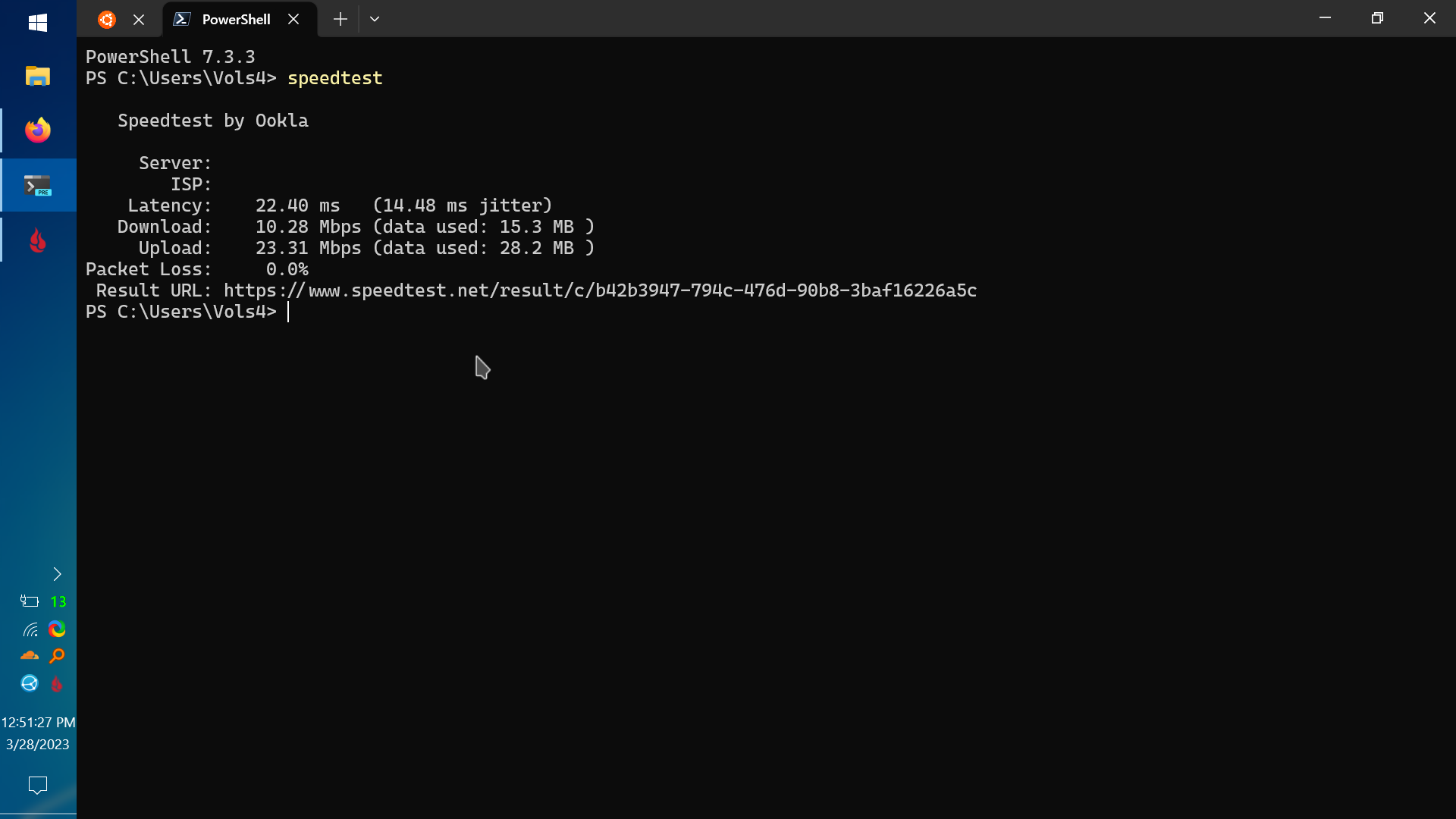
https://i.imgur.com/tr1DQuN.png
full path
https://i.imgur.com/tr1DQuN.png
hey what am i looking at with the tabs and ubuntu icon?
full path
nimble sable
hey what am i looking at with the tabs and ubuntu icon?
Windows Terminal with powershell running speedtest and the Ububtu tab is WSL
nimble sable
full path
Windows Terminal with powershell running speedtest and the Ububtu tab is WSL
oh cool, i tried using it for ssh, from linus' video on it it looked cool, but the scrollbar makes it useless
thick minnow
whats a good router that has esim or sim support
meager ginkgo
Thanks T-Mobile for the free line 😂
 meager ginkgo
thick minnow
whats a good router that has esim or sim support
meager ginkgo
thick minnow
whats a good router that has esim or sim support
Are you using it for travel, home, business? What’s the purpose?
Also what country
 torn lance
meager ginkgo
Thanks T-Mobile for the free line 😂
torn lance
meager ginkgo
Thanks T-Mobile for the free line 😂
T-Mobile and free are not words I associate with each other.
thick minnow
meager ginkgo
Also what country
middle east
saudi arabia to be exact
torn lance
Probably a good idea to see what your carriers offer.
meager ginkgo
torn lance
T-Mobile and free are not words I associate with each other.
2/3 of those lines are free

They run promos often
torn lance
My eSIM management just juggles countries
meager ginkgo
Yeah, that’s what most people do I assume. I’ve gotten two free lines from T-Mobile in 6 months so I’m happy, lol.
You just gotta check when they’re running the promos
meager ginkgo
thick minnow
middle east
saudi arabia to be exact
What websites do you use to buy products so I can browse what’s available there?
obtuse dragon
vale storm
And I have tried it with both my Pis (Pi 2B and Pi 4) but it only works as an op...
What's your wpa conf look like?
thick minnow
torn lance
Probably a good idea to see what your carriers offer.
they sell Huawei ones and nokia ones
also an oppo one
thick minnow
meager ginkgo
What websites do you use to buy products so I can browse what’s available there?
amazon ig
i dont mind paying for something outside of my country and paying for shipping
meager ginkgo
thick minnow
amazon ig
i dont mind paying for something outside of my country and paying for...
What speed are you looking to get out of a router
thick minnow
Any suggestions for a ptmp base station that could connect to up to 8 devices. This is for vehicle diagnostics equipment that can be each individually configured as an ap. I want to network them as the usb b connectors are quite flimsy on them.
thick minnow
meager ginkgo
What speed are you looking to get out of a router
I got a 5g tower next to me so maybe reasonable speak for like 8 or 7 devices
Tbh im not looking at a certain speed
Just want the best device for its price
Most good routers dont support sim so thats why im not sure what to get
meager ginkgo
thick minnow
Tbh im not looking at a certain speed
Just want the best device for its price
...
I’d look at a separate 4G/5G modem and router
then you can use whatever router you want
nimble sable
meager ginkgo
They run promos often
yea this! my dad basically got the 5th and 6th line for free cuz he paying for the first 4.
pseudo blade
"Free"
thick minnow
meager ginkgo
I’d look at a separate 4G/5G modem and router
But at that point wouldnt it be better to stick to like nokia fastmile 5g gateway 3 or 3.1 instead of spending extra money?
 solid ibex
Any internet gurus here. I’m super confused about router/switch
pseudo blade
solid ibex
Any internet gurus here. I’m super confused about router/switch
Please be a lot more specific.
solid ibex
Currently pay for 10gb internet
Only getting 1gb
Router: ASUS ROG Rapture WiFi 6 Gaming Router (GT-AX11000)
Cable from wall to router - CAT7
Cable from router to PC - CAT8
PC - 2.5 gb port
I should at least be getting 2.5?
If my router is the issue, can I buy a 10gb Ethernet switch and use that to connect to the port in the wall and from there connect my PC to the switch and use another port to connect my router (so my house still has WiFi)
@pseudo blade
mainly the last part, I realized my router can’t support 10gbps
pseudo blade
The router's page suggests that the WAN port is also gigabit, so you're pretty firmly stuck at gigabit
RJ45 for Gigabits BaseT for WAN x 1, RJ45 for Gigabits BaseT for LAN x 4, Multi-Gig Ethernet port 2.5G/1G x1
It has a multigigabit port for the sake of being able to say it has one I think
solid ibex
But can I connect a switch to the port where my 10gbps comes out of and use one port on the switch for my router and another port on the switch for my PC
 outer pendant
so paying for a 10gb internet is throwing money into a fire
solid ibex
pseudo blade
It has a multigigabit port for the sake of being able to say it has one I think
Yeah, it’s the dumbest thing g I’ve heard of
pseudo blade
That's straight from https://rog.asus.com/au/networking/rog-rapture-gt-ax11000-model/spec/

Tri-band 802.11ax WiFi 6 10 Gigabit gaming router. Fast, easy manage. Best for PS5 and Xbox games like farcry 5, PC gaming like PUBG, Nintendo switch
outer pendant
 pseudo blade
If you have a practical desire for > gigabit that needs to go.
solid ibex
But will my switch idea remedy the issue (for my PC getting fast internet, what I’m mainly trying to accomplish)
pseudo blade
Fast internet's not happening without a better router.
You can't usually just connect a switch to the upstream network of an ISP and grab as many addresses as you want, as IP addresses cost money and it's a security problem if you don't know what you're doing
solid ibex
Is there even a router that supports 10gbps LAN
outer pendant
its best to get a router that supports up to 10gbs
pseudo blade
There's a few but it's not a consumer thing yet afaik
outer pendant

NETGEAR
Experience stable and seamless coverage with the easy-to-set-up Orbi RBR860S WiFi 6 Router. Check out the latest range of WiFi solutions at NETGEAR online.
there are a few, but they are all very expensive, and honestly not worth it
pseudo blade
Oh look! Useless!
 outer pendant
oh woops yea, my bad
pseudo blade
RB5009 can do 10 gigabit on a stick if you don't need 10 gigabits full duplex
And beyond that you're into the more serious products/building your own
solid ibex
I’m on a military base and the ISP has a monopoly since it’s the only provider allowed on base. So they have a 1, 5, and 10gb package. But only the 10gb package has no cap on the internet you can use within a month
And I run servers 24/7 for some games, etc.
pseudo blade
Do your servers need 10gbps?
solid ibex
Not necessarily, but if I’m paying for 10gb for unlimited I might as well try to capitalize on the speed
pseudo blade
Here's a router that will actually do 10gbps with multiple ports https://mikrotik.com/product/ccr2004_16g_2s_pc

MikroTik makes networking hardware and software, which is used in nearly all countries of the world. Our mission is to make existing Internet technologies faster, more powerful and affordable to wider range of users.
For what it is, it is very cheap, beatable only by taking a very cheap second-hand computer and putting used server 10gbps NICs in it
But not too cheap, as it has to be powerful enough to route+NAT 10gbps
I'd say check if you ever actually go over the quotas listed for lower speeds, else just ignore it
pseudo blade
pseudo blade
Here's a router that will actually do 10gbps with multiple ports https://mikroti...
Frankly if this looks expensive to you, you're not running enough servers to need it
solid ibex
I’m going to check at the end of next month with everything running. I didn’t realize it would be this troublesome to get sick internet tbh 😂
pseudo blade
Yeah multigigabit is still a bit of an enthusiast thing
10 gigabit is almost strictly enterprise
solid ibex
The multigig advertising on these routers is a scam and a half though
2.5 port, but can’t use it
pseudo blade
You can do gigabit streams to multiple computers on your LAN, a scenario I feel to be a tad contrived
The only non-enterprise option I know of is this https://www.qnap.com/en-au/product/qhora-301w

QNAP Systems, Inc. - Network Attached Storage (NAS)
To embrace the new normal of remote working, businesses must deploy both a remote VPN that is quickly accessible by multi-location users, and a high-speed in-premises solution covering wired and wireless connections. The QHora-301W supports high-speed Wi-Fi 6 and 10GbE connections, while also providing an enterprise-grade SD-WAN VPN to allow mul...
You stated "faster LAN connection" (Local Area Network AKA the bit behind your router), which can be achieved with a switch.
Won't change your internet speeds though
So he's correct but answering a different question which you posed to him
solid ibex
My brain is fried, I’ve been at this all day. Idk why I said LAN
 potent plinth
something fishy is cooking...

anyone know how to fix a bit of packet loss? it looks like its coming in waves somehow. doesnt happen on lan, only wlan
OR
does anyone know how to split a single internet line (if its possible) between a TP-Link Archer VR300 and a VR1600v? So I've got 1 phone line plugged into the 300, and want to connect it via lan to extend to a VR1600V which I can use as my own one while my family uses the other. Is that possible?
Basically, daisy chain the two.
 faint bronze
potent plinth
does anyone know how to split a single internet line (if its possible) between a...
faint bronze
potent plinth
does anyone know how to split a single internet line (if its possible) between a...
1 you could put your router connected to the lan of there router. 2 you could could hook up booth wans to the internet box. 2 you could hook a switch to the existing cable from your ISP and connect the routers to that switch.
pseudo blade
The VR1600V has a WAN ethernet port and can therefore be slaved to the VR300, which does not
pseudo blade
faint bronze
1 you could put your router connected to the lan of there router. 2 you could co...
Both are modem-routers with VDSL so I'd suspect it's VDSL with no dedicated modem
pseudo blade
potent plinth
does anyone know how to split a single internet line (if its possible) between a...
You can register two connections if you've got two pairs coming in, though you'd be paying separately for them. QoS is the most cost-effective approach.
pseudo blade
potent plinth
Basically, daisy chain the two.
I will say that if you want do that for the sake of performance... Nope, that approach is not likely to end well for you with that class of device if you just set that up as-is.
The VR300 does claim to support QoS though it probably wouldn't be my first choice of device to do it with, and is the one of the two that can only be used with VDSL upstream (barring custom firmware)
faint bronze
I am implying there is Ethernet out of some ISP box that could provide internet. The phone line plugged into the router doesn't mean that it is a DSL connection. I have seen ISP provided boxes that use some coaxial wire for internet and hooks up a phone like to provide phone service since they want to appear as if they have a dedicated phone connection, but do not.
potent plinth
faint bronze
I am implying there is Ethernet out of some ISP box that could provide internet....
its dsl
we dont have fiber yet 🙄
faint bronze
Then you are probably stuck with packet drop as you are attempting to put more than n bytes through a smaller connection.
pseudo blade
Oh hey the VR300 actually can do ethernet for WAN... it's just 100mbps and they did that thing where they remove the extra four bits of copper to save some fraction of a cent
potent plinth
pseudo blade
Oh hey the VR300 actually *can* do ethernet for WAN... it's just 100mbps and the...
i uhhh
only get 50 so thats fine ig
faint bronze
In the case of DSL the limiting factor is probably the upstream DLS connection. The packet loss it because your d vices are trying to go faster, and the modem/router cannot send packets that fast and the packet cache does not extend far enough to allow for the peak packet flow speed.
devout scaffold
potent plinth
we dont have fiber yet 🙄
I feel your pain
potent plinth
devout scaffold
I feel your pain
nbn (australia) liked to cheap out rather than future proof
like we're not even eligible to upgrade yet
devout scaffold
Bandwidth is expensive there
devout scaffold
Sounds about right
We’d have spun up servers in AU long ago if it wasn’t for the extortionate pricing
devout scaffold
potent plinth
something fishy is cooking...
What are you using for this?
potent plinth
devout scaffold
I’d recommend PingPlotter and ThinkBroadband, or “abusing” a service like betteruptime
potent plinth
eh, i can send up to 30mb of data with just the website so its not really something id do
like,
 devout scaffold
I’ll be honest, that tool does not seem very accurate
Have you measured packet loss elsewhere?
potent plinth
i didnt really know where else to check
devout scaffold
Right okay
Id suggest going and downloading either WinMTR or PingPlotter and running a test against 1.1.1.1 and 8.8.8.8
Both are free
potent plinth

its only going up - 45 mins rn
for 20.9 mb for gods sakes
if i use a download manager its like 1-2 mins
4 seconds nvm

thats about 1 and a half mins
ill wait for the whole graph to be filled
 devout scaffold
Yeah so there’s not really much packet loss at all
devout scaffold
peak cloak
since it's ICMP, gets the lowest priority
It’s a good starting point
 low pond
Anyone who works with Ciena 6500 or similar gear here help me with something? (I'm aware of the donotasktoask, but this is a bit specialized)
 hollow marlin
low pond
Anyone who works with Ciena 6500 or similar gear here help me with something? (I...
hollow marlin
low pond
Anyone who works with Ciena 6500 or similar gear here help me with something? (I...
It's been a while since I worked with the 6500 specifically. Now just 3k/5k series but ask away
 knotty moat
Inc wall of text for anyone able to help me plan:
Moving into a new place want to do the network properly.
currently have ubiquiti USG and 24 port poe with two access points. Have been super disappointed with the USG. Bogs down constantly. Would like to switch to something new. Also want to add a camera system which seems impossible to get from ubiquiti.
Looking at a firewalla gold plus, will keep the ubiquiti poe and get a couple more access points to cover the 3100 sq ft. Also looking at a reolink system for cameras and NVR.
Fiber internet.
Please hit me up with a reply if you have any advice on the plan.
meager ginkgo
knotty moat
Inc wall of text for anyone able to help me plan:
Moving into a new place want...
Why not get a Dream Machine Pro as the USG replacement? They seem to be in stock regularly now
I’ve not heard of many bad experiences with the UDM Pro as compared to the USG
As for cameras, I’d look into Scrypted or Frigate as the NVR.
knotty moat
meager ginkgo
I’ve not heard of many bad experiences with the UDM Pro as compared to the USG
that’s good to know. i’ll look into scripted and Frigate as well ty
 potent radish
Why is auto-negotiation not working correctly (connected to gigabit)
 peak cloak
potent radish
Why is auto-negotiation not working correctly (connected to gigabit)
peak cloak
potent radish
Why is auto-negotiation not working correctly (connected to gigabit)
faulty cable?
peak cloak
potent radish
cable looks ok
how did you check?
potent radish
peak cloak
how did you check?
nvm you were right i have 2 cables and i checked only one
thanks a lot


i need to do another cable
devout scaffold
meager ginkgo
I’ve not heard of many bad experiences with the UDM Pro as compared to the USG
The UDMP also runs OS 3.x now in EA which is definitely a good step forward and implements new features such as load balancing and VPN clients
meager ginkgo
devout scaffold
The UDMP also runs OS 3.x now in EA which is definitely a good step forward and ...
Ooh yeah. I forgot to mention that!
devout scaffold
I just invested in UniFi for my camera system by purchasing my first one, the quality is pretty good and having network and protect all under one roof is very convenient
potent radish
i need to fix wake on lan now
 south mist
im trying to connect to my own TF2 server and it wont let me
its not localhost
google says i need to do something with NAT loopback
does anyone know anything about this
peak cloak
Use your local IP not wan IP
peak cloak
It should work then, no reason not to
south mist
27015 is the port that TF2 uses
peak cloak
If on same PC
south mist
the server isnt on my pc
peak cloak
Ah ok
south mist
its on another computer downstairs
peak cloak
Firewall rules?
south mist
havnt checked
south mist
i have one modem that connects to some network switches
peak cloak
What's the IP of server and your desktop
south mist
10.0.0.212 is the server's ip and 10.0.0.136 is my computers ip
can you try to join the server
ill dm you the ip
peak cloak
I don't have tf2
south mist
🗿
peak cloak
But if no one has checked that it works via wan, then it is entirely possible it's firewall on server
Lan usually always works
Windows or Linux for server?
south mist
Windows
peak cloak
south mist
Windows

Learn to allow traffic on specific ports by using the Group Policy Management MMC snap-in to create rules in Windows Defender Firewall with Advanced Security.
 tender cypress
Hey, I use both PIA VPN and I have Avast Antivirus, and idea which VPN is better? Or how to configure settings for PIA?
If you respond, please do it as a reply so I can find it more effectively, I have to go to bed
 proper scarab
tender cypress
Hey, I use both PIA VPN and I have Avast Antivirus, and idea which VPN is better...
proper scarab
tender cypress
Hey, I use both PIA VPN and I have Avast Antivirus, and idea which VPN is better...
PIA is better, Avast is insecure, slow and they log your data.
pseudo blade
IMO the best VPN is one you build yourself, once you understand Wireguard it becomes stupid easy to set up in AWS/the like
pseudo blade
Failing that all the VPN nerds tell me Mullvad and nothing else (Tor's not a VPN per se but is great for privacy, better than any VPN host can hope to offer, however if you're expecting speed look elsewhere)
 thorny osprey
WHAT DOES THIS MEANNN
 pseudo blade
thorny osprey
WHAT DOES THIS MEANNN
pseudo blade
thorny osprey
WHAT DOES THIS MEANNN
You're trying to add a port-forward. Ports can only be bound to one process/forwarded to one device at a time (without special software).
The rest is pretty clearly written in the message, which I propose that you read.
thorny osprey
pseudo blade
You're trying to add a port-forward. Ports can only be bound to one process/forw...
can you help plz

 random raptor
Hrm, I wonder if there's someone here that might be of help 😄
I'm fighting with a vexing IPv6 issue.
I have my UDM Pro set up to serve VLAN 5 (my DNS server stuff lives there) a static dhcpv6 range of fd62:89a2:fda9:e23::2 -> ::7d1.
Regular networks use prefix delegation from my ISPs native ipv6 setup (/56 delegation size, 2001:xxxxx and so on)
I have my Pi-hole set up with ::5 from that range.
Now, here's the issue:
All non-windows machines can successfully both ping the fd62 address, as well as use the dns server on it.
Windows machines though? Destination host unreachable.
The same windows machines can successfully access IPv6 addresses from the internet, however, so that part works fine. Just local routing is being stupid and I have no clue how to fix it.
Also, to make matters weirder, Windows machines can ping the gateway (fd62:89a2:fda9:e23::1)
 outer pendant
 pseudo blade
thorny osprey
is everyone dead
pseudo blade
thorny osprey
is everyone dead
Tbh if you had read the names or descriptions of any of the fields you were entering data into or the error message maybe you'd have had better luck.
 clear igloo
thorny osprey
WHAT IS THE STARTING PORT
clear igloo
thorny osprey
WHAT IS THE STARTING PORT
Well you have a period in your numbers only field so....
thorny osprey
clear igloo
Well you have a period in your numbers only field so....
without it is the same error
clear igloo
Well if you read the error it says LESS than 65535 and you have a number equal to 65535
thorny osprey
clear igloo
Well if you read the error it says LESS than 65535 and you have a number equal t...
i need to use the port UDP 49152 - 65535
clear igloo
No you don't, any game telling you to port forward 16K ports is a failure
What are you trying to accomplish?
thorny osprey
clear igloo
What are you trying to accomplish?
roblox port forward
clear igloo
Why? You don't need to port forward unless you're hosting a server
thorny osprey
clear igloo
Why? You don't need to port forward unless you're hosting a server
heard it can fix roblox error 279
 vestal sundial
thorny osprey
heard it can fix roblox error 279
vestal sundial
thorny osprey
heard it can fix roblox error 279
Did you check every other thing before trying to port forward? https://en.help.roblox.com/hc/en-us/articles/203312880-General-Connection-Problems. The problem might still be related to your router, but port forwarding is the last shot.
 fickle hamlet
should I get separate Bluetooth & wifi usb adapters or a Pcie one that has both
peak cloak
thorny osprey
can you help plz
you don't need to port forward roblox
 polar vault
Hi, I do not know where else to ask and thought someone might know from here. I have an opnsense firewall running on a used lenovo m700 that has an i3 6100 in it, I have installed wireguard (looks like it came with the KMOD version) set it up with the mullvad tunnel but I am getting 1/3 to 1/2 of my normal connection, is there anyway to increase this or would I have to upgrade the cpu/get a newer processor?
I used this guide to setup wireguard - https://docs.opnsense.org/manual/how-tos/wireguard-selective-routing.html
Without mullvad vpn - 600-800Mbps down and 90-100Mbps up
With wireguard (mullvad tunnel) - 200-300Mbps down and 80-100Mbps up - attached is a screenshot of cpu usage when doing a speedtest on the subnet that goes through the tunnel
 polar vault
hmm, alright will do some trial and error testing tomorrow morning. I did try opnsense with the exact same HDD in a machine that had an xeon e3 1226 v3 and was able to get 400-500Mbps so I will try to find another pc that has a better processor if changing mullvad server doesn't work. Thank you.
Yeah, will definitely do that first. But if that doesn't solve it, I will either look for a more powerful 6th gen cpu or go with a newer generation
these are the 2 cpus that i've tried so far
i3 6100 - 300Mbps down
e3 1226 v3 - 400-450Mbps down

so im guessing if i find a cpu thats around 6000-7000 points i should be alright?
Hmm, I have no clue if it is the cpu now
Or if there is a hidden setting somewhere which is tanking performance
I could probably find a sff desktop on eBay for cheap, will keep an eye out. Cheers
devout scaffold
Could it be related to MTU and overhead from WireGuard?
Just about any of my devices only get up to around 500Mbit/s through a WireGuard tunnel while having access to gigabit
And that also includes Cloudflare WARP
 velvet jolt
Should I enable ipv6 on my router? It is capable
Also since it would not use NAT anymore, to make a raspberry pi accessible, i should change firewall settings instead?
pseudo blade
You'd still be using NAT unless you were planning on disabling IPv4 entirely
-Which is a terrible idea if you'd actually like to use most of the internet, as many network admins are still deathly afraid of it because big funny hex string.
You can of course expose your Pi via IPv6 and it would be accessible to any device with IPv6 connectivity or CloudFlare/similar if you were looking to use their reverse proxy functionality.
vale storm
Does a device exist which basically is a USB hub (with maybe four USB ports) but instead of attaching it to a PC exclusively via USB it can work as USB via Ethernet?
pseudo blade
What's your goal, exactly?
There are ways of achieving such but they have varying caveats.
vale storm
We have a flowboard with a bunch of valves which we want to control via USB but if the need arises we want to be able to do it via Ethernet as well.
faint bronze
vale storm
Does a device exist which basically is a USB hub (with maybe four USB ports) but...
What is close is a switch.
vale storm
Because the flowboard might be far away from any PCs and USB cables might not work
pseudo blade
Ok, so you don't want Ethernet's cabling or reach, but rather TCP/IP
Unfortunately you have picked the hardest path
vale storm
We want to use RJ45 to USB basically
faint bronze
Oh...
pseudo blade
vale storm
We want to use RJ45 to USB basically
Ah, but that's not what you just said
You want to use existing cabling, which can go directly to the control computer?
No switches in the way?
Devices exist that will do that
They're kinda rubbish and have different distance limitations to gigabit ethernet.
But they are cheap.
Take this entirely random device I picked off Amazon for example: https://www.amazon.com.au/Over-Ethernet-RJ45-Extender-Adapter/dp/B0029HRYBK/ref=asc_df_B0029HRYBK/

A USB to RJ45 Extension cable that provides your USB devices greatly extended range with the help of a Cat5/Cat6 patch cable (not included). Features: *Allows you to connect your USB devices to your computer at a distance of up to 150ft *Compliant with
Claims up to 150ft of what could only be USB2
These devices calling themselves "usb over ethernet" isn't really a correct explanation of what they do
I'm not guaranteeing that this device will work for you btw, do your own research
vale storm
Something that can work as both of these. Not simultaneously but either or.
 pseudo blade
This doesn't really help me understand, sorry - to do that your devices would need to natively support USB or ethernet as connectivity options and you just said they do not.
Please pick one of the two scenarios outlaid above and run with that
vale storm
Hmm... Basically the link you sent is good but it should also have the option to directly attach it to a PC via USB.
pseudo blade
What
vale storm
Yeah.
pseudo blade
But it does? Go look closer.
It is a pair of devices which must be connected to eachother to work, with a USB male on one end and female on the other.
It would need to be combined with a powered USB hub to operate
faint bronze
Does the USB device act as a serial port?
vale storm
pseudo blade
It is a pair of devices which must be connected to eachother to work, with a USB...
Yeah, i see. But it doesn't allow direct connection of Ethernet, right? Without the male USB dongle in-between?
I'm sorry if I'm not making sense, this is a requirement by my university and a guy I know asked me if I knew such a device.
pseudo blade
vale storm
Yeah, i see. But it doesn't allow direct connection of Ethernet, right? Without ...
No. But I think you're either asking the wrong questions or misunderstanding entirely
If you want to connect from a USB host to ethernet, use any ordinary USB to ethernet adapter.
vale storm
Would that work without drivers?
pseudo blade
No, nor will it work unless the device is a host.
pseudo blade
You're missing key information if you're getting confused between the two and as-is you're probably going to end up ordering the complete wrong devices
Honestly, I'd suggest not doing anything until you actually understand what your device is, USB and ethernet/IP are not standards you can trivially change between and the cabling is a different problem again, and unless you understand all three you're going to run into problems.
rocky badge
@clear igloo the worst part about the printers at university is you have to release the job by signing into the MFP on the touch screen keyboard
clear igloo
rocky badge
<@291198741862416384> the worst part about the printers at university is you hav...
lel, no badge access?
pseudo blade
Ah yes I've had a few companies where that was required
rocky badge
Nope
clear igloo
dang, that's the worst
rocky badge
“your password must be this complex”
But you have to also type it on a MFP keyboard that doesn’t register half the touches
 clear igloo
🤢
rocky badge
Mobile print through Pharos web doesn’t have to be released but if you print directly from a windows machine you have to
Also @clear igloo
I 100% guarantee that these MFPs have global IPs
clear igloo
😄
faint bronze
@vale storm the reason I was asking if the USB device was USB to serial is because industrial devices can use serial to avoid needing to write USB protocol code. If it were a USB serial device you could use two raspberry Pi's to relay the USB serial data over TCP/IP. This would allow it to run over RJ45.
rocky badge
pseudo blade
Ah yes I've had a few companies where that was required
I mean I get why you need to release the job and such…but the way to login is just so annoying
pseudo blade
It can be a bit clunky
Ours were all Epson and weren't too bad really
Like they were a pain in the ass and you couldn't just have your stuff be printed by the time you got to the printer, but it only took maybe 20 seconds and cuts down on wasted prints
I noticed everyone senior just had a small laser printer on their desk - no idea why
polar vault
devout scaffold
Could it be related to MTU and overhead from WireGuard?
not quite sure, changed the MTU and still no changes. Changed the mullvad server and still no changes. The cpu still gets up to 80-90% when doing a speedtest. iirc i have seen lower spec machines able to reach higher speeds with wireguard
rocky badge
@clear igloo I hate how the university did networking here
All of the data drops for this floor are on a /23
There's like 500 drops in this space alone, let alone the floor. So once the pool runs over it just goes to another VLAN 
clear igloo
VLAN all the things in a craptastic manner!!
clear igloo
rocky badge
There's like 500 drops in this space alone, let alone the floor. So once the poo...
So no dynamic VLAN and pool assignments or anything just random VLANs based on when the IP pool runs out?
clear igloo
lol, yah
peak cloak
rocky badge
We just have to scan our ids
rocky badge
lucky
peak cloak
It's pretty seamless for the most part, you print and go to any printer
Same with scanning, scan id and then it will scan to email

 mortal stratus
clear igloo
rocky badge
😩 this is to the gw
mortal stratus
clear igloo
rocky badge
😩 this is to the gw
I think I know why 🙂
 dull mirage
Im getting a lot of jitter on my network and router logs are giving some error logs..
58    Mar 31 11:28:47    user    err    dhcpc    dhcp6c: dhcp6sConfDnsListUpdate: dhcp6sConfDnsListUpdate : Enter
59    Mar 31 11:28:47    user    err    dhcpc    dhcp6c: client6_recv: client6_recv
60    Mar 31 11:28:47    user    err    dhcpc    dhcp6c: client6_send: client6_send
61    Mar 31 10:58:47    user    err    dhcpc    dhcp6c: addPrefixInfoToMsg: addPrefixInfoToMsg : Enter
Might this be related to to that?
Its dhcp i think and i think it is not but im not that much of a expert anyone how might know?
rocky badge
clear igloo
I think I know why 🙂
Why
pseudo blade
rocky badge
There's like 500 drops in this space alone, let alone the floor. So once the poo...
Wow that's stupid af
Like if you're right and that's what they're doing they've sunk engineering into making a shitty solution work
Engineering which could have otherwise went into... adding a second subnet + a gateway for it and going on with life, segmenting in a more appropriate fashion or even... actually doing some planning before you build something.
opal pagoda
rocky badge
But you have to also type it on a MFP keyboard that doesn’t register half the to...
just use rfid
rocky badge
opal pagoda
just use rfid
Not my decision
rocky badge
pseudo blade
Engineering which could have otherwise went into... adding a second subnet + a g...
Oh yeah I hate it
opal pagoda
rocky badge
Not my decision
we have printer auth handled trough pass or the same rfid that everyone has and its used to clock in/out, pay for stuff on premise, etc
nimble sable
pseudo blade
Engineering which could have otherwise went into... adding a second subnet + a g...
what is actually the CON of having a bigger that necessarily block? (outside of obvious things like clashing with adjacent networks and the like)
rocky badge
We’re on the same subnet as the chick fil and other retail dining a on campus, I can see the kitchen fryer & all of their stuff
nimble sable
rocky badge
We’re on the same subnet as the chick fil and other retail dining a on campus, I...
i think you may have answered my question, lol
srsly who the hell designed that network, i'm a newb and even I know this is way off
nimble sable
rocky badge
We’re on the same subnet as the chick fil and other retail dining a on campus, I...
omg do it! can you do it? mess with the chick fil a
opal pagoda
rocky badge
We’re on the same subnet as the chick fil and other retail dining a on campus, I...
turn it off 
it will be separated real quick
nimble sable
opal pagoda
it will be separated real quick
you underestimate the power of laziness and miserliness
opal pagoda
nimble sable
you underestimate the power of laziness and miserliness
and you underestimate the power of opportunity cost
 lucid siren
pseudo blade
nimble sable
what is actually the CON of having a bigger that necessarily block? (outside of...
lucid siren
pseudo blade
nimble sable
what is actually the CON of having a bigger that necessarily block? (outside of...
The downside of larger networks is that you increase the size of the impact of the smallest screwup in that network, have less control to isolate the screwup, and consume additional address space.
The advice I was given was to avoid having more than a few thousand devices in a subnet if possible, and to divide on logical boundries (office branches I'd consider critical to separate for network integrity reasons, buildings sometimes, security boundaries if you're not using a zero trust solution for that/one isn't viable like security cameras - I'd never let a fast food court on the same subnet as office systems/security cameras for example)...
nimble sable
pseudo blade
The downside of larger networks is that you increase the size of the impact of t...
oh yea but what if like, i do a /16 in my house for my non IOT stuff? realistically its never gonna be more than 4 computers for example
pseudo blade
It's unnecessary but also not really a problem in that environment
I don't really like scenarios with client devices in /16's much though because it's really unlikely you're going to have 65k computers you need to have layer 2 access to each other and where it doesn't make sense to segment them into smaller groups.
IPv6 rules are a bit different but you still want to separate stuff by branch and where security boundaries should exist.
 drowsy fossil
It also makes sense for guest nets where the devices are blocked from seeing each other regardless
pseudo blade
Oh definitely
drowsy fossil
We use /20s for that tho lel
pseudo blade
That's fine for that application really
Just... don't weld sites together into one subnet over VPN tunnels.
I saw an MSP client that did that and it was dreadful for everyone involved until that was removed.
I'd say the same for point-to-point wireless and long-range fiber links as a rule - even if you are insistent on using the internet connection at one site leaving yourself without any alternative is asking for trouble.
pseudo blade
pseudo blade
I saw an MSP client that did that and it was dreadful for everyone involved unti...
They had DHCP on both sides but more often than not the remote side would win and they'd send a ton of traffic over this shitty VPN tunnel and wonder why performance sucked.
drowsy fossil
We have central DHCP servers that serve all of the sites and we only have problems weekly lol
dull mirage
My router is in charge of the DHCP... But in my switch i found setting DHCP mode... SHould it be enabeld or disabled?
pseudo blade
Disabled unless you want problems and frustration.
vague whale
depends on the switch and are you using VLAN's?
dull mirage
pseudo blade
Disabled unless you want problems and frustration.
too late already been§
Okay
But soemthing is still causing funnies...
Cable in port 3 is reported as Mismatched / faulty by Cable fautl Distance 5
But cable 3 gets decent speeds and no problems..
But cable 5 has 200ping
Something is wrong
vague whale
what kind of switch are you using?
dull mirage
NETGEAR
GS105Ev2 – 5-Port Gigabit ProSAFE Plus Switch
He bit old but should be enough for home use
vague whale
is it just a flat network?
dull mirage
vague whale
is it just a flat network?
wdym
vague whale
like same subnet for all machines, nothing like VLAN's or anything? Not sure if those support jumboframes
dull mirage
Yes
ISP> Router > Swithc > 3 Computers
Wifi: 3 devices
same subnet for all
vague whale
ok. in that case, maybe you should factory reset the switch to make sure there's nothing set on there that you don't need
dull mirage
ok brb
vague whale
and the cables, have you tried plugging them into different devices to see if you're getting the same behavior (like you said cable 5 seems to have a high, ping plug it into a different device and see if that stays the same, to rule out any client issues)
vague whale
I don't believe those switches have dhcp servers, so I'm guessing dhcp mode means the switch will get a dhcp address?
 vague whale
is cable 5 still getting a bad ping?
dull mirage
yeah
vague whale
can you see duplex/speed of the client using cable 5?
dull mirage
port stats?
vague whale
sure can you see speed/duplex from there?
dull mirage
Cable 5
68Ping
70Jitter
38down (almost max)
8up(max)
Cable 3 Me
55
2,3
39down (max)
8up(max)
 vague whale
what about client side
dull mirage
vague whale
what about client side
The speeds ping,download etc.. was client side
vague whale
No I mean can you check speed and duplex on the client
from command prompt you can get speeds: wmic NIC where NetEnabled=true get Name, Speed
dull mirage
Sure wait
dull mirage
vague whale
from command prompt you can get speeds: wmic NIC where NetEnabled=true get Name,...
which client?
vague whale
the cable 5 one with the bad ping

 vague whale
you're running vmware workstation?
dull mirage
vague whale
you're running vmware workstation?
Yeah (Cable 3) , but not active the mechines are powered off
vague whale
you have multiple network cards in that machine?
dull mirage
vague whale
you have multiple network cards in that machine?
Nope
vague whale
I thought you said cable 5 was the one with issues?
peak cloak
dull mirage
My router is in charge of the DHCP... But in my switch i found setting DHCP mode...
Depends what it means
dull mirage
Im bonkers from school
peak cloak
As in DHCP client or server
dull mirage
vague whale
I thought you said cable 5 was the one with issues?
Yeah it is the one
vague whale
it's a SOHO netgear switch he's using so it must mean client for the switch mgt
dull mirage
But only for the ping
Cable 3 is the one with cable issue but none are appearing
Cable 5 is only high ping but no cable issues
dull mirage
vague whale
it's a SOHO netgear switch he's using so it must mean client for the switch mgt
Im on that switch too (3)
vague whale
what ping do you get if you ping the ip of cable 3 from cable 5
dull mirage
However after factory reset its okay
The ping
5 to 3
avg ping 0-1
ttl=128
bytes32
cable 3 to 5
Timed out
The ping is okay for all now after the factory reset of the switch
But DHCP Mode is enabled
And when he starts downlaoding the whole network knows it cuz speeds get to 1Mbps down
But i could solve that by port rate limit i think
But the cable 5 still remains a mistery
also the DHCP Mode
dull mirage
peak cloak
Depends what it means
Not exactly said in the manual but i found this:
"To disable the DHCP client of the switch and change the IP address of the switch
to a fixed IP address by using a network connection:"
By that i would say it should be disabled if the router does the dhcp
vague whale
no I'd leave it on
dull mirage
Also it would be nice to give the switch static ip bruh
vague whale
dhcp in this case means your switch gets a DHCP address
dull mirage
vague whale
dhcp in this case means your switch gets a DHCP address
Okay then..
Here is the doc i searched by keyname
https://www.downloads.netgear.com/files/GDC/GS105EV2/WebManagedSwitches_UM_EN.pdf
And dunno if it should but the network isnt balancing
If someone is downloading the client thats downloading gets great ping, speeds, but others get shit
dull mirage
vague whale
no I'd leave it on
Okay so... It means that the switch would use IP from the DHCP in the router
vague whale
correct
dull mirage
Im gonna do it static so i will turn it off
vague whale
ok
dull mirage
All good except for the balance
Which i dont know if its even present
100Ms ping
170ms jitter
2Mbps Down
5Mbps up
When one client is downloading
others get those speeds +-
vague whale
if you're maxing out your network that's expected behavior
dull mirage
the client IS
dull mirage
vague whale
if you're maxing out your network that's expected behavior
So i should introduce some Rate Control?
vague whale
you mean traffic shaping?
peak cloak
Qos
 lunar spade
I have a 250m spool of cat5e ethernet cable. What is the longest I can make a cable that will still work at gigabit speeds? (More specifically, would ~7 meters be fine)
clear igloo
100m is the limit
peak cloak
lunar spade
I have a 250m spool of cat5e ethernet cable. What is the longest I can make a ca...
And to add on, when running the cable make sure it's not close to any high voltage power
lunar spade
Its going from my cat5e ethernet wall port to my pc
peak cloak
Oh yeah that's fine
lunar spade
Now I just need to find where in the world I misplaced the cat5e cable tester
 marsh oracle
that pfBlockerNG package for pfSense is weird, it seems to be configured correctly, but still does not block anything that is obviously set to block.
otherwise empty ruleset and fresh pfSense 2.6.0 install
has anyone ever set this up and got it working properly? (geoblock + maxmind API key, webfilter categories, ...)
clear igloo
I have it working right now
Do you have rules with pfB_ under Firewall > Rules > WAN?
marsh oracle
Have any clue where I can look why it is not blocking anything, even if its set to deny both (in- and outbound)
yes the rule exist -> floating
clear igloo
Hmmm, I have mine under the interface
marsh oracle
should work either way, I can disable floating rules tho when the box has finished rebooting
clear igloo
Similar setup?
 marsh oracle
pretty much, yes except floating rules
clear igloo
Hmmm, interesting
I would try without just to see if that's busted but yah it should block
marsh oracle
indeed, it doesnt make sense. It is not blocking anything, even though I have geoip blocked both in and outbound asia for example, it still lets me access china.cn for instance.
clear igloo
Oh, did you force update/reload after changing options?
marsh oracle
could it be the "suppression" option up the page? its enabled
clear igloo
It shouldn't since it works for me with Suppression enbaled
marsh oracle
ye I think so, its default on anyways.
Still why dont the categories and geo ip settings work though, so weird
clear igloo
What if you make a custom IPv4 list in pfblocker and block like 1.1.1.1 and try to ping it?
marsh oracle
still not blocking, I give up. This pfblockng is not well designed I guess
clear igloo
Did you do a force reload option?
marsh oracle
I did under update -> reload -> run
clear igloo
hmmm, that's so weird
marsh oracle
indeed, I'd bether gather all the networks manually and add an alias manually in vanilla pfSense.
At least that works.
unter firewall -> rules -> lan there is the default anti lockout rule and right below the pfblocker rule with the alias that has 0/0B... for some reason.
marsh oracle
plus now this awful designed and coded pfblockerng says my perfectly fine MaxMind license key is invalid.
Good software, really.
"the best of the best of the best, sir!!"
time to hit the "remove package" button and clean up the firewall rules and remove this nonsense package for good.
 waxen scroll
clear igloo
Did you do a force reload option?
waxen scroll
clear igloo
Did you do a force reload option?
potatoes dont need networks
clear igloo
waxen scroll
potatoes dont need networks
What sort of addressing for our IoP devices do we get?
 real shore
Hello I am trying to extend my wifi to my room as it keeps disconnecting when playing games online it has been a issue for some years now. I am not sure about Ethernet as it would probably be annoying to put in the house as my room is a decent distance away and I am not sure how to set it up drilling and non drilling Ethernet cable. Any suggestions would be appreciated
Is there any other way?
I have been looking at wifi extenders and wifi routes to extend my wifi to my room
Something like this

My main router is a BT router and I am thinking of some how connecting it to another one which is closer to my room to extend my WiFi
Right now I am getting 1-2 bar on my phone on my bed. And when using laptop at night I have 2-3 bars of WiFi witch often disconnects randomly

This gets worse at night when everyone is on the WiFi this. This causes me to disconnect form my WiFi on my laptop when playing games witch frustrates me
peak cloak
real shore
Something like this
Wifi extenders aren't great
If you have coax ports you could use moca
real shore
peak cloak
If you have coax ports you could use moca
Ok, what are those exactly? Is it like ethernet.
Also I have barely any idea how to extend my WIFI, IT and WIFI technology in general
peak cloak
real shore
Ok, what are those exactly? Is it like ethernet.
Also I have barely any idea how...
It's Ethernet over coax
 fair sedge
This channel should have been called irrigating
clear igloo
irrigation but yes!
real shore
I have looked into it would it be good to get this: https://www.amazon.co.uk/TP-Link-Deco-E4-Seamless-Replacement/dp/B07RXLF5XZ/ref=asc_df_B07RXLF5XZ/?tag=googshopuk-21&linkCode=df0&hvadid=262248947449&hvpos=&hvnetw=g&hvrand=5284643373366227775&hvpone=&hvptwo=&hvqmt=&hvdev=c&hvdvcmdl=&hvlocint=&hvlocphy=1007421&hvtargid=pla-780409193883&psc=1&th=1&psc=1

TP-Link Deco E4 Whole Home Mesh Wi-Fi System, Seamless and Speedy (AC1200) for Large Home, Work with Amazon Echo/Alexa, Router and WiFi Booster Replacement, Parent Control, Pack of 3
undone grail
does anybody have any recommendations for a cheep router i am using the one my isp provided right now and i am having conection issues
 mossy vector

 glass anvil
I have an HP DL360P G8 with 24 Ivy Bridge cores, 240GB of RAM, and 7.2TB of storage. Server 2012R2 is no longer support. I do have a legitimate license for Server 2016, but I would like to push it further, possibly to 2019.
The box is stand-alone and not in a domain. How easy would this be?
marsh oracle
Does anyone have a list of trusted safe mail servers that can send mails to my own mail server?
I tried Google search, but cant find any, maybe not having the correct search terms I guess.
What I want is that spammers and malicious hosts with a bad rating can't connect to my mail server at all.
But I want trusted safe mail servers go thru
glass anvil
marsh oracle
Does anyone have a list of **trusted safe mail servers** that can send mails to ...
What you want is to set up an auto-reject ruleset. Things like reverse-SPF lookup and things like that.
marsh oracle
I dont think pfSense can do that and I use Mailcow docker
glass anvil
That would be handled by your mailserver docker, not pFSense.
marsh oracle
My intention would be to block the source IP adresses and/or their entire network in advance before they can even connect to my mail server
At the moment I very regularly watch my firewall logs and see what host is constantly trying to connect, check it on abuseipdb.com and if it has a lot of reports, I block their entire network ASN
 lavish gazelle
10 Gb/s home internet goes brrr. (this is not a home server speed, this is actual internet from my ISP. Free SAS)
 marsh oracle
could store your games on your Google Drive basically, but the latency is "crap"
 sharp sparrow
 cunning violet
How awful is deco software?
cunning violet
How awful is deco software?
I have a 3 node deco setup, works great.
peak cloak
marsh oracle
Does anyone have a list of **trusted safe mail servers** that can send mails to ...
I would not recommend a self hosted mail server at all
marsh oracle
because?
peak cloak
marsh oracle
because?
It's a pita to be able to deliver any mail, because of a variety of issues
You need constant maintenance
Lots of spam
 ornate jungle
marsh oracle
because?
ornate jungle
marsh oracle
because?
reddit
263 votes and 110 comments so far on Reddit
peak cloak
Yeah I just pay for fastmail, so it's not google, but can still easily download everything
ornate jungle
It's not that you can't self-host email... it's just incredibly difficult to maintain reliable email delivery.
https://vadosware.io/post/its-never-been-easier-or-harder-to-self-host-email/
It's never been easier to self-host your email. It's never been harder to self host your email.
marsh oracle
all of those things listed dont really apply for me.
My network is on no blacklist. SPF / DKIM are set up from day-1 on.
I don't receive spam mails, because rspamd and keys are set up properly.
I have enough space and power to save an entire corporation exchange server.
I'm not the average internet user who barely was able to create a Discord account.
This and much more revolving around networking stuff is everyday business around here.
peak cloak
You have rDNS? Even without any blocklist, you could be on a greylist
It's not a simple thing to operate well, not at a level that could be used for everyday use
marsh oracle
worked fine here for years
 gleaming moth
anyone have these yet? https://rog.asus.com/networking/rog-rapture-gt6-model/ I am debating if its truly worth upgrading from my current nighthawk setup

Tri-Band WiFi 6 Mesh WiFi System, smart antennas, 2.5G port, triple-level game acceleration, ASUS RangeBoost Plus, U-NII 4 supported, free network security
 vast shard
gleaming moth
anyone have these yet? https://rog.asus.com/networking/rog-rapture-gt6-model/ I ...
vast shard
gleaming moth
anyone have these yet? https://rog.asus.com/networking/rog-rapture-gt6-model/ I ...
I have that and Nighthawk all top speed, but I would rather get them with WIFI 6e
WIFI6e or it ain't that good
 lunar socket
how do i set up a network switch
vast shard
lunar socket
how do i set up a network switch
Many of them are just plug and play but you may have to adjust something settings if you get a managed switch
lunar socket
vast shard
Many of them are just plug and play but you may have to adjust something setting...
it's also a router and when i plug it in it doesnt rlly allow traffic
i think it's from like 2005 because i saw similar software on my xp drives
vast shard
lunar socket
it's also a router and when i plug it in it doesnt rlly allow traffic
Old technology
lunar socket
vast shard
Old technology
is that the issue?
vast shard
Sometime a simple factory reset will do the trick. you have to remember your router admin sign if that doesn't get reset. Sometime it does.
vast shard
lunar socket
is that the issue?
That is not the issue at all, it maybe settings issue within the router
lunar socket
vast shard
That is not the issue at all, it maybe settings issue within the router
how would i get into it
vast shard
Check settings first and if everything look fine reboot the router to see if anything goes through
vast shard
lunar socket
how would i get into it
All router login would be 192.168.1.1 and then you would enter your Admin Login and Password
lunar socket
vast shard
All router login would be 192.168.1.1 and then you would enter your Admin Login ...
is data stored inside the router
because idk what the password would be
it's not even mine lol my dad has random shit
i DO remember the set wifi password
but im not sure if thats ever helpful
vast shard
lunar socket
is data stored inside the router
Data is not stored inside the router but the changes you made would be if they were saved
lunar socket
vast shard
Data is not stored inside the router but the changes you made would be if they w...
would password info be permanently be inside the router?
vast shard
lunar socket
i DO remember the set wifi password
They are always Admin and Password to login and if you know how to factory reset it would help a lot
It will bring back all the orignal settings before anything was touch
lunar socket
vast shard
They are always Admin and Password to login and if you know how to factory reset...
shouldnt there be some way without password
is it like a physical hardware switch or
vast shard
lunar socket
would password info be permanently be inside the router?
Password info would be inside the router to login
vast shard
lunar socket
shouldnt there be *some* way without password
No there is not until you have a factory reset button then it will erase the changed password and put it back to original Admin and Password
lunar socket
would normal lan switches have such things because ik i have some lying around and i think i got it working before
vast shard
lunar socket
would normal lan switches have such things because ik i have some lying around a...
Lan switches would not have login stuff
lunar socket
vast shard
Lan switches would not have login stuff
no wonder
i have to get things from my storage and its kind of far away and i do not have a car
vast shard
They are just switches
lunar socket
i have to get my dad to get everything for me and he messes up more than often with his own hardware
vast shard
All routers would have login information, so no way getting around it
lunar socket
idk how he claims to have built a pc exactly 30 years ago because he doesnt know a single cpu past 1st gen core i
he's been using pentium 4 for longer than he should
vast shard
Pentium 4 I got that since 1990 something to 2000
lunar socket
he's been using the same router for like 10 years before he never updated it and we ere using at&t
now we have a router designed for children half my age
worst part is it wont even let me do my homework 😭
i found a reset button on the router but idk if i press it or hold it or if any lights supposed to change
this is the one https://en.wikipedia.org/wiki/ZoneAlarm_Z100G
ZoneAlarm Secure Wireless Router Z100G is a discontinued Unified Threat Management security router for the home and SOHO market.
The Z100G was developed by SofaWare Technologies, a Check Point Company. The hardware is similar to SofaWare's Safe@Office and VPN-1 Edge lines, and the software differs only in what features the license allows the use...
vast shard
lunar socket
i found a reset button on the router but idk if i press it or hold it or if any ...
The main reset button would be a small tiny hole, you would use a paper clip to hold on it. but if it say reset it maybe a hold button too
lunar socket
vast shard
The main reset button would be a small tiny hole, you would use a paper clip to ...
its a big enough hole and i can press the button with my finger its a flat button

yeah it probably is from windows xp lol
 vast shard
lunar socket
yeah it probably is from windows xp lol
vast shard
lunar socket
yeah it probably is from windows xp lol
The network settings doesn't matter because it will be come straight from the internet provider
lunar socket
vast shard
The network settings doesn't matter because it will be come straight from the in...
just leave at default and simply enable?
vast shard
lunar socket
just leave at default and simply enable?
Yes, always leave it at default
lunar socket
this is so much harder than just using my other switch...
but it's like 10pm and there's no way i can even go get it past probably 8pm
my parents treat 8pm like it's midnight 💀
vast shard
lunar socket
my parents treat 8pm like it's midnight 💀
That router is so basic
lunar socket
vast shard
That router is so basic
i mean, i can't go get it rn
vast shard
Switches only transfer data from the router
lunar socket
its somewhere else
lunar socket
vast shard
That router is so basic
i only need to split my connection so i can run several pcs since i lost my wifi card
rather its more like my dad did
its gone
vast shard
lunar socket
i only need to split my connection so i can run several pcs since i lost my wifi...
Oh, running ethernet from the router to the switch, always work
lunar socket
vast shard
Oh, running ethernet from the router to the switch, always work
well we use an ethernet connection directly from the main one and the router is meant to JUST be a switch
this is so complicated when you do the wrong thing this is the reason why i have a "no compromises" rule
worst part is theres a "bug" in my internet which only certain sites work at certain times
and there's an exploit if i start a connection to say, a game server it will stay there until you cut the connection, at that point you cant go back
vast shard
@lunar socket If you know how to change DNS Server settings it will help a lot
Just click around until you see DNS in the router somewhere. I changed mine only because it does help website load faster
lunar socket
which isnt a problem for afk, unless i want to start AFTER it disables, it used to be a very limited amount of sites, and now everything works fine except some of my games and discord app sometimes (browser is ok)
lunar socket
vast shard
<@801240330452074526> If you know how to change DNS Server settings it will help...
it happens across several routers but they were all xfinity, it only seems to do it on my pcs, my roommates arent haveing issues
vast shard
My Discord App runs off my internet, if I have no connection it won't load
lunar socket
vast shard
My Discord App runs off my internet, if I have no connection it won't load
well... yeah, but doesnt browser also do that?
half the time the app is ok, the other half only the browser one works
vast shard
lunar socket
well... yeah, but doesnt browser also do that?
Yes, browser will also not load if no connections
lunar socket
which im pretty sure it just uses an html/js conversion
lunar socket
vast shard
Yes, browser will also not load if no connections
i can get into the front page and it wont do anything when even the browser doesnt work
vast shard
lunar socket
i can get into the front page and it wont do anything when even the browser does...
The old router has a lot to do with the situation. Something has been changed on it or the PC network settings has been changed too
lunar socket
vast shard
The old router has a lot to do with the situation. Something has been changed on...
ik. its a different issue it hought it was my pc but it happened to my other one as well but not my rommates
vast shard
That why I research a lot on Youtube what to change and what not to touch
lunar socket
i have a pci lan card but i can only test on the other system because its older and has pci for some reason
i added it but i havent tested yet since i dont want to haul a monitor and pc downstairs
i should probably avoid this problem entirely by getting an actual easy switch
is this normal

it works for some but not others
 low pond
Yeah, not all sites respond to pings
 grim basalt
i'm having trouble getting ad blocking to work on my OPNsense router
I.E. i still get ads on my TV
opal pagoda
grim basalt
I.E. i still get ads on my TV
maybe its using their dns, go to settings and change dns adress to your dns server
grim basalt
i set up quad9 as per the instructions on their site and i setup squid
grim basalt
opal pagoda
maybe its using their dns, go to settings and change dns adress to your dns serv...
It occurred to me that I should reply as you are probably not watching this channel
clear igloo
grim basalt
I.E. i still get ads on my TV
Ads on streaming services or on the TV interface?
grim basalt
clear igloo
Ads on streaming services or on the TV interface?
I have a chromecast and when i send youtube to the TV from any device it has ads, i think the youtube app on the phone does too, this is just my litmus test to make sure that the blocking is working
clear igloo
Squid is an HTTP proxy, most traffic is HTTPS
Squid doesn't (afaik) act as a DNS proxy and quad9 doesn't filter ads by default
Plus YouTube doesn't play well with DNS ad blocking anyway since that's usually streamed into the video directly or some other method

 grim basalt
clear igloo
Squid is an HTTP proxy, most traffic is HTTPS
Squid doesn't (afaik) act as a DNS...
grim basalt
clear igloo
Squid is an HTTP proxy, most traffic is HTTPS
Squid doesn't (afaik) act as a DNS...
any advice to get it all to work? as intended. I do have an extra goat to sacrifice
peak cloak
You would need to setup like a pihole or Adguard
grim basalt
I do not have a PI and what is adguard?
my browser blocks ads with the way i have it set up, i just want adblocking on my phone and TV
peak cloak
grim basalt
I do not have a PI and what is adguard?
You don't need a pi, its just a software
Adguard is basically like pihole, it's a DNS server that blocks certain domains
grim basalt
ok, is it paid?
grim basalt
Look, i'm on a fixed income, and im just tired of being told to buy "things" buy my TV, and since i block tracking on desktop and mobile it's random stuff. and on youtube half the ads are scams.
peak cloak
grim basalt
ok, is it paid?
No

AdGuard Home is a network-wide software for blocking ads & tracking. After you set it up, it’ll cover ALL your home devices, and you don’t need any client-side software for that.
grim basalt
I'll see what i can do
waxen saddle
Uhhh
As someone who hates ads, blocking ads within the youtube app is nigh impossible without an HTTPS proxy.
The Youtube ads are served from the same domain as Youtube, so using DNS blocking is 100% ineffective.
If you can get a browser on your TV somehow, such as Brave, or stream from Brave to the TV- that’ll block the ads.
So far, I haven’t found a really easy-to-deploy Docker solution for Https proxy ad blocking. It’s especially annoying because it requires generating a certificate and importing that on your devices.
 versed nebula
I'm looking for a new vpn provider but I don't trust any site reviews. :/
thick minnow
grim basalt
I do not have a PI and what is adguard?
pihole is software to replace your dns server. no pi required. I run it on my firewall. Works fine, I like the LCARS GUI skin.