
#networking
1 messages · Page 30 of 1

 full monolith
 wheat flicker
anyone knows that these numbers mean on fast.com?
wheat flicker
anyone knows that these numbers mean on fast.com?
I guess its the data usage of down and upstream test
Like how much data it will use when its testing down and upload
wheat flicker
Oh that makes sense yeah
 thick minnow
does anyone know anything about miracasting
I just googled it. Interesting, but never heard of it before
i was wondering if someone could help me with it because the internet is somehow not helping
 drifting raven
thick minnow
i was wondering if someone could help me with it because the internet is somehow...
drifting raven
thick minnow
i was wondering if someone could help me with it because the internet is somehow...
Whatchu need
 thorny osprey
i dont live in such techly advanced country so lol
thick minnow
drifting raven
Whatchu need
its saying i have it available for my pc right but it wont work
i updated drivers, cleaned already updated drivers i did all fixes i could find but wont work
 drifting raven
thick minnow
its saying i have it available for my pc right but it wont work
drifting raven
thick minnow
its saying i have it available for my pc right but it wont work
What are you trying to do?
I'm asuming connecting an external display using miracast?
thick minnow
drifting raven
What are you trying to do?
wanting to connect my pc to my tv to watch a movie
my tv is roku
drifting raven
Right. What's your network situation like? All WiFi, partially wired, multiple routers or AP's?
thick minnow
roku is wireless and pc is wired, now thats what i think the problem is because i dont have wifi on my pc
but people said on microsoft forums that it shouldnt really be an issue
drifting raven
Shouldn't be a problem, unless you're doing something weird like having a dedicated router just for WiFi (in router mode)
Have you tried something like AirDroid to check if the casting actually works properly?
drifting raven
App for your PC or smartphone
thick minnow
i can try rn real quick
drifting raven
Also, do you have any custom firewall things set in your router/modem?
Oh hang on, what kind of roku device do you have? Seems like not every roku supports screen casting/mirroring

Roku
If you wonder how to screen mirror on a Roku device, use the screen mirroring steps below to display content from your Android or Windows phone on a nearby TV.
thick minnow
drifting raven
https://support.roku.com/article/208754928
mine does, its just i cant get it to work on my pc
im testing the airdroid to see if its even working at all
drifting raven
You could also try it with your smartphone's native screen casting ability (asuming you have an android based phone)
thick minnow
ok it works
the airdroid so im assuming then something is messed up with the casting ability on my pc
drifting raven
Where have you tried this? Smartphone or PC?
thick minnow
could be
i might try my laptop and call it on my pc but its just annoying since i cant figure it ou t
drifting raven
If you try it on your laptop, do it via a wired connection so you create the same circumstances
thorny osprey

Star Tech & Engineering Ltd
Buy Tenda AC23 2033mbps AC2100 7 Antenna Dual Band Gigabit Wireless Router (Black) at best price in Bangladesh, Order online or visit your nearest Star Tech branch.
 peak cloak
@thick minnow do you have only 1 router
thick minnow
peak cloak
<@456226577798135808> do you have only 1 router
yes
drifting raven
Lightbulb moment! Do you have client isolation enabled on your WiFi by any chance? This causes issues in tech like this. It can still announce via multicast, but can't actually receive any data
 sage crow
thorny osprey
https://www.startech.com.bd/tenda-ac23-2033mbps-ac2100-router
is this good?
sage crow
thorny osprey
https://www.startech.com.bd/tenda-ac23-2033mbps-ac2100-router
is this good?
Tbh I’d look at Amazon reviews of this router
thorny osprey
amazon not available in the country im in
 untold sierra
Hey all, I'm looking for a rather specific device for a specific use case.
So basically what I need it a NAS in the form of a USB stick. I need 10MB of capacity and it needs to run like a plugNplay usb stick on the host device, but integrate into the network like a regular NAS.
Its use case would be transfering CNC code files to a CNC router because I'm too lazy to keep running around with a USB stick
If this doesn't exist, a regular NAS with PSU could work too, but the stick solution would be cooler since I need essentially no capacity
peak cloak
untold sierra
Hey all, I'm looking for a rather specific device for a specific use case.
So ba...
So a NAS with DAS functionality (can also access via USB)?
I don't know if such thing exists due to the difference in how the 2 work
untold sierra
Direct Acess Storage, I suppose? Yes
It seems to exist but 3.5" is definitely not the right form factor for this. I have a bunch of 2.5" ssds spare tho, which I could use

Oh and there is no possibility to plug the NAS into the network, it would need to be wireless even when it's not in the form of a stick
thick minnow
drifting raven
Lightbulb moment! Do you have client isolation enabled on your WiFi by any chanc...
hm would i change this through my routers settings in the browser?
drifting raven
thick minnow
hm would i change this through my routers settings in the browser?
Yeah, depends on the router though
 hollow marlin
 rocky badge
<@222482269829332992> <@291198741862416384>
rocky badge
<@222482269829332992> <@291198741862416384>
The amount of millions of $ worth of IP space (that is also wasted) that your uni has is 🤮
 clear igloo
hollow marlin
The amount of millions of $ worth of IP space (that is also wasted) that your un...
clear igloo
hollow marlin
The amount of millions of $ worth of IP space (that is also wasted) that your un...
Waste all the IPs!
You get a /64 and you get a /64 and YOU get a /64
Everyone gets a /64!!!!
hollow marlin
clear igloo
Waste all the IPs!
You get a /64 and you get a /64 and YOU get a /64
Everyone ge...
Nah, everyone gets a /48 because IPv6 is of course "unlimited" 
hollow marlin
Oh yeah definitely!
 drowsy fossil
i would be shocked if that wasnt nat tho?
hollow marlin
It's not. They own multiple /8s and that's what's handed out
drowsy fossil
thats quite messed up
 crisp thorn
my isp gives you few thousand ipv6 ips
drowsy fossil
hollow marlin
It's not. They own multiple /8s and that's what's handed out
so they own 11 and 26?
crisp thorn
I dont like ipv6 addressing
 unkempt thicket
crisp thorn
I dont like ipv6 addressing
unkempt thicket
crisp thorn
I dont like ipv6 addressing
can relate
hollow marlin
drowsy fossil
so they own 11 and 26?
If going of just their AS...No, quite a bit more than the two
7.0.0.0/8          *[BGP/170] 5w2d 19:46:02, localpref 100
                      AS path: --- 1299 3356 749 I, validation-state: unverified
11.0.0.0/8         *[BGP/170] 5w2d 19:46:01, localpref 100
                      AS path: --- 1299 3356 749 I, validation-state: unverified
21.0.0.0/8         *[BGP/170] 5w2d 19:45:58, localpref 100
                      AS path: --- 1299 3356 749 I, validation-state: unverified
22.0.0.0/8         *[BGP/170] 5w2d 19:45:58, localpref 100
                      AS path: --- 1299 3356 749 I, validation-state: unverified
26.0.0.0/8         *[BGP/170] 5w2d 19:45:52, localpref 100
                      AS path: --- 1299 3356 749 I, validation-state: unverified
28.0.0.0/8         *[BGP/170] 5w2d 19:45:52, localpref 100
                      AS path: --- 1299 3356 749 I, validation-state: unverified
29.0.0.0/8         *[BGP/170] 5w2d 19:45:52, localpref 100
                      AS path: --- 1299 3356 749 I, validation-state: unverified
30.0.0.0/8         *[BGP/170] 5w2d 19:45:52, localpref 100
                      AS path: --- 1299 3356 749 I, validation-state: unverified
33.0.0.0/8         *[BGP/170] 5w2d 19:45:51, localpref 100
                      AS path: --- 1299 3356 749 I, validation-state: unverified
The "internet" in the early days was primarily for universities (then funded by the gov.). IPv4 blocks were handed out upon request via email and recorded in a notepad. This was prior to and RIR to oversee allocation.
So you have Unv's with multiple /8 that they own the rights to and cannot be reclaimed legally.
Once it was realized that handed them out was going to be a problem, then the RIRs were created
drowsy fossil
well at least thats not a problem on ipv6 probably
crisp thorn
well that depends on the country I guess
nothing stops a country from going rouge and reclaiming the IP routing it to its own server
drowsy fossil
yea but they can only do that within their own borders
crisp thorn
yeah
hollow marlin
drowsy fossil
well at least thats not a problem on ipv6 probably
Not yet anyway. IPv6 may seem near infinite, but we are closing in on the hardware bubble. Right now there is only so much memory in hardware to hold a few millions prefixes
crisp thorn
hollow marlin
Not yet anyway. IPv6 may seem near infinite, but we are closing in on the hardwa...
wdym
drowsy fossil
ah so we may end up needing a nat like "compression" algorithm to make routing easier?
crisp thorn
you wont hold addresses to all other devices on network on your own device
and for google,cloudflare its not a challenge
drowsy fossil
and actually for ipv6, the router technically doesnt neeeeeeed to store the ips right?
drowsy fossil
nah
most computers can operate on quads relatively quickly
and it only doubles the storage and memory requirements if you dont use more addresses
crisp thorn
you get 18,446,744,073,709,551,615 addresses with 64bits
and 16 bytes for an address is a lot
ipv6 is wasting your ram and will waste ISP's resources too
ipv6 was made in 1995 and still almost no one uses it
drowsy fossil
except on their phones
drowsy fossil
most cell networks use 4on6
hollow marlin
crisp thorn
wdym
In the scope of things, routing in hardware (ASIC) is more recent in the timeline (like mid 2000s). This is major if you want to route at line-rate. However, memory in these ASICs are expensive and can only scale so far and getting worse as we're pushing 400G+.
Most service provider routers fall within the mid-range level which can hold a total of a few million IPv4/IPv6 routes. Because IPv6 is around 2-3 times v4 when in memory, each prefix added to the global table is contributing to the maximum number of prefixes in memory.
If IPv6 continues to be allocated without care and not being aggregated. We will be reaching a point where a large portion of SP routers just don't have the memory. There are plenty though that easily have the memory for 16+ millions routes
crisp thorn
hollow marlin
In the scope of things, routing in hardware (ASIC) is more recent in the timelin...
ipv6 is 4 times bigger than ipv4 in byte size
drowsy fossil
so it only requires 4x the memory despite being able to address every atom of everyones body on the planet
hollow marlin
Correct, but vendors optimized it to reduce memory size by 2-3 times actual prefix size
crisp thorn
drowsy fossil
most cell networks use 4on6
they have to use normal ipv4 too because there are many services that dont even accept ipv6 connections
crisp thorn
drowsy fossil
so it only requires 4x the memory despite being able to address every atom of ev...
4x the memory is not only
its a lot
drowsy fossil
its alot but it will matter as the number of devices per person balloons
crisp thorn
you need ~17GB to store all ipv4 addresses pure
crisp thorn
ipv4 can have only 4,294,967,296 addresses x 4 bytes because its a 32bit
you get 17 179 869 184 bytes
hollow marlin
drowsy fossil
its alot but it will matter as the number of devices per person balloons
I am referring to strictly to routes. When talking about host within subnet, then that's dealing with ND which is and never will be able to store and entire /64 worth of ND tables
crisp thorn
if you were to store all ipv6 addresses the amount of memory needed is incomprehensible
drowsy fossil
crisp thorn
ipv4 can have only 4,294,967,296 addresses x 4 bytes because its a 32bit
again tho we have plenty of ip addresses that get reused
crisp thorn
you would need 5.4445179e+39 bytes to store all of them
drowsy fossil
crisp thorn
if you were to store all ipv6 addresses the amount of memory needed is incompreh...
sure but not every single router needs to keep track of everyone elses subnets
crisp thorn
that is the same number of possible combinations of 12 word seed phrase
combined from 2048 words
drowsy fossil
again though, not all of it needs to be stored in memory
just like how your computer doesnt need to know my computers exact ip address
drowsy fossil
my computer technically requires 32+16 bits of data to specifically address
crisp thorn
if ipv6 will be given away like free candy like it is rn
I wish it good luck
ISP's allocate thousands of ips for you even if you use only one device at home
hollow marlin
crisp thorn
you need ~17GB to store all ipv4 addresses pure
To give you a perspective on optimization and use of composite-next-hops, this is Juniper MX that is part of my lab at work. 4GB memory, full IPv4/IPv6 tables or 2m/340k in RE and 900k/170k in PFE
Routing Engine status:
  Slot 0:
    Current state                  Master
    Election priority              Master (default)
    Temperature                 43 degrees C / 109 degrees F
    CPU temperature             47 degrees C / 116 degrees F
    DRAM                      3968 MB (4096 MB installed)
    Memory utilization          84 percent

> show route summary
inet.0: 920452 destinations, 2109513 routes (906783 active, 0 holddown, 298639 hidden)
              Direct:     41 routes,     41 active
               Local:     39 routes,     39 active
                OSPF:   2626 routes,   2626 active
                 BGP: 2106785 routes, 904075 active
              Static:      1 routes,      1 active
                RSVP:      8 routes,      0 active
                 LDP:     13 routes,      1 active

inet6.0: 170805 destinations, 341549 routes (170805 active, 0 holddown, 0 hidden)
              Direct:     19 routes,     10 active
               Local:     17 routes,     17 active
               OSPF3:     41 routes,     41 active
                 BGP: 341471 routes, 170736 active
              Static:      1 routes,      1 active
then there comes the problem that ipv6 is too hard to remember or quickly write down unlike ipv4
drowsy fossil
crisp thorn
ISP's allocate thousands of ips for you even if you use only one device at home
again tho i dont need to keep track of it, i just need to pass the data to the end device
crisp thorn
and then malicious users
you wont be able to just create a blacklist of ip's
if you block one spammer they just change ip instantly gl keeping up with that
crisp thorn
with ipv4 its manageable
hollow marlin
drowsy fossil
again tho i dont need to keep track of it, i just need to pass the data to the e...
The problem with memory that I am talking about is on the global routing table, not at the host or customer level.
crisp thorn
there are services that you send a request to api and get if the ip is malicious
or you can generally block the ip on your own device
with ipv6 that will be obsolete
unless the amount of IP's assigned per person will be standardized so we know which exact ip's are the same user just by knowing one of them
then we are screwed when we go to IPv6
drowsy fossil
hollow marlin
The problem with memory that I am talking about is on the global routing table, ...
sure but quadrupling the cost of all the core routers is better than using nat
crisp thorn
because one isp gives you few million other thousands etc etc
with ipv4 getting even 1k addresses is hard to do
it would cost shitton of money for all the vpns
but with ipv6 you just get it for free lol
crisp thorn
my isp gives you thousands of ip's and they are all dynamic
they all keep changing so you can actually never reuse the same ip
I dont use ipv6 tho and have it completely disabled on every device I have
drowsy fossil
crisp thorn
my isp gives you thousands of ip's and they are all dynamic
yes but they are all from the same subnet
hollow marlin
drowsy fossil
sure but quadrupling the cost of all the core routers is better than using nat
It not just cost. Our larger MXes are already a few million, whats another million on top.
The problem is continuing to add memory to these large chips while keeping them at line-rate. Not including the standard deployment cycle being 10 years, you cannot just keep purchasing millions worth of equipment because engineers are being careless in the advertisements
crisp thorn
drowsy fossil
yes but they are all from the same subnet
they are just from the pool that ISP has
drowsy fossil
also your isp probably doesnt specify them, it just gives you a range and your devices slac within them
crisp thorn
well its good that we dont need ipv6 yet
drowsy fossil
hollow marlin
It not just cost. Our larger MXes are already a few million, whats another milli...
now thats fair, however there are many very interesting solutions for that, and we need to get started on it asap
crisp thorn
I wish people still behaved like in the early days of computers when ram was worth as much as gold
everything was made to use as little memory as possible and be conservative
hollow marlin
drowsy fossil
now thats fair, however there are many very interesting solutions for that, and ...
This perspective of IPv6 not being as infinite as expected has already been discussed and being pushed in the IETF. The respected leaders such as Russ White and Geoff Huston are already pushing it but many other don't see it as an issue
peak cloak
crisp thorn
well its good that we dont need ipv6 yet
That mentality makes v6 deployments worse
peak cloak
...
drowsy fossil
crisp thorn
let it die
just think of ipv6 like double nat with none of the downsides besides still requiring routers
hollow marlin
drowsy fossil
now thats fair, however there are many very interesting solutions for that, and ...
Here are a few articles that were referenced in APNIC's Ping podcast discussing this if you're interested:
https://blog.apnic.net/2021/03/03/what-will-happen-when-the-routing-table-hits-1024k/
https://blog.apnic.net/2023/01/06/bgp-in-2022-the-routing-table/#:~:text=The growth of the IPv6,of all prefixes are %2F48s.
This is what opened many peoples eyes to IPv6's careless deployment and my main points.
drowsy fossil
its true that nat does explicitly prevent you from having these sorts of problems
you still have the problem however that besides these super reserved ipv4s, everything eventually will have to be hidden behind nat
hollow marlin
crisp thorn
everything was made to use as little memory as possible and be conservative
IPv6 was standardized in 1995 at a time where memory was in MB and routing in hardware was thought of as impossible. But they designed it after seeing the growth of v4 and wanted to avoid the same problem so it was overengineered.
We need IPv6 along side IPv4 just to keep progress moving. I have my own issues with IPv6 and it's still fragmented in many ways, but I would not say we don't need it.
peak cloak
Android DHCPv6 is so bs
hollow marlin
peak cloak
Android DHCPv6 is so bs
The largest issue with v6 is the OSes. It's super fragmented and in many cases unpredictable. Networking vendor may have much to incorporate, but at least the processes are mostly standardized
peak cloak
Yeah
drowsy fossil
yeop
rocky badge
hollow marlin
The amount of millions of $ worth of IP space (that is also wasted) that your un...
Uni only has a /16
They don’t own any in 11.X
It’s the awful company they contracted residential networking out to that’s using 11.X
hollow marlin
rocky badge
It’s the awful company they contracted residential networking out to that’s usin...
Ah, I thought that was also your Uni.
rocky badge
Nopee
thorny osprey
im looking for a good gigabit router
what router do yall recommend? and what price should i range on for a average quality? (im on a budget too lol)
sage crow
thorny osprey
im looking for a good gigabit router
what router do yall recommend? and what pr...
Look here:
We bring secure network hardwares and softwares to homes, office buildings and industrial facilities, inspiring a smarter lifestyle for the world.
They have cheap gigabit routers with loads of features and plugins you can download
thorny osprey
are they good?
like reliable and will last long
jeez its still kinda expensive (120$)
 sage crow
Look on their website their cheaper lol
thorny osprey
99%
or 10000TK
sage crow
I’ve had the Slate Plus for over a year with no issues
thorny osprey
i live in bangladesh
 thorny osprey
well ye but
is there a retail for like irl buying
sage crow
Not that I know of
Could always just use an old PC as a router install pfsense and buy a cheap wifi access point & switch to give wifi and internet to multiple devices
rocky badge
@clear igloo

PoE Texas splitter to PoE power this PTZ controller
I am happy now lol
clear igloo
😄 PoE all the things!
drowsy fossil
heck ye!
clear igloo
crisp thorn
let it die
IPv6 won't die, no matter how back asswards your thinking wishes it to
rocky badge
clear igloo
😄 PoE all the things!
Its so STUPID this doesn't do this built in
clear igloo
rocky badge
Its so STUPID this doesn't do this built in
Yah, there are a lot of things that should have PoE but remember, that's a few cents they can't keep for themselves by adding it
rocky badge
The newer ones support it
clear igloo
Ah, so it's a legacy model then?
rocky badge
technically
rocky badge
Panasonic USA
Comparison between the AW-RP50, AW-RP60 & AW-RP150 robotic camera controllers for PRO PTZ cameras to help you pick the best camera control option for your multicam production needs.
this is the AW-RP50
the newer version is the RP60
crisp thorn
clear igloo
IPv6 won't die, no matter how back asswards your thinking wishes it to
i dont care if it dies, I just dont like it and wont use it until it will be mandatory
clear igloo
It shall become mandatory then
crisp thorn
which it probably wont, I assume something better will be made when we run out of space
clear igloo
I shall make it so with the introduction of IPv8
256-bit alphanumeric addresses for everyone!!
IPv6 is already the norm in a lot of countries. In Japan, Rakutan is IPv6 only in it's infra even, it's just slow in the west because there are more IPv4 addresses still around
crisp thorn
sucks for them not being able to play some games and use nice services
clear igloo
NAT64 still exists
as does CG-NAT, being IPv6 only doesn't stop you from accessing IPv4 only services if done properly
crisp thorn
some ps4 and steam games wont work with ipv6 at all, same with smart tvs
some HP printers wont work with ipv6
clear igloo
@rocky badge You have IPv6 yet on your home connection?
rocky badge
Just because you don't get an IPv4 external address doesn't mean you can't use IPv4 internally 
rocky badge
clear igloo
<@236237361703288842> You have IPv6 yet on your home connection?
ISP is slowly rolling it out which I hate but 
crisp thorn
rocky badge
Just because you don't get an IPv4 external address doesn't mean you can't use I...
the point is they wont work if you dont have an external ipv4
drowsy fossil
thats an infrastructure problem on the server side
crisp thorn
but its problematic for user
people at HP couldnt care less you cant use your printer because of ipv6
buy a newer one that can
drowsy fossil
which is why we need to push to transition to it asap so that noone makes any of the new legacy bs
drowsy fossil
crisp thorn
people at HP couldnt care less you cant use your printer because of ipv6
theres nothing preventing you from setting up 4on6 on your router
crisp thorn
drowsy fossil
theres nothing preventing you from setting up 4on6 on your router
many ISP given routers dont allow you to choose settings like that
drowsy fossil
which is why we need to force them to transition asap
at some point it will be forced for technical reasons, we want them to transition before that
rocky badge
I love how the entire campus is WiFi 6
drowsy fossil
very sweet
 rocky badge
for this building they do 20MHz only
in the academic buildings they do 40MHz wide 5GHz
PHY speed is like 1037Mbps
drowsy fossil
yeee
rocky badge
now for the university to get more than 20Gbps of connectivity to the internet lol
peak cloak
crisp thorn
many ISP given routers dont allow you to choose settings like that
That's an issue with vendor support we were discussing before not with the protocol fundamentally
 potent radish
I'm trying to setup wol on 2 computers
First is optiplex 3020
Second is my main pc with msi mobo
First had wol enabled and working some time ago but it's not working since i connected it through other switch and then connected it back normally
System shows that wol is enabled on magic packet (after enabling it on every boot)
But ethernet link led is off after i turn off pc
And it does nothing after i try to turn it on using any wol client
Wol is enabled in bios and system
Second one have similar setup and while pc is off, 100M link LED is blinking
But ... port LED on mobo is somehow off
And it's not starting after using wol
potent radish
potent radish
Second one have similar setup and while pc is off, 100M link LED is blinking
But...
Is this even possible?
 fallow wing
hi there
is anyone here familiar/regular with TrueNAS ?
drowsy fossil
noone is familiar enough to know what your problem is without you asking about it
potent radish
^ true
fallow wing
drowsy fossil
noone is familiar enough to know what your problem is without you asking about i...
I don't have a problem, I'm making my own file server and wanted to ask if there was "bullet points" of stuff to know about that you don't find on the popular reviews or info like that
it's my first time so I'm not aware of what to look out for at all
 velvet jolt
Does anybody know why this Ubuntu server static IP file isn't working?
 peak cloak
velvet jolt
Does anybody know why this Ubuntu server static IP file isn't working?
peak cloak
velvet jolt
Does anybody know why this Ubuntu server static IP file isn't working?
Isn't working in what way?
Isn't applying? No internet access?
velvet jolt
It's giving error claiming inconsistent indentation right now
 pseudo blade
velvet jolt
It's giving error claiming inconsistent indentation right now
pseudo blade
velvet jolt
It's giving error claiming inconsistent indentation right now
Well I can see "addresses" is one space too far in for valid yaml straight up
velvet jolt
 pseudo blade
Ok yeah had a look at netplan's structure and neither are correct
Nameservers, gateway4 and addresses are keys on the interface
Blindly typing into Discord on my phone, something more like this:
network:
  version: 2
  ethernets:
    enp3s0:
      dhcp: no
      addresses: [10.0.0.231/22]
      gateway4: [10.0.0.1]
      nameservers:
        addresses: [10.0.0.22, 10.0.0.21]
Can't speak for the accuracy of the addresses as that's obviously on you
idk if "renderer" is a mandatory key or not
velvet jolt
Is it 2 more indentations when it indents more?
pseudo blade
2 is standard, any works as long as it's consistent
pseudo blade
pseudo blade
idk if "renderer" is a mandatory key or not
If so copy the renderer specified in your distro's default config
velvet jolt
pseudo blade
If so copy the renderer specified in your distro's default config
It was dhcp so it didn't have any other lines other than the dhcp yes
I mean below
pseudo blade
It'd be above actually, goes in the network object
I mean you can structure it to be below if you wanted but it probably wasn't
peak cloak
Very possible LTT got breached
Doesn't surprise me tbh
It may not be just their yt channel
 remote dirge
peak cloak
Very possible LTT got breached
remote dirge
peak cloak
Very possible LTT got breached
it got breached?
 drifting saffron
@peak cloak if you were to look at #public-chat, #tech-chat-1 or the subreddit in the last 2 hours you'd know that they got pwned by crypto scammers
peak cloak
Yeah but it could be a bigger thing than just the channel
drifting saffron
main channel is already banned by YT, Techlinked and Techquickie are currently streaming the crypto scam
so they'll go down soon too
peak cloak
Maybe got access to internal systems like pw vault if they use one
Which would be a really messy situation
drifting saffron
Lastpass had a massive breach a few months back, could be spoofed sponsor link, could be a backdoor in some YT extension for content creators
it's not the first time scammers take over a YT channel and start broadcasting crypto chats with Elon while removing old videos. What is fairly new is reuploading old vids with links to the scam

 waxen scroll

 snow elk
peak cloak
Maybe got access to internal systems like pw vault if they use one
snow elk
peak cloak
Maybe got access to internal systems like pw vault if they use one
That would be a PITA to recover from
1: SSL certs
2: very possible that acc/pw combinations were already used
But I don't think that's the case, they should have a strict access policy
 magic arrow
Does anyone have a good place online when it comes to ordering a 9U server rack in the US?
 glass anvil
Anywhere really. TrippLite is a solid brand now owned by Eaton.
 merry elbow
Linksys Question - Can I add a wifi 6 child node (MR7350) to a MR8300 (wifi 5) parent/main router? With the Linksys mesh app (which is sorely lacking) It appears i can create a separate network with the MR7350, or use it as a bridge with a second SSID. Also looking at the MX4200 (White velop wifi 6 node). Thanks for any insights
rocky badge
@waxen scroll @hollow marlin Well....University seems to be doing 802.1X on wired now...

Which means we need to contact networking to get a MAC bypass for several devices.
 narrow gate
Or you can just install the certificates on those devices
rocky badge
We can't
narrow gate
why not?
rocky badge
because they're not devices like that. One's a PTZ controller, several embedded stuff, etc.
narrow gate
802.1x isn't exactly now. Why should they not support it? It supports IP
rocky badge
because there's no way to set it up?

not exactly gonna be installing 802.1X certificates on this
narrow gate
I mean, still don't see why not. If it communicates via IP, surly it does more?
But that device might not have support for that
rocky badge
It does not support 802.1X
peak cloak
narrow gate
I mean, still don't see why not. If it communicates via IP, surly it does more?
...
just because it's in IP spec doesn't mean that the device itself supports that feature
or implements it correctly
thick minnow
what's the maximum bandwidth of 5ghz? I had to plug the ethernet because downloading a game was slow
peak cloak
thick minnow
what's the maximum bandwidth of 5ghz? I had to plug the ethernet because downloa...
Depends
But Ethernet is always more consistent and reliable
In a perfect environment you can get over gigabit, but no environment is perfect. You have noise, interference, etc.
thick minnow
it was downloading at 35mbits more or less, with peaks of 120mbits
with ethernet I was getting triple the speed
peak cloak
Makes sense
 fallen totem
I’m running cat6 in my house for PoE APs. Is now a bad time to buy Wi-Fi 5 APs when Wi-Fi 6 and 6e are out?
peak cloak
fallen totem
I’m running cat6 in my house for PoE APs. Is now a bad time to buy Wi-Fi 5 APs w...
Depends, are you on a strict budget?
Personally I would just jump to 6
 obtuse dragon
fallen totem
I’m running cat6 in my house for PoE APs. Is now a bad time to buy Wi-Fi 5 APs w...
obtuse dragon
fallen totem
I’m running cat6 in my house for PoE APs. Is now a bad time to buy Wi-Fi 5 APs w...
Depends on your clients. No reason to spend a ton of money on wifi6(e) APs if your clients can't utilize them. This table shows the differences in speed/frequency/standard. https://en.wikipedia.org/wiki/IEEE_802.11#Generations
fallen totem
peak cloak
Depends, are you on a strict budget?
Looks like I’m not on a 6e budget but I could probably swing for the 6
fallen totem
obtuse dragon
Depends on your clients. No reason to spend a ton of money on wifi6(e) APs if yo...
good point. Also thinking about the future and new phones and tablets in the next couple of years might have 6e
peak cloak
I mean it also depends on what your situation is. Wifi 6 is really an improvement in congested areas
And what your internet connection is
fallen totem
yeah. I do have gigabit fiber
obtuse dragon
peak cloak
I mean it also depends on what your situation is. Wifi 6 is really an improvemen...
Until everyone defaults to 320mhz and we end up with 5ghz all over again 😦
fallen totem
As far as clients go, really just 3 devices at a time high bandwidth. And lots of IoT
peak cloak
obtuse dragon
Until everyone defaults to 320mhz and we end up with 5ghz all over again 😦
Well the actual specification is better
On how it handles lots of devices
 cedar cloak
Curious, what does everyone prefer openwrt linux or opnsese bsd? I'd do vyos but that seems like a lot of effort tbh dunno if it would be worth it
peak cloak
for what exactly?
cedar cloak
just a home network, have a small x86 machine laying around with 4x i225 nics lol thought process was
xfinity xb7 in bridge mode -> small computer router -> unmanaged switch -> other devices/asus router in ap mode - pretty basic needs honestly, adguard home dns and codel/qos for latency lol
 manic nova
Anyone ever seen a massive fluctuation in internet speed like this? I ran 3 speed tests back to back and got 65mbps the first time, 12 the second, and 40 the third. Real life reflects that pattern
 sullen olive
Recommendations for a budget network switch
pseudo blade
sullen olive
Recommendations for a budget network switch
Can you be more specific as to what it should be capable of? Port counts, speeds, management...
sullen olive
pseudo blade
Can you be more specific as to what it should be capable of? Port counts, speeds...
4+ ports 1gig and not trash
 waxen saddle
Just about any switch will work just fine for you then.
pseudo blade
I suggest an RB260GS or - if you can resist the urge to plug it into itself - whatever you can find in your local tech or office supply store lol
sullen olive
Andddd it doesn't ship to canada
pseudo blade
Basic desktop gigabit switches are all much alike unless you're buying a managed one like the probably unnecessary RB260GS
They're available in Canada, you buy from resellers
sullen olive
pseudo blade
They're available in Canada, you buy from resellers
80 bucks
sullen olive
pseudo blade
Buy an unmanaged one then
Looks like a unmanged one is 15 bucks
Hmmm 15 bucks or 80
sullen olive
Now I'm wondering metal case for 3 bucks more or plastic
sullen olive
pseudo blade
I wouldn't buy a 6-port switchOS switch for $80 either
Well I lied I thought the plan was to run part off the router part from the switch
Were running it all off the switch
I need like 10-15 ports
Also whats managed vs unmanaged
 tawny temple
managed gives you network configuration options to tweak. on unmanaged, you just plug your cables and let it do its thang
peak cloak
sullen olive
Also whats managed vs unmanaged
managed allows you to configure features such as vlans, STP, and more
unmanaged doesn't allow for such features
most people do not need a managed switch
sullen olive
peak cloak
most people do not need a managed switch
But I want it now
peak cloak
you prob do not
most features are useless without other network devices supporting them, and that you configure your network in a way that can utilize those features. Other than that it's just more money for nothing
sullen olive
Its only 10 bucks
peak cloak
which one
sullen olive
https://www.amazon.ca/TP-Link-Gigabit-Ethernet-Network-TL-SG116E/dp/B07GRG63P6/ref=asc_df_B07GRG63P6/? https://a.co/d/j0WMmb9

The TL-SG116E unmanaged Pro switch is an ideal upgrade on unmanaged switches, suited for home and small business networks. A plug-and-play design makes for easy deployment without the need for a technician, while a robust metal casing provides better protection for components. Equipped with intel...

The TP-Link 16-port 10/100/1000Mbps desktop switch provides you an easy way to make the transition to Gigabit Ethernet. Increase the speed of your network server and backbone connections, or make Gigabit to the desktop a reality. Plug and play Design, with no configuration required, makes the pro...
peak cloak
I guess it's fine. Don't know much about tplink managed switches
sullen olive
peak cloak
I guess it's fine. Don't know much about tplink managed switches
also i just wanna fuck around with tech
sage crow
I've got one they're pretty solid I'd say just as good as any other brand of consumer managed switches
 bold drum
bah I need to find a 24x2.5" chassis
thick minnow
i can vouch for there normal switches
sullen olive
thick minnow
i can vouch for there normal switches
do they switch?
peak cloak
yeah, problem is a vlan capable switch is basically almost useless without a router that can support them
 iron kelp
That does need a router that can handle vlans and the isp shit probs wont
 lucid siren
peak cloak
managed allows you to configure features such as vlans, STP, and more
lucid siren
peak cloak
managed allows you to configure features such as vlans, STP, and more
Or even turn your switch into a router
Even the cheap older enterprise switches do l3
And you don't need to use a crappy gui
peak cloak
lucid siren
Or even turn your switch into a router
Not a good one
And that' requires a L3 switch
peak cloak
lucid siren
Even the cheap older enterprise switches do l3
Problem is they are loud and power hungry
peak cloak
Maybe routing, but not NAT
lucid siren
Fuck nat nevertheless
peak cloak
Which is essentially what a home router does
lucid siren
For nat just use a Linux box
drowsy fossil
lucid siren
Even the cheap older enterprise switches do l3
and many do not...
clear igloo
Cisco you can use without, it's all honor based
lucid siren
Arista doesn't have on hardware checking
drowsy fossil
ah nice love it
clear igloo
but still, that's noise and power for the old stuff to deal with too
lucid siren
You can even deactivate vendor lock
drowsy fossil
expecially noise
 steady girder
Im building a new PC soon and the new motherboard has 2.5g ethernet. I have a Catalyst 3750X running my house and it has a spare SFP port. Is 10g backwards compatible to 2.5g? like will it negotiate to 2.5g? I probably dont need 2.5g but its there, so I kinda want to use it lol. My server is also connected via 10g. Or is there a 2.5g SFP module I should use instead?
lucid siren
clear igloo
but still, that's noise and power for the old stuff to deal with too
50W for a 1.5 tbps switch
drowsy fossil
i removed the fan from my switch, but now its probably gonna die
clear igloo
steady girder
Im building a new PC soon and the new motherboard has 2.5g ethernet. I have a Ca...
It is not
lucid siren
Noise however, true
drowsy fossil
lucid siren
50W for a 1.5 tbps switch
also what model?
that seems like a very modern number
clear igloo
lucid siren
50W for a 1.5 tbps switch
50w at 100% idle with no optics and the OS stopped?
lucid siren
steady girder
Im building a new PC soon and the new motherboard has 2.5g ethernet. I have a Ca...
Yes, you can, if you get the right insert
drowsy fossil
probably better off getting a switch
lucid siren
You'll have to disable autoneg
steady girder
@lucid siren any suggestions for the insert?
clear igloo
The 3750X was out LONG before 2.5g was even a twinkle in the eye
drowsy fossil
patrick just did a roundup that included a few 2x10g+ #x2.5g switches
clear igloo
Yah, instead of attempting to try a nBase-T SFP, of which there are maybe two or three on the market, just get an nBase-T switch with 10g uplinks
drowsy fossil
and those sfps are super power hungry
steady girder
so Im probably better off keeping at 1g as my switch it probably too old and doesnt support 2.5g?
clear igloo
It 100% doesn't
steady girder
bummer lol
drowsy fossil
you can always get a second switch for faster stuffs
steady girder
oh well, not like I would need it anyways. only have a 200/10 internet connection
clear igloo
Yah, if you have 10g ports on it via the module you could uplink from a 2.5G switch with a 10g uplink to that with 10g fiber or DAC
steady girder
gotcha. makes sense
pseudo blade
Could just get an old 10 gig NIC for fun
drowsy fossil
yep
lucid siren
steady girder
<@267238070112223232> any suggestions for the insert?
I'll check which one we used in a sec
drowsy fossil
also 40g qsfp can be turned into 10g sfp+ with a $12 adapter and is often alot more than $12 cheaper
lucid siren
SFP or SFP+?
lucid siren
drowsy fossil
also 40g qsfp can be turned into 10g sfp+ with a $12 adapter and is often alot m...
Just use dac
Then u have 4 10g in one
Ultimate space saver
clear igloo
or a 40g mpo optic with mpo breakout cable
drowsy fossil
dac is cheaper
clear igloo
DAC is cheaper and less power though
steady girder
you guys lost me lol. I really need to brush up on my networking. Spent too long in client services.
clear igloo
lucid siren
SFP or SFP+?
10G is SFP+ always
1G is SFP
lucid siren
I wasn't Shure if he said SFP or SFP+
pseudo blade
SFP's only capable of a tiny bit more than gigabit
So it's useless when talking anything beyond gigabit interfaces
clear igloo
SFP28 is 25G
SFP56 is 50G
QSFP+ is 40G
QSFP28 is 100G
QSFP56 is 200G
QSFP-DD is 400G
QSFP-DD800 is 800G
Still waiting to see what they'll use for 1.6Tb
steady girder
I added a C3KX-NM-10G to get the extra ports
clear igloo
Yah, thats got 2x SFP+ for 10g ports
pseudo blade
clear igloo
SFP28 is 25G
SFP56 is 50G
QSFP+ is 40G
QSFP28 is 100G
QSFP56 is 200G
QSFP-DD is ...
I'm sure it'll have a fun new name
clear igloo
and I think 2x 1g ports too, it's been so long since I worked with the 3750s 😦
 marsh oracle
1.6TB link, Linus wet dream 
lucid siren
Pretty shure just qsfp-dd1600
lucid siren
I mean, most DWDM waves barely got turned into 800g ones lately here in europe
steady girder
@clear igloo I believe you are right. 2x capable of 10g
marsh oracle
ok.
pseudo blade
marsh oracle
1.6TB link, Linus wet dream <:KEKW:670048864052445204>
Yeah good luck pulling data off disks at a speed and scale reachable by ltt
lucid siren
Most still only 200
pseudo blade
PCIe 5.0 is too slow
lucid siren
So i don't see 1.6 being mass soon, 800g barely made it to DC's now
marsh oracle
pseudo blade
Yeah good luck pulling data off disks at a speed and scale reachable by ltt
it aint matter
pseudo blade
You'd need multiple sources and destinations
drowsy fossil
pseudo blade
Yeah good luck pulling data off disks at a speed and scale reachable by ltt
actually youd be surprised
a single epyc processor has the required bandwidth
clear igloo
Yah, 800g is still barely in it infancy for switching, most of that is backhaul stuff right now
pseudo blade
drowsy fossil
actually youd be surprised
a single epyc processor has the required bandwidth
Ah, but does it have double?
lucid siren
I'm happy I got my stuff to 100g peering ports now
pseudo blade
drowsy fossil
but it doesnt need double for just file transfers
It does unless your files live in memory and your memory is also fast enough
marsh oracle
I stick with my 1GBit home network, no need for me to upgrade at the moment
drowsy fossil
and that was on 7702s, i suspect that the 9000 series is plenty capable on its own
drowsy fossil
pseudo blade
It does unless your files live in memory and your memory is also fast enough
nope
nvidias demo was nvme to gpu
unless you count nvme as memory
rdma is quite OP
lucid siren
This
pseudo blade
And how do these NVME drives electrically connect, hm? You still need double bandwidth, rdma is a CPU-saving feature
drowsy fossil
why?
drowsy fossil
oh no i mean throughput bandwidth
lucid siren
Rx tx
pseudo blade
Yes, but to have that capacity bidirectionally you need a bus or switch with double the bandwidth
lucid siren
Usually switches are Rx tx
drowsy fossil
good idea but worded wrong
to get that capacity full duplex yes
bidirectionally no you can just be half duplex
fallow wing
hi there fellas
I'm looking for external opinions on my project, suggestions, advice, relevant questions...
thanks in advance
https://linustechtips.com/topic/1496088-my-first-personal-tinker-project-as-an-it-student/
Linus Tech Tips
Budget (including currency): not planning to buy any more hardware at this time, already at 450€ into this Country: France Games, programs or workloads that it will be used for: Mainly a file storage server but planning on testing features to learn on them such as docker containers among other th...
pseudo blade
I mean it wasn't worded wrong thanks, I just used different terminology
drowsy fossil
bidirectional doesnt guarantee full duplex
pseudo blade
No. But I'm talking about the busses
pseudo blade
Not in this case
If they were on a switch, it would be true to the CPU
But they aren't on a switch
They are electrically connected directly to the CPU
As such, all connections are full-duplex
drowsy fossil
actually in nvidias example they were connected to the cpu through a switch
but the switch was full duplex so it didnt matter
pseudo blade
This is in the weeds and I mostly replied because you said I phrased stuff wrong when I didn't
So whatever lol
drowsy fossil
regardless, pcie is full duplex, and 1x epyc 7003 has 4096gbps of bandwidth for a theoretical maximum of 4096gbps of data
pseudo blade
I mean that doesn't really hold up when you need to do anything more with your data than stream it.
drowsy fossil
and?
pseudo blade
Nothing. It's pretty self-explanatory.
drowsy fossil
pseudo blade
Yes, but to have that capacity bidirectionally you need a bus or switch with dou...
point is this is incorrect
pseudo blade
Go actually think about that statement a bit
lucid siren
Tbh, unless you're building a supercomputer you don't need more than 100g on a single socket
Or unless you got unlimited money
drowsy fossil
and 100g isnt enough to saturate a single nvme drive any more with gen 5
lucid siren
That's usually supercomputer shenanigans tho
drowsy fossil
i want to be able to copy files to my nas at full speed of my drives 🤷
lucid siren
I mean
pseudo blade
drowsy fossil
and 100g isnt enough to saturate a single nvme drive any more with gen 5
Should be 64gbps each direction, should be able to saturate gen 5 with 4 lanes
lucid siren
Do you REALLY need that speed
drowsy fossil
pseudo blade
Should be 64gbps each direction, should be able to saturate gen 5 with 4 lanes
a single gen 5x4 drive is 128gbps full duplex
drowsy fossil
lucid siren
Do you REALLY need that speed
need ofc not
but can use? yes
pseudo blade
Uh... 4GB/s, x4 is 16GB/s... oh ffs yep 128gbps
drowsy fossil
i remember bc its the same as 3.0x16
which there are plenty of 1x100g 3.0x16 nics
but to get 2x100g on a single nic like i have you need 2x3.0x16 or 4.0x16
speaking of 100g tho, does anyone know of anything like the intel cwdm4 modules in the 40g generation price wise?
$7 per 100g singlemode transceiver is such a good deal, but they arent compatible with 40g
pseudo blade
pseudo blade
Uh... 4GB/s, x4 is 16GB/s... oh ffs yep 128gbps
For some reason I did 4^3 mentally, instead of 4*4*8
Which is not helpful
drowsy fossil
lucid siren
Cheap asf
they are individually more expensive than an entire cable using the intel modules
lucid siren
You mean cables with attached modules?
drowsy fossil
nope
eg 2x intel modules = $14, 50 meters of os2 lcto lc duplex cable is $20ish
$34 for 50m
the cheapest 40g transceiver i can find on fs is $40
min price being $80
drowsy fossil
yes used
drowsy fossil
my home is not really a production environment
drowsy fossil
the problem is they arent compatible with the connectx-3 nics that are cheap
you need cx-4 or cx-5
lucid siren
Well, why you want 100g @ home tho
drowsy fossil
i would prefer 40g, but i bought 100g because it was cheaper
but 40g should be cheaper
right?
I also much prefer duplex lc transceivers
lucid siren
Just get fscom ones, i think ur time worth more than scouring ebay 🤣
drowsy fossil
meh got plenty of time to do mindless tasks while troubleshooting aps
hollow marlin
clear igloo
Yah, 800g is still barely in it infancy for switching, most of that is backhaul ...
We're still waiting for the equipment for 100g upgrade on all our backbone links. I don't think I will ever see even 400g even though most our core/edge supports it, let alone 800g
clear igloo
hollow marlin
We're still waiting for the equipment for 100g upgrade on all our backbone links...
Yah, I think there are 3 or 4 ASICs in total for 51.2T switches right now and I don't know of any on the market for routing yet. I'm sure Broadcom and others are working on them for routing but just haven't released yet afaik
drowsy fossil
my work has a 1g backbone lol
lucid siren
hollow marlin
We're still waiting for the equipment for 100g upgrade on all our backbone links...
Just got 100g a year ago
clear igloo
The biggest thing is the gap between hyperscale and enterprise is probably just going to widen in the coming years as companies stop needing as much in terms of bandwidth increases year over year. I see it hitting a plateau for most around the 800/1.6T mark for a lot of places outside of the hyperscale realm for at least a while until moar data is needed lower down the stack
Plus until CPO catches on you're going to start seeing 20-30+ watts of power per optic meaning a 64 port switch would chug down over a kilowatt of power in optics alone let alone the probably 2-4+kW of power for fans and the ASICs
drowsy fossil
the google dlp switch is insanely sweet
hollow marlin
Yeah nothing I know of on the routing side either. I know Juniper's PTX is the first on the road map followed by MX for 800g. But most their MX/PTX line support 400g with the Trio.
I see it hitting a plateau for most around the 800/1.6T mark for a lot of places
Agreed. Even with the hyperscalers, load-balancing/ECMP being priority for resiliency/redundancy/uptime, 400g -> 800g is really 4x increase or more in capacity depending on n links.
lucid siren
clear igloo
Plus until CPO catches on you're going to start seeing 20-30+ watts of power per...
They do that already
clear igloo
Yah, I was checking and broadcom's fastest routing silicon is 12.8T still. Everything above that is all switching focused. Cisco has their SiliconOne 19.2T ASIC but still nothing at 25.6T even but I think Juniper might have something for that if I remember right
clear igloo
lucid siren
They do that already
400G optics only pull about 10-15w in most applications
Yes ER/XR optics pull more but you're not filling a data center switch with those 😛
hollow marlin
lucid siren
Just got 100g a year ago
In the SP space, multiple 10/40g links with ECMP > single 100g so we never had the need for 100g. However, with the stark increase in customer traffic over the past 1.5 years, we need the increase to 100g.
lucid siren
hollow marlin
In the SP space, multiple 10/40g links with ECMP > single 100g so we never had t...
We do DDoS protection Soo we need shittons of bandwidth
rocky badge
@clear igloo I had a little adventure last night with the network here lol
clear igloo
Actually ZR optics are targeted at 15w, ZR+ is 25w x.x
clear igloo
rocky badge
<@291198741862416384> I had a little adventure last night with the network here ...
did you get all the MAB stuff sorted?
clear igloo
lol, rip
rocky badge
University port security shuts down multiple MACs on the same port
And plugged in a Windows machine with a bridge and it cut that drop lol
clear igloo
 welp, time to call IT
rocky badge
@clear igloo I do hate how the AV integrator designed the tech booth
If it were me I would’ve done 10G or 20G fiber to the rack in the tech booth instead of running individual lines
hollow marlin
lucid siren
We do DDoS protection Soo we need shittons of bandwidth
Yeah that'll do it too. In the SP space, outside of long backhaul, throughput is not as high as most people think unlike DC environments.
rocky badge
We only have 8 “user accessible” data drops for the AV LAN and they’re all taken
drowsy fossil
hollow marlin
Yeah that'll do it too. In the SP space, outside of long backhaul, throughput is...
i asked my boss why we werent using the sfp+ ports on our switch, but he had been monitoring it and discovered that we had not even once in several months hit full gigabit on any port of our core switch
hollow marlin
drowsy fossil
i asked my boss why we werent using the sfp+ ports on our switch, but he had bee...
Sounds about right. We have multiple downstream region providers and as an example, one of them has 500/100mbps as their base plan and they're barely pushing 16-19gbps at peak. Netflow shows around ~2100 customers.
drowsy fossil
i mean internally within our network even
and we have most of our documents stored on the network
hollow marlin
That said, if he is going off SNMP monitoring with standard 5m polling, you won't catch the burst unless you look for output drops
drowsy fossil
ill check how fast it polls
p sure its 60s
and users waiting 60s for their documents is fine
at least on our budget lol
hollow marlin
60s is pretty low but fine in a "small" environment. Our NMS would keel over at that rate with the number of nodes.
hollow marlin
drowsy fossil
i mean internally within our network even
I mainly gave the example from an average residential user as many overestimate how much throughput they use. It's even lower in most average business scenarios too.
drowsy fossil
oh wait no it is 5 mins
peak cloak
So LTT hack was classic email attachment phishing
lucid siren
hollow marlin
Yeah that'll do it too. In the SP space, outside of long backhaul, throughput is...
Yeah, we have terabits to the level 1's and 10s of t's in some pni's
drowsy fossil
hollow marlin
I mainly gave the example from an average residential user as many overestimate ...
sure on average i use nothing, but i want to be able to download stuff super fast
and i want to be able to do complete backups of my computer in minutes locally
lucid siren
peak cloak
So LTT hack was classic email attachment phishing
Yeah
peak cloak
I wonder if they even have some sort of filtering system
hollow marlin
lucid siren
Yeah, we have terabits to the level 1's and 10s of t's in some pni's
Yeah we have no where near the need for more than a few 100g to our L1s nor to our IXs.
 ripe hatch
Looking at major wifi upgrade
Does the Ubiquiti Dream router have any huge glaring issues
Besides imo it’s lack of wifi 6e for $200
rocky badge
peak cloak
I wonder if they even have some sort of filtering system
Doubt it
 livid hawk
Is this good for a home internet set up? The repeaters only go up to 300 mbs but they will be for the other side of my home that doesn't get great wifi coverage.


Or did I maybe overpay?
drowsy fossil
you definetly overpaid, and for asus routers its highly recommended to use other asus routers in mesh mode as the extenders rather than repeaters
 shell sail
Hoping to get some help. I have OPNsense set up with Adguard plugin set for my DNS server. I am not using UnboundDNS on this so nothing is going through that. I set up a wireguard client to connect to a VPN server (surfshark). The tunnel is up, but when i enable the rules I set based off of this guide, all external traffic fails but my internal traffic connects fine, ie to my router or my servers. I'm guessing I am having an issue with a firewall policy somewhere... I am doing policy based routing and set for only device to go out through the vpn connection right now. Link for the guide I used. I followed these settings to a T, except did not add the Kill switch. I have tripled checked the settings and double checked that. Any thoughts is appreciated, let me know if needing screenshots of anything.
https://docs.opnsense.org/manual/how-tos/wireguard-selective-routing.html
shell sail
It does, If I disable this rule my connection works through my normal outbound ISP connection. When I turn it back on, my traffic does not go out.

As for outbound NAT rules, here it is.

Reading some other posts, do I need to have a firewall rule that allows access to the Adguard DNS server, even if it is hosted on my OPNsense box?
 pastel hound
Hey all, does anyone here have experience with Mikrotiks and their performance with GRE over IPSEC?
I have a RB5009 and I'd like to have a fully meshed site to site IPSEC VPN topology with 5 remote sites and to be able to use OSPF in the future, I need an internface which is why I'd like to use GRE on the Mikrotiks. But I remember reading somewhere that using GRE has quite the performance impact CPU wise (of course MTU and fragmentation also plays a role).
 sharp sparrow
pastel hound
I have a RB5009 and I'd like to have a fully meshed site to site IPSEC VPN topol...
sharp sparrow
pastel hound
I have a RB5009 and I'd like to have a fully meshed site to site IPSEC VPN topol...
Why do you need to do it with a virtual interface?
pastel hound
sharp sparrow
Why do you need to do it with a virtual interface?
because Mikrotiks don't support VTI, so without GRE or EoIP or something like that I do not have ANY interface on the Mikrotiks
sharp sparrow
pastel hound
because Mikrotiks don't support VTI, so without GRE or EoIP or something like th...
Ok, let me rephrase sorry. Why do you need an interface?
pseudo blade
pastel hound
I have a RB5009 and I'd like to have a fully meshed site to site IPSEC VPN topol...
Everything has a performance impact, what kind of throughput are you expecting over the tunnel?
RB5009's are pretty good for performance, you might get away with whatever you're looking for
If you're not married to IPsec wireguard's great on my Mikrotiks and does expose an interface
 vital gorge
how to make internet better?
 pastel hound
sharp sparrow
Ok, let me rephrase sorry. Why do you need an interface?
pastel hound
sharp sparrow
Ok, let me rephrase sorry. Why do you need an interface?
that I mentioned initially. so I can implement OSPF, later on
sharp sparrow
Sorry mate, I skimmed 🙂
pastel hound
pseudo blade
If you're not married to IPsec wireguard's great on my Mikrotiks and does expose...
I would probably actually switch to Wireguard but unfortunately I will still be having some older Fortigate peers for the time being and they do not support Wireguard.
pastel hound
sharp sparrow
Sorry mate, I skimmed 🙂
no worries
sharp sparrow
Have you tested perf over gre/ipip on those devices?
pastel hound
pseudo blade
Everything has a performance impact, what kind of throughput are you expecting o...
throughput max. 80/20 Mbit anyway but my concern was also due to the big amount of low bandwith sessions I'm expecting. also syslog logging of all traffic, that's gonna put some load on the Tiks 😄
sharp sparrow
Can't the 5009 do like 1.5Gbps of ipsec?
pastel hound
sharp sparrow
Have you tested perf over gre/ipip on those devices?
no, I'm doing a "pilot"/PoC in a virtual environment with the free CHRs but they are limited to 1 Mbit. I'll get my 5009s in the next few days and will test with them
sharp sparrow
I use a 5009 as my edge at home, if there's any sort of basic testing you would like me to do :p
pastel hound
sharp sparrow
Can't the 5009 do like 1.5Gbps of ipsec?
yeah, something like that, but GRE seemingly is loading the routers hard
i'm planning to replace my aged Fortigate 60D which is currently my edge firewall + vlan router for all my labs and DMZ networks with one 5009
I have like 25 VLANs on that fortigate + something like 7 or 8 ipsec tunnels with quite strong encryption (site to site and client to site) and I hope that I can route wire speed between the VLANs with the 5009 + logging all the edge traffic to a syslog server 😄
- later OSPF
that 5009 is gonna be under load lol, especially if I use the 10G interface for my DMZ uplink
that firewall filter rule config is gonna be a pain in the butt compared to the fortigate xD
I'm also concerned because of that crapton of firewall filter rules that i'll have to put on the 5009... but I guess there's no better way to find out than to do it
lucid siren
vital gorge
how to make internet better?
?
 pseudo blade
pastel hound
throughput max. 80/20 Mbit anyway but my concern was also due to the big amount ...
pseudo blade
pastel hound
throughput max. 80/20 Mbit anyway but my concern was also due to the big amount ...
That seems pretty achievable even with an inefficient config, I wouldn't be worried at all, low bandwidth sessions aren't very expensive
RB5009 has hardware-accelerated IPsec and GRE's cheap enough to get 100mbps easy - even on Mikrotik's older single-core MIPS stuff the RB5009 beats the pants off.
thick minnow
Boy howdy pfsense sure is fun
 olive trellis
not sure if correct channel but I use a tp link T3U plus wifi adaptor and my wifi speed is stable 200mbps but sometimes on my pc I get 50mbps or even 5mbps I have newest driver installed any idea why?
pseudo blade
olive trellis
not sure if correct channel but I use a tp link T3U plus wifi adaptor and my wif...
Tech support question should go in #1027757333117415424 , but could be interference on the frequencies used in your house, could be driver issues. WiFi is a shared medium and can be very difficult to troubleshoot, which is why running a cable, MoCA and powerline ethernet are common recommendations for people who want consistent performance.
I will say that my experience so far with USB WiFi adapters has been consistently abysmal.
lucid siren
Datacenter 🤣
pseudo blade
How to get fast internet:
- Spin up a large VM in AWS/similar
- Perform speedtest
lucid siren
pseudo blade
How to get fast internet:
1. Spin up a large VM in AWS/similar
2. Perform speedt...
or get colo :)

speedtest kinda slow
clear igloo
Or have a fiber plan with 2 and 5Gb options 😛
 lavish hollow
or 3/3 😻
lucid siren
clear igloo
Or have a fiber plan with 2 and 5Gb options 😛
This is on 100g tho 😂
thick minnow
you may be running into system hardware limitations. most systems can't keep up with that much network bandwidth. Cache, Memory, I/O bus, network interface, tcp overhead, all have a price.
 manic cape
When it comes to home routers, is there any specific one that is superior to another? I've been looking at these three, which all have extremely different price points
TP-Link AXE5400 ($200)
ASUS RT-AXE7800 ($300)
ASUS GT-AXE16000 ($630)
vital gorge
clear igloo
Or have a fiber plan with 2 and 5Gb options 😛
what sort of speeds could I get with 2.5g ethernet?
lavish hollow
I was going to start typing about that

that's with 2.5Gbe NIC on a 3/3 fiber plan
this is direct from my modem/ont combo https://i.imgur.com/SYeDPNY.png
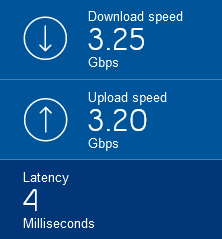
 lavish hollow
there we go
lucid siren
Didn't find a Speedtest server with more than 10g yet however
lavish hollow
once I get my plexyserv active again I want to look into a pair of 10gbit nics and a switch with a handful of 10gbit ports
lucid siren
Should technically be 25gb the Speedtest (uplink to the switch from the hypervisor)
 opal pagoda
lucid siren
Didn't find a Speedtest server with more than 10g yet however
opal pagoda
lucid siren
Didn't find a Speedtest server with more than 10g yet however
few years back it was hard to find speedtest server with more than a gig bandwidth
lucid siren
I think I can't get around setting a 100g Speedtest server up...
opal pagoda
pseudo blade
How to get fast internet:
1. Spin up a large VM in AWS/similar
2. Perform speedt...
this is what speedtest cli is for 
clear igloo
vital gorge
what sort of speeds could I get with 2.5g ethernet?
Up to 2.5Gb/s if you pay for it
clear igloo
opal pagoda
this is what speedtest cli is for <:pirateLinus:1020084580906184727>
Depends on which one you use 😄
opal pagoda
clear igloo
Depends on which one you use 😄
this is the speed i dont pay for (its free real estate)
 peak cloak
lucid siren
Didn't find a Speedtest server with more than 10g yet however
peak cloak
lucid siren
Didn't find a Speedtest server with more than 10g yet however
just host your own
vital gorge
clear igloo
Up to 2.5Gb/s if you pay for it
icic
lavish hollow
and as whistl said earlier there are some things that can limit you other than your NIC
thick minnow
1gbe fiber is only $70/mo here. 2.5gbe would require a router upgrade, and would be closer to $125/mo
I've never saturated my 1gbe internet link. See no reason to pay more. I'm the only heavy user on this lan
lavish hollow
Bell offered us 3/3 for $60CAD the other week for 2 years so I took it
thick minnow
cool!
lavish hollow
1.5/940 is the next tier down, so 2.5Gbe is still nice to have coming in on more consumer devices
thick minnow
they offer 5gbe too, but really, I'd only be getting that for bragging rights.
lavish hollow
I was coming from very consistent and stable 1gbit/50mbit cable, the download speeds were over 900mbit most of the time but cutting the latency by more than 50% and the massive upload increase will be very nice
opal pagoda
i cant even get more than 16mbps down 1mbps up
lavish hollow
I need to find some good literature and dig into some things and see if I can get my current 2.5Gbe nic to perform a bit better when I run into a server that can feed it
opal pagoda
lavish hollow
I need to find some good literature and dig into some things and see if I can ge...
only thing you could do is enable jumbo frames
 mellow hemlock
How much network info might I learn from nothing if I read every message from this channel?
Do you know of any that you recommend?
clear igloo
ccent is dead, CCNA is the lowest and it covers EVERYTHING in the networking realm (collab, security, automation, etc)
but I would focus on routing and switching portions of the CCNA at least to get a good footing
mellow hemlock
I’ll have to give these a look. I appreciate the feedback. If you have other ideas too feel free to ping me as well. Ty guys
shell sail
that didn't work.
I'll have to go through and rebuild that. Is there something I need to do with Adgaurd and the vpn tunnel? Unbound is off and I have my dns set to adgaurd on opnsense.
 devout scaffold
lucid siren
This is on 100g tho 😂
devout scaffold
lucid siren
This is on 100g tho 😂
should probably fix this 🙃
 lucid siren
Ran into some random issue
shell sail
I have a live view screen shot and do see some blocks coming from the device i have set to go out through that tunnel. I can post it, but need to know the best way to redact IP address but to give good information still. How can you tell what rule is causing the block?
Nevermind. this is a different device getting blocked. Need to find out what device that is, but it's not going through my vpn tunnel
thick minnow
my home network now runs on pfsense 
 hard arch
did i do my ethernet cable wireing right
 clear igloo
You mixed up the last two color pairs 😦
hard arch
ahhh fuck thats why its not working then
do sometimes mix up the orange and striped orange tho so a few of my cables got them swaped dont cause issues anyway so no big deal
shell sail
So I rebuilt my wireguard tunnel, removed all the firewall rules for it and rebuilt those as well. Went back to unboundDNS and turned off adguard for now and still nothing. 😦 And used the docs.opsense.org/manual/how-tos/wireguard-selective-routing.html guide to the T. Might have to pop on their forums and post this there... So confusing.
lucid siren
devout scaffold
should probably fix this 🙃
Fucked up some routing 😂
Easy to fuck bgp
 worn viper
Deco x20 honestly surprised me,I am temporarily using it as a router and it's been pretty decent
 ancient arch
lucid siren
Easy to fuck bgp
ancient arch
lucid siren
Easy to fuck bgp
I find it quite difficult to fuck BGP up. It gives the most granular control to user so nothing is advertised without your consent
devout scaffold
Who here is familiar with DumaOS? Is it stable yet?
opal pagoda
devout scaffold
Who here is familiar with DumaOS? Is it stable yet?
what is dumaOS?
devout scaffold
opal pagoda
what is dumaOS?
A gaming oriented router OS, typically ran on Netgear’s gaming routers such as the XR1000 which was totally bunk for the first year it came out
I dropped it after getting their R2 as a replacement for the XR1000 and ended up going Ubiquiti instead, because the R2 literally bricked itself one day without any user input
It’s got cool features though, it’s just very buggy and kinda slow
ancient arch
Gaming routers are all bloated software wise.
devout scaffold
Yeah definitely
lucid siren
ancient arch
I find it quite difficult to fuck BGP up. It gives the most granular control to ...
if you announce routes trough your network trough up to 5 routers behind each other it gets complicated
devout scaffold
Ubiquiti has been a breeze so far, but I got the UDMP right before the SE came out so that kinda upset me
ancient arch
lucid siren
if you announce routes trough your network trough up to 5 routers behind each ot...
Why would anyone ever have 5 routers behind each other? And with BGP?
devout scaffold
 pseudo blade
opal pagoda
what is dumaOS?
pseudo blade
opal pagoda
what is dumaOS?
BEHOLD: THE NETDUMA R1
 pseudo blade
That's not a switch
devout scaffold
I know
lucid siren
ancient arch
Why would anyone ever have 5 routers behind each other? And with BGP?
well, 2 out of them are filtering, 1 is core, 1 up to 2 are distribution
devout scaffold
It just looks like one
lucid siren
all my switches do routing / bgp
pseudo blade
That's a Mikrotik Routerboard with a sticker
devout scaffold
Their R2 is dogshit
pseudo blade
opal pagoda
what is dumaOS?
But uh yeah it's gaming-optimised routing with a healthy dose of snake oil
I mean you can class traffic and prioritise it sure
devout scaffold
But the VPN features that were the main selling point for me was removed from the XR1000 after launch when I bought it because of some dumb partnership with some shitty anti virus security company which bundled its paid-only VPN service with it
And don’t get me started with the Wi-Fi drop outs
That were only resolvable through a reboot
pseudo blade
I actually knew a few people who sold rebadged Mikrotiks with "gaming-optimised VPNs" way back in 2014 or so
Though unlike Netduma they pivoted
ancient arch
pseudo blade
I actually knew a few people who sold rebadged Mikrotiks with "gaming-optimised ...
Something like Exit Lag?
The app
pseudo blade
Honestly I don't keep track of them
devout scaffold
Netduma just blocks connections to/from countries, exitlag actually does route you differently iirc
pseudo blade
I actually ran a VPN for a few days to bypass a routing issue that made Brawlhalla unplayable
clear igloo
lucid siren
all my switches do routing / bgp
add vxlan evpn or srv6 when?
pseudo blade
It was helpful then, and only then
devout scaffold
I think James runs a netduma router
lucid siren
clear igloo
add vxlan evpn or srv6 when?
vxlan for customer shit
devout scaffold
They used one in one of the Wi-Fi upgrade videos a year ago
lucid siren
but theres switches in there that dont support it so theyre carried along xD
clear igloo
lucid siren
vxlan for customer shit
OSPF or IS to IS underlay?
devout scaffold
devout scaffold
They used one in one of the Wi-Fi upgrade videos a year ago
I think it was the XR500 which doesn’t have features ripped out, but only supports 500Mbit/s
lucid siren
clear igloo
OSPF or IS to IS underlay?
ospf
ancient arch
Wut?
lucid siren
bot go brrrrr
ancient arch
Anyone used IS to IS in production?
clear igloo
ISPs mostly
ancient arch
clear igloo
ISPs mostly
I haven’t seen yet. I work at ISP
Perhaps older ones use it
lucid siren
could explain some things
clear igloo
My customer wants IS to IS because Arista can't do SRv6 in OSPF so we need to convert to it from OSPF
opal pagoda
pseudo blade
BEHOLD: THE NETDUMA R1
mikrotik goes brr
ancient arch
clear igloo
My customer wants IS to IS because Arista can't do SRv6 in OSPF so we need to co...
Ooh.
lucid siren
v6 is just straight switching to core router
pseudo blade
opal pagoda
mikrotik goes brr
It really does, I've sold Mikrotiks as something else/ part thereof in two companies now
I think I'm done with RouterOS for that kind of shit though, the hardware's neat but the software just doesn't real allow for that bullshit
pseudo blade
Mikrotik's fine for routing though dynamic can be fun
lucid siren
pseudo blade
Mikrotik's fine for routing though dynamic can be fun
They do a lot on the cpu
pseudo blade
Not in this decade they don't
clear igloo
v7 moved off the CPU right?
lucid siren
So they die if you send a few Mpps
pseudo blade
You can do switch hardware accelerated L3 now yes
And what you can't offload gets calculated and put back on the switch wherever possible
Would it really kill them to put a semi-decent CPU in their switches though?
 clear igloo
rip
opal pagoda
pseudo blade
It really does, I've sold Mikrotiks as something else/ part thereof in *two* com...
we do cisco only
 rocky badge
“Disable APIPA” bruhhh
clear igloo
rocky badge
“Disable APIPA” bruhhh
but why??
pseudo blade
opal pagoda
we do cisco only
Yeah Cisco doesn't offer anything that would do anything I'm trying to do lol
clear igloo
opal pagoda
we do cisco only
those octal cables on top 👀 ?
pseudo blade
I mean sure their super big switches with Xeons in them would, if you'd like to strap one of those to your car
Do it, it'd be funny
opal pagoda
clear igloo
those octal cables on top 👀 ?
no, power cords with this kind of end
 clear igloo
opal pagoda
no, power cords with this kind of end
clear igloo
opal pagoda
no, power cords with this kind of end
ah, picture was a bit blurry and looked blue-ish from a distance
cat9k switches or cat8k routers?
opal pagoda
clear igloo
ah, picture was a bit blurry and looked blue-ish from a distance
its blurry for a reason
clear igloo
opal pagoda
its blurry for a reason
haha, fair 😛
pseudo blade
Yeah they look blue in the preview but not if you open it fuly
opal pagoda
clear igloo
haha, fair 😛
c9200
clear igloo
opal pagoda
c9200
Nice, they're good switches
Just be careful with TACACS on the latest releases 😛
Until 17.6.6, 17.9.4, or 17.11.1 or later
rocky badge
I wish university would just rollout PEAP TLS/cert based auth @clear igloo
clear igloo
rocky badge
I wish university would just rollout PEAP TLS/cert based auth <@2911987418624163...
That would be easy, lol
rocky badge
Logging into a laptop is so fucking annoying
clear igloo
yah
clear igloo
damn, that stinks, super slow and annoying
rocky badge
It is…
Computers already auto enroll to client authentication certs too
But they have a shitty PKI
this computer was issued a certificate DIRECTLY FROM THE CA
clear igloo
lel

 pseudo blade
 sweet coyote
Hello, could someone help me with that situation?
sweet coyote
Hello, could someone help me with that situation?
So you have ethernet running from the switch to each outbuilding?
Tbh I can provide suggestions but I'm not sure how many of them you'd adopt - do you trust the people in the outbuildings, is this an airbnb-style situation?
If they're not trusted you want to replace the switch with a router and isolate each one from the others. it also sidesteps a bunch of problems - collisions as you say but probably more relevantly if you plug one of them in wrong and you end up with two competing DHCP servers
I notice you've got it isolated from the home network and can't think of another reason why you'd do that
-Or have four buildings unless you sleep in them on rotation :P
sweet coyote
pseudo blade
So you have ethernet running from the switch to each outbuilding?
Tbh I can prov...
Yes, the people in outbuildings are airbnb style situation, and I thought about putting another router in lieu of the ethernet switch
pseudo blade
I'd suggest having them all nicely isolated on individual subnets and using the routers in the outbuildings as plain access points
sweet coyote
pseudo blade
I'd suggest having them all nicely isolated on individual subnets and using the ...
Thing is, I'm not knowledgeable enough to know how to do that
It took me a lot of time to develop that huge network (it's a big place, and I ran a lot between the 4 buildings and was sweating a lot haha)
the only thing I didn't do myself is runnin the ethernet of the 3 cottages (an electrician did it)
and the ethernet switch was existant
opal pagoda
get a managed switch, mikrotiks are deacent value
pseudo blade
Well if they generate revenue for you, you could always get a consultant to do the setup for you, testing and all.
Else you can learn to use something like a Mikrotik hEX in place of your office switch.
sweet coyote
pseudo blade
Well if they generate revenue for you, you could always get a consultant to do t...
It's not my home/cottages, and I'm the one paid to do the setup, I usually do computers more than everything, but here they called me for their macbook, HDD and then asked me to make this network...
I tried and failed, well not entirely, the internet is the house is very very good
sweet coyote
opal pagoda
get a managed switch, mikrotiks are deacent value
aren't these expensive? what about a managed wifi router with 1 WAN and 3 LAN? I have one in hands
pseudo blade
Mikrotik's don't really do WAN/LAN, you define it all yourself as per your needs
sweet coyote
is the MikroTik Hex Lite, priced 50eur okay? thanks a ton for your inputs @pseudo blade and @opal pagoda
pseudo blade
I'd suggest not going for a managed switch because you'll be doing NAT for each unless your 4G router is awesome and need to do that somewhere
hEX lite is 100mbps only and half the CPU speed
sweet coyote
I don't go over 40mbps with 4G+ internet
pseudo blade
It'll do 40mbps but will be useless if they ever decide to offer more than 100
sweet coyote
and people in cottage won't be able to much a lot of stuff
pseudo blade
The regular hEX isn't much more expensive
sweet coyote
okay okay, and if I have a router that does gigabit, it would be good, right?
sweet coyote
pseudo blade
The regular hEX isn't much more expensive
double the price in my crap country
pseudo blade
I mean you're going to give the customer a quote, right?
hollow marlin
clear igloo
OSPF or IS to IS underlay?
IS to IS > OSPF 
opal pagoda
sweet coyote
double the price in my crap country
what country? since you use eur i assume somewhere in eu
pseudo blade
idk, I get bad feelings on this one - don't be afraid to tell your customer to get someone else to do the work if you're not really familiar with networking like this. Especially if you're coming down to the last euro on pricing. Beats a bad experience.
Otherwise you're signing yourself up for a fair bit of learning
sweet coyote
pseudo blade
I mean you're going to give the customer a quote, right?
Well, to them they spent enough already and they told me that "last summer, all three cottages were working before you installed internet in the home"... the 4G internet for the cottages was EXISTANT and when I tried them, I realised Internet wasn't working in the 3 at the same time
so I told them and they were like "well it worked before"
sweet coyote
pseudo blade
idk, I get bad feelings on this one - don't be afraid to tell your customer to g...
thing is these are clients potentially bringing me other clients, like a f*ck ton and all are paying money
sweet coyote
opal pagoda
what country? since you use eur i assume somewhere in eu
I'm sorry but I prefer to avoid answering this
But you're right @pseudo blade, shouldn't have taken a task I cannot compelte
well!! again, the house part I did everything and it works
then for "fun" I checked the cottages part and it wasn't working
I told them and they think it's because of the house networking
even though both aren't linked at all
opal pagoda
sweet coyote
I'm sorry but I prefer to avoid answering this
anyway, senetic is a store where lots of networking equipment can be found and prices are resonable and also they ship preatty much everywhere
Senetic is a leader in the sale of cloud-based services.As a global supplier, it is systematically expanding its reach by providing Office 365 and Microsoft Azure solutions.
sweet coyote
In fact, I tried to plug the "PowerLine Wifi" onto the "Ethernet Switch" to get the Starlink internet is both the house and the 3 cottages, and it didn't work
but when I plugged back the 4G router to the Ethernet Switch, it wasn't working either
Cottage 3 constantly get access, but If I put power into Cottage 1 & 2, they don't get internet from their respective router
pseudo blade
80% chance either you've got a router's switch ports plugged in a loop or you've got the "LAN" port facing the house with DHCP enabled
sweet coyote
but if I plug a PC into the wall ethernet socket, it works
sweet coyote
pseudo blade
80% chance either you've got a router's switch ports plugged in a loop or you've...
which LAN port? on which device I mean?
pseudo blade
On the routers in the outbuildings
sweet coyote
oh
pseudo blade
sweet coyote
In fact, I tried to plug the "PowerLine Wifi" onto the "Ethernet Switch" to get ...
That would nicely bridge the house's networking with any guests who connect to the access points, offering no security or isolation whatsoever considering the lack of any network design to prevent it.
Absolutely awful idea unless you had a router set up with appropriate firewalling rules in place where they can't touch it.
sweet coyote
pseudo blade
That would nicely bridge the house's networking with any guests who connect to t...
We abandonned the idea, the cottages will work using the 4G+ internet router, so that it's separated from the house network
So I need to check if the cottages's routers are DHCP enabled and disable that?
pseudo blade
Depends on the rest of their config
And what you plugged into where
If you actually just had them set up as per default with the WAN port facing the house they need DHCP because they're actually each doing NAT
sweet coyote
they are defaulted with WAN port facing the house, indeed
Cottage 1 & 2 have the same router model, Cottage 3 has a different one (Netgear), and this one works nicely
I suspect the brand of Cottage 1 & 2's routers to be crappy, they're the same brand of the Ethernet Switch and they were in place when I arrived
pseudo blade
So why is it your fault they're broken if they were already in place?
sweet coyote
because the client tells me it worked before I worked on them
pseudo blade
I'd be correcting that misconception before any networking problems tbh
sweet coyote
the only thing I did is renaming the SSID so that the guests could find them easier to connect
but if we only take this
pseudo blade
You can't and should not be responsible for any networking equipment you've ever touched, especially if it failed later and you didn't supply it
sweet coyote
 pseudo blade
But I get it, money
sweet coyote
it's not a complicated network, is it?
pseudo blade
No. But it's also not properly isolated.
And that lack of isolation (and of course your lack of control over the equipment in use) leaves you with a few particularly fun failure modes
sweet coyote
so in order to isolate every cottage on the network side, I'd need to replace the Ethernet Switch, right?
pseudo blade
Sure, but I'd hate to see how you get paid for it if they'd reject a $30 more expensive router
sweet coyote
well, I got a free wifi router with 3 LAN 100 plugs, a client gave it to me
if I can reuse it in that scenario, i'm okay
my working time is nicely paid, and the client is nice and cool
he just wants it working for next summer
pseudo blade
Does it allow you to independently manage the interfaces?
If not it's no better than the switch was
sweet coyote
i'm plugging it to check the management intercace
pseudo blade
if it's a consumer-grade router you can default to "no"
sweet coyote
it's tp link
pseudo blade
No chance lol
opal pagoda
sweet coyote
well, I got a free wifi router with 3 LAN 100 plugs, a client gave it to me
many routers employ this kind of structure
router>internal ethernet switch
and not
router > bunch of independant interfaces
pseudo blade
-So it's basically just adding an extra NAT in and you get a crappy 3-port switch.
It will let you determine if the existing switch has dead ports but little else.
And it's not an especially likely failure mode though it does happen.
Here's a block diagram for the hEX lite - it's architecturally the same as described above but the switch and router operating system expose them as if they were regular interfaces attached to the router CPU, which is not something a home router manufacturer is going to bother to do.
 sweet coyote
pseudo blade
Here's a block diagram for the hEX lite - it's architecturally the same as descr...
sweet coyote
pseudo blade
Here's a block diagram for the hEX lite - it's architecturally the same as descr...
Well, trying to use the tplink router broke my Internet
And I don't really understand the difference to be honest, but if I need to order that... I will
pseudo blade
It's not just ordering that
It's knowing how to do what you want
And what a secure and robust enough configuration is so they can't break it again
sweet coyote
Honestly the tplink home router interface seems pretty "complete" to me
May I try it ? to replace the ethernet switch?
could I be able to isolate the 3 cottages with it?
sweet coyote
thanks for the help anyway, sorry if I'm a bit dumb
pseudo blade
sweet coyote
Honestly the tplink home router interface seems pretty "complete" to me
It's not hard for something to look complete if you don't know what complete is, and your product targets a different market with different requirements.
This is a hEX I'm using to stage and configure another attached router and handle a few failure cases, with two networks.

it's configuration is an absolute mess but that's beyond the point, I attach and remove stuff from this all the time
Just for fun, this one has three ways out to the internet and two are disabled or removed
sweet coyote
pseudo blade
It's not hard for something to look complete if you don't know what complete is,...
But I don't need 6265431 settings for my use case, do I? I mean, what specific SETTING to I need for my usecase?
sweet coyote
zero computer will be connected to LAN
only through Wi-Fi, all I want is 4G+ internet <-> 3 LAN ports <-> 3 Wi-Fi routers
pseudo blade
You could also use port isolation on a managed switch
Yes, and you do not have sufficient understanding to know why this is not best practice and can cause problems
sweet coyote
so if the router I'm currently owning has port isolation, I am fine?
pseudo blade
It won't
pseudo blade
Honestly I've already explained it multiple times and don't feel generous enough to repeat it again
sweet coyote
alright, sorry
I thought having 3 access points with separated wifi was a simple task, my bad
sweet coyote
Guests won't be creepy trying to do something weird, they are on vacation for a wedding, they want to use internet in the countryside, that's all
they spent 1 to 2 days there, max
Imagine it's a house, for a moment, how come it wasn't working in the first time, is what I fail to understand
pseudo blade
Additionally, you're using routers as APs, which gives you four ways to plug it it in wrong per building
opal pagoda
pseudo blade
For untrusted guest access: no
i once stayed in a airbnb that had a isp router in the room i was staying in and it used default password and username
could have done quite a bit of tomfoolery but i am a good citizen so i didnt
sweet coyote
I mean, I have an internet access, that I sent in a ethernet switch, to 3 different routers, and it's not working, even BEFORE WE TALK about security
pseudo blade
sweet coyote
Imagine it's a house, for a moment, how come it wasn't working in the first time...
I completely get that you fail to understand. But I keep telling you and you reply that you fail to understand. Not sure what you want to hear
"Yeah all good mate just do what's presently broken"
There you go. Good night.
pseudo blade
opal pagoda
i once stayed in a airbnb that had a isp router in the room i was staying in and...
Yeah it's common when every idiot thinks they can set up motel internet, last place I was in they just gave the office WiFi router password to all guests.
Booking server, Windows 7 reception PC and all guests on a VDSL modem-router
opal pagoda
pseudo blade
Yeah it's common when every idiot thinks they can set up motel internet, last pl...
i have been able to access router management portal multiple times when on vacation, i mostly try that if internet is broken and was able to fix it few times
sweet coyote
pseudo blade
I completely get that you fail to understand. But I keep telling you and you rep...
Okay, I reread your first proposed solution, which was, "I'd suggest having them all nicely isolated on individual subnets and using the routers in the outbuildings as plain access points"
can I do this with the current devices, or not? thanks
pseudo blade
No.
pseudo blade
opal pagoda
i have been able to access router management portal multiple times when on vacat...
Nowadays I just ignore it and use my phone directly/hotspot if I'm travelling, it's rarely worth bothering with and 4G in Australia's more populated locations tends to be quite good.
-And if I'm too remote for even that I probably have better things to do
sweet coyote
pseudo blade
Nowadays I just ignore it and use my phone directly/hotspot if I'm travelling, i...
What speeds do you get on 4G in Australia?
pseudo blade
Obviously it's quite variable, but in my house here I can get 200mbps on my phone's Cat-20 modem, in my last place I could get 400 down easy off a tower in an industrial area that empties after work that I was near, never saw it below 200 actually
During the day more like 50mbps here, speeds pick up later in the night
sweet coyote
wait what, 200mbps on LTE?
pseudo blade
Yeah definitely.
pseudo blade
It depends a lot on the tower you're connected to and your modem.
For example, here's a result of a cat-6 modem under test https://www.speedtest.net/result/14529727634
sweet coyote
yep, that's about what I get
pseudo blade
This one's off a cat-20 modem in my phone, same position one minute later: https://www.speedtest.net/my-result/a/9160412819
It obviously has a rather different antenna layout and supports greater carrier aggregation
opal pagoda
pseudo blade
Nowadays I just ignore it and use my phone directly/hotspot if I'm travelling, i...
problem that i had is congestion in 4g band
4g speeds were as bad as 0.5 down 5 up
so i switched their router to 3g band (HSDPA) and it went up to 10 down 3 up
pseudo blade
Yeah it's 1:45AM here lol
Those are not daytime speeds though the Cat-6 modem will usually do more than that, closer to 100mbps at this time of night
 fleet gate
Normal for a new router?
 pseudo blade
It looks like what I'd expect here ~500km from the datacenter plus infrastructure, give or take.
My friend in Sydney gets ~4ms to Sydney datacentres but everything's close to him
It's fine enough for most networked gameplay, maybe not ideal for live game streaming (GeForce Now etc.)
fleet gate
pseudo blade
It looks like what I'd expect here ~500km from the datacenter plus infrastructur...
50km from the data center or 33 miles
Supposed to get 125mbps which I normally do but since the new router im getting 15-20
pseudo blade
The latency doesn't look like too much a problem but the reduced throughput is probablt worth a call, that's rubbish
 lime copper
Hello, I am setting up a secondary router connected to the main one to use it as an extender and as a separate testing network, I changed the gateway to 192.168.2.1 since the main router has a gateway of 192.168.1.1, when I use the same gateway, I don't get managed to access secondary router GUI panel, but when I change the gateway of the secondary router to 192.168.1.1, I get managed to access both of the routers and have access to the internet, but when I use my laptop which is connected to the main router, it connects automatically to the secondary router gateway and I don't get managed to connect to the internet until I turn off the secondary router or disconnect it, why does that happen and how to solve it without having to manually setup gateway and IP for every single device?
 glass glacier
lime copper
Hello, I am setting up a secondary router connected to the main one to use it as...
glass glacier
lime copper
Hello, I am setting up a secondary router connected to the main one to use it as...
What ports do you have the two different routers connected on? I could see two different issues depending on which ones, either a Double NAT or a DHCP Server conflict.
lime copper
glass glacier
What ports do you have the two different routers connected on? I could see two d...
Give me a minute to port scan each of them
glass glacier
lime copper
Give me a minute to port scan each of them
I mean physical ports, like WAN or LAN
lime copper
Oh, it's connected to LAN port
glass glacier
LAN port to LAN port, or LAN port to WAN port?
lime copper
glass glacier
LAN port to LAN port, or LAN port to WAN port?
LAN port to LAN port
Sorry, just reverified
My bad, it's LAN port to LAN port
glass glacier
lime copper
My bad, it's LAN port to LAN port
Ok, each of the routers have their own DHCP server that tell devices connected to them what IP address and gateway to use. With how the two routers are connected, devices connected to either router could grab that info from either one "at random".
lime copper
glass glacier
Ok, each of the routers have their own DHCP server that tell devices connected t...
Oh no
drowsy fossil
With router 2's wan port going to a lan port of router 1 you should be able to get the effect you want?
lime copper
drowsy fossil
With router 2's wan port going to a lan port of router 1 you should be able to g...
I can't insert the cable to the WAN port, it's different
Router 1 is Fiber and router 2 is ADSL
drowsy fossil
Ah so they are modems
You probably won't be able to do what you are describing with these devices
glass glacier
Yeah, only pain and suffering will be found trying to setup advanced networking on consumer grade combo units.
lime copper
Oof, then I guess all I have to is statically setup the gateway for each device
drowsy fossil
Why tho?
lime copper
drowsy fossil
Why tho?
Because it can randomly choose the DHCP server which means I have to statically setup the IP and gateway for each device like I did on my laptop and it will work just fine
drowsy fossil
Just turn off the DHCP server on the second one
lime copper
drowsy fossil
Just turn off the DHCP server on the second one
Wait, is it that simple, cool, I will try it right now
drowsy fossil
Basically turn off everything you can on it and it'll be a simple switch
lime copper
drowsy fossil
Basically turn off everything you can on it and it'll be a simple switch
Okay
And success
It works like a charm, now I can just normally on other devices access to router 1 while isolating router 2 and have access to both of them in my desktop testing lab
Thank you guys
opal pagoda
lime copper
It works like a charm, now I can just normally on other devices access to router...
not sure about isolating, you should try to ping a device connected to router 1 from a device connected to router 2
sage crow
lime copper
Hello, I am setting up a secondary router connected to the main one to use it as...
Odd I’ve done this exact thing with 2 gl-inet travel routers and had no issues whatsoever
Oh nvm one is fiber
lime copper
sage crow
Odd I’ve done this exact thing with 2 gl-inet travel routers and had no issues w...
All I had to do is to disable DHCP in router 2
No, it has nothing to do with fiber
sage crow
I didn’t in my experience but it may just be down to the firmware of the router
 snow anchor
does any one have any ideas of how I can get faster wifi or even ethernet in my room? I have to use a USB wifi adapter and its pretty slow expatile when everyone is using the wifi.
sage crow
Get a really longer Ethernet cable
snow anchor
I don't have ethernet in the walls and can't install it because we have asbestos. and I don't have working cable so i can't use it