#networking
1 messages · Page 28 of 1
 thick minnow
 drowsy fossil
Yes so build a small ATX tower
thick minnow
the only mini server I have with a fan is the Intel nuc 6
drowsy fossil
I think opnsense is compatible with connectx-3
drowsy fossil
thick minnow
the only mini server I have with a fan is the Intel nuc 6
Just build a full on pc
thick minnow
Thanks, but no thanks
drowsy fossil
Intel cpu preferably, get an sli compatible motherboard and you can throw two pciex8 nics in it
thick minnow
wow, talk about power hungry and hot
drowsy fossil
It's not power hungry if you don't work it too hard 🤔
 sharp sparrow
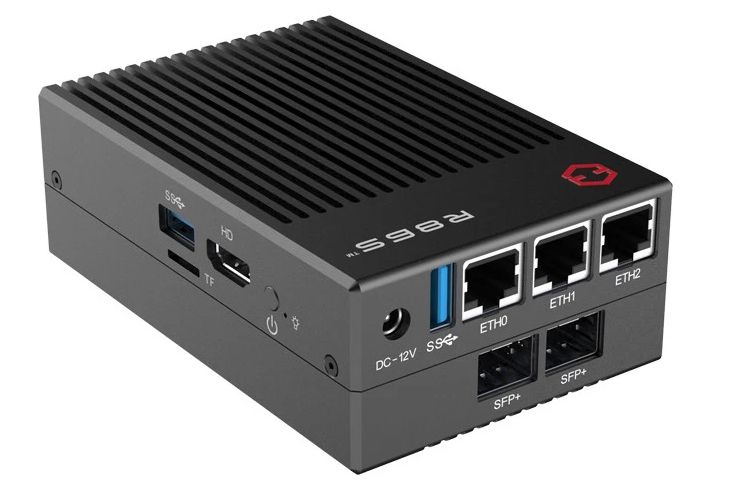
R86S mini PC features Intel Jasper Lake processor, optional 10 Gbps Ethernet ports (firewall or networking appliance)

This 3 inch computer has four 2.5 GbE ports, a Celeron N5105 processor and a $257 starting price
@drowsy fossil sent pm
drowsy fossil
TY
thick minnow
R86S GW-R86S-G1 Black, 3x2.5G, 2xSFP+ ports, M.2 slot, Celeron CPU, 8GB RAM, selling on AliExpress for $313.48. I'd need a new pair of 10G GBICs. Last pair cost me another $95. Still not bad, but not today.
thick minnow
I wonder. Has LTT ever dug into the mini-pc vs NAS decision, for home services (plex, zoneminder, etc)? I don't have a NAS anymore, so rely on my 2 Linux servers (old dual-core and new 8 core) for all our home services, and a 3rd that is the firewall. I'm sure more than a few fans have wondered the same thing.
I know Linus doesn't go small school. He has cooled rooms with rack mount servers throughout his mansion. But someone at LTT must live in an apartment or normal house, and run some services on their own.
sharp sparrow
I mean, what do you wanna know?
I have run a fully populated 20U at home. I have run little lenovo m900tiny nodes at home. Right now I run a ryzen with 128gb ram in a node804 at home.
There are pros and cons to each approach
thick minnow
I watch the channels, they review desktops all the time, but only ever for gaming. They review keyboards, mice, monitors, but what about the other stuff in your house?
For example, I want to run zoneminder or shinobi to record all my home video cameras. Where to run it?
I've got it running on my 8 yr old Intel Nuc 6, because that's my playground right now.
but I don't expect that to scale well.
 peak cloak
I mean I personally don't trust LTT with reviews of such stuff
sharp sparrow
I'd run it on my nas, myself.
peak cloak
Level 1 techs is pretty good
sharp sparrow
Assuming my nas is something like truenas scale
sharp sparrow
If I have a less converged configuration, I would put it on a different node in the stack
thick minnow
12 years ago, I had a QNAP NAS, but was never impressed with it's heat and noise in my home office.
The 3 mini-pcs on the table here are silent, and don't raise the room temp one bit.
sharp sparrow
Yup. The primary downsides to those are expansion and storage
thick minnow
True. But I gave up on storing terabytes of video and music recordings a decade ago, when my house burned down and I realized "things" mean nothing. I just never replaced all that
The biggest storage hog I have is the video camera recorder, but I also have B2 cloud to store it in
sharp sparrow
mmhmm. I store the bulk of my stuff offsite, makes more sense for a bunch of reasons, at least in my case.
thick minnow
The ASUS PN52 I have has one 2TB M.2 SSD and one 2.5" 8TB SSD. I don't find I need any more than that to run my stuff.
It only has one 2.5G ethernet port, but works great with the USB3 5G ethernet adapter I got, and time machine flies from my 10g Mac Studio
sharp sparrow
My home server/nas is in a fractal node 804. Not massive, not tiny, and I needed it to house dual gpu's anyway.
 marsh haven
Possibly dumb question for smart people. I’m looking to upgrade my wifi game since I’ve been encountering bufferbloat issues and 1gb internet is now affordable in my area. I have a docsis 3.0 modem/router combo and my thought was to get tplinks wifi 7 router or equivalent when available and use my modem combo to supply the connection as from my understanding it can handle up to a gig until docsis 4.0 becomes available which should future proof me for a long time. Is that dumb?
 scenic canopy
 burnt dew
Hey! i don't know if you will be able to help with this issue that i am having, but my WAMP i am trying to publish and make it put up online onto my ip, and i have tried adding a DMZ (friend sugguested) and a port forward to 80 WAN, and 80 LAN, but isnt working. Any help is appreciated! (image attached on what i want published.)

 pseudo blade
burnt dew
Hey! i don't know if you will be able to help with this issue that i am having, ...
pseudo blade
burnt dew
Hey! i don't know if you will be able to help with this issue that i am having, ...
DMZ is an awful idea, just do regular port forwarding if you're not familiar with setting up firewalls as you'll otherwise end up exposing SMB, RDP and quite likely your database to the internet, among others.
As far as why it doesn't work... My guess is you haven't added IP bindings to Apache that would permit it, though I'm uncertain what the default config of wampserver is and wouldn't use it myself, especially due to it including PhpMyAdmin and other tools which increase your attack surface.
You say you like Arch - have you considered running Apache under Linux instead? The experience is way better
burnt dew
pseudo blade
You say you like Arch - have you considered running Apache under Linux instead? ...
i guess i could.
pseudo blade
I've been forced to set up WAMP stack offerings a few times and consistently hated it and found dumb problems that only exist in them
pseudo blade
pseudo blade
DMZ is an awful idea, just do regular port forwarding if you're not familiar wit...
https://www.shodan.io/search?query=wampserver
https://www.shodan.io/search?query=phpmyadmin
What you get when you don't really know how to set up a webserver securely and expose its management tools to the internet, not even just setting up a DMZ when you probably didn't want to expose everything
 alpine grotto
marsh haven
Possibly dumb question for smart people. I’m looking to upgrade my wifi game sin...
alpine grotto
marsh haven
Possibly dumb question for smart people. I’m looking to upgrade my wifi game sin...
DOCSIS 4.0 is years off from practical implementation on any sort of large scale. D3.1 will be relevant for quite a while and is actually well established to work
marsh haven
Good point I just figured if I have a 3.0 modem already I’d wait till it released in 24 to upgrade? My isp only does up to a gig for now so if anything wait till 4 drops and get a 3.1 for a bit cheaper when that rolls around?
alpine grotto
Are you leasing a modem through your provider? If so they should be pushing 3.1 gateways with anyone who’s even close to using a gig plan. That said, the performance differential between 3.0 and 3.1 mostly comes down to upstream bonding as 32x30 bonded channels is essentially going to get you to high speed on its own. 3.1 supports OFDMA if your provider has mid or high split architecture enabled but you’re not gonna get much benefit out of it unless you stream or do large file uploads regularly.
marsh haven
At the time they didn’t do 3.1 so I bought a 3.0 combo to avoid leasing. I would have the option of renting a modem if I were to upgrade my service.
Not sure about the tech they offer with 3.1 but I know they do have a list of supported 3.1 modems.
alpine grotto
TLDR; don’t upgrade your modem at the moment unless your current one is causing problems or not getting enough, and if that’s the case, call your provider and ask them about it or flag down a line tech on a street. If your Wi-Fi is bad, consider optimizing router position and wireless channels before looking at upgrade options. I wouldn’t say that now is a terribly good time in the dev cycle to upgrade if you don’t have to.
As a note though, D3.1 modems are just D3.0 models that support slightly newer standards and OFDM/OFDMA. So if you need a new one for whatever reason, it will work fine for some time to come.
marsh haven
I use Ethernet for gaming applications but my router doesn’t support sqm so I run into video call issues and other latency problems. Figure if I were to get a new router I’d wait till wifi 7 because I feel like getting a 6e with 7 around the corner would be unfortunate.
Upgrading the modem did feel like the lowest priority
It’s not super concerning that I’d wait a bit longer but I do have a small sense of urgency
alpine grotto
6e is underwhelming and i very much doubt that even half of new hardware is shipping with support for it.
marsh haven
Even 6 is high up enough in price that it has me leaning towards waiting for 7 if I’m going to be dropping a lot anyway.
alpine grotto
Oh. Also, before you make any modem/Wi-Fi upgrades, make sure your ISP’s signal stats are in good spec. Don’t ever upgrade or up your tier before your RF signal or light is right because you’re then paying to try and compensate for your service provider not keeping their shit on lock.
marsh haven
Not very knowledgeable in the subject, wdym by that?
alpine grotto
Um, it’s kind of a lot to explain for the uninitiated but basically, just having a cable connection or fiber connection isn’t the only factor. Signal strength and signal quality are affected by stuff like how your house wiring is set up and how the local ISP network is running.
Because sometimes those problems can take longer than expected to take, i don’t ever recommend buying new hardware to correct a problem in your connectivity before making sure that’s right because some issues can take longer to resolve than the return window on a router.
marsh haven
It’s a bit over a 2 year old router in my possession and the the product itself is like 9 years years old.
They also support 6ghz wifi
My isp
But I see after reading your comment again that the latency issue might be my local isp rather than my equipment?
alpine grotto
I couldn’t say what specifically would help your situation and wouldn’t want to offer direct help that my company hasn’t authorized me to give, but Google or chatGPT could give you an answer on what good DOCSIS service requires from a signal quality perspective.
pseudo blade
alpine grotto
Um, it’s kind of a lot to explain for the uninitiated but basically, just having...
Don't forget contention
Do not ask chatGPT for advice lol
Everything I've so far gotten back from it has been rubbish when analysed further
alpine grotto
That’s not advice, that’s just asking it to pull well documented tech specs which are applicable to a massively common technology, but yes, never take chatGPT at its word
pseudo blade
Research online is better
marsh haven
I’m not really concerned about the modem right now because it can handle 1gb connection I believe. I just figured newer router > old router.
pseudo blade
Certainly can be, especially if your old modem had one of the more notorious Intel Puma chipsets
marsh haven
It doesn’t support sqm which I heard can be a big factor
pseudo blade
Queueing is only really applicable when you're saturating that connection. Are you doing that a lot? (Ah found your original message)
alpine grotto
That one’s a little more straightforward, because yes, there is different performance between generations, but 6e isn’t massively better than AX, and AX isn’t massively better than AC. AC however is so much better than N that it’s not even funny
My only point made prior to that really is that if you’re having issues with latency or connection reliability to local servers, check your modem’s connection stats before buying new hardware because buying a new router then having your ISP take 2 months to fix a network or home wiring problem sucks.
Whereas checking your connection stats is free and reasonably straightforward.
marsh haven
I really shouldn’t be throttling the bandwidth, I get around 500-600 down but am constantly suffering from wifi drops and random latency issues. If I’m playing games my partner will get a lot of buffering issues in video calls and other web browsing issues.
alpine grotto
Do those drops happen on your Ethernet connections?
pseudo blade
Doing WiFi at or above those speeds is difficult and very range-limited. Additionally, if they're only happening on WiFi, SQM will not fix your problem.
marsh haven
I get packet loss occasionally over Ethernet but i can’t reliably measure it across games because it’s a ps5.
alpine grotto
Plug a laptop or desktop into the modem or router directly and ping -t 8.8.8.8. Any packet loss isn’t right but you won’t really start noticing it until you’re at about 3%. There are lots of reasons for it though
pseudo blade
This is great https://github.com/cntools/cnping

GitHub
Minimal Graphical Ping Tool. Contribute to cntools/cnping development by creating an account on GitHub.
pseudo blade
marsh haven
I get packet loss occasionally over Ethernet but i can’t reliably measure it acr...
The joys of congestion mean that you can measure its impact on other devices sharing the same resources
alpine grotto
And yes, distance can be a huge factor in Wi-Fi performance. I had a VIP calling to complain about connectivity problems a while back, turned out she had one or two wireless devices that had RSSIs of like -85dbmv… basically not even signal but enough to keep trying to transfer on. It wrecked their entire Wi-Fi because all that traffic was just constantly retransmitting
marsh haven
I’ll try to get a read on the signal when I’m back home, but it’s a 300 sqft apartment so I didn’t think to consider it.
But I can recall a lot of the issues with the wifi happening 10 or so ft from the router itself.
Good point, thanks for the tips. I’ll give it a go and if all else fails I’ll harass my isp a bit before pulling the trigger.
I do run smart lights but they should be using thread I’ll try disconnecting them from power in different situations because sometimes they’ll get stuck in a constant “searching” mode because HomeKit is dumb.
alpine grotto
Good luck! Hope it’s an easy resolution.
 marsh oracle
Is anyone here auditing firewall logs?
I found strange behaviors from Windows machines trying to access 172.20.0.1:445 or 172.18.144.1:445 about every 10 minutes.
of course it gets blocked, that network is not used here and there is no docker on any of the source machines.
What's your opinion on that?
On the windows machine, the PID 4 issued the connection (system), but why?
If I check the registry, I can not find anything
 whole crow
I have this bluetooth usb adapter and when I plug it into my pc and connect my samsung galaxy buds, they have a delay https://www.tp-link.com/uk/home-networking/adapter/ub500/
Is it a bad product or is there something else I can do to decrease delay?
I even installed the drivers from their website
 midnight axle
anyone able to explain to me how, for the first time in 10 years, have been able to get this steam download speed? i always lay at 10 mbps :/

 magic arrow
Hi,
I need help with this. I have successfully have 2 Synology routers connected over site to site VPN but I can't do a lot of things over the connection.
Example: smb file transfer, browse my multiple Synology Nas devices using their local Ip address, etc. The only thing that works across the site to site connection is remote desktop over VNC.
alpine grotto
marsh oracle
Is anyone here auditing firewall logs?
I found strange behaviors from Windows ma...
172.20.0.0/24 is private and can't be publicly accessed, that's local traffic. Same with the second IP.
 old iris
Any ideas for why my ASUS dual band WiFi adapter isn’t showing up on Windows? It works fine on Linux but I went through the “Network Connections” app on Windows and I don’t even see it show up
old iris
old iris
Any ideas for why my ASUS dual band WiFi adapter isn’t showing up on Windows? It...
Fixed it, windows didn’t detect it because idk
 sage crow
Some specify that they only work with certain operating systems
marsh oracle
alpine grotto
172.20.0.0/24 is private and can't be publicly accessed, that's local traffic. S...
Yes we know that already and it was not my actual question.
alpine grotto
Have you run a PCAP and found anything in the traffic to or from the IPs?
marsh oracle
That is actually a good idea, haven't thought of trying to capture the traffic.
I'll try with Wireshark and see why PID 4 (system) wants to communicate with a network that is not in use here and what content (probably encrypted..)
 waxen saddle
magic arrow
Hi,
I need help with this. I have successfully have 2 Synology routers connected...
waxen saddle
magic arrow
Hi,
I need help with this. I have successfully have 2 Synology routers connected...
2 things:
- Are the IP address ranges different? (site 1: 172.16.1.0/24, Site 2: 172.16.2.0/24)
- If so, did you build routes so the routers know the forward traffic destined for the other site through the VPN tunnel?
marsh oracle
alpine grotto
Have you run a PCAP and found anything in the traffic to or from the IPs?
there is basically nothing, its just a 66 byte packet containing typical tcp/ip data such as source and destination mac and the SYN flag is set.
It does not make sense that clients try to access a network that is not in use in any way shape or form here on this network.
Remote networks also reside in other 10.0.0.0/8 network segments
alpine grotto
Corporate or home network, and are you getting any ACK flags on subsequent packets?
marsh oracle
of course it is getting blocked by the firewall, see my initial text.
As I wrote many times now, I dont use class-b networks here and there is no reason port 445 should go out to any 172. network at all.
alpine grotto
You can tell someone that it shouldn’t be happening all you like but clearly it is happening. Good luck figuring it out.
magic arrow
waxen saddle
2 things:
1) Are the IP address ranges different? (site 1: 172.16.1.0/24, Site 2...
@waxen saddle I don't know how to set static routes on the Synology routers. Can you help me with this? Also yes the Ip address are different between the 2 routers
 waxen scroll
marsh oracle
That is actually a good idea, haven't thought of trying to capture the traffic.
...
waxen scroll
marsh oracle
That is actually a good idea, haven't thought of trying to capture the traffic.
...
Random thoughts: use command prompt on the affected host, "set" command. Are the IPs there? Is there a login server thats not the local PC in there? Is there DNS names that resolve to that IP?
Do those IPs have reverse DNS in your network?
Open regedit and search for those IPs.
Any network drives that are disconnected and trying to reconnect?
google says its SMB but also might be active directory sooooo those are the two things I would search the host for
marsh oracle
waxen scroll
Random thoughts: use command prompt on the affected host, "set" command. Are the...
nope, no environment variables with any of that, no registry entry at all, I never used the 172.16.0.0/12 network at all and there is no manual static routes, no hosts file edit etc
I have no explanatation for this strange behavior
 clear igloo
any containers (docker, kubernetes, etc)?
marsh oracle
see my text above: no docker in use,
specially the 172. adresses change, it is not always 172.20.0.1
perhaps someone else is here and does regular firewall log audits and finds similiar results
waxen scroll
when you sniff the traffic is the mac address the same as the physical card address of the host?
marsh oracle
nay, the destination mac address is my router, and that router has nothing to do with this network and blocks it as per rules
marsh oracle
source mac is the same mac as the macine the connect attempt comes from
waxen scroll
lame
marsh oracle
and the PID on the Windows 10 machine where this connect attempt comes from is 4 (system)
waxen scroll
Sketchy. Maybe just nuke it and start over 😄
waxen saddle
Did you ever use this IP/range in the past? Activation server? Management? A non-Windows service running as the system?
Did you clear credentials in credential manager? Clear Edge cache completely?
(And I DO mean clear everything in Edge - saved logins, cookies, etc…
marsh oracle
Oi never ever in use, I mean they're just 66 byte packets attempting to connect to a random 172.16/12 network via tcp445 by the system process,
who knows why that is 🤷🏽♀️
 glass spoke
Hey guys, need your help here. I have two unifi acess points, one per floor, my coverage is great in most of the house. But there are some places that is horrible, like one of the bedrooms that is o the other side of the stairs case. All of the house is concrete, Europe. I will need another one to cover that part of the house right. Info I cant ceiling mount ( again concrete house).
peak cloak
marsh oracle
see my text above: no docker in use,
specially the 172. adresses change, it is n...
hyper v ?
do ipconfig /all to check all local IPs
glass spoke
glass spoke
Hey guys, need your help here. I have two unifi acess points, one per floor, my ...
Sorry for my English, not my native language.
marsh oracle
peak cloak
hyper v ?
no Hypervisor on those machines,
usually Win10Pro Hypervisor brings a default vSwitch with it in the 172.16/12 network range,
but said machines have no hyper-v feature installed and have no IP network in the 172.16/12 range
anyways, its not a biggie. I just found it very weird indeed since that network is not in use here at all
 primal ice
check those settings@marsh oracle
 marsh oracle
they're usually enabled here (local only), you think this causes Windows trying to access random 172.16/12 networks that don't even exist locally?
primal ice
possibly mine tries to connect to random stuff - guessing its windows update and telemetry crap. but my firewall also blocks it.
waxen saddle
marsh oracle
they're usually enabled here (local only), you think this causes Windows trying ...
If I recall, 172.16.0.0 is reserved for LAN’s (private use). If Windows was trying to find random computers on random LAN’s, it wouldn’t surprise me.
 barren dagger
Found this on the side of the road what should I do with it

Is it a terrible idea to power it on
I am going to power it on
peak cloak
barren dagger
Found this on the side of the road what should I do with it
what does it say on the front

 barren dagger
Yeah probably but I’m gonna play around with it
peak cloak
barren dagger
It’s just looping this now
Prob because there's no memory?
peak cloak
Servers usually have a setup thing to boot to


 neat whale
Would it be advisable to use the 2nd Ethernet port on the Eero router? Its being used as a bridge for smart devices. Connected to main router. I'm wanting to cheat and plug the old rig into the eero router. The old rig will serve as a server.
sage crow
barren dagger
Found this on the side of the road what should I do with it
No way, you got lucky. If you can get it working correctly those make good home servers
barren dagger
i was thinking that might be possible
would it be an awful idea to make it a minecraft server lol
maybe with more ram
pseudo blade
barren dagger
Found this on the side of the road what should I do with it
Loud space heater
Oh presentmonkey beat me to it
barren dagger
i mean
pseudo blade
Yeah basically
barren dagger
what if i need a spaceheater
peak cloak
a pretty bad spaceheater too
pseudo blade
G5/6 ran hot as hell and had little in the way of power efficiency options
Nah it's as good a resistive heater than any if you can bear the noise
barren dagger
yeah i probably wont put it to much use but im just gonna play around with it lol
pseudo blade
It's in the "leave the room while it boots" category for me
barren dagger
its also got like 4.6 tb worth of drives but they are probably slow drives
pseudo blade
Wonder who threw it away with intact drives
barren dagger
someone who also threw away a huge network switch and a tape drive
pseudo blade
Not wise
barren dagger
and a framed photo of a football player
pseudo blade
4/6 drives are SATA "midline" drives (aka slow) and the smaller two are 15K SAS (aka what was considered fast until SSDs blew them away)
 grizzled cloud
 sage crow
Personally idk if I’d ever trust a isp like Amazon with my personall info. That’s a VPN subscription ready to be bought lol
 hard arch
amazon now skipping the middle man and directly getting all your internet trafic to sell on
 opal pagoda
barren dagger
Found this on the side of the road what should I do with it
opal pagoda
barren dagger
Found this on the side of the road what should I do with it
one use would be to use it as nas
remove old mobo, try and mount matx mobo in it, get a psu that fits (flexatx or sfx possibly) and reuse case and hotswap bays
and you could use old psu-s from that server for electronic projects as they are easy to mod to constantly output 12v
sharp sparrow
opal pagoda
one use would be to use it as nas
remove old mobo, try and mount matx mobo in it...
depending on psu models and noise levels, they can potentially be reused as-is also
opal pagoda
sharp sparrow
depending on psu models and noise levels, they can potentially be reused as-is a...
they output 12v only
sharp sparrow
That’d do it
barren dagger
12 volt power supplies are super useful and it’s got some super powerful fans in it
pseudo blade
opal pagoda
they output 12v only
Not that this matters much nowadays, everything that isn't 12v can be put on a few DC-DC buck converters a la picoPSU
-I'd probably not reuse the case and by the time you've stepped through everything actually worthwhile I think you'd be better off with an old ATX case, new parts with SATA drive mounts and NVME storage.
thick minnow
Should i use DNS 8.8.8.8 google public dns ?
sharp sparrow
thick minnow
Should i use DNS 8.8.8.8 google public dns ?
Does it do what you want it to do?
thick minnow
Yes
sharp sparrow
Well?
pseudo blade
I have a local DNS server on my router with some custom records for local resources, resolving upstream with CloudFlare DoH.
primal ice
same
 sharp sparrow
ditto.
opal pagoda
thick minnow
Should i use DNS 8.8.8.8 google public dns ?
1.1.1.1 (cloudflare) is faster but sure, use google one if you want
thick minnow
Hey, i have a issue with my wifi
Im trying to play roblox, and nothing works. everything loads very slow and eventually after things do load i get massive lag spikes
I Tried
Flushing My DNS
Restarting My Router
Restarting PC (Multiple times, this issue has been going on for over a month now)
Only on My laptop, My network, Roblox this issue happens, everything works fine on other services
Also, This only happens with my laptop, fine on my phone
 radiant bone
Was watching Techquickies video on Wi-Fi range extenders.
https://www.youtube.com/watch?v=WW4wT7gob7s
All he seems to talk about is how bad every other method is, and that the solution is to either get a much better quality router, or buy mesh routers and spread them around.

Get 4 months free on all Nord products at https://NordSecurity.com/linus
If you're not getting a good Wi-Fi signal, you might be tempted to buy a range extender or repeater - but is almost certainly a bad idea. We'll tell you why in this video.
Leave a reply with your requests for future episodes.
► GET MERCH: https://lttstore.com
► AFFILIATE...
Also mentions how you'd have to manually switch your phone between 2 different SSID's depending where in the house you are. And that even if you get a better extender and put the SSID exactly the same? Wifi will likely stay latched onto the first one it encounters unless you lose the signal completely.
marsh oracle
it's a shared medium alright
radiant bone
I just want better wifi across the house and up a floor from where the router is...
marsh oracle
better in terms of speed, or distance?
radiant bone
It's for a smart tv and phone.
marsh oracle
Both is hard unless you spend some money and time into configuring roaming
radiant bone
Don't have the technical know-how to do that. And wanted to try and keep costs down.
marsh oracle
Well then you would go the easy way and just install a wifi repeater,
but I do not suggest this.
Also: Wifi repeaters can surely extend the same Wifi network, but the speed will be degraded too -> shared medium
radiant bone
The TV just dips in quality now-and-then. Running speed tests it's just....slow. Even my phone doesn't get that great of a wifi signal up there
marsh oracle
I'd run a cable thru the house/apppartment to thge wifi extender and extend the wifi network thru a cable this way if I had to
radiant bone
But does that not just make a 2nd access point? As he said in the video,
- Have to manually switch between the 2 wifi's
- Wifi likely will stay latched onto the first one it encounters, despite a stronger signal being present
thick minnow
Hi I have a 500mbps connection coming into my 3 bedroom home I live in the UK so it goes into virgin super hub 3 so my bedroom is away from where the router is so I have ran a ethernet cable from the router in my living room into the loft and connected a tplink WiFi archer c7 router in the loft to extend WiFi to my bedroom the router is alright for a few hours then I start getting buffering and freezing then the WiFi on the device will just stop and then I have to sometimes login to the administrator side of the router and reset it back to factory defaults
Does anyone have any ideas on how to fix this issue
 storm coyote
Pie all that off and get some ubitquiti aps
thick minnow
I don't have the money for ubiquiti equipment
peak cloak
radiant bone
Also mentions how you'd have to manually switch your phone between 2 different S...
No
Client should switch to base station with highest signal
That's how it works in big deployments with lots of APs
sharp sparrow
thick minnow
I don't have the money for ubiquiti equipment
tp-link deco mesh systems are solid as well.
 rocky badge
thick minnow
rocky badge
thick minnow
Sorted it out I ran an ethernet cable from the router in the loft to my NVIDIA shield tv Pro and it is working great no disconnections
marsh oracle
good
peak cloak
thick minnow
I don't have the money for ubiquiti equipment
Could look at TP-Link omada, those are pretty good too
thick minnow
do you think it is possible to broadcast wi-fi using a ad in card kek
 ruby patrol
Hay guys quick question should i enable DoT on my router dns settings
(Ping me if u hav a answer)
thick minnow
I have sorted my issue out I ran a ethernet cable from the router in the loft to my NVIDIA shield tv Pro
 gloomy flicker
I'm working on port forwarding, and just wondering, on my router I see the first attachment, but if I go 'what is my ip' or something like that, I get the second attachment. Shouldn't my router show me my external IP? What is the IP Address shown in the router?
The internal IP is 192.168.31.1, so it's not that.
Could someone share a bit? Is this NAT? What is that?

 peak cloak
gloomy flicker
I'm working on port forwarding, and just wondering, on my router I see the first...
peak cloak
gloomy flicker
I'm working on port forwarding, and just wondering, on my router I see the first...
yes you are under cgnat
your router WAN IP is a IP range commonly used for cgnat, not a publically routable IP
gloomy flicker
peak cloak
yes you are under cgnat
Should it matter for me with port forwarding? Because I've set a rule for port forwarding, but it doesn't work for me 🙄
peak cloak
gloomy flicker
Should it matter for me with port forwarding? Because I've set a rule for port f...
yes, port forwarding will not work if you are under cgnat
you need a public IP assigned to your router
 peak cloak
gloomy flicker
So...what's the simplest solution for port forwarding behind cgnat? :\
peak cloak
gloomy flicker
So...what's the simplest solution for port forwarding behind cgnat? :\
you would need to use some tunnel/proxy service to tunnel into your network
like ngrok
or get a vps to act as public endpoint
gloomy flicker
Any good free service?
peak cloak

GitHub
Wireguard setup to bypass CGNAT with a VPS. Contribute to mochman/Bypass_CGNAT development by creating an account on GitHub.
peak cloak
gloomy flicker
Any good free service?
there's a ton out there
but most free have limitations
gloomy flicker
peak cloak
but most free have limitations
Yeah exactly.
peak cloak
you could try with oracle as they have an always free vps
it just requires a bit of setup, but that github repo provides info
gloomy flicker
peak cloak
https://github.com/mochman/Bypass_CGNAT
I'll start with this, thanks!
marsh oracle
Well there's just another method, that involves renting your own VPS somewhere and set up a permanent VPN there that your entire internet traffic routes thru.
This way you have a proper routable WAN IP, its static and you can do port forwards to your internal network.
peak cloak
that's what I said basically
gloomy flicker
peak cloak
you could try with oracle as they have an always free vps
Are there any limitations regarding speed, transfer limit, anything like that? (not even sure if it's related, not that familiar with vps's etc)
peak cloak
gloomy flicker
Are there any limitations regarding speed, transfer limit, anything like that? (...
well yes they can be, there will be increased latency, but whether that is noticeable depends on a bunch of variables like distance from datacenter vps is in to home, and idk what network speeds oracle has
gloomy flicker
peak cloak
well yes they can be, there will be increased latency, but whether that is notic...
Basically I just want to access my local NAS, and be able to utilize my 100mbps upload speed(not like it's anything special, but if it's too slow, then it's quite meaningless)
peak cloak
gloomy flicker
Basically I just want to access my local NAS, and be able to utilize my 100mbps ...
I think 100mpbs is fine. Also, if you just want to access nas for personal use look into products like tailscale or zerotier. You have to install their app, but you then can access your devices from anywhere without having to worry about port forwarding, basically creating a virtual lan but it's p2p most of the time so little to no extra latency
Plus it's more secure, I use tailscale for accessing things NVR when I'm out
gloomy flicker
Is that an actual app? Or just a service running in the background?
peak cloak
Well a common setup would have you install tailscale on NAS, and then you would install tailscale on phone/laptop. Then you would use the tailscale IP assigned to access it
I think it does get installed as a system service on Linux
gloomy flicker
Sounds slightly annoying as a client(if I want for example to send links to family members and stuff like that), but it also sounds pretty useful in a way
sharp sparrow
cloudflare one has a free tier as well, that you are WELL within the usage limits of
peak cloak
gloomy flicker
Sounds slightly annoying as a client(if I want for example to send links to fami...
I mean yeah that's the downside
It's not public
But it's also a upside for me security wise
gloomy flicker
sharp sparrow
cloudflare one has a free tier as well, that you are WELL within the usage limit...
I'll look into that too, thanks 🙂
gloomy flicker
peak cloak
But it's also a upside for me security wise
Yep 4 sure
sharp sparrow
er, I am specifically talking about CloudFlare One. It has multiple operating modes, one of which is indeed proxy.
sharp sparrow
I went through all the deployment on it for ZT access to my remote cluster, but wasn't happy with the performance, so replaced it with a direct wireguard connection
(was throttled around 250Mbps through it, give or take)
peak cloak
ik tailscale uses wireguard internally, so if a p2p connection is possible (nat traversal) you will get fast speeds
if it's not, then yeah it will have to route through DERP which can be slow
gloomy flicker
cloudflare seems to require a payment method.
I hate it, it's always free, then you wake up one day and see a $100 bill XD
The same happened to me on AWS :p
peak cloak
well aws is brutal
sharp sparrow
gloomy flicker
cloudflare seems to require a payment method.
I hate it, it's always free, then ...
nah. CF One is free until 50+ users and you have to opt into a paid tier
peak cloak
I always use privacy.com for free things that require payment info
sharp sparrow
I just generate a one-time card with revolut or klarna (and set the limit to $5)
gloomy flicker
peak cloak
I always use privacy.com for free things that require payment info
Interesting, I'll give it a try 🙂
ruby patrol
peak cloak
I assume that just uses DoT for forwarding requests to a server
Yeah i did its the cloudflare server thingy (1dot1dot1dot1.cloudflare-dns.com)
Sorry for ping i forgot to turn it off
peak cloak
Well I do too, just all my discord servers are muted. I only get notifications from dms
ruby patrol
I just mute the servers who ping everyone for a vid or idk survey
barren dagger
pseudo blade
Loud space heater
Loud space heater that runs windows
 pseudo blade
It'll do that. I think the gen before was SCSI and wouldn't have been quite as easy to run 2016+ on
 knotty plover
why a website would ban VPS traffic?
I got the VPS and turned it into VPN, didn't think such error happen
and got it from a good data center
Hetzner
 clear igloo
Bots, scammers, and cheaters is why
 obtuse cypress
knotty plover
why a website would ban VPS traffic?
obtuse cypress
knotty plover
why a website would ban VPS traffic?
Because people spawn postfix/sendmail instances up on VPS and create mail spam farms and such
 tough tinsel
i want to create a simple redundate 4tb homenas. i have a i5 4570 pc with an old hhd and 2 4tb drives. anyone have sugestions on the software to use or how to do it?
thick minnow
tough tinsel
i want to create a simple redundate 4tb homenas. i have a i5 4570 pc with an old...
TrueNas maybe?
pseudo blade
knotty plover
why a website would ban VPS traffic?
Just as it is easy for you to spin up servers on public clouds, so is it for cybercriminals. You can write a ~100 line script to bring up and tear down VPSes to do all sorts of malicious things I won't go into detail about (and probably prompted them to block their IP ranges).
Also: Anyone connecting from a VPS probably isn't a person and wasn't going to watch their ads.
peak cloak
tough tinsel
i want to create a simple redundate 4tb homenas. i have a i5 4570 pc with an old...
Truenas, make a zfs mirror
thick minnow
Would OpenWRT be the best firmware choice for a router?
pseudo blade
thick minnow
Would OpenWRT be the best firmware choice for a router?
Speaking generally, it gives you Linux's routing and firewalling and is pretty powerful. The "best" firmware choice really depends on the hardware and what you want it to do though.
If your router's really awful it might not be suitable
thick minnow
I'm using an off the shelf router not supported by something like freshtomato
So it's basically this or ddwrt
I'd say the router is pretty good
I just wanted to try a more open and customizable firmware
marsh oracle
I tried putting pfsense on a Gateprotect CAD-0215
and wow... was it slow...
pseudo blade
I'd prefer OpenWRT then if your hardware's supported.
thick minnow
It is, albeit 1 version behind latest
I was gonna built a pfsense box, and still might
But this seems to be working fine for now
marsh oracle
my pfsense box is virtual 
thick minnow

marsh oracle
thick minnow
<:bleh:1073750161228054598>
TEK Cat!
I dont know if you folks remember that, but my first home made router was a FLI4L on a 75MHz Pentium machne.
FLI4L was a router on a single flopppy and entirely command line based
thumbs up if you know FLI4L
pseudo blade
You really don't need much CPU just to do routing
Before my time, didn't need that sort of thing
thick minnow
I think this thing has a dual core arm @ 1.2ghz or something
marsh oracle
pseudo blade
You really don't need much CPU just to do routing
right,
but VPN traffic aint gonna encrypt itself
pseudo blade
Yeah the main gotchas for openwrt are the wireless cards, modem if present and flash size
Eh RAM can sometimes be a problem too
I just don't buy consumer routers anymore
thick minnow
256mb of ddr3
 shy temple
can any one help ??? have abuddy who streams on twich with xbox an just got a pc but with his capter card his streams seem to lag an he has a ryzan7 a 3060
pseudo blade
Not worth the BS of putting custom firmware on random crap when good routere are cheap
pseudo blade
shy temple
can any one help ??? have abuddy who streams on twich with xbox an just got a p...
shy temple
thanks
thick minnow
So for openwrt do I just take the provided firmware for my router and flash it like it's an update through the web portal?
pseudo blade
Depends on the router, check the guide for your device
 thick minnow
I can't tell if my internet speed got cut in half or if Comcast is being Comcast
peak cloak
it could be the router
 neon forum
so I have a bit of a dumb dumb moment here, but because my router setup atm is really dumb I wanna get a new router. The one I have atm is decent except its 100 Mbps ethernet and that's clearly unacceptable.
so I'm looking at Tp-link a9 ac1900, but I can't make heads or tails about the WiFi range. At say, 10 meter distance, what kind of speeds could I expect to get on a smartphone? I have pretty much no experience with this because I only need WiFi because 4G doesn't really work in this apartment 😅
 acoustic pewter
So I just built an opnsense machine from an old PC that I want to use as a router. I'm having a lot of issues with it connecting to the internet over WAN and LAN not working when WAN is plugged in. Are there any ELI5 guides out there for opnsense?
peak cloak
acoustic pewter
So I just built an opnsense machine from an old PC that I want to use as a route...
wdym by "connecting to the internet over WAN "
do you have NAT rules? they should be there by default
acoustic pewter
peak cloak
do you have NAT rules? they should be there by default
This is what my NAT rules page looks like. For testing purposes I have my my ISP router hooked to my OPNsense routers WAN port, and my laptop is on the LAN port. I am unable to access the GUI when the WAN cable is plugged in, and when its plugged it the OPNsense machines says its gets an IPv4 and IPv6 address but I cannot connect to the internet
 acoustic pewter
No error, just windows saying no internet.
peak cloak
acoustic pewter
No error, just windows saying no internet.
that's a type of error
do you get an IP address on windows
can you ping opnsense?
acoustic pewter
Oh, thought you were looking for an error message or code
peak cloak
acoustic pewter
Oh, thought you were looking for an error message or code
reason I'm asking is like when using a web browser, there is a big difference between a timeout error for example and an nx_domain error
those point to 2 different paths you would go down to troubleshoot
acoustic pewter
I was able to successfully ping the router from my laptop and vice versa
 tired karma
I'm new to networking- using proxmox- but I'm trying to port forward which isn't working- now trying to build bridge but have no idea how this works
peak cloak
acoustic pewter
I was able to successfully ping the router from my laptop and vice versa
with opnsense plugged directly into ISP equipment (no router inbetweeen) can you ping 1.1.1.1 from opnsense
peak cloak
tired karma
I'm new to networking- using proxmox- but I'm trying to port forward which isn't...
port forward from where to where? what type of network setup do you have right now with proxmox
tired karma
just router to device(proxmox) - within proxmox (I'm trying to setup game server to play with friend's <have domain was able to setup on separate windows device> but just cant get it to port forward) so, vm is Ubuntu
acoustic pewter
peak cloak
with opnsense plugged directly into ISP equipment (no router inbetweeen) can you...
Due to others being on the network I am unable to hook my opnsense machine into the modem. I tried pinging cloud flare dns and it said no route to host. So I am guessing this is the issue?
peak cloak
tired karma
just router to device(proxmox) - within proxmox (I'm trying to setup game server...
https://pve.proxmox.com/wiki/Network_Configuration
what type of network have you configured?
show your /etc/network/interfaces
peak cloak
acoustic pewter
Due to others being on the network I am unable to hook my opnsense machine into ...
oh yep, so sounds like you are missing default route
show your routing table
acoustic pewter
Laptop -> opnsense router -> POS linksys router combo unit -> ISP fiber line
peak cloak
acoustic pewter
Laptop -> opnsense router -> POS linksys router combo unit -> ISP fiber line
that's not a routing table, look in opnsense for something called routes
tired karma
peak cloak
https://pve.proxmox.com/wiki/Network_Configuration
what type of network have you...
in the gui- says permission denied but i just have a default network setup configure
peak cloak
tired karma
in the gui- says permission denied but i just have a default network setup confi...
default proxmox iirc has a bridged setup
so no port forwarding required
VMs should get IPs from your local network
tired karma
when- I tried with default config- I wasn't able to get thur router. it was working locally with domain but not outside the network
I tried looking at multiple videos/forums
peak cloak
you need to port forward on your router then
if you can access VM from local network with no issues, then the issue is the router between internet and LAN, not proxmox
acoustic pewter
peak cloak
that's not a routing table, look in opnsense for something called `routes`
Here's some screenshots

 peak cloak
acoustic pewter
Here's some screenshots
peak cloak
acoustic pewter
Here's some screenshots
next page?
acoustic pewter
 peak cloak
acoustic pewter
peak cloak
acoustic pewter
hmm, so yeah my suspicions are correct. You have no ipv4 default route for some reason
you have a WAN ipv4?
also try pinging cf v6 2606:4700::1111
a quick fix for right now assuming 192.168.1.1/24 is the IP of the all in one router, is to add a static route with destination 0.0.0.0/0, next-hop 192.168.1.1
acoustic pewter
Yeah, I completely forgot the login to the all in one so I can see what my WAN ip is
peak cloak
acoustic pewter
Yeah, I completely forgot the login to the all in one so I can see what my WAN i...
well that doesn't matter
opnsense doesn't care about that right now
since right now it's double NAT
it's WAN IP rn is somewhere in 192.168.1.0/24 I assume based off the routing table info
 peak cloak
acoustic pewter
So the static route destination 0.0.0.0/0, do I do that in the interfaces tab?
peak cloak
acoustic pewter
So the static route destination 0.0.0.0/0, do I do that in the interfaces tab?
no
in routing
that's interface configuration
you don't want to change the IP of the interface
acoustic pewter
 peak cloak
looks correct
I don't know why opnsense didn't automatically add it based off dhcp, unless you manually entered an IP
acoustic pewter
Really stupid question The check box next to the route, that enables it or disables it?
acoustic pewter
peak cloak
looks correct
I hit apply. Made sure to toggle the enable box. Restarted the system but still no internet.
And I checked, unable to ping cloud flare
peak cloak
acoustic pewter
I hit apply. Made sure to toggle the enable box. Restarted the system but still ...
is this from laptop/pc or from router?
disabled is checked
unchecked is enabled
I would assume the way it's worded
acoustic pewter
Okay, that worked. IDK who thought having a unticked box for enabled was intuitive UI but I am able to ping cloud flare
And I have internet access, thank you so much for the help @peak cloak !
peak cloak
acoustic pewter
And I have internet access, thank you so much for the help <@222482269829332992>...
keep in mind this won't work once you plug into modem directly
acoustic pewter
Right, I'll just use this to set up plugins and disable this route when I deploy it
tired karma
peak cloak
default proxmox iirc has a bridged setup
I gave up on proxmox
now just using ubuntu- I have done firewall and port forwarding and domain but - when i do port checker it still closed
i swear feel like I have done everything- unless does ubuntu have extra steps than window?
peak cloak
tired karma
I gave up on proxmox
I feel your issue isn't the host
Proxmox has default bridge, there is no firewall
It's your router
Do you even have a public IP?
 torn geode
A colleague had a external seagate drive with "Cyclic Redundancy Check Error" Whenever i tried to initialize it.
RecoverIt just kept saying that it was disconnecting.
So now i am looking for a drive i can take the pcb from to put it on the drive (swap rom chips ofc)
Found several drives with the same partnumber 1RK172-570.
But i was wondering if the number on this sticker matters?
Someone told me that ppl here might know.
 pseudo blade
torn geode
A colleague had a external seagate drive with "Cyclic Redundancy Check Error" Wh...
torn geode
pseudo blade
<#1027757333117415424>
pseudo blade
torn geode
A colleague had a external seagate drive with "Cyclic Redundancy Check Error" Wh...
torn geode
pseudo blade
<#1027757333117415424>
Someone in my tech support post told me to ask it here...
pseudo blade
It doesn't go here.
 hollow marlin
@clear igloo @waxen scroll Just got handed over the A10 virtual appliance for testing and design. CGNAT go brrrrrr 
clear igloo
hollow marlin
<@291198741862416384> <@186123993412141057> Just got handed over the A10 virtual...
double nat all the things!!!
ruby patrol
Hey can anyone give me some tips on how to secure my Internet (ports, etc) from vulnerabilities. Better safe than sorry
 forest sorrel
ruby patrol
Hey can anyone give me some tips on how to secure my Internet (ports, etc) from ...
forest sorrel
ruby patrol
Hey can anyone give me some tips on how to secure my Internet (ports, etc) from ...
Firewall. Or just disconnect from the internet lol
ruby patrol
forest sorrel
Firewall. Or just disconnect from the internet lol
Firewall can get a 0h or day exploit and the purpose of having my int secured is to... well use it
clear igloo
You want zero day exploit protection? Or invulnerable protection? I hope you have a good six plus figures ready to drop on a NGFW and advanced endpoint protection services. No software is invulnerable to exploits, you just hope they get patched asap
forest sorrel
Yea AFAIK that would be the only easy way.
ruby patrol
Dosent need to be easy
ruby patrol
clear igloo
You want zero day exploit protection? Or invulnerable protection? I hope you hav...
Ik but some suspicious patterns can be detected
Via anitmalware
clear igloo
via known malware signatures and behavior patterns, an unknown exploit will not have that
Like you're asking for protection akin to what enterprises use, that's not going to happen unless you pay a ton of money. You can get decent protection with known firewalls available on the market for home use, example: pfsense + zenarmor or similar can offer good protection but if you want something that's guaranteed bullet against all exploits you're asking for the impossible
ruby patrol
Well also common sense will help to reduce the chance of infection... anyway thank you for the recommendations
Can sunvalley or pfsense work in a raspi?
peak cloak
not very well
ruby patrol
peak cloak
not very well
Also depending on what pi
peak cloak
in general pi's aren't powerful compared to a full on ips fullwall
ruby patrol
Is ips enterprise only?
drowsy fossil
There are enterprise options that have cheap or free community versions
ruby patrol
How do you integrate a community one i cant find a viable guide
drowsy fossil
Well you need a device fast enough to run it
You can try it in a VM potentially?
But pfsense supports suricata and suricata has a community based rulelist
ruby patrol
drowsy fossil
You can try it in a VM potentially?
My pc kinda went kaboom
drowsy fossil
I'd worry about that first
ruby patrol
Yeah
I just like having a secured wifi... i share it with my "click every banner ad" roommate
His phone or laptop can get screwed i can fix that but i dont want stuff getting in my network/nas
drowsy fossil
Set up pihole with the virus domains on your pi and direct your dns to the pi
ruby patrol
Do u think a pi is enough?
drowsy fossil
For just dns? Yes
drowsy fossil
If it's already infected then it's too late
But it can decrease the risk of infection
Defence in depth, do as much as you can 🤷♂️
ruby patrol
I want to wipe his hdd so badly but he wont listen to me and keeps using walliant saying it safe cuz a av from download.com said so
Quite the setup he has tbh
I will take my nas offline until i get my pc back
Thanks for the help guys
drowsy fossil
Also you may be able to run a VM on the nas?
ruby patrol
drowsy fossil
Also you may be able to run a VM on the nas?
I dont want to risk it being compromised
I dont have any sort of protection on it
drowsy fossil
Yes so load the protection onto it lel
ruby patrol
I cant without accessing my network
drowsy fossil
Can it run a VM?
drowsy fossil
Is it a Nas that has that software available or not?
And more importantly does it have at least 2 networking jacks?
ruby patrol
No just 1
drowsy fossil
Well then there's no point in worrying since you can't use it for that anyways
ruby patrol
Eh i will figure something out
drowsy fossil
Glhf
I'd highly advise running pihole if you have the option to change your router settings to use it
ruby patrol
Yeah thats what ill end up using ig
peak cloak
ruby patrol
I mean for network safety from a very infected host
like people said, that is expensive and complicated
ruby patrol
Gtg I have a test to study for
ruby patrol
peak cloak
like people said, that is expensive and complicated
Not necessarily looking for enterprise
peak cloak
best way is to just have a guest network seperate
drowsy fossil
It's purely for preventing clicking on ads from downloading viruses tho
If they go out of their way to download it, it'll let them
peak cloak
firewalled off
drowsy fossil
peak cloak
firewalled off
That requires having a firewall tho lel
peak cloak
drowsy fossil
It's purely for preventing clicking on ads from downloading viruses tho
If they ...
yeah that helps prevent, but nothing once it gets on
peak cloak
drowsy fossil
That requires having a firewall tho lel
any actual good prosumer router will do basic firewall
ruby patrol
peak cloak
any actual good prosumer router will do basic firewall
Isp router
drowsy fossil
ruby patrol
Isp router
Exactly what I expected lel
peak cloak
yeah you'd need to replace that
drowsy fossil
And basic consumer stuff almost exclusively doesnt
ruby patrol
peak cloak
yeah you'd need to replace that
Asus Gaming looking Router
peak cloak
yeah not with that
ruby patrol
Lmao
drowsy fossil
Actually tho Asus is the most open of the basic routers...
peak cloak
with 3rd party firmware?
tired karma
peak cloak
I feel your issue isn't the host
I got it to work with out proxmox
 worldly nacelle
Anyone familar with SRT? and/or NDI? Trying to send my webcam feed from my laptop to my desktop over the local network, but I'm not sure what would be the best option. I found that NDI had a growing delay as the stream went on, but I'm not sure if SRT is going to be any better
waxen saddle
Keep it simple. Use VLC to send an rtsp stream.
 calm crest
I wired my house with Ethernet cables but now I need to buy the components to set up the network… Is there anyone who can guide me on what to buy cause I am clueless?
waxen saddle
What cable category did you use? Cat5e? Cat6a?
 weak horizon
calm crest
I wired my house with Ethernet cables but now I need to buy the components to se...
weak horizon
calm crest
I wired my house with Ethernet cables but now I need to buy the components to se...
Which components are you referring to? The hardware so you have jacks at the walls, or the networking hardware to do...the networking stuff?
calm crest
weak horizon
Which components are you referring to? The hardware so you have jacks at the wal...
The switch the patch panel etc.
calm crest
waxen saddle
What cable category did you use? Cat5e? Cat6a?
I think both
Ok let me a bit more specific
weak horizon
Patch panels can be found on amazon with prices ranging from good to absurd, they're all really the same so just find one that is in your price range. Some people like the little bar in the back but it's user preference. For the switch, and router I use Ubiquiti. There is better but I haven't had any major issues.
calm crest
Ok, since I am completely clueless could you please check the switch and the panel that I’ve been looking at?
weak horizon
Also for the switch, find one that has enough ports plus a few extra for when you decide to add more drops.
send it
calm crest
Ok one sec
Well… I can only find them in Greek sites which is useless to send them here 😬
weak horizon
all good, do you have the brand and model numbers for the switch? I can look it up
peak cloak
calm crest
I wired my house with Ethernet cables but now I need to buy the components to se...
are the cables already terminated?
calm crest
weak horizon
all good, do you have the brand and model numbers for the switch? I can look it ...
Yeah yeah one sec
calm crest
peak cloak
are the cables already terminated?
What do you mean?
peak cloak
calm crest
What do you mean?
so you have wires ran through the house, is thier bare cable on the end, or is there a connector
calm crest
Bare cable
peak cloak
ah ok, then yeah you need a patch panel
weak horizon
for the patch panel the thing to check for is that your keystones fit, most will but some manufacturers play games and use funky sizes, if the patch panel doesn't use keystones just make sure to match the terminations at both ends, you don't have to use any one standard but the all have to be the same
 weak horizon
calm crest
Bare cable
weak horizon
calm crest
Bare cable
ok, that changes it a bit, from your responses I assumed you already had the jacks/keystones, plates, etc
calm crest
D-Link DGS-1210-16 Managed L2 Switch 12 ports Ethernet 4 SFP
peak cloak
calm crest
D-Link DGS-1210-16 Managed L2 Switch 12 ports Ethernet 4 SFP
it's a bit overkill, but yes will work
since I don't think you need a managed switch
nor poe
if you're on a budget you can get something for cheaper probobly
calm crest
I won't be doing the wiring. I have an electrician coming. He told me what to buy but not what model etc. just the specifications. (12 port switch etc.) I just want to have a better idea on the whole thing cause I want to buy the components by myself so that he won't overcharges me for junk
weak horizon
I'll keep that switch in mind but lets backup for a sec. You need keystones and cover plates for each drop, then depending on your patch panel you'll need keystones for each cable. Do you have a punch down tool and scissors/wire cutter?
peak cloak
weak horizon
I'll keep that switch in mind but lets backup for a sec. You need keystones and ...
they have someone doing it for them, so no need for equipment
calm crest
peak cloak
it's a bit overkill, but yes will work
TP-LINK LS1008 V12.0 Unmanaged L2 Switch 12 port (for 13EU :P)
Will that work?
weak horizon
calm crest
I won't be doing the wiring. I have an electrician coming. He told me what to bu...
because of the simple fact that you're hiring an electrician means you're being overcharged
weak horizon
peak cloak
they have someone doing it for them, so no need for equipment
saw that after i typed
calm crest
Ok. He has been already paid for the work he is going to do (since this is a new house so he did all the wiring including the Ethernet one)
weak horizon
calm crest
TP-LINK LS1008 V12.0 Unmanaged L2 Switch 12 port (for 13EU :P)
Will that work?
yes
peak cloak
a patch panel is a purely physical thing
weak horizon
Here in the US electricians will often do low voltage wiring, but they are really bad at it because they treat networking like it's high voltage and they don't have any understanding of how networking works. So I'm always skeptical of any electrician touching networking cable.
For the patch panel, yes. How many cables did you run?
peak cloak
just to terminate a bunch of cables at one point
something like this will work https://icc.com/product/cat6-vertical-patch-panel-12-ports/

ICC’s Category 6 (CAT6) vertical 12-port patch panel surpasses industry requirements for Category 6 performance. This vertical patch panel offers a flexible solution suitable for use as a con…
calm crest
He asked for a 24 port patch panel
weak horizon
^^ That brings up another question, do you have a rack you're putting in or just a switch/router on a shelf?
calm crest
Switch on the floor for now
weak horizon
you plan to put in a rack eventually?
weak horizon
if I'm finding the right product that switch is a 10/100, so it will work but it'll be slow
calm crest
Slow speeds you mean?
weak horizon
yes, very very very slow
calm crest
Yeah I didnt check the specs tbf.. Just sent it to see if a cheap one like this compared to the other one would work
weak horizon
but I'm only seeing a 8 port version of the LS1008, not a 12 port
 weak horizon
yeah, that's slow for a network switch. At a minimum you want a 10/100/1000(1 gbps) switch. If you can afford it get one with 2.5g or 10g ports.
calm crest
ok, my home will have a maximum of 60mpbs (and that's if I am lucky, I still have wait and see). But since I am building it once and one day they MIGHT set up better speeds then yes I won't go for the cheap one
What about the previous one that I sent?
But now I have 9mbps and Ill get a boost once I get a sim booster...So yeah I don't got the best internet here...Feels like I am living in the stone age
weak horizon
it's because the switch is the backbone of your network, so you ideally want the switch to be one of the fastest parts of your network so it can process the data to/from the router and devices quickly, or it'll become a bottleneck, I have 600mbps internet(super overkill for my home) but my router/switch have 1g ports
how many cables did you have installed?
calm crest
I am not sure, but he asked for a 12 port so I guess 12 😛
peak cloak
TL-SG1016 ?
calm crest
Yeah I guess having more ports won't be an issue
Since the price is lower than the 12 ports that I find
weak horizon
Quick search on amazon(us) I found tp link TL-SG116 16 port 1gig for $67, and tp link TL-SG1024S 24 port 1gig for $80. Those would do the job just fine, nothing fancy they're just switches that work.
TL-SG1016 would work too, amazon lists it for $77
calm crest
Yeah Ive been looking at the exact model that you sent me but since he asked for a 12 port I went searching for a 12 port
so a 16 port will do just fine
weak horizon
16 port just means you'll have extra for when you eventually add more stuff to the network
weak horizon
Also, if it's in your budget, you might consider getting a POE switch. You might not need it now but if you start playing around with raspberry pi's(or alternatives) or esp devices having them powered by the switch is convenient.
TL-SG1016D would also be fine
calm crest
Anyway I need to look for a switch that has 12+ ports 1gpbs ethernet port speed and 1g+ roaming speed, right? ( so that I won't send you every switch I find 😛 )
weak horizon
keyword you're looking for is gigabit ethernet switch and 12+ports, depending on your knowledge you can get a managed or unmanaged switch
waxen saddle
My recommendation for switch: 12 port, 1gbps, unmanaged, fanless. Consider wall-mountable.
calm crest
ok...Now for the patch panel
Is it actually doing anything or is it a piece of metal to put the switch on a rack?
waxen saddle
You could go managed, but costs go up and it helps to have a reason for going with "managed". Especially since you'll want to set the managed switch with a static IP outside of the DHCP range.
calm crest
Yeah I noticed that the price goes dramatically higher when it comes to managed, which I wanted to ask with what to go with
weak horizon
If you're not doing(or you don't know) VLANs, trunks, etc don't worry about it and get an unmanaged switch. Unmanaged switches are fine for almost every consumer.
For the patch panel, what type of cable was run? It makes a difference on which panel you should get.
calm crest
I think I got both cat5e and 6
one of each running through every room
But the router was connected with a 5e if I remember right\
weak horizon
I'm sorry....but why?
calm crest
No clue tbh. Once I found out I asked the same question myself
waxen saddle
LOL
weak horizon
I don't know if you can use a patch panel with 5 & 6
calm crest
Sadly I wasnt the one to communicate with the electrician about wiring the house with ethernet....
waxen saddle
We probably aren't out of luck. Just a moment...
There are keystone patch panels as well:
https://www.amazon.com/TRENDnet-24-Port-Keystone-Rackmount-TC-KP24/dp/B07M5QBL8G/ref=sr_1_4?keywords=patch+panel&sr=8-4

TRENDnet s 24-Port Blank Keystone 1U Patch Panel, model TC-KP24, is designed for use with TRENDnet s Cat6 keystone jacks (TC-K25C6 and TC-K50C6). When used together, they create a patch panel solution suitable for gigabit and 10G Copper Ethernet network applications. 24-Port24-Port blank keystone...
Actually, I think I use either this exact one or something similar.
weak horizon
quick google says that you can mix and match cat5e and cat6 in a punchdown panel, but yeah use the one Corewyyn posted, I was going to recommend that one too lol
peak cloak
calm crest
Is it actually doing anything or is it a piece of metal to put the switch on a r...
patch panel doesn't mount switch
it just terminates all the structured cabling
waxen saddle
Could also do something like (though I don't really recommend... less terminations the better):
https://www.amazon.com/Keystone-Support-Rapink-Pass-Thru-Removable/dp/B09FZKHH2G/ref=sr_1_8?keywords=patch+panel&sr=8-8

Rapink Patch Panel 24 Port Cat6 with Inline Keystone 10G Support, Pass-Thru Coupler Patch Panel UTP 19-Inch with Removable Back Bar, 1U Network Patch Panel for Cat6, Cat5e, Cat5 Cabling
weak horizon
keystone panel also will allow you to mix&match cables
peak cloak
waxen saddle
There are keystone patch panels as well:
https://www.amazon.com/TRENDnet-24-Port...
theres 2 different types, ones like these which requires keystones, and ones where everything gets punched down to the back
waxen saddle
Right. I was trying to help identify some ideas for mixing 2 different types of cables in the same patch panel.
peak cloak
waxen saddle
Could also do something like (though I don't really recommend... less terminatio...
you want to punch down not terminate fyi unlike the image
calm crest
okay. from my understanding so far is that the important/expensive part is the switch. So I think that I am just going to get the switch and let the electrician buy everything else (patch panel, rj cables etc.) Since the cost won't go dramatically up if he chooses to buy more expensive stuff. But on what price ranges should my patch panel be in? So that he won't completely rip me off
weak horizon
if it's a keystone patch panel it just needs to work and the keystones need to be matched to the cable, you shouldn't use a cat5e keystone with a cat6 cable(you probably can but you shouldn't)
peak cloak
calm crest
okay. from my understanding so far is that the important/expensive part is the s...
yeah, technically you don't need a patch panel, but it's best practice
mine was like 40 USD for 12 port, which was kinda expensive
calm crest
okay thats what I was going to ask...If 30EU is ok for a panel
weak horizon
if you use a punch down panel ideally you'll want one for the cat5e and one for the cat6, but you may be able to get away with use a cat5e panel with cat6, although I do not recommend it
weak horizon
calm crest
okay thats what I was going to ask...If 30EU is ok for a panel
if it's in your budget
peak cloak
also, I would recommend to get a bunch of patch cables
weak horizon
^^^yes
peak cloak
to go from panel to switch
peak cloak
yes
calm crest
ok
weak horizon
patch cords are just short ethernet cables
 peak cloak
yeah
calm crest
but yeah I've seen a bunch before
But wanted to get the whole idea since I am going to pay for it
That's why I am asking so many question and some of them might sound dumb but since its going to stay for a while I want to get as much information as possible
weak horizon
I was trying to find an example of the plywood mounted networking setups people have done
weak horizon
calm crest
But wanted to get the whole idea since I am going to pay for it
all these are good questions, it took me a long time to figure it out by myself
peak cloak
weak horizon
I was trying to find an example of the plywood mounted networking setups people ...
I'll find my old pic
calm crest
He didn't mention anything about a mount, so my guess is that he is either too bored to set one up (if I buy one) or he has something else on his mind
hopefully the second one
weak horizon
finally found one, lots of people do this instead of a network cabinet, costs alot less and works well
 calm crest
okay...The white one is the router, left is the switch and top is the patch... What is everything else? 😛
peak cloak
Bottom big thing looks like ups
I wouldn't mount that on a wall personally, way too heavy
Above that is a NAS
peak cloak
Network attached storage, basically a storage server
calm crest
oh ok
waxen saddle
Top right looks like a cable modem.
peak cloak
calm crest
plywood constructions can be very durable
You don't understand just how heavy they can be
calm crest
You can mount a sink
peak cloak
I would also be more worried about the screws/framing behind the wall
calm crest
Also I am not as clueless as I might look 😛
peak cloak
Yeah I am just personally afraid of heavy things falling
weak horizon
plywood mounted to anything correctly can be very durable, I use 1/2" plywood for mounting tv's to walls
calm crest
Anyway thanks a lot for all your help, really appreciate it 🙏🏻🙏🏻🙏🏻🙏🏻🙏🏻
weak horizon
that's what this is for, glad to help
calm crest
oh one last thing
about the patch panel. Is there any specifications I should look for? (except the cable compatibility)
and the number of ports ofc
weak horizon
I'm not aware of any gotcha's when it comes to patch panels, all the ones I've seen for rj45 and the cable have been fine. It's literally been over a decade since I touched a punch down patch panel.
calm crest
okok
He asked me to also get some rj11 cables, what could they be for? 😛
arent those the smaller ones, used for home telephones? 😛
weak horizon
yes, rj11 is for phone lines
calm crest
okay
thanks again for your service fellas
Oh my... Last thing and I mean it..Just remembered it
If the electrician comes and installs everything except for the switch. Is it hard to do it by myself afterwards?
calm crest
okay so just plug and go
weak horizon
if you mean the switch and router, yes plug and play
peak cloak
yeah, this is just a basic L2 switch, no config needed
calm crest
so from router to patch to switch, no?
peak cloak
no, router -> switch -> patch
weak horizon
unmanaged switches literally just send data back and forth
peak cloak
even managed switches are usually plug and play
unless you want to configure them a certain way
calm crest
ok thanks again and again, your help was amazing
calm crest
If the wires on the wall are cat6 do I need a cat 6 Ethernet cable going from my pc to the wall as well?
Or a cat5 can work as well?
clear igloo
doesn't matter unless you need 10g over a long 55m+ distance
calm crest
Ok ok
hollow marlin
peak cloak
I wouldn't mount that on a wall personally, way too heavy
As long as you catch at least two studs, it can easily hold 100s of lbs. I've seen setups of multiple half-racks easily totaling 1000+. However, that is usually large sheets spanning multiple studs and with the additional friction against the drywall, the load is shared pretty evenly.
Setups like that are pretty standard and required for fire code (must be treated). For example it's required for our installs if the customer doesn't have a rack and I think OSP mentioned before it somewhere in the 75-100lbs per stud to stay within code
 velvet jolt
Hello. I needed to change a setting on a Cisco catalyst 3750g switch. We didn't know the ssh password, but I managed to get into the web interface to reset it. I reset it but it didn't give option to put a custom subnet mask in setup. Now I cannot remote in to fix it
clear igloo
velvet jolt
Hello. I needed to change a setting on a Cisco catalyst 3750g switch. We didn't ...
You need to use a console cable to connect in directly then
velvet jolt
clear igloo
You need to use a console cable to connect in directly then
Unfortunately we do not have one, but I guess I'll have to order one
clear igloo
Unless you can connect to the management port and put yourself on the same classful subnet as you setup from the web gui
 simple night
Is plugging my PC into my wifi booster gonna make my ping go down in games?
 meager ginkgo
simple night
Is plugging my PC into my wifi booster gonna make my ping go down in games?
meager ginkgo
simple night
Is plugging my PC into my wifi booster gonna make my ping go down in games?
not really no.
WiFi boosters generally make WiFi slower and increase the ping
simple night
I gotta get the router moved closer it's 2nd floor and my PC is in the basement
meager ginkgo
Do you have coaxial by your PC?
simple night
I don't know what that is sorry
meager ginkgo
What country are you in?
simple night
Canada
meager ginkgo
it’s basically what a cable box would connect to
or if you have cable internet it’s what your modem screws onto
 simple night
Ohh no I don't have one near my PC only one in the house was 2nd floor
meager ginkgo
Yeah, the best option would be running an Ethernet cable, followed by moving the router, buying a power line adapter or getting a good mesh system
simple night
I have a powerline adaptor but I don't have a direct outlet near the rig unless I can plug a powerline adapter in a power bar
pseudo blade
simple night
Is plugging my PC into my wifi booster gonna make my ping go down in games?
It's better than connecting to the repeater via WiFi, but not generally much better than connecting directly without a repeater at all.
Unless your wireless adapter is garbage, in which case... replace it
simple night
Idk if it's garbage or not I'm assuming it probably is cause it's the ones from service provider
 magic owl
i have two networks on my router, and my computer is connected via ethernet and i want to connect to the other network. how do i do so?
or am i just being stupid 😭
cause i have a computer connected to the 5GHz network via an AP, and my laptop is connected to the router via ethernet. trying to ping the other computer shows no result and windows shows im connected to what would be the 2.4GHz network
marsh oracle
I dont know your router to begin with,
but some allow to bridge the two networks together, or at least add a static route that clients on one network know how to get to the other network
magic owl
okay yeah a static route is what i want since i dont want to merge the 2 networks
i dont know exactly a lot about networking yet so some help here would be nice

the router is a Linksys something
marsh oracle
if your wifi network is 192.168.2.0/24 and your LAN network is 192.168.1.0/24, and you want to enter the static route for WIfi to access LAN it would probably be:
Name: Wifi2LAN, Dest IP: 192.168.1.0, Mask: 255.255.255.0, Gateway: 192.168.2.1, Interface: Wifi
But thats just a guess, you gotta play around and of course change IPs to your stuff
marsh oracle
you already know them, since you've mentioned trying to ping the machine or so
magic owl
so i would put the static IP of each computer?
marsh oracle
on a windows computer you can run the command prompt and enter "ipconfig/all"
on Linux, open a shell and enter "ip ad" that'll probably show your IPs too, "ifconfig" also does that
yes you could just add a static route to the other network for just a static IP too, in that case you need a subnet mask of 255.255.255.255 (/32, single host) instead of 255.255.255.0 (/24 network)
192.168.2.115 would be your client on a /24 network, with a subnetmask of 255.255.255.0
its network would be 192.168.2.0 with a subnetmask of 255.255.255.0
magic owl
im stuck trying to set my laptop's static IP cause im getting this
 marsh oracle
I think you should leave it be and keep the DHCP (gets IP automatically from DHCP server)
magic owl
marsh oracle
if your wifi network is 192.168.2.0/24 and your LAN network is 192.168.1.0/24, a...
okay so back to this
i need LAN to access WiFi
im not quite understanding what to input
from my understanding, gateway is my router's IP?
okay so update
i ended up merging the networks into one, and now the "server" computer can ping my laptop, but my laptop cannot ping the "server" computer
im assuming the AP that the server computer is connected to is blocking the incoming ping
marsh oracle
I think the other computers network profile is "public" and not "private" and thus blocking ping
magic owl
both are set to private
marsh oracle
then I currently dont know, if everything else is alright
gloomy flicker
I just enabled ipv6 on my router to try and overcome ipv4 cgnat, the WAN IP that I see in my router doesn't seems to match the IP I see if I go to:
https://test-ipv6.com/ or any similar site.
Does that mean I'm behind cgnat in ipv6 too? sounds like a stupid thing to do so not sure.

This will test your browser and connection for IPv6 readiness, as well as show you your current IPv4 and IPv6 address.
 onyx pine
recommended vpns to port forward on starlink, trying to setup a game server
peak cloak
gloomy flicker
I just enabled ipv6 on my router to try and overcome ipv4 cgnat, the WAN IP that...
Ipv6 deployments often work in a different way
There is no nat on router, the router wan IP will be different than your client device
The router gets assigned a block of IPs, and then the LAN devices use those
gloomy flicker
peak cloak
The router gets assigned a block of IPs, and then the LAN devices use those
By that you refer to the default ipv6 gateway?
This is what I have in the router. When I try to access locally my public ipv6 it goes to the server correctly, but if I try to do the same on another device on the network it doesn't load it, so wasn't really sure if I'm not using the correct IP or something else.
First time messing with ipv6, and I find info about it lacking a bit as far as I tried to search and read, at least compared to ipv4 info.

 peak cloak
If that IP matches your IP in ipconfig the you are good and there is no nat
peak cloak
gloomy flicker
By that you refer to the default ipv6 gateway?
This is what I have in the router...
No
gloomy flicker
The matching public IP when I do ipconfig is under 'Temporary IPv6 Address'
peak cloak
Well depends on the context
peak cloak
gloomy flicker
The matching public IP when I do ipconfig is under 'Temporary IPv6 Address'
Yeah that's fine
Means it's working fine
gloomy flicker
Ok, well idk, it works now...I just came back home.
I wonder if maybe I just had to reconnect my wifi so it will be assigned ipv6 address...should it matter?
If I have a device that can only be assigned ipv4, can it connect to ipv6?
peak cloak
gloomy flicker
Ok, well idk, it works now...I just came back home.
I wonder if maybe I just had...
No,
Needs a v6 address to access/use v6
gloomy flicker
Yeah so maybe I just had to reconnect the wifi so it will be assigned ipv6... 🤨
Anyhow, that works now
peak cloak
Are you using SLAAC or DHCPv6 for client IPs
I would recommend using SLAAC which should be default
And everything supports it
gloomy flicker
I have no idea...it's just set on 'Native' mode in the router.
Still need to check on how to do it properly and have it secured.
peak cloak
gloomy flicker
I have no idea...it's just set on 'Native' mode in the router.
Still need to che...
Yeah so it's probably SLAAC, that's fine then
gloomy flicker
Thanks! 🙂
 olive plover
are poE injector/splitter combinations safe for regular consumer hardware? I need to power a regular tp link ac1200 wifi router with less cable clutter
clear igloo
Provided you get the right voltage (Ie don't get a 12v output into a 5v device) then yes
Since there are 5v and 12v PoE output splitters
olive plover
oh, I found generic one on amazon for like 2 dollars, for comparison, a TP link one is a lot more in my currency

also, does passive/active matter for this application?
I also need to choose some solid quality cat 6A cable for (what might me in wall routings). Any advice on choosing that? Is aluminium cable alright?
clear igloo
olive plover
I also need to choose some solid quality cat 6A cable for (what might me in wall...
No! Do NOT use anything CCA especially with PoE
clear igloo
olive plover
oh, I found generic one on amazon for like 2 dollars, for comparison, a TP link ...
Well if you're fine with 100Mb speeds and know the barrel plug works with your router, I don't see a big issue. Active is smart, passive is always pushing power.
olive plover
clear igloo
No! Do NOT use anything CCA especially with PoE
noted
also the in wall routing is different from the poe router one, but very useful
clear igloo
Aside the fact that CCA (aluminum) wire is super prone to breakage it basically acts like a inductor with PoE. CCA is also prone to other issues too
interference and other various issues have been known to plague that type of wire, just not worth the risk especially for in wall stuff
olive plover
I see, that makes sense. I wonder if my ISP would let me take the copper cable running from my apartment elec. room to my floor, since they usually let us keep the router
also, is there like a mesh wifi alternative that is simple, and works well with 2 Access points? My Neighbours cant even use wifi in their bedrooms
clear igloo
Most mesh stuff like Asus or TP-Link should be pretty simple to setup
Just add the nodes in an app I think and they're good to go
olive plover
Mesh is pretty expensive , is there a more low tech solution to get wifi to another room, apart from putting a new AP with a new ssid? Also I hope that does not sound too dumb, I know its not ideal but Its better than no wifi
also thanks a lot for the help
clear igloo
What do you have now for a router? You could look at Asus AI Mesh or a router compatible with WDS to just become kind of like a repeater of sorts
olive plover
tp link ac1200, it does seem like I have a chance of it working https://www.tp-link.com/us/support/faq/227/ . WDS is the exact solution I was looking for
I am going to set this up in 2-3 months, im just planning my network and hence cannot test this
but can you use WDS or something else with an ethernet connection to the central router?
ok nvm looks like I could just use 2 different wifi networks and switch between them
peak cloak
olive plover
Mesh is pretty expensive , is there a more low tech solution to get wifi to anot...
Fyi
It doesn't need to be a different ssid
You can set the same ssid and PW and client should autoswitch
waxen scroll
clear igloo
No! Do NOT use anything CCA especially with PoE
I only use oxygen-free pure copper with my speakers
clear igloo
waxen scroll
I only use oxygen-free pure copper with my speakers
But the interwebs will interfere with that then, you need gold plated triple oxide free copper
waxen scroll
I get it from monoprice. It's chineseum
opal pagoda
waxen scroll
I only use oxygen-free pure copper with my speakers
nah you need to use silver wires in frictionless vacuum
clear igloo
oh boy, I love downloading random rar/zip files off the internet from strangers on discord 😄
 normal blaze
it miencraft
clear igloo
ok? why are you sharing it here then?
 unborn sluice
It would make internet go brrr
waxen scroll
Where my Dooley at
opal pagoda
clear igloo
ok? why are you sharing it here then?
i would guess that he doesent have nitro and this server has 100mb upload limit
 elder vine
Why has HP made it so hard to download network switch firmware, it doesn’t say anywhere in the HP website, oh btw go to Aruba and it’s there… 🤬🤬
Rant over 😂
pseudo blade
Cisco does it because requiring a support contract to get it increases sales of hardware and support contracts
waxen scroll
pseudo blade
Cisco does it because requiring a support contract to get it increases sales of ...
someone has to get paid to keep improving the code
 polar perch
Hi All
how I can map my house to check if my wifi mesh sattelites are set in best places? I constantly have some internet issues in my daughters rooms and just ordered new 2 sattelites to Netgear orbi system.
And I want firts to check where they should be placed in order to get best coverage
is there any free software were I could plan this somehow?
clear igloo
WiFi analyzer on your phone
See how bad the signal is as far as you can get from the main node and then figure out where it's about -80dBm and try to put a satellite near there
polar perch
is there any software that can suggest best spots based on me walking across whole floorplan? Got some thick walls and lots of other wifi nearby
clear igloo
Nope, not without a good bit of cash invested
polar perch
ok, will try first with this.
clear igloo
polar perch
ok, will try first with this.
Yah it's either free with some manual and guess work or pay 5+ figures for professional software. For a home I'd take the free + guesswork any day 😛
Who knows, maybe someone knows of free site survey software but I've not seen anything that would do that for free at least
pseudo blade
waxen scroll
someone has to get paid to keep improving the code
Surely there's enough profit in the hardware alone to do that
It's not like it even uses nicer chips than the Mikrotik stuff I use
clear igloo
pseudo blade
It's not like it even uses nicer chips than the Mikrotik stuff I use
The small business stuff? Yah but the code is free for that stuff too iirc
pseudo blade
The large enterprise stuff is far worse actually and was what I meant
They make tons of profit at sale for removing antifeatures
The small business stuff uses worse chips and worse firmware than all but the cheapest Mikrotik stuff
I'd pick ubnt/Mikrotik over Cisco RVXXX any day of the week, but that's because it is not only overpriced but objectively inferior
clear igloo
I wouldn't touch an RV if you paid me to
I'd rather deal with firepower all day every day 😛
I'm talking Catalyst 9K, Nexus 9K, Cisco 8000, etc. for enterprise stuff. You're not finding most of those features in a Mikrotik any time soon or that level of throughput in those chips either for the price
I think, hopefully, the RV line is dead at this point anyway. That thing was a pile of garbage based on flash and other long dead parts cobbled together
pseudo blade
Yeah you're not replacing a 9k with Mikrotik but the 48-port switches, ISR...
clear igloo
Yah, although software quality on a lot of high end Cisco stuff leaves a lot to be desired sometimes which it shouldn't for that price
I shouldn't be able to crash a box by configuring AAA and having intermittent connectivity back to my Radius or TACACS server, lol
pseudo blade
Eh, my point was mostly that there is plenty of money in the sale to cover paying the people who maintain the code, even though they don't, because not doing that makes even more money
clear igloo
Yah, and part of that is that bullcrap of you need to always increase profit at any expense which is garbage mentality 😦
pseudo blade
The main benefit of Cisco is that they scale huge and nearly everyone with a networking qualification has touched their stuff at least a few times
clear igloo
True, and once you're familiar with the CLI (for how long that matters is debatable) it transfers well to other vendors too
pseudo blade
other vendors Doubt it hurts that they're all ios clones :P
clear igloo
Yup, lol
pseudo blade
First huawei box I used - oh hey this feels mighty familiar - Dell, one of HP's I think
All basically the same (except when they're not)
clear igloo
Arista and Extreme too
Juniper is different though
but yah, when you have engineers coming and going from lots of the same vendors things star to blend a bit, lol
 naive spruce
anybody knows how to check what ip a docker container is deployed to
 grave gull
docker inspect <container ID>
naive spruce
grave gull
docker inspect <container ID>
thanks that helped
thick minnow
i got some carrier-locked wifi routers that work through a sim. i was wondering if is it possible to somehow flash the routers and use them as wifi extenders?
waxen scroll
pseudo blade
Surely there's enough profit in the hardware alone to do that
you forget that MSRPs are fake
everyones getting 60%+ off

plus VAR commission, plus sales commission
@clear igloo red pill us
clear igloo
don't forget the optic markup 😄
waxen scroll
clear igloo
I wouldn't touch an RV if you paid me to
ive never seen one before
i had to look it up
 sinful ice
am i supposed to use 26awg keystones for 26awg wire? i bought 23awg keystones from home depot, and every device is locked at 93/93.
clear igloo
Sounds like you got wires mixed up or not punched down all the way
sinful ice
i've redone the connections like 4 times each and its always the same issue.
clear igloo
And you're doing the same standard on both ends?
sinful ice
yes
they dont have to go to another keystone directly right? im using a switch in the basement where everything branches off, which might be a bad idea, i dont know
clear igloo
What model switch? without the keystone do you get gigabit?
sinful ice
a tp link sg1008d, directly from switch its 400/400
gloomy flicker
I recently tried to find solutions for cgnat. 1 possible solution was ipv6.
It seems to work in general, but that means that clients with only ipv4 won't be able to access, it's not the end of the world, but it is something that I'd want to possibly find a solution to.
When I tried to search for solutions, most of them were tunnels, which I could just implement directly on ipv4, but it's usually not a good solution as I don't want to pay for it and I do plan on having a decent amount of traffic occasionally, which doesn't seems to work with most free plans(like cloudflare).
Is there a good way of doing that maybe?
pseudo blade
6ghz and "lots of range" don't really go together lol
Go for an intel AX211 and get antennas suited for your use case and environment. Degrade to 2.4ghz at longer range. That's about all you can do.


 faint bronze
thick minnow
Finally got my switch all hooked up
faint bronze
thick minnow
Finally got my switch all hooked up
Please tell me those Ethernet cables are temporary. The ends need to be redone!
pseudo blade
Yeah I don't like anything I'm seeing there
 pseudo blade
Bad termination, sitting on ducting in a roof? The ducting just opens into the roof? Thermals/dust in that situation? That old hardware fails in some spectacular fashion and what happens?
sage crow
thick minnow
Finally got my switch all hooked up
That my friend is a fire hazard
thick minnow
faint bronze
Please tell me those Ethernet cables are temporary. The ends need to be redone!
Temporary?
But I just got it done
I have a server rack everything is going in
The placement is temporary
I got the switch from my cousin he said you have to serial in to change settings
faint bronze
thick minnow
Temporary?
Temporary as in you need to redo the ends of the Ethernet. Also I don't understand the context of that fully, but yes rack mounting would be better. That switch looks pretty cool!
thick minnow
Its a gigabit switch
I got it for free


Here is my router and server rack
If it does blow up before I finish building my rack I have house insurance
faint bronze
thick minnow
Nice Dell!
 faint bronze
I know the Dell machines by the light blue color. They have blue and orange. I believe the orange can be hot swappable, and blue is not...
thick minnow
The motherboard in that one was toast
I ordered a different one and plan on using that one for parts
faint bronze
thick minnow
I have used one of those before. I should be able to guess what it is, but I don't remember. It is dual gigabit is all I know.
thick minnow
I think it has backup to switch to a backup internet connection
I plan on running a entire server
So I will get cell backup
faint bronze
Usually servers in proper networks have dual power and dual lane hooked up to dual Internet connections hooked up in two different directions. The objective is stuff can fail and be fine.
thick minnow
Im getting a ups
And a off suite cloud backup
Im also thinking about doing solar
Or a steam generator
Maybe a natural gas generator
calm crest
@weak horizon Hello, its me again
Can I bother you for a minute?
I am fnly about to order the switch and I am between those 2, any opinions?
TP-LINK TL-SG1016 v13 and TP-LINK TL-SG1016D v8
 barren basalt
So could do with some network advice. I want to use an old laptop as a Plex server but it's location might be an issue.
Our router is downstairs, the laptop & my gaming pc are upstairs currently on WiFi.
I can't run ethernet around the house as it's a rental and it would be a nightmare. What's the best (UK available) networking option to get decent speeds upstairs?
Any mesh options that won't break the bank?
 remote fractal
I don't know how available they are in the UK, but I'd go with powerline adapters if an outlet near your router and an outlet near your laptop are on the same power circuit
barren basalt
I was thinking about one of them but I keep hearing very different reports. In the UK we use different ring circuits for like the downstairs, kitchen, and upstairs so they will definitely be on different circuits with a breaker between.
Apparently under ideal circumstances I might get about 160Mbs but will that be enough for about 2 users streaming 4k content?
And that's ideal, I am very very likely to get far slower speeds. The house is small though so WiFi might be a better option.
weak horizon
calm crest
<@1055132214364479580> Hello, its me again
they both are basically identical, looks like the v8 is 1w more efficient which would take years for you to get a ROI, since they're both the same I would get the newer one if they price is right for you
weak horizon
barren basalt
I was thinking about one of them but I keep hearing very different reports. In t...
Why can't you plug the Plex server into the router and stream to the other computers using wifi? That way you'll get the best possible speed.
barren basalt
weak horizon
Why can't you plug the Plex server into the router and stream to the other compu...
No space, annoyingly it would be perfect if I could. The router is downstairs next to the TV, but there just isn't any space for a laptop there.
It's an old gaming laptop too so it's not exactly small xD
weak horizon
...without doing something really jank i can't think of something better than just using the wifi
barren basalt
I might price up one of those newfangled 6e WiFi routers 🤔.
At the very least my BF will be able to stream games to his quest from my gaming pc then.
Then just add a mesh node or whatever they are called upstairs if I need better wifi
weak horizon
You could setup a second mini network with your equipment and a single access point running openwrt as the router, but that can lead to double-nat issues and is overly complicated
6ghz is ok if you have good signal, but if there's multiple walls or other things that cause signal loss you won't get any benefits and it could be worse than 5ghz or 2.4ghz wifi
barren basalt
True 🤔 I think I should be ok, it's a tiny house, will have at most a radiator and a few pipes in between so shouldn't be too bad. Like the WiFi I get in the room now isn't bad and that's with an old router from the isp
weak horizon
mesh is also good IF all the access points are hard wired to the network, if not they add latency and can make the wifi experience worse than 1 access point with bad signal
There's a good app from ubiquiti called WiFiman, you can use it to see what your wifi signal looks like and other specs. Install it, walk around the home and see what the signal looks like, as well as your neighbors signals. If the ISP router allows it you can change the wifi parameters to get better signal using that by itself and possible making a big improvement without doing anything else(I saw a big improvement when I was at an apartment with the spectrum being flooded with neighboring signals). Then you can start looking at better wifi and/or routers, repeaters, etc etc.
If the ISP router won't let you make changes, get a better router. Preferably a separate router, switch, and wifi access points. Going that route is costlier, but definitely betterer.
The all in one toaster/router/switch/wifi/microwave the isp gives you is garbage. If you're old enough think back to the VCR/DVD player days.
barren basalt
weak horizon
There's a good app from ubiquiti called WiFiman, you can use it to see what your...
That's really good advice actually! I'll check it out 😄
I did have a look with a network tool previously and my biggest interference is from a bravia TV next door that just swamps out most of the channels in the 2.4&5ghz range.
I'm hopeful just swapping over to a 6g router would help with that. Plus I can configure it how I like. My current one is fully locked out
Thanks :3
weak horizon
I have a family member with a google mini that hasn't been setup for years but is plugged in, that things is constantly belching out signal and jumps channels. It's giving me the same issues.
barren basalt
It's so annoying!
I especially hate how everything is now WiFi enabled by default.
I'm 100% certain that next door don't even use the WiFi on the TV. Or even the TV, pretty sure it's in their spare bedroom.
weak horizon
Very few products respect the options you select anymore, I have a samsung tv I bought before I knew better and I told it to stop connecting to wifi then I factory reset it, but it was still getting software updates despite saying that it was no longer connected. I finally had to block it and it still is constantly trying to connect.
 native adder
weird question but i just had my basement renovated, we paid the electrician to put in ethernet ports in all 3 rooms and when the ISP delivered a new router we asked what to do and all we got is a grunt and shoulder shrug in return, if i know where the cables terminate how can i go about connecting them? should i hire someone or try to do it myself
ill take photos of what i think are the end of the cables when i get home but im just kind of lost, the electrician got paid and went ghost
weak horizon
native adder
weird question but i just had my basement renovated, we paid the electrician to ...
Did the electrician label any of the ports?
native adder
weak horizon
Did the electrician label any of the ports?
no
im gonna be honest the guy was kind of a loser lmao
barren basalt
Mildly annoying, but if it's just 3 rooms it shouldn't be too bad. Trial & error would work as a last resort. How many ports per room?
native adder
native adder
im gonna be honest the guy was kind of a loser lmao
the project manager that is, he didnt answer any of my questions
native adder
barren basalt
Mildly annoying, but if it's just 3 rooms it shouldn't be too bad. Trial & error...
just 1 per room
$4k job and he left no notes or documentation or labels or anything
barren basalt
native adder
just 1 per room
Oh so just 3 runs, not too bad. I would assume that they converge in one place. Are these just wires or do they have the sockets fitted?
native adder
wdym by sockets
weak horizon
figures, you can do it the cheap&hard way by connecting to each port and seeing if which one gets signal, or you can buy an inexpensive cable tester and do the same thing
https://www.amazon.com/iMBAPrice-Network-Cable-Tester-Phone/dp/B01M63EMBQ/ref=sr_1_4?keywords=rj45+tester&qid=1678715719&sr=8-4

With iMBPrice continuity tester you can check LAN patch cable (RJ45) and telephone cable (RJ11) for pass, open, short or cross wire. You can quickly test cables using scan mode, or step mode to check connection one contact at a time. Detachable remote unit allows you to test wires already install...
native adder
weak horizon
figures, you can do it the cheap&hard way by connecting to each port and seeing ...
oh thatll be helpful!
barren basalt
native adder
wdym by sockets
Are they just wires sticking out of holes in the walls, or are there sockets to plug ethernet cable into
weak horizon
native adder
$4k job and he left no notes or documentation or labels or anything
$4,000 for 3 drops?!! or was that high voltage and low voltage?
native adder
theres sockets yeah
native adder
weak horizon
$4,000 for 3 drops?!! or was that high voltage and low voltage?
$4,000 for the entire basement, the ethernet was in the original scope of work but he didnt really follow up
barren basalt
native adder
theres sockets yeah
It should just be a case of finding out where all the wires lead, hope that it's close to where you can put the router and plug them in if it has enough ports.
weak horizon
native adder
oh thatll be helpful!
I got one years ago and it's great for double checking my wiring, it's not the best but I can easily find the cable and make sure my punchdowns are ok. One of the best purchases I've made.
native adder
barren basalt
It should just be a case of finding out where all the wires lead, hope that it's...
okay i know they have sockets on the wall side, if they terminate in just wires what should i do?
weak horizon
This is why I tell everyone do not hire electricians to do low voltage.
Get some tools and start learning how to make connections.
barren basalt
native adder
okay i know they have sockets on the wall side, if they terminate in just wires ...
You would need to fit the plugs to the end of the wires, it's not too hard and you can buy the tool for it on Amazon for cheap
native adder
weak horizon
This is why I tell everyone do not hire electricians to do low voltage.
it wasnt me who hired him but since im the households computer science major ive been given the responsibility of fixing it
native adder
barren basalt
You would need to fit the plugs to the end of the wires, it's not too hard and y...
neat
will see what i can do when i get home, i really want to get this set
barren basalt
The tools make it super simple, little fiddly but not hard
native adder
barren basalt
The tools make it super simple, little fiddly but not hard
i did an IT internship a couple years ago before i switched to computer science and i have done it, ill just need to brush up on what to do i think
weak horizon
I'm just a dude who knows computer stuffs and I feel this.
There's a bunch of different ways to terminate. Once you do 1 or 2 you'll be able to plow through it without issues. Since the ports aren't labeled you'll have to trace them to figure out where they're terminated, or not terminated. Like shiny said, if they aren't terminated it's really easy to do it yourself. Just need a few tools, some hardware and you'll be all set. Plus in the future you can do it yourself, it's much easier than people think it is.
native adder
weak horizon
I'm just a dude who knows computer stuffs and I feel this.
There's a bunch of di...
i think they are visible from the unfinished storage side so i hope i can trace them
barren basalt
Depending on the ways to terminate if you open up the sockets you should be able to see how they have been wired up. It may be easier to just put new plugs on either end rather than trying to match them if you aren't sure.
native adder
if for some reason this is beyond what i can do or what i have time for do is there any ideas on how i can find some company or something to do it
im in southern New England
weak horizon
hopefully they're terminated a or b and not alphabetically by wire color
barren basalt
native adder
if for some reason this is beyond what i can do or what i have time for do is th...
I last did it about 15 years ago in college but I can assure you you can do this 🙂 get some spare ethernet cable, the tool and practice along to a YouTube video 🙂
native adder
okay thanks guys!
weak horizon
I'm in TX so I can't recommend anyone, but there are companies that can do it. It'll be extremely expensive for them to come out.
native adder
weak horizon
I'm in TX so I can't recommend anyone, but there are companies that can do it. I...
gotcha
weak horizon
+1, I worked for an ex-gf's father in law pulling cable for a data center once in 2003, it took 10 minutes to show me how to punch down
barren basalt
Strictly speaking as long as the cable layout is the same at both ends it shouldn't matter if you are putting the right colour wires in the right place, as long as it's exactly the same at both ends. You can can make a mistake as long as you make the same mistake either end xD
native adder
the cables end at an access hatch for the fuse box, how would i get the cables connected to the router if theres a door there?
weak horizon
I get a/b mixed up all the time but I just make sure both ends match. The nic's don't care what wire color you use as long as both ends are the same.
barren basalt
native adder
the cables end at an access hatch for the fuse box, how would i get the cables c...
Well depends how close you can get your router to it. If your not using it for WiFi can it go in the cupboard with them?
If you are you could run a ethernet cable from your router to a switch in the cupboard.
native adder
barren basalt
Well depends how close you can get your router to it. If your not using it for W...
okay neat
yeah we're using it for wifi
barren basalt
All depends how neat & tidy you want it to be. But a few options a lot more now than there used to be when I was leaning all this.
weak horizon
you're probably going to need to check each cable for interference as well, I'd be concerned that the sparky ran the ethernet next to the house wiring
native adder
weak horizon
you're probably going to need to check each cable for interference as well, I'd ...
oh man he probably did
barren basalt
weak horizon
you're probably going to need to check each cable for interference as well, I'd ...
Especially if they used cheap network cable 😮
weak horizon
I've seen software for intel nics that can check signal integrity without needing to buy a tool
native adder
how would i check how they wired the other end?
would they do it to a certain standard?
weak horizon
pulled the plate and looking
weak horizon
I've been mentioning a/b, most keystone jacks have a color code printed on them labeled A and B. Like shiny and I said, as long as both ends are wired exactly the same it doesn't matter. If you have, or ever decide to run, grounded/shielded cable there is a correct way to do that so the cable is actually grounded but it's rarely followed and not necessary if the cable is ran correctly.
 native adder
weak horizon
I've been mentioning a/b, most keystone jacks have a color code printed on them ...
native adder
weak horizon
I've been mentioning a/b, most keystone jacks have a color code printed on them ...
okay nice to know! ill
im saving that pic
weak horizon
the one you really want is for the cable, again the color doesn't really matter as long as both ends are the same
 barren basalt
Most tools actually have a little guide on! Least the ones I've used have
weak horizon
^^^ They do!
barren basalt
You just strip the cable back (tool should do that for you) put the wires in the colour coded holes, put in a connector, squeeze the handle and done
native adder
Thanks so much guys! I'm screenshotting and taking notes on all of this, really helpful and is definitely lifting some stress off my shoulders
weak horizon
I'm kinda surprised LMG hasn't done a video, there are alot of them already out there so it would be a little redundant
native adder
I'm surprised it hasn't been a segment in one of the house networking vids
barren basalt
Ikr!
But yeah the tools make it so easy, and only fiddly bit is getting the little wires in the holes if you have fat fingers or no nails xD
Now it gets difficult when you have a box of 60 cables, and no labels 😭 but 3 is easy, can just plug one in and go room to room plugging something in to see if it works xD
weak horizon
I actually found a really good tip for that. Use a piece of the wire cover to get the strands singled out, then use a philips screwdriver or something with a round handle and straighten the wire out by pulling it along the shaft. Think of it like how someone would use a iron to curl/straighten hair. That gets all the wires nice and straight so they go in a rj45 easier.
weak horizon
barren basalt
Now it gets difficult when you have a box of 60 cables, and no labels 😭 but 3 i...
I did the house and we started with 6 drops, now I have a 24 port switch that is full and I've been dragging my feet to swap in a 48 port. The laundry room redneck network switch closet is going to have so many wires running out of the wall.
magic arrow
Hi All, I'm upgrading parent's home with the TP-link Omada platform with a hardware controller and soon adding the house to the mix. Do you think it's worth getting the network controller for 500 devices or 100 devices?
pseudo blade
Are you planning on putting 100 access points in your parent's house?
Perhaps if they live in their own personal skyscraper you might need 500
magic arrow
@pseudo blade Well at my parent's house they already have 39 total devices " includes wired and wireless". For my home I have about 50 total devices "Wired and wireless".
clear igloo
magic arrow
<@191872034706292737> Well at my parent's house they already have 39 total devic...
It's not end devices iirc, its Omada devices
magic arrow
Oh, I thought it meant end user devices
clear igloo
Yah, it's APs not connected devices to the AP 🙂
"Centralized Management: Up to 500 Omada access points, 100 JetStream switches, and 100 Omada routers."
https://www.tp-link.com/us/business-networking/omada-sdn-controller/oc300/
So you're fine with the lower one
magic arrow
ok thank you. Do you know of a place online that I can order the 100 device one in the US to arrive sooner than March 22nd?