#networking
1 messages · Page 27 of 1
 thick minnow
 thick minnow
i could just get a switch with sfp for less lol
 meager ginkgo
thick minnow
i could just get a switch with sfp for less lol
meager ginkgo
thick minnow
i could just get a switch with sfp for less lol
you would need an sfp+ switch for 10 gig
thick minnow
im trying to keep this relatively cheap though
I may just stay with gigabit for now
 drowsy fossil
the most basic of sfp+ switches is over 100 and you would need two of them
meager ginkgo
On another note look at the horrible bend / install AT&T did with my fiber
 thick minnow
would i even really lose anything if I just used a 100ft cat6a cable?
drowsy fossil
you would lose out on bragging rights lel
thick minnow
this is true
thick minnow
i dont need 100gbit
drowsy fossil
meager ginkgo
and less bandwidth
we have already determined thats incorrect lel
at least not at a remotely similar price
meager ginkgo
I'd be worried about interference also with ethernet
thick minnow
https://www.amazon.com/dp/B00HEM653S?ref_=cm_sw_r_apan_dp_KJ20H703Z842Z58REP0F&th=1 so i could just buy one of these

Cable Matters 10Gbps Snagless Long Shielded Cat6A Ethernet Cable 100 ft (SSTP, SFTP Shielded Ethernet Cable, Shielded Cat6 Cable, Cat 6 Shielded Network Cable) in Black
drowsy fossil
meager ginkgo
I'd be worried about interference also with ethernet
thats why you buy nice overkill shielded cable
meager ginkgo
I suppose like I said it could always be ripped out in the future, so why not then
drowsy fossil
but here at my work we have bundles of cat 5e routed alongside power cables without issue
meager ginkgo
parallel?
drowsy fossil
yep
meager ginkgo
is it a short distance or ?
thick minnow
im doing short distance too
drowsy fossil
our conduit is presumeably larger than biggies'
thick minnow
me and my dad need to dig up the conduit anyways because its broken
drowsy fossil
the runs total lengths are often around 150 feet max
thick minnow
where it surfaces, its broken by the bend
and my dad is an electrician lol
so dont worry
drowsy fossil
you can ask him if he thinks the interference can pass through the shielding of the cable
thick minnow
he doesnt even really wanna do it lol
drowsy fossil
running conduit is never that fun
thick minnow
thats true
there is existing conduit it just needs to be replaced
but we need to dig it out 🙄
drowsy fossil
could splurge and buy some direct burial fiber and throw it next to the conduit
thick minnow
nah
im 15 lol i dont have much money, and the money i do spend goes into my pc
and i just spent like 4 months working my ass off to get the money to custom watercool my pc
drowsy fossil
you dont have $190 to spend on a single multimode cable?
dang direct burial cable is expensive lel
thick minnow
drowsy fossil
you dont have $190 to spend on a single multimode cable?
right now I don't even have $50
drowsy fossil
you wont be able to get all the equipment for a new gigabit fiber run with $50
thick minnow
lol
 void pumice
I have the NETGEAR C7000, which is a modem/router but the Wi-Fi sucks. Can I use an extender or do I need a separate router? My apartment is really small, so I'd prefer not to spend a lot. And I'm open to any specific recommendations
 opal pagoda
void pumice
I have the NETGEAR C7000, which is a modem/router but the Wi-Fi sucks. Can I use...
opal pagoda
void pumice
I have the NETGEAR C7000, which is a modem/router but the Wi-Fi sucks. Can I use...
sucks in what way?
can you run wifi analyser and check if there is lot of interference
 autumn swan
Hey, I have a specific problem with my Google Wifi mesh. I have my main router downstairs with Google Wifi connected to it (I have all my devices connected to the Google WiFi for compatibilities between my devices/smart home), I also run an ethernet cable upstairs to my main work station to get the full speed, I want to connect that ethernet cable to my upstairs Google router as input as well to make my wifi speed faster upstairs, but it looks like they don't like to have 2 routers with 2 inputs (which makes sense I guess) I wonder if there is any way around this, I would like to have a high consistant speed throughout the house being on the same wifi network, for example if my TV would be connected to main router and my laptop to Google Wifi, I can't screenshare without having to switch networks on my laptop.
 faint bronze
Small apartments do not need more things generating wifi. The usual problem with wifi in apartments is that there are so many wifi devices packed so densely and everyone has their own AP. This is like trying to have 20 conversations in one tiny room. The more common problem is wifi AP's talking over each other or waiting to talk. This might be the problem. How many other AP's are there in the area? Are you using 2.4ghz or 5ghz?
autumn swan
I'm in a fairly big house with 3 Google wifi routers and my main ISP router (the 2.4/5ghz are all automatic, I haven't touched it)
void pumice
faint bronze
Small apartments do not need more things generating wifi. The usual problem with...
If you're replying to me, I'm using 5ghz. My phone and smart tv are the only devices on wifi
void pumice
opal pagoda
sucks in what way?
can you run wifi analyser and check if there is lot of interf...
My speeds are good on Ethernet, but when I'm 15 feet from my router in my bedroom, it gets bad. When I FaceTime people, they tell me it freezes a lot, but I can see them fine. So it must be my upload speed that is bad
opal pagoda
void pumice
My speeds are good on Ethernet, but when I'm 15 feet from my router in my bedroo...
can you install wifi analyser app and check ap congestion?
void pumice
opal pagoda
can you install wifi analyser app and check ap congestion?
What type of app? I just tried a few that didn't have congestion
 karmic musk
Guys my computer wont renew the wifi lease, any way to fix that?
opal pagoda
void pumice
What type of app? I just tried a few that didn't have congestion
https://play.google.com/store/apps/details?id=com.farproc.wifi.analyzer&hl=en&gl=US
and send screenshot of 2.4g band and 5ghz band
it will look something like this


Turns your android phone into a Wi-Fi analyzer!
void pumice
opal pagoda
https://play.google.com/store/apps/details?id=com.farproc.wifi.analyzer&hl=en&gl...
I'm on iOS, does the AirPort Utility app work? It lists nearby networks and their dBm rating in order
opal pagoda
void pumice
I'm on iOS, does the AirPort Utility app work? It lists nearby networks and thei...
does it list channel they are on?
void pumice
opal pagoda
does it list channel they are on?
Yes, my wifi networks are on channel 157
opal pagoda
void pumice
Yes, my wifi networks are on channel 157
what about 2.4g?
void pumice
opal pagoda
what about 2.4g?
Only if it's in the name of the network. Do you mean 2.4 vs 5ghz?
 hard arch
r7000 died after 9 years so getting an asus ac88u
small upgrade
hard arch
the old r7000 (ignore the pico it was used to enable tftp so i could atempt to reflash fw and hopefuly fix it)

time to swap this out
 rocky badge
@clear igloo @peak cloak I love linus network security
The entire network is a flat /24
hard arch
new router came dead (blown internal fuse) easy fix and works now

 hollow marlin
rocky badge
The entire network is a flat /24
hollow marlin
rocky badge
The entire network is a flat /24
I haven't seen their video yet but a recent WAN stream they said "they have their own network engineer now"... If that is true....
rocky badge
OH GOD
I hope they’re paying a pretty penny on them
Because if they aren’t, I doubt any network engineer wants to fix their network for cheap…
They are probably using so many statics on their office /16 with devices pointing to static IPs for network shares, remote access, synchronization, etc.
I wonder if they even use DHCP reservations or just set stuff to use a static in the /16 range
And iirc they are extending that /16 to the 2 other offices
hard arch
each room of my house is its own subnet lol
 nimble sable
hard arch
each room of my house is its own subnet lol
nimble sable
hard arch
each room of my house is its own subnet lol
Wow, why?
nimble sable
rocky badge
They are probably using so many statics on their office /16 with devices pointin...
What's wrong with static ips btw?
hard arch
nimble sable
Wow, why?
im just a masochist towards myself
nimble sable
hard arch
im just a masochist towards myself
I actually just recently split out my iot into it's own subnet... Was easier than i thought it was but had some weird issues along the way
rocky badge
nimble sable
What's wrong with static ips btw?
I usually use DHCP for everything
Everything is done with DHCP reservations
hard arch
i host game servers so static ip are best
nimble sable
Ooh yes ok. I was conflating the two. I think the only time I've used static IP was when i was having weird issues with my server and dhclient
 peak cloak
hard arch
each room of my house is its own subnet lol
peak cloak
hard arch
each room of my house is its own subnet lol
pretty impractical, since many applications only work within a L2 domain
peak cloak
hard arch
i host game servers so static ip are best
problem with static is IP conflicts, so it's much more effort to manage IPs, dhcp reservation imo is much simplier
hard arch
also anyone know the asus router ui
trying to find options to change the 192.168.1.x to 192.168.0.x
nimble sable
peak cloak
problem with static is IP conflicts, so it's much more effort to manage IPs, dhc...
Ooh that makes sense
peak cloak
hard arch
trying to find options to change the 192.168.1.x to 192.168.0.x
no clue, but it may be possible it's not even an option
hard arch
carnt find option to change 1.x to 0.x
so just open port 80 to new router
then to web server
works but bit of a pain to have to do for every port
peak cloak
hard arch
carnt find option to change 1.x to 0.x
so just open port 80 to new router
then ...
I assume you are double nating?..
For every single router, in every room...
 glacial linden
does cloudflare domain allow proxying IPv6 to IPv4-only hosts beside HTTP/HTTPS traffic? Because my phone is able to connect to my OpenVPN server at home (ipv4 only, static) over some ipv6 address which I'm assuming is cloudflare proxying my traffic... Nice to have
peak cloak
glacial linden
does cloudflare domain allow proxying IPv6 to IPv4-only hosts beside HTTP/HTTPS ...
No?
glacial linden
peak cloak
No?
ik that's what I read but I'm confused as well... it's working and I can even connect to all my local devices/etc at home over mobile data from phone
wireguard only uses ipv4 however... no idea how this is working
Instead of ipv4, I used domain name in openvpn and wireguard client configs
 gloomy flicker
Hey, I moved to fiber recently and received a router/modem with the SFP built. There is an activation process for the SFP SN.
I bought this unit:
https://www.batna24.com/en/p/zte-zxa10-f601-ont-skeio
And there is an option in the router settings to change the SN, I'm wondering, if I'll change the SN of this new unit to the SN of my current SFP unit, will it work straight away without having to activate it?
I also see that there is a SN password, so not really sure what that means and if both are needed for this as I know that activation requires only the SN.

www.batna24.com/en
EAN: 5902560367393 Get a discount on your first purchase! Number of LAN ports 1x 10/100/1000BaseTX (RJ45), PON standard GPON
opal pagoda
gloomy flicker
Hey, I moved to fiber recently and received a router/modem with the SFP built. T...
if you want to use your own router just put old router/modem box into bridge mode
gloomy flicker
opal pagoda
if you want to use your own router just put old router/modem box into bridge mod...
I'll need to pay for that extra, which is why I'm replacing that.
 waxen scroll
hollow marlin
I haven't seen their video yet but a recent WAN stream they said "they have thei...
waxen scroll
hollow marlin
I haven't seen their video yet but a recent WAN stream they said "they have thei...
they used to have one before they made everything flat
waxen scroll
rocky badge
I hope they’re paying a pretty penny on them
its been leaked that linus does not pay well unless you're inner circle
opal pagoda
gloomy flicker
I'll need to pay for that extra, which is why I'm replacing that.
ah, isp is making you "rent" that box?
gloomy flicker
opal pagoda
ah, isp is making you "rent" that box?
Yep 🙂
waxen scroll
we're talking like 35k CAD in a VHCOL area
considering how small their network is I dont see a neteng there getting market pay
opal pagoda
gloomy flicker
Yep 🙂
well i dont see a reason not to use your own equipment
you shouldnt need to do any spoofing
rocky badge
waxen scroll
its been leaked that linus does not pay well unless you're inner circle
Someone should tap their fiber
waxen scroll
you remember all those teslas he showed that his staff drive? it was all management
gloomy flicker
opal pagoda
well i dont see a reason not to use your own equipment
you shouldnt need to do a...
I can call them so they will activate my new SFP and then just connect everything through it, but that means that if I do that my current SFP is deactivated, so just trying to keep my options open in case for whatever reason it won't work, I'll have an easy fallback 🙂
opal pagoda
gloomy flicker
I can call them so they will activate my new SFP and then just connect everythin...
well what would stop you from calling again to have old one activated
gloomy flicker
opal pagoda
well what would stop you from calling again to have old one activated
Only the time until they pick up the phone XD
hard arch
peak cloak
I assume you are double nating?..
unfortnetly carnt seem to find an ap mode setting in this new router (asus dsl-ac88u)
drowsy fossil
generally they call it bridge mode
are you using it with the dsl port or the wan port?
hard arch
wan port
idc about the dsl port lol
only got this one coz it was £20 and dident work
just needed a new internal fuse


 idle tapir
I learned how to make Coax cables
 hard arch
dam ps4 be slow

 distant wedge
idle tapir
I learned how to make Coax cables
distant wedge
idle tapir
I learned how to make Coax cables
I hate BNC
Who hurt you enough to teach you how to make those
idle tapir
My work
drowsy fossil
bnc>>>>screw terminals for coax
 drowsy fossil
its for patching a phone line into a rj45 patch panel
we do it alot at my work to avoid having to do anything when replacing copper phone lines with an ip phone system

 hard arch

wanna remake a cable like this just to test it lol
also made short cable coz lol

it also works lol
hard arch
568a na
568b na
wtf is that layout a hell ye
 frosty lodge
if you make this cable and test it, please, please keep up updated
hard arch
idfk where to start lol
ill stick to the must do short ethernet cable that everyone with ethernet crimping tools has to make
frosty lodge
you're beginning in that field ?
frosty lodge
well, rest assured, making cables is not really hard and will get easier, just need to remember the colors and you're golden
hard arch
i will always forget the order lol
~~and sometimes what i used on other end if it was a or b ~~
 hard arch
it is so mutch cheaper to just buy a real of cat5e and crimp tools than it is to buy pre made cables
frosty lodge
yep, wood for example
you can get a stere of firewood for 50 bucks or get a trunk for 20, and the trunk will be cheaper because there are no processing costs
hard arch
and who needs an ethernet tester
just grab a laptop and a router and you all set to test lol
frosty lodge
yeah, for most use cases
but if it's for a test or a client you need a tester
hard arch
meh a few led and a battery it be good enught lol
ye i need to get a tester but meh latop to router is fineeeee
peak cloak
hard arch
and who needs an ethernet tester
just grab a laptop and a router and you all se...
If actually doing runs a certifier is crucial
Using laptop is a pita. A certifier will tell you a cable run can do so and so speed
 crystal oriole
hard arch
also made short cable coz lol
crystal oriole
hard arch
also made short cable coz lol
You can make it smaller.
hard arch
ye but for home use my old ass powerbook is fine lol
hard arch
crystal oriole
You can make it smaller.
remove the boots
crystal oriole
exactly
we did one with just the plastic plugs "ass-to-ass" way back in school like 17 years ago
hard arch
na need the boots lol
crystal oriole
I mean it worked, but was useless
hard arch
dont wanna brake off that tab lol
crystal oriole
i am slightly tempted to do something that dumb with some M12 connectors at work next week
frosty lodge
ohhhh what'd you come up with 👀
hard arch
poe cable
 frosty lodge

frosty lodge
hard arch
poe cable
I've worked in it for a tiny while, but yes, that's what some clients expect when you tell them what poe is
hard arch
you hurd of usb killer now get reddy for eth killer
rocky badge
distant wedge
I hate BNC
BNC is nice tho 😳
distant wedge
rocky badge
BNC is nice tho 😳
lemme just create a bunch of wireless antennas in a closed space for u hehe
rocky badge
No antenna farming
distant wedge
yes antenna farming
hard arch
tfw the biggest limit to getting 1gbps wifi is sdio
drowsy fossil
What
hard arch
and pcie 2 wifi cards
drowsy fossil
No wifi card capable of a gigabit is on pcie 2
hard arch
best wifi card i got is the steamdeck and thats still pcie 2
drowsy fossil
Pcie 2.0x2= 1GB/s = 8gbps
hard arch
and phones max i can get is 200mbps
near limits of sdio
drowsy fossil
No
rocky badge
WiFi is ✨ a Shared Access Medium ✨
I am pulling 500Mbps from my iPhone right now on 2x2 802.11AC
I can easily do 800Mbps+ from 6
frosty lodge
why would you need these speeds over wifi
just asking
hard arch
bragging
drowsy fossil
Downloading videos when leaving for a trip is my most recent need
 clear igloo
not everyone and everything can be tethered down with a cable
clear igloo
good for you, I'm so glad you speak for the average consumer 🙂
rocky badge
Everything (home/client wise) is WiFi except my laptop dock & desktop
frosty lodge
clear igloo
not everyone and everything can be tethered down with a cable
haha that makes sense 
clear igloo
frosty lodge
why would you need these speeds over wifi
just asking
There are good uses, VR and other tech over wireless is going to increase throughput needs to reduce the need for wires. Lower latency over 6E and up also helps remove the need to wire everything
rocky badge
phones, iPads, laptops, etc are all WiFi
drowsy fossil
^
i maximize wired stuff as much as possible but there are so many devices
hard arch
i will conect my vita to ethernet if i could get a ethernet adapter lol
drowsy fossil
i actually do connect my phone to ethernet lel
i have a dock next to my bed that i use for charging and i just wired it up for the lulz
rocky badge
my desktop
 hard arch
lol
rocky badge
I get 600Mbps over it 
hard arch
ill get my old psp devkit out just to have an ethernet connected psp lol
rocky badge
PCIE is probably never the bottleneck for a wifi card, its 99% the wireless signal it is getting
clear igloo
but you know what is a bottleneck? Sitting through this segue to our sponsor!
hard arch
atlest i still have nice ethernet speeds lol
 drowsy fossil
thats uh
pretty normal
hard arch
ik
clear igloo
the people that use them?
rocky badge
"waaaa waaa my primary DNS given to me by DHCP is down, my internet is offline"
"I am going to ignore the second DNS server given by DHCP"
hard arch
isp dns is worst dns
clear igloo
oh yah, I hate that crap, why even have a secondary DNS if the client wont use it
clear igloo
sounds like you need a load balancer 😄
hard arch
my old isp wouldent let you change the dns without editing the router backup file
rocky badge
clear igloo
sounds like you need a load balancer 😄
I want to do it on my router
but I'm not sure I can in its current operating mode
hard arch
also router was missing very very basic features
rocky badge
hard arch
couldent set static ip
couldent open more than 4 ports
no modem mode
only 2 ethernet ports 10/100 speed
just a few of the things bad with it
drowsy fossil
rocky badge
https://docs.fortinet.com/document/fortigate/6.2.12/cookbook/713497/virtual-serv...
do they have appliances?
rocky badge
its on the actual fortigate
drowsy fossil
oh wow im just bad at google
rocky badge
 hard arch
couldent even swap it out to a diffrent modem coz every week it be blocked
one day it worked next no intenet
nothing changed
still same login settings and mac address being spoofed
hate isp that make it a must to use there stuff that hardly works
drowsy fossil
in the us its a legal requirement that you at least not be required to pay for the equipment, so hopefully you arent paying for it 🤷
hard arch
nope not paying
isp pulling some bs saying if you damage it then you gotta pay £300 for a new one as "thats the costs for them new"
its also normal for it to run at 90c-100c according to isp
drowsy fossil
rocky badge
would you say that fortigate is a reasonable alternative to the netgate appliances for a home setting?
specifically a home setting wanting ipds
drowsy fossil
aaaaand their ipds is a subscription
no thanks
rocky badge
drowsy fossil
would you say that fortigate is a reasonable alternative to the netgate applianc...
not really lol
i just want it
drowsy fossil
sad
i saw under 500 for gigabit ipds and got excited
 drowsy fossil
its pretty neat
but subscription for home 🤢
drowsy fossil
ye but i figure if im buying a new router, it should have it
rocky badge
I never really used it on my old router either
drowsy fossil
fair enough, but i want it
prolly just gonna throw pfsense on my old pc
it has dual intel nics should be fine 🤞
rocky badge
I was using pfSense 2 routers before but got rid of it because of power usage lol
my current router only consumes like 7W
yay firewall ASIC
drowsy fossil
yea :/
rocky badge
I was using a UDMP before this router and just hated it lol
drowsy fossil
oh?
that was gonna be my second choice if i didnt like my pc with pfsense
what gripes?

 rocky badge
traffic rules is somewhat layer 7-ish
I don't allow anything in except SSH (limited)
HTTPS is via tunnels
UDMP doesn't even have SNMP
drowsy fossil
yea thats fine by me
drowsy fossil
also not a problem
rocky badge
if the lease exists and the device is out of the arp table you can't see leases
nor can you revoke any leases
VPN options on the UDMP are also lack luster
drowsy fossil
👍 also fine
rocky badge
- WireGuard through their proprietary "Teleport VPN"
- OpenVPN
- L2TP
IPSec S2S is also dogshit on the UDMP
drowsy fossil
definetly not a problem
wont be recommending it at work tho lel
rocky badge
the UDMP is ok imo if your network is just a few basic VLANs with barely anything else (including firewalls)
because it is also default allow not default deny
drowsy fossil
dont even know if ill need vlans
rocky badge
the part that pushed me over the edge with my UDMP was it was dropping packets randomly going out to WAN
drowsy fossil
guest wifi will probably have double nat issues but idgaf
rocky badge
and idfk if it was my UDMP or something I configured weirdly but I didn't feel like troubleshooting it, nor does it happen at other clients
but I was like "fuck this router, new router time"
drowsy fossil
hmm
rocky badge

I have my old one sitting here as a "blowup if I need to test something for a client"
drowsy fossil
ayy chromecast audio
drowsy fossil
drowsy fossil
ayy chromecast audio
my chromecast audio is a regular chromecast with an hdmi audio splitter because they are now $70 on ebay
rocky badge
but it does pain me to have a $380 router just sitting here
but my current network stuff
 drowsy fossil
eh my computer im planning on using for pfsense cost me more than that for the cpu alone
very prettay
rocky badge
WAN is through a SD-WAN zone on fortigate that takes wan 1 and wan 2 and latency monitors it
latency monitor against 1.1.1.1 & 8.8.8.8
best ping to both is primary WAN
drowsy fossil
while im thinking of it, do you know of any switches with 2 qsfp28 ports that are super cheap
like cheaper than the crs504?
rocky badge
Probably not if you've already found Mikrotik to be the cheapest lol
I'm still concerned about LMG's fiber between buildings lol
drowsy fossil
thing is there are a few switches with trunk ports qsfp28, but i cant find pricing on any of them 😦
rocky badge
"ah yes, big brain idea to have our /16 network expand multiple buildings with just fiber between buildings"
"firewall between buildings, what's that?"
drowsy fossil
i mean they also have that wireless link?
drowsy fossil
🤷 mitming cwdm4 fiber is tough
rocky badge
mikrotik doesn't have macsec
drowsy fossil
what is someone gonna do, snip the fiber and splice in their own connection?
drowsy fossil
🤷 i dont think they have powerful enough enemies for that to be a problem
drowsy fossil
rocky badge
just having a big /16 isn't "best practice" either
well true
rocky badge
their network is just 100% we don't know what the fuck we're doing
rocky badge
At least then you can monitor traffic at the router/firewall anyways
and block if need to
drowsy fossil
tru
that reminds me, we lost our last network admin bc they plugged in an ethernet cable looping between two vlans and brought down our entire admin site
in their first week
rocky badge
a switch chip xd /s
drowsy fossil
Yeah but I have a PCIe 2x100g card available...
And also some 2x40g cards
Maybe xcp-ngs built in networking could handle it?
rocky badge
and if the nic can hardware accel
ah, ok so then you'd go through CPU then that makes sense
drowsy fossil
That's a good point tho
Who gaf if the gigabit has to go through the CPU that's ez
Cause I literally have 2 100g devices
Pc and nas
Everything else is gigabit
And the mikrotik doesn't support rdma already so I want to go as cheap as possible
Heck if I'm using xcpng to bridge, i could host some stuff in there
Later tho
I just got a toy to play with
Different type of switch

 sage crow
Picked up this bad boy a few months ago for a travel router/vlan vpn for the house and I personally love it.

 torn lance
Have a slightly different model of it, trying to make it work with my uni dorm. Will see how it pans out.
sage crow
I personally love them. I wish they had one that supported a gig speed through the vpn client. If i want that I'd just have to use my old pc. But for the price they're a great buy. LTT needs to do a review on them for sure
torn lance
Yeah, other than the issue with this specific network, it's been great.
sage crow
What's the issue?
torn lance
Seems to be something with enterprise network certificates
faint bronze
By any chance is it eduroam?
sage crow
I see
torn lance
faint bronze
By any chance is it eduroam?
No, it is a uni specific network.
faint bronze
Ahh, is it that the cert is a self signed cert? Or does their UI not allow connecting to enterprise?
You could fix the issue if used openwrt or the like...
torn lance
I am in the full OpenWRT and am looking for the relevant parameters.
 cedar sapphire
 torn lance
Just burn all the packets
rocky badge
PAs are nice
torn lance
My problem would have been solved by an Ethernet jack on the wall. Thanks dorms.
And until I can figure it out, no internet on the projector or Xbox.
hard arch
cedar sapphire
ping go brrrrrr
peak cloak
torn lance
My problem would have been solved by an Ethernet jack on the wall. Thanks dorms.
That's annoying
Our dorms have an Ethernet port, one on each side. For each person
torn lance
Technically studio, but whatever. But my mini router has worked on every other network I’ve tried except this one.
 wintry valley
i have an adapter that advertises 800mbps, but it only shows as about 4 mbps max? i have the router beside me pc but dont have a ethernet cable.
opal pagoda
wintry valley
i have an adapter that advertises 800mbps, but it only shows as about 4 mbps max...
just get a ethernet cable, they are few $
hard arch
ill make you one if you in uk too mutch cat5 laying about i want gone
 tawdry fern
hey guys, I was messing around with my powerline settings and i was wondering what mode would be the best?
802.11b/g/n is what it is set to currently
 pseudo blade
Those are WiFi standards and have nothing to do with powerline ethernet
thick minnow
dunno if this question fits in here but it's networking related so idc
what is the best and cheapest residential proxy provider?
 rough basin
Any recommendations for a router/modem? I dont plan on paying the monthly fee for my ISP's.
opal pagoda
rough basin
Any recommendations for a router/modem? I dont plan on paying the monthly fee f...
what kind of modem?
cable, adsl, fiber
rough basin
opal pagoda
what kind of modem?
cable, adsl, fiber
It hooks up via cable
Xfinity supplies a modem router combo but it has a monthly fee that’d cost more in the long run than buying a modem router combo myself
hard arch
need wifi?
 sage crow
I think you mean wifi adapter. And really anything linksys or Netgear really works pretty good most other name brands work too tho
faint bronze
It is a DIY router I would guess. It looks like it has 3 adaptors 4 by 4 each.
It could be more performant than those other options.
 rough venture
Lol so I just installed a new router with my dad, and I finally got a wired connection.
It's somehow significantly worse than wireless though
That makes zero sense to me
faint bronze
How are you measuring?
peak cloak
If it's 100mpbs it's probably the cable
faint bronze
Or interface...
sage crow
Network driver*
If your driver is only rated for 100 mbps could be the problem really need more info to be for sure
rough venture
faint bronze
How are you measuring?
By an internet speed test
rough venture
peak cloak
If it's 100mpbs it's probably the cable
It's about 600-700 mbps on wifi and about 400-600 on ethernet
sage crow
Could be the quality of the Ethernet cable possibly
sage crow
If you have a super high quality router with 5ghz wifi band and a terribly cheap Ethernet cable that could be the issue
Is it of a reputable brand?
rough venture
sage crow
Is it of a reputable brand?
I'm not sure what brand it was. It was on clearance lol
So maybe that's the problem
I just saw cat 7 and assumed it would be sufficient
There aren't a lot of reputable cable brands to my knowledge anyway. Amazon sells all these goofy Chinese brands
faint bronze
rough venture
I bought a cat 7 cable
Real cat 7 or fake?
rough venture
faint bronze
Real cat 7 or fake?
Is there a way to tell?
faint bronze
Yes, too expensive cable testers. Another approach would be to use iperf to do a speed test across the link.
sage crow
Well I’ve almost always used Belkin tbh so no experience w cheap brands
sage crow
I would almost say it could be the quality of the cable
rough venture
sage crow
I would almost say it could be the quality of the cable
Just tested the cable on my laptop, and my laptop is getting around double the speed my desktop is. So, it's likely not the cable's fault
I hope my network card isn't bad
936.35 download on my laptop and 469.08 on my desktop in the most recent tests
With the same cable and router
My desktop is actually newer than my laptop
sage crow
Quiet possible
faint bronze
Double check you are using the correct driver. I use Intel's driver with my Intel net card and get line speed, but if I use a lesser driver I get maybe 1/10 the speed.
I think I had a similar situation with my USB network adapter. I can get 2.5gbe, but without the driver I get 100mbe.
sage crow
I wanna turn my old HP g56 into a home server but it only has 10/100 ethernet port & usb 2.0 ;.;
rough venture
faint bronze
Double check you are using the correct driver. I use Intel's driver with my Inte...
Just uninstalled the drivers and restarted my pc. Not much of a difference in speed.
 gloomy vigil


 sage crow
ebay
torn lance
I got my mini router online, but it is jank AF.
 weak pine
anyone familiar with enabling SR-IOV with mellanox NIC ConnectX-5 in ESXi 6.7?
sage crow
torn lance
I got my mini router online, but it is jank AF.
How so?
torn lance
I bridged the wifi and ethernet connections on my laptop.
pseudo blade
Not sure how that relates to the router lol
torn lance
Essentially I haven’t yet figured out how to make the router connect to the dorm network directly yet, so I made it “work” until I can fix it properly.
clear igloo
faint bronze
Real cat 7 or fake?
It's all fake, if it doesn't user TERA connectors and instead uses 8p8c connectors it's not to spec
 marsh oracle
cedar sapphire
marsh oracle
cedar sapphire
How much security do you want?
- Yes!
 wind orbit
Can anybody help with an issue I'm having with my internet connection? It's technically still working fine but it's not letting me access a lot of websites, including the Ookla website, i can access Facebook, instagram while I can't access to others, like steam, Xbox etc, did anyone else run into this problem?
Also I just had this problem this morning, yesterday evening everything was working fine
marsh oracle
I wonder if you have lost your IPv4 address, or IPv6 address, either of those
does the page "myip.is" work for you?
Does it show two IP adresses?
peak cloak
wind orbit
Can anybody help with an issue I'm having with my internet connection? It's tech...
well what's the error
marsh oracle
Well, looks like no error anymore
hard arch
got so annoyed by the clicking relay in the new router i just removed it lol
who need a dsl port anyway
marsh oracle
what model is it? I've never seen a DSL router that has a relay inside for switching stuff on the DSL port
hard arch
asus dsl-ac88u
pseudo blade
I've seen ones with telephony features that had relays but never for DSL
hard arch
now im just trying to get this thing to act as an ap
peak cloak
hard arch
now im just trying to get this thing to act as an ap
You may be able to do so by turning off DHCP and plugging Ethernet into a lan port
 radiant bone
Looking to get better signal up in the room with poor wifi. For both the smart tv and for phone wifi usage. However, I DON'T wanna have to change to a different wifi on my phone whenever I wander up there.
Not sure if MoCa or Powerline adapters would be best.
The room with poor wifi DOES have ethernet though. Just 1 cable was run from router to the computer up there. So dunno if that could help me in any way.
 torn lance
First instinct was get a mesh system with ethernet backhaul and use the same SSID and security settings as your old network.
radiant bone
Expensive though. Currently got a $300 or so router that works rather well. When within range of course.
torn lance
Then maybe a 2nd AP at the ethernet outlet. Your best option in any case is to use the existing ethernet infastructure.
radiant bone
The ethernet cable comes into the room at the end, wraps around under the border, and plugs into the computer.
So basically, get another wifi router, plug that ethernet cable into it, and pass through to the computer?
opal pagoda
radiant bone
Looking to get better signal up in the room with poor wifi. For both the smart t...
moca can achieve higher speeds
but both would work
radiant bone
opal pagoda
but both would work
Like I said, I mainly want it for wifi cause I have a smart tv and whenever I'm on my phone.
But if I did MoCa, I'd need to get a router of some sort, no?
opal pagoda
radiant bone
But if I did MoCa, I'd need to get a router of some sort, no?
both need a adapter
but powerline is more widespread so you can find devices that integrate access point and a adapter
and moca is a bit more expensive
pseudo blade
If you have cat6 there already don't bother with MoCA
opal pagoda
well yea
radiant bone
Powerline seems the easiest
MoCa seems like I'd need to buy more stuff but would be fastest.
And I DO have an ethernet cable in that room. Just 1 cable that was run from router alllll the way to a computer up there across the house. So I suppose I have the option of just getting another router?
Sadly just Cat5
pseudo blade
Just use that and get an old router or something so you don't have to buy an AP or switch
opal pagoda
radiant bone
Powerline seems the easiest
MoCa seems like I'd need to buy more stuff but would...
well if you have a ethernet cable in that room get a gigabit switch and a access point (switch not needed if you dont need wired ethernet in that room)
pseudo blade
Eh check if the computer can get gigabit over it, if so I'd try my luck with that
It's just not guaranteed
radiant bone
I live in rural Tennessee. I get 300-400mbs down and about 100mbs up
pseudo blade
Powerline in my experience is lucky to get >100mbps anyways, even if rated for more
radiant bone
Also if possible, I really really don't want to have to go into settings and constantly change wifi over to the closer point. And I know how stubborn some devices are when trying to hold onto a connection at distance.
pseudo blade
Set them both to the same SSID and pass and devices will mostly sort that for you
radiant bone
So then the best option is to shop for a 2nd router. Oh boy...
opal pagoda
radiant bone
So then the best option is to shop for a 2nd router. Oh boy...
you dont need a router
you need a access point
radiant bone
I'm assuming those are cheaper
And they'll enable me to pass an ethernet signal through it to my computer
opal pagoda
radiant bone
And they'll enable me to pass an ethernet signal through it to my computer
do you have a old router on hand?
radiant bone
Sadly I do not.
radiant bone
Ok....most "access points" I'm seeing, require Power over ethernet, and only have one port. The one that you need to plug into in order for it to broadcast wifi.
I still need to have this computer plugged in.....so unless there's a different type of access point somewhere out there, looks like I do in fact need a router
pseudo blade
radiant bone
Ok....most "access points" I'm seeing, require Power over ethernet, and only hav...
They often come with poe injectors, though it's worth confirming
Yes if you want multiple ports you want either a switch+AP or a router
radiant bone
pseudo blade
They often come with poe injectors, though it's worth confirming
I got a standard Cat5. Don't believe it'll provide any power, lol.
pseudo blade
Nah you can inject on the near side if aesthetics is not a concern
But Cat5 will do PoE anyways
radiant bone
I've got the 1 ethernet cable coming into that room. It's a cable that runs the entire length of the house, I already had to use a coupler and another 60ft of ethernet to reach this room at the far end to get this computer wired.
I wanna keep this as simple as possible, and as cheap.
I also didn't want to have to go into wifi settings and select a different signal when my phone refuses to let go of the old one, but it seems I just have to trust it'll do it.
My issue with all these access points is they require power and just give off wifi. I need this computer to stay hard wired via ethernet. Which does make me think a router is the easiest solution.
peak cloak
radiant bone
I've got the 1 ethernet cable coming into that room. It's a cable that runs the ...
No need to use a separate ssid
Get an AP and just set it up with the same ssid, client devices will auto switch
peak cloak
radiant bone
I've got the 1 ethernet cable coming into that room. It's a cable that runs the ...
You can get a wall plate AP, those often have an internal switch
opal pagoda
radiant bone
I've got the 1 ethernet cable coming into that room. It's a cable that runs the ...
idk if its available in us but i have xiaomi 4a gigabit edition router that i put in access point mode, and i plugged it via wan port to my wired network and can use 2 gigabit ports on it for anything i want
it costs 35 euro here so its really cheap
 peak cloak
radiant bone
peak cloak
radiant bone
And I suppose I'm trying to do this
 peak cloak
Just a note, it's an AP you want, not a router
radiant bone
All the access points I keep seeing are just wifi.
No way for me to continue the ethernet line and plug my computer in
opal pagoda
one that @peak cloak suggested is good fit for you
peak cloak
radiant bone
No way for me to continue the ethernet line and plug my computer in
Look at the one I posted above. Problem with a router is that it NATs and you'll have double nat
opal pagoda
peak cloak
Look at the one I posted above. Problem with a router is that it NATs and you'll...
or put it into ap mode
peak cloak
Yeah, you could too, but not all support it
opal pagoda
also that wall ap needs poe injector
peak cloak
Yeah
radiant bone
peak cloak
Like this one https://www.tp-link.com/us/business-networking/ceiling-mount-acces...
The wire just comes out of the wall. Not really a box or anything. They did a lazy job installing my cabling.
But basically get that, plug the ethernet cable in this upper room into it, and plug a shorter ethernet cable from that device, into my computer to maintain a wired connection. But it'll also give off wifi for the TV and phones
opal pagoda
radiant bone
The wire just comes out of the wall. Not really a box or anything. They did a la...
take a photo of cable exiting the wall
peak cloak
radiant bone
The wire just comes out of the wall. Not really a box or anything. They did a la...
You can install a old work box. Keep in mind you'll need to add a poe injector somewhere
opal pagoda
he can add it in the modem/router end
peak cloak
If you are in NA, you can add this on the drywall
 radiant bone
opal pagoda
take a photo of cable exiting the wall
radiant bone
opal pagoda
take a photo of cable exiting the wall
Can't really get to it. Behind a bunch of stuff. But literally, drill, hole in wall, stick cable through. Called it a day.
radiant bone
peak cloak
You can install a old work box. Keep in mind you'll need to add a poe injector s...
And I thought someone said Cat5 had poe?
peak cloak
radiant bone
And I thought someone said Cat5 had poe?
Well yes, it supports it. But the power needs to be injected by something
A router or non Poe switch doesn't provide power
radiant bone
This is seeming more and more complicated x_x
And like I'm gonna have to buy multiple things, lol
radiant bone
I just want better wifi in the room, lol
Smartbulbs took forever to pair, the smart tv had a really hard time and quality drops here and there, and phones can be spotty once in a while.
Is there a less professional and cheaper/simpler solution that'll give me better wifi than what I have now?
peak cloak
radiant bone
Is there a less professional and cheaper/simpler solution that'll give me better...
You could get a router that can go in AP mode
opal pagoda
radiant bone
Is there a less professional and cheaper/simpler solution that'll give me better...

The NETGEAR WAC104 is a dual band 802.11ac wireless access point for the small business, coffee shop or dental office looking for low maintenance, superior WiFi that is easy on the IT budget. The no-frills WAC104 features external antennas that provide a far reaching, rock solid WiFi signal and t...
maybe this
it has what is basically a integrated switch
and then in configuration assign it same ssid and password as old one
radiant bone
opal pagoda
https://www.amazon.com/NETGEAR-AC1200-Wireless-Access-WAC104-100NAS/dp/B01LFSDZC...
So then just that and a short ethernet cable?
Plug the pre-existing ethernet cable into that, and just run a shorter cable right over to the computer, yeah? Configure it to have the same stuff and boom, double my wifi coverage?
opal pagoda
radiant bone
So then just that and a short ethernet cable?
Plug the pre-existing ethernet c...
it might even come with a short ethernet cable
yup
 sage crow
opal pagoda
https://www.amazon.com/NETGEAR-AC1200-Wireless-Access-WAC104-100NAS/dp/B01LFSDZC...
sage crow
opal pagoda
https://www.amazon.com/NETGEAR-AC1200-Wireless-Access-WAC104-100NAS/dp/B01LFSDZC...
check out the GL-inet line of routers alot better bang for you buck and have loadssss of options from vpn client stuff w wireguard and openvpn to torguard and adguard home
opal pagoda
sage crow
check out the GL-inet line of routers alot better bang for you buck and have loa...
he doesent need a router
he needs a access point with a integrated switch
sage crow
They have a travel router line that are powerful enough to be home routers of the few home routers that are decently priced too
They can be used as WAPs too
opal pagoda
sage crow
They can be used as WAPs too
he is confused as is, dont confuse him anymore
sage crow
ripppp
Literally have seen a more dummy proof gui for a router the what gl-inet routers have
A monkey could set them up seriously wish linus would do a review on them
radiant bone
Much confuse. Want to keep this wifi stuff as simple and cheap as possible, lol
sage crow
Go check out a few videos on them they're soooo simple to setup and decently cheap too
Might not be what you're looking for but worth looking into for sure
radiant bone
Ok so doing a speed test on my phone and TV I get,
TV: 24 down - 10 up
Phone: 39 down
With a wired connection of 300-400 down, I SHOULD see an improvement, right? Cause downstairs 1 room over from router I get 120 download on my phone.
opal pagoda
radiant bone
With a wired connection of 300-400 down, I SHOULD see an improvement, right? Cau...
yea you will see improvement
radiant bone
Also if the device claims, "Does not support VPN".
Does that mean I won't be able to use my VPN on my computer anymore?
opal pagoda
radiant bone
Also if the device claims, "Does not support VPN".
Does that mean I won't be ab...
no, it just means it doesent do onboard vpn
radiant bone
Ahhh, ok
Was looking at this "Archer A8" as it has less 1 star reviews.
https://www.amazon.com/TP-Link-AC1900-Smart-Wifi-Router/dp/B08C3YBBHM?th=1
Seems like it'd work as well

TP-Link AC1900 Smart WiFi Router - High Speed MU-MIMO Wireless Router, Dual Band Router for wireless internet, Gigabit, Supports Guest WiFi, Beamforming, Smart Connect(Archer A8).Archer A8 doesn't have USB port which is different from the Archer A9 AC1900 router. And the Archer A8 doesn't support...
opal pagoda
radiant bone
Was looking at this "Archer A8" as it has less 1 star reviews.
https://www.amaz...
one that i linked is access point and that is a router
radiant bone
Amazon doesn't seem to differentiate between them x_x
sage crow
Can save alot if you just need wired connections only
Some of the tp-link 1gig unmanaged switchs are less then $20 dollars and pretty reliable
 proven hound
So many WAPs I took 58 of them 😂
 sage crow
Selling them? @proven hound
proven hound
sage crow
Selling them? <@465031267897835530>
Not sure, might run 58 APs in my room
sage crow
Urm can’t see that going well but go for it
proven hound
I probably am tho they're fairly new
sage crow
What brand?
proven hound
Cisco
sage crow
Ohh that’s pretty good hardware
proven hound
Yeah there was a couple hundred more of them might go get more
sage crow
Not to bad if you’re planning to sell relatively cheap I wouldn’t mind to have one🤔
proven hound
Probably like 25 30 each
sage crow
Not terrible especially if they’re decently powerful
Could sell them for more if they’re poe and came with injectors
proven hound
They're poe, no injectors tho
peak cloak
at such large deployments you just use a poe switch
hard arch
proven hound
So many WAPs I took 58 of them 😂
ill take 6 lol
one for each room of house then
pseudo blade
You'd likely either need a controller or specific firmware to use them independently.
proven hound
pseudo blade
You'd likely either need a controller or specific firmware to use them independe...
Yeah I got the firmware from cisco already. Just gotta do the work but got 50 of them 😂
proven hound
hard arch
ill take 6 lol
one for each room of house then
If I get them in autonomous mode, will you be able to do the rest?
hard arch
just put one above toilet so i can shit post as i shit
 marsh haven
58 WAPs in one room? I think your communications commission would like to hear more about these plans.
hard arch
think at that point there be too mutch wifi interferance to even get a connection
 flint field
so, thanks to some BS, i had to cancel my awesome ISP and get a shitty one which doesnt give me the option to have public ip and a router/modem i can do port fowarding with, i was wondering, how can i advertise or make a service exit my network for my friends to use (plex and game servers)
peak cloak
flint field
so, thanks to some BS, i had to cancel my awesome ISP and get a shitty one which...
You can use a vps as an endpoint
And create a tunnel between your network and the vps to expose services
flint field
hmm, im not familiar with those, do you have any names or services ci could start looking into?
reading into those, that would be not a very good idea, i already have the physical machine with everything, migrating it to a cloud would be incredibly annoying not to mention much more expensive
thick minnow
there are tons of services. google vps services
you mnight not need to move the whole thing to the cloud
flint field
i know, just the services, but would introduce a lot of funky business
thick minnow
just the ones that are network performance intensive
flint field
yea, i host almost everything for my circle of friends and family
i had to cancel my previous ISP, because they found they could hike up their price until i canceled
thick minnow
they probably wanted you to upgrade to their business class, if you were offering services to others
It's about 100 more, but you can get more static IPs and stuff
flint field
nope, turns out i had another ISP, that got bought out, but they had to "honor the contract", turns out it was only the service, but said nothing about the cost
so i went from 80$ a month for 200/200, to 250 a month, because i was a "business class client",
thick minnow
sucks. Whenever I next move, gigabit fiber is on my "must have" list for prospective locations
flint field
i have 200/200 with this new ISP, but they refuse to give me public ip
thick minnow
right now, they even offer 2.5 and 5 gig where I live, but I don't max out gig yet
flint field
i dont even need gigabit, i just want my shit to be visible, and they also refuse to change the modem/router combo
hard arch
isp hardware tends to be dogshit anyway
flint field
ye but since its a modem/router combo i cant get rid of it
hard arch
you probley can just have a few hoops to jump throw
flint field
yeah :/ i heard i could do something with a VPN, but im unnaware of how could i setup something like that
thick minnow
I pay $20/mo for an AWS guest with 1 vcpu, 2GB RAM, 30 GB disk, and run my blog, email, dns, other web apps there. I maintain it myself, but their customer service is great. I've tried other cheaper hosting sites, and AWS rules, at a premium. Much like I'm an apple guy, because I understand their machines aren't overpriced, they only offer configs with the best quality parts.
hard arch
get a cheap buyvm vm and lookinto ssh tunling
thick minnow
Been thinking of swapping to one of their ARM based guests though. They don't offer tiny configs there, but I think I can get a 2 vcpu 4gb ram system for about $30/mo that would give me more power
flint field
thick minnow
I pay $20/mo for an AWS guest with 1 vcpu, 2GB RAM, 30 GB disk, and run my blog,...
yea, thats the thing, i have my own server because it fit my needs, its a 50TB, core i7 9900T 64gb ram, i use for plex and several game servers
renting out something like that would be very expensive
hard arch
https://my.frantech.ca/aff.php?aff=5000
can use this link to get a very cheap vps
flint field
i dont need a cheap one, i need actual power to handle the game servers and plex at the same time
thick minnow
Oh yeah, and if you're recording video off the air or streaming vods from bittorrents, you don't want that on a public server.
flint field
i cant have 1 cpu core and 1gb of ram
hard arch
you can always use ssh tunnling
flint field
thick minnow
Oh yeah, and if you're recording video off the air or streaming vods from bittor...
its mostly torrents but yea, i cant have that on there
hard arch
then give the vps ip and that will tunnle all trafic to your local server
flint field
so i would use the VPS, to advertise my home server through an ssh tunnel?
would that have some sort of performance degradation for the stream and game conectivity?
hard arch
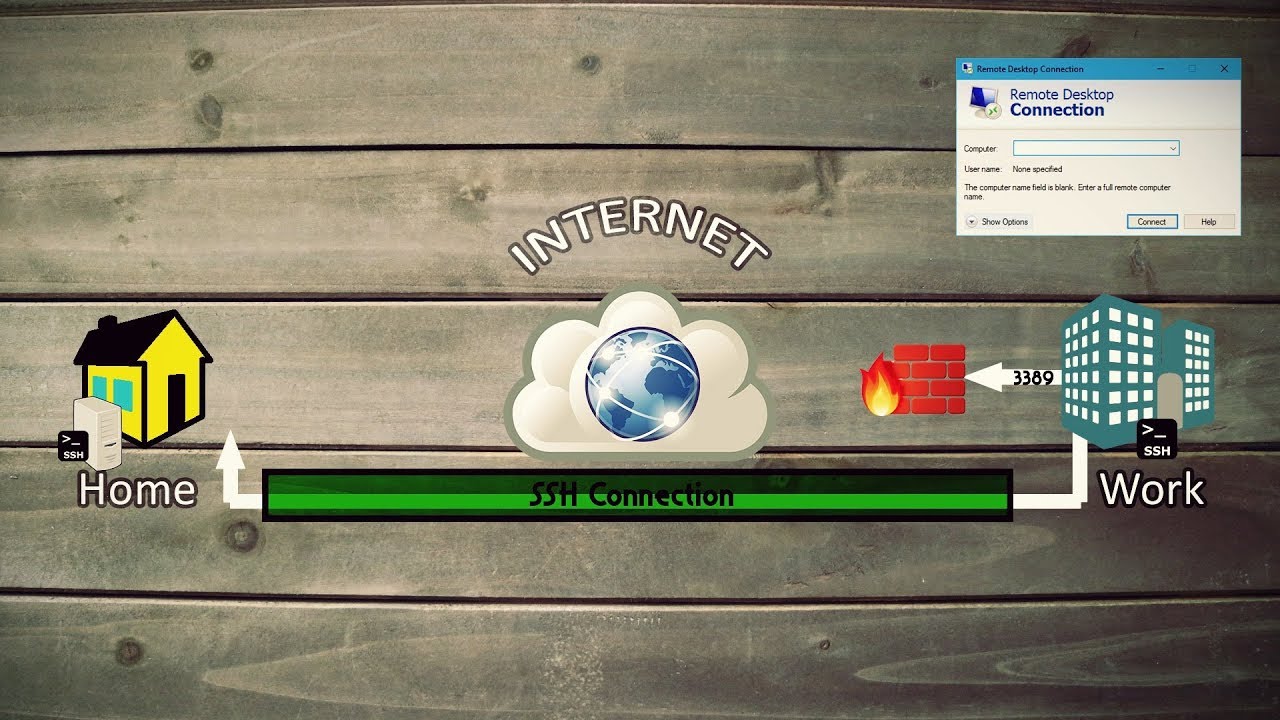
🎵Teach me how to tunnel, teach me, teach me how to tunnel🎵 Ever gotten frustrated because your school or your work blocks fun/entertaining sites that can help you unwind and relax therefore increasing your productivity? SSH Tunneling is a good secure way to bypass firewalls that block sites. But that's not all! Order now and we'll also toss in l...
better explnation
thick minnow
Not sure what Plex's connection profile looks like, if it's all client -> server on one port, or spread out over multiple ports
flint field
its only 1 port
flint field
hard arch
https://www.youtube.com/watch?v=AtuAdk4MwWw
really appreciate it
flint field
hard arch
https://www.youtube.com/watch?v=AtuAdk4MwWw
say, instead of renting this could i have a PI @ a friends house and do this?
hard arch
ye that would also work lol
flint field
cuz i have a very close friend that bought a house literally down the block, and has another ISP, 500/100, i could just leave the PI there
hard arch
idk how good a pi would be if theres a lot of clients tho but can do it
flint field
hmm, it has gigabit ethernet at least
but its only a 1gb pi4
i'll have to give it a go, i have a pi just sitting there with no use since i migrated everything to the home server
hard arch
have fun then lol
flint field
i hate my ISP so much :(
hard arch
idk anyone that likes there isp lol
flint field
i used to like mine, almost 13 years with them
hard arch
my old isp was crap
flint field
mine was amazing, we started with 5/5 in 2010, and upgraded to 200/200 in 2014
but 2 years ago they got bought out, and last 2 months hiked th price and well,GG
hard arch
internet would drop so mutch and lack of ethernet portrs on a router "worth over £300" its inablity to not crash when any ipv6 trafic is sent via it and no options for anything basic like opening any ports but whats spesified or any dns or modem mode options
flint field
that sounds horrible
flint field
lmfao, i had a client that had his ISP modem in a coffee table besides a window
from 4 pm to 7pm, the sun would hit the modem making it over 100c and throttling his connection so hard he had like 100kbps
took us a while to figure it out
hard arch
had it swaped with a d7000 for a week till they changed stuff and that d7000 never connected up to the isp agein
spoofing mac address did nothing
same login stuff
still same option 60/61 settings
but nothing would work
so just gave up
flint field
idk why ISPs are so stupid, like doing things correctly would yield more clients
hard arch
now why do something like that its too easy to do that now
pseudo blade
flint field
say, instead of renting this could i have a PI @ a friends house and do this?
One thing to note is that SSH tunneling is going to be quite slow compared to doing the tunneling over a VPN instead - I highly recommend you use Wireguard (A VPN) instead for speed, and run that on your Pi and connect to it.
flint field
i see
could i use wireguard to make my home server exit my home network instead of going the extra steps with the pi, or do i still need the pi
pseudo blade
Well you'd need some way to get server traffic in from the internet to somewhere.
Then that traffic has to make its way to you somehow if your ISP doesn't provide you with a public IP.
peak cloak
flint field
reading into those, that would be not a very good idea, i already have the physi...
Nothing gets migrated. The vps serves as just a proxy/router between internet and your server
pseudo blade
So you'd have to use something with access to a public IP, be it a Pi or something else.
Some routers just support it
flint field
i see, ill shoot for the pi, i still dont understand how to do it, will read more into it
peak cloak
You can use a DO, Linode, Oracle cloud vps
flint field
cuz im tired of the lil kids asking when is minecraft comming back up
peak cloak
flint field
i see, ill shoot for the pi, i still dont understand how to do it, will read mor...
It can't be on home network
flint field
ill do it on someone elses network or business
peak cloak
Oracle cloud has a free vps you can use
flint field
i like that Free part
peak cloak

GitHub
Wireguard setup to bypass CGNAT with a VPS. Contribute to mochman/Bypass_CGNAT development by creating an account on GitHub.
pseudo blade
As PresentMonkey is saying a cheap/free VPS could be used instead of a Pi at a friends place, and because it doesn't need much performance you don't need it to be very fast server
flint field
i see, i know very basic networking stuff from college, but this other stuff, have no idea
pseudo blade
The VPS won't run your stuff, just Wireguard
flint field
and, a lot of outdated useless stuff
pseudo blade
You'll have something locally that'd connect via wireguard to the VPS
peak cloak
I used to have like a $1 / month VPS on DO running Vyos to get a second IP
pseudo blade
Then you implement NAT(port forwarding) on the VPS
flint field
Before switching ISPs, I had a public IP that allowed me to use port forwarding on my router to pass traffic to services hosted on my internal network. My new ISP uses a CGNAT
my god
pseudo blade
Yeah it's a common thing
pseudo blade
I use my own variant of the above to reach my stuff behind 4G modems
flint field
like all my stuff is very private, (aswell as the torrent communites i've been part of for the past 20 years), so i mostly want to keep sharing with my family and friends
no hosting big things for strangers
pseudo blade
It's throughput more than users you'd be designing for
But Wireguard's pretty easy to run up to your listed speeds.
flint field
Yea, i recently upgraded to server to the 9900T, because i needed more cores
peak cloak
I personally use tailscale for accessing my internal services, but if I need to setup an external mc server then yeah I port forward
flint field
yea, i used to just portfoward and call it a day even before i was hosting stuff i used to do it for shit like Cs:Go and Halo CE so i could actually play,
peak cloak
I used to have a whole vlan setup that would forward traffic through my VPS, found some fun Minecraft bugs that prevented it from working well
hard arch
tryed to use tailscale before had a few issues with packet spamming so moved back to wireguard
peak cloak
tailscale uses wireguard behind the scenes
flint field
im reading the tutorial ill use oracle cloud free tier with wireguard
hard arch
ik
pseudo blade
Sure. Be careful to note where the free tier starts and ends
peak cloak
^
pseudo blade
It's otherwise very expensive.
peak cloak
there's only certain VPSes that are always free elgible
hard arch
i just use it to connect all my mc servers to one control server
and for smb shares
can have all the drives showing up then
 flint field
thanks a bunch guys, really saving me here
 pseudo blade
I knew what did that.
Are you trying to log into your DC after attempting to change the domain name after setup?
I only had to screw that up once to know why I won't be doing it again if given any other options
waxen scroll
@rocky badge dat lab update! sponsored by ubiquiti. Friendship ended with ruckus, ubiquiti is now my best friend
 main tartan
Does anyone know why I could have packet loss at exactly xx:49 every hour? It has been happening since I replaced my ISPs modem/router with my UniFi dream router.

(Ignore the big red bars at the start, I was still fiddling with some settings at that point)
But the network just loses connection for 5 seconds and then reconnects again.
peak cloak
How are you testing for packet loss
main tartan

I get disconnected while playing games on my pc, and I can see the outages in the unifi logs.
Oh found someone with the same issue: https://forum.kpn.com/modems-123/eigen-router-raakt-ieder-uur-1-minuut-het-internet-kwijt-577996

Ik heb een UniFi dream router op mijn nieuw opgeleverde KPN glasvezel gehangen. Maar iedere (+/-) uur raakt deze ongeveer 1 minuut het internet kwijt. het normale modem werkt prima dus het ligt niet aan de lijn. Ik wil graag mijn eigen router behouden dus heeft iemand een aanknooppunt waar ik zou mo...
These are the logs from when the temporary internet outage happens.
@peak cloak
https://community.ziggo.nl/t5/Internet/Internet-valt-elk-uur-10-seconde-weg/td-p/43404 this is from another ISP, but this could very well be the issue.

Goedemorgen, om maar met de deur in huis te vallen, ik heb een raar probleem. Elk uur (om precies te zijn, 60 minuten en 18 seconden!) valt mijn internet verbinding voor ongeveer 10 seconde weg. Mateloos irritant als je in een Zoom call zit, of een spel aan het spelen bent. Ik kan de klok er echt op...
I'll make sure to record the lights of the NT tomorrow between xx:48 and xx:50. So I can make sure it is not just the UniFi dream machine. Since it has been working fine for the last couple of months when used in bridge mode.
 last path
Hey, just s small question, as long as there are no open ports on my router, open ports on my computer are no problem, right?
peak cloak
main tartan
These are the logs from when the temporary internet outage happens.
Hmm not sure
main tartan
last path
Hey, just s small question, as long as there are no open ports on my router, ope...
As long as random people don't make use of your network.
peak cloak
last path
Hey, just s small question, as long as there are no open ports on my router, ope...
Yes, think of networks as layers.
last path
peak cloak
Yes, think of networks as layers.
Alright, thats how I understood it I just wanted to confirm
thanks guys
main tartan
peak cloak
Hmm not sure
yeah.. it's a strange issue.
ah found someone with exactly the same issue: https://forum.kpn.com/thuisnetwerk-72/xgspon-verliest-ieder-uur-verbinding-met-de-ubiquiti-dream-router-579318
Goedemiddag,Inmiddels ben ik sinds kort voorzien van een glasvezel verbinding.Gezien de beperkte mogelijkheid voor het instellen van de meegeleverde router en dus het netwerk heb ik besloten om de Experia v12 te vervangen door een Ubiquiti Dream Router (rest van netwerk is ook Ubiquiti dus eigenlijk...
rocky badge
waxen scroll
<@236237361703288842> dat lab update! sponsored by ubiquiti. Friendship ended wi...
the house update was cringe
Changing region settings to bypass region locking due to federal regulations LOL
putting a non outdoor AP outside LOL
pseudo blade
Yeah I don't think I'd personally want to go online and publish that I was deliberately circumventing restrictions implemented to comply with RF laws
 cedar cloak
rocky badge
Changing region settings to bypass region locking due to federal regulations LOL
cedar cloak
rocky badge
Changing region settings to bypass region locking due to federal regulations LOL
glad i'm not the only one that thought so
rocky badge
- In the Consultation, ISED proposed to allow the operation of the following three classes of RLANs:
standard-power RLANs (both indoor and outdoor) with automated frequency coordination (AFC) control
low-power indoor-only RLANs without AFC control
very low-power RLANs (both indoor and outdoor) without AFC control
The reason why its not enabled in Canada yet from Ubiquiti is due to power regulations
Yes Canada has WiFi 6E and allows 6GHz but UniFi APs may not comply with ALL regulations as of now
 craggy tapir
hi, so I recently moved into a rather large home and am looking for a wifi mesh solution to cover the whole place. the place h as some cat5e cables going from the basement to basically all the rooms. I'm wondering if the correct way to set this up is to have the router in the basement, have that hooked up into the switch with the cables going into all the rooms, and then getting some sort of wireless access points in each room hooked up to the wall to cover everything. one sort of annoying thing is I have a room where I keep all my gaming stuff and I want to run ethernet directly to my pcs in there as well as have wifi.
- would I be looking at getting something like the TP-Link Deco XE75 or is there some other recommended equipment?
- does wifi 6e matter much if the backbone of my internet connection isn't fiber, my router is like a TP link ax1800 thing, and the cables going into each room is cat5e?
thanks
peak cloak
craggy tapir
hi, so I recently moved into a rather large home and am looking for a wifi mesh ...
Personally for APs I would recommend something in the omada line as that works better although it is more business focused.
It's not that big of a difference if your end devices don't support it
 primal ice
craggy tapir
hi, so I recently moved into a rather large home and am looking for a wifi mesh ...
primal ice
craggy tapir
hi, so I recently moved into a rather large home and am looking for a wifi mesh ...
you would want a secondary switch in the room where all your gaming stuff is if you want wired there, but yes you have the correct concept going.
sage crow
Wifi 6e imo isn't all that unless wifi internet plan supports the speeds its capable, and you're in a small area
Cause a high frequency such as wifi 6e does not like walls at all lol
clear igloo
6e isn't too bad with walls depending on their make but drop off at distance is the big issue even without walls
obviously worse than 5GHz but nowhere near as horrible as 60GHz was
sage crow
Tbh 5Ghz technology has came alongggg way
opal pagoda
clear igloo
obviously worse than 5GHz but nowhere near as horrible as 60GHz was
60ghz wasnt really ment as wifi replacement rather as p2p
sage crow
And is capable of some pretty fast speeds even through a few walls
clear igloo
yah, it's good for that
sage crow
With the technology in todays routers unless you have the speeds to support it I wouldn't even get a wifi 6 or 6e router
cedar cloak
sage crow
Wifi 6e imo isn't all that unless wifi internet plan supports the speeds its cap...
as someone that lives in an apartment i disagree completely lol
drowsy fossil
we have some sites we service where the neighbors have completely filled the 2.4 and 5ghz spectrum, and all of our company devices have 6e with very few exceptions
there it helps a toon
sage crow
But for a residential home environment it's really not all it's cracked up to be unless you live in an apartment
opal pagoda
drowsy fossil
we have some sites we service where the neighbors have completely filled the 2.4...
me and 2 of my chunky 40mhz wide 2.4 ghz networks 
sage crow
or near loads of different routers
For personal home use tho the price point for most wifi 6e routers isn't really worth it imo
cedar cloak
sage crow
But for a residential home environment it's really not all it's cracked up to be...
6e in the apartment, and i still disagree. dfs hits

 opal pagoda
sage crow
For personal home use tho the price point for most wifi 6e routers isn't really ...
opal pagoda
sage crow
For personal home use tho the price point for most wifi 6e routers isn't really ...
especially for people with brick/concrete walls
sage crow
that is a really nice wifi 6e router
sage crow
cedar cloak
6e in the apartment, and i still disagree. *dfs hits*
I literally just said for residential homes it makes no sense
cedar cloak
read the second part 😛
sage crow
The guy who was asking about it said he had a rather large home. He won't be able to utilize wifi 6e as well as someone in a confined space such as an apartment
opal pagoda
sage crow
The guy who was asking about it said he had a rather large home. He won't be abl...
unless he pulls a linus and gets ap for 50% of the rooms
drowsy fossil
on the other hand too, ive never heard of a wifi 6e chipset that was substantially poorer on the 2.4g spectrum than its 6 or 5 predecessors
6e does (iirc) have a few features that were optional on wifi 5 and 6 that clients can take advantage of despite not being 6ghz capable
sage crow
opal pagoda
unless he pulls a linus and gets ap for 50% of the rooms
I think ima just get 1 gig internet and get a fatttt outdoor WAP so I can have a vpn anywhere I go on my property 😂
opal pagoda
sage crow
I think ima just get 1 gig internet and get a fatttt outdoor WAP so I can have a...
get wifi anywhere you go
i did basically the same thing
sage crow
TP-link makes some decent outdoor ones that are pretty cheap I’ve been looking into. Personally I’m a Netgear, linksys, and Cisco guy but tp-link prices are hard to beat and I have a switch from them that’s been going for years now so
opal pagoda
sage crow
TP-link makes some decent outdoor ones that are pretty cheap I’ve been looking i...
i scored ubiquiti rocket m2 new in store for 20$ and i use it as outdoor wap
sage crow
I was thinking of buying a actual outdoor rated one so it can take the rain and such it’ll be under a roof sweep but still in the weather
opal pagoda
sage crow
I was thinking of buying a actual outdoor rated one so it can take the rain and ...
isnt rocket m2 outdoor rated?
rough venture
Hey guys, I'm still trying to figure out my ethernet issues lol. I get 940 Mbps down and 41 Mbps up when I plug my ethernet cable into my laptop. When I plug the same cord into my desktop, I only get about 500 Mbps down and the same upload speed. Any ideas what would cause that?
opal pagoda
rough venture
Hey guys, I'm still trying to figure out my ethernet issues lol. I get 940 Mbps ...
check if something is using bandwidth (steam auto update, epic, etc)
sage crow
Not sure i was just going off the wording you had that maybe it wasn’t haha
sage crow
rough venture
Hey guys, I'm still trying to figure out my ethernet issues lol. I get 940 Mbps ...
Possibly your network card on your desktop
opal pagoda
sage crow
Not sure i was just going off the wording you had that maybe it wasn’t haha
its under the roof anyway
just has to withstand fog and subzero
rough venture
sage crow
Possibly your network card on your desktop
Defective or does a setting need changed?
sage crow
Yup
sage crow
rough venture
Defective or does a setting need changed?
Possibly defective tbh
opal pagoda
rough venture
Defective or does a setting need changed?
check task manager network usage
sage crow
Could look for driver updates for it @rough venture
If your on windows I think you can just type in driver settings in the quick search bar
rough venture
opal pagoda
check task manager network usage
Okay, I'll keep that in mind. Thanks
rough venture
sage crow
If your on windows I think you can just type in driver settings in the quick sea...
I've checked for drivers and stuff. It always says everything is up to date. It seems to keep it that way automatically.
Idk if it's possible that the wrong drivers were installed or something
sage crow
Nah shouldn’t have it would throw an error
rough venture
Makes sense
I can't test it right now because I just rma-ed my graphics card, and I have an F series cpu.
sage crow
Hmm could buy a cheap one off Amazon and try it out
rough venture
Hmm I never thought about buying a new network card.
sage crow
Most of the after market ones are pci e plug and play
You just install the new drivers
rough venture
I have a wifi card that I bought before I had access to ethernet.
sage crow
Could try uninstalling and reinstalling the drivers too
rough venture
I might've done that. I could try it again when my graphics card returns
What's weird is my motherboard supports up to 2.5 Gbps
sage crow
Yea I’d say it’s probably a defective integrated network card
rough venture
That's honestly infuriating if true lol. I've had to rma this motherboard twice already
I've had really bad luck with this pc
sage crow
Could just spring for a 10 gig network card if you have pci express 3 lanes available
rough venture
I have a few left, yeah. That would work
I just wish stuff would work as intended.
sage crow
Typically for a name brand network card tho a 1 gig is probably your best bet
rough venture
Yeah, I'll have to price them out
sage crow
Probably the cheapest anyway
What motherboard do you have
Lookup to see if the network card failing is a common issue on Google
rough venture
An Asus Prime Z690-A
opal pagoda
sage crow
Could just spring for a 10 gig network card if you have pci express 3 lanes avai...
nah 2.5g ones are good enough and cheap
sage crow
And if so if their is anything that can be done to fix it or if it’s a hardware issue
rough venture
Lol some of the guys in the build a pc channel told me I should contact a youtuber to fix my pc
sage crow
😂
rough venture
"Unluckiest First PC Build"
sage crow
Nahhhh forums are normally your best bet
A lot of random people that may have had your same issue and figured it out
rough venture
RMA Count:
Motherboard: 2
CPU: 1
RAM: 3
GPU: 1
Case: 1
sage crow
opal pagoda
nah 2.5g ones are good enough and cheap
Just future proofing
Hopefully one day everyone will have 10 gig wifi 🙂 that is if 1 gig will ever become available nation wide
rough venture
That would be interesting lol
opal pagoda
sage crow
Hopefully one day everyone will have 10 gig wifi 🙂 that is if 1 gig will ever b...
i cant even get 100mbps
10 gig is only in dreams and in my vps
rough venture
I think I have a 1.5 Gbps connection
sage crow
I live 10 miles away from any main highway and finally got 240 mbps down 150 up this year and I’m in love with it tbh
sage crow
rough venture
and I can get 940ish on my laptop as I said before
That’s because of your PCs traffic processing capabilities
If you fix your desktop and it’s pretty powerful you’ll probably get full speeds with a 2.5 g card
Yano like Cpu capability to process packets
rough venture
i5
opal pagoda
sage crow
I live 10 miles away from any main highway and finally got 240 mbps down 150 up ...
meanwhile me 16/1 vdsl2 1km away from the node
sage crow
Ahh yea should be capable I would say as long as the cpu isn’t being strained by other process on your pc
sage crow
Dam must be the beefiest one they make
rough venture
Yeah, for an i5, it's really nice.
sage crow
Meanwhile I have a i3 8145u 2 core 🫠 pc
opal pagoda
rough venture
Nah, it's got 14 cores. It's like a 12th gen i9
isnt it 16 (8p+8e)
rough venture
opal pagoda
isnt it 16 (8p+8e)
The i9? Yeah, I think so. The 13th gen i5 has pretty similar performance to the 12th gen i9 though. It's just slightly underneath it
opal pagoda
sage crow
And a Xeon e5 2667 16 core that ones noiceeee
i have dual e5 2690 in my collection
sage crow
Yea I’ve got a dual e5 2667 that I use for gaming
Thinking of upgrading to the 10 core 3.0 ghz Xeon can’t remember what it’s called
20 cores daily driving on Ubuntu phew the performance capabilities
opal pagoda
sage crow
Yea I’ve got a dual e5 2667 that I use for gaming
non v3/v4 one?
sage crow
V4 I think
opal pagoda
well its big diffrence of v1 and v4
sage crow
It support up to 2400 mhz ddr4 so yea I think so
opal pagoda
v1/2 is ddr3
sage crow
Yea the v4 was like $20 more then the v3 and had a bit faster ram capabilities so I got it
hard arch
would moca work over this type of coax

got this running all over house so if it will work may aswell use it
pseudo blade
Make sure you don't have a TV antenna attached or you'll blast interference everywhere
hard arch
dont use digital tv anymore anyway
just all hooked upto a booster in attic
pseudo blade
hard arch
dont use digital tv anymore anyway
just all hooked upto a booster in attic
My best proper answer is "I don't know what frequencies your coax is rated for and therefore performance is difficult to predict" - FTA digital TV is generally at a lower frequency than the band used for MoCA but if you ensure that antenna is removed... will likely work?
Googling suggests people have done it and had it work.
But yeah you will definitely upset people if that antenna's left plugged in.
 slow pivot
hard arch
would moca work over this type of coax
slow pivot
hard arch
would moca work over this type of coax
I don’t think that is coax; that is simply audio cable with rca connectors. Coax has a dialectic between the center conductor and outer ground (with a certain impedance, which is different depending on the cable and application)
slow pivot
Huh, learned something today :)
That supposedly is 75ohm so it should be good for moca
last path
hey, I am currently trying to set up a minecraft server, I tried making it public with localtunnel, but it just doesnt work. would using port forwarding for this mean a high security risk for my local network and the home server?
 long scarab
pseudo blade
Are you trying to log into your DC after attempting to change the domain name af...
long scarab
pseudo blade
Are you trying to log into your DC after attempting to change the domain name af...
I tried renaming the DC
pseudo blade
Yep that doesn't end well lol
It's possible but doing it the same way you do a rename of a normal computer leaves you with that
peak cloak
last path
hey, I am currently trying to set up a minecraft server, I tried making it publi...
it's no higher risk than exposing it via a tunnel service for the most part
but you'll be giving out your IP
 tidal frost
pseudo blade
Make sure you don't have a TV antenna attached or you'll blast interference ever...
tidal frost
pseudo blade
Make sure you don't have a TV antenna attached or you'll blast interference ever...
Ive got moca and a tuner on the same netork and it seems to work fine. The tuner itself is actually running over moca
pseudo blade
tidal frost
Ive got moca and a tuner on the same netork and it seems to work fine. The tuner...
For free-to-air I tend to assume it's not going to have a MoCA splitter and if they don't care for free-to-air anyways...
cedar cloak
3620000.0 dBmV power level 2 the moon
rocky badge
@clear igloo @hollow marlin do you guys know anything about extreme optics?
Are extreme switches picky about what optics they use
 heavy leaf
not entirely sure how, but a while ago I had changed the DNS servers on my home network and it seems that these settings were (partially) copied by the main router for my apartment building. For whatever reason, now DNS lookups have significant delay sometimes, occasionally failing altogether, if using the DNS servers that are automatically assigned through DHCP
any ideas?
(the DNS server that was copied to be the first choice by the building network is 1.1.1.1, from cloudflare - previously it was using a server that resided on the network)
hollow marlin
rocky badge
<@291198741862416384> <@462711605063450628> do you guys know anything about extr...
That might be a better question for @waxen scroll . I do not have any experience with Extreme.
rocky badge
ah okay
waxen scroll
last I recall they can use cisco optics fine but really you should have optics flashed for whatever platform you're using them on
clear igloo
rocky badge
<@291198741862416384> <@462711605063450628> do you guys know anything about extr...
They're EXTREME to the max?
But yah, first party or third party programmed for Extreme should do fine
rocky badge
waxen scroll
last I recall they can use cisco optics fine but really you should have optics f...
I have 2
 pure field
networking noob here, i've got ubuntu running on a proxmox container, but the problem keep finding when run a speedtest in the cli is that it is limited to 100mb
peak cloak
are you sure the proxmox host has > 100mbps connectivity
pure field
it does
 sharp sparrow
What speed test are you running?
pure field
realised what i did wrong, i had it assigned to the wrong vlan which was set to 100mbps
all fixed sorry to mess with you guys
sharp sparrow
That'd do it 🙂
sharp sparrow
It's exactly as safe as you trust CloudFlare.
drowsy fossil
I recommend setting a different dns provider for primary vs backup
personally use cloudflare and quad9 as backup
heavy leaf
well my most recent experience with them is that the DNS lookup can be a bit slow at times, but I'm not entirely sure if it's their fault or something with my ISP / building
it's certainly safer than your ISP having that data
they also offer DOH which would result in them not having it either
so if worried, configure DOH on whatever devices you have that support it
DNS over HTTPS (DoH) is a protocol for performing remote Domain Name System (DNS) resolution via the HTTPS protocol. A goal of the method is to increase user privacy and security by preventing eavesdropping and manipulation of DNS data by man-in-the-middle attacks by using the HTTPS protocol to encrypt the data between the DoH client and the DoH...
sharp sparrow
hardly
peak cloak
internet traffic yes
heavy leaf
again hardly, they're typically used as a protective service for smaller websites
anyways, as said, they offer DOH if you're worried about them collecting your DNS lookups - the only case where this is broken is if they are both the proxy and the resolver
peak cloak
heavy leaf
again hardly, they're typically used as a protective service for smaller website...
Small? Discord uses it
A lot of companies do
heavy leaf
depending on your definition of small lmao
that's specifically for their voice servers, which are not hosted with a single cloud provider, thus a third party solution for DDOS protection makes sense
pseudo blade
CloudFlare's used by all sorts of massive companies, no idea what you're on about
heavy leaf
in terms of "internet data collection", not only do they not have a monopoly, they aren't even a significant player. the main services they provide would grant them information connecting IP addresses to endpoints, which is minimally valuable
you and I may have a different definition of "massive"
pseudo blade
CloudFlare did a billion in revenue last year, they're not exactly insignificant
Considering the scope of their services they compare very favourably to the big clouds for their services in scale.
heavy leaf
sure thing, that's why they make up a significant portion of my portfolio. that being said, they aren't a major player in internet data collection, which is the topic at hand
pseudo blade
heavy leaf
again hardly, they're typically used as a protective service for smaller website...
I replied to this, which is misleading.
heavy leaf
how precisely is that misleading? did i use the word "only"?
that's literally how they got to where they are today
pseudo blade
You stated that CloudFlare is a service typically used for smaller websites. In practice, CloudFlare is used by websites of all scales including large enterprise.
heavy leaf
which part of the first sentence denies the second
hollow marlin
I wouldn't say CF is the dominant player but it's a significant portion. Just look at the scope of what's affected when they do have an impact. But regarding the original point, the major players in "internet data collection" is really dependent on the definition of "internet data collection"
heavy leaf
my definition would be "useful enough to be sought after by third parties"
their protection services do protect a large amount of websites, yes, but if an interested party needs the information which this can provide (which is almost certainly delete by cloudflare after a period of time as it's almost entirely useless...) then there is a number of ways they can obtain it, not just through cloudflare
you could obtain the same data, in a much more useful manner, from ISPs
or, if for whatever reason you really want a global view of internet traffic without specific information on who owns what, you can obtain that from internet exchange points, which would provide a significantly larger portion of internet traffic than what you could obtain from cloudflare or any one cloud provider
and then for data that is actually useful and sought after, if they operate anything like where I work then they almost certainly delete personally identifying information after some period of time, and only perform analysis on anonymized data
this is done because either companies (or governments) using your services would really rather you not store and access sensitive data, or the need to operate in jurisdictions such as the EU presents a financial and legal impetus for doing so
opal pagoda
pseudo blade
You stated that CloudFlare is a service typically used for smaller websites. In ...
remember when CF was down and 70% of internet was down
yea
heavy leaf
heavy leaf
and then for data that is actually useful and sought after, if they operate anyt...
to drive home this point, their DNS service is one of the few places where they do actually have full rights over the data that end users provide them. Cloudflare, not wanting anything to do with the implications of this, is one of the few companies pushing for changes to DNS such that it leaks considerably less data
hollow marlin
heavy leaf
my definition would be "useful enough to be sought after by third parties"
their...
ISPs or IXes provide very little in terms of useful or sought after data. Sure you may be able to get a customer IP mapping and some traffic patterns but it's generally meaningless in the scope of things. In regards to DNS, it's generally overblown as a majority of ISPs are not logging for the sake of reselling to third parties and at most logging short time periods for tshooting/investigation. Essentially IPs/DNS provide little useful info. I would say CF falls within the same realm.
What is sought after is primarily application meta data (Facebook, Google, etc).
In either case though, "useful data" is typically aggregated from multiple sources in hopes to make it useful with the exception of the true monopolies like FB or Google that have the ability to collect it themselves for their own gain
heavy leaf
hollow marlin
ISPs or IXes provide very little in terms of useful or sought after data. Sure y...
yeah, that was exactly my point - it's not useful data, and it's not owned by them anyways
(the DNS related data is, to reiterate)
opal pagoda
CF's main business isnt dns anyway
its cdn and ddos protection
heavy leaf
indeed... and in both of those areas, they don't own the data that is processed by them
opal pagoda
yep
 willow glen
Hello, i have a laptop connected via ethernet to my router, we have a 1gbps connection hwoever due to my shitty ISP router on the wireless even 5ghz it cant support those speeds. On my laptop however i do get 1gbps through the ethernet. Is there a way i can kind of set up like a vpn or proxy to my laptop on the network and funnel all my downloads through there as it has a 1gbps connection. Say im downoading a game or something on my PC which uses wifi could i funnel it through the laptop or would this not be possible?
pseudo blade
willow glen
Hello, i have a laptop connected via ethernet to my router, we have a 1gbps conn...
What do you mean by "funnel" in this context?
You can download stuff on your laptop, yes.
You can copy stuff from your laptop to another device if that's desired.
opal pagoda
willow glen
Hello, i have a laptop connected via ethernet to my router, we have a 1gbps conn...
do you have coax in your walls?
 ivory egret
Does anyone know of a Windows app that can analyse WiFi 6?
 waxen saddle
willow glen
Hello, i have a laptop connected via ethernet to my router, we have a 1gbps conn...
waxen saddle
willow glen
Hello, i have a laptop connected via ethernet to my router, we have a 1gbps conn...
What speeds are you getting on wifi? Wifi is going to be challenging to reach wired speeds- it’s the nature of the technology.
 sudden kayak
willow glen
Hello, i have a laptop connected via ethernet to my router, we have a 1gbps conn...
sudden kayak
willow glen
Hello, i have a laptop connected via ethernet to my router, we have a 1gbps conn...
think about what you're proposing. your laptop is able to reach 1Gbps download speed because it's connected via ethernet. the wifi is somewhat slower because that's how wifi works. you're asking if going from the router, to your laptop, then over wifi to another device in the house would somehow make it faster than just going over wifi directly to the device
the answer is no if you stop to think about it for ~5s, because the wifi is still what is limiting your speeds
also, way more important than 5 or 2.4 ghz is what version of wifi it is
sage crow
Sounds like you need to buy a decent wifi access point
And just turn off wifi in the router settings. Or buy a new router
pseudo blade
Or look into what you have further. There's no WiFi access point on earth that will make a 2x2@80mhz AC client do gigabit
sage crow
ie a new router
distant wedge
I just put my UI AP into TFTP mode by accident, do I just unplug it and plug it back in to restart it
 velvet valve
willow glen
Hello, i have a laptop connected via ethernet to my router, we have a 1gbps conn...
velvet valve
willow glen
Hello, i have a laptop connected via ethernet to my router, we have a 1gbps conn...
You can connect to the WiFi on the laptop, turn on its mobile hotspot and use it as a WiFi access point. I could see it being faster as the laptop is being used as the access point and it’s wired. However, I don’t think this is very practical, and it would I really simply be better to get a better modem and router. Also wifi is simply slower than Ethernet naturally, so if you’re complaining about like 700mbps over WiFi then there’s no issue and changing the access point will not do much.
thick minnow
I have a fun question, so I have a unifi usw24poe. From my cable modem i get 1g/1g, from the switch i get 250/8.
all the features such as flow control and such are turned off...Is the switch just borked?
peak cloak
What about router
sharp sparrow
yeah, but for the total cost of one of these you can get a routerboard RB5009UG+S+ with significantly more routing performance
drowsy fossil
By their own speclist it's only capable of routing 400mbit if you have just 25 ip rules
The i5 in that Lenovo is probably capable of keeping up with gigabit with just 25 rules...
sharp sparrow
drowsy fossil
By their own speclist it's only capable of routing 400mbit if you have just 25 i...
You are being more than a bit disingenuous there mate, that 414Mbps figure is with 64 byte packets. With 1518 byte packets the number is 9.36Gbps.
I literally replaced an opnsense machine with one less than a week ago. My use-case is multi-WAN failover on gigabit+ links.
drowsy fossil
Oh and that's without traffic shaping
Last I checked mikrotik doesn't support fq-codel...
thick minnow
I have a firewall with quad gig ports, a celeron cpu, 8GB RAM, and it handles gig internet without sweating
sharp sparrow
thick minnow
I have a firewall with quad gig ports, a celeron cpu, 8GB RAM, and it handles gi...
indeed!
drowsy fossil
Yes and that's not a fixed function arm chip...
thick minnow
nope. ARM is even faster. I prefer good arm chips, they don't run so hot
drowsy fossil
That's not the arm part
That's the ffus of the chip handling things
As soon as you max out the capabilities of the onboard accelerators, the performance falls off a cliff
 tropic mauve
What would be the fastest way to send a web request from any type of script in Windows? Node and PowerShell (Invoke-WebRequest) both take a second to start, and curl lags a few seconds every few requests for some reason
Idk if this is the right place to ask btw, correct me if it's not
sharp sparrow
It can do a large chunk of what you can with opnsense, as far as routing, firewalling, nat, packet mangling, are concerned. You start to dive a bit deeper and it can start to kick you in the ass though.
drowsy fossil
sharp sparrow
It can do a large chunk of what you can with opnsense, as far as routing, firewa...
And it's a lot faster for the simpler stuff at the same price
sharp sparrow
To be crystal clear, not that long ago I wouldn't have touched mikrotik with a 30ft pole for gigabit nat, as my experiences with the older models were subpar at best. This particular model is cheap and cheerful, with an sfp+ port as well as a 2.5G port (plus the other 1g ports), and does multi-gig just fine however. I was literally looking at the m720q style setup to replace my monolithic opnsense configuration, but it would have ultimately cost me about 3x what that model mikrotik did in the end.
I have been using exclusively opnsense for...5? years, give or take
drowsy fossil
Yeah and especially if you are not using it as a firewall and have a fast enough pipe to not need flow control they are great
But both of those are quite nice to have for home use...
sharp sparrow
I am absolutely using it as a firewall.
drowsy fossil
Also it seems mikrotik has fq-codel as a beta feature?
So they are working on it
thick minnow
I want a low power cpu with two to four 5 gig ethernet ports. Is that too much to ask? My isp offers 2.5 and 5G internet. All I can find are usb3.1 5G ethernet adapters.
drowsy fossil
Literally this box we are talking about here
drowsy fossil
sharp sparrow
yeah, but for the total cost of one of these you can get a routerboard RB5009UG+...
This
sharp sparrow
It only has a single SFP+ and a single 2.5G port, the rest are 1G
@drowsy fossil happy to check for any feature or do profiling on my routerboard, if you would like.
drowsy fossil
sharp sparrow
<@126850798666645504> happy to check for any feature or do profiling on my route...
You got cable or fiber?
sharp sparrow
drowsy fossil
You got cable or fiber?
both 🙂
1G/1G fiber, 600M/50M cable, is the current service configuration
drowsy fossil
Ah
Can you run speedtests that do upload and download active latency on each with and without fq-codel enabled?
Should be 4 tests
sharp sparrow
Give me a minute, monitor wants me to do pixel refresh lol
thick minnow
sharp sparrow
1G/1G fiber, 600M/50M cable, is the current service configuration
you have 2 ISPs?
drowsy fossil
Be kinda pointless to get two different connections from the same ISP...
sharp sparrow
thick minnow
you have 2 ISPs?
Yes. Technically 4, I just don’t have the lte connections set up at the moment
thick minnow
wow. nice you can afford all that
sharp sparrow
My fiber is 10 bucks
thick minnow
I pay $70/mo for 1g/1g fiber from AT&T.
drowsy fossil
Outside of the us, internet is affordable
thick minnow
eff me. gig cable here is like $150-180 us bucks a month
sharp sparrow
Sweden 😀
drowsy fossil
I can get 5 gig for "only" $180/mo
Complete travesty
sharp sparrow
If I wanted to live in a major city I could get 10g for 50
thick minnow
I've been considering upgrading to 2.5G internet for $125/mo (55 more). I didn't get a quote for 5G
thick minnow
sharp sparrow
If I wanted to live in a major city I could get 10g for 50
but then we're back to the question. What firewall has 2 10g ports and isn't $2000
drowsy fossil
sharp sparrow
If I wanted to live in a major city I could get 10g for 50
That's what civilized countries look like...
sharp sparrow
@drowsy fossil I don’t have any queues configured at all btw
sharp sparrow
thick minnow
but then we're back to the question. What firewall has 2 10g ports and isn't $20...
Other mikrotik models. Around $500 If I recall
drowsy fossil
thick minnow
but then we're back to the question. What firewall has 2 10g ports and isn't $20...
I think the unifi usg has dual 10g?
And you can always build your own
I built a router that is completely incapable of maxing out it's 2 100g interfaces
sharp sparrow
I’m on my phone while monitor does pixel refresh
thick minnow
I do run my own right now, a mini-pc with 1.8GHz celeron and quad gig ports. Nobody makes a mini-pc with 10g ports or enough or the right pci slots to add a dual port adapter
drowsy fossil
drowsy fossil
I think the unifi usg has dual 10g?
And you can always build your own
I built a ...
Dream machine pro not usg
sharp sparrow
thick minnow
I do run my own right now, a mini-pc with 1.8GHz celeron and quad gig ports. Nob...
yeah they do. chinabox for around 400 bucks
drowsy fossil
thick minnow
I do run my own right now, a mini-pc with 1.8GHz celeron and quad gig ports. Nob...
What's wrong with a slightly larger PC?
sharp sparrow
I can dig up the aliexpress link for you if you want
thick minnow
I've never bought anything off aliexpress worth it's cost
sharp sparrow
these are rock solid
drowsy fossil
They exist on Amazon too for just more money
sharp sparrow
yup
drowsy fossil
Confirmed dream machine pro is dual SFP+ and it's under 400 when it's available