#networking
1 messages · Page 24 of 1
 astral monolith
 cold forge
Ah. UTN, from https://www.seh-technology.com/us/
cold forge
what i was have something like this, which looks like it may be discontinued:
https://www.cdw.com/product/seh-myutn-2500-device-server/5185727
Ooof, you can find some on ebay, but they are a few hundred... might not be a feasible solution
astral monolith
ah gotcha
i might have to use a cable extender, the problem being my interface might have to be powered from a different source than my system
🤮
 candid glacier
Make an entire web interface, that's what I did
 rocky badge
@peak cloak I need to setup my ER-X as a router/IPSec S2S back home
at the most just to circumvent 10 device max from resnet

 peak cloak
rocky badge
at the most just to circumvent 10 device max from resnet
peak cloak
rocky badge
at the most just to circumvent 10 device max from resnet
that's stupid
I mean I only have 3 devices but still
resnet wifi is the same as the rest of campus
rocky badge
If I create a SSID here named like DIRECT-24-HP OfficeJet 8025 and changed the MAC do you think they'd know 
They have a no AP/router rule
but

Rokus are using 2.4Ghz/5Ghz anyways
 waxen saddle
Many networks have detection methods for rogue AP’s.
waxen saddle
rocky badge
but
These appear to be MFP’s/printers and even if you join the wifi network, it won’t let you connect to the LAN.
rocky badge
I know
Disguise an AP as one so I can have my devices behind a NAT so that way I can have more than 10 connected devices lol
waxen saddle
I thought they could still read the MAC addresses in the packet and still enforce the limit.
rocky badge
not if its all from the same src MAC
 thick minnow
can someone with experience in wifi/ portforwarding/ server use help me in dms
or just knows how to enable portforwarding
 fiery roost
i don't have enough money to buy it
 heavy leaf
rocky badge
If I create a SSID here named like `DIRECT-24-HP OfficeJet 8025` and changed the...
heavy leaf
rocky badge
If I create a SSID here named like `DIRECT-24-HP OfficeJet 8025` and changed the...
why not just hide the SSID
put the router in bridge mode
let dhcp do it's thing
heavy leaf
rocky badge
Disguise an AP as one so I can have my devices behind a NAT so that way I can ha...
oh, 10 devices max lol
 shut parrot
my wifi struggles to get over 200mbps when i have a 550 mbps plan and used to get 550mbps consistently on wifi
and when i plug an ethernet cable into it i still get most of that 550mbps.
it just seems to be the wifi thats the problem
do y'all know how i could fix it?
 drowsy fossil
what model of device is providing the wifi
candid glacier
shut parrot
my wifi struggles to get over 200mbps when i have a 550 mbps plan and used to ge...
Try restarting the router
 waxen scroll
@rocky badge I just installed a FEX with "PAYD" in the serial number
@clear igloo theres your bonus
 clear igloo
lol
cold forge
drowsy fossil
what model of device is providing the wifi
Yeah, this is the real question. 500Mb/s is hard for a lot of wifi to reach. Wifi is complicated and your session is limited to the weakest link in the chain
 pseudo blade
It could be environmental factors, like more usage of the WiFi frequencies you're using nearby.
cold forge
That too
shut parrot
candid glacier
Try restarting the router
i did and it didnt do anything
shut parrot
drowsy fossil
what model of device is providing the wifi
Uh, ive forgotten the name, its the router that came with virgin's v6 box
oh yeah
and it goes back to normal when theres a powercut in the area and everything flickers for a second
for a bit
but then it slowly gets slower and slower over the period of a month or so
to the point it is now
pseudo blade
Could be the router then (or perhaps the powercut also happens to affect what's causing the interference)
Troubleshooting shared frequency is "fun"
shut parrot
lmao
i know lol
been dealing with this for months now
just cant seem to figure out whats causing the drop
clear igloo
Have you moved the computer closer for a brief period to run a cable? If so does the same issue present itself there?
waxen scroll
clear igloo
Have you moved the computer closer for a brief period to run a cable? If so does...
make sure there's an adult in the room you two
shut parrot
clear igloo
Have you moved the computer closer for a brief period to run a cable? If so does...
Yes
and no the issue doesnt present itself over cable
 zinc bear
Can anyone please help me with this freezing issue. Its been going on for 2 weeks now and i have tried everything and i cant fix it. I put a clip in here so i can show you what's happening skip to 0:24 to see the freeze happened and its not just on games its everything. https://streamable.com/kpstlw
 pseudo blade
zinc bear
Can anyone please help me with this freezing issue. Its been going on for 2 week...
pseudo blade
zinc bear
Can anyone please help me with this freezing issue. Its been going on for 2 week...
That tiny little hitch? You're looking for #1027757333117415424
Because it has nothing to do with networking if it happens everywhere
zinc bear
pseudo blade
Because it has nothing to do with networking if it happens everywhere
how do i contact tech support
pseudo blade
You create a thread where I linked you?
 orchid shell
is it normal that my internet is horrible just right after a big snowfall
or is my pc and phone just being a fuckhead
because everyone else still has perfectly fine internet but me
and on a speedtest, (cloudflare) download is total shit while upload is as it usually is
pseudo blade
orchid shell
is it normal that my internet is horrible just right after a big snowfall
How does your internet come into your house? DSL? Cable? Fiber? Wireless?
 plucky crescent
Hey, am I understanding this correctly, does this: https://mikrotik.com/product/RB750Gr3#fndtn-testresults not actually allow for gigabit speed transfers?

MikroTik makes networking hardware and software, which is used in nearly all countries of the world. Our mission is to make existing Internet technologies faster, more powerful and affordable to wider range of users.
I upped my internet speed to 1200mbps, but I seem to be capped at 500mbps when using this router, and I don't have any weird management turned on as far as I can tell.
cold forge
plucky crescent
I upped my internet speed to 1200mbps, but I seem to be capped at 500mbps when u...
MikroTik is complicated. The very first thing I’d check is your bridges page in winbox and verify that Hardware Offloading is enabled
Generally speaking, MikroTiks perform well if you are using the hardware, and they choke if they have to do much network processing in software. I just encountered that with a network switch today
plucky crescent
I only see one thing in "bridge" and it's defconf
cold forge
Hmmm… are you running SwitchOS or RouterOS?
plucky crescent
routeros
cold forge
Hmmm… can you screenshot?
You can post a config, but I’m fairly new to MikroTik and not a expert in reading the configs yet
plucky crescent
 cold forge
Ah! Look at the ports tab
You should see an “H” in the far left column if Hardware Offloading is enabled
cold forge
That’s good, but doesn’t explain your issue
cold forge
plucky crescent
only 4 interfaces there though, why not 5?
Is this your internet router? It might keep your WAN link off the LAN bridge
I use OpnSense for my router and mikrotik for internal switches
plucky crescent
yes it is my router/switch. I have 1 wireless AP in one port, 2 pcs on the other ports, and a GB switch in the last.
would any of these be raining on my parade?

fq_codel currently disabled
cold forge
Oh man, idk. Using RouterOS as an edge device is a little beyond my experience I’m afraid
plucky crescent
ah well, thanks for your help anyway
cold forge
np
I’d recommend a look at OpnSense btw
I’m routing 2Gb/s to the internet with no issues
cold forge
Probably not for that hardware. It’s a BSD based firewall. I have mine between the Internet and the rest of my network with a single port between it and a mikrotik switch
pseudo blade
plucky crescent
Hey, am I understanding this correctly, does this: https://mikrotik.com/product/...
You need to enable fastttrack
plucky crescent
that sounds familiar
pseudo blade
Slow Path routing (default) can't hit gigabit
I have a hex, 2 minutes and I'll show you the config options
plucky crescent
does that circumvent things like fq_codel?
plucky crescent
ah ok
cold forge
@pseudo blade glad someone here knew more than me :)
pseudo blade
First, ensure Fast Path and Route cache are enabled in IP/Settings
 plucky crescent
ah that's got it. Just checked that and found the firewall filter rule for fasttrack, which was turned off!
pseudo blade
Then, add a firewall forward rule with the action "fasttrack connection" at the bottom of your rule list.
plucky crescent
ran another quick speed test, and getting the same speed as when I bypassed the router entirely.
pseudo blade
Yep, there you go
plucky crescent
great help, thanks y'alls
pseudo blade
Do make sure there is an accept rule after the fasttrack rule for packets that can't be fasttracked
 pseudo blade
That'll do it, assuming those rules are untouched defaults I think they were pretty sane
plucky crescent
So if I want to have an edge router that's capable of queueing actual >GB speeds, is that dumb expensive?
pseudo blade
You can use switch shaping to get some of the effects and that has no CPU burden
cold forge
plucky crescent
So if I want to have an edge router that's capable of queueing actual >GB speeds...
I have a 10Gb/s router. Expensive? Yes. Dumb expensive? No 😛
cold forge
Nah. Queues? And my ISP uplink atm is only 2Gb/s
pseudo blade
plucky crescent
So if I want to have an edge router that's capable of queueing actual >GB speeds...
If you're OK with RouterOS perhaps the RB5009 would suit your needs? It's about 8 times more powerful, though if you want over 2.5gbps you'll be using it on a stick.
Based on the seemingly uncomplicated firewall rules you could probably get away with switch ASIC routing (CRS series switches) but not the queueing, just the speed.
plucky crescent
a lot of that sounds way over my head
pseudo blade
On a stick = The RB5009 only has one 10 gigabit port, so you'd have to run that to a switch and use it with VLANs for both LAN and WAN.
plucky crescent
ahh ok I get that
pseudo blade
It has a 2.5gbps port so you don't have to do that if 2.5gbps is fine
They do have plain routers with two 10 gig ports but they cost twice as much again
plucky crescent
TBH I should probably get something simpler, I dunno if I am up to the task of learning the mikrotik system
pseudo blade
The switch ASIC stuff isn't that hard to do but if you get it wrong and ask too much your speed drops to basically nothing on a CRS because they have CPUs even slower than a hEX (most half the performance or less) tied to a big, powerful switch
plucky crescent
I can see it's immensely powerful and granular, but I think that exceeds my networking knowledge
pseudo blade
Just because you can do a ton of stuff doesn't mean you have to :)
cold forge
Yup. I was having issues because I had a CRS1xx configured wrong. The CRS3xx will do hardware offloading with bridge-configured vlans - the CRS1xx won't, so it was having all kinds of issues
pseudo blade
I will say that switch ASIC routing is great and easy to do simply but due to the invisible pitfalls probably not for novices
cold forge
took about an hour to figure out how to configure it's switch for vlans and then it was as fast as I wanted a 1Gb switch to be
pseudo blade
I only deal with CRS3xx stuff because the 1xx stuff has other annoying caveats and is no longer compelling due to them
Though a switch with routing and WiFi would be compelling if the execution wasn't horrible
cold forge
Yeah, my primary switches are CRS3xx - but the CRS112-8p was like, the only cheap switch with PoE out and also running RouterOS. I guess I could go learn SwitchOS, but it's nice having them all run the same operating system
pseudo blade
I'm not a fan of SwitchOS
cold forge
I've heard that most people prefer RouterOS
pseudo blade
hEX PoE isn't too bad on price if 4 PoE ports is enough and you don't mind it being a routerboard
You even get enough CPU to actually do L3 with fasttrack, though not sure if I'd suggest that for anything needing a ton of bandwidth
cold forge
what is "fasttrack"?
pseudo blade
Basically it's fast path routing combined with just copying the results of NAT from your first packet to every successive packet in a connection
cold forge
I don't know what "fast path routing" is 
cold forge
so right now, I have vlans on everything, with intervlan routing on my OpnSense box - how does layer 3 routing fit into that picture, and what good would it do? I seems that I'd need to assign additional IPs on each vlan for each device, and then they'd route layer 3, IPs etc. directly on the device and not go the the firewall at all, right? Meaning, if i wanted to have security rules between vlans, I'd need to either not route those on other devices, or each device would need the same rules, right?
pseudo blade
Basically all tricks to get more routing and NAT performance out of low spec CPUs
cold forge
sorry, I'm basically as sysadmin at my day job, I do no networking professionally beyond what what's required for maintaining server infrastructure
which is why i have such a complicated network at home, only way I get to learn 😛
pseudo blade
I'm weird and have a background in making Mikrotik hardware do a lot of very strange things
cold forge
I'm really liking MikroTik so far - working great for the price
just takes a bit to learn
pseudo blade
I've designed (and had to put up with problems in the designs of) lots of Mikrotik hardware up poles and on vehicles over a thousand kilometers away from me up a pole in the Australian outback
cold forge
that's really neat!
pseudo blade
I designed and packaged a 3 hop wireless point to point network and the contractors ignored my labels and put all of the bridges up randomly
cold forge
smh
pseudo blade
I had to detect what was on the other side of me on each hop and reconfigure the end I had to talk to it
Don't call me when setting stuff up or whatever, just eyeball it so we can't actually check if your aim was any good
Or you're sticking the right router up the right pole
cold forge
sounds like a pain
pseudo blade
I had all the configs in front of me and there was only so many ways they could screw it up so it actually only took about half an hour to fix
But it was annoying
For each pair on a pole I could run L2 discovery and you knew what the other device on the pole was within a few seconds
I also set each device up to try to use DHCP on the bridged connections and try to VPN back to a server I had before I shipped them so I could connect to them directly
Mikrotik's l2 proxying wasn't very good at the time and turns out it'd hang after a few pages of console
It's still an issue if you use Dude's terminal feature
cold forge
oof
pseudo blade
My favourite incident was when my boss overrode my protests and drop shipped a new type of switch to customers that had solar regulation and PoE built in
Every single one we bought from that vendor was defective in a different way.
Even the one I got delivered to me was defective, PoE didn't work
A key customer got one with working PoE but a dead switch chip
I spent a few hours on the phone with an electrician in gradually worsening daylight trying to figure out some combination of shit he had from another job in his car would bring that network online and the end result was we couldn't do it properly but could get a few critical parts to work
There was no further dropshipping.
pseudo blade
I'd probably dropship a Cisco but not hardware from a random Chinese vendor we've never heard of nor tested promising us the world in a box
Actually if you're paying Cisco prices you can pay to ship it twice. Or just have me be there.
We had an electrician terminate an ethernet cable wrong about three times and I ended up using this to tell him which pairs he terminated wrong
I had a router nearby that supported it and told him to plug his cable into it because he didn't have a tester for some reason
cold forge
that's awesome!
 shy spade
pseudo blade
We had an electrician terminate an ethernet cable wrong about three times and I ...
shy spade
pseudo blade
We had an electrician terminate an ethernet cable wrong about three times and I ...
Don’t ever hire that guy again
thick minnow
wait wait electricians do networking stuff i thought that wasn’t their job
thick minnow
pseudo blade
Actually if you're paying Cisco prices you can pay to ship it twice. Or just hav...
yeah and a person to handle the licensing
 opal pagoda
 slow tulip
is 41 devices on one network too many?
slow tulip
is 41 devices on one network too many?
wired or wifi
opal pagoda
slow tulip
6-7 Wired, the rest are wifi
if all of them were wired it would be compleatly fine but that many on single access point will have significant impact on latancy and speeds
are they smart home devices?
orchid shell
pseudo blade
How does your internet come into your house? DSL? Cable? Fiber? Wireless?
#1068014186052980766 it's rogers cable
slow tulip
opal pagoda
if all of them were wired it would be compleatly fine but that many on single ac...
most of the wifi stuff is smart home devices yeah
thick minnow
depends what ap u are using
there are definitely aps that can handle it but not all
yeah i think unify pro aps and prob like every enterprise ap will be fine
imo iot devices that don’t use home assistant only if you want to and some sort of non wifi con are kinda annoying
slow tulip
thick minnow
there are definitely aps that can handle it but not all
It is one access point but there are 3 bands
2.4 GHz, and 5 GHz Bands
opal pagoda
slow tulip
most of the wifi stuff is smart home devices yeah
If you are having problems with latency and speed on wifi devices you could fix that by buying a 2.4ghz access point just for iot devices
 rain patrol
Is there a speed difference in samba / nfs / http for file downloads locally over lan?
slow tulip
opal pagoda
If you are having problems with latency and speed on wifi devices you could fix ...
alright, where can I get one and how much?
thick minnow
@slow tulip do you run something like pfsense or just your router?
slow tulip
thick minnow
<@797676435497943061> do you run something like pfsense or just your router?
Just the router
Router, and a switch for the wired stuff
zinc bear
i have a 300 download speed and when i tried to install a game on my pc with or without ethernet its still only gets max 30MB/s and i thought it was my pc but i have tried another pc in my house and the download speed is the same 30MB/S does anyone know how to fix this please?
slow tulip
That sounds normal
I have gigabit download speed
But it’s more like 110 megabytes/sec when downloading games
Also to clear it up your advertised internet speed is in bits
The actual speed when you download stuff is in bytes
shut parrot
zinc bear
i have a 300 download speed and when i tried to install a game on my pc with or ...
300 mbps/8 = about 35 megabytes so that sounds about right
peak cloak
zinc bear
i have a 300 download speed and when i tried to install a game on my pc with or ...
Yeah megabits != megabytes
Network speed is in bits
Game downloads in bytes
shut parrot
and one byte is 8 bits
cold forge
ooo, don't mention such things
I just got my Unifi AP6 Pro yesterday - I'm getting almost 500Mb/s on my WiFi now
I've been really happy with Unifi stuff - band steering, vlan support, etc. With a single AP, I can have
- Home 2.4 Ghz
- Home 5 Ghz
- Guest 2.4Ghz
- Guest 5Ghz
- IOT 2.4Ghz
- IOT 5Ghz
and none of those crappy multiple SSID stuff you had to do with shitty APS "Home_2.4", "Home_5" etc. to separate them all. You just have a nice "Home" and let band steering throw you on 5Ghz if your device supports it and is close enough
shut parrot
cold forge
don't forget about nibbles! 😋
mhm
shut parrot
shut parrot
and no the issue doesnt present itself over cable
do y'all have any idea then or is it just the wifi being silly
 rocky tendon
how do i make sure my internet is on the wifi extender and not the main router
peak cloak
Different ssid
Keep in mind an extender at the location of an already weak signal is useless
rocky tendon
oh
cold forge
if possible, avoid extenders
waxen scroll
Avoid extreme too
clear igloo
waxen scroll
Avoid extreme too
extreme extenders!!!
 lone sun
What is wdiwifi.sys? I'm assuming this is a driver related to the wifi adapter right?
cold forge
waxen scroll
Avoid extreme too
why's that?
 honest hawk
Hi everyone, i have an issue related to networking in my house and i was wondering if someone can help
i have a modem from my isp which i want to connect to a router to make the wifi signal reach a place where the modem's wifi wont reach
i want to connect them to each other wirelessly though , is that doable ?
pseudo blade
I assume the ISP modem is actually also a router based on context.
honest hawk
pseudo blade
I assume the ISP modem is actually also a router based on context.
by router you mean it has wifi ?
pseudo blade
Yes.
honest hawk
Yup it does
pseudo blade
Yes, you can if your router supports repeating signals/you buy a repeater, but the resulting performance is unlikely to be good doing it because most repeaters only have one radio in them, so they'll spend half the airtime talking to their clients and half relaying it back to the ISP router.
You also will not get speed from nothing, you'll only get performance as good as the extender can get from where you put it.
honest hawk
here's my scenario, my main modem is connected via ethernet to my gaming pc, the router i wanna use is only to make my mobile devices have internet, so i dont think performance is gonna be an issue
i read that Access Points need to be connected to the modem via a cable, which i dont really wanna run since its gonna be a long cable and it will not look good at home
peak cloak
just a note: you connect them to a router, not modem
honest hawk
peak cloak
just a note: you connect them to a router, not modem
thats another reason why APs wont work for me i guess
pseudo blade
It's a modem-router based on context
A naïve estimate of resulting speed would be to do a speedtest at the midpoint between the ISP router and where you want internet, where you'd plug a repeater in. Halve the resulting speed.
If you want better, you need better equipment
honest hawk
its ok, they are mobile phones anyway .. i just want them online
basic browsing mostly
so can i connect the router to the modem wirelessly ?
regardless of performance
honest hawk
its a wifi modem
pseudo blade
Many ISP gateways do
honest hawk
fiber modem
peak cloak
it's a modem with a router and AP
honest hawk
peak cloak
it's a modem with a router and AP
yep
peak cloak
I call them all in ones
honest hawk
arent all modern modems routers too ?
pseudo blade
No.
pseudo blade
If you already bought the second router you're likely out of luck
honest hawk
pseudo blade
If you already bought the second router you're likely out of luck
its an old one i had sitting in storage
pseudo blade
Yeah good luck with that
honest hawk
but i thought you implied its doable
honest hawk
pseudo blade
Not if it is only a modem
.
pseudo blade
I don't know what you're expecting me to say
Not being able to do this is a firmware limitation usually, not hardware, but consumer routers rarely support it, especially older ones.
peak cloak
what are you trying to do?
honest hawk
peak cloak
what are you trying to do?
i have my modem in room which is connected to my gaming rig, but its wifi range isnt reaching the rooms on the other side of the house
i want to extend the range of the wifi but without using cables
pseudo blade
honest hawk
but i thought you implied its doable
Did you expect me to say "oh sorry, you caught me in a lie, guess I'll wave my magic GrooveA 52 and wireless away the fact you're using random old equipment you had lying around rather than buying a device intended for your use case"
honest hawk
what options do i have (having in mind i have an old wifi router)
pseudo blade
Flash openwrt to it
Or buy another router that supports mesh/repeater functionality
honest hawk
pseudo blade
Did you expect me to say "oh sorry, you caught me in a lie, guess I'll wave my m...
i mean i am just trying to understand if it was usable for my case thats all, you gave me 2 contradictory statements, hence why i was confused if its doable or not
honest hawk
you said its gonna cut the performance in an estimate of half
cold forge
guess I'll wave my magic GrooveA 52 and wireless away
please do 😆
honest hawk
anyway let's forget about the old router xD
what devices would help my scenario you think ?
pseudo blade
A wireless repeater, mesh routers or a router supporting wireless repeater functionality
pseudo blade
Or as PresentMonkey is getting at MoCA or Powerline ethernet
honest hawk
peak cloak
do you have coax in your walls
Yeah
honest hawk
i will look into that, would a repeater work though ?
peak cloak
not well
honest hawk
would a range extender work ?
 distant wedge
Anyone here have working experience with the Netgear GS308EP?
peak cloak
honest hawk
would a range extender work ?
same thing as repeater
best thing is using moca to run "ethernet' to AP
honest hawk
peak cloak
best thing is using moca to run "ethernet' to AP
i see, thank you for you help, you and Meagus appreciate it 🙂
pseudo blade
cold forge
> guess I'll wave my magic GrooveA 52 and wireless away
please do 😆
I have used them to do outdoor repeating over a few km, it was good for 30mbps max but the use case was "internet where there is not cellular, for cheap"
They have one radio so it was virtualAPs and their various caveats
cold forge
are you talking about magic ones or regular? 😛
pseudo blade
Regular I'm afraid
pseudo blade
They're similar to Ubiquiti's Bullet APs but you get RouterOS
I used to use one with a dead radio as a router to do queueing on my family's awful 3mbps fixed wireless connection at the time
cold forge
oh interesting
thick minnow
idk which chat to ask this is in but does anyone know free webistes or cheap ones thats host websites
opal pagoda
thick minnow
idk which chat to ask this is in but does anyone know free webistes or cheap one...
do they exist? yes
are they usefull? not really bc of arbitrary limitations that you will constantly hit
you could host basic webpage with github
pseudo blade
thick minnow
idk which chat to ask this is in but does anyone know free webistes or cheap one...
Wordpress, GitHub Pages, AWS free tier will let you run a small low traffic S3 bucket forever (until you exceed a limit and then it can get expensive) or a small VPS for a year. I recommend the first two if it has to be absolutely free and you can accept their caveats
thick minnow
pseudo blade
Wordpress, GitHub Pages, AWS free tier will let you run a small low traffic S3 b...
I'll try GitHub since I use it
heavy leaf
set up cost limits on AWS if you want to use free tier quotas without worry
peak cloak
thick minnow
I'll try GitHub since I use it
you can find many solutions for free static websites
github, cloudflare pages, all work well
it's when it's not just a static site that it gets complicated
candid glacier
thick minnow
idk which chat to ask this is in but does anyone know free webistes or cheap one...
I can make a web server that will host a website
You need a computer though
zinc bear
For my internet it says on the package we got it requires a network adapter of 10 gigabit ethernet in my pc and i have a 2.5gbe network adapter in my pc if i buy a 10G Network Adapter PCI-E and put that on my motherboard and plug my ethernet into that will my speeds be better because right now they are so bad
 sacred plume
Hey. I have a general question. I have been meaning to upgrade the fibre sender/receiver at my church. We have two buildings and they are connected via fibre. I am currently using https://www.ebuyer.com/454177-dynamode-insixtmc100st-media-converter-10-100-ethernet-to-100base-fx-multi-mode-fibre-st-insixtmc100st, but that is limited to 100Mb and we have 250Mb speeds. Anyone have any suggestions? Thank you :)
(We use Unifi products so if Unifi does have fibre converters please link me as I've not found them yet.)
opal pagoda
zinc bear
For my internet it says on the package we got it requires a network adapter of 1...
to me it sounds like you have bigger problems than upgrading from 2.5gig to 10gig
peak cloak
Get a sfp module and https://a.co/d/eXaYSOK

The MC220L is a media converter designed to convert 1000BASE-SX/LX/LH fiber to 1000Base-T copper media or vice versa. Designed under IEEE802.3ab 1000Base-T and IEEE802.3z 1000Base-SX/LX/LH standards, the MC220L is designed for use with multi-mode/single-mode fiber cable utilizing the SC/LC-Type c...
@sacred plume
Just have to be aware what type of fiber connecters they are
opal pagoda
sacred plume
(We use Unifi products so if Unifi does have fibre converters please link me as ...
ubiquiti makes this but you will also need sfp transciever for it
https://store.ui.com/collections/related/products/ufiber-activeethernet?_pos=1&_sid=be9f3d15a&_ss=r

Ubiquiti Inc.
A fiber-to-copper media module that allows wireless equipment without SFP ports to support fiber uplinks up to 1 Gbps.
The versatile UFiber Active Ethernet supports all UFiber SFP/SFP+ modules and connects any SFP or SFP+ module at the maximum speed of 1 Gbps.
Features:
(1) SFP port and (1) GbE RJ45 LAN port
Fiber-to-Ethernet conversion
F...
zinc bear
opal pagoda
to me it sounds like you have bigger problems than upgrading from 2.5gig to 10gi...
Could you help me out and tell me what problems?
waxen saddle
zinc bear
For my internet it says on the package we got it requires a network adapter of 1...
Define “bad speed”- are you getting 2.5gbit out of 10?
zinc bear
waxen saddle
Define “bad speed”- are you getting 2.5gbit out of 10?
my download speed it 90mbps same with upload
waxen saddle
zinc bear
my download speed it 90mbps same with upload
Installing a 10gb card is not going to help. Is all your networking equipment capable of at least 2.5gb? Especially the router, which can be drastically slowed down if certain features (like QoS) are enabled?
zinc bear
peak cloak
Check your link speed in windows
how do i check that
this is what i got https://www.bell.ca/Bell_Internet/Products/Fibe-Internet-Gigabit3-FTTH
www.bell.ca
Delivering fibre optics right to your home, Gigabit Fibe 3.0 gives you the absolute fastest total speed on the market.
peak cloak
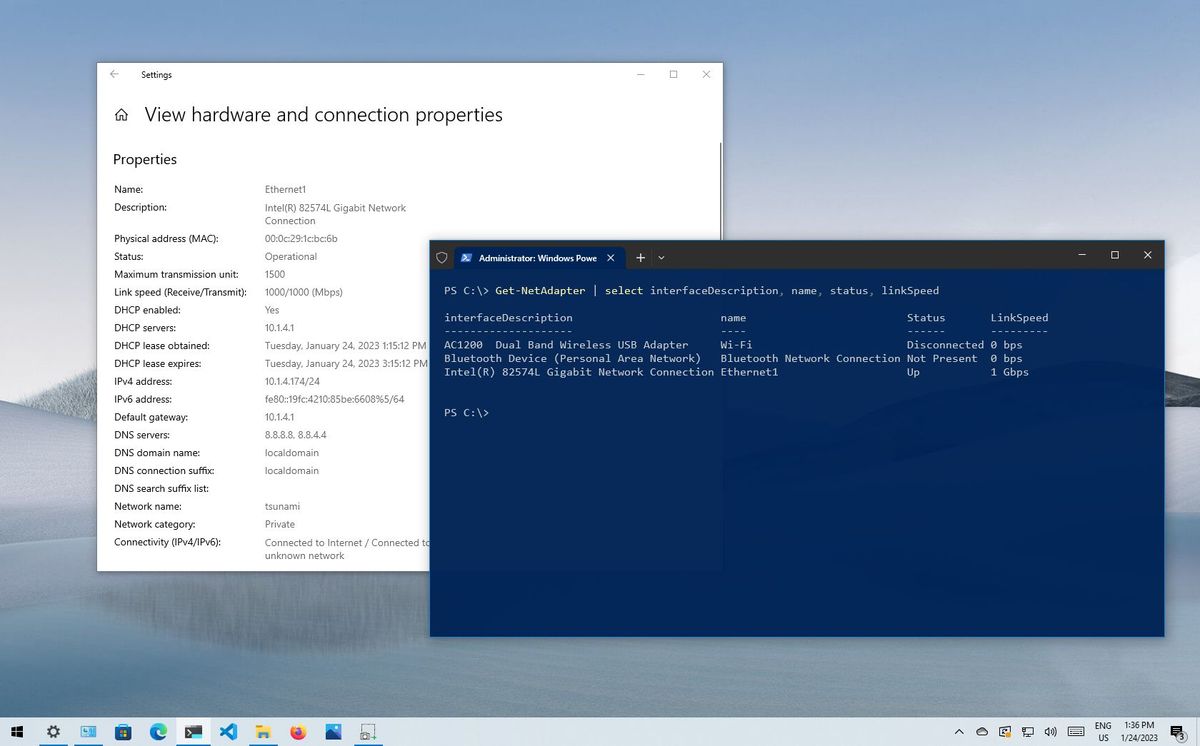
Windows Central
Are you wondering about the connection speed of the network adapter? Here are four ways to find out on Windows 10.
zinc bear
peak cloak
https://www.windowscentral.com/how-determine-wi-fi-and-ethernet-connection-speed...
do you want to know my link speed?
 peak cloak
Well that's your issue
zinc bear
how do i fix that
peak cloak
It's probably the cable
zinc bear
my ethernet cable?
peak cloak
Yes
zinc bear
i just got a cat 8 yesterday
zinc bear
i got this one

About Dacrown Brand We are always doing in pursuit of Excellence of production quality Technology and Appearance of innovation Exceed customer expectations. Dacrown ULTRA-FAST 40 GIGABIT/SEC SHIELDED ETHERNET CAT8 PATCH CABLE. Every second even millisecond counts in the gaming world and a quality...
do i need to get a different one?
ohh shit i fixed it

is that what it should be now
i get like 250-300 now on a speed test but my steam downloads are really slow so im not sure if something is wrong
peak cloak
zinc bear
i get like 250-300 now on a speed test but my steam downloads are really slow s...
What speed
Steam reports in megaBytes not megaBits like speedtests do
zinc bear
peak cloak
Steam reports in megaBytes not megaBits like speedtests do
mbps
on the speed test
opal pagoda
zinc bear
check cable continuity, maybe you have a non gigabit switch in between your router and pc
also what router do you have, router itself might be isp special garbo™️ and not support gigabit
zinc bear
opal pagoda
check cable continuity, maybe you have a non gigabit switch in between your rout...
www.bell.ca
Delivering fibre optics right to your home, Gigabit Fibe 3.0 gives you the absolute fastest total speed on the market.
i have that one
opal pagoda
zinc bear
https://www.bell.ca/Bell_Internet/Products/Fibe-Internet-Gigabit3-FTTH
look at router you have, if it says "model number/name" on it tell me that
also do you have another ethernet cable you can test with
zinc bear
i already tried a brand new cable
opal pagoda
zinc bear
i already tried a brand new cable
is the pc directly connected to the router?
clear igloo
zinc bear
i get like 250-300 now on a speed test but my steam downloads are really slow s...
Can you post a screenshot of the speedtest?
300MB/s is about 2.5Gbps which would be right giving your adapter
300Mb/s though is not right
zinc bear
opal pagoda
is the pc directly connected to the router?
no
clear igloo
Capital B is bytes, lowercase b is bits however a lot of ISPs love to CAPITALIZE EVERYTHING making it much harder to figure out
zinc bear
clear igloo
300MB/s is about 2.5Gbps which would be right giving your adapter
300Mb/s though...
 clear igloo
ok, that's bits, that's not good
opal pagoda
zinc bear
no
what is in between then?
clear igloo
zinc bear
You're about 1/10th of what you're adapter should be pushing at max throughput but even if something is limited to gigabit you should be almost there on speedtest, not that far from it
zinc bear
opal pagoda
what is in between then?
Are isp gives us these pods that go on each floor with ethernet cables on them
clear igloo
They gave you mesh wireless pucks then
zinc bear
so what do i need to change
clear igloo
To get anywhere near 2.5Gbps? Don't use them and wire direct
opal pagoda
zinc bear
so what do i need to change
run ethernet cable directly from router to pc
zinc bear
clear igloo
To get anywhere near 2.5Gbps? Don't use them and wire direct
that would not fly in my house lol
clear igloo
zinc bear
that would not fly in my house lol
Like right now they're connected via WiFi, if something is causing interference, even on 5GHz then you're screwed
zinc bear
so the only way to get what im looking for is to direct connect?
clear igloo
Yes
peak cloak
Oh, so you were never Ethernet direct
Using Ethernet to those wireless things is basically the same as just using WiFi
opal pagoda
zinc bear
so the only way to get what im looking for is to direct connect?
or maybe if you have coax in your house you could run moca
clear igloo
Although even WiFi 6 backhaul I would expect a good bit more throughput, I would at least check to see what the pucks are on wireless band wise
 faint mango
opal pagoda
or maybe if you have coax in your house you could run moca
faint mango
opal pagoda
or maybe if you have coax in your house you could run moca
moca is a lifesaver in most cases
 hearty coral
Yes.
 waxen scroll
No.
cold forge
clear igloo
Capital B is bytes, lowercase b is bits however a lot of ISPs love to CAPITALIZE...
not only that, they don't train their techs well and then they promise you things they probably don't have the authority to do, like promising that you will get 1 gigabyte of bandwidth
distant wedge
zinc bear
https://www.bell.ca/Bell_Internet/Products/Fibe-Internet-Gigabit3-FTTH
I used to work for Bell. You probably have improper light levels
And those pucks Bell gives out are trash
zinc bear
distant wedge
I used to work for Bell. You probably have improper light levels
how do i fix the light levels
distant wedge
zinc bear
how do i fix the light levels
forget what I said, I see you said you're using the Bell pods
those pods are trash and will basically cut your speeds in half, they're only intended use is to provide coverage in parts of your home where your signal is low
if you want to take as much advantage of your connection as possible, it needs to be wired
zinc bear
distant wedge
if you want to take as much advantage of your connection as possible, it needs t...
So im better off not using ethernet
 meager ginkgo
^ If you have coax tv ports- the ones that cable boxes and modems use.. you can likely use MoCA to get a true wired system
zinc bear
i dont know how to do that
distant wedge
zinc bear
So im better off not using ethernet
no, you're better off having it wired. The pods are trash
It's how Bell makes an extra $5 on your bill every month for rental
zinc bear
But the only way i have ethernet is with those pods
peak cloak
zinc bear
So im better off not using ethernet
ethernet to those pods does not mean wired
zinc bear
so if i dont have pods i dont have ethernet
peak cloak
zinc bear
But the only way i have ethernet is with those pods
that's basically just wifi connection
distant wedge
It's a wireless extension of your network, it's literally wireless
zinc bear

The TL-PA9020P Powerline Kit equips any room with blazing fast internet by transforming your outlets into Ethernet ports for reliable wired connection to all of your devices, no matter how far from your router. With 2x2 MIMO, the adapters intelligently transfer data through two streams for maximi...
peak cloak
maybe, probably not. Powerline isn't that great and heavily depends on the electrical enviroment
zinc bear
anything liike that that would help
meager ginkgo
zinc bear
how would i do that
Do you have cable tv/internet ports by the main router and your room?
should look similar to this

 wanton imp
has anyone seen instead of using a VPN to access NAS, using Cloudflare's tunnel? It looks like it's for sure possible, just haven't had a nas to try it with lol.
 knotty plover
I wanna show you something very interesting
You see this speed?


it drops to this when using VPN, (not a bad VPN)

just the ISP slowed external IPs
waxen scroll
@clear igloo you see a picture of a rack, I see multiple policy violations
 fervent sail
Looks like my ISP bandwidth limit is completely broken, I only got 100Mbps upload to this server somehow yesterday it spike up to near 600Mbps

qBit managed to push almost 20GB in less than 10 minutes
heavy leaf
wanton imp
has anyone seen instead of using a VPN to access NAS, using Cloudflare's tunnel?...
it is technically a vpn, just with a central coordinator to set up point to point networks with cloudflare, then handling firewall etc with cloudflare
tailscale is another example of the same, but it orchestrates a direct connection (note they had a security flaw recently come to light, I wouldn't recommend them currently). there's a few others, and it's also doable yourself
performance-wise i would expect it to be at the very least higher latency than a direct route
wanton imp
heavy leaf
it is technically a vpn, just with a central coordinator to set up point to poin...
Thank you Ian for the info. That’s super helpful especially regarding performance. I was thinking about using that for a few side projects I have, but the VPN will be how I go with at least my storage.
fervent sail
The latency isn’t even that high, I use cloudflare tunnel for RDP and multiple web services, I would say it works quite great, it’s just a little bit annying having to run the “cloudflared” command before connecting(only for RDP you don’t have to for HTTP/HTTPs)
fervent sail
wanton imp
Thank you Ian for the info. That’s super helpful especially regarding performanc...
Serving a lot of non HTTP contents through cloudflare’s network can get your account suspended so if you’re looking for a way to access your NAS and download/upload stuff to it, VPN is probably a better choice
heavy leaf
oh let me clarify - I'm sure it works quite well, cloudflare is excellent and has numerous edge locations to make this speedy
the latency will be inherently worse though, perhaps not enough to be bothersome though
fervent sail
Still opening a port directly to a service is risky just use a VPN
wanton imp
fervent sail
Serving a lot of non HTTP contents through cloudflare’s network can get your acc...
This is excellent to know. I’ll need to read their tos again. I use them for dns, certificates, and webhosting. I don’t want to jeopardize my account.
fervent sail
Just put it in DNS mode if it dosent go through cloudflare’s cache it dosent count
wanton imp
heavy leaf
the latency will be inherently worse though, perhaps not enough to be bothersome...
Latency makes since as your routing through their network instead of directly to your own. A few more hops maybe than it needs to be? Maybe ms of latency depending in connection.
heavy leaf
yeah, I don't anticipate it being much in the majority of locations
wanton imp
I live pretty close to a hub. Also have awesome internet with great upload so a vpn instead of tunnel makes sense.
Ty all for the info.
heavy leaf
I think the most recent WAN show had a sponsor that is a competitor to tailscale, if you wanted a zero-config option
peak cloak
heavy leaf
I think the most recent WAN show had a sponsor that is a competitor to tailscale...
what is it?
I'm a pretty big fan of tailscale
heavy leaf
peak cloak
what is it?
i believe it was https://www.zerotier.com
note that tailscale has a comparison of the two: https://tailscale.com/compare/zerotier/

Tailscale
As modern enterprises migrate to cloud-based services and remote work, fortified corporate walls are deteriorating, and so is the use for a traditional VPN. Network architects are embracing a new “zero trust” approach, which means physical networks cannot be trusted, and every device must always be end-to-end encrypted and authenticated.
peak cloak
heavy leaf
i believe it was https://www.zerotier.com
ah yeah zerotier
heavy leaf
normally I plug tailscale, but...
peak cloak
I used it as well, I like how tailscale auth is done however
where it's per user, not one admin which confirms users
pseudo blade
heavy leaf
it is technically a vpn, just with a central coordinator to set up point to poin...
You mean the Windows client vulnerability on Windows in November they fixed almost immediately?
heavy leaf
pseudo blade
You mean the Windows client vulnerability on Windows in November they fixed almo...
(specifically the update from jan 17)
pseudo blade
Yep, that is somewhat poor though it's good to see it has been resolved. Wouldn't have been happy if I was a customer at the time for sure
clear igloo
waxen scroll
<@291198741862416384> you see a picture of a rack, I see multiple policy violati...
I see corporate violations!!!
 mortal flicker
how do i access my pc from another pc without using any softwares
i am a shit head when it comes to networking so dont get mad at me if i talk shit
 unborn sluice
If you need to use a pc without a remote software, you need to be physically there
 main tartan
Hi there, I was wondering if it was possible to disable the WiFi of the Unifi Dream Router.
Right now I just made two separate WiFi configurations.

I assigned the NoWifi configuration to the Unifi Dream Router, and the regular one to my APs. And just scheduled the WiFi of the dream router to be disabled 24/7.

But maybe I completely missed a setting.
 peak cloak
main tartan
Right now I just made two separate WiFi configurations.
peak cloak
main tartan
Right now I just made two separate WiFi configurations.
can't you just delete both SSIDs
main tartan
Oh wait
I could just remove the Wifi Config for the UDR and make one only for the APs
waxen scroll
 hardy kestrel
thank you
waxen scroll
clear igloo
I see corporate violations!!!
yeah, the local facilities also almost always have a no pictures policy
thick minnow
So i have two computers
PC A: has wifi
PC B: doesnt have wifi, its connected with an ethernet cable
- same network
Can these PCs still play, Minecraft for example, over Lan?
waxen scroll
yep
thick minnow
What can i do if they cant (they cant)
waxen scroll
windows firewall probably blocking the server from connections
thick minnow
waxen scroll
windows firewall probably blocking the server from connections
But they can if i connect a cable to both
clear igloo
wifi profile is set to public most likely
 ripe vigil
I have a question, if one of my internet cables dont work and i wanted to test my cable, i buy a rj45 cable tester right? Thats what i want to do, but the problem is that my cable's length does 2 stories from the 1st floor to the 3rd floor, in that case, should i buy another cable or is it manageable to replace a rj45 port again?
And is there a rj45 tester that can power itself through 1 rj45 port to see if its not working?
waxen scroll
it should not be that hard to replace the jacks. it would be nice if you had the punchdown tool for the jacks so you can try that first

With iMBPrice continuity tester you can check LAN patch cable (RJ45) and telephone cable (RJ11) for pass, open, short or cross wire. You can quickly test cables using scan mode, or step mode to check connection one contact at a time. Detachable remote unit allows you to test wires already install...
something basic like this will tell you if a wire is damaged or in the incorrect position
ripe vigil
Ok will check
ripe vigil
Is this one good too? https://amzn.eu/d/fD3BBol

Proster RJ45 Crimper Pince à sertissage pour RJ11 / RJ12 / CAT5 / CAT6 / Cat5e Réseau et câbles téléphoniques, Outils de réparation de réseau de câble LAN professionnel, pince à dénuder (bleu)
Since it also has a rj45 tester that looks like the previous link
 rocky hawk
I have a weird issue. I was swapping 4090 RTX from one of my PCs (i9 9900k) to a new one (i7 12700k) and suddenly I can't get the wired connection running. It fails with Activation of Network Connection Failed both on 10Gbit SFP+ and 2.5Gbit onboard Ethernet
in logs there is a problem with getting IP address. I've tried setting a static address but it doesn't work
also I can't see this machine on the router anymore
OS is Ubuntu 22.04, router is DreamMachine Pro, 10Gbit switch is Unifi Aggregation Switch, but hooking it up directly to router still shows nothing. No settings were changed, the only thing I've added are a new PSU, a second empty NVMe SSD and that 4090 RTX
update: taking out the 4090 RTX didn't solve the problem, I'm even more puzzled
update: taking out that extra SSD and restoring UEFI defaults didn't help
 marble plover
not exactly networking but server related...
Is there some windows software to measure a total CPU and RAM use of selected app over time?
 zealous ledge
DNS server not responding on ALL of my devices at home. what could be causing this?
peak cloak
What is the devices DNS server
zealous ledge
peak cloak
What is the devices DNS server
i just restarted my router it works now
rocky badge
@clear igloo My DNS server in the cloud 
clear igloo
rocky badge
<@291198741862416384> My DNS server in the cloud <:Thonk:681821948841295889>
y u no on prem all the DNS server
rocky badge
for at college
clear igloo
I know what I said, show them on prem all the things
 clear igloo
that's a lot of latency 😦
rocky badge
Tracing route to net-services-1.vm.ryois.me [10.88.10.3]
over a maximum of 30 hops:

  1    <1 ms    <1 ms    <1 ms  10.125.0.1
  2    39 ms    41 ms    39 ms  net-services-1.vm.ryois.me [10.88.10.3]

Trace complete.
``` lolone hop two hope three hop four
Drop the DNS on the floor
clear igloo
rocky badge
```
Tracing route to net-services-1.vm.ryois.me [10.88.10.3]
over a maximum of 3...
Not bad for over VPN I assume 🙂
rocky badge
yeah
ripe vigil
ripe vigil
Is this one good too? https://amzn.eu/d/fD3BBol
does this rj45 reader have a unlimited range? because my cable goes from the 1st floor to the 3rd floor and i wanted to make sure that i can test from bottom to top, because i need one of those rj45 readers that has a unlimited range, i'm pretty much worried because some of the rj45 readers need to be connected onto the same box, meaning that a extremely long cable is useless to those readers, so i wanted to make sure if this one supports the extra long rj45 cables
opal pagoda
ripe vigil
does this rj45 reader have a unlimited range? because my cable goes from the 1st...
100 meters max
for 10 gig cat6 is rated for 55m and cat6a is full 100m
ripe vigil
just checked my cable, its a cat 5e
opal pagoda
ripe vigil
just checked my cable, its a cat 5e
100m
ripe vigil
ok
clear igloo
cat5e can do 10/100/1000/2500 up to 100m
cat6 can do 10/100/1000/2500/5000 up to 100m or 10000 up to 55m
cat6a can do 10/100/1000/2500/5000/10000 up to 100m
cat8 could, in theory, do 25000 and 40000 up to 30m if the equipment to use it actually existed
Now in theory you can go past that 100 meters however the SNR and signal quality is basically a toss up at that point, you're only guaranteed 100m on copper ethernet cables (all else being within spec). Beyond that you could get a few extra meters of length or no link up at all
opal pagoda
clear igloo
Now in theory you can go past that 100 meters however the SNR and signal quality...
if you are doing run of more than 100m just use single mode fiber and media converters at the ends
 silk cove
could someone explain what '1ghz lpf' means. It's on the back of my modem. Trying to figure out how i can get a wired connection in my room
 viral haven
Hi guys I really need help with a weird bug ill try too be brief
So whenever I connect my pc to the network ping goes ham on all devices including the pc I checked task manager nothing major happining in network and it sucks cause I bought this pc to game and since the day i got it 3 weeks ago im having this problem tried a different network same thing
And it’s immediate as soon as i connect and disconnect ping increase and decrease accordingly

Its really bad u guys
rocky badge
@peak cloak Can you change the wlan interface MAC on Omada APs
lone sun
🤔 interesting
lone sun
viral haven
Hi guys I really need help with a weird bug ill try too be brief
So whenever I ...
 On all devices? That's weird. Have you contacted your service provider about this? Gonna be hard to trouble shoot something like that me thinks.
viral haven
Its so weird my ping is 70 in codm as soon as i connect pc with wireless or ethernet it immediately jumps over 200 and 200 is the limot the game will show you
On pc it chills around the 900 ping
As for my isp its a 4G provider
They basically will tell me its nothing or did you try an obvious thing
lone sun
viral haven
As for my isp its a 4G provider
😕 So is this satellite?
Not sure what you mean by 4g
viral haven
No its sim card router
lone sun
ah
peak cloak
rocky badge
<@222482269829332992> Can you change the wlan interface MAC on Omada APs
Don't think so
rocky badge
hm
viral haven
peak cloak
Don't think so
I didn’t even get a word
lone sun
😕 Interesting. Never heard of a sim card router before.
peak cloak
For a second when you said omada, I thought you meant the router
Which yes, it's possible
The wan
rocky badge
peak cloak
For a second when you said omada, I thought you meant the router
but not APs?
peak cloak
Doesn't seem like it
rocky badge
ok
lone sun
viral haven
No its sim card router
😕 So like, what router is this exactly? What is the model?
rocky badge
shitty mikrotik it is then probably
lone sun
And who is the provider?
viral haven
Honestly i think somthing is messed up in windows
Ill try neighbors network and report back if same behavior happens
lone sun
🤷♂️ You just bought this PC right?
viral haven
Yeah it hasnt been over 3 weeks
And the last week and and half I basically downloading games
lone sun
viral haven
And the last week and and half I basically downloading games
🤷♂️ So, the router, what is the model?
viral haven
Zenfi 4.5G
lone sun
It doesn't sound like it handles the allocation of bandwidth well, and/or your provider is the problem.
rocky badge
@peak cloak @meager ginkgo How stupid is this

I have an ER-X as a router in my dorm room. Plug hAP ac2 into ER-X's PoE out port.
peak cloak
Maybe
rocky badge
ER-X is doing ZeroTier back home & NAT Internet from dorm Internet provider
I hide the AP by changing its MAC
lone sun
viral haven
Zenfi 4.5G
🙃 I can't even find it. You live in a foreign country? Has to be the case.
rocky badge
I can change the MAC of the AP to some printer or some WiFi direct device
peak cloak
Don't have such issues here
rocky badge
I don't have issues besides maxing the 10 concurrent client limit

 orchid anvil
Looks not the best but will get the job done
lone sun
orchid anvil
Looks not the best but will get the job done
His router? Are you sure? Because something is wrong somewhere. 
@viral haven I don't think simply nuking windows and starting fresh will matter if the PC is brand new. Maybe try updating the drivers? I'd go to the manufactures website, and find the router model perhaps.
lone sun
ah, you mean with the same computer?

 lone sun
viral haven
Thats the ping of the phone before i connect the pc
lone sun
viral haven
Thats the ping of the phone before i connect the pc
Well, you can try updating the driver, assuming its not already up to date here: https://www.msi.com/Motherboard/MAG-B660M-MORTAR-DDR4/support#driver
Powered by Intel 12th Gen Core processors, the MSI MAG B660M MORTAR DDR4 is hardened with performance essential specifications to outlast enemies. Tuned for better performance by Core boost, Memory Boost, Premium Thermal Solution, M.2 Shield Frozr,
peak cloak
viral haven
Thats the ping of the phone before i connect the pc
Ping to where
lone sun
Also, you can check the driver version of your network adapter either in device manager, or by typing this in powershell:
Get-NetAdapter | Select Name, InterfaceDescription,DriverVersion, DriverDate, DriverProvider
peak cloak
viral haven
Please just watch and see how weird that is
Just wifi congestion probably
Wifi is a shared medium
viral haven
No same with etharnet
peak cloak
Ok? I doubt it's the PC
lone sun
peak cloak
Ok? I doubt it's the PC
😕 Could it be his router?
peak cloak
I bet its just congestion
viral haven
I never saw a 70 or even 90 ping in this pc
lone sun
Probably not though
viral haven
viral haven
Yet i can easily do that on the ipad
lone sun
peak cloak
I bet its just congestion
He said it still happens at his neighbors house though. And they have a separate provider.
peak cloak
viral haven
Yet i can easily do that on the ipad
To the same server?
peak cloak
lone sun
He said it still happens at his neighbors house though. And they have a separate...
Idk, not enough details
viral haven
Guys when i connect both devices to neighbors same behavior
Less dramatic but same non the less
viral haven
I have been “gaming” on it for a week the bug never went away
peak cloak
If you really want to see what's going on could get Wireshark and do a capture
viral haven
Ok
lone sun
🤔 His motherboard manufacturer going out of their way to not say hardly anything about its network capabilities is a red flag to me.
MSI
orchid anvil
lone sun
His router? Are you sure? Because something is wrong somewhere. <:KEKW:670048864...
Cell networking isn’t best for houses
lone sun
orchid anvil
Cell networking isn’t best for houses
😂 Certainly doesn't sound like it is.
I'd be switching providers if I were him. Damn that.
lone sun
peak cloak
If you really want to see what's going on could get Wireshark and do a capture
 Its sad that the average joe even has to bother with this.
But, its still puzzling that its still happening on a non-cell network, with his neighbor.
lone sun
@viral haven So like, if you type this in below in powershell, what driver version and date does it show?
Get-NetAdapter | Select name, driverversion, DriverDate
viral haven
I just un installed and reinstalled drivers and still horrible ping
lone sun
You installed them directly from your motherboard companies website? MSI?
viral haven
Yes
lone sun
😕 hmm
lone sun
viral haven
Yes
🤷♂️ Well, I guess, screw around with wireshark, but like the other dude said, cell network isn't really ideal, which makes 100% sense........at least until you get to your neighbors house, which still kind of points back to the motherboard. Maybe the motherboards network adapters aren't that great perhaps.
viral haven
 lone sun
Which STILL doesn't explain how its fucking with other devices. 😫
viral haven
I have no idea what it is but okay
lone sun
viral haven
I have no idea what it is but okay
You mean wireshark?
viral haven
Yes
lone sun
Its, what they call a packet sniffing tool. Monitors your devices, or your network's traffic.
I haven't used it in years.
viral haven
So what is the best linux distro for gaming 🪦
lone sun
viral haven
So what is the best linux distro for gaming 🪦
🤷♂️ I don't know much about linux. But, you said your neighbors network works via satellite right?
 tidal frost
viral haven
So what is the best linux distro for gaming 🪦
tidal frost
viral haven
So what is the best linux distro for gaming 🪦
There Isnt really a best one for gaming afaik. Its all the same tools, some distros just might have em pre installed. Distro hop a bit, find a flavor you like, then make it game
candid glacier
viral haven
So what is the best linux distro for gaming 🪦
Linux mint
unborn sluice
viral haven
So what is the best linux distro for gaming 🪦
cisco ios
pseudo blade
rocky badge
<@222482269829332992> <@390856614942474241> How stupid is this
If you care about Wave 2 it won't do it but the ac3 or apparently ax2 will, but as a cheap solution for 2-chain 5ghz it works fine and you can edit the MAC on it.
BTW will you be incrementing ttl on your edgerouter?
rocky badge
I don’t think the edgerouter can increment TTL without turning off hwoffload
pseudo blade
Can it keep up without offloading, perhaps? I don't know what kinds of speeds you expect.
Else they might not notice, not sure how much effort they'd actually put in to catch people
 reef phoenix
can someone help me? Im trying to join my Ubuntu Server on my windows domain using kerberos but It doesnt seem to work
Ive been trying to fix it for two weeks now but I still dont know what the issue is on it : (
Im starting to loose hope on it, please
it keeps giving me the error:
realm: Couldn't join realm: Insufficient permissions to join the domain
shy spade
viral haven
So what is the best linux distro for gaming 🪦
None
reef phoenix
viral haven
So what is the best linux distro for gaming 🪦
the one which you are most familiar with
peak cloak
reef phoenix
it keeps giving me the error:
```realm: Couldn't join realm: Insufficient permis...
that means the user creds you are using don't have permissions
usually the creds to be able to join are admin accounts
reef phoenix
@peak cloak
I understand that, I entered this command:
realm join --user=administrator internal.udc-studios.com
as far as I understand it, it should work like this right? this is the domain admin right? Im asking because I created a user on the ubuntu server also called administrator as well
 tawdry fern
guys im looking to get an ethernet cable for my wifi
im using a powerline atm and ill be hooking up my cable from the powerline to my pc
It seems as if I require a 10m cable for it to reach my PC
will the length of the cable affect my network performance?
clear igloo
Nope
meager ginkgo
tawdry fern
will the length of the cable affect my network performance?
No but have you looked into MoCA? It might be a better option than running ethernet (if you have to run it across baseboards etc)
pseudo blade
tawdry fern
will the length of the cable affect my network performance?
Not at 10 meters no
opal pagoda
meager ginkgo
No but have you looked into MoCA? It might be a better option than running ether...
nothing except fiber is better than just running cat6a
meager ginkgo
opal pagoda
nothing except fiber is better than just running cat6a
I agree but in some situations MoCA will be just as good for a person’s needs
and they don’t have to have a tacky cable running along somewhere
 raw galleon
Hi all, I just got an Asus XT8 router and for a couple of hours now, I can't get it online, I have no idea what to do.
After setting it up in the Android app, where I set SSID, login and password to the router, I was able to connect to all SSID I've created, so wi-fi is working well.
But I can't get online, the ethernet cable is connected from a Huawei modem to XT8, but no connection, so I called ISP, and they gave me PPPoE settings, which is a username, and a password which I was able to use, but there are also two other details where I have no idea how to use them and this may be blocking access for me, this is VDSL(FTTC/FTTH)VLAN ID: 10 and ADSL(NGB): VPI:8 VCI: 35.
Would anyone be able to help me?
 frosty oasis
hi there, other version of networking, but if anyone is in greater Seattle area and looking for an entry level SOC analyst, then feel free to DM me and I can share my LinkedIn. I have been running a honeypot in Azure and been monitoring it using Azure Sentinel and been working on getting Splunk set up as another SIEM too.
 glacial linden
Ubuntu, iptables.
Any way to block both INPUT and OUTPUT for -m owner --uid-owner in iptables on ubuntu? I can block output but one of the processes started by the user was able to upload data to a dashboard even after having all output blocked in iptables, and worked consistently. Then I realized INPUT for the user is still not blocked and later matching port rules would allow it (incoming 443/80).
Having the rule -A INPUT -i eth0 -m owner --uid-owner firewallblocked -j DROP in rules.v4 gives an error and iptables fails to restart saying invalid argument, and apparently -m owner --uid-owner isn't valid for INPUT
iptables is annoying to work with...
Anyone got suggestions for good alternatives? Need both powerful and easy to use... ufw is easy but I can't do things like block specific users with it (as far as i know)
 jaunty talon
I am not surprised that INPUT doesn't work, as it would be quite problematic for iptables to know which users a certain packet would go to, especially if there is no NAT.
waxen saddle
reef phoenix
<@222482269829332992>
I understand that, I entered this command:
```realm join ...
Your response almost seems like you don’t know if this is the domain administrator account. Do you know the domain administrator username and password? (Don’t mention PW here)
 south blade
TMHI on bad side of the house. I've got it hardwired to OPNsense firewall, with router connected to firewall as an AP, OPNsense handling DHCP. Can AP connect to TMHI wirelessly, but data still pass through firewall before going to clients?

I've got metal walls, so I'm trying to find any method to get better speed while I wait for a time when I can build a small shed and put it up high in there and run an outdoor rater ethernet into the house.
thick minnow
mby look at power line or if you can run cat6 in an attic or something
south blade
power line is underground
south blade
OH, the brand thing called Powerline
opal pagoda
south blade
OH, the brand thing called Powerline
you could also do moca if you have coax all over your house
south blade
no coax here, yet. and the powerline thing would just be temporary really cause there's only 2 decent windows and one is the kitchen where it might get wet and other is opposite side of the house and I keep thinking if it's gotta go over so much romex, to the power box, over a breaker, into another breaker, back into some other romex till it finally gets to the powerline receiver, how reliable is the connection going to be.
tawdry fern
meager ginkgo
No but have you looked into MoCA? It might be a better option than running ether...
Tell me more, I'm interested
meager ginkgo
tawdry fern
Tell me more, I'm interested
Do you have coax jacks by your router and the location you want Ethernet?
if you don’t know what a coax jack is- it’s typically what a cable box / cable modem hooks up to
 thick minnow
can someone help me get a minecraft server connected to the internet
 forest quest
hi guys, is there a way to trick the wifi thinking i am downloading so i dont get internet spike while gaming?

the left is the one with spike, right ones with stable connection while downloading things on steam
peak cloak
Why does it matter
That's probobly icmp ping too, which is not known for being super accurate
Just a side effect
forest quest
im sorry, what is a icmp ping
 small hinge
forest quest
small hinge
forest quest
Why are you showing us a graph over time of your ping latencies?
forest quest
the left side is normal gameplay ping
which is spiking consistently
right side is a lot of stable, while downloading on steam
which is weird because normally when i play games while downloading it should be more stable
however now when i download, the wifi somhow detects i need consistent connectivity so feeds me more consistent stream
i was wondering if i can somehow trick the wifi into feeding me the consistent stream (which i picture is what is going on on the right side of the graph) while gaming
small hinge
QoS (Quality of Service) settings maybe for a particular port range that your game may use?
tawdry fern
meager ginkgo
Do you have coax jacks by your router and the location you want Ethernet?
I'm sure I have it near the router just not the location of my preferred ethernet location
I had a look at a map which shows the setup of a MoCa and I think that rules out the option of having one
and since my house is rented (because I move countries every 3 years) I won't be able to make any major changes to the house
forest quest
small hinge
QoS (Quality of Service) settings maybe for a particular port range that your ga...
its just valorant, it is not as disturbing for other games
 fringe saddle
Hey this isn't normal for ethernet right?

I have my PC hooked up with a CAT 6 cable.
peak cloak
What is that
fringe saddle
It's through the task manager. Not sure if it really means much
 peak cloak
Seems fine
fringe saddle
Ah okay.
fringe saddle
I never checked it out so i thought something was wrong.
south blade
meager ginkgo
No coax here, gonna have to install myself one day but maybe just to one place to use like an HDHomerun device.
meager ginkgo
south blade
No coax here, gonna have to install myself one day but maybe just to one place t...
Yeah, that's what I would recommend.. coax is becoming more and more "obsolete" by the year
especially with fiber internet and streaming tv becoming more common
hearty coral
😛
 pseudo blade
fringe saddle
Hey this isn't normal for ethernet right?
pseudo blade
fringe saddle
Hey this isn't normal for ethernet right?
Looks like livestreaming bandwidth usage - it downloads a ton of chunks rapidly rather than actually being a continuous stream
fringe saddle
pseudo blade
Looks like livestreaming bandwidth usage - it downloads a ton of chunks rapidly ...
Ah okay thanks
main tartan
fringe saddle
Hey this isn't normal for ethernet right?
Seems pretty normal. I have the same when listening to Music through Tidal.
 fringe saddle
main tartan
Seems pretty normal. I have the same when listening to Music through Tidal.
fringe saddle
main tartan
Seems pretty normal. I have the same when listening to Music through Tidal.
Ah cool. Never really saw what was happening in the performance window before.
pseudo blade
(Non-live)Streaming is choppier and more spaced out because why not download it 20-30 seconds at a time. Makes Netflix suck on low throughput connections unless you shape it and leave space for other stuff.
thick minnow
pseudo blade
(Non-live)Streaming is choppier and more spaced out because why not download it ...
i find this really interesting, the netflix streaming team is in general pretty good at what they do i feel like they would fix this
rocky badge
@clear igloo I wish ITS would stop fucking with Discord.
clear igloo
ITS?
rocky badge
Cisco umbrella keeps trying to intercept discord files to scan for AV but it just breaks all of Discord media attachments, profile pics, etc.
 rocky badge
clear igloo
ITS?
rocky badge
clear igloo
ITS?
Information Technology Services aka the IT department lmao
clear igloo
OH! lol
clear igloo
rocky badge
Cisco umbrella keeps trying to intercept discord files to scan for AV but it jus...
rip
drowsy fossil
rocky badge
Information Technology Services aka the IT department lmao
where I work thats two separate departments
rocky badge
drowsy fossil
where I work thats two separate departments

ETSU - Information Technology Services
drowsy fossil
lucky you
waxen scroll
rocky badge
https://www.etsu.edu/its/services/
except for static IPs
 dark crow
yo i have a problem with my ethernet speeds on my windows 10 pc
i get around 100mbps but somehow i get 400mbps on my laptop
keep in mind the router is 5G but i used the same ethernet cable and router for both tests on the laptop and the pc
the same speedtest server was selected in both tests and everything downloads faster on the laptop
i even tried the speed test app but it got worse results
rocky badge
waxen scroll
except for static IPs
lol
peak cloak
dark crow
yo i have a problem with my ethernet speeds on my windows 10 pc
i get around 100...
what's the link speed stated on the windows PC
dark crow
peak cloak
what's the link speed stated on the windows PC
the one in ethernet options?
i think it was 1000mbps
yep i just checked
slow tulip
Where can I I find a good NIC?
opal pagoda
slow tulip
Where can I I find a good NIC?
what kind of nic?
1g, 2.5g, 5g, 10g, sfp+?
slow tulip
opal pagoda
what kind of nic?
1g, 2.5g, 5g, 10g, sfp+?
Gigabit
opal pagoda
slow tulip
Gigabit
any card with intel chipset on it
like I219-V
cold forge
I definitely agree, Intel is the way to go 😛
opal pagoda
cold forge
I definitely agree, Intel is the way to go 😛
intel all the way
on wired and wireless nic's
cold forge

slow tulip
opal pagoda
any card with intel chipset on it
like I219-V
Sure
I just need one for my storage server
opal pagoda
slow tulip
I just need one for my storage server
why not go for something higher than gigabit?
opal pagoda
slow tulip
I will probably upgrade it soon though
any idea on what your will upgrade it with?
HP NC523SFP if you will get something like mikrotik CRS326-24G-2S+RM
slow tulip
opal pagoda
any idea on what your will upgrade it with?

The 10G ports would go to my desktop and server
opal pagoda
slow tulip
https://www.ebay.com/itm/134331191649
you can get something like this

eBay
Interfaces: 2 X 10GB Ethernet- RJ-45. Ports: 10GB EthernetX 2. Product Type: Network Adapter. Form Factor: Plug-In Card. ETA 3 to 8 busines.
slow tulip
opal pagoda
https://www.ebay.com/itm/134331191649
you can get something like this
Alright
So I will need two
opal pagoda
yea you can buy two if your pc doesent have one onboard
slow tulip
My computer has 2.5GB realtek built in
opal pagoda
then get just one for nas and see if it suits your needs
you can always get another on ebay, there seems to be a endless supply of them
slow tulip
Alright
 thorn yew
Does anyone here know the most cost-efficient way to get PoE++ (802.3/bt) power to about 24 devices?
Efficient in terms of power draw, power plugs used, ports left over, etc.
Where I work has (or is going to have) 24 unifi access hubs scattered throughout a building.
opal pagoda
thorn yew
Does anyone here know the most cost-efficient way to get PoE++ (802.3/bt) power ...
how many watts total?
thorn yew
I don't know, for most of them we're just using a passive mechanical latch that only needs to have power when triggered open. Fail secure, etc.
And then also a door position sensor, and a single basic reader.
Not the one with the touch screen.
opal pagoda
why do you need poe++ then?
thorn yew
As far as I can tell, it's not pushing out enough voltage to the latch.
We have latches that are clicking constantly when you activate the door.
opal pagoda
ah
thorn yew
We do have one particular door that is using a separate 24 volt power supply to activate mag locks.
I don't think that one will need Poe++
But pretty much every other door is using a passive mechanical latch that only needs power when unlocked.
Or whatever those things are called. I can never remember.
opal pagoda
doesent poe+ already supplies 50-57v?
opal pagoda
what device are you using on the other end?
thorn yew
It may not convert the voltage properly when given lower voltage or amperage.
What other end?
opal pagoda
thorn yew
What other end?
your poe enabled latch or smtng
opal pagoda
what are you using for poe to 12v conversion?
thorn yew
The unify access hub does that.

There are four ethernet ports at the top. One is PoE++ / internet in, and the three others are for badge readers and a single Poe camera.
opal pagoda
how many of those access hubs will you use?
thorn yew
The terminals on the left and right side, are either dry relay contacts, powered outputs, or powered sensors. Buttons, door position sensors, etc.
Each hub is for a single door.
So 24.
Fun, right?
opal pagoda
thorn yew
Each hub is for a single door.
are you also plugging in that poe camera to it?
thorn yew
No, we're not using the camera. Only a single reader.
and it's the reader light. Probably only uses regular PoE.
It's the one without the screen.
opal pagoda
USW-Pro-24-PoE has only 8 poe++ ports
so you will need 3 of them, use rest of the ports for main network stuff and spf+ ports on them for stacking them with dac cable
if you want to go cheap but sketchy af way
get one USW-Pro-24-PoE and 16 of these


Ubiquiti Inc.
glacial linden
do iptables rules not completely reload when simply restarting iptables?
 tidal flower
iptables are not persistent if that’s what you’re asking.
There is typically a persistent package for your distro you can run in a boot script.
glacial linden
tidal flower
iptables are not persistent if that’s what you’re asking.
I do have (cant remember what) that saves and loads rules from /etc/iptables/rules.v4
I have SMB working over wireguard with my server's storage mounted as a drive letter on windows. I simply use VSCode to add/remove firewall rules instead of having to use vim or nano or something on terminal. Much more convenient
If I make changes to that file and restart iptables, rules take effect
tidal flower
glacial linden
I do have (cant remember what) that saves and loads rules from `/etc/iptables/ru...
iptables-restore < /etc/iptables/rules.v4
glacial linden
tidal flower
`iptables-restore < /etc/iptables/rules.v4`
oh... didn't know that. I thought restarting the service works, because if there was a syntax error in the file, iptables would fail to start
sudo systemctl restart iptables is what I was using
tidal flower
Yeah. That doesn’t do much other than possibly flush the table.
Which may be undesirable.
glacial linden
tidal flower
Yeah. That doesn’t do much other than possibly flush the table.
So if I restart iptables without using iptables-restore, some default rule set is loaded/in effect?
and everything in the file isn't in effect?
tidal flower
Likely not 
You could list all loaded rules
And see for yourself
iptables -S
If you’re connected via some muxing shite you can use iptables -S | less to make it easier to scroll through.
glacial linden
tidal flower
You could list all loaded rules
I did and... the list was weird. Multiple rules, repeating rules, rules that were not in the right sequence as I expected, etc... I expected them to be in the same order I put in the file
tidal flower
So I’d suggest flushing your current rules
Then trying a restore from your persistent rule set
That way you know what will be loaded on boot
glacial linden
Before rebooting the VM, wireguard network wasn't accessible to a restricted user that I manage using -m owner --uid-owner <username>... Made no sense since the rules allowed it access clearly. After rebooting, everything works as normal
glacial linden
tidal flower
That way you know what will be loaded on boot
I'd say rules load at boot successfully on their own from that file. That command that listed all loaded rules dumped out a 2 MB text file last time which was strangely messed up and everything, now it's 170 KB with the exact order from the file
glacial linden
tidal flower
That way you know what will be loaded on boot
oh also for some reason, iptables fails to start instantly at boot because some networking thing hasnt started yet, so I have a sh script running as a service that keeps starting iptables (and a few other services, like nginx that fails too), until they start working
tidal flower
If they’re being loaded via systemd you could just use Requires and After
They’ll delay starts until the dependencies are met
Note that requires will kill the service if the parent is killed.
glacial linden
tidal flower
If they’re being loaded via systemd you could just use Requires and After
I have no idea if I was supposed to set that up since this is my first webserver, first time dealing with cli-only and first time using ubuntu 😅
Since rules load properly after reboot, what can I do to simply restart all networking related stuff that reboot does? (im on ubuntu 22.04)
tidal flower
Oh boy. Ok. Maybe check out the DigitalOcean docs and get familiarized before going too wild.
glacial linden
tidal flower
Oh boy. Ok. Maybe check out the DigitalOcean docs and get familiarized before go...
I thought since everything was working it's reliable... Set up nginx as a DoT/DoH/DNS server that all my devices depend on entirely... So if the webserver dies, all DNS on all my devices simply stops working. (SimpleDNSCrypt or Wireguard on Windows, Private DNS on Android)
Just yesterday realized that adding a rule suddenly killed off all access to a user out of nowhere and reboot is the only fix that worked 😂
No idea how much of a mess it's been, that's why ping has been going up slowly from 30ms to 50ms+ since everytime iptables restarts, rules aren't reloaded properly and it went from a tiny 168kb rule file to 2MB+ long rule file...
tidal flower
Yeah. Iptables cost compute.
Same with ufw and other firewalls
My current solution is crowdsec and Fail2Ban on iptables.
ufw is network bloat because of contrack
glacial linden
tidal flower
Yeah. Iptables cost compute.
I also wrote a py script that filters out logs for 443/80 requests that have "missing server name" or malformed queries, and adding the IP to iptables block list instantly, since only thing that sends http or https requests with a missing server name are annoying bots trying exploits on whatever IP they can find...
That ended up adding over 1k IPs that drop input and I thought restarting iptables is enough for a reload 🤦♂️
glacial linden
tidal flower
My current solution is crowdsec and Fail2Ban on iptables.
I was thinking of using nftables since that's what i found when searching for an iptables alternative
glacial linden
tidal flower
ufw is network bloat because of contrack
ufw uses iptables itself right? just an easier command afaik
glacial linden
tidal flower
My current solution is crowdsec and Fail2Ban on iptables.
Fail2Ban is also one of the things im planning to setup soon
I did make sure I don't block myself or a few friends/family members who use my webserver for stuff 😂 ipv4 whitelist filter, implemented it myself
@tidal flower Do you use Windows too? NetLimiter is one of the best GUI firewall software I could find on Windows and it's surprisingly easy to use and very powerful at that too... Wish there was something like that on linux which could be connected to from anywhere and controlled easily
thick minnow
Anybody got any clue why wifi has great speed but can randomly drop for a few seconds?
lone sun
thick minnow
Anybody got any clue why wifi has great speed but can randomly drop for a few se...
Sounds like wifi just being wifi.
If we're talking consistency with good speed. Its going to be hard for an open air signal to remain consistent.
viral haven
Even linux couldn’t save my skin 😭😭😭😭😭
viral haven
viral haven
Its not the OS
viral haven
viral haven
So what is the best linux distro for gaming 🪦
I really thought linux was my way out
Please if anyone can help me figure this out ill be so grateful
 young lark
Hey ya'll! 2nd year from uoft here, studying comp sci and maths! Love to meet new people, so feel free to hit me up and would love to connect! I am into software development and would love to work on projects with ya'll if you guys are interested! also looking for a summer internshiip this summer 2023, so if anyone has any recommendations abou that, it would be much appreciated!
candid glacier
young lark
Hey ya'll! 2nd year from uoft here, studying comp sci and maths! Love to meet ne...
Petabyte web server using raspberry pi
tidal frost
candid glacier
Petabyte web server using raspberry pi
Hasnt Jeff Gearling done this by now?
candid glacier
tidal frost
Hasnt Jeff Gearling done this by now?
I haven't
shy spade
candid glacier
Petabyte web server using raspberry pi
are you insane
pseudo blade
candid glacier
Petabyte web server using raspberry pi
Drink the ocean dry through a straw
A very buggy straw
 granite horizon
Kinda weird question
Does anyone have a Mercusys AC12G or an Archer C7 and could measure the antenna length?
tidal frost
candid glacier
Petabyte web server using raspberry pi
But its got more bottlenecks then a glass coke factory lul
 sick wharf
any of you guys can help me my internet connection is bad and idk why
in task manager it says i have 60mbps and it just doesnt feel likje 60mbps
tag me or message me
slow tulip
Interesting, setting up my server shows as this over the network on my mac
 waxen scroll
Yeah... Apple makes servers
jaunty talon
Not that much network related, but one of our new ARM64 machines is having a blast compiling code :D
 clear igloo
jaunty talon
Not that much network related, but one of our new ARM64 machines is having a bla...
clear igloo
jaunty talon
Not that much network related, but one of our new ARM64 machines is having a bla...
code compiling go brrrr 😄
jaunty talon
clear igloo
code compiling go brrrr 😄
haha yep :D
slow tulip
waxen scroll
Yeah... Apple makes servers
Not exactly
It’s the rackmount version of the mac pro
candid glacier
shy spade
are you insane
Yes
opal pagoda
jaunty talon
Not that much network related, but one of our new ARM64 machines is having a bla...
ampere altra?
jaunty talon
opal pagoda
ampere altra?
correct :)
opal pagoda
jaunty talon
correct :)
i have 4 core 20gb ram vps on one and it slaps
jaunty talon
opal pagoda
i have 4 core 20gb ram vps on one and it slaps
yep looks promising, but we will go with 128c instead of 80c :)
 manic cape
If I want an ethernet wall plate with 4 ports, does that mean I need to run 4 cables down to that port?
peak cloak
manic cape
If I want an ethernet wall plate with 4 ports, does that mean I need to run 4 ca...
Yes
clear igloo
Yes
peak cloak
Although you could possibly put a switch
Ik omada makes a wall plate AP with ports
So it's basically a wall plate switch + AP
manic cape
peak cloak
Ik omada makes a wall plate AP with ports
I'm planning on attempting to get my APs on the ceilings of the rooms they'll go in, and then have each room have 4 ethernet ports for devices, just in case
I only want to do it once lol
Dream Machine SE in one room, 24 POE switch off of that, then a bunch of wall ports off of that
 torn lance
If you decide to switch it bandwidth to the rest of the network will be limited to that of the switch, residentially mostly gigabit. Which would be enough for most, but you decide if you need the speed benefits of dedicated cables to each port.
manic cape
torn lance
If you decide to switch it bandwidth to the rest of the network will be limited ...
What would the alternative to a switch be?
DMSE only has 8 ports on it, I believe
Which would be enough for 2 wall quad ports
peak cloak
torn lance
If you decide to switch it bandwidth to the rest of the network will be limited ...
Well to the uplink speed technically
If you have full access, I'd put in all 4 cables
My home setup is kinda jank, since there were only 2 cables existing from basement to 2nd floor, so I put switches upstairs
torn lance
Unfortunately, jank is mostly what I know. I know that my setup is jank, but a perfect setup is not something I can make without some significant research.
peak cloak
It's just budget and practicality
Like yes, the ideal setup would be one cable to each port/device, but I don't really need it and switches work. It's not like I'm even saturating gigabit
manic cape
Maybe I'm thinking about this wrong then. This is what my plan was for setting up a house

Gold for the router, red for non-POE, green for POE, blue for wireless
Am I missing something in this plan?
waxen scroll
looks fine to me
if the AP usage is for internet and not mostly anything on the other switches they can stay
otherwise put them on the switch they need to talk most to
 remote bridge
right now i have this, my internet speed is 1.5gbps, and during speed test my wifi where my pc is is bouncing between 600-700ish
steam download at like 75mb/s or roughly 500-600mbps
opal pagoda
remote bridge
https://www.costco.ca/nighthawk-dual-band-wifi-6-mesh-system-1.8gbps-router%2c-2...
do you have ability to run a wire?
remote bridge
unfortunately no
opal pagoda
do you have coax in your house?
remote bridge
i tried powerline and it really did not like my house
remote bridge
opal pagoda
do you have coax in your house?
my service is fiber, if thats what you meant?
opal pagoda
remote bridge
my service is fiber, if thats what you meant?
no,
do you have coax all over your house?
remote bridge
i think i have that in 2 of the room in second floor + living room
opal pagoda
bc you could run moca if you had one near your pc and one near your router
remote bridge
oh, yeah thats not happening either, lol
if i can run cable like that i might as well just do ethernet
so anyways wifi is practically the only realistic solution for me....any mesh that wouldnt murder my wallet?
or the speed is pretty much as good as it gets? that would be unfortunate.....
opal pagoda
i would be more concerned about ping inconsistencies
remote bridge
opal pagoda
i would be more concerned about ping inconsistencies
i am not a heavy competitive gamer so its actually not that big of a deal, i can handle a lag spike here and there
luckily it doesnt happen very often
remote bridge
peak cloak
600mbps is already pretty good on wifi
damn thats a shame, i might downgrade my internet to save some bucks then......i really cant run wired
peak cloak
You can't use the coax ports?
remote bridge
its in another room
peak cloak
I used to run Ethernet from one room to another before I was able to put it in the wall
Redid my entire cabling
remote bridge
i tried that, my kids and cat were constantly tripping on it, so i thought hey maybe ill run it along the ceiling so it is less ugly and not a tripping hazard
nope, cat thinks its a challenge and that motherfucker accepted the challenge
lol fuck
peak cloak
Rip
opal pagoda
remote bridge
i tried that, my kids and cat were constantly tripping on it, so i thought hey m...
you can run cables behind baseboards

that is what i do
remote bridge
opal pagoda
you can run cables behind baseboards
that is a game changer, i didnt know those existed
although that means i have to redo all 3 rooms to get that installed......i dont really know if i want to do that lol
opal pagoda
remote bridge
although that means i have to redo all 3 rooms to get that installed......i dont...
idk my baseboards already had ability to have cables behind them
so it was simple task of uncliping them, stuffing cable behind them and cliping it back together
remote bridge
i got that basic bitch version, lol, thin solid piece of wood
peak cloak
All our baseboards are nailed so it's basically permanent
opal pagoda
peak cloak
All our baseboards are nailed so it's basically permanent
funny, i have never seen permanent ones
peak cloak
opal pagoda
funny, i have never seen permanent ones
Yeah? How are yours attached?
opal pagoda
here they are held it by these kind of clips
 peak cloak
Huh
remote bridge
honestly, ive never seen it done that way
opal pagoda
very simple plastic clips
 remote bridge
usually are nailed on
peak cloak

If you want to help support Shannon to produce more videos like this, visit https://www.house-improvements.com/donate
Shannon from https://www.house-improvements.com shows you now to measure, cut, and install MDF baseboard.
That's how it's done here
opal pagoda
peak cloak
That's how it's done here

Wie montiert man Sockelleisten über einem Laminatboden. Das Informationsvideo zeigt Ihnen wie die Montage von Sockelleisten zu einem Kinderspiel wird. Weitere Informationen finden Sie unter: http://www.logoclic.info/laminat-verlegen-anleitungen
meager ginkgo
Ours have nails lol
 mellow spoke
any one has verizon fios ? if so is their router worth keeping or should i get my own

The Verizon Router allows you to take full advantage of Verizon's fastest Internet plans supporting Gigabit+ speeds with next generation Wi-Fi 6E technology, Triband Wi-Fi including new 6 GHz Wi-Fi band, and offering 2.5 and 10 gigabit wired Ethernet ports for even faster speeds in the future. It...
this is the router they are providing
i want to buy this one https://www.asus.com/us/networking-iot-servers/wifi-routers/asus-wifi-routers/rt-ac5300/

ASUS USA
ASUS has a range of wireless routers suitable for every purpose. Whether it's for your home, for business trips, or for any other need or environment, there's an ASUS router for you.
would like to know if there is much of a difference
meager ginkgo
mellow spoke
i want to buy this one https://www.asus.com/us/networking-iot-servers/wifi-route...
The Verizon will be better than any AC router for the most part.
If you want a better router, you’d need to get something WiFi 6e / 7
mellow spoke
meager ginkgo
If you want a better router, you’d need to get something WiFi 6e / 7
i thought wifi 6e was the highest didnt even know there was wifi 7 most of the 6e are above $350 i was thinking if verizon is giving me one without a monthly rental fee why not
meager ginkgo
mellow spoke
i thought wifi 6e was the highest didnt even know there was wifi 7 most of the 6...
WiFi 7 isn’t really out yet but I believe it’s coming out in March
My advice would be to stick to the Verizon one for now, unless you need more coverage- then I’d go for a wifi 6e mesh system instead of waiting for WiFi 7
mellow spoke
@meager ginkgo just want the lowest possible ping / stable connection because i stream from my desktop to the living room sometimes and with cable internet even with 1 gb it freezes at times as strong as my system is and i noticed on a fiber network it was smooth sailing but many ppl do complain about company routers across all isps for some reason im guessing they have some type of throttle on it and aftermarket works operate at full speed
meager ginkgo
mellow spoke
<@390856614942474241> just want the lowest possible ping / stable connection bec...
If you are somewhat techy/are willing to experiment, you could setup MoCA to wire devices to the router without Ethernet cables from router to device.
You need to have cable ports/jacks by the router and the living room though
meager ginkgo
MoCA uses your coax lines to connect devices to the router
The Verizon router has MoCA built in but you would need to buy a MoCA adapter for the other place you want wired
peak cloak
meager ginkgo
The Verizon router has MoCA built in but you would need to buy a MoCA adapter fo...
yeah, although I don't think you can use MOCA for lan on the vz router
only for WAN input
meager ginkgo
peak cloak
~~only for WAN input~~
According to the PDF spec list you can 🤷♂️
 meager ginkgo
peak cloak
ignore me then
meager ginkgo
peak cloak
ignore me then
All good lol.
But yeah MoCA would probably be cheaper than buying a whole new router
if you don’t mind using the Verizon router of course
mellow spoke
i will see how it works first like u mentioned wont hurt to try
meager ginkgo
Are you renting or in an apartment? Asking because usually MoCA won’t work in those scenarios
mellow spoke
each time i read about network stuff i learn something new lol i never even knew what ping was till couple weeks ago
apartment
the way they have it is
there is a box in the hallway rooma
peak cloak
what type of box
meager ginkgo
Is it a white recessed box?
mellow spoke
and each line to a apartment
yes a white box
but its fiber
i thought only cable did that
meager ginkgo
Can you snap a pic when you have a second 😛
mellow spoke
1 sec
meager ginkgo
Wait.. is this in your apartment?
mellow spoke
no its in the hallway
meager ginkgo
Oh.. I wouldn’t touch that
If someone notices you touching that you could get into trouble likely, haha.
mellow spoke
im gonna take a pic of it brb
peak cloak
I'm glad verizon isn't doing the whole ONT/Router all in one trend
mellow spoke

 mellow spoke
they always go in that room first when i see them installing in other apartments
peak cloak
yeah... that's verizon's equipment