#networking
1 messages · Page 22 of 1
 pseudo blade
It's still only 2.4ghz


 opal pagoda
pseudo blade
You said C6
opal pagoda
pseudo blade
You said C6
originally it was c5 then edited to c6 then edited to c5
i tought wifi6 ment 5ghz but guess not
pseudo blade
Huh. Went looking because I hadn't heard of any 5ghz ones and wouldn't mind buying one but I can't find any available to actually buy
They'll be interesting when they are available though
The 20mhz only in 5ghz is a shame though, I think most people who'd want 5ghz would want the greater throughput
But not so for a deauther
🤔

 main tartan
The company I had my internship at uses Ruckus APs and I’ve never had any connection issues. High speeds too, so can’t complain.
They have two 10Gbps connections though.
opal pagoda
main tartan
The company I had my internship at uses Ruckus APs and I’ve never had any connec...
linus uses Ruckus AP for his home too
main tartan
Yeah those things seem pretty neat
 rocky badge
opal pagoda
you could run such great lan party in there
rocky badge
opal pagoda
you could run such great lan party in there
That is a plan we have
I just have spare shit laying around at some sites and sub those in until Ubiquiti can RMA
 waxen scroll
rocky badge
I just have spare shit laying around at some sites and sub those in until Ubiqui...
waxen scroll
rocky badge
I just have spare shit laying around at some sites and sub those in until Ubiqui...
I need 4 hour replacement at my work
 south blade
Maybe this is a bit of a Networking question, I've got a few Docker services running, trying to add another that wants to use port 8000 but I have Portainer already using that one. What's an okay port to use? 8282?
pseudo blade
south blade
Maybe this is a bit of a Networking question, I've got a few Docker services run...
Any unused port over 1000 is fine as non-root, just bind to 8000 in-container and specify another port as your external one. You could also set up your conflicting container/s with their own IPs via macvlan if you had to.
south blade
wtf, my Powershell is flickering, text jumping
 iron canopy
hi i have a pc with wifi and a different one that dose not can i connect them with ethernet to get internet one the one without wifi
 static moat
iron canopy
hi i have a pc with wifi and a different one that dose not can i connect them wi...
static moat
iron canopy
hi i have a pc with wifi and a different one that dose not can i connect them wi...
you mean connect the one without wifi to the one that does, so they both have internet going through the PC that has wi-fi?
.
I added a rule to reject traffic going from laptop(192.168.2.140) to router (192.168.2.1), but i am still able to access the router WebGUI using the web adress: 192.168.2.1?

 static moat
iron canopy
<@540954915397173251> yes
static moat
iron canopy
<@540954915397173251> yes
you would need to set something up software side on the pc with wifi to manage the treffic from the other PC
iron canopy
dose windows have that included
 shy spade
dongle is probably the easiest
 lone sun
shy spade
dongle is probably the easiest
lone sun
shy spade
dongle is probably the easiest
 You guys are geniuses for being able to decipher what he was even trying to say.
shy spade
I mean this was a valid question though just kind of weird that someone would try this
i appreciate the wave connection to symbolize the wifi waves and the straight line for the ethernet physical connection
A+ diagram
lone sun
🧐 Yeah, well done that there.
 oblique frost
(Reposting this from earlier)
Hey, Hopefully this comes under networking.
My broadband wasn’t working last night soo I called my ISP, and they had their technician sent to have a look on the issue.
After seeing my router the technician said that its lagging? And I should probably change it. He said the lan indicator lights are on even though you don’t have a lan cable attached to the corresponding port. And apparently it’s flickering a lot and may harm the devices it’s connected to.
Is this something true?
If you want tag me soo I can attach a video of the router and you can pass your views on it.
Thanks a lot
shy spade
oblique frost
(Reposting this from earlier)
Hey, Hopefully this comes under networking.
My br...

oblique frost
shy spade
<:bruh:974911152335245342>
Sorry it’s dirty 😭
lone sun
🤔 So I have another question for you ultra nerds out there. I was fooling around in my Oracle VM. I turned off the pfsense router, and disabled the ethernet in my Windows 10 VM. I pinged the Apipa address, and didn't get a response, as I expected since I disabled the ethernet adapter, or NIC. But when I ping the name of the PC itself, I get a response via the loopback address. I was not expecting that at all. Why is the loopback address responding? How would that help me troubleshoot a connection issue in this instance? With Ethernet on, the Apipa address showed up when pinging the PC name before.
shy spade
oblique frost
Sorry it’s dirty 😭
some people are built different
lone sun
The loopback address strikes back
cue star wars music
shy spade
im already at your front door
lone sun
😱 AHHHHHHHHHHH
😐 So, I guess the loopback address will remain a mystery.
😂 Seems like this loopback business is an avengers level threat. No one can figure it out.

 waxen saddle
By pinging the name, you have Windows the freedom to look for that name using the most available adapter.
I wasn’t able to fully follow your current configuration, but I think that’s the gist of it.
 earnest orchid
will a x8 nic run on pcie x16 slot with x4 bandwidth?
pseudo blade
Phone shop boss has decided he wants to replace the two 802.11n access points with something newer.
Unfortunately his "newer" is a TP-Link Archer C24

TP-Link Archer C24 Router, Wireless AC750, 4x Ethernet Ports, 1x WAN Port at Scorptec.com.au, the online Gaming PC, server computer and technology experts. Fast delivery to Australia.
Wonder what the 4th antenna does when this has single-chain AC for 5ghz
rocky badge
https://i.ryois.me/aPs9D7WjzP.png bruh my parents barely use any Internet
 pseudo blade
Wonder what the 4th antenna does when this has single-chain AC for 5ghz
pseudo blade
pseudo blade
Wonder what the 4th antenna does when this has single-chain AC for 5ghz
I reckon one of the antennas is just a plastic stick
rocky badge
 pseudo blade
That's... interesting.
rocky badge
if it has wireless and sold in the US, it has a FCC ID
pseudo blade
So it's not a plastic stick but it is pretty much useless
pseudo blade
You can't get much for $39 AUD nowadays
So it's impressive for showing up at that price point with two bands
pseudo blade
rocky badge
https://i.ryois.me/aPs9D7WjzP.png bruh my parents barely use any Internet
I'm probably going to shift my family on to 4G data share SIMs, cheaper than even a basic NBN plan for their usage
shy spade
pseudo blade
https://www.scorptec.com.au/product/networking/modems-&-routers/84148-archer-c24
thats crazy ive seen 4 port switches for this price
Honestly dont know what is decent networking equipment
 clear igloo
shy spade
thats crazy ive seen 4 port switches for this price
clear igloo
shy spade
thats crazy ive seen 4 port switches for this price
Well it's only got 100Mbps ports so it's pretty cheap for a reason
You can get 5 port gigabit switches for less but a decent home gigabit capable router is going to be at least double that price usually
shy spade
yea but in Australia we got dial up speeds lmao
shy spade
like a part of me is like yea the manager might be right the internet is not worth a good router anyway
i didnt notice they were 100mbps ports thats disgusting
pseudo blade
Well it's a FTTN premises and they're using a Cisco 887VA
And a 2950 for the switch
 peak cloak
lone sun
🤔 So I have another question for you ultra nerds out there. I was fooling aroun...
peak cloak
lone sun
🤔 So I have another question for you ultra nerds out there. I was fooling aroun...
There's multiple interfaces. There's an internal interface called loopback
shy spade
can someone explain the wifi speeds are 433Mbps but the wan port is 100Mbps so where is that additional 333Mbps going to come from
pseudo blade
It's more a museum than a network setup
clear igloo
wow, haven't seen a 887VA in forever
clear igloo
shy spade
can someone explain the wifi speeds are 433Mbps but the wan port is 100Mbps so w...
theoretical wifi vs real world speeds
Plus you have wifi to wifi transfers
pseudo blade
Dude hung his hat up as a network engineer about a decade before he quit, and that was a decade ago
Everything's about as old as possible
shy spade
man so misleading
pseudo blade
He has a spare 887VA and 2950 for if they break
shy spade
pseudo blade
Dude hung his hat up as a network engineer about a decade before he quit, and th...
is network engineer a trade
clear igloo
pseudo blade
He has a spare 887VA and 2950 for if they break
Fair, if you're not doing much and just want things to keep working then no issues there 🙂
pseudo blade
Yeah but they're doing phone backups over that wifi network and have a fileserver
shy spade
adsl2+ wtf
pseudo blade
No it's VDSL
shy spade
whats the difference
pseudo blade
About 300mbps down 100 up for vdsl2
But good luck pulling that off in the real world
Not sure what you need to get the rated speed but I assume you'd have to be about two feet from the node
100mbps is the fastest offered by NBN Co on it
shy spade
NBN is such a scam
pseudo blade
Alas corporate interests got into it
shy spade
$100-$150 for 250mbps what a joke
pseudo blade
So now we have some of the slowest internet on average in the developed world lol
shy spade
crazy
bro there was a guy in india with a hole in his roof with internet the same speed as me
wtf is going on
opal pagoda
pseudo blade
About 300mbps down 100 up for vdsl2
Meanwhile me:
 shy spade
I dont like the upload speeds either. I dont know if thats my fault for not picking a plan with good upload
opal pagoda
pseudo blade
Or good ADSL2+
 shy spade
isnt that slow that Kbps
opal pagoda
shy spade
isnt that slow that Kbps
it is
pseudo blade
Yeah that's not ideal
shy spade
adsl2+ is like 24mbps oh right
I wonder how these speeds effect windows 10 updates. Like would you be eternally downloading updates
opal pagoda
pseudo blade
Yeah you're on the edge of that node
i am about 1km from the node as far as i know
pseudo blade
:/
 opal pagoda
shy spade
I wonder how these speeds effect windows 10 updates. Like would you be eternally...
opal pagoda
shy spade
I wonder how these speeds effect windows 10 updates. Like would you be eternally...
no, they get downloaded in the backround
shy spade
opal pagoda
no, they get downloaded in the backround
yea thats i mean it will never finish
pseudo blade
That looks about right I'm afraid
opal pagoda
shy spade
yea thats i mean it will never finish
no they finish
shy spade
ah fair
opal pagoda
pseudo blade
That looks about right I'm afraid
maybe they will lay ftth in the next 5 years
shy spade
do you live in a rural area or something
pseudo blade
opal pagoda
maybe they will lay ftth in the next 5 years
maybe you will win the lottery
opal pagoda
they have been actively building out ftth in my region for last year
pseudo blade
Depends which government gets in next I guess
shy spade
elon musk internet
opal pagoda
pseudo blade
Depends which government gets in next I guess
doubt its goverment funded
county/region paid the telecoms to do it
shy spade
hasnt the Starlink speeds slowed down because the network has become saturated
pseudo blade
Starlink? Depends on where you are
opal pagoda
shy spade
hasnt the Starlink speeds slowed down because the network has become saturated
its also 100$ per month
opal pagoda
i would rather get 4g router rather than starlink
shy spade
pseudo blade
Australia's apparently not bad yet
really? is that because the cluster of satellites that are above Australia dont have many users
pseudo blade
Apparently
opal pagoda
shy spade
do you live in a rural area or something
yes
shy spade
I thought it was kind of like 1 big network interesting
pseudo blade
They go around the earth, they aren't geostationary
shy spade
i mean i guess it makes sense
opal pagoda
shy spade
I thought it was kind of like 1 big network interesting
they are separated into hexagon areas
pseudo blade
They connect to the nearest ground station/mesh
shy spade
yea
shy spade
opal pagoda
its also 100$ per month
what are typical speeds
pseudo blade
50-250mbps
shy spade
Maybe rural Aussies would benefit from it
pseudo blade
And that's not AUD
opal pagoda
yea thats usd
pseudo blade
~$140AUD
opal pagoda
and you have to buy the dish
 shy spade
 shy spade
yea its kinda sketch
opal pagoda
their router is wifi only
and you have to buy a adapter to get wired
shy spade
another $100
pseudo blade
Yep they got rid of the ethernet port
shy spade
oh what the fuck
pseudo blade
Despite the near zero cost of one
shy spade
I think its probably a build issue like having a ethernet port on a device mounted oustide doesnt seem very robust
but probably just greed
pseudo blade
It's not mounted outside
opal pagoda
pseudo blade
Despite the near zero cost of one
and instead of using rj45 on the dish they use another propriatary connector despite signals being just regular ethernet with high power poe
pseudo blade
This is the indoor router
shy spade
oh
pseudo blade
Has no client-facing ethernet port
pseudo blade
Elon would like you to pay extra
opal pagoda

The new generation of the Starlink terminal was released at the end of 2021. The Dishy antenna is square now, and a completely redesigned indoor unit combines a WiFi router and power supply. The ne…
lmao
opal pagoda
2 chips couple of passives
 shy spade
scummy
pseudo blade
Ah not quite mini hdmi
opal pagoda
pseudo blade
Ah not quite mini hdmi
they could have easily just used type c
opal pagoda
cable is just regular cat 6
 shy spade
I mean thats fair
opal pagoda
 shy spade
just ah terminate with rj45?
problem solved
or is this cable with the proprietary connector which you have to buy
pseudo blade
It's a proprietary connector
I'm sure someone's going to mass-produce a generic one
If they haven't already
shy spade
we need public owned satellite internet
opal pagoda
pseudo blade
It's a proprietary connector
btw what do you tink about this https://www.openmptcprouter.com/
and me combining 4g with dsl
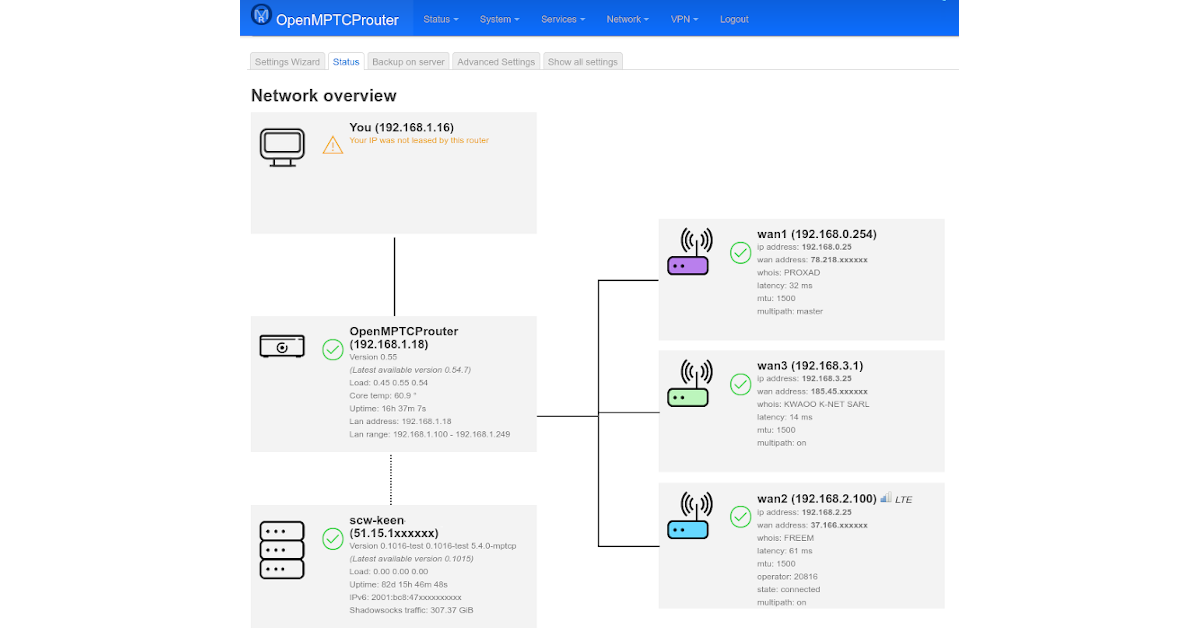
OpenMPTCProuter
pseudo blade
It takes effort to screw it up
peak cloak
but Telsa-isms
peak cloak
shy spade
we need public owned satellite internet
technically oneweb is owned by the british gov I think
well it was bought
shy spade
peak cloak
standard POE to dish pretty sure
are people able to still get this through ebay or something or are they software blocked
peak cloak
idk
opal pagoda
shy spade
are people able to still get this through ebay or something or are they software...
they arent blocked just new dish is cheaper to make so they ship new one
shy spade
maybe hit up gumtree for some old starlink satellites. set the range to 200km away and drive into the bush to pick it up
 opal pagoda
 shy spade
from the east coast
pseudo blade
opal pagoda
btw what do you tink about this https://www.openmptcprouter.com/
and me combinin...
Combining unreliable networks will have unreliable results.
opal pagoda
pseudo blade
Combining unreliable networks will have unreliable results.
my dsl isnt unreliable
pseudo blade
4G will be.
peak cloak
opal pagoda
if it's just ethernet, no issue
pseudo blade
It might work well, it might not. You might be better off on just one of the two.
shy spade
mobile networks are atrocious as well in Australia
opal pagoda
here they are ok
i had 100+ mbps back in 2016 but more people came on the 4g network since and speed got dropped to around 25 down and 50 up
shy spade
rip
opal pagoda
same will happen with "5g"

 pseudo blade
opal pagoda
i had 100+ mbps back in 2016 but more people came on the 4g network since and sp...
pseudo blade
opal pagoda
i had 100+ mbps back in 2016 but more people came on the 4g network since and sp...
That inconsistency based on time of day will make loadbalancing difficult.
Because that's the thing - 4G is best-effort.
Anything that cares about packet order either won't get it or will see massive latency spikes when it's buffered on the VPS.
opal pagoda
pseudo blade
Because that's the thing - 4G is best-effort.
keep in mind i literally have line of sight to 2 towers
 mental badger
Hey guys mine wifi connection on my pc is really bad and the router is 6 meters away i have a external wifi card.
and am paying for 500mbpts and it drops to 5mbpts
opal pagoda
mental badger
Hey guys mine wifi connection on my pc is really bad and the router is 6 meters...
just run a ethernet cable
mental badger
i cant couse am in next floor
shy spade
drill through floor
shy spade
drill through each individual stair
opal pagoda
mental badger
are u7 joking
what wifi card do you have?
shy spade
wait are you being serious
opal pagoda
mental badger
i cant couse am in next floor
take some pictures and we can find a path you can take with ethernet cable
shy spade
but yea ethernet snake
i am on second floor and have snaked ethernet up
like along the walls like a maniac
but its white, the walls are white and the cable clips are white so its not that bad
mental badger
i think is this one TP-Link Archer T5E brezžična mrežna kartica, AC1200, Wi-Fi, BT4.2, Dual Band, PCI-E
ok i will get some pictures
opal pagoda
mental badger
i think is this one TP-Link Archer T5E brezžična mrežna kartica, AC1200, Wi-Fi, ...
croatia?
shy spade
and then just get a switch if you want to connect other devices
mental badger
slovenia
opal pagoda
shy spade
but its white, the walls are white and the cable clips are white so its not that...
i have drilled multiple holes in the wall to get to router in the living room on the floor below me
mental badger
shy spade
and then just get a switch if you want to connect other devices
my father wont let me
opal pagoda
mental badger
my father wont let me
powerline
shy spade
opal pagoda
i have drilled multiple holes in the wall to get to router in the living room on...
i would but rental
mental badger
i think is the best way
opal pagoda
shy spade
i would but rental
smh imagine not owning your own home
mental badger
yep
shy spade
😢
mental badger
but will the powerline connector lower my ping
opal pagoda
mental badger
yep
one thing you will have to make sure with powerline is that its on the same phase bc in europe its common to have 3 phase supply and powerline cant jump phases
opal pagoda
mental badger
but will the powerline connector lower my ping
yes
shy spade
when you say powerline you are plugging it into power outlet right
and it has like a ethernet port on it
 mental badger
hey which is the best one
opal pagoda
shy spade
is this as fast as just normally snaking cat 6
imagine it as wifi but inside the power wires
you can have multiple but then speed drops
opal pagoda
its not as fast as regular ethernet cable
shy spade
how bad though like if its a 5% drop
opal pagoda
shy spade
how bad though like if its a 5% drop
its defo not gigabit
shy spade
thats not that bad compared to the ugliness of outside cables
opal pagoda
 mental badger
its not worth it i think
peak cloak
shy spade
is this as fast as just normally snaking cat 6
No, and speed and quality heavily depends on your electric wiring
shy spade
yea this is dodgy as fuck
mental badger
how to CHECK wiring
opal pagoda
mental badger
its not worth it i think
compared to couple of holes in the walls it isnt worth it
if you can drill just drill
peak cloak
How close they are? Are they on the same circuit
shy spade
bro just get a long ass ethernet cable
mental badger
am going to take pictures now
opal pagoda
shy spade
bro just get a long ass ethernet cable
if he needs to drill i would reccomend getting a long cable, sniping one end of, run cable trough 6mm hole and reterminate the cable
shy spade
no drilling


 waxen scroll
cute
waxen scroll
shy spade
although dont houses already have skirting boards
yep
opal pagoda
shy spade
although dont houses already have skirting boards
you can pull them off and run cables behind them, thats what i did
shy spade
so this is something you would put instead of those skirting boards
opal pagoda
shy spade
so this is something you would put instead of those skirting boards
mine already had space for a cable
shy spade
opal pagoda
you can pull them off and run cables behind them, thats what i did
yea this is "destructive" though
opal pagoda
shy spade
yea this is "destructive" though
they are held in place by clips
peak cloak
You can use cable raceways
shy spade
mental badger
my father wont let me
im guessing dad will be angry if you replace skirting boards n shit lmao
mental badger
yep
opal pagoda
take some pics
mental badger


sorry for bad quality
at the first phot is my room at the end
that is the finish line
opal pagoda
you can run the cable almost invisibly trough that U profile steel
 shy spade
definitely could easily run an ethernet cable easily and cover with floor strip when you get to the room area
mental badger
yea but how am going to get it to my room
shy spade
your room is the end right
shy spade
you can just go straight and get a cable cover for like $5
 mental badger
at the end left is another room
shy spade
yea so you would put the cover there in blue
opal pagoda
shy spade
you can just go straight and get a cable cover for like $5
or up and over the door
 mental badger
i mean not a bad idea
shy spade
i would prefer the up and over but its up to you
mental badger
thanks
shy spade
i went up along the roof because i have carpet to avoid tripping
mental badger
heyy
mental badger
opal pagoda
or up and over the door
i think that this is the best solution
 opal pagoda
mental badger
yes i need a cat 6
opal pagoda
mental badger
yes i need a cat 6
are you running 10gig?
mental badger
no but is 100mhz
opal pagoda
mhz dont matter for you
opal pagoda
cat5e
mental badger
ok
opal pagoda
also you can use couplers whenever you need to switch the type of cable
if you cant find one long enough
you can use regular round one for the stairs and flat one when exposed
 opal pagoda
shy spade
I always think im being trolled
opal pagoda
shy spade
I always think im being trolled
bc you are 
lone sun
peak cloak
There's multiple interfaces. There's an internal interface called loopback
🤔 Yeah, various nerds say the loopback address is about the TCP/IP software, and has nothing to do with the hardware. It explains why it can be pinged no matter what happens.
 rocky tendon
can someone help me figure out this problem i lag like this in every game
rocky tendon
yes
iron canopy
Is running a wired connection possible
rocky tendon
nope
iron canopy
Well see if making that device the only one on let say 5ghz and other on 2.4ghz
rocky tendon
i can try i guess
opal pagoda
rocky tendon
nope
powerline it is then
rocky tendon
how do i do that
opal pagoda
you will need to buy powerline adapter, they often come in pair of 2
you put one near your router and run a ethernet cable into it
then you put one near you pc and run ethernet cable from it to your pc

Save 90% on your first 4 months of Freshbooks at https://www.freshbooks.com/techtips
Try SimpleMDM FREE for 30 days on unlimited devices at https://lmg.gg/SimpleMDMSept
Colton's WiFi is just like his work ethic: it SUCKS! How can we solve this problem? Ethernet? Maybe, but why worry about running new cables when he's got plenty in his walls. M...
rocky tendon
okay ty
 meager ginkgo
rocky tendon
okay ty
meager ginkgo
rocky tendon
okay ty
If you have coax outlets, MoCA will likely be the better option (if you can find where the cables go)
 hazy sandal
got an isp gateway setup (temporary) as an AP (DHCP etc turned off) and using pfsense for everything else. This works decently. My only issue thou is that it is supplying all devices on the network (even connected directly to the pfsense box) with ipv6 addresses, it's own ipv6 address as dns server and somehow overrides the domain search prefix supplied by pfsense. Any clue on how to workaround this until I can purchase something better
 wintry fiber
wait does this actually works? 😂
 pseudo blade
wintry fiber
wait does this actually works? 😂
pseudo blade
wintry fiber
wait does this actually works? 😂
It would, but it's basically a really dumb hub that also blasts all network traffic over your powerlines
If you needed powerline ethernet for multiple devices, sticking one in with a switch would be a much cheaper and more efficient solution.
peak cloak
hazy sandal
got an isp gateway setup (temporary) as an AP (DHCP etc turned off) and using pf...
Turn off RA
hazy sandal
peak cloak
Turn off RA
ipv6 isn't on in pfsense. On the isp gateway I can't do anything regarding ipv6 at all, just a green dot showing that it is enabled
peak cloak
hazy sandal
ipv6 isn't on in pfsense. On the isp gateway I can't do anything regarding ipv6 ...
Maybe if you disable v6. RA (router advertisment) is a part of SLAAC that basically makes clients know it's a router and use it's DNS server so I think it's still on
If it's just acting on a L2 level it shouldn't need v6 actually on
hazy sandal
pfsense is the one that should handle everything, but the isp gateway is pushing it's own stuff over ipv6, which is the issue.
peak cloak
Yeah, can you disable ipv6 on the "gateway"
hazy sandal
no, I can't. I have no access to anything except settings for ipv4. Even if that was the device that should handle stuff, I can't access anything regarding ipv6
thats everything regarding ipv4/ipv6 I can access...


Kinda feels like I'll have to deal with this until I can get a proper AP, leaning towards a TP-Link EAP245
opal pagoda
hazy sandal
Kinda feels like I'll have to deal with this until I can get a proper AP, leanin...
also look into ubiquti ap
i got rocket m2 and once i set it up it never gave me problems
i use it outdoors to cover my terrace and lawn
hazy sandal
I came in contact with a few before, but never really got to manage them properly, but the little experience I got with management of them wasn't really enjoyable. Might look into them further down the line thou, at least to get a better familiarity with them for work.
opal pagoda
hazy sandal
I came in contact with a few before, but never really got to manage them properl...
i also have xiaomi 4a gigabit edition router that i put into ap mode for garage bc it was cheaper buying a router than buying a access point
peak cloak
opal pagoda
also look into ubiquti ap
I'm not a fan if you just need one AP as it doesn't have a standalone web ui
pseudo blade
I think I'm looking at a Technicolor/Vantiva router. Without knowing exactly which one it is, I can only really suggest installing OpenWRT, replacing the device or using it in routed mode so it won't pollute other devices and you can give it DNS config from the now upstream pfsense. Your search domains will still not work that way. But I'm actually doing exactly this right now on my home network on a Technicolor so I'll quickly check what mine's doing.
pseudo blade
hazy sandal
got an isp gateway setup (temporary) as an AP (DHCP etc turned off) and using pf...
As a reply to this
Hey guess what mine doesn't do this and I found the setting that apparently controls this, which is exposed with my ISP's settings.
 hazy sandal
pseudo blade
I think I'm looking at a Technicolor/Vantiva router. Without knowing exactly whi...
hazy sandal
pseudo blade
I think I'm looking at a Technicolor/Vantiva router. Without knowing exactly whi...
TG799vac Xstream to be specific, the Telenor VANT-W model. And even though the fw is OpenWRT based, there is no clean OpenWRT build for this device, not that I've been able to find anyhow. And it is only temporary. We've just moved to a house, and for some reason the gateway wont take an ip (as 3 other gateways), but pfSense does.
pseudo blade
This is on a Technicolor DJA0231, which is years newer so your mileage may vary
hazy sandal
Before we moved we had access to up to 5 public ips from our isp (Telenor), but our new isp (couldn't bring Telenor here sadly) gives a CG-NAT:ed ip unless requested and motivated otherwise. In our apartment one public IP went straight to pfSense, and one to the TG799.
Telenor still hands out TG799vac Xstream to new customers xD
opal pagoda
peak cloak
I'm not a fan if you just need one AP as it doesn't have a standalone web ui
idk but mine had one
maybe new one doesent have it
peak cloak
opal pagoda
idk but mine had one
maybe new one doesent have it
Ik the new ones don't, at least anything newer than N
hazy sandal
opal pagoda
idk but mine had one
maybe new one doesent have it
The ones I accessed didn't have a standalone web ui, and that was about 1.5-2 years ago
peak cloak
I've worked with them at work, need to adopt to controller to manage
 opal pagoda
peak cloak
That's for wireless p2p
opal pagoda
peak cloak
That's for wireless p2p
yea i got one really cheap new, i use it just like normal ap
with omni antennas
i just needed to turn off airmax technology
pseudo blade
hazy sandal
Before we moved we had access to up to 5 public ips from our isp (Telenor), but ...
I assume you don't have that setting when you go to the local network options?
peak cloak
opal pagoda
yea i got one really cheap new, i use it just like normal ap
ah yeah, but that's misleading since thats not what people think of AP
pseudo blade
I'd also say they don't really make for very compelling access points, though they can be used that way
opal pagoda
peak cloak
ah yeah, but that's misleading since thats not what people think of AP
i paid 18$ for it
new in store
pseudo blade
They're outdoor rated sure but you'd only get one chain if you're just sticking an omni on one unless you put two on and do something weird with the positioning, and only offer one band
opal pagoda
pseudo blade
They're outdoor rated sure but you'd only get one chain if you're just sticking ...
i put 2 antennas on it
pseudo blade
Will it work if you just want a bit of bandwidth outside for home use? Sure.
opal pagoda
range is awesome doe
pseudo blade
Mostly limited by the tiny device antennas and receive sensitivity
Phones don't broadcast at a watt either
I still use something vaguely equivalent in Mikrotik-land for low numbers of clients where nobody needs more than 20-30mbps anyways and we saw up to about 300 meters clear line of sight
opal pagoda
pseudo blade
I still use something vaguely equivalent in Mikrotik-land for low numbers of cli...
well i mostly found a deal and then found a use for it
i could have also connected my remote property with it if i was able to buy 2 but they had only one in stock
pseudo blade
Nothing wrong with saving money but I won't go and pay full price to replicate it
Antennas aren't free either
opal pagoda
pseudo blade
Nothing wrong with saving money but I won't go and pay full price to replicate i...
fr i wouldnt pay 80$ for it
opal pagoda
pseudo blade
Antennas aren't free either
i already had couple of omni antennas from access point that failed
 twin hazel
Any recommendations for a new wifi acces point setup? I am using an older ubiquity AMPLIFI and I think I should upgrade
pseudo blade
twin hazel
Any recommendations for a new wifi acces point setup? I am using an older ubiqui...
Why do you want to upgrade? If we have more of an idea of what you're looking for we can provide better responses.
twin hazel
I am no longer getting the expected speeds and would look for something that gives me good coverage and speed everywhere
My flat looks somewhat like this, the red x is the internet, the green is the garden
 pseudo blade
twin hazel
I am no longer getting the expected speeds and would look for something that giv...
pseudo blade
twin hazel
I am no longer getting the expected speeds and would look for something that giv...
What speeds are you getting, and what speeds do you expect? Do you get the expected speeds right next to the router?
That's a pretty small area to cover.
twin hazel
Rn right next to the router, 380mbps
Getting 600-800ish with cable
But in bedroom, bathroom or garden it’s something 50 or less
 cold forge
Can anyone help me figure out why I'm only getting ~1070Mb/s when I should be getting closer to 2000?
cold forge
that's... not helpful at all
 thick minnow
be grateful
cold forge
- if I pay for something, I get to be entitled to the thing I paid for, it wasn't charity given for free
- I asked for help, not advice such as "just deal with it"
thick minnow
1000 mbs is already overkill
cold forge
okay... so I'm going to disengage, because I'm looking for help with my networking, not to be told "just be happy with it"
 drowsy fossil
cold forge
Can anyone help me figure out why I'm only getting ~1070Mb/s when I should be ge...
drowsy fossil
cold forge
Can anyone help me figure out why I'm only getting ~1070Mb/s when I should be ge...
this sounds like the device connected is gigabit
try running the speedtest on two devices at the same time
if not, check each device between your isp and device for the speed of the connection
cold forge
That's what I thought too, except for a few things:
- with speedtest, I get slightly over 1Gb/s, about 1070Mb/s
- AFAIK, everything is 10GbE end-to-end
and it's not an ISP issue - I get the full 2Gb/s if I use the speedtest CLI on my router
drowsy fossil
you have custom settings on your router?
cold forge
Running an OpnSense DEC2750
drowsy fossil
i mean besides wifi pass, stuff like filtering?
cold forge
no wifi on the router, it's purely a router and firewall
actually, i might have a seperate device doing routing, I'd need to doublecheck
it might be just NAT + Firewall
drowsy fossil
be super careful, bc theres plenty of devices that cant handle that sort of bw when specific settings are enabled
cold forge
Yeah. That's why it's complicated, lol
drowsy fossil
and also check the link speeds just in case
cold forge
oh! I can post image in this channel
shy spade
cold forge
Can anyone help me figure out why I'm only getting ~1070Mb/s when I should be ge...
That’s robbery
 drowsy fossil
check all the interfaces
cold forge
 I wonder how much work it would be to connect my desktop directly to the router. IDK if I can
shy spade
cold forge
that will be helpful
2 questions: did you ever have close to 2000mbps. Is that just advertised as 2000mbps and your actual real life speed is half
drowsy fossil
cold forge
and it's not an ISP issue - I get the full 2Gb/s if I use the speedtest CLI on m...
see above
shy spade
My mistake
cold forge
I'm bad at diagramming.
10GbE fiber (throttled by ISP to 2Gb/s) -> ONT. ONT > DEC2750 via Cat6. DEC2750 > Mikrotik via DAC. Mikrotik SFP+ to RJ45 > Cat6 > another mikrotk switch w/SFP+ to rj45. Mikrotik > desktop via DAC
drowsy fossil
check all the mikrotik block diagrams
there may be one that you have crossing a switch chip > cpu link
and also check your dacs ofc
cold forge
@thick minnow I don't really want to move this conversation into DMs with you. But just to be clear - if I work 40+ hours a week, and I spend my own hard earned money on something, it's not "entitled" to want what I paid for, just so we are clear
 thick minnow
i aint reading allat 😂
cold forge
not my problem 
seems me to me that reading comprehension isn't your only problem, judging by your spelling - but I digress
cold forge
drowsy fossil
there may be one that you have crossing a switch chip > cpu link
good point
Mikrotik is definitely a bit complicated
thick minnow
cold forge
seems me to me that reading comprehension isn't your only problem, judging by yo...
My name is Walter Hartwell White. I live at 308 Negra Arroyo Lane Albuquerque New Mexico 87104.
cold forge
Congratulations? 
cold forge
Yes, that's how human beings communicate on the internet. I realize you are probably pretty new to the internet, but you'll learn in time. 
peak cloak
ironic
 cold forge
The other issue is - troubleshooting 10Gbe is difficult. At 1Gb/s, i can just stick 1 laptop at each end of a connection or something - i don’t know if any laptops with 10GbE ports and by all accounts, external SFP+ adapters are garbage
drowsy fossil
again multiple devices
id really hope your wifi network is capable of over a gb at that price of other equipment
cold forge
drowsy fossil
again multiple devices
sorry, not sure what you mean by that
cold forge
drowsy fossil
id really hope your wifi network is capable of over a gb at that price of other ...
working on it. Probably need to update my ubiquity WAP to Wifi 6 or whatever the new hotness is, but wifi devices aren't the primary consumer of my network anyway, my homelab and my desktop is. I have an SFP+ NIC in my desktop.
drowsy fossil
like run an iperf server on your pc, then run several client devices
eg laptop + phone
cold forge
working on that atm actually. Not getting over 1Gb/s on the desktop. Trying to troubleshoot now
just updated one of my Mikrotiks to the latest version
drowsy fossil
ye but if you use the laptop you can determine where the bottleneck is
cold forge
Confused how - all my laptops are only 1Gb/s, and I can do 1Gb/s from my desktop right now
cold forge
ah, I see. You are saying I could have 2 or 3 devices all do 1Gb/s iperf and the network with no issues should be able to handle it all since it should do 10Gb/s
drowsy fossil
like this
 drowsy fossil
cold forge
ah, I see. You are saying I could have 2 or 3 devices all do 1Gb/s iperf and the...
drowsy fossil
cold forge
ah, I see. You are saying I could have 2 or 3 devices all do 1Gb/s iperf and the...
ye
then try off the first switch
if you can get 2gb out both times, its the link between the router and sw 1
cold forge
makes sense, a bit to setup
shy spade
drowsy fossil
like this
That looks like a pp
thick minnow
language
drowsy fossil
-_-
cold forge
@drowsy fossil it’s good advice, thank you. Doing my first steps atm - upgrading everything, making sure I have the latest versions
drowsy fossil
while you are in the interface, make sure to check the link speeds
cold forge
it would help if Mikrotik did iperf
OpnSense has iperf. Mikrotik has btest. Windows has both iperf and btest, but OpnSense doesn't have btest and Mikrotik doesn't have iperf
opal pagoda
cold forge
I'm bad at diagramming.
`10GbE fiber (throttled by ISP to 2Gb/s) -> ONT. ONT > D...
could you cut the chain by pluging sfp+ to rj45 transciever into your pc bypassing your last switch?
cold forge
thinking about trying that next. I might be able to plug the PC directly into OpnSense
which would tell me if the issues is the connections, or the Mikrotiks
opal pagoda
cold forge
thinking about trying that next. I *might* be able to plug the PC directly into ...
yea opnsense > rj45 transciever > cat6 > rj45 transciever
cold forge
That's what I'm thinking
opal pagoda
cold forge
That's what I'm thinking
also make sure the speedtest target can actually receive that much bandwidth
https://youtu.be/_7CIlZIZB5k?t=856
like this

Get your first audiobook for free when you try Audible for 30 days. Visit http://www.audible.com/linus or text linus to 500500
Use code LINUS and get 25% off GlassWire at https://lmg.gg/glasswire
Learn more about iTel: https://lmg.gg/iTel10Gbit
Buy ethernet cables on Amazon: https://geni.us/nk7q4i
Discuss on the forum: https://linustechtips....
cold forge
opal pagoda
also make sure the speedtest target can actually receive that much bandwidth
2Gb/s from OpnSense
Holy shit, those SFP+ adapters just about burn your fingers!
opal pagoda
cold forge
Holy shit, those SFP+ adapters just about burn your fingers!
🤔 maybe they were thermal throttling if its possible
cold forge
Maybe
opal pagoda
needs a blowiematron ziptied to them
opal pagoda
cold forge
I wish I could easily put an AC in my basement
mini splits are a great option btw
cold forge
huh?
opal pagoda
cold forge
huh?

Pioneer sent me a 9k BTU mini split for my shop. Here's how I installed it.
Want a Pioneer unit for yourself? Check out Pioneer using my affiliate link:
https://www.pioneerminisplit.com?sca_ref=23956.rwtRR10XUa
Amazon links:
Vacuum Pump: https://amzn.to/2p35Eb1
Manifold Gauge: https://amzn.to/2q1VLe7
Adapter: https://amzn.to/2M2B762
just needs a small 5cm hole to run refrigirant + comms
cold forge
The entire thing is concrete though
opal pagoda
cold forge
The entire thing is concrete though <:Thinking:562727723806490654>
my whole house is concrete and bricks and installers were able to install it in a hour or so
cold forge
and the only window opens up like this:
 shy spade
opal pagoda
https://youtu.be/_7CIlZIZB5k?t=856
like this
shy spade
opal pagoda
https://youtu.be/_7CIlZIZB5k?t=856
like this
I can immediately tell the age from linus baby face
cold forge
opal pagoda
my whole house is concrete and bricks and installers were able to install it in ...
and sounds not very portable. I have zero desire to install something expensive that's hard to take with me when I leave. The landlord certainly doesn't deserve it for free
opal pagoda
cold forge
and sounds not very portable. I have zero desire to install something expensive ...
they are like 300$ + install fee here
ofc higher spec high efficiency ones are more expensive but basic ones are that price
shy spade
opal pagoda
they are like 300$ + install fee here
thats not bad
opal pagoda
shy spade
thats not bad
i tink i paid about 600 for mine (install fee and a nice unit)
peak cloak
cold forge
Holy shit, those SFP+ adapters just about burn your fingers!
rj45 adapters?
yes, they get hot, and they use a fair bit more power than just fiber
shy spade
do they have lasers inside
peak cloak
which is why you can't just put rj45 sfp+ modules on all ports of a sfp+ switch most of the time
opal pagoda
shy spade
do they have lasers inside
no but they have active conversion chips
peak cloak
shy spade
do they have lasers inside
the fiber ones? yes
peak cloak
stupid
cold forge
peak cloak
rj45 adapters?
Yup. I already had the Cat6 run, and replacing it with fibre would be a lot more work
peak cloak
yeah that's the issue, in wall cabling
pain to add anything after walls are closed up
spent a good bit running ethernet around the house
cold forge
Yuuuup
plus termination. You can terminate Cat6 at a keystone - not really an option for fiber
opal pagoda
cold forge
plus termination. You can terminate Cat6 at a keystone - not really an option fo...
you can terminate fiber but at minimum you need
fiber strippers
fiber cleaver
fiber wipes
fiber field connector
and a visual fault locator to align the field connector
and then you cant even go with lc connectors bc almost all field connectors are sc
cold forge
I mean, I know you technically can, but it's a huge pain making it "not really an option" for all intents and purposes 😛
(sorry, *for all intensive porpoises 😆 )
opal pagoda
i am considering fiber for connecting garage to house as ill be digging a trench for 3 phase power anyway
cold forge
it's a good idea. I did some research and comparisons for a friend of mine thinking of doing basically the same thing
the SFP+ modules is where the cost is - length for length, the fiber cables are cheaper than most other options we looked at
considering he already had the modules, it's probably the best option if he decides to do it
opal pagoda
well my options are
run cat6a in the trench and risk damaging something with emi
fiber
powerline
and wifi p2p
peak cloak
opal pagoda
i am considering fiber for connecting garage to house as ill be digging a trench...
would be good idea, fiber is nice as it also electrically isolates
sfp+ modules aren't too expensive
like 20-30 bucks
cold forge
SFP or SFP+?
peak cloak
for short distance
cold forge
and not, they aren't that expensive, but 2 modules + a length of fiber is more expensive than just buying DACs
but as was mentioned - the lack of electrical interference is definitely a big plus :)
peak cloak
well yeah for super short distance like in a rack that's different
opal pagoda
peak cloak
would be good idea, fiber is nice as it also electrically isolates
i already bought this
we will see if cheapest fiber cleaver ever does its job
 opal pagoda
peak cloak
can also just get some direct burial stuff
opal pagoda
peak cloak
can also just get some direct burial stuff
i have a tiny bit of problem that my father already burried a conduit (3/4" water line) below asphalt road so i am a bit space constrained
and i am not in the mood of digging up asphalt road or using pneumatic mole to run another conduit
peak cloak
yeah
drowsy fossil
i consider myself people lel
drowsy fossil
cold forge
and not, they aren't *that* expensive, but 2 modules + a length of fiber is more...
again thats only true for distances where you can get dacs
opal pagoda
5 meter or less
shy spade
i mean cat 6 can go up to 10gb so i dont understand why you would be putting fibre through the house
drowsy fossil
and also only true if you are going new equipment
if you are going for speed, optical is actually cheaper nearly regardless of distance for 40 and 100g thanks to the used market
opal pagoda
shy spade
i mean cat 6 can go up to 10gb so i dont understand why you would be putting fib...
bc you can put 25 gig trough a pair of fibers
shy spade
but for what
drowsy fossil
you can put 400g on a dac but thats still not relevant
opal pagoda
shy spade
but for what
living on the bleeding edge of technology
shy spade
lmao
opal pagoda
or you scored some cool stuff of ebay
drowsy fossil
my main use is minimizing local storage on my pc
opal pagoda
drowsy fossil
my main use is minimizing local storage on my pc
do you mount iscsi drives to your pc-s?
or just regular smb shares
drowsy fossil
opal pagoda
do you mount iscsi drives to your pc-s?
i was trying to use rdma with smb
drowsy fossil
meh
 wispy spindle
im not gonna need to transfer more than a gigabyte per second for a very long time
drowsy fossil
i can install all my games on my server and i dont have to worry about popin
opal pagoda
drowsy fossil
i can install all my games on my server and i dont have to worry about popin
what server do you have?
drowsy fossil
its basically my last pc lel
opal pagoda
understandable
drowsy fossil
9900k with a pile of old mlc ssds
wispy spindle
based mlc ssd
peak cloak
shy spade
do people run fibre all through their house?
not really
for connecting core network devices, sure
but to every room is overkill
peak cloak
shy spade
i mean cat 6 can go up to 10gb so i dont understand why you would be putting fib...
single mode fiber doesn't have a limit
kinda
shy spade
peak cloak
but to every room is overkill
fibre connection to tv which only does 100mbps
crazy how tvs dont have gigabit ethernet ports. Some 4k bluray movies can saturate 100mbps
But I guess nobody is doing this
shy spade
yea not encoded
peak cloak
who streams non encoded?...
shy spade
me
shy spade
yea so I have 2 copies rn since my machine cant transcode
4k bluray and then smaller encoded copy
drowsy fossil
and I like to use NDI which needs around 200mbps (it looks pristine)
shy spade
what is NDI?
drowsy fossil
its a video livestreaming codec (proprietary unfortunately)
but its very very low latency and high quality
also uncompressed 4k video is near 6gbps
4k bluray is already quite compressed...
 drowsy fossil
yup its super easy to set up
peak cloak
NDI isn't a file format pretty sure
drowsy fossil
plex can play livestreams tho right?
drowsy fossil
no we mean live content
drowsy fossil
like mpegts or rtmp
shy spade
no i dont think so no
peak cloak
It can do live tv but that's it
shy spade
live tv with channels nobody wants
peak cloak
although there are some plugins that do iptv
shy spade
yea you cant have a livestream from your cameras or something connected to plex
drowsy fossil
that sounds like a challenge lel
peak cloak
peak cloak
although there are some plugins that do iptv
apparently plugins are now retired
peak cloak
drowsy fossil
that sounds like a challenge lel
ikr, it is possible with a bit of work
shy spade
probably jellyfin has something
peak cloak
m3u

 peak cloak
unraid?
shy spade
yea
peak cloak
checks out
whole concept of a dedicated parity disk is not used in modern file systems like ZFS
shy spade
i heard unraid was going to add ZFS somewhere down the line
but yea thats kind of an L for unraid
 tidal frost
peak cloak
ikr, it is possible with a bit of work
tidal frost
peak cloak
ikr, it is possible with a bit of work
Ive got OTA working, but iptv and m3u playlists are a headache since they stopped plugins.
Got halfway through then just stopped trying lul
tidal frost
shy spade
live tv with channels nobody wants
Good handful of people who still want ota stuff. I wouldnt need it if my local news had iptv tho -_-
shy spade
true
kinda upset that ota is still not 4k
like in general with cable its just not 4k
even 1080p shockingly at least here in Australia
pseudo blade
cold forge
which would tell me if the issues is the connections, or the Mikrotiks
BTW check if you're bridging with hardware acceleration or not on the Mikrotik if it's a CRS switch, you'll know because a core or multiple will max out during the speed tests
The only other thing is making sure IPS isn't being used on opnsense because the router you have can't do much more than a gigabit with it
cold forge
pseudo blade
BTW check if you're bridging with hardware acceleration or not on the Mikrotik i...
How do i do that? In bed atm, but i can check later
And no IPS
pseudo blade
cold forge
How do i do that? In bed atm, but i can check later
Winbox/webfig/Mikrotik app on Android, /tools/profile, look at per-core CPU usage during a test ("all" will show all cores separately)
cold forge
Thanks!
 somber moat
Do PCIe switches apply to networking? I have some really specific questions
 tribal flax
Does anyone know how the Cloud Key Gen2 Plus from Ubiquiti records? Do I need a switch to plug the cameras in and then plug in the Key?
opal pagoda
thats why you buy intel cards and not realtek ones
always problems with non intel cards
pseudo blade
What I can say on this is that the Bluetooth for that WiFi card uses USB and the WiFi uses PCI Express. Have you perhaps got the card in some sort of USB adapter?
If not, for the drivers if you're running Windows 11 you might need to extract the Win10 driver from the installer and manually install it.
pseudo blade
tribal flax
Does anyone know how the Cloud Key Gen2 Plus from Ubiquiti records? Do I need a ...
You'd need to adopt the cameras from the cloud key, and do to that they'll need to be powered and share a network yes.
tribal flax
Ah alr, sounds good, I've been planning a Cloud Key Gen2+ with 3 G4 Bullets and 2 AP with Long range
And also an 8 port POE switch lite
pseudo blade
somber moat
Do PCIe switches apply to networking? I have some really specific questions
Not as most here know it, but you're better off asking than asking to ask - you might get lucky.
 trail venture
Can someone recommend a good small form factor router /switch combo that can run DD-WRT and has 10GBE ports RJ45 no fiber
preferably something affordable for home use it will be mostly used for NAS
only needs to be a 5 port unit but at least 3 ports need to be 10gbe
clear igloo
Affordable/10GbE/compact
Pick 2 if you're lucky
A router with 10GbE is NOT affordable
Easily $500+ and with multiple 10GbE interfaces, $1000+
clear igloo
Then used enterprise stuff is your only hope if affordable is under $500 price range and even then that's pushing it for copper 10Gb stuff
A switch alone, easy
A combo unit, not so much
trail venture
I could make due with a switch only
wan port is only gigabit so that can go through the old router and the switch just negotiate nas transfers between the computers
clear igloo
https://www.amazon.com/TRENDnet-Switching-Connections-Protection-TEG-S750/dp/B09M7KSZB2
This would probably be my go to for new non-energy draining enterprise gear

TRENDnet’s 5-Port 10G Switch, model TEG-S750, provides advanced high bandwidth performance, ease of use, and reliability. TheTEG-S750 10G switch features five dedicated 10G ports for high-speed network connections with a 100Gbps switching capacity.Having a sturdy compact metal housing and fanless...
trail venture
although i might want a 2.5g router since my current netgear doesn't have the cup to push the full 1gbps between wan and lan
that will work
clear igloo
Yah, there is the option for SFP+ switches with RJ45 SFP+ support but then that eats up cost too on the other side with the RJ45 optics
trail venture
I already ran cat8 STP for everything ill just stick with that instead of messing with optical
peak cloak
clear igloo
Yah, there is the option for SFP+ switches with RJ45 SFP+ support but then that ...
oh yeah if doing copper then imo just better getting just direct rj45
for a switch
trail venture
I have a trend net switch already so I think ill stick with that brand i assume they still have the beefy all metal construction and are pretty much bullet proof
so the switch is locked in what would you recommend for a high speed wan / lan router
wan side needs link aggregation for dual 1gbe coming from the modem future proofing it when speeds get over 1g
clear igloo
For your router option, if you did want 10Gb in the future then you're looking at a prebuilt then a pfsense/opnsense/mikrotik is going to run about $800 easily
If you did DIY then it opens up for some savings but you still need a really solid single threaded CPU for pushing a lot of data out to the internet, otherwise you can get away with a decent mid/entry level xeon and 8gb of RAM or something smaller
trail venture
only needs two lan ports no wifi
one for the switch and one for the smaller router which will be handling wifi only
ill keep my old router for that purpose
something that can run DD-wrt so I can just import my existing configs easier
peak cloak
do you need 10gig routing? since it doesn't sound like it
trail venture
the router can be 2.5
clear igloo
Link agg is a pita, I would honestly advise waiting to see what your ISP offers for over gig speeds since they might have a 2.5Gb port option instead with rate limiting which is much easier
trail venture
yeah than straight 2.5g i can just get a newer modem with 2.5 when needed
just thinking about link ag since my current modem already supports it
clear igloo
Yah, the issue is agg is hash based usually source/dest IP or MAC in which case you're not actually getting over 1Gb on a single client that way
trail venture
basically the reason to go to 10G is because I basically have my home set up to run steam off a NAS and all computers share the library
load time improvements etc
also nightly backups etc
things have just gotten a bit too large to do over 2.5
peak cloak
trail venture
basically the reason to go to 10G is because I basically have my home set up to ...
for that just a 10gig switch is needed
clear igloo
It looks like DD-WRT is a no go but OpenWRT is a go for x86-64 based stuff if you wanted to build something for 2.5+ Gb
cold forge
clear igloo
Affordable/10GbE/compact
Pick 2 if you're lucky
A router with 10GbE is NOT affor...
agreed. I did a bunch of research about a year ago
I had the following requirements:
- can run OpnSense
- 2+ SFP+ ports
- rackmount
- half-depth to fit in network rack
- ports facing the same side as the network switches
ended up the DEC2750 being the cheapest solution. https://shop.opnsense.com/product/dec2750-opnsense-rack-security-appliance/
if you want to go with pfsense, they have an appliance that is lightly cheaper
sadly, there were not good DIY solutions that were more affordable - very few chassis fit that profile
clear igloo
Yup, that's what I was looking at and the 6100 from netgate
cold forge
if you can go full-depth and don't care about your ports being on a different end of the server, then you have more options
cold forge
clear igloo
Yup, that's what I was looking at and the 6100 from netgate
yup! the 6100 was the other option I was looking at
https://shop.netgate.com/products/6100-base-pfsense, for reference, but by the time you get the rackmount kit, it's about $900, and it's pfsense not opnsense, so....
trail venture
complete overkill and well outside my budget comfort zone
cold forge
trail venture
complete overkill and well outside my budget comfort zone
Well, depends on what your needs are. Rackmount and 10GbE is pretty expensive unless you are going DIY
cold forge
if you don't care about rackmount or 10GbE, protectcli is pretty nice, I have a family member that bought one and is happy with it:
https://protectli.com/
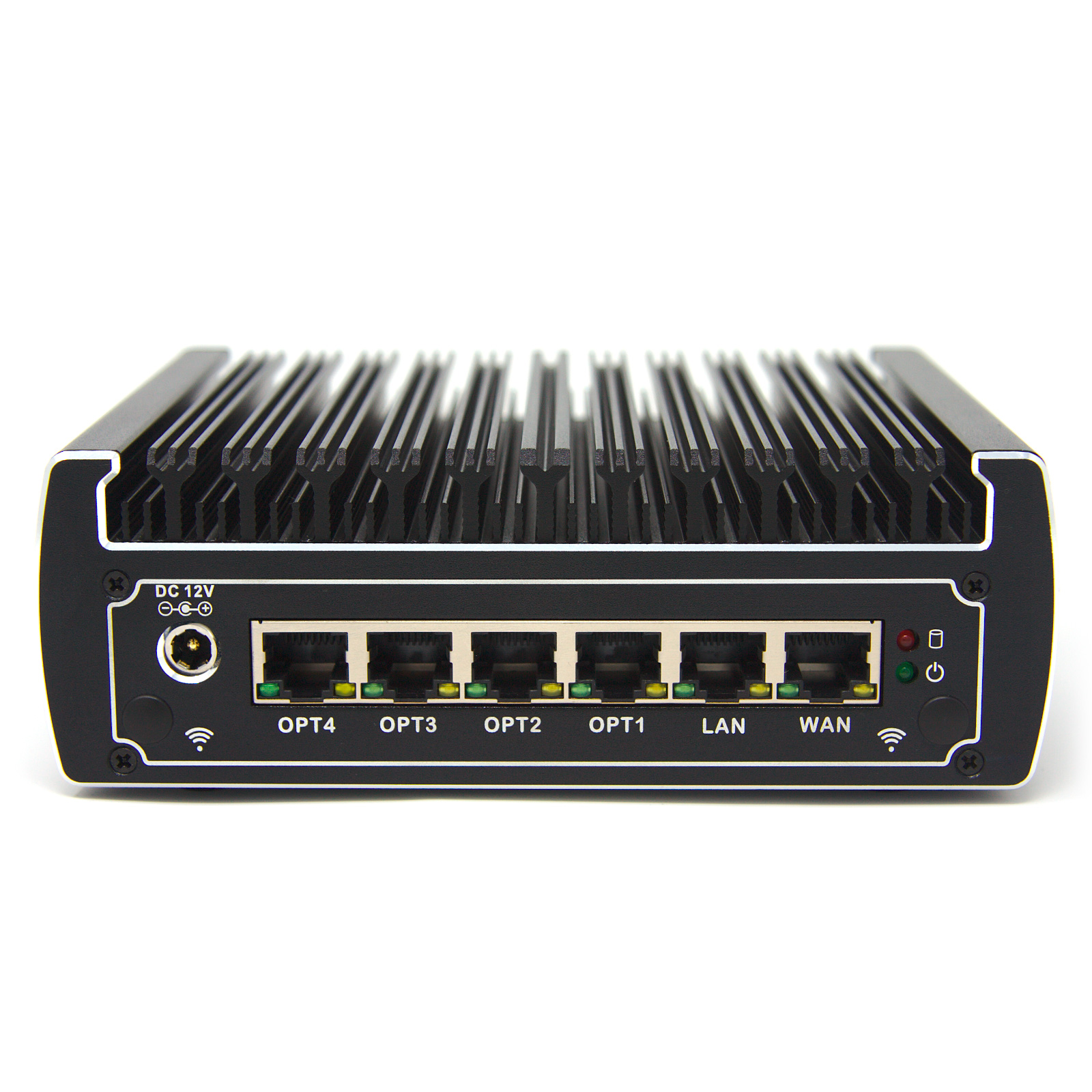
Secure your network with a trusted Protectli Firewall Appliance! Fully compatible with open-source software. US-based support, warranty and repairs.
This one has 2.5Gb:
https://protectli.com/product/vp4630/

VP4630: 6-Port firewall micro appliance/mini PC, built to run open-source software. Includes US-based support & 30-day money back guarantee.
trail venture
again the cost lets keep it under 300 at the high end
under 200 would be more comfortable
doesn't need to be fancy just needs to push packets between lan and wan at full throughput
pseudo blade
clear igloo
For your router option, if you did want 10Gb in the future then you're looking a...
Switch chip L3 is a pretty cost-effective option in Mikrotik land though it does involve tradeoffs.
I'd look at the above 2.5gbe boxes instead if that's enough (after checking if the STH aliexpress ones are cheaper because that protectli is 100% the same device)
cold forge
Yeah, idk if $2-300 is reasonable or not for 2.5Gb/s - 10Gb/s was my goal when I was doing research
trail venture
tbh anything enterprise has massive price gouging attached due to a captive audience with big pockets the average private citizen cant afford so really its a matter of just finding the hardware made by a consumer brand
optimally used market is best
if you want to even consider anything enterprise level
thick minnow
well there definitely is some price gouging i think enterprise hardware is priced for a reason, companies will pay for reliability and supply over actual functionality, manufacturers have to uphold some sort of standard of reliability which leads to higher pricing and is also partly because they have to account for the ongoing cost of supporting enterprise hardware.
opal pagoda
trail venture
tbh anything enterprise has massive price gouging attached due to a captive audi...
enterprise stuff is either ultra expensive or uber cheap
cold forge
well, somethings are just expensive. Buying 1 SFP+ card is expensive, much more so than a 1Gb NIC
once you want to add that to hardware small enough to rack, it's even more expensive. And it takes a lot more computational power to route 10Gb/s than 1Gb/s, so while you can buy a $30 PC from Goodwill and throw an extra 1Gb/s NIC in it and have a pfsense box for under $100 - it's just not realistic for over 1Gb/s
rocky tendon
opal pagoda
you will need to buy powerline adapter, they often come in pair of 2
you put one...
https://www.amazon.com/NETGEAR-Powerline-Adapter-Ethernet-Passthrough/dp/B0778Y6K6N?tag=linus21-20&geniuslink=true&th=1 so if i buy this everything should be fixed?

The Powerline 2000 + extra outlet extends your Internet access to any room over existing electrical wiring. It’s perfect for connecting Smart TVs, streaming players & game consoles and ideal for 4K HD video streaming & lag-free gaming. It sets up in minutes with the push of a button.
opal pagoda
rocky tendon
https://www.amazon.com/NETGEAR-Powerline-Adapter-Ethernet-Passthrough/dp/B0778Y6...
powerline isnt better than cat6 but hugely better than wifi
rocky tendon
whats cat6
peak cloak
Ethernet cable
 hollow marlin
trail venture
tbh anything enterprise has massive price gouging attached due to a captive audi...
hollow marlin
trail venture
tbh anything enterprise has massive price gouging attached due to a captive audi...
Is there some price gouging, yes, but that is not the only reason.
Enterprise devices and their chipsets are what set them apart, the primary difference being between enterprise and consumer is what can be done in hardware. Consumer hardware all trickles down from enterprise and there is a lot of R&D and manufacturing cost required before reaching a point where it's cheap enough for consumer equipment. The bulk of the hardware cost is in the chipsets (and/or licensing).
There is also a ton of non-hardware related cost associated too which do have a cost to the manufacturer.
 full monolith
Is this chip able to get me 2gbps on both ports at the same time?
 peak cloak
full monolith
Is this chip able to get me 2gbps on both ports at the same time?
peak cloak
full monolith
Is this chip able to get me 2gbps on both ports at the same time?

Intel
Intel® Ethernet Controller I225-V quick reference with specifications, features, and technologies.
full monolith
Thanks i prob test it. Im doing bonding and need 1.1gbps on both ports at the same time
Need a non realtek 2.5g dual port card
hollow marlin
full monolith
Thanks i prob test it. Im doing bonding and need 1.1gbps on both ports at the sa...
You'll still only get a max of 1G per flow.
full monolith
Shit
hollow marlin
While I believe Windows has the ability to be able to do per-packet load-balancing, it still falls under aggregation which on any networking device is always hash based. One flow/connection will always follow the same path.
 halcyon osprey
can anyone help me? i switched to ethernet today and my download speed is 900+ but my upload speed is less than 1mbps, ive installed the latest drivers and followed a bunch of tutorials and forum posts but nothing works, my cable works fine as i connected my laptop and that worked fine
 meager hawk
I have 10 gig in my walls but only have a gigabit switch but I was thinking of getting a 10gig connection from my server to my computer any recommendations for super budget 10gig pcie cards
waxen saddle
meager hawk
I have 10 gig in my walls but only have a gigabit switch but I was thinking of g...
I picked up one of these recently:
https://a.co/d/3397ONx

Intel Ethernet converged network Adapter x540-t1, retail unit
I’m not 100% sure what “converged” means though. My speed tests can’t go over 4gb/sec due to limitations of my equipment at the moment, so no idea if this card can pull off full 10gb/sec, but I see no reason why it couldn’t.
 median owl
ping with response please
what would be the ideal settings/config to change on which devices for this to function as intended? TLDR I need to use hotspot for internet when ISP goes down, hotspot is wireless only so wanting to use PC as the bridge. PC also needs to be able to access the samba share on local network even when connected to the hotspot. Bonus if local network can also use the hotspot's connection when primary modem goes offline.
formality explanation as to "why": my ISP is doing their "best" to determine the cause of intermittent outages and after 3 weeks I need to do something to keep myself online so I can do my remote work regardless of their capacity to resolve it. their issue is infrastructure-based, outside my residence, which has been confirmed at this time; meaning there's not much I can do to fix that any faster. any thoughts on this?
 waxen saddle
If you access the NAS by IP address, I imagine you could just disable DNS for the wired adapter and be good to go.
Then when the ISP comes back online, re-enable DNS for the wired network.
median owl
it is accessed as a mapped drive on my PC, via IP; I'd prefer something a bit more automatic if at all possible. the outages come and go at any given time and it disrupts my work quite a bit having to mess with adapters and connections frequently
waxen saddle
The only thing I know of would be to get a router that has 2 WAN ports that you can configure to fail over. Then get a travel wifi AP that you can configure to bridge the ethernet to wifi and configure it to connect to your wifi hotspot.
I’ll admit this is not ideal for an issue that is caused by your ISP
median owl
yeahhhhhhh. I was afraid it was going to be a financially based solution as i've got money tied up dealing with them as is. I've lost quite a bit of money already due to the outages as i've had to push jobs back in due date; which I'm sure you already can tell where the snowball effect is happening... I know i'm kind of asking for a miracle solution at this point. When bridging the two together I do have access to both as they are, but I presume there's DHCP conflicts that cause the hotspot connection to be essentially unusable in performance
I'm a bit rusty on networking as i've not needed to really mess with it too much in the last few years, so I forget the rule of thumb for this, but I presume changing the IP of the hotspot device to an available IP in the router's range COULD work, however i'm unsure of the implications of DHCP conflict, which i'm sure happens
i've been doing some reading and see there's a config for interface metric, which is essentially a builtin way to handle this type of thing, apparently. I'll give this a try

 empty bronze
So I have port forwarding setup via a Wireguard tunnel using the following iptables rules
iptables -A FORWARD -i wgp -o enp1s0 -m conntrack --ctstate ESTABLISHED,RELATED -j ACCEPT
iptables -A FORWARD -i enp1s0 -o wgp -p tcp --syn --dport 27015 -m conntrack --ctstate NEW -j ACCEPT
iptables -A FORWARD -i enp1s0 -o wgp -p udp --dport 27015 -m conntrack --ctstate NEW -j ACCEPT
iptables -t nat -A PREROUTING -i enp1s0 -p tcp --dport 27015 -j DNAT --to-destination 10.75.0.2
iptables -t nat -A PREROUTING -i enp1s0 -p udp --dport 27015 -j DNAT --to-destination 10.75.0.2
Here enp1s0 is the interface with a Global IPv4 and wgp is the wireguard interface and 10.75.0.2 is the wireguard client I'm forwarding the ports to
This setup work perfectly when the client's AllowedIPs = 0.0.0.0/0
But doesn't work when the client's AllowedIPs = 10.75.0.0/24
How would I make this work with AllowedIPs = 10.75.0.0/24?
 snow elk
Does anyone know why Wireguard adds +10ms of latency?
Pinging two nodes from clearnet to clearnet gives 27ms.
If I make a Wireguard tunnel between them with MTU 1412 and ping them through the /30 in the tunnel I have 37ms.
Thoughts?
pseudo blade
snow elk
Does anyone know why Wireguard adds +10ms of latency?
Pinging two nodes from cl...
Well any VPN tunnel will add latency. How much will depend on node performance, load, if you're using userspace Wireguard or kernelspace and priority.
opal pagoda
snow elk
Does anyone know why Wireguard adds +10ms of latency?
Pinging two nodes from cl...
first there is processing delay
second there is physical delay of how far the wireguard server is from you
 swift creek
anyone here worked with ntop? I have a quick Q if thats ok
thick minnow
i have
pseudo blade
swift creek
anyone here worked with ntop? I have a quick Q if thats ok
Just ask, don't ask to ask

 swift creek
Copy
I'm trying to get the names of devices that have connected to the network in the last 6 months. the data generated in the 6 month report doesnt appear to be giving me a list like that that I need
Its probably me just being a network admin noob but getting that data isnt exactly obvious with the gui lmao
thick minnow
i think there is a setting you have to enable, i’m not sure are you just getting the mac address?
swift creek
I'm not even getting that list. The 6M report is just flows, interfaces and top apps used
thick minnow
what tab are you in?
swift creek
dashboard->traffic report
thick minnow
also i’m not sure it will display devices like that, i’ve only ever looked at active devices, under hosts
swift creek
yeah that appears to be the case. I'm looking into how to make a historical list of names/macs
thick minnow
yeah i think it gets rid of them when the dhcp lease expires
swift creek
any good directions to be pointed for setting up a way to log device names and macs?
thick minnow
do you have a managed switch?
pseudo blade
swift creek
any good directions to be pointed for setting up a way to log device names and m...
I'd probably use the logs from your DHCP server.
Not bulletproof, won't help you with ipv6 slaac
swift creek
pseudo blade
I'd probably use the logs from your DHCP server.
I was just thinking of that for opnsense. And we don’t use ipv6 in any interfaces
pseudo blade
But I can't imagine many devices using just ipv6 and not acquiring an ipv4
thick minnow
you could do what i did and get a L3 switch and set up logging on that
hollow marlin
swift creek
any good directions to be pointed for setting up a way to log device names and m...
Obtaining device hostnames requires the device to first advertise it's hostname in some fashion. This can be in DHCPv4, protocols such as LLDP or pulled via SNMP. It's not something that can always be discovered via external tools which is a good thing.
Simplest way is DHCPv4 logging which should always be done if this is a business/enterprise. You will at minimum log the MAC/IP binding and hostname if the client advertises it which it doesn't have to.
For more comprehensive logging, you should be using an NMS and monitoring all your equipment, which can give you hostnames via LLDP/CDP if the device has it enabled (VOIP phones for ex.).
snow elk
opal pagoda
first there is processing delay
second there is physical delay of how far the wi...
well as I said through clearnet I have 27 ms
and it's VyOS and kernel space.
snow elk
pseudo blade
Well any VPN tunnel will add latency. How much will depend on node performance, ...
the node is pretty good I'd say, four cores of a 5950x
And load is next to none as it's a clean install
pseudo blade
Ah yes but a VM will also add latency
snow elk
Yeah but I have 27 ms from side to side?
10ms is a lot
I'd expect one or two
Hypervisor is Proxmox
pseudo blade
I'm not sure what you'd like me to say
There is probably gains to be made in removing the VMs, or passing real hardware in. (Namely the NIC)
There is probably gains to be made in using real time scheduling.
There is probably measurement issues complicating your results.
10 milliseconds is actually not a lot of time.
snow elk
Well I've used the same setup on less powerful hardware, heck even on a host that was overselling and the latency was identical
(15ms pure, 16ms with wg)
I really don't know to be honest
The MTU is the same to my last setup, both Wireguard and clearnet interfaces
pseudo blade
MTU only matters if fragmentation needs to be done.
I wouldn't expect a normal ping to be fragmented.
For latency that is
pseudo blade
I presume this is your benchmark
snow elk
My benchmark is:
Step 1.
Ping peer1 from peer2 using public IPs, say 1.1.1.1 pings 2.2.2.2
Step2:
Ping peer1 from peer2 using the IPs in the Wireguard interface, say 10.0.0.1 pings 10.0.0.2
pseudo blade
I would look at performing encapsulation for wireguard, passing through packet processing and firewall into the second host, de-encapsulation, packet processing and firewall again and then back again all on a host with no guarantees of real-time packet processing in a virtual machine on a hypervisor with unknown load at the mercy of two schedulers on each side and say that 10ms sounds reasonable.
But as said I'd chase the above variables if you really need better or persue alternatives like MPLS or even dark fiber if you need a lower latency private connection.
snow elk
MPLS/dark fiber is out of reach for me. I'm just doing this for learning so no big budget.
Also, GRE is not possible due to one host being behind NAT , to add: a router that doesn't support 1:1 NAT
main tartan
I am confused. I am able to port forward remote desktop (port 3389), and I am able to port forward a Node.JS web server (port 80 & 3000). But for some reason I am not able to port forward my Minecraft Server (port 25565) using the Ubiquiti Dream Router.
I have enabled DMZ on my ISPs modem/router. And I have tried it without DMZ, by configuring the port forwarding on my ISPs router as well (for 192.1.68.2.1). But I can't get the port forwarding of my Minecraft Server to work.


but I am able to join using other devices on my local network. And netstat -ab shows that the port is in use.
 cold forge
- if on a modern linux system,
netstatis deprecated - trysudo ss -plnt - can you connect to that port from another system within the network? That would be the next troubleshooting step, to ensure you weren't running into issue like an OS firewall or something
thick minnow
should i be worried about performance in proxmox for stuff like opnsense i’m passing the nic directly but i have never thought about latency
thick minnow
lol ok
pseudo blade
I have a friend who removed CPU cores from being otherwise usable by the host and switched to using a realtime kernel just to reduce latency. It worked but you pay in throughput and flexibility
main tartan
cold forge
- if on a modern linux system, `netstat` is deprecated - try `sudo ss -plnt`
- ...
using windows rn, cuz I run some games that don't run well on linux yet.
and yes I am able to connect to that port from another device on my local network.
Oh I just tried running my web server on port 25565
and that isn't publicly accessible either.
I'll try to use a different port for my mc server.
bruh. that was it. For some reason the default port (25565) won't work with port forwarding.
Ah well, at least I'll be able to host my mc server for friends again.
 real flower
im looking to replace my eero pro 6 wifi with something more "tinkerable". I am hoping to get some suggestions for a wifi router I can have in AP mode. I already have a router and a small opnsense box everything will be going through. I would like to keep it under 200-300 if possible for a pair of AP units. One of them will plug into my opnsense box for internet.
The main requirements are wifi 6 or 6e preferred. VLAN support. Mesh network. I want at least wifi 6 but would prefer 6e.
I want the mesh ability because there is little to no ethernet running through this house (single story, 1500 sq ft). So I can't easily wire up any repeaters/sattelites. Though I will only need 1 additional device. Currently looking at these:
- TP Link EAP610 Omada
- TP Link deco AX3000
Not sure what other good options are in that price range.
 halcyon topaz
DO i need internet acess to transffer files to my nas on my local network
thick minnow
no
halcyon topaz
I have a 1gb/s switch and i can only get 110mb/s from my nas on it but i know the drives can do faster. Wat is my issue here
hollow marlin
halcyon topaz
I have a 1gb/s switch and i can only get 110mb/s from my nas on it but i know th...
"mb/s" (megabits/second) or "MB/s" (megabytes/second)?
halcyon topaz
megabytes per second
i also have gigabit network on both computers
gigabit port
on the board
hollow marlin
8 bits = 1 byte. So 110MB/s = 880mbps
halcyon topaz
is my speed good tho or is it limited
hollow marlin
Getting 110MB/s with 1gbps links is well within the range
Best case scenario is 950mbps or 118MB/s
halcyon topaz
ok cool
would buying a 10 gigabit nic on both computers increase the transfer speed
hollow marlin
Only if they are directly connected else you'll need a 10G switch as well
halcyon topaz
ok thanks for the help. Im only 13 and i just started using truenas so yea
i have a question regarding truecharts mc java server in tech support any help would be greatly appreciated
thick minnow
around 10G you might want to add a cache server, even if you can write fast enough the compression becomes a bottleneck in most cases
peak cloak
Or just a cache ssd?
thick minnow
oh i thought they where doing like steam downloads mb
rocky tendon
how do you know what cat wire (like cat6)to get?
opal pagoda
rocky tendon
how do you know what cat wire (like cat6)to get?
cat5e is only really good for gigabit altho you can get 2.5gig and 5gig over it
cat6 is rated for 10gbe at 55meters
cat6a is rated for 10gbe at 100m
rocky tendon
opal pagoda
cat5e is only really good for gigabit altho you can get 2.5gig and 5gig over it
...
100m as in like the length of the cord?
opal pagoda
rocky tendon
100m as in like the length of the cord?
yes maximum distance
opal pagoda
what cat rating?
rocky tendon
 opal pagoda
what will you use it for?
rocky tendon
rocky tendon
can someone help me figure out this problem i lag like this in every game
this is what my internet looks like on wi-fi
opal pagoda
rocky tendon
from the motem to my pc
gigabit or multi gigabit?
rocky tendon
opal pagoda
gigabit or multi gigabit?
i’m not sure what that means, sorry i’m not experienced in this stuff
opal pagoda
rocky tendon
i’m not sure what that means, sorry i’m not experienced in this stuff
then you are probably using gigabit
do you need it to be outdoor rated?
rocky tendon
no we are going to run it up and through our attic back down to my room, so just the heat level and mice
opal pagoda
rocky tendon
no we are going to run it up and through our attic back down to my room, so just...
yea that cable will do
rocky tendon
thanks for the help
 hearty coral
anybody who has any knowledge about PFSense routers?
meager ginkgo
@rocky tendon what country are you in? You may not even have to run a cable.
Check out MoCA 2.5 adapters or Powerline (worst-case)
 bold drum
Well that's interesting. OpenVPN seems to be giving T-Mobile a mental breakdown.
bold drum
hearty coral
anybody who has any knowledge about PFSense routers?
What you need?
hearty coral
i want to know if it is posible to gre-tunnel ips to the server whats running pfsense and route them to a switch and from the switch to like 10 other servers
bold drum
Ah, I haven't worked with GRE so not sure on that
I mean PFSense does support GRE so probably?
 molten elm
Can someone help? I just built my pc and have gigabyte wifi but these are my download speeds on basically every client.

 median spire
tf is a 10gbe port? I have one on my router but there's no way I actually could have 10 gigabit ethernet in my house because I plugged it into a 2.5 gigabit switch into a 2.5 gigabit compatible motherboard and only got a gigabit which is what all the other ports give me. what's this port for? why does it say 10gb if it's not? and what's the different between a wan port and Lan port?
hearty coral
median spire
tf is a 10gbe port? I have one on my router but there's no way I actually could ...
Huh is it a 2.5gbit router?
Or doe you mean it supports?
cold forge
median spire
tf is a 10gbe port? I have one on my router but there's no way I actually could ...
well, the port could easily be 10Gb, even if nothing else is
 ebon sierra
Anyone know any FTP Applications that are good other than FileZilla
cold forge
For Windows? WinSCP
ebon sierra
Ill check it out.
I also found one called Cerberus
ebon sierra
Im copying files over to my pc, but I keep losing connection while doing so, anyone know why/a fix?
pseudo blade
What's between you and it?
main tartan
cold forge
- if on a modern linux system, `netstat` is deprecated - try `sudo ss -plnt`
- ...
Turns out it is an issue with my windows system. Just tried it on my laptop (running Arch) and that works fine.
shy spade
rocky tendon
is this solid core?
cold forge
main tartan
Turns out it is an issue with my windows system. Just tried it on my laptop (run...
Did you double check your windows firewall?
main tartan
yup, fully disabled it.

Might be a good reason to switch back to linux as my main OS.
cold forge
Weird. I can’t help with windows, not an expert, just a user 😛
main tartan
no worries, just windows being weird as usual.
It worked before I connected my UDR xd.
But that should not have anything to do with it.
Since other devices on my network are able to port forward port 25565
And on my desktop pc I can port forward my minecraft server on a different port, just not on port 25565.
 long vapor
hi guys, was hoping someone would help me out
i want to set up smart lighting in my pc room, but the wifi there is basically non existant
whats the best way to go about this. My first thought is to get some sort of a pc based hotspot if thats a thing
but idk shit about network's
pseudo blade
long vapor
whats the best way to go about this. My first thought is to get some sort of a p...
Your computer has wired internet? If so you'd be ideally looking for a small wireless router you can use in Access Point mode, that will give you pass through your wired internet to both devices and get WiFi, as otherwise you'd want a separate small switch and an access point and that usually costs a bit more.
You can of course go for a USB or PCIe WiFi card and use hotspot/internet sharing but I find it be a comparatively fiddly solution.
long vapor
pseudo blade
Your computer has wired internet? If so you'd be ideally looking for a small wir...
not rl sure what you mean with acess point
pseudo blade
Takes ethernet in and puts WiFi out
long vapor
i dont think wirless will work for me since i got no wifi in the room atm
ah right
id still need a switch tho? to run ethernet back in to the pc
or are there wifi repeaters that got both ethernet in and out?
pseudo blade
If you have cabled internet to the room you can use that, but normal access points only have one port, so you wouldn't be able to plug your computer in without a switch.
pseudo blade
long vapor
or are there wifi repeaters that got both ethernet in and out?
You are looking for a wireless router, but you'd turn off the router bit
As I already said
long vapor
hmm, you think thats cheaper then a repeater?
found one for 30e near me, seems pretty economical
pseudo blade
Repeating no signal gives you no signal
long vapor
so the plan i got rn is to get a switch, wire ethernet both to a repeater and pc and go about it like that
idk much about networking so even this is kinda confusing to me lol
pseudo blade
Or you could go with what I suggested twice but idk I'm not repeating it again
A switch will work for attaching an access point.
long vapor
would i need to configure the router? or is it basically just plug shit in and go?
pseudo blade
You would need to turn off the router bit, DHCP etc.
long vapor
how would i go about doing that?
pseudo blade
Depends on which one you buy
long vapor
could the router affect my ethernet speeds?
based on a specific model i buy
or would it just be straight pass through
pseudo blade
If you buy a 100 megabit one and your internet is faster you'd be limited to 100mbps
You'd just use the switch built in to the router so the CPU speeds, RAM etc wouldn't matter
long vapor
so if i configured it properly it wouldnt affect ethernet speed from what i understand
pseudo blade
If your internet speeds are gigabit or less, and you buy a router with ports that exceed whatever speed you get, it won't affect speed
The same is true when buying a plain switch
long vapor
i got 1gb/s upload/download
over ethernet
so a simple switch could affect ethernet speeds as well?
pseudo blade
If it wasn't a gigabit switch yes
There's only a few dollars difference nowadays, you'd have to go really cheap to find one that wasn't
long vapor
so basically, i want to find a router/switch thats 1 gigabit +?
to not affect my ethernet speed
pseudo blade
If you want to go with the access point/router approach yes
If you have an spare old router lying around you could use that
pseudo blade
No problem.
rocky tendon
shy spade
is this solid core?
whats solid core?
shy spade
rocky tendon
whats solid core?

trueCABLE
Copper conductors are key for installing ethernet cables but learning the difference between solid vs. stranded ethernet cables makes for a smooth installation.
cold forge
what do you guys use for diagramming your home network?
rocky tendon
shy spade
https://www.truecable.com/blogs/cable-academy/solid-vs-stranded-ethernet-cable
should it be solid core or stranded?
oh nvm solid fs
shy spade
rocky tendon
oh nvm solid fs
if I understand correctly solid is preferred for permanent in wall installation but for regular use just go stranded because it’s flexible and easier to deal with
thick minnow
yeah solid core will break if it is moved to much
i hope one day new construction will come with any sort of in wall fiber
opal pagoda
thick minnow
i hope one day new construction will come with any sort of in wall fiber
you can do fiber but terminations are pain
opal pagoda
tbh if you want fiber in wall
just run long fiber patch cables
thick minnow
but still sick
shy spade
True
thick minnow
opal pagoda
tbh if you want fiber in wall
just run long fiber patch cables
i run fiber in the hvac lol
works
opal pagoda
thick minnow
i run fiber in the hvac lol
like ducts?
thick minnow
ye, it’s shelled dw
opal pagoda
ducted hvac are only used in usa and canada
thick minnow
i realize that