#networking
1 messages · Page 15 of 1


 dire osprey
also sorta curious, currently using wireguard through a provider and their overhead is <75mbps out of 1gbps haven't tried setting one up personally yet
 snow elk
dire osprey
also sorta curious, currently using wireguard through a provider and their overh...
snow elk
dire osprey
also sorta curious, currently using wireguard through a provider and their overh...
yep im not sure
the cpu usage on the vps doesnt bulge 50%
maybe there is way to turn off or nerf encryption?
like on openvpn, where you could set the cipher to something lighter like blowfish cbc
i am aware that it's not the right thing to do but its an exit through the internet anyway and it upstreams the same AS as my home internet soo
 faint bronze
Look at the interfaces output rate. Is it pegged at 100% or not? Is the CPU on your device limited at 100%?
CPU being 50% shouldn't be an issue... I would hope. When I done a speed test through wire guard I got within 10% loss of the limit of USB 2.0 which my adapter was connected through. For the CPU usage of that test I don't know, but it was a smartphone from about 3 years ago.
 thick minnow
@snow elk what is the speed when you ssh into it
o i see sry
wait so you are running the speed test on your local machine and it’s going through your vps right
 gilded ice
my router is connected to my pc through a 100ft ethernet cable and in the same room as my pc is my tv so i decided to buy a splitter so my tv can also get internet
but my pc is getting 10mbps. is it the cable? is it the splitter?
my router shows a flashing orange light instead of white on that port
 full monolith
once i had nearly 2tb on speedtest lmao
thick minnow
full monolith
once i had nearly 2tb on speedtest lmao
I did 6tb on cheap pre paid sim card 💀
full monolith
holy fuck
thick minnow
full monolith
holy fuck
It was on a lidl connect 5G plan. I'm pretty sure lidl connect exists in Germany too
Although I did the speedtests on 2CA lte 15+15mhz
full monolith
thick minnow
It was on a lidl connect 5G plan. I'm pretty sure lidl connect exists in Germany...
yea it does
 pseudo blade
gilded ice
my router is connected to my pc through a 100ft ethernet cable and in the same r...
pseudo blade
gilded ice
my router is connected to my pc through a 100ft ethernet cable and in the same r...
Splitters don't work that way (need one on both sides of the cable to merge/split for two hosts) and also limit your speed to 10/100, use a gigabit switch instead
Even the tiny unmanaged ones are OK for home use and are very cheap
gilded ice
Can you just send me an Amazon link or something. I feel so out of touch with networking because I just recently got internet at my house which is in the middle of nowhere
My networking knowledge is very little
 clear igloo
gilded ice
Can you just send me an Amazon link or something. I feel so out of touch with ne...
clear igloo
gilded ice
Can you just send me an Amazon link or something. I feel so out of touch with ne...
https://www.amazon.com/Ethernet-Splitter-Optimization-Unmanaged-TL-SG105/dp/B00A128S24/
or
https://www.amazon.com/NETGEAR-5-Port-Gigabit-Ethernet-Unmanaged/dp/B07S98YLHM/

TP-LINK 5 port Gigabit Ethernet network switch | Ethernet Splitter | sturdy metal w/ Shielded ports | life time | plug-and-play | traffic Optimization | unmanaged (TL-SG105).
gilded ice
Is that female to female? Because ik some you plug into the router but in my case I dont want that
I looks like it
clear igloo
huh?
You take cable from router into switch and then cables from switch into devices
gilded ice
Alrifht
 waxen scroll
clear igloo
You take cable from router into switch and then cables from switch into devices
waxen scroll
clear igloo
You take cable from router into switch and then cables from switch into devices
nani
 drowsy fossil
what are you confused about
 soft wolf
Why do they look so different


 tall zodiac
soft wolf
Why do they look so different
tall zodiac
soft wolf
Why do they look so different
there two differant types of faceplates
i am guesing the top one is european
 dreamy whale
- one of these 24-port thingies
- 9 of these wall mount thingies
- 100m of S/FTP cable
- 100 RJ45 connectors
- a router/firewall
- a switch


Is there something I've forgotten?
pseudo blade
dreamy whale
- one of these 24-port thingies
- 9 of these wall mount thingies
- 100m of S/FTP...
Crimp tool? Plenum-rated cable?
Here I'd be forced to use a licensed data cabler who'd usually have/know these things though they usually half-ass the install anyways
dreamy whale
pseudo blade
Crimp tool? Plenum-rated cable?
Plenum?
pseudo blade
Designed for use in your roof, fire-resistant
dreamy whale
pseudo blade
Here I'd be forced to use a licensed data cabler who'd usually have/know these t...
I'm a data-cabling student and we need wired connections at the gun range so I have a good opportunity to try make stuff
pseudo blade
A crimp tool closes the ends of the ethernet cable so it doesn't fall out of the rj45 connectors
dreamy whale
pseudo blade
Designed for use in your roof, fire-resistant
That's not really needed. The power cabling there is the regular PVC kind cable anyways and we'll run the data cables next to the power cables anyways.
pseudo blade
I'd be checking your laws on that one
dreamy whale
The municipality employees did the power cabling two years ago, we'll just run the data wires with the existing power cables
We checked and they are regular PVC cables
pseudo blade
Yeah that doesn't mean you can just run whatever you please
 peak cloak
dreamy whale
That's not really needed. The power cabling there is the regular PVC kind cable ...
peak cloak
dreamy whale
That's not really needed. The power cabling there is the regular PVC kind cable ...
Data right next to power?
Make sure to properly shield it
soft wolf
tall zodiac
i am guesing the top one is european
Yes
 wild dirge
May I ask a question here please or should I go to the tech support section?
faint bronze
Maybe.. depends what it is about. Networking, here would be fine. Else tech support.
wild dirge
It's about networking, so yes.
Every time I start my pc it queries a whole lot of web requests. I know this because I checked my private DNS and it shows 1000 plus requests in the span of a few minutes. Now, I have about 7 devices on my router, but the bulk of my requests come at the start of my pc and shortly after I login. The thing is most of the requests were legitimate when I skimmed through the query log. It slows those requests after a few minutes though. So I'm confused and I don't know what to do?
peak cloak
wild dirge
Every time I start my pc it queries a whole lot of web requests. I know this bec...
nothing? it's probably windows and any services getting IPs for all the domains it needs to communicate to
and then they get cached, at startup there obviously is no cache
wild dirge
I haven't started any browsers though?
peak cloak
browsers are far from the only thing communicating to the internet...
wild dirge
Very true.
faint bronze
If you are talking about windows yes it is very chatty on the network. I have seen before just after an update 100+ outbound connections. Most all were to Microsoft since I cleaned up startup to be about nothing. I tried to reduce the amount of info Microsoft gets, but clearly now well enough. I think it was about 20 consistent outbound connections without me logging in.
wild dirge
Would malware bytes and Kaspersky running in tandem do much to slow down the internet?
 viscid violet
Where do you buy a crimper?
faint bronze
I got one on Amazon, but that is me who orders too much stuff from there and does not do networking professionally.
 willow forge
good morning guys
dreamy whale
peak cloak
Make sure to properly shield it
S/FTP was the idea
 junior smelt
Hey y'all, i'm having issues setting up a Asus Hyper M.2 extender on my gigabyte x570 aorus ultra. I have 2 NVMEs in it, and tried seating it in the PCIeX8 and the PCIeX16 and the only way i can get access to both NVMEs is to slot it in x16, and bifurcate it into 4x4. The issue is that my GPU (3080 Ti) is now in x4. And now i'm a bit at the end of my knowledge for troubleshooting this. if anyone has some ideas or could potentially help me that'd be amazing
pseudo blade
junior smelt
Hey y'all, i'm having issues setting up a Asus Hyper M.2 extender on my gigabyt...
Not sure how this ties into networking, but what you're looking for is a card that has a pcie switch onboard. Such cards cost quite a bit more.
About 5x the price of said Asus Hyper M.2
You'd use a Hyper M.2 if you had enough dedicated lanes that it didn't matter i.e. a Threadripper or Xeon
You can also just find the combination tied to the first 8 lanes and use only those two ports, or switch to a 2 m.2 slot adapter in your x8 slot.
junior smelt
pseudo blade
You can also just find the combination tied to the first 8 lanes and use only th...
yeah sorry about the wrong channel, no one had any help elsewhere :\ also, i tried seating the Hyper M.2 into PCIeX8 and moving the drives around to see if i could figure out how the lanes were assigned. no dice, every combination gave me only 1 drive or none. so i think i'm screwed on that end. Would you have a link to a card with PCIe switch board onto it, so that i can start shopping :\
 wooden cobalt
Hello
Can someone tell me if this is possible
Can i use thernet cards from a server from 2014 in my pc?
 unborn sluice
is your pc from 2014 though
 hardy python
@wooden cobalt If your NIC has PCIe and your PC motherboard has PCIe, then yes it will work. Any PCI compatible from your PC and NIC will work
wooden cobalt
Its pci but it seems to work
hardy python
If your PC recognizes the card, then you're fine.
unborn sluice
It if works, then you can use it
snow elk
thick minnow
<@349630461435445250> what is the speed when you ssh into it
nope so good speed test is directly from my home to the vps via the internet (no tunnel)
then the bad one is from my home to the vps through a tunnel
so not through the vps to something else
 light grotto
any suggestions for an AP that can handle 20+ simultaneous connections (for a reasonable price)? My current router grinds to a halt when there are many people connected and it's not due to bandwidth bottlenecking
full monolith
Is this good for 2x2 wifi6?
 gilded ice
full monolith
Is this good for 2x2 wifi6?
gilded ice
full monolith
Is this good for 2x2 wifi6?
bro got 50 up 1 down
clear igloo
full monolith
Is this good for 2x2 wifi6?
Yes, that's pretty good
full monolith
gilded ice
bro got 50 up 1 down
Bro vodafone cable in germany is so goofy
gilded ice
is that 1000mbps?
full monolith
Yea 1gig down 50 up
full monolith
I get likr 1100 max down 55 up
clear igloo
lol, almost got me there too
gilded ice
where i live the best internet cost $60/m for 6-8mbps
thick minnow
gilded ice
and now verizon 5g is at my house and im getting 100mbps
You use the Verizon home internet thing?
I thought they only did this in areas with mmWave
gilded ice
thick minnow
You use the Verizon home internet thing?
actually its business
thick minnow
The business 5G internet can be sold to people on 5G nationwide?
gilded ice
idk the dif because business is more and it's capped at like 100, 200 or 300 based on how much you pay
but home is like pay 1 price get 0-infinity
thick minnow
Does starlink work where you live?
gilded ice
but home isn't available
thick minnow
gilded ice
but home is like pay 1 price get 0-infinity
Yeah and that's only on 8cc mmWave networks
Idk about C-band
gilded ice
thick minnow
Does starlink work where you live?
nope. i have been watching it for 2+ years and ive been waiting for the day it comes but now i dont need it
i pay $30/m for 100mbps
gilded ice
they actually give you more like 110 prob because when i pay for 100 i have to get 100 so 10 is a cushion
gilded ice
thick minnow
How much upload do you get?
it's weird
in some places i get 15 up but then ill only get like 20 down
in other places i get 100 down and 1 up
right now i found a spot that gives me 100dn and 10 up
thick minnow
gilded ice
right now i found a spot that gives me 100dn and 10 up
Oh okay
gilded ice
it is a home
thick minnow
I see
gilded ice
i live in the middle of nowhere so i dont have the best connection
gilded ice
in may of 2020 cell service went to 0 in half my house for some reason
but the other half is like super fast and normal
we think it's the solar panels
thick minnow
In Europe I don't even have proper 4G in rural areas 💀
thick minnow
gilded ice
in may of 2020 cell service went to 0 in half my house for some reason
Maybe they turned down the power a bit
gilded ice
im only getting a -102dBm and 12.5dB SINR
so i dont have the greatest connection
today is raining and it is super good for some reason normally i have a -110 and 7
thick minnow
Yeah, upload is the first thing that starts to slow down with low signal
thick minnow
gilded ice
today is raining and it is super good for some reason normally i have a -110 and...
Oh wow. Sometimes the 2 LTE bands I have here don't get signal at all, when it is raining heavily.
It switches to 3G and only gets me 16mbps down and 5mbps up.
gilded ice
i have to move my router a few inches every few days. one day ill be getting 4g so i move it over a few inches and i get 5g again and then it dies so i move it back
it's a weird cycle
this morning i was getting 4g so i moved it over to a spot which is normally super bad and now i have the strongest signal ever
thick minnow
gilded ice
i have to move my router a few inches every few days. one day ill be getting 4g ...
My Huawei modem has a similar thing. If I move it a tiny bit, I get 220mbps down instead of 280mbps
On 4G. It doesn't have 5G
gilded ice
my grandpa got a new phone and i saw it was 5g and i did a test and it was the exact same speed as my 4g. ive been trying to get 5g for a while but for some reason they cannot figure out why 5g wont work in my phone
but 50mbps is more than enough for a phone
thick minnow
https://tyler-will.shutoffyourinter.net/📸/c8cjlk1n.png It's really bad rn. This is rural LTE so no 3CA b7 tower
 thick minnow
gilded ice
my grandpa got a new phone and i saw it was 5g and i did a test and it was the e...
thick minnow
gilded ice
my grandpa got a new phone and i saw it was 5g and i did a test and it was the e...
Probably 5G NSA
thick minnow
gilded ice
but 50mbps is more than enough for a phone
For most people, yeah.
gilded ice
i wonder why so many people use starlink
they made it super expensive to make it only for people who have no options
but still city people buy it?!
thick minnow
I would rather use Starlink than the $40/month DSL my house has.
thick minnow
gilded ice
but still city people buy it?!
lmao
gilded ice
like come on give it to people that need it
thick minnow
thick minnow
I would rather use Starlink than the $40/month DSL my house has.
But I have super fast LTE so no need for Starlink
gilded ice
before my wireless isp i got last year which was 60/m for 6mbps
i used mobile hotspot and it was BAD and then the last straw was when it stopped working in half my house
i live in the country about 10 minutes from a town so im off in the middle of nowhere but i still get their cell
so i have the privilege of being able to use 5g
but there are farmers 20 miles from people in the middle of nowhere who pay prob like $100/m for sat internet
starlink would be a game changer for them
thick minnow
Tell them about Starlink 😭
gilded ice
starlink isn't available everywhere
thick minnow
Starlink really solved all rural internet problems though.
gilded ice
heck it's not even where i live
thick minnow
No? I thought they covered all of America by now.
gilded ice
what is the current SL speeds
gilded ice
thick minnow
No? I thought they covered all of America by now.
oh ur right
never got my email i signed up for 💀
thick minnow
It's available here, with 50-200mbps speeds
 limpid lion
Anyone here that is familiar with mikrotik can help me set up a mullvad VPN connection on one of my subnets? I've followed a guide but I could not get it to work properly
gilded ice
thick minnow
It's available here, with 50-200mbps speeds
does SL limit the amount of people in certain areas to prevent congestion
thick minnow
thick minnow
It's available here, with 50-200mbps speeds
3AT offers uncapped LTE speeds for 23€/month
Which is $23
gilded ice
or is it wide open now
thick minnow
gilded ice
does SL limit the amount of people in certain areas to prevent congestion
Probably in areas without a lot of ground stations
I got this last year and put it into a 150€ modem

It's a phone sim so it isn't deprid
gilded ice
thick minnow
I got this last year and put it into a 150€ modem
holy
works in other countries!?
gilded ice
oh 🤣
thick minnow
I got a UDR because the wifi in the modems is just bad

 gilded ice
what cell towers do they use
thick minnow
gilded ice
what cell towers do they use
Rn it's 4G with either 2CA 2100mhz [B1] + 1800mhz [B3] (15mhz+15mhz) and 2100mhz [B1] + 1800mhz [B3] + 2600mhz [B7] (15mhz+15mhz+20mhz)
gilded ice
yeah but like if you came to the US what towers would it connect to
thick minnow
It only works in the EU, Switzerland, Turkey, UK and the USA
thick minnow
gilded ice
no way they info structure in all those countries
They do actually
In some
Of them.
Three is also available in the UK, Ireland, Sweden, Denmark, Austria, Indonesia, Italy, Hong Kong ofc and Macau
I don't know if I missed any countries.
They used to be in Australia too

 glacial linden
Wireguard Server:
All clients can ping gateway
All clients can access stuff on gateway
All clients can ping each other
All clients can't connect through SMB/SSH/etc to each other. (Everything times out)
Any ideas what causes this?
OpenVPN server on the same VM on cloud, everything works just fine. Created the same rules for both but wg still doesn't work
Edit: Made it work... had to add these rules to iptables.
-A INPUT -i wg0 -j ACCEPT
-A OUTPUT -o wg0 -j ACCEPT
-I FORWARD -o wg0 -j ACCEPT
-I FORWARD -i wg0 -j ACCEPT
OpenVPN doesn't need these.
Tried checking with various tools - traffic doesn't reach clients... has something to do with the server. Weird thing is - if ping works, why does everything else not work


 bold drum
oh my god any netgear engineers who read this: I hate you with every fiber of my being.
bold drum
It's basically impossible to replace a fan in their switches. They have a current monitoring lookup table or something insane going on and any other fan will cause and error and stop the switch from booting.
 waxen saddle
time to sell a microchip to defeat it.
bold drum
Never buy netgear again, burn down their HQ. It's the only way to prevent future bad designs.
Even the fan pinout is nonstandard. They have ground as pin 3 instead of 1, rotor lock sensor in the middle, and +12v on pin 1.
full monolith
Juat dont have a iphone xD
full monolith
im currently using my by vodafone given router because im to lazy getting something else and i mean it kinda works for now.
But they updated it overnight and now they fucked up the wifi settings and i cant change anything ;-;
Im littearly set to channel 44 80mhz and i was on 100 160mhz before...
littearly gives me a interface error when i want to change shit
💀

i would use my tc4400 rn so i dont have to use this crap but i dont have a better wifi router to use after the modem rn
 soft wolf
I fucked up

 vapid delta
soft wolf
I fucked up
vapid delta
soft wolf
I fucked up
gud work bro
soft wolf
I fixed it
bold drum
WELP. That's fun
I fiddled with the fan but ended up leaving the original in there because netgear dumb and didn't accept Noctua fans, but now the switch isn't showing on the network, despite showing an active link to my other switch. Fun.
 kind cypress
anyone got experience with ZeroTier?
peak cloak
Yeah why?
 last mantle
very pog
 full monolith
poggers
last mantle
seems fast enough
full monolith
i would be totally fine with that tbh
last mantle
best part is im hard wired by switch on my desk
full monolith
i see
ping would be a bit worse with wifi
and 4 is pretty normal for fiber how i know it
last mantle
yeh hard wired just better
full monolith
yea wired is always better
i mean if you have the option to do so and you dont its fr super dumb
last mantle
true although bad part is when server god down stopping wired working
 dusk saddle
full monolith
ping would be a bit worse with wifi
dusk saddle
full monolith
ping would be a bit worse with wifi
Wireless is half duplex so yeah, it will always be worse.
kind cypress
peak cloak
Yeah why?
i solved my bigest problems but i still have a question:
my current setup: Self-hosted Zerotier -> Nginx -> Cloudflare -> client
for some reason one of my clients is shown as offline even though i can ping and ssh into it over the zerotier
I just found out of ZeroTiers existence today so sorry if my question is stoopid
peak cloak
that's a weird setup, what's cloudflare for
proxy?
but I wouldn't worry about it if it works
kind cypress
peak cloak
that's a weird setup, what's cloudflare for
i have everything protected over cloudflare
kind cypress
peak cloak
but I wouldn't worry about it if it works
alright thanks
bold drum
Sleep deprivation is a real killer.
 peak cloak
kind cypress
i have everything protected over cloudflare
peak cloak
kind cypress
i have everything protected over cloudflare
Yeah but after nginx?
peak cloak
Yeah but it should be cloudflare which points to the reverse proxy
Which points to the server
kind cypress
Self-hosted Zerotier <-> Nginx <-> Cloudflare <-> client
am i missing something here?
anyway imma go to bed
i wish yall a gopod night
pseudo blade
Peer to peer VPN through a proxy through a proxy to a client
 sudden kayak
yeah I'm not sure that makes much sense
A/B problem... if you have nginx running somewhere, host the content there. I'm not sure what zerotier is accomplishing except making things slower and more complicated
thick minnow
Is have a surfboard sb8200 and a net gear ac2300 I’m pretty sure the ac2300 is limiting my speeds…I have cox internet btw 500mbs is my rated speed…what router would be a good replacement trying to stay in the $150 and below range
 ripe coral
anyone here able to tell me the difference in coax cables? Ive tried looking online and nothing is matching what im looking for
tall zodiac
ripe coral
anyone here able to tell me the difference in coax cables? Ive tried looking onl...
The main diffances are:
Diameter
Impedance
Dielectric type
ripe coral
tall zodiac
The main diffances are:
Diameter
Impedance
Dielectric type
Well im trying to use MoCA because I have a coax cable running from near my router to my room, im just not sure the capabilities of the moca cable
idk if any of that is written on the cable itself
dreamy whale
If I wanna have a private network with subnet mask 255.0.0.0, I have to use 10.#.#.#, right?
Just making sure
ripe coral
yes
thick minnow
Hey im getting this router since i got it on sale for 55€ since its wifi6 ax1800 does that mean it automatically supports split wifi 2.4ghz and 5ghz at the same time? And does that mean you can still run ofdma with mu-mimo 2x2?
https://www.asus.com/us/networking-iot-servers/wifi-routers/all-series/rt-ax55/techspec/
Detailed specification of RT-AX55 Tech Specs,Model Name :RT-AX55、Network Standard :IEEE 802.11a|IEEE 802.11b|IEEE 802.11g|WiFi 4 (802.11n)|WiFi 5 (802.11ac)|WiFi 6 (802.11ax)|IPv4|IPv6、Product Segment :AX1800 ultimate AX performance : 1201 Mbps+ 574 Mbps、AX technology :Yes、Data Rate :802.11a : up to 54 Mbps|802.11b : up to 11 Mbps|802.11g : up t...
kind cypress
sudden kayak
A/B problem... if you have nginx running somewhere, host the content there. I'm ...
i get an average ping of 29ms pingin my friends so i think it is acceptable
pseudo blade
thick minnow
Hey im getting this router since i got it on sale for 55€ since its wifi6 ax1800...
It can run both at once, and yes
Two of the antennas are for implementing 2.4ghz 2x2, the other two are on the 5ghz radio and do 2x2 there
thick minnow
pseudo blade
It can run both at once, and yes
awesome thanks
sudden kayak
kind cypress
i get an average ping of 29ms pingin my friends so i think it is acceptable
that doesn't account for throughput but in any case the more important thing is that it's unnecessarily complicated and has more points of failure... if you tell us what you're actually trying to accomplish we can probably point you in the direction of a simpler way to accomplish the same thing
peak cloak
kind cypress
i get an average ping of 29ms pingin my friends so i think it is acceptable
Yeah, but I still don't understand the point that zerotier is doing
kind cypress
dont want to open any more ports
peak cloak
kind cypress
dont want to open any more ports
if you self host zerotier you have to open ports?
I don't understand
and for cloudflare to access nginx you need to open ports
kind cypress
any more
full monolith
cyberghost vpn be slaying hard ngl
 snow elk
Is there a way to manually disable the cipher on Wireguard? getting connection issues
They use chachapoly20
from what i know
snow elk
full monolith
cyberghost vpn be slaying hard ngl
i mean basically any vpn provider uses m247 infra
or liberty global
full monolith
idk lol
i never used a different one exept of nord vpn
and i hate nord vpn so much
full monolith
yes
snow elk
then pick a VPN provider that offers servers in Germany
Very likely that all of them do have service in Frankfurt
snow elk
and do you have a cloud gateway at cyberghost or something like that?
oh
you mean as in vpn servers?
full monolith
they have gaming servers but i mean idk why i should use a vpn to game tbh
full monolith
snow elk
you mean as in vpn servers?
yea
snow elk
i thought you meant your hardware
full monolith
 snow elk
cause yes in that case i see the point of using cloud infrastructure instead of your own router
as in virtual gateway
like cloudflare for example
they have their zero trust
full monolith
i only need vpn for some streaming things so i dont have to pay that much lmao
snow elk
oh so for bypassing geo blocked content?
full monolith
i mean why should i pay 20€ for tidal if i can get it for less then 1.50€
full monolith
snow elk
oh so for bypassing geo blocked content?
nah just for the prices
instead of 12.99€ for youtube premium i pay like 1.20 or something
snow elk
that would require cyberhost or whoever it is to have a dynamic ip pool that always changes
then again the recieving end can also throttle conenctions to ASNs known to be used by hosting providers
i've seen that happen actually
before switching some of my things to AS210718 i had my class announced by AS8708
which AS8708 is an internet provider in romania, they are known for fast residential speeds really
not for hosting
full monolith
okay
but still like i dont need my vpn for normal use or whatever i just need it if i want to pay less for some subscription xD
snow elk
and i would see netflix crawling my rates to under 1 mbps
full monolith
hell nah
snow elk
now i fixed it by getting a secondary /30 announced by them just for things like this
rest of my infra is on AS210718
which upstreams as8708 anyways if you were to look on bgp.tools but the actual ips are now announced by 210718 and not 8708 which again is not for hosting, but i had the ips leased from them on a business line
so i mean its complicated
and its so easy to just drop all traffic from the m247 ASN
or have you put and complete 500 captchas
full monolith
idk
snow elk
i drop most traffic coming from high risk countries in peak hours
russia, khazakstan, china that sort of stuff
otherwise i just ratelimit them
from accessing frontends exposed wide
full monolith
i could imagine that china and russia has some goofy aaah traffic
snow elk
oh they do dw
the gfw leases an ip from either china telecom or the education network or whatever it was called to scan the outside
belive me or not there is only one ip in my entire prometheus db that connected twice
from china
 dull vault
could someone help me im trying to reset my pc but it wont let me when i try i get the could not find the recovery environment insert your windows installation or recovery media i have tried everything i no to do
hardy python
@dull vault You will most likely need to reinstall a fresh version of Windows.
dull vault
thats what i want to do but im not the greatest at this and cant seem to figure it out lol
hardy python
From a different computer, download the ISO or media creation tool and move the file(s) to the primary HDD or to a flash drive.

0:00 Intro
0:10 Prepping the installer
1:39 Start the install via USB
In order to install Windows 10 on a PC via USB, follow these steps. Use a blank USB drive with a capacity of at least 8 gigabytes to host the files.
MORE HOW TO VIDEOS:
How To Install Windows 10
https://www.youtube.com/watch?v=6Fgm7gdIKA4
How To Upload Music To Spotify
http...
@dull vault Watch the video and follow all of the steps.
dull vault
opk thanks you
@hardy python my computer boots up and everything just want to reset it since im giving it away are they a way i can delete windows and everything off of it to make it be ready for the steps in the video
hardy python
Once you get to the setup screen for Windows, you're good.
 fresh peak
does anyone have a recommendation for a first homelab rack server?
i was thinking a used dell r730
clear igloo
r730 or r630 are great
snow elk
so no one knows how to disable the cipher on wireguard?
sudden kayak
that's kinda an inherent part of what it is
why are you trying to do that
honestly these should be pinned:
https://mywiki.wooledge.org/XyProblem
https://meta.stackexchange.com/a/66378

Meta Stack Exchange
What is the XY problem?
When asking questions, how do I recognize when I'm falling into it? How do I avoid it?
Return to FAQ index
Other languages:
ES, JA, PT, RU
 reef fulcrum
What's the best gaming router i can get for under 1200$
full monolith
Get a normal/ high end router instead. Gaming routers are kinda useless in my opinion
Get a xiaomi ax6000 for example
If it just needs to be a wifi router without a dsl or cable modem
reef fulcrum
full monolith
Get a normal/ high end router instead. Gaming routers are kinda useless in my op...
well like i have my download/conversion server that then tosses all my media to the file server but then i have my plex transcode server. So i was hoping to get like my file and plex server on 10GB and the other on 2.5g atleast so i was looking at things like ROG Rapture GT-AXE16000 but i cant figure out if i can just get the ROG Rapture GT-AXE16000 or if i also need to get the GT-AXE11000 as amazon listing makes it unclear and i also wonder if there was a better option out there. as i have probly close to 40 or so WIFI devices in my home as well was 12 or so computers maybe more i kind of lost track
 rocky badge
@clear igloo @peak cloak

Apogee (dorm ISP) routes 11.x.x.x IPs it gives to wired clients over the Internet
thick minnow
rocky badge
<@291198741862416384> <@222482269829332992>
is this in ubuntu?
 vast shard
reef fulcrum
well like i have my download/conversion server that then tosses all my media to ...
vast shard
reef fulcrum
well like i have my download/conversion server that then tosses all my media to ...
Now WiFi 6e router are better than regular Wifi 6. You should look into that.
Ping test are weird every time I test it. https://www.meter.net/ping-test/


I will never ever believe what any of these test say because of the Equipment I am using right now. A little tweaking in the right spot will help me navigate faster.
snow elk
sudden kayak
why are you trying to do that
Speed issues on one end. It's PtP over the internet
snow elk
reef fulcrum
well like i have my download/conversion server that then tosses all my media to ...
You can also use your provided router but get an access point
Use the ISP one just for routing and access point for wifi
Usually if you disable wifi and all the useless features on them it should do you good
vast shard
@snow elk I got a question I am still trying to find an answer for, since I play a lot of online gaming. Does changing the DNS in the router settings provides better Ping in online gaming?
snow elk
Nope
The only possible advantage is the load time
Because it takes less to resolve the hostname of the server you're connecting to
If you're using your default DNS provided by your ISP through DHCP, I would recommend setting it to something like 1.1.1.1 and 1.0.0.1 (Cloudflare)
They have the largest network and presence
So it's likely you will have fast queries
But TL;DR: No, changing your DNS will not help with your latency
I would suggest running WinMTR on your PC and set the destination box to 1.1.1.1 and see where the latency increases
vast shard
snow elk
If you're using your default DNS provided by your ISP through DHCP, I would reco...
I just did that right now for the load time. I have like three videos saved about it.
vast shard
snow elk
I would suggest running WinMTR on your PC and set the destination box to 1.1.1.1...
I will look up a Youtube video on how to open WinMTR
@snow elk I will figure out Latency by watching many other videos for my particular online gaming.
vast shard
snow elk
Do so, but again DNS won't help with online game latency numbers
I know many other factors can affect Latency like Graphics too. I have been researching a lot
I am still trying to find a video on network Latency
peak cloak
vast shard
<@349630461435445250> I will figure out Latency by watching many other videos fo...
there isn't much you can do, most is out of your control
full monolith
Imma make a wifi 6e router out of this cause idk what else to do with it
 peak cloak
server
pseudo blade
You'll have to figure out something else to handle your 5ghz and 2.4ghz then
Or do them off USB
And you'll need antennas
Laptops make exceptionally poor wireless routers... They use more power, one band at a time unless you can add more wireless cards and antennas...
One ethernet port unless you use USB adapters, which are not ideal...
faint bronze
full monolith
Imma make a wifi 6e router out of this cause idk what else to do with it
Wifi 6e? What wifi chip do you have that you can do 6ghz with it?
full monolith
faint bronze
Wifi 6e? What wifi chip do you have that you can do 6ghz with it?
intel ax210
faint bronze
Good luck, I tried 5ghz and could not get that to work. If you look it up there is documentation on kernel.oeg that states that Intel has a hardware table that determines what frequencies it can send signals out on and it has some way of determining what the country code should be. It uses this to have in hardware a limitation on what frequencies you can broadcast on and that is limited to the client mode not access point mode. Meaning you cannot send a "wifi exists" signal so clients can connect to your AP.
An ax210 will likely also not do 6ghz I never tested that.
waxen scroll
peak cloak
server
trash compactor
waxen scroll
pseudo blade
Laptops make exceptionally poor wireless routers... They use more power, one ban...
yes, the CPU is gonna get pegged on higher bandwidth usage
full monolith
waxen scroll
yes, the CPU is gonna get pegged on higher bandwidth usage
A ryzen 5 3350h should be ok for a gig
 subtle estuary
vast shard
Ping test are weird every time I test it. https://www.meter.net/ping-test/
subtle estuary
vast shard
Ping test are weird every time I test it. https://www.meter.net/ping-test/
But still worse the ethernet (:
 vast shard
peak cloak
there isn't much you can do, most is out of your control
vast shard
peak cloak
there isn't much you can do, most is out of your control
Thank You because it a new Chapter in my favorite game and I saw every time I try to do something it responded slowly again.
vast shard
subtle estuary
But still worse the ethernet (:
When I tested mine it would say 16 Ping is the median up to 18 over here.
reef fulcrum
vast shard
Now WiFi 6e router are better than regular Wifi 6. You should look into that.
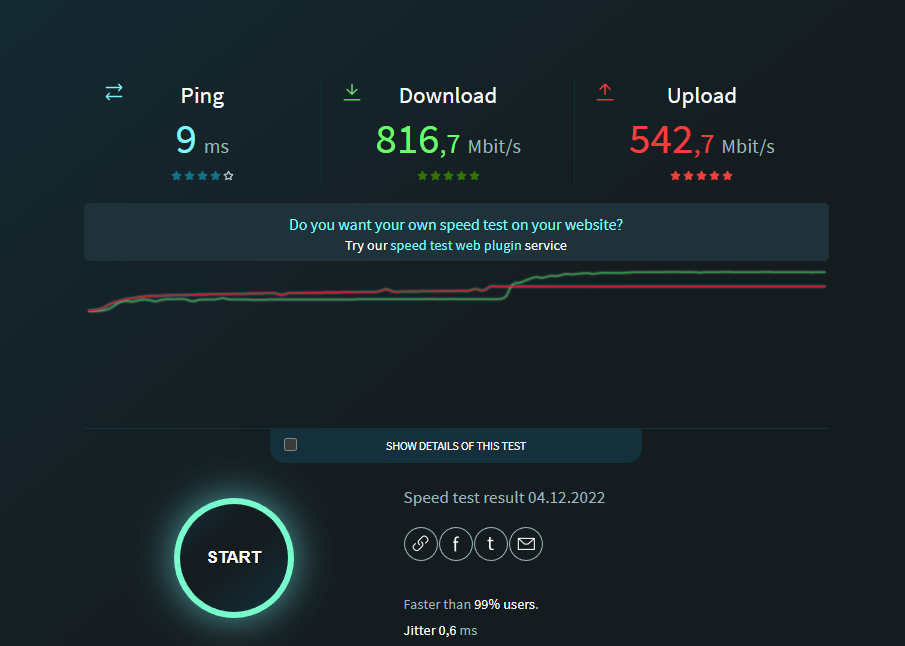
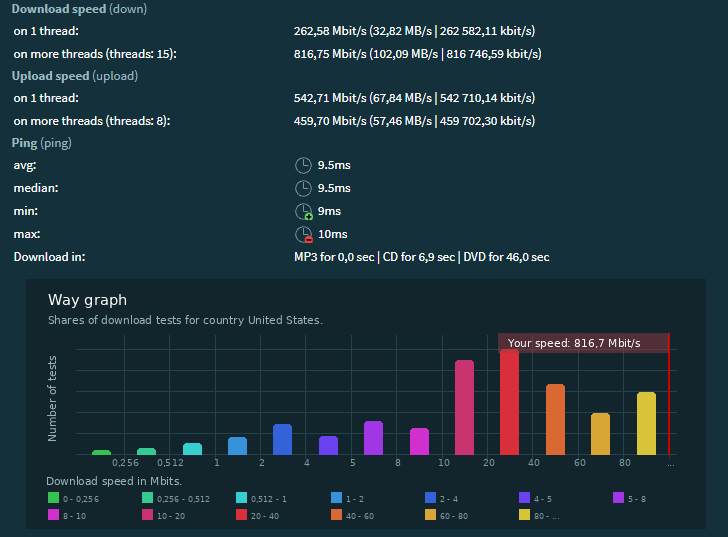
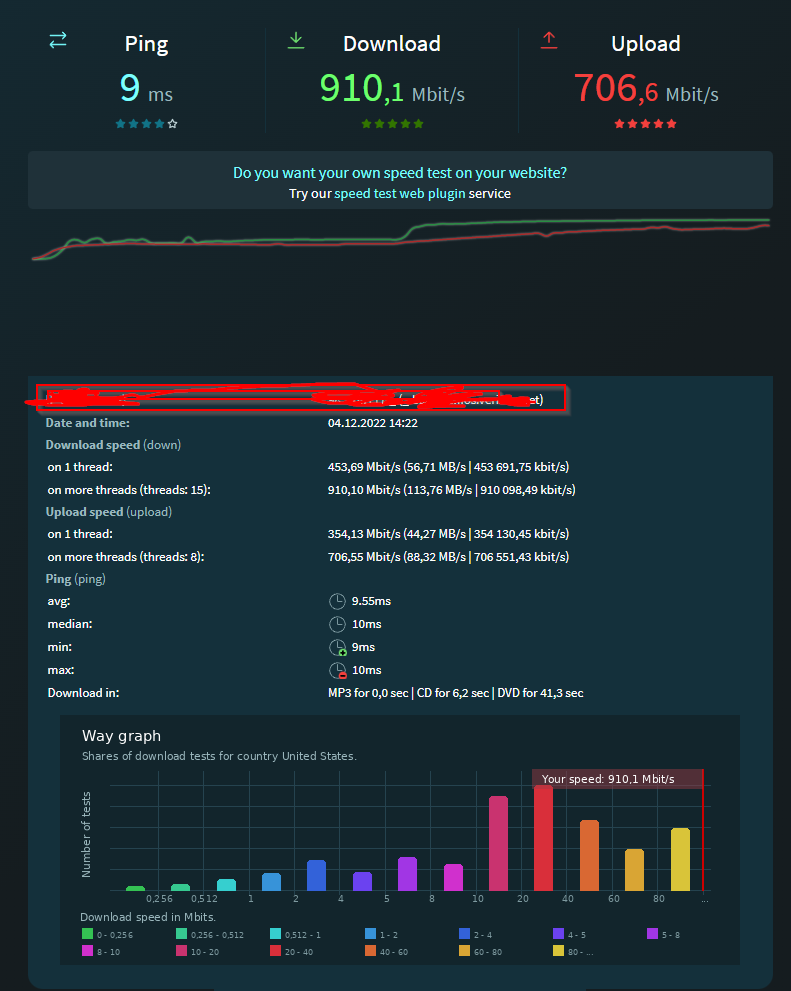 reef fulcrum
snow elk
You can also use your provided router but get an access point
reef fulcrum
snow elk
You can also use your provided router but get an access point
the issue with my current router is i am losing connection to devices cause im past the limit of devices by like 10 fold that Verizon says it can handle so like everything will be fine for everything but then my wife will get home and it will load a web page but none of the the images if i disconnect a bunch of devices and have her try again it will load everything but i dont wanna have to do that every time myself or my wife leave the house and return for our phones to work or what ever else thats why i am looking into upgrading and if i am forced to do this i kinda wanted to go overboard for fun
vast shard
reef fulcrum
https://i.imgur.com/b3MusMc.png https://i.imgur.com/5UNkI8s.png https://i.imgur....
So far all I need is a new modem and network card in my PC to handle 1 Gbps properly
peak cloak
reef fulcrum
the issue with my current router is i am losing connection to devices cause im p...
how many devices
 buoyant palm
The 5ghz channel on my router/AP has been failing about once a day. Works again with a restart. Should I be looking at replacing the device or is there any troubleshooting steps I can try before going that route?
The current router/AP is a tplink archer c1200. Logs show nothing wrong. I’m thinking it has to be a hardware issue with the router.
full monolith
reef fulcrum
https://i.imgur.com/b3MusMc.png https://i.imgur.com/5UNkI8s.png https://i.imgur....
What speedtest is this?
 ashen needle
I'm looking for a simple direct remote desktop solution, how bad of an idea would it be to port forward RDP to my desktop
like is RDP secure enough on its own that that would be ok, or would I need to run a VPN server and use that to RDP locally
buoyant palm
Personally I would vpn or ssh tunnel it
clear igloo
ashen needle
I'm looking for a simple direct remote desktop solution, how bad of an idea woul...
How badly do you want to be hacked?
ashen needle
clear igloo
How badly do you want to be hacked?
alright, is there a good secure zero-trust remote desktop server or should I just setup an openVPN server
clear igloo
With RDP it's not an IF it's a when
I would definitely do VPN
ashen needle
wish this was as easy as it is for remote command line access on linux, OpenSSH server is pretty solid out of the box
clear igloo
Yah, RDP is one of those things where it's meant for LAN access where you have more control. Sure you can secure it but it seems like there's always vulnerabilities popping up for it that you would spend more time patching and the headache of constant scanning hitting the server too than just using the RDP
ashen needle
seems like a pattern for windows, SMB is the same problem
peak cloak
ashen needle
I'm looking for a simple direct remote desktop solution, how bad of an idea woul...
Imo, a good solution is to use tailscale for a VPN connection to PC
Then rdp
buoyant palm
Just SSH tunnel if you only need it for one application
 north vector
yo do any of yall have a recomendation for a hdd for a nas thats about 150~ dollars. im looking at building one and i have my eyes on the seagate exos x16 14tb hdd and was wondering if that was decent, or if there is something better. i figured it would go in this chat but if not than i can post this somewhere else
peak cloak
north vector
yo do any of yall have a recomendation for a hdd for a nas thats about 150~ doll...
keep in mind you need more than 1 HDD
well not need, but VERY highly reccomended
reef fulcrum
peak cloak
how many devices
Idk little over 40
north vector
yea im aware but something that i can also buy later once i actually buy a nas
for now it would just go in my pc
thick minnow
I have a fiber question
my isp is coming in January and im wondering if I have to use their modem with its sfp port
im getting a server rack put in later next year
what should I do?
 deft pasture
Networking 101 question here because it's questioning my 15 years as an IT professional and I'm freaking out. I've been having games (FPS) where my ping is horrendous to the game server. One game it's sub 20 seconds and the next it's 80-110ms. Checked QOS rules and it's fine, I have a solid set up so it prioritizes game traffic over Netflix and stuff. 1/2
Simply put I thought maybe my isp has me on a bad route to some game servers. I tried exit lag and it worked well. But I wanted to find the root cause of all of this. So I started messing around with my opnsense router. Changed my DNS from cloud flare to Google DNS and I played a solid 5 matches in a row and all games were acceptable ping < 35ms. DNS has no bearing on latency does it?????
deft pasture
thick minnow
what should I do?
Depends honestly some won't let you. In the case for me I go straight from my ONT to an Ethernet cable because it's required. I can't use sfp. I also have their gateway due to me having cable it the cable box needs internet to download the guide.
pseudo blade
deft pasture
Simply put I thought maybe my isp has me on a bad route to some game servers. I ...
Not if it resolves to the same IP.
It could be an ISP routing issue and a coincidence, or the ISP DNS server pointing you to a different server.
 clear igloo
Haha, nice
 scarlet isle
pseudo blade
Laptops make exceptionally poor wireless routers... They use more power, one ban...
scarlet isle
pseudo blade
Laptops make exceptionally poor wireless routers... They use more power, one ban...
When I'm out chasing tornadoes, my phone has a stronger signal than my laptop, it's pretty shocking how trash they are at being a hotspot
dreamy whale
Shopping for Ethernet sockets and I was wondering what's the difference between the red and blue tags? I've seen em before but have no idea what they mean
 deft pasture
pseudo blade
It could be an ISP routing issue and a coincidence, or the ISP DNS server pointi...
deft pasture
pseudo blade
It could be an ISP routing issue and a coincidence, or the ISP DNS server pointi...
I thought so, im gonna try tonight and see if anything changes
 nimble sable
vast shard
Now WiFi 6e router are better than regular Wifi 6. You should look into that.
nimble sable
vast shard
Now WiFi 6e router are better than regular Wifi 6. You should look into that.
how common is 6e btw? i upgraded my wifi to 6e and in searching realized not a LOT of stuff does 6e - there's not a lot of APs for example is 6e not as common right now?
nimble sable
reef fulcrum
https://i.imgur.com/b3MusMc.png https://i.imgur.com/5UNkI8s.png https://i.imgur....
what site is that? look nice
nimble sable
waxen scroll
my services are $40/m right now lol
i swear these scam calls aare getting worse and worse. It's funny for me cuz well, i don't LIVE in the US
waxen scroll
nimble sable
i swear these scam calls aare getting worse and worse. It's funny for me cuz wel...
I might have believed this if my bill was over 79, but the other red flag is the use of "kindly"
also my phone marked it as spam right after 😄
nimble sable
waxen scroll
I might have believed this if my bill was over 79, but the other red flag is the...
"haha nice try, no ISP would treat me like a human being!"
waxen scroll
well "kindly" is an indianism in english. Folks who are native to the US and Europe wouldn't normally use that. It can be a great indicator of spam
nimble sable
waxen scroll
well "kindly" is an indianism in english. Folks who are native to the US and Eur...
oh yea thats right. ALso the verb 'intimate' (to mean "communicate")
 untold imp
dreamy whale
Shopping for Ethernet sockets and I was wondering what's the difference between ...
untold imp
dreamy whale
Shopping for Ethernet sockets and I was wondering what's the difference between ...
The color is only for ethetics, the symbols are there for telling what you are connecting to, computersymbol for data network, phone logo for phone SIP or similar network
cat 5e and cat6 are for different types of network cables
dreamy whale
Ethetics?
That other stuff I figured out based on the symbols but I don't understand the colors
untold imp
dreamy whale
Ethetics?
aesthetic
simply if you want red or blue tags, what works best with your environment and such, or choose some other meaning red for production, blue for lab network etc
dreamy whale
Oh
All of em are connected to laptops so I guess I'll use just the blue ones and have one slot say CAT.6 and the other have the computer symbol
As I kinda find it ugly having both red and blue
untold imp
if this is at a work environment, i wouldnt put any of them in if you dont have matching colors and symbols
untold imp
if someone comes after you and need to troubleshoot, its kinda hard to figure out the meening
ye put white ones and then be specific in the patch port number instead
dreamy whale
I'm just planing on putting stickers like PK/1-13 and PK/1-14 to show where it goes on the patch panel
 bitter elbow
Anyone know how hard these are to install if my router is down stairs and my room is up stairs?
 untold imp
That depends on the kind of keystone patch behind the panel
peak cloak
the wallplate is easy to install if that's what you mean
how to route the cables, that's a whole other story and it heavily depends how your house is built
where are studs? any cabinets were holes can be made, etc. etc.
untold imp
if its a socket to plug a complete cable in, then its easy, if you need to splice your own cables into it, its a bit harder, not impossible to do yourself but takes some time
peak cloak
I discourage using sockets
untold imp
ye the cableruns is the hardest part probably
untold imp
peak cloak
punchdown is easier
What do you mean its easier?
its recommended for in wall runs yes, but easier?
rocky badge
@peak cloak I wish we had faster Internet in the dorm
peak cloak
untold imp
What do you mean its easier?
its recommended for in wall runs yes, but easier?
punchdown is 100% easier than crimping connectors
peak cloak
rocky badge
<@222482269829332992> I wish we had faster Internet in the dorm
how much do you get
rocky badge
100Mbps
untold imp
ye than crimpinng yes, i agree, i menth the sockets with a complete female rj45 ethernet
thats faster than anything else tho
peak cloak
yeah, but then you need add a connector
untold imp
true
peak cloak
rocky badge
100Mbps
150 here in dorms
depends on time of day
or just go to the library and get gig...
rocky badge
I don't wanna carry my desktop lol
untold imp
Sad when 4g is faster, but at dorms and campuses i get it :/
peak cloak
rocky badge
I don't wanna carry my desktop lol
I'm considering selling my PC to my brother and getting a beefy laptop
rocky badge
@peak cloak ```
Tracing route to edge-n3rb7zd94hfxtm.ryois.me [192.80.205.22]
over a maximum of 30 hops:
1 <1 ms <1 ms <1 ms 151.141.76.3
2 <1 ms * * 10.0.2.37
3 1 ms 1 ms 1 ms 10.0.2.10
4 5 ms 5 ms 6 ms 63-232-25-5.dia.static.qwest.net [63.232.25.5]
5 11 ms 10 ms 12 ms atx3-edge-01.inet.qwest.net [67.14.120.142]
6 11 ms 10 ms 11 ms 4.68.62.93
7 * * * Request timed out.
8 19 ms 19 ms 19 ms bluegrass-n.ear3.atlanta2.level3.net [4.35.1.230]
9 21 ms 20 ms 21 ms bgbk-iring-rtr-02.blue.net [66.38.60.85]
10 21 ms 21 ms 21 ms ab-iring-rtr-01.blue.net [66.38.58.98]
11 21 ms 21 ms 21 ms sv-iring-rtr-01.blue.net [66.38.58.101]
12 21 ms 21 ms 21 ms rc-iring-rtr-01.blue.net [66.38.58.33]
13 21 ms 21 ms 21 ms host-63-135-177-11.twlakes.net [63.135.177.11]
14 * * * Request timed out.
15 27 ms 27 ms 27 ms host-192-80-205-22.twlakes.net [192.80.205.22]
route to home from uni lol
peak cloak
I barely use my PC other than gaming
and it's kinda a pain with figuring out what to do with it
bitter elbow
Is 250MBPS bad considering my whole family is heavily online using their own pcs for jobs etc and me gaming all the time?
untold imp
bitter elbow
Is 250MBPS bad considering my whole family is heavily online using their own pcs...
No, that will probably work fine, gaming is not bandwith intense, it's latency sensitive and the network bandwidth doesn't effect latency in that way
bitter elbow
Coool
full monolith
untold imp
Sad when 4g is faster, but at dorms and campuses i get it :/
Some guy i know broke 900mbps with 4g+
He works for telekom here in germany and has a priority sim card
thick minnow
On AT&T you don't even need a priority sim card to get those speeds on LTE
full monolith
Bro its germany lmao
unborn sluice
Lmao
 viscid ridge
untold imp
No, that will probably work fine, gaming is not bandwith intense, it's latency s...
viscid ridge
untold imp
No, that will probably work fine, gaming is not bandwith intense, it's latency s...
Thats true, except if the service becomes congested then latency will increase significantly
Eg. If someone is the house decides to download at 250Mbps from torrents etc, then the latency will sky rocket
rocky badge
@peak cloak @clear igloo

Can my university's Cisco Umbrealla stop fucking up Discord
peak cloak
rocky badge
Can my university's Cisco Umbrealla stop fucking up Discord
What's that
Seems to be converting a url path to some sort of domain?
rocky badge
Cisco Umbrella is their dns based web security
pseudo blade
viscid ridge
Thats true, except if the service becomes congested then latency will increase s...
Tbh if you're saturating 250mbps with p2p you'll probably also saturate gigabit
 stoic wraith
Dont really think its the right spot but I wanted to add a third router into my houses network but ill be damned if I remember how I did it. Should just be running a gigabit cable to each and then the part I dont remember was configuration(its a netgear nighthawk)
peak cloak
stoic wraith
Dont really think its the right spot but I wanted to add a third router into my ...
I think you want an access point not router
And yes best is to run Ethernet to each
I think you can set that router to AP mode
stoic wraith
Yeah thats what I did last time iirc
 dusty sierra
Is there an easy way to get the WirelessLAN and Ethernet MAC Addresses from every users Windows PC via an Active Directory server?
..actually maybe I'll just whip up a .NET exe and ask everyone to run it and save the info to a shared network folder.
 wild prism
Or just run wireshark
vast shard
nimble sable
how common is 6e btw? i upgraded my wifi to 6e and in searching realized not a L...
Wifi 6e is not very well known
pseudo blade
dusty sierra
Is there an easy way to get the WirelessLAN and Ethernet MAC Addresses from ever...
My previous company had a great tool for deploying and fetching that kind of info but apparently they won't talk to prospects under 20k endpoints now, from 1k
I'd just write a powershell script or whatever, add a rule to execute it to group policy to collect it and then have it post to a little http server or write a file on network storage. Or set up an RMM and let it handle it. Or do nmap scans and grab the client list from your APs and diff the two.
I'd personally look at an RMM tool so you don't have to reinvent the wheel each time you get this sort of request.
peak cloak
vast shard
Wifi 6e is not very well known
it is well know, just not in many devices yet
 past solstice
Hey so, my computer/house has this really weird inconvenience. My apartment has fiber optic and two working Ethernet ports. Ones going to my router one to my PC. But whenever i turn in my PC i have to wait 1-5 minutes for it to actually connect. Is there something i can do about that?
Nothing broken just extremely inconvenient/annoying
pseudo blade
past solstice
Hey so, my computer/house has this really weird inconvenience. My apartment has ...
Troubleshoot. Swap stuff out, try to find what causes the delay.
I'd just try every possible combination until I isolated the cause, then take the appropriate action
past solstice
I mean there's not much to swap out is the thing, it's the wall the cable and the computer
pseudo blade
The ethernet ports go somewhere, also why are you not plugging your computer into the router?
past solstice
Using the ports on that, and since there's another wall port figured might as well use it. Is that bad?
pseudo blade
Well it means you have your computer plugged into a network you don't control
With unknown characteristics, host isolation and hardware
past solstice
I mean it's not really feasible to Ethernet across the house so it's that or wifi. Thought it's better
pseudo blade
Sounds like your problem to fix. You're currently plugging your computer directly into someone else's network
past solstice
Ah, thanks for the "help"
pseudo blade
No problems.
past solstice
You just told me to swap things that aren't there and fix it myself
Nvm, not sure why I asked
nimble sable
vast shard
Wifi 6e is not very well known
thats what i thought, shame, 6e is very useful in crowded places like cities. but like, i have maybe one device that can do 6e, not even my tablet (and from what i gather the new google tablet isn't either)
nimble sable
past solstice
I mean it's not really feasible to Ethernet across the house so it's that or wif...
is it not? u cud always run it in the walls?
past solstice
Unfortunately I'm just renting so i can't do anything like that 😦
 turbid phoenix
how good would ~15mbps download ~35mbps upload be (on the 2nd floor)
 polar berry
Im working on strengthening my network up

I wont have any issues going from a switch to the routers will I?
peak cloak
Well you want it in AP mode, not router
 charred pond
What are your thoughts about wifi6? Today I compared wifi5 (isp router) vs wifi6(new one). On wifi5 ping while downloading jump to 200ms (speed is ca. 500Mb/s), but on wifi6 I got speed 700+ Mb/s and ping while downloading don't go above 50ms. Have any of you make like bigger project on wifi6 ? for company etc?
nimble sable
charred pond
What are your thoughts about wifi6? Today I compared wifi5 (isp router) vs wifi...
that may not even be wifi5 vs wifi6 just that the new one has better settings for ping queue stuff
charred pond
nimble sable
that may not even be wifi5 vs wifi6 just that the new one has better settings fo...
Yeah it could. But probably those tech like beam forming etc helps too 🙂
 sinful quail
how much of a difference would it make if i swapped from ethernet connected to my mb to a dedicated network card?
peak cloak
sinful quail
how much of a difference would it make if i swapped from ethernet connected to m...
basically none
thick minnow
deft pasture
Depends honestly some won't let you. In the case for me I go straight from my ON...
my service provider brings sfp straight into the household and plugs it into their modem
I was just wondering If there was anyway I could use a much more industrial modem
or plug it straight into the server or switch Im getting
peak cloak
thick minnow
my service provider brings sfp straight into the household and plugs it into the...
what ISP
because it heavily depends on their config and how they do it
thick minnow

this is their setup
dont worry these numbers and stuff are made up
the ssid and stuff
not sure if this helps explain my situation
peak cloak
thick minnow
That's not SFP
Fiber is plugged directly into ONT
And it's gpon so you can't just get an sfp fiber module
It's a small little ONT not a problem really
 naive meadow
hey can anyone explain why when I added a new router to the END of a chain it screwed up a different routers connection that was on a different chain?
 meager ginkgo
peak cloak
And it's gpon so you can't just get an sfp fiber module
meager ginkgo
peak cloak
And it's gpon so you can't just get an sfp fiber module
GPON fiber modules do exist actually
pseudo blade
I'd be more surprised if you told me GPON copper modules existed :P
But yeah you can get SFP GPON transceivers, though I imagine for most consumers that the hard part of replacing their gateway with one would be finding what module and config are needed
peak cloak
meager ginkgo
GPON fiber modules do exist actually
yes I know they exist, but the problem is that's you can't just get any ole gpon sfp, but has to be specific to your ISP
thick minnow
Hi all, I have like 8 harddrives I want to set up on my network, is the cheapest solution really a NAS?
 bronze escarp
can i set up a network file share between my pc and my laptop if my pc is connected to wifi by usb tethering to my android device?
bold drum
peak cloak
yes I know they exist, but the problem is that's you can't just get any ole gpon...
Waiting to see what my new ISP uses. 2 gigabit is 8 houses down now
nimble sable
pseudo blade
But yeah you can get SFP GPON transceivers, though I imagine for most consumers ...
the module would just have to be the one for the correct wavelength right?
nimble sable
thick minnow
Hi all, I have like 8 harddrives I want to set up on my network, is the cheapest...
pretty much id' think yea. if you have the drives you could get an off the shelf NAS that's empty that comess with SW built in
snow elk
Why does my very simple rule not work on my FreeBSD box?
/etc/pf.conf
block in all
[...]


[...]
pass proto tcp to xxx.xx.xx.75 port 25565 flags S/SA keep state (max-src-conn-rate 1/1)
Behaviour:
Pass rule applied: can connect
Pass rule not applied: cannot connect
So far so good, that rule is non-existant in the rest of configuration and as per the behaviour it is what's applied when a connection is made on port 25565
Here's the issue:
I've set a condition: if the flag is S/SA (any new connection) then RATE-LIMIT so that a single IP address cannot create a new connection to port 25565 more than 1 time per second
Yet the rate limit doesn't apply. I can run nping xx.75 -p 25565 --delay 0.5 or hping3 or anything but it bypasses the ratelimit
But what's weird is that the packets are marked and I can see them in pfctl -si as being matched by a rule, yet they aren't dropped

(see above for src-limit)
Anyone that knows FreeBSD/Packet Filter(PF) knows what's going on?
Remember, my default policy is to drop all incoming new traffic
 blazing flax
Hey there, this might be the wrong place to ask this question but I don’t know where else I would lol. I’m in the process of trying to understand different cabling and connector types and their uses, which led me to look more into fibre optic (which I thought was the same as Ethernet until recently). I learned that it has much higher transfer speeds and bandwidth, but that it takes quite a fair amount of power and time to convert electrical signals to optical. My question is, does this make them impractical over anything other than long distance, or do they still have some sort of short distance applications? Unrelated to that but similarly, is it possible to transfer analog data over fibre? I know they work via pulses, so I’m not sure how an analog signal would function.
Sorry for the paragraph, I’m relatively new to all this and I find it really interesting. Any information is appreciated :)
drowsy fossil
blazing flax
Hey there, this might be the wrong place to ask this question but I don’t know w...
the amount of time it takes to do the conversion is very very very very short
they are generally quite practical for anything further than about 50 feet.
At my work we connect between the server rack and our cabling rack that contains all our building wiring using fiber
and regarding analog data, theres no reason you couldnt, however analog data is very inefficient, its generally better to convert to digital for sending stuff long distances, and to stuff data into fiber generally requires conversion anyways
blazing flax
Okay, that makes a lot of sense thank you. Understanding the practical applications of different cables is harder than I expected it to be lol. Are there any applications for them on the consumer/hobbyist side?
They don’t seem very common outside of professional applications, but I understand if that’s just because they’re not really necessary for most things.
drowsy fossil
at home i have 100gbe over fiber between my main pc and my server in another room, and practically i end up with slightly faster than gen 3 nvme speeds (with proper configuration i could get faster than gen 4 nvme speeds)
its highly impractical and very expensive
blazing flax
Oh my goodness okay- that’s incredible. At that point who cares about practicality, that’s amazing
When you have a home server like that, are there any real limiting factors for transfer speed outside of better hardware?
drowsy fossil
how much time you are willing to spend fixing software is what my current limitation is
peak cloak
Well you also need to put in fiber
drowsy fossil
peak cloak
Well you also need to put in fiber
that too
peak cloak
But once you put single mode fiber you can just upgrade the transceivers to a certain point
drowsy fossil
yeep
and 100g is quite cheap at the moment for single mode thanks to the intel cwdm4 modules being under $20 each
peak cloak
oh damn
why are they so cheap, I assume datacenters upgrading?
still need a pcie module tho
drowsy fossil
probably ye
and ye with those modules the expensive bit is the nic itself
blazing flax
What’s the difference between single mode fibre and whatever the alternative is?
drowsy fossil
single mode is better (in every metric) but the adapters generally cost more
multimode adapters are generally cheaper but the fiber itself costs more and doesnt have much upgrade potential
blazing flax
Okay that makes sense, thank you. What makes single mode so much better?
drowsy fossil
short answer physics
long answer i dont know the technicals, but there are videos online
as for the advantages, you get higher max speeds, longer distances, and you dont (often) need to upgrade the fiber when you upgrade the speed
peak cloak
the cost difference between SM and MM is not that much these days
peak cloak
blazing flax
Okay that makes sense, thank you. What makes single mode so much better?
I believe the core is glass and much thinner
drowsy fossil
yup
the only real advantage that mm has now is that really fancy fibers can be made with insanely tight bend radiuses, much tighter than singlemode
peak cloak
 blazing flax
Okay, I’ll probably look into it then. I like that kind of stuff. Thank both of you for all your help, it’s really appreciated. :)
drowsy fossil
peak cloak
I believe the core is glass and much thinner
both are glass btw
peak cloak
ah ok
deft pasture
deft pasture
Simply put I thought maybe my isp has me on a bad route to some game servers. I ...
the saga continues it's definitely not DNS lol. Just had a game where I was at 85ms Ping
now a game with 10ms

eh 12ms still good
we'll see what happens next game
next game 30ms still fine.
 tall pagoda
5 min average in a moving bus going thru a city in the morning:

ISP: T-mobile Netherlands
Testing equipment: iPhone SE (2020)
Testing software: IPerf3
Testserver: speedtest.serverius.net/5002
 bronze swift
Guys does wire shark show specifically whether or not a device has created a session with my CCTV? I’m just curious if it’s ever been hijacked before
pseudo blade
bronze swift
Guys does wire shark show specifically whether or not a device has created a ses...
Wireshark is for tracking activity on a given network port on a computer. If the network traffic was for another device and didn't come from you, you won't see anything.
 warm pecan
1 year late Lamo
The upper one exists tho.
That called the CEO's Hamster cage.
When your CEO or some executive love to show off their pets they will build that kind of NOC.
Basically this
unborn sluice
Imagine scrolling back
warm pecan
That was pinned so
unborn sluice
Imagine replying to message year ago
warm pecan
Well:p
subtle estuary
tall pagoda
5 min average in a moving bus going thru a city in the morning:
Faster then my 5G

 hollow marlin
@clear igloo @waxen scroll
 clear igloo
hollow marlin
<@291198741862416384> <@186123993412141057>
clear igloo
hollow marlin
<@291198741862416384> <@186123993412141057>
Congrats!!
hollow marlin
I can finally take a break now
 sacred zenith
thick minnow
tall pagoda
5 min average in a moving bus going thru a city in the morning:
sacred zenith
thick minnow
tall pagoda
5 min average in a moving bus going thru a city in the morning:
Slow
3CA LTE in a rural area
 meager ginkgo
 thick minnow
They upgraded the tower to B1+B3+B20 + n28 (5G)
thick minnow
meager ginkgo
N41?
meager ginkgo
thick minnow
N41?
yes
thick minnow
It's SA right?
meager ginkgo
not sure I didn’t go into field test
thick minnow
Oh okay
meager ginkgo
This is my highest n41

 pseudo blade
thick minnow
N78 3500mhz but NSA😭
pseudo blade
thick minnow
N78 3500mhz but NSA😭
What's the implications of NSA vs standalone?
Does it have performance impact?
pseudo blade
Ah, thanks
thick minnow
Oh, and NR CA isn't possible on NSA
tall pagoda
thick minnow
3CA LTE in a rural area
Show it using IPerf3
thick minnow
tall pagoda
Show it using IPerf3
I can do it on Monday
thick minnow
pseudo blade
I assume that's because the 5G itself is basically CA in that scenario?
CA is basically just at least 2 bands together so they have more speed
There is NR CA on one carrier here, but no phone supports the n75 band.
thick minnow
subtle estuary
Faster then my 5G
What the hell is that isp lol
tall pagoda
thick minnow
What the hell is that isp lol
Tele2 Sweden
tall pagoda
Tele2 Netherlands is part of Magenta/Deutsche Telekom
70% T-Mobile Netherlands, 30% Tele2 Sweden
thick minnow
https://www.speedtest.net/my-result/a/8894749088 quite mid speeds tbh.
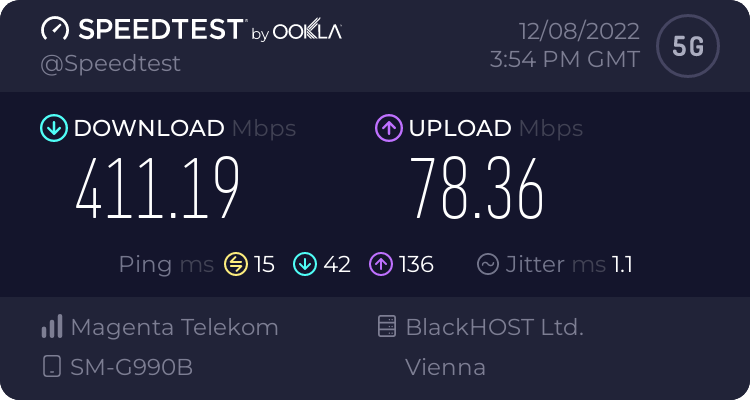
Speedtest.net
Use Speedtest on all your devices with our free desktop and mobile apps.
Lte can easily be faster than this n78
thick minnow
tall pagoda
Tele2 Netherlands is part of Magenta/Deutsche Telekom
Magenta Telekom is 100% owned by T-Mobile Austria GmbH, I'm pretty sure
thick minnow
tall pagoda
70% T-Mobile Netherlands, 30% Tele2 Sweden
So does it use the tmobile NL network?
tall pagoda
thick minnow
So does it use the tmobile NL network?
Yes, Tele2 NL had their own network before, but have merged successfully with T-Mobile NL.
thick minnow
I bet tmobile gave them plenty of routing issues 😁
subtle estuary
tall pagoda
Tele2 Sweden
Yeah its on the Tele2 network but I'm using Comviq same network but way cheaper.
thick minnow
subtle estuary
Yeah its on the Tele2 network but I'm using Comviq same network but way cheaper.
That's probably why it's so slow
These MVNOs are deprid often
Or have a speed cap
subtle estuary
thick minnow
That's probably why it's so slow
Yeah i know its limited to 100mbps but i goes way over that but 100GB for like 17€ a month is a great deal. If I want tele2 as ips ang get full speed that would probably cost me like 50€ a month.
thick minnow
3AT does that too. They have 500mbps plans that go up to 700mbps 😁
My 350mbps plan goes up to 450mbps sometimes
thick minnow
subtle estuary
Yeah i know its limited to 100mbps but i goes way over that but 100GB for like 1...
Not bad
tall pagoda
I have Tele2 NL unlimited (10gb/day) + 2GB extra each activation for €25
thick minnow
thick minnow
I get unlimited data for 27€/month
With an internet subscription that I don't use because it's only 150mbps (2 year contract so I cannot get rid of it, I just abuse it sometimes)
tall pagoda
I am glad with my subscription, it often gets 100+
Why need highspeeds for Discord, YouTube, Teams etc… ?
 waxen scroll
tall pagoda
Why need highspeeds for Discord, YouTube, Teams etc… ?
waxen scroll
tall pagoda
Why need highspeeds for Discord, YouTube, Teams etc… ?
you dont. my friend brags about his $90/m gig internet and im like "I have 100 for $40/m and its fine"
thick minnow
tall pagoda
Why need highspeeds for Discord, YouTube, Teams etc… ?
Which and how many bands?
thick minnow
waxen scroll
you dont. my friend brags about his $90/m gig internet and im like "I have 100 f...
A gigabit would be nice tho.
100mbps is "slow" if you download a lot and want to do some 4k streaming at the same time
dawg i’m in australia and get 50 down 10-15up LOL - on a good day
In Austria, I get 40MBPS dsl for $40
But I use a LTE modem so I get 200-280mbps
 snow kernel
So a family member that lives out in country is slated to get fiber internet by the end of the month(lucky since I live in near small town and can't get it). Anyways, they run a small trucking business and have been making due with very bad end of the line dsl and satellite internet since nothing else was available. I didn't really build their network up since it wouldn't have made a difference anyways. Besides getting a wifi router with mesh capabilities since they do stuff in their basement, what else should I get them. There will be at least 3 computers hardwired.
thick minnow
meager ginkgo
This is my highest n41
soo um idk how to phrase this but thank you for making me depressed
 thick minnow
thick minnow
thick minnow
Pov: magenta telekom when you need it
tall pagoda
thick minnow
Still better than NS train WiFi
thick minnow
tall pagoda
Still better than NS train WiFi
Thx bro
tall pagoda

Speedtest.net
Use Speedtest on all your devices with our free desktop and mobile apps.
 clear igloo
rocky badge
<@291198741862416384> <@186123993412141057> 👀
clear igloo
rocky badge
<@291198741862416384> <@186123993412141057> 👀
Block 443 😄

 thick minnow
tall pagoda
https://www.speedtest.net/my-result/i/4968311522
thick minnow
tall pagoda
https://www.speedtest.net/my-result/i/4968311522
Fastest internet in Europe /s
thick minnow
tall pagoda
Still better than NS train WiFi
That's probably because the trains and buses use some cheap mobile broadband that is deprid harder than anything else you can imagine, to keep the costs down.
Big flex
Sad I can’t send pics here
I wanna flex too
 peak cloak
 thick minnow
Okay buddy
 waxen saddle
First time updating in a few years? Lol
rocky badge
@peak cloak

Dorm network doesn't isolate IPv6 link local only IPv4
So Windows is discovering Xboxes via IPv6
and other UPnP devices
 ocean pivot
thick minnow
I wanna flex too
ocean pivot
thick minnow
I wanna flex too
slow upload
pseudo blade
rocky badge
<@222482269829332992>
I think most network admins still pretend ipv6 doesn't exist
I have yet to see a network with it implemented properly.
thick minnow
ocean pivot
slow upload
Because 5G has no symmetrical speeds
That's bufferbloat. Quite common for it to be like that on cellular technology.
That's n78

It's quite obvious
It shouldn't be hard to read but okay.

10ms latency.
Probably lower than what you got 😁
Sorry, I couldn't handle it, that someone wasn't able to read
Welcome to cellular technology
pseudo blade
Well actually it's 2.14 seconds of latency under load but oh well
clear igloo
thick minnow
10ms latency.
When idle.....
thick minnow
clear igloo
When idle.....
I mean what do you expect. It's a phone pulling 2000mbps while others are on that cell tower. It was at the Dubai mall, so it was extremely busy
- all the people in the Burj Khalifa were also connected to it.
clear igloo
I expect negative latency when downloading!!!
thick minnow
The UAE only has 2 carriers, so that means even more congestion
clear igloo
Google did it!! 😛
thick minnow
You should to a speedtest on your phone rn and see what the bufferbloat is
Probably more.
clear igloo
Well I'm on wifi right now so it would be much less
I've got crap cell signal at the moment
thick minnow
Then wifi off and do a quick test, but only of you have lots of data or unlimited
thick minnow
clear igloo
I've got crap cell signal at the moment
Yeah that does increase the latency by a lot.
clear igloo
yah 😦
thick minnow
And if you have lots of wifi congestion, your latency could be even worse than 4G/5G
So stay away from TP-Link.
clear igloo
single stream speedtest over wifi, lol

If my phone would stop being a little pain and connect to the 6E band instead it would be higher speed and lower latency
clear igloo
thick minnow
So stay away from TP-Link.
I use all enterprise gear at home, here's a recent 6E speedtest (multi-stream though so higher latency)
https://www.speedtest.net/result/a/8819865491.png
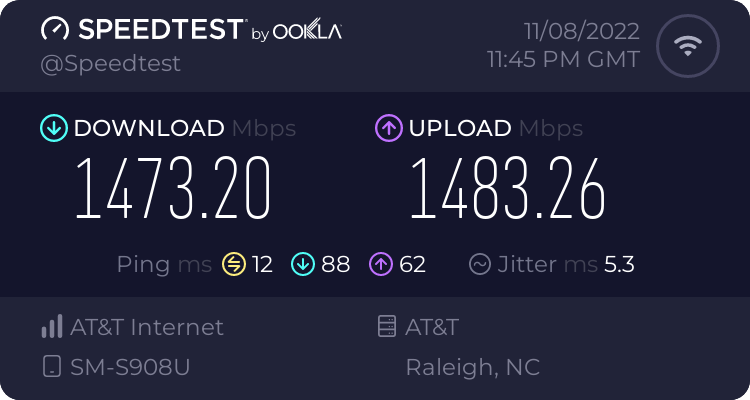 thick minnow
Raleigh 😁
thick minnow
clear igloo
I use all enterprise gear at home, here's a recent 6E speedtest (multi-stream th...
Is it a 3000mbps plan?
clear igloo
2000
thick minnow
Nice. What router do you use?
clear igloo
pfsense router and Meraki MR57 APs
thick minnow
clear igloo
I use all enterprise gear at home, here's a recent 6E speedtest (multi-stream th...
My wifi won't even come close because I live in fucking Europe 💀
thick minnow
clear igloo
pfsense router and Meraki MR57 APs
Awesome 👌
clear igloo
thick minnow
My wifi won't even come close because I live in fucking Europe 💀
Yah, yall need more fiber! 😄
thick minnow
I use this
 thick minnow
clear igloo
Yah, yall need more fiber! 😄
thick minnow
clear igloo
Yah, yall need more fiber! 😄
It's 90% DSL rn. I use LTE because why tf would anyone use DSL.
clear igloo
thick minnow
It's 90% DSL rn. I use LTE because why tf would anyone use DSL.
Yah, DSL is such a crap shoot here too
thick minnow
200mbps-280mbps speeds
 pseudo blade
If LTE congestion is low sure
thick minnow
2CA b1+b3
thick minnow
pseudo blade
If LTE congestion is low sure
It's a small town so no congestion issues here
clear igloo
thick minnow
200mbps-280mbps speeds
For LTE that's pretty solid
pseudo blade
Where I am there's >10k people on one tower
thick minnow
Looool that's pain
pseudo blade
And a lot of those people are on the edge of the signal
thick minnow
I have a second router to abuse tmobile because they refuse to give me band 3 😁
Grocery store trash
 thick minnow
pseudo blade
And a lot of those people are on the edge of the signal
thick minnow
pseudo blade
And a lot of those people are on the edge of the signal
Which bands does the tower have?
Because if it has low band, then most people will just be on the crappy low band and the other bands won't have congestion
clear igloo
thick minnow
Grocery store trash
Hot garbage 😄
thick minnow
clear igloo
Hot garbage 😄
I've downloaded like 10TB in total now and it's still not broken
pseudo blade
A bunch of people have been buying signal boosters, but have been setting them to 3G
thick minnow
clear igloo
Meanwhile in the background smoke starts pouring out
I hope it doesn't. 🙏
pseudo blade
You know, because "3g means more range"
thick minnow
Lmao, is it H+ at least?
clear igloo
pseudo blade
You know, because "3g means more range"
the fewer g's the more range!!
pseudo blade
Yes it's H+
thick minnow
3G gets me 25mbps here, if I use the best carrier
pseudo blade
But after everyone hops on it you can't even use it for calls
thick minnow
If it rains heavily, my modem switches to 3G and only pulls 18mbps, which is fine for basic stuff and 1080p video streaming.
thick minnow
pseudo blade
But after everyone hops on it you can't even use it for calls
You don't have VoLTE?
Pre paid carriers here don't have VoLTE yet 💀
thick minnow
clear igloo
the fewer g's the more range!!
This is true for some reason, even though they use the same frequency. Like I get GPRS on that mountain where there is no other signal
pseudo blade
It's not true
thick minnow
pseudo blade
Everyone else is using a mix and the 3G cell can't cope
Lmao, it's probably gonna explode on a hot day
Maybe they just have the GPRS on more power for emergency calls
pseudo blade
Range is frequency dependent, newer technologies get more out of a band
thick minnow
Korean samsungs can actually show the "G" icon 😛
pseudo blade
Last time the tower went down here everyone apparently went without cellular for a few months
thick minnow
pseudo blade
Last time the tower went down here everyone apparently went without cellular for...
No one complained?
warm pecan
If you live in apartment, shorter range channels are actually a good thing TBH.
thick minnow
What the hell is going on with that isp 💀
pseudo blade
Telstra does not give a fuck
pseudo blade
People turn to the installers for advice on how to improve their signal and then even more pile on 3G
And now it's literally unusable bar at 3AM
Even 4G sucks but not as badly
thick minnow
I wonder when Telstra will shut off its 3G network
thick minnow
pseudo blade
Even 4G sucks but not as badly
How much do you get?
thick minnow
pseudo blade
2025
That's still quite some time for them to improve the 5G or 4G
pseudo blade
It varies greatly
I get ~30 during the day, up to 200mbps at night
Off a CAT20 phone
thick minnow
Is it like that all over Australia?
pseudo blade
Population centres have excellent coverage, my last place I got >400mbps consistently on 4G
thick minnow
That makes sense though. They have the best backhaul and bands
pseudo blade
Everywhere else can apparently go suffer
thick minnow
This ass carrier actually improved the rural towers to 3CA from b20 10mhz only.
 pseudo blade
It's just not enough towers
You can't pile 10k people on a tower and expect things to work
And there's nothing around it to hand off to
thick minnow
I honestly have no idea how they can even get a single tower to cover 10k people
pseudo blade
They don't
thick minnow
Is the coverage in rural Australia good?
pseudo blade
No
thick minnow
Oof. Is Vodafone better?
pseudo blade
Vodafone has nothing and is useless
thick minnow
They were actually owned by CK Hutchison at one point I think
thick minnow
Well, it's the same here except on 3AT, which has CA on all towers outside of cities and towns
thick minnow
pseudo blade
Telstra, Optus. That's it
Isn't Optus the fastest?
pseudo blade
Not on average
thick minnow
Is it faster in your town?
pseudo blade
Hard to say
Sometimes
It's still not good
I know that coverage on the edges of town is nonexisting on Optus
thick minnow
pseudo blade
I know that coverage on the edges of town is nonexisting on Optus
Bro how does it get this bad 💀
Sounds almost as bad as Germany
But in Germany they don't even have coverage outside of cities
thick minnow
Like this?
 pseudo blade
Yeah approximately
turbid phoenix
thick minnow
This ass carrier actually improved the rural towers to 3CA from b20 10mhz only.
gg

what the fuck brah
thick minnow
turbid phoenix
gg
Pov: Magenta DSL /s
turbid phoenix
ziggo
we pay for 1000mbps
got a new router, got a whole mesh system through my house
no clue why its this unbearable
thick minnow
Maybe it's the server you're downloading from. Always use Speedtest by Ookla for the most accurate results
thick minnow
 rocky badge
@clear igloo @peak cloak So I'm next to a university, right? So I see their WiFi APs....
They configured some of their APs for 2.4GHz channel 3
 peak cloak
huh
rocky badge
😐
 dusk saddle
Woot got my CCNA, onto CCNP now.
snow elk
rocky badge
😐
what?
i also experienced this on some sites, which one were you trying to access?
also, my current ip blacklist on my edge routers atm:

so close to 100k
sudden kayak
turbid phoenix
got a new router, got a whole mesh system through my house
what is the speed on the gateway? if you're not getting 1000Mbps there, they're on the hook to fix it. your gateway may have its own speedtest client, or just plug a computer in instead
turbid phoenix
Do you mean like, connecting a pc straight to the modem?
Last time I did that I pretty much got 1000mbps
full monolith
windows does jokes on me xD
it tells me the link speed is 2400mbps but the adapter only does max 866 link speed


my router would be able to do the 2400 but not the adapter
waxen scroll
dusk saddle
Woot got my CCNA, onto CCNP now.
what professional experience do you have?
sudden kayak
turbid phoenix
Do you mean like, connecting a pc straight to the modem?
yeah that's correct... probably means the mesh system is the problem
waxen scroll
@unborn sluice just saying bruh
 wet edge
One of my core racks for you to have a little look at if of interest
 waxen scroll
Why haven't you moved to NCS
wet edge
These are plenty enough, good capabilities for the price point
Run the ASR9010 and 9006 chassis across a number of sites and they've been solid workhorses
wet edge
Yeah they're bulky fuckers
waxen scroll
@clear igloo hype
wet edge
You work in this field?
waxen scroll
Yep. Usually at fortune 100s. Work in banking right now
waxen scroll
Yep
wet edge
👍
waxen scroll
US companies but global networks
wet edge
Yeah understandable
London here
Baby network in comparison I'm sure, across five PoPs in London
But does what it needs to!
waxen scroll
I mostly do data center networking these days but hop to wan if I need to.
Probably getting dragged into cloud soon to stop shadow IT 😂
wet edge
Yeah the above is just in support of colo, nothing too fancy
 mossy void
Cloud networking: where the rules are all made up because it's all just running in FPGAs.
(Well, at least in Azure. Not sure about AWS< but every physical host box in an Azure datacenter has an FPGA attached to it just to handle the networking side of things. Source: am Azure-focused Cloud Engineer.)
wet edge
I'm not really a network guy, you'll very quickly reach the limits of my understanding of it here I'm sure, know enough to get by on the day to day access layer but certainly nothing at the core, just threw in here in case of some interest
wet edge
Ha no I wish I could say so. All I know is that our recent transition to EVPN was a bit of a nightmare, but I stayed well away from the technicalities of that
Best to know your strengths and get people involved that know their shit I say
I stick to the power and cooling side of things where I can, where you can more easily fix things with a hammer
 opal pagoda
i plan on connecting garage with underground fiber
i would install conduit and not directly burying fiber
now for selection of fiber, do i buy a 30-40 meter patch cable and pull it across
or do i buy actual outdoor rated fiber but i cant find one with connectors already installed i would have to use mechanical splices due to not having a fusion splicer
wet edge
I'd go pre-terminated if you can. Can be a bit more pricey but you can get MTP cables to do what you need, and then stick a cassette on each end. Over that sort of distance it wouldn't be killer expensive.
 keen urchin
mossy void
(Well, at least in Azure. Not sure about AWS< but every physical host box in an ...
keen urchin
mossy void
(Well, at least in Azure. Not sure about AWS< but every physical host box in an ...
Aws is Asics. Like 3rd or 4th gen now.
opal pagoda
wet edge
I'd go pre-terminated if you can. Can be a bit more pricey but you can get MTP c...
i dont need more than 2 fibers
keen urchin
Aws were using Cisco, but very quickly reached limitations with their shitty software, and because they need a tiny fraction of the options and commands, they have made their own networking gear for a long time now.
Like aws simply do not support broadcast traffic
mossy void
it's not much better in Azure
keen urchin
No it's far far worse
Because of the setup in aws it does things in a way that is at least internally consistent.
Azure is a fucking horrorshow
They just don't invest in underlying tech in the same way that aws does, and it's the underlying tech that enables the cool features.
wet edge
Oh yes don't get me wrong, as much as we're in bed with Cisco (it is good stuff, we know it well and try not to mix vendors if we can), they are total bastards when it comes to licencing and the like. We get almost all of it on the refurbished market though, both for availability and cost.
I don't think I've ever bought anything brand new direct from Cisco actually. Their list rates are absolutely hilarious for the carrier grade kit.
wet edge
opal pagoda
i dont need more than 2 fibers
Just go with a patch then, or two, pull in a spare. If it's well contained you'll be fine.
opal pagoda
ight
rocky badge
@waxen scroll 🙈 unifi
 rocky badge
mossy void
(Well, at least in Azure. Not sure about AWS< but every physical host box in an ...
rocky badge
mossy void
(Well, at least in Azure. Not sure about AWS< but every physical host box in an ...
AWS has Nitro cards
Nitro handles virtualization, encryption, storage, networking
rocky badge
opal pagoda
i plan on connecting garage with underground fiber
i would install conduit and n...
get a cable with multiple strands
keen urchin
wet edge
I don't think I've ever bought anything brand new direct from Cisco actually. Th...
Which is also hilarious because nobody pays list
 edgy ingot
https://git.bocc.de/jochen/cilo/src/branch/master/README so I came upon this, anyone used this? Heard of it even?

BOCC Git Site
I’ve got some OLD stuff but if I can make it multi use I’d love to give it a go
opal pagoda
rocky badge
get a cable with multiple strands
if i go that way this is the one i would use
 rocky badge
nice
full monolith
@thick minnowi was telling you imma search for a pic that i took from our new 5G tower in my city and i finally found it xD

 turbid phoenix
sudden kayak
yeah that's correct... probably means the mesh system is the problem
turbid phoenix
sudden kayak
yeah that's correct... probably means the mesh system is the problem
not really sure how it would be broken though
pseudo blade
The internet makes me laugh

Go on AliExpress to buy a relabelled Mikrotik at twice the price https://mikrotik.com/product/RB952Ui-5ac2nD

MikroTik makes networking hardware and software, which is used in nearly all countries of the world. Our mission is to make existing Internet technologies faster, more powerful and affordable to wider range of users.
clear igloo
wet edge
One of my core racks for you to have a little look at if of interest
y u no Cisco 8812 😄
ASR9K is definitely a workhorse 🙂
Nexus 9808 (Cisco 8808 with NXOS on top)
 thick minnow
full monolith
<@456226577798135808>i was telling you imma search for a pic that i took from ou...
thick minnow
full monolith
<@456226577798135808>i was telling you imma search for a pic that i took from ou...
Quite interesting how they also build these kind of towers
turbid phoenix
well if it's somehow "broken" then what cheaper/budget mesh system do you recommend for the netherlands
pseudo blade
High performance mesh systems are not cheap.
waxen scroll
clear igloo
Nexus 9808 (Cisco 8808 with NXOS on top)
i'm not allowed to show 😒


 opal pagoda
clear igloo
Nexus 9808 (Cisco 8808 with NXOS on top)
opal pagoda
clear igloo
Nexus 9808 (Cisco 8808 with NXOS on top)
can cisco nexus N2K-C2248TP-1GE Fabric Extender be used as a normal managed switch?
 clear igloo
opal pagoda
can cisco nexus N2K-C2248TP-1GE Fabric Extender be used as a normal managed swit...
clear igloo
opal pagoda
can cisco nexus N2K-C2248TP-1GE Fabric Extender be used as a normal managed swit...
Nope
opal pagoda
how can it be used then?
clear igloo
With a parent Nexus 5K/7K/9K switch
It has no brains so alone a FEX does nothing, the parent tells it what to do
opal pagoda
so you need both and i assume some cisco license
clear igloo
no license
opal pagoda
thanks
waxen scroll
rocky badge
<@291198741862416384> Would be so cool if the Shield TV was PoE
or... OR
instead of using a shield switch to an OLED that has google tv built in
recommend SONY
peak cloak
waxen scroll
instead of using a shield switch to an OLED that has google tv built in
Ew
I hate smart tvs
sudden kayak
turbid phoenix
not really sure how it would be broken though
not broken, that's pretty much the expected performance for mesh systems if you're on the opposite side of the house and at least one link is in a bad signal area... wired backhaul APs will fix that
turbid phoenix
i'm not on the opposite side, rather, i'm right above the main access point, router, and the modem
2nd floor, but right above them
sudden kayak
well, in that case i guess it could be broken
should be better than what you're getting even if it's not great
do you know what your floors are made of?
clear igloo
Abandoned or apps stop working after 3 years
rocky badge
@clear igloo
 clear igloo
mmmm, fiber
rocky badge
at bestbuy
clear igloo
lol
rocky badge
@clear igloo this tiny shop has Meraki
 clear igloo
probably via an MSP