#networking
1 messages · Page 14 of 1
 thick minnow
 full monolith
Same here but you have to bresk the whole street open etc
So yea its not that easy
thick minnow
Yeah that's an issue all over Europe. I saw it a few weeks ago. They had to block traffic off an entire bridge because of it.
full monolith
My dad living in nordern germany and he littearly lives in the nowhere but he has 2 fibers going in his house💀
thick minnow
Lol. That's a smaller local provider probably
thick minnow
There are some smaller local providers that have 1000/1000 for people living in the mountains where there is no cell coverage
thick minnow
full monolith
Thats a big provider up there
Oh okay
full monolith
Telecom thanfully does stuff to do the rollout of fiber faster
They use like smart cars eith lidar scanners and sht like that to scan the whole street for best way to get the fiber in there
So they dont need to messure manually etc what takes alot of time
thick minnow
Is there 10gbps residential on Telekom?
full monolith
There is but like really not much
Its really rare but theres people that get 40G tho
I just found my speedtest record on my old xiaomi phone.
Nearly 2gbits



 thick minnow
holy sh
 dull solstice
Does anyone know how to connect a das to a pc?
thick minnow
ist a das just an external hard drive or ssd
dull solstice
Yeah but it uses a hba card to connect it to a pc and idk which type i should use
 peak cloak
dull solstice
Yeah but it uses a hba card to connect it to a pc and idk which type i should us...
peak cloak
dull solstice
Yeah but it uses a hba card to connect it to a pc and idk which type i should us...
well look at the docs/spec
what DAS
dull solstice
peak cloak
what DAS
Direct attach server, basically a nas but doesnt need to be connected to the network so more private in a wwy
dull solstice
My plan is to use an old pc, add a bunch of hdds and connect it to using hba (if possible)
I could turn it into a nas but i would rather it be more private
peak cloak
a NAS doesn't have to be connected to your whole network
you can just set IPs manually and have a direct pc - nas conneciton
dull solstice
Theres also another problem of not being able to route another ethernet cable to my room to the network switch, and i cant place the server in the same room as the switch
peak cloak
dull solstice
Theres also another problem of not being able to route another ethernet cable to...
why would you need a switch
just PC <-> NAS
dull solstice
I thought that would mean its a das if theres no switch for the bridge
peak cloak
dull solstice
I thought that would mean its a das if theres no switch for the bridge
I mean it's technically direct in a way, but it goes over network (ethernet), not a direct SAS connection
dull solstice
So i can connect a storage server to my pc with an ethernet cable directly and it would be still be considered a nas since its over ethernet? And if i used a sas connection it would be a das
 waxen saddle
dull solstice
So i can connect a storage server to my pc with an ethernet cable directly and i...
waxen saddle
dull solstice
So i can connect a storage server to my pc with an ethernet cable directly and i...
The network is 2 devices. It would be considered a NAS.
peak cloak
 faint bronze
What is the cidr for `244.0.0.251`?
faint bronze
What is the cidr for `244.0.0.251`?
thats just an IP
depends on your subnet
faint bronze
Ok, that is grouped into some network range. What network range is that tied to? I know it is just an IP that gets used for multicast with multicast DNS or mDNS.
waxen saddle
faint bronze
Ok, that is grouped into some network range. What network range is that tied to?...
https://www.iana.org/assignments/multicast-addresses/multicast-addresses.xhtml does this answer the question? I’m not sure if it does or not.
faint bronze
Ok. I just wrote a rule to not flag that traffic and instead just ignore it. I am trying to write some firewall rules for input and output on a device. Thank you.
peak cloak
faint bronze
Ok, that is grouped into some network range. What network range is that tied to?...
oh, so not the CIDR, but if it's reserved for a special purpose and what
and it's 240.0.0.0/4
it's not used for anything I think
faint bronze
waxen saddle
https://www.iana.org/assignments/multicast-addresses/multicast-addresses.xhtml d...
This was an explanation that helped @peak cloak. It is used for multicast related stuff, at least partly.
peak cloak
faint bronze
This was an explanation that helped <@222482269829332992>. It is used for multic...
that's not the same subnet
that's 224.0.0.0/4
240.0.0.0/4 is just class E, reserved for future use
there have been proposals to use it for the public internet
 sudden kayak
fiber internet didn't exist in the 80s
neither did coax broadband, it was dialup at best
 waxen scroll
@clear igloo let's say a prayer for @hollow marlin
 rocky badge
@waxen scroll @peak cloak at an arcade, this is their networking


they have 3 other APs on the ceiling
waxen scroll
Yikes
sudden kayak
ah yes putting my AP into basically a faraday cage
that will definitely improve performance
peak cloak
people who put APs in racks...
peak cloak
sudden kayak
ah yes putting my AP into basically a faraday cage
well, is the rack grounded...
sudden kayak
i mean, it probably kinda should be
chassis of the PDU is probably grounded and bolted to the metal rack so who knows
 steep tartan
which is better IPsec or SSL/TLS vpn
 bold drum
Hm I can get a Dell powerconnect 24x1G PoE for $100
thick minnow
full monolith
I just found my speedtest record on my old xiaomi phone.
Nearly 2gbits
Can people with the cheaper plans even get these speeds, because I think those are capped to like 25mbps
full monolith
No u need high teer plans for unlimited speed
Like max u can somehow get with te tower u connected to
Most are capped at 25/50
But many telecom or vodafone plans are max speed tho
 queen rover
I have a question and I'm not too sure where to ask it. I'm planning on getting a nice 4k tv and home theater sound system. It would be pretty easy to run a few cords from my pc in my room to my living room where the tv set up is. My question is would I be able to pair wireless keyboards, mice, and controllers through an AV receiver or would I need something else for that.
 pseudo blade
steep tartan
which is better IPsec or SSL/TLS vpn
pseudo blade
steep tartan
which is better IPsec or SSL/TLS vpn
Depends on what you're doing. Both have their own merits, sometimes you have no choice but to use one or the other.
I find IPsec/L2TP to be a pain in the neck for road warriors/people without complete control of network infrastructure on both sides. But it can be quite a lot faster than a TLS tunnel.
 vernal cave
Hi guys! i'm a tech n00b and need help~
I'm using the ASUS RT-AX86U in my home but it's tucked into a corner so other parts of my house doesn't get the wifi.
What should I do to make sure other parts of the house gets a decent signal?
Do I need wifi repeater or extender or something?
Thanks in advance ❤️ ❤️ ❤️
thick minnow
full monolith
Like max u can somehow get with te tower u connected to
Those don't exist here, yet.
This is the fastest possible as of rn.

1000mbps down and 200mbps up, only 50GB and $140/month
Unlimited plans come with speeds up to 500mbps and 100mbps for like $37/month
 clear igloo
waxen scroll
<@291198741862416384> let's say a prayer for <@462711605063450628>
clear igloo
waxen scroll
<@291198741862416384> let's say a prayer for <@462711605063450628>
Oh might cables, strong as they be
May thy fibery appendage reach out and bless him

The Onion
SAN FRANCISCO—As part of his initiative to streamline the back end of the platform, Elon Musk reportedly demanded Tuesday that the remaining Twitter servers explain to him in detail what all the wires were for. “These ones here—what do they do, exactly?” the company’s new owner and CEO said during a visit to Twitter’s…
full monolith
thick minnow
1000mbps down and 200mbps up, only 50GB and $140/month
I pay 65€ for unlimited data and speed
 thick minnow
Yeah it depends. The network here is a bit better and less people use it so it's more expensive.
But it's nice that it's full speed on your plan
full monolith
Yes i mean here its great to but sure not that good in comparison to urs
thick minnow
Is there a speed category thing?
full monolith
I mean i had 600mbits on lte one a event with 30k people
Pnly tower in reach was telecom
thick minnow
Yeah they make sure events get enough
full monolith
thick minnow
Yeah they make sure events get enough
It wasnt official thing tho
thick minnow
Are there speed categories on your carrier? Like class "a","b"
full monolith
No one was saying them they need more caps ity there
thick minnow
"C"
thick minnow
full monolith
It wasnt official thing tho
Oh I see. That's really nice then
thick minnow
full monolith
No one was saying them they need more caps ity there
Telekom has speed caps (so up to 300mbps) and a category thing. So a really shitty plan would have 150mbps and category "E" so it never reaches that in the first place.
In Austria
 tranquil berry
are edimax routers any good
asking bc i feel like the price for this seems too good to be true for what it ishttps://www.mwave.com.au/product/edimax-br6473ax-ax3000-dual-band-wifi-6-smart-router-ac50012

Mwave
Buy Edimax BR-6473AX AX3000 Dual Band Wi-Fi 6 Smart Router - BR-6473AX online with fast shipping and top-rated customer service. Mwave.com.au
thick minnow
Can you read it? @full monolith
 full monolith
tranquil berry
asking bc i feel like the price for this seems too good to be true for what it i...
full monolith
tranquil berry
asking bc i feel like the price for this seems too good to be true for what it i...
I made shit experience with edimax
Cant recommend it
tranquil berry
full monolith
Cant recommend it
mercusys?
literally have choices between these 3:
https://www.centrecom.com.au/asus-ax1800-dual-band-wifi-6-80211ax-mu-mimo-ofdma-router
https://www.umart.com.au/product/asus-rt-ax55-ax1800-dual-band-wifi-6-router-white-62018
https://www.pcbyte.com.au/p/mercusys-mr70x-ax1800-wireless-dual-band-wifi-6-router-225786
full monolith
tranquil berry
literally have choices between these 3:
https://www.centrecom.com.au/asus-ax1800...
Get a xiaomi ax6000 from aliexpress
You cant get smth better for the price
tranquil berry
full monolith
Get a xiaomi ax6000 from aliexpress
*AUD btw
full monolith
Oh
rocky badge
@waxen scroll @clear igloo damn Verizon deployed C band all throughout I 85
waxen scroll
rocky badge
<@186123993412141057> <@291198741862416384> damn Verizon deployed C band all thr...
I use google fi
rocky badge
waxen scroll
I use google fi
lol
 meager ginkgo
rocky badge
<@186123993412141057> <@291198741862416384> damn Verizon deployed C band all thr...
meager ginkgo
rocky badge
<@186123993412141057> <@291198741862416384> damn Verizon deployed C band all thr...
Verizon just launched cband in my town
AT&T still has no 5G+ 😭
rocky badge
rip
 main tartan
thick minnow
1000mbps down and 200mbps up, only 50GB and $140/month
main tartan
thick minnow
1000mbps down and 200mbps up, only 50GB and $140/month
scammers, even 8Gbps unlimited is cheaper than that over here in the Netherlands.
With XGS-PON, limit of 10Gbps
thick minnow
main tartan
scammers, even 8Gbps unlimited is cheaper than that over here in the Netherlands...
I'm talking about mobile.
8gbps isn't available to residential yet.
Most you can get is 1000/50 for 90€/month.
main tartan
thick minnow
I'm talking about mobile.
Ahh okay
thick minnow
main tartan
Ahh okay
(That actually makes it even worse)
main tartan
True
thick minnow
Who pays $140 a month for 50GB of data
main tartan
oof
thick minnow
And it is still capped to 1000mbps, not uncapped.
thick minnow
main tartan
Dunno the speed
Oof. Probably bad
If it's that cheap
$80 PrePaid in the UAE gets you this 😍
 main tartan
thick minnow
Oof. Probably bad
main tartan
thick minnow
Oof. Probably bad
Found it, 500Mbit/s
But it’s 8 for the wifi and a required 5 for calls and sms
So 13 a month
thick minnow
Ah okay, I've seen LTE speeds close to 500mbps on a 10€ pre paid sim
But it was only like 20GB
main tartan
Yeah, this would usually be 20GB, but because the company is also my ISP I can get double bundles for free
thick minnow
T-Mobile NL?
I get my plan for 27€ a month because of an internet plan that I don't use anymore but still pay for, bc of a 2 year contract.
I've been using it somewhat, but only to mess up their score on Ookla.
clear igloo
@waxen scroll Your buddy is back 😄
This time he suggests dynamic group segmentation of devices which is OH SO COMMON on consumer hardware right? XDR solutions are a dime a dozen 
peak cloak
the VLAN guy?
waxen scroll
yes
full monolith
Max speeds on data limited plans is useless tho
Like why would i need 1000mbits on a plan with 10gb lol
That makes no sense to me
thick minnow
full monolith
Like why would i need 1000mbits on a plan with 10gb lol
Doesn't even make sense with a 100GB data cap for me.
I just use a lot more than 100GB for speedtests.
Even though these are the speeds I get at school. 😳💀

It's a rural area so n28 700mhz
full monolith
Nice
 waxen scroll
erm. juniper has plenty of bugs
clear igloo
waxen scroll
erm. juniper has plenty of bugs
split second bugs 😛
clear igloo
waxen scroll
<@291198741862416384> i just opened a case for CML lol
did you upgrade to the latest release?!?!
waxen scroll
no >:\
clear igloo
That's your problem 😛
waxen scroll
XRv devices for some reason are not happy and stop talking over their links a few min after boot
clear igloo
CML is a weird one, when it works it's great
If you look at it wrong it can break
waxen scroll
ping fails first, then eventually nothing on CDP
clear igloo
that's a weird one
waxen scroll
we're 4 versions behind but I cant upgrade without starting fresh
too much paperwork to go through
clear igloo
Ah, that stinks, maybe they can help fingers crossed 🙂
waxen scroll
the amount of people who support it must be small. no engineer assigned yet
and I have the good support where people watch our tickets
:X
clear igloo
rip
 thorn oyster
Do any of have mesh routers and if you do, what are they?
 meager ginkgo
thorn oyster
Do any of have mesh routers and if you do, what are they?
meager ginkgo
thorn oyster
Do any of have mesh routers and if you do, what are they?
Don’t have a mesh router - but just gonna say don’t get eero

 hollow marlin
@waxen scroll Well that was fun....
waxen scroll
I need details
waxen scroll
@rocky badge he must be drunk right now
hollow marlin
waxen scroll
<@236237361703288842> he must be drunk right now
I should be.
It would be a miracle if I passed. I missed a a single firewall filter term (think ACL seq # in CoPP) that was in the first task and held up troubleshooting later on. I had two large points task left at the end.
That's not including any word games that may have cost me.
Overall it was actually not that bad, but all the things that cost me were personal mistakes
pseudo blade
clear igloo
<@186123993412141057> Your buddy is back 😄
This time he suggests dynamic group ...
It's a great idea on paper but I've yet to see an implementation that doesn't suck yet
My previous company did that and it was a hack I wouldn't trust with anything critical
 scenic coral
Hello is anyone here familiar with Rclone?
pseudo blade
scenic coral
Hello is anyone here familiar with Rclone?
You might be looking for #1027757333117415424
scenic coral
aight thanks!
hollow marlin
waxen scroll
Sooooo gg?
We'll see. I won't get an answer until Mon/Tues
waxen scroll
I still have to study CCNP entcore and good God that book is brutal
Have to study all this crap and they'll only ask about 1/32 of it
faint bronze
Does anyone know of a good wifi card to do AP mode on that is m.2 or mini-pcie. Ideally one that supports 5Ghz.
pseudo blade
faint bronze
Does anyone know of a good wifi card to do AP mode on that is m.2 or mini-pcie. ...
How many antennas do you want, what price, what transmit power is desirable?
Do you need 2.4ghz as well?
Most cards I've seen can do one or the other, or one at a time. Not both.
faint bronze
My impossible dream is one that does 6ghz, 5ghz and 2.4.
AnandTech Forums: Technology, Hardware, Software, and Deals
So, having run hostapd in the past and using internal cards to do so this is a nice option to see finally. Taking this card and putting it into a PC or PI gives you 6E AP functionality for a fraction of the price of a 6E router / AP...
 rotund umbra
Hi guys, does anyone know what will give me the best improvements in my network speeds? This could be either increasing ISP supply or buying better network equipment. Atm it's pretty slow, and there's a lot of devies connected. So I'm thinking the best bet may be to get a better router, but does anyone else have suggestions?
 faint bronze
Now that I think about it, no ir might just be giving me trouble and when someone has to talk first, I would suspect it is the AP that does the advertising first.
faint bronze
rotund umbra
Hi guys, does anyone know what will give me the best improvements in my network ...
Getting a separate router can improve speeds between devices and not your upstream to the internet. If your ISP provided AP isn't good with multiple devices that could also cause slowdowns. If your AP is on the other side of a thick wall then the signal and performance will be crap regardless.
rotund umbra
im also considering ethernet speeds as well as wireless
ideally the router could also be moved to somewhere more central in the house, it's currenty in the garage so that's bad for wiif
 warm pecan
Given your ISP only give you 100Mbps, I doubt any Gigabit era equipment would be the bottle neck.
Unless you are having bad wifi connection.
rotund umbra
that's true, but also all of the LAN ports from the switches are going through a single LAN port on the router (Connected through cat 5e, i cant find the router specs)
 strange basalt
rotund umbra
Hi guys, does anyone know what will give me the best improvements in my network ...
strange basalt
rotund umbra
Hi guys, does anyone know what will give me the best improvements in my network ...
Move away from the ISP provided Modem and Router if you can. Try to put a good AP around high social areas (living room, hallway near bedroom doors). Look into upgrading your service. 100Mbps doesn’t give you a lot of headroom if a lot of devices are connected at the same time.
The prices for equipment may be intimidating but the best part about it is you can upgrade one at a time.
faint bronze
rotund umbra
ideally the router could also be moved to somewhere more central in the house, i...
If your garage has a "firewall" then you might have problems getting speed into the house. Getting an AP just for inside and using that instead should work well.
You could try to see if something is hogging up your bandwidth like maybe unsuspecting neighbors.
strange basalt
faint bronze
You could try to see if something is hogging up your bandwidth like maybe unsusp...
He said there’s a lot of devices connected so that’s probably hogging the bandwidth.
pseudo blade
The card you linked is 2x2, Wifi 6e would be mostly pointless
@faint bronze Because despite being sent as a reply it didn't when my connectivity just fell over
Yes the AP does the advertisements
If you were looking for a full solution and not cards I'd point you towards something like this

There's a 6e version somewhere
faint bronze
There was a table of them on that page. There are 3 4x4 cards mentioned in the table and on 3x3.
pseudo blade
You'd probably want 2x2 in 2.4ghz and a 4x4 in 5
faint bronze
I already have a base board that I am using.
faint bronze
One m.2 for wifi (currently occupied by an ath10k card I just had laying around) and a mini pcie. The third slot must be a sata something, but an SSD is plugged into it.
I will fiddle around with the ath some more since I think I can get it to do AP mode with a kernel patch.
pseudo blade
You usually can get them to do AP mode
There are a few 4x4 5ghz cards around but the hard part is getting them to work under openwrt etc
faint bronze
I am awkwardly using Fedora Linux, so that is why I am having a problem getting it to work.
Does openwrt or the other Linux router distro have a list of wifi cards that support 4x4 AP?
pseudo blade
Not that I know of, I generally just pick something and google to see if people can use it
I'd try one of these/qcn9074 but not sure on the driver front https://techship.com/products/sparklan-wpeq-405ax/
The first WiFi-6 (802.11ax) Qualcomm based AP solution on module formfactor from SparkLAN. WPEQ-405AX, is based on QCN9074 chipset solution. This is a true enterprise based wireless module that powers 4T4R (4×4) MU-MIMO, in 5Ghz Single band mode, hitting a theoretical speed of up to 4.8Gbps with 160MHz support.
Unlike typical Qualcomm reference...
ath11k supports it apparently
Forums are full of people trying to get it to work in 2021 and silence since
So a bit tricky
Someone did it on another card (qualcomm's dev platform with the same chip) https://www.reddit.com/r/homelab/comments/mwkbed/80211ax_ath11kqcn9074_homebrew_router_running/

reddit
229 votes and 59 comments so far on Reddit
faint bronze
Wifi 6 2x2 yes. You can go 4x4 and get plenty more speed.
 fringe haven
General networking question, say I have a network switch and I want to split it's access up on different VLANs would this be a good way of doing that?
Syslog = SRV VLAN
MGMT access(SSH, GUI) = MGMT VLAN
Internet updates etc = SRV VLAN
NTP = SRV VLAN
Would this be a good idea? The only problem I can see with this is that if I want to have more then one gatway (I know I can use static routes, but feels cumbersome for this)
I'm thinking like this:
I don't wanna allow traffic out from the MGMT Vlan to the internet. So therefore I make the service that need internet have VLAN 16 as the default VLAN.
Then I also don't want mgmt traffic (access to webgui for router and server) on the serverlan. Therefor the default VLAN for those services is MGMT.
Hope this better explains what I mean 🙂
fringe haven
fringe haven
I'm thinking like this:
I don't wanna allow traffic out from the MGMT Vlan to t...

 clear igloo
rocky badge
dreamhack just hanging fiber in the rafters
clear igloo
rocky badge
dreamhack just hanging fiber in the rafters
fiber everywhere these days 😛
It used to be so special you dang kidses!! /s
rocky badge
lol
waxen scroll
rocky badge
dreamhack just hanging fiber in the rafters
show us a pic of your station
waxen scroll
@jaunty talon did any attendee ever test the limits of dreamhacks security and try to break it? what did they do when they were caught?
👀
clear igloo
waxen scroll
👀

 jaunty talon
@waxen scroll many has probably tried. But there is not really much to break into :D
Management is running on RFC1918 network that is not accessible from the public IP's that are given to visitors :)
And management is only accessible from one physical location in the venue! Or well.. You could steal an uplink and then sniff after the management VLAN and by that then figure out IP range, but you would likely not have enough time before someone would be there looking at why a switch is down :)
waxen scroll
someone could social engineer their way to the core racks
jaunty talon
Possible, but the team is so small you know all who would need access to them :)
rocky badge
bruh there’s probably so much ndi running through the network
jaunty talon
Not really, the NDI is mostly specific to each productions network
Very little of it is transported
jaunty talon
Sure, each production is behind their own firewalls and running their network on RFC1918 addresses :)
 jaunty talon
haha :D
waxen scroll
where do the public IPs come from? does dreamhack own space that they take with them or is it borrowing every event?
jaunty talon
in the US events all participants are on RFC1918 addresses also :)
rocky badge
waxen scroll
where do the public IPs come from? does dreamhack own space that they take with ...
i think they have their own space
jaunty talon
but the swedish events (the big ones) runs on 77.80.128.0/17 and 2a05:2241::/32
Which is dreamhacks own :)
 jaunty talon
Likely convention center, as they almost never let someone pull cables in the venue :D
If that was in Sweden, it could be DreamHack :D
faint bronze
I spent a bit of time trying to get it to do AP mode at 5ghz, but it looks like it is not going to happen.
http://billauer.co.il/blog/2018/12/tara-5-ghz-hostapd-atheros/
It should work* if this article is to be believed.
 bronze swift
Does anyone know if Ethernet cables and BNC security camera cables degrade at the same rate?
I only have BBC security camera cables so far but the resolution degrades after a few years, I’m not sure if that’s the same case with Ethernet cables
faint bronze
Ethernet is a digital signal. I do not understand how a cable would have a degraded performance if it stays still and out of the weather.
waxen scroll
@rocky badge that feel when the CCNP book claims python 2x is still widely used by the network community
rocky badge
lol
 normal abyss
Hey anyone know how to fix this, my internet speeds are fine but my browser takes forever to load anything
rocky badge
@clear igloo @waxen scroll i wonder if IT can give us a 1 gigabit or higher link between two buildings canpus
waxen scroll
I can give you 100g on my campus
thick minnow
normal abyss
Hey anyone know how to fix this, my internet speeds are fine but my browser take...
Could be your computer that is too slow.
 nimble sable
anyone know much about the microtik switch i need help configuring vlan, something is going VERY wrong when i try
basically i have AP --> Netgear switch --> microtik.
When i try to put the port in netgear as "PVID=1, Tagged for vlan 1 and 3" the AP and anything connected to it loses ability to see anything else
pseudo blade
So the netgear switch port is a trunk with 2 vlans, do you have an identical config on the Mikrotik side?
Also: what VLAN is the traffic from the AP tagged as/is the AP VLAN aware and using a specific VLAN for the SSID in question?
pseudo blade
normal abyss
Hey anyone know how to fix this, my internet speeds are fine but my browser take...
Could be your primary DNS server has problems or your connection has really high latency. I'd check the former.
pseudo blade
waxen scroll
<@236237361703288842> that feel when the CCNP book claims python 2x is still wid...
Python 2's far from dead I'm afraid, lots of legacy codebases nobody's going to port
Only a fool would use it for something new where there's a choice though
clear igloo
waxen scroll
I can give you 100g on my campus
y u no 800g?
waxen scroll
clear igloo
y u no 800g?
because you people priced it too high
sudden kayak
i ran into this at work recently actually... someone was asking for help with this weird BI/analytics tool that allows scripting with python
except it turns out they did that by embedding Jython which never got updated to python 3
so this horrible tool is permanently stuck on python 2 :/
we basically told them "switch to something modern or you're on your own"
pseudo blade
lol I'd just write a Python 2 script to serialize whatever it is and then do anything more complex by calling Python 3
sudden kayak
also i needed some patch cables and discovered monoprice is inexplicably blowing out bike tires
 sudden kayak
pseudo blade
lol I'd just write a Python 2 script to serialize whatever it is and then do any...
sudden kayak
pseudo blade
lol I'd just write a Python 2 script to serialize whatever it is and then do any...
that would probably work but i think the actual API bindings for scripting this app were also only really usable with python2
something super weird like that
pseudo blade
Yeah but if you're making anything complex enough to be worth complaining about you can offload the processing.
And if it's not complex enough... stop complaining :P
Python 2's not that hard to go back to
sudden kayak
yeah it ended up not being worth it... i think they ended up looking into modern alternatives
pseudo blade
Most compliant Python 3 code works in 2
sudden kayak
it's not hard to go back to, but it's kinda emotionally damaging
not all
especially if you use modern features from 3.8 onward
i like the walrus operator
pseudo blade
I don't think anything from 3.8 onwards would be especially necessary for working with java objects via FFI, it's not been that long since I had to use older python versions anyways
sudden kayak
oh yeah i mean in this context i don't think they would have had that much trouble going back. i just use a lot of those nice features when i write modern python and it would drive me crazy
faint bronze
I got 5ghz hostapd working with a mediatek wifi interface! I pushed 5Mbps with the bottleneck being a router in-between me and the internet. I will have to test again later once I tune the access point and temporarily remove that bottleneck. (Probably with iperf3 both before and after).
nimble sable
pseudo blade
So the netgear switch port is a trunk with 2 vlans, do you have an identical con...
Yeah, the microtik just has everything marked as "optional" and member of both vlans. Ap is either tagged as 1 or 3(for the iot ssid). The thing is the ssid works just the AP is confused about being and to communicate...i THINK for some reason the AP is using untagged traffic for mgmt stuff? Can I mark "untagged member of vlan1" that means tagged traffic would go thru as is too right?
I am very confused... On the the one hand it says if i choose the tagged vlan option everything is tagged as mgmtvlan but then it says all mgmt traffic is untagged
 nimble sable
waxen scroll
What vendor?
nimble sable
waxen scroll
What vendor?
Actually i think this is just about my ap and first switch which are both Netgear. Going by that pic from the manual...
 compact snow
I am trying to setup WOL using a ZTE rounter, I have setup the firewall on the rounter to accept all connection both on TCP and UDP on port 9 https://cdn.lightdream.dev/brave_yiaDBwKfUn.png
The wake on magin packet option is turned in the adapter settings as well as Wake On LAN in BIOS.
I have tried sending the packet and catching it with wireshark but there was no trace of any packet on port 9
 peak cloak
you can't port forward WOL without some funky hacks
which I would not reccomend
you would need to port forward that port to broadcast
compact snow
is there any other good alternative to turn on your pc from outside the LAN then?
peak cloak
best way is to setup a small computer like a pi that you can tunnel to using something like tailscale to send a magic packet from there
or if you can setup tailscale / zerotier on router itself, and if it's possible to send magic packet from router as well
compact snow
I see will try out those, thanks for your help
 split forum
Can someone tell me what the Length here means
 clear igloo
That portion of the packet is 177 bytes
split forum
ok, would that length cover the record layer header as well as the payload or only the payload?
faint bronze
split forum
ok, would that length cover the record layer header as well as the payload or on...
Here is the RFC documentation. https://www.rfc-editor.org/rfc/rfc8446
You might want this version.
https://www.rfc-editor.org/rfc/rfc5246
If that is Wireshark I would look and see if it matches up with the cypher text payload or the cypher block size.
 rare magnet
Question, I have my computer hooked up via Ethernet. I also have a wifi 6 antenna. Is there a way to use that antenna like a router for my room?
thick minnow
peak cloak
which I would not reccomend
flashback to that one guy who spent 2 weeks straight asking how to get WoL working from outside the lan for his minecraft server
waxen saddle
compact snow
is there any other good alternative to turn on your pc from outside the LAN then...
I use guacamole in a docker container with the network set to host so that guacamole can communicate directly on my LAN.
I can VPN to my routing equipment then use guacamole to send WoL. No port forwarding needed.
waxen saddle
thick minnow
flashback to that one guy who spent 2 weeks straight asking how to get WoL worki...
Any success?
 unborn sluice
rare magnet
Question, I have my computer hooked up via Ethernet. I also have a wifi 6 antenn...
unborn sluice
rare magnet
Question, I have my computer hooked up via Ethernet. I also have a wifi 6 antenn...
a router can not be an antenna
@waxen saddle is that a guacamole on the local network of the target pc?
So send a device to guacamole then guacamole WoL local?
thick minnow
rare magnet
Question, I have my computer hooked up via Ethernet. I also have a wifi 6 antenn...
You mean a Hotspot?
On windows that's possible
faint bronze
rare magnet
Question, I have my computer hooked up via Ethernet. I also have a wifi 6 antenn...
You could maybe turn it into an AP if you want... I think that is what you are referring to. When you say 'router' you are probably referring to a router access point and switch combo box. That is what most consumer routers are. In Linux it is relatively easy to do all three of those tasks although it will be slower than using dedicated hardware for switching and maybe access points.
faint bronze
thick minnow
On windows that's possible
Is it even possible to do 5ghz and 6ghz? I never had hardware that was capable of doing 5ghz when I used windows. I always had Intel wifi cards and they are well known to not support hotspots on 5ghz and likely not 6ghz.
thick minnow
Tbh, I have no idea. At school they always do it and its 2.4
peak cloak
faint bronze
Is it even possible to do 5ghz and 6ghz? I never had hardware that was capable o...
5ghz is common
any modern one will support it
6ghz is not really, yet since you have wifi 6e
 clever granite
I think any decently modern wifi enabled device did 2.4 and 5 ghz likely simultaneously
faint bronze
peak cloak
5ghz is common
5ghz AP mode? To my knowledge Intel wifi chips blocks that in firmware. That is what I was referring to. The previous messages in the conversation were about turning a desktop into a "router".
peak cloak
faint bronze
5ghz AP mode? To my knowledge Intel wifi chips blocks that in firmware. That is ...
oh AP mode
yeah there's no official support for any sort of AP mode
faint bronze
There is some sort of wifi sharing in settings or there at least was in windows 10.
Learn how to use your Windows PC as a mobile hotspot.
There is some documentation of what it was that I was probably doing with sharing my internet over wifi to my other device.
rare magnet
faint bronze
https://support.microsoft.com/en-us/windows/use-your-windows-pc-as-a-mobile-hots...
This worked thank you very much
waxen saddle
unborn sluice
<@137786885761269760> is that a guacamole on the local network of the target pc?...
Guac and Docker config screenshots. Both server and target computers are on the same LAN. Note that I have this set up a couple of years ago and it worked and then I had to wipe my server and only just got around to re-configuring this a couple days ago. I haven't tested yet, but I'm pretty sure it will work. 😉

Basically, whenever you try to connect to the target through Guacamole, I believe it will send a WoL packet, which is why the Host boot wait time is set to 2 seconds. If it was set to 60. Every single time I try to connect, I would have to wait a minute. 😐
rocky badge
 redacting a MAC address
 high needle
Hey guys, got a mango running openwrt, have both ethernet ports routed to a WiFi connection and then connected to various ethernet only devices, want the mango to also act as an ap but completely isolated from everything else
I have everything but the isolated bit working, I've tried setting firewall rules to drop packets to a specific ip to test but for some reason it's not doing anything?
Pretty sure all my interfaces are correct, have the guest WiFi interface assigned to the guest firewall zone, and the firewall rule dictates any interface as the destination
To clarify, the ap needs to be isolated from the rest of the network, but not the ethernet ports
peak cloak
high needle
Hey guys, got a mango running openwrt, have both ethernet ports routed to a WiFi...
The reason it's probably not doing anything is because in order for a firewall to filter packets it actually needs to pass through the CPU. What you need is a separate LAN
Then you can apply firewall rules between LANs
high needle
I see, currently this is my config

It's a little messy since some of it remains from the stock gl inet config, pretty sure guest already has its own lan
Relay bridge is for wifi-ethernet
peak cloak
Ok so you have a separate LAN
high needle

Then I have this traffic rule, but it's not dropping packets to that ip from the guest wifi
 snow elk
guys, i just created my own public recursive dns! its running unbound, and i have under 20ms response time average in my country
mainly for testing and it has built in spam domain list, everything considered malicious is rewritten to an rfc1918 ip
fortunately for me my upstream uses rp filter
so i dont have to worry about AMP attacks
but I might make it DoH or DoT only
instead of unencrypted port 53 udp/tcp
What would you guys reccomend?
faint bronze
snow elk
What would you guys reccomend?
snow elk
Yeah, unbound already has such
faint bronze
snow elk
yeah ik
i was just asking if its worth it, cause some devices dont support it without some funky workarounds
or i could still keep normal unencrypted as a legacy option to some users
faint bronze
Just set it up on your browser and if you run Linux on there too.
waxen scroll
high needle
I see, currently this is my config
@rocky badge 🤦♂️
and after you made fun of it
rocky badge
LOL
high needle
I'm just used to redacting serial numbers and stuff lmao
full monolith
high needle
I see, currently this is my config
at first this looked like my open mptcp bonding router lmao
waxen scroll
@clear igloo @rocky badge today I learned that you're not allowed to generate icmp on Linux unless you're root
TCP and UDP are fine
 rocky tree
anyone know why my download will just pause and unpause like every 10 seconds
like i'll even have low download speeds too (but when i start downloading in the first 5 minutes it'll run smoothly at 40MB)
rocky badge
waxen scroll
<@291198741862416384> <@236237361703288842> today I learned that you're not allo...
Yea
mtr requires sudo for me
unborn sluice
rocky tree
like i'll even have low download speeds too (but when i start downloading in the...
Internet warming up
waxen scroll
Why is this one of the few rooms with slow mode on
waxen saddle
I dunno. I refuse to use encrypted DNS.
 atomic basin
I have an Asus router. Can I set it up so a certain device (by mac address or whatever) has access to my local network but NOT wan access?
peak cloak
is it possible, yes. Is it possible with your router, idk
atomic basin
its a gs-ax3000, or just tell me what terms I should be looking for
this is a nice router but I miss ddwrt 😦
pseudo blade
A wildcard DNS record is a record in a DNS zone that will match requests for non-existent domain names. A wildcard DNS record is specified by using a * as the leftmost label (part) of a domain name, e.g. *.example.com. The exact rules for when a wildcard will match are specified in RFC 1034, but the rules are neither intuitive nor clearly specif...
As for the discrepancies... you probably have something extra in your hosts file or local DNS
 vast shard
I don't even know if this is true or not? Its a modem booster program and that is the result.

848% increase in speed and 324% in web sufing speed
vast shard
peak cloak
sounds like bs
That what I was saying too affter I saw that.
vast shard
peak cloak
what's a modem booster program....
Modem Booster is like a Internet Tune
pseudo blade
Those numbers are nonsense
pseudo blade
The download speed is especially hilarious because they claim it goes from nothing to slower than dialup
vast shard
pseudo blade
The download speed is especially hilarious because they claim it goes from nothi...
For real and I am running on 1 GBPS from my ISP
1Gig from ISP is strong enough and those numbers are what I got
vast shard
Apparently that fake tuned works. I can surf very fast everything uploads right away
 steady olive
Hey
Is there any way to setup a Terminal Services server to accept connections through a web page?
What I mean is, typing a link, then typing in my account info to connect without needing anything else other than the browser itself
steady olive
does it?
faint bronze
Although you can just use ssh in the Google chrome web browser.
steady olive
Can I access the GUI interface using that method?
Kinda new to Terminal Services...
faint bronze
Terminals are usually text. You could look into vnc for a desktop or ssh -Y for x forwarding (works on windows 11 with extensions enabled and Linux. Mac is a weird situation it might already exist or not).
steady olive
okay
rocky badge
@peak cloak I just realized my motherboard has wifi 6e
vast shard
rocky badge
<@222482269829332992> I just realized my motherboard has wifi 6e
The best wifi board there is
Netgear is the only router I know with Wifi 6e
waxen saddle
steady olive
What I mean is, typing a link, then typing in my account info to connect without...
Guacamole
…and before anyone thinks I’m drunk, high, or off my rocker - it’s the name of a project that lets you do exactly that. Sadly I haven’t been able to get it to work on the Brave browser on my iPhone, but it works perfectly on all the major desktop browsers.
 left drum
vast shard
I don't even know if this is true or not? Its a modem booster program and that i...
left drum
vast shard
I don't even know if this is true or not? Its a modem booster program and that i...
horseshit lmfao
vast shard
left drum
horseshit lmfao
I know I was thinking the same thing
steady olive
waxen saddle
…and before anyone thinks I’m drunk, high, or off my rocker - it’s the name of a...
cool! I'll look up some tuts (tutorials) now
thank you so much
vast shard
left drum
horseshit lmfao
it maybe but I seen my web browser is moving a lot faster now
I have been testing it since the day it was invented
left drum
Lol
vast shard
left drum
Lol
What funny when you haven't try it. It a specific version'
 haughty ocean
exsctly what i'd expect from a free modem booster tool. a 848% increase from an unknown speed to anithrr unknown one xd
vast shard
haughty ocean
exsctly what i'd expect from a free modem booster tool. a 848% increase from an ...
So far it actually is working because I can browse faster than 1G
haughty ocean
i like how the higher number of "internet surfing speed" is shown as lower when the lower number is shown as higher

just makes it seem so much more authentic
 slow pivot
vast shard
So far it actually is working because I can browse faster than 1G
slow pivot
vast shard
So far it actually is working because I can browse faster than 1G
How does one browse faster than “1G”?
clear igloo
slow pivot
How does one browse faster than “1G”?
by browsing on 5G 😄
sudden kayak
vast shard
So far it actually is working because I can browse faster than 1G
you should probably uninstall that and run a virus scan or something buddy
nimble sable
pseudo blade
The download speed is especially hilarious because they claim it goes from nothi...
aww man i wanna see another "$hit manufacturers say" about this kinda thing. Although, there ARE things you can do that would make internet better: tune wifi frequency to somewhere that won't interfere with otherss in your neighbourhood, QoS settings (in my case DISABLING them), DNS, and buffer bloat
nimble sable
haughty ocean
i like how the higher number of "internet surfing speed" is shown as lower when ...
omg haha i didn't even notice this
haughty ocean
even just looking at the ratings of random modem boosters you realise all the 5-star ones are from "google user" bots or people who are tech illiterate
 vast shard
slow pivot
How does one browse faster than “1G”?
vast shard
slow pivot
How does one browse faster than “1G”?
I don't even know myself how it is moving faster than my ISP speed. It really is
slow pivot
vast shard
I don't even know myself how it is moving faster than my ISP speed. It really is
I know you don't know because either: a) you're not actually measuring it in a way that is unbiased, or b) you're using some number provided by the tool itself or windows that is being fudged to make you think it is faster than it really is.
vast shard
slow pivot
I know you don't know because either: a) you're not actually measuring it in a w...
Its both. The program is fudge
peak cloak
Show a speed test from speedtest.net
vast shard
peak cloak
Show a speed test from speedtest.net
Speed Test doesn't count because of the devices use to connect with
My modem needs an update
 forest ginkgo
i just borked my 10+yo router. using it as an excuse to get a new one.
which consumer brand is best to get? Asus? Netgear?
 dense shard
that varies model-to-model and on your requirements. asus has lots of decent models, but almost all the companies have a handful of duds
smallnetbuilder.com has pretty good reviews, or at least they used to
bold drum

 faint bronze
Is that a UPS on the bottom?
warm pecan
Looks like just PDU
bold drum
PDU with filter and actually good surge protection
G5BLK - APC AV 15 Amp G Type Rack Power Filter, 120V | APC USA
warm pecan
A good PDU then
vast shard
forest ginkgo
i just borked my 10+yo router. using it as an excuse to get a new one.
which con...
I got Netgear
 alpine lodge
Am getting pretty annoyed at my internet speeds it’s peeking at 850-900kb anyone know how to make it faster?
haughty ocean
alpine lodge
Am getting pretty annoyed at my internet speeds it’s peeking at 850-900kb anyone...
what speed did your isp said youd have
sometimes you cant do much if your isp limits you and if its a hardware/distance caused limit
alpine lodge
haughty ocean
what speed did your isp said youd have
200mb
haughty ocean
so you went from 200mbps to 0.88mbps?
haughty ocean
thats a huge difference
sudden kayak
describe your setup, something is horribly wrong if you're getting less than 1% of your plan speed
 atomic talon
alpine lodge
Am getting pretty annoyed at my internet speeds it’s peeking at 850-900kb anyone...
atomic talon
alpine lodge
Am getting pretty annoyed at my internet speeds it’s peeking at 850-900kb anyone...
Did you reboot your modem? as sometimes they just straight-out are annoying
 pure mesa
Hey guys can someone help me out, my friend bought a new router. Its the Asus Tuff ax5400. He set everything up as it was provided in the manual and some more things also which were not. Still he cant get conected to the Wifi. It shows him he is conected but he has no internet. Any ideas how to quick fix it?
 tall zodiac
My little homelab
 faint bronze
pure mesa
Hey guys can someone help me out, my friend bought a new router. Its the Asus Tu...
faint bronze
pure mesa
Hey guys can someone help me out, my friend bought a new router. Its the Asus Tu...
Does an Ethernet connection to the router work?
faint bronze
tall zodiac
My little homelab
What is the white box? A switch?
vast shard
tall zodiac
My little homelab
Small size switch
faint bronze
With a wan port?
rocky badge
@clear igloo bruh

 devout ember
why would a website not load the css when i use the www. version but when i just enter the domain without www the css loads fine
faint bronze
devout ember
why would a website not load the css when i use the www. version but when i just...
It is a relative url and the non www is mapped to a different set of files.
Interesting.
vast shard
rocky badge
<@291198741862416384> bruh
Is that the Download Speed?
peak cloak
vast shard
Is that the Download Speed?
That's link speed so yes
vast shard
peak cloak
That's link speed so yes
I wonder what are the settings on the computer and devices are being used. Every Equipment can give false reading sometime
vast shard
My connection is not max. It would say somewhere around 420 from SpeedTest.net
but that all false when I pay for 1Gbps from ISP
vast shard
peak cloak
Wifi? Ethernet? Powerline?
My bottleneck I have seen on mine come from settings. I don't want to change anything right now since it works fine
I am running Ethernet
tranquil berry
ok so weeks ago i asked about getting a new router and since black friday dropped i have a choice between an Asus RT-AX55 for 99AUD or TUF AX3000 for 139AUD
pseudo blade
tranquil berry
ok so weeks ago i asked about getting a new router and since black friday droppe...
The latter does 160mhz channels if you care for that, has higher specs for everything bar CPU though both are seemingly pretty respectable. Can't speak for ASUSWRT though
So if you've got low 5ghz usage near your house and devices that can actually do 160mhz that's great
tranquil berry
wrt?
tranquil berry
pseudo blade
So if you've got low 5ghz usage near your house and devices that can actually do...
we just have a long house
router is positioned in the front room being my room
pseudo blade
WRT = Wireless RouTer, naming convention used by openwrt, dd-wrt etc
All router operating systems aimed at home users
tranquil berry
walls are like 13.5cm thick
so its like my room, parents room, living room then my brother's room with a powerline ethernet
and kitchen
pseudo blade
If you're asking about wall penetration and layout I can only give so much advice without a floor plan and a budget lol, they don't give specs on gain and you only asked me which router was better
tranquil berry
actually whats the range on the routers mentioned
pseudo blade
Who knows, fully dependent on environment
I usually just tell people to look at what they currently have, see how it behaves and use that to guide what's needed in an upgrade
tranquil berry
changing from an archer ax20 bc thats been having issues with drop outs over the past year
pseudo blade
From a spec sheet perspective there's not much difference between the ax20 and the others bar wireless performance and the TUF AX3000 having one less core
The ASUS ones use ASUSWRT, the tp-link one uses...
Whatever they use, probably a private openwrt fork
tranquil berry
literally the only sauce i have to rely on is virtual desktop's advice of not using tp link routers for wifi vr bc they have issues
pretty much 2 reasons why im swapping out. drop outs and bc virtual desktop recommends so
pseudo blade
Feels like a pretty lazy conclusion, especially when routers of different vendors more often than not have exactly the same WiSOCs
You can buy good routers and bad ones from nearly any vendor
If you want good WiFi VR, get a dedicated AP for it with its own channels for bandwidth with no interference
pseudo blade
Sometimes that's the answer
tranquil berry
i just saw my router drop out for a bit
vast shard
@tranquil berry Buying Wifi Router isn't all about the pricing, It is all about the technology and what it can do for you.
I game a lot and I bought a Netgear. Plus I read reviews on the router I got
pseudo blade
I'd rather the TUF gaming AX3000 of the two but if given an open choice I'd probably end up with something completely different
vast shard
That how I was too. I search router for Cloud Gaming
pseudo blade
I don't because it's awful
tranquil berry
probably would make sense if i asked the modem provider to move the box to the living room being the centre of the house then running powerline to my room
oh wait i can just drill holes into my wall and do le funny backhaul
vast shard
@tranquil berry You can powerline every outlet if you have enough of it
tranquil berry
but that shit takes up the entire powerpoint
vast shard
pseudo blade
I don't because it's awful
This router is also for Wifi but many I still use ethernet
vast shard
tranquil berry
but that shit takes up the entire powerpoint
Monster Cable use to sell powerline box and they actually ran good
tranquil berry
pretty sure im also limiting my brother's powerline speed with this surge protected 2 port powerpoint
 tranquil berry
vast shard
Monster Cable use to sell powerline box and they actually ran good
tranquil berry
vast shard
Monster Cable use to sell powerline box and they actually ran good
funny i still have this monstercable powerpoint brick for the living room
tall zodiac
vast shard
Small size switch
Big enough for now
 dreamy whale
I'd need to setup a Raspberry Pi as the firewall of my network but neither pfsense nor opnsense support arm64
What should I do?
dreamy whale
I think my boss wants something with webui
pseudo blade
A Pi is a crap solution for this
dreamy whale
pseudo blade
Or openwrt
I already flashed that on the SD card but I have no idea how to get a webui
pseudo blade
But if the Pi's already in your hands... openwrt
dreamy whale
I understood that I'd need to access 192.168.1.1 for a web UI but my machine doesn't find it
pseudo blade
Start LuCI
Ensure it binds to a port you want to use for a web interface
You'll be doing firewall on a stick or using a USB ethernet adapter
dreamy whale
I have the onboard ethernet port connected as wan and a USB one to a switch
pseudo blade
And that's been configured on it via the CLI?

 pseudo blade
It's bound 192.168.1.1 to... one of the interfaces
Do you know which?
I suspect it'd default to the non-USB ethernet
dreamy whale
Well that's an issue if it's the non-USB one as that's as WAN
pseudo blade
You'd have to configure it yes
If I were to guess your usb ethernet's probably not initialised at this time
And eth0 is the integrated port and is a bridge member
The MAC addresses suggest this is the case
Yeah OUI is for a Pi foundation NIC
dreamy whale
I got into the UI. Thanks!
dreamy whale
Ffs I don't know how I'm gonna get the USB adapter to work
snow elk
Does anyone have experience with ipfw here?
Trying to drop UDP traffic to certain destination
freeBSD
vast shard
tranquil berry
funny i still have this monstercable powerpoint brick for the living room
When I bought them at BestBuy store around 2005 the big one cost $150 and the smaller block cost $100 but they are discontinue now
 south blade
Hey, I've got a RokuTV I'm trying to get connected to my Emby on LAN only, but I have no internet right now. Is there some way to use my devices, an OPNsense box, Archer C7 router, and an older UniFi LR AP. Is there some way to use my phone hotspot to temporarily give my LAN internet with my network devices?
vast shard
south blade
Hey, I've got a RokuTV I'm trying to get connected to my Emby on LAN only, but I...
I also have a RokuTV for like only a week but mine is connected to the Internet. I didn't seen any other way for RokuTV to connect without internet when I was setting up mine. The other way is to search on Youtube.
vast shard
@south blade https://www.youtube.com/watch?v=shMlqyRsED4

Trying to stream to your Roku without an internet connection?
I installed a Roku TV in my RV so I could stream from my phone or laptop while camping in areas without an internet connection. It didn't work at first. Roku will not let you connect to a wifi network if there is not any internet.
I found a workaround to make this happen anyway.
 wide pier
Are PoE speakers a thing you can do? My parents are building a house and I'm helping them with the networking side. They want ceiling speakers in all the rooms that connect to the home server. I've never looked into anything like that but I assume PoE would make it more convenient. Are there any quality PoE speakers on the market yall know about?
vast shard
wide pier
Are PoE speakers a thing you can do? My parents are building a house and I'm hel...
I don't know of any but I search them up online. https://www.bing.com/search?q=poe+speaker+system&cvid=05c623db71084684a5c85c37b29f3aa6&aqs=edge.2.0j69i57j0l6.14163j0j1&FORM=ANNTA1&PC=HCTS
My speaker system is very old school. I use a reciever and speaker wires
south blade
vast shard
<@277518254178566146> https://www.youtube.com/watch?v=shMlqyRsED4
Wow, sounds easy enough! I will have to try that tomorrow.
vast shard
south blade
Wow, sounds easy enough! I will have to try that tomorrow.
All they did was added their tv into the router
Guy has a bit of an accent though
south blade
He said he connected to another network WITH internet, and then changed the name of the router in his camper to that of the other network and used the same password. So the TV thinks it's the previous one with internet. So if I turn off my LAN that I have Emby on, rename my phone hotspot to use the same name and password, turn off the TV once connected, turn off my hotspot, and then turn my LAN WiFi back on the TV should connect to it thinking it's the same one and I can hopefully get Emby connected.
peak cloak
Makes sense
south blade
Actually sounds like if I could just get my router to use my phone hotspot it should also work, how would I do that. 😛
peak cloak
Well there is a way
Maybe
You can possibly make hotspot
Then bridge from wifi to Ethernet
Using a laptop or something
 tawny harbor
Hey guys - new joiner here, I regret not buying the LTT screwdriver sooner, so excited to get it
slow pivot
wide pier
Are PoE speakers a thing you can do? My parents are building a house and I'm hel...
You would have a pretty low hard limit on the speaker wattage output with PoE
vast shard
I search what PoE speakers are and they can also be like announcment speakers that school uses
wide pier
Ah. What do people normally use to put a speaker system all around the house?
unborn sluice
Tape
waxen scroll
Wire
vast shard
wide pier
Ah. What do people normally use to put a speaker system all around the house?
Real in wall speakers connected to a receiver
peak cloak
No, speakers connected via speaker wire
 final glacier
hello all, i would like to know what wifi access point do you recommend ? I was looking at the ubiquiti u6 lite. is it any good ?
vast shard
peak cloak
No, speakers connected via speaker wire
I know I still have those too
vast shard
final glacier
hello all, i would like to know what wifi access point do you recommend ? I was ...
It all depend on what router you do have
peak cloak
No it doesn't
vast shard
peak cloak
No it doesn't
Mine do. It old tech now
peak cloak
How well an access point performs isn't dependent on router
The available throughout to the internet will be, since that goes through router
waxen saddle
If you go Ubiquiti, I’d recommend going all-in or nearly all-in. (Cloud-key + AP at the least)
peak cloak
final glacier
hello all, i would like to know what wifi access point do you recommend ? I was ...
Yeah ubiquiti has relatively good APs
waxen saddle
With plans to expand to switch and router from Ubiquiti as well.
Rave reviews from me for Ubiquiti equipment. Rock solid. Easily manageable. Costs a bit though.
peak cloak
But yeah the ecosystem is a thing to keep in mind, I run TP-Link omada APs at home
 paper valve
wide pier
Are PoE speakers a thing you can do? My parents are building a house and I'm hel...
paper valve
wide pier
Are PoE speakers a thing you can do? My parents are building a house and I'm hel...
These do not exist
Something similar is AES67
seems like audio quality isnt a top priority so an echo dot/homepod mini would work fine
 lilac coyote
Hey i got a question, for some reason ethernet is way worse than wifi, like i get packet loss after packet loss but with wifi its bit smoother
final glacier
vast shard
It all depend on what router you do have
at the moment i have a wifi switch router pos ... I already have a switch and a router (opnsense)
ready for use but I miss the wifi AP
and since I live in japan i am kinda limited with what brand ...
so using opnsense box does ubiquiti AP is OK or should I concider another brand ?
vast shard
final glacier
so using opnsense box does ubiquiti AP is OK or should I concider another brand ...
That should be fine for you in Japan
final glacier
for a small house do a lite is enought ?
vast shard
final glacier
for a small house do a lite is enought ?
It should be enough because most router can send out strong signal
full monolith
950mbits over lte
 final glacier
vast shard
It should be enough because most router can send out strong signal
final glacier
vast shard
It should be enough because most router can send out strong signal
thanks, is it a must to have other ubi hardware ? or just the AP can be fine
vast shard
final glacier
thanks, is it a must to have other ubi hardware ? or just the AP can be fine
AP is fine for now and try it out
final glacier
thanks again (they have some sales at the moment on the japanese store so i will try and see)
vast shard
final glacier
thanks again (they have some sales at the moment on the japanese store so i will...
Always research your brand to see if it can really work
nimble sable
someone who knows about vlans...is this a wierd configuration to have? (look at port 6)


 warm oriole
hello guys, is this possible to change my ip address without contacting isp? its saturday so my local isp support is closed, but for some reason my ip is banned on minecraft server that i found and i cant play on it. in theory i got dynamic ip, but i turned off my router for like 5 minutes and nothing happens. in router options there is some stuff about ip but there is not my real ip, only ips from my network
thick minnow
full monolith
950mbits over lte
Is this on Telekom?
full monolith
yes
slow pivot
nimble sable
someone who knows about vlans...is this a wierd configuration to have? (look at ...
I would say that isn’t too weird if port 6 has multiple IPs associated with it (mutli-homed machine or switch connected to it)
thick minnow
full monolith
yes
What is the app called?
warm oriole
ok another question.
I got connected to 2 networks.
First one is normal ethernet cable from my router
The second one is tethering via usb from my mobile phone
Is there any way to set which programs can use each network? I mean i want use my usb network only for playing games but not for downloading things and watching videos on youtube for example
peak cloak
final glacier
for a small house do a lite is enought ?
Lite is fine
 bleak merlin
Hi guys I need help choosing a ethernet cable for my pc to my router can anybody help
clear igloo
bleak merlin
Hi guys I need help choosing a ethernet cable for my pc to my router can anybody...
Cat5e or Cat6, no more than 100m and not CCA cable
bleak merlin
I need 200ft
clear igloo
Running outside or all inside?
bleak merlin
clear igloo
Cat5e or Cat6, no more than 100m and not CCA cable
All inside
Cus I’m upstairs
clear igloo
Then anything that isn't over 100m (300ft) and meets the above is fine
bleak merlin
What’s CCA
clear igloo
copper clad aluminum
bleak merlin
k
bleak merlin
clear igloo
Then anything that isn't over 100m (300ft) and meets the above is fine
Is 30$ cheap for them
clear igloo
That's about right I think
bleak merlin
That’s weird cus on Newegg it’s 100$
clear igloo

Cables Direct Online 200ft Black Cat5e Ethernet Network Patch Cable Internet Wire for Modem, Router, Pc, TV, Consoles
bleak merlin
Flat Cat6 Ethernet Cable 200 Ft with Cable Clips, comtelek cat 6 Ethernet Rj45 Patch Cable, Slim Network Cable, Thin Internet Computer Cable - 200 Feet White(60 Meters)… https://a.co/d/348Wdm8

Flat Cat6 Ethernet Cable 200 Ft with Cable Clips, comtelek cat 6 Ethernet Rj45 Patch Cable, Slim Network Cable, Thin Internet Computer Cable - 200 Feet White(60 Meters)…
bleak merlin
clear igloo
https://www.amazon.com/Cat5e-200FT-Networking-Ethernet-Router/dp/B01BMZD7C4
Oh ok
clear igloo
bleak merlin
https://a.co/d/348Wdm8
Flat Cat6 Ethernet Cable 200 Ft with Cable Clips, comtel...
If you need flat that seems fine
bleak merlin
It’s has no CCA or stuff right
clear igloo
Not that I can see
bleak merlin
Ok thanks
nimble sable
slow pivot
I would say that isn’t too weird if port 6 has multiple IPs associated with it (...
ya port 6 is to an AP. the AP insists on untagging VLAN1 traffic and vlan1 is used to manage the AP...there is a setting to not do that (i.e. not allow untagged traffic and tag all traffic) but if i do taht i lose all mgmt access to APAP
bleak merlin
https://a.co/d/crmv3tn is this a good Ethernet cable

Ercielook Ethernet Cable 200 ft High Speed, Cat 6 Flat Internet Cable with rj45 connectors, Long LAN Cable with Clips & Straps - White 60 M
faint bronze
Why does dnssec resolving with bind need to have an allow-resolve to get recursive resolution, but DNSsec off doesn't need allow-resolve when in both cases i was testing it as a recursive resolver.
 little schooner
clear igloo
If you need flat that seems fine
little schooner
clear igloo
If you need flat that seems fine
I never want to buy flat cables again after seeing how badly they tangle in a group of other flat cables. it's a nightmare to fix 😆
waxen scroll
little schooner
I never want to buy flat cables again after seeing how badly they tangle in a gr...
new job yet?
little schooner
waxen scroll
new job yet?
Not yet, but decided to go for a masters degree next year. Things here at this job have been pretty chill and a lot of the annoying stuff are automated so not too many calls come into our IT department anymore. I need to start bringing my personal laptop to work so I can work on side projects I've been putting off for a while lol.
waxen scroll
did you automate it?
little schooner
Yes
waxen scroll
wowwww
little schooner
A boat load of powershell scripts
waxen scroll
gg
little schooner
I worked so hard the first couple months
some of the scripts took me about 2 weeks to test and get it to a point where it feels very stable and repeatable
working on it for maybe 4 hours at a time each day
The team there are so happy though. One of my goals was to make it so its easier for our entire team through scripting
Lol I forgot so much about the cisco stuff too since I don't work on it anymore
One thing I learned from implementing automation with powershell scripts is the importance of having a standard naming convention. None of it works well if you don't have some standard info from a PC. I am so lucky that at least the company practiced some kind of naming convention. That and info from a client agent, like KACE sma
thick minnow
I'm back to studying Cisco now and trying to remember a lot of it.
waxen scroll
thick minnow
I'm back to studying Cisco now and trying to remember a lot of it.
I just passed one of the CCNPs
that crap is brutal
little schooner
wow thats good man
waxen scroll
Many test questions that werent even in the books
little schooner
i thought ccna was brutal, i can't imagine ccnp
i finished mine with only 1 minute remaining
waxen scroll
you would be pissed how they wrote some of the questions.... it was the dumbest thing
little schooner
ikr, cisco loves doing that stuff
heck, my screen was like 1280,1024 when i took my test and it had scroll bars everywhere
thick minnow
I'm glad CCNP is fewer exams now, though. Just 2 vs 3 or 4 like it used to be.
little schooner
it wasted so much of my time
waxen scroll
they would put an eBGP question in and start asking about peering using loopbacks, but they would have config that is missing to fully make that work in the multiple choice... further nobody peers using loopback on eBGP
so you have to just guess what choice they claim is right
little schooner
Lol
waxen scroll
none of it was in the book
thick minnow
A number of accounts I've read have people saying the official cert guide isn't enough and you have to comb through all the white papers
waxen scroll
thick minnow
I'm glad CCNP is fewer exams now, though. Just 2 vs 3 or 4 like it used to be.
they allow you to not take exams to renew it now too
thick minnow
ah yeah, CE credits
waxen scroll
"continued education credits"
yep. my work actually will pay for classes, so thats good
thick minnow
classes are the best way to go if you can get work to pay. mine won't, so no way i'm taking any $5000 classes lol
I've never had a job that would pay for training. Kind of envious that people find jobs like that.
waxen scroll
I think its so dumb though that when not certed you can pay $5000 for a class and they dont consider you knowing anything until you cert
we dont actually pay $5000, what we do is force them to provide learning credits in large orders, which cuts into their profit
we had something like $200k in learning credits this year
 vale fable
Hello
i have 2 servers, and i want they to have the 192.168.100.10 and 192.168.100.11 ips
waxen scroll
thick minnow
I've never had a job that would pay for training. Kind of envious that people fi...
its not as glorious as you think. what happens is you have a lot of work to do and they try forcing you to train but you have no time
vale fable
but when i do it, they don't connect
waxen scroll
a lot of us get off work and the last thing we want to do is look at a computer more and train
vale fable
i changed the subnet mask to 255.255.0.0
thick minnow
Ah, I've known some folks who had their work send them off to SANS courses. Basically they were out of town, completely off work, just focusing on training, which their job paid for. And those courses are like 7k/each.
Wouldn't mind a gig like that.
waxen scroll
thick minnow
Ah, I've known some folks who had their work send them off to SANS courses. Basi...
yeah thats the problem. getting off work.
vale fable
but it doesn't works anyways
 charred turret
hey everyone, how can I make an app think that I am in the USA? I already tried with vpn
pseudo blade
Use a VPN based in the US, prevent usage of other geolocation techniques like GPS, wifi location APIs
unborn sluice
charred turret
hey everyone, how can I make an app think that I am in the USA? I already tried ...
actually be there
save up for airplane tickets
pseudo blade
That's certainly an effective way to do it
 quick sapphire
anyone else having steam download issues? normally I get 100MB/S downloads on steam and today i'm at 15
 onyx hawk
@quick sapphire update your network drivers , update router firmware if problem persists , steam download location set where u lives, uncheck whatever you limit speed. i think
vale fable
Why I have 1gb internet, but at 18h the web pages take so long to load, but if i do a speedtest, it takes a lot of time to load, but the speed is fast
why it happens?
onyx hawk
how much jitters, ping @vale fable
left drum
vale fable
Why I have 1gb internet, but at 18h the web pages take so long to load, but if i...
sounds like DNS problems
vale fable
left drum
sounds like DNS problems
I use google dns
vale fable
onyx hawk
how much jitters, ping <@805438929696325683>
a little high but not so much, 22
and when it goes slow i get the same network speed
pseudo blade
I did this three and a half years ago but can't for the life of me remember how I did it - to configure multiple factory-default routers and apply a new config.

I did NAT on the switch with a different tcp port for each outgoing interface
The reverse (routers are DHCP clients) is a cakewalk
faint bronze
You have a bridge on eth2, eth3 and eth4.
pseudo blade
You certainly wouldn't bridge them, because then it'd be actually impossible to dynamically determine what's connected where or reach any of it without pinning to MAC addresses which you would not have
This is necessary because Mikrotik does this on first powerup if the modem isn't present (which it is not from factory), wakes up too slowly or otherwise does not work:
:if ($action = "apply") do={
  # wait for interfaces
  :local count 0;
  :while ([/interface ethernet find] = "") do={
    :if ($count = 30) do={
      :log warning "DefConf: Unable to find ethernet interfaces";
      /quit;
    }
    :delay 1s; :set count ($count +1);
  };
  :local count 0;
  :while ([/interface wireless print count-only] < 1) do={
    :set count ($count +1);
    :if ($count = 40) do={
      :log warning "DefConf: Unable to find wireless interface(s)";
      /ip address add address=192.168.88.1/24 interface=ether1 comment="defconf";
      /quit
    }
    :delay 1s;
  };
  :local count 0;
  :while ([/interface lte find] = "") do={
    :set count ($count +1);
    :if ($count = 40) do={
      :log warning "DefConf: Unable to find LTE interface(s)";
      /ip address add address=192.168.88.1/24 interface=ether1 comment="defconf";
      /quit
    }
    :delay 1s;
  };
So instead of loading a proper config it default to the sum total of /ip address add address=192.168.88.1/24 interface=ether1 comment="defconf";
That's right at the top of their config script so DHCP, security configs etc. are not applied
Very fun. You have to remediate it from a non-sane state
 pseudo blade
I did this three and a half years ago but can't for the life of me remember how ...
pseudo blade
pseudo blade
I did this three and a half years ago but can't for the life of me remember how ...
Figured out a less weird way to solve my specific issue - ensure the modem is always broken because it results in a dhcp client not being deleted that otherwise would be
onyx hawk
anyone using pihole? youtube seems not fully blocked every. any idea how?
peak cloak
DNS blocking can't do too much
You can't block a record if it servers both needed content and ads
sudden kayak
yeah YouTube serves ads from the same domains as content iirc
pihole+ublock origin is pretty bulletproof though
 glacial linden
setting up a website for personal projects and stuff... which TLD should I go for? does the tld even matter?
currently im using noip to get free hostnames
 chrome stone
ethernet switch can split 1 internet line into 4 right
clear igloo
Not without a router first
chrome stone
idk im just tryna split one line from my dorm into two so that my roommate and i can use and i read a switch can do that
idk if its got a router before it or not
clear igloo
Well if you're not taking a direct connection from the ISP then yes
 pure mural
chrome stone
ethernet switch can split 1 internet line into 4 right
pure mural
chrome stone
ethernet switch can split 1 internet line into 4 right
Yeah, just put the uplink in 1 port and then you can plug in the other 4 they will share the internet connection from the uplink normally
chrome stone
theyll show up as different IPs right?
clear igloo
LAN IPs, yes
clear igloo
provided your dorm/school doesn't block multiple MAC addresses on a single port or do something else to restrict devices connected
pseudo blade
If it does you need a router and NAT
chrome stone
it does theoretically block unknown MAC addresses but we have to register it with the network first using the mac address so then we can use it
so that should work as long as i register correct
pure mural
Just try, a switch is only $30 or something, 1 G, home use
chrome stone
yeah i already got a switch but as a college student $30 is a lot 
pure mural
Yeah okay
chrome stone
hoping my shot in the dark wasnt for nothing
pseudo blade
chrome stone
so that should work as long as i register correct
Hypothetically if everything you've said is correct and they're not limiting you to one device per port. Or get a router and bypass the issue forever
chrome stone
ive got a spare router i believe
thick minnow
I live in lithuania and I don't have any vpn on, i've been currently getting sweden ads LOL, not complaining, but weird
 pure mural
You can just throw pfsense on an old pc
chrome stone
thing is my roommate is using his PC but i need ethernet for my nintendo switch
pseudo blade
Throwing pfsense on an old pc isn't so convenient if space is an issue
pure mural
True
pseudo blade
And low-powered routers with openwrt or whatever are cheap
pure mural
True
chrome stone
ive got an old asus gaming router
but then it would be a mess of ethernet wire daisy chaining
pseudo blade
No more of a mess than a switch
chrome stone
ahh fuck it. ill bring the router with me to college and we'll see how it goes
thick minnow
thick minnow
I live in lithuania and I don't have any vpn on, i've been currently getting swe...
i wonder if ur isp bought an ip block or something
 quick schooner
Hey everyone so i moved my pc into another room it is far away from the ISP Router i was givin when i had my pc wired i was getting 850MBPS i am now getting 150-200 wireless. Is there anyways to wire up my PC again without having to run a long cord from the router to my pc and get the same speed
peak cloak
Can look at moca
If you have coax in the walls already
If not, powerline is an option but often it's not that great
 surreal cliff
moca is probably the best bet if you can
powerline from my experience only works okay sometimes and was worse than wireless
quick schooner
What is moca i have coax to the wall already
quick schooner
Okay thanks i will check it out
full monolith
peak cloak
Ethernet over coax
Thats cool stuff i use that tho
2.5G to coax converter
 jovial knot
Anybody able to beat this?
 clear igloo
Yes, that's not impressive

speedtests are boring and pointless in 99% of scenarios anyway
south blade
vast shard
<@277518254178566146> https://www.youtube.com/watch?v=shMlqyRsED4
Tried it, didn't work, it still rechecked for connection. Fack, they just really wanna shut down any way that doesn't let them shove ads and services down your throat.
clear igloo
south blade
Tried it, didn't work, it still rechecked for connection. Fack, they just reall...
You mean find a way to monetize a otherwise free service? The horror!
Now those hour long ads can diaf as can most of the practices of today
vast shard
south blade
Tried it, didn't work, it still rechecked for connection. Fack, they just reall...
There are other videos with better explanation
peak cloak
south blade
Tried it, didn't work, it still rechecked for connection. Fack, they just reall...
you could probably find what it uses to check for internet and emulate it on your network
south blade
clear igloo
Now those hour long ads can diaf as can most of the practices of today
I'm outside the city with just antenna and Emby on LAN, LOL.
south blade
peak cloak
you could probably find what it uses to check for internet and emulate it on you...
That's what I was just thinking, sort of like have it direct to a Pi-Hole.
clear igloo
south blade
I'm outside the city with just antenna and Emby on LAN, LOL.
rip 😦
south blade
clear igloo
rip 😦
I've got a separate Android box to use Emby but shet, Roku had to make it impossible to use Emby on their TV without internet.
clear igloo
south blade
I've got a separate Android box to use Emby but shet, Roku had to make it imposs...
Yah, Roku is a pita sometimes especially on slow connections
and if you block their trackers it hits your pihole like 5x as often
south blade
I see these new internet options but none available out here in the woods! Verizon Home Internet, T-Mobile Home Internet, Straight Talk Home Internet, none available here. What is this new date showing up on my Starlink order page?
 full monolith
clear igloo
Yes, that's not impressive
full monolith
clear igloo
Yes, that's not impressive
Sorry bro
 pure mural
full monolith
Sorry bro
pure mural
full monolith
Sorry bro
Definitely real
vast shard
pure mural
Definitely real
Every country has its own provider and that is Fiber
 warm lintel
full monolith
Sorry bro
warm lintel
full monolith
Sorry bro
You guys have gigabit connections?
 vast shard
warm lintel
You guys have gigabit connections?
vast shard
warm lintel
You guys have gigabit connections?
I have gigabit connection here and I only get 420 down and 35 up
I love the Down I get because it is "420"
warm lintel
lucky
peak cloak
vast shard
I have gigabit connection here and I only get 420 down and 35 up
So, you don't have a gig connection....
vast shard
My internet think it is very high on weed
warm lintel
here the max speed is 500 mbs
vast shard
peak cloak
So, you don't have a gig connection....
I do have gig but I need to mess with settings to bring it out or change ethernet cable from CAT 8e
peak cloak
You don't...
Just need the right hardware
Cat8e I don't think even exists lol
yeah no it doesn't
vast shard
@peak cloak Crazy Amazon are selling Cat 8 cables but I know my router is good but it probably my modem and my PC motherboard
peak cloak
vast shard
<@222482269829332992> Crazy Amazon are selling Cat 8 cables but I know my router...
cat8 exists, cat8e does not
cat8 is severely overkill over anything at gig
just wasting money
I doubt a lot of those amazon cables are up to spec
hollow marlin
peak cloak
cat8 is severely overkill over anything at gig
Anything beyond 6a is a not just overkill but a waste
vast shard
peak cloak
cat8 is severely overkill over anything at gig
I know that why I got it but now I need to find out the equipment
vast shard
peak cloak
I doubt a lot of those amazon cables are up to spec
They all claim BS on the description but it still works
sudden kayak
well clearly it's not working if you're paying for gigabit and only getting 400Mbps...
it's almost certainly the modem or router performance... buying a fancy cable (or using a "modem optimizer" virus) is not going to help
waxen saddle
The upload speed is mighty suspicious. Usually fiber connections are symmetrical. Though, I can’t say definitively that they are always symmetrical.
pseudo blade
Not always, GPON is usually asymmetrical behind the scenes
 thick fulcrum
Wi-Fi 5Ghz vs Wi-Fi 6E - are they the same thing, or is 6E an extension to the 5Ghz? Looking at the Netgear M6, v M6 Pro and what's "better"
Dont try and sell me anything else, the vendor only offers those and cheap "Inseego MIFI X PRO "
full monolith
pure mural
Definitely real
Dude how could i even fake this lmao
I littearly just have my people i know that can set me up with that... I pay for gigabit but i never get less then 30g
Wow 😂
thick fulcrum
How fast is your download speed? In seconds, FAST.com's simple Internet speed test will estimate your ISP speed.
:3
full monolith
So this will show a wave or smth instead of a "animation"?
Thats kinda sus tbh
Speedtest tests latency loaded and unloaded tho bro
Yea lol
Whats that then?

Ok you genius tell me why then
If apeedtest shows me 850 its using 850 so why tf should it be fake
And dont act like just a other website will do anything different lol
I mean its basiclly all the same just different overlays etc
 lavish hollow
it is not an estimate, it will show you your actual speeds to the servers you select to test
pseudo blade
thick fulcrum
Wi-Fi 5Ghz vs Wi-Fi 6E - are they the same thing, or is 6E an extension to the 5...
WiFi 6E uses 6ghz spectrum instead of 5ghz - shorter range but useful if you're in a crowded apartment setting with lots of other WiFi networks nearby
M6 Pro has 2.5gbe and uwb 5g, which is faster but good luck getting it
thick fulcrum
It's for a furniture chain store i service.
The 2.5Gb/s is the benefit. But as they are normally in outlet centres not sure if 5g will get full speed.
No MM wave in Australia
Thanks for the education
dreamy whale
I have a "gigabit-SX transceiver J4131B" in my switch and I was wondering what kinda card would I need to be able to connect via it to my router/firewall/PC
To my understanding there's different types of lenses regarding fiber which makes some cards incompatible
 tribal flax
Seeing these speedtests makes me hungry 😋
So here is mine, I pay for 500/30
https://www.speedtest.net/result/13921249271.png

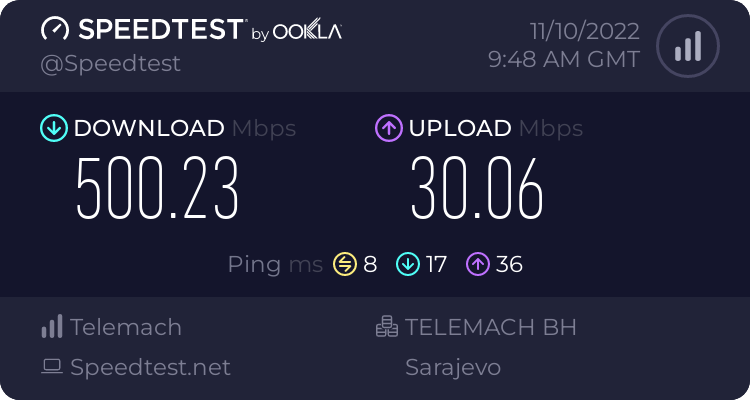
My only wish is when I move out to get symmetrical
and fiber
clear igloo
Most ISPs wised up and prioritize speedtest these days
peak cloak
Probably because they have a massive network and ^
clear igloo
or they have a local speedtest server on their network which takes priority
peak cloak
Wdym?
As in ping speedtest.net
Keep in mind also ping is lowest priority
ICMP vs tcp/udp
nimble sable
tribal flax
So here is mine, I pay for 500/30
https://www.speedtest.net/result/13921249271.p...
Ooh are we showing off speed tests? That's over wifi
 tribal flax
Damn that's sexy
nimble sable
Higher or lower?
Which brings me to my question... Is 6e not really common yet or something? All the recent phones and tablets have it but like maybe 2 APs do
peak cloak
Yeah obviously, since ICMP is low priority
Not in my case, it also depends where
You can get good upload to their servers, but to some other network with poor peering it will suck
nimble sable
tribal flax
Damn that's sexy
Sidebar, i cant believe ltt hasn't done a whole video on all the outright lies told by wifi marketing. MU-Mimo is not mu, like at all
peak cloak
Speed tests are to a location, not your whole speed
Maybe it wasn't limited correctly
pseudo blade
That strikes me as unlikely
hollow marlin
I think you're misinterpreting a lot of things here. While I have a few gripes with various speed test sites, they're not artificial.
lavish hollow
yes
nimble sable
hollow marlin
I think you're misinterpreting a lot of things here. While I have a few gripes w...
yea, the issue is speedtest for instance usually picks a server close to you, and they have plenty (more so if you use google speedtest). OTOH im not sure steam has that many CDN servers or watever
hollow marlin
nimble sable
yea, the issue is speedtest for instance usually picks a server close to you, an...
Thats not necessarily a problem. Speed test are a troubleshooting tool that requires input from multiple endpoints to get an idea of where an issue may be. The closest server may give you the best results but it being the "best" is not really a problem but an important piece.
My issue is how it lead to end users misinterpreting or not understanding results. Same with pingplotter and traceroutes. Both exacerbated reports of problems that never really existed
nimble sable
hollow marlin
Thats not necessarily a problem. Speed test are a troubleshooting tool that requ...
Lead to end users misinterpreting or not understanding results
how do you mean?
 half summit
hey guys quick question, do routers have a dns cache too? if so is it possible to add a named address with a ttl to the router? i wonna make a zeroconf local server but mdns seems a bit too much (uses multicast which would send to every device)
peak cloak
half summit
hey guys quick question, do routers have a dns cache too? if so is it possible t...
Yes, many support setting up a DNS server/forwarder with local DNS entries
Many devices support mdns by default
hollow marlin
nimble sable
> Lead to end users misinterpreting or not understanding results
how do you mean...
Many don't understand throughput concepts (ex. being many do not understand bandwidth is shared), let alone what speed test results provide. There are plenty of other concepts such as TCP BDP that inherently reduces throughput as latency increases or that a single test to a server excludes a multitude of the providers peerings and doesn't reflect real flows.
Because speedtest.net is more widely known, many just jump to speedtest.net and pingplotter and see one thing and point blame at their provider. And because of this and forums, understanding the results has polluted the tshooting space.
half summit
peak cloak
Many devices support mdns by default
ah thx, was hoping to exclusively use the router for a named address, but heard its not always possible to set a local dns on the router so safest option would be to use mdns. . .
peak cloak
What router?
half summit
the main router of the network? orr am i missing something?
ah shoot wait a sec, that isnt as simple as it seems
peak cloak
half summit
the main router of the network? orr am i missing something?
Unless you have some complex network you should only have 1 router
You can have multiple access points, but should only 1 router with NAT
half summit
peak cloak
You can have multiple access points, but should only 1 router with NAT
thx for all the info, did further research on the topic, seems like its a hit or miss whether routers have their own dns server/ cache and it isnt something that can be edited from the looks of it otherwise (atleast not for consumer routers, enterprise usually deploy their own dns server separately from my understanding)
which means multicast dns it is then .-.
peak cloak
half summit
thx for all the info, did further research on the topic, seems like its a hit or...
I've seen multiple consumer routers with DNS settings, that's why I was asking. I do it myself with my er-x
half summit
peak cloak
I've seen multiple consumer routers with DNS settings, that's why I was asking. ...
ah ye, it not mandatory feature tho, dont think my router has any settings for local dns either
nimble sable
hollow marlin
Many don't understand throughput concepts (ex. being many do not understand band...
oh interesting, now im curious abuot the specifics of all the misunderstandings ppl have
 pallid cypress
Hello everyone!
I have an OpenVPN Access Server solution that runs on an EC2 instance.
It works. It's OK.
I discovered the OpenVPN Cloud solution last week and I tried to create my VPN service based on my already running OpenVPN server but try as I might, I can't client internet traffic route through the VPN.
Does anyone have experience with this?
bold drum
Damn my switch isn't accepting the noctua fan I put in.
Oh my god those loons used a 12v delta fan at 5v and rearranged the pin out from standard 3 pin.
 frigid sphinx
there is no standard 3 pin.. that's a pc thing 😉
thick fulcrum
its almost time to renew my domains name registartion, is there any reason why i should NOT move my registration to cloudlfare?
currently with namecheap
cloudflare are AUD$8/year compared to $25USD for name cheap
sudden kayak
there are arguments to be made against letting any one company (even though cloudflare has largely proven themselves trustworthy) control more and more of the Internet... but that is very philosophical and theoretical. practically speaking, $8 vs $25 a year sounds like a no brainer
 astral creek
I don't really know if this belongs here, but here is my question:
I have a domain, and I want to be able to receive and send emails with that domain (example@mydomain.com). I am all though cloudflare, and while they have an email routing option, they have no way to send emails. I would not like to make a g-suite account and pay for that, so I was wounding what platform you guys (and gals) would suggest?
peak cloak
astral creek
I don't really know if this belongs here, but here is my question:
I have a dom...
is this for like personal/normal email use or for things like for a website to send emails?
astral creek
peak cloak
is this for like personal/normal email use or for things like for a website to s...
personal
peak cloak
astral creek
personal
so, basically you will need to pay to use your domain for emails. I personally use fastmail for mail.
Apparently zoho does have custom domain support for free
 astral creek
okay
This is what I was looking for. yk after all of the Zoho sponsorships seaways, you think I would have though about them. 🤣
Thank your @peak cloak
 coarse rapids
My router supports 2.4Ghz and 5Ghz wifi. Apparently Bluetooth is all 2.4Ghz. I assume it would make sense for me to turn off 2.4Ghz on my router if I want to use BT on my PC, as I don't really use 2.4 anyway?
 coral comet
Is there a cheap way of getting better the Gbit network in the home?
ISP provides 1.5Gb/s down and I'm only getting about, 650Mb/s. Current hardware: Linksys 1900WRT-AC router with Wifi off, TP-link wifi6e AP, PC is hardwired.
waxen saddle
Disable DPI, QoS, and Country blocking (if enabled). I’m assuming your PC is he wired directly to the router?
I wonder if making sure the MTU’s are all the same for modem, router, and PC would help…
coral comet
Yes using a CAT6E cable.
waxen saddle
If the router ports are 1Gbit, the highest speed you’ll see is around 950mbit or so. Nature of the technology.
coral comet
Unfortunately the modem is ISP provided. I'll dive into the router setting to look around
That's why I was considering going to a 2.5Gbit or 10Gbit router. I haven't seen many affordable options.
waxen saddle
It’s unreasonably expensive. This should have been commonplace years ago, but ISP’s with government-authorized monopolies drive out competition for increase speeds at decent prices, so the whole industry around faster speeds turtled for eons. At least it’s like this in the United States.
coral comet
10Gbit seems to be common place in enterprise. but 3k for a 10Gbit LV3 router seems nuts, and adding a POE switch on top of it ouch. I may go Unifi soon.
I'd just like to see speeds i pay for is all
waxen saddle
Makes sense. As long as every port and cable in the chain can support at least your ISP’s speed, you should be alright. Doesn’t do any good to invest in all the devices and cabling only to use the 1gb port on your computer.
coral comet
Luckly my Mobo has 10G
frigid sphinx
so direct edit on nas is a reason to move to faster than gigabit.
(video/media production )
pseudo blade
It's definitely a reason to do so
You can use a few techniques to work around that but if you're editing professionally at 4k or above you wouldn't bother, 10 gig or more isn't that expensive
 hardy kestrel
ISP gave me a free two piece mesh router for being a loyal customer for 5 years 🤨

I mean thank you very much, I won’t use it since I have a hardwired multi AP setup
 carmine moss
Just try it out for a bit I guess and if it's good give it to some family or friends
pseudo blade
It's a mesh with no dedicated backhaul by looks
So not awesome but depending on your use case maybe fine as long as most of your work happens on the internet-facing node
Ok wow they're insanely cheap
I can't turn my nose up much at a router that sells for $60AU($40 US)/node with AC WiFi
pseudo blade
hardy kestrel
ISP gave me a free two piece mesh router for being a loyal customer for 5 years ...
This looks like fun: https://github.com/latonita/tenda-reverse
GitHub
Reverse engineering, getting root access to Tenda MW6 wifi mesh router - GitHub - latonita/tenda-reverse: Reverse engineering, getting root access to Tenda MW6 wifi mesh router
full monolith
hardy kestrel
ISP gave me a free two piece mesh router for being a loyal customer for 5 years ...
Tenda is kinda ok if u use a single router for like guest stuff or smth like that but mesh stuff from them is just bs
pseudo blade
You're not getting high throughput out of that single-core mips CPU either
thick minnow
hardy kestrel
ISP gave me a free two piece mesh router for being a loyal customer for 5 years ...
These things always cause wifi congestion
They're useless
thick minnow
Does anyone have experience with The Things Network (LoRaWAN) and localhost implementation?
pseudo blade
Uh I read into it a bit for a project but didn't end up implementing it?
Will that do?
full monolith
hardy kestrel
ISP gave me a free two piece mesh router for being a loyal customer for 5 years ...
Used tenda before... Never again
high needle
hardy kestrel
ISP gave me a free two piece mesh router for being a loyal customer for 5 years ...
Assuming the ISP has explicitly said you own them and its not part of your contract just sell them 
I wouldnt be surprised if its as part of your contract though and they just sent them as an upgrade, and when you cancel they will ask for them back
 rain patrol
Is there a difference between a router & a network switch with a firewall? Because I want a network switch with a firewall and now I am wondering if its as simple as getting a router (:
clear igloo
rain patrol
Is there a difference between a router & a network switch with a firewall? Becau...
A switch operates at Layer 2 of the OSI model
A firewall is a L3+L4 and/or L7 device
Or you spend a few thousand dollars on a firewall with a lot of ports 🙂
peak cloak
rain patrol
Is there a difference between a router & a network switch with a firewall? Becau...
also generally for a generic network with a only a couple of subnet + 1 WAN IP, you want only one router/firewall
as the router will do NAT between the internal addresses and your WAN IP
what are you trying to implement exactly?
rain patrol
peak cloak
what are you trying to implement exactly?
I want to isolate some services from my private network but keep them accessible over my public ip
 peak cloak
Your answer are VLANs
You technically can also have an isolated network with using a router and then setup some static routes to avoid double nat
But you would need a router that allows that sort of setup
rain patrol
peak cloak
Your answer are VLANs
Thanks!
peak cloak
rain patrol
Thanks!
Your router would need support VLANs
I doubt your generic ISP router does
Then you can setup multiple subnets and define firewall rules between them
Switches would also need to support VLANs
Technically you don't really need VLANs, just 2 separate subnets. One port on router is for example 192.168.0.1/24 other is 192.168.1.1/24
Then setup firewall rules. VLANs allow you to have multiple subnets over a single cable basically
peak cloak
thick minnow
some isp routers support it in wireless
?
You can't define multiple subnets on wifi on a single ssid
thick minnow
what are you confused about i don’t understand. all i was saying is that some isp routers only support network isolation on Wlan
peak cloak
thick minnow
what are you confused about i don’t understand. all i was saying is that some is...
That's not possible iirc, device isolation is
Or a guest wifi, then yes
I'm thinking more technical
thick minnow
@peak cloak i should have said this but it makes a completely separate Wlan
peak cloak
Yeah I know what you mean now
 scarlet isle
I hope this is the correct channel, but I am a storm chaser and I'm trying to boost my cellular connection on the road. My phone (Note 20 Ultra) just doesn't cut it and I'm looking for a plug and play kit that works on a phone or on a pc (we have a laptop in the car). I don't mind having to mount an antenna to the car as we already have one and it's pretty easy to add more, but I suck at coding and I don't want to bother people with a ton of work. What would you recommend? Thanks in advance
peak cloak
Have you considered a separate cellular device that will basically be a gateway/router
And you would connect via WiFi
scarlet isle
Not really, i use my phone as a hotspot but cellular data coverage is pretty bad at times and I figured a bigger antenna could make things better
peak cloak
Yeah, you can get a cellular modem/router can connect it to a large external antenna
scarlet isle
That'd be perfect, thank you
 dusk saddle
Question about ip phones and QoS. Let’s say I have a host connected to an ip phone that’s connected to a switch. I have my data and voice VLANs set up. I go into interface config mode on the interface connected to the phone and use the switchport priority extend cos 3 command. The phone will override the PCP value of any data traffic coming from the host with a value of 3, correct? I’m confused by the boson answer, it says it overrides the value but then tags the data packet with a CoS value of 0.
Makes the command seem pointless. The default value is 0 for best effort anyways.
thick minnow
 snow elk
Hi guys! Any tips on optimizing Wireguard?
I have a P2P tunnel from my home to Bucharest, on a VPS with 4 cores. My home has 10Gbit both ways and the VPS 1 Gbit. My question is how to speed up wireguard since it only does around 450 mbps?
On a bare iperf3 between the two via internet i get speeds as expected (900-950)