#networking
1 messages · Page 13 of 1
 thick minnow
 full monolith
thats where i made my 1300mbits
 thick minnow
They'd probably get into legal troubles
full monolith
they use microcells there so theres. not really more possible with the people connected to that
thick minnow
full monolith
thats where i made my 1300mbits
Magenta Austria doesn't have a mobile network capable of gigabit speeds yet.
Only 3AT
full monolith
telecom is bullshit in other countrys anyways
like for us theres like a tower or antenna every 1-3km or less and even while driving 200 on our local roads you have stable 200+ mbits
thick minnow
Not in the USA. They do really well there, with almost everything covered in 5G
full monolith
even with hills etc
thick minnow
and many towers do a gigabit, even in rural areas.
full monolith
thick minnow
Not in the USA. They do really well there, with almost everything covered in 5G
yea usa is different lmao
with mm 5g
thick minnow
all carriers are good in the USA. They are far ahead in the 5G race and they've won it
full monolith
yea
thick minnow
 full monolith
EU just fkin cries again about the frickin frequencies
like damn its not that hard
thick minnow
The issue is fiber rollout too
full monolith
i mean here thats not the problem tho
even our towers are all connected via fiber
or 40g point to point
full monolith
yea i mean here theres many hills etc so mm 5g would be useless here anyways
thick minnow
Here they don't have mmWave yet, n78 is lacking outside of cities and towns.
full monolith
but in flat locations it would be usefull af
but n78 gets way better in smaller towns and cities here
thick minnow
full monolith
yea i mean here theres many hills etc so mm 5g would be useless here anyways
True, but samsung achieved 8cc mmWave with really good range.
thick minnow

Qualcomm Technologies, Inc., Three Austria and ZTE have successfully executed a 5G network demonstration using a standalone (SA) coverage layer based on 700MHz (n28) and the world’s first supplemental downlink (SDL) band 1400MHz (n75), significantly
thick minnow
full monolith
but n78 gets way better in smaller towns and cities here
Less congestion
thick minnow
full monolith
wait imma show you the issues about like where i live
Alright
full monolith
You littearly have hills everywhere higher then anything else

I mean our towers are on the hills but yea
Its hard here
thick minnow
I am surrounded by mountains and they managed to have great signal everywhere
I can even reach the 5G n28 when I go up to 700m
full monolith
nice
thick minnow
full monolith
I mean our towers are on the hills but yea
Yeah, could be the brick houses too
They can slow down speeds a lot too.
full monolith
bro all houses ar elike fr build to last atom bombs
theres houses from 1400 that look better then new houses
but like 2m walls ngl
thick minnow
Mine is too, but there is some fat layer outside for heating
full monolith
like my room is on the wrong side of the house
thick minnow
full monolith
like my room is on the wrong side of the house
Oof. This probably means bad uploads
full monolith
i mean i dont need mobile at home
 prime dawn
when i was in school my parents were looking for a house to buy and one of them had a bomb shelter p much which was carved into the slope of a hill
thick minnow
full monolith
i mean i dont need mobile at home
For me it's the only option bc who the hell wants to use DSL
thick minnow
40mbps would not be enough for me
full monolith
my bonding speeds
 thick minnow
But I have fast LTE and this means I don't have to share it with anyone in my family :))
thick minnow
full monolith
my bonding speeds
Awesome
full monolith
get like 190mb/s in steam
thick minnow
What are the upload speeds?
thick minnow
I have 2 games downloading rn. One in a VM and one on my pc

UDR manages it really well.
thick minnow
full monolith
like 95-110
So one would be like 50mbps?
full monolith
yea its 50 from contract but u have like 54.5 max
thick minnow
Docsis 3.1
full monolith
yea
thick minnow
Magenta sells a 1000/50 plan for 39€
prime dawn
wow i'm actually getting 920 down rn
full monolith
with a single cable line and 2.5g i get liek 1100 mbits down
but my bonding pc is only 1g on wan
10g sfp+ on output
thick minnow
I don't like internet plans here anyway. I have a phone sim with unlimited priority data and I just pay 23€ a month.
thick minnow
full monolith
but my bonding pc is only 1g on wan
oh
full monolith
i mean for me vodafone is hella good not like for most other people
where it dies every 5min
thick minnow
okay it's only cheap if you have a phone plan
 full monolith
they build everything new like 4 years ago and the main point of the docsis station thing on the street is like 50m away
so at best times in night i have like 3-5 ping
thick minnow
full monolith
where it dies every 5min
Yep. I have a German friend and his Vodafone internet dies every other day.
full monolith
yea but also its the vodafone station router
prime dawn
oh god the vodafone blackbox
thick minnow
He get's 7mbps on Telekom LTE
full monolith
like bro thats littearly build to show how bs they are
thick minnow
B20 only
prime dawn
i will slay whoever came up with the new technicolor model
thick minnow
full monolith
yea but also its the vodafone station router
Which one do you use?
full monolith
2x tc4400
prime dawn
my old CBN one was at least not harmful, it was just arse (i actually used an old fritzbox as my WAP)
 full monolith
thick minnow
I have a UDR
full monolith
thick minnow
I have a UDR
i had a udm pro but i doomed all unifi hardware
prime dawn
the new technicolor one i got with the gigabit upgrade, no joke, is too stupid to act as a switch, insane packet loss when accessing my nas (ok that's again the used fritzbox) behind it ... i ended up having to use the fritzbox as the central network switching device and only have wan and 1 ethernet connected to the technicolor box
thick minnow
prime dawn
my old CBN one was at least not harmful, it was just arse (i actually used an ol...
My parents use a FritzBox DSL 💀
prime dawn
i mean the WAP fritzbox is an ADSL model
thick minnow
full monolith
i had a udm pro but i doomed all unifi hardware
ah
prime dawn
that's why it's kinda worthless but also like an ok WAP and basic ass nas
full monolith
Still the 10g switch here no one wanna buy it
 thick minnow
 prime dawn
full monolith
Still the 10g switch here no one wanna buy it
prime dawn
full monolith
Still the 10g switch here no one wanna buy it
cute
full monolith
And yea i use a cloth bin for cables
thick minnow
lol
full monolith
I once used like 5TB in not even 3 days
Did a lan party at my 18th
With like 30people
thick minnow
full monolith
I once used like 5TB in not even 3 days
I could do that in 4 days
If I download a 1tb file
thick minnow
full monolith
Did a lan party at my 18th
Nice
I used 6TB with a cheap alcatel router once
and a lidl pre paid sim card
full monolith
1TB file is like 2hrs and a few min for me
thick minnow
yeah cuz yours is really fast
full monolith
yea
 full monolith
i littearly give my whole neighburhood free wifi caue i cant use my whole bandwith anyways
thick minnow
Oh and 5TB on Telekom. I love abusing LTE networks
full monolith
i use 2 loco m5s for whole street coverage
thick minnow
Do you run a lan cable outside?
thick minnow
full monolith
i use 2 loco m5s for whole street coverage
I had some APs in my garden that had coverage on the street in front of my house but I disconnected them
full monolith
like i just dug a few cm of dirt down in a line lmao
thick minnow
Is that allowed?
full monolith
idc if it is no one cares here
you littearly can walk around in peoples garden and no one would do shit
thick minnow
Lol
full monolith
everyone knows eachother here so yea no worries
thick minnow
Isn't it a safety risk though, to have lan cables outside?
full monolith
why would it be
full monolith
lol find someone here that even knows what a lan cable is doe
thick minnow
True
full monolith
i cant even explain my mom what i do cuz she wont ven understand how a lan cable works
she be like bro whats that thing with the blinking lights this needs to be on?
im like yea bro ignore it
thick minnow
Same. I always tell my mom to just not unplug anything.
full monolith
yea lmao
full monolith
yea same with my mom hahaha ashe was like dude whats that thing we dont need that
i was like: yea you dont need it but i need it
so she just shut up and left me alone
now she stopped asking shit thats good
thick minnow
My parents thankfully have their own router so they don't complain anymore
40€ a month for DSL tho 💀
full monolith
bro wanna see smth
thick minnow
Yes, sure
full monolith
we have a local isp here ok
so like speeds are bs and prices are like
higher then some drug addicts
full monolith
no dsl 💀
they have one fiber plan that has like coverage for not even 300 houses

like dude who tf pays 50€ for 100mbits dsl
thick minnow
full monolith
YOUR INTERNET SERVICE PROVIDER
full monolith
not the one i use lol
thick minnow
full monolith
like dude who tf pays 50€ for 100mbits dsl
No one, I hope
full monolith
too much tho
thick minnow
full monolith
not the one i use lol
Yeah, their logo says it
full monolith
bro telecom cant do better here cause they use the dsl shit
so telecom cant do better then them
telecom has only 11mbits here and they like 100 at best
thick minnow
full monolith
so sad how they still advertise in kbps
full monolith
ikr
thick minnow
full monolith
telecom has only 11mbits here and they like 100 at best
Extrmely sad.
full monolith
i had to use 11mbit like 5 years and then
i got 1 gbits and then i just got another cause i was feeling like i need it
thick minnow
I had 1mbps/1mbps A1 dsl until 2016
full monolith
hell nah
thick minnow
full monolith
i got 1 gbits and then i just got another cause i was feeling like i need it
How exactly did you do it?
Are there 2 cables?
thick minnow
full monolith
hell nah
Then I got a mobile broadband router with 50mbps LTE (It never got close to 50mbps)
full monolith
 thick minnow
Oh okay, I understand it now
full monolith
like basiclly the whole street is like that
you have on main cable in the street and people juust get connected to that for their houses
thick minnow
Oh okay yes
full monolith
you are just limited by the users per main cable or like the frequendies docsis 3.1 uses
thick minnow
I sadly don't have much knowledge with docsis internet.
My brother has a 250mbps/50mbps plan on Magenta
full monolith
okay
full monolith
here if telecom does super vdsl they do it well like really well but yea not everywhere tho
like i saw dsl lines with 300mbits over 600m line lenght and 3ms ping
full monolith
thick minnow
wifi gives like 2-3ms on 5ghz and like 2ms on 2.4 when its not used much
thick minnow
I have seen a few that can do 250mbps
full monolith
so it could be better tho
thick minnow
full monolith
wifi gives like 2-3ms on 5ghz and like 2ms on 2.4 when its not used much
It's wifi 5 but yeah, right
full monolith
yea
thick minnow
latency on LTE here
thick minnow
thick minnow
latency on LTE here
It's LTE+ but SKT phones don't show it sadly.
full monolith
kionda same here but faster
thick minnow
The second one got 14ms.
full monolith
here the best i get with mobile is like 10-13
thick minnow
In cities it's 12ms
thick minnow
full monolith
here the best i get with mobile is like 10-13
4G or 5G?
full monolith
both
full monolith
ik someone who works at telecom and has a priority sim card that littearly can use the whole tower no matter how many people are conencted to it
and he broke 900 mbits over 4g+
thick minnow
I would pay lots of $$$ for a sim card like that
full monolith
he littearly gets it for like 30 or 40
thick minnow
full monolith
and he broke 900 mbits over 4g+
It was at least 5ca though, right?
full monolith
yea i think
thick minnow
Do they have 7ca towers on Telekom?
full monolith
he uses a mi 11 ultra
full monolith
thick minnow
Do they have 7ca towers on Telekom?
idk rn but i can ask
thick minnow
full monolith
he uses a mi 11 ultra
Oh okay. Would probably been better on a Samsung since those can do 2000mbps on LTE
full monolith
idk my max on my iphone 13 was like 600 but also not on a good tower
thick minnow
I own one but I can't use 5G on it since SKT has no roaming agreement with any carrier here for 5G so it just blocks it 💀
 thick minnow
full monolith
idk my max on my iphone 13 was like 600 but also not on a good tower
thick minnow
full monolith
idk my max on my iphone 13 was like 600 but also not on a good tower
I did 470mbps on LTE while I was on vacation
full monolith
i have 2 more sims on vodafone because of my tablet and my mobile router but vodafone sucks ass on mobile
like its usable but not that good
full monolith
if you use hotspot on the device u wanna test its faster most times
thick minnow
Yeah it only did 200mbps on the Huawei
But then with hotspot enabled it did 470mbps.
I ran out of data after this sadly
full monolith
before my iphone i had a realme gt neo 2 and back then i was using the vodafone as main sim for internet
thick minnow
full monolith
i have 2 more sims on vodafone because of my tablet and my mobile router but vod...
Vodafone sucks everywhere for mobile.
full monolith
and my max was like 900 on a highway
but that was the only time i even got close to that with vodafone
 full monolith
king move is to config your modem in the phone to output more power
thick minnow
full monolith
and my max was like 900 on a highway
5G?
full monolith
yea
thick minnow
full monolith
king move is to config your modem in the phone to output more power
How do you do that?
full monolith
root the phone and theres like a few programms to do that
thick minnow
Ohh okay
full monolith
not sure tho never did it just got shown and told by the telecom guy ik
its cool but i really have better things to do then modifying a phone modem lmao
thick minnow
I see. I'll look into it later but it probably wont change anything in speed cap country.
Yep. Probably takes a lot of time
full monolith
i mean its illegal in theory but yea people still do it
thick minnow
Oh
full monolith
like not cause you change it its just. cause of you use more power then allowed and eventually the people that have controll over the mobile stuff will find out
same when u do wifi routers with more power
they littearly doomed my friends house and got his router cause he was sending 5ghz with 3w
thick minnow
LMAOO
full monolith
they littearly found the exact location of the thing just from their like magnet antenna things on the mobile towers
he had to pay 500€ and didnt got his router back
thick minnow
Was the router expensive?
full monolith
nah was just some random one with modiefied antenna module
thick minnow
full monolith
they littearly found the exact location of the thing just from their like magnet...
But they can't interfere
Or did they just use it to track down your friend?
full monolith
there are weather radars and flight secutiry things on 5ghz
so yea they can interfere with important stuff
you are also only allowed in EU to send 1W on channel 100 and above
under 1W in channels 36-56 or 62
thick minnow
Yeah, I'm not messing with the law for something like that
full monolith
same
thick minnow
Don't want my shit taken away by them
full monolith
i mean its funny but only when seeing other people doing it hahaha
thick minnow
Hehe, yes.
full monolith
i mean bro imagine u mess around with shit and the next day theres people standing on our door taking your stuff away lmao
thats like scarry shit ngl
thick minnow
That stuff is always scary, that's why I will never do anything that can cause this to happen 🙏
btw, did you get my friend request?
Cuz I want to study now
full monolith
yea was to lazy to accept so far lmao
thick minnow
oh haha
full monolith
also when talking about wifi and range
i had a unifi mesh hd outside and it detected wifis that are over 700m away even down the hill
like dude what the fuck is this
thick minnow
LOOL
full monolith
theres litteatly idk how many houses between and not even line of sight
i had like over 350 wifis detecting in under 24hrs
thick minnow
Unifi is just great
full monolith
hardware is good but software is crap
thats why i doomed my udm pro etc
just ha dtoo many bugs
full monolith
 thick minnow
Anyway, I'm studying now. Bye 👋
full monolith
bye
thick minnow
full monolith
I wish
full monolith
lmao
imma go eat till i break now and then watching shit till i sleep lol
thankfully i dont get heavier no matter what i eat hahaaha
full monolith
thanks have a great evening. bye
i didnt do any other pics of my uni stuff sop that the only one where it was still doing all its stuff. dont doom me for my room lmao im pretty weird
The pc down there is my router pc what runs my bonding
 full monolith
i had a unifi mesh hd outside and it detected wifis that are over 700m away even...
full monolith
full monolith
i had a unifi mesh hd outside and it detected wifis that are over 700m away even...
that was the rangeof this mf

650m ok still much lmao
thick minnow
full monolith
that was the rangeof this mf
I've had this happen too. I detected my APs from the mountain which is quite far away too at around 250m height
But only the 2.4ghz band
691m
Away from my house


 full monolith
We have one main building and then like the switches for the houses in every street
Thats only dsl tho. Coax is in a orher building
Me when i saw our telecom building first time:

 thick minnow
Yeah, but for me this is unusable
 novel dome
Oh, by my new standards, yes, absolutely
thick minnow
https://tyler-will.shutoffyourinter.net/📸/euxjxflb.png I'm happy with the LTE 3AT has here. My TV is on too so it's not as fast as usual
 thick minnow
thats lte!??
 cinder plank
I have a 2tb HDD that I want to move to my new unraid NAS. I want to transition to accessing the data as a cached SMB map. I would like to maintain as much metadata as possible.
Q: What are the differences between the NTFS and SMB metadata capabilities? (i.e. date created, file permissions etc. )
 nimble sable
thick minnow
nimble sable
thick minnow
Yikes, do you live somewhere remote? I always thought eu generally had better internet than that
nimble sable
thick minnow
https://tyler-will.shutoffyourinter.net/📸/euxjxflb.png I'm happy with the LTE 3...
Hold on... Is that an emoji inside a url? That's a thing we can do now?
 peak cloak
nimble sable
Hold on... Is that an emoji inside a url? That's a thing we can do now?
peak cloak
nimble sable
Hold on... Is that an emoji inside a url? That's a thing we can do now?
yes for a while
but browsers won't show it in the url
nimble sable
https://www.androidcentral.com/accessories/smart-home/tp-links-wi-fi-7-lineup-confirms-huge-speed-and-capacity-upgrades-over-6e
Come on man. I JUST upgraded to 6e

Android Central
The flagship Archer BE900 router has an insane BE24000 (yes, 24,000Mbps) quad-band wireless connection.
peak cloak
nimble sable
https://www.androidcentral.com/accessories/smart-home/tp-links-wi-fi-7-lineup-co...
What client devices have 7?
nimble sable
peak cloak
but browsers won't show it in the url
How well does it work, any compatability issues?
peak cloak
nimble sable
How well does it work, any compatability issues?
the reason is security
nimble sable
peak cloak
What client devices have 7?
I still can't get MU-Mimo to work, forget 7 lol
peak cloak
people registered domains with very similar unicode characters to popular websites
nimble sable
Srsly btw if anyone has actually gotten MU-Mimo to work as intended let me know (this means simultaneous 1200Mbps on 2 devices at the same time)
nimble sable
peak cloak
people registered domains with very similar unicode characters to popular websit...
Hmm but like why? Who's gonna type göogle instead of Google?
peak cloak
nimble sable
Hmm but like why? Who's gonna type göogle instead of Google?
phishing
example: аpple.com
in reality: https://аpple.com
although for something in the url path it's less of a concern I guess
so idk, I guess browsers could implement that
nimble sable
Hold on... Is that a not an a?
peak cloak
well crylic a
nimble sable
Wth... That looks identical to latin a
peak cloak
exactly
nimble sable
I feel like this is an issue with whoever thought those two identical looking things needed two separate entries on the Unicode table
nimble sable
Oh ya ya... But they look different if you know how to spot it
This is another level
peak cloak
yes
very similar
Vulnerability in Chrome, Firefox, and Opera makes users susceptible to phishing with Unicode domains
nimble sable
U know there's an easy fix to this
New ICANN rule: homoglyphs are recognized as variants similar to caps in latin alphabet
There's ZERO downside to that rule, except that someone has to go and map all the homoglyphs in the Unicode table currently
nimble sable
peak cloak
https://www.xudongz.com/blog/2017/idn-phishing/
Has this been fixed now? I can't get dns to succeed for the fake apple.com
peak cloak
nimble sable
Has this been fixed now? I can't get dns to succeed for the fake apple.com
Well there's no DNS record, but the fix is that the crylic a is converted to puneycode
nimble sable
peak cloak
Well there's no DNS record, but the fix is that the crylic a is converted to pun...
Wait so before the fix, how would it work?
Was there a dns somewhere for fake apple.com?
peak cloak
peak cloak
example: аpple.com
It would look like this in the browser
peak cloak
peak cloak
in reality: https://аpple.com
Now it looks like this
nimble sable
Oh i see... Why the 43d?
peak cloak
Except I think if you have the crylic alphabet as the system alphabet
nimble sable
But i can register fake аpple.com as a domain?
Except now no one would be able to get to it unless they had Cyrillic as system alphabet
peak cloak
nimble sable
Oh i see... Why the 43d?
Idk actually
Can read more https://en.m.wikipedia.org/wiki/Punycode
Punycode is a representation of Unicode with the limited ASCII character subset used for Internet hostnames. Using Punycode, host names containing Unicode characters are transcoded to a subset of ASCII consisting of letters, digits, and hyphens, which is called the letter–digit–hyphen (LDH) subset. For example, München (German name for Munich) i...
peak cloak
nimble sable
But i can register fake аpple.com as a domain?
I think you can
nimble sable
peak cloak
Can read more https://en.m.wikipedia.org/wiki/Punycode
Oh that actually explains the whole thing even the 43d bit
 red fox
Anybody know anything about upgrading old wifi chips in old laptops? I know the chip in my laptop would be upgradable if I really wanted to, but I am not sure about details of whether you would need to replace antennas and how much it could be limited by the hardware of my laptop.
My laptop is a fujitsu t902, its intel 3rd gen with an i5 3340M, currently has an intel wifi card in it.
(looking for some general and perhaps some specific advice on this, feel free to ping me in a response)
full monolith
red fox
Anybody know anything about upgrading old wifi chips in old laptops? I know the ...
For now i never upgraded one but i mean its a m.2 card in like 99% of the times and i guess with a wifi6 intel card you are good to go
Intel wifi cards are always great on laptops
red fox
full monolith
For now i never upgraded one but i mean its a m.2 card in like 99% of the times ...
Do I need to worry about getting new antennas or will the old ones work?
And what about wifi 6E?
full monolith
I think wifi 6e needs 3 antennas because of the 3 bands but i mean you could use the 2 for 5 and 6ghz and just dont use 2.4ghz
You would have 2.4g but with awfull range
red fox
I thought so too... but this doesnt have a third one ... https://a.co/d/52jQu6n

WiFi 6E Wireless Card Intel AX210 NGW Bluetooth 5.3 Tri-Band 5400Mbps Network Adapter for Laptop Support Windows 10/11(64bit) M.2/NGFF
full monolith
Okay then it should work with 2
red fox
So should just be drop in replacement?
Oh actually I have quallcom wifi currently, but I still would end up wanting something intel
Found this page for my laptop, but I know it has qualcom for sure

Hers a different probably more accurate spec sheet for it

 pseudo blade
red fox
I thought so too... but this doesnt have a third one ... https://a.co/d/52jQu6n
pseudo blade
red fox
I thought so too... but this doesnt have a third one ... https://a.co/d/52jQu6n
Obvious thing right away - Your Intel Centrino chip is a half-size mini-PCIe, but the new wireless card is M.2 form factor
So they will not physically fit in the same slot
You can get m.2 to pcie adapters online for cheap, though it'll increase module height and might not fit without modification
The existing antennae would be for 2.4ghz only and would likely perform poorly in 5ghz
red fox
pseudo blade
The existing antennae would be for 2.4ghz only and would likely perform poorly i...
I do have 5ghz wifi on the laptop currently
pseudo blade
The 6205?
No, you said Qualcomm
Well that should perform similarly then
It's mostly the form factor issue then
red fox
pseudo blade
Well that should perform similarly then
Similarly to how it currently does, or similar to how that new chip would be expected to?
pseudo blade
The WiFi 6E part is 6ghz so again not going to be what the antennas were designed for
I'd again expect poor performance
pseudo blade
red fox
Similarly to how it currently does, or similar to how that new chip would be exp...
Somewhere in between for 5ghz and 2.4ghz
Theoretically a pcie 1.x connection would limit you to a bit under 2gbps after overhead, but in the real world everything else will limit you first
red fox
pseudo blade
Somewhere in between for 5ghz and 2.4ghz
gotcha, How hard would it be to get and hook up new antennas that would be better optimized for it?
pseudo blade
Rather difficult to do right for a laptop, they usually run them up along or on top of the display to get away from the laptop body, and the PCB's are going to be shaped for the space without much clearance
red fox
ahh, well thanks for the suggestions!
thick minnow
nimble sable
Yikes, do you live somewhere remote? I always thought eu generally had better in...
No it's bad all around the country. I'd say only 5% of people have real fiber.
thick minnow
nimble sable
Hold on... Is that an emoji inside a url? That's a thing we can do now?
🤷♂️
 faint bronze
Wifi-6e uses two antennas for 2x2. This means that the antena needs to be designed for the 2.4 range and 5-7ghz.
 slow pivot
2x2 usually refers to MIMO; in this case it uses 2 TX antennas and 2 RX antennas. Says nothing about the frequency ranges.
full monolith
But with 4 antennas it would be 4x4 mimo
faint bronze
Well, what I am referring to is an Intel ax210 where it has 2 antennas and is a 2x2 configuration.
 tranquil berry
is it still normal for a router to lose connection to the internet like once a month or so
that you have to reset the thing multiple times to get it to work
 lavish kayak
What do you mean by router? Like a domestic Cable Modem that is also a router?
 lavish kayak
not out of the ordinary I would say, sounds like it should be rebooted once a month lol, you may be able to schedule it in the router settings
tranquil berry
my router reboots once a week
bc of the issue before where the net goes down every two weeks
literally got this start of last year
now it just happens whenever it feels like it
restarting it now just works after a couple of minutes then loses connection again
thick minnow
tranquil berry
restarting it now just works after a couple of minutes then loses connection aga...
TP link always sucks.
 shadow bluff
seem like your ISP provided modem are quite ghetto. theres no getting away from it
lavish kayak
ah, the plot thickens. if your local network is running fine when that happens it's either a problem with the connection to your house or with the modem, in that case I don't think there is much you can do. you'll probably need to work with your ISP, pester them whenever you lose internet.
You may be able to get a replacement modem from them
tranquil berry
shadow bluff
seem like your ISP provided modem are quite ghetto. theres no getting away from ...
i asked my parents to buy this router
since my brother was moving out temporarily and took the extender
shadow bluff
thick minnow
TP link always sucks.
the modem in that picture is fine actually
uses it personally
never had downlink with the router expect when my isp modem decide to act up
shadow bluff
tranquil berry
i asked my parents to buy this router
i dont think your router is the culprit here
did this happen initially before you got urself a new router?
tranquil berry
the isp provided modem is what i dont use bc 2 100mbps ports and small range
tranquil berry
shadow bluff
i dont think your router is the culprit here
did this happen initially before yo...
at first it was us disconnecting which the solution to that was change the dhcp lease time to 72 hours which fixed it
shadow bluff
tranquil berry
the isp provided modem is what i dont use bc 2 100mbps ports and small range
you mean router? modem is the boxy one on the side of your tp link router
shadow bluff
that would be your isp. another name for it would be translating modem for your home.
shadow bluff
assuming your router is the problems, its hard to confirm since you dont have another router lying around
tranquil berry
i have the isp one
shadow bluff
you can try that one, see if it acts the same
if it does :
contact your isp, they might need to get that modem replaced/port reset
if it doesn't :
you're gonna have to get another router
tranquil berry
wonder if i can even ask them to swap out the router for a new one even tho theres no wifi 6 on it
these specs even good for an isp provided router

mfw logs dont tell me anything about no internet connection
thick minnow
tranquil berry
these specs even good for an isp provided router
Cat 6 lte isn't good
Does it have DSL too?
tranquil berry
well yeah for those using fibre to the curb connections which is basically VDSL
thick minnow
So it's one of those routers that combine DSL+LTE?
tranquil berry
idk whats the point if the max speed for dsl is 150mbps
tranquil berry
thick minnow
So it's one of those routers that combine DSL+LTE?
i guess so
thick minnow
So you just have a DSL plan?
thick minnow
I can achieve those speeds on 4G alone
thick minnow
tranquil berry
well yeah for the 4g backup
Oh
tranquil berry
yeah well our 4g speeds are shit
thick minnow
Is it too congested?
tranquil berry
i dont think so
tranquil berry
istg the upload is not like this
 thick minnow
Or does your router stop working completely
thick minnow
tranquil berry
istg the upload is not like this
Oof. My 3G is faster than this
tranquil berry
sorta fixed it by unplugging the modem
tranquil berry
thick minnow
Oof. My 3G is faster than this
australia internet in a nutshell
thick minnow
 thick minnow
tranquil berry
australia internet in a nutshell
thick minnow
tranquil berry
australia internet in a nutshell
It's bad here too. The DSL I have is too slow for me
 thick minnow
tranquil berry
istg the upload is not like this
thick minnow
tranquil berry
istg the upload is not like this
Try using 5G
thick minnow
tranquil berry
if it was the isp provided router id probably be hitting 240 or smth
Still very fast
tranquil berry
dont understand why speeds are 100 when 5g is capable of more than that

 meager ginkgo
 thick minnow
I don't use any ISP provided stuff and the internet plan I have is a phone sim card with unlimited data but highest priority.

 thick minnow
tranquil berry
dont understand why speeds are 100 when 5g is capable of more than that
thick minnow
tranquil berry
dont understand why speeds are 100 when 5g is capable of more than that
On fiber? Bruh
tranquil berry
damn mans got da uniquiti
tranquil berry
thick minnow
On fiber? Bruh
na these are 5g internet plans
thick minnow
Oh yeah oof. My carrier limits my 5G to 350mbps lmao
5G low band will not do more than 300mbps usually. I think they don't want people contesting the network too much, that's why the internet plans are bad.
I never get mobile broadband internet plans. They're often deprid, more expensive and in a contract.
Can you get a sim card with unlimited Hotspot on your carrier?
tranquil berry
i was literally right next to a 5g cell tower and these are the speeds i pulled
 thick minnow
I got these speeds like 2 times on n78 100mhz but I'm technically capped to 350mbps because DTAG moment
thick minnow
tranquil berry
i was literally right next to a 5g cell tower and these are the speeds i pulled
How is it at home?
tranquil berry
4g type ass speed bc we dont got 5g tower
thick minnow
Your phone says that 5G is available though, which is interesting.
Do you know the 4G speeds on other carriers?
tranquil berry
tranquil berry
istg the upload is not like this
then again this is inside my house
thick minnow
Can you check which bands it has? I'm curious lol.
tranquil berry
where do i go for that
 tranquil berry
 thick minnow
That's the same combo A1 has here 😳
Should be pretty good
So it's congestion most likely.
tranquil berry
wonder if the newer isp provided routers can even handle vr streaming
thick minnow
Can you send me a link to the website?
tranquil berry

Vodafone Australia
Here is the latest software update for your Vodafone Wi-Fi Hub.
 thick minnow
tranquil berry
wonder if the newer isp provided routers can even handle vr streaming
thick minnow
tranquil berry
wonder if the newer isp provided routers can even handle vr streaming
Probably. It just depends on the internet speed
tranquil berry
https://www.tp-link.com/au/home-networking/wifi-router/archer-ax20/v1.2/#specifications then heres the router i have
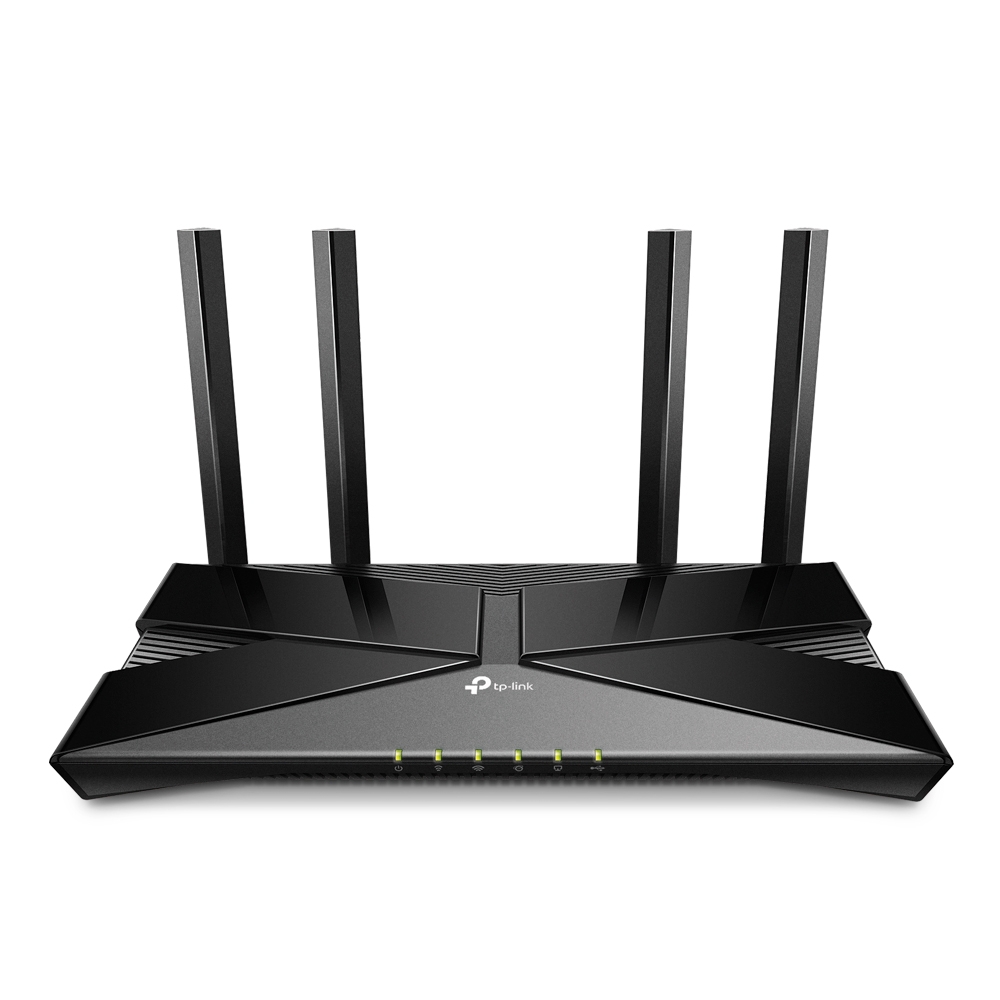
Equipped with the latest wireless technology, Wi-Fi 6, Archer AX20 delivers faster speeds, greater capacity, and reduced network congestion.
i also pretty much futureproofed myself unnecessarily by buying cat8 cables bc they were cheap
thick minnow
Seems pretty good
thick minnow
tranquil berry
i also pretty much futureproofed myself unnecessarily by buying cat8 cables bc t...
Same 🤣
I'll never get fiber here though, so it's quite pointless.
tranquil berry
meager ginkgo
tranquil berry
i also pretty much futureproofed myself unnecessarily by buying cat8 cables bc t...
Don’t buy CAT8 in the future; most of the time they aren’t real CAT8 and CAT8 is highly unnecessary.
tranquil berry
*aud
meager ginkgo
CAT6A is the most you should go
thick minnow
meager ginkgo
CAT6A is the most you should go
Yeah they're enough for most things
thick minnow
tranquil berry
*aud
Seems extremely cheap
meager ginkgo
If you need more bandwidth you should be using Fiber
tranquil berry
or whatever they mean by:
 thick minnow
Probably DOCSIS
So cable internet
Magenta just lies and sells their crappy docsis 3.1 internet as fiber internet.
So real
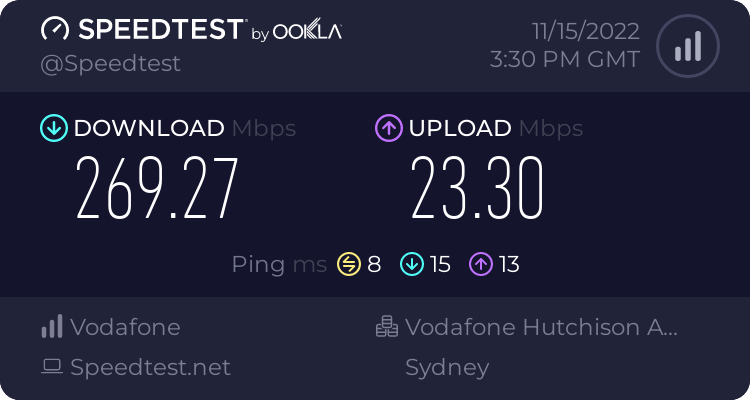
LTE is 300mbps down and 60mbps up at this location
The latency isn't as good though.
tranquil berry
meager ginkgo
CAT6A is the most you should go
i mean wouldnt cable shielding make a difference tho
 thick minnow
tranquil berry
https://www.speedtest.net/result/13944436550.png
thick minnow
tranquil berry
https://www.speedtest.net/result/13944436550.png
Damn that's awesome. I can only get these speeds in the morning or when it's late at night.
44mbps up is the max UL speed
tranquil berry
i think these are around the clock speeds
thick minnow
Weird, you said it's fiber right?
tranquil berry
yeah
 sudden kayak
tranquil berry
i mean wouldnt cable shielding make a difference tho
sudden kayak
tranquil berry
i mean wouldnt cable shielding make a difference tho
i mean, it makes a difference but cat6a is already rated for 10G at 100m and even upcoming 40G at like 25-30m
for home use that's already massive overkill, and if you need any faster than that, fiber ends up being way cheaper when you consider the cost of the whole setup
sudden kayak
thick minnow
Weird, you said it's fiber right?
fiber doesn't inherently mean fast or symmetric speeds... the ISP can decide to provision whatever plan speeds they want
 dense delta
hello i have a problem so i am connect through wifi and i have high ping so i went and checked the task manager there was something called Delivery Optimization it is taking 20 Mb of network if i close it it opens itself after 2 minutes can someone help?
nimble sable
thick minnow
Damn that's awesome. I can only get these speeds in the morning or when it's lat...
i keep seeing comments talking about slow speeds on LTT videos where they show off their super fast business internet or speeds, and im always surprised. Legit thought we were at least at the point where most of the world could expect 100Mbps minimum with the exception of severely poor countries or remote locations
 waxen scroll
@rocky badge pretty hyped. someone we know is taking a juniper "ccie" exam friday 

 rocky badge
nice
thick minnow
sudden kayak
fiber doesn't inherently mean fast or symmetric speeds... the ISP can decide to ...
I know. But cable was made for TV so uploads are often a lot slower. This seems to be docsis but with fiber very close to it.
- the speeds are basically shared with people so it's slower than fiber in general.
thick minnow
nimble sable
i keep seeing comments talking about slow speeds on LTT videos where they show o...
100mbps is quite common yeah. Unfortunately not here, since most people still have DSL. Fiber is just completely ignored by DTAG and they only sell cable internet as fiber internet. A few people are getting fiber now.
sudden kayak
thick minnow
I know. But cable was made for TV so uploads are often a lot slower. This seems ...
that's the thing, it's purely an artifact of how current docsis networks are deployed for primarily downstream bandwidth
a lot of companies are already switching that over
pseudo blade
Not in Australia they're not lol
thick minnow
sudden kayak
that's the thing, it's purely an artifact of how current docsis networks are dep...
Most people don't need fast uploads but it's a problem when they have 1000/10 speeds for example.
LTE is often faster and cheaper, so I don't even wanna bother with DOCSIS trash.
peak cloak
DOCISS is wayy better than LTE
pseudo blade
LTE is rarely faster than DOCSIS
thick minnow
peak cloak
DOCISS is wayy better than LTE
Again, depends
peak cloak
most of the time, wired > wireless
thick minnow
I have a good LTE tower here and it's faster than what my brother gets at his apartment with docsis.
pseudo blade
LTE is download optimised
peak cloak
again, depends on ISP deployment
thick minnow
peak cloak
most of the time, wired > wireless
Yes, of course.
I'm lucky Three is generous and has LTE CA on all their cell towers.
pseudo blade
Fast LTE upload is rare
thick minnow
pseudo blade
LTE is download optimised
That's why I have the best plan, so I get the highest priority
thick minnow
pseudo blade
Fast LTE upload is rare
It's 44 here, at school it's 65mbps.
If you have UL CA you can easily do 100mbps
peak cloak
that's low
pseudo blade
DOCSIS can vastly exceed those speeds
thick minnow
In my country it's not the case sadly.
But everything is a bit lame in Europe. Sooo

I get up to 300mbps down and 100mbps up on my LTE & 5G plan for 23€/month.
pseudo blade
Similiar in Aus because but it's because NBN Co is afraid we might dare use their connections for business use
 tidal flower
meanwhile, in canada...
pseudo blade
Meanwhile most small to medium businesses do anyways because NBN business fibre is prohibitively expensive
thick minnow
Most people don't even get fiber in Austria.
tidal flower
$200 for 1000/500 in rural locations
thick minnow
pseudo blade
Meanwhile most small to medium businesses do anyways because NBN business fibre ...
Oh god
thick minnow
💀
thick minnow
tidal flower
or 140 for 25mbps lte
Is it unlimited?
tidal flower
thick minnow
Is it unlimited?
"unlimited"
thick minnow
Because Canada only has fake unlimited plans.
tidal flower
but they classify traffic and do ratelimits
thick minnow
Oh yeah. My friend in Canada cannot even afford data because it's so expensive.
tidal flower
(so i just flood port 53 with wireguard) 
thick minnow
https://tyler-will.shutoffyourinter.net/📸/vy84kd62.png My LTE is extremely congested rn

and my tv is on
pseudo blade
I use LTE because residential internet here is both expensive and limited to VDSL2 with middling signal
tidal flower
i get fibre on thursday
pseudo blade
But it's not actually faster
thick minnow
pseudo blade
I use LTE because residential internet here is both expensive and limited to VDS...
I have 40mbps DSL here. 40€ a month in a 2 year contract.
tidal flower
what a fun time that'll be... need to figure out how i'm going to get it into the house
pseudo blade
In my last town I lived in a few years ago... 400/40 on LTE
thick minnow
pseudo blade
But it's not actually faster
What do you get rn?
pseudo blade
Depends completely on the modem and time of day
thick minnow
Mine usually never goes under 150mbps since I live in a rural area
thick minnow
tidal flower
i get fibre on thursday
Which speeds?
pseudo blade
Here's just shy of 5AM
 pseudo blade
Off my phone
peak cloak
internet in my area

 pseudo blade
During the day 30/10
thick minnow
pseudo blade
During the day 30/10
Oof
peak cloak
thick minnow
Fios?
yes
tidal flower
super weird peering agreements
thick minnow
pseudo blade
Off my phone
Is LTE on your carrier congested everywhere?
thick minnow
tidal flower
400/200
Nice
pseudo blade
thick minnow
Is LTE on your carrier congested everywhere?
Never everywhere but certainly in this town
tidal flower
peak cloak
public v4, plus no need for bridging a AIO modem/router
thick minnow
pseudo blade
Never everywhere but certainly in this town
oof. Hopefully 5G SA fixes these issues for you 🙏
peak cloak
just plug into ONT and you're good
thick minnow
peak cloak
honestly no issues with fios now
Yeah it's pretty good
pseudo blade
So that's on a CAT20 LTE modem
peak cloak
my gripe was v6, but now they recently rolled it out
pseudo blade
5G does jackshit
thick minnow
pseudo blade
So that's on a CAT20 LTE modem
What does your modem have?
pseudo blade
?
thick minnow
pseudo blade
5G does jackshit
If it's NSA and DSS
thick minnow
pseudo blade
?
Okay, so you don't use LTE mobile broadband? I'm a bit confused now, lol.
pseudo blade
What does my modem have... I just said my phone's CAT20 LTE
My modem I otherwise use is a CAT6
thick minnow
pseudo blade
What does my modem have... I just said my phone's CAT20 LTE
What phone do you have?
thick minnow
pseudo blade
My modem I otherwise use is a CAT6
Ah okay, that's probably the issue.
thick minnow
Yep, that sucks then. Not much you can do about it, other than switching the ISP maybe.
thick minnow
Oof. Which bands does your cell tower have?
pseudo blade
Yes
thick minnow
Damn, they should add 3CA at least
pseudo blade
Eat your heart out

That gives me up to about 60/30, else I need to use my phone for faster
pseudo blade
pseudo blade
Here's just shy of 5AM
But I have never seen as fast as this before
thick minnow
Yeah looks like they just don't know how to do shit tbh.
20+20 should do more than 200mbps even.
pseudo blade
I wouldn't be surprised if that's the cell's uplink speed
I got double that in the evenings in my last town for downloads, though uploads remained the same
Testing 5G devices hasn't resulted in better performance even when sitting in that cell's shadow
...Or a bit further away so it works better
thick minnow
Damn, that isp really sucks then.
pseudo blade
We call it... Telstra
They do faster, just not here
Last year the cell pretty much went offline for a month
After doing it earlier that year
But the alternatives don't have a cell here at all
The neighboring cell has been down for like two weeks
nimble sable
pseudo blade
Testing 5G devices hasn't resulted in better performance even when sitting in th...
i remember seeing a video linus did where he pointed out how 5g isn't always actually 5g, i live in downtown toronto, did that test with Bell Canada and Rogers...and indeed, i was never aable to actually get 5G, it said 5G but when i did the *#*#TEST#*#* thing it said LTE
thick minnow
nimble sable
i remember seeing a video linus did where he pointed out how 5g isn't always act...
Do you mean NSA?
nimble sable
peak cloak
internet in my area
damn $100 for 1Gig 😦
thick minnow
Toronto should be fully covered in n78 by all three
nimble sable
so should vancouver
thick minnow
Yeah, all the big cities basically
nimble sable
but...you clearly see in that video that it's LTE not 5G even though the phone says 5G
i cant remember what video it was though
thick minnow
Can you link it?
Oh okay. Because there is 5G NSA which is basically "5G" that needs the lte cells to function.
nimble sable
nsa?
thick minnow
I think only 30 carriers worldwide have Standalone 5G.
thick minnow
nimble sable
nsa?
Non standalone
nimble sable
ooh
maybe that's it, the phone reports lte cuz it's nsa?
if anyone can remember the video where this happens ....cuz i cannot
thick minnow
Yeah probably. The phone and many apps will still show lte and its bands.
@nimble sable do you see the "LTE+NR"

NR = 5G
thick minnow
Which phone are you using?
nimble sable
either way, that's 1 more point for "wireless networking is full of confusing terminology and random lies"
nimble sable
thick minnow
Which phone are you using?
pixel7pro
thick minnow
Interesting. Put some load on it and then try
Only if you have lots of data or unlimited because speedtests at a fast speed will use lots of data
nimble sable
i'll try with my dads iphone when he's here next month...since he shd have proper 5G from his provider
thick minnow
Alright
waxen scroll
nimble sable
pixel7pro
omg me too
nimble sable
thick minnow
Alright
shot in the dark btw, do you know... 4x4*80Mhz=4*600Mbps=2400Mbps total bandwidth yea...so let's say i have TWO devices connected, each has 2x2. I get 1200Mbps on one. but, why can i not get 1200Mbps on the other at the same time? doens't MU-MIMO mean they shd be able to use both "2 streams" at the same time?
thick minnow
Are you talking about wifi?
nimble sable
yes
sorry switched topic but wanted to see if you knew, cuz no one has yet been able to give me a convincing answer
peak cloak
don't know much about wifi, but pretty sure thats not how it works
nimble sable
yea thats what the netgear dude told me as well
so i'm inclined to think that's true now, but i'm seeing a LOT of ppl online who are saying the opposite
thick minnow
I have no idea.
thick minnow
nimble sable
sorry switched topic but wanted to see if you knew, cuz no one has yet been able...
Yeah, sorry I have no idea 💀
Which devices are you using, because it's a bit confusing
peak cloak
nimble sable
shot in the dark btw, do you know... 4x4\*80Mhz=4\*600Mbps=2400Mbps total bandwi...
looking at some vids, maybe??

David Botha, Product Manager, Sumana Mannem, Engineer, and Peter Khoury, Principal Engineer, discuss the Ruckus Wireless 802.11ac Wave 2 access points and their Multi-User MIMO (MU-MIMO) performance in a live demonstration. Recorded at at Wireless Field Day 8 on September 30, 2015. For more information, please visit http://RuckusWireless.com/ or...
again, alot is in theory
really I wouldn't worry about it at home
sudden kayak
I can't provide exact details but if you had the full picture & large scale metrics, you would know that LTE fixed wireless will never be competitive with wireline ISPs, even with current HFC networks... except that right now it's extremely low margin because they're just using excess capacity on existing towers
and that's not accounting for a lot of US cable companies switching over from downstream-heavy bandwidth allocation to mid/high-split
also hot take but there's nothing wrong with 5G NSA, the drawbacks are way overblown. the big argument is "if everyone is deploying NSA then nobody will bother deploying standalone and so it won't be standalone which is better because it's ~real~ 5G"
most of the benefit of "real" 5G standalone is extremely minor efficiency gains and cost savings for telcos plus the ability to easily do slick stuff like network slicing that has zero impact on regular consumer usage of the network
nimble sable
sudden kayak
also hot take but there's nothing wrong with 5G NSA, the drawbacks are way overb...
ooh ok, so 5G NSA does give the increased speeds just as well? thqt's nice
 dusk steeple
hey all dumb question... is it possible to windows 10 hotspot from ethernet to wifi but KEEP the network access? Eg. the wifi hotspot network is 192.168.137.xxx and my local network stuff is 192.168.1.xxx
 distant condor
hi I wanna connect both my PC's and my Laptop to ethernet, and I currently have a sinlge cat6e cable to my bedroom, what should I do? replace the router with a deco mesh (if so, which one) and connect the 5port switch I have to one of the decos, or just get another 5port switch to connect to the cable I'm currently using, to split bandwith to all PC's?
I just wanna make sure my own PC doesn't get placed in another queue somewhere because other devices are also using the network, and I can keep downloading at 250mbps while my laptop has video playing and my other pc f.e. is being gamed on
I should've thought this out before asking, huh
peak cloak
Just get a switch
Deco wouldn't help
Gaming and video streaming aren't that bandwidth intensity
distant condor
right yeah tha's what I though
we get 1gbit internet from out provider, so I though maybe if I was gonna get something anyway (although a switch is €20) I could just get a new mesh system and I'd actually be able to use the entire 1gbit
instead of what I have now which is 200down 250up
though I have no idea if that would change much
thick minnow
So you can only get a gigabit if you get the mesh wifi thing?
distant condor
only a gigabit; or only when using the mesh? which question are you asking?
thick minnow
Only when using the mesh
distant condor
yeah pretty much, since I'm on the 2nd floor and through the wall my PC is 70m from the router (I'm pretty sure it's the farthest possible corner of the house) I'm connected via 1: 1gbit port on the router > cat7 cable 20m > managable network switch Netgear 5 ports (1.4) > cat5 cable 10m > TP-Link EAP245 > cat6e 20m > PC
no we do not have a 70m cable :)
thick minnow
Oh okay. I see
distant condor
the switch is the simplest option with the least e-waste :)
I was just hoping to find an excuse to replace the entire shtuf
thick minnow
Yeah, just get the switch
 fallen totem
Hello, I have a question about router performance. The net gate 2100 router claims up to ~950MBPs behind the firewall. Can someone please explain what this means technically speaking if I have 1gbps up and down internet?
peak cloak
fallen totem
Hello, I have a question about router performance. The net gate 2100 router clai...
It's not "behind" the firewall
Firewall performance, meaning how fast traffic can go through when firewall is enabled
At 10,000 ACLs they claim
fallen totem
Thanks for clarifying. So, does that mean that download speeds with firewall enabled will be no faster than ~950Mbps?
peak cloak
fallen totem
Thanks for clarifying. So, does that mean that download speeds with firewall ena...
Yes, that's expected speed for gig anyway
Because of overhead, etc. You'll never get exactly 1000mbps
You would need a link faster than gig
fallen totem
Yeah I understand. Thanks. I’m just trying to identify the right equipment without over spec’ing or bottlenecking myself
peak cloak
I'm personally not a fan of pfsense but it's not bad
Can't wait for the webui for vyos to release, then I'll consider getting something for a vyos appliance to replace my er-x
faint bronze
Is it a 1gbps link layer or is it some company making up some theoretical kinda close (but totally rounding up) number?
The other number I was thinking of is the clock speed of the bus times lanes.
peak cloak
faint bronze
Is it a 1gbps link layer or is it some company making up some theoretical kinda ...
The interfaces are gigabit
faint bronze
So the link layer can go gigabit?
peak cloak
I guess technically
You technically loose around 373 mb due to common overheard
On 1500 byte packets, 14 is Ethernet, 20 is ipv4, 20 is tcp on top of that
nimble sable
do i need IDS/IPS btw?
peak cloak
For home, not really
nimble sable
peak cloak
For home, not really
thanks, that's what i thougth as well
fallen totem
Yeah it’s whatever AT&T gives me. On my current google Wi-Fi I measure ~800 down and up
peak cloak
faint bronze
So the link layer can go gigabit?
Doing the math you can do 990 Mbps on just Ethernet
nimble sable
peak cloak
Doing the math you can do 990 Mbps on just Ethernet
BAHA hold on, that means Wifi > wired
wifi max is 1200Mbps on 6 and 2400Mbps on 6e both more than 1Gbps
peak cloak
Keyword max
That's theoretical
In reality the radio spectrum is more complex, while with a wire it's more guaranteed
nimble sable
yea with the extra overhead of wifi i guess it ends upj being the same
faint bronze
nimble sable
BAHA hold on, that means Wifi > wired
Wrong. With Ethernet you can get 10gbe. Also latency is better on wired currently.
peak cloak
faint bronze
Wrong. With Ethernet you can get 10gbe. Also latency is better on wired currentl...
We're talking on gig interfaces
nimble sable
faint bronze
Wrong. With Ethernet you can get 10gbe. Also latency is better on wired currentl...
is it really? assuming regular 1Gbe and the best wifi6e AP?
peak cloak
Hell you can do >400gig on wired technically
faint bronze
*actually more, but that is an example of more.
nimble sable
peak cloak
We're talking on gig interfaces
yea restricting to gig cuz..well look at the wan
 fallen totem
How impressive is that performance of a netgate 2100? Can a much cheaper appliance deliver that kind of performance?
peak cloak
idk hardware well ¯_(ツ)_/¯
nimble sable
fallen totem
How impressive is that performance of a netgate 2100? Can a much cheaper applian...
i had its predecessor for YEARS and years until it died
faint bronze
nimble sable
is it really? assuming regular 1Gbe and the best wifi6e AP?
Wifi6e can go a lot more than gigabit. I think I saw 9.6gb on some web page from tp link.

TP-Link
Built for extremely high throughput, WiFi 7 (Wi-Fi 7) is the 7th generation of Wi-Fi. It greatly increases the speed and further reduces latency. Here is everything you need to know about it—what is WiFi 7, why we need WiFi 7, how it works and what it contribute.
Probably some advertising crap, but it is a number.
peak cloak
Advertising
nimble sable
faint bronze
https://www.tp-link.com/us/wifi7/
well, going by previous times...if they say 9.6Gbps that prbly means 3Gbps IRL
fallen totem
Yeah I’m just thinking I want to identify the ‘right-size’ router for my situation. I guess ~950Mbps firewall throughput of the netgate 2100 for my 1G internet is appropriate and not overkill
nimble sable
fallen totem
Yeah I’m just thinking I want to identify the ‘right-size’ router for my situati...
if tahts what it's rated for yea it shd be good
peak cloak

faint bronze
That is 8x8, so not your normal 2x2 adapter.
nimble sable
faint bronze
Wifi6e can go a lot more than gigabit. I think I saw 9.6gb on some web page from...
srsly though, i literally JUST upgraded to 6e and basically nothing in my house except my phone can use it
peak cloak
Yes, a scenario not found irl
nimble sable
faint bronze
That is 8x8, so not your normal 2x2 adapter.
i find 4x4 antennas to be really dumb. just split it into 2 2x2 bands wth so much better
5G_high and 5G_low is much better idea imo
faint bronze
Either way 900mbps is good enough for a 1gbe Ethernet adapter. if you want more just get 2.5gbe networking equipment or 10gbe networking (used).
nimble sable
faint bronze
Either way 900mbps is good enough for a 1gbe Ethernet adapter. if you want more ...
as a sidenote, 2.5Gbe is actualy not that expensive depending on where you are, 10Gbe is a huge jump in price, at least it was for me
netgear has a really cheap 2.5/5 multigig port switch.
faint bronze
I had seen some 10gbe routing hardware for relatively cheap. it was even cheaper than the overkill over priced Netgear axe11000.
 nocturne comet
Does anyone know if you are able to turn an old wifi router into a WISP router or wifi repeater?
faint bronze
Relatively cheap as in 300 USD for 6 ports of 10gbe.
nimble sable
faint bronze
I had seen some 10gbe routing hardware for relatively cheap. it was even cheaper...
really? switch, router or those all in one things?
i think i've seen some cheapish 10Gbe switchess, they're unmanaged so a bit less than the managed ones still like $300-$400ish though iirc
faint bronze
10gbe router server by supermicro. Not switch nor wifi.
nimble sable
oh nice, which one?
i was looking to switch out my custom build PC thing for a small appliance box (too much electricity with the custom built tbh) i ended up settling on "made by the company behind my firewall OS"
faint bronze
I don't know what the model name is. I think it is some custom board that a company bought lots a while ago. I think they were moving them out because their hardware warranty expired.

eBay
Mounting: Rail Kit. Power: 2x Power Supplies. Rear Bays: Bay. Caddies Included: 4x 3.5" Caddy. Front Bays: 4 Bay 3.5. Motherboard PCI slots: 4 Slot. Chassis PCI slots Backplane: TQ.
 lone kraken
anyone got suggests for improving my wifi im tired of it being really jump in how good my ping is, i dont have the option for ethernet
faint bronze
Avoid channels that others are on and if you live near an airport don't use the channels that disable themselves when they see radar. Using a lesser channel width could help to improve ping.
lone kraken
wdym by that
faint bronze
By which part?
faint bronze
Ok, so if you are on the same channel as your neighboring access points it is like people trying to yell over each other every now and then. Your wifi device and wifi router box will not be able to have a conversation as easily if others are talking nearby.
lone kraken
im on the 5g version of the wifi and everyone else uses the 2g
faint bronze
With wifi 5Ghz there is this wonderful feature that disabled your wifi if it sees radar from a nearby ground station it will temporarily disable its transmitter to not talk over the radar and possibly mess up some aircraft navigation and information systems. I don't understand that too well, but supposedly that can be problematic.
lone kraken
i mean i live in a small town but theres a small airport only used for small aircraft and not very often
but either way it happens pretty consistently no matter when
faint bronze
Well then that shouldn't be the problem.
Using a lesser channel width is just something from personal experience. I pushed my channel width up to 80Mhz and found it disconnecting more.
As another note, 5ghz does not pass through walls as easily as 2.4.
lone kraken
well i am on the other side of the house from the router
would it be helpful if i bought a wifi extender or repeater with an ethernet port and ethernet that way?
faint bronze
If the wifi box was more central then that would help improve the signal and ping likely.
lone kraken
my mom refuses to move it
faint bronze
I don't know about extenders nor repeaters. I understand what they do but not if this would be a use case for them.
lone kraken
im just trying to make it bareable til im able to move out
faint bronze
Maybe power line Ethernet?
https://en.m.wikipedia.org/wiki/Power-line_communication
Power-line communication (also known as power-line carrier or PLC) carries data on a conductor that is also used simultaneously for AC electric power transmission or electric power distribution to consumers.
A wide range of power-line communication technologies are needed for different applications, ranging from home automation to Internet acces...
 waxen saddle
lone kraken
would it be helpful if i bought a wifi extender or repeater with an ethernet por...
waxen saddle
lone kraken
would it be helpful if i bought a wifi extender or repeater with an ethernet por...
Have you looked in to powerline? Or MOCA, I know very little about moca, and powerline is…. Finicky. But it might be worth it
lone kraken
waxen saddle
Have you looked in to powerline? Or MOCA, I know very little about moca, and pow...
what are those?
faint bronze
Power line is using your normal outlet to transmit an internet connection.
lone kraken
how would that even work
faint bronze
MOCA is using coaxial wire like a cable wire to transmit the internet.
lone kraken
wdym by its finicky
waxen saddle
lone kraken
wdym by its finicky
With powerline, it REALLY likes the raw wires. So extension cables, power strips, breakers, etc can all hinder the quality of the network connection. Basically, plug it straight in to the wall and make sure the other end is also on the same circuit for best performance.
faint bronze
lone kraken
how would that even work
When the ac lines cross zero you can transmit some data and that is how power line data functions. In reality you plug two boxes into outlets and the internet gets transmitted.
lone kraken
how do i know if there on the same circuit?
waxen saddle
lone kraken
how do i know if there on the same circuit?
Good question. I’m not an electrician, but I’m pretty sure it has to do with the breakers. If you flip a breaker and your outlets for both ends power off, they’re on the same circuit. I think.
faint bronze
Play a dangerous game of turn off breaker switches and see if both sides turn off at the same time. If neither turns off try the next breaker and so on.
lone kraken
sorry guys i really dont know much about this
faint bronze
That was basically a late repeat of what you said.
lone kraken
im not sure my mom will like the idea of my playing a fun game of flick the breakers til i get electricuted
peak cloak
faint bronze
When the ac lines cross zero you can transmit some data and that is how power li...
False
It modulates on top of the AC waves
faint bronze
lone kraken
im not sure my mom will like the idea of my playing a fun game of flick the brea...
Getting electrocuted is not part of the plan.
lone kraken
id hope not lol
peak cloak
faint bronze
Play a dangerous game of turn off breaker switches and see if both sides turn of...
Switching breakers isn't dangerous ?
faint bronze
peak cloak
It modulates on top of the AC waves
Ok. That is what I remember herring so maybe wrong.
faint bronze
peak cloak
Switching breakers isn't dangerous ?
Dangerous as in you might turn something important off and cause problems or lose data on a computer by just removing power.
peak cloak
I mean I guess??
But not dangerous as you will get electrocuted
If you are really worried about data you should have backups + a ups
waxen saddle
Anywhosles, powerline networking is just another potential solution. MoCA might be another. But all I know about it is that it “uses the cable TV wire” commonly found in many households.
faint bronze
peak cloak
If you are really worried about data you should have backups + a ups
Daily back what? Is that some kind of insurance I never heard of it.
faint bronze
You are right, but outside of people who are tech enthusiasts I don't know anyone who does proper backups.
 sleek ferry
I saw this cable on amazon basics. https://www.amazon.ca/AmazonBasics-Network-Ethernet-Patch-Cable/dp/B013PUN1AW/ but some of the comments seem to mention it may not actually be Cat7. And that the cable itself isn't labelled as Cat7. Also the specs sheet has a max speed of 10Gb/s. Not that most people buying the cable will actually need Cat7... but what do we think?

An Amazon Brand.
faint bronze
Linus should test those. I think they may have tested them before or that was HDMI and displayport.
sleek ferry
Yea I would love to see LTT Labs take a look at it.
I know they tested some HDMI cables
peak cloak
sleek ferry
I saw this cable on amazon basics. https://www.amazon.ca/AmazonBasics-Network-Et...
No 8p8c cable is cat7
So it's not cat 7
Just get 6 or 6a if you really need
Cat7 spec was made wayy back and used tera connectors, it was meant for data centers
Cat 8 I believe is an actual spec but extremely overkill
lone kraken
waxen saddle
Anywhosles, powerline networking is just another potential solution. MoCA might ...
i have one of those right next to my desk, do you know any more about moca?
lone kraken
faint bronze
Linus should test those. I think they may have tested them before or that was HD...
he should do a video on different ways to use ethernet/wifi, would be very helpful lol
sleek ferry
peak cloak
Just get 6 or 6a if you really need
Yea a friend was about to order that and I already told them not to and that I'd make them a cable (out of Cat 6a I have lying around), but was more curious if Amazon Basics was... actually untrustworthy...
waxen saddle
lone kraken
i have one of those right next to my desk, do you know any more about moca?
Unfortunately I don’t. 😦
sleek ferry
Until now I amazon basics had a fairly high reputation to me... Not that it would be the best quality but at least that it would be what it said on the tin.
meager ginkgo
lone kraken
i have one of those right next to my desk, do you know any more about moca?
MoCA is awesome- it can do 2.5gbps total speed.
You need to find where your coax cables go.
They likely go to a box mounted on the exterior of your house
By the electric meter
You’ll need: A coax toner (if they aren’t labeled) , A MoCA compatible coax splitter (if you want more than one MoCA adapter) and two MoCA adapters (one receiving and one transmitting)
Everyone’s setup is different though so I’d recommend taking a picture of how the inside of that box looks, post it here and me and others can help
peak cloak
Guess what's prob gonna delay Artemis 1
A faculty Ethernet switch
You would think it would be redundant
For the radar
 radiant fable
Ever since I put the extending router in ap mode my phone n pc keeps dropping in and out of the wifi
 unborn sluice
Then don’t
thick minnow
radiant fable
Ever since I put the extending router in ap mode my phone n pc keeps dropping in...
Is it a TP Link extender?
They can mess mess with some wifi routers sometimes.
radiant fable
thick minnow
Is it a TP Link extender?
No it’s just a netgear router that we are using to extend wifi
thick minnow
But you have a second router right?
That's extending the signal
Sometimes they can cause wifi congestion and then it just stops working. Does it work when you connect via Lan?
radiant fable
thick minnow
Sometimes they can cause wifi congestion and then it just stops working. Does it...
Yea it does but the lan is straight from the modem
thick minnow
Does the modems wifi work?
radiant fable
Yes it does
All I’m doing is using the router to extend the modems wifi
Hence why the router is in ap mode
thick minnow
Which model is the router?
thick minnow
radiant fable
Nighthawk r7000p
Ah. Just contact them. Maybe there is something wrong with the software.
nimble sable
Q: what would i do with 120GB of extra space on my router/firewall?
peak cloak
nothing?
thick minnow
I have a 128GB SSD in my router and don't use it
Because I don't have surveillance cameras
thick minnow
nimble sable
Q: what would i do with 120GB of extra space on my router/firewall?
depends is it like a router router or a pf/open sense box?
if it’s the latter you could run some docker containers for sometime like syncthing
nimble sable
thick minnow
if it’s the latter you could run some docker containers for sometime like syncth...
yea but like...syncthing what? i thought about like caching proxy or some such? I know NGFW type stuff like Sensei will use ALL the extra bits but i think i'd have no nearly enough CPU and RAM for that
pseudo blade
You know what? this pricing is actually worthless bar for the absolute lowest throughput demand devices. Even if it is prototype pricing and they have cheaper deals for bulk etc.

Was considering using it as last-resort connectivity for rural areas outside normal SIM coverage
Nah, they can just stick an Optus prepaid SIM in the second slot and it'll pay for itself the first time it's needed
Like that pricing's great for a remote pump/basic IoT counters because it scales to only a few dollars
But AFAIK no great cost effective options for SIMs that scale from no use for months to multiple gigabytes of use month to month
pseudo blade
nimble sable
Q: what would i do with 120GB of extra space on my router/firewall?
Extra capacity on routers should be seen as a buffer, I wouldn't go too crazy on trying to consume it all...
but you could probably run a small fileserver in the space or similar as long as you make sure to keep the demand such it won't hurt routing performance or exhaust any resources.
nimble sable
pseudo blade
Extra capacity on routers should be seen as a buffer, I wouldn't go too crazy on...
yea, i have 8GB RAM but 120GB HDD that's a bit imbalanced anything that'd really use the 120Gb would need a lot more power so i dont wanna do it. good point
thick minnow
pseudo blade
Extra capacity on routers should be seen as a buffer, I wouldn't go too crazy on...
^
thick minnow
pseudo blade
You know what? this pricing is actually worthless bar for the absolute lowest th...
All 3 suck ass.
Their networks are a joke
pseudo blade
Hence wanting more than one
 jovial jewel
need help with windows it keeps setting my speed limit to 10mbps even thouigh ive set it to 1gbps
 jovial jewel
cable is brand new
jovial jewel
peak cloak
Is the cable tested
cable is new and works with my MBP so idk
thick minnow
jovial jewel
cable is brand new
Cable could still be damaged, do you have a different one u can test?
jovial jewel
thick minnow
Cable could still be damaged, do you have a different one u can test?
yeah ive tried
still the same outcome
thick minnow
jovial jewel
yeah ive tried
is it connected to the router or modem?
make sure it’s not on a voice line
jovial jewel
Directly to the router, through the wall though, no adapters the cables just ran through a hole in the wall
I've bought my pc downstairs to try a different cable but still the same outcome
It can't be a voiceline it's directly plugged into the pc
thick minnow
jovial jewel
Directly to the router, through the wall though, no adapters the cables just ran...
Could you connect it directly to the modem and see if you get the same issue?
jovial jewel
Yes I do
jovial jewel
okay how do i do that @thick minnow
thick minnow
there should be something that looks like a ip address on the modem
@jovial jewel honestly just call ur isp they should be able to fix it
pseudo blade
So you say regardless of cable connecting to the router gives you 10mbps on that computer?
And your macbook in the same spot gets gigabit if the cables are connected to it instead?
If so I'd try uninstalling and reinstalling the NIC driver as a shortcut for determining if it's a driver and/or driver config problem you're not seeing.
I'd check if it's the newest one for that model of NIC at the same time.
It's actually not likely to be a router config problem in the context of a home router, most do not offer that level of control anyways.
thick minnow
oh i didn’t see that
thick minnow
pseudo blade
It's actually not likely to be a router config problem in the context of a home ...
true it would have to be like mac address specific negotiation or something very unlikely
 candid glacier
what is a good cheap router to experiment with
peak cloak
candid glacier
what is a good cheap router to experiment with
wdym by experiment?
BGP? VLANS?
candid glacier
to upgrade and port forward with
thick minnow
uh upgrading isn’t really a thing with consumer routers
candid glacier
port forward
faint bronze
candid glacier
what is a good cheap router to experiment with
A raspberry pi and two Ethernet adapters can do routing. Also an old desktop with two interfaces can route. Cisco 1921 if you want Cisco...
 warm pecan
What would the minimum tubing size(with some corners) that would allow a MPO/MTP connector blind pull get pass?
The idea was house having remodel, want to leave tubing for a few fiber connection, if I can pull a MPO pass that tube then I could do the whole thing without any on-site splicing and I assume MPO is already the smallest connector I could get for a 12 core connection in this case?
(Or will that require a pipe that outright too thick so I should bite the bullet and pull a non-pre-terminated fiber and do 24 on-site splicing
peak cloak
candid glacier
port forward
Any respectable router can port forward
waxen scroll
peak cloak
Any respectable router can port forward
Except anything mikrotik
Better get a ubnt
waxen scroll
Me either
peak cloak
can't wait for vyos webui, I'll honestly consider getting a appliance for just it
I just want a modern er-x
pseudo blade
candid glacier
what is a good cheap router to experiment with
Go for a Mikrotik hAP lite
Or a hAP AC2 if not that cheap
pseudo blade
waxen scroll
Except anything mikrotik
I am confused because it's very easy to do
peak cloak
pseudo blade
I am confused because it's very easy to do
Not for a newbie
peak cloak
You can pf in quickset?
pseudo blade
It is easier than my ISP modem via the app
peak cloak
I don't want to have to use an app
pseudo blade
Use full winbox/webfig then lol
peak cloak
I just find routeros clumsy to use
pseudo blade
I agree, but not for basic tasks
Scripting is clumsy. The API is clumsy. Container is almost impossibly clumsy. The user group permissions system is mediocre. Don't bother with SMB.
Routing/NAT is merely flexible
I don't consider UBNT to be equivalent really, fills a different space
nimble sable
Was watching an ltt video that made me think i shd check what my local ix is... Well. Tldr: bell and telus Canada do not peer with torix wtaf
i just...i have no words for this
 sudden tapir


 unborn sluice
It doesn't want to
thick minnow
ask it very nicelyk to work
full monolith
Ask it to hit the griddy
full monolith
"good" dsl in germany
 thick minnow
full monolith
"good" dsl in germany
thick minnow
full monolith
"good" dsl in germany
It's not like this everywhere
How much does a plan like this cost?
full monolith
Prob like 40-50 dont know atm
Not my line tho
Its at a brand new house where we do the bathroom installation
(Thats my job lol)
pseudo blade
full monolith
"good" dsl in germany
That's excellent for xDSL
thick minnow
full monolith
Its at a brand new house where we do the bathroom installation
Sorry but they connect new houses in Germany to xDSL???
Bro 
Is Telekom on drugs? 💀
full monolith
How do you want to connect a house with fiber when theres none?
I mean a friend of mine is at o2 with dsl and his line can give a gigabit synced
Like he dont has that but one day tech support was checking the line and he showed me a speedtest of nearly 930mbits on 300m line lebght
 bold drum
Hmm there's a ton of Juniper EX3300 PoE switches with 10 gig uplinks on eBay. Slightly damaged with bad PoE on 1 or 2 ports but for the price...
sudden kayak
yeah i mean modern dsl can get pretty fast
thick minnow
full monolith
How do you want to connect a house with fiber when theres none?
I mean it's better for the future to connect it with fiber. Aren't all the cables buried under the roads?
thick minnow
full monolith
Like he dont has that but one day tech support was checking the line and he show...
Mine is 900m away and only 40mbps 💀
full monolith
thick minnow
I mean it's better for the future to connect it with fiber. Aren't all the cable...
There are no emty pipes for fiber...
thick minnow
Ah okay.
full monolith
Germany was littearly choosing coax instead of fiber in 1980