
#tech-chat-2
1 messages · Page 17 of 1
 slim pebble
 edgy laurel
if they want to put in a stupid high end feature only some people will use, i still think it should be an SFP+ port
slim pebble
Those differences are tiny though
 shell void
yeah like where's the sfp or u.3 or mcio or other prosumer features
it's just a $1000 beauty board for rich noobs and youtube showcases
edgy laurel
I know one of 5nails board has a x4 SlimSAS port
that I think he's using? or was trying to
shell void
the hero has that
edgy laurel
Its a feature, they still work just fine
 topaz veldt
So fucking annoying the 5090s dont work right with the G9 Neo
 steel stream
buy another one to make sure
edgy laurel
wait, why?
topaz veldt
This is a ridiculous question I have always wondered - are all DP ports on Nvidia GPUs given the same priority in terms of refresh/etc.?
wait why what
edgy laurel
what doesn't work?
topaz veldt

Reddit
Explore this post and more from the ultrawidemasterrace community
same issue on G9 Neo 49"
edgy laurel
things get weird when you require the use of two "heads"
slim pebble
topaz veldt
So fucking annoying the 5090s dont work right with the G9 Neo
What wait, how?! I was going to get one of those monitors
edgy laurel
topaz veldt
its big, but its just one
there is more than one https://github.com/NVIDIA/open-gpu-kernel-modules/discussions/396

GitHub
Hello. What is exactly what determines the maximum amount of monitors you can have connected? Is it an overall bandwidth budget shared across the GPU's display output connectors, or does each c...
topaz veldt
slim pebble
What wait, how?! I was going to get one of those monitors
Yeah man - been an issue since the day I got my 5090 TUF OC
edgy laurel
why sometimes depending on the displays used, you may only be able to run 3 monitors
steel stream
topaz veldt
https://www.reddit.com/r/ultrawidemasterrace/comments/1kb71e2/samsung_g95nc_57_g...
i don't see the problem, just pretend like you are at some super shitty rave /s
topaz veldt
Interesting
edgy laurel
instead of the 4 you have physical outputs for
When a display is connected to the GPU and is set to DSC mode, the GPU may use two internal heads to drive the display when the pixel rate needed to drive the display mode exceeds the GPU’s single head limit. This may affect your display topology when using multiple monitors. For example if two displays with support for DSC are connected to a single GeForce GPU, all 4 internal heads will be utilized and you will not be able to use a third monitor with the GPU at the same time.
topaz veldt
I am only looking to run the single 5120x1440 @ 240, but she flickers bad
Going to try HDMI once I get off this call
edgy laurel
but I haven't actually read the problem yet lol
slim pebble
topaz veldt
I am only looking to run the single 5120x1440 @ 240, but she flickers bad
It’s such a pretty monitor
shell void
topaz veldt
I am only looking to run the single 5120x1440 @ 240, but she flickers bad
if you enable "VRR Control" in the monitor's OSD then flicker should totally go away, but input delay will go up by a few milliseconds, and you might feel occasional microstuttering
worth a shot though IMO
shell void
hes experiencing it on two different 5090 systems and two different monitors so it's probably just a 5090 + g9 neo issue unfortunately
edgy laurel
sure, but if its been the same cable the whole time, never can be too careful. the dumb shit is what can bite you
 final glacier

Notebookcheck
A new report out of Taiwan has revealed that the current US administration is tying the reduction on trade of trade tariffs on Taiwan to significant TSMC investment in the US. This investment includes a 49% stake in Intel.
topaz veldt
shell void
if you enable "VRR Control" in the monitor's OSD then flicker should totally go ...

with that on it flickers
I just disabled
topaz veldt
edgy laurel
i'm going to assume its not as simple as a flaky cable
no, multiple cables, multiple G9 Neos
 edgy laurel
topaz veldt
no, multiple cables, multiple G9 Neos
edgy laurel
topaz veldt
no, multiple cables, multiple G9 Neos
rtings
 topaz veldt
that is on
topaz veldt
edgy laurel
rtings
ah shit, right, this is not hdmi 2.1
Its a driver issue/GPU issue
shell void
topaz veldt
that is on
oh weird
i havent heard of enabling that causing flicker
it usually eliminates flicker at the cost of latency and potential stutters
topaz veldt
yeah its a weird issue with 5090 and G9s
edgy laurel
so, it is, but that display requires more at 240hz
and it doesn't support DSC over HDMI
 topaz veldt
its only at desktop, too
edgy laurel
 shell void
topaz veldt
its only at desktop, too
shell void
topaz veldt
its only at desktop, too
do you have g-sync set to fullscreen and windowed?
ive had issues with 50 series and having g sync enabled for windowed apps
stuttering, flickering, etc
edgy laurel
shell void
do you have g-sync set to fullscreen *and* windowed?
i hate when i forget to toggle that back on
topaz veldt
shell void
do you have g-sync set to fullscreen *and* windowed?
where dat
shell void
so i set it to only fullscreen if i use it
topaz veldt
wait wait

TechPowerUp Forums
NVIDIA has released the newest version of its GeForce graphics driver, the GeForce 580.88 WHQL, which comes with Game Ready optimizations for Mafia: The Old Country, which includes DLSS 4 with Multi Frame Generation, DLSS Frame Generation, DLSS Super Resolution, and NVIDIA Reflex support. The...
edgy laurel
if its off, by default, VRR doesn't work for me in borderless
topaz veldt
Samsung 57" Odyssey Neo G9: Momentary flicker may be observed when resizing window [5243530]
maybe this driver will fix it
shell void
inshallah
topaz veldt
I am on 577.00
edgy laurel
The driver also fixes flickering issues during window resize with the Samsung 57-inch Odyssey Neo G9
thats the 57 though
topaz veldt
Gonna give it a shot
shell void
577.00 was the most rock solid driver for me so far
i have chrome issues again on 580.88
but if it might fix your g9 issues then thatll be cool
topaz veldt
People said some 572.xx version fixed this, but it breaks game support obv
topaz veldt
different monitor but for some reason the 57" and 49" have the same issues generally
OK lets see

 young void
Called you a goat in nvidia  🐌
🐌
slim pebble
I think I’m still on 570 or 575? Old ass driver.
topaz veldt
Nope, still flickers
shell void

steel stream
agony
topaz veldt
annoying af
steel stream
time for a new display
topaz veldt
lol the prob is I can't get rid of these
shell void
does disabling vrr entirely make it go away?
topaz veldt
 edgy laurel
thinking the same thing
topaz veldt
Let's see
edgy laurel
turn off VRR on the monitor too, just for the sake of it
topaz veldt
disabling G-Sync in NCP fixed it
edgy laurel
AdaptiveSync = off
shell void
i guess youll have to join the dark side of no vrr
edgy laurel
its cute, he's still in NVCP
topaz veldt
They haven't pried it from my hands yet
edgy laurel
lol
topaz veldt
I mean... i wonder if I really need VRR
edgy laurel
well, see how the no VRR life is and if you have tearing issues that bother you
shell void
i care about vrr a whole lot less now that framegen is a thing
topaz veldt
yeah
shell void
using framegen with vrr setup properly is lame because then your rendered framerate gets limited
edgy laurel
using it with this is  https://www.reddit.com/r/nvidia/comments/1lokih2/putting_misconceptions_about_optimal_fps_caps/
Reddit
Explore this post and more from the nvidia community
shell void
edgy laurel
using it with this is <:chefskiss:1016159686376034354> https://www.reddit.com/r...
no way man
edgy laurel
so smooth man
shell void
i mean sure it's smooth, but you get stuck with rendering less than 60fps on your 120hz 116fps display
58fps best case scenario
often quite a bit under that especially with lows
edgy laurel
how? i'm seeing a nearly locked 116fps
shell void
i prefer to just render like 100 and enable 2x and have lower latency
shell void
edgy laurel
how? i'm seeing a nearly locked 116fps
yes and half of those are generated
edgy laurel
that is, if I use FG at all which isn't always.
shell void
if youre limited to 116fps and youre using 2x framegen then you are rendering at most 58 frames
edgy laurel
I'm happier to go to Performance mode (transformer) over using FG
topaz veldt
You guys start talking full greek to me
 pure garnet
shell void
i guess youll have to join the dark side of no vrr
pure garnet
shell void
i guess youll have to join the dark side of no vrr
the good side
topaz veldt
I just enable G Sync and play games... except for the G9 neo lately because it flickers
 wise bear
topaz veldt
You guys start talking full greek to me
wise bear
topaz veldt
You guys start talking full greek to me
I'm so glad I'm not the only one lost in all of this shit
edgy laurel
shell void
if youre limited to 116fps and youre using 2x framegen then you are rendering at...
wait so you're saying the base framerate is being brought down? I'm talking about when I start at say 90-100
pure garnet
the only place i want my display to go into power saving mode during use is my phone really
topaz veldt
wise bear
I'm so glad I'm not the only one lost in all of this shit
Guilty and team go full nvidia driver speak deep
shell void
edgy laurel
wait so you're saying the base framerate is being brought down? I'm talking abou...
mhm
if youre using 2x framegen and you have a 116fps limit with VRR
you are rendering at most 58 frames per second
edgy laurel
its one of those things where I guess if the end result feels good, meh
shell void
yeah if it hasnt bothered you up until now then whatever
i enjoy VRR more without framegen and vice versa
edgy laurel
nothing is going to help that one city in Diablo though, except maybe a 14900k
shell void
VRR w/o FG
FG w/o VRR
shell void
edgy laurel
I'm happier to go to Performance mode (transformer) over using FG
same generally, but not always if im using ray reconstruction
it gets pretty smeary and warbly
anything below quality annoys me with ray reconstruction
edgy laurel
Yeah I can't notice, which i'm happy about
shell void
with basic raster lighting even the performance mode is still really clear
young void
I need to play more games and test things
shell void
i need to find an elevator, it's very noticeable in there
topaz veldt
i need to find a food for lunch
edgy laurel
Cyberpunk, if i'm honest, has some strangeness to it
topaz veldt
that game is odd
edgy laurel
graphically
wise bear
topaz veldt
i need to find a food for lunch
sushi or ramen
 turbid locust
topaz veldt
i need to find a food for lunch
turbid locust
topaz veldt
i need to find a food for lunch
I made a Chicken Cesar Salad
topaz veldt
wise bear
sushi or ramen
ehh i don't feel like going out
topaz veldt
turbid locust
I made a Chicken Cesar Salad
im thinking something along these lines
wise bear
who tf said anything about going out
pure garnet
does dlss just struggle with trees a lot
topaz veldt
wise bear
who tf said anything about going out
i don't have a fish to eat
edgy laurel
damn, i miss Palermos in Lansdale. The most badass grilled chicken on their salads
pure garnet
i found transformer quality at 1440p to still be a downgrade
wise bear
My guy, instacart
topaz veldt
wise bear
My guy, instacart
you don't let instacart pick sushi
topaz veldt
edgy laurel
damn, i miss Palermos in Lansdale. The most badass grilled chicken on their sala...
solid - there's one in blue bell also
steel stream
instacart :(
topaz veldt
The only time I go out for lunch is if I have to go on site (rare) or if I am running an errand, otherwise I just make something
turbid locust
Do not use delivery for produce/fresh stuff lmao
wise bear
topaz veldt
you don't let instacart pick sushi
fuckin' idk, chicken blt
turbid locust
You will end up with the worst shit
shell void
watch the road, the crosswalk, and the sidewalk
observe how everything softens and smears in motion, and also sorta looks like it's flashing or warbling
those are artifacts caused by using ray reconstruction with a low render resolution (1080p)
topaz veldt
turbid locust
Do not use delivery for produce/fresh stuff lmao
always fails
shell void
if you cant see it then count yourself lucky that youre not as picky as me i guess
wise bear
turbid locust
You *will* end up with the worst shit
I dunno dude, wallyworld does a good job of picking me good ears of corn & sizeable tomatoes
turbid locust
HWS doesn’t want my 7900XTX 
steel stream
shell void
those are artifacts caused by using ray reconstruction with a low render resolut...
yeah I notice it, but idk if I would during general gameplay
shell void
it's really obvious if you fullscreen the video and watch this section of the road
 shell void
steel stream
yeah I notice it, but idk if I would during general gameplay
shell void
steel stream
yeah I notice it, but idk if I would during general gameplay
i see it constantly while trying to play and it's annoying
everything looks like it's smeary and out of focus until you stop moving
steel stream
yeah I see it
steel stream
turbid locust
You *will* end up with the worst shit
Half the times with DoorDash my stuff gets messed up, I can't imagine someone going grocery shopping for me
shell void
but then DLSS Quality without Ray Reconstruction is really impressive, idk if i'd be able to confidently pick it out in a controlled blind test
and nearly doubles the framerate
wise bear
Why are we reconstructing Ray, I thought he died like 4 years ago
shell void
it's only ray reconstruction that annoys me
wise bear
you can't reconstruct decomp
 frosty prism
 shell void
holy optimal
wise bear
dammit sim you beat me to it
frosty prism
haha
edgy laurel
shell void
watch the road, the crosswalk, and the sidewalk
observe how everything softens a...
my 10th gen U series chip has a conniption trying to play this back in browser, lemme download it
shell void
it's 75Mbps av1 xd
i wanted to make sure that compression wouldnt be confused for what i was trying to show you
shell void
frosty prism
im so considering a quest 3
pretty nice display for the price
and the passthrough is so much better than q2
frosty prism
considering going for one of em used for like 400$
its so spensive still
well ok for what you are getting not at all
shell void
theyre probably not making much per unit sale
they wanna get you with game pricing and such
unless they upcharge you on storage, in which case they are making money off of you xd
frosty prism
quest + or meta+ or whatever it is
shell void
but if you get the base 128GB model and use it for PCVR then it's a pretty good value
frosty prism
shell void
unless they upcharge you on storage, in which case they are making money off of ...
i just buy everything on steam as i just cant do the quest store it just feels worng
frosty prism
shell void
but if you get the base 128GB model and use it for PCVR then it's a pretty good ...
ofc that is the main plan
main thing is seeing if anyone is interested in a quest 2 tbf got the elite strap and a case
edgy laurel
shell void
watch the road, the crosswalk, and the sidewalk
observe how everything softens a...
I dunno if watching this back with dropped frames on this 1080p TN is doing much justice to it
pure garnet
turbid locust
HWS doesn’t want my 7900XTX <:SteveNotLikeThis:662791691295522843>
did you get mega downvoted
turbid locust
No, just zero comments or interest shown lol
Like if it’s the price, I put OBO bruh
at least lowball me like
pure garnet
xtx really sits in a weird spot rn huh
turbid locust
Yeah
pure garnet
didn't realize it was that close to 5070ti/9070xt but with mega power draw
 frank zealot
and better RT
frosty prism
way better
frank zealot
and cheaper
shell void
yeah you might as well pretend RT doesnt exist on rdna3
ive seen cases where the 9060XT 16GB embarrasses all of RDNA3 in RT gaming
frosty prism
wat
 brisk jolt
shell void
yeah you might as well pretend RT doesnt exist on rdna3
brisk jolt
shell void
yeah you might as well pretend RT doesnt exist on rdna3
what is RT on RDNA3
 arctic bronze
How come rx 7000 fell off so hard?
frosty prism
brisk jolt
what is RT on RDNA3
still fine enough
shell void
arctic bronze
How come rx 7000 fell off so hard?
nonexistent RT performance and no access to good upscaling
arctic bronze
I see
frosty prism
it still has usable RT performance
shell void
no not really
 frank zealot
RDNA 3 was cool? Kinda?
But after the RX 9000 series, it got clowned hard
brisk jolt
the XTX is at most pulling it to a 4070 in RT
topaz veldt
frosty prism
it still has usable RT performance
ehhhhh
frosty prism
at 1440p its about a 3090
topaz veldt
thats not a good comparison
frosty prism
20% worse then a 4080 super
topaz veldt
A 7900 XTX having "about the same performance" as a 2-3 year old card prior to it... is not good
as a former 7900 XTX owner I honestly never ran RT on it, it was that bad
frosty prism
i still run RT
shell void
you might as well pretend RT doesnt exist if you have a RDNA2/RDNA3 card
 frosty prism
where is the XTX
shell void
it does okay for the games that force a minimal amount of RT functionality, but i wouldnt enable it on purpose
brisk jolt
i ate the xtx


 green marsh
nah, he is selling just the case and fans
 shell void
frosty prism
where is the XTX
shell void
frosty prism
where is the XTX
found it
 topaz veldt
@shell void I am watching that Tech Notice video... dude does weird shit
He ran a 360mm aio with the outter fans on one speed and the center fan plugged into the CPU header
green marsh
also super old NZXT cases being sold
 shell void
topaz veldt
He ran a 360mm aio with the outter fans on one speed and the center fan plugged ...
shell void
topaz veldt
He ran a 360mm aio with the outter fans on one speed and the center fan plugged ...

frosty prism
shell void
found it
its not THAT far from a 9070 but yeeeaaa its still some basic distance from a 4070 even
frank zealot
So, since I love finding weird shit on FBM....
May I present, a Banana... thing....
 shell void
frosty prism
its not THAT far from a 9070 but yeeeaaa its still some basic distance from a 40...
shell void
frosty prism
its not THAT far from a 9070 but yeeeaaa its still some basic distance from a 40...
yeah youre not even getting 60fps at 1440p and you dont have access to good upscaling
so i wouldnt bother purposefully enabling RT
topaz veldt
yeah 7900XTX is in a sad spot
shell void
at least you can get decent framegen now with xess 2.1
frank zealot
yooooooooo:
 green marsh
frank zealot
So, since I love finding weird shit on FBM....
May I present, a Banana... thin...
green marsh
frank zealot
So, since I love finding weird shit on FBM....
May I present, a Banana... thin...
people in US having hard time finding classic beige ATX cases. Meanwhile here even AT is cheapo 😄
 topaz veldt
green marsh
people in US having hard time finding classic beige ATX cases. Meanwhile here ev...
topaz veldt
green marsh
people in US having hard time finding classic beige ATX cases. Meanwhile here ev...
We don't have a hard time finding them at all
frosty prism
look at this person wanting to build people computers
 topaz veldt
frosty prism
look at this person wanting to build people computers
topaz veldt
frosty prism
look at this person wanting to build people computers
whats wrong with it
green marsh
topaz veldt
We don't have a hard time finding them at all
people always complained how they can't get them cheap. Here they go for 5-10 euros
shell void
KABOOOOM
 pure garnet
the strix aio with the bomb psu and cheap everything else is kinda fire
topaz veldt
green marsh
people always complained how they can't get them cheap. Here they go for 5-10 eu...
I dunno who that is, but you can go to like any library/public school discard day and get all sorts of e-waste
frank zealot
shell void
KABOOOOM
 green marsh
topaz veldt
whats wrong with it
green marsh
topaz veldt
whats wrong with it
also the radiator will make noise after some time
topaz veldt
green marsh
also the radiator will make noise after some time
why
green marsh
topaz veldt
why
air bubbles at inlet
topaz veldt
green marsh
air bubbles at inlet
pump is below the highest point bud
frosty prism
 green marsh
topaz veldt
pump is below the highest point bud
green marsh
topaz veldt
pump is below the highest point bud
which saves the pump from having air bubbles. But not the radiator inlet. You want pump bellow highest point AND radiator inlets being bellow the highest point
frosty prism
every build he has pics of the tubing is on the top
 shell void
@topaz veldt i really wish the Z890 Aero D was available in USA

such an awesome EATX white board
topaz veldt
green marsh
which saves the pump from having air bubbles. But not the radiator inlet. You wa...
You are overthinking this - the inlet/outlet doesn't matter, the radiator is always going to have something flowing at its highest
frosty prism
frosty prism
every build he has pics of the tubing is on the top
ok well here the rad is on the top
topaz veldt
shell void
<@257554812013379587> i really wish the Z890 Aero D was available in USA
Its nice to look at - which it wasn't eatx
shell void
it being eatx is half of its aura
frank zealot
frosty prism
every build he has pics of the tubing is on the top
which is fine.
As long as the rad is the highest point in the loop, and it is.
topaz veldt
shell void
it being eatx is half of its aura
its all of my despise
pure garnet
the gigabyte ice stuff is honestly really nice looking for white boards
i just don't wanna overpay for paint
shell void
yeah they easily make the prettiest white boards
topaz veldt
installed

 frosty prism
frank zealot
which is fine.
As long as the rad is the highest point in the loop, and it is.
frosty prism
frank zealot
which is fine.
As long as the rad is the highest point in the loop, and it is.
well over time there will not be enough water to return to be able to be pumped
 shell void
topaz veldt
installed
shell void
topaz veldt
installed
cool beans
id love to see what that computer looks like with all of the lighting set to purple
you always do toothpaste color
topaz veldt
shell void
you always do toothpaste color
can't change the color of the DP logo
slim pebble
topaz veldt
installed
That is really clean looking!
green marsh
frosty prism
well over time there will not be enough water to return to be able to be pumped
it will work, as flow will be going. But it will make bubbling noises
pure garnet
if my aio has burnt off considerable amounts of fluid it's being replaced anyhow
topaz veldt
green marsh
it will work, as flow will be going. But it will make bubbling noises
It won't though - I have done it... its not like the radiator cares that the tube is at the top vs. the end tank
brisk jolt
intel back at $20 we are so back
shell void
i have run front intake aios for years and havent had issues
green marsh
topaz veldt
It won't though - I have done it... its not like the radiator cares that the tub...
whe new or when some of the water evaporated ?
topaz veldt
green marsh
whe new or when some of the water evaporated ?
I have a 7800X3D stuffed behind a sofa that has run this since new
pure garnet
shell void
i have run front intake aios for years and havent had issues
i prefer the look of top mount but yeah i run front mount without issues
topaz veldt
There is going to be a void in the AIO no matter what
frosty prism
shell void
i have run front intake aios for years and havent had issues
its fine but best practice is tubing being on the underside
topaz veldt
it literally doesn't matter, they're not vacuum filled
shell void
if you care about lifespan then your bigger concern would be not running the pump at 100% 24/7
put it to 50%
topaz veldt
This is an HTPC and I cannot hear it

I've built like.... 20 machines like that, doesn't matter
if there is that much air in the AIO it won't matter if the tubes are on top or bottom
edgy laurel
topaz veldt
This is an HTPC and I cannot hear it
when the whole "tubes down" thing started, I was very confused. It was never a problem for me years before.
pure garnet
did gn say tubes down or something
topaz veldt
edgy laurel
when the whole "tubes down" thing started, I was very confused. It was never a p...
Nah dude - its GN stuff misunderstood
pure garnet
i remember people flipped out over aio placement bc of that
topaz veldt
It literally doesn't matter
shell void
just dont have the pump be the highest part of the loop, and dont run your pump at 100% signal 24/7
topaz veldt
The radiator is quite literally a series of tubes, having the rubber tubes in a spot doesn't change the air or not
pure garnet
shell void
just dont have the pump be the highest part of the loop, and dont run your pump ...
if i use the artic all in one cable it's not pinned to 100% right
topaz veldt
shell void
just dont have the pump be the highest part of the loop, and dont run your pump ...
I run my DDC pump 100% for..... since my 9900k 🙂 still going 🙂
edgy laurel
pretty sure my EK360's pump has been 24/7 for nearly 5 years
shell void
pure garnet
if i use the artic all in one cable it's not pinned to 100% right
i havent used the combined cable, but i think snail played around with it
topaz veldt
the combined cable on Arctic shit is fundamentally broken
pure garnet
i'll swap to the other cable when i rebuild then
topaz veldt
It works, but the speed is basically "i dunno"
shell void
topaz veldt
I run my DDC pump 100% for..... since my 9900k 🙂 still going 🙂
that's nice
final glacier

VideoCardz.com
PCI-SIG® Announces PCI Express® 8.0 Specification to Reach 256.0 GT/s The upcoming PCIe® specification is targeted for release by 2028 SANTA CLARA, Calif.–(BUSINESS WIRE)–PCI-SIG® today announced the PCI Express® (PCIe®) 8.0 specification will double the data of the PCIe 7.0 specification to 256.0 GT/s and is planned for release to mem...
shell void
ill continue running 50% because ive done testing and there's no performance difference but it's much quieter
topaz veldt
they are multiplexing the VRM fan and the pump speed over the same wires, and that makes the detected speed faster than it is
topaz veldt
shell void
ill continue running 50% because ive done testing and there's no performance dif...
what bout 48% though
or 52% 😐
edgy laurel
so they're combining tach signals?
topaz veldt
edgy laurel
so they're combining tach signals?
ya
shell void
ive tested 40, 50, 60, 70, 80, 90, and 100
edgy laurel
that can't end well
shell void
there's basically 0 performance gain over 40% on my LF3 420
topaz veldt
It "works" but if you're trying to set things by RPM or understand RPM its erroneous
edgy laurel
yeah
topaz veldt
So the prob is your combined RPM reads like 4600 RPM... but the pump can only do 2900... so its like... wtf is it doing
shell void
if youre running a custom loop with a lot more water and rad and two blocks then you might want more pump speed
pure garnet
my combined is reporting 700rpm
shell void
but i think they just default to 100% on aios so they evaporate and die faster tbh
edgy laurel
maybe i should lower my EK360's pump lol.. i don't even remember where its controlled. probably the BIOS, that board had a pump header
topaz veldt
I just run 100% pump because quality pumps don't really make a ton of noise, AIOs I guess can, I dunno - I just run all my pumps 100% I have never had a noise issue
Boards run AIO pumps at 100% by default
slim pebble
shell void
found it
Ray tracing does not exist and makes no difference 😄.
 edgy laurel
topaz veldt
Boards run AIO pumps at 100% by default
edgy laurel
topaz veldt
Boards run AIO pumps at 100% by default
yeah i can't say I've ever heard it either
topaz veldt
Yeah some AIO pumps are noisy, I had a DeepCool LT520 that had it, returned it
topaz veldt
shell void
and i can hear water sloshing around
too much air
shell void
60% is inaudible from where i sit, and 40% is pretty much inaudible period
slim pebble
I can’t hear anything over the roar of about 10 P14 pro max fans
topaz veldt
I can't hear anything over my fps
edgy laurel
topaz veldt
I can't hear anything over my fps
you can't hear anything over your coil whine 🤣
shell void
slim pebble
I can’t hear anything over the roar of about 10 P14 pro max fans
do you keep them at 100%? xd
pro and max fans are so frickin loud at max speed
frank zealot
dats a cool case you won't see often:
 edgy laurel
3000RPM? Thats way too fast for 100% all the time
slim pebble
shell void
do you keep them at 100%? xd
No that’s only when I’m running some bench, lie CB23 all core stress or OCCT memory test
They aren’t bad when gaming
Gaming isn’t all core 100% for 20 minutes
edgy laurel

IGN
It looks like EA may have a hit on its hands after over 9,000 people were sitting on the Battlefield 6 open beta on Steam after the pre-load went live.
more than were playing 2042
topaz veldt
edgy laurel
you can't hear anything over your coil whine 🤣
zero coil whine this round brother
steel stream
that means your FPS is too low
frank zealot
thank you FBM for showing me some truly random, bizarre shit:
 steel stream
frank zealot
thank you FBM for showing me some truly random, bizarre shit:
steel stream
frank zealot
thank you FBM for showing me some truly random, bizarre shit:
LTT will buy it and put a PC case in it
shell void
my UPS went from 199W to 227W when i changed them from off to full speed
steel stream
but that looks fucking awesome
wise bear
frank zealot
thank you FBM for showing me some truly random, bizarre shit:
Somebody totally used this for a certain kind of storage chest
frank zealot
wise bear
Somebody totally used this for a *certain* kind of storage chest
I wouldn't, there's probably lead in that shizz, and... you do NOT want that
wise bear
Hey some people are mega stupid, so
wise bear
I was trying to be LOWKEY
wise bear
yeah I know, hightumbler
frank zealot
Okay, this is a thing, but not worht the money:
Dude wants 85$ per dell tiny on that
 topaz veldt
edgy laurel
you can't hear anything over your coil whine 🤣
topaz veldt
edgy laurel
you can't hear anything over your coil whine 🤣
Check it out
 merry stirrup
frank zealot
Okay, this is a thing, but not worht the money:
Dude wants 85$ per dell tiny on ...
merry stirrup
frank zealot
Okay, this is a thing, but not worht the money:
Dude wants 85$ per dell tiny on ...
85$ for the whole rack sure
not for one though 💀
frank zealot
merry stirrup
85$ for the whole rack sure
it's worth well over that, but it sure as fuck ain't worth the 4 grand he's trying to get
topaz veldt
@shell void check that vid out above - also, I leave the side glass off... so it'd be as loud as possible really
merry stirrup
why would you ever need a cluster that large
this is a workload that would benefit more from a single 750ti if he needs that many machines in the cluster
memory ig but damn idk
topaz veldt
thats someone who got SFF PCs free from work
frank zealot
merry stirrup
memory ig but damn idk
each of those boxes has 2 SODIMM slots. ain't all that good for RAM
wise bear
I bet it's some dude who got the entire stack on wholesale from a company doing upgrading en masse
topaz veldt
my on R740 is more powerful lol
slim pebble
topaz veldt
zero coil whine this round brother
Even the TUF?
merry stirrup
topaz veldt
thats someone who got SFF PCs free from work
yeah but he actually set them up
topaz veldt
merry stirrup
yeah but he actually set them up
yeah its not hard
also theres no such things a kubernetes on "bare metal" - you deploy worker VMs, its VMs
wise bear
I'd do maybe 4 of those sff pcs just as a little cluster project to learn but I ain't running that many
edgy laurel
topaz veldt
Check it out
ok ok, thats pretty good. (now we find out you're on a different PC again 🤣
topaz veldt
slim pebble
Even the TUF?
Listen for yourself
topaz veldt
edgy laurel
ok ok, thats pretty good. (now we find out you're on a different PC again 🤣
ha I am on both, or 3, or 4, always
merry stirrup
wise bear
I'd do maybe 4 of those sff pcs just as a little cluster project to learn but I ...
yeah idk i wouldn’t take the time 😭
too much effort to ultimately end up selling it right after
wise bear
I mean if its the little 19.5v powered units they're low-power enough that I wouldn't care leaving them running with a workload 24/7
frank zealot
holy fuck, well, credit for one way to advertise a phone:
But your description is... uhhhh.....

 frank zealot
those were certainly all words
topaz veldt
wise bear
I mean if its the little 19.5v powered units they're low-power enough that I wou...
there's 40 of them, if they draw even 7W each thats like 30W more than my entire R740 with 768GB of RAM and 6 x 10 Gbps NICs, etc.
wise bear
frank zealot
holy fuck, well, credit for one way to advertise a phone:
But your description ...
I've seen better posing from a dead gopher
wise bear
topaz veldt
there's 40 of them, if they draw even 7W each thats like 30W more than my entire...
I was meaning if I had like, 4 of them
steel stream
what dead gophers are posting in your state??
topaz veldt
wise bear
I was meaning if I had like, 4 of them
oh
 vestal granite
i hate gophers
wise bear
steel stream
what dead gophers are posting in your state??
Oregon's a wild place, dude.
steel stream
vestal granite
i hate gophers
Rodent hater?
vestal granite
gopher hater
vestal granite
they would if they could
steel stream
kill all gophers?
vestal granite
not all of them just like enough to control their population for maybe the next 50 years
evil

those ones have to go, but these ones can stay:
 steel stream
gopher aficionado
frank zealot
For sale "computer"
What's in it? Stuff. And DDR3. (from a pic)
 wise bear
decent case
frosty prism
frank zealot
For sale "computer"
What's in it? Stuff. And DDR3. (from a pic)
huh bet it would make a decent server
frank zealot
frosty prism
huh bet it would make a decent server
I wouldn't. 50/50 it even turns on
and I wouldn't trust a 1000W PSU that doesn't have the balls to put a name brand on the side
young void
frank zealot
For sale "computer"
What's in it? Stuff. And DDR3. (from a pic)
It's the mystery orange fluid by the fan for me
frank zealot
young void
It's the mystery orange fluid by the fan for me
for me, it's the blue CCFL Inverter next to the orange fluid
frosty prism
frank zealot
and I wouldn't trust a 1000W PSU that doesn't have the balls to put a name brand...
:3
 young void
For 100$ myte be worth playing with/cleaning ups
frosty prism
yea no 50 take it or leave it
young void
Right right
topaz veldt
I have a TT 1200W PSU that is OG tank... I should recable it and make people cringe
frank zealot
@edgy laurel
you peep this thing?
 young void
Make hasteee
topaz veldt
frank zealot
<@232505783592550400>
you peep this thing?
too new
 outer radish

Tom's Hardware
These are the best air and AIO coolers we've tested, for overclocked monster rigs, budget builds, and everything in between.
edgy laurel
frank zealot
<@232505783592550400>
you peep this thing?
I hate it
topaz veldt
outer radish
https://www.tomshardware.com/reviews/best-cpu-coolers,4181.html
HW Cannucks did one too
frank zealot
edgy laurel
I hate it
solid reaction
topaz veldt

So you want to buy a 9800X3D or maybe upgrade to the 7800X3D, 5800X3D or 5700X3D but what are the best cooling options? Well in this video we dive deep into the best air coolers for AMD X3D CPUs in gaming and full core workloads. We'll also compare these air coolers to an AIO for a different perspective.
Buy items in this video from Amazon at...
edgy laurel
topaz veldt
https://www.youtube.com/watch?v=_Bv7Tn4zqRc
Similar
I saved this just to link it when this is asked... over and over again
topaz veldt
I am kind of bummed - my cooler wall is completely full
shell void
topaz veldt
I am kind of bummed - my cooler wall is completely full
where will you set the jiushark jfk15????
edgy laurel
I bet my cooler isn't on there and you know what, it works just fine
(i didn't actually watch it lmao)
 shell void
JiuShark JFK 🗣️
topaz veldt
D15 G2 is boss
edgy laurel
ngl I dont' really click on most tech videos right now, nothing really new and interesting that we don't already know at the moment
edgy laurel
topaz veldt
$300 in air coolers just chillin (pun)
i only bought the one for no reason. still NIB
 hoary hatch
It is a cut down die
topaz veldt
edgy laurel
i only bought the one for no reason. still NIB
which one
shell void
my nhd15 chromax is collecting dust
topaz veldt
edgy laurel
chonky heatpipe boy
ah yes
 shell void
so many d15s
shell void
is that a d14 in column 1, row 2, slot 2?
topaz veldt
shell void
is that a d14 in column 1, row 2, slot 2?
yup!
shell void

shell void
this one
 topaz veldt
yes'm
shell void
this shelf kinda throws off the column and row order
 topaz veldt
shell void
this shelf kinda throws off the column and row order
topaz veldt
shell void
this shelf kinda throws off the column and row order
its all kind of random
$100 if you want to come zen it
#michael_heatsink_sorting_services
 willow ruin
 shell void
my remote consulting service is $250/Hr, if you want me to travel then that'll be $1000/Hr
willow ruin
Is this tablet battery expanded or nah? The corner plastic support is off, screen pops up now.
topaz veldt
shell void
my remote consulting service is $250/Hr, if you want me to travel then that'll b...
we can make it work
send me an SOW and we'll ink it up
frank zealot
Snail, Guilty:
holy fuckballs:
 topaz veldt
ah caselabs
edgy laurel
 frank zealot
HAHAHAHAHAHAHA:
this one's funny
 frank zealot
that's over 5PB of tape
and for "Why is this being sold?!?!"

25 LB of PLA Scrap
Because.... useful?
shell void
idk can someone melt it down and reuse it?
topaz veldt
I guess you could?
edgy laurel
frank zealot
Snail, Guilty:
holy fuckballs:
Can fit so much computer in this thing. Thats an absurd amount of radiator.
Case: CaseLabs TH10
CPU: Intel Core i7-3930K
Motherboard: Asrock Extreme11
GPU: 3x EVGA GTX 680 FTW
Memory: 64 Gb Corsair Dominator GT 1866
PSU: Corsair AX1200i
OS Drive: 2x 256 GB Samsung 840 SSD´s in Raid 0
Storage drive: 2x WD Red 2TB in raid 0
Soundcard: Asus Xonar Phoebus
Blue-Ray drive: LG


 shell void
a company that was doing that would probably be buying a lot more than 25LB though
so idk very niche listing
green marsh
edgy laurel
Can fit so much computer in this thing. Thats an absurd amount of radiator.
> ...
small caselabs
edgy laurel
I love cases where there is a second "maintenance area" thats not pretty but just has tubing and wire runs. the mechanical room of the case
frank zealot
edgy laurel
Can fit so much computer in this thing. Thats an absurd amount of radiator.
> ...
that's a chonkity chonker of a Res, too
shell void
this is a very interesting piece
 steel stream
topaz veldt
steel stream
topaz veldt
I need more air coolers
topaz veldt
steel stream
I need more air coolers
I know - which ones?
edgy laurel
shell void
this is a very interesting piece
i'm confused with the bit that appears to rise up and connect to the GPU's
steel stream
I've got my D15 G2 collecting dust, might as well buy more and start my own collection
topaz veldt
if you need advice let me know
frank zealot
lol, FBM: For Sale RTX 1660
topaz veldt
frank zealot
lol, FBM: For Sale RTX 1660
Vert? That you?
frank zealot
someone's flipping a 5060 for 250....
topaz veldt
lolwut
frank zealot
which is oddly reasonable
steel stream
topaz veldt
if you need advice let me know
will have to hit you up for sure
shell void
edgy laurel
i'm confused with the bit that appears to rise up and connect to the GPU's
same that bit and the monoblock/distroplate whatever that is above it are weird
topaz veldt
steel stream
will have to hit you up for sure
lets get thru this together
I miss my full cover blocks
 shell void
topaz veldt
shell void
topaz veldt
the blingbling dimms and the classified board
that was max aura back then
topaz veldt
shell void
the blingbling dimms and the classified board
and EK chipset block
record setter
used to compete on evga forums
edgy laurel
My brain read Ghost of Tsushima. Turns out it will be very different. https://discussingfilm.net/2025/08/04/james-cameron-ghosts-of-hiroshima-exclusive/

Oscar-winning director James Cameron exclusively reveals to us the biggest challenges he faces in adapting his next movie, Ghosts of Hiroshima.
steel stream
edgy laurel
My brain read Ghost of Tsushima. Turns out it will be very different. https://di...
I too thought of Ghost of Tsushima
I don't care for James Cameron anymore tbh
 steel stream
Is that a 65"?
shell void
55 s95b
hoary hatch
TV too small
steel stream
shell void
55 s95b
 topaz veldt
shell void
the boulders are plugged in at last
topaz veldt
shell void
the boulders are plugged in at last
that is divorce material
topaz veldt
its to distract you from the small tv
"How small is this TV?"
"CAN YOU HEAR HOW LOUD THIS IS?"
steel stream
5nail just listen to the rocks man
topaz veldt
ugly
steel stream
I like them
shell void
topaz veldt
that is divorce material
wifey doesnt like the boulders?
topaz veldt
no visual warmth at all, 0/10
steel stream
Excited for my S90D
shell void
he bought a 77 g5 and 77 s95f and returned both
because both had firmware issues and werent big upgrades from the s95b
steel stream
I think he needs glasses
shell void
naw they do have firmware issues
steel stream
yeah ik that, but G5 should mog the S95B
Oh well, if they are happy I'll let him live his life
shell void
pretty sure this guy is single and doesnt have money problems
topaz veldt
then why did he buy such ugly speakers?
topaz veldt
so are a million other speakers that don't look like feet
no one single puts furniture sliders under their tv console
shell void
gigachad zoko does snail
 edgy laurel
Genelecs are god tier but yeah, i'm sorry, they look like such ass
shell void
yeah the objective performance of the monitors is incredible

basically full range and flat as a board
dont even need sub(s)
only -6dB at 23Hz with a single unit in a chamber, with two units in a real room that'll be full 20-20KHz range
great horizontal dispersion too, very little difference up to 30 degrees off center

im surprised you guys think theyre ugly tho, i think they look badass
steel stream
shell void
im surprised you guys think theyre ugly tho, i think they look badass
nah I like them
turbid locust
shell void
im surprised you guys think theyre ugly tho, i think they look badass
I like them themselves but I think the color is off compared to your background
shell void
i asked him about the lighting because it looked kinda sickly but that's just the camera apparently
he's using 3000K room lighting
i hate when people use 5000K room lighting
steel stream
I've never ever thought about what lighting I've used
shell void
it's something you should learn about
the same room will look totally different with different lighting
steel stream
yuh ik that, I just have never bothered with it
edgy laurel
shell void
i hate when people use 5000K room lighting
yeah that room is way too classroom like
i don't want my home living space looking like that
shell void
edgy laurel
yeah that room is way too classroom like
just a camera thing, he's using 3000K
his phone mustve auto matched white balance and that makes it look a lot colder than it actually is
topaz veldt
shell void
gigachad zoko does snail
bro bought table casters vs a good tv
steel stream
Imma make my house look like an operating room
edgy laurel
didn't wanna damage the floor?
topaz veldt
shell void
the same room will look totally different with different lighting
white balance is a thing - if white balanced, they look ill
edgy laurel
those look super out of place now that you bring attention to them
topaz veldt
like as in diseased, not cool
topaz veldt
edgy laurel
those look super out of place now that you bring attention to them
horrid, actually - they look like they should be in a bar
edgy laurel
i was talking about the casters but the speakers too lol
topaz veldt
everything is wrong
should be a 65-77" G4-G5 and some walnut speakers out of respect
shell void
he did have a 77 g5
 edgy laurel
they remind me of my buddies PA system JBL's
steel stream
shell void
he did have a 77 g5
give me G5 please
topaz veldt
though the wall paint looks like a cheap hotel or public school nurses office so I suspect "taste" is lacking
topaz veldt
edgy laurel
they remind me of my buddies PA system JBL's
exactly
edgy laurel
but i do bet they sound great
topaz veldt
shell void
he did have a 77 g5
So he didn't have enough money for a new tv stand 😛
steel stream
77" makes the 55" look like a baby'
shell void
it do be a big difference
 topaz veldt
buy a bigger living room
steel stream
77" would have been better for me but 65" is just worlds cheaper
shell void
id like to have a large room to play with 100" TVs in
topaz veldt
so a living room is the one where you put like $5k sofas you dont sit on in
shell void
there are good deals on 75/77 too
topaz veldt
65" minimum
steel stream
shell void
id like to have a large room to play with 100" TVs in
the real reason to be succesful
shell void
Hisense U8N 75" has been $1100 for like 6 months
topaz veldt
100" from 20' is lame
shell void
and you can get 77" qd oled for like $1800 if youre patient
i think the lowest i ever saw was $1600 for a 77" S89C
edgy laurel
@topaz veldt remember the Justification for Higher Education poster. the classic horribly photoshopped garage and house
steel stream
shell void
Hisense U8N 75" has been $1100 for like 6 months
my bb just got another one for like 800 which i thought about but ill take my 65" S90D instead
topaz veldt
edgy laurel
<@257554812013379587> remember the Justification for Higher Education poster. th...
yessir
it was like a 1990 poster, but it worked
steel stream
BestBuy*
topaz veldt
like 6 car garage on a beach
edgy laurel
I'm just thinking about that now but with TV's, speakers and GPU's
topaz veldt
yup lol
edgy laurel
 edgy laurel
omg it was the 90's, look at those cars
topaz veldt
"$wife, maybe we could like.... get a boat in NJ"
steel stream
Get a boat in Mi
topaz veldt
testarossa, 968 S, 560, vetter with a kit...
shell void
and then there's andrew robinson who has a living room so large that even a 98" tv doesnt look big
 topaz veldt
I have never desired a big big big TV in common space
shell void
this dude could do like 136"
 edgy laurel
topaz veldt
testarossa, 968 S, 560, vetter with a kit...
edgy laurel
topaz veldt
testarossa, 968 S, 560, vetter with a kit...
928
steel stream
shell void
this dude could do like 136"
he needs bigger speakers
shell void
yeah those are just one of like 50 pairs that he has
topaz veldt
edgy laurel
928
not a 928
steel stream
shell void
yeah those are just one of like 50 pairs that he has
must be nice
shell void
one day
topaz veldt
It could be a 928 S4 but it looks like a 968
edgy laurel
topaz veldt
not a 928
it is, 928 S4
topaz veldt
there you have it lol
928 S4 and 968 were like the "cross over"
S4 was the most "968ish"
I dated a girl whose mom had a 5.0
steel stream
shell void
one day
we'll get there eventually buddy
topaz veldt
little did I know... part of the Heinz family
edgy laurel
and thats a Ferrari BB
 steel stream
topaz veldt
little did I know... part of the Heinz family
steel stream
topaz veldt
little did I know... part of the Heinz family
As in the condiments?
topaz veldt
steel stream
As in the condiments?
yes
topaz veldt
steel stream
You should have told them Hellmans forever
its ok shes whack AF today - 3 - 4 marriages and chapter 11, im good
steel stream
ah
topaz veldt
it would have been a crazy life for like 10 years tho
steel stream
that old ketchup money
topaz veldt
🙂
so like
trying to get to FL but logistics aren't great
im back to debating on shipping boat up here
or... hear me out....
what if i bought a very resalable boat in NJ
edgy laurel
and probably a Callaway C4
slim pebble
topaz veldt
what if i bought a very resalable boat in NJ
That’s going to trap a bit of money
topaz veldt
slim pebble
That’s going to trap a bit of money
got a lot of liquidity its ok
@slim pebble as of late i am kind of the "can't take it with me" vibe
nothing nuts tho
shell void
lawl jufes' pc had a usb dropout in his latest video
it is a bit silly that he sells tuning courses but his pc has crashed while streaming before
and he had a usb dropout in this latest video
topaz veldt
what setup tho
shell void

►►►► https://framechasers.org/education/ ►►►► - PC OPTIMIZATION COURSE
► https://framechasers.org/ - Discord and Support
► https://twitter.com/ChasersFrame ...
timestamped the drop
topaz veldt
that sucks - but a bunch are posting z890 issues recently
shell void
it is unreal that i have nitro and youtube premium but i get forced into watching ads when previewing youtube in discord
topaz veldt
I don't watch in discord
shell void
will that go away if i link my youtube to my discord
shell void
topaz veldt
that sucks - but a bunch are posting z890 issues recently
i think he still only uses lga1700
topaz veldt
shell void
i think he still only uses lga1700
as he should
shell void
he's monolithicpilled
topaz veldt
its not a bad vector honestly
should have kept my sp107
its like casinos "one more round"
shell void
yeah we like playing with new stuff but from a realistic standpoint there's no reason for anyone to upgrade off of an i9 yet
they get basically the same gaming and multicore performance as the 285k and 9950x
topaz veldt
14900K high sp especially, I should have waited
BUT
from a productivity/RAM perspective my 285K is pretty gnarly
shell void
have you gotten over 48K in cinebench with it
topaz veldt
shell void
have you gotten over 48K in cinebench with it
no but i am on an aio and 46-47k R23 is enough
shell void
never enough
topaz veldt
every other day i debate on DD and custom loop
shell void
oh i found you
 topaz veldt
yup lol
shell void
topaz veldt
every other day i debate on DD and custom loop
DD mora 285K is op
50K R23
topaz veldt
I have had higher w/o benchmate
shell void
shell void
50K R23
well assuming you have a binned cpu anyway
topaz veldt
My 9950X (not sure on X3D) did like 46.6 or something
topaz veldt
shell void
well assuming you have a binned cpu anyway
right - my 285K is mid af
shell void
i think 9950x3d might get higher r23 scores
topaz veldt
nah
shell void
CCD1 on the classic 9950x sux
topaz veldt
my best 9950X was hauling
shell void
i know sugi got just over 50K with both his 9950X3D and his 285K
but those are both binned out of like 125 samples xd
and DD + MORA
topaz veldt
right
and lets be honest... binning 285K is a loss
13900K I bought like 4-6 units but I sold them for almost what i paid
285K... I don't even know if I could unload one
shell void
youre gonna have a fun time trying to sell that
topaz veldt
I may not even try
steel stream
$20 and a firm handshake
topaz veldt
I have a spreadsheet tracking what I have tied up in PC shit
its like $40-50k total
but I try not to put more in outside of like a couple grand a year
shell void
topaz veldt
its like $40-50k total
wtf
topaz veldt
ARL is going to be hard to follow that
shell void
are you including server stuff in that
 shell void
even with 6 pcs running 5090s idk how youd get up to 50k
topaz veldt
9950X3D secondary went away, but 5090s are 1.5X
topaz veldt
shell void
even with 6 pcs running 5090s idk how youd get up to 50k
one PC

2 pc

3 pc
 shell void
oh right watercooling gear and monitors and peripherals and chairs and everything else
topaz veldt
4 pc
 shell void
i was thinking of just towers with aios and such
topaz veldt
nah - it adds up i track everything
and now 5090 vs 4090.... $1800-2000 vs $2900 - 3100
shell void
hopefully 5090 value doesnt plummet when 6090 launches
because it should be a much larger performance jump than 4090 -> 5090 was
but that could cause 5090 to keep value if the 6090 just costs even more
topaz veldt
it will prob hold 2000 - 2400 which ok with me
I have the sunk funds, I just don't want to lose like $10k a year
i sold each 4090 strix for $2000-2100 which is good
but unfortunately I had to spend +$1200
shell void
z790 apex + 14900k + 4090 strix white 
topaz veldt
shell void
z790 apex + 14900k + 4090 strix white <:chef_kiss:931439188149166090>
honestly.... like;... if i could look forward... sp107 14900k + apex + 5090 master ice
shell void
that would be mint
 low sorrel
lets go i got flagged for ai and now i probably can't go to university even though i didn't use AI
shell void
with 8000cl32
low sorrel
he told me to write more formally and so i wrote more formally on my next assignemtn
and then he flagged me for ai
topaz veldt
shell void
with 8000cl32
nah my z790 14900k did like 8600 cl36
shell void
oh nice i think that's pretty good for a rpl imc
topaz veldt
it was
shell void
i know a lot of people get stuck around 8000/8200 but that may have been from fighting with A-die
topaz veldt
buuuuuut i played the cards wrong on that one - I sold z790 apex a04 ahead of z890 launch
its the only platform i really fucked up
btw when i quote 40-50k, thats original price, pcpp adjusts for todays prices
slim pebble
topaz veldt
buuuuuut i played the cards wrong on that one - I sold z790 apex a04 ahead of z8...
Still, your 285K isn’t exactly trash bin
topaz veldt
slim pebble
Still, your 285K isn’t exactly trash bin
Its not horrid
 drowsy kindle
is there like a general flowchart on choosing intel or amd for cpu?
topaz veldt
I have debating on buying another 285k @slim pebble but then I tested my 9000 kit on my 265K (but in Z890i not Apex) and it also errored
shell void
you could try grabbing the flagship ARL-R part to see if it's a better bin
slim pebble
@shell void I thought ARL capped out at less than 9K? ^^
topaz veldt
shell void
you could try grabbing the flagship ARL-R part to see if it's a better bin
I 100% will
shell void
if you have a god chip then you can do 9200-9400 in gear 2, but most people are gonna land at like 8600/8800 without serious FAFO
shell void
voltage pumping on a binned cpu
topaz veldt
I can run 8600 24/7, 8800 loose, 9000 naw
shell void
dailying like 1.77vdd and 1.45vccsa
topaz veldt
yeah thats the thing too - I am a weirdo running an AIO on an apex
shell void
topaz veldt
yeah thats the thing too - I am a weirdo running an AIO on an apex
it's practical tbh
youre getting 95% of peak performance without having to get into DD custom loop or waterblocking your ram
topaz veldt
i dunno why but im hung up on the looks of that build
its kind of insane though
5mall5 Intel 285K Build - GeForce RTX 5090, Lian Li PC-O11 Dynamic ATX Full Tower
shell void
what do you not like about the build's appearance right now
topaz veldt
shell void
what do you not like about the build's appearance right now
no i do like it
but at the sake of custom looping
but $8200 build and I am like "eh"
topaz veldt
thats dream build for 99% of this server
shell void
it's flagship parts but it just doesnt look like $8200
topaz veldt
feels kind of fucked up
shell void
in my head a balls to walls PC is like $3000 but that's not the case anymore
slim pebble
shell void
it's flagship parts but it just doesnt look like $8200
2K is the monitor
topaz veldt
still
 brave panther
expensive ahh motherboard
topaz veldt
for a reason
topaz veldt
both are
shell void
z890 boards have crazy overkill vrms because the board vendors were expecting to support an 8p32e cpu that didnt launch
like the z890 taichi aqua and its 28 vcore phases that are waterblocked xd
topaz veldt
that's wild
topaz veldt
almost every other day i debate going custom on the 285k build
i want to see what refresh does
shell void
rip 🥀

 topaz veldt
@slim pebble i need you to do pac things and tell me how many nvme i can run in z890 apex without slowing down pcie 5.0 16
shell void
my beloved 352W 495A champion
steel stream
shell void
rip 🥀
rip
topaz veldt
i am debating on picking up another sff box, sf1000, 5090, and a 9800x3d
but i need to find the most compactness sff build
that will also run like a 5090 TUF-astral-master
shell void
topaz veldt
<@303924768329957387> i need you to do pac things and tell me how many nvme i ca...

 slim pebble
topaz veldt
<@303924768329957387> i need you to do pac things and tell me how many nvme i ca...
slim pebble
topaz veldt
<@303924768329957387> i need you to do pac things and tell me how many nvme i ca...
Probably a few, remember Intel has some 24 PCIE 4.0 lanes to the chipset.
https://www.corsair.com/us/en/explorer/diy-builder/cpu-coolers/z790-vs-z890-whats-the-difference/
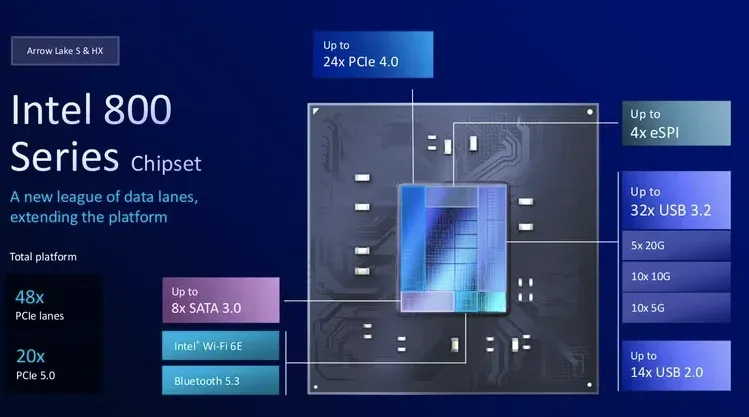
So the Z890 chipset will have 24 lanes Gen 4.0 and no PCIe 3.0, whereas the Z790 had 20 lanes Gen 4.0 and 8 lanes 3.0.
topaz veldt
i know i just want someone to tell me how many nvme on z890 apex i can use lo
lazy engaged
 granite dirge
Good afternoon tc2 crew
hoary hatch
shell void
z890 boards have crazy overkill vrms because the board vendors were expecting to...
Z890 is such a good platform
Give me a real cpu for it
hoary hatch
topaz veldt
i know i just want someone to tell me how many nvme on z890 apex i can use lo
Read my name
 frank zealot
hoary hatch
Z890 is such a good platform
Give me a real cpu for it
frank zealot
hoary hatch
Z890 is such a good platform
Give me a real cpu for it
hopefully the 2026 CPUs actually get to exist and maybe we'll see good features on a new cpu platform
hoary hatch
frank zealot
hopefully the 2026 CPUs actually get to exist and maybe we'll see good features ...
Nova lake is certainly coming
Too far along to kill that
steel stream
My good old 20+1+2 VRM for my 265K
hoary hatch
steel stream
My good old 20+1+2 VRM for my 265K
Me using z890 godlike for CU5 225
merry stirrup
slim pebble
The AMD apex is ridiculous 😃
lol z790 apex used and from china on ebay is 550$+
topaz veldt
I am pumped for nova lake but i am stuck with a couple lga1851 boards
frank zealot
hoary hatch
Too far along to kill that
but Z890 is baller, and if they keep the same features for next gen? it'll be all good
merry stirrup
theyre all bad
slim pebble
topaz veldt
i know i just want someone to tell me how many nvme on z890 apex i can use lo
At least six by the specs at PCIE 4.0x4 speeds, but most boards aren’t going to have that many slots
topaz veldt
slim pebble
At least six by the specs at PCIE 4.0x4 speeds, but most boards aren’t going to ...
I will paypal you $0 if you pull up z890 apex and let me know
granite dirge
topaz veldt
i know i just want someone to tell me how many nvme on z890 apex i can use lo
The ROG Maximus Z890 Apex motherboard features four onboard M.2 slots. Three of these slots support PCIe 5.0 x4, while the fourth supports PCIe 4.0 x4. Additionally, the board includes a DIMM.2 card, which can accommodate two more M.2 drives, bringing the total to six.
shell void
topaz veldt
I will paypal you $0 if you pull up z890 apex and let me know
M.2_1 is 5.0x4 to the CPU
M.2_2 is 4.0x4 to the CPU
DIMM.2_1 and DIMM.2_2 are both 4.0x4 to the CHIPSET
M.2_3 and M.2_4 cannot be used without stealing lanes from the PCIE slots
TLDR ignore the bottom two M.2 slots
hoary hatch
frank zealot
but Z890 is baller, and if they keep the same features for next gen? it'll be a...
I saw some leaks a while back
I wanna say CPU PCIe count is the same, but maybe all gen 5?
Also chipset DMI is going 4x8 to 5x4
frank zealot
topaz veldt
I will paypal you $0 if you pull up z890 apex and let me know
4 on board + DIMM.2
granite dirge
That will be 1million gil in FF xiv snail.
topaz veldt
shell void
M.2_1 is 5.0x4 to the CPU
M.2_2 is 4.0x4 to the CPU
DIMM.2_1 and DIMM.2_2 are b...
so GPU + 3
hoary hatch
shell void
M.2_1 is 5.0x4 to the CPU
M.2_2 is 4.0x4 to the CPU
DIMM.2_1 and DIMM.2_2 are b...
They prioritize the dimm.2 over physical m.2? Seems a little odd?
frank zealot
 shell void
topaz veldt
so GPU + 3
shell void
topaz veldt
so GPU + 3
you can run four and one x16 gpu
 shell void
two of those four will be on the dimm.2
steel stream
hoary hatch
Me using z890 godlike for CU5 225
the way it was meant to be used
frank zealot
shell void
M.2_1 is 5.0x4 to the CPU
M.2_2 is 4.0x4 to the CPU
DIMM.2_1 and DIMM.2_2 are b...
unless you're not using the x4 slots on the board.
shell void
he's trying to not steal gpu lanes
if you populate the third or fourth m.2 slots then your gpu drops to x8
topaz veldt
i want pcie 5.0 x16 for GPU + as many nvme as possible
frank zealot
the chipset can feed 4 m.2's, just not at the same time as the x4 PCIE Slots
shell void
topaz veldt
i want pcie 5.0 x16 for GPU + as many nvme as possible
top two m.2 slots and two on dimm.2
bottom two m.2 slots will drop gpu to x8
hoary hatch
I assume there is a bottom chipset slot that is 4x4
topaz veldt
Reason I ask
 frank zealot
shell void
bottom two m.2 slots will drop gpu to x8
frank zealot
shell void
bottom two m.2 slots will drop gpu to x8
that seems unnecessary.
shell void
slots three and four are both 5.0x4 connected to the CPU, and the CPU only has 20 5.0 lanes
frank zealot
My Nova can do:
x16 Gen 5
x4 Gen 5 (CPU)
and 5 Chipset Gen4
vestal granite
topaz veldt
i want pcie 5.0 x16 for GPU + as many nvme as possible
i want gpu with m.2 slots on it
shell void
you can see what im talking about in their documentation here
 steel stream
vestal granite
i want gpu with m.2 slots on it
steel stream
vestal granite
i want gpu with m.2 slots on it
there are GPUs that already do this
B580 and some of the 60 class cards
vestal granite
thats stupid i was saying something stupid why did they do that
frank zealot
shell void
slots three and four are both 5.0x4 connected to the CPU, and the CPU only has 2...
CPU has 20 Gen 5 lanes. x16 for the slot, and x4 for one NVME
shell void
all four m.2 connections on the board are connected to the CPU
steel stream
vestal granite
thats stupid i was saying something stupid why did they do that
honestly for cards that only have a x8 slot connection, why not do it?
frank zealot
shell void
all four m.2 connections on the board are connected to the CPU
which is a weird choice
vestal granite
steel stream
honestly for cards that only have a x8 slot connection, why not do it?
idk that makes sense i dont have a reason to not do it
hoary hatch
shell void
you can see what im talking about in their documentation here
Imo the 2 lower m.2 slots should be switched with dimm.2 OR the chipset x4 slots
But technically that board can do 6 m.2 and x16 gpu
shell void
youd have to be using a single slot watercooled gpu to make use of the two x4 pcie slots
topaz veldt
DIMM.2 is cool but annoying
shell void
hes using a 4slot chunker and doesnt want to use adapters so the practical answer is four drives
two connected to the cpu on the top two m.2 slots, and two connected to the chipset on dimm.2
topaz veldt
shell void
hes using a 4slot chunker and doesnt want to use adapters so the practical answe...
vertical, actually
shell void
yeah so adapters will not be happening xd
topaz veldt
nerp
frank zealot
standard Motherboard Design calls for:
x16 Slot for GPU (or other stupid high bandwidth device)
x4 Full-Speed M.2 to CPU for a primary Drive
2-5 M.2 Slots off the Chipset, for additional storage.
Alternatives could include:
x16 Slot for GPU
x8 Slot (sharing 8 lanes with primary) to allow for GPU + NVME Riser Card
shell void
well tkitch the apex says fuck you all four m.2 are connected to the cpu
hoary hatch
shell void
yeah so adapters will not be happening xd
Yeah.... Stupid PCIe layout from asus
shell void
kinda based tbh
frank zealot
shell void
well tkitch the apex says fuck you all four m.2 are connected to the cpu
There was a time when people thought asus was good at this stuff lol
hoary hatch
No
shell void
5.0x8 is totally fine for a (gaming) gpu and you get to have four drives on cpu lanes
merry stirrup
shell void
well tkitch the apex says fuck you all four m.2 are connected to the cpu
i think my z790e was this way, if you used a drive in the 2nd slot it would get rid of the main slots bw
idk why they didnt take away shit from the sata or other pcie slots but it was stupid
hoary hatch
merry stirrup
i think my z790e was this way, if you used a drive in the 2nd slot it would get ...
One nice thing about the ProArt boards was they didn't do this
merry stirrup
the weirdest part is that it was only the 2nd m.2 slot
vestal granite
shell void
5.0x8 is totally fine for a (gaming) gpu and you get to have four drives on cpu ...
5.0x8 = 40fps
hoary hatch
Quad m.2 all usable without sacrificing slot lanes
Although the last was switched with some sata
merry stirrup
merry stirrup
the weirdest part is that it was only the 2nd m.2 slot
the 3rd and 4th were fine
shell void
well snail is going to run four m.2 without stealing gpu lanes too
it just involves using dimm.2
dimm.2 seems nice, it's annoying to have to remove my card to access my storage
just sux that theyre chipset only because our cpus have poverty lanes
hoary hatch
As high end consumer socket processors replace what used to be HEDT lineups, it would be nice to start getting more PCIe lanes
Or let's do Gen5 x2 m.2 slots?
slim pebble
shell void
5.0x8 is totally fine for a (gaming) gpu and you get to have four drives on cpu ...
Last AMD board that could do that was an x670e
merry stirrup
gen 5x2 with a pcie switch to make it gen4x4 if you have
but pcie switches die and are kind of annoying because of that
topaz veldt
shell void
dimm.2 seems nice, it's annoying to have to remove my card to access my storage
its taller than memory tho
shell void
topaz veldt
its taller than memory tho
it might not work with the jiushark jfk15
or a thermalsiphon icegiant
merry stirrup
or a custom hardline loop with the tubes right in the way
slim pebble
topaz veldt
its taller than memory tho
Yeah not going to fit with an air cooler
shell void
should be far enough away to not matter with something like a nhd15
just couldnt use long rectangular air coolers
merry stirrup
yeah
they wouldnt have continued with it on the z390? apex
idk when dimm.2 started maybe it was earlier than that
z270 final offer
shell void
all consumer platforms pre-9900k are memes
paying out the ass for tiny toothpaste 4 core squares
when affordable hedt was right there
topaz veldt
slim pebble
Yeah not going to fit with an air cooler
way outside aircooler, which i dont have
topaz veldt
shell void
paying out the ass for tiny toothpaste 4 core squares
respect i7 920 G0 or be banned
edgy laurel
past 24 hours


 topaz veldt
edgy laurel
past 24 hours
topaz veldt
edgy laurel
past 24 hours
 topaz veldt
edgy laurel
past 24 hours
topaz veldt
edgy laurel
past 24 hours
sooo don't buy X870(x) ASRock, got it
edgy laurel
I dunno why there isn't more public outcry
shell void
topaz veldt
respect i7 920 G0 or be banned
that's hedt brother
topaz veldt
shell void
that's hedt brother
not even
hoary hatch
edgy laurel
I dunno why there isn't more public outcry
Because "Asus bad" mentality is weirdly strong
shell void
lga 1366 is hedt
slim pebble
ASUS is an easy target because of their high prices and horrible support
topaz veldt
Meanwhile
 hoary hatch
I see a lot more people telling someone not to buy Asus because "RMA bad" but nobody talking about ASRock killing cpus
slim pebble
So I get it
 pallid marsh
topaz veldt
sooo don't buy X870(x) ASRock, got it
pallid marsh
topaz veldt
sooo don't buy X870(x) ASRock, got it
No buy it so you can get in a possible future lawsuit and get $15-40 back 😜
hoary hatch
Meanwhile in MSI land 🤫
edgy laurel
Like, the whole ordeal seems to be confined to /r/Asrock and no where else
topaz veldt
pallid marsh
No buy it so you can get in a possible future lawsuit and get $15-40 back 😜
this is called Loss Vegas
hoary hatch
Loss mentioned
merry stirrup
is this loss
hoary hatch
You just have to accept loss
topaz veldt
Gentlepeople - what is worse than running self clean on one oven?
hoary hatch
I don't understand either
slim pebble
Asrock gets a pass on a lot of things because of their price points
steel stream
topaz veldt
Gentlepeople - what is worse than running self clean on one oven?
running self clean on two ovens?
topaz veldt
slim pebble
Asrock gets a pass on a lot of things because of their price points
No - because of their underdoggedness
topaz veldt
steel stream
running self clean on two ovens?
CORRECT
edgy laurel
slim pebble
Asrock gets a pass on a lot of things because of their price points
but this is really bad, man.
steel stream
These exploding Asrock parts have been happening for a while right
hoary hatch
slim pebble
Asrock gets a pass on a lot of things because of their price points
It is a cheap CPU killer indeed
edgy laurel
since 800 series boards and 9000 CPU's
hoary hatch
Idk sounds like you get what you pay for sometimes
edgy laurel
600 series didn't have this problem
hoary hatch
My one ASRock attempt didn't go well
Still pains me to say this MSI board is excellent
slim pebble
hoary hatch
It is a cheap CPU killer indeed
If they replace it, then it’s an inconvenience for the people who didnt know to update their BIOS
edgy laurel
I was all about Asrock when I saw what they were doing with AM5 and 600 series.
but this.. this has killed that faith
frank zealot
So I just looked, since I realized I have a couple Wii Pro Controller analog stick replacement parts here.
Each of the analog stick modules has 14 solder points on it. >.<
merry stirrup
😭
edgy laurel
slim pebble
If they replace it, then it’s an inconvenience for the people who didnt know to ...
and then there is that, its still happening on the latest 3.30
pallid marsh
So it's still safe to recommend b650 ASRock 
edgy laurel
If you can find them anymore
slim pebble
edgy laurel
and then there is that, its *still* happening on the latest 3.30
Alright, that’s new info to me, they told GN Steve it was fixed and they were taking care of their affected customers
So maybe the latter but not the former?
edgy laurel
I dunno, i scroll through the sub every day and i've seen it pop up with people on the latest a number of times
slim pebble
Oof
edgy laurel
they do seem to be handling RMA's/Returns
frank zealot
the 5 points on the right edge are for a ribbon cable to the main controller board.
The other 14 are for the analog stick assembly
 topaz veldt
@steel stream I'd like to play a game called "CAT diesel regen" or "2x wall oven self-clean"
topaz veldt
edgy laurel
they do seem to be handling RMA's/Returns
I can't complain - Z890i Nova Wifi completely no post after 3 months, replaced with brand new
edgy laurel
topaz veldt
I can't complain - Z890i Nova Wifi completely no post after 3 months, replaced w...
it did take a while, eh
topaz veldt
edgy laurel
it did take a while, eh
2-3 weeks
edgy laurel
oh, i misread
slim pebble
Every RMA is 2-4 weeks though
topaz veldt
oh i wasn't clear
edgy laurel
no i read that as 3 months to replace it lol
topaz veldt
slim pebble
Every RMA is 2-4 weeks though
my last asus one was 9 days though, but "they suck"
slim pebble
@topaz veldt is the wireview pro worth looking into for 5090 cards? https://www.thermal-grizzly.com/en/wireview-gpu-pro/s-tg-wv-p

Thermal Grizzly
Thermal Grizzly WireView Pro GPU: Power consumption measurement device for graphics cards with temperature sensors and OLED display
pallid marsh
Damn 9 days
topaz veldt
slim pebble
<@257554812013379587> is the wireview pro worth looking into for 5090 cards? ht...
no just plug it in
edgy laurel
topaz veldt
no just plug it in
stuck in my head now
slim pebble
It’s pin and connector temp monitoring, that’s all
topaz veldt
slim pebble
It’s pin and connector temp monitoring, that’s all
useless
turbid locust
@topaz veldt zero hits on the XTX
topaz veldt
turbid locust
<@257554812013379587> zero hits on the XTX
hodl
turbid locust
It’s only been like 6-7 hours but damn bro 
pallid marsh
turbid locust
<@257554812013379587> zero hits on the XTX
I would offer but I want fsr4 or better