#tech-chat-1
1 messages · Page 99 of 1
 pallid temple
 high elm
my fucking rog z790 has been with asus for "repairs" for 2 months
high elm
my fucking rog z790 has been with asus for "repairs" for 2 months
Yea i did it took 4 months😭 for a b650
 turbid dirge
Hi
 ripe spire
I have a 3D printed case for mine
turbid dirge
My motherboards RGB is not syncing with my fans and CPU Cooler where I used to sync them all with the Deepcool ARGB Controller

It's like Whenever I try to select one color for example - Green, But RAM & Mobo color would go the opposite color like in the image
high elm
pallid temple
Yea i did it took 4 months😭 for a b650
they told me to pay $99 to repair it too
and the bloody service centre is in my country
no way it takes that long
unless they send it to taiwan
the told me "repair lead time 30 days" its been 2 months
 grizzled ingot
Hello I need a little help
 trim flicker
high elm
have yall ever dealt with the asus rma process
trim flicker
high elm
have yall ever dealt with the asus rma process
ive heard its a worse experience than being shot in the foot
grizzled ingot
Unlock Login Keyring message appearing when opening Chrome
high elm
trim flicker
ive heard its a worse experience than being shot in the foot
intel gave me a brand new cpu within 15 days of me contacting them
didnt even ask for payment nor a receipt
asus asked for $99 wtf'
and its been 2 months
 lapis condor
high elm
and its been 2 months
lapis condor
high elm
and its been 2 months
The Asus Experience TM
high elm
i legit might just walk down to their service centre and fix the board myself
like bro wtf
 grizzled ingot
@trim flicker how much does it take for somebody to help me?
turbid dirge
If someone could assist me with this please https://discord.com/channels/375436620578684930/1338436302680363028 🙂
 lost peak
Ok so I got a 450 watt power supply
Assus mother board
16 gigs of ddr4
Ruzen 5 3600
And a gtx 960
Would I have to swap the power supply if I replace my 960 with a nvidia titan x
turbid dirge
Whats the TDP of that card?
 true stirrup
lost peak
Ok so I got a 450 watt power supply
Assus mother board
16 gigs of ddr4
Ruzen 5 3...
true stirrup
lost peak
Ok so I got a 450 watt power supply
Assus mother board
16 gigs of ddr4
Ruzen 5 3...
You should be fine but you will be pushing the limit
turbid dirge
Depends on what other peripherals you have installed
true stirrup
true stirrup
You should be fine but you will be pushing the limit
Very pushing it
lost peak
Would it be passing or just pushing
true stirrup
Pushing
And it depends on the quality of the PSU as well
Like your CPU and GPU alone can draw up to around max 310W
lost peak
true stirrup
Like your CPU and GPU alone can draw up to around max 310W
So would I be good?
trim flicker
eeby
true stirrup
lost peak
By corsair
Okay so it's a good PSU
I think you should be good
 rigid fjord
ideal for doing a sleaper build in
lost peak
W
I'll probably have to undervolt it though wouldn't i
lapis condor
lost peak
Ok so I got a 450 watt power supply
Assus mother board
16 gigs of ddr4
Ruzen 5 3...
Yes
turbid dirge
turbid dirge
If someone could assist me with this please https://discord.com/channels/3754366...
Following up on this
 nova lantern
Hey guys, Windows seems to be crashing after it auto-installs an update for the below:
Security Intelligence Update for Microsoft Defender Antivirus - KB2267602 (Version 1.421.1808.0) - Current Channel (Broad)
PC freezes and shuts off
Any ideas?
lapis condor
But also why are you getting a titan x
rigid fjord
grizzled ingot
<@1030556164745863199> how much does it take for somebody to help me?
a life time
lost peak
lapis condor
Yes
The minimum is 450 watts for a titan x
lost peak
lapis condor
But also why are you getting a titan x
Because I'd love to own a titan series gpu
true stirrup
lost peak
W
I'll probably have to undervolt it though wouldn't i
You can't undervolt an Nvidia card without workarounds but you can power limit it
But I don't think you will have to
lost peak
Ok
nova lantern
 lost peak
Because I'd love to own a titan series gpu
lost peak
lost peak
Because I'd love to own a titan series gpu
And also it's an upgrade over my 960 4 gig
nova lantern
Literally why would a security update crash my PC
 nova lantern
ehhhh
lapis condor
lost peak
Because I'd love to own a titan series gpu
Get Titan V :)
lost peak
lapis condor
Get Titan V :)
I'd have to replace my power supply
I'm tryna be cost efficient
Also isn't a titan v like 4 grand
lapis condor
If you buy one new sure
But no sane person would do that
 limber nacelle
royal core :C
lost peak
Because I don't wanna do it wrong and fry my shit
limber nacelle
[rip]
 random girder
lost peak
My graphics card atm is 10 years old
random girder
lost peak
My graphics card atm is 10 years old
If it makes you feel any better my 1660 died and took my PSU with it. Not only did I have to spend monies on an rtx 4060 (it was on sale for a good price) but I had to get a new PSU. This happened the day after I paid my college tuition ☺️
limber nacelle
lost peak
Also isn't a titan v like 4 grand
I've seen one for 400 cad before
lost peak
limber nacelle
I've seen one for 400 cad before
Power supply
limber nacelle
has good fp64 perf iirc but like
I wouldn't buy one other than for collection
cause Volta is on the cutting board in terms of support
grizzled ingot
rigid fjord
a life time
That's not good.
Doesn't anyone from here know how to hep me?
😢
lapis condor
lost peak
Because I don't wanna do it wrong and fry my shit
It is so incredibly hard to plug a PSU in wrong wdym
 lapis condor
Like every connector is keyed differently
It is near impossible to fuck up plugging a PSU in
limber nacelle
^^
the biggest mistake you can make it reusing the old cables from your previous psu assuming it's modular
though that being said... someone here did that once and all of their components survived sooooo
just goes to show the importance of having a good psu :^)
nova lantern
Is anyone here good with dump files and reading?
limber nacelle
@lapis condor rahhhh can someone just sell me a titan rtx for cheap :C
Alex Potvin sold his here but
it wasn't that cheap relative to a 3090 so I passed on it

lost peak
lapis condor
It is so incredibly hard to plug a PSU in wrong wdym
And I'm stupid and clumsy enough to screw it up
limber nacelle
lost peak
And I'm stupid and clumsy enough to screw it up
no you'd have to try to fuck it up
like, force in stuff that obviously is not supposed to go in
again they're keyed differently so it's hard (or basically impossible to accidentally) to plug in eps where pcie is meant to go and vice versa
and the rest is just well, shape recognition
nova lantern

 limber nacelle
no you'd really have to try to mess it up
lapis condor
lost peak
And I'm stupid and clumsy enough to screw it up
Chief
Did you ever manage to put a square block through the circle hole
Like this isn't a 'if you push hard enough it'll go in' situation
limber nacelle
lapis condor
Chief
Did you ever manage to put a square block through the circle hole

 neat flame
real
lost peak
lapis condor
Chief
Did you ever manage to put a square block through the circle hole
Yeah
All I'm saying is I'm stupid and a cluts
limber nacelle
lost peak
Yeah
ok that's not being clumsy anymore
rigid fjord
nova lantern
WindowsUpdateClient keeps crashing my PC?!
not the first time i've heard this happen
pallid temple
im switching to laptop, cause divorcing parents you know so whats about the same as the 3070 ti gpu
Cause im looking at the f15 4070 or a15 4060 price difference is 300
Is it worth the 300 eur
limber nacelle
pallid temple
im switching to laptop, cause divorcing parents you know so whats about the same...
😭
I dont have an answer but best of luck mate
sending you positive vibes through the screen
pallid temple
Thanks hhaha its just hard cause idk if i need the 4070
lost peak
limber nacelle
ok that's not being clumsy anymore
Ever accidentally unplug your internal hardrive while your pc is still on?
I'm lucky nothing got fried
limber nacelle
lost peak
Ever accidentally unplug your internal hardrive while your pc is still on?
no? cause I don't work on my pc while it's on...?
pallid temple
Why would u even try to do that xd
lost peak
limber nacelle
no? cause I don't work on my pc while it's on...?
I had it shutoff
But the power was still on
Yk?
limber nacelle
pallid temple
im switching to laptop, cause divorcing parents you know so whats about the same...
ah but I did hear previously that 60 class mobile chips tend to be best value so yeah
limber nacelle
lost peak
Yk?
no..?
lost peak
limber nacelle
no..?
Like still plugged in tho turned off
limber nacelle
like I power off the pc, then turn off the psu
pallid temple
limber nacelle
ah but I did hear previously that 60 class mobile chips tend to be best value so...
Ah perfect cause i see so much laptops with the 4060 but power limited like a 4060 uses 140 and then its limited at 75
And is it worth to swap 16gb ddr5 to 32
limber nacelle
pallid temple
Ah perfect cause i see so much laptops with the 4060 but power limited like a 40...
yeah probably best to pay attention to the power limits
limber nacelle
pallid temple
And is it worth to swap 16gb ddr5 to 32
personally I refuse to use anything below 32 now but it's up to what you do with the pc
pallid temple
Yea i saw one for about 970 a asus a15
limber nacelle
I just find that really limiting
pallid temple
Yea same xd but does it remove the warranty
limber nacelle
I'm not sure
Europe has strong consumer protection so
I would check your local laws
pallid temple
Bekijk ASUS TUF Gaming A15 FA507NV-LP110W - Gaming Laptop - 15.6 inch - 144Hz op: https://www.bol.com/nl/p/asus-tuf-gaming-a15-fa507nv-lp110w-gaming-laptop-15-6-inch-144hz/9300000169424641?referrer=socialshare_pdp_iphoneapp

ASUS TUF Gaming A15 FA507NV-LP110W - Gaming Laptop - 15.6 inch - 144Hz. De ASUS TUF A15 FA507NV-LP110W gaming laptop is perfect voor de pro gamer. Voor...
I saw this one do u know if its any good or nah
Or im going f15 4070
limber nacelle
sorry, I have no idea
pallid temple
No problem
lapis condor
lost peak
But the power was still on
That's perfectly fine
I've uninstalled CPUs with the system still on
It's fine
I've installed ram with the system on (and uninstalled it for funsies)
I've hot plugged near every component
It is fine
lapis condor
limber nacelle
<@219445812017496064> rahhhh can someone just sell me a titan rtx for cheap :C
Oh true
nova lantern
Ok so I have no idea
My PC was crashing, apparently might be down to my GPU
Due to a 'video_scheduler_internal_error' (119) error
'Arg1: 0000000000000002, The driver failed upon the submission of a command.'
So I've updated the driver.... hopefully no more crashing after waking from sleep
 nova lantern
I really hate when PC auto-crashes
pallid temple
And does anyone know with the asus tuf a15 u have a 110W version and another one without?
nova lantern
Logs become unreadable...
lapis condor
limber nacelle
I just want vram it can be turding even
22GB 2080 Ti
Learn to BGA just for that
 kindred halo
pallid temple
Bekijk ASUS TUF Gaming A15 FA507NV-LP110W - Gaming Laptop - 15.6 inch - 144Hz op...
kindred halo
pallid temple
Bekijk ASUS TUF Gaming A15 FA507NV-LP110W - Gaming Laptop - 15.6 inch - 144Hz op...
It's got the equivalent of an i5-11400H, with an 8GB 4060 at 50% efficiency
lapis condor
Ooo i love getting mystery packages where i forgot what i ordered
kindred halo
It'll work, but don't trust it on going 144Hz on anything beyond medium-low & medium
rigid fjord
lapis condor
Chief
Did you ever manage to put a square block through the circle hole
i plead the 5th
lapis condor
Oh wait it might be my 14600k
 fresh fog
Hi can someone please help answers my question here https://discord.com/channels/375436620578684930/1337910725703897108 thank you
limber nacelle
lapis condor
Learn to BGA just for that
don't i need a special machine for that
ill just get my cards upgraded in china when I go
 eternal cloak
lapis condor
It is so incredibly hard to plug a PSU in wrong wdym
eternal cloak
lapis condor
It is so incredibly hard to plug a PSU in wrong wdym
Yeah, back then I looked at the board for the first time and thought 'How the hell do people do this'
Then about a year later after getting more familiar with shit and learning more in the hobby I looked at it again (I didn't do anything practical during the time, I just engaged in conversation in TS3 and in forums) and immediately went 'Wait, that's easy' lmao
limber nacelle
fill my suitcase with turding lolololol
limber nacelle
eternal cloak
Yeah, back then I looked at the board for the first time and thought 'How the he...
I legit just watched one video and read the manuals and put together my first pc in just a few hours
eternal cloak
eternal cloak
Yeah, back then I looked at the board for the first time and thought 'How the he...
I still let someone else plug my cables in though because I had a very nastily fractured right arm at the time
limber nacelle
it really ain't hard lol
limber nacelle
limber nacelle
I legit just watched one video and read the manuals and put together my first pc...
(and mostly because I wanted to nicely managed the cables)
eternal cloak
eternal cloak
I still let someone else plug my cables in though because I had a very nastily f...
For my second PC, that is*
pallid temple
kindred halo
It's got the equivalent of an i5-11400H, with an 8GB 4060 at 50% efficiency
So its an bad laptop?
trim flicker
meow
pallid temple
kindred halo
It's got the equivalent of an i5-11400H, with an 8GB 4060 at 50% efficiency
https://discord.com/channels/375436620578684930/1338445352101220384
can u maybe help
 keen stratus
i keep getting this whenever my pc turns ok
 rigid fjord
kindred halo
It's got the equivalent of an i5-11400H, with an 8GB 4060 at 50% efficiency
rigid fjord
kindred halo
It's got the equivalent of an i5-11400H, with an 8GB 4060 at 50% efficiency
cpu wise, lol no
rigid fjord
pallid temple
https://discord.com/channels/375436620578684930/1338445352101220384
can u maybe...
that asus tuf a15 is fine btw
pallid temple
rigid fjord
that asus tuf a15 is fine btw
But why does it say 110W
It seems there are 2 versions?
rigid fjord
pallid temple
But why does it say 110W
for the gpu?
pallid temple
rigid fjord
for the gpu?
Idk it says in the name u have a NV and a NVR
rigid fjord
pallid temple
Idk it says in the name u have a NV and a NVR
max wattage of a 4060 is 115w, so being at 110w is fine
both same wattage but as desktop vs laptop, they're basically performing the same within a margin of error
 pallid temple
Oh aight is it it worth 300 eur to go 4070 and the f15 or just go a15
rigid fjord
pallid temple
Oh aight is it it worth 300 eur to go 4070 and the f15 or just go a15
nope
pallid temple
Thx bro imma trust and buy the a15
pallid temple
pallid temple
Bekijk ASUS TUF Gaming A15 FA507NV-LP110W - Gaming Laptop - 15.6 inch - 144Hz op...
So this good right
rigid fjord
pallid temple
Thx bro imma trust and buy the a15
mind linking the f15 you was looking at?
pallid temple
rigid fjord
mind linking the f15 you was looking at?
Yea 1 sec

Megekko
Koop nu de ASUS TUF Gaming F15 FX507VI-LP075W 15.6" Core i7 RTX 4070 Gaming laptop bij Megekko. Voor 22:30 besteld, morgen in huis! Ook op zondag!
ASUS TUF Gaming A15 FA507NV-LP110W - Gaming Laptop - 15.6 inch - 144Hz. De ASUS TUF A15 FA507NV-LP110W gaming laptop is perfect voor de pro gamer. Voor...
So i should get this a15 right
rigid fjord
definitely get the a15 if you have to choose between those 2 only
kindred halo
pallid temple
So its an bad laptop?
Not necessarily at all, just not great for high preset gaming on modern titles
pallid temple
rigid fjord
definitely get the a15 if you have to choose between those 2 only
Its the cheapest 4070
pallid temple
kindred halo
Not necessarily at all, just not great for high preset gaming on modern titles
Yea i play like sea of thieves and stuff never liked those high hogwarts legacy and stuff
kindred halo
rigid fjord
cpu wise, lol no
That's what the top results keep saying, idk
rigid fjord
pallid temple
Its the cheapest 4070
if i had to pay the extra i'd get this instead https://www.bol.com/nl/nl/p/lenovo-legion-slim-5-16ahp9-83dh006jmh-gaming-laptop-16-inch-165-hz/9300000178296251/

Lenovo Legion Slim 5 16AHP9 83DH006JMH - Gaming Laptop - 16 inch - 165 Hz. Deze Lenovo Legion Slim 5 16AHP9 83DH006JMH is perfect voor de fanatieke...
kindred halo
pallid temple
Yea i play like sea of thieves and stuff never liked those high hogwarts legacy ...
Oh then you're definitely good
rigid fjord
kindred halo
That's what the top results keep saying, idk
who's results?
kindred halo
Just don't forget to keep some cash left for a KB & M lmao
pallid temple
rigid fjord
if i had to pay the extra i'd get this instead https://www.bol.com/nl/nl/p/lenov...
Why its 400 more and 4060
kindred halo
rigid fjord
who's results?
Google, definitely not asking userbenchmark & reddit
pallid temple
kindred halo
Just don't forget to keep some cash left for a KB & M lmao
I have a whole setup but switching to laptop
turbid dirge
If someone could assist me with this please https://discord.com/channels/375436620578684930/1338436302680363028
kindred halo
But the more I scrolled down the most results were 11400H
pallid temple
 kindred halo
pallid temple
I have a whole setup but switching to laptop
kindred halo
pallid temple
I have a whole setup but switching to laptop
Yeah you're good then dw
pallid temple
Just parents divorcing so i need the portable thing
kindred halo
Ah, sorry to hear about that
rigid fjord
pallid temple
Why its 400 more and 4060
the cpu being better, and the gpu's power is boosted also
pallid temple
Yea its hard haha but its okay saw it coming
pallid temple
rigid fjord
the cpu being better, and the gpu's power is boosted also
Yea idk if i can afford the 400 rn for the bit of performance
Im buying the a15 thanks guys
Should i upgrade the ram btw?
rigid fjord
kindred halo
Google, definitely not asking userbenchmark & reddit
definitely not the same dude


 kindred halo
pallid temple
Should i upgrade the ram btw?
kindred halo
pallid temple
Should i upgrade the ram btw?
16GB of DDR5 is good enough
rigid fjord
pallid temple
Yea idk if i can afford the 400 rn for the bit of performance
there's a couple other parts on it like being able to have a second ssd inside it as well
kindred halo
rigid fjord
definitely not the same dude
What site is this
rigid fjord
kindred halo
16GB of DDR5 is good enough
if it's a single stick yes
rigid fjord
kindred halo
What site is this
both cpu monkey and technical.city
pallid temple
rigid fjord
there's a couple other parts on it like being able to have a second ssd inside i...
Can i not put a second ssd in the a15 i thought i saw it has 2
rigid fjord
kindred halo
2x 8GB
bad, no beuano
kindred halo
rigid fjord
both cpu monkey and technical.city
Thank ya
lapis condor
kindred halo
2x 8GB
No, bad
pallid temple
rigid fjord
bad, no beuano
But is this best option cause i have about 1250 eur
rigid fjord
pallid temple
Can i not put a second ssd in the a15 i thought i saw it has 2
just checking if it can fully
pallid temple
Aight
 fathom flax
hey so i enabled xmp on my dads pc (12700k no gpu was using iGPU for a few years just fine) and now it won’t post anymore. the motherboard is a b660m-a wifi d4 and there is 8x4 gigs of ram in it. i have shorted the CLRTC pins to no avail and also taken out ram sticks which dont work. any idea what I can do here
the keyboard lights don’t turn on anymore either
kindred halo
lapis condor
No, bad
Why's it bad?
Isn't dual channel usually better than single channel?
rigid fjord
pallid temple
Aight
yeah 2x m.2 slots with 2x sodimm slots
kindred halo
rigid fjord
kindred halo
Isn't dual channel usually better than single channel?
yes but ddr5 doesn't work directly the same as ddr4
pallid temple
rigid fjord
yeah 2x m.2 slots with 2x sodimm slots
So another ssd and i can upgrade ram?
kindred halo
Yes
rigid fjord
pallid temple
So another ssd and i can upgrade ram?
yup you can
pallid temple
So this the best option for 1250 eur in netherlands?
fathom flax
fathom flax
hey so i enabled xmp on my dads pc (12700k no gpu was using iGPU for a few years...
the case power light is also blinking on and off (it only blinks white) repeatedly
pallid temple
With ram its like 1000 total
fathom flax
oh and now it just turned off
kindred halo
A fully free M.2 slot and for RAM you'll need a 16GB single DIMM for upgrades
rigid fjord
kindred halo
Yes
with ddr5 you can go single stick of 16gb ram minimum and won't have the kind of issues as you would do in ddr4
lapis condor
kindred halo
Isn't dual channel usually better than single channel?
1x16GB of DDR5 is better than 2x8GB
2x16GB is better than both
true stirrup
How much of a difference is there actually between 8-bit+FRC and 10-bit colour depth in a monitor if both have in the specifications the same amount of colours they can display?
kindred halo
rigid fjord
with ddr5 you can go single stick of 16gb ram minimum and won't have the kind of...
That explains why I don't see any 8GB DDR5 sticks
pallid temple
Anyone have a good link for netherlands 32gb laptop ram for the laptop?
rigid fjord
kindred halo
That explains why I don't see any 8GB DDR5 sticks
they exist, just really unwise to get/touch
kindred halo
lapis condor
1x16GB of DDR5 is better than 2x8GB
2x16GB is better than both
Well, atleast it makes upgrades easier
kindred halo
rigid fjord
they exist, just really unwise to get/touch
Barely exist here, all I see are 16 Gigabyters
Like I've yet to even see a LAPTOP DDR5 stick
pallid temple
Would the laptop be almost same as 3070 ti + 5 7600 pc? Or nahhh
fathom flax
i’m at a loss here because clearing cmos clearly doesn’t work after shorting it repeatedly
 minor sleet
pallid temple
Would the laptop be almost same as 3070 ti + 5 7600 pc? Or nahhh
minor sleet
pallid temple
Would the laptop be almost same as 3070 ti + 5 7600 pc? Or nahhh
What
That’s not gonna be cheap iirc
rigid fjord
pallid temple
Anyone have a good link for netherlands 32gb laptop ram for the laptop?
https://www.amazon.nl/dp/B0BRTJ4Q94/ actually cheap for ddr5 sodimms

SO DDR5 32GB PC 5600 CL40 Kingston KIT (2x16GB) FURY Impact retail
rigid fjord
pallid temple
Would the laptop be almost same as 3070 ti + 5 7600 pc? Or nahhh
nope, not a chance
pallid temple
rigid fjord
nope, not a chance
Will it be MUCH worse or no?
rigid fjord
both a 7600 and 3070ti have way more performance over the laptop
pallid temple
Hmm im thinking of selling the pc or no haha its hard
rigid fjord
pallid temple
Hmm im thinking of selling the pc or no haha its hard
gpu wise alone
 pallid temple
rigid fjord
both a 7600 and 3070ti have way more performance over the laptop
pallid temple
rigid fjord
both a 7600 and 3070ti have way more performance over the laptop
Can i build a better pc then a 3070 ti and 5 7600 with 1200!374
1200 eur*
kindred halo
pallid temple
Hmm im thinking of selling the pc or no haha its hard
If you can, it's probably best to just upgrade your current rig
kindred halo
pallid temple
Can i build a better pc then a 3070 ti and 5 7600 with 1200!374
Definitely
rigid fjord
cpu wise
 rigid fjord
pallid temple
Can i build a better pc then a 3070 ti and 5 7600 with 1200!374
rigid fjord
pallid temple
Can i build a better pc then a 3070 ti and 5 7600 with 1200!374
quite possibly
pallid temple
kindred halo
Definitely
Can u build one?
Then I’m just selling this and building new for more warranty
kindred halo
What marketplace predomininately
kindred halo
Amazon and Newegg are easiest
pallid temple
Just use pcpartpicker no
rigid fjord
pallid temple
Just use pcpartpicker no
correct
kindred halo
I know just asking just incase specific components aren't on Amazon/Those sites in general
pallid temple
Ooh yea okay
kindred halo
Which is shown in PcPaPi
fathom flax
i’m actually so lost as to why this pc will stop posting after enabling xmp - does anyone have any idea here
pallid temple
fathom flax
i’m actually so lost as to why this pc will stop posting after enabling xmp - do...
Do u know if ur mobo can handle the xmp / mhz of the ram
rigid fjord
kindred halo
I know just asking just incase specific components aren't on Amazon/Those sites ...
can be added as custom parts
rigid fjord
fathom flax
i’m actually so lost as to why this pc will stop posting after enabling xmp - do...
corsair ram ?
fathom flax
pallid temple
Do u know if ur mobo can handle the xmp / mhz of the ram
it’s either 3200 or 3600 mhz so it should be able to run
 midnight wind
check the motherboard qvl to be certain
fathom flax
rigid fjord
corsair ram ?
vengeance yes
rigid fjord
fathom flax
vengeance yes
time to swap out the ram for decent ones
fathom flax
the thing is i even shorted the clrtc pins to reset cmos and nothing
rigid fjord
midnight wind
check the motherboard qvl to be certain
this ain't the issue, the issue is the ram itself
pallid temple
rigid fjord
time to swap out the ram for decent ones
Okay so what is the price of a laptop thats even as the pc?
And what can i get with 1200 eur for anpc
rigid fjord
pallid temple
Okay so what is the price of a laptop thats even as the pc?
And what can i get...
the lenovo could be close in performance, though it would be still a bit weaker on the cpu side
pallid temple
Yea then ill just go pc damnn its hard then
 pallid temple
rigid fjord
the lenovo could be close in performance, though it would be still a bit weaker ...
pallid temple
rigid fjord
the lenovo could be close in performance, though it would be still a bit weaker ...
Is it worth selling this pc and building a new one cause i have someone that wants to buy it
pallid temple
 vivid pendant
This is beautiful
vivid pendant
This is beautiful
The end of that gpu is a beauty
rigid fjord
pallid temple
Is it worth selling this pc and building a new one cause i have someone that wan...
that's up to you
 junior valve
vivid pendant
This is beautiful
junior valve
vivid pendant
This is beautiful
nice but fe tops all
fathom flax
pallid temple
Is the performance boost gon be much with 1200 EUR new pc
vivid pendant
junior valve
nice but fe tops all
Nice but fe dumpster fire

Don't want my VRAM to catch my PC on fire thank you
fathom flax
i changed the ram for different stick, cleared cmos, the power led button no longer turns on but before it was rapidly flashing white and then it turned off
vivid pendant
pallid temple
The end of that gpu is a beauty
Definitely
junior valve
vivid pendant
Nice but fe dumpster fire
nvidia should ve used the 4 slot cooler instead of the 2 slot
vivid pendant
junior valve
nvidia should ve used the 4 slot cooler instead of the 2 slot
I agree
lapis condor
fathom flax
i changed the ram for different stick, cleared cmos, the power led button no lon...
Did you try 1 stick in each slot of the motherboard, trying it all sequentially?
vivid pendant
It had a third fan in the center
lapis condor
vivid pendant
Nice but fe dumpster fire
These are fine Vram temps
vivid pendant
Or had*
vivid pendant
lapis condor
These are fine Vram temps
No
fathom flax
lapis condor
Did you try 1 stick in each slot of the motherboard, trying it all sequentially?
will try now
pallid temple
rigid fjord
that's up to you
Can i dm u so we can see what i get for a new pc
lapis condor
vivid pendant
No
I mean
They are
They're within spec
If you want bad Vram temps just look at the 3090/Ti
rigid fjord
pallid temple
Can i dm u so we can see what i get for a new pc
no dm's but for 1200 eur you can get this https://nl.pcpartpicker.com/list/qNGH74
Part List - AMD Ryzen 5 7600, Radeon RX 7800 XT, Jonsbo D31 MESH MicroATX Mini Tower
vivid pendant
lapis condor
I mean
They are
They're within spec
In my room that would be another 10-15 higher
My room is easily 10° more then what they were testing in
So for me that's 100+
 boreal vine
rigid fjord
no dm's but for 1200 eur you can get this https://nl.pcpartpicker.com/list/qNGH7...
boreal vine
rigid fjord
no dm's but for 1200 eur you can get this https://nl.pcpartpicker.com/list/qNGH7...
d31 spotted
 lapis condor
vivid pendant
So for me that's 100+
lapis condor
vivid pendant
So for me that's 100+
Funnily enough that's not how that works
junior valve
vivid pendant
I agree
the 4 slots although abit chonky but its way more capable ( 800w tdp cooler if im correct )
 vivid pendant
lapis condor
Funnily enough that's not how that works
vivid pendant
lapis condor
Funnily enough that's not how that works
My room is big but air circulation doesn't exist
lapis condor
Thermodynamics are weird but a 10C rise in ambient won't equate directly to a 10C rise in component temps
pallid temple
rigid fjord
no dm's but for 1200 eur you can get this https://nl.pcpartpicker.com/list/qNGH7...
How much better is this then a 3070 ti its about the same build
vivid pendant
Let me put it this way Sy
My laptop brings my room which is master bedroom size from 72 to 86+
After only a few hours.
lapis condor
Get a floor fan on god
boreal vine
lapis condor
Thermodynamics are weird but a 10C rise in ambient won't equate directly to a 10...
air moisture has something to do with it
vivid pendant
lapis condor
Get a floor fan on god
I have ceiling fan
midnight wind
lapis condor
Thermodynamics are weird but a 10C rise in ambient won't equate directly to a 10...
won't it typically be worse
 dusty dew
lapis condor
Thermodynamics are weird but a 10C rise in ambient won't equate directly to a 10...
dusty dew
lapis condor
Thermodynamics are weird but a 10C rise in ambient won't equate directly to a 10...
It does affect if your temp tolerances are tight
lapis condor
midnight wind
won't it typically be worse
No
rigid fjord
pallid temple
How much better is this then a 3070 ti its about the same build
a ton better, this is with a cooler used instead of the stock one that comes with the 7600 https://nl.pcpartpicker.com/list/hNGH74
Part List - AMD Ryzen 5 7600, Radeon RX 7800 XT, Jonsbo D31 MESH MicroATX Mini Tower
vivid pendant
But this PC? 5090 dude. That chucks way more heat then my 230. watt laptop
midnight wind
junior valve
the 4 slots although abit chonky but its way more capable ( 800w tdp cooler if i...
That poor pcie slot
vivid pendant
That would easily be 10-15° more base temp in my room then well into 90-100°F when heavy gaming
It did that in the summer with my laptop lmao
rigid fjord
this is saying minimal but not the full performance
 junior valve
midnight wind
That poor pcie slot
junior valve
midnight wind
That poor pcie slot
fe dont sag as much as aibs , they actually have 4 pcie slots instead of 2 in some aibs
dusty dew
@rigid fjord Pretty decent on this 780m, played some of my familiar games, and it ain't lagging
lapis condor
vivid pendant
But this PC? 5090 dude. That chucks way more heat then my 230. watt laptop
400W more heat in fact
pallid temple
rigid fjord
this is saying minimal but not the full performance
Aight thanks
rigid fjord
pallid temple
Aight thanks
 lapis condor
It's gonna be real fun for those in small rooms with 5090s soon
dusty dew
But my large games not tested yet since it's ssd is only 512 
pallid temple
rigid fjord
Damn is the 7800xt that good?
 fathom flax
lapis condor
Did you try 1 stick in each slot of the motherboard, trying it all sequentially?
fathom flax
lapis condor
Did you try 1 stick in each slot of the motherboard, trying it all sequentially?
nope no dice
 median warren
lapis condor
It's gonna be real fun for those in small rooms with 5090s soon
median warren
lapis condor
It's gonna be real fun for those in small rooms with 5090s soon
Even my 3070 heated up my room
dusty dew
lapis condor
It's gonna be real fun for those in small rooms with 5090s soon
Space heaters, so they are the new 10th gen
fathom flax
no post no white power lifht
lapis condor
fathom flax
no post no white power lifht
Try reseat the CPU
Inspect CPU/motherboard pins/socket for damage
boreal vine
dusty dew
Space heaters, so they are the new 10th gen
10th gen wasn't even that bad :v
median warren
Can confirm it wasn't
lapis condor
dusty dew
Space heaters, so they are the new 10th gen
You mean 13/14th gen?
median warren
I used a 3070 and 10700k, most of the heat was from gpu
median warren
lapis condor
You mean 13/14th gen?
Eh still not that bad, I got my 14700k under control
dusty dew
lapis condor
You mean 13/14th gen?
Well it's a CPU with space heater, 10th gen is basically space heaters with small CPU, same as AMD FX
lapis condor
median warren
Eh still not that bad, I got my 14700k under control
Worse than previous generations in terms of power consumption and heat output
boreal vine
11th gen was worse than 10th gen in terms of heat, but 13/14th is the real offender
median warren
lapis condor
Worse than previous generations in terms of power consumption and heat output
Heat output ain't so bad though
junior valve
boreal vine
11th gen was worse than 10th gen in terms of heat, but 13/14th is the real offen...
just get a big cooler
boreal vine
Though, I think it's abit stupid when people post their results here
fathom flax
lapis condor
Try reseat the CPU
the thing is the pc was running just fine. i booted into bios to enable xmp after realizing it was disabled and now it won’t boot
dusty dew
Right now though, FX actually pulled up longer than their Intel counterparts due to being 8 core
lapis condor
median warren
Heat output ain't so bad though
Staring at the 253W boost clock power draw:
boreal vine
since most likely the "overheating CPU" is factory overclocked
fathom flax
the power led is dark so according to my manual it isn’t graphics card error, memory error or no boot drive error
boreal vine
via asus MCE, or other stupid mobo one click oc bullshit
minor sleet
junior valve
no
12vhpwr strikes again
median warren
I got a thermal grizzly krysheet thermal pad and a 420mm aio on it, it's chilly
junior valve
minor sleet
12vhpwr strikes again
both ends
 vivid pendant
junior valve
no
vivid pendant
junior valve
no
Third part cable that didn't have the right gauge and cheap connector
lapis condor
dusty dew
Well it's a CPU with space heater, 10th gen is basically space heaters with smal...
FX 8350 drew avg. 135W under a full system load according to techpowerup's review
vivid pendant
They were using a third party cable It was not the cable included with the power supply or the graphics card
junior valve
vivid pendant
Third part cable that didn't have the right gauge and cheap connector
asus thor loki psu
boreal vine
median warren
I got a thermal grizzly krysheet thermal pad and a 420mm aio on it, it's chilly
Ekwb cr360 + mx4 says hi
minor sleet
junior valve
both ends
Rip
vivid pendant
It was a third party cable not the one that came with the power supply
Zoom in on the cable there are bend marks on the GPU side They didn't plug in all the way either
median warren
boreal vine
Ekwb cr360 + mx4 says hi
Yeah ik, but still it keeps my 14700k very cool, also ek aios were out of stock at the time
midnight wind
boreal vine
11th gen was worse than 10th gen in terms of heat, but 13/14th is the real offen...
my 13700k draws like 300w with no PL at 5.3 ghz on a non-avx load
junior valve
vivid pendant
It was a third party cable not the one that came with the power supply
they should ve bought a corsair psu
vivid pendant
.-. If you're just going to not fully plug it in expect it to melt
dusty dew
junior valve
both ends
*im now rooting for igpu to catch up further, since dgpu wattages are getting ridiculous *
lapis condor
dusty dew
Well it's a CPU with space heater, 10th gen is basically space heaters with smal...
Meanwhile the 14700k at stock draws 270W
vivid pendant
junior valve
they should ve bought a corsair psu
They don't have the 12v 2x6 connector iirc
junior valve
vivid pendant
They don't have the 12v 2x6 connector iirc
yes they do
vivid pendant
You have to use adapters for a bunch of PCIe 8 pins
median warren
lapis condor
Meanwhile the 14700k at stock draws 270W
Yeah but realistically are you worried about power consumption when buying high end components?
lapis condor
median warren
Yeah but realistically are you worried about power consumption when buying high ...
You should be because all that heat will get dumped into your room
dusty dew
lapis condor
Meanwhile the 14700k at stock draws 270W
Now we will see if 14700k lasts longer due to the core count
trim flicker
vivid pendant
.-. If you're just going to not fully plug it in expect it to melt
doesnt stop me from saying the connector is a piece of shit regardless
lapis condor
dusty dew
Now we will see if 14700k lasts longer due to the core count
Huh?
vivid pendant
trim flicker
doesnt stop me from saying the connector is a piece of shit regardless
I agree it's crap
junior valve
vivid pendant
12vhpwr is not 12v 2x6
they have a 12vhwp header that splits into 2 8pins pcie
vivid pendant
Should use the xt90 connector
median warren
lapis condor
You should be because all that heat will get dumped into your room
My room is always cold, I have not turned on my radiator for a few years now or during the day if I'm home I have an open window, so it's fine
midnight wind
what's the point of the 12 pin instead of the regular old 8 pins
trim flicker
wires of that gauge should not be having 12v 500-600w going through them
lapis condor
Even XT60 would be fine
vivid pendant
junior valve
they have a 12vhwp header that splits into 2 8pins pcie
The new cards don't use 12 volt high power
They use 12v 2x6
boreal vine
midnight wind
my 13700k draws like 300w with no PL at 5.3 ghz on a non-avx load
you've been struck by mobo oc
vivid pendant
You're talking about two completely different connectors dude
dusty dew
lapis condor
Huh?
FX was usable for a decade and still fights up despite the weak 8 cores, since it's 8 cores
midnight wind
boreal vine
you've been struck by mobo oc
yeah that's why I specified no power limit
lapis condor
midnight wind
what's the point of the 12 pin instead of the regular old 8 pins
1 PCIe 8 pin is specced for 150W
1 12v2x6 is is specced for 600W
dusty dew
Though I doubt 14th gen will last a decade
junior valve
vivid pendant
The new cards don't use 12 volt high power
They use 12v 2x6
so i cant plug in a 5090 with a rm850x shift connector ?
midnight wind
If I put the TDP limit then it doesn't quite hit boost clocks
dusty dew
Not because of the core count, but because of the microcode stuff
lapis condor
dusty dew
FX was usable for a decade and still fights up despite the weak 8 cores, since i...
Kek
You see, due to how FX series CPUs are designed, it actually behaves closer to 4 cores with weak hyperthreadring than 8 cores
midnight wind
Its not a motherboard over clock, just the silicon being terrible mainly and then the motherboard being configured to not remedy that
vivid pendant
I wouldn't use a 12vhpwr connector on the 5090 fe
Use the included adapter or get an ATX 3.1 PCIe 5.1 PSU with the new connector
The connector is different
dusty dew
lapis condor
Kek
You see, due to how FX series CPUs are designed, it actually behaves closer ...
They got sued because of that
lapis condor
junior valve
so i cant plug in a 5090 with a rm850x shift connector ?
That PSU doesn't have enough juice for a 5090 lmao
AIB 5090s are pulling over 600W, that leaves 200W for the entire rest of your system
CPU at 100W, RAM at about 10W, storage at about 5-10W depending on how many drives
vivid pendant
And it's different specifically so the card will not power on if it's not plugged in all the way cuz the sens pins are moved back
junior valve
lapis condor
That PSU doesn't have enough juice for a 5090 lmao
AIB 5090s are pulling over 60...
plus 18 corsair fans
lapis condor
Like you'd be running it near the redline and that sucks for efficiency
vivid pendant
So they don't make contact if you don't fully plug it in so thus no power
midnight wind
trim flicker
wires of that gauge should not be having 12v 500-600w going through them
4.17 amps per wire doesn't seem to bad to be fair
boreal vine
lapis condor
Kek
You see, due to how FX series CPUs are designed, it actually behaves closer ...
did you have an fx cpu?
vivid pendant
The old connector does not have that so you can still power on if it's not plugged in all the way
lapis condor
boreal vine
did you have an fx cpu?
Never did, first full PC for me had a 4790
vivid pendant
junior valve
plus 18 corsair fans
 boreal vine
lapis condor
Never did, first full PC for me had a 4790
boreal vine
lapis condor
Never did, first full PC for me had a 4790
damn
boreal vine
that's actually kinda baller
vivid pendant
Need 1200
lapis condor
boreal vine
that's actually kinda baller
4790 and a r9 290 🔥
Only reason I've been an AMD fanboy for so long is because of that stupid 290
boreal vine
lapis condor
4790 and a r9 290 🔥
my first proper pc was an a10 igpu build back in the day, then got another PC in 2019
lapis condor
I made it draw 744W once it was amazing
junior valve
lapis condor
That PSU doesn't have enough juice for a 5090 lmao
AIB 5090s are pulling over 60...
lemme calculate it
13900k , 4 sticks of corsair vengeance rgb , 2nvme + 1 hdd , 15 ll120 fans + 3 ll140s
how much those adds up to
boreal vine
lapis condor
Only reason I've been an AMD fanboy for so long is because of that stupid 290
i've never owned an amd gpu until last yera lmao
or 2023
vivid pendant
junior valve
lemme calculate it
13900k , 4 sticks of corsair vengeance rgb , 2nvme + 1 hdd ,...
13900k 253 watts
lapis condor
I'm jumping ship to a 5070 provided it has the stupid PCB design
If it doesn't, then idk what card I'll get
boreal vine
I didn't see any point in going for the 590 when 1070 beats the shit out of it for the longest time
dusty dew
On a random note, I am thinking of buying a same model as my first laptop...
vivid pendant
junior valve
lemme calculate it
13900k , 4 sticks of corsair vengeance rgb , 2nvme + 1 hdd ,...
About 500 watts probably
boreal vine
I did want to get a vega card but that's for hackintosh primarily
dusty dew
If I find it cheap enough
vivid pendant
Depends on whether or not you're overclocking the chip
fathom flax
this motherboard also doesn’t support bios flashback so i can’t update the firmware because the pc isn’t posting wtf do i do
 signal epoch
Please help me my galaxy a5 6 just died on me overnight giving me this screen signaling that it is fully on
 dusty dew
It's a Compaq presario cq57-399sd as for why I long for getting it. It got stolen 3 months after being bought new
lapis condor
fathom flax
this motherboard also doesn’t support bios flashback so i can’t update the firmw...
Full clear cmos again, try with only one stick in slot A2 or B2
Did you reseat the CPU already?
lapis condor
signal epoch
Please help me my galaxy a5 6 just died on me overnight giving me this screen si...
Ded screen oof
 whole garden
signal epoch
Please help me my galaxy a5 6 just died on me overnight giving me this screen si...
whole garden
signal epoch
Please help me my galaxy a5 6 just died on me overnight giving me this screen si...
Get the screen replaced
midnight wind
Hows the 13700k and 13900k the same tdp
eternal cloak
signal epoch
Please help me my galaxy a5 6 just died on me overnight giving me this screen si...
That's very much a dead screen
eternal cloak
whole garden
Get the screen replaced
That phone is old enough to have a dedicated home button, makes more sense to get a new phone
kindred halo
rigid fjord
can be added as custom parts
Fair enough
signal epoch
lapis condor
Ded screen oof
Bshhdhshs i loved my little a5 it had so much more to live for auuughhhh☹️☹️☹️
 trim idol
Good morning folks 🙂
trim flicker
trim idol
Good morning folks 🙂
morning mom
eternal cloak
trim idol
Good morning folks 🙂
sup mum
trim idol
Hey hey kids
boreal vine
trim idol
Good morning folks 🙂
morning malorie, guess what i'm using at work today
kindred halo
@pallid temple gonna finish it up in like 30 mins to an hour, can I know what parts you already have that don't really need replacing? (Case fans, storage, etc)
And if you want liquid or air cooling
 terse sorrel
can I js turn off my 3090 fans if it's not being used?
trim idol
It's crazy. RN on Best Buy's site, every nvidia card except for 3060 and 4060s are sold out
terse sorrel
terse sorrel
can I js turn off my 3090 fans if it's not being used?
idling at 33C
trim idol
terse sorrel
idling at 33C
You can set a fan curve that turns them off at low temps
boreal vine
trim idol
It's crazy. RN on Best Buy's site, every nvidia card except for 3060 and 4060s a...
gpus here in the UK are sold out too
lapis condor
I mean I'd expect a card like that to have fan stop with the default fan curve
boreal vine
and getting used cards at the moment is a pain in the ass
as the prices have rised a lil bit
lapis condor
Hey you can get a used 3080 for like £400 or less
trim idol
boreal vine
as the prices have rised a lil bit
I've found that too
terse sorrel
trim idol
You can set a fan curve that turns them off at low temps
the auto fan settings on afterburner is really good. I don't wanna mess with manual fan controls on fan control
lapis condor
Manual fan tuning is like 15 seconds of drawing a line then putting the card under load to see if it sounds good
boreal vine
lapis condor
Hey you can get a used 3080 for like £400 or less
they were 300 like 2 months ago
trim idol
terse sorrel
the auto fan settings on afterburner is really good. I don't wanna mess with man...
okay
terse sorrel
lapis condor
Manual fan tuning is like 15 seconds of drawing a line then putting the card und...
cpu while doing general tasks
 trim idol
terse sorrel
cpu while doing general tasks
trim idol
terse sorrel
cpu while doing general tasks
wait, you alreay have fan control and you don't want to take the half a minute to set up a curve in there?
lapis condor
terse sorrel
cpu while doing general tasks
Cool
Does it sound good to you
terse sorrel
lapis condor
Cool
Does it sound good to you
what matters more is cpu cooling tbh idc about sound
pallid temple
kindred halo
<@1172247514758524958> gonna finish it up in like 30 mins to an hour, can I know...
Imma just build a new pc pure performance so probably air cooled
terse sorrel
trim idol
wait, you alreay have fan control and you don't want to take the half a minute t...
yeah but my gpu got 3 fans only shows up 2 on fan control. Control 1 and control 2
pallid temple
I have a 1tb ssd
trim idol
terse sorrel
yeah but my gpu got 3 fans only shows up 2 on fan control. Control 1 and control...
that's because two are on the same controller
boreal vine
trim idol
I've found that too
my 6800 is going for significantly more than what I paid for it
terse sorrel
trim idol
that's because two are on the same controller
oh so copy the same chart twice?
boreal vine
and I also found out it's the only 2 slot model of that card LMAO
the rest are either 2.5 or more or oem and runs like shit
trim idol
terse sorrel
oh so copy the same chart twice?
Make one chart and apply the curve to both 3090 fans that show up in fan control
lapis condor
terse sorrel
what matters more is cpu cooling tbh idc about sound
Why not both
You can have both you know
terse sorrel
trim idol
Make one chart and apply the curve to both 3090 fans that show up in fan control
also I have the case fans set as +6% on all intakes than the aio exhaust (to build positive pressure). And back exhaust is just a contant 50%
 pallid temple
rigid fjord
pallid temple
rigid fjord
I already have a ssd, so we can put that away and instead put money somewhere else if its needed?
terse sorrel
terse sorrel
also I have the case fans set as +6% on all intakes than the aio exhaust (to bui...
but they are different rpms and dimensions idk if that matters
too complicated ngl
like 1% on an intake fans =! 1% on aio fan
trim idol
terse sorrel
but they are different rpms and dimensions idk if that matters
it doesn't matter
in fact, you don't want all the fans at the exact same RPM because that creates annoying harmonics
median warren
Is there such thing as like a universal ring size, because I don't actually know the size of someone's finger that I'm trying to buy a ring for
terse sorrel
can u make me a gpu fan curve lol. And how do you make fan control override afterburner
 trim flicker
trim idol
in fact, you don't want all the fans at the exact same RPM because that creates ...
trim flicker
trim idol
in fact, you don't want all the fans at the exact same RPM because that creates ...
my fans hum so much lol
lapis condor
median warren
Is there such thing as like a universal ring size, because I don't actually know...
Is everyone's finger the same size
median warren
lapis condor
Is everyone's finger the same size
Well nah but you know fingers have different thickness depending at what point you measure it
And which finger
trim flicker
the ring finger duh
fathom flax
RAM on B2, held screw driver on clrtc for a min, cpu reseated - do you know how to remove this battery? (red wires) @lapis condor
 median warren
I think, I'll measure my own finger size and I know that they have a smaller finger so I'll just down size it by a couple
trim idol
terse sorrel
can u make me a gpu fan curve lol. And how do you make fan control override afte...
Make it like this
Keep the curve under 30% until about 45-50C and the fans should stay off when its cold.
Fan Control should automatically override afterburner... but also, just close afterburner

 hybrid hamlet
Running Minecraft on a Raspberry Pi lols
 solar moat
hybrid hamlet
Running Minecraft on a Raspberry Pi lols
solar moat
hybrid hamlet
Running Minecraft on a Raspberry Pi lols
but can you do 512 chunk render distance with shaders
hybrid hamlet
solar moat
but can you do 512 chunk render distance with shaders
I'll prob get 1 fps per sometimes
junior valve
vivid pendant
Depends on whether or not you're overclocking the chip
it usually sits around 100-140w gaming wise
trim flicker
hybrid hamlet
I'll prob get 1 fps per sometimes
one frame per second per sometimes
vivid pendant
Not in monster hunter wilds it won't
hybrid hamlet
trim flicker
one frame per second per sometimes
Frame per if you ask nicely
junior valve
vivid pendant
Not in monster hunter wilds it won't
that’s roblox load
vivid pendant
Incorrect
Wilds is similar to cyberpunk 2077 and black myth wukong
A 9800x3d bottlenecks a 5090 in wilds
junior valve
vivid pendant
Incorrect
i mean my wattage load
lapis condor
fathom flax
RAM on B2, held screw driver on clrtc for a min, cpu reseated - do you know how ...
Gotta unplug that cable on the motherboard side
vivid pendant
Well my girls 14900 draws 253 in wilds so idk
trim idol
vivid pendant
A 9800x3d bottlenecks a 5090 in wilds
This seems unlikely
do you have a rivaturner overlay to show this?
hybrid hamlet
Y'all how do I manage my fan on a raspberry pi 3 model b rev 1.2
trim idol
Are you running 1080p low settings?
vivid pendant
trim idol
This seems unlikely
Watch people litteraly show it on screen in the benches
eternal cloak
trim idol
This seems unlikely
No he's right
The issue with his sentence is that literally everything necks a 5090
fathom flax
lapis condor
Gotta unplug that cable on the motherboard side
besides that i reseated it and shorted the pins to no avail, still no post
eternal cloak
That was the case for the 4090 too
vivid pendant
trim idol
do you have a rivaturner overlay to show this?
It does it in 4k native
Monster hunter wilds is extremely CPU intensive
My laptop btw

Most it can manage lowest possible settings
trim idol
eternal cloak
No he's right
The issue with his sentence is that literally everything necks a 5...
Interesting
vivid pendant
Wilds is also just eugh
 woeful leaf
ggs

 eternal cloak
trim idol
Interesting
eternal cloak
trim idol
Interesting
Ye, GN did tests back then when the 4090 even came out and he's used a 13900K back then
vivid pendant
It's intensive
eternal cloak
Literally any CPU on the market right now necks even a 4090
 eternal cloak
Who cares, it's not a competitive game
vivid pendant
eternal cloak
Literally any CPU on the market right now necks even a 4090
Monster hunter wilds will shoot a 9800x3d to 100% usage
trim flicker
me when unoptimised game
vivid pendant
In 4k /9)
junior valve
woeful leaf
ggs
amd activities
trim idol
eternal cloak
Who cares, it's not a competitive game
This
boreal vine
woeful leaf
ggs
6800xt?
woeful leaf
boreal vine
6800xt?
yup
 fickle ivy
im tempted to buy a vertical mount for my gpu when it gets here, what shold i look out for?
boreal vine
woeful leaf
yup
very nice
eternal cloak
vivid pendant
Monster hunter wilds will shoot a 9800x3d to 100% usage
That doesn't change anything about what I said lol
trim idol
vivid pendant
My girls PC
All I got for this is shrug
vivid pendant
eternal cloak
That doesn't change anything about what I said lol
That's true
trim idol
also... who buys a 4080 Super and runs single player games at 1080p
trim flicker
you can play any game at 60 frames perfectly fine, only if ur playing high tier in competitive games that you see an improvement in higher framerates
junior valve
vivid pendant
Well my girls 14900 draws 253 in wilds so idk
doesnt that cpu comes with a stock cooler?
eternal cloak
trim idol
All I got for this is *shrug*
Word.
It's a monster hunter kind of an RPG game, who needs more than 90 FPS in this shit
boreal vine
@trim idol did you ever get rid of that 5700xt?
vivid pendant
junior valve
doesnt that cpu comes with a stock cooler?
Idk
boreal vine
I have a feeling I figured out why your results were so different from mine
woeful leaf
boreal vine
very nice
i got it for 1450pln (around 360usd) and these usually go for 1800pln+ in here
trim idol
oh yeah, sold it in a system long ago
boreal vine
woeful leaf
i got it for 1450pln (around 360usd) and these usually go for 1800pln+ in here
good deal
trim idol
boreal vine
I have a feeling I figured out why your results were so different from mine
Oh?
boreal vine
trim idol
Oh?
windows 11 extremely gimped my performance, weren't you using windows 11?
vivid pendant
eternal cloak
Word.
It's a monster hunter kind of an RPG game, who needs more than 90 FPS in t...
Actually you would be very surprised if you're not running earplugs decorations (gems) on your build sub 90fps and you can miss the iframe to block the monsters roar
trim idol
boreal vine
windows 11 extremely gimped my performance, weren't you using windows 11?
I was using Win 11, yes
vivid pendant
In later higher end gameplay you sort of need just about any frame you can get to be able to iframe every attack to dodge or block it
eternal cloak
vivid pendant
Actually you would be very surprised if you're not running earplugs decorations ...
That sounds like a skill issue
median warren
boreal vine
(truly fuck windows 11)
Just not literally
vivid pendant
I have over 4000 hours in world
trim idol
vivid pendant
Actually you would be very surprised if you're not running earplugs decorations ...
what do these words even mean
eternal cloak
trim idol
what do these words even mean
iframe = invincibility frame
vivid pendant
The time to actually block will not exist with lower FPS
trim idol
ahhh
vivid pendant
Like the game actually just doesn't put it there lol
junior valve
vivid pendant
Idk
my 13900 comes with a stock cooler
 median warren
junior valve
my 13900 comes with a stock cooler
median warren
junior valve
my 13900 comes with a stock cooler
It does?
boreal vine
junior valve
my 13900 comes with a stock cooler
lowkey goes ahrd I can't lie
eternal cloak
Usually refers to something like a dodge or parry mechanic that gives you a couple frames where you can't be hit by certain things
trim idol
junior valve
my 13900 comes with a stock cooler
my 12900k didn't come with a stock cooler
trim flicker
vivid pendant
The time to actually block will not exist with lower FPS
just block smh
junior valve
median warren
It does?
yes
vivid pendant
trim flicker
just block smh
Some weapons are not capable of doing so
junior valve
trim idol
my 12900k didn't come with a stock cooler
skill issue
trim flicker
use a different weapon
vivid pendant
So you need to iframe roll
boreal vine
trim idol
my 12900k didn't come with a stock cooler
I got a 12900kf, that didn't come with a cooler either 🤷♀️
median warren
junior valve
yes
Why
junior valve
trim idol
my 12900k didn't come with a stock cooler
anyway its ass , dont bother
trim idol
I don't think that any xx900s came with stock coolers, because the boxes don't have room for them
vivid pendant
I use Great sword, charge blade, switch ax, hammer, both blowguns and bow
eternal cloak
vivid pendant
Actually you would be very surprised if you're not running earplugs decorations ...
Regardless, it's why I said 90 FPS and not 60
World of Warcraft knows how pointless shit is above 60 FPS so they quite literally lock your game to 60 FPS kek
trim idol
unless the F's did
vivid pendant
But I main great sword
vivid pendant
eternal cloak
Regardless, it's why I said 90 FPS and not 60
World of Warcraft knows how point...
xD
junior valve
median warren
Why
for the giggles and shits
boreal vine
trim idol
unless the F's did
I don't think intel includes cooler on k series chips tbf
eternal cloak
trim idol
I don't think that any xx900s came with stock coolers, because the boxes don't h...
None of the Ks did, the i9 non-Ks did, had a fancy RGB shitter
boreal vine
They kinda expect you to have your own cooler
 trim idol
yeah, this is the K box
 junior valve
boreal vine
lowkey goes ahrd I can't lie
junior valve
boreal vine
lowkey goes ahrd I can't lie
its worse the the lga 115x stock cooler( i tested both of them )
trim idol
I guess the F's came in these boxes with fan
 boreal vine
trim idol
yeah, this is the K box
boreal vine
trim idol
yeah, this is the K box
mine just came in one of these
 eternal cloak
Le 1X900 stock coler
 boreal vine
trim idol
I guess the F's came in these boxes with fan
boreal vine
trim idol
I guess the F's came in these boxes with fan
yeah the non K gets a cooler
trim idol
eternal cloak
Le 1X900 stock coler
kinda cool looking tbf
trim flicker
eternal cloak
Le 1X900 stock coler
how did they make it look worse
junior valve
big ass lga 115x stock cooler
 trim idol
junior valve
big ass lga 115x stock cooler
trim idol
junior valve
big ass lga 115x stock cooler
yeah, but with those tight fins and no shroud, it'll just blow air out the sides and not down...
eternal cloak
trim idol
kinda cool looking tbf
I like it too, but the only actual difference between the normal shitter and this shitter is the RGB
trim idol
eternal cloak
I like it too, but the only actual difference between the normal shitter and thi...
plus it has that shroud
junior valve
trim idol
yeah, but with those tight fins and no shroud, it'll just blow air out the sides...
its more effective than the newer one
eternal cloak
Yeah, the lower end SKUs have that too
boreal vine
junior valve
big ass lga 115x stock cooler
I remember those, they were cool ngl
trim idol
junior valve
its more effective than the newer one
I'd need to see proof of that
junior valve
junior valve
its more effective than the newer one
tested it with my 13900k

 boreal vine
junior valve
tested it with my 13900k
boreal vine
junior valve
tested it with my 13900k
did gigabyte also have the lga115x holes like asus does?
junior valve
140w load
 eternal cloak
https://www.youtube.com/watch?v=dxeAjDl2iJY
RandomGaminginHD based
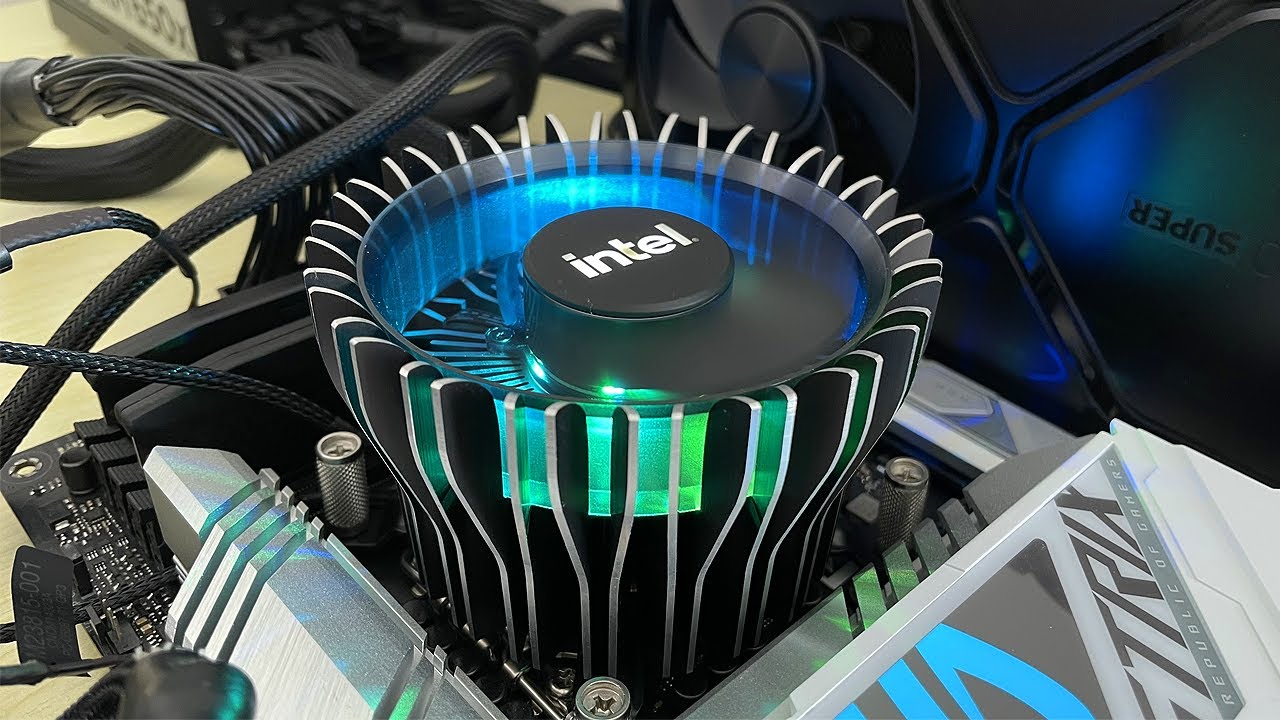
Most modern socket 1700 Intel Processors ship with the Laminar RM1 cooler. It's a small, covered in plastic, and does an adequate job. If you purchase a higher end CPU however, then you get the RH1, which is a lot bigger and generally unavailable on it's own.
I recently found one for just £10, which is cheaper than any other aftermarket option...
junior valve
boreal vine
did gigabyte also have the lga115x holes like asus does?
i modded lga 1700 support for it
trim idol
I guess that new one is a lot shorter than it looks like in the pics
junior valve
trim idol
I guess that new one is a lot shorter than it looks like in the pics
its abit smaller than the 115x
 trim idol
oh! it is taller... the first one in the video is the one that comes with the i3/i5s
eternal cloak
It'll do it's job and that's about the point of them I suppose
eternal cloak
trim idol
oh! it is taller... the first one in the video is the one that comes with the i3...
Correct
junior valve
trim idol
oh! it is taller... the first one in the video is the one that comes with the i3...
and i7s
eternal cloak
Ye, the big one only comes with i9s
hybrid hamlet
Can I somehow set the fan speed of my Raspberry Pi 3?
junior valve
eternal cloak
Ye, the big one only comes with i9s
they are both rated for 65w anyways
 simple parrot
is upgrading from a 3060 ti to a 4070 wooorth it?
trim idol
whack that they'd include a 65W cooler with CPUs that consume far more than that
eternal cloak
simple parrot
is upgrading from a 3060 ti to a 4070 wooorth it?
You should go to a 4070 SUPER realistically, but yes
junior valve
the big lga115x is actually wairth prism level of performance
simple parrot
eternal cloak
You should go to a 4070 SUPER realistically, but yes
is 4070 super better?
rigid fjord
pallid temple
Damn is the 7800xt that good?
Yes it is
eternal cloak
simple parrot
is 4070 super better?
Going from a 3060 Ti to a 4070 SUPER would be like going from a 3060 Ti to a far more efficient 3090 Ti
junior valve
eternal cloak
Going from a 3060 Ti to a 4070 SUPER would be like going from a 3060 Ti to a far...
thats the double the performance
rigid fjord
pallid temple
I already have a ssd, so we can put that away and instead put money somewhere el...
What size is that ssd you have?
simple parrot
that sounds NEAT, isnt the rx 7800 xt simular performance to a 4070 too?
junior valve
eternal cloak
Going from a 3060 Ti to a 4070 SUPER would be like going from a 3060 Ti to a far...
3090ti is 4070ti level
eternal cloak
simple parrot
that sounds NEAT, isnt the rx 7800 xt simular performance to a 4070 too?
Yeah
trim idol
eternal cloak
https://www.youtube.com/watch?v=dxeAjDl2iJY
RandomGaminginHD based
Nice of him to make this video, but without showing curves and normalizing RPM, it's not super useful for analysis
boreal vine
junior valve
i modded lga 1700 support for it
oh tea, because the asus board I use for my 12900k, does support lga 115x mounting (z690 ROG strix, and Prime - p)
eternal cloak
junior valve
3090ti is 4070ti level
(No it isn't)
 simple parrot
eternal cloak
Yeah
simple parrot
eternal cloak
Yeah
that could be cool but idk if the amd card wouldnt couse any problems with my existing setup
eternal cloak
eternal cloak
(No it isn't)
And the 4070 Ti is a tad better than that, obviously
trim idol
simple parrot
that could be cool but idk if the amd card wouldnt couse any problems with my ex...
it won't
junior valve
eternal cloak
(No it isn't)
 simple parrot
also i got an intel i5-10400f , would the bottle neck be THAT bad at 1080p?
or should i just upgrade to a 1440 p monitor
trim idol
junior valve
 eternal cloak
junior valve
eternal cloak
junior valve
Oh nyo, conflicting performance charts, what am I ever gonna do! It's almost like it's never going to be consistent
 eternal cloak
And I'm pretty sure that TPU chart above a certain threshold is using 4K to measure the performance, by which then the chart makes sense
rigid fjord
median warren
Is there such thing as like a universal ring size, because I don't actually know...
Amazon/ebay and you can get a set of finger mesuring rings so you know the size you want from that, alternatively if you have a female server then knowing the clothing size of the person's jeans/leggings/shorts/trousers they may know the correct size by instinct/experience
junior valve
eternal cloak
And I'm pretty sure that TPU chart above a certain threshold is using 4K to meas...
thats where those gpus are designed for
trim idol
Since most people with 4070Ti/7800XT play on 1440p, this is probably the chart that matters most.
 junior valve
eternal cloak
What?
junior valve
eternal cloak
What?
3090 ti is a 4k gpu
 steel umbra
officially ye
trim idol
junior valve
3090 ti is a 4k gpu
not on modern AAA games its not
trim flicker
4k is still very niche for gaming
eternal cloak
junior valve
3090 ti is a 4k gpu
The 4070/SUPER/Ti/Ti SUPER isn't, hence why you use 1440p because both cards commonly use this resolution
junior valve
trim idol
not on modern AAA games its not
even at 1440p , its still way faster than a 4070 s
trim idol
junior valve
even at 1440p , its still way faster than a 4070 s
By "way" you mean like 3-5%?
eternal cloak
trim idol
By "way" you mean like 3-5%?
Nope, it's literally within 3 FPS
 junior valve
trim idol
By "way" you mean like 3-5%?
junior valve
trim idol
By "way" you mean like 3-5%?
thats alot
eternal cloak
eternal cloak
Nope, it's literally within 3 FPS
The third one is 1440p
pallid temple
rigid fjord
What size is that ssd you have?
2tb pcie 4
trim idol
What Kaz said.
pallid temple
Im currently using it as second ssd but i can use it for new one
trim idol
Though that yummy 24GB VRAM is definitely nice on the 3090Ti for big textures
but then the 3090Ti costs more used than a 4070 Ti Super does... which is whack
rigid fjord
pallid temple
2tb pcie 4
So you could get a 500gb one to use as a boot drive and keep the 2tb as a separate games drive
eternal cloak
junior valve
thats alot
What crack are you on, 3 to 5% is basically not noticeable even if both cards only had 30 FPS at 4K
pallid temple
rigid fjord
So you could get a 500gb one to use as a boot drive and keep the 2tb as a separa...
Why not just boot drive on the same one
junior valve
eternal cloak
What crack are you on, 3 to 5% is basically not noticeable even if both cards on...
the 3090 ti would probably be abit more stable with 24gb of vram
rigid fjord
pallid temple
Why not just boot drive on the same one
If windows wants to fuck up at any point you're not re-installing everything
fathom flax
is there any reason why pc keeps on doing this
eternal cloak
eternal cloak
What crack are you on, 3 to 5% is basically not noticeable even if both cards on...
Unless you're gonna tell me you notice 0.9 FPS
fathom flax
it turns on for a few seconds then turns off before turning on again repeatedly
steel umbra
fathom flax
is there any reason why pc keeps on doing this
Failed to post it seems like
median warren
rigid fjord
Amazon/ebay and you can get a set of finger mesuring rings so you know the size ...
Oh damn
I need to get into a server like that tbh cause I know the clothing size
steel umbra
Motherboard or ram is usually the culprit
eternal cloak
junior valve
the 3090 ti would probably be abit more stable with 24gb of vram
Hey, guess what, it doesn't lmao
It behaves about like any other card would

 sage raven
what do we think of the acer nitro VG271UM3bmiipx quad hd 27” ips? UK based, looking to play single player and multiplayer games at 1440p, £200 budget looking for best bang for my buck
junior valve
fathom flax
is there any reason why pc keeps on doing this
flip the front fans
eternal cloak
Like, idk why nobody has the 3090/Ti on their charts but the 4070S behaves like any other card and is about as stable lol
 fathom flax
steel umbra
Motherboard or ram is usually the culprit
fathom flax
steel umbra
Motherboard or ram is usually the culprit
it stopped working after I enabled XMP. I’m not sure if I bricked the motherboard. I can’t even enter the BIOS. Clearing CMOS by shorting CLRTC pins does nothing
I’m trying different sticks of RAM and nothing
trim idol
eternal cloak
Like, idk why nobody has the 3090/Ti on their charts but the 4070S behaves like ...
probably because the 3090Ti has always been a silly card.
weeee tiny bit more performance than a 3090 for huge $ more
eternal cloak
trim idol
probably because the 3090Ti has always been a silly card.
weeee tiny bit more ...
A $2000 MSRP is kinda rough, ye
pallid temple
rigid fjord
If windows wants to fuck up at any point you're not re-installing everything
I dont have important things just some games xd so that wont matter really
steel umbra
fathom flax
it stopped working after I enabled XMP. I’m not sure if I bricked the motherboar...
Make sure you're shorting them right
pallid temple
But do we need money to put somewhere else
fathom flax
steel umbra
Make sure you're shorting them right
junior valve
eternal cloak
A $2000 MSRP is kinda rough, ye
thats normal now
eternal cloak
junior valve
thats normal now
A single card per generation that you're not even gonna buy has a $2,000 MSRP, bohoo
true stirrup
fathom flax
Take out the CMOS battery then
eternal cloak
The reason it was rough back then was because, shocker, COVID HAPPENED, so that thing wasn't $2,000, the 3090 Ti was $4,000
steel umbra
Yeah try battery
junior valve
eternal cloak
The reason it was rough back then was because, shocker, COVID HAPPENED, so that ...
how much is the 5090 going for currently again
steel umbra
then try all sticks you have in B2
fathom flax
true stirrup
Take out the CMOS battery then
the battery is stuck here and i can’t get it out (red wire, pls ignore dust)
 eternal cloak
junior valve
how much is the 5090 going for currently again
eternal cloak
junior valve
how much is the 5090 going for currently again
Between 4 and $6,000
Idk why you're acting surprised, it's a new generation
Difference is the 3090 Ti was $4,000 all the way until the end of covid, the 5090 is gonna come down eventually lol
fathom flax
my fingers don’t fit in the BATT_CON area so i can unplug it
boreal vine
trim flicker
4k is still very niche for gaming
I know someone that exclusively plays bf2042
on 4k with 4090
trim flicker
lol
boreal vine
literally the only game they play
trim flicker
waste of money fr
boreal vine
they bought a 7800x3d with it as well
only for them to find out that it performs the same as their 12900k
trim flicker
loll
 wet ember
i let my windows xp virtual machine install overnight but it's still stuck on this page

it's been running for 8+ hours now
trim flicker
lol
 livid mason
What if you could overclock and HDD?
7200 rpm could go to 7500-7700 rpm
I'm a genius 🤯
 livid mason
Just a curious thought :)
 strong orbit
That idea is definitely interesting
trim flicker
livid mason
What if you could overclock and HDD?
you can, its just not worth it
solar moat
livid mason
Just a curious thought :)
all i going to say idk if it can be dose but funny thing if you overclock with blck its easy to kill drives
 gloomy sleet
livid mason
7200 rpm could go to 7500-7700 rpm
gloomy sleet
livid mason
7200 rpm could go to 7500-7700 rpm
you would lose all your data and destroy it
gloomy sleet
their made to run at 7200rpm for a reason
livid mason
True
 rare pier
Hey so I have a choice between the 6950xt vs 7800xt for the same price. Which should I get, I heard the 7000 series has more features that the 6000 so which is more worth?
Note: mostly play comp fps games but enjoy AAA games from time to time
 tidal geyser
Do you pay for power
rare pier
tidal geyser
Do you pay for power
Nope
 dense oak
Can I limit the speed of my ssd?
tidal geyser
dense oak
Can I limit the speed of my ssd?
What why
rare pier
So 6950xt I assume
dense oak
tidal geyser
What why
I was copying over 10gb of data and it hit 66C at the end
tidal geyser
rare pier
Nope
The 6950 xt uses a lot more power and has horrible spikes but it is a tiny tiny bit better
livid mason
dense oak
I was copying over 10gb of data and it hit 66C at the end
66C isn't bad
dense oak
It is very fast
tidal geyser
dense oak
I was copying over 10gb of data and it hit 66C at the end
Dam nice temps
livid mason
Is it?
dense oak
it is bad, 65 is dangerous
livid mason
Oh
tidal geyser
dense oak
it is bad, 65 is dangerous
What
livid mason
Huh???
tidal geyser
Most ssds do not slow down until they hit 70-80c
dense oak
A new SSD may have a safe operating range of 32-140°F (0-60°C)
70C is the limit for most ssds
tidal geyser
dense oak
A new SSD may have a safe operating range of 32-140°F (0-60°C)
Os yjis for your ssd or something ramdom
rare pier
tidal geyser
The 6950 xt uses a lot more power and has horrible spikes but it is a tiny tiny ...
Ahhhh shit, I have a 750W psu in an itx build, this does not bode well
tidal geyser
rare pier
Ahhhh shit, I have a 750W psu in an itx build, this does not bode well
7800 xt it is
dense oak
tidal geyser
Os yjis for your ssd or something ramdom
random
tidal geyser
dense oak
random
What ssd is it
rare pier
tidal geyser
7800 xt it is
Wait when you mean by spike, like what could the voltage spike to
tidal geyser
rare pier
Wait when you mean by spike, like what could the voltage spike to
Kinda
 livid fern
tidal geyser
The 6950 xt uses a lot more power and has horrible spikes but it is a tiny tiny ...
livid fern
tidal geyser
The 6950 xt uses a lot more power and has horrible spikes but it is a tiny tiny ...
6900xt has worse transient spikes
:)))))
What unit is it. Psu
dense oak
the ssd does have like a thick thermal block between it and the chaise of the laptop
rare pier
livid fern
What unit is it. Psu
EVGA SFX 750
rare pier
livid fern
What unit is it. Psu
Part List - AMD Ryzen 7 7800X3D
tidal geyser
dense oak
``SSD: Micron MTFDKBA512TFH-1BC1AABHA (512GB, 475GB)``
Operating Temp 0C to +70C
It's made to do 70c
livid fern
rare pier
https://pcpartpicker.com/list/q9yQcx
U have it already yes
psu
It failed some 3.3V transient tests
rare pier
livid fern
U have it already yes
Yup
dense oak
tidal geyser
Operating Temp 0C to +70C
 not bad I still don't like getting close to that :D
rare pier
livid fern
It failed some 3.3V transient tests
So it genuinely can crash my pc and cause damage to my psu and trip my breaker
dense oak
This is very fast I don't mind slowing it down a bit
 tidal geyser
fyi you cant
tidal geyser
dense oak
<:sadlinus:1237827483798208532> not bad I still don't like getting close to that...
ffs ITS MADE TO DO IT
dense oak
It is not recommended to hit the 70 :)
tidal geyser
from micron for that ssd?
dense oak
pretty much for all ssds
tidal geyser
and where are you getting this from
tidal geyser
since you use it
strong orbit
They wouldn’t get close to 70 tho right?
tidal geyser
pcie 5.0 ones or horrible 4.0 can or even if you put a ssd under the gpu while its on full blast can cause a ssd to get close to that
but i see most m.2 ssds at 50-60c
strong orbit
tidal geyser
pcie 5.0 ones or horrible 4.0 can or even if you put a ssd under the gpu while i...
Ahh that makes more sense yea
tidal geyser
anyways here it is from micron
 dense oak
Pretty much everywhere I check it says it "causes damage to its data retention and endurance"
tidal geyser

 shell arrow
Feliz navidad
tidal geyser
from micron, they say its fine but even 65c they themselves do not worry but if you do then get some better cooling for it
dense oak
shell arrow
No ur ssd will burn and ur pc will catch on fire without a cooler
tidal geyser
dense oak
<https://www.datarecovery.net/articles/ssd-overheating-data-loss.aspx#:~:text=Ov...
thats not micron
micron make their own NAND and controller
dense oak
it's a data recovery :D a place where you go when micron recommends u bad studd :)
tidal geyser
anyways its fine but if its so crucial the data you store then point a fan at it
dense oak
Like every data recovery website that has info on SSDs says running at high tems = bad
tidal geyser
its fine
dense oak
High temperatures can degrade NAND flash memory cells, potentially leading to data loss or corruption. Thermal stress can also cause the SSD’s controller to malfunction, resulting in data access issues.``
tidal geyser
also its running 65c+ 24/7 where it is bad
dense oak
The part that's bad is fast temp changes so when it hits 70 under copying and then it stops copying and drops to 55
 weary harbor
i am thinking about getting the intel b580
tidal geyser
dense oak
The part that's bad is fast temp changes so when it hits 70 under copying and th...
 weary harbor
what do you think do you think this is the best option for the price
tidal geyser
weary harbor
what do you think do you think this is the best option for the price
cheapest
tidal geyser
the cheapest you can find?
weary harbor
like around 300 usd
dense oak
tidal geyser
50C :) not 65/70
dense oak
That's like sata
 plush wren
Pasta
tidal geyser
technology gets better
dense oak
technology gets different :)
tidal geyser
you can listen to me or do your own thing but you cant make the slot or ssd slower
ripe spire
This discount is almost making me want a gaming laptop again
 tidal geyser
its 1100 for a laptop?
i think you can get the same or better in a smaller laptop for around the same price for the past few months
ripe spire
tidal geyser
its 1100 for a laptop?
44% off
tidal geyser
means jack shit
ripe spire
2k down to 1k is a crazy drop
tidal geyser
not if it was very overpriced
ripe spire
Good specs tho
But then, every gaming laptop is overpriced 😂
(In my opinion at least)
tidal geyser
ripe spire
Good specs tho
eh not really, its meant to be a LAPtop
ripe spire
tidal geyser
eh not really, its meant to be a LAPtop
Yeah, who uses laptops on their lap
That just suffocates the fans
 edgy valve
is the phantom spirit 120 se good? or should i wait for the pearless assassin 120 se to come back in stock
tidal geyser
edgy valve
is the phantom spirit 120 se good? or should i wait for the pearless assassin 12...
its the same cooler but different fans
keen stratus
Can u change ur cpu with another same gen cpu like a i5 4 gen with i7 4 gen?
 tidal geyser
keen stratus
Can u change ur cpu with another same gen cpu like a i5 4 gen with i7 4 gen?
tidal geyser
keen stratus
Can u change ur cpu with another same gen cpu like a i5 4 gen with i7 4 gen?
not worth it
edgy valve
tidal geyser
its the same cooler but different fans
is it good?
tidal geyser
4th gen will be fucked in 7 months anyways or anything under 8th gen or ryzen 2000
keen stratus
tidal geyser
not worth it
Just asking that if it's possible like i5 4 gen to i7 or i9 4 gen
tidal geyser
edgy valve
is it good?
does your cpu use more then 400w?
keen stratus
tidal geyser
4th gen will be fucked in 7 months anyways or anything under 8th gen or ryzen 20...
Yeah its cooked
tidal geyser
keen stratus
Just asking that if it's possible like i5 4 gen to i7 or i9 4 gen
there is no 4th gen i9
edgy valve
tidal geyser
does your cpu use more then 400w?
i dont think so, im getting the r7 9700x, and i have a rtx 3060 so i dont believe it does
my psu is 650 watts
tidal geyser
edgy valve
i dont think so, im getting the r7 9700x, and i have a rtx 3060 so i dont believ...
why such a powerful cpu but a ass gpu
edgy valve
im upgrading
tidal geyser
what are the specs of the computer you have now
keen stratus
Ryzen 5 2600 supports win 11?
tidal geyser
yes
edgy valve
i5 11400 and the 3060
keen stratus
tidal geyser
there is no 4th gen i9
Wait what
tidal geyser
just update the bios
ripe spire
tidal geyser
Notebook is an ass name
tidal geyser
ok?
tidal geyser
keen stratus
Wait what
first generation to have i9s were 7th
keen stratus
tidal geyser
just update the bios
Ryzen 5 2600 performs ok in 2025 or uh not good at all
tidal geyser
but first consumer was 9th
keen stratus
tidal geyser
first generation to have i9s were 7th
Ohh
tidal geyser
keen stratus
Ryzen 5 2600 performs ok in 2025 or uh not good at all
its fine
edgy valve
tidal geyser
what are the specs of the computer you have now
my cpu is a i5 11400 currently
keen stratus
tidal geyser
its fine
Its AM4 right
tidal geyser

bios was updated to the latest with XMP and REBAR on and the video was recorded externally with a elgato HD60S, and for more info just send a comment
SPECS:
CPU: ryzen 5 2600X
CPU-cooler: amd wriath stealth
GPU: gigabyte AMD VEGA 56 8GB VRAM blower style
MotherBoard: Asus PRIME B450M-A Micro ATX AM4 Motherboard
SSD: samsung PM 961 512GB N...
tidal geyser
keen stratus
Its AM4 right
yes
keen stratus
tidal geyser
https://youtu.be/ieNZt8kBIrE
Honestly I do not know a thing about Vega gpus
 quick stag
hi
tidal geyser
edgy valve
my cpu is a i5 11400 currently
i would do b650 eagle ax and r5 7500f from ali or 7600
ripe spire
Rauko is here to bully me for my gaming laptop comment
tidal geyser
keen stratus
Honestly I do not know a thing about Vega gpus

bios was updated to the latest with XMP and REBAR on and the video was recorded externally with a elgato HD60S, and for more info just send a comment
SPECS: CPU: amd ryzen 5 2600
CPU-cooler: amd wraith stealth
GPU: MSI VENTUS XS OC GeForce GTX 1660 SUPER 6 GB
MotherBoard: asus ex a320m gaming
SSD: 512GB NVME SSD
RAM: 16GB 2x8 2133MT
case: DUTZO...
edgy valve
tidal geyser
i would do b650 eagle ax and r5 7500f from ali or 7600
instead of the 9700x? cause im going to get a 4070 super in a couple months
(when i have the money)
tidal geyser
edgy valve
instead of the 9700x? cause im going to get a 4070 super in a couple months
you really do not need a 9700X
keen stratus
tidal geyser
https://youtu.be/z1xdKJGwbLo
I'm tryna pair with a amd GPU and not a nvidia
tidal geyser
keen stratus
I'm tryna pair with a amd GPU and not a nvidia
bios was updated to the latest with XMP and REBAR on and the video was recorded externally with a elgato HD60S, and for more info just send a comment
SPECS:
CPU: ryzen 5 2600X
CPU-cooler: amd wriath stealth
GPU: gigabyte AMD VEGA 56 8GB VRAM blower style
MotherBoard: Asus PRIME B450M-A Micro ATX AM4 Motherboard
SSD: samsung PM 961 512GB N...
ripe spire
tidal geyser
you really do not need a 9700X
Nobody needs high specs, we just want them
edgy valve
ripe spire
Nobody *needs* high specs, we just *want* them
real
rigid fjord
median warren
I need to get into a server like that tbh cause I know the clothing size
it's a luck of the draw when it comes to that tbh, there is always the string trick
ripe spire
tidal geyser
well gpu would do a lot more then cpu
What if they happen to do a lot of cpu heavy stuff
tidal geyser
ripe spire
What if they happen to do a lot of cpu heavy stuff
like what
edgy valve
fortnite
tidal geyser
its not
median warren
rigid fjord
it's a luck of the draw when it comes to that tbh, there is always the string t...
I'm gonna buy 6 and hope it's okay
ripe spire
tidal geyser
like what
Minecraft without shaders
median warren
Like size 6 i mean
tidal geyser
ripe spire
Minecraft without shaders
1k fps already
ripe spire
Cinebench multi core test 😂😂
keen stratus
Does the 2600 use a ATX mobo
ripe spire
tidal geyser
1k fps already
Yeah I do get that even with like 50 mods
tidal geyser
keen stratus
Does the 2600 use a ATX mobo
maybe
edgy valve
i mean i know i dont need the 9700x but i just want it 😭
rigid fjord
median warren
I'm gonna buy 6 and hope it's okay
afaik they have them sized in letters
tidal geyser
ripe spire
Yeah I do get that even with like 50 mods
fyi minecraft is mostly single core
tidal geyser
edgy valve
i mean i know i dont need the 9700x but i just want it 😭
grab a r5 7600 then a better gpu and monitor
median warren
rigid fjord
afaik they have them sized in letters
I'm gonna see
edgy valve
what about the 7700x?
ripe spire
tidal geyser
fyi minecraft is mostly single core
What are my other 7 cores doing
tidal geyser
edgy valve
what about the 7700x?
r5 7600
edgy valve
ok
edgy valve
what cooler should i get?
tidal geyser
edgy valve
what cooler should i get?
a cold breeze
i would just use the cooler that comes with it
junior valve
beamng on a i3 6100 + gtx 780ti
junior valve
tidal geyser
and here again we see how little cpu matters
1440 monitor btw
ripe spire
tidal geyser
wasting power
Love that
ripe spire
tidal geyser
he has a massive 2 cores
He can render one ai car
kindred halo
Someone wants a PC for 1200 USD, should I go a little cheaper with a 7600X or pay more for a 7700X
Or go even higher with an X3D
ripe spire
Yeah mate go for a 7th gen i3
U can spend big bucks on a graphics card then
/j if u didn’t kinda guess that
ripe spire
Nah, 32gb 5090
tidal geyser
kindred halo
Go for an i3 7100K and pair with a 24GB 5080
there is no K for that cpu
ripe spire
kindred halo
Go for an i3 7100K and pair with a 24GB 5080
Don’t even need the K, just go 7100
tidal geyser
there is no 7100k
kindred halo
Oh
ripe spire
tidal geyser
there is no K for that cpu
He was playing into the joke to be fair 🤷♂️
tidal geyser
there is the 8th gen i3 k
kindred halo
Well whatever the K equivalent for it would be
ripe spire
Can I overclock my Apple Watch
kindred halo
Yeah 8100K
ripe spire
ripe spire
Can I overclock my Apple Watch
Apple Watch Series K
kindred halo
kindred halo
Someone wants a PC for 1200 USD, should I go a little cheaper with a 7600X or pa...
Also what abt this btw
ripe spire
What Roman numeral is K
tidal geyser
kindred halo
Yeah 8100K
i had a i3 8350k
kindred halo
ripe spire
What Roman numeral is K
1000
WAIT THAT EXPLAINS WHY 1K = 1000
Holy shit this is mind boggling

 ripe spire
No shit it crashed
 broken oar
yoo can som1 help ke in my tech support channel its lowkey urgent thx sm
ripe spire
Then it’s not lowkey is it then
junior valve
ripe spire
No shit it crashed
it says my system dont have enough memory
tidal geyser
how much do you have?
junior valve
8gb 2133mhz
tidal geyser
i feel like i found the issue
livid mason
Note to self, Celeron n5095 can run deepseek but not llama3
junior valve
ripe spire
Who tf chose such an awful number for this
i dug it up from a dell otiplex , everything thing in this pc is dug up from something else ( except for the psu i bought new )
ripe spire
junior valve
i dug it up from a dell otiplex , everything thing in this pc is dug up from som...
I gotta see this pcpartpicker link for the build 😂😂
junior valve
ripe spire
I gotta see this pcpartpicker link for the build 😂😂
lemme make it
ripe spire
I love updating my bios
Not at all relevant today, did it a few days ago
Just feels very, established?
tidal geyser
i did one yesterday
ripe spire
ASUS?
ripe spire
tidal geyser
might wanna take a read of my bio
What about it