#virtual-reality
1 messages · Page 102 of 1
 haughty thistle
 rustic garnet
but not that smoothly...
source: have a 1060 3gb
haughty thistle
rustic garnet
but not that smoothly...
source: have a 1060 3gb
You're probably running into a VRAM bottleneck then. 4GB is considered minimum for VR.
Besides that, it also depends on the CPU and what Headset you are using. Quest (2) for example are hella CPU heavy
 rustic garnet
haughty thistle
You're probably running into a VRAM bottleneck then. 4GB is considered minimum f...
rustic garnet
haughty thistle
You're probably running into a VRAM bottleneck then. 4GB is considered minimum f...
I have an 8400 and a CV1 so that's fine
haughty thistle
It probably is the VRAM
Like I said, 4 gigs of VRAM are generally considered minimum. Toot little VRAM can impact performance massively
rustic garnet
toot
haughty thistle
And 1GB can make quite a difference in GPU speak
rustic garnet
I've found a 1080ti used that i might buy lol
For a really good price
Ez 4x VRAM
haughty thistle
Yee, just be careful of scams ^^
rustic garnet
Well, good in this market at least
haughty thistle
👍
rustic garnet
Well yes
All electronic devices with lithium batteries suffer from being kept at 100%
Ideally you should float around 50-60% iirc
But I don't think the quest specifically suffers any more than usual
haughty thistle
If you decide to charge something overnight, I recommend choosing a lower power charger as well. Charging a battery slower will put less strain on the battery and it can even last longer then just charging it when needed
I for example charge my Index controllers exclusively via the USB ports on my PC. They should supply about 2.5-4W, which is still plenty for overnight charging, but much less then your usual phone charger nowadays would charge something like this, which would probably power it at around 10W
haughty thistle
That's curious. In my case the Wireless Adapter does probably add some additional overhead tho
 haughty thistle
Every rechargeable battery does.
With NiMH you'd actually want to use them up as much as possible and then recharge them in one go. Otherwise memory effect might step in on those and a portion of the capacity will be inaccessible
Even Lead-Acid batteries (which are used in cars for example) degrade. With Lead-Acid, the main issue is that they can't be built as dense, are prone to leakage if handled incorrectly, and once fully depleted, can't be recharged
rustic garnet
And yknow they have lead in em
haughty thistle
Yeah, but you'd probably be more concerned about the acid part, when opening one up
haughty thistle
Yeah, but unless you ingest it, you're probably fine. Just wash your hands after handling lead
rustic garnet
i was thinking about the environment ...
haughty thistle
'Cause that's the main issue with Lithium-ion batteries. They like to explode and are rather hard to recycle, whereas a lead-acid battery can be recycled rather easily. I mean, we've been using these damn' things in our cars for decades now
 harsh niche
cooking simulator vr finally came out 
i bet it's going to run like garbage
if it's anything like the flat screen game anyways
 lofty minnow
what's a cool world that's not overwhelming to meet people in vrchat
 chilly imp
haughty thistle
That's curious. In my case the Wireless Adapter does probably add some additiona...
chilly imp
haughty thistle
That's curious. In my case the Wireless Adapter does probably add some additiona...
I grab the original Vive Pro cable and problem solved
Weird how the 3080 + wireless adapter is fine for the benchmark previously
haughty thistle
Makes no sense indeed...
Then again, like I said, the Wireless Adapter also adds some overhead (just like Quest Link), but not as much. As it's using a proprietary, more optimized compression scheme and doesn't compress it down as much, it preserves much more framerate compared to Quest Link. I'll probably run some more benchmarks later today with other headsets, for comparison sake...
It's a problem many overlook when choosing a PCVR headset, that performance requirements can vary wildly between headsets, regardless of resolution and refreshrate...
chilly imp
That would be great, thank you for that
haughty thistle
Ok, I've run through most of my headsets (all except the VP2), and let me tell you already, the results are... interesting...
I'll be letting my PC cool off a bit before running the VP2, as the software would otherwise artificially increase it's result, by lowering the res...
Once the headset is running, the Vive Console can't control the render res anymore, so I want it to start with as high of a resolution as possible
haughty thistle
So, here are the results: https://imgur.com/a/VfENGOX
I'm surprised about a number of things:
- Link outperformed VD
- Quest was only beaten by the Index and CV1, but not by the Vive Pro on Wireless
- The Reverb G2 performed better then the Vive Pro 2, despite the G2 rendering slightly more pixels
- The CV1 managed an average of above it's maximum refreshrate
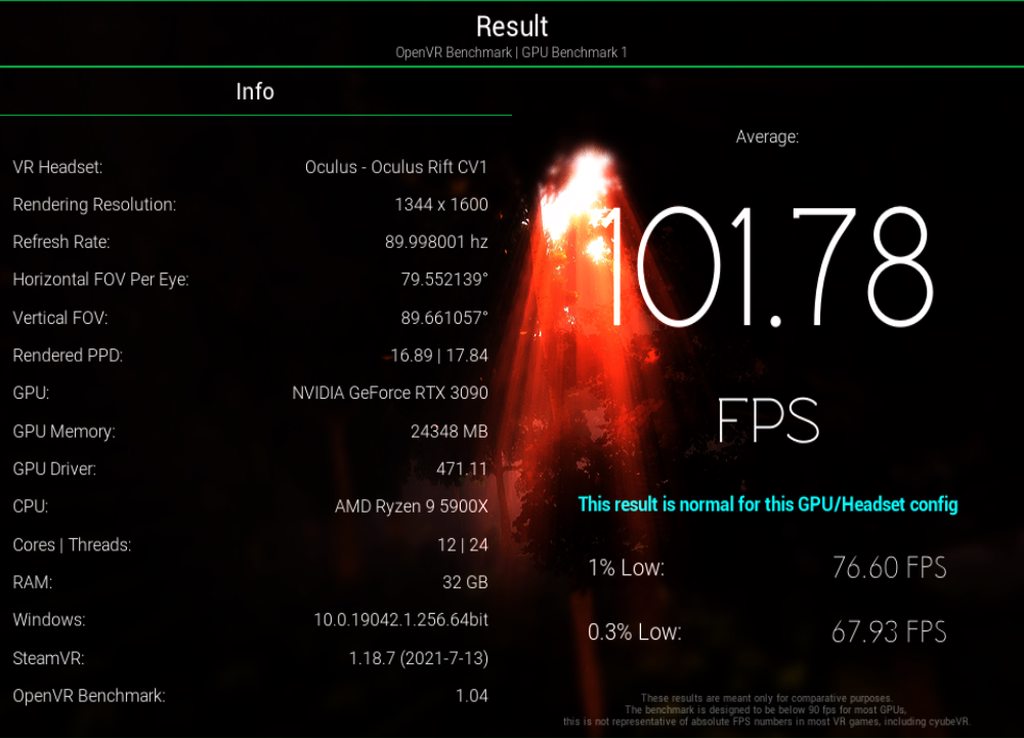
Another thing of note is, that SteamVR showed an error message that the Vive Pro 2 supports multiple refreshrates, but that it is possible that due to an outdated driver (471.11 Nvidia in my case), the GPU didn't pick up the other refreshrates. Possibly an option to change VP2 refreshrate on-the-fly in SteamVR in the future? Come on, HTC, make it happen 🤞
 rapid otter
The bonetome website is out, a new one was made but most 70-80% of mods are removed but here is a bug archive of what was before
@lofty minnow
rapid otter
Just finished lone echo
Was a freaking blast
Just amazing if you don't have it, get it, it's worth it 100%
rustic garnet
You mean lone echo?
 formal willow
it looks very motion sickening
rapid otter
I hear it's not as much for people that experience it usually, it's in zero gravity you need to use your hand to move which feels natural for the brain...
I can't talk for myself I don't have motion sickness
 glossy ibex
For me, it was extremely motion sickening at first (more than any other game), however after sometime it's getting better, but still it's not perfect.
 vague cedar
Cool
rustic garnet
I think for me the lack of a artificial locomotion feels more natural and less sickening
I mean like every move is you grabbing and throwing
Instead of stick locomotion
formal willow
theres the same type of game but pvp maybe I'll try that as it has the same movement and its free
rustic garnet
Throwing the disk in echo arena is so strange because no gravity
 flint monolith
can anyone tell me just how worth it is upgrading from rift to quest 2?
my main concerns are about game compatibility
i do plan to use oculus link so im hoping that i can still play most of them without issue
haughty thistle
When using Oculus Link, your Quest will act just like any other Oculus PCVR headset, so no game compatibility issues there
Only game I can think of that is a bit funny is The Climb. It renderes at a fixed resolution, perfect for the CV1. On any other headset, it's like as if you have turned down your renders res. You can somewhat counteract that by setting SS in The Climb to 2x, but that's about as high as it goes. Tried it recently on my Vive Pro 2, and it looked about as detailed as on my Index sadly :/
flint monolith
rustic garnet
Cv1 or rift s
CV1
rustic garnet
I don't think so, at least not if you're gonna be using it wired most of the time
flint monolith
i am just sick of not being able to read things on rift and having huge amounts of screendoor and visible pixels even with 2x SS
so thanks i will be buying a quest 2 soon
rustic garnet
hm i suppose
 unreal belfry
I keep on getting the HDCP error on my VIVE Pro on the G15 503QR
The headset works fine on my desktop, so it;s niothnig to do with the HMD
haughty thistle
unreal belfry
I keep on getting the HDCP error on my VIVE Pro on the G15 503QR
The headset wo...
Are you using some sort of DisplayPort adapter?
If yes, then the Adapter might be faulty, if no, it could be that the way the GPU is wired up to the port isn't quite correct.
Sadly HDCP errors are rather hard to fix, as they are meant to not be circumvented (it's a form a DRM after all)
unreal belfry
haughty thistle
Are you using some sort of DisplayPort adapter?
If yes, then the Adapter might b...
Yea
Ive tried type c DP and type c to mini dp
So prob isnt faulty adapter since i tried both of them
haughty thistle
Have you tried using a DP monitor on that laptop with some DRM protected content like Netflix in HD or some iTunes Movie?
unreal belfry
haughty thistle
Have you tried using a DP monitor on that laptop with some DRM protected content...
I dont have netflix, and i dont think crunchyroll is protected by it anymore since when i streqm on discord now it doesn censor it
 tawdry dove
flint monolith
so thanks i will be buying a quest 2 soon
tawdry dove
flint monolith
so thanks i will be buying a quest 2 soon
Screendoor effect on the quest 2 is pretty low, standalone I notice it when I want to only
flint monolith
tawdry dove
Screendoor effect on the quest 2 is pretty low, standalone I notice it when I wa...
Yeah i figured it would be low because the resolution is way better than a rift
 flat rain
what vr headset should I get
I don’t want those where you need to set up cameras and stuff
lofty minnow
quest 2
haughty thistle
So something with Inside-Out Tracking. The only ones in that department I can really recommend are the Oculus headsets (Rift S, Quest, Quest 2).
Unless you already have a legacy Oculus account, you'd need to use a Facebook account with all of these, except the Quest 2, where a Facebook account is always required
Otherwise, if you are fine with slightly worse tracking and worse controllers, you can also get one of the number of Windows Mixed Reality headsets out there. These mostly have their pretty low prices going for them on sites like eBay. The only WMR headset that is still sold new is the HP Reverb G2, but I wouldn't recommend getting this one if you intend to play games like VRChat on it, as the lack of touch sensitivity on the G2 controllers means you won't be able to use facial gestures properly
flat rain
what vr headset do you recommend
haughty thistle
We literally just told you lol
At least for ones that don't use external base stations for tracking
flat rain
Are ones with cameras better?
Why do I hear licking sounds
Scrap that
Wtf
Why are there only quest 2 accessories on Amazon
 sullen linden
Lighthouse laser tracking is better in almost all scenarios than cameras but I wouldn't say that headsets that use cameras for tracking like the quest 2 are bad at all
I just personally need lighthouse tracking
lofty minnow
does anyone own the deca move?
flat rain
so where do I buy the quest 2
harsh niche


 hybrid wasp
flat rain
so where do I buy the quest 2
hybrid wasp
flat rain
so where do I buy the quest 2
Nowhere it’s soled out
 earnest patio
i have a question for the Radeon users out there, does Radeon image sharpening work for vr? or more specifically with the quest 2 and oculus link?
 swift knoll
SteamVR tracking >>>
 gloomy crater
So I've got a question. I play PCVR with a valve index, but my sister plays PCVR with a quest 2 over oculus link and doesn't use or have any games stored on the actual standalone device. We're going on a family vacation in september and I recently made a bunch of tech upgrades to get smaller form factor stuff (Xbox One classic --> Xbox series S, 17" seven year old laptop --> 15" brand new laptop) so my family has requested I bring along some of my new tech because they know they can keep the kids busy and it won't take up space. But I can't bring my VR setup because everything would just take up way too much space, and my sister can't bring hers because even if she has a quest 2, it has no games on it.
So then another tech savvy family member asked why I couldn't just connect her quest 2 to my new laptop and access her steam library that way. I said I guess I could do it, but I haven't done any testing for how well my new laptop would hold up in VR. My new laptop is an Asus G513 w/ a 5900HX & a 3060 mobile. It already doesn't have very good cooling, so I have no idea if It could do VR without thermal throttling. Does anyone have experience playing with a similar setup, and could speak for its performance?
swift knoll
It can’t hurt to test it out now and see how well it works
gloomy crater
Hmm. I can't test with my index because this laptop lacks a displayport. All I have access to is a quest 1 that my mother left here when she came to visit last week, so I guess I could test with that if I messaged her to get her login. It would have to be with virtual desktop since I don't have a usbc cable here
tawdry dove
gloomy crater
Hmm. I can't test with my index because this laptop lacks a displayport. All I h...
it should play vr fine, just prop up the laptop or something to get airflow
it has more than enough performance
gloomy crater
There's nothing wrong with the airflow, it has intakes on the rear and outputs on the sides so it's pretty difficult to obstruct. It's just that Asus used liquid metal instead of thermal paste in these laptops and the reason they're on sale so often is because the application is notoriously horrendous. Hence the poor thermal performance. I played the opening level of HLA on the quest 1 about two hours ago and only had a few instances in which really bad stuttering occurred due to background updates taking place, but at the quest 1's refresh rate and resolution, yeah it worked fine. I'll be able to test it with the quest 2 later this month so I hope it works just as well then
tawdry dove
maybe for your own sake and your sisters you should get some thermal paste or something and fix the job they did
by the looks of it under load it doesn't perform too well which means it is constantly at 99 degrees or more
gloomy crater
I have been looking into ways to fix it, one of which being new thermal paste, and another being to circumvent Asus' stock fan curve setup. It's hard to describe, but the way they have the fan curve set up is whack and isn't very useful, so setting it to something a bit more conventional may be one way to help it
tawdry dove
do both
especially the thermal paste
that could end up killing it much quicker than it needs to
haughty thistle
If you don't want Facebook knowing everything about you, the Vive is a much better option.
The Vive I'd argue is also the better PCVR headset if you can find the space to mount the lighthouses
The Quest 2 is a decent headset, but it will never be as good as a native PCVR headset for PCVR tirles
haughty thistle
Which one? The TPcast or the Vive Wireless Adapter?
swift knoll
gloomy crater
Hmm. I can't test with my index because this laptop lacks a displayport. All I h...
I meant with the quest 2. Most likely you will be fine but it’s always good to make sure stuff works before you need it to work
The specs of the laptop are perfectly capable, you can run a temp monitoring software in the background and play a game for 30 mins or so to see how hot it runs
harsh niche
@gloomy crater 3060’s are pretty weak expect to turn down render resolution and settings quite a bit
when it comes to vr on a quest 2 anyways
swift knoll
True but I think it will be fine
gloomy crater
swift knoll
The specs of the laptop are perfectly capable, you can run a temp monitoring sof...
I'll be able to test it with the quest 2 later this month. The weird issues with the fan curve I mentioned are that the laptop will run at about 80* in most areas, but when the game gets to a graphically intense area, the temps will shoot up to 95* before the fans even start ramping up, then when it hits that temp the fans will go to max speed and stay there until it goes down to around 85. Once it's there, the fans will stay maxed until either the temps drop down to 80 on their own or I close the game. I can see this using the steam desktop feature and HWMonitor while playing
swift knoll
That’s weird
gloomy crater
Yeah. It's like the fans have 3 modes. Off, low power, and max speed. No gradual increase in fan speed as temps go up. It's apparently Asus' way of keeping the machine as quiet as possible in all but the most hardware intensive situations, but it just ends up compromising the performance. Most of the cons from the negative reviews on this whole series of laptops have to do with either the bad liquid metal application, or some sort of issue stemming from Asus' software implementation, be it power delivery causing random shutdowns or the fan curves being wonky. I might just reinstall the OS to get rid of their bloatware and set a more drastic fan curve using a dedicated software, and then change to thermal paste
tawdry dove
harsh niche
<@379981059627941888> 3060’s are pretty weak expect to turn down render resoluti...
a 1060 can play HFA on a htc vive if you want it to and we are talking more than double perf
haughty thistle
Yeah, the 3060 is about on-par with a 2070 (non-super) main difference is that the 3060 has less VRAM
At least on mobile. The 3060 mobile only has 6GB of VRAM, while the desktop one has 12
tawdry dove
at least its gddr6x so the vram is worth more per gb
haughty thistle
GDDR6X is only on the 3080, 3080Ti and 3090. None of the 3060s have 6X, they all have the same GDDR6 memory as the 20-Series
tawdry dove
dang
 wraith depot
Hey I'm having some trouble getting some games to run well over oculus link
My specs aren't all too bad (i7 10750 h and 1660ti) and it's able to run other non vr and some vr games perfectly
For some games like robo recall it just lags a ton no matter how low the settings are
And most steam vr games don't run too well
Any idea what I can do?
haughty thistle
Sounds like a bottle neck on the encoding side. Say, what does the CPU and GPU usage look like when you get those lags?
 potent sorrel
Hey guys how well will my pc run vr (i5 10400f, 1660ti 6gb, 8gb ram) will it run vr decently or do I not have enough ram?
sullen linden
haughty thistle
Which one? The TPcast or the Vive Wireless Adapter?
The Vive Wireless Adapter
haughty thistle
sullen linden
The Vive Wireless Adapter
The TPcast can be a bit of a pain to set up, so the Vive one is defo the better option. Honestly, the Adapter alone probably costs more then what you'd pay for that kit, so I'd say go for it 👍
sullen linden
rapid otter
<:thonk:717979132549660693>

rapid otter
potent sorrel
Hey guys how well will my pc run vr (i5 10400f, 1660ti 6gb, 8gb ram) will it run...
I'd say 16 would be better idk about the i5
For the 1060ti i would recommend you to overclock it (i can guide you)
It's a minimum gpu for vr but it should work
sullen linden
haughty thistle
The TPcast can be a bit of a pain to set up, so the Vive one is defo the better ...
Aight thank you
sullen linden
potent sorrel
Hey guys how well will my pc run vr (i5 10400f, 1660ti 6gb, 8gb ram) will it run...
I mean 16GB of ram is just always nice to have so I would recommend getting more anyways, but other than that, your PC would def run VR. The CPU doesn't matter too much for VR and your CPU is way above the recommended. As for the GPU, the minimum is a 970 and the 1660ti is a lot better than that so TL;DR your PC would play VR quite nicely
Use the steam VR compatibility check thingy or go onto GeForce experience and it'll tell you if your PC is compatible
glossy ibex
It.. Doesn't really work like this. VrChat for example is super cpu bound, and there are many titles GPU bound. And 16gb of ram, is really needed for bigger games. Unless you want to play poker in vr, in which case most hardware would do fine..
rapid otter
An i7 should be good tho
But it's true that game like boneworks need a cpu for a lot of physics wich are cpu bound
rustic garnet
gloomy crater
So then another tech savvy family member asked why I couldn't just connect her q...
If it doesn't throttle in normal games it won't in vr games
 rocky wing
I just got a free R9 390x, think that can run some basic vr on the Lenovo explorer? CPU is 1600x
rustic garnet
harsh niche
<@379981059627941888> 3060’s are pretty weak expect to turn down render resoluti...
Lmao what a 3060 is on the level of a 1080 what r u on about
harsh niche
it definitely isn't
well
that's weird
i was comparing it to a 1660 the other day and it was weaker
wtf
now it isn't
idk what i was seeing because the specs and fps were way lower
maybe it was showing a 3050 idk
rustic garnet
Lmao why would a 1660 be mlre powerful than a 3060?
 edgy prism
hi
sullen linden
rustic garnet
Lmao why would a 1660 be mlre powerful than a 3060?
it isnt
and will never be
rustic garnet
Yeah I know
rustic garnet
harsh niche
i was comparing it to a 1660 the other day and it was weaker
but
Like obviously
Why would they have a next gen product of the same tier but make it worse than the last gen?
harsh niche
that's what that comparing site was showing
i was surprised but that's what it showed
 pale wagon
userbenchmark be like
rustic garnet
Lol yeah
gloomy crater
I know from doing laptop research that a 1660TI mobile is more powerful than a 3050 mobile, but with some trade offs (3050 has less VRAM, but can use DLSS and ray tracing) maybe that's what they were referring to?
rustic garnet
Yeah i suppose but a 1660 ti is ~1070 perf
 visual phoenix
Can anyone with experience guide me
I have the budget to either upgrade the cpu to 5800x with an AIO
Or get 32gb RAM and 5600x with stock cooler.
Will the 32gb ram make big difference? I know the cpu will because I am using a 2600 right now and it bottlenecks my rtx 2080 in vr chat. And in other games I have seen my 16gb memory usage go upto 100% sometimes.
rapid otter
rustic garnet
Yeah i suppose but a 1660 ti is ~1070 perf
1070 is more powerful
A simple rule is a gpu is a powerfull as it predecessor one rank higher
This is mostly true
1070 = 2060
2070=1080
Ect
sullen linden
visual phoenix
Can anyone with experience guide me
I have the budget to either upgrade the cpu ...
16 is fine for only gaming. the 5800x is a great cpu and an arctic aio would do u just fine
rapid otter
rustic garnet
Benchmarks are more important
eeeehhhh yes but it's a simplified way
 pale orbit
NGVR (psvr2) supposed specs from a conference sony had the other day
OLED screens
2000 x 2040 per eye
110-114 degree FOV
Eye tracking
Foveated rendering/flexible scaling
Bundled controllers
Headset haptics
haughty thistle
Interesting...
 silver holly
So, as a newbie, would it ever be worth considering an older, used HTC Vive?
And do I need the base stations for it to operate?
rustic garnet
Yes, yes
Used OG Vives and OG Rifts go for relatively cheap usually
The Vive uses steamvr lighthouses for tracking
Inleds you're talking about the newer vive focus
pale orbit

UploadVR
New: Sony held a developer conference yesterday detailing its PS5 VR headset. Reported details include a push for AAA games, a HDR OLED display and more.

Virtual Reality as a gaming platform is in an interesting position. While headsets are becoming powe

@sir_gamedev All the other VR games that Valve was planning have been canceled.
Half life Alyx was a 10 year look into the future. It won’t be replicated in quality for a long time,
 Twitter
·
lofty minnow
pale orbit
NGVR (psvr2) supposed specs from a conference sony had the other day
Twitter
·
lofty minnow
pale orbit
NGVR (psvr2) supposed specs from a conference sony had the other day
is it gonna be pcvr compatible or
pale orbit
officially I doubt it, would be nice (unofficially I'm sure someone will at least attempt to get it working, people did get the current psvr working)
not that there will be any high quality pcvr games going forward, it will all be sims at best for native pcvr and quest ports
rustic garnet
It'd be super cool if it was supported natively
pale orbit

How big is the difference between the Varjo VR-3, the Pimax 8KX and the Reverb G2? That is exactly what we will find out in this through-the-lens comparison!
Directly buy from Bestware (Europe): https://bit.ly/varjo-vr3-europe
Worldwide enquiries: https://varjo.com/products/vr-3/
Timestamps
00:00 Intro
00:30 SteamVR Menu (Pimax 8KX)
01:10 Ste...
 lofty minnow
how is 8k worse than 4k
pale orbit
larger display with the fov, so less pixel density
haughty thistle
The 8k X has the same vertical resolution as the Reverb G2, but it's stretched over a much larger FOV
pale orbit
the VR-3 makes both the G2 and Pimax look like Vaseline is smeared over the screen, more so on the pimax
haughty thistle
From my Experience the 8k X in terms of image detail and SDE is somewhere in between the Reverb and Index. And pretty bang on in the middle I'd say. The Reverb G2 is noticably better compared to any of the Pimax headsets really
pale orbit
he should have tossed in a CV1 or another first gen headset just to show how far things have come
lofty minnow
I wish they'd make more fov than more resolution
rustic garnet
pale orbit
https://cdn.discordapp.com/attachments/800015009031127070/872556438621409300/unk...
Oh my god that's insane
 pale orbit
doesn't stop some hardcore sim people from buying it already
apparently there's some software floating about that lets it work without the subscription
rapid otter
Ok 👌
rapid otter
pale orbit
doesn't stop some hardcore sim people from buying it already
Surely
gloomy crater
I mean, when it looks like THAT of course there are people willing to pay big money for it
tawdry dove
flat rain
is gtx 1650s enough for vr?
yes
you may have to turn down settings a bit but it will do
haughty thistle
pale orbit
apparently there's some software floating about that lets it work without the su...
There is a sort of "Offline" Subscription they offer. It's a one-time lifetime payment. They don't list the price of that (just says "contact sales"), but according to the guy over at NextGenVR, it's about 2600$
And then there's also the possibility of piracy, but I don't know how well such a B2B app is secured. My guess is very well. We're talking about the same sector that employs USB thumb drives as physical license keys for certain applications
harsh niche
flat rain
so can i play every single vr game with a gtx 1650s?
if you turn down the settings
is gorn even really that hard to run?
flat rain
Did I make this chat die
haughty thistle
There's just nothing to discuss I guess
I btw got my laptop for VR on the go now. While I did intend on doing some testing with my Reverb G2, I couldn't. Not because of Nvidia Optimus or something, but more because the included Thunderbolt to DisplayPort Adapter is only DP1.2 :/
Quest Link works fine, although I guess because I was running it with Optimus enabled, no Desktop control in the Oculus menu. I'll try again later today, now that I found the setting in the BIOS to turn off Optimus and the iGPU entirely...
 fringe sky
does anyone have experience with the vive cosmos? Thinking about getting one.
also, would a 4gb rx 570 be adequate for that headset?
rustic garnet
flat rain
is gtx 1650s enough for vr?
Ehhhhhh
I wouldn't buy a 1650 new for vr but if you already have the card it's worth a shot
4gb mem is quite low too
Depends on the headset too
flat rain
I’m getting a quest 2 maybe
rapid otter
haughty thistle
There's just nothing to discuss I guess
O don't think there is 😂
rapid otter
flat rain
I’m getting a quest 2 maybe
Ok 😐
What's nvidia optimus
Also turning of igpu is can be extremely helpful, reduce the heat output of the cpu and most importantly gives more power headroom to the gpu and cpu wich is a common issue for laptop. Also if you could give the specs i would be interested
haughty thistle
rapid otter
What's nvidia optimus
Nvidia's Hybrid GPU Tech. Basically, it uses our iGPU when not much GPU power is requested to save power and only turns on the dGPU if more power is required. Usually with this, the Laptop display (and on occasion also the external display ports), are all wired up to the iGPU and the dGPU then get's it's display fed through the iGPU. For the VR an absolute no-go.
The XMG Neo 15 that I have has what is called an MUX switch for the integrated display and all it's external ports are directly wired up to the dGPU. Without an MUX switch, you can't turn off the iGPU and with that Nvidia Optimus.
And yeah, turning off the iGPU (and Optimus in doing so) did actually fix the black Desktop in the Oculus Dashboard. I did also try my Index with the included Thunderbolt to DP adapter and it confirmed my suspicion: the adapter is only DP1.2, as the Index worked just fine. Although I wouldn't be running it at 144Hz at 2005 render res on this Lappie lol
rapid otter
Optimus is actually a good thing 👍 Not in your case but ...
Gotta say that for on the go quest 2 with a laptop will be fun
haughty thistle
rapid otter
Also turning of igpu is can be extremely helpful, reduce the heat output of the ...
I got last years model to save a buck. It's the XMG Neo 15 (2020), which is a customized variant of the Tongfeng GM5MP7W (if you look this name up you'll find the same device with different branding)
To name the specs:
- i7 10875H
- RTX 2070 Refresh Mobile
- 16GB (2x 8GB) of Crutial DDR4-3200 RAM (due to the CPU not being a K one, it only runs at 2933MHz tho)
- 500GB Samsung 970 Evo
- 1920x1080 240Hz IPS display
- Opto-Mechanical per-key RGB keyboard
I've actually been typing all these messages on this keyboard and yeah, it's a pretty good one for a laptop. I think LTT did an unboxing of a later version of the Neo 15 on their Short Circuit channel
rapid otter
haughty thistle
I got last years model to save a buck. It's the XMG Neo 15 (2020), which is a cu...
Sick specs
Not a fan of the screen tho
I don't like high end laptop screens
240hz with a 2070 seems a bit too much
It has its uses for sure for csgo ect
But o was looking into razer's lineup and no 1080 p 90hz and no 120 i think
haughty thistle
Yeah, this one was only available with either a 1080p 240Hz or a 1440p 165Hz screen. The latter would've costed extra too. 1080p is fine on even a 15" Laptop and if you don't use the extra Hz, you can always just underclock the panel...
haughty thistle
For 1500€ it's one of the cheapest Laptops with 8GB of VRAM. And like I said, the 240Hz 1080p panel is the base spec as they're selling it rn
haughty thistle
The alternative at the same price point could've also gotten the most recent XMG Core 15 in the AMD variant. That would've had "only" a 3060 with 6GB of VRAM and a Ryzen 4800H. Otherwise an identical config. Although, I could've gotten the Core with the 1440p panel at no extra cost...
rapid otter
I may sell my pc later and get a laptop
Short story I won't have a stable place so i will do this to still be able to play vr
haughty thistle
Honestly, for VR, I'd suggest staying on a Desktop. Laptops often turn down the power targets when running on battery, their components often run at their thermal limits (meaning they can't truly unfold their full power) and unless you know for certain that you can fully disable the iGPU, it might have some wanky things going on when running VR (see aforementioned issue with Optimus).
If you often move around, a SFF computer might also be worth considering. Prolly a better option for VR, if you are fine with carrying a portable screen, keyboard and mouse. I picked a laptop, because I might bring it with my to my friends, where I don't really want to carry a monitor, keyboard and mouse
rapid otter
haughty thistle
Honestly, for VR, I'd suggest staying on a Desktop. Laptops often turn down the ...
I will be able to have it plugged in for sure
Making thing a but more complicated i won't have storage
Like minimal space
I think this is the best option
I still have a bit more than a year until this so it's good for now
haughty thistle
Yee
What I was more trying to say is:
If you're plugged into a wall anyways, an SFF PC probably gives you better VR performance for the same money and a laptop ain't a VR backpack replacement
rapid otter
Wdym by vr backpack replacement ?
rapid otter
haughty thistle
What I was more trying to say is:
If you're plugged into a wall anyways, an SFF ...
I got you tho
haughty thistle
rapid otter
Wdym by vr backpack replacement ?
Something like this:

It's essentially a Laptop PC with beefed up cooling, battery power and slightly overclocked components, that can actually sustain their full power draw
haughty thistle
Dunno really. Bestware used to list the HP one and one of their own, but now they only list chargers and replacement batteries 
These backpacks might also be fully-fledged SFF PCs as well btw. This is how Zotacs first prototype looked like:

On another note: https://www.youtube.com/watch?v=Qj12hJJRwZw

Hello! Here are a bunch of VR app and games that I have found that are weird as heck. In general VR is a very weird place, but that's kind of why I love it so much. I know I am a bit of a weird person and we all are sometimes, and that's what makes this whole place feel like a true, big ol' weird Virtual Reality family.
My links:
Twitch:
https:...
rapid otter
haughty thistle
These backpacks might also be fully-fledged SFF PCs as well btw. This is how Zot...
So you can put any sff pc in it ?
haughty thistle
Not really. Their Prototype was more just an SFF PC, with extra holes strapped into a backpack. Their later released model looks more like the HP one
rapid otter
Ok
lofty minnow
man I really dont like thrillseeker
lofty minnow
he's just weird
I honestly don't watch any vr content anyway
I just play vr that's it
so can't compare him to someone else
but I really don't like him
rapid otter
lofty minnow
he's just weird
Understandable
I'm a big youtube watcher personally
In vr or anything really
 flat pawn
Sometimes I watch his news stuff
That's about it
But I'll watch whatever news thing I'm interested in, whoever uploads it
sullen linden
any one with the index is it worth it or should i go knuckles with htc
haughty thistle
You'd be defo spending more with the Kuckles + Vive package
Personally I prefer my VP1 over my Index, but it doesn't have as large of an FOV
lofty minnow
I have a question for the quest 2 users here
do yall actually use headphones or use the built in speakers
haughty thistle
I use my own headphones on my Quest 1.
- because the mic picks up the speaker sound at decent listening volumes and
- because the sound quality ain't great. Sounds boomy and non-detailed like those cheapo 20$ OnePlus earbuds I still have laying around
tawdry dove
I use the built in speakers
they are better than you'd think
and my only other option is headphones which don't work too well with the elite strap
they mostly fit but taking it off and putting them on takes much more time
lofty minnow
no they're kinda shit I'm not an audiophile and barely can make difference between most headphones but it s very noticeable especially compared to the index
for me at least
I still use the speakers tho because more weight on my head no likey
also do yall use the built in mic on q2 or another
glossy ibex
I use both built in mic and speakers, and I think that they're pretty decent. (for a built in solution). And imo additional weight on your head, is not really worth the difference.
lofty minnow
^
haughty thistle
Yeah, the built-in mic on Oculus headsets are pretty good. Too bad the Quest mic picks up the Quest speakers pretty well. So in games like VRchat, you'll create an echo that can be quite distracting for other users
lofty minnow
thats why i use nvidia broadcast
it recently added an echo feature as well but the noise cancelation is good enough
I've been using nvidia broadcast since the beta I think and it's a really good app
I use it on my quadcast as well
haughty thistle
Yup. Nvidia Broadcast is a godsent. I've been using it on both my VP1 and VP2, as the headphone jack adapter I'm using in those is noisy AF. Pluck the output into Nvidia Broadcast, and it sounds like I'm talking into a studio mic
haughty thistle
Just got a though:
What if we mount a microphone shock mount to the front of our headsets and use a fully-fledged Studio mic in VR?

lofty minnow
index mic was better than my quadcast
haughty thistle
Let's be honest, most "Gaming" mics are just cheapo-mics with 100$ worth of design in them
No, I'm talking about real, large-diaphram condenser (or dynamic) studio microphones like the Rode NT-1A or the Shure SM7-B
lofty minnow
i didnt get it for the looks or design, got it because it was better than the yeti 🤷♂️
also because every headset mic sounded like shit
also xlr is too much of a hastle for me
haughty thistle
Eh. depends
Yes, headset mics are crappy (at least unless you're Sennheiser and put your high-end mics on your headsets lol)
 prisma zealot
ey there i recently got a lenovo legion 5p for cheap since i needed a gaming rig that i could move around and i was wondering if anyone knows if the USB-C port supports displayport connections for a Valve Index
the website says USB-C & Display port but i wanted to make sure before i shell out the cash
or should i ask in #tech-support
haughty thistle
For the Index, all you need is a DP1.2 and a USB 3.0 connection. As you mentioned that on the Spec sheet the Type-C Port is listed with DisplayPort capabilities, I'd assume it would work with the right adapter
prisma zealot
aye good to know
do you think the legions psu would be adequate as i heard vr is power hungry
haughty thistle
The PSU won't be an issue. If it can power the laptop at full blast that is. From what I know, the only headsets to draw more power via USB then the USB 3.0 spec defines are the Oculus headsets (and possibly some of the WMR headsets). The Index for example uses an external Power brick for it's power supply.
You'd use the Type-C port on your laptop just for the DisplayPort connection, and you'd plug the USB of the Index into one of the Type-A ports on your Laptop
prisma zealot
alright thanks for the info just gonna look at games for it now while i wait to get paid
actually you guys got any reccs for games
i already know of the more mainstream ones like h3vr pavlov and the STALKER inspired one i cant remember its name
 soft hound
Half Life Alyx
The Forest
Beat Saber
VRChat
Elite Dangerous
Blade & Sorcery
 vapid depot
saints and sinners
pale orbit
lone echo
 earnest vapor

eBay
I truly hope you can understand ��. 6--14---329 6-1--58.
how fake is this
335$

eBay
HTC VIVE PRO HEADSET Used but in very good condition. In original box. All parts and cables are included. There is a VR cover facial interface on the headset and I will include an additional unopened VR cover facial interface (see image).
200$
no shot
haughty thistle
That's curious... I've never seen the Pro Eye being sold as HMD only. I always thought that was exclusive to the Pro 1 and 2...
I just wanted to check, whether or not they list something like that on their website, but instead I found this:
HTC, if you're selling something refurbished, the expectation is for that product to be at a discount as it's obviously used...
 rapid otter
soft hound
Half Life Alyx
The Forest
Beat Saber
VRChat
Elite Dangerous
Blade & Sorcery
rapid otter
soft hound
Half Life Alyx
The Forest
Beat Saber
VRChat
Elite Dangerous
Blade & Sorcery
Boneworks 😳 of course
pale orbit
 swift knoll
boneworks is amazing but the story is so lame
it can be summarized as "this is a vr game"
 silver plaza
it was an okay game, got boring and difficult sometimes
wouldn't want to play it again tbh
pale orbit

During a Steam Deck hands-on event, Valve was asked about the possibility of seeing Steam Deck’s custom AMD processor in a standalone VR headset. While the company didn’t confirm anything outright, they said the Steam Deck hardware could certainly be a good match for a standalone VR headset. The Verge‘s Sean Hollister published an extensive hand...
 charred delta
swift knoll
boneworks is amazing but the story is so lame
charred delta
swift knoll
boneworks is amazing but the story is so lame
after playing a bit of the story
i like the simulation and sandbox. but story feels like a tech demo or what to do in the game
swift knoll
Yeah
The levels and weapons and all that stuff are so fun
I love how much variety there is, especially compared to HL:A
HL:A’s biggest weakness is the 3 weapons
charred delta
swift knoll
HL:A’s biggest weakness is the 3 weapons
yea but i LOVE the atmosphere
i got jump scared haha and havent been scared in a long ass time
 charred delta
i started 1 again for a bit like 30min then was like i just wanna fking play alyx so i started it lmao
swift knoll
Lol
charred delta
idc if im playing out of order
plus alyx does good on SSD
charred delta
in alyx im at the part where u go through this hallway and theres tons of explosives and those ceiling things with the long tongues that take you
and alyx or the guy on comms is like be careful
swift knoll
Yea
charred delta
tried shooting the explosives and it kills u no matter what so i stopped haha
charred delta
swift knoll
They are called barnacles
 swift knoll
||that section is kind of a throwback to an HL1 level|| spoiler for hl1 if you care
charred delta
ill eventually finish 1 and 2 once i finish A
swift knoll
Yea
charred delta
swift knoll
||that section is kind of a throwback to an HL1 level|| spoiler for hl1 if you c...
how big of a spoiler is that if i click on it... 
swift knoll
Not story related but it’s a level/area spoiler
charred delta
OH gotcha just read it
swift knoll
Yea
charred delta
i do love that in alyx you forcefully hold a weapon, not like H3VR where u have to hold a button to hold a weapon
swift knoll
Yeah
charred delta
u know h3vr right, gun version of blade and sorcery
https://store.steampowered.com/app/450540/Hot_Dogs_Horseshoes__Hand_Grenades/

Do you like hotdogs? How about horseshoes? Hand grenades? (everyone likes hand grenades) Anyway, we've got all that, and guns. So if you like cooking, lawn games, and ordnance, this is the VR sandbox game for you.Hot dogs, Horseshoes and Hand Grenades is a lazy Sunday trip over to your friends house… if your friend was a retired gun-nut with a w...
Price
$19.99
Recommendations
11385
rapid otter
swift knoll
boneworks is amazing but the story is so lame
The story is good, you need a few playthrough to understand it fully
 low crater
What would a good spec machine to run a valve index
rapid otter
The more power the better
2080 or 3070 I'd say
R7 3700x or R7 5800x
16 gb of ram
@low crater
sullen linden
Which vr headset is the best?
flat pawn
In what way
There is no single best option
You're going to lose out on something somewhere
Be it resolution, refresh rate, price, privacy, whatever
What do you care about the most
haughty thistle
The Valve Index for example is the best all-in-one-box option for PCVR, but the Vive Pro 1 with your own headphones and mic allows for much better contrast thanks to it's OLED screens and also supports virtually no-compromise wireless VR
rapid otter
Also there's the quest 2
Very versatile, wireless and easy to use, all with a good price ...
haughty thistle
But being the jack-of-all-traits, the Quest 2 isn't as good at each specific task as another headset could be, who's main speciality is that function. For PCVR for example, you're giving up the native resolution and detail on the Quest 😉
It's the only headset right now, that is targeted at consumers, that works completely without a PC tho
rapid otter
I understood this question like the one we get all day long in the lines of "wich is the best headset i should buy "
But of course you are right
It's not the best headset but it's a good overall thing
flat pawn
People asking what headset is best but never say what their budget is or what features they care about

rapid otter
Yeah fact
That's kinda annoying because Chicken Bread always has to make a literal essay about headsets which could time saving for him
It makes me feel bad seeing this
Also @haughty thistle i know you are very dedicated and i thank you for that ! You are making vr easier for a ton of people 😉
haughty thistle
😳
I only try to be as helpful as possible with the information and experience I've gathered
rapid otter
Sure but you should try to make some generic answer when you have generic questions
lofty minnow
is this worth trying?

BETTEE Experience Credit eyerock⚠️Follow The Hardworking Creator On TikTok Now! - https://www.tiktok.com/@eyerock_⚠️⚠️ ➟ for Copyright, Claim, and/or Credit ...
 icy niche
it only works if you have thin hands
it hurts after a while
there are cheap straps that do the same thing, but better.
rapid otter
lofty minnow
is this worth trying?
I tried but i had big hands just get a 10$ amazon strap
 pastel echo
lofty minnow
is this worth trying?
pastel echo
lofty minnow
is this worth trying?
same as everyone else, tried it, hated it
Has anyone got an index or vive and just placed the base stations in the corners of their room? My place space isn't exactly well defined right now so any confirmation that this would work out would be cool
haughty thistle
pastel echo
Has anyone got an index or vive and just placed the base stations in the corners...
I have mine hung up on the ceilings in each corner of my room, but when I first got my Vive, I just had them placed on a table on opposing corners
It's not recommended having them just placed on a table, as they are rather fragile. But for staring out, it works well enough
pastel echo
I meant on the ceiling
haughty thistle
Yeah, that's exactly what I've done as well lol
Lighthouses don't really care which orientation you have them in. With the 2.0s it's recommended to have them either right-side-up or upside-down, but not rotated at 90°, due to their wider then tall FOV. With the 1.0s, I've even seen people hang theirs 90° rotated and clipped to a bookshelf.
The screwhole on the back of the lighthouse is intended for wall mounting, whereas the hole on the bottom for either tripod or ceiling mounts
 acoustic gate
lofty minnow
https://youtube.com/shorts/MeIpKCae0BI?feature=share
acoustic gate
lofty minnow
https://youtube.com/shorts/MeIpKCae0BI?feature=share
just get some straps from aliexpress or amazon, this sits very uncomfortable imo
pastel echo
haughty thistle
Lighthouses don't really care which orientation you have them in. With the 2.0s ...
What about the fact that the corners of my room won't be the corners of my playspace? Don't they have to face each other meaning if I'm not playing in the center of their view I'll have issues
haughty thistle
As long as you are within view of the lighthouses, trackign should be fine. Doesn't matter whether or not the lighthosues are at the corners of the playspace or not
 candid bluff
low crater
What would a good spec machine to run a valve index
candid bluff
low crater
What would a good spec machine to run a valve index
im running my index on 125% res on a RX580 4gb 16 gigs of ram and a i5 9400f
lofty minnow
candid bluff
im running my index on 125% res on a RX580 4gb 16 gigs of ram and a i5 9400f
what games u playing
candid bluff
H3vr boneworks Pavlov are the main games I play
pale orbit
huh, neat. pico neo 3 pro. basically a quest 2 clone, except the XR2 chip is not underclocked like on the quest
and it has 8gb of ram instead of 6
and an actual display port on the headset so you can have uncompressed PCVR with nvidia direct
instead of usb 3 like on the quest
haughty thistle
But Pico has said time and time again, that they have no interest in entering the western consumer market. Their devices are B2B only outside of China
pale orbit
the pro model is supposed to come to the western market in Q3 sometime (it's Q3 now) for $699

Pico's only interested in enterprise customers outside of China.
apparently the parent company of Pico are who actually makes the headsets, they make the quest 2 as well. (I guess that explains the near identical specs and looks)
haughty thistle
Considering that the Pico Neo 3 (non-pro) is essentially just a copy-cat Quest 2 without Facebook, I feel like the Neo 3 Pro might be a taste of what Facebook is working on for their Quest 2 Pro...
pale orbit
stands to reason
and as the parent company makes both devices they just went ahead and made the "pro" model for the Chinese market ahead of facebook bothering to release theirs
hell the pico neo 3's headstrap basically looks like the elite strap battery pack in it and all
so a quest 2 pro could very well look the same spec wise
extra 2gb of ram, elite strap as standard with the battery in the rear of the device. better cooling for full XR2 clocks and no downclock like on the current quest 2 and a full display port tossed in for full PCVR
then they charge 599-699
not sure if they'd bother with the eye tracking however
they'll probably announce it at the next facebook connect event if that's the case I imagine.
as the work is already done by that company, the design exists
haughty thistle
I'm doubtful tho, that the Quest 2 Pro/Neo 3 Pro would be able to sustain full XR2 clocks all the time tho. The XR2 is quite a hot chip and even the Vive Focus 3 has some trouble with that afaik. And you know how beefy the Focus 3 cooling is
pale orbit
the neo 3 afaik has full clocks, just like the vive unit using the XR2
haughty thistle
Huh...
pale orbit
there's a reason they have those vents on the front face plate
where the quest 2 gets like no airflow
hence the downclock
haughty thistle
Yeah
pale orbit
I mean it probably doesn't make a huge difference, but every mhz helps
haughty thistle
The Quest 1 has the fabric to conceal it's vent holes. Quest 2 didn't have that luxury, just for cost saving...
We'll see what will come out of all of that. Would be funny if it ends up with the Neo 3 being able to utilize full native PCVR and the Quest doesn't, because Facebook doesn't want you to use PCVR lol
It's at least something I'd image Facebook would be doing. Surprises me they didn't make the Quests PCVR capabilities worse over time really...
pale orbit
well I imagine the reason they didn't bother with the DP on the current quest 2 is penny pinching and trying to shave as much off as possible to reach the target price they wanted
same as the limited cooling
a larger heatsink design would cost more
haughty thistle
True
pale orbit
but if the quest 2 pro ends up basically as the pico neo 3 pro spec/design wise
then sadly the cruddy IPD settings will remain the same
as the pico does the same thing with just 3 options
it'd be interesting to see a tear down of the neo 3, see if the motherboard designs in the quest and it are close to the same
haughty thistle
Actually, I just looked at Pico's website regarding the Neo 3 Pro Eye and it looks like it doesn't have any rails for IPD adjustment, like as if it has a fixed IPD...
The DisplayPort capabilities are also more described like an Output, rather then an Input

Btw. The Neo 3 Pro, based on it's specsheet looks more like a Quest 2 with upgraded cooling system. It'd be interesting to see where this is gonna lead...
rapid otter
pale orbit
the pro model is supposed to come to the western market in Q3 sometime (it's Q3 ...
For 700$ to spend on vr i would get a another headset.... But when you can get a quest 2 for half the price it's a no-brainer for most people. What you gain vs what it cost isn't worth it
pale orbit
I see way to many people buy a quest 2, then an elite headstrap, then vr cover replacement facial interfaces, then grips for the controllers, then some good headphones, then...
at that point they have spent more then something like a reverb G2 all told
pale orbit
@haughty thistle appears to still have similar 3 IPD settings as the quest, 3 notches 58, 63.5 and 69 they claim


it's just a silicon looking cover inside but you can see how it squishes up here in the 58mm option I assume
haughty thistle
The second one does clearly have that silicone inlay, but on the first one, with the eye tracking slits, that one doesn't look like it has that inlay
The eye tracking one also doesn't have the digits above the lenses to indicate the IPD setting, nor does it have the notch on the lens ring for the IPD setting indication
pale orbit
looks like a render regardless, they could have just messed that up. I can't see their top enterprise headset having zero IPD settings, that'd just be silly considering the market it's designed for
haughty thistle
True
glossy ibex
pale orbit
I see way to many people buy a quest 2, then an elite headstrap, then vr cover r...
Sure. But what if said person didn't know if they will like playing vr? Then they bought quest 2 due to its fairly low price for a vr headset (and due to the fact that it is standalone, without the need to mount lighthouses), and they liked it.. It's less hassle to buy some stuff to make using q2 nicer, then sell it and buy something else.
pale orbit
just reminds me of a ricer pimping out their 1998 honda and spending enough $ doing that they could have had a brand new car
 glossy ibex
Yeah, but buying car, you're not really afraid of motion sickness and stuff, since you've already driven a car.
rapid otter
pale orbit
at that point they have spent more then something like a reverb G2 all told
I don't think to a g2 level 600+ But i see your point, my quest 2 is completely stock and it's fine
pale orbit
g2 doesn't use base stations, it's inside out tracking WMR
rapid otter
Ho my bad
pale orbit
last week they had it on sale for $150 off as well, super tempting...
pretty much the best headset for sims
rapid otter
Used ?
pale orbit
new direct from HP
rapid otter
Ho
 solemn birch
Is the and 6700xt good for vr?
So I have been trying to build my first pc for a very long time but I have everything but a gpu. I have been wanting to get a rtx 3070 but it’s nearly impossible and I am getting kind of desperate and I wanted to know is the 6700xt good for VR or no?
I want to play games like
Onward
A township tale
Pavlov
Half life alyx
Boneworks
Lone echo
Pc specs are
Asus tuf gaming b550 plus wifi
Ryzen 5600x
2x8 gb 16gb 3200mhz
2tb Samsung 980 evo pro
750w 80+gold
 vital kernel
would a cpu upgrade improve vr performance?
(Rift CV1 on a R5 2600 W/ RX 5700, 16gb 3200mhz)
vital kernel
pale orbit
at that point they have spent more then something like a reverb G2 all told
right, but you don't need a pc to use the quest 2 
it's about $500-$600 usd (depending on the quality of accessories) for the quest 2 and the elite strap and etc
while it's $627 usd for the reverb g2, oh and you need to get an upwards of $1200 usd pc for titles to be comfortably playable (good luck in 2021)
you're better off with the quest and the accessories
harsh niche
i got my quest and all the accessories for less than $430
which includes an elite strap a third party cable and better face covers
 crisp nymph
pale orbit
I see way to many people buy a quest 2, then an elite headstrap, then vr cover r...
crisp nymph
pale orbit
I see way to many people buy a quest 2, then an elite headstrap, then vr cover r...
3d print head strap + free facial interface replacement + grip tape ($10ish?) + ksc75 ($15) 
jokes aside, i definitely get what you are saying, reverb g2 is a great platform, wish the controllers could be better tho 
rapid otter
vital kernel
would a cpu upgrade improve vr performance?
(Rift CV1 on a R5 2600 W/ RX 5700, ...
I have an RTX 2060 wich is a but less powerful than yours and i had a lot of problems with my r5 2600 it couldn't keep up
I switched to a R7 3700x
rapid otter
vital kernel
would a cpu upgrade improve vr performance?
(Rift CV1 on a R5 2600 W/ RX 5700, ...
If you want more perf you can also try to overclock your cpu and gpu or just the gpu if you get a better cpu
rustic garnet
If you use an unactivated windows 10 license you get that watermark right? But is there anything similar with vr headsets?
haughty thistle
Not really. For the Oculus headsets, if your account gets banned, the headset just becomes a paperweight.
But not that I ever heard of a Watermark in VR...
Well, if you're using the Windows Desktop within VR, you'd just see the same watermark as you would on your desktop...
rustic garnet
haughty thistle
Not really. For the Oculus headsets, if your account gets banned, the headset ju...
open sourced oculus driver when
glossy ibex
It's not really driver issue. You would have to somehow flash OS of the quest itself.
rustic garnet
Oh yeah well i was thinking of the rifts
glossy ibex
Ah. Yeah. Altho it seems possible to jailbreak quest, since it's running os based on Android.
rustic garnet
FB really got a stranglehold on the market with the Q2, i hope someone comes out with an actual competitor soon
Valve Pinky HMD with the fancy RDNA2/Zen 2 APU from the steam deck?
glossy ibex
Would be interesting. Altho, we'll have to see how strong the hardware is. Cuz steam deck is running 720p, and hmd would require way more power than that. Altho, it would be cool, to have standalone hmd, capable of pcvr.
rapid otter
glossy ibex
Would be interesting. Altho, we'll have to see how strong the hardware is. Cuz s...
The rdna 2 gpu produce around 1.6 t flops where as a gtx 1060 produce 4.4 tflops, remember that the 1060 is low end vr. It would need more power for sure
@gentle coral what do you think about the steam deck and it's uses for vr ? I would really like your opinions
haughty thistle
The 1060 is only low-end for PCVR, because PCVR titles aren't as optimized and usually have higher processing demands anyways. A game on the Quest will never look as good as on the PC, just because of how weak the Quest is in comparison.
Granted, there are games that have favored Quest over PC cough Onward cough, but those are the minority
See VRchat as a perfect example. Runs like garbage on the Quest, and that even with tons of features from the PC version already disabled...
rapid otter
rustic garnet
How many tflops
A bit over 1
rustic garnet
thaaat doesn't sound right, wasn't it supposed to be comparable to a 1050 ti?
potent sorrel
Hey guys my pc has a 10400f with a 1660ti but only with 8gb ram will I be able to run pcvr games smoothly
rapid otter
rustic garnet
thaaat doesn't sound right, wasn't it supposed to be comparable to a 1050 ti?
Makes around 2tflops
A 1050 is 1.8
And quest 2 1.2
haughty thistle
Huh
I would've thought the XR2 was even weaker then that tbh. It's a mobile chip after all with only a rather limited power budget...
Could these 1.4tflop of the Quest XR2 be CPU and GPU combined?
rapid otter
The adreno 650 is in the 1.2 tflops
rapid otter
haughty thistle
I would've thought the XR2 was even weaker then that tbh. It's a mobile chip aft...
Yes but arm is a very good architecture
haughty thistle
ARM is just the CPU architecture. I agree that ARM is super efficient, but a downside, it doesn't work as well for higher power load.
GPU-wise however, that's a whole different boat. We're comparing Qualcomms mobile GPUs with Nvidias or AMDs Desktop GPUs. They are made rather similarly
Maybe with a focus on different aspects (Nvidia: Ray Tracing, AMD: optimized Rasterization, Qualcomm: efficiency), but the core structure of how 3D GPUs work is more similar then you might think. Floating Point Units, Framebuffer, Texture Cache, etc.
rapid otter
You are right
haughty thistle
Another thing to consider is, power budget. As the Adreno GPU is only found in SOCs with a combined power budget, there's a good chance that if the CPU gets hammered (for example with tracking), the GPU might not run at it's theoretical maximum performance, whereas the 1050, as long as it's cooled sufficiently, can always hit it's maximum performance as a desktop card.
There are loads of factors involved that just makes it impractical to compare the Quest 2s performance with PC components
(same applies to consoles, phones and tablets as well looking at you Apple)
rapid otter
The good thing is the power it needs to work,
Because for standalone it's not all about power fitting a 2080 would be nice but the amount of heat and power needed is tremendous
haughty thistle
True
rapid otter
glossy ibex
Would be interesting. Altho, we'll have to see how strong the hardware is. Cuz s...
It was to respond to this at first
But it's true the comparaison isn't really fair
haughty thistle
For what it is, the Quest 2 is good enough. But saying it could beat a budget PC for VR just isn't the right comparison. It's like saying the Xbox Series X is better then an entry level gaming PC. For only gaming, maybe, but a PC can do so much more then just play games lol
The Quest 2 is more like the Switch really, its own form factor which plays in its own league, and alone at that
vital kernel
rapid otter
If you want more perf you can also try to overclock your cpu and gpu or just the...
My most stable clock for my 2600 is 3.7 GHz, can’t push it any further without weird issues. Thanks for the info, I’ll probably wait for them to come out with an r3 with zen 3 cores or for second hand prices to go down
pale orbit
ryzen generally gives less performance (in games) if you do an all core oc
letting PBO do it's thing and boost how it likes generally gives better single core performance
haughty thistle
Ryzen can have either better Single Core Performance then Intel, or just plainly more cores, but when it comes to single-core performance, when the chip is overclocked for all-core performance, that's where Intel still has somewhat of an upper-hand.
I just cranked PBO to max on my Asus board and called it a day lol
 neon basin
Is there a difference between the oculus rift and the oculus rift CV1?
haughty thistle
The CV1 is also often called the Rift. There isn't really a difference. But: don't confuse the CV1 with the Rift S. Those are two completely different headsets
 icy brook
anyone here using an HMD with glasses on?
rustic garnet
My eyesight isn't bad enough that my glasses make any difference on these relatively low resolution displays
haughty thistle
icy brook
anyone here using an HMD with glasses on?
I use lens inserts in all my VR headsets. I prefer the piece of mind that I won't scratch my glasses over a few saved pennies...
VROptician is who I can recommend for lens inserts. Very high quality for the same price as everyone else
lofty minnow
I use contact lenses
made the switch from glasses to contact lenses just because of vr
and i've had a better 2 years overall with contact lenses
(meaning in daily life as well)
icy brook
haughty thistle
I use lens inserts in all my VR headsets. I prefer the piece of mind that I won'...
problem with those specialized solutions is getting them (world-wide shipping, customs, etc.). I'm considering getting my eyes lasered anyway though, probably less of a PIA in the long run
pale orbit

Finally all the Reverb G2 connection issues are solved! The new Reverb G2 cable is out! And you can get it for free!
Reddit: https://www.reddit.com/r/HPReverb/comments/oyk6xd/revision_2_of_the_reverb_g2_cable_and_all_the/
Reverb G2 for 450USD: https://www.hp.com/us-en/shop/pdp/hp-reverb-g2-virtual-reality-headset
This video is NOT sponsored. ...
flat rain
Where do I buy quest 2
haughty thistle
Right now, only used. Facebook has halted sales of the Quest 2 due to skin irritations caused by the stock interface. They want to put it back to market on the 24th with an updated silicone interface and more storage for the lower tier model
Due to these irritations caused by the interface, I'd not recommend getting one used but rather you should wait for the updated model to come to market
rapid otter
flat rain
Where do I buy quest 2
💀
 earnest saffron
haughty thistle
Due to these irritations caused by the interface, I'd not recommend getting one ...
earnest saffron
haughty thistle
Due to these irritations caused by the interface, I'd not recommend getting one ...
facebook is offering a free silicon replacement for current owners, not really a big deal
rustic garnet
haughty thistle
Right now, only used. Facebook has halted sales of the Quest 2 due to skin irrit...
More storage? Nice
pale orbit
128gb for the price the 64gb was
vapid depot
haughty thistle
Due to these irritations caused by the interface, I'd not recommend getting one ...
unless you’re planing on getting a vrcover anyway (which is highly recommend)
neon basin
With the CV1 is 360 tracking possible with 2 sensors?
pale orbit
amvr makes those silicon covers that slip over the existing quest facial interface as well afaik, could always slip those over the old bad interface
haughty thistle
neon basin
With the CV1 is 360 tracking possible with 2 sensors?
You can, but the Oculus software doesn't like it, and you can't really move around either. 360° Tracking on the CV1 with just two sensors is done with one at each corner. But they shouldn't be more then 3m apart (the software starts to complain at a distance of more then 2m btw)
3m diagonal really isn't much space and it would be easy to accidentally bump one of the sensors
 trim moat
Hasn't anybody used a raspberry pi or something to make a wireless index solution yet?
 gusty frost
Why would you use a pi?
neon basin
haughty thistle
You can, but the Oculus software doesn't like it, and you can't really move arou...
So with two I just need to place them next to each other with some distance between them? And then I have no 360 tracking
 sullen flicker
I want to build from the ground up my first pc, what are the bare essentials I need to have if I want to run my quest 2?
pale orbit
if you want wireless then a decent wifi 6 router directly connected to the pc
probably a 2070 or up I'd imagine for pcvr games
6 core min cpu
16gb of ram
 glad crane
I am at my wits end with try to get the rift s to get through set up. It continues to say “sensors cannot track headset movement” and I’ve tried every solution I can find besides a fresh windows install
I’m currently “repairing” the oculus app to see if that will work
I’ve tried restarting my pc and the oculus app, changing the power plan setting, changing the power management settings for the usb, updating graphics and usb drivers, some weird “flashing lights” fix I found on reddit, and deleting the device drivers and reinstalling. Nothing has worked at all
glad crane
It still will not work after reinstalling windows
 olive birch
has anyone had problems with their rift s? mine is flashing white on the screen then dying.
support not helpfull
haughty thistle
neon basin
So with two I just need to place them next to each other with some distance betw...
You don't have to, but it's the recommended setup with just 2 sensors.
haughty thistle
glad crane
I’ve tried restarting my pc and the oculus app, changing the power plan setting,...
Have you tried different USB ports? It could also be that your Motherboard just isn't supplying enough power to the Rift S, in which case you might need a separate USB 3.0 add-in card.
The Rift S (besides other HMDs with no separate power input) is violating the maximum power draw standard for USB 3.0, so board compatibility can be hit and miss at times
haughty thistle
sullen flicker
I want to build from the ground up my first pc, what are the bare essentials I n...
As Whelm already said:
A GPU that is 2070 equivalent (for when you don't want to turn down the already lower-then-native render res) and a modern 6-core CPU. Something from the Ryzen 2000 range or newer should be fine.
You can also go as low as a 1060 equivilant, but you probably will need to turn down the render resolution or graphics settings or both with such a card.
To connect the Quest to the PC, you either have the option to go Wireless with a good Wifi 6 Router that is connected directly to your PC or alternatively you can get a long USB 3.0 cable (Oculus sells one themselves, but it is pretty pricey) any connect your Quest that way. The latter option will work for sure, no matter how congested the 5GHz bands are in your area and might also result in better latency
pale orbit

11 Valve VR patents just dropped at once
May God have mercy on my soul
Likes
661
 Twitter
·
glad crane
haughty thistle
Have you tried different USB ports? It could also be that your Motherboard just ...
Twitter
·
glad crane
haughty thistle
Have you tried different USB ports? It could also be that your Motherboard just ...
i have tried the ports on my board and the front panel, ive been with support for a while and after 4 hours they pretty told me "this is more than i can handle, let get back to you in a couple days." I'll look into getting a usb 3.0 add in card, i figured my Z390-A Pro would have been good enough but it wouldn't suprise me
haughty thistle
Ryzen boards in general seem to have some issues with certain USB devices. May I remind everyone of the issues the "old" Reverb G2 cable has on Ryzen boards, where you need to put a USB-Hub in between the headset and the mobo in order for it to work...
But it's not like I had similar issues with Intel boards as well (My Z370 board didn't like my Lenovo explorer on the blue ports and my Quest on the red port)
glad crane
ok
 topaz bolt
haughty thistle
As Whelm already said:
A GPU that is 2070 equivalent (for when you don't want to...
topaz bolt
haughty thistle
As Whelm already said:
A GPU that is 2070 equivalent (for when you don't want to...
how does quest perform wirelessly?
also would it be possible to use window's built in hotspot to allow the quest to bypass going over the wifi network and effectively have a dedicated 5ghz band between my tower and the quest?
dont really wanna pay oculus the $90 for a usb cable
haughty thistle
Your PCs Wifi is only designed to work as a client and not a host. In order to run the antenna as a Host (aka run a HotSpot), a whole bunch of funky stuff is going on in the background. For internet access, it's fine, but it's not recommended to be used for wireless PCVR with a Quest. I actually still wanted to see how bad it is with my own Laptop, but if you can get a dedicated Wifi Router/Access Point for your Quest, that is the way to go.
For Wireless PCVR with the Quest you do want to have the Quest as the only device on the Wifi for the best possible results. I used to run mine on the main router and the experience was just total garbage.
A decent 3rd Party Quest Link cable can get the job done as well, and is probably cheaper then a second router. The one that I have is a 0.9m Anker Type-A to Type-C USB 3.0 cable (the one recommended by Oculus before they had their own one; just the shortest variant of that one) and a 5m USB 3.0 extension cable from Ugreen. Because the extension was on sale when I got it, I only really paid like 30 bucks for the combo, but other alternatives are still out there for 30 bucks. Just make sure other people had success with the cable/cables for Quest Link. When running a cable you want to have at least 5m of cable length in order to not have any problems with running into it.
haughty thistle
topaz bolt
how does quest perform wirelessly?
To answer that Question: not much worse when running a cable under ideal conditions. Compression artifacts are probably a bit more notable when running wireless, then they are when running wired. Same applies to the latency. When running wired you will already notice a slight jello-effect in the tracking of the controllers and that effect get's amplified when running wireless. My guess as to how that effect appears is because the PC software is trying to predict your movements, in order to compensate for the latency (which can be as high as 80ms in my case)...
topaz bolt
80ms on vr? 
haughty thistle
latency spikes. Average is 60ms
topaz bolt
sounds like an easy recipe for instant headaches
haughty thistle
Their prediction algorithm is pretty good
topaz bolt
our wifi setup isnt bad
we have the old(er) amplifi HD
problem is most of our smart bulbs are wifi, not zigbee/z-wave so it has like 50+ clients on it, which has caused some issues in the past
haughty thistle
If you think 80ms is bad, then you haven't experienced the joy of >200ms (at like 10Mbp/s connection speed), that I used to get with my main router. The Quest really didn't like the multiple phones and a couple repeaters connected to the router. The fact that the router was one room over prolly didn't help either...
topaz bolt
yeah our amplifi is a mesh network with a 5ghz backband for the mesh points
which is the downfall for most repeaters
haughty thistle
Mesh 
topaz bolt
its actually fairly good
ive gotten ping on my phone down to like 19ms to a speedtest server on one of the mesh points
haughty thistle
Yeah, Mesh networks are great for convenience. But I did hear that Mesh networks can congest 5Ghz Wifi bands quite heavily, which is not great for VR...
So you'd probably wanna check 5GHz band usage before even thinking about running a Quest wirelessly...
topaz bolt
haughty thistle
Yeah, Mesh networks are great for convenience. But I did hear that Mesh networks...
unless something has changed i can individually adjust the network i connect to and the backband frequencies independently
not sure if its still a thing but my biggest concern with the quest is still a requirement for a facebook account
haughty thistle
You might not even need to adjust anything. One the Wifi alliance made sure when designing 5GHz Wifi, is to have many bands usable (unlike 2.4GHz). There are apps to check Wifi band usage in the area for at least Android. The one that I'm using is NetX Pro (as I got it for free a while back)
topaz bolt
yeah luckily most routers default to auto and pick a band where theyre alone
haughty thistle
That as well
topaz bolt
looks like all the bands arent overlapping
biggest issue honestly might be network congestion due to so many clients (aka lifx bulbs)
55 clients on our network
haughty thistle
Yeah. Just having a direct connectoin (Quest -> Router -> PC) is the best case scenario. Running a Switch between the Router and PC is also fine, but you don't really want to have much more devices in-between. Especially on the Wireless side, having a device in-between is a no-no for VR
With a Mesh network, you never really know which path the signal is gonna take and it can lead to varying latencies
topaz bolt
if you do it wired, i assume the quest recieves enough power to charge up aswell?
topaz bolt
haughty thistle
With a Mesh network, you never really know which path the signal is gonna take a...
the way our mesh is setup, each meshpoint has its own 5ghz band back to the main router, mesh points dont talk to each other directly at all
haughty thistle
topaz bolt
if you do it wired, i assume the quest recieves enough power to charge up aswell...
Depends on the Mobo. In all cases it at least get's some charge from the PC. In my case, my Quest 1 has like 3-4x the battery life when running wired. So after like a 4h session, I still had like 75% battery left. Some have reported their Quest even charging up while using it wired. Mostly depends on how much power your mobo can provide...
topaz bolt
hm aight
i assume asus would beef up their usb controllers as it has 12 total usb ports on the rear
haughty thistle
Heh... That was on an Asus board. The Asus Z370-F Gaming to be specific. Since I've measured that I did upgrade to an X570-E from Asus tho. So might have to re-evaluate that at some point...
topaz bolt
haughty thistle
Heh... That *was* on an Asus board. The Asus Z370-F Gaming to be specific. Since...
yeah i plan to get a x570 crosshair 8
rapid otter
haughty thistle
As Whelm already said:
A GPU that is 2070 equivalent (for when you don't want to...
I would say a r5 3600 or higher is good, a better cpu would be better tho. I have a rtx 2060 and a r7 3700x works great but the r5 2600 i had wasn't powerful enough. For your cpu try to get one used. They are really safe to buy 2nd hand (it's how I bought mine) ryzen are great value used...
If you need anything ping me 😉
rapid otter
haughty thistle
To answer that Question: not much worse when running a cable under ideal conditi...
I have a good router and i have to say that compression is noticable on still images if you are looking for it. Latency is not noticeable at all for me. Great experience with it
rapid otter
haughty thistle
If you think 80ms is bad, then you haven't experienced the joy of >200ms (at lik...
I only have my quest phone(to stream on it ) and my pc in this router it's only used for vr making it extremely stable
haughty thistle
With Wifi, it quickly spirals out of control. The more devices you add, the worse it get's. Like I said, to my home's main router there are a couple of phones and other wireless devices connected...
rapid otter
Also it's 2 meters from me helps i gess
sullen flicker
@haughty thistle @pale orbit yeah I was thinking about getting at least a 2070 but it's really hard to find a good deal nowadays sadly
Thank you guys for the help
I have tried to use my quest on my bottlenecked 960 2gb, only to get 3 frames, crash and me getting super nauseated haha
I have tried my quest at my friend's nasa pc with a usb 2 I think, and it ran pretty good
rapid otter
sullen flicker
Thank you guys for the help
It's a pleasure to help 😉
rapid otter
sullen flicker
I have tried my quest at my friend's nasa pc with a usb 2 I think, and it ran pr...
Usb 3 bandwidth is quite good tho 3 is way better
sullen flicker
rapid otter
I would say a r5 3600 or higher is good, a better cpu would be better tho. I hav...
I was actually thinking a r7 3700x
rapid otter
Great cpu, i love it
sullen flicker
Also sorry, I missed you message, I just sped read the whole thing hahaha
rapid otter
Had a dela for 230€
sullen flicker
Yeah!
My current cpu is from like 2013
So with a R7 and a 2070 would I be able to run most stuff at native res?
rapid otter
My RTX 2060 runs mostly good i do have a but of struggle on some levels of hlvr and boneworks in one level tho it's super playable
sullen flicker
Righto
rapid otter
The R7 can handle everything
sullen flicker
This will be my first built so I want to make sure it can handle everything
Not only vr, but other games and specifically video editing since that's what I work as
sullen flicker
Yep
I bought a quest 2 specifically because I wanted to vr so badly, but my computer couldn't handle it
It's a great device, shame I had to sell my soul to zucc
Now I have the funds to build my first non prebuilt one
rapid otter
To get things straight you won't be able to run it fully at 120hz at max resolution
I run it at 90hz and my res idk, it looks good but could be higher
I when i get to my pc later that day I'll tell you
In my opinion wireless is better, feel free to jump lay down trunk around ect
haughty thistle
The resolution sent to the Quest 2 in PCVR mode is locked to a maximum that is somewhat equivalent to 1440p headsets like the Index or Rift S. Facebook might be lowering the res to achieve higher framerates, so be aware of that. The reason the display resolution is locked to a resolution much lower then native is because of limitations in the SOC. The underclocked XR2 of the Quest just can't decode images faster and PC CPUs prolly already give away a ton of their resources to encode the image too...
rapid otter
Tho for me it looks good
rapid otter
haughty thistle
The resolution sent to the Quest 2 in PCVR mode is locked to a maximum that is s...
True
haughty thistle
It could be worse (cough Quest 1 cough), but it's good enough I'd argue. Only a bummer the image will never look super sharp as it can on a native headset.
sullen flicker
Yeah I think I'll just use 90hz
I mean it still looks better than the original vive, and that was mind blowing to me back in 2016 when I worked retail on a pc store at the vive demo
rapid otter
Yep
The thing with 120 is that you can run it sometimes but the fps will fluctuate too much and make it bad
rapid otter
sullen flicker
Yeah I think I'll just use 90hz
Very smooth still
sullen flicker
So Ryzen 7 3700, and a rtx 2070 sounds good
rapid otter
Also consider overclocking your gpu, i can help you with it (free performance)
rapid otter
sullen flicker
So Ryzen 7 3700, and a rtx 2070 sounds good
Good to me
rapid otter
Yes how much vram ?
sullen flicker
8 I think
rapid otter
Ok
sullen flicker
https://www.eneba.com/es/asus-rtx-2080-oc-8gb (some pictures, but in spanish)
rapid otter
Keep in mind in vr vram is supper important
sullen flicker
rapid otter
Keep in mind in vr vram is supper important
I'll keep that in mind, right now I only have 2gb vram with my GTX 960
haughty thistle
Yeah, for VR you want to at least have 4GB
For something in the 1440p range (like the Quest 2 in PCVR mode), 6GB is more advisable
rapid otter
Doesn't work for some reason

But games are smart
They will use all 6 bg or 8 ect and adapt
haughty thistle
Not really. The games have a certain requirement for each setting, and if that isn't available, it starts to store some of that stuff outside of VRAM (which ain't great)
HLA and the default SteamVR home dynamically scale their render res, depending on your PCs performance, but they are the exception rather then the rule...
rapid otter
Ho right
I thought that's how it worked looking at my vram wich is always full but doesn't share with ram
One day I'll be right about something 😂
sullen flicker
rapid otter
Doesn't work for some reason
Yeah because they just sold it
It's a spanish used videogames page
I was too late, should have bought it yesterday hahaha
rapid otter
If you are sure to buy your pc i would say to get the ram case psu fans and the extras first
Then way for a good deal to show up for a gpu and cpu then buy it instantly
That's what I did with my R7 i went on a resell site everyday and waited for a good deal for mine for 230 but the msrp was 280, during the covid it's a good deal
lofty minnow
are light houses gonna be the best tracking method forever
haughty thistle
In the consumer space? Probably. At least, as long as Valve doesn't come up with some magical V3 that somehow tracks as good as our current lighthouses, but completely inside-out or a hybrid approach...
Valve has filed a patent that looks suspiciously like Lighthouse V3. Looking to be Backwards-compatible with V2 and V1 lighthouses, but V3 gear could also work completely inside-out, using angle-aware sensors on the controllers and IR-LEDs as well as regular SLAM-Tracking on the HMD
flat rain
why did you black it
haughty thistle
Dunno lol
harsh niche
is hybrid using cameras on the headset and tracking ir lights on the walls? but they aren’t plugged into the pc so they can be battery powered? that sounds cool
ir base stations*
haughty thistle
What I mean with Hybrid is a system that would allow the headset and controllers to function on their own (in the way described in that one patent from Valve), but where the headset also has the Lighthouse 2.0 sensors on it, so you can also just put down the old and use outside-in tracking for the whole system
I can only imagine the angle aware sensors to be expensive, so it would make sense to have the older 2.0 sensors on the headset, if they want not just the controllers to be backwards compatible with the lighthouses
pale orbit
amazon is doing preorders now for the 128gb quest 2.
haughty thistle
Favorite VR titles? Beat Saber and VRChat.
Boneworks and Half Life Alyx are also amazing titles
neon basin
I might buy boneworks but I want to watch some reviews etc
rapid otter
neon basin
And does anyone have experience with vr racing?
I don't i tried Asseto Corsa but never got it to work
rapid otter
neon basin
What are your favourite vr games?
Boneworks the love of my life 😁
rapid otter
neon basin
I might buy boneworks but I want to watch some reviews etc
Buy it it's so good
lofty minnow
is nvidia dlss gonna be implemented in vr any time soon
haughty thistle
It already has a VR release. But, there are next to no games that have activated it yet...
As AMDs FSR is just a post-processing shader, it can be added by modifying the SteamVR compositor files, or the library in the game that interacts with the compositor.
DLSS isn't just a post-processing effect and does take things like world geometry into consideration for it's upscaling which is done in-part by AI. Thus DLSS needs to be activated by the developer before the application is built. If I remember correctly, the VRC devs had announced that they were looking into supporting DLSS btw...
Into the Radius and No mans sky are apparently two titles, although I'm not sure if NoMans sky is just in flat mode, or also supports DLSS when in VR...
Ah, nvm about that last thing. No Mans Sky does support DLSS in VR, according to Nvidia: https://www.nvidia.com/en-us/geforce/news/may-2021-rtx-dlss-game-update/

NVIDIA
Significantly increase performance in No Man’s Sky and Wrench on desktops and in Virtual Reality, and in Into The Radius, a VR-exclusive title. Also, boost performance in AMID EVIL, Aron's Adventure, Everspace 2, Redout: Space Assault, and Scavengers on desktops.
 little torrent
Is the quest 2 still worth it or should i wait for a quest 3?
pale orbit
it will just be a higher end quest 2
tack another $100-200 on the price
probably include the elite strap as default, have the same specs as the pico neo 3 pro
higher clocked xr2 with better cooling, a display port for pcvr, extra 2gb of ram
otherwise exactly the same
topaz bolt
pale orbit
higher clocked xr2 with better cooling, a display port for pcvr, extra 2gb of ra...
hopefully controllers with integrated batteries 🤞
sullen linden
topaz bolt
hopefully controllers with integrated batteries 🤞
if they are integrated i'd be sad, because I have rechargable AA batteries and they're really neat because I can just switch them out
haughty thistle
The DP on the Pico Neo 3 Pro is an output, not an input btw
 pale orbit

GlobeNewswire News Room
The Neo 3 family of headsets, powered by the Qualcomm® Snapdragon™ XR2 Platform, include 6DoF motion controllers and four cameras, improving tracking and...
The Pico Neo 3 Pro and Neo 3 Pro Eye will also support NVIDIA’s Direct Mode as they are DisplayPort (DP) supported and equipped with DP connectors and cables, which provide native 4K@90Hz high bandwidth wired connection for Pico VR Streaming. When Pico HMD is connected to a PC via a DP cable, the Pico VR streaming assistant can work in Direct Mode, which is a high-performance, low-latency way to render PC VR content to Pico HMD display.
haughty thistle
Curious. There's no mention of this on Pico's own website...
pale orbit
it mentions nvidia direct mode, just doesn't go into as much detail as the press release
`The Neo 3 Pro offers both wireless or wired streaming options via a special DisplayPort and cable.
The Pico Neo 3 Pro and Neo 3 Pro Eye will also support NVIDIA’s Direct Mode providing a native 4K@90Hz high bandwidth wired connection for Pico VR Streaming`
i'm sure someone will test it on youtube before long


 pale orbit

Hello and welcome to another VIRTUALLY ODD!
Today I will be going over the Pico Neo 3, essentially the Oculus Quest 2 equivalent VR headset rocking the same resolution, IPD setting, and more but there's something interesting here.. You can't buy a Quest 2 in China, but you can't buy this outside of China. Well there's a lot more to the story he...
confirms the nvidia direct feature allows full pcvr with no compression
so I imagine the quest 2 pro should (depending if they get cheap or not) have the same
pale orbit
it has wireless like the quest 2, it's the same XR2 soc
but it has a displayport
for "true" pcvr
pale orbit
true in the sense it's hooked up basically like every other pcvr only headset
rapid otter
Me playing false pvcr
 pale orbit
and not compressing it over a usb 3 cable like on the quest
rapid otter
pale orbit
true in the sense it's hooked up basically like every other pcvr only headset
I know just messing with you
rapid otter
pale orbit
and not compressing it over a usb 3 cable like on the quest
Would be nice
pale orbit
and the fact is facebook could have had the same on the quest 2, but they obv wanted to keep costs down so didn't opt to use it
so the quest 2 pro should (hopefully) include that
pale orbit
mentions the headstrap on the pico is better then anything he's used 3rd party or otherwise
clone straps for the quest 2 in 3...2...1
pale orbit
rapid otter
But i think the trade-off is worth it i like usb 3 or wifi
what trade off? the pico neo 3 has all of the same features as the quest 2
but it also has the ability to use display port
rapid otter
pale orbit
what trade off? the pico neo 3 has all of the same features as the quest 2
I like the trade-off on my quest 2
Of not having do or hdmi
pale orbit
it's not a trade-off, they could have included it but decided to save what? .50 cents per unit by not including a port
it's just a missing feature
if the quest 2 had a display port and the current usb link like it does now, no one would suggest using the usb link
everyone would say use a display port
rapid otter
Tho pvcr wasn't even a thing as the time the q2 was developed
pale orbit
what?
rapid otter
Ho well I may have messed up my sentence
pale orbit
pcvr predates the quests
rapid otter
Doing Pcvr on the q 2 wasn't a thing taken in consideration for the q2 at the time of it's development
pale orbit
tell john carmack that
and they obv knew the specs of the xr2 when designing the thing, it allows the use of a display port, it's not like they wouldn't have known that. the fact is they wanted to keep cost down to reach the target price point so things like that and 5g were not used
same reason the cooling on the quest 2 is poor
larger heatsink+fan costs more
so a quest 2 pro will most likely mirror much of what the pico neo 3 does
rapid otter
Interesting
pale orbit
they are made in the same factory by the same company as well
rapid otter
I don't doubt this
I think the neo 3 will be as good as people say
Idk how the library will follow
pale orbit
won't be able to buy it in the west unless you buy direct busniess models.
but some places like aliexpress will probably sell the consumer version and you can just get it shipped over
and facebook will have the pro model next year no doubt with all or much of the same features
rapid otter
@haughty thistle that's you 🤣
 haughty thistle
Unfortunatly, no. See, he has a Quest 2, and Acer WMR, a DK2 and an OG Vive. All of which I don't have
haughty thistle
Nope. Quest 1. There's no way in this world that I'd create a Facebook account
 young marten
rapid otter
<@202504214163881984> that's you 🤣
young marten
rapid otter
<@202504214163881984> that's you 🤣

rapid otter
haughty thistle
Nope. Quest 1. There's no way in this world that I'd create a Facebook account
Cz you talk quite a lot about it.
And i thought you had more headsets
haughty thistle
I mean... you're not wrong...

^ That is my current VR collection
It's just that all my Oculus Headsets, I use with a legacy Oculus account, and that automatically excludes the Quest 2 from ever being part of my collection
pale orbit
I swore to never use a quest either due to facebook...
then my mother ordered me one as a gift and if I refuse it she'll be crushed (swear to god this is just so I make a facebook account so she can msg me on it)
if I don't make the account she'll be upset, I could sell the headset hmm
lofty minnow
why do people not sell old headset and buy new headset
pale orbit
wall of vr lots of people like to do
the really hardcore ones end up buying the old pcvr headsets from the 90's
pale orbit
 lofty minnow
i just think it's really expensive to do that
pale orbit
yea must be nice to have money
lofty minnow
must be
pale orbit
if i make a facebook account and only add my mother and never use it, will they delete the account/ban the headset?
seen horror stories
lofty minnow
i've had my facebook account for nearly 2months and haven't added anyone but put my real age and name
haughty thistle
They only really ban you if they suspect that you've supplied false data or think you may have multiple accounts
The latter may happen, if your account is very sparsely populated with information and use it from the same internet connection as a family member uses theirs.
Regarding to selling old VR gear:
I used to do that as well. Both my Lenovo Explorer and my OG Vive I sold after I purchased a new one. But during the pandemic I have started collecting VR gear, of which I may have a use-case for...
rapid otter
haughty thistle
I mean... you're not wrong...
To me at least they seem similar form the 1st pic
neon basin
haughty thistle
I mean... you're not wrong...
Nice collection. Soon I have the rift too
 pure maple
How much is the h.e.a.d
G.e.a.r ??
 sage lion
haughty thistle
I mean... you're not wrong...
sage lion
haughty thistle
I mean... you're not wrong...
how is the tracking reverb g2?
sullen flicker
Really stupid question, besides the knuckles and FOV, what advantages has the Index against the quest 2?
I've never tried an Index so I can't tell
But like, quest 2 is more affordable and has higher res
Besides the obvious facebook thing haha
rustic garnet
Much better tracking, higher refresh rate, much better speakers, better ergonomics
sullen flicker
Righto
I'm assuming lighthouses perform better than... uh what's it called? Inside out tracking I think?
rustic garnet
Index has a usb 3 and a displayport, quest 2 uses a single usb 2 cable for pcvr lol
sullen flicker
righto
rustic garnet
Yeah they call it oculus insight
sullen flicker
Yeah that
rustic garnet
I think
sullen flicker
Man I can't wait to get a proper pc to do vr stuff
The only reason I bought a quest 2 is because my pc can't handle it
rustic garnet
I still think an OG vive is a pretty good buy if you can get it for like 300 dollars or less
sullen flicker
Back when I worked at a small computer store my boss let me play with the vive headset when there were no clients
This was like back in 2016 or 2017
It's crazy how fast vr has evolved. The thing that needs to be improved now is the fov and the eye tracking (oculus is working in the latter)
pale orbit
reverb g2 has the same headphones as the index, people say it's just as comfortable or more so as well
the index has a higher refresh rate, larger fov and better tracking/controllers
if money is no object you can buy base stations and the index controllers and make them work with the G2
which eliminates the largest draw backs
 sullen flicker
Yeah I've heard the tracking on the G2 controllers is horrible
pale orbit
it's not horrible, it's the camera placement mostly. if they had of just copied what the quest did for placement it would be worlds better

HP Reverb G2 Tracking, part 1: https://youtu.be/tbhNUVlVwZc
HP Reverb G2 Tracking, part 2: https://youtu.be/cCwMQ63-xhw
My HP Reverb G2 first impressions video: https://youtu.be/_zTAkoVvrMw
My twitch: https://www.twitch.tv/tapping and my discord: https://discord.gg/a6kcMEU
Intro (0:00)
Tracking Volume (0:34)
Tracking recenter speed (2:30)
...
but if all you are doing is sit down vr or sims for the most part the G2 is about the best you can get for that
an example where the G2 beats the quest, and this is only down to camera placement. but when do you really need that much side all the way to the rear tracking? over head or below waist is more important for most games
 pale orbit
if they do a G3 hopefully they just copy the camera placement for the most part. or keep their current cameras but add at least one above and below
sullen flicker
I remember seeing a headset that costed like 6k but the resolution was insane
I think the brand is called Varjo?
pale orbit
the VR-3
pale orbit
 sullen flicker
Man the horsepower a pc needs to have to run these
I don't even think they are consumer grade are they
pale orbit
makes every other headset look like Vaseline is smeared over the display
sullen flicker
Also, really stupid question, would I be able to run decent vr stuff with at least a 3060? Or what is the entry gpu to do so
I'm looking to build my first pc
pale orbit
people get away with 1660 supers so you'd be fine
sullen flicker
Righto
Also, would a regular usb c 3 work with my quest 2? Does the facebook branded one do something special?
Because it's hell expensive
haughty thistle
sage lion
how is the tracking reverb g2?
As the guys have discussed: It's not horrible. The only pain point is the area in which the controllers get tracked is not really great.
I'd even go as far as to say that Microsofts SLAM tracking (what tracks the headset in the playspace) is superior to what Facebook is offering on their headsets. You see, when syncing up Vive Trackers and Index controllers to my Reverb G2, they stay much more in-line with where I expect them to be, whereas on the Quest, they do drift around quite a bit. If all you ever use are the included controllers, you'd never notice, but the moment you combine the headset with something that isn't tracked by it, you'd probably notice the difference on Oculus more often and quicker then on a WMR headset
sullen flicker
I do have noticed some drigting on my Q2 controllers
haughty thistle
sullen flicker
Also, really stupid question, would I be able to run decent vr stuff with at lea...
It really depends on the Headset. The Quest I'd put somewhere in line with the Index. Keep in mind that you'd never get the full resolution on the Quest 2 when running in PCVR. It's a limitation of how fast the SOC on the Quest can decode the frames. The Quest also tends to be much more CPU heavy then other headsets, despite the tracking happening on the Headset, rather then on the PC. Again, it has to do with how the Quest receives the PCVR signal.
For the Index I'd say bare minimum should be a 2060-class card and the same applies to the Quest. You can get away with a lower end card, but you might have to reduce the render resolution below the already less-then-native resolution. One thing to keep in mind is that for any VR headset you want to have at least 4GB of VRAM.
The Reverb G2 and Vive Pro 2 are two completely different beasts. To run them I'd recommend something at least 2080Ti or faster. The Reverb G2 I'd also say you only wanna use at full res when your GPU has at least 14GB of VRAM as it's super VRAM Hungry. I have a 3090 and it often hovers around 55% VRAM usage at 100% render res. The Vive Pro 2 isn't that VRAM hungry to the point where I'd say you can get away with 8GB. But the Vive Pro 2 does automatically scale the resolution somewhat on what your hardware can perform. With my 3090 it's rare to see it running at full native res sadly...
sullen flicker
Right, thanks for explaining! Also yeah makes sense because the quest has a really high resolution. Reverb g2 too. What is the resolution the quest should run in pcvr then? Is there anyway I can select it myself?
Also does SOC mean like the quest snapdragon?
 solar ravine
https://pcpartpicker.com/list/4vXzQD would my build run vr well?
haughty thistle
sullen flicker
Also does SOC mean like the quest snapdragon?
Yes.
haughty thistle
sullen flicker
Right, thanks for explaining! Also yeah makes sense because the quest has a real...
The Quest 2 in PCVR is limited to a resolution similar to the Index. Selecting 120Hz will only lower that (more frames = less res). You can do on the Quest what you can do on all other headsets as well, where the image is rendered at a higher resolution, but the image that is sent to the Quest is limited to the aforementioned Index-like resolution
haughty thistle
solar ravine
https://pcpartpicker.com/list/4vXzQD would my build run vr well?
Sounds good. You should be covered for all bases...
neon basin
Is the cover for the Rift CV1 and Rift S the same? I am asking since I want to buy a new cover
pale wagon
neon basin
Is the cover for the Rift CV1 and Rift S the same? I am asking since I want to b...
no.
 exotic loom
https://uk.pcpartpicker.com/user/Wolfyru/saved/Kn2THx my pc build but ive been thinking about vr but im like unsure what vr kit to get like i thought about getting the full valve index kit which is like 919 off steam with free shipping but i dont know if i can justify the price what other alternatives could i get ? its just i would be looking for full vr kit like headset,controllers and base stations
gloomy crater
exotic loom
https://uk.pcpartpicker.com/user/Wolfyru/saved/Kn2THx my pc build but ive been t...
I own and index, and I very much enjoy it, but it's not for everyone. Not all VR systems use base stations, but having them provides noticeably better tracking and full body potential, albeit for quite a price increase. Aside from the index, some of the more popular options at the moment are the quest 2, which is a standalone headset and is very cheap but requires you to relinquish your privacy to an uncaring corporation, the HP Reverb G2, which has good visual quality but utilizes the windows mixed reality portal and uses inside out tracking, which leads to somewhat lower quality tracking and implementation/compatibility, or one of the many HTC headsets if you can find one of the better value ones. Chickenbread would probably be able to give you more information whenever they get back
haughty thistle
The Index I'd say is still the best all in one box option for PCVR. You can get a better experience when you mix and match, but you obviously pay more that way. For example, I currently run a Vive Pro 1 with index controllers as my main setup
sullen flicker
Does anybody know how long does the free quest 2 cover take to ship
By ship I mean like, if they start working on it the moment you sent the request or will they send them all at once at later date
glossy ibex
I believe they will start shipping them in like 3-4 weeks.
neon basin
How should I store my Rift? When I take it off it has an orange light and the screen is off but can I store it like that? Or do I need to pull all the cables out?
neon basin
rustic garnet
Just don't let direct sunlight touch the lenses lol
is there some sort of cover that doesnt activate the Rift that I can put on it?
And can I play vr with the curtains open or is that too much light?
rustic garnet
Just face it away from any open windows
Like if you can see the sun from there it's a bad spot
rustic garnet
neon basin
And can I play vr with the curtains open or is that too much light?
Why would it be too much light?
haughty thistle
neon basin
is there some sort of cover that doesnt activate the Rift that I can put on it?
You can safely unplug the CV1 maybe a few minutes after you've closed the Oculus Software. That way it won't just open the Oculus Software on its own.
Although, it's generally recommended to leave a Headset uncovered so moisture can properly evaporate.
As duck has said, just make sure sunlight doesn't touch the lenses of the headset and you should be fine
neon basin
Can I also leave the headset plugged in? I think so but I am just asking.
rustic garnet
Yeah i do it
It's just a display and usb device
Saves on connector tear and is more convenient
neon basin
Ok thanks!
Sorry if these questions are bothering anyone but I have some more.
Do you have a pulley system for the cable and how convenient is it?
And would mounting something on my wall for the headset be good or is laying it on my table fine?
Also did you mount your sensors on the wall or do you keep them on the stand?
rustic garnet
My room is too small for a pulley to be worth it
I have all three sensors wall mounted, easily worth it, at least if you have drywall
Concrete drilling sucks
I have a shelf next to my desk that i put the headset on, but if your desk is big enough to where it doesn't intrude on your mouse space or whatever you can put it wherever
haughty thistle
neon basin
Sorry if these questions are bothering anyone but I have some more.
Do you have...
The Oculus cameras you want to have them mounted upright or upsidedown. So mounting to a wall is an option, but you need to make sure that the mount allows for the sensor to be placed upright. With the CV1, it is recommended having the sensors at hip or shoulder height anyways (due to their limited range).
Regarding a pully-system: while it does give the impression of a more wires-free experience, it just isn't good for the cable. There are ways of mitigating damage induced by a pully-system, but it doesn't change the fact that you're essentially pulling on the cable all the time. If you value your gear, you should avoided pully-systems all together
rustic garnet
They recommend placing them high here https://www.oculus.com/blog/oculus-roomscale-tips-for-setting-up-a-killer-vr-room/

Stay tuned to our blog this week for deep dives on everything you need to know to configure a full roomscale setup, including USB sensors, host controllers, and extra equipment.
haughty thistle
The more you know...
neon basin
On the article you can see 3d printed wall mounts but I cant open the file. https://forums.oculusvr.com/t5/General/3D-printable-sensor-mount-hobby-project/td-p/451909 At the bottom of caseydvorak's text you can see it but I can't open it for some reason.

Hey all! I'm one of the folks at Oculus who has been working on Oculus tracking and roomscale support. When I was experimenting with different setups, I decided to start up a bit of a hobby project to create a few mounts I could use at my setup at home. I got into 3D printing about a year ago...
rustic garnet
Just get CCTV camera mounts

Fäste för övervakningskameror inom- och utomhus. Kan monteras på vägg eller tak. Kan roteras 360° och vinklas 90°. Passar samtliga övervakningskameror med ¼”-tums skruvfäste, som de flesta från t.ex. Arlo. Tillverkad i aluminium och tål utomhusbruk. Levere
As long as the mount has a quarter inch camera screw ur good
rustic garnet
Can you use a windows mr headset on linux if you virtualize windows and use GPU passthrough
Also tangentially related, do you get the activate windows watermark on a VM?
rapid otter
Vr ?
rustic garnet
Yeah a Windows mixed reality headset
I have a second pc as a media pc that runs linux because i ain't overpaying for windows twice
And like two vr setups are better than one
neon basin
rustic garnet
I have a second pc as a media pc that runs linux because i ain't overpaying for ...
You can run windows for free but the downside is that you have an ''activate windows'' in the bottom right on your screen
rustic garnet
I know but i also run a Minecraft server on it
And windows server management is a dump
But like also if I'm watching a movie I don't want to see that watermark when the suspense gets real
haughty thistle
In VR the only time you'll see that watermark is when you display your desktop in VR. So if you play the video file directly, you won't see the watermark
neon basin
They are so called ''grey marked sites'', those sites sell keys but since it isn't allowed here I cannot share anything or probably talk about it more than this