#virtual-reality
1 messages · Page 100 of 1
 flat pawn
When do you think tundra trackers will be released?
I'm debating on whether it's worth it to wait for them or just get 3.0s
 burnt vault
Odd, I just played a bit of Beat Saber, and when I got out of VR, my monitor was extremely dark, like lowest brightness or something. Unplugged VR, swapped in my second monitor, everything went back to normal - any ideas?
 haughty thistle
July/August for the Early Birds, September for the regular Kickstarter Backers and they'll probably be available on the Free market by November/December or possibly next year if they have issues getting the parts
 harsh niche
what's the right way to hear audio on the quest 2? do I change my audio output to the oculus output before or after i'm in the home area
oh yeah
I got my quest 2 replaced (it took a month) and that static noise thing over link still happens
probably software related but i'm reeaaalllllyyy hoping it's not my hardware
haughty thistle
Sounds like a software issue tbh
At least when it only happens in link mode
Audio is rendered on PC as a digital signal and directly compressed, sent over to the Quest, decoded there and only on the Quest hardware is the signal turned into an analog signal, which can be audibly affected by outside interference without cutting out
harsh niche
hope so
I cleared off my secondary hard drive and i'm going to put another install of windows
then i'm going to test link on there, and if it works perfectly then i have to reinstall my windows
if it still doesn't work then it's hardware 😢
harsh niche
I quit
I installed only the oculus software on a completely fresh hard drive and it still does it
SOMEHOW my motherboard is deciding it doesn’t like oculus link and only oculus link
fml
this makes 0 sense at all
my luck
I’ve done literally every single thing imaginable
what I get for getting gigabyte
their software crashes my pc and their customer support is so garbage it might as well not exist
and now this?
 sullen linden
decided to buy one of THESE cables

 gusty frost
I have that cable
 lofty minnow
are there any oculus events comping up
sullen linden
Anyone know if the Quest 2 can also be connected to PC to play Steam VR games
 acoustic gate
yeah it can with oculus link or airlink
 lethal obsidian
acoustic gate
yeah it can with oculus link or airlink
lethal obsidian
acoustic gate
yeah it can with oculus link or airlink
Or Virtual Desktop
Which I'd honestly recommend over air link for anyone that's cool with spending the $15 for it
Air Link is great when it works but it often doesn't and is still very much in an early beta state
acoustic gate
so basically: airlink is great until it isnt
acoustic gate
for me it works fine when playing but what the problem with me is is getting games opened
lethal obsidian
My experience with air link was basically: "oh fuck my tracking crashed again, maybe some day I'll be able to get out of the menus and into a game"
I was able to play beat saber a couple times @ home and @ work using Air Link
acoustic gate
games always seem to crash on startup when i use air link, but when in game its fine
lethal obsidian
But it wasn't nearly as reliable as VDesktop
That being said
I'm sure Air Link will vastly improve with time
It's just new, will have some growing pains
acoustic gate
i just for now still use cable since the cable doesn't bother me that much and games dont crash 24/7
harsh niche
airlink is crap compared to vd for me
it doesn't work at all i was getting like 1 frame every 5 seconds
vd just stutters every once in a while but it's probably because i'm on mesh wifi
 noble sparrow
how well can a gtx 980 run vr through virtual desktop?
 gilded charm
noble sparrow
how well can a gtx 980 run vr through virtual desktop?
gilded charm
noble sparrow
how well can a gtx 980 run vr through virtual desktop?
I run gtx 970 works very well.
noble sparrow
cool
gilded charm
The graphics card will be absolutely fine whats more important is to have good wifi signal that is wifi 5 or wifi 6. And your pc good wifi signal or preferebaly connected to ethernet cabble.
gilded charm
noble sparrow
how well can a gtx 980 run vr through virtual desktop?
But uculus quest have "Air link" buildt in for free. A little less feutures and so but it works good too.
noble sparrow
yeah i have a quest 1 and i dont remember if airlink has come to that yet
gilded charm
noble sparrow
yeah i have a quest 1 and i dont remember if airlink has come to that yet
Ohh okay yeah mayby thats true!
Did not know that im using the quest 2.
Then wifi 5 will be good for your because it does not have wifi 6 either way.
Quest 2 is a great value. You can use it perfectly as pc headset through wifi or cable and onboard hardware.
noble sparrow
still pissed how facebook has ruined the privacy aspect of the quests
gilded charm
High performance does not always make experience better. It balances the different processes worse and may lead to performance issues instead.
gilded charm
noble sparrow
still pissed how facebook has ruined the privacy aspect of the quests
For me facebook is a great tool that i use allot anyways so i havent thaught about that too much.
lofty minnow
noble sparrow
still pissed how facebook has ruined the privacy aspect of the quests
i mean what can they do? look through the 4 cameras? i dont think thats possible, arent they only used for tracking ?
noble sparrow
i dont mean that
the ads that they will now add to games
the way they can just shut down your account and make you loose all of your purchases
selling your data
tbh it doesnt make any difference
lofty minnow
yea but like that data, what does it consit of cus if its just the games you're playing and possibly body movement it can't be that bad right
noble sparrow
i would just rather not have to risk losing all of my purchases
well the data can be websites you visit in the browser, games you play, games you buy, friends, etc
gilded charm
You can get banned on playstation and xbox too. Theres even hardware bans existing there.
if you follow facebook rules and terms of service you wont get banned.
If your extra woried stream all your game through link and use steam.
lofty minnow
you don't even have to use your real name on facebook
 bleak night
lofty minnow
yea but like that data, what does it consit of cus if its just the games you're ...
bleak night
lofty minnow
yea but like that data, what does it consit of cus if its just the games you're ...
some data is worth more than no data
and data is worth money
gilded charm
noble sparrow
well the data can be websites you visit in the browser, games you play, games yo...
Mayby other alternatives is more worth it for you. If you want to spend the extra money valve index is not the same type of hardware and software but may better fit your needs.
Theres also htc and pimax to choose from. And HP, windows mixed reality headsets and more.
bleak night
and alot can be gathered by vr
lofty minnow
i mean microsoft has more data about me than facebook'll ever have
bleak night
how active you are
your attention span
what you prefer to interact with
times you play
noble sparrow
gilded charm
Mayby other alternatives is more worth it for you. If you want to spend the extr...
yeah thats the thing. the quests are such a good value but if i want to escape this facebook thing, i will need to spend atleast like 600
bleak night
how long you play and what increments your active in it
bleak night
gilded charm
Mayby other alternatives is more worth it for you. If you want to spend the extr...
id wait and not waste on an index
quality control has not been the best
and the headset... isnt worth the $1000 it used to be
bleak night
i returned mine, wat too many issues.
noble sparrow
once i can get a computer and a headset, there will probably be better bang for the buck options
the hp reverb looks good
g2 that is
gilded charm
For me quest have been great. And i personally value my money more than big company data farming. But i respect how you feel about it.
gilded charm
noble sparrow
the hp reverb looks good
Yeah seems like a good headset but if im not mistaken controllers is not included.
bleak night
i use a pimax 5k super and a facebook stripped quest 2
noble sparrow
Yeah i see how some people dont really care about this whole facebook thing. Im a big tech fan and its just kind of how i am with my data after some incidents that ive experienced.
bleak night
quest 2 is alright.. love the sound, lenses, and the overa hardware
software is... horrid. bugs galore. nothing works half the time
cant use the controllers due to a wrist injury
noble sparrow
not to mention a lot of incompatabilities with quest 1 games like stuff on sidequest
gilded charm
What i love the most about quest 2 is when the sun sets on the evening i can use it outside 🙂
gilded charm
Quest 1 had stronger lights in the controllers and could be used with more sun what i have read but as long as i play in the evening it has been a great experience.
bleak night
 lofty minnow
bleak night
lofty minnow
bleak night
can i ask something that might sound offensive
bleak night
hmm
lofty minnow
why is your mouse on the floor
 noble sparrow
that spagetti oof
lofty minnow
i thought that was one of those music pads but i looked closer and its a keyboard lol
bleak night
eh its just for the ksyboard
lofty minnow
does that keyboard have neon keycaps?
lofty minnow
they look cool
 noble sparrow
looks good
bleak night
 lofty minnow
i've got a razer keyboard been using it for 4 years, cant wait for it to break so i can get another keyboard
noble sparrow
lmao
bleak night
the steelseries apex 7 is great, use an apex pro
its nice but not $200 nice
mouse however.... i love it. rival 710
lofty minnow
does the mouse have adjustable weights?
bleak night
it doesnt, but it has haptics
lofty minnow
wthh
bleak night
... and an oled display for some reason
lofty minnow
i've never heard of mice with haptics
 lofty minnow
is that screen for displaying battery power or what
bleak night
replacable laser module, replacable cable
its just one for the menu or acustom gif
or just game info
lofty minnow
hehe custom gif
bleak night
like ammo or health
profiles save to the hardware
so macros/rgb dont require software
lofty minnow
that's nice
bleak night
and tbh.. when the mouse is on sale, its $70.. has alot more features than most of razers lineup for that price
buuut a bit offtopic here
 inner oak
wish my steam vr would work
 vernal quartz
Hey guys, does anyone have a recommended app that would allow me to overlay things in VR. I'd like to be able to watch twitch streams while I workout but not sure what software is best 🙂
noble sparrow
i remember i saw something somewhere on reddit. leme see if i can find it
i dont know if i saved it
noble sparrow
vernal quartz
Hey guys, does anyone have a recommended app that would allow me to overlay thin...
https://www.youtube.com/watch?v=jjnyjf7RuMU&t=62s This might be it or something along these lines

Tutorial on how to overlay windows from your desktop into any VR game. Watch movies or read chat in VR.
The program is called OpenVRDesktopDisplayPortal by Hotrian, see below for links.
Download link:
https://github.com/Hotrian/OpenVRDesktopDisplayPortal/releases/
Hotrian's Reddit post with instructions and information:
https://www.reddit.com...
 gloomy crater
Okay, so I've been thinking about getting a laptop for portable VR play without the need of a quest. Well, an Asus G751j laptop just kind of fell into my lap from a friend. It's a laptop from 2014 with a core i7 4720hq, 16gb ddr3 1600, and a GTX 980M 4gb. Would this be any use for VR?
noble sparrow
yeah that can run some vr games
download the steam vr performance test thing to see where it is rated
a 980 is basically the minimum "VR Ready" graphics card but the 980m is only a mobile version of that so itll probably be fine
sullen linden
vernal quartz
Hey guys, does anyone have a recommended app that would allow me to overlay thin...
I'd recommend either XSoverlay or OVRtoolkit
Both are good but I personally prefer XS
haughty thistle
vernal quartz
Hey guys, does anyone have a recommended app that would allow me to overlay thin...
As peety already said, both XSoverlay and OVRtoolkit are your two options right now, although I prefer OVRtoolkit personally. It's mostly just preference.
SteamVR also now natively allows you to pin a window to one of your controllers, if that's more of your style
harsh niche
what would you guys say is the best bitrate to set oculus link to on the quest 2?
the point where if you put any more then it's for nothing basically
woah this has changed
 haughty thistle
According to Facebook, the current max bitrate is 500Mbit/s for the Quest 2 and 150Mbit/s for the Quest 1. But: according to the Oculus Subreddit, Quest Link get's super unstable beyond 250Mbit/s. So take that as you will
harsh niche
ah ok
gloomy crater
So I ran the old SteamVR performance test app on the laptop and it actually gave a better score than my old desktop got. I'll probably run the unigine VR benchmark later on to get a better feel for if it will be able to run any given headset in particular, but for now I at least know it's viable
acoustic gate
vd is absolutely better from what I've heard
harsh niche
vd is better in pretty much every way except that it costs money
bleak night
harsh niche
vd is better in pretty much every way except that it costs money
alvr is also a thing
and can work better than vd if configured properly.
and its free


love the vive pro headstrap vrcover
fits the pissmax nearly perfect
much comfier honestly
lofty minnow
my quest 2 arrives today
sullen linden
I have a quest two and i got a new link cable. Its a kiwi one for the quest. It currently wont connect to the pc. The usb test says its good but it wont link. Any fixes? I have a vr ready pc. It worked with the rift s. The cables are plugged in good so i am not sure of the problem. I was planning to get an ancher but it didn't ship to where I live.
acoustic gate
Have you enabled access to data for the USB cable inside your quest 2 when plugging it in @sullen linden
lofty minnow
hello can someone help me with setting up virtual desktop?
lofty minnow
nevermind
got it working very good now
i was having issues because i forgot to set the fps to 90 from 72
lol
flat pawn
@bleak night did you try out kdmas yet?
I actually ended up ordering them anyways, they just arrived
Will give them a spin tonight
bleak night
flat pawn
<@183707468977668097> did you try out kdmas yet?
mines still not in yet
i finally got a tracking number
it will be in in like 1-2 days
 flat pawn
I might get the cable at some point

 flat pawn
Free up a USB port and get a little more freedom? Hell yeah
bleak night
yep
flat pawn
I'm good on comfort already tbh
flat pawn
I decided that I actually prefer no glasses+thin foam over thick foam+glasses
It's just about as clear
And not feeling glasses on my head is liberating
I say this with a whole brick attached to my face but still
bleak night
i find thick foam + no glasses helps with lens warp
flat pawn
I'm still not sure why no glasses is clear in VR with this thing
bleak night
manually spaced
flat pawn
While it's blurry with oculus
flat pawn
I'll try it tonight for sure
Along with kdmas
I'm no audiophile but I feel like it's worth adding whatever feature I can to this headset
 bleak night
2 second delay
flat pawn
I avoid having shit in my ear if I can help it
bleak night
i want the kdmas sooooo bad
flat pawn
Also ew, that delay would really kill it for me
flat pawn
You wouldn't rather use headstrap audio?
flat pawn
100% all the time and still fairly quiet sometimes but
At least no delay
And more comfortable
bleak night
audio on the smas is horrid here
bleak night
worse than dollar store headphones/speakers
but yeah
quest 2 sounds amazing for me though
index... eeeeeh.
its in ilinois here, so il get to try it very soon
along with the hand tracker/face gaskets
il have to see once it arrives though
i did hear the kdmas is good from a childhood friend
talked her into getting a 5k super kit
she got her kdmas before me... even though she bought it after
haughty thistle
flat pawn
I'm still not sure why no glasses is clear in VR with this thing
I think the reason is that Pimax A. has a smaller focal distance then other headsets and B. might be adjusted for a slight nearsightedness out of the box. I've seen people with 20/20 vision say the Pimax looks blurry in the center, but get's sharper further out...
bleak night
its clear around the center and gets blurry further out hete
haughty thistle
And regarding to A:
Pretty much all VR companies are trying to simulate a focal distance of 2m as that's the most comfortable focal distance for the eyes. Pull it closer and it can cause eye strain in prolonged sessions. Further out and you easily exclude people with only very tiny amount of nearsightedness. Picking the right focal distance is a tough thing
1.5m-2m is what Oculus has found to be the best range for long sessions during their trials all the way back during the Dev-Kit phase afaik. At least that's the standard and Pimax is afaik the only company to deviate...
bleak night
funnily enough, the pimax seems like the best out of the headsets ive tried for that
haughty thistle
And in my experience the 8k X was the most eye straining I've ever tried, for several reasons...
bleak night
i hear the 8k x had issues
haughty thistle
Had only issues with the 5k Super as well... I'm just not made for Pimax
bleak night
yeah, not for everyone
haughty thistle
Going back to the VP1 as my daily driver btw. The lenses on the VP2 aren't the greatest. Not as much glare as the Pimax at the point of being able to fit my glasses tho, so it's a win-win for me, but the software forcing the panels to run at a less then native res is a dealbreaker for me, at least when it comes to my daily driver
I also get about as much usable FOV out of the VP2 as the Pimax btw, and it's more comfortable
bleak night
im still really confused why the pimax has such little glare and godrays compared to the index
but not for others
haughty thistle
The VP2 is a firework of glare, but I noticed the glare on the Pimax headsets only really start to show themselves as you add more space for glasses. At the 15mm foam + one extra layer of velcro made all of the extra FOV just flare up with glare, making it unusable in darker areas
I honestly don't know how HTC managed to make their already glare-y first-gen lenses even more glare-y in their "second generation" the VF3 and VP2...
bleak night
hmm..
 serene oriole
would a 5500 intel hd do vr? 
noble sparrow
not in a million years
 terse tide
is anyone having their oculus rift crash when trying to stream on discord or is it just me
?
flat pawn
@bleak night I had to lower my volume to like 50% right away lmao
It's so much louder than smas
Really nice to actually be able to hear shit
bleak night
im hoping to get mine by tomorrow
haughty thistle
A picture of a Dongle McDongleFace has surfaced 
 lofty minnow
yo the quest 2 is awesomeeeeee
flat pawn
It's really got that printed on the pcb lmao
haughty thistle
Tundra had a Poll on Twitter what the name of the dongles should end up being, one option was "Dongle McDongleFace", and ofc that option won
 noble sparrow
dangleage
haughty thistle
https://twitter.com/Tundra_Labs/status/1370015039969722369
Super Dongle and Frunkendongle

Really important question for today: Our dongle needs a name, what should it be?
 Twitter
·
Twitter
·
I also really like this comment


 lofty minnow
i wanna stream a game to my friendss on discord but instead of the game appearing only the steam vr dashboard appears, do you guys have the same problem?
 oblique parcel
lofty minnow
i wanna stream a game to my friendss on discord but instead of the game appearin...
oblique parcel
lofty minnow
i wanna stream a game to my friendss on discord but instead of the game appearin...
Yup same issue here
Anyways my Quest 2 doesn't like being used as a desktop vr set up :D
Great knowing it doesn't like that to much AFTER spending $300 on it
haughty thistle
It's not like I keep saying the Quest isn't designed to be a PCVR headset 🙄
lofty minnow
mine works perfectly with my pc
the only problem i have is in boneworks where i have like 70 fps cus of my 2060
 glossy ibex
I mean, Quest might not be designed AS a PCVR headset, but if you got good enough setup then you should have no issues with it 😛
lofty minnow
i've had a valve index b4 the quest 2 and i like the quest more, especially because no cables and way lighter
 gentle coral
lofty minnow
i wanna stream a game to my friendss on discord but instead of the game appearin...
gentle coral
lofty minnow
i wanna stream a game to my friendss on discord but instead of the game appearin...
This is common for many games not just steamvr games, the easiest way is to add the game directly in the discord option menu for steaming, then streaming that directly as your active game. This works for many apps on windows as long as the exe can be seen running.
Also if you are using mirrioing of the VR game you can capture that whole screen.
And sometime stemvr settings put steamvr as "always on top", which can cause issues.
And if audio isn't working correctly (mic, and sound) you can use OBS or VLC to livemix the sound and use that as discord audio.
Though I do know discord has overhauled their streaming stuff a bit so it might have changed recently.
oblique parcel
lofty minnow
the only problem i have is in boneworks where i have like 70 fps cus of my 2060
I get like 40 on boneworks with a 1050 Ti
 rapid otter
lofty minnow
the only problem i have is in boneworks where i have like 70 fps cus of my 2060
rapid otter
lofty minnow
the only problem i have is in boneworks where i have like 70 fps cus of my 2060
What's your cpu ?
I have a rtx 2060 everything ultra except half texture resolution (not noticeable even close up)
I do 80 fps most of the time
lofty minnow
5600
acoustic gate
Same I get like 80fps on boneworks on high on my 1070
 ripe gust
What would you all recommend a minimal gpu for just vrchat ((it will be set to medium or low settings)) and probably beat saber, im just curious thats all.
 candid bluff
lofty minnow
the only problem i have is in boneworks where i have like 70 fps cus of my 2060
candid bluff
lofty minnow
the only problem i have is in boneworks where i have like 70 fps cus of my 2060
I was getting like 90 on my quest 2 before on boneworks only 1 level would lag really bad which was tower and i was on an RX 580 4gb
candid bluff
yeah arena would work fine for me too
lofty minnow
high settings?
candid bluff
no im running medium
candid bluff
yeah idk whats wrong either
lofty minnow
however i dont have this issue with blade and sorcery which i think is more demanding than boneworks
rapid otter
lofty minnow
5600
Ryzen 5 5600 should be fine with an rtx 2060
I have an r7 3700x with an RTX 2060 oc
The area with the tower lags for me too but the rest is very fluid at everything max except half resolution
rapid otter
ripe gust
What would you all recommend a minimal gpu for just vrchat ((it will be set to m...
1060 i think
Bare minimum
Or 980
ripe gust
I mean i might be going gtx 960 2gb
ripe gust
Yeah, but most of the games I can run on this system already, just some intense games i wanna be able to play better and some vr games
I might go 1060 tbh
rapid otter
For any vr games you need 4gb minimum
I have 6 and I'm always full
Also you won't be able to run at full resolution even at 80 fps
But that's normal
I don't think even rtx 2080ti can run a quest at full smh
@ripe gust also what is your cpu ?
ripe gust
i5 2400
Its been fine so far for me atm
Literally gpu
and ram
Im gonna be lowering the res and settings in most of the games
rapid otter
Seems 4 times less powerfull than a r5 3600
Might be a bottleneck
Trust me I tried low end vr and it's bad
But talk to others to have some opinions
ripe gust
I have tbh. Most of them say vrchat is more of ram and cpu but some of them said it will be fine
The only vrs game im gonna be playings is vrc, pavlov and Beat Saber
rapid otter
rapid otter
Seems 4 times less powerfull than a r5 3600
In multi thread and in single it's like half
I would say 1060 or something with 6 gb (or 4 but that's very low )
16 g of ram
ripe gust
I might go 32gb tbh
rapid otter
A good cpu (it's not my thing cpus)
rapid otter
ripe gust
I might go 32gb tbh
Of you go with an i 5 2400 and gtx 960 32 gb of ram i a waste of money
16 is really enough
ripe gust
Oh okay I'll stick with 16
I mean the gtx 960 4gb Mini vers is 150 and the normal 960 4gb is 155 so Like do i go normal or mini
In uk pounds
rapid otter
For 5 bucks take the normal one
ripe gust
I actually didnt know there was a mini vers till now
rapid otter
Better cooling = better perf (small gains) and gives more headroom for overclocking
haughty thistle
Yeah, VRC is mostly dependent on the CPU, but it can also get very VRAM intensive. Really depends on the kinds of Avatars you've shown. Some avatar makers just like to use 8k Textures for no reason...
ripe gust
Well I do have a limit in safty of only 60mbs
haughty thistle
I'd say 4GB of VRAM should be the absolute minimum for VRC, the more the better really
ripe gust
Most of the time im chilling around anime avatars that are not to extreme
And some public worlds but my ram just dies because I dont have enough
and gpu is always going 100 percent
haughty thistle
ripe gust
Well I do have a limit in safty of only 60mbs
Eh. Problem is if someone turned on crunch compression they somewhat circumvent that, as a Texture with crunch compression has a smaller download size, but still takes up the full amount of VRAM
rapid otter
Vr is intensive you need to spend the money for the experience if I'm being 100% honest you should get a totally new pc
ripe gust
haughty thistle
Eh. Problem is if someone turned on crunch compression they somewhat circumvent ...
Oh i didnt know that
haughty thistle
The GPU needs the texture to be uncompressed to work with it, so it get's decompressed before loading into VRAM
ripe gust
I mean, I do have 2 choices of vr headset
Quest Or Rigt
rift*
But some people say quest is really limiting to some things
So im debating on the rift
haughty thistle
The Quest needs to compress the image before sending it off to the headset, so you want like 16 gigs of RAM and a decent CPU with like 6 cores or more to really get a good experience with Quest Link
If you can find an old original Vive for a decent price, either that or the Rift CV1 are really the only two headsets I could comfortable recommend with a rig like yours, but even then, expect to turn down settings. VR is really heavy on PC hardware
rapid otter
With my r7 3700 my 16 thread get used lmao
ripe gust
Im for sure gonna turn down the settings by alot anyway
rapid otter
haughty thistle
If you can find an old original Vive for a decent price, either that or the Rift...
100% true even my RTX 2060 want to kill itself
haughty thistle
Unless you already have an original Oculus account, you'd also need to create a Facebook account for the Oculus headset btw
The Vive can be used completely without Facebook, if you value your privacy
rapid otter
Idk how much those resell
Keep in mind that for you resolution and refresh rate doesn't matter much
You won't hit max res and fps
haughty thistle
Yeah, the Vive might also be a better choice for lower end hardware, as the Oculus Home can be quite a resource hog, even if you have a game open...
rapid otter
Hypothetically speaking if you get a new computer you should take a r5 3600 / gtx 1060 6gb / 16 gb ram 1600 mhz or more / and ssd but an hdd is fine / any motherboard if you won't overclock / a 600 w psu / you can keep the stock cpu cooler / any case with fans
@ripe gust
haughty thistle
For 500 you can maybe get a decently fast GPU, now that prices are dropping...
ripe gust
I mean if add my small ram and psu upgrade i have about 300 or 350 maybe to get a gpu
But then again i dont wanna go too extreme
rapid otter
ripe gust
But then again i dont wanna go too extreme
Sure but vr is something else
I had some issues my game were at like 40 fps i never touched my pc for 2 weeks until i had it fixed so low fps vr is just a pain not like desktop with is fine...
Also low fps can induce motion sickness
haughty thistle
Maybe upgrade the GPU first and consider upgrading the rest later
rapid otter
I am not prone to it but i can heppend
rapid otter
haughty thistle
Maybe upgrade the GPU first and consider upgrading the rest later
Yep
I went with a cheap cpu for a while and then switched
rapid otter
👍
lofty minnow
boneworks is the best vr game i've played especially once you 'master' your physical body in the game
candid bluff
lofty minnow
boneworks is the best vr game i've played especially once you 'master' your phys...
it really is I keep going back to it literally no matter what
sullen linden
So I’m buying a oculus link cable for my vr but my of doesn’t have a usb c port can someone recommend me a good usb c female to normal USB adapter that won’t mess with the speed of the connection or anything like that
 chilly imp
sullen linden
So I’m buying a oculus link cable for my vr but my of doesn’t have a usb c port ...
chilly imp
sullen linden
So I’m buying a oculus link cable for my vr but my of doesn’t have a usb c port ...
I had great experience with this adapter
https://www.amazon.com/UGREEN-Adapter-Female-Converter-Charger/dp/B079K773M7/ref=mp_s_a_1_4?dchild=1&keywords=ugreen+usb+c+to+a&qid=1625885408&sr=8-4
Amazon.com: UGREEN USB C to USB 3.0 Adapter USB C Female to USB Male Adapter USB C 3.1 Adapter 5Gbps Compatible with MacBook Pro 2018/2017 iPad Pro 2020/2018 Galaxy Note20 Ultra Laptops Chargers and More: Electronics
At least on the Quest 1 also using official Link cable
 bleak night
actually.. is that normal

the white fog-ish stuff
ive noticed that but never had issues with visuals
gusty frost
I think it's normal
rapid otter
lofty minnow
boneworks is the best vr game i've played especially once you 'master' your phys...
It takes time to get used but once you know how to do everything you can do some crazy things
I love how you can do this gs the way you want
lofty minnow
i've grown to like boneworks melee combat more than blade and sorcery's
sullen linden
@chilly imp ok
Is there another good oculus link cable that’s less pricey and works just as good while charging the headset
chilly imp
Technically you can use a high quality USB 3.0 cable + an active USB 3.0 extension cable
I tried that and the Link cable, both worked and charge at the same time
The active extension cable I was using is a generic one from local store, and USB 3.0 cable is from Anker
sullen linden
Oh
I saw a review on YouTube
The guy recommended a good cable but it doesn’t charge the quest
Almost all of the reviews I read on amazon for third part cables say the same thing
Which is that it doesn’t charge
haughty thistle
Whether or not it charges the Quest while in use doesn't depend on the cable. It does depend on the power delivery of your PC. The Quest can be quite power hungry in link mode and PCs often don't output much power to their USB ports. There are only a handful of motherboards I can think of that have special "power-USB" ports that can deliver up to 2A, in most other cases it's probably the USB 3.x spec with a little extra, so maybe 1A, which is not enough for the Quest to charge
The Cable is just a bunch of wires connecting the Quest to the PC. Active extension cables as well as optical ones do take a bit of power to work (extenders use that to boost the signal lines; optical ones to convert the electrical signals to optical and back), but it's almost negligible in the context of charging your Quest...
haughty thistle
Shouldn't really. Active cables can have an impact, but it really isn't much. The optical official cable is probably one of the more power efficient active cables you could get though...
I'd not recommend going more then 3m of cable without an active extension though. Signal stability probably won't be great if it even does work.
sullen linden
Ok
rapid otter
Why do we need usb 3 really ?
Usb to is 450 mbs
Which is a lot
Via airlink 200 mbs is plenty
glossy ibex
Well. Not really. Afaik 120Hz uses a lot more bandwidth. So, either you'll need to have super compressed video, or.. It wouldn't work at all.
And thus, both airlink and virtual desktop, use compression.
And link (in most cases at least) doesn't, which will give you clearer image with less artifacts, which are visible in games with a lot of details.
haughty thistle
The Quest 1 is locked at 150 Mbit/s for PCVR (SOC limitation), which is just under the usable speed of USB 2.0. The Theoretical speed is higher (180Mbit/s), but that requires perfect conditions you would not find irl. USB 3.0 on the other hand has plenty of headroom. But even on the Quest 2, the bitrate is the limitation of the SOC.
Plus: USB 3.0 cables are generally higher quality and have better signal stability if you don't exceed the length listed in the Spec (3m without signal boosting)
rapid otter
haughty thistle
The Quest 1 is locked at 150 Mbit/s for PCVR (SOC limitation), which is just und...
Understandable
lofty minnow
i love playing arena brawl mode while using fists, a machete or weirdly a shovel
sullen linden
I have never played boneworks. Will have to check it out.
 fading epoch
hey guys I have a index but want to move the pc in my guest room next door for heat reasons will adding a 5-10ft DP male to DP Female add any lag/latency or other problems?
 winter spade
do you guys know how to hook the quest 2 wirelessly to play phasmophobia on steam? i have never used it on pc before
 icy sluice
winter spade
do you guys know how to hook the quest 2 wirelessly to play phasmophobia on stea...
icy sluice
winter spade
do you guys know how to hook the quest 2 wirelessly to play phasmophobia on stea...
remote desktop?
rapid otter
winter spade
do you guys know how to hook the quest 2 wirelessly to play phasmophobia on stea...
You need wifi 6
The use airlink by the oculus software on your pc
You can look at a tutorial on airlink
rapid otter
harsh niche
sure it would be better but it’s not needed
Maybe but 5ghz for sure
harsh niche
definitely
haughty thistle
fading epoch
hey guys I have a index but want to move the pc in my guest room next door for h...
Active extension cables don't add any latency to the signal. At least not to the point that it would be noticeable, even by your PC. Just make sure you are using high quality active extension cables, and you should be fine
lofty minnow
 bleak night
anyone have a teardown of the vive face tracker
im planning on trying to get it working on my pissmax, but that means i need to modify the hand tracker to splice a usb c hub in
and i wanna do custom cabling, and im hoping the face tracker uses a socketed plug
haughty thistle
The Vive Facial Tracker is glued shut. Open it once and you won't get it back together. The cable is hardwired into it
haughty thistle
Not that I can find any...
rapid otter
Anyone got some good mods for boneworks ?
lofty minnow
rapid otter
Anyone got some good mods for boneworks ?
UwU Pack
rapid otter
@lofty minnow i need your help pls
The mods works says melon loader in the text thing
But no way to actually spawn them ?They don't show up on the menu to spawn guns ect
rapid otter
So i can keep melon loader ect
I switch modding toolkit.dll to MTINM.dll or whatever it's called
@lofty minnow
rapid otter
Ok I'll try tomorrow and keep you updated
 midnight snow
Ok, so I’m looking at grabbing one of the vive cosmos headsets, is the cosmos elite worth the $900?
Or should I just grab the standard cosmos at $700?
 soft hound
Don't get the standard Cosmos
midnight snow
Reason being?
midnight snow

haughty thistle
The Tracking on the standard cosmos is 💩
If you can find the original Vive Pro full kit or starter kit, it's a much better choice, especially if you can find it for less or similar as the Cosmos Elite. The Vive Pro Headstrap is tons more comfortable then the Cosmos one plus it has the added benefit of actually keeping the lenses aligned with your eyes (which the hinge on the Cosmos is less the great at)
@midnight snow
midnight snow
Yeah but for how much?
bleak night
tbh id go with a quest 2 over a cosmos
bleak night
neither i, our quest 2 is bypassed
bleak night
it is
get a launch model and dont connect it to the internet
figure out how to skip wifi setup
then run adb commands
ours was a launch model
midnight snow
Man like whatever happened to just plug in and go
midnight snow
I don’t have one to begin with
bleak night
neither i
midnight snow

bleak night
i dont even use the quest 2 anymore
midnight snow
I’m going to check micro center later to see if they have a 30 series card for msrp, if not I’ll spring on the cosmos
My 1660s ain’t cutting it
haughty thistle
midnight snow
Yeah but for how much?
The Vive Pro Starter Kit (the one that came with the 1.0 lighthouses) had the same MSRP as the Cosmos Elite. Cosmos Elite had heavier sales over the time, as it was the less popular headset
You might be lucky and be able to find a VP1 as old stock at some retailers still. But afaik the VP1 was mostly discontinued in the US a few years back. In Europe, the VP1 still is on store shelves at some retailers, as they can't get their hands on the VP2.
If you live in germany, Condrad.de still lists the VP1 Full kit as in-stock, but it's at MSRP unfortunately...
haughty thistle
Honestly, the Cosmos just isn't really that good of a headset. Even the Elite. By the time you're spending that much money, you might as well save up that extra bit to get an Index tbh
 daring girder
My Oculus quest is stuck on boot screen
haughty thistle
RIP
Contact Oculus Support. The Bootloader of the Quest is locked down, so there's nothing that can be done from the perspective of the user
daring girder
haughty thistle
Contact Oculus Support. The Bootloader of the Quest is locked down, so there's n...
That was useless for me
I can get to the factory reset menu
haughty thistle
And?
daring girder
I have a firmware update available to me
haughty thistle
Have you tried that then?
daring girder
Not yet, I don't currently have access to the computer that can do that
midnight snow
At this point I’m probably gonna use the cash I had saved for a vr setup to actually upgrade my pc a bit, need fans, a better mobo, psu, and (if I’m lucky) a 30 series card
 young knot
most VR isn't super intensive at the moment, and UE5 is going to open up a lot of possibilities for VR; I have a 2070 Super and i'm cruising on that, it can handle HL: Alyx beautifully which is pretty much the most intensive VR experience right now
maybe if you find a well-priced higher-end 20-series you'll be fine. I was rocking a RX380 doing VR for a hot minute before upping to 2070S
midnight snow
My 1660s isn’t cutting it for cranked 1080
That and I need an upgrade, as my b450 tomahawk can’t handle an OC higher than .42 multiplier
I’m just due for an upgrade in general
flat pawn
Most intensive VR experience is unoptimized vrchat
haughty thistle
Yup, and even VRC is mostly on the CPU
Really, unless it's a flat game that was just lazily ported to VR, you're gonna be fine with a 1060 class card or higher...
Only reason I have a 3090 is really just for the VRAM. That way I can run a headset like the VP2 at 150% render scale in SteamVR (and native res @90Hz in Vive Console) without running out of VRAM
chilly imp
haughty thistle
Really, unless it's a flat game that was just lazily ported to VR, you're gonna ...
Just curious, how VRC performance on the 3090?
Especially in popular world with a lot of unoptimized avatar
 wind oar
https://youtu.be/Qj4hqRKiy8g has anyone tried making these yet?

This is a tutorial on how to build your own Prototype 3.1 LucidVR gloves!!!
3D Print files and firmware:
https://github.com/LucidVR/lucidgloves-hardware/releases/tag/Proto3.11
Driver:
https://store.steampowered.com/app/1574050/OpenGloves/
Access glove resources here: (Will be updated)
http://lucidvrtech.com/
Live glove progress updates:
http...
bleak night
flat pawn
Most intensive VR experience is unoptimized vrchat
neos
all users calculate eachothers VRIK
so an event with more than 12 people
hooooooo 20fps time on a beefy pc
hopefully it will change a bit
bleak night
vrchat gets 60 easily in most intensice worlds here
neos however.. hoooo its garrys mod but vr basically
 dull plank
wind oar
https://youtu.be/Qj4hqRKiy8g has anyone tried making these yet?
dull plank
wind oar
https://youtu.be/Qj4hqRKiy8g has anyone tried making these yet?
Im waiting for the final version so i can play around with the cad files and make a version with the gutted parts of a wii remote
Cause xbox kinect and a gyroscope solves all your tracking needs
haughty thistle
chilly imp
Just curious, how VRC performance on the 3090?
Worst I've seen is 35fps. This was on a Vive Pro 2 with Native Res at 90Hz selected in Vive Console and 100% render scale in SteamVR
rapid otter
bleak night
all users calculate eachothers VRIK
What is vrik ?
chilly imp
haughty thistle
Worst I've seen is 35fps. This was on a Vive Pro 2 with Native Res at 90Hz selec...
I see, thank you
rapid otter
lofty minnow
use modthatisnotmod
I don't find anything about it online
I trust you tho
lofty minnow
rapid otter
I don't find anything about it online

ModThatIsNotMod is a remake of Boneworks Modding Toolkit, Custom Items Framework, Mag Eject Button, and Automatic Spawn Guns all in one mod, completel...
rapid otter
Thx
 neon basin
Is the HTC Vive Pro VR still good even used. And what are some things I should look out for when buying used. Also anyone who has the HTC Vive Pro VR, would you recommend it?
haughty thistle
From all headsets I currently own (and that's 6), the Vive Pro 1 is still my favourite.
With used HMDs you wanna look out for 3 main factors (if applicable):
- The Lenses
- The Cable (for wired HMDs)
- Burn-In (with OLEDs)
All but the burn-in on an OLED panel, you can check without even having to turn on the HMD
neon basin
haughty thistle
From all headsets I currently own (and that's 6), the Vive Pro 1 is still my fav...
Should I check scratches on the lenses and maybe a bent cable or broken one? And how should I check a burn-in. I probably know how it looks like since one of my phones had it. But I would still like to know it.
haughty thistle
Basically, if there's like a ghost image visible through the lenses, while the device is turned on, that's burn-in. Easiest way to check that on the VP1 is to ask the current owner to turn it on without any of the lighthouses set up. If it can't track, it should show a solid gray screen
neon basin
haughty thistle
Basically, if there's like a ghost image visible through the lenses, while the d...
Is that burn-in noticeable in games? And how can I check a cable. I know for the lens I should probably look for scratches.
haughty thistle
Yup. With the cable, just make sure it doesn't have any major kinks. Then again, HTC still sells the VP1 cable for like 60-70 bucks.
Regarding burn-in, it can be quite distracting. It's rare for an HMD to have it, but I have seen it happening, so be on the lookout for that
neon basin
Thanks I will look out for those things.
flat pawn
Vrc mic icon
 languid cape
What’s the best value VR gaming pc
lofty minnow
I think it depends on what headset you play
languid cape
Quest 2, idk between a laptop or a desktop. Or do I just upgrade my GPU in my 2008 Mac Pro that runs windows… I ran the steam be performance test and it said it needs a GPU upgrade but I have an AMD HD7970 that has 3gb of vram and I don’t feel like putting $500CAD Into this old thing…
dull plank
Whats the best budget VR Headset?
I was thinking of getting a Oculus Rift S used since it doesn't need lighthouses and its relatively cheap on the used market
languid cape
languid cape
Quest 2, idk between a laptop or a desktop. Or do I just upgrade my GPU in my 20...
just overclocked my GPU and it now passes...
dull plank
niice
Are we allowed to share Stereoscopic 360º images since its VR related? NVM I dont see any rules relating to it...
If you got a VR Headset you should test this out. https://kuula.co/post/NNcmF

Kuula
Render of Hell Vault - Stereoscopic 360º (VR Support)
gloomy crater
Welp, I ran the same laptop thru the steamVR performance test after replacing the thermal pads, CMOS battery, and laptop battery itself (none of these actually ended up changing anything, the temps are the same, it still doesn't keep time, and it still shuts down the moment I unplug it and won't run purely off of battery) and the only thing that seems to have changed is that where last week it passed the performance test, now it tells me that I need to upgrade. Not sure what I did but I guess the VR laptop dream is dead for the time being
rapid otter
Headset strap broke


I was just strapping a friend and it fell apart, the zip ties works pretty good for now idk what to do ...
haughty thistle
Welp... I guess it's time for a proper strap for you...
Looks like ever since Facebook has abandoned the high-end VR train, they've forgotten how to make a quality headstrap. Rift S was wobbly, Quest 1 just plain uncomfortable and all the official Quest 2 headstrap seem to not last long...
rapid otter
I think I'll keep my zip ties for a while
Straps are expensive
Also do you have one you can recommend ?
haughty thistle
The Vive DAS is still one of the best mod-straps
gusty frost
rapid otter
I was just strapping a friend and it fell apart, the zip ties works pretty good ...
if you have a 3d printer... 👀
rapid otter
I don't unfortunately
rapid otter
haughty thistle
The Vive DAS is still one of the best mod-straps
Seems good but not in my budget at all
gusty frost
You could try one of amazon
It depends on your budget ofc but this is pretty decent I think https://www.amazon.com/Ajustable-Reemplazo-Diadema-Comodidad-Accesorios/dp/B08PDCTQWR/ref=mp_s_a_1_3?dchild=1&keywords=oculus+strap&qid=1626274522&sr=8-3
Amazon.com: Eyglo Replace Adjustable Elite Strap for Oculus Quest 2 Head Strap Headband fit Official Oculus Case,Enhanced Support and Comfortable Balance Weight (Small, White)
neon basin
Once again I am asking for advice for vr. I found a Oculus Rift CV1 and I was wondering if it it still good in 2021 and to what I can compare it. I comes with the Oculus Rift VR Headset, 2 controllers and 2 cameras.
flat pawn
Rift S headstrap was great
neon basin
flat pawn
Rift S headstrap was great
And the headset and controllers? Also how was the tracking on your opinion
flat pawn
Tracking was just fine
Like any inside out headset you can't hold the controllers behind your back for too long
And bringing them really close to your face things can get weird
Other than that the tracking is solid
Screen was good, easy for a computer to drive
No physical IPD adjustment so if you're an edge case then I'd be wary
Just software IPD adjustment
Controllers are perhaps my favorite VR controllers
And I currently have knuckles
Worst thing about the rift S is the oculus software lol
Excluding the Oculus dash keyboard
That's the best VR keyboard
neon basin
flat pawn
Like any inside out headset you can't hold the controllers behind your back for ...
The VR Headset I was looking at comes with two camera's so tracking behind your back can be possible then?
neon basin
flat pawn
Controllers are perhaps my favorite VR controllers
I read something about this yeah
flat pawn
neon basin
The VR Headset I was looking at comes with two camera's so tracking behind your ...
Do you mean base stations? Which headset?
neon basin
flat pawn
Do you mean base stations? Which headset?
Oculus Rift CV1. I think so, it comes with two track camera's.
flat pawn
Ah yeah, that one gives you more tracking freedom
I would still suggest a rift S over that though
Maybe @haughty thistle has more to say about the CV1 though
haughty thistle
Personally, for PCVR I'd take the CV1 over any other headset that Facebook has made. The Rift S was decently comfortable, but the lack of IPD adjustment just make it hard to recommend tbh. Unless your IDP is close to the fixed IPD of the headset, just forget about the Rift S
The CV1 is also very comfortable and it's controllers are the most comfortable I've tried, even beating the Index controllers by a slight margin. Construction wise, the CV1 also is much better then any other of the Oculus headsets, but it isn't a Vive when it comes to how durable it is. Don't get me wrong, it is durable, but the Vive headsets are just unbeaten (well the Cosmos sucked, but I think we can all agree on that)
Also keep in mind, the CV1 only relies on the wear sensor to prevent burn-in for when it's just laying on a desk. I've seen my VRcover Fabric cover trigger the wear sensor before, so chances of one with burn-in might be high or lower depending on whether or not it was used with a third-party facial interface or an interface cover. Also keep in mind that the cable on the CV1 is known to break at the clip at the back. Replacement cables for the CV1 are often sourced from used headsets, so they can be in varying quality and are because of it, often over a hundred bucks still.
Especially with the CV1, I'd highly suggest looking at it in-person and make sure the device is visually in a good condition
neon basin
haughty thistle
Also keep in mind, the CV1 only relies on the wear sensor to prevent burn-in for...
Okay thank you. But if I read that correct the cable can be really expensive if damaged and comes from a used headset. I find that rather weird. I will do some extra research myself and thanks for the advice/info.
neon basin
haughty thistle
Also keep in mind, the CV1 only relies on the wear sensor to prevent burn-in for...
burn-in is a picture burned in the vr headset glasses right or am I wrong?
harsh niche
flat pawn
Excluding the Oculus dash keyboard
dude I can’t stand that
it closes on me all the time and spawns in waayyyy too close
and it looks like the textures are 720p
now that I think of it all of the textures in oculus look like 720p
flat pawn
Are you talking about rift s or quest
There keyboard in the rift s software is seriously the best VR keyboard I've used
It doesn't spawn too close and even if it was in a bad position you can move it easily
haughty thistle
neon basin
burn-in is a picture burned in the vr headset glasses right or am I wrong?
Yup. Burn-in means there's an inverted ghost image permanently visibly on screen...
neon basin
haughty thistle
Yup. Burn-in means there's an inverted ghost image permanently visibly on screen...
Ok thanks. Is there any common burn in like a menu or not?
haughty thistle
Like I said, burn-in is rather rare in VR headsets. Most often found on units that were used for a prolonged period in an Arcade
neon basin
haughty thistle
Like I said, burn-in is rather rare in VR headsets. Most often found on units th...
I think there wont any then since the headset was used according to the previous owner only a few times in since purchase.
glossy ibex
neon basin
I think there wont any then since the headset was used according to the previous...
Rule number one:
Never trust the seller / previous owner.
Always check it yourself.
neon basin
glossy ibex
Rule number one:
Never trust the seller / previous owner.
Always check it yourse...
Yeah I know. I will test it heavily and look at every inch of the headset.
harsh niche
flat pawn
Are you talking about rift s or quest
the keyboard in the oculus home
it's the same on oculus link as it is for rift
harsh niche
then how are you using your rift
flat pawn
I'm just talking about when you are in a VR app and you press the oculus button and you can see your desktop in front of you
harsh niche
i'm talking about not your own "home" but the grid thing
flat pawn
The keyboard there is great
harsh niche
it looks like crap and it spawns in too close for me
glossy ibex
I don't have much issue with the oculus keyboard as well.
It doesn't look like crap imo, it's just.. literally super-simple and flat keyboard.
And I prefer to have it closer, so there's that.
harsh niche
the textures are low resolution
but maybe it was made for the rift s which has a lower res than the quest 2
bleak night
waiting for the vive face tracker now 
 pale orbit
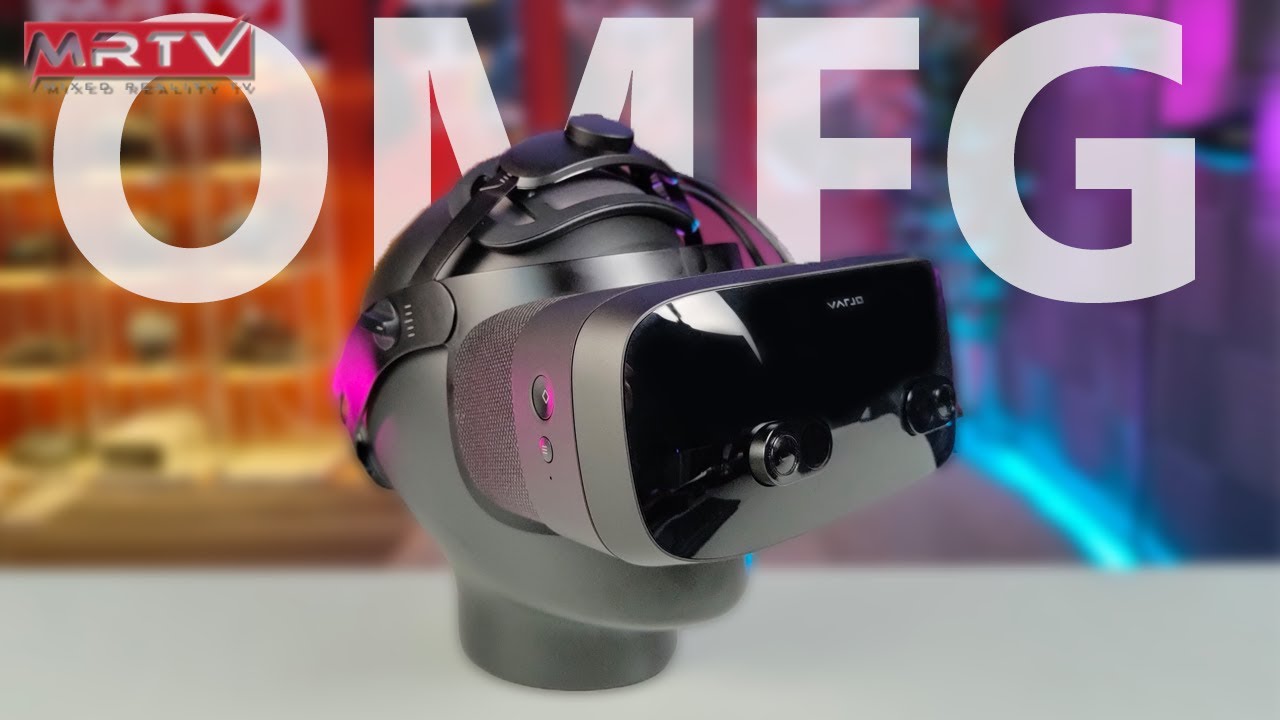
The Varjo VR-3 High-End VR Headset simply blew my mind! I have NEVER before seen such unbelievable visuals in VR! The headset boasts a human-eye resolution (not marketing, it is actually true), OLED panels, aspheric lenses (!), automatic IPD adjustment, eye-tracking (foveated rendering built-in) and hand tracking.
You want to BUY this as VR E...
lofty minnow
why did they put such a great resolution on it but not more fov than index
 gray prairie
What headset would be moderate for VR gaming on a Linix
haughty thistle
lofty minnow
why did they put such a great resolution on it but not more fov than index
Because the Varjo headsets are designed based on their customers interest. Companies like Nissan and Volvo for example. And what they need is as much resolution as possible. They don't need immersion. The Varjo VR-3s and XR-3s main purpose are to help car designers understand their design in real live terms
rapid otter
Played for two hours zip ties works wonder lmao
rapid otter
Modded boneworks is a blast
Having all the weapons in story mod and arena make for so much fun
Custom weapons like a big revolver and an ak47 doesn't feel out of place they are some very high quality mods
I can send link if anyone wants
chilly imp
I just got the Vive Wireless for the Vive Pro and notice that while using wireless, the screen is a bit more grainy compare to wired.
The overall image still looks pretty good and only noticeable in dark/greyish simple background


First image: Wireless
Second one is Wired
Wireless card is running in PCIE 3.0 x1 with 5800x/rtx3080
haughty thistle
Huh... I thought the image grain could be because of the lack of Mura compensation...
chilly imp
I see
Haven't seen a post about that problem
rapid otter
@chilly imp that compression because it's not 1:1 pixel plain colors get compressed but it's not very noticeable while gaming
chilly imp
rapid otter
<@591965298601754625> that compression because it's not 1:1 pixel plain colors g...
That true, it is barely noticeable in game. Just want to make sure that it is not a defective unit or cable
rapid otter
Uncompressed full color 2160 x 1080 is around 18 gb/s, for perspective a very strong router wifi 6ax won't exceed 3 gb/s
I use a quest 2 at 100 md/s i get some of this compression tho in game it's not noticeable
Only hdmi 2.0 can deliver speeds to 18gbs and more
haughty thistle
The Compression is quite noticable imo on the Quest 1 (150Mbit/s with a cable, 105Mbit/s on VD)
rapid otter
On plane surface it is but in mouvements i don't see it
With air link you can get 200mbs
haughty thistle
The 150Mbit/s on the OG quest is a limitation of the SOC, just as much as the 105Mbit/s is a limitation of the SOC. Remember the OG Quest doesn't have the XR2 yet...
rapid otter
haughty thistle
The Compression is quite noticable imo on the Quest 1 (150Mbit/s with a cable, 1...
My bad you said quest 1
You are right
haughty thistle
I can understand that it isn't as bad on the Quest 2, but on there, the resolution disparity between native panel res and what is transferred over the cable is much larger. Facebook preferred less SDE over a sharper image, which is not the way to go imo
rapid otter
what's SDE ?
haughty thistle
Screen Door Effect. Essentially the black area between the individual pixels
Higher res does mean less SDE, but the same resolution doesn't mean same SDE, even with the same panel type (see Quest 1 vs Vive Pro 1 SDE)
haughty thistle
But there's also the fact that not every panel is made the same. The First Gen WMR headsets have a much more notable SDE then the Index, even though both have 1440 pixels in width per eye, and the Index stretches those pixels over a greater FOV
The pixels can be physically larger or smaller, depending on how the panel is constructed. This + PPD + Resolution = SDE
SDE is actually the exact opposite of Screen Fill Area, or the Area of the screen that is filled with the actual image content
rapid otter
Nice thank you for the explanation
@lofty minnow i removed mod that is not mod, put back moddingtoolkit and reversed melon launcher to 3.0 now i can spawn any item anywhere and custom weapons works
neon basin
Is 2 sensors for the CV1 enough or should I have 3 of them?
haughty thistle
2 Sensors is fine, but if you want to be able to turn around while in VR, I'd recommend getting a third one
neon basin
I need to think about that thanks.
rapid otter
haughty thistle
2 Sensors is fine, but if you want to be able to turn around while in VR, I'd re...
The CV1 sensor are similar to base stations ?
haughty thistle
Not really. The CV1 has a bunch of IR LEDs in the HMD and controllers and it's base stations are essentially just IR cameras with wide-angle lenses on them
Meanwhile the lighthouse base stations have a motor inside them that sweeps two IR lasers across the room, and the HMD and controllers have a bunch of sensors on them that sense this IR beam
rapid otter
Ho ok

 haughty thistle
I was talking about it's outer appearance
bleak night
also the wire is a standard type c socket
oh its compeq
same board manufacturer as the ps1c stuff
also uses standard sockets
dull plank
Whats the best budget VR Headset?
haughty thistle
If you're willing to sell your soul and privacy to Facebook, the Quest 2, otherwise, probably a used Headset like an old WMR one or a used Vive
neon basin
How should I test the Oculus Rift CV1? I was thinking about playing a game and seeing if tracking is good and just look at the condition. Also I think I will need extension cables for the headset since alot of people are saying that the cables are too short but I do not know which extension cables I should get.
haughty thistle
Actually, for the CV1, all you really need is the Oculus home and an app called Sensor Bounds. The former is required for the HMD to work, but it's home environment should be enough to evaluate whether or not the screens are still good. From there you ccan also summon a desktop and just play some music on the headset and see if the audio is still good.
For the Tracking, that's where Sensor Bounds comes in, it shows you roughly what the FOV of the cameras is in VR. It can't tell if there's something in the way obscuring the view tho, so be aware of that
gentle coral
haughty thistle
SDE is actually the exact opposite of Screen Fill Area, or the Area of the scree...
There is also the cool techniques of
Using really bright tiny LEDs to increase pixel brightness coupled with a micro lens array, which would lower screen door effect without lowering pixel pitch or increasing fill factor for a given resolution, this in essence fakes a high pixel fill factor .
The best example of something similar is the Sony CLEDIS display wall which has an actual pixel fill factor of 1%, and black area of 99%, but looks better up close then a higher fill factor led display of the same resolution. This is as best as I could describe, due to the stable optical crosstalk of the subpixels, high outcouping efficiency, and angle of the pixels through the top glass in such a way as to have high dispersion angle even with low fill factor over the entire pixel.
And if you really want to go nuts you can do a optical metasurface array of nanomirror pillars.
I really should draw some of these up sometime.
Here are a helpful (though a bit advanced) link for fill factor and eye perception of issues on a screen.
https://www.google.com/amp/s/www.ravepubs.com/fill-factor-next-war-display-technology/amp/

rAVe [PUBS]
By James FifeConsultant Extension, rp Visual SolutionsWhen it comes to display properties that affect performance, one of the most misunderstood is visual acuity. Acuity in a display can be related to the hardware, content and overall image size. This article is in relation to the hardware and
 idle raven
Might not really be question for here but i need this for my VR, ok so if was to buy this Pci-Express usb 3.0 row, wich cables would i need? https://fyndiq.se/produkt/4-portars-pci-e-till-usb-3-0-hub-pci-express-expansionskortadapter-73057f289ab348c4/

Specifikation:100% helt ny och hög kvalitetEn supersnabb dataöverföringslösning med hög kapacitet.Stabil och pålitlig VIA-chipset.I enlighet med USB 3.0-spec...
neon basin
What extension cables for a Oculus Rift CV1 should I get for more length. I want to mount the sensors on my ceiling and if the video's I watched are correct I need extension cables for them and probably also for the headset. So what cables should I get.
haughty thistle
neon basin
What extension cables for a Oculus Rift CV1 should I get for more length. I want...
For the cameras, make sure they are high quality active USB 3.0 extension cables. They are pretty high bandwidth devices and you want at least two of your CV1 cameras plugged directly into USB 3.0 or higher ports on your motherboard
With the CV1 main HMD, it isn't as drastic. USB 3.0 is still recommended, and so is an active one. It only uses HDMI 1.4 tho
neon basin
I have the Gigabyte Z390 mini ITX motherboard and it has 4 x USB 3.1 Gen 1 so I think that is good enough. And I will look into the cable extension and maybe ask some questions.
 torpid sedge
Ooo a VR chat
neon basin
haughty thistle
For the cameras, make sure they are *high quality active* USB 3.0 extension cabl...
Extension cables are expensive for only 1 meter, it costs around 10 euro.
haughty thistle
neon basin
Extension cables are expensive for only 1 meter, it costs around 10 euro.
10€ for an active extension cable is actually pretty cheap. The high quality ones are around 50€ for like a 10m one
neon basin
Would this be a good ceiling mount https://www.amazon.com/KIWI-design-Adjustable-Aluminium-Ceiling/dp/B07Y9XH97M
I want to mount it on a flat ceiling an a tilted one.
Amazon.com: Oculus Rift Sensor Mount, KIWI design Adjustable Aluminium Alloy Ceiling/Wall Mount for Oculus Sensor, Valve Index/Vive Base Station, Arlo and Other Camera Models with 1/4 Inch Thread (2 Pack, Black)
neon basin
haughty thistle
10€ for an active extension cable is actually pretty cheap. The high quality one...
I thought it was expensive but after some measuring I probably only need 1 extension cable
haughty thistle
neon basin
Would this be a good ceiling mount https://www.amazon.com/KIWI-design-Adjustable...
Yee any wall mount with a camera screw-mount should be fine
neon basin
Also for a tilted ceiling /or angled ceiling
lofty minnow
why you getting a cv1
haughty thistle
idle raven
Might not really be question for here but i need this for my VR, ok so if was to...
By the looks of it, that extension card needs Molex power to it. Understandably so, as USB 3.0 spec asks for quite some power
neon basin
lofty minnow
why you getting a cv1
why not? it isnt that expensive and I think it is good for my use
haughty thistle
lofty minnow
why you getting a cv1
Because A. The Quest 2 ain't available everywhere and B. for certain applications outside-in tracking still is much better then inside-out. For example if you want to use it with Vive Trackers
lofty minnow
thought abt B, didnt know it has the same tracking as base stations
neon basin
haughty thistle
Because A. The Quest 2 ain't available everywhere and B. for certain application...
The Quest 2 is available but is it 2x more expensive then the Rift CV1 even used
haughty thistle
lofty minnow
thought abt B, didnt know it has the same tracking as base stations
It doesn't, but in my experience, mixing Lighthouse tracked devices with the CV1 was a much better experience then doing so with my Quest or Reverb G2, both being Inside-Out Tracked
lofty minnow
i actually didnt know you could use inside out tracking headsets mixed with lighthouses
it probably doesnt work good
does it
neon basin
What is inside out tracking and outside in?
haughty thistle
Nah. You can calibrate the two tracking systems using OpenVR SpaceCal, but the Inside-Out systems have the tendency to drift around slightly in the room, and it can be quite noticable, especially if you have a big room or one with little furniture...
haughty thistle
neon basin
What is inside out tracking and outside in?
Outside-In means, you have some sort of fixed point in the room based on which all tracking occurs. The CV1 has IR cameras as these fixed points, whereas with the lighthouse systems it's boxes with spinning lasers.
Inside-Out means that the Headset has all the sensors inside to track where itself is in the room based on your already existing furniture, and tracks the controllers based on it's position in the room and the relative position of the controllers to the headset
neon basin
This is the ceiling mount I just sent. Can the sensor screw into that like in the picture? I am only asking since I do not own the VR headset yet but I want to order the right thing so I can have them both at once without waiting
 haughty thistle
neon basin
This is the ceiling mount I just sent. Can the sensor screw into that like in th...
haughty thistle
neon basin
This is the ceiling mount I just sent. Can the sensor screw into that like in th...
Yeah absolutely. The CV1 cameras come on stands that you'd have to unscrew first, but then you can just screw them on those mounts
neon basin
haughty thistle
Outside-In means, you have some sort of fixed point in the room based on which a...
Outside-in is still good right?
haughty thistle
neon basin
Outside-in is still good right?
Yeah, absolutely. I'd say it's even the superior method of tracking, but having to set up the base stations is a hassle and I can kind of understand why it's a downturner for so many consumers...
lofty minnow
i have a question
is there any application like vd that streams the whole hand tracking data to steamvr skeleton
i just wanna try it out in vrchat
haughty thistle
lofty minnow
is there any application like vd that streams the whole hand tracking data to st...
Not afaik
As both the CV1 and lighthouse devices have a fixed point in the room on which their tracking is based, both are pretty similar when it comes to the stability of the virtual room geometry (your guardian). Because of this, syncing these two tracking systems up means there's virtually no movement between the two tracking devices. On Inside-Out tracked devices, the virtual room geometry can move quite a bit, so I'd recommend putting in more buffer in the guardian on an Inside-Out Tracked headset, whereas on an Outside-In tracked headset you can pretty much pull your boundary up to your wall, and it's never going to be behind that wall...
neon basin
haughty thistle
Yeah, absolutely. I'd say it's even the superior method of tracking, but having ...
I only need to figure out where to position the sensors and then screw them into the ceiling so I dont think that is a big problem. I need to use sensor bounds for it right?
haughty thistle
You don't have to use Sensor Bounds for that, as the Oculus software will show you on a 2D plane roughly of what the senor can see, but that is 2D from a top-down perspective. Sensor Bounds will then tell you if you need to adjust their angle. You can't move the CV1 cameras while they are running btw, so you start the room setup, calibrate the cameras, check whether their 2D FOV lines up right, if not adjust and repeat, if so, you continue on, draw your boundry etc. and then check Sensor bounds if you need to angle them up or down more. If adjusted, go through the camera calibration again, and then see if it's good now. Repeat until everything is set up in a good manner
Oculus actually recommends both cameras to be parallel to one another when placed in a 2 camera setup. They only recommend putting the cameras at the corners and angling them, when you add a 3rd or 4th sensor
languid cape
just got an Oculus quest 2 and its a decent value. I bought it at a best-buy because I didn't want to wait and pay for shipping, and it was advertised for $399 CAD for the 64 GB and with high taxes it was a bit less then $450 CAD which is more then I was hoping to spend, and because of it my bank account only has $14 CAD left and I have no extra money for games. this probably isn't an issue in the states but just watch out in Canada especially if there is PST and GST. other then that, I just been playing the free games for now, and it still blows me away, my 2 complaints are 1 the foam piece is fine but it acts like a sweat sponge and 2 the fact that I couldn't setup air link without a thunderbolt / USB 3 type c cable that I don't have. They get you with games that cost almost or more then $30 CAD each.
my rating:
8 / 10
 delicate violet
VR games are pretty cheap tbh. The most expensive one I’ve seen is Half Life
On my quest 2 I’ve seen games for $30 or less. Sometimes $40
lofty minnow
thats expensive....
delicate violet
lofty minnow
thats expensive....
Most mainstream games are like $60
delicate violet
I buy games
lofty minnow
good for you
delicate violet
Also I forgot to say I use USD
neon basin
haughty thistle
Oculus actually recommends both cameras to be parallel to one another when place...
I was thinking about getting 3 so I can have full 360 degrees tracking.
haughty thistle
Yeah, with 3 cameras, Oculus recommends putting two at the front side, angled twoards the center of your playspace and the third mounted at the back corner pointed at the camera on the opposite side
neon basin
haughty thistle
Yeah, with 3 cameras, Oculus recommends putting two at the front side, angled tw...
Can I find this on the oculus site and is there a overview or drawing of this on the site?
haughty thistle
The Setup will show you how to best place your sensors during setup depending on the amount of cameras detected during setup
Other then that, I remember Facebook having some images showing the recommended playspace sizes and camera setups with 2 and 3 camera configurations
Lemme see if I can find those again...
neon basin
Yes please
haughty thistle
For a 3 sensor setup, you can either go like this:

Or have both the front sensors placed at the corners like the back one (which is what I do) and it works fine for me
I'm trying to find the other graphics, but so far, this is the only one I've found :/
Ok, it seems like Facebook has mostly gotten rid of all the original Rift Websites. The Link to the Rift Senor Setup help article redirects to the Rift S Section in the Oculus Support website...
The Oculus Software will guide you through the setup and how to best place the sensors and everything. Naturally, you want to have the sensors already plugged in at that point to let the software know how many sensors you want to set up
neon basin
So you basically have this? The circles are sensors
 haughty thistle
Kind of, yeah
neon basin
And my area where I can play is like 2m 2m and height is different almost everywhere because of my ceiling so it would still be the same but smaller area right?
Is there also a height recommendation?
haughty thistle
The CV1 sensors are designed to be used at around waist height, so best not mount them too high up
neon basin
I thought I had to mount them above my height but apparently not. It makes everything a lot easier because of that
haughty thistle
The lighthouses are designed to run at above head height, but the CV1 tracks differently
neon basin
Great. I will measure some more so I know approximately where the sensors need to go
harsh niche
delicate violet
VR games are pretty cheap tbh. The most expensive one I’ve seen is Half Life
bro vr games are not cheap
they’re still charging $20 for job simulator
harsh niche
and a lot of vr games once your done you’re done.. there’s not really anything else to do like creative games on pc
oh yeah I hate console as a whole
neon basin
haughty thistle
For a 3 sensor setup, you can either go like this:
when using this or my drawing where should I position the pc so that the max cable length isnt like 10meter
haughty thistle
This would probably be the best placement. You'd only need one long extension and two shorter ones, possibly only one even

In my case I have one on a short extension and one with a long extension. PC is about there (although my back sensor is on the other side)
neon basin
The lenght of one cable is 2.5 meter right?
haughty thistle
Yup. Pretty much as long as one can go passively with USB 3. Although I did have luck with my short 1.5m passive USB 3 extension does work with my sensors
neon basin
If I messured it correctly I probably need a 3m extension cable since the room has a weird lay out
haughty thistle
Yeah, make sure it's a high quality active extension
neon basin
How long are the headset cables?
haughty thistle
The CV1 and Pimax have about 4m from the headset to the PC, while all Vive headsets and the Index have about 6m from HMD to PC (including connection cables from the linbox/breakout)
Dunno about other HMDs
haughty thistle
It is listed as 4.5m, but from my time with it, it was comparable or even worse then the CV1 cable length...
neon basin
Is the Oculus CV1 remote any good?
haughty thistle
The remote is only really used by a handful of games. I'd say you probably won't end up using it. It's a 3DOF controller anyways
neon basin
haughty thistle
The remote is only really used by a handful of games. I'd say you probably won't...
The person selling it said it was helpful when u are racing in vr and that is one thing I want to do
haughty thistle
Uhh... yeah. The remote does allow you to access the dashboard without having to grab the Touch controllers. It can be helpful, but so far I haven't seen the need for it in my use cases
 uncut turtle
This has probably been asked before, so a message reference is fine for an answer, but are there any other cheap (<$500) VR headsets/controllers besides Oculus? I’m looking to game in VR but I don’t trust Facebook and my budget isn’t huge.
bleak night
for some reason, the face tracker causes my pimax audio to go bonkers if i use the top port..
not the bottom though.
aha!

As technology changes and adapts, so does Adafruit! Rather than the regular USB A, this cable has USB C to USB C plugs!USB C is the latest industry-standard connector for ...
this should do it
daring girder
What does CV1 mean
rapid otter
harsh niche
and a lot of vr games once your done you’re done.. there’s not really anything e...
Get boneworks i think you can do 100 hours easy
Just to get 100% campaign
harsh niche
what is boneworks even about? I’ve just seen tossing cubes around and climbing things
neon basin
uncut turtle
This has probably been asked before, so a message reference is fine for an answe...
maybe a used htc vive although u should look a bit on the internet since I do not know alot about htc
rapid otter
harsh niche
what is boneworks even about? I’ve just seen tossing cubes around and climbing t...
It's not just a simulation game
It has a story mode where you do puzzle and fight enemies
The best part is that a lot of physics are simulation are put into it. You can kill enemies in a lot of ways or resolve a puzzle in different ways
There is both gun fight and melee
One of the best games out here

Boneworks in VR is so good. Virtual reality and Puzzle games are just meant to be together. I know VR shooters are great but Puzzle VR games should be right behind if not tied for the best VR games on the market. I imagine that I will be making another Boneworks video soon just because the post game (end game) content looks great and I haven't h...
haughty thistle
uncut turtle
This has probably been asked before, so a message reference is fine for an answe...
The only ones I can think of are the used HTC Vive and used WMR headsets. Of those, the Samsung Odyssey and Odyssey+ are probably the best option, but they were only available in NA and SK. I used to have a Lenovo Explorer myself (one of the other WMR headsets) and it was decent, but the lenses were too close and scratched my glasses
neon basin
Is this usb 3.0 good?
https://www.amazon.com/gp/product/B00C7SA21U/ref=as_li_ss_tl?ie=UTF8&linkCode=sl1&tag=heau04-20&linkId=7325407574239d44c04da9e09442eff7
Amazon.com: Cable Matters Long USB to USB Extension Cable (USB 3.0 Extension Cable) in Black 10 ft for Oculus Rift, HTC Vive, Playstation VR Headset and More: Computers & Accessories
And is a hdmi extension cable necessarily? https://www.amazon.com/COWEEN-Repeater-Amplifier-Extender-Transmission/dp/B01GHL72XS/ref=as_li_ss_tl?_encoding=UTF8&pd_rd_i=B01GHL72XS&pd_rd_r=EGCF7J819DJA210P3XNE&pd_rd_w=6G7oR&pd_rd_wg=Ewx6y&psc=1&refRID=EGCF7J819DJA210P3XNE&linkCode=ll1&tag=realitycheckv-20&linkId=2bd5b1d317377ff35003072611e54e62
Buy lakpad HDMI Repeater 4K UHD HDMI Female to Female HDMI Amplifier 40' HDMI Extender Up to 40 Meters Lossless Transmission for Oculus Rift and More: Video Converters - Amazon.com ✓ FREE DELIVERY possible on eligible purchases
haughty thistle
neon basin
Is this usb 3.0 good?
https://www.amazon.com/gp/product/B00C7SA21U/ref=as_li_ss...
That is a passive USB 3.0 extension cable. I can almost guarantee you that this cable won't work with the CV1
Longest I was successful with was 1.5m which is about half the length of that cable. But even with 1.5m passive cables, it can be quite hit and miss. I have the same 1.5m extension twice and one works fine with USB 3.0, while on the other one, the signal is dropped to 2.0 speeds
And yes, you do want USB 3.0 speed on at least two sensors and the main headset
neon basin
haughty thistle
That is a passive USB 3.0 extension cable. I can almost guarantee you that this ...
Then people on youtube are trolling or something because in the video he showed it working so maybe it does but I found another I can send a screenshot
this one

on the site it says that it is an active usb3.0 extension cable so I think I will order this
The brand is called DeLock
lofty minnow
its so comfortable being in bed with the quest 2 because of the strap which doesnt have plastic
bleak night
@neon basin you could get the cable matters active cables
Buy Cable Matters Active USB Extension Cable Male to Female (USB 3.0 Extension Cable) Gender Changer with Signal Booster for Oculus Rift S, HTC Vive, Valve Index, Webcam and More - 5 Meters, 16.4 Feet: USB Cables - Amazon.com ✓ FREE DELIVERY possible on eligible purchases
Buy Cable Matters 8K HDMI Extension Cable (Male to Female HDMI Extender Cable) with HDR for PS5, Xbox Series X/S, RTX3080 / 3090, RX 6800/6900, Apple TV, and More - 2 Meters / 6.6 Feet: HDMI Cables - Amazon.com ✓ FREE DELIVERY possible on eligible purchases
sullen linden
I heard the quest 3 is coming out in less then a year, I’ll only be able to get a headset around Christmas should I just wait until the 3 drops or get a 2?
harsh niche
it’s not
didn’t oculus just say quest 3 won’t come out until 2022
maybe quest 2 pro or something but not the 3
 weak matrix
yeah? whats your favorite game
neon basin
bleak night
<@601726246745014273> you could get the cable matters active cables
Does it need external power from a different power source? And I don't think I need a 8K cables since the Rift CV1 is 2160x1080.
haughty thistle
Both HDMI and USB have power lines which active extenders tap into to power themselves
You only need to add external power on those, if the leftover USB/HDMI power is not sufficient for whatever device you want to plug into it on the other end
neon basin
So the extension cable need external power from another wire?
haughty thistle
Probably not. You may run into issues with the CV1 HMD itself, but the cameras are fine without
neon basin
haughty thistle
Probably not. You may run into issues with the CV1 HMD itself, but the cameras a...
What do you mean with I might run into problems?
haughty thistle
The CV1 does require quite a bit of power for the displays, headphones LEDs, etc. So it might not work properly. You have to test it whether or not it works with your mobo/cable or not
neon basin
For the headset I probably only need around 1 or 2 meter so I think it is fine.
languid cape
whats the best / cheapest VR ready computer. desktop or laptop. bestbuy, memory express and Canada computers would work best.
gusty frost
I would say kabylake and a 1060/1070
neon basin
languid cape
whats the best / cheapest VR ready computer. desktop or laptop. bestbuy, memory ...
First you need to think about what VR headset you want. Then if you want the cheapest pc for look up the minimum specs for the VR headset you want and based on that information you can make the cheapest pc
haughty thistle
Yup. Considered VR minimum as of right now is a GTX 1060-class GPU with at minimum 4GB of VRAM. Depending on the headset, these specs might change.
Example: The Reverb G2, you want to have at least 14GB of VRAM, because that thing eats it like it's nothing. The VP2 on the other hand, you'd want 8GB or more. For both of these HMDs however, something with 2080Ti performance or more is recommended...
I can't list every headset here for obvious reasons, so these are just two examples with higher res headsets. Be aware that Oculus headsets do require some extra power when running SteamVR (because the Oculus software is crap) and the Quest/Quest 2 don't actually run at their native res when linked to a computer. The Quest 1 is GPU-load wise similar to a 1080p-class headset (CV1/OG Vive) and the Quest 2 GPU-load wise similar to a 1440p-class headset (Index/Rift S/Vive Pro 1/Vive Cosmos), maybe a little higher, but you get the idea
In regards to the CPU, there really are only 2 things to consider: You'd want something with 4c+HT or 6c and a decent IPC. Anything from Haswell or newer should be fine. In the case of the Quest/Quest 2 (and to some extent the Vive Wireless Adapter) you do want a higher end CPU however, as with those, the CPU also has to compress the rendered image. Here I'd say something with 6c+HT or 8c would be recommended with something from Ryzen 2000 or Intel 8th gen at minimum.
Hope that helps ^^
neon basin
What are some fun and good VR games? Right now I want to buy Beatsaber and Boneworks but I would like to know some more fun games. The headset I will be using is the Oculus Rift CV1 with 3 sensors so I will probably have 360 tracking.
acoustic gate
I've been enjoying the labs, half life: alyx and i expect you to die so far
lofty minnow
acoustic gate
I've been enjoying the labs, half life: alyx and i expect you to die so far
woah why do you expect him to die
haughty thistle
Moss and Virtual Virtual Reality are also pretty nice games. I haven't finished the former yet, but so far they both seem to not have much replay-ability sadly...
lofty minnow
moss is really really boring imo
haughty thistle
I like the way they tell the story. Like I said, I haven't finished the game yet. Still pretty early in the gameplay
neon basin
I remember seeing first person shooter games but I cannot remember the name. Does any know what it could maybe be?
 autumn willow
weak matrix
yeah? whats your favorite game
autumn willow
weak matrix
yeah? whats your favorite game
tf2 
lofty minnow
autumn willow
tf2 <:weSmart:717978897911906344>
autumn willow
lofty minnow
https://www.youtube.com/watch?v=2NN91RHoe4o&t
rip tf2 tbh
bleak night
f
languid cape
f
idle raven
Does anyone know a motherboard for 100$ and under that can support intel core i5 3570k and has usb 3.0? I have to have one to be able to run VR
 fallow island
idle raven
Does anyone know a motherboard for 100$ and under that can support intel core i5...
fallow island
idle raven
Does anyone know a motherboard for 100$ and under that can support intel core i5...
Doesnt seem like it
haughty thistle
In that case you might honestly be better off getting a dedicated USB 3.0 card. If my memory serves me well, there can be tons of issues with some of the early USB 3 controllers and by getting a dedicated one, you're avoiding the issue all together.
idle raven
thats the thing. I dont have enoguh power outlets on my motherboard
not for molex or anything
haughty thistle
Then you might want to upgrade your PSU as well. What kind of GPU do you have, if I may ask?
 haughty thistle
Eh. Really scraping the bottom of the barrel really. It does work, but the memory config on the 970 isn't optimal
idle raven
weirdly my friend got a 960 and it works 60 fps
haughty thistle
🇽 doubt
idle raven
he can play fnaf vr without any problems
haughty thistle
VR is very intensive and I don't even get the full 90 fps on the CV1 at times...
I have a 3090 btw
idle raven
i have already ordered one sooo...
haughty thistle
With VR it's important to have solid frame times. FPS don't really matter all that much, although you do want to supply the headset with the same amount of frames as it's refresh rate
haughty thistle
idle raven
i have already ordered one sooo...
What headset?
idle raven
rift s
haughty thistle
Ah. Kk. You might want to turn down the render resolution. You might be able to hit 12.5ms frame times in certain games, but the consistency is more important honestly
But you will need USB 3.0 and with these older boards, you.might genuinely out of luck unless you put in an extra add-in card sadly 😕
 hallow osprey
so i found out australia will FINALLY be getting valve index ( i have a vive), hoping to get some knuckles for proper controllers, the preorder placements are already sold out in the 1 shop in my city, thanks gaben lol
haughty thistle
Logistics are difficult, so I can see why Valve is limiting availability to certain areas, and also probably why they've let EB games handle AU and NZ
 strong bane
Lol index probably never gonna be available here lmao
lofty minnow
man i just had the weirdest thing happen to me in vrchat
soft hound
It's unlikely to not have anything weird happen in VRChat
lofty minnow
yea but i didnt know you can have nsfw avatars
and someone had one in a public world
and i was like wtf
 lofty minnow
yep
autumn willow
This is VR related, just trust me on this one.
 autumn willow
lofty minnow
and i was like wtf
autumn willow
lofty minnow
and i was like wtf
It can get pretty weird.
Although
Crasher avatars are the worst ones
NSFW or not
Cuz u gotta restart the game
 hushed pond
lofty minnow
yea but i didnt know you can have nsfw avatars
hushed pond
lofty minnow
yea but i didnt know you can have nsfw avatars
well its vrchat after all, you can do whatever the frick you want, the use of nsfw avatar in public worlds is against the rule tho, so i assume you met some idiot kid with some rando avatar
bleak night
autumn willow
Crasher avatars are the worst ones
never had a single crasher that succesfully crashed me, only lag
sullen linden
Without safety settings you're almost guaranteed to crash though
 gentle crown
Is my 1050ti paired up with 16gb 3200mhz of ram and a r5 5600x able to run alyx at all low settings?
I'm waiting for my 3070 to arrive somewhere in october so don't ask why i have a 1050ti and 5600x
rapid otter
gentle crown
Is my 1050ti paired up with 16gb 3200mhz of ram and a r5 5600x able to run alyx ...
I don't think so how much vram it has ? And is it overclocked ?
The r 5600x is plenty 16 gb of ram too
If you are getting a 3070 wait to get it until playing Half Life Alyx, the game is beautiful and the experience is exceptional dont get it ruined by bad graphics and frames rates
haughty thistle
Yeah, with that 1050Ti you do want to reduce the render resolution and graphics settings
rapid otter
@haughty thistle remember when the 1050ti was like very cool, God damn I'm getting old
gentle crown
rapid otter
I don't think so how much vram it has ? And is it overclocked ?
4gb, not overclocked
rapid otter
Nah just stay on what I said you'll thank me later i waited a long time before I got a good cpu and it was worth it
In your case it's a gpu but you got me
 toxic wasp
Huh. Guess you dont have those problems if you code your own VR games- tho, iirc, hl alyx runs on a 1050ti "acceptable" at like 40-50fps. Luckly i can live with low fps in vr games-
lofty minnow
toxic wasp
Huh. Guess you dont have those problems if you code your own VR games- tho, iirc...
damn i feel sick at 60fps even in pancake games how do u live with 40 50 in vr
sullen linden
I've played so much vrchat that a framerate below 45 looks normal to me lol
flat pawn
^
Lmao
Whenever it goes above a certain point and it's smooth I'm like whoa, this is what it's like to have frames?
languid cape
Guessing 5% of frames under 90 for VR on low settings ain’t bad for a computer from 2008 and a GPU from 2011
 haughty thistle
The problem is, there aren't any proper VR benchmarks out there, and there probably never will be. There are tons of factors with VR, that a benchmark just can't accomedate for. Things like what tracking system(s) are you using, what VR compositor, what headset, etc.
The OpenVR Benchmark (https://store.steampowered.com/app/955610/OpenVR_Benchmark/) is probably the most comprehensive and realistic one, but it requires a VR headset to be plugged in, or to be more specific, the headset on which you want your result to be based on to be plugged in
Don't use the official SteamVR one, as that one is based on VR titles and headsets from 2016 (HTC Vive, Oculus Rift CV1)

Benchmark your VR setup - OpenVR Benchmark is the first benchmark tool for reproducibly testing your real VR performance, rendering inside of your VR headset. See if your hardware performs correctly! OpenVR Benchmark is available for free! After running the benchmark, you are presented with a score and your result is automatically submitted and ...
bleak night
haughty thistle
The problem is, there aren't any proper VR benchmarks out there, and there proba...
theres vrmark, though i havent given it a full run through, and it seems a little... meh?
i got it on sale for the whole 3dmark bundle for $8
haughty thistle
That's the sad part: there aren't all that many device agnostic VR benchmarks. Like I said, there is OpenVR Benchmark, but that requires the headset you wanna test performance on. I guess there's also the Unigen Superposition Benchmark that has a VR mode that can run on the headset, but I don't know if that just a demo-scene you can explore in VR like with VRmark or if it can also render the actual Benchmark on the headset. But again, you'd also need the headset there.
One thing that Unigen allows you to do is to run the VR benchmark at different resolutions to at least simulate that part of different headsets
rapid otter
For me the best way is to ask people or try someone's pc headset if you have access
 modern totem
is freezing and screen tearing rarely a normal thing?
haughty thistle
Freezing, depends on what your PC specs are.
Screen tearing, not so much. I only ever had this happen to me on the Pimax 8k X.
A possibly related issues is that on my Vive Pro 2 I had super heavy stuttering happening. This was caused by Hardware-Accelerated GPU Scheduling. If you have the option with the Windows 10 Settings, maybe try turning that off and see if it helps
toxic wasp
lofty minnow
damn i feel sick at 60fps even in pancake games how do u live with 40 50 in vr
Huh. That.. kinda sucks then.. tho, id say (not vr) that 23+fps are playable in a shooter. Aslong as its stable.
haughty thistle
That is very VR capable already I'd say
 earnest vapor
yeah whats a good headset
haughty thistle
Oh you were asking about a headset, my bad ^^"
earnest vapor
its good
haughty thistle
For 500$ you're pretty much limited to the Quest 2 and otherwise just used offerings. Sadly, only Facebook has really tried to stay afloat in the budget VR market, so that's your only choice if you want to go with a brand new device
haughty thistle
Well, there was Microsoft a while back, but they were forced out the market by Facebook
earnest vapor
but im not making a facebook account period
is the valve index still good?
and does the rift s require a facebook account and is it good?
haughty thistle
The HTC Vive (the original and sometimes the Pro 1 as well) can be found for around 500$ downwards as well. If yo ucan find a Pro 1 with lighthouses and controllers for 500$, I'd say that's a killer deal
haughty thistle
earnest vapor
and does the rift s require a facebook account and is it good?
It does if you don't already have an original Oculus account
earnest vapor
haughty thistle
It does if you don't already have an original Oculus account
i dont im brand new to vr
earnest vapor
haughty thistle
The HTC Vive (the original and sometimes the Pro 1 as well) can be found for aro...
ok so original HTC Vive is a good headset?
haughty thistle
earnest vapor
is the valve index still good?
The Index is still pretty good, but I'd say if you buy that headset, you'd want Valves warranty which you'd only really get by buying new or one that you can confirm is less then a year old
haughty thistle
Yeah, the original Vive is build like a tank, so you don't really have to worry about it being doa. Like I said, if you are super lucky you might find a Vive Pro 1 for that money as well, but chances are you won't. Both are still pretty good headsets tho
earnest vapor
should i look on ebay amazon?
haughty thistle
The original Vive has been discontinued for a while now, so you probably won't find one new. Used devices on Amazon are hideously expensive, so I'd suggest rather go for eBay...
earnest vapor
does this look sketch https://www.ebay.com/itm/124818326533?epid=6024812195&hash=item1d0fc08405:g:f~YAAOSwtgpg9aMx

eBay
For sale is an excellent condition Vive Pro Virtual Reality System. Everything pictured is what's included with your purchase. Please be knowledgeable about this system before making an offer or purchasing. After purchase, allow upto 3 business days (not including weekends or holidays) for the item to be shipped. Tracking will be provided. No r...
haughty thistle
earnest vapor
does this look sketch https://www.ebay.com/itm/124818326533?epid=6024812195&hash...
Looks like a legit offer, but it's the HMD only, and you'd need at least base stations to use the headset in the first place, and then controllers would also be required for pretty much every VR title out there
Neither of which are included in the offer btw
haughty thistle
No problem ^^
 haughty thistle
Although it is lying about what it is (it's an original Vive, not Vive Pro), it does look to be in decent condition. One thing I'd definitely would ask the seller with any used VR headset is for a picture of the lenses. You don't want to end up having scratched lenses, although this one does look to be in pretty good condition