#off-topic-tech
1 messages · Page 189 of 1
 languid gulch
 night girder
And I have to fix the car up else i cannot make it road legal.
 pure karma
Would nerver daily it but id love a car like this for track use or something
night girder
GOT IT 🤣
 languid gulch
is that supposed to be 250 or 250k
night girder
250
languid gulch
OH
pure karma
languid gulch
is that supposed to be 250 or 250k
Its a model
night girder
1:12 
languid gulch
yea just saw the scale
languid gulch
i ran into Bumblebee a few weeks ago
 night girder
languid gulch
i ran into Bumblebee a few weeks ago
night girder
languid gulch
i ran into Bumblebee a few weeks ago
damn. too bad we have to take corners here.
languid gulch
sadly
it's not the corners that are the problem, it's that there's stuff on the corners
2600kg, 6.4m long, 8.2L V8
104L gas tank
night girder
you must be really old
languid gulch
nah
like i said, stuff doesn't rust here
and Department of Transportation just grandfathered in all the old shit & kept it on the road
my old pickup was perfectly legal even tho the gas tank sat in the cab, right behind the bench seat
seat's out, but that's the tank on the left
 night girder
cool!
languid gulch
scary as fuck
GM's "safety" was putting a cardboard cover over it
just to make sure you'd burn faster if it started leaking
night girder
just don't let it catch fire 🤷♂️
languid gulch
🤣
one of my friends has the 1972 version of my truck, and he yanked that out out and put in saddle tanks & a 3rd behind the differential
night girder
I am not sure, but you seem to have more lose rules in modifying cars. They all street legal?
languid gulch
yup
what counts as a street legal car here is what year the chassis is, and what the laws were at the time
 verbal raft
bruh
 languid gulch
my "street legal" 1966 chevy pickup just needed seat belts (first year for that), a right side mirror, bumpers, headlights, and brake lights. rest is optional
night girder
Mhm, we do have some special rules for old timer cars. Not sure maybe they could get away with stuff like that.
languid gulch
doesn't even need doors, bed, or a hood 🤣
night girder
or airbags.
night girder
a car that wants you dead. Nice.
languid gulch
🤣 got rid of it for a reason
was great for what i used it for
had the "granny gear" 1st, 7.68:1, and a 4.78 rear
night girder
I don't see what good use a car is that wants to actively kill you. Fuel tank in the back with carton box over it?
languid gulch
was good for pulling stuff out of the ground
night girder
I see
languid gulch
basically a farm truck, not a commuter
night girder
yeah, worktool.
languid gulch
street legal tractor more than a car with a bed like they make today
mine was never this pretty, but this is what it was, same color too

so old those white things are actual hub caps & not wheel covers
night girder
hehe, that flag in the background
languid gulch
oh of course
night girder
nice colors that one
languid gulch
looks like it's in a museum from the Model T in the background
tearing it apart was like dismantling an aircraft carrier
each door was probably 100kg
night girder
sounds a bit excesive
night girder
did it ever get stuck in the mud?
languid gulch
not here, we don't really have mud
sand yes
probably got stuck in the mud where it came from tho, was grandpa's farm truck
night girder
it's like a tank getting stuck
languid gulch
would throw 3-4 full sized cows in the bed
night girder
That seems like a funny sight
languid gulch
night girder
it's like a tank getting stuck
there's a reason i still have an army shovel in my cars
night girder
shovel is smart. Army shovel. Not so sure 🤣
languid gulch
3 fold one
 languid gulch
could you imagine throwing an american style emergency kit in the back of that M3 🤣
night girder
I would 100% do it 🤣
languid gulch
half medkit, half invasion supplies
night girder
you never know when i might have to dig a foxhole 🤣
languid gulch
now i wanna see an M3 with one of those roof mounted storage boxes
painfully american

too much shit? that's ok, just pile it into a shitbox on top of your car full of shit!
 night girder
As a sidenote on the prepping, I recently got me this backpack 🤣
 languid gulch
apparently BMW makes the cargo boxes
 mental oriole
Car go road.
languid gulch
night girder
As a sidenote on the prepping, I recently got me this backpack 🤣
here we can buy backpacks with not just a ballistic plate, but a quick flip front plate too
night girder
mental oriole
Car go road.
No no, car needs to look good and then go road.
night girder
languid gulch
here we can buy backpacks with not just a ballistic plate, but a quick flip fron...
Yeah yeah ... I know 🇺🇸
mental oriole
cargo pun
night girder
here we don't have guns. So no need for plates 🤣
languid gulch
 night girder
Still I like the modular aspect and molle principle.
languid gulch
definitely
night girder
and I can add patches 😄
next I want to add a pouch for my leatherman.
Just have to remember to take it off when going to festivals.
languid gulch
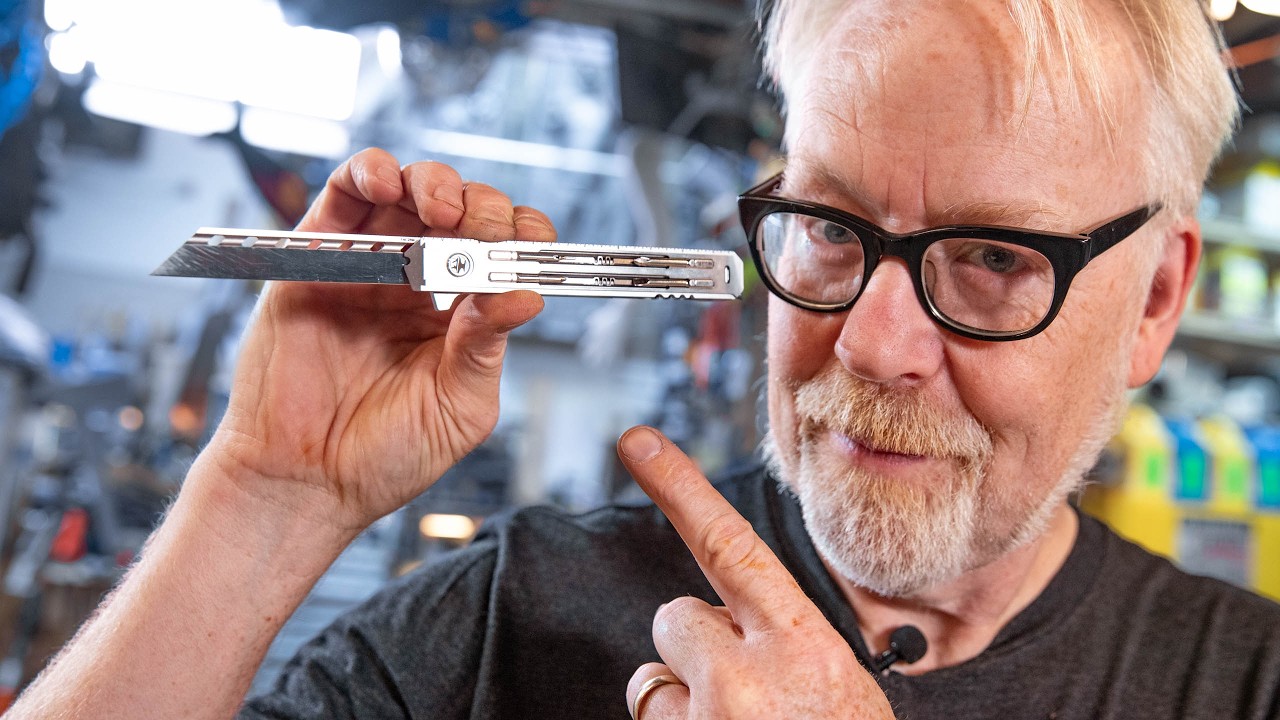
The @hacksmith makes a return to Adam's shop to bring an early sample of his new EDC product: a titanium multi-tool called The Smith Blade. James runs Adam through the almost two dozen tools packed into this lightweight chassis and explains the prototyping and manufacturing process that makes it such a pleasure to use as both a tool and fidget ...
if it wasn't $400 i'd have gone for it
night girder
i am happy with what I have atm
night girder
languid gulch
https://www.youtube.com/watch?v=xbGoesUi48A
so much talk about bits
languid gulch
it's such an innocent sounding word
 charred relic
I'll stick with the real body armor
Also why on earth would you ever walk around with that pack on and the front armor not on... if nothing else it'll counterbalance the damn thing
night girder
languid gulch
it's such an innocent sounding word
Euh, sure 😛
languid gulch
charred relic
Also why on earth would you ever walk around with that pack on and the front arm...
why are you choosing to apply logic to this
night girder
also, if you pull it out, is your back still protected?
night girder
So it's double weight at the back
and then the weight of the backpack itself + load
languid gulch
cuz who needs knees or a lower back
charred relic
Yeah but like they way that thing just drapes down isn't really practical heh
I guess you CAN tight it down... just what I wanna be doing when the shooting starts
tying down body armor
languid gulch
yea, it's definitely a "take cover, gear up" thing
night girder
I don't think it's real is it.
charred relic
I hope not heh
languid gulch
oh no it's real
night girder
seems more like a joke 🤣
charred relic
But it probably is
languid gulch
$900
night girder
omg... but that gif seems so bad ngl
charred relic
Plus no side protection options there
languid gulch
charred relic
So good lock if they arne't like... right in front of ya
languid gulch
yea but also better than nothing
charred relic
But that kinda money though... just get real armor heh
languid gulch
but yes, from a non-american viewpoint i can 100% see it as a joke
charred relic
even the soft shit is better than... that
night girder
languid gulch
but yes, from a non-american viewpoint i can 100% see it as a joke
cheers, I mean no disrespect.
charred relic
Most people don't really need plates but... hey if you want the weight and stiffness
night girder
But the acting and all. Something seemed off 😛
the first dude seems to even be laughing a bit.
languid gulch
night girder
cheers, I mean no disrespect.
oh it's not a problem 🤣 everyone seems to have a special brand of batshit crazy
charred relic
I'm just not sure what the idea is... oh look i'm out backpacking with back armor and optional front armor
night girder
marines gonna love this shit
languid gulch
oh marines have the good stuff
charred relic
yeah
night girder
more weight to go up and down the mountain
that it connected to your freaking backpack.
languid gulch
night girder
more weight to go up and down the mountain
that's called character building
night girder
so you can't take it off or rebalance. Unles you put it to the front.
charred relic
Maybe targeted for kids on campus at schools I dunno
languid gulch
yea, definitely looks more urban designed
night girder
languid gulch
yea, definitely looks more urban designed
Oh yeah, I noticed that too.
charred relic
Well nobody in the country here would do anyhting but laugh at that thing lol
night girder
More for cops or something.
languid gulch
my high school was built as a nuclear bomb shelter 🤣
lower level is underground and reinforced
charred relic
I went to pick up my friends kid from school and I felt like I was going into a prison to visit an inmate
night girder
I mean, kinda crazy you had to have that you know?
languid gulch
Cold War standards
charred relic
had to get buzzed in, through the metal detector with a cop standing there
charred relic
I was like ffs did I accidentally go to the jail...
languid gulch
oh yea i left scholl before the shooting stuff got really bad
night girder
I guess normal is relative to where you live.
languid gulch
now my old school really looks like a prison
charred relic
so many kids in that office in trouble
night girder
now you got metal detectors at school entrances
charred relic
for getting all pissed off about having their phone taken lol
languid gulch
when i was at that school our mobile phones had pull-out antennas 🤣
pure karma
my school looks like a prison but i can literally just walk in and not even bother checking in to confirm im there and no one will question a thing
charred relic
like it's the end of the universe or something they give them back at the end of the day... stay off the fucking thing
this is why we have people graduating that cna't fuckin read
or write
at least in no way that would be considered normal
languid gulch
closest incident we had was a bank robber who jumped a fence onto one of the school's fields and we had a lockdown
charred relic
They had a big problem in some states, but this was decades ago, with football programs int he south
they were passing kids they they didn't get booted off the team and ruin their football shit... then they get to collect and... can barely read
languid gulch
charred relic
this is why we have people graduating that cna't fuckin read
i feel like we need to start denying people the existence of the internet until they're 18 🤣
night girder
our schools are pretty laid back.
charred relic
to some degree the unis looked the other way as well becuase... well big money in college ball ya know
there are some areas here with some gang shit going on
this is why I always lave the house with a weapon heh
languid gulch
i definitely feel like i'm part of the last generation of "properly educated" people here because the internet & current phones weren't a thing
charred relic
I'm one of the ones that shoots back 🙂
night girder
languid gulch
i definitely feel like i'm part of the last generation of "properly educated" pe...
Sorry, but that's what every generation says.
languid gulch
🤣 i know
pure karma
languid gulch
i definitely feel like i'm part of the last generation of "properly educated" pe...
ehhh id say the same so no lol
night girder
With different words, but basically the same message. Our generation was better.
charred relic
Soon all us oldheads will have to do is start writing in English cursive and using clocks with hands.
they won't be able to read shit we say or tell what fucking time it is
pure karma
although im in like the last group that fits the age
languid gulch
oh i didn't say better, kids today are probably way better at navigating all the new stuff
night girder
languid gulch
oh i didn't say better, kids today are probably way better at navigating all the...
Right, fair
just every generation has something over another.
languid gulch
but writing complete sentences? think i've got that down
charred relic
There's been a tradeoff there
usual regardiding actually socializing with other humans
pure karma
languid gulch
but writing complete sentences? think i've got that down
yea il give you that i suppose
charred relic
you know... in person lol
night girder
languid gulch
but writing complete sentences? think i've got that down
You sure? You forgot a punctuation I believe. 😛
I mean, it's easy to let certain language rules slide 😛
languid gulch
although i'd probably be in the same boat as them if i had to deal with the pandemic during prime school years
charred relic
And sometimes they seem to have trouble telling the difference between what they get way with in the COD lobbdy and what flies in person
tell me sister go make a sandwich out of nowhere in person and imma backhand you so hard your mother feels it
night girder
How bad is it?
charred relic
Pandemic set a lot of kids here back big time as far as education
night girder
Here I think most can still write full sentences. They just lazy.
languid gulch
probably
charred relic
I got arrested in Atlanta once and the downtown jailll I dunno about literacy
languid gulch
but also they'd get nailed for AI or plagiarism if they did
pure karma
charred relic
Pandemic set a lot of kids here back big time as far as education
i lost all of middle school so not much since pie is like 90% of it
charred relic
I had a BUNCH of guys getting me to tell them what the offense on their ticket was
they could not read it...
pure karma
i got the good side but i can imagine loosing primary school would be a catastrophe
charred relic
And most were a subset of disorderly conduct involving consuming alcohol within X feet of a store that sells alcohol
charred relic
No, you cannot legalls walk out of the store and pop open your beer and start drinking it... illegal
night girder
At home ofc.
But I can see it not being of the same quality as real school
and cause some sort of setback. Must be hard for them.
charred relic
It brought up some interesting scenarios like a teacher bithing about a kid with a gun rack on the wal and like a bbs gun on it
blah blah no guns at school
uhhh news flash that isn't school, that's a private home
this who educateds them... a moron
This was when basically everyone else was going back to normal anyhow and they were needlessly holding out on it. Don't like what people have in THEIR home? Get back into the classroom.
Pretty simple...
pure karma
online classes are.... interesting....
if i wasent as technologically competent as i am i think this probably wouldent be an acceptable level of upkeep
this guide on how to take a screenshot is from 2006 lmao
 safe trench
pure karma
this guide on how to take a screenshot is from 2006 lmao
safe trench
pure karma
this guide on how to take a screenshot is from 2006 lmao
genuis!!
pure karma
if i dident know better that the snipping tool is seperate now and not in this long gone mystery folder and had minimal technology experience i think id be having a bad day rn
although i have to say its cool seeing old windows again lol

its ofc not from 2006 but still weird seeing the windows clock says 2006 so clearly very misconfigured system lmao
 sharp oasis
verbal raft
bruh
sharp oasis
verbal raft
bruh
i mean?
charred relic
figured i might as well watch the game while i watch the game while i watch the game while i watch the game...guess i could put on my quest 3 and also watch the game....

 sterile plinth
do yall use a usb dock to charge all your wireless stuff for your pc
I would need to have 3 2-meter long usbc cables running from my computer to my desk to charge everything at the same time
charred relic
I have a charge hub with a pretty hefty battey charge bank that sits on top to charge
I don't dock anything... my laptop can't do networking or video... or charging on usb-c so there isn't really much in the way of docking it
tablet i only ever attack to the keyboard/trackpad case
*attach, it just snaps on at the hinge with magnets (how do they work?!)
sterile plinth
im referring to a pc not laptop
charred relic
Out here I have have a variety of smaller chargers all suitable of charging anything I own that charges that way at max speed
oh... like a hub
sterile plinth
yeah, sort of
charred relic
I dunno I have a powered USB hub on my laptop here
sterile plinth
Can you imagine going to 3 different outlets to charge 3 different wireless things at the same time
inconvenient
charred relic
But that's mostly to attach periphs and I wanted to also ensure they were powered ports all with full power... so they can charge my crap too
sterile plinth
the more wireless stuff i buy the more i realize this
sterile plinth
charred relic
But that's mostly to attach periphs and I wanted to also ensure they were powere...
yeah, that's what im looking for as well, to charge
charred relic
Well that's why I got that charge dock/station
sterile plinth
might get one of these then
charred relic
can plug in a bunch of crap in one spot heh
And like I said in my case it's the kind with the removable battery in case you need some portable charging...
And I often do heh
sterile plinth
charred relic
Well that's why I got that charge dock/station
have you found one with a detachable cable?
charred relic
Trying to remember of my base has hard wired or not lemme go look

 charred relic
ah yeah what i have out here basically
sterile plinth
found this tplink one, takes a micro-B up back
charred relic
but it has an attached power cable to give all ports full power for charging
well you can remove the power cable and just use it with what is supplied by that it's plugged into
depenends onw hat you're pluggin in
i picked mine up at walmart 😮
sterile plinth
sterile plinth
https://bbpcdn.pstatic.gr/P/bpimg45/daBvn/1UTxiG/image.webp
this one takes both a micro-B from your pc and a DC as well
charred relic
charging is a pain int he ass in general heh
just due tot he number of devices
plus my watch has it's own wireless magnetic one lol
sterile plinth
charred relic
just due tot he number of devices
yeah exactly
charred relic
so it's useful ONLY for that device
sterile plinth
wireless mouse wireless headphones, the phone, even my bicycle's light now needs usbc charging
charred relic
well for mice and xbox controller i use eneloop rechargable aa's when that's an option in the product
my main desktop is wired mouse, keyboad built in battery... out here i just use eneloops for my mouse and controller
i can swap those as fast as it takes me to walk across the house to grab fresh ones
remote controls too... i've saved a fortune in throw away AA's in just remotes
charred relic
for flash drives... i see them for about 30USD on amazon without really looking
pure karma
starting to do more cpu heavy tests and its already micro stutering so data is being delayed somewhere in the chain
charred relic
my brain is microstuttering
pure karma
gpu is also not displaying most of the rendered frames if present mon is acurate with that mesurement
so.... shared memory probably....
what im surprised by is despite this very consistent stutering every like 2-3 seconds the 1% lows are still perfect

what im anoyed by is that its so consistent (20 second measurement btw)

its the exact same interval between each stutter
so a 40-100 cpu/gpu usage split is stable no stuters but a 60/90 usage split stutters like hell

but its not the cpu or gpu causing it cause there both waiting at the time of the stuter on something else 
il tell you one thing cyberpunk is a darn good cpu benchmark

 thin trout
sterile plinth
huh, found a xiaomi 512gb usb drive for 20euro
thin trout
sterile plinth
huh, found a xiaomi 512gb usb drive for 20euro
likely scam. It's relatively easy to make a drive that is actually e.g. 16GB but reports 512GB and they trick people often, at least for long enough for the seller to sell a bunch more and get away
safe trench
thin trout
likely scam. It's relatively easy to make a drive that is actually e.g. 16GB but...
its honestly such an easy scam to do
 twin dew
And just upgrading my laptop from 23H2 to 24H2, needed to do couple of registry edits to bypass the CPU check.
 wanton orchid
any wrong intent that can be expressed as an oopsi will eventually be expressed as such
there is nuance between innocence and naivety
naivety if tolerated is quickly weaponized
thin trout
I've got two, they're great
night girder
YT copyright system is perfect.


You can get striked for a video. Fight it legally. Win it. And you get striked for the same thing again 🤣
 visual tree
Finally something good from EU: https://www.reddit.com/r/FinanzenAT/s/2tOaTt0eQ3

Reddit
Explore this post and more from the FinanzenAT community
I am always nervous when sending money to IBAN of a natural person because I could mistype IBAN and my money could go to the wrong person
Now you can see who owns the bank account so you can be sure you are sending money to the right person
languid gulch
iirc the 6500XT was supposed to be an iGPU
twin dew
No, it is dGPU, but cheap laptop one.
So only 4x PCIe as that is common with cheap laptop CPUs as max output to dGPU etc.
languid gulch
ah right, i remember the x4 being an issue
sterile plinth
verbal raft
is that game rust
verbal raft
sterile plinth
is that game rust
no, kingdom come deliverance 2
sterile plinth
I recently remembered that this whole time ive been using my ram on 2133mhz because it cant xmp
how much fps could i be losing from that
the thing is I bought 3600mhz ram, but when I turned on XMP it would blue screen me every 1 day
pure karma
a lot
sterile plinth
it kept getting worse and worse, my system had gotten corrupted to the point where i couldnt even open exe files
pure karma
like atleast 20-30%
sterile plinth
so i had to turn off xmp and format my entire windows partition
verbal raft
pure karma
like atleast 20-30%
 sterile plinth
pure karma
like atleast 20-30%
sterile plinth
pure karma
like atleast 20-30%
can you recommend me a good brand that doesnt lie about their ram clocks
i think the last one i got was either hyperx or team force, cant remember
and yeah as i said turning on xmp resulted in constant crashes and my os got corrupted
pure karma
the onyl ddr4 ram ik is a hyperx kit you cant buy soooooo probably ask fireworker or maybe baldur idk
twin dew
sterile plinth
can you recommend me a good brand that doesnt lie about their ram clocks
XMP is what the RAM can do as single set, in Golden Sample system.
Not what it can do with your MB and CPU IMC.
XMP is RAM OC from CPU view.
sterile plinth
twin dew
XMP is what the RAM can do as single set, in Golden Sample system.
Not what it c...
well i have a Gigabyte B550 Aorus Elite, 600w power supply and ryzen 5600
I dont see how 3600mhz ram wouldnt befit such a system
like, its on par, I dont think im using overly powerful ram compared to the rest of my specs
twin dew
sterile plinth
I dont see how 3600mhz ram wouldnt befit such a system
Point is that if one set didn't work, other same speed XMP/EXPO sets are unlikely to work either.
As the issue is with the other parts, not the RAM.
sterile plinth
twin dew
Point is that if one set didn't work, other same speed XMP/EXPO sets are unlikel...
which part could be affecting them, then?
twin dew
5600 is officially only up to 3200MT/s, but unofficially that 3600MT/s should have worked in almost all cases.
twin dew
sterile plinth
which part could be affecting them, then?
Either very bad luck with silicon lottery with the IOD, or MB doing something stupid.
sterile plinth
it was scary because they were not harmless crashes but they permanently ruined my system, thats why ive been really skeptical about doing further tests ever since i turned xmp off
twin dew
As XMP only sets some of the latencies, MB sets the rest, and set the IOD IMC voltages.
XMP only directly raises the RAM VDIMM.
You always need to do RAM stability testing after enabling XMP.
sterile plinth
twin dew
You always need to do RAM stability testing after enabling XMP.
memtest86 doesnt detect it
or maybe i would need to do a ridiculous amount of passes for it to do
#off-topic-tech message old messages from this issue
now obviously 2 passes is very low to assess whether xmp is problematic
but from experience, these crashes happened once every 40 hours or so
I cant be running memtests for a week until i find a right frequency, it becomes a waste of time at some point
I mean, can the silicon be THAT unlucky
twin dew
Just means it is almost stable, and there is just some tiny corner case somewhere in the operating envelope at the timings the MB set.
sterile plinth
twin dew
Just means it is almost stable, and there is just some tiny corner case somewher...
so, what are my options then, if buying new ram wont fix this
in case it matters i am running PBO
pure karma
new board or manual timing
twin dew
XMP on, drop RAM frequency one step.
Check that you don't have any MB functionality on that would try to "optimize" the RAM settings.
sterile plinth
twin dew
XMP on, drop RAM frequency one step.
and how do i test if the new frequency is stable without 40 hour memtest86 sessions?
twin dew
If MemTest86 didn't find it in 4 passes, it is very unlikely to find it in more, as it probably isn't hitting right access pattern at all.
sterile plinth
twin dew
If MemTest86 didn't find it in 4 passes, it is very unlikely to find it in more,...
okay, I will try, but last time it didnt detect my faulty XMP with 2 passes
i hope these extra 2 will make the difference then
twin dew
Point is, it probably won't find anything with your problem.
And you can only use the system and hope, or try some Windows side stresser.
pure karma
im pretty sure my ram issues is that only one of my sticks is unstable cause its only when both sticks are loaded that my system is unstable lol
sterile plinth
twin dew
And you can only use the system and hope, or try some Windows side stresser.
this hope part is what bothers me
thin trout
twin dew
Either very bad luck with silicon lottery with the IOD, or MB doing something st...
Usually it's people putting memory in the wrong slots
sterile plinth
one or two of these crashes and you have to reinstall your OS
sterile plinth
thin trout
Usually it's people putting memory in the wrong slots
i am running dual channel
thin trout
memtest86 isn't a useful test in 2025. Try OCCT RAM test
thin trout
sterile plinth
i am running dual channel
Which slots?
twin dew
sterile plinth
i am running dual channel
And most MBs have 4 slots.
And it is important in which order they are used.
sterile plinth
thin trout
Which slots?
a2b2
 thin trout
Mobo's do a lot of dumb things, problem is if you turn XMP on they change 10 other variables, some of which might not even be related
so it's difficult to diagnose
but yeah, lower frequency probably works fine without having to adjust anything else
sterile plinth
thin trout
but yeah, lower frequency probably works fine without having to adjust anything ...
does a too low cl ever cause issues
3600mhz cl16 crashes me, if i run 3200mhz cl14 is there any chance that it just doesnt like high frequncy and low cl at the same time
thin trout
no
twin dew
Lower number is tighter.
But that one is limited on the RAM end.
thin trout
CPU/mobo basically doesn't care, and for RAM 3600c16 is about the same delay as 3200 c14
is your RAM 3600 16-16-16? or 16-19-19 etc
twin dew
And that cares about absolute time, not the number which is just in clock cycles.
sterile plinth
thin trout
CPU/mobo basically doesn't care, and for RAM 3600c16 is about the same delay as ...
apparently its 18-22-22 💀
night girder
thin trout
Mobo's do a lot of dumb things, problem is if you turn XMP on they change 10 oth...
I learned, that motherboards in general are not easy to diagnose when shit hits the fan 😄
thin trout
sterile plinth
apparently its 18-22-22 💀
what is the capacity also
sterile plinth
thin trout
what is the capacity also
2x16gb
if you mean the 4th timings number, its 42
thin trout
sterile plinth
if you mean the 4th timings number, its 42
dug this out for ya

tl;dr don't worry about CL in particular (labeled CAS-RD there). A ton of other timings have similar or sometimes much greater impact, and many of them cannot appear in xmp/expo profiles for no real reason other than nobody bothered to make the standard support a value for them.
That testing is on a zen 3 CPU
sterile plinth
thin trout
dug this out for ya
I see, that's good to know
so, for my ram's specs, what clock would you suggest to make sure it remains stable
F4-3600C18-8GVK this is the stick if its important
thin trout
sterile plinth
F4-3600C18-8GVK this is the stick if its important
that's 2x8, you said 2x16 earlier
sterile plinth
thin trout
that's 2x8, you said 2x16 earlier
you're right, my bad
2x8 is what i have
thin trout
and: Just whatever works, you can try a lower freq and run OCCT test
if it fails then it's bad
should work somewhere between 3600 and 3200 at worst
sterile plinth
thin trout
and: Just whatever works, you can try a lower freq and run OCCT test
even one crash from ram failure can destroy my OS so im trying to avoid booting into windows for any testing
maybe something similar to memtest86?
thin trout
CPU can too. Usually they don't, but you're right it is a valid risk
there aren't any useful tools for testing outside of the OS though, other than for validating that a config isn't extremely unstable before going into OS for real testing. Some people use a sacrificial OS for testing 😄
sterile plinth
thin trout
CPU can too. Usually they don't, but you're right it is a valid risk
there aren...
what i meant is something i can put on a usb, small in size
thin trout
dm'd you 😄
thin trout
also, setting to 3200 16-20-20 1.35v should have extremely low chance of failure. If it somehow has a few errors there, you can try 3200 18-20-20 in case the RAM can't do the CL that it says it can
sterile plinth
wow, all in an ISO, the one you sent me looks perfect for using with ventoy
sterile plinth
thin trout
also, setting to 3200 16-20-20 1.35v should have extremely low chance of failure...
and will get close enough to 3600cl16 as far as performance goes?
thin trout
It will get a lot closer than 2133 😄
sterile plinth
lol i hope so
while in most games im fine in some ones like Rust I get 80fps
lets pray this resolves it, although fps in that game is in general shitty (i know 4070tis which get 60)
thin trout
there is no substitute for frequency on those CPU's (we set the interconnect as fast as it will go, and run the memory clock at the same clock in lockstep)
but in 2025 it's not worth the money to replace RAM really, because CPU upgrades are much larger and more cost effective
the RAM OC stuff is mostly when it was the best CPU and we want to get 20% more out of it at high cost of money and time.
sterile plinth
i am no OC lunatic but if i can escape using 2133mhz i happily will
twin dew
thin trout
there is no substitute for frequency on those CPU's (we set the interconnect as ...
And most likely other 3600MT/s RAM wouldn't work either with the MB and CPU, at 3600MT/s.
thin trout
The RAM is a little sus but good chances, yeah
sterile plinth
thin trout
The RAM is a little sus but good chances, yeah
Should be good?


The measurement units for the ram timings were really confusing
twin dew
16h might mean 16 in hex...
Were there entries with A-F used in them?
sterile plinth
I believe you're correct, it says 8clk,9clk, then 0A, 0B.. so it's indeed hex. In that case, 16 would be 10h
And 20 would be 14
Should be good now?
 twin dew
Probably, and will almost certainly fail to boot if that wasn't in hex.
thin trout
sterile plinth
Should be good now?
there should be a menu to set timings in base 10
twin dew
thin trout
there should be a menu to set timings in base 10
Under AMD Overclocking, but there have been MBs where those don't work as the MBs own menu overwrites the stuff, even on Auto.
Even when AMDs guidance is that whichever is set should be used, when other is on Auto.
But basically Gigabytes UEFI UI coders weren't really thinking with that version...
sterile plinth
Umm great so now my PC is a black screen
Keyboard doesn't work monitor gives no input
I tried powering off and reopening it and still nothing
Guess I'll have to press that bios reset button wherever it is
thin trout
clearing cmos will reset it yeah
99% sure there is another menu (not AMD overclocking, just on the board) using regular numbers
sterile plinth
thin trout
99% sure there is another menu (not AMD overclocking, just on the board) using r...
Not really
Actually, it's weird
There are two menus, one lets me change the timings but has no option for changing frequency
And the amd one lets me change the frequency and timings
twin dew
Doesn't need to be done in same place.
And that RAM frequency change is usually front and center, while timings are in submenu.
twin dew
sterile plinth
Should be good?
That System Memory Multiplier or near it in the second pic up top.
And then that Advanced Memory Settings?
thin trout
sterile plinth
Not really
The screen is here.
Tweaker tab at the top.
System memory multiplier > 32
timings are in Advanced Memory Settings right under it
sterile plinth
Wait, can you tell me what what "FCLK" means
thin trout
 thin trout
sterile plinth
Wait, can you tell me what what "FCLK" means
thin trout
sterile plinth
Wait, can you tell me what what "FCLK" means
it's the interconnect between chiplets, should be on 1600mhz for you
sterile plinth
thin trout
The screen is here.
Tweaker tab at the top.
System memory multiplier > 32
tim...
Oh really, system memory multiplier was frequency
twin dew
sterile plinth
Oh really, system memory multiplier was frequency
Multiplier from 100MHz base clock at which the RAM runs at.
sterile plinth
I guess randomly seeing the number 21 without any measurement units or anything didn't really strike me as that
thin trout
yeah it's not the best labelling 😄
sterile plinth
And the hex timings... Whoever made this bios needs to be fired
anyway I have to go now I'll give updates in a few hours
thin trout
gl
gigabyte am4 was an experience. I did it, a friend too
They made multiple different beta bioses with the same name (like, one f13h and another f13h were actually different)

and then they leaked everybodies and their own info
and didn't publish any updates for months while they were scrambling to unfuck their systems
night girder
thin trout
They made multiple different beta bioses with the same name (like, one f13h and ...
that would set me off 🤣
thin trout
bad enough that they used half the alphabet trying to make a version that wasn't broken
night girder
build-pleaseEndMySuffering
mental oriole
night girder
build-pleaseEndMySuffering
Your suffering shall not end
pure karma
thin trout
They made multiple different beta bioses with the same name (like, one f13h and ...
i had one and im still using it
f11a my beloved
sterile plinth
@thin trout by the way, regarding gsat, what arguments should I run it with? The recommended ones from the website, or do I need anything special
languid gulch
so are any of the nvidia drivers newer than december's worth updating to for 40 series?
sterile plinth
Weird things are happening
I turned off the power supply, opened up my PC, shorted the clear-cmos pins, turned on the power supply and booted the pc
I'm still getting the black screen, but when I try to hold down the power button to turn off the PC the blue light flashes weirdly and the computer doesn't shut down
It's as if the computer is trying to tell me that i mustn't shut it down
Its not like I'm flashing a bios though, a CMOS clear should take a few seconds, yet it's been like that for 10 minutes
It doesn't allow me to shut it down but it also doesn't post, I'm not sure what I gotta do here
Full video here
Before y'all say stainless steel doesn't conduct electricity I also tried with a paper clip
pure karma
languid gulch
so are any of the nvidia drivers newer than december's worth updating to for 40 ...
i did since the old ones started breaking
its ok if you always update to the latest one asap before it corupts and dies again
 charred relic
Stainless steel can definitely carry current...
I have a device made of 316L where the device casing itself is the - path
It can get away with it with it's particular application just due to the size of the pathway. Definitely not something normally useful for conducting current since it's nowhere near as good as something like copper.
Also have a copper device that works the same way... the majority of the device itself is the - lead
twin dew
sterile plinth
I turned off the power supply, opened up my PC, shorted the clear-cmos pins, tur...
Turn off PSU, remove CMOS battery for 30 seconds, short the pins for 10 during that time, then reinstall battery, turn on PSU and try again.
pure karma
 clear garden
It has been great 4 years
clear garden
It has been great 4 years
thats is a impressively low lifespan
twin dew
clear garden
May I be able to recover something
Is there anything wrong besides computer side connector housing getting stuck in the drive?
Because that should be trivial to pull out and then use the drive on any other computer?
twin dew
clear garden
Because that black two-part thing sticking out top isn't part of the drive.
It is part of the laptop, drive mount or cable.
visual tree
Sprinkle this with some AI and we are in trouble... https://www.reddit.com/r/recruitinghell/s/W0Nm4wzqYN

Reddit
Explore this post and more from the recruitinghell community
Some guy posted in the comments he got flagged as a "flight risk" because he took a day off to care for his sick child
twin dew
Would have needed to take more days in same set... Interpreted as going to job interview and lying about it.
But yeah, just stupid...
visual tree
So, the tool will basically flag top-performing employees if they take PTO for whatever reason, they will be excluded from the meetings or projects and then later quit because they feel like they are being completely ignored while HR will brag about how their tool works perfectly without realizing they made an environment with a self-fulfilling prophecy
Last thing we need is integrating AI into this tool and the tool flagging employees for the dumbest reasons
clear garden
twin dew
Is there anything wrong besides computer side connector housing getting stuck in...
Idk I havent opened it up yet
twin dew
clear garden
Idk I havent opened it up yet
Opened what up yet?
There is nothing to open.
clear garden
Oh u mean the cable
twin dew
Opening the drive itself is very bad idea.
clear garden
The drive housing had a guide on how to disconnect it and it showed it this way
twin dew
You failed with that, or it had failed already.
That protruding thing was supposed to stay with the housing PCB.
The drive is almost certainly ok, and only that housing side connector failed.
clear garden
This?
 twin dew
Yes.
That black protruding thing with the ribbon cable is not part of the drive, but the housing.
You were supposed to pull on that small black tab over the ribbon.
To pull that connector out of the drive.
clear garden
Why do you think the cable was the reason? It functioned fine in the past years
twin dew
Don't know, but point is to try the drive as is on something else.
There is nothing repairable for you inside the housing.
Needs professional help for data recovery if it doesn't just work with some other SATA connection than that specific housing.
night girder
plottwist, the bios update did not work for me 🤣
visual tree
Was it asrock and cpu issues (can't remember that conversation exactly)?
Wonder if I should still buy asus mbo next time:
 night girder
yeah, thinking about going overpriced Asus
visual tree
I had gigabyte motherboards for years before switching to asus 10 years ago
And I once managed to damage the board when replacing cpu thermal paste. My screwdriver slipped....
My previous asus motherboard was still working fine though when I decided to upgrade my pc (currently have Asus TUF Gaming B550-Plus)
And yes, I know TUF gaming is a marketing gimmick 😅
night girder
I care little for what anyone says at this point. I've heard it all. Don't pay overpriced hardware. Don't do this. Don't do that.
If one brand works for me. And another one doesn't. Then I pick the brand that works for me.
If people have amazing experience with product X of brand Y, doesn't mean others also have. And vice versa with bad experiences. Doesn't mean everyone will have them.
visual tree
night girder
If one brand works for me. And another one doesn't. Then **I** pick the brand th...
Same, didn't have issues with asus so far even though people don't like it
night girder
My previous asus board is going strong for about 8-10 years now, my niece still gaming on it 🤣
this systems hasn't been stable since the day I bought it for 2 years now. Build in 2023.
visual tree
I still use Asus VG248QE gaming monitor and somehow it still works after 10 years
night girder
Ah, no point bitching about it. Slapping in a new motherboard in a few months and we'll see. Now I am just hoarding data.

At the moment, I have an average of 4 days that the system can run 24/7.
visual tree
At least I won't need to replace my PSU when upgrading. Will need 32 GB of RAM, new Ryzen CPU and probably RX 9070 XT
night girder
So in theory, I should put in new motherboard, wait 4 days and see what happens 😛
And if that doesn't work.
Then it must be the PSU right 🤣 
or I just find another hobby. Bird watching or something.
visual tree
night girder
Then it must be the PSU right 🤣 <:jacelul:489777945909526528>
Do you have a spare PSU or CPU just to confirm it might not be a motherboard issue?
night girder
yeah, I got a spare CPU. But that one was acting up also. That one was more unstable than this one.
visual tree
or you could bring the PC to repair shop and ask them to test hardware
night girder
Nah, we are way past that point.
I've contacted them. They do the same as I did, but only ask a lot of money for it.
This system has been stress tested. It's been Baldur trouble-shooted and even he gave up.
twin dew
Basically needs that swap testing, and no access to another MB or PSU.
night girder
So at this point it's just swapping parts until stable.
Or buy new system, but current market isn't so kind for that.
And I can hear the instability. It's coming from around the CPU area.
Once I can hear a certain coil whine / ticking sound, I know it's about a day before it crashes.
visual tree
night girder
I've contacted them. They do the same as I did, but only ask a lot of money for ...
Here are the local prices (sorry for bad google translate):
 night girder
It could be the fans. But too lazy to install fan control to disable it when I hear the sound so I know if it's fans or cpu.
night girder
visual tree
Here are the local prices (sorry for bad google translate):

50 euro's for a stress test? 40 euro for dust cleaning.
30 euros for bios upgrade is most sick one imo. I would do it for 10.
visual tree
Backup for €99,90 (including USB)???
night girder
Yeah crazy right?
visual tree
Not sure if the local PC store offers that (they probably do) but they probably won't charge much for it since it's basically transfering data to USB stick or some other device
night girder
stress testing is also not something they are actively doing.
Anyway, going out to walk the dog and get some 🌞
sterile plinth
twin dew
Turn off PSU, remove CMOS battery for 30 seconds, short the pins for 10 during t...
Doesn't that require disassembling half my PC to reach the CMOS battery
twin dew
Depends on MB.
visual tree
I wonder if my company is going to start updating laptops to Windows 11 since Windows 10 support officially ends in approximatelly 1 month
I think most of them aren't older than 5 years and probably have TPM 2.0
twin dew
TPM 2.0 has been standard in CPUs long before the CPUs are supported with Win11.
 soft bloom
anyone encountered strange thing when steam decided that it's window will be pure mono black?
visual tree
twin dew
TPM 2.0 has been standard in CPUs long before the CPUs are supported with Win11.
I have 2 olders laptops from 2013/2014 which unfortunatelly don't have TPM 2.0 😭
twin dew
And they also don't have CPUs that are officially Win11 supported, when minimum is 8th Gen Intel or Ryzen 2.
And both that TPM requirement and CPU requirement can be bypassed.
visual tree
I think the laptop has haswell "hasfail" 4th generation CPU
So, it's stuck on Windows 10 atm
twin dew
Like said, need to use Rufus or like to make custom image that bypasses TPM and CPU requirements.
Or if you want to do inside-Windows update, need to do two regedits.
visual tree
I probably won't be updating OS since I rarely use those laptops (mostly for browsing on rare ocassions)
Experimenting with linux distro would make more sense in my case
 glossy glacier
twin dew
Like said, need to use Rufus or like to make custom image that bypasses TPM and ...
glossy glacier
twin dew
Like said, need to use Rufus or like to make custom image that bypasses TPM and ...
ventoy sets the bypass automatically
sterile plinth
twin dew
Depends on MB.
Done, this looks good?

 twin dew
Should b e.
sterile plinth
works! At this point I have learnt my computer's fan profile so well I can tell the exact second it posts with my eyes closed
mental oriole
@night girder got my threadpool to work...
Currently, it's slower than openmp
But I'm also running 70% load for whatever reason...
I'm guessing cache misses
thin trout
sterile plinth
works! At this point I have learnt my computer's fan profile so well I can tell ...
yes but it was 1.35v wasnt it
twin dew
Probably for the XMP.
night girder
Baldur, remember that I set everything to auto a year or two ago ont he motherboard?
On your recommentdation. Today I was digging into my BIOS again, because I find it weird I receive no WHEA logging.
twin dew
Those AMD CBS settings to let that work again did reset too.
night girder
Now, I was digging deeper into the BIOS and I found a few more settings that have hardcoded values and could be set to auto.
twin dew
What kind of settings?
night girder
Now I wonder, why aren't those auto.
and how harmfull would it be to set those to auto.
I wrote down:
AMD CBS -> RX DFE TAPS = 2 (can be set to auto)
AMD CBS -> TX DFE TAPS = 2 (can be set to auto)
DRR5 -> Nitro Mode (can be set to auto)
Etc.
I can go through the whole system and give you a full list, or can we just assume auto can be fine?
twin dew
What is that Nitro mode set to?
But anything under CBS is at AMD defaults.
Those are related to RAM training, and mostly tuned for getting to over 6000MT/s RAM speeds.
Enabling that Nitro for example loosens some IMC internal timings so that it works better at high RAM speeds.
night girder
I have to restart my system. But I just found out that the section that has "Accept/Decline are you sure what you doing?" isn't been reset to default when I press to "load default"
twin dew
And those DFE taps control how much work the training does, higher number is more exact, but takes more time.
night girder
I think you miss my point.
Why are those set with hard coded values.
And not auto, as I would expect it to be.
twin dew
Because AMD in that specific AGESA version set them to be defaulted to those values.
night girder
Is that ssomething that is wrong on my side, or are those values set by bios update?
Gotcha.
twin dew
DFE taps 2 and Nitro off is the default.
night girder
Let me check. Be back in a few.
thin trout
night girder
Why are those set with hard coded values.
Your motherboard probably changed them if you changed the memory multiplier. Otherwise it should just read "auto".
twin dew
But basically anything under AMD CBS, AMD Overclocking and the third AMD one are at AMD AGESA version defaults after reset to defaults.
Which isn't always "Auto".
night girder
thin trout
Your motherboard probably changed them if you changed the memory multiplier. Oth...
I didn't do anything.
twin dew
But basically only reason I know about those settings is that AMD OC team members talked about them in Reddit when that Nitro mode was added.
And that those specific settings are the defaults.
night girder
Anyway what I did was;
- LOG TRANSPARENT ERRORS: AUTO -> ENABLED.
- SMU and PSP Debug Mode: AUTO -> ENABLED.
- PSP error injection support: FALSE -> TRUE.
I really hate the auto setting, it tells me jack.
thin trout
night girder
I didn't do anything.
if you reset to defaults and literally did not touch anything, then maybe your bios just reports differently. I have not heard of them being anything other than auto though
night girder
And @twin dew DDR5 Nitro Mode is set to enabled.
night girder
thin trout
if you reset to defaults and literally did not touch anything, then maybe your b...
I reset it every bios update, believe me. Because that's what the manual told me to do.
twin dew
Those two latter ones are bad idea.
But you need to set Platform First Error Handling to False.
thin trout
you did not use xmp/expo?
night girder
No.
thin trout
which board vendor is that
night girder
Like I said; bios update -> load all defaults. And that's it.
night girder
twin dew
Those two latter ones are bad idea.
But you need to set Platform First Error Han...
I didn't find that one.
thin trout
||it's asrock isn't it||
night girder
assrock indeed 😄
thin trout
😬
Yeah that board is doing stuff outside of AMD's rules, and one or more of the things that it's doing may be killing cpu's
these ones are not going to cause harm, but it makes me wonder wtf else they are doing
night girder
CAN BE SET TO AUTO:
TX DFE TAPS: 2 TAPS (can be auto)
RX2D_TrainOpt: Manual (can be auto)
TX2D TrainsOpt: Manual (can be auto)
TX2D Delay Step Size Multiplier: no multiplier (can be auto)
Memory Context Restore: Enabled (can be auto)
PCIE ARI enumeration: Disabled (can be auto)
Pluton Security Processor: Disabled (can be auto)
That's all the values I found, that could be set to auto. But are for some reason, what they are.
 twin dew
night girder
twin dew
night girder
Basically gives more stable RAM, with tiny bit more latency.
And little longer training time.
night girder
Ok. Not it.
sterile plinth
thin trout
yes but it was 1.35v wasnt it
you're right, ill do that
btw is it normal that task manager is still showing 2133mhz
 night girder
twin dew
Those two latter ones are bad idea.
But you need to set Platform First Error Han...
night girder
twin dew
Those two latter ones are bad idea.
But you need to set Platform First Error Han...
reverted two latter ones. enabled platform first and transparent.
sterile plinth
is it only 3200 under load?
twin dew
sterile plinth
is it only 3200 under load?
No, RAM frequency is static.
sterile plinth
well, ill see what other options i can turn on then
but ill steer away from that amd overclocking tab
 jagged snow
Speaking of oc, I'm very impressed with how my 9070xt takes an undervolt
Can very easily do a -100mV offset and do 2.6GHz steady ingame
sterile plinth
alright, i needed to use 1.35 volts for 3200mhz to appear
sterile plinth
jagged snow
Speaking of oc, I'm very impressed with how my 9070xt takes an undervolt
Can ver...
is undervolting useful for reducing overheating?
night girder
When this item is set to
[Enabled]
, uncorrected errors detected by the PSP FW or
SMU FW that should cause a cold reset, will hang and not restart the system.
Why would this be a bad idea?
jagged snow
sterile plinth
is undervolting useful for reducing overheating?
Yes
night girder
Oh, because cold restart is not what is happening on my end?
jagged snow
jagged snow
Yes
But can also introduce lots of instability if not done carefully
twin dew
night girder
> When this item is set to
> [Enabled]
> , uncorrected errors detected by the P...
Well, can be used to determine that might be problem, when the system would just freeze, instead of rebooting.
night girder
twin dew
Well, can be used to determine that might be problem, when the system would just...
That was my reasoning. But then I thought, if the system hangs in a "bad" state it might cause damage.
twin dew
Didn't remember what that exactly does, but setting like that was meant for actual HW development and like.
But that is pretty benign one.
night girder
Well all good and well 🤣
twin dew
That other one just allows you to use software to cause errors.
night girder
I can use all the tools
twin dew
That Error Injection.
night girder
twin dew
That Error Injection.
Ah, yeah turned it off 😄
twin dew
Basically allows special software to bitbang and set stuff that shouldn't be touched.
Usually used to cause one bit errors to check that ECC and error reporting works.
night girder
Man, why do I get so much shit with this system. Didn't even underclock it. Didn't overclock it. And it still 💩 itself
night girder
twin dew
Basically allows special software to bitbang and set stuff that shouldn't be tou...
Yeah, not what we need 😄 I turn on that freeze. 99% it wont help, but what doesn't harm 🤷♂️
Was thinking off turning XMP on for the RAM to see if to becomes more stable. Or unstable.
jagged snow
JDEC spec is the one place where every pice of memory related hardware is suppose to be guaranteed stable
sterile plinth
moon eclipse today guys!!
night girder
thin trout
these ones are not going to cause harm, but it makes me wonder wtf else they are...
Also, 2 years ago, I reset motherboard to "default" and a bunch of settings just stayed locked down @values.
So I set a lot back then on auto (which should have been done by loading default).
Saying, that I have little faith in the "default" option of my motherboard, that's why I asked if the values wouldn't need to be turned to auto.
and besides that, Asrock (or mobo makers in general) really need to explain wtf auto exactly does.
Because it's the most confusing, infuriating thing when going through the settings.
"logging: auto" ... does this mean it's enable. disbled? 🤷♂️
thin trout
Asus caused a 30% CPU performance loss in some workloads this year when they changed "auto" to mean "disabled" instead of "enabled" on an obscure RAM addressing setting
without any patch note or UI change
that was an interesting few weeks of people combing the bios and setting random settings to enabled/disabled to see if it fixed it 😛
night girder
Yeah, that's the point I am at right now 🤣
just toggling shit on/off, enable, disable, ... to see what sticks.
I do a little sanity check here to make sure I don't anything dumb ofc.
I think I could also use asrock default presets to underclock and overclock everything.
sterile plinth
If I don't get any screen tearing on low fps, should i still use freesync or is there no point
jagged snow
Using it does reduce latency slightly
And even if you're not getting tearing right now, there's really not any downside to using it
thin trout
sterile plinth
If I don't get any screen tearing on low fps, should i still use freesync or is ...
There is always tearing, you just might not notice it directly.
You will notice the loss of smoothness caused by tearing and images being updated irregularly though, VRR will fix that.
The loss of smoothness is greatest if you have an FPS between 50% and 100% of the monitor's refresh rate
for example on 60hz monitor, the most noticable smoothness loss from refresh and frame desync happens at 40-45fps
sterile plinth
thin trout
for example on 60hz monitor, the most noticable smoothness loss from refresh and...
as far as input delay goes will it be lower or higher?
thin trout
sterile plinth
as far as input delay goes will it be lower or higher?
VRR doesn't add latency
languid gulch
languid gulch
so are any of the nvidia drivers newer than december's worth updating to for 40 ...

50 Series drivers for NVIDIA have been a bit of a circus... but how have they affected performance over the last 8 months?
Sponsored Links:
New Users sign up for a Free World of Warships Account and receive the following! 7 Days Premium Time
300 Doubloons
1,000,000 Credits
Tier V Ship: HMS Exeter!
Claim your new player rewards here! - https://w...
thin trout
Nvidia driver stuff has been all over the place for older cards
Using 4000 series i had to use 566.66, newer would crash constantly
On 5000 series, 536.66 isn't supported, but newer drivers DID work (the same ones which didn't work on 4000 series with the same system)
languid gulch
566.36
yea, still on it myself
thankfully i'm not playing anything newer than that
pure karma
im on 581.08
sterile plinth
ive heard that very high polling rates (e.g 4k) can cause stutters on worse end PCs, would this affect me on a 5600 6700xt
jagged snow
It shouldn't but it is some extra overhead with very little benefit
languid gulch
yea i've never heard of any case where you'd need over 1k
thin trout
languid gulch
yea i've never heard of any case where you'd need over 1k
You need over 1k for smooth mouse input with a screen over 144hz
because of the desync between the screen update rate, game update rate and the mouse polls
since those rates are not locked together, we have no way to lock the mouse update rate to be in sync with them, the only way to get a consistent number of mouse updates in each refresh or frame is to poll the mouse really really often.
languid gulch
i'm yet to see any human capable of narrowing down an unpredicted action to a single frame
thin trout
languid gulch
i'm yet to see any human capable of narrowing down an unpredicted action to a si...
That's not required, and nobody talked about that.
You can do for example a mouse pan to turn the camera in an FPS game, and 250fps with 4000hz mouse poll will look smoother than 360fps with 1000hz mouse poll despite being at a lower framerate.
this is what 500hz mouse input on a 360hz monitor looks like

this is 1000 on 360

(you can clearly see irregularity)
and 2000hz on 360hz, much closer to perfect

And no, we don't need a photo of the screen to find an impact, it's just much easier to convey over a discord chat that way rather than having people download high framerate videos and watch them on their slower monitors via slowing down playback.
I can easily blind test 1000 vs 2000+ (as in 10 out of 10 correct), and a bit less easily (8/10+ correct) 2000 vs 4000hz on my 380hz IPS. It was even easier on 480hz OLED.
languid gulch
yea i've been bouncing between 250 & 1000 on my 144Hz & i can't tell a difference
thin trout
500 vs 1000hz should be really obvious on a 144 monitor
that's the worst of the common cases
500 is about 3.5 polls per refresh (so it bounces between updating 3 times vs updating 4 times, in the same amount of real time), while 1000 is almost exactly 7, and quite near perfect.
Load up an FPS game that can run at a high and smooth framerate and move camera back and forth
or stare at one point on your monitor and move the cursor past your eye focus point at a constant speed
should be very easily visible
thin trout
dunno what to say then. Maybe 1khz doesn't work properly on your mouse, and all of them look bad (has been known to happen)
Most of my testing was on the superlight v1 and v2, and viper pro v3; they're definitely good (although superlights require g hub to be open 24/7 for polling rate to stick)
languid gulch
redragon M913
thin trout
You don't need much to check it in an objective way, i just pointed a smartphone camera at the screen
and the distance that each cursor appears away from each other is literally the amount of turning that your char will do in a game where your mouse input is turning the camera. Any irregularity there shows up as a less smooth turn.
I can take a few more since i have 4khz+ now
languid gulch
ok thru the camera the "missed" spots are a lot more obvious
still can't see them naturally tho 🤣
like you said earlier, a lot of overhead without a lot of benefit
thin trout
that wasn't me 😄 but ye, depends on refresh rate
It actually can cause problems even on world record hardware
languid gulch
probably looks a lot jitterier on 60/30fps recording
thin trout
best to set as a floor:
120-144hz: 1k
200hz: 2k
333hz: 4k
8k is only marginally better, and tends to be offset by it causing FPS drops and stuff that hurt as much as it helps
as well as battery drain since wireless mouse is a huge advantage, and 8k makes them drain like 50% faster than 4k
languid gulch
iirc LTT showed that some of those high polling mice can use like 5% cpu
thin trout
a lot more
it used to be far worse, but i have a game where moving the mouse at 4k cuts fps in half 😄
There's a great study on the subject but the link went dead a while ago and i can't find the .pdf right now. It was @ http:// kuaa.net/publications/2021-DoWeNeedAFasterMouse.pdf
languid gulch
i'm still confused as to why we need a 32k dpi mouse
thin trout
we don't
1 sensor count = 1 pixel means that the sensitivity that i want is 850dpi on 1080p, or 1700dpi on 4k
technically you can do with a little higher resolution in an FPS game as they can move in smaller intervals than a pixel, arbitrarily small, but once you get to like detecting 1/1000'th of a centimeter of movement when you are using 30cm to turn around it becomes completely meaningless. Doesn't really matter if you turned 30,000 or 30,002 "notches".
languid gulch
i'm at 3500 on 1440UW, but i have dpi on the fly so i can drop it down to 250 if i need to
thin trout
1080p 273 dpi for the memes 😄
thin trout
Yeah, it's 1/3'rd of my normal sens 😄
thin trout
I also learned only recently that the windows display scaling actually multiplies your sensitivity too
pure karma
but my mouse can do like 16000dpi lol
charred relic
oh yeah well my mouse can like...move a pointer thingy around and move shit and stuff so...
😄
I actually have one of those trackball things out here...
No idea how many dpi it is... can't recall
ah 1600 tops, but it does what it was designed to do. Mouse mouse is one a Redragon M908, pretty sure it goes a wee bit higher
12,400 on the mouse apparently... that's what I use for any gaming and such since it's on the big boy upstairs
sterile plinth
do yall slide your chair's arm rests underneath your desk or keep them level with it
the issue is that if its level then I can never rest on the back of the chair because my arm wouldnt be able to reach the mouse properly
and if its not level im ridiculously low to the point where my knees cant even keep a 90 degree angle
thin trout
Level, and i don't rest on the back of the chair (other than lumbar support) when using mouse
sterile plinth
thin trout
Level, and i don't rest on the back of the chair (other than lumbar support) whe...
seperate one, or the one that comes embedded in the chair
thin trout
part of chair
You're having a problem because your arm rests stick out too far forwards and hit the desk?
the comfiest that i've used are this style
 sterile plinth
thin trout
You're having a problem because your arm rests stick out too far forwards and hi...
sterile plinth
thin trout
You're having a problem because your arm rests stick out too far forwards and hi...
yes, i am planning to get a chair with smaller ones like the ones you showed
ive had this one for a while anyway
do you think a footrest serves any purpose on such chairs or is it a gimmick
thin trout
if your feet can't comfortably reach the floor and you can't fix it with desk+chair height adjusts
languid gulch
i modded my chair arms with some plates and extra long machine screws to drop them down about 7cm, so that their max height is comfortable to me, but they can now drop way down below table height
languid gulch
oh maybe not that much height, more like 4-5cm
 pure karma
sterile plinth
do yall slide your chair's arm rests underneath your desk or keep them level wit...
pure karma
sterile plinth
do yall slide your chair's arm rests underneath your desk or keep them level wit...
too low but my desk is also too thick for htem to go under
but there padded so i dont wanna get rid of them lol

 bronze jasper
Proper Ergonomics would have your arm at a flat level to your mouse and kb. Arm rest being at that height makes sense
sterile plinth
Not comfortable for my back though
even with good posture lower back gets tired after long
I'll probably invest in a lumbar support
pure karma
bronze jasper
Proper Ergonomics would have your arm at a flat level to your mouse and kb. Arm ...
Im too short to have them that high
night girder
Me trying to figure out if the ticking sound comes from PSU or CPU 🤣

I know the solution, put PSU outside case.
charred relic
This is why it's good to own a stethoscope..
Also can be useful for figuring out exactly where in an engine a tap or knock is coming from heh
I found that out only after I assumed the lifters in my Fiero were what was tapping and tore all the way down to replace them... put it back together.
Ran great... with the same tap lol
sterile plinth
night girder
Me trying to figure out if the ticking sound comes from PSU or CPU 🤣
for me it's always the pesky cables getting inside the fan
pure karma
night girder
Me trying to figure out if the ticking sound comes from PSU or CPU 🤣
its especially fun when you realsie its the PSU capaciters just being overcharged and not a fan at all
night girder
I don't think it's fans anyway.
languid gulch
night girder
Me trying to figure out if the ticking sound comes from PSU or CPU 🤣
actual hack for it: buy a cheap old stethoscope
languid gulch
my general aim is if it maxxes out my monitor
twin dew
Basically jenny needs cheapest possible Satisfactory build in Germany, as the current non-gaming laptop with Intel IGP cannot run 1.1 anymore budget needs to be as minimal as possible right now.
twin dew
Better to talk about Windows tablet as laptop in this case.
 proud aspen
https://de.pcpartpicker.com/user/jennytime9/saved/#view=zMCJmG <<-- i was thinking along this line spec-wise

Saved Part Lists
proud aspen
twin dew
Better to talk about Windows tablet as laptop in this case.
fair
twin dew
Also, good deal used systems would probably be ok too as suggestions.
languid gulch
if that was the logic, then you'd be on AM5. thermalright peerless assassin 120SE. quieter than my 360 AIO i have
proud aspen
am5 uhhhh
twin dew
Cheapest AM5 CPU is 150+e
proud aspen
i was abboutta make the cheapest possible to show him but this should be enough

the cheapest cpu is +100 alr
languid gulch
twin dew
Cheapest AM5 CPU is 150+e
and probably comes with a stock cooler that works fine with it
proud aspen
still 50 more than my cpu+aio
languid gulch
water cooling is for once you've already burnt cash on getting a top tier CPU
twin dew
That specific CPU also might come with stock cooler, unless that is some tray CPU.
And not Boxed retail one.
languid gulch
and if not, spend $10 on an AM4 stock cooler. it'll handle that cpu just fine
proud aspen
twin dew
That specific CPU also might come with stock cooler, unless that is some tray CP...
ooooh
 languid gulch
there ya go
proud aspen
 languid gulch
so that saves you €70 right there
proud aspen
but the main question is if this cpu+ram+gpu combo is enough to play satisfactory

i just wanna play for 3-5 months and then fully upgrade it all
twin dew
If possible, I would look for anything but Nvidia 5000-series GPU, as the drivers for those are still a mess.
languid gulch
B580 12gb is 265
proud aspen
i have a thing about intel
languid gulch
lol
 languid gulch
not bad
twin dew
One option would be to just get 5000 AMD G-series APU CPU for now, without GPU at all, and 2x8GB or 2x16GB of RAM.
5500GT for example.
twin dew
Or 5600GT for tiny bit more.
proud aspen
uhh gt is vega 7


wait, i actually think vega is the one lineup where i dunno which is better
twin dew
Yes, but still usable.
And upgradeable later with GPU.
I'll install Satisfactory onto my secondary computer tomorrow that has Ryzen 4650G, and give some performance numbers.
proud aspen
so the 5600GT?
twin dew
IGP is the same, difference is in the CPU core clocks.
3.6/4.4 for 5500GT and 3.6/4.6 for 5600GT.
So 5600GT can have up to 200MHz more frequency on CPU side.
But I'm off to bed, will try to remember to do those performance tests with same model IGP with worse CPU cores tomorrow.

 sterile plinth
are you sure its a good idea to get the cheapest power supply you can find
Also if youre not planning to get a gpu you might as well invest in the 8600g
glossy glacier
proud aspen
so here are the 2 possibilities so far
go for the AM5 option and add a second stick of DDR5
proud aspen
had name stroke
 proud aspen
sterile plinth
are you sure its a good idea to get the cheapest power supply you can find
proud aspen
sterile plinth
are you sure its a good idea to get the cheapest power supply you can find
yes
it'll be fine
proud aspen
glossy glacier
go for the AM5 option and add a second stick of DDR5
will the game need it
sterile plinth
100%
pure karma
i mean on a lategame save im sitting at 13GB of ram usage game only not counting windows
16GB id say is the bare minimum
glossy glacier
proud aspen
will the game need it
on windows? for sure
or get at least one 16GB stick and add another one later
proud aspen
glossy glacier
on windows? for sure
or get at least one 16GB stick and add another one later
I have an 8gig tablet and get windows to use between 2-3gigs
ram isnt the issue why this device doesnt run the game
glossy glacier
3GB WIN + 4GB Game + ??GB VRAM?
You need more than 8GB RAM without an dGPU
proud aspen
glossy glacier
3GB WIN + 4GB Game + ??GB VRAM?
You need more than 8GB RAM without an dGPU
right
 glossy glacier
looking decent for an office PC ^^
pure karma
one other thing to keep in mind is integrated graphics likely doesn't support features needed for anyhting above absolute minimum graphics settings (or atleast it dident use to) so even if you have spare performance you wont be able to use it
glossy glacier
it's an 740M, should be decent-ish for low, maybe mid settings.
technically supports RT and upscaling
proud aspen
thoughts on putting a bit more money towards a better psu and motherboard so I dont need to upgrade those down the line?
the budget is sitting around 570eur
which could mean something like this
 glossy glacier
PSU yes, 500-600W range, dpending on the planned GPU
maybe a B board if budget allows it
A boards a very cut down, intended for office mostly
pure karma
motherboard is whatever but id say atleast bigger psu
proud aspen
proud aspen
which could mean something like this
meep
pure karma
cause most gpus are starting to reccomend 700w+
 dire igloo
glossy glacier
go for the AM5 option and add a second stick of DDR5
dire igloo
glossy glacier
go for the AM5 option and add a second stick of DDR5
Are you really recommending to mix and match RAM kits?
I guess it's 4800CL40 JEDEC on an 8GB stick, so not much to go wrong there
thin trout
for jedec you can mix and match without really any negative consequences, the bad rep is just from overclocking
definitely can't get decent performance from 1x8GB DDR5 though. 2x8GB DDR5 unless you get some of the new hynix 8gbit chips is missing half of its bank groups, but 1x8 is also missing half of the bandwidth due to missing channel
thin trout
pure karma
cause most gpus are starting to reccomend 700w+
they say 700 because of trash psu's
jagged snow
And because newer gpus are more prone to things like transient spikes and a higher wattage psu will usually(but not always) be better quality overall
The reccomendation also often comes from ensuring the proper number of power connectors
There are plenty of gpus with a 350w rated tbp that still want 3x pcie 8-pins
And there are very few power supplies under 750w with those connectors
Even if they have plenty of 12v rail to do it
languid gulch
i had fun trying to give my old system 48gb of ram by hanging onto the original 2x8 while giving it another 2x16
and then i pushed it past 32gb usage
have never regretted making a pc component change so fast
soft bloom
did YT just broke and decided to not allow volume higher then 80%?
dire igloo
thin trout
definitely can't get decent performance from 1x8GB DDR5 though. 2x8GB DDR5 unles...
I'd rather have them stick to 1x8 and save up for replacing it with 2x16
dire igloo
proud aspen
which could mean something like this
This is going too far on the PSU imo
I'd rather have you cut cost on aesthetics (cooler) here and instead go for a good set of RAM sticks
Also: do you plan to stick with the iGPU for long?
Because any non-F Ryzen CPU will have one, the G-line CPUs just have a more powerful one
dire igloo
Rough draft, needs retouching on the SSDs (don't know internals) and has some headroom for aesthetics or a used GPU.
Probably would go 7600X with a basic Thermalright or Arctic 120mm single tower cooler - and then save up for a used GPU, 5700xt should be under 150€
https://de.pcpartpicker.com/list/mjxhHW
Part List - AMD Ryzen 5 8500G, Jonsbo D31 MESH MicroATX Mini Tower
twin dew
dire igloo
Rough draft, needs retouching on the SSDs (don't know internals) and has some he...
The non-APU AM5 CPUs cannot really run Satisfactory with the IGP.
Will get around 20 FPS on all-low at full-HD without upscaling.
And that was with dual-channel RAM at 6000MT/s and tuned latencies.
Would need to retest with 1.1.
But another thing that can be used to cheap out is to go without case for start.
Just build the system on the MB box and run as is.
Ugly, but works.
7600X has 2 CU:s with 2200MHz max frequency.
8500G has 4 CU:s with 2800MHz max frequency.
8600G has 8 CU:s with 2800MHz max frequency.
8700G has 12 CU:s with 2900MHz max frequency
proud aspen
dire igloo
Rough draft, needs retouching on the SSDs (don't know internals) and has some he...
holllllllld uppp, wtf is a parametic selection??

 proud aspen
Figured it out, you just tick a few and it show- nvm he was faster
dire igloo
If you don't select products, this button will add a parametric from the filters you set
twin dew
Ok, so selection that changes as things change, based on filters set when adding.
dire igloo
 dire igloo
twin dew
Ok, so selection that changes as things change, based on filters set when adding...
dire igloo
twin dew
Ok, so selection that changes as things change, based on filters set when adding...
It will always show the cheapest product that matches the criteria
The criteria being either a set of filters or a selection of products
twin dew
Why no love for A620 or A840?
Yes, will only have lower speed PCIe, but thats about it if otherwise fits.
Also, that selection might have overlooked cheap B650E boards.
Not sure if that differentiates between B650 and B650E.
But ok, those don't seem to exist and B650 MBs are now much more numerous than I remembered.
dire igloo
twin dew
But another thing that can be used to cheap out is to go without case for start....
Might need some caution with an aftermarket GPU because it won't have the IO bracket fixed
Good idea tho
dire igloo
twin dew
Why no love for A620 or A840?
Yes, will only have lower speed PCIe, but thats ab...
*B840
Cuz I figured at 120€, B650/B850 is cheap enough
B650E mainly differs through pcie5 m.2 iirc, maybe even 5.0 x16, generally too expensive - had it included when I picked the parametric selection for the list
iirc X870 took the place of B650E
twin dew
dire igloo
*B840
Cuz I figured at 120€, B650/B850 is cheap enough
B650E mainly differs thr...
Yeah, needs more expensive PCB material.
And yes, X870 is B650E + USB4.
proud aspen
dire igloo
now time to redo my entire pcp lists bc noone ever told be about this
dire igloo
I also included wifi in the board picks, there are more options if we go with wired connections instead of wifi/bt
dire igloo
proud aspen
now time to redo my entire pcp lists bc noone ever told be about this
It doesn't change anything about the list.
I use it for advising because it allows me to provide you with options
twin dew
proud aspen
now time to redo my entire pcp lists bc noone ever told be about this
But if you didn't notice, and don't have free-roaming pets, think about going without case for the start to cheap out.
dire igloo
Like a motherboard with white accents or a bigger SSD
dire igloo
twin dew
But if you didn't notice, and don't have free-roaming pets, think about going wi...
Still works if your free roaming pets stick to the floors and don't climb your desk
proud aspen
dire igloo
It doesn't change anything about the list.
I use it for advising because it allo...
it does since i have tonnsa lists which are price focused
dire igloo
Yeah, you can consolidate those, at least to a degree
You can't combine lists with different platforms/sockets
proud aspen
dire igloo
You can't combine lists with different platforms/sockets
no duh
dire igloo
Because PCPP chooses parts top to bottom.
So if you have a 12400f and a 7600x in the list, it'll pick the cheapest CPU regardless of whether that'll increase total list price through mainboard
Pick cheapest CPU from parametric
Limit coolers to compatible ones, pick cheapest
Limit mainboards to compatible ones, pick cheapest
etc
So only use parametrics for singular parts that you can freely interchange
Reworked list
https://de.pcpartpicker.com/list/xWkkMC
Part List - AMD Ryzen 5 7600X
proud aspen
the under 600 shall now stay under XDD

 twin dew
That 7500F is APU without the IGP enabled.
languid gulch
ok i have a dumb question that has nothing to do with the list itself, but it made me think of something

 dire igloo
Your filters aren't helpful
proud aspen
languid gulch
like gerglish
denglisch
twin dew
Ah, no, it is actual Raphael just with IOD IGP disabled
languid gulch
ok i love that
proud aspen
dire igloo
Your filters aren't helpful
ik ik, but im just messing with it for the first time
but atleast it helps between countries depending on availability
languid gulch
was deutschelish too much?
dire igloo
languid gulch
was deutschelish too much?
Too convoluted to say
languid gulch
for germans?
dire igloo
proud aspen
but atleast it helps between countries depending on availability
Ideally you'd do your final list on geizhals.de so you have a bigger selection of parts to choose from
dire igloo
languid gulch
for germans?
probably most people except maybe eastern Europe
It would have to be Deutschlisch which has a weird T-sh-L sequence
And Denglisch just rolls of the tongue
proud aspen
dire igloo
Ideally you'd do your final list on geizhals.de so you have a bigger selection o...
geizhals.de looks annoying
dire igloo
proud aspen
the under 600 shall now stay under XDD
Some feedback on your filters:
- skip the AIO for now, save that money and get good components
- your mainboard filters are too loose, you'll end up with an underbuilt piece of circuitry
- don't go single stick RAM, you want dual channel
- for DDR5, aim for 16gb modules. 8gb ones only have half their banks filled which isn't ideal
- your SSD filter needlessly restricts selection to gen4 x4, good gen3 will beat shitty gen4 and gen5 x2 is no different from 4x4. Just remove the pcie filter and stick to nvme
- PCPP's SSD filters can't check for quality of internals, needs a manual selection
- 6500xt isn't really a good GPU, I'd rather have you check the used market
- the case filter you set is for a loose undefined marketing term, it won't really get you far
- PCPP case filters can't check for quality, another instance where you need manual picking
- your PSU filters aren't zielführend, brand doesn't really matter outside of warranty and 450w is too small for upgradability
- once again, PCPP's filters can't check for quality, this time PSUs. P450B for example isn't a good unit but there's nothing on PCPP that allows you to see that
dire igloo
proud aspen
geizhals.de looks annoying
Yeah, it's very convoluted with the amount of filters.
Once you know how to set filters and check for quality, it becomes manageable - you basically ignore all the unimportant bits
dire igloo
dire igloo
Some feedback on your filters:
- skip the AIO for now, save that money and get g...
For PSUs, I know someone who built this website to help with selection.
It uses pcpp pricing and the SPL PSU tier list (community project of some people in the ZTT discord server
Another rework. Skipped cooler for now and adjusted PSU selection
https://de.pcpartpicker.com/list/zx8hHW
Part List - AMD Ryzen 5 7600
twin dew
But anyways, I can get performance numbers for those AM4 APUs IGP side and 7000-series non-APU IGP in Satisfactory, on dual-channel RAM.
I'm not removing a RAM stick to test single channel, but I can drop the RAM down to 4800MT/s JEDEC on the AM5 system.
AM4 is already on 3200MT/s JEDEC.
twin dew
AM4 Navi 7 IGP @ 3600MT/s 25-25-25-58-83 JEDEC
48 FPS in main menu on Low Full-HD.
AM4 Navi 7 IGP @ 3200MT/s 22-22-22-52-74 JEDEC
46 FPS in main menu on Low Full-HD.
Now time for late breakfast.
On DX12 with 2x8GB RAM.
proud aspen
twin dew
AM4 Navi 7 IGP @ 3600MT/s 25-25-25-58-83 JEDEC
48 FPS in main menu on Low Full-H...
and ingame?
twin dew
Need to do more once I have eaten.
That Main Menu was just easy comparable test scene.
AM5 RDNA2 2 CU @ 6000MT/s 32-38-38-40-50 manually tuned.
22 FPS in main menu on Low Full-HD.
Drop the protocol, so the https:// part
 rotund ice
Tell me a better FPS / Money than this: On tori dot fi: /recommerce/forsale/item/29399141
twin dew
rotund ice
Tell me a better FPS / Money than this: On tori dot fi: /recommerce/forsale/item...
You can just post it is one, when you leave that https:// off.
rotund ice
twin dew
Bad deal for that price IMHO.
And if the buyer isn't in Finland, just stupid to buy.
And "only pickup" anyways.
So if you don't live near Turku, Finland, not buyable basically.
rotund ice
jenny is finish
rotund ice
twin dew
Ok, no idea why then using german prices.
u mean euro?
twin dew
rotund ice
u mean euro?
No, prices for buying stuff from Germany.
rotund ice
Oh i missread that xD he/she might be german
twin dew
40-44 FPS on 3200MT/s when turning around in new save on grass fields.
Around 36 minimum, 69 maximum when looking at sky.
Going to get nothern forest empty, and then over UObject limit save inside large factory.
33 FPS mostly, with minimum of 27 FPS in specific direction in Northern Forest empty save, with 56 FPS when looking at ground (same as on grass fields), sky is 48 FPS as there are trees in view.
Now for long wait to load that large save with too little RAM.
20-27 FPS in that save when still, with drops down to 10 FPS or so if turning too fast.
Ah, whops, that was CPU limited side, forgot to do the GPU Time only and manual conversion.
No, it is IGP limited.
But those turn stutters are from swapping.

Time for another reboot on that system and setting it back to 3600MT/s.
proud aspen
rotund ice
jenny is finish
no??
proud aspen
twin dew
40-44 FPS on 3200MT/s when turning around in new save on grass fields.
Around 36...
w max
proud aspen
https://url.jennytime9.net/F <- fun list i made for no reason
twin dew
twin dew
20-27 FPS in that save when still, with drops down to 10 FPS or so if turning to...
30-33 FPS back down in the HUB with semi-tuned 3600MT/s.
twin dew
proud aspen
https://url.jennytime9.net/F <- fun list i made for no reason
Just leave that https:// off and the bot won't care.
And the final partspicker url was invalid.
twin dew
twin dew
33 FPS mostly, with minimum of 27 FPS in specific direction in Northern Forest e...
About same 3FPS increase in empty Northern Forest save from the RAM speedup.
languid gulch
i really want to know why pcpp mentions if a case comes with a psu but doesn't mention if it comes with fans
twin dew
twin dew
That 4650G with Zen2 would have limited any dGPU to around 30-35 FPS in this scene.
With unknown amount of performance lost to RAM bandwidth being shared with IGP.
But the 5500GT/5600GT have better CPU side than that 4650G.
proud aspen
twin dew
And the final partspicker url was invalid.
that's 2 hours of debugging for me...
proud aspen
languid gulch
i really want to know why pcpp mentions if a case comes with a psu but doesn't m...
they expect you to care enough to check the specs when buying
languid gulch
it's some info i'd love to know just as easily as so many other metrics they felt like including
twin dew
Ah, no, but that later direct one worked.
proud aspen
languid gulch
it's some info i'd love to know just as easily as so many other metrics they fel...
well, just go with montech, they always have fans
twin dew
But basically what to expect if you go with the minimum price AM4 system with dual-channel RAM and use the IGP.
languid gulch
i currently have 11 fans sitting in storage doing nothing because of policies like that 🤣
twin dew
So for minimal for that performance without WiFi on MB, and without SSD and PSU: https://de.pcpartpicker.com/list/MJTxn6
Case then optional. And 5500GT would be 12e cheaper for little less CPU performance with dGPU.
Part List - AMD Ryzen 5 5600GT
languid gulch
i say you blow $300 on a case like this
