#off-topic-tech
1 messages · Page 72 of 1
 maiden coyote
 twin dew
Only on startup.
The continous is continous, not shutting down, unless they see something that might be weather radar.
And then they shut down or switch channel.
As even single Wifi AP on the same channel as weather radar causes it to just fuck up in that direction.
And the weather radars have priority.
So if you live near to weather radar, those channels cannot be used.
And if you don't live near one, then they work fine.
maiden coyote
kinda silly they decided to do that. even with all the stuff, they still interfere with weather radar.
twin dew
This kind of shit:
 maiden coyote
yeah. lol
twin dew
maiden coyote
kinda silly they decided to do that. even with all the stuff, they still interfe...
Well, better than not allow the use at all.
Because with correctly coded AP firmware, it shouldn't happen to interfering level.
maiden coyote
I'm talking about the choice to use those frequencies. which may have been done because weather radar and the military stuff that uses those is older, and the newer stuff uses different bands, so they allocated those to wifi in anticipation of the older stuff eventually being replaced.
twin dew
Weather radars cannot really move.
The whole point of both the 2.4GHz and 5GHz bands having been free was because those are the absorption frequencies of water.
maiden coyote
6ghz is nice but unless you're buying all new gear and replacing your wifi cards there's not much of a point right now investing in it.
twin dew
In that 5.5-5.8GHz range.
And that is the reason why microwave ovens work in same frequency range as 2.4GHz WIFI.
And why the range was free.
As it isn't usable for long range radio usage, because rain fade is extreme.
The 6GHz one is different case, and had/has to be freed.
Which is why 6E is very limited currently in many countries.
In EU, only half the US space is usable and with very low maximum power usage etc.
 tough owl
Cant you use like openwrt to bypass those laws?
 jagged snow
Yes, but that's illegal and we don't talk about it in this server
twin dew
There is reason why laws were changed at least in US to block more of AP firmware to signed binary blobs.
So that couldn't be done.
Well, that was the effect, not the law.
So that the parts that handle following the various limitations for the channels isn't bypassable by the user even with firmware level access.
tough owl
Thats some mad BS
twin dew
That happened because too many people were doing it and causing issues.
It wasn't pre-emptive, but reactive.
tough owl
all I know is I have a router/ap that has openwrt. I dunno how deep I can go with it but it runs it
twin dew
But lot of people were overriding the max power limits and causing issues for others.
So the stuff was mandated to be locked down in latter part of N-standard time IIRC.
Or AC might have already been out.
People got pissy when newer AP firmware versions locked that shit down and prevented downgrading.
tough owl
I don't blame them one bit
maiden coyote
tough owl
Cant you use like openwrt to bypass those laws?
Absolutely not. Even if you do, the device that's connecting to it will only use what's legal
So if you're using a channel that's not approved your client will not see it
It's still pretty bad with isp boxes blasting at max power all the time and even if your wanted to you can't adjust it with most boxes
 charred pewter
humans relying on data search content provided by AI .... what could go wrong
if "History is written by the victors." ... are we just ushering in our ultimate enslavement to AI robot overlords ?
 visual tree
charred pewter
if "History is written by the victors." ... are we just ushering in our ultimate...
visual tree
charred pewter
if "History is written by the victors." ... are we just ushering in our ultimate...

My favourite scene from "The Animatrix"
The Humans got owned!
jagged snow
Stack overflow sold out, partnering with open AI
 mental oriole
Yikes.
 wanton orchid
wdf
 dire igloo
Because you want to sell Teams as the go-to communication platform
mental oriole

 timid flume
hey i dont have perms to talk in the questions and help chat so ima post this here

ive tried everthing
twin dew
You do have, but you need to have post topic, and at least one tag.
timid flume
ah im new thanks
twin dew
timid flume
ah im new thanks
Try if deleting FactoryGame_PCD3D_SM6.upipelinecache in %LOCALAPPDATA%\FactoryGame\Saved\ helps.
timid flume
well damn why didnt I think of that xD
timid flume
twin dew
Try if deleting FactoryGame_PCD3D_SM6.upipelinecache in %LOCALAPPDATA%\FactoryGa...
ok thanks
charred pewter
farscape
timid flume
twin dew
Try if deleting FactoryGame_PCD3D_SM6.upipelinecache in %LOCALAPPDATA%\FactoryGa...
Still nada not working
twin dew
Make a thread then in the #1038092680493801533
Press the "New Post", then fill topic and the actual contents, and "Troubleshooting" tag, then you should be able to post.
maiden coyote
It's been quiet today. No tech to chat about, just someone who needs to update their gpu drivers or force dx11
So here's a picture of a homelab

 near fossil
 soft bloom
you know you had a good work when your IDE stops responding
soft bloom
you know you had a good work when your IDE stops responding
Does your IDE look like this? https://twitter.com/code/status/1789053139640824301
soft bloom
soft bloom
what just ahppened?!?!?
hehe, hi mods. idk what was that 🙂
soft bloom
near fossil
Does your IDE look like this? https://twitter.com/code/status/178905313964082430...
no
near fossil
maiden coyote
So here's a picture of a homelab
This is dope - what's that at the top?
soft bloom
near fossil
Does your IDE look like this? https://twitter.com/code/status/178905313964082430...
what is that adorable thing?
maiden coyote
near fossil
This is dope - what's that at the top?
Rackmount ups
near fossil
soft bloom
what is that adorable thing?
eWaste. It was sold as an AI companion but it's been utterly panned in the reviews and people have been sideloading stuff onto it 🤣
near fossil
maiden coyote
Rackmount ups
Nice!
maiden coyote
Above that is ethernet surge suppressors and the grounding for them. They probably won't save the device on the other end, but if I don't lose my switch I'll be happy
That looks like the rabbit.. a ai device that's supposed to replace your smart phone
The presentation for is the guy says that phones are too cluttered with apps that do different things. So here's an ai device that can order pizza for you
 languid gulch
on today's r/pcmr, a post titled "Don't pull your USB 3.0 internal connector by the wire"
 maiden coyote
Don't you just love those things
tough owl
usbc connctors my beloved
soft bloom
languid gulch
on today's r/pcmr, a post titled "Don't pull your USB 3.0 internal connector by ...
but... they are freaking TIGHT
also in my case its impossible to grab it from below
languid gulch
oh if i ever need to i'll probably take the mobo out to be able to get a screwdriver under it
only thing that scares me more than that is the 24 pin
soft bloom
languid gulch
only thing that scares me more than that is the 24 pin
surprisingly it feels much better
but usb3 is like my nemesis
soft bloom
languid gulch
oh if i ever need to i'll probably take the mobo out to be able to get a screwdr...
in my case you wouldn't really be able to get mb out when usb3 is in
languid gulch
lol maybe, at least the 24 pin socket doesn't feel like it's also going to rip out
soft bloom
languid gulch
lol maybe, at least the 24 pin socket doesn't feel like it's also going to rip o...
on one of my MBs, where there's no screw hole in the top right corner, it bends when pulling out. which is quite frustrating
but nothing would compare to this: #off-topic-tech message
languid gulch
yeesh
yea i'm not looking forward to undoing the heat sinks on my drives, but also maybe the adhesive by then will have dried out & it'll just pop off
wanton orchid
languid gulch
on today's r/pcmr, a post titled "Don't pull your USB 3.0 internal connector by ...
no way this one haven't been grinded
languid gulch
they said pliers were used
 languid gulch
looks like they shoved the plier tips into the damn sockets
looks like when you snap off the head of a screw & you don't have an extraction kit
soft bloom
languid gulch
yea i'm not looking forward to undoing the heat sinks on my drives, but also may...
i am moving, so i wanted to secure storage in a box... turns out original box is the best protection
wanton orchid

I only see this
heavy duty cutting the plastic inward like this no much other possibility
languid gulch
 wanton orchid
that would have scratch the plastic not cut it horizontally
 wanton orchid
the tool ? definetely looks like some kind of heavy duty pincer

idk
I'm thinking too much about it
I'm really convinced of most of these extreme thing being just mean plug gore
wanton orchid
or straight out free violence out of frustration

 languid gulch
i've somehow never had a connector outright strip like that
i've had the casing around a USB plug break apart, and wiring fail, but that's it
wanton orchid
I experienced that with shitty usb micro b
micro b
Was really suffering from bad plug engineering
I'm glad usb-c came out for that reason
languid gulch
what really annoys me is that the Best Buy Insignia branded cables have actually been great
the only things i haven't trusted them with is long runs & active connections
i had expected garbage quality at any level from them
wanton orchid
I'm waiting for a true high performance AND braided
tough owl
https://www.youtube.com/watch?v=7pMrssIrKcY well asus on the chopping block

Sponsor: YOU! Viewers make these independent investigations possible. Buy a limited CyberSkeleton shirt! https://store.gamersnexus.net/products/limited-edition-foil-cyberskeleton2-cotton-tshirt (uses a brilliant blue and gold foil)
Or consider grabbing one of our heavy-duty silicone soldering & project mats: https://store.gamersnexus.net/product...
languid gulch
tough owl
https://www.youtube.com/watch?v=7pMrssIrKcY well asus on the chopping block
maybe all these companies are thinking if they just spam all the bullshit at the same time, some of it can sneak thru
tough owl
corperation hurt itself in its confusions
languid gulch
yea, think i've got another company i won't be buying anything from for a while
tough owl
the list is getting thin
languid gulch
sadly
tough owl
who is still good though?
languid gulch
all seem to be various tiers of crap, some are just obviously worse than others
tough owl
nzxt.com/collection/flex pc hardware subscription
 pure karma
tough owl
who is still good though?
pure karma
tough owl
who is still good though?
i think nzxt is the only company i dont have trust issues whit
tough owl
you should 
pure karma
i dont give a shit about a companies reputation as long as they can make a good product
also they managed to successfully send a instruction manual for there product and that was readable at that
 twin dew
Very old news.
languid gulch
still an indicator that no company is to be trusted implicity "because they make a good product". if any company thinks they can get away with screwing over customers for profit, they'll do it. that's kinda the point of a company
twin dew
But yes, NZXT did try to weasel out of recall where the PCIe risers could do that because they used too large screws with generic bad chinesium PCB.
And then tried to just give plastic screws as "fix".
Until finally forced to do real recall and replace the risers with fixed model.
languid gulch
forced to do the right thing, kicking & screaming. not trustworthy, & not that old of a story
twin dew
Where the screw threads would connect 12V and 0V in the PCB.
twin dew
tough owl
https://www.youtube.com/watch?v=7pMrssIrKcY well asus on the chopping block
But yeah, buying Asus in USA or Canada has been bad idea for years, because of the warranty practices.
AFAIK not same in EU.
Still bad it seems, just not as bad in EU.
Fortunately in EU you mostly do RMA through the company you bought the product from.
languid gulch
so, i can 100% see the aurora
dire igloo
I'm surprised how much my photo settings got out of it
These are the pics I took
#off-topic-media message
And this is an exaggeration of what it looked like IRL
 languid gulch
can solar radiation kill a subpixel?
twin dew
High-energy particles from space can, and currently there are more of those getting to ground level.
soft bloom
as i remember, red light comes from charging oxygen molecules (or was these o3?)
so i wonder - would oxygen still be "alright" after that?
and, also, were does the rest of wavelengths get absorbed?
so many questions in the morning
twin dew
Just electrons being moved by outside energy to higher "band", and then dropping back down to their normal one, sending out light at wavelength dependand of that drop.
And as the changes that can happen depend on the atom, the light output will be specific color based on the atom.
dire igloo
Literally a quantum leap
dire igloo
twin dew
And as the changes that can happen depend on the atom, the light output will be ...
Also different between the energy levels the atom offers - you can sometimes see 2 or 3 steps being jumped at once
soft bloom
twin dew
Just electrons being moved by outside energy to higher "band", and then dropping...
i remember i read something about oxygen being able to form new bonds in such agitated state...
twin dew
Not really related to molecules.
But ozone (O3) forms with extra energy instead of the normal O2.
dire igloo
That's a pretty miniscule effect with solar storms, no?
visual tree
Kudos to this guy for helping me fix my toothbrush for free ❤️ https://www.youtube.com/watch?v=ti-8o7mW2mA

Got my hands on Philips Sonicare Prestige. Newest premium toothbrush model that came in to repair. so let's see what has Philips improved on the previous models. diamondclean and smart doamondclean in comparison.
Also, the hot glue method in this video is brilliant https://www.youtube.com/watch?v=JZhlEmuC7t4
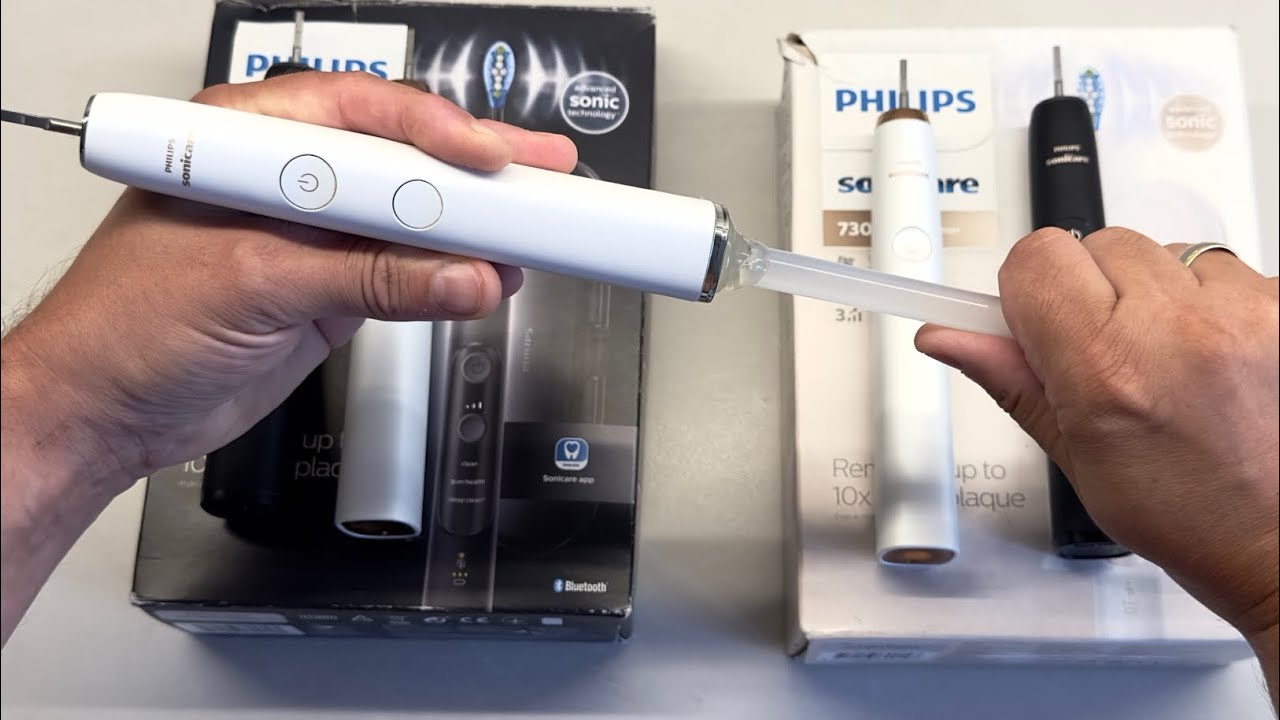
Fix Philips Sonicare Toothbrush - loose tip or not vibrating appropriately. Philips sonicare 9000 Diamondclean,
wanton orchid
twin dew
Fortunately in EU you mostly do RMA through the company you bought the product f...
and then, there is both
- more pressure from the retail company
- more pressure from the consumer protection laws
so they can't fuck as much with it
though they also usually limit more their warranties explicitly to compensate (though EU also put pressure on that too)
 stray badger
tough owl
who is still good though?
stray badger
tough owl
who is still good though?
sapphire, seasonic, evga (still around... a bit), asrock is decent ig, fractal, thermalright
problem: most motherboard makers are not on that list
 gilded helm
We're able to do way more research now than 10 years ago, and go back each 10 years and the difference is that much more dramatic. Maybe in 10 years we're actually going to know companies well enough that we actually know the product managers and teams behind the best products within a company?
jagged snow
stray badger
sapphire, seasonic, evga (still around... a bit), asrock is decent ig, fractal, ...
Xfx is pretty solid too
High-ish RMA rates but they're doing good stuff with their cards and customer support is good
stray badger
Oh yeah, a lot of gpu makers for amd are neat
 sharp oasis
@jagged snow so far ive been running on linux for the past few days
and uh got a windows VM set up for things that use windows
could a game anticheat be fussy if ist a vm?
(D2 specifcially)
 edgy hazel
idk about that one but league and valorant won't work
sharp oasis
edgy hazel
idk about that one but league and valorant won't work
even with a vm
i mean i dont play val
idk hopefully bungie is not that aids
edgy hazel
nope Vanguard needs to start with the PC and is pretty deep in the kernel
sharp oasis
edgy hazel
nope Vanguard needs to start with the PC and is pretty deep in the kernel
son of a gun
gilded helm
Yep, Vanguard is basically a rootkit
sharp oasis
edgy hazel
nope Vanguard needs to start with the PC and is pretty deep in the kernel
could there be a way to trick vangaurd into thining it sharted with kernel
started*
edgy hazel
if you want to go and try to trick an anticheat sure. What could go wrong
jagged snow
sharp oasis
(D2 specifcially)
Yes, very much so
sharp oasis
edgy hazel
if you want to go and try to trick an anticheat sure. What could go wrong
i dont play val so
i lose nothing
sharp oasis
jagged snow
Yes, very much so
shit
stray badger
Dualboot
tough owl
You can get around using a windows vm for games like these but it’s typically not worth the performance hit
jagged snow
I have questions
 languid gulch
probably should retire the 3770K
 cobalt ivy
i just retired my 3770k after 14 yrs of service to my gaming :V
pure karma
jagged snow
I have questions
not the only one anymore huh
jagged snow
Nope, just took a restart 🤷♂️
languid gulch
so i saw a mini mutant on the road, & i had to do some googling to figure out what it was
looked similar to this

turns out it's a niche thing where someone imports a Suzuki or Subaru utility van from Japan, & then modifies the crap out of it
tough owl
jagged snow
I have questions
Firefox has been acting weird to me for the past couple of days too
jagged snow
Odd, a restart fixed it
tough owl
firefox has hung for like 30-60 second upon exiting it
jagged snow
Oh strange, haven't observed that behavior on windows or mobile
tough owl
I dont really know why but I also dont really care since im closing the app
maiden coyote
stray badger
Dualboot
This might not even work
Vanguard will not let you play unless secure boot is enabled. Buy a Xbox or ps5 if you want to play that game
maiden coyote
cobalt ivy
i just retired my 3770k after 14 yrs of service to my gaming :V
Going to retire a 2700k for a n100. Moores law is pretty much dead when it comes to cpus
Would a geomagnetic storm cause the battery in a new vehicle to die? I've had to tow 5 >2020 vehicles due to battery issues today.. and the day isn't over yet
jagged snow
Chance is slim to none
Higher likelihood that gps being wonky is causing bad estimates so people miss chargers
maiden coyote
These are gas vehicles.
jagged snow
That's weird
Should be essentially no effect
It really only has an effect on grid-scale electrical systems
maiden coyote
I wouldn't think so either. But every call I've done today has been new cars, they went some where.. then their battery was dead
jagged snow
That's super odd
maiden coyote
I find it unusual too. Maybe I'm just unlucky this weekend
If they send me another call for a new vehicle with electronic shifter and a locked up electric parking break I'm going to lose it.
jagged snow
That's another thing that I'm really not a fan of being electrified
Why does my drive selecter need to be a dial instead of a physical connection to the tranny?
Really wouldn't be a big deal if there was a mechanical neutral override somewhere
jagged snow
The new f150s are without though iirc
maiden coyote
Chevy, nissan, vw, BMW dont
Ford is hit and miss..
The one I had today had one.. but it wouldn't release because the battery was dead. So there's still some electronic shit
jagged snow
What's the point of even having it then 
tough owl
mine is a pull handle but i dont know if its electronic or not
maiden coyote
But it would say it was not in park on the dash lol
This is more than I want to spend on memory.. but I really want reliable memory


 jagged snow
That's a new one
stray badger
maiden coyote
Vanguard will not let you play unless secure boot is enabled. Buy a Xbox or ps5 ...
oh yeah, i forgot about that
minor problem: their games are not on console
solution: dont play their games
maiden coyote
I didn't realize it's pc only
I guess their so serious about their anticheat that the closed system that is consoles isn't good enough.
tough owl
thats how you know its not really to ban cheaters
sharp oasis
@jagged snow mind if I ask where ethe virtualization setting for gigabyte x570 bioses might be.
I just wanna make sure its on.
stray badger
tough owl
thats how you know its not really to ban cheaters <:hehe:382483156542029825>
to be fair, Valorant on console would kinda suck
would be like CS on console
jagged snow
sharp oasis
<@715580537926058135> mind if I ask where ethe virtualization setting for gigaby...
Not sure... what are the options?
tough owl
amd vtd i believe
jagged snow
Great summary of recent technological developments from ars
The generative AI push of the last two years has largely been defined by two kinds of stories: tech companies’ unrelenting sprint to cram as many AI features into as many of their products as possible as quickly as possible and backlash from artists, authors, programmers, and any other human whose efforts have been used to train these AI models.
twin dew
So NASA removed the ~~matrix ~~ reinforcement from a composite heatshield material and now wonder why the fucker is spalling in use?
https://arstechnica.com/space/2024/05/nasa-confirms-independent-review-of-orion-heat-shield-issue/
www.smithsonianmag.com/air-space-magazine/tried-and-trusted-180972977/

Ars Technica
"There's no guarantee that changing the trajectory is the answer," says the Artemis II pilot.
When even the original pre-Apollo testing for pure AVCOAT bricks in ground tests showed they spalled?
From AVCOAT filled fiberclass honeycomb to just pure AVCOAT with no matrix reinforcement material...
And now the fuckers are possibly trying to normalize this and put humans on next test flight, with no changes to the heatshield:

Because the next capsule is already produced and mated, so just demating it from the service module would cause years delay.
Which would time out the next SLS.
The heatshield is supposed to ablate away somewhat evenly, not spall in chunks.
And the 2014 heat shield test with Delta IV Heavy used the old style monolithic honeycomb + AVCOAT shield, and that was later changed to different one for cost reasons...
And first tested on that Artemis I flight.
languid gulch
i think the biggest issue with all of this is that they waited too long. all the old guys who worked on apollo are dead & took their secrets with them, & the current bureaucracy refuses to take that into account. it's 100% going to get people killed
twin dew
(Also that 2014 test was nowhere the instantaneos or total energy of the real from moon re-entry)
Somewhere around 14% total and 40% instant.
languid gulch
it reminds me of the first shuttle flight, where the center elevon seized, & john young said that if he knew that, he would have punched out on ascent rather than risk reentry
sadly all this is coming to a head, & apparently nasa's going to need more blood on their hands because they've forgotten the old lessons
twin dew
Sunk cost fallacy, political pressure, get-there-itis, etc.
When the stuff for future flights with time limits from manufacturing were build way too early (solid rocket boosters), so those are timing out very near to planned launch dates.
languid gulch
& none of it has fallen under the "do it right" philosophy

If you'd like to consider joining the Patreon Sticker Team, Click Here!
👉 https://www.patreon.com/smartereveryday 👈
A big thanks to the Jim Way, Executive Director of the American Astronautical Society
for Inviting me to Speak: https://astronautical.org/
A big thanks to The University of Alabama in Huntsville for Hosting:
https://www.uah.edu...
this was 100% worth the entire watch for the current status of going to the moon
twin dew
The whole SLS program was mandated by politicians to use "same" components from same companies that produced hardware for Shuttle.
Just that everything was modified anyways for very high costs for SLS...
languid gulch
it made me realize that exactly nobody is properly preparing, & we're guaranteed to see someone die this time around
twin dew
But anyways, I have to go for now ->
languid gulch
have a good day 🙂
visual tree
Why didn't I hear about this before? https://youtu.be/1cUUfMeOijg?feature=shared

At the headquarters of Cloudflare, in San Francisco, there's a wall of lava lamps: the Entropy Wall. They're used to generate random numbers and keep a good bit of the internet secure: here's how.
Thanks to the team at Cloudflare - this is not a sponsored video, they just had interesting lava lamps! There's a technical rundown of the system on ...
 sand saddle
It’s not in use anymore afaik
visual tree
Send all the lava lamps to my home address
At least you can still find them on the shelves (not sure if they are still used like you mentioned)

Street view from May 2023
 rustic panther
It is a cool art piece anyway, so why not keep it around as such
 drifting yew
Hey everyone I have a kind of weird question for yall and I'm not 100% sure this is the right channel for it. But I was wondering if I could get some cpu temp readings from others who have a similar specced pc to mine while playing satisfactory. I have an an i9-13900k with a 4090 and 32gb 6200mhz ram and my cpu is consistently hitting mid to high 90s Celsius even when on low graphics. I have switched between low and ultra thinking maybe the added gpu requirement would help relieve the cpu a little but that was not the case lol. I'm curious if this is normal for others as well since this cpu does tend to run hot (even though I dont have near these temps in other games) or if I just need to bite the bullet and repaste. Thanks!
stray badger
Well, what cooler are you using?
sand saddle
drifting yew
Hey everyone I have a kind of weird question for yall and I'm not 100% sure this...
Sounds a bit high, but not unheard of for that cpu, you could undervolt the cpu
Cpu contact frame is also great. ~$10 Thermalright LGA1700 contact frame on amazon.
drifting yew
sand saddle
Sounds a bit high, but not unheard of for that cpu, you could undervolt the cpu
I actually just read about those and im about to order one. Im thinking I didnt get great contact all over this time around and read that a lot of people saw drops as much as 10c using one of them. And as for undervolting I've never done that before, as much crap as I have done with my pc I dont tend to mess with power at all lol
drifting yew
stray badger
Well, what cooler are you using?
CORSAIR iCUE Link H150i
sand saddle
Undervolting is safe, just need to find the point of no crashing(instability)
But it can’t harm the PC
drifting yew
Hmm Ill look more into it. I've heard a lot of people talking about it especially with the 13900k due to the heat but I've never seen much issue with my temps until now to care.
 abstract hawk
Any mouse recommendations? Looking for a decently light mouse with at least two side buttons, preferably below the 100$ mark
Wired isn’t a problem
jagged snow
I really like the g403
wanton orchid
I dont think 90 C is nice for intels
even though amd ryzen are supporting up 95 commonly now
it's not the same processing
jagged snow
It's not uncommon on the high end chips
tough owl
g305
wanton orchid
I'm running 7000/9000 series intel
which if going 90 are wearing down
they are only meant to get around 75 to 80
abstract hawk
jagged snow
I really like the g403
This is like my second pick , rn I’m looking at aerox/rival 5. Any reason I should pick the g403 over this?
tough owl
jagged snow
You edited 😭
 tough owl
that’s pretty cold
jagged snow
abstract hawk
This is like my second pick , rn I’m looking at aerox/rival 5. Any reason I shou...
g403 hero likely has a better sensor, but in that 40-50 dollar price bracket it mostly comes down to hand feel
None of those mice have tilt on the scroll wheel
abstract hawk
What is tilt on scroll wheel?
jagged snow
Some mice let you push the scroll wheel to the side, which gives you two extra mappable buttons
Typically used for side scrolling by default
abstract hawk
Huh
jagged snow
My previous mouse had it, I liked it
jagged snow
A lot of office focused mice or high end gaming mice
Also my EVGA mouse
Pretty hit or miss, not something people are usually looking to pay extra for
abstract hawk
Yeah. I am planning to use this mouse for office and gaming
So might be worth looking into
My hands get hot while gaming I kinda wanted to get the mesh mouse from steel series but I don’t know if it’s worth the 30 extra $
jagged snow
My g403 gets used for gaming wnd office work/software dev
wanton orchid
I like side wheel, because it can be binded on stuff like pings
jagged snow
abstract hawk
My hands get hot while gaming I kinda wanted to get the mesh mouse from steel se...
Just get a desk fan at that point
abstract hawk
I have negative desk space
jagged snow
Mesh mice are a nightmare to clean and not super comfortable for long periods
abstract hawk
jagged snow
Mesh mice are a nightmare to clean and not super comfortable for long periods
I was wondering about the cleaning aspect
Nobody likes nasty mice
tough owl
dust on the components 🥰
abstract hawk
I was thinking more like dead skin cells and grease
tough owl
isn’t dust majorly dead skin cells?
jagged snow
Yes, it will all collect in there and you'll spend hours with a toothpick trying to get it out
jagged snow
tough owl
isn’t dust majorly dead skin cells?
Depends where you live
But keyboard/mouse grime usually is
abstract hawk
abstract hawk
My hands get hot while gaming I kinda wanted to get the mesh mouse from steel se...
Especially if it’s a $ per gram removed. I just want something a bit lighter than like 150
abstract hawk
jagged snow
Yes, it will all collect in there and you'll spend hours with a toothpick trying...
Ew. Cleaning my keyboard is already enough for me. I’ll stick to normal then
jagged snow
@abstract hawk btw, worth mentioning that you'll want the g403 hero
If you're in the states anyways
It's on a huge discount on Amazon currently
abstract hawk
What’s the difference between?
Also damn you’re right almost 40%
Is there a g403 but with more side buttons it’s ok if not(especially if it’s not on sale)
jagged snow
The hero has a much better sensor
abstract hawk
Ah, awesome
tough owl
jagged snow
It's on a huge discount on Amazon currently
Is a constant sale still considered a sale
drifting yew
wanton orchid
I dont think 90 C is nice for intels
even though amd ryzen are supporting up 95 ...
I've read in a lot of places that 90-100 is normal for the 13900k but that doesnt sit right with me either seems too high for them.
jagged snow
tough owl
Is a constant sale still considered a sale
Not really considering that's the price I bought mine at two years ago
tough owl
Logitech is king of sale price constantly being lower than msrp
jagged snow
abstract hawk
Is there a g403 but with more side buttons it’s ok if not(especially if it’s not...
That would be the g604, runs over a hundred bucks
tough owl
mmo mouse
abstract hawk
(Tells you what I think about Lamborghini lol)
I’m gonna get the 403
44$ isn’t bad at all
tough owl
marketed to different kinds of people ¯_(ツ)_/¯
abstract hawk
It will be a massive upgrade
Question: is it 87 grams with or without the weight
Not that 10g matters tbh
tough owl
Likely without
abstract hawk
Thanks for all the help guys I appreciate it
twin dew
wanton orchid
I dont think 90 C is nice for intels
even though amd ryzen are supporting up 95 ...
Current ones should be good to the throttle limit (100C?) for multiple hours per day for 10 years.
Not sure if it was 4, 6 or 8 hours per day.
wanton orchid
twin dew
Current ones should be good to the throttle limit (100C?) for multiple hours per...
ok, so they definetly raised the line
at 80c my motherboard shutdown
twin dew
languid gulch
https://www.youtube.com/watch?v=OoJsPvmFixU
The "How many Starship refueling flights are needed" is unknown as this time is because even SpaceX still doesn't have idea how much Starship will be able to launch to orbit in that point in time.
And how much loss will there be over time etc.
Because they are doing hardware rich development, not the "classic" one.
But so much of the problems come from that "Orion cannot get to LLO" point, as the service module is way undersized.
Because Orion was originally supposed to launch on Ares I, and Ares V was supposed to launch a boost stage + lander.
So Orion isn't optimized to current plan, but it will be used anyways as the money was spent and that what they have.
And everything else is crafted to fit that, even when the plan is idiotic... (NRHO orbit rendevous etc.)
Ok, originally Orion is from time from before even the Ares I and V...
Just that the original Mars Orion was almost completely redesigned for Ares I and Moon mission, as the Ares I was anemic in lift capacity.
And the Ares I Orion hasn't been redesigned after.
Completely redesigned, just "tweaks" here and there.
languid gulch
yea, it's making way too many assumptions about some magical infrastructure that's supposed to exist & be nice & stable & ready for them
twin dew
The Lander stuff (SpaceX Starship etc.) is because the original lander was cancelled.
And new one got any funding way too late, and way too little for "standard" NASA way.
And so SpaceX was only one with anywhere near lowball offer enough.
2.9B, when the other option at that point was 10B, when there was only that 2.9B funding available from Congress.
Same with the suits.
Got funding multiple years too late.
languid gulch
it reminds me of the old soviet stuff, where it kinda looks ok on paper, but has 0 basis in reality
twin dew
But the weird thing is, I expect the Starship to work better once it is actually expected to work, than any of the NASA stuff.
Just that we are currently in early stages of that program.
As SpaceX works in completely different way than "old-space"
But NASA and Artemis is fucked because of politics, since before the current program even existed.
languid gulch
idk if the starship part is ever going to have people on it
that flip maneuver is fucking terrifying
for landing equipment on the moon & coming back, maybe
twin dew
Not used for Lunar Starship.
Point is that SpaceX gets one Lunar Starship to NRHO.
And then SLS launches Orion to rendevous with it.
Then Lunar Starship lands on moon.
And then later gets back to NRHO.
Where the people move back into Orion, and return to earth.
languid gulch
oh i meant landing on earth 🤣
twin dew
Yeah, but that is in far future for humans, if ever.
It is aspirational goal, SpaceX has said that hopefully after 100+ succesful landings without people.
Would you be afraid to take a ride in Falcon 9 first stage at this point?
For launch where it is planned to be recovered?
languid gulch
honestly, yea, still
now, if there was a detachable crew capsule that could land under chute, kinda like the blue origin thing, then maybe
now, if i was getting paid several million to do it, with a contract to also be paid to my family if i got killed? then maybe
twin dew
Last landing failure was in 2021.
With the current Block 5 at somewhere around 279 out of 283 (98.6%) success rate.
Including the early stuff.
Probably currently higher, as not sure how recent that number is.
languid gulch
i wish they put a g-meter on the first stage so we can see what the burns do
twin dew
But so much wrong in Artemis because this simple thing from having to use Orion as it was designed for completely different use:

And SLS is the clusterfuck it is because of Congressional mandate to NASA.
To keep the money rolling to same companies as Shuttle.
And then the other stuff doesn't have enough money as SLS is giant moneysink and Orion is big moneysink.
But redesigning either to be actually usable isn't on table because how much that would cost.
And dropping either isn't on table either, because of the sunk costs (and politics).
sand saddle
abstract hawk
Any mouse recommendations? Looking for a decently light mouse with at least two ...
VGN R1 Pro (Max) from aliexpress
It's a high end mouse
The popular mice are so overpriced
Darmoshark M3 Pro if you want big, though M3s Pro is smaller so just a decent alternative
abstract hawk
I heard about damoshark after I bought it lol
sand saddle
Zaopin Z2 if for some reason you want hotswap, also slightly ergo and has the 4k dongle, grips and extra skates included. A bit heavier compared to the others.
abstract hawk
Thanks though
sand saddle
abstract hawk
I heard about damoshark after I bought it lol
Can't you just return?
The aliexpress shit competes with mice 3x the cost.
So a $60 mouse from best buy is a $20 mouse from ali basically
The R1 pro (max) competes with superlight 2
sand saddle
jagged snow
<@425689002884988967> btw, worth mentioning that you'll want the g403 hero
I really don't see much point in recommending logitech mice at all. The aliexpress NORDIC 52840 chip and PAW3395 sensor mice are fucking bonkers rn.
All cost around $40-50 and compete with the superlight 2.
Ofc not all might come with the best build quality so I'd go with ones that have a decent amount of reviews on them.
abstract hawk
sand saddle
Can't you just return?
Hmm okay I’ll see what I can do
sand saddle
Idk, just find the cheapest seller with some reviews for the model you want.
abstract hawk
alr
jagged snow
sand saddle
I really don't see much point in recommending logitech mice at all. The aliexpre...
The logi mouse I recommended is $44
tough owl
I need to seriously consider aliexpress as a marketplace more often
tough owl
Is there anything I can buy to prevent sound from other rooms coming into my room via the air duct
tough owl
to the hardware store I go tomorrow after work then
gotta get some stuff to ship two hard drives too so that’s gonna be fun
jagged snow
Oof, shipping drives
tough owl
lots of bubble wrap and a decently large box?
tough owl
I don’t have any of that
 obtuse geyser
GPU recommendation / tech problems:
My GPU (5700XT) refuses to go into low power mode when my main screen is at full frequency, or when I connect additional screens. My setup is 1440p + side 1920x1200. The second screen is currently running off separate GPU (gs210), because I could't bear the noise. I want to run all screens from single gpu.
The problem doesn't seem to be based on total pixel count, as I can easily run 4k and it stays low power, nor on the available bandwidth, as I can run said 4k on 100Hz.
Yet, the only way to run two screens when connected to 5700XT was to run them both was at 1440p@30Hz + 1200p@45hz. Which is unacceptable.
If I go above that, or connect additional screen, the gpu mem clock goes from 200mhz to 1700, wattage from 9W to 40W and it starts spinning the fans every couple minutes (absolutely infuriating, because my pc has all fans off)
Trying to google if that issue is commonplace, and there are reviews claiming multi-monitor setups cause higher power draw for multiple cards. At the same time, when I asked folks around, they never have such problem.
Planning to upgrade to new GPU and looking for one that can support mutiple screens without blasting fans every five mins.
-> Gpu recommendations?
To sum up my research:
1x1440p@60Hz -> low power
1x1440p@120hz -> low power
1x1440p@144hz -> high power
1x1440p@60Hz + 1080p@60Hz -> high power
1x1440p@30hz + 1080p@45hz -> low power
1x4k@60hz -> low power
1x4k@100Hz -> low power
Pic of how low vs high power looks in radeon manager below.
 jagged snow
Yeah, well known quirk of rdna
obtuse geyser
Does that mean nvidia doesnt have said problem?
jagged snow
Your more pressing issue is that your vram is putting out so much heat that the fans need to spin up
That's the more unusual behavior
obtuse geyser
see the 10W vs 33W board power. on attached picture. I reckon 33W is more than passive airflow can take off.
obtuse geyser
Gigabyte 5700XT Aorus 8G. Stock fan curves, nothing touched.
jagged snow
Might just need to fiddle with your curves then
obtuse geyser
I think the card using 300% of base iddle power when connecting a side screen is the core issue to fix here
unless the curves allow me to turn fans off until 80C?
obtuse geyser
...wouldnt that cause fans to spin all the time?
wanton orchid
if you have not too bad setup
you can ask fans to ramp up slowly
so if you ask them to stay very low speed until 60C for instance, you will very much ease the annoyance
obtuse geyser
neither radeon software nor afterburner wont let me set fan speed below 33% so no dice.
The card has fan-stop. the fans never spin.
unless the problem with high memclock is happening, then they do after five mins, spin for 20 seconds then go to sleep again.
wanton orchid
why I think cooling industry have some brains still to get purred in ..
obtuse geyser
I lost my faith when I doscovered that on r270 the fan control routines are software/driver not hardware.
The fan didnt even start without driver running 🤣
wanton orchid
I think one of the reasons is because if you want stable temperatures/cooling watercooling is the way to go
but even watercooling market still have pretty stupid products
obtuse geyser
My setup is perfectly fine, as long as the card doesnt ramp memclock to 1700 for absolutely no reason.
obtuse geyser
I have a total of 2 fans spinning at 200rpm, and could actually have them off.
My cpu fan is off until 60+C
GPU fan doesnt spoin until 60C by design.
My psu fan doesnt spin either (I think it still works)
wanton orchid
So that stupid app stop busy spinning rendering
obtuse geyser
wanton orchid
what is the driver smoking
Desktop. one strong pot.
there is 0% gpu load. only thing happening is second screen being attached.
I don't think rendering a fullhd empty desktop needs additional 20W of power
wanton orchid
something is busy spinning
obtuse geyser
0% load.
obtuse geyser
Looks like driver problem with bump to 1700mhz, but no version from 4 years to now solved that. Or a hardware problem
wanton orchid
if what's busy spinning is hardware I'm done
obtuse geyser
Does other video card have this problem too? Or just particular model? whole brand?
wanton orchid
this would mean the gpu design is testing prototype tier
wanton orchid
obtuse geyser
Does other video card have this problem too? Or just particular model? whole bra...
particular models
and driver versions
Nvidia had them too recently
may be linked to windows 11 graphic driver handling changes
what os are you using ?
obtuse geyser
not likely. driver from 2019 has had the very same problem.
win10 2019H2 as well as newest edition both have the problem.
wanton orchid
wdym not likely
of-course new driver is not supposed introduce that kind of big issues
but some versions deals with it
obtuse geyser
tried several, none helped.
wanton orchid
I mean it was supposed to be fixed
jagged snow
obtuse geyser
My setup is perfectly fine, as long as the card doesnt ramp memclock to 1700 for...
It's not for no reason
obtuse geyser
I have installed the version that listed it as fixed and it did not fix anything
jagged snow
As far as I know there is no fix
obtuse geyser
Oh, I have found a harware fix.
jagged snow
The hardware design of those architectures meant that they couldn't handle pixel draw rates above some limit without clicking the memory up very aggressively
jagged snow
obtuse geyser
Oh, I have found a harware fix.
Other than changing refresh rate/resolution/color depth
obtuse geyser
jagged snow
The hardware design of those architectures meant that they couldn't handle pixel...
Don't think its rates. Or pixel count. 4k at 100hz has twice the rate and pixel count, yet does not trigger the issue
jagged snow
It becomes an issue when you split it into separate outputa
There's essentially no limit with a single monitor
wanton orchid
looks like missing multi screen gpu testing methodology in amd development book
obtuse geyser
jagged snow
Other than changing refresh rate/resolution/color depth
My hardware fix requires an old gs210 office gpu and an angle grinder.
Cut a notch to make it fit into pciex x1 slot. tape over unused connectors on spine. Connect extra screens.
But this disables resizable bar, because my mb cannot comprehend having two video cards.
obtuse geyser
jagged snow
There's essentially no limit with a single monitor
happens on 165hz with single screen too.
jagged snow
wanton orchid
looks like missing multi screen gpu testing methodology in amd development book
Yeah, something that got missed very early in the development process
jagged snow
obtuse geyser
happens on 165hz with single screen too.
Ah, good to know
wanton orchid
So basically, output buffer dispatch is fucked up
jagged snow
Something along those lines
obtuse geyser
should I look for usb 3.0 to hdmi adapters on amazon to 'fix' the issue?
jagged snow
I believe they fixed it with rdna3
obtuse geyser
Reviews list multi-monitor as still 30W 😕
 jagged snow
Huh
I believe nvidia has similar behavior as well, they just don't clock up so aggressively
obtuse geyser
according to same review, yes, they double iddle power draw with extra screens. My presumption would be this will cause them to overheat and spin fans too.
Any idea how to solve this conundrum?
I'd like to keep both screens on at comfortable 60Hz.
And get rid of second internal gpu to enable BAR
wanton orchid
obtuse geyser
according to same review, yes, they double iddle power draw with extra screens. ...
they had very bad issues with idle power rising up to 100W before multiple drivers fix
obtuse geyser
wanton orchid
they had very bad issues with idle power rising up to 100W before multiple drive...
eww.
If green company has the same problem as red company, then I may as well just pick any, preferably with 16G of ram
Wonder if the point at which card starts clocking up is the same for all models or if there is a difference. Got to max 45hz@Full hd + 30hz at Qhd before it started yanking clocks up.
obtuse geyser
Going back to reserach:
Who here has multiple screens hooked up, and has or has not the problem with card not downclocking fully? Screen size/hz + gpu make?
(you may need to go into gpu driver utility or launch hardware monitor to see if draws more than 10-15W and if the fans are spinning up periodically. If I just made you aware of problem you didn't know you had, I'm sorry)
stray badger
I will find out if the 7900 GRE does that under mesa drivers sometime soon
stray badger
by sometime soon i mean quite some time
i gotta wait for the parts, then for the next monitor, then to actually build and setup the thing
languid gulch
i still love my 6800XT/1440p UW setup
twin dew
jagged snow
Yeah, well known quirk of rdna
Nvidia has AFAIK had similar "problems".
@obtuse geyser
Just the case where the monitor combination causes more VRAM accesses than the idle clocks can handle.
And there isn't any midpoint clocks before the full VRAM speed.
Ah, sorry, was talked later in the conversation.
Running 2x 1080@144 on RX6600 and VRAM doesn't clock down from 1740MHz, for 16-17W GPU idle power.
VDDIO using 7.5W and VDDCI_MEM using 5W. (Memory related, chips and memory controller)
VDDCR_SOC at 1W and VDDCR_GFX at 0.5W. (GPU related)
When I switch both to 60Hz, the memory clocks go to average of 10MHz, and total power drops to 4-5W.
Both at 100Hz still idles, even one at 120Hz doesn't idle memory.
So probably that there isn't enough downtime between the accesses for rendering the frames when the refresh rate is high with multiple monitors. (Race to idle).
And might get the same with single monitor once refresh rate hits high enough value.
As in 120+60 didn't idle, 100+100 did idle.
And I'm using 10bit colors and freesync for both monitors, might be relevant to exact numbers.
languid gulch
when i was on my 6600XT, it didn't like when my monitors were at their native 75Hz/144Hz, so i had to drop them to 60/120 to stop the occasional flickering
twin dew
That was probably cable problem.
languid gulch
was on DP for one, hdmi for the other
twin dew
Switching between uncompressed and compressed modes on DisplayPort when the cable is marginal for the settings.
For the uncompressed mode.
languid gulch
using the same cables now, & my 6800XT is fine running them at 75/144
twin dew
The tranceiver quality etc. and contact quality come into play too.
You might now be just above the problem point.
Or crosstalk in the GPU PCB causing enough degradation of signal when combined with the marginal cable etc.
languid gulch
it did kinda start to feel like i was pushing the 6600XT a bit too much in those days
edgy hazel
Nothing better than starting the week with a ticket of someone absolutely demolishing the screen of their brand new laptop on their first day of work...
stray badger
Nice
jagged snow
I truly do question how some people made it to a professional environment
pure karma
well if there isent education for the domain offered you cant expect professionals in a professional environment
edgy hazel
pure karma
well if there isent education for the domain offered you cant expect professiona...
No type of workshop, training or schooling prepares you for the difficult job of not having your USB-C connector between keyboard and screen when closing the laptop
jagged snow
That just takes common sense
@fallow cloud in that price bracket, you're probably better off going with last gen hardware
jagged snow
What marketplaces do you prefer to buy from?
maiden coyote
I was looking at getting a 4060... but meh
jagged snow
I definitely wouldn't
They're wildly overpriced
Solid cards if you can find them on a really good deal
maiden coyote
I'm better off getting an amd gpu and forgetting about using the nuc for ai
 dire igloo
Used Nvidia could be an option
maiden coyote
I've got a 2080ti.. but if I got the 4060 ti 16gb that would let me run larger models..
jagged snow
AMD supposedly has some solid neural performance improvements in the pipeline on both the software and hardware sides, but I wouldnh't bet on them closing that gap anytime soon
maiden coyote
if you want ai, nivida is your only option right now.
maiden coyote
it only has 11gb of vram.
 fallow cloud
how much u need
jagged snow
By the way, I'd recommend buying two more fans for your case if you haven't already
The single fan that comes stock will cause you problems
Do you want to use this for anything other than gaming?
maiden coyote
fallow cloud
how much u need
all of it more memory is better LLM's eat vram.. The 2080 ti is fast, and it preforms really well with those kinds of workloads.
Anyway, sorry to hijack helping someone with pc stuff.
jagged snow
Man, your regional pricing is rough
I forgot that only amazon.com is whitelisted
Now I have to redo that
twin dew
And even that shouldn't be, but it is some Discord/Bot wide thing that mods cannot override.
jagged snow
I'd recommend any used 5800x or 5800x3d that you can find for under 200€(Like this www.ebay.es/itm/296423551955)
Pair it with a quality kit of ddr4 3600, this corsair kit should be solid. You could likely find a better deal if you didn't want rgb www.amazon.es/Corsair-Vengeance-2x16GB-PC4-28800-Optimized/dp/B082DGZJ9C/ref=sr_1_7
Any quality b550 board that you can find for under 100€(This board should be solid bwww.amazon.es/Gigabyte-Technology-B550M-AORUS-Elite/dp/B08BN8VD23/ref=sr_1_3)
@dire igloo or several others are more up to date on drives than I, so they can probably give you a better reccomendation there. Your cpu cooler is a solid pick, no need to change that.
@fallow cloud see above ^
dire igloo
jagged snow
I'd recommend any used 5800x or 5800x3d that you can find for under 200€(Like th...
ironically, Corsair DDR4 isn't quality DDR4, their binning is pretty bad - that said, DDR4 at those speeds is all over the place anyway, so just get the cheapest
jagged snow
Yeah, 3600 is pretty hit and miss for whatever reason
dire igloo
idk about the rest of the stuff or the context here, but it sounds like a Satisfactory PC
jagged snow
You'll usually be alright getting rated xmp out of it there 🤷♂️
dire igloo
jagged snow
Yeah, 3600 is pretty hit and miss for whatever reason
only if you want to do manual OC - for XMP, they're all pretty much the same
fallow cloud
i wouldnt go am4 honestly
maiden coyote
b-die or whatever the craze was is pretty hard to find now too. I don't even think it's made anymore.
jagged snow
fallow cloud
i wouldnt go am4 honestly
Why's that?
dire igloo
probably EOL platform
jagged snow
You're getting a lot more performance at a significantly cheaper price than your 7500f setup
dire igloo
@fallow cloud did you write about your build requirements anywhere?
jagged snow
No, and already bought a bunch of parts
dire igloo
jagged snow
You're getting a lot more performance at a significantly cheaper price than your...
as long as cache doesn't matter, 5800X3D = 7600 = 7500F
5800X is out
jagged snow
5800x is the same price as most of the others currently
maiden coyote
AM4 is still solid. it's EOL, but cpu's don't really advance the way they used to.. something that's 4 years old is still perfectly useable.
Also am4 ryzen 3000 and newer should have rebar support.
dire igloo
Ryzen 3000 had 4-core CCX, 5000 brought 8-core CCX. so unless you like cross-CCX latency, I'd skip 3000 series - and 3600 is basically 5500 which is barely better than a 12100F
maiden coyote
but if they've already bought the motherboard and cpu.. might as well use it if they're not willing or can't return it.
jagged snow
I absolutely would not go with ryzen 3000 at this point
jagged snow
maiden coyote
but if they've already bought the motherboard and cpu.. might as well use it if ...
Nope, bought gpu, case, and ssd
oh and PSU
Unfortunately, not picks I'd reccomend for any of them
List for reference https://es.pcpartpicker.com/list/syHZyg
Part List - AMD Ryzen 5 7500F, Radeon RX 6600, Aerocool Bolt Mini Glass MicroATX Mini Tower
dire igloo
oh holy fuckin shit
jagged snow
Yeah
dire igloo
why does the worst stuff have to be the already owned stuff?
maiden coyote
my SO is pretty happy with her 3600x. if I was building a new system or didn't already have the cpu I would've gone with 5000 series. sometimes you have to use what you've got.
it's an upgrade from her intel 7700.
dire igloo
jagged snow
Nope, bought gpu, case, and ssd
any of them returnable?
maiden coyote
goodram D:
jagged snow
dire igloo
any of them returnable?
@fallow cloud?
But yeah, case is bad, psu is not the best, ssd is terrible, 6600 is not a super good choice
And no reason was given to go matx
fallow cloud
yea
maiden coyote
so you're building a medium-end rig with low end shit.
If you want to reuse the gpu, that's understandable. even the case. I'd really recommend at least getting a better ssd, and psu.
obtuse geyser
jagged snow
I'd recommend any used 5800x or 5800x3d that you can find for under 200€(Like th...
5800X3D may or may not run 3600 ram, its a hit and miss with dice lottery. Mine refuses to do 3600. So don't overspend on better ram, 3200 with good timings may be better deal (and can often run 3600 too)
jagged snow
What board do you have?
obtuse geyser
stray badger
I will find out if the 7900 GRE does that under mesa drivers sometime soon
Damn you, I didn't know 7900 GRE existed, and its almost the price of 7800xt here... What model you have/recommend?
Waiting for results of those screen tests.
obtuse geyser
jagged snow
What board do you have?
me? The same that my ryzen 3600 used when running same ram at 3600mhz (cpu swap), so cpu mem controller problem.
jagged snow
Interesting
obtuse geyser
not really. the chip is rated 3200mhz like ryzen3600, so anything above is the silicon lottery for the soc chiplet, and I rolled low on mine.
jagged snow
Either way, 3600 is so cheap nowadays that there's not much reason to avoid it
twin dew
What VDIMM and VSOC voltages were used with the 5800X3D when it couldn't do 3600MT/s DRAM speed?
obtuse geyser
twin dew
What VDIMM and VSOC voltages were used with the 5800X3D when it couldn't do 3600...
Standard. rising them did not improve anything, could not boot.
Ryzen 3600 in same board on stock settings did 3600 on ram no prob.
twin dew
There aren't standard voltages above 3200MT/s.
VDIMM always depends on the XMP.
And the VSOC depends on MB, BIOS-version and DRAM speed set.
When on Auto.
obtuse geyser
All I'm saying, if one chip can do 3600mhz on stock voltage and the other cannot boot, with no other parts and setting changed, the issue must stem from the chip (soc part). I did not pursue overvolting the soc too high because I don't want to generate extra heat. With very large cache having lower ram speed should not matter for 5800x3d
twin dew
And with 3000 and 5000 series Ryzens, everything above 3200MT/s is OC.
Just that 3600MT/s should be doable on (almost) all chips by AMD:s marketing.
jagged snow
And by prevailing experience
twin dew
Yup.
jagged snow
I don't know of anyone else that has been completely unable to get it working
twin dew
obtuse geyser
All I'm saying, if one chip can do 3600mhz on stock voltage and the other cannot...
"Stock voltage" still doesn't exist for 3600MT/s RAM speed...
Which is why I was asking.
And in most cases even "3200MT/s" specced RAM only works to 2133MT/s or like on all defaults, without XMP, which also almost always raises the VDIMM from the stock for DDR4.
maiden coyote
could've also just been that cpu didn't like his memory?
twin dew
Same IOD in 3000-series and 5000-series multichip AMD CPUs.
Exact same chip design on same process.
maiden coyote
So one chip is fine with the same memory and settings and the other isn't. xmp set to default 3600 mt/s profile
twin dew
Not sure if set to XMP, or just tried to set frequency without XMP...
maiden coyote
The only time I've had it not work was with a 1600af.. and it turned out one of the modules were damaged
3600 wouldn't boot.. 3200 ran fine until it didn't. then it was crashing at 2133
obtuse geyser
Mine worked fine on 3600mhz CL16 1.36V on one chip (ryzen 3600) but would not boot with same settings on 5800X3D. Nothing on ram side I could change, 3400 didn't boot either.
Currently running 3200Mhz CL14, works stable.
Did not pursue further tuning as hard-restting cmos and having to redo all mb settings is no fun.
twin dew
Either you got very crappy roll in silicon lottery for the IOD, or there was something going wrong with the BIOS or AGESA version in use.
obtuse geyser
I updated bios to newest before dropping in new cpu, so only cpu has changed between tests. Low roll for SoC on new cpu is my conclusion.
charred pewter
😦
mine has been rock solid stable at stock bios .... i didnt try playing with any oc ... maybe i should, but ... ehhhhhh
i had once thought i had flakey ram ... it was doing unpredictable things too, changing speeds around not seeming to help, until it did, then didnt ......... turns out it was the actual leads on the motherboard to the ram slots. one lead was 'scuffed' by the cpu heatsink mount peg 😛
maiden coyote
https://pcpartpicker.com/list/sGKQbL hm. might go with a different ssd
Part List - AMD Ryzen 5 5600X
cpu cooler could be better too. but that's about the only thing that'll fit in a 2U chassis.
this is for a future satisfactory dedi. I might be better off going with the 5600G for this build because I think satisfactory needs dx support to launch the server.
edgy hazel
maiden coyote
cpu cooler could be better too. but that's about the only thing that'll fit in a...

 maiden coyote
no
edgy hazel
oh cmon
maiden coyote
no water in my rack
It's not worth the chance of a leak to me, I'd rather have the cpu throttle under an all core load that likely won't happen unless I rent out the server to several people
tough owl
It likely never will if you have an adequate air cooler

Dynatron A24 heatsink and fan supports AMD Processors, Socket AM4. It is made with aluminum stacked fins with HCC (Heatpipe Contact CPU) technology. The double ball bearing fan is PWM controlled to adjust to the 2U server cooling needs.
dire igloo
maiden coyote
cpu cooler could be better too. but that's about the only thing that'll fit in a...
how about AXP120?
P3 is low end QLC, low speed and low endurance, avoid it.
For US market, VP4300 Lite is the best deal rn - high performance (MAP1602 + YMTC 232L TLC) and only a few dollars more than P3
jagged snow
Technically the wrong channel, but I'll awnser it here
Firstly, what cpu are you using, and how much memory do you have?
edgy hazel
this should really go into #1038092680493801533
jagged snow
Probably best to post there, yes
 dense locust
Oh sorry. Well thanks for taking the time anyways 🙏🏼 I'll post it there again
edgy hazel
dense locust
Oh sorry. Well thanks for taking the time anyways 🙏🏼 I'll post it there again


 jagged snow
Made it 5 years, can't complain too much
edgy hazel
electrical tape will prolly do aswell
jagged snow
That'll be the temp solution until I can solder a new one
stray badger
obtuse geyser
Damn you, I didn't know 7900 GRE existed, and its almost the price of 7800xt her...
Sapphire pulse is cheap and very good
cobalt ivy
exuse me i detected hawking radiation coming out of ur space ship. send me ur stuff ill hold onto it for you
jagged snow
OoenAi announced their new model today
Gpt4o
Also solid move from valve
https://twitter.com/SteamDB/status/1789070453962588600
Steam is now refunding Ghost of Tsushima for people in affected countries.

 Twitter
·
wanton orchid
Twitter
·
wanton orchid
Valve balls >>> all
gilded helm
jagged snow
Gpt4o
Ars' description of it nuts. I sort of expected this sort of rapid progress, yet it's still surprising to see it anyway.
stray badger
jagged snow
Also solid move from valve
https://twitter.com/SteamDB/status/178907045396258860...
valve is probably demanding money back from Sony too
jagged snow
Oh I'm sure
 winged valley
why is it always 0x000001
What would 1x000001 mean?
I've never seen anything other than 0x######## before
jagged snow
winged valley
why is it always 0x000001
I really need context for that
jagged snow
0x just denotes that it's hexadecimal
winged valley
So this is incorrect then
 winged valley
You really went out of your way to type all 16 bits lmao
languid gulch
i wonder if Steam can do those refunds & then file it as a loss on their taxes, & that's why they're willing to do it
stray badger
They are almost certainly making sony pay due to sony essentially scamming people
tough owl
I don’t know how steams payment system works but it might just be a deduction on what they payout to Sony and we’re like Ayo we didn’t send you X amount of dollars because X amount of people refunded
languid gulch
i mean, it'd be nice if it actually kicked sony in the teeth
winged valley
If it's anything like The Day Before, they made Sony pay
My understanding of Valve's refund policies is that it's less about Valve not wanting to give you the money, and more about Valve not wanting to deal with the developer
mental oriole
winged valley
it's always 0x###, why not 1x### or even Fx###?
It comes from telling the compiler the number is hexadecimal, and the zero is "needed" otherwise the notation would be considered a variable name.
Also 0b (binary), and 0o (octal), same principle as hex notation.
maiden coyote
I'm sure valve took their money straight out of sony's bank account.
twin dew
maiden coyote
I'm sure valve took their money straight out of sony's bank account.
No, just "removed" money from the Valve side ledger about how much to pay Sony, as Steam proceeds are only paid once per month.
So same thing, but just Valve/Steam "account", not actual bank account.
So probably negative now and will stay for months.
languid gulch
i hope sony's other distributors are taking a 2nd look at their contracts to see if they wanna still deal with them
sharp oasis
@twin dew I need to hunt the PCIe lane count documentation for zen 3 I remember us chatting about some misconceptions I had about how it worked a wile ago. By chance do you have any of the documents that I linked/ you linked at that time it appears I cannot find them again.
I seems to have memory of it saying 20+2 (the +2 being motherboard dependant for ryzen 5k series)
And then the 4 for chipset
twin dew
24 total, with 4x meant for chipset.
How AMD says it:

So 16+4+4, with 16+4 usable after chipset.
But that isn't Zen3 thing, it is IOD thing.
As Ryzen 3000:s are Zen 2 and Ryzen 5000:s are Zen 3 for the CCD chips, but use same IOD (for the multidies, the APUs are different)
sharp oasis
Yesb
I must have a issue in my memory somewhere
I remember seeing a 20+2 (mother board dependant) somewhere on AMD's site
twin dew
And the chip could be used without chipset in theory, and the chipset links used for other stuff.
And the 4x could be split into 2x PCIe and 2x SATA for that.
sharp oasis
But can't find it.
twin dew
Pobably from this or like, where the chipset links are listed multiple times.

This is better:

Still mixing stuff, but the link count on left of the CPU is right.
Just that the 4x going right is included in left too still.
But not included twice.
twin dew
No, just that the 16x+4x+4x, the middle 4x can also do 2x PCIe + 2x SATA.
twin dew
Like the 16x can do 8x+8x split or 4x+4x+4x+4x split.
sharp oasis
Still 24. But different ways to allocate
twin dew
Yes.
Same as the chipset on right.
Has 8x+4x+4x where the 4x:s can do 4x SATA instead of 4x PCIe each.
So you can do MB with either from chipset:
16 PCIe lanes
12 PCIe lanes, 4 SATA ports
8 PCIe lanes, 8 SATA ports
With the X570 chipset.
And the IOD in 3000 and 5000 series Ryzen multichips can do 24 PCIe or 22 PCIe and 2 SATA.
sharp oasis
Yeeee
Thanks a ton.
I knew I was not misremembering
I didn't know the full picture
twin dew
With Intel chipsets, you have to choose between PCIe, SATA and USB 3 for the chipset "ports".
With some being able to only do one of them, some able to do either of two.
sharp oasis
There's a mobo that doesn't have a chipset and just feeds all lanes direct
Iirc A300 or so
twin dew
Yes, you can use AMD CPUs as SOCs, which is the point of the SATA port support and so many USB ports in the CPU itself.
Without chipset.
sharp oasis
Ye
That's pretty cool tbh
Thanks for the help. I couldn't find the spec sheets for some reason
I thought it was something to do with chipset only using 2 lanes rather then 4
twin dew
Z170 chipset, so old, but same is still true for newer ones, just couldn't find similar pic quickly:
 sharp oasis
And just having gen4 to chipset and then gen 3 from chipset
And have lanes share bandwith
twin dew
So in each column, you have to select one function in that Intel chipset.
twin dew
So with 3000 or 5000 series chiplet Ryzen in SOC mode, you can have either 16+4+4 PCIe with 0 SATA, or 16+2+4 PCIe with 2 SATA.
And the blocks of PCIe can be split further.
The 16x up to 4x4x4x4x and the 4x and 2x up to 1x:s
sharp oasis
Yeah
Is there any practical use for those two leftover lanes
Or do they just get to sit unused.
twin dew
What leftover lanes?
twin dew
And left 2x of PCIe free like I said.
That can also be used as 1x+1x.
twin dew
So you could have 16x PCIe, then two 1x slots of PCIe, 4x M2. slot and 2x SATA.
sharp oasis
Yeah
twin dew
And in theory the chipset doesn't have to be 4x connected.
But that would more severely limit the bandwidth of the chipset connected devices.
But the chipset is just another PCIe device to the CPU.
Which is why X670 chipset is possible, which is just two daisy-chained B650 chips.
At least AFAIK AMD just uses standard PCIe, where as Intel has modified version.
twin dew
So now the rumors are that RDNA4 will come out as Navi 48 and Navi 44.
So seems Navi 41, 42 and possibly 43 were cancelled and replaces with "crash" redesign 48...
To probably go from chiplets to monolithic, as the interposer production is all going to the huge AI accelerators.
edgy hazel

The only thing helldivers didn't do was put a "YOU'RE FIGHTING FOR THE BAD GUYS" on the loading screen
twin dew
Large percentage of the population is blind to "not in your face" politics etc.
Same thing with Homelander being thought as Good Guy, and Star Trek and Star Wars being non-political etc. XD
edgy hazel
Ah yes. Star Trek. The most apolitical show ever
twin dew
Yup...
mental oriole
twin dew
Large percentage of the population is blind to "not in your face" politics etc.
...

twin dew
Not noticing that Rage Against the Machine makes songs with politically motivated lyrics 🤣
The amount of US right-wing politicians playing "Born in the U.S.A." in rallies is just weird...
But seems that that crowd only listens to the chorus, not rest of the lyrics.
gilded helm
Nirvana insulting their own fans with their lyrics and the fans still just eat it up without realizing it
dire igloo
edgy hazel
<:tired_jace:807645447258243072>
Speaking of HD2: apparently it's still unavailable in the non-PSN countries despite Sony discontinuing the update
twin dew
Yes, they even added those EU countries with no PSN to the block list.
edgy hazel
I don't get it. Almost all PlayStation games have done really well on steam how can they fuck it up this badly now
twin dew
Because someone at Exec level in the main Japan HQ got the bright idea that PC versions should be mandated to use PSN too...
dire igloo
Managers thinking they know best
twin dew
The release time of the "backsies" tweet shows it was Japan HQ, not USA or EU.
pure karma
dire igloo
Speaking of HD2: apparently it's still unavailable in the non-PSN countries desp...
because obviously they are just gonna add it back later once no one cares anymore
edgy hazel
It's like my mom always said, what the fuck is wrong with you
dire igloo
ADHD.
Easy question, next.
 fluid haven
maiden coyote
fluid haven
maiden coyote
Damn, so having a nvme drive drops the gpu to x8.. might as well put a second nvme drive for 1x8 + 2x4
 twin dew
Depends on MB and M.2 slot used.
maiden coyote
Not sure of the board.. I'll try to find it
maiden coyote
It's a nuc 9. Reddit says the nvme slots don't go directly to the cpu.
twin dew
With NUC type thing, the model would be the info needed.
So Intel NUC 9 some submodel?
maiden coyote
I'd really like to know why it won't go to sleep more than anything. it's a NUC9i5QNX
twin dew
Page 17 has the block diagram for Extreme/Pro models:
https://www.intel.com/content/dam/support/us/en/documents/intel-nuc/nuc-kits/NUC9QN_TechProdSpec.pdf
So three M.2 slots, one through CPU, dropping the main slot size, two through chipset.
maiden coyote
alright so the two on the compute module itself must go through the chipset, and the one on the pcie riser go to the cpu
twin dew
So the compute module slots are through chipset, and the baseboard one is CPU.
Stated on page 14 and 15.
maiden coyote
that's a little bit more confusing than stating the cpu has this many lanes.
twin dew
16x from CPU, going and going to 16x PCIe slot, 4x PCIe slot and 4x M.2 slot on the baseboard.
And if the 4x or M.2 on baseboard aren't used, the 16x slot gets 16x, if either or both are in use it is 8x+4x+4x instead.

So the 16x slot electrical width changes with MUX chip depending on the other slots being in use.
Page 36 end:
 maiden coyote
that makes sense.
maiden coyote
then you've got diagrams like these for consumer stuff
 twin dew
So the left-side M.2 is either 4x PCIe + 0 SATA or 2x PCIe + 2 SATA.
And the right-side PCIe slots are either 4x + 1x, or 2x+1x+1x+1x.
maiden coyote
I suppose it still shows what's going where. I liked the intel one better
 twin dew
maiden coyote
I suppose it still shows what's going where. I liked the intel one better
twin dew
maiden coyote
I suppose it still shows what's going where. I liked the intel one better
That is just location chart, doesn't tell what can be used at same time.
maiden coyote
it doesn't, and it might not say anywhere in the manual either.. it's msi
twin dew
What MB?
maiden coyote
perhaps it does. what I'm seeing is on most consumer boards, you get one x16 and possibly a x4 for storage depending on the cpu/board. the rest of the IO is switched through the chipset.
 twin dew
The whole point why chipsets still exist, to get more IO without excessive extra size for CPU and CPU socket.
We have already gone from no CPU PCIe to 16x, to 16x+4x, to 16x+4x+4x (+chipset link).
For consumer CPUs.
tough owl
It’s not normal for a windows pc to be under its base cpu frequency when in a program right?
twin dew
Depends what the actual load is.
twin dew
Not load as program, the load as actual CPU utilization.
tough owl
12%-18%
sand saddle
twin dew
Depends on MB and M.2 slot used.
Any pcie 5x16 and 5x4 M.2, no?
twin dew
sand saddle
Any pcie 5x16 and 5x4 M.2, no?
What?
Not all PCIe 16x slots can support bifurbication to multiple smaller "slots".
sand saddle
I meant board with both of those slots being gen5
twin dew
Yes?
All AM5 E-suffix chipset boards.
sand saddle
And don’t they all drop down to x8 once the nvme slot is being used?
twin dew
With non-E you need to have one or the other.
With E you need to have both.
Only difference.
No?
As the CPU has 16x + 4x + 4x (+ 4x for chipset) lanes of PCIe 5.0.
sand saddle
Okay, my bad
twin dew
And that mandatory PCIe 5.0 on MB is part of why the AM5 boards were/are more expensive.
As doing even single lane of PCIe 5.0 needs more expensive PCB material than used on MBs before.
sand saddle
Have seen a lot of boards dropping the gpu down to x8 when the nvme slot is occupied.
twin dew
Wouldn't even work with AM4 APUs, as those only had 8+4 (+4 for chipset).
Except the 5000G:s think had 16x+4(+4)
Don't know/remember when Intel added the +4x for NVMe SSD into their CPUs.
winged valley
maiden coyote
Heavily depends on mobo and slot configuration in uefi
Some mobos let you specify cpu or chipset lanes for those
tough owl
what is the point of this. you can already search photos with words but now you can use speech to text! wccftech.com/google-photos-ask-photos-will-allow-you-to-search-images-using-voice-and-text-prompts/
obtuse geyser
Might be to search certain images while holding phone and your other hand is busy.
obtuse geyser
oh, skimmed over the google-photos part. still, some people would I guess?
edgy hazel
laying on your bed going through your porn via voice commands is the hardest shit I've ever heard
obtuse geyser
hardest indeed 🤣
[cue g-photos saying "I dod not understand that, can you repeat"]
visual tree
Damn kids ringing on my doorbell and escaping....
I need a drone with a flamethrower
edgy hazel
 visual tree

First security system with integrated real-time face recognition & game-changing paintball marking for preventive and reactive safety! Best security system for home!
Kickstarter:
www.kickstarter.com/projects/paintcam/paintcam-face-recognition-and-paintball-firing-security-system
#homesecurity #securitysystem #security #kickstarte...
@mental oriole Asked ChatGPT to generate a python code for the paintball turret, hope you can test if it works
 edgy hazel
mental oriole
Why the guard in the fire_paintball...
edgy hazel
mental oriole
Why the guard in the fire_paintball...
it's paintball. You need safety equipment
visual tree
Someone just added my phone number to a crypto club group on whatsapp.
Reported the group and left immediately....
I find it interesting how almost all members are from the same country. Someone must have shared my phone number (or sold it)....
Wouldn't be surprised if it's my college, they added alumni members to some random group without permission
maiden coyote
I ordered a 4060. my options were gigabyte and asus.. given the great press asus is getting recently.. I went with gigashit.
This is about the only card that'll fit in my nuc and offer decent performance at 1080/1440p
 jagged snow
Oh dang, that thing's short
charred pewter
a low profile 4060 ?!
languid gulch
maybe reviewers should measure GPU's physical volume, maybe that'll push them to make them smaller
jagged snow
At the end of the day, performance is king
And the majority of consumers are willing to deal with an extra-large gpu if it means it runs their game at 250fps instead of 180
obtuse geyser
twin dew
Running 2x 1080@144 on RX6600 and VRAM doesn't clock down from 1740MHz, for 16-1...
I think I solved my 'fans keep spinning up' problem.
Kind of.
One screen (1920x1200) set to 59hz, main 1440p set to 50hz, clocks remain low. (oh, and changed driver to 21.4.1 whql. Too tired to check if nwest driver works with these settings or not)
This setup is acceptable for daily working.
Now I'm looking for a way to automatically change the refresh rate when a game starts (120-165 preferred) and getting it back down to 50 on exit. No options inside games for that(?). I swear old titles had an HZ dropdown next to resolution. Or is there a tool to change refresh rate when gaming?
jagged snow
There is a tool to do it with hotkeys
obtuse geyser
name?
jagged snow
It's called HRC(Hotkey Resolution Changer)
obtuse geyser
The options will be explored 👍
sand saddle
obtuse geyser
I think I solved my 'fans keep spinning up' problem.
Kind of.
One screen (1920x1...
Couldn’t you just try undervolting? Making the low power state a bit faster so it wouldn’t mind staying there on idle.
maiden coyote
... Why can't we just go back to windows 7?
So in order for windows 11 to put the computer to sleep, you have to have it set to turn your fucking monitor off too. otherwise it won't go to sleep.
jagged snow
What do you mean by that?
maiden coyote
If you set your display to never turn off, and your sleep time to whenever, windows 11 will never sleep.
pure karma
that and if your storage isent compatible for sleep mode
charred pewter
people going back to windows 10 😄
jagged snow
maiden coyote
If you set your display to never turn off, and your sleep time to whenever, wi...
That's odd
 sage pier
update for baldur: I can only get 10mb/s downloading stuff now can I sue my isp for false advertising?
speedtest still says 940 for some reason though
pure karma
Cpu could be at play but if not than yea probably
jagged snow
Speedtest is usually rather accurate
sage pier
pure karma
Cpu could be at play but if not than yea probably
my 5500 shouldn't be bottlenecking it could it?
even on the multi in speedtest I get 600
pure karma
jagged snow
Speedtest is usually rather accurate
wouldn't they be able to mess whit what triggers a limiter or something
jagged snow
Yes
pure karma
then wouldent it be likely they are enabling some kind of limiter for downloads
obtuse geyser
sand saddle
Couldn’t you just try undervolting? Making the low power state a bit faster so i...
Don't want to play with the clocks/voltages, especially if I didn't install radeon control app in the first place.
sage pier
They also do some shady shit like you having to dig to the deep depths of their website to get a price plan that doesn't lock you into a contract for 1-5 years
obtuse geyser
obtuse geyser
Don't want to play with the clocks/voltages, especially if I didn't install rade...
Buuut, I hacked together a way to run programs at normal refresh rate while keeping desktop at 50hz that doesnt trigger fans.
get nircmd utility, drop in system32.
drop below bat in system 32 (replace 120 with your high refresh and 50 with the iddle refresh rates)
START /wait "" %1
PAUSE
nircmd setdisplay 2560 1440 32 50```
Create shortcut to `"refresh.bat" steam://rungameid/1113120`
Grab icon from steam cache folder `C:\Program Files (x86)\Steam\steam\games`
Use shortcut to run game. It will switch your screen to 120hz, start the game, and after exiting you press space for it to return original low refresh.
All this hacky-hacky to fix video card manufacturers b***, yay.please excusate me, while I redo several game shortcuts now.
sage pier
update I can get 20-30 but its cutting in and out
now its on 10
again
update 700kb/s
what the fuck
sage pier
I'm so stupid
obtuse geyser
do tell us
sage pier
I'm downloading it on my external ssd
and its at 100%
no wonder
But when I download something on my m.2 its still only 20
obtuse geyser
good to hear we figured it out
sage pier
mb/s
obtuse geyser
uh, steam is telling me 'no internet connection'. maybe servers are down?
sage pier
obtuse geyser
uh, steam is telling me 'no internet connection'. maybe servers are down?
downloading beamng currently
no problems
obtuse geyser
 sage pier
interesting
obtuse geyser
yeah, downdetector spiking red as of now
sage pier
I'm at 99% and it stopped telling me the mb/s
jagged snow
Tuesday steam maintineance
Every week everyone freaks out, and it's always the same thing
obtuse geyser
never had that happen before.
they don't roll their servers in and out?
I'm sure they have more than one. Even I could configure that.
sage pier
It is at 100% still installing I swear if the steam servers crash at 100% I'm refunding this game
jagged snow
obtuse geyser
they don't roll their servers in and out?
Nope, everything goes down at some point on tuesday
It'll take games that use steam services offline too
jagged snow
obtuse geyser
they don't roll their servers in and out?
It's simpler to do it all at once 🤷♂️
obtuse geyser
sage pier
It is at 100% still installing I swear if the steam servers crash at 100% I'm re...
It will just pause until servers come back
jagged snow
Downtime is usually <10 mins
sage pier
obtuse geyser
It will just pause until servers come back
ah ok
obtuse geyser
jagged snow
It's simpler to do it all at once 🤷♂️
Disrupting service for milion people system that has constant 24/7 usage? Thats just wrong.
sage pier
It downloaded then the servers went down for me XD
obtuse geyser
you broke them
sage pier
nuh uh
tough owl
jagged snow
Every week everyone freaks out, and it's always the same thing <:hehe:3824831565...
i love the weekly panic
sage pier
beamng did
tough owl
SK Hynix got raided by local authorities for fraud 🙃
sage pier
steam is back on for me
jagged snow
tough owl
SK Hynix got raided by local authorities for fraud 🙃
No way 💀
tough owl
GN news recap
maiden coyote
jagged snow
That's odd
it is.. I've had nothing but issues with it. I miss the windows aero and the transparency settings of windows 7 the most.
jagged snow
I'm actually a win11 fan
tough owl
 maiden coyote
blasphemy
jagged snow
It just works so well for what I need
It feels as close to 0-friction as I've ever experienced
pure karma
Windows is convinient for day to day reliable use linux is good for Maxing every last thing to perfection
i think at the end of the day thats the position both stand at
atleast for me thats what i see them as
jagged snow
I use Linux for some day to day use
That's part of why I love win11, I find wsl to be more convenient than a direct Linux boot
pure karma
im not saying it cant im just saying for a average person the added inconveniences from linux would likely push them away
like id be down to try out linux but i wouldent daily it unless i knew what i was getting into and had experience whit it allready
like i might give linux a shot this summer for the fun of it
sharp oasis
pure karma
im not saying it cant im just saying for a average person the added inconvenienc...
If they are an office user
Doubt it.
But gamers will have to find workarounds constantly
pure karma
depends the software they are ussing i guess yea
is the gaming support on Linux still that bad?
the answers i get are so all over the place
jagged snow
As long as you don't want to play anything with anticheat it's fine
But very little is supported natively, almost everything requires some sort of translation or vm
pure karma
more things to learn i guess
its not like schools teach any of this stuff even if your actively looking for it
atleast not around here
 wanton orchid
how to bomb your system :
oh fuck I'm starting to wonder how long would my system survive
sharp oasis
pure karma
is the gaming support on Linux still that bad?
nah ist pretty good
its just ANYTHING withc anticheat
the transalation layer is pretty good
pure karma
is that something that's hard to setup or is it fairly basic?
sharp oasis
pure karma
is that something that's hard to setup or is it fairly basic?
it comes with steam
Proton is built into steam
pure karma
so most the stuff on steam should work?
 rotund hamlet
as long as you don't install Steam from flatpak, you'll be fine
sand saddle
obtuse geyser
Don't want to play with the clocks/voltages, especially if I didn't install rade...
Msi afterburner. And it’s totally safe to do.
twin dew
sage pier
update for baldur: I can only get 10mb/s downloading stuff now can I sue my isp ...
Speedtest is by default to closest test center.
So often to ISPs own test server.
And just then tests your connection to ISPs internal network.
You can change the server and see if the speed drop is there once you go farther away, which would point that the ISP to general internet is bottlenecked.
Or it can be just that the source server is limited.
Also understand difference between 10MB/s (80Mb/s) and 10Mb/s.
Speedtest showing 940Mb/s is about 120MB/s.
1B(yte) is 8b(its).
languid gulch
yea ISPs love to conflate those
twin dew
And in Central Europe, that "mb/s" is somehow taken hold.
1 m(illi)b(it) / (per) s(econd would be pretty slow speed.
When trying to be M(ega)b(it).
Just 1 000 000 000 fold difference.
So 1Mb/s would be 1 000 000 000 mb/s. And 1MB/s would be 8 000 000 000 mb/s.
If working with 1000 fold SI prefixes and not 1024 fold binary prefixes.
languid gulch
so what makes hwinfo occasionally record wacky numbers?
twin dew
Probably because many interfaces they use to query those numbers are undocumented and have just been reverse-engineered.
And that has some corner cases that are wrong.
dire igloo
twin dew
And in Central Europe, that "mb/s" is somehow taken hold.
1 m(illi)b(it) / (per)...
Leaving aside the fact that bit as a unit cannot be subdivided, so millibit can't actually exist
languid gulch
decibit 🤣
twin dew
Yup, but in a way if sending one bit takes longer than second, then they somewhat make sense.
But more like would need to go seconds per bit instead.
languid gulch
twin dew
So 1Mb/s would be 1 000 000 000 mb/s. And 1MB/s would be 8 000 000 000 mb/s.
reminds me of the "british billion" vs "european billion"
languid gulch
 twin dew
But cannot know if the specific thing is error in the CPU insides for that, or just HWiNFO reading wrong, or just reading while value was changing.
mental oriole
languid gulch
Hot
twin dew
For example for shift-register type "memory", if you read it while it is being shifted, you easily get values that are binary multipliers of the actual value.
languid gulch
i just like seeing the occasional brain farts it has
at one point it insisted my 1700X had managed to get 4.5GHz on all cores
pure karma
yea its kinda fun trying to predict what will get a misread next like the time it said a 15W cpou was actively drawing 65W lol
edgy hazel
languid gulch
Weather forecast for this summer
dire igloo
Reminds me of this
 wanton orchid
the most annoying part of hwmonitor for me is the Intel power reading that is completely off
twin dew
Is it broken in HWiNFO too?
wanton orchid
reading from 1.2 to 2.5 W
I think it's confusing with V or temperature
170W cpu btw
100 times greater
I don't know why hwmonitor still wants to name info when it does not know shit about what it is
twin dew
AFAIK HWMonitor hasn't been recommended for many years anymore.
wanton orchid
what's the other solution