
#reddit broken Share layout
117 messages · Page 1 of 1 (latest)
 heady fern
 crisp quarry
original message:
Hello,
I have iOS 14.4.1 with Taurine jailbreak and Reddit app version 2024.20.0 installed.
I noticed an issue that it won’t let you copy the link of a Reddit post or comment under the Share sub menu. All the buttons in that menu won’t respond.
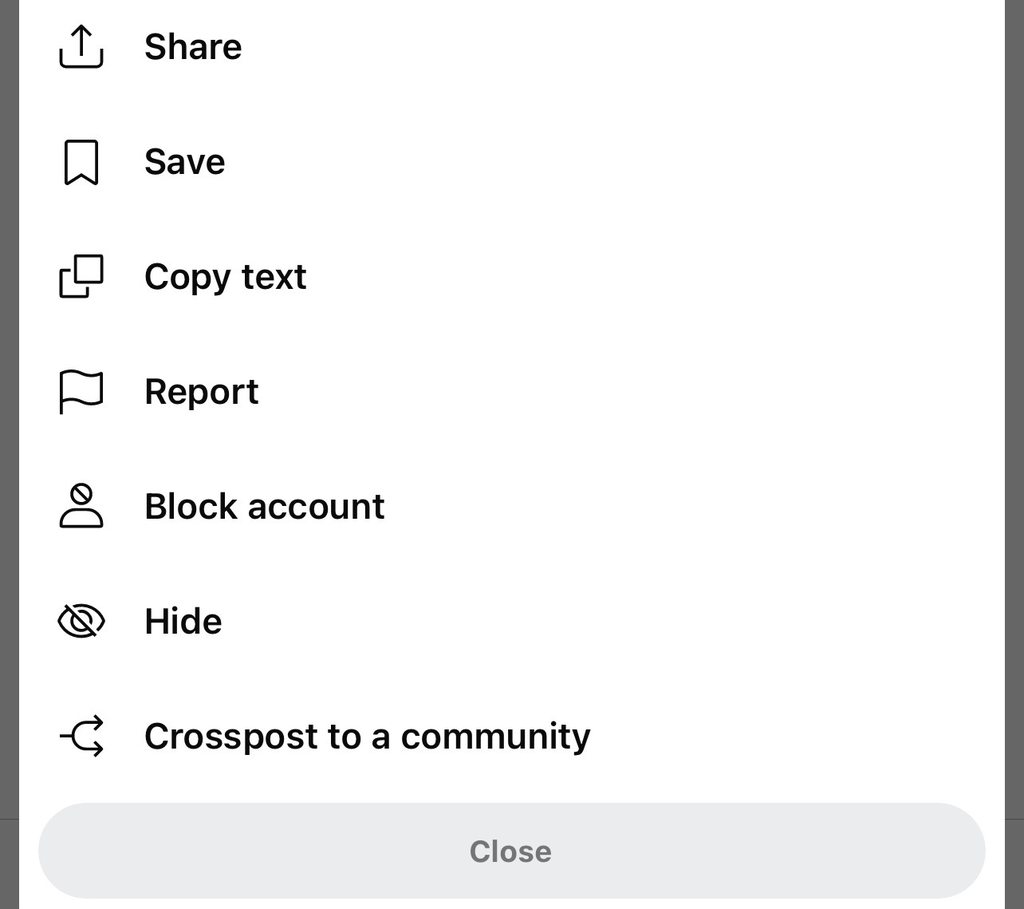
When you open it the first time/or when you back up/wipe the data and start over, it shows this share layout:
Which has text like share menu options, when you click on the first option Share, it then opens a secondary menu in which you can click Copy Link. This works for both posts and comments.
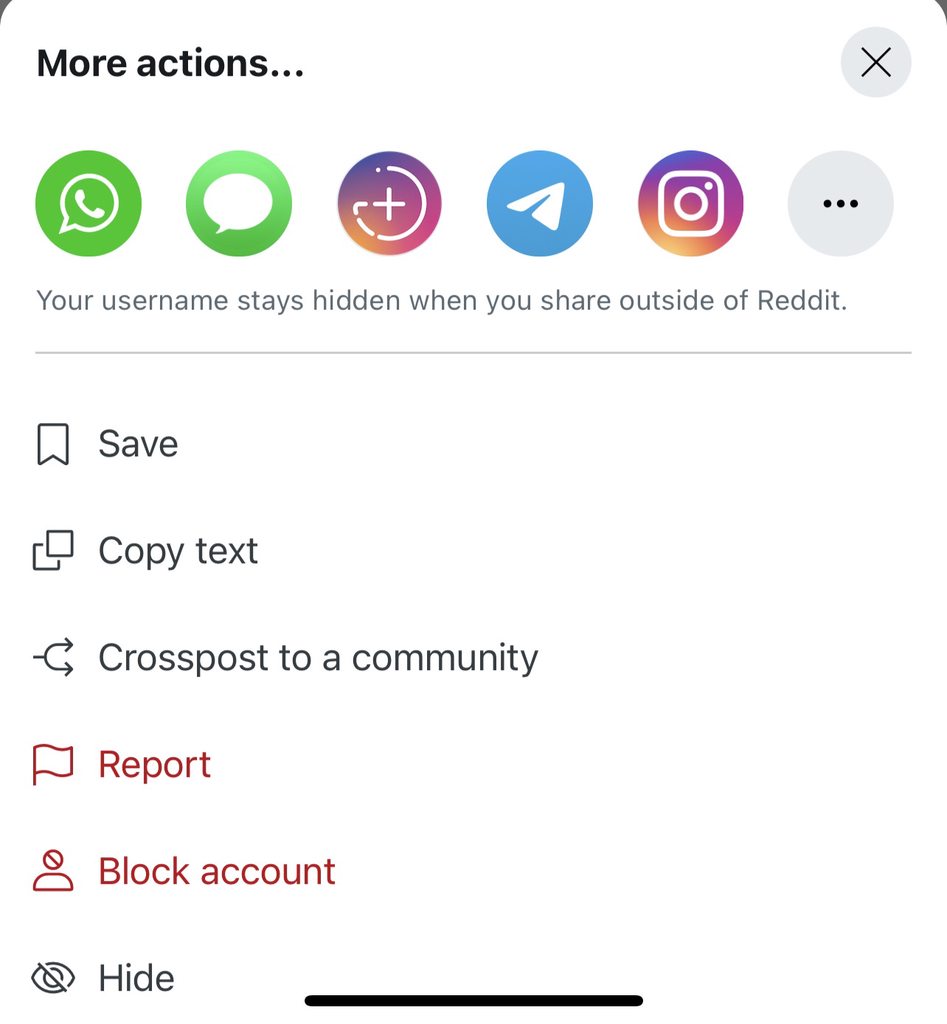
But when you open the Reddit app a second time, it changes it to this menu:
Which has these icon like share menu options, when you click the 3 dots, it then opens a secondary menu in which you can see again all options look like icon images, but none of them are responsive including the Copy Link.
Any idea what file or setting could make this difference when you run Reddit after the first time? I want the share menu to work every time and I don't want to wipe the data each time to fix it (that removes the history which is unwanted).
Any insights or suggestions would be appreciated.
Thanks!
 glacial geyser
W mod
glacial geyser
heady fern
what happens if you use [[choicy]] to disable tweaks for the app
does it work then?
 wide moonBOT
Choicy
Advanced Tweak Configuration!
 Powered by Canister
·
heady fern
glacial geyser
what happens if you use [[choicy]] to disable tweaks for the app
Powered by Canister
·
heady fern
glacial geyser
what happens if you use [[choicy]] to disable tweaks for the app
it doesn’t help, tried to launch the app twice without tweaks and the issue still happens
heady fern
well it’s the latest compatible reddit version for ios 14
glacial geyser
heady fern
well it’s the latest compatible reddit version for ios 14
ah
heady fern
most likely won’t be fixed or fixed in upper versions
the goal here is not to have reddit fix the bug
the goal is to be able to overcome this bug using jailbreak
through a file, through a patch, through a config
whatever that makes the difference when you run it the first time vs second time
glacial geyser
i mean you can ask on https://reddit.com/r/tweakbounty

Reddit
Have an idea for a tweak or theme? Looking for great ideas for your next project? /r/TweakBounty is the place for you! Come join us in our mission to bring iOS users and developers closer together.
heady fern
well yea but that’s not the point of asking in genius bar
if I wanted to ask that there I would have done that
glacial geyser
heady fern
well yea but that’s not the point of asking in genius bar
i mean there's not much we can do here then
either have someone fix it and or deal with it
or use another client
heady fern
there is something to do here - suggest what kind of file or setting could affect the share layout and how to possibly fool it so it keeps showing the first working layout
heady fern
glacial geyser
or use another client
that’s the only compatible client version for ios 14
glacial geyser
heady fern
there is something to do here - suggest what kind of file or setting could affec...
it doesn't really work like that
heady fern
glacial geyser
it doesn't really work like that
that’s exactly how it works. when I wipe off the data it works again
look dude I’m looking for help not for you to talk me out of it
heady fern
ok well let the other geniuses step inside to comment, if you don’t know the answer that’s fine
glacial geyser
you will get the same answer
you can't just change a file to fix a bug in the app
hence why tweaks exist
heady fern
what do you mean you can’t modify a file? ofcourse you can
glacial geyser
i didn't say that
heady fern
you can change a setting, you can modify a file, you can create a patch
don’t bullshit me
glacial geyser
yes, and modifying a file doesn't make a patch, you can't just open any file from there and add some code to fix it
i'm not bullshitting you
do you think when you open a file from this app you just get the raw code?
glacial geyser
[[flex]]?
wide moonBOT
FLEXing
Open FLEX anywhere!
 Powered by Canister
·
heady fern
Powered by Canister
·
heady fern
to show the fucking share layout
glacial geyser
wide moon
you mean this one right
cause there's two different things called flex annoyingly
that both do similar things
heady fern
 glacial geyser
so that's a yes
heady fern
this method for example when called will show some variation of this share layout
glacial geyser
so then make a tweak to call the method

 glacial geyser
so then figure it out
explain to me how making a tweak to call a method and figuring out the parameters of it is "modifying a file"
heady fern
I don’t know how to call them/patch the to make it show the original layout
when I call them as is, it opens a bogus layout
heady fern
glacial geyser
so then figure it out
explain to me how making a tweak to call a method and fig...
that’s the alternative if not patching the code, then what about the data when it’s wiped that makes it show the first layout
glacial geyser
then what about the data when it’s wiped that makes it show the first layout
just some weird issue with the app. i dont know what to tell you
heady fern
it’s not weird
it’s very consistent
there is a clear pattern wipe data the working layout shows
enter a second time the broken layout shows
wipe again, the working layout shows
that means something about the app files
heady fern
that causes it to go to the original layout
that’s not weird though why you call it weird?
such a dumb description
weird is when you don’t see a clear pattern
here there is a clear pattern
which means something can be done about it
glacial geyser
it's weird that the bug happens after something is done
it's not a dumb description because i'm saying that it's a weird issue for this specific thing to happen
heady fern
that’s not fucking weird, that’s normal software behavior!!!!
glacial geyser
the share button not working is normal behavior?
am I misunderstanding something?
heady fern
it’s weird cause you’re not smart enough to figure it out
heady fern
to me it’s not weird, it’s clear what’s happening. you wipe the data it works
glacial geyser
and then it stops working later? am i missing something
maybe i'm misunderstanding
heady fern
do you even have the app version to test it?
glacial geyser
I'm not on iOS 14
Well I have a device on iOS 14
But I don't feel like charging it and grabbing it
heady fern
doesn’t matter do you have apps manager
glacial geyser
yes
heady fern
you can take a backup
glacial geyser
i know
heady fern
then wipe the data
downgrade
to that version
that I have
and then see it with your own eyes
heady fern
well you’re saying that you misunderstanding the problem
so I’m giving you an a to see it yourself
so you can better understand
glacial geyser
that's not what i meant
because you said "that’s normal software behavior!!!!" and so i'm confused on what you meant by that
instead of just clarifying
so i said that maybe i was missing something
because i didn't know what you were referencing as normal behavior
heady fern
by normal I mean when you run the app the first time it does something that on a subsequent runs it shows the new layout so I’m saying what is it doing and how to revert it
heady fern
here is an example how modifying files can affect what the app UI is doing: https://www.reddit.com/r/SnapchatTweaks2/comments/mavdsr/solved_get_rid_of_snapchats_ridiculous_new_ui/
Reddit
Explore this post and more from the SnapchatTweaks2 community
heady fern
wiping the data doesn’t fix the problem. only restoring the specific data backup I have.
heady fern
Some friend was able to downgrade to 2023.35.0 to fix the issue, but for me it crashes or if I try to login into it, it fails. I’m going to stay in 2024.20.0 which has the issue, but I found some workaround for now: If you use the post header share menu - You can share to Messages and then copy the link. If it’s a comment you need to share the link, just save it, then open Apollo, go to saved and copy the link for top comment that you saved.