#futurerestore-help
1 messages · Page 252 of 1
 final atlas
 grim wren
Good
grim wren
Shouldn't
 safe lotus
would using a bad blob cause my iBSS issues
(not my ibs, unrelated)
I have two versions odyssey and uncover idk why

 safe lotus
probably explains all the bs I dealt with while jailbroken, but I'd pay money to go back

 lavish rain
is that from autotss
lavish rain
weird
not sure why it would save it for taurine and unc0ver’s generator, unless it just couldnt get the nonce from the device
safe lotus
my nonce according to tsssaver was taurine
so i've been using that
but my nonce is no longer that since messing up my ota update a few days ago
you can't delayed ota back to 15.1 can you 🤣
grim wren
nope, delayota is only for upgrading
 hazy jackal
Is updating to 15.1 from 14.8.1 on an iPhone 12 possible with blobs? (No jailbreak) Ive seen a lot of conflicting info
grim wren
hazy jackal
Is updating to 15.1 from 14.8.1 on an iPhone 12 possible with blobs? (No jailbre...
i dont think so
 silver bough
Decided that I would attempt the future restore on my iPhone 12 Pro today to go from 14.1 to 15.1.1. I am following the guide here: https://ios.cfw.guide/futurerestore/#notes
but I am going to disable Preserve Data (as I heard it could cause a problem and possibly fail. Just a couple of questions: 1. Are there issues using SEP 15.3.1? I read that people are waiting to confirm if the SEP 15.4b5 will work with 15.1.1. Not sure what the benefit would be to wait for SEP 15.4 confirmation. 2. I read somewhere that they performed a restore of ROOTFS before doing futurerestore, is there a need to do that? Could that break the nonce or generator?
Guide to using FutureRestore to restore your device
grim wren
silver bough
Decided that I would attempt the future restore on my iPhone 12 Pro today to go ...
15.3.1 sep shouldnt be a problem
if youre disabling --update you shouldnt need to rootfs
15.4b5 sep doesnt work apparently
silver bough
grim wren
if youre disabling --update you shouldnt need to rootfs
That is good to know. Figured that, but I wanted to make sure.
 stiff phoenix
so I am on a iPhone 7 Plus on 14.6 jailbroken using checkra1n trying to use futurerestore GUI to downgrade to 14.3 but, I need to set my generator so I used NewTerm and changed to 0x1111111111111111. But when I try to use FutureRestore it gives me an error saying it cannot put my device into Recovery Mode from Normal Mode. So after setting my generator on my phone I put my phone into Recovery Mode now it says it doesn't match my ApNonce on device.
not sure what to do from here so I thought it was better to ask for help :D
grim wren
send your blob file
safe lotus
oh shit, 14.8 set_nonce worked
but now its telling me segmentation fault running the same command as with set_nonce
just without it
 valid adder
Why are you not using dimentio
safe lotus
whomst
stiff phoenix
grim wren
send your blob file
grim wren
that blob file is oddly small
safe lotus
holy shit holy shit
days of work finally surmounting to something
- ipwndfu > langid
a. run command twice in a row
b. try new usb port and/or cable
c. use sudo - iBSS/IBEC error in futurerestore
a. reboot -> start over -> try again
b. try a different set of blobs/ipsw
c. use sudo with compiled futurerestore from gui - futurerestore device not found or segmentation fault
a. reboot ubuntu with device plugged in (for current state e.g., recovery mode)
if someone wants to take note of that
i need a fucking brewski now
Done: restoring succeeded!
wow wow weewow
grim wren
nice
 regal jolt
Does anyone how to fix 'can't init no device found' on Ubuntu?
grim wren
regal jolt
Does anyone how to fix 'can't init no device found' on Ubuntu?
#sudo tar xvf ~/usbmuxd.tar.xz -C /usr/sbin/
#sudo systemctl restart usbmuxd```either that or reboot into ubuntu with your device plugged in
regal jolt
thanks! looks like it fixed the issue
 sinful panther
Anyone know why my Ubuntu log file fills 16gb within 2min?
 vale ocean
hey, futurerestoring to 15.1, and i'm wondering if FaceID will break
A12
currently on 14.8
lavish rain
nope
vale ocean
so everything should work
lavish rain
you’re fine until 15.4 releases
grim wren
its only ios 14.x that it breaks
vale ocean
i'm still new to the whole SEP situation
lavish rain
then you’ll have to specify 15.3.1 and when that becomes unsigned faceid will break for good
vale ocean
so I have a backup from before I jb'd entirely from ios 13
can i restore that when I restore the phone
grim wren
yes
vale ocean
cool thanks
grim wren
just dont use --update
vale ocean
sorry for the stupid questions
grim wren
nah theyre not stupid
sinful panther
What version of Linux should I be using?
vale ocean
will this remove my supervision on the phone
its supervised when i used blech
mybloxx
grim wren
yes
vale ocean
cool thx
regal jolt
grim wren
```#curl -L https://cdn.discordapp.com/attachments/688124783400845336/9011688617...
it worked, thank you for help 🙂
 grim wren
regal jolt
it worked, thank you for help 🙂
grim wren
regal jolt
it worked, thank you for help 🙂
nice
safe lotus
well, i effed myself again. tried to go 14.8 -> 15.1 and now i'm stuck in recovery loop
APTicket mismatch
grim wren
did you use --update
safe lotus
no
safe lotus
I did reboot my phone when I was in 14.8 because I needed to restart the home process b.c. i picked the wrong backup
I have, can't find device
grim wren
did you try this
#curl -L https://cdn.discordapp.com/attachments/688124783400845336/901168861779488788/usbmuxd.tar.xz -o ~/usbmuxd.tar.xz
#sudo tar xvf ~/usbmuxd.tar.xz -C /usr/sbin/
#sudo systemctl restart usbmuxd
safe lotus
lol just remembered you sent that
trying now
ya no dice
ima try to reboot ubuntu like has worked in the past one sec
thank beyonce that worked
so to go to 15.1 now I have to do the ipwndfu -> futurerestore -> futurerestore
again
you can't delay ota to 15.1 without jailbreak right?
lavish rain
you can if on A13-
safe lotus
A11
grim wren
safe lotus
you can't delay ota to 15.1 without jailbreak right?
depends on your device and if youve futurerestored before
silver bough
Can I use Futurerestore for iPad mini 6 (A15)? I have BlobSaver and checked my 5.1 Blobs for iPad mini 6 and it shows they are valid. They have the Generator 0x1111111111111111 and AP Nonce and SEP nonce.
grim wren
what ios version are you on currently
silver bough
grim wren
what ios version are you on currently
Not sure if this is directed at me. But I am on IOS 15.0 now on iPad mini 6
grim wren
well you arent jailbroken currently so you cant set your nonce
so no you cant futurerestore unfortunately
safe lotus
wait, can you even futurestore 14.8 -> 15.1?
i want to be able to get there now while its "signed" for potential jb in the future
lavish rain
futurerestore doesnt care about signed versions
its all about whether or not you saved blobs
safe lotus
so any APTicket mismatches can be fixed with ipwndfu?
safe lotus
ya there is something wrong with my 15.1
i can't get past iBSS when I had no issues with 14.8
what do you think about redoing 14.8 -> don't reboot -> go straight into 15.1 with same APTicket? so i can bypass iBSS
feel free to answer "wouldn't hurt"
 grim wren
looks about normal
grim wren
safe lotus
what do you think about redoing 14.8 -> don't reboot -> go straight into 15.1 wi...
i dont think thats how it works
i think
vale ocean
" Near the end of the text, you should see the line Set nonce to [generator]"
grim wren
i mean theres only one way to find out if it didnt
vale ocean
alr
here goes
cya 14.8
i can downgrade right
i'd lose sep or at least face id
right
safe lotus
ya, wait 4Head. I guess I could jb 14.8 with checkra1n and do the OTA
because A11 right?
lavish rain
vale ocean
are you on unc0ver 14.8
safe lotus
no I just futurerestored to 14.8
lavish rain
not you
safe lotus
KEKW
lavish rain
the person i replied to
vale ocean
lavish rain
are you on unc0ver 14.8
yep
lavish rain
ah
vale ocean
the nonce for my blobs is from Taurine
lavish rain
yeah you cant set it with dimentio
vale ocean
lavish rain
yeah you cant set it with dimentio
oh
lavish rain
you have to set it from the unc0ver app
grim wren
vale ocean
how can i set it
in options theres a "generator" field, just paste your generator in there
then jb with that
lavish rain
yeah reboot, edit the generator, then rejb
vale ocean
rebooting now
safe lotus
is reddit down for anyone else? i can't get to /r/jailb..
grim wren
Nope, it's your end
vale ocean

i'd say in some areas probably
rejailbreaking rn
can I just restore after this?
since it would be set
Alright I got an error. That was fast
"ensure you selected the correct executable"
valid adder
Why would you ever use Reddit
safe lotus
😏
vale ocean
 sinful panther
Does anyone know why my Ubuntu usb would be filling completely with log files until it just fully crashes??
grim wren
sinful panther
Does anyone know why my Ubuntu usb would be filling completely with log files un...
Make a new usb maybe
sinful panther
@grim wren I have done that at least 12 times. It just keeps doing it. I have no clue what to do. I can’t even run Ubuntu long enough to get futurerestore up and running. Plus if it crashes over and over I’m honestly too afraid to do so
vale ocean
"SEP firmware is NOT being signed!"
What do I do about this now?
moving to #jailbreak
grim wren
vale ocean
"SEP firmware is NOT being signed!"
You're using the non beta futurerestore or you're on windows
grim wren
Make sure to enable beta in futurerestore gui settings if you're using that
silver bough
grim wren
so no you cant futurerestore unfortunately
Do you know if it is safe to use the 1.96 windows version of the futurestore gui? A14 14.0 to 15.1.1? I read that it is not supported, but I do see there is a windows version on github.
grim wren
Frgui version ≠ Futurerestore version
Windows Futurerestore is broken for anything above A9
So you're out of luck unless you get a mac or Linux machine
silver bough
grim wren
Windows Futurerestore is broken for anything above A9
No problem, I have VMware with MacOS on it.
Just wanted to check as windows would have been slightly easier.
grim wren
silver bough
No problem, I have VMware with MacOS on it.
That might not work very well but good luck

 bright hinge
Forgive my ignorance, using a manual baseband with futurerestore gui on an iPhone X, should I specify the baseband on the first time through when doing --use-pwndfu and --set-nonce, or only the second time through when actually doing the restore?
grim wren
bright hinge
Forgive my ignorance, using a manual baseband with futurerestore gui on an iPhon...
Why are you specifying baseband
Latest works fine?
bright hinge
grim wren
Why are you specifying baseband
I want service on 15.2 beta 1 futurerestore and this is the only lead I have https://www.reddit.com/r/jailbreak/comments/t5um18
reddit
10 votes and 23 comments so far on Reddit
bright hinge
bright hinge
Forgive my ignorance, using a manual baseband with futurerestore gui on an iPhon...
I only ask because I got a failed restore when using latest baseband when setting nonce, then using manual baseband when restoring. Now trying to use manual baseband when setting nonce I seem to always get "possibly invalid iBSS"
bright hinge
I do ```ipwndfu -p && ipwndfu --patch-sigchecks && ipwndfu --repair-heap
I got to 15.2 beta 1 once, but without service cause of the latest baseband
grim wren
Run futurerestore using --no-cache
As in add it in to your next run command
Say for example you have --use-pwndfu
Just add --no-cache next to it
bright hinge
would I need to use cmd line futurerestore for that instead of gui?
i don't see the option in gui
grim wren
You need command line for that
bright hinge
will do
grim wren
Guess froggey didnt update frgui for --no-cache
Either that or your version is out of date
grim wren
Frgui shows its version up the top
You can check futurerestores version by running it without any arguments and showing me a photo of near the top of its output
vale ocean
i get further but it fails at checking hashes
grim wren
vale ocean
i get further but it fails at checking hashes
Show
grim wren
Sounds like everything's going wrong for you tf

 daring glade
Hi, i need help with FR. After running the command, downloading the eps and baseband it keeps stuck on setting the device in recovery mode and later it shows "failed to set in recovery mode". Been looking in my libs and seems like the libirecovery3 isnt listed (thats why i thinked it was installed already). Theres another way to install it?.
grim wren
vale ocean
booting
Nice
grim wren
daring glade
Hi, i need help with FR. After running the command, downloading the eps and base...
Do you have irecovery-utils
 indigo meteor
vale ocean
it has finished, hydrate
indigo meteor
vale ocean
it has finished, hydrate
Why don't you use the OTA Delay method?
indigo meteor
Ok
daring glade
grim wren
Do you have irecovery-utils
It also doesnt shows in synaptic
grim wren
daring glade
It also doesnt shows in synaptic
sudo apt install irecovery-utils
 haughty quarry
was out for the day is updating to 15.1.1 with futurerestore working yet on A14 (stuck on recovery problem)
sinful panther
I’m still stuck trying to get a working version of Linux
haughty quarry
sinful panther
I’m still stuck trying to get a working version of Linux
ah okay
sinful panther
My Ubuntu just fills with 32 gb of log files and crashes within 10 min of boot
Nobody seems to know why
indigo meteor
haughty quarry
ah okay
Change Linux Mint
some say it's better than kali and ubuntu
haughty quarry
@indigo meteor are you still getting stuck in recovery
 fervent trellis
Does SEP matter on iPads or it just iPhones?
 short spade
SEP matters on iPads too
If they have an A7 or later
I don't think many iPads have Face ID though
fervent trellis
Does SEP dictact how far I can downgrade an A8 device?
It's an iPad Mini 4
fervent trellis
Crap
short spade
I think mini 4 runs 15?
fervent trellis
I don't want it to run 15
There's an old Pathfinder app I use that broke in iOS 15
Hopefully I can bring it down to iOS 14.3
You need to be jailbroken to set your APNonce for using FutureRestore.
You can't downgrade.
Even if you could you would be losing FaceID and Apple Pay.
A Kernel Exploit has been released, There's no jailbreak yet but there will be.
Hence why everyone is rushing to iOS 15.1/15.1.1 with DelayOTA or FutureRestore while they can.
F**K OFF BLOO!
valid adder

fervent trellis
All of us who have been hanging on to old iOS 14 jailbreaks moving up to 15.1 before DelayOTA ends or 15.4 releases and the 15.3.1 SEP gets unsigned.
short spade
They're fake
Also u0 works up to 14.5.1 on arm64e devices (A12/XS and newer) and 14.8 on A12-A13 (XS-11)
fervent trellis
Fake as fuck
short spade
Yep
When they show 15.1
Buttons aren't rounded
It's 14.x and older style
They just edited a plist
fervent trellis
A kernel exploit jailbreak is coming for iOS 15.1
But that video ain't it
 true canopy
If I have blobs can I updat if I’m iPhone 12 unjailbroken
grim wren
Depends on what version you're on currently
true canopy
Damn
grim wren
Because the delayOTA for 15.1 on A14 is broken as hell
true canopy
Yea apple fuxked it
grim wren
And since you can't jailbreak atm that's sort of your best bet
If you wanna get on a higher version
 bold pebble
iPhone 12 pro - JB on 14.3. Installed ubuntu on a computer. Installed futurerestore GUI. Installed FutureRestore. Select IPSW (15.1) and SHSH (15.1). Connect phone, hit trust. Set generator on phone. Start restore, phone enters recovery mode. Get error "Unable to place device into recovery mode from unknown mode". If I hit, "exit recovery", it says "cant init, no device found". I hook my phone back up to my windows computer and exit recovery mode with iMazing. Try again, same thing. Installed libmobiledevice drivers. Same issue. have googled around and found a few articles/reddit posts. No luck. Any ideas?
daring glade
bold pebble
iPhone 12 pro - JB on 14.3. Installed ubuntu on a computer. Installed futurerest...
I just had the same error with the same device lul. After trying plenty of times the easy fix for me whats running the FR command with su. Just that!
also the same version lmao
bold pebble
daring glade
I just had the same error with the same device lul. After trying plenty of times...
Well shit. I will give that a try then. lol I read that since the GUI isnt running FR as root, it doesnt have access to usbmux. But i guess if i run FR as root, that should fix the issue.
daring glade
bold pebble
Well shit. I will give that a try then. lol I read that since the GUI isnt runni...
Lmk if it worked
grim wren
bold pebble
iPhone 12 pro - JB on 14.3. Installed ubuntu on a computer. Installed futurerest...
did you try this
#curl -L https://cdn.discordapp.com/attachments/688124783400845336/901168861779488788/usbmuxd.tar.xz -o ~/usbmuxd.tar.xz
#sudo tar xvf ~/usbmuxd.tar.xz -C /usr/sbin/
#sudo systemctl restart usbmuxd
bold pebble
grim wren
did you try this
#curl -L https://cdn.discordapp.com/attachments/68812478340084...
hmm. I may not have done it right. I ma using discord on my windows computer and running the commands on the ubuntu box. I downloaded your file, then copied to a flash drive and then the ubuntu desktop. then opened terminal in that directory. I then ran your last two commands.
bold pebble
bold pebble
hmm. I may not have done it right. I ma using discord on my windows computer and...
Still getting the same error.
indigo meteor
bold pebble
Still getting the same error.
Try with linux mint bro
And install all lib

Tener jailbreak en un dispositivo A14.Tener tus shsh de ios 15.1.1Tener instalada alguna distro de preferencia que no diese problemas con checkra1n, como Puppy Linux https://puppylinux.com/ o Ubuntu https://ubuntu.com/download en sus ultimas versiones estables.LEER TODO HASTA EL FINAL AL MENOS UNA VEZ ANTES DE COMENZAREste proceso lo realicé a p...
as below
sinful panther
@indigo meteor were you able to successfully futurerestore?
indigo meteor
sinful panther
<@!617000450214068256> were you able to successfully futurerestore?
i got a bunch of failures yesterday on kali linux
sinful panther
Any reason for the failures?
indigo meteor
today i will try again with linux mint. a lot of people say it's good
iPhone 12 pro - JB on 14.3. Installed ubuntu on a computer. Installed futurerestore GUI. Installed FutureRestore. Select IPSW (15.1) and SHSH (15.1). Connect phone, hit trust. Set generator on phone. Start restore, phone enters recovery mode. Get error "Unable to place device into recovery mode from unknown mode". If I hit, "exit recovery", it says "cant init, no device found". I hook my phone back up to my windows computer and exit recovery mode with iMazing. Try again, same thing. Installed libmobiledevice drivers. Same issue. have googled around and found a few articles/reddit posts. No luck. Any ideas?
This
Same hin
bold pebble
daring glade
Lmk if it worked
others guy idea did not work. am trying this
indigo meteor
Ok im try it agian
indigo meteor
bold pebble
others guy idea did not work. am trying this
Good luck for you
 dry lodge
hey guys
i have an 11 pro max (14.2) and want to update to 15.1 using my saved blobs so i can wait for the new jailbreak. I understand that the last day to update is March 13th
but will this guide work for my device?
March 13th
Guide on updating using the Dallas tweak
or how do i use futurerestore for this? thanks
daring glade
dry lodge
but will this guide work for my device?
March 13th
Yes it will
dry lodge
thanks a lot
im guessing it would be best to wait till march 11th or 12th and then update right?
 dry lodge
great! ill setup a reminder for march 11th, at least i can be jailbroken till then haha
bold pebble
Manually doing it with terminal still did not work. Same error
bold pebble
daring glade
I just had the same error with the same device lul. After trying plenty of times...
When you ran as su, what was the command?
daring glade
sudo '/home/Elias/Desktop/futurerestore' -t '/home/Elias/Desktop/15.1.1.shsh2' --latest-sep --latest-baseband '/home/Elias/Desktop/iPhone13,4_15.1.1_19B81_Restore.ipsw'
Thats the exact command i used
for the locations of the futurerestore shsh and ipsw just drag and drop the file in to the terminal
bold pebble
i am doing the exact same thing and cannot get it to work lol what linux distro were you using?
daring glade
Latest ubuntu
bold pebble
did you install any additional drivers or anything? or did you just spin that up?
daring glade
I installed synaptic
and all the libraries required by checkra1n and futurerestore
Them connected the phone directly to the mobo
I tried 20 times to FR
always getting the same error "Unable to place device into recovery mode from unknown mode"
Them i just ran the command with sudo and tada!
It worked
All in my main device iPhone 12 Pro Max on 14.3 with 15.1.1 shsh
Also dont forget to turn off find my device
bold pebble
daring glade
and all the libraries required by checkra1n and futurerestore
I think this was my issue. I am past that part using the GUI now.
grim wren
sinful panther
I FIXED MY LINUX. WIN
Pog
grim wren
Bruh
sinful panther
Ok, now let’s start from the beginning. What do I need to make sure I do/download before I do this?
grim wren
Ipsw, blob, futurerestore, prayers
Optional: FuturerestoreGUI
I don't really see any necessary things to do before it
haughty quarry
bold pebble
iPhone 12 pro - JB on 14.3. Installed ubuntu on a computer. Installed futurerest...
ayo you got it to work on A14? linux? i’m stuck on recovery screen like everyone else
wrong person
@daring glade
sinful panther
Shouldnt I rootfs? @grim wren
haughty quarry
idk i don’t think you have to
grim wren
You only need to rootfs if you plan to use --update (do not use --update)
Especially if you're on an A12+ device
sinful panther
12pro
haughty quarry
using linux right
sinful panther
Yes
sinful panther
I’m backing up my phone currently
haughty quarry
did @daring glade succeed
sinful panther
How do you get back out of recovery?
haughty quarry
imazing exit restore button on a separate laptop
i would use exit restore command or exit restore on GUI but device isn’t seen when you’re on recovery screen
daring glade
haughty quarry
did <@!319989665375584256> succeed
Ye
 bold pebble
am now stuck at "device Apnonce does not match APTicket nonce" fml
sinful panther
@haughty quarry couldn’t I just boot back into windows to do this?
haughty quarry
you gotta make sure they match blobs
bold pebble
 obsidian ivy
whats running fr as root?
obsidian ivy
whats running fr as root?
Running future restore as the root user in a linux system
obsidian ivy
how do i do that?
haughty quarry
@sinful panther that would be a pain in the ass to keep going back in forth from linux to windows over and over wouldn’t it
obsidian ivy
i know the folder location but how do i sudo the program?
daring glade
obsidian ivy
how do i do that?
run the command with sudo
bold pebble
obsidian ivy
how do i do that?
#futurerestore-help message see how he added "sudo" in front of the command?
obsidian ivy
ohhh ty ty
 bold pebble
I was able to fix that by installing all of the package sources for futurerestore
haughty quarry
@indigo meteor is this on mint now? still failed
haughty quarry
bold pebble
I was able to fix that by installing all of the package sources for futurerestor...
on A14 linux?
daring glade
haughty quarry
on A14 linux?
Yes my g
haughty quarry
bro show me the way i was stuck on that for 14 hours 😂😂 then game up
@daring glade
gave*
daring glade
Install this external libs with synaptic:
libplist
libimobiledevice
libusbmuxd
libirecovery3
indigo meteor
Yes
daring glade
them run FR as root (the nightly build not FR gui)
haughty quarry
daring glade
Install this external libs with synaptic:
libplist
libimobiledevice
libusbmuxd
l...
keep the details comin buddy 😁
 daring glade
indigo meteor
Now now how to exit recovery
daring glade
indigo meteor
Now now how to exit recovery
change to windows and run some software to exit recovery mode
indigo meteor
Lol
daring glade
cant send the name :C
indigo meteor
What do it mean
indigo meteor
Not work
short spade
do not speak that name
indigo meteor
Lol
haughty quarry
on windows
indigo meteor
haughty quarry
has exit recovery button
Try it but not work
indigo meteor
haughty quarry
on windows
Haha
haughty quarry
does the button show up for you
daring glade
short spade
do not speak that name
yik
indigo meteor
Im try it again
grim wren
haughty quarry
is it plugged in and you see exit recovery button?
i think their linux is shooting itself in the foot and not detecting recovery devices properly
haughty quarry
if you see button but not working do volume up volume down and hold side lock button with phone plugged in
i don’t think imazing is on linux
sinful panther
@daring glade where do I get those lib files?
haughty quarry
@grim wren i was talking about the exit recovery on imazing on windows cause it gets stuck there on linux gui
grim wren
haughty quarry
<@!344291973030608897> i was talking about the exit recovery on imazing on windo...
o
daring glade
sinful panther
<@!319989665375584256> where do I get those lib files?
u need to install those libs using synaptic
haughty quarry
daring glade
u need to install those libs using synaptic
is that the only thing i need to do and that fixed a14 on linux for you or did you have to do more things than just that
daring glade
daring glade
I installed synaptic
this
haughty quarry
that’s it?
obsidian ivy
#ios #downgrade #iphone #ios15 #ios14 #futurerestoregui #checkm8
This video is a full guide on how to downgrade iOS 15 to iOS 14 unsigned with FutureRestore GUI Windows PC. In this guide we will fix futureRestore GUI error "can't init, no device found" that we encounter while downgrading from iOS 15 to 14. This method does not need an iOS 15 jai...
found a cool video a youtube
daring glade
haughty quarry
that’s it?
Ye, using FR not FRGui
haughty quarry
daring glade
Ye, using FR not FRGui
ah okay do you think gui will still work tho since it’s basically the same thing just a gui that does the work for you
daring glade
it should
haughty quarry
okay sounds good i’ll try in a little bit
i sign out of icloud and disable find my iphone ?
daring glade
I just disabled find my phone
indigo meteor
haughty quarry
okay sounds good i’ll try in a little bit
Ok im try again
haughty quarry
and use new term demiteo to set nonce my bad if i spelled wrong
sinful panther
@daring glade I can’t find libirecovery in synaptic
daring glade
sinful panther
<@!319989665375584256> I can’t find libirecovery in synaptic
I also didnt find it but it still worked without that lib lol
Um btw i also installed the checkra1n assets from https://checkra.in/linux

checkra1n
Jailbreak for iPhone 5s through iPhone X, iOS 12.0 and up
sinful panther
Even though I have iPhone 12? @daring glade
daring glade
sinful panther
Even though I have iPhone 12? <@!319989665375584256>
Ye
It worked for me so just try it
Dont install checkra1n just the assets
For anyone asking what i did:
sinful panther
How?
I see the paragraph but don’t know what to actually type in the terminal
@daring glade
haughty quarry
all hail kingjulianus for being the first person i see succeed on A14 Linux @daring glade
@daring glade you did it dual booted with windows or usb live boot
also can i preserve data or will/can it mess stuff up
grim wren
you will most likely/definitely bootloop if you preserve data
haughty quarry
okay thank you
daring glade
sinful panther
I see the paragraph but don’t know what to actually type in the terminal
Run only these lines
wget -O - https://assets.checkra.in/debian/archive.key | gpg --dearmor | sudo tee /usr/share/keyrings/checkra1n.gpg >/dev/null
echo 'deb [signed-by=/usr/share/keyrings/checkra1n.gpg] https://assets.checkra.in/debian /' | sudo tee /etc/apt/sources.list.d/checkra1n.list
sudo apt-get update
daring glade
haughty quarry
<@!319989665375584256> you did it dual booted with windows or usb live boot
Dual booted, latest ubuntu
daring glade
U can copy all and run it once
But dont install checkra1n
In other words, copy and paste only this
 sinful panther
It says done. I think that worked
daring glade
I download the latest from the website
Ubuntu
Ubuntu is an open source software operating system that runs from the desktop, to the cloud, to all your internet connected things.
Ubuntu 20.04.4 LTS
haughty quarry
do you think 21.10 with work still and wouldn’t this one be later than yours?
grim wren
21.10 should be fine
haughty quarry
okay thank you
sinful panther
Ok. Everything is downloaded. Now what should I do? I have GUI installed. Should I not use that?
@daring glade
haughty quarry
gui is basically the same but does the work for you and he said it should be fine to you
indigo meteor
haughty quarry
okay thank you
I didn't get the device not found error in recovery mode
grim wren
holy shit progress?
daring glade
haughty quarry
gui is basically the same but does the work for you and he said it should be fin...
I think i didnt worked for me cuz it didnt run as SU
grim wren
after all this time?
haughty quarry
me and shut on are on same boat 😂
indigo meteor
haughty quarry
you succeeded now finally or
it's getting to the extracing ipw
sinful panther
Ok. So I click beta check box and then click download futurerestore correct?
haughty quarry
how do u run gui as su
grim wren
sinful panther
Ok. So I click beta check box and then click download futurerestore correct?
correct
haughty quarry
sinful panther
Ok. So I click beta check box and then click download futurerestore correct?
yes
for A14 i think right
indigo meteor
grim wren
that means the exit recovery button will work for you now too
Hope
daring glade
Yes u need to run the beta version for a14 devices
grim wren
haughty quarry
how do u run gui as su
i assume add sudo to the beginning of the script thing
indigo meteor
haughty quarry
for A14 i think right
Yeb iP 12 iOS 14.3
sinful panther
Green light from the squad?
 haughty quarry
sinful panther
Green light from the squad?
haughty quarry
sinful panther
Green light from the squad?
yes you’re good
indigo meteor
 haughty quarry
so just to play it safe what is terminal commands for future restore i been using gui
indigo meteor
 grim wren
sinful panther
Green light from the squad?
grim wren
sinful panther
Green light from the squad?
give me a second im laughing my ass off at the aspect ratio of your screen currently
haughty quarry
isn’t it just a curved display lmao
sinful panther
Safe display mode lol
daring glade
indigo meteor
Thats it, enjoy 15.1 i guess
sinful panther
And curved
grim wren
haughty quarry
isn’t it just a curved display lmao
nah thats definitely not the aspect ratio of that monitor
indigo meteor
haughty quarry
isn’t it just a curved display lmao
Hey men
grim wren
i know because i have it
indigo meteor
Good luck for me
haughty quarry
what’s the command line for future restore i remember it has like -t -m -p and stuff in it
sinful panther
Leave like this?
 haughty quarry
yes
grim wren
sinful panther
Leave like this?
yes
daring glade
haughty quarry
what’s the command line for future restore i remember it has like -t -m -p and s...
sudo 'FR .deb path' -t 'shsh path' --latest-sep --latest-baseband 'ipsw path'
haughty quarry
thank you you’re the 🐐 @daring glade
indigo meteor
Looks like I already know the reason
sinful panther
I haven’t clicked start yet. Should I switch to terminal? Or does it now matter to me
grim wren
sinful panther
I haven’t clicked start yet. Should I switch to terminal? Or does it now matter ...
it will be a non fatal error if it fails
just go ahead with it for now
haughty quarry
you can try as far as i know gui does same thing as terminal just does all the work for you
grim wren
haughty quarry
you can try as far as i know gui does same thing as terminal just does all the w...
its just a wrapper that generates a command for the binary so idk
haughty quarry
🤷🏻♂️ lol
daring glade
For everyone asking what i did:
- Installed the latest ubuntu distro in my windows machine.
- Installed synaptic and the following libs: ibplist,libimobiledevice,libusbmuxd,libirecovery3 (make sure to install all related libs)
- Installed checkra1n assets (only assets not checkra1n)
- Download the latest branch of FR (https://nightly.link/m1stadev/futurerestore/workflows/ci/test)
- Set the generator on unc0ver
- Run FR as ROOT (sudo 'FR .deb path' -t 'shsh path' --latest-sep --latest-baseband 'ipsw path')
- Thats it
sinful panther
Oh boy. Unable to place device in recovery mode from unknown
grim wren
sinful panther
Oh boy. Unable to place device in recovery mode from unknown
here we go lol
indigo meteor
haughty quarry
🤷🏻♂️ lol
Use work in linux "
haughty quarry
what?
sinful panther
Do I click start again or go to windows and restart from scratch?
grim wren
@sinful panther
#curl -L https://cdn.discordapp.com/attachments/688124783400845336/901168861779488788/usbmuxd.tar.xz -o ~/usbmuxd.tar.xz
#sudo tar xvf ~/usbmuxd.tar.xz -C /usr/sbin/
#sudo systemctl restart usbmuxd
haughty quarry
skip the gui then and try terminal worked for these two people so far
haughty quarry
or do that lol
indigo meteor
haughty quarry
skip the gui then and try terminal worked for these two people so far
Yess
Hâhha

Good
grim wren
indigo meteor
congrats, you finally made it
sinful panther
including the discord link correct?
grim wren
sinful panther
including the discord link correct?
yes
sinful panther
@grim wren
grim wren
sinful panther
<@!344291973030608897>
for example, youd just paste the whole thing like this curl -L https://cdn.discordapp.com/attachments/688124783400845336/901168861779488788/usbmuxd.tar.xz -o ~/usbmuxd.tar.xz
indigo meteor
yes thank you everyone
grim wren
indigo meteor
yes thank you everyone
np
haughty quarry
can you send sympnatic thing or whatever it’s call again @daring glade
grim wren
sinful panther
i did it. now what?
Try futurerestore again
sinful panther
cant init. no device found
grim wren
Alright time to skip over the gui
sinful panther
im supposed to stay in recovery mode this whole time correct?
grim wren
Even though it's the same thing lol
sinful panther
ok. next step captain
haughty quarry
@daring glade where do i get synaptic thing
daring glade
haughty quarry
<@!319989665375584256> where do i get synaptic thing
sudo apt-get update
sudo apt-get install synaptic
grim wren
sinful panther
ok. next step captain
wait before we skip over that
open up another terminal window
sinful panther
Ok
grim wren
and run this
sudo apt install libplist libimobiledevice libusbmuxd libirecovery3 libirecovery-utils
haughty quarry
grim wren
```sudo apt install libplist libimobiledevice libusbmuxd libirecovery3 libirecov...
talking to me?
grim wren
nah iRoyalGriff
you should be able to get synaptic by running sudo apt install synaptic @haughty quarry
haughty quarry
okay
sinful panther
 grim wren
pognt
daring glade
sinful panther
u need to install that libs using synaptic
haughty quarry
 haughty quarry
that’s the checkrain thing he said to get an i waiting on anything or is it done
sinful panther
I thought I did
grim wren
daring glade
u need to install that libs using synaptic
isnt it just sudo snap install
daring glade
grim wren
isnt it just sudo snap install
for the libs no
haughty quarry
the picture above is it don’t or am i waiting for something
haughty quarry
done*
sinful panther
Got it
grim wren
did you get it open
sinful panther
Yes
sinful panther
Done
haughty quarry
i messaged you @daring glade
grim wren
now do the same for libimobiledevice libusbmuxd libirecovery3 and libirecovery-utils
if libirecovery-utils cant be found try irecovery-utils
sinful panther
I see one called just irecovery?
sinful panther
 grim wren
you know what just try futurerestore again and pray
also unplug and replug your device before trying again
haughty quarry

can i close this or am i waiting for something it’s the checkrain thing he said to do
?
sinful panther
 grim wren
ayo
sinful panther
Here we go
sinful panther
Hell Nah
haughty quarry
anyone got an answer for me lol
grim wren
@daring glade youve done this recently what did you do here
grim wren
haughty quarry
.
haughty quarry
which one
 grim wren
i would assume libplist3 would be fine
haughty quarry
so get everything with orange icon next to it for each one?
haughty quarry
what do i do double click
never used this program before wanna walk me through each one

 grim wren
nice
indigo meteor
grim wren
nice
Thanks you so much
haughty quarry
good job bro and since you’re the first person @daring glade that i’ve seen figure it out and help people in last 2 days you’re awesome
sinful panther
I too will join you mighty men at the gates of Valhalla
haughty quarry
can someone walk me through synaptic part never used this before
sinful panther
 haughty quarry
i have each one i need saved in notes but i don’t wanna mess up
sinful panther
Pog
grim wren
sinful panther
pog
indigo meteor
Nice
 red briar
Can I jump to 15.1 from 13.5? iPhone SE2
grim wren
red briar
Can I jump to 15.1 from 13.5? iPhone SE2
if you have blobs and a set nonce then yes
haughty quarry
hydrate you able to walk me through this whole synaptic part
grim wren
haughty quarry
hydrate you able to walk me through this whole synaptic part
just dont use --update @red briar
wtf
discord why did you reply
grim wren
haughty quarry
hydrate you able to walk me through this whole synaptic part
im gonna be honest, i dont know shit about synaptic but ill try
haughty quarry
lol unless @daring glade can
daring glade
haughty quarry
hydrate you able to walk me through this whole synaptic part
Join a channel and screen share
i will be there in a sec
haughty quarry
what channel
red briar
What would be a great guide to look at for updating iOS from 13.5 to 15.1? iPhone SE2. Thank-you
lavish rain
Guide on updating using the Dallas tweak
grim wren
oh right se2 can actually delayota
haughty quarry
can you screenshare on website version of discord
red briar
I don’t know if I can go an unknown amount of time without jailbreak. Could I wait for the jailbreak before updating?
sinful panther
@daring glade @grim wren you two are my heroes. Do you two game\have steam accounts?
daring glade
sinful panther
<@319989665375584256> <@344291973030608897> you two are my heroes. Do you two ga...
Ye?
haughty quarry
daring glade
Ye?
can you screenshare on discord website
sinful panther
@daring glade @grim wren send steam name for my thank-you
daring glade
sinful panther
<@319989665375584256> <@344291973030608897> send steam name for my thank-you
well

𝑵𝒐𝒘 𝑳𝒊𝒔𝒕𝒆𝒏𝒊𝒏𝒈: 𝑱𝒖𝒊𝒄𝒆 𝑾𝑹𝑳𝑫 - 𝑨𝒍𝒓𝒆𝒂𝒅𝒚 𝑫𝒆𝒂𝒅 ───⚪────────────────────────────────────────── ▐▐ ⠀►▏ ⠀⠀⠀⠀──○─ 🔊 ⠀₀﹕₁₀ / ₃﹕₅₁ ⠀⠀⠀⠀⠀⠀⠀⠀⠀⠀⠀⠀⠀⠀⠀⠀⠀⠀ᴴᴰ⚙ ❐ ⊏⊐
sinful panther
julianus sent
grim wren
sinful panther
<@319989665375584256> <@344291973030608897> send steam name for my thank-you
Lol sure why not https://steamcommunity.com/profiles/76561198145297287
 haughty quarry
also @daring glade is it okay if all the stuff i need is on windows where i downloaded it and im selecting it when i need it through "other locations"
my ipsw blobs and all future restore stuff
daring glade
haughty quarry
also <@!319989665375584256> is it okay if all the stuff i need is on windows whe...
Ye
haughty quarry
okay
daring glade
But if u can copy the ipsw and shsh to the desktop it will be more easy
haughty quarry
okay
how do you uninstall programs on linux
my macos vm is taking up a lot of the partition and i dont need it anymore
@grim wren
grim wren
Wait so you just want the macOS vm gone or
grim wren
In your virtual machine software there should be a way to navigate to where your vm hard disk image is
Somewhere
Or in the software just delete the vm
haughty quarry
okay
daring glade
check this vid
im still playing
xdf
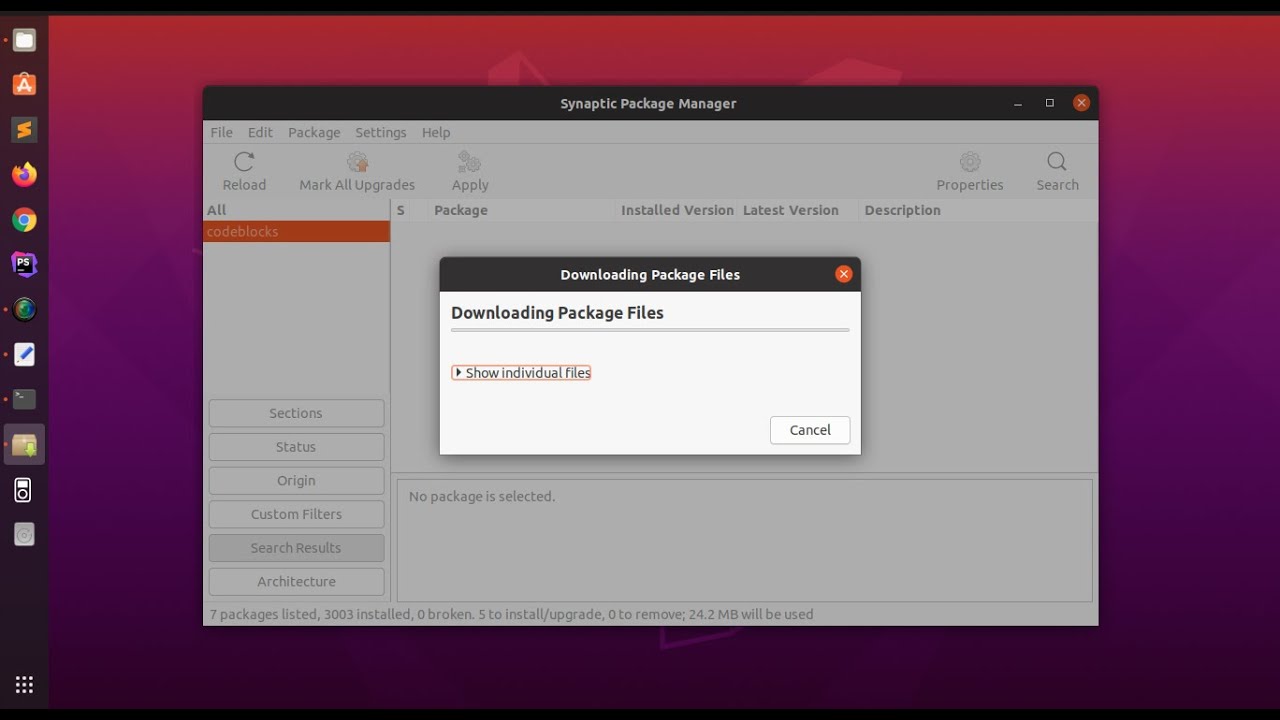
In this video I am going to show you how to install synaptic package manager in Ubuntu 20.04 LTS [Linux] and how to use it to Install and uninstall other software via Synaptic from Linux, Ubuntu.
haughty quarry
youre good lol i will
sinful panther
@daring glade @grim wren 3 day waiting period on gifts. I wont forget
grim wren
You sending us gifts now?
haughty quarry
sudo apt install libplist libimobiledevice libusbmuxd libirecovery3 libirecovery-utils
will that do what i need to do for me or no
grim wren
Nah you gotta install them via synaptic
haughty quarry
fuuuck
daring glade
haughty quarry
sudo apt install libplist libimobiledevice libusbmuxd libirecovery3 libirecovery...
no
u need to use s
haughty quarry
that youtube video doesnt show what i need hes doing something differnt but using synaptic lmao
if i cash app you $10 will you pause your game and screenshare and help me through this
@daring glade
ill make it $15 if you work me up until i can send a screenshot of being on 15.1.1 and im fully done
daring glade
xddddddddddddddddddddddd
haughty quarry
im desperate lmao
haughty quarry
on linux?
daring glade
ye
haughty quarry
youre lit
daring glade

TeamViewer
Download TeamViewer now to connect to remote desktops, provide remote support and collaborate with online meetings and video conferencing.
save the x64 .deb
and run it
haughty quarry
when youre doing it for me can i still control computer when you need something
daring glade
yes
haughty quarry
okay
daring glade
send me the id and pass in the dm
 grim wren
Close synaptic
haughty quarry
oh yeah i see that now my bad
indigo meteor
haughty quarry
oh yeah i see that now my bad
Are you finish ?
silver bough
just to confirm, for the futurerestore GUI, I do not need to change anything for the Latest SEP? I just keep it default? I am on A14 going from 14.0 to 15.1.1
 daring glade
silver bough
just to confirm, for the futurerestore GUI, I do not need to change anything for...
daring glade
silver bough
just to confirm, for the futurerestore GUI, I do not need to change anything for...
Yes, latest baseband and sep
And use the fr beta
silver bough
daring glade
Yes, latest baseband and sep
Thank you. Yes, I set it to choose Beta in settings.
wish me luck
well it is running, although I see a lot of FDR 0x6000000c8500 timeout.... hope that is not a problem but it is sending filesystem at 17% and moving
 twin saffron
damn my futurerestore keeps getting stuck on checking hashes and then terminates
not sure whats wrong
any thoughts?
 celest basalt
indigo meteor
So good
celest basalt
indigo meteor
So good
How did u do that n on which os u did it
celest basalt
haughty quarry
that’s the checkrain thing he said to get an i waiting on anything or is it done
Hi did u succeeded in updating ur phone to ios 15.1.1 or not on linux
indigo meteor
celest basalt
How did u do that n on which os u did it
With futurerestore in linux
celest basalt
indigo meteor
With futurerestore in linux
I have blobs n all files related to this n what additional filess i reqd
Bcoz FR end up saying unable to connect phone in recovery mode
grim wren
@celest basalt sudo apt install synaptic
indigo meteor
Not use GUI
indigo meteor
grim wren
<@456226577798135808> sudo apt install synaptic
Yeb and add all lib in checkra assect
Read it

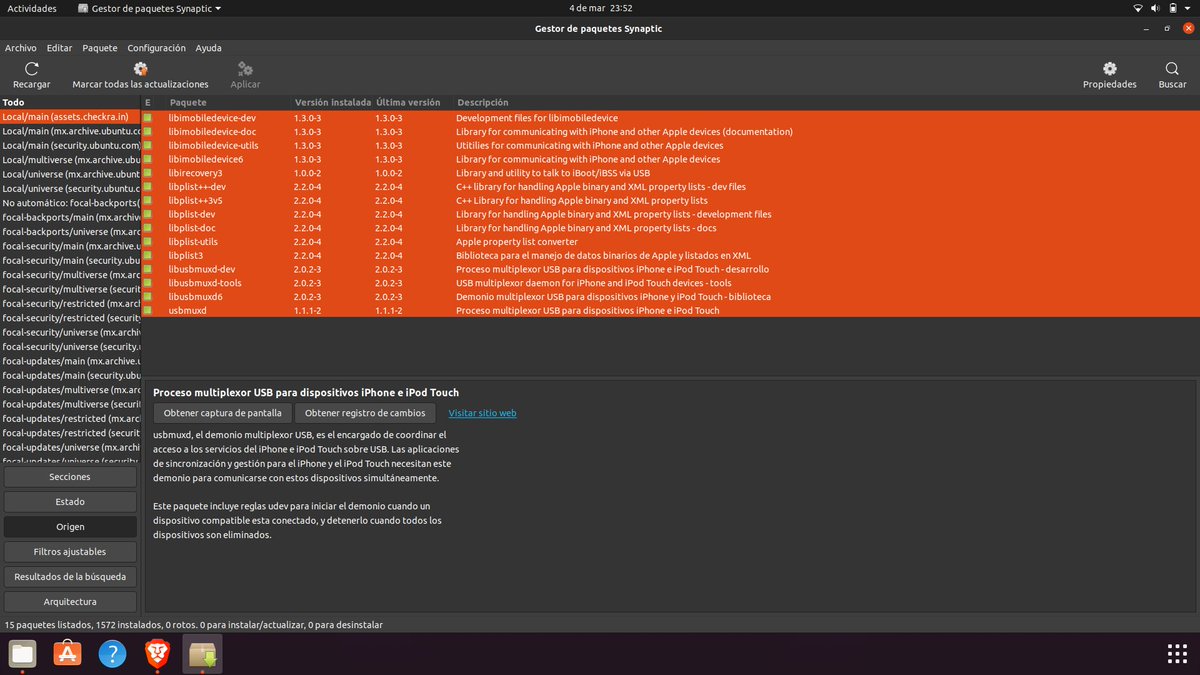
Desde el gestor de paquetes (en este caso Synaptic) buscamos e instalamos las Externals libs que enlistan aqui: https://t.co/WRkDkd1b0r como se aprecia en la segunda imagen. Reinicia el sistema y comprueba que esté todo instalado y actualizado. 3 https://t.co/HDW971gVVx

 Twitter
·
Twitter
·
 mystic axleBOT
indigo meteor
https://twitter.com/hasv21/status/1500033505346179072?s=21
mystic axleBOT
indigo meteor
https://twitter.com/hasv21/status/1500033505346179072?s=21

Desde el gestor de paquetes (en este caso Synaptic) buscamos e instalamos las Externals libs que enlistan aqui:
─────────────
♥ [0] ⤴ [0]
─────────────
grim wren
Then in synaptic search for "libplist3 (install everything except for python-plist), libirecovery3, libusbmuxd, libimobiledevice"
silver bough
Well not sure what is happening now. I was able to watch the firmware install and validate to 100%, but then I just got this when it was trying to update the baseband....
 grim wren
Were you trying to restore to iOS 14
silver bough
IIOS 15.1.1
silver bough
the phone shows the progressbar is only about 3/4 of the way complete.
should I wait, or just go for Exit Recovery?
grim wren
If it's only about 3/4 done then it may not have succeeded
silver bough
am i in trouble, or will i still be able to try again?
grim wren
Are you on an A12+ device
silver bough
A14
grim wren
Oooohhh shit.
grim wren
Just leave the phone, it'll eventually kick itself to the recovery mode screen
When that happens try hit the exit recovery button
grim wren
If it doesn't happen within the next 10 minutes I'd say force reboot it
silver bough
ok
not sure what the error was that cause it to fail. I just saw the FDR looped over 50 times... kept getting the same error while it was loading the firmware: FDR 0x6000000c8500 timeout
grim wren
Were you at all using --update
grim wren
Ok that's one thing out of the table
The "FDR looped over 50 times" thing isn't from futurerestore
It's from futurerestoregui
And the FDR Timeouts are just ios being impatient with your machine I'm pretty sure
Would you mind sending a full log
silver bough
sure, do you know where I can get it... not sure if it is store somewhere or I have to export from the tool
grim wren
You know how the frgui window log thing is scrollable?
How you can scroll up and down?
silver bough
yes
grim wren
Tbh there should be a copy log button
silver bough
Is there anything I should hide/remove from the log file? Not sure if there is any sensitive information
grim wren
just dm me the log if you dont want it public
i think the serial number or udid or possibly ecid shows up at least once
silver bough
ill dm it to you - give me a minute.
celest basalt
indigo meteor
Yeb and add all lib in checkra assect
Bro can u dm me all files i am not able to find them
indigo meteor
celest basalt
Bro can u dm me all files i am not able to find them
Desde el gestor de paquetes (en este caso Synaptic) buscamos e instalamos las Externals libs que enlistan aqui: https://t.co/WRkDkd1b0r como se aprecia en la segunda imagen. Reinicia el sistema y comprueba que esté todo instalado y actualizado. 3 https://t.co/HDW971gVVx
Twitter
·
Read it
celest basalt
Ok can i use it on fr gui or in terminal
haughty quarry
Unable to extract filesystem from iPSW how do i fix
celest basalt
haughty quarry
Unable to extract filesystem from iPSW how do i fix
Right click on ipsw n extract or unzip
indigo meteor
celest basalt
Ok can i use it on fr gui or in terminal
No use gui
Use terminal


Love it
celest basalt
Ok so i have to extract baseband n firmware from ios 15.3.1
celest basalt
Can u do it for me with team viewer
indigo meteor
celest basalt
Can u do it for me with team viewer
In linux ?
celest basalt
Yes
haughty quarry
what is exit reovery comant
indigo meteor
Use have linux mint ?
haughty quarry
recovery command
celest basalt
I have windows 11 pc n bootable linux i havent install linux but i use try linux n use it
indigo meteor
What name linux
celest basalt
Ubuntu
indigo meteor
linux mint is easier to succeed
celest basalt
Ok will make bootable of that
celest basalt
But can u help me in tema viewer
haughty quarry
hello anyone
indigo meteor
celest basalt
But can u help me in tema viewer
Now me can
You need download ipsw and blods and futureRestore 267 in linux
and put it on the disk on your computer.don't remove the driveC
celest basalt
I have downloaded ios 15.3.1 ipsw blobs n fr all
indigo meteor
celest basalt
I have downloaded ios 15.3.1 ipsw blobs n fr all
Ok dm ne
celest basalt
indigo meteor
Ok dm ne
Check dm
 harsh owl
Is the process to futurerestore on A14 the same or is there a different process?
harsh owl
grim wren
same process
Thanks, what about when using Futurerestore GUI?
grim wren
make sure to enable beta in settings before pressing download futurerestore
indigo meteor
haughty quarry
is
Are you finish
indigo meteor
harsh owl
Thanks, what about when using Futurerestore GUI?
Íntall teamveiw
Me can help
haughty quarry
Unable to extract filesystem from iPSW how do i fix
when i do extract/unzip ipsw it’s a folder and it’s not a .ipsw name ends in restore
grim wren
There probably is an error code associated with that
grim wren
haughty quarry
when i do extract/unzip ipsw it’s a folder and it’s not a .ipsw name ends in res...
Yeah, as it should be
haughty quarry
okay and i drag that into terminal after latest sep latest baseband?
that’s the part i’m stuck on now
@indigo meteor @sinful panther
you guys succeeded can y’all help me
indigo meteor
Give me teamveiw
indigo meteor
What ?
haughty quarry
message me on discord then call me i’ll share my screen and you can help me
i’m stuck right now and you succeeded lol so i need help
@grim wren i messaged you
anyone here
haughty quarry
im done i did it
14.1 to 15.1.1 success thank you everyone who helped
is there a profile i can download to block ios updates ion ios 15
mystic axleBOT
blockota
To block OTA updates, download and install this profile. This works even without a jailbreak. Note that the profile expires on January 31, 2023—it will stop blocking updates after that date.
Alternative methods:
- Jailbroken: OTADisabler - Easiest
- Unjailbroken (for iOS 14.4.2 and lower): https://redd.it/n451uj/
Added by kitty.#0001 | Used 982 times
·
grim wren
It works great

 haughty quarry
grim wren
About a 98.4% success rate <:trol:831188670848565289>
haughty quarry
grim wren
About a 98.4% success rate <:trol:831188670848565289>
private messaged you
 bitter stump
Quick question, is there a window for future restoring? For example, can I just wait until the jailbreak drops to use future restore?
grim wren
bitter stump
Quick question, is there a window for future restoring? For example, can I just ...
When 15.4 is the only signed version you'll be unable to restore to iOS 15.1(.1)
bitter stump
grim wren
When 15.4 is the only signed version you'll be unable to restore to iOS 15.1(.1)
So recommend to do it ASAP I’m assuming
grim wren
Yeah, basically, if you plan to go to iOS 15.1
 rustic blaze
Which ipwndfu fork is the best
grim wren
GitHub
Fork of axi0mX's open-source jailbreaking tool for many iOS devices for integration - GitHub - hack-different/ipwndfu: Fork of axi0mX's open-source jailbreaking tool for many iOS de...
 plucky silo
Any fix found for future restoring to 15.2B1 (a14) yet?
indigo meteor
Yes
 ocean vine
Have you saved them when it was being signed?
celest basalt
Nop
I need it to downgrade to that version
Is there somewhere i can download one?
rustic blaze
No
ocean vine
It’s no longer signed
rustic blaze
Ipwndfu command not found
plucky silo
indigo meteor
Yes
How???
 warm rain
To upgrade from 14.4 I only need to rootfs then go ahead?
A14 device
 spiral knoll
is it possible to downgrade ios 15.3.1 to 14 without jailbreak on iphone 6s?
spiral knoll
short spade
Do you have iOS 14 blobs
have
short spade
So you have blobs for the iOS 14 version you would like to go to?
short spade
There's a pinned guide
rustic blaze
When I run ipwndfu-p command it says ipwndfu command not found
celest basalt
Just wanna ask i arrange mac os so can i update my iphone 12mini with futurerestore latest version without any issues or not
 hybrid aspen
Did anybody ever figure out that unable to send iBEC error? Im getting it as well 
bold pebble
12 pro. 14.3 --> 15.1 Months ago, I used unc0ver and set my generator to 0x1234567891234567. So, I followed the newest guide where it says to grab the generator string from the blob to use futurerestore. I grab the string. It is not 0x1234567891234567. No biggie, i am just following instructions. So I used unc0ver and dimentio and set it to what was in the blob. When I do that, I get an error that says the Apnonce and the APTicket did not match. The furturerestore failed. So I used unc0ver and dimentio and set it back to 0x1234567891234567. When I did this, now futurerestore is working. In conclusion, setting the generator on my phone does not match what was in the blob. But it worked, soooo?
 unkempt tree
i have a 12pro and want to future restore to 15.0.2 from 14.4 because I have blobs for that version, will doing this break my faceid?
hybrid aspen
no
warm rain
How to install futurerestote on Mac?
unkempt tree
hybrid aspen
no
do i use latest sep and baseband?
hybrid aspen
yes
warm rain
Cuz I got a pop-up saying "your security preferences allow installation of only apps from app store"
hybrid aspen
the current baseband/sep is compatible
hybrid aspen
warm rain
Cuz I got a pop-up saying "your security preferences allow installation of only ...
go to security/privacy in settings on mac
you should see a popup saying allow
warm rain
Aight ty
 queen halo
can't seem to upgrade to 15.1 using futurerestore on iphone x
when using pwned restore: "signing ticket does not contain generator"
when not: nonce does not match
unkempt tree
hybrid aspen
the current baseband/sep is compatible
just tried it again and i am getting the same error "Unable to place device into recovery mode from unknown mode"
it will go into recovery mode and then it gives me that error
 bitter smelt
use futurerestore but not gui and run it with sudo
unkempt tree
bitter smelt
use futurerestore but not gui and run it with sudo
ok do you know what the command would be, im not good with linux at all
mystic axleBOT
15.2b1 baseband issue
If you attempt to futurerestore to iOS 15.2 beta 1, it will break your baseband (cellular/mobile network connectivity) and your device will be unable to activate, making it unusable until restored to a working version.
This issue is confirmed to happen with 15.3 RC / 15.3.1 / 15.4 beta SEP.
There are no known baseband issues when restoring to 15.1.1 and below or 15.2 stable and above.
Submitted by nyuszika7h#0001
·
unkempt tree
bold pebble
https://discord.com/channels/349243932447604736/688124783400845336/9498705031983...
thanks a lot
bitter smelt
well 15.2b1 baseband issue make me feel so bad for not just restore when i have time
 pine epoch
So I have an iPhone 13 on iOS 15.3.1. I have blobs saved for iOS 15.1. Is it possible for me to downgrade without breaking anything?
pine epoch
Why not?
Is it because I can’t set my nonce or is it just SEP/Baseband incompatibility
bitter smelt
short spade
Can't set nonce
wait, why ? i just restored to 15.2b1 successfully but without cellular because of bb :/
bitter smelt
13 pro max
unkempt tree
bitter smelt
copy the command from the gui fr
ok this is the command im about to run
sudo '/home/ubuntu/FutureRestoreGUI/extracted/futurerestore' -t '/media/ubuntu/Main Drive/Users/camer/Desktop/2925079661903902_iPhone13,3_d53pap_15.0.2-19A404_fa0e0aa76879a6136b130657edf728576bede3dcb5d606c1f29872df78605d11.shsh2' --latest-sep --latest-baseband '/media/ubuntu/Video Storage/Downloads/iPhone13,2,iPhone13,3_15.0.2_19A404_Restore.ipsw'
lavish rain
could probably delay ota to 15.2
bitter smelt
i saved blob for 15.2 too
pine epoch
So it worked without nonce setter, but you lost cellular cause of the 15.2 beta 1 baseband incompatibility.
bitter smelt
pine epoch
So it worked without nonce setter, but you lost cellular cause of the 15.2 beta ...
yep
lavish rain
its possible if your nonce was frozen
pine epoch
Will the same baseband incompatibility issue happen if I were to attempt to future restore to iOS 15.1?
pine epoch
I understand that my nonce, might not match the one in my blob, but if for some reason it does and I am able to restore, I shouldn’t have any issues right?
unkempt tree
unkempt tree
ok this is the command im about to run
sudo '/home/ubuntu/FutureRestoreGUI/extr...
i ran it and nothing happened
pine epoch
When I had my iPhone X, I would save my blobs using the system info tweak and my apnonce would always stay the same, even through restores and updates. I don’t see why my iPhone 13 apnonce would change from the last time I saved blobs
short spade
13 doesn't have JB
Nonce changes every reboot
Have you restarted your phone since saving blobs?
lavish rain
well if its frozen it would stay the same after a reboot
the only thing that would change it would be if you checked for updates or restored/updated
lavish rain
pine epoch
When I had my iPhone X, I would save my blobs using the system info tweak and my...
thats because you could actually write to the device and choose the generator value
pine epoch
Ah okay makes sense. Yeah I’ve updated and restarted my phone before so I would need a nonce setter
I understand now
How would you freeze your nonce?
Is that something that can be done intentionally
lavish rain
blobsaver can freeze it
pine epoch
Ah cool. So if I freeze my nonce it will ,theoretically, stay the same through reboots as long as I don’t check for updates or update/restore?
Blobsaver automatically freezes your nonce when you save blobs?
bright hinge
I understand that there's been a report that the 15.4 beta 5 baseband with a 15.2 beta 1 restore still breaks baseband. Is there any indicator that a 15.2 beta 1 futurerestore will ever have a working baseband? Do other 15.4 beta versions have different basebands than beta 5?
 coral dock
is there any way to restore iOS 14.6 to 14.5.1 with blobs on A14?
 viscid furnace
L