#futurerestore-help
1 messages · Page 226 of 1
 valid adder
 stiff hazel
what have I missed
 velvet thunder
another PC not work
valid adder
is it usb c
valid adder
stiff hazel
what have I missed

We can only pray for a miracle to save all those who want to use FutureRestore on A12+ 😓
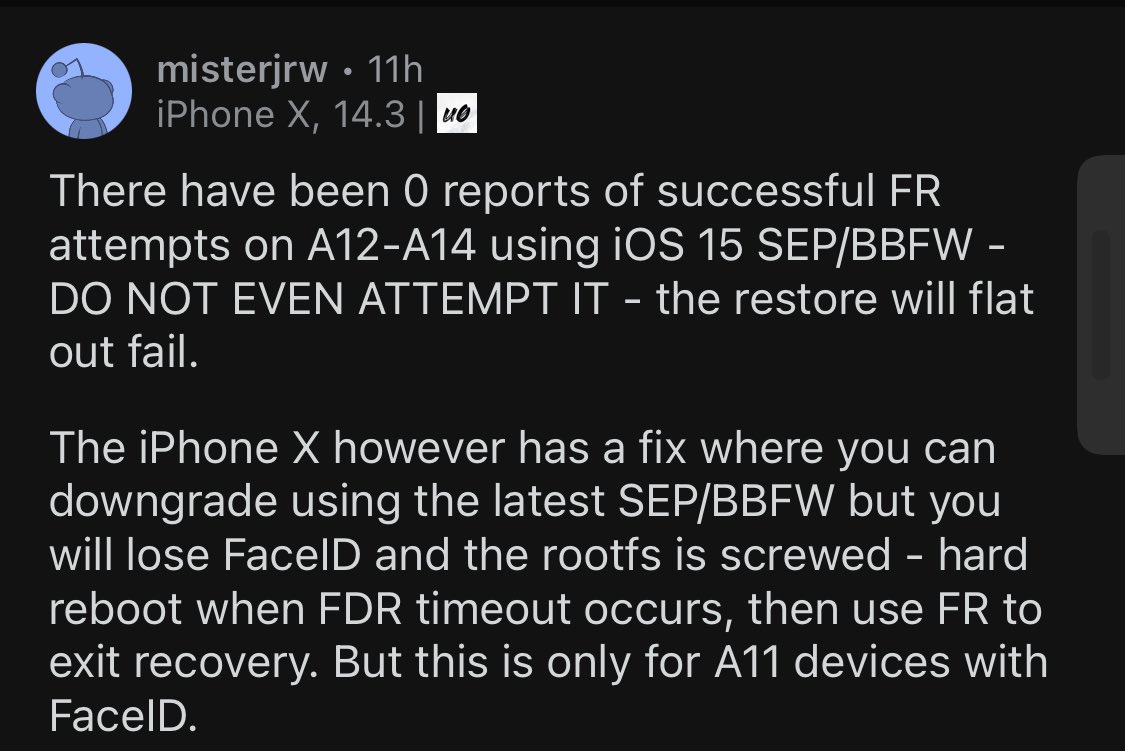
 Twitter
·
stiff hazel
valid adder
https://twitter.com/foxfortmobile/status/1453583591972249604
Twitter
·
stiff hazel
valid adder
https://twitter.com/foxfortmobile/status/1453583591972249604

have you responded I can’t find your response
valid adder
nah
stiff hazel
people might believe what is being said so I mean you may as well correct it
Better to correct misinformation than to let misinformation spread imo
stiff hazel
valid adder
nah
where it comes from by the way https://www.reddit.com/r/jailbreak/comments/qgukxw/question_i_have_a_iphone_12_pro_max_jailbroken/hi9tvhi/?utm_source=share&utm_medium=ios_app&utm_name=iossmf&context=3
reddit
17 votes and 36 comments so far on Reddit
velvet thunder
valid adder
is it usb c
no, usb normal
 deep plank
My generator is 0x1111111111111111, even tough I never used unc0ver.
does that matter ? because futurerestore, when enabling the set nonce option, just fails
(restoring from 15.1 to 14.6)
valid adder
It does matter the device generator has so match the blob generator
 celest basalt
If your generator is the same as the blob generator then u don’t need to set nonce in futurerestore
 rare cove
Everybody is talking about how the new SEP is breaking FaceID, but what about devices with TouchID? Does it break it as well?
 cosmic beacon
No only FaceID@rare cove
rare cove
cosmic beacon
No only FaceID<@258961194709155840>
Great, I‘m gonna upgrade my SE 2020 then
deep plank
Ok, so does that means that my blob is corrupted and I can't use it ? I can send ya'll my blob if you need
@valid adder @celest basalt
 sick sand
@lean stream" SEP firmware is NOT being signed!"
thats the error sorry it took so long my pc was playing up i just switched to mac
i know my blobs the right one and so is my ipsw
sick sand
1.93
sick sand
no but i could go on windows
sick sand
k
 grim wren
What os you running
sick sand
monteray
grim wren
M1 or Intel
sick sand
m1
grim wren
I’m assuming you’re using the futurerestore gui
sick sand
yup
grim wren
Also
You may need to open terminal
And type
sudo chmod +x
Then drag the futurerestore file into the terminal
If futurerestore gui doesn’t accept the file
Also
The GUI is broke af
So don’t expect it to restore correctly
grim wren
Knew it
grim wren
Are you using a usb-c to lightning
sick sand
usb
grim wren
Ok thank god
celest basalt
how do i get pc to detect iphone in recovery mode on linux
what dependencies do i need to install
and i tried this but it doesnt recognise device. says no device found
velvet thunder
me too , not found device
sick sand
grim wren
Ok thank god
is it sposed to take long cus i been here for a while
celest basalt
celest basalt
and i tried this but it doesnt recognise device. says no device found
Wait I solved this
you have to run as root using sudo
celest basalt
any1 know how to fix invalid iBEC error on linux
grim wren
sick sand
<@!344291973030608897> my phones in recovery mide now
what exactly happened
sick sand
idk it was restoring and it stopped
just said futresestore killed now it left me in recovry mode
velvet thunder
celest basalt
you have to run as root using sudo
write comand line pls
celest basalt
[==================================================] 100.0%
Booting iBSS, waiting for device to disconnect...
Booting iBSS, waiting for device to reconnect...
Sending iBEC (441488 bytes)...
[==================================================] 100.0%
Booting iBEC, waiting for device to disconnect...
Booting iBEC, waiting for device to reconnect...
Cleaning up...
[exception]:
what=Device did not reconnect. Possibly invalid iBEC. Reset device and try again
code=40304657
line=615
file=futurerestore.cpp
commit count=260:
commit sha =cb9831f3840d65c3128de3621525a10cd52b37fa:
Done: restoring failed!
celest basalt
velvet thunder
write comand line pls
oh
just go to gui
then select preview commands in settings
velvet thunder
how to run as root
grim wren
sick sand
just said futresestore killed now it left me in recovry mode
what phone
celest basalt
sudo then the command u copied
sick sand
i pressed exit recovery and i thik im in a bootloop the apple logos gingon and off
sick sand
nope
grim wren
Ugh
Why must the gui just

Not
Copy the whole ass command into terminal instead and try the restore again
sick sand
huh
grim wren
USB port or cable was probably shoddy and disconnected halfway through
celest basalt
celest basalt
[==================================================] 100.0%
Booting iBSS, waitin...
@grim wren any idea about fixing this?
deep plank
Can Futurerestore GUI use a plist instead of an shsh2 ?
sick sand
grim wren
USB port or cable was probably shoddy and disconnected halfway through
"Device ApNonce does not match APTicket nonce"
sick sand
how
celest basalt
--set-nonce
sick sand
where
celest basalt
r u using gui
sick sand
yup
celest basalt
on windows
deep plank
rich man
celest basalt
ok just enable pwned dfu in gui and then enable set nonce
grim wren
At this point we just need genius roles I stg
deep plank
yall definitly deserve them tbh
grim wren
There needs to be actual genius role (actual devs n shit)
deep plank
Can i use a plist blob instead of an shsh2 in the gui?
sick sand
ffs when i exit recovery mode i get in a bootloop i think so im MEGA FUCKED
celest basalt
but the big question
grim wren
And then “genius” (us dumbasses)
celest basalt
how do i fix ibec error
celest basalt
sick sand
ffs when i exit recovery mode i get in a bootloop i think so im MEGA FUCKED
oh no
grim wren
sick sand
ffs when i exit recovery mode i get in a bootloop i think so im MEGA FUCKED
Your restore failed, you’re gonna have to do it again
sick sand
ik
grim wren
deep plank
Can i use a plist blob instead of an shsh2 in the gui?
Send me your blob file
deep plank
grim wren
Send me your blob file
basically the plist have the right generator
im trying to insert it in the blob
celest basalt
put into dfu mode first tho
sick sand
so i redo it in rec?
celest basalt
no dfu
velvet thunder
me >> what=Device ApNonce does not match APTicket nonce
celest basalt
u need to set nonce
sick sand
how i get in dfu?
deep plank
sick sand
how i get in dfu?
celest basalt
sick sand
how i get in dfu?
go to recovery first
sick sand
im in it
celest basalt
then search google
deep plank
i go in dfu mode via checkra1n tbh its easier
celest basalt
cuz idk what device u hav
deep plank
and before the payload loads i just close the app
sick sand
i got iphone x
deep plank
sick sand
im in it
Download checkra1n, start the process and close the app immediatly after it says "Device entered DFU mode succesfully"
grim wren
deep plank
christ almighty the formatting in that file is all kinds of warped
deep plank
It's way easier than Apple's instructions
grim wren
what on earth did you use to save it
deep plank
i don't remember
deep plank
i believe a website
grim wren
maybe no biggie
sick sand
deep plank
Download checkra1n, start the process and close the app immediatly after it says...
the thing is i cant exit recovery mode
deep plank
i tried swapping the generator from the plist to the blob
grim wren
your blob on the left vs my blobs on the right @deep plank
 deep plank
oh god
deep plank
the plist or the blob
grim wren
you sent two files
deep plank
yes
deep plank
a plist and a blob
grim wren
you said you tried to swap the generator
deep plank
celest basalt
just change the .plist to .shsh2
that works ? ima try
grim wren
nah @celest basalt the plist formatting is all wacked
deep plank
grim wren
you said you tried to swap the generator
searched generator in the plist and inserted it in the blob
grim wren
it might not accept it
deep plank
ok
celest basalt
grim wren
nah <@456226577798135808> the plist formatting is all wacked
just use the verofy blob on shsh.host
grim wren
deep plank
searched generator in the plist and inserted it in the blob
you cant do that
celest basalt

SHSH Host Verify
Verify SHSH2 files saved for your device for up/downgrading to unsigned iOS versions using futurerestore
deep plank
cuz my blob is messed up
deep plank
grim wren
you cant do that
im trying
grim wren
no as in you literally cant change the generator of a blob
celest basalt
deep plank
this ur blob?
deep plank
yes
celest basalt
k
deep plank
below is the plist one
celest basalt
what device and ios version is it for
grim wren
guess the wacked plist formatting doesnt matter
 celest basalt
seeeeeee
deep plank
tried verifying the blob (shsh2)
 grim wren
cant say futurerestore will accept it tho
deep plank
grim wren
guess the wacked plist formatting doesnt matter
yes thats what i did
celest basalt
it will
grim wren
maybe shsh.host is just really good at reading
sick sand
i retrd my restore and its on "Downloading SE firmware..." and now my phones looping the rocovery mode
deep plank
grim wren
cant say futurerestore will accept it tho
well see
grim wren
celest basalt
it will
im just assuming the worst at this point
celest basalt
only .shsh2 when u change format
grim wren
i dont like the looks of the wacked formatting
celest basalt
0x020e906451bad58e
grim wren
i could try give it proper indents
celest basalt
ur generator intereting
deep plank
here is the plist
 grim wren
ohno
deep plank
saw that
celest basalt
just hav a go at restore
grim wren
r word ban!!!1!!!11!
celest basalt
yay
deep plank
celest basalt
just hav a go at restore
i'm gonna try, i took the gen from the plist and inserted in the shsh2 because it was 0x1111111111111111
anyway im gonna try
grim wren
you cant just change the generator
sick sand
i retryd my restore and its on "Downloading SE firmware..." and now my phones looping the rocovery mode and the loading bar on the gui is still
think im megga fucked rn
sick sand
im fucked tho
grim wren
worst comes to worst put it in dfu mode and let itunes take care of resusitating it
what website adds this extra info at the end of the blob lmao
 sick sand
oh its still in the loop thing but thee guis on ""checking buildidentity"
me is confusion
sick sand
im not sure if this is normal but i think my gui is froze i cant interat with the gui
grim wren
frgui moment
sick sand
amazing it crashed
grim wren
lmfao in your blob @deep plank
 sick sand
how amazing is this gui 
grim wren
awesome when it doesnt break itself
deep plank
grim wren
*you cant just change the generator*<:completelydistraught:816211815200587806> <...
yea its weird but anyway
deep plank
grim wren
lmfao in your blob <@!764508548444717056>
what
grim wren
cryer
celest basalt
Did it restore
grim wren
idk its just funny seeing an actual word in a blob
sick sand
wtf the gui is closed i try to open finder to restore my phone and its still in the recovery thing loop
grim wren
part of me thinks you accidentally checked nonce collision
grim wren
why is your iphone in the freezer
deep plank
grim wren
why is your iphone in the freezer
because it was too hot
and the screen was dimming
grim wren
aight then
grim wren
cant believe im out here giving your plist blob actual formatting
deep plank
grim wren
cant believe im out here giving your plist blob actual formatting
dont bother
i dont deserve it
grim wren
too late, im bored and im already 75% done
deep plank
oof
gl then
i personally am moving my stuff to my mid 2012 mac because my macbook air decided to make its tackpad and keyboard not working while the palm rest temperature sensor is still ok.
maybe ill put it in the freezer lol
deep plank
oh
grim wren
wait
deep plank
ok
grim wren
it hides the extension
deep plank
grim wren
it hides the extension
haha thats it
grim wren
after you remove it
deep plank
i have them enabled anyway
deep plank
thank you
i just started another attemps but ill eventually try yours if it doesn't work


 grim wren
Give me a sec
grim wren
name the errors
 zealous bridge
Enter pwndfu mode
sick sand
how
grim wren
@velvet thunder
 zealous bridge
sick sand
how
zealous bridge
sick sand
how
use cryptics fork of ipwndfu and run ./ipwndfu -p ––patch
sick sand
im on gui
grim wren
you need cli for this
deep plank
grim wren
name the errors
with yours, unable to put the device in restore mode
ima try to use the cli
sick sand
"Device did not reconnect. Possibly invalid iBSS. Reset device and try again" now this shows up when i tryrestore again
how do i use terminal one
grim wren
zealous bridge
You cant use OTA blobs for IPSW restores
OTA blobs are usually ~32kb correct?
zealous bridge
They’re usually a lot smaller than IPSW blobs which are like 60-80
grim wren
ok good to know for the future
zealous bridge
Yeah easy way to tell them apart
grim wren
grim wren
damn that means this is an OTA blob
yeah i was wondering why there wasnt a restore varient key in there
wait hm
or at least just the "updateInstall"
sick sand
how do i use futrerestire in terminal
velvet thunder
can I, pls
grim wren
then paste it into terminal
sick sand
and thats it?
grim wren
usually
sick sand
ye theres no coppy command button
grim wren
velvet thunder
can I, pls
 sick sand
or im just blind
grim wren
sick sand
ye theres no coppy command button
it should be after you press start futurerestore
sick sand
nope
sick sand
just stop futrerestore
sick sand
grim wren
it should be after you press start futurerestore
theres no button for coppy command
grim wren
hm
sick sand
do i have the right version
grim wren
give me 6 minutes and ill help
 sick sand
1.93
grim wren
because you talked and got level 15
sick sand
how did i get the chekr1n thing
grim wren
why do you want that at the moment
sick sand
idk i just have it
grim wren
you must have installed it
oh nvm you meant the role
you would have gone to #roles and reacted with it
deep plank
grim wren
because you talked and got level 15
ok
deep plank
grim wren
<:completelydistraught:816211815200587806>
lol
grim wren
@sick sand you have to go into settings and check preview command

then it shows you it
 sick sand
ok
grim wren
my bad
sick sand
so do i just paste that in terminal and pray it works
celest basalt
futurerestore isn't going to magically put your device into pwned DFU mode
you have to do it yourself first
zealous bridge
I told them already
sick sand
idk how thooooooo
celest basalt
check pins (same guide for pwndfu applies even if you aren't downgrading from iOS 15)
sick sand
im downgrading from 15
 shadow ore
how to get into pwndfu for a9x
 cedar onyx
@celest basalt just a reminder I am A13 that tried to FR from 13.3 to 14.5 and got the error message below, it was believed it was FR issue, and I am willing to test a new build anytime you’d like (don’t care about Face ID) so let me know if you need me
 celest basalt
cedar onyx
<@456226577798135808> just a reminder I am A13 that tried to FR from 13.3 to 14....
celest basalt
cedar onyx
<@456226577798135808> just a reminder I am A13 that tried to FR from 13.3 to 14....
@valid adder ^
seems like your fix to enable A12+ restores didn't work
celest basalt
cedar onyx
<@456226577798135808> just a reminder I am A13 that tried to FR from 13.3 to 14....
actually 256 is outdated, but didn't you use 260 last time
cedar onyx
celest basalt
seems like your fix to enable A12+ restores didn't work
That was 2 days ago, if you changed something during those 2 days I did not tested it
celest basalt
 sick sand
how tf i instal
ipwndfu
celest basalt
256 doesn't have this update yet because FR didn't get the updated idevicerestore module
grim wren
plot twist: it wasnt enabling a12+ restores install and was a troll
celest basalt
so yeah try again with 260
GitHub
A hacked up idevicerestore wrapper, which allows specifying SEP and Baseband for restoring - Fix a9 set-nonce, use m1sta api for wiki keys :) · m1stadev/futurerestore@cb9831f
grim wren
sick sand
how tf i instal
ipwndfu
what phone
shadow ore
i can't find a9x pwndfu tool after searching for 3 hours
grim wren
shadow ore
i can't find a9x pwndfu tool after searching for 3 hours
does fr not work for a9x?
cedar onyx
@celest basalt this is the build I tried
grim wren
cedar onyx
zealous bridge
Both failed
So no new fix since our talk, right?
zealous bridge
I suggested using an older build since not sure if there were any changes that broke futurerestore
Nope
grim wren
Gotta set your nonce
If it says that message the blobs are usable
Just have to set the nonce first
velvet thunder
grim wren
Just have to set the nonce first
how, Idont know
</data>
<key>generator</key>
<string>0xc3a5b44eaaac9685</string>
<key>updateInstall</key>
<dict>
velvet thunder
hm...
velvet thunder
yea 14.3
grim wren
Give me a sec
velvet thunder
okk
grim wren
What jailbreak did you use
velvet thunder
mix first odyssey and after unc0ver
grim wren
Can you screenshot unc0ver settings panel at the bottom for me
I forgot what it looks like
Haven’t used it for a while
Should be able to set generator in there
Idk how A12 works
grim wren
You said you jailbroke with unc0ver
Someone else please step in it’s 1am for me and I need sleep
 solar ferry
can anyone help with futureRestore..i have an iphone x running on 14.6 i want to restore it without updating
 lucid latch
solar ferry
can anyone help with futureRestore..i have an iphone x running on 14.6 i want to...
lucid latch
solar ferry
can anyone help with futureRestore..i have an iphone x running on 14.6 i want to...
what you want to do ?
 deft dawn
Hi, why? I thought all iOS 14's were sep and baseband compatible? that's part of the issue my bloobs dont have a generator (Even though i've been using unc0ver and it should be 0x1...). I was using blobsaver to save bloobs.
 deft dawn
Hi, why? I thought all iOS 14's were sep and baseband compatible? that's part of...
deft dawn
deft dawn
Hi, why? I thought all iOS 14's were sep and baseband compatible? that's part of...
I can however see that the APnonce from the blobs is different from the one I currently have :/
solar ferry
lucid latch
what you want to do ?
is it possible for me to save blobs and downgrade cause my iphone x is on activation running on ios 14.6
i just want to reset without updating
celest basalt
deft dawn
Hi, why? I thought all iOS 14's were sep and baseband compatible? that's part of...
because people who claimed it's compatible didn't test on Face ID devices
deft dawn
celest basalt
because people who claimed it's compatible didn't test on Face ID devices
haha undestood! is there anything to be done about the APnonce being different? I also have a 14.4 bloob with generator but the Apnonce is the same as above (different from what my phone is showing now).
celest basalt
well, looks like your blobs don't have a generator - there are two generators you can try, if neither match then those blobs are useless
try sudo dimentio 0x1111111111111111 and then sudo dimentio 0xbd34a880be0b53f3
see if either one's output at the end matches the nonce in the blobs
lucid latch
deft dawn
haha undestood! is there anything to be done about the APnonce being different? ...
i guess you can jb with checkra1n then use Succession to restore
velvet thunder
 deft dawn
lucid latch
i guess you can jb with checkra1n then use Succession to restore
deft dawn
lucid latch
i guess you can jb with checkra1n then use Succession to restore
even on a14?
velvet thunder
 deft dawn
celest basalt
try `sudo dimentio 0x1111111111111111` and then `sudo dimentio 0xbd34a880be0b53f...
deft dawn
celest basalt
try `sudo dimentio 0x1111111111111111` and then `sudo dimentio 0xbd34a880be0b53f...
Just tried but no, the apnonce is still different. I dont understand why. I even have 2 14.4 bloobs regular and OTA as well showing unc0ver generators but different APnonce.
deft dawn
deft dawn
Just tried but no, the apnonce is still different. I dont understand why. I even...
Isnt there a way to generate the generator from the Apnonce? Instead of generator -> Apnonce, Apnonce -> generator?
celest basalt
nope
ApNonce on A12+ is a SHA384 hash of (generator + random key unique to your device)
valid adder
@celest basalt I only enabled A12 not a13 I didn’t know a13 was also affected
celest basalt
oh
celest basalt
I’m getting ibec error. Pls help
 mystic axleBOT
ibec
Fix for error code 3, 8, and 10 aka the iBEC error in futurerestore
- Uninstall all apple drivers via device manager.
- Uninstall all apple products including itunes and apple device support stuff via control panel uninstall a program. MAKE SURE TO CHECK UNINSTALL DRIVER WHEN UNINSTALLING
- Unplug and replug device.
- Check device manager for more apple stuff and uninstall if so with same driver checkbox.
- Disconnect device.
- Install itunes64 exe from apple.com itself, no windows store bullshit. This is the best version: https://support.apple.com/kb/DL1816?locale=en_US (It will be labeled windows 7, 8 but install it on windows 10, it works fine)
- Plug in device in recovery.
- iboot (recovery) driver should show up under usb in device manager. Uninstall it and check the with software box.
- Run futurerestore.
- Unplug and replug your device.
- Run futurerestore again
Added by Cryptic#6293 | Used 122 times
·
valid adder
@coral falcon are you legit blind
@sick sand notwithout losing faceid
@coral falcon I told him to leave and he left but you still replied with the answer? unless you were using the tag for yourself?
yes across 2 channels in my server
and here...
and I pinged him
deep plank
ikr
 valid adder
you did until you edited the message
deep plank
some ppl way its their fault
i dont
but i prefer saying it
better more than not enough info
idk
valid adder
but not after reboot
deep plank
finishing that failed attempt of futurerestore
deep plank
valid adder
immediately after sending kernelcache
whats that already
valid adder
right before it fails it literally says sending kernelcache...
valid adder
 deep plank
do you want the input fight after i put it in pwneddfu mode ? it'w a bit easier for me to do
valid adder
wot?
valid adder
no you can't
deep plank
k
valid adder
shell is exclusive to recovery mode
deep plank
oh
valid adder
(after iBEC boots)
deep plank
ok
valid adder
you can't get shell when futurerestore is running
deep plank
so now I try to launch futurerestore and i shell?
valid adder
yeh
deep plank
valid adder
what are you using for pwndfu
the modded one for A11
deep plank

GitHub
open-source jailbreaking tool for many iOS devices - GitHub - Cryptiiiic/ipwndfu: open-source jailbreaking tool for many iOS devices
valid adder
good
deep plank
`augustin@Augustins-MacBook-Pro ipwndfu % irecovery -s
96ede82803e085b:366
=======================================
::
:: iBoot for d20, Copyright 2007-2021, Apple Inc.
::
:: Remote boot, Board 0x2 (d20ap)/Rev 0xf
::
:: BUILD_TAG: iBoot-6723.120.36
::
:: BUILD_STYLE: RELEASE
::
:: USB_SERIAL_NUMBER: SDOM:01 CPID:8015 CPRV:11 CPFM:03 SCEP:01 BDID:02 ECID:000544381050002E IBFL:3C SRNM:[FFMVKZ20JC6C]
::
3974bfd3d441da3:1190
Delaying boot for 0 seconds. Hit enter to break into the command prompt...
3974bfd3d441da3:1394
Entering recovery mode, starting command prompt
b5255f381ca81f9:223
ea0f64a4253252:448
ea0f64a4253252:448
ea0f64a4253252:448
ea0f64a4253252:448
ea0f64a4253252:448
ea0f64a4253252:448
ea0f64a4253252:448
ea0f64a4253252:448
ea0f64a4253252:448
ea0f64a4253252:448
ea0f64a4253252:448
ea0f64a4253252:448
ea0f64a4253252:448
Ramdisk image not valid
ea0f64a4253252:448
cbc0ab19870954d:277
ea0f64a4253252:448
cbc0ab19870954d:277
ea0f64a4253252:448
Device Tree image not valid
ea0f64a4253252:448
ea0f64a4253252:448
7ab90c923dae682:792
Kernelcache image not valid
7ab90c923dae682:807
`
it failed and then i shelled
got this
valid adder
that is most helpful
deep plank
how
valid adder
I know where the problem is just not why it happens
valid adder
the iBEC patches fail for iPhone10,1 for some reason
deep plank
oh
deep plank
sad ig
valid adder
its fixable Im just busy
deep plank
ok
valid adder
try with custom boot args
valid adder
I doubt the gui let’s you
The gui has preview command in the settings
Enable it
Then copy the future restore command
Don’t run futurerestore though
Just copy command
deep plank
ok
"/Users/augustin/FutureRestoreGUI/extracted/futurerestore-x86_64-v2.0.0-test" --apticket "/Users/augustin/Downloads/SHSH/iPhone10,1_14.6(18F72)_000544381050002E(1482382466089006) copy.shsh2" --debug --use-pwndfu --latest-sep --latest-baseband "/Users/augustin/Downloads/iPhone_4.7_P3_14.6_18F72_Restore.ipsw"
 rocky glade
Hello. How can I restore my iphone 8 ic loock from ios 15 to ios 14? I have blobs for ios 14.5
checkm8-nonce-setter does not work with iphone 8
deep plank
rocky glade
Hello. How can I restore my iphone 8 ic loock from ios 15 to ios 14? I have blob...
iCloud Locked ? Thats against the rules tbh
rocky glade
Rules? Why can't I get help on my iphone 8 with iclock? it's just a forgotten password. OK I have an iphone 8 plus without ic lock with the same problem
valid adder
deep plank
ok
--boot-args "-v rd=md0 -restore"
 obsidian rune
Hi I try to downgrade to iOS 14.8 form 15.1 and I got this message
valid adder
why did you not tell us the device...
obsidian rune
 obsidian rune
How to set it?
valid adder
you need checkm8 to setnonce on iOS 15 @obsidian rune
if you don't have a checkm8 device then you can't
zealous bridge
obsidian rune
How to set it?
what device
valid adder
it pissed me the fuck off that you didn't tell us your device
obsidian rune
zealous bridge
what device
iPhone 8
zealous bridge

Gist
How to downgrade from iOS 15 to iOS 14. GitHub Gist: instantly share code, notes, and snippets.
follow this guide
deep plank
valid adder
`--boot-args "-v rd=md0 -restore"`
hey again! how can i modify the command ?
zealous bridge
.
deep plank
wait that dumb
zealous bridge
just add that to your original command
deep plank
yea
valid adder
@deep plank do it yourself? just insert it after --use-pwndfu
deep plank
yes
i did it
yay
wait
it might work
RestoreKernelCache...
pls work
eyy
didn't worked
valid adder
then its not boot-args
deep plank
`Sending RestoreKernelCache (14577809 bytes)...
DEBUG: Waiting for device to disconnect...
ERROR: Failed to place device in restore mode
Cleaning up...
[exception]:
what=ERROR: Unable to place device into restore mode
code=104857617
line=1600
file=futurerestore.cpp
commit count=260:
commit sha =cb9831f3840d65c3128de3621525a10cd52b37fa:
Done: restoring failed!`
deep plank
trying again :)
i corrected something
this is my cmmand correct it if i'm wrong
"/Users/augustin/FutureRestoreGUI/extracted/futurerestore-x86_64-v2.0.0-test" --apticket "/Users/augustin/Downloads/SHSH/iPhone10,1_14.6(18F72)_000544381050002E(1482382466089006) copy.shsh2" --debug --use-pwndfu --boot-args "-v rd=md0 -restore" --latest-sep --latest-baseband "/Users/augustin/Downloads/iPhone_4.7_P3_14.6_18F72_Restore.ipsw"
Same error
valid adder
Don’t post the same error lol
deep plank
valid adder
Don’t post the same error lol
ig i won't be able to restore?
obsidian rune
zealous bridge
https://gist.github.com/nyuszika7h/aac55c97f7925cddcf5ec3167f85dfe8
I downloaded all files
ipwndfu and fugu
 deep plank
cd ipwndfu
obsidian rune
I’m green in this XD
valid adder
@deep plank just set-nonce instead
deep plank
ok
valid adder
then restore without pwned
valid adder
@deep plank replace --boot-args with --set-nonce
deep plank
sorry im an idiot
valid adder
needs pwned obviously
 valid adder
unless the same iBEC issue also breaks set-nonce
deep plank
ok
valid adder
I said it was still pwned...
deep plank
no need to be rude
valid adder
u no listen
deep plank
ok
Sending iBEC (1456092 bytes)... [==================================================] 100.0% Booting iBEC, waiting for device to disconnect... irecv_event_cb: device 000544381050002e (udid: N/A) disconnected Booting iBEC, waiting for device to reconnect... irecv_event_cb: device 000544381050002e (udid: N/A) connected in Recovery mode APNonce from device already matches IM4M nonce, no need for extra hax... Successfully set nonce generator: 0x020e906451bad58e, exiting recovery mode...
SO now what do I do ? My device just rebooted
i am dumb i know
zealous bridge
Now.. you… futurerestore?
zealous bridge
Now just run as normal
deep plank
i feel bad wasting yall time lol
zealous bridge
Without any extras
deep plank
zealous bridge
Now just run as normal
what's normal
obsidian rune
obsidian rune
I downloaded all files
ipwndfu and fugu
I got this
 obsidian rune
What’s next 😊
zealous bridge
obsidian rune
I got this
brew uninstall libusb brew install libusb
deep plank
"/Users/augustin/FutureRestoreGUI/extracted/futurerestore-x86_64-v2.0.0-test" --apticket "/Users/augustin/Downloads/SHSH/iPhone10,1_14.6(18F72)_000544381050002E(1482382466089006) copy.shsh2" --debug --latest-sep --latest-baseband "/Users/augustin/Downloads/iPhone_4.7_P3_14.6_18F72_Restore.ipsw"
Basically this
zealous bridge
Yes
deep plank
zealous bridge
`brew uninstall libusb
brew install libusb`
that helped me so much yesterday, make sure you also have libirecovery and libimobiledevice
celest basalt
bro i wanna restore my ipad air 3 on 15.0.1 to 14.5.1 so bad
No jb tho
I have valid blobs
deep plank
`Found device in Normal mode
Entering recovery mode...
idevice_event_cb: device 000544381050002e (udid: 163565f1f862d5f7e68f2429e2a7480c54305761) connected in normal mode
ERROR: Could not connect to lockdownd: Pairing dialog response pending (-19)
futurerestore: failed with exception:
[exception]:
what=Unable to place device into recovery mode from Normal mode
code=11075601
line=169
file=futurerestore.cpp
commit count=260:
commit sha =cb9831f3840d65c3128de3621525a10cd52b37fa:`
Yay
doesn't worked
maybe i should be in recovery rn
I KNOW I AM DUMB
valid adder
it does work
celest basalt
just put it in recovery dude
valid adder
entering to recovery mode is not even pwned
deep plank
ok roast me
valid adder
man has worse adhd than @celest basalt
deep plank
valid adder
man has worse adhd than <@456226577798135808>
i do have adhd
celest basalt
valid adder
man has worse adhd than <@456226577798135808>
.
valid adder
yah Im saying your's is worse than his
deep plank
ok
so i just added --use-pwndfu to the command, now returning in pwneddfu before running it...
letting yall know about the progress
obsidian rune
zealous bridge
`brew uninstall libusb
brew install libusb`
Done what’s next?
zealous bridge
valid adder
man has worse adhd than <@456226577798135808>
fr
deep plank
`Sending RestoreKernelCache (14577809 bytes)...
DEBUG: Waiting for device to disconnect...
ERROR: Failed to place device in restore mode
Cleaning up...
[exception]:
what=ERROR: Unable to place device into restore mode
code=104857617
line=1600
file=futurerestore.cpp
commit count=260:
commit sha =cb9831f3840d65c3128de3621525a10cd52b37fa:
Done: restoring failed!
augustin@Augustins-MacBook-Pro ipwndfu % `
Literally the same as before
valid adder
cuz you didn't follow an instruction
I said replace the --boot-args with --set-nonce
just use the gui
for setnonce
gui has set-nonce checkbox
cuz you are too distracted to follow manual typing instructions
sick sand
valid adder
<@!519917163490967552> notwithout losing faceid
ye idm loosing face id
valid adder
?
sick sand
what
sick sand
wum
valid adder
@celest basalt explain rootfs
celest basalt
basically there will be no rootfs snapshot after you restore, but if you use checkra1n loader (not odysseyra1n) or unc0ver it will create one for you
still not perfect though because Taurine refuses to jailbreak even after that
obsidian rune
deep plank
install them
Done
valid adder
@sick sand you first need to set-nonce via pwndfu
sick sand
vedio to help me?#
sick sand
no vedio to help?
sick sand
im a idiiot ime end up doing it wrong can u guide me through it
obsidian rune
 valid adder
@obsidian rune plug in your device then in DFU...
celest basalt
valid adder
<@456226577798135808> mind linking the archive tar instead of the repo?
sure
deep plank
valid adder
I said replace the --boot-args with --set-nonce
i did tho
velvet thunder
Hello Everyone
valid adder
@deep plank no you didn't
deep plank
ok
valid adder
it literally won't restore with setnonce
deep plank
"/Users/augustin/FutureRestoreGUI/extracted/futurerestore-x86_64-v2.0.0-test" --apticket "/Users/augustin/Downloads/SHSH/iPhone10,1_14.6(18F72)_000544381050002E(1482382466089006) copy.shsh2" --debug --use-pwndfu --latest-sep --latest-baseband "/Users/augustin/Downloads/iPhone_4.7_P3_14.6_18F72_Restore.ipsw"
valid adder
where is set-nonce???
sick sand
how do i put my phone in dfu mode
deep plank
I'm sorry but there ain't any boot-args
valid adder
deep plank
sick sand
how do i put my phone in dfu mode
use checkra1n and close the app right before it triggers
valid adder
@deep plank I literally said replace --boot-args with --set-nonce not remove both
deep plank
uh
valid adder
homie has attention span of a tooth pick
deep plank
`"/Users/augustin/FutureRestoreGUI/extracted/futurerestore-x86_64-v2.0.0-test" --apticket "/Users/augustin/Downloads/SHSH/iPhone10,1_14.6(18F72)_000544381050002E(1482382466089006) copy.shsh2" --debug --use-pwndfu --set-nonce --latest-sep --latest-baseband "/Users/augustin/Downloads/iPhone_4.7_P3_14.6_18F72_Restore.ipsw"
`
Is that better ?
valid adder
noooo
deep plank
bruh ok
valid adder
remove the args for boot args
deep plank
im using the gui
valid adder
its common sense man
deep plank
edited
valid adder
yes
deep plank
well thats what I did
valid adder
"-v rd=md0 -restore" went with --boot-args so obviously you were supposed to remove that too
valid adder
deep plank
well thats what I did
apparently not
its literally impossible for --set-nonce to enter restore mode
deep plank
uh k
deep plank
valid adder
apparently not
it just reboots my device, i already done and said that
and you told me to just run it as usual
i did
but hey ima use the gui
and try
so here i basically do not select anything except --debug
 valid adder
????
deep plank
ok.
deep plank
I DID THAT LIKE 2 MINUTES AGO IN MY TERMINAL
valid adder
do it in gui please
sick sand
how do i open the folder in terminal
valid adder
cd folder
sick sand
huh
sick sand
on my desktop
valid adder
cd ~/Desktop/foldername
deep plank
valid adder
do it in gui please
Ok. So I just started selecting the pwneddfu and set nonce args in the gui. I think it's just gonna reboot my device like it did before.
Yup, it does.
obsidian rune
valid adder
<@!601747734235709441> plug in your device then in DFU...
Dfu mode is not like recovery mode?
deep plank
obsidian rune
Dfu mode is not like recovery mode?
no
valid adder
Not at all what soever @obsidian rune
It’s literally not the same at all
Why would you even think that
deep plank
deep plank
Yup, it does.
So now what do I do @valid adder ? My iPhone just rebooted and futurerestore finished.
valid adder
What
obsidian rune
deep plank
no
How enter on dfu mode on iPhone 8?
valid adder
Google it…
deep plank
obsidian rune
How enter on dfu mode on iPhone 8?
use checkra1n and when it says "device entered in dfu mode succesfully) just close it immediatly
that helps so much
@valid adder
Booting iBEC, waiting for device to reconnect... APNonce from device already matches IM4M nonce, no need for extra hax... Successfully set nonce generator: 0x020e906451bad58e, exiting recovery mode... FutureRestore process ended.
sick sand
i put in the "python2 ipwndfu -p --patch " command and now what
deep plank
And my device rebooted
valid adder
Now run futurerestore without dfu without exploit without pwnedfu selected
@sick sand did it work or fail
deep plank
So like that, and from normal mode?
 valid adder
Yep @deep plank
deep plank
ok!
sick sand
valid adder
<@!519917163490967552> did it work or fail
the terminal is showing some options but im doing what u said now\
valid adder
@sick sand show us please
sick sand
the terminal?
valid adder
What else would I be talking about, show us the output of the python command
deep plank
what=Unable to place device into recovery mode from Normal mode
Same error as before.
omg that man is so busy rn
valid adder
Then place in recovery manually
deep plank
ok
sick sand
 valid adder
You downloaded the wrong ipwndfu
deep plank
oof
valid adder
@sick sand refresh the gist website
valid adder
the link has been updated @sick sand
sick sand
it gave me a tar file is that right?
valid adder
yes

extract it
then cd to the extracted folder
ipwndfu-master is not the correct one
at all
idk how you even got that

 valid adder
what does ls -lath output
sick sand
huh
valid adder
run that please
sick sand
 deep plank
valid adder
`sudo chown -R $(id -u):$(id -g) ./`
deep plank
valid adder
`sudo chown -R $(id -u):$(id -g) ./`
chown changes the permissions of the file right (for culture)
valid adder
no
deep plank
also that NOR data phase takes ages lol
valid adder
ownership
deep plank
yeah same
valid adder
@deep plank it doesn't take ages
deep plank
but ok
valid adder
the gui is broken
deep plank
oh
sick sand
"chown: ./: Operation not permitted
chown: ./: Operation not permitted"
deep plank
bruh
valid adder
@celest basalt wtf happened to this guys computer lmao
@sick sand you ran with sudo right?
thats required
sick sand
wum
celest basalt

valid adder
@deep plank just copy command from gui and run cli instead
sick sand
valid adder
<@!519917163490967552> you ran with sudo right?
run what with sudo
deep plank
valid adder
<@!764508548444717056> just copy command from gui and run cli instead
too late
its on the progress bar
will it fuck up my device ?
deep plank
lmao
valid adder
@sick sand chown
sick sand
huh
valid adder
valid adder
`sudo chown -R $(id -u):$(id -g) ./`
.
deep plank
valid adder
basically you are running blind
it's still stuck lol
sick sand
valid adder
.
i put it in the same and it still says the same
deep plank
bruh
 valid adder
@celest basalt this is fucked man
deep plank
do u think its safe to stop futurerestore and run it from cli
sorry for insisting lol im rly nervous
 sharp peak
hey guys what is the best battery performance ios 14 version for iphone 8
i will downgrade soon
sick sand
valid adder
<@456226577798135808> this is fucked man
did i do it wrong?
deep plank
sharp peak
hey guys what is the best battery performance ios 14 version for iphone 8
14.5 was rly good, altough 14.6 is excellent ig
after that it kinda degraded but 14.8 was great too
14.7 is to remove from your list
deep plank
ok
 unreal helm
Can you downgrade an iPhone 13?
deep plank
no.
obsidian rune
While I had entered toDFU mode this pop up
What then?
 sick sand
i am
sick sand
hows that possible
velvet thunder
hola
valid adder
try extracting the tar.gz with tar command

 valid adder
set your nonce genius
sick sand
valid adder
try extracting the tar.gz with tar command
how
velvet thunder
<key>generator</key>
<string>0xc3a5b44eaaac9685</string>
<key>updateInstall</key>
<dict>
valid adder
cd ~/
tar xf path to tar.gz
velvet thunder
valid adder
set your nonce genius
how
obsidian rune
valid adder
<@!601747734235709441> you need rmsigchks
How to install it?
sick sand
so would i put cd ~/Desktop/ipwndfu-A11-patch-rom.tar?
sick sand
idfk
valid adder
use ~/ not desktop
sick sand
and then the file name
sick sand
valid adder
use ~/ not desktop
idk wtf to type
velvet thunder
set your nonce genius
velvet thunder
im not see,
celest basalt
,
deep plank
i eventually stopped the gui
because it was too slow
restpring to ios 15 and then trying again
just to confirm
1/ Run the GUI to set nonce
2/ Run the CLI to futurerestore
is that right ?
velvet thunder
deep plank
1/ Run the GUI to set nonce
2/ Run the CLI to futurerestore
🤨
deep plank
velvet thunder
🤨
thats for me
celest basalt
I forget lmao, can I use blobs that have a different ApNonce than the one currently on my a15 device
sick sand
i typed in "python2 ipwndfu -p --patch" and this happned what now or is this wrong

@valid adder
sick sand
deep plank
thats for me
do u know if this is sposed to happen
zealous bridge
sick sand
i typed in "python2 ipwndfu -p --patch" and this happned what now or is this wro...
brew uninstall libusb brew install libusb
sick sand
"zsh: command not found: brew"
zealous bridge
/bin/bash -c "$(curl -fsSL https://raw.githubusercontent.com/Homebrew/install/HEAD/install.sh)"
sick sand
is that all 1 comand?
zealous bridge
yes
sick sand
"dquote> "
sharp peak
is fugu14 will be available for ios 14.6 and arm64? i am an idiot because i dont saved ios 14.5 blobs
zealous bridge
sick sand
"dquote> "
you copied the backtick
literally just
/bin/bash -c "$(curl -fsSL https://raw.githubusercontent.com/Homebrew/install/HEAD/install.sh)"
dont copy the backtick
celest basalt
sharp peak
is fugu14 will be available for ios 14.6 and arm64? i am an idiot because i dont...
no
sick sand
zealous bridge
you copied the backtick
now what
velvet thunder
sharp peak
is fugu14 will be available for ios 14.6 and arm64? i am an idiot because i dont...
im save but cant downgrade, apnonce problem
sharp peak
velvet thunder
im save but cant downgrade, apnonce problem
i am in a11 i can downgrade it with exploit
which ios version should I downgrade to here?

for battery performance or etc.
grim wren
Any 14.x version if you want faceidn’t
sick sand
"signing ticket file does not contain generator. But a generator is required for 64-bit pwnDFU restore" error
any help?
grim wren
Send me your blob file
sick sand
sick sand
grim wren
Send me your blob file
that should be it
 sick sand
ok
grim wren
What is futurerestore smoking
sick sand
ganga?
sick sand
grim wren
What is futurerestore smoking
what should i do then
 velvet thunder
but how set nonce
grim wren
You can’t without a jailbreak on A12+
velvet thunder
a13 not jb
sick sand
grim wren
You can’t without a jailbreak on A12+
i retryd it and "APTicket can't be used for this restore"
sick sand
14.4.2