#futurerestore-help
1 messages · Page 220 of 1
 celest basalt
 winter flame
The first beta of iOS 15.1 was released while iOS 15 was in RC or last few betas which used iOS 14 SEP's and BB's
celest basalt
if it’s higher then delay OTA will just fail to verify and not break anything
does it really? gonna try later 
I tried 15.0RC, 15.0 and 15.0.1, no good
winter flame
Im going to use my iPhone XR here as a reference
iOS 15.1 beta has a 3.5 Baseband while iOS 15 Release and RC have 4.0 Basebands
 humble musk
lmao what
 celest basalt
baseband compat is no problem so far, curious about SEP though
winter flame
SEP is likely the same
 stiff hazel
I mean it wouldn’t make sense for them to just go “hi let’s use lower Baseband but higher SEP”
 sterile obsidian
Hi, how to downgrade from ios15?
celest basalt
sterile obsidian
Hi, how to downgrade from ios15?
@sterile obsidian do u have blobs?
celest basalt
@celest basalt know how to fix this?

 remote hollow
hello guys
can I upgrade my iphone xs max 13.5 to 14.5.1 .. I have the blobs saved for 14.5.1!?
celest basalt
remote hollow
hello guys
can I upgrade my iphone xs max 13.5 to 14.5.1 .. I have the blobs sav...
sigh.... yes, i can help.
remote hollow
celest basalt
sigh.... yes, i can help.
please do
celest basalt
ok
remote hollow
shall I use --lastest-SEP --lastest-BB ?
celest basalt
are you currently jailbroken?
remote hollow
yes
remote hollow
unc0ver
remote hollow
ver 5.3.1
 mystic axleBOT
NonceSet143
An app that set of generator and gets a ApNonce
Author
ichitaso
Version
0.0.5
Price
Free
Repo
Add Repo
More Info
 com.ichitaso.nonceset143 • Page 1/2
·
remote hollow
com.ichitaso.nonceset143 • Page 1/2
·
remote hollow
will do it now.
celest basalt
ok
remote hollow
installed
remote hollow
yeah . I can see Current Nonce and Current APNONCE
remote hollow
celest basalt
dm me your 14.5.1 blob pls
1 min plz
celest basalt
ok
@remote hollow use 0x1111111111111111 as your nonce
set it to that in nonceset
remote hollow
its already ones..
celest basalt
set it then
remote hollow
unc0ver already did it for me
remote hollow
Win10 pro
remote hollow
done
remote hollow
Downloading
remote hollow
celest basalt
https://github.com/CoocooFroggy/FutureRestore-GUI/releases/download/v1.91/Future...
Love this one.. I remember I used to use the whole command line
celest basalt
remote hollow
hello guys
can I upgrade my iphone xs max 13.5 to 14.5.1 .. I have the blobs sav...
I don’t recommend it, it will break Face ID if you do this
remote hollow
celest basalt
I don’t recommend it, it will break Face ID if you do this
which one do u recommend then ?
celest basalt
there’s no other way
either stay on 13.5, or use delayed OTA to update to 14.6 but then you miss out on the untether and have to wait a few months for a new jailbreak
remote hollow
I remember the latest ver of FutureRestore fixes this issue with FaceID
humble musk
what
celest basalt
if you had used futurerestore before iOS 14.8 was unsigned on Monday you could have done it with working Face ID but it’s too late now
celest basalt
remote hollow
I remember the latest ver of FutureRestore fixes this issue with FaceID
no? there was a fix ages ago when the first Face ID device (iPhone X) came out but that’s old
celest basalt
celest basalt
I don’t recommend it, it will break Face ID if you do this
oh shit, forgot abt this
futurerestore doesn’t always break Face ID, just when the SEP is incompatible
remote hollow
celest basalt
futurerestore doesn’t *always* break Face ID, just when the SEP is incompatible
and SEP of 14.5 is not compatible right now ?
 devout vector
Hell no
celest basalt
the only signed version is 15.0.1, so you can only use SEP from that
remote hollow
ohhh
celest basalt
15.0.1 is partially compatible with 14.0-14.8 (breaks Face ID) and fully incompatible with anything below that
remote hollow
all saved blobs useless now 😦 damn
humble musk
you can flex them
remote hollow
so best option is to stick with 13.5
humble musk
yes
remote hollow
what about iphone 6s plus .. can I upgrade it from 12.4 to any 14.x ver ?
remote hollow
no issue with TouchID ?
mystic axleBOT
humble musk
!t delayota
delayota
You can update (not downgrade) to unsigned iOS versions without blobs for up to 90 days by installing SupervisedEnabler and downloading the appropriate profile from https://dhinakg.github.io/delayed-otas.html.
Added by nyuszika7h#0001 | Used 114 times
·
humble musk
idk about using blobs tho
remote hollow
oh the 90 days trick, heard about it
 sharp tangle
Lightning to usb c vs lightning to usb a ?
remote hollow
well. Thank you guys @humble musk @celest basalt@celest basalt
have a great day
 zealous bridge
sharp tangle
Lightning to usb c vs lightning to usb a ?
zealous bridge
sharp tangle
Lightning to usb c vs lightning to usb a ?
USB a
zealous bridge
I don’t think it should matter
sharp tangle
Hmm, okay. i just plan on yoloing it, FR to 14.5.1 and live jailed for a bit
celest basalt
In Axi’s words theres some problems going into DFU with USBC to Lightning

In general
sharp tangle
sharp tangle
Hmm, okay. i just plan on yoloing it, FR to 14.5.1 and live jailed for a bit
is FRing to 14.5.1 a good idea
sharp tangle
11
mystic axleBOT
zealous bridge
!t sepbb
sepbb
Currently you can restore to the following versions with the latest SEP and baseband for your device:
Devices that only support up to iOS 12 (most A7 and A8 devices excluding iPad5,1 - iPad5,4): 11.3-12.5.5
A9 and A10: 14.0-15.0.1
A11 devices:
- iPhone 8/8 Plus: 14.3-15.0.1
- iPhone X: 15.0-15.0.1 (restoring to 14.3-14.8 will break Face ID)
A12 devices and newer: 15.0-15.0.1 (restoring to 14.0-14.8 will break Face ID)
For restores on devices that support iOS 15 you currently must use the latest beta version of FutureRestore, see !t futurerestore for a link.
Added by Tanbeer#4750 | Used 188 times
·
zealous bridge
Yep no Face ID
sharp tangle
FUCK
celest basalt
zealous bridge
<@456226577798135808> doesn’t 15.0.1 sep break Touch ID
no, only Face ID
zealous bridge
Tf
sharp tangle
fml
zealous bridge
Who bricked their Touch ID then
sharp tangle
so i unjailbroke for no reason
zealous bridge
Ripbozo
celest basalt
it broke for ParanMat once but got fixed on another restore I think
zealous bridge
He said 15.0.1 sep broke Touch ID but 15.0 worked
celest basalt
and his restore completed without errors anyway
so it probably was a coincidence
someone else tested 15.0.1 and it was fine
sharp tangle
What are my options then ? i wanna keep face id
zealous bridge
Yeah it makes more sense, Touch ID is seperate to Face ID in terms of fws
sharp tangle
just stay on 14.3, correct ?
zealous bridge
Yep
celest basalt
sharp tangle
and i cant delayota too, because im using a 14.5 sep on 14.3
well you can still delayota to 14.6+ (and to 14.5-14.5.1 if they weren’t expired)
zealous bridge
Or update to 15 
sharp tangle
14.6 isnt getting the JB, atleast not any time soon
zealous bridge
!t delayota
mystic axleBOT
zealous bridge
!t delayota
delayota
You can update (not downgrade) to unsigned iOS versions without blobs for up to 90 days by installing SupervisedEnabler and downloading the appropriate profile from https://dhinakg.github.io/delayed-otas.html.
Added by nyuszika7h#0001 | Used 115 times
·
zealous bridge
14.5.1 is long gone
zealous bridge
Edited
 zealous bridge
sharp tangle
14.3 is still getting the untether, right ?
zealous bridge
sharp tangle
14.3 is still getting the untether, right ?
:yes:
 valid adder
11 days
sharp tangle
whats the difference between 14.3 and 14.5.1 feature vise anyways ?
valid adder
14.5.1 is way better imo
sharp tangle
stability ?
i havent had any issues with 14.3 to be fair. I just wanted to go to 14.5.1 because thats the newest version that exploit is gonna support.
valid adder
14.3 is terrible on a11
sharp tangle
i do get quite alot of random resprings even with only a few tweaks tho
well, i did now
celest basalt
eh, 14.5.1 is a little buggy JB wise (e.g. Choicy on libhooker and I forgot what else) but not unusable
celest basalt
valid adder
14.3 is terrible on a11
I’m on 14.3 a11
👀 I hope 14.4 is alright on A14, I was glad I managed to found 12 Pro that had iOS <=14.5.1
remote hollow
!t futurerestore
mystic axleBOT
remote hollow
!t futurerestore
futurerestore
futurerestore allows you to upgrade/downgrade/restore to unsigned iOS versions if you meet certain requirements.
Tutorials:
Tutorial
Video Tutorial
Links:
FutureRestore GUI
Latest stable version (194)
Latest beta version
There are currently no pre-compiled beta builds for Windows.
Added by Capt Inc#0001 | Used 233 times
·
remote hollow
guys last question,
I have several iPhones that needs updates to 14.x (all have saved blobs and jailbroken), please advice me :
iPhone 12 pro max: 14.2
iPhone XS max :13.5
iPhone 8 plus : 14.3
iPhone 6s plus: 12.4
celest basalt
remote hollow
guys last question,
I have several iPhones that needs updates to 14.x (all have ...
iPhone 6s+ can be updated to 14.0-14.8, 8+ to 14.3-14.8, the XS Max and 12 Pro Max should probably stay where you are because futurerestoring them to 14.x with iOS 15 SEP will break Face ID
another option on the last two is to use delayed OTA to update to 14.6 but then you likely won't be able to jailbreak them until sometime next year
remote hollow
celest basalt
iPhone 6s+ can be updated to 14.0-14.8, 8+ to 14.3-14.8, the XS Max and 12 Pro M...
6s+ and 8+ will update both to 14.5.1 since I have this opportunity now. for both xs max and 12 pro max.. will stick with where I am now, dont want to lose JB or FaceID

 brisk hatch
Can you downgrade to iOS 14.5.1 with future restore right now?
 hidden plinth
So I can’t update to iOS 14.5.1 from 14.3?? 12 Pro Max
valid adder
@celest basalt restart usbmuxd
celest basalt
@valid adder I got it, I used a different cable and it worked
valid adder
Usbc?
 celest basalt
Mine works with checkra1n so it has dfu pins
celest basalt
valid adder
Where did u find this?
valid adder
 lucid latch
celest basalt
does it really? gonna try later <:Thonk:681821948841295889>
lucid latch
celest basalt
does it really? gonna try later <:Thonk:681821948841295889>
Have you tried it?
 old coral
Has anyone tested iPhone 8/8 plus to see if touch Id breaks after restoring it to 14.x
valid adder
it should work
celest basalt
lucid latch
Have you tried it?
not yet, I will in a bit
 rustic blaze
@winter flame did u try downgrading
valid adder
fixed a10 pwned
rustic blaze
please mind sharing
valid adder
its building
rustic blaze
that means we can restore a OTA blob on A10
valid adder
in theory
rustic blaze
please share when you finish building
valid adder
iPhone X isn't a10
rustic blaze
i understand
valid adder
or are you are restoring a10 as well?
valid adder
rustic blaze
are they correct
let me check
rustic blaze
to ios 14.6
with the SEP and BB
of 15.1 beta 1
and try my luck for the face id
if you want i can try A10 as well
valid adder
19B5042h?
celest basalt
trying non-FaceID devices is pointless if we're just testing iOS 15 SEP compat
celest basalt
old coral
Has anyone tested iPhone 8/8 plus to see if touch Id breaks after restoring it t...
it's been tested and it's fine
valid adder
@rustic blaze yes those are the correct gsm 15.1 b1 files
 valid adder
!t nightly
mystic axleBOT
valid adder
!t nightly
old coral
celest basalt
it's been tested and it's fine
Does that mean I can downgrade from 15.0.1 to 14.5.1 on iPhone 8 Plus (global) without losing touch I’d
celest basalt
yes
rustic blaze
iphone 8 window was always open to downgrade
its only A11
in trouble
can we use this build to downgrade to a oTA blob on A11
@valid adder
valid adder
yes but ota blob will have the same issues as normal ipsw @rustic blaze
 valid adder
obviously not
@celest basalt check log further up to see why ref frames aren't flashing
celest basalt
@valid adder https://termbin.com/csnf
 plain mist
@celest basalt @valid adder what’s going on here
celest basalt
I was testing 15.1b1 SEP because the baseband version for it was downgraded so we thought maybe SEP was too
but it didn't help, same error
plain mist
Oh no
celest basalt
it's still much newer than 14.8
14.8: 4.05.00
15.0b1: 4.50.01
15.0/15.1b3: 5.00.00
15.1b1-b2: 4.50.02
(baseband)
lucid latch
Rip
rustic blaze
Oh rip
hidden plinth
So it is no longer possible to future restore to ios 14.5.1? From iOS 14.3 on iPhone 12 Pro Max?
celest basalt
yes
 winter flame
rustic blaze
<@493849380328046612> did u try downgrading
winter flame
rustic blaze
<@493849380328046612> did u try downgrading
I’ve been trying to for a while but it keeps throwing me an FDR error and when I tried on Ubuntu it has its own set of headaches
lucid latch
Yeah but 8 below can just use checkrain every versions
 fleet cape
is it save to downgrade ios 15.0.1 to ios 14.8 using future restore gui without losing data (selected update option)?
fleet cape
i will try with a9-checkm8-nonce-setter (i have phone with a9)
celest basalt
it always did for pwned restores, it just lets you set nonce separately too now
plain mist
@celest basalt ratiooo
fleet cape
ok im turning on my old linux laptop
celest basalt
I think you need macOS for A9 sigcheck removal (Eclipsa)
fleet cape
idk
celest basalt
GitHub
Checkm8 PoC tool for A8, A8X and A9 devices that allows you to boot untrusted images (macOS only, credits: checkra1n team). - GitHub - 0x7ff/eclipsa: Checkm8 PoC tool for A8, A8X and A9 devices tha...


yeah it runs eclipsa
 fleet cape
plain mist
Just use fururerestore ipwndfu then
fleet cape
plain mist
Just use fururerestore ipwndfu then
but its safe to use? i dont want to lose my data
winter flame
celest basalt
<@!359527853269712897> <@!218213049381683200> 15.1b1 SEP is no good
I got a bit farther than this but was stopped by FDR
celest basalt
-u should work or 15.0.1->14.8 in theory, though it's usually recommended to do a clean restore
celest basalt
well, you could still use futurerestore's --set-nonce
instead of restoring with pwndfu
plain mist
oh true
celest basalt
just can't use that on the GUI
but the other option is running checkm8-nonce-setter which is also CLI so...
fleet cape
plain mist
then use checkm8 nonce setter
but it doesnt work with a9 cpus
plain mist
fleet cape
but it doesnt work with a9 cpus
use --set-nonce then
from futurerestore
your data will be kept
just make sure to use -u
 brisk narwhal
so wait, I'm on 13.5 and I have blobs saved for 14.4
on 11 pro max
will I be able to update
using futurerestore
i've heard stuff about face ID disabling if that happens
Also i just saw 15.0.2 came out, does that break SEP/baseband compatibility? I just want to make sure I can get to 14.4 before they stop signing a compatible SEP.
(sorry if this makes no sense, the whole concept of SEP/BB compatibility confuses me haha, I know it applies when downgrading but does it apply when upgrading to an unsigned firmware with blobs?)
celest basalt
it applies for both downgrades and upgrades
15.0.1 SEP will allow you to restore but break Face ID, we haven't tested 15.0.2 yet
stiff hazel
celest basalt
15.0.1 SEP will allow you to restore but break Face ID, we haven't tested 15.0.2...
why did you send basically the same thing twice in a row?
celest basalt
wdym
 stiff hazel
celest basalt
wdym
stiff hazel
celest basalt
wdym
 celest basalt
Discord moment
humble musk
 celest basalt
it said failed to send so I resent
brisk narwhal
celest basalt
it applies for both downgrades and upgrades
So there's no way to get 14.4 and keep Face ID?
celest basalt
nope, lowest you can go to is 14.6 with delayed OTA but then you miss out the untether and no JB at all for a few more months
brisk narwhal
don't upgrade they said, it'll be fun they said
stiff hazel
13.5 still gets the untether
brisk narwhal
yeah but I wanted iOS 14 hahaha
stiff hazel
not to mention, there was a time when you could go to 14.3
and we highly encouraged that
brisk narwhal
yes I kind of was zoned out of the JB scene around 14.3
stiff hazel
brisk narwhal
yes I kind of was zoned out of the JB scene around 14.3
that’s your issue then
brisk narwhal
so basically, for Face ID (aka to have a fully functional phone), I'm screwed until somebody jailbreaks higher versions of 14 or 15, and probably will never see any untether with face ID working because they're so rare nowadays. Either that or stay on a 2 year old iOS version
just my luck
sorry for the rant i just seem to have the worst timing for everything lol
and since I don't have blobs for 14.5 I can't use unlock with apple watch either
kicking myself rn lol

sorry for rant i just feel like i screwed a once in a lifetime opportunity. isn't this the first untether in like... half a decade lmao
celest basalt
yoo
his error is different
restore-step-error = {0x1107067B:"[0]D(failed to update device firmware)[1]D(ramrod firmware update failed)[2]D(update_aht_block_invoke: homer update failed with code -3
nice simpsons reference
 full osprey
^
celest basalt
if pwned didn't work
we could try setting the nonce
@full osprey whats ur nonce
in the blob
generator
celest basalt
open it in text editor
full osprey
so its default
celest basalt
and look for generator
full osprey
yeah
 celest basalt
yeah
im thinking of just
idk what homer is tbh
making custom ibss and ibec
but rick doesn't have irecovery
i don't think
is this pwned restore? using regular or OTA blobs?
pwned a10
reg blobs
if you want
i can try my ipod
I guess try non-pwned then just in case
celest basalt
celest basalt
I guess try non-pwned then just in case
does it set nonce when --use-pwndfu is used
like
yes
freeze nonce
does it freeze it
well it sets generator in nvram so yeah it should stay
but just use --set-nonce if it didn't
because after sending fs it may have cleared nonce already
celest basalt
yes
plain mist
are you shitting my dick
why are we wasting time with pwned stuff then bruh
checkm8 nonce setter exists bruh
celest basalt
OmG GuYS
full osprey
@plain mist could I have just did checkm8 nonce and then FR?
plain mist
yes
full osprey
gg
celest basalt
it's already set anyways lol
full osprey
I meant from the beginning
full osprey
oh well, ill see how it goes. thanks everyone
celest basalt
i didn't think of it bc my ipod 7 didnt have supp for it
and dont go oh its in the list
it still fails
plain mist
thats bc checkm8 nonce setter is ass
celest basalt
full osprey
twas pwndfu that fucked me, were all good now. Ty again
 celest basalt
full osprey
twas pwndfu that fucked me, were all good now. Ty again
celest basalt
full osprey
twas pwndfu that fucked me, were all good now. Ty again
pwndfu set the nonce tho
checkm8 nonce setter isn't good
brisk hatch
Is it possible to downgrade from 14.6 to 14.5.1 on an iPhone X using iOS 15.0.1 Sep and bb while keeping Face ID functionality?
 fossil bolt
Does anyone know where I can keep up with the updates to checkra1n iOS 15?
 spare holly
 umbral ember
I am on iOS 13.5 and have saved all the 14 blobs. How can I update to ios 14? And what's the best version to be on considering the upcoming jailbreak?
iPhone SE 1st edition
zealous bridge
umbral ember
I am on iOS 13.5 and have saved all the 14 blobs. How can I update to ios 14? An...
umbral ember
So updating to 14.5.1 should work?
umbral ember
I do
zealous bridge
then you're good to go
umbral ember
Ok, thank you
brisk narwhal
Would that hurt touch ID? or does only Face ID get messed up?
because earlier somebody told me my face ID wouldn't work if i went from 13.5->14.4.2
zealous bridge
its a problem with the face id firmware specifically
brisk narwhal
ah
that sucks... I'm stuck at 13.5 and probably will never get the untether with faceid
zealous bridge
@blazing sedge what device
 blazing sedge
11 pro max
zealous bridge
yes but you'll lose face id
brisk narwhal
it feels almost unfair
i know it's not but
i always have the worst luck with this crap lol
blazing sedge
Was hopeing to jump to 14.5 my loss
brisk narwhal
and I can't even jump to 14.5 if I was willing to lose faceID because stupid me only saved blobs for 14.4.2 and 14.7
lucid latch
So either 14.5.1 with no face id or 14.6 semi with face id now 
brisk narwhal
yay me for not saving the two most important versions for the new exploits -_-
i've only been saving blobs regularly since 14.7
lucid latch
brisk narwhal
that sucks... I'm stuck at 13.5 and probably will never get the untether with fa...
13.5 can get unether as well
I’m at 13.5
brisk narwhal
yeah but 13.5 is kinda becoming long in the tooth
quite a few apps require 14
plus I kinda want airtags but ofc I didn't save 14.5
blazing sedge
Yea thats the crappy part of staying behind
lucid latch
You can get 14.6 and hopefully semi jb soon
brisk narwhal
it's so ridiculous like if you don't time things exactly right you get screwed into being unable to update
brisk narwhal
lucid latch
You can get 14.6 and hopefully semi jb soon
but I didn't save blobs for 14.6
blazing sedge
lucid latch
You can get 14.6 and hopefully semi jb soon
Is this mybloxx method
lucid latch
Delay ota
brisk narwhal
how do you delayota and what's the deadline
blazing sedge
Are u in mybloxx server
brisk narwhal
I remember just barely missing the 14.3 ota deadline/deciding it was not worth it and i regret that
brisk narwhal
blazing sedge
Are u in mybloxx server
no
zealous bridge
!t delayota
mystic axleBOT
zealous bridge
!t delayota
delayota
You can update (not downgrade) to unsigned iOS versions without blobs for up to 90 days by installing SupervisedEnabler and downloading the appropriate profile from https://dhinakg.github.io/delayed-otas.html.
Added by nyuszika7h#0001 | Used 123 times
·
brisk narwhal
I would be more than willing to sacrifice my JB for a few days to get the semi untether 14.6 ig, but theres a giant POSSIBLY under 14.6
If 14.6 doesn't get a semi untether could I downgrade from 14.6 to 14.4.2 and lose face ID?
lucid latch
Still better than 14.7 tho
lucid latch
brisk narwhal
If 14.6 doesn't get a semi untether could I downgrade from 14.6 to 14.4.2 and lo...
Yup
blazing sedge
I may just lose face id will can still use password
lucid latch
But what the point of buying face id devices then you wont be able to use it
brisk narwhal
why is the one damn blob I didn't save the one version I might be willing to give up face id for
14.5*
How do we know that the Linus glitch might be semi-untether on 14.6 when he hasn't said anything since the wen eta tweet?
blazing sedge
lucid latch
But what the point of buying face id devices then you wont be able to use it
This isnt my main device
 blissful shard
Wanted to clarify something. I’m on iOS 14.3 on my iPhone X and want to jump to 14.5.1 using my blobs when the untether comes out. Will I lose Face ID functionality, and if so why?
zealous bridge
Yes you will
blissful shard
Damn
zealous bridge
Because Face ID firmware is incompatible
blissful shard
Gotcha thank you
 hexed jasper
Hey guys so I saved my iOS 14.5.1 blobs a while ago and I just saved 15.0.1 for my iPhone 12 Pro and I just noticed the generators and ap nonces were different. Is that ok
winter flame
no
 green onyx
winter flame
no
green onyx
winter flame
no
wrong
green onyx
hexed jasper
Hey guys so I saved my iOS 14.5.1 blobs a while ago and I just saved 15.0.1 for ...
most likely yes
how did u save them
@hexed jasper
hexed jasper
Ok if I were to try and use those and it was wrong could it screw up my phone?
Or would it just cancel
winter flame
I guess as long as you set the appropriate AP nonce and generators before restoring you should be fine
since they're both different
winter flame
otherwise the restore fails
hexed jasper
Would a reason for them being different because I factory reset my phone
Because I had to do that
winter flame
if you're unjailbroken they're always different per reboot if I can assume that
 subtle pewter
Question, I haven't done this in ages but it should be fine to upgrade a 6s from 13.5 to 14.5.1 right? Since the latest signed SEP still works?
green onyx
subtle pewter
Question, I haven't done this in ages but it should be fine to upgrade a 6s from...
yes
a 6s will work fine
subtle pewter
sweeet, I've been neglecting updates for so long but it's time for a fresh install I think
celest basalt
can someone help me with restoring a xs on 14.3 to 14.3 with fr, i dont really understand what baseband and SEP are
if im not downgrading to a different version do i use 14.3 baseband and SEP files or no
green onyx
celest basalt
can someone help me with restoring a xs on 14.3 to 14.3 with fr, i dont really u...
dont
green onyx
celest basalt
if im not downgrading to a different version do i use 14.3 baseband and SEP file...
if u want a clean restore, use succession
celest basalt
i dont want that, it was bootlooping and sileo discord told me to use fr
green onyx
the only signed sep and bb right now is ios 15 and that breaks face id
green onyx
celest basalt
i dont want that, it was bootlooping and sileo discord told me to use fr
fr will break your face-id
your face-id literally wont work
celest basalt
is it the only thing i can do? cuz im ok with that tbh
celest basalt
i dont know what succession is
my phone just starting bootlooping out of nowhere and sileo discord told me to use this
subtle pewter
succession would be worth trying anyways if his ultimate fate is fr'ing and losing face id?
since fr can wipe out anything succession did
green onyx
celest basalt
my phone just starting bootlooping out of nowhere and sileo discord told me to u...
if its bootlooping , u cant even use futurerestore
u have to go to ios 15
celest basalt
its not anymore, im in recovery
celest basalt
oh 😐
green onyx
unless u can get to LS/HS, u cant
 cinder panther
I heard something about future restore using iOS 15 sep causing faceid to break on A12, can anyone confirm
blazing sedge
Yea thats what i was told
green onyx
cinder panther
I heard something about future restore using iOS 15 sep causing faceid to break ...
yes
celest basalt
green onyx
which gets wiped after a reboot
Not on iOS 15, I’ve rebooted 50+ times and it’s still 0X1 (x6)
green onyx
celest basalt
Not on iOS 15, I’ve rebooted 50+ times and it’s still 0X1 (x6)
thats because u froze it
celest basalt
A11
green onyx
how did u even set nonce on ios 15
celest basalt
green onyx
how did u even set nonce on ios 15
Future restore
celest basalt
—use-pwndfu —set-nonce=0x1111111111111111
celest basalt
green onyx
what r u using to confirm ur nonce after a reboot
By the fact that restore successfully
celest basalt
celest basalt
—use-pwndfu —set-nonce=0x1111111111111111
so just making sure if i didnt do that im still SOL right
green onyx
celest basalt
so just making sure if i didnt do that im still SOL right
u can try futurerestore ig
celest basalt
dope
celest basalt
i always make sure to set it to 0x1 but i cant be sure if it still is
green onyx
is ur blob's generator 0x1111
celest basalt
yea
celest basalt
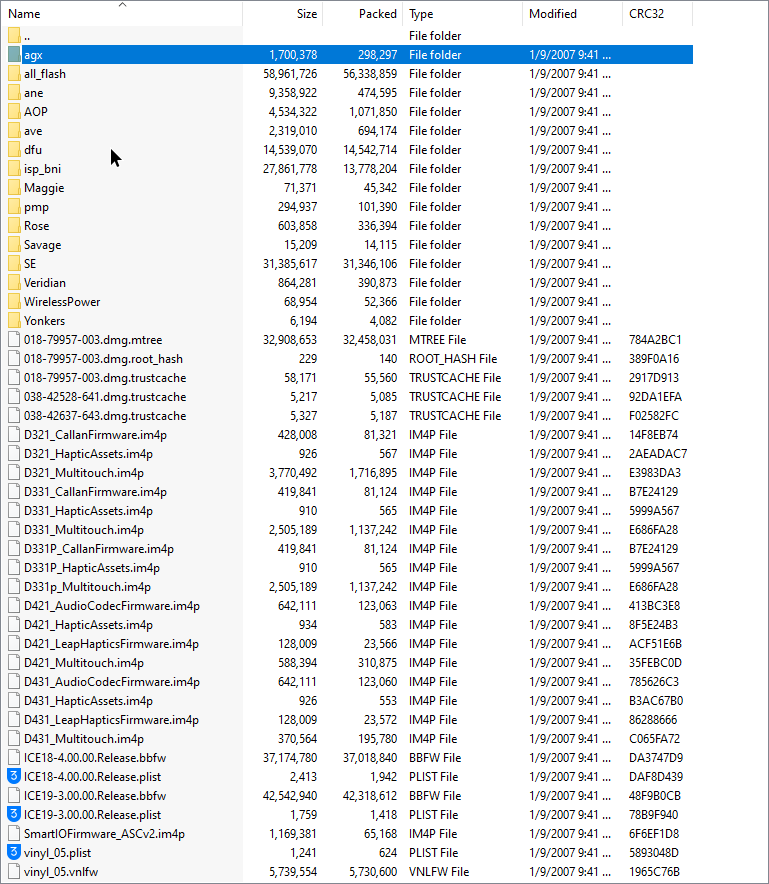
do u know which files from the ipsw i give to futurerestoregui since the latest bb/sep settings arent working
out of these https://i.imgur.com/JKRPA5J.png
 blissful shard
I wonder if when apple releases a new iOS 14 security update if it will be signed and allow us to use FR on 14.x without breaking Face ID
celest basalt
blissful shard
I wonder if when apple releases a new iOS 14 security update if it will be signe...
I believe it would be for that version only and only while signed
blissful shard
Hmm right
 burnt portal
Security update may come over OTA only
Which means you wouldn't be able to FR I don't think
lucid latch
Unless they fkced up
celest basalt
can someone please help me with this error message https://i.imgur.com/ra9t62g.png
 valid adder
@celest basalt why don't you read pins
blissful shard
burnt portal
Security update may come over OTA only
Oh I didn’t think of this, honestly probably
celest basalt
valid adder
<@456226577798135808> why don't you read pins
thanks for the help but my phone turned on by itself so im good
what pin was even supposed to help me
valid adder
@celest basalt did you even read it
celest basalt
i scrolled through yeah, theres a lot of them
celest basalt
how the fuck am i supposed to know that applies to my error
you couldve just said that
like i said though it doesnt matter the problem resolved itself
 celest basalt
i came here for help because this shit is confusing
valid adder
Its not confusing
valid adder
its explained as simply as possible
celest basalt
asking for help
because im confused
idk why you need to be rude about it
anyways my problem is sol ved so im leaving
valid adder
Im basically suggesting the question start with being confused about the pin
because it was really stupid to go in blind and restore
 frail brook
I’m on 15.0
Can I use “iTunes” on MacOSX to “option+Update” to 15.0.1
Or would I have to “option+Restore”
I did “option+update” and selected my 15.0.1 file, but now it’s downloading its own file it appears and I assume it’s going to be 15.0.2
zealous bridge
Option update should work
If it’s downloading a file then you did something wrong
It should just go straight on to “extracting software”
valid adder
obviously doesn't work
rustic blaze
rip
hidden plinth
I guess there was a time limit, doesn’t matter anyway apparently I’ve been saving my blobs wrong. So mine are useless 🤦🏽♂️🤷🏽♂️
 loud mesa
Hi guys to set which file do I need? In TSS saver I have 14.7 and 14.7-ota/
Do I need the ota version or the other one. I know ots stands for over the air, but that's all I know. Many Thx
celest basalt
loud mesa
Do I need the ota version or the other one. I know ots stands for over the air, ...
use the normal one whenever available, it's easier to use (and OTA blobs can only be used on A11 and below)
loud mesa
Will do, many thx nyuszika7h
 royal raft
hello
guys
can anyone help
me with this
i just fixed my iphone 7
with new parts
and guy who fixed it
installed somesort of different motherboard and it has someone elses icloud on it
can i somehow remove it if it is possible ??
celest basalt
broke
 celest basalt
read it
green onyx
 prisma saddle
if u cant fix it, use linux
prisma saddle
i only have windows
green onyx
then dualboot linux or liveboot it
 lean stream
@prisma saddle so you deleted the Apple iBoot Recovery drivers from device manager?
Then unplug the device, plug device back in
Then run FR again?
prisma saddle
if we count it's 9 times now i tried it
lean stream
Ok. And iTunes? Comes from apple or MS?
lean stream
And have you tried different cable, different port on PC?
Latest version of coocoofroggy FR GUI?
mystic axleBOT
celest basalt
!t ibec
ibec
Fix for error code 3, 8, and 10 aka the iBEC error in futurerestore
- Uninstall all apple drivers via device manager.
- Uninstall all apple products including itunes and apple device support stuff via control panel uninstall a program. MAKE SURE TO CHECK UNINSTALL DRIVER WHEN UNINSTALLING
- Unplug and replug device.
- Check device manager for more apple stuff and uninstall if so with same driver checkbox.
- Disconnect device.
- Install itunes64 exe from apple.com itself, no windows store bullshit. This is the best version: https://support.apple.com/kb/DL1816?locale=en_US (It will be labeled windows 7, 8 but install it on windows 10, it works fine)
- Plug in device in recovery.
- iboot (recovery) driver should show up under usb in device manager. Uninstall it and check the with software box.
- Run futurerestore.
- Unplug and replug your device.
- Run futurerestore again
Added by Cryptic#6293 | Used 117 times
·
prisma saddle
that's what we were discussing
celest basalt
Oh
prisma saddle
and i tried it 10 times now
celest basalt
Oh, well in that case sorry for interrupting
lean stream
Yay!!
prisma saddle
thanks you all
lean stream
Pleasure
celest basalt
SEP/BB is incompatible
prisma saddle
sep/bb?
lean stream
Secure Enclave Processor and BaseBand
celest basalt
^
 crude sorrel
I have a question. If im on ios 13.1 jailbroken and save my shsh blobs for ios 15.0.1 and if they come out with a jailbreak later on can i update to that ?
crude sorrel
how would I know if they are?
green onyx
check here more often
currently, the latest sep and bb is compatible with 15.0.1
but in the future, it may not
just be more active here ig
lucid latch
crude sorrel
I have a question. If im on ios 13.1 jailbroken and save my shsh blobs for ios 1...
Can just use otadelay for that
If it’s still available ofc
crude sorrel
I see thank you I will look into that
old coral
Is the sep and baseband of 15.0.2 and 15.1 backwards compatible with iOS 14? And does it break touch ID on A11 (8 plus)
@zealous bridge
@valid adder
rustic blaze
Hey when i Delay OTA my iphone x to ios 14.8
i get this
tried both cellular and wifi
https://dhinakg.github.io/delayed-otas.html
ramblings
stuff
installed the profile from this nwebsite
please help
14.8 is downloaded
but fails to install
stuff

right now I am on 14.6 without Face ID
 north venture
Can you help me ?
 rustic blaze
i used 15.0.1 Sep and BB
to downgrade
what can be done to enable Face ID again and restore back to ios 14
lucid latch
Buy a new phone with ios 14
rustic blaze
or else upgrade to ios 15 and wait for a jailbreak
green onyx
lucid latch
Buy a new phone with ios 14
bruh
celest basalt
rustic blaze
what can be done to enable Face ID again and restore back to ios 14
FutureRestore again with manual SEP and Baseband didn't work ?
celest basalt
that's not gonna help, 14.8 is unsigned
 atomic bridge
is it possible to use ota blobs on futurerestore?
celest basalt
on A11 and below yes
you need pwndfu though
use ipwndfu + the appropriate tool/fork to remove sigchecks for your device, and futurerestore --use-pwndfu
rustic blaze
Give us the complete command for pwndfu
celest basalt
the commands for pwning depend on your device, but futurerestore command is the same
then it's just ./futurerestore-v2.0.0-test --use-pwndfu [same args as usual]
atomic bridge
celest basalt
use ipwndfu + the appropriate tool/fork to remove sigchecks for your device, and...
i tried downgrading from 10.3.4 to 8.4.1 on an iphone 5 with ios ota downgrader, there were two methods, a one that uses fr and one that uses idevicerestore, i tried fr but it gave me this err.
 celest basalt
baseband not signed? 🤔
atomic bridge
celest basalt
baseband not signed? 🤔
actually it may conflicts somehow because i’m using another iphone to tether usb hotspot
i think that’s the problem
@celest basalt anyway, now i’m tethering with an android and i’ll try fr, to not put any sep, i just leave it blank?
valid adder
how bought use actual futurerestore?
celest basalt
idk, never tried if you can omit SEP
atomic bridge
valid adder
how bought use actual futurerestore?
that’s what i was going to do 
atomic bridge
yeah
celest basalt
but idk if FR still wants --latest-sep or not
atomic bridge
okok imma try
celest basalt
@valid adder bruh, looks like we didn't remove all the fearmongering around latest-sep/bb yet
it's still in the help
valid adder
Im adding noibss support for kloader devices rn
its like one line of code idk why i've been so lazy
@celest basalt will merge after checks pass 
 carmine maple
can someone help me downgrade to ios 14.8 from ios 15.0.1 i have been getting errors
 stray stag
Same
celest basalt
what device?
if it's iPhone X or newer you won't be able to downgrade without losing Face ID
carmine maple
its a 7 dw
atomic bridge
it gives this err. now, do u know any possible fix? i used the blob downloaded from tsssaver 8.4.1 ota directory

@celest basalt
atomic bridge
celest basalt
actually I thought the ending is the same but not
so not 100% sure if bug or not
you sure the blobs are for the right device?
carmine maple
i keep getting this exception error in futurerestore
its not placing my phone in recovery mode
zealous bridge
celest basalt
I thought we fixed that bug
that’s 194 tho
atomic bridge
it’s the v194, i tried the beta one but it doesn’t even start lol
celest basalt
oh
celest basalt
 valid adder
bro I fixed that in beta
valid adder
 atomic bridge
oh btw, the beta wasnt working on gui, i’m using cli and it seems to work now
carmine maple
futurerestore gui isnt placing my phone in recovery and when i try to put it in recovery mode it says apnonce and apticket isnt matching how can i fix this?
valid adder
@atomic bridge beta won't work on 32bit until I push
atomic bridge
that’s why it’s prolly stuck on that too
 atomic bridge
valid adder
ipod is dead rn
atomic bridge
valid adder
ipod is dead rn
celest basalt
just sudo killall -9 usbmuxd 
valid adder
its stuck because its booting ibss twice
celest basalt
oh
valid adder
kloader booted ibss
celest basalt
I thought it's subscribe
valid adder
kloader booted ibss, now futurerestore is trying to
celest basalt
nice serial number btw
zealous bridge
Isn’t that why no ibss exists
atomic bridge
okok
valid adder
you will need to add --no-ibss to the command @atomic bridge
carmine maple
what command should i run on futurerestore to downgrade?
atomic bridge
valid adder
you will need to add --no-ibss to the command <@!776015053668876288>
okok, lmao it’s been 5 minuts since i’m trying to enter on ipwndfu on that shitty iphone 5
 atomic bridge
u re a pro
valid adder
wait you are using ipwndfu?
atomic bridge
yeah, it says that my device is in pwned ibss mode
atomic bridge
atomic bridge
that’s why it’s prolly stuck on that too
it is stuck on that same screen, is it “normal”? @valid adder
atomic bridge
valid adder
I made a typo thats why
atomic bridge
it can happen
valid adder
something also iirc some ipsw.me keys were wrong
so you may need the proxy to overwrite them
atomic bridge
valid adder
so you may need the proxy to overwrite them
idk how to do that 
atomic bridge
@valid adder what’s the eta for that fix approximately? days, weeks, hours... dunno
valid adder
bullshit
 valid adder
@atomic bridge got it working somehow but the real test is not breaking other devices
fuck
it got stuck on device tree
 devout lynx
does 13.5 → 14.8 on iPhone XS still break faceID?
celest basalt
yes
well
you can go to 14.8 via delayota and keep Face ID
but why would you
at that point go to 14.6 instead, although even that is not ideal as next JB will probably only be up to 14.5.1 first
depends on how fast they get the IOMFB stuff working
remote hollow
devout lynx
does 13.5 → 14.8 on iPhone XS still break faceID?
Today I saw a Video from a well known guy (George) (iDeviceCentral) and he was talking about 15.0 RC still being signed. it seems this version doesn't break FaceID like 5.0.1 and 5.0.2
@celest basaltwhat do you think ? correct me please if I am wrong about SEP will not break FaceID of 5.0 RC (beta)
zealous bridge
It won’t but you’ll be waiting a long time for a jailreak on 15.0
valid adder
@remote hollow jailbreak youtube should never be referenced in this channel
celest basalt
I already tested it, 15.0 RC SEP breaks Face ID too
remote hollow
sure, but the video released Today (Several hours ago)
valid adder
remote hollow
sure, but the video released Today (Several hours ago)
jailbreak youtube should never be referenced in this channel
celest basalt
zealous bridge
So it changed between RC and stable
what are you talking about, I just said both break Face ID
remote hollow
celest basalt
I already tested it, 15.0 RC SEP breaks Face ID too
so we have no option left 😦
zealous bridge
celest basalt
what are you talking about, I just said both break Face ID
15.0 breaks Face ID? What?
 remote hollow
what is signed right now is: 5.0 RC(Beta), 5.0.1 and 5.0.2 and all breaks FaceID right 😦
zealous bridge
Ohh wait
Is he talking about sep/baseband
Lol I thought he meant restoring to that version
Nvm


 remote hollow
celest basalt
I already tested it, 15.0 RC SEP breaks Face ID too
remote hollow
celest basalt
I already tested it, 15.0 RC SEP breaks Face ID too
are you sure man?
remote hollow
celest basalt
stop pinging me
OK
zealous bridge
LOL
atomic bridge

remote hollow
remote hollow
anyone can please explain this chart (updated today) ?
burnt portal
That has not been updated today
The chart says that when 14.7.1 was the latest official signed iOS version, things were compatible. But it is no longer signed and the current signed versions are iOS 15 which break Face ID for iPhone X and above
 viral sandal
I have a question. I have an iPhone se on iOS 11.4.1. If I save the blobs and upgrade to iOS 15. Would I still be able to downgrade to iOS 11?
burnt portal
Blobs can only be stored when the iOS version is still able to be installed from Apple
So you cannot save blobs right now.
But if you had blobs, unfortunately it still won't work as the SEP and BB of iOS 15 isn't compatible with iOS 11
celest basalt
the first part is not entirely true because you can dump onboard blobs for the current version from a jailbroken device
but yeah they would be useless due to SEP/BB incompatibility
I have never used future restore so I am sorry for the ignorance, but I have an Iphone 12 pro, on 14.1. I have blobs saved for all ios 14. Can I / Should I future restore?
in relation to the untether possibilities
celest basalt
celest basalt
I have never used future restore so I am sorry for the ignorance, but I have an ...
you can't go to any 14.x version without breaking Face ID anymore so just stay where you are
damn. alright. thank you for the response. do you think if / when an untether comes ill still be good to go on 14.1?
i can only find the supported devices for the 15 exploit everyones talking about
yeah 14.1 should be fine
viral sandal
Ig I’ll just stay on iOS 11
valid adder
@atomic bridge ok its fixed it just doesn't work below 8.4.1 for some reason
gonna push the changes later
 valid adder
!t nightly
mystic axleBOT
valid adder
!t nightly
valid adder
@celest basalt if you are refering to blobs this is the correct channel genius bar is for other matters
celest basalt
valid adder
<@456226577798135808> if you are refering to blobs this is the correct channel g...
Thank you
I didn’t see this channel
 pine adder
Is there a way to downgrade an Iphone X when it's not jailbroken?
celest basalt
Do you have blobs saved?
celest basalt
There is another way using the 90 day delay but it’s never worked for me
And that might require jailbroken state idk
valid adder
because that can only be used to update, it blocks sep downgrading @celest basalt
pine adder
Ok thx a lot I must look if there is any bloobs saved
pine adder
Ok thx I just purchased the iPhone one Moment please
celest basalt
valid adder
if you didn't save them
Not necessarily true, on my first iPhone X I checked blobs before saving and saw that a couple unsigned versions were already saved, so I assume some rando did it for me xD
celest basalt
Never touched that before
valid adder
its default on taurine, odyssey, and odysseyra1n
celest basalt
Yeah no I only used uncover back then
Rick is an Administrator, Moderator, and Genius in the r/Jailbreak Discord Server. Rick doesn't know much about FutureRestore and doesn't help much if at all in #futurerestore-help.
Ok?
valid adder
Cryptic is a Genius, in role form and in a literal sense, he is the leading expert in iOS downgrading and always helps in #futurerestore-help
celest basalt
Doesn’t explain his hostile and rather toxic behavior though
valid adder

pine adder
my ECID 0009596230FBC83A
valid adder
nope you have no blobs saved
pine adder
Ok thx for the info
brisk narwhal
So what’s the earliest version of iOS that can currently be FRed to without ruining Face ID
Is it 14.6
mystic axleBOT
atomic bridge
!t nightly
atomic bridge
i’ll try it later
valid adder
@brisk narwhal 15.0
brisk narwhal
Ohhh
That’s not poggers
Ok then I might OTA to 14.6 and hope and pray the semitether comes out with the untether lol
There are 2 more days to OTA to 14.6 right
celest basalt
in theory yes, but people have said 14.6 didn't show up for some reason ¯_(ツ)_/¯ you can try
celest basalt
!t delayota
mystic axleBOT
celest basalt
!t delayota
delayota
You can update (not downgrade) to unsigned iOS versions without blobs for up to 90 days by installing SupervisedEnabler and downloading the appropriate profile from https://dhinakg.github.io/delayed-otas.html.
Added by nyuszika7h#0001 | Used 133 times
·
celest basalt
umbral ember
Or should I stay on ios 13.5? iPhone SE 1st edition
if you don't mind using a computer (checkra1n) to jailbreak until the untether drops then you can go to iOS 14.5.1 now, should have no issues on a SE
you can also wait if you want, we should know at least week in advance if Apple makes SEP incompatible in meantime
umbral ember
celest basalt
if you don't mind using a computer (checkra1n) to jailbreak until the untether d...
I don't mind using checkra1n as I'm still doing it now. Also, is there OdysseyRa1n available on 14.5.1?
celest basalt
yes
umbral ember
Ok, thank you 🙂
rustic blaze
delay ota doesnt work at all
 mystic salmon
! pin
carmine maple
i keep getting this error could someone help me?
Entering recovery mode...
futurerestore: failed with exception:
[exception]:
what=Unable to place device into recovery mode from Normal mode
code=9043985
line=138
file=futurerestore.cpp
commit count=194:
commit sha =0ab9df3209ee599f581532d05d331e6abe0f53f3
 hallow hull
Can I somehow downgrade to ios version for which I have blobs, but SEP and baseband are not signed?
lucid latch
rustic blaze
delay ota doesnt work at all
can't go to 14.6?
rustic blaze
No
brisk narwhal
Why is the last day for delayOTA for iOS 14.8 listed as 10-13-2021
celest basalt
it's just a bug, it always shows today or close to it
blazing sedge
celest basalt
in theory yes, but people have said 14.6 didn't show up for some reason ¯\_(ツ)_/...
Shows up for me 14.6
 cedar onyx
What about Touch ID on iPhone se 2020? Will it break after upgrade to iOS 14.4?
 celest basalt
cedar onyx
What about Touch ID on iPhone se 2020? Will it break after upgrade to iOS 14.4?
celest basalt
cedar onyx
What about Touch ID on iPhone se 2020? Will it break after upgrade to iOS 14.4?
nobody tested afaik but it shouldn't break in theory because the issue seems to be only with Savage (Face ID) firmware
I should clarify that in the tag I guess since it's A13
though it does say breaks Face ID only
but I separated out iP8 (which was tested) too
cedar onyx
I will test and let you know
lucid latch
blazing sedge
Shows up for me 14.6
It just shows unable to check for updates for me whenever i use the otadelay profile
lucid latch
blazing sedge
Did u make sure u have ota enabled
I have, it works for me without the profile installed
But when i installed the profiles it doesnt work
It does show up for 14.71
Wtf
blazing sedge
Is 14.6 already done
 dire hornet
im regretting upgrading to the ios 15 beta/ios 15 at all
my latest blobs are for 14.4.2, so my question is
- should i do it
- how would i do it
blazing sedge
 blazing sedge
dire hornet
im regretting upgrading to the ios 15 beta/ios 15 at all
my latest blobs are for...
blazing sedge
dire hornet
im regretting upgrading to the ios 15 beta/ios 15 at all
my latest blobs are for...
Youll lose faceid on faceid devices
blazing sedge
Yea thats by future store
blazing sedge
Sep isnt compatiable anymore since ios 14.8 is unsigned
lucid latch
blazing sedge
When you did this
blazing sedge
lucid latch
When you did this
Just now
lucid latch
Guess im just unlucky then
blazing sedge
Redo the process see if that changes things
lucid latch
Anything above 14.6 works, just 14.6 can’t find
 tall siren
balls
valid adder
The beta is 2.0.0 test build 256 @coral falcon
Yes which is maintained by me
I post updates on my Twitter
!t nightly
mystic axleBOT
valid adder
!t nightly
celest basalt
because tsschecker is broken for iOS 15 in v194
it will say SEP firmware not signed
valid adder
v194 uses tsschecker v320 which has broken iOS 15 faceid devices tss
It’s in the pins lol @coral falcon
blazing sedge
Does anyone know the cut off date for 14.6 with ota delay
Im debateing on giving my jb up to update before it ends
lucid latch
blazing sedge
Does anyone know the cut off date for 14.6 with ota delay
Still doesn’t work for me yet
celest basalt
blazing sedge
Youll lose faceid on faceid devices
Would losing faceid be perm? or will it be fixed if the phone was restored?
celest basalt
Face Id doesn't function when jb, is that permanent or not?
valid adder
its nothing to do with jb whatsoever
sep is incompatible
you need iOS 15 for faceid to function normally
celest basalt
how do i set the generator with checkra1n
valid adder
system info
celest basalt
ah thats what i didnt want to do lol