#futurerestore-help
1 messages · Page 198 of 1
 toxic lotus
 low summit
hi
toxic lotus
who are u
toxic lotus
yes
 plain mist
low summit
apple made it?
plain mist
low summit
apple made it?
Nahhh Samsung
toxic lotus
only apple uses it
low summit
never heard of that shit in my life must be like ios 2
 zealous bridge
@rustic blaze
low summit
guy dipped no shit
low summit
yes
toxic lotus
 lilac wren
Yeah we should be more compassionate
lilac wren
Yeah we should be more compassionate
fr breh
low summit
but its funny
zealous bridge
lilac wren
Everyone's still learning
Difference is the people that say stuff as facts rather than ask questions
 dull swallow
there’s newer versions of it
lilac wren
toxic lotus
fr breh
Yes
lilac wren
zealous bridge
Difference is the people that say stuff as facts rather than ask questions
Yeah that's what a  is
is
dull swallow
i think latest purple restore is 4.0
zealous bridge
It would be different if he asked us, but he literally said it as it it was a fact
even when we said no

plain mist
what the dog doing
 undone cairn
Hey is there any alternatives to photodock
plain mist
This is #futurerestore-help
 true dust
There anyway to use checkra1n forfuturerestore from 14.6 to 14.5.1 ??
 pseudo stump
u need blobs and a jailbreak
true dust
yes
but I don't know how to do it
i have blobs i just need a description of how to do it
toxic lotus
!t futurerestore guide
 mystic axleBOT
toxic lotus
!t futurerestore guide
mystic axleBOT
toxic lotus
!t futurerestore guide
futurerestore
futurerestore allows you to upgrade/downgrade/restore to unsigned iOS versions if you meet certain requirements.
Added by Capt Inc#0001 | Used 52 times
·
true dust
this?
 true dust
I just opened it but, I don't know how to set it and how to do it because it's the first time I see it
 rustic blaze
how to convert .der to valid ssh
img4tool command
$ ./img4tool --convert -s blob.shsh APTicket.der
tried this command
 celest basalt
rustic blaze
$ ./img4tool --convert -s blob.shsh APTicket.der
celest basalt
rustic blaze
$ ./img4tool --convert -s blob.shsh APTicket.der
apticket.der is useless because it doesn't have a generator
you could convert it to .shsh2 but you won't be able to use it without the generator
true dust
I'll give it a rest it's too much for me
If I knew how to get rid of JB completely from iOS 14.5.1 that would be a better idea
as before, I wrote after Restore System and so it detects that there is JB
low summit
what?
low summit
restore fs has nothing to do with fr
true dust
ma hi no, i'm just asking
low summit
that wasnt a question tho
true dust
buddy, I have ios 14.5.1 from JB and I ask if it goes to restore the system because as before I did with Checkra1n, the system still detects JB
low summit
then restore in itunes
true dust
I thought that if I update from ios14.6 and then restore to 14.5.1, the system will be cleaned
low summit
if u restore from a backup then /var is still not cleaned completely
true dust
oh ok, then I have to wait because I do not know how JB works on ios 14.6
low summit
it works the same
true dust
I know I have the copy I made earlier and the problem is only two days
I just have a cider and wanted to install a zebra
after installation, Zebra shows 37 update but it does not go because it shows that some applications will not be removed
celest basalt
use the pinned 2.0.0 test build
plain mist
rustic blaze
Have a infected iPhone X with virus
How'd you even infect it
 viscid furnace

plain mist
dipped
viscid furnace
Mask noises intensifies
zealous bridge
which bored dev makes viruses for iOS 
low summit
and he dipped
 valid adder
The Futurerestore guy back at it again spreading misinformation after telling them to stop...
 shy magnet
@rustic blaze i believe a more fitting name for you is the myle guy
valid adder
joes mother
plain mist
are you using the ios 15 ipsws futurerestore
 maiden citrus
nah this is normal idevicerestore
toxic lotus
linux?
maiden citrus
windows
plain mist
.
maiden citrus
the restore is still going
toxic lotus
boot linux
plain mist
ok thats your first mistake
toxic lotus
oh
plain mist
maiden citrus
the restore is still going
nvm
maiden citrus
i was just wondering what it meant
toxic lotus
i never got it to work in windows
plain mist
yea idr prints random fearmongering things
toxic lotus
and then it took a week on linux
plain mist
unless its an error u should be fine
maiden citrus
i compiled it myself
toxic lotus
wget 'https://cadoth.net/~nyuszika7h/ios-builds/libimobiledevice-static-linux.tar.gz'
tar -xf libimobiledevice-static-linux.tar.gz
cd libimobiledevice-static-linux
chmod +x idevicerestore
./idevicerestore --erase --latest
and it didnt work
toxic lotus
for linux
maiden citrus
i needed windows
toxic lotus
oh
maiden citrus
yeah it just finished
plain mist
maiden citrus
yeah it just finished
W

 plain mist
did you do --erase
toxic lotus
is that your main?
maiden citrus
and now back on this screen
maiden citrus
toxic lotus
is that your main?
brothers phone
maiden citrus
plain mist
did you do --erase
no
toxic lotus
oh they don’t jb?
maiden citrus
nope
maiden citrus
i didnt do anything
 maiden citrus
i thought idevicerestore does update by default
 plain mist

maiden citrus
nvm its back
seems to reboot every few min
and goes back to where it was
or maybe the screen is just going to sleep
yeah im dumb
it was just going to sleep
well tanbeer said that its normal
imagine how freaked out you would be if you were at the apple store or did an itunes update and this happened
celest basalt
maiden citrus
ok well then what the fuck is this data recovery
that's normal
it wouldn't be trying to recover any data if it was erasing the device
 inland sapphire
My iPhone XS Max gone into bootloop last night and i had no option left other than restoring to 14.6. But I have blobs for 14.3 and later. Is there a way i can get back to 14.3
toxic lotus
you can’t
 stuck horizon
inland sapphire
My iPhone XS Max gone into bootloop last night and i had no option left other th...
stuck horizon
inland sapphire
My iPhone XS Max gone into bootloop last night and i had no option left other th...
same thing just happened to me, i just futurerestored to 14.6
there is no way unfortunately 😦
just wait for 14.6 jb to come out ig
inland sapphire
Even with the blobs we can’t do a thing. Very strange
inland sapphire
Hmmmm
stuck horizon
my data also got erased so i had to restore a backup from 4 months ago
unfortunately
inland sapphire
I backup my phone everyday so there isn’t any loss other than JB
stuck horizon
very blessed
inland sapphire
😀
 vivid nova
imagine a backup exploit working as if your device is jailbroken upon restoring from a backup
inland sapphire
Lol
plain mist
stuck horizon
yeah the APNonce changes when it bootloops
Not really, yours seems to have been set to what taurine sets it as, not the one of your generator
dull swallow
APNonce changes whenever the bootROM is reset
so yes really a bootloop changes your nonce
inland sapphire
Back in time, i think we had a tool just to set APNonce manually or something like that and it works for futurerestore downgrades. Do we have something like that for 14.6?
I badly wanted to go back to 14.4 with my blobs or anyother way
plain mist
dull swallow
so yes really a bootloop changes your nonce
......
dull swallow
......
inland sapphire
plain mist
I’m gonna bootloop my 7
Do you really wanna do that?
plain mist
inland sapphire
Do you really wanna do that?
Yes I do
inland sapphire
Go for it
lilac wren
dull swallow
APNonce changes whenever the bootROM is reset
Lmho
dull swallow
well it changes whenever DFU is entered
low summit
lilac wren
If you bootloop your nonce stays
someone yesterday didnt
even tho they had u0 which was supposed to be 111
lilac wren
dull swallow
well it changes whenever DFU is entered
I don't think DFU clears nvram
celest basalt
lilac wren
I don't think DFU clears nvram
it doesn't, but DFU has its own separate nonce
plain mist
dull swallow
well it changes whenever DFU is entered
⁉️
binny are you getting your info from CNN
lilac wren
plain mist
binny are you getting your info from CNN
No Ali a told them
lilac wren
celest basalt
it doesn't, but DFU has its own separate nonce
Do we know anything about dfu nonce, is it entangled, does it have the same hashing method, or is it the same just not affected by boot-nonce
celest basalt
nah
it sets recovery nonce
but might be one-time rather than changing NVRAM IIRC
zealous bridge
dull swallow
APNonce changes whenever the bootROM is reset
Not if it was set in nvram prior
valid adder
its funny how we continiously state the obvious facts about iOS
and you guys continue to assume wrong and forget
vivid nova
toxic lotus
shit blows my mind
your mom blows mine
valid adder
yo who has jailbroken a12
 vast sorrel
valid adder
yo who has jailbroken a12
vast sorrel
valid adder
yo who has jailbroken a12
Have a jailbroken a14 🤷♂️
valid adder
@vast sorrel thanks but got someone already
plain mist
valid adder
its funny how we continiously state the obvious facts about iOS
is someone running rjb cnn
valid adder
That’s a good idea we should tell people to delete springboard.app because it drains battery
 plain mist
now try to use the phone 
shy magnet
gonna boot iBSS/iBEC over DFU
send a custom apple logo
and frame the device
modern art
lilac wren
@1Conan#6765 if someone saves blobs twice in a row with the same info, are the old blobs overwritten or just not touched
@topaz solar
plain mist
Wrong chat
zealous bridge
isnt certificate creation time in the DER tho
if it was created at different times the hashes should be different
lilac wren
Oh idk
Lol I was gonna say nonces would probably ruin hashes
But we're manipulating the nonce
plain mist
Who took authority to maintain fr after kúp died?
plain mist
ohh
celest basalt
lol the futurerestore repo isn't even pinned rn
plain mist
then pin it
Fr repository on GitHub: https://GitHub.com/m1stadev/futurerestore
GitHub
A hacked up idevicerestore wrapper, which allows specifying SEP and Baseband for restoring - m1stadev/futurerestore
valid adder
Official Latest Futurerestore Repository
GitHub
A hacked up idevicerestore wrapper, which allows specifying SEP and Baseband for restoring - m1stadev/futurerestore
valid adder
valid adder
**Official Latest Futurerestore Repository**
https://github.com/m1stadev/future...
plain mist

shy magnet
tr
zealous bridge
@plain mist tried it
plain mist
die
toxic lotus
plain mist
die

shy magnet
ran /usr/bin/ParanMat --die and died
plain mist
fail!
low summit
Yes mat died
plain mist
true..
zealous bridge
@shy magnet how come your api doesnt differentiate between different betas with the version key anumore
shy magnet
zealous bridge
<@!728035061781495878> how come your api doesnt differentiate between different ...
cause scraping it off the iphonewiki is such a fucking pain in the ass
and didn’t work properly
zealous bridge
oh
plain mist
mediawiki api? more like ASS!
lilac wren
Would scraping from Apple developer download site work or would the cookie expire
 acoustic rain
hi! anyone have a shsh blobs for iPhone 6S - A1688 (for ios12 or 13?) 🙂
plain mist
zealous bridge
thats not how it works
plain mist
bruh
zealous bridge
you cant use someone elses blobs
plain mist
besides sep and bb
zealous bridge
they're device specific
zealous bridge
you can save 14.6 blobs now
plain mist
zealous bridge
but thats it
acoustic rain
thx.
zealous bridge
!t blobs
mystic axleBOT
zealous bridge
!t blobs
blobs
shshd is preinstalled on Chimera, Odyssey(ra1n) and Taurine which will automatically save your blobs weekly. Run sudo shshd in a terminal (such as NewTerm 2) to get a download link.
Added by nyuszika7h#0001 | Used 683 times
·
zealous bridge
plain mist
https://tsssaver.com
lmao that redirects
plain mist
zealous bridge
lmao that redirects
to v1 which redirects to v2
zealous bridge
makes sense 
lilac wren
plain mist
https://tsssaver.com
Til
 atomic bridge
can i future restore using onboard shsh?
zealous bridge
yes as long as its IPSW
atomic bridge
wdym
zealous bridge
the onboards have to be IPSW onboards, not OTA onboards
you can check by uploading to https://verify.shsh.host

SHSH Host Verify
Verify SHSH2 files saved for your device for up/downgrading to unsigned iOS versions using futurerestore
if the blob is valid, its IPSW
if its not, its OTA
atomic bridge
what do i use to save them?
zealous bridge
[[System Info]]
mystic axleBOT

System Info
System information in Settings app > General > About, and other sections. Set boot-nonce, save SHSH, battery info etc
 xyz.xninja.systeminfo • Page 2/3
·
atomic bridge
zealous bridge
[[System Info]]
xyz.xninja.systeminfo • Page 2/3
·
atomic bridge
zealous bridge
[[System Info]]
i got it, i swipe on my ecid and select save shsh or apticket?
zealous bridge
APTicket
atomic bridge
zealous bridge
APTicket
ok, i’ve done that, then on shsh.host i select the one that got saved on filza?
atomic bridge
yeah, i’ma check if they’re valid, thx
lilac wren
zealous bridge
yes as long as its IPSW
pwndfu still doesn't work?
atomic bridge
pog
 zealous bridge
thats fine then
zealous bridge
lilac wren
pwndfu still doesn't work?
didnt work for Cryptics tester so i assume not
atomic bridge
i also got a iphone x on 14.6 , i got 14.3 blobs, can i downgrade?
zealous bridge
yes
atomic bridge
kk, cause i ve heard that there were issues downgrading A11 devices
atomic bridge

lilac wren
Aww I wanted to learn about crypto :(
lilac wren
 green onyx
lmao what
green onyx
lmao what
Some bot spamming every channel
valid adder

 tawny hornet
valid adder
tawny hornet
valid adder
!t ibec
mystic axleBOT
valid adder
!t ibec
ibec
Fix for error code 3, 8, and 10 aka the iBEC error in futurerestore
- Uninstall all apple drivers via device manager.
- Uninstall all apple products including itunes and apple device support stuff via control panel uninstall a program. MAKE SURE TO CHECK UNINSTALL DRIVER WHEN UNINSTALLING
- Unplug and replug device.
- Check device manager for more apple stuff and uninstall if so with same driver checkbox.
- Disconnect device.
- Install itunes64 exe from apple.com itself, no windows store bullshit. This is the best version: https://support.apple.com/kb/DL1816?locale=en_US (It will be labeled windows 7, 8 but install it on windows 10, it works fine)
- Plug in device in recovery.
- iboot (recovery) driver should show up under usb in device manager. Uninstall it and check the with software box.
- Run futurerestore.
- Unplug and replug your device.
- Run futurerestore again
Added by Cryptic#6293 | Used 81 times
·
zealous bridge
taglist
 proper helm
Does anyone know if you can save onboards for the firmware that the phone came with out of the factory?
shy magnet
@proper helm if you can jailbreak your device, https://twitter.com/tihmstar/status/1279706993410875392?s=20

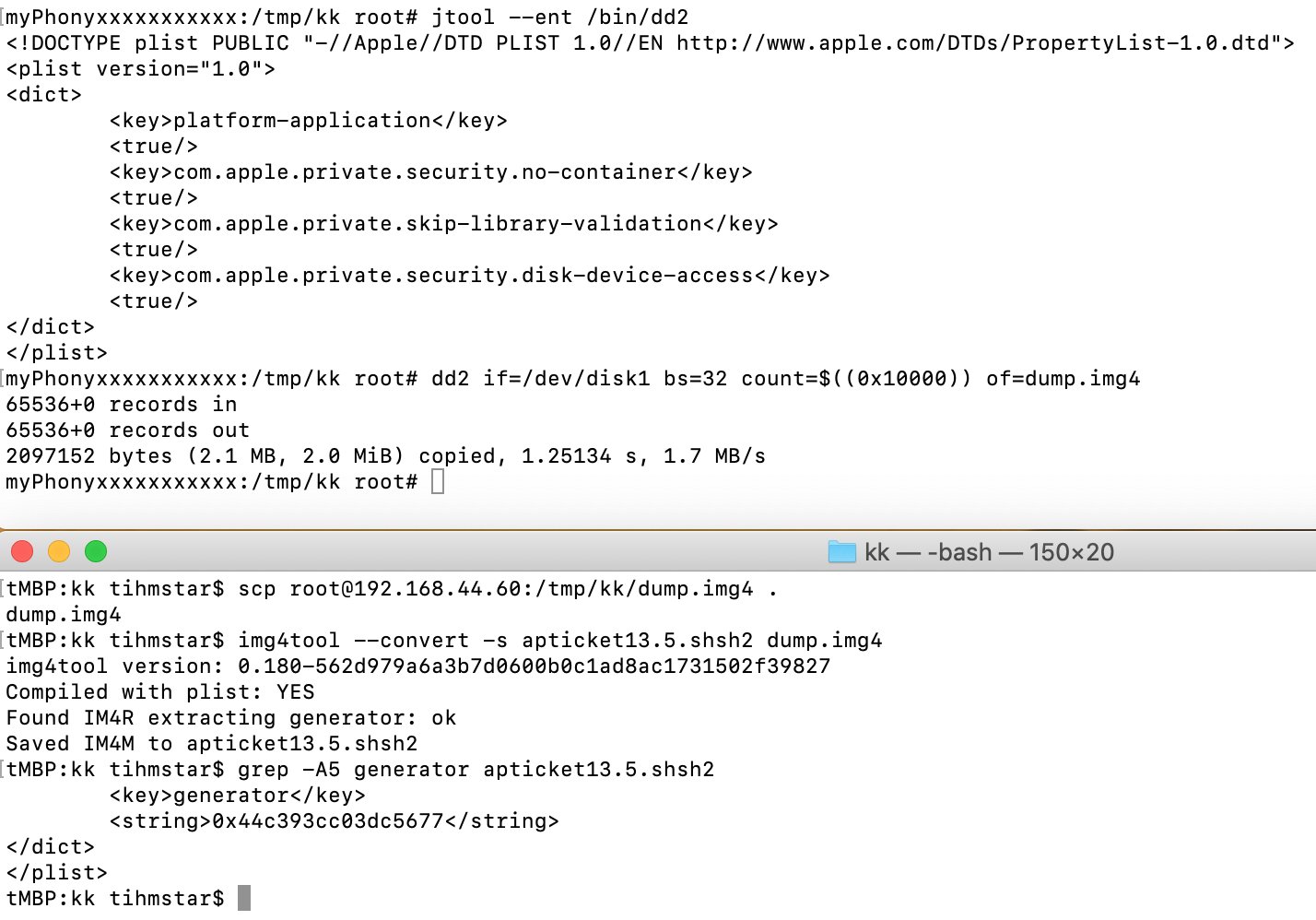
If you want to dump APTicket on device:
- sign dd with "com. apple.private. security.disk-device-access"
- dump enough bytes of /dev/disk1
- use img4tool to create an shsh2 file
IMPORTANT: MAKE SURE THE GENERATOR IS THERE, OTHERWISE THE DUMP IS USELESS!!!!!
Likes
131
 Twitter
·
zealous bridge
shy magnet
<@!813581369334169601> if you can jailbreak your device, https://twitter.com/tih...
Twitter
·
zealous bridge
shy magnet
<@!813581369334169601> if you can jailbreak your device, https://twitter.com/tih...
factory onboards dont seem to work
if you compare them with OTA and IPSW build manifests they both have mismatching hashes with the ticket
ive yet to come across wtf they actually are
valid adder
shy magnet
<@!813581369334169601> if you can jailbreak your device, https://twitter.com/tih...

 celest basalt
shy magnet
<@!813581369334169601> if you can jailbreak your device, https://twitter.com/tih...
celest basalt
shy magnet
<@!813581369334169601> if you can jailbreak your device, https://twitter.com/tih...
much easier to just use System Info to do it automatically
shy magnet
true
shy magnet
valid adder
nand write to disk1 from ROM
sick
oh right
i was looking at that a few days ago
viscid furnace
Can anyone help me? Yesterday, I attempted to use futurerestore but didn't have much time. I tried the script ONCE, but it brought me to the home menu. Now, my device won't stop exiting recovery mode, showing an apple logo, and going back into recovery. Manually hard resetting doesn't cut it. Is the firmware corrupted? Even so, the iPSW and blobs matched up, and I've never experienced any issues with the FR build I was using before(v2.0.0 beta)
proper helm
celest basalt
much easier to just use System Info to do it automatically
The problem for me is that those blobs don’t save with the set generator. They only save with a random one
celest basalt
proper helm
The problem for me is that those blobs don’t save with the set generator. They o...
that's how onboard blobs work
you cannot change the generator for onboard blobs
it is whatever was set when the device was last restored or updated
proper helm
celest basalt
you cannot change the generator for onboard blobs
Oh
proper helm
Is this blob valid?
valid adder
where did you get this from bro @proper helm
proper helm
valid adder
where did you get this from bro <@!813581369334169601>
System info onboard
valid adder
somehow doesn't seem valid at all
proper helm
valid adder
somehow doesn't seem valid at all
Under ecid, I click apticket to save onboards. Right?
 potent wolf
if I saved blobs for 13.5 / 14.3 on RC for iPhone 11 Pro, but I didn't do the generator step, am I fucked?
device is in recovery mode
reddit makes it seem like i am at this point
okay apparently I was able to reinstall 13.5 cause of blobs / ipsw that was signed correctly (still going through it on future restore)... so lets see if I can get this generator set properly via iterm on a clean install of 13.5?
lilac wren
valid adder
somehow doesn't seem valid at all
They said it was factory I think
lilac wren
potent wolf
okay apparently I was able to reinstall 13.5 cause of blobs / ipsw that was sign...
SEP won't let you restore to 13.5
14.3 should work fine though
potent wolf
lilac wren
SEP won't let you restore to 13.5
I was on 13.5 before, I never got to go up to 14.3 via OTA / FutureRestore, it just went straight into recovery mode, it appears to be fine?
Or will it error out eventually
lilac wren
What device is this
potent wolf
11 Pro
lilac wren
You're FutureRestoring to 13.5?
potent wolf
Well, I'm re-restoring to 13.5 cause I was in recovery mode
potent wolf
yeah it sent it i think
lilac wren
Yeah it doesn't work
potent wolf
awesome
potent wolf
i never set the generator
lilac wren
Try exit recovery first futurerestore --exit-recovery or click the exit recovery button on GUI after stopping the process
If it reboots into recovery then try FutureRestore to 14.3
lilac wren
potent wolf
cause I have the code in my blob file
What's the generator in the blob? 0x1111111111111111?
potent wolf
0x7b226a3392f0192d
which is correct to https://shsh.host/
SHSH Host
Save SHSH2 files for your device for up/downgrading to unsigned iOS versions using futurerestore
potent wolf
how can i get it back to 13.5?
just manually install via Finder?
nvm its back to 13.5, i'm going to jailbreak and do the setting now
lilac wren
potent wolf
nvm its back to 13.5, i'm going to jailbreak and do the setting now
You're lucky lol
potent wolf
Yeah FaceID Doesn’t work right now but it’s another issue for another day
This is just a backup phone I want to try and use cause in tired of the size of my 12 pro max
@lilac wren i need to set my generator to 0x7b226a3392f0192d right?
lilac wren
Yes
potent wolf
and now i should be good to future restore now that i've done that?
alright here we go lol
lilac wren
potent wolf
and now i should be good to future restore now that i've done that?
Yep
Good luck
potent wolf
cheers @lilac wren , is there like a thanks command or something in this discord?
lilac wren
Nah I don't think so
 sturdy atlas
hi, could i downgrade 14.7 to 14.4 with -u in fr?
celest basalt
sturdy atlas
hi, could i downgrade 14.7 to 14.4 with -u in fr?
nope, you will recovery loop
14.5 is the lowest you can go with -u if you're above that version
you can go to 14.4 without -u though, you will just lose data unless you have an old backup from 14.4.2 or lower
sturdy atlas
celest basalt
you can go to 14.4 **without** `-u` though, you will just lose data unless you h...
thank you, exactly what i wanted to know!
plain mist
uhh how do you compile da futurerestore for windows
toxic lotus
plain mist
uhh how do you compile da futurerestore for windows
don’t you have mac bruh
plain mist
ok? so?
plain mist
Wtf
celest basalt
lilac wren
Even cryptic's script fails at xpwn
use my fork of xpwn
green onyx
just merge ur xpwn fixes into cryptics
celest basalt
I don't have push access to it lol
green onyx
damn
celest basalt

Gist
Docker image to compile a static build of futurerestore - Dockerfile
 subtle hill
Hello and forgive me that I maybe posting in the wrong board.
My iPhone 7 is has just updated from iOS 12.4 to 14.6 and legacy apps won't launch anymore as they are no longer on app store anymore.
And I only got 12.4.1, 13.1.2, 13.1.3, 13.2, 13.2.2, 13.6, 13.7, 14.0, 14.4.1, 14.4.2 shsh files. Is that means I got no version can downgrade to as I checked the SEP and baseband on 14.4.2 did not match with 14.6.
Damn I should just giveup my card in Apple Pay instead upgrade the iOS. I'm so regret now.
I don't mind downgrading to iOS 13 or even iOS 12, I just want my app runs. I got an backup from iOS 12.4
Or the Odysseus will work on my device? As I cannot find any video shows it really work on A7-A11 devices.
https://github.com/m1stadev/futurerestore#4-odysseus-32-bit--64-bit-devices
GitHub
A hacked up idevicerestore wrapper, which allows specifying SEP and Baseband for restoring - m1stadev/futurerestore
shy magnet
celest basalt
use my fork of xpwn
what does ur fork change
celest basalt
shy magnet
what does ur fork change
it's a combination of your and Merculous's fork
Merc's fixes with your OpenSSL fix

GitHub
A cross-platform custom NOR firmware loader and custom IPSW generator for the iPhone - nyuszika7h/xpwn
neither of the forks alone worked for me
for Linux static compilation at least
shy magnet
ah
rustic blaze
Is Face ID affected by water
Just had a shower in my area
Unfortunately I was out with my iPhone X
Which was wet
Now the Face ID refuses to work
Tried resetting and restarting the iPhone
But no luck
Any clues any body
celest basalt
idk try restore rootfs just in case
green onyx
subtle hill
Hello and forgive me that I maybe posting in the wrong board.
My iPhone 7 is has...
u can try to go to 14.0
and 14.4.1 and 14.4.2 are guarenteed to work
as with ur legacy apps, you could try finding an ipa online and sideloading it with app sync
subtle hill
green onyx
u can try to go to 14.0
Thank you for your reply. I backup-ed the current app on my phone as an ipa file with Ext3nder. And I guess those apps will work on iOS prior to 14.5 according to Apple website.
subtle hill
zealous bridge
don’t try to go to 14.0 please
wait, downgrade will wipe my phone?
maiden citrus
why not just do -u
green onyx
subtle hill
wait, downgrade will wipe my phone?
yes
maiden citrus
why
green onyx
maiden citrus
why not just do -u
wont work if ur going from 14.6 to 14.4.2
zealous bridge
Also
green onyx
will work if ur going from 14.6 to 14.5
zealous bridge
For downgrades you should never use the update feature anyway
maiden citrus
lol
zealous bridge
plain mist
can we get -d downgrade
congrats you just explained futurerestore

 zealous bridge
troll
plain mist
I love gura
subtle hill
green onyx
yes
But restoring my phone from backup will force every app to re-download from app store... I'm not sure the ipa file I extracted from my phone will work.
green onyx
subtle hill
But restoring my phone from backup will force every app to re-download from app ...
it will force every app from the backup to re-download from the app store except for those that were removed from the app store
subtle hill
Is there any app for me to view the data for those legacy app?
such as database, stored image, etc.
subtle hill
I tried the ipa file on another iPhone, it will install via iTunes but it won't start, a darken icon and it's no listed in the "iPhone Storage".
However if I go to App Store and scroll the purchased list, it will now show in the list and I can download the latest version of the app on that iPhone.
lilac wren
subtle hill
Is there any app for me to view the data for those legacy app?
filza/ifile maybe
plain mist
Basically, the steps of future restoring are as follows;
First, preparations for the restore;
You need a jailbroken device to set the nonce to that of the blob’s generator (more on that down below)
2) a Mac, windows, or Ubuntu computer. macOS is most preferable and hackintoshes do work
3) the ipsw of the version the user will try to restore to. https://ipsw.me
4) a valid SHSH blob to restore.
5) and finally, you need to make sure that the baseband and SEP is compatible to restore. Here’s a picture explaining what devices can restore to which versions. A7/A8 here mean devices which only support up to iOS 12, make sure to say that instead of A7/A8
** 2) Settings nonce on the device **
This step is pretty easy but crucial;
First, open the shsh2 blob and search for generator, copy that down somewhere. Next on the jailbroken device follow these steps:
- Add repo.1conan.com
- download NewTerm 2 (on chariz repo)
- open NewTerm 2 and type in
su root -c dimentio *generator*, when it asks for a password, the default is alpine.
Now that the nonce should be set, let’s move on to the actual restore.
** 3) The Restore **
Make sure that the ipsw and the blobs of the device are downloaded on the computer. Then download FutureRestore GUI from https://github.com/CoocooFroggy/FutureRestore-GUI/releases . Then follow these steps:
-
open FutureRestore GUI
-
press on “download FutureRestore”, (IMPORTANT NOTE :A14 devices and WiFi only iPads need the following builds: (macOS: https://cdn.discordapp.com/attachments/688124783400845336/858047086755053618/futurerestore-mac-v2_0_0-test.tar.xz) (Linux: https://cadoth.net/~nyuszika7h/ios-builds/futurerestore-v2.0.0-215.tar.gz), make sure to unzip these then select the executable in FR-GUI!)
-
select the IPSW and blob
-
make sure “debug” is turned on, if the user is upgrading rather than downgrading, then it is ok to toggle on “preserve data”. However using it may end in a recovery loop when using while downgrading.
-
press start FutureRestore
Boom! Now the restore should work


GitHub
A cross-platform interface for FutureRestore, written in Java with Swing - CoocooFroggy/FutureRestore-GUI
Download current and previous versions of Apple's iOS, iPadOS, watchOS, tvOS and audioOS firmware and receive notifications when new firmwares are released.
@keen sparrow
Note that there’s a very common error on windows called ibec, so if you can, include this in the video description @keen sparrow
!t ibec
mystic axleBOT
plain mist
!t ibec
ibec
Fix for error code 3, 8, and 10 aka the iBEC error in futurerestore
- Uninstall all apple drivers via device manager.
- Uninstall all apple products including itunes and apple device support stuff via control panel uninstall a program. MAKE SURE TO CHECK UNINSTALL DRIVER WHEN UNINSTALLING
- Unplug and replug device.
- Check device manager for more apple stuff and uninstall if so with same driver checkbox.
- Disconnect device.
- Install itunes64 exe from apple.com itself, no windows store bullshit. This is the best version: https://support.apple.com/kb/DL1816?locale=en_US (It will be labeled windows 7, 8 but install it on windows 10, it works fine)
- Plug in device in recovery.
- iboot (recovery) driver should show up under usb in device manager. Uninstall it and check the with software box.
- Run futurerestore.
- Unplug and replug your device.
- Run futurerestore again
Added by Cryptic#6293 | Used 83 times
·
 keen sparrow
Sweet thanks a million
plain mist
Your welcome, I hope you now become the first youtuber to do a good FutureRestore tutorial
 stiff hazel
inb4 information changes tomorrow
plain mist
stiff hazel
inb4 information changes tomorrow
SEPNonce setter
keen sparrow
So for A11 14.6 downgrade to 14.0 isn’t possible because of the sep and baseband
stiff hazel
plain mist
Basically, the steps of future restoring are as follows;
First, **preparations ...
The A7 and A8 image by the way isn’t entirely accurate
More specifically A8
Because Mini 4 and Air 2 exist
plain mist
keen sparrow
So for A11 14.6 downgrade to 14.0 isn’t possible because of the sep and baseband
They are compatible but on a11+ you can’t downgrade to 14.0-14.2 and upgrades work like 50/50
plain mist
stiff hazel
Because Mini 4 and Air 2 exist
Yup
That’s why I said “say devices that support only up to iOS 12”
instead of A7/A8
keen sparrow
plain mist
They are compatible but on a11+ you can’t downgrade to 14.0-14.2 and upgrades wo...
What prohibits the downgrade?
stiff hazel
Apple changed something specifically with A11 sep for some reason which is why it’s the only one which has the odd ball 14.0-14.2 shit
plain mist
keen sparrow
What prohibits the downgrade?
Mitigations to SEP
keen sparrow
Ah ok
plain mist
Which might be a11 exclusive
lilac wren
I recovery looped trying to go from 14.3 to 14.2 A12
plain mist
lilac wren
I recovery looped trying to go from 14.3 to 14.2 A12
hold this L the restore worked
but you got like a 1 in a thousand error
lilac wren
Well true
plain mist
stiff hazel
 keen sparrow
Well for my guide I’ll use the X that’s on 14.5.1 with blobs saved. Maybe update it to 14.6 and downgrade back to 14.5.1 just to show how it works
lilac wren
plain mist
Mitigations to SEP
Cryptic doesn't like that word anymore
plain mist
keen sparrow
Well for my guide I’ll use the X that’s on 14.5.1 with blobs saved. Maybe update...
That’s a good idea
plain mist
lilac wren
Cryptic doesn't like that word anymore
Oh fr?
stiff hazel
lilac wren
Cryptic doesn't like that word anymore
Which word:
Mitigations? To? Or SEP?
plain mist
wait
so
isn’t froggy the only person who got a 14.0-14.2 downgrade working on a12 🤨
lilac wren

 lilac wren
plain mist
isn’t froggy the only person who got a 14.0-14.2 downgrade working on a12 🤨
lilac wren
plain mist
isn’t froggy the only person who got a 14.0-14.2 downgrade working on a12 🤨
A13 someone went from 14.3 to 14.2 to 14.1
With GUI
plain mist
oh cryptic doesn’t like the word mitigation
keen sparrow
So it seems to allow downgrading and upgrading mainly on a major version. Meaning if I have blobs saved for iOS 15 and I’m jailbroken on 14.3 chances are slim sep and baseband will work?
plain mist
keen sparrow
So it seems to allow downgrading and upgrading mainly on a major version. Meanin...
Do you mean iOS 14.3 -> 15.0?
Or the reverse?
plain mist
Well to 15.0 should work no matter the current version as long as the latest sep and baseband at the time of you trying is compatible with 15.0
Basically, when you try to upgrade to it and the latest version at the time, like let’s say 15.1 or 15.0.1 have a compatible baseband and sep with 15
Then yes you’d be able to upgrade
plain mist
The only thing I’m worried about is the info being outdated in the vid when iOS 14 dies, do you think it would be better if you make a pinned comment saying “the current versions you can restore to:” and update that?
stiff hazel
Basically if a signed sep and baseband are compatible with your target version, you’re probably fine.
plain mist
stiff hazel
Basically if a signed sep and baseband are compatible with your target version, ...
tbh that sentence sounds kind of confusing to the average person
keen sparrow
Well my goal is to make updated vids as things evolve
plain mist
That would be the cherry on top, because a good fr tutorial on YouTube is rare
keen sparrow
It makes sense
plain mist
So to finally see a good yt one would be very nice
keen sparrow
Explaining it will be tricky lol
stiff hazel
keen sparrow
Well my goal is to make updated vids as things evolve
Agreed, but imo I’d unlist or private the old videos when an updated one comes
Just so people don’t stumble upon it
plain mist
keen sparrow
Explaining it will be tricky lol
That’s true
keen sparrow
stiff hazel
Just so people don’t stumble upon it
I make playlists for things like this. Newest guide at the top.
 keen sparrow
I mention older vids might be outdated. Like when I do jailbreak status updates
plain mist
People constantly check for updated jb status vids, I’ve seen people on the sub saying they followed a fr tutorial video from December 2016
so hopefully this ends that
keen sparrow
plain mist
so hopefully this ends that
Yeah I’m pretty good at mentioning and directing people to where they need to look 😊
plain mist

stiff hazel
plain mist
People constantly check for updated jb status vids, I’ve seen people on the sub ...
what even was FR back in 2016?
valid adder
Futurerestore(Prometheus) Maintainer History:
Original creator: tihmstar
First outside maintainer: encounter
Second: s0uthwes(kup) rest in peace
Third/Fourth, the current maintainers: Adam(M1sta) and Cryptic
 sturdy nova
not sure how I feel reading up on the "waiting for message from FDR" while I wait for said message in FR
still hopeful I can move to 14.5.1 on A14
never mind, got the timeout message
timeout waiting for command
FDR 0x7ffedbc58070 waiting for message...
wait, I see progress

sturdy nova
My bad
I was looking up the issue I was having with FR GUI 1.80 while attempting to restore to 14.5.1 on my 12 Pro.
I ended up downloading the latest FR beta from the pinned messages and it seemed to work until I got stuck at the message " Waiting for message from FDR"
I was curious at how long it would take more or less to get to the next message as I'd been waiting a little over 10 mins before I got the "timeout waiting for command" message I typed above

this is currently what I'm looking at
I should also note that on my device, the apple logo is there with the progress bar underneath. The progress bar is almost full
sturdy nova
update: it's been about an hour since i checked futurerestore gui and I'm still seeing the same message
the progress bar on my device has not moved at all
 valid adder
@sturdy nova how much storage do you have
sturdy nova
128 GB, using around 32 GB
valid adder
update mode takes a long time with high storage
sturdy nova
I managed to successfully FR, currently on 14.5.1
interesting, well I made it to the other side
just needed to be patient
it was the first time I had done this so I was a bit anxious

 gaunt urchin
fuckkkk
subtle hill
will futurerestore runs on 32bit Windows 7?
celest basalt
subtle hill
will futurerestore runs on 32bit Windows 7?
pretty sure the build is for 64-bit only
keen sparrow
Why does FR allow you to specify SEP & BB?
If downgrades,upgrades,restores are only possible on latest versions of SEP & BB?
lilac wren
Signed not latest
So for a week you may need to specify
Or if iOS 14 is perms signed like Apple says, we may need to start specifying forever for iOS 14 restores if iOS 15 is incompatible
keen sparrow
So if SEP & BB latest signed version on let’s say iOS 15.3 is not compatible with 14.3 restores are not possible? Or they are but need specified SEP & BB?
maiden citrus
how does pwndfu futurerestore work
lilac wren
keen sparrow
So if SEP & BB latest signed version on let’s say iOS 15.3 is not compatible wit...
If 14.8 is signed then you can specify 14.8, even though latest is 15.3.
keen sparrow
lilac wren
If 14.8 is signed then you can specify 14.8, even though latest is 15.3.
Ah ok. So in a nutshell they are generally groups of iOS versions that are compatible
plain mist
keen sparrow
Why does FR allow you to specify SEP & BB?
lets say, in the future, there are 2 versions signed at that moment:
the first is 15.1, the second is 15.2.
now, lets say, 15.1 has a compatible baseband and SEP with 15.0, meaning you can restore to 15.0 using 15.1 baseband and SEP.
However, lets also say that 15.2 has a incompatible baseband and SEP with 15.0. This means that you cannot restore to 15.0 using 15.2 baseband and SEP. so, in order to get the restore working, you manually specify futurerestore to use 15.1 baseband and SEP. This requires you to get the correct .bbfw (baseband) file for your device, correct SEP file for your device's board configuration, and the BuildManifest from the 15.1 ipsw either by downloading the 15.1 ipsw and extracting it or (more easily) use a tool like partialZipBrowser to get the files
 plain mist
hold on lemme see
keen sparrow
iPhone X checkra1n 14.6
plain mist
did you type in su root -c dimetio generator
keen sparrow
Which is the generator in the blob
plain mist
i meant, in sileo, look at the version
plain mist
On a11- dimentio output should look like this

Unless I’m high
lemme check my own dimentio
yours at the end says "you have to set nonce first", ive never seen that
keen sparrow
 plain mist
keen sparrow
plain mist
keen sparrow
@zealous bridge take a look at this
idm is using an iphone x, shouldnt it just show the nonce and APNonce?
keen sparrow
Ok
plain mist
could this be a libkernrw moment
lilac wren
No dimentio is just sad that there's no nonce set
plain mist
but he tried to set nonce by writing dimentio 0x1111...
 plain mist
massive W
@keen sparrow also, mention this if you dont mind in the video:
tell the people using odyssey/taurine to check if they have libkernrw and to install it, and for u0 users libkrw
odysseyra1n/checkra1n users only need dimentio + newterm2
plain mist
yes
keen sparrow
But on taurine and u0 can’t you just specify nonce when going into jailbroken state?
plain mist
setting nonce by the jb itself is really unreliable
on odyssey it was broken as hell, and ive seen some people (cc: @modern thunder) who were supposed to have nonce set by taurine and it didnt work
dimentio is the most reliable way
plain mist
nope
keen sparrow
Sweet and also before attempting is FR good on Monterey?
plain mist
we dont actually know you can try ig
worst that could happen is that you boot back into 14.6
keen sparrow
Okies 🤞🏻
plain mist
notice: versions 194 on all platforms have issues with getting into recovery mode on 14.5+
so manually put the device into recovery mode
if you get "cant place device into recovery mode"
and, finally, as mentioned before, a14 devices and wifi only ipads may need the following versions:
v2.0 macOS: https://cdn.discordapp.com/attachments/688124783400845336/858047086755053618/futurerestore-mac-v2_0_0-test.tar.xz
v2.0 Linux: https://cadoth.net/~nyuszika7h/ios-builds/futurerestore-v2.0.0-215.tar.gz
(unzip the tar, open frgui, click select executable/binary, and select the executable)
the version numbers have changed from commit count (180, 194, etc)
to normal numbers
did you get filtered
keen sparrow
I thought there was a program to put device into recovery lol the bot didn’t like that
plain mist
there are, but those literally just run one command from libimobiledevice
ideviceenterrecovery $(idevice_id -l)
tanbeer told me thats the command
keen sparrow
Ok I’ll just manual it
plain mist
lmk what happens
lilac wren
plain mist
but he tried to set nonce by writing dimentio 0x1111...
Yeah but su saw it as two different args
celest basalt
plain mist
yours at the end says "you have to set nonce first", ive never seen that
that's what new dimentio says if a generator isn't set
plain mist
true but the output looks a12+ like
lilac wren
plain mist
so the dumb writer for the cfw guides wrote it incorrectly?
Yeah I think dabezt wrote it
I'll let him know
keen sparrow
So as far as the generator goes anytime you go into settings and go into update to check that’s when a new generator is made?
keen sparrow
So if I where to set the generator and then go into settings I could undo what I did?
lilac wren
Well when the phone wants to do a restore from normal mode, a new boot nonce is set
plain mist
keen sparrow
So if I where to set the generator and then go into settings I could undo what I...
check for OTA? while jailbroken?
i dont actually know if it resets when you check for ota jailbroken, ill see rq
keen sparrow
Just curious
plain mist
it doesnt seem to reset if you check for updates while jailbroken
keen sparrow
Before
 lilac wren
Who cares tho
 keen sparrow
Is it really a big deal if ppl can see serial?
plain mist
tbh idk
keen sparrow
I’ve shown it in vids a million times lol
keen sparrow
I’m not worried. But woohoo it worked like a charm on Monterey
keen sparrow
Just testing
plain mist
mhmm
either way this is a W
remember that using preserve data while downgrading is a very bad idea
and can result in a recovery loop
keen sparrow
Yep preserve only for updating
plain mist
and re restoring to the same version
keen sparrow
As far as backups go. If my backup is on 14.6 does that not work when going back to 14.5.1?
Gotch
plain mist
it works, but 14.5+ backups dont work on 14.4.2-
keen sparrow
Ok so that is finicky depending on versions
keen sparrow
And if not compatible forces update I would assume
plain mist
@celest basalt do the backups just not work from 14.5+ to 14.4.2- or do they recovery loop
plain mist
o
keen sparrow
That’s what this channel is for! Haha I’ll be referencing this channel a bit in the vid for technical details 😉
celest basalt
15.0 backups are compatible down to 14.5 technically
14.4.2 compatible down to idk how low but at the very least 14.0
plain mist
genius world record for first non-clown making a futurerestore video 
celest basalt
keen sparrow
Is it really a big deal if ppl can see serial?
on cellular devices, IMEI is used for activation lock, on WiFi-only ones serial is... so that may be something to keep in mind, although if you have FMI enabled they cannot remotely lock your device to another account afaik
keen sparrow
To me it’s just easiest to use iCloud for everything. Don’t transfer apps and data. And just redownload everything
celest basalt
yeah, iCloud syncs back many things even without a backup, but not everything
plain mist

celest basalt
I've heard of scams where people used IMEI/serial to remotely activation lock devices
but that only works if it was unlocked (FMI off)
keen sparrow
Ok thanks for the intel. I’ll be cautious with hiding on my Wi-Fi only devices.
celest basalt
I mean if you have proof of purchase Apple can probably fix it but you can never be 100% sure about that I guess, and it would be an annoyance at the very least either way
I don't think they can unlock it if it's already locked to your account as that would require your Apple ID credentials
plain mist
why is compiling on windows broken
atleast has anyone like dan tried to compile v2 for windows
keen sparrow
With this well written guide for FR that is referenced in my video guide maybe a pin 📌 for it?
In my FR video guide I suggested to come here for technical questions and help. There might be multiple individuals searching for this written post. Just a heads up
By @plain mist
plain mist
keen sparrow
With this well written guide for FR that is referenced in my video guide maybe a...
A pin for the video?
keen sparrow
For your written guide
plain mist
Oh there’s already one on cfw guides written by someone, what I wrote was an oversimplified version of that
!t FutureRestore
mystic axleBOT
plain mist
!t FutureRestore
futurerestore
futurerestore allows you to upgrade/downgrade/restore to unsigned iOS versions if you meet certain requirements.
Added by Capt Inc#0001 | Used 64 times
·
keen sparrow
Gotcha didn’t know that existed lol
plain mist
I’m certainly excited to see the video
keen sparrow
Hope I covered all technicalities 😬
 full osprey
plain mist
I’m certainly excited to see the video
full osprey
plain mist
I’m certainly excited to see the video
Where’s your written guide
plain mist
full osprey
Where’s your written guide
I copied some aspects of the cfw guides one, let me link the message
full osprey
Ty!
plain mist
more as a manual for idm to create the video
full osprey
There should be more info about iPads I believe
More specifically WiFi only and not requiring base bands
zealous bridge
iPads are all fixed in test branch
full osprey
Well I was just commenting on what I read not necessarily saying to change anything
Oh I read the read me lol
I was just saying in the case that guide is used in the video to instruct people
plain mist
full osprey
More specifically WiFi only and not requiring base bands
oooh shit
I can’t believe I forgot that
@keen sparrow did you record the video
plain mist
@keen sparrow i forgot to mention wifi only ipads needed to use the no baseband option
keen sparrow
No worries
plain mist
keen sparrow
I will probably expand from this guide.
Like Wi-Fi only iPad
A14
And probably more in the future
plain mist
thanks
keen sparrow
Here it is - FutureRestore GUI iOS 14 Guide - Restore To Unsigned Versions Of iOS 14 iPhone / iPad https://youtu.be/jz3F3jHPiC4

FutureRestore GUI iOS 14 Guide - Restore To Unsigned Versions Of iOS 14 iPhone / iPad
Join this channel to get access to perks:
https://www.youtube.com/channel/UCsNsM8GOtj55C-mQfdFOcVw/join
r/Jailbreak - Discord
https://discord.gg/NAJ5Z9uR
FutureRestore GUI - Download
https://github.com/CoocooFroggy/FutureRestore-GUI/releases
IPSW Downloads
...
lilac wren
YAY
plain mist
keen sparrow
Here it is - FutureRestore GUI iOS 14 Guide - Restore To Unsigned Versions Of iO...
W
lemme watch
I’m honored
full osprey
keen sparrow
Here it is - FutureRestore GUI iOS 14 Guide - Restore To Unsigned Versions Of iO...
lilac wren
Look mom I'm on tv
plain mist
lilac wren
Look mom I'm on tv
you know what they say
actually i dont
but
this is a massive w
lilac wren
plain mist
you know what they say
Any TV is better than JTV?
keen sparrow
Thank you for the help! I couldn’t do it without you 😊👍🏻
lilac wren
Or wrong quote
green onyx
tbh, i just dont like yt jb videos
mainly because of the clickbaity shit like "JAILBREAK FOR IOS 15 IPHONE 12"
if u dont do clickbait shit, mad respect to u
full osprey
keen sparrow
Thank you for the help! I couldn’t do it without you 😊👍🏻
Great video , nice wallpaper lol
plain mist
@valid adder FutureRestore uses ideviceenterrecovery right?
keen sparrow
full osprey
Great video , nice wallpaper lol
Thanks dude 😁
full osprey
My pleasure
valid adder
@plain mist that doesn't make any sense
zealous bridge
it uses libimobiledevice
plain mist
nvm
valid adder
ideviceenterrecovery is a tool a binary
 tropic portal
Yes
zealous bridge
ok so download blobs and ipsw
tropic portal
I have to do that because I need to use the test version
tropic portal
zealous bridge
ok so download blobs and ipsw
okay
zealous bridge
after that, download the test version of futurerestore
and futurerestore gui
do you want links?
zealous bridge
on linux?
tropic portal
Yes
tropic portal
i don't know
zealous bridge
itunes doesnt exist on linux
valid adder
bro
zealous bridge
but no you don’t
 zealous bridge
lmao
valid adder
so go a head
zealous bridge
the only thing you probably need is usbmuxd
valid adder
try to install it
zealous bridge
other than that futurerestore should be enough
toxic lotus
valid adder
linux has never even remotely had itunes
what abt wine?
zealous bridge
toxic lotus
just asking 
 plain mist
L
 valid adder
how else would it execute?
 dense void
Can I restore all of my saved bloobs to all versions or only to those from which the bloobs come?
valid adder
it wouldn't logically make any sense otherwise
dense void
Thanks
tropic portal
I got this error while device in recovery mode"can't init, no device found"
I connected my device to the computer But it won't work
lilac wren
tropic portal
Hi, how do I use this?
Are you on Ubuntu? The deb may be easier
tropic portal
Yes
tropic portal
But I got another problem now
Which is the pc won’t detect my device while it is on recovery mode
I don’t know how to fix this
After the tool get me in to recovery mode the pc lost connection to my device
No idea with it
 mighty inlet
Okay flash questions, this only works on saved blobs? Be jailbroken?
I’m already a goner if the first question is a yes
valid adder
It’s the same idea as an apple restore
It wouldn’t make any sense otherwise
Blobs are the fundamental part of restores
Apple uses them
We just saved them for reuse
You need to be jailbroken because the device cryptographic number has to match the one the blob was saved with
It’s random which is why we have to set it
Need jailbreak to set it
 drifting osprey
Im using iphone xs max with 14.4.1 can i downgrade to 14.3 ?
Please reply if somebody can help me to jailbreak
 fervent crater
do you have blobs
zealous bridge
drifting osprey
Im using iphone xs max with 14.4.1 can i downgrade to 14.3 ?
Please reply if s...
No
 latent geode
they can’t lol
latent geode
yes
drifting osprey
zealous bridge
You need to be jailbroken
Thanks for information 😔
We can save blob without jailbreak right ?
drifting osprey
Without jaibeak ?
latent geode
yes use blobsaver
drifting osprey
So to downgrade to ios 14.3, will i need the blob of 14.3 or 14.4.2 ?
latent geode
you can’t save unsigned version blobs
drifting osprey
latent geode
you can’t save unsigned version blobs
Ok.. got it
rustic blaze

i have saved onboard blob for my iphone x gsm
and when i verify it i get this
error
plain mist
it’s an OTA one, isn’t it?
Yea I think that error is normal with OTA onboards on verify.shsh.host. I’ll verify it for you with img4tool
iOS 14.0.1 OTA?
plain mist
Use img4tool
img4tool -s blob.shsh2 -v (OTA/IPSW buildmanifest)
iPhone 7 gsm? @rustic blaze
rustic blaze
iPhone X gsm
rustic blaze
Ok
plain mist
Yea it’s OTA definitely lemme try with OTA buildmanifest
@rustic blaze

But idek if you’d be able to use it because 14.0-14.2 restores on a11 are dumb
And don’t work a lot of the time it seems
 true timber
Hey just a quick question I am currently unjailbroken but am curious about future restore , do I need to be jail broken if I use the apnouce collision option on future restore
plain mist
Don’t use that option
true timber
How come
plain mist
It’s only meant to be used for older devices
It would take years for it to finish on any modern device
true timber
Ok is there any other way to use future restore with no jailbreak
true timber
Y wouldn’t it if it’s the same phone
rustic blaze
@plain mist can i restore with this blob then
plain mist
rustic blaze
<@!757471890829869076> can i restore with this blob then

but not right now
Ipwndfu on 64bit doesn’t work rn
cryptic is close to fixing it
plain mist
true timber
Y wouldn’t it if it’s the same phone
how’d you save the blob? Blobsaver?
true timber
Yea
true timber
3.1 I believe
true timber
14.5.1 but I’m not thinking of doing it now but for when the next jailbreak comes out is it support iOS 14.6
plain mist
I don’t understand, did you update?
true timber
No I’m stay lower just in case but if the next jailbreak supports iOS 14.6 I would want to be on it
Because I don’t expect iOS 14.6 to be signed when it does
plain mist
Oh sure, just save 14.6 blobs with blobsaver, and don’t do any of these:
Check for updates on the settings app
Do a restore
If you do any of these the apnonce randomizes
Otherwise you’ll be able to use the blob unjailbroken
true timber
So wait if I check for an update it will randomize or do I have to update
plain mist
true timber
So wait if I check for an update it will randomize or do I have to update
The first
It randomizes when you check for an update/do a restore
So don’t do those
 quick forge
can i downgrade my iphone 11 to 14.3 and then jailbreak it
 abstract osprey
is it possible jailbreak 14.4.2? If so how can I with windows.
full osprey
plain mist
quick forge
can i downgrade my iphone 11 to 14.3 and then jailbreak it
Can’t
quick forge
why
plain mist
because 14.3 is not signed
quick forge
which version is signed
plain mist
14.6
plain mist
literally nothing except save blobs + wait
quick forge
what is "blobs"
plain mist
!t blobsfaq
mystic axleBOT
plain mist
!t blobsfaq
blobsfaq
What's a blob?
It is a file containing a special key specifically for that one device to allow downgrading to a specific firmware.
They're like golden tickets, but instead a digital signature made by Apple that was saved at the time when the signing window was open. If you possess one (or many), keep them safe.
How do they work?
They can be used in a program called futurerestore to restore to a firmware in which the SEP/BaseBand is compatible. (see The SEP Checker here: https://joshblah555.github.io/JoshTV/SEPCheckr.html)
Regardless of SEP/BaseBand compatibility, any/all blobs should be saved for future downgrading abilities.
Can I save them now?
Of course. Blobs can be saved at any time, but it is crucial to save them when Apple releases new firmware.
If Apple has unsigned the version for which you're trying to save, then you may also save onboard blobs as well.
Added by eric#1997 | Used 300 times
·
quick forge
thanks
mystic axleBOT
plain mist
!t blobs
blobs
shshd is preinstalled on Chimera, Odyssey(ra1n) and Taurine which will automatically save your blobs weekly. Run sudo shshd in a terminal (such as NewTerm 2) to get a download link.
Added by nyuszika7h#0001 | Used 706 times
·
plain mist
I think follow the computer section
quick forge
why do people downgrade their iphones?
plain mist
If you don’t like a feature or want to use a different jb
You could downgrade the iPhone to solve that
stiff hazel
quick forge
why do people downgrade their iphones?
So that they can jailbreak, or jailbreak with an easier method, or jailbreak with sep functionality in some cases, or be on a better version for a possible jailbreak, or just to be on older OS versions
full osprey
quick forge
why do people downgrade their iphones?
As well as app compatibility , tweak compatibility, battery life
quick forge
plain mist
If you don’t like a feature or want to use a different jb
but you said that i can't jailbreak my phone
why can they jailbreak phone
plain mist
quick forge
why can they jailbreak phone
Because they’re on an iOS where they can jailbreak..?
For iPhone 11 rn you can only jb 14.3 and below
celest basalt
Hi can I upgrade to iOS 14 if I’m on iOS 13.3 and jailbroken?
I’m on an iPhone 8 Plus btw
quick forge
plain mist
For iPhone 11 rn you can only jb 14.3 and below
but i don't understand it. why i can't downgrade my iphone to 14.3 or older to jailbreak it
plain mist
Because 14.3 is unsigned and you cannot downgrade to unsigned versions without a jailbreak and blobs
plain mist
celest basalt
I’m on an iPhone 8 Plus btw
You have iOS 14 blobs?
celest basalt
For some months, while I have waited for a official jailbreak for iOS 14.5 for iPhone 11, I have learnt almost everything related to jailbreaking ( advantages and disadvantages; the biggest risks etc.) I know when I jailbreak my iPhone, I immediately have to change my SSH/root password via iSecureOS and to not install OpenSSH and also TO NOT pirate at all, just to stay on the safer side. Would you please tell me if I need to know something else about how to protect a jailbroken iPhone? But I read that the device is able to get totally brick and even to become unfixable via DFU restore from iTunes. Do not get me wrong, I love jailbreaking an iDevice because it extends its functionality and I am able to have fun. I just want to be sure how I am able to fix issues and to rescue my iPhone from a danger even if I need to remove the jailbreak completely and lose my personal data(but I am going to take a full iTunes back up before doing it). Also someone on this community made a post that he is unable to restore via DFU while he was restoring the rootFS. I read on the internet that the jailbreak is able to totally brick the iPhone and even DFU restoring via iTunes cannot fix the issues. I also read that very big bugs and issues in Unc0ver/Taurine/Checkra1n are also able to cause some iOS booting issues. Can these issues in the jailbreak apps brick the iPhone totally and in which situations the iDevice can become unfixable via DFU restoring? Thanks for helping me in advance!
plain mist
That’s literally all false
DFU restoring should work
If it doesn’t work then you’d have a hardware issue
That wouldn’t be caused by the jailbreak
@celest basalt in short: no, that’s not true. If you’re not able to DFU restore, you have hardware issues
I’ve DFU restored a ton of times
celest basalt
No I dont actually I was never able to upgrade intime when 14.3 was still signed. I only have blobs for 13.3
plain mist
celest basalt
No I dont actually I was never able to upgrade intime when 14.3 was still signed...
You can only upgrade to 14.6 then
If I was you I’d stay on iOS 13
So start saving blobs rn
celest basalt
If I upgrade can I still jailbreak 14.6? And how can I save blobs for iOS 14 if I’m not on that iOS