#futurerestore-help
1 messages · Page 45 of 1
 lilac wren
 zealous bridge
lilac wren
You can still save blobs with systeminfo and set nonce with unc0ver though
zealous bridge
lilac wren
You can still save blobs with systeminfo and set nonce with unc0ver though
Only if you save blobs with blobsaver and upload them to shsh.host manually specifying everything first
lilac wren
I just entered everything manually on shsh.host
Now I can do it automatically in system info
zealous bridge
Yep
 tulip pike
i used blobsaver and made and saved a blob
it DEFINITELY has a different nonce
the one on shsh.host doesnt match and i cant seem to fix it
lilac wren
What generator is used for the one on shsh host versus what generator do you have now
tulip pike
same. 0x1111111111111
 jade skiff
Can v193 be used on Linux?
lilac wren
Were you ever jailbroken with odyssey?
zealous bridge
tulip pike
the one on shsh.host doesnt match and i cant seem to fix it
you need to specify your own apnonce
tulip pike
no. i am 11 pro
 sage knot
did anyone future restore with the reddit windows tutorial on a A10? is there anything i need to watch out for whats different?
tulip pike
crap im so confused. So I get a nonce from blobsaver specifically and used that
 sly gulch
Are the 10 minutes up yet on the windows version? My baby boy will be up soon for school 😂
lilac wren
tulip pike
the one on shsh.host doesnt match and i cant seem to fix it
When did you save these then? After jailbreaking with unc0ver and how did you get the nonce here
 broken gulch
About to give this a go iphone 11 Pro 13.5 to 14.3 RC. Verifying my apnonce for the shsh2 file I have for this restore using verify.shsh.host, and it looks like my shsh2 is valid, but the format of the apnonce is a little confusing to me and looks different than the apnonce examples Ive seen lately. I know where to go in the Odyssey app to set appnonce to match, which I will have to do, but how do I decipher what my apnonce is from this string of text here?

 arctic kettle
@broken gulch make sure that apnonce is the same as ur phones and ur gucci
zealous bridge
broken gulch
About to give this a go iphone 11 Pro 13.5 to 14.3 RC. Verifying my apnonce for...
Your apnonce is the string of text
arctic kettle
basically what you got highlighted
tulip pike
@lilac wren today. did this all today. i got the nonce uising blobsaver and connecting to my computer
arctic kettle
i used blobsaver
sly gulch
So we should goto 14.3 or 14.3rc? Coming from 13.5 IPhone 11 Pro Max uncover
tulip pike
both are fine i believe
zealous bridge
sly gulch
So we should goto 14.3 or 14.3rc? Coming from 13.5 IPhone 11 Pro Max uncover
Stable 14.3
sly gulch
zealous bridge
Stable 14.3
100%?
zealous bridge
Ofc
arctic kettle
if you got 14.3 stable yeah
zealous bridge
Dont fuck with betas
broken gulch
So basically just type in the apnonce as it appears in this screenshot into the apnonce of Odyssey, correct? Do I have to restart my device and rejailbreak in order to reset this apnonce?
arctic kettle
depends on what blobs u saved
zealous bridge
broken gulch
So basically just type in the apnonce as it appears in this screenshot into the ...
Nope
sly gulch
arctic kettle
depends on what blobs u saved
Saved them all
 lilac wren
tulip pike
<@!353561670934855681> today. did this all today. i got the nonce uising blobsav...
lilac wren
tulip pike
<@!353561670934855681> today. did this all today. i got the nonce uising blobsav...
Ensure your current generator is 0x1111. Rejailbreak if you need to. Then fetch that AP Nonce and use it to save all blobs from now on
zealous bridge
lilac wren
Ensure your current generator is 0x1111. Rejailbreak if you need to. Then fetch ...
What if that apnonce isnt 0x111 tho?
lilac wren
zealous bridge
What if that apnonce isnt 0x111 tho?
He's asking how to save blobs now, is concerned because nonce changed
arctic kettle
@sly gulch ok did you use odyssey or u0
broken gulch
@zealous bridge so its not as simple as setting both apnonces to be the same, I had to screenshot or write down what it was at the time I made the blobs? Ooooh snap.
lilac wren
Doesn't care about using blobs
sly gulch
arctic kettle
<@!459060788263387147> ok did you use odyssey or u0
Unc0ver
arctic kettle
and ur currently jailbroken with uncover too
sly gulch
arctic kettle
and ur currently jailbroken with uncover too
Yes and only have used uncover
tulip pike
@lilac wren Okay cool, in the uncover app right? I just rejailbroke now
arctic kettle
get new futurerestore version
sly gulch
Not 14.4?
arctic kettle
get the blob
tulip pike
it is most definitely 0x1111111111
arctic kettle
throw it in a folder
all three
/path/to/futurerestore -t blob.shsh2 --latest-sep --latest-baseband target.ipsw
zealous bridge
broken gulch
<@!330016421817876490> so its not as simple as setting both apnonces to be the s...
Apnonce is a derivative of the generator. The generator is what needs to be written down.
As you cant change the apnonce
Only the generator
sly gulch
Blob AND 14.4 ipsw?
lilac wren
tulip pike
it is most definitely 0x1111111111
Ok great, now use blobsaver and get the AP nonce. That will be your nonce for saving blobs from now on
tulip pike
okay so as long as I use the same generator on my file, I am golden?
lilac wren
Yes
Don't worry about the old blobs with the wrong nonce anymore, we'll be using this new one that you ensured was created with 0x1111
sly gulch
arctic kettle
/path/to/futurerestore -t blob.shsh2 --latest-sep --latest-baseband target.ipsw
“Latest sep” actually type that in or use my location of the file?
broken gulch
@zealous bridge is there a way to verify the generator of the shsh2 file after the fact?
Im guessing no
zealous bridge
broken gulch
<@!330016421817876490> is there a way to verify the generator of the shsh2 file ...
You can try odyssey default or unc0ver default
broken gulch
@zealous bridge I appreciate the help. Would you be able to point me in the right direction of what the defaults would be?
zealous bridge
broken gulch
<@!330016421817876490> I appreciate the help. Would you be able to point me in t...
0xbd34a880be0b53f3 - odyssey default
0x1111111111111111 - unc0ver default
broken gulch
looks like my appnonce in Odyssey is already set to this default
zealous bridge
Your generator*
tulip pike
okay so now how do I use this new apnonce to generate the appropriate file
broken gulch
@zealous bridge thank you for that clarification. So I would use Dimentio to set my appnonce to the appnonce listed in my screenshot, leave the generator.
my apologies for asking several ignorant questions. Again. Really appreciate the help.
zealous bridge
broken gulch
my apologies for asking several ignorant questions. Again. Really appreciate the...
Np
tulip pike
hey so whenever i use shsh.host it changes my APNonce
zealous bridge
broken gulch
<@!330016421817876490> thank you for that clarification. So I would use Dimentio...
Ykw the terminology is fine dw about it
tulip pike
i put in the new apnonce from blobsaver but whenever I put in my hex id it changes the apnonce
 flint stirrup
@zealous bridge you a real one.
 tulip pike
what sucks is theres no way for me to test if my blobs worked :/
flint stirrup
zealous bridge
Finally got it in the end
Yessirski appreciate ya bruh
tulip pike
i finally got the new shsh2 file
shsh.host kept generating and apnonce everytime i put in an ecid
zealous bridge
tulip pike
shsh.host kept generating and apnonce everytime i put in an ecid
Yeah cause you used it before
You can just delete the text and write in new ones
broken gulch
Once dimentio is installed on my device, open newterm, login, and then type dimentio and the nonce generator default from Odyssey correct?
zealous bridge
broken gulch
Once dimentio is installed on my device, open newterm, login, and then type dime...
dimentio 0xbd34a880be0b53f3
thats it
broken gulch
Sounds good
zealous bridge
make sure to su root like you said
broken gulch
You got it
 valid folio
iphone 11 pro max 13.5 -> 14.3rc1 on a mac vm. wish me luck
 broken gulch
Do I need to disable find my iphone and am I encouraged to manually place my device in recovery mode or no?
zealous bridge
broken gulch
Do I need to disable find my iphone and am I encouraged to manually place my dev...
dont need to disable FMI, and yeah you should manually enter recovery
 valid adder
no
broken gulch
Hello Cryptic.
 keen basin
@valid folio gl! I just did 13.5 -> 14.3 in a mac vm and things went well.
 normal helm
Does anyone know if the -w (wait) command still works on futurerestore?
zealous bridge
why do you need that?
sly gulch
keen basin
<@!157938370993979392> gl! I just did 13.5 -> 14.3 in a mac vm and things went w...
Omg I might actually try this
zealous bridge
mac vms are like a pain to set up tho arent they
 ebon steppe
can someone help me? whenever i download the future restore file it just shows up as “futurerestore” instead of “futurerestore-c193.zip” lmao
broken gulch
Is a VM necessary for using futurerestore on a mac?
zealous bridge
broken gulch
Is a VM necessary for using futurerestore on a mac?
not at all
broken gulch
Thats what I thought
zealous bridge
you can use it if you dont have a mac tho
keen basin
@zealous bridge only real pain is patching VMware to easily allow macOS
zealous bridge
ebon steppe
can someone help me? whenever i download the future restore file it just shows u...
can you show me where you’re downloading it from
keen basin
But then its more or less like installing a supported OS
 lapis junco
do I need to be jailbroken for futurerestore to work? (ios 13.5, iphone xs)
zealous bridge
keen basin
<@!330016421817876490> only real pain is patching VMware to easily allow macOS
Oh i only use kvm, I remember getting it successful once but it was too slow
keen basin
I think the current unlocker makes all the needed changes
zealous bridge
lapis junco
do I need to be jailbroken for futurerestore to work? (ios 13.5, iphone xs)
yes
normal helm
zealous bridge
why do you need that?
I wanted to know if this would brute force a nonce match. Isn't that what this does?
keen basin
Yea its very slow but this is the only reason I have it
valid folio
For legel reasons: ofc do I own a Mac which allowed me to create a diskimage cough
zealous bridge
Would rather use linux
lapis junco
zealous bridge
yes
got it, thanks. had different info from different places
keen basin
Ive always wanted to give kvm a try but dont have a ton of use for macOS other than this scenario
zealous bridge
lapis junco
got it, thanks. had different info from different places
Whoever said that you dont need a jailbreak to futurerestore, never read a word from that website again
valid folio
keen basin
<@!157938370993979392> gl! I just did 13.5 -> 14.3 in a mac vm and things went w...
That's good to hear. I'll report here if everything went well
zealous bridge
keen basin
Ive always wanted to give kvm a try but dont have a ton of use for macOS other t...
kvm would only be good if you have a good dedicated gpu
keen basin
Im currently restoring all photos etc in itunes. So far so good. Just ballz f'in slow.
zealous bridge
yh usb 2 speeds
ebon steppe
is fr compatible with macos big sur?
zealous bridge
yes
broken gulch
So with the A13 restore, do I not need the BuildManifest or the .bbfw files for the restore?
jade skiff
Guys I have a Big Sur VM up and running, do you recommend that I go for it?
zealous bridge
broken gulch
So with the A13 restore, do I not need the BuildManifest or the .bbfw files for ...
if on mac, no
keen basin
hmm dunno why it would be usb2.0 speed though
zealous bridge
jade skiff
Guys I have a Big Sur VM up and running, do you recommend that I go for it?
if thats the only option
zealous bridge
keen basin
hmm dunno why it would be usb2.0 speed though
because iphone cable is only 2.0?
normal helm
@zealous bridge I wanted to know if this would brute force a nonce match. Isn't that what this does? Or was that for older devices?
jade skiff
zealous bridge
if thats the only option
What are my other options? I can run ubuntu off a live USB if I wanted
zealous bridge
normal helm
<@!330016421817876490> I wanted to know if this would brute force a nonce match....
you must have ancient devices if you’re waiting for a nonce match. like really really old
broken gulch
I would be doing this with my iphone hooked up to a lightning doc connected via usb C to my Macbook Pro. This shouldnt be an issue, correct?
zealous bridge
broken gulch
I would be doing this with my iphone hooked up to a lightning doc connected via ...
usb a to lightning only
broken gulch
My Macbook only has USB C lol
zealous bridge
Use a dongle or something
All i know is that C generally doesnt work with futurerestore
normal helm
Would it work on newer devices, e.gXS Max?
broken gulch
Fek
zealous bridge
normal helm
Would it work on newer devices, e.gXS Max?
no way
you would have to wait millions of years for a nonce collision
broken gulch
I have a USB C dock attached that has USB 3.0. Would that work with my USB 2.0 to lightning cable?
ebon steppe
what do i need to install in order to open future restore? @zealous bridge
lilac wren
I used a third party (Anker) lightning to USB-A cable plugged into a USB-A + VGA + USB-C (for power) to USB-C adapter for 2018 MacBook pro
zealous bridge
broken gulch
I have a USB C dock attached that has USB 3.0. Would that work with my USB 2.0 t...
Tbh i dont think anyones ever tried that
So you’ll have to be the first
broken gulch
Yikes dawg
zealous bridge
ebon steppe
what do i need to install in order to open future restore? <@!330016421817876490...
nothing...
You cant “open” futurerestore
ebon steppe
 zealous bridge
Use terminal to run it
lilac wren
Right click > open at least once to bypass unidentified developer
zealous bridge
Bro if you dont know how to do that you should not be futurerestoring
 iron wagon
yall think that linux is better than windows for this?
sly gulch
zealous bridge
Windows fix coming out soon
Lol I heard 10 mins like 4 hours ago 😂
iron wagon
I have iPhone 7 Plus and no luck
zealous bridge
u0 6.0.1 ooh
tulip pike
right now?
zealous bridge
Yes
sly gulch
Now we just need updated windows version FR 🙏🏼
zealous bridge
Think so yeah
lapis junco
zealous bridge
Whoever said that you dont need a jailbreak to futurerestore, never read a word ...
nope, i misread it. it said i need to be nonjailbroken to back up my phone.
another question? what'
zealous bridge
lapis junco
nope, i misread it. it said i need to be nonjailbroken to back up my phone.
Thats heavily outdated
lapis junco
lapis junco
another question? what'
oops lol
lapis junco
zealous bridge
Thats heavily outdated
well i restored rootfs already so nothing I can do about that
broken gulch
Is USB 3.0 gonna throw this process too?
zealous bridge
shouldnt
lilac wren
zealous bridge
Whoever said that you dont need a jailbreak to futurerestore, never read a word ...
Can't you futurerestore without a jailbreak on iOS 9 for 32 bit or something
zealous bridge
the cable is gonan limit it
broken gulch
Okay. Just worried about the USB A (3.0) interface being connected a USB C dock.
Okay
So as long as I am using the 2.0 USB A to Lightning cable my phone came with, it should work
zealous bridge
lilac wren
Can't you futurerestore without a jailbreak on iOS 9 for 32 bit or something
not futurerestore
lapis junco
another question: is it currently possible to restore to ios 14.2 on a12? apparently my 14.3RC blobs are invalid which sucks
zealous bridge
lapis junco
another question: is it currently possible to restore to ios 14.2 on a12? appare...
it is possible, but you may bootloop
 wintry ledge
So I’m planning on updating to 14.3 tomorrow to update unc0ver. What is the odds of data loss?
valid adder
zealous bridge
not futurerestore
yes futurerestore
lapis junco
zealous bridge
it is possible, but you may bootloop
in which case how would I solve that?
I'd be forced to wipe and restore to the most recent version right?
lilac wren
zealous bridge
not futurerestore
The first public tool that exploited the bug was iDeviceReRestore (released on 2 April 2017), which, unlike Odysseus, does not require the device to be jailbroken. This brought a way to restore 32-bit devices to jailbreakable firmware, devices that had not seen a jailbreak for signed firmware since the release of Pangu9 for iOS 9.0.x more than 17 months earlier. The method was later incorporated into futurerestore.
lilac wren
Read the last sentence
lapis junco
sorry but i've got two more questions
zealous bridge
lapis junco
I'd be forced to wipe and restore to the most recent version right?
Yes
And lose the ability to jailbreak
lapis junco
yep
- anywhere I can check 14.3 RC blobs to see if valid? tsssaver's blob checker doesn't have an option
- is there anything special I have to do if restoring to 14.3 RC?
zealous bridge
- you can upload them to verify.shsh.host
- Nothing apart from downloading the specific 14.3RC ipsw
its 1am im just gonna go off if this windows isnt gonna drop soon
lapis junco
perfect. I was wrong about 14.3 rc blobs being invalid, I was just being stupid. appreciate all your help
zealous bridge
I’ll check it in the morning
zealous bridge
lapis junco
perfect. I was wrong about 14.3 rc blobs being invalid, I was just being stupid....
np
gn
lapis junco
gn
broken gulch
Do I need to add a space between dragging future restore in and typing -t?
 lilac wren
Yes spaces between all arguments
lapis junco
I had a previous version of futurerestore that was an .exe but I just downloaded the correct one and it's just a "file"
broken gulch
I notice in this example that the latest SEP and Baseband arent typed as though they are dragged in. Is that correct?
lapis junco
lapis junco
I had a previous version of futurerestore that was an .exe but I just downloaded...
Is it meant to be an exe or is it fine like it is?
 broken gulch
Specifically, do I just type in as is --latest-sep(space)--latest-baseband and then drag the files before and after this line of command?
 shy magnet

futurerestore v194 has released, with fixes for the '--exit-recovery' flag, A9 devices, and windows compilation. macOS & Windows builds are at https://t.co/GaxzVWadRL.

 Twitter
·
Twitter
·
 violet lotus
Now a13 fully worked with windows ?!
zealous bridge
Doesn’t this version fix latest flags too?
 covert ibex
is this a problem with my blob?
 valid adder
no your internet probably blocked large downloads
covert ibex
damn thats annoying
valid folio
Successfully restord my iPhone 11 Pro Max from 13.5 to 14.3RC1 on a macOS 10.15 VM running in VMware on Windows 10
 covert ibex
on ethernet too i hate my network
valid folio
~~Make sure to use the original cable. ~~If you get the iBEC error, try switching the USB ports
valid adder
cable has nothing to do with iBEC error
covert ibex
i've done this shit before on my 6s and it worked first try no prob
covert ibex
i hate linux
shy magnet
tf
valid adder
only downloaded 153kb
covert ibex
brrrr
 jolly kraken
Windows build is out
sly gulch
jolly kraken
Windows build is out
Link plz
jolly kraken

GitHub
A hacked up idevicerestore wrapper, which allows specifying SEP and Baseband for restoring - marijuanARM/futurerestore
 coral rapids
for anyone wondering, 14.2 restores on A11 still don't work with v194, gave it a try and still get fdr error, so i would advise against trying it
 jade skiff
Will I be able to use --latest-sep and --latest-baseband on the windows build!
sly gulch
I just need confirmation that someone use the windows build successfully
covert ibex
i may just be SOL i guess

 spice gale
i keep getting a apnonce error
 restive mica
valid folio
Successfully restord my iPhone 11 Pro Max from 13.5 to 14.3RC1 on a macOS 10.15 ...
restive mica
valid folio
Successfully restord my iPhone 11 Pro Max from 13.5 to 14.3RC1 on a macOS 10.15 ...
How
jolly kraken
how do i know which sep to choose?
lapis junco
should I download the ipsw for 14.3 RC or 14.3 RC 2? I have blobs saved for RC but not sure if they're compatible with both
iron wagon
Dang it takes a while to compile on Linux
lilac wren
lapis junco
should I download the ipsw for 14.3 RC or 14.3 RC 2? I have blobs saved for RC b...
Just check the build number that corresponds to your blob
covert ibex
got a little further
 keen basin
valid folio
Successfully restord my iPhone 11 Pro Max from 13.5 to 14.3RC1 on a macOS 10.15 ...
keen basin
valid folio
Successfully restord my iPhone 11 Pro Max from 13.5 to 14.3RC1 on a macOS 10.15 ...
Nice, glad it worked for ya
lapis junco
lilac wren
Just check the build number that corresponds to your blob
Thanks, should've thought of that
lilac wren
Np
spice gale
now it says cant download SE firmware
jade skiff
Guys it saying no device found. Do i need to manually enter recovery mode?
lilac wren
jade skiff
Guys it saying no device found. Do i need to manually enter recovery mode?
Windows? See if your phone can at least connect to iTunes
iron wagon
Do I need iTunes on Linux?
jade skiff
Yes windows. iTunes recognizes with no problem
lilac wren
Linux > windows, if you're using Linux don't get windows
iron wagon
Lol
lilac wren
For futurerestore I mean
 void tartan
so I ran my command, but then I got the error that it failed to put my phone in recovery mode, but it is clearly in recovery mode right now
iron wagon
Do I need iTunes on Linux. I thought not
lilac wren
void tartan
so I ran my command, but then I got the error that it failed to put my phone in ...
Run it again
 night harbor
iron wagon
Do I need iTunes on Linux. I thought not
night harbor
iron wagon
Do I need iTunes on Linux. I thought not
libimobiledevice libraries and tools are the equivalent of itunes on linux
lilac wren
void tartan
I assume I have to type it all again right
Just hit up arrow key and then enter again
spice gale
spice gale
now it says cant download SE firmware
anyone know why
lilac wren
jade skiff
Yes windows. iTunes recognizes with no problem
Yeah I'd try and see if it recognizes in recovery
iron wagon
Takes so long to compile on Linux
jolly kraken
does latest sep and baseband work on windows?
iron wagon
jolly kraken
does latest sep and baseband work on windows?
No
lilac wren
Are you sure
iron wagon
Yes
jolly kraken
how do i know which one to choose from manually
 celest basalt
I just got home and started to setup a 10.15 Mac VM and now windows binaries out 🙂
void tartan
can you run this command in powershell
celest basalt
 iron wagon
jolly kraken
how do i know which one to choose from manually
iron wagon
jolly kraken
how do i know which one to choose from manually
Check pins
celest basalt
so sexy
jade skiff
lilac wren
Yeah I'd try and see if it recognizes in recovery
maybe i should just use it on ubuntu lol
celest basalt
futurerestore v194 has released, with fixes for the '--exit-recovery' flag, A9 devices, and windows compilation. macOS & Windows builds are at https://t.co/GaxzVWadRL.
Twitter
·
iron wagon
I’m compiling on Ubuntu right now. Was failing so hard for so long on windows
celest basalt

lilac wren
jade skiff
maybe i should just use it on ubuntu lol
Can you copy paste the error
spice gale
what=Device ApNonce does not match APTicket nonce
 jade laurel
Roflmao. I'm literally in the process of booting my hackintosh. Oh well, time to use windows. Lol
jolly kraken
ok i have 14.3 blobs do i use the 14.3 rc or rc2 to determine which sep i need
sage knot
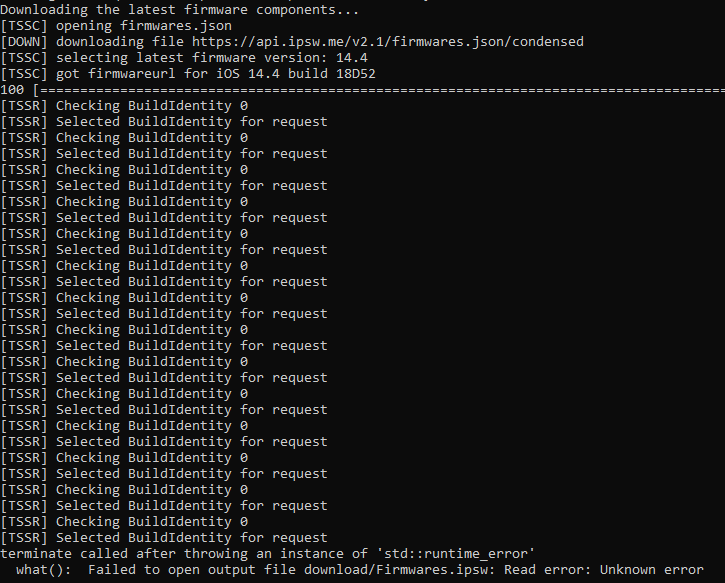
need help im getting "terminate called after throwing an instance of 'std::runtime_error'
what(): Failed to open output file download/Firmwares.ipsw: Read error: Unknown error"
jade skiff
lilac wren
Can you copy paste the error
what=can't init, no device found
lilac wren
jolly kraken
ok i have 14.3 blobs do i use the 14.3 rc or rc2 to determine which sep i need
Check build number in your blobs and compare to build number of RC1 + RC2
void tartan
when I tried the command again I'm getting an error that the app can't run on my pc even though I'm the admin, wtf
jolly kraken
ok i see 104 in my blob so thats the sep i would need correct?
lilac wren
spice gale
what=Device ApNonce does not match APTicket nonce
Check your device's nonce vs the nonce in blobs. Make sure you're using the right generator
spice gale
i already did
lilac wren
jolly kraken
ok i see 104 in my blob so thats the sep i would need correct?
Oh sorry sorry, I didn't realize you said sep. You need 14.4 for sep and bb
lilac wren
spice gale
i already did
And do they match?
spice gale
and they are both 0x1111111111111111111
 lilac wren
spice gale
and they are both 0x1111111111111111111
lilac wren
spice gale
and they are both 0x1111111111111111111
AP Nonce, not generator
jolly kraken
yea i looked at my 14.3 blobs and it has 104 in it but im pulling it from the 14.4 ipsw
spice gale
lilac wren
AP Nonce, not generator
how do i change that
or where do you find the apnonce
void tartan
@lilac wren my pc is saying it can't run futurerestore when I try the command the second time
lilac wren
spice gale
how do i change that
AP Nonce is derived from generator, so you need to use the same generator that you used to save blobs
lilac wren
spice gale
or where do you find the apnonce
What jailbreak tool are you using, what ios version
spice gale
uncover 13.5
lilac wren
void tartan
<@!353561670934855681> my pc is saying it can't run futurerestore when I try the...
Is this windows? Not really sure if the pc itself says something, I was on Mac
void tartan
yeah this is windows
spice gale
can you see how the apnonce of the blob
spice gale
spice gale
can you see how the apnonce of the blob
how can you see
lilac wren
spice gale
uncover 13.5
Download blobsaver (https://github.com/airsquared/blobsaver/releases) and do "Get from device" for your device's current AP Nonce. To find the blob's nonce, upload it to verify.shsh.host
lilac wren
void tartan
yeah this is windows
Is it like anti-virus or something else? May wanna send a screenshot
void tartan
i think it is, it is saying 0 kb on the file size now
lilac wren
For futurerestore.exe?
lilac wren
Paste your command here
void tartan
C:\Users\zakhu\OneDrive\Desktop\jailbreak\futurerestore.exe -t C:\Users\zakhu\OneDrive\Desktop\jailbreak\4043840797343790-iPhone11,8-n841ap-14.2-18B92-1c7438920920a4a0a04b61792a903a17a83793968eeb3d6f2b2d94591042b1e8.shsh2 -s C:\Users\zakhu\OneDrive\Desktop\jailbreak\sep-firmware.n841.RELEASE.im4p -b C:\Users\zakhu\OneDrive\Desktop\jailbreak\ICE18-3.02.02.Release.bbfw -p C:\Users\zakhu\OneDrive\Desktop\jailbreak\BuildManifest.plist-m C:\Users\zakhu\OneDrive\Desktop\jailbreak\BuildManifest.plist C:\Users\zakhu\OneDrive\Desktop\jailbreak\iPhone11,8,iPhone12,1_14.4_18D52_Restore.ipsw
jade skiff
iPhone 11 13.5 -> 14.3 wish me luck bois
 lilac wren
Good luck
sly gulch
I’m hung up on which baseband to choose, I have iPhone 11 Pro Max 13.5 unc0ver, T-Mobile USA if that helps
Found the sep
Just need baseband
Guide is confusing on how to locate
lilac wren
void tartan
C:\Users\zakhu\OneDrive\Desktop\jailbreak\futurerestore.exe -t C:\Users\zakhu\On...
C:\Users\zakhu\OneDrive\Desktop\jailbreak\futurerestore.exe -t C:\Users\zakhu\OneDrive\Desktop\jailbreak\4043840797343790-iPhone11,8-n841ap-14.2-18B92-1c7438920920a4a0a04b61792a903a17a83793968eeb3d6f2b2d94591042b1e8.shsh2 -s C:\Users\zakhu\OneDrive\Desktop\jailbreak\sep-firmware.n841.RELEASE.im4p -b C:\Users\zakhu\OneDrive\Desktop\jailbreak\ICE18-3.02.02.Release.bbfw -p C:\Users\zakhu\OneDrive\Desktop\jailbreak\BuildManifest.plist -m C:\Users\zakhu\OneDrive\Desktop\jailbreak\BuildManifest.plist C:\Users\zakhu\OneDrive\Desktop\jailbreak\iPhone11,8,iPhone12,1_14.4_18D52_Restore.ipsw
Think you were missing a space
iron wagon
omg the windows version works
void tartan
thanks
iron wagon
Yay. There have been so many updates.
jade skiff
got this error :what=Unable to place device into recovery mode from Normal mode
iron wagon
make sure you get the new one that came out like just now
void tartan
@lilac wren it says restoring failed
sly gulch
Which baseband do I use?
jade skiff
jade skiff
got this error :what=Unable to place device into recovery mode from Normal mode
the device was clearly in recovery
sage knot
idk what do do im getting an unknown error -.-
lilac wren
void tartan
<@!353561670934855681> it says restoring failed
What's the error
void tartan
what=Device ApNonce does not match APTicket nonce
code=44498961
line=679
file=futurerestore.cpp
commit count=192:
commit sha =57d0b1b055744600783e7aaf5d2ba4ec9d25f16a:
Done: restoring failed!
lilac wren
jade skiff
the device was clearly in recovery
Try running the command again (up arrow, enter key)
lilac wren
void tartan
what=Device ApNonce does not match APTicket nonce
code=44498961
line=679
file=f...
Check device's current AP nonce with the blob's AP nonce and see if they match
spice gale
lilac wren
Download blobsaver (https://github.com/airsquared/blobsaver/releases) and do "Ge...
how do you change your device apnonce
void tartan
i put that into unc0ver, was there supposed to be something I did after that?
iron wagon
GitHub
A hacked up idevicerestore wrapper, which allows specifying SEP and Baseband for restoring - marijuanARM/futurerestore
void tartan
on my phone
iron wagon
the new one works like a charm
sly gulch
Anyone help me which baseband to use? Windows
void tartan
lilac wren
Check device's current AP nonce with the blob's AP nonce and see if they match
like I pasted the code or whatever on unc0ver
iron wagon
 jade skiff
what is Warning: Could not unpair device
iron wagon
iron wagon
iPhone 7 plus 14.4 to 14.0
lapis junco
this tutorial (https://www.reddit.com/r/jailbreak/comments/lrgar6/tutorial_updating_an_a12_device_to_143_with/) updated to ios 14.3 but the op later refers to a 14.4 ipsw multiple times. is that just a typo? do I need a 14.4 ipsw for anything when restoring to 14.3?


reddit
396 votes and 265 comments so far on Reddit
sly gulch
I’m using that and I can’t understand the baseband part
normal helm
You need 14.4 for the sep and baseband
 lilac wren
@spice gale @void tartan
You set a generator for you device. For example, 0x1111.... This generator creates an AP Nonce (really long hex string).
Use the computer app blobsaver (https://github.com/airsquared/blobsaver/releases) and click "read from device" next to AP Nonce to check your current device's AP nonce after you set your generator.
Upload your shsh2 blob to verify.shsh.host and see the AP Nonce. Check if it's the same as the nonce you read from device. If it's not, you may have used a different generator
void tartan
lilac wren
<@312617004362366977> <@203614790088785920>
You set a generator for you device...
is this something I can do with it in recovery mode?
spice gale
lilac wren
<@312617004362366977> <@203614790088785920>
You set a generator for you device...
yeah there different idk tho
sage knot
sly gulch
Any help would be wonderful 😊
check dms i sent you a youtube video how to find it
lapis junco
normal helm
You need 14.4 for the sep and baseband
thanks. any easy-to-explain reason why? it'd be nice to know
 fickle jasper
any ideas on how i messed up
 lilac wren
void tartan
is this something I can do with it in recovery mode?
lilac wren
void tartan
is this something I can do with it in recovery mode?
Yes, you can only get AP nonce in recovery mode
sage knot
idk what to do https://i.imgur.com/155nCtG.png help pls
 lilac wren
spice gale
yeah there different idk tho
lilac wren
spice gale
yeah there different idk tho
Were you ever jailbroken with odyssey?
iron wagon
how did yall get your messages back? Itunes says I have to update my phone to use its backup
jolly kraken
i cant get fr to drag into cmd
lilac wren
sly gulch
Any help would be wonderful 😊
Did you open the BuildManifest plist and find your board config?
 forest sinew
Status: Restore Finished
Cleaning up...
Done: restoring succeeded!
iMacs-iMac:~ imacspare1$
``` 13.5> 14.3RC. 14.3 was nothing but fdr errors, RC worked first tryI get an error that says no device is connected when I try to hit read from device
spice gale
lilac wren
Were you ever jailbroken with odyssey?
just recently
void tartan
even though itunes recognizes my phone is in restore mode
lilac wren
void tartan
I get an error that says no device is connected when I try to hit read from devi...
Oh for blobsaver? Linux, Mac, or windows, and does futurerestore recognize the device?
spice gale
after i saved blobs
iron wagon
void tartan
windows
GitHub
A hacked up idevicerestore wrapper, which allows specifying SEP and Baseband for restoring - marijuanARM/futurerestore
make sure you are using v194 on windows
lilac wren
spice gale
after i saved blobs
Try changing your generator to 0xbd34a880be0b53f3
Then get AP nonce
And see if it matches
void tartan
in blobsaver?
sage knot
 lilac wren
void tartan
in blobsaver?
lilac wren
void tartan
in blobsaver?
No I was talking to Dreams
sage knot
idk what to do
void tartan
lilac wren
No I was talking to Dreams
my b
@lilac wren do I need to get out of restore mode to get my ECID?
lilac wren
void tartan
<@!353561670934855681> do I need to get out of restore mode to get my ECID?
Your ECID is the same in your blob file
No need to exit recovery
But we don't need it right now
I'm trying to find another tool for you that will get your nonce since it seems like blobsaver doesn't want to work
void tartan
oh ok
I mean I have the apnonce thing
0x12758b54ea98135d
I just don't know what to do with it
valid adder
Major W
 lilac wren
void tartan
I mean I have the apnonce thing
lilac wren
void tartan
I mean I have the apnonce thing
That's a generator, not the AP Nonce
void tartan
oh
jolly kraken
well here goes i hope i did it all correct
lilac wren
@void tartan run this irecovery -q
void tartan
'irecovery' is not recognized as an internal or external command,
operable program or batch file.
spice gale
lilac wren
And see if it matches
it didnt match
lilac wren
void tartan
'irecovery' is not recognized as an internal or external command,
operable progr...
Do you have libimobiledevice
void tartan
lilac wren
Do you have libimobiledevice
no
well rather idk
im sorry I'm really bad at all this shit, i feel really lost on some of it 😦
lilac wren
spice gale
it didnt match
Even after setting your generator to 0xb...?
 spice gale
lilac wren
Even after setting your generator to 0xb...?
spice gale
lilac wren
Even after setting your generator to 0xb...?
yes
covert ibex
this parsing error is gonna make me kms
lilac wren
spice gale
yes
You might be out of luck, if you don't remember the generator you used when you saved blobs there's nothing you can really do
spice gale
fuck
void tartan
@lilac wren Set your device's (ap)nonce generator to match that of your blob (can be done through unc0ver or odyssey's respective apps or a handful of other ways which a simple search on this sub should list)
that is the part of the guide I'm really confused about
I see where to put something for that in unc0ver, but idk if I was supposed to do something after that?
jade skiff
Almost had a heart attack, but phew! (iPhone 11, 13.5>14.3)
 jolly kraken
its not going past enter recovery mode
 polar violet
lilac wren
You might be out of luck, if you don't remember the generator you used when you ...
polar violet
lilac wren
You might be out of luck, if you don't remember the generator you used when you ...
I have an issue, my phone failed during futurerestore and now when I try again I get an error saying "Device ApNonce does not match APTicket nonce." Did my generator get changed or something when the restore failed? I'm trying not to get forced to 14.4 and kinda getting a little desperate
jolly kraken
nvm fixed it
valid adder
@jolly kraken and I actually just fixed the recovery mode issue
sage knot
What does this shit mean?! : "terminate called after throwing an instance of 'std::runtime_error'
what(): Failed to open output file download/Firmwares.ipsw: Read error: Unknown error"
jolly kraken
its all good now
polar violet
I should also state when I saved the blob my generator was set to 0x111...
lilac wren
void tartan
I see where to put something for that in unc0ver, but idk if I was supposed to d...
So if you jailbreak with unc0ver, your generator should be set to 0x1111... However, it seems like your AP nonce derived from that generator is not the same as the one saved in your blobs. Currently, we need to find a program that can get your device's AP nonce since it seems like blobsaver isn't working
void tartan
but I got the generator from the blobs directly
 slate steeple
does apnonce change at all?
void tartan
lilac wren
So if you jailbreak with unc0ver, your generator should be set to 0x1111... Howe...
that's where I copy pasted it from
valid adder
@slate steeple by detention the entire purpose of a cryptographic nonce is for one time use data value
polar violet
If my phone is stuck in recovery is it now impossible to change the generator/ApNonce?
 vernal pulsar
So I have an IPhone XR on version 13.5
Im trying to use my shsh blobs to update it to 14.2 or even better 14.3rc but Im gettings this error
what=SEP firmware is NOT being signed!
here is the total command
Z:\fr\futurerestore-v194.exe -t Z:\fr\5943822604369966_iPhone11,8_n841ap_14.3-18C65_76fcac98ca4e9daca2152b2c0b4cc904b0db26b41c049cb74abe0dc12eb16880.shsh2 -s Z:\fr\sep-firmware.n841.RELEASE.im4p -b Z:\fr\ICE18-3.01.01.Release.bbfw -p Z:\fr\BuildManifest.plist -m Z:\fr\BuildManifest.plist -u Z:\fr\iPhone11,8,iPhone12,1_14.3_18C65_Restore.ipsw
I am currently jailbroken and have set my generator appropriately and I did use tss saver to check the blobs and they were valid, so whats my problem?
jolly kraken
its saying unable to find device?
lilac wren
void tartan
that's where I copy pasted it from
Generator is different than AP Nonce. Since futurerestore is saying that your nonce is different on device vs the one saved in your blobs. You need to find out what generator you used to save blobs with, and then set that to be your phone generator. That's why I wanted to get your current AP nonce to ensure that it's different, and also so that we can try different generators until you get the right AP nonce
void tartan
lilac wren
Generator is different than AP Nonce. Since futurerestore is saying that your no...
oh ok gotcha
slate steeple
valid adder
<@!188780730262880256> by detention the entire purpose of a cryptographic nonce ...
the apnonce that is showing up in FR is different from the one I had in blobsaver and I'm getting an "apnonce does not match apticket nonce" error
guess i fucked up the blob saving
lilac wren
polar violet
I have an issue, my phone failed during futurerestore and now when I try again I...
Are you currently on unc0ver or Odyssey, what ios version
celest basalt
ERROR: TSS request failed (status=94, message=This device isn't eligible for the requested build.)
futurerestore: failed with exception:                                       [exception]:                                                                what=SEP firmware is NOT being signed!
I saw someone else had this error, and was told to make sure it's 14.4 ipsw. Well, mine is lol
polar violet
lilac wren
Are you currently on unc0ver or Odyssey, what ios version
I was on unc0ver 13.5, but the restore failed and now it can't leave recovery but it's sti recognized by my computer. Now when I try to futurerestore it says the ApNonce doesn't match the APTicket
lilac wren
slate steeple
the apnonce that is showing up in FR is different from the one I had in blobsave...
Were you ever jailbroken with odyssey, you may have saved blobs with odyssey's generator. Try changing your generator to 0xbd34a880be0b53f3
void tartan
lilac wren
Generator is different than AP Nonce. Since futurerestore is saying that your no...
as far as what I used to save blobs with, it was some tweak that i swiped on my ECID in settings and picked which blobs I wanted to save
celest basalt
ig imma redownload ipsw but idk
slate steeple
lilac wren
Were you ever jailbroken with odyssey, you may have saved blobs with odyssey's g...
nah I had unc0ver
covert ibex
trying windows now
celest basalt
@void tartan System Info
covert ibex
hopefully it can parse the json file
void tartan
celest basalt
<@!203614790088785920> System Info
yeah that's the one
lilac wren
void tartan
as far as what I used to save blobs with, it was some tweak that i swiped on my ...
Probably systeminfo, and you may have just saved with the wrong generator and AP nonce pair
Which renders blobs useless if you don't remember the generator
celest basalt
oof
void tartan
fuck really?
polar violet
lilac wren
Are you currently on unc0ver or Odyssey, what ios version
I know what the generator and ApNonce were before, and I know the ApNonce must be different now somehow
void tartan
lilac wren
Which renders blobs useless if you don't remember the generator
I didn't know there was a second step, I thought saving the blobs was it
polar violet
I did set the generator and restore rootFS before the first attempt that failed too
vernal pulsar
vernal pulsar
So I have an IPhone XR on version 13.5
Im trying to use my shsh blobs to update ...
anyone?
lilac wren
void tartan
I didn't know there was a second step, I thought saving the blobs was it
Check https://tsssaver.1conan.com/v2/, maybe you happened to save with correct generator there?
sly gulch
What’s the command to use to update from 13.5 to 14.3 on windows FULLY wiping the data
sage knot
https://i.imgur.com/4lwwsmt.png HEEEEELP
void tartan
lilac wren
Check https://tsssaver.1conan.com/v2/, maybe you happened to save with correct g...
where can I find my ECID without exiting restore mode? I looked through the blobs and couldn't find it
lilac wren
slate steeple
nah I had unc0ver
If you never changed your generator to anything other than 0x1111, you probably can't do anything :(. But check both https://tsssaver.1conan.com/v2/ and shsh.host in case you maybe saved blobs somewhere else
An online easy to use APTicket / SHSH2 blob saver and checker. SHSH2 blobs are used in unsigned iOS upgrades and downgrades. App available on https://repo.1conan.com
lilac wren
void tartan
where can I find my ECID without exiting restore mode? I looked through the blob...
Your blobs are usually saved with ECID in them, otherwise just read from device for ECID with blobsaver
slate steeple
lilac wren
If you never changed your generator to anything other than 0x1111, you probably ...
yeah looks like i fucked it up. Just read the apnonce again with unc0ver gen and its differen't than what I had
celest basalt
@sage knot run CMD as admin? idfk dude lol
slate steeple
guess im stuck on 13.5 lol
void tartan
lilac wren
Your blobs are usually saved with ECID in them, otherwise just read from device ...
just ctrl+f ecid?
 hazy spire
@celest basalt did you use --latest-sep and baseband? or did you specify?
lilac wren
void tartan
just ctrl+f ecid?
Upload the blob to verify.shsh.host and look next to ECID tab
vernal pulsar
So I have an IPhone XR on version 13.5
Im trying to use my shsh blobs to update it to 14.2 or even better 14.3rc but Im gettings this error
what=SEP firmware is NOT being signed!
here is the total command
Z:\fr\futurerestore-v194.exe -t Z:\fr\5943822604369966_iPhone11,8_n841ap_14.3-18C65_76fcac98ca4e9daca2152b2c0b4cc904b0db26b41c049cb74abe0dc12eb16880.shsh2 -s Z:\fr\sep-firmware.n841.RELEASE.im4p -b Z:\fr\ICE18-3.01.01.Release.bbfw -p Z:\fr\BuildManifest.plist -m Z:\fr\BuildManifest.plist -u Z:\fr\iPhone11,8,iPhone12,1_14.3_18C65_Restore.ipsw
I am currently jailbroken and have set my generator appropriately and I did use tss saver to check the blobs and they were valid, so whats my problem?
celest basalt
@hazy spire specify. redownloading 14.4 ipsw from .me instead of .dev
@vernal pulsar I have the same thing. Pro 13.5 -> 14.3RC
sly gulch
Do I need to install all these or just the future restore.zip?
 polar violet
@lilac wren yeah I just checked the ApNonce from the blob and it's the same as what I saved, but now the phone is different than it was the first time I attempted futurerestore. Any ideas?
celest basalt
if you're on windows, just the zip
hazy spire
@celest basalt hm my friend has a mac and he did --lastest-sep/baseband and it worked for him
vernal pulsar
celest basalt
<@!635415322559643659> I have the same thing. Pro 13.5 -> 14.3RC
wait so what can I do?
night harbor
vernal pulsar
So I have an IPhone XR on version 13.5
Im trying to use my shsh blobs to update ...
you may have the wrong versions of the files, i can see the baseband version is wrong
download 14.4 IPSW, then extract from there the buildmanifest, sep-firmware-n841, and ICE 3.02.02
celest basalt
@hazy spire yeah, I'm on the just-released windows version
sly gulch
Do I need to backup and restore ? If on windows? I’d like to start fresh with a JB
celest basalt
might just finish with Mac VM
hazy spire
@celest basalt yeah i'm waiting to see the results
vernal pulsar
But I want ios 14.3rc not 14.4 or will it still work?
night harbor
vernal pulsar
But I want ios 14.3rc not 14.4 or will it still work?
yes, latest sep and baseband is needed to use futurerestore
celest basalt
@vernal pulsar You need the files from 14.4 but you still restore to 14.3
sly gulch
Do I have to restore root gs too?
void tartan
lilac wren
Upload the blob to verify.shsh.host and look next to ECID tab
that says file not valid 😦
vernal pulsar
k thank you
lilac wren
polar violet
<@353561670934855681> yeah I just checked the ApNonce from the blob and it's the...
If you saved blobs with 0x1111 and your current generator is 0x1111, but yet your AP nonce is different, you probably didn't save blobs with 0x1111 correctly. Check both https://tsssaver.1conan.com/v2/ and shsh.host in case you maybe saved blobs somewhere else
An online easy to use APTicket / SHSH2 blob saver and checker. SHSH2 blobs are used in unsigned iOS upgrades and downgrades. App available on https://repo.1conan.com
lilac wren
void tartan
that says file not valid 😦
Uh oh, then you probably are screwed
void tartan
lilac wren
Uh oh, then you probably are screwed
god damn it
sly gulch
Do I need to restore root fs, and backup if I’m using it on windows? I want to start with a fresh JB
lilac wren
sly gulch
Do I need to backup and restore ? If on windows? I’d like to start fresh with a ...
Futurerestore will restore fresh unless you add -u argument to it, so don't worry about it keeping data
sly gulch
Or skip that step
void tartan
lilac wren
Uh oh, then you probably are screwed
I think I may just update to 14.4 and hold for a jailbreak there 😦
lapis junco
The baseband file is only required for cellular devices and can be found by:
opening the 14.4 ipsw and extracting a copy of the BuildManifest file
opening the BuildManifest file in a plist editor
searching for your device's board config, locating its BasebandFirmware dictionary, locating the Info dictionary, and making note of the file name in the Path string (ex: ICE18-3[dot]02[dot]02[dot]Release[dot]bbfw)
then, navigate back to the ipsw (which should be open in an archive viewer), open "Firmware", and extract the "ICE" file whose name matches the one you noted a moment ago
can I get some clarification on steps 3 and 4? I have no idea what to search for, nor write down
sage knot
Getting a new error https://i.imgur.com/xYVqJYB.png
 night harbor
for those who manually extract their sep and baseband from the 14.4 IPSW, theiphonewiki is a very useful resource to know what version to extract
lapis junco
sage knot
Getting a new error https://i.imgur.com/xYVqJYB.png
found this link: https://www.reddit.com/r/jailbreak/comments/aqbey5/tip_fix_errors_8_and_10_while_using_futurerestore/

reddit
141 votes and 132 comments so far on Reddit
lilac wren
void tartan
I think I may just update to 14.4 and hold for a jailbreak there 😦
Sorry to hear that man, but before you update, make sure you check every blob hosting website. Most common 2 are https://tsssaver.1conan.com/v2/ and shsh.host, but in your ECID and be absolutely sure there's no hope before you update
An online easy to use APTicket / SHSH2 blob saver and checker. SHSH2 blobs are used in unsigned iOS upgrades and downgrades. App available on https://repo.1conan.com
lilac wren
lapis junco
found this link: https://www.reddit.com/r/jailbreak/comments/aqbey5/tip_fix_erro...
GitHub
A hacked up idevicerestore wrapper, which allows specifying SEP and Baseband for restoring - marijuanARM/futurerestore
sage knot
lapis junco
found this link: https://www.reddit.com/r/jailbreak/comments/aqbey5/tip_fix_erro...
thanks!
lilac wren
It explains errors -8 and -10
void tartan
lilac wren
Sorry to hear that man, but before you update, make sure you check every blob ho...
wait
I did it again and picked 14.;2 this time and it worked
says file is valid
spice gale
is there anyway to find the generator used
lilac wren
Send screenshot
hazy spire
@celest basalt are you going to try to use --latest or a mac vm?
lilac wren
spice gale
is there anyway to find the generator used
No, it's a hash so if you don't remember what generator used, it's mathematically impossible to get the generator from the AP Nonce
lapis junco
lilac wren
It explains errors -8 and -10
i was replying to @sage knot , that's not an issue for me. hopefully it helps them though
void tartan
lilac wren
Send screenshot
 lilac wren
Your ECID is at the top, write it down / copy paste it somewhere btw
lapis junco
could I get some clarification on this though? still stuck on it. #futurerestore-help message
appreciate all the help so far
polar violet
lilac wren
If you saved blobs with 0x1111 and your current generator is 0x1111, but yet you...
Just checked, all the blobs are the same. I'm reading through forums and found a person who's ApNonce changed after futurerestore failed more than halfway through the restore like mine did. Is it sounding like 14.4 is my only option since I can't get out of recovery?
lilac wren
void tartan
Get https://github.com/libimobiledevice/libirecovery and try to see if you can get the nonce from it, seeing as blobsaver didn't work

GitHub
Library and utility to talk to iBoot/iBSS via USB on Mac OS X, Windows, and Linux - libimobiledevice/libirecovery
polar violet
I'm guessing the generator changed when the phone reset
lilac wren
polar violet
I'm guessing the generator changed when the phone reset
If you're jailbroken, unc0ver automatically sets your generator to 0x1111 so idk what could have happened
 supple sleet
jolly kraken
nvm fixed it
supple sleet
jolly kraken
nvm fixed it
May I ask how did you fixed it?
void tartan
lilac wren
Get https://github.com/libimobiledevice/libirecovery and try to see if you can g...
isn't the nonce on the screenshot I sent?
jolly kraken
dont read what it says as its working lol but i think im on 14.3 now waiting on my phone to finish loading
lilac wren
lapis junco
> The baseband file is only required for cellular devices and can be found by:
>...
Can you send/dm the buildmanifest plist to me? I don't wanna download the whole ipsw rn
lapis junco
lilac wren
Can you send/dm the buildmanifest plist to me? I don't wanna download the whole ...
sure
jolly kraken
arrow up and enter @supple sleet
supple sleet
Ok
lilac wren
void tartan
isn't the nonce on the screenshot I sent?
That's the nonce saved in the blob, not c your device's current nonce, which changes based on the generator. Futurerestore is saying that your device's AP nonce is different than the one saved in the blob
supple sleet
jolly kraken
arrow up and enter <@!810441361286758420>
Thank so you much
void tartan
gotcha
jolly kraken
dont read it as it works lol kinda had me worried
void tartan
lilac wren
That's the nonce saved in the blob, not c your device's current nonce, which cha...
when I try to run the lib thing it just wants to keep reinstalling java
oh wait i used the wrong thing
valid adder
@night harbor extracting is not needed
 unreal flame
@valid adder Apologies for the ping but I'm not sure if anyone else would have the answer to my question. Since the github page lists 14.3 and up for A13 devices, does that include 14.3 RC ?
night harbor
valid adder
<@!351591120091873291> extracting is not needed
yeah ik
supple sleet
jolly kraken
arrow up and enter <@!810441361286758420>
Still not working, the phone is in recovery mode, but futurerestore won’t recognize it
valid adder
someones losing dev role today
jolly kraken
one sec @supple sleet
valid adder
@unreal flame 14.2-14.x
supple sleet
jolly kraken
one sec <@!810441361286758420>
Thank you
jolly kraken
Try to restore the device, error -8 occurs;
Leave the device plugged in, it'll stay on the Recovery screen;
Head over to device manager under control panel in Windows;
Locate "Apple Recovery (iBoot) USB Composite Device" (at the bottom);
Right click and choose "Uninstall device". You may see a tick box that allows you to uninstall the driver software as well, tick that (all the three Apple mobile device entries under USB devices will disappear);
Unplug the device and re-plug it in;
Go back to futurerestore and send the restore command again (just press the up arrow to get it back, then enter). Error -8 is now fixed, but the process will fail again after the screen of your device has turned green;
Go back to device manager and repeat the driver uninstall process as described above (step 4 to 6);
Go back to futurerestore once again and repeat the restore process;
The device will reboot and error -10 will also be solved;
The restore will now proceed and succeed.
unreal flame
Ah okay, thanks for the confirmation. And sorry again for pinging/bothering you
jolly kraken
do that it fixed mine @supple sleet
valid adder
nice copy pasta
supple sleet
jolly kraken
do that it fixed mine <@!810441361286758420>
I’m not on windows tho….. 😫
sage knot
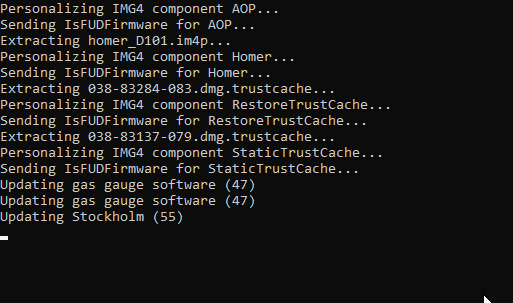
its been a minute or 2 something wrong? https://i.imgur.com/DfMzDSs.png
 jolly kraken
ohhh..... idk then sorry
supple sleet
jolly kraken
ohhh..... idk then sorry
that’s okay. Thank you so much tho.
valid adder
@sage knot stockholm is the longest shit ever
sage knot
valid adder
<@!374384671401836545> stockholm is the longest shit ever
alright so everything normal? HAHA
valid adder
yes
sage knot
ty
void tartan
how do I exit recovery mode without restoring?
 valid adder
W
celest basalt
hazy spire
<@456226577798135808> are you going to try to use --latest or a mac vm?
you can only use --latest on mac
 celest basalt
lmfaooo
hazy spire
celest basalt
you can only use --latest on mac

@opa334dev @_m1sta Will --latest-sep and --latest-baseband work on the windows version?
Twitter
·
sage knot
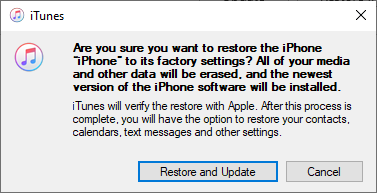
Only getting https://i.imgur.com/FLVyVwl.png what shoud i do?
 celest basalt
WELP
celest basalt
@sage knot don't do that
celest basalt
also did run as admin fix it? @sage knot
valid adder
run again
sly gulch
Ok
valid adder
thats all
lilac wren
void tartan
how do I exit restore mode?
futurerestore -e
sage knot
celest basalt
also did run as admin fix it? <@!374384671401836545>
Yes thanks was to hyped to write lmao got a error again but got it fixed
 sage knot
celest basalt
<@!374384671401836545> don't do that
sage knot
celest basalt
<@!374384671401836545> don't do that
what should i do now? its in restore mode
supple sleet

Anyone got stuck at this point? Even if the phone is in recovery mode, it won’t get recognized
valid adder
@supple sleet just run it again when it fails
 peak briar
Is it better for me to use Mac or Windows to use futurerestore?
celest basalt
@sage knot should be able to just reboot if it finished right?
lilac wren
peak briar
Is it better for me to use Mac or Windows to use futurerestore?
If you have a real mac, definitely use mac
supple sleet
valid adder
<@!810441361286758420> just run it again when it fails
Do I need to exit recovery mode?
sage knot
celest basalt
<@!374384671401836545> should be able to just reboot if it finished right?
idk im in the restore screen didnt do shit till now whats my next step im scared lmao
peak briar
lilac wren
If you have a real mac, definitely use mac
Weeeell... I have a hackintosh :P
valid adder
the problem is entering recovery in the first place, how would exiting it fix it lol @supple sleet
just run again
peak briar
but the USB controllers should work fine with it as far as I can tell. I can do checkra1n and stuff as well.
supple sleet
valid adder
just run again
Sure! thank you so much.
lilac wren
sage knot
idk im in the restore screen didnt do shit till now whats my next step im scared...
If the phone is saying "hello" "Hola" then unplug and you're good to setup as new
valid adder
hackintosh, vms, and windows all work for all devices
lilac wren
peak briar
but the USB controllers should work fine with it as far as I can tell. I can do ...
Then you're probably good
sage knot
lilac wren
If the phone is saying "hello" "Hola" then unplug and you're good to setup as ne...
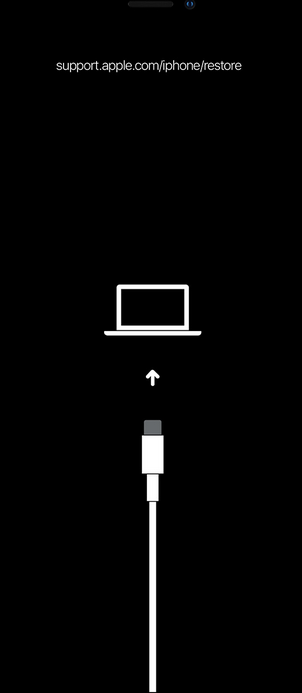
nope im getting the support.apple.com/iphone/restore screen
lilac wren
sage knot
nope im getting the support.apple.com/iphone/restore screen
This is after restore successful? Can you exit recovery with futurerestore -e
supple sleet
 valid adder
@supple sleet what command did you run
sage knot
lilac wren
This is after restore successful? Can you exit recovery with futurerestore -e
yes it was successfull do i need to just write -e or drag FR then -e? im on windows btw
lilac wren
sage knot
yes it was successfull do i need to just write -e or drag FR then -e? im on wind...
Drag futurerestore, space, -e
celest basalt
yep
void tartan
@lilac wren i figured out what i was doing wrong but now I ran into this
failed verification with error:
[exception]:
what=verification failed!
code=84279308
line=1286
file=img4tool.cpp
commit count=197:
commit sha =aca6cf005c94caf135023263cbb5c61a0081804f:
Cleaning up...
[exception]:
what=Failed to find matching buildidentity
code=85917708
line=1311
file=img4tool.cpp
commit count=197:
commit sha =aca6cf005c94caf135023263cbb5c61a0081804f:
Done: restoring failed!
supple sleet
valid adder
<@!810441361286758420> what command did you run
-t my.shsh2 —lastest-sep —latest-baseband 14.3.ipsw
valid adder
send shsh2
lilac wren
void tartan
<@!353561670934855681> i figured out what i was doing wrong but now I ran into t...
What command did you run
celest basalt
^
void tartan
C:\Users\zakhu\OneDrive\Desktop\jailbreak\futurerestore.exe -t C:\Users\zakhu\OneDrive\Desktop\jailbreak\4043840797343790-iPhone11,8-n841ap-14.2-18B92-1c7438920920a4a0a04b61792a903a17a83793968eeb3d6f2b2d94591042b1e8.shsh2 -s C:\Users\zakhu\OneDrive\Desktop\jailbreak\sep-firmware.n841.RELEASE.im4p -b C:\Users\zakhu\OneDrive\Desktop\jailbreak\ICE18-3.02.02.Release.bbfw -p C:\Users\zakhu\OneDrive\Desktop\jailbreak\BuildManifest.plist -m C:\Users\zakhu\OneDrive\Desktop\jailbreak\BuildManifest.plist C:\Users\zakhu\OneDrive\Desktop\jailbreak\iPhone11,8,iPhone12,1_14.4_18D52_Restore.ipsw
celest basalt
just use --latest
lilac wren
^
celest basalt
futurerestore.exe -t blob.shsh2 --latest-sep --latest-baseband target.ipsw
hazy spire
futurerestore-v194.exe -t blob.shsh2 --latest-sep --latest-baseband ipsw.ipsw
void tartan
celest basalt
futurerestore.exe -t blob.shsh2 --latest-sep --latest-baseband target.ipsw
is this for me?
celest basalt
yes
sage knot
lilac wren
Drag futurerestore, space, -e
cant drag it it doesnt show up? O.o
lilac wren
./futurerestore -t blob.shsh2 --latest-sep --latest-baseband ipsw.ipsw
celest basalt
target.ipsw is 14.3rc ipsw for me
lilac wren
void tartan
is this for me?
Yes
celest basalt
it'll be whatever you're going to for you
valid adder
@supple sleet is you blob for 14.3 or 14.3 RC
hazy spire
hazy spire
futurerestore-v194.exe -t blob.shsh2 --latest-sep --latest-baseband ipsw.ipsw
I might try this on my iPhone 11. 13.5 > 14.3
lilac wren
void tartan
is this for me?
Replace blob.shsh2 with your blob, replace ipsw.ipsw with your 14.3 ipsw
celest basalt
@sage knot just go to where you have futurerestore, type futurerestore.exe -e
void tartan
lilac wren
Replace blob.shsh2 with your blob, replace ipsw.ipsw with your 14.3 ipsw
I'm doing 14.2 not 14.3
supple sleet
valid adder
<@!810441361286758420> is you blob for 14.3 or 14.3 RC
14.4
valid adder
??????
 potent wolf
is there a way to figure out what SHSH/blob I saved? I saved on 2/9/21, i cant remember if it's 14.3, 14.3 RC1, or 14.4
lilac wren
void tartan
I'm doing 14.2 not 14.3
Risky, but yeah then your 14.2 ipsw
celest basalt
@supple sleet blob has to be 14.1-3
hazy spire
void tartan
I'm doing 14.2 not 14.3
isn't 14.2 like bugged right now?
supple sleet
Don’t have blobs for 14.3 😫
potent wolf
I'm on 13.5 now, 11 Pro
valid adder
you can't use 14.4 blobs for 14.3 don't even try @supple sleet
celest basalt
@supple sleet well then it won't work lol
peak briar
lilac wren
Risky, but yeah then your 14.2 ipsw
Is 14.2 riskier?
valid adder
you goofed
lilac wren
supple sleet
Don’t have blobs for 14.3 😫
14.4 is signed...
void tartan
hazy spire
isn't 14.2 like bugged right now?
i dunno, I thought I saw people on reddit saying it worked?
 wet wind
Can I restore from an iCloud backup on iOS 14.3 from 13.5 and stay on 14.3? All posts I’ve seen tell me it’s gonna force me to update to 14.4
hazy spire
void tartan
i dunno, I thought I saw people on reddit saying it worked?
"(Note: Some restores to 14.2 have worked on A11 and above, but for now I strongly do not recommend a 14.2 restore until we can look into it more, as it seems to be a hit or miss. 14.0-14.1 still incompatible on A11 and above.)" From the github page
 void tartan
hazy spire
"(Note: Some restores to 14.2 have worked on A11 and above, but for now I strong...
void tartan
hazy spire
"(Note: Some restores to 14.2 have worked on A11 and above, but for now I strong...
fuck
lilac wren
peak briar
Is 14.2 riskier?
Yes,
Note: Some restores to 14.2 have worked on A11 and above, but for now I strongly do not recommend a 14.2 restore until we can look into it more, as it seems to be a hit or miss. 14.0-14.1 still incompatible on A11 and above.
shy magnet
supple sleet
14.4

void tartan
hazy spire
"(Note: Some restores to 14.2 have worked on A11 and above, but for now I strong...
I'll abort for now then
wet wind
celest basalt
iCloud backups don't force you to restore
Thanks for the clarification!
celest basalt
void tartan
thanks guys
hazy spire
Has anyone with an iPhone 11 tried it on windows?
sage knot
celest basalt
<@!374384671401836545> just go to where you have futurerestore, type futureresto...
it didnt work with admin without it did work but after the restart it went back to restore mode do i need to unplug it after? b4 it goes in to recovery?
lilac wren
sage knot
it didnt work with admin without it did work but after the restart it went back ...
That's bad
celest basalt
hmm
lilac wren
It's not supposed to stay stuck in recovery mode
sage knot

celest basalt
should he try futurerestore again?
lilac wren
He can't if nonce changed
celest basalt
@sage knot don't try to reboot yet
sly gulch
Mine stays stuck in recovery then I have to —exit recovery
celest basalt
ah fuck yeah
sly gulch
Any help?
void tartan
how do I rejailbreak back on 13.5
valid adder
@sly gulch of course its stuck
hazy spire
@covert ibex have you tried it yet on your iPhone 11?
lilac wren
void tartan
how do I rejailbreak back on 13.5
Just open unc0ver or Odyssey and Rejailbreak
celest basalt
so sexy, just finished
 sly gulch
Then iTunes pops up and asks to restore like the other user stated
covert ibex
hazy spire
<@!258781173000568832> have you tried it yet on your iPhone 11?
yep on windows now
getting iBEC error
sly gulch
Then iTunes pops up and asks to restore like the other user stated
covert ibex
setting generator again and trying once more
sly gulch
That’s as far as I get
celest basalt
@covert ibex Try to restore the device, error -8 occurs;
Leave the device plugged in, it'll stay on the Recovery screen;
Head over to device manager under control panel in Windows;
Locate "Apple Recovery (iBoot) USB Composite Device" (at the bottom);
Right click and choose "Uninstall device". You may see a tick box that allows you to uninstall the driver software as well, tick that (all the three Apple mobile device entries under USB devices will disappear);
Unplug the device and re-plug it in;
Go back to futurerestore and send the restore command again (just press the up arrow to get it back, then enter). Error -8 is now fixed, but the process will fail again after the screen of your device has turned green;
Go back to device manager and repeat the driver uninstall process as described above (step 4 to 6);
Go back to futurerestore once again and repeat the restore process;
The device will reboot and error -10 will also be solved;
The restore will now proceed and succeed.
sage knot
valid adder
thats how restoring works
so should i the same with FR but with —exit recovery ?
celest basalt
error -8 is iBEC error
covert ibex
celest basalt
<@!258781173000568832> Try to restore the device, error -8 occurs;
Leave the dev...
will do thank you
celest basalt
np, I had to do as well
lilac wren
sly gulch
Then iTunes pops up and asks to restore like the other user stated
Have you restored yet or no? And you can't get out of recovery mode?
valid adder
@sly gulch just ignore itunes
 sage knot
celest basalt
ah fuck yeah
sage knot
celest basalt
ah fuck yeah
should i —exit recovery ? or is that not for me?
im on windows btw
void tartan
lilac wren
Just open unc0ver or Odyssey and Rejailbreak
I did that and cydia is installed now but none of my tweaks are there
lilac wren
sage knot
should i —exit recovery ? or is that not for me?
-e is --exit-recovery
celest basalt
sage knot
should i —exit recovery ? or is that not for me?
ye
i mean you can try it
😢
lilac wren
void tartan
I did that and cydia is installed now but none of my tweaks are there
Did you restore root fs? If so, you'll need to reinstall all your tweaks
celest basalt
haha
lilac wren
celest basalt
how tf do I change my flair
#bot-commands do !removedevice then !adddevice
lapis junco
will it take a bit for the command prompt to do anything after I press enter? seems to not have responded
sage knot
Doesnt work what now? ._.
lilac wren
sage knot
Doesnt work <:peepoCry:640558683478032396> what now? ._.
Save a log of your terminal from restoring for future research to see what went wrong
celest basalt
@sage knot this makes me so sad to see ughhhhh, I think the last thing you can try is to reboot right? that's weird considering futurerestore said it completed right?
^^^^^^^^^ yeah you should send the log here
lilac wren
Yeah unplug and hard reboot maybe
sage knot
just so i dont say the wrong thing im in this screen https://i.imgur.com/EfBemTU.png
 sage knot
maaaaan fuck my live
sage knot
i fucking restarted it ÖOSDHINÖOSNDÖSDN because it didnt drag in HOLY FUCK
celest basalt
valid adder
fdr fix soon 🙂
celest basalt

 junior steeple
Is there a video guide I can follow for A13s?
I have an iPhone 11 Pro 
Don’t want to fuck it up kek
celest basalt
@junior steeple I got you
junior steeple

celest basalt
What version you going to
junior steeple
13.3.1 -> 14.3
celest basalt
aight
sage knot
i hate my life how tf is it successful but also failing only me i swear
 junior steeple
It says it’s valid on there
celest basalt
ok then you're good
junior steeple
But I didn’t set the apnonce or whatever in odyssey
 lavish widget
I have iPhone 11 Pro as well going from 13.5 -->14.3 with valid blobs. Thinking of try the futurerestore now on Windows 10 with v194 if others have had success already
celest basalt
@lavish widget yeah I just did mine
lavish widget
Excellent
junior steeple
Hold on I’m not at my computer
celest basalt
@junior steeple I'm not sure about apnonce, I just save blobs with system info tweak 
junior steeple
I’ll explain when I’m back
jade laurel
Looking for my baseband in my buildmanifest but i'm not entirely sure where it's at.
junior steeple
Taking dog out 💤
jade laurel
Oh. I wasn't aware. kk
celest basalt
yep
lavish widget
@celest basalt Did you run into any errors, or did it go smoothly through?
 celest basalt
Only got the iBec -8 error, which is a known error with an easy fix.
futurerestore.exe -t blob.shsh2 --latest-sep --latest-baseband target.ipsw
junior steeple
Okay so in blobsaver I used the read from device for ECID
celest basalt
this is my command
junior steeple
I didn't set it in odyssey to the 0 whatever
celest basalt
blob was 14.3RC, same with target.ipsw
 hybrid trout
lapis junco
hybrid trout
lapis junco
Yes
lapis junco
thank you!
hybrid trout
Yw
covert ibex
no ibec error now just extracting ipsw rn
celest basalt
@lapis junco looks good, I couldn't get it to work though, --latest is just a sexy command
🙂
hybrid trout
Nope commands are okay
lapis junco
lol alright, if this doesn't work i'll try the --latest commands
junior steeple
What doesn't transfer via iCloud on my iPhone btw? This is my first iPhone since the iPhone 2g 
celest basalt
sc
lavish widget
Thanks
junior steeple

celest basalt
some steps take a little bit tho
junior steeple
it's the man himself
celest basalt
@shy magnet so sexy
covert ibex
yo yo yo
celest basalt
jade laurel
Anyone know why my odyssey won't restore rootfs? I keep attempting and it either crashes freezes, reboots and tweaks are still there, or it says it needs to reboot and reboots and tweaks still there.
lapis junco
celest basalt
some steps take a little bit tho
right now it hasn't said anything
covert ibex
how long does extracting the ipsw take lmao
celest basalt
which was?
junior steeple
I'M OKAY
celest basalt
NOOOO
junior steeple
fuck u
hazy spire
It worked!!! iPhone 11 13.5->14.3 using Windows
junior steeple
Should I restore rootfs before doing this?
celest basalt
@shy magnet my answer went both ways, checkmate
covert ibex
praying to god it dont fail
 celest basalt
you good
covert ibex
shitty ss i know
covert ibex
not fair
sage knot
Im prob the onlyone who got a successful FR and now im stuck ❤️ loving my life rn
 lavish widget
@celest basalt No need to manually specifiy sep/baseband (-s...-b...-t...-m commands)?
covert ibex
i can tell this shit extracting i lost another 5 gigs lmoa
sly gulch
It gets to recovery and then after the second try I get this
lapis junco
wait do I have to enter recovery mode before running this stuff?
sly gulch
When I try again in recovery
celest basalt
@lavish widget nah you can use --latest
and it'll put you in recovery mode btw
dw it does all the hard work for you
lavish widget
Sweet, thanks. Guess I'll try --latest
celest basalt
futurerestore.exe -t blob.shsh2 --latest-sep --latest-baseband target.ipsw
lapis junco
command prompt still hasn't done anything
sly gulch
celest basalt
futurerestore.exe -t blob.shsh2 --latest-sep --latest-baseband target.ipsw
Windows?
lapis junco
did i do something wrong?
sly gulch
Anyone help me? It’s telling me this after second try and deleting drivers
 hazy spire
iPhone 11 13.5-> 14.3 using Windows build. Command used: futurerestore-v194.exe -t blob.shsh2 --latest-sep --latest-baseband ipsw.ipsw

 valid adder
v195 will be the best version yet
polar violet
lilac wren
If you're jailbroken, unc0ver automatically sets your generator to 0x1111 so idk...
I figured it out, since the restore failed around 80% I may have lost my jailbreak. Do I have to restore to 14.4 and just accept defeat? This is an A13 phone so I can't downgrade I don't think
sly gulch
celest basalt
just cancel it out and try my command
Ok
lapis junco
celest basalt
just cancel it out and try my command
meaning just close command prompt?
celest basalt
ok I'll hold you to it @valid adder
celest basalt
@lapis junco just ctrl + c
lapis junco
👍
lilac wren
polar violet
I figured it out, since the restore failed around 80% I may have lost my jailbre...
Is your phone bootlooped/stuck in recovery mode or what. Then how did it fail /what error
celest basalt
yeah np
 covert ibex
enter recovery yourself
lapis junco
what do I do?
covert ibex
run it again
polar violet
lilac wren
Is your phone bootlooped/stuck in recovery mode or what. Then how did it fail /w...
It's stuck in recovery, not sure what the error was but I'm almost 100% sure it was from a futurerestore build that didn't support the phone yet. I know the screenshot he sent me said something about a Rose that futurerestore couldn't get
lapis junco
covert ibex
run it again
without exiting recovery?
lapis junco
got it. whole command?
covert ibex
yep
 covert ibex
you dont have to interact at all
lapis junco
k
lilac wren
polar violet
It's stuck in recovery, not sure what the error was but I'm almost 100% sure it ...
Did you use the latest version, and I can't really help you if you don't know what went wrong. If you can still turn on your phone to 13.5 you're saved, just wait until whatever you want to do is supported then
jade laurel
So, should I be jailbroken when I start futurerestore?
polar violet
lilac wren
Did you use the latest version, and I can't really help you if you don't know wh...
It gave me an error that said "This device isn't eligible for the requested build" even though the build was correct (I triple checked that), and he was using futurerestore v193 for Windows. I'm pretty sure it returned an error because the A13 wasn't supported by Windows futurerestore yet.
It's in a half-restored state and that's preventing me from going back into 13.5 I think. The only other person I could find that got the same error said he got stuck with a nonce error
lilac wren
jade laurel
So, should I be jailbroken when I start futurerestore?
Yes, you need to be jailbroken with your generator set
jade laurel
Don't have a generator in my blob
lilac wren
It says iPhone 11 in your flair, to get the AP Nonce in your blob you need to know the generator that goes with it
Which is probably just 0x1111... so just make sure your generator is set to that when you futurerestore
covert ibex
@celest basalt tysm bruh. luv u cryptic and adam and opa334 and capt
 celest basalt
np man
jade laurel
Okay, so, I don't have a generator in my blob, but verify says it's valid. So, not entirely sure what I did.
My blobsaver preset does have my apnonce manually set.
lilac wren
Generator is optional, it's just a reminder to you. What matters is the ap nonce which is derived from the generator
sly gulch
I keep getting this
 lilac wren
jade laurel
My blobsaver preset does have my apnonce manually set.
lilac wren
jade laurel
My blobsaver preset does have my apnonce manually set.
Then you should probably be fine, as long as you read that AP nonce when your generator was set to 0x1111111111111111
sage knot
i did everything again got the successful and im still in recovery i hate my life wtf is this
lilac wren
sage knot
i did everything again got the successful and im still in recovery i hate my lif...
That's awful, never heard that happen to anyone yet
Rip
sly gulch
Can anyone help with the error I’m getting of ap not matching AP ticket
I edited my file so it was that of my generator showin in the uncover page
valid adder
set your nonce for the last time
editing the file doesn't do anything
thats not how this works
lilac wren
sly gulch
I keep getting this
Set your generator to the same one you used to save blobs. If you saved blobs on Odyssey it's probably 0xbd34a880be0b53f3. Otherwise it's most likely 0x1111111111111111
valid adder
you have edit unc0ver to match the file...
polar violet
 sly gulch
Ok 16, ones right?
lilac wren
^ don't touch the blob file, use unc0ver or Odyssey settings (or just dimentio) to set your generator
Yeah 16
polar violet
@lilac wren thanks for the assistance, someone else confirmed I'm fucked so I'm updating to 14.4 now. It was worth a shot
lilac wren
Dang. Sorry to hear that :(
lavish widget
I got this even though my device does show recovery mode screen...should I just try everything again?
 lilac wren
lavish widget
I got this even though my device does show recovery mode screen...should I just ...
lilac wren
lavish widget
I got this even though my device does show recovery mode screen...should I just ...
Just run the same command again
Up arrow > enter key
lavish widget
Okay, thx
lapis junco
 lilac wren
Congrats and enjoy your new jb
polar violet
lilac wren
Dang. Sorry to hear that :(
It was the bad restore. It caused a nonce error and now my generator and nonce aren't set to what they were before the first futurerestore, pretty much unfixable.
Here's hoping 14.4 gets some jailbreak love in the future!
lavish widget
Can someone send the steps for this please?
 vernal pulsar
im getting the same problem ^
lilac wren
polar violet
It was the bad restore. It caused a nonce error and now my generator and nonce a...
Yeah, and thanks for unfortunately breaking your device which will probably help many others not break their device. Good luck and hope a 14.4 exploit comes quickly
jade laurel
So, when it fails to place device into recovery, I jsut run it again, right?


 lilac wren
lavish widget
Can someone send the steps for this please?
lilac wren
lavish widget
Can someone send the steps for this please?
@lavish widget @vernal pulsar https://github.com/marijuanARM/futurerestore#restoring-on-windows-10
GitHub
A hacked up idevicerestore wrapper, which allows specifying SEP and Baseband for restoring - marijuanARM/futurerestore
lilac wren
jade laurel
So, when it fails to place device into recovery, I jsut run it again, right?
Only if the device is actually in recovery mode
jade laurel
Yeah, it is. I searched. 😄
lavish widget
Thx
lilac wren
Np
jade laurel
Fuck. I forgot to close itunes. Just got this. Should I close it and futurerestore again?
 sage knot
Idk what to doooooooooo im stuck in the restore ffs how tf do i get the successful thing and am still stuck
lilac wren
jade laurel
Fuck. I forgot to close itunes. Just got this. Should I close it and futureresto...
Never close futurerestore while it's running, just click cancel on iTunes or ignore it
lilac wren
jade laurel
Fuck. I forgot to close itunes. Just got this. Should I close it and futureresto...
Also to fix the error, https://github.com/marijuanARM/futurerestore#restoring-on-windows-10
GitHub
A hacked up idevicerestore wrapper, which allows specifying SEP and Baseband for restoring - marijuanARM/futurerestore
polar violet
lilac wren
Yeah, and thanks for unfortunately breaking your device which will probably help...
Thanks, it could've been worse. Could've ended up with a 
lilac wren
Haha true, although hardware bricks are very uncommon
jade laurel
Nah, just a windows 10 driver issue
 dull swallow
lol
jade laurel
Uninstalled the driver and it's restoring fine.
dull swallow
ah
vernal pulsar
lilac wren
<@203294333749821451> <@635415322559643659> https://github.com/marijuanARM/futur...
Yeah I already followed that and i still get the same error
 polar violet
dull swallow
is it a fatal fail
polar violet
dull swallow
is it a fatal fail
No, I think you have to uninstall one of the usb drivers
At least that's what I was told
jade laurel
vernal pulsar
Yeah I already followed that and i still get the same error
What is on your iphone right now?
lavish widget
Hmm following steps to fix error -8, the process didn't fail after the first driver uninstall. Futurerestore is now sending filesystem
jade laurel
No, on the screen. Lol
vernal pulsar
I even tried
https://www.reddit.com/r/jailbreak/comments/lrgar6/tutorial_updating_an_a12_device_to_143_with/
reddit
393 votes and 269 comments so far on Reddit
ah lol nothing just black
sage knot
Someone on reddit told me "After it succeeds it usually reboots and has one last loading bar before the hello screen. You should be good to just hard reset and see if the bar moves after that." is that true?
polar violet
dull swallow
what even is the unable to send IBEC thing
reddit
141 votes and 132 comments so far on Reddit
vernal pulsar
jade laurel
No, on the screen. Lol
its just stuck in recovery mode until i run it again, then it just goes to a blank screen and doesnt do anything, I have to go to 3u to exit recovery mode
lilac wren
sage knot
Someone on reddit told me "After it succeeds it usually reboots and has one last...
You're stuck in recovery right? You can try unplugging and hard rebooting but idk if it will fix the problem
jade laurel
vernal pulsar
its just stuck in recovery mode until i run it again, then it just goes to a bla...
If theres nothing on the screen, it's not in recovery.
vernal pulsar
No it was in recovery then it failed then it was just blank
screen didnt say it was in recovery but when i try hard resetting it, it goes back to recovery mode until i use 3u
lilac wren
Have you tried futurerestore --exit-recovery?
junior steeple
I have an apnonce from blobsaver that is a lot longer than the one in Odyssey
Do I paste that one into odyssey when jailbreaking?
lilac wren
junior steeple
I have an apnonce from blobsaver that is a lot longer than the one in Odyssey
AP Nonce is different than generator
junior steeple
It's a valid blob according to shsh.host
lilac wren
Don't paste an AP nonce into the boot nonce / generator setter
Try futurerestoring with default odyssey generator, if it says AP ticket doesn't match, then change nonce to 0x1111111111111111 using dimentio or just through odyssey
lavish widget
Woohoo! Thanks everyone. Went from 13.5-->14.3 on iPhone 11 Pro
 vernal pulsar
lilac wren
Have you tried futurerestore --exit-recovery?
vernal pulsar
lilac wren
Have you tried futurerestore --exit-recovery?
and when I put it in recovery mode and run it, it doesnt future restore for the ipsw
 jade laurel
So, once it's hello, i'm good to restore my backup, right?
lilac wren
vernal pulsar
and when I put it in recovery mode and run it, it doesnt future restore for the ...
What do you mean? What command are you running (paste it here)
lilac wren
jade laurel
So, once it's hello, i'm good to restore my backup, right?
I'd recommend not to, even for iCloud backups. Just due to the fact that there are some files left over such as tweak prefs/package manager sources etc
But if you are going to restore a backup, definitely do an iCloud one instead of an iTunes/finder one
vernal pulsar
ive tried using latest of sep and such then i tried manually setting them all
futurerestore-v194.exe -t Z:\fr\5943822604369966_iPhone11,8_n841ap_14.3-18C65_76fcac98ca4e9daca2152b2c0b4cc904b0db26b41c049cb74abe0dc12eb16880.shsh2 --latest-baseband --latest-sep Z:\fr\iPhone11,8,iPhone12,1_14.3_18C65_Restore.ipsw
here is the manually
futurerestore-v194.exe -t Z:\fr\5943822604369966_iPhone11,8_n841ap_14.3-18C65_76fcac98ca4e9daca2152b2c0b4cc904b0db26b41c049cb74abe0dc12eb16880.shsh2 -s Z:\fr\sep-firmware.n841.RELEASE.im4p -b Z:\fr\ICE18-3.02.02.Release.bbfw -p Z:\fr\BuildManifest.plist -m Z:\fr\BuildManifest.plist Z:\fr\iPhone11,8,iPhone12,1_14.3_18C65_Restore.ipsw
Maybe try letting futurerestore put it into recovery mode
So reboot to regular mode, then run the command
valid adder
why manually
lilac wren
^ just do latest
vernal pulsar
I am and its still not working, thats what I was saying it put it into it, then it crashed and then the docs say to just run it again, so I do then it fails again and the screen goes black and nothing happens
here is the first error when it puts it in recovery its self

so I run it again like the tut says
lilac wren
Oh you're on windows right?
vernal pulsar
and i get this