
#futurerestore-help
1 messages · Page 36 of 1
 subtle topaz
 zealous bridge
have to wait
 celest basalt
its saying some gibberish
subtle topaz
@fading python no, but you can always jailbreak iphone x/8 and below with checkra1n so even on 14.4 you can set generator and futurerestore to 14.3
 glass sun
@zealous bridge ok I have it, but how do I actually set it
celest basalt
my device is in recovery
zealous bridge
go into newterm
subtle topaz
@severe grotto let me know how it goes
zealous bridge
and type “dimentio <generator>”
 fading python
subtle topaz
<@!803800578764308532> no, but you can always jailbreak iphone x/8 and below wit...
fading python
subtle topaz
<@!803800578764308532> no, but you can always jailbreak iphone x/8 and below wit...
I'm on XR, Windows PC. I took an L lol.
celest basalt
but it said error failed unable to place device into recovery mide
do i just run it again?
im in recovery mode
 potent tapir
@zealous bridge where i get the nonce on an a12 unc0ver?
zealous bridge
potent tapir
<@!330016421817876490> where i get the nonce on an a12 unc0ver?
What ios version?
potent tapir
zealous bridge
What ios version?
13.5
zealous bridge
uh there should be an option in the unc0ver app
celest basalt
restoring failed
zealous bridge
if you scroll down
celest basalt
unable to find device
zealous bridge
celest basalt
unable to find device
reconnect and try again
celest basalt
wont recconecting affect my apnonce?
zealous bridge
no as long as you dont exit recovery mode
potent tapir
zealous bridge
if you scroll down
so the 0x11111... is the one? cuz the futurerestore just said failed verification with error but maybe that isnt that problem?
celest basalt
still unable to find device
zealous bridge
potent tapir
so the 0x11111... is the one? cuz the futurerestore just said failed verificatio...
its whatever you had in your blob
 severe grotto
same error
 zealous bridge
celest basalt
still unable to find device
zealous bridge
celest basalt
still unable to find device
reinstall win32 itunes
celest basalt
i forgot to restore rootfs and now im halfway through the ios restore, am i fucked?
potent tapir
zealous bridge
its whatever you had in your blob
there is nothing in my blob nameing generator
celest basalt
i have 64 bit windows
glass sun
@zealous bridge can I save a backup and modify it for it to work from 13.5 to 14.3?
zealous bridge
potent tapir
there is nothing in my blob nameing generator
you have to remember it
from the time you saved blobs
severe grotto
@subtle topaz did everything as u told me idk why it isnt working
zealous bridge
glass sun
<@!330016421817876490> can I save a backup and modify it for it to work from 13....
i wouldnt recommend it
zealous bridge
severe grotto
same error
you didnt do it properly
follow the steps properly and it should work
potent tapir
zealous bridge
you have to remember it
well i have never changed it so
zealous bridge
potent tapir
well i have never changed it so
it changes to a random value every time you update
celest basalt
 zealous bridge
celest basalt
zealous bridge
celest basalt
you gave us the wrong error
potent tapir
zealous bridge
it changes to a random value every time you update
so i cant get it now?
zealous bridge

reddit
141 votes and 132 comments so far on Reddit
@celest basalt
follow these steps
 frosty sail
hello yall, just got one question. a friend on 13.3 (Xs) saved his blobs but forgot to set his nonce. can he futurerestore to 14 successfully or not?
sorry for interrupting btw
 tulip yew
futurerestore -t /home/lucas/futurerestore/339620543004718_iPhone11,8_n841ap_14.2-18B92_ca8411196045199d2725df3bc9757402c9a3a8c6f461aca02bc6ee8f5dd84e06.shsh2 --latest-sep --latest-baseband /home/lucas/futurerestore/iPhone11,8,iPhone12,1_14.2_18B92_Restore.ipsw 0xbad43acd23c194000xbad43acd23c19400
zealous bridge
potent tapir
so i cant get it now?
you shouldve remembered it when you initally saved blobs
tulip yew
nvm wrong ping
subtle topaz
@severe grotto 3) Head over to Device manager under control panel in Windows
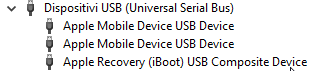
4) Locate "Apple Recovery (iBoot) USB Composite Device (at the bottom): https://i.imgur.com/Gg3CT7k.png
5) Right click, choose "Uninstall device" - You may see a tick box that allows you to uninstall the driver software as well, tick that
6) All the three Apple mobile device entries under USB devices will disappear
7) Unplug the phone and re-plug it in
8) Go back to futurerestore and send the restore command again (just press the up arrow to get it back, then enter)
 tulip yew
IM SORRY
zealous bridge
if its not 0x111.. then it mustve been a random value
zealous bridge
unless you used odyssey
 hybrid trout
there is no fucking nonce in my blob
tulip yew
nfr
hybrid trout
fucking blobsaver
subtle topaz
you did the above after seeing the ibec error and it's not working? @severe grotto
hybrid trout
gonna crazy
tulip yew
@storm apex gm can you see if my FR command is right
potent tapir
zealous bridge
you shouldve remembered it when you initally saved blobs
there was nothing showing any of that when i saved it
tulip yew
sorry for the ping
futurerestore -t /home/lucas/futurerestore/339620543004718_iPhone11,8_n841ap_14.2-18B92_ca8411196045199d2725df3bc9757402c9a3a8c6f461aca02bc6ee8f5dd84e06.shsh2 --latest-sep --latest-baseband /home/lucas/futurerestore/iPhone11,8,iPhone12,1_14.2_18B92_Restore.ipsw 0xbad43acd23c194000xbad43acd23c19400
severe grotto
i did the above and it still did not work
zealous bridge
@tulip yew i hope you’re restoring from mac
severe grotto
lll do it again just to check
 restive pendant
is future restore available for ios 14.3
zealous bridge
tulip yew
futurerestore -t /home/lucas/futurerestore/339620543004718_iPhone11,8_n841ap_14....
thats fine but just add “-d” somewhere for debug
helps a bit
celest basalt
now its saying device is in invalid state
wtf
and i cant install win32 itunes
only 64
zealous bridge
potent tapir
there was nothing showing any of that when i saved it
for a12+ the generator is gonna output a different apnonce for every device
zealous bridge
celest basalt
only 64
you can
celest basalt
 zealous bridge
celest basalt
zealous bridge
celest basalt
did you get it from the link
celest basalt
what link
potent tapir
zealous bridge
for a12+ the generator is gonna output a different apnonce for every device
so its not possible to get it now? cuz i didnt save that number
zealous bridge
potent tapir
so its not possible to get it now? cuz i didnt save that number
did you save blobs while jailbroken
tulip yew
or 0x
tulip yew
hm
zealous bridge
noNONCE
 celest basalt
@zealous bridge what link
potent tapir
zealous bridge
did you save blobs while jailbroken
yes i did
zealous bridge
potent tapir
yes i did
what jailbreak
tulip yew
it was the same as shsh.host
zealous bridge
tulip yew
wym
a12+ has nonce entangling
potent tapir
unc0ver
zealous bridge
so its not as simple as getting a generator for the same apnonce
tulip yew
zealous bridge
a12+ has nonce entangling
oh yeah the same nonce doesnt always give the same value
zealous bridge
yeah
tulip yew
every device is different on a12
zealous bridge
its different
glass sun
@tulip yew if I were to future store, wouldn’t it be better to upstate first to 14.4, backup, then future store down to 14.3? To not loose data
tulip yew
magic shit nfr
zealous bridge
celest basalt
<@!330016421817876490> what link
one sec
glass sun

tulip yew
glass sun
<@!413331641109446656> if I were to future store, wouldn’t it be better to upsta...
you cant jelbrek on 14.4
so u cant set nonce
nfr
glass sun

tulip yew
u cant restore data from a higher ios
zealous bridge
from there
glass sun
Rip
tulip yew
nvm just edit the ipsw
zealous bridge
@celest basalt
celest basalt
u sent me 64 bit
zealous bridge
tulip yew
nvm just edit the ipsw
*the backup
tulip yew
yes
zealous bridge
celest basalt
u sent me 64 bit
its that one
celest basalt
okay
glass sun
@tulip yew can’t I do that from a 13.5 backup, or its too risky?
tulip yew
the ios backup is just one plist for the iis
tulip yew
14.4 data to 13.5?
glass sun
No no
tulip yew
major ios versions prolly not
glass sun
13.5 data to 14.3
tulip yew
oh sure
zealous bridge
tulip yew
14.4 data to 13.5?
that plist just have the info
tulip yew
glass sun
13.5 data to 14.3
u dont have to edit anything
zealous bridge
glass sun
13.5 data to 14.3
you dont need to edit a backup when restoring to higher version
potent tapir
@zealous bridge wait i found it but it says nonoce
tulip yew
^
zealous bridge
only other way round
tulip yew
yes
glass sun
Ohh, so if I have a lower version backup it works?
zealous bridge
otherwise wtf is the point of a backup
tulip yew
glass sun
Ohh, so if I have a lower version backup it works?
thats the point of a backup innit
to get data from older versions
glass sun
I’m too genius ok? @tulip yew
tulip yew
nfr
glass sun

zealous bridge
You backup so that nothing goes wrong during the upgrade process
kinda like Time Machine
tulip yew
can someone pls let me know if my FR restore command is correct
im worried ill go to 14.4
pain
zealous bridge
so it obv makes sense that it would work
zealous bridge
tulip yew
can someone pls let me know if my FR restore command is correct
its right
glass sun
Don’t backup while jb though right ?
glass sun
zealous bridge
glass sun
Don’t backup while jb though right ?
yes that is important
tulip yew
im nervous
zealous bridge
restore rootfs
tulip yew
owo
zealous bridge
first
severe grotto
now even befor running the comand in cmd its giving me "Access is denied."
zealous bridge
Wtf lmao access is denied
severe grotto
it isnt letting me run the code at all now
tulip yew
hahaha
potent tapir
@zealous bridge but what does noNonce mean?
zealous bridge
Are you using a company operated pc
severe grotto
no lol my own
celest basalt
still ibec error
zealous bridge
potent tapir
<@!330016421817876490> but what does noNonce mean?
that means that the shsh isnt tied to any nonce - it’s tied to a generator/APNonce pair
apnonce is known by the file name
generator must be remembered
shsh host auto saves it in the entry I think
 celest basalt
while still having it plugged?
severe grotto
@subtle topaz now after i did those steps it isnt even letting me run the code and giving me "Access is denied." as a message
potent tapir
zealous bridge
shsh host auto saves it in the entry I think
in the entry? so its saved somewhere?
subtle topaz
@severe grotto can you post a screenshot of that please


 sharp tangle
looks like yeah
celest basalt
did i just realized i havent backed up my phone for like a year now?
oh oh
oh fuck


 zinc kite
following this tutorial is it a similar command line to input in terminal for macOS?
celest basalt
on phone i see like thingy when you update phone
 rustic goblet
Did anyone manage to fix the ibec issue on windows 10?
zinc kite
ie. am I still entering this? "> \Users\Username\Desktop\Folder\futurerestore.exe -t \Users\Username\Desktop\Folder################iPhone11,8_14.3-18C66################################################################ -s \Users\Username\Desktop\Folder\sep-firmware.n841.RELEASE.im4p -b \Users\Username\Desktop\Folder\ICE18-3.02.02.Release.bbfw -p \Users\Username\Desktop\Folder\BuildManifest.plist -m \Users\Username\Desktop\Folder\BuildManifest.plist \Users\Username\Desktop\Folder\iPhone11,8,iPhone12,1_14.3-18C66_Restore.ipsw
zealous bridge
celest basalt
thats good
tulip yew
OK can someone hype me before i get cold feet
 mild mural
Using latest sep and bb grabs from 14.4 right?
sharp tangle
zealous bridge
thats good
the build script supports arch too, right ?
zealous bridge
severe grotto
right click windows logo and press command prompt (administrator)
tulip yew
sharp tangle
the build script supports arch too, right ?
better to just diy
tulip yew
mild mural
Using latest sep and bb grabs from 14.4 right?
yes
zealous bridge
sharp tangle
the build script supports arch too, right ?
I think so
mild mural
Thanks
sharp tangle
Just askin because it probably uses apt for getting the required packages. arch uses pacman tho
and wdym diy ? @tulip yew
rustic goblet
I can't get the iceb issues fixed, not even with uninstalling the driver. Any suggestions?
sharp tangle
ooooof
zealous bridge
the script has an apt command
tulip yew
sharp tangle
and wdym diy ? <@!413331641109446656>
do it urself
sharp tangle
probably easy to edit tho
celest basalt
why futurestore said done but my phone started updating again
potent tapir
@zealous bridge btw i saved the blobs on tss something and not shsh host
tulip yew
DO NOT INSTALL FUTURERESTORE AND LET IT AUTOINSTALL DEPENDS
it will break
install them using git clone
sharp tangle
my dual booted ubuntu broke and i installed endeavouros, which is arch based
sharp tangle
yeah it’s nice
zealous bridge
potent tapir
<@!330016421817876490> btw i saved the blobs on tss something and not shsh host
yes tss saver is infamous for not putting the generator along with th shsh
sharp tangle
how the fuck do i use aur tho
tulip yew
just
zealous bridge
well it isnt infamous but it definitely doesnt do that
tulip yew
pacman -S paru
zealous bridge
sharp tangle
how the fuck do i use aur tho
get pamac
 trim cargo
zealous bridge
yes tss saver is infamous for not putting the generator along with th shsh
trim cargo
zealous bridge
yes tss saver is infamous for not putting the generator along with th shsh
so do they still work ? someone else was asking me about this and idk the answer
potent tapir
zealous bridge
yes tss saver is infamous for not putting the generator along with th shsh
So nothing i can do?:(
zealous bridge
trim cargo
so do they still work ? someone else was asking me about this and idk the answer
they do, but you need to set the generator which was set at the time of saving blobs
sharp tangle
ass
trim cargo
the person im talking to said it was 0x1111111111111111
he used blobsaver and it just has nononce
zealous bridge
trim cargo
the person im talking to said it was 0x1111111111111111
yeah if you were jailbroken with unc0ver at the time of saving blobs then yeah its most likely 0x111...
trim cargo
@hybrid trout ^^
zealous bridge
i would just set it to a custom gen like 0x4206942069.. so i actually remember it
celest basalt
Yaayy succesfully restored from 13.5 to 14.3 thank you all that helped me!!!
rustic goblet
I can't get the IBEC issues fixed, not even with uninstalling the driver. Any suggestions?
severe grotto
now this
 zealous bridge
reinstall itunes
zealous bridge
severe grotto
now this
dont open it like a normal app
just drag and drop into terminal
severe grotto
thats what im doing
tulip yew
where do i get the build manifest?
zealous bridge
oh are you using Windows 10 S or something
hybrid trout
zealous bridge
yeah if you were jailbroken with unc0ver at the time of saving blobs then yeah i...
i was jailbroken with odyssey
sharp tangle
Love how it’s just easier to partition your drive and install ubuntu than to use the windows version of FR
severe grotto
yes
tulip yew
sharp tangle
Love how it’s just easier to partition your drive and install ubuntu than to use...
lmao
zealous bridge
hybrid trout
i was jailbroken with odyssey
then your generator is most likely gonna be 0xbd34...
severe grotto
yes it is
zealous bridge
severe grotto
yes
it wont work on 10 S
tulip yew
@zealous bridge where 2 find buildmanifest
hybrid trout
zealous bridge
then your generator is most likely gonna be 0xbd34...
the funny point is i set nonce via unc0ver to test blobsaver as 0x1111111111111111
and it is still says nononce
zealous bridge
hybrid trout
the funny point is i set nonce via unc0ver to test blobsaver as 0x11111111111111...
it will say nononce regardless
tulip yew
10 ≠ 10 s
zealous bridge
severe grotto
saw a reddit post that shows it works on windows 10 tho
windows 10 is not the same as 10 s
zealous bridge
tulip yew
<@!330016421817876490> where 2 find buildmanifest
Root of ipsw
sharp tangle
the fuck is 10s
tulip yew
what do i look for
tulip yew
?
 severe grotto
im really confused rn so what am i supposed to do to fix my issue ?
tulip yew
is it that
zealous bridge
tulip yew
?
thats it
tulip yew
okok
zealous bridge
BuildManifest.plist
hybrid trout
zealous bridge
it will say nononce regardless
and dev of blobsaver said blobs saving as 0x1111111111111111
zealous bridge
severe grotto
im really confused rn so what am i supposed to do to fix my issue ?
dont use stupid os’es
zealous bridge
hybrid trout
and dev of blobsaver said blobs saving as 0x1111111111111111
????
 visual socket
for iphone x using mac, should i use "--latest-sep --latest-baseband --latest-manifest"
zealous bridge
how would the dev of blobsaver know that
severe grotto
zealous bridge
dont use stupid os’es
what?
hybrid trout
zealous bridge
????
i saw it on update post idk
zealous bridge
severe grotto
what?
get a version of windows 10 or dualboot linux
sharp tangle
preferably something that has apt
zealous bridge
hybrid trout
i saw it on update post idk
that makes no sense since the program cant set the generator
it has to be done in nvram which has no external access
 dreamy ingot
I’m on iOS 13.5 can I use future restore to upgrade to 14.3? I’m on iPhone XS
hybrid trout
zealous bridge
that makes no sense since the program cant set the generator
yeah i know but read this old update post scroll down to v2.2.3 https://www.reddit.com/r/jailbreak/comments/awzpb5/update_blobsaver_v230_a_crossplatform_gui_app/

reddit
117 votes and 88 comments so far on Reddit
zealous bridge
well without some janky chekm8
hybrid trout
"Now uses 0x1111111111111111 as the default generator"
zinc kite
is there a tutorial for macOS?
zealous bridge
im guessing that means in the preset?
i have no idea what that could mean
but it definitely doesnt set the generator i’ll tell you that
hybrid trout
yeah i know
 loud dock
Is this where i can set the generator?
 hybrid trout
but isnt way possible to find generator which i lost
zealous bridge
loud dock
Is this where i can set the generator?
doesnt work on unc0ver 6.0
loud dock
Ohhh ok
zealous bridge
hybrid trout
but isnt way possible to find generator which i lost
what were you jailbroken with at the time of saving blobs
loud dock
Does jt need an update? Or will it never work
dreamy ingot
I’m on iOS 13.5 can I use future restore to upgrade to 14.3? I’m on iPhone XS
hybrid trout
zealous bridge
what were you jailbroken with at the time of saving blobs
odyssey
like i said
zealous bridge
if you have blobs
zealous bridge
hybrid trout
odyssey
your generator is probably 0xbd34a880be0b53f3
thats the odyssey default
zealous bridge
have you already tried 0x111?
hybrid trout
i tried 0x111
zealous bridge
in futurerestore?
hybrid trout
and it wasnt 0x111 while i saving 14.3 blobs
if you are available can you come over dm?
i can share my screen
dreamy ingot
I’m on iOS 13.5 can I use future restore to upgrade to 14.3? I’m on iPhone XS I have blobs
zealous bridge
sure ig
glass sun
@zealous bridge can I use that odyssey default on checkra1n and set it as my nonce?
severe grotto
is anyone that can help me with my problem free to join in a vc and help me solve it ill even pay you i just want to fix this shit
zealous bridge
glass sun
<@!330016421817876490> can I use that odyssey default on checkra1n and set it as...
if you were jailbroken on odyssey at the time of saving blobs
frosty sail
sorry for interrupting again, just got one question. a friend on 13.3 (Xs) saved his blobs but forgot to set his nonce. can he futurerestore to 14 successfully or not?
zealous bridge
frosty sail
sorry for interrupting again, just got one question. a friend on 13.3 (Xs) saved...
was he jailbroken at the time of saving blobs
glass sun
Well, odysseyra1n is what I was on
glass sun
Where do I get it?
dreamy ingot
@zealous bridge I’m on iOS 13.5 can I use future restore to upgrade to 14.3? I’m on iPhone XS I have blobs
frosty sail
@zealous bridge yes
visual socket
do i include latest-baseband as well? bringing the command to
futurerestore-master-v189 -t "${blob1}" --latest-sep --latest-manifest --latest-baseband "${ipsw1}"
 gleaming otter
you should be able to do that yes
visual socket
Me?
dreamy ingot
I’m on iOS 13.5 can I use future restore to upgrade to 14.3? I’m on iPhone XS I have blobs
 blissful cove
Yeah I’ve never done it before tho
 proven wyvern
dreamy ingot
I’m on iOS 13.5 can I use future restore to upgrade to 14.3? I’m on iPhone XS I ...
proven wyvern
dreamy ingot
I’m on iOS 13.5 can I use future restore to upgrade to 14.3? I’m on iPhone XS I ...
ping me if u have answer please
blissful cove
frosty sail
i mean i guess that’s pretty easy, no?
Most likely, but how do I do it?
visual socket
visual socket
do i include latest-baseband as well? bringing the command to
```futurerestore-...
futurerestore on mac doesnt have --latest-manifest
frosty sail
14.5 is a beta yes?
gleaming otter
there's no way to set nonce on 14.5 rn is there
tulip yew
heyo
Unmounting filesystems (29)
Unmounting filesystems (29)
Unmounting filesystems (29)
Unmounting filesystems (29)
Unmounting filesystems (29)
Unmounting filesystems (29)
Unmounting filesystems (29)
Unmounting filesystems (29)
Unmounting filesystems (29)
Unmounting filesystems (29)
Unmounting filesystems (29)
Unmounting filesystems (29)
Got status message
Status: Restore Finished
frosty sail
first remove beta profile, then OTA update to 14.4 or with iTunes @blissful cove
tulip yew
so 14.2 is compatible with 14.4 sep
blissful cove
frosty sail
14.5 is a beta yes?
Yes I’m on the dev beta 2
blissful cove
frosty sail
first remove beta profile, then OTA update to 14.4 or with iTunes <@614231540024...
I’m sorry I feel dumb but what is OTA
dreamy ingot
I’m on iOS 13.5 can I use future restore to upgrade to 14.3? I’m on iPhone XS I have blobs. Pls help
frosty sail
okay actually forget OTA, remove beta profile, restart iPhone, connect to iTunes, install IPSW of 14.4 of your iDevice and update
@blissful cove
blissful cove
Alright I’ll try 🙂 thanks
tulip yew
dreamy ingot
I’m on iOS 13.5 can I use future restore to upgrade to 14.3? I’m on iPhone XS I ...
yes
dreamy ingot
@tulip yew I’ve never used future restore, will I have to do the thing where I manually set the sep n stuff?
celest basalt
is 13.5 -> 14.2 iPhone XS with blobs possible?
zealous bridge
if you remember your generator yeah
 gusty crane
@dreamy ingot I blieve you will have to do that if using Opa's windows build
celest basalt
thanks
visual socket
BuildIdentity selected for restore:
BuildNumber : 18C66
BuildTrain : AzulC
DeviceClass : d221ap
FDRSupport : YES
MobileDeviceMinVersion : 1253
RestoreBehavior : Erase
Variant : Customer Erase Install (IPSW)

BuildIdentity is valid for the APTicket:
BuildNumber : 18C66
BuildTrain : AzulC
DeviceClass : d22ap
FDRSupport : YES
MobileDeviceMinVersion : 1253
RestoreBehavior : Erase
Variant : Customer Erase Install (IPSW)

Cleaning up...
[exception]:
what=APTicket can't be used for this restore

code=49545233
line=756
file=futurerestore.cpp
commit count=189:
commit sha  =3786d4cd230b93f4b7ade7d0fdebd56b48fbf7a6:
Done: restoring failed!
what device
glass sun
iPhone 8 Plus
visual socket
d22ap not interchangeable with d221ap?
 reef cloak
I’m about to update with futurerestore from 13.5.1 to 14.3 (iphone 8). If something go wrong and end up to 14.4 using checkra1n can I try again to downgrade??
zealous bridge
glass sun
iPhone 8 Plus
yeah you can use that or you can use [[GeneratorAutoSetter]]
celest basalt
@zealous bridge, Couldn't find anything matching that search query!
potent tapir
@zealous bridge so lets say that the nonce isnt the problem then what this means w the verification?🤔
 zealous bridge
Stupid bot
zealous bridge
potent tapir
<@!330016421817876490> so lets say that the nonce isnt the problem then what thi...
this isnt a nonce problem
its a futurerestore problem
you might have used the wrong BuildManifest.plist file
potent tapir
zealous bridge
you might have used the wrong BuildManifest.plist file
ehm there was only one lol
celest basalt
potent tapir
<@!330016421817876490> so lets say that the nonce isnt the problem then what thi...
i had the exact same problem
zealous bridge
potent tapir
ehm there was only one lol
couldve downloaded the wrong ipsw
potent tapir
zealous bridge
couldve downloaded the wrong ipsw
wait you right i may have used the 14.4
proven wyvern
in iPhone11,2,iPhone11,4,iPhone11,6,iPhone12,3,iPhone12,5_14.4_18D52_Restore.ipsw
What is the baseband file for iPhone XS Max?
dreamy ingot
gusty crane
<@!304081218486665226> I blieve you will have to do that if using Opa's windows ...
Where can I download the windows version?
visual socket
visual socket
```
BuildIdentity selected for restore:
BuildNumber : 18C66
BuildTrain : AzulC
D...
are boardConfigs not interchangeable? d22ap and d221ap.
dreamy ingot
Where can I download the windows version for future restore does anyone have the link?
zealous bridge
visual socket
are boardConfigs not interchangeable? d22ap and d221ap.
no
you have to select the correct board config
celest basalt
hello! I have an iPhone 12 Pro Max on 14.1, when 14.3RC was being signed, I used blobsaver to save blobs for 14.3RC. Is it possible to update to 14.3RC using my saved blobs using futurerestore?
visual socket
zealous bridge
no
yep. no ios 14 for me then. thx for the help should've checked multiple apps for the correct info.
potent tapir
@zealous bridge now it says firmware doesnt signed
zealous bridge
what command are you using
dreamy ingot
Can someone please give me instructions on exactly how to future restore 13.5 to 14.3 iPhone XS
potent tapir
zealous bridge
what command are you using
the one to run futurerestore in command promt
zealous bridge
copy and paste your command here
potent tapir
"C:\Users\lfred\Desktop\FUTURE RESTORE\futurerestore.exe" -t "C:\Users\lfred\Desktop\FUTURE RESTORE\4825319458799662_iPhone11,8_n841ap_14.3-18C65_08cdd549ab343305475a15a6156055da1cc09384e5b2cdabcf95559f0347328f.shsh2" -s "C:\Users\lfred\Desktop\FUTURE RESTORE\sep-firmware.n841.RELEASE.im4p" -b "C:\Users\lfred\Desktop\FUTURE RESTORE\ICE18-3.02.02.Release.bbfw" -p "C:\Users\lfred\Desktop\FUTURE RESTORE\BuildManifest.plist" -m "C:\Users\lfred\Desktop\FUTURE RESTORE\BuildManifest.plist" "C:\Users\lfred\Desktop\FUTURE RESTORE\iPhone11,8,iPhone12,1_14.3_18C66_Restore.ipsw"
 primal willow
Can anyone help me with the blob upgrade I am on iOS 13.5 iPhone 7 and I have blobs for 14.1 but I don't know what to do
zealous bridge
potent tapir
"C:\Users\lfred\Desktop\FUTURE RESTORE\futurerestore.exe" -t "C:\Users\lfred\Des...
the sep and baseband files which ipsw did you get them from?
potent tapir
zealous bridge
the sep and baseband files which ipsw did you get them from?
14.3 cuz i changed them now cuz i used 14.4 before
potent tapir
zealous bridge
you’re supposed to use 14.4
but that didnt work
 astral harness
hi so, how do u figure out ur phones SEP and baseband? i extracted from newest and have 14.3 RC but there are a bunch of files and idk how to find out which is right for my specific device
 green onyx
astral harness
hi so, how do u figure out ur phones SEP and baseband? i extracted from newest a...
green onyx
astral harness
hi so, how do u figure out ur phones SEP and baseband? i extracted from newest a...
aight i gotchu fam
ur suppose to extract ios 14.4 ipsw
not ios 14.3 rc ipsw
and
@astral harness what device do u have
zealous bridge
potent tapir
but that didnt work
what didnt work
green onyx
and is it gsm, global, etc
astral harness
green onyx
ur suppose to extract ios 14.4 ipsw
yeah sorry i worded wrong thats what i extracted from
iphone xs
erm it's UK
green onyx
aight
astral harness
so i think global?
potent tapir
zealous bridge
what didnt work
when i had followed the tutorial on reddit i did all that bur thats when the verification problem occured
green onyx
iPhone XS(d321ap) - 18D52
SEPOS: Firmware/all_flash/sep-firmware.d321.RELEASE.im4p
BBFW: Firmware/ICE18-3.02.02.Release.bbfw
IPSW download link (http://updates-http.cdn-apple.com/2021WinterFCS/fullrestores/001-98182/541B0687-8E1D-45FE-8592-15988761215B/iPhone11,2,iPhone11,4,iPhone11,6,iPhone12,3,iPhone12,5_14.4_18D52_Restore.ipsw)
@astral harness
those r the sep and bb files
from ios 14.4 ipsw
also grab buildmanifest.plist
astral harness
green onyx
<@!561469567340249099>
thanks bro, appreciate it!
green onyx
np
zealous bridge
potent tapir
when i had followed the tutorial on reddit i did all that bur thats when the ver...
you’re not supposed to use 14.3
primal willow
Can anyone help me with the blob upgrade I am on iOS 13.5 iPhone 7 and I have blobs for 14.1 but I don't know what to do
green onyx
primal willow
Can anyone help me with the blob upgrade I am on iOS 13.5 iPhone 7 and I have bl...
aight, windows, linux, or macos?
proven wyvern
What's the bbfw file for XS Max?
primal willow
green onyx
aight, windows, linux, or macos?
have windows on mac
green onyx
primal willow
have windows on mac
use macos
dreamy ingot
Can someone please give me instructions on exactly how to future restore 13.5 to 14.3 iPhone XS
green onyx
proven wyvern
What's the bbfw file for XS Max?
hol up
potent tapir
zealous bridge
you’re not supposed to use 14.3
okey but whats wrong then w the verification
proven wyvern
green onyx
hol up
what?
primal willow
green onyx
use macos
and what do I need on my mac?
green onyx
proven wyvern
what?
iPhone XS Max(d331pap) - 18D52
SEPOS: Firmware/all_flash/sep-firmware.d331p.RELEASE.im4p
BBFW: Firmware/ICE18-3.02.02.Release.bbfw
IPSW download link (http://updates-http.cdn-apple.com/2021WinterFCS/fullrestores/001-98182/541B0687-8E1D-45FE-8592-15988761215B/iPhone11,2,iPhone11,4,iPhone11,6,iPhone12,3,iPhone12,5_14.4_18D52_Restore.ipsw)
green onyx
primal willow
and what do I need on my mac?
macos > windows for fr
zealous bridge
potent tapir
okey but whats wrong then w the verification
idk what you mean by “verification”
potent tapir
zealous bridge
idk what you mean by “verification”
the screenshot i sent it said it couldnt do verification and that there was an error
primal willow
@green onyx So with iPhone 7 it's not possible?
zealous bridge
“failed to match build identity?”
green onyx
primal willow
<@!489890032635871232> So with iPhone 7 it's not possible?
it is
def possible
primal willow
@green onyx oh shout my bad
dreamy ingot
If I’m future restoring from 13.5 to 14.3 will I need the sep and baseband file from 14.4 or can I use it from 4.3 IPSW
zealous bridge
dreamy ingot
If I’m future restoring from 13.5 to 14.3 will I need the sep and baseband file ...
14.4
green onyx
dreamy ingot
If I’m future restoring from 13.5 to 14.3 will I need the sep and baseband file ...
i can find it for u
what device?
proven wyvern
green onyx
iPhone XS Max(d331pap) - 18D52
SEPOS: Firmware/all_flash/sep-firmware.d331p.RELE...
thanks, How do u know that this is the right files?
green onyx
proven wyvern
thanks, How do u know that this is the right files?
telegram bot
rustic goblet
I had so MANY issues with IBEC and with the Windows apple drivers. So if anyone is asking, MAKE SURE YOU **DONT **HAVE WINDOWS STORE ITUNES!
potent tapir
@zealous bridge btw whats this ice19?
proven wyvern
green onyx
telegram bot
can u send it please?
green onyx
proven wyvern
can u send it please?
uh, its a bot
proven wyvern
green onyx
uh, its a bot
what's the name of the bot?
zealous bridge
potent tapir
<@!330016421817876490> btw whats this ice19?
its the baseband
primal willow
green onyx
and make a folder in ur desktop called futurerestore
Alright I have downloaded the futurerestore and now downloading 14.1 ipa file
green onyx
primal willow
Alright I have downloaded the futurerestore and now downloading 14.1 ipa file
ipa?
u dont need ipa
potent tapir
zealous bridge
its the baseband
but i should use 18 right?
 merry oak
Is the new jailbreak available for iPhone 8 Plus ? Jb on 13.5
primal willow
green onyx
ipa?
sorry ipsw
zinc kite
So I tried using futurerestore and got this error. 13.5 ipad pro 4 13.5 with 14.3 blobs. Now my device is stuck in DFU mode
 zealous bridge
potent tapir
but i should use 18 right?
zealous bridge
potent tapir
but i should use 18 right?
what device
potent tapir
zealous bridge
what device
XR
 strange locust
can i save blobs for ios 14.1 a13 already jailbroken
zealous bridge
ah fuck my telegram is broken
primal willow
green onyx
ipa?
I do need both the 14.1 and 14.4 right?
green onyx
primal willow
I do need both the 14.1 and 14.4 right?
macos?
if macos, then no
windows, yes
primal willow
green onyx
macos?
I am on macos
zealous bridge
iPhone XR(n841ap) - 18D52
SEPOS: Firmware/all_flash/sep-firmware.n841.RELEASE.im4p
BBFW: Firmware/ICE18-3.02.02.Release.bbfw
@potent tapir
make sure the file names match
proven wyvern
green onyx
uh, its a bot
name of the bot please?
zealous bridge

Telegram
Tools for iOS and/or jailbreak.
Save SHSH2, get device info, firmware etc
Donate : https://donate.spydar007.com
potent tapir
zealous bridge
iPhone XR(n841ap) - 18D52
SEPOS: Firmware/all_flash/sep-firmware.n841.RELEASE.im...
they do
potent tapir
zealous bridge
Youre getting them from the right ipsw
yes i changed them back
zealous bridge
copy and paste the name of the ipsw here
just wanna make sure ur using the right one
glass sun
@zealous bridge it’s going!
 potent tapir
iPhone11,8,iPhone12,1_14.4_18D52_Restore.ipsw
zealous bridge
glass sun
<@!330016421817876490> it’s going!
gg
zealous bridge
potent tapir
iPhone11,8,iPhone12,1_14.4_18D52_Restore.ipsw
k that seems right
hybrid trout

zealous bridge
just make sure you run the commands properly
 honest roost
So A12 14.4 Sep is only compatible with 14.3RC, but not lower, right?
zealous bridge
14.2 as well
proven wyvern
zealous bridge
https://t.me/rJailbreakBot
what's the command to get the sep and baseband?
zealous bridge
/sepbb
primal willow
green onyx
macos?
Alright got the folder ready with blobs future restore and ipsw for 14.1
honest roost
zealous bridge
14.2 as well
Really? Not only till A10?
zealous bridge
yeah apparently A12 to 14.2 are working
green onyx
primal willow
Alright got the folder ready with blobs future restore and ipsw for 14.1
uh
rename it ipsw to target.ipsw
and rename the blob to blob.shsh2
and get ur phone into recovery mode
honest roost
zealous bridge
yeah apparently A12 to 14.2 are working
Nice! I have 14.2 Blobs 😊
green onyx
./futurerestore -t blob.shsh2 --latest-sep --latest-baseband -d target.ipsw
astral harness
so another noob question, i have all the files needed, and phone is in recovery, how do i actually run futurerestore now in terminal?
green onyx
^run that
potent tapir
zealous bridge
just make sure you run the commands properly
i am but it still says: failed verification with error: [exception]: what=verification failed! code=84279308 line=1286 file=img4tool.cpp commit count=197: commit sha =aca6cf005c94caf135023263cbb5c61a0081804f: Cleaning up... [exception]: what=Failed to find matching buildidentity code=85917708 line=1311 file=img4tool.cpp commit count=197: commit sha =aca6cf005c94caf135023263cbb5c61a0081804f: Done: restoring failed!
astral harness
green onyx
`./futurerestore -t blob.shsh2 --latest-sep --latest-baseband -d target.ipsw`
so i tried this and nothing happened
no such file or directory
green onyx
astral harness
so i tried this and nothing happened
run it in ur futurerestore folder
zealous bridge
potent tapir
i am but it still says: failed verification with error: [exception]: what=verifi...
what futurerestore version are you runnjng
primal willow
green onyx
rename it ipsw to target.ipsw
wait what
green onyx
in the folder where u put ur ipsw and blobs and shit
potent tapir
zealous bridge
what futurerestore version are you runnjng
193 i think
astral harness
green onyx
in the folder where u put ur ipsw and blobs and shit
does the compiled file need to be called future restore? right now it's futurerestore-master-189 etc
green onyx
astral harness
does the compiled file need to be called future restore? right now it's futurere...
uh
i dont work with compiled stuff
except for windows
 whole yoke
is work to setting AP nonce on 14.3 ?
zealous bridge
potent tapir
193 i think
you think?
astral harness
ah ok i got the compiled one from the guide i'll get uncompiled and try again
 versed belfry
successfully updated ipad mini 5 wifi to 14.3 using -u with these aur packages:
futurerestore-marijuanarm-git r191.242163fa-1
img4tool-git r197.aca6cf0-1
libfragmentzip-git r64.aaf6fae-1
libgeneral-git r54.b04a27d-1
libimobiledevice-git 1:1.3.0.r42.g4837527-1
libirecovery-git 2:1.0.0.r11.g1132470-1
libplist-git 1:2.2.0.r17.gebf2fdb-1
libusbmuxd-git 2.0.2.r10.g3eb50a0-1
usbmuxd-git 1:1.1.1.r17.gb1a7c7e-1
anyone success futurerestore to iOS 14.3RC?
zealous bridge
A lot of people
 primal willow
green onyx
and get ur phone into recovery mode
primal willow
green onyx
and get ur phone into recovery mode
alright done it what's next
potent tapir
zealous bridge
you think?
i checked and it is v193
green onyx
primal willow
alright done it what's next
./futurerestore -t blob.shsh2 --latest-sep --latest-baseband -d target.ipsw
primal willow
green onyx
./futurerestore -t blob.shsh2 --latest-sep --latest-baseband -d target.ipsw
and since I am all new to this where do I write this to?
zealous bridge
potent tapir
i checked and it is v193
hold on
potent tapir
zealous bridge
hold on
okey 🙂
zealous bridge
What version are your blobs for?
green onyx
primal willow
and since I am all new to this where do I write this to?
is ur folder named futurerestore on ur desktop?
primal willow
yes
green onyx
@zealous bridge help me, i dont use compiled
tulip yew
im so fucking pogging rn
green onyx
i compile shit myself
tulip yew
green onyx
<@!330016421817876490> help me, i dont use compiled
just compile it urself
I RESTORED TO 14.2
primal willow
and my blob file is named blob.shsh2 and ipsw is named target.ipsw
tulip yew
woooooo
zealous bridge
primal willow
and since I am all new to this where do I write this to?
you’re on macos?
are you
primal willow
yes
green onyx
primal willow
yes
open terminal in that folder
and run ./futurerestore -t blob.shsh2 --latest-sep --latest-baseband -d target.ipsw
honest roost
tulip yew
I RESTORED TO 14.2
On which device?
tulip yew
a12
zealous bridge
right click the folder
tulip yew
13.5-14.2 a12
honest roost
Nice 😍
potent tapir
zealous bridge
What version are your blobs for?
14.3 or wym?
zealous bridge
should be an option to open terminal in folder
honest roost
Exactly this is what I want to do
tulip yew
yes. yes. up to you
zealous bridge
potent tapir
14.3 or wym?
14.3 or 14.3RC?
potent tapir
zealous bridge
14.3 or 14.3RC?
rc
honest roost
tulip yew
yeah it works
Anything special I have to note?
primal willow
-bash: ./futurerestore: No such file or directory
Ates-MBP:futurerestore atesoban$
celest basalt
tulip yew
for me at least
can you say which guide you used?
zealous bridge
potent tapir
rc
you need to use the 14.3 rc ipsw
tulip yew
reddit guide
primal willow
@zealous bridge -bash: ./futurerestore: No such file or directory
Ates-MBP:futurerestore atesoban$
 burnt ice
hello. i need to upgrade from 13.5 to 14.2, i have got a shsh blob and the ipsw but i have no clue how to do it. im on windows btw if that makes any difference
primal willow
I get this error when I type it in terminal
potent tapir
zealous bridge
you need to use the 14.3 rc ipsw
ehm i cant find the rc one
honest roost
tulip yew
reddit guide
Can you send me the Link?
astral harness
ok now i'm getting error failed to load APTicket- what does this mean?
potent tapir
zealous bridge
Im guessing you were using 18C66 <@208527172418273280> ?
correct
zealous bridge
failed to load APTicket?
primal willow
@zealous bridge -bash: ./futurerestore: No such file or directory
Ates-MBP:futurerestore atesoban$
What do I do?
astral harness
zealous bridge
failed to load APTicket?
yep
 shy magnet
hi sexy mfs
zealous bridge
potent tapir
correct
yeah use the rc and you should be find
shy magnet
gm
zinc kite
 shy ridge
run the commands again
shy ridge
run the commands again
tried to resend the script. Still recieving the same error and the ipad is stuck in DFU
 zealous bridge
primal willow
<@!330016421817876490> -bash: ./futurerestore: No such file or directory
Ates-MB...
zealous bridge
primal willow
<@!330016421817876490> -bash: ./futurerestore: No such file or directory
Ates-MB...
so you know the futurerestore file? what is it called
in finder
zealous bridge
shy magnet
gm
gm
potent tapir
zealous bridge
yeah use the rc and you should be find
okey will take some time to download tho
primal willow
zealous bridge
so you know the futurerestore file? what is it called
futurerestore-master-v189
zealous bridge
yeah so you need to run ./futurerestore-master-v189 and why are using an old version
astral harness
zealous bridge
failed to load APTicket?
oh right. how do i solve it, do you know?
zealous bridge
astral harness
oh right. how do i solve it, do you know?
ive never seen that error
can you send a screenshot
primal willow
zealous bridge
yeah so you need to run ./futurerestore-master-v189 and why are using an old ver...
idk folklore told me to download this one
zealous bridge
or copy and paste the output
zealous bridge
primal willow
idk folklore told me to download this one
iP7 right?
primal willow
yes
astral harness
zealous bridge
or copy and paste the output
~Desktop/futurerestore/futurerestore-master-v189 -t blob.shsh2 -s sep.im4p -m BuildManifest.plist -b baseband.bbfw -p BuildManifest.plist -d target.ipsw
Version: 3786d4cd230b93f4b7ade7d0fdebd56b48fbf7a6 - 189
img4tool version: 0.197-aca6cf005c94caf135023263cbb5c61a0081804f
libipatcher version: 0.82-0b2f79ff0917ef9b8a92475d93d9466b23fc2322
Odysseus for 32-bit support: yes
Odysseus for 64-bit support: yes
INFO: device serial number is C39Y87N7KPG4
[INFO] 64-bit device detected
futurerestore init done
libc++abi.dylib: terminating with uncaught exception of type tihmstar::exception: failed to load APTicket at blob.shsh2
primal willow
do I need to change the name of the file or anything else?
zealous bridge
primal willow
do I need to change the name of the file or anything else?
ok thats fine just rename the file to “futurerestore” thats it
zealous bridge
astral harness
~Desktop/futurerestore/futurerestore-master-v189 -t blob.shsh2 -s sep.im4p -m Bu...
ok i recognise this hold on
where tf have i seen that
zealous bridge
astral harness
~Desktop/futurerestore/futurerestore-master-v189 -t blob.shsh2 -s sep.im4p -m Bu...
Windows, macos or linux
astral harness
macos
tulip yew
shy magnet
hi sexy mfs
ayo 14.2 is compatible with 14.4 SEP
zealous bridge
is it an M1 Mac?
tulip yew
update when
primal willow
 astral harness
zealous bridge
is it an M1 Mac?
astral harness
zealous bridge
is it an M1 Mac?
nope intel 2015
primal willow
@zealous bridge is it suppose to be like this? what I am doin wrong
zealous bridge
primal willow
cd Desktop/futurerestore
honest roost
@tulip yew Which build of futurerestore did you use?
zealous bridge
you have to run first
zealous bridge
astral harness
nope intel 2015
what version of macos
tulip yew
191
celest basalt
my A12 14.2 Blobs have no nonce .. i did it with blobsaver .. is this normal?
tulip yew
compile yourself
astral harness
zealous bridge
what version of macos
movaje
primal willow
run the futurerestore?
zealous bridge
celest basalt
my A12 14.2 Blobs have no nonce .. i did it with blobsaver .. is this normal?
do you remember the generator you saved blobs with?
does futurerestore support macOS Mojave? i have no clue
celest basalt
no i dont remember
astral harness
zealous bridge
does futurerestore support macOS Mojave? i have no clue
should do, says it supports high sierra and up
celest basalt
blobsaver did all of this automatically
zealous bridge
celest basalt
blobsaver did all of this automatically
were you jailbroken when you saved blobs
celest basalt
yes
zealous bridge
what jailbreak
celest basalt
unc0ver 13.5
zealous bridge
astral harness
nope intel 2015
maybe someone can someone else answer this, i dont know what you can do other than try compiling it manually
zealous bridge
celest basalt
my A12 14.2 Blobs have no nonce .. i did it with blobsaver .. is this normal?
it’s normal then
astral harness
hmm ok i'll try that thanks
celest basalt
ok thank you
zealous bridge
astral harness
hmm ok i'll try that thanks
there’s also the possibility that your blobs are invalid
but i dont think ive seen this error in that situation before so idk for sure
astral harness
zealous bridge
there’s also the possibility that your blobs are invalid
i saved them with tss saver and had to specify all the details so they shouldn't be
zinc kite
Still stuck in DFU mode. can't abort
 astral harness
i also have used another method of saving blobs i think but i can't remember which- think it was on my phone
i'll have a look and see
zealous bridge
zinc kite
Still stuck in DFU mode. can't abort
what is that command
zealous bridge
astral harness
i also have used another method of saving blobs i think but i can't remember whi...
most likely is a fr problem
celest basalt
zinc kite
Still stuck in DFU mode. can't abort
try restoring with pressing alt on "restore" with 14.3 ipsw or below
astral harness
zealous bridge
most likely is a fr problem
fr?
zealous bridge
futurerestore
zinc kite
it says to exit DFU mode. within futurerestore
astral harness
zealous bridge
futurerestore
ah duh
zealous bridge
zinc kite
it says to exit DFU mode. within futurerestore
hard reboot
what device are you on
zinc kite
celest basalt
try restoring with pressing alt on "restore" with 14.3 ipsw or below
ipad pro 2020
zealous bridge
press vol up once, vol down once, and hold power until you see the apple logo
primal willow
Okay so after I put the command at terminal it started some stuff and now it says restoring failed?
What do I do 😄
zinc kite
zealous bridge
press vol up once, vol down once, and hold power until you see the apple logo
right back to DFU mode
zealous bridge
zinc kite
right back to DFU mode
do you see an apple logo?
zinc kite
yes
zealous bridge
primal willow
Okay so after I put the command at terminal it started some stuff and now it say...
send a screenshot of the apple logo
primal willow
what apple logo my phone is still in restore mode
zealous bridge
zinc kite
yes
try hold it down during the apple logo
oops mb
send a screenshot of the error code
not apple logo
or
just the error
in terminal
primal willow
 zealous bridge
you didnt set nonce on your phone
green onyx
primal willow
did u set generator on ur phone
zealous bridge
hybrid trout
we fucked up sorry mate
hes on iphone 7
zinc kite
No change, holding and releasing when the apple logo appears or holding through the logo
hybrid trout
uhhhhhh
zinc kite
just straight back to DFU mode
glass sun
@zealous bridge and my restore it’s done, now just restoring my backup
zealous bridge
zinc kite
just straight back to DFU mode
i think uve bootlooped
zealous bridge
glass sun
<@!330016421817876490> and my restore it’s done, now just restoring my backup
ayy congrats
gg
frosty sail
sorry for interrupting again, just got one question. a friend on 13.3 (Xs) saved his blobs but forgot to set his nonce. can he futurerestore to 14 successfully or not? his device is jailbroken.
zealous bridge
was it jailbroken at the time of saving blobs?
zinc kite
zealous bridge
i think uve bootlooped
so what now?
frosty sail
ummm yes i think it was
zealous bridge
zinc kite
so what now?
itunes restore to latest version
zealous bridge
frosty sail
ummm yes i think it was
with which jailbreak?
primal willow
green onyx
did u set generator on ur phone
no I did not
green onyx
bruh
zealous bridge
did you get it from the 'noapnonce' folder
@primal willow
@hybrid trout
i figured out what that meant
primal willow
I saved this blob with telegram bot and just downloaded it and put it in folder
zealous bridge
0x1111 default generator
frosty sail
@zealous bridge 13.5, jailbroken with unc0ver
zealous bridge
frosty sail
<@!330016421817876490> 13.5, jailbroken with unc0ver
thats fine then
yes he can
zealous bridge
primal willow
I saved this blob with telegram bot and just downloaded it and put it in folder
open the blob with a text editor on your mac
and cmd+f and search for 'generator'
there should be a string of hex digits that starts with 0x......
zinc kite
zealous bridge
itunes restore to latest version
So I just can't use 13.5 or 14.3 anymore?
zealous bridge
frosty sail
i mean how can he futurerestore then?
unc0ver automatically sets the generator to 0x111111.... when jailbreaking
zealous bridge
zinc kite
So I just can't use 13.5 or 14.3 anymore?
what device
oh
yeah
no
how did you bootloop anyway
wait hold on
DFU mode?
or recovery mode?
what do you see
on your screen
i think you mean recovery mode
zinc kite
mac book with cable
zealous bridge
dont restore with itunes then
thats recovery mode
use the command "./futurerestore --exit-recovery"
zinc kite
could not connect to device in recovery mode still
zealous bridge
try "irecovery -n"
zinc kite
command not found
glass sun
@zealous bridge tf,my device auto updated after restoring the backup, f
primal willow
@zealous bridge 0xc13ed2b27a259705 this is written there?
zealous bridge
primal willow
<@!330016421817876490> 0xc13ed2b27a259705 this is written there?
ok
thats fine
zealous bridge
glass sun
<@!330016421817876490> tf,my device auto updated after restoring the backup, f
why didnt you edit the backup
zinc kite
 zealous bridge
what you want to do
glass sun
@zealous bridge it was a 13.5 backup, why should I edit it?
zealous bridge
glass sun
<@!330016421817876490> it was a 13.5 backup, why should I edit it?
how did it update to 14.4 then
wtf
zealous bridge
zinc kite
install imazing from https://imazing.com and try get it out of recovery from there

iMazing lets you transfer music, files, messages, apps and more from any iPhone, iPad, or iPod to a computer, Mac or PC. Manage and backup your iOS device simply without iTunes. (was DiskAid)
glass sun
I gotta check
reef cloak
In 14.3 folder I have 2 shsh2 blobs saved... Which one should i use??
glass sun
Lmao
zealous bridge
@primal willow you have to jailbreak again... what jailbreak tool do you use
frosty sail
@zealous bridge i asked just one question but well i honestly really appreciate it. idk how you're bearing up with all the questions and answering them. i might come here again later lmao. thanks a lot! السلام عليكم
primal willow
zealous bridge
<@!259808454632407040> you have to jailbreak again... what jailbreak tool do you...
unc0ver
zealous bridge
frosty sail
<@!330016421817876490> i asked just one question but well i honestly really app...
وعليكم السلام
glass sun
@zealous bridge btw, can I not OTA now? I just clicked software update to check and settings crash
zealous bridge
primal willow
unc0ver
ok so in unc0ver settings if you scroll down there should be a generator field, can you see it?
zealous bridge
glass sun
<@!330016421817876490> btw, can I not OTA now? I just clicked software update to...
what version are you on
glass sun
14.3 RC
primal willow
zealous bridge
ok so in unc0ver settings if you scroll down there should be a generator field, ...
yes
zinc kite
zealous bridge
install imazing from https://imazing.com and try get it out of recovery from the...
That got me out. Thank god. Thank you
zealous bridge
so that 0x that you copied from the blob? just put it in there, make sure it's there exactly how it is
copy and paste it
celest basalt
i've used s0uthwes fork of FR on windows, is using opa334's pretty much the exact same
zealous bridge
zinc kite
That got me out. Thank god. Thank you
np, next time, don't tell someone you're in DFU mode... i almost made you restore for no reason
celest basalt
also can someone link me to the github for it
zealous bridge
celest basalt
i've used s0uthwes fork of FR on windows, is using opa334's pretty much the exac...
should be the same
celest basalt
ok
primal willow
zealous bridge
latest sep is still broken
alright so I filled the generator field and re jailbreak my phone
celest basalt
i've done it before
zealous bridge

GitHub
v193 static build for Windows
Compiled with my build script.
Should support the following restores:
To 14.3 and above on A11 and A12
To 14.0 and above on A10 and below
A13 AND UP NOT SUPPORTE...
thats the github
celest basalt
thank you sir
zinc kite
zealous bridge
np, next time, don't tell someone you're in DFU mode... i almost made you restor...
ah ok. when i looked it up online the links told me I was DFU. my mistake
zealous bridge
primal willow
alright so I filled the generator field and re jailbreak my phone
yeah so after rejailbreaking connect phone to mac and just run the command again
primal willow
alright
zealous bridge
zinc kite
ah ok. when i looked it up online the links told me I was DFU. my mistake
DFU is a black screen. you should ask here first, all good tho
celest basalt
dfu is bad;'
zinc kite
yea I guess my messages were missed
 plush quest
so just to make sure... I cant just restore to any ios version i want.. I need to have saved blobs or whatever right?
zealous bridge
plush quest
so just to make sure... I cant just restore to any ios version i want.. I need t...
if the sep is compatible... yes
celest basalt
Sep and bb need to be compatible
plush quest
what does that mean 😆
plush quest
ok
zealous bridge
like right now the latest SEP is 14.4
plush quest
I know nothing about this lol
zealous bridge
for A13 its compatible with 14.3/RC, A12/A11 down to 14.2, and for A10- it's down to 14.0
zealous bridge
plush quest
I know nothing about this lol
we all start somewhere
green onyx
zealous bridge
for A13 its compatible with 14.3/RC, A12/A11 down to 14.2, and for A10- it's dow...
*iphone se 2, not A13
zealous bridge
no sep is compatible with A13
its just that fr is broken for A13
otherwise how would there be a fix
 pale star
@zealous bridge is this like we can restore to 14.3 forever? or its only possible when IOS's (signed) SEP is compatible
green onyx
sm fr components are unsigned on A13
zealous bridge
green onyx
sm fr components are unsigned on A13
there's fallbacks
green onyx
true
zealous bridge
pale star
<@!330016421817876490> is this like we can restore to 14.3 forever? or its only ...
only when the latest iOS's sep is compatible with that version
primal willow
 zealous bridge
apple can change compatibility at any time
plush quest
so can I restore to 14.3 from 14.4 (A9) without having saved anything on 14.3?
zealous bridge
primal willow
what version blobs are they?
zealous bridge
and what ipsw did you download?
primal willow
14.1
zealous bridge
can you copy paste the name of the ipsw
pale star
so in theory, if 14.5 SEP wont be compatible (already we know it will but doesnt matter) and 14.5 is only one signed IOS then we cannot restore to unsigned ios
is that true?
primal willow
@zealous bridge iPhone_4.7_P3_14.1_18A8395_Restore.ipsw
zealous bridge
is ur iphone GSM or Global
green onyx
phone 4,7?
zealous bridge
green onyx
phone 4,7?
4.7
primal willow
global
zealous bridge
uh
plush quest
plush quest
so can I restore to 14.3 from 14.4 (A9) without having saved anything on 14.3?
..? 🙂
primal willow
oh shit my phone is gsm
zealous bridge
you sure
primal willow
just checked my model number
primal willow
yeah gonna download it right away
zealous bridge
you want the link? or you got it
primal willow
I got it
zealous bridge
cool
zealous bridge
pale star
so in theory, if 14.5 SEP wont be compatible (already we know it will but doesnt...
14.5 will most likely be compatible
but yes in that case 14.5 will only work with the versions its compatible with
sharp tangle
next FR update fixes 11 series, right ?
zealous bridge
12 hours from now
zealous bridge
our saviour Cryptic will release
sharp tangle
4am for me lmao
 muted knot
Can i use windows 7 with futurerestore?
zealous bridge
muted knot
Can i use windows 7 with futurerestore?
yeah pretty sure you can
i used a windows 7 vm with southwes fork
zealous bridge
yeah
 stable hound
Hi can anyone help me with futurerestore.? I get error when it come to entering recovery mode, I have no passcode on my Iphone XS, but it there any other things i need to disable..?
zealous bridge
ibec was WAY worse back then
zealous bridge
stable hound
Hi can anyone help me with futurerestore.? I get error when it come to entering ...
does it put you into recovery mode?
sharp tangle
worse in what way
zealous bridge
like the driver uninstall didnt fix jack shit
stable hound
yes
sharp tangle
stable hound
Hi can anyone help me with futurerestore.? I get error when it come to entering ...
just run it again
zealous bridge
press the up arrow
muted knot
Thanks i’m on 13.4 iphone 7 saves blobs for 14.x i should be good to go to update?
sharp tangle
muted knot
Thanks i’m on 13.4 iphone 7 saves blobs for 14.x i should be good to go to updat...
What blobs ?
pale star
@zealous bridge asking cause i am wondering how to get fresh 14.3 setup - guess succession isnt updated? factory reset updates firmware?
stable hound
sharp tangle
just run it again
how
zealous bridge
pale star
<@!330016421817876490> asking cause i am wondering how to get fresh 14.3 setup -...
succession hasnt been tested
you could just erase all content and settings
that doesnt update
 hollow bone
hi can i just use
./futurerestore -t blob.shsh2 --latest-sep --latest-baseband target.ipsw
to upgrade iphone xs max from 13.5 to 14.3 on the mac?
muted knot
sharp tangle
What blobs ?
I saved blobs on shsh.host?
zealous bridge
for which versions
sharp tangle
^
muted knot
14 14.2 14.3
zealous bridge
muted knot
14 14.2 14.3
ur good
zealous bridge
pale star
<@!330016421817876490> are you already on u0? lol
yeah
muted knot
Cheers.
pale star
SparkDev?
sharp tangle
wait fr ?
pale star
cant be true
pale star
oh
zealous bridge


As everyone is enjoying SnowBoard, I just wanted to take a moment to remember a good friend who helped me bring it to life just a few years ago.
It wouldn't have been the same without @DennisBednarz. You are missed dearly, and you will never be forgotten.
Rest In Peace.
Likes
293
 Twitter
·
Twitter
·
sorry for off topic
just saw it
sharp tangle
ive seen that twitter avatar somewhere. Didnt he help with a jailbreak ?
zealous bridge
sharp tangle
ive seen that twitter avatar somewhere. Didnt he help with a jailbreak ?
sparkdev?
zealous bridge
oh
 vivid nova
Does anyone need help with fr
hollow bone
yes
hollow bone
vivid nova
Does anyone need help with fr
can i just use
./futurerestore -t blob.shsh2 --latest-sep --latest-baseband target.ipsw
to upgrade iphone xs max from 13.5 to 14.3 on the mac?
vivid nova
Yes
hollow bone
k thx
vivid nova
But
vivid nova
Use dimentio to set nonce
hollow bone
vivid nova
But
but what
zealous bridge
uno A13 might also be compat with 14.2, no-one's tested it because fr's been broken for it
vivid nova
tulip yew
the website is wrong or was i lucky?
What website
zealous bridge
!t sep