#nathanlr
1 messages · Page 2 of 1
 glossy coyote
 quaint niche
On it
glossy coyote
i have a se on 13.3.1 funnily enough too
i might check there
@quaint niche is it done making
quaint niche
it is done, and I forgot checkra1n running CLI in the background
as I dfu'd, it continuted running
this time I saw pongo and it did verbose
glossy coyote
yeah there is no preboot in ios 13 @tidal nest
 glossy coyote
and the only place i could find the snapshot name in, grepping from /, was indeed /private/var/MobileSoftwareUpdate/restore.log
and his dont got it
 tidal nest
glossy coyote
and the only place i could find the snapshot name in, grepping from /, was indee...
tidal nest
glossy coyote
and the only place i could find the snapshot name in, grepping from /, was indee...
what does he need his preboot for btw?
 quaint niche

nope
proceeding to booting ramdisk
I'll do a manual pwn as we did before
Okay I've got SSH
quaint niche
 quaint niche
 quaint niche
 quaint niche
com.apple.os.update-47B1BD23547A8ACE85F7E215C33A299C0B630D57
glossy coyote
snaputil -n orig-fs com.apple.os.update-47B1BD23547A8ACE85F7E215C33A299C0B630D57 /mnt1
done?
quaint niche
done
 glossy coyote
@quaint niche did it boot?
quaint niche
glossy coyote
glossy coyote
last thing i can think of is resetting it
@quaint niche ask ur friend
quaint niche
My friend's cool with losing his data on the device
I even went on to compile SuccessorCLI thinking something like a rsync might help
glossy coyote
boot the ssh ramdisk
quaint niche
100%
quaint niche
 glossy coyote
nvram -p
quaint niche
 glossy coyote
nvram oblit-inprogress=5
quaint niche
 glossy coyote
reboot
quaint niche
on apple logo
 glossy coyote
@quaint niche does it have a bar
quaint niche
yup
 glossy coyote
are u in
quaint niche
Booted the 14.8 ramdisk
quaint niche
 quaint niche
@glossy coyoteI don't know how I can thank you tbh
glossy coyote
i have no idea why it was bootlooping like that
quaint niche
Me neither
I theorized that one month of running the device stock might have triggered OTA update or something
But AFAIK unc0ver's OTA block works even when the device's running stock and not jailbroken
glossy coyote
@tidal nest fixed by resetting device with nvram variable
quaint niche
@glossy coyoteI'm restoring the device from the latest iCloud backup dated July 24th
quaint niche
If the issue was caused by something that persists on an iCloud backup, I suppose we'll see :v
quaint niche
glossy coyote
lmk how it go
Will do, thank you for your help and your script
Quite frankly I've tried every other script out there, the others either were shoddy, grossly out of date or had issues with sshrd (device would reboot 2-3 minutes after ssh login)
glossy coyote
i just made this one for really just fun. It works on macos and linux so i guess thats cool
quaint niche
It runs smoothly except for the need to manually pwn the dfu
glossy coyote
thats odd tho, works for me
i made this so people dont have to install anything before running
quaint niche
And oh, the first SSH login through iproxy does not go through and gets stuck. I worked around it by pulling a ctrl c on iproxy, running it again and initiating SSH
glossy coyote
it just does it
glossy coyote
quaint niche
And oh, the first SSH login through iproxy does not go through and gets stuck. I...
yeah, idk how to fix that
quaint niche
It might have something to do with the ssh fingerprint
glossy coyote
@quaint niche whats the ic backup restore at
glossy coyote
after it gets the apps, reboot and see if it still boots
 pliant monolith
Does anyone know how to install checkrain without a computer?
quaint niche
pliant monolith
Does anyone know how to install checkrain without a computer?
You have several alternatives, including running it off an Android device or another jailbroken iPhone
pliant monolith
quaint niche
You have several alternatives, including running it off an Android device or ano...
How do I do the android device alternative?
glossy coyote
is the android device rooted
pliant monolith
glossy coyote
is the android device rooted
I can make it rooted
And when it’s rooted
What do i do
quaint niche
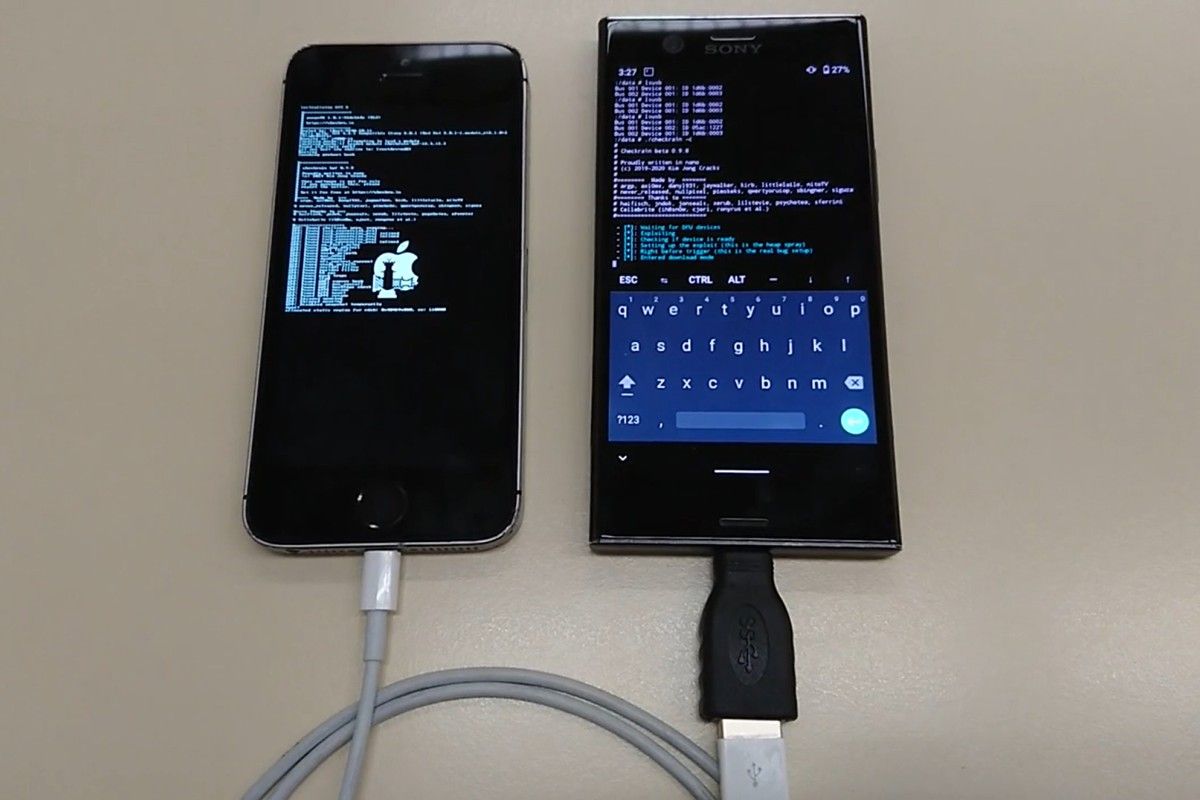
You can now jailbreak several popular iPhones using your rooted Android smartphone, thanks to checkra1n and its recent Linux support. Check it out!
This is the general idea
glossy coyote
^
pliant monolith
quaint niche
https://www.xda-developers.com/jailbreak-apple-iphone-using-checkra1n-rooted-and...
Thanks man
 glossy coyote
my ps3 is cfw but
quaint niche
Not sure about a PS3, as the CPU architecture is different, but I'm pretty sure it could be done on a PS4
quaint niche
It's on FW 9.x, back in 4.x and 5.x days I was able to run Linux on it
Never tried that with JB FW 9.x, but I don't see why not
quaint niche
glossy coyote
checkra1n works on a lg tv
Ha
I wonder if I should try Odyssey on this device we were able to boot
I’d personally stick with checkra1n, but my friend who owns the device often kills his battery on the go and he’s not really savvy with dealing with checkra1n via live Linux every time the device reboots


It is unable to fetch Twitter, Facebook and Google Maps for some reason. But it did fetch everything else. Rebooting now.
Rebooted, all's well. Manually fetched those three from the App Store.
 forest night
Says exploit failed error code -31 what does that mean?
tidal nest
The exploit failed
forest night
Do I keep trying it over and over? Or would it say the same thing
tidal nest
forest night
Do I keep trying it over and over? Or would it say the same thing
Yeah, are you on AMD by any chance?
If so
!t checkra1nonamd

forest night
Sorry but what’s amd 🤣
 hallow capeBOT
checkra1namd
If you’re on AMD/Ryzen, you may be encountering a few issues when using checkra1n. This can vary between freezes and straight up crashes. It’s because of AMD’s weird drivers that cause it not to work that well with checkra1n’s exploit. If you’re lucky you can actually successfully manage to jailbreak using checkra1n.
Tips to increase successrate:
- Plug your device into your computer's motherboard.
- Use a genuine Apple USB-A to lighting cable.
If you’re stuck on the apple logo please force reboot yourself (see: /tag reboot).
If these don’t work, try to get your hands on another computer (preferably intel), and try to use checkra1n again.
Added by flower#1116 | Used 46 times
·
forest night
So basically I can’t do it in a m1 MacBook:/ great
 slender meteor
forest night
So basically I can’t do it in a m1 MacBook:/ great
slender meteor
forest night
So basically I can’t do it in a m1 MacBook:/ great
You can. I was able to use checkra1n on my M1 MacBook Pro. I had to run it from the terminal though.
./checkra1n```Also when it says disconnect and reconnect cable do I do it?
Because on top it says don’t disconnect even if it ask for a password
slender meteor
yes
Make sure you are using the USB-A to Lightning cable though. USB-C cable won't work.
forest night
Well… that seemed to be the issue 🤣 I just disconnect and reconnect and it said done ✅

 atomic lantern
 frail relic
What do I do here?
frail relic
What do I do here?
bootra1n is outdated, use odysseyn1x
hallow capeBOT
odysseyn1x
Odysseyn1x allows you to use checkra1n and Odysseyra1n on Windows computers via live-booting. You will need a USB flash drive or SD card for this.
Added by kitty#6969 | Used 2,629 times
·
glossy coyote
I have an old Ipad mini 2 with ios 12 on it and I cant seem to jailbreak it
Ive heard A7s have lots of bugs during jb
I keep getting errors repeatedly

I connected my device in recovery mode and then proceeded to boot it into DFU
but once it did checkra1n stopped working and I had to use checkra1n -c in the terminal for it to proceed
but Im only getting errors
 crystal hull
glossy coyote
I have an old Ipad mini 2 with ios 12 on it and I cant seem to jailbreak it
crystal hull
glossy coyote
I have an old Ipad mini 2 with ios 12 on it and I cant seem to jailbreak it
use 0.10.1 and replug trick
glossy coyote
crystal hull
use 0.10.1 and replug trick
tried already
it just keeps throwing usb errors
 gloomy fog
glossy coyote
it just keeps throwing usb errors
gloomy fog
glossy coyote
it just keeps throwing usb errors
L
crystal hull
glossy coyote
tried already
try to disable passcode or touch ID
glossy coyote
everything is disabled
practically just before setting up the device
factory reset
tidal nest
!t a7moment
hallow capeBOT
tidal nest
!t a7moment
a7moment
Checkra1n issues for A7 Devices on Linux Hosts
Checkra1n won’t really work for a7 devices on a Linux Host. You will need to do a replug trick and may even need to use an older version of Checkra1n.
Added by Cryptic#6293 | Used 124 times
·
glossy coyote
I can patch ipsw witch checkra1n manually? I flash patched ipsw with checkm8 exploit
glossy coyote
glossy coyote
I have an old Ipad mini 2 with ios 12 on it and I cant seem to jailbreak it
Ipad mini 2 with ios 12?
tidal nest
glossy coyote
I can patch ipsw witch checkra1n manually? I flash patched ipsw with checkm8 exp...
atomic lantern
tidal nest
<:fr:712506651520925698>
it continues 
tidal nest
atomic lantern
it continues <:troll:794397046706667530>
thought the guy would understand that absolutely nobody would help him
 shut bough
I did the checkrain jailbreak with my sd card and it won’t return to its normal when u try to open the drive to see files it says (insert disk into usb drive d)

 hot ember
 oblique grove
hot ember
https://discord.com/channels/349243932447604736/688124711145701393/9064998845243...
oblique grove
hot ember
https://discord.com/channels/349243932447604736/688124711145701393/9064998845243...
Uh, windows native partition manager software (disk management) can wipe without terminal.
 verbal skiff
it doesn’t work that much for me
hot ember
it gets iffy once you make a bootable usb for linux and splits it into different partitions
tidal nest
hot ember
https://discord.com/channels/349243932447604736/688124711145701393/9064998845243...
Oh yeah lol, I forgot how Windows Formatter is
It acts up when theres split partitions
 gilded plaza
Should I use checkra1n, odysseyra1n, or uncover for jailbreaking my 6s on 14.6?
 near osprey
you can't use unc0ver so checkra1n + odysseyra1n
 astral iron
When I changed my SIM card to T-mobile, I re jb’d earlier this morning and my phone booted on the “Hello” screen with no jb. Why is this?
please @ me
crystal hull
astral iron
When I changed my SIM card to T-mobile, I re jb’d earlier this morning and my ph...
you need to jb every reboot
astral iron
crystal hull
you need to jb every reboot
Because it’s semi-tethered? I know that. But mine won’t jailbreak at all now.
gilded plaza
isnt uncover supported on 14.6?
near osprey
gilded plaza
isnt uncover supported on 14.6?
only on A12-A13 iphones
crystal hull
astral iron
Because it’s semi-tethered? I know that. But mine won’t jailbreak at all now.
every today jailbreaks requieres to rejb after reboot
astral iron
I am aware of that. That doesn't answer my question.
 elfin pulsar
hello some one could u please guide for jailbrake ipad air 2 ios 14.2 please
crystal hull
elfin pulsar
hello some one could u please guide for jailbrake ipad air 2 ios 14.2 please
Use taurine
!t sideload
hallow capeBOT
crystal hull
!t sideload
sideload
Windows:
Sideloadly
AltStore
*zsign + ideviceinstaller
macOS:
Sideloadly
AltStore
*zsign + ideviceinstaller (brew install libimobiledevice libirecovery)
Linux:
AltStore
*zsign + ideviceinstaller
Special:
***SignTools
On-device (requires jailbreak):
**AltStore + AltDaemon (iOS 12.2+)
ReProvision Reborn (iOS 9.0+)
*: Requires paid dev cert.
**: For iOS 13.3.1, you currently have to use an older version (see /tag altstorecrash).
***: For advanced users only. Setup may require a Mac in some instances.
Added by stkc#6525 | Used 245 times
·
glossy coyote
Nope
 devout kernel
Soooo, is it possible to SSH to a checkra1n device without connecting to USB?
atomic lantern
devout kernel
Soooo, is it possible to SSH to a checkra1n device without connecting to USB?
yes
you need to install openssh
this goes for any jailbroken device though
devout kernel
I have openSSH. Trying to connect via WinSCP to transfer files but getting a connection refused error
atomic lantern
devout kernel
I have openSSH. Trying to connect via WinSCP to transfer files but getting a con...
make sure the ip address is correct
the password is alpine by default
devout kernel
Yup. The IP is correct. Using port 44 per the FAQ I saw on Checkra1n's website. I changed the password in NewTerm so been using that as well.
atomic lantern
devout kernel
Yup. The IP is correct. Using port 44 per the FAQ I saw on Checkra1n's website. ...
port 44 is for usb
(or localhost)
you should be using port 22 (the openssh default)
devout kernel
Tried 22 before I found out the 44 thing. Wasn't working either.
atomic lantern
well that doesn't make sense because the openssh server is running as soon as you install openssh on your device
devout kernel
Yeaaaaaaaah
I'm going to try to reboot and rejailbreak. Been trying to avoid doing that but I can't think of anything else
hot ember
just use filza's webdav server 
devout kernel
Well shit, I didn't even know that was there all this time
Thanks! BTW, WinSCP worked after the reboot but it won't take my password which is still annoying. Not that it matters now. Thanks @hot ember
atomic lantern
devout kernel
Well shit, I didn't even know that was there all this time
the webdav server works, but it's not great when it comes to managing multiple files at once sadly
devout kernel
atomic lantern
the webdav server works, but it's not great when it comes to managing multiple f...
I figured. Thankfully I don't need to manage many files at the moment. I might try WinSCP again when I need it but that's a problem for future me
devout kernel
Okay so I got bored and thought I'd figure this out now. Just to recap, it connects to WinSCP now but won't take my password. I double checked my password in NewTerm to make sure I'm not mistyping it and it gives me su access so I know my password is correct.
Out of curiosity, I tried resetting the password back to alpine by editing the master.passwd file in /private/etc/, tried connecting via WinSCP and it let me in.
After that, went back to NewTerm, set a different password, then tried WinSCP, again, access denied. For a final test, I changed the password to alpine via NewTerm instead of through the master.passwd file, tried that in WinSCP, and boom access denied. So, it seems that NewTerm is maybe setting the password a little differently than how WinSCP does. It's bizarre.
atomic lantern
devout kernel
Okay so I got bored and thought I'd figure this out now. Just to recap, it conne...
wait, how long is the password you're setting
that could be it
devout kernel
atomic lantern
wait, how long is the password you're setting
9 characters
atomic lantern
devout kernel
9 characters
try only typing the first 8 for logging in with winscp
devout kernel
Access denied still
tidal nest
devout kernel
Access denied still
Just use the root user
devout kernel
tidal nest
Just use the root user
What do you mean? All of these attempts are as root
tidal nest
You changed the default root user password alpine?
devout kernel
I did.
tidal nest
devout kernel
Okay so I got bored and thought I'd figure this out now. Just to recap, it conne...
master.passwd for root user tho?
devout kernel
tidal nest
master.passwd for root user tho?
Yes. I laid most of the pertinent details here: #nathanlr message
tidal nest
Huh?
why are you doing it in this channel tho?
It’s actually a support channel sorta
hot ember
#bot-commands smh
 dapper schooner
I’m using windows to jb my iPhone 8 - is there any trick to getting the phone into DFU mode? Tried watching a few YouTube vids and I’m stuck
tidal nest
dapper schooner
I’m using windows to jb my iPhone 8 - is there any trick to getting the phone in...
Ok so you cannot use Windows to jailbreak
If you seen a website/video showing you checkra1n on Windows, it’s fake
Anyways, what version of iOS is your 8 even on?
If it’s on iOS 15 you cannot jailbreak it at all
dapper schooner
It’s iOS 14.1 and I have a friend who has used windows to jb
Thanks for the help
 dusty needle
dapper schooner
It’s iOS 14.1 and I have a friend who has used windows to jb
dusty needle
dapper schooner
It’s iOS 14.1 and I have a friend who has used windows to jb
they probably used odysseyn1x
!t odysseyn1x
hallow capeBOT
dusty needle
!t odysseyn1x
odysseyn1x
Odysseyn1x allows you to use checkra1n and Odysseyra1n on Windows computers via live-booting. You will need a USB flash drive or SD card for this.
Added by kitty#6969 | Used 2,632 times
·
dapper schooner
dusty needle
^
Thank you
glossy coyote
Any tweak that removes all cache ? (I permanently deleted photos and I’m pretty sure I heard they can still be recovered but I don’t want them to be ever recoverable)
Ping me when answered
crystal hull
glossy coyote
Any tweak that removes all cache ? (I permanently deleted photos and I’m pretty ...
glossy coyote
Thanks, I’ll forward it there
hot ember
Thats not windows, youre live booting linux
crystal hull
^
 vast nymph
hi you all
//i'm triing to open checkra1n but don't be able to type the password couse any key don't type, somebady help me?
hot ember
Dont use bootra1n
hallow capeBOT
odysseyn1x
Odysseyn1x allows you to use checkra1n and Odysseyra1n on Windows computers via live-booting. You will need a USB flash drive or SD card for this.
Added by kitty#6969 | Used 2,634 times
·
vast nymph
odisseyn1x doesen't work with iOS 14 i mean
verbal skiff
yes it does
vast nymph
ok i try thank u
 harsh wasp
Anyone having an issue where their keyboard stops working and you can’t open iMessage anymore
Or like other apps
atomic lantern
harsh wasp
Anyone having an issue where their keyboard stops working and you can’t open iMe...
on checkra1n? i haven't experienced that
harsh wasp
Prob just my luck lol
tidal nest
 plucky edge
U can
plucky edge
U can
no you cant
that doesn’t even count because you are live booting linux off or your USB
 dense obsidian
Why are u guys using checkrain for jb
atomic lantern
dense obsidian
Why are u guys using checkrain for jb
in many cases it's the only option
tidal nest
dense obsidian
Why are u guys using checkrain for jb
personally i prefer using checkra1n even it isn’t my only option
i don’t care about SEP and it being a semi-tether
i mean i tethered downgraded on my 8 so the semi-tether part doesn’t even matter
and also unless your on A7 on Linux or on AMD (excluding AMD mobile) it’s never really gonna fail exploiting
 paper igloo
hi
 copper pollen
Hi
dusty needle
Hi
crystal hull
Hi
verbal skiff
Hi
glossy coyote
holla
 fathom igloo
hi i have just a question, can i use checkrain for my 15,3 ios ipad?
hot ember
No
tidal nest
fathom igloo
hi i have just a question, can i use checkrain for my 15,3 ios ipad?
No, the latest version able to be jailbroken is 14.8.1 with checkra1n
fathom igloo
Aha okey, so there is no way to jailbreake device with ios 15.3?
tidal nest
fathom igloo
Aha okey, so there is no way to jailbreake device with ios 15.3?
Yes, it is currently impossible to jailbreak iOS 15 because a jailbreak for iOS 15 has not been publicly released
fathom igloo
understand, thanks for the reply
tidal nest
fathom igloo
understand, thanks for the reply
Yeah and all jailbreaks that you see on YouTube or whatever are fake
fathom igloo
aha oke
tidal nest
 fervent crown
i heave a iphone 8 gsm ios 15.6, blocked with icloud, need jailbreak
fervent crown
i heave a iphone 8 gsm ios 15.6, blocked with icloud, need jailbreak
!t icloudbypass
hallow capeBOT
Hey @fervent crown, have a look at this!
icloudbypass
Discussion of iCloud/Activation Lock/passcode/MDM (Mobile Device Management) bypass, asking how to do it, or posting about it is not allowed. No, it doesn't matter if the phone is yours or not. We will not help you with it. If you do own it, it’s recommended to use the links below.
If you forgot your Apple ID - Apple Support
If you forgot your Apple ID password - Apple Support
How to remove Activation Lock - Apple Support
If you forgot the passcode on your iPhone, or your iPhone is disabled - Apple Support
Added by JTV#5846 | Used 569 times
·
tidal nest
also don't crosspost
fervent crown
tidal nest
also don't crosspost
pm
dusty needle
fervent crown
i heave a iphone 8 gsm ios 15.6, blocked with icloud, need jailbreak
Apple Support
Learn what to do if you see the Activation Lock screen on your device, or if you're asked to remove Activation Lock on a device that's offline and not in your possession.
 young zodiac
Hey @tidal nest , I’m new to Jailbreaks… I understood now that I need to Safe blobs to down or upgrade. I’m right now on IOS 15.6 and I know that we don’t have any Jailbreaks for IOS 15 but what is the best step now for me to do?
dusty needle
young zodiac
Hey <@893650678432550942> , I’m new to Jailbreaks… I understood now that I need ...
don’t update
young zodiac
dusty needle
don’t update
If I safed the blob from 15.6, can I downgrade to it when it’s not signed ?
crystal hull
Which device
dusty needle
young zodiac
If I safed the blob from 15.6, can I downgrade to it when it’s not signed ?
depends on the device you have
young zodiac
dusty needle
depends on the device you have
iPhone 11
dusty needle
young zodiac
iPhone 11
unfortunately no
young zodiac
dusty needle
unfortunately no
Ok, so what do I need to do to Jailbreak in the future ?
dusty needle
young zodiac
Ok, so what do I need to do to Jailbreak in the future ?
stop updating
young zodiac
dusty needle
stop updating
I didn’t btw, my iPhone did it by him self
 stable haven
Are there any Jailbreak option for a 6s on 14.6?
near osprey
checkra1n
stable haven
is there anything i can use to Jailbreak my phone with a Windows System? Tried bootra1n and checkn1x both dont work
stable haven
ill try that. thx
tidal nest
stable haven
is there anything i can use to Jailbreak my phone with a Windows System? Tried b...
yeah bootra1n and checkn1x is outdated
 pulsar kiln
so I want to jailbreak an iPhone 5s using checkra1n but everytime I try it, (using M1 Macbook AIr) it returns an error code. I'am using a USB-c to USB adapter, with a standard official lightning cable and this keeps happening, please help

 craggy estuary
hi when the version for ios 15.6 will be released ?
verbal skiff
we dont know at all
atomic lantern
pulsar kiln
so I want to jailbreak an iPhone 5s using checkra1n but everytime I try it, (usi...
try checkra1n cli instead
hallow capeBOT
checkra1ncli
To use checkra1n in CLI mode, type the following command into a Terminal window.
macOS:
/Applications/checkra1n.app/Contents/MacOS/checkra1n -c
Linux:
sudo checkra1n -c
checkn1x:
Press Alt-F3.
odysseyn1x:
Select “Shell” then type checkra1n -c.
Once checkra1n CLI is running, connect your phone to your computer and place your phone in DFU mode.
To enable safe mode, run checkra1n -cs.
Added by JTV#5846 | Used 396 times
·
craggy estuary
i tried to download the beta in checkra1n

traduction: Virus detected
good joob 👍🏻
 manic cave
craggy estuary
i tried to download the beta in checkra1n
manic cave
craggy estuary
i tried to download the beta in checkra1n
there is no official Windows checkra1n version
your only option for “windows checkra1n” is https://ios.cfw.guide/using-odysseyn1x
A complete iOS modding guide, from stock to jailbroken.
craggy estuary
manic cave
there is no official Windows checkra1n version
thank you but the no official windows checkra1n works for windows ?
tidal nest
craggy estuary
thank you but the no official windows checkra1n works for windows ?
no, checkra1n doesn’t work for windows atm
tidal nest
pulsar kiln
I tried that as well
iirc m1 checkm8 A7 sucks
 wild raft
Checkra1n disappeared but I’m still jailbroken? What happened?
hot ember
Ignore it
wild raft
Will it come back or will I have to download it again via computer
I’m assuming this happened after the respring crash that happened to me
hot ember
Itll come back when you rejailbreak
wild raft
Ok
 hallow plover
why do my chats disappear?
manic cave
hallow plover
why do my chats disappear?
because we don't support icloud bypasses or malware
hallow plover
now this one doesn't disappear
manic cave
stop spamming my pings with the filter
manic cave
manic cave
because we don't support icloud bypasses or malware
what you're mentioning is both of these
hallow plover
Saunders did a tutorial on it
hallow capeBOT
manic cave
!t yt
yt
YouTube is typically a very poor source of information and should be avoided. Many jailbreak YouTubers promote piracy, outdated tweaks, or just flat out fake jailbreaks. Reliable sources: iOS Guide, r/jailbreak Wiki, Apple Database and The iPhone Wiki.
Added by toilet cat#8018 | Used 1,504 times
·
hallow plover
Geosn0w didn't confirm that it's a scam, only that he is skeptical
In his yt video on the subject and I know he is a major member of the jailbreak community
manic cave
hallow plover
Geosn0w didn't confirm that it's a scam, only that he is skeptical
YouTube is typically a very poor source of information
hallow plover
well then where else?
manic cave
hallow cape
I would encourage you to read this tag
 native wigeon
Could anyone help me? I’ve been trying to jailbreak my iPad Pro 2nd gen on 14.6 for the last day with checkra1n and I keep getting this message? I’ve tried everything please help!

Thank you
manic cave
native wigeon
Could anyone help me? I’ve been trying to jailbreak my iPad Pro 2nd gen on 14.6 ...
don't use an outdated checkra1n version
since you seem to be using a live bootable just follow https://ios.cfw.guide/using-odysseyn1x
A complete iOS modding guide, from stock to jailbroken.
native wigeon
How do I know whether i am using an outdated version? I’m quite new to all this sorry
native wigeon
Where can I get the newest one please?
tidal nest
checkra1n 0.12.4 is the latest version of checkra1n
Use https://ios.cfw.guide/using-odysseyn1x instead of using bootra1n/checkn1x
A complete iOS modding guide, from stock to jailbroken.
native wigeon
Is it the same process? Putting it on a usb and booting through it?
native wigeon
I’m on this website https://ios.cfw.guide/using-odysseyn1x
A complete iOS modding guide, from stock to jailbroken.
But what am I actually downloading?? 😭😭
manic cave
native wigeon
But what am I actually downloading?? 😭😭
you're downloading odysseyn1x
native wigeon
Okay I downloaded it but it’s just called checkra1n 0.12 which is what I had before I’m pretty sure?
native wigeon
Am I putting it through Rufus now?
manic cave
native wigeon
Am I putting it through Rufus now?
you could, you could also just use Ventoy

 near osprey
install ventoy first
 blazing flicker
Will an iPhone 8 plus running iOS 15.3.1 be jbrakable in the future?
 somber solstice
Yes
crystal hull
blazing flicker
Will an iPhone 8 plus running iOS 15.3.1 be jbrakable in the future?
But no one knows what future means in jailbreaking
tidal nest
 crude glen
I cant go back to the bios
crude glen
I cant go back to the bios
crude glen
Dude im serious i cant go back to the biosssssss
atomic lantern
crude glen
Dude im serious i cant go back to the biosssssss
enter it from windows then
hold shift and click the restart option
or run shutdown -r -o -t 00 from run or command prompt
tidal nest
atomic lantern
or run `shutdown -r -o -t 00` from run or command prompt
shutdown /r /fw -t 0
atomic lantern
tidal nest
`shutdown /r /fw -t 0`
yeah i missed the r oops
tidal nest
what is -o?
tidal nest
atomic lantern
advanced options
your better off just doing shutdown /r /fw -t 0 because this reboots you directly into the BIOS
atomic lantern
tidal nest
your better off just doing `shutdown /r /fw -t 0` because this reboots you direc...
ah well i didn't know that one
 glossy coyote

 toxic plover
enable untested versions and enable a11 bpr
you'll have to disable passcode and touch id
 glossy igloo
Okay done and I had to put my device in restore mode or whatever it’s called and it’s telling me to please connect the device in normal mode
glossy igloo

This is where I’m at
I have the device connected but it’s in restore mode cause it told me to do that
toxic plover
!t reboot
hallow capeBOT
toxic plover
!t reboot
reboot
iPhone 8 or newer (including all notched devices and iPhone SE 2020):
- Press volume up
- Press volume down
- Press and hold the side button for 10-20 seconds until the Apple logo appears
iPhone 7:
- Press and hold the volume down and power buttons for 10-20 seconds until the Apple logo appears
iPhone 6S/SE 2016/iPad 8th or older:
- Press and hold the home and power buttons for 10-20 seconds until the Apple logo appears
Added by JTV#5846 | Used 1,065 times
·
tidal nest
toxic plover
enable untested versions and enable a11 bpr
untested versions is only required for iOS 14.6+ iirc
tidal nest
glossy igloo
yeah so for A11 every time you want to jailbreak with checkra1n you have to go to options and enable skip A11 bpr check
glossy igloo
Oh okay well I was doing both and it didn’t work I got it to load once fully and then it said usb error
 prime jacinth
How do jailbreak with checkrain on windows ???
manic cave
prime jacinth
How do jailbreak with checkrain on windows ???
A complete iOS modding guide, from stock to jailbroken.
prime jacinth
Thanks
Alright so I got a problem lol, my iPhone 6s dosent boot. It turns on with the apple@logo then it’s a black screen, haven’t touched this phone in ages and don’t know why it’s happening
near osprey
if you just turned it on and havent done anything it could be hardware failure
prime jacinth
Oh
near osprey
it could be software but the only way to know for sure would be a dfu restore
which would update the device to the latest version
prime jacinth
near osprey
which would update the device to the latest version
Yh that’s what I’m tryna avoid at the moment. I have go shsh blobs for 15.4.1 but that’s not gonna be helpful for a while
 ionic condor
trying to boot odessyra1n but i get not secured boot on my macbook
manic cave
ionic condor
trying to boot odessyra1n but i get not secured boot on my macbook
If you have a MacBook just do it in macOS
ionic condor
manic cave
If you have a MacBook just do it in macOS
Can’t its broken
ionic condor
manic cave
If you have a MacBook just do it in macOS
Anyway to fix -31 error ? In odessyra1n
manic cave
ionic condor
Anyway to fix -31 error ? In odessyra1n
what device is this and what type of cable are you using
ionic condor
manic cave
what device is this and what type of cable are you using
iPad mini 3 and I use a lightning cable
manic cave
ionic condor
iPad mini 3 and I use a lightning cable
is it a USB-A or USB-C lightning cable
ionic condor
A
manic cave
ionic condor
A
Try again or try something else (e.g. Chimera) - for the record Linux A7 checkra1n does not end up working well at all
ionic condor
manic cave
Try again or try something else (e.g. Chimera) - for the record Linux A7 checkra...
Used on macOS worked perfect
ionic condor
manic cave
Try again or try something else (e.g. Chimera) - for the record Linux A7 checkra...
But I already have checkra1n installed
manic cave
ok I'm confused @ionic condor is your MacBook broken or is checkra1n having issues on your MacBook
ionic condor
manic cave
ok I'm confused <@615168914292342825> is your MacBook broken or is checkra1n hav...
Sorry MacBook is broken I wanted to install windows via bootcamp but there was a error (some partion error) I restarted and installed windows didn’t over right something installed windows successfuly wanted to reboot in to macOS didn’t work (hold alt) the macOS boot partion is gone tried via the bootcamp control panel wasn’t working to
manic cave
ionic condor
Sorry MacBook is broken I wanted to install windows via bootcamp but there was a...
what MacBook is this?
ionic condor
manic cave
what MacBook is this?
MacBook mid 2013
manic cave
You might be able to use Internet Recovery or whatever to reinstall macOS
ionic condor
manic cave
You might be able to use Internet Recovery or whatever to reinstall macOS
Yes but sent my files then gone ?
manic cave
If Windows overwrote your macOS partition chances are that data is gone anyways
ionic condor
manic cave
If Windows overwrote your macOS partition chances are that data is gone anyways
No I installed a random software and was able to see all my files
manic cave
then backup those files before doing Internet Recovery
 pliant badge
On a non-jailbroken device, I want to save blobs for 15.6.1. I already have the nonce for an iPhone XS Max and had blobsaver read the nonce to get previous 15.6. If I had rebooted the device would the nonce have changed? When does the nonce change?
atomic lantern
pliant badge
On a non-jailbroken device, I want to save blobs for 15.6.1. I already have the ...
nonce changes if you read it from recovery again or update the device last time i checked
pliant badge
Read from recovery?
Like if you put it into recovery mode in blobsaver to get the nonce?
hot ember
Yes it gets randomized every time you do that
So once you get generator and apnonce pairing, save your future blobs with the same values
pliant badge
If it changes and I save it after the fact but use the same nonce to save them… then I have to somehow set the nonce on the device to the known value of my blobs before doing future restore, right? It really doesn’t matter how many times I might have gone into recovery mode and saved blobs after that so long as I set that known nonce before FR. That seems to be what you are saying.
hot ember
Correct
pliant badge
To set nonce on a non-jailbroken device you need a tool called gaster I think it was. I tried using it but didn’t find the commands for actually setting the nonce. Would you happen to have the info on how to do that?
hot ember
That wont work for your xs
Youll need to wait for a jailbreak or another exploit to set the generator
Thats why you should only read the generator and apnonce once
pliant badge
Hmmm, this all still confuses me a bit. Maybe by the time I actually need it then it will make more sense. 🙂
I did try setting nonce on an old iPad Pro 10.5 that I had laying around. Couldn’t get gaster to work for me. So I rejailbroke it and set nonce that way. Then I got FR to take me to 15.3. So, now I at least have a better idea of the process since I walked through it.
Right now that XS is sitting on 15.2 anyway and so it’s just a waiting game.
vast nymph
verbal skiff
yes it does
with odissey1x it's possible downgrade from iOS 15.6 to 14.8 ?
hallow capeBOT
crystal hull
!t 15to14
15to14
Requirements
- A11 and below (iPhone X/8 and older)
- iOS 14.8- Blobs (14.8.1 blobs won’t work)
(If you’ve been on a previous jailbreak with procursus you may have blobs for iOS 14, please check TSS Saver) - Mac / Linux Machine
If you don't have any blobs but meet the rest of the requirements you can [Tether Downgrade](#bot-commands message). Preceed at your risk.
Note
- If you downgrade you will lose Face ID
- You can regain Face ID if you upgrade to a version that doesn’t break Face ID, please see
/tag sepbb
Added by stkc#6525 | Used 410 times
·
tidal nest
vast nymph
with odissey1x it's possible downgrade from iOS 15.6 to 14.8 ?
no, you need blobs and an actual linux install
 rain rampart
So does any of these work? Is there certain for certain things or do they all do the same thing? I want to jailbreak my phone iOS 15.5 and don't know how to actually get it downloaded
tidal nest
rain rampart
So does any of these work? Is there certain for certain things or do they all do...
No, you cannot jailbreak iOS 15 entirely currently
And no unfortunately no you cannot downgrade to iOS 14
rain rampart
Damn. So I just have to wait until it releases? Is there a set date or is it whenever iOS 16 gets released they'll push up to 15?
tidal nest
rain rampart
Damn. So I just have to wait until it releases? Is there a set date or is it whe...
there is no set date or ETA
nobody knows
hallow capeBOT
Hey @rain rampart, have a look at this!
Rule 12
Asking for ETA = 1 day mute
 wide zinc
I can't seem to download the 0.12.4 for mac from the checkra1n website, it keeps deleting itself and stuff
glossy coyote
So ETA Checkra1n iOS 15?
hot ember
atomic lantern
wide zinc
I can't seem to download the 0.12.4 for mac from the checkra1n website, it keeps...
are you using chrome or edge to download it
if so you need to allow it
wide zinc
Where do I allow it? I don't have any trouble downloading the older versions except 0.12.4
atomic lantern
wide zinc
Where do I allow it? I don't have any trouble downloading the older versions exc...
do you get an error or anything? since that's a bit strange
like does it appear on the downloads page for the browser
wide zinc
it does, it downloads but basically gets removed rightaway
I tried it on my Mac first, then I tried on my Windows, same thing
but I can download 0.12.3 with no issue on both
tidal nest
Hmm
tidal nest
wide zinc
it does, it downloads but basically gets removed rightaway
That's a bit strange, do you have an antivirus on your mac or anything like that?
wide zinc
yes, but I just find it weird that 12.3 is not touched at all
tidal nest
wide zinc
yes, but I just find it weird that 12.3 is not touched at all
yeah that's a bit weird but the issue here is that 0.12.4 is being flagged by an antivirus
anyways, since you said that you have an antivirus you will need to temporary disable it
hot ember
antivirus on macos 
tidal nest
hot ember
antivirus on macos <:uhh:696449618539708548>
yeah, fr who does that
windows is the only OS that you really need an antivirus on, however imo i don't really recommend having any antivirus as long as you know what you are doing and know not to click sketchy links or download stuff from them
pliant badge
A limited user account can also help with that. Then only use the admin when you are actually meaning to install something. Mac is way better than windows in those situations anyway.
vast nymph
hallow cape
so i can't downgrade my iPhone XR 15.6?
atomic lantern
vast nymph
so i can't downgrade my iPhone XR 15.6?
that's correct
vast nymph
atomic lantern
that's correct
and I can't even jailbreak?
atomic lantern
vast nymph
and I can't even jailbreak?
also correct
vast nymph
damn...😩
tidal nest
vast nymph
so i can't downgrade my iPhone XR 15.6?
yep, it is impossible to downgrade your device for 2 reasons and no unfortunately you cannot jailbreak entirely
there is not a single method to do either
vast nymph
tidal nest
yep, it is impossible to downgrade your device for 2 reasons and no unfortunatel...
will i have to wait for a new checkra1n upgrade maybe?
tidal nest
vast nymph
will i have to wait for a new checkra1n upgrade maybe?
checkra1n wont support your device anyways.
vast nymph
omg!!
So I'll never have a solution?
tidal nest
vast nymph
omg!!
So I'll never have a solution?
i wouldn’t say never but you will most likely not be able to jailbreak for months
vast nymph
tidal nest
i wouldn’t say never but you will most likely not be able to jailbreak for month...
at least one hope I already have it comforts me... thank u my friend
pliant badge
Could always buy an old iPhone on eBay depending on your needs for jail breaking in the first place.
near osprey
!t noob
shut bough
There is no app on my phone
hallow capeBOT
near osprey
!t noob
noob
If you are new user looking for new tweaks, or just want to see other tweaks check the posts below
Suggested tweaks:
Newterm
Filza
Cr4shed or Crash Reporter
Snowboard
NoMoreSmallApps (for iPads)
[List 1](#bot-commands message), [List 2](#bot-commands message), [List 3](#bot-commands message), [List 4](#bot-commands message), [List 5](#bot-commands message), [List 6](#bot-commands message), [List 7](#bot-commands message), [List 8](#bot-commands message), [List 9](#bot-commands message), [List 10](#bot-commands message), [List 11](#bot-commands message), [List 12](#bot-commands message), [List 13](#bot-commands message), [List 14](#bot-commands message), [List 15](#bot-commands message), [List 16](#bot-commands message), [List 17](#bot-commands message), [List 18](#bot-commands message), [List 19](#bot-commands message), [List 20](#bot-commands message), [List 21](#bot-commands message), [List 22](#bot-commands message)
Added by Rick.#1738 | Used 1,230 times
·
near osprey
shut bough
There is no app on my phone
like no checkra1n app?
shut bough
Nope
But
When u put into pc
It says jailbroken
I Cbb downloading again
I’m in bed
It’s 3 am
So
Is there any way to fix
shut bough
near osprey
like no checkra1n app?
Well I had it for a while but it kept saying error and u was to lazy to fix but now the app has disappeared
near osprey
!t commoncommands
hallow capeBOT
near osprey
!t commoncommands
commoncommands
Run these commands over SSH or using a terminal such as NewTerm 2.
Respring
sbreload (faster)
killall SpringBoard (for older jailbreaks)
Safe Mode
killall -11 SpringBoard
Userspace Reboot
launchctl reboot userspace
uicache
uicache -a
ldrestart - (not recommended, use userspace reboot instead)
su root -c ldrestart
Reboot
launchctl reboot
Fix Cellular connection issues
killall CommCenter
Force the checkra1n loader to appear
uicache -p /var/binpack/Applications/loader.app
Added by cameren#0420 | Used 95 times
·
shut bough
near osprey
if you dont have a terminal you may have to use ssh
How do I access ssh or terminal
shut bough
near osprey
if you dont have a terminal you may have to use ssh
Cus my iPhone is fresh no apps what so ever

Alll Ik is I had it bfore
And when I plugged it in it said it’s jailbroken
And I did the check rain process
To install
On to device
But I didn’t use the app
Cus of error
And I couldn’t bb finding it prob
near osprey
how did you use checkra1n
shut bough
I downloaded it onto my sd card and booted it in f12
Installed it
Booted the device
And basically
Left it
For a week
near osprey
okay and what did you download
shut bough
near osprey
okay and what did you download
Nothing else I downloaded it onto my pc used the app in that dos jit installed checkrain once the iPhone booted and the app appeared I didn’t open it or anything
near osprey
are you on macos, linux, windows?
shut bough
near osprey
are you on macos, linux, windows?
Windows
shut bough
near osprey
are you on macos, linux, windows?
I downloaded checkrain windows then installed it onto my iPhone and left it I never opened the app that I’d downloaded so
near osprey
i would just try to reboot and rejailbreak then
shut bough
Alr
crystal hull
shut bough
I downloaded checkrain windows then installed it onto my iPhone and left it I ne...
there is no checkra1n for windows
near osprey
there is
but it is incredibly sketchy and also bundled with icloud bypass software
and also unofficial
crystal hull
so useless
 distant abyss
One question, does Checkra1n work on ParrotOS?
toxic plover
should because it's debian based, but it seems to be a pentest os
distant abyss
toxic plover
should because it's debian based, but it seems to be a pentest os
So which OS would you recommend?
shut bough
crystal hull
there is no checkra1n for windows
Lit is but ok
crystal hull
shut bough
Lit is but ok
What is lit?
shut bough
crystal hull
What is lit?
Literally
Just short
Is there any way to get arcues x Roblox executor on iPhone
tidal nest
shut bough
Lit is but ok
no it’s not
hallow capeBOT
verbal skiff
!t icloudbypass
icloudbypass
Discussion of iCloud/Activation Lock/passcode/MDM (Mobile Device Management) bypass, asking how to do it, or posting about it is not allowed. No, it doesn't matter if the phone is yours or not. We will not help you with it. If you do own it, it’s recommended to use the links below.
If you forgot your Apple ID - Apple Support
If you forgot your Apple ID password - Apple Support
How to remove Activation Lock - Apple Support
If you forgot the passcode on your iPhone, or your iPhone is disabled - Apple Support
Added by JTV#5846 | Used 583 times
·
frail relic
I already jailbroke it
 formal geode
hot ember
formal geode
hot ember
Unknown
 strange igloo
just wondering if the exploit takes advantage of hardware and the ios version doesn't work, why can't you just up and use it on the latest version?
tidal nest
strange igloo
just wondering if the exploit takes advantage of hardware and the ios version do...
did you think that their is still mitigations
there is still some mitigation, such as softdfu being removed, SSV and shit like that
atomic lantern
strange igloo
just wondering if the exploit takes advantage of hardware and the ios version do...
well, iOS 15 changed some things, one of those was enforcing SSV which means making changes persist to rootfs would brick your device.
after 15.4, something called SoftDFU was removed meaning whatever checkra1n uploads to the device has to be smaller to work on that and newer
 worldly minnow
because you need to modify iOS after the exploit
tidal nest
softDFU has DRAM access
worldly minnow
and iOS can change in a way that makes the jailbreak not know how to modify it
or do it incorrectly
strange igloo
so it's just finding ways to not brick your phone
i see how testing would suck for that
tidal nest
worldly minnow
or do it incorrectly
[Discussion][News] Checkra1n is no longer being worked on.
worldly minnow

strange igloo
well is there any shot that we get a jailbreak because if not then im probably gonna cry myself to sleep
i updated thinking there was a avaliable jailbreak but no ig
atomic lantern
strange igloo
well is there any shot that we get a jailbreak because if not then im probably g...
you'd have to pray for fugu15 and what comes of that
strange igloo
k
tidal nest
atomic lantern
it's just siguza fr
so true
bro still thinking about them bind mounts tho fr
 serene valve
does checkrain work on latest ios versions, given a supported device?
near osprey
it works on any version that is 12.0-14.8.1
serene valve
but wasn’t it a hardware issue that makes it work?
near osprey
please scroll up and read the conversation that is about that exact question
serene valve
oh sorry
near osprey
tldr checkra1n isnt all hardware
tidal nest
serene valve
but wasn’t it a hardware issue that makes it work?
it just uses checkm8 as the exploit
that doesn’t mean it’s entirely all hardware
glossy igloo
Finally got checkrain to work on my iPhone 8 lol took forever
 lapis ivy
Reee
 dull igloo
Jailbreaking is dead
atomic lantern
dull igloo
Jailbreaking is dead
and how is that supposed to be helpful?
 real otter
Should I get the latest version of Odysseyn1x?
crystal hull
yes
pliant badge
How unsupported is iPhone 8 on iOS 14.7.1 for checkra1n? I can’t get the phone to go into DFU. Tried about 4 or 5 times now.
0.12.4 of checkra1n
crystal hull
!t dfu
hallow capeBOT
crystal hull
!t dfu
dfu
DFU (Device Firmware Upgrade) mode is a mode which allows a device in any condition to be restored to a fresh version of iOS (not to be confused with Recovery Mode). This can also be used to jailbreak using Checkra1n!
For how to restore in DFU mode, see /tag dfurestore
Added by eric#1997 | Used 923 times
·
pliant badge
Lol, must read screen and not do the same as you do for other phone you have. 🙂
crystal hull
pliant badge
Lol, must read screen and not do the same as you do for other phone you have. 🙂
did you solve it or not yet?
pliant badge
I did. Thanks. It was just me not paying attention to what it was saying on the screen. What you sent did help me to slow down and take a look again.
Checkra1n was telling me the right stuff on screen. I was just doing what I do for my other phone to JB it though.
crystal hull
Ok then
ionic condor
a10 device is stuck at checking if device is ready checkra1n on ubuntu
hot ember
youre not using a vm right?
hot ember
no
ionic condor
ok
hot ember
what cpu does your pc have
hot ember
yeah please do
ionic condor
ok I will ty
ionic condor
hot ember
yeah please do
So A7 still dosnt work error -31 lets try the iPhone 7
ionic condor
hot ember
yeah please do
iPhone 7 is working
hot ember
ionic condor
So A7 still dosnt work error -31 lets try the iPhone 7
What a7 device do you have?
ionic condor
iPad mini 3
hallow capeBOT

iPad mini 3
All brand names
iPad mini 3 Wi-Fi (iPad4,7)
iPad mini 3 Wi-Fi + Cellular (iPad4,8)
iPad mini 3 Wi-Fi + Cellular (TD-LTE) (iPad4,9)
Model(s)
A1599, A1600, A1601
Latest firmware
12.5.5 (16H62)
SoC
A7 chip (arm64)
Powered by https://appledb.dev
hot ember
Yeah youll have to do the unplug trick with checkra1n 0.10.1
Or use another jailbreak such as chimera
ionic condor
hot ember
Or use another jailbreak such as chimera
Can’t was already jailbroken with checkra1n
ionic condor
hot ember
Yeah youll have to do the unplug trick with checkra1n 0.10.1
Can’t because its failing before is should do that
ionic condor
hot ember
Everything will transfer over
Oh also no restore root fs ?
ionic condor
12.5.5
hot ember
You can try using the latest version of u0 but its hit or miss
hallow capeBOT

checkra1n
Version
0.12.4
Compatible with
iOS 12.0 - 14.8.1
Type
Semi-tethered
Notes
Compatible with A7 - A11 devices. A11 devices on iOS 14 cannot use a passcode, Touch ID, Face ID, or Apple Pay in a jailbroken state.
Powered by https://appledb.dev
hot ember
Try running this shortcut https://www.icloud.com/shortcuts/8d4e206d568d4aadb624b2a6191a3771
hallow capeBOT
futurerestore
futurerestore allows you to upgrade/downgrade/restore to unsigned iOS versions if you meet certain requirements.
Tutorials:
Tutorial for downgrading/upgrading from iOS 15
Tutorial for other versions
Video Tutorial
Links:
FutureRestore GUI
Latest stable version (194)
Latest beta version
There are currently no pre-compiled beta builds for Windows.
Added by Capt Inc#0001 | Used 799 times
·
hot ember
You can follow the tutorial for other versions after you get sileo to appear
I assume youre still trying to downgrade to 14.0
Or 14.1
ionic condor
Yes
hot ember
Personally id stay on your current ios version since its more stable but thats up to you
ionic condor
Maybe I will ty for the tip
ionic condor
hot ember
Try running this shortcut https://www.icloud.com/shortcuts/8d4e206d568d4aadb624b...
Worked saved my day thank you ^^
hot ember
Nice
ionic condor
hot ember
Nice
After respring appeard the checkra1n app
 finite storm
Hey guys..is the checkra1n need resigned after 7days
near osprey
it's not an app you install so no
you just need a pc to run the jailbreak every time you reboot
glossy coyote
Hi ! I'm new to Checkra1n, and i just want some help for a friend. I need to find a french tutorial for installing it on an iphone 8 ios 14.8.1, and Google didn't help me there.
hallow capeBOT
checkra1n
Version
0.12.4
Compatible with
iOS 12.0 - 14.8.1
Type
Semi-tethered
Notes
Compatible with A7 - A11 devices. A11 devices on iOS 14 cannot use a passcode, Touch ID, Face ID, or Apple Pay in a jailbroken state.
Powered by https://appledb.dev
 frozen lark
will checkra1n support ios 15 in the future?
near osprey
maybe
 tight mural
Is there jb for 15.3.1?
atomic lantern
tight mural
Is there jb for 15.3.1?
no
 past crescent
hallow cape
past crescent
hallow cape
huh i use touch id and its working lol
hot ember
What ios version are you on
crystal hull
past crescent
huh i use touch id and its working lol
which device and iOS?
past crescent
ohh
crystal hull
in conclusion every iPad compatible with checkra1n can use SEP functions cause there is no iPad with A11
shut bough
I need help I tried the check rain jailbreak and it brought an error now it won’t turn on
crystal hull
what wont turn on?
 blissful crest
My friend is trying to jailbreak an iPhone 6s and he gets the error: "Failed to copy resources to the device."
Using odysseyrain by the way
hallow capeBOT
shortcut
This is a shortcut that allows you to install Odysseyra1n on your device, make sure you didn’t install Cydia from the loader before using this.

Added by toilet cat#6525 | Used 122 times
·
blissful crest
Trying it out now
@acoustic pulsar
It fails to connect to an SSH server
That's the problem, the phone doesn't support checkra1n but the bot links me to installing odyessyra1n.
blissful crest
iPhone 6s and 14.8.1
blissful crest
Trying now
by the way, do we need to connect it to a PC each time we reboot it and want to use jailbreak stuff
blissful crest
It showed all the code and stuff, and then it went to error -77.
@acoustic pulsar
 young burrow
in linux version of checkra1n, where is the option to allow unsupported ios version?
tidal nest
young burrow
in linux version of checkra1n, where is the option to allow unsupported ios vers...
it’s still in options
 odd creek
Is there any tweak to use Apple Pay on checkra1n A11?
tidal nest
odd creek
Is there any tweak to use Apple Pay on checkra1n A11?
no lol
odd creek
Darn
young burrow
tidal nest
it’s still in options
when i open checkra1n in ubuntu i can not find where the option is
atomic lantern
young burrow
when i open checkra1n in ubuntu i can not find where the option is
are you using the latest 0.12.4? because it's there
glossy coyote
is checkra1n working for ios 15.6? iphone 7 plus now?
near osprey
there is no ios 15 jailbreak
glossy coyote
near osprey
there is no ios 15 jailbreak
when it’s coming 15.6
glossy coyote
thx for sharing bad news…
 meager tendon
first
young burrow
atomic lantern
are you using the latest 0.12.4? because it's there
i think the app window size is smaller than it suppose to be. i am on ubuntu 22.
 covert vapor
meager tendon
first
covert vapor
meager tendon
first
?
atomic lantern
young burrow
i think the app window size is smaller than it suppose to be. i am on ubuntu 22.
well you don’t have to use the gui, you can use the terminal ui
hot ember
Dont use bootra1n
glossy coyote
why
hallow capeBOT
odysseyn1x
Odysseyn1x allows you to use checkra1n and Odysseyra1n on Windows computers via live-booting. You will need a USB flash drive or SD card for this.
Added by kitty#6969 | Used 2,644 times
·
hot ember
Its outdated, use this instead
glossy coyote
ok thx
glossy coyote
Hi ! How can I fix this ? (iPhone 7 iOS 14.8.1)
 hallow capeBOT
shortcut
This is a shortcut that allows you to install Odysseyra1n on your device, make sure you didn’t install Cydia from the loader before using this.

Added by toilet cat#6525 | Used 124 times
·
near osprey
try using this
hot ember
And clean your screen
glossy coyote
hot ember
And clean your screen <:Clueless:898720694442016879>
Not mine, trying to help a friend haha, thanks tho !
 pliant rover
basically this showed up but the box was smaller that it appears in this screenshot

not allowing me to click on anything
i couldn't resize it either
crystal hull
pliant rover
basically this showed up but the box was smaller that it appears in this screens...
is your device connected?
pliant rover
 verbal skiff
pliant rover
verbal skiff
pliant rover
!t checkra1ncli
hallow capeBOT
Hey @pliant rover, have a look at this!
checkra1ncli
To use checkra1n in CLI mode, type the following command into a Terminal window.
macOS:
/Applications/checkra1n.app/Contents/MacOS/checkra1n -c
Linux:
sudo checkra1n -c
checkn1x:
Press Alt-F3.
odysseyn1x:
Select “Shell” then type checkra1n -c.
Once checkra1n CLI is running, connect your phone to your computer and place your phone in DFU mode.
To enable safe mode, run checkra1n -cs.
Added by JTV#5846 | Used 399 times
·
pliant rover
is there no other way? I’d feel safer using the gui
I don’t even know how to put my device on dfu mode manually
verbal skiff
make sure display scaling is 100%
pliant rover
It doesn’t seem to change the window whether it’s 100% or 200%
verbal skiff
maybe just try sudo checkra1n for the TUI
it’ll tell you how to put your device in dfu and shit
pliant rover
oh that’s much easier looking
manic cave
uh yeah I don't know why linux checkra1n is being recommended considering this is A7
pliant rover
I don’t have a mac
manic cave
and uh A7 Linux checkra1n is some of the biggest garbage you can try
I can tell you right now that is not going to work with 0.12.4
pliant rover
I’m using iOS 12.5.5
manic cave
I read what you were having issues with in #unc0ver by the way - you could also try restoring rootfs in Chimera
pliant rover
also chimera didn’t work at all it just said it was done then I rebooted and nothing looked different
manic cave
the success rate isn't what I would call ideal but it does work if you're a patient individual
manic cave
pliant rover
also chimera didn’t work at all it just said it was done then I rebooted and not...
what do you mean specifically?
pliant rover
it said “chimera needs to reboot to apply changes” or something like that
I rebooted
Nothing happened
manic cave
wouldn't be shocked if it failed to UICache
pliant rover
i heard on a tutorial that you’d need to reboot again but I thought that didn’t make any sense
manic cave
I mean you do need to reboot again after initially setting it up to jailbreak, yes
but that wasn't the goal here
pliant rover
my main goal is to downgrade to ios7 to improve performance (via coolbooter)
manic cave
iirc (could be wrong here) I think resetting the home page layout should uicache
manic cave
pliant rover
my main goal is to downgrade to ios7 to improve performance (via coolbooter)
coolbooter doesn't work on 64-bit
manic cave
- you'd be limited by SEP compatibility
pliant rover
You said 32 bit lol
manic cave
pliant rover
how come my iPad 4 was able to use coolbooter then
typo'd
pliant rover
I didn’t know iPad mini 2 was 64 bit
manic cave
well A7 is arm64 and iOS 11 and newer are 64-bit only
that's why you can't open 32-bit apps on iOS 11 and newer
pliant rover
So then how would I even get to iOS 7?
manic cave
you don't
manic cave
you could downgrade to 10.3.3 if you wanted to endure trying to get checkm8 to work at least once for iOS OTA Downgrader
pliant rover
pretty sure there are still apple signed versions of iOS 9
manic cave
pliant rover
pretty sure there are still apple signed versions of iOS 9
not for the Mini 2
or for any 64-bit device
only for A5(X) devices (which got dropped on iOS 9)
the only signed versions are 10.3.3 (via OTA) and 12.5.5
 atomic lantern
pliant rover
cant i just use ota downgrader
atomic lantern
pliant rover
cant i just use ota downgrader
yes
 fluid viper
checkra1n says 14.7.1 is not supported
crystal hull
Allow untested versions in checkra1n options
 glossy coyote
crystal hull
Allow untested versions in checkra1n options
glossy coyote
crystal hull
Allow untested versions in checkra1n options
does that let any version go through the process
crystal hull
fluid viper
<@623847036747513866> what do i do
wait for the device to go into recovery mode
crystal hull
glossy coyote
does that let any version go through the process
only up to 14.8.1
glossy coyote
alr
fluid viper
crystal hull
wait for the device to go into recovery mode
my phone isn't doing anything
is it cause i pressed trust after i pressed next
crystal hull
fluid viper
my phone isn't doing anything
what is on your phone?
crystal hull
what iOS version and phone?
fluid viper
6s 14.7.1
crystal hull
connect to pc then and run checkra1n
fluid viper
i'm using usb
crystal hull
so run checkra1n from usb
fluid viper
is the only option i turn on is the allow untested
crystal hull
nothing else you need to tun on
crystal hull
!t odysseyn1x
hallow capeBOT
crystal hull
!t odysseyn1x
odysseyn1x
Odysseyn1x allows you to use checkra1n and Odysseyra1n on Windows computers via live-booting. You will need a USB flash drive or SD card for this.
Added by kitty#6969 | Used 2,646 times
·
crystal hull
are you using this?
fluid viper
yea
crystal hull
click on start
fluid viper
it says version 0.12.4
crystal hull
wait for device to enter recovery
fluid viper
okay now my phone went black
crystal hull
and then follow the steps to enter dfu
so you are in DFU
it should start jailbreaking
fluid viper
"setting up exploit"
crystal hull
is it stuck there?
fluid viper
how fast should it be?
crystal hull
within one minute
fluid viper
 crystal hull
what cpu has your pc
crystal hull
!t checkra1namd
hallow capeBOT
crystal hull
!t checkra1namd
checkra1namd
If you’re on AMD/Ryzen, you may be encountering a few issues when using checkra1n. This can vary between freezes and straight up crashes. It’s because of AMD’s weird drivers that cause it not to work that well with checkra1n’s exploit. If you’re lucky you can actually successfully manage to jailbreak using checkra1n.
Tips to increase successrate:
- Plug your device into your computer's motherboard.
- Use a genuine Apple USB-A to lighting cable.
If you’re stuck on the apple logo please force reboot yourself (see: /tag reboot).
If these don’t work, try to get your hands on another computer (preferably intel), and try to use checkra1n again.
Added by flower#1116 | Used 50 times
·
hallow capeBOT
crystal hull
!t reboot
reboot
iPhone 8 or newer (including all notched devices and iPhone SE 2020):
- Press volume up
- Press volume down
- Press and hold the side button for 10-20 seconds until the Apple logo appears
iPhone 7:
- Press and hold the volume down and power buttons for 10-20 seconds until the Apple logo appears
iPhone 6S/SE 2016/iPad 8th or older:
- Press and hold the home and power buttons for 10-20 seconds until the Apple logo appears
Added by JTV#5846 | Used 1,076 times
·
crystal hull
you have to go to DFU each time you are going to use checkra1n
fluid viper
alr
@crystal hull after all of that i installed cydia
do i have to do anything else
crystal hull
fluid viper
<@623847036747513866> after all of that i installed cydia
run odysseyra1n
from odysseyn1x menu
but now I am not sure if you can if you have already installed cydia
 crystal hull
fluid viper
that wasnt a optionm
crystal hull
fluid viper
that wasnt a optionm
yes, it was not, it was in odysseyn1x menu
if you are satisfied with cydia, you are fine
crystal hull
run odysseyra1n script
from odysseyn1x menu
But I would firstly rather restore system
from checkra1n loader
and then jailbreak again
and immediately run odysseyra1n script
dont install cydia between them
fluid viper
crystal hull
and immediately run odysseyra1n script
whats the script?
crystal hull
fluid viper
whats the script?
script is script, it lets you install procursus on your checkra1n jailbreak
and also sileo instead of cydia
fluid viper
where do i get it
glossy coyote
Will odysseyn1x still work if I use a Virtual Machine?
 dire basin
i can install checkrain on 15.5?
tidal nest
dire basin
i can install checkrain on 15.5?
no
tidal nest
glossy coyote
Will odysseyn1x still work if I use a Virtual Machine?
and no
glossy coyote
I have the answer already, but thanks
 sly cliff
soo
I tried checkra1n
and it worked
but when I rebooted
and tried
the exploit again
it would say all done
and the device would reboot (though it would take like 5 minutes) but nothing would change
still can't open cydia
the checkra1n app doesn't show up so I could reinstall cydia if thats what you're supposed to do
and yeah
on ios 14.8.1 on iphone 6s
hot ember
Try jailbreaking with safe mode on
sly cliff
ok
 wild jay
Hey can someone maybe help with a bootable linux stick for checkra1n
i have bootra1n stick but it stucks in setting up if device is ready i moved from intel to amd
hot ember
Do you still have an intel pc
sly cliff
hot ember
Try jailbreaking with safe mode on
soo normally I would jailbreak with an old version of odysseyn1x using checkra1n but safe mode didn't work with that version
so I tried the latest and it did work
so thanks
hot ember
Nice
wild jay
hot ember
Do you still have an intel pc
nope
hot ember
Thats an L
wild jay
yep
hallow capeBOT
odysseyn1x
Odysseyn1x allows you to use checkra1n and Odysseyra1n on Windows computers via live-booting. You will need a USB flash drive or SD card for this.
Added by kitty#6969 | Used 2,647 times
·
hot ember
You can give odysseyn1x a shot but you’ll probably have to keep on trying
wild jay
i remember there was a bootable linux stick and from there you can start checkra1n like on macos
near osprey
thats what the bot just sent
wild jay
ah okey
sly cliff
also what's the difference between normal mode and safe mode
near osprey
safe mode does not load any tweak injection methods
sly cliff
what does that mean
hot ember
It means your tweaks wont work
hot ember
Rejailbreak
hot ember
Just jailbreak with checkra1n again without safe mode enabled this time
wild jay
hallow cape
doesnt work
there was a tutorial i cant find now i can make a bootable stick with a working linux system
near osprey
define "doesnt work"
wild jay
setting if device is ready
near osprey
there isn't really a way to get checkra1n working on amd without getting a pcie usb expansion
hallow capeBOT
checkra1namd
If you’re on AMD/Ryzen, you may be encountering a few issues when using checkra1n. This can vary between freezes and straight up crashes. It’s because of AMD’s weird drivers that cause it not to work that well with checkra1n’s exploit. If you’re lucky you can actually successfully manage to jailbreak using checkra1n.
Tips to increase successrate:
- Plug your device into your computer's motherboard.
- Use a genuine Apple USB-A to lighting cable.
If you’re stuck on the apple logo please force reboot yourself (see: /tag reboot).
If these don’t work, try to get your hands on another computer (preferably intel), and try to use checkra1n again.
Added by flower#1116 | Used 51 times
·
hot ember
If your device is on 14.3 or lower you can use a different jailbreak but other than that have fun
sly cliff
hot ember
Just jailbreak with checkra1n again without safe mode enabled this time
So I tried it with both my version of oddysseyn1x and it didn't work
and I'm not even gonna try checkn1x cause every time I get on the screen where it says "we are going to put this device on dfu mode we will show you the steps to do it when you press next" and I press next checkra1n crashes
So im gonna download another version of it and see if that works
I use a ryzen cpu
hot ember
If you dont mind reinstalling all your tweaks you could do a force revert which would be fastest but otherwise jailbreak in safe mode again and remove any recent tweaks you install or ones that could be problematic
sly cliff
If I did a force revert would It also erase all of my apps and themes as well or just the tweaks
sly cliff
lets say I did force revert and reinstalled my tweaks and stuff are you sure it would work?
wild jay
so i was able to boot odysseyn1x from my surface what a work around
i only have one usb port and no surface keyboard
and to use my corsair keyboard i need a usb hub with extarnal power
hot ember
sly cliff
lets say I did force revert and reinstalled my tweaks and stuff are you sure it ...
i see no reason why it wouldnt work but if you dont mind sending a screen recording of all your tweaks i can try see which ones could be problematic
wild jay
till which ios is checkra1n supportet?
i want to update to ios 16 from 13.4
if its oficial realesd
atomic lantern
wild jay
till which ios is checkra1n supportet?
14.8.1
sly cliff
hot ember
i see no reason why it wouldnt work but if you dont mind sending a screen record...
And btw I tried checkra1n on an intel cpu pc earlier and nothing changed
sly cliff
hot ember
i see no reason why it wouldnt work but if you dont mind sending a screen record...
hot ember
Remove all your tweaks that are from the modmyi and zodttd repos
And try removing cylinder too
sly cliff
cylinder worked fine while my jailbreak was working
if you delete the repo from the sources tab then would delete the apps as well?
 mossy dirge
my brother in christ you installed iwidgets
 primal thicket
How do you check if you a11?
iPhone 6s
Oh thank you
And how do you know 😭😭
Oh wow
Thank you much love!!
How do you check if you jailbroke your phone
Ohhhhh
Ohhhh I got it nvm I dumb asf😭😭
It shows loader unable to fetch bootstraps
Like when I open the checkra1n app
hallow capeBOT
shortcut
This is a shortcut that allows you to install Odysseyra1n on your device, make sure you didn’t install Cydia from the loader before using this.

Added by toilet cat#6525 | Used 126 times
·