#GENERAL TROUBLESHOOTING THREAD
1542 messages · Page 2 of 2 (latest)
 cosmic token
 waxen silo
cosmic token
how good are you with a multimeter ?
waxen silo
cosmic token
how good are you with a multimeter ?
dont have one yet but I gotta get it for college
Im not buying tools for a bit though I can just ping you once I get one
 supple horizon
Can you readjust the IO shield on the MSI B650I?
For some reason it sits slightly crooked in my case
 proud wagon
Hammer
Fr tho check screws on the mobo backside see if you can readjust
Any tiny fan for the fractal ridge to remove the hot air?
I have 200w of cooling that drops to 130 after a while
The air burns me fingers it's so hot
 rugged hill
Hi guys, I built a PC using the Meshroom S case, I have a 2080 vertically mounted behind the motherboard, it seems to be reaching max temp when playing intensive games, I'm not sure if that's normal or if I've done something wrong and it shouldn't always be at max temp
 nova summit
rugged hill
Hi guys, I built a PC using the Meshroom S case, I have a 2080 vertically mounte...
nova summit
rugged hill
Hi guys, I built a PC using the Meshroom S case, I have a 2080 vertically mounte...
It has direct access to fresh air so that shouldn't be happening. Was the thermal paste ever changed?
rugged hill
nova summit
It has direct access to fresh air so that shouldn't be happening. Was the therma...
Repasted about a year ago
thermals were checked then in a normal size case and furmark didn't cause any maxing out
nova summit
How big is the gap between fans and mesh panel? Is there a chance hot air is recirculating? You could test that by removing that panel
rugged hill
nova summit
How big is the gap between fans and mesh panel? Is there a chance hot air is rec...
it's about 1.8cm, I'll remove the panel and try again
It still maxed out but took a bit longer to get there, not sure what that means for the airflow, since it shouldnt be that restricted by the mesh
nova summit
Recirculating doesn't mean too restrictive. The air just takes the easiest path which is from the sides into the fan
nova summit
rugged hill
It still maxed out but took a bit longer to get there, not sure what that means ...
But if it still maxed out there's a different issue
rugged hill
nova summit
But if it still maxed out there's a different issue
hmm, could it just be that I'm asking too much of it? or should it not max out under any circumstance
nova summit
How many Watts are you pulling? What's the fan rpm? Did you change the fan curve?
rugged hill
nova summit
How many Watts are you pulling? What's the fan rpm? Did you change the fan curve...
200 Watts consistently, 230 peak
fan rpm for both fans is 3600 rpm
the fan curve is standard, highest possible at that temperature anyway
nova summit
Okay something is off. 3600 RPM is definitely high but 200W isn't
nova summit
rugged hill
200 Watts consistently, 230 peak
fan rpm for both fans is 3600 rpm
the fan curve...
Is it just dirty/dusty?
rugged hill
nova summit
Is it just dirty/dusty?
It was cleaned out about a year ago, there's some dust but nothing extreme, can still see between all the heat fins
nova summit
rugged hill
It was cleaned out about a year ago, there's some dust but nothing extreme, can...
"I can still see between all fins" is not good measurement for dusty🤣
I would recommend removing dust every 6 months
Maybe do that and try again. I'd just like to prevent having to open the card if possible
rugged hill
nova summit
"I can still see between all fins" is not good measurement for dusty🤣
I would r...
oh lol, idk I've only ever seen major overheating issues when there is visibly a lot of dust on the card, but okay will try some compressed air
rugged hill
nova summit
Maybe do that and try again. I'd just like to prevent having to open the card if...
Yeah I'm not massively familiar with opening GPUs so I think I'd also like to avoid that haha
nova summit
rugged hill
Yeah I'm not massively familiar with opening GPUs so I think I'd also like to av...
Have you looked up a review/test for your specific model to see normal temperatures, RPM and power draw?
rugged hill
nova summit
Have you looked up a review/test for your specific model to see normal temperatu...
I hadn't before this but seems to be about 73-75 degrees Celsius is what a lot of reviews say, not sure where to look for normal fan speeds, seems like furmark should bring it to 270 ish watts, will give furmark a go and see, also the GPU runs quite significantly cooler at idle than many reviews say
OK so on furmark, the GPU seems to be pulling only 210W at maximum
again maxed out at 83C
nova summit
rugged hill
OK so on furmark, the GPU seems to be pulling only 210W at maximum
If it pulls less that's because it's reducing power because of temps
rugged hill
yeah
nova summit
I'm sorry to say this but it seems your GPU cooler is underperforming. Could be bad thermal paste contact
rugged hill
hmm, it was tested after the thermal paste was reapplied, and it seemed that it was working fine, it was only after that point that it began overheating
can thermal paste lose contact a couple months after being applied
nova summit
If you want to avoid opening the card at all costs you can make a duct and lift the thermal limit in afterburner. That wouldn't fix the problem though
nova summit
rugged hill
can thermal paste lose contact a couple months after being applied
No, it can only dry out
rugged hill
damn, so I guess my solution now is to reapply thermal paste
rugged hill
nova summit
No, it can only dry out
oh so it's weird it was working fine, then began underperforming later
nova summit
rugged hill
oh so it's weird it was working fine, then began underperforming later
Do you remember which paste?
rugged hill
It was repasted by someone else and then tested, I'll ask them which one they used
nova summit
Replacing the pads would also be good if never done so
rugged hill
it was noctua thermal paste it was repasted with
nova summit
rugged hill
it was noctua thermal paste it was repasted with
Hm, that shouldn't be the problem. They are good quality
rugged hill
Is there any way I could have my case set up wrong or something? or should there be ample ventilation
nova summit
rugged hill
Is there any way I could have my case set up wrong or something? or should there...
Unless the GPU is facing the table there shouldn't be an issue
rugged hill
it's vertically mounted and the bracket part is facing downwards
nova summit
That's perfect in theory
rugged hill
oh also it's raised about as high as possible with the extensions that come with the Meshroom S so there's even more space below it
tbh it seems like it could only be the thermal paste, but yeah doesn't make sense that it was fine before
nova summit
There's of course also the option of a broken cooler. Sometimes heatpipes or vapour chambers can leak which renders them useless. Happens very rarely though
rugged hill
hmm, maybe, though the cooling performance still seems to be acceptable when running lower resolutions
nova summit
Yeah because that is more CPU bound
rugged hill
right
rugged hill
Some reviews seem to say that 220 W is about the right power draw, not sure what source to trust
nova summit
rugged hill
Some reviews seem to say that 220 W is about the right power draw, not sure what...
Gamers Nexus, hardware unboxed and der8auer usually have the most accurate data
cosmic token
techpowerup says 215w for the 2080
250w for the 2080 super and even more for the ti
nova summit
cosmic token
techpowerup says 215w for the 2080
Board partner models can allow for more (eg strix version)
rugged hill
cosmic token
techpowerup says 215w for the 2080
that lines up pretty perfectly with what I see mine getting to so maybe it's not throttling, but right on the limit for throttling
either way I'm not sure it's the case that's the issue, more likely overextending the card maybe
 barren nexus
just finished building pc and installing all drivers
but pc is having stuttering problems that occur can occur every 10 or so(could be longer or shorter
any possible answers?
not even in game, just being on pc browsing etc.
like watching yt or being in discord call audio even muffles/stutters
barren nexus
it does happen randomly, but when doing actions like clicking through other discord server or clicking through tabs
it will definitly happen more often
yea, was in val game for a min. Lots of stuttering even though frames are high
I am on a 4070ti super with 7600x
before i was using the 4070ti super for a week with a 5600x
ram also at correct speeds although did see expo 1 & 2, I just clicked 1
 proper jasper
barren nexus
before i was using the 4070ti super for a week with a 5600x
proper jasper
barren nexus
before i was using the 4070ti super for a week with a 5600x
using a riser?
This somewhat sounds like 4.0 over 3.0 riser moment
nova summit
This sounds very weird. Maybe DDU and reinstall drivers
Did you do a clean windows installation with the new hardware config?
barren nexus
proper jasper
using a riser?
Yes
barren nexus
nova summit
Did you do a clean windows installation with the new hardware config?
Yep
I tried cloning the ssd as you said but there was an error so I just wiped and did a fresh install
proper jasper
barren nexus
Yes
sooo...what was the old mobo, what's the new mobo, is the riser 4.0?
barren nexus
I have to check the formd t1 website not sure which one they included
proper jasper
if you bought at all recently, it's 4.0
proper jasper
is new mobo Aorus b650i 
barren nexus
New is b650i gigabyte
proper jasper
hmm
go into bios, drop your PCIe link speed or whatever the fuck it's called for the x16 gpu slot to pcie 3.0
this motherboard has known issues with running 4.0 over a riser (not saying YOU should have known, just uh...it happens a lot more than it should)
if that fixes it, you uh...well, you can take a few percent perf hit and live with it, or return if within return period
barren nexus
Well fuck me lol
 barren nexus
Ok I will
proper jasper
but I'm pretty sure that will fix it
barren nexus
After I eat lol
proper jasper
lmk how it goes
barren nexus
proper jasper
this motherboard has known issues with running 4.0 over a riser (not saying YOU ...
What’s insane is that I only got it cause the asrock lightning one was not in stock
Some dude bought that board minutes before I got there
The last one in stock
proper jasper
what store?
barren nexus
Microcenter
proper jasper
well that's good, you'll get good customer service if you need/want to return
 proper jasper
is that what it was or what it is now
proper jasper
did you change it, then take a pic?
barren nexus
Didn’t do anything
proper jasper

uh oh. well...try finding the setting and making sure it's set to 3.0....but it looks like it is already
 proper jasper
yeah set that line to gen 3
proper jasper
I'm....not actually sure, but try both, it won't hurt
proper jasper
 brazen crow
Could anyone help me figure out why my PC won’t post, it’s my first build. When I hold the power switch the GPU and PSU fans spin shortly but there’s no output to my monitor.
nova summit
brazen crow
Could anyone help me figure out why my PC won’t post, it’s my first build. When ...
Does it work over iGPU?
brazen crow
I think I figured it out. It took ages but I got into the bios, thanks though
brazen crow
Would it be a problem if I plugged in my case exhaust fans into the secondary CPU_FAN2 header instead of CHA_FAN? This is my first build and I don’t know anything about setting fan curves after building.
nova summit
brazen crow
Would it be a problem if I plugged in my case exhaust fans into the secondary CP...
If you don't change anything in bios it will be coupled to the CPU temp but generally speaking you can use any fan header
brazen crow
Thanks! I figured that was the case.
So that means most fan control software should be able to seperate the CPU fan headers accordingly, right?
nova summit
Yes. The best software is literally called FanControl. It's free and you have unlimited options
brazen crow
Does anyone know how to fix this error?
 nova summit
brazen crow
Does anyone know how to fix this error?
nova summit
brazen crow
Does anyone know how to fix this error?
Cancel and run again
 gentle trench
My SSD is getting extremely hot, like 90 deg C, even just browsing (not running a game or anything).
My mobo (ASRock Fatality B450) only has one M2 SSD slot on the back, and the case is a very small sandwich (M24), so the SSD lays between the GPU and the mobo.
I only have maybe 1/3 inch of clearance for a passive heatsink, which I will order.
How do I cool the SSD more effectively? Do I need to get a mobo with a front slot?
proper jasper
Three options:
- Somehow mount (3d printing would help) a tiny fan, i.e. a4x10, to blow air over the SSD.
- Get a very slim copper heatsink. Can be combined with option 1.
- If the SSD is facing metal entirely, you can stack thermal pads and use case as heatsink. Generally works alright.
gentle trench

 nova summit
Small heatsink and/or a tiny fan above would be perfect
Oh wait there's the riser cable
gentle trench
Thanks! I touched it to try and see how much clearance there was and it kinda hurt my finger. that can't be good lol. I'll put a heatsink in and try and measure for a small fan. it's pretty tight. The riser cable covers it, yeah
That was why I was wondering if a front-slot mobo would be better?
omg they make 25x25mm fans. a few of those plus a slim heatsink might do it
nova summit
gentle trench
That was why I was wondering if a front-slot mobo would be better?
It would be better but also more expensive
gentle trench
Thanks for the tips Ignis Cognitare and Gideon!

 eager geyser
 timber drift
that’s coming from the CPU fan? U might have to change it out to an aftermarket one that has better noise levels (scythe, Noctua)
 naive kelp
Does anyone else have a HDPlex GaN 250W should unit? Just wondering if anyone had theirs pop within 6 months...as mine just did not too long ago (I believe but can't diagnose since I'm out of a computer)
proper jasper
naive kelp
Does anyone else have a HDPlex GaN 250W should unit? Just wondering if anyone ha...
two notes on this, neither of which answer your question directly:
- AFAIK, HDPlex has very good support, could hit them up
- You can test a PSU's functionality (to a certain degree) using a multimeter, which you may be able to use for free from a local makerspace or (oddly) an autozone via their tool lending program
 uncut vault
how much overhead should i account for iwth my powersupply? (running a 3080ti and ryzen 3700)
 icy pagoda
gentle trench
My SSD is getting extremely hot, like 90 deg C, even just browsing (not running ...
icy pagoda
gentle trench
My SSD is getting extremely hot, like 90 deg C, even just browsing (not running ...
i couldnt effectively cool a backfacing ssd, in the end i put it on a riser and relocated the ssd under the gpu instead (better cooling next to the gpu exhaust)
with a heatsink it just delays the heatsoaking time
 fair tulip
gentle trench
My SSD is getting extremely hot, like 90 deg C, even just browsing (not running ...
fair tulip
gentle trench
My SSD is getting extremely hot, like 90 deg C, even just browsing (not running ...
SSD should only get hot on its own when you write onto it. If you just browse, not much action is happening on the SSD load wise. Is some sort of exhaust blowing onto it? 90C implies that there is some hot exhaust. Maybe check and try to isolate your SSD from external heat
I used to own that board and ran it in a sandwich too
 fickle vine
My brother had a strange crash last night. His system is identical to mine except for the GPU
His PC crashed with no noticeable BSOD and every time he tried restarting his pc it would not display boot and the mouse and keyboard would get no input. He suspected a it was a MoBo issue but that wasn't the case. Mobo LED were working fine.
I managed to get him to boot once and log in after switching on and off the PSU switch. I recommended him to update the optional Win 10 system update and during the reboot process he is back to being stuck in a black screen.
His mouse and keyboard are not working and he gets no display or boot menu showing.
Last week we did a DDU for his gpu and we undervolted his card (-70mV) . I suspect that this is the issue. Is there any way I can help him to boot into Windows?
CPU - 5600x
Mobo - b550i
GPU - 7800xt
PSU - 750w
Win 10
proper jasper
fickle vine
My brother had a strange crash last night. His system is identical to mine excep...
How did you undervolt it? what utility?
fickle vine
proper jasper
How did you undervolt it? what utility?
Through the AMD Adrenlin software
proper jasper
that should reset itself on crash, and based on it being a mild UV I doubt that's the cause 🤔
Almost sounds like PSU is unhappy. Does flipping the PSU switch still work?
fickle vine
proper jasper
that should reset itself on crash, and based on it being a mild UV I doubt that'...
It worked the first time we tried it. After doing the optional windows update it's not working anymore. However case fans, GPU fans and some mobo leds are woking. PSU fans is not spinning.
He went to sleep now but I will try to troubleshoot with him more tomorrow
fickle vine
Any ideas what could be the issue here? Faulty PSU?
fickle vine
Still need help with this
fickle vine
Looks like PSU is dead
fickle vine
My brothers PC is not powering on. We ordered a new PSU suspecting that the old on was dead. But the new one isn't powering on at all
fickle vine
he forgot to put in a mobo pwer cable
 neat tulip
Pc won't post and MB boot led is on. I've tested all connections, removed peripherals, two suspects being the GPU, which I guess could explain no display and the boot device, which would explain the boot debug led. What should I try to do next?
 white pelican
neat tulip
Pc won't post and MB boot led is on. I've tested all connections, removed periph...
white pelican
neat tulip
Pc won't post and MB boot led is on. I've tested all connections, removed periph...
Did you try boot without the drive plugged in?
Or without the gpu plugged in?
neat tulip
white pelican
Or without the gpu plugged in?
Yes, but I have no integrated graphics so I don't know if it tries to display something. Without gpu the vga debug led is lit, naturally.
Originally I tried booting from an hdd I had been using in an usb enclosure. With that drive connected to sata, the system wouldn't even power on! Meaning I flick the psu on, press the power button on the case and fans turn just one turn before stalling, no motherboard leds are lit, nothing happens from pressing power again until I turn the psu off and on again, after which the same things can be repeated
Does this sound like a MB, GPU or boot device issue? Would either of them explain all that's going on?
I'm trying to figure what to replace
white pelican
neat tulip
Originally I tried booting from an hdd I had been using in an usb enclosure. Wit...
this almost sounds like a PSU issue of not being able to supply enough power.
somehow
neat tulip
It's a Corsair 750w and I have i5-11400F and Asus Dual 1060 OC 6Gb
 fickle cloak
neat tulip
It's a Corsair 750w and I have i5-11400F and Asus Dual 1060 OC 6Gb
fickle cloak
neat tulip
It's a Corsair 750w and I have i5-11400F and Asus Dual 1060 OC 6Gb
to be honest sounds more like a short and the psu is turning off because of overcurrent protection. does it POST if you unplug the drive?
neat tulip
fickle cloak
to be honest sounds more like a short and the psu is turning off because of over...
No, stuck on boot led
fickle cloak
can you try to boot from usb?
if boot led is on you should at least be able to get into bios
 sly pagoda
So, a couple of days ago my computer just turned off and wouldn't start at all, no leds, no fans, nothing. Tried another known good psu, still the same. The m.2 ssds are working fine but i don't have a machine to test the rest of the components. I'm thinking something in the motherboard blew up because there was a faint smell of...something. asrock z690m-itx/ax, 12600k. What are the chances of the cpu surviving this? I'd hate buying a new m/b for a dead platform just to find out the cpu/ram is trashed as well 😦
I also tried powering up with everything removed except the cpu and it didn't do anything. Nothing is powering up, not even leds on the motherboard, psu/cpu fans
sly pagoda
I managed to test everything...only the motherboard died. Now how can a mb just die out of nowhere i'll never know :/
 final mulch
I posted this in build help also but, my pc was posting, and I was doing the windows install, and midway through it turned off, and then tried to restart multiple times, and go into automatic repair. Then suddenly it would refuse to post.
Since then I was somehow able to get it to post once, but then when I was trying to figure out which part was bad, the moment I put in the boot drive with windows on it, it refused to boot again, even after I took that drive back out
 balmy aurora
Why does my 4080 Super show a red light when the PC is turned off? - Should i be worried?
proper jasper
As I said in #sffpc-chat this is probably just a "hooked up to power" indicator
A lot of cards have these
However, given you haven't posted a picture...idk
 wooden tide
final mulch
I posted this in build help also but, my pc was posting, and I was doing the win...
wooden tide
final mulch
I posted this in build help also but, my pc was posting, and I was doing the win...
run a portable memtest usb
wooden tide
balmy aurora
Why does my 4080 Super show a red light when the PC is turned off? - Should i be...

 median notch
Man screw this B650I gigabyte board. Can’t get this thing to post. Reset ram, checked both power connectors, but has no LED lights to even know what’s going on.
proper jasper
just to check you've waited for ram trainning right?
and if you want help, drop a parts list, I'll see if there's anything that jumps out
 stiff fern
does anyone know why these black squares are appearing
Zotac 3070 Twin Edge
7800x3D
Asrock B650i Lightning
 proper jasper
It's God telling you to give up anime
No, in all reality that's...pretty textbook GPU failure
Use DDU, wipe your drivers, then reinstall latest.
Make sure any riser cable you may have, or the GPU itself, is properly seated.
Test different display ports/HDMI ports on monitor and GPU and test the cable(you can use your igpu to test cable and monitor)
If none of that works, you might be able to push some more life out of it by fiddling with the VF curve.
Or it's something completely different. Those are some things to try..
Definitely try using your igpu though, see if that fixes it.
stiff fern
proper jasper
Use DDU, wipe your drivers, then reinstall latest.
Make sure any riser cable y...
I reinstalled drivers and it went away, no DDU needed
Hopefully it doesn't come back
This was after reseating but the t1's riser seems to want to move
It's a 3070 bought in like late 2020/early21 so it'd suck if it was already dying
It was showing up on multiple monitors
 frozen fern
Hey folks, I've just built a desktop with an MSI B650I Wifi Edge. I've connected the antennae and it's not detecting wifi on windows 10
When I try troubleshooting, it just tells me there's no ethernet connected (on account of me not having connected ethernet)
I've downloaded and installed the latest chipset drivers for win 10 and restarted. Still didn't work
(Running windows 10 because I'm getting errors installing windows 11, heard my problem could be fixed by upgrading to windows 11 from 10)
Solved
Turns out I can't read
Installed chipset drivers instead of wifi drivers
brazen crow
anyone know why this may be occuring? i bought a new 1440p 240hz monitor and have a 4070 super. I've not had problems with downscaling on my previous monitor (1080p). My guess is that it has something to do with a resolution limit at 240hz, because I can successfully use this res at 144hz. Is there a reason for this, or a workaround?
some context because ppl r confused:
i play all fps games on stretched res
instead of limiting the res to the vertical i use the horizontal, and it looks much better
e.g. on my 1080p monitor I would play 4:3 1920x1440 instead of the traditional 1440x1080
its not a big deal if what im trying to do isn't possible, but i just spent $400 on a new monitor and if I can get this to work it would be nice
 wooden tide
brazen crow
anyone know why this may be occuring? i bought a new 1440p 240hz monitor and hav...
wooden tide
brazen crow
anyone know why this may be occuring? i bought a new 1440p 240hz monitor and hav...
wtf
2560x1920
this is psychotic
I think your previous monitor had a console input for Xbox and ps4 that accepts up to 4k on, then squishes the image
wooden tide
brazen crow
anyone know why this may be occuring? i bought a new 1440p 240hz monitor and hav...
I think you meant 1920x1440 instead
and the equiv on 1080p would be 1440x1080
if you want it to look better try 8x MSAA
if you really want to do what you had previous that's possible too, try nvidia SSAA 2x
brazen crow
wooden tide
I think you meant 1920x1440 instead
nope, i meant 2560x1920. look at the example for a 1080p monitor
effectively, instead of stretching the image horizontally, it shrinks it vertically and it results in significantly better image quality. AA does not change the output resolution so it wouldnt do this at all
I did find out that trying to do non-native resolutions over 1440p at 240hz is not supported by DP1.4 because of DSC limitations, which my monitor has no option to turn off.
currently looking into DSR custom resolutions cause some people got it to work
wooden tide
brazen crow
nope, i meant 2560x1920. look at the example for a 1080p monitor
effectively, in...
you can get SSAA working, which is downscaling
which is what I suggested above
1.5x or 2x is viable on a 1440p panel
not any higher due to perfomance reasons
brazen crow
wooden tide
you can get SSAA working, which is downscaling
sorry i mightve misread that.
I ended up finding a solution using a DSR tool to create custom resolutions, including 4:3, to bypass DSC limitations
wooden tide
brazen crow
sorry i mightve misread that.
I ended up finding a solution using a DSR tool to ...
Nice. This is typically a much better solution than trying to feed a higher res image into the monitor.
SSAA/DSR/DLDSR has higher quality downscaling than the built in monitor processor (which is designed for 30fps/60fps consoles @ 2160p)
MSAA/TAA (basically any other AA) doesn't help make the image sharper, but it removes the large increase in jagged edges that appear when you run a lower than native resolution, so that's a viable solution if you did 1920x1440 for increased FPS etc.
 frigid fossil
I can't edit or modify Program Files. I tried following guides online or microsoft answers but either nothing worked or I lack reading comprehension with how complex the answers get. Anyone here big smart that can help?
 rose junco
Just transferred my computer guts to a new case and also installed swapped out C drive for a new one. I'm getting "No Display" message upon power up and have tried two different monitors with two different HDMI cables plugging both into the mobo and the GPU. Everything worked when it was taken out of my old case.
was wondering if there was anything I should try before removing and refastening all the components
proper jasper
rose junco
was wondering if there was anything I should try before removing and refastening...
so doesn't even post?
drop the parts list
proper jasper
does your case have a riser?
rose junco
rise?
proper jasper
ye, a pcie riser cable
rose junco
no
proper jasper
Hrm. Do you get any signs of life? any LED's, fans, etc?
rose junco
LEDs, fans, powers on with the aftermarket power button I got
not that it matters but I outgrew the old case and the "new" one is temporary and actually like 15+ years old
proper jasper
okay, so psu and 24 pin are...probably good. I'd start with gpu seating, then cpu and gpu power cables 🤔
but yeah, there's nothing all that specific I can think to look for, sorry man...
rose junco
this is the new C drive in the mobo m.2 slot https://www.newegg.com/kingspec-2tb-xg-7000-series/p/0D9-000D-00172?Item=9SIB1V8JVN5929
I'm hoping it's not the GPU. there was a lot of times it got jostled in the old case
 scenic surge
Would appreciate expert opinion here.
My newly build pc lags in daily tasks like web browsing.
For eg: frames freeze in X/twitter as I scroll down and parts of the screen dont update until I resize the window or click somewhere, and pasting styled strings into excel causes spinning cursor lag.
Specs:
i5-12400f (tested with cinebench r23, 12000 without issues with very low temps)
b760m H Gigabyte mb
tuf gaming RX 6800
ddr4 32gb rampage ram
WD black ssd
Is this normal that im experiencing this kind of lag? Games run flawlessly though, very high FPS
rose junco
alright so reassembling everything I had no luck and the GPU does feel a little loose but I'm not positive. I'm about to have a panic attack cuz I have 3 computers and fuckin none of them are fully functioning.
if the graphics card is loose, what are my options?
 fast cobalt
I saw one seemingly bent pin on the motherboard cpu socket, would it be a problem?

 lone sable
If you have some fine tweezers that’s super easy to bend back
Just have to be careful to not hulk smash it
proud wagon
fast cobalt
I saw one seemingly bent pin on the motherboard cpu socket, would it be a proble...
Might be fine. If it's not, rma
 glass gorge
Just finished a build, case is a s300, mobo is as rock B650I Lightning WiFi, PSU is sf750, 9800x3d, and g skill flare X5 EXPO
if I enable expo in BIOS, the system won't boot, that is the only change from a clear CMOS , any ideas of what might be the problem or what I can do? Maybe use the expo profile but a lower than 6000 frequency?
proper jasper
glass gorge
Just finished a build, case is a s300, mobo is as rock B650I Lightning WiFi, PSU...
Like.. Won't boot instantly, or after giving time to train?
glass gorge
Time to train?? Not sure what you mean with that
glass gorge
proper jasper
Like.. Won't boot instantly, or after giving time to train?
Like, not at all... The first time it took 1 min+, the second it never booted but I was confused with what caused it
Then I reset bios, only changed it to expo, and rebooted
This time it went 10 minutes without booting, I force powered it off, left for about 3 mins off, then tried again, 15 mins and no boot
Then I reset the bios again and just left it unchanged (I selected the 4800 profile) ,no issues with the boot so far
proper jasper
Hmm, yeah 15 is enough time for memory training.
Sounds like it might be time to try 1 stick at a time, on each slot, at expo. See if you can identify a bad stick or slot.
 deft hound
Help - just installed a Asus ZenWifi XT9 "mesh" router, and while the internet download speeds seem good, trying to navigate the Asus admin page is driving me nucking futs. Super slow to populate stuff on the page, or pages fail to load altogether. I've owned an Asus router years ago and had zero problems with the Asus admin interface, but I can't figure out WTF to do about it. And all of my googling on the topic is focused on people's download/upload speeds. Is this router trash? Or any known issues?
 cosmic token
just in case have you tried from another browser ?
 solar timber
guys i put my m2 drive into new motherboard and it wont boot. does show up in BIOS as a drive but i cant tell why it wont boot from it
deft hound
cosmic token
just in case have you tried from another browser ?
Yeah, last night when I was fighting with the thing I tried Firefox, Chrome, Brave, and incognito versions of them too. It behaved as though the router was maxed out of resources and was struggling to respond... that or my wired ethernet connection from PC to router is flaky.
Unfortunately, I bought it from Microcenter and they only have a 30 day return policy (bought yesterday) so I need to figure out quickly if I'm going to keep it or return it. And if I return it... I need something better to buy in its place.
As of this morning it seems a bit more responsive. Gonna spend most of my day today playing with it, to see if my problems yesterday were a one-off while it was brand new, or if it's a pattern.
deft hound
solar timber
guys i put my m2 drive into new motherboard and it wont boot. does show up in BI...
Is there an OS installed on the m.2 drive? Do you have any other bootable devices plugged into the PC, such as SD card, USB sticks, or other hard drive with OS present?
solar timber
yes, it has an OS installed on it. i can boot from it from another mobo. i figure i just cant get the settings right on this one. and yeah, i do have 2 other devices, btut hey are blank drives
this is the settings on the other mobo, where it DOES work

but my problem is on my new mobo if i set CSM to enabled, it will look like yes it's enabled, and ill save and exit
then ill be back in my bios and itll be back to disabled...
solar timber
ok uh. i eventually got it to boot from the drive. now i have a fun problem where it is booting to the wrong partition, it's going to an OS i dont want instead of to grub
 grizzled trench
Hi guys, since updating my pc the other day, ever since i shut off or restart my pc. Theres a chance that it goes into a black screen with an idle underscore at the top left corner of the screen. Any fixes for this? Or ideas of what might cause this issue?
proper jasper
Does Ctrl+alt+delete get you past it?
Idk a fix, but I had a gigashit board that did that
 fringe elk
https://i.imgur.com/8osY5Sj.png
Thermalright Assassin mini & Kryonaut paste.
2 coolers, 3 pastes, and 1 Phase change pad tested all have the same heating issue. Did i get unlucky with the solder/ihs?
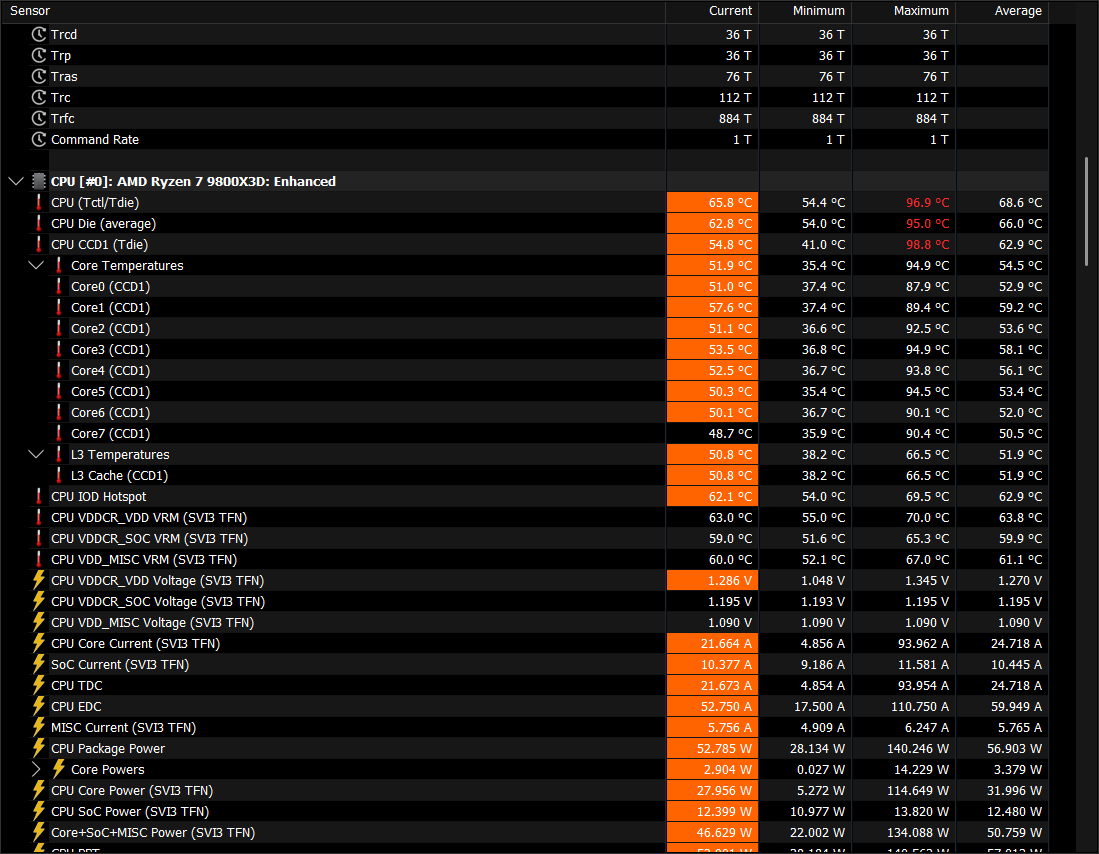
just incase, is there a higher than 1% chance that it could be the contact frame?
lone sable
fringe elk
https://i.imgur.com/8osY5Sj.png
Thermalright Assassin mini & Kryonaut paste.
2...
Would need to see case, and fan directions.
fringe elk
lone sable
Would need to see case, and fan directions.
what about an open bench? because that is what i'm currently running it on
lone sable
Is this idle or load @fringe elk
What do you use your PC for also? I have some recommendations depending on that answer
The overall recommendation would be adjust your pbo limits to make it so the cpu won’t go above 80 degrees during max load.
Should only impact performance by less than 2%
I did something like 130000/ 90000 / 150000 iirc for my own 9800
fringe elk
lone sable
Is this idle or load <@157991936806879232>
the image? I had ff14 in the background but locked to 30fps, essentionally no load (7% on cpu)
I pretty much use it for gaming
I have curve optimizer -20 and disabled iGPU
i just want my CPU to survive a full OCCT CPU run and not overheat and turn off in the middle of it
lone sable
fringe elk
i just want my CPU to survive a full OCCT CPU run and not overheat and turn off ...
Do manual pbo limits
Less than 5% performance hit, computer won’t go above 80 degrees or whatever you set it too
fringe elk
lone sable
Do manual pbo limits
Gimme some limits i can set, or should i go with cpu default? atm i think its on auto.
fringe elk
lone sable
What’s your motherboard
x870i aorus pro ice
fringe elk
lone sable
And psu
loki 1000
lone sable
If that still causing it to be too hot or loud try lowering them to the ones I use above before that message My system doesn’t go above 75 iirc
fringe elk
hopefully, we'll see
imma also do some cinebench and a game or 2 to get some before and after numbers
lone sable
Good idea
fringe elk
couldn't sleep so i decided to run some before tests
mate cp2077 reaches 93c
avg of 88
on the benchmark run
anyway i will also go test gears 5 as that has a nice benchmark too
then i'll go do your numbers
nvm gotta download a lot of stuff to test it out holy
just entering the campaign makes my cpu reach 95 lol
fringe elk
gears 5 dropped 3% & temp dropped from 77 to 73
cp2077 also dropped 3% & temp from 88 to 85 (max of 91 now instead of 93)
imma test cb2024 now
fringe elk
CB dropped in single increased in multi (probably less throttling?) anyway from 138 to 135 & from 1321 to 1358
temp dropped by 1 degree but still over 95c
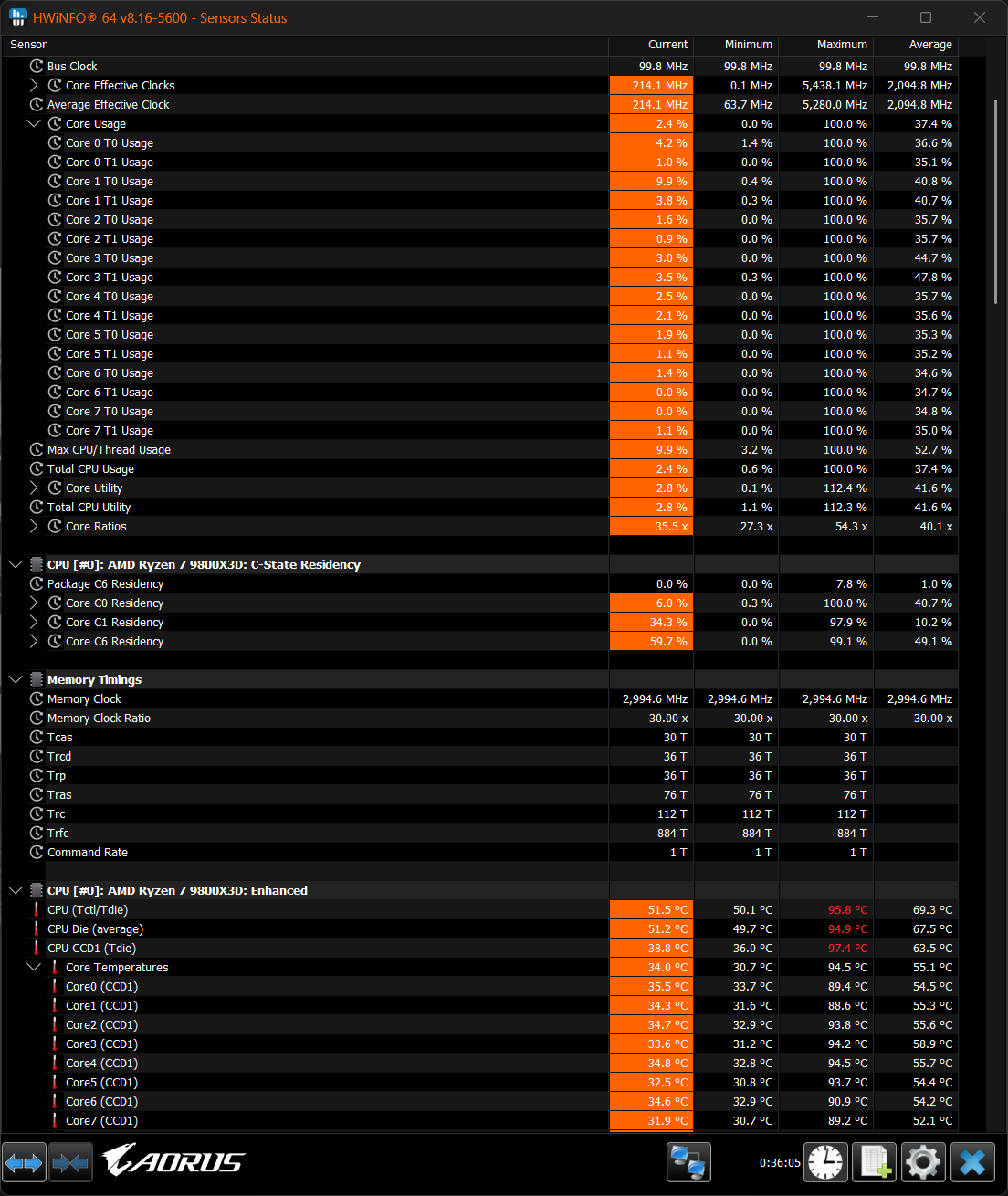

 lone sable
fringe elk
https://i.imgur.com/ZuD1HDi.png
lone sable
fringe elk
https://i.imgur.com/ZuD1HDi.png
Any update
 trail vault
Guys, is resetting bios by jumping the cmos will make my bios using pcie3 for gpu?
My board is gigabyte b550i aorus pro ax
I make a trouble by change my bios to pcie 4 after get adt cable 😂
proper jasper
Probably not. It usually defaults to it's max
trail vault
I really lazy to open back all my component just to put gpu back to pcie slot directly
trail vault
proper jasper
Probably not. It usually defaults to it's max
So no other choice right 😦
proper jasper
You can try it, it might be stable enough to reach BIOS
trail vault
I wanan try blind navigation but somehow its not work at all
proper jasper
Guessing no igpu cause am4
trail vault
Yess no igpu
proper jasper
trail vault
I wanan try blind navigation but somehow its not work at all
I don't think it is booting
lone sable
fringe elk
Just what i sent above
I don’t think you set the pbo limits up correctly if you’re still reaching that temperature; and if you did; then something is definitely wrong inside the case, whether it be pressure; fan directions, air bubbles in paste or something.
You shouldn’t be getting over 80 degrees even in cinebench
Also sorry for late reply; busy IRL
fringe elk
lone sable
You shouldn’t be getting over 80 degrees even in cinebench
I got another 9800x3d for a build i'm doing for someone else, absolutely 0 issues.
same everything is around 15c lower mate
i'm currently running my build with an arctic liquid freezer 3 280 at ppt of 125w so i dont overheat
I still reach low 90s
I will delid it, just not now.
lone sable
Nice glad it worked out
 distant forge
I was curious about my card performance (but 2080 ti) compared to the others, so I checked some tests on YT, and found out that my card is underperoming around %50 (with the same setting), brought up the statics, the only thing I see is abonormal is the 80 temp, but does the temp really drag down the performance by that much?
fringe elk
lone sable
Nice glad it worked out
Not really worked out, my main build has the issues the build i made for another person doesn't have any issues.
I ain't gonna steal their CPU
Eitherway Imma delid so idc anymore
 gentle valley
Can someone sanity check my cpu temps. Cooler is a apx90-47 full copper. Those were in while running the cyberpunk benchmark:

This is at idle:

Mobo reported max CPU temp of 74
proper jasper
on the slightly high side of normal (but still normal)
gentle valley
proper jasper
on the slightly high side of normal (but still normal)
Thanks!
 young thorn
My computer makes a "click" sound
On the psu
And then does not want to turn on
Anyone here had faced something similar?
proud wagon
young thorn
My computer makes a "click" sound
Click on the psu when it turns on can be normal
Not turning on is still a problem
I'd do the usual basic troubleshooting steps before sending your psu back
young thorn
proud wagon
I'd do the usual basic troubleshooting steps before sending your psu back
i already spent 180$ on an SF750
it was my PSU that did not wanted to turn on
is an strange story
it turned on somehow on the house of my cousin that was helping me
then when i was putting my pc back together again
it did not turned on
my theory is probably a cable that got damaged?
a loss connection with a pin and PSU firing short-circuit protection because of that?
young thorn
gentle valley
Lisa: 90c is by design!!
nova summit
 tough quest
anyone know my my fan is making this weird noise?
tough quest
anyone know my my fan is making this weird noise?
Sounds like a broken fan bearing
nova summit
 wary bough
GPU is powering on, but no display.
wary bough
GPU is powering on, but no display.
Does it post?
nova summit
White is probably GPU (at least on many boards) so it doesn't detect the GPU. Have you tried the iGPU if you have one?
young thorn
tough quest
anyone know my my fan is making this weird noise?
fan dead
replace it with a noctua
young thorn
proud wagon
Click on the psu when it turns on can be normal

It seem to be fine
The PSU
Or it seems
young thorn
proud wagon
That's what I said
A friend of mine insists that the PSU is damaged that it does not work
proud wagon
No
young thorn
That i should get rid of it to the trash
But i should never use it again
From his opinion

young thorn
proud wagon
Something's wrong and it's not ur psu
Weird thing is that the computer has been working normally
With the other psu
wary bough
Okay, weird thing happened with a PC I was working on.
Booted at first, then just shit itself randomly after the second boot.
Stuck on the white light during the boot process.
Could Eco Mode on a 5900X fuck something up?
nova summit
That would be new to me
wary bough
Could it be the PSU?
nova summit
White light is usually GPU but check the manual to be sure
nova summit
Worth a try
wary bough
When in doubt, clear CMOS.
It worked.
Trying the same settings again to see if the issue persists.
young thorn
wary bough
Trying the same settings again to see if the issue persists.
you fucked up some settings on bios clearly
keep your motheboard jumper in hand in case you fuck it up again

wary bough
young thorn
<:kek:1270605293407047701>
You mean my screwdriver?
All I did was set Eco Mode and set the RAM timings to their proper speeds.
proud wagon
💀
i bet you didn't change every subtiming lmao
Bro the ram was given an impossible assignment
wary bough
Meant to say RAM speed, not timings.
proud wagon
wary bough
Meant to say RAM speed, not timings.
Yeah
Set an engine's RPM limiter from 3,800 to 8,000 and floor it
see what happens :)
wary bough
Yeah.
proud wagon
(kabooumsh)
wary bough
I love burning a hole in my block.
proud wagon
All the subtimings need to be adjusted with the speed with the speed profiles
 sleek knoll
Can a thunderbolt 4 port connected with a usb4 port create a network bridge?
proud wagon
theoretically it should be able to, I do not know how it would be done though.
good luck!
sleek knoll
Thank you, I have been stuck with a issue connecting a z790 mobd with ms01 minipc over a thunderbolt 4 port and a usb4 port, should I create a thread for this issue or keep going here?
 fossil root
Has anyone experienced 2-3 seconds of black screen when tabbing out of a game in a dual monitor setup? Turning off G-Sync seems to resolve this for me but I'm wondering what the root cause is
 half zephyr
Hi I have a ssd in an enclosure that I would like to put in a motherboard, do I need to format it or can I just put it in and keep all my data?
nova summit
half zephyr
Hi I have a ssd in an enclosure that I would like to put in a motherboard, do I ...
You can add it as secondary drive and access the data
half zephyr
nova summit
You can add it as secondary drive and access the data
Thank you!
 potent jungle
fossil root
Has anyone experienced 2-3 seconds of black screen when tabbing out of a game in...
potent jungle
fossil root
Has anyone experienced 2-3 seconds of black screen when tabbing out of a game in...
Try borderless gaming app instead of native borderless. Some games are iffy
 glacial thorn
Hello, just bought a second hand fractal ridge and it didnt have the motherboard standoffs anyone know how to get replacements
proper jasper
Uh. Sec.
@stone smelt do you perchance have the dimensions for the mobo standoffs in the ridge?
I assume m3, but I don't know the body/shank length.
 wet sparrow
I’m getting the black screen issues with a etc 4090 and a 4080 super. I can run the computer like normal if I have the hdmi plugged into the motherboard but plugging the hdmi into the GPU I get a black screen after posting from bios
proper jasper
wet sparrow
I’m getting the black screen issues with a etc 4090 and a 4080 super. I can run ...
Partlist pls
wet sparrow
proper jasper
Partlist pls
4090FE
9800x3d
64gb 6000mt skill flare ram
B650e-i
Corsair sf 1000
4tb crucial t705
4tb western digital sn850 black
Think i fixed it
I’m scared to reboot
proper jasper
Oh?
wet sparrow
I downloaded drivers from 2 updates ago and didn’t fix it but i downloaded the drivers from December of 24 and it worked
proper jasper
Also side note, you on a riser cable?
proud wagon
fossil root
Has anyone experienced 2-3 seconds of black screen when tabbing out of a game in...
Either HDR or fullscreen stuff.
wet sparrow
No I’m directly plugged into
The mobo
I do notice when it was a black screen issues could hear the dashboard ding and startup and the HDR prompt would show on my screen
 deft oyster
My GPU fan (5080) is grinding against the side of my case (terra). I can't move the spine anymore or the CPU cooler won't fit. Anything I can do?
proud wagon
deft oyster
My GPU fan (5080) is grinding against the side of my case (terra). I can't move ...
Get a bit of something inbetween
Stack 5 post its between
half zephyr
Is it normal for the front IO of a fractal terra to be charging a smartphone slowly?
Using a b650i with the case included front IO connectors, the USB A port charges my phone super slow and sometimes can't register a USB thumbdrive
Reconnected the USB A IO cable and it seems to be able to register my thumbdrive now but charging is still super slow
proper jasper
Slow is normal, standard USB is 2.5w which is... Not much by modern charging standards
Not registering tells me it might be worth a check of the connections
wooden tide
half zephyr
Is it normal for the front IO of a fractal terra to be charging a smartphone slo...
uhhh
there is a utility to force 10w
but it's made by Asus and looks like it's from 2006
Asus Ai charger
if your motherboard can't push 10w it triggers windows ocp and it just shuts off the port

 frail sequoia
totally possible unfortunately and you do not want to force it. The 0.8mm thick pcbs of the ssd won't like it.
Woah, that post is so old. Why'd discord bring me back 2 years
I'm from the future
 dry garden
Haha damn brings me back
 solar saffron
pc literally vibrating all of a sudden what could cause this
dont think its the cpu or gpu fan as when i manually set any rpm that vibration isnt there
 feral cypress
Just did a brand new from scratch build and HWInfo is showing my virtual memory usage super high. Goes to 99.7% while gaming but no stability issues. Didn't happen in windows 10.
solar saffron
was the cpu fan , it died shortly after
3 and a half year old noctua
warranty covered tho am getting a new one
Jerry rigged fix until the new one gets here

 heady hornet
Hey guys, my PC is crashing while gaming, already changed the NVME to a new one, installed windows
but crashes keep on happening
Maybe a PSU problem?
proud wagon
heady hornet
Hey guys, my PC is crashing while gaming, already changed the NVME to a new one,...
did dju ddu?
 fluid anchor
I have this strange issue with my secondary nvme which is mounted on the back of the motherboard without a heatsink. I am on my primary Windows nvme and gaming while the primary windows nvme is only 60 degrees. The secondary Linux nvme (which has 0 reads and writes because its unused when on windows) however hits over 80 degrees and when I touch it it feels like im getting burned. I cant figure out why that is.


 fluid basin
hey can someone help me with my monitor? it says no signal when i turn it on then goes into battery saving mode. i’ve done everything i can think of, like plugging the hdmi cable into the gpu instead of mobo, reseating the ram, trying it without the gpu, making sure everything is plugged in, plugging the hdmi cable into the 2nd slot on the monitor, and making sure everything is plugged in properly.
half zephyr
fluid basin
hey can someone help me with my monitor? it says no signal when i turn it on the...
Maybe try a separate cable to check if you have a faulty cable
If its not showing a display at all when you power it on and your pc boots up with no error leds lighting up on the motherboard, its either a faulty cable or the monitor is not set to the right input (IE currently set to register a displayport input when you have a hsmi input instead), although I think most modern monitors can auto detect the input
sly pagoda
So i got a PC with a powercolor 6600xt, i got a powercolor 9060xt and it just doesn't work, it doesn't pass the post, nothing displayed on the monitors.
I checked if the card is doa, but it works just fine in my sister's pc.
I tuned down pcie to 3.0 to see if my riser is at fault, no change. I even plugged the gpu directly on the motherboard and still nothing.
Both computers have PSUs that are more than adequate for this card.
My computer is currently working with the old GPU.
My motherboard is a B760I AORUS PRO DDR4
Does anyone have ANY ideas what this could be?
 glass bison
Good morning, internet users.
I'm building my first computer, and everything seemed to be working perfectly, but then I booted up this monster, and the motherboard flashed a yellow light :( The computer boots without any problems ONLY when I insert one specific RAM stick into the last (CPU) DIMM slot. There's always an error in the other slots. Even if I insert the second stick, I'll put it in the last slot.
Specifications:
- Processor: Intel Core Ultra 7 265k
- Cooling: Thermalright Peerless Assassin 120 Digital
- Motherboard: ASRock B860M Pro RS WiFi
- RAM: Patriot Viper Venom 2x32GB DDR5 6000MHz CL30
- SSD: Western Digital Blue SN580 2TB NVME M.2
- Graphics card: MSI GeForce RTX 3060 Ventus 12GB 2X
- Case: Jonsbo Z20
- Power supply: Corsair RM750x 750W
What I've already tried:
- all memory configurations in all slots: without XMP, with XMP 6000MHz, with XMP 5600MHz
- BIOS update to the latest version
- installing the operating system and all drivers
- loosening the CPU cooler screws
- removing the CMOS for 10 minutes
- blowing compressed air into the DIMM slots
- waiting over 30 minutes for something to happen (nothing happened)
- ...probably more, but I forget
I don't know what could be wrong, but I think it's a bit unlikely that all three memory slots wouldn't work on the motherboard. But the fact that one memory stick works in the latter and the other doesn't is also strange. Worst case scenario, could the CPU pins be slightly bent?
I've tried almost everything, and still nothing. I have no idea what the problem could be. The motherboard should support 64GB and 6000MHz, so no. I know what's wrong.
By the way, sometimes when I have the "bad" RAM stick that doesn't work in the fourth slot, inserted by itself, the computer turns off and on constantly instead of just running endlessly. Maybe it's a problem with the one RAM stick I bought, but what could possibly go wrong with such a stick?
Please help, my dear friends ❤️🥺
potent jungle
glass bison
Good morning, internet users.
I'm building my first computer, and everything s...
mobo does not support that memory config https://www.asrock.com/MB/Intel/B860M Pro RS WiFi/index.asp#MemoryARLK

Supports Intel Core™ Ultra Processors (Series 2)(LGA1851); 10+1+1+1+1 Power Phase, Dr.MOS for VCore+GT+SA; 4 x DDR5 DIMMs, Supports Dual Channel, up to 8666+ (OC); 1 PCIe 5.0 x16, 1 PCIe 4.0 x4; Graphics Output Options: 1 HDMI, 1 DisplayPort; Realtek ALC897 7.1 CH HD Audio Codec, Nahimic Audio; 4 SATA3, 1 Blazing M.2 (PCIe Gen5x4), 2 Hyper M.2...
Could try at CL 36 @ 6000
glass bison
potent jungle
mobo does not support that memory config https://www.asrock.com/MB/Intel/B860M%2...
Hm but its only the ones they tested right? I see that theyve got a lot of 2x32 models that are 6000 cl30 that are supported, even 6400 cl32
I think it should be fine
 slate lava
Recently did a MB, CPU, RAM swap in my rig and after the swap my peripherals (keyboard and mouse) are having trouble to stay connected to my pc (flickering on and off or just disconnecting when playing or normal web browsing). Noticed the issue is only affecting the USB 3.1 gen 2 on the back of my MB but the 2.0 ones are fine. It's an "ASUS ROG Strix B850-I Gaming WIFI". Additionally I sometimes get a notification from windows that "the device is not recognized" or something like that. What I've tried so far: Tutorials, windows clean install, reinstalling drivers. Is it 4 faulty USB ports? windows thing? anyone got experience with this? Help needed.
Edit: Late reply, I know... Did what Taky below suggested and it sadly didn't improve my situation. So after going back and forth reinstalling windows, updating bios and reinstalling my drivers countless times... I found the problem. My 2 usb 3.0 ports on the front of the case were on the same USB root hub which were interfering with the USB 3.0 ports on the back. After unplugging the front case USB 3.0 ports everything seem to work properly!
 wraith niche
slate lava
Recently did a MB, CPU, RAM swap in my rig and after the swap my peripherals (ke...
wraith niche
slate lava
Recently did a MB, CPU, RAM swap in my rig and after the swap my peripherals (ke...
Personally I would try to update your driver's, or alternatively if you have another drive laying around, reinstall windows on that and see if the issue persists.
I had a similar issue, and conflicting drivers were the cause.
 reef tendon
anyone know why bluetooth audio would suddenly sound like shit
its been plaguing me recently and my headset went from handy to use in bluetooth mode(5.1) and now I literally cant use it for anything if theres more than a single audio channel or the audio becomes quiet and low quality
and it doesnt even revert back if I close every other open program it just stays like that
 random smelt
slate lava
Recently did a MB, CPU, RAM swap in my rig and after the swap my peripherals (ke...
random smelt
slate lava
Recently did a MB, CPU, RAM swap in my rig and after the swap my peripherals (ke...
Popcorn, do u have problem with ur m2 slot on this board? I built my pc 2 days ago, yesterday i turned it on and i restart the pc, suddenly the bios no longer detected the ssd.. I tried to put the ssd to other pc, it worked. Googling it, see many similar problem with other users. 😣
random smelt
gentle valley
My 8700f also like this. Idle never below 40
slate lava
random smelt
Popcorn, do u have problem with ur m2 slot on this board? I built my pc 2 days a...
I did not have a problem with my m.2 slot, I am however runing a singular ssd on the back of the mb. so don't know how much help I can be there... When I got the board the bios version was from 1 year ago so updating my bios did fix some issues and improved stability.
random smelt
slate lava
I did not have a problem with my m.2 slot, I am however runing a singular ssd on...
Oh m2 2 slot right? Ok
 burnt zenith
Idk what caused my pc to restart, it has been like this 2 times
When I was running a game, it starts stuttering then it just freeze and crash, then this appears (not my screenshot, but the text looks exactly like this)

It has been happening 2 times, last night and this morning
 arctic fiber
Hiya guys. Im trying to revive an old system with a Z370 chipset and I cannot get it to posi if there is an NVMe drive (zeroed or not) installed in any of the slots.
I checked the manual by a kind persons suggestion, however the only conflict was SATA6_1 which I have unplugged.
 livid urchin
One buddy of mine got pretty old PC, and recently it started to drop random stutters in basically any game, even old games with high overall fps
CPU: i7 9700
GPU: 2080 SUPER
we cannot really understand source of the problem, is it caused by CPU or GPU?
both are NOT running hot
he believes it all started after a BIG stutter happened in Helldivers 2
 reef tendon
Anyone available to help me sort out an issue with a Dell XPS rn
I haven't used it in some time and the Cmos is apparently dead, shouldn't stop it from booting/posting though should it?
It gives a 3 amber 1 white led loop and boot loops which according to their support website is a Cmos battery issue
How do I go about booting without the Cmos, or can I try and reseat it if it's maybe just a dust issue since it's a little dusty
Everything is spinning up and turning on it's just not posting
 left geyser
does anyone happen to know if the ASUS ROG B650E-I motherboard has any lights if the PSU is connected and working? my pc won't boot and I think it could either be the PSU or motherboard, but haven't tested.
 zenith comet
left geyser
does anyone happen to know if the ASUS ROG B650E-I motherboard has any lights if...
zenith comet
left geyser
does anyone happen to know if the ASUS ROG B650E-I motherboard has any lights if...
Just connect some argb stuff to the Header - on default it should light up in rainbow barf - otherwise there are the debug LED’s near the 24-Pin connector which should cicle during boot
left geyser
zenith comet
Just connect some argb stuff to the Header - on default it should light up in ra...
It’s been months but I did manage to fix it — I just had to open the case and power cycle the PSU for whatever reason
 rain flame
anyone with a jonsbo d32 found they can't use ports on their gpu cos the case overlaps? any solutions? I can use displayport but not the others. gpu is sapphire pure 9060 xt
 left willow
burnt zenith
Idk what caused my pc to restart, it has been like this 2 times
When I was runn...
left willow
burnt zenith
Idk what caused my pc to restart, it has been like this 2 times
When I was runn...
myfault.sys is wild
 balmy belfry
Has anyone had this issue where the Terra's power button just stays pressed? I've had it for about a month now with no issues, but all of a sudden the power button won't move back out.

I found this old thread about it but there's no useful information there https://www.reddit.com/r/FractalDesign/comments/1d2r7h8/fractal_terra_power_button_stuck/

Reddit
Explore this post and more from the FractalDesign community
 slender remnant
I have an og meshlicious and I want to do the motherboard standoff mod. I bought m3 20mm+6 standoffs, but they don’t go all the way into the standoffs that were included. Should I have bought standoffs with shorter threading? I see most references for the mod use 6mm standoffs no problem so I’m confused
 visual geyser
Pc seems to not want to boot to windows or even the bios screen fans just spin up and stay that way. Doesn’t seem to be outputting any signal at all.
Ryzen 9900x
Nvidia 5070ti
Asrock B850i lightning
I’ve reseated the GPU and riser, all the motherboard cables and ram. Tried getting an image out of the motherboard hdmi and nothing seems to have changed
 unkempt pagoda
visual geyser
Pc seems to not want to boot to windows or even the bios screen fans just spin u...
unkempt pagoda
visual geyser
Pc seems to not want to boot to windows or even the bios screen fans just spin u...
How long have you let it run for?
Memory training can take a good while sometimes
balmy belfry
balmy belfry
Has anyone had this issue where the Terra's power button just stays pressed? I'v...
Anybody have any suggestions for how to remove a really stuck screw from the Terra? I've tried multiple different screwdrivers, an electric one, rubber bands, even got a stronger friend to give it a shot, nothing's worked without making it worse by stripping it. My last resort is super glue at this point... Fractal support suggested drilling it out but I don't have access to a drill.
unkempt pagoda
Are you able to grip the head with a pliers?
balmy belfry
unkempt pagoda
Are you able to grip the head with a pliers?
I don't think I'd be able to get enough purchase? It's a small screw attaching the front of the case to the bottom and it's very close to the panel

It's the left one here
My friend tried with an electric screwdriver with a rubber band and that worked for one problematic screw, but we haven't been able to get that to do the job for this one
It was already partially stripped after a bunch of tries but now it's almost fully stripped
Super glue was unsuccessful, and I noticed that there's definitely something up with these screws because even putting back the other problem screw took too much effort
unkempt pagoda
I assume you dont have a dremel?
Could cut a slot into the head for a flat head screwdriver
balmy belfry
unkempt pagoda
I assume you dont have a dremel?
Nope, no tools. Didn't even have a screwdriver set until I bought an ifixit kit to see if different sizes would get the job done
I could go buy pliers I suppose to try if they're cheap enough at the nearby hardware store
 sly sparrow
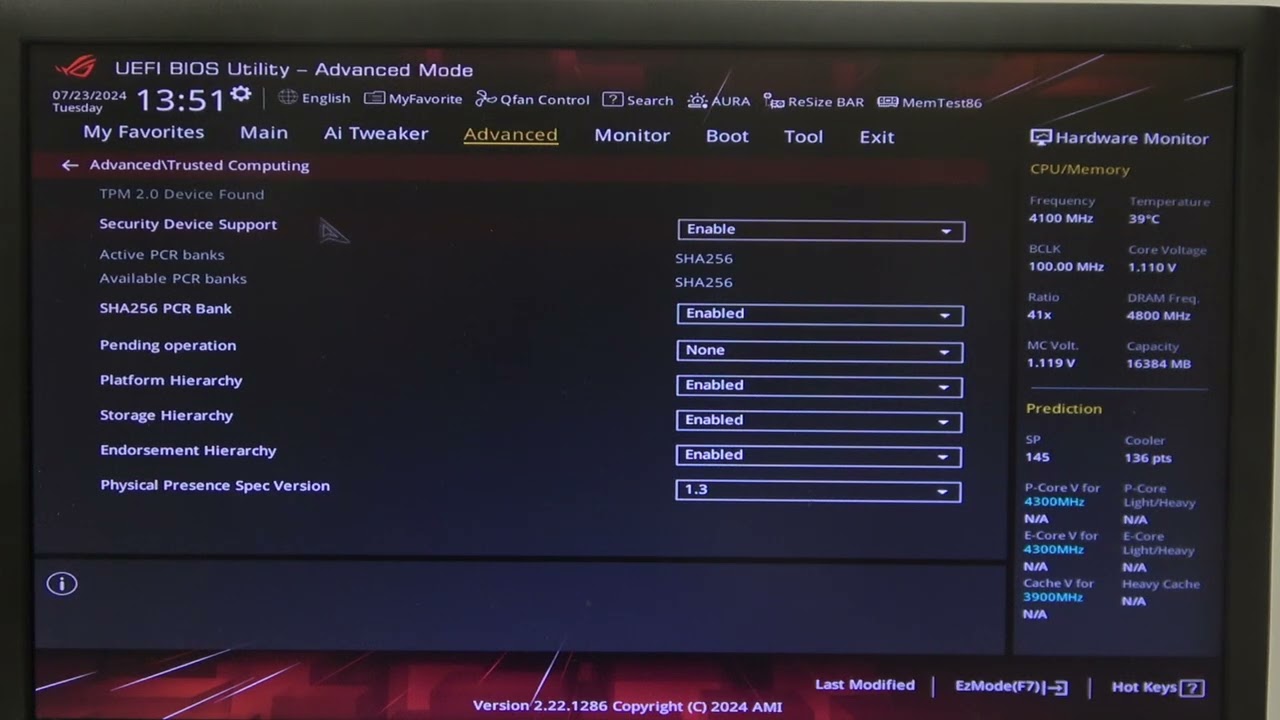
Hey I would be super grateful if I could get some assistance 🙂 so, I have bios up and running, and everything is detected: cpu, gpu, SSDs, ram, etc. But i cant seem to enable CSM for initiating boot (i have oldish SSDs), and it wont detect it specifically for booting. New mobo is ASUS ROG STRIX B860-I. Can provide further specs if necessary. I have tried following this video for enabling CSM: https://youtu.be/M-PlTos1_wQ?si=vh4gE0EPkBjViIcM
Find out more: https://www.hardreset.info/
In this video, we’ll guide you through the steps to enable and disable CSM (Compatibility Support Module) support on your Asus ROG STRIX Z790 E Gaming motherboard. Follow our detailed instructions to manage your system’s compatibility settings effectively.
How To Enable CSM Support on Asus ROG STRI...
So my issue is "The System cannot find any bootable devices"
Edit: FIXED by using a USB windows to boot, nuking C:, and restoring with Macrium.
 woven scarab
Maybe this is a simple problem but I am truly lost. Not sure which place to post this. I’m assembling the NCASE T1 v2.5. The case will be set for a 2.75 card which requires 35mm offset. There is space keeping me from securing the second screw on the GPU strut. Check out the pictures - what am I doing wrong? Does an offset need to be used as in the last picture?


 delicate jungle
My windows 10 PC suddenly broke itself. Recently it shows bluescreen saying WATCHDOG VIOLATION, not sure if that's driver issue or not. Sometimes it just hangs & nothing responding, not even the mouse, it usually happens when the screensaver is playing.
Any pointers on what the issue could be? Driver issue? GPU issue? CPU overheating?