#Mouse to world space
1561 messages · Page 2 of 2 (latest)
 tiny pasture
 ornate kraken
Correct yeah
tiny pasture
ornate kraken
Correct yeah
so, wht I was saying is, I can hardcode some viewpoint, and I can send you where exactly different points get projected
so you can test that you really picked the correct matrix
ornate kraken
okay sure yeah, we can do that
tiny pasture
(finally)
so, tell me, in 3D, where is your starting location for the viewpoint
and your view direction vector
ornate kraken
I'm at 0, 0, 0 position, with yaw = 0, pitch = 0
tiny pasture
ummmmm
ornate kraken
which is center within the blocks
tiny pasture
give me the direction view vector
starting at (0,0,0) and pointing to where?
what is this yaw and pitch
ornate kraken
Pastebin
Pastebin.com is the number one paste tool since 2002. Pastebin is a website where you can store text online for a set period of time.
tiny pasture
^ bruh, I cant read this
ornate kraken
o-o why not
I'm getting the direction vector from yaw and pitch
as far as i'm aware of
tiny pasture
ornate kraken
as far as i'm aware of
yes, cause you have mouse movements and so on, I need one hardcoded view from those to test your things
ornate kraken
well
can't the direction vector just be like 0, 0, -1 or something?
straight along the z axis
tiny pasture
ornate kraken
can't the direction vector just be like `0, 0, -1` or something?
yes, that means, a vector looking straight downwards, along the negative part of the Z axis
is that what you had in mind?
tiny pasture
ornate kraken
Wouldn't straight down be like `0, -1, 0` ?
which number is the X axis, which number is the Y axis, which number is the Z axis here?
tiny pasture
ornate kraken
`x, y, z`
in 3D, X is the red line, on a horizontal plane, Y is the green line, on a horizontal plane, Z is the blue line, pointing upwards in 3D space
 tiny pasture
ornate kraken
Oh no, `blue = y`, `red = x` and `green = z`
tiny pasture
ornate kraken
Oh no, `blue = y`, `red = x` and `green = z`
yes
 rich elbow
well, i guess they use z coming out of the screen
ornate kraken
Yeah exactly
rich elbow
in which case 0 -1 0 would indeed point own
ornate kraken
Like youre looking into the distance z
tiny pasture
kay, whatever, you can rotate your thing however you like, gimme the view vector
from (0,0,0) to where?
rich elbow
0 0 -1 i would assume
rich elbow
thought note that that means the camera is looking in direction 0 0 1
tiny pasture
and according to this view vector, what 3D points should I render for you?
gimme coordinates
rich elbow
since their "front" vector is actually the third base vector of the camera coordinate frame, not the vector pointing in view direction
anyways, imma have some lunch
hf ^^
tiny pasture
I can tell you that, for this specific direction view vector, every singe point (x,y,z) will be projected to (x,y,0) on your "screen", depending on how large your screen is and which part remains actually visible
ornate kraken
tiny pasture
gimme coordinates
Like, try some distance like 1.0, 0.0, -3.0, which should be slightly to the right into the distance?
tiny pasture
ornate kraken
Like, try some distance like `1.0, 0.0, -3.0`, which should be slightly to the r...
that point will be projected to (1.0, 0.0, 0.0)
tiny pasture
rich elbow
anyways, imma have some lunch
European geolocation leaked ☠️
ornate kraken
tiny pasture
I can tell you that, for this specific direction view vector, every singe point ...
Yeah, lets see what results we get
But z = 0 most likely will get culled, since my near plane is 1.0
ornate kraken
Ooogh, for some reason i'm not getting an identity out of projection * projectionInv
rich elbow
what do you get?
ornate kraken
-nan(ind)
rich elbow
well that's not good ^^
ornate kraken
 1.81066 0 0 0
 0 2.41421 0 0
 0 0 -1.001 -2.001
 0 0 -1 0
that looks fine
rich elbow
k ^^
ornate kraken
> X 0.00489762, Y -0.000427295, Z -1.00121, W 1 Doesn't seem like world coordinates q_q
drx::util::MAT4F wM = viewInv * projInv;
(wM * wM.Inv()).Dump();
Gets me identity, so that should be fine
ornate kraken
So I figured I might have M * v wrong way around, so I transposed it, now the coordinates look like world coordinates, but the point is behind the camera?
rich elbow
transposed what and why?
rich elbow
ornate kraken
`> X 0.00489762, Y -0.000427295, Z -1.00121, W 1` Doesn't seem like world coordi...
why not?
looks to me like 0 0 -1 with some rounding errors
ornate kraken
rich elbow
why not?
But you said the output should be world coordinates? If I point anywhere or move camera, the results always seem similar to that
ornate kraken
rich elbow
the output of what?
The output of invView * invProj * clip
ornate kraken
divided by W yeah
well for which ever reason it gives me values only close to 0, 0, -1
no matter where i move or point
so I figured I might have the M * v operation transposed
Pastebin
Pastebin.com is the number one paste tool since 2002. Pastebin is a website where you can store text online for a set period of time.
So I tried to transpose the M * v, which now gives world coordinates, just that theyre behind the camera
rich elbow
transpose the M * v?
ornate kraken
I mean transpose the matrix in the operation
/* */ == 0, 0, -1 results in the paste
ornate kraken
Yeah thats what I thought aswell
Just that now, the coordinates go behind the camera
rich elbow
which coordinates?
ornate kraken
(I can't see the line before I move the camera)
The output of viewInv * projInv * clip / w
rich elbow
what is clip now?
ornate kraken
Pastebin
Pastebin.com is the number one paste tool since 2002. Pastebin is a website where you can store text online for a set period of time.
ornate kraken
z == -1
rich elbow
k
well yeah, that seems about right
except it should be
double y = 1.0 - (2.0 * drx::view::window.mouse.y) / h;
```i think?technically there needs to be a + 0.5 in there still, but that shouldn't really matter
 rich elbow
well, how do you compute the second point of the line?
ornate kraken
First point(red) is the beginning, the cameras position
Second point (blue) is from the ray function
ornate kraken
I figured it would do a ray from the cameras position in to the world, which yeah i guess it does
I flipped the z to 1.0

Thats' pretty close? I'd say
Or atleast closest so far
rich elbow
i think if there's at least one thing you should have learned by now then that's that randomly flipping things around without any reasoning behind that action isn't how you're gonna get anywhere ^^
i don't see how this is any better than the other one
ornate kraken
rich elbow
i don't see how this is any better than the other one
Well the lines atleast go into the scene, no? with some thought of my, i figured if I flip the z the direction would switch
rich elbow
but you didn't flip the z direction
ornate kraken
My intetion wasn't to randomly flip the z
rich elbow
you just set z to 1.0 instead of -1.0
which means all you changed is that the point is now on the far plane instead of the near plane
ornate kraken
Oh o-o, well guess I got it wrong then
ornate kraken
Well the view matrix is as you said, projection matrix is as you said
rich elbow
instead of picking rays
just draw three lines from camera position along the right, up, and front vectors
to verify that these actually are where you think they are
ornate kraken
 good idea
But, like, wdym along the vectors? Like if I set beginning of the line to camera position, what should I set the end position be?
Just grab the front, right and up vectors from camera?
rich elbow
well, you want to draw where those vectors are pointing
ornate kraken
With just grabbing em i get, the cube on the bottom right is the cameras original position:

Not sure what I should be seeing
(The other end is rougly 0,0,0)
rich elbow
not sure what you mean by "just grabbing em"
ornate kraken
I make the lines initial position the camera position, yes? The other end I make for example camera.right
ornate kraken
oh right, so how do I get it into a position?
rich elbow
uh
ok, at this point, i really think you just need to sit down and learn some vector math basics
doing any of this is utterly hopeless without understanding at least the most basic basics of vectors
ornate kraken
Okays
rich elbow
you'll at the very least want to understand the difference between a point and a direction, and what adding and subtracting vectors does
ornate kraken
Okay I mean sure yeah I can do adding and substracting sure, I'll read up on them though
rich elbow
ornate kraken
Okay I mean sure yeah I can do adding and substracting sure, I'll read up on the...
well, then any idea how you could get from a position and a direction to a second position that's offset from that first position in the given direction?
ornate kraken
You're right I need to learn that
ornate kraken
red == front, green == right, blue == up
 rich elbow

Provided to YouTube by Universal Music Group
Up Is Down · Hans Zimmer
Pirates Of The Caribbean: At World's End Original Soundtrack
℗ 2007 Walt Disney Records
Released on: 2007-01-01
Unknown, Other: Hans Zimmer
Unknown, Other: Jerry Bruckheimer
Unknown, Other: Gore Verbinski
Composer Lyricist: Hans Zimmer
Composer Lyricist: Henry Pryce Jac...
i guess your cross product for up is the wrong way around in the camera vector computation
now the big question is: how come the actual camera is upside down despite that
do you have any more empirical flipping of stuff somewhere?
ornate kraken
Nope, not flipping anything
ornate kraken
The right, up and front vectors?
rich elbow
of the camera?
ornate kraken
I mean, the cameras initial position
rich elbow
ok
ornate kraken
just so i could move the camera and see where they point to
rich elbow
and up is which one, the one after the cross product, or the initial up before the cross product?
ornate kraken
After cross product
rich elbow
ok
so if you make it now that it adds those lines when you click
you should see the axes where the camera was at that point
ornate kraken
yeah
Just to be sure that I'm calculating the lines correct, I've got the second point (end), at:
this->camera.position.Subs(this->camera.front.Multiply(250.0))
for example?
 rich elbow
why subtract?
you need to add the direction to the point to get another point in that direction
 ornate kraken
Btw, follow this tutorial for the camera: https://www.youtube.com/watch?v=nL3UGaUSiVo

In this video, we create a formal camera class and experiment with many of the basic functions of a camera.
Disclaimer: don't watch if you have epilepsy
• Text Explanation: https://learnopengl.com/Getting-started/Camera
• Website: https://michaelg29.github.io/
• Twitter: https://twitter.com/MichaelGrieco10
• Discord: https://discord.gg/Uj54bD...
rich elbow
well, if the vectors are correct, the matrix should be correct ^^
ornate kraken
Yeah should be
ornate kraken
According to the tutorial, my right and up vectors are wrong,
this->right = this->worldUp.Cross(this->front).Normalize();
this->up = this->front.Cross(this->right).Normalize();
If I swap em
this->right = this->front.Cross(this->worldUp).Normalize();
this->up = this->right.Cross(this->front).Normalize();
I get, which still has the front backwards:

So I'm guessing i'm calculating the front wrong
ornate kraken
Or is there something else we can still check?
If I negate the front in the view matrix

Except youre right, now i'm just randomly flipping things
ornate kraken
Anyone with any ideas, very welcome
ornate kraken
Also noticed, left * right = incorrect, but if i'll right * left = correct
 opaque geyser
ornate kraken
Also noticed, `left * right = incorrect`, but if i'll `right * left = correct`
opaque geyser
ornate kraken
Also noticed, `left * right = incorrect`, but if i'll `right * left = correct`
because matrix multiplication is not commutative
you'll get different results based on the order you multiply it
all of this is making me think you're missing fundamental mathematical skills for this domain
ornate kraken
opaque geyser
all of this is making me think you're missing fundamental mathematical skills fo...
very likely or more like I do yeah
But how come looks right, even though there's a flaw
opaque geyser
ornate kraken
But how come looks right, even though there's a flaw
sorry, what are you referring to?
ornate kraken
opaque geyser
sorry, what are you referring to?
Since the test matrix multiplication, if I had those backwards (right * left = correct), how come the other matrix multiplications aren't incorrect?
logically thinking
opaque geyser
because when you multiply a matrix, you obtain dot products between the rows of the left matrix by the columns of the second. so if you swap the operands, you access the same matrices differently by flipping between rows and columns
sorry, tired lol
ornate kraken
Is ok, i was just curious
opaque geyser
but yeah that's the reason why, the way the left/right matrix is accessed differs
so swapping the operands leads to different results
there are exceptions like the inverse
ornate kraken
opaque geyser
so swapping the operands leads to different results
Yeah I got that part, but why don't the rest of multiplications fail, for example projection * view
opaque geyser
what does the full multiplication look like?
ornate kraken
Like.. full?
ornate kraken
If you mean, that's all there is to it, I don't have a model matrix for it
opaque geyser
oh ok
well it actually also depends on how you arrange the elements in the matrix. if you prioritize rows or columns you'll have to multiply in a different order
its like hardcoding a transpose into the matrix calculation itself
ornate kraken
Would you say, between left and right matrices, correct?
for (int x = 0; x < 4; x++) {
    for (int y = 0; y < 4; y++) {
        for (int z = 0; z < 4; z++) result.matrix[x][y] += this->matrix[x][z] * r.matrix[z][y];
    }
}
you can probably do it in two. try something like this:
for (int y = 0; y < 4; y++) {
  for (int x = 0; x < 4; x++) {
    m[y][x] += m[y][x] * n[x][y];
  }
}
Yeah, lets try it
opaque geyser
i remember being able to do it though i forgot the algorithm
ornate kraken
Okeys, well thats not it, only way I can think of for 2 loops, is to manually write result[x][y] = l[x][0] * r[0][y] +...
Hence the third loop
ornate kraken
np
opaque geyser
should probably go sleep lol hopefully someone will come to help
ornate kraken
Yeah, I'll see if I can manage to find the rest of the flaws
Dot already done so much
I still don't get it, how come I even get a scene from projection * view, since the test fails, unless ofcourse I set the test matrices wrong.
rich elbow
ornate kraken
Anyone with any ideas, very welcome
well, where are we currently at?
ornate kraken
rich elbow
well, where are we currently at?
So everything, seems to work fine (apart from the multiplication test failure? still trying to wrap my head around that), just that the camera is pointing backwards (front is behind the camera, as far as I can tell and as seen in images/gif), we fix the camera, we got our ray going into the scene as it should
ornate kraken
oh?
rich elbow
you're using a right-handed system
ornate kraken
Okay sure yeah, but how are we going to get the ray going from the camera into the scene, if the front is at the back?
ornate kraken
So far it looks like, red line is the front vector

So, with what you said, it's pointing in the correct direction? (away from the camera)
Logically thinking right going onwards to the right and up going on upwards, I would only assume front going foward? Or is that me just badly naming a variable? 👀
rich elbow
well, if you click
do the axes point in the right directions for where the camera was?
ornate kraken
Yes, they point in the same manner as in the image above, I'm just not sure if front is pointing in the correct direction?
 rich elbow
directions seem fine
ornate kraken
Oke oke
rich elbow
what I'm not sure about is why you can see front after clicking
or any of them tbh
they should be behind you
ornate kraken
hmm
for M * M, correct?
for (int z = 0; z < 4; z++) result.matrix[x][y] += this->matrix[x][z] * r.matrix[z][y];
or this * r
rich elbow
pretty sure the multiplication is fine
if that was wrong, there'd be a lot less subtle issues
ornate kraken
Okey sure yeah
rich elbow
how do you calculate the camera vectors now?
ornate kraken
Pastebin
Pastebin.com is the number one paste tool since 2002. Pastebin is a website where you can store text online for a set period of time.
For what it's worth, in projection matrix, correct?
this->matrix[2][3] = -1.0f;
this->matrix[3][2] = -((2.0f * f * n) / (f - n));
4d
ornate kraken
yeah w is 1 by default
rich elbow
yeah that's wrong
how do your even do cross() with 4d vectors?
that operation isn't even defined for 4d
normalizing a vector with w = 1 is also not meaningful
rich elbow
w should have no part in cross at all
ornate kraken
my bad
this->up = this->front.Cross(this->right).Normalize(); there's the up vector
rich elbow
4d vectors should not have a cross()
ornate kraken
yeah, long story short, it sort of started from me making 2D stuff and i just expanded it from there
rich elbow
cross() only makes sense for 3d vectors
it doesn't make sense for any other number of dimensions
anyways, these need to be 3d vectors
the normalize will be wrong if w = 1
ornate kraken
Yeah
rich elbow
also, adding them to the position will get you a vector with w = 2 which is also wrong
all these vectors need to be 3d
not 4d
ornate kraken
yeah
Okay, i'm now getting -nan(ind) from ray function q_q
Both view and projection matrices give me identites
Okay not sure what was causing it but

Something defintely wrong with the ray function, sometimes it gives -nan(ind)s
rich elbow
ornate kraken
that looks much better
ornate kraken
rich elbow
that looks much better
yeah, except something off with world coordinates
Also mouse position on window doesn't seem to have much effect
ornate kraken
Im gonna head to bed, figure out more tomorrow

 ornate kraken
tiny pasture
ornate kraken
tiny pasture
👀
ornate kraken
Btw were those tests made [col][row] or [row][col]?
ornate kraken
How come the mouse to world function sometimes outputs -nan(ind) and sometimes values really, really close to the camera position?
opaque geyser
ornate kraken
Btw were those tests made `[col][row]` or `[row][col]`?
row major
ornate kraken
opaque geyser
row major
which is [col][row]?
opaque geyser
no. opposite
ornate kraken
I guess somethings still off then, If I create the matrices row major, I gotta transpose em to get the correct result, yet, according to my scene and some tutorials, the matrix multiplication is correct 🤷♂️
I'm so, so confused right now
opaque geyser
ornate kraken
I guess somethings still off then, If I create the matrices `row major`, I gott...
no you don't, just multiply in reverse
opaque geyser
ornate kraken
I'm so, so confused right now
because you clearly lack some linear algebra!
this thread is over 1500 messages long
ornate kraken
Yeah which is indeed unnecsarily long
opaque geyser
i bet you, had you been well versed with matrices, this thread would've ended at like 500 messages. it's very difficult to help with the issue whilst teaching it
im sorry but i think it needed to be pointed out
ornate kraken
Is oke, i understand
opaque geyser
you'll get it eventually, but you just need some theory. whenever you don't understand something about matrix math, find a resource that explains it
rich elbow
ornate kraken
Btw were those tests made `[col][row]` or `[row][col]`?
how does that matter?
they just wrote down some matrices, you can clearly see what are the rows and what are the columns
ornate kraken
rich elbow
how does that matter?
Yeah okay, I guess it doesn't
rich elbow
ornate kraken
Something defintely wrong with the ray function, sometimes it gives `-nan(ind)`s
is this now with intersection?
ornate kraken
rich elbow
is this now with intersection?
Nop, you said to leave it out so i'm just passing the vector from mouseToWorld as the second end point of the line.
rich elbow
ok
so coming back to the coordinate axes thing, what does that look like now?
did you change stuff to use 3d vectors instead of 4d everywhere?
ornate kraken
rich elbow
did you change stuff to use 3d vectors instead of 4d everywhere?
Yeah I changed over to 3d vectors
rich elbow
ok
rich elbow
ornate kraken
ah yeah, so that looks better
ornate kraken
rich elbow
so coming back to the coordinate axes thing, what does that look like now?
I'm amazed at your effort
rich elbow
when do you get the nan(ind)?
well, i mean, at this point, i just want to see it work 😛
ornate kraken
rich elbow
when do you get the nan(ind)?
Seems like a specific angle, i wouldn't say completely random
rich elbow
can you figure out what the view matrix looks like in that case?
ornate kraken
Yeah, lemme just see if I can find a nan(ind)
I even tried this morning to make a new matrix class, with only a float[16] variable, to eliminate some cases
rich elbow
no need, that's just gonna introduce even more potential for confusion
ornate kraken
X -nan(ind), Y -nan(ind), Z -nan(ind)
-0.62932 0 -0.777146 -105.599
-0.436821 0.827081 0.353731 28.4143
0.642762 0.562083 -0.520499 -823.45
0 0 0 1
from result = viewInv * projInv * rayClip;
rich elbow
so it's nan already before dividing by w?
ornate kraken
that i'm not sure of, i can try and see
I can't seem to get another nan(ind), I tried 20+ angles around the center of world space, I guess its a very strict angle
oh wait there wego
X -nan(ind), Y -nan(ind), Z -nan(ind), W -nan(ind)
so before the division its already
// projection
 2.3787 0 0 0
 0 3.17159 0 0
 0 0 -1.001 -1
 0 0 -2.001 0
// view
 -0.488621 0 -0.872496 -16.5545
 -0.297696 0.939991 0.166718 -26.5444
 0.820138 0.3412 -0.459299 -865.434
 0 0 0 1
// clip vector
> X 0.0769231, Y -0.047619, Z -1, W 1
// after multiplying, but before divison by W
> X -nan(ind), Y -nan(ind), Z -nan(ind), W -nan(ind)
Yeah, thats what I been thinking
tiny pasture
ornate kraken
Yeah, thats what I been thinking
a.k.a., dividing by zero somewhere
tiny pasture
ornate kraken
Yeah, thats what I been thinking
did you check to see if the determinant is zero before you tried to compute the inverse matrix?
ornate kraken
tiny pasture
did you check to see if the determinant is zero before you tried to compute the ...
Determinant is non-zero
Although i'm not getting nan(ind) for that one
But for the nan(ind) the determinant is also non-zero
tiny pasture
ornate kraken
Yeah, thats what I been thinking
so, the inverse of
 2.3787 0 0 0
 0 3.17159 0 0
 0 0 -1.001 -1
 0 0 -2.001 0
this thing?
tiny pasture
ornate kraken
the false is with view matrix
tell me what matrix you need to calculate the inverse of
ornate kraken
The view matrix
0 0 -1 5
-0 1 0 -85
1 0 0 -451
0 0 0 1

 ornate kraken
Thanks i'll try to see where it hickups
Following this tutorial
https://www.geeksforgeeks.org/finding-inverse-of-a-matrix-using-gauss-jordan-method/
GeeksforGeeks
A Computer Science portal for geeks. It contains well written, well thought and well explained computer science and programming articles, quizzes and practice/competitive programming/company interview Questions.
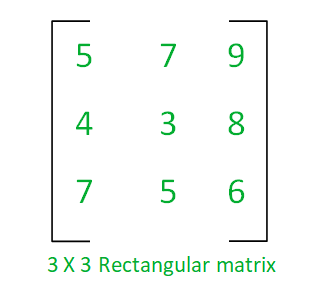
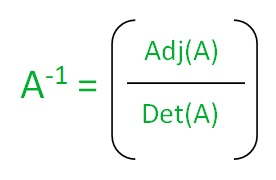
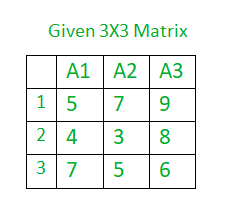
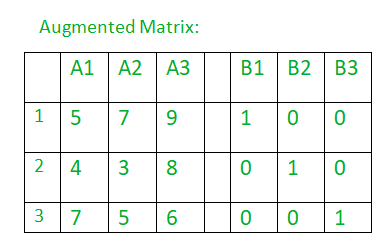
 copper sableBOT
@ornate kraken Has your question been resolved? If so, type !solved :)
rich elbow
i would honestly recommend to use a different method for computing the inverse ^^
using gaussian elimination to compute the inverse of a 4×4 matrix is crazy overkill
ornate kraken
It's the only tutorial that made sense to me that I could find 👀
rich elbow
- calculate the cofactor matrix C, that is the matrix where each element is the determinant of the 3×3 matrix you get by deleting the respective row and column from the matrix.
- the inverse is C^T / det(M)
like, element i,j is the determinant of the matrix without row i and column j
do that for each element, you have the cofactor matrix C
once you have that, you're basically done already
looks like geeksforgeeks up there calls that the "inefficient" method lol
ornate kraken
Okays, i'll give it a go
I got what looks like somewhere along the identity matrix, least it's not nan(ind)
1 0 0 10
0 1 0 0
0 0 1 -902
0 0 0 1
what's that now?
ornate kraken
matrix * invertedMatrix
rich elbow
for what matrix?
ornate kraken
rich elbow
for what matrix?
the view matrix
rich elbow
is that for a camera that's not rotated, just translated?
if so then the values in the fourth column should be the negative translation
tiny pasture
rich elbow
i would honestly recommend to use a different method for computing the inverse ^...
you mean this thing?
 rich elbow
yes
tiny pasture
eh, kay I guess that's better then rotating the rows over and over again
in terms of, writing it in C++
rich elbow
afaik it's also faster in general for small matrices of known size
because no control flow, it's just blast through the following multipy-adds…
but yeah, mostly it's just a lot simpler to write
because you can write it in terms of other operations
e.g.:
    template <typename T>
    constexpr matrix<T, 4, 4> adj(const matrix<T, 4, 4>& m)
    {
        return transpose(matrix<T, 4, 4>(
             det(matrix<T, 3, 3>(m._22, m._23, m._24, m._32, m._33, m._34, m._42, m._43, m._44)),
            -det(matrix<T, 3, 3>(m._21, m._23, m._24, m._31, m._33, m._34, m._41, m._43, m._44)),
             det(matrix<T, 3, 3>(m._21, m._22, m._24, m._31, m._32, m._34, m._41, m._42, m._44)),
            -det(matrix<T, 3, 3>(m._21, m._22, m._23, m._31, m._32, m._33, m._41, m._42, m._43)),

            -det(matrix<T, 3, 3>(m._12, m._13, m._14, m._32, m._33, m._34, m._42, m._43, m._44)),
             det(matrix<T, 3, 3>(m._11, m._13, m._14, m._31, m._33, m._34, m._41, m._43, m._44)),
            -det(matrix<T, 3, 3>(m._11, m._12, m._14, m._31, m._32, m._34, m._41, m._42, m._44)),
             det(matrix<T, 3, 3>(m._11, m._12, m._13, m._31, m._32, m._33, m._41, m._42, m._43)),

             det(matrix<T, 3, 3>(m._12, m._13, m._14, m._22, m._23, m._24, m._42, m._43, m._44)),
            -det(matrix<T, 3, 3>(m._11, m._13, m._14, m._21, m._23, m._24, m._41, m._43, m._44)),
             det(matrix<T, 3, 3>(m._11, m._12, m._14, m._21, m._22, m._24, m._41, m._42, m._44)),
            -det(matrix<T, 3, 3>(m._11, m._12, m._13, m._21, m._22, m._23, m._41, m._42, m._43)),

            -det(matrix<T, 3, 3>(m._12, m._13, m._14, m._22, m._23, m._24, m._32, m._33, m._34)),
             det(matrix<T, 3, 3>(m._11, m._13, m._14, m._21, m._23, m._24, m._31, m._33, m._34)),
            -det(matrix<T, 3, 3>(m._11, m._12, m._14, m._21, m._22, m._24, m._31, m._32, m._34)),
             det(matrix<T, 3, 3>(m._11, m._12, m._13, m._21, m._22, m._23, m._31, m._32, m._33))));
    }
but on paper IRL it'so cancer 😦
tiny pasture
rich elbow
you don't wanna use this for computing inverses by hand lol
holdup, so, do you, hardcode the determinant formula for 1x1 2x2 3x3 ?
how do you compute it?
rich elbow
well, the nice thing about these is that they have recursive definitions
so you can implement 4×4 det in terms of 3×3 det
and 3×3 det in terms of 2×2 det
tiny pasture
aha, so that's n! additions
rich elbow
    template <typename T>
    constexpr T det(const matrix<T, 2, 2>& m)
    {
        return m._11 * m._22 - m._21 * m._12;
    }

    template <typename T>
    constexpr T det(const matrix<T, 3, 3>& m)
    {
        return m._11 * det(matrix<T, 2, 2>(m._22, m._23, m._32, m._33)) -
               m._12 * det(matrix<T, 2, 2>(m._21, m._23, m._31, m._33)) +
               m._13 * det(matrix<T, 2, 2>(m._21, m._22, m._31, m._32));
    }

    template <typename T>
    constexpr T det(const matrix<T, 4, 4>& m)
    {
        return m._11 * det(matrix<T, 3, 3>(m._22, m._23, m._24, m._32, m._33, m._34, m._42, m._43, m._44)) -
               m._12 * det(matrix<T, 3, 3>(m._21, m._23, m._24, m._31, m._33, m._34, m._41, m._43, m._44)) +
               m._13 * det(matrix<T, 3, 3>(m._21, m._22, m._24, m._31, m._32, m._34, m._41, m._42, m._44)) -
               m._14 * det(matrix<T, 3, 3>(m._21, m._22, m._23, m._31, m._32, m._33, m._41, m._42, m._43));
    }
thank the gods n is small
why the hell do you name the fields _<row><col> that's so cringe
this is not a maths class this is C++ bro
😄
rich elbow
this is ancient code
and i did that because i find ._12 far more readable than writing [0][1]
double [] adds a lot of noise, and then there's the additional mental overhead of always having to subtract 1 from the indices
ornate kraken
Guess i'm used to it then, 
tiny pasture
ornate kraken
the view matrix
so do I print you the 16 3x3 sub-determinants for you to check your calculations for the inverse of hte matrix
ornate kraken
tiny pasture
so do I print you the 16 3x3 sub-determinants for you to check your calculations...
If you want/like
tiny pasture
ornate kraken
If you want/like
Matrix addition, multiplication, inversion, determinant and rank calculation, transposing, bringing to diagonal, row echelon form, exponentiation, LU Decomposition, QR-decomposition, Singular Value Decomposition (SVD), solving of systems of linear equations with solution steps

click here
ornate kraken
Weird,
0 0 1 -451
-0 1 0 85
-1 0 0 -5
0 0 0 1
Okay sure, i'm doing the subs in the wrong order
What's the c1,1 = (-1), the (-1) in the equation?
rich elbow
which equation?
ornate kraken
Like for example (1,2 on the list) -1.0 * 0 = 0, where does the -1 come from
rich elbow
which list where?
ornate kraken
rich elbow
which list where?
#1241376057932775434 message (then click open the panel whihc kolio showed)
rich elbow
ah, i forgot to mention that every other row/column has its sign flipped ^^
rich elbow
rich elbow
e.g.:
```cpp
template <typename T>
constexpr matrix<T, 4, 4> adj(const m...
you can see here
ornate kraken
Ooh okay
tiny pasture
rich elbow
ah, i forgot to mention that every other row/column has its sign flipped ^^

ornate kraken
Somehow I managed to get an identity out of view matrix, but now i can't get an identity out of project
rich elbow
btw, just in case, the broken inverses, were they happening when you were looking straight up/down?
because that'd be expected
ornate kraken
rich elbow
btw, just in case, the broken inverses, were they happening when you were lookin...
No i don't think so, just generally looking in the 0, 0, 0 direction, from different above angles
rich elbow
k
ornate kraken
I'm not too sure still about the signing, like do i iterate over and flip every second value?
tiny pasture
ornate kraken
I'm not too sure still about the signing, like do i iterate over and flip every ...
it's -1 raised to the power of (row + col), hve you not seen the formula?
tiny pasture
ornate kraken
Not unless it's been posted
did you open the link I sent with the answer written? and the steps?
tiny pasture
ornate kraken
yeah?
then you should understand where -1 or +1 is used as the multiplier
 tiny pasture
shame on @rich elbow for making you use the wrong formula all this time 🙂
rich elbow
huh, what did I do 😛
ornate kraken
I think its all me tobe honest, I started with the gaussian
Okay so I got back the correct inversed view matrix
The site doesn't seem to account for -0
0 -0 1 451
0 1 -0 85
-1 -0 0 5
-0 0 -0 1
you can use the value 0, +0 or -0, what are you talking about, also that's irrelevant cause zero is just zero
ornate kraken
yeah okay
I mean maybe, actually no nevermind
That doesn't look like an identity matrix though, it's from proj * invProj
 -15.0961 0 0 0
 0 -15.0961 0 0
 0 0 -15.0961 0
 0 0 0 -15.0961
what formula are you using now exactly?
tiny pasture

rich elbow
I'd guess you're missing the division by the determinant
ornate kraken
rich elbow
once you have that, you're basically done already
but, basically? Now I just divide the matrix by the determinant of it?
rich elbow
yes
the inverse is the transpose of the cofactor matrix divided by the determinant of the matrix
ornate kraken
That is completely my fault
tiny pasture
k
ornate kraken
Now, that's an identity matrix, if any
1 0 0 0
0 1 0 0
0 0 1 0
0 0 0 1
👍
ornate kraken
So how does it all reflect on rest of the stuff, lets find out
tiny pasture
ornate kraken
So how does it all reflect on rest of the stuff, lets find out
instead of this trial and error, can you write a few hardcoded matrix inverse tests to make sure you don't break it again?
plsssssssss
ornate kraken
Yeah I guess i could do that
But, weird, if I now click to get a ray, instead some things disappear and I can't see the ray or it's directional lines (front, right, up) either
 tiny pasture
ornate kraken
But, weird, if I now click to get a ray, instead some things disappear and I can...
tiny pasture
ornate kraken
But, weird, if I now click to get a ray, instead some things disappear and I can...
you use git to save backups of your code right?
ornate kraken
tiny pasture
you use git to save backups of your code right?
Or atleast a usb stick
rich elbow
maybe run the thing with Asan or smth
ornate kraken
🤔 I'm using the same (proj * view) everywhere, odd that the "floor" isn't affected
Except no, floor is using glm other matrice
So basically waht happens is, I click, world space turns upside down 👀
rich elbow
well, i think the oddest part is that changing the inverse function would affect any of that at all
ornate kraken
Indeed
rich elbow
sounds to me like you've got some major mess somewhere
maybe with stuff overwriting other stuff
ornate kraken
That's what i'm thinking
rich elbow
as i said, use Asan
address sanitizer
are you computing stuff in place. like modifying the original instead of just returning a new value, stuff like that?
rich elbow
^^
tiny pasture
rich elbow
^^
nice crystal ball vision there
ornate kraken
Okay better, so the 2nd line is result of mouse to world function (matrix outputs seem fine), 1st is camera position
> X 212.202, Y 380.034, Z -539.115
> X 212.222, Y 379.868, Z -538.822
After multiplication, before w division
> X 318.386, Y 569.896, Z -808.368, W 1.50025
ornate kraken
result = viewInv * projInv * clip;
result /= result.w
Should give me world coordinates right?
Just asking since, I'm not too sure what sort of results I should get, like I get world coordinate sure, but they are really, really close to the camera position
ornate kraken
 ornate kraken
@rich elbow Am i getting correct results?
ornate kraken
rich elbow
what are you getting?
Like, am i supposed to create a direction vector out of the output?
rich elbow
how would i know whether those numbers are correct lol
ornate kraken
Thought you might have some insight 🤔 you can see the result in the image above
ornate kraken
The circled line is the result of mouseToWorld function
ornate kraken
So I should make a direction vector and go with that?
rich elbow
yes
i don't know what size this scene is
but looks like it's on the order of hundreds of units
so you'll probably want to draw a much longer part of the ray
to see whether it could be correct
ornate kraken
Well if it gives any perspective, the output circled line is within 1 unit
rich elbow
well, the point is on the near plane, right?
ornate kraken
yeah, -1
ornate kraken
rich elbow
put it on the far plane and see what that does ^^
Will do, but theres the line with -1
 rich elbow
does it intersect what you clicked on?
rich elbow
ok so you're doing the intersection now?
ornate kraken
Yea thats with the intersect calculation
rich elbow
well, no idea whether the plane is so 🤷♂️
i'd say it's at least looking not completely wrong
ornate kraken
yeah
I mean its not pinpointing to the mouse location, goes just above it
Changing z = 1.0 didnt change much, same stubby line
rich elbow
ok that's not good
rich elbow
well, if you did you wouldn't see a line 😛
ornate kraken
okey yeah
ornate kraken
ornate kraken
Changing `z = 1.0` didnt change much, same stubby line
Well, now the z == 1.0, shoots a ray off into the distance, doesn't match the mouse location though
rich elbow
so what does that look like?
ornate kraken
 rich elbow
OK
and this line is from camera to the unprojected point?
this doesn't use the intersection stuff?
ornate kraken
Correct
rich elbow
k ^^
ornate kraken
It's amazing how little guides there are available, 99% are for unity or equilevant
ornate kraken
I don't get it, no matter which example / tutorial I try, I always seem to end up with a line that's offset just by a bit, for example I tried the answer from there: https://stackoverflow.com/questions/23644470/how-to-convert-mouse-coordinate-on-screen-to-3d-coordinate
Result is much the same as the above gif, is it possible something I have an offset somewhere, or that something is offsetting something?

Stack Overflow
I'm creating a 3D application using GLUT in C++.
Now, I want to implement a method similar to this:
Vector3* MyClass::get3DObjectfromMouse(int mouseX, int mouseY);
How can I implement this method?
ornate kraken
I even tried glReadPixel, which gave me results all over the place 🤔 similar aswell
ornate kraken
Even gluUnProject gets me similar results, I think the offset might even be a bit more
ornate kraken
 ornate kraken
Anyone got absolutely any ideas? 🤔
ornate kraken
Anybody?
rich elbow
seeing this #general-technical message here's my new theory: for calculating the clip space coordinates of the mouse, you use the window's outer size instead of the client area. that would explain why it's off in y direction more than in x, because in y you have the window title bar causing a significant error, while the error in x is much smaller since the border is pretty thin.
ornate kraken
rich elbow
seeing this https://discord.com/channels/331718482485837825/855220264149057556/1...
You're theory might be right and aswell I tried it, I gave the client area for the NDC calculation, but the offset was still there. Instead I tried your suggestion to AdjustWindowRect and that was it.

!solved
copper sableBOT
Thank you and let us know if you have any more questions!
This thread is now set to auto-hide after an hour of inactivity
ornate kraken
Thank you all for your help and knowledge, we did it guys. 🥳