#GIT REVERT COMMIT NOT WORKING
323 messages · Page 1 of 1 (latest)
 crimson olive
 sweet moatBOT
When your question is answered use !solved to mark the question as resolved.
Remember to ask specific questions, provide necessary details, and reduce your question to its simplest form. For tips on how to ask a good question use !howto ask.
crimson olive
right now
the main.cpp connects to wda.cpp

however it cannot find the location.h file as this is the latest header file / cpp file i have created and (removed that code from the wda.cpp) file accordingly
this is because it is not adjusted in my cmakeslists.txt file
however

my cmakelists.txt file is only building main.cpp
is the only way to change all this is to entirely get rid of wda.cpp (and properly seperate it into all of its separate header files and cpp files all at once instead of incrementally doing it?) and then including all those headers into main.cpp? all at once
i wanted to do it incrementally this way i dont mess anything up which is why i was trying to do it one header and cpp file at a time/
when i try doing it like this it doesnt work so im assuming i have to do it that way

im planning on getting rid of wda.cpp entirely as its 1k lines with like 8 classes in there and i had no headers etc previously
so ig i have to do it all in one step then?
im confused

as to why it cant find location.h
from within location.cpp tho when i have added in this target_include_directoreis stuff?
i thot i solved it?
by doing that
and then building main.cpp

but now its saying its deleted wda.cpp??
however ofc it still exists wda.cpp within the src code etc?

shld i just ignore that message or?
i mean at least now its building with 0 errors?
 rancid vine
It's a failure so probably you shouldn't.
crimson olive
@split veldt
 quick bloom
crimson olive
when i try doing it like this it doesnt work so im assuming i have to do it that...
quick bloom
crimson olive
when i try doing it like this it doesnt work so im assuming i have to do it that...
Don't put comma in cmake argument list
 slim crow
I can't say this is necessarily any good but for my projects my cmakelists usually works around this:
file(GLOB_RECURSE MY_SOURCES "src/*.cpp")
add_executable(PROJNAME ${MY_SOURCES})
Seems to work well when using multiple cpp files
quick bloom
Glob is not great because cmake doesn't detect file additions or removals when you do that.
crimson olive
quick bloom
Don't put comma in cmake argument list
ya i fixed that
i just rly dont know hwo to go about this tho
 subtle plaza
crimson olive
i just rly dont know hwo to go about this tho
subtle plaza
crimson olive
i just rly dont know hwo to go about this tho
you can give this cmake project template a shot. if it builds cleanly with your src files in the src/ folder (it will autodetect changes made to anything in src/ - files added/deleted/renamed), then you can either just use it by following the instructions in the readme... or take the parts out of my cmakelists.txt that solves the problem: https://github.com/vorlac/cmake-vcpkg-project-template
 split veldt
quick bloom
Glob is not great because cmake doesn't detect file additions or removals when y...
split veldt
quick bloom
Glob is not great because cmake doesn't detect file additions or removals when y...
also it can mess up some IDEs finding files
crimson olive
subtle plaza
you can give this cmake project template a shot. if it builds cleanly with your ...
im confused
it doesnt have header files tho
thats the issue
i have my main.cpp
wda.cpp (which has like 8 classes etc. in it so its way too long)
and im tryna separate it out
so each class has its own cpp file
and own header file
but that project template doesnt consider that?
quick bloom
are you making a exe or a library? if an exe then you dont need a separate header dir
crimson olive
quick bloom
are you making a exe or a library? if an exe then you dont need a separate heade...
it is an executable
crimson olive
quick bloom
are you making a exe or a library? if an exe then you dont need a separate heade...
so i should just keep the header files within the source code then?
quick bloom
Yes
The only reason for a separate directory is to put public headers in so that something linking to your lib can include those public headers
crimson olive
quick bloom
The only reason for a separate directory is to put public headers in so that som...

im getting this error
which suggest it cannot find the utility.h / utility.cpp file
which contains all the impelemnattions of those functions

such as join_many_to_one_str
however i am confused as i included the utility.h within the wda.cpp file?
and the entire wda.cpp file
is included within the main.cpp file

which is then called in my cmake?

ive altered it so that all the header files are within the /src folder btw
location.h already includes utiliity.h

this is my code structure
so idk why its not finding the utility.h stuff in wda.cpp?
location.h and location.cpp finds the utility.h stuff fine when i just directly include it
and even if i directly include utility.h into wda.cpp it does not work
crimson olive
im getting undefined reference errors
wda.cpp
cannot find the utility.h functions?
but even when i directly include the header file into wda.cpp it doesnt resolve said errors
quick bloom
In your add_executable call you only add one cpp file. You need to include them all
And including cpp files in other cpp files is going to break "one definition" rule... You shouldn't do that
crimson olive
quick bloom
In your add_executable call you only add one cpp file. You need to include them ...
even when i include
location.cpp
and utility.cpp
it doesnt work see
 crimson olive
quick bloom
And including cpp files in other cpp files is going to break "one definition" ru...
crimson olive
quick bloom
And including cpp files in other cpp files is going to break "one definition" ru...
is that what is causing this issue?
ya im tryna get rid of wda.cpp entirely
but in order to do that
i have to take out all the class definitions within it
which is what im tryna do here
by splittin git up
but i cant go about it all in one go im attempting to do it incrementally?
quick bloom
You can do it piece by piece no problem
crimson olive
quick bloom
You can do it piece by piece no problem
ya but im running into these build issues
quick bloom
Extract a cpp/hpp, add them to add_executable, do the right #include. That's it
crimson olive
and idk why cus i have the utility.cpp and stuff indirectly included when i call location.h into wda.cpp
quick bloom
Including a hpp doesn't include the cpp
If you get unresolved externals it's because you include the header but the cpp isn't compiled. And it isn't compiled because it's not in add_exe
crimson olive
i have the header file as utility.h
is that an issue in itself lol
should it be hpp
quick bloom
No, .h is fine
crimson olive
when u say extract a cpp/hpp what do u mean
i already have the hpp and the cpp file done for the utility.h and utility.cpp
and i added solely the utility.cpp to the add_executable
as i thot ur not meant to add the header
and the right include is already done by including location.h into the wda.cpp
which indirectly includes utility.h ?

Encrypt and send files with a link that automatically expires to ensure your important documents don’t stay online forever.
this is the code if ur lost
crimson olive
crimson olive
but u can see i already included those cpp in the executable here
'Including a hpp doesn't include the cpp' when u say this what context do u mean tho
i dont get what im doing wrong
crimson olive
unreferenced function build errors
quick bloom
crimson olive
'Including a hpp doesn't include the cpp' when u say this what context do u mean...
You can't rely on "I include A header which includes B header, therefore B cpp will be compiled". No, it won't
You need to add the cpp files to add_exec because they need to be compiled.
You should add the headers as well so that cmake will re-build if a header file changes
sweet moatBOT
This question is being automatically marked as stale.
If your question has been answered, type !solved.
If your question is not answered feel free to bump the post or re-ask.
Take a look at !howto ask for tips on improving your question.
crimson olive
quick bloom
You need to add the cpp files to add_exec because they need to be compiled.
You ...

im confused i have added the header files as well to the add executable
and cleaned and rebuilded
yet it still doesnt work?
still getting these errors : '[build] /home/user1/SDI/wda/src/location.cpp:18:(.text+0x201): undefined reference to format_float[abi:cxx11](float, int)' [build] /usr/bin/ld: /home/user1/SDI/wda/src/location.cpp:18:(.text+0x223): undefined reference to format_float[abi:cxx11](float, int)'
[build] collect2: error: ld returned 1 exit status
[build] make[2]: *** [CMakeFiles/wda.dir/build.make:130: wda] Error 1
[build] make[1]: *** [CMakeFiles/Makefile2:169: CMakeFiles/wda.dir/all] Error 2
[build] make: *** [Makefile:101: all] Error 2'
quick bloom
What CPP file is the implementation of format_float in?
quick bloom
Show the call on line 18 and show the method implementation
crimson olive
quick bloom
Show the call on line 18 and show the method implementation
i have format float

in utility.cpp the implementation
and i call it from within wda.cpp which is causing the errors?
but i have #include 'utility.h' within wda.cpp so idk why it is the case?

is the issue because i dont have wda.cpp in here?

but when i put wda.cpp in there
i get diff issues lol
the issue is that since wda.cpp is entirely copied within main.cpp
i get errors that its being defined twice?

since main.cpp includes wda.cpp
quick bloom
crimson olive
the issue is i have two executables

one for the test and one for the other source files
so when i completely remove main.cpp (which is including wda.cpp currently)
and just have wda.cpp and rename that to become the new main.cpp
quick bloom
You seem to be doing everything you can to ignore the advice
crimson olive

i got rid of main.cpp
im tryna do that advice

shld i just rename the main function within my main.cpp test file?
quick bloom
I've got no idea what you're doing now. You haven't even got one exe building yet, and now you're adding another
crimson olive
quick bloom
I've got no idea what you're doing now. You haven't even got one exe building ye...
there's just two executables one for the tests
and one for the source files
see ive gotten rid of main.cpp - source file entirely
and put the main() entrypoint function
within wda.cpp

and in wda.cpp i have the #include utility.h
which has the format_float implementations in there

yet im still getting these errros
utility.cpp - includes implementation for format_float. and utility.h references it. utility.h is included within wda.cpp
quick bloom
The last time you showed cmakelists it didn't contain wda
And you said you removed main, but that screen shot shows main.cpp.o
crimson olive
crimson olive
this main.cpp is within the test folder - its for a test not a source file
crimson olive
quick bloom
The last time you showed cmakelists it didn't contain wda
its cus now i deleted main.cpp from the source file folder and have the main entry point within wda.cpp instead. so i dont have to include the entire wda.cpp inside main.cpp as u said it was bad practise
quick bloom
But did you add wda in cmake file?
crimson olive
ya
the issue
is its a linking order issue
but i have it so that
utility.h comes before wda.cpp in the add executable
so im lost
wait hm one sec
crimson olive

see these are the build errors
unreferenced function build errors - LINKING ERRORS
the implementations for 'The implementations of the functions split_into_substrings, join_many_to_one_str, and format_float are provided'
in utility.cpp
subtle plaza
what does format_float look like? where is it defined and where is it declared?
crimson olive
and included in wda cpp by using #include wda.h
crimson olive
subtle plaza
what does format_float look like? where is it defined and where is it declared?

implementation in utility.cpp
subtle plaza
can you just paste the code in
crimson olive
defined in utility.h
crimson olive
subtle plaza
can you just paste the code in
wym
subtle plaza
it'll be easier than working with screenshots
crimson olive
see i include utility.h in the wda.cpp
is the issue a cmake issue?
i have the utility.h and cpp file in the add executable in the cmake prior to wda.cpp
subtle plaza
can you comment out the testing stuff for now... just work towards one goal at a time
above it seems like you just started changing things before fixing the errors you already had at the time
crimson olive
subtle plaza
can you comment out the testing stuff for now... just work towards one goal at a...
do u mean the testing executable? its not causing any errors
subtle plaza
that just makes things harder
ok that's good, let's still comment it out anyway
that should just mean it'll be easy to reenable later
crimson olive
ok
must i do this in cmake?: '# Link the executable target with the source file containing function definitions
target_link_libraries(wda PRIVATE utility)'
cus its a linking issue?
subtle plaza
where is get_url?
crimson olive
subtle plaza
where is `get_url`?
sry its in wda.cpp
its just the file so long
it cut off
ill resend just that bit?
subtle plaza
those linker errors seem to be coming from the test dir btw
can you try a clean reconfiguration and rebuild
subtle plaza
let's try it again now with the testing stuff gone
what does your build folder look like rn?

 subtle plaza
it looks like it succeeded?..
subtle plaza
yeah, probably because you only have the one cpp file added for it in your cmakelists
crimson olive
subtle plaza
yeah, probably because you only have the one cpp file added for it in your cmake...
wym
subtle plaza
but this should be a good reminder about trying to change too many things before you understand what's going wrong in your build
as soon as you run into errors you should always sort those out before trying to change anything else that's unlelated
subtle plaza
crimson olive
wym
add_executable(wda-test test/main.cpp)
if you don't add other sources that the test needs to run, then the linker isn't going to find those symbols
crimson olive
subtle plaza
if you don't add other sources that the test needs to run, then the linker isn't...
so i have to manually add in utility.h and such in there?
can i not just include them into the main.cpp test file?
subtle plaza
i usually just cheat and do this
file(GLOB_RECURSE
  project_sources
  CONFIGURE_DEPENDS
    "${CMAKE_CURRENT_SOURCE_DIR}/src/*.[hc]"
    "${CMAKE_CURRENT_SOURCE_DIR}/src/*.[hc]pp"
)

add_executable(${PROJECT_NAME}
  ${project_sources}
)
just be sure to ALWAYS use CONFIGURE_DEPENDS if/when you do a file GLOB / GLOB_RECURSE pattern match like this ^... or else you'll end up with really annoying behavior that will break your build anytime you change stuff in src/ and it won't always be clear why it's breaking
 subtle plaza
even then it's typically not the most recommended thing in the world to use, but i still prefer it for personal side projects since that setup above is reliable for me. (file glob in cmake)
yeah, if that fixed it, then you should be good
np
sweet moatBOT
@crimson olive Has your question been resolved? If so, type !solved :)
crimson olive
subtle plaza
np
you usually put comments for the functiosn
in the header files right
not in the cpp
like to explain waht the function does
subtle plaza
crimson olive
you usually put comments for the functiosn
not really, especially if it doesn't need them. i just try to write code that's as clear as possible, especially in a shared codebase. i use comments sometimes, but only when they aren't explaining code that's self explanatory. if the code should be simple, but is messy, i'll usually just refactor it if it's something to retest after changes that aim to make it easier to understand instead of adding comments. I kind of think they clutter the codebase. if there's something that needs more involved documentation, i tend to usually create standalone docs that are separate from the code (stuff like this is typically done for work stuff, not personal projects though), with minimal comments in the code wherever necessary...
but with that being said, you shouldn't really care about what anyone else prefers when it comes to your own codebase. do what makes sense for you to make it maintainable and easy to read for you, not me or anyone else that won't be working in the code. i've even personally changed my own stance when it comes to stuff like this more than once over the years.
crimson olive
subtle plaza
not really, especially if it doesn't need them. i just try to write code that's ...
okay thanks!

it says i am at that specific commit (214b)
i have reverted a commit behind to (214b)
as i want to see if the error im encountering
is occuring in my previous commit (214b)
however vscode is not showing me the state of my previous commit (214b)
only the state of my current?
see all the files in my src folder is wrong (in vscode) - that is all the states of my current commit it has all those extra files that i only added in in my most recent commit such as console.h etc.
however on the left in the git repo that is the state of my src folder of the git commit that i reverted to? (214b)
on vscode it says on teh bottom it is on that commit its on 214b
so im not sure why the two do no match up?
i have tried closing vscode and reopening it again
but still doesnt work
and it says it is at that state in the terminal of vscode but my explorer in vscode and the files itself doesnt show that?
on the files such as console.h etc. shouldnt exist u see?
do u get my issue?
ive even done git reset hard

and checked git log
and it says i shld be on that commit state
yet my src folder still doesnt match up to the state of that commit?
sweet moatBOT
@crimson olive Has your question been resolved? If so, type !solved :)
crimson olive
sweet moat
<@947213218135302145> Has your question been resolved? If so, type `!solved` :)
no it hsant
GIT REVERT COMMIT NOT WORKING
subtle plaza
what does git status show?
crimson olive
do i have to stash it in order for it to work?
subtle plaza
it depends what you ran... are those the changes you'd expect from the reset command?
at the moment it looks like your local branch has a detached HEAD so i'd assume it was the reset
you can clear those untracked files easily witha command... but i'd always recommend using the stash or even just using branches so you don't have to do stuff like this often
branches take like 10 seconds to create and will make it super easy to swap between different states of your project
crimson olive
subtle plaza
it depends what you ran... are those the changes you'd expect from the reset com...
if so it shld probs delete those files to go back to the previous commit
subtle plaza
you tell me haha, it's your computer and you should know what changes to expect by going back to the older commit hash
subtle plaza
yeah because they aren't versioned/tracked
crimson olive
all those files
are meant to be deleted
in order to go back to that previous commit
with git reset hard
cus they ddidnt exist prior
but i thot it would automatically do that?
subtle plaza
git clean -fd should delete them
reset sometimes takes the changes that were rolled back and puts them in your working copy
crimson olive
okay wait but will i be able to go back to that latest commit split up which has all those files in there again

after doing so
i will right?
all im tryna do was go back to that state to test stuff and see where it went wrong
but in future ill just use branches to do so?
subtle plaza
you can just create branches off of older commits also
crimson olive
is doing git reset the wrong way to go back to previous commit?
crimson olive
okay wait what shld i do rn tho considering im on the head? shld i just delete those files using that command?
crimson olive
subtle plaza
or just run `git checkout <commit hash>`
i stg i did that but it didnt change the code in vscode
subtle plaza
were you looking in the right folder?
crimson olive
im in the wda folder
do i have to be inside src directory?
is that the issue?
i thot it doesnt matter
subtle plaza
you just need to be in your repo
crimson olive
im on git
ya
[user1@anon wda]$ git branch
- (HEAD detached at 214b807)
add-location-header
master
modify
[user1@anon wda]$
subtle plaza
^ what does that mean?
crimson olive
im in my repo?
subtle plaza
i'm not sure what you're trying to show me
crimson olive
my git repo
subtle plaza
ah yeah
crimson olive
local repo
so shld i just git clean-fd
or go back to my latest commit
and then try to createa new branch
based off that previous commit as thats smoother?
subtle plaza
yeah do that instead
you don't even need a branch if you just want to view the repo at an older commit
for that you can just use checkout
branches are useful if you'll be commiting changes off of that older commit
you should practice on this site to see how this stuff works visually: https://learngitbranching.js.org/?locale=en_US
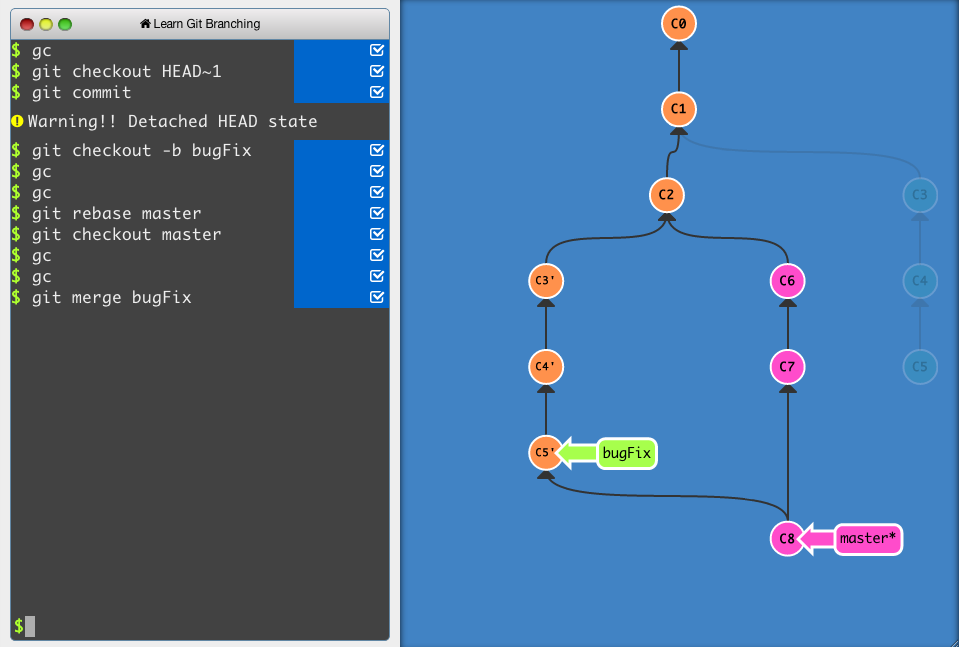
An interactive Git visualization tool to educate and challenge!
after running checkout, your local repo should be the middle arrow:
 crimson olive
im confused why those files are untracked
i have git fetch origin
so its up to date with remote repo
and the remote repo commit has all those files
in there in the latest commit
yet its saying in my local repo they are untracked files
 subtle plaza
then a branch from that point will do this:
