#CC2530 ZHA setup issue
1 messages · Page 1 of 1 (latest)
 open charm
If you have a Python environment on another computer (anything with 3.7+), you can install pip install zigpy-znp as a normal Python package and externally test that it can communicate with your radio by running python -m zigpy_znp.tools.nvram_read -vv /dev/...
That would tell you if it's a problem with ZHA or with the virtualized HA installation
 analog quiver
I can run Ubuntu in VMware, will that help?
open charm
Sure, give it a try
Runs on Windows and macOS as well
Though I suspect it's a problem with the virtual machine USB passthrough
analog quiver
but Z2M should also not work in that case
open charm
Do you have anything in the Z2M config file?
analog quiver
no, default settings
I am having problems with Ubuntu
I am not that familiar with Linux
pip is not installed and I cannot get it working
open charm
It seems to be trying over IPv6
Though it tried over IPv4 and said the server is unreachable (works for me)
analog quiver
buntu@ubuntu2004:~$ ping us.archive.ubuntu.com
PING us.archive.ubuntu.com (91.189.91.39) 56(84) bytes of data.
64 bytes from kazooie.canonical.com (91.189.91.39): icmp_seq=1 ttl=128 time=112 ms
open charm
Ubuntu VM network problems aren't something I'm very familiar with
Looking at the Z2M source, the only possible thing that I can think of is that your adapter doesn't work well with the normal startup sequence and requires multiple tries to connect, but you'd be the very first to report any issue like this so I'm somewhat skeptical.
analog quiver
I can use saleae to check it, would that help?
open charm
I think I might have a FTDI chip and a bare CC2530 somewhere but I'm not sure how the flow control pins are wired up
Do you have a link to the exact hardware?
open charm
Any of the flow control pins from the FTDI chip hooked up to a reset pin on the CC2530? Those are toggled a few times on startup.
analog quiver
no, did not read about such a requirement
open charm
Oh, is this a device you're making?
analog quiver
no, I have one that I would like to use while I can get a better one
open charm
If you can get the pip install working, I can try matching the Z2M startup sequence exactly, byte-for-byte, to see if it's a software issue
Only unique thing about your adapter is the FTDI serial chip, which I have not seen used with other sticks.
Do you know what firmware is flashed to the CC2530?
analog quiver
open charm
So is this just that pre-made CC2530+CC2592 module hooked into a 3.3V power source and into a FTDI usb-serial converter?
open charm
Run that above command: python -m zigpy_znp.tools.nvram_read -vv /dev/...
May have to specify python3 instead of python
That should either fail with the same error after showing that it tried sending a bunch of bytes to the coordinator
Or fill your screen with a lot of verbose output
analog quiver
[Errno 13] could not open port /dev/ttyUSB0: [Errno 13] Permission denied: '/dev/ttyUSB0'
linux is not my thing :/
open charm
Try running the Python command with sudo. Or sudo chmod 777 /dev/ttyUSB0 to give everyone access to the serial port.
analog quiver
looks like the same issue: https://pastebin.com/urEWSthM
open charm
Let me try flashing my board then and see if I can reproduce it
analog quiver
ok
I have hooked up saleae and can confirm that CC2530 does not respond
I can now try switch back to Z2M and check how it works
open charm
Z2M should send a ping (\xFE\x00\x21\x01\x20), if that fails send the bootloader skip byte \xEF and then ping again, and finally toggle RTS/CTS pins and then send a ping a third time
zigpy-znp sends a few hundred \xEF bytes and then sends a ping
So if your hardware ignores the first ping, it should be responding to one of the subsequent ones
analog quiver
Z2M works
I have not connected data flow pins
What can I do to help you further?
open charm
If you install git (sudo apt install git), run pip install 'git+https://github.com/puddly/zigpy-znp.git@puddly/startup-retries'. It'll install a version that retries sending the original "ping" a few times before disconnecting. (https://github.com/zigpy/zigpy-znp/compare/dev...puddly:puddly/startup-retries?expand=1)
analog quiver
If I did not mess up anything in the process, I still get the same time out error
open charm
Very odd. Does it print that it tries to connect over and over?
analog quiver
Successfully built zigpy-znp
ubuntu@ubuntu2004:~$ python3 -m zigpy_znp.tools.nvram_read -vv /dev/ttyUSB0
no, it fails and stops
open charm
It should take 10 seconds to throw that error and print Connecting to port, attempt #0, Connecting to port, attempt #1, etc.
Oh, you may have to pip uninstall zigpy-znp first. It should say Successfully installed zigpy-znp-0.6.1 at the end.
analog quiver
Ok, now it retries, but still fails after 10 attempts
RuntimeError: Failed to connect to port after 10 attempts
I just tried it one more time and received a different output:
see: Received an unhandled command: SYS.Ping.Rsp(Capabilities=<MTCapabilities.APP|UTIL|SAPI|ZDO|AF|SYS: 377>)
It was not there before
open charm
That paste 404s for me. Can you upload it to another pastebin (e.g. https://dpaste.org/ )?
analog quiver
open charm
That warning sometimes occurs and is harmless, but in this case it means that the adapter responded to one of the ping requests. Perhaps the timeout is too short, in which case the exact timing info should help.
analog quiver
Yes, I see in saleae that it responded
open charm
Well it got partially through reading some NVRAM entries but then communication was lost again
analog quiver
open charm
I'm not sure what to suggest in this case. It connected after six (!) attempts and then the serial port stopped responding without an explicit disconnect
But the CC2530 sent and received quite a few commands correctly, without any checksum errors
You can see the TRACE level logging show the bytes. A read command was sent successfully and then no response was received 15s later.
analog quiver
You was talking about flow control pins (hardware) before, maybe I should connect them?
open charm
Flow control is disabled by default, if I remember correctly
Though I'm surprised that Z2M was able to work at all if the serial communication itself is buggy like this. There's no special library required to communicate over serial ports so Z2M should have experienced the same issues with the stick. How far along did you get with Z2M to conclude that it "works"?
analog quiver
I have tried it one more time, it now failed after 3 attempts
at last attempt CC2530 responded
like 15 mins ago Z2M was working, I was able to control remote relay with a remote button
open charm
Strange. Z2M's startup code should be behaving more or less identically: https://github.com/Koenkk/zigbee-herdsman/blob/57e1751fe57069b4a8a2e092a7953f46838f5943/src/adapter/z-stack/znp/znp.ts#L206
And since the serial port stops responding after a while, the startup sequence wouldn't even matter
analog quiver
The only issue I remember with Z2M was that if I restart it, it could no longer communicate with CC2530 until I repower it
I have experienced software problems with Z2M, so I wanted to switch
if you familiar with communication protocol, I can provide you data that was sent from CC2530 to serial device
open charm
It seems to work fine, it's just the last command never received a reply
I've ran tens of thousands of NVRAM read commands in a row with various sticks and not a single one ever timed out like this
The final data sent to the stick was \xFE\x02\x21\x13\x21\x00\x11 and from the perspective of the application, the stick just never replies to this message
Even though in all other instances, it replied in 20-30ms
open charm
What does the final exchange look like? The final log entry in the paste above is:
2021-11-19 09:26:05.559 ubuntu2004 zigpy_znp.uart TRACE Sending data: b'\xFE\x02\x21\x13\x21\x00\x11'
15s later, the timeout is exceeded. No bytes were received.
analog quiver
open charm
\xFE\x02/\xFE\x04 both relate to reading NVRAM entries. The first one is obtaining the length, the second the value itself. Both should be receiving responses instantly.
analog quiver
that command was the second last
CC2530 responded to it
*that command you pasted
open charm
Every received byte from the serial port is logged so from the perspective of the application, there was never a response.
You're probing the traffic between the USB-serial chip and the CC2530, right?
open charm
If you're seeing UART traffic that the application isn't, either the USB-serial chip has an issue (you said Z2M couldn't reconnect to the CC2530 until you shut it back off), or the VM USB passthrough has a problem
analog quiver
FTDI chip is genuine, so I doubt that it has issues
open charm
I would try running this on another computer to rule out VMWare. Serial communication shouldn't just stop abruptly halfway through the process like this unless there's a problem (likely if you're DIYing it).
analog quiver
but the fact that z2m is working says it cannot be the case
if vmware is at fault, how can z2m work at all?
open charm
Only other thing to change is to add a 1s sleep after startup, like Z2M does
analog quiver
I have not probed with saleae, why z2b no longer works after restart, I suspected that CC2530 was in the special state and z2b did not know how to get out of that state and start from fresh
I think I read somewhere that it was suggested to configure z2b to reset cc2530 but I did not find how to do that and never tried
One more observation, cc2530 always responded with 8 bytes, but last response was 8 x 3 bytes
maybe some sort of buffer overflow happened?
open charm
Last two are identical but different from the first
Let me try copying the Z2M code exactly
analog quiver
I am not really a programmer, so maybe that's an absolute rubbish: could it be that program expects to receive 1 packet, instead receives 3, reads out one and fails?
open charm
The problem is that all of this is happening at a level lower than what zigpy-znp has access to. Every byte that is received, even if there is an error parsing it, should be logged to screen. For some reason you're seeing bytes with the logic analyzer that are not being received by the Python application.
analog quiver
is there any kind of serial port monitors/listeners for linux?
I have used such for windows before
like Serial Port Monitor for win
open charm
None that I have used. I usually just use strace and attach to the process to look at the syscalls directly.
analog quiver
open charm
Try pip uninstall zigpy-znp and re-install it from that git+ URL, I've updated the code to copy Z2M's startup sequence exactly.
analog quiver
ok
open charm
It should complete the full NVRAM read process within 20-30s and then print out a JSON document.
analog quiver
TimeoutError as before, but communication looks different now
don't see json file/output
open charm
Same problem as before. Connects fine but serial reads stop working halfway through and the application just waits for bytes to come in through the serial port.
I will try later to see if I can connect my CC2530 up like this with a FT232RL but until I can replicate the problem, I'm not really sure what else to suggest
analog quiver
I just remembered that I have RPi Zero W running Linux
I can try, would that help?
open charm
It can't make it break any more 😆
analog quiver
if it fails, then it is 100% not VMware
open charm
Yes
Try both the normal package and the one with the patched startup sequence
It may take a while to install things on the first generation Zero W
open charm
You may have an old version of Python 3 installed
pathlib was introduced in 3.4, so you must have 3.3 or earlier
analog quiver
maybe, I get more strange errors
open charm
Anything older than 3.7 will not work
open charm
You may have to run python3.7 instead of just python3
analog quiver
ok, installing it, but I bet it won't be VMware's fault, because z2m was still working
ok, I have results, take a guess
open charm
🤷♂️
analog quiver
TimeoutError
open charm
In that case, I'll see if I can set this hardware up locally.
Thanks for the thorough diagnosing!
analog quiver
I am a bit disappointed as I will be left without Zigbee for a while then, I had Sonoff ZBbridge which is not stable and this CC2530, better hardware will come much later
At the same time surprised that I am the first one to have these issues, as CC2530 seems to be popular
btw, your modified version has also timed out
I guess it is not reasonable to expect a quick fix for this even if you build the same setup at home?
as there is not much else you can see/try that I have not tried already, no?
open charm
If it's a software problem then it's something fixable. Either it's a problem with zigpy-znp, or pyserial, or Python itself.
analog quiver
I see, in case you could not build the same setup, I can give you VNC access
thanks for you help, see you later
open charm
Thanks. Hopefully we can figure this one out.
analog quiver
@open charm , I have figured it out, at least partially
you need to update CC2530 to the latest firmware, which is not the one I used
and your modified version will work, stock version will still fail
open charm
@analog quiver Which one did you have flashed originally?
analog quiver
@open charm I have used https://github.com/Koenkk/Z-Stack-firmware/blob/master/coordinator/Z-Stack_Home_1.2/bin/default/CC2530_CC2592_DEFAULT_20201127.zip , it is the one that every guide recommends
and this is the one that fixed it, note that it was updated 4 days ago: https://github.com/Koenkk/Z-Stack-firmware/tree/develop/coordinator/Z-Stack_Home_1.2/bin/default
open charm
The new firmware should be using the exact same version of Z-Stack Home 1.2 as the one you installed
Only change is I think a UART buffer size change and LED stuff. Z-Stack Home 1.2 isn't being developed anymore.
Maybe the 256 byte bootloader skip sequence is causing an overflow. I'll test it out later.
analog quiver
I tested the following: older firmware + zigpy -> when it times out I connect it to hterm and try to send Ping commands and I get no response
firmware hangs and does not respond to any command
I don't know why z2m is facing this issue, maybe it sends out commands at a slightly slower rate and mcu has more time to process commands
but what is clear is that after I use updated firmware z2m works flawlessly
I can restart it in HA and it continues to work
btw, https://github.com/Koenkk/Z-Stack-firmware/blob/develop/coordinator/Z-Stack_Home_1.2/CHANGELOG.md says: Fix CC2530 crashing when sending large messages via UART
@open charm is it possible to use your updated code in HA so that I get CC2530 working?
open charm
analog quiver
is dev branch already updated with your fix?
open charm
No, use that specific branch in the pip install command
It's the same format with the @
analog quiver
[22:45:38] INFO: Remove old deps
[22:45:38] INFO: Install pypi modules into deps
[22:45:38] INFO: Installing python package 'git+https://github.com/puddly/zigpy-znp.git@puddly/startup-retries'
[22:45:44] INFO: Done
but I still get the same error: "Failed to probe ZNP radio"
how to make sure that patch was really applied?
open charm
Enable https://www.home-assistant.io/integrations/zha/#debug-logging and look at home-assistant.log
analog quiver
open charm
Sending bootloader skip byte isn't logged in that branch so no, it doesn't look like it worked
analog quiver
what can I do then?
open charm
HA may have downgraded the package, it enforces this stuff at runtime. Does the HA log show anything about pip being run or packages being installed?
analog quiver
I don't see it
btw, here is how it looks when I run it from Ubuntu: https://dpaste.org/9Drp
any suggestions what else I can try?
a side thought: if I am going to run HA remotely (no physical access to CC2530), I should think of a way to hard reset it just in case it hangs, if I understand correctly hard reset is only possible if I repower CC2530, so I have to power it thorough a relay which I can control from HA
can you think of any other (easier) ways to do that?
open charm
CC2530 has a reset pin, you may be able to hook it up to one of the flow control pins on your UART chip
zigpy-znp toggles those on startup so even if the chip fails, the software watchdog will detect it and re-connect at runtime, causing a reset
I'm flashing my CC2530 right now so hopefully I will be able to reproduce your problem
analog quiver
I thought you said they are disabled by default
open charm
The flow control pins are
But since some sticks use them to skip the bootloader, they have to be toggled
analog quiver
cannot wait to see you results
logic analyzer shows that cts/rts pins are not toggled
open charm
What pins does https://github.com/Koenkk/Z-Stack-firmware/blob/master/coordinator/Z-Stack_Home_1.2/bin/default/CC2530_CC2592_DEFAULT_20201127.zip use for UART tx/rx?
Or rather, what pins do you have connected between the FTDI board and the CC2530+CC2592 board?
analog quiver
P0.2 to TX, P0.3 to RX
open charm
So P0.2 is CC2530 RX?
analog quiver
yes
open charm
1st generation Pi with an SD card swap file will take a while to install Python
analog quiver
yes 🙂
as you can see it does not toggle
and I have restarted HA and it partially recognizes CC2530
now I get "Failed to set up Check the logs"
open charm
Probing connects/disconnects, but setting up the radio connects again
So if it has a 10% chance of working with probing, you have an even lower chance of both connection attempts succeeding in a row
analog quiver
not sure I understand, I think it should toggle cts/rts pins then wait (allow to restart) and then probe
error in the log:
Error setting up entry FT232R USB UART - FT232R USB UART, s/n: A5329FP6 - FTDI for zha
11:53:03 PM – (ERROR) deps/lib/python3.9/site-packages/zigpy_znp/api.py - message first occurred at 11:48:04 PM and shows up 4 times
Couldn't start application
11:53:03 PM – (ERROR) /usr/local/lib/python3.9/site-packages/zigpy/application.py - message first occurred at 11:48:04 PM and shows up 4 times
open charm
Probing is basically "connect+disconnect". It allows ZHA to autodetect the radio type for any serial port.
Once it probes, it will re-connect again with the right library
If the original connection attempt has a 10% chance of working (as in, you have to try over and over to get it to work), two in a row is 1%, so you will have to try a lot more 😆
analog quiver
I understand that, but before each probe it should toggle cts/rts and only then try
open charm
Toggling the pins is a part of the connect method. It's done every time the serial port is connected.
analog quiver
but you can control cts/rts pins from software
open charm
I know for a fact that the RTS/CTS toggling does work with at least the CP2102 serial chip, because the Slaesh CC2652RB is stuck in its bootloader until they are toggled
Maybe it's something with the FTDI driver with that linux kernel version
But I will check both once this raspberry pi finishes crawling along
analog quiver
I think you understand the purpose of those pins differently than I do
"A transmitter raises its RTS line, which causes an interrupt on the receiver, I.e. – “Hey can I send some data”? If the receiver is in a position to receive the data it will assert its CTS line, I.e. – “Yes you can start sending”."
that perfectly explains what I see in saleae
it pulls the line down to indicate 'hey, I am ready to accept data'
and keeps that pin low
but that is not toggle as I understand the word 'toggle'
open charm
Yes, that is their original purpose, but no sticks use flow control that I'm aware of. Those pins are re-used to toggle the bootloader instead (on some sticks).
analog quiver
I am not sure about other sticks, but for CC2530 and reset function to work, it is not suitable, don't you agree? for example, if I use that pin to control Reset, CC2530 will be in reset mode during all the probing
open charm
RTS is enabled for 150ms (not sure if that pulls it high or low) https://github.com/zigpy/zigpy-znp/blob/dev/zigpy_znp/uart.py#L172 right after connect, the application waits for 1s, then attempts to interact with the serial port
analog quiver
as you can see from my printscreen it pulls it low for 3 seconds and then for 7 seconds
but most importantly it keeps it pulled low for the whole time it sends pings
open charm
https://paste.pics/755de1294afa818 404s for me
analog quiver
yes
open charm
+6s to +9s is the probe?
analog quiver
yes
open charm
Then +9.1s to the next +6s is the connection attempt?
analog quiver
yes
as you see it would never connect as reset pin would be pulled down during the whole communication period
open charm
Only reason that code exists is for the Slaesh CC2652RB stick. Should be easy to invert the signal with some extra hardware.
analog quiver
invertion is not a problem
if you invert, it would reset CC2530 during no communication periods
and that would break communication, as CC2530 would require initialization sequence
open charm
The pin isn't used by the serial communication library, it's only ever changed after the initial connection
As in, it's just used as a general purpose IO
analog quiver
my suggestion would be to control cts pin or any other pin manually, at least in other platforms that is allowed
and that way you could just toggle that pin before probing
would be very handy feature
open charm
Is that not what the current code does? Or do you mean provide a way to disable it so that you can toggle it externally with something else?
analog quiver
🙂 it does not toggle right now
by toggle I mean, pull down 100 ms, pull up again and do not touch that pin again until next probing
open charm
Is that not what the brown signal in your logic analyzer output is showing?
analog quiver
nope
let me explain: first +6s mark: pulls RTS pin low (resets CC2530) and keeps in reset during probing
or do we see it differently?
open charm
No, that's correct. The RTS pin isn't expected to be hooked directly into the RESET_N pin on the CC2530
analog quiver
then at +9s mark: release from reset state and immediately set it to reset state again + try to communicate
that's what I expect from Reset pin toggle: https://paste.pics/86e553e81b808316db1e6af8bef02a9c
open charm
Yes, but since your adapter is the only one that will ever use this feature it would be easier if you just inverted the RTS signal in hardware so that I don't have to add a ton of extra code to zigpy-znp to try both methods
Since the existing RTS toggling and pin state cannot change, it must be held low to work with the Slaesh CC2652RB
analog quiver
Ok, I have inversed it graphically
as I was trying to say, it will reset CC2530 after sending some data - at the last +6s mark
so, inverting the signal will not help
open charm
The pin should not change state as long as the application is running
analog quiver
that would be interesting to test once it is working
if z2m is using more or less the same code, I can test it
open charm
Interesting, I think I got it working
analog quiver
new firmware + ha os?
open charm
No, macOS + Z2M. Didn't connect with zigpy-znp. Z2M failed after it tried to reset the stick though.
Yeah, it runs for a bit then gets stuck
analog quiver
with new firmware it still gets stuck?
z2m does not toggle RTS, just puts it in one state
open charm
Have not tested it yet but it hasn't even been formally "released"
The current release should work without any stability problems like this, especially during network formation
The only pins you have wired to this module are the GND, 3.3V, and UART RX+TX?
analog quiver
well, that's what I was expecting, or at least somewhere to read in big font that CC2530 is not supported right now, do not bother
yes
open charm
Do you have any other USB-serial chips to try? I only have this FTDI board
analog quiver
you can read about that new firmware here: https://github.com/Koenkk/zigbee2mqtt/issues/8452#issuecomment-959332350 , while it does not say much but Koenkk says it fixes this issue
I have but they are 5v only
I doubt it is FTDI problem
new firmware clearly fixes it
open charm
That wouldn't explain how the current stable release has been this broken for almost a year now
And nobody has noticed
analog quiver
as you observed yourself, with old firmware CC2530 becomes unresponsive, so it is not FTDI's fault
open charm
Maybe there are extra pins that need to be connected with this EBYTE CC2530+CC2592 module (perhaps the reset pin needs a pullup/pulldown, instead of being left floating)
analog quiver
some say that old version 1.18.1 or 1.18.3 (cannot recall exact version numbers) of z2m works fine
open charm
I was testing 1.18.3 and it initially connected but suffered from the same problem of serial communication suddenly dropping
analog quiver
well, you can connect reset pin to 3v3, but I doubt it will change anything, I guess it has internal pull-up already enabled
well, old firmware works fine with z2m until I restart that addon
so maybe that's the reason why nobody complained for so long, as it was actually working
at the same time ZHA was not working at all
btw, haven't you missed my pic of z2m communication where you can see it does not toggle RTS
open charm
analog quiver
I am not that great programmer, can you explain what I see?
I think I understand what each line means, but cannot follow the programming logic
open charm
People were reporting the CC2530 was not working and Z2M reorganized the connection logic in September, supposedly to fix this problem
analog quiver
I see
open charm
Always the CC2530, never the CC2531
Similar issue with SiLabs CP210x chip
So it's the CC2530
So it looks like very few people use the CC2530+CC2592 to begin with, since the connection logic changed last year
I'll try the develop branch firmware then
analog quiver
yeah, I was about to say that it is not that popular compared to CC2531
I still think CC2530 has it purpose when network is not large and better range is required
btw, if you want to test other serial converter, you can plug CC2530 to RPi UART port directly
open charm
My raspberry pi can't even install zigpy-znp, too slow
But since I can replicate it on two platforms with two computers, I will see what I can do
analog quiver
well, it was not was on my RPi Zero, but definitely didn't take that much time
can you do something about that RTS toggle?
open charm
If I can find my logic analyzer I will take a look
analog quiver
I would be willing to test it on my side if you don't
can you offer a 'quick and dirty' fix so that ZHA could work in the mean time? like copy paste communication code from z2m?
open charm
I guess you could get access to the Home Assistant Docker container (https://github.com/zigpy/zigpy-znp/blob/dev/TOOLS.md#in-home-assistant-os) and manually patch zigpy-znp with the changes that I have in my branch. Should be in /usr/local/python3.9/site-packages/zigpy_znp/ or something similar.
Make sure to delete the dependencies addon and /config/deps/
analog quiver
bash-5.1# cd usr
bash-5.1# cd local
bash-5.1# ls
LICENSE ciso-requirements.txt extra-requirements.txt requirements.txt
adslib config include sbin
bin cx_Oracle-doc lib share
cache etc pyodbc.pyi test-requirements.txt
no python folder
open charm
Are you running HA OS?
analog quiver
vmware images are only HA OS, no?
open charm
python -c "import zigpy_znp; print(zigpy_znp)" will tell you where it is
analog quiver
aha, 'zigpy_znp' from '/usr/local/lib/python3.9/site-packages/zigpy_znp/init.py'>
open charm
I think the UART buffer tweaks are actually fixing the problem
analog quiver
great that you can confirm that
open charm
For me, NVRAM reading breaks every single time either on the NIB nvram item, DEVICE_LIST, or ADDRMGR
I haven't tried the new firmware yet
But with the old one, it always fails on one of those three
And they are the longest ones
analog quiver
I don't really remember what was in my case, but if that is important for you to double check, I can repeat tests
open charm
Zigbee2MQTT did not have to read them until we reverse engineered the NVRAM structure to have more granular control over the network
Did your CC2530 ever work with Z2M?
analog quiver
yes (with old firmware)
open charm
Old Z2M version too?
analog quiver
no, I was not able to test old Z2M versions
open charm
Maybe they don't do the NVRAM stuff on CC253x sticks
analog quiver
it works until I restart Z2M addon
open charm
Adding 1s delays between commands does not help so I suspect it's Z-Stack generating a long UART response, which would be the case when dumping those large NVRAM entries
I have a new version of the code almost done that seems to connect more reliably with the old firmware
analog quiver
I can capture z2m communication using old firmware if that would help
maybe timings will tell you something
open charm
It won't really help much. If the command response length is indeed to blame, then any long message over serial will be enough to break the CC2530
And that is a part of the zigpy-znp startup sequence, it's not really something I can change
analog quiver
but didn't you say you have a new version that works with old firmware?
open charm
It connects and responds to commands, I haven't tried forming a network
analog quiver
can I ask you to help me a bit with patching my HA OS? I have a feeling I will mess it up badly
I am in zigpy_znp folder, what should I do?
open charm
You should be able to directly apply the diff: https://github.com/zigpy/zigpy-znp/compare/dev...puddly:puddly/startup-retries.diff
open charm
Try the .patch URL? You may have to run this outside of the zigpy_znp folder, so cd .. first.
analog quiver
what do you mean by "Try the .patch URL"?
open charm
I'm not sure if the new version of zigpy-znp that this patch is for is even in HA stable yet so it might not work
analog quiver
I am using Edge edition
bash-5.1# pwd
/usr/local/lib/python3.9/site-packages/zigpy_znp
bash-5.1# curl https://github.com/zigpy/zigpy-znp/compare/dev...puddly:puddly/startup-retries.patch | git apply
% Total % Received % Xferd Average Speed Time Time Time Current
Dload Upload Total Spent Left Speed
100 5870 100 5870 0 0 19232 0 --:--:-- --:--:-- --:--:-- 19245
error: zigpy_znp/api.py: No such file or directory
error: zigpy_znp/api.py: No such file or directory
analog quiver
that's obviously not my field of expertise
open charm
Not sure, I usually don't patch things like this
analog quiver
bash-5.1# curl https://github.com/zigpy/zigpy-znp/compare/dev...puddly:puddly/startup-retries.patch | git apply
% Total % Received % Xferd Average Speed Time Time Time Current
Dload Upload Total Spent Left Speed
100 5870 100 5870 0 0 14551 0 --:--:-- --:--:-- --:--:-- 14565
error: patch failed: zigpy_znp/api.py:501
error: zigpy_znp/api.py: patch does not apply
error: patch failed: zigpy_znp/api.py:472
error: zigpy_znp/api.py: patch does not apply
open charm
Yeah, looks like it's incompatible so the new release of zigpy-znp hasn't been released with HA yet
open charm
You can pip install --upgrade zigpy-znp but I think Home Assistant will downgrade it
analog quiver
immediately downgrade or will it give me some time?
open charm
Immediately, during startup
analog quiver
I can disconnect internet before start up 😄
yes, old version:
WARNING: You are using pip version 20.2.4; however, version 21.3.1 is available.
You should consider upgrading via the '/usr/local/bin/python -m pip install --upgrade pip' command.
open charm
I haven't tried that yet. Maybe it will work?
You can ignore the pip warning, that's saying to pip install --upgrade pip, which you don't need to do
analog quiver
no luck, once I disconnect internet, it does not allow to install ZHA
anyway, even if I find a way, there will be a high chance that HA will downgrade it automatically any time, so that is not stable solution
I expect that it will take long time before your fix makes into dev branch so that we could get a new VMware or RPi images, so that all is not looking good for me
open charm
Yeah, the OS does not make it easy to modify things. The custom deps addon should have worked but I will try making a patch against the old version tomorrow.
analog quiver
great, I will look forward to trying it out
and please try the new firmware, if you have not already, just to confirm that it does not hang for you in any scenario
open charm
New firmware works to read NVRAM but fails to form a network, the chip resets itself
analog quiver
interesting, so zigpy-znp and z2m communication is still different after all
open charm
It randomly resets halfway through the process
analog quiver
you are not using your test script anymore, right? it was working fine for you?
i mean "zigpy_znp.tools.nvram_read"
open charm
That works so I'm running .form_network. That does not work.
analog quiver
works fine for me
open charm
zigpy_znp.tools.form_network?
analog quiver
yes
this is not right: "Discovered basic device information for <ZNPCoordinator model='CC2531, Z-Stack Home 1.2 (build 20211115)' manuf='Texas Instruments'" but everything else looks good
open charm
There's no way to detect the model other than the firmware build date
analog quiver
do you use external power supply and enough current?
open charm
Benchtop power supply at 3.3V, limited to 500mA
Now it's failing to read very NVRAM entries again
Does nvram_read work for you after forming a network?
analog quiver
yes
open charm
And you're running zigpy-znp 0.6.1? Or 0.5.4?
analog quiver
your patched version, so latest?
open charm
Now it works, after I put a big metal pot on top of it
analog quiver
? 🙂
open charm
I think the breadboard wires and raspberry pi nearby are causing the formation energy scan to fail
And the chip responds by locking up
analog quiver
I see, could be
open charm
This is a very temperamental chip
analog quiver
😆
at least we can confirm now that the new firmware has indeed addressed the issue
I don't think there would be possible to fix anything on your side while still using old firmware
open charm
This patch works with the old zigpy-znp version in HA: https://dpaste.org/pZu6
May have to connect once to get the chip past the bootloader, which ZHA probing will do implicitly
analog quiver
ahh: "This dpaste installation has Raw view mode disabled."
open charm
Well it's a tiny patch, you can just edit the one line with a text editor and delete the rest
My CC2530 may not be in a fresh state so if it doesn't work, try connecting to it first with the patched version of zigpy-znp
Then ZHA will be able to use it
analog quiver
wait, so I have to apply this patch to VMware HA OS or to Ubuntu?
analog quiver
I see
I am sorry to say, I don't know how to apply it
curl https://pastebin.com/raw/7n6ivndh | git apply --reject --whitespace
curl: (23) Failure writing output to destination
ah, so it expects a file
... still cannot figure it out
I have downloaded it as file, checked that it is correct with cat
but git apply still fails with "unrecognized input"
open charm
Easier to edit with a text editor I think
analog quiver
how? in console?
open charm
Yeah. I don't remember what they have in the OS but maybe they have nano or vi
analog quiver
vi is there, but it will be pain to edit I already see that
how people love this is beyond my understanding
analog quiver
Hi. Did you do any further testing for CC2530?
analog quiver
@open charm are you around?
I have not completed patching last time we talked, this time I have figure it out how to edit in VSCode
the issue is that your patch does not match the api.py file that's on my system
that's what I see: https://dpaste.org/mcKC
open charm
The patch is against the original version from 0.5.4. You'll have to undo the changes you did for it to apply.
analog quiver
I have applied your patch
it was trying to communicate
but returned "Failed to setup"
Error setting up entry FT232R USB UART - FT232R USB UART, s/n: A5329FP6 - FTDI for zha
12:09:55 AM – (ERROR) deps/lib/python3.9/site-packages/zigpy_znp/api.py - message first occurred at November 19, 2021, 11:48:04 PM and shows up 5 times
Couldn't start application
12:09:55 AM – (ERROR) /usr/local/lib/python3.9/site-packages/zigpy/application.py - message first occurred at November 19, 2021, 11:48:04 PM and shows up 5 times
open charm
Hmm. Well, I've almost got a proper one working so you can try that out later. It works consistently for me with every radio that I have.
analog quiver
do you mean you have another patch? or should I keep trying to connect to it?
open charm
The one I posted earlier worked for me with the CC2530 after I connected to it once before. Maybe try that?
analog quiver
can you provide a link, I am a bit lost
one patch was for newer version, one was for older, if I remember it right
open charm
The only patch I have at the moment is the one I posted earlier. If it doesn't work, you'll have to figure out why your HA custom deps addon isn't working correctly and then properly install the updated version of zigpy-znp's dev branch whenever I finish it
analog quiver
and you are running 0.5.4?
open charm
No, I'm basing my changes on the current codebase, which is 0.6.1
The patch I made for you earlier was for 0.5.4 and it worked for me when I briefly tested it
open charm
That looks right. I think Home Assistant downgraded zigpy, which you should also pin to zigpy==0.41.0
If you've gotten the addon working, try re-installing from git+https://github.com/puddly/zigpy-znp.git@puddly/startup-retries. I've pushed the current state of the codebase, which connects reliably for me.
analog quiver
ok, I installed that version of zigpy, this time device was recognized very quickly but with the same result
ok
open charm
I believe the addon does it every startup so you should just be able to restart HA. I pushed it only a minute ago.
analog quiver
and i need to upgrade zigpy-znp to the latest version before that?
open charm
What do you have in your HA config file for the custom deps addon?
analog quiver
configuration.yaml file you mean?
open charm
Yes
analog quiver
open charm
analog quiver
yes
open charm
The configuration.yaml you posted above doesn't have that section
The following should work:
pypi:
  - git+https://github.com/puddly/zigpy-znp.git@puddly/startup-retries
  - zigpy==0.41.0
my bad, it was not started
open charm
After you restart HA (not just core), it should install the correct versions
analog quiver
ok, I have modified configuration file with those three lines (btw, config file has not changed after starting Custom deps deployment add-on) and performed Reboot host
restarted two times, error is the same, so I guess it did not update, config file: https://dpaste.org/Qf6b
TypeError: init() got an unexpected keyword argument 'children'
open charm
It's definitely in there. Maybe try forcing it to install zigpy from git? git+https://github.com/zigpy/zigpy
analog quiver
at last, it worked...
I have to test it out now
thank you so much
can I ask what have you decided to do with RTS pin toggling?
open charm
The current behavior can't really be changed due to the current CC2652RB stick hardware requiring it to be done this way
And there's no way to configure the probing behavior
But maybe I can add a config option to invert the logic
analog quiver
so you cannot just leave as it is now, but add additional pulldown for 150ms or so and then release and then do the regular business?
open charm
If I get a CC2652RB stick I can check it out. Right now I don't know the specifics of how the bootloader needs to be skipped, only that this is the way the guy that made the stick suggests it to be done
analog quiver
I see
open charm
You're welcome to fork zigpy-znp and adjust the behavior though, the custom deps addon makes it relatively easy
I just don't have a way to test if the changes that make the pulldown/pullup logic compatible with your setup will not break startup for the many people using CC2652RB sticks
analog quiver
I understand that, I was about to ask maybe it would be better for me to report it as an issue in zigpy-znp so that you or someone else could look into it later
wile I can try to adjust behavior myself, I doubt I will succeed based on how terrible I was so far with doing simple steps you have told me to do 🙂
anyway, can I ask you a few not related to this issue questions?
open charm
Maybe you can repurpose the DTR pin?
analog quiver
repurpose?
open charm
Well the RTS pin is toggled, but the DTR pin is not changed other than being pulled down (or up?) on startup
Maybe it is reset when the application closes the serial port, so it will behave the way you expect
analog quiver
good idea, do you think 'fix' would be approved in official version?
analog quiver
to alter DTR pin's behaviour
open charm
I haven't looked at it with a logic analyzer so maybe it currently works out-of-the-box
analog quiver
ok, I will investigate
a few questions, if you don't mind:
maybe it would be correct to change CC2531 to CC253x: https://github.com/zigpy/zigpy-znp/blob/dev/zigpy_znp/zigbee/application.py#L93
as you said, you cannot distinguish, so that would be technically more correct
open charm
Sure, I can do that later
analog quiver
great
open charm
So for you the current connection code works with both the initial probing and the subsequent re-connect?
analog quiver
if I disable and re-enable ZHA it works (it takes some time to start working after I re-enable it)
if I re-power CC2530 it does not longer work
open charm
Hmm, reconnection seemed to work for me. What does the debug log show?
analog quiver
remind me please, where to look for a log; System -> Supervisor log shows nothing related
open charm
It would be in /config/home-assistant.log
analog quiver
open charm
Looks like it reconnected fine at the end?
Four seconds after the watchdog check failed
analog quiver
ah, yes, you are right, it took some time
open charm
It's checked only once every 30 seconds
analog quiver
I see
a few more questions, if you still don't mind
currently changing network channel requires re-pairing according to this: https://www.home-assistant.io/integrations/zha/#defining-zigbee-channel-to-use . Do you know if this shortcoming is going to be fixed any time soon? I believe Mgmt_NWK_Update_req should allow this functionality
open charm
We're slowly working towards it. There's no user-facing way to send that command and there are still some issues relating to how it should be handled, since many devices are not compliant in their parent polling
Like do we need to persistently try sending the update to every single device with a unicast request instead of broadcasting it and hoping it's delivered?
analog quiver
first way would be safer, I guess
open charm
Yeah. I haven't had time to test it out, we're still working on consolidating network settings management between the various radio libraries
analog quiver
you could send new key, then try if you can reconnect to each device, if some fail to operate, send old key and report to user that network key update has failed
open charm
Are you referring to key rotation or updating the channel?
Some devices look for the network on other channels so if you increment the nwk_update_id and change the channel, rebooting routers may get them to reconnect
analog quiver
sorry, I meant channel number, not key
open charm
None of those settings are currently exposed (the ones in the ZHA docs are only ever used when forming a new network) but you can manually change them with backup/restore: https://github.com/zigpy/zigpy-znp/blob/dev/TOOLS.md#network-backup
Here's what the backup JSON looks like: https://github.com/zigpy/open-coordinator-backup/blob/main/samples/z2m-sample-1.json
analog quiver
yeah, does not look easy at all when you explain; I just liked this function in Philips Hue system, so was wondering why nobody else supports it
open charm
I remember seeing Hue offering a feature like that, though I seem to recall there being a warning there as well
If your network is all Zigbee 3.0, you can probably send the update easily with just a broadcast
analog quiver
what you basically do, is open iOS / Adroid app and click set new network channel, and it does that automatically without any re-pair required
as far as I remember, Hue is Zigbee 3.0, so yeah
open charm
zigpy keeps track of the network topology so it may be possible to incrementally update the leaf nodes one by one
Them move onto their parent routers once all of the children have moved
But then you run into the issue of children that are not reachable except through the parent router, which may not have moved yet
analog quiver
yep, not an easy task
open charm
And then devices that implement only a small subset of the spec and likely don't even support that ZDO command
analog quiver
ok, my last question: I have originally bought CC2530 to interact with my Ikea Zigbee remote control, I did not want to have any complicated Zigbee network, just to be able to control a microcontroller from it, for example toggle mcu pins with Ikea remote; it turned out to be rather complicated task given that there were no examples of such behavior; maybe you could advice me what would be the best route to go? I have had two ideas: (1) coordinator with custom firmware, which send all received Zigbee data over UART to mcu and mcu processes it, (2) bind Ikea remote with a CC2530, which has a custom firmware from PTVO and acts as multichanel relay and don't use coordinator after that
however, (1) I guess writing a custom firmware will be very hard task, given no examples exist
(2) I don't really think Binding will work
open charm
CC2530 as the base for this project is a problem, since you need to buy IAR Embedded Workbench for the architecture and their pricing is "contact us"
analog quiver
maybe I am missing something very obvious and easy?
I was under impression it was free after reading this: https://github.com/Koenkk/Z-Stack-firmware/blob/develop/coordinator/Z-Stack_Home_1.2/COMPILE.md 😄
open charm
This is new:
NOTE: For IAR Embedded Workbench for 8051 you need either the full (paid) version or the 30-days evaluation version.
Z-Stack is not easy to work with, especially if you say that you don't do much programming
analog quiver
well, I can restart evaluation (not a fair/good practice), but still
open charm
I think it would be easier to write a small application directly on top of zigpy, without Home Assistant, and use a second serial adapter to talk to your second microcontroller.
IKEA zigbee remotes I believe also broadcast all commands to group 0x0001 so if the PTVO pre-built firmware lets you customize the behavior, you may not need to do binding if you're only interested in the commands (and not battery level)
analog quiver
let me quickly check
so, CC2530 + PTVO and zigpy running on RPi?
I cannot exclude coordinator?
open charm
zigpy-znp assumes it's talking to a coordinator. I don't think the PTVO firmware exposes the serial management interface.
CC2530 with coordinator firmware and a second serial adapter to talk to your second microcontroller
You can make a simple app with zigpy that just sends remote commands over serial
Or Zigbee2MQTT and a MQTT subscriber application that forwards those same commands over the second serial port
analog quiver
hmm, not sure I get it: zigpy-znp is running on what? zigpy-znp cannot run inside CC2530
open charm
Of course. You'd need a computer/raspberry pi/other sbc
analog quiver
so, RPi (running zigpy-znp) + CC2530 (flashed with coordinator firmware) + another CC2530 (flashed with PTVO multichannel firmware)?
open charm
What's the second CC2530 for?
analog quiver
ahh, so you mean zigpy-znp (running on the RPi) has to be modified to send serial data over RPi's UART once it received it from Ikea?
open charm
You can use it in a normal Python application as a library. When it indicates that you receive a command from the remote, you use pyserial or something else to send a message to your second MCU.
I don't really know, that just seems like the easiest way to do this to me
analog quiver
that's actually a very good idea, I need to think about it; if I could run python on a simple mcu, that would be even nicer, but I guess I can only run MicroPython
btw, here is a capture of a button press on Ikea remote: https://paste.pics/38d8051f18f120de1aab2266a2fbf3f1
destination address: 0x0000
open charm
Which capturing software is this?
analog quiver
Ubiqua
thanks again for your help, I have had enough with Zigbee for today, tomorrow I will look into RTS/CTS pins and let you know what I find out
open charm
Thanks for the debugging help!
analog quiver
@open charm can I ask where did you get that source code from? https://github.com/zigpy/zigpy-znp/issues/81#issuecomment-885775566
yours implies I can SetTxPower to max 21
datasheet backups that 22 is the max value, not 21: https://github.com/Koenkk/zigbee2mqtt/issues/2253#issuecomment-603195213
analog quiver
is there any easy way to call SYS.SetTxPower and test it out?
open charm
analog quiver
<@!652580495892152331> can I ask where did you get that source code from? https:...
It's the Z-Stack firmware source code. You can download the SimpleLink SDK for CC2652/CC1352 or Z-Stack 3.0.1/Z-Stack Home 1.2 from Texas Instruments.
You can specify the TX power by setting a config option: https://github.com/zigpy/zigpy-znp#configuration
zha:
  zigpy_config:
    znp_config:
      #  * CC253x:       -22 and 22
      tx_power:
It's passed directly into SYS.SetTxPower without validation and the firmware should return the TX power value it chose
analog quiver
I see, I have read your comment that "If you provide a value of 22, the radio will reduce it to 21 and zigpy-znp will (hopefully) print a warning."
so, basically, it will accept 22
I will test it and see the log
open charm
2021-11-23 01:26:54.031 ubuntu zigpy_znp.api DEBUG Sending request: SYS.SetTxPower.Req(TXPower=22)
2021-11-23 01:26:54.043 ubuntu zigpy_znp.api DEBUG Received command: SYS.SetTxPower.Rsp(StatusOrPower=21)
2021-11-23 01:26:54.046 ubuntu zigpy_znp.zigbee.application WARNING Requested TX power 22 was adjusted to 21
2 questions: did you run zigpy_znp.tools.form_network? as I don't see it HA log; why was it adjusted to 21? 22 is allowed value
open charm
I explained in that command above but this is exactly how the firmware works
You ask for TXPower=100, it finds the closest one and picks it, then returns the chosen TX power
analog quiver
hmm
open charm
21 is the firmware limit. You can ask for 22, but the firmware will use 21.
Someone probably rounded 21.47 to 21.5, then to 22
analog quiver
const uint8 CODE macRadioDefsTxPwrCC2592[] =
{
22, /* tramsmit power level of the first entry */
ok, maybe some firmware bug
call me stubborn, but where does it say that 21.47 dBm is max? https://user-images.githubusercontent.com/919914/77421979-cf386100-6ddd-11ea-9d30-b17e2627892a.png
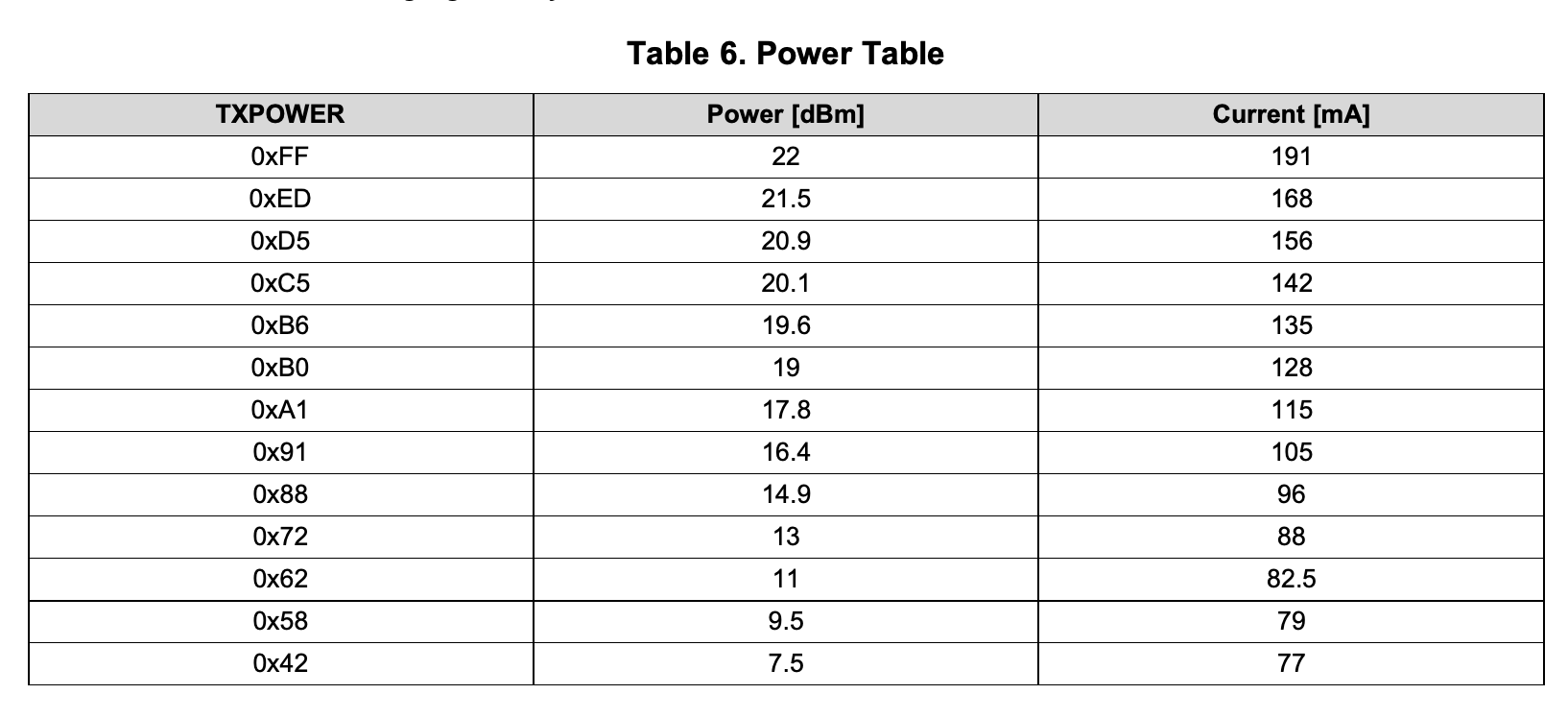 open charm
I go by what the firmware source code says
TI's Zigbee datasheets have had too many mistakes for me to trust every number
analog quiver
never thought of that
open charm
Though that register <-> dBA mapping was from the Z-Stack 3.0.2 source code, maybe they're different in 1.0.2
Regardless, you'd have to compile your own version of Z-Stack with the higher TX power register to get it to take effect, since the current Z-Stack build with the Z2M patchset doesn't touch those values
analog quiver
so, I have looked into the source code and there are two definitions, older one allows 22dBm, newer - not: https://dpaste.org/qOJB
case solved 😄
open charm
I wonder why they reduced it. Was it not performing well or something?
analog quiver
I have read somewhere that there is a limit and 20dBm is max allowed, so maybe because of regulations
open charm
I wonder why they went with 21 instead of 20 then
analog quiver
as promised, here are saleae logs:
- CC2530 not powered: https://paste.pics/5ddb9c3247ee50f054f3567699013967
- FTDI repluged: https://paste.pics/4b33059799b1675d43642cea2d1cf626
- CC2530 repowered, ZHA can no longer control devices: https://paste.pics/025deded2c42002948eb54800cba2546 ; log: https://dpaste.org/VJZb
- ZHA restarted (twice): https://paste.pics/40ba1cd8a3bfb20d53072060156c8549
so, adding an extra config option in znp_config like inverseRTS, or CC2530isUsed could be very helpful in order to achieve user friendly solution
open charm
What about the DTR pin?
analog quiver
I guess, inverting a signal digitally for most HA user would be a challenge
open charm
The CTS pin shouldn't change
analog quiver
I am not sure if every USB to serial converter supports/has DTR pin, but yes, that would work just fine
open charm
Mine has a DTR pin. Let me see what happens to it when connecting
analog quiver
it acts like RTS pin, i.e. follows its behavior
last time we both checked, that ZHA could recover from repowering CC2530, it took some time, but eventually it did, however, today I cannot reproduce the same behavior
as I suggested before, you could try taking control of DTR pin and set its value in software
btw, different behavior is to be expected on different OS: https://community.silabs.com/s/article/undesired-dtr-toggling-on-cp210x-connection?language=en_US
that's it for today, see you later
open charm
I'll see about the DTR state. That may not be used by any stick so I can maybe take control of the pin.
analog quiver
Hi. Have you tried using DTR pin? Do you want me to test anything?
I want to clean up my desk and disconnect all my testing gear.
open charm
Connecting to the CC2530 is not 100% reliable for me. With the old connection code, a single connection attempt had a 17% chance of succeeding. Since the RTS pin on your adapter isn't connected, the "new" code is effectively three connection attempts in a row, which has an expected 43% chance of succeeding.
I got about a 57% success rate testing the new code with the fast connection timeouts, which is a bit higher than the expected 43% but still not very good.
analog quiver
where did you get 17% figure from? have you done many tests and it failed to connect on average 83 out 100 times?
open charm
Yes
analog quiver
how exactly does it fail when trying to connect? CC2530 does not respond at all?
open charm
Yep
analog quiver
maybe it is your CC2530, mine is working just fine
open charm
This is with the old codebase, the one that you said didn't work for you
analog quiver
but for me, it is not 57% rate, it is 100% rate with a "new" code
unless I provoke it to fail
open charm
This is with the radio probing code, which tries all of the radio libraries and finds the one that works
So the serial port is connected to three times with three different baudrates and different data is sent
Ideally the CC2530 would be detected as any other radio (100% of the time), but even with infinite retries, it sometimes responds after three attempts, and sometimes after 12. Sometimes up to 20.
analog quiver
can I run the same test on my side and see what I get?
open charm
pip install zigpy-deconz bellows and either the old version of zigpy-znp from PyPI, or use the new one straight from the Git repo: https://dpaste.org/ciLt
I think the 17% figure is being affected by the ZNP radio library being randomly chosen multiple times in a row, effectively causing the second and subsequent probe attempts to have higher chances of succeeding
Might be better to cycle through them sequentially
analog quiver
sry, which command to use to run the test?
open charm
The paste I posted above, you can save it as probe_test.py and then run python probe_test.py /dev/serial/by-id/...
This one does them sequentially, in theory it will have a lower success ratio: https://dpaste.org/Yt86
They both produce a lot of debugging output but you'll periodically see lines like {"success": 123, "failure": 456}
analog quiver
I get: {'success': 3, 'failure': 7} | {'success': 1, 'failure': 1} | {'success': 4, 'failure': 7} and similar results
open charm
It should keep running continuously
But 30% with so few samples is around 17% after a thousand
analog quiver
yeah, it does, but I do not see high numbers (in hundreds)
open charm
So it seems it's not just with my setup
It'll take an hour or two to do that many tests
I don't use the CC2530 for my network so I can leave it running for that long
analog quiver
I see, well, as I understand, question now is whether to use DTR pin or not, I see no downsides, it solves very important issue - allows to reset CC2530 without repowering it
open charm
Install the latest version, I pushed a way to configure it: https://github.com/puddly/zigpy-znp/blob/puddly/startup-retries/README.md#configuration
zha:
  zigpy_config:
    znp_config:
      connect_rts_pin_states: [off, on, off]
      connect_dtr_pin_states: [off, off, off]
where is config file stored in Ubuntu?
open charm
Ubuntu? How are you running Home Assistant?
analog quiver
I am testing it in Ubuntu, much easier, you do remember I have ran Ubuntu in VMware?
open charm
There's no way to configure these settings with the CLI tools at the moment
Only when running ZHA
analog quiver
ok, I will run it on HA, and what exactly should I look for when I start ZHA? give you logs?
open charm
There aren't any at the moment
It just sets the pin states with a 150ms delay after each change
analog quiver
this has not changed?
- git+https://github.com/puddly/zigpy-znp.git@puddly/startup-retries
- zigpy==0.41.0Now it should log Setting serial pin states: DTR=..., RTS=...
No, that always installs the latest version from the git repo after you restart HA completely
Ok, pushed the logging change
analog quiver
apart from this, I see nothing wrong: https://dpaste.org/8nLH
or do you want to me connect DTR to Reset and provide you logs of saleae?
open charm
If you want to, sure. Though if changing the pin state doesn't work according to the logic analyzer, that's not something I will be able to fix in zigpy-znp.
analog quiver
in current configuration, DTR pin behavior is inversed
open charm
You can set the states to whatever you want, these are just the defaults
analog quiver
well, as I don't know what that off, off, off means, I guess it is disabled for three retries, right? then I should set it to: connect_dtr_pin_states: [on, on, on] ?
open charm
You probably want on, off, on to invert the behavior
analog quiver
still inversed: https://paste.pics/981d928c92aa9690de65935876217cab
open charm
It looks the same as when you do off, on, off?
analog quiver
yes
open charm
Oops, I inverted the config. DTR was being set to RTS and vice versa.
analog quiver
🙂
open charm
Try flipping them around in your config, I'll probably get to fixing this tomorrow.
analog quiver
how? I have already tried: [off, on, off] and [on, off, on]
open charm
I mean the config for RTS sets the DTR pin, and vice versa
analog quiver
I see...
open charm
So the config you're changing for the DTR pin is changing the RTS pin state
The top part of your logic analyzer output is what is changing, assuming the two pins have identical behavior
analog quiver
open charm
Still inverted?
analog quiver
seems so
open charm
With connect_rts_pin_states: [on, off, on]?
open charm
Hmm. I'll take a look at it later then.
analog quiver
btw, I wondering what's with those short DTR pin toggles? that's not your code doing it, right? they last 10-20 ms
your reset I guess is the one that takes 150ms + 850 ms
open charm
Nope, only spot the pin state is changed is in response to what is in the config
And it's exactly the sequence in the config, with a 150ms delay after each pin change
analog quiver
I mean the last three toggles are not caused by your code? these last three toggles last too short
open charm
What does the debug log show? It could be because the radio fails to start up and these are retries
open charm
P8's timing of about 150ms is right, as is the similar-looking transition from 8 to 7
analog quiver
crazy, but there is no reset happening anymore, only short period toggles are happening; log: https://dpaste.org/Rfjf
open charm
You can revert back to the previous commit by changing the package to git+https://github.com/puddly/zigpy-znp.git@d97d01443fc12b7b905e9506c0205a01efff187d
analog quiver
I did it, maybe there is a reset happening now, but it does not look like before, only one toggle, which lasted 116ms, there is no 850 ms
log looks more or less like before, same errors/warnings
analog quiver
no more testing for today?
analog quiver
Hi. I didn't have time to play with Zigbee recently. Have you fixed those issues with DTR pin? Do you want me to do any testing with CC2530?
open charm
I haven't looked at the DTR pin behavior yet but in terms of device support, I think the new connection logic is working well enough
analog quiver
I could do some tests, but could you please fix DTR pin behavior?
without it fixed, there is not much point in doing all the tests
open charm
The code to toggle the RTS pin and the DTR pin is identical so it should work in the same way
But once I free up my serial converter, I will take a look at its pin behavior with my logic analyzer
analog quiver
if you have not changed anything, how can it work correctly now? last time RTS and DTR was mixed, and there was no way to invert DTR behavior, so it was resetting CC2530 and then while it is in that state trying to communicate with it
open charm
It's fixed in the latest release
analog quiver
ok, I will give it a try
analog quiver
INFO: Installing python package 'git+https://github.com/puddly/zigpy-znp.git@puddly/startup-retries'
results are the same as before, I cannot inverse DTR pin
I have tried: connect_dtr_pin_states: [on, off, on] and connect_dtr_pin_states: [off, on, off]
analog quiver
@open charm any suggestions?
open charm
Install zigpy-znp==0.6.3 to test, all of the changes were merged
open charm
It looks like the pin states are OS and driver dependent: https://github.com/pyserial/pyserial/issues/124
But I'll double check, that should only affect the startup state
analog quiver
I have installed 0.6.3, behavior is the same, I cannot invert DTR pin regardless of the 'connect_dtr_pin_states' settings
even if it is currently inverted, it does not look like reset sequence is happening, all I see is 4 attempts to toggle DTR pin for 14ms
analog quiver
ping
open charm
Here are the waveforms I see with with the DTR pin configured to do a simple pattern before connecting: https://i.imgur.com/niW2ExU.png https://i.imgur.com/HX6UG4r.png


Yellow is the DTR pin, blue is serial RX during an NVRAM read
Good timing 😆
open charm
One possibility: the pin toggling will not be performed unless the microcontroller does not respond to both a ping, and a second ping after being sent a few hundred bootloader skip bytes
I modified the code to do the pin toggling first. Otherwise, it would immediately connect and start working.
This is with zigpy-znp 0.6.3 so no modifications outside of that one and Linux kernel 4.14
analog quiver
but if you use unmodified, current version of zigpy-znp, do you see DTR line being toggled with your scope?
open charm
No, because mine immediately responds to the first ping
analog quiver
just disconnect TX and RX lines and check again
open charm
Works as expected https://i.imgur.com/AqZDHhr.png
 analog quiver
it is also strange that your DTR line is not inverted
open charm
Though the default 5s connect timeout is triggered first, since my pattern takes longer to draw
analog quiver
the only thing I can think of is that I am not using the latest version
open charm
My first screenshot was with the DTR line being set to high at the end, the second it was set to low (or the other way around)
Debug logs will contain something like this:
DEBUG Toggling RTS/DTR pins to skip bootloader or reset chip
DEBUG Setting serial pin states: DTR=False, RTS=False
DEBUG Setting serial pin states: DTR=True, RTS=True
DEBUG Setting serial pin states: DTR=False, RTS=False
DEBUG Setting serial pin states: DTR=False, RTS=False
DEBUG Setting serial pin states: DTR=True, RTS=True
DEBUG Setting serial pin states: DTR=True, RTS=True
DEBUG Setting serial pin states: DTR=False, RTS=False
DEBUG Setting serial pin states: DTR=False, RTS=False
DEBUG Setting serial pin states: DTR=False, RTS=False
DEBUG Setting serial pin states: DTR=True, RTS=True
let me check
open charm
Old version will immediately print Toggling RTS/CTS to skip CC2652R bootloader
Do you have flow control enabled?
analog quiver
[08:00:01] INFO: Installing python package 'zigpy-znp==0.6.3'
[08:00:02] INFO: Done
I see no "DEBUG Setting serial pin states" in the log
analog quiver
open charm
Do you have flow control enabled?
don't think so
analog quiver
open charm
Did it connect to the radio?
no, same behavior, all lines are connected
open charm
Can you post the debug log?
open charm
Do you have ZHA debug logging enabled? You should be seeing a lot more than just errors and warnings in your /config/home-assistant.log file
analog quiver
analog quiver
open charm
Do you have ZHA debug logging enabled? You should be seeing a lot more than just...
please remind me what entry should I add to config file to enable debug
open charm
It's enabled, those are the debug log entries
analog quiver
yes, it is: zigpy_znp: debug
open charm
But your board does not respond after three pings and the pin toggling
You're running this in a virtual machine, correct?
analog quiver
yes
I am not sure how can it respond, when most of the time when packets are sent it is in reset state
open charm
In /config/.storage/core.config_entries, does the znp entry have any flow control?
analog quiver
at least with 'File editor' I don't see .storage inside config, should I ssh?
open charm
Probably, the leading . makes it hidden
analog quiver
"version": 3,
                "domain": "zha",
                "title": "FT232R USB UART - FT232R USB UART, s/n: A5329FP6 - FTDI",
                "data": {
                    "radio_type": "znp",
                    "device": {
                        "path": "/dev/serial/by-id/usb-FTDI_FT232R_USB_UART_A5329FP6-if00-port0",
                        "baudrate": 115200,
                        "flow_control": null
                    }
},```so, no
@open charm so, what should I do?
it bugs me... https://paste.pics/9bceed67884bd475e032aa12783faf48
open charm
So looking at your logic analyzer output's TX lines:
- First narrow part is Ping. No response.
- Second, wider part is bootloader skip byte being sent. Then a delay of 2.5s. Then one more ping attempt. No response.
- Finally, the pins are toggled. It seems like your adapter sends either sends something or the serial line briefly changes state.
Do the DTR and RTS pins have inverse configs?
What if you use off, off, on, on, off off instead of off, on, off?
analog quiver
connect_dtr_pin_states: [on, off, on]```They both have to be the same length, so just double the length of each on and off in both and try that
analog quiver
can you download Logic from saleae? you could zoom into my captures, it's hard to see from images that, for example, regarding your (1) point: DTR and RTS lines go down and only then data is transmitted over TX, so ping happens when module is in reset state
ok, I am trying now with this setup:
connect_dtr_pin_states: [off, off, on, on, off off]```Make sure there is a , in off off
open charm
analog quiver
can you download Logic from saleae? you could zoom into my captures, it's hard t...
If you share the capture itself that will be easier, I do have it installed
analog quiver
what's your prefer method of sharing files?