#ngninx docker
1 messages · Page 1 of 1 (latest)
 midnight isle
 midnight isle
 edgy aurora
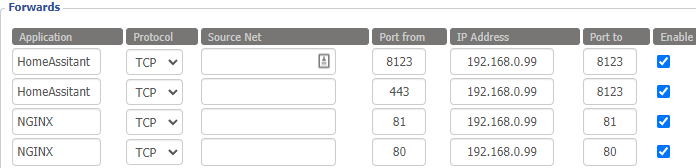
443 should e forwarded from the router to NGINX
edgy aurora
443 should e forwarded from the router to NGINX
when I do that it no longer works :X
ill send HA config and ngninx
 little turretBOT
Please use a code share site to share code or logs, for example:
- https://dpaste.org/ (select YAML for the language, and consider picking a longer expiry)
- http://pastie.org/ (select YAML for the language)
- https://paste.debian.net/ (you guessed it, select YAML as the language)
Please don't use Pastebin, since it can randomly add spaces to the main view. Please also don't share text as images since it makes it harder for people to help you. Remember that others may have colour blindness, impaired vision, etc.
midnight isle
is it safe to share dns subdomain or should I avoid that?
edgy aurora
Mask if you want
midnight isle
HA config:
https://dpaste.org/ycs1d
little turretBOT

HTTP
Offers a web framework to serve files.
Quality scale
IoT Class
Integration type
Documentation
Source
Issues
midnight isle
new HA
router now setup to forward 8123, 443, 81, 80 to machine running docker and rebooted router just in case
edgy aurora
Remove 8123
Also remove 80 and 81 unless you need them fo something else
homeassistant:
  internal_url: https://192.168.0.99:8123
``` that URL isn't validYour http section should be:
http:
  use_x_forwarded_for: true        # How to extract client IP address
  trusted_proxies:                 # Permit connections from reverse proxy
    - 192.168.0.42/32              # IP of the proxy, as seen by HA
Don't use 0.0.0.0/0 - wherever you got that from was full of shit
midnight isle
edgy aurora
Don't use `0.0.0.0/0` - wherever you got that from was full of shit
they said its a test method that allows all IPs :X
how do I figure out the ip of the reverse proxy?
Its on the same machine in docker on a different network.
edgy aurora
That's not ports
FFS
Easy way to work it out, set it to 127.0.0.1/32 to test, and then watch HA's log file for errors
midnight isle
IPs* nmy bad
edgy aurora
Sure, that's true, it's also a fucking terrible idea
Seriously, anything that person wrote shoud be ignored in favour of learning to juggle with running chainsaws
midnight isle
edgy aurora
```yaml
homeassistant:
internal_url: https://192.168.0.99:8123
``` that URL is...
and what should the internal url be?
edgy aurora
midnight isle
and what should the internal url be?
http://192.168.0.99:8123
HTTPS with an IP isn't ever going to work
HTTPS HAS TO BE used with the name in the SSL cert
midnight isle
edgy aurora
Now, when you restart HA you'll be able to access it with the internal URL
Try https://prazska.duckdns.org and see what errors you get in HA's log
midnight isle
Internally it works.
externally I get a spam of this in the portainer log:
https://dpaste.org/eoUL4
in browser:
502 Bad Gateway
nginx/1.25.3
edgy aurora
Bad gateway is expected
A request from a reverse proxy was received from 172.17.0.2, but your HTTP integration is not set-up for reverse proxies
That kind of message is what you're looking for
Or
Received X-Forwarded-For header from an untrusted proxy 172.20.1.10
midnight isle
home-assistant.log
https://dpaste.org/tHwhD
edgy aurora
Have you tried accessing your HTTPS URL during that time?
edgy aurora
midnight isle
router now setup to forward 8123, 443, 81, 80 to machine running docker and rebo...
Wait
proxy_pass http://127.0.0.1:8123;
WTF
127.0.0.1 isn't going to work here
Use the host IP
127.0.0.1 (and localhost) doesn't work the same inside Docker as it does on a bare metal install
midnight isle
proxy_pass http://192.168.0.99:8123;
and restarted ngninx container
400: Bad Request
2023-12-14 14:43:06.510 ERROR (MainThread) [homeassistant.components.http.forwarded] Received X-Forwarded-For header from an untrusted proxy 192.168.208.3
edgy aurora
There you go
midnight isle
so I want to put that into the trusted proxy?
edgy aurora
Yes
midnight isle
and no /32 at the end?
midnight isle
sweet, that works now, and it works with local dns entry too
are there any directions you could point me in to set this up?
use nginx to terminate SSL and proxy the request to the container in cleartext
Issue: I cant access Z2M trough HA iframe (requires https)
are there any not too difficult solutions?
Thank you so much for your valuable help also!
edgy aurora
Well, basically do the same again but for Z2M
You'll need to set a password for the frontend though
Ah, you'd need to do that in NGINX, not Z2M
The Z2M docs touch on all that, but don't do it step by step
midnight isle
I don't need Z2M publicly available, just accessible through HA.
same thing applies to ESPHome, as it lets you flash device from current machine
edgy aurora
Well, then just use the internal URL to access HA
Then when you're at home those iframes will work
midnight isle
Ill have a look into it in a bit, again thank you so much for your help