#I need a little help troubleshooting
1 messages · Page 1 of 1 (latest)
 flint sorrel
zwave-js-ui: 8.4.1
zwave-js: 10.3.0
home id: 4073261589
home hex: 0xf2c90a15
HA Core log:
Logger: homeassistant.config_entries
Source: config_entries.py:395
First occurred: 8:56:26 PM (1 occurrences)
Last logged: 8:56:26 PM
Config entry 'Z-Wave JS' for zwave_js integration not ready yet: None; Retrying in background
 fervent gust
are ha and zwavejs ui in containers?
flint sorrel
I'm sorry idk what that means. How do I know?
fervent gust
are you using home assistant os
flint sorrel
I installed them the "normal" way, didn't do anything crazy
Yes, HA OS, on HA Blue hardware
flint sorrel
HA Core 2022.11.3
OS 9.3
fervent gust
did you try to reload the zwave js integration
 fathom anchor
Or, try restarting HA
flint sorrel
yeah did that too
on the integrations page, zwavejs has a ! on it, and "Retrying setup: None"
fathom anchor
Do you have the add-on installed along with the UI?
flint sorrel
I also tried unplugging the USB stick and reseating it, then restarted HA. Still no good
fathom anchor
I'm out of my experience here, but only one thing can talk to zw at a time
flint sorrel
in addons I have Z-wave JS and Z-wave JS UI
I followed the directions to switch from base zwavejs to zwavejs_mqtt
a few months ago, and it's all been fine til today
I have no idea why it all broke today
fervent gust
you can only use one
flint sorrel
should I try disabling zwaveJS addon?
fervent gust
yes
flint sorrel
turn off "start on boot" ?
or "uninstall" ?
fervent gust
just stop it for now
flint sorrel
toggled off "start on boot" and I'm restarting HA
HA came back up, and all my zwave devices are still unavailable
I can still see them in zwavejs ui, can still ping/operate them in there
fervent gust
and the zwavejs add on isn't running?
fervent gust
you can click on it
flint sorrel
click on it in the left menu pane and open the Control Panel?
or click on it in addons page?
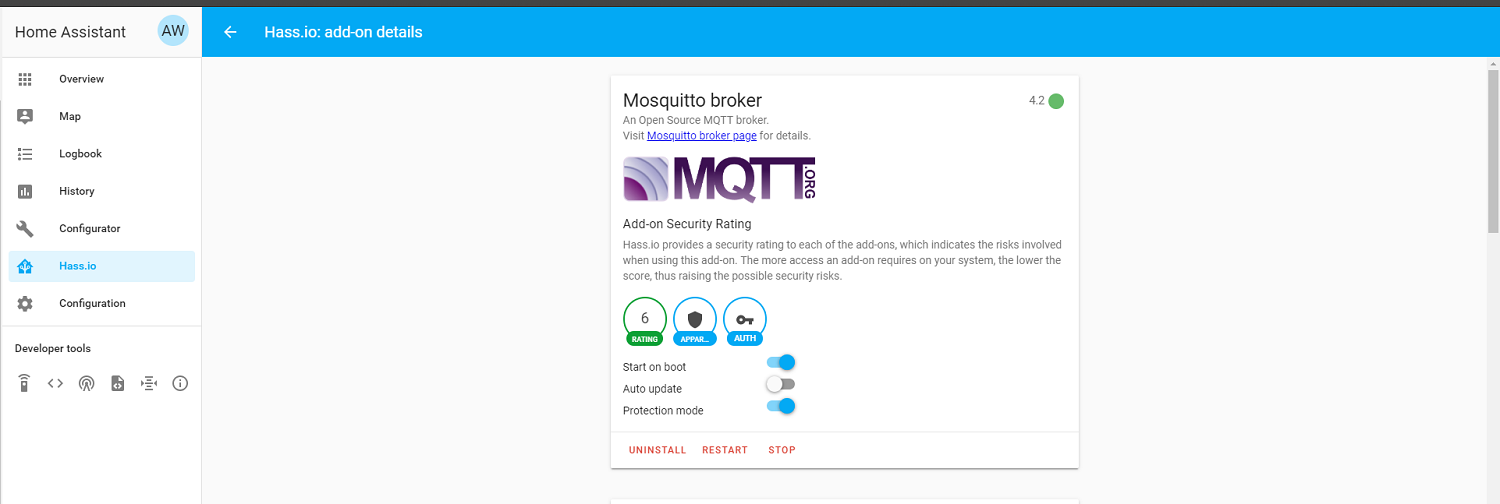
if I click on it in addons page, it opens the config options, including "start on boot" and "watchdog" etc. All those are off.
Below that there's a "Start" hyperlink, and "Uninstall'
 flint sorrel
yeah that's what I described just above, but I don't see a Stop button/link
fervent gust
if it has the start button, it's probably not running
flint sorrel
agree
fervent gust
what is the server url for the zwavejs add on
fathom anchor
I have the zwave JS integration installed, and zwave-js-ui and HA running in docker. I don't do add-ons so I'm not likely much help
fervent gust
that's how I do it
flint sorrel
where is the url Fred3?
fervent gust
click on configure on the zwavejs integration
fathom anchor
Search on this forum. There have been a number of multi-addon discussions and solutions
flint sorrel
on the addon > Config I see all the Auth keys, and the Device/port info, but not the URL
fathom anchor
addon or integration? They're different
flint sorrel
in the Integration > Configure, I can't see anything. It shows an (error?) screen, "big red Bang, and "ZwaveJS: Retrying setup" and "None" and a "back" link.
fervent gust
is there a button to re-configure server
flint sorrel
in the integration? no, I can't see anything on the COnfig page except what i just decribed
described
fervent gust
you can remove the integration and set it up again
these are the instructions
starting at Now it is time to set up Home Assistant:
flint sorrel
OK
It'll cause a bunch of work... (have to reconfigure devices etc, right?)
Is there anything else to check first? Could it be a hardwrare issue?
(I think not, since the stick is still clearly communicating with the UI...)
fervent gust
it will remake your entities
flint sorrel
ok I'll give it a shot. thanks
fathom anchor
Do you have names and locations defined in zwave-js-ui?
fervent gust
the url was wrong somehow
I found out you can't change the url if it is disconnected from the server when I renamed my container after the name change
flint sorrel
I can't fathom how that would have happened. I sure didn't touch it
Well, THANK YOU!
(creating bakup now)
fathom anchor
Again, you only want one addon
flint sorrel
want to help me understand that?
all i did to fix it was uninstall and reinstall the integration....
I don't think zwavejs was ever running. I never "stopped" it
fervent gust
the integration is just what connects ha core to the zwavejs server
the part that talks to the zwave usb stick
you have 2 of those installed, but only need one
flint sorrel
F3 did you mean addon?
B/c in Integrations, I only have one thing: Zwave JS
In addons I have 2 things
fervent gust
yes 2 addons
flint sorrel
so should I uninstall the zwaejs addon?
fervent gust
you can only use one because there's one zwave stick
as long as everything is working, yes
flint sorrel
we said we think it wasn't running
So... is this right?
An Addon is a separate executable running on HA? The ZwaveJS addon is one, the ZwaveJS UI is another one. That app is what communicates to the USB stick.
Then the Integration lets HA send commands to the Addon.
fervent gust
yes
flint sorrel
yeah I see it in the definitions now. So helpful.
So, clearly I don't need to have zwaveJS addon installed at all, if zwaveUI is installed.
gonna try uninstalling it
nope. Now all my zwave devices went offline again
fervent gust
so in zwave js ui, the devices are offline?
flint sorrel
no in the zjUI, they're fine
but HA is showing most of them as Unavailable
(not all tho)
mm, I think this might be some other problem.
I can bring the up in Devices, but they're missing/unavail in Lovelace.
I can debug that tomorrow.
enough for tonight!
Thanks again! You guys were very patient and kind.
fathom anchor
Check your device naming. That could have gotten scrambled if the HA names don't match the zwave-js-ui names
flint sorrel
yeah it's more than that.
In LL I have a card that says "show all entities in domain "light" that are available or unavailable" and a bunch of them don't appear at all.
etc
but I can debug
I suspect I may have unknowingly done renaming/reconfiguring of devices with both addons running, something like that. I may need to re-do their names/domains/configs/etc.
I have some "switch" devices that I told HA to treat as "lights", and stuff like that. Suspect that's at play her.e
Yep. I see it now.
My Switch devices have reverted to switch domain, so I need to re-config them as lights, then this stuff will work again.
 vapid tulip
Sounds like it's too late, but you didn't need to uninstall the integration. https://www.home-assistant.io/integrations/zwave_js/#how-do-i-switch-between-the-official-z-wave-js-add-on-and-the-z-wave-js-ui-add-on
flint sorrel
🙂 no worries, if I don't need it, why not clean up.
 unborn shell
fervent gust
I found out you can't change the url if it is disconnected from the server when ...
unborn shell
fervent gust
I found out you can't change the url if it is disconnected from the server when ...
You should be able to add it again without removing it, and reconfigure it.