#templates-archived
1 messages · Page 162 of 1
 inner mesa
inner mesa
inner mesa
no, but you can have 2 and make a template sensor that adds them and compares them to whatever value you want
a template binary_sensor
 pine kestrel
ok
 orchid oxide
not sure if template, but if i want to use hass.user do i need to write a python script, i dont really understand how the python script integration works
 lyric crown
is there any benefit to using is_state_attr() over just state_attr()
 marble jackal
They have different use cases. The first returns the state, the second true or false
lyric crown
and if its a bool anyway? i guess it doesnt matter then
marble jackal
state_attr(x, y) == z is the same as is_state_attr(x, y, z)
If the attribute is a boolean, state_attr will do just fine
lyric crown
cool just wondered if there was any reason I should be using one or the other, good to know
 mighty ledge
orchid oxide
not sure if template, but if i want to use hass.user do i need to write a python...
mighty ledge
orchid oxide
not sure if template, but if i want to use hass.user do i need to write a python...
hass.user is only in the frontend, how about explaining what you want to do instead
mighty ledge
lyric crown
cool just wondered if there was any reason I should be using one or the other, g...
there's a drawback to using is_state_attr and is_state when looking for missing attributes or unavailable states
if you aren't doing that, there's almost no difference
lyric crown
How do they behave different?
mighty ledge
lyric crown
How do they behave different?
it's a series of if checks, checking the type and value
that's not done with ==
 floral shuttle
having this template: {{device_entities(device_id('switch.[[id]]'))}} in a decluttering template listing all entities for a given 'id' device. eg [ "sensor.front_room_device_power", "sensor.front_room_device_energy", "switch.front_room", "sensor.front_room_node_status", "sensor.front_room_actueel", "sensor.front_room_totaal", "button.front_room_ping" ] How can I exclude the entities containing the string 'device'?
orchid oxide
mighty ledge
hass.user is only in the frontend, how about explaining what you want to do inst...
Want to show a list of users on the frontend with the current logged in user always showing first
floral shuttle
wait: |reject('search','device')|list duh, made a type before. nvm me.
mighty ledge
orchid oxide
Want to show a list of users on the frontend with the current logged in user alw...
That’s not possible. The backend has no concept of who is logged in, and single users can be logged in on multiple clients
Not to mention, the mobile apps are technically always logged in.
 barren jungle
This is a bit weird question, but what is the difference between unavailable and unknown state?
From HA design perspective... since I already encountered that there are inconsistencies and they are returned interchangeably sometimes (e.g. lovelace vs backend) for the same entities.
mighty ledge
barren jungle
This is a bit weird question, but what is the difference between `unavailable` a...
unavailable is when the entity stops responding due to an error that HA knows about. unknown is when HA does not know the state of the device but the device is still responsive
lost connection to device -> unavailable
state is old due to settings on the device and the device hasn't updated the state in a while -> unknown
just restarted ha and the state has not been told to HA from the device -> unknown
error in the syntax in a template sensor -> unavailable
there's many other reasons, just know that unknown means your device is good, but didn't tell HA that it has a state
unavailable is bad, something is wrong with your device
 vague ice
Can somebody help me please with this.
service: notify.twilio_app data: target: > {% set var = states('input_text.notify_numbers') %} {% set list = var.split(',') %} {% for i in list %} {{ i }} {% endfor %} message: Testing a message.
 grim flicker
i have a template sensor that worked until i updated today to the latest core beta version. I cant seem to find what the problem is.... When i test the template in the dev tools it works and gives me a float number. But in the template sensor it fails to render. anyone any thoughts? https://www.toptal.com/developers/hastebin/esujulogim.bash
vague ice
Anybody know if its possible to set target like that
barren jungle
mighty ledge
unavailable is bad, something is wrong with your device
Thanks
mighty ledge
vague ice
Can somebody help me please with this.
`service: notify.twilio_app
data:
targ...
target: >
  {{ states('input_text.notify_numbers').split(',') }}
you aren't providing a default for float and that should be appearing in your logs on restart
vague ice
mighty ledge
```
target: >
{{ states('input_text.notify_numbers').split(',') }}
```
❤️ thank you so much 🙂
grim flicker
changing this line {% set waarde = states('sensor.wasmachine_smartplug_totaal_verbruik')|float(default=0) %} doesnt seem to fix it
grim flicker
Template loop detected while processing event: <Event state_changed[L]: entity_id=sensor.zolder_wasmachine_smartplug_stroomverbruik_filter, old_state=<state sensor.zolder_wasmachine_smartplug_stroomverbruik_filter=282.67; unit_of_measurement=kWh, icon=mdi:flash, friendly_name=Wasmachine stroomverbruik, device_class=energy, state_class=total_increasing @ 2022-05-26T16:57:57.591129+02:00>, new_state=<state sensor.zolder_wasmachine_smartplug_stroomverbruik_filter=unavailable; unit_of_measurement=kWh, icon=mdi:flash, friendly_name=Wasmachine stroomverbruik, device_class=energy, state_class=total_increasing @ 2022-05-26T16:57:57.607555+02:00>>, skipping template render for Template[{% set waarde_geenfloat = states('sensor.wasmachine_smartplug_totaal_verbruik') %} {% set waarde = states('sensor.wasmachine_smartplug_totaal_verbruik')|float %} {% set huidige_waarde = states('sensor.zolder_wasmachine_smartplug_stroomverbruik_filter') %} {% if (huidige_waarde == 'unavailable') %} {% set huidige_waarde = waarde %} {% endif %} {% set radius = 0.5 %} {% set minus_radius = - 0.5 %} {% set verschil = huidige_waarde - waarde %} {% if (huidige_waarde == 0) %} {% if (waarde_geenfloat == 'unavailable' or waarde_geenfloat == 'unknown') %} {% elif (waarde > 0) %} {{ waarde }} {% endif %} {% elif (huidige_waarde != 0 and verschil > radius) %} {{huidige_waarde}} {% elif (huidige_waarde != 0 and verschil < minus_radius) %} {{huidige_waarde}} {% elif (huidige_waarde != 0 and verschil < radius and verschil > minus_radius) %} {{ waarde }} {% endif %}]
oh damn sorry
this is long
mighty ledge
are you referencing itself?
mighty ledge
you need to replace self references with this instead of grabbing the state, self references aren't safe and cause runaway template calculations
grim flicker
and can you confirm that the latest version of core now stops rendering these templates
because they always worked
mighty ledge
I cannot confirm that
I don't use self references
if it's an error, it won't work. If it's a warning it will work.
grim flicker
i hate core updates... they always seem to break more things then the fix 😅
mighty ledge
anyways, if you replace the self references with this, then you'll be fine.
well what you don't realize is that you were over taxing your CPU because of this template
because a self referencing template will update itself on every state change, in a endless loop
hence the error message saying "we detected an endless loop"
grim flicker
CPU load of HA is 1 - 3 % on my NUC. but i will see if i can fix these thanks for pointing me in the right direction
mighty ledge
right, but surprise surprise, more than just you use this software and they don't have great hardware
grim flicker
true. i only hope its really the code and not an error in the beta core update...
mighty ledge
does it say error or warning?
grim flicker
warning
mighty ledge
you only pasted the result, not the full error
then it'll still work
a warning is a warning
an error will fail to render
grim flicker
also errors TemplateError('ValueError: Template error: float got invalid input 'unknown' when rendering template
mighty ledge
right, that's the float not having a default
grim flicker
the strange thing it says unknown but in dev tools its just rendering fine
mighty ledge
because, on startup the value of your sensor is unknown and your |float does not have a default
if you supply a default to the float, it will remove that error on startup
You only have 1 float in your template, so it's a easy fix
mighty ledge
That is an error and that will block the template from updating. No, you just need to reload templates
grim flicker
before taking more of your time im gonna look some more into this. i did add default 0 but it didnt fix it. if it doesnt work i will ask again
mighty ledge
then you were looking at a past error
reloading does not wipe previous errors
always inspect the timestamp of your errors
marble jackal
Or clear logs and try again :)
grim flicker
the default isnt needed. when i shorten the template to
{% set waarde = states('sensor.wasmachine_smartplug_totaal_verbruik')|float %}
{{ waarde }}
it works just fine. i really dont understand why my long template all of a sudden stopped working
mighty ledge
that will only work on reload, restart will produce that float error
i don't know how else to tell you
reload = reloads just template, everythign else still has a state
restart = nothing has states = ERROR with float
grim flicker
yeah i know. but 10 seconds later when the sensor fires again eveything has a state and it works again
 vast laurel
Hi everyone! What's the best way to get the reason an alarm was triggered from a template? I'm trying to do this, but I just get None: https://paste.debian.net/1242124/
inner mesa
Does that attribute exist in  -> States?
marble jackal
And why are those conditions there?
vast laurel
marble jackal
And why are those conditions there?
haha the conditions are for some actions after that that I omitted for simplicity. Please ignore those.
vast laurel
inner mesa
Does that attribute exist in <:devtools:619094051878207520> -> States?
it does exist, but the value is null in states. So that explains the None. What's the best way to store the object that led to an alarm trigger?
inner mesa
I'm sure that depends on the alarm integration you're using. My attribute is also 'changed_by' and not 'changedby'
vast laurel
inner mesa
I'm sure that depends on the alarm integration you're using. My attribute is als...
ah you're right - it is 'changed_by'. But that still gives a result of None. I'm using a manual alarm - like this: https://paste.debian.net/1242128/
inner mesa
it looks like it's set to None in the base class, and there's nothing to update it in the manual alarm integration: https://github.com/home-assistant/core/blob/33784446f63b7396c88601f48b2f11685d63f13b/homeassistant/components/alarm_control_panel/__init__.py#L131
the manual alarm integration is pretty simple
vast laurel
ahh ok that explains a lot. So I'd have to store a variable when I run an automation to trigger it, and then use that variable in a template notification?
inner mesa
If you know the information you want when you trigger the alarm, then yes, you would need to make that available in the notification.
there are many ways to do that
 slate parcel
Trying to figure out how to create a binary sensor called "Do Not Disturb" that set's it's state to "on" when two other input_booleans are set to true (on). So essentially, if one of the two input_booleans is set to false (off), then the "Do Not Disturb" binary sensor's state is "off". If both are set to true, then DND binary sensor is set to "on".
Would the right approach be to create a Bayesian sensor with both input_booleans added, or a template sensor with logic that specifies if input_boolean #1 = true and input_boolean #2 = true, then set state of template sensor to 'true'?
Essentially what I'm trying to do is have 2 input_booleans (toggles) that I can enable/disable TTS notifications in my home and also enable/disable mobile notifications on my phone.
In some of my automations, I want a singular way to "silence" both.
I couldn't figure out how to create a group with both input booleans.
marble jackal
{{ is_state('input_boolean.one', 'on') and is_state('input_booleon.two', 'on') }}
slate parcel
marble jackal
`{{ is_state('input_boolean.one', 'on') and is_state('input_booleon.two', 'on') ...
So you'd suggest creating a template binary sensor?
marble jackal
There was a comma missing, but yes, If you add that as the state template on a template binary_sensor, you will get a binary_sensor which is only on when those two input_booleans are on
slate parcel
Sweet!
Definitely seems a little more straight-forward than going the Bayesian route.
Appreciate it @marble jackal
marble jackal
np
slate parcel
I need to add that logic via YAML to my configuration.yaml file, right?
so...
template:
  - binary_sensor:
    etc...
you are totally mixing things up here, as there is no platfrom: binary_sensor under template
slate parcel
Sorry, I edited.
marble jackal
And you don't need a trigger, the template will rendered on every state change of the input_booleans
slate parcel
Is that the correct approach?
marble jackal
that looks better
slate parcel
Sorry!! 😅
I knew something didn't look right when I started typing it out.
Is there any harm in separating that template out from my main configuration.yaml file with something like: template: !include template.yaml ?
Tried it and we're good! 🙂
Thanks again!
Only thing I cannot figure out still is whether it is possible to change the template binary sensor's entity_id?
I presume that the binary sensor I've defined below has it's entity_id generated by HA, which I'm guessing would be binary_sensor.do_not_disturb_dnd
- binary_sensor:
    - name: "Do Not Disturb (DND)"
      icon: "mdi:bell-sleep-outline"
      state: >
        {{ is_state('input_boolean.dnd_announcements', 'on') and is_state('input_boolean.dnd_notifications', 'on') }}
Is there a way I can override/customize the binary sensor's entity_id? I know with past things, sometimes you have to specify a unique_id, but is this a legacy variable? Does HA now handle auto-generating a unique_id so that I can rename this sensor via the UI?
When viewing the entity in the UI, all I see is: "This entity ('binary_sensor.do_not_disturb_dnd') does not have a unique ID, therefore its settings cannot be managed from the UI. See the documentation for more detail."
marble jackal
just add a unique_id in your code and you will be able to change it in the GUI
slate parcel
How do I generate a unique_id?
marble jackal
- binary_sensor:
    - name: "Do Not Disturb (DND)"
      unique_id: something_unique
      icon: "mdi:bell-sleep-outline"
      state: >
        {{ is_state('input_boolean.dnd_announcements', 'on') and is_state('input_boolean.dnd_notifications', 'on') }}
Perfect. Thanks!
Also, newb question, but how did you color-format your code block?
marble jackal
add yaml after the 3 backticks (without space)
slate parcel
marble jackal
add `yaml` after the 3 backticks (without space)
Noice! I'll have to do that when I'm asking questions or helping others in the future. Definitely easier on the eyes.
marble jackal
This discord also has a validation check built in for yaml code (hence the green checkmark added by the bot)
inner mesa
whales eat petunias
*land whales
 low blaze
is it possible to reference the service in my node red flows for my mobile notifications in a way that I can update my device name in one place later on down the line?
inner mesa
 storm brook
I am failing miserably. does anybody know if there is any way to enumerate/browse the playlists on a media player source?
inner mesa
are they available as an attribute?
storm brook
@inner mesa not that I can find
Basically I am trying to create an automation to play a random playlist from my spotify
inner mesa
Templates only work with what you already have
storm brook
the default media browser is capable to browse and list all my playlists in even in the love lace UI
but I can't seem to be able to access such list neither trhough the service or device it the states or anything I have tried
 mental moat
Is there a way to get a list of the devices for a person entity in a template?
 tidal heart
I have a restfull sensor to pick petrol price and right now I have one sensor for every station I want to follow. Is there someway I can do one sensor that combines my stations and gives me a avg of them? I want to select all prices where name contains `circle_k' and '95'
 rose scroll
tidal heart
I have a restfull sensor to pick petrol price and right now I have one sensor fo...
rose scroll
tidal heart
I have a restfull sensor to pick petrol price and right now I have one sensor fo...
You can do a restful sensor that selects the relevant values out of the JSON for each station then averages the values. The value_template you specify for the restful sensor can include math operations.
tidal heart
rose scroll
You can do a restful sensor that selects the relevant values out of the JSON for...
Yeah, it's just that I don't know how to select them all. My sensors looks like this now {{ value_json.skanelan_Circle_K_HelsingborgGarnisonsgatan_2__95 | float('unavailable') }}
 marble birch
I would like to toggle my Zigbee lock (Danalock V3), like it’s possible to do with for example light. So I read that I could create a template switch that calls lock and unlock based on the switch state.
But unfortunately I don’t understand how to do that. I read the info site at Home Assistant site but didn’t help me. So can someone help me with an example how it could look like to create a template switch to my lock (entity I’d: lock.danalock_v3) so that I can toggle.
rose scroll
You'd need a way to filter out all the JSON pairs where the key contains "Circle_K" and "95" right? The following is kind of hacky but does work...
{% set json_output = 'skanelan_Ingo_AstorpOrmastorpsgatan_49__etanol": "18.27","skanelan_Circle_K_YstadKristianstadsvagen_33__etanol": "18.52","skanelan_Circle_K_YstadGranatvagen_4__etanol": "18.52","skanelan_OKQ8_YstadKristianstadsvagen_38__etanol": "18.52"' %}
{% set ns = namespace(total_price = 0, total_stations = 0) %}
{% for price in json_output.split(',') %}
  {% if 'Circle_K' in price %}
    {% set ns.total_price = ns.total_price + price.split(':')[1][2:-1] | float %}
    {% set ns.total_stations = ns.total_stations + 1 %}
  {% endif %}
{% endfor %}
{{ ns.total_price / ns.total_stations }}
Just using a subset of your JSON outputs for testing. But the idea is to interpret it as a string and use string manipulations to extract the correct key-value pair and then the value from that pair.
You can easily add another check if '95' in price.
tidal heart
Hmm alright! I think I'm with you! I'll try it out and see if it works out 🙂 Thanks!
It would be so much easier if the name of the station was not an attribute itself
tidal heart
rose scroll
You'd need a way to filter out all the JSON pairs where the key contains "Circle...
To do that I need to pull all the information from the api right? And I'm limited to 255 char :/
rose scroll
Oh that result is not the full list of prices?
tidal heart
rose scroll
Oh that result is not the full list of prices?
Here's what I'm pulling from https://www.henrikhjelm.se/api/getdata.php?lan=skane-lan
Unfortunately it's not sorted by city or kind of petrol
It lists the whole county
I guess I need to find a way to only pull the ones that contains "circle_k" and "95"
rose scroll
Hmm does it look like there's a way to customise a query to submit to the API?
tidal heart
Only on county it seems. That is what lan=skane-lan is
I'll reach out to the guy maintaining the API and ask 👍 Thank you for trying to help me 🙂
 silent vector
Any reason this would not work?
I am testing it and setting a sensor state to alive and then dead and it's saying its false on the trace.
- condition: template
    value_template: '{{ trigger.event.data.new_state.domain == "sensor" }}'
  - condition: template
    value_template: '{{ trigger.event.data.new_state.state == "dead" }}'
Well the indentation is completely off
 wanton jasper
Can I get some help creating a template sensor that uses the "new" value from my octoprint mqtt plugin? https://imgur.com/a/3iU2dww I want it to trigger when the "new" is +.3
{"new": 0.24, "old": 0.28, "_event": "ZChange", "_timestamp": 1653596726}
Or if easier what can I put in the payload field in my automation that it could trigger on?
rose scroll
https://www.home-assistant.io/integrations/sensor.mqtt/ seems to do what you want?
Just set the value_template to {{ value_json.new | float(0) >= 0.3 }}
wanton jasper
Ill try it
silent vector
marble jackal
Well the indentation is completely off
Not sure what happened when I copied/pasted. It's being accepted without issues of indentation saving it in the automation editor. So I'm pretty sure the indentation is fine but something is off with the second template.
- condition: template
    value_template: '{{ trigger.event.data.new_state.domain == "sensor" }}'
- condition: template
    value_template: '{{ trigger.event.data.new_state.state == "dead" }}'
What is your intent with the above 2 conditions? This is part of the automation actions section?
silent vector
It's a condition to filter for when a Z-Wave node becomes dead
It will go from alive to dead. Rather than checking 40 entity IDs state change from alive to dead I was trying to use a template that would check for that.
rose scroll
Mmm I don't use zwave, but when a zwave device becomes "dead" does the state of the entity actually literally show as "dead" in Dev Tools > States?
silent vector
Yep
There's a separate entity for that status
sensor.ac_switch_node_status for example
marble jackal
You should be able to put this in your trigger
rose scroll
Hmm...and you're saying that if you set the state of that sensor manually to "dead" in Dev Tools > States, the condition does not evaluate true?
silent vector
Nope
It says false
First condition passes but not the second
I manually set to alive waited a few seconds and set to dead
marble jackal
What is your current trigger?
silent vector
trigger:
  - platform: event
    event_type: state_changed
Please include the spaces before your dash as well, that will reduce the confusion about indentation
And this will probably trigger multiple times per second
silent vector
It will, the conditions would filter to stop that. Is there a better way? Is it possible it could overwhelm the automation engine because it will trigger so many times.
marble jackal
Include the event data in your trigger
silent vector
What do you mean by that?
rose scroll
Mmm so the idea is instead of triggering the automation on any state change then sifting through to find the state changes you want, just have it trigger only on the state changes you want.
Am I understanding correctly TheFes?
silent vector
Not sure what I would use there?
trigger:
  - platform: event
    event_type: state_changed
    event_data:
        state: dead
I am getting a error after setting this
Error loading /config/configuration.yaml: invalid key: "OrderedDict([('value_json.new | float(0) >= 0.3', None)])"
in "/config/sensors.yaml", line 385, column 0
- platform: mqtt name: "Layer" state_topic: "octoprint/event/ZChange" availability: value_template: {{ value_json.new | float(0) >= 0.3 }}
rose scroll
silent vector
Not sure what I would use there?
```
trigger:
- platform: event
event_ty...
new_state rather than state I would hazard...
vague ice
silent vector
Not sure what I would use there?
```
trigger:
- platform: event
event_ty...
Anything on Configuration -> Logs at the top
Might give you some insight if its erroring?
rose scroll
wanton jasper
I am getting a error after setting this
Error loading /config/configuration.yam...
Try this:
- platform: mqtt
  name: "Layer"
  state_topic: "octoprint/event/ZChange"
  value_template: "{{ value_json.new | float(0) >= 0.3 }}"
You could also try states('trigger.event.data.entity_id') == "dead" @silent vector
wanton jasper
rose scroll
Try this:
```
- platform: mqtt
name: "Layer"
state_topic: "octoprint/event/Z...
valid now, giving it a shot, thanks
silent vector
vague ice
You could also try states('trigger.event.data.entity_id') == "dead" <@8699806038...
Didn't work. result: false
vague ice
Thats strange
silent vector
condition:
  - condition: template
    value_template: '{{ trigger.event.data.new_state.domain == "sensor" }}'
  - condition: template
    value_template: states('trigger.event.data.entity_id') == "dead"
Wheres the {{ }}
value_template: {{ states('trigger.event.data.entity_id') == "dead" }}
vague ice
Rob, the visual editor/yaml editor always changes those on me for example this:
target: '{{ states("input_text.notify_numbers").split('','') }}'
the '' around the two inner things are two ' s
inner mesa
I'm saying that trigger.event.data.entity_id cannot be surrounded by quotes
wanton jasper
rose scroll
Try this:
```
- platform: mqtt
name: "Layer"
state_topic: "octoprint/event/Z...
So octoprint seems to want to throw a wrench into the plans, it throws a layer height of 50 right before printing. I have to have it as less than 50 and above .3 as the trigger. So can I just change to template or do I need to have another condition.
{"new": 0.28, "old": 50.0, "_event": "ZChange", "_timestamp": 1653666164}
{"new": 50.0, "old": null, "_event": "ZChange", "_timestamp": 1653597709}
silent vector
I removed those and it evaluated properly but clearly is triggering a lot
vague ice
inner mesa
I'm saying that trigger.event.data.entity_id cannot be surrounded by quotes
ahh I see
Yaml is annoying af tbh
 amber hull
I Have a template that calculates the difference between the average humidity and the current humidity. How often does a template calculate?
vague ice
Dan, should only trigger if you have a sensor domain that is updating frequently and its updating frequently to "dead" by those conditions..
the conditions are in the actual conditions slot and not an action set to condition right?
`alias: Automation
description: ''
trigger:
- platform: event
event_type: state_changed
condition: - condition: and
conditions:- condition: template
value_template: '{{ trigger.event.data.new_state.domain == "sensor" }}' - condition: template
value_template: '{{ states(trigger.event.data.entity_id) == "dead" }}'
action:
...`
- condition: template
rose scroll
wanton jasper
So octoprint seems to want to throw a wrench into the plans, it throws a layer h...
Just adjust the value_template to {{ value_json.new | float(0) > 0.3 and value_json.new | float(0) < 50 }}, exactly as you have written it out in your question.
silent vector
trigger:
  - platform: event
    event_type: state_changed
    event_data:
      new_state: dead
condition:
  - condition: template
    value_template: '{{ trigger.event.data.new_state.domain == "sensor" }}'
  - condition: template
    value_template: '{{ states(trigger.event.data.entity_id) == "dead" }}'
I tried with the event data and without. With the event data it stopped triggering all together. Without it, it triggered a lot.
rose scroll
wanton jasper
So octoprint seems to want to throw a wrench into the plans, it throws a layer h...
I would suggest to reduce the second threshold to something closer to 1...so your valid range for your sensor isn't so wide. Or even better, instead of checking if new is lower than X, check if old is not null. But I dunno how to handle that in json-land and Jinja-Fu, will need someone else to advise.
inner mesa
I suggest typing "state_changed" into the box in -> Events and actually reviewing the structure
you're trying random things, and it's deterministic based on that structure
wanton jasper
rose scroll
I would suggest to reduce the second threshold to something closer to 1...so you...
I believe it wont be null if I previously printed something. It was only null because the printer was off before I started the print.
inner mesa
this will never be true:
trigger:
  - platform: event
    event_type: state_changed
    event_data:
      new_state: dead
new_state is a dict
vague ice
inner mesa
I suggest typing "state_changed" into the box in <:devtools:619094051878207520> ...
This is really helpful tho lol.. I didnt even know that was a thing 🤦
damnn
silent vector
This is what I see as the structure
https://dpaste.org/WYk8Y
vague ice
silent vector
This is what I see as the structure
https://dpaste.org/WYk8Y
Looks like your drive way car updated a state from 2 to 3, if thats the entity you're trying to capture as dead or alive its not being set to dead or alive its being set to 2 or 3
To capture the data from the entity that you are trying to see if is dead/alive make it go dead/alive and it will output the data when you are listening to the state_changed event.
It'll help you figure out what is going wrong in your automation.
silent vector
No that's not the entity lol just an Example. That's a frigate entity
This is the right one https://dpaste.org/sUSTB
mighty ledge
rose scroll
Just adjust the value_template to `{{ value_json.new | float(0) > 0.3 and value_...
that's very verbose... {{ 0.3 < value_json | float(0) < 50 }}
mighty ledge
silent vector
```
trigger:
- platform: event
event_type: state_changed
event_data:
...
trigger:
- platform: event
  event_type: state_changed
  event_data:
    entity_id: sensor.ac_switch_node_status_2
The issue is i want this to work for all zwave entities.
I was using that one as a test because it's already dead.
It would be easy for sure if I wanted just one to specify them but I have 40 nodes.
silent vector
I see so just specify all 40 then?
mighty ledge
no, that won't work
this isn't like the other triggers. the event data has to match
silent vector
- platform: state
    entity_id:
      - sensor.ac_switch_node_status_2
      - sensor.aerq_temperature_and_humidity_sensor_v1_0_node_status_2
    from: alive
    to: dead
Won't work? Not pasting properly but you get the point.
silent vector
I see. I'll just add them manually like that ^
mighty ledge
what's this supposed to do? just check the state of the nodes?
use a template trigger
or a template sensor with a template trigger
or just a template sensor with a normal trigger
silent vector
It's supposed to check when a node dies. If any zwave node dies.
mighty ledge
@silent vector
template:
- sensor:
  - name: Dead Node Count
    state: "{{ expand(integration_entities('zwave_js')) | selectattr('object_id', 'search', 'node_status') | selectattr('state','eq','dead') | list | count }}"
    attributes:
      nodes: "{{ expand(integration_entities('zwave_js')) | selectattr('object_id', 'search', 'node_status') | selectattr('state','eq','dead') | map(attribute='entity_id') | list }}"
then your trigger will be
trigger:
- platform: state
  entity_id: sensor.dead_node_count
condition:
- platform: template
  value_template: "{{ states('sensor.dead_node_count') | int > 0 }}"
action:
... do crap ...
Lol "do crap" much cleaner than listing manually each entity id.
mighty ledge
and you can access the dead entity list with state_attr('sensor.dead_node_count', 'nodes') or if you're inside that last automation I posted trigger.to_state.attributes.nodes
silent vector
Perfect
marble jackal
silent vector
```
trigger:
- platform: event
event_type: state_changed
event_data:
...
trigger:
  - platform: event
    event_type: state_changed
    event_data:
      new_state:
        state: dead
        domain: sensor
That should work, but the template sensor petro suggests is also a good approach
silent vector
I'll save both then for future reference thank you.
inner mesa
marble jackal
```yaml
trigger:
- platform: event
event_type: state_changed
event_dat...
You have to be a little careful about specifying parts of the dict like that because my experience is that you need to match all dict fields if you go below the first level
mighty ledge
inner mesa
You have to be a little careful about specifying parts of the dict like that bec...
Yeah, it just matches the object, it does not recurse
Has to be exact too. So if there’s objects inside it that don’t serialize well, it will never match
 silent barnBOT
@slow vine posted a code wall, it is moved here --> https://hastebin.com/sufiyowuje
marble jackal
inner mesa
You have to be a little careful about specifying parts of the dict like that bec...
Ah okay, then petros approach is better
 slow vine
I'm using a template trigger for a binary sensor and it works fine.
I want to add a condition to the trigger but I can't find the right way to do it. I tried: code-wall https://hastebin.com/sufiyowuje
inner mesa
you can't put conditions in triggers
see this page about triggers, conditions, and actions: https://www.home-assistant.io/getting-started/automation/
slow vine
I realised, Is there a way to get what I'm trying to do a different way?
inner mesa
yes, with an actual condition in your automation
slow vine
I have it in the automation already, I dont want the binary sensor to change at all.
inner mesa
you can start by just moving the whole condition block left by like 4 spaces
I get that, but check out the documentation that describes how automations are structured
also, the "or" there isn't doing anything
slow vine
If I move it, it becomes:
template:
  - condition:
...```
I know thats not what I want.Also I read through the automations getting-started and I still don't see how (if) I can do what I want.
maybe with a templated condition in the binary_sensor template
inner mesa
there are no templates in your example, but it's pretty straightforward - triggers cause the automation to run, conditions decide whether to proceed to the action
but again, your logic doesn't really make sense. the "or" isn't doing anything there, so I don't know exactly what you want
unless you actually need a template, I suggest taking this to #automations-archived and see this for an example of how to build an automation with a condition: https://www.home-assistant.io/docs/automation/condition/
Ok, backing up a bit and now that I see more of the context, there is no way to specify a condition in a template sensor. I wish there was, and think it would be a great option.
for now, the best you can do is to add logic in your state: template that returns the current state of the sensor if don't want it to change
you can refer to that fairly easily with this.state: https://www.home-assistant.io/integrations/template/#template-variables
mental moat
just thought I'd try one more time (now that it's daytime) -- is there any way to enumerate the devices/device_trackers associated with a person/user within a template?
would love to be able to send notifications to a person rather than specific devices
inner mesa
this gives you the source of the current location: {{ state_attr('person.rob', 'source') }}
the device_tracker entity, that is
I don't see a way to get a list of device_tracker entities that contribute to the person state, though
mental moat
darn -- that definitely makes it hard to do the notification thing
I suppose I could just name the devices consistently and then enumerate them
@inner mesa do you know if it would be possible to get it from the hass object in a python script or something like that? Probably not a template question at that point, but could be a workaround
inner mesa
No idea
 green silo
Thx, for your help, how it has to look like with sensor value from mqtt ? i have tried different things, but it still won't work for me (i get the value string in one value without json format in MQTT explorer)
value_template: "{{ stateattr('sensor.heizung_außentemperatur', 'item7').sumstate.value.split(';')[6] == '1' }}"
marble jackal
Are special characters like the ringel-s allowed in entity ids?
green silo
Can anyone help me to receive the right sensor values from this mqtt value ? (0;0;0d;°C;50.0;-50.0;13.5) ```
- platform: mqtt
name: "Heizung Außentemperatur" #sensor.heizung_außentemperatur
icon: mdi:thermometer
state_topic: "ebusd/outside/temperature.outside"
value_template: "{{ stateattr('sensor.heizung_außentemperatur', 'item7').sumstate.value.split(';')[6] == '1' }}"
device_class: temperature
unit_of_measurement: "°C"
state_class: "measurement"````
 fossil venture
green silo
Can anyone help me to receive the right sensor values from this mqtt value ? (0;...
fossil venture
green silo
Can anyone help me to receive the right sensor values from this mqtt value ? (0;...
Which value is the "right" sensor value? Or do you mean the rightmost value, which is 0?
marble jackal
Well, then the entity_id in the templates above is faulty 😅
mighty ledge
@silent vector It looks like I have a PM from you but I have PMs blocked on discord because I get a ton of them. If you have a quick question, just ask here. If it's complicated, I recommend using the forums. Thanks!
silent vector
Yeah it's complicated it's about using rest commands and rest sensors to interact with an API that doesn't currently have an integration in ha. It's a public API though at least. When I get the device I'll post the question on the forums.
mighty ledge
if it's rest commands, there's no reason to make a custom integration
just use the rest sensor and rest command integrations
it's easy to set up, you just have to understand the responses
I recommend making a forum post. If the product you're buying definitely has rest endpoints for getting and setting, then it shouldn't take very long for an advanced person to set it up. There's plenty of people on the forums who can help, including myself.
silent vector
Yep they definitely have endpoints. I'll post when I get it next week.
mighty ledge
silent vector
Yep they definitely have endpoints. I'll post when I get it next week.
https://...
that looks pretty straight forward
you'll have to make a get devices call to figure out the id of your device
then after that you'll have a get device by id rest sensor that polls every ~30 seconds, and a rest command that sets your temperature
they have examples of everything you need in that post and on that website
that's probably one of the best API reference guides I've seen
silent vector
Yep I saw that about the Id. Definitely looks as if they made it easy to setup which will be helpful if I need help. I figured it was as it has all the details and is not as vague.
mighty ledge
So make a forum post when you get the device connected
follow the usage guide first
silent vector
Will do thank you and yep I will follow it first, I already have the token just waiting on the device to get the device id.
silent vector
Yep waiting on ups. Lol
green silo
fossil venture
Which value is the "right" sensor value? Or do you mean the rightmost value, wh...
i only need the last one "13.5"
mighty ledge
green silo
i only need the last one "13.5"
sensor.heizung_außentemperatur is an invalid entity_id
verify the actual entity_id
ß is a special character and not allowed
I would assume your entity_id is that phrase without the ß
sensor.heizung_auentemperatur
Also, it seems thats an MQTT setup
So you'd replace your entire stateattr('sensor.heizung_außentemperatur', 'item7') with value_json[6] or value_json.item7 anyways. This depends on what the json looks like
floral shuttle
having a dst sensor with: icon: > mdi:{{(now().timetuple().tm_isdst == 1)|iif('update','history')}} attributes: dst_active: > {{now().timetuple().tm_isdst == 1}} to which I like to add the this.attributes.dst_active variable for the icon (so I dont repeat the same template as on the attribute dst_active). However, guarding that for thisn is undefined, I find myself ending up with the else 'negative-1' ...
need something with {% if this is defined and this.attributes.dst_active is defined %} but still that does go to the {% else %} ..
 rotund hazel
I have a template sensor that is working, but get errors in log: TemplateError('ValueError: Template error: float got invalid input 'unknown' when rendering template '{{ (states('sensor.cas_scetkanja_danes') | float * 3600) | timestamp_custom('%-M minutes %-S seconds', false) }}' but no default was specified') while processing template 'Template("{{ (states('sensor.cas_scetkanja_danes') | float * 3600) | timestamp_custom('%-M minutes %-S seconds', false) }}")' for attribute '_attr_native_value' in entity 'sensor.oralb_cas_scetkanja_danes_minute'
marble jackal
You need to provide defaults for when the states of your source sensor are not available
Or add an availability template
rotund hazel
This is the sensor: template: - sensor: - name: "Oralb čas ščetkanja danes minute" state: "{{ (states('sensor.cas_scetkanja_danes') | float * 3600) | timestamp_custom('%-M minutes %-S seconds', false) }}" realy dont know waht to add, I am lost
      - name: "Oralb čas ščetkanja danes minute"
        state: "{{ (states('sensor.cas_scetkanja_danes') | float * 3600) | timestamp_custom('%-M minutes %-S seconds', false) }}"
availability: "{{ (states('sensor.cas_scetkanja_danes') | float * 3600) | timestamp_custom('%-M minutes %-S seconds', false) |int(-1) >= 0 }}"```get unknown sensor now
inner mesa
float got invalid input 'unknown' when rendering template
(states('sensor.cas_scetkanja_danes') | float * 3600)
 bleak wolf
i hope i'm in the right place... is there a way to tell a template binary_sensor to only update if the status of the state it's picking up is NOT unavailable? mine seem to be saying off instead.
        friendly_name: "M's Office Window"
        value_template: "{{ states('binary_sensor.bes05_contact') }}"
device_class: "window"```when bes05_contact is unavailable, 2l_window_open is off.
ideally, the state should reflect it exactly.
maybe i need to add availability_template and check if state of bes05 is unavailable?
inner mesa
You can use a trigger-based template with a state trigger and not_to: 'unavailable'
bleak wolf
hmm trigger-based template... like an automation to set the value?
bleak wolf
Thank you, i'll take a look
i can think of multiple uses to simplify my current set-up with this. thank you RobC 🙂
rotund hazel
inner mesa
`(states('sensor.cas_scetkanja_danes') | float * 3600)`
thanks, (default=0) added and is ok
marble jackal
rotund hazel
``` - sensor:
- name: "Oralb čas ščetkanja danes minute"
state: "...
That's not how an availability template should look.
availability: "{{ states('sensor.cas_scetkanja_danes') | is_number }}"
That would work, and would also remove the need for a default in your float filter, and avoid incorrect states of your template sensor because it calculated with the default of 0
rotund hazel
marble jackal
That's not how an availability template should look.
```yaml
availability: "{{...
thank you very much, will fix it now
 quartz lantern
Hi! I have a template that defines a binary sensor. It's state is a boolean expression involving a.o. states of some entities.
I'd expect this sensor to return either 'on' or 'off'.
However, when I look at the logging, I also see '' (empty), 'unknown' and 'unavailable'.
Are 'unknown' and 'unavailable' returned when one of the entities involved returns such a state?
If so, where does state '' (empty) come from?
marble jackal
.share your code
silent barnBOT
Please use a code share site to share code or logs, for example:
- https://dpaste.org/ (select YAML for the language)
- https://www.codepile.net/ (select YAML as the language)
- https://paste.debian.net/ (you guessed it, select YAML as the language)
Please don't use Pastebin, since it can randomly add spaces to the main view. Please also don't share text as images since it makes it harder for people to help you. Remember that others may have colour blindness, impaired vision, etc.
Command '.share' was invoked by: TheFes
marble jackal
Your template is a bit complicated, it could be done easier with today_at
{% set end = '23:15' if now.weekday() < 4 else '23:30' %}
{{ (today_at('12:00') < now() < today_at(end)) and state_attr('sun.sun', 'elevation') < 4) }}
But that doesn't explain the states
marble jackal
mighty ledge
unavailable is when the entity stops responding due to an error that HA knows ab...
Maybe the explanation of petro erlier this week helps
quartz lantern
Thanks. I have to take a good look at the today_at() since it has bitten me quite some times (it jumps to the next day at midnight).
I can imagine to get an 'unknown' or 'unavailable' when 'sun.sun' is not available (huh?).
Still puzzling is the empty state.
marble jackal
Since you are comparing now() to two times which do not span over two days, this cannot cause issues here
Something like {{ today_at('23:00') < now() < today_at('00:30') }} will never be true
quartz lantern
When I reload the templates, there's a log record written with empty state.
E.g., at 21:01:11 I did a YAML reload TEMPLATES and this caused the following entries to be written:
https://www.codepile.net/pile/BzMdAMjV
 pastel moon
Is there a way to get which area an entity belongs to? I tried expand, but that did not return the area
fossil venture
pastel moon
Is there a way to get which area an entity belongs to? I tried `expand`, but tha...
pastel moon
Perfect, should have guessed. Thanks @fossil venture
 plucky harbor
How does one get a sensor where 2 or more values are present (like update.home_assistant_core_update)
At the moment I split a json into bits with value_template: "{{ value_json.Variable }
 young jacinth
is using secrets like this not allowed?
    - platform: event
      id: "user"
      event_type: state_changed
      event_data:
        entity_id: light.wohnzimmer
      context:
        user_id: # The user ID of the Home Assistant user account for the person
          - !secret USER_ID_SAM
          - !secret USER_ID_TABLET
A few issues - you've formatted user_id as a list and it is not a list, and I don't know if you can specify only a single key in the context object
young jacinth
oh i actually want to have a list here i wanted to shorten the code sorry
i just edited the code
inner mesa
you can't just do that
it's matching fields in the event structure
you're projecting more intelligence on the event platform than it actually has
you would need to add that logic as a condition
young jacinth
mhhh okay,
lets try another way
i dont want to past the exact user id to this trigger in case the user id changes in the future
iam reusing this trigger for alot of template sensors
what would make the most sense here?
an input_select maybe?
young jacinth
at least if its not empty
inner mesa
so if the change was manually actuated in the dashboard
young jacinth
yes exactly
inner mesa
That would be easy in an automation with a state trigger and condition, but a little more complicated with a template sensor
what's the rest of the template sensor?
young jacinth
inner mesa
that's a lot to put into a single template sensor
to answer your initial question, no, you cannot do what you're trying to do there with user_id, and there isn't a simple way to do it with the rest of that template sensor
young jacinth
because only limited templates are allowed here?
inner mesa
because you have a bunch of triggers
all those triggers are interpreted as "or", so adding logic in the state of the template sensor will apply to all and wouldn't be equivalent to what you're trying to do
young jacinth
the template sensor should trigger if any user would change the state of the light
if i use the concrete user id the sensor works as expected
inner mesa
looking at it more closely, it's just all too complicated for what you really want
template:
    # Sensor to detect if Human set the cover
  - trigger:
    - platform: state
      entity_id:
        - binary_sensor.wz_shelly_25_switch1
        - binary_sensor.wz_shelly_25_switch2
        - cover.ku
     binary_sensor:
      - name: WZ Light set by user NOW
        unique_id: 5577aec9-90b2-431f-9206-53c70d45a3f6
        auto_off: '00:00:02'
        state: "{{ trigger.to_state.context.user_id is not none }}"
that's applying the same user_id logic to all entities, and I don't know if you really intended that, but it sounds like it would do what you want from your description above
young jacinth
inner mesa
that's applying the same `user_id` logic to all entities, and I don't know if yo...
i will try that later thanks alot
orchid oxide
I know i can use an automation to change a date time helper, but I'd rather use a template sensor if possible so. Is it possible to create a template sensor that outputs the date time of a specific state change?
Not super familiar with template sensors so I'm not sure where I'd start
inner mesa
template:
- trigger:
    platform: state
    entity_id: input_boolean.test1
    to: 'on'
  sensor:
    - name: state_changed
      state: "{{ now() }}"
 cunning nest
Hi, I have a template that combines my garage door switch with its sensor so its under one entity as a cover. The first garage I added works fine and the entity shows up and can be added to the dashboard but then I try to do the same thing with the second garage and it dosent show up in entities. I have it setup with configuration.yaml connected to cover.yaml with cover: !include cover.yaml and here is my config https://www.codepile.net/pile/k1jbgx1z in cover.yaml
I feel like im missing something but after research cant find anything wrong.
marble jackal
You are providing the same object id garage_door twice
On line 3 and line 23. Change the second one to to second_garage_door for example
And you can remove line 21 and 22
cunning nest
That worked. Thank you for all your wonderful help.
young jacinth
inner mesa
looking at it more closely, it's just all too complicated for what you really wa...
thanks alot this actually works
the reason why i do this is because i want to block my light automation if a user manually sets a light scene
without messing with the automation to much
inner mesa
After seeing lots of folks struggling with template sensors where they don't want the sensor to update in certain cases, I propose the following: https://community.home-assistant.io/t/add-condition-for-trigger-based-template-sensors/426123
young jacinth
i voted 👍
inner mesa
Please do comment if you feel I've missed an option or if you think it could be further improved
marble jackal
@final mauve I assume you only want those sensors which are on (open)
{{ expand('group.group_fenster_und_tueren') | selectattr('state', 'eq', 'on') | map(attribute='name') | join(', ') }}
That should do the trick
 final mauve
marble jackal
<@435857779681394720> I assume you only want those sensors which are `on` (open)...
final mauve
marble jackal
<@435857779681394720> I assume you only want those sensors which are `on` (open)...
awesome, it's working. thanks a lot. what's the 'eq' thing in the template for?
marble jackal
equal to
 lament edge
Hello everyone! I'm new to Home Assistant and was hoping someone could point me in the right direction. I've been messing around with templates, and was able to figure out how to get a timestamp of the last time an entity was changed. However, the timestamp I get is ahead by 4 hours. If I check the “Last Changed” timestamp in Developer Tools>States, I get the correct time stamp of my local time zone. I also tested getting the current time with the template editor and strangely that time displays correctly Any idea what time doing wrong? Could this be an issue with my HA settings? Any guidance would be greatly appreciated!
I have a screen shot but not sure how to share it here (super newbie)
marble jackal
Probably the timestamp is in UTC time
the frontend changes this to your local time, but all timestamps are stored in UTC in the database
What is the template you now use?
lament edge
I see! I was using
{{as_timestamp(states.switch.basking_light_outlet.last_changed) }}
and switched it to
{{as_local(states.switch.basking_light_outlet.last_changed) }}
Now I’m getting the right output
 edgy isle
Hi,
I get an error 'dict object' has no attribute 'to_state'
https://www.toptal.com/developers/hastebin/ohodaboquy
Can you please hint me towards, what is wrong?
marble jackal
edgy isle
Hi,
I get an error 'dict object' has no attribute 'to_state'
https://www.top...
Did you trigger your automation manually by pressing the Run Actions button?
edgy isle
yes. but running it manually works in the non-templated version: https://dpaste.org/TOPJ0
it has all the vars and values in show trace > Step details -> changed vars
marble jackal
Yes, sure.
But if you press the Run Actions button, there is no trigger, hence no trigger object, hence no new_state
Look at it this way, you have 2 entities listed in your trigger, how should the system know which object_id it should take?
edgy isle
hmm right. The button only runs the actions, without a trigger. So I have to wait, every hour to test it.
Can you please tell me if the syntax looks good?
silent barnBOT
To test an automation there's three stages you can follow. Testing the action, the condition and action, and the whole automation:
- Use Configuration -> Automations to find the automation and then push Run Actions. If this fails your problem is in the
action:section, and details should be found in your log file - Use Developer tools -> Services and call
automation.triggeron the automation withskip_condition: false. If the first passes but this fails then the problem is in yourcondition:block - Use Developer tools -> States to find the trigger entity, click the name, then change the state (at the top) to something that'll trigger the automation before pushing Set State. If this fails then the problem is with your
trigger:section, or the automation is turned off (you can check that in Developer tools -> States).
You can also see this section in the docs and with HA 2021.4 onwards debug automations.
Command '.test' was invoked by: TheFes
edgy isle
editing the state is nice - thx (I have too many quotes)
marble jackal
You can always make a simple test automation:
trigger:
  - platform: state
    entity_id: input_boolean.test
action:
  - service: persistent_notification.create
    data:
      message: "{{ trigger.to_state.object_id }} changed to {{ trigger.to_state.state }}"
thanks a lot. if anyone is interested, this is my working action now:
topic_template: solar/forecast/{{trigger.to_state.object_id}}
payload_template: '{{ trigger.to_state.state }}'``` dark summit
hey there
i am strugging with template sensor
working on a "Last seen car" info to show on my dashboard. got license plate reading working but can't figure out how to get only the license plate number from state
silent barnBOT
@dark summit posted a code wall, it is moved here --> https://hastebin.com/memasicuso
marble jackal
dark summit
trying to put only the plate value from this
Are these the attributes of your sensor?
dark summit
yes they are
marble jackal
{{ state_attr('sensor.your_sensor', 'vehicles') | map(attribute='plate') | join(', ') }} will give you a comma separated string with the license plates of the vehicles which were recognized
 karmic prism
is there a method to get the last item in an array in a template
 dreamy sinew
|last
 sand crown
Hey Everyone, I am learning about templates for automation conditions any help would be greatly appreciated. When I run the Jinja2 string in the Developer Tools template editor the correct result is shown, however when I click "Test" in the automation template I receive an error.
Template value
value_template: >-
  "{{ (state_attr('media_player.android_tv_192_168_1_99', 'app_name')) == 'Plex'
  or (state_attr('media_player.android_tv_192_168_1_99', 'app_name')) ==
  'Netflix'}}"
enabled: true```

**Test Result**
```Error occurred while testing condition
template value should be a string for dictionary value @ data['value_template']. Got None```

I have no idea why I am receiving this error when it works correctly in the developer toolsSee the first pinned message
sand crown
inner mesa
See the first pinned message
thank you!
floral shuttle
why does this not show the list:```
{% set quakes = states.geo_location
|selectattr('attributes.source','defined')
|selectattr('attributes.source','eq','usgs_earthquakes_feed') %}
{% if quakes|list|length != 0 %}
{{quakes|map(attribute='name')|join(',\n')}}
{% else %} No Quakes registered
{% endif %}``` even though the length == 1? if I replace by
{{states.geo_location
  |selectattr('attributes.source','defined')
|selectattr('attributes.source','eq','usgs_earthquakes_feed')|map(attribute='name')|join(',\n')}}``` it shows fine...or, ```
{% set quakes = states.geo_location
|selectattr('attributes.source','defined')
|selectattr('attributes.source','eq','usgs_earthquakes_feed') %}
{{quakes|map(attribute='name')|join(',\n')}}
doing```
{% set quakes = states.geo_location
|selectattr('attributes.source','defined')
|selectattr('attributes.source','eq','usgs_earthquakes_feed') %}
{{quakes|list|length}}
{{quakes|map(attribute='name')|join(',\n')}}``` only gives me the first, length template, and taking that out does output the second, name list.
floral shuttle
solution: had to move the |list into the {% set %}:```
{% set quakes = states.geo_location
|selectattr('attributes.source','defined')
|selectattr('attributes.source','eq','usgs_earthquakes_feed')|list %}
{{quakes|map(attribute='name')|join(',\n') if
quakes|length != 0 else 'No Quakes registered'}}
 eager crane
Hello, I am a complete noob when it comes to templating, but I'm trying to accomplish something..
So, I just got a z-wave smart lock for my front door, I have a camera on the frontdoor, running in blue iris, and pushing the images through deepstack. I have facial recognition set up, and am trying to unlock the door based on my face.
I have figured out how to push faces through MQTT to HA, but I'm struggling building the correct template to "parse" the incoming MQTT data..
Here is an example of the incoming MQTT data:
{ "memo": "person:82%", "json": "[{"api":"objects","found":{"success":true,"predictions":[{"confidence":0.76660156,"label":"car","y_min":75,"x_min":3261,"y_max":351,"x_max":3828},{"confidence":0.80126953,"label":"car","y_min":504,"x_min":0,"y_max":1521,"x_max":796},{"confidence":0.82373047,"label":"person","y_min":321,"x_min":2746,"y_max":1955,"x_max":3429}],"duration":0}},{"api":"faces","found":{"success":true,"predictions":[{"confidence":0.76229036,**"userid":"alex2"**,"y_min":370,"x_min":3040,"y_max":574,"x_max":3204}],"duration":0}}]", "trigger": "ON" }
So, the relevant section from this string is: "userid":"alex2"
however, i have multiple faces for myself defined, so it could be alex1, alex2, alex3, etc.. so I'd need a wildcard on that part.
How can I turn this info in to a template to use in an automation? Like, automation triggered by MQTT, when it sees that section in an MQTT message ?
dark summit
marble jackal
`{{ state_attr('sensor.your_sensor', 'vehicles') | map(attribute='plate') | join...
thanks a lot man ! appreciate your help
dark summit
@marble jackal actually it doesn't seems to be working
'''Template variable warning: 'dict object' has no attribute 'plate' when rendering '{{ state_attr('image_processing.platerecognizer_camera_avant_mediaprofile_channel1_mainstream', 'vehicles') | map(attribute='plate') | join(', ') }}'
Template variable warning: 'list object' has no attribute 'plate' when rendering '{{ state_attr('image_processing.platerecognizer_camera_avant_mediaprofile_channel1_mainstream', 'vehicles').plate }}''''
i've check the sensor it is getting attribute from and plate is there
marble jackal
Are you sure that is actually an entity? I was assuming you were using a sensor here, but if I look at the image processing docs, we are actually talking about an event
dark summit
yes i am checking the state of the entity under State in development tools
@marble jackal https://imgur.com/a/Tjxcqe7
here is a sreenshot of the entity form state menu
marble jackal
dark summit
<@723160143314812971> https://imgur.com/a/Tjxcqe7
here is a sreenshot of the en...
What does this return in > templates {{ state_attr('state_attr('image_processing.platerecognizer_camera_avant_mediaprofile_channel1_mainstream', 'vehicles') }}
dark summit
let me try
got this "TemplateSyntaxError: expected token ',', got 'image_processing'"
ok i fixed the brackets from your template
{{ state_attr("image_processing.platerecognizer_camera_avant_mediaprofile_channel1_mainstream", "vehicles") }}
and i got the following
[
{
"plate": "ej067zm",
"confidence": 0.898,
"region_code": "fr",
"vehicle_type": "Sedan",
"box_y_centre": 903,
"box_x_centre": 1974.5
}
]
marble jackal
I just tested this:
{% set vehicles = [
  {
    "plate": "ej067zm",
    "confidence": 0.898,
    "region_code": "fr",
    "vehicle_type": "Sedan",
    "box_y_centre": 903,
    "box_x_centre": 1974.5
  }
] %}
{{ vehicles | map(attribute='plate') | join(', ') }}
got it to work
{{ state_attr("image_processing.platerecognizer_camera_avant_mediaprofile_channel1_mainstream", "vehicles") | map(attribute='plate') | join(', ') }}
thanks a lot
marble jackal
Isn't that what I sent in the first place?
dark summit
indeed, that is weird
marble jackal
BTW, use one type of quotes in your template, either use single or double quotes
dark summit
actually it seems to be working under development tools but not in a sensor
problem might be that the entity value is not set when HA starts
marble jackal
Add an availability template
dark summit
hmm ok, will check about that, never used it before
marble jackal
something like {{ iif(state_attr("image_processing.platerecognizer_camera_avant_mediaprofile_channel1_mainstream", "vehicles")) }} should work for that, and will make your sensor unavailable when there is not attribute vehicle
dark summit
let me try
- platform: template
sensors:
plate_recognizer:
friendly_name: "Last seen car"
availability_template: "{{ if(state_attr('image_processing.platerecognizer_camera_avant_mediaprofile_channel1_mainstream','vehicles')) }}"
value_template: "{{ state_attr('image_processing.platerecognizer_camera_avant_mediaprofile_channel1_mainstream', 'vehicles').plate }}"
doesn't seems to be working
when trying to get value of "state_attr('image_processing.platerecognizer_camera_avant_mediaprofile_channel1_mainstream','vehicles'))" from development tools i get the following notice
"This template does not listen for any state changed events and will not update automatically."
silent barnBOT
To format your text as code, enter three backticks on the first line, press Enter for a new line, paste your code, press Enter again for another new line, and lastly three more backticks. Here's an example
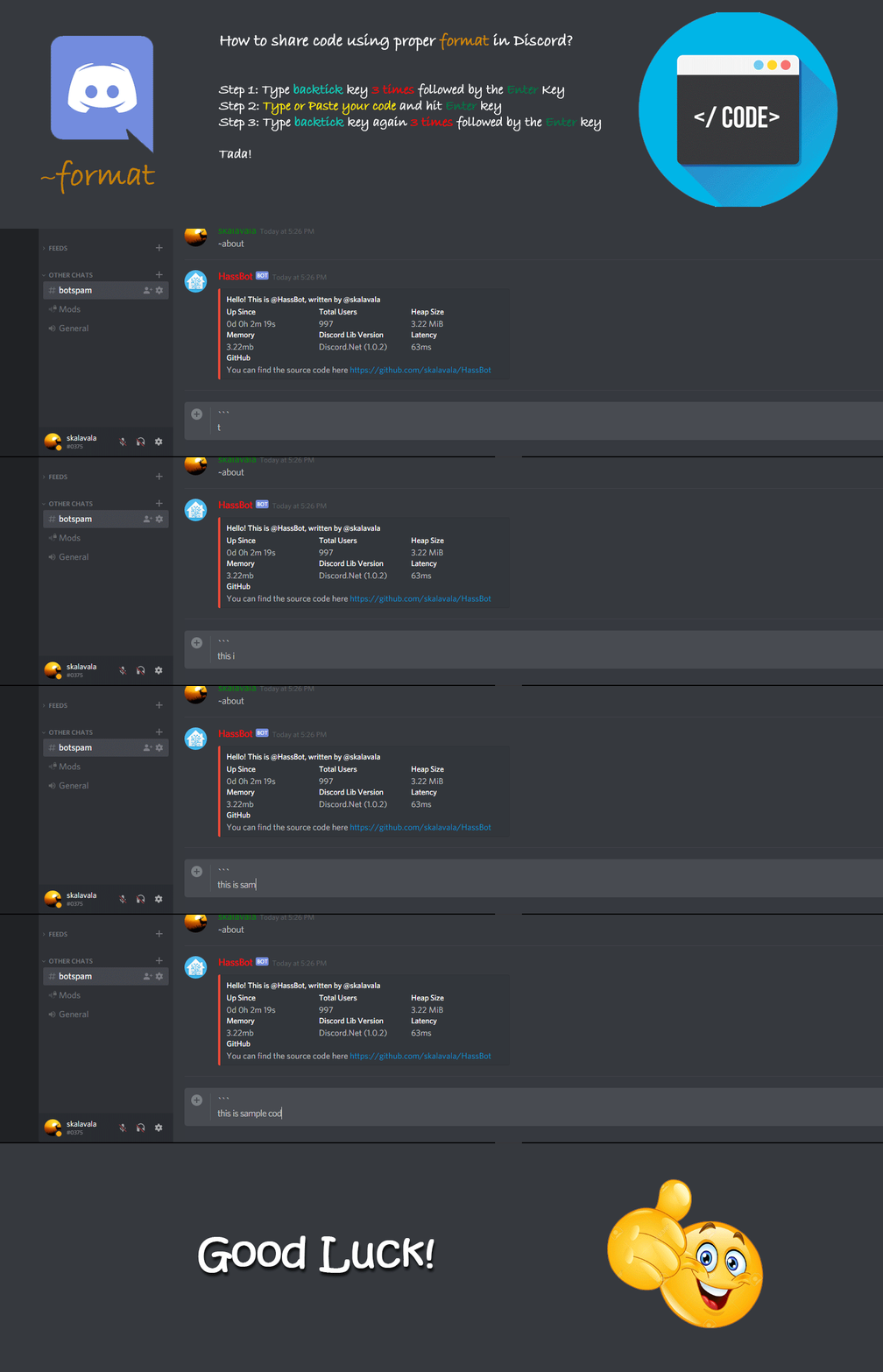
Don't forget you can edit your post rather than repeatedly posting the same thing.
For over 15 lines you must use a code share site such as https://dpaste.org/ (pick YAML for the language), https://www.codepile.net/ (pick YAML for the language), or https://paste.debian.net/ (pick YAML for the language).
Command '.format' was invoked by: TheFes
marble jackal
The double i in iif wasn't a typo
floral shuttle
getting back to #templates-archived message, why do we need |selectattr('attributes.source','defined') btw, since all geo_location states have that attribute? I get it for eg lights, and an integration specific attributes, like wiht the hue attributes, but here it should just work without it?
silent vector
These results will be in a rest sensor. Is it possible to use a template to filter
Name: Best then Price: x stopCount: x departure: x and arrival: x and lastly carriers then marketing then name
It's a flight price API by the way.
mighty ledge
silent vector
These results will be in a rest sensor. Is it possible to use a template to filt...
You'd have to use the rest integration to do it. And if you want a list, it would have to be an attribute of a sensor, not the state.
you'd have to use filters like | sort(attribute='Name')
and you'd have to know the path to each item you want to sort by
See this link to learn how to understand types to get to the information you want in your JSON object
silent vector
By path is that this is? json_attributes_path
mighty ledge
no, that's for attributes feeding from a dictionary
silent vector
I see, I will read up on this and make any further posts on this in the integrations channel right?
Or still here because it's a template?
mighty ledge
no, this is all templates
silent vector
Sounds good, I'm going to read up on the guide you have.
silent vector
Not sure why this isn't working?
sequence:
          - service: light.turn_off
            target:
              entity_id: >-
                "{{ states.light | selectattr('entity_id', 'in',
                area_entities('Batroom')) | selectattr('state', 'eq',
                'on') |  map(attribute='entity_id') | list | join(',') }}"
            data: {}
The template works. The spacing didn't copy well but it's right no errors in the automation editor for spacing.
[281471542424192] Error handling message: Template rendered invalid entity IDs: <- "light.daniels_bathroom_1,light.daniels_bathroom_2,light.daniels_bathroom_3,light.daniels_bathroom_4,light.daniels_bathroom_5" (unknown_error)
@marble jackal my bad i thought it was a typo. i've updated and reboot but still no luck
Template variable warning: 'dict object' has no attribute 'plate' when rendering '{{
state_attr('image_processing.platerecognizer_camera_avant_mediaprofile_channel1_mainstream', 'vehicles') | map(attribute='plate') | join(', ') }}'
Template variable warning: 'list object' has no attribute 'plate' when rendering '{{ state_attr('image_processing.platerecognizer_camera_avant_mediaprofile_channel1_mainstream', 'vehicles').plate }}'
@silent vector Take a look at this pin. You're combiniing multi-line and single line yaml.
mighty ledge
dark summit
```
Template variable warning: 'dict object' has no attribute 'plate' when rende...
{{
state_attr('image_processing.platerecognizer_camera_avant_mediaprofile_channel1_mainstream', 'vehicles') | select('plate', 'defined') | map(attribute='plate') | join(', ') }}
but it appears that plate is a list, so that join probably will not work
marble jackal
@mighty ledge you have a double pipe there
silent vector
Fixed it by removing the <-. thank you as always.
dark summit
thanks @mighty ledge but still not working
on HA boot value is set to "Unknown" once state get populated, value is set to "Unavailable"
here is my template sensors
- platform: template
    sensors:
      plate_recognizer:
        friendly_name: "Derniere voiture vue"
        availability_template: "{{ iif(state_attr('image_processing.platerecognizer_camera_avant_mediaprofile_channel1_mainstream','vehicles')) }}"
        value_template: "{{state_attr('image_processing.platerecognizer_camera_avant_mediaprofile_channel1_mainstream', 'vehicles') | select('plate', 'defined') | map(attribute='plate') | join(', ') }}"
post the error in your log
dark summit
and error on boot:
TemplateError('TemplateRuntimeError: No test named 'plate'.') while processing template 'Template("{{state_attr('image_processing.platerecognizer_camera_avant_mediaprofile_channel1_mainstream', 'vehicles') | select('plate', 'defined') | map(attribute='plate') | join(', ') }}")' for attribute '_attr_native_value' in entity 'sensor.plate_recognizer'
13:30:26 – (ERREUR) Template
Error while processing template: Template("{{state_attr('image_processing.platerecognizer_camera_avant_mediaprofile_channel1_mainstream', 'vehicles') | select('plate', 'defined') | map(attribute='plate') | join(', ') }}")
13:30:26 – (ERREUR) helpers/template.py
Template variable warning: 'dict object' has no attribute 'plate' when rendering '{{ state_attr('image_processing.platerecognizer_camera_avant_mediaprofile_channel1_mainstream', 'vehicles') | map(attribute='plate') | join(', ') }}'
13:30:26 – (ATTENTION) helpers/template.py - message survenu pour la première fois à 13:30:26 et apparu 2 fois.
ah
{{
state_attr('image_processing.platerecognizer_camera_avant_mediaprofile_channel1_mainstream', 'vehicles') | selectattr('plate', 'defined') | map(attribute='plate') | join(', ') }}
typo
 wicked rune
Hey all, I'm trying to set up a light template for the first time. The light is actually a touch sensor with 3 different levels (low, medium, high), so I'm trying to set the light template up as a dimmer. I'd like to be able to have the brightness show up on the light in three different increments, so I'm dividing the brightness by 85 and setting that to an input_number (which equates to 1, 2 and 3). The problem is when I read the input number back and try to multiply it by 85 to set the level_template, it doesn't work. The level on the brightness slider just goes to zero. The problem is with the level_template section, I'm just not sure what I'm doing wrong.
          service: input_number.set_value
          data_template:
            entity_id: input_number.family_room_bookshelf_lights_brightness
            value: "{{ (brightness/85)|int }}"
level_template: "{{ (states('input_number.family_room_bookshelf_lights_brightness')*85) | int }}"```states('input_number.family_room_bookshelf_lights_brightness') needs to be converted to an int
| int after states('input_number.family_room_bookshelf_lights_brightness')
wicked rune
Okay, I'll try that
dark summit
mighty ledge
```
{{
state_attr('image_processing.platerecognizer_camera_avant_mediaprofile_c...
no value on boot, "Unavailable" once entity state is populated
warning in log:
Template variable warning: 'dict object' has no attribute 'plate' when rendering '{{ state_attr('image_processing.platerecognizer_camera_avant_mediaprofile_channel1_mainstream', 'vehicles') | map(attribute='plate') | join(', ') }}'
Great, that worked! Thanks so much!
mighty ledge
dark summit
no value on boot, "Unavailable" once entity state is populated
warning in log:
`...
You need to post the shape of your image processing elements. It's clear you don't know what type it is and we are guessing
post the value of state_attr('image_processing.platerecognizer_camera_avant_mediaprofile_channel1_mainstream', 'vehicles') as text here
dark summit
mighty ledge
post the value of state_attr('image_processing.platerecognizer_camera_avant_medi...
this gives the following message:
"This template does not listen for any state changed events and will not update automatically."
ok i forgot to add the bracket
Result is same as the one posted before
[
  {
    "plate": "ed050ca",
    "confidence": 0.686,
    "region_code": "kg",
    "vehicle_type": "Sedan",
    "box_y_centre": 898,
    "box_x_centre": 2407.5
  }
]
Ok, I noticed that you're still using the wrong template
that's not what I posted above
dark summit
let me double check
{{
state_attr('image_processing.platerecognizer_camera_avant_mediaprofile_channel1_mainstream', 'vehicles') | selectattr('plate', 'defined') | map(attribute='plate') | join(', ') }}
this should be for value_template line, right ?
then i keep that line for availability template
"{{ iif(state_attr('image_processing.platerecognizer_camera_avant_mediaprofile_channel1_mainstream','vehicles')) }}"
I'm trying to test this https://dpaste.org/28zAj
Based off this https://community.home-assistant.io/t/value-template-sort-json-array/140894/2?u=danny2100
And I keep getting
TemplateSyntaxError: unexpected '}'
so i have this in my sensor definition
value_template: "{{state_attr('image_processing.platerecognizer_camera_avant_mediaprofile_channel1_mainstream', 'vehicles') | selectattr('plate', 'defined') | map(attribute='plate') | join(', ') }}"
but log returns this:
Template variable warning: 'dict object' has no attribute 'plate' when rendering '{{ state_attr('image_processing.platerecognizer_camera_avant_mediaprofile_channel1_mainstream', 'vehicles') | map(attribute='plate') | join(', ') }}'
it seems that the part with "selectattr" is ignored for some reason.
i have double checked my sensors.yaml file and rebooted multiple time
mighty ledge
dark summit
```
{{
state_attr('image_processing.platerecognizer_camera_avant_mediaprofile_c...
Yes but your error does not match what the template I gave you. I.e. You're using the wrong template somewhere.
mighty ledge
silent vector
I'm trying to test this https://dpaste.org/28zAj
Based off this https://communit...
you aren't pasting the full response into the {% set xyz = ... %}
silent vector
As in the Full response from here?
https://dpaste.org/tSfDi
I trimmed what's there from the full response
The full response is really 1890 lines long
dark summit
thanks @mighty ledge i figured out my mistake 🙂
there is no one at home anymore, value is null for now, will check a bit later and let you know if it works as expected
thanks @mighty ledge and @marble jackal for your time and patience :0
mighty ledge
silent vector
As in the Full response from here?
https://dpaste.org/tSfDi
I trimmed what's the...
You need to have the ENTIRE response, nothing trimmed
silent vector
It worked now.
 gusty blaze
hey, anyway I can access home assistant api trough Jinja2 templates like hass object in custom cards? I want to get the url like hass.auth.data.hassUrl
mighty ledge
gusty blaze
hey, anyway I can access home assistant api trough Jinja2 templates like hass ob...
no
silent vector
I'm struggling to filter, I read your (Petro) guide but I'm struggling to get it to filter past value | sort(attribute='name')
I end up with errors or "itineraries" does not exist for example when trying to specify a path.
mighty ledge
You have to combine selectattr & map in order to dig deeper into lists. Sort will only work on the attribute you select if all objects have that path
silent vector
I tried this
{{ value | sort(attribute='name') | selectattr('name','eq','Best') }}
Results in
<generator object select_or_reject at 0xffff2eb504a0>
{{ value | sort(attribute='name') | selectattr('name','eq','Best')|list|first }}
silent vector
It's so weird because it says
UndefinedError: 'dict object' has no attribute 'name'
But see https://dpaste.org/tSfDi
I couldn't paste all 1890 lines on dpaste but that's the beginning of the API response and it's clear there's a name
inner mesa
it's way down in the structure, though
silent vector
itineraries -> buckets -> name ? I don't know how to make a path for that.
inner mesa
you probably also need value_json
I can't really tell what I'm looking at from that snippet, but something like this:
{{ value_json.itineraries.buckets|selectattr('name', 'eq', 'Best')|list|first }}
I don't know have time to dig into what you're actually trying to do
silent vector
I will try that.
mighty ledge
You should post the full json, otherwise no one can help
you'd have to remove the [0] from rob's attempt as well.
inner mesa
sorry, yeah. parsing the incomplete JSON structure by eye is challenging
silent vector
I was able to get the full json uploaded to dpaste. I was on mobile initally and it was too large to paste to dpaste for some reason. The price is really $597 for example, it was an issue with reqbin that it didn't have a $ and added a euro sign to the end. https://dpaste.org/ZwHdz
inner mesa
and what do you want to get from that? 597?
silent vector
Ideally
Filter for Name: Best, cheapest, fasest then Price: x stopCount: x departure: x and arrival: x and lastly carriers then marketing then name. As that's all the useful information one would need to look up the flight after it alerts for being below x price.
It spits out 3 different "name" values (Best, Fastest, Cheapest) for anyone curious this is coming from Skyscanner through rapidAPI
inner mesa
that sounds like a database query 🙂
silent vector
What does that mean lol that went over my head.
inner mesa
that structure is just too big and too much of a pain in the ass to work with
silent vector
What should I do?
inner mesa
wait for somebody with more time and patience, or play with it yourself
silent vector
I will attempt that and make a forum post then. I made one and took it down as I got much further than what I initially posted. Now I'm just stuck on how to bring the data into home assistant to be useful.
eager crane
eager crane
Hello, I am a complete noob when it comes to templating, but I'm trying to accom...
Any suggestions or a point in the right direction would be greatly appreciated!
 frank gale
The last_notification sensor from android has attributes that start with: "android."
How can I read what the "android.text" contains if it is in the trigger object?
( trigger.to_state.attributes.android.text doesn't work as it returns:
UndefinedError: 'homeassistant.util.read_only_dict.ReadOnlyDict object' has no attribute 'android' )
inner mesa
you need to check if it's defined
{{ trigger.to_state.attributes.android.text if trigger.to_state.attributes.android is defined }}
the attribute itself is called "android.text"
inner mesa
so do that
frank gale
it isn't defined... but exists
inner mesa
{% set trigger = {"to_state": {"attributes":{"android":{"text":"foo"}}}} %}
{% set trigger2 = {"to_state": {"attributes":{"no_android":{"text":"foo"}}}} %}
{{ trigger.to_state.attributes.android.text }}
{{ trigger2.to_state.attributes.android.text if trigger2.to_state.attributes.android is defined }}
-> foo
silent barnBOT
@frank gale posted a code wall, it is moved here --> https://hastebin.com/jobopaqiqo
inner mesa
then this:
{{ trigger.to_state.attributes['android.text'] if 'android.text' in trigger.to_state.attributes }}
{{ trigger.to_state.attributes['android.text'] }} that's what I needed thanks!
not so clever to have a "." in a variable...
but that's something to discuss with the android developers
inner mesa
yeah, that syntax gets around various issues like that, and including keys that start with a number ("5guys")
 young shadow
Hey Guys!
I have set up a RESTful sensor, which returns a float. In the UI it is displayed properly, but the history for it is for like any string based sensor. How could I enable the proper number graphing history for it?
inner mesa
add a unit_of_measurement
young shadow
works, thanks a lot!
 dire shadow
where is the appropriate place to add icon_color? i have this in customize.yaml
sensor.sun_azimuth:
  icon_color: >-
    {% if ( (state_attr('sun.sun', 'azimuth') >= 45) and
            (state_attr('sun.sun', 'azimuth') <= 135) ) %}
      'red'
    {% else %}
      'green'
    {% endif %}
do you have custom_ui installed?
you'd need that installed to support that kind of customization, and there's no default way to control the icon color for default cards
dire shadow
could have sworn this was built in? the same way a light entity's icon changes whether it's on/off or rgb
mighty ledge
dire shadow
could have sworn this was built in? the same way a light entity's icon changes w...
Nope
inner mesa
I suggest using a card that supports more flexible templating, such as custom button card, or investigating card_mod. And both are #frontend-archived topics
dire shadow
that’s too bad. and i’m not using cards, not sure why they’re relevant
marble jackal
Everything on your dashboard is on some card
dire shadow
not using the dashboard, not using cards
 charred dagger
Where are you expecting the icon color to show up then?
dire shadow
either looking at the entity directly or with the stream deck plugin i'm using. both respect the icon defined by icon_template. weird that color isn't an option
charred dagger
Nah, it seems to be something running on the stream deck itself that connects to hass.
Looks neat.
inner mesa
weird, wasn't aware of that. I don't know what you would do in HA to control the UX of that
Interesting retro look with the giant physical buttons. At first I thought it was a touchscreen, and thought it was just another tablet
charred dagger
Quite popular with streamers, I understand.
orchid oxide
how can i set a state for a manually configured mqtt entity, either with a template or by designating one of the attributes to be a state
inner mesa
The value_template for the sensor can be whatever you want, so you could add logic there to return some other entity state if you want
Same with json_attributes_template
 bronze tide
good evening guys!
I created some jinja script which works fine in the Template section of the Dev Tools. When I use it in a script it won't return anything. The idea is as follows:
- from an automation call a script
- let the script check ...
- which sensors fit into the naming scheme of "binary_sensor.l*_status"
- add up all names to a comma separated string
- send a message with the string to telegram
The long time goal would be to create some HTML which is - hopefully - displayed in a markup card
charred dagger
What does your automation look like?
bronze tide
The code is stored at the following location:
input_text: https://pastebin.com/rmt7ben6
automation: https://pastebin.com/G86MynP4
script: https://pastebin.com/aFA4xJFs
Sorry for the commented out text. I tried a few things and none of them worked.
There might be a better way to code this. But as you can guess this way is unknown to me. I would be very happy to learn a better way to code this.
marble jackal
And remove the quotes around the template
bronze tide
I changed to value: | and removed the quotes. Yet no changes. I restarted HA just now
no change.
I updated the script to its current state at pastebin.com
charred dagger
Do you get any output in the hass log, and what does Result type: say in dev-templates?
marble jackal
Your template can be done in a more simple template without namespaces and for loops
floral shuttle
dire shadow
either looking at the entity directly or with the stream deck plugin i'm using. ...
its #frontend-archived and uses javascript, but have a look at https://github.com/Mariusthvdb/custom-ui/blob/master/README.md to add the attribute icon_color and use templates to change based on state changes
marble jackal
However I'm on mobile now, so I'm not able to put it in right now
 delicate chasm
Hey folks, I am trying to setup my UI to change an icon colour based on light state, I had it working on a single light but since there are 3 lights in the room I would like it to change if any of the 3 lights are on. I am using a template card in mushroom
{%if is_state('light.kitchen','on')%}
orange
{%elif is_state('light.sink',on)%}
orange
{%elif is_state('group.kitchen_counters',on)%}
orange
{% else %}
grey
{%endif%}
marble jackal
Easiest is to put them in a light group and check on the state of the group
delicate chasm
What am I missing here I feel this should work but new to using templates
marble jackal
It will be on if any of them is on
delicate chasm
ah that makes sense
marble jackal
In your current template you are missing the quotes around on for the 2nd and 3rd light
floral shuttle
wouldnt trying to keep the group count as low as possible steer that template in another direction preferably?
delicate chasm
marble jackal
In your current template you are missing the quotes around `on` for the 2nd and ...
Well spotted thank you sir! both options now work, the group and the template
marble jackal
Well, as he is using one icon for the 3 lights on his card, a group would probably also make sense to use as the toggle action. But changing the template is also possible
floral shuttle
yeah in its simplest verbose form like:```
{% if is_state('light.kitchen','on') or
is_state('light.sink','on') or
is_state('group.kitchen_counters','on')%}
orange
{% else %}
grey
{% endif %}
You folks are awesome! Thanks
floral shuttle
groups need to be maintained by the backend, and some ages ago we were told to minimize the use of them..... not sure if that still holds, but its what I have been doing ever since 😉
charred dagger
That was only ever true for generic groups. Light groups and such are lightning fast.
Generic groups are quite light weight now too, actually.
bronze tide
charred dagger
Do you get any output in the hass log, and what does `Result type:` say in dev-t...
Result type: string. there is nothing mentioned in the HA core log (I am on HA supervised btw).
floral shuttle
didnt this also lead to the preference of using states.light|whatever selector instead of using expand('group.whatever')|etc ?
charred dagger
Then the next step is to remove the template and test with a static string, then a simpler template and so on.
bronze tide
marble jackal
Your template can be done in a more simple template without namespaces and for l...
will you share your solution with me so I can do the scripting without any ns and loops? I am eager to learn.
charred dagger
However I'm on mobile now, so I'm not able to put it in right now
Here's something to get you started, though: yaml {{ states.light | selectattr("entity_id", "match", "light\..*ts") | map(attribute="entity_id") | list }}
This will make a list of all lights with an entity id that ends with ts
inner mesa
map(attribute='entity_id')
bronze tide
charred dagger
Then the next step is to remove the template and test with a static string, then...
with a simple string and a simple template it is working so far. next is probably to eliminate the loop.
bronze tide
charred dagger
Here's something to get you started, though: ```yaml
{{ states.light | selectatt...
how can it be that {{ states.binary_sensor | selectattr("entity_id", "match", "binary_sensor.l[0,2,9]*") | map(attribute="entity_id") | list }}
creates a list of e.g. "binary_sensor.l2_thermo01_status", "binary_sensor.l2storage_spymode", "binary_sensor.l9_cam_ttgo_01_button", but as soon as I make the regex look like "binary_sensor.l[0,2,9]*_status") a list with "binary_sensor.l2_thermo01_status" (which is the only entity I need) is not delivered? map(attribute='entity_id') does not change anything
inner mesa
or use 'search'
inner mesa
but Thomas's is better
bronze tide
charred dagger
try `binarysensor.l[0,2,9].*_status`
the additional '.' worked wonders!
bronze tide
what I cannot wrap my head around at the moment is how to add a filter on the state of the entities
found a solution:
{%- set all_status_entities = states.binary_sensor | selectattr('state', 'in', ['unavailable', 'unknown', 'off']) | selectattr("entity_id", "match", "binary_sensor.l[0,2,9].*_status") | map(attribute="entity_id") | list -%}
{{ all_status_entities }}
thanks @charred dagger and @inner mesa for the inspirations you gave to me!!!
bronze tide
hmm, at the moment it looks as if I found a "feature".
In the script at https://pastebin.com/aFA4xJFs the service: input_text.set_value works if lines 52-54 are in the data: section.
here the code:
value: |
{%- set uh_test_string="TTTTTT" -%}
{{ uh_test_string }}
this (lines 58-61) works too:
{%- set uh_test_string="TTUUUT" -%}
{%- set uh_test_string_repl=uh_test_string | regex_replace(find='U', replace='X', ignorecase=False) -%}
{{ uh_test_string_repl }}
if the code which works on entities (lines 68-71) is active the service: input_text.set_value is not working at all:
value: |
{%- set all_status_entities_list = states.binary_sensor | selectattr('state', 'in', ['unavailable', 'unknown', 'off']) | selectattr("entity_id", "match", "binary_sensor.l[0,2,9].*_status") | map(attribute="entity_id") | list -%}
{%- set all_status_entities_string = all_status_entities_list | join('\n- ') | regex_replace(find='_status', replace='', ignorecase=False)-%}
- {{ all_status_entities_string }}
btw: Both solutions return a string in the Template section of the DevTools. nothing specific is shown in the log file
inner mesa
it's hard to see what you're talking about with all the commented out code and such, but a) I would use >- rather than | to introduce the template
b) it seems like you're putting a bunch of structured text into the state of an input_text, which is likely to cause problems as it grows, or if you want it to be formatted
 sacred sparrow
why does this show as 'false' {{ is_state_attr('climate.dyson_pure','current_temperature','defined') }}
even though current_temperature: 22.5 ?
sacred sparrow
ah I see
can I make it {{ is_state_attr('climate.dyson_pure','current_temperature', IS A NUMBER) }}
what would be the best way?
because its either a number or its not there
inner mesa
{{ state_attr('climate.dyson_pure','current_temperature')|is_number }}
but it sounds like you really want to do this:
{{ 'current_temperature' in states.climate.dyson_pure.attributes }}
sacred sparrow
ahh perfect! thank you 🙂
bronze tide
inner mesa
b) it seems like you're putting a bunch of structured text into the state of an ...
I actually shorten the entity name and form thereby the device name. There are certainly other ways to do it, but I do not know the official way. at the moment.
I cleaned and updated the script at https://pastebin.com/aFA4xJFs
In the worst case the list could to grow to some 15 entries and best case zero entries with each device entry with 32 characters including the dash and a space. This should not be a problem. should it?
inner mesa
15*32=480, and states are limited to 255 characters
I would just create a template sensor and use an attribute for the list
bronze tide
just thought so too.
I had a look at the trigger based sensor at https://www.home-assistant.io/integrations/template/
inner mesa
plus it would actually be readable, and you could still turn it into a comma-separated string for display or whatever if you want
bronze tide
is there an advantage of having the data in an attribute rather compared to having it as the state? I thought of putting the naked data semicolon separated in the time triggered template sensors state.
inner mesa
the fact that it won't actually fit in the state, plus the fact that it looks ugly and probably throws off the formatting in -> States
bronze tide
oh, yeah. sorry
inner mesa
and that states are always strings, vs. attributes being to hold real data structures
bronze tide
ok, understood. thanks so far! high time for me to go to bed now
 hallow plover
Is it possible to write an automatic trigger for when a template matches for a certain amount of time?
inner mesa
Template triggers support for:
 stuck remnant
hi, any way to make this only trigger after the attribute holds its value for 36h?
i already tried with a binary sensor but that only works if you don't restart HA for like 3 days
{{ state_attr('weather.home','temperature') < 11 }}
considering it's the attribute for a service, HA could possibly access it accross restarts
marble jackal
hallow plover
Is it possible to write an automatic trigger for when a template matches for a c...
I would suggest using that template in a template (binary) sensor, and then check if the state of that sensor has been what you want it to be for an amount of time
marble jackal
stuck remnant
hi, any way to make this only trigger after the attribute holds its value for 36...
Didn't we go over this already by creating a binary sensor and input_datetime and using that?
stuck remnant
yes we did
and I thank you for your help
but I used it as it was, and it only turns on after 3 days
like, if the HA restarts, it doesn't remember the state
can't the above template line be written so that it factors in when that attribute held its value for 36h?
marble jackal
That should not be the case, if the input_datetime is set like 35 hours ago, and you restart, it should still be on an hour later
stuck remnant
yes
but the binary sensor is written like this: {{ is_state('binary_sensor.outside_cold', 'on') and now() - timedelta(hours=36) > as_local(as_datetime(states('input_datetime.cold'))) }}
marble jackal
Which was exactly my point here
stuck remnant
no
you taught me how to avoid that, methinks
so there's 2 sensors
the first one has the value from above, the first I pasted
and the second one factors in that first one
this second one is the last one I pasted
marble jackal
Yes, I remember
stuck remnant
so if the HA restarts, then the second one takes the value from the first one
but if it restarted, the first one only been on for that amount of time
I think that's where the issue lies
marble jackal
What is the current value in that input_datetime
stuck remnant
wait, this won't make sense if we keep talking about the cold sensor, I have another one that's for heat which would make sense now because of the values
so it's the same sensor, only it's ...state_attr('weather.home','temperature') >16 }}
ok?
and here is the value of its datetime
June 1, 2022, 6:34 AM
marble jackal
Okay, that can't be over 36 hours ago in any timezone
stuck remnant
it's not
it's when I last restarted
hmm so you were right?
it stamps along with restart
marble jackal
What is your automation to set the input_datetime
stuck remnant
it seems you did think ahead to show me this: to:
- 'on'
- 'off'
from:
- 'on'
- 'off'
cos it's in there
I also found another spelling for it, think it was "to: null"
marble jackal
Yes, I expected that that would prevent it to trigger upon reboot, however apparently it doesn't work.
stuck remnant
what if I excluded from recorder
marble jackal
Can you check the history of your binary sensor around reboot (using logbook). Does it change from off to on?
stuck remnant
turned off one hour ago
turned off 6:55:12 AM
these are times when I restarted
so it changed state from off to off
but that's only because of multiple restarts
marble jackal
Let me do some tests, one minute
stuck remnant
for instance, it was On until I restarted the first time, and then it turned off along with restart. Now it keeps turning off with restart, kind of like resetting the count idk
okay no rush, soz
marble jackal
Are you talking about the cold binary sensor again now? Because I guess the heat sensor should be on
Could you add this to your automation to set the input_datetime and reboot:
  - alias: "Create persistent notification when input_datetime is set"
    service: persistent_notification.create
    data:
      message: "Changed from {{ trigger.from_state.state }} to {{ trigger.to_state.state }}"
It should show the state change causing the trigger
stuck remnant
no, we switched to talking about the Heat binary sensor because it's the one who's value is relevant now
marble jackal
But the heat binary sensor (binary_sensor.outside_heat) is on right now right? You were saying it is off
stuck remnant
the heat binary sensor is off but the binary_sensor.outside_heat is on
it turned on along with restart
also, it seems to have turned off along with the previous restart (6:55)
so it basically just refreshed the value to whatever it was at that time
(im presuming at 6:55 the outside temp was below 16 and at the subsequent restart, it was above 16)
marble jackal
If the temperature went from below 16 to above 16 somewhere around 6:55 then it hasn't been hot for 36 hours
marble jackal
Yes, unless you were expecting other behaviour
Did you add the persistent notification?
marble jackal
There will be a notification at the bell icon in your menu
marble jackal
just like when there is something wrong with an integration or somethign
stuck remnant
yeah
marble jackal
did you reboot already. and did it notify something?
stuck remnant
yeah I could be wrong
no, waiting on reboot
it doesnt notify
cos the stamp didnt trigger with restart
wow
this is weird, so basically my restarts just happened to be at the same time when that binary sensor triggered ? i.e. when the temp went above below 16 and back again
marble jackal
That would be a big coincidence, but could be
You could keep the notifications in for now, so you can keep track of the changes to the input_datetime
 waxen rune
Sometimes, my pool thermometer suddenly reports 4 366,8 C which is a little bit out of the ordinary (0 - 35 C).
I think I have read about a function that I can use in a template to "eliminate" value that are totally off and use the previous value instead, but I don't know what to google for. Have I dreamed about that function, or can someone here give me a hint?
silent vector
Any idea why I keep getting the error?
Message malformed: expected a dictionary for dictionary value @ data['variables']
I get an error 500 using your dpaste link
silent vector
How's this?
https://dpaste.org/K9JsW
marble jackal
Same
silent vector
That's really weird. I'll just try pasting here for it to send to hastebin.
silent barnBOT
@silent vector posted a code wall, it is moved here --> https://hastebin.com/ubetewuvub
marble jackal
You could of course posted it to hastebin yourself and post the link
You're formatting your templates wrong
variables:
  your_variable: >-
    {% set x = 'y' %}
    {{ x }}
  your_other_variable: >-
    {% if your_variable = 'y' %}
      z
    {% endif %}
Use >- to indicate a multi-line template
silent vector
Whoops thank you. I'm trying to use your method of replacing some words in my tts script in this script but Instead of tracking the state we would track the variable mode's result.
{% set mode = 'on' %}
{% set mode_type = mode |
        replace('on', 'active') | replace('off', 'standby') %}
{{ mode_type }}
{{ mode }}
Nevermind removing 'mode' worked
I had no idea until yesterday you could play with variables in the template editor by doing that.
Does |- differ from >- the automation editor replaced > with |- on 2 variables.
silent vector
I see. I changed the variable names and added in the automation editor as it's different from the template editor that worked above where the 2 variables worked together how would I make them work together in an automation format?
mode_type: |-
    {% if trigger.entity_id == 'input_select.left_dockpro_mode' %}
                   {{ states('rest_command.set_left_dockpro_mode') }}
                   {% elif trigger.entity_id == 'input_select.right_dockpro_mode' %}
                   {{ states('rest_command.set_right_dockpro_mode') }}
                   {% endif %}
mode: '{{ mode_type | replace(''on'', ''active'') | replace(''off'', ''standby'') }}'
Sorry the spacing got messed up as I'm on mobile but the spacing is fine. Just a matter of what I'm doing wrong as they are both evaluating as "unknown" probably because I messed something up?
marble jackal
When do they evaluate as unknown?
silent vector
When I do a test. I don't have the rest commands set up yet as I didn't even get the device so I'm testing it by having it send a notification.
In the changed variables in the debugger it says they evaluated as unknown. For more context some of the variables will be passed to the rest command and the others such as variable_data will be the data variable with the rest command being the service call variable.
rest_command: rest_command.set_left_dockpro_mode
mode_type: unknown
variable_data: mode
mode: unknown
temperature: ''
The temperature: '' is correct.
bronze tide
good afternoon guys
marble jackal
silent vector
When I do a test. I don't have the rest commands set up yet as I didn't even get...
How do you test? If you press the Run Actions button, you don't have a trigger, so no trigger.entity_id, so no working templates
silent vector
Test by changing the input number state or select.
The automation and variables worked for temperature just not for mode. Meaning it worked for input number state change but not for input select state change.
marble jackal
bronze tide
good afternoon guys
Don't know where your question is, but device_attr('entity_id', 'name') should do the trick
marble jackal
silent vector
The automation and variables worked for temperature just not for mode. Meaning i...
.share the entire automation
silent barnBOT
Please use a code share site to share code or logs, for example:
- https://dpaste.org/ (select YAML for the language)
- https://www.codepile.net/ (select YAML as the language)
- https://paste.debian.net/ (you guessed it, select YAML as the language)
Please don't use Pastebin, since it can randomly add spaces to the main view. Please also don't share text as images since it makes it harder for people to help you. Remember that others may have colour blindness, impaired vision, etc.
Command '.share' was invoked by: TheFes
silent vector
I think I just found it. The state is capital O not lowercase o On not on
That would have been an issue but that wasn't it.
bronze tide
marble jackal
Don't know where your question is, but `device_attr('entity_id', 'name')` should...
I wanted to rephrase my question therefore i deleted it.
device_attr('entity_id', 'name') applies to one entity id only as far as I can see. how can this be applied as a filter to a list?
marble jackal
Use a namespace and for loop to go through all the entities in the list
{% set ns = namespace(devices=[]) %}
{% for entity in your_list %}
  {% set ns.devices = ns.devices + [ device_attr(entity, 'name') ] %}
{% endfor %}
{{ ns.devices | unique | list }}
Still getting error 500 on dpaste here
silent vector
Does this work?
https://www.toptal.com/developers/hastebin/moqetuzuvi.bash
marble jackal
Does your notify action give the right results now?
  - service: '{{ rest_command }}'
    data: >
      {{ { variable_data: (temperature if temperature > 1 else mode) } }}
I think this will work better
mighty ledge
marble jackal
```yaml
- service: '{{ rest_command }}'
data: >
{{ { variable_data: ...
I don't see how that can work
variable_data would need to be in quotes at a minimum, same with mode & temperature if I understand the api correctly
marble jackal
They are variables
hallow plover
marble jackal
I would suggest using that template in a template (binary) sensor, and then chec...
I ended up doing that. Thanks.
silent vector
marble jackal
```yaml
- service: '{{ rest_command }}'
data: >
{{ { variable_data: ...
This works already. It is cleaner to do it your way of course. What doesn't work is that I'm trying to replace On with active and Off with standby
marble jackal
So only the mode variable doesn't work?
silent vector
I fixed a typo I had after I changed variable names on line 16.
https://www.toptal.com/developers/hastebin/socuresopi.bash
The input select has 2 options On and Off
(variable = mode_type)
The API accepts active and standby as On and Off.
I am trying to change that with (variable = mode) on line 43 so that it passes active or standby to the rest command
Yes mode and mode_type is evaluating as unknown
rest_command: rest_command.set_left_dockpro_mode
mode_type: unknown
variable_data: mode
mode: unknown
temperature: ''
temperature: '' is correct here because this was an input select state change. It evaluates Correctly on an input number state change.
marble jackal
I could be mistaken here, but as far as I know the rest command integration provides a service, but not an entity
mighty ledge
I think this would be the simplest way to do this, and yes the fes is correct, it doesn't create an entity. He should be calling out his input select
alias: DockPro Control
description: ''
trigger:
  - platform: state
    entity_id:
      - input_number.left_dockpro_temperature
      - input_select.left_dockpro_mode
      - input_number.right_dockpro_temperature
      - input_select.right_dockpro_mode
variables:
  rest_command: "rest_command.set_{{ trigger.to_state.object_id }}"
  modes:
    'On': active
    'Off': standby
  mode: "{{ modes.get(trigger.to_state.state) }}"
  temperature: "{{ trigger.to_state.state | int(none) }}"
  key: "{{ trigger.entity_id.split('_')[-1] }}"
  service_data: >
    {{ {key: temperature if temperature else mode } }}
condition: []
action:
  - service: notify.mobile_app_daniels_s21
    data:
      message: '{{ temperature }} {{ mode }} {{ variable_data }}'
  - service: '{{ rest_command }}'
    data: '{{ service_data }}'
mode: single
I'm confused, I know it's a service call isn't that what the service call would be?
I have rest command for changing the tv to YouTube
It's service call is rest_command.youtube_daniels and that's what I have in the configuration as the name youtube_daniels.
marble jackal
Here you were treating them as an entity, using states()
  mode_type: |-
    {% if trigger.entity_id == 'input_select.left_dockpro_mode' %}
                   {{ states('rest_command.set_left_dockpro_mode') }}
                   {% elif trigger.entity_id == 'input_select.right_dockpro_mode' %}
                   {{ states('rest_command.set_right_dockpro_mode') }}
                   {% endif %}
just try the automation I posted, it should work.
silent vector
Oh yes I missed that typo I meant for that to be the state of the input select. I am just getting this ready for when I get the device to get all the wrinkles out I definitely missed that. Explains why the mode was unknown.
My original way worked once I swapped out what you caught. I will try your way too Petro.
It worked Petro.
floral shuttle
looking for the 'defined' option in: {% set hue_group = states('input_select.hue_group') %} {% set ns = namespace(scenes=[]) %} {%- for s in states.scene if hue_group == s.attributes.group_name and s.attributes.is_dynamic != true %} {% set ns.scenes = ns.scenes + [{'entity':s.entity_id, 'name': s.object_id.split(hue_group|slugify +'_')[1]|capitalize|replace('_',' ') }] %} {%- endfor %} {{ns.scenes}}
which is a frontend filter in auto-entities, and now throwing the UndefinedError: 'homeassistant.util.read_only_dict.ReadOnlyDict object' has no attribute 'group_name' error...
in my automations I do:{% set hue_group = states('input_select.hue_group') %} {{states.scene |selectattr('attributes.group_name','defined') |selectattr('attributes.is_dynamic','eq',true) |map(attribute='name')|list}} but I cant imagine the format for the auto-entities filter now...
or can I simply add:if hue_group == s.attributes.group_name is defined ?
floral shuttle
wait, seems to be a Hue issue.... moving this..
wicked rune
Hi all, I'm trying to figure out if there's a way to create a sensor template with attributes. I'm trying to create a template sensor that determines the number of minutes per hour that the ventilator runs. I'm calling the sensor 'ventilator_minutes_per_hour'. I'll then use that sensor in an automation to run the ventilator that many minutes per hour. There are three factors that go into how many minutes the ventilator should one, and one of those factors is humidity. I'd like to create an attribute under the sensor, like 'ventilator_minutes_per_hour.humidity_factor'. How would I create the attribute and set it's value in the template?
marble jackal
Are you using the new or the legacy format for your template?
wicked rune
Hmmm, I don't know the answer to that question. I'm defining the template under configuration.yaml. But I think I figured it out, actually...using the 'attributes' directive or whatever it's called.
mighty ledge
is it in the template: section or another section?
wicked rune
yes, under template: -sensor
mighty ledge
that's the new format
so, just create attribute templates
template:
- sensor:
  - name: xyz
    state: "{{ blah }}"
    attributes:
      attr1: "{{ whatever you want }}"
      attr2: "{{ blah }}"
Okay yes, that's what I'm doing now and it's working. Can I use the attributes in the state value?
wicked rune
Ah crap. Okay, that's what I found...just a few more lines than would be ideal. Thanks!
bleak wolf
before i go ahead and make a bunch of changes... https://www.home-assistant.io/blog/2022/06/01/release-20226/#breaking-changes
mqtt sensors are changing yaml format. does this include binary_sensors?
bleak wolf
   - platform: mqtt
     name: etc```
to become:
```mqtt:
    binary_sensors:
    - name: etc```
?you also had the -
mighty ledge
Yeah, it's something that's been needing to change for some time
HA as a whole is moving away from the whole platform: xyz style. So this was bound to happen at some point
silent vector
@mighty ledge what would be a sleek way to update the entity in the automation you gave me. That way after the rest command is sent, the rest sensor is updated rather than waiting for the default scan interval to confirm the change was successful.
The rest sensor names will be
rest_sensor.left_dock_pro and rest_sensor.right_dock_pro as I don't have the device yet I don't know how fast the API will react and respond but I figured there should be some kind of delay between the command and the sensor update and a repeat on the sensor update if the update results in a mode not equal to the one sent or temperature not equal to the one sent (sent through the rest command)? If they don't equal after a delay of x time then maybe the command would be sent again as a check on a timeout for example?
mighty ledge
silent vector
<@372843932096397333> what would be a sleek way to update the entity in the aut...
the rest integrations create sensor.xxx not rest_sensor.xxx. Also, I"m not sure what you're asking. Are you just trying to update the sensor with homeassistant.update_entity?
silent vector
I didn't know that but makes sense as the domain is sensor, yes trying to update the sensor with homeassistant.update_entity, I read that's what will trigger an update of a rest sensor unless I'm mistaken?
mighty ledge
then you just need to create the entity_id like I did with your rest_command, but instead with sensor.{{ .. }}. and then you'd use that in the target for the update_entity
silent vector
But there's no mode or temperature as there is with the rest command how would I remove those from the ending?
mighty ledge
post the template again
silent vector
variables:
  rest_command: rest_command.set_{{ trigger.to_state.object_id }}
  modes:
    'On': active
    'Off': standby
  mode: '{{ modes.get(trigger.to_state.state) }}'
  temperature: '{{ trigger.to_state.state | int(none) }}'
  key: '{{ trigger.entity_id.split(''_'')[-1] }}'
  service_data: |
    {{ {key: temperature if temperature else mode } }}
Possible IDs are input_select.left_dockpro_mode or input_number.left_dockpro_temperature
mighty ledge
target_sensor: sensor.{{ trigger.to_state.object_id.split('_')[:-1] | join('_') }}
remove the _ between dock_pro in your rest sensor
unless it exists for the input_number and rest command
silent vector
And is there a way to check after a certain time if the sensor value is equal to the value sent in the command? Such as whether the sensor mode is equal to active if the command was standby. Then to resend the command in the event the API timed out and never processed the command. I will remove the _ to keep it consistent.
Perhaps try twice to check if it was successful, sending the command again if they aren't equal and then alert if not? I will end up having to make a template entity out of the sensor. Perhaps sensor.left_dockpro_temperature and sensor.left_dockpro_mode Not sure how reliable the API is so it wouldn't hurt to check twice with a certain amount of time in between checking in case it's just taking awhile to process on their end.
silent barnBOT
@gray crystal posted a code wall, it is moved here --> https://hastebin.com/zuyebofilo
 gray crystal
Here's the config to the above offending message. https://pastebin.com/BaTNsgMz
Basically the old template light syntax isn't working for me for color configuration any longer. Been struggling to figure out what changed.
 final pulsar
Hello everyone! I need a little bit of help with my code.
I have a sensor (sensor.mi_spa_rinse_filter_due) that gives me this 2022-06-01T00:00:00+00:00 output (a date, time is not important). So now I want to check if the current date matches with the date from the sensor. I thought that i could compair those values in an if-instruction, for example if states('sensor.mi_spa_rinse_filter_due') == now().year,'-0',now().month,'-0',now().day,'T00:00:00+00:00', but this didn't seem to work for me. Has anybody an idea why?
~thx
inner mesa
{{ as_datetime(states('input_datetime.date_test')).date() == now().date() }}
final pulsar
Hmmm, still outputs me a false, should be true
inner mesa
test each part independently
final pulsar
inner mesa
test each part independently
But even just that standing alone```{{ as_datetime(states('sensor.mi_spa_rinse_filter_due')).date() == now().date() }}
test each piece independently
{{ now().date() }}
{{ as_datetime(states('input_datetime.date_test')).date() }}
->
2022-06-01
2022-05-22
Ok I'll try, many thanks
orchid oxide
so i can use now() to get the current time, but how can i return today at midnight
im just trying to get the current date so i can convert it to a timestamp
inner mesa
literally, today_at('00:00')
young jacinth
hey,
is the use of the this variable like this allowed? i dont really understand how i can use the this variable, the part of the docs is kind of lacking some more examples. or am i overthinkng?
        - name: "Luftentfeuchter"
          state: >
            {% set power = states('sensor.luftentfeuchter_power')|float(0) %}
            {{ power > 30 }}
          icon: >
            {% if is_state(this,'on') %}
            mdi:air-humidifier
            {% else %}
            mdi:air-humidifier-off
            {% endif %}
```this is a state object, so you would need this.state to refer to the current state
 rain lily
Is it possible to use a template to get the notification service associated with a mobile device that has the companion app installed? Lets say I have device_tracker.myphone and notify.mobile_app_myphonemodel (so, the names are slightly different). I know the service name defaults to the device ID which can be set in the app, but I'm looking for a way to determine that device ID (or the whole service name) using a template.
inner mesa
You can change the name of the device and the name of the device_tracker entity, so you're in control
The only difference need be the addition of mobile_app_
I don't think the service name can be queried, but it can be made a derivative of the object_id of the device_tracker
rain lily
I've got this template line notify.mobile_app_{{ state_attr(repeat.item,'source').split(".")[1] }} and was hoping to make it a bit less hacky.
inner mesa
And I'm saying that it's not possible
rain lily
That's unfortunate but I appreciate the confirmation that I wasn't just missing an attribute tucked away somewhere
 hearty mica
Can a template be used on any card? Im wondering if I can use a template for the columns variable in a grid card.
inner mesa
no, only the ones that say templates are accepted, and only where they say they are
hearty mica
Thanks. Saved me 15 more minutes of trying!
inner mesa
unless you use something like https://github.com/gadgetchnnel/lovelace-card-templater, but I haven't tried it
young jacinth
hi me again
start is 2022-06-01T21:25:16+00:00
end is 2022-06-01T21:26:46+00:00
{{ timedelta(as_timestamp(end) - as_timestamp(start)) }}
why the hell is the output from this expression
90 days, 0:00:00
and how would i get
H Hours M Minutes
time formatting is the hardest ....
 quiet niche
Sorry - Really dumb temlating question - value_template: "{{states('sensor.renesola_mrg_lifetime').split('\n')[0].split(' ')[0]|float/1000}}" gets me "6780.175" but where do I put round or whatever to trim it back to just the whole number?
young jacinth
try
{{states('sensor.renesola_mrg_lifetime').split('\n')[0].split(' ')[0]|float/1000|round(0)}}
I think I tried that... It still keeps the last three digits, tried chaging float to int
I think I had float for a reason, some particular cases...someting. Havent' templated in years literally and I'm old and feebleminded
I suspect that we're rounding "1000"
Thanks for the help
I suspect there's a reason that I said "Eh, I can live with these extra digits"
young jacinth
{{ (states('sensor.renesola_mrg_lifetime').split('\n')[0].split(' ')[0]|float(0) /1000)|round(0) }}
lol!! somehow I swear I tried that too
 silent seal
Brackets are helpful! Casting to an int can do weird things (e.g. in PHP, which is admittedly not Python, it always rounds down), so it’s worth rounding
quiet niche
no but but it works!! thanks!!I put in the right parentheses where it needed and then the left one...no..not there....how about...no.....how about....no not there either 🙂
Thanks #sam1904
jesh I'm so old see me there doing IRC commands
@young jacinth helped me out!
young jacinth
keep your mind busy 😄
silent seal
Just FYI, Discord is very much not like IRC for pings 🙂
silent barnBOT
Discord isn't like IRC, you don't have to tag people on every response. Keep in mind that every time you tag somebody, they get a notification ping. That can very quickly become annoying and people may block you.
When using Discord's new Reply feature it defaults to pinging the person you reply to, click @ ON to @ OFF to stop this - on the right side of the compose bar.
You have to change this every time (thank the Discord devs for that).
Command '~irc' was invoked by: Rosemary Orchard
quiet niche
It's terrible for high fives and beers too 🙂
Thank you though, now I'm not measuring individual joules from my solar array
silent seal
That does sound like a good improvement!
quiet niche
Oh dear now I've really got myself into a bind.
I'm adding state_class: measurement to these template sensors...
Except it seems that legacy template sensors don't support state class
I did not know that there's a legacy version of template sensors.
Suggestions on a migration path? Thanks!
silent seal
It shouldn’t be that hard to fix, look at the new templates (at the top of the template sensor docs page), compare, and adjust to match
I believe (I’m on my phone so can’t so quickly check), that it’s sensor with a platform set to template, instead of template with a sensor nested inside it
 coral sleet
- platform: template
name: "Air Conditiner"
accept_errors: true
unit_of_measurement: "kWh"
value_template: "{{ (float(states('sensor.air_conditioner_2_16_1min')) + float(states('sensor.air_condition_1_15_1min')) )/1000 }}"
I can't seem to get this to work
error?
inner mesa
What isn't working?
coral sleet
I can't get "Air Conditioner" to show up under history or anywhere
inner mesa
did you run a config check? What did you put that under?
where did accept_errors: true come from?
coral sleet
sensor:
-
platform: snmp
name: "Printer uptime"
host: 192.168.1.1
baseoid: 1.3.6.1.2.1.1.3.0
accept_errors: true
unit_of_measurement: "minutes"
value_template: "{{((value | int) / 6000) | int}}" -
platform: template
name: "Air Conditiner"
unit_of_measurement: "w"
value_template: "{{ (float(states('sensor.air_conditioner_2_16_1min')) + float(states('sensor.air_condition_1_15_1min')) ) }}"
inner mesa
what you have above isn't that
silent barnBOT
Please use a code share site to share code or logs, for example:
- https://dpaste.org/ (select YAML for the language)
- https://www.codepile.net/ (select YAML as the language)
- https://paste.debian.net/ (you guessed it, select YAML as the language)
Please don't use Pastebin, since it can randomly add spaces to the main view. Please also don't share text as images since it makes it harder for people to help you. Remember that others may have colour blindness, impaired vision, etc.
Command '~share' was invoked by: RobC
inner mesa
anyway, accept_errors: true is nowhere in the docs
silent barnBOT
Always run the configuration check command when you make changes. Don't trust the UI check - it misses some problems.
- HAOS & Supervised use
ha core check - Container uses
dockercommands - Core requires you to activate the venv first
Command '~check' was invoked by: RobC
inner mesa
and you also spelled "Conditioner" wrong
coral sleet
I tried it both with and without
inner mesa
no random attempts
just follow the docs
again, what you posted second is completely different from what you posted first
coral sleet
I tried, and I went under developement and debugged the formula
inner mesa
you can't have two things named the same
coral sleet
so I know the formula generates the correct value
inner mesa
both mispelled
coral sleet
what 2 things are named the same
inner mesa
  - platform: template
    name: "Air Conditiner"
    unit_of_measurement: "w"
    value_template: "{{ (float(states('sensor.air_conditioner_2_16_1min')) + float(states('sensor.air_condition_1_15_1min')) ) }}"
- platform: template
    name: "Air Conditiner"
    accept_errors: true
    unit_of_measurement: "kWh"
    value_template: "{{ (float(states('sensor.air_conditioner_2_16_1min')) + float(states('sensor.air_condition_1_15_1min')) )/1000 }}"
ah but there different one is _1 and the other _2
because my AC takes 2 circuits
and there is only 1 copy of "Air Conditioner" in my config file
inner mesa
and the first shows up but the second doesn't?
after you remove the accept_errors: true
coral sleet
yes the accept_errors is removed
silent barnBOT
Always run the configuration check command when you make changes. Don't trust the UI check - it misses some problems.
- HAOS & Supervised use
ha core check - Container uses
dockercommands - Core requires you to activate the venv first
Command '~check' was invoked by: RobC
silent barnBOT
Please use a code share site to share code or logs, for example:
- https://dpaste.org/ (select YAML for the language)
- https://www.codepile.net/ (select YAML as the language)
- https://paste.debian.net/ (you guessed it, select YAML as the language)
Please don't use Pastebin, since it can randomly add spaces to the main view. Please also don't share text as images since it makes it harder for people to help you. Remember that others may have colour blindness, impaired vision, etc.
Command '~share' was invoked by: RobC
inner mesa
my guess is that either your indentation is off, or it's because you're naming two things with the same name..
coral sleet
did I do that right
so there are no duplicates any dups were my human error pasting
inner mesa
The indentation is wrong and you don't have the third sensor there
inner mesa
The one you claimed isn't showing up
coral sleet
how should it be indented
coral sleet
I tried that format a few days ago
but I will re-try it
rebooting
ok I finally got rid of the errors
but didn't seem to help
ok so maybe there's any entry under developer tools
ok so now it exists, but it create a brand new graph for it install of plotting it on electricity graph like everything else
also I can't add it under my energy template
silent seal
You need to set the state class
marble jackal
@coral sleet Energy Dashboard requires Wh or kWh, according to your template you are providing W. You need to convert that first using the Riemann Sum integral (can be done in the GUI at the helpers section).
It will also need device_class: energy and state_class: total_increasing but it could be that the Riemann Sum Integral will add this automatically.
And you might also want to an availability template to your sensor to avoid errors and incorrect readings.
 nimble copper
Is there a way to use the newish iif filter/function to return the value of another function? something like
iif(average | round(1), 'unknown')