#templates-archived
1 messages · Page 158 of 1
 silent barnBOT
@calm burrow posted a code wall, it is moved here --> https://hastebin.com/hemopikivu
 calm burrow
sorry 🙄
 glacial matrix
is it possible to setup a tempalte sensor to display the status of an input select?
calm burrow
retry: 🙂 https://dpaste.org/Q3P07
 inner mesa
glacial matrix
is it possible to setup a tempalte sensor to display the status of an input sele...
inner mesa
glacial matrix
is it possible to setup a tempalte sensor to display the status of an input sele...
Of course. There's a States section in the template docs
 marble jackal
  - condition: template
    value_template: >-
      {{ now() >= as_local(as_datetime(states("input_datetime.open_blinds_phone_alarm"))) + timedelta(hours=1) }}
I would use this template instead of what you have now
calm burrow
seems cleaner indeed
marble jackal
But is only this condition ignored?
calm burrow
no, my blinds are opening at 6:20am instead of > 8 🙂
marble jackal
And the input_datetime is set to?
marble jackal
Is it a time only input_datetime by the way?
That would change the template I proposed
calm burrow
no it is a date and time
glacial matrix
inner mesa
Of course. There's a States section in the template docs
great thank you.
marble jackal
Okay, otherwise it would explain the issue, because the timestamp would match with 7:10 on 1st of January 1970
But not if the date is included
calm burrow
indeed. than it willl trigger as soon as the sun is above my minimum value
marble jackal
Which is 1
calm burrow
yes, so that's why it is at 6:20something
marble jackal
It's probably because you were working with timestamps, which are not friendly to work with because of timezones
I think my proposed template will work better
I edited it though, to include as_local
calm burrow
Can I trigger straight on the alarm variable off the phone? it changes to the next day when it goes off. Now I set the variable timestamp on sun setting or when I change my alarm during the day.
I copied the one with as_local in my automation. Thanks
 obsidian lintel
  - sensor:
      - name: "Charging Plug"
        state: >
          {% if (is_state('input_boolean.tesla_charger', 'on')) %}
            Connected
          {% else %}
            Disconnected
Im trying to get this sensor to work
It is not showing up in Developer Tools
marble jackal
You are missing {% endif %}
obsidian lintel
Oh yeah
 hard garnet
When doing now(), how can I get it to show as MMM-DD HH:SS instead of the full timestamp down to the millisecond?
HH:MM*
 mighty ledge
hard garnet
When doing now(), how can I get it to show as MMM-DD HH:SS instead of the full t...
mighty ledge
hard garnet
When doing now(), how can I get it to show as MMM-DD HH:SS instead of the full t...
Using srftime, www.srfttime.org
hard garnet
mighty ledge
Using srftime, www.srfttime.org
I don't know, the template editor tells me strftime is undefined
inner mesa
There's...a website?
mighty ledge
inner mesa
There's...a website?
Yes
inner mesa
Spelled correctly, I hope
mighty ledge
hard garnet
I don't know, the template editor tells me strftime is undefined
now().strftime(
hard garnet
ah
inner mesa
I see a lot of folks ask for how to know, of a group, who was the first one home or the last one to leave, and I thought I'd drop this in here as an example of how to do such things with a trigger-based template:
- trigger:
    platform: template
    value_template: "{{ expand('group.fr')|selectattr('state', 'eq', 'on')|list|length == 0 }}"
  sensor:
    - name: FR Last Turned Off
      state: "{{ trigger.entity_id }}"
you can get rid of the == 0 to have the sensor report the last entity in the group that changed state, or change it to > 0 for the first one that turns on
if the group contains a bunch of person entities, then you can compare the state to home or not_home or whatever
 orchid oxide
just checked, right now the left side gives me 181 and the right gives me 191
orchid oxide
(362, 382)
mighty ledge
Ok, then any numerical comparison should work
orchid oxide
like, as in youre saying that it should be working?
mighty ledge
Yep
orchid oxide
yeah idk whats up. also it works fine in a persistant notification message and the developer tools template too
mighty ledge
And where does it not work ?
orchid oxide
as a template condition
mighty ledge
Share the whole yaml
orchid oxide
mighty ledge
Shouldn’t be there
orchid oxide
its still false when it should be true
value_template: |
{{ 2*(state_attr('light.fan_lights_group', 'brightness') |int) !=
((((75-sqrt((((states('sensor.light_sensor_illuminance'))|int-2)/350))*75)*2.55)|round
| int)*2)}}```and no 2
mighty ledge
Btw, you don’t need the 2* in the tmplate, I had you put it there to test the type
orchid oxide
oh, i meant to take it out, i mustve pasted the wrong thing
mighty ledge
How are you checking that it’s always false
orchid oxide
the trace-debug
and just for good measure i did this {{ (state_attr('light.fan_lights_group', 'brightness') |int) == (state_attr('light.fan_lights_group', 'brightness') |int)}}
and that shows as false
which is literally not possible
mighty ledge
And how are you running the automation
mighty ledge
orchid oxide
and just for good measure i did this ``` {{ (state_attr('light.fan_lights_grou...
Remove the unnecessary ()
Also, both will be ints so you don’t need that either
orchid oxide
false somehow
mighty ledge
What’s the other condition value
orchid oxide
state: Home
wanted_state: Home```Sorry, makes no sense. Templates don’t just not work
orchid oxide
i know 😅
mighty ledge
It’s the same code everywhere
Literally
So it’s something with your automation or yaml
orchid oxide
it would have to be before the condition, right?
mighty ledge
The trace would show you where it’s stopping
orchid oxide
its stopping at that condition, when it evaluates false despite the fact that its mathematically impossible
mighty ledge
Remove the condition
orchid oxide
i did, and it ran just fine
mighty ledge
And you’re sure the 2 is not in the |2- after the value template?
 silent seal
Should it definitely be Home and not home?
orchid oxide
so i think its just dome really stupid formatting thing
because now this finally works..
value_template: ' {{ state_attr(''light.fan_lights_group'', ''brightness'') != ((75-sqrt((((states(''sensor.light_sensor_illuminance''))|int-2)/350))*75)*2.55)|round}}'```its all on one line
sorry for any time wasted on this..believe my ive wasted the most of all. but thank you all for the help
 rotund hazel
I can not get the last value from toothbrush to get real report from brushing time. The sensor report in intervals, see photo: https://imgur.com/a/ctzrsjk , sensor template is: https://www.toptal.com/developers/hastebin/ovovikanuz.yaml . I tried with on off report, but is longer the actual brushing because is count Idle and Running together. How to get a sensor like history stats?
inner mesa
Create a template binary sensor that returns on or off based on the states you care about and create a history_stats sensor based on that
rotund hazel
but i do not know what template to use for numbers, If is on off then is easier
inner mesa
You said the number/time wasn't what you wanted, so I'm focusing on the last sentence
rotund hazel
If you see photo 24 is the actual number that i want, not together 6,17,24. That 24s-last report, that is what i want to sum together
inner mesa
is that a state?
rotund hazel
yes
inner mesa
or you're saying that the "time" attribute keeps changing to represent differen things?
rotund hazel
time report in intervals, 6 then red is 17 and last 24, 24 is the brushing time
inner mesa
you need to figure out how to differentiate them
it sounds like they just all end up as separate values in the "time" attribute
rotund hazel
the actual sensor has attribute time: 12
inner mesa
time report in intervals, 6 then red is 17 and last 24, 24 is the brushing time
How do you know this?
rotund hazel
see photo
inner mesa
however you do, that's the logic you need
I don't know how to interpret that photo. Again, it looks like the attribute just changes value and you just happen to know what the different values mean
so I'm asking how you know that
rotund hazel
So OFF is unavalible, ON is when state is some number. Can I track this change?
inner mesa
that's what history_stats does
rotund hazel
history stats has state: on, what do not works
inner mesa
I keep repeating that it just looks like the value changes
ok, how do you know what each value represents?
use that logic
HA can only make decisions based on things it knows. It seems like maybe only you know that "24" is the value you want
rotund hazel
Then how to track this sensor(off in unknown, on is some number) in history stats, because state: on do not track it: ```
- platform: history_stats
name: Čas ščetkanja danes 2
state: 'n'
entity_id: sensor.oralb_cas
type: time
start: '{{ now().replace(hour=0).replace(minute=0).replace(second=0) }}'
end: '{{ now() }}'```
some template for state?
inner mesa
you would create a template binary sensor
rotund hazel
can you help please
inner mesa
I'm really not understanding all the components here
rotund hazel
ok thanks, will try something
inner mesa
you said "off" is unavailable, "on" is some number. what does that mean?
the "time" attribute?
rotund hazel
yes
inner mesa
the "time" attribute says "unavailable" sometimes?
{{ state_attr('alarm_control_panel.area_001', 'index')|is_number }}
you can play with something like that
if you really mean that the state can sometimes be unavailable, then...
{{ not is_state('sensor.oralb_cas', 'unavailable') }}
rotund hazel
yes, this template works! Thank you, testing now
{{ not is_state('sensor.oralb_cas', 'unknown') }}
rotund hazel
it reports same time, number is showing to long.
So I have tried with esphome now. Can we sum these numbers together: https://imgur.com/a/fpTYfOE ? 00:11 and 00:04. You see I can not use binary template for on off, because is it to long on
silent barnBOT
@loud otter posted a code wall, it is moved here --> https://hastebin.com/ukiferamof
 loud otter
HI, I found this error in log :
Invalid config for [automation]: Service {% if event = "on" %} switch.turn_on {% else %} switch.turn_off {% endif %} does not match format <domain>.<name> for dictionary value @ data['action'][4]['service']. Got None. (See ?, line ?).
this is the service call: https://hastebin.com/ukiferamof
inner mesa
This: if event = "on" is wrong
that's an assignment and not a conditional
if event == "on" is a condijtional
loud otter
Thanks
 edgy umbra
Is it possible to return a entities area_name?
inner mesa
that and much more can be found in the docs: https://www.home-assistant.io/docs/configuration/templating/#areas
inner mesa
{{ area_name('switch.fr_table_lamp') }} -> "Family Room"
edgy umbra
Well that works but i mean from the entity of a card.
Same like
"[[[ return entity.attributes.friendly_name ]]]"
edgy umbra
Yes, but there is no way to get the area_name?
inner mesa
there may not be a way to do that
edgy umbra
Ok thx Rob.
inner mesa
you can create a template sensor with the Jinja from the docs and use that instead
edgy umbra
Was just thinking about that, will be nice to have the area_name as a entity attribute. 🙂
inner mesa
you can add whatever attributes you want via customization
inner mesa
inner mesa
edgy umbra
Oh you mean by making a template sensor...
nope
edgy umbra
Oh forgot about that!
 cold crater
conditions:
  - condition: template
    value_template: '{{ volume | float < states(''input_number.soundbar_volume'' | float ) }}'
sequence:
  - service: remote.send_command
    data:
      device: soundbar
      command: volume_down
      num_repeats: '{{ states(''input_number.soundbar_volume'') | float - volume | float }}'
    target:
      entity_id: remote.rm4_pro
It gives an error Error: In 'template' condition: AttributeError: 'int' object has no attribute 'lower'
May I know what is doing wrong? 🙏
inner mesa
You put | float inside the parentheses in the condition
cold crater
inner mesa
You put | float inside the parentheses in the condition
yeah, i have just saw it 🤣
thanks
could Input_number.something be used as number directly, instead of parsing it as float ?
inner mesa
All states are strings
cold crater
is it possible to use "local variable" inside script? something like {{ parsed_something = states('input_number.something') | float }} and then using parsed_something afterwards
inner mesa
Covered under 'Variables': https://www.home-assistant.io/docs/scripts/#variables
 mental violet
hi, I want to have a sensor, that counts how many people are at home. Like this:{{states.group.anybody |selectattr('state', 'eq', 'home')|map(attribute='entity_id')|list |count}} but I get an error KeyError:
marble jackal
As of 2022.4 the state of zone.home will show the number of person entities which are in the zone
To fix the sensor, please share the entire code if it, the error might be in the YAML formatting
silent barnBOT
Please use a code share site to share code or logs, for example:
- https://dpaste.org/ (select YAML for the language)
- https://www.codepile.net/ (select YAML as the language)
- https://paste.debian.net/ (you guessed it, select YAML as the language)
Please don't use Pastebin, since it can randomly add spaces to the main view. Please also don't share text as images since it makes it harder for people to help you. Remember that others may have colour blindness, impaired vision, etc.
Command '.share' was invoked by: TheFes
marble jackal
But the template is also wrong, you want to expand the group. And there is no need to map the entity_id when you only need a count:
{{ expand('group.anybody') | selectattr('state', 'eq', 'home') list |count }}
mental violet
Thank you. Works now^^
Why does this template condition not work? condition: template value_template: >- "{{'states.input_number.schlafzimmer_personen_anzahl.state'|int < states('sensor.personenanzahl_zuhause')|int}}"
marble jackal
Because the first part of your comparison is a string
Remove the quotes around it, or better use the same way to get the state as in the second part of the comparison
mental violet
Yeah I tryed every variation. The error is always: the condition wants a string.
mental violet
marble jackal
Remove the quotes around it, or better use the same way to get the state as in t...
You can do that with input_numbers? I didnt know
marble jackal
condition: template
value_template: >-   "{{states('input_number.schlafzimmer_personen_anzahl')|int < states('sensor.personenanzahl_zuhause')|int}}"
I get the same error: template value should be a string for dictionary value @ data['value_template']. Got None
marble jackal
Oh, don't use quotes around your template if you use the multi line format, but so use indentation then;
condition: template
value_template: >-
  {{states('input_number.schlafzimmer_personen_anzahl')|int < states('sensor.personenanzahl_zuhause')|int}}
If you are using the test button, it is bugged for template conditions
Test the template in  > templates
marble jackal
mental violet
You can do that with input_numbers? I didnt know
It works for any entity
mental violet
Oh wow..... Ok then xD I got it working from the start... Thanks
marble jackal
The button in the GUI to check conditions doesn't work for template conditions. It throws an error. Related issue: https://github.com/home-assistant/frontend/issues/12282
mighty ledge
marble jackal
The button in the GUI to check conditions doesn't work for template conditions. ...
 mellow knot
hey guys. i am looking for a way to store an array of attributes consumed using the REST platform. Using json attributes path i am able to specify certain data positions (json_attributes_path: "$.data.[6]" for example) using json_attributes_path: "$.data.[*]" produces result when testing in an evaluation tool however im not sure how i can save these as a list/array in single attrbute. so far my very crude implementation for this is to just specify a few path positions to create X number of sensors however that is very much crude and does not account for array sizes being larger than the number of sensors im creating. Can someone guide me on this please.
 dusty hawk
I'm trying to pass parameters to a script that then forwards them to a shell command. But the shell command does not receive them.
If I hard code the parameters into the script, they do get passed to the shell command.
Are cascading parameters supposed to work?
Here's the script data:
- service: shell_command.irsend
  data:
    count:       {{ repeat }}
    remote_name: {{ device }}
    code:        {{ command }}```
and the shell command:
shell_command:
irsend: "shell/irsend.sh {{ count }} {{ remote_name }} {{ code }}"```
inner mesa
you need to surround your templates in the first block in quotes
but yes, I do what you're describing in many places
where the variables come from doesn't matter
dusty hawk
I just tried quoting the script variables, i.e., "{{ repeat }}" and reloaded scripts. No go. I'll keep fussing with it in that direction, though. Thanks
 jagged basin
Does anyone have experience with the Fan Template?
 floral skiff
So, I think I have created a vey simple template.. But its not working. Keps saying the script can'tbbe found.
light:
- platform: template
lights:
game_heat_light:
friendly_name: "Game Heat Light"
turn_on:
service: script.game_heat_light_on
turn_off:
service: script.game_heat_light_off
I am guessing I need some script.. But I don't want a script.. I am just tring to make a non existant light as a toggle.
silent seal
So how do you want to turn the light on/off? Right now your services call scripts, ones I assume from your vague error message (more details are always good...) don't actually exist.
 atomic blade
Any general tips for making a template sensor that masks another sensor's unavailable states and just reports that last status? Been struggling with this. Tried a few things, but on restart the mask template still ends up turning unknown
Here is one attempt:
- name: Personal IMAP email content
  state: >
    {% set current = states('sensor.imap_email_content') %}
    {% set previous = states('sensor.personal_imap_email_content') %}
    {{ current if not is_state('sensor.imap_email_content', 'unknown') else previous }}
But this sensor still reports unknown
atomic blade
Is there any consistent method to use a template sensor to keep a sensor from reporting unknown?
Specifically use the previous value if unknown
inner mesa
this from 2022.5 doesn't really apply to you, but worth knowing:
Trigger based template sensors are now initialized to the last known state at Home Assistant startup, instead of to “unknown”.
this as well:
Template entities now have a this variable availble, which is reference to state of the template entity itself.
but in your case, it should be fine as long as it ever has a value other than "unknown"
atomic blade
inner mesa
this from 2022.5 doesn't really apply to you, but worth knowing:
> Trigger based...
Yeah actually I did catch that in the release notes the other day but thought maybe I misunderstood
atomic blade
inner mesa
but in your case, it should be fine as long as it ever has a value other than "u...
Yeah that's what I thought too, but the underlying sensor definitely has had a value at some point
atomic blade
Does is_state() block or something? I keep seeing that you're supposed to use that to prevent unknown's in your templates, but haven't seen it explained why
Maybe what I have there isn't working because I'm getting the state before the is_state() check? If the reason is_state() is advised to be used because it's blocking then I can see why I'd have an issue there
Gonna give this a shot
{% if is_state('sensor.imap_email_content', 'unknown') %}
  {{ states('sensor.personal_imap_email_content') }}
{% else %}
  {{ states('sensor.imap_email_content') }}
{% endif %}
Are you sure the state is actually unknown and not unavailable
 mint drift
Hey guys how do I make this template display minutes instead of 0.52 hours ect - https://www.toptal.com/developers/hastebin/jovuqagete.yaml
Or what HA topic explains this
mighty ledge
jagged basin
Does anyone have experience with the Fan Template?
Just ask your question, people will answer.
mighty ledge
floral skiff
light:
- platform: template
lights:
game_heat_light:
friendly_name: ...
Do script.game_heat_light_on and script.game_heat_light_off exist?
mighty ledge
mint drift
Hey guys how do I make this template display minutes instead of 0.52 hours ect -...
history stats does not allow templates for the state, you have to make a template sensor using sensor.thermostat_heating_today
anyways, I'd wait until wednesday because the new release will somewhat address this without needing a template sensor
 scarlet sapphire
Hello, I am trying to get a rest api integrated into HA. Since I don't know much, I am trying to go with the easy rest sensor api. my rest call gives the following feedback:
{
"sumstate": {
"value": "0;;;0"
}
}
and I do know the next step would be a value template to extract the value and currently it has "{{ value_json.sumstate.value }}" in there, delivering "0;;;0" as feedback. How can I bring that down to the first zero and to show as off/an based on that?
mint drift
mighty ledge
anyways, I'd wait until wednesday because the new release will somewhat address ...
Guessing its something like this, but getting some errors - https://www.toptal.com/developers/hastebin/zusepesebe.yaml
unexpected end of the stream within a double quoted scalar at line 37, column 1:
mighty ledge
mint drift
Guessing its something like this, but getting some errors - https://www.toptal.c...
Your parenthesis don’t have a matching number
I.e () is correct, ) is not
You’re missing an opening parenthesis
Also, that template will only work if the sensor units are a number
I don’t have history stats memorized. If the units are hours, that is the correct template for minutes if you add the opening parenthesis
mint drift
*sensor.thermostat_heating_today I mean to put yes this entity shows 0.52 hours for example
 rose scroll
scarlet sapphire
Hello, I am trying to get a rest api integrated into HA. Since I don't know much...
rose scroll
scarlet sapphire
Hello, I am trying to get a rest api integrated into HA. Since I don't know much...
In Dev Tools > Templates, are you able to get {{ value_json.sumstate.value }} to return 0;;;0? If so, just extract the leftmost character with string indexing {{ value_json.sumstate.value[0] }}
rose scroll
Then you can use that in a template sensor. What value should correspond to when it is on, and when it is off?
scarlet sapphire
1=on 0=off
rose scroll
Then template binary sensor is what you want.
scarlet sapphire
I currently have that as regular sensor, not as a template sensor as I don't understand the values to fill out for template sensors yet
I guess template sensors would be far better as I would not need to have an own api call for every lamp but can do all in one but I am struggling to to that abstraction
scarlet sapphire
rose scroll
In Dev Tools > Templates, are you able to get `{{ value_json.sumstate.value }}` ...
this works!!!
thank you so much already for this!
incredible helpful
so I can built status sensors based on this
@rose scroll https://community.home-assistant.io/t/integrate-custom-http-api-for-smart-home-mygekko/416323 this is what I am trying to achieve, do you have any pointer for me how I could convert this into template sensors so I dont need to create a new api call for each light?
and until I get to the point, if I ever, is there an easy way to define 1=on and 0=off for my existing sensor?
rose scroll
I'm glad that helped! It should be quite possible with some templating. Please post your code for your existing rest sensor.
silent barnBOT
Please use a code share site to share code or logs, for example:
- https://dpaste.org/ (select YAML for the language)
- https://www.codepile.net/ (select YAML as the language)
- https://paste.debian.net/ (you guessed it, select YAML as the language)
Please don't use Pastebin, since it can randomly add spaces to the main view. Please also don't share text as images since it makes it harder for people to help you. Remember that others may have colour blindness, impaired vision, etc.
Command '.share' was invoked by: DanielLeong
scarlet sapphire
rose scroll
I'm glad that helped! It should be quite possible with some templating. Please p...
- platform: rest
name: Esstisch mygekko
resource: https://live.my-gekko.com/api/v1/var/lights/item8/status?username=mygekko&key=cyz&gekkoid=abc
value_template: "{{ value_json.sumstate.value[0] }}"
the forum post above does have the larger api examples and corresponding doc if that helps
mighty ledge
scarlet sapphire
- platform: rest
name: Esstisch mygekko
resource: https://live.my-gekk...
you should be using https://www.home-assistant.io/integrations/rest/ integration, which gives you the ability to create multiple sensors and/or binary sensors from a single endpoint
scarlet sapphire
mighty ledge
you should be using <https://www.home-assistant.io/integrations/rest/> integrati...
I did look at that but I don't have an xml file to point to, had no idea how username and password would put into the url scheme as above and how to define the attributes
I think I am lacking experience to convert it into such an integration 😦
scarlet sapphire
so the username / password variables would automatically be filled into the URL above? it's that standardized?
mighty ledge
rest:
- resource: https://live.my-gekko.com/api/v1/var/lights/item8/status?username=mygekko&key=cyz&gekkoid=abc
  sensor:
  ...
vrs what you currently have
don't read the examples
read the documentation
scarlet sapphire
yeah I have that, I guess I am just lacking understanding how that comes together
ok, I will take another look at and it and try
mighty ledge
the only thing that is required is resource
scarlet sapphire
thank you
mighty ledge
 scarlet sapphire
mighty ledge
scarlet sapphire
mighty ledge
ok, thank you very much for this pointer
this is much appreciated, I have done such a thing before, so sorry if my questions are too basic
mighty ledge
i'ts not basic, but it seems like you're afraid to try things
scarlet sapphire
I am not, I have destroyed my setup into an unbootable state multiple times already :-p
but I think it's fair feedback, thank you
mighty ledge
this will get you the exact same sensor. Just list out the rest and you'll have 1 endpoint and multiple sensors
rest:
  - resource: https://live.my-gekko.com/api/v1/var/lights/item8/status?username=mygekko&key=cyz&gekkoid=abc
    sensor:
    - name: Esstisch mygekko
      value_template: "{{ value_json.sumstate.value[0] }}"
notice how it's almost identical
scarlet sapphire
I do
mighty ledge
I suggest you take the time to learn yaml, because that's really the only difference here. The yaml shape which is defined by the documentation
mighty ledge
to add more sensors...
rest:
  - resource: https://live.my-gekko.com/api/v1/var/lights/item8/status?username=mygekko&key=cyz&gekkoid=abc
    sensor:
    - name: Esstisch mygekko
      value_template: "{{ value_json.sumstate.value[0] }}"
    - name: Esstisch mygekko 2
      value_template: "{{ value_json.sumstate.value[0] }}"
but you have to change the template to access the other info
scarlet sapphire
but it would need to be item9 instead of item8 for the second sensor
mint drift
mighty ledge
Your parenthesis don’t have a matching number
Thankyou very much pointing me in right direction all setup by looks of it won;t be 100% till there is some data tommorow as its a new sensor 🙂 , will keep eye on wednesdays release too 🙂
scarlet sapphire
I guess I use the url until /lights/ and somehow bring item8, item9 into the sensor part?
mighty ledge
use https://live.my-gekko.com/api/v1/var/lights?username=mygekko&key=cyz&gekkoid=abc
scarlet sapphire
ok
mighty ledge
and your value_template would be "{{ value_json.item8.status.sumstate.value[0] }}"
scarlet sapphire
YES!
this was my missing piece
I will try this out and if it works, I will buy you a drink of your choosing
thank you so much
I will get back to you in the next 2 hours or so
scarlet sapphire
Template variable error: 'dict object' has no attribute 'status' when rendering '{{ value_json.item8.status.sumstate.value[0] }}'
this is what I am getting on above
scarlet sapphire
mighty ledge
and your value_template would be "{{ value_json.item8.status.sumstate.value[0] }...
I can confirm it works without status.sumstate giving me back the overall schema: state[0=Off|1=On]; dimValue[%]; RGBcolor[24Bit]; sum[0=Ok|1=ManualOff|2=ManualOn|3=Locked|4=Alarm]
so in general the connection works, but pulling the status is giving out above error
can you please help me figuring out what's wrong?
we must be close
omg I think it works
rose scroll
scarlet sapphire
I can confirm it works without status.sumstate giving me back the overall schema...
The JSON schema doesn't include a status or sumstate tag. Do you want the state?
scarlet sapphire
yes, I want the state
I put status in the resource url
i think it works now
awaiting tests
this will be amazing if it does
rose scroll
What does {{ value_json.item8.state }} give you?
Basically you need to use the keys in the schema to retrieve the corresponding values.
scarlet sapphire
rose scroll
Basically you need to use the keys in the schema to retrieve the corresponding v...
state[0=Off|1=On
but the other approach might work
still testing
OMG this really works
this is fantastic
thank you so much folks
@mighty ledge and @rose scroll thank you so much for your incredible help on this, this would have never happened with you. please dm me your paypal details or something similar and a virtual drink will be on me
it does work well, it updates the status if I switch on a lamp, it takes a minute or so to update after I switch it off again but it does work
this is making me really happy!
I will now create the full template, enjoy it, do some more testing with it and bug you at a later time again to also put the switch into HA
and removed the status field from the json field
and it works
rose scroll
Well it was really more Petro...all I did was string indexing. But appreciate the thanks!
Pay it forward, someone else on this discord may benefit from your help one day!
scarlet sapphire
nana, you jumped on it first, you are part of this
definitely will, I will also update my own forum post with the solution once I have everything ready and written out!
it's still giving me back 0/1 as per the api, is there a way to convert that to on/off in HA?
rose scroll
Just do more templating. Specifically https://www.home-assistant.io/docs/configuration/templating/#immediate-if-iif
scarlet sapphire
I will take a look at it before mapping out the rest, thank you
does it make sense to include additional parameters, i.e. telling HA that this is a light for categorization, icon etc?
this is really powerful, I am so excited about this and seeing this working is just making me happy!
rose scroll
Yes you can, using device_class https://www.home-assistant.io/integrations/binary_sensor.rest#configuration-variables
rose scroll
scarlet sapphire
it's still giving me back 0/1 as per the api, is there a way to convert that to ...
Actually, I just remembered a trick I saw on this discord some time back. You don't need immediate if to convert 1 and 0 to true and false. Just test {{ value_json...[0] == '1' }}.
mighty ledge
that depends on if the value is a string
rose scroll
It should be, if it's obtained through string indexing?
mighty ledge
@scarlet sapphire Can you post the resulting JSON from your <https://live.my-gekko.com/api/v1/var/lights/status?username=mygekko&key=cyz&gekkoid=abc > endpoint?
Json is json, it can have any type that json supports
so it's not guarenteed to work with == '1'
It's best to just know, and you can figure that out by looking at the JSON response
basically, json has standards associated with it, all strings will be "xlkdjaflkdj"
i.e. the quotes will always be "
json does not like '
that's a python thing
i.e. this is valid json {"x":1} but this is a number, and this is valid json {"x":"1"} but it's a string
this is not valid json {"x":'1'}
without quotes in the json for "x", x == 1 needs to be used
rose scroll
Oh hmm...TIL.
I was thinking the rest sensor would return the value from the JSON endpoint as a string to HA. Then we just Jinja it on the basis that it will be a string.
But yes, no need to assume if we can just examine the actual endpoint outputs.
mighty ledge
value_json attempts to convert the resource to json
value does no conversion and just gives you the string
that's the difference between value_json and value inside the rest integration
rose scroll
Ahh...I see!
 analog mulch
Not sure this belongs here: I would like to create some sensors based on other sensors, all of which have long-term stats. Is there some way of backfilling the history for the new sensors from the database if there is no dependence on anything else but the sensors for which history exists? To be concrete, I have a sensor for electricity price and one for electricity used and now am creating a sensor for the value of elecricity used by multiplying them.
 sleek tree
alright I need some help guys I am so confused. I am trying to get a custom template made to display the finish time of a print. no mater what I do I am just getting the current time and not the calculated time. What am I missing?
value_template: "{{ ((states(('sensor.octoprint_print_time_left')) | int) + (as_timestamp(now())| int)) | timestamp_custom('%A %I:%M %p',false) }}"
mighty ledge
analog mulch
Not sure this belongs here: I would like to create some sensors based on other s...
no, there is no way to backfill the database without manually doing it
you'd make your template sensor, store that in history, and use that with long term stats
mighty ledge
sleek tree
value_template: "{{ ((states(('sensor.octoprint_print_time_left')) | int) + (as_...
what are the units of sensor.octoprint_print_time_left
sleek tree
hh:mm:SS - 4:53:26
scarlet sapphire
mighty ledge
<@574380626921128009> Can you post the resulting JSON from your <https://live.my...
there you go
it's neither of your examples, so not sure if that would work
but happy to test it
scarlet sapphire
thank you, what does this do exactly?
(I would like to understand it and not just copy it)
mighty ledge
it splits the string into a list of items, gets the first item and compares it to '1'
scarlet sapphire
so I can be better tomorrow
ah ok
and when it is 1 = true so = binary state on
that's neat, thank you very much again
scarlet sapphire
I am learning so much
I made my garage door closing automatically when the car leaves and it feels so fantastic 🙂
thanks all for your support
and now I am integrating lights and blinds thanks for your guidance
when I want todo blinds later and not only lights I guess it will be better to also move the lights portion down into the json template and use one endpoint for both or should I create a second resource endpoint for blinds?
scarlet sapphire
mighty ledge
`{{ value_template.item0.sumstate.value.split(';')[0] == '1' }}`
do you mean value_template inside the brackets or value_json ?
mighty ledge
no, i mean value_json
scarlet sapphire
scarlet sapphire
do you mean value_template inside the brackets or value_json ?
this works, thank you again!
now it reports true, do I still use the conversation described above to switch that to "on" or will this happen automatically once I classified it as a lamp?
I will just test it
hmmm, it doesn't seem to change anything
    sensor:
      - name: Esstisch Lampe
        value_template: "{{ value_json.item8.sumstate.value.split(';')[0] == '1' }}"
        device_class: light
is this wrong?
icon etc. are still generi
generic
binary_sensor:
- platform: rest
resource: http://192.168.0.5/digital/9
method: GET
name: Light
device_class: light
value_template: '{{ value_json.return_value }}'
this is from the examples page
when I try to switch the order of device_class and value_template I get this:
The system cannot restart because the configuration is not valid: Invalid config for [rest]: expected SensorDeviceClass for dictionary value @ data['rest'][0]['sensor'][0]['device_class'].
inner mesa
please format your code properly:
silent barnBOT
To format your text as code, enter three backticks on the first line, press Enter for a new line, paste your code, press Enter again for another new line, and lastly three more backticks. Here's an example
Don't forget you can edit your post rather than repeatedly posting the same thing.
For over 15 lines you must use a code share site such as https://dpaste.org/ (pick YAML for the language), https://www.codepile.net/ (pick YAML for the language), or https://paste.debian.net/ (pick YAML for the language).
Command '~format' was invoked by: RobC
inner mesa
otherwise it's just a mess
scarlet sapphire
sensor:
- name: Esstisch Lampe
value_template: "{{ value_json.item8.sumstate.value.split(';')[0] == '1' }}"
device_class: light
thank you
this is better indeed
 green silo
hello how can i extract the 7th value from a json like 4;0;0d;°C;100.0;0.0;66.6 C ?
inner mesa
almost exactly like the code above
{% set data = "4;0;0d;°C;100.0;0.0;66.6 C" %}
{{ data.split(';')[6] }}
-> 66.6 C
scarlet sapphire
I played around with the device_class attribute but still can't get it to work
it either get's ignored or it is not a consistent format 😦
not sure what I am missing
mighty ledge
scarlet sapphire
not sure what I am missing
sensors don't have device_class light as a device_class
scarlet sapphire
ah, uncool
mighty ledge
binary sensors do
scarlet sapphire
so when I create a switch later, when I am more skilled
scarlet sapphire
can I combine switch and sensor into a light?
scarlet sapphire
so what would be my best strategy? leave it as a non light for now until I learn how todo switches or switch it into a binary sensor?
mighty ledge
device_classes just change the icon for binary sensors, they still won't have an on/off
scarlet sapphire
ah ok
mighty ledge
if you want turn_on, turn_off to work, you'd need to make a template switch
scarlet sapphire
yeah I am clear on that
was thinking it may convert true / falls into on/off to display
not to switch
but the sensor will still be needed for template switch as well, or will this be an integrated thing where the switch also has a sensor?
mighty ledge
it does, but that doesn't mean you can click a button and turnon/turnoff will switch it on/off
scarlet sapphire
yeah that's clear
I am just trying to understand this whole thing through baby steps
but end goal is to switch the lights as well
mighty ledge
if you want the binary sensor to say 'on', 'off', like a light then you'd want to make a binary_sensor: with device_class: light
mighty ledge
it's not obsolete, but it's wasted work if you don't plan on looking at it
scarlet sapphire
looking at it?
mighty ledge
yeah, in the ui
scarlet sapphire
I will but only once I have a switch
mighty ledge
right, so you'll be looking at the switch, not the binary_sensor 😉
mighty ledge
you will, they need to be there to feed the switch with info
scarlet sapphire
how hard is the learning curve from sensor to switch for the rest work we did?
ok
mighty ledge
your whole path is steep
scarlet sapphire
I see 😦 well, I want this to work so I won't give up
mighty ledge
rest is hard, template entities are hard
scarlet sapphire
I am willing to learn
mighty ledge
If I were you and your goal is to create lights, I would go this path:
- create a single rest sensor with all your rest information inside attributes
- create rest comands that will control the devices "like turning on a light"
- Create template lights using your single rest sensors attributes and your rest commands as the services
scarlet sapphire
ok, for the rest sensor it is fine to be true/false instead of on/off as status I guess?
mighty ledge
well, do you undedrstand what I mean when I say put your endpoint in the attributes?
scarlet sapphire
the http rest endpoint you mean?
mighty ledge
post your current setup
scarlet sapphire
mighty ledge
post your current setup
yes Is till need to remove the device class
scarlet sapphire
you mean right now?
mighty ledge
I mean, your rest command to turn on and off item8
mighty ledge
ok, so when you call that, it will turn on item8?
scarlet sapphire
yes
mighty ledge
ok, make a rest command for that
scarlet sapphire
I can do that in the browser right now
mighty ledge
rest_command:
  item8_on:
    url: "https://live.my-gekko.com/api/v1/var/lights/item8/scmd/set?value=1&username=mygekko@bb0"
  item8_off:
    url: "https://live.my-gekko.com/api/v1/var/lights/item8/scmd/set?value=0&username=mygekko@bb0"
ok
mighty ledge
then make a single rest endpoint, remove your current endpoint
sensor:
- platform: rest
  name: lights endpoint
  resource: https://live.my-gekko.com/api/v1/var/lights/status?username=mygekko
  json_attributes:
  - item8
  - item10
  - item12
then make a template switch
mighty ledge
switch:
- platform: template
  switches:
    esstisch_lampe:
      name: Esstisch Lampe
      value_template: "{{ stateattr('sensor.lights_endpoint', 'item8').sumstate.value.split(';')[0] == '1' }}"
      turn_on:
        service: rest_command.item8_on
      turn_off:
        service: rest_command.item8_off
ok, I can do that
this is really great
thanks for the help
I will have that done in a few hours
so if I follow that concept, will that also work for blinds? reason I ask is, they are not only on/off but have a % of position as a sensor, will I need it's own command for each sensor?
mighty ledge
it gets more complicated with that but your payloads can contain variables
scarlet sapphire
ok, so I could use the same concept for that as well
I will do the switch templates then and setup a blind endpoint sensor as well and will let you know how it goes
thanks for all your help
I can follow all the concepts, so I totally get that. but the line "value_template: "{{ stateattr('sensor.lights_endpoint', 'item8').sumstate.value.split(';')[0] == '1' }}"" would have never come out of my brain
mighty ledge
well thats because you haven't looked into template sensors
you're on rest sensors, which are easier but have similar hurdles
scarlet sapphire
yeah that's the only reason I can think off 😉
scarlet sapphire
I did all of above, the sensor shows false all the time, even when the light is on and the switch is "unavailable"
only difference I made was not including name: esstisch lampe since it's already in the line above
scarlet sapphire
mighty ledge
```
switch:
- platform: template
switches:
esstisch_lampe:
name: Ess...
https://dpaste.org/t4cg4#L25 here is the code
found this in the log: Template variable error: 'stateattr' is undefined when rendering '{{ stateattr('sensor.lights_endpoint', 'item8').sumstate.value.split(';')[0] == '1' }}
Error while processing template: Template("{{ stateattr('sensor.lights_endpoint', 'item8').sumstate.value.split(';')[0] == '1' }}")
same error even with lights_endpoint as sensor name
if I rename stateattr to state_attr I am getting this error:
The system cannot restart because the configuration is not valid: Invalid config for [switch.template]: invalid slug Schrank1_lampe (try schrank1_lampe) for dictionary value @ data['switches']. Got OrderedDict([('esstisch_lampe', OrderedDict([('value_template', "{{ state_attr('sensor.lights_endpoint', 'item8').sumstate.value.split(';')[0] == '1' }}"), ('turn_on', OrderedDict([('service', 'rest_command.item8_on')])), ('turn_off', OrderedDict([('service', 'rest_command.item8_off')]))])), ('Schrank1_lampe', OrderedDict([('value_template', "{{ state_attr('sensor.lights_endpoint', 'item10').sumstate.value.split(';')[0] == '1' }}"), ('turn_on', OrderedDict([('service', 'rest_command.item10_on.... (See ?, line ?).
all are preventing me from restarting 😦
it does restart without the switch part, I can also execute the turn on /off commands. this is the log entry I then get on the sensors: homeassistant.exceptions.InvalidStateError: Invalid state encountered for entity ID: sensor.lights_endpoint. State max length is 255 characters.
this seems to be a common error, I can avoid the last 255 character error by defining a dummy value template in the sensor, the switch error does remain the same though
scarlet sapphire
ok, that was a typo on my end, looks like the switch names must be lowercase. done that, able to restart
omg this works
the sensor updates very slowly
but it does work
the switch works
incredible
it really works
thank you @mighty ledge !!! it does work. now I need to figure out how to update the state more often
I do a switch on/off and the sensor does only reflect that 5-6 seconds later
can I force a refresh after I send a switch event or update the sensor more often?
inner mesa
yes, homeassistant.update_entity
scarlet sapphire
I put that into the on / off action?
ah I guess I must define an entitiy ID for it
inner mesa
is this it? sensor.lights_endpoint
scarlet sapphire
yes, trying to figure out the syntax for the overall
I already have a service in the turn on action
it says duplicate key
      turn_on:
        service: rest_command.item8_on
      turn_off:
        service: rest_command.item8_off
```how would I enter the update entity in this?
inner mesa
scarlet sapphire
thanks and the target for the item on would be the switch name, corect?
inner mesa
didn't you want to update the sensor?
scarlet sapphire
yes for the update operation
inner mesa
update what you want to update
scarlet sapphire
but now I need to add a target for the switch operation as well
inner mesa
for what?
scarlet sapphire
because the example says so
so I only need to add a target for the second service?
inner mesa
I'm so confused
scarlet sapphire
me too
inner mesa
here:
silent barnBOT
@scarlet sapphire posted a code wall, it is moved here --> https://hastebin.com/zimabebawa
scarlet sapphire
this is what I tried todo
inner mesa
      turn_on:
        - service: rest_command.item8_on
        - service: homeassistant.update_entity
          entity_id: sensor.lights_endpoint
      turn_off:
        - service: rest_command.item8_off
        - service: homeassistant.update_entity
          entity_id: sensor.lights_endpoint
yours is a bit of a jumble of stuff
scarlet sapphire
yeah yours is much clearer, thank you
I was using the example of the multiple actions link to understand it
testing now
inner mesa
you can either use entity_id: alongside service: xxx or under target:, but you can't just stick the entity_id there
scarlet sapphire
thanks. testing now
hmmm, this is weird
I switch on, sensor stays shortly on, for half a second, goes off, stays off until those 4-5 seconds again and it refreshes and stays on
inner mesa
that just tells me that the device is at fault
inner mesa
refreshing more quickly doesn't necessarily help if it doesn't respond that quickly
scarlet sapphire
just the sensor acting weird
inner mesa
whether it's on or off doesn't matter if the sensor request doesn't reflect it
scarlet sapphire
let me check what the http api says in parallel
inner mesa
it's probably optimistically reporting the new state, then realizing that the state hasn't really changed, and flipping back
scarlet sapphire
nope, it switches immediately to on and stays on
the whole time while the sensor goes back to off and back to on
inner mesa
and yet, the sensor just represents the result of the REST call, so...
scarlet sapphire
not too much of an issue right now, I am still incredible impressed this does work
inner mesa
you can just comment out the value_template: line and it will just assume it worked
scarlet sapphire
yeah and it does refresh accordingly, just a few seconds after my browser does, curious to understand where that difference comes from but this is a minor detail for the moment
scarlet sapphire
inner mesa
you can just comment out the `value_template:` line and it will just assume it w...
but if the switch would be flipped outside HA it would also not update, would it?
inner mesa
correct
scarlet sapphire
ok, that is undesired
I will take the delay for now
thank you for your guidance on this
this is much appreciated
I will map this out for all lights and try to add the sensor portion for blinds
then I must learn how this works with blinds as they are not only binary but have a % state
but this is already a big success
 scarlet sapphire
indeed. I moved so much forward in the last 24 hours due to this channel
thanks for being so helpful
inner mesa
np, glad it's workign
scarlet sapphire
ah I want to add the room they are in, can I do this inside the template switch or is this happening else where?
I only see options to change icon and picture
inner mesa
areas can only be configured in the UI
there's no support for them at all in YAML, except for some template functions/filters
scarlet sapphire
ok, does this mean I have to use the UI for this action or does this mean I cant assign an area at all since it is an yaml entity?
inner mesa
areas can only be configured in the UI
you can assign an area to any entity, regardless of how it was created, as long as it has a unique_id
scarlet sapphire
that's important, thank you again
and one more newbie question, I am using studio code plugin to edit the yaml fines and after the changes I do always restart the full HA. this is the correct method?
scarlet sapphire
inner mesa
<https://www.home-assistant.io/integrations/switch.template/#unique_id>
works great, thanks
inner mesa
scarlet sapphire
and one more newbie question, I am using studio code plugin to edit the yaml fin...
if what you changed isn't listed under  -> Server Controls, then you need to restart
in this case "Template Entities" should cover it
scarlet sapphire
sorry I dont understand what you mean by icon --> server controls
 inner mesa
that's why the icon is helpful 🙂
scarlet sapphire
it is indeed, server controls was a connection I didnt make though to the translated name
inner mesa
it's all changing in 2022.5 on Wednesday, so be prepared to find it again
scarlet sapphire
found it, understood, thank you
ok, that's not an issue at all since I will have forgotten where to find it now by then and I have to re-discover it anyway ;-p
rose scroll
Good morning...still at it 8h later! 😲
 tepid onyx
haha
scarlet sapphire
Oh I am never stopping before this is done 🙂
scarlet sapphire
If I want to include json_attributes:
- item0
for Item0 to Item30, do I list them all manually or is there a smart way todo this?
mighty ledge
just list them all
 low blaze
I have this "soft" switch with a condition that it does not function if a condition is met. I want to add a second condition that is also required so (AND) is required, also the second condition needs to check a sensor value inside of a small array. Currently the switch is t1_hum_uv: friendly_name: "T1 Hum UV" value_template: "{{ states('switch.t1humuv') }}" turn_on: - condition: state entity_id: input_boolean.enabler_t1_hum_uv state: 'on' - service: switch.turn_on target: entity_id: switch.t1humuv turn_off: - service: switch.turn_off data: entity_id: switch.t1humuv
the new condition is that sensor.whatever needs to be equal to OK or Optimal
inner mesa
You could either use a template condition or a choose:
Or in 2022.5, an if/then
Or, just add another condition right there
mint drift
Hi Guys, think this could be done with helpers or templating/sensors, whats the best topic for what I need for this? - I want to identify if a light in a room is on or not, its not a smart light but I can gauge from the motion sensor on the illuimiance, if over 200LM then its on, if its below its off, how would I create this?
inner mesa
depends on how you get the illuminance from that sensor
{{ states('sensor.whatever_illuminance')|float > 200 }}
{{ state_attr('sensor.whatever', 'illuminance') > 200 }}
mint drift
''threshold'' helper? maybe
Hello my motion sensors exposed several entities so it has its own entity for lummiance
inner mesa
then the first one
mint drift
I've created some templates so not shying away just curious of using frontend where possilbe, is threshold the same thing do you think? https://www.home-assistant.io/integrations/threshold
inner mesa
seems unnecessarily complicated for your logic
if you need that complexity, sure. If you just want a binary 'on'/'off' of a binary_sensor that indicates whether the illuminance is > 200, then a simple template binary sensor would do that easily
mint drift
Its going to be used in the end in a condition to send notification if left on when left
inner mesa
maybe the hysteresis of the threshold sensor is important, but you also have delay_on and delay_off with template sensors
you've presented a very simple problem to solve, and I don't recommend overcomplicating it for no reason
mint drift
ok thanks 🙂
 thorny snow
Are templates case-sensitive? Is Unknown == unknown?
inner mesa
everything is case sensitive
when in doubt, assume case sensitivity. You'll be right 99% of the time, and it won't hurt for the other 1%
thorny snow
Then I am confused.... why is this still 'unknown' if there's a value_template?
    name: "Charge In"
    state_topic: "/pico/electrical/ammeter/charge_IN/current"
    device_class: current
    unit_of_measurement: A
    state_class: measurement
    unique_id: charge_in
    value_template: >-
      {% if  states('sensor.charge_in') == 'unknown' or 'unavailable'  %}
      {{ 0.0 }}
      {% else %}
      {{ states('sensor.charge_in') }}
      {% endif %}
this is not how you do this:
if states('sensor.charge_in') == 'unknown' or 'unavailable'
thorny snow
And the state is "Unknown"
thorny snow
templates shows unknown
inner mesa
do you care about "unavailable" or just "unknown"?
thorny snow
'unknown'
I just want zero when there's no senisble value
I tell you, "energy" has fucked up my entire HA system.
inner mesa
your state is the equivalent of saying "is the state 'unknown' or is 'unavailable' true"
inner mesa
not what you want
that's not what you wrote
here's what you want
{{ iif (states('sensor.charge_in') in ['unknown', 'unavailable'], 0.0, states('sensor.charge_in')) }}
thorny snow
why the double 'i' now?
inner mesa
thorny snow
man, that's a lot to process
inner mesa
it's just a shortcut
in any case, that sensor might be "unknown" because nothing has been published to that topic
inner mesa
and you can rewrite the expression above as:
{% set bad_value = is_state('sensor.charge_in', 'unavailable') %}
{{ iif (bad_value, 0.0, states('sensor.charge_in')) }}
or something like that
thorny snow
Thank you.. I'll poke at it!
atomic blade
Is it possible to define custom functions/macros that would be available globally in templates?
inner mesa
not currently, as far as I know
there have been a lot of recent changes to allow defining variables in various levels of scope, but not generic Jinja that applies elsewhere
 floral shuttle
maybe a long shot, but couldn't we misuse the secrets file for that? never tried it myself, but at least its a globally valid source for yaml strings...
inner mesa
secrets can only be used to place a single line, so you couldn't !secret xxx some macro and then go on to use it in the same template block
you might be able to do it with a YAML anchor
floral shuttle
yes, anchors can do that, but also only for the whole section of the same hierarchy. And not globally ofc, only per yaml file.
was thinking of this secret url_set_hue_command: http://192.168.1.212/api/dredacteddevice)id/{{type}}/{{id}}/{{command}} which I use in many scripts, and fill with the fields in the brackets in the yaml script config
atomic blade
What about anything with the api? I know there's a template endpoint
inner mesa
that just renders a template for you for use outside of HA
it doesn't do anything for you within HA
floral shuttle
it actually does? ```
- service: rest_command.set_hue_command
data:
command: config
type: sensors
message_body: >
{% set mapper = {'Low':'0','Medium':'1','High':'2'} %}
{% set state = states('input_select.select_hue_sensitivity') %}
{% set sensitivity = mapper[state] if state in mapper %}
{"sensitivity": {{sensitivity}} }
id: >
{% set mapper = {'Laundry':'22','Dining table':'52','Auditorium':'44','Attic':'12'} %}
{% set state = states('input_select.select_hue_motion_sensor') %}
{% set id = mapper[state] if state in mapper %}
{{id}}
which in this case allows me to set the sensitivity of my Hue sensors from within HA
inner mesa
you're hitting the template endpoint?
I don't see how that would help to create a global or global-ish macros
 hard mesa
Hi, when I compare 2 Sensors attributes in the template editor, the output is identical. However when I look at the attributes in Lovelace (entity) or in the states editor they are very different. Does the Template Editor not render some characters maybe?
floral shuttle
well, tbh, me neither.... just thought Id suggest looking at its possibilities. sometimes we can split larger templates into a base section and a final section cleverly. I do that to prevent rewriting full templates for state and attributes and not have to use self referencing. Figured that could be done here too.
hard mesa
Here is the difference: https://www.toptal.com/developers/hastebin/elifutisuc.rb
inner mesa
those are just equivalent ways to represent lists in YAML
I don't know why one shows up one way and the other the other way, but both are valid YAML
hard mesa
thanks, i was thinking the same. But wondering because if i put both sensors into a lovelace entity, they also appear differently. The kuche_rpi4a_updates starts with a leading " [' " while the other just shows the text without it. Maybe I need to ask this in the Frontend section then.
marble jackal
@stone bane You did not put a statement in your elif
If you replace elif with else it works
inner mesa
depends on what's interpreting the result. This sometimes works:
{{ "foo bar"|replace(' ', '\n') }}
for mobile notifications, often <br> works
 jagged stag
hi :)
    nextsbinout:
      friendly_name: 'test'
      value_template: '{{ (state_attr("vacuum.floor","last_bin_out"))|timestamp_custom('%d %m %Y %H:%M')}}'
Output are
Result type: string
nextsbinout:
      friendly_name: 'test'
      value_template: '1650352003851'
How to get the unixtimestamp out as normal date / time ?
mighty ledge
jagged stag
hi :)
```
nextsbinout:
friendly_name: 'test'
value_template: '{...
That attribute is in milliseconds, divide it by 1000 before applying the timestamp_custom filter
jagged stag
mighty ledge
That attribute is in milliseconds, divide it by 1000 before applying the timesta...
Thanks a lot for help :)
 untold viper
Is
{% if is_state("binary_sensor.darrenmc_status_2", "on")  -%}
  There is {{ state("sensor.darrenmc_players_online_2") }} players on your Minecraft server.
{%- else -%}
  Your server is offline.
{%- endif %}
Valid?
Oh
 dreamy sinew
there is a template tester built in to home assistant
> Templates
you should test there rather than spamming the channel
untold viper
dreamy sinew
you should test there rather than spamming the channel
I forget a s lol
States not state
Well after adding the s
It works but mobile still reject it
@dreamy sinew I got it working
{% if is_state("binary_sensor.darrenmc_status_2", "on") -%}
  There is {{ states("sensor.darrenmc_players_online_2") }} players on your Minecraft server.
{%- else -%}
  Your server is offline.
{%- endif %}
 broken drum
I have this working fine in the dev tools template tester but can I not use this inside a mushroom chip card?
    entity: lock.front_door_deadbolt
    content_info: name
    use_entity_picture: false
    icon_color: >
      {% if is_state('lock.front_door_deadbolt', 'locked') %}
        'red'
      {% else %}
        'white'
{% endif %}```seems to ignore the code completely without any errors in the editor
inner mesa
Does the card say that it supports templating? Most do not, and most that do do not use Jinja
that just looks like a standard entity card, which definitely does not support templating
inner mesa
it does kinda look like it does for certain types: https://github.com/piitaya/lovelace-mushroom/blob/main/docs/cards/chips.md#template-chip
broken drum
yup as is why I am confused
inner mesa
you're using "entity", not "template"
inner mesa
yes
broken drum
that will do the trick totally missed it lol
broken drum
yup worked fine, thanks again
low blaze
currently my soft switch looks like this t1_hum_uv: friendly_name: "T1 Hum UV" value_template: "{{ states('switch.t1humuv') }}" turn_on: - condition: state entity_id: input_boolean.enabler_t1_hum_uv state: 'on' - service: switch.turn_on target: entity_id: switch.t1humuv turn_off: - service: switch.turn_off data: entity_id: switch.t1humuv
under state: 'on' I need to add another condition
I know I should use condition: template
but how do I write it so that it looks for multiple values
example: sensor.waterlevel needs to be OK,Optimal for the switch to work (and of course also the enabler would need to be on)
inner mesa
You mean Ok or Optimal?
low blaze
I can correct it if you're typing it I think its "OK"
I wrote the state I forget if I used all caps
(the sensor it is checking is a template sensor doing a different job returning water levels)
inner mesa
I'm asking if you want And or Or for your multiple values
inner mesa
Then see my post from earlier: #templates-archived message
low blaze
that looks confusing to me but I gave it a shot, this is what you meant
        friendly_name: "T1 Hum UV"
        value_template: "{{ states('switch.t1humuv') }}"
        turn_on:
        - condition: state
          entity_id: input_boolean.enabler_t1_hum_uv
          state: 'on'
        - condition: template
          value_template: "{{ states('sensor.waterlevel') in ['Ok', 'Optimal'] }}"
        - service: switch.turn_on
          target:
            entity_id: switch.t1humuv
        turn_off:
        - service: switch.turn_off
          data:
            entity_id: switch.t1humuv
```You don't need the iif
low blaze
(I wasn't sure what it was linking to me it just scrolled up to a lot of comments about I think something similar)
inner mesa
You have an extra (
low blaze
ah now i see it - this is the same format i use in nodered
basically
using "in" but the formatting of the brackets and commas was probably not going to be easily figured out really appreciate the assistance!
inner mesa
You won't need a template for this in 2022.5
low blaze
what does that mean? (soft switches are coming as a helper???)
inner mesa
I'll probably still use one because I like them
No
The template you asked to add to compare against multiple values with 'or'
low blaze
I like this structure looks like i could do anything with it. not sure I'd want to simplify just this example
so what is changing in 2022.5?
you don't need arrays you can just say or I guess is what you mean
editor is saying I missed a comma in my example above
 gleaming cliff
Hey .. i have a socket that should turn orange as icon once it state is on ... but it dont work?
{% if is_state(switch.sofa_hinten_socket', 'on')
orange
{% endif %}
inner mesa
Missing a quote?
And %}
It looks like it's half done
And presumably that's part of something else, because it doesn't mean anything on its own
floral shuttle
Yeah that’s the template bit of a card-mod style section on color:
Check the second pin in #frontend-archived for all@examples and info you need for that
marble jackal
You could also use {{ 'orange' if is_state('switch.sofa_hinten_socket', 'on') }}
 torn meteor
heyo. is there a way to rename a scene.friendly_name? I updated the title in the UI, but the machine name is not updating, and it needs to change due to a template based automation for activating scenes...
nevermind! found it on the (i) -> cog -> id
thorny snow
How do you guys debug the template? For instance, I would use a console logger if I do web development
How is it done with templates
inner mesa
-> Templates
thorny snow
Alright 😄 I will play with that
inner mesa
it's great
 vestal crystal
Guys. New to HA and can't find a solution to the issue I'm having with this template of mine.
"'monitored_devices_daily_power'" is another template sensor where it calculates the total daily use of of energy in kWh, this one works just fine and gives an output as per the screenshot.
The issue is this template which although seems correct syntax wise, results in a figure of 0.0 (also in the screenshot)
      - platform: template
        sensors:
          cost_monitored_devices_daily_power:
                friendly_name: "Cost"
                icon_template: mdi:currency-gbp
                unit_of_measurement: '£'
                value_template: "{{ (states('monitored_devices_daily_power')) | float * 180000000.75 }}"
Screenshot link https://i.postimg.cc/5tjG53Yd/dfdfdsfs.png
inner mesa
monitored_devices_daily_power is not an entity_id
if it's a sensor, then it should be sensor.monitored_devices_daily_power
 jovial shard
Is there a way to access self or this in a template? I'm trying to repeat a big stack of similar templates using YAML anchors, and it'd be helpful if I could access the entity_id of the sensor in which the value template is being rendered, so I can re-use code.
Basically I want to do 'look at the lights that are on, and doors that are open, in my area, whatever it is, and count them' - for each room in my home.... without repeating the same template code over and over.
Any other ideas welcome!
inner mesa
in 2022.5, yes
I think you could have used this before for info about the sensor, but this came into 2022.5:
Template entities now have a this variable available, which is a reference to the state of the template entity itself. Awesome work @akloeckner and @peak vector!
 nova shoal
Any idea what's wrong with this:
condition: template
value_template: '{{1>0}}'
?
I feel like this should work (i wrote this to test if anything works at all), but it results in the error template value should be a string for dictionary value @ data['value_template']. Got None and for the life of me, I can't figure out what's wrong with the syntax. Same behaviour for the example from the docs: https://www.home-assistant.io/docs/scripts/conditions/#template-condition
inner mesa
first pinned message here
nova shoal
inner mesa
first pinned message here
yea, just saw that.. searched for the wrong keywords in here
thank you
mighty ledge
jovial shard
Is there a way to access `self` or `this` in a template? I'm trying to repeat a ...
That's a really simple template and it won't even require itself's entity_id.
{{ expand(area_entities('Living Room')) | selectattr('state','in', ['on', 'open']) | list | count }}
 tribal holly
hello can i ask for help?
i need the result from one sensor to another template sensor
inner mesa
Like this? #templates-archived message
tribal holly
sort off
i get a curl sensor creating a token and i want to on another template use the result from the first sensor
tribal holly
@inner mesa let me try if works
silent barnBOT
@tribal holly posted a code wall, it is moved here --> https://hastebin.com/ivilupewep
inner mesa
Ok, neither is a template sensor
inner mesa
And I doubt that you can include a template in the header like you have
Hmm, docs say you can
You need to quote the name of the sensor in the template
tribal holly
witch part?
inner mesa
"{{ states(sensor.metro_bearer_token)) }}"
The name of the sensor.
Authorization: "Bearer {{ states('sensor.metro_bearer_token') }}"
ok trying
inner mesa
There's an extra paren in there
tribal holly
@inner mesa can you please came to a screen share and welp me fix it?
tribal holly
@inner mesa came to hangout
silent seal
Why are you tagging him? He's told you where the problem is. It's up to you to fix it.
tribal holly
ok tks for the help
 opaque creek
I want a sensor card in HA to be in different colour depending on its state. What's wrong with this code:
https://www.codepile.net/pile/52amlE2Q
?
 barren jungle
It looks like new this variable that is only available to state-based template entities. A bummer. Is there a plan to add it to trigger-based ones as well?
 haughty raft
I have the most basic question on templates I can't figure out. trying to use an input_number in a call to set_temperature but it doesn't like my template - says it wants a float and gets none.
data:
target_temp_low: {{ float(states('input_number.high_heat_temp')) }}
target_temp_high: 75
the template evaluator says its a number
which is weird.
it actually drops the .0
well I guess if i force a different number with a decimal it still says number
"{{ float(states('input_number.high_heat_temp')) }}"
forgot the quotes for single line templates
jovial shard
mighty ledge
That's a really simple template and it won't even require itself's entity_id.
``...
Thanks! What I'm trying to avoid though is hard-coding the area name in the template. That way I can repeat what'll be a complex definition several times (once for each area in my home).
jovial shard
jovial shard
Thanks! What I'm trying to avoid though is hard-coding the area name in the temp...
I love Home Assistant! 2022.5 add the amazing new this reference to template, which solves my problem. Thanks! @thorny snow and @peak vector !
mighty ledge
jovial shard
Thanks! What I'm trying to avoid though is hard-coding the area name in the temp...
Sorry, that’s not possible
edgy umbra
I read the below info but my error still give a error at startup (not available yet...). Is there anything i can do to prevent this?
Avoid using states.sensor.temperature.state, instead use states('sensor.temperature'). It is strongly advised to use the states(), is_state(), state_attr() and is_state_attr() as much as possible, to avoid errors and error message when the entity isn’t ready yet (e.g., during Home Assistant startup).
    sensors:
     google_drive_backup_size:
        friendly_name: "Google drive backup size"
        value_template: >-
          {% if is_state('sensor.backup_state', "None") %}
            {% set variable1 =  "0 GB" %}
          {% else %}
            {% set variable1 =  state_attr('sensor.backup_state', 'size_in_google_drive') %}
          {% endif %}
          {% if variable1.split(' ')[1] == 'MB' %}
            {{(variable1.split(' ')[0] | float(default=0)/1024 )| round(1)}}
          {% else %}
            {{(variable1.split(' ')[0])}}
{% endif %}```make an availability template
 lofty arrow
Hey guys, I didn't look too much into templates but I'm a little bit lost right now. Input is a list of strings, e.g. ["x", "y"]. I'm trying to replace the strings with its corresponding numbers (e.g. x=1, y=2). What I reached is outputting a string of strings of the numbers, i.e. "['1','2']" but I'm struggling on how to convert this to a list of integers again. Can anybody tell me if there's an easy way to reach this?
My ideas are
- Not to replace it as a string, maybe it's possible to replace each list item to its corresponding int directly
- Taking my string output "['1','2']" and converting it back to a list but again the problem with int conversion exists and I don't think that there's a function for that.
- Converting the array to a string beforehand, e.g. into "x,y" then replace the items and put that back into a list, may be easier since jinja seems to be able to modify strings much better.
mighty ledge
lofty arrow
Hey guys, I didn't look too much into templates but I'm a little bit lost right ...
if it's always going to be 1,2,3,4 then all you need to do is "{{ range(1, my_input_list | length +1) | list }}"
and if you want the numbers to be strings and not ints...
{{ range(1, my_input_list | length +1) | map('string') | list }}
Or you could just give out your actual endgoal and explain what you really want to do, not this pinpointed question
lofty arrow
I thought a minimal example would be easier to follow :/ I'll post the code then. This is my minimal example in the template editor
{% set rooms = ["Schlafzimmer", "Wohnzimmer"] %}
{% set segments = rooms | replace("Esszimmer", "16")
          | replace("Flur", "17")
          | replace("Küche", "18")
          | replace("Eingang", "19")
          | replace("Schlafzimmer", "20")
          | replace("Büro", "21")
          | replace("Badezimmer", "22")
          | replace("Wohnzimmer", "23")
%}
{{ segments }}
make a dictionary
lofty arrow
nice to know there are dictionaries:D
mighty ledge
{% set rooms = ["Schlafzimmer", "Wohnzimmer"] %}
{% set segments = {
          "Esszimmer": "16",
          "Flur": "17",
          "Küche": "18",
          "Eingang": "19",
          "Schlafzimmer": "20",
          "Büro": "21",
          "Badezimmer": "22",
          "Wohnzimmer": "23",
} %}
{{ segments.items() | selectattr('0', 'in', rooms) | map(attribute='1') | list }}
Looks good and easier to understand, but the result is still a list of strings right? Any way to make it a list of numbers?
Thanks for your help 🙂
mighty ledge
change the last line to
{{ segments.items() | selectattr('0', 'in', rooms) | map(attribute='1') | map('int') | list }}
or
remove the quotes around the numbers in the dictionary
lofty arrow
ahhh...... xD this jinja... I tried to apply multiple parameters to the map function and forgot that you can just apply it multiple times :S thank you really much
But of course just using ints directly is the better way ^^
mighty ledge
less config = better
 deep marsh
Hi all,
I use this code in a template sensor which works fine in that template sensor. However, wehen I use this code in the Developer Tools->Template Editor I get an error. What is the best place to report this?
The code is:
{% set sensors = states.sensor
| selectattr('attributes.device_class', '==', 'battery')
| selectattr('attributes.state_class', '==', 'measurement')
| rejectattr('state', 'in', ['unavailable', 'unknown'])
| list %}
The error is:
UndefinedError: 'homeassistant.util.read_only_dict.ReadOnlyDict object' has no attribute 'device_class'
When I use this in my templates.yaml it works fine.
This worked before in the template editor in release 2022.4
I reported it as an issue in Home Assistant Core Github. Hope that's okay.
inner mesa
that is curious
this doesn't produce the error:
{% set sensors2 = states.sensor
  | selectattr('attributes.friendly_name', 'eq', 'battery')
  | list %}
Is there anything you can do to stop template errors on ha startup from a unavailable sensor you are using in that template?
Petro says to use a availability template but i read that this will not fix a unavailable sensor issue...
inner mesa
Depends on what's consuming the state of those sensors. Either filter out "unavailable" states or add |default(xxx)
or a default for type filters like |float(0) or whatever
the actual error will tell you what to do
 merry furnace
Good evening. I have a question about a template I have written to automate a heating valve for the floor heating.
The template works but I'm having second thoughts about the approach.
I have created an automation in which I check the temperature of the room and compare it to the set temperature on the thermostat. The template checks if lower then set trigger id as 'on'. A second trigger sets it to 'off' if the temp is higher than the thermostat temp. Then in the service I have a homeassitant.turn_{{trigger.id}} command to either turn the valve to on or off.
Now basically that works. However if for some reason the setting of the valve becomes screwed up and in the wrong state. This system won't be able to readjust itself. It only triggers when the state comparison changes value. So if the temperature is already higher than the thermostat temperature and for some reason the valve is still in the 'on' setting. It will never turn off again.
Any ideas for a better approach?
inner mesa
trigger on any temp change and make decisions in the action, perhaps with a condition
seems like you just want a choose: in the actino
edgy umbra
Thanks for the answer Rob, i changed the template but i still get the same error?
    sensors:
     google_drive_backup_size:
        friendly_name: "Google drive backup size"
        value_template: >-
          {% if states.sensor.backup_state is defined %}
            {% set variable1 =  state_attr('sensor.backup_state', 'size_in_google_drive') %}
          {% else %}
            {% set variable1 =  "0 GB" %}
          {% endif %}
          {% if variable1.split(' ')[1] == 'MB' %}
            {{(variable1.split(' ')[0] | float(default=0)/1024 )| round(1)}}
          {% else %}
            {{(variable1.split(' ')[0])}}
{% endif %}```TemplateError('UndefinedError: 'None' has no attribute 'split'') while processing template 'Template("{% if states.sensor.backup_state is defined %} {% set variable1 = state_attr('sensor.backup_state', 'size_in_google_drive') %} {% else %} {% set variable1 = "0 GB" %} {% endif %} {% if variable1.split(' ')[1] == 'MB' %} {{(variable1.split(' ')[0] | float(default=0)/1024 )| round(1)}} {% else %} {{(variable1.split(' ')[0])}} {% endif %}")' for attribute '_attr_native_value' in entity 'sensor.google_drive_backup_size'
deep marsh
inner mesa
that is curious
It seems that is doesn't accept device_class and state_class anymore. 🤷🏼
merry furnace
Ah reading now on the scripts page. So I could build the automation to be triggerd by a change in temperature state and then in the action have a -choose: and in there check as condition the template I have now. and then sequence: with the action to betaken. Then next condition with the second template and the apropriate aciton for that one.
inner mesa
edgy umbra
``` - platform: template
sensors:
google_drive_backup_size:
fr...
You need to follow the error message
TemplateError('UndefinedError: 'None' has no attribute 'split'')
{% set variable1 = state_attr('sensor.backup_state', 'size_in_google_drive') %}
{% if variable1.split(' ')[1] == 'MB' %}
you're just grabbing an attribute and then trying to call split on it, when it can sometimes be "None"
apparently is defined is not enough
edgy umbra
So i can't really fix this?
inner mesa
you need to test for the thing that's causing it to fail
{{ state_attr('sensor.foo', 'blah') is not none }}
edgy umbra
Well for some reason that sensor is just not available the first few minutes after a HA restart so there is no state.
inner mesa
it's telling you that it's none, so test for none
edgy umbra
Ok thanks going to test further. Thx
marble jackal
deep marsh
Hi all,
I use this code in a template sensor which works fine in that template s...
It works if you filter out those entities which don't have these attributes defined:
{% set sensors = states.sensor
  | selectattr('attributes.device_class', 'defined')
  | selectattr('attributes.device_class', 'eq', 'battery')
  | selectattr('attributes.state_class', 'defined')
  | selectattr('attributes.state_class', 'eq', 'measurement')
  | rejectattr('state', 'in', ['unavailable', 'unknown'])
  | list %}
Thx, but I am still wondering why this works if you use it in your templates.yaml and not in the template editor in the Developer Tools.
marble jackal
The template in your sensors probably also throw warnings in the log
deep marsh
Well, the template that I defines returns a list of entity names, so it does return something. But I will check the logs.
marble jackal
Yes, warnings, no errors
normally the template editor in should ignore those warnings though
Maybe @mighty ledge can say something about it when he is back online 🙂
BTW that template does not return a list of names, but a list with all the state objects
deep marsh
I cleared the log and reloaded the template entities, but do not get an error on this code in my templates.yaml
I know
It's just part of the code
marble jackal
ah okay
deep marsh
This is the complete code:
{% set threshold = states('input_number.battery_threshold') | int %}
{% set sensors = states.sensor
| selectattr('attributes.device_class', 'defined')
| selectattr('attributes.device_class', 'eq', 'battery')
| selectattr('attributes.state_class', 'defined')
| selectattr('attributes.state_class', 'eq', 'measurement')
| rejectattr('state', 'in', ['unavailable', 'unknown'])
| list %}
{% set low = sensors
| map(attribute='state')
| map('int')
| select('<=', threshold) | map('string') | list %}
{{ sensors | selectattr('state', 'in', low) | map(attribute='name') | list }}
It returns a list of low battery devices
Thanks for your help! @marble jackal
marble jackal
Well, with this template you will not get errors in your log indeed, because now you filter out the undefined ones
did you also test without those lines?
deep marsh
Yeah, this is the adapted code 🙂
mighty ledge
That would have thrown the same error in your yaml
You have to check for the attr before trying to use it like thefes said
silent barnBOT
@deep marsh posted a code wall, it is moved here --> https://hastebin.com/obumujufal
deep marsh
And the code in my templates.yaml doesn't throw an error as far as I can see. But, your check is cleaner!
Thank you both
merry furnace
inner mesa
seems like you just want a `choose:` in the actino
Thanks this works like a charm. I have trigger on temp change and temp attribute change of the thermostat. Both trigger and then the choose commands either opens or closes the valve. Perfect. I can even trigger now on every 30 minutes to see if everything is still in check. Or is that overkill?
inner mesa
you shouldn't need to do that since presumably you care about changes in the temperature, which would already trigger your automation
marble jackal
deep marsh
And the code in my templates.yaml doesn't throw an error as far as I can see. Bu...
You can also do it like this BTW:
{% set threshold = states('input_number.battery_threshold') | int %}
{% set range = range(0, threshold + 1) | map('string') | list %}
{{ states.sensor
  | selectattr('attributes.device_class', 'defined')
  | selectattr('attributes.device_class', 'eq', 'battery')
  | selectattr('attributes.state_class', 'defined')
  | selectattr('attributes.state_class', 'eq', 'measurement')
  | selectattr('state', 'in', range)
  | map(attribute='name')
  | list }}
true
deep marsh
marble jackal
You can also do it like this BTW:
```jinja
{% set threshold = states('input_numb...
Even better! thx
 gusty nimbus
is there a way to create a sensor
for my solar edge panel a new _lifetime_energy
but starting with a number? and counting up?
i ask this because i moved from solaredge to solaredge modbus and they replaced a board inside the inverter so i have another lifetime number
 tepid thicket
Hi,
I want to change a light entity (with only on/off) to a switch entity, is that possible?
 crude tartan
``sensor:
- name: "atticTempDiffOutside"
unit_of_measurement: '°F'
state : >
{{ ( float('sensor.attic_sensor_air_temperature') - float('sensor.A0a_realfeel_temperature') ) | round(1) }}``
does anyone know why this yields 'unavailable'?
inner mesa
You're not actually accessing the states
you're trying to turn some strings into floats
crude tartan
i am confused as these entities do not have a temperature attribute like other entities. is there a default attribute to refer to?
 modern sluice
Hello, I'm updating an old automation and I need help converting the message template for friendly name from an event trigger to a state trigger
previous automation triggered on event state_changed
service: notify.notify data: message: >- {{ trigger.event.data.new_state.attributes.friendly_name }} has detected a leak.
I would like the same message but to run off of a state trigger instead but the template would need to be tweaked and I had trouble getting a friendly name example out of the docs. Can somebody help me convert this template?
 hexed galleon
Binary template sensors can't be set up through the helpers UI yet, can they?
inner mesa
crude tartan
i am confused as these entities do not have a temperature attribute like other e...
It's probably just the state, but you need to figure that out from -> States. There's no default attribute
inner mesa
hexed galleon
Binary template sensors can't be set up through the helpers UI yet, can they?
No, they cannot
inner mesa
modern sluice
Hello, I'm updating an old automation and I need help converting the message tem...
  message: >-
    {{ trigger.to_state.name }} has detected a
    leak.
that worked perfectly, thanks
barren jungle
any dirty trick to force template to return string value regardless of result type?
inner mesa
|string
barren jungle
inner mesa
|string
nah, it is still converted to number by HA
(the problem is likely not in how Jinja2 handles types but how HA interprets rendered value)
inner mesa
What is your use case?
barren jungle
inner mesa
What is your use case?
Barcode scanner helper is returning values - usually very large numbers.
When its passed to fire event action the param is converted to scientific notation number.
I wanna keep it as string ofc.
barren jungle
Well I did it with NR and now I'm getting all kinds of scanned barcodes as tags...
just not sure what practical automation to do with this.
 floral blaze
Hey guys,
Im trying to get this to work. Basically when motion is detected the sensor reports as 'on' i want this renamed to 'motion'. However, i cant get this to work this way, anyone about to help?
{{ states("light.living_room") }}
{{ states("sensor.philips_sml001_fde90002_temperature") }} °C - {{states("sensor.philips_sml001_fde90002_illuminance") }} lux- {{states("binary_sensor.philips_sml001_fde90002_occupancy") }}  {% set state=states(binary_sensor.philips_sml001_fde90002_occupanc) %}{% if state=='on' %}
motion
{% elif state=='off' %}
no motion
{% endif %}
{{ 'motion' if is_state('binary_sensor.your_sensor', 'on') else 'no motion' }}
marble jackal
If you use a similar template for the icon you can
torn meteor
please i'm desperate and pulling my hair out. how TF do you test if a wait_for_trigger timed out or not?
i've tried {{ wait.completed == false }} and {{ wait.trigger == None }} but they are NOT working
marble jackal
wait.completed doesn't exist when using wait_for_trigger. {{ wait.trigger == none }} should work. You can also try {{ iif(wait.trigger) }}
inner mesa
right, that's this bit in the docs:
wait.trigger Exists only after wait_for_trigger. Contains information about which trigger fired. (See Available-Trigger-Data.) Will be none if no trigger happened before timeout expired
wait.remaining Timeout remaining, or none if a timeout was not specified
marble jackal
torn meteor
i've tried `{{ wait.completed == false }}` and `{{ wait.trigger == None }}` but ...
.share the whole automation/script if wait.trigger == none is not working
silent barnBOT
Please use a code share site to share code or logs, for example:
- https://dpaste.org/ (select YAML for the language)
- https://www.codepile.net/ (select YAML as the language)
- https://paste.debian.net/ (you guessed it, select YAML as the language)
Please don't use Pastebin, since it can randomly add spaces to the main view. Please also don't share text as images since it makes it harder for people to help you. Remember that others may have colour blindness, impaired vision, etc.
Command '.share' was invoked by: TheFes
silent barnBOT
@jagged arrow posted a code wall, it is moved here --> https://hastebin.com/asonocasag
inner mesa
boo
 hearty sail
what's wrong with this statement? "{{ state_attr('light.ikea_bulb_on_off', 'color_temp') | int + 10 }}" - I'm trying to fetch and increment that attribute, but after the first run, the value is 10 so it's not actually fetching the current value. I think I'm using the right syntax
inner mesa
You're not actually changing anything
Templates don't do anything, they just return values
You need to call a service to do something
hearty sail
oh nevermind, my bad. I'm testing while the device is off
@inner mesa yeah i'm aware of that
hearty sail
yeah sorry about that
 vapid pumice
Can someone please repair this for me.. I want to find out if this trigger is beween 60 and 0 -- otherwise I get false triggers if the events happens wieh the even is 0 or the numbers are unknown:
{{ {state_attr('sensor.google_alarm', 'unixWakeUpTime') | int - now().timestamp() | int < 60 } & { state_attr('sensor.google_alarm', 'unixWakeUpTime') | int - now().timestamp() | int > 0} }}
{{ state_attr('sensor.google_alarm', 'unixWakeUpTime') | int - now().timestamp() | int < 60 and state_attr('sensor.google_alarm', 'unixWakeUpTime') | int - now().timestamp() | int > 0 }}
Or:
{{ 0 < state_attr('sensor.google_alarm', 'unixWakeUpTime') | int - now().timestamp() | int < 60 }}
vapid pumice
ahh thx.. too many programming langs using different concatenations 😛
marble jackal
vapid pumice
ahh thx.. too many programming langs using different concatenations 😛
Or:
{{ ( as_datetime(state_attr('sensor.google_alarm', 'unixWakeUpTime')) - now()).seconds | abs < 60 }}
 ebon drift
How fan I list all lights on on a light group? I know how to list all lights on tej light domain, but not a group: {{ states.light | selectattr('state','eq','on') | map(attribute='name') | join(', ') }}
I have a light.main_lights entery group that have all of the relevant lights I want to check
marble jackal
The members of a light group are in a attribute called entity_id
But you can also use expand to have access to all the information of the members of the group
{{ expand('light.main_lights') | selectattr('state','eq','on') | map(attribute='name') | join(', ') }}
 zealous flame
I've got an entity called media_player.denon_avr_x1700h, and in developer tools for States i can see it has an attribute called Source. Does this mean I can refer to media_player.denon_avr_x1700h.source to display the source name in a template?
I thought I understood that some things like last_updated can be appended to an entity, but I can't find any specific docs on it
I guess I don't know what i'm looking for
 arctic sorrel

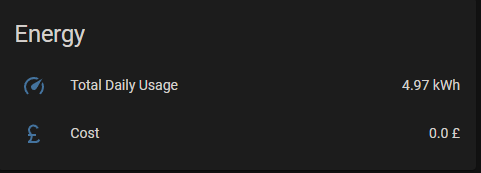 marble jackal
you can use state_attr('media_player.dennon_avt_x1700h', 'source') for that. Taht does not work for last_updated as it is not an attribute
And it is indeed explained in the link Tinkerer posted 🙂
zealous flame
ok i think i'm reading here that last_updated is a state, but 'source' is an attribute?
marble jackal
the state for a media player entity is something like playing or off
marble jackal
Oh, everything seems to be in the docs 😛
ebon drift
marble jackal
But you can also use expand to have access to all the information of the members...
Perfect, thank you!
 torn sluice
I want to create a sensor template that reads the air quality and returns the air quality index, such as Good, Moderate, Unhealthy. For example, if the air quality is between 0 and 12.0 µg/m³ it's considered "Good" and if between 12.1 and 35.4 µg/m³ is "Moderate". Any help or guidance will be appreciated.
floral shuttle
figuring out why {% set presence = expand('group.family') |rejectattr('state','in',['unknown','unavailable']) |selectattr('state','eq','home') |list|count %} {% set mapper = ['grey','steelblue','saddlebrown', 'gold','darkorange','maroon','green'] %} {{mapper[presence]}} works fine, but {% set presence = states('zone.home') %} doesnt, and needs |int
even though {% set presence = states('zone.home') %} {{is_number(presence)}} is true
inner mesa
is_number() just means that it can be interpreted as a number, not necessary that is an int or float type
floral shuttle
the error isUndefinedError: 'list object' has no attribute '3' so its in the mapper?
inner mesa
And your first example, presence is an int because it's the result of 'count'. In the second, it's a string because all states are strings
floral shuttle
and check this which accepts it without error:```
{% set presence = states('zone.home') %}
        {% set mapper = {0:'mdi:account-off',
                         1:'mdi:account',
                         2:'mdi:account-multiple',
                         3:'mdi:account-multiple-check'} %}
        {{mapper.get(presence,'mdi:account-group')}}```
difference is the mapper
inner mesa
I'm not sure what you're getting at
floral shuttle
I am trying to understand why using the list, I can not use the zone.home state without casting to |int, and I can with the dictionary Mapper
inner mesa
doesn't work for me
{% set map = {0:'foo', 1:'bar'} %}
{% set index = '0' %}
{% set index2 = states('input_number.test') %}
{{ map[0] }}
{{ map.get(0) }}
{{ map.get('0') }}
{{ map.get(index) }}
{{ map.get(index2) }}
->
foo
foo
None
None
None
works exactly as I'd expect: states are strings, list indicies need to be ints, and a dict index needs to match the type of the key
floral shuttle
thx. guess I am confused with the type of the keys in my dictionary mapper, thinking the unquoted numbes are numbers.. where they in fact matct the type of the states('zone.home'), which is a string perse, it being the outcome of a template.
inner mesa
those keys are numbers, and they do not match the type of the state, which is a string
I'm still not sure what you think is curious about this
it's completely consistent as far as I can tell
perhaps what's confusing you is that you've specified a default in the .get() that will be returned if the key isn't found?
floral shuttle
wait, recap:```
{% set presence = states('zone.home') %}
        {% set mapper = {0:'mdi:account-off',
                         1:'mdi:account',
                         2:'mdi:account-multiple',
                         3:'mdi:account-multiple-check'} %}
        {{mapper.get(presence,'mdi:account-group')}}``` presence var is a number, and keys in the dictionary are numbers. result template works