#templates-archived
1 messages · Page 129 of 1
 dreamy sinew
 inner mesa
right, it would have to be like attribute in [list] or something
 unreal merlin
and franky I would've been surprise if it did given those are filters... e.g. the more you progress the less data you have, so once you map(attribute=entity_id) - that's all what you have - if what I understand is correct
inner mesa
even that wouldn't make sense
dreamy sinew
you messed up your template somewhere, need to share what you are trying. probably the last one you touched.
unreal merlin
oh man, and really that is.
 earnest cosmos
Yeah, but I cannot play back, what I did. could be several places, and I have gone through all templates I´ve been working on in scripts and automations today.
unreal merlin
awesome, thanks again - where do I get you a beer? 😄
dreamy sinew
unreal merlin
oh man, and really that is.
yeah, lets you do some really complex stuff and sub in vars. much cleaner than the old 'Hello ' + name +'!' crap. which also works but i hate it.
'Hello {}!'.format(name)
inner mesa
now, where are my f-strings?
dreamy sinew
could also be done 'Hello {}!'|format(name)
or: 'Hello %s!' % name
and there's another weird jinja method that i always forget about
dreamy sinew
inner mesa
now, where are my f-strings?
my kingdom for f-strings!
the % method lets you do fun formatting things inline but its ugly so i hate it too
unreal merlin
dreamy sinew
yeah, lets you do some really complex stuff and sub in vars. much cleaner than t...
yeah that looks a lot better
 mighty ledge
It’d be super nice for f strings
inner mesa
doesn't % do some type conversion?
mighty ledge
Ya
mighty ledge
It’s identical to f string and format
unreal merlin
is there a better trick to break / continue a loop given a condition besides tracking an ns.break or ns.contrinue?
dreamy sinew
not really
i generally try to avoid loops though
most times you can solve them with a filter of some sort
mighty ledge
Use filters, only time you need a loop is if you have to perform a non-basic operation
dreamy sinew
what we ran through above is an example of things you can't quite do with filters. but for most other things you can handle it
mighty ledge
Imagine numpys list abilities
dreamy sinew
list comprehensions would solve a bunch of things too
unreal merlin
I see
mighty ledge
It makes sense that jinja doesn’t have it though based on the languages intent
unreal merlin
Need to review a bunch of my templates 🙂
dreamy sinew
this list is your friend:
https://jinja.palletsprojects.com/en/latest/templates/#list-of-builtin-filters
plus some HA sugar
unreal merlin
oh yeah I've been eyeballing that jinja page - but the html examples it shows keeps kicking the band off my brains 😄
I've had a hard time associating those examples with stuff in HA
dreamy sinew
jinja2 is closely tied to flask
dreamy sinew
so most of their examples lean towards that
a lot of other python based projects use it too though
ansible i believe is another
unreal merlin
what I've had planned to do is to build up a few examples to experiment with all filters, so I can see them in action - that usually helps putting things to where they belong
practical stuff is ace for me
 charred dagger
It's jinja3 nowadays.
dreamy sinew
lol they didn't update the package name
charred dagger
Oh. You're right... Guess it's Jinja2 3 then...
 unreal merlin
howdy 🙂
for the |rejectattr filter, is there a way to use regex?
things like rejectattr('entity_id', 'regex_match', '.*no_need_for_this$')
I haven't found anything in the doc that'd point to this direction :/
inner mesa
yep:
{{ states.sensor | selectattr('entity_id', 'search', '.*mbr.*') | map(attribute="name") | list | join(', ') }}
search is supposed to match a substring anywhere, while match is supposed to match at the beginning, but it seems like there's some overlap considering that regex is regex
unreal merlin
oh excellent, thanks
 floral shuttle
inner mesa
yep:
floral shuttle
inner mesa
yep:
how come the .'s in that string are not checked? seems selectattr('entity_id', 'search', 'mbr') results in exactly the same outcome? When I add a wildcard in front of that, like: '*hvb.' the output is error: nothing to repeat at position 0
 deft timber
floral shuttle
how come the `.`'s in that string are not checked? seems `selectattr('entity_id'...
deft timber
floral shuttle
how come the `.`'s in that string are not checked? seems `selectattr('entity_id'...
It is a regexp. . matches any characters, and * means 'repeat 0 to n times the previous char'. So .* means 'repeat any char 0 to n times'.
floral shuttle
O I see thanks! A totally different syntax. Need to read up on regexp again… ( needed it only once yet in the recorder filtering, and remember that to have been a challenge too 😉 thanks!
 acoustic arch
goodmorning! i got this sensor giving me a fixed timestamp like:
2021-06-29T20:28:00.000+02:00
Its for groceries delivery. Once delivery is known the sensor shows this. Im too much of a novice to parse this into something useful unfortunately.
I'd like a notification 15min prior this this timestamp, but templates syntax is killing me
if this can be done in 1 automation great. Else its 2? 1 to parse this into an input_datetime helper, and 1 to use that to automate
acoustic arch
well... I got the time ago in seconds now 😋
{{ as_timestamp(states.sensor.picnic_last_order_delivery_time.state) - as_timestamp(now()) }}
in 1/1000 of a second precision
dreamy sinew
i wonder if
{{ as_timestamp(states('sensor.picnic_last_order_delivery_time')) > as_timestamp(now() - timedelta(minutes=15)) }} will get you
acoustic arch
thx! i will give it a try this evening!
inner mesa
dreamy sinew
oh wow, that's huge
inner mesa
It’s like someone was…listening 🙂
dreamy sinew
that's an elegant solution too
better than touching all the individual integrations
inner mesa
Yep. Works for attributes or any string
mighty ledge
I’d want to look at the code. Hopefully it has smarts and you don’t have to provide the full HA timestamp… 2021-06-30T10:11:12.123456+00:00
dreamy sinew
DATETIME_RE = re.compile(
    r"(?P<year>\d{4})-(?P<month>\d{1,2})-(?P<day>\d{1,2})"
    r"[T ](?P<hour>\d{1,2}):(?P<minute>\d{1,2})"
    r"(?::(?P<second>\d{1,2})(?:\.(?P<microsecond>\d{1,6})\d{0,6})?)?"
    r"(?P<tzinfo>Z|[+-]\d{2}(?::?\d{2})?)?$"
)```pretty comprehensive it seems
inner mesa
The other thing that always confuses people (including me) is that a parsing failure with strptime returns the original string. It looks like this now returns None?
dreamy sinew
seems like yes, probably worth documenting because that is not standard template behavior
 sonic pelican
Hey guys, I've got a template that calls a script and I'm trying to get the script to set an input_number like this, but it isn't working. Any idea why?
  sequence:
  - service: input_number.set_value
    target:
        entity_id: input_number.office_fan_percentage
    data_template:
value: {{ percentage }}```If it helps, this is the error I get: Error loading /config/configuration.yaml: invalid key: "OrderedDict([('preset_mode', None)])" in "/config/scripts.yaml", line 108, column 0
inner mesa
You need to surround the template in quotes for a single-line template
sonic pelican
Oh wow, that's a silly mistake. LOL Thanks!
inner mesa
But it looks like you may have another issue because the error mentions preset_mode
sonic pelican
Nope that fixed it! It must have been a parsing error or something.
Actually, that begs a question then. This is the script right above it, which works fine without quotes. What makes the difference here? ```office_fan_set_preset_mode:
sequence:
- service: script.turn_on
data_template:
entity_id: script.office_fan_preset_{{ preset_mode }}```
inner mesa
If the value of the tag doesn’t start with {, then it’s clear to the parser that it’s not the start of a JSON block
 harsh ruin
Is it possible to get the name of a device from the device_id?
 silent barnBOT
@sour acorn posted a code wall, it is moved here --> https://paste.ubuntu.com/p/k9tvZTnbYG/
 sour acorn
I'm trying to figure out a way to express this in an automation:
https://paste.ubuntu.com/p/k9tvZTnbYG/
inner mesa
what happens?
sour acorn
file editor says:
bad indentation of a mapping entry at line 1120, column 34:
'{% if is_state("input_select.room3_status", "Veg ...
^
sour acorn
but DT template works out
ok let me google that
so what that be something like
hours: >
{then code here}
?
inner mesa
      hours: >-
        {% if is_state("input_select.room3_status", "Veg") %} 19
        {% elif is_state("input_select.room3_status", "Flower") %} 13
        {% elif states("input_select.room3_status") in ["Drying", "Empty", "Flipping"] %} 1
        {% endif %}
like that
sour acorn
Thanks Rob!
let me try that
inner mesa
sorry, keep finding typos
the message should be something like this:
      message: >-
        Room #1 lights have been ON for over
        {%- if is_state("input_select.room3_status", "Veg") %} 19
        {% elif is_state("input_select.room3_status", "Flower") %} 13
        {% elif states("input_select.room3_status") in ["Drying", "Empty", "Flipping"] %} 1
        {% endif -%}
        hours
might need more or fewer "-"
I'm not sure that flowers are supposed to be flipped
sour acorn
hahaa its for a friend, there's a little more to it that just flowers
what is the purpose of wrapping with "-"
im not a coder
inner mesa
it eats whitespace
usually doesn't matter, unless you're trying to construct a text message or similar
the forums are littered with "-" everywhere from the early days
and yes, to the spectators, I know there's a more elegant way to do that
sour acorn
so when templating, i wasnt getting whit spaces, but was getting LF
(before you suggested the multi line method)
inner mesa
then try adding more "-"
I don't know which ones actually matter, I just experiment
you have to test in the automation - the dev tools won't show you the real result
or maybe they will, give it a try
 quick blaze
How would I check if I certain file has been downloaded successfully? I know I can see when a file has failed/success but how can I specify a conditional value template to run an automation on successful download of say image-44567.jpg specifically?
{{ trigger.payload_json.file == image-44567.jpg }} doesn't seem to work
quick blaze
Tried that too, one sec on mobile so can't copy and paste
inner mesa
try printing trigger.payload_json.file in a persistent_notification to make sure it's what you think it is
sour acorn
ok I'll try to rewrite an example so i can try to test live.
quick blaze
There, that's what I need to learn. Debugging outputs for this stuff
inner mesa
I use persistant_notification, but you can also write log entries using system_log
sour acorn
i know i had an example in my automation (which got erased, as it was commented out.)
Where i set a var value within the automation used, which i was thinking about doing, but i dont recall where i found that, would that be easier?
inner mesa
more elegant, yes
{% set mapping = {"Veg": 19, "Flower": 13, "Drying": 1, "Empty": 1, "Flipping": 1} %}
{{ mapping[states("input_select.room3_status")] }}
That is much more elegant! and in templating it works out perfect! So could it simply expressed as
hours: '{% set mapping = {"Veg": 19, "Flower": 13, "Drying": 1, "Empty": 1, "Flipping": 1} %}{{ mapping[states("input_select.room3_status")] }}' ```I would again use a multi-line template to make it easier to read, but yes
there many ways to skin this panda
sonic pelican
Hey guys, another template question. I think I've got my fan template working fully. However, Alexa doesn't seem to be able to control it via voice. What could I be missing? Template code for reference: https://community.home-assistant.io/t/king-of-fans-mr101z-missing-max-setting/267131/15
floral shuttle
any suggestion to 'guard' this on startup:```Error while processing template: Template("{{(now() -
states.sensor.last_motion_light_ad.last_changed).total_seconds()
< 10}}")
it returns 'false' which is ok, because the sensors hasn''t been changed, but I dont like the error...
 ivory delta
What do you want it to do?
 nocturne chasm
prob state_attr('sensor.last_motion_light_ad', 'last_changed') and mono will correct my code if it is wrong
charred dagger
last_changed isn't an attribute.
nocturne chasm
yes, you got me
charred dagger
It's... something else
maybe | default(now()) could work. I don't know...
~~ Templates probably shouldn't evaluate until startup is complete 🤔~~ Edit: That's not the problem here
nocturne chasm
so not this?```
Avoid using states.sensor.temperature.state, instead use states('sensor.temperature'). It is strongly advised to use the states(), is_state(), state_attr() and is_state_attr() as much as possible, to avoid errors and error message when the entity isn’t ready yet (e.g., during Home Assistant startup).
No. last_changed and last_updated are the exceptions afaik, since they are not attributes and don't have a getter function for some reason.
But even if they were, the return value would still be undefined here, I think, since there has been no state change since boot.
nocturne chasm
I use something like this without any errors:
{{ (as_timestamp(now()) - as_timestamp(states.binary_sensor.back_yard_motion.last_changed)) > 900 }}
 undone knoll
Hi. I have a feeling this should be easy, but I've been trying for ages to get a picture-glance card to display the 'next mission' patch provided in the entity 'sensor.next_launch_mission'. This is what I have at the moment:
is it allowed to template an image?
 tall otter
https://paste.ubuntu.com/p/GStx6qY4wT/
hi all, trying to send a simple notify and it's mostly working, but have a couple issues. thoughts?
mighty ledge
undone knoll
Hi. I have a feeling this should be easy, but I've been trying for ages to get ...
No
floral shuttle
charred dagger
maybe `| default(now())` could work. I don't know...
trying {{(now() - states.sensor.last_motion_light_ad.last_changed|default(0)).total_seconds() < 10}}
sorry I failed to post the error before: TemplateError('UndefinedError: 'None' has no attribute 'last_changed'') while processing template 'Template("{{(now() - states.sensor.last_motion_light_ad.last_changed).total_seconds() < 10}}")' for attribute '_state' in entity 'binary_sensor.motion_light'
and the sensor is created in AppDaemon, so that probably isnt ready yet at startup,
well, error changed: homeassistant.exceptions.TemplateError: TypeError: unsupported operand type(s) for -: 'datetime.datetime' and 'int' 2021-07-01 11:41:48 ERROR (MainThread) [homeassistant.components.template.template_entity] TemplateError('TypeError: unsupported operand type(s) for -: 'datetime.datetime' and 'int'') while processing template 'Template("{{(now() - states.sensor.last_motion_light_ad.last_changed|default(0)).total_seconds() < 10}}")' for attribute '_state' in entity 'binary_sensor.motion_light'
while the template editor correctly says 'false'... and doesn't object, even while the sensor (AD app) hasn't been triggered yet.
having an identical condition in an automation elsewhere doesnt throw an error: {{(now() - states.sensor.vijverpompen.last_changed|default(0)).total_seconds() > 3600}}
wait, I now see you suggested |default(now)) which would prevent the type error... edit: and restarting .
And the error is gone. Thanks Thomas!
undone knoll
@mighty ledge Thanks. that's what I was afraid of...
 dull dune
Anyone know of a good guide/example for a template cover that uses binary sensors for both the open and closed position (2 separate sensors) I can only find an example using one sensor and assuming the state for the other end
nocturne chasm
So, you have two sensors that report opposite states?
dull dune
nocturne chasm
So, you have two sensors that report opposite states?
Thats right, the covers open binary sensor is turned on when the cover is fully open.
The covers closed binary sensor is on when the cover
is fully closed
both are off when the cover is inbetween open/closed
nocturne chasm
This prob isnt the cleanest but it should work```
{%- if is_state('binary_sensor.open_sensor', 'on') and
is_state('binary_sensor.closed_sensor', 'off') -%}
Open
{%- elif is_state('binary_sensor.open_sensor', 'off') and
is_state('binary_sensor.closed_sensor', 'on') -%}
Closed
{%- elif is_state('binary_sensor.open_sensor', 'off') and
is_state('binary_sensor.closed_sensor', 'off') -%}
Transitioning
{%- endif -%}
would be interesting to see if on/on was one transition and off/off was the other
dull dune
nocturne chasm
This prob isnt the cleanest but it should work```
{%- if is_state('binary_sensor...
Wow, thanks, will give it a go now and report back
nocturne chasm
you could also add:
{%- else -%}
  Who knows whats going on with the garage door
 distant plover
When I click on my robot vacuum it says last changed: 34 minutes ago. If I use states.robot_vacuum.last_changed it gives a timestamp. Can I easily get 34 minutes ago instead somehow?
When I used dummy-entity-row it showed 34 minutes ago as secondary-info but now I'm trying to convert to template-entity-row since dummy is archived.
silent barnBOT
@dull dune posted a code wall, it is moved here --> https://paste.ubuntu.com/p/hxv7ZdpKpB/
dreamy sinew
dull dune
Wow, thanks, will give it a go now and report back
slightly cleaner:
{%- set closed = is_state('binary_sensor.closed_sensor', 'on') -%}
{%- if open and not closed -%}
  Open
{%- elif not open and closed -%}
  Closed
{%- elif open and closed -%}
  Transitioning
{%- else -%}
  Transitioning
{%- endif -%}
@tall otter posted a code wall, it is moved here --> https://paste.ubuntu.com/p/jqPxHMhdSj/
nocturne chasm
silent barn
prob because it is never off/off so you could just do
Transitioning
tweaked my suggestion with those changes
nocturne chasm
but testing in dev tool / templates should give a hint. Also , phnx is much cleaner
dull dune
nocturne chasm
prob because it is never off/off so you could just do
```{%- else -%}
Transi...
It is, both sensors go to off state during transitioning that lasts for a little more than two minutes
nocturne chasm
huh? Your garage door takes more than 2 minutes to close?
silent barnBOT
@dull dune posted a code wall, it is moved here --> https://paste.ubuntu.com/p/trm89gK95F/
nocturne chasm
but the transitioning part works the same as the other two so 🤷
silent barnBOT
@dull dune Please use https://paste.ubuntu.com/ to share code or logs. Please don't use Pastebin, since it can randomly add spaces to the main view.
Command '.share' was invoked by: pdobrien3
nocturne chasm
Actually, if you are using phnx’s template, I think the state of both set commands should be on
dreamy sinew
oh, bad copy paste
nocturne chasm
And {%- elif not open and not closed -%}
dull dune
nocturne chasm
but the transitioning part works the same as the other two so 🤷
I've tested it more now and the first one that you reffered to as not so clean seems to be more reliable; It waits for the binary sensor before assuming any state. Only problem I have with this template cover is that it never displays anything but open or closed, but it displays them in the correct time. The icon is representing three states, I don't know how but it displays a colored open state, a closed state and the strange part, a lit closed icon for when both binary sensors are off
nocturne chasm
The template editor is your friend. You have the logic. Make it work for your situation.
But the colored part is a frontend thing
state_color: true
and use the same logic to change the icon
dull dune
nocturne chasm
The template editor is your friend. You have the logic. Make it work for your si...
My brain hurts when trying to write/modify templates 😫
🤣
nocturne chasm
yes, it takes time but
icon_template: >-
          {% if is_state('binary_sensor.pool_cover_open_template_binary_sensor_solid', 'on') %}
            mdi:garage-open
          {% else %}
            mdi:garage
          {% endif %}
only has two states
hence, only two icons
use the same logic to make any icon you want
dull dune
Yeah, i wasn't even focusing on the icon at the moment...the weird part is that the icon is displaying a third state when both sensors are off and that is a closed icon that is lit
nocturne chasm
when binary_sensor.pool_cover_open_template_binary_sensor_solid is on, it will display mdi:garage-open otherwise it will display mdi:garage you havent changed the icon template
and the color thing is #templates-archived message
in your lovelace.yaml
dreamy sinew
i recommend using my suggested format instead of the original. The original rechecks each of those states for each option in the if block. If it falls to the else you have checked each sensor 3 times (6 total)
it "seemed unreliable" because i had one of the state checks backwards
nocturne chasm
ha.....small details when running on an i7 but yes, I need to learn set commands
dreamy sinew
just efficiency things
nocturne chasm
but now I have another project 😆
dreamy sinew
"don't do work you don't have to"
nocturne chasm
I agree....but knowledge is a factor
dreamy sinew
true
sonic pelican
Anyone got any ideas on this? #templates-archived message
dull dune
dreamy sinew
i recommend using my suggested format instead of the original. The original rech...
Thank you, I edited the state check and it now works as expected, except for "transitioning state" never displaying
dreamy sinew
probably more of a #voice-assistants-archived thing
 idle hawk
Hi, Is it possible to have a template pull part of an entity_id's name from a trigger and combine that with a string to form the full entity_id name that will be called in the service? I've tried every way I can think of and keep getting "Error: Error rendering data template: TypeError: 'str' object is not callable" https://paste.ubuntu.com/p/stHrhwHsVz/
inner mesa
what are you trying to reference here? trigger.event.data.command("delay")
that's a function call, and you probably want trigger.event.data.command.delay
but then I'm not sure what the [0] is doing, because that's grabbing the first item from a list
what does the event structure look like and what are you trying to get from it?
also, your indentation is off, anddata_template was deprecated months ago in favor of data:
idle hawk
inner mesa
what are you trying to reference here? `trigger.event.data.command("delay")`
THANK YOU! You made me realize that I butcher my template cutting and pasting it so many times. I must have lopped off the .split portion. That's what the [0] to grab
inner mesa
ah, that makes more sense 🙂
idle hawk
Thanks again!
distant plover
When I used dummy-entity-row it showed 34 minutes ago as secondary-info but now I'm trying to convert to template-entity-row since dummy is archived. If I use states.robot_vacuum.last_changed it gives a timestamp. Can I easily get 34 minutes ago instead somehow?
 simple edge
Hi how do you do substrings?
ivory delta
Carefully. What are you trying to do?
If you're asking how to slice a string, just do it the Python way: https://www.w3schools.com/python/gloss_python_string_slice.asp
simple edge
Does templetes work off python?
ivory delta
It's a mix of Python and Jinja.
Jinja is the templating engine used in HA but it can also evaluate some Python.
sour acorn
Hey RobC, I tried to implement:
    above: >-
            {% set mapping = {"Veg": 19, "Flower": 13, "Drying": 1, "Empty": 1, "Flipping": 1} %}
            {{ mapping[states("input_select.room3_status"] }}```
but i get an error:
Invalid config for [automation]: expected float for dictionary value @ data['above']. Got None. (See ?, line ?).What was the state of that input select when you got that error?
ivory delta
If the state doesn't have a key in that mapping, you can't read the value of said key. You need a default value.
sour acorn
i see, because there was no properly mapped value
ivory delta
Something like this should work:
{{ mapping[states("input_select.room3_status"] | default(0) }}
dreamy sinew
Except with a closing paren instead of a closing square bracket
sour acorn
hmmm, still same error
 austere zenith
hi, im new to templates. Do i have to restart HA everytime i edit templates?
dreamy sinew
Missing a closing paren
inner mesa
yes, and I fixed it in the earlier codeblock right after I posted it
Luckily, the template dev tool doesn't judge as I hack and slash at it
well, I guess it does spam my HA log
sour acorn
Im still not sure where i got this wrong. In DT/Template it shows a mapped value, but i still get that error in my logs and automation will not run.
does HA not like using a template value under numeric_state > above?
inner mesa
what do the docs say?
sour acorn
I dont see it mentioned or i messed it.
inner mesa
if it's not mentioned, it probably doesn't support it
sour acorn
OK i see, I know i placed a template under platform>state>for>hours , so with that and our conversation yesterday i thought it would work. I guess ive been scratching my head off and on for the past 24h for nothing.
thanks for clarifying tho
I now see someone posted templates work for "for" "hours" but not "above"
and in our example yesterday with you i used "for", but in my test run i was using "above"
so "above" is more or less my problem? (it should work under for>hours) or do you feel it is a platform:>numeric_state problem?
inner mesa
right, earlier you used it in the for: block, which does support a template
you can use a template trigger with for: that also has a template
sour acorn
ok i did run a test and it did work under for:
im sorry Rob
is there other common areas i should stay clear from, when using templates?
i didnt really see a list or again maybe i messed it
inner mesa
you just have to go by what's in the docs
the basic rules of thumb are these:
- If you have a key in a
data:ortarget:block, you can use a template in the value
- You can use a template for a service
- Anything else, the docs need to specify that a template can be used
inner mesa
you can use input_number entities for above/below, and you can set those using templates
then this is coming in 2021.7: https://rc.home-assistant.io/blog/2021/06/30/release-20217/#referencing-other-entities-in-triggers-and-conditions
so you can use a sensor, which can be a template sensor
inner mesa
np
distant plover
When using secondary_info last-changed on an entity it says "2 timer siden", correctly translated. But when I use {{ relative_time(states....last_changed)}} it says "2 hours". Missing translation?
mighty ledge
distant plover
When using secondary_info last-changed on an entity it says "2 timer siden", cor...
They aren’t the same methods. You’ll have to translate it yourself
distant plover
With | replace you mean?
mighty ledge
Or just put the timestamp in the sensor without relative time and let the UI do the translation
But that will only work in entities cards
distant plover
Or is there a place I can go to to send in a translation?
distant plover
Yeah, ok.
I want the 'hours ago' part so I guess I need to use replace in a template.
Translations for stuff isn't crowd sourced?
mighty ledge
It is, just not for that
distant plover
Ok, hehe.
mighty ledge
Templates don’t have translations
 fast oracle
hi, can anyone tell me why this isn't valid trigger: - platform: time_pattern hours: "{{ state_attr('input_datetime.XXX', 'hour') }}"
the log is showing invalid dict value for hours
dreamy sinew
probably doesn't accept templates
fast oracle
that's a shame
 fluid cedar
Is it possible to convert a user_id to the name? Specifically, i'd like to use the name rather than the user_id:
{{ trigger.event.context.user_id == "123456789012345678901234567890" }} {## person 'A' ##}
e.g.: is there a "user_id to name" lookup function?
inner mesa
see the first pin 🙂
fluid cedar
oh yeah
fluid cedar
inner mesa
see the first pin 🙂
It doesn't seem to work for me. I get no output in the template editor.
fluid cedar
Fixed it. Needed to be attributes.user_id
You beat me to it !
{{ states.person|selectattr("attributes.user_id", "==", "345345345345345345345345")|map(attribute="attributes.friendly_name")|first }}
inner mesa
hmmm
ah, I see. there's an id and user_id
I'll fix the pinned message
thanks for pointing that out!
I stopped looking when I found a giant string of letters and numbers 🙂
Done. The original would have worked for id, but not very useful
fluid cedar
And in reverse:
ID from Name:
{{ states.person|selectattr("attributes.friendly_name", "==", "MyName")|map(attribute="attributes.user_id")|first }}
Note, case-sensitive name.
fluid cedar
What's the formatting to pass a !input into a value_template ?
- condition: template value_template: '{{ ''!input person_name'' == states.person|selectattr("attributes.user_id", "==", trigger.event.context.user_id) |map(attribute="attributes.friendly_name")|first }}'
I'm trying to pass in !input person_name
fluid cedar
Figured it out.
variables: person_name: !input person_name
value_template: '{{ person_name == .....
 thin vine
Hey you template wizards, is there a way to do this with filters instead of the for loop?
{% set lifeliner = state_attr('proximity.lifeliner', 'nearest') %}
{% set array = [('LL1','Lifeliner1'),('LL2','Lifeliner2'),('LL3','Lifeliner3'),('LL1','Lifeliner3')] %}
{% for test in array %}
{% if test[0] == lifeliner %}
{{test[1]}}
{% endif %}
{% endfor %}
where the proximity sensor will provide LL1 - LL3
dreamy sinew
{% set map = {'LL1': 'Lifeliner1', 'LL2': 'Lifeliner2'} %}
{{ map.get(state_attr('proximity.lifeliner', 'nearest'), 'unknown') }}
@thin vine
Add your third one in like the first 2
thin vine
Clear
dreamy sinew
Just didn't want to do it on mobile
thin vine
😁
 narrow knot
is it possible to diff two objects?
e.g. (trigger.event.data.old_state + trigger.event.data.new_state) | diff
i just want to know the changes so I can send them in a notification message
 steep kiln
got a sorting template for monitored gas stations and it works fine but how do i cut it so it only shows the first 3 entries?
{% for entity in  expand('group.all_monitored_gas_stations')| sort(attribute='state')| map(attribute='entity_id')| map('string')| list%}
{{state_attr(entity, "brand")}} {{state_attr(entity, "street")}} {{states(entity) }} € {% endfor%}
{{state_attr(entity, "brand")}} {{state_attr(entity, "street")}} {{states(entity) }} € {% endfor%}
{% for entity in  (expand('group.all_monitored_gas_stations')| sort(attribute='state')| map(attribute='entity_id')| map('string')| list)[0:5] %}
{{state_attr(entity, "brand")}} {{state_attr(entity, "street")}} {{states(entity) }}€ Total: {{((50-(50/100) * ((states.sensor.gti_fuel_level.state)|float)) * (states(entity) |float )) |round(2) }}€ {% endfor%}
Freie+Tankstelle Handwerkstrasse 1.499€ Total: 6.75€
JET INDUSTRIESTR. 38 1.539€ Total: 6.93€
T Seerosenstr. 48 1.539€ Total: 6.93€ ```feel very tempted to drive to the next gas station and see if I have to pay 6.75€ 😆
thin vine
dreamy sinew
```
{% set map = {'LL1': 'Lifeliner1', 'LL2': 'Lifeliner2'} %}
{{ map.get(state_...
works like a charm, just wondering where the get() function comes from, can't find in the jinja or HA documentation
mighty ledge
narrow knot
is it possible to diff two objects?
You have to do it manually
mighty ledge
thin vine
works like a charm, just wondering where the get() function comes from, can't fi...
It’s a method on dictionaries
thin vine
so python?
thin vine
So in practice you can use some python in templates too
mighty ledge
Yes and no
thin vine
ah no easy answers
mighty ledge
If the object came from python, then you can use all built in methods on that object
Like if you have a python objected that represented fruit and the fruit has a name and flavor, you’d be able to access name and flavor from the fruit
In jinja
narrow knot
@mighty ledge is there at least a way to turn an object into a string?
Like json encode but preferably more human readable
mighty ledge
| string
 mint crane
evening all, is there a structure in a template that can convert a input_boolean to a number? Say, if bool_kitchen == true, return 2; if bool_diner == true, return 5... and then once a list of input_booleans has been evaluated, output a string of those numbers "2,5"?
inner mesa
the first part is simple: {{ 2 if is_state("input_boolean.bool_kitchen", "on") else 5 }}
the second part requires a foreach loop
mint crane
thanks @inner mesa just a concat type thing?
inner mesa
to form the list?
mint crane
yeah.. needs to add a comma
inner mesa
if you really mean a list, you'd need something like this:
test:
    sequence:
      - service: homeassistant.toggle
        data:
          entity_id: >-
            {% set ns=namespace(entities=[]) %}
            {% for i in states.switch if i.object_id.startswith('office') -%}
                {% set ns.entities = ns.entities + [i.entity_id] %}
            {%- endfor %}
            {{ ns.entities }}
that's something I wrote for something else, but it show the basic concept for a list
mint crane
i think list might be the wrong word. There are only 4 input booleans I care about.
inner mesa
if you just want comma-separate, then something like this:
entity_id: >-
{% for i in states.switch if 'keypad' in i.entity_id -%}
    {{ i.entity_id ~ (", " if not loop.last) }}
{%- endfor %}
so in your case:
{% for i in ['input_boolean.x', 'input_boolean.y'] -%}
    {{ 2 if is_state(i, 'on') else 5 ~ (", " if not loop.last) }}
{%- endfor %}
I'm effectively heading for a check list to select which rooms I'd like the vacuum cleaner to go over using input booleans for each option. The script that runs the vacbot takes a comma separated string, each number refers to a zone
but rather than a checklist, it's toggle buttons
inner mesa
could also do it with a filter if the names have something in common
I see how to do it
mint crane
🙂 thanks
inner mesa
something like this, but still working on the commas:
{% set room_map = {"input_boolean.test1": 1, "input_boolean.family_room": 2, "input_boolean.foyer": 3} %}
{%- for room in room_map %}
  {{- room_map[room] ~ (", " if not loop.last) if is_state(room, 'on') -}}
{% endfor -%}
this is legendary! Thanks. Just a bit distracted with this Euro 2020 football
inner mesa
lol
{% set room_map = {"input_boolean.test1": 1, "input_boolean.test2": 2, "input_boolean.foyer": 3} %}
{%- for room in room_map %}
  {{- (", " if not loop.first) ~ room_map[room] if is_state(room, 'on') -}}
{% endfor -%}
I initially tested with two input_boolean.test1 keys, but you can't have duplicate keys in a dict. That was confusing for a bit
mint crane
i'll test this at half time. looks much more than i could ever figure out
dreamy sinew
Have the loop add them to a namespaced list. Then ', '.join(ns.my_list)
inner mesa
I have a version of that with the same result. Just more lines
{% set room_map = {"input_boolean.test1": 1, "input_boolean.test2": 2, "input_boolean.foyer": 3} %}
{% set ns=namespace(rooms=[]) %}
{% for room in room_map %}
  {% set ns.rooms = ns.rooms + ([room_map[room]] if is_state(room, 'on') else []) %}
{% endfor %}
{{ ns.rooms|join(", ") }}
first is simpler
 astral moth
Hi everyone, how to get the date in YYYY-MM-DD format? I see that {{now()}} outputs "2021-07-04 08:27:39.595385+02:00", is there an equivalent to excel LEFT function to trim and only keep the first 10 characters from the left? Thanks very much!
inner mesa
{{ (now()|string)[0:10] }}
you can also just format the datetime that's returned by now(): {{ now().strftime("%Y-%m-%d") }}
astral moth
Perfect, thanks!
mint crane
inner mesa
```
{% set room_map = {"input_boolean.test1": 1, "input_boolean.test2": 2, "inpu...
Thanks for this! I've almost got it.
It's making an output that looks correct when added to a notification, but the integration that uses the input parameters looks like it might be a bit fussy. To debug, I've output the params to the logbook and it appears like it either doesnt like the single quotes or a rogue space at the start of it. I'll share
silent barnBOT
@mint crane posted a code wall, it is moved here --> https://paste.ubuntu.com/p/7jKZXrZyHV/
mint crane
Logbook entry reads:
10:10:21 - 12 minutes ago```Hi, all!
I am using the met.no integration and want to exctract the precipitation_probability attribute; Need to know it it´s gonna rain soon.
{{ states.weather.home_hourly.attributes.forecast }}
gives this, but I cannot find a way to extract precipitation_probability
[{'condition': 'partlycloudy', 'precipitation': 0.0, 'precipitation_probability': 2.1, 'temperature': 21.1, 'datetime': '2021-07-04T09:00:00+00:00', 'wind_bearing': 150.2, 'wind_speed': 9.4}
``` ....What about this?
{{ states.weather.home_hourly.attributes.forecast[1].precipitation_probability }}
the hourly forecast seems to return multiple values, so you need to select one. Not sure which would be best for you. I wonder if it's got a predictable time spacing between each item?
earnest cosmos
mint crane
What about this?
```{{ states.weather.home_hourly.attributes.forecast[1].precipi...
Testing
mint crane
the number 1 is not the first in the list. It's a zero index
earnest cosmos
So that was my next issue.
there is a list of several forecasts fot the hours to come.
Haow will I determine the very first item here?
mint crane
the very first one is 0
but I'm not familiar enough to steer you towards a comparison with now() and some positive offset time. Might have to tap out here 🙂
earnest cosmos
The entire states lists this as start
<template TemplateState(<state weather.home_hourly=partlycloudy; temperature=21.8, humidity=69, pressure=1012.4, wind_bearing=150.2, wind_speed=9.4, attribution=Weather forecast from met.no, delivered by the Norwegian Meteorological Institute., forecast=[{'condition': 'sunny',
So I guess my goal is to extract the forecast at the end of my extraction above
mint crane
my hourly forecast has data from almost 2 hours ago, running through a total of 24 hours
earnest cosmos
So I can confirm in
{{ states.weather.home_hourly.attributes.forecast[0].precipitation_probability }}
the "0" shows the first occurance and "1" the second.
should work fine, then, especially when testing this every 15 minutes for soil moisture in my garden watering automation
Thank you, @mint crane for helping me out.
mint crane
Np 👍
mint crane
@earnest cosmos just check the timestamp of item 0. If it tracks current time, then you're good to go. If it doesn't, then you might need to find something a bit more complicated
earnest cosmos
mint crane
<@557253905281581116> just check the timestamp of item 0. If it tracks current t...
I have this:
datetime: '2021-07-04T11:00:00+00:00'
which seems to be in GMT time, but I am not sure how to use this format further, though
And it seems they forecast per hour
meaning the forecast is for the next hour in total, which for rain would mean thex expect 2.5 within the next hour, I guess
Still, I think I am good using the "0" pointer, as this always will show the next hour.
My irrigation automation checks this every 15 minute, and continues only if it´s not raining, so maybe I´ll be fine just using the current precipiotation state
mint crane
Worth a shot!
 left scaffold
Hey there. Can somebody help me with a template for a automation!?
i got this but this doesnt work
goal is a automation for all my moisture sensors without entering them all one by one
even better would be a easy way to group some sensors. I grouping is something to realize with configuration.yaml
i know*
mighty ledge
left scaffold
https://paste.ubuntu.com/p/7mN3jp5XRH/
whats not working about it? The code looks good
left scaffold
It doenst trigger. When i change the value of some moisture sensors from the developer tools, nothing fires
mighty ledge
well that's because the sensor isn't actually changing
left scaffold
the moisture sensors name is sensor.ble_moisture_somethingsomething
mighty ledge
that doesn't cause a state change event
left scaffold
okay. Could you explain?
mighty ledge
your trigger is a state change event
you need to simulate that event
in order to test that automation. Through the event page
dev tools -> events will allow you to fire one of those
left scaffold
I dont get it. So what is the sensor state then when its not the value?
and how can i set a trigger for a value change?
Sorry for this nooby questions
mighty ledge
- You can't change the state of entities manually
state change only occurs when an event is fired from the backend
the trigger you're using is an event trigger
it's waiting for an event to occur
that event is named 'state_changed'
events can be anything
So, take a look at the dev tools -> event page
You'll notice that there's 2 fields. Event type and Event data field
 blazing burrow
i'm having a trouble with timestamp_custom... i will say i know this has worked for awhile up until now, and i haven't noticed it until i reinstalled my OS. i've made sure my timezone on my box is correct, but what's odd is this is only happening with input_datetime
so here's my "example" template from dev tools:
now(): {{ now() }}
state as timestamp_custom: {{ states('input_datetime.jasper_lights_on') | as_timestamp | timestamp_custom('%-I:%M %p') }}
now() as timestamp: {{ now() | as_timestamp }}
now() as timestamp_custom: {{ now() | as_timestamp | timestamp_custom('%-I:%M %p') }}
state: {{ states('input_datetime.jasper_lights_on') }}
state as timestamp: {{ states('input_datetime.jasper_lights_on') | as_timestamp }}
and the output:
now(): 2021-07-04 06:10:33.573798-07:00
now() as timestamp: 1625404233.573916
now() as timestamp_custom: 6:10 AM
state: 2021-07-04 06:21:03
state as timestamp: 1625379663.0
state as timestamp_custom: 11:21 PM
so now(), when done that way, works fine and is correct
but if i do it to input_datetime, the output is for GMT, not my local time zone
mighty ledge
left scaffold
I dont get it. So what is the sensor state then when its not the value?
So, populate the field with the correct information. Your event is specified this way:
  - platform: event
    event_type: state_changed
    event_data:
      domain: sensor
So, in the dev tools page, your event type should be state_changed and in the event data section put
domain: sensor
Then click the 'fire event' button
blazing burrow
btw i'm only on 2021.6.4, if it matters
mighty ledge
That will simulate the trigger. At that point, your condition will be resolved. So you can check the current template in the dev tools -> template
left scaffold
Okay. Thanks alot. But then, this way i am trying seem to be the wrong way. The automation is setup this way for 30 hours now an nothing happend. So it seems the state_changed trigger isnt working for my moisture sensors or it wouldve been fired by now
mighty ledge
blazing burrow
```jinja
now(): {{ now() }}
state as timestamp_custom: {{ states('input_datetime...
{{ states('input_datetime.jasper_lights_on') | as_timestamp | timestamp_custom('%-I:%M %p', False) }}
I still dont get why i change in value of the entities doesnt fire a state_changed event. What are states then for the sensor? Like available, unavailable and stuff!? What is a trigger for a value change then?
mighty ledge
or True, I can't remember off the top of my head
left scaffold
a*
mighty ledge
left scaffold
I still dont get why i change in value of the entities doesnt fire a state_chang...
Because the state is not changing. You're just putting a value in a field on a grid.
left scaffold
So obviously i am using a wrong trigger for my sensors!?
blazing burrow
mighty ledge
```
{{ states('input_datetime.jasper_lights_on') | as_timestamp | timestamp_cust...
you know, i saw that in the docs:
Filter timestamp_custom(format_string, local_time=True) converts an UNIX timestamp to its string representation based on a custom format, the use of a local timezone is default. Supports the standard Python time formatting options.
but it didn't occur to me to tryFalse, as I do want it in a local time zone 😅
False does display it correctly, but seems a bit backwards to me?
also, was that added fairly recently?
mighty ledge
No, not recent at all
blazing burrow
and how come it's not needed for now() to shake out right?
mighty ledge
I don't know how your template ever worked
blazing burrow
i've never used it before and i've had it like this for months lol
mighty ledge
input datetimes are local, so you need to let it know that it was local when outputting
now is utc
it's been like this since day 1
blazing burrow
hmm alright
mighty ledge
I think you're just miss remembering
blazing burrow
all i know is suddenly one day it said 12:21PM instead of 6:21AM lol
or something like that
inner mesa
now() is local, utcnow() is UTC
mighty ledge
when you use as_timestamp, it treats as utc because the timestamp has the tz offset
he's using as_timestamp in all his templates, which means it's converting the timestamp using the offstet
where the datetime does not have that information
so the datetime is treated locally but now is not
that's what I was trying to imply without as many words
blazing burrow
I'm still not clear on why this has worked fine up until now, but has recently changed
would've changed on... Thurs or Fri after I reinstalled my OS I think
mighty ledge
The only change that has occured to timestamps is the base library. The only result in that change was to the 'under the hood' timestamps now always have microseconds
blazing burrow
system time zone was wrong which I fixed, but didn't fix this
mighty ledge
well that would explain it
if your system time was set incorrectly, then it will affect these conversions
input_datetimes have never contained a timezone, so you've always had to convert them by treating the as_timestamps as local
blazing burrow
but if system time was wrong wouldn't now also be wrong?
mighty ledge
I don’t know, either way, that doesn’t matter.
You need to treat it as local
That’s it
mighty ledge
Np
blazing burrow
wonder if I forgot to reboot after setting my system tz 🤔
 pastel moon
If I define variables like this
  variables:
    humidity_outside: "{{ state_attr('weather.home_hourly', 'humidity') }}"
    humidity_bathroom: "{{ states('sensor.lumi_lumi_weather_0b47b206_humidity') }}"
    msg: "Bathroom: {{ humidity_bathroom }}\nOutside: {{ humidity_outside }}"
will (should) current values be read from the sensors whenever the variable msg is used (which is my intention)?
inner mesa
I don’t think so. It’s a value, not a reference
pastel moon
That was what I suspected. Is there a way to create references in a similar way (or at all)?
inner mesa
Just use the expression wherever you need it
pastel moon
Yeah, but if really long it's a mess keeping every one in sync when changing something... Would be much better if they could be referenced somehow
mint crane
mint crane
Thanks for this! I've almost got it.
It's making an output that looks correct w...
After some trial and error, I have it working. Thanks @inner mesa and @dreamy sinew for your help.
Removing some single quotes and watching the logbook seemed to point me in the right direction.
https://pastebin.ubuntu.com/p/4SVSJHwZxp/
 stuck verge
Is there a way to out rows like an excel sheet? Just wanted to output daily figures in a logbook fashion.
stuck verge
Not really.. I just want to fix the make os sensor per day and output each for 7 days as text row 🙂
it's not in excel format to stat its just in the HA history. I have a bar chart of it but I just rather text for that one 🙂
 fossil venture
Sounds like you would have to create six SQL sensors to extract the previous day's states from the recorder database https://www.home-assistant.io/integrations/sql/ . Then plonk them all (allong with the current day's state) in a multiple entity row card. https://github.com/benct/lovelace-multiple-entity-row
See #integrations-archived for help with the SQL sensor, and #frontend-archived for help with the multiple entity row card.
OR if you mean a vertical row of states then just use an entities card to list the 7 sensors (six previous days SQL sensors + today's sensor).
 lime grove
I've been sent here from integrations
im trying to feed this to a utility meter
      friendly_name: 'PV Generated'
      unit_of_measurement: 'W'
value_template: "{{(states('sensor.solcast_forecast_average_60min') | float * 1000) }}"```but the utlity meter isn't seeing a value
in developer tools:
Result type: string
value_template: "1530.0"
This template listens for the following state changed events:

Entity: sensor.solcast_watts```The utility meter requires a sensor that always increases, like a total energy or water or gas consumed sensor. It then counts how much the sensor has increased since the beginning of the last cycle. Your forecast is not this sort of sensor. It can go up and down depending on the weather. What exactly are you trying to do? If you want to keep a total of the forecast energy you will have to use the integral sensor fed with your forecast power sensor to produce an energy total sensor. This can then be used in the utility meter.
lime grove
i have an integration sensor
  source: sensor.solcast_watts
  name: solcast_kwh
  round: 2
  unit_time: h
  unit_prefix: k
it works for other units of energy im tracking
fossil venture
Then feed that to the utility meter. Not the solcast_watts sensor.
fossil venture
That is not what you said here: #templates-archived message
lime grove
just hold on, let me get my head straight
so here is everything relevant
  source: sensor.solcast_watts
  name: solcast_kwh
  round: 2
  unit_time: h
  unit_prefix: k

    solcast_watts:
      friendly_name: 'PV Generated'
      unit_of_measurement: 'W'
      value_template: "{{(states('sensor.solcast_forecast_average_60min') | float * 1000) }}"
Entity
sensor.solcast_watts
State
1530.0
Entity
sensor.solcast_kwh
State
0.00
fossil venture
So your integral sensor has an issue. You are feeding it with a sensor with a state of 1530 (so there is no issue with your template) but the integration sensor it is not increasing. Back to #integrations-archived to work out why.
lime grove
argh
fossil venture
Yeah sorry. I'm not doing this to be funny.
We could try to sort it out here, it is quiet at the moment
 jade citrus
Hi!
I use a template like this to get some info out of the email:
{{ state_attr('sensor.boekingen_imap_sensor','body') | regex_findall_index("Add-ons: (?:=E2=82=AC |=E2=82=AC=C2=A0)(\d+)") }}
But sometimes this "Add-ons:" is not available in the email and the result is:
IndexError: list index out of range
How do i convert this to just let it be a number 0.0
mighty ledge
jade citrus
Hi!
I use a template like this to get some info out of the email:
{{ sta...
wrap it in an if statement
set the body to a variable, and then check body. If it's empty don't do anything
jade citrus
the body wont be empty; only this line is missing 🙂
"Test string is search(find, ignorecase=True) will match the find expression anywhere in the string using regex."
From documentation, but can't find an example of it anywhere?
solved it:
{% if state_attr('sensor.boekingen_imap_sensor','body')|regex_search( 'Add-ons') %}
{{ state_attr('sensor.boekingen_imap_sensor','body') | regex_findall_index("Add-ons: (?:=E2=82=AC |=E2=82=AC=C2=A0)(\d+)") }}
{% else %}
0
{%- endif %}
earnest cosmos
Hi, all!
I am experimenting with the custom:button-card and digging into an area I don´t know well. The example on Github is like this:
styles:
  custom_fields:
    fukt:
      - '--text-color-sensor': >-
          [[[ if (states["sensor.planter_lavendel_lys"].state < 0) return "red";
          ]]]
I want to test against an input__number like this:
- '--text-color-sensor': >-
    [[[ if (states["sensor.planter_lavendel_fukt"].state <
          states["input_number.planter_lavendel_fukt"].state) return "red"; ]]]
Will this be correct?
Can I test this using the template section in devtools?
inner mesa
This is not jinja, it’s JavaScript, so no, you can’t test in the dev tools
earnest cosmos
True. How can I test it, then?
inner mesa
In the card?
earnest cosmos
OK. Trail and error method?
inner mesa
It’s pretty simple
earnest cosmos
listening 🙂
inner mesa
Maybe you can use the browser dev console
earnest cosmos
I do have VS Code
earnest cosmos
It´s hopefully right the way I put it. would just be curious how I could test it
inner mesa
This is a #frontend-archived thing
earnest cosmos
Now I know that 🙂
earnest cosmos
inner mesa
This is a <#460846676358332417> thing
Sorry for posting here, then.
I was thinking complex "template ish" issues would go here
inner mesa
Np. You’re just asking the wrong audience for help about debugging a card
But it sounds like a lot of talk that will result in ‘just try it’
earnest cosmos
I´ll investigate a bit further, then
inner mesa
You can change the state and input_number manually
earnest cosmos
as in putting numbers there, or via States change, you mean?
ivory delta
Yes
inner mesa
Either/both
earnest cosmos
Thank you, @inner mesa
 stone marsh
How can I make an ignore list for this template? I'm trying to get a list of unavailable entities, while ignoring ones that contain a specific substring. Seems like rejectattr with 'in' is an exact match.
      {% set domains = [states.light, states.media_player, states.cover, states.switch, states.lock, states.binary_sensor, states.sensor, states.vacuum] %}
      {% set states = ['unavailable', 'unknown', 'none'] %}
      {% set ignore = ['fire', 'tasmota'] %}
      {{ expand(domains) | selectattr('state', 'in', states) | rejectattr('entity_id', 'in', ignore) | map(attribute='entity_id') | list }}
Any idea how to make it a list of regex patterns, besides something like this? .*(fire|tasmota).*
but I guess that's not so bad
inner mesa
regex is functional, not pretty
stone marsh
Oh, believe me haha, I know
As far as efficiency goes, if this template is updating everytime one of those domains updates, is that going to be a performance issue?
ivory delta
Not one you'll notice, no.
inner mesa
Probably not
ivory delta
HA is pretty efficient. Some people have hundreds/thousands of entities and almost as many automations. They don't notice any slowdown.
stone marsh
Good to know!
I just wish my browser didn't freeze everytime I opened the states tab under the developer-tools >_<
inner mesa
It’s not fast at searching
 rancid jewel
Hi I am trying to link a switch (supporting on and off and brightness level) to a light group. I googled but wasnt able to find a single automation which can do this. Does anyone have an sample template which can be used to achieve this. Thanks in advance
inner mesa
You probably don’t need a template for that
But a switch, by definition, is only on and off
So I’m not quite sure what you’re looking for
rancid jewel
@inner mesa is there a better way to pair the switch's toggle and brightness level to the light group? Will a script work better? I am new to HA so not sure which route to go for
mighty ledge
rancid jewel
<@!558346704953540628> is there a better way to pair the switch's toggle and bri...
What you’re saying doesn’t make sense. List out your entities using the entity id and explain what you want to do with them or your end goal
rancid jewel
mighty ledge
What you’re saying doesn’t make sense. List out your entities using the entity ...
I have three entities
lightswitch
light_1
light_2
the lightswitch supports on/off and adjusting brightness. I want the the switch to control the on and off levels and brightness of both lights which are in a single group
 sacred sparrow
hi,
why won't this work:
wait_template: >-
  {{ is_state('light.bedroom_lamp', 'on') and
  is_state('light.living_room_front_right', 'on') or
  is_state('light.bedroom_pendant', 'on') and
  is_state('light.living_room_front_right', 'on') }}
timeout: '06:30:00'
continue_on_timeout: true
this worked:
wait_template: >-
  {{ is_state('light.bedroom_lamp', 'on') or
  is_state('light.living_room_front_right', 'on') }}
timeout: '07:30:00'
continue_on_timeout: true
but not the first code
pastel moon
try adding parenthesis: ```
{{ (is_state('light.bedroom_lamp', 'on') and
is_state('light.living_room_front_right', 'on')) or
(is_state('light.bedroom_pendant', 'on') and
is_state('light.living_room_front_right', 'on')) }}
That still didn't give me the info i'm looking for. What's the entity id's? Those are not entity_ids.
rancid jewel
mighty ledge
That still didn't give me the info i'm looking for. What's the entity id's? Th...
Sorry the entity Ids are
- light.livingroom_light_1
- light.livingroom_light_2
- sensor.living_room_switch_click
mighty ledge
rancid jewel
Sorry the entity Ids are
1) light.livingroom_light_1
2) light.livingroom_light...
If all you have is a sensor, you won't be able to add it to a light group without using services that affect the sensor
You'd need to create a template light, but you'd need to define turn on, turn off, and set level actions for the light
unreal merlin
howdy 🙂
any reason why this entity_id wouldn't work as part of a script/sequence, while I'm getting the right value back in template tester? (most be something shamefully obvious): - service: input_text.set_value entity_id: > input_text.water_computed_{{ states('input_number.waterloop_selected')|int|string }}
inner mesa
You have to put templates under data:
unreal merlin
Hey RobC; like data/entity_id?
inner mesa
I don't know what the "/" is representing there
        - service: input_text.set_value
          data:
            entity_id: input_text.water_computed_{{ states('input_number.waterloop_selected')|int|string }}
          data:
            entity_id: >
              input_text.water_computed_{{ states('input_number.waterloop_selected')|int|string }}
value:```oh yeah like that
makes sense, thanks man!
simple edge
Hi if I want to put {{trigger.json.value2.split()[1]}} to get the 2nd word in that sentence. Would that be how I did it?
mighty ledge
simple edge
Hi if I want to put {{trigger.json.value2.split()[1]}} to get the 2nd word in th...
Only the split onward does that
simple edge
But that would work?
for example would this return true {{"hello me".split()[1]=="me"}}
inner mesa
try it
blazing burrow
mighty ledge
I think you're just miss remembering
you know what, somehow i wasn't passing the proper timezone to my docker container. under debian, it seems it was enough to just map /etc/localtime as a volume, but in ubuntu i need to also map /etc/timezone
 grim geyser
Hello. Im trying to use a template inside a custom button card. I have tried many versions of this template and it doesnt work. Could I get a little help with this template? Thanks
tap_action:
action: call-service
service_template: |
[[[
{% if is_state('climate.office_ac', 'off') %}
climate.turn_on
{% else %}
climate.turn_off
{% endif %}
]]]
service_data:
entity_id: climate.office_ac
inner mesa
where did "service_template" come from?
should be service:. Plus, you have Jinja templates inside, and it's expecting Javascript
  service: >
    [[[
      if (states['climate.office_ac'] === 'off') return "climate.turn_on";
      return "climate.turn_off";
    ]]]
@grim geyser
inner mesa
the logic is pretty simple
grim geyser
it makes sense reading it but I dont know why it wont turn on, only off
so im guessing its something syntax
could it be its missing a ; after the if statement_
inner mesa
there is one there
grim geyser
could it be that there is no "on"? the on is actually cool?
grim geyser
I tried this and it only turns on now.
[[[
if (states['climate.office_ac'] === 'cool') return "climate.turn_off";
return "climate.turn_on";
]]]
inner mesa
I missed ".state"
grim geyser
climate.office_ac.state_
inner mesa
np
no
  service: >
    [[[
      if (states['climate.office_ac'].state === 'off') return "climate.turn_on";
      return "climate.turn_off";
    ]]]
I have a temperature sensor that measures temperature, and I'd like to be alerted when a temperature isn't dropping: https://s.woet.me/GC7dDZbVR3.png
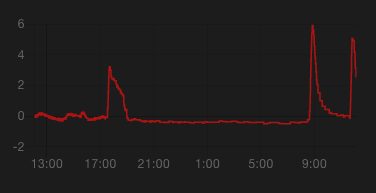
most of the time, it spikes to 4-6C, and then drops down slowly to around 0 again
but I'd like to know when it isn't dropping
any ideas? 😄
nocturne chasm
Would something as simple as above 4C for: 10:00:00 work?
narrow knot
that's what I currently have, but the spikes differ in amounts (they don't always exceed 4) and they differ in the dropping rate
so that first spike wouldn't be recognised (it peaked at 3.23) and the third one stayed above 4 for 15+ minutes
nocturne chasm
Maybe someone with a bit more knowledge will come along but inconsistency in values is going to pretty much affect every platform no?
narrow knot
right, that's why I want something generic like "didn't drop more than 1C in 15 minutes"
i guess i could store a value every 15 minutes and then compare those
nocturne chasm
Well, that little bit actually changes things. You could probably use last changed in a template
narrow knot
here's a zoomed in spike: https://s.woet.me/iEbfLL1o50.png
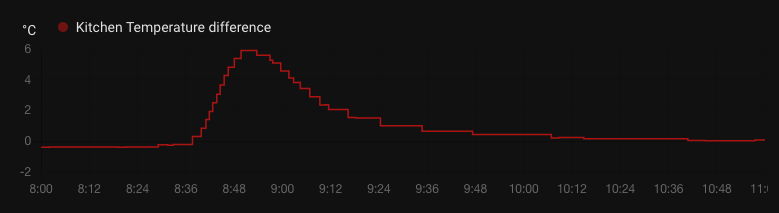
but I guess I should just play around with some things 😄
nocturne chasm
Yea, trying to find docs for last changed. You could play around in template editor
Although your time span changes also
narrow knot
basically, I want to detect if someone forgot to turn the kitchen stove off
usually I'd just use a SHP-13 to measure power usage, but this is a Perilex switch, and that won't work obviously
so the only solution I was able to think of is to have a temperature sensor right above it and measure the difference to the kitchen itself
maybe I could judge it by my total power usage across the house
nocturne chasm
I mean, until you can actually figure out the difference between a regular use and accidentally left on, it is hard to help. You are going to have to use a very conservative for:
narrow knot
that's true
nocturne chasm
Maybe someone else will know though 🤷🏼♂️
mighty ledge
Trend sensor
narrow knot
I could combine it with my home power usage: https://s.woet.me/fttQrz4jbn.png
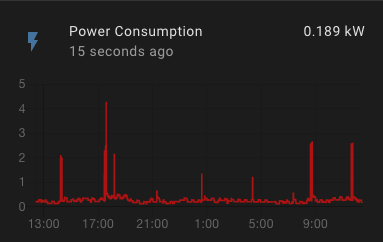
if it's lower than 1 kW it's not turned on 😄
@mighty ledge I'll try it out, thanks!
mighty ledge
narrow knot
I'll use that against both the stove temperature sensor + the difference
and see what it tells me
looks promising
nocturne chasm
Auh yes, learn something new every day
 plain zinc
@inner mesa I know we were poking at the Sun and the time values and I put a PR in that got rejected for various reasons.
But what a happy day https://www.home-assistant.io/blog/2021/07/07/release-20217/#working-with-dates-in-templates
!! 😄
 ancient lynx
What is the easiest way to have a template render true if any device tracker has an attribute of Is_guest: true?
A for loop?
ancient lynx
@inner mesa I'll dig in. Thanks!
inner mesa
I’d just write it if I was at a keyboard 🙂
dreamy sinew
is is_guest an attribute in the  > states page?
dreamy sinew
ah, the ones i have doesn't have that attr
{{ states.device_tracker|selectattr('attributes.is_guest', 'true')|list|count > 0 }}
ancient lynx
👍 Worked a treat. Thanks!
lime grove
I'm feeding a utility meter a wattage figure which is one state minus another one, the display of this works fine, but when the figure goes from 0w to anything large, there is a huge jump in the counter suddenly, im not sure if thats the best explanation but it looks like this
      friendly_name: 'Grid Import'
      unit_of_measurement: 'W'
      value_template: >
       {% if (states('sensor.total_energy')| float - states('sensor.solcast_watts') | float < 0) %}
         0
       {% else %}
         {{ (states('sensor.total_energy')| float - states('sensor.solcast_watts') | float) | int }}
{% endif %}```it looks like it's rolling over
gets to a certain value, rolls back to zero, continues increasing
 thorny snow
that looks like a normal reading to me.. it's a daily meter, reseting at midnight.
it even shows spikes at expected times, breakfast, lunch, dinner and bed time.... all look normal
@lime grove what do you think
 weary void
how would I go about getting the temperature value from the weather.climacell_daily entity?
so I think I figured out the template is there a way to use that as an entity for a lovelace card or do I need to create an actual template sensor for it?
fossil venture
Which card are you using? Some of them have the ability to display attributes.
e.g. entities card: https://www.home-assistant.io/lovelace/entities/#attribute
So you probably don't need a template.
weary void
mii-graph-card https://github.com/kalkih/mini-graph-card
fossil venture
Yeah you're going to have to create a template sensor to use that.
weary void
yeah it was simple enough once I sat down and did it
got it working already
what I really need to do is pick an actual replacement for dark sky and not use 4 different weather intergrations
fossil venture
Move to Australia. We have a great weather integration 😆
weary void
My work doesn't want me moving out of state think they would take offense to me moving to AU
fossil venture
You could ask what is the best for your area in #integrations-archived
weary void
Yeah I've been running 4 weather things and they all work well enough is mostly just lazy and dark sky still working that have kept me from just picking one
weary void
new question how would I go about pulling the temperature / templow from a weather entity. They are under the forecast attribute which is list of the upcoming days. I want to grab the values for the current days so i can use them in my thermostat automations
mint crane
mint crane
After some trial and error, I have it working. Thanks <@!558346704953540628> and...
Hey .. unfortunately I'm still chasing a few bits of polish on this template. I've tried to put a condition to get a nice toast message if nothing is selected in my UI (ie. the length of the params string > 0). Am I missing something obvious? It feels like the length isnt calculated the way I'm expecting. https://pastebin.ubuntu.com/p/nPgQhrbsmK/
dreamy sinew
seems like it would be trying to get the length of the string the way that is defined
mint crane
how do you mean?
I know that no toast is displayed unless I change the final browsermod bit to
        data:
message: '{{ params }}'```since you're setting params to a string, you're basically doing {{ 'foo'|length }}
-> 3
mint crane
I think that's my intended idea. If none of my input booleans are selected (I think) there should be an empty string (or is it null?), length 0... and toast pop up
dreamy sinew
seems like it should be 0
mint crane
mint crane
I know that no toast is displayed unless I change the final browsermod bit to
`...
Weirdly if I make this change, it also toasts. Making me think the condition check is also wrong
dreamy sinew
everything from the params template seems fine
 young jacinth
is it not allowed to use a input_select list in a template light as a effect_list_template?
{{ state_attr('input_select.wz_licht','options') }}
renders as a list in template tools
as required in the docs for a template light
i get this error:
Invalid config for [light.template]: some but not all values in the same group of inclusion 'effect' @ data['lights']['wohnzimmer'][<effect>]. Got None. (See ?, line ?).
inner mesa
I think you're missing effect_template
or maybe not. I'm trying to interpret "inclusive" in the docs, and I suspect that it means "mutually exclusive with effect_list_template"
seems like it's something around that, but I can't tell what. And I have no examples in my config
inner mesa
I guess that makes sense. You have to tell it what to report as the current "effect"
young jacinth
yep 👍
inner mesa
I think "inclusive" there is unnecessarily vague 🙂
young jacinth
how would i convert something like Ambient 1 into ambient_1? so basically make everthing lowercase and replace spaces with underscore?
got it
{% set x = 'Ambient 1' %}
{{ x.replace(" ", "_")|lower }}
man its going down tonight
inner mesa
I was looking for a filter that did exactly that, but coming up empty so far
young jacinth
stackoverflow ftw
lime grove
thorny snow
<@!669664818411601993> what do you think
The spikes were way to large for the appliances I was using, since adding 'method: left' to the utility meter it's been normal.
thorny snow
Awesome.. thanks for the update!
 native notch
Can anyone help me with creating a binary sensor for my garage door? I have a cover entity that I want to work as a binary sensor
thorny snow
my patio door example
sensor:
  - platform: template
    sensors:
      patio_door_status:
        friendly_name: Patio Door Status
        value_template: >-
          {% if is_state('sensor.patio_door_access_control', '23') %}
            Closed
          {% elif is_state('sensor.patio_door_access_control', '22') %}
            Open
            {% else %}
            Failed!!!
          {% endif %}
could be prettier and more clever, but it works
my door sensors give 23/22 open/closed
or whatever
mighty ledge
thorny snow
my patio door example
You must be running the old Zwave… might be time to update to zwave js
native notch
mighty ledge
You must be running the old Zwave… might be time to update to zwave js
why do you say that? something about the code?
mighty ledge
Yeah, the new zwave just gives you those sensors without the need for templates. Even openzwave beta does that too. So you must be running the really old zwave
native notch
Yeah... I have been running a HA build from january 😦
just afraid I am going to lose all my automations/ settings with my zwave switches.
mighty ledge
You’ll have to get your hands dirty sometime
native notch
Can you point me towards a guide you recommend?
mighty ledge
Just search the community guides and choose the path you want to go. You’ll probably do the legacy to zwavejs2mqtt
native notch
you wrote this guide 
mighty ledge
native notch
you wrote this guide <:smart:723251852761628792>
I did 😉
 gray coral
Someone have lovelace card for fan 5 speed?
grim geyser
Hello everyone. Im stuck with another template
I want to switch the group.office off when i hold the button. This is what I have. Anyone know what I could be missing? Thanks
hold_action:
action: call-service
service: |
[[[
if (states['group.office'].state === 'on') return "homeassistant.turn_off";
return "homeassistant.turn_off";
]]]
inner mesa
Why do both paths return homeassistant.turn_off? It doesn’t seem like a useful template
You’d also need to specify service_data: with the entity
This is a #frontend-archived question.
grim geyser
Both have the same because I just want off. Let me see if it can be done with just one argument.
Thanks
works. i was missing the service data. Also it works with one argument
 spring path
Trying to monitor my dishwasher. After the power drop to 2-4 watts, it's starting to dry the dishes. I can't monitor the power or the current anymore, so i think i'm stuck to a timer. Have to trial and error what is the best time, but from this point i took 15 minutes.
  {% elif 4 <= states("sensor.dishwasher_power")|float <= 100 %}
    {% set t = now().timestamp() %}
  {% elif now().timestamp() - t >= 15 %}
    Finished
Is this a good way to try it or is there a better and easier way to use it in a template?!
I took 100 watts in this example, because i want to use that point as a startingpoint.
inner mesa
That won’t work because the variable won’t persist from run to run.
What you’re describing is a simple numeric_state trigger with a for:, though. https://www.home-assistant.io/docs/automation/trigger/#numeric-state-trigger
spring path
Yeah, but was trying to solve it with a template. So I have al the States made by this sensor and only have to make 1 automation for notifying
ivory delta
Templates are the wrong tool for that. Templates only know what is, not what was. They have no concept of history.
spring path
Sounds clear, will keep it how I already had it!
 rain grove
Anyone wanna help me with some influx query woes I have? I can get it to work with a where: time = blah, but anytime I ask for time > now() - 5s or any other time value it gives 'unknown'
working hass integration ...
queries:
- name: DeltaTemp
where: '"time" = 1621783653055917000'
#where: '"time" = now() > now() - 5s'
measurement: 'DeltaTemp'
database: astrocarttemp
if I flip the where: statements it goes back to unknown 😦
some sample influx data...
silent barnBOT
@rain grove posted a code wall, it is moved here --> https://paste.ubuntu.com/p/8wKDn6GjG4/
rain grove
good bot
 granite pendant
Template setup seems to be a relatively undocumented feature for new users. I see there's a Developer UI for some basic syntax sanity and light debugging, but haven't seen anything more robust.
For instance, how do you even add them? I have to use the File editor to edit configuration.yaml and restart HA every time I change things? I don't see a section in Config -> Server Controls to reload an external YAML that contains them.
What's the easiest, least-disruptive way to create, deploy, and maintain Templates? The docs do not address this in any fashion
native notch
I have been struggling with the same thing for a few days now. I just want to create a binary_sensor that checks if my cover.garage_door is open/ closed. Feel like I am chasing my tail
Is this even possible? I don't see examples of what I am trying to accomplish anywhere.
inner mesa
granite pendant
Template _setup_ seems to be a relatively undocumented feature for new users. I ...
Templates are used in many places for many reasons, so the scope of your question isn't clear
perhaps if you can be more specific about exactly what you're trying to do, it would be easier to help
inner mesa
native notch
I have been struggling with the same thing for a few days now. I just want to cr...
this is also confusing
the state of a cover is already "open" or "closed", so what?
native notch
I am running Alarmo custom component, and it only checks binary_sensors. My garage door only has one entity, cover.garage_door.
I was under the impression I could create a binary sensor for the garage door.
inner mesa
you can create a template binary sensor based on the cover, yes
granite pendant
I do see this little blurb in the template docs:
Sensor and binary sensor template entities are defined in your YAML configuration files, directly under the template: key and cannot be configured via the UI.
So that addresses the UI question, but this doesn't exactly say where, although I'm going to assume configuration.yaml. Knowing that, am I able to use includes for this?
template: !include templates.yaml
Would there be a way to reload templates.yaml without restarting HA?
I think "Templates are used in many places for many reasons" is potentially the crux of the issue from a newbie standpoint. There's templat_ing_, but what both of us are talking about are adding new custom sensors based on a template.
inner mesa
everything in YAML starts with configuration.yaml
yes, you can use include files like that
yes, using the "reload template entities" link in  -> Server Controls
granite pendant
Hm. I don't see that entry. One wasn't created when I added a "lights" node, either.
inner mesa
you have to have configured one first before it will show up there
so do that, then restart HA
~check first
silent barnBOT
Always run the configuration check command when you make changes. Don't trust the UI check - it misses some problems.
Command '~check' was invoked by: RobC
granite pendant
Okay, will try. On that specific note, though, I do have this in a lights.yaml
- platform: switch
  name: Office Light
  entity_id: switch.office_light
- ... others
If I need to add to that, how could I reload them? The syntax is correct, it just doesn't show in the Server Controls.
inner mesa
it doesn't look like you can reload that at runtime - you'd need to restart HA
granite pendant
Okay. I also see some examples where it's - platform: template
(ex: https://community.home-assistant.io/t/first-alert-smoke-detector-and-carbon-monoxide-alarm-setup/66761/128, which is why I'm pursuing templates in the first place). This seems different than a standard templates node. Can you help me understand the difference?
A lot of posts on there make a lot of assumptions for the sake of brevity.. difficult to follow at times
native notch
So I added a template and after restarting HA I get this: Setup failed for template: No setup function defined. 12:41:09 PM – setup.py (ERROR)
inner mesa
what did you add and where?
native notch
  - binary_sensor:
      - name: Garage Door Status
        state: >
          {{ is_state('cover.garage_door', 'open') }}
```in config.yaml
inner mesa
what version of HA are you using?
native notch
core-2021.2.1 most recent I think
native notch
So.. whoever is maintaining the unraid docker for HA hasn't updated it since February?
inner mesa
who knows
native notch
Well, IF I was running a more current, do you think that would solve my issue here with templates?
inner mesa
your template would actually work
native notch
core-2021.7.1
forced updated. Thanks rob. these little things are easy to miss for a noob like myself.
granite pendant
Okay, took me a bit to translate the old to new style. Am I able to assign this Entity to a Device?
inner mesa
no
granite pendant
That's a shame - would be nice to link them to Devices when they're related. But of course, being able to free-form it with a Lovelace card is good
Thank you very much for your help
inner mesa
np
 analog nova
Is there no way I can pass a template to a service call? I have {{ state_attr("sensor.test", "unit_of_measurement") }} templaye, and I am trying to call notify and passing {{ state_attr("sensor.test", "unit_of_measurement") }} as the message
analog nova
oh yeah, got it to work
 digital vigil
Is there a home place where I should begin with templates? I'd like to start using them in order to get a markdown card that says "there are _ people home" or "currently there are _" lights on
like documentation for newbies :P
inner mesa
the markdown card accepts Jinja templates directly and there are some examples in the docs https://www.home-assistant.io/lovelace/markdown/
the comprehensive templating page for HA is here: https://www.home-assistant.io/docs/configuration/templating/
How to format the content depends on where your "_" values come from, and determining that may be more challenging
"there are _ people home" could be this:
There are {{ states.person | selectattr("state", "eq", "home") | list | length }} people home
you'll often find exactly what you want just searching on the forums
digital vigil
ohh okay I was just confused how to format it lol
but yeah it makes sense now thanks :D
digital vigil
hmmm i've been fiddling it for a bit and so far I have
{% if "{{ states.person | selectattr("state", "eq", "home")| list | length }}" == 1 %}
person
{% else %}
people
{% endif %}
unfortunately this doesn't resolve anything
so how would I go about fixing this, I'm trying to get the people displayer to have correct grammar lol
inner mesa
You’re nesting templates
inner mesa
{% if states.person | selectattr("state", "eq", "home")| list | length == 1 %}
person
{% else %}
people
{% endif %}
And yes, you should set a variable if you’re going to use the expression for the number and the string
digital vigil
alrighty got it 👍
 silent fern
Hello! Is this the right channel for a small help on finding the correct availability_topic for a 3 channel sonoff wall switch?
fossil venture
No, that would be #integrations-archived
unreal merlin
Hello 🙂
Is there a way to access device area from within templates?
e.g. device_area(entity_id) would give back "living room" or something like that
ivory delta
Nope. Areas don't do much.
Closest you'll get is to assign custom attributes to entities and read that attribute in a template.
unreal merlin
thanks mono, that was my plan b
 marble jackal
digital vigil
alrighty got it 👍
marble jackal
digital vigil
alrighty got it 👍
You could do something like
{{ "person" if (states.person | selectattr("state", "eq", "home")| list | length == 1 ) else "people" }}
digital vigil
yeh
 north locust
how do i template https://pastebin.ubuntu.com/p/k9TFW2sbk2/ first 3 digits is rain in mm | time , its an 3 hour forecast wanna make a true/false sensor for rain within 3 hours
inner mesa
what a pain in the ass
{{ state_attr('sensor.whatever', 'data').split(' ')[2:]|map('truncate', 3, true, '')|map('int')|select('>', 0)|list|length > 0 }}
north locust
@inner mesa thnks for the help
value_template: "{{ str.split('sensor.neerslag_buienradar_regen_data')[2:]|map('truncate', 3, true, 'sensor.neerslag_buienradar_regen_data')|map('int')|select('>', 0)|list|length > 0 }}"
became unavailable ... ¿
inner mesa
I reiterate that it was a pain in the ass. Whoever made that integration needs to go think about what they've done
looks like they scraped a website and just dumped the load of crap into an attribute
north locust
well its a commandline json pull from a weather service
north locust
all these commands , are they YAML code or is it another programming language ?
inner mesa
templates are Jinja
silent barnBOT
Jinja Template Designer Documentation
For more examples and samples, visit see this page
Command '~jinja' was invoked by: RobC
north locust
ah thnks
pastel moon
I want to turn off a smart plug when (A < 0.1 and W < 2) for 5 minutes. Can someone please help me understand how? I know the construction in the paste has non-working syntax, but depicts what I am trying to achieve... https://paste.ubuntu.com/p/3XjJGvC6D5/ Thanks
fossil venture
There's no need for the to:'true' line. Template triggers trigger when they are true. Other than that it looks ok.
silent barnBOT
@dim burrow posted a code wall, it is moved here --> https://paste.ubuntu.com/p/PVNmxzcW6n/
 dim burrow
I guess that was a code wall... message here: bear with me here, I'm learning... I installed a Shelly one with a reed switch on my garage door. the reed switch sensor yields "on" when the door is closed, which is the opposite of a garage_door device class expected response. from my reading of the documentation, I can use a template to merge the interactive garage opening and closing button with the associated state in a cover - but I need help understanding what I'm doing there, as I also need to flip the state of open/closed, and I'd like to manipulate the icon to represent open vs. closed. The example from the cover.template page has most of this, but I don't understand where to flip my variable and how/if to make use of the service call
dim burrow
I suppose, after playing with it for a few minutes, if my binary_sensor reflects "off" for what garage_door wants for "on," can I flip the states in the open_cover and close_cover service calls? I.E. just change the open_cover to state: "on" - service: switch.turn off and vice versa?
ivory delta
I guess that was a code wall...
Well, yeah... the limit in the rules is 15 lines 😉
silent barnBOT
@dim burrow Rule #6: Spam will not be tolerated, including but not limited to: self-promotion, flooding, text walls (longer than 15 lines) and unapproved bots.
Please take the time now to review all of the rules and references in #rules.
For sharing code or logs use https://paste.ubuntu.com/.
Command '.rule6' was invoked by: mono
dim burrow
I hadn't intended it sarcastically, more "oops, that WAS a code wall" retroactive acknowledgment that I had pasted too many lines into my message. Sorry, @ivory delta !
ivory delta
I also need to flip the state of open/closed
This will just be a template that returns the opposite value. How do you currently have the sensor set up to determine the position?
I'd like to manipulate the icon to represent open vs. closed
And this just requires setting the relevant device class for your sensor.
dim burrow
ivory delta
> I also need to flip the state of open/closed
This will just be a template tha...
the sensor reports "on" for closed and "off" when open
ivory delta
So you have something like ESPHome or Tasmota on that device?
dim burrow
no, running the stock shelly firmware as it mostly worked okay. I thought I could use it as an example to learn the templating process.
ivory delta
That's one option, sure. If you were running custom firmware, I would've suggested fixing the problem at the source. As you're not, you'll want to wrap that sensor with a template binary sensor.
The state template just needs to return the opposite boolean value to the source sensor. Something basic like this should work:
{{ not states('sensor.garage_door') }}
dim burrow
if i'm understanding that right, I want a template, binary sensor, name it, then use the not state of my sensor (is that function plural in code) and ask for the name I defined in the template when I go to use the data in other places like automations or on a lovelace card?
copy. is it "not state" or "not states" ?
states, i guess. syntax is confusing when learning.
ivory delta
You can test it all in the Dev Tools until you get it working.
dim burrow
I'm trying it in dev tools now, and it reports a "false" rather than an "off"
ivory delta
Yeah, don't worry about that. Under the hood, everything is just a boolean... the device class is what causes the UI to use other language.
dim burrow
thanks!
dim burrow
I have the variable flipped to reflect the status of the door. how do I get the icon to dynamically represent status? i'm using the template format and the icon: , but nothing seems to shift its status, it always gives me the "if" result regardless of arguments passed
that's where I'm at with it
mighty ledge
use
mighty ledge
dim burrow
https://paste.ubuntu.com/p/NybfzqbHNz/
"{{ not is_state('binary_sensor.shelly1garagedoor1_input', 'on') }}"
or
"{{ is_state('binary_sensor.shelly1garagedoor1_input', 'off') }}"
ha! i couldn't get it to work, and ended up writing a whole if/then using is_state instead of states, which didn't seem to work - but it's not clean code now. I'll redo again with your lines, thanks petro!
I'm trying to figure out now how to use the sensor data to inform the icon shift, but make it apply to the icon for the switch so it's one button on my card
mighty ledge
no clue what you're talking about. If you're talking about the icon changing, you don't need anything but device_class: garage_door and it'll be handled
dim burrow
i want the icon to reflect if the door is actually open or closed. the device_class does that on it's own?! i've been fighting trying to program it all day 🤦♂️
mighty ledge
yep, that's the whole point of device_class
ivory delta
Device classes give the UI hints about how the information should be displayed. Icons and language.
dim burrow
the sad part is... i had it working with the variant icons, so I was happy I had success with it
ivory delta
If you want to do it your way, that's cool. We're just pointing out simpler ways 😄 At the end of the day, at least you're trying and learning.
dim burrow
for sure!
stone marsh
@ivory delta @inner mesa Remember the regex template you guys helped me with a few days ago? Turns out, it was the reason my HA container was at 100% cpu usage. Didn't realize it until know... Been trying to diagnose the problem for a couple of days now haha.
inner mesa
You may want to file an issue
stone marsh
It's on my to-do list for when I'm back on a computer :)
inner mesa
The regex filters are fairly new and I don’t them yet
stone marsh
Seems to be the case based on a quick glance from the profiler run
 wintry garden
I'm having some trouble accessing the 'user' variable in templates
so far I have this
{% if 'user.is_admin == 'true' %} User is admin {% else %} User is not admin {% endif %}
I have tried several variations including '${user.is_admin}' == 'true' but I cannot get the result I want. Am I missing some integration so I can access the user variable?
I want to use this to load certain parts of a yaml file depending if the user is and admin (or the owner) or not
ivory delta
I've not heard of there being a user object you can use like that. Where have you seen that and what are you trying to do?
wintry garden
It is one the readme of https://github.com/thomasloven/lovelace-template-entity-row
(ctrl + r for special variables)
ivory delta
Okay... so first up, you want #frontend-archived. Secondly, the docs say that the user variable gives a username (string), not an object... so it won't have other properties.
wintry garden
I've seen it on a forum, but I cannot find it now
I will try and ask in front-end, but this is the forum post. Ofc I can not verify this works
dim burrow
I'm still hung up on this garage door. Thanks to help from folks on here I can 1.) see the status (open/closed) using the binary sensor and 2.) toggle the motor using the switch. I want those two concepts merged, which I thought should be doable with a cover template, or even a switch template. Garage door is explicitly demonstrated in a cover template, but it seems to want more positional data than I have with my single reed switch at closure. Here is where I got with a switch template - https://paste.ubuntu.com/p/R6ZzvCgcYy/ . I had roughly the same success with a cover template. It's losing the state of the garage door somewhere in there, and not displaying the icon correctly in the end. I suppose I could pursue fixing it in frontend if I could convince a button card to display the status of a sensor rather than the switch.
mighty ledge
dim burrow
I'm still hung up on this garage door. Thanks to help from folks on here I can ...
What's the state of a binary sensor?
hint: it's not 'open'.
Also, if the endgoal was to just create a switch, you don't even need the middleman binary sensor.
switch:
  - platform: template
    switches:
      garage:
        value_template: "{{ not is_state('binary_sensor.shelly1garagedoor1_input', 'on') }}"
        turn_on: &togglegarage
          service: switch.toggle
          target:
            entity_id: switch.shelly1garagedoor1
        turn_off: *togglegarage
        icon_template: mdi:garage-variant{{ '-open' if not is_state('binary_sensor.shelly1garagedoor1_input', 'on') else '' }}
That's going to be complex. It uses anchors. But it should work with a copy / paste. you can read up on anchors here https://support.atlassian.com/bitbucket-cloud/docs/yaml-anchors/ or you can just leave out the anchors by using your existing turn_on and turn_off section.
dim burrow
hey petro, thanks again for all of the help
i started putting this in my developer tools template editor so I could see what was working. '''{% for state in states.binary_sensor %}
{{ state.entity_id }}={{ state.state }},
{% endfor %}'''
oops {% for state in states.binary_sensor %} {{ state.entity_id }}={{ state.state }}, {% endfor %}
so, I caught the open vs off change before pasting into configuration.yaml
dim burrow
@mighty ledge all of that worked a treat except the stupid icon. because of the way that name was written in the mdi catalog, I had to flip the negation and rewrite in order to put either '-variant' or '-open-variant' on the end. I works perfectly now!!! Thank you! icon_template: mdi:garage{{ '-variant' if is_state('binary_sensor.shelly1garagedoor1_input', 'on') else '-open-variant' }}
mighty ledge
np
dim burrow
I have to go read up on anchors now to understand what's happening in there, and then duplicate for the other garage door
 jagged totem
is there a function for ceil?
found it, round(method=ceil)
hmm. seems to not work :/
ivory delta
What makes you think it's not working? Also, share your attempts.
 fleet viper
Is there a good way to remove large count entities in the DB? I added an integration that spawned too many recorded items. I know recorder can add excempt items but will those get purged?
ivory delta
That question has nothing to do with templates. Wait for an answer back in #general-archived
fleet viper
asked here due to recorder template understanding, but got it
ivory delta
The recorder is an integration, not a template... but crossposting is still bad.
stone marsh
Turns out regex isn't causing the 100% cpu usage, seems to be something with expand
This version causing 100% usage
- platform: template
  sensors:
    unavailable_entities:
      friendly_name: Unavailable Entities
      value_template: >-
        {% set domains = [states.light, states.media_player, states.cover, states.switch, states.lock, states.binary_sensor, states.sensor, states.vacuum] %}
        {{ expand(domains) | selectattr('state','in',['unavailable','unknown','none']) | rejectattr('entity_id', 'match', '.*(fire|tasmota).*') | list | count }}
      attribute_templates:
        entity_ids: >-
          {% set domains = [states.light, states.media_player, states.cover, states.switch, states.lock, states.binary_sensor, states.sensor, states.vacuum] %}
          {{ expand(domains) | selectattr('state','in',['unavailable','unknown','none'])| rejectattr('entity_id', 'match', '.*(fire|tasmota).*') | map(attribute='entity_id') | list }}
This one is perfectly fine
- platform: template
  sensors:
    unavailable_entities:
      friendly_name: Unavailable Entities
      value_template: >
        {{ states | selectattr('state','in',['unavailable','unknown','none']) |
          rejectattr('entity_id', 'match', '.*(fire|tasmota).*') |
          list | count }}
      attribute_templates:
        entities: >
          {{ states|selectattr('state','in',['unavailable','unknown','none']) |
            rejectattr('entity_id', 'match', '.*(fire|tasmota).*') |
            map(attribute='entity_id') | list }}
Is there some difference between the two I'm missing? I would expect them to be nearly identical, with the first having fewer entities total for the filters to reject
inner mesa
expand() starts by generating a hellacious list, while states just uses an existing data structure
or so I would think
stone marsh
Ahh that could explain it then
mighty ledge
stone marsh
Ahh that could explain it then
Actually it's a bit deeper than that. when using just states you're rate limited to 1 change per minute per calculation. When separating everything in to different domains, you are not rate limited. So your top template isn't rate limited and it's seeing every single state change and updating on every state change. Where the second one is seeing every single state change but doesn't execute more than once per minute.
@inner mesa see comment above for future support
 marble surge
guys I have two input_number one for the hour of the day and one for the minutes
how can I convert those values to a timesamp?
with current date?
basically I would like to know if now() is previous or before of the two input_number
fossil venture
It's possible but would be easier if you used an input_datetime instead of two input numbers. Also previous and before are the same thing.
marble surge
very appreciated suggestion @fossil venture thanks!
but is this correct
{{ now().strftime('%H:%M:%S') < states("input_datetime.solarstation_activation_hour") }}
or it's like comparing strings?
fossil venture
{{ as_timestamp(now()) < state_attr('input_datetime.solarstation_activation_hour', 'timestamp') }}
ivory delta
Minus the typo 😄 as_timestamp
fossil venture
Ta. Fixed.
marble surge
🫂
stone marsh
mighty ledge
Actually it's a bit deeper than that. when using just `states` you're rate limi...
If I put a 1 minute trigger on the first option, then the performance issue should go away since it's no longer unbounded?
mighty ledge
or you could just adjust it to use states instead with a |selectattr('domain', 'in', [...listofdomains...])
marble surge
@fossil venture this
{{ as_timestamp(now()) }}
returns this: 1626276240.010644
while this:
{{ state_attr('input_datetime.solarstation_activation_hour', 'timestamp') }}
return this: 75600
in this moment it's 17:25 while the input number is set to 21:00 o'clock
something doesn't work as excpected
ivory delta
Because one is the number of milliseconds since the epoch and the other is the number since the beginning of the day. Just do some math to work out what you want.
Modulus is your friend.
marble surge
mmm ok thanks mono
fossil venture
Or use this as_timestamp(utcnow().replace(year = 1970, month = 1, day = 1)) instead of as_timestamp(now())
marble surge
mmm those jinjas is a real mess
it's not human readable
xD
hope to see something better in future HA versions
thank tom it get the trick
fossil venture
ivory delta
Modulus is your friend.
Mono, out of interest, how would you use modulus?
mighty ledge
marble surge
hope to see something better in future HA versions
unlikely, it's time. It's always going to be a mess.
ivory delta
Mod 86400 to get the remainder for today? I don't know if that's going to work with leap years and stuff now that I think about it.