#templates-archived
1 messages · Page 25 of 1
 inner mesa
 spice current
How do i use a multiline template in a list?
      set_color:
        # - service: rest_command.ir_led_strip_on
        - service: >
          {% if color == 'red' %}
            rest_command.ir_led_strip_color_red
          {% elif color == 'blue' %}
            rest_command.ir_led_strip_color_blue
          {% elif color == 'pink' %}
            rest_command.ir_led_strip_color_pink
          {% elif color == 'white' %}
            rest_command.ir_led_strip_color_white
          {% endif %}
this spits out a yaml error
 mighty ledge
spice current
```yaml
set_color:
# - service: rest_command.ir_led_strip_on
...
mighty ledge
spice current
```yaml
set_color:
# - service: rest_command.ir_led_strip_on
...
you aren't indenting the template enough
- service: >
    {% ..
oh wow, it really was so trivial. thanks :3
 spark tangle
Not sure where to write about this... but i have a template fan that worked great before, and works great now. Except for HomeKit. Something has changed in home assistant updates or iOS/Homekit. But everything works except the fan. Now it just shows up as "This accessory is not responding". Anyone got a clue?
The template fan worked in home assistant and passed through to homekit/apple home before. Now the fan only works in home assistant and is "not responding" in homekit. But i've changed nothing except Home Assistant updates and updated iOS
 hollow mortar
So this binary_sensor has been on today only between 00:09:32 - 00:14:33 which is 5m1s. history_stats sensor has so far in developer options timed 0,08 or 4:48 (thats 4m48s !) as state and unit_of_measurement: h. While changing unit_of_measurement: h to something more precise is unsupported, what else can I do to make timing of on states more precise?
Now another on state EXACT 5m0s and history_stats is 0,17 or 10:12
This is completely useless for exact timings?
 lofty mason
hollow mortar
So this `binary_sensor` has been `on` today only between 00:09:32 - 00:14:33 whi...
lofty mason
hollow mortar
So this `binary_sensor` has been `on` today only between 00:09:32 - 00:14:33 whi...
I'm not sure in HA itself, but nodered could use a history node to get the full list of state changes, and you could compute it yourself from that. History stats seems limited to 0.01h increments, or 36 seconds.
hollow mortar
I would like a solution in HA, like some ugly and complicated (but perfectly logical and working) template sensor
 sacred sparrow
hi there, is it possible to make a template sensor with an event type?
event_type: delonghi_primadonna_event
data:
data: b'd0 12 75 0f 01 01 00 00 00 00 03 00 00 00 00 00 00 8f 2f'
type: status
description: DeviceOFF```
I want the sensor to show the state as 'description:' so in this case 'DeviceOFF' barren umbra
spice current
oh wow, it really was so trivial. thanks :3
barren umbra
spice current
oh wow, it really was so trivial. thanks :3
My observation...while a single space indentation following a ">" or a "|" ***is ***sufficient, it's just easier to remember "always indent 2 spaces" and be consistent!
Also, in the File editor add-on, the color of the text on the line changes from black to green when indentation is enough...
 tacit sun
when using month in template... is it:
jan = 1, feb = 2
-- or --
jan = 0, feb = 1
{{ now().month >= 10 or now().month > 1 }}
inner mesa
Type now().month and see 🙂
 silent seal
If you use dev tools, you can just test {{ now().month }} 😉
 plain magnetBOT
Open your Home Assistant instance and show your template developer tools
tacit sun
I was in there... but... was too close to it... Thanks!
is there a simple way to find the last thur of a given month?
I found this... but... don't quite comprehend the code...
https://community.home-assistant.io/t/creating-holiday-season-templates/490401
sacred sparrow
sacred sparrow
hi there, is it possible to make a template sensor with an event type?
```
event...
just realised I can use: ```
- trigger:
- platform: event
event_type: delonghi_primadonna_event``` but not sure how I can get it to show "description: DeviceOFF"
- platform: event
tacit sun
tacit sun
I found this... but... don't quite comprehend the code...
https://community.home...
I think this, unless there's a way to simplify it...
{%- set month, week, day = 11, 4, 3 %}
{%- set today = now().date() %}
{%- set temp = today.replace(month=month, day=1) %}
{%- set adjust = (day - temp.weekday()) % 7 %}
{%- set temp = temp + timedelta(days=adjust) %}
{%- set thanksgiving = temp + timedelta(weeks = week - 1) %}
{%- set janFifth = today.replace(month=1, day=5) %}
{{ today > thanksgiving or today <= janFifth }}
Maybe...
- trigger:
    - platform: event
      event_type: delonghi_primadonna_event
      alias: "description: DeviceOFF"
 compact rune
I don't know if you want to get the last Thursday of the month to display it or compare or such, or if you just need to determine if today is the last Thursday. For the latter, you can just check the weekday and day of the month -- if it's Thursday and late enough in the month there couldn't be another Thursday, basically. If you're actually doing US Thanksgiving it's worth noting the rule is actually the fourth Thursday, not the last, so for that you need the day of month to be >= 22 and <= 28
tacit sun
It is for US Thanksgiving... I think what I put up works...
guess I'll find out in about 10 months 😉 haha
silent seal
Question: Why don't you just use a calendar event in the local calendar, or a holidays calendar? 😛
sacred sparrow
Did some googling, and came up with this:
    - platform: event
      event_type: delonghi_primadonna_event
  sensor:
    - name: DeLonghi Dinamica Plus
      state: >
        {% if trigger.event.data.description == "DeviceOK" %}
        On
        {% elif trigger.event.data.description == "DeviceOFF" %}
        Off
        {% elif trigger.event.data.description == "NoGroundsContainer" %}
        No Container
        {% elif trigger.event.data.description == "" %}
        Standby
{% endif %}```but the states are not changing - what am I doing wrong?
silent seal
Is the event firing?
sacred sparrow
yep
this works
{% if trigger.event.data.description == "DeviceOK" %}
but Standby doesn't
the event is:
event_type: delonghi_primadonna_event
data:
  data: b'd0 12 75 0f 01 0d 00 00 00 01 00 00 00 00 00 00 00 06 02'
origin: LOCAL
time_fired: "2023-01-14T02:12:35.782931+00:00"
context:
  id: 01GPQ0SPA6E82TA89GW3PBKWST
  parent_id: null
user_id: null```I want it to be when there is no "description" in the event
inner mesa
{% elif 'description' not in trigger.event.data %}
sacred sparrow
ah great thank you for that 🙂
inner mesa
much of Python and Jinja just reads like a sentence
tacit sun
silent seal
Question: Why don't you just use a calendar event in the local calendar, or a ho...
I know not of such things... so... until I do, I will not utilize them. 😛
silent seal
I suspect the local calendar would be much easier, date maths is hard (I've written much too much calendar code in my life)
inner mesa
The whole thing sounds like an interview question
 west hazel
So, if I'm writing a template for an "availability_template" within an MQTT configuration, is that a "limited template"? I want to rule out any differences between the template tester on the dev tools tab, vs what I'll actually be dealing with. My availability topic is currently reporting the timestamp of the last successful interaction with the hardware, and I'm planning on turning that to available or not based on the utcnow() function, which isn't available in limited templates?
 pine musk
oh grand and glorious templators!
I am trying to do this:
{{ states( 'sensor.time' ) | strptime('%I:%M %p') }}
but it does not like the strptime call
pine musk
doesn't like ```
{{ strptime( states('sensor.time'), '%I:%M %p') }}
My sensor.time is 24-hour. How about yours?
pine musk
ditto
inner mesa
Then it doesn't match your format string
inner mesa
Look at the string
First, the point of strptime() is to parse a string into a datetime based on a format.
Passing in a datetime doesn't make sense
Second, the string output of now() still doesn't match that format string. What is your goal?
pine musk
to get just thoe hour mod 12, minutes and am or pm
inner mesa
Then you want strftime()
pine musk
ah
inner mesa
Which formats a datetime object
inner mesa
{{ now().strftime('%I:%M %p') }}
strftime is also not a filter, but a method that can be called on a datetime object
west hazel
So, after some messing around in the template tester and changing the output format on my topic, I have something that seems to work in the tester at least: {% if (utcnow() - (test2 | as_datetime)) < timedelta(minutes = 5) %} online {% else %} offline {% endif %}. Doesn't seem to work as an availability_template yet, but i'll keep working! It was a flawed test, so it might work. Redoing that now.
mighty ledge
tacit sun
I think this, unless there's a way to simplify it...
```
{%- set month, week, da...
if you want thanksgiving, there's no way to simplify it.
 heavy crown
@tacit sun I tried to follow your post but you did not reply to rosemary too, why not use a holiday calendar? Just trying to understand why taking the complex route
 acoustic arch
My OCD is getting the better of me. Studio Code Server says no for:
    name: iemand thuis
    state: >
      {{  is_state('binary_sensor.gast_thuis', 'on')
      or  is_state('binary_sensor.bewoner_thuis', 'on')
}}```says incorrect type: Expected array.
anyway to rewrite this so the red markup goes away?
mighty ledge
acoustic arch
My OCD is getting the better of me. Studio Code Server says no for:
```- binary_...
you're missing the dash for name
binary_sensor needs to be a list
plain magnetBOT
@elfin igloo I converted your message into a file since it's above 15 lines :+1:
 elfin igloo
did you ever get help for your request?
My logs output this when I give off a google assistant command to turn on my photo light box.
2023-01-14 20:12:11.864 DEBUG (Recorder) [homeassistant.components.recorder.core] Processing task: EventTask(event=<Event google_assistant_command[L]: request_id=4850502003640572416, entity_id=['switch.photo_light_box'], execution=[{'command': action.devices.commands.OnOff', 'params': {'on': False}}], source=cloud>)
I only got this far in catching it as a trigger:
trigger:
  - platform: event
    event_type: google_assistant_command
This successfully triggers on a google assistant command. I'm trying to narrow it down to a specific device and command.
I tried adding this but it doesn't trigger.
event_data:
  entity_id: 'switch.photo_light_box'
also tried value_template {{ 'switch.photo_light_box' in states('trigger.event.data.entity_id') }} and other variations but can't figure it out.
silent seal
What does the trace show?
elfin igloo
says "Stopped because a condition failed"
for
trigger:
  - platform: event
    event_type: google_assistant_command
condition:
  - condition: template
    value_template: "{{ 'switch.photo_light_box' in states('trigger.event.data.entity_id') }}"
action:
  - service: notify.pc
Ok, and what info is in the trigger in the trace?
elfin igloo
silent seal
Ok, and what info is in the trigger in the trace?
thanks, it was my first time looking at the traces page and I found the info I needed to narrow down the specific device and command.
Reference for anyone else that searches for this specific trigger:
trigger:
  - platform: event
    event_type: google_assistant_command
    event_data:
      entity_id:
        - <device name>
      execution:
        - command: action.devices.commands.OnOff
          params:
            "on": false
            #false for off command, true for on command
Cool. You can skip the condition now you've got it all in your trigger 🙂
elfin igloo
yep!
I never noticed the traces link/button before... lol
This would have saved me so much headache when I was making other automations. doh.
 winged torrent
Hello everyone, I'm a complete beginner with templates. Is this the right way to create a template for a sensor reporting the volume of an amplifier and "Off" ("éteint" in French), please?
    - unique_id: Media_denon_volume_track
      name: Volume Denon
      state: >
      {% if state_attr('media_player.denon_avc_x3700h', 'volume_level') %}
        {{ state_attr('media_player.denon_avc_x3700h', 'volume_level') | float * 100.0  }}
      {% else %}
      "Éteint"
      {% endif %}
(edit: Thank you @twin compass)
 twin compass
for including code you need to put this ` quote three times
silent seal
You have an extra - before the sensor, it should only be one.
And that looks fine! There are ways to shorten the code, but that doesn't make it better.
tacit sun
silent seal
I suspect the local calendar would be much easier, date maths is hard (I've writ...
I've never played around with using the local calendar. I'll see what I can find on Google.
plain magnetBOT

Local Calendar
Instructions on how to use Local Calendars in Home Assistant.
Quality scale
IoT Class
Integration type
Documentation
Source
Issues
silent seal
Check the HA docs first. It's a very new feature 🙂
winged torrent
silent seal
And that looks fine! There are ways to shorten the code, but that doesn't make i...
Thank you Rosemary! Days where I was trying to get the most compact C code are way past. I'm glad I start to understand what I write in Yaml at this point 🙂
silent seal
Well templates are Jinja, not YAML. Just so you don't google the wrong thing later 😜
 floral steeple
elfin igloo
did you ever get help for your request?
My logs output this when I give off a g...
floral steeple
elfin igloo
did you ever get help for your request?
My logs output this when I give off a g...
Hey thanks for sharing! I ended up restructuring my automation but this is really good to now! Thanks.
 serene crow
FYI, I finished and publish on GitHub my standing desk Automation : https://github.com/LucasJanin/Home/tree/main/Projects/StandingDeskAutomation
winged torrent
serene crow
FYI, I finished and publish on GitHub my standing desk Automation : https://gith...
Really nice! I'm envious because I can't do that with my Fully desk 🙂
serene crow
winged torrent
Really nice! I'm envious because I can't do that with my Fully desk 🙂
Thanks! FYI, some people find a way to hack the controller to achieved the same target.
winged torrent
serene crow
Thanks! FYI, some people find a way to hack the controller to achieved the same ...
Let me add that to my "complex things to do with HA". I'm only playing with dashboards and very basic sensor templates for now. My ambitious automation plans have been hurt by the lack of support for Legrand Netatmo blinds 🙂
 kind horizon
is there a way to have a max-width for ALL views/dashboards?
 marble jackal
That would be better in #frontend-archived
sacred sparrow
    - platform: event
      event_type: delonghi_primadonna_event
    - platform: state
      entity_id: device_tracker.delonghi_primadonna
  sensor:
    - name: DeLonghi Dinamica Plus
      state: >
        {% if 'description' not in trigger.event.data or states('device_tracker.delonghi_primadonna') == 'home' %}
        Standby
        {% elif states('device_tracker.delonghi_primadonna') != 'home' %}
        Disconnected
{% endif %}```when the device tracker goes from home to not_home nothing changes on my sensor. (it should say Disconnected) can anyone see why?
full code: https://hastebin.com/yelavicaro.csharp
inner mesa
if 'description' not in trigger.event.data is true?
and if that automation triggers based on the state, trigger.event.data won't exist
sacred sparrow
sorry Im not quite following
inner mesa
There is no event trigger if the trigger is for the state...
Yet you are checking it anyway...
sacred sparrow
I see - what would be better?
sacred sparrow
I'll have play around - thanks 🙂
sacred sparrow
I've removed some of the information as the integration doesnt always send data
is there a way I can make the state note change if description' not in trigger.event.data?
I am guessing not_from doesn't work
 rapid hawk
I am trying to figure out how to turn a delta time in unix time into a human readable delta time. Any ideas? I have been read this but no luck so far.
Found a way. Covert a date string to a date object instead of unix time stamp. Subtraction is allowed between two date objects just like it is allowed with unix time stamp.
 sonic sand
hi, not sure if it's the right channel, but I am trying to implement a Calendar template card (https://community.home-assistant.io/t/calendar-add-on-some-calendar-designs/385790/76) to my Dashboard.
When using the Google Calendar entity to the developer card instead of his entity it shows me nothing.
https://github.com/kdw2060/hassio-addons/blob/37638798994b67541061f059350e7fac15eb5136/hass-addon-calendar/card-examples/onePersonNext4.yaml
my calendar instance is not a sensor, it's calendar.calendar tho'. (been using hass addon calendar & Google Calendar).
mighty ledge
sonic sand
hi, not sure if it's the right channel, but I am trying to implement a Calendar ...
that card doesn't work with a calendar entity, it only works with whatever that guy designed it for
sonic sand
mighty ledge
that card doesn't work with a calendar entity, it only works with whatever that ...
that's why... well I am not getting a sensor after my account credentials to the configurations.
mighty ledge
you wont either, that card is built for something custom
oh it's specifically built for that addon
so, you have to use that addon
sonic sand
mighty ledge
so, you have to use that addon
yeah I know, the problem is I have done the configuration as it should be, but I still don't get the sensor of my calendar.
 fading patio
Hello all, looking for template to compare and two time stamps report true if the timespan between the two dates is 7 days or less?
inner mesa
'Time stamps' as in integers?
plain magnetBOT
@somber schooner I converted your message into a file since it's above 15 lines :+1:
plain magnetBOT
@hollow sparrow I converted your message into a file since it's above 15 lines :+1:
 hollow sparrow
        {% set active_sensors = 0 %}
        {% for sensor in states.group.all_window_contact_sensors.attributes.entity_id  %}
          {{ states(sensor) }}
          {% if states(sensor) == 'off' %}
            {% set active_sensors = active_sensors + 1 %}
          {% endif %}
        {% endfor %}
        {{ active_sensors >= 2 }}
        {{active_sensors}}
All sensors are off. But active_sensors is 0. Meaning the if is never enterd. But I print the sensors a line above and they are really all off.
inner mesa
You need to use a namespace
hollow sparrow
can you provide me an example? I know namespaces from java.. not sure how it would help here? :D
hollow sparrow
kinda funny. Feels like most common question
pine musk
{{ state_attr('sensor.speedtest_net_ping','timestamp') }}
how to subtract that (2023-01-15T21:02:48Z) from now()
hollow sparrow
Do I always need a helper variable If I want a var that is accessible across multiple templates / automations?
inner mesa
Yes, unless you're passing it into a script you're calling
hollow sparrow
This makes it somewhat hard to create reusable "states" or am i dump? E.g. If I want to have a state for a notification system for a specific person. In that case I would need a helper for every state and every person..
pine musk
{{ utcnow() -( state_attr('sensor.speedtest_net_ping','timestamp') | as_datetime() ) }}```I'm not following the use case
hollow sparrow
Lets say I want to have a notification specific for me after the washing machine ended. A light bulb fade in fade out in a specific colour as long as my cloth are in the machine.
But the wife gets a different notification.. she would be able to use the same state... so maybe "one" state could be enough. But Im not even sure if thinking in state is a good approach or if need need to think in trigger
inner mesa
I don't know what you mean by 'the same state'
I have one template sensor that tells me if my washer/dryer stop, and can use that to notify whoever I want in whatever way I want
hollow sparrow
ohhh this is how i would use templates
 hexed galleon
Is there a coalesce-style function for templating? Basically want an attribute if it's not None/NULL or fallback to the state. Is that what the default() is for?
Effectively wanting to know if there's a more pythonic way to achieve this {{state_attr(entity,'game') if state_attr(entity,'game') != None else (states(entity) | title)}}
inner mesa
Yes, that's what default() is for. But it seems unlikely that the attribute will exist and be none, vs just not being there at all
You may need default(whatever, True)
hexed galleon
Yeah, unfortunately the attribute disappears when no game is running, so default just seems to return unknown when there's no game running 😦
Is it possible to define multiple triggers for a template sensor? The following only seems to update on the minute cycle, not the template/attribute change.
- trigger:
  - platform: time_pattern
    minutes: "/1"
  - platform: template
    value_template: "{{state_attr('sensor.steam_trankillity','game')}}"
  sensor:
  - name: "Steam Current Game"
    state: "{{state_attr('sensor.steam_trankillity','game') if state_attr('sensor.steam_trankillity','game') != None else (states('sensor.steam_trankillity') | title) | default('None')}}"
    icon: mdi:steam
    attributes:
      game_cover: "{{state_attr('sensor.steam_trankillity','game_image_header')}}"
You don't have a test there, so it's always true
Use a state trigger and specify the attribute
hexed galleon
Ah, of course! Thanks.
hexed galleon
Is there a way to regex/substring based on the position of a character with Jinja in HA? The Xbox integration returns so much fluff with the status. Just want the name of the game.
Want Prodeus - Playing Prodeus to be shortened to Prodeus, so was wanting to substring/regex until first -.
inner mesa
Yes, with ('stuff - '.split(' - '))[0]
hexed galleon
Oh, duh! Smart!
Really should have known that. Was trying to use list slicing for it but couldn't work out how to get the index of -. That's much easier 😛
 rocky forum
Have I missed some point, that sometimes comparing numbers ends up that its actually comparing strings?
Example: https://i.ibb.co/y0fcm6L/Untitled-1.jpg
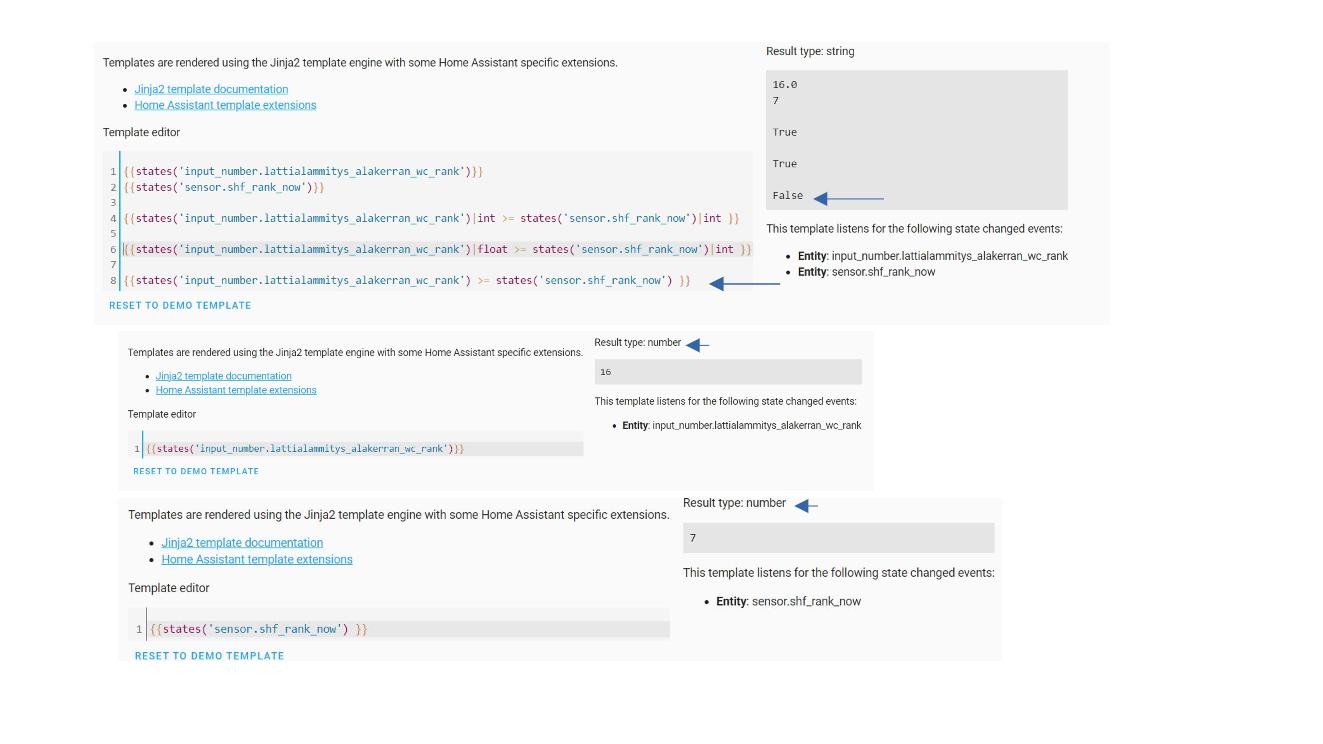
It does not happen all the time. Like I cannot replicate it anymore, but that "False"-case happened last night and automation did not work as intended.
rocky forum
ok. I kind of figure that aswell, cause removing on |int it gave error.
But on most situations it works even without the piping it to int/float, which threw me off.
inner mesa
ASCII math
rocky forum
ah, ofcourse, cause:
{{ '4' > '16' }} gives true
and
{{ '14' > '16' }} gives false
rocky forum
yea, got it now what was the issue.
plain magnetBOT
@maiden magnet I converted your message into a file since it's above 15 lines :+1:
marble jackal
@maiden magnet you need to provide a key for the data (related to error extra keys not allowed @ data['states("sensor.date_time_utc")']. Got None required key not provided @ data['value']. Got None)
and you need to put quotes outside your template if you use a single line template (related to error Error rendering data template: Result is not a Dictionary)
data:
  value: '{{states("sensor.date_time_utc")}}'
If you use double quotes inside the template, you need to use single quotes outside, or vice versa
 low leaf
would this be a good channel to ask about creating new mqtt fan entities in code?
I'm struggling to figure out the syntax to wrap my Zigbee wall fan buttons (one each for low/med/high) into a new fan entity in HA
silent seal
That would be #integrations-archived for MQTT
low leaf
thank you! 🙏🏽
 marble lily
{{ is_state("light.samsung_tv_light", "on") | iif("mdi:television-ambient-light", "mdi:television-ambient-light") }} how can I use a template only when TV it's on? I don't want the badge to appear if tv it's off.
nvm, I used none for the entity when it's offline
{{ is_state("light.samsung_tv_light", "on") | iif("mdi:television-ambient-light", "none") }}
marble jackal
{{ "mdi:television-ambient-light" if is_state("light.samsung_tv_light", "on") }}
pine musk
{% if is_state("light.samsung_tv_light","on" -%}
  Badge here
{% else %}
  no badge here
{% endif % }
and "none" is not the same as none
an empty {% else %} doesn't make much sense, then just leave it out..
pine musk
yep, just showing it for completeness
marble jackal
{% if is_state("light.samsung_tv_light","on" -%}
  Badge here
{% endif % }
which is the same as I did above in a single line
pine musk
yes, you are more correct
marble lily
thank you so much! working great
 wintry peak
Hi, not sure if this is right channel to ask, so please direct me to right one if this is not the right one. I am using google_maps for location tracking. When I try to use proximity it doesn't show any values. Do i need any additional integrations like waze etc for proximity to work ?
marble jackal
you need an entity which has a latitude and longitude attribute
but this is more for #integrations-archived
pine musk
hey:
how do I create or find a binary sensor that is recorded as on when HA is running, and off when it is not?
marble jackal
How will you read the state of a binary sensor in HA when HA is not running?
It will either be on or not available
pine musk
can't trigger on shutdown?
silent seal
You can trigger it on shutdown, but you can't read it from anything else
You can go to the store when it's closed, but you can't buy something from it.
plain magnetBOT
@wintry peak I converted your message into a file since it's above 15 lines :+1:
marble jackal
On second thought this HA running sensor might not be a bad idea. You can use it to make automations wait until HA is started.
template:
  - trigger:
      - platform: homeassistant
        event: start
        id: "true"
      - platform: homeassistant
        event: shutdown
        id: "false"
    binary_sensor:
      - unique_id: binary_sensor_ha_started
        name: HA started
        state: "{{ trigger.id | bool }}"
As trigger based binary sensors restore their state, it will start as off until all integrations are loaded
pine musk
cool.
 faint marsh
Hi, I try to map values from a mqtt-sensor to text.
I found https://community.home-assistant.io/t/wanting-to-map-sensor-number-value-to-words/40663/8
and this looks exactly what I try to acomplish.
But I´m struggling with the actual implementation.
Has there something changed in newer versions?
 gray saddle
Is there a way of setting a template value back into a text field attribute? I'm not having great luck so far.
plain magnetBOT
Sadly we're not mind readers (any more anyway, not after the last time we tried). Please share the YAML and any errors so we can see what you've done.
gray saddle
here's what I'm using for source, but I'm still in the middle of testing to see if it's working - I get no errors but I also don't get my error checking tts engaging (the only way I've found to untangle which if/else path my script is taking).
service: media_player.select_source
data:
source: " {{ state_attr('var.bluos_settings','kitchen_source') }} "
target:
entity_id: media_player.bluesound_kitchen
 deft pebble
Hello Chiefs!
I'm creating Uptime Sensors, but can't configure one standard format. Since some entity's chose to have seconds as time, or other use timestamps... Anyways, is it possible to add an 'and'. Between the last unit, would it be seconds, minutes or hours etc. I'm using the following script for the Uptime Sensor.
  - name: "Uptime - VMG8825-T50 Versie 2"
    unique_id: 3246bce5-f6f7-4a08-8a6a-84c8955dd395
    state: >
      {% set uptime = states.sensor.vmg8825_t50_uptime.state | int %}
      {% set days = (uptime / 86400) | int %}
      {%- if days > 0 -%}
        {{ days }} Days, {{ (uptime - (days * 86400)) | int | timestamp_custom('%-H Hours, %-M Minutes', false) }}
      {%- else -%}
        {{ uptime | int | timestamp_custom('%-H Hours, %-M Minutes, %-S Seconds') }}
{%- endif -%}```As a note, you're much better off using states('sensor.vm....') than the state object as it won't error out on startup, similarly if you use | int(0) instead of just | int then it will default to 0 if there is no state.
I'm not sure where you want the and to go? Do you want to have it say "XX Minutes and YY seconds"?
deft pebble
Thanks for that tip! Between "XX Minutes and YY second" or "XX Hours and YY Minutes" depending on duration.
silent seal
That's a bit trickier, if you do
{{ uptime | int | timestamp_custom('%-H Hours, %-M Minutes, %-S Seconds') | split(', ') }}
Then you'll have your 3 options, and then you just need to put the "and" in between the last one and the one before the last one, and join the others with ", ", but there's probably a smarter way to do it
deft pebble
silent seal
That's a bit trickier, if you do
```py
{{ uptime | int | timestamp_cust...
Thanks, not really understand what you mean with "and" that between and the others with ", ".
  - name: "Uptime - VMG8825-T50 Versie 2"
    unique_id: 3246bce5-f6f7-4a08-8a6a-84c8955dd395
    state: >
      {% set uptime = states('sensor.vmg8825_t50_uptime') | int(0) %}
      {% set days = (uptime / 86400) | int(0) %}
      {%- if days > 0 -%}
        {{ days }} Days, {{ (uptime - (days * 86400)) | int(0) | timestamp_custom('%-H Hours, %-M Minutes', false) }}
      {%- else -%}
        {{ uptime | int(0) | timestamp_custom('%-H Hours, %-M Minutes', false) }}
{%- endif -%}```Any directions in the other way would be appreciated though, i could try to figure out the other way then. Trial & Error 😋 !
 lavish marlin
Hi all 👋 #templates-archived newbie here. I'd like to create a single Lock entity for my front door lock, and have it default to the Bluetooth integration's entity, and if its unavailable, failover to the cloud integration's entity. Any pointers?
marble jackal
silent seal
That's a bit trickier, if you do
```py
{{ uptime | int | timestamp_cust...
@deft pebble {% set h, m, s = (uptime | int | timestamp_custom('%-H, %-M, %-S')).split(', ') | map('int') %}
Will give you 3 variables which you can use in your text
So in total:
{% set h, m, s = (uptime | int | timestamp_custom('%-H, %-M, %-S')).split(', ') | map('int') %}
{{ (h ~ ' hours') if h > 0 else (m ~ ' minutes') }} and {{ (m ~ ' minutes') if h > 0 else (s ~ ' seconds') }}
oh, you want days as well
{% set uptime = states('sensor.vmg8825_t50_uptime') | int(0) %}
{% set d, h, m = (uptime | timestamp_custom('%-j, %-H, %-M', false)).split(', ') | map('int') %}
{% set d = d -1 %}
{{ ((d ~ ' day' ~ ('s' if d != 1) ~ ', ') if d > 0 ) ~ h ~ ' hour' ~ ('s' if h != 1) ~ ' and ' ~ m  ~ ' minute' ~ ('s' if m != 1) }}
@wind spire I converted your message into a file since it's above 15 lines :+1:
 wind spire
i've made a binary sensor
mqtt: binary_sensor: - name: office_light_desk state_topic: office_lights qos: 0 device_class: light payload_on: true payload_off: false value_template: "{value_json.d['M291'][0]}" - name: office_light_coach state_topic: office_lights qos: 0 device_class: light payload_on: true payload_off: false value_template: "{value_json.d['M272'][0]}"
why it doesent work?
marble jackal
@wind spire because you need two curly brackets to open and close a template, and not just one
wind spire
🤦♂️ Thanks
deft pebble
marble jackal
```jinja
{% set uptime = states('sensor.vmg8825_t50_uptime') | int(0) %}
{% set ...
Awesome! Thanks, you are a gentlemen! That's works perfectly. Gonna play around with that, to see what it actually does if i change some settings!
marble jackal
deft pebble
Awesome! Thanks, you are a gentlemen! That's works perfectly. Gonna play around...
It only works if your uptime is less than a year BTW
deft pebble
Ah that shoulds be fine, cutting power of once a month anyway to install new things. This Home Automation project is starting to get an addiction 😋!
 rose scroll
Out of curiosity, is it possible to use multiple triggers in a trigger-based template sensor? Use case is that I now have sensor A that updates its state (numeric) every 5min. I have implemented a template sensor with a state trigger that reports the difference in A between its previous and current states every 5min. The problem is that sometimes, the difference is 0. But the template sensor will not update that because there is no state change and thus the state trigger doesn't fire. Can I include a time pattern trigger in the same template sensor?
marble jackal
Yes, you can use multiple triggers
plain magnetBOT
@sonic sand I converted your message into a file since it's above 15 lines :+1:
marble jackal
pine musk
cool.
tried to implement it myself, had to make some adjustments
mighty ledge
marble jackal
```jinja
{% set uptime = states('sensor.vmg8825_t50_uptime') | int(0) %}
{% set ...
templates like that top out at 31 days tho
I built a copy/paste template that does this years ago
you can top it out at whatever you want
it's verbose, but all you have to do is delete from values to remove whatever part of the phrase you don't want
it also doesn't add values that are 0
to your phrase
@deft pebble ^
marble jackal
%-j does day of the year, so it maxes at 365 ( or 366 for leap years)
mighty ledge
also, there's relative_time()
marble jackal
yeah, but only shows the highest value (which should be okay for something like uptime I guess)
marble jackal
All my uptimes are the last time it was started, so the UI automatically displays that as relative time
and translates it 🙂
mighty ledge
yep, that too
deft pebble
Funny actually using both method right now. Couldn't get @mighty ledge your way working with an uptime based in seconds, only based on a timestamp.
Anyway looks like i got some work to do, to try and figure out the best way!
mighty ledge
if the uptime is already in seconds, then you just need to put that value in the first line. That first line just converts datetimes into seconds.
@deft pebble ^
deft pebble
Awesome, took some time to get the first line correct up. But it works out. Thanks to Both!
rocky forum
Is there way to change values inside a list. Like I have:
{% set values = [5,8,6] %}
and would wanna change 8 into something else in index position 1.
marble jackal
You want to change every instance of 8 in your list?
Or do you want to replace just the value on index 1
rocky forum
Like in some other languages values[1] = 15; 😄
ah, thats what I though, cause could not for a life of me find an example with googling.
mighty ledge
yeah, you wont
jinja is a 'markdown' language
it's not built to create memory
so it gets interesting when you want to create memory
rocky forum
heh, yeah. I noticed that when started doing small for loops on my templates.
mighty ledge
@rocky forum what's the endgoal?
rocky forum
I have list of electricity prices on a list. Like list index [1] is midnight etc.
Tried to create a new list that has price rank values.
Like I got it working, but there is always a possibility that there is equal prices: https://i.ibb.co/jJNv7xp/Screenshot-2023-01-17-154551.jpg

Like my list has two 10th most expensive hour of the day.
mighty ledge
rocky forum
I have list of electricity prices on a list. Like list index [1] is midnight etc...
you mean [0] is midnight? Are you referring to the first item in the list when you say [1]? If yes, first item is [0]
rocky forum
yes, 0
mighty ledge
ok
so, what's the goal? You want the time when it's the cheapest?
cheapest 2 hours?
 lethal bison
Templating automation triggers for state change of multiple entities
rocky forum
No, basically that ranking is my end goal (picture in link). I was just trying to improve code a tiny bit more, that there would not be no. 10 twice on that ranking.
mighty ledge
you can filter lists w/ | unique
that'lll remove duplicates
I guess I still don't understand what you're trying to do with that template
to me, it seems redundant
rocky forum
What is in picture is just to demonstrate. First list was the ranking. Second list is prices.
But no worries. Original sensor is part of someone elses coding project, was trying to help him around with by doing this.
Intention is that "enable heating if price rank is lower than 15" Rather than knowing exact price.
But there is ofcourse other ways to accomplish that 🙂
mighty ledge
to me, it seem's like youre over complicating it
max(list) will get you the highest item
you can then multiply that by the value you're checking to see if it's over or under your threshold
it's called normalizing BTW
you can even normalize based on the max - min
e.g.
rocky forum
Yes, I'll have a look on that. thx.
This was just something that the source API also gave, just with plain market price without transfer fees etc., so started to do something similar
mighty ledge
{% set items = state_attr('...', 'today_prices') %}
{% set low = items | min %}
{% set high = items | max %}
{{ items | map('multiply', 1 / high) | list }}
This works, and is still a valid list.
But it will replace all instances of 8, not only the one on index 1
{% set i = 1 %}
{% set list = [3, 8, 9, 18] %}
{% set value = '^' ~ list[i] ~ '$' %}
{{ list | map('string') | map('regex_replace', value, '5') | map('int') | list }}
oh, no. Regex. 😄
marble jackal
well, without it, it will change 18 to 15 as well
mighty ledge
marble jackal
This works, and is still a valid list.
But it will replace all instances of `8`,...
Yep, something like that would work. Still the same principle of 'building the list again'
it would be nice if we could just replace values, but set doesn't support much
marble jackal
Yeah, okay, in the end this also rebuilds the list of course. I was more thinking of something like this when you mentioned rebuilding the list.
{% set i = 1 %}
{% set list = [3, 8, 9, 18] %}
{% set start, end = list[:i], list[i+1:] %}
{{ start + [ 5 ] + end }}
ah
 sonic ember
Hi there! I am running into a small templating thing I can't figure out how to solve. I have a template for detecting "fan speed", but it's causing errors, I think for when the socket isn't available. Supposedly I should solve it with a "default". But where/how do I add that?
- platform: template
    sensors:
      ventilation_level:
        friendly_name: "Ventilation Current Setting"
        value_template: >-
          {% if states('sensor.shellyplug_s_3ce90ed7cdb6_power')| int <= 6 %}
            low
          {% elif states('sensor.shellyplug_s_3ce90ed7cdb6_power')| int <= 20 %}
            medium
          {% else %}
            high
          {% endif %}
 obtuse zephyr
sonic ember
```
- platform: template
sensors:
ventilation_level:
friendly_...
obtuse zephyr
sonic ember
```
- platform: template
sensors:
ventilation_level:
friendly_...
the int filter can be given a default like int(0). You could add another path for that.
You could also add availability_template: "{{ states('sensor.shellyplug_s_3ce90ed7cdb6_power') | is_number }}" to make the sensor go unavailable when the state is not a number.
inner mesa
The actual errors would also be helpful
sonic ember
inner mesa
The actual errors would also be helpful
Logger: homeassistant.helpers.template_entity
Source: helpers/template_entity.py:363
First occurred: 14:33:27 (1 occurrences)
Last logged: 14:33:27

TemplateError('ValueError: Template error: int got invalid input 'unavailable' when rendering template '{% if states('sensor.shellyplug_s_3ce90ed7cdb6_power')| int <= 6 %} low {% elif states('sensor.shellyplug_s_3ce90ed7cdb6_power')| int <= 20 %} medium {% else %} high {% endif %}' but no default was specified') while processing template 'Template("{% if states('sensor.shellyplug_s_3ce90ed7cdb6_power')| int <= 6 %} low {% elif states('sensor.shellyplug_s_3ce90ed7cdb6_power')| int <= 20 %} medium {% else %} high {% endif %}")' for attribute '_attr_native_value' in entity 'sensor.ventilation_level'
Sorry phone call interrupted, the error was on its way 😄
sonic ember
obtuse zephyr
the `int` filter can be given a default like `int(0)`. You could add another pa...
I'm not sure I understand your second method. The first seems simple, just adding (0) next to each int statement, but the second one, is that an extra line in the template code as a whole?
lethal bison
state select.dining_room_effect_3 is provided by entity_id light.dining_room_bulb_3, which is contained within light group light.group_dining_room.
How can I expand light.group_dining_room to manipulate select.dining_room_effect_3 (and the other entities in the group) in an automation?
obtuse zephyr
sonic ember
I'm not sure I understand your second method. The first seems simple, just addin...
Yeah, just a sibling of value_template
sonic ember
Which would you suggest? In my real-life scenario, unless the plug is off (it shouldn't be) I can assume that the default is 4.5
obtuse zephyr
Well, given your errors above, it's definitely going unavailable. Without more info, it's not clear why (I'm also not familiar with the Shelly integration), not sure if you know if there's anything of note going on at 14:33 when that error was logged. Sometimes it happens when you reboot HA and the integration hasn't been loaded yet. If that's the case, I'd do both, add the default, which makes the template not error and the availability template will set the state to unavailable if the state isn't actually parsable as a number.
Unless you're comfortable getting a default number when it actually is unavailable, that'd be your call
sonic ember
obtuse zephyr
Well, given your errors above, it's definitely going unavailable. Without more ...
Strangely I've been having some wifi issues yesterday (unifi) that I can't fully place. According to Unify the plug hasn't been offline though. So no idea. I'll do both to be sure 😄
INT has to be a whole number right?
I haven't programmed for 20 years, haha
sonic ember
Well the sensor itself is a float, but I can test it against an int right?
obtuse zephyr
Sure
It'll just truncate the decimals
So... might not be entirely what you want since it'll match more
sonic ember
That won't affect the usability. Generally it's a 5+ difference
obtuse zephyr
Seems fine then, but also should be no big deal to just use the float filter instead of int and change nothing else
sonic ember
That won't change my unavailable problem right? I'll still need one of the two default options you gave me?
obtuse zephyr
Yeah, youll still need a default for either of those
Just so that the template doesn't bomb
obtuse zephyr
You're welcome
sonic ember
Templating has some learning curve to it 🙂 I thought I had solved one of my other templates, seems now I fixed the one we talked about, but the other one is back acting up again
arg
Any thoughts?
Error while processing template: Template("{% set therm = 'climate.big_study_radiator' %} {{ state_attr(therm, 'current_temperature') < state_attr(therm, 'temperature') }}")
The error:
TypeError: '<' not supported between instances of 'NoneType' and 'NoneType'
obtuse zephyr
Sounds like the entity id may not be right?
sonic ember
No they're definitely correct. So are the attributes (I think, they are at least listed as such in States)
marble jackal
either the entity_id you provided in the variable therm is incorrect, or that entity doesn't have the attributes you are using (maybe because the entity is unavailable right now)
in any case, the result of both state_attr(therm, 'current_temperature') and state_attr(therm, 'temperature') are none
sonic ember
Ah wait a second... The attribute is called "current_temperature" in HA States, but if I look at the MQTT messages, that isn't one of the payload messages. Could that be the reason?
Could be that it's temporarily not available for some reason, in which case it's the same problem as above I guess.
obtuse zephyr
Is that error a current error? Was it possibly from a HA restart? Maybe try pasting that template in Dev Tools->Template
sonic ember
The template parses fine in there. Maybe it was temporarily unavailable. I'll see if I can find out if that was the case at the time of the error.
marble jackal
Did you get that after a restart? Could be the template was rendered before the climate entity was ready
sonic ember
Nah was random. Not sure, will see when the next time is it pops up
mighty ledge
sounds like it went unavailable
when that happens, entities typically lose their attributes
plain magnetBOT
@sonic sand I converted your message into a file since it's above 15 lines :+1:
inner mesa
is this a real service? switcher_kis.turn_on_with_timer. What is switcher_kis?
You also used to have to use service_data: instead of data:, but I think that changed in the last few builds. So it depends on which HA build you're using
sonic sand
yeah it is
plain magnetBOT
@sonic sand I converted your message into a file since it's above 15 lines :+1:
sonic sand
this is the full card that I have in non-mobile version; I just wanted to take the 60 minutes button and put it inside the mobile dashboard button I have but for some reason it's not calling the service
inner mesa
anything about mushroom card belongs in #frontend-archived
sonic sand
but it's not a frontend issue..
inner mesa
ok
you said that pressing the button didn't make the service call
which is a #frontend-archived thing
right?
sonic sand
mmm ok thank you
inner mesa
If you can make the service call successfully in the dev tools, then you should look into the card. And I'll reiterate:
You also used to have to use service_data: instead of data:, but I think that changed in the last few builds. So it depends on which HA build you're using
sonic sand
It's calling the service perfectly from dev tools or from the full card that I have sent.
inner mesa
still, what I said above can apply
 balmy jacinth
Quick Question regarding Timer Helpers, is there a nice way to get their remaining duration in seconds instead of as a "HH:MM:SS" string?
else I'm going to be poking strptime for a whi.e
inner mesa
where are you seeing that?
mighty ledge
balmy jacinth
Quick Question regarding Timer Helpers, is there a nice way to get their remaini...
{{ ('00:05:00' | as_timedelta).total_seconds() }}
Ooh, there's an as_timedelta filter? Nice
inner mesa
I don't remember it...
balmy jacinth
{% set thirtymins = timedelta(minutes=30) %}
{{ strptime(state_attr('timer.blanket_timer','finishes_at'),"%Y-%m-%dT%H:%M:%S%z") + thirtymins }}
I had gotten this far from a bit of guesswork and Python docs
Which does work.
Ish
balmy jacinth
Timers have a duration and when running, a finishes_at
mighty ledge
yeah, but what's the state?
inner mesa
thirty minutes after the timer finishes?
lofty mason
"active" or "idle" is their state
mighty ledge
because finishes_at is a datetime
inner mesa
oh, you're extending it
balmy jacinth
Exactly
The idea being the timer is a nice card.
Everytime event is triggered, add 30mins to timer
inner mesa
then just {{ state_attr('timer.blanket_timer','finishes_at')|as_datetime|as_local - now() + timdelta(minutes=30) }}?
mighty ledge
if you want to add time to the finishes_at, then...
state_attr('timer.blanket_timer','finishes_at') | as_datetime + timdelta(minutes=30)
oh, yes
what rob said
balmy jacinth
I hadn't tested if that works yet (as in the timer actually behaves) but it was pretty much what I had in the template tester
inner mesa
probably with (xx).total_seconds()
mighty ledge
yep
inner mesa
to get an actual duration for the service call
mighty ledge
don't need the as_local either
inner mesa
aren't attributes typically in UTC?
mighty ledge
assuming that 'finishes_at' has the utc timezone in the timestamp
inner mesa
or they're completely missing tz info
mighty ledge
if thye are missing the info, you get an error
inner mesa
so you can't compare/do math on them with now()
mighty ledge
if they have the tz, you can perform the calc
inner mesa
I always need to add as_local or it complains about TZ naive
mighty ledge
that's because of this
'2023-01-17T00:00:00` | as_datetime
vs
'2023-01-17T00:00:00+0000` | as_datetime
top will error w/ tz info, bottom will not
inner mesa
bottom is still in UTC, so either need to use utcnow() or |as_local
inner mesa
in any case there, there are tools
balmy jacinth
Perfect victory
Well, nearly perfect. Don't have a nice card for viewing the remaining time. But the timer works as intended
mighty ledge
@inner mesa
 mighty ledge
 inner mesa
as long as it knows the offset, it does the right thing
inner mesa
I wasn't worried about it erroring out, just that it would give the wrong answer
mighty ledge
ah, no that'll work
if you don't know the TZ, that's when you need to decide to add utc or local
it's a mindfuck sometimes
balmy jacinth
I'd take a screenshot if I could. But it works perfectly. 2 extra automations for acknowledging the start/finish and it appears just right.
 waxen belfry
Hi all, not 100% sure if this is a template question, when setting up a sensor template is there a way to assign its icon from another entity? Essenially I am checking how long a switch has been on via a sensor and want that time entity to show have the icon of the switch when i display it on a card. (that way when i update the icon for the switch it follows it down to the sensor, these will be updated semi regularly)
I can be more specific if I didnt describe it well, didnt want to spam at first 🙂
obtuse zephyr
Should just be able to set the icon attribute of your template sensor to "{{ state_attr('switch.yourswitch','icon') }}"
waxen belfry
this should work right?: icon_template: {{ state_attr('switch.power_strip_socket_1','icon') }}
failing for me and I can tell by the coloring in the file editor ive done something wrong. i think i need to read more on templating because i definitely dont get it like i thought i did
obtuse zephyr
quotes around the {{ }} => " {{ }} "
waxen belfry
ahhhhhh, yeah im an idiot sometimes
obtuse zephyr
All good, common mistake 🙂
waxen belfry
quick question just so i understand then
value_template: > {% set t = 0 if states('switch.power_strip_socket_1') == 'off' else now().timestamp() - states.switch.power_strip_socket_1.last_changed.timestamp() %} {{ t | timestamp_custom('%H:%M', false) }}
sorry, that pasted terrible, the question is why does that one not need quotes around it?
and start with {%, lol
plain magnetBOT
To format your text as code, enter three backticks on the first line, press Enter for a new line, paste your code, press Enter again for another new line, and lastly three more backticks.
```yaml
example: here
```
Don't forget you can edit your post rather than repeatedly posting the same thing.
waxen belfry
thanks
 gritty anchor
Is there a way I can template and/or use a for loop for the device_id?
action:
  - domain: mobile_app
    type: notify
    device_id: <device_id_here>
    title: Einkaufliste aktualisiert
Well you'll need to get the device id from somewhere..., but yes once you have it you can use a template for it
silent seal
You could for loop over the IDs to call each of them with the action
 final mural
I'm pulling my hair out over a very simple value template that checks if an incoming JSON message has a key and does something different depending on the result. Home Assistant throws the following error:
Template variable error: 'value_json' is undefined when rendering '{% if value_json.alarm is defined %} {{ 1 }} {% else %} {{ 0 }} {% endif %}'
Any ideas what I'm doing wrong?
silent seal
Well value_json isn't defined
final mural
silent seal
Well value_json isn't defined
isn't value_json automatically defined as the incoming mqtt payload? I'm using a sensor component with platform mqtt
 pliant condor
I'm trying to do the following in an automation: I have an input_select and a number schedules. I'm trying to set a variable in an automation that takes the selected option of the input_select and takes as the value for the variable the entity_id of the schedule that corresponds to it. In the template test tool, this works: , but if I type this in the automation under the 'variables' it gives an error. Any hints?
silent seal
final mural
isn't value_json automatically defined as the incoming mqtt payload? I'm using a...
As per the error message:
'value_json' is undefined
So, what does your whole thing look like?
plain magnetBOT
Sadly we're not mind readers (any more anyway, not after the last time we tried). Please share the YAML and any errors so we can see what you've done.
@pliant condor To format your text as code, enter three backticks on the first line, press Enter for a new line, paste your code, press Enter again for another new line, and lastly three more backticks.
```yaml
example: here
```
Don't forget you can edit your post rather than repeatedly posting the same thing.
final mural
silent seal
As per the error message:
> 'value_json' is undefined
So, what does your whole t...
sensor:
- platform: mqtt
  name: "TPMS - FL position"
  state_topic: "pressurepro/tpms/status"
  unique_id: "300_11"
  value_template: >-
    {% if value_json.alarm is defined %}
    {{ 1 }}
    {% else %}
    {{ 0 }}
    {% endif %}
Trying to edit but I can't press enter for a new line as that submits...
{%set schedule_inputs = ['Schema1','Schema2','Schema3'] %}
{%set schedules= ['schedule.schedule1', 'schedule.schedule2','schedule.schedule3'] %}
{% if states('input_select.welk_schema') == schedule_inputs[0] %}
 {%set selected_schedule = schedules[0] %}
{% elif states('input_select.welk_schema') == schedule_inputs[1] %}
 {%set selected_schedule = schedules[1] %}
{% elif states('inut_select.welk_schema') == schedule_inputs[2] %}
  {%set selected_schedule = schedules[2] %}
{% else %}
  {%set selected_schedule = schedules[0] %}
{% endif %}
{{selected_schedule}}
Shift return 😉
And your backticks are ' not \`` ' !=
The ` is on the ~ key for me, next to the z
pliant condor
silent seal
And your backticks are `'` not `\``
' != `
The ` is on the ~ key for me, next to...
Thanks. New to Discord...
silent seal
inut_select.welk_schema has a typo by the way
So when you add it to variables, what variable are you setting it as?
pliant condor
silent seal
`inut_select.welk_schema` has a typo by the way
I see. I guess that happened during the search for the backtick. It's ok in my HA
silent seal
final mural
isn't value_json automatically defined as the incoming mqtt payload? I'm using a...
It should be, assuming the incoming payload exists
pliant condor
I'm trying to setnthe value of the variable 'selected schedule' to be used later in the automation
silent seal
variables:
  selected_schedule: >-
    {% set schedule_inputs = ['Schema1','Schema2','Schema3'] %}
    {% set schedules = ['schedule.schedule1', 'schedule.schedule2','schedule.schedule3'] %}
    {% if states('input_select.welk_schema') == schedule_inputs[0] %}
     {{ schedules[0] }}
    {% elif states('input_select.welk_schema') == schedule_inputs[1] %}
     {{ schedules[1] }}
    {% elif states('input_select.welk_schema') == schedule_inputs[2] %}
      {{ schedules[2] }}
    {% else %}
      {{ schedules[0] }}
    {% endif %}
I tidied it up a little, but I'm not sure why the first if statement exists when it's also the else 🙂
final mural
silent seal
It should be, assuming the incoming payload exists
that's the weird part, no? My code is checking if it's defined or not and either returning 0 or 1. But instead of returning 0 because it's undefined, it throws an error
gritty anchor
silent seal
Well you'll need to get the device id from somewhere..., but yes once you have i...
Well I tried to do
device_id: '{{ device_id("device_tracker.xxx") }}'
But that doesn't work, however when I throw that into the template playground and use the ID it outputs it works, so I don't think that field in particular supports templates
inner mesa
I agree
silent seal
final mural
that's the weird part, no? My code is checking if it's defined or not and either...
No, you are testing if value_json.alarm is defined 😉
sensor:
- platform: mqtt
  name: "TPMS - FL position"
  state_topic: "pressurepro/tpms/status"
  unique_id: "300_11"
  value_template: >-
    {{ value_json is defined and value_json.alarm is defined | iif(1, 0) }}
Thanks! That worked. The 'else' is the same as the first because I haven't figured out yet what I want it to do if this test fails 🙂
silent seal
The main thing to note is that under variables I added the key selected_schedule, that's probably what you were missing.
final mural
silent seal
No, you are testing if `value_json.alarm` is defined 😉
```yaml
sensor:
- platfo...
OK, I got it. The issue was that my JSON was not correctly formatted and hence the error of value_json being undefined. txs.
pliant condor
silent seal
The main thing to note is that under `variables` I added the key `selected_sched...
No, I had that. But I was missing the - after the >, and I still had the 'set' statements in there, those were the differences
But now I am trying to use it further along and I get an error again
silent seal
pliant condor
No, I had that. But I was missing the - after the >, and I still had the 'set' s...
Well, the setting in the if statement was an optimisation I did because it wasn't necessary. The - removes the whitespace which was probably the problem 🙂
If you share your whole automation using something like Pastie, I'm sure someone can help
plain magnetBOT
@pliant condor Please use a code share site to share code or logs, for example:
- http://pastie.org/ (select YAML for the language)
- https://dpaste.org/ (select YAML for the language)
- https://paste.debian.net/ (you guessed it, select YAML as the language)
Please don't use Pastebin, since it can randomly add spaces to the main view. Please also don't share text as images since it makes it harder for people to help you. Remember that others may have colour blindness, impaired vision, etc.
pliant condor
  - choose:
    - conditions:
        condition: state
        entity_id: "{{selected_schedule}}"
        state: 'on'
This bit gives the error
silent seal
Well that's not the whole automation on a code sharing site.
pliant condor
I wanted to spare you my lines of commented out failed attempts, but here we go: http://pastie.org/p/3OvVRczgDFQOCNOn6mj42D
This, by the way, is the error message:
Automation with alias 'Verwarming multischema' could not be validated and has been disabled: extra keys not allowed @ data['action'][0]['choose'][0]['condition']. Got OrderedDict([('condtion', 'state'), ('entity_id', 'schedule.verwarmingsschema_kids'), ('state', 'on')])
silent seal
The problem with only sharing a small piece is it's impossible to trace the problem 😉
What exactly is schedule.verwarmingsschema_kids?
final mural
silent seal
No, you are testing if `value_json.alarm` is defined 😉
```yaml
sensor:
- platfo...
is the 'iif' filter a recent HA addition? I'm getting following error:
Invalid config for [sensor.mqtt]: invalid template (TemplateAssertionError: No filter named 'iif'.) for dictionary value @ data['value_template']. Got '{{ value_json.fl is defined | iif(value_json.fl.position, states(entity_id)) }}'. (See ?, line ?).
silent seal
final mural
is the 'iif' filter a recent HA addition? I'm getting following error:
```Invali...
Yes
pliant condor
silent seal
What exactly is `schedule.verwarmingsschema_kids`?
It's a helper, a schedule. It's the real name of what I dubbed 'schedule1' above 🙂.
silent seal
Ok. I think you have massively overcomplicated what you are trying to do.
pliant condor
silent seal
Ok. I think you have massively overcomplicated what you are trying to do.
For sure. I do most of my coding in Matlab so I keep running into things where I think: 'why can't I do this in one line of code??' And probably I can but I don't know how.
silent seal
I would try the #automations-archived channel and explain what it is you're trying to do, and what you've tried. But right now it seems to me that you've got a lot of helpers that aren't really helping you.
gritty anchor
Again, so when I try to template the device ID I get an "Unable to resolve webhook ID from the device ID" error:
action:
  - domain: mobile_app
    type: notify
    device_id: '{{ device_id("device_tracker.<valid_device_tracker>") }}'
    title: Einkaufliste aktualisiert
If I replace the template with the ID that the template outputs when rendered it works:
action:
  - domain: mobile_app
    type: notify
    device_id: <valid_device_id>
    title: Einkaufliste aktualisiert
Then it doesn't support a template, as RobC said 🙂
gritty anchor
Any way around that?
inner mesa
don't use device anything
you have an entity, so just use it
whenever I see a device trigger/condition/action, it just looks like a bunch of unnecessary stuff was added to an equivalent entity-based thing
gritty anchor
inner mesa
you have an entity, so just use it
I'm pretty new to the whole home assistant thing. How'd I do that?
Like send a notification based on an entity ID
inner mesa
all the examples in the docs: https://companion.home-assistant.io/docs/notifications/notifications-basic/
in this case, it's a service
but the point is that there's no need to use a device_id, and you can template the service
gritty anchor
inner mesa
but the point is that there's no need to use a device_id, and you can template t...
Wait. I can template the service value?
inner mesa
yes
gritty anchor
I thought I tried that. Interesting. I'll give it a try
inner mesa
I do it all the time
gritty anchor
Great! That actually worked. Thanks 😄
What's the easiest way to get the corresponding service from a person or device tracker entity?
silent seal
How do you recognise the people?
As in, how do you know that it is person.name_a that needs notifying?
gritty anchor
silent seal
As in, how do you know that it is `person.name_a` that needs notifying?
I have a set of conditions I check for them. Don't quite see how that's relevant
silent seal
Well it's very relevant, because it determines what data you already have on hand.
device_entities() is a function that may help you
 gritty anchor
Well essentially I have list of ['person.xxx', ...]
Or person objects
Like states.person | some_filter | list
silent seal
Each person probably has an attribute device_tracker, which may help. but personally I would build a list mapping people to the right notification mechanism and use that. If someone has more than one device tracker (e.g. tablet and phone) and you message their tablet which they left at home, it may not achieve the desired results.
gritty anchor
silent seal
Each person probably has an attribute `device_tracker`, which may help. but pers...
They have a device tracker but I haven't been able to generate a service from that
And for various reasons I'd like to avoid having to manually map people to notification methods
silent seal
I don't think there is a way to do that without manual mapping.
{{ device_entities(device_id(state_attr('person.rosemary_orchard', 'source'))) }}
This does produce a list of my device entities, but the notify service is not one of those
inner mesa
if they share a common naming scheme, then you probably can
person.rob -> notify.mobile_app_rob_iphone
silent seal
Of course, you then have that iPhone and Android notifications work differently which also needs handling
gritty anchor
silent seal
Of course, you then have that iPhone and Android notifications work differently ...
For the cases I've been using so far I only use stuff that's common between the two. But good point regardless
silent seal
You could create a notify group for each person with consistent naming which matches the person.
So in my case I have person.rosemary_orchard, I could create a notify group with the ID notify.rosemary_orchard which contains the one service that I want to be used to contact me
gritty anchor
OMG it works finally!
plain magnetBOT
@gritty anchor I converted your message into a file since it's above 15 lines :+1:
gritty anchor
Thanks everyone for your help 😄
lethal bison
What's the secret sauce for turning on a light group at max white brightness, when the light group consists of mixed RGBW and RGBCW bulbs? Can a single command be used with mixed lights of both attributes?
 tame coyote
yes
 zealous flame
How would I compare locations of two users? I have automations that alert me and my wife when we enter and leave our “daycare” zone, but would like to condition it so that it doesn’t trigger if we are both together and entering / leaving the zone at the same time
 silent vector
I can't paste the formatted json but here's the data. I'm trying to parse using this
To parse this API output
JSON result was not a dictionary or list with 0th element a dictionary
Creating a script to speak at volume for alexa. The script works but I now want to replace hard coded entries with variables. I imagine this will be a very dumb and easy answer, but here is comes anyway. Typically, I am just doing something like {{ orig_volume }}. But, how do I reference a variable within the template already? I want to replace media_player.echo_bed with a variable on_echo but with it inside a template already I wasn't sure. ```
- variables:
orig_volume: "{{ state_attr('media_player.echo_bed', 'volume_level') }}"
Can I actually just do the following or is something else needed:  ```
  - variables:
      orig_volume: "{{ state_attr('on_echo', 'volume_level') }}"
Remove the quotes from 'on_echo' and it would work as long as the entity id was set somewhere else in the automation.
fading patio
Yes, it is defined by the script call. Your suggestion worked perfectly: ```
service: script.alexa_tts_at_volume
data:
on_echo: media_player.echo_bed
at_volume: 0.5
Without the proper color coding showing up in the editor since inside the template I didn't think about the `on_echo` not rendering to a variable being wrapped in string `''` indicators. Thanks!You're welcome.
fading patio
I currently have volume: "{{ at_volume }} " but I want to set a default volume if it is not defined, but not sure of syntax. ```
volume: >-
if( at_volume == null ) {
return '0.6'
} else {
return at_volume
}
at_volume | default(number)
Replace number with the default you want
fading patio
Wow, that is awesome....way easier that what I was try to do. Again, works great! Thanks!
silent vector
I can't paste the formatted json but here's the data. I'm trying to parse using this
To parse this API output
I get
JSON result was not a dictionary or list with 0th element a dictionary
summary doesn't contain a list, but an ordered dict, so you can't use summary[0]
{{ value_json.data.summary.values() | first }} might do what you want
silent vector
marble jackal
`{{ value_json.data.summary.values() | first }}` might do what you want
It didn't load anything except for the state.
marble jackal
How did you use this now?
I kinda expect you need to put the whole summary in the attributes, and work from that using a template sensor
silent vector
marble jackal
How did you use this now?
I used it in a rest sensor.
marble jackal
I know that
plain magnetBOT
@silent vector I converted your message into a file since it's above 15 lines :+1:
silent vector
I did https://dpaste.org/6doNL
mighty ledge
json attributes path doesn't accept jinja
it accepts a json path
@silent vector put your data here https://jsonpathfinder.com/ then find the correct path
silent vector
That is the tool I never knew I needed
 restive ruin
how to predict float value charts for binary sensors or input numbers in the future?
like for example temperatur is 5 degree higher in 5 minutes or something
is there a helper function for this or an integration to use?
pseudo example code: (future_states("input_number.min_temp_step", 5)|float) // in 5 minutes
mighty ledge
my man, nothing has changed from when the last time I posted the bayesian integration
take the time to read up and learn that integration
it's the only integration that predicts the future
 dull burrow
mighty ledge
it's also not a <#672223497736421388> question
dull burrow
mighty ledge
it's also not a <#672223497736421388> question
He asked how to manipulate the data for the sensor so I suggested here
That’s not on him
dull burrow
But can’t they use variables and a variable could be set to anything no?
mighty ledge
how would they be able to do that?
the only global variables for use are input entities
otherwise everything is calculated at that moment in time
dull burrow
Well TIL templates and jinja can’t do everything lol
inner mesa
Pfft, that's just a lack of imagination
dull burrow
pulls up chair
inner mesa
There is no Santa Claus, though. So take that!
dull burrow
slaps RobC around a bit with a large trout
restive ruin
good old IRC jokes ^^
 tight snow
Hey everybody,
I was searching everywhere and tried integrating it using a custom sensor...didn't work.
There must be an easy, reliable way to do this:
I want to utilize custom notifications which look for last change of an binary sensor in minutes or hours...
how can i let that attribute be part of the notification? I slowly start loosing my mind 😄
Thanks a lot in advance for you patience :S
silent seal
{{ states.binary_sensor.my_sensor.last_updated | relative_time }}
thanks!!!! I'm trying asap...
silent seal
Or something similar to that anyway 🙂
floral steeple
hey all, i had some help getting this automation done with template parts (from another awesome member on this forum), but im not able to troubleshoot why HA won't even save it. It says "Message malformed: extra keys not allowed @ data['variable']"
can anyone spot the issue?
thanks!
 charred dagger
silent seal
charred dagger
silent seal
Good spot, a good old typo 😛
tight snow
silent seal
```py
{{ states.binary_sensor.my_sensor.last_updated | relative_time }}
```
works as expected with "last_changed", but also changes sometimes together with "last_updated" even if state wasn't changing from on to off or sth like that.
Any clue why this happens? 😮
silent seal
Updated means something tried to change the state to something it already was probably
tight snow
Seems like thats the same reason as why my approach didn't work
silent seal
E.g. a light is on, the time it was changed was when it was turned on from off. That would be a change
The light is turned on (but is already on). This would be an update
That's theory based on logic, rather than specific knowledge I should note.
But if you do something like restart HA then the last_updated and last_changed times will all reset anyway
tight snow
silent seal
Updated means something tried to change the state to something it already was pr...
Yeah i figured but my windows wasn't opened still "last_changed" retriggered to "20 seconds" even if it wasn't opened for hours....seems to be buggy :S
silent seal
If it;s a template sensor add your own template attribute for updated_at or something which is based on the from_state != to_state
silent seal
tight snow
Yeah i figured but my windows wasn't opened still "last_changed" retriggered to ...
Then it might just be the way the integration is reporting that
tight snow
silent seal
But if you do something like restart HA then the last_updated and last_changed t...
that wouldn't be as bad, as I only trigger requesting that attribute anyway only if window was opened and is still open.
Thanks alot @silent seal, this was driving me crazy
floral steeple
charred dagger
It's variable**s** <https://www.home-assistant.io/docs/automation/trigger/#trigg...
Ah changed that! I also had to change line 52:
to this
     garbage_days: "{{ state_attr(\"sensor.garbage_cart\", \"days\") }}"
its seems to have accepted this now
silent seal
You have the same quotes inside and out there
At least it looks like it, it's hard to tell without code formatting.
floral steeple
garbage_days: "{{ state_attr("sensor.garbage_cart", "days") }}"
wierd....discord is doing some formating my lines
silent seal
tight snow
that wouldn't be as bad, as I only trigger requesting that attribute anyway only...
trigger.to_state.state and trigger.from_state.state are the variables I think you need. Have fun.
plain magnetBOT
@floral steeple To format your text as code, enter three backticks on the first line, press Enter for a new line, paste your code, press Enter again for another new line, and lastly three more backticks.
```yaml
example: here
```
Don't forget you can edit your post rather than repeatedly posting the same thing.
silent seal
You may need to use shift+enter
floral steeple
thanks @silent seal edited my post
silent seal
Yes, because you used " both around the template and in the template it's not happy. You can also use " around the template and ' in the template.
Otherwise part the way through your template you suddenly end the string 🙂
floral steeple
@silent seal thank you so much, that was it 😀
silent seal
Glad you got it sorted 🙂
 south silo
Ahoy! I'm just starting out trying to create my first template sensor, to use the waze travel time to calculate arrival time, and create that output as an entity.
I've created the template in Dev tools, and it works, but putting it into either my config.yaml, or creating a templates.yaml and putting it in there creates all kinds of errors I don't know how to work with; primarily, that the property template is not allowed.
Trying to get the code in here correctly one sec 🙂
  - sensor:
      - name: "Lindsay Work Arrival Time"
        entity_id: sensor.waze_travel_time
        value_template: >
          {% set minutes = states('sensor.waze_travel_time') | int %}
{{ (as_timestamp(now()) + (minutes * 60)) | timestamp_custom('%H:%M') }}```My first guess is that maybe this is an old template sensor format?
barren umbra
south silo
Ahoy! I'm just starting out trying to create my first template sensor, to use th...
Please format your code section as code via three backquotes on a single line, before and after! Thanks!
south silo
Thank you! Couldn't figure that out.
barren umbra
It works the same as in HA Community Forum!
south silo
"He can't even format his discord post how does he expect to create template sensors"
barren umbra
So templates.yaml is an !include in your configuration.yaml?
south silo
Yes indeed
barren umbra
south silo
Yes indeed
/config/templates/sensor.yaml
- sensor:
  - name: "Dead ZWave Devices"
    unique_id: dead_zwave_devices
    unit_of_measurement: entities
    state: >
I have my different template entities segregated by type, but same idea...
south silo
Ah you have an additional level there.
barren umbra
Also, I am using the new format syntax, not legacy.
south silo
So I'm trying to re-create this with the new format, and running into many more errors. I'll try to get it as complete as I can then post it back here.
barren umbra
south silo
So I'm trying to re-create this with the new format, and running into many more ...
New format should be something like...
- sensor:
    - name: "Lindsay Work Arrival Time"
      unique_id: waze_travel_time
      state: >
        {% set minutes = states('sensor.waze_travel_time') | int %}
        {{ (as_timestamp(now()) + (minutes * 60)) | timestamp_custom('%H:%M') }}

    - <next_sensor>

    - <and so on>
If configuration.yaml has
template: !include templates.yaml
then the template: part is already there...it just includes everything in the file at that point...
south silo
That worked easily.
Need to read up on this and create some super simple sensors to get a better understanding.
That worked perfectly. Really appreciate the help creating my first sensor! @barren umbra
silent seal
south silo
```template:
- sensor:
- name: "Lindsay Work Arrival Time"
entit...
I think the entity_id is a problem. But run a config check.
plain magnetBOT
- HAOS
ha core check - Container uses
dockercommands - Core requires you to activate the venv first
south silo
It's good to go. Got it up and running now. I made sure to run the config check as well before restarting.
Appreciate the tip though.
lethal bison
I'm sure I have this confused -
{% if is_state(state_attr('light.group_living_room','effect'), 'Bright') -%} should return True or False if the light group has the 'Bright' effect selected. Instead, it returns "AttributeError: 'NoneType' object has no attribute 'lower'"
{{ state_attr('light.group_living_room','effect') }} returns the correct state of the light effect
obtuse zephyr
{% if is_state_attr('light.group_living_room', 'effect', 'Bright') %}
lethal bison
one sec
I didn't realize state_attr had it's own test function, sweet
Well it works in the template editor, but not in my automation. yaml service: light.turn_on data: effect: |- {% if is_state_attr(target_light_group, 'effect', 'Bright') %} Medium {%-elif is_state_attr(target_light_group, 'effect', 'Medium') %} Low {%-elif is_state_attr(target_light_group, 'effect', 'Low') %} Night {%-elif is_state_attr(target_light_group, 'effect', 'Night') %} Turn_Off {% else %} Bright {% endif %} target: entity_id: '{{target_light_group}}'
"Error: Error rendering data template: AttributeError: 'Wrapper' object has no attribute 'lower'"
lethal bison
it's a string formed from the event trigger.
{{ states.light | selectattr('entity_id','search','group_') | selectattr('entity_id','search',trigger.event.data.device_id | slugify) | map(attribute='entity_id') | list }}
inner mesa
Looks like a list
lethal bison
Maybe i"ve just lucked out so far. It should only ever return one entity.
plain magnetBOT
@final mural I converted your message into a file since it's above 15 lines :+1:
lethal bison
|first indeed does return a string. I honestly never noticed it wasnt. Let me try in the automation
final mural
plain magnet
<@814958745183322173> I converted your message into a file since it's above 15 l...
arghh never mind. wrong forum. and wrong approach. sorry.
 visual matrix
I'm trying to set up a template condition, do you guys see what's wrong in this calculation? Would be very much appreciated {{ states('sensor.time') == ((states ('sensor.mytimestampsensor') - (states('input_number.peak_pre_time')|float * 60) | timestamp_custom('%H:%M', False)) }}
inner mesa
What is wrong?
visual matrix
I'm getting a TemplateSyntaxError: unexpected '}', expected ')' in the editor
And when I try to run it: invalid template (TemplateSyntaxError: unexpected '}', expected ')') for dictionary value @ data['value_template']
barren umbra
visual matrix
I'm getting a `TemplateSyntaxError: unexpected '}', expected ')'` in the editor
You have 7 open and 6 closing parens...
visual matrix
found it, thank you
sonic sand
Is there a way to change qBitTorrent unit of measurement to MB/s instead of default which is KiB/s?
Sensor attributes
unit_of_measurement: KiB/s
device_class: data_rate
friendly_name: qBittorrent Down Speed
sensors.yaml
- platform: qbittorrent
  url: "http://10.0.0.151:8080"
  username: !secret qbittorrent_user
  password: !secret qbittorrent_pass
but where do I change this at the first place
lethal bison
- platform: qbittorrent
  url: "http://10.0.0.151:8080"
  username: !secret qbittorrent_user
  password: !secret qbittorrent_pass
    filters:
- multiply: 976.563```oh hell I'm in the wrong channel
Is that sensor provided by an integration? you may need to use a template sensor to modify values
sonic sand
I have no idea how it got created to be honest, just wondering if it's even possible to do something like that
lethal bison
I'd say just change the unit_of_measurement you listed above. You may have to play with it, the sensor may not understand all the data units (MEGAbyte|MEBIbyte)
sonic sand
The main question is where do I change it? I sent my only configuration that related to this sensor..
That configuration created the sensors and with in them there are the attributes (KB/s)
lethal bison
I'm looking at the integration code and I"m not seeing a method of changing the default UnitOfDataRate. You may need to make a template sensor that copies the qBittorrent sensor and modifies the data rate to your preference
sonic sand
you mean something like that:
  - platform: template
     sensors:
      bytes_sent:
       friendly_name: "MB Sent"
       unit_of_measurement: 'MB/s'
       value_template: "{ (states('sensor.rt_ax58u_29d0_b_sent') | int / 1000) | round(1) }}"
?
lethal bison
Yes, but instead of states('sensor.rt_ax58u_29d0_b_sent') you would use states('sensor.qbitrorrent.something')
sonic sand
but the int / 1000 is correct here?
lethal bison
it's an approximation. megabyte to kibibyte is 976.562
megabyte to kilobyte is 1000
sonic sand
alrighty, so should I put it on sensors.yaml or templates.yaml?
sonic sand
I get an error on the "bytes_sent:" line 'Incorrect type. Expected "object".
ok it was syntax problem, got it
silent vector
Is there a way to search for more than one string in a clean way?
{% set test = 'hi' %}
{{ test is search('hi',ignorecase=True) }}
Instead of having 2
{{ test is search('hi',ignorecase=True) or test is search('bye',ignorecase=True)
{% set test = 'hi' %}
{{ test is search('hi|bye',ignorecase=True) }}
you can use regex in search
silent vector
Thank you
silent vector
marble jackal
```jinja
{% set test = 'hi' %}
{{ test is search('hi|bye',ignorecase=True) }}
``...
Is there a clean way to automatically select which variable of the 2 was defined to use for is search ..
{% set test = 'bye' %}
{% set test1 = 'hi' %}
{{ test is search('hi|bye',ignorecase=True) }}
{{ 'foo' if ((test is defined or test1 is defined) and test is search('hi|bye',ignorecase=True)) else 'bar' }}
{{ test is search('hi|bye|hello|poop',ignorecase=True) }}
don't know what you are trying to do here, but this won't work if only test1 is defined
silent vector
Trying to avoid this in a single {{ }}
{{ test is search('hi|bye',ignorecase=True) }}
{{ 'foo' if ((test is defined or test1 is defined) and test1 is search('hi|bye',ignorecase=True) or test is search('hi|bye',ignorecase=True)) else 'bar' }}
this will fail because test1 is not defined..
silent vector
You're right. Whoops
marble jackal
{% set test = 'boo' %}
{% set test1 = 'bye' %}
{{ 'foo' if [test | default(), test1 | default()] | select('search', 'hi|bye') | list | count > 0 else 'bar' }}
BTW there is something going wrong in the syntax highlighting
silent vector
Highlighting in home assistant?
marble jackal
No here
mighty ledge
marble jackal
```jinja
{% set test = 'boo' %}
{% set test1 = 'bye' %}
{{ 'foo' if [test | defa...
fyi, you should just be able to use | default
or
nm
I wonder if
[ test, test1 ] | map('default') will work 🤔
marble jackal
mighty ledge
I wonder if
`[ test, test1 ] | map('default')` will work 🤔
{{ 'foo' if [test, test1] | map('default') | select('search', 'hi|bye') | list | count > 0 else 'bar' }} returns bar
So it works 🙂
mighty ledge
marble jackal
`{{ 'foo' if [test, test1] | map('default') | select('search', 'hi|bye') | list ...
Nice, I was about to try it then a fire happened at work
 foggy valve
Hi fellas,
What am I missing here? https://pastebin.com/fMyPet4B (Template)
https://pastebin.com/JAVCCkvz (Error)
floral steeple
hey all, how do I deal with making the English more proper when both garbage and food waste bins have to be taken out or brought back in, here:
  garbage_days: "{{ state_attr('sensor.garbage_cart', 'days') }}"
  food_waste_days: "{{ state_attr('sensor.food_waste_cart', 'days') }}"
  message: |-
    {% if trigger.id == "Weds Night"%}
      The bins have not been brought in. Please bring the
      {{ iif(garbage_days <= 1, 'garbage') }} {{ iif(food_waste_days <= 1, 'food waste') }} bin in from the curb.
    {% else %}
      A reminder that the bins need to go out this evening.
      Please take both the recycling and the {{ iif(garbage_days <= 1, 'garbage') }} {{ iif(food_waste_days <= 1, 'food waste') }}
      bin to the curb.
    {% endif %}
mode: single
thanks!
mighty ledge
foggy valve
Hi fellas,
What am I missing here? https://pastebin.com/fMyPet4B (Template)
ht...
entity_idis deprecated for template sensors, been deprecated for about 2 years now.- when an object_id starts with a number, you have to use
states('sensor.xxx')instead of using the states object (states.sensor.xxxx.state).
foggy valve
mighty ledge
1. `entity_id` is deprecated for template sensors, been deprecated for about 2 ...
Thx a lot buddy, not sure how to solve it tho, just remove entity_id from the code and use states('sensor.123')?
mighty ledge
foggy valve
Thx a lot buddy, not sure how to solve it tho, just remove entity_id from the co...
yep, that's it
make sure you keep your interior quotes as ' and your exterior quotes as ", right now your exterior quotes are ' and using ' inside your template will also fail
foggy valve
mighty ledge
make sure you keep your interior quotes as `'` and your exterior quotes as `"`, ...
After the value_template?
mighty ledge
Did you write the template or did you copy/paste this?
foggy valve
no no, I'm a total newb in this, I just copied it from i-dont-know-where.. better now? https://pastebin.com/dW8RbHas
mighty ledge
ok, yes that looks good, but it still won't work
foggy valve
😦
mighty ledge
you'll need a | float(0) after every states()
so... states('sensor.123') | float(0)
then you should be good
foggy valve
mighty ledge
so... `states('sensor.123') | float(0)`
You deserve a crown, thanks a lot!
 neon bolt
hello there, I am trying to modify my ideal temperature that is stored into an input_number by switching it from 2 souces input_number based on 2 users location ... anyone could help me to find the best way to achieve that ?
inner mesa
I'm not following the goal. In what case do you want to change the value of the input_number?
mighty ledge
foggy valve
You deserve a crown, thanks a lot!
no problemo
 devout quail
having a little problem sorting out date inputs in automations, think it has something to do with templating?
data:
  end_time: '{{ states(''input_datetime.feed_in_window_end'') }}'
  device_id: d655f044c251be5876e71c807694fc0e
  start_time: >-
    {{ as_datetime(states('sensor.calculated_feed_in_start_time')).isoformat()
}}```is throwing the error
Invalid isoformat string: '2023-01-19T19:00:00+00:00'```which seems bizarre because i'm explicitly creating an isoformat string?
mighty ledge
that's a custom integration
devout quail
mighty ledge
that's a custom integration
yep, but the service exposes something that simply looks like two time fields
is there a good way to get just the time component of a datetime object in templating?
mighty ledge
devout quail
yep, but the service exposes something that simply looks like two time fields
I woud assume your issue is with end_time, not start
as end_time won't be an isoformatted timestamp
devout quail
the issue appeared to be start_time
the field just took a time and not a datetime, i was wondering if it would strip date information off if it weren't relevant, but it doesn't appear to
mighty ledge
It's possible that it does not accept an iso timestamp, but that would be a question for the custom integration creator
mighty ledge
np
neon bolt
inner mesa
I'm not following the goal. In what case do you want to change the value of the...
if i am at home alone, i want the Ideal Temp field to be filled with the content of the "my ideal temp", if my wife is there alone or with me ... the ideal temp would be filled with the content of "her ideal temp'" field content
inner mesa
"Ideal Temp field" of what?
you have an input_number that you want to set to the value of either one other input_number or a different one?
neon bolt
it's the confort temperature for the whole house
inner mesa
ok, but you're not actually controlling a device?
neon bolt
both fieds are input numbers ...
inner mesa
just setting the value of an input_number
neon bolt
yes
inner mesa
what is the trigger? how do you know when to change the value?
neon bolt
i use those input numbers as triggers and set points for devices in automations
the trigger would be if someone enter or leave home area
someone = me or her
inner mesa
ok...
neon bolt
if it doesn't make sense and you have a better idea ...
i wanted to use a Target Temp as i use different heat sources depending of other scenarios (electricity cost)
inner mesa
trigger:
  - platform: state
    entity_id:
      - device_tracker.you
      - device_tracker.her
action:
  - choose:
      - conditions: "{{ is_state('device_tracker.you', 'home') and not is_state('device_tracker.her', 'home') }}"
        sequence:
          service: input_number.set_value
          data:
            entity_id: input_number.ideal_temp
            value: "{{ states('input_number.you') }}"
      default:
        - service: input_number.set_value
          data:
            entity_id: input_number.ideal_temp
            value: "{{ states('input_number.her') }}"
something like that
adjust to suit
neon bolt
Let me try that ! Thanks !
 crude swan
Hello, I am very close to getting a single value from a JSON object and my web searches have failed to help me find the missing piece.
I need the value from a dict object via the key. Here is the value template that I have so far:
value_template: '{{value_json.snowReport[0]["items"] | selectattr("duration", "eq", "overnight") | first }}'
It is returning something like:
{ duration: 'overnight', amount: 7 }
I would like to get only the value for amount. What would be the next thing to use in my value template?
marble jackal
Wrap the entire thing in parenthesis and add .amount
crude swan
Really? 🤦♂️
inner mesa
or add |map(attribute='amount') after |selectattr()
marble jackal
Or that!
deft pebble
Hello,
I'm creating a counter template for my domains, using:
{{ states.zone | count }}
Only for some type of domain, i would like to add them and show them as "Others". For example i would like to add the results of the Switch Counter, together with the Button Counter. What would be the fastest way to do so?
I could make counter sensor's for each domain, and then create a template which adds the results together:
{{ states('sensor.switch_counter') | int + states('sensor.button_counter') | int }}
But i'm wondering if there is an easier way to do so?
silent seal
Not really, you could try iterating over the domains in states, but I'm not sure you can add things to a namespace on the fly to make it work. Plus you still have to map buttons to switches, and so on.
What are you actually trying to do?
inner mesa
{{ states|map(attribute='domain')|select('in', ['sensor', 'switch'])|list|count }}
deft pebble
I'm making a Graph with the amount of domains. But for some domains the result is quite low compared with the others. So i would like to add them all and then show it as 'Others'
marble jackal
You can do {{ states.switch | count + states.button | count }}
inner mesa
that too
 brisk notch
Hi all I have below template and would like to modify: if none of my mediaplayers have attribute media_title defined to ignore/show nothing instead of undefined error
         |selectattr('domain','eq','media_player')
         |rejectattr('attributes.media_title', 'undefined')
|map(attribute='attributes.media_title')|list | first }}```Ok thanks, updated but still undefined error if none has media title as an attribute, I mean no first item, sequence was empty
silent seal
| default ''
inner mesa
I think you need |default('', True)
silent seal
Yes, I was missing brackets 🤪
inner mesa
{{ []|default('', True) }} -> nothing
silent seal
You can tell I've had one of those days with all of the languages 😂
inner mesa
without "True", it doesn't match an empty list
brisk notch
Thanks, works
marble jackal
I would suggest to use states.media_player instead of just states
Will be updated faster, as states is throttled to one update per minute
inner mesa
I do wonder how often entities appear and disappear from the system 🙂
marble jackal
The media title will change quite often
brisk notch
marble jackal
The media title will change quite often
Thanks for tip, learnt sth new once more. As you might deduct code has been a mix of googling around, templating can be very time consuming with basic knowledge
marble jackal
{{
  states.media_player
    | selectattr('state','in',['playing', 'paused', 'standby', 'idle'])
    | selectattr('attributes.media_title', 'defined')
    | map(attribute='attributes.media_title')
    | list
    | default(['nothing'], true)
    | first
}}
Btw, will there ever be a media title in the states you did not select
I would say basically the only other option is off and that will be filtered out by the check on media_title
Oh on is another option for some integrations
brisk notch
sometimes I think yes because of plex mediaplayer there is an overlap with my nvidia shield you get chromecast, shield itself and then those generated by plex
crude swan
@inner mesa @marble jackal Thank you for the help!
plain magnetBOT
@silver lion I converted your message into a file since it's above 15 lines :+1:
crude swan
How do I properly split a string containing a double-quote?
value_template: '{{ value.split(",")[0] | split("\"")[0] }}'
silent seal
value_template: >-
  {{ value.split(',')[0] | split('"')[0] }}
Multiline lets you use quotes inside the template more easily, and using single quotes around the double quote should do it
 silver lion
Any ideas why :
service: rest_command.http_post
data:
item: "{{ repeat.item }}"
can give 'Wrapper' object has no attribute 'lower' ?
my repeat.item is a string , so it should get this error
crude swan
silent seal
Multiline lets you use quotes inside the template more easily, and using single ...
Ah, good idea. However it's giving this error now
The system cannot restart because the configuration is not valid: Invalid config for [multiscrape]: invalid template (TemplateSyntaxError: expected token 'end of print statement', got '[') for dictionary value @ data['multiscrape'][0]['sensor'][0]['value_template']. Got '{{ value.split(\',\')[0] | split(\'"\')[0] }}'. (See /config/configuration.yaml, line 425).
Where is repeat defined?
silver lion
sequence:
- repeat:
for_each:
- "{{ integration_entities('esphome') }}"
silent seal
crude swan
Ah, good idea. However it's giving this error now
```
The system cannot restart ...
Then you may still need to escape the quote mark
inner mesa
it's automatically defined as part of the for_eachconstruct
plain magnetBOT
@silver lion To format your text as code, enter three backticks on the first line, press Enter for a new line, paste your code, press Enter again for another new line, and lastly three more backticks.
```yaml
example: here
```
Don't forget you can edit your post rather than repeatedly posting the same thing.
silver lion
oof
inner mesa
I think you want to use for_each: "{{ integration_entities('esphome') }}"
otherwise, you're probably making the first list item a list
crude swan
silent seal
Then you may still need to escape the quote mark
That did not work and the error implied that I needed to use double quotes instead of single quotes, but now I'm getting this error:
(TemplateSyntaxError: expected token 'end of print statement', got '[') for dictionary value @ data['multiscrape'][0]['sensor'][0]['value_template']. Got '{{ value.split(",")[0] | split("\\"")[0] }}'. (See /config/configuration.yaml, line 425).
silver lion
inner mesa
I think you want to use `for_each: "{{ integration_entities('esphome') }}"`
I've been looking for answers for 3hours lmao
it was that
thank u so much Rob ❤️
inner mesa
it's not explicitly called out in the docs, but it makes sense if you look at the others
silent seal
crude swan
That did not work and the error implied that I needed to use double quotes inste...
Share the new value template you have
silver lion
inner mesa
it's not explicitly called out in the docs, but it makes sense if you look at th...
First time messing with templates for real , but now it's clear
silent seal
This is working in the developer tools:
{% set test_string = 'This is"a string' %}
{{ test_string.split('"')[0] }}
value_template: >-
  {{ value.split(",")[0] | split("\"")[0] }}
And it ends up adding an extra backslash. If I use single quotes, it escapes those
silent seal
Where are you putting this?
crude swan
silent seal
Where are you putting this?
configuration.yaml, under the multiscrap hacs integration
silent seal
What are you editing that with?
crude swan
configurator
silent seal
What?
inner mesa
assume you mean "File Editor". It shouldn't change what you put there at all
silent seal
Yeah, that's my assumption too, but I've not heard "configurator" in a long time
inner mesa
it used to be called that, and the underlying package still is
silent seal
... I would not use that add-on
crude swan
Both HA and configurator are in docker containers which is why I'm not using the OS File Editor
silent seal
Use VS Code pointed at the config folder
crude swan
Okay, but that doesn't solve my problem :)
silent seal
Well it probably will
The Jinja in my example is valid
If the thing you're running is changing it to be invalid... then stop using it 😉
crude swan
I'll ssh into the machine running HA to see what it's actually writing to disk
It's writing correctly
silent seal
That is not what I put in my example...
silent seal
silent seal
This is working in the developer tools:
```py
{% set test_string = 'This is"a st...
This is what I showed working 😉
Using different kinds of quotes
crude swan
Okay...
It's not changing what I'm typing when writing to disk https://imgur.com/7520Lj9
Yep, got it work
value_template: >-
  {{ value.split(',')[0].split('"')[0] }}
I shouldn't have been piping to split
Thank you for the help @silent seal! What exactly is the problem with configurator, btw? I have it accessible in a HA dashboard which I'm not sure I can do with VS Code (maybe I can though?)
silent seal
Well personally I would not trust someone else to actually build a system that works with HA, Studio Code has specific extensions which the HA devs contribute to and it's still not perfect, but it's an excellent editor.
I've never heard of this thing, but at a cursory glance at the overview it screams "You don't know what you're doing so let this help you do it" which is not a good way to problem solve.
VSCode does highlight things like piping to split for me at least 😉
floral steeple
floral steeple
hey all, how do I deal with making the English more proper when both garbage and...
Hey just wanted to bring this back up (down?)... To improve the messaging when it's 1 or 2 bins....i guess I could make a list...
silent seal
You could add the bins to an array, and then count the array to see if it's 1 or 2, and join the array with text to make it "nice"
{% set ns = namespace(bins=[]) %}
{% if food_waste_days <= 1 %}
  {% set ns.bins = ns.bins + ['food waste'] %}
{% endif %}
{% if garbage_days <= 1 %}
  {% set ns.bins = ns.bins + ['garbage'] %}
{% endif %}
{% set bin_word = ns.bins | count == 1 | iif('bins', 'bin') %}
{% set bin_string = ns.bins | join(' and the ') %}
Oh nice that is cool!. Where do I actually place this code?
silent seal
Probably where you're currently writing the message out.
You could set variables with it, but you could also make a template sensor with some of this as attributes.
Have a play with it in dev tools for a bit to see what you end up with 🙂
mighty ledge
silent seal
```py
{% set ns = namespace(bins=[]) %}
{% if food_waste_days <= 1 %}
{% set n...
{% set items = [(food_waste_days, 'food waste'), (garbage_days, 'garbage')] %}
{% set bins = items | selectattr('0', '<=', 1) | map(attribute='1') | list %}
Nice improvement!
mighty ledge
not sure if it's an improvement, just another way to do it
floral steeple
I'm trying to process this .....😭 lol
the message structure is an if else endif
I believe I have to incorporate these into that structure
plain magnetBOT
@floral steeple I converted your message into a file since it's above 15 lines :+1:
floral steeple
oh I botched that one...
mighty ledge
plain magnet
<@942656678816542720> I converted your message into a file since it's above 15 l...
Is the name of garbage_cart 'garbage'? Same with food_waste_cart?
mighty ledge
{% set bins = expand('sensor.garbage_cart', 'sensor.food_waste_cart') | selectattr('attributes.days', 'defined') | selectattr('attribute.days', '<=', 1) | map(attribute='name') | list %}
{% set phrase = bins | join(' and ') ~ 'bin' ~ 's' if bins | length > 1 else '' %}
{% if trigger.id == "Weds Night" %}
  The bins have not been brought in. Please bring the {{ phrase }} in from the curb.
{% else %}
   A reminder that the bins need to go out this evening.
   Please take the {{ phrase }} to the curb.
{% endif %}
if you have a sensor for recycling, you can easily add that
 plain sedge
Having an issue with shell_command and templates .... basically my command looks like this :get_image: curl "{{ states("sensor.media_image_office") }}" > /config/www/image.jpg
I am getting this in the logs which makes no sense : Error running command: `curl "{{ states("sensor.media_image_office") }}" > /config/www/image.jpg`, return code: 3
I have other shell commands that take templates without issue. I'm tearing my hair out 😦
marble jackal
You are using the same quotes inside and outside your template
use single quotes inside the template
plain sedge
OK, will restart now and see 🙂
Error running command: `curl "{{ states('sensor.media_image_office') }}" > /config/www/image.jpg`, return code: 3
I wonder if it doesn't like the > .. maybe I will try with curl -o image.jpg {{ template}} .....
Well assuming I got the path wrong so I'm rebooting again the errors have stopped so it doesn't like the > in the command line
marble jackal
What if you try it like this:
get_image: >
  curl "{{ states('sensor.media_image_office') }}" > /config/www/image.jpg
@plain sedge 
plain sedge
I'll give that a go if this next reboot doesn't work!
It is working using curl -o so I will keep it like that for now. Thanks for the advice 🙂
floral steeple
mighty ledge
Is the name of garbage_cart 'garbage'? Same with food_waste_cart?
Hi, yes, garbare_cart is garbage but food_waste_cart is food.
mighty ledge
floral steeple
Hi, yes, garbare_cart is garbage but food_waste_cart is food.
name it food waste then and you can use that template
floral steeple
got it! thank you @mighty ledge and thank you @silent seal for the help 🙂
silent seal
I'm glad I gave you some ideas, and that petro was around to make it better 😂
floral steeple
Here's the entire automation:
http://pastie.org/p/4IjoDpADM8sB63EYVV8A4H
Im getting slight error message...Error rendering variables: UndefinedError: 'homeassistant.helpers.template.TemplateState object' has no attribute 'attribute' probably because I pressed run instead of it normally via trigger...but just wanted to confirm that. thanks again
mighty ledge
floral steeple
Here's the entire automation:
http://pastie.org/p/4IjoDpADM8sB63EYVV8A4H
Im gett...
attributes.days
typo
floral steeple
yup! that was it, I knew it was a small thing. This works now. Thanks again @mighty ledge
I'm finally using my ibeacons to tell me to take the bins out on their scheduled day and take them back in.
mighty ledge
Thats a good Idea
I might steal that from you
mix in some garbage truck detection to know exactly when to pull them in and troll my wife
she works from home, I'll announce she needs to grab them 🤣
spice current
How do i add a sleep in a template's "turn_on" part?
plain magnetBOT
@spice current I converted your message into a file since it's above 15 lines :+1:
spice current
but this results in
2023-01-20 17:36:49.934 ERROR (MainThread) [homeassistant.config] Invalid config for [light.template]: [seconds] is an invalid option for [light.template]. Check: light.template->lights->floodlight->turn_on->1->seconds. (See /config/light/floodlight.yaml, line 0). Please check the docs at https://www.home-assistant.io/integrations/template
your yaml isn't formatted correctly, also thi s is not a #templates-archived question
2 spaces are needed in front of seconds
visual matrix
Calculating the bin distance is neat
spice current
mighty ledge
2 spaces are needed in front of seconds
thanks, indentation really hates me lol. also how is a question about a template light not a template question? xD
mighty ledge
spice current
thanks, indentation really hates me lol. also how is a question about a template...
you mean the template light #integrations-archived ? #templates-archived is about Jinja templates as noted in the topic description and pins
floral steeple
mighty ledge
mix in some garbage truck detection to know exactly when to pull them in and tro...
lol please do...you could probably also add a vibration sensor to the bin (with waterproof box). I also want to give credit to @haughty breach for creating most of the automation for me.
mighty ledge
I'm not sure if that's actually didgeridrew from the forums
spice current
mighty ledge
you mean the template light <#672220541343760384> ? <#672223497736421388> is ab...
ahh i see. would argue that the definitions are ambiguous then tho. for novice users, all they see in the log is template.light of which only a #templates-archived channel exists on the discord
mighty ledge
taht's why the descriptions are at the top of each channel
floral steeple
oh opps maybe not...but that is who Im referring to...i'll edit that post
mighty ledge
floral steeple
oh opps maybe not...but that is who Im referring to...i'll edit that post
No idea
I'll ask him
 haughty breach
mighty ledge
I'm not sure if that's actually didgeridrew from the forums
haughty breach
mighty ledge
I'm not sure if that's actually didgeridrew from the forums
I'm me both here and there 😁
 swift gull
Hi, Just got to an idea to make a guest counter with 2 motions sensors. First motion sensor detected then second motion detected is +1 and the other way, second sensor then the first should be -1. Whats the easiest way to accomplish this? Numeric sensor where the automation does +1 and -1? ..
mighty ledge
swift gull
Hi, Just got to an idea to make a guest counter with 2 motions sensors. First mo...
It's not going to work... I know what you're thinking. You should go with wasp in a box (there's blueprints for it)
swift gull
mighty ledge
<https://community.home-assistant.io/t/occupancy-blueprint/477772>
Thats sounds logical, thx
So thats using the door sensors also?
Ah yeah, door closed and movement detected once. Makes sense
 sonic slate
Is there a helper sensor that can be created in the UI that accepts template strings, or is something like that planned, instead of creating them in YAML?
marble jackal
Nope, there is no such thing. Don't know if it's planned
 young jacinth
hi!
{% set list = ['a','b','c'] %}
how would i replace the first item of this list with 'd' ?
marble jackal
{% set list = ['a','b','c'] %}
{% set new_list = ['d'] + list[1:] %}
You can't really replace an item in a list, you'll have to rebuild it
 gaunt trench
i am using the imap_email_content platform to make a sensor which is changing if a specific email is reaching my inbox. in my email there are for example characters like 'ö'. in my attribute of the sensor it shows like "=3B=C6" and i want to convert it back into 'ö' in my template. How can I do that? I couldnt figure it out
gray saddle
wondering how to concatenate a variable with a set string in template... basically I want to append the string '_master' to the variable named 'player' in an attribute call and can't seem to figure out the correct syntax?
inner mesa
{{ some_variable ~ '_somestring' }}
gray saddle
I don't want to print it though, I want it in a state_attr() call which takes a string as input
inner mesa
That was an example
Use it how you want
It outputs a string, but use it wherever you need it
gray saddle
ok I tried it and it does work, thanks!
state_attr('var.bluos_settings', name ~ '_master')
 nimble copper
I have a template that performs date subtraction from now. The returned value is 1:17:52.967355. Is there a way to round/floor to the second?
I know I could use a split('.')[0] but is there a better way of manipulating returned value, which I believe is still a datetime object.
marble jackal
You can't really format a timedelta
What you can do is {{ (now() - some_datetime).total_seconds() }}
This will give you the second between the two, on which you can use timestamp_custom()
nimble copper
marble jackal
What you can do is `{{ (now() - some_datetime).total_seconds() }}`
Does now() - somedate return a timedelta object. Is that correct?
marble jackal
Yes
 thorny snow
Finally solved it with the help of ChatGPT 😃 Thank you AI 🙏
dull burrow
Lmao
gray saddle
ok so I have a template sensor that spits the name of an entity I want to automate - but how do I use it in my script? entity_id: {{ states.sensor.template_sensor_master_player.state }} doesn't return what I want because it returns [object Object] but if I use the same print statement in my dev tools template space, I get the entity_id I wanted printed out.
inner mesa
Surround the template in quotes
And see the second link in the channel topic for how to retrieve a state
gray saddle
should I set entity_id: template then and specify template value below?
gray saddle
sorry that link just takes me back to current position in this thread... am I looking in pinned posts?
gray saddle
like this? entity_id: "{{ states.sensor.template_sensor_master_player.state }}"
because that errors out
gray saddle
gaunt trench
I have a text like: 'Sie k=C3=B6nnen die Medien pers=C3=B6nlich' and I want to write 'ö' instead of '=C3=B6'. I feel like I need the opposite of "urlencode" because then I could replace '=' by '%' and do that but I cannot find something like that as a jinja filter. Any ideas?
gray saddle
error is failed to call service script required key not provided
inner mesa
What key? Please share the actual error
And make sure that sensor actually has an entity_id as its state, which is pretty weird, BTW
Templates are Jinja, not JS
No way
Get total_seconds() from the timedelta and format it however you like
yes, that's a datetime object
I don't really understand what you're doing with that, though
what are you actually trying to do?
just this:
{{ (now() + timedelta(days=14, hours=2, minutes=2)) - now() }} gives me 14 days, 2:01:59.999953
that's all manual
{{ timedelta(days=53).total_seconds() }}
or, ya know, just {{ 86400 * states('sensor.anniversary_birthday_pixel')|int }}
but you need to do whatever math you need to do to turn that into the words you want
you can open a PR for Home Assistant core
no
yeah, I guess so 🙂
use the past to predict the future
that's why I said earlier that you need to do it manually if you have specific requirements
once you have the seconds, knock yourself out
YAML anchors, or just use a script and pass in the entity